Search Results: "ema"

20 July 2016

Daniel Stender: Theano in Debian: maintenance, BLAS and CUDA

I'm glad to announce that we have the current release of Theano (0.8.2) in Debian unstable now, it's on its way into the testing branch and the Debian derivatives, heading for Debian 9. The Debian package is maintained in behalf of the Debian Science Team. We have a binary package with the modules in the Python 2.7 import path (python-theano), if you want or need to stick to that branch a little longer (as a matter of fact, in the current popcon stats it's the most installed package), and a package running on the default Python 3 version (python3-theano). The comprehensive documentation is available for offline usage in another binary package (theano-doc). Although Theano builds its extensions on run time and therefore all binary packages contain the same code, the source package generates arch specific packages1 for the reason that the exhaustive test suite could run over all the architectures to detect if there are problems somewhere (#824116). what's this? In a nutshell, Theano is a computer algebra system (CAS) and expression compiler, which is implemented in Python as a library. It is named after a Classical Greek female mathematician and it's developed at the LISA lab (located at MILA, the Montreal Institute for Learning Algorithms) at the Universit de Montr al. Theano tightly integrates multi-dimensional arrays (N-dimensional, ND-array) from NumPy (numpy.ndarray), which are broadly used in Scientific Python for the representation of numeric data. It features a declarative Python based language with symbolic operations for the functional definition of mathematical expressions, which allows to create functions that compute values for them. Internally the expressions are represented as directed graphs with nodes for variables and operations. The internal compiler then optimizes those graphs for stability and speed and then generates high-performance native machine code to evaluate resp. compute these mathematical expressions2. One of the main features of Theano is that it's capable to compute also on GPU processors (graphical processor unit), like on custom graphic cards (e.g. the developers are using a GeForce GTX Titan X for benchmarks). Today's GPUs became very powerful parallel floating point devices which can be employed also for scientific computations instead of 3D video games3. The acronym "GPGPU" (general purpose graphical processor unit) refers to special cards like NVIDIA's Tesla4, which could be used alike (more on that below). Thus, Theano is a high-performance number cruncher with an own computing engine which could be used for large-scale scientific computations. If you haven't came across Theano as a Pythonistic professional mathematician, it's also one of the most prevalent frameworks for implementing deep learning applications (training multi-layered, "deep" artificial neural networks, DNN) around5, and has been developed with a focus on machine learning from the ground up. There are several higher level user interfaces build in the top of Theano (for DNN, Keras, Lasagne, Blocks, and others, or for Python probalistic programming, PyMC3). I'll seek for some of them also becoming available in Debian, too. helper scripts Both binary packages ship three convenience scripts, theano-cache, theano-test, and theano-nose. Instead of them being copied into /usr/bin, which would result into a binaries-have-conflict violation, the scripts are to be found in /usr/share/python-theano (python3-theano respectively), so that both module packages of Theano can be installed at the same time. The scripts could be run directly from these folders, e.g. do $ python /usr/share/python-theano/theano-nose to achieve that. If you're going to heavy use them, you could add the directory of the flavour you prefer (Python 2 or Python 3) to the $PATH environment variable manually by either typing e.g. $ export PATH=/usr/share/python-theano:$PATH on the prompt, or save that line into ~/.bashrc. Manpages aren't available for these little helper scripts6, but you could always get info on what they do and which arguments they accept by invoking them with the -h (for theano-nose) resp. help flag (for theano-cache). running the tests On some occasions you might want to run the testsuite of the installed library, like to check over if everything runs fine on your GPU hardware. There are two different ways to run the tests (anyway you need to have python ,3 -nose installed). One is, you could launch the test suite by doing $ python -c 'import theano; theano.test() (or the same with python3 to test the other flavour), that's the same what the helper script theano-test does. However, by doing it that way some particular tests might fail by raising errors also for the group of known failures. Known failures are excluded from being errors if you run the tests by theano-nose, which is a wrapper around nosetests, so this might be always the better choice. You can run this convenience script with the option --theano on the installed library, or from the source package root, which you could pull by $ sudo apt-get source theano (there you have also the option to use bin/theano-nose). The script accept options for nosetests, so you might run it with -v to increase verbosity. For the tests the configuration switch config.device must be set to cpu. This will also include the GPU tests when a proper accessible device is detected, so that's a little misleading in the sense of it doesn't mean "run everything on the CPU". You're on the safe side if you run it always like this: $ THEANO_FLAGS=device=cpu theano-nose, if you've set config.device to gpu in your ~/.theanorc. Depending on the available hardware and the used BLAS implementation (see below) it could take quite a long time to run the whole test suite through, on the Core-i5 in my laptop that takes around an hour even excluded the GPU related tests (which perform pretty fast, though). Theano features a couple of switches to manipulate the default configuration for optimization and compilation. There is a rivalry between optimization and compilation costs against performance of the test suite, and it turned out the test suite performs a quicker with lesser graph optimization. There are two different switches available to control config.optimizer, the fast_run toggles maximal optimization, while fast_compile runs only a minimal set of graph optimization features. These settings are used by the general mode switches for config.mode, which is either FAST_RUN by default, or FAST_COMPILE. The default mode FAST_RUN (optimizer=fast_run, linker=cvm) needs around 72 minutes on my lower mid-level machine (on un-optimized BLAS). To set mode=FAST_COMPILE (optimizer=fast_compile, linker=py) brings some boost for the performance of the test suite because it runs the whole suite in 46 minutes. The downside of that is that C code compilation is disabled in this mode by using the linker py, and also the GPU related tests are not included. I've played around with using the optimizer fast_compile with some of the other linkers (c py and cvm, and their versions without garbage collection) as alternative to FAST_COMPILE with minimal optimization but also machine code compilation incl. GPU testing. But to my experience, fast_compile without another than the linker py results in some new errors and failures of some tests on amd64, and this might the case also on other architectures, too. By the way, another useful feature is DebugMode for config.mode, which verifies the correctness of all optimizations and compares the C to Python results. If you want to have detailed info on the configuration settings of Theano, do $ python -c 'import theano; print theano.config' less, and check out the chapter config in the library documentation in the documentation. cache maintenance Theano isn't a JIT (just-in-time) compiler like Numba, which generates native machine code in the memory and executes it immediately, but it saves the generated native machine code into compiledirs. The reason for doing it that way is quite practical like the docs explain, the persistent cache on disk makes it possible to avoid generating code for the same operation, and to avoid compiling again when different operations generate the same code. The compiledirs by default are located within $(HOME)/.theano/. After some time the folder becomes quite large, and might look something like this:
$ ls ~/.theano
compiledir_Linux-4.5--amd64-x86_64-with-debian-stretch-sid--2.7.11+-64
compiledir_Linux-4.5--amd64-x86_64-with-debian-stretch-sid--2.7.12-64
compiledir_Linux-4.5--amd64-x86_64-with-debian-stretch-sid--2.7.12rc1-64
compiledir_Linux-4.5--amd64-x86_64-with-debian-stretch-sid--3.5.1+-64
compiledir_Linux-4.5--amd64-x86_64-with-debian-stretch-sid--3.5.2-64
compiledir_Linux-4.5--amd64-x86_64-with-debian-stretch-sid--3.5.2rc1-64
If the used Python version changed like in this example you might to want to purge obsolete cache. For working with the cache resp. the compiledirs, the helper theano-cache comes in handy. If you invoke it without any arguments the current cache location is put out like ~/.theano/compiledir_Linux-4.5--amd64-x86_64-with-debian-stretch-sid--2.7.12-64 (the script is run from /usr/share/python-theano). So, the compiledirs for the old Python versions in this example (11+ and 12rc1) can be removed to free the space they occupy. All compiledirs resp. cache directories meaning the whole cache could be erased by $ theano-cache basecompiledir purge, the effect is the same as by performing $ rm -rf ~/.theano. You might want to do that e.g. if you're using different hardware, like when you got yourself another graphics card. Or habitual from time to time when the compiledirs fill up so much that it slows down processing with the harddisk being very busy all the time, if you don't have an SSD drive available. For example, the disk space of build chroots carrying (mainly) the tests completely compiled through on default Python 2 and Python 3 consumes around 1.3 GB (see here). BLAS implementations Theano needs a level 3 implementation of BLAS (Basic Linear Algebra Subprograms) for operations between vectors (one-dimensional mathematical objects) and matrices (two-dimensional objects) carried out on the CPU. NumPy is already build on BLAS and pulls the standard implementation (libblas3, soure package: lapack), but Theano links directly to it instead of using NumPy as intermediate layer to reduce the computational overhead. For this, Theano needs development headers and the binary packages pull libblas-dev by default, if any other development package of another BLAS implementation (like OpenBLAS or ATLAS) isn't already installed, or pulled with them (providing the virtual package libblas.so). The linker flags could be manipulated directly through the configuration switch config.blas.ldflags, which is by default set to -L/usr/lib -lblas -lblas. By the way, if you set it to an empty value, Theano falls back to using BLAS through NumPy, if you want to have that for some reason. On Debian, there is a very convenient way to switch between BLAS implementations by the alternatives mechanism. If you have several alternative implementations installed at the same time, you can switch from one to another easily by just doing:
$ sudo update-alternatives --config libblas.so
There are 3 choices for the alternative libblas.so (providing /usr/lib/libblas.so).
  Selection    Path                                  Priority   Status
------------------------------------------------------------
* 0            /usr/lib/openblas-base/libblas.so      40        auto mode
  1            /usr/lib/atlas-base/atlas/libblas.so   35        manual mode
  2            /usr/lib/libblas/libblas.so            10        manual mode
  3            /usr/lib/openblas-base/libblas.so      40        manual mode
Press <enter> to keep the current choice[*], or type selection number:
The implementations are performing differently on different hardware, so you might want to take the time to compare which one does it best on your processor (the other packages are libatlas-base-dev and libopenblas-dev), and choose that to optimize your system. If you want to squeeze out all which is in there for carrying out Theano's computations on the CPU, another option is to compile an optimized version of a BLAS library especially for your processor. I'm going to write another blog posting on this issue. The binary packages of Theano ship the script check_blas.py to check over how well a BLAS implementation performs with it, and if everything works right. That script is located in the misc subfolder of the library, you could locate it by doing $ dpkg -L python-theano grep check_blas (or for the package python3-theano accordingly), and run it with the Python interpreter. By default the scripts puts out a lot of info like a huge perfomance comparison reference table, the current setting of blas.ldflags, the compiledir, the setting of floatX, OS information, the GCC version, the current NumPy config towards BLAS, NumPy location and version, if Theano linked directly or has used the NumPy binding, and finally and most important, the execution time. If just the execution time for quick perfomance comparisons is needed this script could be invoked with -q. Theano on CUDA The function compiler of Theano works with alternative backends to carry out the computations, like the ones for graphics cards. Currently, there are two different backends for GPU processing available, one docks onto NVIDIA's CUDA (Compute Unified Device Architecture) technology7, and another one for libgpuarray, which is also developed by the Theano developers in parallel. The libgpuarray library is an interesting alternative for Theano, it's a GPU tensor (multi-dimensional mathematical object) array written in C with Python bindings based on Cython, which has the advantage of running also on OpenCL8. OpenCL, unlike CUDA9, is full free software, vendor neutral and overcomes the limitation of the CUDA toolkit being only available for amd64 and the ppc64el port (see here). I've opened an ITP on libgpuarray and we'll see if and how this works out. Another reason for it would be great to have it available is that it looks like CUDA currently runs into problems with GCC 610. More on that, soon. Here's a litle checklist for setting up your CUDA device so that you don't have to experience something like this:
$ THEANO_FLAGS=device=gpu,floatX=float32 python ./cat_dog_classifier.py 
WARNING (theano.sandbox.cuda): CUDA is installed, but device gpu is not available (error: Unable to get the number of gpus available: no CUDA-capable device is detected)
hardware check For running Theano on CUDA you need an NVIDIA graphics card which is capable of doing that. You can recheck if your device is supported by CUDA here. When the hardware isn't too old (CUDA support started with GeForce 8 and Quadro X series) or too strange I think it isn't working only in exceptional cases. You can check your model and if the device is present in the system on the bare hardware level by doing this:
$ lspci   grep -i nvidia
04:00.0 3D controller: NVIDIA Corporation GM108M [GeForce 940M] (rev a2)
If a line like this doesn't get returned, your device most probably is broken, or not properly connected (ouch). If rev ff appears at the end of the line that means the device is off meaning powered down. This might be happening if you have a laptop with Optimus graphics hardware, and the related drivers have switched off the unoccupied device to safe energy11. kernel module Running CUDA applications requires the proprietary NVIDIA driver kernel module to be loaded into the kernel and working. If you haven't already installed it for another purpose, the NVIDIA driver and the CUDA toolkit are both in the non-free section of the Debian archive, which is not enabled by default. To get non-free packages you have to add non-free (and it's better to do so, also contrib) to your package source in /etc/apt/sources.list, which might then look like this:
deb http://httpredir.debian.org/debian/ testing main contrib non-free
After doing that, perform $ apt-cache update to update the package lists, and there you go with the non-free packages. The headers of the running kernel are needed to compile modules, you can get them together with the NVIDIA kernel module package by running:
$ sudo apt-get install linux-headers-$(uname -r) nvidia-kernel-dkms build-essential
DKMS will then build the NVIDIA module for the kernel and does some other things on the system. When the installation has finished, it's generally advised to reboot the system completely. troubleshooting If you have problems with the CUDA device, it's advised to verify if the following things concerning the NVIDIA driver resp. kernel module are in order: blacklist nouveau Check if the default Nouveau kernel module driver (which blocks the NVIDIA module) for some reason still gets loaded by doing $ lsmod grep nouveau. If nothing gets returned, that's right. If it's still in the kernel, just add blacklist nouveau to /etc/modprobe.d/blacklist.conf, and update the booting ramdisk with sudo update-initramfs -u afterwards. Then reboot once more, this shouldn't be the case then anymore. rebuild kernel module To fix it when the module haven't been properly compiled for some reason you could trigger a rebuild of the NVIDIA kernel module with $ sudo dpkg-reconfigure nvidia-kernel-dkms. When you're about to send your hardware in to repair because everything looks all right but the device just isn't working, that really could help (own experience). After the rebuild of the module or modules (if you have a few kernel packages installed) has completed, you could recheck if the module really is available by running:
$ sudo modinfo nvidia-current
filename:       /lib/modules/4.4.0-1-amd64/updates/dkms/nvidia-current.ko
alias:          char-major-195-*
version:        352.79
supported:      external
license:        NVIDIA
alias:          pci:v000010DEd00000E00sv*sd*bc04sc80i00*
alias:          pci:v000010DEd*sv*sd*bc03sc02i00*
alias:          pci:v000010DEd*sv*sd*bc03sc00i00*
depends:        drm
vermagic:       4.4.0-1-amd64 SMP mod_unload modversions 
parm:           NVreg_Mobile:int
It should be something similiar to this when everything is all right. reload kernel module When there are problems with the GPU, maybe the kernel module isn't properly loaded. You could recheck if the module has been properly loaded by doing
$ lsmod   grep nvidia
nvidia_uvm             73728  0
nvidia               8540160  1 nvidia_uvm
drm                   356352  7 i915,drm_kms_helper,nvidia
The kernel module could be loaded resp. reloaded with $ sudo nvidia-modprobe (that tool is from the package nvidia-modprobe). unsupported graphics card Be sure that you graphics cards is supported by the current driver kernel module. If you have bought new hardware, that's quite possible to come out being a problem. You can get the version of the current NVIDIA driver with:
$ cat /proc/driver/nvidia/version 
NVRM version: NVIDIA UNIX x86_64 Kernel Module 352.79  Wed Jan 13 16:17:53 PST 2016
GCC version:  gcc version 5.3.1 20160528 (Debian 5.3.1-21)
Then, google the version number like nvidia 352.79, this should get you onto an official driver download page like this. There, check for what's to be found under "Supported Products". I you're stuck with that there are two options, to wait until the driver in Debian got updated, or replace it with the latest driver package from NVIDIA. That's possible to do, but something more for experienced users. occupied graphics card The CUDA driver cannot work while the graphical interface is busy like by processing the graphical display of your X.Org server. Which kernel driver actually is used to process the desktop could be examined by this command:12
$ grep '(II).*([0-9]):' /var/log/Xorg.0.log
[    37.700] (II) intel(0): Using Kernel Mode Setting driver: i915, version 1.6.0 20150522
[    37.700] (II) intel(0): SNA compiled: xserver-xorg-video-intel 2:2.99.917-2 (Vincent Cheng <vcheng@debian.org>)
 ... 
[    39.808] (II) intel(0): switch to mode 1920x1080@60.0 on eDP1 using pipe 0, position (0, 0), rotation normal, reflection none
[    39.810] (II) intel(0): Setting screen physical size to 508 x 285
[    67.576] (II) intel(0): EDID vendor "CMN", prod id 5941
[    67.576] (II) intel(0): Printing DDC gathered Modelines:
[    67.576] (II) intel(0): Modeline "1920x1080"x0.0  152.84  1920 1968 2000 2250  1080 1083 1088 1132 -hsync -vsync (67.9 kHz eP)
This example shows that the rendering of the desktop is performed by the graphical device of the Intel CPU, which is just like it's needed for running CUDA applications on your NVIDIA graphics card, if you don't have another one. nvidia-cuda-toolkit With the Debian package of the CUDA toolkit everything pretty much runs out of the box for Theano. Just install it with apt-get, and you're ready to go, the CUDA backend is the default one. Pycuda is also a suggested dependency of the binary packages, it could be pulled together with the CUDA toolkit. The up-to-date CUDA release 7.5 is of course available, with that you have Maxwell architecture support so that you can run Theano on e.g. a GeForce GTX Titan X with 6,2 TFLOPS on single precision13 at an affordable price. CUDA 814 is around the corner with support for the new Pascal architecture15. Like the GeForce GTX 1080 high-end gaming graphics card already has 8,23 TFLOPS16. When it comes to professional GPGPU hardware like the Tesla P100 there is much more computational power available, scalable by multiplication of cores resp. cards up to genuine little supercomputers which fit on a desk, like the DGX-117. Theano can use multiple GPUs for calculations to work with highly scaled hardware, I'll write another blog post on this issue. Theano on the GPU It's not difficult to run Theano on the GPU. Only single precision floating point numbers (float32) are supported on the GPU, but that is sufficient for deep learning applications. Theano uses double precision floats (float64) by default, so you have to set the configuration variable config.floatX to float32, like written on above, either with the THEANO_FLAGS environment variable or better in your .theanorc file, if you're going to use the GPU a lot. Switching to the GPU actually happens with the config.device configuration variable, which must be set to either gpu or gpu0, gpu1 etc., to choose a particular one if multiple devices are available. Here's is a little test script check1.py, it's taken from the docs and slightly altered. You can run that script either with python or python3 (there was a single test failure on the Python 3 package, so the Python 2 library might be a little more stable currently). For comparison, here's an example on how it perfoms on my hardware, one time on the CPU, one more time on the GPU:
$ THEANO_FLAGS=floatX=float32 python ./check1.py 
[Elemwise exp,no_inplace (<TensorType(float32, vector)>)]
Looping 1000 times took 4.481719 seconds
Result is [ 1.23178029  1.61879337  1.52278066 ...,  2.20771813  2.29967761
  1.62323284]
Used the cpu
$ THEANO_FLAGS=floatX=float32,device=gpu python ./check1.py 
Using gpu device 0: GeForce 940M (CNMeM is disabled, cuDNN not available)
[GpuElemwise exp,no_inplace (<CudaNdarrayType(float32, vector)>), HostFromGpu(GpuElemwise exp,no_inplace .0)]
Looping 1000 times took 1.164906 seconds
Result is [ 1.23178029  1.61879349  1.52278066 ...,  2.20771813  2.29967761
  1.62323296]
Used the gpu
If you got a result like this you're ready to go with Theano on Debian, training computer vision classifiers or whatever you want to do with it. I'll write more on for what Theano could be used, soon.

  1. Some ports are disabled because they are currently not supported by Theano. There are NotImplementedErrors and other errors in the tests on the numpy.ndarray object being not aligned. The developers commented on that, see here. And on some ports the build flags -m32 resp. -m64 of Theano aren't supported by g++, the build flags can't be manipulated easily.
  2. Theano Development Team: "Theano: a Python framework for fast computation of mathematical expressions"
  3. Marc Couture: "Today's high-powered GPUs: strong for graphics and for maths". In: RTC magazine June 2015, pp. 22 25
  4. Ogier Maitre: "Understanding NVIDIA GPGPU hardware". In: Tsutsui/Collet (eds.): Massively parallel evolutionary computation on GPGPUs. Berlin, Heidelberg: Springer 2013, pp. 15-34
  5. Geoffrey French: "Deep learing tutorial: advanved techniques". PyData London 2016 presentation
  6. Like the description of the Lintian tag binary-without-manpage says, that's not needed for them being in /usr/share.
  7. Tom. R. Halfhill: "Parallel processing with CUDA: Nvidia's high-performance computing platform uses massive multithreading". In: Microprocessor Report January 28, 2008
  8. Faber et.al: "Parallelwelten: GPU-Programmierung mit OpenCL". In: C't 26/2014, pp. 160-165
  9. For comparison, see: Valentine Sinitsyn: "Feel the taste of GPU programming". In: Linux Voice February 2015, pp. 106-109
  10. https://lists.debian.org/debian-devel/2016/07/msg00004.html
  11. If Optimus (hybrid) graphics hardware is present (like commonly today on PC laptops), Debian launches the X-server on the graphics processing unit of the CPU, which is ideal for CUDA. The problem with Optimus actually is the graphics processing on the dedicated GPU. If you are using Bumblebee, the Python interpreter which you want to run Theano on has be to be started with the launcher primusrun, because Bumblebee powers the GPU down with the tool bbswitch every time it isn't used, and I think also the kernel module of the driver is dynamically loaded.
  12. Thorsten Leemhuis: "Treiberreviere. Probleme mit Grafiktreibern f r Linux l sen": In: C't Nr.2/2013, pp. 156-161
  13. Martin Fischer: "4K-Rakete: Die schnellste Single-GPU-Grafikkarte der Welt". In C't 13/2015, pp. 60-61
  14. http://www.heise.de/developer/meldung/Nvidia-CUDA-8-bringt-Optimierungen-fuer-die-Pascal-Architektur-3164254.html
  15. Martin Fischer: "All In: Nvidia enth llt die GPU-Architektur 'Pascal'". In: C't 9/2016, pp. 30-31
  16. Martin Fischer: "Turbo-Pascal: High-End-Grafikkarte f r Spieler: GeForce GTX 1080". In: C't 13/2016, pp. 100-103
  17. http://www.golem.de/news/dgx-1-nvidias-supercomputerchen-mit-8x-tesla-p100-1604-120155.html

19 July 2016

Joey Hess: Re: Debugging over email

Lars wrote about the remote debugging problem.
I write free software and I have some users. My primary support channels are over email and IRC, which means I do not have direct access to the system where my software runs. When one of my users has a problem, we go through one or more cycles of them reporting what they see and me asking them for more information, or asking them to try this thing or that thing and report results. This can be quite frustrating. I want, nay, need to improve this.
This is also something I've thought about on and off, that affects me most every day. I've found that building the test suite into the program, such that users can run it at any time, is a great way to smoke out problems. If a user thinks they have problem A but the test suite explodes, or also turns up problems B C D, then I have much more than the user's problem report to go on. git annex test is a good example of this. Asking users to provide a recipe to reproduce the bug is very helpful; I do it in the git-annex bug report template, and while not all users do, and users often provide a reproducion recipe that doesn't quite work, it's great in triage to be able to try a set of steps without thinking much and see if you can reproduce the bug. So I tend to look at such bug reports first, and solve them more quickly, which tends towards a virtuous cycle. I've noticed that reams of debugging output, logs, test suite failures, etc can be useful once I'm well into tracking a problem down. But during triage, they make it harder to understand what the problem actually is. Information overload. Being able to reproduce the problem myself is far more valuable than this stuff. I've noticed that once I am in a position to run some commands in the environment that has the problem, it seems to be much easier to solve it than when I'm trying to get the user to debug it remotely. This must be partly psychological? Partly, I think that the feeling of being at a remove from the system, makes it harder to think of what to do. And then there are the times where the user pastes some output of running some commands and I mentally skip right over an important part of it. Because I didn't think to run one of the commands myself. I wonder if it would be helpful to have a kind of ssh equivilant, where all commands get vetted by the remote user before being run on their system. (And the user can also see command output before it gets sent back, to NACK sending of personal information.) So, it looks and feels a lot like you're in a mosh session to the user's computer (which need not have a public IP or have an open ssh port at all), although one with a lot of lag and where rm -rf / doesn't go through.

Lars Wirzenius: Debugging over email

I write free software and I have some users. My primary support channels are over email and IRC, which means I do not have direct access to the system where my software runs. When one of my users has a problem, we go through one or more cycles of them reporting what they see and me asking them for more information, or asking them to try this thing or that thing and report results. This can be quite frustrating. I want, nay, need to improve this. I've been thinking about this for a while, and talking with friends about it, and here's my current ideas. First idea: have a script that gathers as much information as possible, which the user can run. For example, log files, full configuration, full environment, etc. The user would then mail the output to me. The information will need to be anonymised suitably so that no actual secrets are leaked. This would be similar to Debian's package specific reportbug scripts. Second idea: make it less likely that the user needs help solving their issue, with better error messages. This would require error messages to have sufficient explanation that a user can solve their problem. That doesn't necessarily mean a lot of text, but also code that analyses the situation when the error happens to include things that are relevant for the problem resolving process, and giving error messages that are as specific as possible. Example: don't just fail saying "write error", but make the code find out why writing caused an error. Third idea: in addition to better error messages, might provide diagnostics tools as well. A friend suggested having a script that sets up a known good set of operations and verifies they work. This would establish a known-working baseline, or smoke test, so that we can rule things like "software isn't completely installed". Do you have ideas? Mail me (liw@liw.fi) or tell me on identi.ca (@liw) or Twitter (@larswirzenius).

17 July 2016

Michael Stapelberg: mergebot: easily merging contributions

Recently, I was wondering why I was pushing off accepting contributions in Debian for longer than in other projects. It occurred to me that the effort to accept a contribution in Debian is way higher than in other FOSS projects. My remaining FOSS projects are on GitHub, where I can just click the Merge button after deciding a contribution looks good. In Debian, merging is actually a lot of work: I need to clone the repository, configure it, merge the patch, update the changelog, build and upload. I wondered how close we can bring Debian to a model where accepting a contribution is just a single click as well. In principle, I think it can be done. To demonstrate the feasibility and collect some feedback, I wrote a program called mergebot. The first stage is done: mergebot can be used on your local machine as a command-line tool. You provide it with the source package and bug number which contains the patch in question, and it will do the rest:
midna ~ $ mergebot -source_package=wit -bug=#831331
2016/07/17 12:06:06 will work on package "wit", bug "831331"
2016/07/17 12:06:07 Skipping MIME part with invalid Content-Disposition header (mime: no media type)
2016/07/17 12:06:07 gbp clone --pristine-tar git+ssh://git.debian.org/git/collab-maint/wit.git /tmp/mergebot-743062986/repo
2016/07/17 12:06:09 git config push.default matching
2016/07/17 12:06:09 git config --add remote.origin.push +refs/heads/*:refs/heads/*
2016/07/17 12:06:09 git config --add remote.origin.push +refs/tags/*:refs/tags/*
2016/07/17 12:06:09 git config user.email stapelberg AT debian DOT org
2016/07/17 12:06:09 patch -p1 -i ../latest.patch
2016/07/17 12:06:09 git add .
2016/07/17 12:06:09 git commit -a --author Chris Lamb <lamby AT debian DOT org> --message Fix for  wit: please make the build reproducible  (Closes: #831331)
2016/07/17 12:06:09 gbp dch --release --git-author --commit
2016/07/17 12:06:09 gbp buildpackage --git-tag --git-export-dir=../export --git-builder=sbuild -v -As --dist=unstable
2016/07/17 12:07:16 Merge and build successful!
2016/07/17 12:07:16 Please introspect the resulting Debian package and git repository, then push and upload:
2016/07/17 12:07:16 cd "/tmp/mergebot-743062986"
2016/07/17 12:07:16 (cd repo && git push)
2016/07/17 12:07:16 (cd export && debsign *.changes && dput *.changes)
midna ~ $ cd /tmp/mergebot-743062986/repo
midna /tmp/mergebot-743062986/repo $ git log HEAD~2..
commit d983d242ee546b2249a866afe664bac002a06859
Author: Michael Stapelberg <stapelberg AT debian DOT org>
Date:   Sun Jul 17 13:32:41 2016 +0200
    Update changelog for 2.31a-3 release
commit 5a327f5d66e924afc656ad71d3bfb242a9bd6ddc
Author: Chris Lamb <lamby AT debian DOT org>
Date:   Sun Jul 17 13:32:41 2016 +0200
    Fix for  wit: please make the build reproducible  (Closes: #831331)
midna /tmp/mergebot-743062986/repo $ git push
Counting objects: 11, done.
Delta compression using up to 8 threads.
Compressing objects: 100% (11/11), done.
Writing objects: 100% (11/11), 1.59 KiB   0 bytes/s, done.
Total 11 (delta 6), reused 0 (delta 0)
remote: Sending notification emails to: dispatch+wit_vcs@tracker.debian.org
To git+ssh://git.debian.org/git/collab-maint/wit.git
   650ee05..d983d24  master -> master
 * [new tag]         debian/2.31a-3 -> debian/2.31a-3
midna /tmp/mergebot-743062986/repo $ cd ../export
midna /tmp/mergebot-743062986/export $ debsign *.changes && dput *.changes
[ ]
Uploading wit_2.31a-3.dsc
Uploading wit_2.31a-3.debian.tar.xz
Uploading wit_2.31a-3_amd64.deb
Uploading wit_2.31a-3_amd64.changes
Of course, this is not quite as convenient as clicking a Merge button yet. I have some ideas on how to make that happen, but I need to know whether people are interested before I spend more time on this. Please see github.com/Debian/mergebot for more details, and please get in touch if you think this is worthwhile or would even like to help. Feedback is accepted in the GitHub issue tracker for mergebot or the project mailing list mergebot-discuss. Thanks!

Neil Williams: Deprecating dpkg-cross

Deprecating the dpkg-cross binary After a discussion in the cross-toolchain BoF at DebConf16, the gross hack which is packaged as the dpkg-cross binary package and supporting perl module have finally been deprecated, long after multiarch was actually delivered. Various reasons have complicated the final steps for dpkg-cross and there remains one use for some of the files within the package although not the dpkg-cross binary itself. 2.6.14 has now been uploaded to unstable and introduces a new binary package cross-config, so will spend a time in NEW. The changes are summarised in the NEWS entry for 2.6.14.
The cross architecture configuration files have moved to the new cross-config package and the older dpkg-cross binary with supporting perl module are now deprecated. Future uploads will only include the cross-config package. Use cross-config to retain support for autotools and CMake cross-building configuration. If you use the deprecated dpkg-cross binary, now is the time to migrate away from these path changes. The dpkg-cross binary and the supporting perl module should NOT be expected to be part of Debian by the time of the Stretch release.
2.6.14 also marks the end of my involvement with dpkg-cross. The Uploaders list has been shortened but I'm still listed to be able to get 2.6.14 into NEW. A future release will drop the perl module and the dpkg-cross binary, retaining just the new cross-config package.

16 July 2016

Rapha&#235;l Hertzog: Freexian s report about Debian Long Term Support, June 2016

A Debian LTS logoLike each month, here comes a report about the work of paid contributors to Debian LTS. Individual reports In June, 158.25 work hours have been dispatched among 11 paid contributors. Their reports are available: DebConf 16 Presentation If you want to know more about how the LTS project is organized, you can watch the presentation I gave during DebConf 16 in Cape Town. Evolution of the situation The number of sponsored hours increased a little bit at 135 hours per month thanks to 3 new sponsors (Laboratoire LEGI UMR 5519 / CNRS, Quarantainenet BV, GNI MEDIA). Our funding goal is getting closer but it s not there yet. The security tracker currently lists 40 packages with a known CVE and the dla-needed.txt file lists 38 packages awaiting an update. Thanks to our sponsors New sponsors are in bold.

14 July 2016

Steve Kemp: Adding lua to all the things!

Recently Antirez made a post documenting a simple editor in 1k of pure C, the post was interesting in itself, and the editor is a cute toy because it doesn't use curses - instead using escape sequences. The github project became very popular and much interesting discussion took place on hacker news. My interest was piqued because I've obviously spent a few months working on my own console based program, and so I had to read the code, see what I could learn, and generally have some fun. As expected Salvatore's code is refreshingly simple, neat in some areas, terse in others, but always a pleasure to read. Also, as expected, a number of forks appeared adding various features. I figured I could do the same, so I did the obvious thing in adding Lua scripting support to the project. In my fork the core of the editor is mostly left alone, instead code was moved out of it into an external lua script. The highlight of my lua code is this magic:
  --
  -- Keymap of bound keys
  --
  local keymap =  
  --
  --  Default bindings
  --
  keymap['^A']        = sol
  keymap['^D']        = function() insert( os.date() ) end
  keymap['^E']        = eol
  keymap['^H']        = delete
  keymap['^L']        = eval
  keymap['^M']        = function() insert("\n") end
I wrote a function invoked on every key-press, and use that to lookup key-bindings. By adding a bunch of primitives to export/manipulate the core of the editor from Lua I simplified the editor's core logic, and allowed interesting facilities: All in all I had fun, and I continue to think a Lua-scripted editor would be a neat project - I'm just not sure there's a "market" for another editor. View my fork here, and see the sample kilo.lua config file.

13 July 2016

Steinar H. Gunderson: Cubemap 1.3.0 released

I just released version 1.3.0 of Cubemap, my high-performance video reflector. For a change, both new features are from (indirect) user requests; someone wanted support for raw TS inputs and it was easy enough to add. And then I heard a rumor that people had found Cubemap useless because it was logging so much . Namely, if you have a stream that's down, Cubemap will connect to it every 200 ms, and log two lines for every failed connection attempt. Now, why people discard software on ~50 MB/day of logs (more like 50 kB/day after compression) on a broken setup (if you have a stream that's not working, why not just remove it from the config file and reload?) instead of just asking the author is beyond me, but hey, eventually it reached my ears, and after a grand half hour of programming, there's rate-limiting of logging failed connection attempts. :-) The new version hasn't hit Debian unstable yet, but I'm sure it will very soon.

Reproducible builds folks: Reprotest containers are (probably) working, finally

Author: ceridwen After testing and looking at the code for Plumbum, I decided that it wouldn't work for my purposes. When a command is created by something like remote['ls'], it actually looks up which ls executable will be run and uses in the command object an internal representation of a path like /bin/ls. To make it work with autopkgtest's code would have required writing some kind of middle layer that would take all of the Plumbum code that makes subprocess calls, does path lookups, or uses the Python standard library to access OS functions and convert them into shell scripts. Another similar library, sh, has the same problems. I think there's a strong argument that something like Plumbum's or sh's API would be much easier to work with than adt_testbed, and I may take steps to improve it at some point, but for the moment I've focused on getting reprotest working with the existing autopkgtest/adt_testbed API. To do this, I created a minimalistic shell AST library in _shell_ast.py using the POSIX shell grammar. I omitted a lot of functionality that wasn't immediately relevant for reprotest and simplified the AST in some places to make it easier to work. Using this, it generates a shell script and runs it with adt_testbed.Testbed.execute(). With these pieces in place, the tests succeed for both null and schroot! I haven't tested the rest of the containers, but barring further issues with autopkgtest, I expect they should work. At this point, my goal is to push the next release out by next week, though as usual it will depend on how many snags I hit in the process. I see the following as the remaining blockers:

12 July 2016

Norbert Preining: Michael K hlmeier: Zwei Herren am Strand

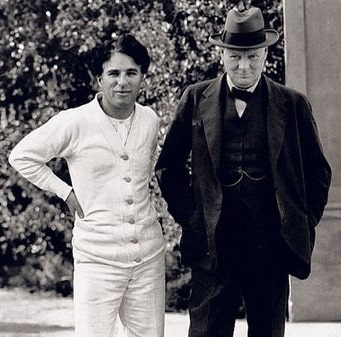
This recent book of the Austrian author Michael K hlmeier, Zwei Herren am Strand (Hanser Verlag), spins a story about an imaginative friendship between Charlie Chaplin and Winston Churchill. While there might not as be more different people than these two, in the book they are connected by a common fight the fight against their own depression, explicitly as well as implicitly by fighting Nazi Germany. Zwei Herren am Strand_ Roman - Michael Koehlmeier Michael K hlmeier s recently released book Zwei Herren am Strand tells the fictive story of Charlie Chaplin and Winston Churchill meeting and becoming friends, helping each other fighting depression and suicide thoughts. Based on a bunch of (fictive) letters of a (fictive) private secretary of Churchill, as well as (fictive) book on Chaplin, the first person narrator dives into the interesting time of the mid-20ies to about the Second World War. churchill-chaplinChaplin is having a hard time after the divorce from his wife Rita, paired with the difficulties at the production of The Circus, and is contemplating suicide. He is conveying this fact to Churchill during a walk on the beach. Churchill is reminded of his own depressions he suffers from early age on. The two of them agree to make a pact fighting the Black Dog inside. Later Churchill asks Chaplin about his method to overcome the phases of depression, and Chaplin explains him the Method of the Clown : Put a huge page of paper on the floor, lie yourself facing down onto the paper and start writing a letter to yourself while rotating clockwise and creating a spiral inward. According to Chaplin, he took this method from Buster Keaton and Harold Lloyd (hard to verify), and it works by making oneself ridiculous, so that one part of oneself can laugh about the other part. The story continues into the early stages of the world war, with both sides fighting Hitler, one politically, one by comedy. The story finishes somewhere in the middle when the two meet while Chaplin is in a deep depression during cutting his movie


The great dictator, and together to manage once more to overcome the black dog .
The book is pure fiction, and K hlmeier dives into a debaucherous story telling, jumping back and forth between several strands of narration lines. An entertaining and very enjoyable book if you are the type of reader that enjoys story telling. For me this book is in best tradition of Michael K hlmeier, whom I consider an excellent story teller. I loved his (unfinished trilogy of) books on Greek mythology (Telemach and Calypso), but found that after these books he got lost too much in radio programs of story telling. While in itself good, I preferred his novels. Thus, I have to admit that I have forgotten about K hlmeier for some years, until recently I found this little book, which reminded me of him and his excellent stories. A book that is if you are versed in German well worth enjoying, especially if one likes funny and a bit queer stories.

10 July 2016

Ritesh Raj Sarraf: Leprosy in India

During my recent travel, I had quite a long layover at the Doha International Airport in Qatar. While killing time, I watched an interesting programme on the Al Jazeera network. The program aired on Al Jazeera is Lifelines. This special episode I watched, covered about "Leprosy in India". After having watched the entire programme, I felt the urge to blog about it. First of all, it was quite depressing to me, to know through the programme, that the Govt. of India had officially marked "Leprosy" eradicated from India in 2005. As per Wikipedia, "Globally in 2012, the number of chronic cases of leprosy was 189,000, down from some 5.2 million in the 1980s. The number of new cases was 230,000. Most new cases occur in 16 countries, with India accounting for more than half." Of the data presented on Lifelines, they just covered a couple of districts from 2 States (of the 28+ States) of India. So, with many states remaining, and unserveyed, and uncounted, we are far away from making such statements. Given that the Govt., on paper, has marked Leprosy eradicated; so does WHO. Which means that there is no more funding to help people suffering from the disease. And with no Govt. (or International) funding, it is a rather disappointing situation. I come from a small town on the Indo-Nepal intl. border, named Raxaul. And here, I grew up seeing many people who suffered from Leprosy. As a child, I never much understood the disease, because as is mentioned in the programme, I was told it was a communicable disease. Those suffering, were (and are) tagged as Untouchables (Hindi: ). Of my small town, there was and still is a sub-town, named Sunderpur. This town houses patients suffering from Leprosy, from around multiple districts closeby. I've never been there, but have been told that it is run by an NGO, and helps patients fight the disease. Lifelines also reported that fresh surveys done by the Lepra society, just a 3 day campaign, resulted in 3808 new cases of people suffering from Leprosy. That is a big number, given accessibility to small towns only happens once a week on market day. And in 3 days the team hardly covered a couple of district towns. My plea to the Media Houses of India. Please spend some time to look beyond the phony stuff that you mostly present. There are real issues that could be brought to a wider audience. As for the government, it is just depressing to know how rogue some/most of your statements are.

Categories:

Keywords:

Like:

Ritesh Raj Sarraf: Leprosy in India

During my recent travel, I had quite a long layover at the Doha International Airport in Qatar. While killing time, I watched an interesting programme on the Al Jazeera network. The program aired on Al Jazeera is Lifelines. This special episode I watched, covered about "Leprosy in India". After having watched the entire programme, I felt the urge to blog about it. First of all, it was quite depressing to me, to know through the programme, that the Govt. of India had officially marked "Leprosy" eradicated from India in 2005. As per Wikipedia, "Globally in 2012, the number of chronic cases of leprosy was 189,000, down from some 5.2 million in the 1980s. The number of new cases was 230,000. Most new cases occur in 16 countries, with India accounting for more than half." Of the data presented on Lifelines, they just covered a couple of districts from 2 States (of the 28+ States) of India. So, with many states remaining, and unserveyed, and uncounted, we are far away from making such statements. Given that the Govt., on paper, has marked Leprosy eradicated; so does WHO. Which means that there is no more funding to help people suffering from the disease. And with no Govt. (or International) funding, it is a rather disappointing situation. I come from a small town on the Indo-Nepal intl. border, named Raxaul. And here, I grew up seeing many people who suffered from Leprosy. As a child, I never much understood the disease, because as is mentioned in the programme, I was told it was a communicable disease. Those suffering, were (and are) tagged as Untouchables (Hindi: ). Of my small town, there was and still is a sub-town, named Sunderpur. This town houses patients suffering from Leprosy, from around multiple districts closeby. I've never been there, but have been told that it is run by an NGO, and helps patients fight the disease. Lifelines also reported that fresh surveys done by the Lepra society, just a 3 day campaign, resulted in 3808 new cases of people suffering from Leprosy. That is a big number, given accessibility to small towns only happens once a week on market day. And in 3 days the team hardly covered a couple of district towns. My plea to the Media Houses of India. Please spend some time to look beyond the phony stuff that you mostly present. There are real issues that could be brought to a wider audience. As for the government, it is just depressing to know how rogue some/most of your statements are.

Categories:

Keywords:

Like:

Craig Small: procps 3.3.12

The procps developers are happy to announce that version 3.3.12 of procps was released today. This version has a mixture of bug fixes and enhancements. This unfortunately means another API bump but we are hoping this will be fixed with the new library API coming soon. procps is developed on gitlab and the new version of procps can be found at https://gitlab.com/procps-ng/procps/tree/newlib procps 3.3.12 can be found at https://gitlab.com/procps-ng/procps/tags/v3.3.12 From the NEWS file, procps 3.1.12 has the following: We are hoping this will be the last one to use the old API and the new format API ( imaginatively called newlib ) will be used in subsequent releases. Feedback for this and any other version of procps can be sent to either the issue tracker or the development email list.

8 July 2016

Joey Hess: twenty years of free software -- part 11 concurrent-output

concurrent-output is a more meaty Haskell library than the ones I've covered so far. Its interface is simple, but there's a lot of complexity under the hood. Things like optimised console updates, ANSI escape sequence parsing, and transparent paging of buffers to disk. It developed out of needing to display multiple progress bars on the console in git-annex, and also turned out to be useful in propellor. And since it solves a general problem, other haskell programs are moving toward using it, like shake and stack. Next: twenty years of free software -- part 12 propellor

Reproducible builds folks: Managing container and environment state

Author: ceridwen With some more help from Martin Pitt, it became clear to me that my previous mental model of how autopkgtest worked is very different from how it does work. I'll illustrate by borrowing my previous example. I know that schroot has the following behavior:
The default behaviour is as follows (all directory paths are inside the chroot). A login shell is run in the current working directory. If this is not available, it will try $HOME (when --preserve-environment is used), then the user's home directory, and / inside the chroot in turn. A command is always run in the current working directory inside the chroot. If none of the directories are available, schroot will exit with an error status.
I was naively thinking that the way autopkgtest would work is that it would set the current working directory of the schroot call and the ensuing subprocess call would thus take place in that directory inside the schroot. That is not how it works. If you want to change directories inside the virtual server, you have to use cd. The same is true of, at least, environment variables, which have their own specific handling in the adt_testbed.Testbed methods but have to be passed as strings, and umask. I'm assuming this is because the direct methods with qemu images or LXC containers don't work. What this means is that I was thinking about the problem the wrong way: what reprotest needs to do is generate shell scripts. This is how autopkgtest works. If this goes beyond laying out commands linearly one after another, for instance if it demands conditionals or other nested constructs, the right way to do it is to build an abstract syntax tree representation of the shell script and then convert it to code. Whether I need more complicated shell scripts depends on my approach to handling state in the containers. I need to know what state persists across separate command executions: if I call adt_testbed.Testbed.execute() twice, what if any changes I make to the container will carry forward from the first to the second? There are three categories here. First, some properties of a system aren't preserved even from one command execution to the next, like working directory and environment variables. (I thought working directory would be preserved, but it's not). The second is state that persists while the testbed is open and is then automatically reverted when it's closed, like files copied into temporary directories on the tesbed. The third is state that persists across different sessions on the same container and must be cleaned up by reprotest. It's worth noting that which state falls into which category may vary by the container in question, though for the most part I can either do unnecessary cleanup or issue unnecessary commands to handle the differences. autopkgtest itself has a very different approach to cleanup, as it relies almost entirely on the builtin reversion capabilities from some of its containers. I would prefer to avoid doing the same, partly because I know that some of the modifications I need to make, for instance creating new users or mounting disorderfs, can't be reverted by the faster, simpler containers like schroot. From discussions with Lunar, I think that the variations that correspond to environment variables (captures_environment, home, locales, path, and timezone) fall into the first category, but because of the special handling for them they don't require sending a separate command. The shell (bash foo) accepts a script or command as an argument so it also doesn't need a separate command. Setting the working directory and umask require separate commands that have to be joined. On Linux, setarch also accepts a command/script as an argument so can be handled like the shell, but there's no unified POSIX protocol for mocking uname so other OSes will require different approaches. Users, groups, file ordering, host, and domain will require cleanup in all containers except for (maybe) qemu. If I want to handle the cleanup in the shell scripts themselves, I need conditionals so that for instance the shell script only tries to unmount disorderfs if disorderfs was successfully mounted. This approach would simplify the error handling problems I've had before, where when a build crashes cleanup code run from Python doesn't get run until after the testbed stop accepting commands. Lunar suggested the Plumbum library to me, and I think I can use it to avoid writing my own shell AST library. It has a method that converts the Python representation of a shell script into a string that can be passed to Testbed.command(). Integrating Plumbum to generate the necessary scripts is where I'm going in the next week. Any feedback on any of this is welcome. I'm also curious what other projects are using autopkgtest code. Holger brought to my attention piuparts, which brings the list up to four that I'm aware of, autopkgtest itself, sbuild, piuparts, and now reprotest.

Russell Coker: Nexus 6P and Galaxy S5 Mini

Just over a month ago I ordered a new Nexus 6P [1]. I ve had it for over a month now and it s time to review it and the Samsung Galaxy S5 Mini I also bought. Security The first noteworthy thing about this phone is the fingerprint scanner on the back. The recommended configuration is to use your fingerprint for unlocking the phone which allows a single touch on the scanner to unlock the screen without the need to press any other buttons. To unlock with a pattern or password you need to first press the power button to get the phone s attention. I have been considering registering a fingerprint from my non-dominant hand to reduce the incidence of accidentally unlocking it when carrying it or fiddling with it. The phone won t complete the boot process before being unlocked. This is a good security feature. Android version 6 doesn t assign permissions to apps at install time, they have to be enabled at run time (at least for apps that support Android 6). So you get lots of questions while running apps about what they are permitted to do. Unfortunately there s no allow for the duration of this session option. A new Android feature prevents changing security settings when there is an overlay running . The phone instructs you to disable overlay access for the app in question but that s not necessary. All that is necessary is for the app to stop using the overlay feature. I use the Twilight app [2] to dim the screen and use redder colors at night. When I want to change settings at night I just have to pause that app and there s no need to remove the access from it note that all the web pages and online documentation saying otherwise is wrong. Another new feature is to not require unlocking while at home. This can be a convenience feature but fingerprint unlocking is so easy that it doesn t provide much benefit. The downside of enabling this is that if someone stole your phone they could visit your home to get it unlocked. Also police who didn t have a warrant permitting search of a phone could do so anyway without needing to compel the owner to give up the password. Design This is one of the 2 most attractive phones I ve owned (the other being the sparkly Nexus 4). I think that the general impression of the appearance is positive as there are transparent cases on sale. My phone is white and reminds me of EVE from the movie Wall-E. Cables This phone uses the USB Type-C connector, which isn t news to anyone. What I didn t realise is that full USB-C requires that connector at both ends as it s not permitted to have a data cable with USB-C at the device and and USB-A at the host end. The Nexus 6P ships with a 1M long charging cable that has USB-C at both ends and a ~10cm charging cable with USB-C at one end and type A at the other (for the old batteries and the PCs that don t have USB-C). I bought some 2M long USB-C to USB-A cables for charging my new phone with my old chargers, but I haven t yet got a 1M long cable. Sometimes I need a cable that s longer than 10cm but shorter than 2M. The USB-C cables are all significantly thicker than older USB cables. Part of that would be due to having many more wires but presumably part of it would be due to having thicker power wires for delivering 3A. I haven t measured power draw but it does seem to charge faster than older phones. Overall the process of converting to USB-C is going to be a lot more inconvenient than USB SuperSpeed (which I could basically ignore as non-SuperSpeed connectors worked). It will be good when laptops with USB-C support become common, it should allow thinner laptops with more ports. One problem I initially had with my Samsung Galaxy Note 3 was the Micro-USB SuperSpeed socket on the phone being more fiddly for the Micro-USB charging plug I used. After a while I got used to that but it was still an annoyance. Having a symmetrical plug that can go into the phone either way is a significant convenience. Calendars and Contacts I share most phone contacts with my wife and also have another list that is separate. In the past I had used the Samsung contacts system for the contacts that were specific to my phone and a Google account for contacts that are shared between our phones. Now that I m using a non-Samsung phone I got another Gmail account for the purpose of storing contacts. Fortunately you can get as many Gmail accounts as you want. But it would be nice if Google supported multiple contact lists and multiple calendars on a single account. Samsung Galaxy S5 Mini Shortly after buying the Nexus 6P I decided that I spend enough time in pools and hot tubs that having a waterproof phone would be a good idea. Probably most people wouldn t consider reading email in a hot tub on a cruise ship to be an ideal holiday, but it works for me. The Galaxy S5 Mini seems to be the cheapest new phone that s waterproof. It is small and has a relatively low resolution screen, but it s more than adequate for a device that I ll use for an average of a few hours a week. I don t plan to get a SIM for it, I ll just use Wifi from my main phone. One noteworthy thing is the amount of bloatware on the Samsung. Usually when configuring a new phone I m so excited about fancy new hardware that I don t notice it much. But this time buying the new phone wasn t particularly exciting as I had just bought a phone that s much better. So I had more time to notice all the annoyances of having to download updates to Samsung apps that I ll never use. The Samsung device manager facility has been useful for me in the past and the Samsung contact list was useful for keeping a second address book until I got a Nexus phone. But most of the Samsung apps and 3d party apps aren t useful at all. It s bad enough having to install all the Google core apps. I ve never read mail from my Gmail account on my phone. I use Fetchmail to transfer it to an IMAP folder on my personal mail server and I d rather not have the Gmail app on my Android devices. Having any apps other than the bare minimum seems like a bad idea, more apps in the Android image means larger downloads for an over-the-air update and also more space used in the main partition for updates to apps that you don t use. Not So Exciting In recent times there hasn t been much potential for new features in phones. All phones have enough RAM and screen space for all common apps. While the S5 Mini has a small screen it s not that small, I spent many years with desktop PCs that had a similar resolution. So while the S5 Mini was released a couple of years ago that doesn t matter much for most common use. I wouldn t want it for my main phone but for a secondary phone it s quite good. The Nexus 6P is a very nice phone, but apart from USB-C, the fingerprint reader, and the lack of a stylus there s not much noticeable difference between that and the Samsung Galaxy Note 3 I was using before. I m generally happy with my Nexus 6P, but I think that anyone who chooses to buy a cheaper phone probably isn t going to be missing a lot.

7 July 2016

Petter Reinholdtsen: Unlocking HTC Desire HD on Linux using unruu and fastboot

Yesterday, I tried to unlock a HTC Desire HD phone, and it proved to be a slight challenge. Here is the recipe if I ever need to do it again. It all started by me wanting to try the recipe to set up an hardened Android installation from the Tor project blog on a device I had access to. It is a old mobile phone with a broken microphone The initial idea had been to just install CyanogenMod on it, but did not quite find time to start on it until a few days ago. The unlock process is supposed to be simple: (1) Boot into the boot loader (press volume down and power at the same time), (2) select 'fastboot' before (3) connecting the device via USB to a Linux machine, (4) request the device identifier token by running 'fastboot oem get_identifier_token', (5) request the device unlocking key using the HTC developer web site and unlock the phone using the key file emailed to you. Unfortunately, this only work fi you have hboot version 2.00.0029 or newer, and the device I was working on had 2.00.0027. This apparently can be easily fixed by downloading a Windows program and running it on your Windows machine, if you accept the terms Microsoft require you to accept to use Windows - which I do not. So I had to come up with a different approach. I got a lot of help from AndyCap on #nuug, and would not have been able to get this working without him. First I needed to extract the hboot firmware from the windows binary for HTC Desire HD downloaded as 'the RUU' from HTC. For this there is is a github project named unruu using libunshield. The unshield tool did not recognise the file format, but unruu worked and extracted rom.zip, containing the new hboot firmware and a text file describing which devices it would work for. Next, I needed to get the new firmware into the device. For this I followed some instructions available from HTC1Guru.com, and ran these commands as root on a Linux machine with Debian testing:
adb reboot-bootloader
fastboot oem rebootRUU
fastboot flash zip rom.zip
fastboot reboot
The flash command apparently need to be done twice to take effect, as the first is just preparations and the second one do the flashing. The adb command is just to get to the boot loader menu, so turning the device on while holding volume down and the power button should work too. With the new hboot version in place I could start following the instructions on the HTC developer web site. I got the device token like this:
fastboot oem get_identifier_token 2>&1   sed 's/(bootloader) //'
And once I got the unlock code via email, I could use it like this:
fastboot flash unlocktoken Unlock_code.bin
And with that final step in place, the phone was unlocked and I could start stuffing the software of my own choosing into the device. So far I only inserted a replacement recovery image to wipe the phone before I start. We will see what happen next. Perhaps I should install Debian on it. :)

Ben Hutchings: Debian LTS work, June 2016

I was assigned another 15 hours of work by Freexian's Debian LTS initiative and carried over 5 from last month. I worked a total of 19 hours, carrying over 1. I spent a week in the Front Desk role and triaged many new security issues for wheezy. I prepared the Linux 3.2.81 stable update, sent it out for review and finally released it. I then rebased the wheezy-security branch on top of that and added some later security fixes that were not yet suitable for a kernel.org update. I uploaded to wheezy-security and issued DLA-516-1. I started working on the next Linux stable updates (3.2.82 and the next wheezy LTS update) and on an update for imagemagick, but haven't uploaded anything for them yet.

Markus Koschany: My Free Software Activities in June 2016

My monthly report covers what I have been doing for Debian. I write it for Debian s Long Term Support sponsors but also for the wider free software community in the hope that it might inspire people to get more involved with Debian or free software in general. Debian Android Debian Games Debian Java Debian LTS This was my fifth month as a paid contributor and I have been paid to work 19,75 hours on Debian LTS. In that time I did the following: QA uploads

6 July 2016

Daniel Pocock: Avoiding SMS vendor lock-in with SMPP

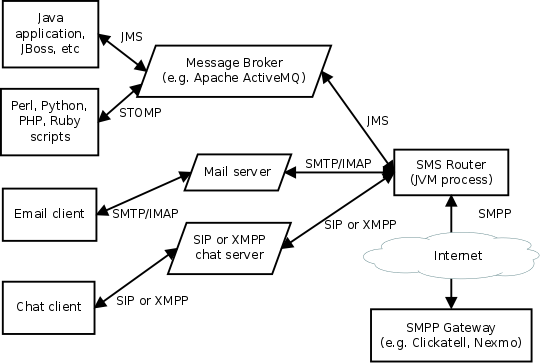
There is increasing demand for SMS notifications about monitoring alerts, trading notifications, flight delays and other events. Various companies are offering SMS transmission services to meet this demand and many of them aggressively pushing their own proprietary interfaces to the SMS world rather than using the more open and widely supported SMPP. There is good reason for this: if users write lots of of scripts to access the REST API of an SMS service, the users won't be able to change their service provider without having to change all their code. Well, that is good if you are an SMPP vendor but not if you are their customer. If an SMS gateway company goes out of business or has a system meltdown, the customers linked to their REST API will have a much bigger effort to migrate to a new provider than those using SMPP. The HTTP REST APIs offered by many vendors hide some details of the SMS protocol and payload. At first glance, this may feel easier. In fact, this leads to unpredictable results when delivering messages to users in different countries and different character sets/languages. It is better to start with SMPP from the beginning and avoid discovering those pitfalls later. The SMS Router free/open source software project helps overcome the SMPP learning curve by using APIs you are already familiar with. More troublesome for large organizations, some of the REST APIs offered by SMS gateways want to make callbacks to your own servers: this means your servers need public IP addresses accessible from the Internet. In some organizations that can take months to organize. SMPP works over one or more outgoing TCP connections initiated from your own server(s) and doesn't require any callback connections from the SMPP gateway. SMS Router lets SMS users have the best of both worlds: the flexibility of linking to any provider who supports SMPP and the convenience of putting messages into the system using any of the transports supported by an Apache Camel component. Popular examples include camel-jms (JMS) for Java and J2EE users, STOMP for scripting languages, camel-mail (SMTP and IMAP) for email integration and camel-sip (SIP) or camel-xmpp (XMPP) for chat/instant messaging systems. If you really want to, you can also create your own in-house HTTP REST API too using camel-restlet for internal applications. In all these cases, SMS Router always uses standard SMPP to reach any gateway of your choice. Architecture overview SMS Router is based on Apache Camel. Multiple instances can be operated in parallel for clustering, load balancing and high availability. It can be monitored using JMX solutions such as JMXetric. The SMPP support is based on the camel-smpp component which is in turn based on the jSMPP library, which comprehensively implements the SMPP protocol in Java. camel-smpp can be used with minimal configuration but for those who want to, many SMPP features can be tweaked on a per-message basis using various headers. The SMPP gateway settings can be configured and changed at will using the sms-router.properties file. The process doesn't require any other files or databases at runtime. The SMS Router is ready-to-run with one queue for sending messages and another queue for incoming messages. The routing logic can be customized by editing the RouteBuilder class to use other Camel components or any of Camel's wide range of functions for inspecting, modifying and routing messages. For example, you can extend it to failover to multiple SMPP gateways using Camel's load-balancer pattern. SMS Router based projects are already used successfully in production, for example, the user registration mechanism for the Lumicall secure VoIP app for Android. Getting started See the README for instructions. Feel free to ask questions about this project on the Camel users mailing list. Disclaimer SMS is not considered secure, the SMS Router developers and telecommunications industry experts discourage the use of this technology for two-factor authentication. Please see the longer disclaimer in the README file and my earlier blog about SMS logins: an illusion of security. The bottom line: if your application is important enough to need two-factor authentication, do it correctly using smart cards or tokens. There are many popular free software projects based on these full cryptographic solutions, for example, the oath-toolkit and dynalogin.

Next.

Previous.