Search Results: "tin"

8 July 2023

Dirk Eddelbuettel: #40: Another r2u Example Making Colab Easier

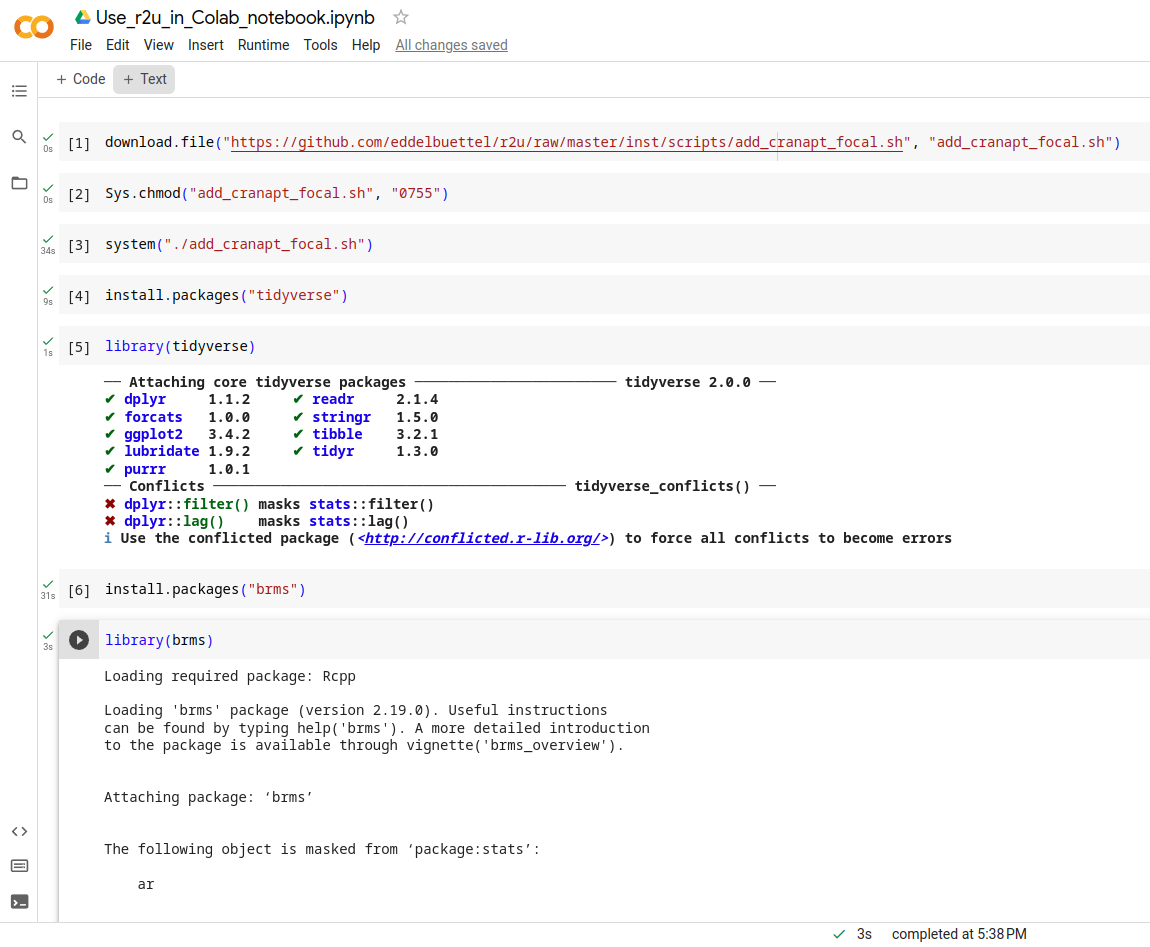
Welcome to the 40th post in the $R^4 series. This one will just be a very brief illustration of r2u use in what might be an unexpected place: Google Colab. Colab has a strong bent towards Jupyter and Python but has been supporting R compute kernels for some time (by changing what they call the runtime ). And with a little exploration one can identify these are (currently, as of July 2023) running Ubuntu 20.04 aka focal . Which is of course one of two system supported by our lovely r2u project (with the other being the newer 22.04 aka jammy ). And I mostly tweeted / tooted about r2u since the its introduction in #37. And gave basically just a mention in passing in faster feedback post #38 as well as the faster feedback in ci post #39). So a brief recap may be in order. In essence, r2u makes all of CRAN available as full-fledged Ubuntu binaries with complete and full dependencies which are then installed directly and quickly via apt. Which, to top it of, are accessed directly from R via install.packages() so no special knowledge or sauce needed. We often summarize it as fast, easy, reliable: what is not to like . And, as we established in a few minutes of probing, it also works in the focal -based Colab session. The screen shot shows the basic step of fetching the setup script (for plain Ubuntu focal system) from r2u, making it executable and running it. Total time: 34 seconds. And after that we see the pure magic of install.packages("tidyverse") installing all of it in nine seconds. Additionally, we add the brms package in thirty-one seconds cia install.packages("brms"). Both load just fine and echo their current values.
r2u on colab focal r2u on colab focal
The commands that are executed in that R session are just
download.file("https://github.com/eddelbuettel/r2u/raw/master/inst/scripts/add_cranapt_focal.sh",
              "add_cranapt_focal.sh")
Sys.chmod("add_cranapt_focal.sh", "0755")
system("./add_cranapt_focal.sh")
install.packages("tidyverse")
library(tidyverse)
install.packages("brms")
library(brms)
The timings are the Colab notebook are visible in the left margin. The lack of output makes debugging a little trickier so I still recommend to use r2u for first expploration via a Docker container as e.g. rocker/r2u:jammy. More information about r2u is at its site, and we answered some question in issues, and at stackoverflow. More questions are always welcome! If you like this or other open-source work I do, you can now sponsor me at GitHub.

This post by Dirk Eddelbuettel originated on his Thinking inside the box blog. Please report excessive re-aggregation in third-party for-profit settings.

Lisandro Dami n Nicanor P rez Meyer: Open question: Podman and user/group IDs

Here is an open question for Podman users: is there a (ideally simple) way to keep the user/group ID between the real system and the container? Let me be more verbose. I use Docker mostly in two "special" cases: Now in both setups I mount some system directory into the chroot, normally as $HOME. Using Docker I can do the right UID/GID mapping and any file I create inside the container will have my system's UID/GID. And that's the thing I so far could not do with Podman. So dear Podman user: is there any way to do this with Podman? If you know, please feel free to send a comment/email!

Russell Coker: Sandboxing Phone Apps

As a follow up to Wayland [1]: A difficult problem with Linux desktop systems (which includes phones and tablets) is restricting application access so that applications can t mess with each other s data or configuration but also allowing them to share data as needed. This has been mostly solved for Android but that involved giving up all legacy Linux apps. I think that we need to get phones capable of running a full desktop environment and having Android level security on phone apps and regular desktop apps. My interest in this is phones running Debian and derivatives such as PureOS. But everything I describe in this post should work equally well for all full featured Linux distributions for phones such as Arch, Gentoo, etc and phone based derivatives of those such as Manjaro. It may be slightly less applicable to distributions such as Alpine Linux and it s phone derivative PostmarketOS, I would appreciate comments from contributors to PostmarketOS or Alpine Linux about this. I ve investigated some of the ways of solving these problems. Many of the ways of doing this involves namespaces. The LWN articles about namespaces are a good background to some of these technologies [2]. The LCA keynote lecture Containers aka crazy user space fun by Jess Frazelle has a good summary of some of the technology [3]. One part that I found particularly interesting was the bit about recognising the container access needed at compile time. This can also be part of recognising bad application design at compile time, it s quite common for security systems to flag bad security design in programs. Firejail To sandbox applications you need to have some method of restricting what they do, this means some combination of namespaces and similar features. Here s an article on sandboxing with firejail [4]. Firejail uses namespaces, seccomp-bpf, and capabilities to restrict programs. It allows bind mounts if run as root and if not run as root it can restrict file access by name and access to networking, system calls, and other features. It has a convenient learning mode that generates policy for you, so if you have a certain restricted set of tasks that an application is to perform you can run it once and then force it to do only the same operations in future. I recommend that everyone who is still reading at this point try out firejail. Here s an example of what you can do:
# create a profile
firejail --build=xterm.profile xterm
# now this run can only do what the previous run did
firejail --profile=xterm.profile xterm
Note that firejail is SETUID root so can potentially reduce system security and it has had security issues in the past. In spite of that it can be good for allowing a trusted user to run programs with less access to the system. Also it is a good way to start learning about such things. I don t think it s a good solution for what I want to do. But I won t rule out the possibility of using it at some future time for special situations. Bubblewrap I tried out firejail with the browser Epiphany (Debian package epiphany-browser) on my Librem5, but that didn t work as Epiphany uses /usr/bin/bwrap (bubblewrap) for it s internal sandboxing (here is an informative blog post about the history of bubblewrap AKA xdg-app-helper which was developed as part of flatpak [5]). The Epiphany bubblewrap sandbox is similar to the situation with Chrome/Chromium which have internal sandboxing that s incompatible with firejail. The firejail man page notes that it s not compatible with Snap, Flatpack, and similar technologies. One issue this raises is that we can t have a namespace based sandboxing system applied to all desktop apps with no extra configuration as some desktop apps won t work with it. Bubblewrap requires setting kernel.unprivileged_userns_clone=1 to run as non-root (IE provide the normal and expected functionality) which potentially reduces system security. Here is an example of a past kernel bug that was exploitable by creating a user namespace with CAP_SYS_ADMIN [6]. But it s the default in recent Debian kernels which means that the issues have been reviewed and determined to be a reasonable trade-off and also means that many programs will use the feature and break if it s disabled. Here is an example of how to use Bubblewrap on Debian, after installing the bubblewrap run the following command. Note that the new-session option (to prevent injecting characters in the keyboard buffer with TIOCSTI) makes the session mostly unusable for a shell.
bwrap --ro-bind /usr /usr --symlink usr/lib64 /lib64 --symlink usr/lib /lib --proc /proc --dev /dev --unshare-pid --die-with-parent bash
Here is an example of using Bubblewrap to sandbox the game Warzone2100 running with Wayland/Vulkan graphics and Pulseaudio sound.
bwrap --bind $HOME/.local/share/warzone2100 $HOME/.local/share/warzone2100 --bind /run/user/$UID/pulse /run/user/$UID/pulse --bind /run/user/$UID/wayland-0 /run/user/$UID/wayland-0 --bind /run/user/$UID/wayland-0.lock /run/user/$UID/wayland-0.lock --ro-bind /usr /usr --symlink usr/bin /bin --symlink usr/lib64 /lib64 --symlink usr/lib /lib --proc /proc --dev /dev --unshare-pid --dev-bind /dev/dri /dev/dri --ro-bind $HOME/.pulse $HOME/.pulse --ro-bind $XAUTHORITY $XAUTHORITY --ro-bind /sys /sys --new-session --die-with-parent warzone2100
Here is an example of using Bubblewrap to sandbox the Debian bug reporting tool reportbug
bwrap --bind /tmp /tmp --ro-bind /etc /etc --ro-bind /usr /usr --ro-bind /var/lib/dpkg /var/lib/dpkg --symlink usr/sbin /sbin --symlink usr/bin /bin --symlink usr/lib64 /lib64 --symlink usr/lib /lib --symlink /usr/lib32 /lib32 --symlink /usr/libx32 /libx32 --proc /proc --dev /dev --die-with-parent --unshare-ipc --unshare-pid reportbug
Here is an example shell script to wrap the build process for Debian packages. This needs to run with unshare-user and specifying the UID as 0 because fakeroot doesn t work in the container, I haven t worked out why but doing it through the container is a better method anyway. This script shares read-write the parent of the current directory as the Debian build process creates packages and metadata files in the parent directory. This will prevent the automatic signing scripts which is a feature not a bug, so after building packages you have to sign the .changes file with debsign. One thing I just learned is that the Debian build system Sbuild can use chroots for building packages for similar benefits [7]. Some people believe that sbuild is the correct way of doing it regardless of the chroot issue. I think it s too heavy-weight for most of my Debian package building, but even if I had been convinced I d still share the information about how to use bwrap as Debian is about giving users choice.
#!/bin/bash
set -e
BUILDDIR=$(realpath $(pwd)/..)
exec bwrap --bind /tmp /tmp --bind $BUILDDIR $BUILDDIR --ro-bind /etc /etc --ro-bind /usr /usr --ro-bind /var/lib/dpkg /var/lib/dpkg --symlink usr/bin /bin --symlink usr/lib64 /lib64 --symlink usr/lib /lib --proc /proc --dev /dev --die-with-parent --unshare-user --unshare-ipc --unshare-net --unshare-pid --new-session --uid 0 --gid 0 $@
Here is an informative blog post about using Bubblewrap with Seccomp (BPF) [8]. In a future post I ll write about how to get this sort of thing going but I ll just leave the URL here for people who want to do it on their own. The source for the flatpak-run program is the only example I could find of using Seccomp with Bubblewrap [9]. A lot of that code is worth copying for application sandboxing, maybe the entire program. Unshare The unshare command from the util-linux package has a large portion of the Bubblewrap functionality. The things that it doesn t do like creating a new session can be done by other utilities. Here is an example of creating a container with unshare and then using cgroups with it [10]. systemd --user Recent distributions have systemd support for running a user session, the Arch Linux Wiki has a good description of how this works [11]. The units for a user are .service files stored in /usr/lib/systemd/user/ (distribution provided), ~/.local/share/systemd/user/ (user installed applications in debian a link to ~/.config/systemd/user/), ~/.config/systemd/user/ (for manual user config), and /etc/systemd/user/ (local sysadmin provided) Here are some example commands for manipulating this:
# show units running for the current user
systemctl --user
# show status of one unit
systemctl --user status kmail.service
# add an environment variable to the list for all user units
systemctl --user import-environment XAUTHORITY
# start a user unit
systemctl --user start kmail.service
# analyse security for all units for the current user
systemd-analyze --user security
# analyse security for one unit
systemd-analyze --user security kmail.service
Here is a test kmail.service file I wrote to see what could be done for kmail, I don t think that kmail is the app most needing to be restricted it is in more need of being protected from other apps but it still makes a good test case. This service file took it from the default risk score of 9.8 (UNSAFE) to 6.3 (MEDIUM) even though I was getting the error code=exited, status=218/CAPABILITIES when I tried anything that used capabilities (apparently due to systemd having some issue talking to the kernel).
[Unit]
Description=kmail
[Service]
ExecStart=/usr/bin/kmail
# can not limit capabilities (code=exited, status=218/CAPABILITIES)
#CapabilityBoundingSet=~CAP_SYS_TIME CAP_SYS_PACCT CAP_KILL CAP_WAKE_ALARM CAP_DAC_OVERRIDE CAP_DAC_READ_SEARCH CAP_FOWNER CAP_IPC_OWNER CAP_LINUX_IMMUTABLE CAP_IPC_LOCK CAP_SYS_MODULE CAP_SYS_TTY_CONFIG CAP_SYS_BOOT CAP_SYS_CHROOT CAP_BLOCK_SUSPEND CAP_LEASE CAP_MKNOD CAP_CHOWN CAP_FSETID CAP_SETFCAP CAP_SETGID CAP_SETUID CAP_SETPCAP CAP_SYS_RAWIO CAP_SYS_PTRACE CAP_SYS_NICE CAP_SYS_RESOURCE CAP_NET_ADMIN CAP_NET_BIND_SERVICE CAP_NET_BROADCAST CAP_NET_RAW CAP_SYS_ADMIN CAP_SYSLOG
# also 218 for ProtectKernelModules PrivateDevices ProtectKernelLogs ProtectClock
# MemoryDenyWriteExecute stops it displaying message content (bad)
# needs @resources and @mount to startup
# needs @privileged to display message content
SystemCallFilter=~@cpu-emulation @debug @raw-io @reboot @swap @obsolete
SystemCallArchitectures=native
UMask=077
NoNewPrivileges=true
ProtectControlGroups=true
PrivateMounts=false
RestrictNamespaces=~user pid net uts mnt cgroup ipc
RestrictSUIDSGID=true
ProtectHostname=true
LockPersonality=true
ProtectKernelTunables=true
RestrictAddressFamilies=~AF_PACKET
RestrictRealtime=true
ProtectSystem=strict
ProtectProc=invisible
PrivateUsers=true
[Install]
When I tried to use the TemporaryFileSystem=%h directive (to make the home directory a tmpfs the most basic step in restricting what a regular user application can do) I got the error (code=exited, status=226/NAMESPACE) . So I don t think the systemd user setup competes with bubblewrap for restricting user processes. But if anyone else can start where I left off and go further then that will be interesting. Systemd-run The following shell script runs firefox as a dynamic user via systemd-run, running this asks for the root password and any mechanism for allowing that sort of thing opens potential security holes. So at this time while it s an interesting feature I don t think it is suitable for running regular applications on a phone or Linux desktop.
#!/bin/bash
# systemd-run Firefox with DynamicUser and home directory.
#
# Run as a non-root user.
# Or, run as root and change $USER below.
SANDBOX_MINIMAL=(
    --property=DynamicUser=1
    --property=StateDirectory=openstreetmap
    # --property=RootDirectory=/debian_sid
)
SANDBOX_X11=(
    # Sharing Xorg always defeats security, regardless of any sandboxing tech,
    # but the config is almost ready for Wayland, and there's Xephyr.
#    --property=LoadCredential=.ICEauthority:/home/$USER/.ICEauthority
    --property=LoadCredential=.Xauthority:/home/$USER/.Xauthority
    --property=Environment=DISPLAY=:0
)
SANDBOX_FIREFOX=(
    # hardware-accelerated rendering
    --property=BindPaths=/dev/dri
    # webcam
    # --property=SupplementaryGroups=video
)
systemd-run  \
    "$ SANDBOX_MINIMAL[@] "  "$ SANDBOX_X11[@] " "$ SANDBOX_FIREFOX[@] " \
    bash -c '
        export XAUTHORITY="$CREDENTIALS_DIRECTORY"/.Xauthority
        export ICEAUTHORITY="$CREDENTIALS_DIRECTORY"/.ICEauthority
        export HOME="$STATE_DIRECTORY"/home
        firefox --no-remote about:blank
    '
Qubes OS Here is an interesting demo video of QubesOS [12] which shows how it uses multiple VMs to separate different uses. Here is an informative LCA presentation about Qubes which shows how it asks the user about communication between VMs and access to hardware [13]. I recommend that everyone who hasn t seen Qubes in operation watch the first video and everyone who isn t familiar with the computer science behind it watch the second video. Qubes appears to be a free software equivalent to NetTop as far as I can tell without ever being able to use NetTop. I don t think Qubes is a good match for my needs in general use and it definitely isn t a good option for phones (VMs use excessive CPU on phones). But it s methods for controlling access have some ideas that are worth copying. File Access XDG Desktop Portal One core issue for running sandboxed applications is to allow them to access files permitted by the user but no other files. There are two main parts to this problem, the easier one is to have each application have it s own private configuration directory which can be addressed by bind mounts, MAC systems, running each application under a different UID or GID, and many other ways. The hard part of file access is to allow the application to access random files that the user wishes. For example I want my email program, IM program, and web browser to be able to save files and also to be able to send arbitrary files via email, IM, and upload to web sites. But I don t want one of those programs to be able to access all the files from the others if it s compromised. So only giving programs access to arbitrary files when the user chooses such a file makes sense. There is a package xdg-desktop-portal which provides a dbus interface for opening files etc for a sandboxed application [14]. This portal has backends for KDE, GNOME, and Wayland among others which allow the user to choose which file or files the application may access. Chrome/Chromium is one well known program that uses the xdg-desktop-portal and does it s own sandboxing. To use xdg-desktop-portal an application must be modified to use that interface instead of opening files directly, so getting this going with all Internet facing applications will take some work. But the documentation notes that the portal API gives a consistent user interface for operations such as opening files so it can provide benefits even without a sandboxed environment. This technology was developed for Flatpak and is now also used for Snap. It also has a range of APIs for accessing other services [15]. Flatpak Flatpack is a system for distributing containerised versions of applications with some effort made to improve security. Their development of bubblewrap and xdg-desktop-portal is really good work. However the idea of having software packaged with all libraries it needs isn t a good one, here s a blog post covering some of the issues [16]. The web site flatkill.org has been registered to complain about some Flatpak problems [17]. They have some good points about the approach that Flatpak project developers have taken towards some issues. They also make some points about the people who package software not keeping up to date with security fixes and not determining a good security policy for their pak. But this doesn t preclude usefully using parts of the technology for real security benefits. If parts of Flatpak like Bubblewrap and xdg-portal are used with good security policies on programs that are well packaged for a distribution then these issues would be solved. The Flatpak app author s documentation about package requirements [18] has an overview of security features that is quite reasonable. If most paks follow that then it probably isn t too bad. I reviewed the manifests of a few of the recent paks and they seemed to have good settings. In the amount of time I was prepared to spend investigating this I couldn t find evidence to support the Flatkill claim about Flatpaks granting obviously inappropriate permissions. But the fact that the people who run Flathub decided to put a graph of installs over time on the main page for each pak while making the security settings only available by clicking the Manifest github link, clicking on a JSON or YAML file, and then searching for the right section in that shows where their priorities lie. The finish-args section of the Flatpak manifest (the section that describes the access to the system) seems reasonably capable and not difficult for users to specify as well as being in common use. It seems like it will be easy enough to take some code from Flatpak for converting the finish-args into Bubblewrap parameters and then use the manifest files from Flathub as a starting point for writing application security policy for Debian packages. Snap Snap is developed by Canonical and seems like their version of Flatpak with some Docker features for managing versions, the Getting Started document is worth reading [19]. They have Connections between different snaps and the system where a snap registers a plug that connects to a socket which can be exposed by the system (EG the camera socket) or another snap. The local admin can connect and disconnect them. The connections design reminds me of the Android security model with permitting access to various devices. The KDE Neon extension [20] has been written to add Snap support to KDE. Snap seems quite usable if you have an ecosystem of programs using it which Canonical has developed. But it has all the overheads of loopback mounts etc that you don t want on a mobile device and has the security issues of libraries included in snaps not being updated. A quick inspection of an Ubuntu 22.04 system I run (latest stable release) has Firefox 114.0.2-1 installed which includes libgcrypt.so.20.2.5 which is apparently libgcrypt 1.8.5 and there are CVEs relating to libgcrypt versions before 1.9.4 and 1.8.x versions before 1.8.8 which were published in 2021 and updated in 2022. Further investigation showed that libgcrypt came from the gnome-3-38-2004 snap (good that it doesn t require all shared objects to be in the same snap, but that it has old versions in dependencies). The gnome-3-38-2004 snap is the latest version so anyone using the Snap of Firefox seems to have no choice but to have what appears to be insecure libraries. The strict mode means that the Snap in question has no system access other than through interfaces [21]. SE Linux and Apparmor The Librem5 has Apparmor running by default. I looked into writing Apparmor policy to prevent Epiphany from accessing all files under the home directory, but that would be a lot of work. Also at least one person has given up on maintaining an Epiphany profile for Apparmor because it changes often and it s sandbox doesn t work well with Apparmor [22]. This was not a surprise to me at all, SE Linux policy has the same issues as Apparmor in this regard. The Ubuntu Security Team Application Confinement document [23] is worth reading. They have some good plans for using AppArmor as part of solving some of these problems. I plan to use SE Linux for that. Slightly Related Things One thing for the future is some sort of secure boot technology, the LCA lecture Becoming a tyrant: Implementing secure boot in embedded devices [24] has some ideas for the future. The Betrusted project seems really interesting, see Bunnie s lecture about how to create a phone size security device with custom OS [25]. The Betrusted project web page is worth reading too [26]. It would be ironic to have a phone as your main PC that is the same size as your security device, but that seems to be the logical solution to several computing problems. Whonix is a Linux distribution that has one VM for doing Tor stuff and another VM for all other programs which is only allowed to have network access via the Tor VM [27]. Xpra does for X programs what screen/tmux do for text mode programs [28]. It allows isolating X programs from each other in ways that are difficult to impossible with a regular X session. In an ideal situation we could probably get the benefits we need with just using Wayland, but if there are legacy apps that only have X support this could help. Conclusion I think that currently the best option for confining desktop apps is Bubblewrap on Wayland. Maybe with a modified version of Flatpak-run to run it and with app modifications to use the xdg-portal interfaces as much as possible. That should be efficient enough in storage space, storage IO performance, memory use, and CPU use to run on phones while giving some significant benefits. Things to investigate are how much code from Flatpak to use, how to most efficiently do the configuration (maybe the Flatpak way because it s known and seems effective), how to test this (and have regression tests), and what default settings to use. Also BPF is a big thing to investigate.

7 July 2023

Dirk Eddelbuettel: digest 0.6.33 on CRAN: Bugfix

Release 0.6.33 of the digest package arrived at CRAN today and has been uploaded to Debian already. digest creates hash digests of arbitrary R objects (using the md5, sha-1, sha-256, sha-512, crc32, xxhash32, xxhash64, murmur32, spookyhash, blake3, and crc32c algorithms) permitting easy comparison of R language objects. It is a mature and widely-used (with 58.6 million downloads just on the partial cloud mirrors of CRAN which keep logs) as many tasks may involve caching of objects for which it provides convenient general-purpose hash key generation to quickly identify the various objects. This release corrects a bad bug we accidentally introduced in release 0.6.32 a little under two weeks ago. As described we added crc32c and aimed for the simple portable approach (given that the accelerated version is now availble in our package crc32c) but overlooked one setting which promptly broked compilation on M1/M2/Arm64 (which we do not have access too, sadly). This was actually reported in issue #189 on the very day 0.6.32 was released and even before we got to blog about its announcement so that we could even mention it in the third paragraph there. This fix was a one-liner, and was committed hours later. Now, as it sometimes happens, processing the new upload at CRAN took some time. They appeared to be down the next day not processing anything. Once opened again, they reported changes to worse as can be seen in reverse-dependency checks. Turns out those were false positive ( it happens ) but then the package lingered a little longer and quite a lot of folks chimed in at in issue #189. I have now learned that there were in fact some temporary hardware issues in one of the CRAN locations, so it all had a reason but most importantly it is all better now. My apologies for the temporary breakage, we attempted to address it swiftly but sometimes things beyond our control (and reach) do slow things down. Now new and fixed binaries should appear in the next few days. My CRANberries provides the usual summary of changes to the previous version. For questions or comments use the issue tracker off the GitHub repo. If you like this or other open-source work I do, you can now sponsor me at GitHub.

This post by Dirk Eddelbuettel originated on his Thinking inside the box blog. Please report excessive re-aggregation in third-party for-profit settings.

Dirk Eddelbuettel: Rcpp 1.0.11 on CRAN: Updates and Maintenance

rcpp logo The Rcpp Core Team is delighted to announce that the newest release 1.0.11 of the Rcpp package arrived on CRAN and in Debian earlier today. Windows and macOS builds should appear at CRAN in the next few days, as will builds in different Linux distribution and of course at r2u. The release was finalized three days ago, but given the widespread use and extended reverse dependencies at CRAN it usually takes a few days to be processed. This release continues with the six-months January-July cycle started with release 1.0.5 in July 2020. As a reminder, we do of course make interim snapshot dev or rc releases available via the Rcpp drat repo and strongly encourage their use and testing I run my systems with these versions which tend to work just as well, and are also fully tested against all reverse-dependencies. Rcpp has long established itself as the most popular way of enhancing R with C or C++ code. Right now, 2720 packages on CRAN depend on Rcpp for making analytical code go faster and further, along with 251 in BioConductor. On CRAN, 13.7% of all packages depend (directly) on Rcpp, and 59.6% of all compiled packages do. From the cloud mirror of CRAN (which is but a subset of all CRAN downloads), Rcpp has been downloaded 72.5 million times. The two published papers (also included in the package as preprint vignettes) have, respectively, 1678 (JSS, 2011) and 259 (TAS, 2018) citations, while the the book (Springer useR!, 2013) has another 588. This release is incremental as usual, generally preserving existing capabilities faithfully while smoothing our corners and / or extending slightly, sometimes in response to changing and tightened demands from CRAN or R standards. The full list below details all changes, their respective PRs and, if applicable, issue tickets. Big thanks from all of us to all contributors!
Changes in Rcpp version 1.0.11 (2023-07-03)
  • Changes in Rcpp API:
    • Rcpp:::CxxFlags() now quotes only non-standard include path on linux (Lukasz in #1243 closing #1242).
    • Two unit tests no longer accidentally bark on stdout (Dirk and I aki in #1245).
    • Compilation under C++20 using clang++ and its standard library is enabled (Dirk in #1248 closing #1244).
    • Use backticks in a generated .Call() statement in RcppExports.R (Dirk #1256 closing #1255).
    • Switch to system2() to capture standard error messages in error cases (I aki in #1259 and #1261 fixing #1257).
  • Changes in Rcpp Documentation:
    • The CITATION file format has been updated (Dirk in #1250 fixing #1249).
  • Changes in Rcpp Deployment:
    • A test for qnorm now uses the more accurate value from R 4.3.0 (Dirk in #1252 and #1260 fixing #1251).
    • Skip tests with path issues on Windows (I aki in #1258).
    • Container deployment in continuous integrations was improved. (I aki and Dirk in #1264, Dirk in #1269).
    • Several files receives minor edits to please R CMD check from r-devel (Dirk in #1267).

Thanks to my CRANberries, you can also look at a diff to the previous release. Questions, comments etc should go to the rcpp-devel mailing list off the R-Forge page. Bugs reports are welcome at the GitHub issue tracker as well (where one can also search among open or closed issues); questions are also welcome under rcpp tag at StackOverflow which also allows searching among the (currently) 2994 previous questions. If you like this or other open-source work I do, you can sponsor me at GitHub.

This post by Dirk Eddelbuettel originated on his Thinking inside the box blog. Please report excessive re-aggregation in third-party for-profit settings.

6 July 2023

Thorsten Alteholz: My Debian Activities in June 2023

FTP master This month I accepted 221 and rejected 33 packages. The overall number of packages that got accepted was 221. Yeah, Bookworm was released this month. Thanks a lot to everybody who was involved in doing this. Debian LTS This was my hundred-eighth month that I did some work for the Debian LTS initiative, started by Raphael Hertzog at Freexian. This month my all in all workload has been 14h. During that time I uploaded: I also did some work on security-master to inject missing dependencies for some packages and processed NEW. Last but not least I did some days on frontdesk duties and took part in the LTS meeting. Debian ELTS This month was the fifty ninth ELTS month. I also made some progress with the openssl1.0 update. Last but not least I did some days on frontdesk duties. Debian Astro This month I uploaded some packages to fix one or the other issue: This month I even uploaded a new package c-munipack, which is more or less the successor of munipack, and can be used for example to analyse light curves of variable stars.
Another new package is virtualgps, where the name says it all. Debian Printing This month I did a security upload of cpdb-libs to fix a CVE in Unstable, Bookworm and Bullseye.
This work is generously funded by Freexian! Debian Mobcom This month I could upload a new version of: Other stuff This month I restarted DOPOM (Debian Orphaned Package Of the Month) and adopted: Hopefully this will result in a new upload of vdr-plugin-live. I would like to have this package for my personal VDR. I also did an upload of:

5 July 2023

Reproducible Builds: Reproducible Builds Summit 2023 in Hamburg

We are glad to announce the upcoming Reproducible Builds Summit, set to take place from October 31st to November 2nd, 2023, in the vibrant city of Hamburg, Germany. This year, we are thrilled to host the seventh edition of this exciting event following the success of previous summits in various iconic locations around the world, including Venice (2022), Marrakesh (2019), Paris (2018), Berlin (2017), Berlin (2016) Athens (2015). If you re excited about joining us this year, please make sure to read the event page which has more details about the event and location. As in previous years, we will be sending invitations to all those who attended our previous summit events or expressed interest to do so. However also without receiving such a personal invitation please do email the organizers and we will find a way to accommodate you.

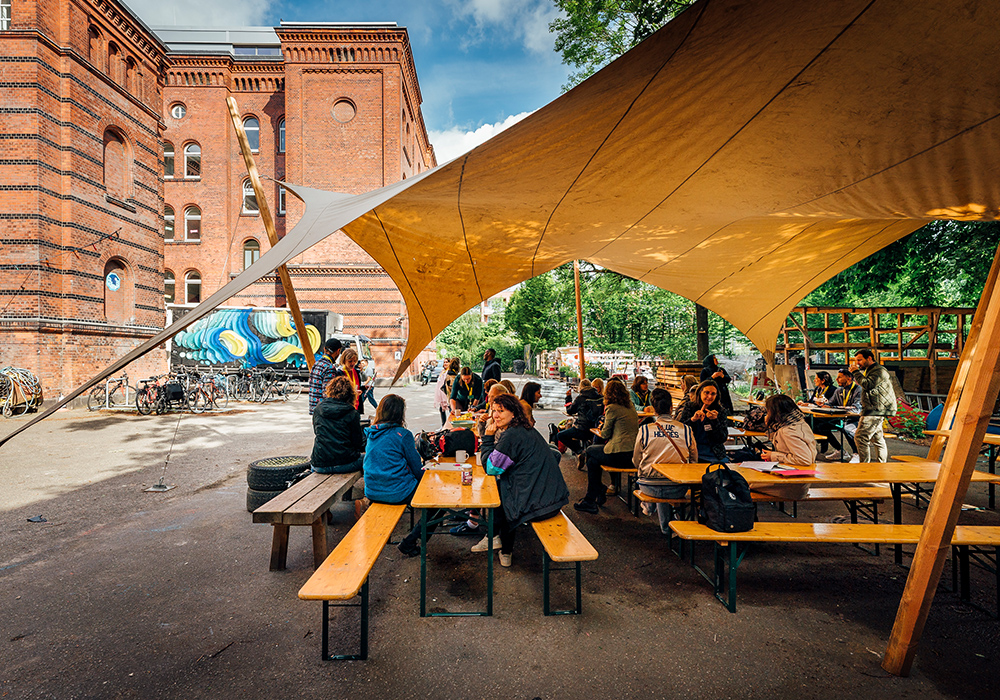
About the event The Reproducible Builds Summit is a unique gathering that brings together attendees from diverse projects, united by a shared vision of advancing the Reproducible Builds effort. During this enriching event, participants will have the opportunity to engage in discussions, establish connections and exchange ideas to drive progress in this vital field. Our aim is to create an inclusive space that fosters collaboration, innovation and problem-solving. With your help, we will bring this space (and several other inside areas) into life:
The outside area at dock-europe (source: dock-europe.net)

Schedule Although the exact content of the meeting will be shaped by the participants, the main goals will include:
  • Update & exchange about the status of reproducible builds in various projects.
  • Improve collaboration both between and inside projects.
  • Expand the scope and reach of reproducible builds to more projects.
  • Work together and hack on solutions.
  • Establish space for more strategic and long-term thinking than is possible in virtual channels.
  • Brainstorm designs on tools enabling users to get the most benefits from reproducible builds.
  • Discuss how reproducible builds will be usable and meaningful to users and developers alike.
Logs and minutes will be published after the meeting.

Location & date
  • October 31st to November 2nd, 2023
  • Dock Europe, Zeiseweg 9, 22765, Hamburg, Germany.

Registration instructions Please reach out if you d like to participate in hopefully interesting, inspiring and intense technical sessions about reproducible builds and beyond! We look forward to what we anticipate to be an extraordinary event!

2 July 2023

Dirk Eddelbuettel: RcppAnnoy 0.0.21 on CRAN: Upstream Update

annoy image Another minor maintenance release, now at version 0.0.20, of RcppAnnoy has arrived on CRAN. RcppAnnoy is the Rcpp-based R integration of the nifty Annoy library by Erik Bernhardsson. Annoy is a small and lightweight C++ template header library for very fast approximate nearest neighbours originally developed to drive the Spotify music discovery algorithm. This release mainly updates the included copy of Annoy to version 1.7.3 which now provides a C++ namespace in the header API. So I sent a pair of PRs to uwot to update its (compiled) use, which James promptly merged. With that the CRAN update was once again seamless. Otherwise the package follows current custom by moving away from C++11 as a set compilation standard to be open for more modern C++ idioms. Here, this allows in particular for possible multithreaded indexing for which everything needed is in C++17. However, we did not turn multithreaded indexing on as the RNG use is such that the streams would differ leading to slightly different (if of course equivalent) results. Users can enable this by recompiling with the switch flipped, see src/Makevars.

Changes in version 0.0.21 (2023-07-02)
  • The build setup switched from C++11 to C++17 which offers threading support (which remains off by default to ensure consistent results)
  • Upstream code was update to Annoy 1.17.3, the switch to an explicit C++ namespace has been accomodated (Dirk in #75)

Courtesy of my CRANberries, there is also a diffstat report for this release. If you like this or other open-source work I do, you can sponsor me at GitHub.

This post by Dirk Eddelbuettel originated on his Thinking inside the box blog. Please report excessive re-aggregation in third-party for-profit settings.

1 July 2023

Dirk Eddelbuettel: New Achievement Unlocked: Bugfix Patch into Stable Release Update

Last weekend was the bi-annual time to roll the main machine and server to the current Ubuntu release, now at 23.04. It must now have been fifteen or so years that I have used Ubuntu for my desktop / server (for reasons I may write about another time). And of course it all passed swimmingly as usual. [ And a small aside, if I may. Among all these upgrades, one of my favourite piece of tech trivia that may well be too little known remains the dedication of the PostgreSQL maintainers installing the new version, now PostgreSQL 15, seamlessly in parallel with the existing one, in my case PostgreSQL 14, keeping both running (!!) on two neighbouring ports (!!) so that there is no service disruption. So at some point, maybe this weekend, I will run the provided script to dump-and-restore to trigger the database migration at my convenience. Happy PostgreSQL on Debian/Ubuntu user since the late 1990s. It. Just. Works. ] [ Similarly, it is plainly amazeballs how apt orders and runs package updates to service to keep running for a maximum amount of time. This machine acts as e.g. a web server and it was up and running (as were other services) while thousands of package got updated/replaced. It is pretty amazing. Whereas on other platforms people still maintain the do not ever update anything we demonstrably offer the opposite here. Really not too shabby. ] This time, I had one small hickup. Emacs, now at version 28 bringing loads of niceties along, would not load. And the error soon lead to a post on the magit list where its indefatigable author Jonas Bernoulli suggested a rebuild (and hence re-compilation of the elisp files). Which I did, and which allowed a start of VM inside Emacs. So I was happy. But it allowed it only once for each VM package reinstall. Not good, and I remained curious. Some more digging lead to a breakthrough. A post and commit at the Fedora Project indicated that for just VM within Emacs, byte-compilation throws a spanner. Which one can work around by telling Emacs not to compile the files in the VM folder. So I applied that patch to the VM package in a local build et voil we have working VM. The world is clearly better when your email client of 25+ years just works. And feels snappier because everything under Emacs28 feels snappier! So I set this up properly and filed Debian Bug Report #1039105. To which Ian Jackson, the maintainer, replied a few days later nodding that he could reproduce. And that he concurred with the bug report, and was planning to update throughout. And lo and behold this morning s update reveals that this made into an update for the just-released Debian Bookworm. So yay. In all these years of Debian maintainership (somewhere between twentyfive and thirty) this may be my first bug report with patch going straight into a stable release. But of course, true and full credit goes of course to G ran Uddeborg for putting it up first for Fedora. Lovely how Open Source can work together. We really should do more, not less, of that. But I digress Anyway, in sum: If you try to use VM under the lovely Emacs 28, there is a fix, and if you use it with Debian Bookworm the fix should hit your mirrors soons. Ditto, methinks, for the next Ubuntu release. If you use it under Ubuntu now, the package is (elisp) text-only and can be safely installed on a derivative (which we do not enjoy in general but which is fine here). So enjoy! If you like this or other open-source work I do, you can now sponsor me at GitHub.

This post by Dirk Eddelbuettel originated on his Thinking inside the box blog. Please report excessive re-aggregation in third-party for-profit settings.

Bastian Venthur: dotenv-cli update

Thanks to Nicholas Guriev, dotenv-cli now uses exec instead of popen to create the new process on POSIX systems. As a refresher, dotenv-cli is a package that provides the dotenv command. dotenv reads the .env file from the current directory, puts the contents in the environment variables, and executes the given command with the extra environment variables set. dotenv comes in handy if you follow the 12 factor app methodology or just need to run a program locally with specific environment variables set. With this new change, when you call
dotenv my_awesome_tool
instead of forking a new process for my_awesome_tool, effectively creating a child process of dotenv, dotenv now uses exec to become the new process. This is a bit cleaner, as there is no longer a dotenv-process running that you don t actually care about, and less-error prone when trying to send signals such as SIGTERM to the processes that runs my_awesome_tool. Unfortunately, exec does not work properly under Windows, so here we still fall back to using popen. This new feature is available in version 3.2.0 which is available on PyPI and debian/unstable.

Debian Brasil: MiniDebConf Bras lia 2023 - a brief report

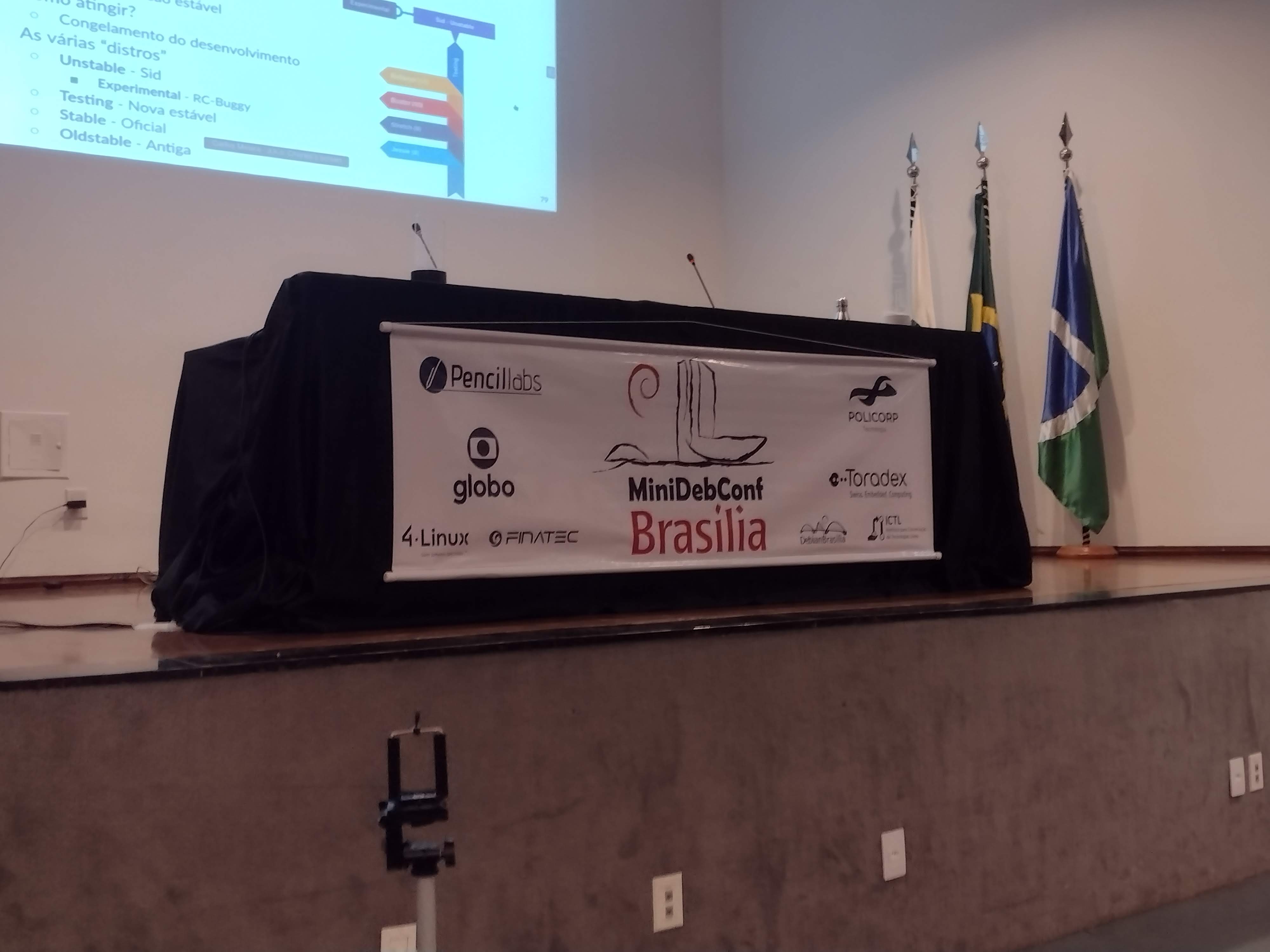
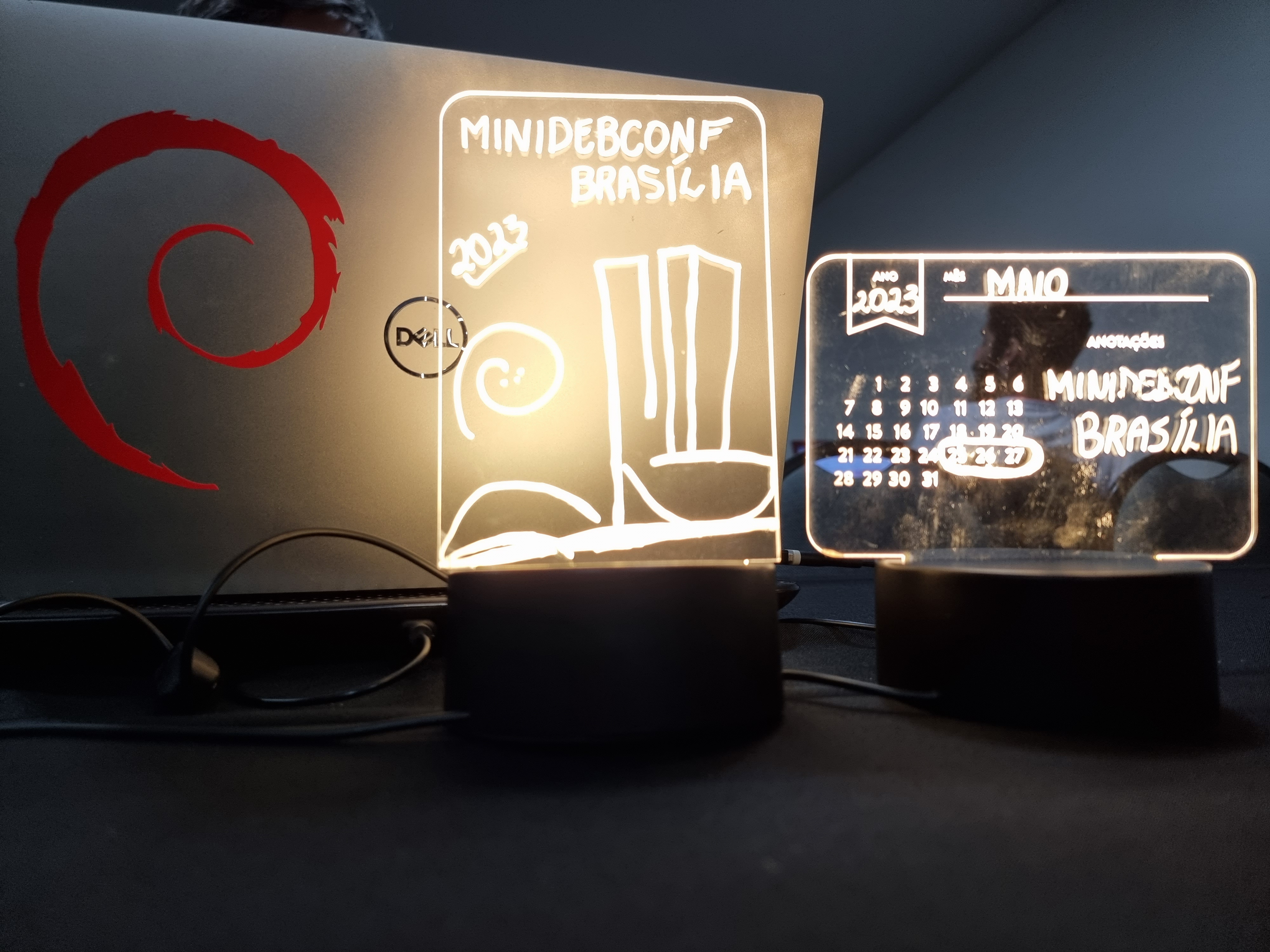
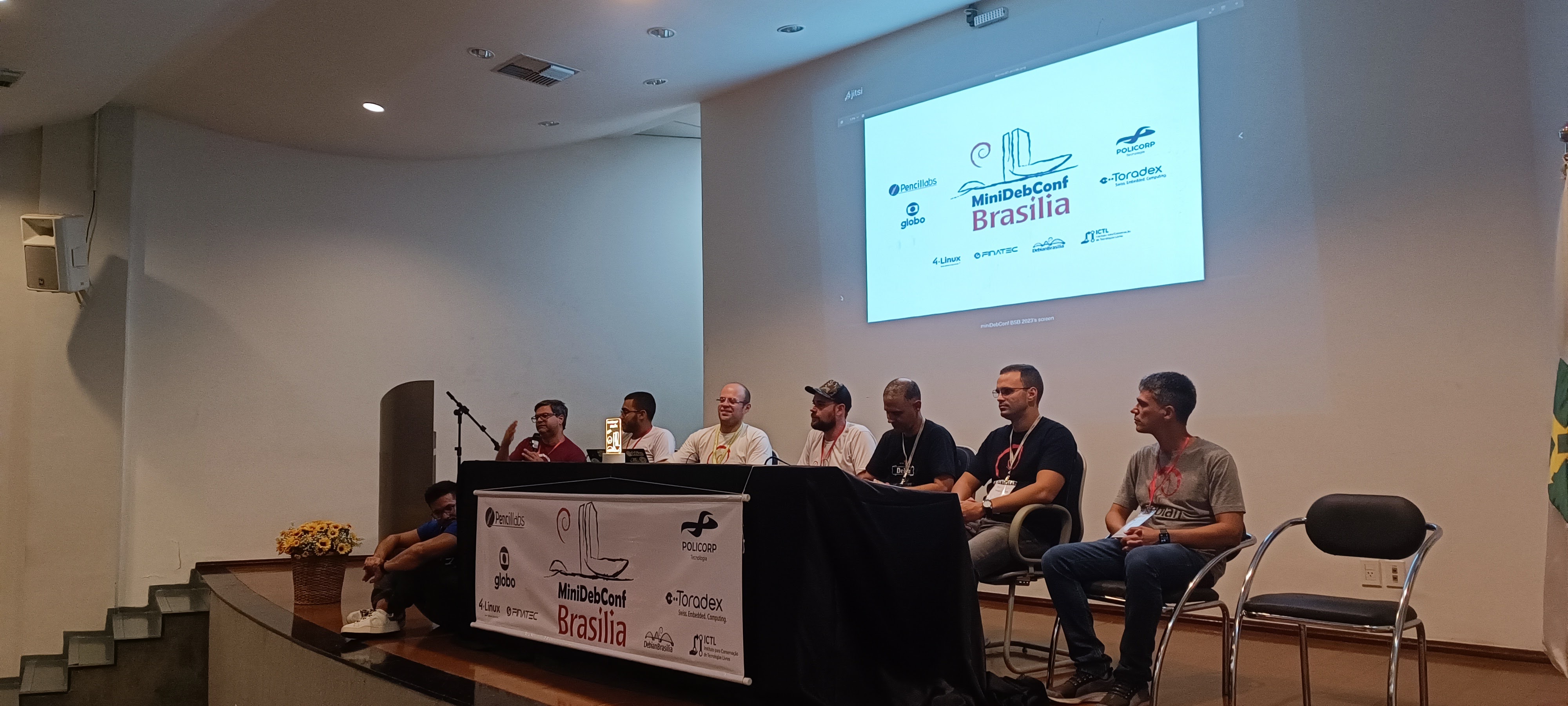
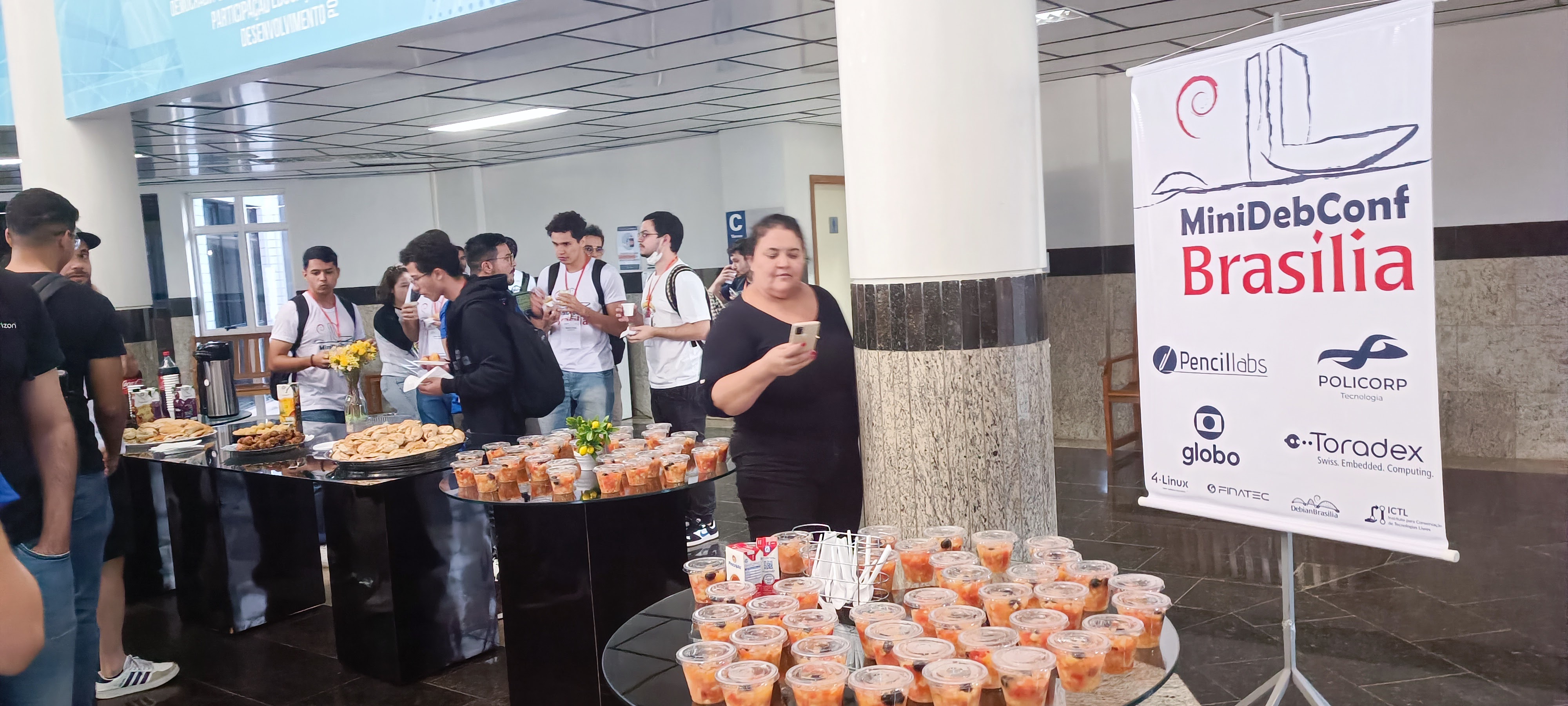
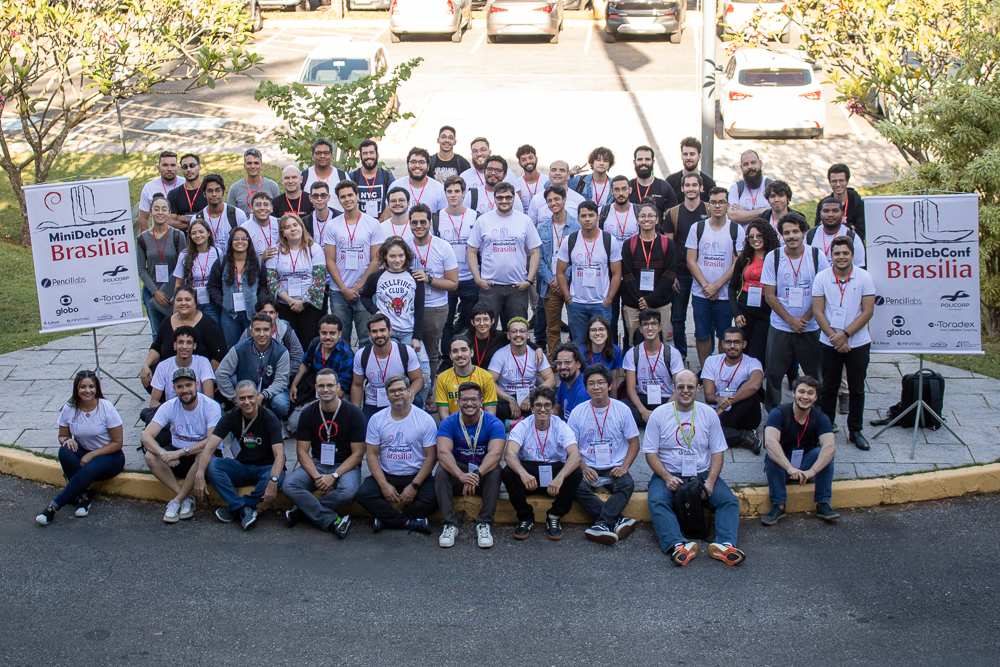
Minidebconf2033 palco From May 25th to 27th, Bras lia hosted the MiniDebConf 2023. This gathering, composed of various activities such as talks, workshops, sprints, BSP (Bug Squashing Party), key signing, social events, and hacking, aimed to bring the community together and celebrate the world's largest Free Software project: Debian. The MiniDebConf Bras lia 2023 was a success thanks to the participation of everyone, regardless of their level of knowledge about Debian. We valued the presence of both beginners who are getting familiar with the system and official project developers. The spirit of inclusion and collaboration was present throughout the event. MiniDebConfs are local meetings organized by members of the Debian Project, aiming to achieve similar goals as DebConf but on a regional scale. Throughout the year, events like this occur in different parts of the world, strengthening the Debian community. Minidebconf2023 placa Activities The MiniDebConf program was intense and diverse. On May 25th and 26th (Thursday and Friday), we had talks, discussions, workshops, and many hands-on activities. On the 27th (Saturday), the Hacking Day took place, which was a special moment for Debian contributors to come together and work collaboratively on various aspects of the project. This was the Brazilian version of Debcamp, a tradition preceding DebConf. On this day, we prioritized practical activities such as software packaging, translations, key signing, install fest, and the Bug Squashing Party. Minidebconf2023 auditorio
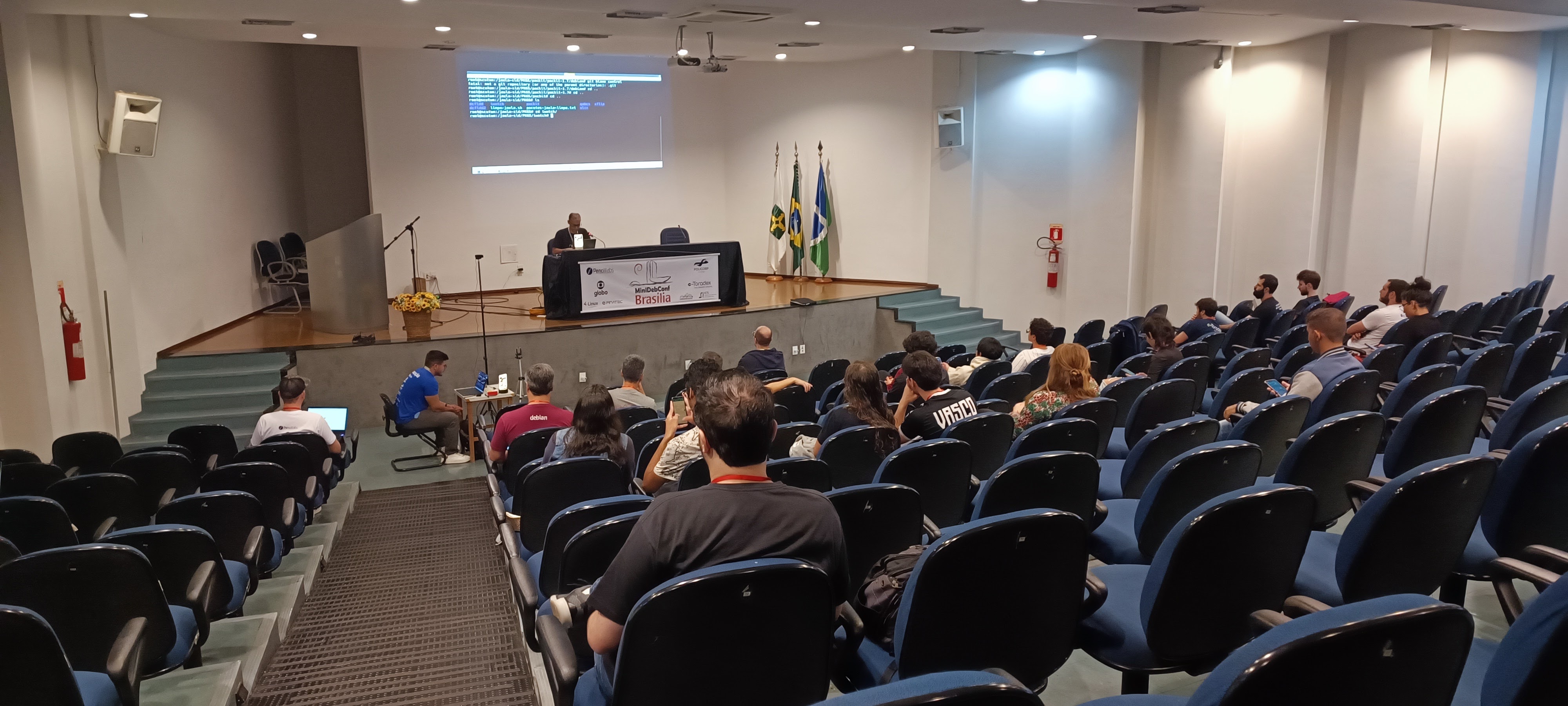
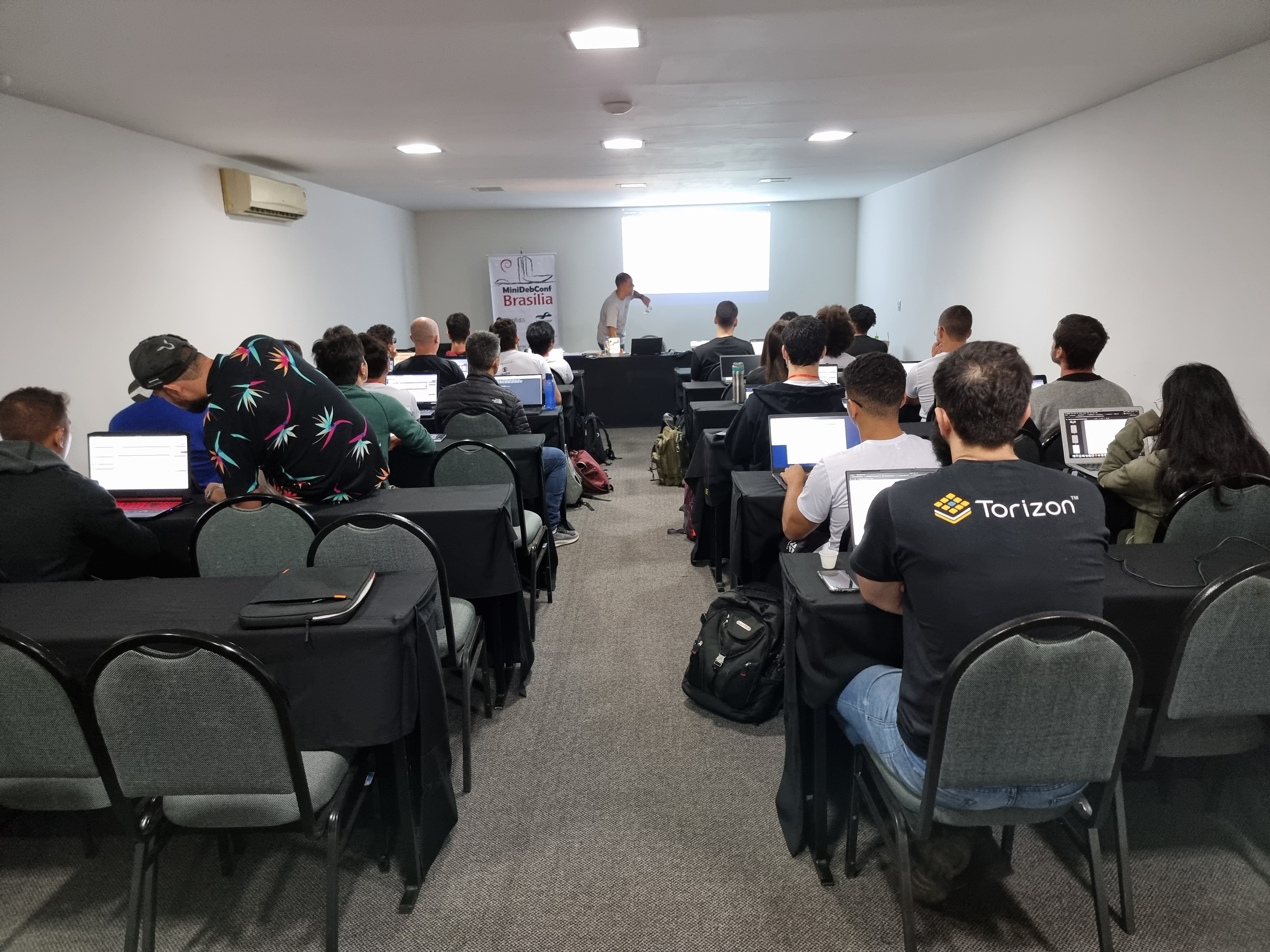
Minidebconf2023 oficina Edition numbers The event numbers are impressive and demonstrate the community's involvement with Debian. We had 236 registered participants, 20 submitted talks, 14 volunteers, and 125 check-ins. Furthermore, in the hands-on activities, we achieved significant results, including 7 new installations of Debian GNU/Linux, the update of 18 packages in the official Debian project repository by participants, and the inclusion of 7 new contributors to the translation team. We also highlight the remote participation of the community through live streams. The analytics data reveals that our website received a total of 7,058 views, with 2,079 views on the homepage (which featured our sponsors' logos), 3,042 views on the program page, and 104 views on the sponsors' page. We recorded 922 unique users during the event. On YouTube, the live stream reached 311 views, with 56 likes and a peak of 20 concurrent views. There were an incredible 85.1 hours of watch time, and our channel gained 30 new subscribers. All this engagement and interest from the community further strengthen MiniDebConf. Minidebconf2023 palestrantes Photos and videos To relive the best moments of the event, we have photos and recordings available. Photos can be accessed at: https://deb.li/pbsb2023. Video recordings of the talks are available at the following link: https://deb.li/vbsb2023. To stay updated and connect with the Debian Bras lia community, follow us on our social media channels: Thanks We would like to express our deep gratitude to all the participants, organizers, sponsors, and supporters who contributed to the success of MiniDebConf Bras lia 2023. In particular, we extend our thanks to our Gold sponsors: 2024. Pencillabs, Globo, Policorp, and Toradex Brasil, and our Silver sponsor, 4-Linux. We also thank Finatec and the Instituto para Conserva o de Tecnologias Livres (ICTL) for their support. Minidebconf2023 coffee MiniDebConf Bras lia 2023 was a milestone for the Debian community, demonstrating the power of collaboration and Free Software. We hope that everyone enjoyed this enriching gathering and will continue to actively participate in future Debian Project initiatives. Together, we can make a difference! Minidebconf2023 fotos oficial
Debian Brasil: MiniDebConf Bras lia 2023 - um breve relato

Minidebconf2033 palco No per odo de 25 a 27 de maio, Bras lia foi palco da MiniDebConf 2023. Esse encontro, composto por diversas atividades como palestras, oficinas, sprints, BSP (Bug Squashing Party), assinatura de chaves, eventos sociais e hacking, teve como principal objetivo reunir a comunidade e celebrar o maior projeto de Software Livre do mundo: o Debian. A MiniDebConf Bras lia 2023 foi um sucesso gra as participa o de todas e todos, independentemente do n vel de conhecimento sobre o Debian. Valorizamos a presen a tanto dos(as) usu rios(as) iniciantes que est o se familiarizando com o sistema quanto dos(as) desenvolvedores(as) oficiais do projeto. O esp rito de acolhimento e colabora o esteve presente em todos os momentos. As MiniDebConfs s o encontros locais organizados por membros do Projeto Debian, visando objetivos semelhantes aos da DebConf, por m em mbito regional. Ao longo do ano, eventos como esse ocorrem em diferentes partes do mundo, fortalecendo a comunidade Debian. Minidebconf2023 placa Atividades A programa o da MiniDebConf foi intensa e diversificada. Nos dias 25 e 26 (quinta e sexta-feira), tivemos palestras, debates, oficinas e muitas atividades pr ticas. J no dia 27 (s bado), ocorreu o Hacking Day, um momento especial em que os(as) colaboradores(as) do Debian se reuniram para trabalhar em conjunto em v rios aspectos do projeto. Essa foi a vers o brasileira da Debcamp, tradi o pr via DebConf. Nesse dia, priorizamos as atividades pr ticas de contribui o ao projeto, como empacotamento de softwares, tradu es, assinaturas de chaves, install fest e a Bug Squashing Party. Minidebconf2023 auditorio

Minidebconf2023 oficina N meros da edi o Os n meros do evento impressionam e demonstram o envolvimento da comunidade com o Debian. Tivemos 236 inscritos(as), 20 palestras submetidas, 14 volunt rios(as) e 125 check-ins realizados. Al m disso, nas atividades pr ticas, tivemos resultados significativos, como 7 novas instala es do Debian GNU/Linux, a atualiza o de 18 pacotes no reposit rio oficial do projeto Debian pelos participantes e a inclus o de 7 novos contribuidores na equipe de tradu o. Destacamos tamb m a participa o da comunidade de forma remota, por meio de transmiss es ao vivo. Os dados anal ticos revelam que nosso site obteve 7.058 visualiza es no total, com 2.079 visualiza es na p gina principal (que contava com o apoio de nossos patrocinadores), 3.042 visualiza es na p gina de programa o e 104 visualiza es na p gina de patrocinadores. Registramos 922 usu rios(as) nicos durante o evento. No YouTube, a transmiss o ao vivo alcan ou 311 visualiza es, com 56 curtidas e um pico de 20 visualiza es simult neas. Foram incr veis 85,1 horas de exibi o, e nosso canal conquistou 30 novos inscritos(as). Todo esse engajamento e interesse da comunidade fortalecem ainda mais a MiniDebConf. Minidebconf2023 palestrantes Fotos e v deos Para revivermos os melhores momentos do evento, temos dispon veis fotos e v deos. As fotos podem ser acessadas em: https://deb.li/pbsb2023. J os v deos com as grava es das palestras est o dispon veis no seguinte link: https://deb.li/vbsb2023. Para manter-se atualizado e conectar-se com a comunidade Debian Bras lia, siga-nos em nossas redes sociais: Agradecimentos Gostar amos de agradecer profundamente a todos(as) os(as) participantes, organizadores(as), patrocinadores e apoiadores(as) que contribu ram para o sucesso da MiniDebConf Bras lia 2023. Em especial, expressamos nossa gratid o aos patrocinadores Ouro: Pencillabs, Globo, Policorp e Toradex Brasil, e ao patrocinador Prata, 4-Linux. Tamb m agradecemos Finatec e ao Instituto para Conserva o de Tecnologias Livres (ICTL) pelo apoio. Minidebconf2023 coffee A MiniDebConf Bras lia 2023 foi um marco para a comunidade Debian, demonstrando o poder da colabora o e do Software Livre. Esperamos que todas e todos tenham desfrutado desse encontro enriquecedor e que continuem participando ativamente das pr ximas iniciativas do Projeto Debian. Juntos, podemos fazer a diferen a! Minidebconf2023 fotos oficial

30 June 2023

Abhijith PA: Running Debian on my phone

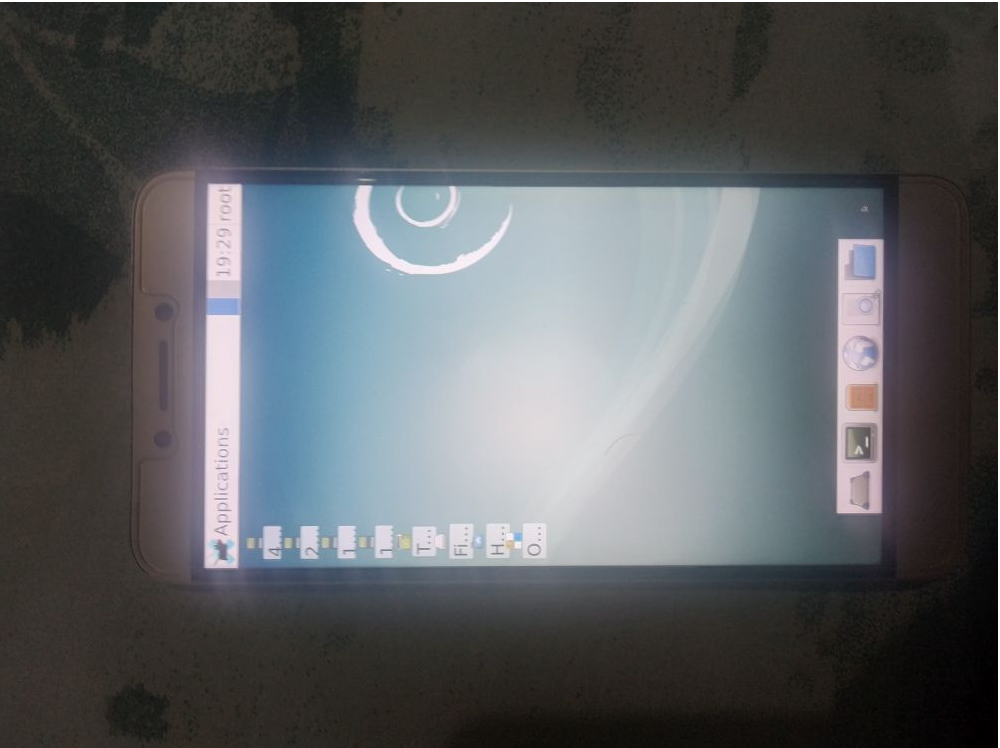
You might have already read my blog titled Running PostmarketOS on my phone . After running pmOS on phone, my mind kept talking run Debian . So I started preparing for that. At the moment no straight way tool exist in Debian like postmarketOS s pmbootstrap. Well I can compile what is already available, do debootstrap rootfs. But I don t know how to build the final image that can be flashed from recovery. One crooked idea I had is, extract the pmOS image, find the packages and its configurations. For eg: usbmodem package in postmarketos are configured to connect to host network when plugged. I deboostrap ed the rootfs, compared with postmarketos and installed extra packages and copied configuration. I repacked and compressed to new image. Then flashed with twrp. The phone was booting. So I connected the usb cable and run,
ssh abhijith@172.16.42.1
abhijith@172.16.42.1's password: 
Linux arm64 3.10.107-Cherry #1-postmarketOS SMP PREEMPT Sat Dec 18 13:08:52 UTC 2021 aarch64
The programs included with the Debian GNU/Linux system are free software;
the exact distribution terms for each program are described in the
individual files in /usr/share/doc/*/copyright.
Debian GNU/Linux comes with ABSOLUTELY NO WARRANTY, to the extent
permitted by applicable law.
abhijith@arm64:$ 
Yay!. I have a working Debian phone. I quickly installed lxde and that is working perfectly. debian-leeco

Russell Coker: Links June 2023

Tablet Magazine has an interesting article about Jewish men who fought in the military for Nazi Germany [1]. I m surprised that they didn t frag their colleagues. Dropbox has an insightful interview with a lawyer about the future of machine learning in the legal profession [2]. This seems like it could give real benefits to society in giving legal assistance to more people and giving less uncertainty about the result of court cases. It could also find unclear laws for legislators who want to improve things. Some people have started a software to produce a free software version of Victoria 2 [3]. Hopefully OpenVic will become as successful as FreeCiv and FreeCraft! Hackster has an interesting article about work to create a machine that does a realistic impersonation of someone s handwriting [4]. The aim is to be good enough to fool people who want manually written assignments. Ars technica has an interesting article about a side channel attack using the power LEDs of smart-card readers to extract cryptographic secret key data [5]. As usual for articles about side channels it turns out to be really hard to do and their proof of concept involved recording a card being repeatedly scanned for an hour. This doesn t mean it s a non-issue, they should harden readers against this. Vice has an interesting article on the search for chemical remnants of ancient organisms in 1.6 billion year old fossils [6]. Bleeping Computer has an interesting article about pirate Windows 10 ISOs infecting systems with EFI malware [7]. That s a particularly nasty attack and shows yet another down-side to commercial software. For Linux the ISOs are always clean and the systems aren t contaminated. The Register has an interesting article about a robot being used for chilled RAM attacks to get access to boot time secrets [8]. They monitor EMF output to stop it at the same time in each boot which I consider the most noteworthy part of this attack. The BBC has an interesting article about personalised medicine [9]. There are 400 million people in the world with rare diseases and an estimated 60 million of them will die before the age of 5. Personalised medicine can save many lives. Let s hope it is used outside the first world. Knuth s thoughts about ChatGPT are interesting [10]. Interesting article about Brown M&Ms and assessing the likely quality of work from a devops team [11]. The ABC has an interesting article about the use of AI and robot traps to catch feral cats [12].

Shirish Agarwal: Motherboard battery, Framework, VR headsets, Steam

Motherboard Battery You know you have become too old when you get stumped and the solution is simple and fixed by the vendor. About a week back, I was getting CPU Fan Error. It s a 6 year old desktop so I figured that the fan or the ball bearings on the fan must have worn out. I opened up the cabinet and I could see both the on cpu fan was working coolly as well as the side fan was working without an issue. So I couldn t figure out what was the issue. I had updated the BIOS/UEFI number of years ago so that couldn t be an issue. I fiddled with the boot menu and was able to boot into Linux but it was a pain that I had to do every damn time. As it is, it takes almost 2-3 minutes for the whole desktop to be ready and this extra step was annoying. I had bought a Mid-tower cabinet while the motherboard so there were alternate connectors I could try but still the issue persisted. And this workaround was heart-breaking as you boot the BIOS/UEFI and fix the boot menu each time even though it had Debian Boot Launcher and couple of virtual ones provided by the vendor (Asus) and they were hardwired. So failing all, went to my vendor/support and asked if he could find out what the issue is. It costed me $10, he did all the same things I did but one thing more, he changed the battery (cost less than 1USD) and presto all was right with the world again. I felt like a fool but a deal is a deal so paid the gentleman for his services. Now can again use the desktop and at least know about what s happening in the outside world.

Framework Laptops I have been seeing quite a few teardowns of Framework Laptops on Youtube and love it. More so, now that they have AMD in their arsenal. I do hope they work on their pricing and logistics and soon we have it here competing with others. If the pricing isn t substantial then definitely would be one of the first ones to order. India is and remains a very cost-conscious market and more so with the runaway prices that we have been seeing. In fact, the last 3 years have been pretty bad for the overall PC market declining 30% YoY for the last 3 years while prices have gone through the roof. Apart from the pricing from the vendors, taxation has been another hit as the current Govt. has been taxing anywhere from 30-100% taxes on various PC, desktop and laptop components. Think have shared Graphic cards for instance have 100% Duty apart from other taxes. I don t see the market picking up at least in the 24 to 36 months. Most of this year and next year, both AMD and Intel are doing refreshes so while there would be some improvements (probably 10-15%) not earth-shattering for the wider market to sit up and take notice. Intel has proposed a 64-bit architecture (only) about couple of months back, more on that later. As far as the Indian market is concerned, if you want the masses, then have lappies at around 40-50k ($600 USD) and there would be a mass takeup, if you want to be a Lenovo or something like that, then around a lakh or INR 100k ($1200 USD) or be an Apple which is around 150k INR or around 2000 USD. There are some clues as to what their plans but for that you have to trawl their forums and the knowledgebase. Seems some people are using freight forwarders to get around the hurdles but Framework doesn t want to do any shortcuts for the same. Everybody seems to be working on Vertical stacking of chips, whether it is the Chinese, or Belgian s or even AMD and Intel who have their own spins to it, but most of these technologies are at least 3-4 years out in the future (or more). India is a big laggard in this space with having knowledge of 45nm which in Aviation speak one could say India knows how to build 707 (one of the first Boeing commercial passenger carrying aircraft) while today it is Boeing 777x or Airbus 350. I have shared in the past how the Tata s have been trying to collaborate with the Japanese and get at least their 25nm chip technology but nothing has come of it to date. The only somewhat o.k. news has been the chip testing and packaging plant by Micron to be made in Gujarat. It doesn t do anything for us although we would be footing almost 70% of the plant s capital expenditure and the maximum India will get 4k jobs. Most of these plants are highly automated as dust is their mortal enemy so even the 4k jobs announced seem far-fetched. It would probably be less than half once production starts if it happens  but that is probably a story for another time. Just as a parting shot, even memory vendors are going highly automated factory lines.

VR Headsets I was stuck by how similar or where VR is when I was watching Made in Finland. I don t want to delve much into the series but it is a fascinating one. I was very much taken by the character of Kari Kairamo or the actor who played the character of him and was very much disappointed with the sad ending the gentleman got. It is implicated in the series that the banks implicitly forced him to commit suicide. There is also a lot of chaos as is normal in a big company having many divisions. It s only when Jorma Olila takes over, the company sheds a lot of dead weight was cut off with mobiles having the most funding which they didn t have before. I was also fascinated when I experienced pride when Nokia shows off its 1011 mobile phone when at that time phones were actually like bricks. My first Nokia was number of years later, Nokia 1800 and have to say those phones outlasted a long time than today s Samsung s. If only Nokia had read the tea leaves right  Back to the topic though, I have been wearing glasses since the age of 5 year old. They weigh less than 10 grams and you still get a nose dent. And I know enough people, times etc. when people have got headaches and whatnot from glasses. Unless the VR headsets become that size and don t cost an arm and leg (or a kidney or a liver) it would have niche use. While 5G and 6G would certainly push more ppl to get it it probably would take a few more years before we have something that is simple and doesn t need too much to get it rolling. The series I mentioned above is already over it s first season but would highly recommend it. I do hope the second season happens quickly and we do come to know why and how Nokia missed the Android train and their curious turn to get to Microsoft which sorta sealed their fate

Steam I have been following Steam, Luthris and plenty of other launchers on Debian. There also seems to some sort of an idea that once MESA 23.1.x or later comes into Debian at some point we may get Steam 64-bit and some people are hopeful that we may get it by year-end. There are a plethora of statistics that can be used to find status of Gaming on Linux. This is perhaps the best one I got so far. Valve also has its own share of stats that it shows here. I am not going to go into much detail except the fact that lutris has been there on Debian sometime now. And as and when Steam does go fully 64-bit, whole lot of multilib issues could be finally put to rest. Interestingly, Intel has quietly also shared details of only a 64-bit architecture PC. From what I could tell, it simply boots into 16-bit and then goes into 64-bit bypassing the 32-bit. In theory, it should remove whole lot code, make it safer as well as faster. If rival AMD was to play along things could move much faster. Now don t get me wrong, 32-bit was good, but for it s time. I m sure at some point in time even 64-bit would have its demise, and we would jump to 128-bit. Of course, in reality we aren t anywhere close to even 48-bit, leave alone 64-bit. Superuser gives a good answer on that. We may be a decade or more before we exhaust that but for sure there will be need for better, faster hardware especially as we use more and more of AI for good and bad things. I am curious to see how it pans out and how it will affect (or not) FOSS gaming. FWIW, I used to peruse freegamer.blogspot.com which kinda ended in 2021 and now use Lee Reilly blog posts to know what is happening in github as far as FOSS games are concerned. There is also a whole thing about handhelds and gaming but that probably would require its own blog post or two. There are just too many while at the same time too few (legally purchasable in India) to have its own blog post, maybe sometime in Future. Best way to escape the world. Till later.

29 June 2023

C.J. Collier: Converting a windows install to a libvirt VM

Reduce the size of your c: partition to the smallest it can be and then turn off windows with the understanding that you will never boot this system on the iron ever again.
Boot into a netinst installer image (no GUI). hold alt and press left arrow a few times until you get to a prompt to press enter. Press enter. In this example /dev/sda is your windows disk which contains the c: partition
and /dev/disk/by-id/usb0 is the USB-3 attached SATA controller that you have your SSD attached to (please find an example attached). This SSD should be equal to or larger than the windows disk for best compatability. A photo of a USB-3 attached SATA controller To find the literal path names of your detected drives you can run fdisk -l. Pay attention to the names of the partitions and the sizes of the drives to help determine which is which. Once you have a shell in the netinst installer, you should maybe be able to run a command like the following. This will duplicate the disk located at if (in file) to the disk located at of (out file) while showing progress as the status.
dd if=/dev/sda of=/dev/disk/by-id/usb0 status=progress
If you confirm that dd is available on the netinst image and the previous command runs successfully, test that your windows partition is visible in the new disk s partition table. The start block of the windows partition on each should match, as should the partition size.
fdisk -l /dev/disk/by-id/usb0
fdisk -l /dev/sda
If the output from the first is the same as the output from the second, then you are probably safe to proceed. Once you confirm that you have made and tested a full copy of the blocks from your windows drive saved on your usb disk, nuke your windows partition table from orbit.
dd if=/dev/zero of=/dev/sda bs=1M count=42
You can press alt-f1 to return to the Debian installer now. Follow the instructions to install Debian. Don t forget to remove all attached USB drives. Once you install Debian, press ctrl-alt-f3 to get a root shell. Add your user to the sudoers group:
# adduser cjac sudoers
log out
# exit
log in as your user and confirm that you have sudo
$ sudo ls
Don t forget to read the spider man advice enter your password you ll need to install virt-manager. I think this should help:
$ sudo apt-get install virt-manager libvirt-daemon-driver-qemu qemu-system-x86
insert the USB drive. You can now create a qcow2 file for your virtual machine.
$ sudo qemu-img convert -O qcow2 \
/dev/disk/by-id/usb0 \
/var/lib/libvirt/images/windows.qcow2
I personally create a volume group called /dev/vg00 for the stuff I want to run raw and instead of converting to qcow2 like all of the other users do, I instead write it to a new logical volume.
sudo lvcreate /dev/vg00 -n windows -L 42G # or however large your drive was
sudo dd if=/dev/disk/by-id/usb0 of=/dev/vg00/windows status=progress
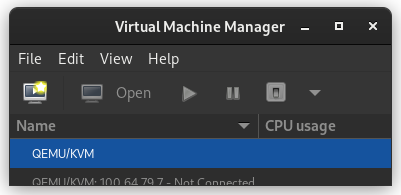
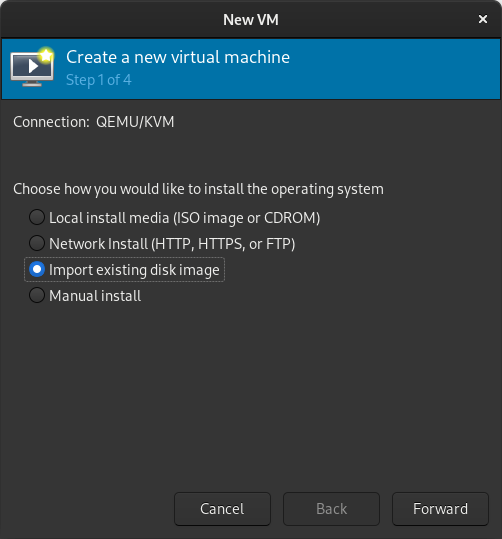
Now that you ve got the qcow2 file created, press alt-left until you return to your GDM session. The apt-get install command above installed virt-manager, so log in to your system if you haven t already and open up gnome-terminal by pressing the windows key or moving your mouse/gesture to the top left of your screen. Type in gnome-terminal and either press enter or click/tap on the icon. I like to run this full screen so that I feel like I m in a space ship. If you like to feel like you re in a spaceship, too, press F11. You can start virt-manager from this shell or you can press the windows key and type in virt-manager and press enter. You ll want the shell to run commands such as virsh console windows or virsh list When virt-manager starts, right click on QEMU/KVM and select New.
In the New VM window, select Import existing disk image
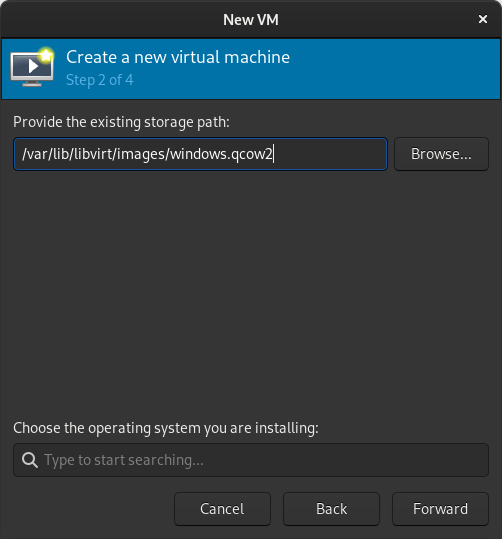
When prompted for the path to the image, use the one we created with sudo qemu-img convert above.
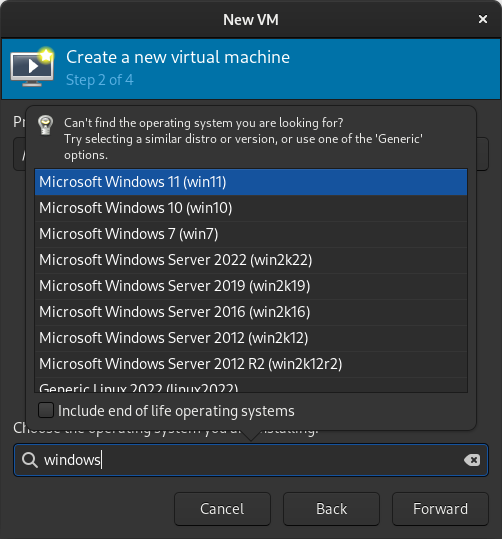
Select the version of Windows you want.
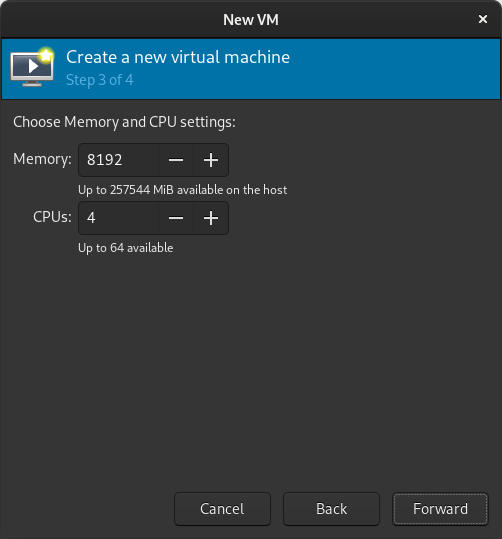
Select memory and CPUs to allocate to the VM.
Tick the Customize configuration before install box
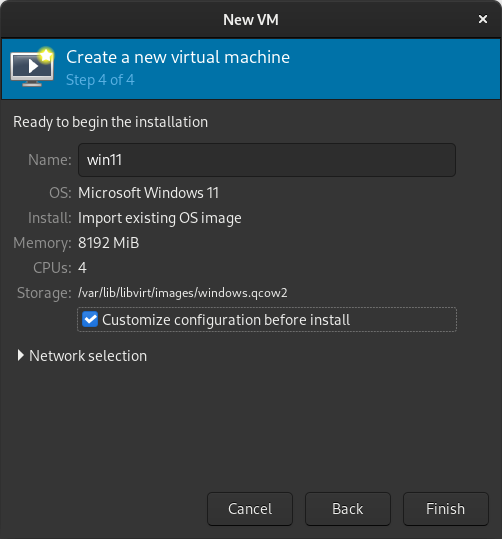
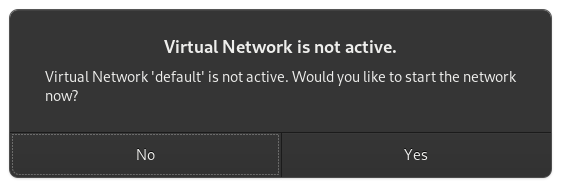
If you re prompted to enable the default network, do so now.
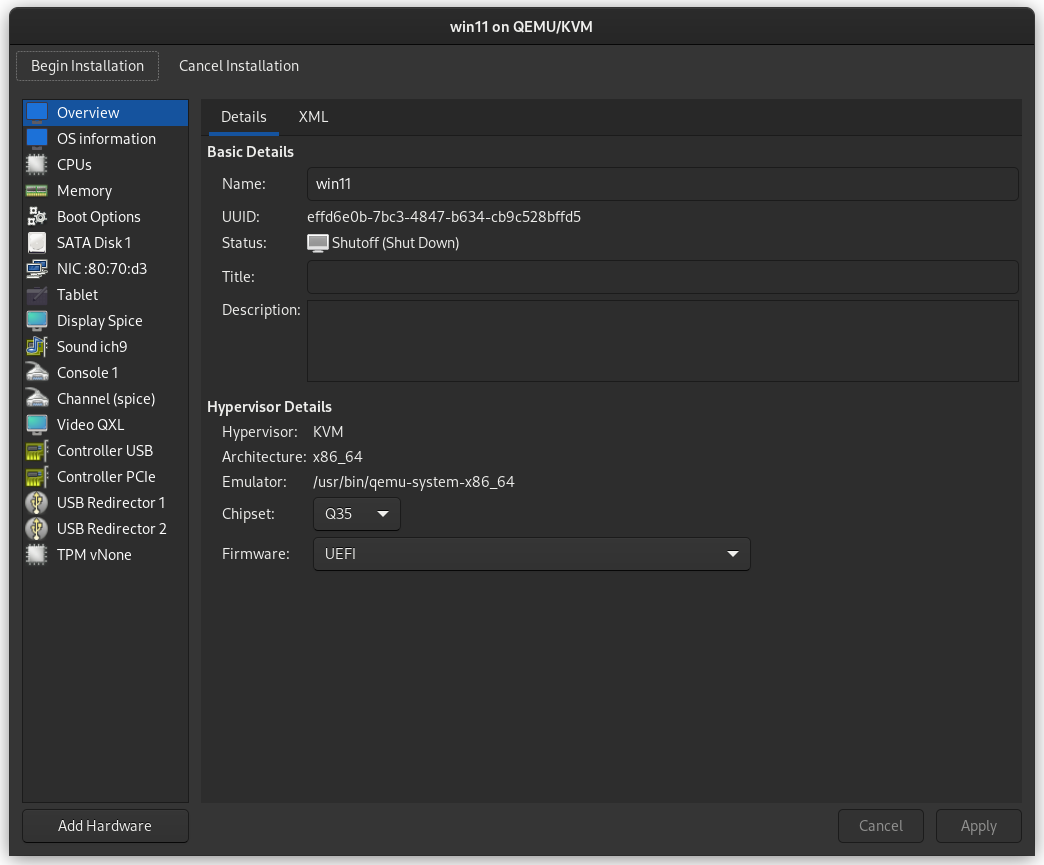
The default hardware layout should probably suffice. Get it as close to the underlying hardware as it is convenient to do. But Windows is pretty lenient these days about virtualizing licensed windows instances so long as they re not running in more than one place at a time. Good luck! Leave comments if you have questions.
Antoine Beaupr : Using signal-cli to cancel your Signal account

For obscure reasons, I have found myself with a phone number registered with Signal but without any device associated with it. This is the I lost my phone section in Signal support, which rather unhelpfully tell you that, literally:
Until you have access to your phone number, there is nothing that can be done with Signal.
To be fair, I guess that sort of makes sense: Signal relies heavily on phone numbers for identity. It's how you register to the service and how you recover after losing your phone number. If you have your PIN ready, you don't even change safety numbers! But my case is different: this phone number was a test number, associated with my tablet, because you can't link multiple Android device to the same phone number. And now that I brilliantly bricked that tablet, I just need to tell people to stop trying to contact me over that thing (which wasn't really working in the first place anyway because I wasn't using the tablet that much, but I digress). So. What do you do? You could follow the above "lost my phone" guide and get a new Android or iOS phone to register on Signal again, but that's pretty dumb: I don't want another phone, I already have one. Lo and behold, signal-cli to the rescue!

Disclaimer: no warranty or liability Before following this guide, make sure you remember the license of this website, which specifically has a Section 5 Disclaimer of Warranties and Limitation of Liability. If you follow this guide literally, you might actually get into trouble. You have been warned. All Cats Are Beautiful.

Installing in Docker Because signal-cli is not packaged in Debian (but really should be), I need to bend over backwards to install it. The installation instructions suggest building from source (what is this, GentooBSD?) or installing binary files (what is this, Debiandows?), that's all so last millennium. I want something fresh and fancy, so I went with the extremely legit Docker registry ran by the not-shady-at-all gitlab.com/packaging group which is suspiciously not owned by any GitLab.com person I know of. This is surely perfectly safe.
(Insert long digression on supply chain security here and how Podman is so much superior to Docker. Feel free to dive deep into how RedHat sold out to the nazis or how this is just me ranting about something I don't understand, again. I'm not going to do all the work for you.)
Anyway. The magic command is:
mkdir .config/signal-cli
podman pull registry.gitlab.com/packaging/signal-cli/signal-cli-jre:latest
# lightly hit computer with magic supply chain verification wand
alias signal-cli="podman run --rm --publish 7583:7583 --volume .config/signal-cli:/var/lib/signal-cli --tmpfs /tmp:exec   registry.gitlab.com/packaging/signal-cli/signal-cli-jre:latest --config /var/lib/signal-cli"
At this point, you have a signal-cli alias that should more or less behave as per upstream documentation. Note that it sets up a network service on port 7583 which is unnecessary because you likely won't be using signal-cli's "daemon mode" here, this is a one-shot thing. But I'll probably be reusing those instructions later on, so I figured it might be a safe addition. Besides, it's what the instructions told me to do so I'm blindly slamming my head in the bash pipe, as trained. Also, you're going to have the signal-cli configuration persist in ~/.config/signal-cli there. Again, totally unnecessary.

Re-registering the number Back to our original plan of canceling our Signal account. The next step is, of course, to register with Signal.
Yes, this is a little counter-intuitive and you'd think there would be a "I want off this boat" button on https://signal.org that would do this for you, but hey, I guess that's only reserved for elite hackers who want to screw people over, I mean close their accounts. Mere mortals don't get access to such beauties. Update: a friend reminded me there used to be such a page at https://signal.org/signal/unregister/ but it's mysteriously gone from the web, but still available on the wayback machine although surely that doesn't work anymore. Untested.
To register an account with signal-cli, you first need to pass a CAPTCHA. Those are the funky images generated by deep neural networks that try to fool humans into thinking other neural networks can't break them, and generally annoy the hell out of people. This will generate a URL that looks like:
signalcaptcha://signal-hcaptcha.$UUID.registration.$THIRTYTWOKILOBYTESOFGARBAGE
Yes, it's a very long URL. Yes, you need the entire thing. The URL is hidden behind the Open Signal link, you can right-click on the link to copy it or, if you want to feel like it's 1988 again, use view-source: or butterflies or something. You will also need the phone number you want to unregister here, obviously. We're going to take a not quite random phone number as an example, +18002677468.
Don't do this at home kids! Use the actual number and don't copy-paste examples from random websites!
So the actual command you need to run now is:
signal-cli -a +18002677468 register --captcha signalcaptcha://signal-hcaptcha.$UUID.registration.$THIRTYTWOKILOBYTESOFGARBAGE
To confirm the registration, Signal will send a text message (SMS) to that phone number with a verification code. (Fun fact: it's actually Twilio relaying that message for Signal and that is... not great.) If you don't have access to SMS on that number, you can try again with the --voice option, which will do the same thing with a actual phone call. I wish it would say "Ok boomer" when it calls, but it doesn't. If you don't have access to either, you're screwed. You may be able to port your phone number to another provider to gain control of the phone number again that said, but at that point it's a whole different ball game. With any luck now you've received the verification code. You use it with:
signal-cli -a +18002677468 verify 131213
If you want to make sure this worked, you can try writing to another not random number at all, it should Just Work:
signal-cli -a +18002677468 send -mtest +18005778477
This is almost without any warning on the other end too, which says something amazing about Signal's usability and something horrible about its security.

Unregistering the number Now we get to the final conclusion, the climax. Can you feel it? I'll try to refrain from further rants, I promise. It's pretty simple and fast, just call:
signal-cli -a +18002677468 unregister
That's it! Your peers will now see an "Invite to Signal" button instead of a text field to send a text message.

Cleanup Optionally, cleanup the mess you left on this computer:
rm -r ~/.config/signal-cli
podman image rm registry.gitlab.com/packaging/signal-cli/signal-cli-jre

Russ Allbery: Review: Semiosis

Review: Semiosis, by Sue Burke
Series: Semiosis #1
Publisher: Tor
Copyright: February 2018
ISBN: 0-7653-9137-6
Format: Kindle
Pages: 333
Semiosis is a first-contact science fiction novel and the first half of a duology. It was Sue Burke's first novel. In the 2060s, with the Earth plagued by environmental issues, a group of utopians decided to found a colony on another planet. Their goal is to live in harmony with an unspoiled nature. They wrote a suitably high-minded founding document, the Constitution of the Commonwealth of Pax, and set out in cold sleep on an interstellar voyage. 158 years later, they awoke in orbit around a planet with a highly-developed ecology, which they named Pax. Two pods and several colonists were lost on landing, but the rest remained determined to follow through with their plan. Not that they had many alternatives. Pax does not have cities or technological mammalian life, just as they hoped. It does, however, have intelligent life. This novel struggled to win me over for reasons that aren't the fault of Burke's writing. The first is that it is divided into seven parts, each telling the story of a different generation. Intellectually, I like this technique for telling an anthropological story that follows a human society over time. But emotionally, I am a character reader first and foremost, and I struggle with books where I can't follow the same character throughout. It makes the novel feel more like a fix-up of short stories, and I'm not much of a short story reader. Second, this is one of those stories where a human colony loses access to its technology and falls back to a primitive lifestyle. This is a concept I find viscerally unpleasant and very difficult to read about. I don't mind reading stories that start at the lower technological level and rediscover lost technology, but the process of going backwards, losing knowledge, surrounded by breaking technology that can never be repaired, is disturbing at a level that throws me out of the story. It doesn't help that the original colonists chose to embrace that reversion. Some of this wasn't intentional some vital equipment was destroyed when they landed but a lot of it was the plan from the start. They are the type of fanatics who embrace a one-way trip and cannibalizing the equipment used to make it in order to show their devotion to the cause. I spent the first part of the book thinking the founding colonists were unbelievably foolish, but then they started enforcing an even more restrictive way of life on their children and that tipped me over into considering them immoral. This was the sort of political movement that purged all religion and political philosophy other than their one true way so that they could raise "uncorrupted" children. Burke does recognize how deeply abusive this is. The second part of the book, which focuses on the children of the initial colonists, was both my favorite section and had my favorite protagonist, precisely because someone put words to the criticisms that I'd been thinking since the start of the book. The book started off on a bad foot with me, but if it had kept up the momentum of political revolution and rethinking provided by the second part, it might have won me over. That leads to the third problem, though, which is the first contact part of the story. (If you've heard anything about this series, you probably know what the alien intelligence is, and even if not you can probably guess, but I'll avoid spoilers anyway.) This is another case where the idea is great, but I often don't get along with it as a reader. I'm a starships and AIs and space habitats sort of SF reader by preference and tend to struggle with biological SF, even though I think it's great more of it is being written. In this case, mind-altering chemicals enter the picture early in the story, and while this makes perfect sense given the world-building, this is another one of my visceral dislikes. A closely related problem is that the primary alien character is, by human standards, a narcissistic asshole. This is for very good story and world-building reasons. I bought the explanation that Burke offers, I like the way this shows how there's no reason to believe humans have a superior form of intelligence, and I think Burke's speculations on the nature of that alien intelligence are fascinating. There are a lot of good reasons to think that alien morality would be wildly different from human morality. But, well, I'm still a human reading this book and I detested the alien, which is kind of a problem given how significant of a character it is. That's a lot baggage for a story to overcome. It says something about how well-thought-out the world-building is that it kept my attention anyway. Burke uses the generational structure very effectively. Events, preferences, or even whims early in the novel turn into rituals or traditions. Early characters take on outsized roles in history. The humans stick with the rather absurd constitution of Pax, but do so in a way that feels true to how humans reinterpret and stretch and layer meaning on top of wholly inadequate documents written in complete ignorance of the challenges that later generations will encounter. I would have been happier without the misery and sickness and messy physicality of this abusive colonization project, but watching generations of humans patch together a mostly functioning society was intellectually satisfying. The alien interactions were also solid, with the caveat that it's probably impossible to avoid a lot of anthropomorphizing. If I were going to sum up the theme of the novel in a sentence, it's that even humans who think they want to live in harmony with nature are carrying more arrogance about what that harmony would look like than they realize. In most respects the human colonists stumbled across the best-case scenario for them on this world, and it was still harder than anything they had imagined. Unfortunately, I thought the tail end of the book had the weakest plot. It fell back on a story that could have happened in a lot of first-contact novels, rather than the highly original negotiation over ecological niches that happened in the first half of the book. Out of eight viewpoint characters in this book, I only liked one of them (Sylvia). Tatiana and Lucille were okay, and I might have warmed to them if they'd had more time in the spotlight, but I felt like they kept making bad decisions. That's the main reason why I can't really recommend it; I read for characters, I didn't really like the characters, and it's hard for a book to recover from that. It made the story feel chilly and distant, more of an intellectual exercise than the sort of engrossing emotional experience I prefer. But, that said, this is solid SF speculation. If your preferred balance of ideas and characters is tilted more towards ideas than mine, and particularly if you like interesting aliens and don't mind the loss of technology setting, this may well be to your liking. Even with all of my complaints, I'm curious enough about the world that I am tempted to read the sequel, since its plot appears to involve more of the kind of SF elements I like. Followed by Interference. Content warning: Rape, and a whole lot of illness and death. Rating: 6 out of 10

28 June 2023

Russ Allbery: Review: Translation State

Review: Translation State, by Ann Leckie
Publisher: Orbit
Copyright: June 2023
ISBN: 0-316-29024-6
Format: Kindle
Pages: 354
Translation State is a science fiction novel set in the same universe as the Imperial Radch series and Provenance. It is not truly a sequel of any of those books, but as with Provenance, it has significant spoilers for the conclusion of Ancillary Mercy. Provenance takes place earlier, but it's plot is unrelated as far as I can recall. Enea has spent much of hir adult life living with hir difficult and somewhat abusive grandmanan and, in recent years, running her household. Now, Grandmanan is dead, and the relatives who have been waiting to inherit Grandmanan's wealth are descending like a flock of vultures and treating hir like a servant. Enea can barely stand to be around them. It is therefore somewhat satisfying to watch their reactions when they discover that there is no estate. Grandmanan had been in debt and sold her family title to support herself for the rest of her life. Enea will receive an allowance and an arranged job that expects a minimum of effort. Everyone else gets nothing. It's still a wrenching dislocation from everything Enea has known, but at least sie can relax, travel, and not worry about money. Enea's new job for the Office of Diplomacy is to track down a fugitive who disappeared two hundred years earlier. The request came from the Radchaai Translators Office, the agency responsible for the treaty with the alien Presger, and was resurrected due to the upcoming conclave to renegotiate the treaty. No one truly expects Enea to find this person or any trace of them. It's a perfect quiet job to reward hir with travel and a stipend for putting up with Grandmanan all these years. This plan lasts until Enea's boredom and sense of duty get the better of hir. Enea is one of three viewpoint characters. Reet lives a quiet life in which he only rarely thinks about murdering people. He has a menial job in Rurusk Station, at least until he falls in with an ethnic club that may be a cover for more political intentions. Qven... well, Qven is something else entirely. Provenance started with some references to the Imperial Radch trilogy but then diverged into its own story. Translation State does the opposite. It starts as a cozy pseudo-detective story following Enea and a slice-of-life story following Reet, interspersed with baffling chapters from Qven, but by the end of the book the characters are hip-deep in the trilogy aftermath. It's not the direct continuation of the political question of the trilogy that I'm still partly hoping for, but it's adjacent. As you might suspect from the title, this story is about Presger Translators. Exactly how is not entirely obvious at the start, but it doesn't take long for the reader to figure it out. Leckie fills in a few gaps in the world-building and complicates (but mostly retains) the delightfully askew perspective Presger Translators have on the world. For me, though, the best part of the book was the political maneuvering once the setup is complete and all the characters are in the same place. The ending, unfortunately, dragged a little bit; the destination of the story was obvious but delayed by characters not talking to each other. I tend to find this irritating, but I know tastes differ. I was happily enjoying Translation State but thinking that it didn't suck me in as much as the original trilogy, and even started wondering if I'd elevated the Imperial Radch trilogy too high in my memory. Then an AI ship showed up and my brain immediately got fully invested in the story. I'm very happy to get whatever other stories in this universe Leckie is willing to write, but I would have been even happier if a ship appeared as more than a supporting character. To the surprise of no one who reads my reviews, I clearly have strong preferences in protagonists. This wasn't one of my favorites, but it was a solidly good book, and I will continue to read everything Ann Leckie writes. If you liked Provenance, I think you'll like this one as well. We once again get a bit more information about the aliens in this universe, and this time around we get more Radchaai politics, but the overall tone is closer to Provenance. Great powers are in play, but the focus is mostly on the smaller scale. Recommended, but of course read the Imperial Radch trilogy first. Note that Translation State uses a couple of sets of neopronouns to represent different gender systems. My brain still struggles with parsing them grammatically, but this book was good practice. It was worth the effort to watch people get annoyed at the Radchaai unwillingness to acknowledge more than one gender. Content warning: Cannibalism (Presger Translators are very strange), sexual assault. Rating: 8 out of 10

27 June 2023

Daniel Lange: Xfce4 opening links in Chromium despite Firefox having been set as the default browser

Installing a laptop with the shiny new Debian Bookworm release finds a few interesting things broken that I probably had fixed in the past already on the old laptop. One, that was increadibly unintuitive to fix, was lots of applications (like xfce4-terminal or Telegram) opening links in Chromium despite Firefox being set as the preferred webbrowser everywhere. update-alternatives --config x-www-browser was pointing at Firefox already, of course.
The Xfce4 preferred application from settings was Firefox, of course.
xdg-mime query default text/html delivered firefox-esr.desktop, of course. Still nearly every link opens in Chromium... As usually the answer is out there. In this case in a xfce4-terminal bug report from 2015. The friendly "runkharr" has debugged the issue and provides the fix as well. As usually, all very easy once you know where to look. And why to hate GTK again a bit more: The GTK function gtk_show_uri() uses glib's g_app_info_launch_default_for_uri() and that - of course - cannot respect the usual mimetype setting. So quoting "runkharr" verbatim:
1. Create a file  exo-launch.desktop  in your  ~/.local/share/applications  directory with something like the following content:
    [Desktop Entry]
    Name=Exo Launcher
    Type=Application
    Icon=gtk-open
    Categories=Desktop;
    Comment=A try to force 'xfce4-terminal' to use the preferred application(s)
    GenericName=Exo Launcher
    Exec=exo-open %u
    MimeType=text/html;application/xhtml+xml;x-scheme-handler/http;x-scheme-handler/https;x-scheme-handler/ftp;application/x-mimearchive;
    Terminal=false
    OnlyShowIn=XFCE;
2. Create (if not already existing) a local  defaults.list  file, again in your  ~/.local/share/applications  directory. This file must start with a "group header" of
    [Default Applications]
3. Insert the following three lines somewhere below this  [Default Applications]  group header [..]:
    x-scheme-handler/http=exo-launch.desktop;
    x-scheme-handler/https=exo-launch.desktop;
    x-scheme-handler/ftp=exo-launch.desktop;
And ... links open in Firefox again. Thank you "runkharr"!

Next.

Previous.