Search Results: "pm"

1 March 2014

Michael Prokop: Jenkins on-demand slave selection through labels

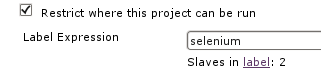
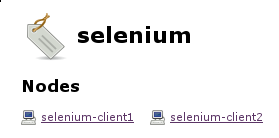
Problem description: One of my customers had a problem with their Selenium tests in the Jenkins continuous integration system. While Perl s Test::WebDriver still worked just fine the Selenium tests using Ruby s selenium-webdriver suddenly reported failures. The problem was caused by Debian wheezy s upgrade of the Iceweasel web browser. Debian originally shipped Iceweasel version 17.0.10esr-1~deb7u1 in wheezy, but during a security-update version 24.3.0esr-1~deb7u1 was brought in through the wheezy-security channel. Because the selenium tests are used in an automated fashion in a quite large and long-running build pipeline we immediately rolled back to Iceweasel version 17.0.10esr-1~deb7u1 so everything can continue as expected. Of course we wanted to get the new Iceweasel version up and running, but we didn t want to break the existing workflow while working on it. This is where on-demand slave selection through labels comes in. Basics: As soon as you re using Jenkins slaves you can instruct Jenkins to run a specific project on a particular (slave) node. By attaching labels to your slaves you can also use a label instead of a specific node name, providing more flexibility and scalability (to e.g. avoid problems if a specific node is down or you want to scale to more systems). Then Jenkins decides which of the nodes providing the according label should be considered for job execution. In the following screenshot a job uses the selenium label to restrict its execution to the slaves providing selenium and currently there are two nodes available providing this label: TIP 1: Visiting $JENKINS_SERVER/label/$label/ provides a list of slaves that provide that given $label (as well as list of projects that use $label in their configuration), like:

TIP 2: Execute the following script on $JENKINS_SERVER/script to get a list of available labels of your Jenkins system:
import hudson.model.*
labels = Hudson.instance.getLabels()
labels.each  label -> println label.name  
Solution: In the according customer setup we re using the swarm plugin (with automated Debian deployment through Grml s netscript boot option, grml-debootstrap + Puppet) to automatically connect our Jenkins slaves to Jenkins master without any manual intervention. The swarm plugin allows you to define the labels through the -labels command line option. By using the NodeLabel Parameter plugin we can configure additional parameters in Jenkins jobs: node and label . The label parameter allows us to execute the jobs on the nodes providing the requested label: This is what we can use to gradually upgrade from the old Iceweasel version to the new one by keeping a given set of slaves at the old Iceweasel version while we re upgrading other nodes to the new Iceweasel version (same for the selenium-server version which we want to also control). We can include the version number of the Iceweasel and selenium-server packages inside the labels we announce through the swarm slaves, with something like:
if [ -r /etc/init.d/selenium-server ] ; then
  FLAGS="selenium"
  ICEWEASEL_VERSION="$(dpkg-query --show --showformat='$ Version ' iceweasel)"
  if [ -n "$ICEWEASEL_VERSION" ] ; then
    ICEWEASEL_FLAG="iceweasel-$ ICEWEASEL_VERSION%%.* "
    EXTRA_FLAGS="$EXTRA_FLAGS $ICEWEASEL_FLAG"
  fi
  SELENIUM_VERSION="$(dpkg-query --show --showformat='$ Version ' selenium-server)"
  if [ -n "$SELENIUM_VERSION" ] ; then
    SELENIUM_FLAG="selenium-$ SELENIUM_VERSION%-* "
    EXTRA_FLAGS="$EXTRA_FLAGS $SELENIUM_FLAG"
  fi
fi
Then by using -labels $FLAGS EXTRA_FLAGS in the swarm invocation script we end up with labels like selenium iceweasel-24 selenium-2.40.0 for the slaves providing the Iceweasel v24 and selenium v2.40.0 Debian packages and selenium iceweasel-17 selenium-2.40.0 for the slaves providing Iceweasel v17 and selenium v2.40.0. This is perfect for our needs, because instead of using the selenium label (which is still there) we can configure the selenium jobs that should continue to work as usual to default to the slaves with the iceweasel-17 label now. The development related jobs though can use label iceweasel-24 and fail as often as needed without interrupting the build pipeline used for production. To illustrate this here we have slave selenium-client2 providing Iceweasel v17 with selenium-server v2.40. When triggering the production selenium job it will get executed on selenium-client2, because that s the slave providing the requested labels: Whereas the development selenium job can point to the slaves providing Iceweasel v24, so it will be executed on slave selenium-client1 here: This setup allowed us to work on the selenium Ruby tests while not conflicting with any production build pipeline. By the time I m writing about this setup we ve already finished the migration to support Iceweasel v24 and the infrastructure is ready for further Iceweasel and selenium-server upgrades.

Russ Allbery: Review: Air Apparent

Review: Air Apparent, by Mark Monmonier
Publisher: University of Chicago
Copyright: 1999
Printing: 2000
ISBN: 0-226-53423-5
Format: Trade paperback
Pages: 232
Subtitled "how meteorologists learned to map, predict, and dramatize the weather," Air Apparent is a history of weather maps. Mapping the weather is a surprisingly new field, dating only from the early 19th century when a combination of scientific understanding and the ability to combine scattered observations made it practical. They're also a particularly tricky problem since weather is inherently three-dimensional, and even to the present day nearly all of our maps are two-dimensional. Monmonier starts with the earliest observational maps and the attempts to use them for prediction and tracks developments up to the late 1990s, with TV weathermen and (simple) interactive web data viewers. I got a copy of this book after Paul Krugman mentioned it. I don't know a lot about weather forecasting or weather maps, but I remembered finding the science of weather fronts and maps of them fascinating in high school, and I hoped I'd get the same feeling from this. Unfortunately, I probably need to stop reading Monmonier's books; they always sound interesting, but I don't enjoy reading them. One thing that's important to know is that this is not a history of meteorology. One can't hold that against the book, of course, because it never claimed to be. But it has just enough of a history of meteorology mixed into its history of map-making to make at least this reader wish he were reading that other book. I like maps, I really do, but I was hoping for either a book that melded a history of the science of weather forecasting with the maps that were used in that science, or a book that dove deep into the effective and ineffective ways to make weather maps (ideally, Edward R. Tufte for maps). This is neither; it's little more or less than a detailed history of the making of weather maps. Each time it gets close to a clear explanation of the underlying meteorology, it finds a map to examine and skips the rest of the explanation. I kept almost understanding the underlying science, but not enough to really understand the goals of the map makers, or why one presentation was better than another, or how those presentations were used to make forecasts or track weather data. I think I would have found this book more interesting in conjunction with a full history of meteorology, but I suspect that a history of meteorology would include enough about the maps to render this book largely redundant for the casual reader. The other problem I had with this book is that it's very dry. Monmonier is clearly trying, and clearly cares a lot about his topic, but the book has no flow. I kept getting lost in the barrage of names, arguments over technique, and struggles for government funding. It's hard to put a finger on why the book didn't grab me; the closest I can come is that it's a book stuffed full of facts. Monmonier did exhaustive historical research on weather map making, saved numerous quotes from original documents, and laid it all out chronologically. That's fine if you just want the information, but I was looking to be entertained in the process, and that didn't happen. I think the problems get worse in the second half of the book, when weather satellites and computers enter the picture and the laborious, manual map-making fall out, although maybe I was just exhausted with the book by then. The early history of weather maps at least has the benefit of showing the logistical struggles behind creating an effective weather service: insufficient observation points, slow communication methods, and the need for skilled map-makers to turn measurements into visual representations. Once computers and satellite photography enter the picture, the science matters even more, and I think the reader needs a better understanding of the underlying science to make sense of the results. Air Apparent has a tendency to provide a brief introduction to the type of data, a detailed chronological history, and then a discussion of the ways of presenting and representing that data, without ever getting the reader to care about the data itself or see how it ties into forecasting. Part of the problem, I suspect, is that the history of meteorology seems to be full of sensible, careful people who largely did sensible, careful things with the data they had available at the time. This is great for the advancement of science, and not so helpful at making a history engrossing. I wish I could say that I was glad I read this book for the information, if not the presentation, but unfortunately I didn't retain much. I needed some sort of structure or frame on which to hang all of the specifics, some sense of story or controversy or at least scientific understanding, and I didn't get it. It took me a couple of months to finish this book because I kept setting it down to read other things, and I only finished it out of a combination of stubbornness and knowledge that other people liked it. If the topic sounds interesting, well, this book exists, and it's gotten several good reviews. But I'm afraid I can't recommend it. Rating: 4 out of 10

28 February 2014

Daniel Pocock: Google Summer of Code opportunities in data science and machine learning with Ganglia

As mentioned in my blog on Monday, the Ganglia Project is proud to be part of Google Summer of Code in 2014 The Ganglia team are offering various types of projects and different parts of Ganglia would welcome students with different skills, for example:
Component Skills
gmond agent C
gmond modules C or Python
JMXetric Java
gmetad and rrdtool for storing time series data C
Ganglia web interface JavaScript and jQuery
Ganglia integration (e.g. ganglia-nagios-bridge) Python
Big data right under your nose I have had many queries from students about how to get into data science. Very few students will be lucky enough to get an internship where they can study time-series from the financial markets and experiment making their own trading algorithms. On the other hand, network performance data is everywhere. It is real-time. It is surprisingly similar in some ways to processing financial data and it provides excellent opportunities for students to practice data science skills and make a meaningful contribution to solving real problems. Finding public Ganglia data with Google Many large organizations, including universities, governments and corporations are using Ganglia to gather metrics from all the hosts in their networks. Some of them even expose this data to the public. Here are two Google searches you can use to find them:
Courtesy of Universit Montpellier 2, France Some sites may even expose their data as an XML feed, you can try and extract it by connecting to the Ganglia server on one of these ports
Port Comments
8649 gmond: sends an XML snapshot to anybody who connects
8651 gmetad: sends an XML snapshot to anybody who connects
8651 gmetad: works a little bit like HTTP, returns a subset of the XML snapshot when you make a GET request
You can discover a Ganglia environment in your campus by looking for a gmond process on your machine and the gmond.conf file, often in /etc/gmond.conf or /etc/ganglia/gmond.conf. That file may contain a clue about the name of the host where Ganglia data is aggregated:
udp_send_channel  
  host = ganglia-reports.example.edu
  port = 8649
  ttl = 1
 
This tells you that the host ganglia-reports.example.edu is collecting the data - you could try the URL http://ganglia-reports.example.edu/ganglia/ in a web browser or try connecting to one of the TCP ports 8649, 8651 or 8652 on that host. Here is an example with netcat:
$ nc ganglia-reports.example.edu 8649   grep ^.H
It will return a list of all hosts that Ganglia knows about. Once you have a data feed, you can then configure a gmetad process on your own system to poll the remote system and generate local RRDs for you to study. Install your own Ganglia It is very easy to get your own Ganglia setup. On a Debian or Ubuntu system, just do:
# apt-get update
# apt-get install ganglia-monitor ganglia-webfrontend
On Fedora and RPM-based systems (such as CentOS or RHEL with EPEL) you can do:
# yum install ganglia-gmond ganglia-web
Everything should be autoconfigured. You can then browse to http://localhost/ganglia to see the charts. If you have several hosts with the gmond agent (just the ganglia-monitor.deb or ganglia-gmond.rpm) on the same LAN, they will automatically find each other using multicast and you will see an aggregated report on the machine with the web server. The data is real-time It is important to keep in mind that the data is real-time. This means you can often detect problems in real-time. If this blog appears on slashdot, for example, then that image from Universit Montpellier 2 will be hit many times. The image actually shows the network load on the web server producing the image, so you will see the slashdot effect graphically in the image itself. Processing real-time data is often the most advanced step in any data science exercise. Initially, you may simply log a few days of data to RRD files to start studying a static data set with your tool of choice, whether it is the R project, Weka or Hadoop Once you have a a hypothesis (for example, an algorithm that understands the normal characteristics of each metric) you may then take each new real-time value from the gmetad XML and test it with the algorithm. The algorithm would then raise an alert if any metric on any host deviates from its normal behavior. Mixing in other sources of data Depending upon the computing environment in your campus or organization, you may also be able to get other data sources, such as a list of people logged in to different machines at different times and the processes that each user starts and stops. This might help to make more accurate predictions about when network or computing resources will be under stress. For example, if users bob, alice and eve all appear on the same host, your algorithm might conclude that the load average will reach an excessive level within 15 minutes and send those three users a suggestion to each try other machines. Making a successful application for GSoC 2014 Here are some tips
  • For all organizations/projects
  • For Ganglia and the data science project in particular
    • Join the ganglia-general mailing list and send an email to introduce yourself
    • Try Ganglia on your own Linux system. Use the packages, it is really easy. Send an email to the list with any questions.
    • Explore the source code in github - ask us questions about it. For the data science project, you may also need to look at RRDtool source code and documentation about making a plugin for R (using C)
    • You don't have to do it our way: if you prefer to work with another tool instead of R, please tell us your idea
    • Write some skeleton code or make a diagram to explain what you want to do. While you do this, do you think of any new questions or problems? Make a list of them.
    • We want to give every student a small coding task as a test. Please tell us which language you prefer (e.g. C, Java, Python) so we can give you a suitable test. If you are really keen, follow the link to bugs I reported in Debian, look for one that is easy and try to write a small patch for it - helping fix bugs that annoy your mentor is likely to be a good way to get on the short-list for selection.

Michael Prokop: State of the art Debian/wheezy deployments with GRUB and LVM/SW-RAID/Crypto

Moving from Lilo to GRUB, using LVM as default, etc throughout the last years it was time to evaluate how well LVM works without a separate boot partition, possibly also on top of Software RAID. Big disks are asking for partitioning with GPT, just UEFI isn t my default yet, so I m still defaulting to Legacy BIOS for Debian/wheezy (I expect this to change for Debian/jessie and according hardware approaching at my customers). So what we have and want in this demonstration setup: System used for installation:
root@grml ~ # grml-version
grml64-full 2013.09 Release Codename Hefeknuddler [2013-09-27]
Partition setup:
root@grml ~ # parted /dev/sda
GNU Parted 2.3
Using /dev/sda
Welcome to GNU Parted! Type 'help' to view a list of commands.
(parted) mklabel gpt
(parted) mkpart primary 2048s 4095s
(parted) set 1 bios_grub on
(parted) name 1 "BIOS Boot Partition"
(parted) mkpart primary 4096s 100%
(parted) set 2 raid on
(parted) name 2 "SW-RAID / Linux"
(parted) quit
Information: You may need to update /etc/fstab.
Clone partition layout from sda to all the other disks:
root@grml ~ # for f in  b,c,d  ; sgdisk -R=/dev/sd$f /dev/sda
The operation has completed successfully.
Make sure each disk has its unique UUID:
root@grml ~ # for f in  b,c,d  ; sgdisk -G /dev/sd$f
The operation has completed successfully.
SW-RAID setup:
root@grml ~ # mdadm --create /dev/md0 --verbose --level=raid5 --raid-devices=4 /dev/sd a,b,c,d 2
mdadm: layout defaults to left-symmetric
mdadm: chunk size defaults to 512K
mdadm: size set to 1465004544K
mdadm: Defaulting to version 1.2 metadata
mdadm: array /dev/md0 started.
root@grml ~ #
SW-RAID speedup (system dependent, YMMV):
root@grml ~ # cat /sys/block/md0/md/stripe_cache_size
256
root@grml ~ # echo 16384 > /sys/block/md0/md/stripe_cache_size # 16MB
root@grml ~ # blockdev --getra /dev/md0
6144
root@grml ~ # blockdev --setra 65536 /dev/md0 # 32 MB
root@grml ~ # sysctl dev.raid.speed_limit_max
dev.raid.speed_limit_max = 200000
root@grml ~ # sysctl -w dev.raid.speed_limit_max=9999999999
dev.raid.speed_limit_max = 9999999999
root@grml ~ # sysctl dev.raid.speed_limit_min
dev.raid.speed_limit_min = 1000
root@grml ~ # sysctl -w dev.raid.speed_limit_min=100000
dev.raid.speed_limit_min = 100000
LVM setup:
root@grml ~ # pvcreate /dev/md0
  Physical volume "/dev/md0" successfully created
root@grml ~ # vgcreate homesrv /dev/md0
  Volume group "homesrv" successfully created
root@grml ~ # lvcreate -n rootfs -L4G homesrv
  Logical volume "rootfs" created
root@grml ~ # lvcreate -n bootfs -L1G homesrv
  Logical volume "bootfs" created
Check partition setup + alignment:
root@grml ~ # parted -s /dev/sda print
Model: ATA WDC WD15EADS-00P (scsi)
Disk /dev/sda: 1500GB
Sector size (logical/physical): 512B/512B
Partition Table: gpt
Number  Start   End     Size    File system  Name                 Flags
 1      1049kB  2097kB  1049kB               BIOS Boot Partition  bios_grub
 2      2097kB  1500GB  1500GB               SW-RAID / Linux      raid
root@grml ~ # parted -s /dev/sda unit s print
Model: ATA WDC WD15EADS-00P (scsi)
Disk /dev/sda: 2930277168s
Sector size (logical/physical): 512B/512B
Partition Table: gpt
Number  Start  End          Size         File system  Name                 Flags
 1      2048s  4095s        2048s                     BIOS Boot Partition  bios_grub
 2      4096s  2930276351s  2930272256s               SW-RAID / Linux      raid
root@grml ~ # gdisk -l /dev/sda
GPT fdisk (gdisk) version 0.8.5
Partition table scan:
  MBR: protective
  BSD: not present
  APM: not present
  GPT: present
Found valid GPT with protective MBR; using GPT.
Disk /dev/sda: 2930277168 sectors, 1.4 TiB
Logical sector size: 512 bytes
Disk identifier (GUID): 212E463A-A4E3-428B-B7E5-8D5785141564
Partition table holds up to 128 entries
First usable sector is 34, last usable sector is 2930277134
Partitions will be aligned on 2048-sector boundaries
Total free space is 2797 sectors (1.4 MiB)
Number  Start (sector)    End (sector)  Size       Code  Name
   1            2048            4095   1024.0 KiB  EF02  BIOS Boot Partition
   2            4096      2930276351   1.4 TiB     FD00  SW-RAID / Linux
root@grml ~ # mdadm -E /dev/sda2
/dev/sda3:
          Magic : a92b4efc
        Version : 1.2
    Feature Map : 0x0
     Array UUID : 7ed3b741:0774d529:d5a71c1f:cf942f0a
           Name : grml:0  (local to host grml)
  Creation Time : Fri Jan 31 15:26:12 2014
     Raid Level : raid5
   Raid Devices : 4
 Avail Dev Size : 2928060416 (1396.21 GiB 1499.17 GB)
     Array Size : 4392089088 (4188.62 GiB 4497.50 GB)
  Used Dev Size : 2928059392 (1396.21 GiB 1499.17 GB)
    Data Offset : 262144 sectors
   Super Offset : 8 sectors
          State : clean
    Device UUID : c1e4213b:81822fd1:260df456:2c9926fb
    Update Time : Mon Feb  3 09:41:48 2014
       Checksum : b8af8f6 - correct
         Events : 72
         Layout : left-symmetric
     chunk size : 512k
   Device Role : Active device 0
   Array State : AAAA ('A' == active, '.' == missing)
root@grml ~ # pvs -o +pe_start
  PV         VG      Fmt  Attr PSize PFree 1st PE
  /dev/md0   homesrv lvm2 a--  4.09t 4.09t   1.50m
root@grml ~ # pvs --units s -o +pe_start
  PV         VG      Fmt  Attr PSize       PFree       1st PE
  /dev/md0   homesrv lvm2 a--  8784175104S 8773689344S   3072S
root@grml ~ # pvs -o +pe_start
  PV         VG      Fmt  Attr PSize PFree 1st PE
  /dev/md0   homesrv lvm2 a--  4.09t 4.09t   1.50m
root@grml ~ # pvs --units s -o +pe_start
  PV         VG      Fmt  Attr PSize       PFree       1st PE
  /dev/md0   homesrv lvm2 a--  8784175104S 8773689344S   3072S
root@grml ~ # vgs -o +pe_start
  VG      #PV #LV #SN Attr   VSize VFree 1st PE
  homesrv   1   2   0 wz--n- 4.09t 4.09t   1.50m
root@grml ~ # vgs --units s -o +pe_start
  VG      #PV #LV #SN Attr   VSize       VFree       1st PE
  homesrv   1   2   0 wz--n- 8784175104S 8773689344S   3072S
Cryptsetup:
root@grml ~ # echo cryptsetup >> /etc/debootstrap/packages
root@grml ~ # cryptsetup luksFormat -c aes-xts-plain64 -s 256 /dev/mapper/homesrv-rootfs
WARNING!
========
This will overwrite data on /dev/mapper/homesrv-rootfs irrevocably.
Are you sure? (Type uppercase yes): YES
Enter passphrase:
Verify passphrase:
root@grml ~ # cryptsetup luksOpen /dev/mapper/homesrv-rootfs cryptorootfs
Enter passphrase for /dev/mapper/homesrv-rootfs:
Filesystems:
root@grml ~ # mkfs.ext4 /dev/mapper/cryptorootfs
mke2fs 1.42.8 (20-Jun-2013)
Filesystem label=
OS type: Linux
Block size=4096 (log=2)
Fragment size=4096 (log=2)
Stride=128 blocks, Stripe width=384 blocks
262144 inodes, 1048192 blocks
52409 blocks (5.00%) reserved for the super user
First data block=0
Maximum filesystem blocks=1073741824
32 block groups
32768 blocks per group, 32768 fragments per group
8192 inodes per group
Superblock backups stored on blocks:
        32768, 98304, 163840, 229376, 294912, 819200, 884736
Allocating group tables: done
Writing inode tables: done
Creating journal (16384 blocks): done
Writing superblocks and filesystem accounting information: done
root@grml ~ # mkfs.ext4 /dev/mapper/homesrv-bootfs
mke2fs 1.42.8 (20-Jun-2013)
Filesystem label=
OS type: Linux
Block size=4096 (log=2)
Fragment size=4096 (log=2)
Stride=128 blocks, Stripe width=384 blocks
65536 inodes, 262144 blocks
13107 blocks (5.00%) reserved for the super user
First data block=0
Maximum filesystem blocks=268435456
8 block groups
32768 blocks per group, 32768 fragments per group
8192 inodes per group
Superblock backups stored on blocks:
        32768, 98304, 163840, 229376
Allocating group tables: done
Writing inode tables: done
Creating journal (8192 blocks): done
Writing superblocks and filesystem accounting information: done
Install Debian/wheezy:
root@grml ~ # mount /dev/mapper/cryptorootfs /media
root@grml ~ # mkdir /media/boot
root@grml ~ # mount /dev/mapper/homesrv-bootfs /media/boot
root@grml ~ # grml-debootstrap --target /media --password YOUR_PASSWORD --hostname YOUR_HOSTNAME
 * grml-debootstrap [0.57] - Please recheck configuration before execution:
   Target:          /media
   Install grub:    no
   Using release:   wheezy
   Using hostname:  YOUR_HOSTNAME
   Using mirror:    http://http.debian.net/debian
   Using arch:      amd64
   Important! Continuing will delete all data from /media!
 * Is this ok for you? [y/N] y
[...]
Enable grml-rescueboot (to have easy access to rescue ISO via GRUB):
root@grml ~ # mkdir /media/boot/grml
root@grml ~ # wget -O /media/boot/grml/grml64-full_$(date +%Y.%m.%d).iso http://daily.grml.org/grml64-full_testing/latest/grml64-full_testing_latest.iso
root@grml ~ # grml-chroot /media apt-get -y install grml-rescueboot
[NOTE: We're installing a daily ISO for grml-rescueboot here because the 2013.09 Grml release doesn't work for this LVM/SW-RAID setup while newer ISOs are working fine already. The upcoming Grml stable release is supposed to work just fine, so you will be able to choose http://download.grml.org/grml64-full_2014.XX.iso by then. :)] Install GRUB on all disks and adjust crypttab, fstab + initramfs:
root@grml ~ # grml-chroot /media /bin/bash
(grml)root@grml:/# for f in  a,b,c,d  ; do grub-install /dev/sd$f ; done
(grml)root@grml:/# update-grub
(grml)root@grml:/# echo "cryptorootfs /dev/mapper/homesrv-rootfs none luks" > /etc/crypttab
(grml)root@grml:/# echo "/dev/mapper/cryptorootfs / auto defaults,errors=remount-ro 0   1" > /etc/fstab
(grml)root@grml:/# echo "/dev/mapper/homesrv-bootfs /boot auto defaults 0 0" >> /etc/fstab
(grml)root@grml:/# update-initramfs -k all -u
(grml)root@grml:/# exit
Clean unmounted/removal for reboot:
root@grml ~ # umount /media/boot
root@grml ~ # umount /media/
root@grml ~ # cryptsetup luksClose cryptorootfs
root@grml ~ # dmsetup remove homesrv-bootfs
root@grml ~ # dmsetup remove homesrv-rootfs
NOTE: On a previous hardware installation I had to install GRUB 2.00-22 from Debian/unstable to get GRUB working.
Some metadata from different mdadm and LVM experiments seems to have been left and confused GRUB 1.99-27+deb7u2 from Debian/wheezy (I wasn t able to reproduce this issue in my VM demo/test setup).
Just in cause you might experience the following error message, try GRUB >=2.00-22:
  # grub-install --recheck /dev/sda
  error: unknown LVM metadata header.
  error: unknown LVM metadata header.
  /usr/sbin/grub-probe: error: cannot find a GRUB drive for /dev/mapper/cryptorootfs.  Check your device.map.
  Auto-detection of a filesystem of /dev/mapper/cryptorootfs failed.
  Try with --recheck.
  If the problem persists please report this together with the output of "/usr/sbin/grub-probe --device-map="/boot/grub/device.map"
  --target=fs -v /boot/grub" to <bug-grub@gnu.org>

25 February 2014

Andrew Pollock: [life] Day 28, Kindergarten, Taxes and a smattering of appointments

Today was yet another busy day. Zoe seems to have taken to waking up at around 5:30am instead of her normal 6:00am (or a bit later when I'm really lucky). Not sure what that's all about. I did get her to go back to bed until about 6:55am, and then she was happy to just come and snuggle in bed with me for a bit instead of play games on her Nexus 7. After that we had a leisurely start to day, making porridge with strawberries in the Thermomix, and then biked to Kindergarten. Somehow it still managed to be 8:45am by the time we got there. I was expecting it would be closer to 8:30am. Drop off looked like it was going to be clingy, but then she just waved me off, so that was nice. I had an appointment at the podiatrist at 11:40am, and that was back near Kindergarten, but further away from home, so I had this grand plan of cycling over there, and then twiddling my thumbs for a bit before Kindergarten pickup. That left me with only a couple of hours at home to work on my taxes before I had to leave again. I managed to make those couple of hours productive though, so that was good. I biked to the podiatrist, had my appointment, and then it was 1pm and I still needed lunch, so I decided to grab some at a cafe near the Kindergarten. I chilled out there for a while catching up on social media on my phone, and then headed over to the Kindergarten, but was still quite early, so I just hung out on one of the couches they have out by the front door, out of sight of the kids. The Kindergarten has an A-frame whiteboard out the front that they use to broadcast messages to parents at drop off and pick up time. One of the teachers came out to write something on it while I was sitting out there, and another parent reacted rather negatively to it as it was being written, so I had to go see it for myself. Apparently a child had a suspected gastro bug (he'd thrown up a couple of times). It was interesting observing the reactions of a few mothers as they trickled in for pick up. It's been a while since a gastro bug has gone through the household, so I guess the news didn't evoke a particularly powerful reaction in me. I'm going with the "suspected" and that hopefully Zoe didn't come into contact with patient zero. I guess time will tell. I certainly hope she doesn't come down with anything between now and Sunday, with all the travel we're doing. I had an accident report to sign today. Apparently a large wooden block hit Zoe in the head while they were packing up a tower they'd made. She had a bit of a lump on her head, but otherwise seemed fine. Zoe had a nap today, of unknown length, but woke up naturally as I entered the room. She took a fair while to get going though, and was grumpy and uncooperative getting on the bike. I ended up having to do it the "hard way" and we had a fabulous ride back with her doing a tired cry all the way. All the way until we passed a playground, when she snapped out of it and declared she wanted to have a play. I'd booked myself in for a haircut at 3pm, and a make up swim class at 4:45pm (to cover our absence this Saturday due to our Melbourne trip) so playing in the playground seemed like the perfect way to fill the gap. It was even on the way to swim class. So after I had my haircut, we popped home, grabbed her swim gear, and biked back to the playground for a bit. Then we went to swim class. This was her third one at her new level, and her progress continues to go very well. It's really exciting watching her. Zoe took her time leaving the pool, so we didn't get home until after 5:30pm and I hadn't started dinner yet. I whipped it up while Zoe watched some TV, and I managed to recoup all of the lost time after dinner and still get Zoe to bed at a reasonable hour. Bedtime itself went nice and smoothly. I used the canned goodnight video I asked Sarah to make for the first time tonight, and it was well received and I think defused any potential issues. I'm hoping she'll sleep well tonight, as her mosquito bites don't seem to be actively giving her trouble any more.

24 February 2014

Matthew Garrett: The importance of a community-focused mindset

Piston, an Openstack-in-a-box vendor[1] are a sponsor of the Red Hat[2] Summit this year. Last week they briefly ceased to be for no publicly stated reason, although it's been sugggested that this was in response to Piston winning a contract that Red Hat was also bidding on. This situation didn't last for long - Red Hat's CTO tweeted that this was an error and that Red Hat would pay Piston's sponsorship fee for them.

To Red Hat's credit, having the CTO immediately and publicly accept responsibility and offer reparations seems like the best thing they could possibly do in the situation and demonstrates that there are members of senior management who clearly understand the importance of community collaboration to Red Hat's success. But that leaves open the question of how this happened in the first place.

Red Hat is big on collaboration. Workers get copies of the Red Hat Brand Book, an amazingly well-written description of how Red Hat depends on the wider community. New hire induction sessions stress the importance of open source and collaboration. Red Hat staff are at the heart of many vital free software projects. As far as fundamentally Getting It is concerned, Red Hat are a standard to aspire to.

Which is why something like this is somewhat unexpected. Someone in Red Hat made a deliberate choice to exclude Piston from the Summit. If the suggestion that this was because of commercial concerns is true, it's antithetical to the Red Hat Way. Piston are a contributor to upstream Openstack, just as Red Hat are. If Piston can do a better job of selling that code than Red Hat can, the lesson that Red Hat should take away is that they need to do a better job - not punish someone else for doing so.

However, it's not entirely without precedent. The most obvious example is the change to kernel packaging that happened during the RHEL 6 development cycle. Previous releases had included each individual modification that Red Hat made to the kernel as a separate patch. From RHEL 6 onward, all these patches are merged into one giant patch. This was intended to make it harder for vendors like Oracle to compete with RHEL by taking patches from upcoming RHEL point releases, backporting them to older ones and then selling that to Red Hat customers. It obviously also had the effect of hurting other distributions such as Debian who were shipping 2.6.32-based kernels - bugs that were fixed in RHEL had to be separately fixed in Debian, despite Red Hat continuing to benefit from the work Debian put into the stable 2.6.32 point releases.

It's almost three years since that argument erupted, and by and large the community seems to have accepted that the harm Oracle were doing to Red Hat (while giving almost nothing back in return) justified the change. The parallel argument in the Piston case might be that there's no reason for Red Hat to give advertising space to a company that's doing a better job of selling Red Hat's code than Red Hat are. But the two cases aren't really equal - Oracle are a massively larger vendor who take significantly more from the Linux community than they contribute back. Piston aren't.

Which brings us back to how this could have happened in the first place. The Red Hat company culture is supposed to prevent people from thinking that this kind of thing is acceptable, but in this case someone obviously did. Years of Red Hat already having strong standing in a range of open source communities may have engendered some degree of complacency and allowed some within the company to lose track of how important Red Hat's community interactions are in perpetuating that standing. This specific case may have been resolved without any further fallout, but it should really trigger an examination of whether the reality of the company culture still matches the theory. The alternative is that this kind of event becomes the norm rather than the exception, and it takes far less time to lose community goodwill than it takes to build it in the first place.

[1] And, in the spirit of full disclosure, a competitor to my current employer
[2] Furthering the spirit of full disclosure, a former employer

comment count unavailable comments

23 February 2014

Steve Kemp: Two minor toys ..

Two minor things:
graphite_send
A simple shell-script to submit metrics to a graphite server, extensible via local plugins, but covers the obvious metrics by default. Metrics are submitted via simple calls to netcat. Trivial, but much more lightweight than collectd and similar.
HTML::Emoji
A perl module for converting HTML like "<p>:smile:</p>" into something graphical. This was written for my markdown sharing site, but is pretty fun. The konami-code page demonstrates usage. (This parses the HTML so it won't transform attributes, ids, or anything that isn't in the "text" part of any HTML input.)
The graphite sending script is perhaps the most useful, but at the same time it feels too small to be a package of its own. I'm tempted to bundle it up into my sysadmin-util collection, but I can't quite decide if it belongs there either.

22 February 2014

Steve Kemp: Changing my stack ..

For the past few years I've hosted all my websites in a "special" way: The webserver I chose initially was thttpd, which gained points because it was small, auditable, and simple to launch. Something like this was my recipe:
#!/bin/sh
exec thttpd -D -C /srv/steve.org.uk/thttpd.conf
Unfortunately thttpd suffers from a few omissions, most notably it doesn't support either "Keep-Alive", or "Compression" (i.e. gzip/deflate), so it would always be slower than I wanted. On the plus side it was simple to use, supported CGI scripts, and served me well once I'd patched it to support X-Forwarded-For for IPv6 connections. Recently I setup a server optimization site and was a little disappointed that the site itself scored poorly on Google's page-speed test. So I removed thttpd for that site, and replacing it with nginx. The end result was that the site scored 98/100 on Google's page-speed test. Progress. Unfortunately I couldn't do that globally because nginx doesn't support old-school plain CGI scripts. So last night I removed both nginx and thttpd, and now every site on my box is hosted using lighttpd. There weren't too many differences in the setup, though I had to add some rules to add caching for *.css, etc, and some of my code needed updating. Beyond that today I've setup a dedicated docker host - which allows me to easily spin up containers. Currently I've got graphite monitoring for my random hosts, and a wordpress guest for plugin development/testing. Now to go back to reading Off to be the wizard .. - not as good as Rick Cook's wizardry series (which got less good as time went on, but started off strongly), but still entertaining.

Sylvestre Ledru: Some updates on llvm.org/apt/

I made some changes on http://llvm.org/apt/ for the last 2 months.

19 February 2014

Michael Stapelberg: Using your TPM for SSH authentication

Thomas Habets has blogged about using your TPM (Trusted Platform Module) for SSH authentication a few weeks ago. We worked together to get his package simple-tpm-pk11 into Debian, and it has just arrived in unstable :-). Using simple-tpm-pk11, you can let your TPM generate a key, which you then can use for SSH authentication. This key will never leave the TPM, so it is safer than having your key on the filesystem (e.g. ~/.ssh/id_rsa), since file system access is not enough to steal your key anymore. Instead, you ll need remote code execution. To use this software, first make sure your TPM is enabled in the BIOS. In my ThinkPad X200 from 2008, the TPM is called Security Chip . Afterwards, claim ownership of your TPM using tpm_takeownership -z (from the tpm-tools package) and enter a password. You will not need to enter this password for every SSH authentication later (but you may choose to set a separate password for that). Then, install simple-tpm-pk11, create a key, set it as your PKCS11Provider and install the public key on the host(s) where you want to use it:
mkdir ~/.simple-tpm-pk11
stpm-keygen -o ~/.simple-tpm-pk11/my.key
echo key my.key > ~/.simple-tpm-pk11/config
echo -e "\nHost *\n    PKCS11Provider libsimple-tpm-pk11.so" >> ~/.ssh/config
ssh-keygen -D libsimple-tpm-pk11.so   ssh shell.example.com tee -a .ssh/authorized_keys
You ll now be able to ssh into shell.example.com without having the key for that on your file system :-). In case you have any feedback about/troubles with the software, please feel free to contact Thomas directly.

18 February 2014

Mario Lang: Conntributing on GitHub

I really like to read code written by different people. I've always been the type of learner that can cover a lot of ground by looking at examples. A few of the programming tricks I acquired over time have definitely been learnt by reading programs written by other people. There are of course cases of disagrement with coding style (lets put that very mildly), so not every project is fun to read. But I tend to find projects I like enough to actually look at their source code. Now, if you get into this habit, there is also the occasional spotting of a bug. Many are really cosmetic, like typos in comments or documentation. Others are maybe more serious, who knows what can happen if you read a few lines of code written by someone you have never met in person. This is one of the original arguments of open source and free software. It basically goes like: "People will read your code and report problems." I know that happens, but I also know that there are cases of people finding relatively minor things during a small code review, which they don't report, or which get lost in some developers INBOX. I remember waiting months to see memory corruption fixes for a particular project I submitted by email to actually appear in the development repository. In some cases you really need to track your patches and prod someone to remind them about your contribution if need be. True, some of these issues are probably minor enough to not really hurt if they get lost, but I have a feel that a lot of minor things also sort of add up. This is where GitHub comes into play. We have had project hosting services since at least a decade now, but none of them (to my experience) have ever made it so easy for all involved parties to submit and merge changes into projects. Pull requests are just amazing. Well, at least for me, they are since a few months. I have a sort of mixed hate-love relationship with GitHub when it comes to a topic that is very important to me, Accessibility. The last project hosting site I really liked for their simple web interface (read, still usable with Lynx) was Google Code. That was in the days when Google still seemed to care about such things. These days, their newer services are next to unusable to me (with the tools I prefer). SourceForge was always a catastrophy. Many things were cumbersome to do, because the site is so loaded with links to all sorts of things I never need. However, at the time I was using it, all the things I really needed did work. GitHub is a different beast, in a different era of the internet. While I can read project pages and a few basic things perfectly fine, some parts of the GitHub site are simply unusable for no particular reason. For instance, I can edit (some of my) preferences and even save them. But I can not star a project, nor can I follow other developers. Invoking these links gives me a 404, which seems to indicate that some JavaScript (read, client side code execution) is required which my browser does not perform. However, I really wonder why. Because something like "I want to star this project" will eventually have to end up as a request on the server anyway, so it seems technically unnecessary to rely on Javascript for such an operation to succeed. Luckily, these days, hip projects do have an API. An GitHub is no exception. I want to emphasis that an API alone is not an accessibility fix, since you rarely have the time to implement a clinet for a random API, just to get access to a service you want to use. Sometimes you do, and an API is a great enabler in such situations, but a reference client with a rich feature-set is much better. I have to admit that I haven't evaluated any of the possible alternatives, but one client I found for GitHub's API did really boost my productivity in the last year. I am talking about Hub. It is a simple wrapper around Git that adds a few and enhances some other git commands. Most importantly, hub fork will fork the current checkout on GitHub, and hub pull-request allows you to quickly (and I really mean quickly!) open a pull request for some commits you've just done to your fork of some project. This is very helpful, and very accessible. While it does not solve all my accessibility problems with GitHub, it at least enables me to take part in the GitHub workflow. I can easily fork projects and submit pull reuqests for changes I did. And that is what I did, at least a bit, in roughly the past year. I am not sure exactly, but I think it was spring when someone made me aware of Hub. One approach would be to check my GitHub activity graph, but I probably don't have to mention that it is not accessible. Here is a list of some of my contributions to open source projects on GitHub since I discovered a good client for the GitHub API: To summarize: I love GitHub for what it does to the free software community. I think the simplicity (and transparency) of contributions is to the benefit of free and open source software. However, I also hate GitHub sometimes when I need to ask a friend to do relatively trivial changes for me. What I actually want, is a command-line client like Hub that makes most or even all functionality provided on the website available. True, some things like graphs are not immediately easy to adapt. But I really shouldn't need to use a modern full-fledged web browser to tell GitHub that I am interested in the activities of a certain user. Or delete a fork. Yes, thats right. I can use Hub to fork a project, but there is no way to delete it again. Sort of strange for casual small-scale contributions. I guess the workflow there is: fork, commit, pull-request, wait for merge, delete. I don't want to have all sorts of forks on GitHub that I actually don't actively use/maintain. So once a pull request was merged, and I don't have any other things I am working on right now, I actually want to get rid of the fork again. It is easy enough to do a fork should I ever need it again.

Mario Lang: Contributing on GitHub

I really like to read code written by different people. I've always been the type of learner that can cover a lot of ground by looking at examples. A few of the programming tricks I acquired over time have definitely been learnt by reading programs written by other people. There are of course cases of disagrement with coding style (lets put that very mildly), so not every project is fun to read. But I tend to find projects I like enough to actually look at their source code. Now, if you get into this habit, there is also the occasional spotting of a bug. Many are really cosmetic, like typos in comments or documentation. Others are maybe more serious, who knows what can happen if you read a few lines of code written by someone you have never met in person. This is one of the original arguments of open source and free software. It basically goes like: "People will read your code and report problems." I know that happens, but I also know that there are cases of people finding relatively minor things during a small code review, which they don't report, or which get lost in some developers INBOX. I remember waiting months to see memory corruption fixes for a particular project I submitted by email to actually appear in the development repository. In some cases you really need to track your patches and prod someone to remind them about your contribution if need be. True, some of these issues are probably minor enough to not really hurt if they get lost, but I have a feel that a lot of minor things also sort of add up. This is where GitHub comes into play. We have had project hosting services since at least a decade now, but none of them (to my experience) have ever made it so easy for all involved parties to submit and merge changes into projects. Pull requests are just amazing. Well, at least for me, they are since a few months. I have a sort of mixed hate-love relationship with GitHub when it comes to a topic that is very important to me, Accessibility. The last project hosting site I really liked for their simple web interface (read, still usable with Lynx) was Google Code. That was in the days when Google still seemed to care about such things. These days, their newer services are next to unusable to me (with the tools I prefer). SourceForge was always a catastrophy. Many things were cumbersome to do, because the site is so loaded with links to all sorts of things I never need. However, at the time I was using it, all the things I really needed did work. GitHub is a different beast, in a different era of the internet. While I can read project pages and a few basic things perfectly fine, some parts of the GitHub site are simply unusable for no particular reason. For instance, I can edit (some of my) preferences and even save them. But I can not star a project, nor can I follow other developers. Invoking these links gives me a 404, which seems to indicate that some JavaScript (read, client side code execution) is required which my browser does not perform. However, I really wonder why. Because something like "I want to star this project" will eventually have to end up as a request on the server anyway, so it seems technically unnecessary to rely on Javascript for such an operation to succeed. Luckily, these days, hip projects do have an API. An GitHub is no exception. I want to emphasis that an API alone is not an accessibility fix, since you rarely have the time to implement a clinet for a random API, just to get access to a service you want to use. Sometimes you do, and an API is a great enabler in such situations, but a reference client with a rich feature-set is much better. I have to admit that I haven't evaluated any of the possible alternatives, but one client I found for GitHub's API did really boost my productivity in the last year. I am talking about Hub. It is a simple wrapper around Git that adds a few and enhances some other git commands. Most importantly, hub fork will fork the current checkout on GitHub, and hub pull-request allows you to quickly (and I really mean quickly!) open a pull request for some commits you've just done to your fork of some project. This is very helpful, and very accessible. While it does not solve all my accessibility problems with GitHub, it at least enables me to take part in the GitHub workflow. I can easily fork projects and submit pull reuqests for changes I did. And that is what I did, at least a bit, in roughly the past year. I am not sure exactly, but I think it was spring when someone made me aware of Hub. One approach would be to check my GitHub activity graph, but I probably don't have to mention that it is not accessible. Here is a list of some of my contributions to open source projects on GitHub since I discovered a good client for the GitHub API: To summarize: I love GitHub for what it does to the free software community. I think the simplicity (and transparency) of contributions is to the benefit of free and open source software. However, I also hate GitHub sometimes when I need to ask a friend to do relatively trivial changes for me. What I actually want, is a command-line client like Hub that makes most or even all functionality provided on the website available. True, some things like graphs are not immediately easy to adapt. But I really shouldn't need to use a modern full-fledged web browser to tell GitHub that I am interested in the activities of a certain user. Or delete a fork. Yes, thats right. I can use Hub to fork a project, but there is no way to delete it again. Sort of strange for casual small-scale contributions. I guess the workflow there is: fork, commit, pull-request, wait for merge, delete. I don't want to have all sorts of forks on GitHub that I actually don't actively use/maintain. So once a pull request was merged, and I don't have any other things I am working on right now, I actually want to get rid of the fork again. It is easy enough to do a fork should I ever need it again.

14 February 2014

Andrew Pollock: [life] Day 17, Dentist, Goldie Blox, Yum Cha and more Kinetic Sand

Today was another busy day. Zoe had a check up at her dentist first thing this morning. This dentist was such a good find, and although it's a trek (it's over an hour round trip for a 15 minute appointment) I think it's well worth it to instill a positive view of dentists into Zoe, and it's all covered by insurance, so really the only expense is time and petrol. After we got home, Zoe was a bit sick of being in the car, and wanted to watch TV. I'm trying to restrict TV to just the late afternoon, while I'm preparing dinner, so I thought this was a good opportunity to break out the Goldie Blox set that I haven't introduced her to yet. That went pretty well, but Mum and Dad (aka Grandma and Grandpa) arrived early for lunch, so we didn't finish working our way through the book. I think it was more of a hit than Robot Turtles is at the moment. We all jumped in the car, and drove down to Bulimba, and caught the cross river ferry over to the CityGlider bus and had Yum Cha for lunch. That went pretty well, and we returned the same way. Zoe had a little play in the park at Bulimba with her grandparents while I popped over to the florist, and then we came home and Zoe gave them a demonstration of the kinetic sand and then Grandma and Grandpa went home and I managed to convince Zoe to take a late nap. We didn't get much of an opportunity for something Science Friday-related today, with all of the other activities. Zoe didn't wake up from her nap until close to 5pm, just after my girlfriend arrived for dinner. Zoe watched a bit of TV and then the three of us walked down to collect pizza for dinner, and that was pretty much how the evening ended. I let Zoe stay up a little bit later, because she'd napped so late.

Rudy Godoy: Getting Movistar Peru ZTE MF193 work in Debian

After so many attempts to have my shiny Movistar Peru (Internet M vil) 3G ZTE MF193 modem to work out-of-the-box in Debian jessie (unstable) with NetworkManager, the word frustration was hitting on my head. Even trying to do the right thing, led me to craziness. I gave up on fanzines and decided to take the old-school route. Release wvdial and friends! Trying different combinations for wvdial.conf was no heaven for sure, but I ve found this wonderful guide from Christian Ams ss from Vienna, Austria! that really made a difference. Of course he s talking about the MF180 model but you get the idea. So I m sharing what was different for the MF193. Basically, I ve done the eject and disable CD-ROM thing already, but still no progress. I ve also tried using wvdial to send AT commands to the evasive /dev/ttyUSBX device. Starting from scratch confirmed that I ve done such things properly indeed. I was amused by the fact that I could use screen to talk to the modem! (yo, all the time wasted trying to have minicom and friends play nice) So, let s get to the point. After following this procedure, you should be able to use NetworkManager to connect to the Interwebs using the 3G data service from Movistar Peru.
  1. Step 1 follow the guide
  2. Step 2 Here I had to use /dev/ttyUSB4
  3. Step 3 follow the guide
  4. Unplug your USB modem
  5. Plug your USB modem. This time you should see only /dev/ttyUSB 0,1,2 and /dev/gsmmodem should be missing (not sure if this is a bug). Now /dev/ttyUSB2 is your guy.
  6. Step 4 use /dev/ttyUSB2
  7. Run wvdial from CLI it should connect successfully.
  8. Stop wvdial
  9. Select the Network icon on GNOME3, click on the Mobile Broadband configuration you have, if not create one.
  10. Voil . Happy surfing!
I m pasting my wvdial.conf, just in case.
[Dialer Defaults]
Modem = /dev/ttyUSB2
Username = movistar@datos
Password = movistar
APN = movistar.pe
Phone = *99#
Stupid Mode = 1
Init2 = AT+CGDCONT=4,"IP","movistar.pe"

11 February 2014

Sylvestre Ledru: Hello Planet Mozilla

Hello Planet Mozilla I started as a new employee a few weeks ago. I am working as Release Manager for the next releases of Firefox (both on desktop + android).
As a start, Lukas and I will be working on Firefox 29 (no pressure at all to start with Australis + Firefox account).
I grew up with the first versions of Netscape, followed the Phoenix/Firebird adventures and I have been a supporter of Firefox since then.
I am glad to join such an important project, especially in the perspective of the recent privacy scandals. I think that Mozilla is in the best position to communicate to the public, to denounce certain activities and provides technologies to bypass them. Besides that, let me introduce myself. I have been in free software for almost a decade.
My previous work as working on Scilab (from Inria to Scilab Enterprises) where I stayed for almost 8 years. Over the years, I worked on various development (C, C++, Java, Python, Scilab, etc), user experience, roadmap definition, release management, R and D / customer project management, management, board member, etc. During this period, I learnt tons of things from coding, release and product management, QA, etc. In parallel, I worked part time at IRILL, a free software research center (hosted by Inria). I was involved as community management ie organizing event like GNU Hacker meeting, FOSDEM, Euro LLVM, etc and recording them. I had the chance to meet plenty of people from the FLOSS world (including folks from Mozilla who suggested me to join the adventure). I am also involved in two communities: Debian and LLVM. The first one is Debian. I started to contribute in Debian to get Scilab properly packaged. 7 years
after, I am now maintaining
important packages
like LLVM, Clang, libedit, emscripten (!) or BLAS/LAPACK, treasurer of the French representative association and organizing the French mini Debian Conference (Debconf) / Meetup. For the last couple of years, I contributed to LLVM, Clang and LLDB. I participated to the release 3.3 and 3.4. My technical contributions were mainly driven by the packaging, the nightly Debian/Ubuntu packages and also by the rebuild of the Debian archive using Clang (instead of gcc). And when I am not behind my laptop, I am teaching scuba diving with my girlfriend or hiking, mountaineering, ski touring, climbing, etc. Yeh, I am a bit hyperactive.

Andrew Pollock: [life] Day 14, Kindergarten and a make up swim class

Zoe woke up pretty early today, at around 5:30am. I also officially became a Xoogler at some point overnight. I used this transition as the opportunity to move from my Nexus 4 to my Nexus 5, so I could have a clean start on a phone that had never had work credentials on it. I started that process before breakfast, and mostly had a usable phone by the time we biked to Kindergarten. Zoe was a bit more like her usual clingy self at drop off today, so I spent a bit longer getting her settled. I got home and pretty much spent the rest of the day sorting out my phone. I can say many good things about Android, but seamless device migration isn't one of them. I'll probably factory reset my Nexus 4 tomorrow. I biked back to Kindergarten to pick up Zoe, and sure enough, she was fast asleep again. It turned out that she'd gone down about 30 minutes later today, so she was deeply asleep, and didn't take too kindly to being woken up. She was very sad, and it took forever just to leave the Kindergarten. We were well and truly the last ones out. Then she saw Megan having a trial tennis lesson at the tennis courts on the way to the bike, and wanted to do that too, and we burned some more time, while I tried to talk her out of that. Zoe had a make up swim class today to cover the one she'd missed on Saturday when she went down to Canberra with Sarah. That was at 3:15pm. We were a tad late for it. Weekday swim classes are much quieter than the weekend ones, so I used the opportunity to talk to one of the swim school staff about progressing Zoe to the next level. They conducted an assessment on the spot, and graduated her! She's moving from "Platypus" to "Octopus", starting next week. The class time options were pretty crappy though, something like 11:45am on Saturday, or a late afternoon weekday. We've opted for a weekday class after Kindergarten for the rest of this quarter and will try and get an earlier Saturday class next quarter. There's a reasonable gap between the end of Kindergarten and the start of swim class, so I'll have to figure out how best to use that time. I might make our library visit in between, even though it means a bit of back and forth. The upside is Saturday mornings are now wide open. We had a celebratory ice cream when we got home from swim class, and went out for a babyccino after dinner. I think it's important to celebrate achievements. I managed to get Zoe to bed slightly early tonight in light of her reduced nap time, but she just woke up briefly at 10:30pm. She seems to be particularly sensitive to mosquitoes, and has a bite on her forehead, right at the hairline, and it was giving her some grief. I gave her some antihistamine and she's gone back to bed fairly easily. Fingers crossed she sleeps okay for the rest of the night.

10 February 2014

Matthew Garrett: IBM's remote firmware configuration protocol

I spent last week looking into the firmware configuration protocol used on current IBM system X servers. IBM provide a tool called ASU for configuring firmware settings, either in-band (ie, running on the machine you want to reconfigure) or out of band (ie, running on a remote computer and communicating with the baseboard management controller - IMM in IBM-speak). I'm not a fan of using vendor binaries for this kind of thing. They tend to be large (ASU is a 20MB executable) and difficult to script, so I'm gradually reimplementing them in Python. Doing that was fairly straightforward for Dell and Cisco, both of whom document their configuration protocol. IBM, on the other hand, don't. My first plan was to just look at the wire protocol, but it turns out that it's using IPMI 2.0 to communicate and that means that the traffic is encrypted. So, obviously, time to spend a while in gdb.

The most important lesson I learned last time I did this was "Check whether the vendor tool has a debug option". ASU didn't mention one in its help text and there was no sign of a getopt string, so this took a little longer - but nm helpfully showed a function called DebugLog and setting a breakpoint on that in gdb showed it being called a bunch of the time, so woo. Stepping through the function revealed that it was checking the value of a variable, and looking for other references to that variable in objdump revealed a -l argument. Setting that to 255 gave me rather a lot of output. Nearby was a reference to --showsptraffic, and passing that as well gave me output like:

BMC Sent: 2e 90 4d 4f 00 06 63 6f 6e 66 69 67 2e 65 66 69
BMC Recv: 00 4d 4f 00 21 9e 00 00

which was extremely promising. 2e is IPMI-speak for an OEM specific command, which seemed pretty plausible. 4d 4f 00 is 20301 in decimal, which is the IANA enterprise number for IBM's system X division (this is required by the IPMI spec, it wasn't an inspired piece of deduction on my behalf). 63 6f 6e 66 69 67 2e 65 66 69 is ASCII for config.xml. That left 90 and 06 to figure out. 90 appeared in all of the traces, so it appears to be the command to indicate that the remaining data is destined for the IMM. The prior debug output indicated that we were in the QuerySize function, so 06 presumably means query the size. And this is supported by the response - 00 (a status code), 4d 4f 00 (the IANA enterprise number again, to indicate that the responding device is speaking the same protocol as you) and 21 9e 00 00 - or, in rational endianness, 40481, an entirely plausible size.

Once I'd got that far the rest started falling into place fairly quickly. 01 rather than 06 indicated a file open request, returning a four byte file handle of some description. 02 was read, 03 was write and 05 was close. Hacking this together with pyghmi meant I could open a file and read it. Success!

Well, kind of. I was getting back a large blob of binary. The debug trace showed calls to an EfiDecompress function, so on a whim I tried just decompressing it using the standard UEFI compression format. Shockingly, it worked and now I had a 345K XML blob and presumably many more problems than I'd previously had. Parsing the XML was fairly straightforward, and now I could retrieve the full set of config options, along with the default, current and possible values for them.

Making changes was pretty much just the reverse of this. A small XML blob containing the new values is compressed and written to asu_update.efi. One of the elements is a random identifier, which will then appear in another file called config_log along with a status. Just keep re-reading this until the value changes to CM_DONE and we're good.

The in-band configuration appears to be identical, but rather than sending commands over the wire they're send through the system's IPMI controller directly. Yes, this does mean that it's sending compressed XML through a single io port. Yes, I'd rather be drinking.

I've documented the protocol here and hope to be able to release this code before too long - right now I'm trying to nail down the interface a little, but it's broadly working.

comment count unavailable comments

Russell Coker: Fingerprints and Authentication

Dustin Kirkland wrote an interesting post about fingerprint authentication [1]. He suggests using fingerprints for identifying users (NOT authentication) and gives an example of a married couple sharing a tablet and using fingerprints to determine who s apps are loaded. In response Tollef Fog Heen suggests using fingerprints for lightweight authentication, such as resuming a session after a toilet break [2]. I think that one of the best comments on the issue of authentication for different tasks is in XKCD comic 1200 [3]. It seems obvious that the division between administrator (who installs new device drivers etc) and user (who does everything from playing games to online banking with the same privileges) isn t working, and never could work well particularly when the user in question installs their own software. I think that one thing which is worth considering is the uses of a signature. A signature can be easily forged in many ways and they often aren t checked well. It seems that there are two broad cases of using a signature, one is to enter into legally binding serious contract such as a mortgage (where wanting to sign is the relevant issue) and the other is cases where the issue doesn t matter so much (EG signing off on a credit card purchase where the parties at risk can afford to lose money on occasion for efficient transactions). Signing is relatively easy but that s because it either doesn t matter much or because it s just a legal issue which isn t connected to authentication. The possibility of serious damage (sending life savings or incriminating pictures to criminals in another jurisdiction) being done instantly never applied to signatures. It seems to me that in many ways signatures are comparable to fingerprints and both of them aren t particularly good for authentication to a computer. In regard to Tollef s ideas about lightweight authentication I think that the first thing that would be required is direct user control over the authentication required to unlock a system. I have read about some Microsoft research into a computer monitoring the office environment to better facilitate the user s requests, an obvious extension to such research would be to have greater unlock requirements if there are more unknown people in the area or if the device is in a known unsafe location. But apart from that sort of future development it seems that having the user request a greater or lesser authentication check either at the time they lock their session or by policy would make sense. Generally users have a reasonable idea about the risk of another user trying to login with their terminal so user should be able to decide that a toilet break when at home only requires a fingerprint (enough to keep out other family members) while a toilet break at the office requires greater authentication. Mobile devices could use GPS location to determine unlock requirements, GPS can be forged, but if your attacker is willing and able to do that then you have a greater risk than most users. Some users turn off authentication on their phone because it s too inconvenient. If they had the option of using a fingerprint most of the time and a password for the times when a fingerprint can t be read then it would give an overall increase in security. Finally it should be possible to unlock only certain applications. Recent versions of Android support widgets on the lock screen so you can perform basic tasks such as checking the weather forecast without unlocking your phone. But it should be possible to have different authentication requirements for various applications. Using a fingerprint scan to allow playing games or reading email in the mailing list folder would be more than adequate security. But reading the important email and using SMS probably needs greater authentication. This takes us back to the XKCD cartoon.

9 February 2014

Neil Williams: Debian ARMMP in LAVA using iMX53

The home lab is my LAVA development environment and I ve recently got two iMX53 Quick Start Boards working with a typical LAVA master image based on a Linaro build of Linux 3.1.0 for mx5 with a Ubuntu Oneiric Ocelot 11.10 rootfs:
 3.1.0-1002-linaro-lt-mx5 (buildd@hubbard) (gcc version 4.6.1 (Ubuntu/Linaro 4.6.1-9ubuntu3) ) #13-Ubuntu PREEMPT Fri Dec 16 01:21:07 UTC 2011
As part of my Debian work, it was clearly time to look at a current, Debian, kernel and rootfs and as I m developing and testing on Debian unstable, this would necessarily mean testing the Debian ARMMP (multi-platform) kernel which replaces the mx5 build used in Wheezy.
Linux version 3.12-1-armmp (debian-kernel@lists.debian.org) (gcc version 4.8.2 (Debian 4.8.2-10) ) #1 SMP Debian 3.12.9-1 (2014-02-01)
I will be scripting the creation of a suitable image for these tests and there are other changes planned in LAVA to make it easier to build suitable images, but it is useful to document just how I worked out how to build the first image. Manual build steps First, I ve already discovered that the u-boot on the iMX53 doesn t like ext4, so the first step was to prepare an ext3 filesystem for the image. With a SATA drive attached, it was also much better to use that than the SD card, at least for generating the image. I m also doing this natively, so I am working inside the booted master image. This is fine as the master is designed to manipulate test images, so the only package I needed to install on the LAVA master image was debootstrap. I had an empty SATA drive to play with for these tests, so first prepare an ext3 filesystem:
# mkfs.ext3 /dev/sda1
# mkdir /mnt/sata
# mount /dev/sda1 /mnt/sata
# mkdir /mnt/sata/chroots/
Start the debootstrap:
# apt-get update
# apt-get install debootstrap
# debootstrap --arch=armhf --include=linux-image-armmp \
 --verbose unstable \
 /mnt/sata/chroots/unstable-armhf http://ftp.uk.debian.org/debian
Various actions in this chroot will need proc, so mount it here:
# chroot /mnt/sata/chroots/unstable-armhf
# mount proc -t proc /proc
# mount devpts -t devpts /dev/pts
# exit
You may also have to edit the apt sources the LAVA master image doesn t have editors installed, so either use echo or download an edited file. I m using:
deb http://ftp.uk.debian.org/debian sid main
flash-kernel needs changes For the initial tests, I ve got to get this image to boot directly from u-boot, so flash-kernel is going to be needed inside the chroot and to get the iMX53 to work with the ARMMP kernel and Device Tree, flash-kernel will need an update which will mean a patch:
# chroot /mnt/sata/chroots/unstable-armhf
# apt-get update
# apt-get install patch flash-kernel
# cp /usr/share/flash-kernel/db/all.db /home
# cd /home
# patch -p2
The patch itself goes through a couple of iterations. Initially, it is enough to use:
 Machine: Freescale MX53 LOCO Board
-Kernel-Flavors: mx5
+Kernel-Flavors: armmp
+DTB-Id: imx53-qsb.dtb
+DTB-Append: yes
Later, once the device has booted with the ARMMP kernel, the Machine Id can be updated to distinguish it from the mx5 flavour (from /proc/cpuinfo) and use the model name from the Device Tree (/proc/device-tree/model):
diff --git a/db/all.db b/db/all.db
index fab3407..41f6c78 100644
--- a/db/all.db
+++ b/db/all.db
@@ -62,6 +62,18 @@ U-Boot-Initrd-Address: 0x00800000
 Required-Packages: u-boot-tools
 Bootloader-Sets-Incorrect-Root: yes
 
+Machine: Freescale i.MX53 Quick Start Board
+Kernel-Flavors: armmp
+DTB-Id: imx53-qsb.dtb
+DTB-Append-From: 3.12
+Boot-DTB-Path: /boot/dtb
+U-Boot-Kernel-Address: 0x70008000
+U-Boot-Initrd-Address: 0x0
+Boot-Kernel-Path: /boot/uImage
+Boot-Initrd-Path: /boot/uInitrd
+Required-Packages: u-boot-tools
+Bootloader-Sets-Incorrect-Root: no
+
 Machine: Freescale MX53 LOCO Board
 Kernel-Flavors: mx5
 U-Boot-Kernel-Address: 0x70008000
(I will be filing this patch in a bug report against flash-kernel soon.) With that patched, update and run flash-kernel:
# mv all.db /usr/share/flash-kernel/db/all.db
# flash-kernel
flash-kernel: installing version 3.12-1-armmp
Generating kernel u-boot image... done.
Taking backup of uImage.
Installing new uImage.
Generating initramfs u-boot image... done.
Taking backup of uInitrd.
Installing new uInitrd.
Installing new dtb.
# exit
LAVA overlays This will be a LAVA test image and it needs an overlay if you want a vanilla image, set up a passwd inside the chroot instead.
# cd /mnt/sata/chroots/unstable-armhf/
# wget --no-check-certificate https://launchpad.net/~linaro-maintainers/+archive/overlay/+files/linaro-overlay-minimal_1112.2_all.deb
# wget --no-check-certificate https://launchpad.net/~linaro-maintainers/+archive/overlay/+files/linaro-overlay_1112.2_all.deb
# chroot /mnt/sata/chroots/unstable-armhf/
# dpkg -i linaro-overlay-minimal_1112.2_all.deb linaro-overlay_1112.2_all.deb
# rm linaro-overlay-minimal_1112.2_all.deb linaro-overlay_1112.2_all.deb
# exit
Changes to allow the chroot to boot Now the chroot needs setting up as a boot image:
# chroot /mnt/sata/chroots/unstable-armhf/
# echo T0:23:respawn:/sbin/getty -L ttymxc0 115200 vt102 >> ./etc/inittab
# echo auto lo eth0 > ./etc/network/interfaces.d/mx53loco
# echo iface lo inet loopback >> ./etc/network/interfaces.d/mx53loco
# echo iface eth0 inet dhcp >> ./etc/network/interfaces.d/mx53loco
# apt-get clean
# umount /dev/pts
# umount /proc
# exit
Partitioning as a LAVA test image This would be enough as a single partition test image but, currently, LAVA expects a much more hard-wired image. Depending on the history of the device and the need for LAVA to be able to put fresh kernel builds together with a known rootfs, LAVA has used a separate /boot and / partition in the test image for nearly all boards. Standard LAVA test images for many boards (like the iMX53) also have a small unallocated space at the start of the SD card, so until I can get LAVA upstream to handle test images of arbitrary design, I m adapting the image to suit the expectations inside LAVA. Yes, I know but it s better to get something working before spending time fixing things to make it work better. It will be fixed, in time. So I needed to separate out the /boot contents from the rest of the rootfs whilst keeping the chroot itself in a state which I can easily update and use to create other images.
# cd /mnt/sata/chroots/unstable-armhf/boot/
# tar -czf ../../boot.tar.gz ./*
# cd ..
# tar -czf ../root.tar.gz ./*
Now the test image file and its partitions:
# dd if=/dev/zero of=/mnt/sata/images/empty/debian.img bs=1M count=1024
# cp /mnt/sata/images/empty/debian.img /mnt/sata/images/debian-unstable-armhf-armmp.img
# losetup /dev/loop0 /mnt/sata/images/debian-unstable-armhf-armmp.img
# parted /dev/loop0 -s unit mb mktable msdos
# parted /dev/loop0 -s unit mb mkpart primary 1 10
# parted /dev/loop0 -s unit mb mkpart primary 11 110
# parted /dev/loop0 -s unit mb mkpart primary 111 1024
I did make the mistake of using kpartx at this stage but there are many areas of confusion when translating the kpartx output to offsets for mount when parted is easier:
# parted /dev/loop0 unit B -s print
Model:  (file)
Disk /dev/loop0: 1073741824B
Sector size (logical/physical): 512B/512B
Partition Table: msdos
Number  Start       End          Size        Type     File system  Flags
 1      1048576B    10485759B    9437184B    primary
 2      10485760B   110100479B   99614720B   primary
 3      110100480B  1024458751B  914358272B  primary
Use the Start numbers and use losetup to create the loop devices for each
partition
# losetup -o 10485760 /dev/loop1 /dev/loop0
# losetup -o 110100480 /dev/loop2 /dev/loop0
# mkfs.vfat /dev/loop1
# mkfs.ext3 /dev/loop2
Now clean up the loop mountpoints:
# losetup -d /dev/loop2
# losetup -d /dev/loop1
# losetup -d /dev/loop0
# losetup -a
losetup -a should return nothing. If it doesn t, investigate the contents of /dev/mapper and use dmsetup remove until losetup -a does report empty. Otherwise the subsequent stages will fail. Now deploy the /boot contents into the empty image:
# mount -oloop,offset=10485760 /mnt/sata/images/debian-unstable-armhf-armmp.img /mnt/boot/
# pushd /mnt/boot/
# tar -xzf /mnt/sata/chroots/boot.tar.gz
# popd
# sync
# umount /mnt/boot/
and the / contents (removing the duplicate ./boot contents)
# mount -oloop,offset=110100480 /mnt/sata/images/debian-unstable-armhf-armmp.img /mnt/root/
# pushd /mnt/root
# tar -xzf /mnt/sata/chroots/root.tar.gz
# rm ./boot/*
# popd
# sync
# umount /mnt/root
Check the image
# mount -oloop,offset=10485760 debian-unstable-armhf-armmp.img /mnt/boot
# ls /mnt/boot
config-3.12-1-armmp  initrd.img-3.12-1-armmp  System.map-3.12-1-armmp  uImage  uInitrd  vmlinuz-3.12-1-armmp
# umount /mnt/boot
# mount -oloop,offset=110100480 debian-unstable-armhf-armmp.img /mnt/root
# ls /mnt/root
bin  boot  dev  etc  home  initrd.img  lib  lost+found  media  mnt  opt  proc  root  run  sbin  srv  sys  tmp  usr  var  vmlinuz
# ls /mnt/root/bin/auto-serial-console
/mnt/root/bin/auto-serial-console
# umount /mnt/root
# md5sum debian-unstable-armhf-armmp.img
Downloads Yes, I have put that file online, if you are interested. Do read the readme first though. Getting the image off the device
# ip a
# python -m SimpleHTTPServer 80 2>/dev/null
then wget (just http://, IP address / and the filename), md5sum , finish with Ctrl-C. Depending on setup, it may be quicker to transfer the uncompressed
file over a LAN than to let the device compress it. Your main machine
will do the compression much faster, even with a larger download. (It also helps to not compress the image on the device, you can
test the mount offsets more easily and do check that the image
can be mounted with the offsets from parted.) Results
# cat /proc/cpuinfo
processor	: 0
model name	: ARMv7 Processor rev 5 (v7l)
Features	: swp half thumb fastmult vfp edsp thumbee neon vfpv3 tls vfpd32 
CPU implementer	: 0x41
CPU architecture: 7
CPU variant	: 0x2
CPU part	: 0xc08
CPU revision	: 5
Hardware	: Freescale i.MX53 (Device Tree Support)
Revision	: 0000
Serial		: 0000000000000000
# uname -a
Linux imx53-02 3.12-1-armmp #1 SMP Debian 3.12.9-1 (2014-02-01) armv7l GNU/Linux
# lsb_release -a
No LSB modules are available.
Distributor ID:	Debian
Description:	Debian GNU/Linux unstable (sid)
Release:	unstable
Codename:	sid
Next! Yes, there is a lot to do from here on. Then there is the whole issue of actually making this multi-platform. After all, it is far from ideal that a multi-platform kernel package has to have platform-specific operations using flash-kernel at each update. So Grub on ARM is going to be on the list of things to investigate .

6 February 2014

Neil Williams: iMX53 in the home lab

The iMX53 Quick Start Board has been a mainstay of the Debian armhf port and has been part of LAVA until recently. It s a natural choice for seeing how LAVA and Debian can work together more closely. So, in the first steps to getting my home lab running, I set about restoring two of these boards to LAVA support. I will be looking into each of the possible boot methods with these boards, but the way to start is with a LAVA master image on an SD card. With the pause in iMX53 development within LAVA, this raises a couple of issues: LAVA master image on iMX53 The LAVA master image is more recent and can fix these problems. See lava-image-creation preparing a master image
$ git clone git://git.linaro.org/lava/lava-master-image-scripts.git
$ cd lava-master-image-scripts

Use patch -p1 to apply this patch (apologies for the line wrapping in the blog):
diff --git a/lava-create-master b/lava-create-master
index 2e1d0e8..a1e6131 100755
--- a/lava-create-master
+++ b/lava-create-master
@@ -366,7 +366,7 @@ make_master()  
         verbose " * Building vanilla image with linaro-media-create..."
         if ! linaro-media-create \
             --dev $LMC_DEV \
-            --rootfs ext4 \
+            --rootfs ext3 \
             --image-file $CACHE_DIR/pristine-images/$dev-vanilla.img \
             --image-size 1G \
             --align-boot-part \
$ sudo ./lava-create-master imx53 Without the patch applied, I simply removed the SD card, mounted the third partition on my main machine and created a tarball of the contents:
$ sudo mount /dev/mmcblk0p3 /mnt/
$ pushd /mnt
$ sudo tar -czf /tmp/imx53-rootfs.tgz ./*
$ popd
$ sudo umount /mnt/
Reformat p3 to ext3 (or ext2 if you prefer)
$ sudo mkfs.ext3 /dev/mmcblk0p3
Put the rootfs back onto the replacement ext3 partition.
$ sudo mount /dev/mmcblk0p3 /mnt/
$ pushd /mnt
$ sudo tar -xzvf /tmp/imx53-rootfs.tgz
$ popd
$ sudo sync
$ sudo umount /mnt/
The bootscript is buggy, so run:
> run loaduimage
> run mmcboot
Then fix bootscript or you won t be able to reboot: Simplest way may be to set u-boot to ignore boot.scr
> setenv script
> saveenv
> reset
Device configuration in LAVA I found screen to be a bit awkward as a serial connection, (use Ctrl-A : quit) to quit. I tried autologin for the lucid image but that was not needed for the master image which uses the linaro overlay. The PDU commands are for my own setup. The daemon (the machine running the pdu daemon scripts), hostname (the hostname or IP of the PDU itself) and the port numbers will change between labs. Again, the blog has changed the line endings.
device_type = mx53loco
hostname = imx53-01
connection_command = telnet hobbes 4002
#login_prompt = lucid-desktop login:
#password_prompt = Password:
#username = lucid
#password = lucid
hard_reset_command = /usr/bin/pduclient --daemon localhost --hostname pdu --command reboot --port 05
power_off_cmd = /usr/bin/pduclient --daemon localhost --hostname pdu --command off --port 05
power_on_cmd = /usr/bin/pduclient --daemon localhost --hostname pdu --command on --port 05
testboot_offset = 3
Critical testboot_offset is currently undocumented. Without it, you will see:
 ** Partition 4 not valid on device 0 **
You can trace this back in a LAVA test log to:
  setenv bootcmd "fatload mmc 0:4 0x70000000 uImage; fatload mmc 0:4 0x72000000 uInitrd; fatload mmc 0:4 0x71ff0000 board.dtb; bootm 0x70000000 0x72000000 0x71ff0000"
The correct line needs to use mmc 0:5 in each case.
This is what testboot_offset modifies the default is 2.
  setenv bootcmd "fatload mmc 0:4 0x70000000 uImage; fatload mmc 0:5 0x72000000 uInitrd; fatload mmc 0:5 0x71ff0000 board.dtb; bootm 0x70000000 0x72000000 0x71ff0000"
Hacking session in LAVA A hacking session in LAVA is a way of getting an SSH login directly into a deployed test image, as root. It s a test image, so look around, trash stuff, build stuff, reboot the board When you are done, use stop-hacking and the test completes, leaving the master image unchanged, ready for the next rootfs to go onto the test image you were using. This will be improved in later blog entries but as a starter and so that you can play with the SATA drive with a recent installation, this is the JSON for a LAVA job which gives you an SSH session inside the LAVA test image on an iMX53. The test image comes from Linaro releases 12.01. I haven t set up a proxy yet, so to save time, I downloaded it once and used a local file:// URL in the testjob. Note the rootfstype parameter without this, LAVA will helpfully format the partition onto which the rootfs is installed to ext4, with predictable results. (This bug is currently being fixed in LAVA so that LAVA uses the same filesystem as the downloaded image. All part of making LAVA less presumptive.) The smoke-tests-basic testdef is gratuitous and can be removed but this particular run won t be quick it took over an hour to get into the hacking session, but future topics here will improve that so the extra few minutes for the smoke-tests is not a big win. Change the value for GATEWAY to something sane for your network, change the value for PUB_KEY to your SSH public key. Change the image location to something which works for your setup.
 
 "health_check": false,
 "job_name": "iMX53-hacking",
 "logging_level": "DEBUG",
 "device_type": "mx53loco",
 "timeout": 900,
 "actions": [
 
 "command": "deploy_linaro_image",
 "parameters": 
 "image": "file:///home/linaro/lava/mx53loco-ubuntu-desktop.img.gz",
 "rootfstype": "ext3"
 
 ,
 
 "command": "lava_test_shell",
 "parameters": 
 "testdef_repos": [
 
 "git-repo": "git://git.linaro.org/qa/test-definitions.git",
 "testdef": "ubuntu/smoke-tests-basic.yaml"
 ,
 
 "git-repo": "http://git.linaro.org/git/lava-team/hacking-session.git",
 "parameters": 
 "GATEWAY": "10.15.0.1",
 "PUB_KEY": "...."
 ,
 "testdef": "hacking-session-debian.yaml"
 
 ],
 "timeout": 18000
 
 ,
 
 "command": "submit_results_on_host",
 "parameters": 
 "server": "http://sylvester.codehelp/RPC2/",
 "stream": "/anonymous/codehelp/"
 
 
 ]
 
(Use http://jsonlint.com to reformat.) I was part of the way through running debootstrap on the SATA drive when ser2net timed out because I hadn t changed the values at that time. Configuring set2net for LAVA ser2net can run on any machine capable of providing the serial connections, including a dedicated device. Decide on a port range to use on the machine running ser2net. If the device has more than one network interface, ensure that ser2net only offers connections on the relevant interface by prefixing the port with the IP address or hostname. telnet is generally the easiest ser2net state to use with LAVA.
#  ::::
#     TCP port
#            Name   or  number of the TCP/IP port to accept con-
#            nections from for this device.  A port number may
#            be of the form [host,]port, such as 127.0.0.1,2000
#            or localhost,2000.  If this is specified, it will
#            only bind to the IP address specified. Otherwise
#            it will bind to all the ports on the machine.
# 10.15.0.1,4000:telnet:600:/dev/ttyUSB0:115200 8DATABITS NONE 1STOPBIT banner
Clear the timeout or long running jobs will fail.
10.15.0.1,4000:telnet:0:/dev/ttyUSB0:115200 8DATABITS NONE 1STOPBIT banner
10.15.0.1,4001:telnet:0:/dev/ttyUSB1:115200 8DATABITS NONE 1STOPBIT banner
I ve tried relatively carefully to preserve the instructions here from my notes. However, if you do try this yourself and there are problems, let me know and I ll update. I m also planning on putting all of the config files, patches, JSON examples and other code into a git repo fairly soon to make things easier.

Next.

Previous.