Antoine Beaupr : Reliably generating good passwords
Passwords are used everywhere in our modern life. Between your email
account and your bank card, a lot of critical security infrastructure
relies on "something you know", a password. Yet there is little standard
documentation on how to generate good passwords. There are some
interesting possibilities for doing so; this article will look at what
makes a good password and some tools that can be used to generate them.
There is growing concern that our dependence on passwords poses a
fundamental security flaw. For example, passwords rely on humans, who
can be coerced to reveal secret information. Furthermore, passwords are
"replayable": if your password is revealed or stolen, anyone can
impersonate you to get access to your most critical assets. Therefore,
major organizations are trying to move away from single password
authentication. Google, for example, is enforcing two factor
authentication for its employees
and is considering abandoning passwords on phones as
well,
although we have yet to see that controversial change implemented.
Yet passwords are still here and are likely to stick around for a long
time until we figure out a better alternative. Note that in this article
I use the word "password" instead of "PIN" or "passphrase", which all
roughly mean the same thing: a small piece of text that users provide to
prove their identity.
What makes a good password?
A "good password" may mean different things to different people. I will
assert that a good password has the following properties:
What makes a good password?
A "good password" may mean different things to different people. I will
assert that a good password has the following properties:
- high entropy: hard to guess for machines
- transferable: easy to communicate for humans or transfer across
various protocols for computers
- memorable: easy to remember for humans
High entropy means that the password should be unpredictable to an
attacker, for all practical purposes. It is tempting (and not uncommon)
to choose a password based on something else that you know, but
unfortunately those choices are likely to be guessable, no matter how
"secret" you believe it is. Yes, with enough effort, an attacker can
figure out your birthday, the name of your first lover, your mother's
maiden name, where you were last summer, or other secrets people think
they have.
The only solution here is to use a password randomly generated with
enough randomness or "entropy" that brute-forcing the password will be
practically infeasible. Considering that a modern off-the-shelf graphics
card can guess millions of passwords per second using freely available
software like hashcat, the typical
requirement of "8 characters" is not considered enough anymore. With
proper hardware, a powerful rig can crack such passwords offline within
about a day. Even though a recent US National Institute of Standards
and Technology (NIST) draft still
recommends
a minimum of eight characters, we now more often hear recommendations of
twelve
characters
or fourteen
characters.
A password should also be easily "transferable". Some characters, like
& or !, have special meaning on the web or the shell and can wreak
havoc when transferred. Certain software also has policies of refusing
(or requiring!) some special characters exactly for that reason. Weird
characters also make it harder for humans to communicate passwords
across voice channels or different cultural backgrounds. In a more
extreme example, the popular Signal software even resorted to using
only digits to
transfer key fingerprints. They outlined that numbers are "easy to
localize" (as opposed to words, which are language-specific) and
"visually distinct".
But the critical piece is the "memorable" part: it is trivial to
generate a random string of characters, but those passwords are hard for
humans to remember. As xkcd noted,
"through 20 years of effort, we've successfully trained everyone
to use passwords that are hard for human to remember but easy for
computers to guess". It explains how a series of words is a
better password than a single word with some characters replaced.
Obviously, you should not need to remember all passwords. Indeed, you
may store some in password managers (which we'll look at in another
article) or write them down in your wallet. In those cases, what you
need is not a password, but something I would rather call a "token", or,
as Debian Developer Daniel Kahn Gillmor (dkg) said in a private email, a
"high entropy, compact, and transferable string". Certain APIs are
specifically crafted to use tokens. OAuth, for
example, generates "access tokens" that are random strings that give
access to services. But in our discussion, we'll use the term "token" in
a broader sense.
Notice how we removed the "memorable" property and added the "compact"
one: we want to efficiently convert the most entropy into the shortest
password possible, to work around possibly limiting password policies.
For example, some bank cards only allow 5-digit security PINs and most
web sites have an upper limit in the password length. The "compact"
property applies less to "passwords" than tokens, because I assume that
you will only use a password in select places: your password manager,
SSH and OpenPGP keys, your computer login, and encryption keys.
Everything else should be in a password manager. Those tools are
generally under your control and should allow large enough passwords
that the compact property is not particularly important.
Generating secure passwords
We'll look now at how to generate a strong, transferable, and memorable
password. These are most likely the passwords you will deal with most of
the time, as security tokens used in other settings should actually
never show up on screen: they should be copy-pasted or automatically
typed in forms. The password generators described here are all operated
from the command line. Password managers often have embedded password
generators, but usually don't provide an easy way to generate a password
for the vault itself.
The previously mentioned xkcd cartoon is probably a common cultural
reference in the security crowd and I often use it to explain how to
choose a good passphrase. It turns out that someone actually implemented
xkcd author Randall Munroe's suggestion into a program called
xkcdpass:
    $ xkcdpass
    estop mixing edelweiss conduct rejoin flexitime
In verbose mode, it will show the actual entropy of the generated
passphrase:
    $ xkcdpass -V
    The supplied word list is located at /usr/lib/python3/dist-packages/xkcdpass/static/default.txt.
    Your word list contains 38271 words, or 2^15.22 words.
    A 6 word password from this list will have roughly 91 (15.22 * 6) bits of entropy,
    assuming truly random word selection.
    estop mixing edelweiss conduct rejoin flexitime
Note that the above password has 91 bits of entropy, which is about what
a fifteen-character password would have, if chosen at random from
uppercase, lowercase, digits, and ten symbols:
log2((26 + 26 + 10 + 10)^15) = approx. 92.548875
It's also interesting to note that this is closer to the entropy of a
fifteen-letter base64 encoded password: since each character is six
bits, you end up with 90 bits of entropy. xkcdpass is scriptable and
easy to use. You can also customize the word list, separators, and so on
with different command-line options. By default, xkcdpass uses the 2 of
12 word list from 12
dicts, which is not specifically
geared toward password generation but has been curated for "common
words" and words of different sizes.
Another option is the diceware system. Diceware
works by having a word list in which you look up words based on dice
rolls. For example, rolling the five dice "1 4 2 1 4" would give the
word "bilge". By rolling those dice five times, you generate a five word
password that is both memorable and random. Since paper and dice do not
seem to be popular anymore, someone wrote that as an actual program,
aptly called diceware. It works in a
similar fashion, except that passwords are not space separated by
default:
    $ diceware
    AbateStripDummy16thThanBrock
Diceware can obviously change the output to look similar to xkcdpass,
but can also accept actual dice rolls for those who do not trust their
computer's entropy source:
    $ diceware -d ' ' -r realdice -w en_orig
    Please roll 5 dice (or a single dice 5 times).
    What number shows dice number 1? 4
    What number shows dice number 2? 2
    What number shows dice number 3? 6
    [...]
    Aspire O's Ester Court Born Pk
The diceware software ships with a few word lists, and the default list
has been deliberately created for generating passwords. It is derived
from the standard diceware list with additions from the SecureDrop
project. Diceware ships with the EFF word
list
that has words chosen for better recognition, but it is not enabled by
default, even though diceware recommends using it when generating
passwords with dice. That is because the EFF list was added later
on. The project is
currently considering
making the EFF list be the default.
One disadvantage of diceware is that it doesn't actually show how much
entropy the generated password has those interested need to compute it
for themselves. The actual number depends on the word list: the default
word list has 13 bits of entropy per word (since it is exactly 8192
words long), which means the default 6 word passwords have 78 bits of
entropy:
log2(8192) * 6 = 78
Both of these programs are rather new, having, for example, entered
Debian only after the last stable release, so they may not be directly
available for your distribution. The manual diceware method, of course,
only needs a set of dice and a word list, so that is much more portable,
and both the diceware and xkcdpass programs can be installed through
pip. However, if this is all too complicated,
you can take a look at Openwall's
passwdqc, which is older and more
widely available. It generates more memorable passphrases while at the
same time allowing for better control over the level of entropy:
    $ pwqgen
    vest5Lyric8wake
    $ pwqgen random=78
    Theme9accord=milan8ninety9few
For some reason, passwdqc restricts the entropy of passwords between
the bounds of 24 and 85 bits. That tool is also much less customizable
than the other two: what you see here is pretty much what you get. The
4096-word list is also hardcoded in the C source code; it comes from a
Usenet sci.crypt
posting
from 1997.
A key feature of xkcdpass and diceware is that you can craft your own
word list, which can make dictionary-based attacks harder. Indeed, with
such word-based password generators, the only viable way to crack those
passwords is to use dictionary attacks, because the password is so long
that character-based exhaustive searches are not workable, since they
would take centuries to complete. Changing from the default dictionary
therefore brings some advantage against attackers. This may be yet
another "security through obscurity" procedure, however: a naive
approach may be to use a dictionary localized to your native language
(for example, in my case, French), but that would deter only an attacker
that doesn't do basic research about you, so that advantage is quickly
lost to determined attackers.
One should also note that the entropy of the password doesn't depend on
which word list is chosen, only its length. Furthermore, a larger
dictionary only expands the search space logarithmically; in other
words, doubling the word-list length only adds a single bit of entropy.
It is actually much better to add a word to your password than words to
the word list that generates it.
Generating security tokens
As mentioned before, most password managers feature a way to generate
strong security tokens, with different policies (symbols or not, length,
etc). In general, you should use your password manager's
password-generation functionality to generate tokens for sites you
visit. But how are those functionalities implemented and what can you do
if your password manager (for example, Firefox's master password
feature)
does not actually generate passwords for you?
pass, the standard UNIX password
manager, delegates this task to the widely known
pwgen program. It turns out
that pwgen has a pretty bad track record for security issues,
especially in the default "phoneme" mode, which generates non-uniformly
distributed passwords. While pass uses the more "secure" -s mode, I
figured it was worth removing that option to discourage the use of
pwgen in the default mode. I made a trivial patch to pass so that it
generates passwords correctly on its own. The gory details are in this
email.
It turns out that there are lots of ways to skin this particular cat. I
was suggesting the following pipeline to generate the password:
head -c $entropy /dev/random base64 tr -d '\n='
The above command reads a certain number of bytes from the kernel
(head -c $entropy /dev/random) encodes that using the base64
algorithm and strips out the trailing equal sign and newlines (for large
passwords). This is what Gillmor described as a "high-entropy compact
printable/transferable string". The priority, in this case, is to have a
token that is as compact as possible with the given entropy, while at
the same time using a character set that should cause as little trouble
as possible on sites that restrict the characters you can use. Gillmor
is a co-maintainer of the Assword
password manager, which chose base64 because it is widely available and
understood and only takes up 33% more space than the original 8-bit
binary encoding. After a lengthy discussion, the pass maintainer, Jason
A. Donenfeld, chose the following pipeline:
read -r -n $length pass < <(LC_ALL=C tr -dc "$characters" < /dev/urandom)
The above is similar, except it uses tr to directly to read characters
from the kernel, and selects a certain set of characters ($characters)
that is defined earlier as consisting of [:alnum:] for letters and
digits and [:graph:] for symbols, depending on the user's
configuration. Then the read command extracts the chosen number of
characters from the output and stores the result in the pass variable.
A participant on the mailing list, Brian Candler, has
argued
that this wastes entropy as the use of tr discards bits from
/dev/urandom with little gain in
entropy
when compared to base64. But in the end, the maintainer
argued
that reading "reading from /dev/urandom has no [effect] on
/proc/sys/kernel/random/entropy_avail on Linux" and dismissed
the objection.
Another password manager, KeePass uses its own
routines to generate tokens, but the procedure is the same: read from
the kernel's entropy source (and user-generated sources in case of
KeePass) and transform that data into a transferable string.
Conclusion
While there are many aspects to password management, we have focused on
different techniques for users and developers to generate secure but
also usable passwords. Generating a strong yet memorable password is not
a trivial problem as the security vulnerabilities of the pwgen
software showed. Furthermore, left to their own devices, users will
generate passwords that can be easily guessed by a skilled attacker,
especially if they can profile the user. It is therefore essential we
provide easy tools for users to generate strong passwords and encourage
them to store secure tokens in password managers.
Note: this article first appeared in the
Linux Weekly News.
$ xkcdpass
estop mixing edelweiss conduct rejoin flexitime
$ xkcdpass -V
The supplied word list is located at /usr/lib/python3/dist-packages/xkcdpass/static/default.txt.
Your word list contains 38271 words, or 2^15.22 words.
A 6 word password from this list will have roughly 91 (15.22 * 6) bits of entropy,
assuming truly random word selection.
estop mixing edelweiss conduct rejoin flexitime
log2((26 + 26 + 10 + 10)^15) = approx. 92.548875
$ diceware
AbateStripDummy16thThanBrock
$ diceware -d ' ' -r realdice -w en_orig
Please roll 5 dice (or a single dice 5 times).
What number shows dice number 1? 4
What number shows dice number 2? 2
What number shows dice number 3? 6
[...]
Aspire O's Ester Court Born Pk
log2(8192) * 6 = 78
$ pwqgen
vest5Lyric8wake
$ pwqgen random=78
Theme9accord=milan8ninety9few
passwdqc restricts the entropy of passwords between
the bounds of 24 and 85 bits. That tool is also much less customizable
than the other two: what you see here is pretty much what you get. The
4096-word list is also hardcoded in the C source code; it comes from a
Usenet sci.crypt
posting
from 1997.
A key feature of xkcdpass and diceware is that you can craft your own
word list, which can make dictionary-based attacks harder. Indeed, with
such word-based password generators, the only viable way to crack those
passwords is to use dictionary attacks, because the password is so long
that character-based exhaustive searches are not workable, since they
would take centuries to complete. Changing from the default dictionary
therefore brings some advantage against attackers. This may be yet
another "security through obscurity" procedure, however: a naive
approach may be to use a dictionary localized to your native language
(for example, in my case, French), but that would deter only an attacker
that doesn't do basic research about you, so that advantage is quickly
lost to determined attackers.
One should also note that the entropy of the password doesn't depend on
which word list is chosen, only its length. Furthermore, a larger
dictionary only expands the search space logarithmically; in other
words, doubling the word-list length only adds a single bit of entropy.
It is actually much better to add a word to your password than words to
the word list that generates it.
Generating security tokens
As mentioned before, most password managers feature a way to generate
strong security tokens, with different policies (symbols or not, length,
etc). In general, you should use your password manager's
password-generation functionality to generate tokens for sites you
visit. But how are those functionalities implemented and what can you do
if your password manager (for example, Firefox's master password
feature)
does not actually generate passwords for you?
pass, the standard UNIX password
manager, delegates this task to the widely known
pwgen program. It turns out
that pwgen has a pretty bad track record for security issues,
especially in the default "phoneme" mode, which generates non-uniformly
distributed passwords. While pass uses the more "secure" -s mode, I
figured it was worth removing that option to discourage the use of
pwgen in the default mode. I made a trivial patch to pass so that it
generates passwords correctly on its own. The gory details are in this
email.
It turns out that there are lots of ways to skin this particular cat. I
was suggesting the following pipeline to generate the password:
head -c $entropy /dev/random base64 tr -d '\n='
The above command reads a certain number of bytes from the kernel
(head -c $entropy /dev/random) encodes that using the base64
algorithm and strips out the trailing equal sign and newlines (for large
passwords). This is what Gillmor described as a "high-entropy compact
printable/transferable string". The priority, in this case, is to have a
token that is as compact as possible with the given entropy, while at
the same time using a character set that should cause as little trouble
as possible on sites that restrict the characters you can use. Gillmor
is a co-maintainer of the Assword
password manager, which chose base64 because it is widely available and
understood and only takes up 33% more space than the original 8-bit
binary encoding. After a lengthy discussion, the pass maintainer, Jason
A. Donenfeld, chose the following pipeline:
read -r -n $length pass < <(LC_ALL=C tr -dc "$characters" < /dev/urandom)
The above is similar, except it uses tr to directly to read characters
from the kernel, and selects a certain set of characters ($characters)
that is defined earlier as consisting of [:alnum:] for letters and
digits and [:graph:] for symbols, depending on the user's
configuration. Then the read command extracts the chosen number of
characters from the output and stores the result in the pass variable.
A participant on the mailing list, Brian Candler, has
argued
that this wastes entropy as the use of tr discards bits from
/dev/urandom with little gain in
entropy
when compared to base64. But in the end, the maintainer
argued
that reading "reading from /dev/urandom has no [effect] on
/proc/sys/kernel/random/entropy_avail on Linux" and dismissed
the objection.
Another password manager, KeePass uses its own
routines to generate tokens, but the procedure is the same: read from
the kernel's entropy source (and user-generated sources in case of
KeePass) and transform that data into a transferable string.
Conclusion
While there are many aspects to password management, we have focused on
different techniques for users and developers to generate secure but
also usable passwords. Generating a strong yet memorable password is not
a trivial problem as the security vulnerabilities of the pwgen
software showed. Furthermore, left to their own devices, users will
generate passwords that can be easily guessed by a skilled attacker,
especially if they can profile the user. It is therefore essential we
provide easy tools for users to generate strong passwords and encourage
them to store secure tokens in password managers.
Note: this article first appeared in the
Linux Weekly News.
head -c $entropy /dev/random base64 tr -d '\n='
read -r -n $length pass < <(LC_ALL=C tr -dc "$characters" < /dev/urandom)
pwgen
software showed. Furthermore, left to their own devices, users will
generate passwords that can be easily guessed by a skilled attacker,
especially if they can profile the user. It is therefore essential we
provide easy tools for users to generate strong passwords and encourage
them to store secure tokens in password managers.
Note: this article first appeared in the Linux Weekly News.
 When choosing a disk image format for your virtual machine one of the factors to take into considerations is its I/O performance. In this post I ll talk a bit about the internals of qcow2 and about one of the aspects that can affect its performance under QEMU: its consistency checks.
As you probably know, qcow2 is QEMU s native file format. The first thing that I d like to highlight is that this format is perfectly fine in most cases and its I/O performance is comparable to that of a raw file. When it isn t, chances are that this is due to an insufficiently large L2 cache. In one of my previous blog posts I wrote about
When choosing a disk image format for your virtual machine one of the factors to take into considerations is its I/O performance. In this post I ll talk a bit about the internals of qcow2 and about one of the aspects that can affect its performance under QEMU: its consistency checks.
As you probably know, qcow2 is QEMU s native file format. The first thing that I d like to highlight is that this format is perfectly fine in most cases and its I/O performance is comparable to that of a raw file. When it isn t, chances are that this is due to an insufficiently large L2 cache. In one of my previous blog posts I wrote about 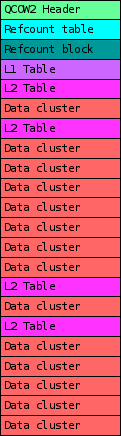



 . Sharing a small clip I had seen few months back.
Just to give a bit of context, the law as has been shared as passed in 2015 has happened after the
. Sharing a small clip I had seen few months back.
Just to give a bit of context, the law as has been shared as passed in 2015 has happened after the 
 or for that matter any part of the body. If more people thought like that, probably we wouldn t have to specially grow and then kill lab mice and guinea-pigs to test out theories. Possibly medical innovations would probably be a lot faster than now. Ironically, most medical innovations have happened during


 I was an happy user of

 On Friday night I attended a talk by Sherry Turkle called Reclaiming
Conversation: The Power of Talk in a Digital Age . Here are my notes.
On Friday night I attended a talk by Sherry Turkle called Reclaiming
Conversation: The Power of Talk in a Digital Age . Here are my notes.
 ... but that doesn't mean the work is over.
One big job that needs to happen after the conference is to review and
release the video recordings that were made. With several hundreds of
videos to be checked and only a handful of people with the ability to do
so, review was a massive job that for the past three editions took
several months; e.g., in 2016 the last video work was done in July, when
the preparation of the 2017 edition had already started.
Obviously this is suboptimal, and therefore another solution was
required. After working on it for quite a while (in my spare time), I
came up with
... but that doesn't mean the work is over.
One big job that needs to happen after the conference is to review and
release the video recordings that were made. With several hundreds of
videos to be checked and only a handful of people with the ability to do
so, review was a massive job that for the past three editions took
several months; e.g., in 2016 the last video work was done in July, when
the preparation of the 2017 edition had already started.
Obviously this is suboptimal, and therefore another solution was
required. After working on it for quite a while (in my spare time), I
came up with  A new version of the
  Welcome to gambaru.de. Here is my monthly report that covers what I have been doing for Debian. If you re interested in Java, Games and LTS topics, this might be interesting for you.
Debian Games
Welcome to gambaru.de. Here is my monthly report that covers what I have been doing for Debian. If you re interested in Java, Games and LTS topics, this might be interesting for you.
Debian Games
 I recently
  So last weekend I attended
  IOW: hardware is basically software and while I want the red pill, who knows what's really inside the box?
If you have no idea what I'm talking about,
IOW: hardware is basically software and while I want the red pill, who knows what's really inside the box?
If you have no idea what I'm talking about, 
 On Wednesday, I spent the entire day in court in Follo Tingrett
representing
On Wednesday, I spent the entire day in court in Follo Tingrett
representing  I am boarding my flight to Brussels to attend


 Debian LTS
November marked the 21st month I contributed to
Debian LTS
November marked the 21st month I contributed to  The past few days I've been doing more arduino-work. In between dying of sleep-exhaustion.
One thing that always annoyed me was that I had to hard-code my WiFi credentials in my projects, with code like this:
The past few days I've been doing more arduino-work. In between dying of sleep-exhaustion.
One thing that always annoyed me was that I had to hard-code my WiFi credentials in my projects, with code like this: