Search Results: "ag"

12 June 2008

Aurelien Jarno: Flight booked (aka crazy prices)

As I am one of those who have read “able” instead of “unable”, I had to find a really cheap flight. This may sound crazy, but an Iberia flight to Buenos Aires from Berlin costs far less than from Lyon (where I live) or even from Madrid: 781.12 EUR from Berlin instead over 1,200.00 EUR from Madrid and over 1,300.00 EUR from Lyon (in both cases with a change in Madrid Barajas). I wonder if Iberia pays you 420,00 EUR if you flight from Berlin to Madrid… Now I have to find a cheap way to go to Berlin from Lyon (probably an EasyJet flight). I plan to spend a few days of holiday in Berlin before flying to Argentina.

Jonathan McDowell: Missing small IPv6 packets

I have this IPv6 issue with my ADSL. It's kinda bizarre and I'd be interested in whether anyone has any ideas or has seen anything similar themselves.

I don't get IPv6 packets smaller than 71 bytes (excluding the PPP header).

Small IPv4 packets? No problem. Sending small IPv6 packets? Also fine. Getting them back again? No go.

I first noticed the problem because I couldn't get to Google's IPv6 site. I ended up getting some quite useful help from various Google engineers, who were prepared to take my report seriously even though I'm just an end user these days. I've promised to get back to them with what the problem was when I find out. If.

My ADSL is provided by Enta, through a reseller. My parents also use them, but via a different reseller. My understanding is this shouldn't make a difference, as Enta are responsible for terminating the connection in both cases. On my parents' line IPv6 seems to work fine. They have a Linux box with a Conexant based PCI card. I have an AR7 router running OpenWRT. My first thought was that it might be some weird hardware issue, so I dug out my Speedtouch, hooked it up to my laptop and tried that. Still no small packets. I tried a different AR7 ADSL router. I downgraded to a 2.6.16.x kernel (which is what my parents are on). All gave the same results; anything over 70 bytes would get through fine, anything under wouldn't.

So I took my router to my parents'. I unplugged their kit and plugged the router in, with only my laptop attached. I left it configured with my username/password. And it worked. Small packets came though fine. To make absolutely certain I tried the same thing again at home. And it didn't work.

Now. Exactly the same kit at my end in both instances. Exactly the same ISP at the other end (who confirm all their end points are configured identically and even if they're not I'd have expected to get a duff one at my parent's once or twice and a working one at my end given the number of reconnections I've made over the period of trying this all out). That leaves BT as the variable (we're about 100 miles apart, so very different exchanges).

My questions to you, the reader:

Update: will-h has pointed out it's 70 bytes excluding the PPP header, not including it.

Romain Francoise: Fun with the Flickr API (in Python)

The favorites mosaic shown in my previous post was a good excuse for me to try out Flickr's API, and it turned out to be a lot easier than I thought. So if, like me, you feel like playing with 2.5 billion photos (and 5,000 new uploads every minute), here's a quick guide.

All you need is an API key (get one here) and a set of bindings for your favorite language. I'm a Python person so I had two choices: Beej's Flickr API and flickr.py; the latter seemed to have everything I needed in a single file, so I went with it. It provides classes directly mapped to most of Flickr's concepts: photos, tags, sets, groups, users, etc.

To get started, let's see what Flickr knows about me (if you don't know your Flickr user id, get it from the RSS link in your photo page):
>>> me = flickr.User('99746300@N00')
>>> me.username, me.ispro, me.location, me.photos_count
(u'orebokech', u'1', u'Lyon, France', u'254')
>>>
Sounds right. Now, to create my favorites mosaic I need to get the list of my favorites, actually I only need 36 of them. Easy:
>>> faves = me.getPublicFavorites(per_page=36)
>>> len(faves)
36
>>>
You can iterate over the list and get flickr.Photo objects which have all the information you need, like the available sizes of the image:
>>> photo = faves[0] # let's just get one for this example
>>> for size in photo.getSizes():
... print "%s: %dx%d" % (size['label'], size['width'], size['height'])
Square: 75x75
Thumbnail: 100x67
Small: 240x160
Medium: 500x333
Original: 1024x683
>>>
And for each available size you can get the corresponding photo page, or the URL to the image itself:
>>> photo.getURL() # photo page, default Medium
u'http://www.flickr.com/photos/o0off/2363681897/sizes/m/'
>>> photo.getURL(size='Square', urlType='source') # img
u'http://farm3.static.flickr.com/2107/2363681897_f6528a14a4_s.jpg'
>>>
Add a little bit of HTML formatting around this, and you get a neat mosaic. The concept can trivially be extended to sets, tag searches, etc. It's all very straightforward.

Phew, this post is getting pretty long, so I think I'll leave you to explore the rest for yourself. Have fun!


Ross Burton: UPnP in Epiphany

One of the more useful features of the UPnP specification is that devices have a standard way of specifying a "presentation URL", a human-readable web page representing the device. For example, my SoundBridge has a web page which shows the currently playing music and lets me switch radio station, whilst my router's presentation URL is the administration page. Useful, but not exposed anywhere. Until now... GUPnP in Epiphany This is a small Epiphany extension which adds all presentation URLs it finds to the Nearby Sites menu, just like the URLs discovered using Avahi. It needs a bit more work as it doesn't yet handle being unloaded or devices disappearing, but it is certainly usable now. If anyone else wants to have a go with it, the source can be fetched using Bazaar from here. Watch out for the currently hard-coded paths...

MJ Ray: Warning for Webmasters: Friday 13th ahoy!

Personally, I like Friday 13th. It's usually been pretty good for me. But for this one, I won't be surprised if computer abusers are planning some big attack tomorrow. I've just spent a big chunk of my day upgrading and securing some of the websites that our free software cooperative supports for a customer. The number of attacks in the access logs is surprising - and I've been fixing other people's cracked servers for over a decade. It makes me wonder if someone is finding and recruiting exploitable systems for tomorrow. If you have a website, please check that any web applications on it are installed correctly and the latest secure versions. I've been seeing a lot of attack attempts for Joomla and WordPress in particular, even on sites which don't run them. That says something bad about either the success rate of attacks for them, or the stupidity of their attackers. In our case today, the damage seems to have been minimal (touch wood!), with the customer merely being banned from some networks for a while. It could be so much worse, like this BBC News report about Cotton Traders Card details stolen in web hack (which is part of why I suggest small online shops avoid storing credit card details on their site - leave it to the payment gateway). Finally, there are some new scams like Conmen abuse web address checks on the horizon for online shops, so make sure you've got your 3D-Secure rules set correctly by now and be cautious about sending goods before you're sure you've got the money. I think all web card payment systems are a risk, so please try to limit your risk. Update: If you do get attacked, try to help track the attackers down so we can get other results like the Jail sentence for botnet creator. I wish our governments would concentrate on toughening up blatent computer misuse law and stop tightening copyright law in secret.

Juan Luis Belmonte: First versions of update-pam &update-nsswitch ready.


Both helpers, update-pam and update-nsswitch are ready for testing. I’ve tried as many combinations and possible use errors as I could imagine, but probably I’ve missed up some one. If you try and find something not spected, something strange or have any suggestions, do not hesitate to contact me. update-nsswitch can modify nsswitch.conf, and update-pam, modifies, the different pam.d/common-* files To use them, you need to copy your nsswitch and pam.d in the same directory where the code is unpacked, this is for preventing on modifying the real files. If you want to try it with real ones is up to you and under your responsability. Download
None documentation is done yet, but with the usage() may be enough.

Kartik Mistry: How to kill good ideas?


* Derived from yesterday’s ‘Developing Leadership Skills’ training at AMA: - It’s against company policy - Doesn’t fit in system - It will never be approved - The timing is just not right - It didn’t work before - Too wild - We’re not yet ready for that - I will think about it - Put something in writing and get back to me - Let’s form a committee

Adam Jensen: 12 Jun 2008

The GNU C library (packaged as libc6 in Debian) is the bedrock of a lot of code. What are the packages that it depends on? (Yo, DebGraph!) Original image [997 kB] libc6 is one of the well-connected vertices in the lower-left corner (third quadrant, if you like). For graphs like this one, we would like DebGraph to identify dependency cycles (loops). For example, libc6 depends on libgcc1, which in turn depends on libc6. This can be seen in the graph above by applying some careful scrutiny, but why not let the computer work its magic for us? (To be continued.) As a bonus, who depends on arping 2.05-2 for i386?

Thijs Kinkhorst: Bug Squashing Party

This weekend will see the second Bug Squashing Party hosted in Utrecht, this time to help get Debian Lenny released. Stichting NLnet has generously provided funding for the cost of food and drink. For all details see the wiki page.

Russell Coker: ECC RAM is more useful than RAID

A common myth in the computer industry seems to be that ECC (Error Correcting Code - a Hamming Code [0]) RAM is only a server feature. The difference between a server and a desktop machine (in terms of utility) is that a server performs tasks for many people while a desktop machine only performs tasks for one person. Therefore when purchasing a desktop machine you can decide how much you are willing to spend for the safety and continuity of your work. For a server it’s more difficult as everyone has a different idea of how reliable a server should be in terms of uptime and in terms of data security. When running a server for a business there is the additional issue of customer confidence. If a server goes down occasionally customers start wondering what else might be wrong and considering whether they should trust their credit card details to the online ordering system. So it is obviously apparent that servers need a different degree of reliability - and it’s easy to justify spending the money. Desktop machines also need reliability, more so than most people expect. In a business when a desktop machine crashes it wastes employee time. If a crash wastes an hour (which is not unlikely given that previously saved work may need to be re-checked) then it can easily cost the business $100 (the value of the other work that the employee might have done). Two such crashes per week could cost the business as much as $8000. The price difference between a typical desktop machine and a low-end workstation (or deskside server) is considerably less than that (when I investigated the prices almost a year ago desktop machines with server features ranged in price from $800 to $2400 [1]). Some machines in a home environment need significant reliability. For example when students are completing high-school their assignments have a lot of time invested in them. Losing an assignment due to a computer problem shortly before it’s due in could impact their ability to get a place in the university course that they most desire! Then there is also data which is irreplaceable, one example I heard of was of a woman who’s computer had a factory pre-load of Windows, during a storm the machine rebooted and reinstalled itself to the factory defaults - wiping several years of baby photos… In both cases better backups would mostly solve the problem. For business use the common scenario is to have file servers storing all data and have very little data stored on the PC (ideally have no data on the PC). In this case a disk error would not lose any data (unless the swap space was corrupted and something important was paged out when the disk failed). For home use the backup requirements are quite small. If a student is working on an important assignment then they can back it up to removable media whenever they reach a milestone. Probably the best protection against disk errors destroying assignments would be a bulk purchase of USB flash storage sticks. Disk errors are usually easy to detect. Most errors are in the form of data which can not be read back, when that happens the OS will give an error message to the user explaining what happened. Then if you have good backups you revert to them and hope that you didn’t lose too much work in the mean-time (you also hope that your backups are actually readable - but that’s another issue). The less common errors are lost-writes - where the OS writes data to disk but the disk doesn’t store it. This is a little more difficult to discover as the drive will return bad data (maybe an old version of the file data or maybe data from a different file) and claim it to be good. The general idea nowadays is that a filesystem should check the consistency of the data it returns. Two new filesystems, ZFS from Sun [2] and BTRFS from Oracle [3] implement checksums of data stored on disk. ZFS is apparently production ready while BTRFS is apparently not nearly ready. I expect that from now on whenever anyone designs a filesystem for anything but the smallest machines (EG PDAs and phones) they will include data integrity mechanisms in the design. I believe that one such features become commonly used the need for RAID on low-end systems will dramatically decrease. A combination of good backups and knowing when your live data is corrupted will often be a good substitute for preserving the integrity of the live data. Not that RAID will necessarily protect your data - with most RAID configurations if a hard disk returns bad data and claims it to be good (the case of lost writes) then the system will not read data from other disks for checksum validation and the bad data will be accepted. It’s easy to compute checksums of important files and verify them later. One simple way of doing so is to compress the files, every file compression program that I’ve seen has some degree of error detection. Now the real problem with RAM which lacks ECC is that it can lose data without the user knowing. There is no possibility of software checks because any software which checks for data integrity could itself be mislead by memory errors. I once had a machine which experienced filesystem corruption on occasion, eventually I discovered that it had a memory error (memtest86+ reported a problem). I will never know whether some data was corrupted on disk because of this. Sifting through a large amount of stored data for some files which may have been corrupted due to memory errors is almost impossible. Especially when there was a period of weeks of unreliable operation of the machine in question. Checking the integrity of file data by using the verify option of a file compression utility, fsck on a filesystem that stores checksums on data, or any of the other methods is not difficult. I have a lot of important data on machines that don’t have ECC. One reason is that machines which have ECC cost more and have other trade-offs (more expensive parts, more noise, more electricity use, and the small supply makes it difficult to get good deals). Another is that there appear to be no laptops which support ECC (I use a laptop for most of my work). On the other hand RAID is very cheap and simple to implement, just buy a second hard disk and install software RAID - I think that all modern OSs support RAID as a standard installation option. So in spite of the fact that RAID does less good than a combination of ECC RAM and good backups (which are necessary even if you have RAID), it’s going to remain more popular in high-end desktop systems for a long time. The next development that seems interesting is the large portion of the PC market which is designed not to have the space for more than one hard disk. Such compact machines (known as Small Form Factor or SFF) could easily be designed to support ECC RAM. Hopefully the PC companies will add reliability features in one area while removing them in another.

Edd Dumbill: Gandi's VM hosting beta now closed to new users

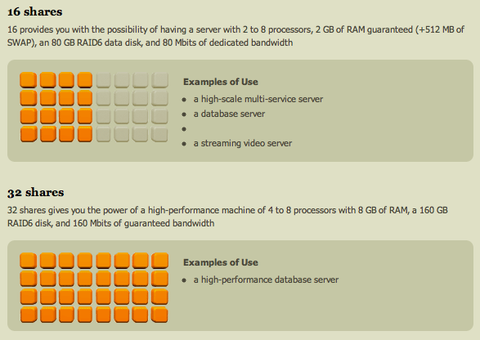
I've been experimenting with Gandi's virtual hosting service recently. In fact, this blog is now hosted on it. Gandi have created by far the easiest hosting service I've used. The web interface allows you to buy credit, create pre-installed virtual machines and log in, all in under 15 minutes. Add the ease of Ubuntu to the mix (just one of the preinstalled images you can choose from), and commissioning times for new services are low indeed. The hosting service is based on Xen, and allows you to dynamically change the resources your VMs can access (CPU/memory/disk), on a scheduled basis if required. It has an API which provides enough functionality for you to white-label hosting as part of your own web app. Gandi's hosting options
Excerpt from Gandi's explanation of the amount of resource you can allocate to a virtual machine Gandi's service isn't yet as flexible as Amazon's EC2, but it comes at the problem from the other end — its initial offering "just works" as an alternative hosting solution, with the added flexibility their Xen infrastructure brings to the mix. Even with all its tool support, Amazon EC2 feels like stepping into an alternate universe. I'm pretty excited about the directions in which Gandi's service will develop. And yes, now I've told you all this, unfortunately you can't yet play with the beta service if you've not got an account already. The initial success means Gandi are closing new signups for a little time to concentrate on improving their infrastructure. The good news is that Gandi say this is the final step before the full release of the system. I can't wait! It's so good to see innovative, high-quality internet solutions coming from Europe.Join the conversation about this post

Julien Danjou: One step further for XCB into Debian

I've take some time this morning to work on xcb-util packaging. I've mainly urge that work because Sebastian Dr ge, the sweet cairo maintainer, agreed to enable the cairo XCB backend (#474353), which requires xcb-util. The first upload I've made was built from the latest upstream release which is old (i.e. more than one year old). So I've put a git repository in place this morning and packaged the latest git upstream version, with some good patches from Arnaud (upstream+patches branch), that the upstream XCB developers are still reviewing since several weeks: that is the cost to pay for good code quality Thanks to Sebastian, the new xcb-util targeted for unstable was just arrived in incoming that he already uploaded a new version of the Debian cairo package with XCB backend enabled. Well, that's a very good day for me since it means that building awesome 3 is no more a PITA (hi MadCoder!) since every dependency is available in the Debian archive.

Jonathan McDowell: It's a bit cold


(Not a great picture as it's taken with my phone, but I think you'll get the rough gist.)

Matthew Palmer: Womble's Word of the Week: Retrofit!

In a perfect world, when we design some aspect of our infrastructure, we'd get it right the first time, and would never have to change our design once it had been deployed. Back in this world, however, we regularly have to change things as we expand our infrastructure. Sometimes we made a mistake originally, other times new requirements pop up. In either case we will end up doing things differently in the future than how it was done in the past. The danger here is that if you only create your new machines or services differently, you've got effectively two separate and different systems to maintain. This may not sound like much, until it happens again... and again... and again... and then suddenly you've got 18 different ways of setting up backups, depending on how long ago you set it up and (if you're really unlucky) who did it and what the phase of the moon was at the time. If you've been here before, you probably remember the pain of having some disaster happen and needing to fix it NOW NOW NOW, only to wade into the setup and realise that it's been done in a way that (you thought) died out six months ago -- and so you don't really remember how it works, and yeah, the documentation's been updated so many times since then that it doesn't mention the old way of doing things, and here comes your boss to ask how long it's going to be until it's all working again... If you haven't had this experience (yet?), you'll have to trust me when I say that it's no fun to hit an older, out-of-date system. It's especially painful because the most common reason you change things is because the old way sucked. So you turn up at a critical moment to fix something in a poorly documented and sub-optimally configured system. Fun, fun, funnity fun. There are only two ways to avoid this problem: never change the way you do anything, or else plan your changes so that retrofitting is part of the plan every time you're modifying an existing service. Assuming that never changing anything isn't an option, you need to plan to retrofit. When you're putting together the design for your system change (you do design your changes, right?) you need to audit what's out there, determine what's needed to bring it all up to date, and put together a plan to make that happen. It's like documentation and testing -- if you don't make an explicit effort to make it happen, it'll never get done. That sounds like a lot of work, and it is. Luckily, if you're already working in a well-maintained infrastructure you should only really have one existing config to upgrade, which shouldn't be too painful. However, if you've got a lot of machines to change there's no way around the fact that they've all got to be changed, and that can take time. If you accept that you don't want configuration skew, you can start to think about how to engineer your systems and processes to make it less of a hassle to keep everything up to date. Putting some extra thought into how you set things up in the first place so that it's easier to update is at the heart of this. Automating deployment is an easy way to take some of the pain away from rolling out new configs, but there's also plenty of smaller decisions that help with updating configs: putting everything in revision control, making extensive use of templating and pulling out common config fragments, and making sure that you've got good notes and records of what has been done where. The more you automate your deployment and maintenance, the less pain you feel when you need to retrofit. With something like Puppet, you can eliminate a lot of the pain because you're describing what you want done for all the relevant machines, and then the machines themselves work out what needs to be done to bring themselves up to date. With an advanced automation system in place, you can say "I want all my mail servers to have setting X turned on" and off they go and set the option. Or you might want to have some of your mail servers to have a different config setting, triggered based on a config setting or class of machine. Of course, you might not already have that config setting or class defined, so you'll need to add it. Don't forget to retrofit that new config setting or class to your existing machines. That might involve finding the config for all the existing machines and modifying them. Yep, no matter how much automation you've got you can't get away from the need to retrofit, but given the choice between editing a bunch of config files on my local machine (with all the power of my text editor to back me up) or logging into dozens of machines all over the globe to edit their configs and restart services (with all the risks of making a mistake) I know which one I'd choose...

11 June 2008

Christian Perrier: [life] Manu en su casa

Yes, Manu Chao was really home yesterday in Paris Bercy. And he was obviously feeling like being home. The concert began at 21:30 and ended up at 00:30. Yes...that makes 3 full hours concert. All that for 25 euros. The crowd support, dance, participation was *amazing*. I often go to concerts in the Bercy arena and never saw the crowd in the upper rows being stood up all concert long. Radio Bemba played their usual tracks first. As usual, the very Manu way to mix songs, themes from all his carreer and mix them up, distord them and make new songs from old ones. This is what always made Mano Negra, then Manu Chao oncerts unique experiences. Just imagine 20,000 people singing Clandestino a capella, most of us not knowing any damn word of Spanish... After about 2 hours of magic without any stop, the very special moments came in. Manu, Gambit, Majiv (what a guitarist when playing rumbas de Barcelona!), Julio (de Barcelona!)...and all others were just feeling like being home with a few friends. So the encores lasted...and lasted...and lasted. They just didn't want to stop (Manu probably said about 3 or 4 times "c'est fini"). Then, they did something I never ever saw in a big 20,000 people concert since my first one back in....long time ago. Manu asked "do you have 5 more minutes?". So, they stopped for 5 minutes to get the guitars re-accorded(sp?)....the crowd just...waited...and the gig re-started again with songs from "Si Sib rie m' tait cont e", the special book-album he made with friends, inspired by the sad winters he spent in Paris in his early years. Soooooo special and, believe me, that *was* special. Seeing all roadies, crew, friends just dancing backstage and partying clearly showed this was not to always happen (this will probably happen again on today's concert). He was just feeling like home. And so were we. Not wanting to leave and shut down the light. Finally, at 00:30, all of us were dead tired and we just hugged around with Manu and left. Just like old friends. I don't know if that will happen everywhere in the upcoming tour (some dates in France, some in Europe, a few in USA....nothing unfortunately in South America as of now)....but if you have the opportunity to go to Radio Bemba concerts, just do it. And (IRC reference), really, Erinn, this was not about "ethnic music for white people" (really wondering where you got this idea...or if you were just kidding me). I dunno what Manu ever did to kill your ears, but just try again and, even more important, go to the gig in your fair city on August 22nd. Radio Bemba concerts will be cheap, about half the price of regular bug size concerts....just use that opportunity.

Evan Prodromou: 24 Prairial CCXVI

Quick shout to announce an event here in Montreal. In response to the announced introduction of legislation to change Canadian copyright, commonly called the "Canadian DMCA" since the drafts presented so far have closely resembled that American law, the Montreal Chapter of Fair Copyright for Canada is holding an emergency organizational meeting Thursday, June 12th from 6-8PM. The event will be at Station C, 5369 Saint-Laurent #430, in the Mile End neighborhood of Montreal. It's open to anyone interested in learning more about this bill and helping to oppose it. tags:

Adam Rosi-Kessel: No time for blogging, but

I’ve been on the road a lot lately with no time to blog (or sleep). Following are a couple items to keep this space from going completely dead. A wild turkey stopped by our backyard (in Boston): a turkey I called city animal control, and they said these guys are everywhere. Apparently there is no more wild left for the wildlife. In other news, Gears is finally available for Firefox 3! For me, at least, this is a big deal, since I frequently depend on offline mode for Google Reader and have otherwise fully migrated to FF 3 for the speed benefits. Since RC2, it’s mostly stopped crashing as well. Technorati Tags: , , , ,

Yves-Alexis Perez: French taxes declaration

(this is an english repost from the original french one, for planet debian) Ok, this is just a procedure, which worked for me, for french taxes declaration. The french governement only allows on Linux configurations with i386 architectures, and firefox. This solutions works (at the date of the post) on a Debian Sid amd64, but should work on every x86/amd64 Debian, because we use a clean i386 chroot. Let's go:

# get the packages
corsac@hidalgo: sudo aptitude -R install cdebootstrap chroot

# create the i386 chroot:
corsac@hidalgo: sudo cdebootstrap -a i386 sid chroot http://ftp.fr.debian.org/debian

# bind-mount /tmp for Xorg in the chroot:
corsac@hidalgo: sudo mount -o bind /tmp debian/chroot/tmp

# Entering chroot:
corsac@hidalgo: sudo chroot debian/chroot /bin/bash

# configure apt:
root: echo "deb http://ftp.fr.debian.org/debian/ sid main contrib non-free" > /etc/apt/sources.list
root: aptitude update

# installing packages:
root: aptitude -R install iceweasel sun-java5-plugin

# no need to run iceweasel as root:
root: adduser corsac

# done for inside the chroot We now need two things in the chroot:

 corsac@hidalgo: cp ~/.Xauthority debian/chroot/home/corsac/ Time to re-enter the chroot:

corsac@hidalgo: sudo chroot debian/chroot /bin/bash

root: su - corsac

# we export the DISPLAY to use host X
corsac: export DISPLAY=:0.0

# ready to go
corsac: iceweasel Now you should be able to go to the website and declare. No need for symbolic link or LD_LIBRARY_PATH hack. I failed to use sun-java6-plugin. Don't hesitate to purge your chroot and restart from a clean one. You can also clean the folder where the shared lib is stored, in ~/.TaoUSign. Hope that helps.

Amaya Rodrigo: Booked!


Mr Levsen and Mrs Rodrigo will land in EZE on Wed, July 30th, flight IB6845 (Iberia) at 19:40.

We are now just about to celebrate the rise in oil prices and our my procastinating in booking (2428.72 EUR in total) with a cold Mahou beer. But I am thankful I didn t need to ask for sponsorship this year.

See you down there!

Clint Adams: Floating job control

Francois-Denis, you can get more bash-like behavior by doing setopt nohup, or you can disown the jobs before exiting, or you can background and disown immediately by running program & . Also, that silly non-free window manager, ion3, is decent with the small popups.

Next.

Previous.