Search Results: "sf"

5 September 2013

Gergely Nagy: What's cooking in syslog-ng 3.5?

The first alpha of syslog-ng 3.4 was released more than a year ago, and the first stable release earlier this year, development on syslog-ng 3.5 has been going on steadlily since then, with a lot of interesting features and changes pouring in. While the 3.5 release will not bring as many overwhelming changes as the previous two releases did, the sheer number of improvements is still substantial. Our focus was on smaller developments all over the place this time, instead of big sweeping changes. In this post, we will go over most of these features, with use-cases, examples and a few words about why they are so useful and awesome.Multi-line support, new destinations, new template functions, type hinting, unit suffixes, and other things. Read on, and be amazed!These are only bigger features, there has been a lot of small tweaking going on, and of course, all of the fixes that went into prior versions will also be in 3.5 too, and there's still a chance that something else may find its way in before the feature freeze.Multi-line supportOne of the major new features in the 3.5 release will be support for multi-line messages, a feature that has been available in syslog-ng PE for a good while, and which has been ported to and improved upon to the open source edition. Two variants of multi-line are supported, which will be detailed below. Both of them are available for the file() and pipe() sources only.Indented multi-lineThe easiest variant is indented multi-line, where each line can be followed by others, indented by whitespace, and the message continues until the first non-indented line. This is the format used by the Linux kernel too, from version 3.5, for /dev/log. This type of multi-line can be used as follows:
source s_multiline   file("/path/to/file" multi-line-mode(indented));  ;
Consider that /path/to/file has the following content:
First line
 Continuation 1;
 Continuation 2;
Second line
With the indented multi-line-mode() setting, this would turn into two log messages:
First line\n Continuation 1;\n Continuation 2;
Second line
Regexp-based multilineIf multi-line input is not based on indentation, one can use the regexp multi-line-mode() instead, which makes two new settings available: multi-line-prefix() and multi-line-garbage(). These can be used to define the start and the end of a log message: any string between a the beginning matching prefix and a matching garbage will be considered a single message. That is, the prefix will be included, the garbage will not be: it will be discarded.To illustrate:
source s_multiline  
 file("/path/to/file" multi-line-mode(regexp)
                      multi-line-prefix("^prefix")
                      multi-line-garbage(" garbage$"));
 ;
If the source contains these lines:
prefix message
continuing garbage
This will turn into the following log message:
prefix message\ncontinuing
New destinationsIt would be pretty hard to do a syslog-ng release without new destinations, and with 3.5, we will have three of them!STOMPWhile we had AMQP before, we now have a STOMP destination too, so we can stream logs to any STOMP server, with a few simple lines:
stomp(
 host("localhost")
 port(61613)
 destination("/topic/syslog")
 routing_key("")
 persistent(yes)
 ack(no)
 username("someone")
 password("something")
 body("This is the body! YAY! Here's a message: $MESSAGE!\n")
 value-pairs(scope(nv-pairs, syslog-proto, selected-macros))
)
Of course, none of these settings need to be set, you can just use the defaults, and it will just work!RiemannDid you know that syslog-ng is far more than a log collector and processor? No? You do now. When you have access to a lot of logs, and a tremendous amount of power in parsing them, you can use these tools for monitoring easily! And when we're talking monitoring, riemann is a great asset in our toolbox, and with the new destination, we can easily forward metrics to it:
riemann(
 server("localhost")
 port(5555)
 host("$HOST")
 service("$PROGRAM")
 description("$PROGRAM pids")
 metric(int("$PID"))
 ttl(300)
);
Of course, the above is a very silly example, it would make much more sense to extract data from a log message instead, but this will serve as an example.New template functions
$(upper-case TEXT...), $(lower-case TEXT...)
To turn some text into *upper-* or *lower-case*, these two template functions come in handy. They simply turn all their arguments into the respecitve case.
$(delimit DELIMITERS NEW-DELIMITER TEXT)
Sometimes one has a delimited string, where one wishes to replace the delimiters. This function does just that: give it a list of delimiters (you may need to quote it, if it contains whitespace), a replacement, and a text to replace delimiters in, and it does the rest. For example, to replace tabs and spaces with a vertical bar, one could write a template like this:
template("$(delimit \"\t \" \" \" $MESSAGE)\n")
$(env VARIABLE...)
Have you ever felt the need to check an environment variable from within syslog-ng? I did, and now I can.
Type hintingWhile syslog-ng supported sending log messages into various data stores and message queues for a while (SQL at first, MongoDB, JSON and AMQP later), even when those supported different types of data than strings, we could not do anything else. Until now. It is now possible - at places where it makes sense - to annotate templates with type hints, which the destination driver can optionally use. Type hinting is implemented for the mongodb() destination and the $(format-json) template function for now. When no type hint is specified, syslog-ng defaults to string.To add type hints, simply wrap the respective template with the hinted type, like this:
mongodb(
 value-pairs(pair("date", datetime("$UNIXDATE"))
             pair("pid", int64("$PID")))
);
Currently the following type hints exist: boolean (anything that begins with a t or 1 is true, anything that begins with f or 0 is false, everything else is an error), string, literal (same as string, but not quoted if it would be quoted otherwise), int32 (int is an alias for this), int64, and datetime. Only UNIX timestamps can be type-hinted to datetime, anything else will likely result in a casting error.It is also possible to control what happens when type casting fails: syslog-ng can drop the whole message, drop the property, or fall back to string. It can also do all of these silently:
options  
 typecast(on-error(silently-drop-property));
 ;
Using this feature with $(format-json) is very similary too:
$(format-json date=datetime("$UNIXDATE") pid=int64("$PID"))
With this feature in place, you can now store your non-string values with their proper types!Unit suffixesUnit suffixes make it considerably easier to set limits and describe numbers within the syslog-ng configuration. We no longer need to spell out sizes to the byte precious, it is now enough to write: log-fifo-size(200MiB). Now, syslog-ng will understand suffixes for kilo-, mega-, and giga-bytes, (K, M, G, respectively) either in base-10 or base-2 (with an extra i after the suffix). One can also omit the trailing b from the end.So, to set the log-fifo-size() to 2097152 bytes, one can simply use 2MiB. Or, to set it to 2000000, 2Mb. That's a whole lot easier, isn't it? No more counting zeros, no more silly typos in a ten-digit number, no more pain, but easily readable units!Miscellaneous featuresApart from the features above, there have been a lot of other changes and improvements in the code base:

Keith Packard: Airfest-altimeter-testing

Altimeter Testing at Airfest Bdale and I, along with AJ Towns and Mike Beattie, spent last weekend in Argonia, Kansas, flying rockets with our Kloudbusters friends at Airfest 19. We had a great time! AJ and Mike both arrived a week early at Bdale s to build L3 project airframes, and both flew successful cert flights at Airfest! Airfest was an opportunity for us to test fly prototypes of new flight electronics Bdale and I have spent the last few weeks developing, and I thought I d take a few minutes today to write some notes about what we built and flew. TeleMega We ve been working on TeleMega for quite a while. It s a huge step up in complexity from our original TeleMetrum, as it has a raft of external sensors and six pyro circuits. Bdale flew TeleMega in his new fiberglass 4 airframe on a Loki 75mm blue M demo motor. GPS tracking was excellent; you can see here that GPS altitude tracked the barometric sensor timing exactly: GPS lost lock when the motor lit, but about 3 seconds after motor burnout, it re-acquired the satellite signals and was reporting usable altitude data right away. The GPS reported altitude was higher than the baro sensor, but that can be explained by our approximation of an atmospheric model used to convert pressure into altitude. The rest of the flight was also nominal; TeleMega deployed drogue and main chutes just fine. TeleMetrum We ve redesigned TeleMetrum. The new version uses better sensors (MS5607 baro sensor, MMA6555 accelerometer) and a higher power radio (CC1120 40mW). The board is the same size, all the connectors are in the same places so it s a drop-in replacement, and it s still got two pyro channels and USB for configuration, data download and battery charging. I loaded up my Candy-Cane airframe with a small 5 grain 38mm CTI classic: The flight computer worked perfectly, but GPS reception was not as good as we d like to see: Given how well TeleMega was receiving GPS signals, I m hopeful that we ll be able to tweak TeleMetrum to improve performance. TeleMini We ve also redesigned TeleMini. It s still a two-channel flight computer with logging and telemetry, but we ve replaced the baro sensor with the MS5607, added on-board flash for increased logging space and added on-board screw terminals for an external battery and power switch. You can still use one of our 3.7V batteries, but you can also use another battery providing from 3.7 to 15V. I was hoping to finish up the firmware and fly it, but I ran out of time before the launch. The good news is that all of the components of the board have been tested and work correctly, and the firmware is feature complete , meaning we ve gotten all of the features coded, it s just not quite working yet. EasyMini EasyMini is a new product for us. It s essentially the same as a TeleMini, but without a radio. Two channels, baro-only, with logging. Like TeleMini, it includes an on-board USB connector and can use either one of our 3.7V batteries, or an external battery from 3.7V to 15V. EasyMini and TeleMini are the same size, and have holes in the same places, so you can swap between them easily. I flew EasyMini in my Koala airframe with a 29mm 3 grain CTI blue-streak motor. EasyMini successfully deployed the main chute and logged flight data: We also sent a couple of boards home with Kevin Trojanowski and Greg Rothman for them to play with. TeleGPS TeleGPS is a GPS tracker, incorporating a u-blox Max receiver and a 70cm transmitter. It can send position information via APRS or our usual digital telemetry formats. I was also hoping to have the TeleGPS firmware working, and I spent a couple of nights in the motel coding, but didn t manage to finish up. So, no data from this board either. Production Plans Given the success of the latest TeleMega prototype, we re hoping to have it into production first. We ll do some more RF testing on the bench with the boards to make sure it meets our standards before sending it out for the first production run. The goal is to have TeleMega ready to sell by the end of October. TeleMetrum clearly needs work on the layout to improve GPS RF performance. With the testing equipment that Bdale is in the midst of re-acquiring, it should be possible to finish this up fairly soon. However, the flight firmware looks great, so we re hoping to get these done in time to sell by the end of November. TeleMini is looking great from a hardware perspective, but the firmware needs work. Once the firmware is running, we ll need to make enough test flights to shake out any remaining issues before moving forward with it. EasyMini is also looking finished; I ve got a stack of prototypes and will be getting people to fly them at my local launch in another couple of weeks. The plan here is to build a small batch by hand and get them into the store once we re finished testing, using those to gauge interest before we pay for a larger production run.

3 September 2013

Raphaël Hertzog: Finding a new name for the Package Tracking System

The Google Summer of Code rewriting the Package Tracking System is approaching its end and I m starting to think about deploying it on debian.org. Its scope has expanded over the years and the rewritten PTS will continue this trend by bringing some new features for teams (like the possibility to subscribe to all packages of a team). I believe that its current hostname (and name) doesn t reflect properly the role of the PTS. Add to this the fact that there s still some work left to be done to reach feature-parity with the current PTS, I m considering deploying it in parallel to the current PTS under a new name. Package Tracking System is also a bit too long for a name, and sounds more like a description than a name But if I get rid of packages.qa.debian.org and Package Tracking System , how should we call the new PTS? :-) The PTS is a sort of central place that brings together information from many parts of Debian. It s currently mainly a consumer/dispatcher of information but I expect to integrate some of the external services that are useful for all Debian derivatives, and it will thus become more and more a producer of first-hand information as well. To replace packages.qa.debian.org, Stefano Zacchiroli suggested me hub.debian.org and I must say I like it, it s short and relatively close to what the PTS actually is (and reminds me of DEP-2 the new PTS will be an asset to make it a reality). My other ideas were devel.debian.org, inside.debian.org, watch.debian.org, track.debian.org, do you have better suggestions? what s your preference? Finding a better name is harder, but there s room to build on the hub concept and similar images. I would like a full name that s not too long and an associated abbreviation/short name for the top-level Python package (currently we use pts for that Python package). Can you come up with something original and satisfactory? My latest thoughts end up with DistroHub as full name and dhub as Python package name. Still boring So, dear lazy web, I heard that we re good at bikeshedding in Debian, so can you come up with something better? Share your suggestions in the comments!

31 comments Liked this article? Click here. My blog is Flattr-enabled.

1 September 2013

Russ Allbery: Review: Redshirts

Review: Redshirts, by John Scalzi
Publisher: Tor
Copyright: June 2012
ISBN: 1-4299-6360-3
Format: Kindle
Pages: 317
The next few reviews deserve a small apology in advance. Normally, I try to write reviews within a few weeks, or at most a month, after reading a book, while it's still fresh in my mind. This is particularly important since I read a lot and sometimes don't have a good memory for specific detail. But this summer has made it completely impossible to keep to any sort of regular writing schedule. As a result, this book, and the subjects of the next few reviews that follow, are books that I read four months ago and am reviewing from memory. Hopefully, I'll still get the details right. Ensign Andrew Dahl is one of the newest crew members of the Universal Union Capital Ship Intrepid. It's his first posting, just out of the Academy. He's one of five new ensigns, expecting a normal tour of duty (albeit with the pride of being on a capital ship of the fleet). But very shortly after arriving on the ship, Andrew and and the other new ensigns discover that something is very... strange. The casualty rate on the ship is surprisingly high (as foreshadowed in a prologue). The other crew members avoid the bridge crew, and particularly away missions, with startling effectiveness (and desperation). And things regularly happen on the ship that, for lack of a better description, simply make no sense. Redshirts starts off as a very obvious Star Trek parody. So obvious, in fact, that it's eyeroll-inducing. The prologue reads exactly like a section of a Star Trek episode written by a third-rate hack, leavened with some of the humor that readers of Scalzi's blog have come to expect. But it's obvious that Scalzi is doing this intentionally, and it doesn't take long before the subject of the book shifts. It's a Star Trek parody that functions much more like a Star Trek parody than any universe should, to the degree that it becomes obvious to the characters. And the characters, despite being straight from central casting, are clearly not expecting their universe to act that way and find this extremely strange. By far the best part of this book is the second quarter: the characters have been introduced, they're starting to figure out what's going on, and they have to do so while dodging away-team duty (or trying to survive it) and participating in the ridiculous plot contrivances that keep occurring. Scalzi mixes a feeling of serious consequences with wry humor and handles the mix deftly. I was both laughing and eagerly reading to see what comes next. The last half of the book, though, has problems. How many problems the reader perceives will, I think, depend on how hard one thinks about the situation Scalzi has set up, or how much one has thought about similar constructs in the past. But I'm afraid the setup does not survive serious scrutiny in ways that, for me at least, seriously damaged my ability to engage with the story. I'm going to avoid saying explicitly where Scalzi goes with this plot, since it is a spoiler (although it's commonly mentioned in discussions of this book on the Internet). But it happens to be an idea that some friends of mine and I pounded on for years in some of our role-playing scenarios, poking at the corners and implications, and subsequently gave up on because it doesn't work for storytelling. The idea is compelling, and on first glance seems like a great story seed. But it's too large. The problem with really big ideas with huge implications is that they can change the nature of a story so much that there's no longer any point of commonality for the reader and the entire nature of story falls apart. And I think that's what happens here. Scalzi handles the deeper implications of the concept by, essentially, ignoring them. He focuses on one narrow set of implications for one specific set of people, largely skips over any discussion of anything larger, and tries a pivot from wry humor (and a bit of slapstick) into serious emotional depth. For me, in part because I'm so familiar with the concept, none of this really worked. The implications of the discovery that drives this story are so much broader and so much more significant than the characters seem to admit that it threw me right out of the story. The ethical implications are absolutely paralyzing, to the point that I don't think you can write a coherent story about them, but ignoring them doesn't work either. It's the kind of discovery that requires action of some kind beyond the attempt by the characters to go back to what they consider a normal life, even if I have a hard time imagining what that action could be. To be fair, he does try to salvage this in the first epilogue, which is all about the implications of his idea and its effects. But it's still too small. That epilogue just barely touches on the implications on a single person, but if one thinks a bit longer, one starts coming up with more and more implications for all of society, for how we talk about story, for how we raise children, for nearly every form of creativity. Implications that involve nasty concepts like slavery and mind control and murder and the nature of consent in ways that are very difficult to avoid. I think Scalzi's attempts at serious emotional connection, including in the other two attached epilogues (which are perspective-shifting close focuses on some of the characters), also suffer from his world setup, but in a different way. The characters are simply too bland to sustain the level of emotional connection he's striving for. They're bland for a very specific reason that is entirely justified by the story that Scalzi is handling, and the implications of that for the primary protagonist were, I thought, one of the best-handled moments of the book. But they're still bland, which undermines the attempted pivot. All that being said, this is not a bad book. Parts of it, particularly the second quarter, are excellent. And even when I wasn't engaging with the characters, Scalzi's writing on a paragraph level is snappy and often quite funny. The first epilogue in particular is hilarious, even if I think it was too limited in the scope of implications that it considers and a bit too meta in where it goes with those implications. And the story is a fun romp, with drama and humor and tension and a fairly satisfying ending. Everyone's a bit too bland and earnest when Scalzi isn't being funny, but he's funny enough that I didn't mind that much. Despite the relatively low rating, I actually recommend this book. If you don't dive into the metaphysical implications, it's a lot of fun, and if you've thought a lot about this particular set of metaphysical implications, it's somewhat satisfying to argue with (and to internally point out all of the hard questions that Scalzi is skipping over). It's particularly fun if you've watched a lot of Star Trek, since Scalzi gets some of the absurdities note-perfect. But be aware that the character reactions to Scalzi's concept don't hold up to much scrutiny. Rating: 7 out of 10

31 August 2013

Chris Lamb: Decrypting the Caesar cipher using shell

In cryptography, a Caesar cipher, also known as Caesar's cipher, the shift cipher, Caesar's code or Caesar shift, is one of the simplest and most widely known encryption techniques. It is a type of substitution cipher in which each letter in the plaintext is replaced by a letter some fixed number of positions down the alphabet. [...]
#!/bin/sh
IN="MJHVIZN ZPIO YJHPN"
for I in $(seq 25); do
    echo $I $IN   tr $(printf %$ I s   tr ' ' '.')\A-Z A-ZA-Z
done
This outputs:
1 NKIWJAO AQJP ZKIQO
2 OLJXKBP BRKQ ALJRP
3 PMKYLCQ CSLR BMKSQ
4 QNLZMDR DTMS CNLTR
5 ROMANES EUNT DOMUS
6 SPNBOFT FVOU EPNVT
7 TQOCPGU GWPV FQOWU
8 URPDQHV HXQW GRPXV
9 VSQERIW IYRX HSQYW
10 WTRFSJX JZSY ITRZX
11 XUSGTKY KATZ JUSAY
12 YVTHULZ LBUA KVTBZ
13 ZWUIVMA MCVB LWUCA
14 AXVJWNB NDWC MXVDB
15 BYWKXOC OEXD NYWEC
16 CZXLYPD PFYE OZXFD
17 DAYMZQE QGZF PAYGE
18 EBZNARF RHAG QBZHF
19 FCAOBSG SIBH RCAIG
20 GDBPCTH TJCI SDBJH
21 HECQDUI UKDJ TECKI
22 IFDREVJ VLEK UFDLJ
23 JGESFWK WMFL VGEMK
24 KHFTGXL XNGM WHFNL
25 LIGUHYM YOHN XIGOM
The only line which makes sense is 5 ROMANES EUNT DOMUS, giving us our solution.

Christian Perrier: DebConf 13: hacking outcome

I *did* some hacking at DebConf, as usual. For once, I had no TODO list: after all, I never complete these, so why make one? Still, I participated to discussions around samba packaging, mostly animated by Ivo De Decker and I think we're making good progress towards samba 4.x packages. The road is long, quite complicated, but we now have a stronger team, with a very active Ivo, Jeroen Dekkers who officially joined, Steve Langasek who still cherishes one of his pet packages (and even branched in our git with the Ubuntu packages). Great work and thanks to Ivo for pushing this forward. I also worked quite actively on the migration of fonts packages to git (I now reached the point where I'm more comfortable with git than SVN, yes, everything can happen). These packages were modernized at the same time and checked for new upstream versions (I have to say that few of these fonts had new upstream versions, indeed). We unfortunately found no time to have a good font BoF in Vaumarcus, indeed...but I'm not sure we would have many things to say. The work is done and done well, in this team. Some progress was made, also, for restoring a working "monolithic" build of D-I. This build gathers together all udebs from unstable, which means it offers a D-I image that uses ALL udebs from nustable.....which is not the default of other images. This would be very helpful for translators who want to check their work as soon as possible. In the future, with a Jenkins task that would build each package at each commit and then build a monolithic image, we could have a way to provide a tes snapshot of D-I git repos.....which could help catching more bugs (or more of my stupid mistakes). So, in general, I consider this a quite successful DebConf when it comes at "real" production.

30 August 2013

Daniel Pocock: Big decision?

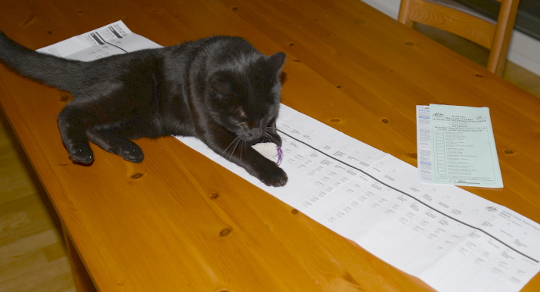
Most people have probably heard that elections are on in Australia. I just received my postal ballot paper the other day and in the spirit of transparency, I'm sharing it here on my blog. Spoilt for choice There are two ballots, one for the Lower House and the other for the Senate. The big one is for the Senate. Our cat is on top of it to help give some perspective on how big it is. Like the columns on a bloated spreadsheet, the parties are designated with symbols from A to AM and then there are some leftover candidates too. Animal instincts With so many candidates to choose from, even our kitty may have found an opportunity in the Animal Justice Party - although that little snack in her claws suggests that she is more interested in the law of the jungle than any political debate. She may want to be wary not to fall under the wheel of the party next to them, Motoring Enthusiasts. The Senate, a place for convicted hackers? The next party in the picture is Wikileaks and their number one candidate, of course, is the first person to successfully claim asylum from Australia, Julian Assange. It's no secret that he has a string of convictions for computer hacking in the 90s and that when US authorities catch up with him, their drone won't just be dropping him a letter demanding a $2,100 penalty fine through the window. So how do they compare? As I contemplate my decision, lets look at the numbers:
Party Seats won in 2010
House of Reps, Senate
Criminal charges against members in last 3 years
Labor Party 72, 31 173, mainly fraud
Liberal/National coalition (conservative) 73, 34 3, including shoplifting and assault
Wikileaks 0 None - Assange is not actually charged with any crime
All of a sudden, in a country that is often the butt of British jokes about convicts, Assange starts to look squeaky clean. He may take further comfort from knowing that out of all those crimes, hacking is the only one that appears to have the presidential seal of approval. Conclusion Whichever way I vote may or may not make so much difference. With so many candidates to choose from though, there is little sign of any quality leadership from any corner of Australian politics. Whether Mr Assange is elected or not, many people will have a chuckle when they realise he almost ended up alongside the Australian Sex Party out of 38 other possible parties randomly distributed across the ballot. Please feel free to comment: which party is the most ridiculous?

Joey Hess: best DebConf ever

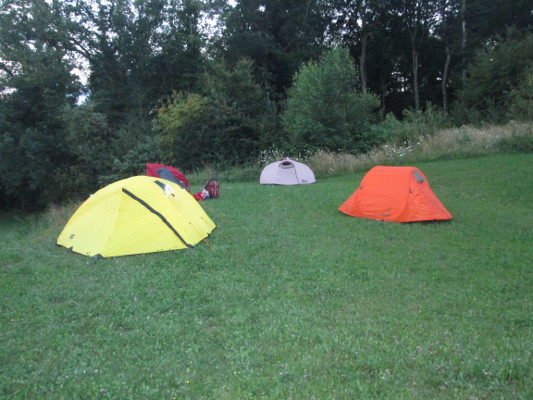
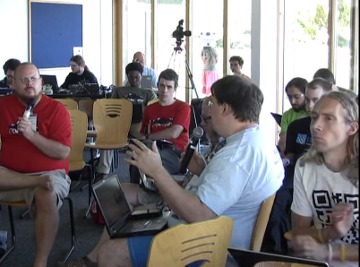
For me, DebConf13 in Switzerland was a perfect DebConf, and generally an great developer meeting and conference. I've attended several past DebConfs in Canada, Norway, Brazil, Finland, Mexico, Scotland, Spain, NYC, Bosnia, and Nicaragua. I have special memories of each. DebConf13 was ideal in every way. Let's start with the camping. Only a minority of us did it, and my campsite was located in a small field behind a bar that was often noisy late into the night, when I was trying to rest and preserve my European jetlag remedy of inverted sleeping schedule. Still, I love sleeping cocooned in a tent, and going through the routines of camping and spending time alone there was a good counterpoint to DebConf. I generally find myself retreating for a day or two in the middle of a week-long conference, burnt out with social interactions. That didn't happen this time. I need to find way to camp at future DebConfs. (Also special shout out to wonderful people who lent me a warmer sleeping bag, and bought me a pillow while on a trip to town! Upgraded my first backpacking in Europe experience's comfort level a lot!) The next perfect thing for me were the talks I gave at DebConf. I always enjoy presenting at DebConf, and barely remember when I'd get nervous doing it. But I really felt comfortable giving these talks in a way I've not before. I'm pleased with how the Debian Cosmology talk turned out; I'd worried it would be a downer talk, or too light, or not well received, and none of those problems surfaced. I was especially happy with my dh_busfactor session, which I prepared for all of 10 minutes and was structured entirely to benefit me by talking over my thoughts and getting feedback, and in which I probably drove the camerapeople crazy running my own mic into the audience. Despite all that, I think it succeeded being interesting for the participants as well as for me. Hope to follow up on it soon.. But beyond the two talks I submitted, there were a series of ad-hoc scheduled talks. It seemed that every day I spent at least an hour discussing something I'm deeply involved in. This started with the Ikiwiki bof, and then there was an epic series of (unrecorded) BoFs about git stuff, which basically turned into an unofficial git track at DebConf. Much, much discussion of git-annex and other things I'm involved in. BTW, I really like that DebConf, as well as being a formal conference on top, is really an un-conference underneath, with new BoFs and things popping up on the schedule all week long. You can even have completely unscheduled meetings that somehow get just the right mix of people to make something awesome happen.
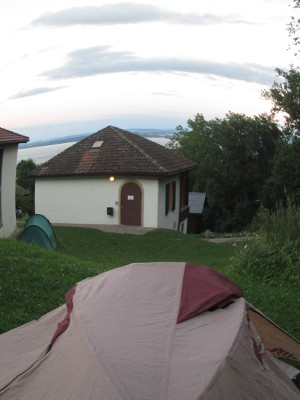
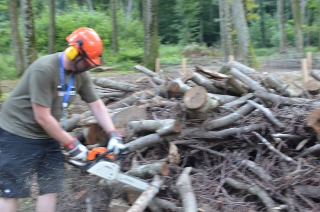
But it wasn't all about talks. Indeed, I only attended 2 or 3 sessions a day. The DebConf13 venue was controversial, but I found it excellent for getting things done. Rather than one or two massive rooms that get too noisy to think in, this venue had many little nooks and crannies suited for different types of work. There were so many I only discovered some while walking down the hill as I was leaving the venue! Anchoring it all was the excellent view, and I particularly enjoyed the "scenic hacklab". I was particularly impressed with the flexability of the venue's management. Someone asked if we could have cheese for breakfast, and every breakfast thereafter had not one but often three excellent cheeses. One day we'd be complaining that there were not enough vegetables in the food, and the next we'd be eating an excellent vegetarian Swiss lunch. They even apparently relaxed stringent Swiss rules on not allowing tents in sightlines visible from people further up the hill. They were clearly happy to welcome our crazy gathering to Le Camp. They let a DD borrow and use a chain saw and build a bonfire! The venue also encouraged getting out and exploring the surrounding countryside. Too often I end up spending the whole DebConf without seeing much of the area around. This time I at least got down the hill to see the castle in Vaumarcus a few times, and enjoyed many evening walks amoung the grape fields. The conference dinner (on a boat!) tied into this well too. And the daytrip to CERN was a great addition. We got to poke around the control center for a massive particle accellerator! My only regret is we didn't get a chance to actually go inside the LHC tunnels. Back to DebConf, another thing I really liked about this one was that its location allowed several upstream authors of software in Debian (other than the usual suspects who are both upstreams and Debian Developers) to attend. I don't know if Lennart Poettering changed any minds about systemd with his talk, but I was happy for the opportunity to buy him a beer. I didn't get to Monty's talk, but it was excellent to see him attend as well. Finally, I got to meet old friends I'd not seen in years, and new ones I've not met in real life before. We're still not sure where this whole DebConf thing is going -- will it be all about the cheese and wine party and greybeards in 20 years time? But one thing we know is we enjoy our little slice of the year where kilts and coding are equally unremarkable, where problems that seem intractable online somehow solve themselves in person, where we come away with ideas for an entire year and memories for a lifetime.

28 August 2013

Vincent Sanders: Men admire the man who can organize their wishes and thoughts in stone and wood and steel and brass.


I would probably not yet worthy of the admiration Emerson was alluding to but I do like to make things. As anyone who has read previous posts knows I have pretty much embraced the "do things, tell people" idea.

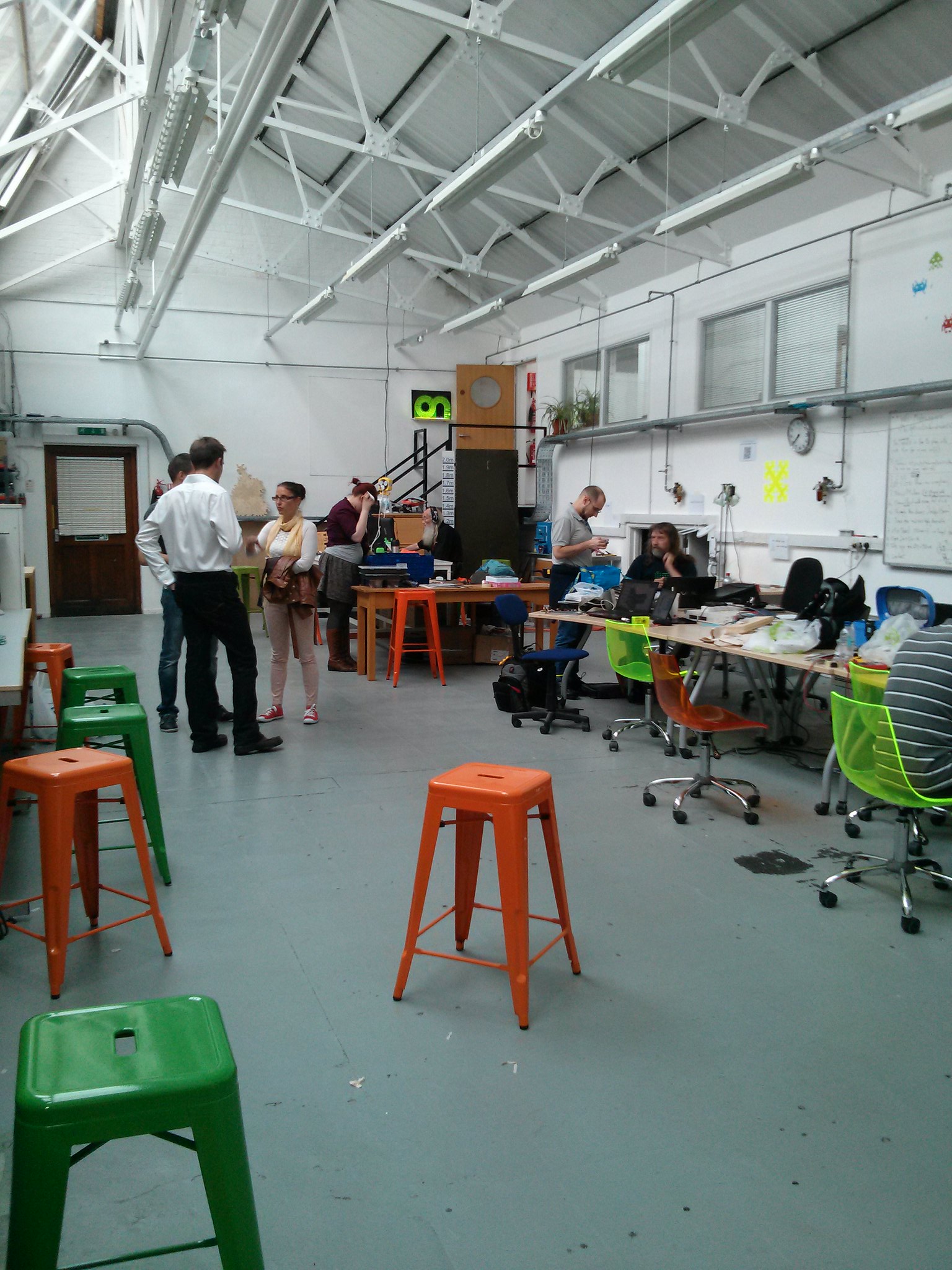
One small wrinkle is doing things needs somewhere to work. Since moving myself and the family to rented accommodation in Cambridge (swampy 3,500 year old English city, not the one in Massachusetts) I have been lacking space to do practical projects.

The main space
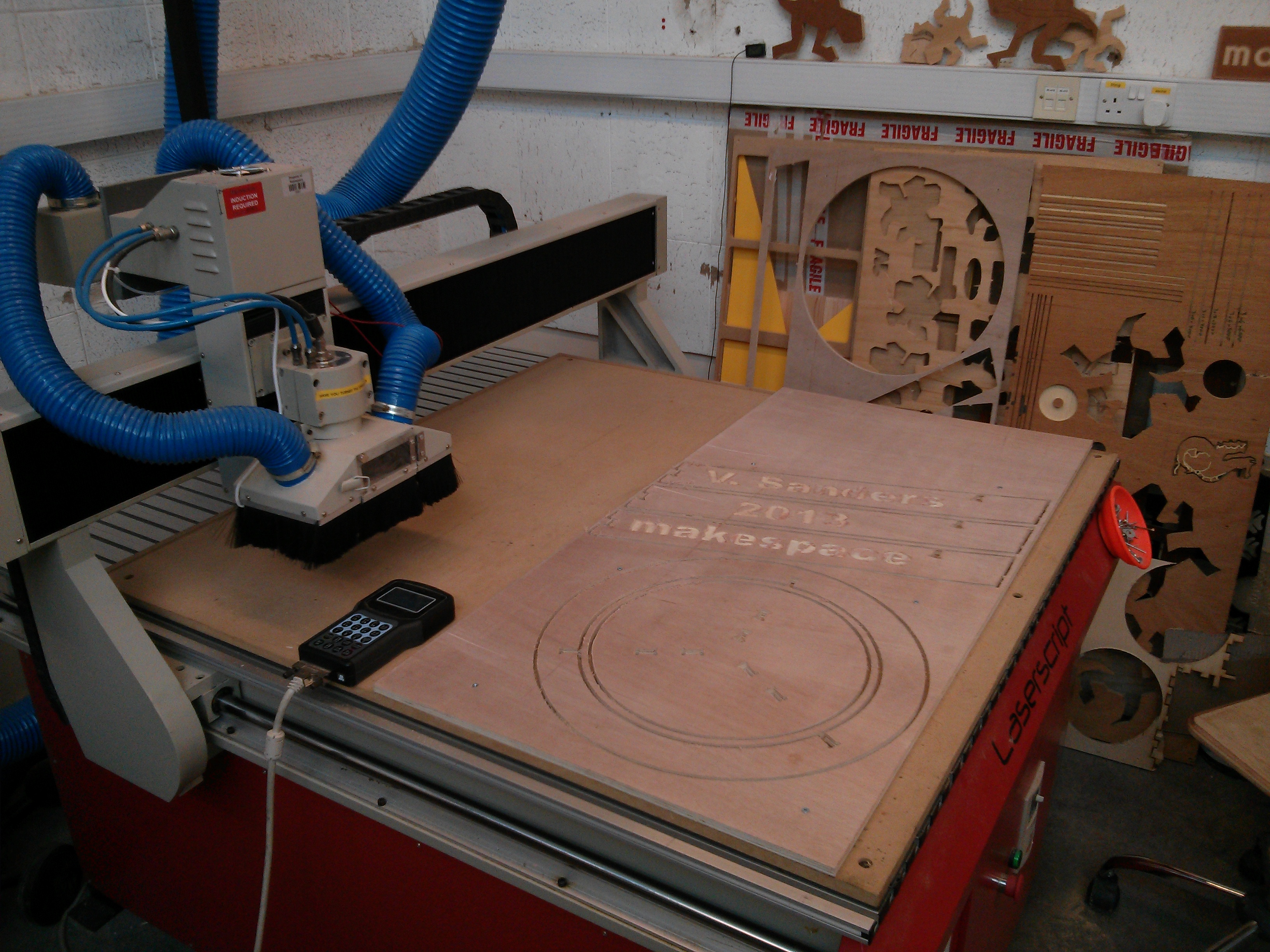
To fix this lack I have joined the cambridge makespace which, in addition to somewhere I can work gives me access to some tools I was previously unable to afford. The space gives practical training on the more complex machines (any tool can be dangerous if you do not use it correctly) which recently allowed my induction on the CNC router.

My instructor , Mark Mellors, who was good enough to give up some of his valuable making time to train me (and accidentally get his car stuck in a car park overnight by staying late) suggested that it was a good idea to have a design to try.

I decided to use this opportunity to actually create something useful (though now I re-read Marks message it did suggest a simple design...oopsy). I had been working at the electronics bench in previous weeks and been uncomfortable using the existing stools and chairs as they were either a bit high or unable to be adjusted high enough for the 80cm tall benches. I decided to design a 60cm tall stool for use at this workbench.

My initial idea was for a simple three leg stool, round top, three legs, how hard could it be? Initial research showed that showed that above 30cm the legs needed to be braced to each other. This is because the leg to seat joints simply cannot handle the stress caused by leverage which longer legs introduce.

I looked at the structure of several stools online and was initially drawn towards creating something like the IKEA Dalfred bar stool. It was discovered that the design would be easier to realise if it were made from sheet material which give a smaller challenge to a naive operator of a CNC router. Because of this simpler designs were researched and I eventually found a simple design I liked.

The design could not however be used directly as it was for imperial sized material which is not available in europe. I selected the QCAD open source CAD package and recaptured the design adjusting for the available 12mm plywood sheet material. This resulted in an imperial measurement design for metric materials.

Mark helped me transfer the DXF into the CAM software (vcarve pro 7, after I discovered the demo version of this software generates files which cannot be imported into the full edition!) and generate toolpaths for our machine. Once the toolpaths are saved to a USB stick (no modern conveniences like direct upload here) the job can be run on the machine.

Here I ran into reality, turns out that tolerances in imperial combined with lack of understanding how plywood reacts resulted in excessive play in the joints. This resulted in an unusable stool, which simply tried to rotate around its central axis and become flatpack. I had successfully turned 10 worth of plywood into some sawdust and a selection of useless shapes. On the other hand I did become competent with the router workflow so it was not a complete failure.

I was determined to make the design work so I decided to start from scratch with a similar design but entirely in metric. I performed some material research both online and practically (why yes i did spend an informative hour in several cambridge DIY shops with digital calipers, why do you ask?) it turns out that generally available 12mm thick plywood actually ranges between 11.9 and 12mm thick.

I did some test slot cuts of varying width and determined that the available stock can be "persuaded" to fit into a 11.8mm wide slot. This Interference fit joint is strong and removes the need for adhesive in most cases.

Second cut still attached to the bed. Leftovers of first attempt in the background
The sheet plywood material is readily available with a width of 1220mm and a height of 606mm (a full sheet is 2440mm long which is cut into four with a 4mm wide saw blade) so making the legs fit within a sheet and be close to the 60cm target should be possible.

I selected a suitable seat radius (175mm) and from that determined the minimal gap to the base ring with a 6mm end mill tool (20mm for two toolpaths and some separation) and hence the minimum suitable width of the base ring (50mm) giving a total radius of 245mm.

For the legs allowance was made for two joints of 30mm with 30mm separation between them the legs come out at 90mm width. If a 6mm space and a 6mm toolpath top and bottom of the sheet is accounted for a 582mm height (606 - 24) is available in which to fit the legs. The top of the leg which fits into the seat is 12mm tall leaving 570mm total leg height.

12mm plywood stool design
At this point I selected some arbitrary values for the leg positioning and angle (30mm from seat centre and 15 ) using a right angle triangle triganometry this produced a stool with a base of around 550mm or 100mm outside the radius of the seat. This seemed a pleasing shape and when the values for the holding ring were calculated it is at 104mm height which also seems to work out well.

This design was cut on the machine, lightly finished with some sandpaper and assembled. The legs slotted into the ring first and then the legs eased into the seat slots, the whole thing flipped and the seat hammered home onto the legs.

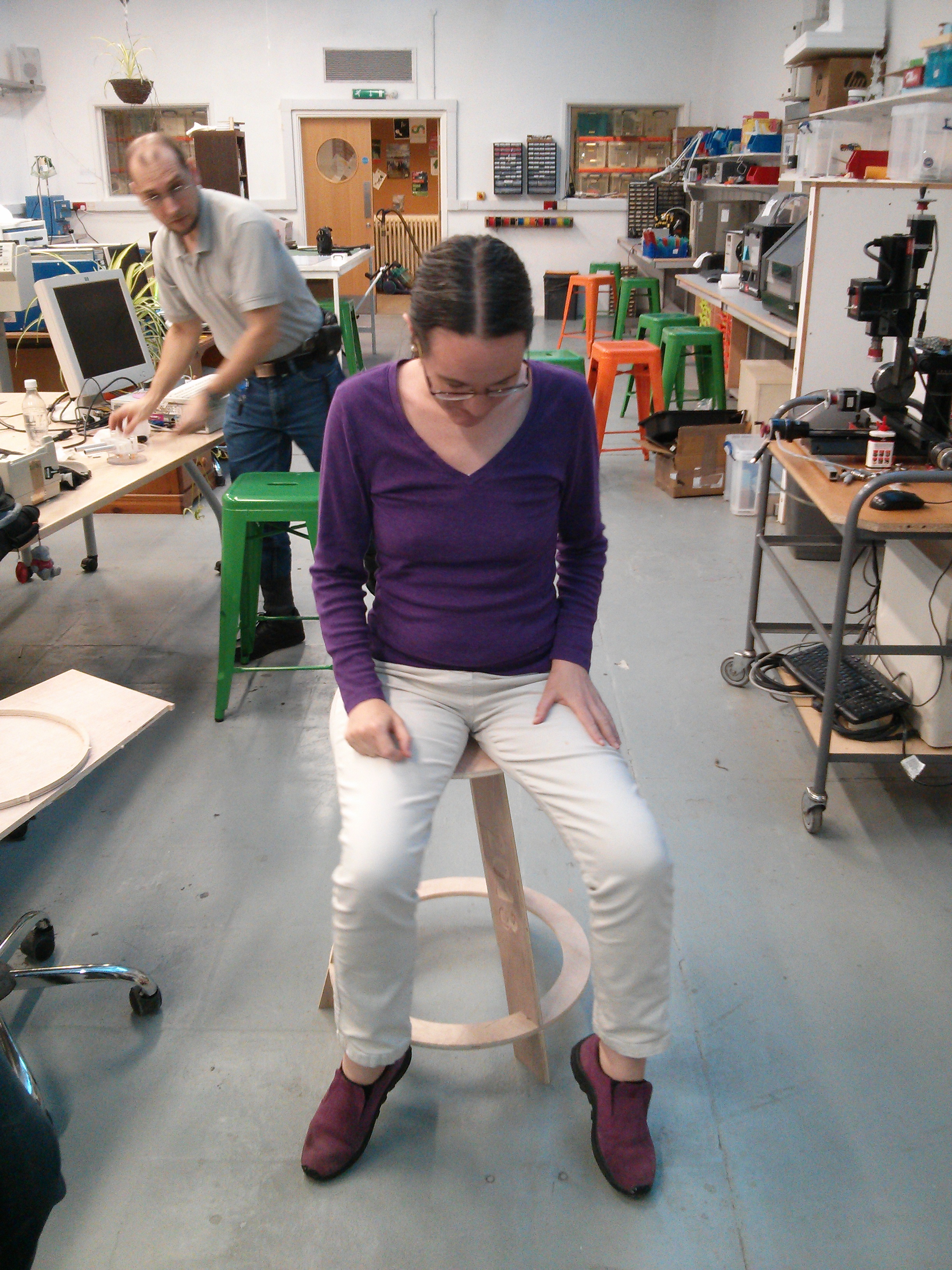
Anne Harrison volunteering to try the wobbly stool of doom
Success! It physically fit together and if you were brave enough you could sit on it. Unfortunately the plywood seemed to flex around the central axis of rotation in a rather alarming way, fine if you are under 70 kilos but not giving the impression of security most people want from their seating.

Ok, lets try with five legs instead of three (at least we can reuse the existing three legs)...nope still not good enough and another 10 gone.

18mm Plywood stool design
The others in the space suggested a few ideas to improve matters and the one I selected was to use 18mm plywood instead of 12mm, this should improve rigidity. There was a brief pause in proceedings to discover 18mm sheet is actually 17.7mm and needs a 17.5mm slot to make the interference fit work.

Completed 18mm stool
A swift redesign later altering the seat radius, gap, ring width and leg height to accommodate the new material and we have version 4 and it works without caveat. Tested up to 150Kg load without trouble, there is a small amount of flex still but nothing that feels worrying.

I finished the stool by rounding the seat top edge with a ball bearing rounding bit in a manual router and applying a couple of coats of gloss acrylic varnish. Finished stool is now doing service at the space.

In conclusion the final design allows someone with a CNC router to create a useful 580mm high fixed stool for 7.50 in timber plus cutter wear and varnish so maybe 8.50 total.

You can actually get five legs and a seat/ring out of a 1220x606 sheet and with intelligent arrangement a single 1220x2440 sheet will probably yield five or possibly six stools in total

I am making the design files of the proven 18mm version available (heck they are all there...but you have been warned, none of the other solutions produce a satisfactory result) under the MIT licence so anyone can reproduce. More pretty pictures are also available.

Matt Zimmerman: Scaling Human Systems: Roles and Responsibilities

This is part 5 in a series on organizational design and growth. What it means

Each of us has a job to do, probably more than one, and our teammates should know what they are. Why it s important

Roles are a kind of standing commitment we make to each other. They re a way of dividing up work which is easy to understand and simple to apply. Utilizing this tool will make it easier for us to coordinate our day to day work, and manage the changes and growth we re going through. Old Status Quo

Roles are vague or nonexistent. Management roles in particular are probably not well understood. Many people juggle multiple roles, all of which are implicit. Moving to a new team means learning from scratch what other people do. People take responsibility for tasks and decisions largely on a case-by-case basis, or based on implicit knowledge of what someone does (or doesn t do). In many cases, there is only one person in the company who knows how to perform a certain function. When someone leaves or goes on vacation, gaps are left behind. New Status Quo

Each individual has a clear understanding of the scope of their job. We have a handful of well defined roles, which are used by multiple teams and have written definitions. People who are new or transfer between teams have a relatively easy time understanding what the people around them are doing. Many day to day responsibilities are defined by roles, and more than one person can fill that role. When someone leaves a team, another person can cover their critical roles. Behaviors that help

Obstacles that stand in our way

25 August 2013

Joey Hess: southern fried science fiction with plum sauce

Had an afternoon of steak and science fiction. Elysium is only so-so, but look what we found in a bookstore that was half religious materials and half SF, local books, and carefully hidden romance novels:
Star Wars, Star Trek and the 21st Century Christians
Best part was at the end, when I finally found one of the local asian markets Tomoko tells us about when she casually pulls out the good stuff at family gatherings. I will be back for whole ducks, fresh fish, squid, 50 lb bags of rice, tamarind paste, fresh ginger that has not sat on the shelf for 2 months because only I buy it, etc. Only an hour from home in the woods! Between the garlic scapes, bean sprouts, enoki mushrooms, etc that I got for $10 today and this week's CSA surprise of 18 inch snake beans and smoked pork knuckles, I have the epic stir fry potential.. Spock and R2D2

23 August 2013

Justus Winter: No noweb anymore...

... which is probably a good thing. But here is the boot log you all have been waiting for:
start ext2fs: Hurd server bootstrap: ext2fs[device:hd0s1] exec init proc auth
INIT: version 2.88 booting
Using makefile-style concurrent boot in runlevel S.
Activating swap...done.
Checking root file system...fsck from util-linux 2.20.1
hd2 : tray open or drive not ready
end_request: I/O error, dev 02:00, sector 0
/dev/hd0s1: clean, 44693/181056 files, 291766/723200 blocks
done.
Activating lvm and md swap...(default pager): Already paging to partition hd0s5!
done.
Checking file systems...fsck from util-linux 2.20.1
hd2 : tray open or drive not ready
end_request: I/O error, dev 02:00, sector 0
done.
Cleaning up temporary files... /tmp.
Mounting local filesystems...done.
Activating swapfile swap...(default pager): Already paging to partition hd0s5!
done.
df: Warning: cannot read table of mounted file systems: No such file or directory
Cleaning up temporary files....
Configuring network interfaces...Internet Systems Consortium DHCP Client 4.2.2
Copyright 2004-2011 Internet Systems Consortium.
All rights reserved.
For info, please visit https://www.isc.org/software/dhcp/
Listening on Socket//dev/eth0
Sending on   Socket//dev/eth0
*** stack smashing detected ***: dhclient terminated
Aborted
Failed to bring up /dev/eth0.
done.
Cleaning up temporary files....
Setting up X socket directories... /tmp/.X11-unix /tmp/.ICE-unix.
INIT: Entering runlevel: 2
Using makefile-style concurrent boot in runlevel 2.
Starting enhanced syslogd: rsyslogd.
Starting deferred execution scheduler: atd.
Starting periodic command scheduler: cron.
Starting system message bus: dbusFailed to set socket option"/var/run/dbus/system_bus_socket": Protocol not available.
Starting OpenBSD Secure Shell server: sshd.
unexpected ACK from keyboard
GNU 0.3 (debian) (console)
login: root
[...]
root@debian:~# ifup /dev/eth0
Internet Systems Consortium DHCP Client 4.2.2
Copyright 2004-2011 Internet Systems Consortium.
All rights reserved.
For info, please visit https://www.isc.org/software/dhcp/
Listening on Socket//dev/eth0
Sending on   Socket//dev/eth0
*** stack smashing detected ***: dhclient terminated
Aborted
Failed to bring up /dev/eth0.
root@debian:~# dhclient -v -pf /run/dhclient.-dev-eth0.pid -lf /var/lib/dhcp/dhclient.-dev-eth0.leases /dev/eth0
Internet Systems Consortium DHCP Client 4.2.2
Copyright 2004-2011 Internet Systems Consortium.
All rights reserved.
For info, please visit https://www.isc.org/software/dhcp/
Listening on Socket//dev/eth0
Sending on   Socket//dev/eth0
*** stack smashing detected ***: dhclient terminated
Aborted
root@debian:~# dhclient -pf /run/dhclient.-dev-eth0.pid -lf /var/lib/dhcp/dhclient.-dev-eth0.leases /dev/eth0
root@debian:~# ifup /dev/eth0
Internet Systems Consortium DHCP Client 4.2.2
Copyright 2004-2011 Internet Systems Consortium.
All rights reserved.
For info, please visit https://www.isc.org/software/dhcp/
Listening on Socket//dev/eth0
Sending on   Socket//dev/eth0
DHCPREQUEST on /dev/eth0 to 255.255.255.255 port 67
DHCPACK from 10.0.2.2
bound to 10.0.2.15 -- renewal in 34108 seconds.
ps: comm: Unknown format spec
root@debian:~# halt
Broadcast message from root@debian (console) (Fri Aug 23 19:42:19 2013):
The system is going down for system halt NOW!
INIT: Switching to runlevel: 0root@debian:~#
INIT: Sending processes the TERM signal
INIT: Sending processes the KILL signal
Using makefile-style concurrent boot in runlevel 0.
Stopping deferred execution scheduler: atd.
task c10f53f8 deallocating an invalid port 2098928, most probably a bug.
Asking all remaining processes to terminate...done.
All processes ended within 1 seconds...done.
Stopping enhanced syslogd: rsyslogd.
Deconfiguring network interfaces...Internet Systems Consortium DHCP Client 4.2.2
Copyright 2004-2011 Internet Systems Consortium.
All rights reserved.
For info, please visit https://www.isc.org/software/dhcp/
Listening on Socket//dev/eth0
Sending on   Socket//dev/eth0
DHCPRELEASE on /dev/eth0 to 10.0.2.2 port 67
/dev/eth0 (2):
  inet address  0.0.0.0
  netmask       255.255.255.0
  broadcast     10.0.2.255
  flags         BROADCAST ALLMULTI MULTICAST
  mtu           1500
done.
Deactivating swap...swapoff: /dev/hd0s5: 177152k swap space
done.
Unmounting weak filesystems...umount: /etc/mtab: Warning: duplicate entry for device /dev/hd0s1 (/servers/socket/26)
umount: /etc/mtab: Warning: duplicate entry for device /dev/hd0s1 (/dev/cons)
umount: could not find entry for: /dev/cons
umount: could not find entry for: /servers/socket/26
done.
mount: cannot remount /: Device or resource busy
Will now halt.
store a new irq 11init: notifying pfinet of shutdown...init: notifying tmpfs swap of shutdown...init: notifying tmpfs swap of shutdown...init: notifying tmpfs swap of shutdown...init: notifying ext2fs device:hd0s1 of shutdown...init: halting Mach (flags 0x8)...
In tight loop: hit ctl-alt-del to reboot
With some tiny patches for ifupdown I've been able to resolve network related issues. All of them? Of course not, funny thing about developing for the Hurd is that once you fix one thing, then some other thing or code path is executed that has never been run on Hurd before, and therefore something else breaks. In this case I fixed ifupdown to generate valid names for the pid file and leases file and all of the sudden dhclient starts dying. Funny thing about that is, if one drops the -v flag from the dhclient invocation as I did it above, the crash isn't triggered and once the lease file has been successfully written, it is safe to add the -v flag again. Not yet sure what goes on there, then again, looking at the source of isc-dhcp-client it is not so surprising that it crashes :/ When I first looked at ifupdown it was written in noweb, a literate programming tool. It is an interesting idea, even more so since (classic) c can be very verbose and cryptic. But it decouples the control flow from the structure of the program, which makes patching it quite a challenge since it is not as obvious where the changes have to go in. This is how ifupdown looked some weeks ago:
% wc --lines ifupdown.nw
6123 ifupdown.nw
% pdftk ifupdown.pdf dump_data   grep NumberOfPages
NumberOfPages: 113
The ifupdown.nw is the noweb source, from which seven .c, four .h, two .pl and one Makefile are generated. It also contains a redicioulus amount of documentation, to the point that the authors at several points did not now what to write and just drop some nonsensical lines into the file. The source also compiles to a 113 page pdf file, that contains all of the documentation and all of the code, not at all in the order that one would expect a program to be written, but in the order the authors chose to structure the documentation. Fortunately for me the maintainer decided to drop the noweb source and to add the generated files to the source control system. This made my job much easier :) So here are the patches I published this week: I must admit that I do not know exactly what I will do next week. Obviously fixing the dhclient crash would be nice, I'll look into that. But I'm surely find some useful thing to do.

22 August 2013

Martín Ferrari: Setting up my server: re-installing on an encripted LVM

Very long post ahead (sorry for the wall of text), part of a series of posts on some sysadmin topics, see post 1 and post 2. I want to show you how I set up my tiny dedicated server to have encrypted partitions, and to reinstall it from scratch. All of this without ever accessing the actual server console.

Introduction As much as my provider may have gold standards on how to do things (they don't, there are some very bad practises in the default installation, like putting their SSH key into root's authorized_keys file), I wouldn't trust an installation done by a third party. Also, I wanted to have all my data securely encrypted. I know this is not perfect, and there are possible attacks. But I think it is a good barrier to have to deter entities without big budgets from getting my data. I have done this twice on my servers, and today I was reviewing each step as he was doing the same thing (with some slight differences) on his brand new server, so I think this is all mostly correct. Please, tell me if you find a bug in this guide. This was done on my 12 /month Kimsufi dedicated server, sold by OVH (see my previous post on why I chose it), and some things are specific to them. But you can do the same thing with any dedicated server that has a rescue netboot image. The process is to boot into the rescue image (this is of course a weak link, as the image could have a keylogger, but we have to stop the paranoia at some point), manually partition the disk, set-up encryption, and LVM; and then install a Debian system with debootstrap. To be able to unlock the encrypted disks, you will have to ssh into the server after a reboot and enter the passphrase (this is done inside the initrd phase). Once unlocked, the normal boot process continues. If anything fails, you end up with an unreachable system: it might or might have not booted, the disk might or might not be unlocked, etc. You can always go back into the rescue netboot image, but that does not allow you to see the boot process. Some providers will give you real remote console access, OVH charges you silly money for that. They used to offer a "virtual KVM", which was a bit of a kludge, but it worked: another netboot image that started a QEMU connected to a VNC server, so by connecting to the VNC server, you would be able to interact with the emulated boot process, but with a fake BIOS and a virtual network. For some unspecified reason they've stopped offering this, but there is a workaround available. The bottom line is, if you have some kind of rescue netboot image, you can just download and run QEMU on it and do the same trick.

The gritty details Start by netbooting into your rescue image. For OVH, you'd go to the control panel, in the Services/Netboot section and select "rescue pro". Then reboot your server. OVH will mail you a temporary password when it finishes rebooting. Connect to it, without saving the temporary SSH key:
$ ssh -oUserKnownHostsFile=/dev/null -oStrictHostKeyChecking=no root@$ IP 
For the rest of the text, I am assuming you have one hard drive called /dev/sda. We start by partitioning it:
# fdisk /dev/sda
Start a new partition table with o, and then create two primary partitions: a small one for /boot at the beginning (100 to 300 MB would do), and a second one with the remaining space. Set both as type 83 (Linux), and don't forget to activate the first one, as this servers refuse to boot from the hard drive without that. Create the file system for /boot, and the encrypted device:
# mkfs.ext4 /dev/sda1
# cryptsetup -s 512 -c aes-xts-plain64 luksFormat /dev/sda2
The encryption parameters are the same as the ones used by the Debian Installer by default, so don't change them unless you really know what you are doing. You will need to type a passphrase for the encrypted device, be sure not to forget it! This passphrase can later be changed (or secondary passphrases added) with the cryptsetup tool. Look up the crypt device's UUID, and save it for later:
# cryptsetup luksDump /dev/sda2   grep UUID:
UUID:           xxxxxxxx-xxxx-xxxx-xxxx-xxxxxxxxxxxx
Open the encrypted device (type the passphrase again), and set up the LVM volume group:
# cryptsetup luksOpen /dev/sda2 sda2_crypt
# pvcreate /dev/mapper/sda2_crypt
# vgcreate vg0 /dev/mapper/sda2_crypt
Create the logical volumes, this is of course a matter of personal taste and there are many possible variations. This is my current layout, note that I put most of the "big data" in /srv.
# lvcreate -L 500m -n root vg0
# lvcreate -L 1.5g -n usr vg0
# lvcreate -L 3g -n var vg0
# lvcreate -L 1g -n home vg0
# lvcreate -L 10g -n srv vg0
# lvcreate -L 500m -n swap vg0
# lvcreate -L 100m -n tmp vg0
Some possible variations:
  • You can decide to use a ramdisk for /tmp, so instead of creating a logical volume, you would add RAMTMP=yes to /etc/default/tmpfs.
  • You can merge / and /usr in one same partition, as neither of them change much.
  • You can avoid having swap if you prefer.
  • You can put /home in /srv, and bind mount it later.
Now, create the file systems, swap space, and mount them in /target. Note that I like to use human-readable labels.
# for i in home root srv tmp usr var; do 
  mkfs.ext4 -L $i /dev/mapper/vg-$i; done
# mkswap -L swap /dev/mapper/vg0-swap
# mkdir /target
# mount /dev/mapper/vg0-root /target
# mkdir /target/ boot,home,srv,tmp,usr,var 
# mount /dev/sda1 /target/boot
# for i in home srv tmp usr var; do
  mount /dev/mapper/vg-$i /target/$i; done
# swapon /dev/mapper/vg-swap
Don't forget to set the right permissions for /tmp.
# chmod 1777 /target/tmp
If you want to do the /home on /srv, you'll need to do this (and then copy to /etc/fstab):
# mkdir /target/srv/home
# mount -o bind /target/srv/home /target/home
The disk is ready now. We will use debootstrap to install the base system. The OVH image carries it, otherwise consult the relevant section in the Install manual for details. It is important that at this point you check that you have a good GPG keyring for debootstrap to verify the installation source, by comparing it to a good one (for example, the one in your machine):
# gpg /usr/share/keyrings/debian-archive-keyring.gpg
pub  4096R/B98321F9 2010-08-07 Squeeze Stable Release Key <debian-release@lists.debian.org>
pub  4096R/473041FA 2010-08-27 Debian Archive Automatic Signing Key (6.0/squeeze) <ftpmaster@debian.org>
pub  4096R/65FFB764 2012-05-08 Wheezy Stable Release Key <debian-release@lists.debian.org>
pub  4096R/46925553 2012-04-27 Debian Archive Automatic Signing Key (7.0/wheezy) <ftpmaster@debian.org>
Now, for the actual installation. You can use any Debian mirror, OVH has their own in the local network. In OVH's case it is critical to specify the architecture, as the rescue image is i386. I didn't notice that and had to painfully switch architectures in place (which was absolutely not possible a couple of years ago).
# debootstrap --arch amd64 wheezy /target http://debian.mirrors.ovh.net/debian
After a few minutes downloading and installing stuff, you almost have a Debian system ready to go. Since this is not D-I, we still need to tighten a few screws manually. Let's mount some needed file systems, and enter the brand new system with chroot:
# mount -o bind /dev /target/dev
# mount -t proc proc /target/proc
# mount -t sysfs sys /target/sys
# XTERM=xterm-color LANG=C.UTF-8 chroot /target /bin/bash
The most critical parts now are to correctly save the parameters for the encrypted device, and the partitions and logical volumes. You'll need the UUID saved before:
# echo 'sda2_crypt UUID=xxxxxxxx-xxxx-xxxx-xxxx-xxxxxxxxxxxx none luks' \
  > /etc/crypttab
Create the file systems table in /etc/fstab. Here I use labels to identify the devices:
# file system   mount point type    options             dump    pass
LABEL=root      /           ext4    errors=remount-ro   0       1
LABEL=tmp       /tmp        ext4    rw,nosuid,nodev     0       2
LABEL=var       /var        ext4    rw                  0       2
LABEL=usr       /usr        ext4    rw,nodev            0       2
LABEL=home      /home       ext4    rw,nosuid,nodev     0       2
# Alternative home in /srv:
#/srv/home      /home       auto    bind                0       0
LABEL=srv       /srv        ext4    rw,nosuid,nodev     0       2
LABEL=boot      /boot       ext4    rw,nosuid,nodev     0       2
LABEL=swap      none        swap    sw                  0       0
You can also just use the device mapper's names (/dev/mapper/<volume_group>-<logical_volume>), be sure not to use the /dev/<volume_group>/<logical_volume> naming, as there are some initrd-tools that choked on them.
# file system           mount point type    options             dump    pass
/dev/mapper/vg0-root    /           ext4    errors=remount-ro   0       1
/dev/mapper/vg0-tmp     /tmp        ext4    rw,nosuid,nodev     0       2
/dev/mapper/vg0-var     /var        ext4    rw                  0       2
/dev/mapper/vg0-usr     /usr        ext4    rw,nodev            0       2
/dev/mapper/vg0-home    /home       ext4    rw,nosuid,nodev     0       2
# Alternative home in /srv:
#/srv/home              /home       auto    bind                0   0
/dev/mapper/vg0-srv     /srv        ext4    rw,nosuid,nodev     0   2
/dev/sda1               /boot       ext4    rw,nosuid,nodev     0   2
/dev/mapper/vg0-swap    none        swap    sw                  0   0
Some tools depend on /etc/mtab, which now is just a symbolic link:
# ln -sf /proc/mounts /etc/mtab
Now configure the network. You most surely can use DHCP, but you might prefer static configuration, that's personal choice. For DHCP, it is very straightforward:
# cat >> /etc/network/interfaces
auto eth0
iface eth0 inet dhcp
For static configuration, first find the current valid addresses and routes as obtained by DHCP:
# ip address
# ip route
And then store them:
# cat >> /etc/network/interfaces
auto eth0
iface eth0 inet static
    address AAA.BBB.CCC.DDD/24
    gateway AAA.BBB.CCC.254
    pre-up /sbin/ip addr flush dev eth0   true
Note that pre-up command I added; that is to remove the configuration that is to be done by the kernel during boot (more on that later), otherwise ifupdown will complain about existing addresses. If your provider does IPv6, add it too. For OVH, the IPv6 set-up is a bit weird, so you need to add the routes in post-up. Your default gateway is going to be your /64 prefix, with the last byte replaced by ff, and then followed by :ff:ff:ff:ff. As you can see, that gateway is not in your network segment, so you need to add an explicit route to it. They have some information, but it is completely unreadable. If your IPv6 address is 2001:41D0:1234:5678::1/64, you will add:
iface eth0 inet6 static
    address 2001:41D0:1234:5678::1/64
    post-up /sbin/ip -6 route add 2001:41D0:1234:56ff:ff:ff:ff:ff dev eth0
    post-up /sbin/ip -6 route add default via 2001:41D0:1234:56ff:ff:ff:ff:ff
You probably don't want the auto-configured IPv6 addresses, so disable them via sysctl:
# cat >> /etc/sysctl.conf
# Disable IPv6 autoconf 
net.ipv6.conf.all.autoconf = 0
net.ipv6.conf.default.autoconf = 0
net.ipv6.conf.eth0.autoconf = 0
net.ipv6.conf.all.accept_ra = 0
net.ipv6.conf.default.accept_ra = 0
net.ipv6.conf.eth0.accept_ra = 0
To have a working DNS resolver, we can use the local server (OVH in this case):
# cat > /etc/resolv.conf 
search $DOMAIN
nameserver 213.186.33.99
The most important part of a new install: choose a host name (and make the system use it).
# echo $HOSTNAME > /etc/hostname
# hostname $HOSTNAME
# echo "127.0.1.1 $HOSTNAME.$DOMAIN $HOSTNAME" >> /etc/hosts
If we want to speficy the BIOS clock to use UTC:
# echo -e '0.0 0 0.0\n0\nUTC' > /etc/adjtime
Set up your time zone:
# dpkg-reconfigure tzdata
Configure APT with your preferred mirrors. I also prevent APT from installing recommends by default.
# echo deb http://ftp2.fr.debian.org/debian wheezy main contrib non-free \
  >> /etc/apt/sources.list
# echo deb http://ftp2.fr.debian.net/debian wheezy-updates main contrib non-free \
  >> /etc/apt/sources.list
# echo deb http://security.debian.org/ wheezy/updates main contrib non-free \
  >> /etc/apt/sources.list
# echo 'APT::Install-Recommends "False";' > /etc/apt/apt.conf.d/02recommends
# apt-get update
Before installing any package, let's make sure that the initial ram disk (initrd) that is going to be created will allow us to connect. There will be no chance of using the root password during boot. Your public key is usually found in $HOME/.ssh/id_rsa.pub.
# mkdir -p /etc/initramfs-tools/root/.ssh/
# echo $(YOUR_PUB_RSA_KEY) > /etc/initramfs-tools/root/.ssh/authorized_keys
If you change this, or the host key stored at /etc/dropbear/dropbear_*_host_key, the /etc/crypttab, or any other critical piece of information for the booting process, you need to run update-initramfs -u. Now we can install the missing pieces:
# apt-get install makedev cryptsetup lvm2 ssh dropbear busybox ssh \
  initramfs-tools locales linux-image-amd64 grub-pc kbd console-setup
During the installation you will have to choose where to install grub, I recommend directly on /dev/sda. Also, the magic initrd will be created. We want to double check that it has all the important pieces for a successful boot:
# zcat /boot/initrd.img-3.2.0-4-amd64   cpio -t conf/conf.d/cryptroot \
  etc/lvm/lvm.conf etc/dropbear/\* root/.ssh/authorized_keys sbin/dropbear
etc/lvm/lvm.conf
etc/dropbear/dropbear_dss_host_key
etc/dropbear/dropbear_rsa_host_key
sbin/dropbear
root/.ssh/authorized_keys
conf/conf.d/cryptroot
All these files need to be there. Most critically, we need to check that the cryptroot file has the right information to access the root file system:
# zcat /boot/initrd.img-*   cpio -i --to-stdout conf/conf.d/cryptroot
target=sda2_crypt,source=UUID=xxxxxxxx-xxxx-xxxx-xxxx-xxxxxxxxxx,key=none,rootdev,lvm=vg0-root
If all that was correct, now we need to tell the kernel to configure the network as soon as possible so we can connect to the initrd and unlock the disks. This is done by passing a command-line option though grub. This should match what was done in /etc/network/interfaces: either DHCP or static configuration. For DHCP, this line should be changed in /etc/default/grub:
GRUB_CMDLINE_LINUX="ip=:::::eth0:dhcp"
For static configuration:
GRUB_CMDLINE_LINUX="ip=MY_IP_ADDR::MY_DEFAULT_GW:MY_NETMASK::eth0:none"
It is also a good idea to disable the quiet boot and graphical boot splash, in case we need to use QEMU to fix some booting issue:
GRUB_CMDLINE_LINUX_DEFAULT=""
GRUB_TERMINAL=console
And make the changes effective:
# update-grub2
Having fsck fix problems automatically can be a life-saver too:
# echo FSCKFIX=yes >> /etc/default/rcS
Get some very useful packages:
# apt-get install vim less ntpdate sudo
Create an user for yourself, possibly make it an administrator:
# adduser tincho
# adduser tincho sudo
# adduser tincho adm
This is mostly done, exit the chroot, and unmount everything.
# exit  # the chroot.
# umount /target/ dev,proc,sys,boot,home,srv,tmp,usr,var 
# umount /target
# swapoff -a
# lvchange -an /dev/mapper/vg0-*
# cryptsetup luksClose sda2_crypt
Disable the netboot option from your administration panel, reboot, and hope it all goes well. If you followed every step carefully, a few minutes later you should be able to ping your server. Use this snippet to enter the password remotely:
$ stty -echo; ssh -o UserKnownHostsFile=$HOME/.ssh/known_hosts.initramfs \
  -o BatchMode=yes root@"$HOST" 'cat > /lib/cryptsetup/passfifo'; \
  stty echo
It is very important that you close the pipe (with control-D twice) without typing enter. For my servers, I have a script that reads the passphrase from a GPG-encrypted file and pipes it directly into the remote server. That way, I only type the GPG passphrase locally:
$ cat unlock.sh 
#!/bin/sh
BASE="$(dirname "$0")"
HOST="$1"
gpg --decrypt "$BASE"/key-"$HOST".gpg   \
    ssh -o UserKnownHostsFile="$BASE"/known_hosts.initramfs -o BatchMode=yes \
        root@"$HOST" 'cat > /lib/cryptsetup/passfifo'
It might be a good idea to create a long, impossible to guess passphrase that you can use in the GPG-encrypted file, and that you can also print and store in somewhere safe. See the luksAddKey function in the cryptsetup(8) man page. Once again, if everything went right, a few seconds later the openSSH server will replace the tiny dropbear and you will be able to access your server normally (and with the real SSH host key). Hope you find this article helpful! I would love to hear your feedback.

20 August 2013

Russell Coker: The End of Kogan Mobile

Kogan Mobile has just announced that Telstra succeeded in it s attempt to break it s contract with ISPone and thus end the Kogan Mobile business [1]. Over the last few years there has been a trend for all Australian telcos to increase mobile phone costs. There are some pre-paid companies that offer reasonable deals for people who don t make many calls, but for people who make any significant amount of calls or use any significant amount of data transfer the prices have mostly been going up. The big exceptions to the trend of increased prices were Kogan Mobile and Aldi who offered unlimited contracts at affordable rates. Kogan s deal was initially $299 per annum (it was later increased a bit) for unlimited calls and SMS and 6G of data transfer per month (but not more than 1G in one day and not more than 3 days of more than 400M in a month). 6G per month is much more than most people could use in a month and 400M is enough data transfer that most people won t be at risk of doing that 3 times in a month. While Kogan did impose some limits on calls and SMS they weren t going to affect most people. So when I switched to Kogan I removed the apps that tracked bandwidth use and talked for as long as I wanted without bothering about cost. I don t think I used much more data transfer or spoke for much longer, but it was good not to bother about such things. Now it seems that Aldi Mobile [2] is the best remaining option for affordable mobile access in Australia for anyone who wants more than the basic use. Aldi s option is $35 for 30 days of unlimited phone calls and SMS within Australia with 5G of data transfer, $420 for 360 days of unlimited calls and 5G of data per almost-month isn t as good as $299 per 365/366 days and 6G of data per month. Only having 5G of data per almost-month isn t a problem for me, but the significant increase in price is. A big problem with Aldi is the limitations on acceptable use which aren t as clear as for Kogan, Aldi gives downloading gigabytes of data in a short period as an example of unacceptable use, this isn t nearly as good as Kogan s daily limits of 3*400M or 1*1G in a month which can be tracked by software to avoid accidental breaches. But I ll use Aldi in spite of this risk. All the other telcos charge too much for plans which involve 2G of data per month. The 1.5G quota I had before Kogan was a real problem for me, I need a quota of at least 2G with no serious penalties for accidentally exceeding it or a quota that s at least 3G. Australia needs proper competition in the mobile phone market or significant government action. Forcing the current telcos to stop colluding would be one good option for the government but another option would be to create a government owned telco with a mandate to serve the public much like Telstra was before John Howard sold it off.

19 August 2013

Gunnar Wolf: After Debian's 20th birthday, everybody's life gets back to normality...

As I slowly read my good friends wishing each other a good trip, telling they got home safely, and the IRC channels form thick drops of a bitter-sweet etheral substance, I cannot help feeling DebConf13 is over For me as well, from the distance. Many friends gave me warm greetings, and without being there, gave me that beautiful feeling of real community that Debian has given me for ten years already, since I met in real-life many of its developers at DebConf3 in Oslo. And yes, I have stated this far too many times I have attended every DebConf since (and worked organizing most of them). This year, over 300 people were gathered in Switzerland to enjoy the always most intense weeks of the year. This year, I was unable to attend due to calendar clashes. Even so, without the stress that organizers have, and thanks to the great work of the always-loved Video Team, I think I was able to be present at more sessions than at in any of the last few years. Oh, and for the readers of this blog who were not there Do you want to follow what was presented? You can download already the videos for all of the recorded presentations (that were, due to the planned coverage and the manageable size of the Video Team, about of the total scheduled sessions). And, as always, I was able to follow many very interesting talks and take part of a couple interesting meetings/BoF sessions. I still have a bit of catchup, partly due to the timezone difference (I was only at one of the sessions during the Swiss morning, at 02:30 local time, the pkg-ruby-extras team BoF). Anyway... Not being there, I surely was an avid consumer of the photos posted in the DebConf13 gallery, and will surely follow it for some more time as some of you upload your pending material. It was clear from the beginning that, no matter what your definition of consensus is, the chosen venue was beautiful. A beautiful place between the lake and the mountains where our sportiest guys had a very good share of morning runs, cycling sessions, competition sports of different types, outright plain fun for attendees of all sizes and all species... But, hey, wait! During a chat in the course of DebConf, a friend told me a bit worried that all this beauty and fun might make our dear and very important sponsors they are paying for a geek vacation, is it so? No, not at all. Not by a long stretch. And just looking at those same galleries makes it clear and obvious. After all, it's widely known that Debian is the operating system for the gurus. Simple: It's impossible to have all those geeks without getting amazing work done, in ways that even seem clich s (this last photo had Joey Hess explaining dpkg format version 3.0 (git) ideas, sketched after waking up at 3AM on the first sketching surface available to him). After all, Debian people are famous for their inclination to use any excuse to open their computers and hack away. We can find Debianers hacking in small spaces and also hacking out in the fields. But this time, people were able to hack indoors while enjoying the nature and hack outdoors under a tree. And, yes, one of the things that makes organizing DebConf worth it is, after eleven months having low-bandwidth meetings over IRC, having the opportunity to plan for the next days face to face, in a relaxed but work-full environment. Anyway, here at home I didn't sit idly just longing over them. How could I? We are just celebrating the Debian Project's 20th anniversary! http://gwolf.org/content/jonathan-host-and-organizer-rancho-electr-nico">Jonathan, a Debian enthusiast, student at my university, and collaborator for several free software-related collectives in Mexico City, invited me to the celebration at Rancho Electr nico (which I recently mentioned in this same blog). While I was unable to stay for the whole celebration, we had a very good time; I talked about some ways on how to contribute to Debian. Although I didn't have much of a presentation prepared for it, I feel it was successful and interesting for the attendees I just hope to start seeing some of them get into any of the ways for helping Debian soon. I also stayed as a listener and ocassional commenter for a talk on the Debian Project's history and goals, and to a presentation on a nifty electronic music programming tool called Supercollider (of course, available in Debian). Now, "regular" life should continue. For some value of "regular".

17 August 2013

Andrew Cater: Debian - 20th birthday

Happy Birthday! Second oldest Linux distribution still going - Slackware is a little older. It's also been the bane of my life / my obsession / fixation and joy for about 15 of those years. I'm pleased and proud to be associated with the Debian Project as a Debian developer: many of my colleagues are at Debconf 13 in Vaumarcus in Switzerland right now but there will be celebrations around the world.

Great distribution: great hardware support on lots of architectures: huge numbers of derivatives - but what makes it is the people, including some of those who have contributed hugely but are sadly no longer with us. Debian is a phenomenal, supportive, family but, as ever, sometimes dysfunctional

Joel Klecker, Chris Rutter, Frans Pop, Adrian von Bidder and all the others - I so wish you'd all been here to see this.

Lars Wirzenius: Yarn, a scenario testing tool

I write a fair number of Unix command line programs, and I want to have test suites for them. A year and a half ago I wrote a tool to make that easier: cmdtest. However, it turned out to not be a particularly good one, primarily because it doesn't make it easy to write good test code. Tests and test code should be obviously correct, so you don't need a test suite for your test suite. Earlier this year, Daniel and I started a slow, but long discussion about this. We'd talk it over during many a lunch, figuring out what we actually want. We eventually converged on an approach based on for Unix command line programs, and based on Markdown documents. We then wrote that up as a README, and then took another month refining the README before writing any code. The naming discussion only took a week. As a concrete example, here is a real test scenario, from Obnam, for testing its new FUSE plugin:
SCENARIO Browsing backups with FUSE plugin
ASSUMING user is in group fuse
GIVEN a live data directory
AND a 0 byte file called empty
AND a 1 byte file called one
AND a 4096 byte file called 4k
AND a 10485760 byte file called 10meg
AND a hardlink to 4k called 4k-hardlink
AND a symlink to 4k called 4k-symlink
AND a directory called some-dir
AND a symlink to ../4k called some-dir/other-symlink
WHEN live data is backed up
AND repository is fuse mounted
THEN latest generation can be copied correctly from fuse mount
FINALLY unmount repository
Some explanations: Test scenarios like this are obviously not directly executable. We need to provide the code that actually executs each step. For this, yarn provides an IMPLEMENTS section, of which I will show one example: the creation of the files.
IMPLEMENTS GIVEN a (\d+) byte file called (\S+)
dd if=/dev/zero of="$DATADIR/live/$MATCH_2" bs=1 count="$MATCH_1"
(The other IMPLEMENTS sections for that Obnam test scenario are also only about a line of shell. The longest one is four lines, because it has an if statement that I like to format in a fairly verbose way. I'm skipping the others to avoid needless repetition.) The text after the keyword (GIVEN, WHEN, THEN, etc) in the test scenario is a single line of free-form text, which is matched by a regular expression in the IMPLEMENTS section. There must be exactly one matching IMPLEMENTS for each line in a test scenario. The body of IMPLEMENTS is a shell script snippet. Yarn provides a temporary directory for each scenario, and the path to that is given in the DATADIR environment variable. Yarn also cleans up the directory afterwards, unless the user running yarn requests otherwise, so tests that only change things in the temporary directory don't need any FINALLY steps. The above example uses FINALLY to unmount the FUSE filesystem at the end. The regular expressions can capture parts of the text in the scenario step, and these are provided to the shell script using environment variables: MATCH_1 etc. This is a simple, but powerful mechanism for implementing very flexible steps, which also means the number of steps can be kept down. The IMPLEMENTS sections are shared between all test scenarios. This makes it very easy to write new scenarios using already-existing steps, by choosing which ones to use, in which order, and making use of any variability in the steps that their implementations provide. Yarn is a new tool, and I expect it to mature in the coming months. It's included in the cmdtest Debian package, and is already in Debian jessie and unstable, for those who want to try it. (My personal apt repository has a .deb for wheezy as well; backports are welcome). The yarn scenario testing language itself is not set in stone, but Daniel and I both want to be careful about making changes to it. It's all meant to be very simple: an obviously correct testing tool is better than an intricate one. I've used yarn in several of my own little programs now, as has Daniel, and we've used it at work as well. Undoubtedly we'll find bugs in the implementation, and we're still feeling our way to figuring out how to write really excellent scenarios, and how to structure steps with the best possible taste. We'll also start designing a shell library that yarn provides to the IMPLEMENTS sections, for doing things that we find ourselves doing in many projects. It is already clear to me, however, that yarn is oh so much better than cmdtest could ever be. I'm even starting to express ideas for new tools as yarn test documents, so I'm clear what they should do. If and when I ever get to actually implementing the tools, I'll have a test suite for them already. See, for example, first attempts at specifying how a fast file transfer tool, fling, which is to use Linux-only system calls to reach wire speeds over wired LAN, and a tool to recompress compressed files with another compression tool. We hope yarn will prove to be useful for others as well. If you try it, and have suggestions or comments, please e-mail us.

16 August 2013

Sylvain Le Gall: OASIS website updated

Logo OASIS small The OASIS website has not been updated since a while. So I decide to take a shot at making more up to date. This blog post is about the pipeline I have but in place to automatically update the website. It is the first end to end 'continuous deployment' project I have achieved. Among the user visible changes: The OASIS website repository is also on Github. Feel free to fork it and send me pull request if you see any mistake. The website is still using a lot of markdown processed by pandoc. But there are some new technical features: Since I start using quite quite a lot Python, I have decided to use it for this project. It has a lot of nice libraries and it helps me to quickly do something about the website (and provides plenty of idea to create equivalent tools in OCaml). The daily generation: Jenkins I have a Jenkins instance running, so I decided to use it to compile once a day the new website with updated documentation and links. This Jenkins instance also monitor changes of the OASIS source code. So I can do something even more precise: regenerate the website after every OASIS changes. I use the Jenkins instance to also generate a documentation tarball for OASIS manual and API. This helps a lot to be able to display the latest manual and API documentation. This way I can quickly browse the documentation and spot errors early. Another good point about Jenkins, is that it allows to store SSH credential. So I created a build user, with its own SSH key, in the OCaml Forge and I use it to publish the website at the end of the build. Right now Jenkins do the following: Data gathering To build the website I need some data: The OCaml Forge has a nice SOAP API. But one need to be logged in to access it. This is unfortunate, because I just want to access public data. The only way I found to gather my data was to scrape the OCaml Forge. Python has a very nice scraping library for that: beautifulsoup. I use beautifulsoup to parse the HTML downloaded from the Files tab of the OASIS project and extract all the relevant information. I use curl to download the documentation tarball (for released versions) and for the latest development version. Code Template Python has also a very nice library to process template: mako. Using the data I have gathered, I feed them to mako and I process all the .tmpl files in the repository to create matching files. Among the thing that I have transformed into template: Fix documentation and indexing One of the problem of providing access to all versions of the documentation, is that people can end up reading an old version of the documentation. In order to prevent that, I use two different techniques: To prevent search engine to index the file, I have created a robots.txt that list all URL of old documentation. This should be enough to prevent search engine to index the wrong page. To warn the user that he is reading the wrong version, I have added a box "you are not viewing the latest version". This part was tricky but beautifulsoup v4 provide a nice API to edit HTML in place. I just have to find the right CSS selector to define the position where I want to insert my warning box. Code Publish The ultimate goal of the project is the 'continuous deployment'. Rather than picking what version to deploy and do the process by hand, I let Jenkins deploy every version of it. Deploying the website used to be a simple rsync. But for this project I decided to use a fancier method. I spend a few hours deciding what was the best framework to do the automatic deployment. There are two main frameworks around: capistrano (Ruby) and fabric (Python). Fabric is written in Python, so I pick this one because it was a good fit for the project. Fabric biggest feature is to be a SSH wrapper. The fabric script is quite simple and to understand it, you just have to know that local run a local command and run run a command on the target host. The fabfile.py script do the following: Given this new process, the website is updated in 3 minutes automatically after a successful build of OASIS.

Joey Hess: Debian at 20

RichiH used flint and steel to light the bonfire. We carefully fed it up from those sparks to a blaze. Put on the biggest logs we could find to make it last. Now I'm sitting on the hill above it watching folks gathered around. A poem is being read, in Hindi, then translated for us to English. Others have shared songs and poems in a dozen languages, both classics and their own. Out below the darkness of the lake. This is Debian at 20. At the start of this DebConf, I gave a talk on "Debian Cosmology. In that (and a later "dh_busfactor" talk) I shared my hopes and my fears. I was conflicted about giving the this talk, worked on it for weeks, felt it might not work, or be depressing. I've had nothing but good comments about it. 20 years is ages in internet time and technical projects ossify over time. The last session I was in this afternoon was a presentation of a new tool, which I hope & feel has the potential to fundamentally change an important and suboptimal part of Debian. Then I walked outside to a rainbow over crystal clear Swiss alps on the horizon. How encouraging, and what a nice story that will be around some future campfire.

Next.

Previous.