Search Results: "ean"

2 June 2017

Evgeni Golov: Breaking glass, OnePlus service and Android backups

While visiting our Raleigh office, I managed to crack the glass on the screen of my OnePlus 3. Luckily it was a clean crack from the left upper corner, to the right lower one. The crack was not really interfering with neither touch nor display, so I had not much pressure in fixing it. eBay lists new LCD sets for 110-130 , and those still require manual work of getting the LCD assembly out of the case, replacing it, etc. There are also glass-only sets for ~20 , but these require the complete removal of the glued glass part from the screen, and reattaching it, nothing you want to do at home. But there is also still the vendor, who can fix it, right? Internet suggested they would do it for about 100 , which seemed fair. As people have been asking about the support experience, here is a quick write up what happened:
  • Opened the RMA request online on Sunday, providing a brief description of the issue and some photos
  • Monday morning answer from the support team, confirming this is way out of warranty, but I can get the device fixed for about 93
  • After confirming that the extra cost is expected, I had an UPS sticker to ship the device to CTDI in Poland
  • UPS even tried a pick-up on Tuesday, but I was not properly prepared, so I dropped the device later at a local UPS point
  • It arrived in Poland on Wednesday
  • On Thursday the device was inspected, pictures made etc
  • Friday morning I had a quote in my inbox, asking me to pay 105 - the service partner decided to replace the front camera too, which was not part of the original 93 approximation.
  • Paid the money with my credit card and started waiting.
  • The actual repair happened on Monday.
  • Quality controlled on Tuesday.
  • Shipped to me on Wednesday.
  • Arrived at my door on Thursday.
All in all 9 working days, which is not great, but good enough IMHO. And the repair is good, and it was not (too) expensive. So I am a happy user of an OnePlus 3 again. Well, almost. Before sending the device for repairs, had to take a backup and wipe it. I would not send it with my, even encrypted, data on it. And backups and Android is something special. Android will backup certain data to Google, if you allow it to. Apps can forbid that. Sadly this also blocks non-cloud backups with adb backup. So to properly backup your system, you either need root or you create a full backup of the system in the recovery and restore that. I did the backup using TWRP, transferred it to my laptop, wiped the device, sent it in, got it back, copied the backup to the phone, restored it and... Was locked out of the device, it would not take my password anymore. Well, it seems that happens, just delete some files and it will be fine. It's 2017, are backups of mobile devices really supposed to be that hard?!

1 June 2017

Markus Koschany: My Free Software Activities in May 2017

Welcome to gambaru.de. Here is my monthly report that covers what I have been doing for Debian. If you re interested in Java, Games and LTS topics, this might be interesting for you. Debian Games Bug fixes New upstream release Debian Java Debian LTS This was my fifteenth month as a paid contributor and I have been paid to work 27,25 hours on Debian LTS, a project started by Rapha l Hertzog. In that time I did the following: Misc Thanks for reading and see you next time.

Paul Wise: FLOSS Activities May 2017

Changes

Issues

Review

Administration
  • Debian: discuss mail bounces with a hoster, check perms of LE results, add 1 user to a group, re-sent some TLS cert expiry mail, clean up mail bounce flood, approve some debian.net TLS certs, do the samhain dance thrice, end 1 samhain mail flood, diagnose/fix LDAP update issue, relay DebConf cert expiry mails, reboot 2 non-responsive VM, merged patches for debian.org-sources.debian.org meta-package,
  • Debian mentors: lintian/security updates & reboot
  • Debian wiki: delete stray tmp file, whitelist 14 email addresses, disable 1 accounts with bouncing email, ping 3 persons with bouncing email
  • Debian website: update/push index/CD/distrib
  • Debian QA: deploy my changes, disable some removed suites in qadb
  • Debian PTS: strip whitespace from existing pages, invalidate sigs so pages get a rebuild
  • Debian derivatives census: deploy changes
  • Openmoko: security updates & reboots.

Communication
  • Invite Purism (on IRC), XBian (also on IRC), DuZeru to the Debian derivatives census
  • Respond to the shutdown of Parsix
  • Report BlankOn fileserver and Huayra webserver issues
  • Organise a transition of Ubuntu/Endless Debian derivatives census maintainers
  • Advocate against Debian having a monopoly on hardware certification
  • Advocate working with existing merchandise vendors
  • Start a discussion about Debian membership in other organisations
  • Advocate for HPE to join the LVFS & support fwupd

Sponsors All work was done on a volunteer basis.

31 May 2017

Lars Wirzenius: Using a Yubikey 4 for ensafening one's encryption

Introduction I've written before about using a U2F key with PAM. This post continues the theme and explains how to use a smartcard with GnuPG for storing OpenPGP private keys. Specifically, a Yubikey 4 card, because that's what I have, but any good GnuPG compatible card should work. The Yubikey is both a GnuPG compatible smart card, and a U2F card. The Yubikey 4 can handle keys up to 4096 bits. Older Yubikeys can only handle keys up to 2095 bits. The reason to do this is to make it harder for an attacker to steal your encryption keys. I will assume you don't already have an OpenPGP key, or are willing to generate a new one. I will also assume you run Debian stretch; some of the desktop environment setup details may differ between Debian versions or between Linux distributions. You will need: Terminology Some terminology: Outline The process outline is:
  1. Create a new, signing-only master key with GnuPG.
  2. Create three "subkeys", one each for encryption, signing, and authentication. These subkeys are what everyone else uses.
  3. Export copies of the master key pair and the subkey pairs and put them in a safe place.
  4. Put the subkeys on the Yubikey.
  5. GnuPG will automatically use the keys from the card. You have to have the card plugged into a USB port for things to work. If someone steals your laptop, they won't get the private subkeys. Even if they steal your Yubikey, they won't get them (the smartcard is physically designed to prevent that), and can't even use them (because there's PIN codes or passphrases and getting them wrong several times locks up the smartcard).
  6. Use gpg-agent as your SSH agent, and the authentication-only subkey on the Yubikey is used as your ssh key.
Configure GnuPG The process in more detail: Create new keys
$ gpg --full-generate-key
gpg (GnuPG) 2.1.18; Copyright (C) 2017 Free Software Foundation, Inc.
This is free software: you are free to change and redistribute it.
There is NO WARRANTY, to the extent permitted by law.

Please select what kind of key you want:
(1) RSA and RSA (default)
(2) DSA and Elgamal
(3) DSA (sign only)
(4) RSA (sign only)
Your selection? 4
RSA keys may be between 1024 and 4096 bits long.
What keysize do you want? (2048) 4096
Requested keysize is 4096 bits
Please specify how long the key should be valid.
0 = key does not expire
= key expires in n days
w = key expires in n weeks
m = key expires in n months
y = key expires in n years
Key is valid for? (0) 1y
Key expires at Tue 29 May 2018 06:43:54 PM EEST
Is this correct? (y/N) y

GnuPG needs to construct a user ID to identify your key.

Real name: Lars Wirzenius
Email address: liw@liw.fi
Comment: test key
You selected this USER-ID:
"Lars Wirzenius (test key) <liw@liw.fi>>"

Change (N)ame, (C)omment, (E)mail or (O)kay/(Q)uit? o
We need to generate a lot of random bytes. It is a good idea to perform
some other action (type on the keyboard, move the mouse, utilize the
disks) during the prime generation; this gives the random number
generator a better chance to gain enough entropy.
gpg: key 25FB738D6EE435F7 marked as ultimately trusted
gpg: directory '/home/liw/.gnupg/openpgp-revocs.d' created
gpg: revocation certificate stored as '/home/liw/.gnupg/openpgp-revocs.d/A734C10BF2DF39D19DC0F6C025FB738D6EE435F7.rev'
public and secret key created and signed.

Note that this key cannot be used for encryption. You may want to use
the command "--edit-key" to generate a subkey for this purpose.
pub rsa4096 2017-05-29 [SC] [expires: 2018-05-29]
A734C10BF2DF39D19DC0F6C025FB738D6EE435F7
uid Lars Wirzenius (test key) <liw@liw.fi>
  • Note that I set a 1-year expiration for they key. The expiration can be extended at any time (if you have the master secret key), but unless you do, the key won't accidentally live longer than the chosen time.
  • Review the key:
$ gpg --list-secret-keys
/home/liw/.gnupg/pubring.kbx
----------------------------
sec rsa4096 2017-05-29 [SC] [expires: 2018-05-29]
A734C10BF2DF39D19DC0F6C025FB738D6EE435F7
uid [ultimate] Lars Wirzenius (test key) <liw@liw.fi>
  • You now have the signing-only master key. You should now create three subkeys (keyid is the key identifier shown in the key listing, A734C10BF2DF39D19DC0F6C025FB738D6EE435F7 above). Use the --expert option to be able to add an authentication-only subkey.
$ gpg --edit-key --expert A734C10BF2DF39D19DC0F6C025FB738D6EE435F7z
gpg (GnuPG) 2.1.18; Copyright (C) 2017 Free Software Foundation, Inc.
This is free software: you are free to change and redistribute it.
There is NO WARRANTY, to the extent permitted by law.

Secret key is available.

sec rsa4096/25FB738D6EE435F7
created: 2017-05-29 expires: 2018-05-29 usage: SC
trust: ultimate validity: ultimate
[ultimate] (1). Lars Wirzenius (test key) <liw@liw.fi>

gpg> addkey
Please select what kind of key you want:
(3) DSA (sign only)
(4) RSA (sign only)
(5) Elgamal (encrypt only)
(6) RSA (encrypt only)
(7) DSA (set your own capabilities)
(8) RSA (set your own capabilities)
(10) ECC (sign only)
(11) ECC (set your own capabilities)
(12) ECC (encrypt only)
(13) Existing key
Your selection? 4
RSA keys may be between 1024 and 4096 bits long.
What keysize do you want? (2048) 4096
Requested keysize is 4096 bits
Please specify how long the key should be valid.
0 = key does not expire
= key expires in n days
w = key expires in n weeks
m = key expires in n months
y = key expires in n years
Key is valid for? (0) 1y
Key expires at Tue 29 May 2018 06:44:52 PM EEST
Is this correct? (y/N) y
Really create? (y/N) y
We need to generate a lot of random bytes. It is a good idea to perform
some other action (type on the keyboard, move the mouse, utilize the
disks) during the prime generation; this gives the random number
generator a better chance to gain enough entropy.

sec rsa4096/25FB738D6EE435F7
created: 2017-05-29 expires: 2018-05-29 usage: SC
trust: ultimate validity: ultimate
ssb rsa4096/05F88308DFB71774
created: 2017-05-29 expires: 2018-05-29 usage: S
[ultimate] (1). Lars Wirzenius (test key) <liw@liw.fi>

gpg> addkey
Please select what kind of key you want:
(3) DSA (sign only)
(4) RSA (sign only
(5) Elgamal (encrypt only)
(6) RSA (encrypt only)
(7) DSA (set your own capabilities)
(8) RSA (set your own capabilities)
(10) ECC (sign only)
(11) ECC (set your own capabilities)
(12) ECC (encrypt only)
(13) Existing key
Your selection? 6
RSA keys may be between 1024 and 4096 bits long.
What keysize do you want? (2048) 4096
Requested keysize is 4096 bits
Please specify how long the key should be valid
0 = key does not expire
= key expires in n days
w = key expires in n weeks
m = key expires in n months
y = key expires in n years
Key is valid for? (0) 1y
Key expires at Tue 29 May 2018 06:45:22 PM EEST
Is this correct? (y/N) y
Really create? (y/N) y
We need to generate a lot of random bytes. It is a good idea to perform
some other action (type on the keyboard, move the mouse, utilize the
disks) during the prime generation; this gives the random number
generator a better chance to gain enough entropy.

sec rsa4096/25FB738D6EE435F7
created: 2017-05-29 expires: 2018-05-29 usage: SC
trust: ultimate validity: ultimate
ssb rsa4096/05F88308DFB71774
created: 2017-05-29 expires: 2018-05-29 usage: S
ssb rsa4096/2929E8A96CBA57C7
created: 2017-05-29 expires: 2018-05-29 usage: E
[ultimate] (1). Lars Wirzenius (test key) <liw@liw.fi>

gpg> addkey
Please select what kind of key you want:
(3) DSA (sign only)
(4) RSA (sign only)
(5) Elgamal (encrypt only)
(6) RSA (encrypt only)
(7) DSA (set your own capabilities)
(8) RSA (set your own capabilities)
(10) ECC (sign only)
(11) ECC (set your own capabilities)
(12) ECC (encrypt only)
(13) Existing key
Your selection? 8

Possible actions for a RSA key: Sign Encrypt Authenticate
Current allowed actions: Sign Encrypt

(S) Toggle the sign capability
(E) Toggle the encrypt capability
(A) Toggle the authenticate capability
(Q) Finished

Your selection? a

Possible actions for a RSA key: Sign Encrypt Authenticate
Current allowed actions: Sign Encrypt Authenticate

(S) Toggle the sign capability
(E) Toggle the encrypt capability
(A) Toggle the authenticate capability
(Q) Finished

Your selection? s

Possible actions for a RSA key: Sign Encrypt Authenticate
Current allowed actions: Encrypt Authenticate

(S) Toggle the sign capability
(E) Toggle the encrypt capability
(A) Toggle the authenticate capability
(Q) Finished

Your selection? e

Possible actions for a RSA key: Sign Encrypt Authenticate
Current allowed actions: Authenticate

(S) Toggle the sign capability
(E) Toggle the encrypt capability
(A) Toggle the authenticate capability
(Q) Finished

Your selection? q
RSA keys may be btween 1024 and 4096 bits long.
What keysize do you want? (2048) 4096
Requested keysize is 4096 bits
Please specify how long the key should be valid.
0 = key does not expire
= key expires in n days
w = key expires in n weeks
m = key expires in n months
y = key expires in n years
Key is valid for? (0) 1y
Key expires at Tue 29 May 2018 06:45:56 PM EEST
Is this correct? (y/N) y
Really create? (y/N) y
We need to generate a lot of random bytes. It is a good idea to perform
some other action (type on the keyboard, move the mouse, utilize the
disks) during the prime generation; this gives the random number
generator a better chance to gain enough entropy.

sec rsa4096/25FB738D6EE435F7
created: 2017-05-29 expires: 2018-05-29 usage: SC
trust: ultimate validity: ultimate
ssb rsa4096/05F88308DFB71774
created: 2017-05-29 expires: 2018-05-29 usage: S
ssb rsa4096/2929E8A96CBA57C7
created: 2017-05-29 expires: 2018-05-29 usage: E
ssb rsa4096/4477EB0AEF1C440A
created: 2017-05-29 expires: 2018-05-29 usage: A
[ultimate] (1). Lars Wirzenius (test key) <liw@liw.fi>

gpg> save
Export secret keys to files, make a backup
  • You now have a master key and three subkeys. They are hidden in the ~/.gnupg directory. It is time to "export" the secret keys out from there.
$ gpg --export-secret-key --armor keyid > master.key
$ gpg --export-secret-subkeys --armor keyid > subkeys.key
  • You should keep these files safe. You don't want to lose them, and you don't want anyone else to get access to them. I recommend you format two USB memory sticks, format them using full-disk encryption, and copy the exported files to both of them. Then keep them somewhere safe. There's ways of making this part more sophisticated, but that's for another time.
  • The next step involves some hoop-jumping. What we want is to have the master secret key NOT on you machine, so we tell GnuPG to remove it. We exported it above, so we won't lose it. However, deleting the master secret key also removes the secret subkeys. But we can import those without importing the master secret key.
$ gpg --delete-secret-key keyid
$ gpg --import subkeys.key
  • Now verify that you have the secret subkeys, but not the master key. There should be one line starting with sec# (note the hash mark, which indicates the key isn't available), and three lines starting with ssb (no hash mark).
$ gpg -K
/home/liw/.gnupg/pubring.kbx
----------------------------
sec# rsa4096 2017-05-29 [SC] [expires: 2018-05-29]
A734C10BF2DF39D19DC0F6C025FB738D6EE435F7
uid [ultimate] Lars Wirzenius (test key) <liw@liw.fi>
ssb rsa4096 2017-05-29 [S] [expires: 2018-05-29]
ssb rsa4096 2017-05-29 [E] [expires: 2018-05-29]
ssb rsa4096 2017-05-29 [A] [expires: 2018-05-29]
Install subkeys on a Yubikey
  • Now insert the Yubikey in a USB slot. We can start transferring the secret subkeys to the Yubikey. If you want, you can set your name and other information, and change PIN codes. There's several types of PIN codes: normal use, unblocking a locked card, and a third PIN code for admin operations. Changing the PIN codes is a good idea, otherwise everyone will just try the default of 123456 (admin 12345678). However, I'm skipping that in the interest of brevity.
$ gpg -card-edit
...
  • Actually move the subkeys to the card. Note that this does a move, not a copy, and the subkeys will be removed from your ~/.gnupg (check with gpg -K).
$ gpg --edit-key liw
gpg (GnuPG) 2.1.18; Copyright (C) 2017 Free Software Foundation, Inc.
This is free software: you are free to change and redistribute it.
There is NO WARRANTY, to the extent permitted by law.

Secret key is available.

pub rsa4096/25FB738D6EE435F7
created: 2017-05-29 expires: 2018-05-29 usage: SC
trust: ultimate validity: ultimate
ssb rsa4096/05F88308DFB71774
created: 2017-05-29 expires: 2018-05-29 usage: S
ssb rsa4096/2929E8A96CBA57C7
created: 2017-05-29 expires: 2018-05-29 usage: E
ssb rsa4096/4477EB0AEF1C440A
created: 2017-05-29 expires: 2018-05-29 usage: A
[ultimate] (1). Lars Wirzenius (test key) <liw@liw.fi>

gpg> key 1

pub rsa4096/25FB738D6EE435F7
created: 2017-05-29 expires: 2018-05-29 usage: SC
trust: ultimate validity: ultimate
ssb* rsa4096/05F88308DFB71774
created: 2017-05-29 expires: 2018-05-29 usage: S
ssb rsa4096/2929E8A96CBA57C7
created: 2017-05-29 expires: 2018-05-29 usage: E
ssb rsa4096/4477EB0AEF1C440A
created: 2017-05-29 expires: 2018-05-29 usage: A
[ultimate] (1). Lars Wirzenius (test key) <liw@liw.fi>

gpg> keytocard
Please select where to store the key:
(1) Signature key
(3) Authentication key
Your selection? 1

pub rsa4096/25FB738D6EE435F7
created: 2017-05-29 expires: 2018-05-29 usage: SC
trust: ultimate validity: ultimate
ssb* rsa4096/05F88308DFB71774
created: 2017-05-29 expires: 2018-05-29 usage: S
ssb rsa4096/2929E8A96CBA57C7
created: 2017-05-29 expires: 2018-05-29 usage: E
ssb rsa4096/4477EB0AEF1C440A
created: 2017-05-29 expires: 2018-05-29 usage: A
[ultimate] (1). Lars Wirzenius (test key) <liw@liw.fi>

gpg> key 1

pub rsa4096/25FB738D6EE435F7
created: 2017-05-29 expires: 2018-05-29 usage: SC
trust: ultimate validity: ultimate
ssb rsa4096/05F88308DFB71774
created: 2017-05-29 expires: 2018-05-29 usage: S
ssb rsa4096/2929E8A96CBA57C7
created: 2017-05-29 expires: 2018-05-29 usage: E
ssb rsa4096/4477EB0AEF1C440A
created: 2017-05-29 expires: 2018-05-29 usage: A
[ultimate] (1). Lars Wirzenius (test key) <liw@liw.fi>

gpg> key 2

pub rsa4096/25FB738D6EE435F7
created: 2017-05-29 expires: 2018-05-29 usage: SC
trust: ultimate validity: ultimate
ssb rsa4096/05F88308DFB71774
created: 2017-05-29 expires: 2018-05-29 usage: S
ssb* rsa4096/2929E8A96CBA57C7
created: 2017-05-29 expires: 2018-05-29 usage: E
ssb rsa4096/4477EB0AEF1C440A
created: 2017-05-29 expires: 2018-05-29 usage: A
[ultimate] (1). Lars Wirzenius (test key) <liw@liw.fi>

gpg> keytocard
Please select where to store the key:
(2) Encryption key
Your selection? 2

pub rsa4096/25FB738D6EE435F7
created: 2017-05-29 expires: 2018-05-29 usage: SC
trust: ultimate validity: ultimate
ssb rsa4096/05F88308DFB71774
created: 2017-05-29 expires: 2018-05-29 usage: S
ssb* rsa4096/2929E8A96CBA57C7
created: 2017-05-29 expires: 2018-05-29 usage: E
ssb rsa4096/4477EB0AEF1C440A
created: 2017-05-29 expires: 2018-05-29 usage: A
[ultimate] (1). Lars Wirzenius (test key) <liw@liw.fi>

gpg> key 2

pub rsa4096/25FB738D6EE435F7
created: 2017-05-29 expires: 2018-05-29 usage: SC
trust: ultimate validity: ultimate
ssb rsa4096/05F88308DFB71774
created: 2017-05-29 expires: 2018-05-29 usage: S
ssb rsa4096/2929E8A96CBA57C7
created: 2017-05-29 expires: 2018-05-29 usage: E
ssb rsa4096/4477EB0AEF1C440A
created: 2017-05-29 expires: 2018-05-29 usage: A
[ultimate] (1). Lars Wirzenius (test key) <liw@liw.fi>

gpg> key 3

pub rsa4096/25FB738D6EE435F7
created: 2017-05-29 expires: 2018-05-29 usage: SC
trust: ultimate validity: ultimate
ssb rsa4096/05F88308DFB71774
created: 2017-05-29 expires: 2018-05-29 usage: S
ssb rsa4096/2929E8A96CBA57C7
created: 2017-05-29 expires: 2018-05-29 usage: E
ssb* rsa4096/4477EB0AEF1C440A
created: 2017-05-29 expires: 2018-05-29 usage: A
[ultimate] (1). Lars Wirzenius (test key) <liw@liw.fi>

gpg> keytocard
Please select where to store the key:
(3) Authentication key
Your selection? 3

pub rsa4096/25FB738D6EE435F7
created: 2017-05-29 expires: 2018-05-29 usage: SC
trust: ultimate validity: ultimate
ssb rsa4096/05F88308DFB71774
created: 2017-05-29 expires: 2018-05-29 usage: S
ssb rsa4096/2929E8A96CBA57C7
created: 2017-05-29 expires: 2018-05-29 usage: E
ssb* rsa4096/4477EB0AEF1C440A
created: 2017-05-29 expires: 2018-05-29 usage: A
[ultimate] (1). Lars Wirzenius (test key) <liw@liw.fi>

gpg> save
  • If you want to use several Yubikeys, or have a spare one just in case, repeat the previous four steps (starting from importing subkeys back into ~/.gnupg).
  • You're now done, as far GnuPG use is concerned. Any time you need to sign, encrypt, or decrypt something, GnuPG will look for your subkeys on the Yubikey, and will tell you to insert it in a USB port if it can't find the key.
Use subkey on Yubikey as your SSH key
  • To actually use the authentication-only subkey on the Yubikey for ssh, you need to configure your system to use gpg-agent as the SSH agent. Add the following line to .gnupg/gpg-agent.conf:
     enable-ssh-support
    
  • On a Debian stretch system with GNOME, edit /etc/xdg/autostart/gnome-keyring-ssh.desktop to have the following line, to prevent the GNOME ssh agent from starting up:
     Hidden=true
    
  • Edit /etc/X11/Xsession.options and remove or comment out the line that says use-ssh-agent. This stops a system-started ssh-agent from being started when the desktop start.
  • Create the file ~/.config/autostart/gpg-agent.desktop with the following content:
     [Desktop Entry]
     Type=Application
     Name=gpg-agent
     Comment=gpg-agent
     Exec=/usr/bin/gpg-agent --daemon
     OnlyShowIn=GNOME;Unity;MATE;
     X-GNOME-Autostart-Phase=PreDisplayServer
     X-GNOME-AutoRestart=false
     X-GNOME-Autostart-Notify=true
     X-GNOME-Bugzilla-Bugzilla=GNOME
     X-GNOME-Bugzilla-Product=gnome-keyring
     X-GNOME-Bugzilla-Component=general
     X-GNOME-Bugzilla-Version=3.20.0
    
  • To test, log out, and back in again, run the following in a terminal:
$ ssh-add -l
The output should contain a line that looks like this:
    4096 SHA256:PDCzyQPpd9tiWsELM8LwaLBsMDMm42J8/eEfezNgnVc cardno:000604626953 (RSA)
  • You need to export the authentication-only subkey in the SSH key format. You need this for adding to .ssh/authorized_keys, if nothing else.
$ gpg --export-ssh-key keyid > ssh.pub
  • Happy hacking.
See also See also the following links. I've used them to learn enough to write the above. Edited to fix:
  • Output of gpg -K after removing secret master key.

30 May 2017

Sean Whitton: Corbyn and May

Since arriving back in the UK I ve found myself appreciating Sheffield, and indeed British life more generally, far more than I expected, and far more than I have on any previous return, during the time I ve been working and now studying abroad. On Sunday, John Prescott came to give a speech to those of us campaigning for Labour, before we set to work. A heckler came over and shouted at Prescott: how could he vote for Labour with Corbyn in charge? Prescott did not break his stride, shouting something in response to the man and then returning to his speech, and someone went to the man and said, he came here to speak to us, please don t interrupt, come over here and let s talk about Corbyn. And the man did. Real democracy on a street corner, where people are able to fully express themselves without watching their words, or being told they re being uncivil, and without any hint of police or security (note, for those outside the UK reading this post, that John Prescott was the Deputy Prime Minister for 8 years he arrived in a squat people carrier). I think that living in the US had made me believe that this kind of engagement with politics was over. Since I value these battles for ideas so highly, it makes me want to leave Arizona sooner rather than later. In last night s Corbyn vs. May , in which each of the two answered audience questions and were then interviewed by the aggressive Jeremy Paxman May has refused to engage in a head-to-head debate we saw Corbyn at his best. I don t think that there was a clear loser, but there was an opportunity to see that Corbyn is quite capable of oratory. For me, there were two highlights. A small businessman asked Corbyn how he could vote for someone who was raising both corporation tax and the minimum wage. Without showing a grain of disrespect, Corbyn challenged him to reconsider his position on the grounds that we are all better off if everyone is better off. The second highlight was Corbyn s firm response to Paxman going on and on about why abolishing the monarchy was not in the manifesto, while Corbyn is a known republican: we re not going to abolish the monarchy because I m fighting this election for social justice (paraphrased). This is the slightly old-fashioned sense of social justice : truly universal entitlement to health and education, because that is the mark of a civilised nation. What a privilege it is to be able to both campaign and vote for such a man. I ve been thinking about the responses we should make to neo-liberals who say that pouring money into health and education for those who can already afford it results in inefficiency and waste, rendering everyone worse off. There are many such people in the Arizona philosophy department. I do not believe that this economic argument has yet been won by the neo-liberals. A different response, though, is to think about the opportunities for the development of virtue that are lost when we introduce markets. I think that fear is one of the greatest barriers to the development of the virtues. It closes us down. Fundamentally, social justice is about the removal of fear, so that people are able to flourish. The neo-liberals would rather encourage and exploit fear, in all stratas of society (they want themselves to be afraid of being a bit less rich, and respond accordingly).

Keith Packard: DRM-lease-3

DRM leasing part three (Vulkan) With the kernel APIs off for review, and the X RandR bits looking like they're in reasonable shape, I finally found some time to sit down and figure out how I wanted to integrate this into Vulkan. Avoiding two DRM file descriptors Given that a DRM lease is represented by a DRM master file descriptor, we want to use that for all of the operations in the driver, including rendering and mode setting. Using the vulkan driver render node and the lease master node together would require passing buffer objects between the kernel contexts using even more file descriptors. The Mesa Vulkan drivers open the device nodes while enumerating devices, not when they are created. This seems a bit early to me, but it makes sure that the devices being enumerated are actually available for use, and not just present in the system. To replace the render node fd with the lease master fd means hooking into the system early enough that the enumeration code can see the lease fd. And that means creating an instance extension as the instance gets created before devices are enumerated. The VK_KEITHP_kms_display instance extension This simple instance extension provides the necessary hooks to get the lease information from the application down into the driver before the DRM node is opened. In the first implementation, I added a function that could be called before the devices were enumerated to save the information in the Vulkan loader. That worked, but required quite a bit of study of the Vulkan loader and its XML description of the full Vulkan API. Mark Young suggested that a simpler plan would be to chain the information into the VkInstanceCreateInfo pNext field; with no new APIs added to Vulkan, there shouldn't be any need to change the Vulkan loader -- the device driver would advertise the new instance extension and the application could find it. That would have worked great, except the Vulkan loader 'helpfully' elides all instance extensions it doesn't know about before returning the list to the application. I'd say this was a bug and should be fixed, but for now, I've gone ahead and added the few necessary definitions to the loader to make it work. In the application, it's a simple matter of searching for this extension, constructing the VkKmsDisplayInfoKEITHP structure, chaining that into the VkInstanceCreateInfo pNext list and passing that in to the vkCreateInstance call.
typedef struct VkKmsDisplayInfoKEITHP  
    VkStructureType         sType;  /* VK_STRUCTURE_TYPE_KMS_DISPLAY_INFO_KEITHP */
    const void*             pNext;
    int                     fd;
    uint32_t                crtc_id;
    uint32_t                *connector_ids;
    int                     connector_count;
    drmModeModeInfoPtr      mode;
  VkKmsDisplayInfoKEITHP;
As you can see, this includes the master file descriptor along with all of the information necessary to set the desired video mode using the specified resources. The driver just walks the pNext list from the VkInstanceCreateInfo structure looking for any provided VkKmsDisplayInfoKEITHP structure and pulls the data out. To avoid questions about file descriptor lifetimes, the driver dup's the provided fd. The application is expected to close their copy at a suitable time. The VK_KHR_display extension Vulkan already has an API for directly accessing the raw device, including code for exposing video modes and everything. As tempting as it may be to just go do something simpler, there's a lot to be said for using existing APIs. This extension doesn't provide any direct APIs for acquiring display resources, relying on the VK_EXT_acquire_xlib_display extension for that part. And that takes a VkPhysicalDisplay parameter, which is only available after the device is opened, which is why I created the VK_KEITHP_kms_display extension instead of just using the VK_EXT_acquire_xlib_display extension -- we can't increase the capabilities of the render node opened by the driver, and we don't want to keep two file descriptors around. With the information provided by the VK_KEITHP_kms_display extension, we can implement all of the VK_KHR_display extension APIs, including enumerating planes and modes and creating the necessary display surface. Of course, there's only one plane and one mode, so some of the implementation is pretty simplistic. The big piece of work was to create the swap chain structure and associated frame buffers. A working example I've taken the 'cube' example from the Vulkan loader and hacked it up to use XCB to construct a DRM lease, the VK_KEITHP_kms_display extension to pass that lease into the Vulkan driver. The existing support for the VK_KHR_display extension "just worked", which was pretty satisfying. It's a bit of a mess I'm not satisfied with the mesa code at this point; there's a bunch of code in the radeon driver which should be in the vulkan WSI bits, and the vulkan WSI bits should probably not have the KMS interfaces wired in. I'll ask around and see what other Mesa developers think I should do before restructuring it further; I'll probably have to rewrite it all at least one more time before it's ready to upstream. Seeing the code I'll be cleaning the code up a bit before sending it out for review, but it's already visible in my own repositories:

27 May 2017

Russ Allbery: On time management

Last December, the Guardian published a long essay by Oliver Burkeman entitled "Why time management is ruining our lives". Those who follow my book reviews know I read a lot of time management books, so of course I couldn't resist this. And, possibly surprisingly, not to disagree with it. It's an excellent essay, and well worth your time. Burkeman starts by talking about Inbox Zero:
If all this fervour seems extreme Inbox Zero was just a set of technical instructions for handling email, after all this was because email had become far more than a technical problem. It functioned as a kind of infinite to-do list, to which anyone on the planet could add anything at will.
This is, as Burkeman develops in the essay, an important critique of time management techniques in general, not just Inbox Zero: perhaps you can become moderately more efficient, but what are you becoming more efficient at doing, and why does it matter? If there were a finite amount of things that you had to accomplish, with leisure the reward at the end of the fixed task list, doing those things more efficiently makes perfect sense. But this is not the case in most modern life. Instead, we live in a world governed by Parkinson's Law: "Work expands to fill the time available for its completion." Worse, we live in a world where the typical employer takes Parkinson's Law, not as a statement on the nature of ever-expanding to-do lists, but a challenge to compress the time made available for a task to try to force the work to happen faster. Burkeman goes farther into the politics, pointing out that a cui bono analysis of time management suggests that we're all being played by capitalist employers. I wholeheartedly agree, but that's worth a separate discussion; for those who want to explore that angle, David Graeber's Debt and John Kenneth Galbraith's The Affluent Society are worth your time. What I want to write about here is why I still read (and recommend) time management literature, and how my thinking on it has changed. I started in the same place that most people probably do: I had a bunch of work to juggle, I felt I was making insufficient forward progress on it, and I felt my day contained a lot of slack that could be put to better use. The alluring promise of time management is that these problems can be resolved with more organization and some focus techniques. And there is a huge surge of energy that comes with adopting a new system and watching it work, since the good ones build psychological payoff into the tracking mechanism. Starting a new time management system is fun! Finishing things is fun! I then ran into the same problem that I think most people do: after that initial surge of enthusiasm, I had lists, systems, techniques, data on where my time was going, and a far more organized intake process. But I didn't feel more comfortable with how I was spending my time, I didn't have more leisure time, and I didn't feel happier. Often the opposite: time management systems will often force you to notice all the things you want to do and how slow your progress is towards accomplishing any of them. This is my fundamental disagreement with Getting Things Done (GTD): David Allen firmly believes that the act of recording everything that is nagging at you to be done relieves the brain of draining background processing loops and frees you to be more productive. He argues for this quite persuasively; as you can see from my review, I liked his book a great deal, and used his system for some time. But, at least for me, this does not work. Instead, having a complete list of goals towards which I am making slow or no progress is profoundly discouraging and depressing. The process of maintaining and dwelling on that list while watching it constantly grow was awful, quite a bit worse psychologically than having no time management system at all. Mark Forster is the time management author who speaks the best to me, and one of the points he makes is that time management is the wrong framing. You're not going to somehow generate more time, and you're usually not managing minutes and seconds. A better framing is task management, or commitment management: the goal of the system is to manage what you mentally commit to accomplishing, usually by restricting that list to something far shorter than you would come up with otherwise. How, in other words, to limit your focus to a small enough set of goals that you can make meaningful progress instead of thrashing. That, for me, is now the merit and appeal of time (or task) management systems: how do I sort through all the incoming noise, distractions, requests, desires, and compelling ideas that life throws at me and figure out which of them are worth investing time in? I also benefit from structuring that process for my peculiar psychology, in which backlogs I have to look at regularly are actively dangerous for my mental well-being. Left unchecked, I can turn even the most enjoyable hobby into an obligation and then into a source of guilt for not meeting the (entirely artificial) terms of the obligation I created, without even intending to. And here I think it has a purpose, but it's not the purpose that the time management industry is selling. If you think of time management as a way to get more things done and get more out of each moment, you're going to be disappointed (and you're probably also being taken advantage of by the people who benefit from unsustainable effort without real, unstructured leisure time). I practice Inbox Zero, but the point wasn't to be more efficient at processing my email. The point was to avoid the (for me) psychologically damaging backlog of messages while acting on the knowledge that 99% of email should go immediately into the trash with no further action. Email is an endless incoming stream of potential obligations or requests for my time (even just to read a longer message) that I should normallly reject. I also take the time to notice patterns of email that I never care about and then shut off the source or write filters to delete that email for me. I can then reserve my email time for moments of human connection, directly relevant information, or very interesting projects, and spend the time on those messages without guilt (or at least much less guilt) about ignoring everything else. Prioritization is extremely difficult, particularly once you realize that true prioritization is not about first and later, but about soon or never. The point of prioritization is not to choose what to do first, it's to choose the 5% of things that you going to do at all, convince yourself to be mentally okay with never doing the other 95% (and not lying to yourself about how there will be some future point when you'll magically have more time), and vigorously defend your focus and effort for that 5%. And, hopefully, wholeheartedly enjoy working on those things, without guilt or nagging that there's something else you should be doing instead. I still fail at this all the time. But I'm better than I used to be. For me, that mental shift was by far the hardest part. But once you've made that shift, I do think the time management world has a lot of tools and techniques to help you make more informed choices about the 5%, and to help you overcome procrastination and loss of focus on your real goals. Those real goals should include true unstructured leisure and "because I want to" projects. And hopefully, if you're in a financial position to do it, include working less on what other people want you to do and more on the things that delight you. Or at least making a well-informed strategic choice (for the sake of money or some other concrete and constantly re-evaluated reason) to sacrifice your personal goals for some temporary external ones.

26 May 2017

Michal &#268;iha&#345;: Running Bitcoin node on Turris Omnia

For quite some I'm happy user of Turris Omnia router. The router has quite good hardware, so I've decided to try if I can run Bitcoin node on that and ElectrumX server. To make the things easier to manage, I've decided to use LXC and run all these in separate container. First of all you need LXC on the router. This is the default setup, but in case you've removed it, you can add it back in the Updater settings. Now we will create Debian container. There is basic information on using in Turris Documentation on how to create the container, in latter documentation I assume it is called debian. It's also good idea to enable LXC autostart, to do so add your container to cat /etc/config/lxc-auto on :
config container
    option name debian
You might also want to edit lxc container configration to enable clean shutdown:
# Send SIGRTMIN+3 to shutdown systemd (37 on Turris Omnia)
lxc.haltsignal = SIGRTMIN+3
To make the system more recent, I've decided to use Debian Stretch (one of reasons was that ElectrumX needs Python 3.5.3 or newer). Which is anyway probably sane choice right now given that it's already frozen and will be soon stable. As Stretch is not available as a download option in Omnia, I've chosen to use Debian Jessie and upgrate it later:
$ lxc-attach  --name debian
$ sed -i s/jessie/stretch/ /etc/apt/sources.list
$ apt update
$ apt full-upgrade
Now you have up to date system and we can start installing dependencies. First thing to install is Bitcoin Core. Just follow the instructions on their website to do that. Now it's time to set it up and wait for downloading full blockchain:
$ adduser bitcoin
$ su - bitcoin
$ bitcoind -daemon
Depending on your connection speed, the download will take few hours. You can monitor the progress using bitcoin-cli, you're waiting for 450k blocks:
$ bitcoin-cli getinfo
 
  "version": 140000,
  "protocolversion": 70015,
  "walletversion": 130000,
  "balance": 0.00000000,
  "blocks": 301242,
  "timeoffset": -1,
  "connections": 8,
  "proxy": "",
  "difficulty": 8853416309.1278,
  "testnet": false,
  "keypoololdest": 1490267950,
  "keypoolsize": 100,
  "paytxfee": 0.00000000,
  "relayfee": 0.00001000,
  "errors": ""
 
Depending how much memory you have (mine has 2G) and what all you run on the router, you will have to tweak bitcoind configuration to consume less memory. This can be done by editing .bitcoin/bitcoin.conf, I've ended up with following settings:
par=1
dbcache=150
maxmempool=150
You can also create startup unit for Bitcoin daemon (place that as /etc/systemd/system/bitcoind.service):
[Unit]
Description=Bitcoind
After=network.target
[Service]
ExecStart=/opt/bitcoin/bin/bitcoind
User=bitcoin
TimeoutStopSec=30min
Restart=on-failure
RestartSec=30
[Install]
WantedBy=multi-user.target
Now we can enable services to start on container start:
systemctl enable bitcoind.service
Then I wanted to setup ElectrumX as well, but I've quickly realized that it uses way more memory that my router has, so there is no option to run it without using swap, what will probably make it quite slow (I haven't tried that).

Filed under: Debian English OpenWrt

24 May 2017

Steve Kemp: Getting ready for Stretch

I run about 17 servers. Of those about six are very personal and the rest are a small cluster which are used for a single website. (Partly because the code is old and in some ways a bit badly designed, partly because "clustering!", "high availability!", "learning!", "fun!" - seriously I had a lot of fun putting together a fault-tolerant deployment with haproxy, ucarp, etc, etc. If I were paying for it the site would be both retired and static!) I've started the process of upgrading to stretch by picking a bunch of hosts that do things I could live without for a few days - in case there were big problems, or I needed to restore from backups. So far I've upgraded:
  • master.steve
    • This is a puppet-master, so while it is important killing it wouldn't be too bad - after all my nodes are currently setup properly, right?
    • Upgrading this host changed the puppet-server from 3.x to 4.x.
    • That meant I had to upgrade all my client-systems, because puppet 3.x won't talk to a 4.x master.
    • Happily jessie-backports contains a recent puppet-client.
    • It also meant I had to rework a lot of my recipes, in small ways.
  • builder.steve
    • This is a host I use to build packages upon, via pbuilder.
    • I have chroots setup for wheezy, jessie, and stretch, each in i386 and amd64 flavours.
  • git.steve
    • This is a host which stores my git-repositories, via gitbucket.
    • While it is an important host in terms of functionality, the software it needs is very basic: nginx proxies to a java application which runs on localhost:XXXX, with some caching magic happening to deal with abusive clients.
    • I do keep considering using gitlab, because I like its runners, etc. But that is pretty resource intensive.
    • On the other hand If I did switch I could drop my builder.steve host, which might mean I'd come out ahead in terms of used resources.
  • leave.steve
    • Torrent-box.
    • Upgrading was painless, I only run rtorrent, and a simple object storage system of my own devising.
All upgrades were painless, with only one real surprise - the attic-backup software was removed from Debian. Although I do intend to retry using Larss' excellent obnum in the near future pragmatically I wanted to stick with what I'm familiar with. Borg backup is a fork of attic I've been aware of for a long time, but I never quite had a reason to try it out. Setting it up pretty much just meant editing my backup-script:
s/attic/borg/g
Once I did that, and created some new destinations all was good:
borg@rsync.io ~ $ borg init /backups/git.steve.org.uk.borg/
borg@rsync.io ~ $ borg init /backups/master.steve.org.uk.borg/
borg@rsync.io ~ $ ..
Upgrading other hosts, for example my website(s), and my email-box, will be more complex and fiddly. On that basis they will definitely wait for the formal stretch release. But having a couple of hosts running the frozen distribution is good for testing, and to let me see what is new.

21 May 2017

Adnan Hodzic: Automagically deploy & run containerized WordPress (PHP7 FPM, Nginx, MariaDB) using Ansible + Docker on AWS

In this blog post, I ve described what started as simple migration of WordPress blog to AWS, ended up as automation project consisting of publishing multiple Ansible roles deploying and running multiple Docker images. If you re not interested in reading about my entire journey, cognition gains and how this process came to be, please skim down to Birth of: containerized-wordpress-project (TL;DR) section. Migrating WordPress blog to AWS (EC2, Lightsail?) Since I ve been sold on Amazon s AWS idea of cloud computing services for couple of years now. I ve wanted, and been trying to migrate this (WordPress) blog to AWS, but somehow it never worked out. Moving it to EC2 instance, with its own ELB volumes, AMI, EIP, Security Group it just seemed as an overkill. When AWS Lightsail was first released, it seemed that was an answer to all my problems. But it wasn t, disregarding its bit restrictive/dumbed down versions of original features. Living in Amsterdam, my main problem with it was that it was only available in a single US region. Regardless, I thought it had everything I needed for WordPress site, and as a new service, it had great potential. Its regional limitations were also good in a sense that they made me realize one important thing. And that s once I migrate my blog to AWS, I want to be able to seamlessly move/migrate it across different EC2 s and different regions once they were available. If done properly, it meant I could even have it moved across different clouds (I m talking to you Google Cloud). P.S: AWS Lightsail is now available in couple of different regions across Europe. Rollout which was almost smoothless. Fundamental problem of every migration is migration

Phase 1: Don t reinvent the wheel? When you have a WordPress site that s not self hosted. You want everything to work, but yet you really don t want to spend any time managing infrastructure it s on. And as soon as I started looking what could fit this criteria, I found that there were pre-configured, running out of box WordPress EC2 images available on AWS Marketplace, great! But when I took a look, although everything was running out of box, I wasn t happy with software stack it was all built on. Namely Ubuntu 14.04 and Apache, and all of the services were started using custom scripts. Yuck. With this setup, when it was time to upgrade (and it s already that time) you wouldn t be thinking about upgrade. You d only be thinking about another migration. Phase 2: What if I built everything myself? Installing and configuring everything manually, and then writing huge HowTo which I would follow when I needed to re-create whole stack was not an option. Same case with was scripting whole process, as overhead of changes that had to be tracked was too way too big. Being a huge Ansible fan, automating this step was a natural next step. I even found an awesome Ansible role which seemed like it s going to do everything I need. Except, I realized I needed to update all software that s deployed with it, and customize it since configuration it was deployed on wasn t as generic. So I forked it and got to work. But soon enough, I was knee deep in making and fiddling with various system changes. Something I was trying to get away in this case, and most importantly something I was trying to avoid when it was time for next update. Phase 3: Marriage made in heaven: Ansible + Docker + AWS Idea to have everything Dockerized was around from very start. However, it never made a lot of sense until I put Ansible into same picture. And it was at this point where my final idea and requirements become crystal clear. Use Ansible to configure and setup host ready for Docker ecosystem. Ecosystem consisting of multiple separate containers for each required service (WordPress + Nginx + MariaDB). Link them all together as a single service using Docker Compose. Idea was backed by thought to spend minimum to no time (and effort) on manual configuration of anything on the server. Level of attachment to this server was so low that I didn t even want to SSH to it. If there was something wrong, I could just nuke the whole thing and deploy code on a new healthy rolled out server with everything working out of box. After it was clear what needed to be done, I got to work.

Birth of: containerized-wordpress-project (TL;DR)

After a lot of work, end result is project which allows you to automagically deploy & run containerized WordPress instance which consists of 3 separate containers running:

  • WordPress (PHP7 FPM)
  • Nginx
  • MariaDB

Once run, containerized-wordpress playbook will guide you through interactive setup of all 3 containers, after which it will run all Ansible roles created for this project. End result is that host you have never even SSH-ed to will be fully configured and running containerized WordPress instace out of box.

Most importantly, this whole process will be completed in <= 5 minutes and doesn t require any Docker or Ansible knowledge! containerized-wordpress demo Console output of running containerized-wordpress Ansible Playbook: Console output of running "containerized-wordpress" Ansible Playbook

Accessing WordPress instance created from containerized-wordpress Ansible Playbook:

Accessing WordPress instance created from "containerized-wordpress" Ansible Playbook Did I end up migrating to AWS in the end? You bet. Thanks to efforts made in containerized-wordpress-project, I m happy to report my whole WordPress migration to AWS was completed in matter of minutes and that this blog is now running on Docker and on AWS! I hope this same project will help you take a leap in your migration. Happy hacking!

Elena 'valhalla' Grandi: Modern XMPP Server

Modern XMPP Server

I've published a new HOWTO on my website www.trueelena.org/computers/ho:

www.enricozini.org/blog/2017/d already wrote about the Why (and the What, Who and When), so I'll just quote his conclusion and move on to the How.

I now have an XMPP setup which has all the features of the recent fancy chat systems, and on top of that it runs, client and server, on Free Software, which can be audited, it is federated and I can self-host my own server in my own VPS if I want to, with packages supported in Debian.


How

I've decided to install prosody.im/, mostly because it was recommended by the RTC QuickStart Guide rtcquickstart.org/; I've heard that similar results can be reached with www.ejabberd.im/ and other servers.

I'm also targeting www.debian.org/ stable (+ backports); as I write this is jessie; if there are significant differences I will update this article when I will upgrade my server to stretch. Right now, this means that I'm using prosody 0.9 (and that's probably also the version that will be available in stretch).

Installation and prerequisites

You will need to enable the backports.debian.org/ repository and then install the packages prosody and prosody-modules.

You also need to setup some TLS certificates (I used Let's Encrypt letsencrypt.org/); and make them readable by the prosody user; you can see Chapter 12 of the RTC QuickStart Guide rtcquickstart.org/guide/multi/ for more details.

On your firewall, you'll need to open the following TCP ports:


  • 5222 (client2server)

  • 5269 (server2server)

  • 5280 (default http port for prosody)

  • 5281 (default https port for prosody)


The latter two are needed to enable some services provided via http(s), including rich media transfers.

With just a handful of users, I didn't bother to configure LDAP or anything else, but just created users manually via:

prosodyctl adduser alice@example.org

In-band registration is disabled by default (and I've left it that way, to prevent my server from being used to send spim en.wikipedia.org/wiki/Messagin).

prosody configuration

You can then start configuring prosody by editing /etc/prosody/prosody.cfg.lua and changing a few values from the distribution defaults.

First of all, enforce the use of encryption and certificate checking both for client2server and server2server communications with:


c2s_require_encryption = true
s2s_secure_auth = true


and then, sadly, add to the whitelist any server that you want to talk to and doesn't support the above:


s2s_insecure_domains = "gmail.com"


virtualhosts

For each virtualhost you want to configure, create a file /etc/prosody/conf.avail/chat.example.org.cfg.lua with contents like the following:


VirtualHost "chat.example.org"
enabled = true
ssl =
key = "/etc/ssl/private/example.org-key.pem";
certificate = "/etc/ssl/public/example.org.pem";


For the domains where you also want to enable MUCs, add the follwing lines:


Component "conference.chat.example.org" "muc"
restrict_room_creation = "local"


the "local" configures prosody so that only local users are allowed to create new rooms (but then everybody can join them, if the room administrator allows it): this may help reduce unwanted usages of your server by random people.

You can also add the following line to enable rich media transfers via http uploads (XEP-0363):


Component "upload.chat.example.org" "http_upload"

The defaults are pretty sane, but see modules.prosody.im/mod_http_up for details on what knobs you can configure for this module

Don't forget to enable the virtualhost by linking the file inside /etc/prosody/conf.d/.

additional modules

Most of the other interesting XEPs are enabled by loading additional modules inside /etc/prosody/prosody.cfg.lua (under modules_enabled); to enable mod_something just add a line like:


"something";

Most of these come from the prosody-modules package (and thus from modules.prosody.im/ ) and some may require changing when prosody 0.10 will be available; when this is the case it is mentioned below.


  • mod_carbons (XEP-0280)
    To keep conversations syncronized while using multiple devices at the same time.

    This will be included by default in prosody 0.10.


  • mod_privacy + mod_blocking (XEP-0191)
    To allow user-controlled blocking of users, including as an anti-spim measure.

    In prosody 0.10 these two modules will be replaced by mod_privacy.


  • mod_smacks (XEP-0198)
    Allow clients to resume a disconnected session before a customizable timeout and prevent message loss.


  • mod_mam (XEP-0313)
    Archive messages on the server for a limited period of time (default 1 week) and allow clients to retrieve them; this is required to syncronize message history between multiple clients.

    With prosody 0.9 only an in-memory storage backend is available, which may make this module problematic on servers with many users. prosody 0.10 will fix this by adding support for an SQL backed storage with archiving capabilities.


  • mod_throttle_presence + mod_filter_chatstates (XEP-0352)
    Filter out presence updates and chat states when the client announces (via Client State Indication) that the user isn't looking. This is useful to reduce power and bandwidth usage for "useless" traffic.


@Gruppo Linux Como @LIFO

18 May 2017

Alessio Treglia: Digital Ipseity: Which Identity?

Within the next three years, more than seven billion people and businesses will be connected to the Internet. During this time of dramatic increases in access to the Internet, networks have seen an interesting proliferation of systems for digital identity management (i.e. our SPID in Italy). But what is really meant by digital identity ? All these systems are implemented in order to have the utmost certainty that the data entered by the subscriber (address, name, birth, telephone, email, etc.) is directly coincident with that of the physical person. In other words, data are certified to be identical to those of the user; there is a perfect overlap between the digital page and the authentic user certificate: an idem , that is, an identity.

This identity is our personal records reflected on the net, nothing more than that. Obviously, this data needs to be appropriately protected from malicious attacks by means of strict privacy rules, as it contains so-called sensitive information, but this data itself is not sufficiently interesting for the commercial market, except for statistical purposes on homogeneous population groups. What may be a real goldmine for the web company is another type of information: user s ipseity. It is important to immediately remove the strong semantic ambiguity that weighs on the notion of identity. There are two distinct meanings <Read More [by Fabio Marzocca]>

17 May 2017

Daniel Pocock: Hacking the food chain in Switzerland

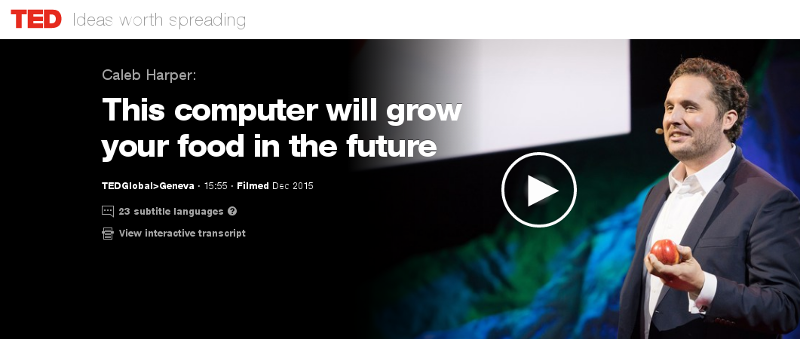
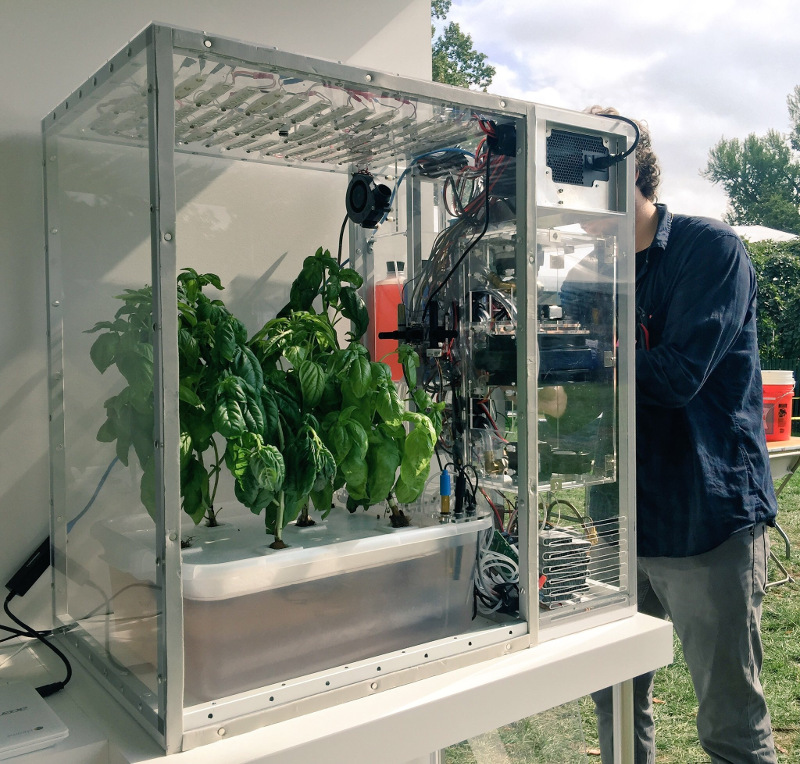
A group has recently been formed on Meetup seeking to build a food computer in Zurich. The initial meeting is planned for 6:30pm on 20 June 2017 at ETH, (Zurich Centre/Zentrum, R mistrasse 101). The question of food security underlies many of the world's problems today. In wealthier nations, we are being called upon to trust a highly opaque supply chain and our choices are limited to those things that major supermarket chains are willing to stock. A huge transport and storage apparatus adds to the cost and CO2 emissions and detracts from the nutritional value of the produce that reaches our plates. In recent times, these problems have been highlighted by the horsemeat scandal, the Guacapocalypse and the British Hummus crisis. One interesting initiative to create transparency and encourage diversity in our diets is the Open Agriculture (OpenAg) Initiative from MIT, summarised in this TED video from Caleb Harper. The food produced is healthier and fresher than anything you might find in a supermarket and has no exposure to pesticides. An open source approach to food An interesting aspect of this project is the promise of an open source approach. The project provides hardware plans, a a video of the build process, source code and the promise of sharing climate recipes (scripts) to replicate the climates of different regions, helping ensure it is always the season for your favour fruit or vegetable. Do we need it? Some people have commented on the cost of equipment and electricity. Carsten Agger recently blogged about permaculture as a cleaner alternative. While there are many places where people can take that approach, there are also many overpopulated regions and cities where it is not feasible. Some countries, like Japan, have an enormous population and previously productive farmland contaminated by industry, such as the Fukushima region. Growing our own food also has the potential to reduce food waste, as individual families and communities can grow what they need. Whether it is essential or not, the food computer project also provides a powerful platform to educate people about food and climate issues and an exciting opportunity to take the free and open source philosophy into many more places in our local communities. The Zurich Meetup group has already received expressions of interest from a diverse group including professionals, researchers, students, hackers, sustainability activists and free software developers. Next steps People who want to form a group in their own region can look in the forum topic "Where are you building your Food Computer?" to find out if anybody has already expressed interest. Which patterns from the free software world can help more people build more food computers? I've already suggested using Debian's live-wrapper to distribute a runnable ISO image that can boot from a USB stick, can you suggest other solutions like this? Can you think of any free software events where you would like to see a talk or exhibit about this project? Please suggest them on the OpenAg forum. There are many interesting resources about the food crisis, an interesting starting point is watching the documentary Food, Inc. If you are in Switzerland, please consider attending the meeting on at 6:30pm on 20 June 2017 at ETH (Centre/Zentrum), Zurich. One final thing to contemplate: if you are not hacking your own food supply, who is?

Reproducible builds folks: Reproducible Builds: week 107 in Stretch cycle

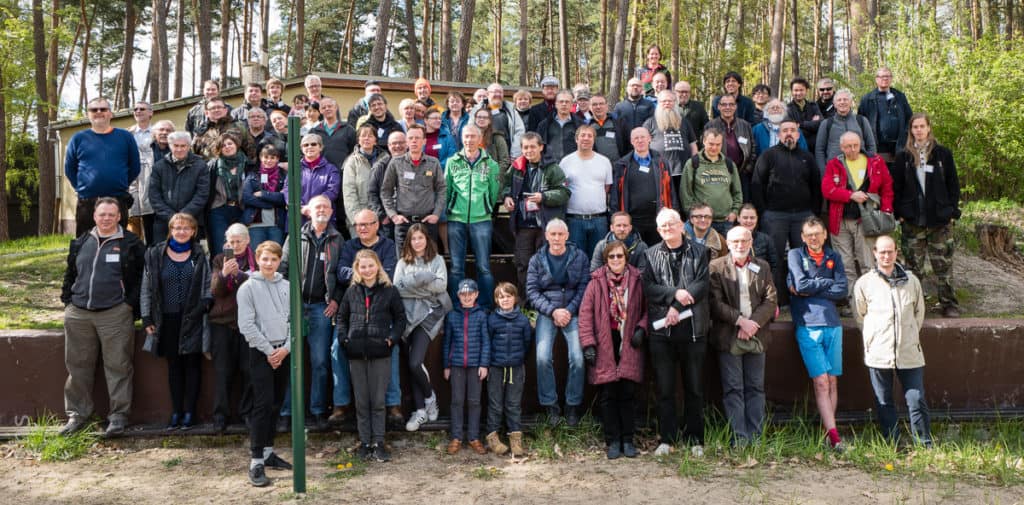
Here's what happened in the Reproducible Builds effort between Sunday May 7 and Saturday May 13 2017: Report from Reproducible Builds Hamburg Hackathon We were 16 participants from 12 projects: 7 Debian, 2 repeatr.io, 1 ArchLinux, 1 coreboot + LEDE, 1 F-Droid, 1 ElectroBSD + privoxy, 1 GNU R, 1 in-toto.io, 1 Meson and 1 openSUSE. Three people came from the USA, 3 from the UK, 2 Finland, 1 Austria, 1 Denmark and 6 from Germany, plus we several guests from our gracious hosts at the CCCHH hackerspace as well as a guest from Australia We had four presentations: Some of the things we worked on:
  • h01ger did orga stuff for this very hackathon, discussed tests.r-b.o with various non-Debian contributors, filed some bugs and restarted the policy discussion in #844431. He also did some polishing work on tests.r-b.o which shall be covered in next issue of our weekly blog.
  • Justin Cappos involved many of us in interesting discussions and started to write an academic paper about Reproducible Builds of which he shared an early beta on our mailinglist.
  • Chris Lamb (lamby) filed a number of patches for individual packages, worked on diffoscope, merged many changes to strip-nondeterminism and also filed #862073 against dak to upload buildinfo files to external services.
  • Maria Glukhova (siamezzze) fixed a bug with plots on tests.reproducible-builds.org and worked on diffoscope test coverage.
  • Lynxis worked on a new squashfs upstream release improving support for reproducible squashfs filesystems and also had some time to hack on coreboot and show others how to install coreboot on real hardware.
  • Michael Poehn worked on integrating F-Droid builds into tests.reproducible-builds.org, on the F-Droid verification utility and also ran some app reproducibility tests.
  • Bernhard worked on various unreproducible issues upstream and submitted fixes for curl, bzr, ant.
  • Erin Myhre worked on bootstrapping cleanroom builds of compiler components in Repeatr sandboxes.
  • Calvin Behling merged improvements to reppl for a cleaner storage format and better error handling and did design work for next version of repeatr pipeline execution. Calvin also lead the reproducibility testing of restaurant mood lighting.
  • Eric and Calvin also claim to have had all sorts of useful exchanges about the state of other projects, and learned a lot about where to look for more info about debian bootstrap and archive mirroring from steven and lamby :)
  • Phil Hands came by to say hi and worked on testing d-i on jenkins.debian.net.
  • Chris West (Faux) worked on extending misc.git:has-only.py, and started looking at Britney.
We had a Debian focussed meeting where we discussed a number of topics:
  • IRC meetings: yes, we want to try again to have them, monthly, a poll for a good date is being held.
  • Debian tests post Stretch: we'll add tests for stable/Stretch.
  • .buildinfo files, how forward: we need sourceful uploads for any arch:all packages. dak should send .buildinfo files to buildinfo.debian.net.
  • (pre?) Stretch release press release: we should do that, esp. as our achievements are largely unrelated to Stretch.
  • Reproducible Builds Summit 3: yes, we want that.
  • what to do (in notes.git) with resolved issues: keep the issues.
  • strip-nondeterminism quo vadis: Justin reminded us that strip-nondeterminism is a workaround we want to get rid off.
And then we also had a lot of fun in the hackerspace, enjoying some of their gimmicks, such as being able to open physical doors with ssh or controlling light and music with an webbrowser without authentication (besides being in the right network). Not quite the hackathon (This wasn't the hackathon per-se, but some of us appreciated these sights and so we thought you would too.) Many thanks to:
  • Debian for sponsoring food and accomodation!
  • Dock Europe for providing us with really nice accomodation in the house!
  • CCC Hamburg for letting us use their hackerspace for >3 days non-stop!
News and media coverage openSUSE has had a security breach in their infrastructure, including their build services. As of this writing, the scope and impact are still unclear, however the incident illustrates that no one should rely on being able to secure their infrastructure at all times. Reproducible Builds help mitigate this by allowing independent verification of build results, by parties that are unaffected by the compromise. (Whilst this can happen to anyone. Kudos to openSUSE for being open about it. Now let's continue working on Reproducible Builds everywhere!) On May 13th Chris Lamb gave a talk on Reproducible Builds at OSCAL 2017 in Tirana, Albania. OSCAL 2017 Toolchain bug reports and fixes Packages' bug reports Reviews of unreproducible packages 11 package reviews have been added, 2562 have been updated and 278 have been removed in this week, adding to our knowledge about identified issues. Most of the updates were to move ~1800 packages affected by the generic catch-all captures_build_path (out of ~2600 total) to the more specific gcc_captures_build_path, fixed by our proposed patches to GCC. 5 issue types have been updated: Weekly QA work During our reproducibility testing, FTBFS bugs have been detected and reported by:
  • Adrian Bunk (1)
  • Chris Lamb (2)
  • Chris West (1)
diffoscope development diffoscope development continued on the experimental branch:
  • Maria Glukhova:
    • Code refactoring and more tests.
  • Chris Lamb:
    • Add safeguards against unpacking recursive or deeply-nested archives. (Closes: #780761)
strip-nondeterminism development
  • strip-nondeterminism 0.033-1 and -2 were uploaded to unstable by Chris Lamb. It included contributions from:
  • Bernhard M. Wiedemann:
    • Add cpio handler.
    • Code quality improvements.
  • Chris Lamb:
    • Add documentation and increase verbosity, in support of the long-term aim of removing the need for this tool.
reprotest development
  • reprotest 0.6.1 and 0.6.2 were uploaded to unstable by Ximin Luo. It included contributions from:
  • Ximin Luo:
    • Add a documentation section on "Known bugs".
    • Move developer documentation away from the man page.
    • Mention release instructions in the previous changelog.
    • Preserve directory structure when copying artifacts. Otherwise hash output on a successful reproduction sometimes fails, because find(1) can't find the artifacts using the original artifact_pattern.
  • Chris Lamb
    • Add proper release instructions and a keyring.
trydiffoscope development
  • Chris Lamb:
    • Uses the diffoscope from Debian experimental if possible.
Misc. This week's edition was written by Ximin Luo, Holger Levsen and Chris Lamb & reviewed by a bunch of Reproducible Builds folks on IRC & the mailing lists.

16 May 2017

Enrico Zini: Accident on the motorway

There was an accident on the motorway, luckily noone got seriously wounded, but a truckful of sugar and a truckful of cereals completely spilled on the motorway, and took some time to clean. 19:15:23 19:45:07 20:02:37 20:11:52 20:28:43 20:32:34 20:44:03 21:27:41 21:44:20 22:10:50

Rapha&#235;l Hertzog: Freexian s report about Debian Long Term Support, April 2017

A Debian LTS logoLike each month, here comes a report about the work of paid contributors to Debian LTS. Individual reports In April, about 190 work hours have been dispatched among 13 paid contributors. Their reports are available:
  • Antoine Beaupr did 19.5 hours (out of 16h allocated + 5.5 remaining hours, thus keeping 2 extra hours for May).
  • Ben Hutchings did 12 hours (out of 15h allocated, thus keeping 3 extra hours for May).
  • Brian May did 10 hours.
  • Chris Lamb did 18 hours.
  • Emilio Pozuelo Monfort did 17.5 hours (out of 16 hours allocated + 3.5 hours remaining, thus keeping 2 hours for May).
  • Guido G nther did 12 hours (out of 8 hours allocated + 4 hours remaining).
  • Hugo Lefeuvre did 15.5 hours (out of 6 hours allocated + 9.5 hours remaining).
  • Jonas Meurer did nothing (out of 4 hours allocated + 3.5 hours remaining, thus keeping 7.5 hours for May).
  • Markus Koschany did 23.75 hours.
  • Ola Lundqvist did 14 hours (out of 20h allocated, thus keeping 6 extra hours for May).
  • Rapha l Hertzog did 11.25 hours (out of 10 hours allocated + 1.25 hours remaining).
  • Roberto C. Sanchez did 16.5 hours (out of 20 hours allocated + 1 hour remaining, thus keeping 4.5 extra hours for May).
  • Thorsten Alteholz did 23.75 hours.
Evolution of the situation The number of sponsored hours decreased slightly and we re now again a little behind our objective. The security tracker currently lists 54 packages with a known CVE and the dla-needed.txt file 37. The number of open issues is comparable to last month. Thanks to our sponsors New sponsors are in bold.

No comment Liked this article? Click here. My blog is Flattr-enabled.

15 May 2017

intrigeri: GNOME and Debian usability testing, May 2017

During the Contribute your skills to Debian event that took place in Paris last week-end, we conducted a usability testing session. Six people were tasked with testing a few aspects of the GNOME 3.22 desktop environment and of the Debian 9 (Stretch) operating system. A number of other people observed them and took notes. Then, two observers and three testers analyzed the results, that we are hereby presenting: we created a heat map visualization, summed up the challenges met during the tests, and wrote this blog post together. We will point the relevant upstream projects to our results. A couple of other people also did some usability testing but went in much more depth: their feedback is much more detailed and comes with a number of improvement ideas. I will process and publish their results as soon as possible. Missions Testers were provided a laptop running GNOME on a a Debian 9 (Stretch) Live system. A quick introduction (mostly copied from the one we found in some GNOME usability testing reports) was read. Then they were asked to complete the following tasks. A. Nautilus Mission A.1 Download and rename file in Nautilus
  1. Download a file from the web, a PDF document for example.
  2. Open the folder in which the file has been downloaded.
  3. Rename the dowloaded file to SUCCESS.pdf.
  4. Toggle the browser window to full screen.
  5. Open the file SUCCESS.pdf.
  6. Go back to the File manager.
  7. Close the file SUCCESS.pdf.
Mission A.2 Manipulate folders in Nautilus
  1. Create a new folder named cats in your user directory.
  2. Create a new folder named to do in your user directory.
  3. Move the cats folder to the to do folder.
  4. Delete the cats folder.
Mission A.3 Create a bookmark in Nautilus
  1. Create a folder named unicorns in your personal directory.
  2. This folder is important. Add a bookmark for unicorns in order to find it again in a few weeks.
Mission A.4 Nautilus display settings Folders and files are usually listed as icons, but they can also be displayed differently.
  1. Configure the File manager to make it show items as a list, with one file per line.
  2. You forgot your glasses and the font size is too small for you to see the text: increase the size of the text.
B. Package management Introduction On Debian, each application is available as a "package" which contains every file needed for the software to work. Unlike in other operating systems, it is rarely necessary and almost never a good idea, to download and install software from the authors website. We can rather install it from an online library managed by Debian (like an appstore). This alternative offers several advantages, such as being able to update all the software installed in one single action. Specific tools are available to install and update Debian packages. Mission B.1 Install and remove packages
  1. Install the vlc package.
  2. Start VLC.
  3. Remove the vlc package.
Mission B.2 Search and install a package
  1. Find a piece of software which can download files with BitTorrent in a graphical interface.
  2. Install the corresponding package.
  3. Launch that BitTorrent software.
Mission B.3 Upgrade the system Make sure the whole system (meaning all installed packages) is up to date. C. Settings Mission C.1 Change the desktop background
  1. Download an image you like from the web.
  2. Set the downloaded image as the desktop wallpaper.
Mission C.2 Tweak temporary files management Configure the system so that temporary files older than three days are deleted automatically. Mission C.3 Change the default video player
  1. Install VLC (ask for help if you could not do it during the previous mission).
  2. Make VLC the default video player.
  3. Download a video file from the web.
  4. Open the downloaded video, then check if it opens with VLC.
Mission C.4 Add and remove world clocks When you click the time and date in the top bar, a menu pops-up. There, you can display clocks in several time-zones.
  1. Add a clock with Rio de Janeiro timezone, then another showing the current time in Boston.
  2. Check that the time and date menu now displays these two additional clocks.
  3. Remove the Boston clock.
Results and analysis Heat map We used Jim Hall's heat map technique to summarize our usability test results. As Renata puts it, it is "a great way to see how the users performed on each task. The heat map clarifies how easy or difficult it was for the participant to accomplish a certain task.
  1. Scenario tasks (from the usability test) are arranged in rows.
  2. Test participants (for each tester) are arranged in columns.
  3. The colored blocks represent each tester s difficulty with each scenario task.
Green blocks represent the ability of the participant to accomplish the tasks with little or no difficulty. Yellow blocks indicate the tasks that the tester had significant difficulties accomplishing. Red blocks indicate that testers experienced extreme difficulty or where testers completed the tasks incorrectly. Black blocks indicate tasks the tester was unable to complete." Alternatively, here is the spreadsheet that was used to create this picture, with added text to avoid relying on colors only. Most tasks were accomplished with little or no difficulty so we will now focus on the problematic parts. What were the challenges? The heat map shows several "hot" rows, that we will now be looking at in more details. Mission A.3 Create a bookmark in Nautilus Most testers right-clicked the folder first, and eventually found they could simply drag'n'drop to the bookmarks location in the sidebar. One tester thought that he could select a folder, click the hamburger icon, and from there use the "Bookmark this folder" menu item. However, this menu action only works on the folder one has entered, not on the selected one. Mission B.1 Install and remove a package Here we faced a number of issues caused by the fact that Debian Live images don't include package indices (with good reason), so no package manager can list available software. Everyone managed to start a graphical package manager via the Overview (or via the CLI or Alt-F2 for a couple power users). Some testers tried to use GNOME Software, which listed only already installed packages (Debian bug #862560) and provided no way we could find to refresh the package indices. That's arguably a bug in Debian Live, but still: GNOME Software might display some useful information when it detects this unusual situation. We won't list here all the obstacles that were met in Synaptic: it's no news its usability is rather sub-optimal and better alternatives (such as GNOME Software) are in the works. Mission C.2 Tweak temporary files management The mission was poorly phrased: some observers had to clarify that it was specifically about GNOME, and not generic Linux system administration: some power-users were already searching the web for command-line tools to address the task at hand. Even with this clarification, no tester would have succeeded without being told they were allowed to use the web with a search query including the word "GNOME", or use the GNOME help or the Overview. Yet eventually all testers succeeded. It's interesting to note that regular GNOME users had the same problem as others: they did not try searching "temporary" in the Overview and did not look-up the GNOME Help until they were suggested to do so. Mission C.3 Change the default video player One tester configured one single video file format to be opened by default with VLC, via right-click in Nautilus Open with etc. He believed this would be enough to make VLC the default video player, missing the subtle difference between "default video player" and "default player for one single video format". One tester tried to complete this task inside VLC itself and then needed some help to succeed. It might be that the way web browsers ask "Do you want ThisBrowser to become the default web browser?" gave a hint an application GUI is the right place to do it. Two testers searched "default" in the Overview (perhaps the previous mission dealing with temporary files was enough to put them in this direction). At least one tester was confused since the only search result (Details View information about your system), which is the correct one to get there, includes the word View, which suggests that one cannot modify settings there, but only view them. One long-term GNOME user looked in Tweak Tool first, and then used the Overview. Here again, GNOME users experienced essentially the same issues as others. Mission C.4 Add and remove world clocks One tester tried to look for the clock on the top right corner of the screen, then realized it was in the middle. Other than this, all testers easily found a way to add world clocks. However, removing a world clock was rather difficult; although most testers managed to do it, it took them a number of attempts to succeed:
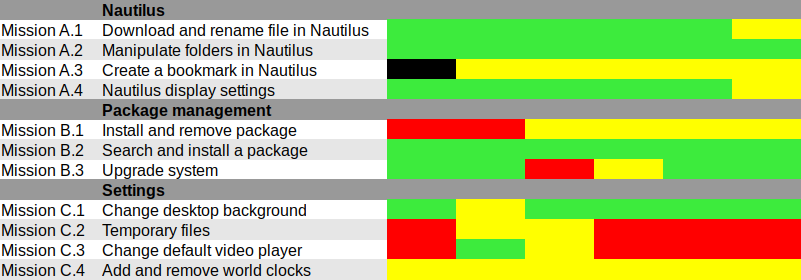
  1. Several testers left-clicked or right-clicked the clock they wanted to remove, expecting this would provide them with a way to remove it (which is not the case).
  2. After a while, all testers noticed the Select button (that has no text label nor tooltip info), which allowed them to select the clock they wanted to remove; then, most testers clicked the 1 selected button, hoping it would provide a contextual menu or some other way to act on the selected clocks (it doesn't).
  3. Eventually, everyone managed to locate the Delete button on the bottom right corner of the window; some testers mentioned that it is less visible and flashy than the blue bar that appears on the top of the screen once they had entered "Selection" mode.
General notes and observations
  • None of the participants sollicited the GNOME Help, which is unfortunate knowing its:
    • great quality;
    • translations in several languages;
    • availability and adaptability to regional specifications;
    • adequacy to the currently running version of GNOME.
    Some users found the relevant help page online via web searches; others initially ignored it among search results, then looked for it later after being told that the mission was more about GNOME.
  • Whether testers were already GNOME users or not seldom impacted their chances of success.
  • Unfortunately, we haven't compiled enough information about the testers to provide useful data about who they are and what their background is. Still, we had an interesting mix in terms of genders, age (between 17 and 52 years old), skin color and computer experience.

12 May 2017

Norbert Preining: Gaisi Takeuti, 1926-2017

Two days ago one of the most influential logician of the 20th century has passed away, Gaisi Takeuti ( ). I had the pleasure to meet this excellent man, teacher, writer, thinker several times while he was the president of the Kurt G del Society. I don t want to recall his achievements in mathematical logic, in particular proof theory, because I am not worth to write about such a genius. I want to recall a few personal stories from my own experience. I came into contact with Prof. Takeuti via is famous book Proof Theory, which my then Professor, now colleague and friend Matthias Baaz used for teaching us students proof theory. Together with Shoenfield s Mathematical Logic these two books became the foundation of my whole logic education. Now again in print, back then the Proof Theory was a rare precious. Few prints did remain in the library, and over the years one by one disappeared, until the last copy we had access to was my copy where I had scribbled pages and pages of notes and proofs. Matthias later on used these copies for his lectures, I should have written on the back-side! I remember well my first meeting with Prof. Takeuti: I was on the Conference on Internationalization in 2003 in Tsukuba, long before I moved to Japan. Back then I was just finishing my PhD and without much experience. When I arrived in the hotel, without fail there was a message of Prof. Takeuti inviting me for dinner the following day. We had dinner in a specialty restaurant of his area, together with is lovely wife. I was soo nervous about Japanese manners and stuttered Japanese phrases just to be stopped by Prof. Takeuti pouring himself a glass of sake and telling me: Relax, and forget the rules and fill your own glass when you want to. I am well aware that this liberal attitude didn t extend to Japanese colleagues, where he, descendant from a Samurai family, was at times very, extremely strict. The dinner was decided upon already, not easy since I was still strict vegetarian back than (now I would have enjoyed the dinner much more!), but for the last course we could decide. I remember with a smile how Prof. Takeuti suggested in Japanese various sweets, just to be interrupted by his wife with No Gaisi, no! . I asked what is going on and she explained that he wants to order a Japanese sweet for me I agreed, and that was probably the worst dish I had in Japan. Slippy noodles swimming in a cold broth, to be picked with chopsticks and put into a semi-sweet soja-sauce. I finished it, but it wasn t good. I should have thought twice when Prof. Takeuti s wife ordered a normal fruit salad. Scientifically he was simply a genius and famous for not reading a lot but reinventing everything. One of my research areas, G del logics, was reinvented by him as Intuitionistic Fuzzy Logic (for an overview see my talk at the Collegium Logicum 2016: G del Logics a short survey). But I want to recall one of my favorite articles of him: A Conservative Extension of Peano Arithmetic . This was published as part 2 of Volume 17 of Publications of the Mathematical Society of Japan, retypeset pdf is available here, JSTOR page. Therein he develops classical (real and complex) analysis over Peano s arithmetic. He shows that any arithmetical theorem proved in analytic number theory is a theorem in Peano s arithmetic. The proof uses Gentzen s cut elimination theorem, the center piece of modern proof theory. With Georg Kreisel having passed away in 2015, and now Gaisi Takeuti, we loose two of the greatest, if not the greatest minds in logic.


11 May 2017

Arturo Borrero Gonz lez: Debunk some Debian myths

Debian CUSL 11 Debian has many years of history, about 25 years already. With such a long travel over the continous field of developing our Universal Operating System, some myths, false accusations and bad reputation has arisen. Today I had the opportunity to discuss this topic, I was invited to give a Debian talk in the 11 Concurso Universitario de Software Libre , a Spanish contest for students to develop and dig a bit into free-libre open source software (and hardware). In this talk, I walked through some of the most common Debian myths, and I would like to summarize here some of them, with a short explanation of why I think they should be debunked. Picture of the talk myth #1: Debian is old software Please, use testing or stable-backports. If you use Debian stable your system will in fact be stable and that means: updates contain no new software but only fixes. myth #2: Debian is slow We compile and build most of our packages with industry-standard compilers and options. I don t see a significant difference on how fast linux kernel or mysql run in a CentOS or in Debian. myth #3: Debian is difficult I already discussed about this issue back in Jan 2017, Debian is a puzzle: difficult. myth #4: Debian has no graphical environment This is, simply put, false. We have gnome, kde, xfce and more. The basic Debian installer asks you what do you want at install time. myth #5: since Debian isn t commercial, the quality is poor Did you know that most of our package developers are experts in their packages and in their upstream code? Not all, but most of them. Besides, many package developers get paid to do their Debian job. Also, there are external companies which do indeed offer support for Debian (see freexian for example). myth #6: I don t trust Debian Why? Did we do something to gain this status? If so, please let us know. You don t trust how we build or configure our packages? You don t trust how we work? Anyway, I m sorry, you have to trust someone if you want to use any kind of computer. Supervising every single bit of your computer isn t practical for you. Please trust us, we do our best. myth #7: nobody uses Debian I don t agree. Many people use Debian. They even run Debian in the International Space Station. Do you count derivatives, such as Ubuntu? I believe this myth is just pointless, but some people out there really think nobody uses Debian. myth #8: Debian uses systemd Well, this is true. But you can run sysvinit if you want. I prefer and recommend systemd though :-) myth #9: Debian is only for servers No. See myths #1, #2 and #4. You may download my slides in PDF and in ODP format (only in Spanish, sorry for English readers).
Norbert Preining: BachoTeX 2017

A week of typesetting, typography, bookbinding, bibliophily, not to forget long chats with good friends and loads of beer. That is BachoTeX, the best series of conferences I have ever been. This year BachoTeX was held for the 25th time, and was merged with the TUG Meeting for a firework of excellent presentations and long hours of brain storming, hacking, music making, dancing, and simply enjoying life!
Symphony of Green
And while it was a bit less relaxing for me than in the last years, mostly due to the presence of my little daughter who requested presence quite often, it is still the place to be during the Golden Week! Of course I also gave a talk at BachoTeX about our latest changes in the upcoming TeX Live 2017 release: fmtutil and updmap past & future changes (or: cleaning up the mess). Big thanks to my company Accelia Inc. for allowing me to attend the conference. We arrived after a long trip, first via train and plane to Vienna, then two days break (including research with a colleague), followed by a night train ride to Warsaw and another train ride to Torun and a taxi ride to Bachotek. All in all far too long to be done with a 14 month old girl. Finally arrived we went directly to our hut and found it freezing. Fortunately we could organize a heater so that the rest of the week we didn t have to live in 5-10 degrees
Our log house in Bachotek
The second day brought already the traditional bonfire. After a small (for Polish standard) dinner we ignored the rain and met at the fireplace for BBQ, beer, and lots of live music.
Bonfire on the second evening
The rain stopped during the bonfire, probably due to my horrible singing, and the following days we were blessed with sunshine and warmer temperatures. The forest sparked in all kinds of greens.
Sunny days in Bachotek
For our daughter the trip was a great experience lots of wild play grounds, many other kids, and a lake she really wanted to go swimming in. Normally I go swimming there, but this year I had a bad cold so I refrained from it, and with me also our daughter, to her great disappointment.
Ready to go swimming
Another day has passed, and the sunset lights up the beautiful lake Bachotek. I cannot imagine a better place for concentrated work paired with great relaxation!
Sunset along the lake
During the days the temperatures were really nice, but the mornings were cold, and our morning walk to the breakfast place was quite chilly.
Enjoying a fresh morning on the lake
Ample coffee breaks and lunch breaks left us enough time to discuss new developments. But the single most important thing that brought people to talk a lot was the horrible internet connection, a big plus in BachoTeX (but as far as rumors go it might have been the last time with that advantage!).
Beautiful and peaceful lake Bachotek
The last evening we had a banquet honoring 25 years of BachoTeX, one of the oldest TeX conference. Live music and dancing, lots of good food and drinks, and outside the perfect evening atmosphere.
Sunset around the lake
Too fast the time has passed and we had to return to Vienna, retracing the long trip. How far it may be, taking the burden to come from Japan is worth every drop of sweat, the time at BachoTeX is probably one of the most productive, and at the same time most relaxing for me. Big thanks to all our Polish friends for organizing the event.
BachoTeX conference photo

(photo by Frans Goddijn)


Next.

Previous.