Search Results: "pm"

7 April 2014

Andrew Pollock: [life] Day 69: Walk to King Island, a picnic at Wellington Point, the long slow acquisition of some linseed and a split lip

Today was a really good day, right up until the end, when it wasn't so good, but could have been a whole lot worse, so I'm grateful for that. I've been wanting to walk out to King Island at low tide with Zoe for a while, but it's taken about a month to get the right combination of availability, weather and low tide timing to make it possible. Today, there was a low tide at about 10:27am, which I thought would work out pretty well. I wasn't sure if the tide needed to be dead low to get to King Island, so I thought we could get there a bit early and possibly follow the tide out. I invited Megan and Jason to join us for the day and make a picnic of it. It turned out that we didn't need a really low tide, the sand bar connecting King Island to Wellington Point was well and truly accessible well before low tide was reached, so we headed out as soon as we arrived. I'd brought Zoe's water shoes, but from looking at it, thought it would be walkable in bare feet. We got about 10 metres out on the sand and Zoe started freaking out about crabs. I think that incident with the mud crab on Coochiemudlo Island has left her slightly phobic of crabs. So I went back to Jason's car and got her water shoes. I tried to allay her fears a bit by sticking my finger in some of the small holes in the sand, and even got her to do it too. I'm actually glad that I did get her water shoes, because the shell grit got a bit sharp and spiky towards King Island, so I probably would have needed to carry her more than I did otherwise. Along the way to the island we spotted a tiny baby mud crab, and Zoe was brave enough to hold it briefly, so that was good. We walked all the way out and partially around the island and then across it before heading back. The walk back was much slower because where was a massive headwind. Zoe ran out of steam about half way back. She didn't like the sand getting whipped up and stinging her legs, and the wind was forcing the brim of her hat down, so I gave her a ride on my shoulders for the rest of the way back. We had some lunch after we got back to Wellington Point, and Zoe found her second wind chasing seagulls around the picnic area. After an ice cream, we went over to the playground and the girls had a great time playing. It was a pretty good park. There was this huge tree with a really big, thick, horizontal branch only about a metre or two off the ground. All the kids were climbing on it and then shimmying along the branch to the trunk. Zoe's had a few climbs in trees and seems not afraid of it, so she got up and had a go. She did really well and did a combination of scooting along, straddling the branch and doing a Brazilian Jiu-Jitsu-style "bear crawl" along the branch. It was funny seeing different kids' limits. Zoe was totally unfazed by climbing the tree. Megan was totally freaking out. But when it came to walking in bare feet in an inch of sea water, Zoe wanted to climb up my leg like a rat up a rope, in case there were crabs. Each to their own. Zoe wanted to have a swim in the ocean, so I put her into her swimsuit, but had left the water shoes back in the car. Once again, she freaked out about crabs as soon as we got ankle deep in the water, and was freaking out Megan as well, so the girls elected to go back to playing in the park. After a good play in the park, we headed back home. We'd carpooled in Jason's truck, with both girls in the back. I'd half expected Zoe to fall asleep on the way back, but the girls were very hyped up and had a great time playing games and generally being silly in the back. When we got back to our place, Jason was in need of a coffee, so we walked to the Hawthorne Garage and had coffee and babyccinos, before Megan and Jason went home. It was about 3:30pm at this point, and I wanted to make a start on dinner. I was making a wholemeal pumpkin quiche, which I've made a few times before, and I discovered we were low on linseed. I thought I'd push things and see if Zoe was up for a scooter ride to the health food shop to get some more and kill some time. She was up for it, but ran out of steam part way across Hawthorne Park. Fortunately she was okay with walking and didn't want me to carry her and the scooter. It took us about an hour to get to the health food shop. Zoe immediately remembered the place from the previous week where we'd had to stop for a post-meltdown pit stop and declared she needed to go to the toilet again. We finally made it out of the shop. I wasn't looking forward to the long walk back home, but there were a few people waiting for a bus at the bus stop near the health food shop, and on checking the timetable, the bus was due in a couple of minutes, so we just waited for the bus. That drastically shortened the trip back. Zoe managed to drop the container of linseed on the way home from the bus stop, but miraculously the way it landed didn't result in the loss of too much of the contents, it just split the container. So I carefully carried the container home the rest of the way. By this stage it was quite a bit later than I had really wanted to be starting dinner, but we got it made, and Zoe really liked the pumpkin quiche, and ate a pretty good dinner. It was after dinner when things took a turn for the worse. Zoe was eating an ice block for dessert, and for whatever reason, she'd decided to sit in the corner of the kitchen next to the dishwasher, while I was loading it. I was carrying over one of the plates, and the knife managed to fall off the plate, bounce off the open dishwasher door and hit her in the mouth, splitting her lip. Zoe was understandably upset, and I was appalled that the whole thing had happened. She never sits on the kitchen floor, let alone in the corner where the dishwasher is. And this knife came so close to her eye. Fortunately the lip didn't look too bad. It stopped bleeding quickly, and we kept some ice on it and the swelling went down. I hate it when accidents happen on my watch. I feel like I'm fighting the stigma of the incompetent single Dad, or the abusive single Dad, so when Zoe sustains an injury to the face like a fat lip, which could be misinterpreted, I, well, really hate it. This was such a freak accident, and it could have gone so much worse. I'm just so glad she's okay. Zoe recovered pretty well from it, and I was able to brush her teeth without aggravating her lip. She went to bed well, and I suspect she's going to sleep really well. It's a bit cooler tonight, so I'm half-expecting a sleep in in the morning with any luck.

4 April 2014

Andrew Pollock: [life] Day 66: Story time, Science Friday, impromptu play date, scootering and the Hawthorne Markets

Zoe slept through last night, which was lovely. We had nothing really planned for today. The Bulimba Library has a story time thing at 10:30am on a Friday. I've never bothered to take Zoe because it would have been too much of a hustle to get her there after her Brazilian Jiu-Jitsu class, particularly by bike. Since today we didn't have a BJJ class, it made getting to story time much easier. So we had a nice lazy start to the day, and then Zoe just wanted to procrastinate anyway, so since we were in no particular rush, I let her play in her room for a bit and I read for a while. We eventually had teeth and hair brushed and biked over to the library. Not having been to the story time thing before, I assumed it was in the kids area, but it turned out it was downstairs in the general purpose room, which we only discovered after story time had started. I'm certainly glad I never busted a gut to get to the library in time for it, because it wasn't anything particularly exciting. They did give all the kids a colouring sheet and there was some colouring and a couple of songs, but really it was nothing to phone home about. I did run into Jacob and his mum Laura from Kindergarten. They live locally, and so I invited them over for lunch and a play date. They had some grocery shopping to do, and I had to go to the pharmacy to get a prescription filled, so we agreed to meet at our place in about an hour. We biked to the pharmacy to get my prescription filled and some more sunscreen for Zoe, and the pharmacist gave her a free Chupa Chups We biked home, and grabbed some balloons from the convenience store next door for our Science Friday activity. I was slightly more organised today, and figured out what I wanted to do in the morning while Zoe was watching TV. We did yeast and sugar and warm water in a bottle with a balloon on top and watched it inflate itself with all the carbon dioxide produced by the yeast eating the sugar. The only problem was the balloons we bought were total rubbish. They'd been on the shelf for too long and they'd all stuck to themselves and either popped when I tried to blow them up or had holes in them. So we marched back to the corner store in our lab coats to get some more, and the store keeper gave Zoe one of the little flashlights she keeps playing with in the bowl at the check out. It was a good day for freebies. We were able to complete our Science Friday activity before Laura and Jacob and his baby brother Ethan came over for lunch. Zoe didn't have a particularly good lunch, I think it was the distraction of having Jacob there as well. After lunch, they couldn't really agree on anything to play. Laura said Jacob just plays out in the yard at Kindergarten the whole day. The one thing they both managed to agree on briefly was bubbles. Ethan was getting tired and needed a nap by about 2pm, so they left. Zoe wanted to ride her scooter, but I had to clean up from lunch and the aftermath of the play date on the balcony first, so she went and played some games on her Nexus 7 while I did that, and then we headed out on the scooter. It was about 2:30pm by this point, and the Hawthorne Markets, which have now moved to a Friday "twilight" thing, were due to start at 4pm, so I figured we could just kill time on the scooter. It's funny how the scooter is now the in thing as of Tuesday. It's sat unused on the balcony for most of the year, but I'm glad she wants to use it now because it guarantees she moves faster than if she were to walk and want to be picked up every 5 minutes. We scootered around to the playground and she played there until about 3:45pm, when we headed around to the markets. We ran into Nicky Noo from the Ooniverse Family Cafe, who we'd met on Tuesday, and she made Zoe another dog balloon and she got her face painted. After that, it was the obligatory jumping castle for a while. It was getting time to get home for Sarah to pick her up, when I dropped the dog balloon on the ground and it popped. That made Zoe very sad. Then the lack of a decent lunch kicked in. Zoe wanted some poffertjes, but they would have taken too long, so I gave her a few of the free samples to tide her over, and we headed home. Sarah was waiting for her when we got home, so we parted ways at that point. I like how the days that have nothing planned often end up as full if not fuller than the days when I do have something planned.

3 April 2014

Gunnar Wolf: DrupalCamp Mexico City: April 23-25

We are organizing a DrupalCamp in Mexico City! DrupalCamp Mexico City logo As a Drupal user, I have so far attended two DrupalCamps (one in Guadalajara, Mexico, and one in Guatemala, Guatemala). They are as Free Software conferences usually are great, informal settings where many like-minded users and developers meet and exchange all kinds of contacts, information, and have a good time. Torre de Ingenier a Torre de Ingenier a, UNAM This year, I am a (minor) part of the organizing team. DrupalCamp will be held in Torre de Ingenier a, UNAM Just by Facultad de Ingenier a, where I teach. A modern, beautiful building in Ciudad Universitaria. Talks, tracks So, who is this for? You can go look at the accepted sessions, you will find there is a lot of ground. Starting from the very introduction to how Drupal is structured and some tips on how to work with it (delivered by yours truly), through workflows for specific needs, to strong development-oriented talks. The talks are structured along four tracks: "Training", "Theming", "Development", "Business" and "SymfonyDay". "SymfonyDay"? Yes. Drupal is a fast-evolving Free Software project. Most users are currently using versions 6 and 7, which are as different between each other as day and night... But the upcoming Drupal 8 brings even greater changes. One of the most interesting changes I can see is that Drupal will now be based on a full MVC framework, Symfony. One of the days of our DrupalCamp will be devoted to Symfony (dubbed the Symfony Day). ...And... Again, just look at the list of talks. You will find a great amount of speakers interested in coming here. Not just from Mexico City. Not just from Mexico. Not just from Latin America. I must say I am personally impressed. Sponsors! Of course, as with any volunteer-run conferences: We are still looking for sponsors. We believe being a DrupalCamp sponsor will greatly increase your brand visibility in the community you want to work with. There are still a lot of expenses to cover to make this into all that we want. And surely, you want to be a part of this great project. There are many sponsor levels Surely you can be part of it!
AttachmentSize
drupalcampmx.png57.81 KB
torre_ing.jpg90.22 KB
torre_ing_mini.jpg21.64 KB

1 April 2014

Thorsten Glaser: Sorry about the MediaWiki-related breakage in wheezy

I would like to publicly apologise for the inconvenience caused by my recent updates to the mediawiki and mediawiki-extensions source packages in Debian wheezy (stable-security). As for reasons I m doing Mediawiki-related work at my dayjob, as part of FusionForge/Evolvis development, and try to upstream as much as I can. Our production environment is a Debian wheezy-based system with a selection of newer packages, including MediaWiki from sid (although I also have a test system running sid, so my uploads to Debian are generally better tested). I haven t had experience with stable-security uploads before, and made small oversights (and did not run the full series of tests on the final , permitted-to-upload, version, only beforehand) which led to the problems. The situation was a bit complicated by the need to update the two packages in lockstep, to fight an RC bug file/symlink conflict, which was hard enough to do in sid already, plus the desire to fix other possibly-RC bugs at the same time. I also got no external review, although I cannot blame anyone since I never asked anyone explicitly, so I accept this as my fault. The issues with the updates are: My unfamiliarity with some of the packaging concepts used here, combined with this being something I do during $dayjob (which can limit the time I can invest, although I m doing much more work on Mediawiki in Debian than I thought I could do on the job), can cause some of those oversights. I guess I also should install a vanilla wheezy environment somewhere for testing I do not normally do stable uploads (jmw did them before), so I was not prepared for that. And, while here: thanks to the Debian Security Team for putting up with me (also in this week s FusionForge issue), and thanks to Mediawiki upstream for agreeing to support releases shipped in Debian stable for longer support, so we can easily do stable-security updates.

Michal Čihař: New SSL certificates

Today, I've replaced server SSL certificates with new ones issues by GlobalSign. These should not suffer of same trust problems as CACert one used so far (especially after CACert root certificate being removed from Debian). While doing this, I had to use SNI on server to be able to decide which SSL certificate it should use. This should work for any decent browser, but I guess your scripts might have problems, but I hope this will be rare. Anyway if you will face some issues because of this, please let me know. Other than that I've also tweaked SSL setup to follow current best practice, what could also cause troubles to some ancient clients, but I hope these are non existing in this case :-). See Qualys SSL report for more details. Anyway thanks to GlobalSign free SSL certificates for open source projects you can use hosted Weblate without any SSL warnings. PS: Similar change (just without SNI) has happened last week on phpMyAdmin web servers as well.

Filed under: English phpMyAdmin Weblate 3 comments Flattr this!

Raphael Geissert: Rant: no more squeeze LTS

Following my blog post about Long Term Support for Debian squeeze, the news was picked up by Slashdot, Reddit (again), Barrapunto, Twitter, and Phoronix (in spite of their skepticism).

Over 300 persons, some representing their companies, contacted the security team since the news about the LTS came out - it all seemed like things were finally rrolling.

However, a few days before the coordination mailing list was setup, a not-so-friendly mail was received from a legal officer of a company that produces a RPM derivative with Long Term Support and paid support contracts. The company-that-can't-be-named from here on, due to trademark abuse.

Long story short: the Debian Squeeze LTS project has been boycotted and threatened. Unfair competition (antitrust law) has been brought up against the project, among other threats.

So, great move company-that-can't-be-named, you got it - there won't be LTS, it's been decided and the interested parties have been notified. Perhaps you want to take over the actual development?

Gergely Nagy: Motif on Wayland

Earlier this year, on the fourth of February, Matthew Garrett posted an interesting tweet. The idea of porting Motif to Wayland sounded quite insane, which is right up my alley, so I've been pondering and preparing since. The result of that preparation is a fundraiser campaign, which, if successful, I'll dive deeper into the porting effort, to deliver a library that brings the Motif we used to love back in the days to a modern platform.The aim of the project is to create a library, available under the GNU Lesser General Public License (version 2.1 or later, the same license original Motif is under), ported to Wayland, with full API compatibility if at all possible. In the end, we want the result to feel like Motif, to look like Motif, so that any program that can be compiled against Motif, will also work with the ported library. I will start fresh, using modern tools and modern methodologies (including, but not limited to autotools and test-driven development, on GitHub) to develop the new library, instead of changing the existing code base. Whether the goal is fully achievable remains to be seen, but the API - and the look of the widgets, of course - will feel like Motif, even if in a Wayland context, and we will do our best to either make the API 100% compatible with Motif, or provide a compatibility library.Since I have a day job, in order to be able to spend enough time on the library, I will need funding that more or less matches my salary. The more raised, the more time will be allocated to the porting project. Would we exceed the funding goal, there are a few stretch goal ideas that can be added later (such as porting the Motif Window Manager, and turning it into a Wayland compositor, with a few modern bells and whistles).For further information, such as perks, updates and all, please see the campaign, or the project website!

Joey Hess: adding docker support to propellor

Propellor development is churning away! (And leaving no few puns in its wake..) Now it supports secure handling of private data like passwords (only the host that owns it can see it), and fully end-to-end secured deployment via gpg signed and verified commits. And, I've just gotten support for Docker to build. Probably not quite work, but it should only be a few bugs away at this point. Here's how to deploy a dockerized webserver with propellor:
host hostname@"clam.kitenet.net" = Just
    [ Docker.configured
    , File.dirExists "/var/www"
    , Docker.hasContainer hostname "webserver" container
    ]
container _ "webserver" = Just $ Docker.containerFromImage "joeyh/debian-unstable"
        [ Docker.publish "80:80"
        , Docker.volume "/var/www:/var/www"
        , Docker.inside
            [ serviceRunning "apache2"
                 requires  Apt.installed ["apache2"]
            ]
        ]
Docker containers are set up using Properties too, just like regular hosts, but their Properties are run inside the container. That means that, if I change the web server port above, Propellor will notice the container config is out of date, and stop the container, commit an image based on it, and quickly use that to bring up a new container with the new configuration. If I change the web server to say, lighttpd, Propellor will run inside the container, and notice that it needs to install lighttpd to satisfy the new property, and so will update the container without needing to take it down. Adding all this behavior took only 253 lines of code, and none of it impacts the core of Propellor at all; it's all in Propellor.Property.Docker. (Well, I did need another hundred lines to write a daemon that runs inside the container and reads commands to run over a named pipe... Docker makes running ad-hoc commands inside a container a PITA.) So, I think that this vindicates the approach of making the configuration of Propellor be a list of Properties, which can be constructed by abitrarily interesting Haskell code. I didn't design Propellor to support containers, but it was easy to find a way to express them as shown above. Compare that with how Puppet supports Docker: http://docs.docker.io/en/latest/use/puppet/
docker::run   'helloworld':
  image        => 'ubuntu',
  command      => '/bin/sh -c "while true; do echo hello world; sleep 1; done"',
  ports        => ['4444', '4555'],
...
All puppet manages is running the image and a simple static command inside it. All the complexities that puppet provides for configuring servers cannot easily be brought to bear inside the container, and a large reason for that is, I think, that its configuration file is just not expressive enough.

Andrew Pollock: [life] Day 63: Productive procrastination, pizza dough, podiatrist, positive

parenting and a haircut with a spot of painting How's that for some alliteration? Today was a really good day. And that's before I started drinking red wine. I got up this morning and successfully banged out a 10km run. It wasn't pretty, but I did it in under an hour, so I was happy. I got home, and after breakfast I pretty much flopped on the couch with my laptop and procrastinated instead of doing my taxes. But it was productive procrastination. I: I also (finally) got my taxes to a point where I'm ready to send them off to my US accountant and deal with the rest of it incrementally. So it was a productive day! I had a follow up appointment with my podiatrist in the afternoon to see how my orthotics were going. I biked to Kindergarten early, ditched the bike trailer, and then biked over to the podiatrist, and made it back to Kindergarten about 10 minutes before pick up time. Zoe was, unsurprisingly, fast asleep. I decided to try applying sunscreen to her while she was asleep as a way of killing two birds with one stone. I got as far as getting her legs done before she woke up and had a massive meltdown. Poor kid really doesn't deal well with being woken up. One of the teachers took pity on us and distracted Zoe by letting her cuddle one of the baby chicks, which snapped her out of it for the duration, but she had another meltdown once it was over. Another teacher gave her a cuddle for a bit, and she eventually calmed down enough for me to get sunscreen on her arms. I'd foolishly left the bike trailer separated from the bike, so I had to drag the trailer back to the bike, whilst carrying Zoe. Fortunately another teacher took sympathy on us and helped me with the trailer. Turns out trying to drag a single-wheeled trailer single-handed whilst carrying a toddler and having excess sunscreen on my hands is extremely difficult. We finally got the trailer on the bike, and Zoe in the trailer, and headed towards home. Zoe's ballerina pumps aren't great on the bike because the straps on the pedals cross the tops of her exposed feet and irritate her, so there were multiple meltdowns on the way home, culminating in needing to go to the toilet "right now" before we got home. I stopped at the health food shop on the way home, to see if they had a toilet we could use. Luckily I'm a customer and the naturopath let us use the toilet in the clinic. Zoe had another meltdown in there, announcing she "didn't like being woken up". Poor kid. It wasn't a good afternoon for her. I'm just glad I was in a sufficiently good mood to be able to deal with it all in a satisfactorily positive parenting way. We finally made it home, and I'd promised her we could have a big cuddle on the couch once we got home, so we did that and read a library book, and then it was time to head to the hairdressers for our haircuts. We started out on foot, and had made it one block from home, and she saw another kid on a scooter and announced she wanted to ride her scooter too. Initially tried saying we couldn't do it this time, because we'd be late, but she was on the verge of having another meltdown, so I capitulated, and we went back and grabbed it. I'm actually really glad I did, because she was as happy as Larry from that point on, and we were only a couple of minutes late at the hairdresser. We did her fringe trim first, and then she had a great play in the kid's corner while I got my haircut. She even cleaned up the corner better than she found it without argument. We then had plenty of time to scooter back home, so I decided to check out the 'OO'niverse Family Cafe, which is next door to the Hawthorne Cinemas. It's this thing I've never gotten around to checking out, and it was the second thing I was glad I did this afternoon. It's not a big place, and it was super quiet. There was just us and two twin Kindergarten-aged girls being babysat. Zoe had a banana milkshake and got a dolphin painted on her arm and a balloon dog made, and I had a coffee and we just chilled out for a bit while I chatted with the owner (who was babysitting the twins). By this stage Anshu was already at my place, and Sarah wasn't far off leaving work to pick up Zoe, so we made our way back home. Zoe had a great time playing with Anshu until Sarah arrived. So I was basically really happy that I managed to turn around a massively molten afternoon and give Zoe a really good afternoon instead. Anshu and I then proceeded to made a couple of really fantastic pizzas. I really love my Thermomix. I made the pizza dough earlier today, and tonight I made some pizza sauce, some pesto sauce and caramelized some onions in it, and we were still done with dinner by 8pm.

30 March 2014

Petter Reinholdtsen: Debian Edu interview: Roger Marsal

Debian Edu / Skolelinux keep gaining new users. Some weeks ago, a person showed up on IRC, #debian-edu, with a wish to contribute, and I managed to get a interview with this great contributor Roger Marsal to learn more about his background. Who are you, and how do you spend your days? My name is Roger Marsal, I'm 27 years old (1986 generation) and I live in Barcelona, Spain. I've got a strong business background and I work as a patrimony manager and as a real estate agent. Additionally, I've co-founded a British based tech company that is nowadays on the last development phase of a new social networking concept. I'm a Linux enthusiast that started its journey with Ubuntu four years ago and have recently switched to Debian seeking rock solid stability and as a necessary step to gain expertise. In a nutshell, I spend my days working and learning as much as I can to face both my job, entrepreneur project and feed my Linux hunger. How did you get in contact with the Skolelinux / Debian Edu project? I discovered the LTSP advantages with "Ubuntu 12.04 alternate install" and after a year of use I started looking for an alternative. Even though I highly value and respect the Ubuntu project, I thought it was necessary for me to change to a more robust and stable alternative. As far as I was using Debian on my personal laptop I thought it would be fine to install Debian and configure an LTSP server myself. Surprised, I discovered that the Debian project also supported a kind of Edubuntu equivalent, and after having some pain I obtained a Debian Edu network up and running. I just loved it. What do you see as the advantages of Skolelinux / Debian Edu? I found a main advantage in that, once you know "the tips and tricks", a new installation just works out of the box. It's the most complete alternative I've found to create an LTSP network. All the other distributions seems to be made of plastic, Debian Edu seems to be made of steel. What do you see as the disadvantages of Skolelinux / Debian Edu? I found two main disadvantages. I'm not an expert but I've got notions and I had to spent a considerable amount of time trying to bring up a standard network topology. I'm quite stubborn and I just worked until I did but I'm sure many people with few resources (not big schools, but academies for example) would have switched or dropped. It's amazing how such a complex system like Debian Edu has achieved this out-of-the-box state. Even though tweaking without breaking gets more difficult, as more factors have to be considered. This can discourage many people too. Which free software do you use daily? I use Debian, Firefox, Okular, Inkscape, LibreOffice and Virtualbox. Which strategy do you believe is the right one to use to get schools to use free software? I don't think there is a need for a particular strategy. The free attribute in both "freedom" and "no price" meanings is what will really bring free software to schools. In my experience I can think of the "R" statistical language; a few years a ago was an extremely nerd tool for university people. Today it's being increasingly used to teach statistics at many different level of studies. I believe free and open software will increasingly gain popularity, but I'm sure schools will be one of the first scenarios where this will happen.

27 March 2014

Gunnar Wolf: Getting rid of rodents

So a good friend of mine talked about something in the debian-private mailing list. And we should not disclose that something outside such a sensible space without his approval. But Jakub is right. Once the discussion goes over to only messages talking about non-private stuff, the discussion should be moved to a non-private area. After all, we will not hide problems yada yada, right? So, not knowing where in the Debian lists this should go to, it will land on my blog, reformatting mail to make sense in this media:
Luca Filipozzi dijo [Wed, Mar 26, 2014 at 03:36:49PM +0000]:
Or don't use a mouse. When I started getting shoulder strain from using a mouse too much, I switched to an Adesso touchpad keyboard and was very happy with the positive outcome. I'm a touch (that's punny) less efficient with the touchpad compared to a mouse, but the lack of permanent injury and ongoing pain is worth it.
Right. I also have this keyboard (same brand even, different model). The keyboard is not that good (keys are not as smooth as in my previous, stock-Dell keyboard), but not having to move my right hand just to feed the rodent has made my back way way happier. I even feel better using a trackpad than a mouse (mabye because I use too much my netbook?). Luca, just out of curiosity: Did you ever manage to recognize the keyboard under the Synaptics driver, or to get it running under ChordMiddle or Emulate3Buttons? I had to fall to a ugly hack, mapping the "XF86Search" key to the middle button by telling my window manager (i3) to "bindsym X86Search exec xdotool click 2".
[ this can be declassified at any time ]
my contributions to this thread too...
my contribution unclassified, also
My classifications remain contributed. Do as you will with my bits of this message.

Diego Escalante Urrelo: Setting up Apache + PHP + MySQL on OSX with Homebrew

Recently I ve been doing some hacking for Chamilo LMS, a Free Software E-Learning system. For various reasons I had to do this on OSX, which meant setting up a web development environment. This lead me to MAMP, an OSX bundle with Apache + MySQL + PHP. However MAMP had many weird quirks that forced me to maintain a local set of patches just to get things working. I finally had the time to look into a saner option, take some notes in the process, and write a blog post.
Important advice. This post enables it.

Important life advice. This post enables it.

A popular alternative was using OSX s installed Apache with a newer PHP version from Homebrew. This sounded dangerous because you can t just apt-get install --reinstall apache if you break something. I preferred a pure Homebrew installation also because: I couldn t find a simple and straightforward resource for this specific setup, so I present you with my tutorial/recipe to get Apache + MySQL + PHP, via Homebrew, running on OSX. I took these notes on OSX 10.7.5 while building Apache/2.2.26 (Unix) with PHP 5.5.10 and MySQL 5.6.16. #1- A healthy Homebrew install First of all you need to install Homebrew. Head over to Homebrew s homepage for instructions. Even if you already have it, I recommend a health check and an update+upgrade: $ brew doctor
$ brew update && brew upgrade
Pay attention to whatever that says and follow the instructions if there s any. You also want to add Homebrew binary paths to your $PATH, even if the directories don t exist yet. Add this to .bash_profile or whatever your shell uses:
PATH=/usr/local/opt/php55/bin/:/usr/local/sbin:/usr/local/bin:$PATH #2- PHP and all its additional recipes The PHP recipes are maintained in a different repo, but don t worry, this is not a duct taped chaos, it s properly maintained: $ brew tap jgonzales/php
$ brew install php55 --with-intl
You might want to add --with-pgsql if you want to work with PostgreSQL. MySQL, Apache and CLI support is built by default. After the installation there are two quick things to do. First, timezone configuration:
(editing /usr/local/etc/php/5.5/php.ini)
date.timezone = America/Lima (or whatever works for you)
And second, PEAR permissions:
$ chmod -R ug+w /usr/local/Cellar/php55/5.5.10/lib/php #3- Setting up boring MySQL Now let s brew MySQL:
$ brew install mysql With that done, go ahead and start the server so we can initialize the basic tables, and secure the installation defaults:
$ unset TMPDIR
$ mysql_install_db --verbose --user= whoami --basedir="$(brew --prefix mysql)" --datadir=/usr/local/var/mysql --tmpdir=/tmp
$ mysql.server start
$ mysql_secure_installation

Remember: You shouldn t use sudo, so be careful with your muscle memory!
Clint Eastwood... Yeah.

Mr. Eastwood acknowledges the warning.

#4- Brewing Apache (httpd) And finally, it s time to brew Apache. You can do so with:
$ brew install httpd When that s done burning your lap, you can start configuring Apache. I chose to keep httpd.conf as pristine as possible and do everything in a VirtualHost. Remember you need to run this on something other than port 80 because you won t run httpd as root: Note that I m enabling virtual hosts and using my own paths. If you want to configure Apache differently, you probably know what you are doing. So, get off my lawn you damn kid. #5- Brownie points: PHPMyAdmin In my virtual hosts configuration I included some lines for PHPMyAdmin. That s because I m old school and I love PHPMyAdmin. You can follow into my wrinkled foot steps with:
$ brew install phpmyadmin #6- Profit You can check everything is fine by creating an index.php with a call to phpinfo() inside your configured root from httpd-vhosts.conf. Make sure OSX s Apache is not running and start (or restart) the servers:
$ apachectl start/stop/graceful(restart)
$ mysql.server start/stop/restart
Now open go to http://localhost:8000/ and http://localhost:8000/phpmyadmin. Enjoy your success. Maybe do a victory dance:
This might seem like a lot of work, but it s fairly quick with this cheat sheet. It s also very safe and easy to keep updated with brew update && upgrade. A final note: All the suggestions and instructions that are printed after installing each package can be read again with brew info <recipe>. No need to write them down. Happy hacking!

26 March 2014

Andrew Pollock: [life] Day 57: UnderWater World (now known as Sea Life: Mooloolaba)

My late biological maternal grandmother ("Nana"), remarried late in her life to a long-time friend named Bryce. I was probably an early teenager. He was a nice guy, and I kept in loose contact with him after my Nana passed away. After my Nana passed away, he moved out of the retirement home he'd been living in with my Nana, and in with one of his sons. Sometime before I moved back to Australia, in ailing physical health, he moved from his son's place into Masonic Care's aged-care hostel in Sandgate. He turned 90 last year. Mentally, he's doing pretty good. Physically, he's very wobbly on his legs. He's had a few falls, which was the main catalyst for moving from his son's place to the aged-care hostel. Other than that, he's in pretty good physical health though. I remember the first time I visited him in the hostel. After I left, I wept uncontrollably. Here was a man who was literally just waiting out the rest of his life in a small cupboard of a room. I was appalled at how small the room was, and the fact that he was just sitting around waiting to die really upset me. I've visited him a few times since I've been back. I've taken him over to my parent's place when I've taken Zoe to visit them, just so he gets out. I should say that I'm sure his own family do spend some time with him, so it's not like he's spending all his time rotting in this place, but probably still a fair chunk of it. Growing old sucks. Yesterday, when the weather forecast for today was looking like it was going to be pretty wet and miserable, I decided I'd use the day to take Zoe to Underwater World (which I've since learned has rebranded it self as "Sea Life: Mooloolaba". I had the presence of mind to call up Bryce yesterday to see if he'd like to join us today. We had to pass in his general direction to get up there, so it wasn't particularly out of my way. He informed me that he was now in a wheelchair, which I thought was fine for this excursion. So this morning, after we got ourselves going, we stopped at Sandgate to pick up Bryce, and made it to Underwater World by about 10am. I was a bit leery of the drive, because from home, it was another 30 minutes on top of the drive to Wet and Wild, and 15 minutes on top of the drive to Sea World, so I wasn't sure how Zoe would take that length car trip. It turned out that she took it pretty well. She started getting a bit restless in the last 30 minutes, but it was manageable. I was a little apprehensive about how wrangling Zoe and looking after a frail 90 year old in a wheelchair was going to work out. It turned out it worked out just fine. I could leave Bryce wherever he was, if I had to chase after Zoe, and Zoe quite liked helping push the wheelchair around. Towards the end of the day, when she got tired, I could just pop her in Bryce's lap, and push the pair of them around. It was a really good outing. I have only vague memories of visiting the place in my childhood, and it's become significantly better since then. Zoe really enjoyed going through the glass tunnels under the main ocean exhibit. We did several laps of that. We were fortunate enough to catch the sting ray feeding almost immediately upon arrival, and we also saw the seal show and made the otter feeding. The place was more focused on salt water aquatic life, hence the name, but there was also some freshwater exhibits. I never thought that much of the Monterey Aquarium, much preferring the California Academy of Science's aquariums, especially in terms of drive time accessibility. If you ignore the freshwater/salt water diversity, I think Sea Life is even better than the California Academy of Sciences. We left at about 2pm, and after a lot of hunting around, tracked down the photo they took when we entered, and then drove home closer to 3pm. To my surprise, Zoe didn't fall asleep immediately, but she did fall asleep on the way back to Bryce's place. She woke up to say goodbye to him, and then we drove home, stopping off in the Valley to check my post office box along the way, and arrived back home about 15 minutes before Sarah arrived to pick her up. It ended up being a very full day. Bryce really enjoyed himself, and I felt really happy that I was able to relatively easily brighten up his day. I've resolved to try another such outing again, I just need to figure out what to do. I thought I'd try for a 10km run, but it started to rain at the 4km mark. I was also not feeling particularly confident about lasting the distance, so I decided to just turn it into a 5km run instead.

Neil Williams: LAVA packages for Debian

Packaging LAVA for Debian unstable with notes on other distributions I ve been building packages for LAVA on Debian unstable for several months now and I ve been running LAVA jobs on the laptop and on devices in my home lab and on an ARMv7 arndale too. Current LAVA installations use lava-deployment-tool which has only supported Ubuntu 12.04 LTS Precise Pangolin. There has been a desire in LAVA to move away from a virtual environment, to put configuration files in FHS compliant paths, to use standard distribution packages for dependencies and so to make LAVA available on more platforms than just precise. Packaging opens the door to installing LAVA on Debian, Ubuntu, Fedora and any other recent distribution. Despite LAVA currently being reliant on 12.04 Precise, some of the python dependencies of LAVA have been able to move forward using the virtual environment provided by builtout and pypi. This means that LAVA, as packaged, requires a newer base OS suite than precise for Ubuntu, the minimal base is Saucy Salamander 13.10 and for Debian it would be Jessie (testing) although there is currently a transition ongoing in Debian which means that uwsgi is not in testing and Debian unstable would be needed instead. The work to migrate configuration snippets out of deployment-tool and to ensure that the tarball built using setuptools contains all of the necessary files for the package has already been done. The packaging itself is clean and most of the work is done upstream. There is, as ever, more to do but the packages work smoothly for single install LAVA servers where the dispatcher is on the same machine as the django web frontend. The packages have also migrated to Django1.6, something which is proving difficult with the deployment-tool as it has not kept pace with the changes outside the virtual environment, even if other parts of LAVA have. LAVA will be switching to packages for installation instead of deployment-tool and this will mean changes to how LAVA works outside the Cambridge lab. When the time comes to swich to packaging, the plan is to update deployment-tool so that it no longer updates /srv/lava/ but instead migrates the instance to packages. Main changes
  1. Configuration files move into /etc/
    • Device configuration files /etc/lava-dispatcher/devices/
    • Instance configuration files/etc/lava-server/
  2. Log files move into /var/log/
    • Adding logrotate support no more multi-Gb log files in /srv/lava/
  3. Commitment to keeping the upstream code up to date with dependencies
  4. Support for migrating existing instances, using South.
  5. Packaging helpers
    • add devices over SSH instead of via a combination of web frontend and SSH.
    • Developer builds with easily identifiable version strings, built as packages direct from your git tree.
  6. New frontend
    • Although django1.6 does not change the design of the web frontend at all, LAVA will take the opportunity to apply a bootstrap frontend which has greater support for browsers on a variety of devices, including mobile. This also helps identify a packaged LAVA from a deployment LAVA.
  7. Documentation and regular updates
The Plan LAVA has made regular releases based on a monthly cycle and these will be provided as source tarballs at http://www.linaro.org/downloads/ for distributions to download. The
official monthly release and any intervening updates will be made available for distributions to use for their own packaging. Additionally, Debian packages will be regularly built for use within LAVA and these will be available for those who choose to migrate from Ubuntu Precise to Debian Jessie. LAVA will assist maintainers who want to package LAVA for their distributions and we welcome patches from such maintainers. This can include changes to the developer build support script to automate the process of supporting development outside LAVA. Initially, LAVA will migrate to packaging internally, to prove the process and to smooth out the migration. Other LAVA instances are welcome to follow this migration or wait until the problems have been ironed out. The Issues Build Dependencies For Debian unstable, the list of packages which must be installed on your Debian system to be able to build packages from the lava-server and lava-dispatcher source code trees are:
debhelper (>= 8.0.0) python   python-all   python-dev   python-all-dev 
python-sphinx (>= 1.0.7+dfsg)   python3-sphinx python-mocker 
python-setuptools python-versiontools
(python-versiontools may disappear before the packages are finalised) In addition, to be able to install lava-server, these packages need to be built from tarballs released by Linaro (the list may shorten as changes upstream are applied)
linaro-django-pagination, 
python-django-restricted-resource (>= 0.2.7), 
lava-tool (>= 0.2), lava-utils-interface (>= 1.0), 
linaro-django-xmlrpc (>= 0.4),
python-versiontools (>= 1.8),
python-longerusername,
linaro-dashboard-bundle (>= 1.10.2), 
lava-dispatcher (>= 0.33.3)
lava-coordinator, lava-server-doc
The list for lava-dispatcher is currently:
python-json-schema-validator, lava-tool (>= 0.4), 
lava-utils-interface, linaro-dashboard-bundle (>= 1.10.2), 
The packages available from my experimental repository are using a new packaging branch of lava-server and lava-dispatcher where we are also migrating the CSS to Bootstrap CSS. Installing LAVA on Debian unstable
$ sudo apt-get install emdebian-archive-keyring
Add the link to my experimental repository (amd64, i386, armhf & arm64) to your apt sources, e.g. by creating a file /etc/apt/sources.list.d/lava.list containing:

deb http://people.linaro.org/~neil.williams/lava sid main
Update with the new key

$ sudo apt-get update
It is always best to install postgresql first:

$ sudo apt-get install postgresql
There are then three options for the packages to install (Please be careful with remote worker setup, it is not suitable for important installations at this time.):
  1. Single instance, server and dispatcher with recommended tools
    apt-get install lava
    Installs linaro-image-tools and guestfs tools.
  2. Single instance, server and dispatcher
    apt-get install lava-server
    Installs enough to run LAVA on a single machine, running jobs on boards on the same LAN.
  3. Experimental remote worker support
    apt-get install lava-worker
    Needs a normal lava-server installation to act as the master scheduler but is aimed at supporting a dispatcher and boards which are remote from that master.
The packages do not assume that your apache2.4 setup is identical to that used in other LAVA installations, so the LAVA apache config is installed to /etc/apache2/sites-available/ but is not enabled by default. If you choose to use the packaged apache config, you can simply run:

$ sudo a2ensite lava-server
$ sudo apache2ctl restart
(If this is a fresh apache install, use a2dissite to disable to default configuration before restarting.) Information on creating a superuser, adding devices and administering your LAVA install is provided in the README.Debian file in lava-server:

$ zless /usr/share/doc/lava-server/README.Debian.gz
Provisos and limitations Please be aware that packaged LAVA is still a work-in-progress but do let us know if there are problems. Now is the time to iron out install bugs and other issues as well as to prepare LAVA packages for other distributions. It will be a little while before the packages are ready for upload to Debian I ve got to arrange the download location and upload the dependencies first and some of that work will wait until more work has gone in upstream to consolidate some of the current dependencies.

24 March 2014

Michael Prokop: kamailio-deb-jenkins: Open Source Jenkins setup for Debian Packaging

Kamailio is an Open Source SIP Server. Since beginning of March 2014 a new setup for Kamailio s Debian packages is available. Development of this setup is sponsored by Sipwise and I am responsible for its infrastructure part (Jenkins, EC2, jenkins-debian-glue). The setup includes support for building Debian packages for Debian 5 (lenny), 6 (squeeze), 7 (wheezy) and 8 (jessie) as well as Ubuntu 10.04 (lucid) and 12.04 (precise), all of them architectures amd64 and i386. My work is fully open sourced. Deployment instructions, scripts and configuration are available at kamailio-deb-jenkins, so if you re interested in setting up your own infrastructure for Continuous Integration with Debian/Ubuntu packages that s a very decent starting point. NOTE: I ll be giving a talk about Continuous Integration with Debian/Ubuntu packages at Linuxdays Graz/Austria on 5th of April. Besides kamailio-deb-jenkins I ll also cover best practices, Debian packaging, EC2 autoscaling,

Michal &#268;iha&#345;: GSoC 2014 applications for phpMyAdmin

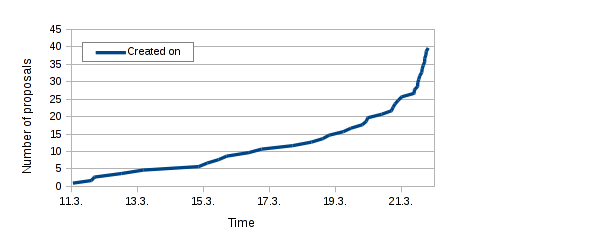
As usual, I look at the application stats for phpMyAdmin just after student application period of Google Summer of Code is over. First of all we got more proposals than in last years, this time there is way more students from India and discussions on mentors lists shows this is quite similar for other projects. Maybe it's just different timing which works better for students there, but there might be different reasons as well. There is also quite low number of spam or bogus proposals. Same as in past years, people leave the submission to the last moment, even though we encourage them to submit early so that they can adjust the application based on our feedback. Number of applications over time Anyway we're just working on evaluation and will finalize it in upcoming days. Of course you will know the results from Google on April 21st.

Filed under: English phpMyAdmin 0 comments Flattr this!

Steve Kemp: So I failed at writing some clustered code in Perl

Until this time next month I'll be posting code-based discussions only. Recently I've been wanting to explore creating clustered services, because clusters are definitely things I use professionally. My initial attempt was to write an auto-clustering version of memcached, because that's a useful tool. Writing the core of the service took an hour or so: At the point I was done the following code worked:
use KeyVal;
# Create an object, and set some values
my $obj = KeyVal->new( logfile => "/tmp/foo.log" );
$obj->incr( "steve" );
print $obj->get( "steve" ) # prints 2.
# Now replay the append-only log
my $replay = KeyVal->new( logfile => "/tmp/foo.log" );
$replay->replay();
print $replay->get( "steve" ) # prints 2.
In the first case we used the primitives to increment a value twice, and then fetch it. In the second case we used the logfile the first object created to replay all prior transactions, then output the value. Neat. The next step was to make it work over a network. Trivial. Finally I wanted to autodetect peers, and deploy replication. Each host would send out regular messages along the lines of "Do you have updates made since $time?". Any that did would replay the logfile from the given unixtime offset. However here I ran into problems. Peer discovery was supposed to be basic, and I figured I'd write something that did leader election by magic. Unfortunately Perls threading code is .. unpleasant: This failed. Majorly. Because you cannot launch the implementation of a class-method as a thread. Equally you cannot make a variable which is "complex" shared across threads. I wrote some demo code which works without packages and a shared singleton: The Ruby version, by contrast, is much more OO and neater. Meh. I've now shelved the project. My next, big, task was to make the network service utterly memcached compatible. That would have been fiddly, but not impossible. Right now I just use a simple line-based network protocol. I suspect I could have got what I wanted using EventMachine, or similar, but that's a path I've not yet explored, and I'm happy enough with that decision.

23 March 2014

Niels Thykier: Upcoming changes to Lintian (in 2.5.22)

The next version of Lintian, 2.5.22, is long overdue mostly because 2.5.21 FTBFS in sid. Besides fixing test failures, 2.5.22 also fixes: Besides bug fixes, we also added a couple of new features/nice changes: We just need to do some final tweaks and get the tag descriptions reviewed before we are ready to release the next version.

David Moreno: New Debian mailing list: debian-astro

I will try to report my Debian activities here. I am trying to retake them and as I'm usually busy at work, I have limited amount of time to do so, they stand small for now. A new mailing list, debian-astro, has been created. This was requested to create a space to allow a discussion space around astronomy for Debian, both for professionals and amateurs, to potentially look into a blend, and in general to talk about packaging and development of astronomy-related tools into Debian. Thanks to those interested on making this happen. Go subscribe today!

22 March 2014

Keith Packard: glamor-core

Core Rendering with Glamor I ve hacked up the intel driver to bypass all of the UXA paths when Glamor is enabled so I m currently running an X server that uses only Glamor for all rendering. There are still too many fall backs, and performance for some operations is not what I d like, but it s entirely usable. It supports DRI3, so I even have GL applications running. Core Rendering Status I ve continued to focus on getting the core X protocol rendering operations complete and correct; those remain a critical part of many X applications and are a poor match for GL. At this point, I ve got accelerated versions of the basic spans functions, filled rectangles, text and copies. GL and Scrolling OpenGL has been on a many-year vendetta against one of the most common 2D accelerated operations copying data within the same object, even when that operation overlaps itself. This used to be the most performance-critical operation in X; it was used for scrolling your terminal windows and when moving windows around on the screen. Reviewing the OpenGL 3.x spec, Eric and I both read the glCopyPixels specification as clearly requiring correct semantics for overlapping copy operations it says that the operation must be equivalent to reading the pixels and then writing the pixels. My CopyArea acceleration thus uses this path for the self-copy case. However, the ARB decided that having a well defined blt operation was too nice to the users, so the current 4.4 specification adds explicit language to assert that this is not well defined anymore (even in the face of the existing language which is pretty darn unambiguous). I suspect we ll end up creating an extension that offers what we need here; applications are unlikely to stop scrolling stuff around, and GPUs (at least Intel) will continue to do what we want. This is the kind of thing that makes GL maddening for 2D graphics the GPU does what we want, and the GL doesn t let us get at it. For implementations not capable of supporting the required semantic, someone will presumably need to write code that creates a temporary copy of the data. PBOs for fall backs For operations which Glamor can t manage, we need to fall back to using a software solution. Direct-to-hardware acceleration architectures do this by simply mapping the underlying GPU object to the CPU. GL doesn t provide this access, and it s probably a good thing as such access needs to be carefully synchronized with GPU access, and attempting to access tiled GPU objects with the CPU require either piles of CPU code to de-tile accesses (ala wfb), or special hardware detilers (like the Intel GTT). However, GL does provide a fairly nice abstraction called pixel buffer objects (PBOs) which work to speed access to GPU data from the CPU. The fallback code allocates a PBO for each relevant X drawable, asks GL to copy pixels in, and then calls fb, with the drawable now referencing the temporary buffer. On the way back out, any potentially modified pixels are copied back through GL and the PBOs are freed. This turns out to be dramatically faster than malloc ing temporary buffers as it allows the GL to allocate memory that it likes, and for it to manage the data upload and buffer destruction asynchronously. Because X pixmaps can contain many X windows (the root pixmap being the most obvious example), they are often significantly larger than the actual rendering target area. As an optimization, the code only copies data from the relevant area of the pixmap, saving considerable time as a result. There s even an interface which further restricts that to a subset of the target drawable which the Composite function uses. Using Scissoring for Clipping The GL scissor operation provides a single clipping rectangle. X provides a list of rectangles to clip to. There are two obvious ways to perform clipping here either perform all clipping in software, or hand each X clipping rectangle in turn to GL and re-execute the entire rendering operation for each rectangle. You d think that the former plan would be the obvious choice; clearly re-executing the entire rendering operation potentially many times is going to take a lot of time in the GPU. However, the reality is that most X drawing occurs under a single clipping rectangle. Accelerating this common case by using the hardware clipper provides enough benefit that we definitely want to use it when it works. We could duplicate all of the rendering paths and perform CPU-based clipping when the number of rectangles was above some threshold, but the additional code complexity isn t obviously worth the effort, given how infrequently it will be used. So I haven t bothered. Most operations look like this:
Allocate VBO space for data
Fill VBO with X primitives
loop over clip rects  
    glScissor()
    glDrawArrays()
 
This obviously out-sources as much of the problem as possible to the GL library, reducing the CPU time spent in glamor to a minimum. A Peek at Some Code With all of these changes in place, drawing something like a list of rectangles becomes a fairly simple piece of code: First, make sure the program we want to use is available and can be used with our GC configuration:
prog = glamor_use_program_fill(pixmap, gc,
                               &glamor_priv->poly_fill_rect_program,
                               &glamor_facet_polyfillrect);
if (!prog)
    goto bail_ctx;
Next, allocate the VBO space and copy all of the X data into it. Note that the data transfer is simply memcpy here that s because we break the X objects apart in the vertex shader using instancing, avoiding the CPU overhead of computing four corner coordinates.
/* Set up the vertex buffers for the points */
v = glamor_get_vbo_space(drawable->pScreen, nrect * (4 * sizeof (GLshort)), &vbo_offset);
glEnableVertexAttribArray(GLAMOR_VERTEX_POS);
glVertexAttribDivisor(GLAMOR_VERTEX_POS, 1);
glVertexAttribPointer(GLAMOR_VERTEX_POS, 4, GL_SHORT, GL_FALSE,
                      4 * sizeof (GLshort), vbo_offset);
memcpy(v, prect, nrect * sizeof (xRectangle));
glamor_put_vbo_space(screen);
Finally, loop over the pixmap tile fragments, and then over the clip list, selecting the drawing target and painting the rectangles:
glEnable(GL_SCISSOR_TEST);
glamor_pixmap_loop(pixmap_priv, box_x, box_y)  
    int nbox = RegionNumRects(gc->pCompositeClip);
    BoxPtr box = RegionRects(gc->pCompositeClip);
    glamor_set_destination_drawable(drawable, box_x, box_y, TRUE, FALSE, prog->matrix_uniform, &off_x, &off_y);
    while (nbox--)  
        glScissor(box->x1 + off_x,
                  box->y1 + off_y,
                  box->x2 - box->x1,
                  box->y2 - box->y1);
        box++;
        glDrawArraysInstanced(GL_TRIANGLE_STRIP, 0, 4, nrect);
     
 
GL texture size limits X pixmaps use 16 bit dimensions for width and height, allowing them to be up to 65536 x 65536 pixels. Because the X coordinate space is signed, only a quarter of this space is actually useful, which makes the useful size of X pixmaps only 32767 x 32767. This is still larger than most GL implementations offer as a maximum texture size though, and while it would be nice to just say we don t allow pixmaps larger than GL textures , the reality is that many applications expect to be able to allocate such pixmaps today, largely to hold the ever increasing size of digital photographs. Glamor has always supported large X pixmaps; it does this by splitting them up into tiles, each of which is no larger than the largest texture supported by the driver. What I ve added to Glamor is some simple macros that walk over the array of tiles, making it easy for the rendering code to support large pixmaps without needing any special case code. Glamor also had some simple testing support you can compile the code to ignore the system-provided maximum texture size and supply your own value. This code had gone stale, and couldn t work as there were parts of the code for which tiling support just doesn t make sense, like the glyph cache, or the X scanout buffer. I fixed things so that you could leave those special cases as solitary large tiles while breaking up all other pixmaps into tiles no larger than 32 pixels square. I hope to remove the single-tile case and leave the code supporting only the multiple-tile case; we have to have the latter code, and so having the single-tile code around simply increases our code size for not obvious benefit. Getting accelerated copies between tiled pixmaps added a new coordinate system to the mix and took a few hours of fussing until it was working. Rebasing Many (many) Times I m sure most of us remember the days before git; changes were often monolithic, and the notion of changing how the changes were made for the sake of clarity never occurred to anyone. It used to be that the final code was the only interesting artifact; how you got there didn t matter to anyone. Things are different today; I probably spend a third of my development time communicating how the code should change with other developers by changing the sequence of patches that are to be applied. In the case of Glamor, I ve now got a set of 28 patches. The first few are fixes outside of the glamor tree that make the rest of the server work better. Then there are a few general glamor infrastructure additions. After that, each core operation is replaced, one a at a time. Finally, a bit of stale code is removed. By sequencing things in a logical fashion, I hope to make review of the code easier, which should mean that people will spend less time trying to figure out what I did and be able to spend more time figuring out if what I did is reasonable and correct. Supporting Older Versions of GL All of the new code uses vertex instancing to move coordinate computation from the CPU to the GPU. I m also pulling textures apart using integer operations. Right now, we should correctly fall back to software for older hardware, but it would probably be nicer to just fall back to simpler GL instead. Unless everyone decides to go buy hardware with new enough GL driver support, someone is going to need to write simplified code paths for glamor. If you ve got such hardware, and are interested in making it work well, please take this as an opportunity to help yourself and others. Near-term Glamor Goals I m pretty sure we ll have the code in good enough shape to merge before the window closes for X server 1.16. Eric is in charge of the glamor tree, so it s up to him when stuff is pulled in. He and Markus Wick have also been generating code and reviewing stuff, but we could always use additional testing and review to make the code as good as possible before the merge window closes. Markus has expressed an interest in working on Glamor as a part of the X.org summer of code this year; there s clearly plenty of work to do here, Eric and I haven t touched the render acceleration stuff at all, and that code could definitely use some updating to use more modern GL features. If that works as well as the core rendering code changes, then we can look forward to a Glamor which offers GPU-limited performance for classic X applications, without requiring GPU-specific drivers for every generation of every chip.

Next.

Previous.