Search Results: "tar"

11 June 2021

Mike Gabriel: Linux on Acer Spin 3

Recently, I bought an Acer Spin 3 Convertible Notebook for the company and provided it to Robert Tari for his daily work on Ayatana Indicators (which currently is funded by the UBports Foundation via my company Fre(i)e Software GmbH). Some days ago Robert reported back about a sleepless night he spent with that machine... He got stuck with a tricky issue regarding the installation of Manjaro GNU/Linux on that machine, that could be -- at the end -- resolved by a not so well documented trick. Before anyone else spends another sleepless night on this, we thought we'd better share Robert's solution. So, the below applies to the Acer Spin 3 series (and probably to other Spin models, perhaps even some other Acer laptops): Acer Spin 3 Pre-Inst Cheat Codes Before you even plug in the USB install media:
  1. Go to UEFI settings (i.e. BIOS for us elderly people) [F2]
  2. Security -> Set Supervisor Password [Enabled]
  3. Enter the password you'll use
  4. Boot -> Secure Boot -> [Disabled] (you can't disable it without a set supervisor password)
  5. Exit -> Exit Saving Changes
  6. Restart and go to UEFI settings again [F2]
  7. Main -> [Now press CTRL + S] -> VMD Controller -> [Disabled]
  8. Exit -> Exit Saving Changes
  9. Now plug in the install USB and restart
Esp. the disabling of the VMD Controller is essential. Otherwise, GRUB won't find any partition nor EFI registered boot items after the installation and drops into the EFI recovery shell. Robert hasn't tested the Wacom pen that comes with the device, nor the fingerprint reader, yet. Everything else works out-of-the-box. light+love
Mike Gabriel (aka sunweaver)

10 June 2021

Petter Reinholdtsen: Nikita version 0.6 released - free software archive API server

I am very pleased to be able to share with you the announcement of a new version of the archiving system Nikita published by its lead developer Thomas S dring:
It is with great pleasure that we can announce a new release of nikita. Version 0.6 (https://gitlab.com/OsloMet-ABI/nikita-noark5-core). This release makes new record keeping functionality available. This really is a maturity release. Both in terms of functionality but also code. Considerable effort has gone into refactoring the codebase and simplifying the code. Notable changes for this release include:
  • Significantly improved OData parsing
  • Support for business specific metadata and national identifiers
  • Continued implementation of domain model and endpoints
  • Improved testing
  • Ability to export and import from arkivstruktur.xml
We are currently in the process of reaching an agreement with an archive institution to publish their picture archive using nikita with business specific metadata and we hope that we can share this with you soon. This is an interesting project as it allows the organisation to bring an older picture archive back to life while using the original metadata values stored as business specific metadata. Combined with OData means the scope and use of the archive is significantly increased and will showcase both the flexibility and power of Noark. I really think we are approaching a version 1.0 of nikita, even though there is still a lot of work to be done. The notable work at the moment is to implement access-control and full text indexing of documents. My sincere thanks to everyone who has contributed to this release! - Thomas Release 0.6 2021-06-10 (d1ba5fc7e8bad0cfdce45ac20354b19d10ebbc7b)
  • Refactor metadata entity search
  • Remove redundant security configuration
  • Make OpenAPI documentation work
  • Change database structure / inheritance model to a more sensible approach
  • Make it possible to move entities around the fonds structure
  • Implemented a number of missing endpoints
  • Make sure yml files are in sync
  • Implemented/finalised storing and use of
    • Business Specific Metadata
    • Norwegian National Identifiers
    • Cross Reference
    • Keyword
    • StorageLocation
    • Author
    • Screening for relevant objects
    • ChangeLog
    • EventLog
  • Make generation of updated docker image part of successful CI pipeline
  • Implement pagination for all list requests
    • Refactor code to support lists
    • Refactor code for readability
    • Standardise the controller/service code
  • Finalise File->CaseFile expansion and Record->registryEntry/recordNote expansion
  • Improved Continuous Integration (CI) approach via gitlab
  • Changed conversion approach to generate tagged PDF documents
  • Updated dependencies
    • For security reasons
    • Brought codebase to spring-boot version 2.5.0
    • Remove import of necessary dependencies
    • Remove non-used metrics classes
  • Added new analysis to CI including
  • Implemented storing of Keyword
  • Implemented storing of Screening and ScreeningMetadata
  • Improved OData support
    • Better support for inheritance in queries where applicable
    • Brought in more OData tests
    • Improved OData/hibernate understanding of queries
    • Implement $count, $orderby
    • Finalise $top and $skip
    • Make sure & is used between query parameters
  • Improved Testing in codebase
    • A new approach for integration tests to make test more readable
    • Introduce tests in parallel with code development for TDD approach
    • Remove test that required particular access to storage
  • Implement case-handling process from received email to case-handler
    • Develop required GUI elements (digital postroom from email)
    • Introduced leader, quality control and postroom roles
  • Make PUT requests return 200 OK not 201 CREATED
  • Make DELETE requests return 204 NO CONTENT not 200 OK
  • Replaced 'oppdatert*' with 'endret*' everywhere to match latest spec
  • Upgrade Gitlab CI to use python > 3 for CI scripts
  • Bug fixes
    • Fix missing ALLOW
    • Fix reading of objects from jar file during start-up
    • Reduce the number of warnings in the codebase
    • Fix delete problems
    • Make better use of cascade for "leaf" objects
    • Add missing annotations where relevant
    • Remove the use of ETAG for delete
    • Fix missing/wrong/broken rels discovered by runtest
    • Drop unofficial convertFil (konverterFil) end point
    • Fix regex problem for dateTime
    • Fix multiple static analysis issues discovered by coverity
    • Fix proxy problem when looking for object class names
    • Add many missing translated Norwegian to English (internal) attribute/entity names
    • Change UUID generation approach to allow code also set a value
    • Fix problem with Part/PartParson
    • Fix problem with empty OData search results
    • Fix metadata entity domain problem
  • General Improvements
    • Makes future refactoring easier as coupling is reduced
    • Allow some constant variables to be set from property file
    • Refactor code to make reflection work better across codebase
    • Reduce the number of @Service layer classes used in @Controller classes
    • Be more consistent on naming of similar variable types
    • Start printing rels/href if they are applicable
    • Cleaner / standardised approach to deleting objects
    • Avoid concatenation when using StringBuilder
    • Consolidate code to avoid duplication
    • Tidy formatting for a more consistent reading style across similar class files
    • Make throw a log.error message not an log.info message
    • Make throw print the log value rather than printing in multiple places
    • Add some missing pronom codes
    • Fix time formatting issue in Gitlab CI
    • Remove stale / unused code
    • Use only UUID datatype rather than combination String/UUID for systemID
    • Mark variables final and @NotNull where relevant to indicate intention
  • Change Date values to DateTime to maintain compliance with Noark 5 standard
  • Domain model improvements using Hypersistence Optimizer
    • Move @Transactional from class to methods to avoid borrowing the JDBC Connection unnecessarily
    • Fix OneToOne performance issues
    • Fix ManyToMany performance issues
    • Add missing bidirectional synchronization support
    • Fix ManyToMany performance issue
  • Make List
  • and Set
  • use final-keyword to avoid potential problems during update operations
  • Changed internal URLs, replaced "hateoas-api" with "api".
  • Implemented storing of Precedence.
  • Corrected handling of screening.
  • Corrected _links collection returned for list of mixed entity types to match the specific entity.
  • Improved several internal structures.
If free and open standardized archiving API sound interesting to you, please contact us on IRC (#nikita on irc.oftc.net) or email (nikita-noark mailing list). As usual, if you use Bitcoin and want to show your support of my activities, please send Bitcoin donations to my address 15oWEoG9dUPovwmUL9KWAnYRtNJEkP1u1b.

Louis-Philippe V ronneau: New Desktop Computer

I built my last desktop computer what seems like ages ago. In 2011, I was in a very different place, both financially and as a person. At the time, I was earning minimum wage at my school's caf to pay rent. Since the caf was owned by the school cooperative, I had an employee discount on computer parts. This gave me a chance to build my first computer from spare parts at a reasonable price. After 10 years of service1, the time has come to upgrade. Although this machine was still more than capable for day to day tasks like browsing the web or playing casual video games, it started to show its limits when time came to do more serious work. Old computer specs:
CPU: AMD FX-8530
Memory: 8GB DDR3 1600Mhz
Motherboard: ASUS TUF SABERTOOTH 990FX R2.0
Storage: Samsung 850 EVO 500GB SATA
I first started considering an upgrade in September 2020: David Bremner was kindly fixing a bug in ledger that kept me from balancing my books and since it seemed like a class of bug that would've been easily caught by an autopkgtest, I decided to add one. After adding the necessary snippets to run the upstream testsuite (an easy task I've done multiple times now), I ran sbuild and ... my computer froze and crashed. Somehow, what I thought was a simple Python package was maxing all the cores on my CPU and using all of the 8GB of memory I had available.2 A few month later, I worked on jruby and the builds took 20 to 30 minutes long enough to completely disrupt my flow. The same thing happened when I wanted to work on lintian: the testsuite would take more than 15 minutes to run, making quick iterations impossible. Sadly, the pandemic completely wrecked the computer hardware market and prices here in Canada have only recently started to go down again. As a result, I had to wait more time than I would've liked not to pay scalper prices. New computer specs:
CPU: AMD Ryzen 5900X
Memory: 64GB DDR4 3200MHz
Motherboard: MSI MPG B550 Gaming Plus
Storage: Corsair MP600 500 GB Gen4 NVME
The difference between the two machines is pretty staggering: I've gone from a CPU with 2 cores and 8 threads, to one with 12 cores and 24 threads. Not only that, but single-threaded performance has also vastly increased in those 10 years. A good example would be building grammalecte, a package I've recently sponsored. I feel it's a good benchmark, since the build relies on single-threaded performance for the normal Python operations, while being threaded when it compiles the dictionaries. On the old computer:
Build needed 00:10:07, 273040k disk space
And as you can see, on the new computer the build time has been significantly reduced:
Build needed 00:03:18, 273040k disk space
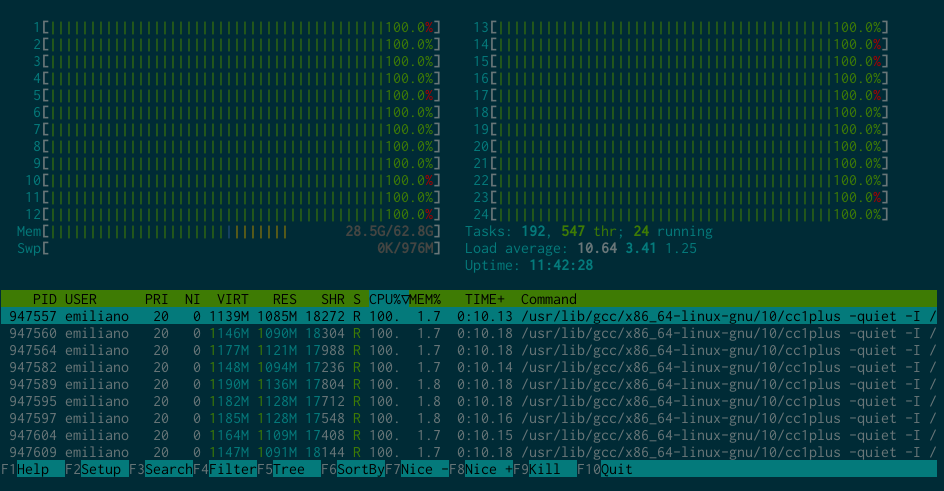
Same goes for things like the lintian testsuite. Since it's a very multi-threaded workload, it now takes less than 2 minutes to run; a 750% improvement. All this to say I'm happy with my purchase. And lo and behold I can now build ledger without a hitch, even though it maxes my 24 threads and uses 28GB of RAM. Who would've thought... Screen capture of htop showing how much resources ledger takes to build

  1. I managed to fry that PC's motherboard in 2016 and later replaced it with a brand new one. I also upgraded the storage along the way, from a very cheap cacheless 120GB SSD to a larger Samsung 850 EVO SATA drive.
  2. As it turns out, ledger is mostly written in C++ :)

9 June 2021

Thorsten Alteholz: My Debian Activities in May 2021

FTP master This month I accepted 85 and rejected 6 packages. The overall number of packages that got accepted was only 88. Yeah, Debian is frozen but hopefully will unfreeze soon. Debian LTS This was my eighty-third month that I did some work for the Debian LTS initiative, started by Raphael Hertzog at Freexian. This month my all in all workload has been 29.75h. During that time I did LTS and normal security uploads of: I also made some progress with gpac and struggle with dozens of issues here. Last but not least I did some days of frontdesk duties, which for whatever reason was rather time-consuming this month. Debian ELTS This month was the thirty-fifth ELTS month. During my allocated time I uploaded: I also made some progress with python3.4 Last but not least I did some days of frontdesk duties. Other stuff On my neverending golang challenge I again uploaded some packages either for NEW or as source upload. Last but not least I adopted gnucobol.

8 June 2021

Pavit Kaur: GSoC: About my Project and Community Bonding Period

alt text To start writing about updates regarding my GSoC project, the first obvious thing I need to do is to explain what my project really is. So let s get started.

About my project

What is debci? Directly stating from the official docs:
The Debian continuous integration (debci) is an automated system that coordinates the execution of automated tests against packages in the Debian system.

Let s try decoding it: Debian is a huge system with thousands of packages and within these packages exist inter-package dependencies. So if any package is updated, it is important to test if that package is working correctly but it is equally important to test that all the packages which are dependent on this updated package are working correctly too. Debci is a platform serving this purpose of automated testing for the entire Debian archive whenever a new version of the package, or of any package in its dependency chain is available. It comes with a UI that lets developers easily run tests and see their results if they pass or not. For my GSoC project, I am working to implement some incremental improvements to debci making it easier to use and maintain.

Community Bonding Period

The debci community Everyone I have come across till now in the community is very nice. The debci community in itself is a small but active community. It really feels good to be a part of conversations here.

Weekly call set up I have two mentors for this project Antonio Terceiro and Paul Gevers and they have set up a weekly sync call with me in which I will share my updates regarding the work done in the past week, any issues I am facing, and discuss the work for next week. In addition to this, I can always contact them on IRC for any issue I am stuck in.

Work till now The first thing I did in the community bonding period is setting up this blog. I wanted to have one for a long time and this seems to be a really nice opportunity to start. And the fact this has been added to Planet Debian too makes me happier to write. I am still trying to get a hang of this and definitely need to learn how to spend less time writing it. I also worked on my already opened merge requests during this period and got them merged. Since I am already familiar with the codebase, so I started with my first deliverable a bit earlier before the official coding period begins which is migrating the logins to Salsa, Debian s Gitlab Instance. Currently, debci uses Debian SSO client certificates for logging in, but that is deprecated so it needs to be migrated to use Salsa as an identity provider. The OmniAuth library is being used to implement this with help of ruby-omniauth-gitlab strategy. I explored a great deal about integrating OmniAuth with our application and bumped into so many issues too when I began implementing that. Once I am done integrating the Salsa Authentication with debci, I am planning to write a separate tutorial on that which could be helpful to other people using OmniAuth with their application. With that, the community bonding period has ended on 7th June and the coding period officially begins and for now, I will be continuing working on my first deliverable. That s all for now. See you next time!

7 June 2021

Mike Gabriel: UBports: Packaging of Lomiri Operating Environment for Debian (part 05)

Before and during FOSDEM 2020, I agreed with the people (developers, supporters, managers) of the UBports Foundation to package the Unity8 Operating Environment for Debian. Since 27th Feb 2020, Unity8 has now become Lomiri. Recent Uploads to Debian related to Lomiri (Feb - May 2021) Over the past 4 months I attended 14 of the weekly scheduled UBports development sync sessions and worked on the following bits and pieces regarding Lomiri in Debian: The largest amount of work (and time) went into getting lomiri-ui-toolkit ready for upload. That code component is a absolutely massive beast and dearly intertwined with Qt5 (and unit tests fail with every new warning a new Qt5.x introduces). This bit of work I couldn't do alone (see below in "Credits" section). The next projects / packages ahead are some smaller packages (content-hub, gmenuharness, etc.) before we will finally come to lomiri (i.e. main bit of the Lomiri Operating Environment) itself. Credits Many big thanks go to everyone on the UBports project, but especially to Ratchanan Srirattanamet who lived inside of lomiri-ui-toolkit for more than two weeks, it seemed. Also, thanks to Florian Leeber for being my point of contact for topics regarding my cooperation with the UBports Foundation. Packaging Status The current packaging status of Lomiri related packages in Debian can be viewed at:
https://qa.debian.org/developer.php?login=team%2Bubports%40tracker.debia... light+love
Mike Gabriel (aka sunweaver)

Russell Coker: Dell PowerEdge T320 and Linux

I recently bought a couple of PowerEdge T320 servers, so now to learn about setting them up. They are a little newer than the R710 I recently setup (which had iDRAC version 6), they have iDRAC version 7. RAM Speed One system has a E5-2440 CPU with 2*16G DDR3 DIMMs and a Memtest86+ speed of 13,043MB/s, the other is essentially identical but with a E5-2430 CPU and 4*16G DDR3 DIMMs and a Memtest86+ speed of 8,270MB/s. I had expected that more DIMMs means better RAM performance but this isn t what happened. I firstly upgraded the BIOS, as I expected it didn t make a difference but it s a good thing to try first. On the E5-2430 I tried removing a DIMM after it was pointed out on Facebook that the CPU has 3 memory channels (here s a link to a great site with information on that CPU and many others [1]). When I did that I was prompted to disable advanced ECC (which treats pairs of DIMMs as a single unit for ECC allowing correcting more than 1 bit errors) and I had to move the 3 remaining DIMMS to different slots. That improved the performance to 13,497MB/s. I then put the spare DIMM into the E5-2440 system and the performance increased to 13,793MB/s, when I installed 4 DIMMs in the E5-2440 system the performance remained at 13,793MB/s and the E5-2430 went down to 12,643MB/s. This is a good result for me, I now have the most RAM and fastest RAM configuration in the system with the fastest CPU. I ll sell the other one to someone who doesn t need so much RAM or performance (it will be really good for a small office mail server and NAS). Firmware Update BIOS The first issue is updating the BIOS, unfortunately the first link I found to the Dell web site didn t have a link to download the Linux installer. It offered a Windows binary, an EFI program, and a DOS binary. I m not about to install Windows if there is any other option and EFI is somewhat annoying, so that leaves DOS. The first Google result for installing FreeDOS advised using unetbootin , that didn t work at all for me (created a USB image that the Dell BIOS didn t recognise as bootable) and even if it did it wouldn t have been a good solution. I went to the FreeDOS download page [2] and got the Lite USB zip file. That contained FD12LITE.img which I could just dd to a USB stick. I then used fdisk to create a second 32MB partition, used mkfs.fat to format it, and then copied the BIOS image file to it. I booted the USB stick and then ran the BIOS update program from drive D:. After the BIOS update this became the first system I ve seen get a totally green result from spectre-meltdown-checker ! I found the link to the Linux installer for the new Dell BIOS afterwards, but it was still good to play with FreeDOS. PERC Driver I probably didn t really need to update the PERC (PowerEdge Raid Controller) firmware as I m just going to run it in JBOD mode. But it was easy to do, a simple bash shell script to update it. Here are the perccli commands needed to access disks, it s all hot-plug so you can insert disks and do all this without a reboot:
# show overview
perccli show
# show controller 0 details
perccli /c0 show all
# show controller 0 info with less detail
perccli /c0 show
# clear all "foreign" RAID members
perccli /c0 /fall delete
# add a vd (RAID) of level RAID0 (r0) with the drive 32:0 (enclosure:slot from above command)
perccli /c0 add vd r0 drives=32:0
The perccli /c0 show command gives the following summary of disk ( PD in perccli terminology) information amongst other information. The EID is the enclosure, Slt is the slot (IE the bay you plug the disk into) and the DID is the disk identifier (not sure what happens if you have multiple enclosures). The allocation of device names (sda, sdb, etc) will be in order of EID:Slt or DID at boot time, and any drives added at run time will get the next letters available.
----------------------------------------------------------------------------------
EID:Slt DID State DG       Size Intf Med SED PI SeSz Model                     Sp 
----------------------------------------------------------------------------------
32:0      0 Onln   0  465.25 GB SATA SSD Y   N  512B Samsung SSD 850 EVO 500GB U  
32:1      1 Onln   1  465.25 GB SATA SSD Y   N  512B Samsung SSD 850 EVO 500GB U  
32:3      3 Onln   2   3.637 TB SATA HDD N   N  512B ST4000DM000-1F2168        U  
32:4      4 Onln   3   3.637 TB SATA HDD N   N  512B WDC WD40EURX-64WRWY0      U  
32:5      5 Onln   5 278.875 GB SAS  HDD Y   N  512B ST300MM0026               U  
32:6      6 Onln   6 558.375 GB SAS  HDD N   N  512B AL13SXL600N               U  
32:7      7 Onln   4   3.637 TB SATA HDD N   N  512B ST4000DM000-1F2168        U  
----------------------------------------------------------------------------------
The PERC controller is a MegaRAID with possibly some minor changes, there are reports of Linux MegaRAID management utilities working on it for similar functionality to perccli. The version of MegaRAID utilities I tried didn t work on my PERC hardware. The smartctl utility works on those disks if you tell it you have a MegaRAID controller (so obviously there s enough similarity that some MegaRAID utilities will work). Here are example smartctl commands for the first and last disks on my system. Note that the disk device node doesn t matter as all device nodes associated with the PERC/MegaRAID are equal for smartctl.
# get model number etc on DID 0 (Samsung SSD)
smartctl -d megaraid,0 -i /dev/sda
# get all the basic information on DID 0
smartctl -d megaraid,0 -a /dev/sda
# get model number etc on DID 7 (Seagate 4TB disk)
smartctl -d megaraid,7 -i /dev/sda
# exactly the same output as the previous command
smartctl -d megaraid,7 -i /dev/sdc
I have uploaded etbemon version 1.3.5-6 to Debian which has support for monitoring smartctl status of MegaRAID devices and NVMe devices. IDRAC To update IDRAC on Linux there s a bash script with the firmware in the same file (binary stuff at the end of a shell script). To make things a little more exciting the script insists that rpm be available (running apt install rpm fixes that for a Debian system). It also creates and runs other shell scripts which start with #!/bin/sh but depend on bash syntax. So I had to make /bin/sh a symlink to /bin/bash. You know you need this if you see errors like typeset: not found and [: -eq: unexpected operator and then the system reboots. Dell people, please test your scripts on dash (the Debian /bin/sh) or just specify #!/bin/bash. If the IDRAC update works it will take about 8 minutes. Lifecycle Controller The Lifecycle Controller is apparently for installing OS and firmware updates. I use Linux tools to update Linux and I generally don t plan to update the firmware after deployment (although I could do so from Linux if needed). So it doesn t seem to offer anything useful to me. Setting Up IDRAC For extra excitement I decided to try to setup IDRAC from the Linux command-line. To install the RAC setup tool you run apt install srvadmin-idracadm7 libargtable2-0 (because srvadmin-idracadm7 doesn t have the right dependencies).
# srvadmin-idracadm7 is missing a dependency
apt install srvadmin-idracadm7 libargtable2-0
# set the IP address, netmask, and gatewat for IDRAC
idracadm7 setniccfg -s 192.168.0.2 255.255.255.0 192.168.0.1
# put my name on the front panel LCD
idracadm7 set System.LCD.UserDefinedString "Russell Coker"
Conclusion This is a very nice deskside workstation/server. It s extremely quiet with hardly any fan noise and the case is strong enough to contain the noise of hard drives. When running with 3* 3.5 SATA disks and 2*10k 2.5 SAS disks on a wooden floor it wasn t annoyingly loud. Without the SAS disks it was as quiet as you can expect any PC to be, definitely not the volume you expect from a serious server! I bought the T320 systems loaded with SAS disks which made them quite loud, I immediately put the disks on ebay and installed SATA SSDs and hard drives which gives me more performance and more space than the SAS disks with less cost and almost no noise. 8*3.5 drive bays gives room for expansion. I currently have 2*SATA SSDs and 3*SATA disks, the SSDs are for the root filesystem (including /home) and the disks are for a separate filesystem for large files.

Russ Allbery: Review: Stoneskin

Review: Stoneskin, by K.B. Spangler
Series: Deep Witches #0
Publisher: A Girl and Her Fed Books
Copyright: September 2017
ASIN: B075PHK498
Format: Kindle
Pages: 226
Stoneskin is a prequel to the Deep Witches Trilogy, which is why I have it marked as book 0 of the series. Unlike most prequels, it was written and published before the series and there doesn't seem to be any reason not to read it first. Tembi Moon is an eight-year-old girl from the poor Marumaru area on the planet of Adhama. Humanity has spread to the stars and first terraformed the worlds and then bioformed themselves to live there. The differences are subtle, but Tembi's skin becomes thicker and less sensitive when damaged (either physically or emotionally) and she can close her ears against dust storms. One day, she wakes up in an unknown alley and finds herself on the world of Miha'ana, sixteen thousand light-years away, where she is rescued and brought home by a Witch named Matindi. In this science fiction future, nearly all interstellar travel is done through the Deep. The Deep is not like the typical hand-waved science fiction subspace, most notably in that it's alive. No one is entirely sure where it came from or what sort of creature it is. It sometimes manages to communicate in words, but abstract patterns with feelings attached are more common, and it only communicates with specific people. Those people are Witches, who are chosen by the Deep via some criteria no one understands. Witches can use the Deep to move themselves or anything else around the galaxy. All interstellar logistics rely on them. The basics of Tembi's story are not that unusual; she's been chosen by the Deep to be a Witch. What is remarkable is that she's young and she's poor, completely disconnected from the power structures of the galaxy. But, once chosen, her path as far as the rest of the galaxy is concerned is fixed: she will go to Lancaster to be trained as a Witch. Matindi is able to postpone this for a time by keeping an eye on her, but not forever. I bought this book because of the idea of the Deep, and that is indeed the best part of the book. There is a lot of mystery about its exact nature, most of which is not resolved in this book, but it mostly behaves like a giant and extremely strange dog, and it's awesome. Replacing the various pseudo-scientific explanations for faster than light travel with interactions with a dream-weird giant St. Bernard with too many paws that talks in swirls of colored bubbles and is very eager to please its friends is brilliant. This book covers a lot of years of Tembi's life and is, as advertised, a prelude to a story that is not resolved here. It's a coming of age story in which she does eventually end up at Lancaster, learns and chafes at the elaborate and very conservative structures humans have put in place to try to make interactions with the Deep predictable and reliable, and eventually gets drawn into the politics of war and the question of when people have a responsibility to intervene. Tembi, and the reader, also have many opportunities to get extremely upset at how the Deep is treated and how much entitlement the Witches have about their access and control, although how the Deep feels about it is left for a future book. Not all of this story is as good as the premise. There are some standard coming of age tropes that I'm not fond of, such as Tembi's predictable temporary falling out with the Deep (although the Deep's reaction is entertaining). It's also not at all a complete story, although that's clearly signaled by the subtitle. But as an introduction to the story universe and an extended bit of scene-setting, it accomplishes what it sets out to do. It's also satisfyingly thoughtful about the moral trade-offs around stability and the value of preserving institutions. I know which side I'm on within the universe, but I appreciated how much nuance and thoughtfulness Spangler puts into the contrary opinion. I'm hooked on the universe and want to learn more about the Deep, enough so that I've already bought the first book of the main trilogy. Followed by The Blackwing War. Rating: 7 out of 10

6 June 2021

Evgeni Golov: Controlling Somfy roller shutters using an ESP32 and ESPHome

Our house has solar powered, remote controllable roller shutters on the roof windows, built by the German company named HEIM & HAUS. However, when you look closely at the remote control or the shutter motor, you'll see another brand name: SIMU. As the shutters don't have any wiring inside the house, the only way to control them is via the remote interface. So let's go on the Internet and see how one can do that, shall we? ;) First thing we learn is that SIMU remote stuff is just re-branded Somfy. Great, another name! Looking further we find that Somfy uses some obscure protocol to prevent (replay) attacks (spoiler: it doesn't!) and there are tools for RTL-SDR and Arduino available. That's perfect! Always sniff with RTL-SDR first! Given the two re-brandings in the supply chain, I wasn't 100% sure our shutters really use the same protocol. So the first "hack" was to listen and decrypt the communication using RTL-SDR:
$ git clone https://github.com/dimhoff/radio_stuff
$ cd radio_stuff
$ make -C converters am_to_ook
$ make -C decoders decode_somfy
$ rtl_fm -M am -f 433.42M -s 270K   ./am_to_ook -d 10 -t 2000 -    ./decode_somfy
<press some buttons on the remote>
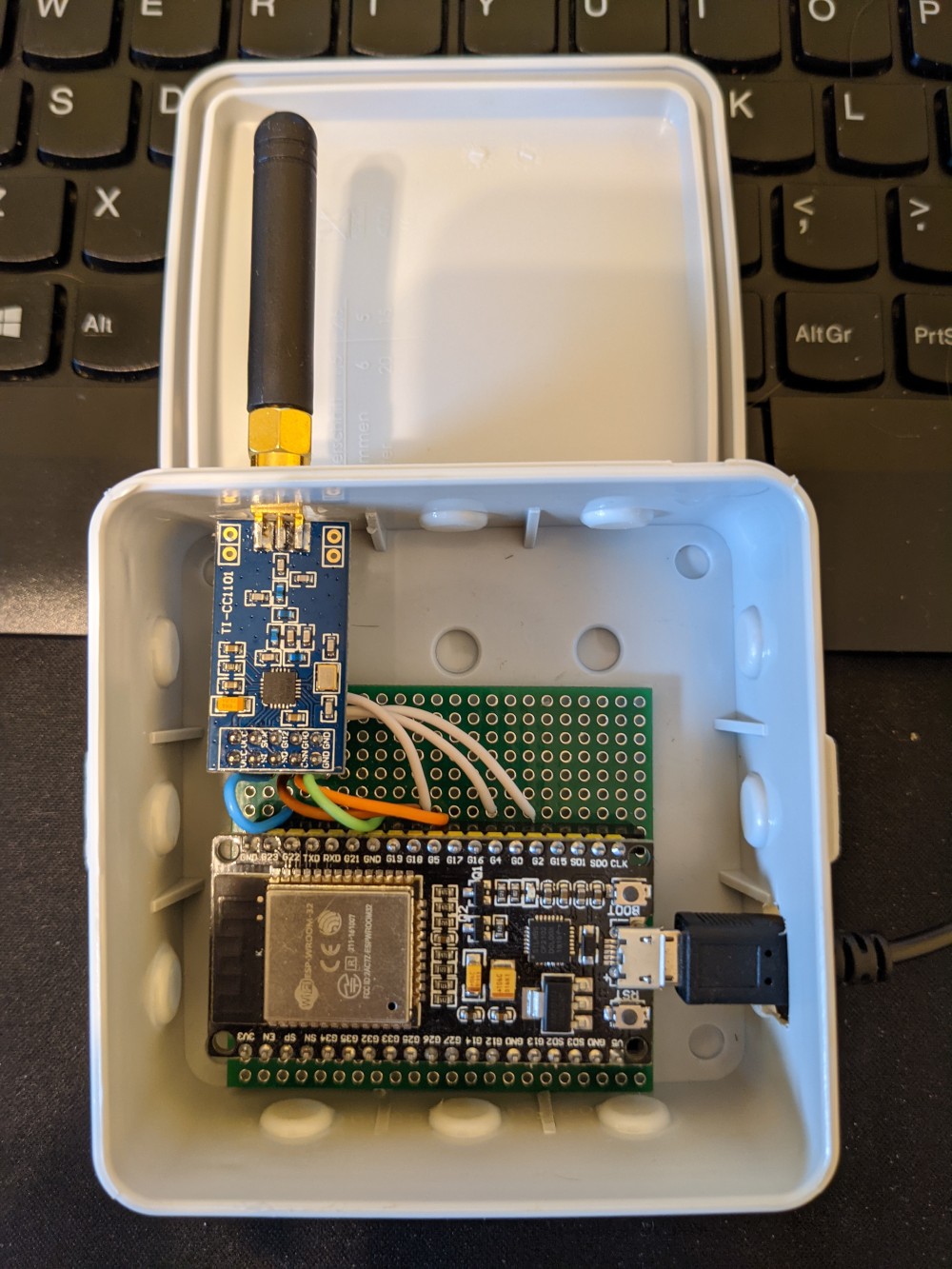
The output contains the buttons I pressed, but also the id of the remote and the command counter (which is supposed to prevent replay attacks). At this point I could just use the id and the counter to send own commands, but if I'd do that too often, the real remote would stop working, as its counter won't increase and the receiver will drop the commands when the counters differ too much. But that's good enough for now. I know I'm looking for the right protocol at the right frequency. As the end result should be an ESP32, let's move on! Acquiring the right hardware Contrary to an RTL-SDR, one usually does not have a spare ESP32 with 433MHz radio at home, so I went shopping: a NodeMCU-32S clone and a CC1101. The CC1101 is important as most 433MHz chips for Arduino/ESP only work at 433.92MHz, but Somfy uses 433.42MHz and using the wrong frequency would result in really bad reception. The CC1101 is essentially an SDR, as you can tune it to a huge spectrum of frequencies. Oh and we need some cables, a bread board, the usual stuff ;) The wiring is rather simple: ESP32 wiring for a CC1101 And the end result isn't too beautiful either, but it works: ESP32 and CC1101 in a simple case Acquiring the right software In my initial research I found an Arduino sketch and was totally prepared to port it to ESP32, but luckily somebody already did that for me! Even better, it's explicitly using the CC1101. Okay, okay, I cheated, I actually ordered the hardware after I found this port and the reference to CC1101. ;) As I am using ESPHome for my ESPs, the idea was to add a "Cover" that's controlling the shutters to it. Writing some C++, how hard can it be? Turns out, not that hard. You can see the code in my GitHub repo. It consists of two (relevant) files: somfy_cover.h and somfy.yaml. somfy_cover.h essentially wraps the communication with the Somfy_Remote_Lib library into an almost boilerplate Custom Cover for ESPHome. There is nothing too fancy in there. The only real difference to the "Custom Cover" example from the documentation is the split into SomfyESPRemote (which inherits from Component) and SomfyESPCover (which inherits from Cover) -- this is taken from the Custom Sensor documentation and allows me to define one "remote" that controls multiple "covers" using the add_cover function. The first two params of the function are the NVS name and key (think database table and row), and the third is the rolling code of the remote (stored in somfy_secrets.h, which is not in Git). In ESPHome a Cover shall define its properties as CoverTraits. Here we call set_is_assumed_state(true), as we don't know the state of the shutters - they could have been controlled using the other (real) remote - and setting this to true allows issuing open/close commands at all times. We also call set_supports_position(false) as we can't tell the shutters to move to a specific position. The one additional feature compared to a normal Cover interface is the program function, which allows to call the "program" command so that the shutters can learn a new remote. somfy.yaml is the ESPHome "configuration", which contains information about the used hardware, WiFi credentials etc. Again, mostly boilerplate. The interesting parts are the loading of the additional libraries and attaching the custom component with multiple covers and the additional PROG switches:
esphome:
  name: somfy
  platform: ESP32
  board: nodemcu-32s
  libraries:
    - SmartRC-CC1101-Driver-Lib@2.5.6
    - Somfy_Remote_Lib@0.4.0
    - EEPROM
  includes:
    - somfy_secrets.h
    - somfy_cover.h
 
cover:
  - platform: custom
    lambda:  -
      auto somfy_remote = new SomfyESPRemote();
      somfy_remote->add_cover("somfy", "badezimmer", SOMFY_REMOTE_BADEZIMMER);
      somfy_remote->add_cover("somfy", "kinderzimmer", SOMFY_REMOTE_KINDERZIMMER);
      App.register_component(somfy_remote);
      return somfy_remote->covers;
    covers:
      - id: "somfy"
        name: "Somfy Cover"
      - id: "somfy2"
        name: "Somfy Cover2"
switch:
  - platform: template
    name: "PROG"
    turn_on_action:
      - lambda:  -
          ((SomfyESPCover*)id(somfy))->program();
  - platform: template
    name: "PROG2"
    turn_on_action:
      - lambda:  -
          ((SomfyESPCover*)id(somfy2))->program();
The switch to trigger the program mode took me a bit. As the Cover interface of ESPHome does not offer any additional functions besides movement control, I first wrote code to trigger "program" when "stop" was pressed three times in a row, but that felt really cumbersome and also had the side effect that the remote would send more than needed, sometimes confusing the shutters. I then decided to have a separate button (well, switch) for that, but the compiler yelled at me I can't call program on a Cover as it does not have such a function. Turns out, you need to explicitly cast to SomfyESPCover and then it works, even if the code becomes really readable, NOT. Oh and as the switch does not have any code to actually change/report state, it effectively acts as a button that can be pressed. At this point we can just take an existing remote, press PROG for 5 seconds, see the blinds move shortly up and down a bit and press PROG on our new ESP32 remote and the shutters will learn the new remote. And thanks to the awesome integration of ESPHome into HomeAssistant, this instantly shows up as a new controllable cover there too. Future Additional Work I started writing this post about a year ago And the initial implementation had some room for improvement More than one remote The initial code only created one remote and one cover element. Sure, we could attach that to all shutters (there are 4 of them), but we really want to be able to control them separately. Thankfully I managed to read enough ESPHome docs, and learned how to operate std::vector to make the code dynamically accept new shutters. Using ESP32's NVS The ESP32 has a non-volatile key-value storage which is much nicer than throwing bits at an emulated EEPROM. The first library I used for that explicitly used EEPROM storage and it would have required quite some hacking to make it work with NVS. Thankfully the library I am using now has a plugable storage interface, and I could just write the NVS backend myself and upstream now supports that. Yay open-source! Remaining issues Real state is unknown As noted above, the ESP does not know the real state of the shutters: a command could have been lost in transmission (the Somfy protocol is send-only, there is no feedback) or the shutters might have been controlled by another remote. At least the second part could be solved by listening all the time and trying to decode commands heard over the air, but I don't think this is worth the time -- worst that can happen is that a closed (opened) shutter receives another close (open) command and that is harmless as they have integrated endstops and know that they should not move further. Can't program new remotes with ESP only To program new remotes, one has to press the "PROG" button for 5 seconds. This was not exposed in the old library, but the new one does support "long press", I just would need to add another ugly switch to the config and I currently don't plan to do so, as I do have working remotes for the case I need to learn a new one.

4 June 2021

Matthew Garrett: Mike Lindell's Cyber "Evidence"

Mike Lindell, notable for absolutely nothing relevant in this field, today filed a lawsuit against a couple of voting machine manufacturers in response to them suing him for defamation after he claimed that they were covering up hacks that had altered the course of the US election. Paragraph 104 of his suit asserts that he has evidence of at least 20 documented hacks, including the number of votes that were changed. The citation is just a link to a video called Absolute 9-0, which claims to present sufficient evidence that the US supreme court will come to a 9-0 decision that the election was tampered with.

The claim is that Lindell was provided with a set of files on the 9th of January, and gave these to some cyber experts to verify. These experts identified them as packet captures. The video contains scrolling hex, and we are told that this is the raw encrypted data from the files. In reality, the hex values correspond very clearly to printable ASCII, and appear to just be the Pennsylvania voter roll. They're not encrypted, and they're not packet captures (they contain no packet headers).

20 of these packet captures were then selected and analysed, giving us the tables contained within Exhibit 12. The alleged source IPs appear to correspond to the networks the tables claim, and the latitude and longitude presumably just come from a geoip lookup of some sort (although clearly those values are far too precise to be accurate). But if we look at the target IPs, we find something interesting. Most of them resolve to the website for the county that was the nominal target (eg, 198.108.253.104 is www.deltacountymi.org). So, we're supposed to believe that in many cases, the county voting infrastructure was hosted on the county website.

Unfortunately we're not given the destination port, but 198.108.253.104 isn't listening on anything other than 80 and 443. We're told that the packet data is encrypted, so presumably it's over HTTPS. So, uh, how did they decrypt this to figure out how many votes were switched? If Mike's hackers have broken TLS, they really don't need to be dealing with this.

We're also given some background information on how it's impossible to reconstruct packet captures after the fact (untrue), or that modifying them would change their hashes (true, but in the absence of known good hash values that tells us nothing), but it's pretty clear that nothing we're shown actually demonstrates what we're told it does.

In summary: yes, any supreme court decision on this would be 9-0, just not the way he's hoping for.

Update: It was pointed out that this data appears to be part of a larger dataset. This one is even more dubious - it somehow has MAC addresses for both the source and destination (which is impossible), and almost none of these addresses are in actual issued ranges.

comment count unavailable comments

3 June 2021

Jonathan McDowell: Digging into Kubernetes containers

Having build a single node Kubernetes cluster and had a poke at what it s doing in terms of networking the next thing I want to do is figure out what it s doing in terms of containers. You might argue this should have come before networking, but to me the networking piece is more non-standard than the container piece, so I wanted to understand that first. Let s start with a process listing on the host. ps faxno user,stat,cmd There are a number of processes from the host kernel we don t care about:
kernel processes
    USER STAT CMD
       0 S    [kthreadd]
       0 I<    \_ [rcu_gp]
       0 I<    \_ [rcu_par_gp]
       0 I<    \_ [kworker/0:0H-events_highpri]
       0 I<    \_ [mm_percpu_wq]
       0 S     \_ [rcu_tasks_rude_]
       0 S     \_ [rcu_tasks_trace]
       0 S     \_ [ksoftirqd/0]
       0 I     \_ [rcu_sched]
       0 S     \_ [migration/0]
       0 S     \_ [cpuhp/0]
       0 S     \_ [cpuhp/1]
       0 S     \_ [migration/1]
       0 S     \_ [ksoftirqd/1]
       0 I<    \_ [kworker/1:0H-kblockd]
       0 S     \_ [cpuhp/2]
       0 S     \_ [migration/2]
       0 S     \_ [ksoftirqd/2]
       0 I<    \_ [kworker/2:0H-events_highpri]
       0 S     \_ [cpuhp/3]
       0 S     \_ [migration/3]
       0 S     \_ [ksoftirqd/3]
       0 I<    \_ [kworker/3:0H-kblockd]
       0 S     \_ [kdevtmpfs]
       0 I<    \_ [netns]
       0 S     \_ [kauditd]
       0 S     \_ [khungtaskd]
       0 S     \_ [oom_reaper]
       0 I<    \_ [writeback]
       0 S     \_ [kcompactd0]
       0 SN    \_ [ksmd]
       0 SN    \_ [khugepaged]
       0 I<    \_ [kintegrityd]
       0 I<    \_ [kblockd]
       0 I<    \_ [blkcg_punt_bio]
       0 I<    \_ [edac-poller]
       0 I<    \_ [devfreq_wq]
       0 I<    \_ [kworker/0:1H-kblockd]
       0 S     \_ [kswapd0]
       0 I<    \_ [kthrotld]
       0 I<    \_ [acpi_thermal_pm]
       0 I<    \_ [ipv6_addrconf]
       0 I<    \_ [kstrp]
       0 I<    \_ [zswap-shrink]
       0 I<    \_ [kworker/u9:0-hci0]
       0 I<    \_ [kworker/2:1H-kblockd]
       0 I<    \_ [ata_sff]
       0 I<    \_ [sdhci]
       0 S     \_ [irq/39-mmc0]
       0 I<    \_ [sdhci]
       0 S     \_ [irq/42-mmc1]
       0 S     \_ [scsi_eh_0]
       0 I<    \_ [scsi_tmf_0]
       0 S     \_ [scsi_eh_1]
       0 I<    \_ [scsi_tmf_1]
       0 I<    \_ [kworker/1:1H-kblockd]
       0 I<    \_ [kworker/3:1H-kblockd]
       0 S     \_ [jbd2/sda5-8]
       0 I<    \_ [ext4-rsv-conver]
       0 S     \_ [watchdogd]
       0 S     \_ [scsi_eh_2]
       0 I<    \_ [scsi_tmf_2]
       0 S     \_ [usb-storage]
       0 I<    \_ [cfg80211]
       0 S     \_ [irq/130-mei_me]
       0 I<    \_ [cryptd]
       0 I<    \_ [uas]
       0 S     \_ [irq/131-iwlwifi]
       0 S     \_ [card0-crtc0]
       0 S     \_ [card0-crtc1]
       0 S     \_ [card0-crtc2]
       0 I<    \_ [kworker/u9:2-hci0]
       0 I     \_ [kworker/3:0-events]
       0 I     \_ [kworker/2:0-events]
       0 I     \_ [kworker/1:0-events_power_efficient]
       0 I     \_ [kworker/3:2-events]
       0 I     \_ [kworker/1:1]
       0 I     \_ [kworker/u8:1-events_unbound]
       0 I     \_ [kworker/0:2-events]
       0 I     \_ [kworker/2:2]
       0 I     \_ [kworker/u8:0-events_unbound]
       0 I     \_ [kworker/0:1-events]
       0 I     \_ [kworker/0:0-events]
There are various basic host processes, including my SSH connections, and Docker. I note it s using containerd. We also see kubelet, the Kubernetes node agent.
host processes
    USER STAT CMD
       0 Ss   /sbin/init
       0 Ss   /lib/systemd/systemd-journald
       0 Ss   /lib/systemd/systemd-udevd
     101 Ssl  /lib/systemd/systemd-timesyncd
       0 Ssl  /sbin/dhclient -4 -v -i -pf /run/dhclient.enx00e04c6851de.pid -lf /var/lib/dhcp/dhclient.enx00e04c6851de.leases -I -df /var/lib/dhcp/dhclient6.enx00e04c6851de.leases enx00e04c6851de
       0 Ss   /usr/sbin/cron -f
     104 Ss   /usr/bin/dbus-daemon --system --address=systemd: --nofork --nopidfile --systemd-activation --syslog-only
       0 Ssl  /usr/sbin/dockerd -H fd://
       0 Ssl  /usr/sbin/rsyslogd -n -iNONE
       0 Ss   /usr/sbin/smartd -n
       0 Ss   /lib/systemd/systemd-logind
       0 Ssl  /usr/bin/containerd
       0 Ss+  /sbin/agetty -o -p -- \u --noclear tty1 linux
       0 Ss   sshd: /usr/sbin/sshd -D [listener] 0 of 10-100 startups
       0 Ss    \_ sshd: root@pts/1
       0 Ss        \_ -bash
       0 R+            \_ ps faxno user,stat,cmd
       0 Ss    \_ sshd: noodles [priv]
    1000 S         \_ sshd: noodles@pts/0
    1000 Ss+           \_ -bash
       0 Ss   /lib/systemd/systemd --user
       0 S     \_ (sd-pam)
    1000 Ss   /lib/systemd/systemd --user
    1000 S     \_ (sd-pam)
       0 Ssl  /usr/bin/kubelet --bootstrap-kubeconfig=/etc/kubernetes/bootstrap-kubelet.conf --kubeconfig=/etc/kubernetes/kubelet.conf --config=/var/lib/kubelet/config.yaml --network-plugin=cni --pod-infra-container-image=k8s.gcr.io/pause:3.4.1
And that just leaves a bunch of container related processes:
container processes
       0 Sl   /usr/bin/containerd-shim-runc-v2 -namespace moby -id fd95c597ff3171ff110b7bf440229e76c5108d5d93be75ffeab54869df734413 -address /run/containerd/containerd.sock
       0 Ss    \_ /pause
       0 Sl   /usr/bin/containerd-shim-runc-v2 -namespace moby -id c2ff2c50f0bc052feda2281741c4f37df7905e3b819294ec645148ae13c3fe1b -address /run/containerd/containerd.sock
       0 Ss    \_ /pause
       0 Sl   /usr/bin/containerd-shim-runc-v2 -namespace moby -id 589c1545d9e0cdf8ea391745c54c8f4db49f5f437b1a2e448e7744b2c12f8856 -address /run/containerd/containerd.sock
       0 Ss    \_ /pause
       0 Sl   /usr/bin/containerd-shim-runc-v2 -namespace moby -id 6f417fd8a8c573a2b8f792af08cdcd7ce663457f0f7218c8d55afa3732e6ee94 -address /run/containerd/containerd.sock
       0 Ss    \_ /pause
       0 Sl   /usr/bin/containerd-shim-runc-v2 -namespace moby -id afa9798c9f663b21df8f38d9634469e6b4db0984124547cd472a7789c61ef752 -address /run/containerd/containerd.sock
       0 Ssl   \_ kube-scheduler --authentication-kubeconfig=/etc/kubernetes/scheduler.conf --authorization-kubeconfig=/etc/kubernetes/scheduler.conf --bind-address=127.0.0.1 --kubeconfig=/etc/kubernetes/scheduler.conf --leader-elect=true --port=0
       0 Sl   /usr/bin/containerd-shim-runc-v2 -namespace moby -id 4b3708b62f4d427690f5979848c59fce522dab6c62a9c53b806ffbaef3f88e62 -address /run/containerd/containerd.sock
       0 Ssl   \_ kube-controller-manager --authentication-kubeconfig=/etc/kubernetes/controller-manager.conf --authorization-kubeconfig=/etc/kubernetes/controller-manager.conf --bind-address=127.0.0.1 --client-ca-file=/etc/kubernetes/pki/ca.crt --cluster-name=kubernetes --cluster-signing-cert-file=/etc/kubernetes/pki/ca.crt --cluster-signing-key-file=/etc/kubernetes/pki/ca.key --controllers=*,bootstrapsigner,tokencleaner --kubeconfig=/etc/kubernetes/controller-manager.conf --leader-elect=true --port=0 --requestheader-client-ca-file=/etc/kubernetes/pki/front-proxy-ca.crt --root-ca-file=/etc/kubernetes/pki/ca.crt --service-account-private-key-file=/etc/kubernetes/pki/sa.key --use-service-account-credentials=true
       0 Sl   /usr/bin/containerd-shim-runc-v2 -namespace moby -id 89f35bf7a825eb97db7035d29aa475a3a1c8aaccda0860a46388a3a923cd10bc -address /run/containerd/containerd.sock
       0 Ssl   \_ kube-apiserver --advertise-address=192.168.53.147 --allow-privileged=true --authorization-mode=Node,RBAC --client-ca-file=/etc/kubernetes/pki/ca.crt --enable-admission-plugins=NodeRestriction --enable-bootstrap-token-auth=true --etcd-cafile=/etc/kubernetes/pki/etcd/ca.crt --etcd-certfile=/etc/kubernetes/pki/apiserver-etcd-client.crt --etcd-keyfile=/etc/kubernetes/pki/apiserver-etcd-client.key --etcd-servers=https://127.0.0.1:2379 --insecure-port=0 --kubelet-client-certificate=/etc/kubernetes/pki/apiserver-kubelet-client.crt --kubelet-client-key=/etc/kubernetes/pki/apiserver-kubelet-client.key --kubelet-preferred-address-types=InternalIP,ExternalIP,Hostname --proxy-client-cert-file=/etc/kubernetes/pki/front-proxy-client.crt --proxy-client-key-file=/etc/kubernetes/pki/front-proxy-client.key --requestheader-allowed-names=front-proxy-client --requestheader-client-ca-file=/etc/kubernetes/pki/front-proxy-ca.crt --requestheader-extra-headers-prefix=X-Remote-Extra- --requestheader-group-headers=X-Remote-Group --requestheader-username-headers=X-Remote-User --secure-port=6443 --service-account-issuer=https://kubernetes.default.svc.cluster.local --service-account-key-file=/etc/kubernetes/pki/sa.pub --service-account-signing-key-file=/etc/kubernetes/pki/sa.key --service-cluster-ip-range=10.96.0.0/12 --tls-cert-file=/etc/kubernetes/pki/apiserver.crt --tls-private-key-file=/etc/kubernetes/pki/apiserver.key
       0 Sl   /usr/bin/containerd-shim-runc-v2 -namespace moby -id 2dabff6e4f59c96d931d95781d28314065b46d0e6f07f8c65dc52aa465f69456 -address /run/containerd/containerd.sock
       0 Ssl   \_ etcd --advertise-client-urls=https://192.168.53.147:2379 --cert-file=/etc/kubernetes/pki/etcd/server.crt --client-cert-auth=true --data-dir=/var/lib/etcd --initial-advertise-peer-urls=https://192.168.53.147:2380 --initial-cluster=udon=https://192.168.53.147:2380 --key-file=/etc/kubernetes/pki/etcd/server.key --listen-client-urls=https://127.0.0.1:2379,https://192.168.53.147:2379 --listen-metrics-urls=http://127.0.0.1:2381 --listen-peer-urls=https://192.168.53.147:2380 --name=udon --peer-cert-file=/etc/kubernetes/pki/etcd/peer.crt --peer-client-cert-auth=true --peer-key-file=/etc/kubernetes/pki/etcd/peer.key --peer-trusted-ca-file=/etc/kubernetes/pki/etcd/ca.crt --snapshot-count=10000 --trusted-ca-file=/etc/kubernetes/pki/etcd/ca.crt
       0 Sl   /usr/bin/containerd-shim-runc-v2 -namespace moby -id 73fae81715b670255b66419a7959798b287be7bbb41e96f8b711fa529aa02f0d -address /run/containerd/containerd.sock
       0 Ss    \_ /pause
       0 Sl   /usr/bin/containerd-shim-runc-v2 -namespace moby -id 26d92a720c560caaa5f8a0217bc98e486b1c032af6c7c5d75df508021d462878 -address /run/containerd/containerd.sock
       0 Ssl   \_ /usr/local/bin/kube-proxy --config=/var/lib/kube-proxy/config.conf --hostname-override=udon
       0 Sl   /usr/bin/containerd-shim-runc-v2 -namespace moby -id 7104f65b5d92a56a2df93514ed0a78cfd1090ca47b6ce4e0badc43be6c6c538e -address /run/containerd/containerd.sock
       0 Ss    \_ /pause
       0 Sl   /usr/bin/containerd-shim-runc-v2 -namespace moby -id 48d735f7f44e3944851563f03f32c60811f81409e7378641404035dffd8c1eb4 -address /run/containerd/containerd.sock
       0 Ssl   \_ /usr/bin/weave-npc
       0 S<        \_ /usr/sbin/ulogd -v
       0 Sl   /usr/bin/containerd-shim-runc-v2 -namespace moby -id 36b418e69ae7076fe5a44d16cef223d8908016474cb65910f2fd54cca470566b -address /run/containerd/containerd.sock
       0 Ss    \_ /bin/sh /home/weave/launch.sh
       0 Sl        \_ /home/weave/weaver --port=6783 --datapath=datapath --name=12:82:8f:ed:c7:bf --http-addr=127.0.0.1:6784 --metrics-addr=0.0.0.0:6782 --docker-api= --no-dns --db-prefix=/weavedb/weave-net --ipalloc-range=192.168.0.0/24 --nickname=udon --ipalloc-init consensus=0 --conn-limit=200 --expect-npc --no-masq-local
       0 Sl        \_ /home/weave/kube-utils -run-reclaim-daemon -node-name=udon -peer-name=12:82:8f:ed:c7:bf -log-level=debug
       0 Sl   /usr/bin/containerd-shim-runc-v2 -namespace moby -id 534c0a698478599277482d97a137fab8ef4d62db8a8a5cf011b4bead28246f70 -address /run/containerd/containerd.sock
       0 Ss    \_ /pause
       0 Sl   /usr/bin/containerd-shim-runc-v2 -namespace moby -id 9ffd6b668ddfbf3c64c6783bc6f4f6cc9e92bfb16c83fb214c2cbb4044993bf0 -address /run/containerd/containerd.sock
       0 Ss    \_ /pause
       0 Sl   /usr/bin/containerd-shim-runc-v2 -namespace moby -id 4a30785f91873a7e6a191e86928a789760a054e4fa6dcd7048a059b42cf19edf -address /run/containerd/containerd.sock
       0 Ssl   \_ /coredns -conf /etc/coredns/Corefile
       0 Sl   /usr/bin/containerd-shim-runc-v2 -namespace moby -id 649a507d45831aca1de5231b49afc8ff37d90add813e7ecd451d12eedd785b0c -address /run/containerd/containerd.sock
       0 Ssl   \_ /coredns -conf /etc/coredns/Corefile
       0 Sl   /usr/bin/containerd-shim-runc-v2 -namespace moby -id 62b369de8d8cece4d33ec9fda4d23a9718379a8df8b30173d68f20bff830fed2 -address /run/containerd/containerd.sock
       0 Ss    \_ /pause
       0 Sl   /usr/bin/containerd-shim-runc-v2 -namespace moby -id 7cbb177bee18dbdeed21fb90e74378e2081436ad5bf116b36ad5077fe382df30 -address /run/containerd/containerd.sock
       0 Ss    \_ /bin/bash /usr/local/bin/run.sh
       0 S         \_ nginx: master process nginx -g daemon off;
   65534 S             \_ nginx: worker process
       0 Ss   /lib/systemd/systemd --user
       0 S     \_ (sd-pam)
       0 Sl   /usr/bin/containerd-shim-runc-v2 -namespace moby -id 6669168db70db4e6c741e8a047942af06dd745fae4d594291d1d6e1077b05082 -address /run/containerd/containerd.sock
       0 Ss    \_ /pause
       0 Sl   /usr/bin/containerd-shim-runc-v2 -namespace moby -id d5fa78fa31f11a4c5fb9fd2e853a00f0e60e414a7bce2e0d8fcd1f6ab2b30074 -address /run/containerd/containerd.sock
     101 Ss    \_ /usr/bin/dumb-init -- /nginx-ingress-controller --publish-service=ingress-nginx/ingress-nginx-controller --election-id=ingress-controller-leader --ingress-class=nginx --configmap=ingress-nginx/ingress-nginx-controller --validating-webhook=:8443 --validating-webhook-certificate=/usr/local/certificates/cert --validating-webhook-key=/usr/local/certificates/key
     101 Ssl       \_ /nginx-ingress-controller --publish-service=ingress-nginx/ingress-nginx-controller --election-id=ingress-controller-leader --ingress-class=nginx --configmap=ingress-nginx/ingress-nginx-controller --validating-webhook=:8443 --validating-webhook-certificate=/usr/local/certificates/cert --validating-webhook-key=/usr/local/certificates/key
     101 S             \_ nginx: master process /usr/local/nginx/sbin/nginx -c /etc/nginx/nginx.conf
     101 Sl                \_ nginx: worker process
     101 Sl                \_ nginx: worker process
     101 Sl                \_ nginx: worker process
     101 Sl                \_ nginx: worker process
     101 S                 \_ nginx: cache manager process
There s a lot going on there. Some bits are obvious; we can see the nginx ingress controller, our echoserver (the other nginx process hanging off /usr/local/bin/run.sh), and some things that look related to weave. The rest appears to be Kubernete s related infrastructure. kube-scheduler, kube-controller-manager, kube-apiserver, kube-proxy all look like core Kubernetes bits. etcd is a distributed, reliable key-value store. coredns is a DNS server, with plugins for Kubernetes and etcd. What does Docker claim is happening?
docker ps
CONTAINER ID   IMAGE                                 COMMAND                  CREATED      STATUS      PORTS     NAMES
d5fa78fa31f1   k8s.gcr.io/ingress-nginx/controller   "/usr/bin/dumb-init  "   3 days ago   Up 3 days             k8s_controller_ingress-nginx-controller-5b74bc9868-bczdr_ingress-nginx_4d7d3d81-a769-4de9-a4fb-04763b7c1605_0
6669168db70d   k8s.gcr.io/pause:3.4.1                "/pause"                 3 days ago   Up 3 days             k8s_POD_ingress-nginx-controller-5b74bc9868-bczdr_ingress-nginx_4d7d3d81-a769-4de9-a4fb-04763b7c1605_0
7cbb177bee18   k8s.gcr.io/echoserver                 "/usr/local/bin/run. "   3 days ago   Up 3 days             k8s_echoserver_hello-node-59bffcc9fd-8hkgb_default_c7111c9e-7131-40e0-876d-be89d5ca1812_0
62b369de8d8c   k8s.gcr.io/pause:3.4.1                "/pause"                 3 days ago   Up 3 days             k8s_POD_hello-node-59bffcc9fd-8hkgb_default_c7111c9e-7131-40e0-876d-be89d5ca1812_0
649a507d4583   296a6d5035e2                          "/coredns -conf /etc "   4 days ago   Up 4 days             k8s_coredns_coredns-558bd4d5db-flrfq_kube-system_f8b2b52e-6673-4966-82b1-3fbe052a0297_0
4a30785f9187   296a6d5035e2                          "/coredns -conf /etc "   4 days ago   Up 4 days             k8s_coredns_coredns-558bd4d5db-4nvrg_kube-system_1976f4d6-647c-45ca-b268-95f071f064d5_0
9ffd6b668ddf   k8s.gcr.io/pause:3.4.1                "/pause"                 4 days ago   Up 4 days             k8s_POD_coredns-558bd4d5db-flrfq_kube-system_f8b2b52e-6673-4966-82b1-3fbe052a0297_0
534c0a698478   k8s.gcr.io/pause:3.4.1                "/pause"                 4 days ago   Up 4 days             k8s_POD_coredns-558bd4d5db-4nvrg_kube-system_1976f4d6-647c-45ca-b268-95f071f064d5_0
36b418e69ae7   df29c0a4002c                          "/home/weave/launch. "   4 days ago   Up 4 days             k8s_weave_weave-net-mchmg_kube-system_b9af9615-8cde-4a18-8555-6da1f51b7136_1
48d735f7f44e   weaveworks/weave-npc                  "/usr/bin/launch.sh"     4 days ago   Up 4 days             k8s_weave-npc_weave-net-mchmg_kube-system_b9af9615-8cde-4a18-8555-6da1f51b7136_0
7104f65b5d92   k8s.gcr.io/pause:3.4.1                "/pause"                 4 days ago   Up 4 days             k8s_POD_weave-net-mchmg_kube-system_b9af9615-8cde-4a18-8555-6da1f51b7136_0
26d92a720c56   4359e752b596                          "/usr/local/bin/kube "   4 days ago   Up 4 days             k8s_kube-proxy_kube-proxy-6d8kg_kube-system_8bf2d7ec-4850-427f-860f-465a9ff84841_0
73fae81715b6   k8s.gcr.io/pause:3.4.1                "/pause"                 4 days ago   Up 4 days             k8s_POD_kube-proxy-6d8kg_kube-system_8bf2d7ec-4850-427f-860f-465a9ff84841_0
89f35bf7a825   771ffcf9ca63                          "kube-apiserver --ad "   4 days ago   Up 4 days             k8s_kube-apiserver_kube-apiserver-udon_kube-system_1af8c5f362b7b02269f4d244cb0e6fbf_0
afa9798c9f66   a4183b88f6e6                          "kube-scheduler --au "   4 days ago   Up 4 days             k8s_kube-scheduler_kube-scheduler-udon_kube-system_629dc49dfd9f7446eb681f1dcffe6d74_0
2dabff6e4f59   0369cf4303ff                          "etcd --advertise-cl "   4 days ago   Up 4 days             k8s_etcd_etcd-udon_kube-system_c2a3008c1d9895f171cd394e38656ea0_0
4b3708b62f4d   e16544fd47b0                          "kube-controller-man "   4 days ago   Up 4 days             k8s_kube-controller-manager_kube-controller-manager-udon_kube-system_1d1b9018c3c6e7aa2e803c6e9ccd2eab_0
fd95c597ff31   k8s.gcr.io/pause:3.4.1                "/pause"                 4 days ago   Up 4 days             k8s_POD_kube-scheduler-udon_kube-system_629dc49dfd9f7446eb681f1dcffe6d74_0
589c1545d9e0   k8s.gcr.io/pause:3.4.1                "/pause"                 4 days ago   Up 4 days             k8s_POD_kube-controller-manager-udon_kube-system_1d1b9018c3c6e7aa2e803c6e9ccd2eab_0
6f417fd8a8c5   k8s.gcr.io/pause:3.4.1                "/pause"                 4 days ago   Up 4 days             k8s_POD_kube-apiserver-udon_kube-system_1af8c5f362b7b02269f4d244cb0e6fbf_0
c2ff2c50f0bc   k8s.gcr.io/pause:3.4.1                "/pause"                 4 days ago   Up 4 days             k8s_POD_etcd-udon_kube-system_c2a3008c1d9895f171cd394e38656ea0_0
Ok, that s interesting. Before we dig into it, what does Kubernetes say? (I ve trimmed the RESTARTS + AGE columns to make things fit a bit better here; they weren t interesting).
noodles@udon:~$ kubectl get pods --all-namespaces
NAMESPACE       NAME                                        READY   STATUS
default         hello-node-59bffcc9fd-8hkgb                 1/1     Running
ingress-nginx   ingress-nginx-admission-create-8jgkt        0/1     Completed
ingress-nginx   ingress-nginx-admission-patch-jdq4t         0/1     Completed
ingress-nginx   ingress-nginx-controller-5b74bc9868-bczdr   1/1     Running
kube-system     coredns-558bd4d5db-4nvrg                    1/1     Running
kube-system     coredns-558bd4d5db-flrfq                    1/1     Running
kube-system     etcd-udon                                   1/1     Running
kube-system     kube-apiserver-udon                         1/1     Running
kube-system     kube-controller-manager-udon                1/1     Running
kube-system     kube-proxy-6d8kg                            1/1     Running
kube-system     kube-scheduler-udon                         1/1     Running
kube-system     weave-net-mchmg                             2/2     Running
So there are a lot more Docker instances running than Kubernetes pods. What s happening there? Well, it turns out that Kubernetes builds pods from multiple different Docker instances. If you think of a traditional container as being comprised of a set of namespaces (process, network, hostname etc) and a cgroup then a pod is made up of the namespaces and then each docker instance within that pod has it s own cgroup. Ian Lewis has a much deeper discussion in What are Kubernetes Pods Anyway?, but my takeaway is that a pod is a set of sort-of containers that are coupled. We can see this more clearly if we ask systemd for the cgroup breakdown:
systemd-cgls
Control group /:
-.slice
 user.slice 
   user-0.slice 
     session-29.scope 
        515899 sshd: root@pts/1
        515913 -bash
       3519743 systemd-cgls
       3519744 cat
     user@0.service  
       init.scope 
         515902 /lib/systemd/systemd --user
         515903 (sd-pam)
   user-1000.slice 
     user@1000.service  
       init.scope 
         2564011 /lib/systemd/systemd --user
         2564012 (sd-pam)
     session-110.scope 
       2564007 sshd: noodles [priv]
       2564040 sshd: noodles@pts/0
       2564041 -bash
 init.scope 
   1 /sbin/init
 system.slice 
   containerd.service  
       21383 /usr/bin/containerd-shim-runc-v2 -namespace moby -id fd95c597ff31 
       21408 /usr/bin/containerd-shim-runc-v2 -namespace moby -id c2ff2c50f0bc 
       21432 /usr/bin/containerd-shim-runc-v2 -namespace moby -id 589c1545d9e0 
       21459 /usr/bin/containerd-shim-runc-v2 -namespace moby -id 6f417fd8a8c5 
       21582 /usr/bin/containerd-shim-runc-v2 -namespace moby -id afa9798c9f66 
       21607 /usr/bin/containerd-shim-runc-v2 -namespace moby -id 4b3708b62f4d 
       21640 /usr/bin/containerd-shim-runc-v2 -namespace moby -id 89f35bf7a825 
       21648 /usr/bin/containerd-shim-runc-v2 -namespace moby -id 2dabff6e4f59 
       22343 /usr/bin/containerd-shim-runc-v2 -namespace moby -id 73fae81715b6 
       22391 /usr/bin/containerd-shim-runc-v2 -namespace moby -id 26d92a720c56 
       26992 /usr/bin/containerd-shim-runc-v2 -namespace moby -id 7104f65b5d92 
       27405 /usr/bin/containerd-shim-runc-v2 -namespace moby -id 48d735f7f44e 
       27531 /usr/bin/containerd-shim-runc-v2 -namespace moby -id 36b418e69ae7 
       27941 /usr/bin/containerd-shim-runc-v2 -namespace moby -id 534c0a698478 
       27960 /usr/bin/containerd-shim-runc-v2 -namespace moby -id 9ffd6b668ddf 
       28131 /usr/bin/containerd-shim-runc-v2 -namespace moby -id 4a30785f9187 
       28159 /usr/bin/containerd-shim-runc-v2 -namespace moby -id 649a507d4583 
      514667 /usr/bin/containerd-shim-runc-v2 -namespace moby -id 62b369de8d8c 
      514976 /usr/bin/containerd-shim-runc-v2 -namespace moby -id 7cbb177bee18 
      698904 /usr/bin/containerd-shim-runc-v2 -namespace moby -id 6669168db70d 
      699284 /usr/bin/containerd-shim-runc-v2 -namespace moby -id d5fa78fa31f1 
     2805479 /usr/bin/containerd
   systemd-udevd.service 
     2805502 /lib/systemd/systemd-udevd
   cron.service 
     2805474 /usr/sbin/cron -f
   docker.service  
     528 /usr/sbin/dockerd -H fd://
   kubelet.service 
     2805501 /usr/bin/kubelet --bootstrap-kubeconfig=/etc/kubernetes/bootstrap 
   systemd-journald.service 
     2805505 /lib/systemd/systemd-journald
   ssh.service 
     2805500 sshd: /usr/sbin/sshd -D [listener] 0 of 10-100 startups
   ifup@enx00e04c6851de.service 
     2805675 /sbin/dhclient -4 -v -i -pf /run/dhclient.enx00e04c6851de.pid -lf 
   rsyslog.service 
     2805488 /usr/sbin/rsyslogd -n -iNONE
   smartmontools.service 
     2805499 /usr/sbin/smartd -n
   dbus.service 
     527 /usr/bin/dbus-daemon --system --address=systemd: --nofork --nopidfile 
   systemd-timesyncd.service 
     2805513 /lib/systemd/systemd-timesyncd
   system-getty.slice 
     getty@tty1.service 
       536 /sbin/agetty -o -p -- \u --noclear tty1 linux
   systemd-logind.service 
     533 /lib/systemd/systemd-logind
 kubepods.slice 
   kubepods-burstable.slice 
     kubepods-burstable-pod1af8c5f362b7b02269f4d244cb0e6fbf.slice 
       docker-6f417fd8a8c573a2b8f792af08cdcd7ce663457f0f7218c8d55afa3732e6ee94.scope  
         21493 /pause
       docker-89f35bf7a825eb97db7035d29aa475a3a1c8aaccda0860a46388a3a923cd10bc.scope  
         21699 kube-apiserver --advertise-address=192.168.33.147 --allow-privi 
     kubepods-burstable-podf8b2b52e_6673_4966_82b1_3fbe052a0297.slice 
       docker-649a507d45831aca1de5231b49afc8ff37d90add813e7ecd451d12eedd785b0c.scope  
         28187 /coredns -conf /etc/coredns/Corefile
       docker-9ffd6b668ddfbf3c64c6783bc6f4f6cc9e92bfb16c83fb214c2cbb4044993bf0.scope  
         27987 /pause
     kubepods-burstable-podc2a3008c1d9895f171cd394e38656ea0.slice 
       docker-c2ff2c50f0bc052feda2281741c4f37df7905e3b819294ec645148ae13c3fe1b.scope  
         21481 /pause
       docker-2dabff6e4f59c96d931d95781d28314065b46d0e6f07f8c65dc52aa465f69456.scope  
         21701 etcd --advertise-client-urls=https://192.168.33.147:2379 --cert 
     kubepods-burstable-pod629dc49dfd9f7446eb681f1dcffe6d74.slice 
       docker-fd95c597ff3171ff110b7bf440229e76c5108d5d93be75ffeab54869df734413.scope  
         21491 /pause
       docker-afa9798c9f663b21df8f38d9634469e6b4db0984124547cd472a7789c61ef752.scope  
         21680 kube-scheduler --authentication-kubeconfig=/etc/kubernetes/sche 
     kubepods-burstable-podb9af9615_8cde_4a18_8555_6da1f51b7136.slice 
       docker-48d735f7f44e3944851563f03f32c60811f81409e7378641404035dffd8c1eb4.scope  
         27424 /usr/bin/weave-npc
         27458 /usr/sbin/ulogd -v
       docker-36b418e69ae7076fe5a44d16cef223d8908016474cb65910f2fd54cca470566b.scope  
         27549 /bin/sh /home/weave/launch.sh
         27629 /home/weave/weaver --port=6783 --datapath=datapath --name=12:82 
         27825 /home/weave/kube-utils -run-reclaim-daemon -node-name=udon -pee 
       docker-7104f65b5d92a56a2df93514ed0a78cfd1090ca47b6ce4e0badc43be6c6c538e.scope  
         27011 /pause
     kubepods-burstable-pod4d7d3d81_a769_4de9_a4fb_04763b7c1605.slice 
       docker-6669168db70db4e6c741e8a047942af06dd745fae4d594291d1d6e1077b05082.scope  
         698925 /pause
       docker-d5fa78fa31f11a4c5fb9fd2e853a00f0e60e414a7bce2e0d8fcd1f6ab2b30074.scope  
          699303 /usr/bin/dumb-init -- /nginx-ingress-controller --publish-ser 
          699316 /nginx-ingress-controller --publish-service=ingress-nginx/ing 
          699405 nginx: master process /usr/local/nginx/sbin/nginx -c /etc/ngi 
         1075085 nginx: worker process
         1075086 nginx: worker process
         1075087 nginx: worker process
         1075088 nginx: worker process
         1075089 nginx: cache manager process
     kubepods-burstable-pod1976f4d6_647c_45ca_b268_95f071f064d5.slice 
       docker-4a30785f91873a7e6a191e86928a789760a054e4fa6dcd7048a059b42cf19edf.scope  
         28178 /coredns -conf /etc/coredns/Corefile
       docker-534c0a698478599277482d97a137fab8ef4d62db8a8a5cf011b4bead28246f70.scope  
         27995 /pause
     kubepods-burstable-pod1d1b9018c3c6e7aa2e803c6e9ccd2eab.slice 
       docker-589c1545d9e0cdf8ea391745c54c8f4db49f5f437b1a2e448e7744b2c12f8856.scope  
         21489 /pause
       docker-4b3708b62f4d427690f5979848c59fce522dab6c62a9c53b806ffbaef3f88e62.scope  
         21690 kube-controller-manager --authentication-kubeconfig=/etc/kubern 
   kubepods-besteffort.slice 
     kubepods-besteffort-podc7111c9e_7131_40e0_876d_be89d5ca1812.slice 
       docker-62b369de8d8cece4d33ec9fda4d23a9718379a8df8b30173d68f20bff830fed2.scope  
         514688 /pause
       docker-7cbb177bee18dbdeed21fb90e74378e2081436ad5bf116b36ad5077fe382df30.scope  
         514999 /bin/bash /usr/local/bin/run.sh
         515039 nginx: master process nginx -g daemon off;
         515040 nginx: worker process
     kubepods-besteffort-pod8bf2d7ec_4850_427f_860f_465a9ff84841.slice 
       docker-73fae81715b670255b66419a7959798b287be7bbb41e96f8b711fa529aa02f0d.scope  
         22364 /pause
       docker-26d92a720c560caaa5f8a0217bc98e486b1c032af6c7c5d75df508021d462878.scope  
         22412 /usr/local/bin/kube-proxy --config=/var/lib/kube-proxy/config.c 
Again, there s a lot going on here, but if you look for the kubepods.slice piece then you can see our pods are divided into two sets, kubepods-burstable.slice and kubepods-besteffort.slice. Under those you can see the individual pods, all of which have at least 2 separate cgroups, one of which is running /pause. Turns out this is a generic Kubernetes image which basically performs the process reaping that an init process would do on a normal system; it just sits and waits for processes to exit and cleans them up. Again, Ian Lewis has more details on the pause container. Finally let s dig into the actual containers. The pause container seems like a good place to start. We can examine the details of where the filesystem is (may differ if you re not using the overlay2 image thingy). The hex string is the container ID listed by docker ps.
# docker inspect --format=' .GraphDriver.Data.MergedDir ' 6669168db70d
/var/lib/docker/overlay2/5a2d76012476349e6b58eb6a279bac400968cefae8537082ea873b2e791ff3c6/merged
# cd /var/lib/docker/overlay2/5a2d76012476349e6b58eb6a279bac400968cefae8537082ea873b2e791ff3c6/merged
# find .   sed -e 's;^./;;'
pause
proc
.dockerenv
etc
etc/resolv.conf
etc/hostname
etc/mtab
etc/hosts
sys
dev
dev/shm
dev/pts
dev/console
# file pause
pause: ELF 64-bit LSB executable, x86-64, version 1 (GNU/Linux), statically linked, for GNU/Linux 3.2.0, BuildID[sha1]=d35dab7152881e37373d819f6864cd43c0124a65, stripped
This is a nice, minimal container. The pause binary is statically linked, so there are no extra libraries required and it s just a basic set of support devices and files. I doubt the pieces in /etc are even required. Let s try the echoserver next:
# docker inspect --format=' .GraphDriver.Data.MergedDir ' 7cbb177bee18
/var/lib/docker/overlay2/09042bc1aff16a9cba43f1a6a68f7786c4748e989a60833ec7417837c4bfaacb/merged
# cd /var/lib/docker/overlay2/09042bc1aff16a9cba43f1a6a68f7786c4748e989a60833ec7417837c4bfaacb/merged
# find .   wc -l
3358
Wow. That s a lot more stuff. Poking /etc/os-release shows why:
# grep PRETTY etc/os-release
PRETTY_NAME="Ubuntu 16.04.2 LTS"
Aha. It s an Ubuntu-based image. We can cut straight to the chase with the nginx ingress container:
# docker exec d5fa78fa31f1 grep PRETTY /etc/os-release
PRETTY_NAME="Alpine Linux v3.13"
That s a bit more reasonable an image for a container; Alpine Linux is a much smaller distro. I don t feel there s a lot more poking to do here. It s not something I d expect to do on a normal Kubernetes setup, but I wanted to dig under the hood to make sure it really was just a normal container situation. I think the next steps involve adding a bit more complexity - that means building a pod with more than a single node, and then running an application that s a bit more complicated. That should help explore two major advantages of running this sort of setup; resilency from a node dying, and the ability to scale out beyond what a single node can do.

John Goerzen: Roundup of Unique Data/Storage Hosting Options

Recently I have been taking another look at the services at rsync.net and it got me thinking: what would I do with a lot of storage? What might I want to run with it, if it were fairly cheap? Let s start taking a look at what s out there. I m going to try to focus on things that are unique for some reason: pricing, features, etc. Incidentally, good reviews are hard to find due to the proliferation of affiliate links. I have no affiliate relationships with anyone mentioned here and there are no affiliate links in this post. I ll start with the highest-end community and commercial options (though both are quite competitive on price for what they are), and then move on to the cheaper options. Community option: SDF SDF is somewhat hard to define. What is SDF? could prompt answers like: There s a lot there. SDF lets you use things for yourself, of course, but you can also join a community. It s not a commercial service backed by SLAs it s best-effort but it s been around more than 30 years and has a great track record. Top commercial option for backup storage: rsync.net rsync.net offers storage broadly over SSH: sftp, rsync, scp, borg, rclone, restic, git-annex, git, and such. You do not get a shell, but you do get to run a few noninteractive commands via ssh. You can, for instance, run git clone on the rsync server. The rsync special sauce is in ZFS. They run raidz3 on their arrays (and also offer dual location setups for an additional fee), offer both free and paid ZFS snapshots, etc. The service is designed to be extremely reliable, particularly for backups, and it seems to me to meet those goals. Basic storage is $0.025 per GB/mo, but with certain account types such as borg, can be had for $0.015 per GB/mo. The minimum size is 400GB or $10/mo. There are no bandwidth charges. This makes it quite economical even compared to, say, S3. Additional discounts start at 10TB, so 10TB with rsync.net would cost $204.80/mo or $81.92 on the borg plan. You won t run Nextcloud on this thing, but for backups that must be reliable, or even a photo collection or something, it makes perfect sense. When you look into other options, you ll find that other providers are a lot more vague about their storage setup than rsync.net. Various offerings from Hetzner Hetzner is one of Europe s large hosting companies, and they have several options of interest. Their Storage Box competes directly with the rsync.net service. Their per-GB storage cost is lower than rsync.net, and although they do include a certain amount of free bandwidth with each account, bandwidth is not unlimited and could result in charges. Still, if you don t drive 2x or more your storage usage in bandwidth each month, it would be cheaper than rsync. The Storage Box also uses ZFS with some kind of redundancy, though they don t specifcy details. What differentiates them from rsync.net is the protocol support. They support sftp, scp, Borg, ssh, rsync, etc. just as rsync.net does. But then they also throw in Samba/CIFS, FTPS, HTTPS, and WebDAV all optionally enabled or disabled by you. Although things like sshfs exist, they aren t particularly optimal for some use cases, and CIFS support may just be what you need in some situations. 10TB with Hetzner would cost EUR 39.90/mo, or about $48.84/mo. (This figure is higher for Europeans, who also have to pay VAT.) Hetzner also offers a Storage Share, which is a private Nextcloud instance. 10TB of that is exactly the same cost as 10TB of the Storage Box. You can add your own users, groups, etc. to this as your are the Nextcloud admin of your instance. Hetzner throws in automatic updates (which is great, as updates have been a pain in my side for a long time). Nextcloud is ideal for things like photo sharing, even has email and chat built in, etc. For about the same price at 2TB of Google One, you can have 2TB of Nextcloud with all those services for yourself. Not bad. You can also mount a Nextcloud instance with WebDAV. Interestingly, Nextcloud supports external storages as backend for the data. It supports another Nextcloud instance, OpenStack or S3 object storage, and SFTP, SMB/CIFS, and WebDAV. If you re thinking you d like both SFTP and Nextcloud access to a pool of storage, I imagine you could always get a large Storage Box from Hetzner (internal transfer is free), pair it with a small Nextcloud instance, and link the two with Nextcloud external storage. Dedicated Servers If you want a more DIY approach, you can find some interesting deals on actual dedicated server hardware you get the entire machine to yourself. I ve been using OVH s SoYouStart for a number of years, with good experienaces, and they have a number of server configurations available. For instance, for $45.99, you can get a Xeon box with 4x2TB drives and 32GB RAM. With RAID5 or raidz1, that s 6TB of available space and cheaper than the 6TB from rsync.net (though less redundant) plus you get the whole box to yourself too. OVH directly has some more storage servers; for instance, you can get a box with 4x4TB + 1x500GB SSD for $86.75/mo, giving you 12TB available with RAID5/raidz1, plus a 16GB server to do what you want with. Hetzner also has some larger options available, for instance 2x4TB at EUR39 or 2x8TB at EUR54, both with 64GB of RAM. Bargain Corner Yes, you can find 10TB for $25/mo. It s hosted on ceph, by what appears to be mostly a single person (though with a lot of experience and a fair bit of transparency). You re not going to have the round-the-clock support experience as with rsync.net, nor its raidz3 level of redundancy but if you don t need that, there are quite a few options. Let s start with Lima Labs. Yes, 10TB is $25/mo, and they support sftp, rsync, borg, and even NFS mounts on storage backed by Ceph. The owner, Sam, seems to be a nice guy but the service isn t going to be on the scale of rsync.net or Hetzner. That may or may not be OK for your needs I mean, you can even get 1TB for $5/mo, so there are some fantastic deals to be had here. BorgBase does Borg hosting and borg hosting only. You can get 1TB for $6.67/mo or, for instance, 10TB for $53.46. They don t say much about their infrastructure and it s hard to get a read on the company, but for Borg backups, it could be a nice option. Bargain Corner Part 2: Seedboxes There s a market out there of companies offering BitTorrent seeding and downloading services. Typically, these services offer you Unix ssh access to a shell, give you a bunch of space on completely non-redundant drives (theory being that the data on them is transient), lots of bandwidth, for a low price. Some people use them for BitTorrent, others for media serving and such. If you are willing to take the lowest in drive redundancy, there are some deals to be had. Whatbox is a popular leader here, and has an extensive wiki with info. Or you can find some seedbox.io shared storage plans for instance, 12TB for $32.49/mo. But it s completely non-redundant drives. Seedbox has a partner company, Walker Servers, with some interesting deals; for instance, 4x8TB for EUR 52.45. Not bad for 24TB usable with RAID5 but Walker Servers is completely unknown to me and doesn t publish a phone number. So, YMMV. Conclusion I m sure I ve left out many quality options here, but hopefully this is enough to lay out a general lay of the land. Leave other suggestions in the comments.

2 June 2021

Joachim Breitner: Verifying the code of the Internet Identity service

The following post was meant to be posted at https://forum.dfinity.org/, but that discourse instance didn t like it; maybe too much inline code, so I m posting it here instead. To my regular blog audience, please excuse the lack of context. Please comment at the forum post. The text was later also posted on the DFINITY medium blog You probably have used https://identity.ic0.app/ to log into various applications (the NNS UI, OpenChat etc.) before, and if you do that, you are trusting this service to take good care of your credentials. Furthermore, you might want to check that the Internet Identity is really not tracking you. So you want to know: Is this really running the code we claim it to run? Of course the following applies to other canisters as well, but I ll stick to the Internet Identity in this case. I ll walk you through the steps of verifying that:

Find out what is running A service on the Internet Computer, i.e. a canister, is a WebAssembly module. The Internet Computer does intentionally not allow you to just download the Wasm code of any canisters, because maybe some developer wants to keep their code private. But it does expose a hash of the Wasm module. The easiest way to get it is using dfx:
$ dfx canister --no-wallet --network ic info rdmx6-jaaaa-aaaaa-aaadq-cai
Controller: r7inp-6aaaa-aaaaa-aaabq-cai
Module hash: 0xd4af9277f3e8d26fd8cdc7874a9f47b6456587fbb2a64d61b6b6880d144d3c04
The controller here is the canister id of the governance canister. This tells you that the Internet Identity is controlled by the Network Nervous System (NNS), and its code can only be changed via proposals that are voted on. This is good; if the controller was just, say, me, I could just change the code of the Internet Identity and take over all your identities. The Module hash is the SHA-256 hash of the .wasm that was deployed. So let s follow that trace.

Finding the right commit Since upgrades to the Internet Identity are done via proposals to the NNS, we should find a description of such a proposal in the https://github.com/ic-association/nns-proposals repository, in the proposals/network_canister_management directory.
Github s list of recent NNS proposalsGithub s list of recent NNS proposals
We have to find the latest proposal upgrading the Internet Identity. The folder unfortunately contains proposals for many canisters, and the file naming isn t super helpful. I usually go through the list from bottom and look at the second column, which contains the title of the latest commit creating or modifying a file. In this case, the second to last is the one we care about: https://github.com/ic-association/nns-proposals/blob/main/proposals/network_canister_management/20210527T2203Z.md. This file lists rationales, gives an overview of changes and, most importantly, says that bd51eab is the commit we are upgrading to. The file also says that the wasm hash is d4a c04, which matches what we saw above. This is good: it seems we really found the youngest proposal upgrading the Internet Identity, and that the proposal actually went through. WARNING: If you are paranoid, don t trust this file. There is nothing preventing a proposal proposer to create a file pointing to one revision, but actually including other code in the proposal. That s why the next steps are needed.

Getting the source Now that we have the revision, we can get the source and check out revision bd51eab:
/tmp $ git clone https://github.com/dfinity/internet-identity
Klone nach 'internet-identity' ...
remote: Enumerating objects: 3959, done.
remote: Counting objects: 100% (344/344), done.
remote: Compressing objects: 100% (248/248), done.
remote: Total 3959 (delta 161), reused 207 (delta 92), pack-reused 3615
Empfange Objekte: 100% (3959/3959), 6.05 MiB   3.94 MiB/s, Fertig.
L se Unterschiede auf: 100% (2290/2290), Fertig.
/tmp $ cd internet-identity/
/tmp/internet-identity $ git checkout bd51eab
/tmp/internet-identity $ git log --oneline -n 1
bd51eab (HEAD, tag: mainnet-20210527T2203Z) Registers the seed phrase before showing it (#301)
In the last line you see that the Internet Identity team has tagged that revision with a tag name that contains the proposal description file name. Very tidy!

Reproducing the build The README.md has the following build instructions:

Official build The official build should ideally be reproducible, so that independent parties can validate that we really deploy what we claim to deploy. We try to achieve some level of reproducibility using a Dockerized build environment. The following steps should build the official Wasm image
docker build -t internet-identity-service .
docker run --rm --entrypoint cat internet-identity-service /internet_identity.wasm > internet_identity.wasm
sha256sum internet_identity.wasm
The resulting internet_identity.wasm is ready for deployment as rdmx6-jaaaa-aaaaa-aaadq-cai, which is the reserved principal for this service.

It actually suffices to run the first command, as it also prints the hash (we don t need to copy the .wasm out of the Docker canister):
/tmp/internet-identity $ docker build -t internet-identity-service .
 
Step 26/26 : RUN sha256sum internet_identity.wasm
 ---> Running in 1a04644b544c
d4af9277f3e8d26fd8cdc7874a9f47b6456587fbb2a64d61b6b6880d144d3c04  internet_identity.wasm
Removing intermediate container 1a04644b544c
 ---> bfe6a63a7980
Successfully built bfe6a63a7980
Successfully tagged internet-identity-service:latest
Success! The hashes match. You don t believe me? Try it yourself (and let us know if you get a different hash, maybe I got hacked). This may fail if you have too little RAM configured for Docker, 8GB should be enough. At this point you have a trust path from the code sitting in front of you to the Internet Identity running at https://identity.ic0.app, including the front-end code, and you can start auditing the source code.

What about the canister id? If you payed close attention you might have noticed that we got the module has for canister rdmx6-jaaaa-aaaaa-aaadq-cai, but we are accessing a web application at https://identity.ic0.app. So where is this connection? In the future, I expect some form of a DNS-like nice host name registry on the Internet Computer that stores a mapping from nice names to canister ids, and that you will be able to query that to for which canister serves rdmx6-jaaaa-aaaaa-aaadq-cai in a secure way (e.g. using certified variables). But since we don t have that yet, but still want you to be able to use a nice name for the Internet Identity (and not have to change the name later, which would cause headaches), we have hard-coded this mapping for now. The relevant code here is the Certifying Service Worker that your browser downloads when accessing any *.ic0.app URL. This piece of code will then intercept all requests to that domain, map it to an query call, and then use certified variables to validate the response. And indeed, the mapping is in the code there:
const hostnameCanisterIdMap: Record<string, [string, string]> =  
  'identity.ic0.app': ['rdmx6-jaaaa-aaaaa-aaadq-cai', 'ic0.app'],
  'nns.ic0.app': ['qoctq-giaaa-aaaaa-aaaea-cai', 'ic0.app'],
  'dscvr.ic0.app': ['h5aet-waaaa-aaaab-qaamq-cai', 'ic0.page'],
 ;

What about other canisters? In principle, the same approach works for other canisters, whether it s OpenChat, the NNS canisters etc. But the details will differ, as every canister developer might have their own way of
  • communicating the location and revision of the source for their canisters
  • building the canisters
In particular, without a reproducible way of building the canister, this will fail, and that s why projects like https://reproducible-builds.org/ are so important in general.

Matthew Garrett: Producing a trustworthy x86-based Linux appliance

Let's say you're building some form of appliance on top of general purpose x86 hardware. You want to be able to verify the software it's running hasn't been tampered with. What's the best approach with existing technology?

Let's split this into two separate problems. The first is to do as much as we can to ensure that the software can't be modified without our consent[1]. This requires that each component in the boot chain verify that the next component is legitimate. We call the first component in this chain the root of trust, and in the x86 world this is the system firmware[2]. This firmware is responsible for verifying the bootloader, and the easiest way to do this on x86 is to use UEFI Secure Boot. In this setup the firmware contains a set of trusted signing certificates and will only boot executables with a chain of trust to one of these certificates. Switching the system into setup mode from the firmware menu will allow you to remove the existing keys and install new ones.

(Note: You shouldn't use the trusted certificate directly for signing bootloaders - instead, the trusted certificate should be used to sign another certificate and the key for that certificate used to sign your bootloader. This way, if you ever need to revoke the signing certificate, you can simply sign a new one with the trusted parent and push out a revocation update instead of having to provision new keys)

But what do you want to sign? In the general purpose Linux world, we use an intermediate bootloader called Shim to bridge from the Microsoft signing authority to a distribution one. Shim then verifies the signature on grub, and grub in turn verifies the signature on the kernel. This is a large body of code that exists because of the use cases that general purpose distributions need to support - primarily, booting on arbitrary off the shelf hardware, and allowing arbitrary and complicated boot setups. This is unnecessary in the appliance case, where the hardware target can be well defined, where there's no need for interoperability with the Microsoft signing authority, and where the boot configuration can be extremely static.

We can skip all of this complexity using systemd-boot's unified Linux image support. This has the format described here, but the short version is that it's simply a kernel and initramfs linked into a small EFI executable that will run them. Instructions for generating such an image are here, and if you follow them you'll end up with a single static image that can be directly executed by the firmware. Signing this avoids dealing with a whole host of problems associated with relying on shim and grub, but note that you'll be embedding the initramfs as well. Again, this should be fine for appliance use-cases, but you'll need your build system to support building the initramfs at image creation time rather than relying on it being generated on the host.

At this point we have a single image that can be verified by the firmware and will get us to the point of a running kernel and initramfs. Unless you've got enough RAM that you can put your entire workload in the initramfs, you're going to want a filesystem as well, and you're going to want to verify that that filesystem hasn't been tampered with. The easiest approach to this is to use dm-verity, a device-mapper layer that uses a hash tree to verify that the filesystem contents haven't been modified. The kernel needs to know what the root hash is, so this can either be embedded into your initramfs image or into the kernel command line. Either way, it'll end up in the signed boot image, so nobody will be able to tamper with it.

It's important to note that a dm-verity partition is read-only - the kernel doesn't have the cryptographic secret that would be required to generate a new hash tree if the partition is modified. So if you require the ability to write data or logs anywhere, you'll need to add a new partition for that. If this partition is unencrypted, an attacker with access to the device will be able to put whatever they want on there. You should treat any data you read from there as untrusted, and ensure that it's validated before use (ie, don't just feed it to a random parser written in C and expect that everything's going to be ok). On the other hand, if it's encrypted, remember that you can't just put the encryption key in the boot image - an attacker with access to the device is going to be able to dump that and extract it. You'll probably want to use a TPM-sealed encryption secret, which will be discussed later on.

At this point everything in the boot process is cryptographically verified, and so should be difficult to tamper with. Unfortunately this isn't really sufficient - on x86 systems there's typically no verification of the integrity of the secure boot database. An attacker with physical access to the system could attach a programmer directly to the firmware flash and rewrite the secure boot database to include keys they control. They could then replace the boot image with one that they've signed, and the machine would happily boot code that the attacker controlled. We need to be able to demonstrate that the system booted using the correct secure boot keys, and the only way we can do that is to use the TPM.

I wrote an introduction to TPMs a while back. The important thing to know here is that the TPM contains a set of Platform Configuration Registers that are large enough to contain a cryptographic hash. During boot, each component of the boot process will generate a "measurement" of other security critical components, including the next component to be booted. These measurements are a representation of the data in question - they may simply be a hash of the object being measured, or the hash of a structure containing various pieces of metadata. Each measurement is passed to the TPM, along with the PCR it should be measured into. The TPM takes the new measurement, appends it to the existing value, and then stores the hash of this concatenated data in the PCR. This means that the final PCR value depends not only on the measurement, but also on every previous measurement. Without breaking the hash algorithm, there's no way to set the PCR to an arbitrary value. The hash values and some associated data are stored in a log that's kept in system RAM, which we'll come back to later.

Different PCRs store different pieces of information, but the one that's most interesting to us is PCR 7. Its use is documented in the TCG PC Client Platform Firmware Profile (section 3.3.4.8), but the short version is that the firmware will measure the secure boot keys that are used to boot the system. If the secure boot keys are altered (such as by an attacker flashing new ones), the PCR 7 value will change.

What can we do with this? There's a couple of choices. For devices that are online, we can perform remote attestation, a process where the device can provide a signed copy of the PCR values to another system. If the system also provides a copy of the TPM event log, the individual events in the log can be replayed in the same way that the TPM would use to calculate the PCR values, and then compared to the actual PCR values. If they match, that implies that the log values are correct, and we can then analyse individual log entries to make assumptions about system state. If a device has been tampered with, the PCR 7 values and associated log entries won't match the expected values, and we can detect the tampering.

If a device is offline, or if there's a need to permit local verification of the device state, we still have options. First, we can perform remote attestation to a local device. I demonstrated doing this over Bluetooth at LCA back in 2020. Alternatively, we can take advantage of other TPM features. TPMs can be configured to store secrets or keys in a way that renders them inaccessible unless a chosen set of PCRs have specific values. This is used in tpm2-totp, which uses a secret stored in the TPM to generate a TOTP value. If the same secret is enrolled in any standard TOTP app, the value generated by the machine can be compared to the value in the app. If they match, the PCR values the secret was sealed to are unmodified. If they don't, or if no numbers are generated at all, that demonstrates that PCR 7 is no longer the same value, and that the system has been tampered with.

Unfortunately, TOTP requires that both sides have possession of the same secret. This is fine when a user is making that association themselves, but works less well if you need some way to ship the secret on a machine and then separately ship the secret to a user. If the user can simply download the secret via some API, so can an attacker. If an attacker has the secret, they can modify the secure boot database and re-seal the secret to the new PCR 7 value. That means having to add some form of authentication, along with a strong binding of machine serial number to a user (in order to avoid someone with valid credentials simply downloading all the secrets).

Instead, we probably want some mechanism that uses asymmetric cryptography. A keypair can be generated on the TPM, which will refuse to release an unencrypted copy of the private key. The public key, however, can be exported and stored. If it's acceptable for a verification app to connect to the internet then the public key can simply be obtained that way - if not, a certificate can be issued to the key, and this exposed to the verifier via a QR code. The app then verifies that the certificate is signed by the vendor, and if so extracts the public key from that. The private key can have an associated policy that only permits its use when PCR 7 has an appropriate value, so the app then generates a nonce and asks the user to type that into the device. The device generates a signature over that nonce and displays that as a QR code. The app verifies the signature matches, and can then assert that PCR 7 has the expected value.

Once we can assert that PCR 7 has the expected value, we can assert that the system booted something signed by us and thus infer that the rest of the boot chain is also secure. But this is still dependent on the TPM obtaining trustworthy information, and unfortunately the bus that the TPM sits on isn't really terribly secure (TPM Genie is an example of an interposer for i2c-connected TPMs, but there's no reason an LPC one can't be constructed to attack the sort usually used on PCs). TPMs do support encrypted communication channels, but bootstrapping those isn't straightforward without firmware support. The easiest way around this is to make use of a firmware-based TPM, where the TPM is implemented in software running on an ancillary controller. Intel's solution is part of their Platform Trust Technology and runs on the Management Engine, AMD run it on the Platform Security Processor. In both cases it's not terribly feasible to intercept the communications, so we avoid this attack. The downside is that we're then placing more trust in components that are running much more code than a TPM would and which have a correspondingly larger attack surface. Which is preferable is going to depend on your threat model.

Most of this should be achievable using Yocto, which now has support for dm-verity built in. It's almost certainly going to be easier using this than trying to base on top of a general purpose distribution. I'd love to see this become a largely push button receive secure image process, so might take a go at that if I have some free time in the near future.

[1] Obviously technologies that can be used to ensure nobody other than me is able to modify the software on devices I own can also be used to ensure that nobody other than the manufacturer is able to modify the software on devices that they sell to third parties. There's no real technological solution to this problem, but we shouldn't allow the fact that a technology can be used in ways that are hostile to user freedom to cause us to reject that technology outright.
[2] This is slightly complicated due to the interactions with the Management Engine (on Intel) or the Platform Security Processor (on AMD). Here's a good writeup on the Intel side of things.

comment count unavailable comments

1 June 2021

Robert McQueen: Next steps for the GNOME Foundation

As the President of the GNOME Foundation Board of Directors, I m really pleased to see the number and breadth of candidates we have for this year s election. Thank you to everyone who has submitted their candidacy and volunteered their time to support the Foundation. Allan has recently blogged about how the board has been evolving, and I wanted to follow that post by talking about where the GNOME Foundation is in terms of its strategy. This may be helpful as people consider which candidates might bring the best skills to shape the Foundation s next steps. Around three years ago, the Foundation received a number of generous donations, and Rosanna (Director of Operations) gave a presentation at GUADEC about her and Neil s (Executive Director, essentially the CEO of the Foundation) plans to use these funds to transform the Foundation. We would grow our activities, increasing the pace of events, outreach, development and infrastructure that supported the GNOME project and the wider desktop ecosystem and, crucially, would grow our funding to match this increased level of activity. I think it s fair to say that half of this has been a great success we ve got a larger staff team than GNOME has ever had before. We ve widened the GNOME software ecosystem to include related apps and projects under the GNOME Circle banner, we ve helped get GTK 4 out of the door, run a wider-reaching program in the Community Engagement Challenge, and consistently supported better infrastructure for both GNOME and the Linux app community in Flathub. Aside from another grant from Endless (note: my employer), our fundraising hasn t caught up with this pace of activities. As a result, the Board recently approved a budget for this financial year which will spend more funds from our reserves than we expect to raise in income. Due to our reserves policy, this is essentially the last time we can do this: over the next 6-12 months we need to either raise more money, or start spending less. For clarity the Foundation is fit and well from a financial perspective we have a very healthy bank balance, and a very conservative 12 month run rate reserve policy to handle fluctuations in income. If we do have to slow down some of our activities, we will return to a steady state where our regular individual donations and corporate contributions can support a smaller staff team that supports the events and infrastructure we ve come to rely on. However, this isn t what the Board wants to do the previous and current boards were unanimous in their support of the idea that we should be ambitious: try to do more in the world and bring the benefits of GNOME to more people. We want to take our message of trusted, affordable and accessible computing to the wider world. Typically, a lot of the activities of the Foundation have been very inwards-facing supporting and engaging with either the existing GNOME or Open Source communities. This is a very restricted audience in terms of fundraising many corporate actors in our community already support GNOME hugely in terms of both financial and in-kind contributions, and many OSS users are already supporters either through volunteer contributions or donating to those nonprofits that they feel are most relevant and important to them. To raise funds from new sources, the Foundation needs to take the message and ideals of GNOME and Open Source software to new, wider audiences that we can help. We ve been developing themes such as affordability, privacy/trust and education as promising areas for new programs that broaden our impact. The goal is to find projects and funding that allow us to both invest in the GNOME community and find new ways for FOSS to benefit people who aren t already in our community. Bringing it back to the election, I d like to make clear that I see this reaching the outside world, and finding funding to support that as the main priority and responsibility of the Board for the next term. GNOME Foundation elections are a slightly unusual process that filters our board nominees by being existing Foundation members, which means that candidates already work inside our community when they stand for election. If you re a candidate and are already active in the community THANK YOU you re doing great work, keep doing it! That said, you don t need to be a Director to achieve things within our community or gain the support of the Foundation: being a community leader is already a fantastic and important role. The Foundation really needs support from the Board to make a success of the next 12-18 months. We need to understand our financial situation and the trade-offs we have to make, and help to define the strategy with the Executive Director so that we can launch some new programs that will broaden our impact and funding for the future. As people cast their votes, I d like people to think about what kind of skills building partnerships, commercial background, familiarity with finances, experience in nonprofit / impact spaces, etc will help the Board make the Foundation as successful as it can be during the next term.

Russell Coker: Internode NBN with Arris CM8200 on Debian

I ve recently signed up for Internode NBN while using the Arris CM8200 device supplied by Optus (previously used for a regular phone service). I took the configuration mostly from Dean s great blog post on the topic [1]. One thing I changed was the /etc/networ/interfaces configuration, I used the following:
# VLAN ID 2 for Internode's NBN HFC.
auto eth1.2
iface eth1.2 inet manual
  vlan-raw-device eth1
auto nbn
iface nbn inet ppp
    pre-up /bin/ip link set eth1.2 up
    provider nbn
There is no need to have a section for eth1 when you have a section for eth1.2. IPv6 IPv6 for only one system With a line in /etc/ppp/options containing only ipv6 , you get an IPv6 address automatically for the ppp0 interface after starting pppd. IPv6 for your lan Internode has documented how to configure the WIDE DHCPv6 client to get an IPv6 prefix (subnet) [2]. Just install the wide-dhcpv6-client package and put your interface names in a copy of the Internode example config and that works. That gets you a /64 assigned to your local Ethernet. Here s an example of /etc/wide-dhcpv6/dhcp6c.conf:
interface ppp0  
    send ia-pd 0;
    script "/etc/wide-dhcpv6/dhcp6c-script";
 ;
id-assoc pd  
    prefix-interface br0  
        sla-id 0;
        sla-len 8;
     ;
 ;
For providing addresses to other systems on your LAN they recommend radvd version 1.1 or greater, Debian/Bullseye will ship with version 2.18. Here is an example /etc/radvd.conf that will work with it. It seems that you have to manually (or with a script) set the value to use in place of xxxx:xxxx:xxxx:xxxx from the value that is assigned to eth0 (or whichever interface you are using) by the wide-dhcpv6-client.
interface eth0   
        AdvSendAdvert on;
        MinRtrAdvInterval 3; 
        MaxRtrAdvInterval 10;
        prefix xxxx:xxxx:xxxx:xxxx::/64   
                AdvOnLink on; 
                AdvAutonomous on; 
                AdvRouterAddr on; 
         ;
 ;
Either the configuration of the wide dhcp client or radvd removes the default route from ppp0, so you need to run a command like
ip -6 route add default dev ppp0 to put it back. Probably having ipv6 , is the wrong thing to do when using wide-dhcp-client and radvd. On a client machine with bridging I needed to have net.ipv6.conf.br0.accept_ra=2 in /etc/sysctl.conf to allow it to accept route advisory messages on the interface (in this case eth0), for machines without bridging I didn t need that. Firewalling The default model for firewalling nowadays seems to be using NAT and only configuring specific ports to be forwarded to machines on the LAN. With IPv6 on the LAN every system can directly communicate with the rest of the world which may be a bad thing. The following lines in a firewall script will drop all inbound packets that aren t in response to packets that are sent out. This will give an equivalent result to the NAT firewall people are used to and you can always add more rules to allow specific ports in.
ip6tables -A FORWARD -i ppp+ -m state --state ESTABLISHED,RELATED -j ACCEPT
ip6tables -A FORWARD -i ppp+ -i DROP

Russ Allbery: Review: The Horse and His Boy

Review: The Horse and His Boy, by C.S. Lewis
Illustrator: Pauline Baynes
Series: Chronicles of Narnia #5
Publisher: Collier Books
Copyright: 1954
Printing: 1978
ISBN: 0-02-044200-9
Format: Mass market
Pages: 217
The Horse and His Boy was the fifth published book in the Chronicles of Narnia, but it takes place during the last chapter of The Lion, the Witch and the Wardrobe, in the midst of the golden age of Narnia. It's the only true side story of the series and it doesn't matter much where in sequence you read it, as long as it's after The Lion, the Witch and the Wardrobe and before The Last Battle (which would spoil its ending somewhat). MAJOR SPOILERS BELOW. The Horse and His Boy is also the only book of the series that is not a portal fantasy. The Pevensie kids make an appearance, but as the ruling kings and queens of Narnia, and only as side characters. The protagonists are a boy named Shasta, a girl named Aravis, and horses named Bree and Hwin. Aravis is a Calormene, a native of the desert (and extremely Orientalist, but more on that later) kingdom to the south of Narnia and Archenland. Shasta starts the book as the theoretically adopted son but mostly slave of a Calormene fisherman. The Horse and His Boy is the story of their journey from Calormen north to Archenland and Narnia, just in time to defend Narnia and Archenland from an invasion. This story starts with a great hook. Shasta's owner is hosting a passing Tarkaan, a Calormene lord, and overhears a negotiation to sell Shasta to the Tarkaan as his slave (and, in the process, revealing that he rescued Shasta as an infant from a rowboat next to a dead man). Shasta starts talking to the Tarkaan's horse and is caught by surprise when the horse talks back. He is a Talking Horse from Narnia, kidnapped as a colt, and eager to return to Narnia and the North. He convinces Shasta to attempt to escape with him. This has so much promise. For once, we're offered a story where one of the talking animals of Narnia is at least a co-protagonist and has some agency in the story. Bree takes charge of Shasta, teaches him to ride (or, mostly, how to fall off a horse), and makes most of the early plans. Finally, a story that recognizes that Narnia stories don't have to revolve around the humans! Unfortunately, Bree is an obnoxious, arrogant character. I wanted to like him, but he makes it very hard. This gets even worse when Shasta is thrown together with Aravis, a noble Calormene girl who is escaping an arranged marriage on her own talking mare, Hwin. Bree is a warhorse, Hwin is a lady's riding mare, and Lewis apparently knows absolutely nothing about horses, because every part of Bree's sexist posturing and Hwin's passive meekness is awful and cringe-worthy. I am not a horse person, so will link to Judith Tarr's much more knowledgeable critique at Tor.com, but suffice it to say that mares are not meekly deferential or awed by stallions. If Bree had behaved that way with a real mare, he would have gotten the crap beaten out of him (which might have improved his attitude considerably). As is, we have to put up with rather a lot of Bree's posturing and Hwin (who I liked much better) barely gets a line and acts disturbingly like she was horribly abused. This makes me sad, because I like Bree's character arc. He's spent his whole life being special and different from those around him, and while he wants to escape this country and return home, he's also gotten used to being special. In Narnia, he will just be a normal talking horse. To get everything else he wants, he also has to let go of the idea that he's someone special. If Lewis had done more with this and made Bree a more sympathetic character, this could have been very effective. As written, it only gets a few passing mentions (mostly via Bree being weirdly obsessed with whether talking horses roll) and is therefore overshadowed by Shasta's chosen one story and Bree's own arrogant behavior. The horses aside, this is a passable adventure story with some well-done moments. The two kids and their horses end up in Tashbaan, the huge Calormene capital, where they stumble across the Narnians and Shasta is mistaken for one of their party. Radagast, the prince of Calormen, is proposing marriage to Susan, and the Narnians are in the process of realizing he doesn't plan to take no for an answer. Aravis, meanwhile, has to sneak out of the city via the Tisroc's gardens, which results in her hiding behind a couch as she hears Radagast's plans to invade Archenland and Narnia to take Susan as his bride by force. Once reunited, Shasta, Aravis, and the horses flee across the desert to bring warning to Archenland and then Narnia. Of all the Narnia books, The Horse and His Boy leans the hardest into the personal savior angle of Christianity. Parts of it, such as Shasta's ride over the pass into Narnia, have a strong "Footprints" feel to them. Most of the events of the book are arranged by Aslan, starting with Shasta's early life. Readers of the series will know this when a lion shows up early to herd the horses where they need to go, or when a cat keeps Shasta company in the desert and frightens away jackals. Shasta only understands near the end. I remember this being compelling stuff as a young Christian reader. This personal attention and life shaping from God is pure Christian wish fulfillment of the "God has a plan for your life" variety, even more so than Shasta turning out to be a lost prince. As an adult re-reader, I can see that Lewis is palming the theodicy card rather egregiously. It's great that Aslan was making everything turn out well in the end, but why did he have to scare the kids and horses half to death in the process? They were already eager to do what he wanted, but it's somehow inconceivable that Aslan would simply tell them what to do rather than manipulate them. There's no obvious in-story justification why he couldn't have made the experience much less terrifying. Or, for that matter, prevented Shasta from being kidnapped as an infant in the first place and solved the problem of Radagast in a more direct way. This sort of theology takes as an unexamined assumption that a deity must refuse to use his words and instead do everything in weirdly roundabout and mysterious ways, which makes even less sense in Narnia than in our world given how directly and straightforwardly Aslan has acted in previous books. It was also obvious to me on re-read how unfair Lewis's strict gender roles are to Aravis. She's an excellent rider from the start of the book and has practiced many of the things Shasta struggles to do, but Shasta is the boy and Aravis is the girl, so Aravis has to have girl adventures involving tittering princesses, luxurious baths, and eavesdropping behind couches, whereas Shasta has boy adventures like riding to warn the king or bringing word to Narnia. There's nothing very objectionable about Shasta as a character (unlike Bree), but he has such a generic character arc. The Horse and Her Girl with Aravis and Hwin as protagonists would have been a more interesting story, and would have helpfully complicated the whole Narnia and the North story motive. As for that storyline, wow the racism is strong in this one, starting with the degree that The Horse and His Boy is deeply concerned with people's skin color. Shasta is white, you see, clearly marking him as from the North because all the Calormenes are dark-skinned. (This makes even less sense in this fantasy world than in our world because it's strongly implied in The Magician's Nephew that all the humans in Calormen came from Narnia originally.) The Calormenes all talk like characters from bad translations of the Arabian Nights and are shown as cruel, corrupt slavers with a culture that's a Orientalist mishmash of Arab, Persian, and Chinese stereotypes. Everyone is required to say "may he live forever" after referencing the Tisroc, which is an obvious and crude parody of Islam. This stereotype fest culminates in the incredibly bizarre scene that Aravis overhears, in which the grand vizier literally grovels on the floor while Radagast kicks him and the Tisroc, Radagast's father, talks about how Narnia's freedom offends him and the barbarian kingdom would be more profitable and orderly when conquered. The one point to Lewis's credit is that Aravis is also Calormene, tells stories in the same style, and is still a protagonist and just as acceptable to Aslan as Shasta is. It's not enough to overcome the numerous problems with Lewis's lazy world-building, but it makes me wish even more that Aravis had gotten her own book and more meaningful scenes with Aslan. I had forgotten that Susan appears in this book, although that appearance doesn't add much to the general problem of Susan in Narnia except perhaps to hint at Lewis's later awful choices. She is shown considering marriage to the clearly villainous Radagast, and then only mentioned later with a weird note that she doesn't ride to war despite being the best archer of the four. I will say again that it's truly weird to see the Pevensie kids as (young) adults discussing marriage proposals, international politics, and border wars while remembering they all get dumped back into their previous lives as British schoolkids. This had to have had dramatic effects on their lives that Lewis never showed. (I know, the real answer is that Lewis is writing these books according to childhood imaginary adventure logic, where adventures don't have long-term consequences of that type.) I will also grumble once more at how weirdly ineffectual Narnians are until some human comes to tell them what to do. Calormen is obviously a threat; Susan just escaped from an attempted forced marriage. Archenland is both their southern line of defense and is an ally separated by a mountain pass in a country full of talking eagles, among other obvious messengers. And yet, it falls to Shasta to ride to give warning because he's the human protagonist of the story. Everyone else seems to be too busy with quirky domesticity or endless faux-medieval chivalric parties. The Horse and His Boy was one of my favorites when I was a kid, but reading as an adult I found it much harder to tolerate Bree or read past the blatant racial and cultural stereotyping. The bits with Aslan also felt less magical to me than they did as a kid because I was asking more questions about why Aslan had to do everything in such an opaque and perilous way. It's still not a bad adventure; Aravis is a great character, the bits in Tashbaan are at least memorable, and I still love the Hermit of the Southern March and want to know more about him. But I would rank it below the top tier of Narnia books, alongside Prince Caspian as a book with some great moments and some serious flaws. Followed in original publication order by The Magician's Nephew. Rating: 7 out of 10

31 May 2021

Chris Lamb: Free software activities in May 2021

Here's my monthly update covering what I have been doing in the free software world for May 2021 (previous month): Reproducible Builds The motivation behind the Reproducible Builds effort is to ensure no flaws have been introduced during this compilation process by promising identical results are always generated from a given source, thus allowing multiple third-parties to come to a consensus on whether a build was compromised. I also made the following changes to diffoscope, including preparing and uploading versions 174, 175 and 176 to Debian: Debian Finally, I also made a sponsored upload of adminer (4.7.9-2) for Alexandre Rossi. Debian LTS This month I have worked 18 hours on Debian Long Term Support (LTS) and 12 hours on its sister Extended LTS project. You can find out more about the project via the following video:
Russ Allbery: Review: The Relentless Moon

Review: The Relentless Moon, by Mary Robinette Kowal
Series: Lady Astronaut #3
Publisher: Tor
Copyright: 2020
ISBN: 1-250-23648-7
Format: Kindle
Pages: 542
Content note: Discussion of eating disorders in this review and portrayal of an eating disorder in the novel. The Relentless Moon is the third book of the Lady Astronaut series and the first one that doesn't feature Elma. It takes place simultaneously with The Fated Sky and tells the story of what happened on Earth, and the Moon, while Elma was in transit to Mars. It's meant to be read after The Fated Sky and would be a significant spoiler for that novel. The protagonist of this novel is Nicole Wargin: wife of the governor of Kansas (a more prestigious state in this universe since the seat of government for the United States was relocated to Kansas City after the Meteor), expert politician's wife, and another of the original group of female astronauts. Kenneth, her husband, is considering a run for president. Nicole is working as an astronaut, helping build out the permanent Moon base. But there are a lot of people on Earth who are not happy with the amount of money and political attention that the space program is getting. They have decided to move beyond protests and political opposition to active sabotage. Nicole was hoping to land an assignment piloting one of the larger rockets. What she gets instead is an assignment as secretary to the Lunar Colony Administrator, as cover. Her actual job is to watch for saboteurs that may or may not be operating on the Moon. Before she even leaves the planet, one of the chief engineers of the space program is poisoned. The pilot of the translunar shuttle falls ill during the flight to the Moon. And then the shuttle's controls fail during landing and disaster is only narrowly averted. The story from there is a cloak and dagger sabotage investigation mixed with Kowal's meticulously-researched speculation about a space program still running on 1950s technology but drastically accelerated by the upcoming climate collapse of Earth. Nicole has more skills for this type of mission than most around her realize due to very quiet work she did during the war, not to mention the feel for personalities and politics that she's honed as a governor's wife. But, like Elma, she's also fighting some personal battles. Elma's are against anxiety; Nicole's are against an eating disorder. I think my negative reaction to this aspect of the book is not the book's fault, but it was sufficiently strong that it substantially interfered with my enjoyment. The specific manifestation of Nicole's eating disorder is that she skips meals until she makes herself ill. My own anxious tendencies hyperfocus on prevention and on rule-following. The result is that once Kowal introduces the eating disorder subplot, my brain started anxiously monitoring everything that Nicole ate and keeping track of her last meal. This, in turn, felt horribly intrusive and uncomfortable. I did not want to monitor and police Nicole's eating, particularly when Nicole clearly was upset by anyone else doing exactly that, and yet I couldn't stop the background thread of my brain that did so. The result was a highly unsettling feeling that I was violating the privacy of the protagonist of the book that I was reading, mixed with anxiety and creeping dread about her calorie intake. Part of this may have been intentional to give the reader some sense of how this felt to Nicole. (The negative interaction with my own anxiety was likely not intentional.) Kowal did an exceptionally good job at invoking reader empathy (at least in me) for Elma's anxiety in The Calculating Stars. I didn't like the experience much this time, but that doesn't make it an invalid focus for a book. It may, however, make me a poor reviewer for this part of the reading experience. This was a major subplot, so it was hard to escape completely, but I quite enjoyed the rest of the book. It's not obvious who the saboteurs are or even how the sabotage is happening, and the acts of clear sabotage are complicated by other problems that may be more subtle sabotage, may be bad luck, or may be the inherent perils of trying to survive in space. Many of Nicole's suspicions do not pan out, which was a touch that I appreciated. She has to look for ulterior motives in everything, and in reality that means she'll be wrong most of the time, but fiction often unrealistically short-cuts that process. I also liked how Kowal handles the resolution, which avoids villain monologues and gives Nicole's opposition their own contingency plans, willingness to try to adapt to setbacks, and the intelligence to keep trying to manipulate the situation even when their plans fail. As with the rest of this series, there's a ton of sexism and racism, which the characters acknowledge and which Nicole tries to resist as much as she can, but which is so thoroughly baked into the society that it's mostly an obstacle that has to be endured. This is not the book, or series, to read if you're looking for triumph over discrimination or for women being allowed to be awesome without having to handle and soothe men's sexist feelings about their abilities. Nicole gets a clear victory arc, but it's a victory despite sexism rather than an end to it. The Relentless Moon did feel a bit long. There are a lot of scene-setting preliminaries before Nicole leaves for the Moon, and I'm not sure all of them were necessary at that length. Nicole also spends a lot of time being suspicious of everyone and second-guessing her theories, and at a few points I thought that dragged. But once things start properly happening, I thoroughly enjoyed the technological details and the thought that Kowal put into the mix of sabotage, accidents, and ill-advised human behavior that Nicole has to sort through. The last half of the book is the best, which is always a good property for a book to have. The eating disorder subplot made me extremely uncomfortable for reasons that are partly peculiar to me, but outside of that, this is a solid entry in the series and fills in some compelling details of what was happening on the other end of the intermittent radio messages Elma received. If you've enjoyed the series to date, you will probably enjoy this installment as well. But if you didn't like the handling of sexism and racism as deeply ingrained social forces that can at best be temporarily bypassed, be warned that The Relentless Moon continues the same theme. Also, if you're squeamish about medical conditions in your fiction, be aware that the specific details of polio feature significantly in the book. Rating: 7 out of 10

30 May 2021

Russell Coker: Wifi Performance on Linux

Wifi usually just works. In the past I haven t had to worry much about performance as for home use things have always been bearable and at work it s never been my job so I just file a bug report with the relevant people when things go wrong. But a few years ago I had some problems. For my home network I got a free Wifi AP which wasn t performing well. My AP supported 802.11 modes b/g or g/n (b, g, and n are slow, medium, and fast speeds). I initially had the AP running in b/g mode because I had an 802.11b USB wifi device that I used. When I replaced that with one that did 802.11g I tried changing the AP to g/n mode but performance was even worse on my laptop (although quite good on phones) so I switched back. For phones it appeared to work well giving 54Mb/s while on my laptop (a second hand Thinkpad X1 Carbon) it was giving 11Mb/s at best and often much less than that. The best demonstration of problems was to start transferring a large file while pinging a system on the LAN the AP was connected to. Usually it would give ping times of 1s or more, sometimes 5s+ ping times. While this was happening the Invalid misc count increased rapidly, often by more than 100 per second. The results of Google searches suggest that Invalid misc is due to interference and recommend changing the channel. My AP had been on channel 1 which had performed poorly, channels 2-8 were ok, and channel 9 seemed reasonably good. As an aside trying all channels manually is not a good idea, it takes a lot of time and gives little useful data. After changing to channel 9 it still only gave about 500KB/s when transferring large files with ping times of about 100ms, but that s a big improvement. I tried running iwlist scanning to scan the Wifi network for other APs, that showed that channel 1 was used a lot but didn t make it clear what I should do other than that. The next thing I tried was the Wifi Analyser app on Android [1] (which doesn t work on my latest phone, I don t know if it s still being actively maintained, it will definitely work on older phones). That has a nice graph mode that shows which channels are used and how the frequencies spread and interfere with other channels. One thing I hadn t realised before I looked at the graphs is that 802.11n uses 4 channels and interferes past that. If you have two 802.11n devices you don t have much space left out of the 14 channels available. To make more space I configured the Wifi AP in my ADSL modem to 802.11b/g mode and assigned it a channel away from the others making 4 channels available with no interference. After that iwconfig reported between 60 and 120Mb/s and I got consistent transfer rates over 1.5MB/s while ping times remained below 100ms. The 5GHz frequency range is less congested. But at the time I didn t feel like buying 5GHz equipment. Since that time I had signed up with an ISP that had a good deal on a Wifi AP that had 5GHz. Now I have all my devices configured to use 5GHz or 2.4GHz depending on which they think is best. So there s less devices on 2.4GHz and the AP is configured for 20MHz channel width in the 2.4GHz range (which means 802.11b/g). Conclusion 802.11n seems to be a bad idea unless you run the only AP in an area. In a suburban area you will have 3 other houses broadcasting in your area and 802.11n is bad for everyone. The worst case scenario would be one person using 802.11n and interfering with everyone else s 802.11g and then having everyone else turn on 802.11n to try and make things faster. 5GHz is less congested as most people run old hardware. It also has a shorter range which has the upside of getting less interference from other people. I m considering installing 5GHz APs at both ends of my house and configuring all my new devices to not use 2.4GHz. Wifi spectrum analysis software is much better than manual testing of channels or trying to deduce things from the output if iwlist scanning .

Next.

Previous.