Search Results: "ads"

9 May 2022

Robert McQueen: Evolving a strategy for 2022 and beyond

As a board, we have been working on several initiatives to make the Foundation a better asset for the GNOME Project. We re working on a number of threads in parallel, so I wanted to explain the big picture a bit more to try and connect together things like the new ED search and the bylaw changes. We re all here to see free and open source software succeed and thrive, so that people can be be truly empowered with agency over their technology, rather than being passive consumers. We want to bring GNOME to as many people as possible so that they have computing devices that they can inspect, trust, share and learn from. In previous years we ve tried to boost the relevance of GNOME (or technologies such as GTK) or solicit donations from businesses and individuals with existing engagement in FOSS ideology and technology. The problem with this approach is that we re mostly addressing people and organisations who are already supporting or contributing FOSS in some way. To truly scale our impact, we need to look to the outside world, build better awareness of GNOME outside of our current user base, and find opportunities to secure funding to invest back into the GNOME project. The Foundation supports the GNOME project with infrastructure, arranging conferences, sponsoring hackfests and travel, design work, legal support, managing sponsorships, advisory board, being the fiscal sponsor of GNOME, GTK, Flathub and we will keep doing all of these things. What we re talking about here are additional ways for the Foundation to support the GNOME project we want to go beyond these activities, and invest into GNOME to grow its adoption amongst people who need it. This has a cost, and that means in parallel with these initiatives, we need to find partners to fund this work. Neil has previously talked about themes such as education, advocacy, privacy, but we ve not previously translated these into clear specific initiatives that we would establish in addition to the Foundation s existing work. This is all a work in progress and we welcome any feedback from the community about refining these ideas, but here are the current strategic initiatives the board is working on. We ve been thinking about growing our community by encouraging and retaining diverse contributors, and addressing evolving computing needs which aren t currently well served on the desktop. Initiative 1. Welcoming newcomers. The community is already spending a lot of time welcoming newcomers and teaching them the best practices. Those activities are as time consuming as they are important, but currently a handful of individuals are running initiatives such as GSoC, Outreachy and outreach to Universities. These activities help bring diverse individuals and perspectives into the community, and helps them develop skills and experience of collaborating to create Open Source projects. We want to make those efforts more sustainable by finding sponsors for these activities. With funding, we can hire people to dedicate their time to operating these programs, including paid mentors and creating materials to support newcomers in future, such as developer documentation, examples and tutorials. This is the initiative that needs to be refined the most before we can turn it into something real. Initiative 2: Diverse and sustainable Linux app ecosystem. I spoke at the Linux App Summit about the work that GNOME and Endless has been supporting in Flathub, but this is an example of something which has a great overlap between commercial, technical and mission-based advantages. The key goal here is to improve the financial sustainability of participating in our community, which in turn has an impact on the diversity of who we can expect to afford to enter and remain in our community. We believe the existence of this is critically important for individual developers and contributors to unlock earning potential from our ecosystem, through donations or app sales. In turn, a healthy app ecosystem also improves the usefulness of the Linux desktop as a whole for potential users. We believe that we can build a case for commercial vendors in the space to join an advisory board alongside with GNOME, KDE, etc to input into the governance and contribute to the costs of growing Flathub. Initiative 3: Local-first applications for the GNOME desktop. This is what Thib has been starting to discuss on Discourse, in this thread. There are many different threats to free access to computing and information in today s world. The GNOME desktop and apps need to give users convenient and reliable access to technology which works similarly to the tools they already use everyday, but keeps them and their data safe from surveillance, censorship, filtering or just being completely cut off from the Internet. We believe that we can seek both philanthropic and grant funding for this work. It will make GNOME a more appealing and comprehensive offering for the many people who want to protect their privacy. The idea is that these initiatives all sit on the boundary between the GNOME community and the outside world. If the Foundation can grow and deliver these kinds of projects, we are reaching to new people, new contributors and new funding. These contributions and investments back into GNOME represent a true win-win for the newcomers and our existing community. (Originally posted to GNOME Discourse, please feel free to join the discussion there.)

8 May 2022

Thorsten Alteholz: My Debian Activities in April 2022

FTP master This month I accepted 186 and rejected 26 packages. The overall number of packages that got accepted was 188. Debian LTS This was my ninety-fourth month that I did some work for the Debian LTS initiative, started by Raphael Hertzog at Freexian. This month my all in all workload has been 40h. During that time I did LTS and normal security uploads of: Further I worked on libvirt, the dependency problems in unstable have been resolved and fixing in other releases can continue. I also continued to work on security support for golang packages. Last but not least I did some days of frontdesk duties. Debian ELTS This month was the forty-siyth ELTS month. During my allocated time I uploaded: Last but not least I did some days of frontdesk duties. Debian Printing This month I uploaded new upstream versions or improved packaging of: As I already became the maintainer of usb-modeswitch I also adopted usb-modeswitch-data Debian Astro Unfortunately I didn t do anything for this group, but in May I will upload a new version of openvlbi and several indi-3rdparty packages. Other stuff Last but not least I uploaded several new upstream version of golang packages but not before checking with ratt that all dependencies still work.

6 May 2022

Dirk Eddelbuettel: RProtoBuf 0.4.19 on CRAN: Updates

A new release 0.4.19 of RProtoBuf arrived on CRAN earlier today. RProtoBuf provides R with bindings for the Google Protocol Buffers ( ProtoBuf ) data encoding and serialization library used and released by Google, and deployed very widely in numerous projects as a language and operating-system agnostic protocol. This release contains a pull request contribution by Michael Chirico to add support for the TextFormat API, a minor maintenance fix ensuring (standard) string are referenced as std::string to avoid a hickup on Arch builds, some repo updates, plus reporting of (package and library) versions on startup. The following section from the NEWS.Rd file has more details.

Changes in RProtoBuf version 0.4.19 (2022-05-06)
  • Small cleanups to repository
  • Raise minimum Protocol Buffers version to 3.3 (closes #83)
  • Update package version display, added to startup message
  • Expose TextFormat API (Michael Chirico in #88 closing #87)
  • Add missing explicit std:: on seven string instances in one file (closes #89)

Thanks to my CRANberries, there is a diff to the previous release. The RProtoBuf page has copies of the (older) package vignette, the quick overview vignette, and the pre-print of our JSS paper. Questions, comments etc should go to the GitHub issue tracker off the GitHub repo. If you like this or other open-source work I do, you can now sponsor me at GitHub.

This post by Dirk Eddelbuettel originated on his Thinking inside the box blog. Please report excessive re-aggregation in third-party for-profit settings.

Antoine Beaupr : Wallabako 1.4.0 released

I don't particularly like it when people announce their personal projects on their blog, but I'm making an exception for this one, because it's a little special for me. You see, I have just released Wallabako 1.4.0 (and a quick, mostly irrelevant 1.4.1 hotfix) today. It's the first release of that project in almost 3 years (the previous was 1.3.1, before the pandemic). The other reason I figured I would mention it is that I have almost never talked about Wallabako on this blog at all, so many of my readers probably don't even know I sometimes meddle with in Golang which surprises even me sometimes.

What's Wallabako Wallabako is a weird little program I designed to read articles on my E-book reader. I use it to spend less time on the computer: I save articles in a read-it-later app named Wallabag (hosted by a generous friend), and then Wallabako connects to that app, downloads an EPUB version of the book, and then I can read it on the device directly. When I'm done reading the book, Wallabako notices and sets the article as read in Wallabag. I also set it to delete the book locally, but you can actually configure to keep those books around forever if you feel like it. Wallabako supports syncing read status with the built-in Kobo interface (called "Nickel"), Koreader and Plato. I happen to use Koreader for everything nowadays, but it should work equally well on the others. Wallabako is actually setup to be started by udev when there's a connection change detected by the kernel, which is kind of a gross hack. It's clunky, but actually works and I thought for a while about switching to something else, but it's really the easiest way to go, and that requires the less interaction by the user.

Why I'm (still) using it I wrote Wallabako because I read a lot of articles on the internet. It's actually most of my readings. I read about 10 books a year (which I don't think is much), but I probably read more in terms of time and pages in Wallabag. I haven't actually made the math, but I estimate I spend at least double the time reading articles than I spend reading books. If I wouldn't have Wallabag, I would have hundreds of tabs open in my web browser all the time. So at least that problem is easily solved: throw everything in Wallabag, sort and read later. If I wouldn't have Wallabako however, I would be either spend that time reading on the computer -- which I prefer to spend working on free software or work -- or on my phone -- which is kind of better, but really cramped. I had stopped (and developing) Wallabako for a while, actually, Around 2019, I got tired of always read those technical articles (basically work stuff!) at home. I realized I was just not "reading" (as in books! fiction! fun stuff!) anymore, at least not as much as I wanted. So I tried to make this separation: the ebook reader is for cool book stuff. The rest is work. But because I had the Wallabag Android app on my phone and tablet, I could still read those articles there, which I thought was pretty neat. But that meant that I was constantly looking at my phone, which is something I'm generally trying to avoid, as it sets a bad example for the kids (small and big) around me. Then I realized there was one stray ebook reader lying around at home. I had recently bought a Kobo Aura HD to read books, and I like that device. And it's going to stay locked down to reading books. But there's still that old battered Kobo Glo HD reader lying around, and I figured I could just borrow it to read Wallabag articles.

What is this new release But oh boy that was a lot of work. Wallabako was kind of a mess: it was using the deprecated go dep tool, which lost the battle with go mod. Cross-compilation was broken for older devices, and I had to implement support for Koreader.

go mod So I had to learn go mod. I'm still not sure I got that part right: LSP is yelling at me because it can't find the imports, and I'm generally just "YOLO everythihng" every time I get anywhere close to it. That's not the way to do Go, in general, and not how I like to do it either. But I guess that, given time, I'll figure it out and make it work for me. It certainly works now. I think.

Cross compilation The hard part was different. You see, Nickel uses SQLite to store metadata about books, so Wallabako actually needs to tap into that SQLite database to propagate read status. Originally, I just linked against some sqlite3 library I found lying around. It's basically a wrapper around the C-based SQLite and generally works fine. But that means you actually link your Golang program against a C library. And that's when things get a little nutty. If you would just build Wallabag naively, it would fail when deployed on the Kobo Glo HD. That's because the device runs a really old kernel: the prehistoric Linux kobo 2.6.35.3-850-gbc67621+ #2049 PREEMPT Mon Jan 9 13:33:11 CST 2017 armv7l GNU/Linux. That was built in 2017, but the kernel was actually released in 2010, a whole 5 years before the Glo HD was released, in 2015 which is kind of outrageous. and yes, that is with the latest firmware release. My bet is they just don't upgrade the kernel on those things, as the Glo was probably bought around 2017... In any case, the problem is we are cross-compiling here. And Golang is pretty good about cross-compiling, but because we have C in there, we're actually cross-compiling with "CGO" which is really just Golang with a GCC backend. And that's much, much harder to figure out because you need to pass down flags into GCC and so on. It was a nightmare. That's until I found this outrageous "little" project called modernc.org/sqlite. What that thing does (with a hefty does of dependencies that would make any Debian developer recoil in horror) is to transpile the SQLite C source code to Golang. You read that right: it rewrites SQLite in Go. On the fly. It's nuts. But it works. And you end up with a "pure go" program, and that thing compiles much faster and runs fine on older kernel. I still wasn't sure I wanted to just stick with that forever, so I kept the old sqlite3 code around, behind a compile-time tag. At the top of the nickel_modernc.go file, there's this magic string:
//+build !sqlite3
And at the top of nickel_sqlite3.go file, there's this magic string:
//+build sqlite3
So now, by default, the modernc file gets included, but if I pass --tags sqlite3 to the Go compiler (to go install or whatever), it will actually switch to the other implementation. Pretty neat stuff.

Koreader port The last part was something I was hesitant in doing for a long time, but that turned out to be pretty easy. I have basically switch to using Koreader to read everything. Books, PDF, everything goes through it. I really like that it stores its metadata in sidecar files: I synchronize all my books with Syncthing which means I can carry my read status, annotations and all that stuff without having to think about it. (And yes, I installed Syncthing on my Kobo.) The koreader.go port was less than 80 lines, and I could even make a nice little test suite so that I don't have to redeploy that thing to the ebook reader at every code iteration. I had originally thought I should add some sort of graphical interface in Koreader for Wallabako as well, and had requested that feature upstream. Unfortunately (or fortunately?), they took my idea and just ran with it. Some courageous soul actually wrote a full Wallabag plugin for koreader, in Lua of course. Compared to the Wallabako implementation however, the koreader plugin is much slower, probably because it downloads articles serially instead of concurrently. It is, however, much more usable as the user is given a visible feedback of the various steps. I still had to enable full debugging to diagnose a problem (which was that I shouldn't have a trailing slash, and that some special characters don't work in passwords). It's also better to write the config file with a normal text editor, over SSH or with the Kobo mounted to your computer instead of typing those really long strings over the kobo. There's no sample config file which makes that harder but a workaround is to save the configuration with dummy values and fix them up after. Finally I also found the default setting ("Remotely delete finished articles") really dangerous as it can basically lead to data loss (Wallabag article being deleted!) for an unsuspecting user... So basically, I started working on Wallabag again because the koreader implementation of their Wallabag client was not up to spec for me. It might be good enough for you, but I guess if you like Wallabako, you should thank the koreader folks for their sloppy implementation, as I'm now working again on Wallabako.

Actual release notes Those are the actual release notes for 1.4.0.
Ship a lot of fixes that have accumulated in the 3 years since the last release. Features:
  • add timestamp and git version to build artifacts
  • cleanup and improve debugging output
  • switch to pure go sqlite implementation, which helps
  • update all module dependencies
  • port to wallabago v6
  • support Plato library changes from 0.8.5+
  • support reading koreader progress/read status
  • Allow containerized builds, use gomod and avoid GOPATH hell
  • overhaul Dockerfile
  • switch to go mod
Documentation changes:
  • remove instability warning: this works well enough
  • README: replace branch name master by main in links
  • tweak mention of libreoffice to clarify concern
  • replace "kobo" references by "nickel" where appropriate
  • make a section about related projects
  • mention NickelMenu
  • quick review of the koreader implementation
Bugfixes:
  • handle errors in http request creation
  • Use OutputDir configuration instead of hardcoded wallabako paths
  • do not noisily fail if there's no entry for book in plato
  • regression: properly detect read status again after koreader (or plato?) support was added

How do I use this?
This is amazing. I can't believe someone did something that awesome. I want to cover you with gold and Tesla cars and fresh water.
You're weird please stop. But if you want to use Wallabako, head over to the README file which has installation instructions. It basically uses a hack in Kobo e-readers that will happily overwrite their root filesystem as soon as you drop this file named KoboRoot.tgz in the .kobo directory of your e-reader. Note that there is no uninstall procedure and it messes with the reader's udev configuration (to trigger runs on wifi connect). You'll also need to create a JSON configuration file and configure a client in Wallabag. And if you're looking for Wallabag hosting, Wallabag.it offers a 14-day free trial. You can also, obviously, host it yourself. Which is not the case for Pocket, even years after Mozilla bought the company. All this wouldn't actually be necessary if Pocket was open-source because Nickel actually ships with a Pocket client. Shame on you, Mozilla. But you still make an awesome browser, so keep doing that.

Holger Levsen: 20220506-i-had-an-abortion

I had an abortion... Well, it wasn't me, but when I was 18 my partner thankfully was able to take a 'morning-after-pill' because we were seriously not ready to have a baby. As one data point: We were both still in high school. It's not possible to ban abortions. It's only possible to ban safe abortions.

Dirk Eddelbuettel: RQuantLib 0.4.16 on CRAN: Small Updates

A new release 0.4.16 of RQuantLib arrived at CRAN earlier today, and has been uploaded to Debian as well. QuantLib is a very comprehensice free/open-source library for quantitative finance; RQuantLib connects it to the R environment and language. The release of RQuantLib comes agaain about four months after the previous release, and brings a a few small updates for daycounters, all thanks to Kai Lin, plus a small parameter change to avoid an error in an example, and small updates to the Docker files.

Changes in RQuantLib version 0.4.16 (2022-05-05)
  • Documentationn for daycounters was updated and extended (Kai Lin)
  • Deprecated daycounters were approtiately updated (Kai Lin)
  • One example parameterization was changed to avoid error (Dirk)
  • The Docker files were updated

Courtesy of my CRANberries, there is also a diffstat report for the this release. As always, more detailed information is on the RQuantLib page. Questions, comments etc should go to the new rquantlib-devel mailing list. Issue tickets can be filed at the GitHub repo. If you like this or other open-source work I do, you can now sponsor me at GitHub.

This post by Dirk Eddelbuettel originated on his Thinking inside the box blog. Please report excessive re-aggregation in third-party for-profit settings.

5 May 2022

Reproducible Builds: Reproducible Builds in April 2022

Welcome to the April 2022 report from the Reproducible Builds project! In these reports, we try to summarise the most important things that we have been up to over the past month. If you are interested in contributing to the project, please take a few moments to visit our Contribute page on our website.

News Cory Doctorow published an interesting article this month about the possibility of Undetectable backdoors for machine learning models. Given that machine learning models can provide unpredictably incorrect results, Doctorow recounts that there exists another category of adversarial examples that comprise a gimmicked machine-learning input that, to the human eye, seems totally normal but which causes the ML system to misfire dramatically that permit the possibility of planting undetectable back doors into any machine learning system at training time .
Chris Lamb published two supporter spotlights on our blog: the first about Amateur Radio Digital Communications (ARDC) and the second about the Google Open Source Security Team (GOSST).
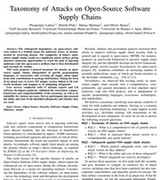
Piergiorgio Ladisa, Henrik Plate, Matias Martinez and Olivier Barais published a new academic paper titled A Taxonomy of Attacks on Open-Source Software Supply Chains (PDF):
This work proposes a general taxonomy for attacks on open-source supply chains, independent of specific programming languages or ecosystems, and covering all supply chain stages from code contributions to package distribution. Taking the form of an attack tree, it covers 107 unique vectors, linked to 94 real-world incidents, and mapped to 33 mitigating safeguards.

Elsewhere in academia, Ly Vu Duc published his PhD thesis. Titled Towards Understanding and Securing the OSS Supply Chain (PDF), Duc s abstract reads as follows:
This dissertation starts from the first link in the software supply chain, developers . Since many developers do not update their vulnerable software libraries, thus exposing the user of their code to security risks. To understand how they choose, manage and update the libraries, packages, and other Open-Source Software (OSS) that become the building blocks of companies completed products consumed by end-users, twenty-five semi-structured interviews were conducted with developers of both large and small-medium enterprises in nine countries. All interviews were transcribed, coded, and analyzed according to applied thematic analysis

Upstream news Filippo Valsorda published an informative blog post recently called How Go Mitigates Supply Chain Attacks outlining the high-level features of the Go ecosystem that helps prevent various supply-chain attacks.
There was new/further activity on a pull request filed against openssl by Sebastian Andrzej Siewior in order to prevent saved CFLAGS (which may contain the -fdebug-prefix-map=<PATH> flag that is used to strip an arbitrary the build path from the debug info if this information remains recorded then the binary is no longer reproducible if the build directory changes.

Events The Linux Foundation s SupplyChainSecurityCon, will take place June 21st 24th 2022, both virtually and in Austin, Texas. Long-time Reproducible Builds and openSUSE contributor Bernhard M. Wiedemann learned that he had his talk accepted, and will speak on Reproducible Builds: Unexpected Benefits and Problems on June 21st.
There will be an in-person Debian Reunion in Hamburg, Germany later this year, taking place from 23 30 May. Although this is a Debian event, there will be some folks from the broader Reproducible Builds community and, of course, everyone is welcome. Please see the event page on the Debian wiki for more information. 41 people have registered so far, and there s approx 10 on-site beds still left.
The minutes and logs from our April 2022 IRC meeting have been published. In case you missed this one, our next IRC meeting will take place on May 31st at 15:00 UTC on #reproducible-builds on the OFTC network.

Debian Roland Clobus wrote another in-depth status update about the status of live Debian images, summarising the current situation that all major desktops build reproducibly with bullseye, bookworm and sid, including the Cinnamon desktop on bookworm and sid, but at a small functionality cost: 14 words will be incorrectly abbreviated . This work incorporated:
  • Reporting an issue about unnecessarily modified timestamps in the daily Debian installer images. [ ]
  • Reporting a bug against the debian-installer: in order to use a suitable kernel version. (#1006800)
  • Reporting a bug in: texlive-binaries regarding the unreproducible content of .fmt files. (#1009196)
  • Adding hacks to make the Cinnamon desktop image reproducible in bookworm and sid. [ ]
  • Added a script to rebuild a live-build ISO image from a given timestamp. [
  • etc.
On our mailing list, Venkata Pyla started a thread on the Debian debconf cache is non-reproducible issue while creating system images and Vagrant Cascadian posted an excellent summary of the reproducibility status of core package sets in Debian and solicited for similar information from other distributions.
Lastly, 122 reviews of Debian packages were added, 44 were updated and 193 were removed this month adding to our extensive knowledge about identified issues. A number of issue types have been updated as well, including timestamps_generated_by_hevea, randomness_in_ocaml_preprocessed_files, build_path_captured_in_emacs_el_file, golang_compiler_captures_build_path_in_binary and build_path_captured_in_assembly_objects,

Other distributions Happy birthday to GNU Guix, which recently turned 10 years old! People have been sharing their stories, in which reproducible builds and bootstrappable builds are a recurring theme as a feature important to its users and developers. The experiences are available on the GNU Guix blog as well as a post on fossandcrafts.org
In openSUSE, Bernhard M. Wiedemann posted his usual monthly reproducible builds status report.

Upstream patches The Reproducible Builds project detects, dissects and attempts to fix as many currently-unreproducible packages as possible. We endeavour to send all of our patches upstream where appropriate. This month, we wrote a large number of such patches, including:

diffoscope diffoscope is our in-depth and content-aware diff utility. Not only can it locate and diagnose reproducibility issues, it can provide human-readable diffs from many kinds of binary formats. This month, Chris Lamb prepared and uploaded versions 210 and 211 to Debian unstable, as well as noticed that some Python .pyc files are reported as data, so we should support .pyc as a fallback filename extension [ ]. In addition, Mattia Rizzolo disabled the Gnumeric tests in Debian as the package is not currently available [ ] and dropped mplayer from Build-Depends too [ ]. In addition, Mattia fixed an issue to ensure that the PATH environment variable is properly modified for all actions, not just when running the comparator. [ ]

Testing framework The Reproducible Builds project runs a significant testing framework at tests.reproducible-builds.org, to check packages and other artifacts for reproducibility. This month, the following changes were made:
  • Daniel Golle:
    • Prefer a different solution to avoid building all OpenWrt packages; skip packages from optional community feeds. [ ]
  • Holger Levsen:
    • Detect Python deprecation warnings in the node health check. [ ]
    • Detect failure to build the Debian Installer. [ ]
  • Mattia Rizzolo:
    • Install disorderfs for building OpenWrt packages. [ ]
  • Paul Spooren (OpenWrt-related changes):
    • Don t build all packages whilst the core packages are not yet reproducible. [ ]
    • Add a missing RUN directive to node_cleanup. [ ]
    • Be less verbose during a toolchain build. [ ]
    • Use disorderfs for rebuilds and update the documentation to match. [ ][ ][ ]
  • Roland Clobus:
    • Publish the last reproducible Debian ISO image. [ ]
    • Use the rebuild.sh script from the live-build package. [ ]
Lastly, node maintenance was also performed by Holger Levsen [ ][ ].
If you are interested in contributing to the Reproducible Builds project, please visit our Contribute page on our website. However, you can get in touch with us via:

Bits from Debian: Google Platinum Sponsor of DebConf22

Googlelogo We are very pleased to announce that Google has committed to support DebConf22 as a Platinum sponsor. This is the third year in a row that Google is sponsoring The Debian Conference with the higher tier! Google is one of the largest technology companies in the world, providing a wide range of Internet-related services and products as online advertising technologies, search, cloud computing, software, and hardware. Google has been supporting Debian by sponsoring DebConf since more than ten years, and is also a Debian partner sponsoring parts of Salsa's continuous integration infrastructure within Google Cloud Platform. With this additional commitment as Platinum Sponsor for DebConf22, Google contributes to make possible our annual conference, and directly supports the progress of Debian and Free Software helping to strengthen the community that continues to collaborate on Debian projects throughout the rest of the year. Thank you very much Google, for your support of DebConf22! Become a sponsor too! DebConf22 will take place from July 17th to 24th, 2022 at the Innovation and Training Park (ITP) in Prizren, Kosovo, and will be preceded by DebCamp, from July 10th to 16th. And DebConf22 is still accepting sponsors! Interested companies and organizations may contact the DebConf team through sponsors@debconf.org, and visit the DebConf22 website at https://debconf22.debconf.org/sponsors/become-a-sponsor. DebConf22 banner open registration

3 May 2022

Steve Kemp: A plea for books ..

Recently I've been getting much more interested in the "retro" computers of my youth, partly because I've been writing crazy code in Z80 assembly-language, and partly because I've been preparing to introduce our child to his first computer: I've got a few books, books I've hoarded for 30+ years, but I'd love to collect some more. So here's my request: I'd be happy to pay 5-10 each for any book I don't yet own, and I'd also be more than happy to cover the cost of postage to Finland. I'd be particularly pleased to see anything from Melbourne House, and while low-level is best, the coding-books from Usbourne (The Mystery Of Silver Mountain, etc, etc) wouldn't go amiss either. I suspect most people who have collected and kept these wouldn't want to part with them, but just in case ..

Gunnar Wolf: Using a RPi as a display adapter

Almost ten months ago, I mentioned on this blog I bought an ARM laptop, which is now my main machine while away from home a Lenovo Yoga C630 13Q50. Yes, yes, I am still not as much away from home as I used to before, as this pandemic is still somewhat of a thing, but I do move more. My main activity in the outside world with my laptop is teaching. I teach twice a week, and well, having a display for my slides and for showing examples in the terminal and such is a must. However, as I said back in August, one of the hardware support issues for this machine is:
No HDMI support via the USB-C displayport. While I don t expect
to go to conferences or even classes in the next several months,
I hope this can be fixed before I do. It s a potential important
issue for me.
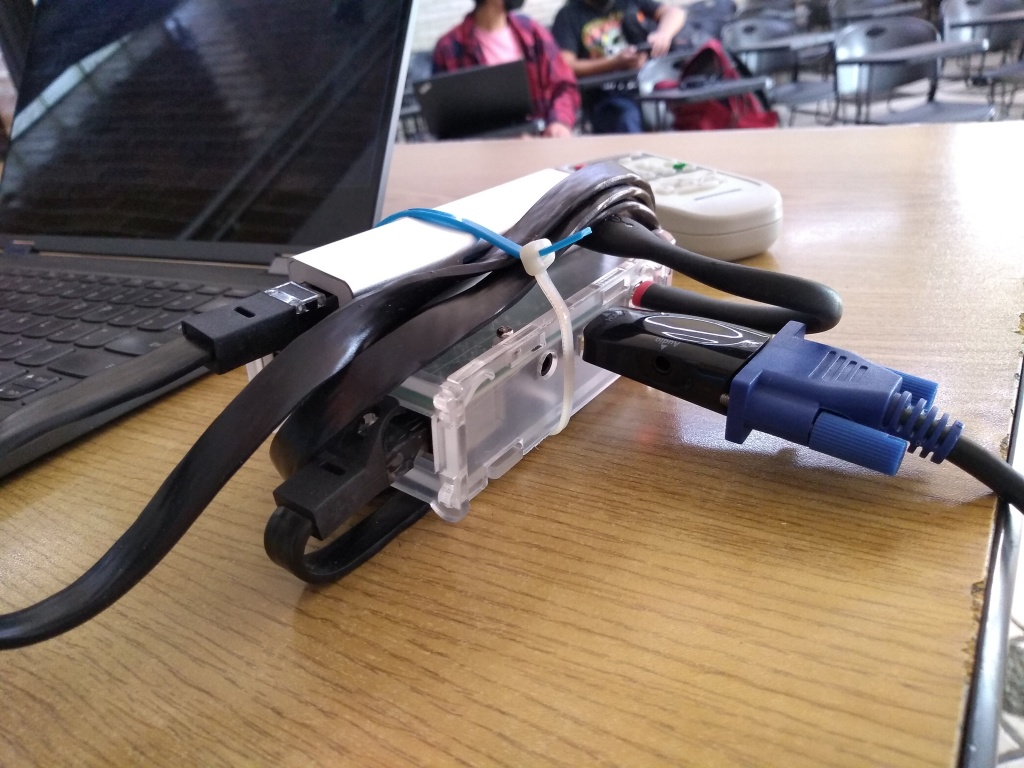
It has sadly not yet been solved While many things have improved since kernel 5.12 (the first I used), the Device Tree does not yet hint at where external video might sit. So, I went to the obvious: Many people carry different kinds of video adaptors I carry a slightly bulky one: A RPi3 For two months already (time flies!), I had an ugly contraption where the RPi3 connected via Ethernet and displayed a VNC client, and my laptop had a VNC server. Oh, but did I mention My laptop works so much better with Wayland than with Xorg that I switched, and am now a happy user of the Sway compositor (a drop-in replacement for the i3 window manager). It is built over WLRoots, which is a great and (relatively) simple project, but will thankfully not carry some of Gnome or KDE s ideas not even those I d rather have. So it took a bit of searching; I was very happy to find WayVNC, a VNC server for wlroot-sbased Wayland compositors. I launched a second Wayland, to be able to have my main session undisturbed and present only a window from it. Only that VNC is slow and laggy, and sometimes awkward. So I kept searching for something better. And something better is, happily, what I was finally able to do! In the laptop, I am using wf-recorder to grab an area of the screen and funnel it into a V4L2 loopback device (which allows it to be used as a camera, solving the main issue with grabbing parts of a Wayland screen):
/usr/bin/wf-recorder -g '0,32 960x540' -t --muxer=v4l2 --codec=rawvideo --pixelformat=yuv420p --file=/dev/video10
(yes, my V4L2Loopback device is set to /dev/video10). You will note I m grabbing a 960 540 rectangle, which is the top of my screen (1920x1080) minus the Waybar. I think I ll increase it to 960 720, as the projector to which I connect the Raspberry has a 4 3 output. After this is sent to /dev/video10, I tell ffmpeg to send it via RTP to the fixed address of the Raspberry:
/usr/bin/ffmpeg -i /dev/video10 -an -f rtp -sdp_file /tmp/video.sdp rtp://10.0.0.100:7000/
Yes, some uglier things happen here. You will note /tmp/video.sdp is created in the laptop itself; this file describes the stream s metadata so it can be used from the client side. I cheated and copied it over to the Raspberry, doing an ugly hardcode along the way:
user@raspi:~ $ cat video.sdp
v=0
o=- 0 0 IN IP4 127.0.0.1
s=No Name
c=IN IP4 10.0.0.100
t=0 0
a=tool:libavformat 58.76.100
m=video 7000 RTP/AVP 96
b=AS:200
a=rtpmap:96 MP4V-ES/90000
a=fmtp:96 profile-level-id=1
People familiar with RTP will scold me: How come I m streaming to the unicast client address? I should do it to an address in the 224.0.0.0 239.0.0.0 range. And it worked, sometimes. I switched over to 10.0.0.100 because it works, basically always Finally, upon bootup, I have configured NoDM to start a session with the user user, and dropped the following in my user s .xsession:
setterm -blank 0 -powersave off -powerdown 0
xset s off
xset -dpms
xset s noblank
mplayer -msglevel all=1 -fs /home/usuario/video.sdp
Anyway, as a result, my students are able to much better follow the pace of my presentation, and I m able to do some tricks better (particularly when it requires quick reaction times, as often happens when dealing with concurrency and such issues). Oh, and of course in case it s of interest to anybody, knowing that SD cards are all but reliable in the long run, I wrote a vmdb2 recipe to build the images. You can grab it here; it requires some local files to be present to be built some are the ones I copied over above, and the other ones are surely of no interest to you (such as my public ssh key or such :-] ) What am I still missing? (read: Can you help me with some ideas? ) Of course, this is a blog post published to brag about my stuff, but also to serve me as persistent memory in case I need to recreate this

1 May 2022

Paul Wise: FLOSS Activities April 2022

Focus This month I didn't have any particular focus. I just worked on issues in my info bubble.

Changes

Issues

Review
  • Spam: reported 33 Debian mailing list posts
  • Debian wiki: RecentChanges for the month
  • Debian BTS usertags: changes for the month
  • Debian screenshots:

Administration
  • Debian wiki: unblock IP addresses, approve accounts

Communication

Sponsors The libpst, gensim, SPTAG work was sponsored. All other work was done on a volunteer basis.

30 April 2022

Junichi Uekawa: Already May.

Already May. I've been writing some code in rust and a bit of javascript. But real life is too busy.

29 April 2022

Jonathan Dowland: hyperlinked PDF planner

The Year page The Year page
A day page A day page
I've been having reasonable success with time blocking, a technique I learned from Cal Newport's writings, in particular Deep Work. I'd been doing it on paper for a while, but I wanted to try and move to a digital solution. There's a cottage industry of people making (and selling) various types of diary and planner as PDF files for use on tablets such as the Remarkable. Some of these use PDF hyperlinks to greatly improve navigating around. This one from Clou Media is particularly good, but I found that I wanted something slightly different from what I could find out there, so I decided to build my own. I explored a couple of different approaches for how to do this. One was Latex, and here's one example of a latex-based planner, but I decided against as I spend too much time wrestling with it for my PhD work already. Another approach might have been Pandoc, but as far as I could tell its PDF pipeline went via Latex, so I thought I might as well cut out the middleman. Eventually I stumbled across tools to build PDFs from HTML, via "CSS Paged Media". This appealed, because I've done plenty of HTML generation. print-css.rocks is a fantastic resource to explore the print-specific CSS features. Weasyprint is a fantastic open source tool to convert appropriately-written HTML/CSS into PDF. Finally I wanted to use a templating system to take shortcuts on writing HTML. I settled for embedded Ruby, which is something I haven't touched in over a decade. This was a relatively simple project and I found it surprisingly fun. The results are available on GitHub: https://github.com/jmtd/planner. Right now, you get exactly what I have described. But my next plan is to add support for re-generating a planner, incorporating new information: pulling diary info from iCal, and any annotations made (such as with the Remarkable tablet) on top of the last generation and preserving them on the next.

Holger Levsen: 20220429-Debian-Reunion-Hamburg-2022

Debian Reunion Hamburg 2022 from May 23 to 30 This is just a quick reminder for the Debian Reunion Hamburg 2022 happening in a bit more than 3 weeks. So far 43 people have registered and thus there's still some on site accomodation available. There's no real deadline for registration, however if you register after May 1st you might not get a t-shirt in your prefered size. Also: if you attend to give a presentation but haven't replied to the CfP, please do so. The wiki page linked above has all the details.

28 April 2022

Jonathan McDowell: Resizing consoles automatically

I have 2 very useful shell scripts related to resizing consoles. The first is imaginatively called resize and just configures the terminal to be the requested size, neatly resizing an xterm or gnome-terminal:
#!/bin/sh
# resize <rows> <columns>
/bin/echo -e '\033[8;'$1';'$2't'
The other is a bit more complicated and useful when connecting to a host via a serial console, or when driving a qemu VM with -display none -nographic and all output coming over a serial console on stdio. It figures out the size of the terminal it s running in and correctly sets the local settings to match so you can take full advantage of a larger terminal than the default 80x24:
#!/bin/bash
echo -ne '\e[s\e[5000;5000H'
IFS='[;' read -p $'\e[6n' -d R -a pos -rs
echo -ne '\e[u'
# cols / rows
echo "Size: $ pos[2]  x $ pos[1] "
stty cols "$ pos[2] " rows "$ pos[1] "
export TERM=xterm-256color
Generally I source this with . fix-term or the TERM export doesn t get applied. Both of these exist in various places around the net (and there s a resize binary shipped along with xterm) but I always forget the exact terms to find it again when I need it. So this post is mostly intended to serve as future reference next time I don t have them handy.

Rapha&#235;l Hertzog: Freexian s report about Debian Long Term Support, March 2022

A Debian LTS logo
Every month we review the work funded by Freexian s Debian LTS offering. Please find the report for March below. Debian project funding Learn more about the rationale behind this initiative in this article. Debian LTS contributors In March, 11 contributors were paid to work on Debian LTS, their reports are available below. If you re interested in participating in the LTS or ELTS teams, we welcome participation from the Debian community. Simply get in touch with Jeremiah or Rapha l if you are if you are interested in participating. Evolution of the situation In March we released 42 DLAs. The security tracker currently lists 81 packages with a known CVE and the dla-needed.txt file has 52 packages needing an update. We re glad to welcome a few new sponsors such as lectricit de France (Gold sponsor), Telecats BV and Soliton Systems. Thanks to our sponsors Sponsors that joined recently are in bold.

Bits from Debian: DebConf22 bursary applications and call for papers are closing in less than 72 hours!

If you intend to apply for a DebConf22 bursary and/or submit an event proposal and have not yet done so, please proceed as soon as possible! Bursary applications for DebConf22 will be accepted until May 1st at 23:59 UTC. Applications submitted after this deadline will not be considered. You can apply for a bursary when you register for the conference. Remember that giving a talk or organising an event is considered towards your bursary; if you have a submission to make, submit it even if it is only sketched-out. You will be able to detail it later. DebCamp plans can be entered in the usual Sprints page at the Debian wiki. Please make sure to double-check your accommodation choices (dates and venue). Details about accommodation arrangements can be found on the accommodation page. Event proposals will be accepted until May 1st at 23:59 UTC too. Events are not limited to traditional presentations or informal sessions (BoFs): we welcome submissions of tutorials, performances, art installations, debates, or any other format of event that you think would be of interest to the Debian community. Regular sessions may either be 20 or 45 minutes long (including time for questions), other kinds of sessions (workshops, demos, lightning talks, and so on) could have different durations. Please choose the most suitable duration for your event and explain any special requests. You can submit it here. The the 23rd edition of DebConf will take place from July 17th to 24th, 2022 at the Innovation and Training Park (ITP) in Prizren, Kosovo, and will be preceded by DebCamp, from July 10th to 16th. See you in Prizren! DebConf22 banner open registration

Louis-Philippe V ronneau: Montreal's Debian & Stuff - April 2022

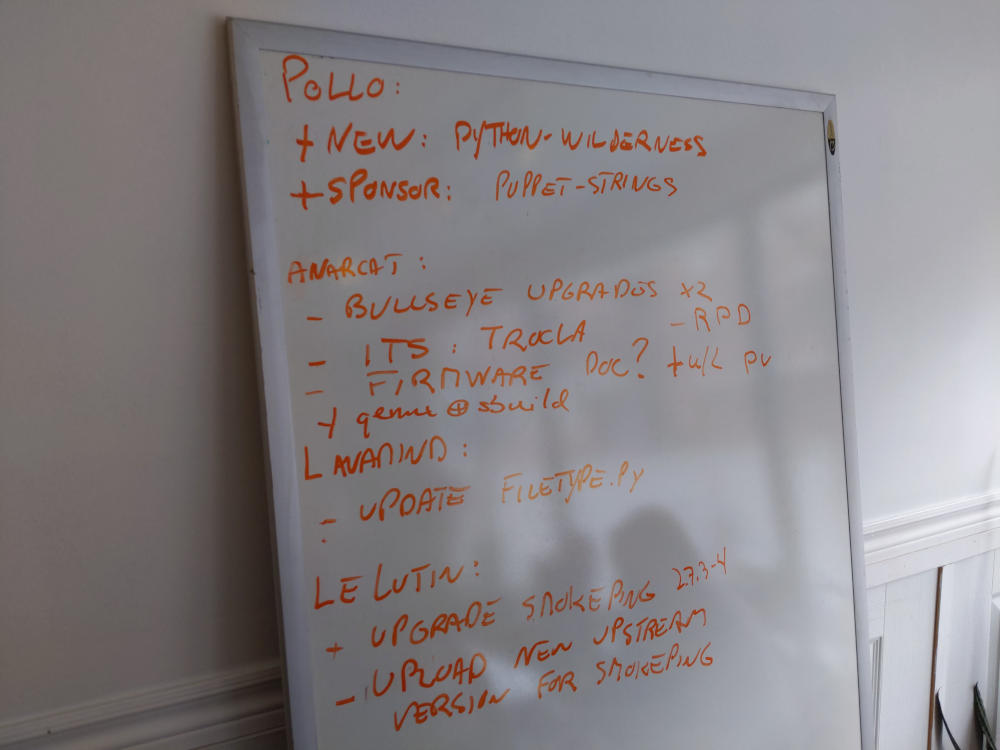
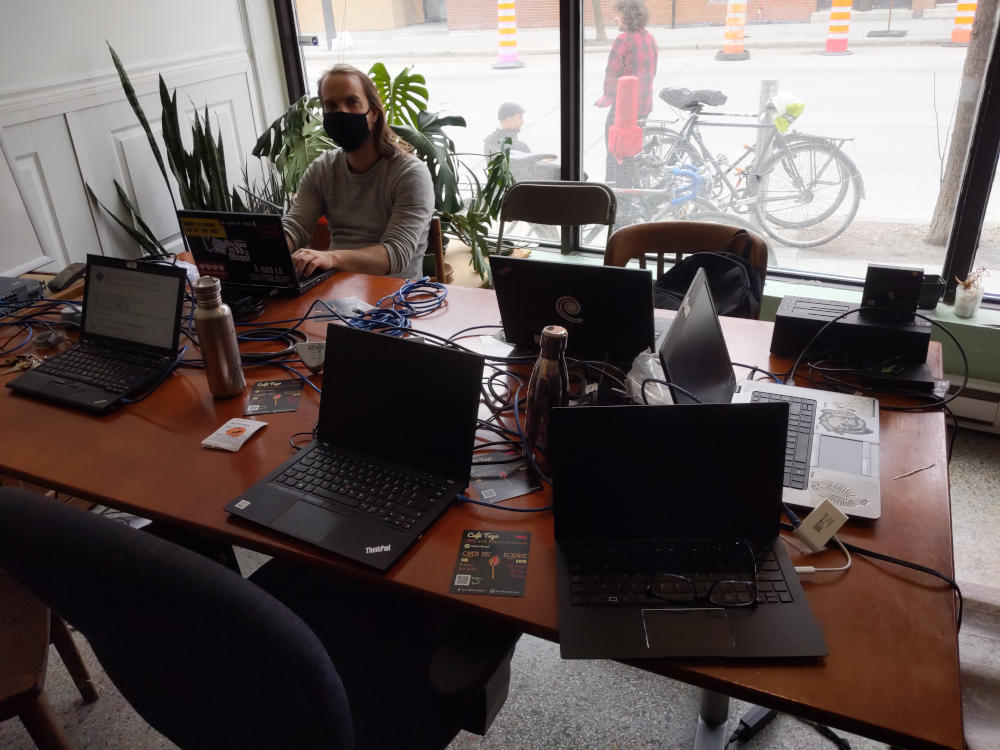
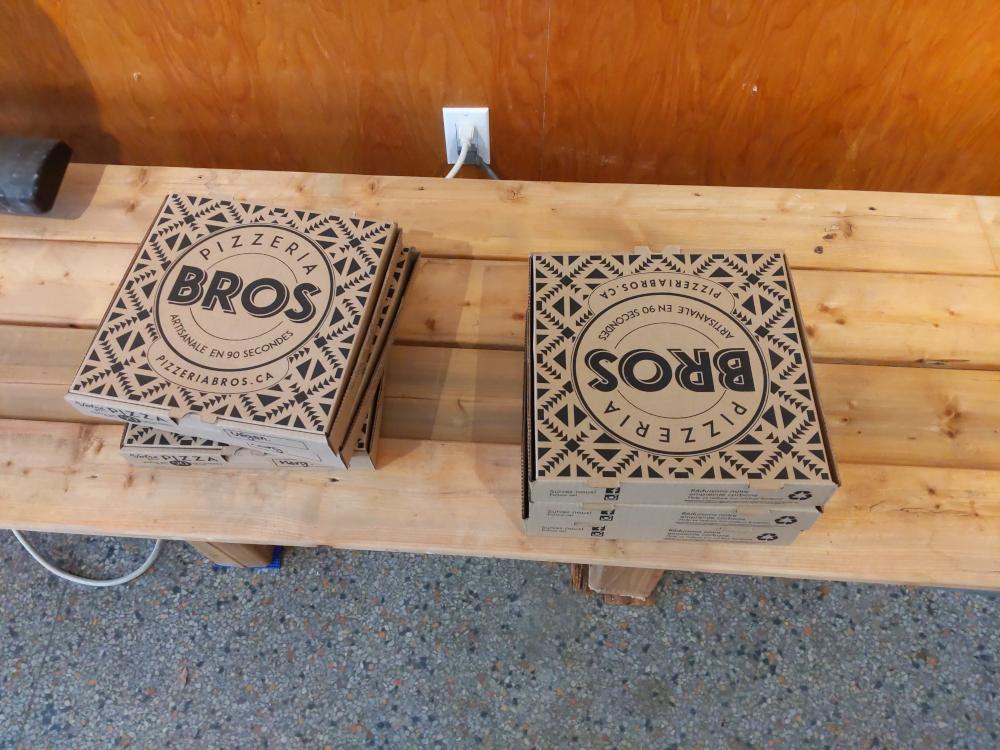
After two long years of COVID hiatus, local Debian events in Montreal are back! Last Sunday, nine of us met at Koumbit to work on Debian (and other stuff!), chat and socialise. Even though these events aren't always the most productive, it was super fun and definitely helps keeping me motivated to work on Debian in my spare time. Many thanks to Debian for providing us a budget to rent the venue for the day and for the pizzas! Here are a few pictures I took during the event: Pizza boxes on a wooden bench Whiteboard listing TODO items for some of the participants A table with a bunch of laptops, and LeLutin :) If everything goes according to plan, our next meeting should be sometime in June. If you are interested, the best way to stay in touch is either to subscribe to our mailing list or to join our IRC channel (#debian-quebec on OFTC). Events are also posted on Quebec's Agenda du libre.
27 April 2022

Antoine Beaupr : building Debian packages under qemu with sbuild

I've been using sbuild for a while to build my Debian packages, mainly because it's what is used by the Debian autobuilders, but also because it's pretty powerful and efficient. Configuring it just right, however, can be a challenge. In my quick Debian development guide, I had a few pointers on how to configure sbuild with the normal schroot setup, but today I finished a qemu based configuration.

Why I want to use qemu mainly because it provides better isolation than a chroot. I sponsor packages sometimes and while I typically audit the source code before building, it still feels like the extra protection shouldn't hurt. I also like the idea of unifying my existing virtual machine setup with my build setup. My current VM is kind of all over the place: libvirt, vagrant, GNOME Boxes, etc?). I've been slowly converging over libvirt however, and most solutions I use right now rely on qemu under the hood, certainly not chroots... I could also have decided to go with containers like LXC, LXD, Docker (with conbuilder, whalebuilder, docker-buildpackage), systemd-nspawn (with debspawn), unshare (with schroot --chroot-mode=unshare), or whatever: I didn't feel those offer the level of isolation that is provided by qemu. The main downside of this approach is that it is (obviously) slower than native builds. But on modern hardware, that cost should be minimal.

How Basically, you need this:
sudo mkdir -p /srv/sbuild/qemu/
sudo apt install sbuild-qemu
sudo sbuild-qemu-create -o /srv/sbuild/qemu/unstable.img unstable https://deb.debian.org/debian
Then to make this used by default, add this to ~/.sbuildrc:
# run autopkgtest inside the schroot
$run_autopkgtest = 1;
# tell sbuild to use autopkgtest as a chroot
$chroot_mode = 'autopkgtest';
# tell autopkgtest to use qemu
$autopkgtest_virt_server = 'qemu';
# tell autopkgtest-virt-qemu the path to the image
# use --debug there to show what autopkgtest is doing
$autopkgtest_virt_server_options = [ '--', '/srv/sbuild/qemu/%r-%a.img' ];
# tell plain autopkgtest to use qemu, and the right image
$autopkgtest_opts = [ '--', 'qemu', '/srv/sbuild/qemu/%r-%a.img' ];
# no need to cleanup the chroot after build, we run in a completely clean VM
$purge_build_deps = 'never';
# no need for sudo
$autopkgtest_root_args = '';
Note that the above will use the default autopkgtest (1GB, one core) and qemu (128MB, one core) configuration, which might be a little low on resources. You probably want to be explicit about this, with something like this:
# extra parameters to pass to qemu
# --enable-kvm is not necessary, detected on the fly by autopkgtest
my @_qemu_options = ['--ram-size=4096', '--cpus=2'];
# tell autopkgtest-virt-qemu the path to the image
# use --debug there to show what autopkgtest is doing
$autopkgtest_virt_server_options = [ @_qemu_options, '--', '/srv/sbuild/qemu/%r-%a.img' ];
$autopkgtest_opts = [ '--', 'qemu', @qemu_options, '/srv/sbuild/qemu/%r-%a.img'];
This configuration will:
  1. create a virtual machine image in /srv/sbuild/qemu for unstable
  2. tell sbuild to use that image to create a temporary VM to build the packages
  3. tell sbuild to run autopkgtest (which should really be default)
  4. tell autopkgtest to use qemu for builds and for tests
Note that the VM created by sbuild-qemu-create have an unlocked root account with an empty password.

Other useful tasks
  • enter the VM to make test, changes will be discarded (thanks Nick Brown for the sbuild-qemu-boot tip!):
     sbuild-qemu-boot /srv/sbuild/qemu/unstable-amd64.img
    
    That program is shipped only with bookworm and later, an equivalent command is:
     qemu-system-x86_64 -snapshot -enable-kvm -object rng-random,filename=/dev/urandom,id=rng0 -device virtio-rng-pci,rng=rng0,id=rng-device0 -m 2048 -nographic /srv/sbuild/qemu/unstable-amd64.img
    
    The key argument here is -snapshot.
  • enter the VM to make permanent changes, which will not be discarded:
     sudo sbuild-qemu-boot --readwrite /srv/sbuild/qemu/unstable-amd64.img
    
    Equivalent command:
     sudo qemu-system-x86_64 -enable-kvm -object rng-random,filename=/dev/urandom,id=rng0 -device virtio-rng-pci,rng=rng0,id=rng-device0 -m 2048 -nographic /srv/sbuild/qemu/unstable-amd64.img
    
  • update the VM (thanks lavamind):
     sudo sbuild-qemu-update /srv/sbuild/qemu/unstable-amd64.img
    
  • build in a specific VM regardless of the suite specified in the changelog (e.g. UNRELEASED, bookworm-backports, bookworm-security, etc):
     sbuild --autopkgtest-virt-server-opts="-- qemu /var/lib/sbuild/qemu/bookworm-amd64.img"
    
    Note that you'd also need to pass --autopkgtest-opts if you want autopkgtest to run in the correct VM as well:
     sbuild --autopkgtest-opts="-- qemu /var/lib/sbuild/qemu/unstable.img" --autopkgtest-virt-server-opts="-- qemu /var/lib/sbuild/qemu/bookworm-amd64.img"
    
    You might also need parameters like --ram-size if you customized it above.
And yes, this is all quite complicated and could be streamlined a little, but that's what you get when you have years of legacy and just want to get stuff done. It seems to me autopkgtest-virt-qemu should have a magic flag starts a shell for you, but it doesn't look like that's a thing. When that program starts, it just says ok and sits there. Maybe because the authors consider the above to be simple enough (see also bug #911977 for a discussion of this problem).

Live access to a running test When autopkgtest starts a VM, it uses this funky qemu commandline:
qemu-system-x86_64 -m 4096 -smp 2 -nographic -net nic,model=virtio -net user,hostfwd=tcp:127.0.0.1:10022-:22 -object rng-random,filename=/dev/urandom,id=rng0 -device virtio-rng-pci,rng=rng0,id=rng-device0 -monitor unix:/tmp/autopkgtest-qemu.w1mlh54b/monitor,server,nowait -serial unix:/tmp/autopkgtest-qemu.w1mlh54b/ttyS0,server,nowait -serial unix:/tmp/autopkgtest-qemu.w1mlh54b/ttyS1,server,nowait -virtfs local,id=autopkgtest,path=/tmp/autopkgtest-qemu.w1mlh54b/shared,security_model=none,mount_tag=autopkgtest -drive index=0,file=/tmp/autopkgtest-qemu.w1mlh54b/overlay.img,cache=unsafe,if=virtio,discard=unmap,format=qcow2 -enable-kvm -cpu kvm64,+vmx,+lahf_lm
... which is a typical qemu commandline, I'm sorry to say. That gives us a VM with those settings (paths are relative to a temporary directory, /tmp/autopkgtest-qemu.w1mlh54b/ in the above example):
  • the shared/ directory is, well, shared with the VM
  • port 10022 is forward to the VM's port 22, presumably for SSH, but not SSH server is started by default
  • the ttyS1 and ttyS2 UNIX sockets are mapped to the first two serial ports (use nc -U to talk with those)
  • the monitor UNIX socket is a qemu control socket (see the QEMU monitor documentation, also nc -U)
In other words, it's possible to access the VM with:
nc -U /tmp/autopkgtest-qemu.w1mlh54b/ttyS2
The nc socket interface is ... not great, but it works well enough. And you can probably fire up an SSHd to get a better shell if you feel like it.

Nitty-gritty details no one cares about

Fixing hang in sbuild cleanup I'm having a hard time making heads or tails of this, but please bear with me. In sbuild + schroot, there's this notion that we don't really need to cleanup after ourselves inside the schroot, as the schroot will just be delted anyways. This behavior seems to be handled by the internal "Session Purged" parameter. At least in lib/Sbuild/Build.pm, we can see this:
my $is_cloned_session = (defined ($session->get('Session Purged')) &&
             $session->get('Session Purged') == 1) ? 1 : 0;
[...]
if ($is_cloned_session)  
$self->log("Not cleaning session: cloned chroot in use\n");
  else  
if ($purge_build_deps)  
    # Removing dependencies
    $resolver->uninstall_deps();
  else  
    $self->log("Not removing build depends: as requested\n");
 
 
The schroot builder defines that parameter as:
    $self->set('Session Purged', $info-> 'Session Purged' );
... which is ... a little confusing to me. $info is:
my $info = $self->get('Chroots')->get_info($schroot_session);
... so I presume that depends on whether the schroot was correctly cleaned up? I stopped digging there... ChrootUnshare.pm is way more explicit:
$self->set('Session Purged', 1);
I wonder if we should do something like this with the autopkgtest backend. I guess people might technically use it with something else than qemu, but qemu is the typical use case of the autopkgtest backend, in my experience. Or at least certainly with things that cleanup after themselves. Right? For some reason, before I added this line to my configuration:
$purge_build_deps = 'never';
... the "Cleanup" step would just completely hang. It was quite bizarre.

Disgression on the diversity of VM-like things There are a lot of different virtualization solutions one can use (e.g. Xen, KVM, Docker or Virtualbox). I have also found libguestfs to be useful to operate on virtual images in various ways. Libvirt and Vagrant are also useful wrappers on top of the above systems. There are particularly a lot of different tools which use Docker, Virtual machines or some sort of isolation stronger than chroot to build packages. Here are some of the alternatives I am aware of: Take, for example, Whalebuilder, which uses Docker to build packages instead of pbuilder or sbuild. Docker provides more isolation than a simple chroot: in whalebuilder, packages are built without network access and inside a virtualized environment. Keep in mind there are limitations to Docker's security and that pbuilder and sbuild do build under a different user which will limit the security issues with building untrusted packages. On the upside, some of things are being fixed: whalebuilder is now an official Debian package (whalebuilder) and has added the feature of passing custom arguments to dpkg-buildpackage. None of those solutions (except the autopkgtest/qemu backend) are implemented as a sbuild plugin, which would greatly reduce their complexity. I was previously using Qemu directly to run virtual machines, and had to create VMs by hand with various tools. This didn't work so well so I switched to using Vagrant as a de-facto standard to build development environment machines, but I'm returning to Qemu because it uses a similar backend as KVM and can be used to host longer-running virtual machines through libvirt. The great thing now is that autopkgtest has good support for qemu and sbuild has bridged the gap and can use it as a build backend. I originally had found those bugs in that setup, but all of them are now fixed:
  • #911977: sbuild: how do we correctly guess the VM name in autopkgtest?
  • #911979: sbuild: fails on chown in autopkgtest-qemu backend
  • #911963: autopkgtest qemu build fails with proxy_cmd: parameter not set
  • #911981: autopkgtest: qemu server warns about missing CPU features
So we have unification! It's possible to run your virtual machines and Debian builds using a single VM image backend storage, which is no small feat, in my humble opinion. See the sbuild-qemu blog post for the annoucement Now I just need to figure out how to merge Vagrant, GNOME Boxes, and libvirt together, which should be a matter of placing images in the right place... right? See also hosting.

pbuilder vs sbuild I was previously using pbuilder and switched in 2017 to sbuild. AskUbuntu.com has a good comparative between pbuilder and sbuild that shows they are pretty similar. The big advantage of sbuild is that it is the tool in use on the buildds and it's written in Perl instead of shell. My concerns about switching were POLA (I'm used to pbuilder), the fact that pbuilder runs as a separate user (works with sbuild as well now, if the _apt user is present), and setting up COW semantics in sbuild (can't just plug cowbuilder there, need to configure overlayfs or aufs, which was non-trivial in Debian jessie). Ubuntu folks, again, have more documentation there. Debian also has extensive documentation, especially about how to configure overlays. I was ultimately convinced by stapelberg's post on the topic which shows how much simpler sbuild really is...

Who Thanks lavamind for the introduction to the sbuild-qemu package.

26 April 2022

Steve Kemp: Porting a game from CP/M to the ZX Spectrum 48k

Back in April 2021 I introduced a simple text-based adventure game, The Lighthouse of Doom, which I'd written in Z80 assembly language for CP/M systems. As it was recently the 40th Anniversary of the ZX Spectrum 48k, the first computer I had, and the reason I got into programming in the first place, it crossed my mind that it might be possible to port my game from CP/M to the ZX Spectrum. To recap my game is a simple text-based adventure game, which you can complete in fifteen minutes, or less, with a bunch of Paw Patrol easter-eggs. My code is largely table-based, having structures that cover objects, locations, and similar state-things. Most of the code involves working with those objects, with only a few small platform-specific routines being necessary: My feeling was that I could replace the use of those CP/M functions with something custom, and I'd have done the 99% of the work. Of course the devil is always in the details. Let's start. To begin with I'm lucky in that I'm using the pasmo assembler which is capable of outputting .TAP files, which can be loaded into ZX Spectrum emulators. I'm not going to walk through all the code here, because that is available within the project repository, but here's a very brief getting-started guide which demonstrates writing some code on a Linux host, and generating a TAP file which can be loaded into your favourite emulator. As I needed similar routines I started working out how to read keyboard input, clear the screen, and output messages which is what the following sample will demonstrate.. First of all you'll need to install the dependencies, specifically the assembler and an emulator to run the thing:
# apt install pasmo spectemu-x11
Now we'll create a simple assembly-language file, to test things out - save the following as hello.z80:
    ; Code starts here
    org 32768
    ; clear the screen
    call cls
    ; output some text
    ld   de, instructions                  ; DE points to the text string
    ld   bc, instructions_end-instructions ; BC contains the length
    call 8252
    ; wait for a key
    ld hl,0x5c08        ; LASTK
    ld a,255
    ld (hl),a
wkey:
    cp (hl)             ; wait for the value to change
    jr z, wkey
    ; get the key and save it
    ld a,(HL)
    push af
    ; clear the screen
    call cls
    ; show a second message
    ld de, you_pressed
    ld bc, you_pressed_end-you_pressed
    call 8252
    ;; Output the ASCII character in A
    ld a,2
    call 0x1601
    pop af
    call 0x0010
    ; loop forever.  simple demo is simple
endless:
    jr endless
cls:
    ld a,2
    call 0x1601  ; ROM_OPEN_CHANNEL
    call 0x0DAF  ; ROM_CLS
    ret
instructions:
    defb 'Please press a key to continue!'
instructions_end:
you_pressed:
    defb 'You pressed:'
you_pressed_end:
end 32768
Now you can assemble that into a TAP file like so:
$ pasmo --tapbas hello.z80 hello.tap
The final step is to load it in the emulator:
$ xspect -quick-load -load-immed -tap hello.tap
The reason I specifically chose that emulator was because it allows easily loading of a TAP file, without waiting for the tape to play, and without the use of any menus. (If you can tell me how to make FUSE auto-start like that, I'd love to hear!) I wrote a small number of "CP/M emulation functions" allowing me to clear the screen, pause, prompt for input, and output text, which will work via the primitives available within the standard ZX Spectrum ROM. Then I reworked the game a little to cope with the different screen resolution (though only minimally, some of the text still breaks lines in unfortunate spots): The end result is reasonably playable, even if it isn't quite as nice as the CP/M version (largely because of the unfortunate word-wrapping, and smaller console-area). So now my repository contains a .TAP file which can be loaded into your emulator of choice, available from the releases list. Here's a brief teaser of what you can expect:
Outstanding bugs? Well the line-input is a bit horrid, and unfortunately this was written for CP/M accessed over a terminal - so I'd assumed a "standard" 80x25 resolution, which means that line/word-wrapping is broken in places. That said it didn't take me too long to make the port, and it was kinda fun.

Next.

Previous.