Enrico Zini: Updating cbqt for bullseye
Back in 2017 I did work to setup a cross-building toolchain for QT Creator,
that takes advantage of Debian's packaging for all the dependency ecosystem.
It ended with cbqt
which is a little script that sets up a chroot to hold
cross-build-dependencies, to avoid conflicting with packages in the host
system, and sets up a qmake alternative to make use of them.
Today I'm dusting off that work, to ensure it works on Debian bullseye.
Resetting QT Creator
To make things reproducible, I wanted to reset QT Creator's configuration.
Besides purging and reinstalling the package, one needs to manually remove:
Adding LIBDIR
Something else does not work:
I figured that now I also need to set
Now it links again:
Making it work in Qt Creator
Time to try it in Qt Creator, and sadly it fails:
It turns out that qmake is not able to realise that the compiler is gcc, so
vars does not get set, nothing is set in
And there it is:
I run the command manually and indeed I reproduce the problem:
I try removing options until I find the one that breaks it and... now it's
always broken! Even manually running qmake-armhf, like I did earlier,
stopped working:
Debugging
Fixing a compiler mismatch warning
In setting up the kit, Qt Creator also complained that the compiler from qmake
did not match the one configured in the kit. That was easy to fix, by pointing
at the host system cross-compiler in
Updated setup instructions
Create an armhf environment:
Create a qmake wrapper that builds with this environment:
Install the build-dependencies that you need:
Build with qmake
Use
Set up Qt Creator
Configure a new Kit in Qt Creator:
~/.config/QtProject~/.cache/QtProject//usr/share/qtcreator/QtProjectwhich is where configuration is stored if you used sdktool to programmatically configure Qt Creator (see for example this post and see Debian bug #1012561.
-DIST_CODENAME = "stretch"
+DIST_CODENAME = "bullseye"
Test$ qmake-armhf -makefile
Info: creating stash file  /Test/.qmake.stash
Test$ make
[...]
/usr/bin/arm-linux-gnueabihf-g++ -Wl,-O1 -Wl,-rpath-link, /armhf/lib/arm-linux-gnueabihf -Wl,-rpath-link, /armhf/usr/lib/arm-linux-gnueabihf -Wl,-rpath-link, /armhf/usr/lib/ -o Test main.o mainwindow.o moc_mainwindow.o    /armhf/usr/lib/arm-linux-gnueabihf/libQt5Widgets.so  /armhf/usr/lib/arm-linux-gnueabihf/libQt5Gui.so  /armhf/usr/lib/arm-linux-gnueabihf/libQt5Core.so -lGLESv2 -lpthread
/usr/lib/gcc-cross/arm-linux-gnueabihf/10/../../../../arm-linux-gnueabihf/bin/ld: cannot find -lGLESv2
collect2: error: ld returned 1 exit status
make: *** [Makefile:146: Test] Error 1
QMAKE_LIBDIR and not just
QMAKE_RPATHLINKDIR:
--- a/cbqt
+++ b/cbqt
@@ -241,18 +241,21 @@ include(../common/linux.conf)
 include(../common/gcc-base-unix.conf)
 include(../common/g++-unix.conf)
+QMAKE_LIBDIR +=  chroot.abspath /lib/arm-linux-gnueabihf
+QMAKE_LIBDIR +=  chroot.abspath /usr/lib/arm-linux-gnueabihf
+QMAKE_LIBDIR +=  chroot.abspath /usr/lib/
 QMAKE_RPATHLINKDIR +=  chroot.abspath /lib/arm-linux-gnueabihf
 QMAKE_RPATHLINKDIR +=  chroot.abspath /usr/lib/arm-linux-gnueabihf
 QMAKE_RPATHLINKDIR +=  chroot.abspath /usr/lib/
Test$ qmake-armhf -makefile
Test$ make
/usr/bin/arm-linux-gnueabihf-g++ -Wl,-O1 -Wl,-rpath-link, /armhf/lib/arm-linux-gnueabihf -Wl,-rpath-link, /armhf/usr/lib/arm-linux-gnueabihf -Wl,-rpath-link, /armhf/usr/lib/ -o Test main.o mainwindow.o moc_mainwindow.o   -L /armhf/lib/arm-linux-gnueabihf -L /armhf/usr/lib/arm-linux-gnueabihf -L /armhf/usr/lib/  /armhf/usr/lib/arm-linux-gnueabihf/libQt5Widgets.so  /armhf/usr/lib/arm-linux-gnueabihf/libQt5Gui.so  /armhf/usr/lib/arm-linux-gnueabihf/libQt5Core.so -lGLESv2 -lpthread
/armhf/usr/lib/arm-linux-gnueabihf/qt5/mkspecs/features/toolchain.prf:76: Variable QMAKE_CXX.COMPILER_MACROS is not defined.
QMAKE_CXX.COMPILER_MACROS is not defined
I traced it to this bit in
armhf/usr/lib/arm-linux-gnueabihf/qt5/mkspecs/features/toolchain.prf
(nonrelevant bits deleted):
isEmpty($$ target_prefix .COMPILER_MACROS)
    msvc
        #
      else: gcc ghs
        vars = $$qtVariablesFromGCC($$QMAKE_CXX)

    for (v, vars)
        #
        $$ target_prefix .COMPILER_MACROS += $$v

    cache($$ target_prefix .COMPILER_MACROS, set stash)
  else
    #
COMPILER_MACROS, and qmake fails.
Reproducing it on the command line
When run manually, however, qmake-armhf worked, so it would be good to know
how Qt Creator is actually running qmake. Since it frustratingly does not
show what commands it runs, I'll have to strace it:
strace -e trace=execve --string-limit=123456 -o qtcreator.trace -f qtcreator
$ grep qmake- qtcreator.trace
1015841 execve("/usr/local/bin/qmake-armhf", ["/usr/local/bin/qmake-armhf", "-query"], 0x56096e923040 /* 54 vars */) = 0
1015865 execve("/usr/local/bin/qmake-armhf", ["/usr/local/bin/qmake-armhf", " /Test/Test.pro", "-spec", "arm-linux-gnueabihf", "CONFIG+=debug", "CONFIG+=qml_debug"], 0x7f5cb4023e20 /* 55 vars */) = 0
$ /usr/local/bin/qmake-armhf Test.pro -spec arm-linux-gnueabihf CONFIG+=debug CONFIG+=qml_debug
 /armhf/usr/lib/arm-linux-gnueabihf/qt5/mkspecs/features/toolchain.prf:76: Variable QMAKE_CXX.COMPILER_MACROS is not defined.
$ rm .qmake.stash
$ qmake-armhf -makefile
 /armhf/usr/lib/arm-linux-gnueabihf/qt5/mkspecs/features/toolchain.prf:76: Variable QMAKE_CXX.COMPILER_MACROS is not defined.
toolchain.prf
I tried purging and reinstalling qtcreator, and recreating the chroot, but
qmake-armhf is staying broken. I'll let that be, and try to debug
toolchain.prf.
By grepping gcc in the mkspecs directory, I managed to figure out that:
- The
else: gcc ghstest is matching the value(s) ofQMAKE_COMPILER QMAKE_COMPILERcan have multiple values, separated by space- If in
armhf/usr/lib/arm-linux-gnueabihf/qt5/mkspecs/arm-linux-gnueabihf/qmake.confI setQMAKE_COMPILER = gcc arm-linux-gnueabihf-gcc, then things work again.
QMAKE_COMPILER's syntax
and behaviour. I also failed to find why qmake-armhf worked earlier, and I am
also failing to restore the system to a situation where it works again. Maybe I
dreamt that it worked? I had some manual change laying around from some
previous fiddling with things?
Anyway at least now I have the fix:
--- a/cbqt
+++ b/cbqt
@@ -248,7 +248,7 @@ QMAKE_RPATHLINKDIR +=  chroot.abspath /lib/arm-linux-gnueabihf
 QMAKE_RPATHLINKDIR +=  chroot.abspath /usr/lib/arm-linux-gnueabihf
 QMAKE_RPATHLINKDIR +=  chroot.abspath /usr/lib/
-QMAKE_COMPILER          =  chroot.arch_triplet -gcc
+QMAKE_COMPILER          = gcc  chroot.arch_triplet -gcc
 QMAKE_CC                = /usr/bin/ chroot.arch_triplet -gcc
qmake.conf:
 QMAKE_COMPILER          =  chroot.arch_triplet -gcc
-QMAKE_CC                =  chroot.arch_triplet -gcc
+QMAKE_CC                = /usr/bin/ chroot.arch_triplet -gcc
 QMAKE_LINK_C            = $$QMAKE_CC
 QMAKE_LINK_C_SHLIB      = $$QMAKE_CC
-QMAKE_CXX               =  chroot.arch_triplet -g++
+QMAKE_CXX               = /usr/bin/ chroot.arch_triplet -g++
 QMAKE_LINK              = $$QMAKE_CXX
 QMAKE_LINK_SHLIB        = $$QMAKE_CXX
sudo cbqt ./armhf --create --verbose
sudo ./cbqt ./armhf --qmake -o /usr/local/bin/qmake-armhf
# Note: :arch is added automatically to package names if no arch is explicitly specified
sudo ./cbqt ./armhf --install libqt5svg5-dev libmosquittopp-dev qtwebengine5-dev
qmake-armhf instead of qmake and it works perfectly:
qmake-armhf -makefile
make
- Tools/Options, then Kits, then Add
- Name:
armhf(or anything you like) - In the Qt Versions tab, click Add then set the path of the new Qt to
/usr/local/bin/qmake-armhf. Click Apply. - Back in the Kits, select the Qt version you just created in the Qt version field
- In Compilers, select the ARM versions of GCC. If they do not appear,
install
crossbuild-essential-armhf, then in the Compilers tab click Re-detect and then Apply to make them available for selection - Dismiss the dialog with "OK": the new kit is ready
armhf
kit for remote cross-development.
I tried looking at sdktool
to automate this step, and it requires a nontrivial amount of work to do it
reliably, so these manual instructions will have to do.
Credits
This has been done as part of my work with Truelite.









 The company got me a Chromebook for times when I want to ignore email and not get dragged into code reviews but still be available on IRC and chat. Nifty devices at great price points. I really like them.
 These things are meant to be very consumer-style end-user devices. You log in with your Google account and everything works. Until it doesn't.
Just setting it up caused the first issue:
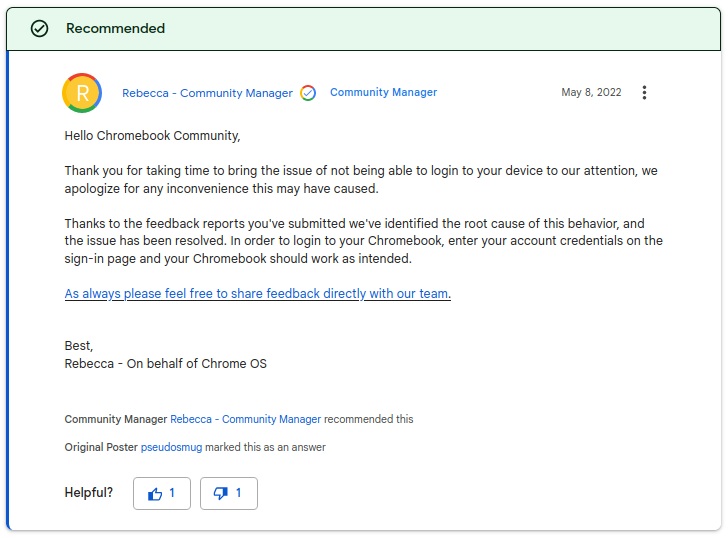
I was always thrown back to a black screen and then another login-screen despite having successfully logged in initially to create the "owner" user of the Chromebook. No error message, not useful UI feedback. Just logging in again and again and again.
The issue is ... not having a GMail account associated with my Google account. Duh!
So add a GMail.com address as the primary to your Google account and the initial setup completes.
Of course you cannot delete that GMail.com association again because the owner user is linked to the email and not the account. Well, you can delete it but then you cannot configure "owner" items of your Chromebook any more. Great job, Google. Not. Identity management 101 fail.
Kudos to
 Once I was able to login to the new Chromebook all worked fine until I started to use ssh sessions.
These always hung for 30 seconds to 10 minutes and then resumed with lots of packets lost in between and the last minute or so coming in from buffering in a burst.
This was easy to see in
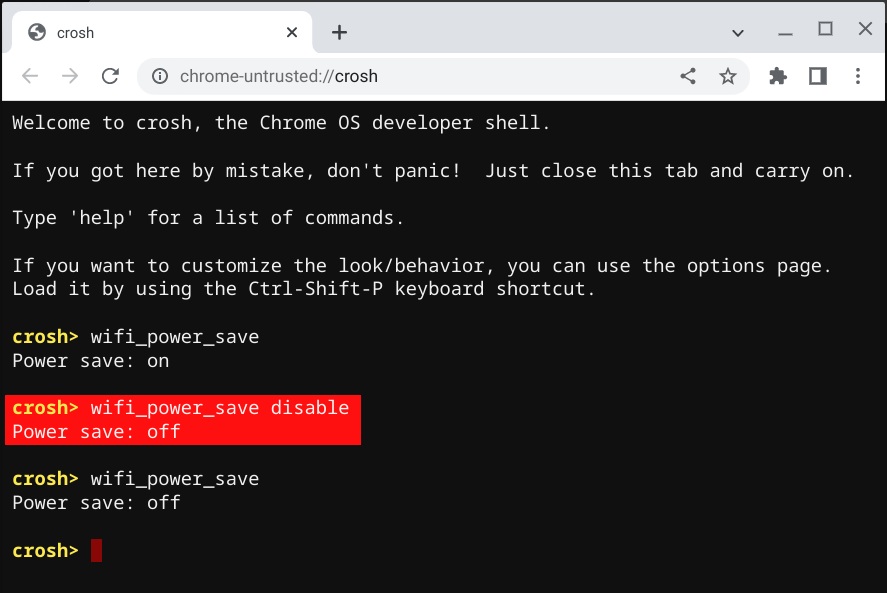 This unfortunately only lasts until the next reboot but it does persist over suspend cycles (aka closing the lid).

 Debian continues participating in Outreachy, and we're excited to announce that
Debian has selected two interns for the Outreachy May 2022 - August 2022 round.
 As promised, on this post I m going to explain how I ve configured this blog
using
 We are very excited to announce that Debian has selected three interns to work
under mentorship on a variety of
 This post was originally published in the
 I received some feedback on the first part of interviews about the
internet with children that I d like to share publicly here. Thank you!
Your thoughts and experiences are important to me!
 One month ago I started work on a new side project which is now up and running, and deserving on an introductory blog post: