Search Results: "pm"

15 May 2014

Russell Coker: Mobile Phones and Cognitive Costs

I previously wrote about the case for a Basic Income in Australia [1]. Since then I read an interesting article by Rutger Bregman in the Dutch site The Correspondent discussing the benefit that such Basic Income schemes have given in various places [2], he makes a great case for giving a Basic Income to poor people. However I believe that it should be provided to everyone. I believe that government payments shouldn t be means tested because the proportion of the population who earn more than the cutoff is usually very small (IE it doesn t save much money), because the money will be recovered from wealthy people in tax, and because the bureaucracy involved in determining who is eligible involves spending tax money to pay bureaucrats and costing everyone time in dealing with the process. The concept of an Attention Economy has been getting some interest recently. But discussions of it seem to be mostly concerned with the needs of fairly wealthy people, how to advertise to them, how to filter out unwanted ads for them, etc. But the costs in attention can be even worse for people on low incomes or social security because they have many attention costs that could be solved by money. Many common essential purchases (EG soap, basic foods, and purely functional clothes) can become difficult decisions if saving a few dollars is important. The amount of thought involved in buying such items can result in someone who s not well off having little energy to concentrate on other things. I think that to have an effective social security system we need to consider how much cognitive effort is being required of people who are receiving benefits. Last month I wrote yet another review of mobile phone plans in Australia [3]. Every time I do this it takes a significant amount of time because the Telcos devise overly complex plans to make it difficult to compare their offerings. It seems that they aim to make their offerings somewhat competitive if you can interpret them but confusing enough to allow many (most?) of their customers to pay needlessly high bills. I could just pick a random telco and pay whatever it takes, spending an extra $10 or $20 per month isn t such a big deal for me. Even though I advise a number of my relatives on the cheapest phone plan it s probably only barely saving enough money to be worth the effort, a major motivation for me is being stubborn and not wanting telcos to rip people off. The Importance of Mobile Phones A mobile phone seems to be essential for most people. Mobile phones are used for making medical appointments and for applying for work, so in almost every case some of the financial assistance paid to a job seeker or person on a disability pension will go towards mobile phone costs. The aims of the social security benefits seem to clearly involve a phone service. Given that most people who receive social security payments spend some of that money on mobile phone bills the government has a direct financial interest in not having such money wasted on needlessly expensive phone plans. As we also don t want to have people on social security spending time and attention trying to find the best phone plan it makes sense to have the government help manage this process. Good communications is regarded as essential to education and economic development. A huge amount of taxpayer money was spent on the NBN (and then wasted by Tony Abbott when he cancelled the original plans) for these benefits. Good phone access is also an issue of personal safety. While it is possible to call emergency services from a mobile phone that doesn t have a valid SIM there are probably few people who keep a spare phone charged for that purpose. Also there are a variety of issues that can impact life or health which can best be resolved by calling friends or relatives. Free Phones I think that the best solution to these problems is for the government to directly pay mobile phone bills. If we are going to have a Basic Income then the government should make the base payment for mobile phone calls for every resident, if not then the government should make the base payment for everyone who receives any form of social security payment. Obviously the amount of data that could be transferred over a 3G network is greatly in excess of the amount that any plans allow and offering true unlimited calling leads to people using mobile phones as baby-monitors, so some limits are necessary. But the government could cheaply pay for a phone plan that exceeds the requirements of most people and then allow anyone who wants more data or calls to pay extra. Which Plan? The cheapest all-inclusive mobile phone plan in recent times was Kogan who charged $299 per annum for 6G of data per month and unlimited calls. The cheapest current offer for unlimited calls seems to be Lebara s $30 per month offer which includes 2G of data. My observation is that people who use 3G Internet just for phone use (as opposed to tethering a laptop or providing home Internet), who use a home Wifi network for installing Android programs and don t play Ingress tend to use a lot less than 1G of data per month. I would use between 400M and 700M per month if I wasn t playing Ingress and didn t use my phone as a Wifi access point. In terms of call volume, 600 minutes a month should be enough to cover the basic needs of most people judging by the number of plans on offer with limits smaller than that. As a current Lebara offer is $30 per month for unlimited calls and 2G of data (and there are similar offers from other telcos), it should be possible for a telco to offer 600 minutes of calls and 1G of data for less than $15 per month. When the government is paying (no bad debts) and many of the users will use much less than the quota such a plan should be profitable at $10 per month or less. Implementation The way to implement this would be to start with a tender that has a hard requirement for the minimum amount of service provided. This would include the number of minutes per month for calls, the number of SMS sent, and the amount of data transfer. To avoid excessive billing (a standard telco scam) there should be a requirement that fees for extra use not exceed some small multiple of the base rate, for example if the government was paying $10 for 600 minutes of calls and 1G of data the excess usage charges could be capped at 3 cents per meg and 5 cents per minute (3* the base rate) which would be profitable for the telco but not a scam. If the telcos act in a market driven competitive manner they will compete to provide the most attractive offerings for $10 per month. If the build cost of the NBN had been invested at government bond rates (for any of the rates used for current bonds) then it would pay for the mobile phone bills for every resident forever, so the cost of providing phones for everyone is in the range of government telecommunications programs. If people who are working were to pay an extra $10 in tax and people who are on social security had their benefits reduced by $10 then that would be a great deal if it saved them the $20 or more that most people spend on a basic phone plan. Government Phone Delays A friend who s a single mother pays for an unlimited mobile phone plan because calls to the social security office are usually kept on hold for more than an hour. It s likely that she could save money over the course of a year by paying for a cheaper plan and just dealing with the occasional big bill, but she needs to budget carefully and feels that she can t take that risk. It seems stupid that government phone delays (partly caused by cutting funds for staff) cause increased expenses for people who are receiving social security payments. If the government implemented a smart queuing system that allowed them to call people back instead of making them wait on hold then it would save money overall. So there are obviously other ways that the government can save money on phone calls and time for everyone.

Paul Tagliamonte: Linode pv-grub chaining

I've been using Linode since 2010, and many of my friends have heard me talk about how big a fan I am of linode. I've used Debian unstable on all my Linodes, since I often use them as a remote shell for general purpose Debian development. I've found my linodes to be indispensable, and I really love Linode. The Problem Recently, because of my work on Docker, I was forced to stop using the Linode kernel in favor of the stock Debian kernel, since the stock Linode kernel has no aufs support, and the default LVM-based devicemapper backend can be quite a pain. I tried loading in btrfs support, and using that to host the Docker instance backed with btrfs, but it was throwing errors as well. Stuck with unstable backends, I wanted to use the aufs backend, which, dispite problems in aufs internally, is quite stable with Docker (and in general). I started to run through the Linode Library's guide on PV-Grub, but that resulted in a cryptic error with xen not understanding the compression of the kernel. I checked for recent changes to the compresson, and lo, the Debian kernel has been switched to use xz compression in sid. Awesome news, really. XZ compression is awesome, and I've been super impressed with how universally we've adopted it in Debian. Keep it up! However, it appears only a newer pv-grub than the Linode hosts have installed will fix this. After contacting the (ever friendly) Linode support, they were unable to give me a timeline on adding xz support, which would entail upgrading pv-grub. It was quite disapointing news, to be honest. Workarounds were suggested, but I'm not quite happy with them as proper solutions. After asking in #debian-kernel, waldi was able to give me a few pointers, and the following is very inspired by him, the only thing that changed much was config tweaking, which was easy enough. Thanks, Bastian! The Constraints I wanted to maintain a 100% stock configuration from the kernel up. When I upgraded my kernel, I wanted to just work. I didn't want to unpack and repack the kernel, and I didn't want to install software outside main on my system. It had to be 100% Debian and unmodified. The Solution Left unable to run my own kernel directly in the Linode interface, the tact here was to use Linode's old pv-grub to chain-load grub-xen, which loaded a modern kernel. Turns out this works great. Let's start by creating a config for Linode's pv-grub to read and use.
sudo mkdir -p /boot/grub/
Now, since pv-grub is legacy grub, we can write out the following config to chain-load in grub-xen (which is just Grub 2.0, as far as I can tell) to /boot/grub/menu.lst. And to think, I almost forgot all about menu.lst. Almost.
default 1
timeout 3
title grub-xen shim
root (hd0)
kernel /boot/xen-shim
boot
Just like riding a bike! Now, let's install and set up grub-xen to work for us.
sudo apt-get install grub-xen
sudo update-grub
And, let's set the config for the GRUB image we'll create in the next step in the /boot/load.cf file:
configfile (xen/xvda)/boot/grub/grub.cfg
Now, lastly, let's generate the /boot/xen-shim file that we need to boot to:
grub-mkimage --prefix '(xen/xvda)/boot/grub' -c /boot/load.cf -O x86_64-xen /usr/lib/grub/x86_64-xen/*.mod > /boot/xen-shim
Next, change your boot configuration to use pv-grub, and give the machine a kick. Should work great! If you run into issues, use the lish shell to debug it, and let me know what else I should include in this post! Hack on!

14 May 2014

C.J. Adams-Collier: Configuring voice service on a Cisco 2801 Integrated Services Router via Asterisk

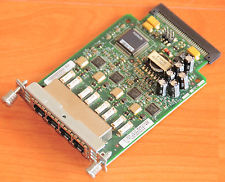
So I ve configured voice service a number of times, but never using Cisco equipment. There s a business starting up here on Orcas Island and they need a number of lines voice and fax service. I had a spare 2801 router laying around and heard that it s possible to provision voice service using these machines. So I looked on eBay for a module that will provide more than two FXS ports and decided on the VIC-4FXS. When it was delivered, I installed it and booted the router. It told me that it needed a PVDM DSP Module, so I got one of those as well. It has arrived. I have installed it. Now when I boot the router, I don t get a warning or an error. configure the router to send outbound calls to the SIP server configure the router to send inbound calls to FXS ports 2,3,4 in round robin
trunk group FXSlines
!
voice-port 0/2/1
 trunk-group FXSlines
!
voice-port 0/2/2
 trunk-group FXSlines
!
voice-port 0/2/3
 trunk-group FXSlines
configure the router to send inbound calls to the correct ports on the VIC-4FXS
dial-peer voice 1 pots
 preference 7
 destination-pattern 3602987792
 translate-outgoing called 10
 port 0/2/0
 forward-digits all
!
dial-peer voice 2 pots
 preference 2
 destination-pattern 3602987793
 translate-outgoing called 10
 port 0/2/1
 forward-digits all
!
dial-peer voice 3 pots
 preference 3
 destination-pattern 3602987794
 translate-outgoing called 10
 port 0/2/2
 forward-digits all
!
dial-peer voice 4 pots
 preference 4
 destination-pattern 3602987795
 translate-outgoing called 10
 port 0/2/3
 forward-digits all
configure the router to accept inbound calls from the asterisk call server
voice service voip
 allow-connections sip to sip
 no supplementary-service sip moved-temporarily
 no supplementary-service sip refer
 fax protocol t38 ls-redundancy 0 hs-redundancy 0 fallback cisco
 sip
  registrar server expires max 3600 min 3600
  localhost dns:8.8.8.8
configure the asterisk call server to send inbound calls to the router On asterisk call server, edit sip.conf to register with SIP server on cisco router at 172.16.78.209:
[fhvoice]
type=peer
insecure=port,invite
context=fhvoice
disallow=all
allow=ulaw
language=en
canreinvite=no
host=172.16.78.209
qualify=20000
dtmfmode=rfc2833
On asterisk call server, edit extensions.conf and add extensions to the incoming context:
exten => 3602987792,1,Dial(SIP/fhvoice/$ EXTEN ,30)
   same => n,Hangup()
exten => 3602987793,1,Dial(SIP/fhvoice/$ EXTEN ,30)
   same => n,Hangup()
exten => 3602987794,1,Dial(SIP/fhvoice/$ EXTEN ,30)
   same => n,Hangup()
exten => 3602987795,1,Dial(SIP/fhvoice/$ EXTEN ,30)
   same => n,Hangup()
configure the asterisk call server to accept outbound calls from the router

Jose Luis Rivas: transloadit-api v1.0.0-rc1

A release candidate for v1.0.0 of transloadit-api is out. You can install it via npm and give it a try.
npm install transloadit-api@1.0.0-rc1
Now it supports the full transloadit API, together with signature's creation, assemblies, notifications and templates management. The source is on github, the docs are in this website as well as in the comments in the code (which is the source for the website) and of course, any issue just report it on the github's tracker. It has a lot of tests but there are some tests missing, specially for operations that require internet. Hopefully I will have time to write them this week and then release a proper v1.0.0.

Martín Ferrari: Introducing Yakker: an open, secure and distributed alternative to WhatsApp

Did I get your attention with the title? Good. In this post I will outline something that I have been thinking about for some months:
I believe it is possible to build a system with the simplicity and functionality of WhatsApp or Viber, which provides end-to-end encryption, is built on free software and open protocols, that supports federation and is almost decentralised, and that would allow interested companies to turn a profit without compromising any of these principles.

Introduction This is the first post of a series that I will be publishing in the next few days. Many parts of these posts will be technical, but I expect that the main concepts can be understood by a wider audience. What I am proposing seems like a bold statement, I know. Maybe there is some fatal flaw somewhere in my thinking, and that is why I am publishing this: I hope to get constructive feedback, and maybe get enough traction to start implementing it Real Soon Now . I have been thinking about this problem since February, when I discussed this extensively with friends at FOSDEM. I have already published a critique of Telegram, which had way more impact than I ever imagined, showing that there is people out there interested in this kind of stuff. The last posts about DNSSEC and DANE were part of my musings about this, too. There are many components that need to be built for this to happen. But more importantly, this can only be useful if it gains a critical mass. And that's why I think making this a viable business tool is very important. At the same time, that means I need to think extra carefully to make it impossible for any for-profit company to mutate this effort into Just Another Walled Garden. My goals for this architecture are:
  • First and foremost, target the same people that nowadays is using a plethora of walled gardens for their instant communication needs. That is WhatsApp, Viber, Skype, Facebook messenger, etc.
  • It must focus on mobile, that is what people care about, without forgetting about other use cases.
  • Creating an account and placing the first call/text message should be as easy as it is currently with the competition.
  • All communication must be encrypted end-to-end with public-key cryptography; nobody but the user has access to the private keys.
  • Most components must be decentralised, and allow for competition.
  • There should be as little trust as possible placed on any part of the system.
  • Anybody can set up a compatible service provider and offer it to its users, while having full interoperability with other providers.
  • Compatible services which are not part of the network must be able to interoperate.
  • Contacting a person should happen even if they are not subscribed to the service. The client application must fall-back seamlessly to using interoperability gateways, PSTN termination, or the mobile network.
  • Interoperability with the competition is desirable, but possibly is better left to be implemented by the client applications.

Components I have identified a few components needed for this to work, I will expand on each one later.
  1. A flagship mobile application for Android and iOS, based on Lumicall or CSIPSimple, but with several important modifications.
  2. One or many directory and authentication services, based on ENUM and DNSSEC. These are the most critical piece of this idea, and possibly must only be operated by community-governed non-profits.
  3. One or many service providers, that offer simple account creation, registration, and optionally PSTN termination (which can be the main way of generating profit). An API needs to be defined for operations that are not part of the communications protocol, like account creation, credit purchasing, and balance querying.
  4. A network governing charter, and a trusted non-profit organisation that oversees that any participating parties are following the charter. This organisation defines which directory services are to be trusted (and possibly operates one of them), and which service providers the client application can use to create accounts.

Key points Some of the issues that need to be solved are:
  • How to handle and distribute public keys securely without the user understanding anything about security.
  • How to make registration painless and password-free, while offering an acceptable level of security.
  • How to fund development of the client application, and maintenance of the directory services.
  • How to get companies interested in this, so them would bring users to the network.
  • How to allow the user to migrate from one service provider to another, to improve competition.
  • How to prevent any party from subverting the spirit of the network.
  • How to make the client application work everywhere and have reasonably quality.

To be continued I think I have answers to most of these problems. I will elaborate in the next few days, stay tuned! :-)

Footnotes The name is something I've chosen a name in less than 2 minutes, while starting this post, so probably is awful. The distributed part is only half true, as the directory services need to be centralised, but I think it's good enough. I am aware that Lumicall seems to be trying to build something similar. I only found about that recently, when I was thinking about this design. Sadly, I think it has several shortcomings, but it is definitely one of the building blocks of this project.

13 May 2014

Hideki Yamane: rpm % ?_smp_flags macro for dpkg-buildpackage

I've watched openSUSE Conference video and been interested in RPM packaging workshop. Some features are nice, so I'd like to introduce one of those.

He says
Using % ?_smp_flags can speed up your build a lot.
Above RPM macro enables SMP, use all CPU cores to build package and it looks good. We can easily buy multi core processor machine nowadays even if it is cheapest laptop.

In Debian, we can do parallel build by specifiying DEBBUILDOPT=-"j<job number>" in /etc/pbuilderrc and run pbuilder/cowbuilder, but this % ?_smp_flags can automatically use multiple cores without any setting, good. However, add % ?_smp_flags to each rpm spec file, it means that we need to modify each source package, is not handy.

Then back to Debian, I've made a quick hack to dpkg-buildpackage (disclaimer: I'm Perl beginner, you know :).


Pros)
- Automatically use all CPU cores to build package, faster build.

Cons)
- some package would be FTBFS (e.g. Bug#694726) but it should be fixed, right? ;)


It may break some builds but "enable multiple build by default, and specify single build exceptions to each problematic packages" is better, IMHO.

Any suggestions are welcome, of course.

12 May 2014

Russell Coker: BTRFS vs LVM

For some years LVM (the Linux Logical Volume Manager) has been used in most Linux systems. LVM allows one or more storage devices (either disks, partitions, or RAID sets) to be assigned to a Volume Group (VG) some of which can then allocated to a Logical Volume (LVs) which are equivalent to any other block device, a VG can have many LVs. One of the significant features of LVM is that you can create snapshots of a LV. One common use is to have multiple snapshots of a LV for online backups and another is to make a snapshot of a filesystem before making a backup to external storage, the snapshot is unchanging so there s no problem of inconsistencies due to backing up a changing data set. When you create a snapshot it will have the same filesystem label and UUID so you should always mount a LVM device by it s name (which will be /dev/$VGNAME/$LVNAME). One of the problems with the ReiserFS filesystem was that there was no way to know whether a block of storage was a data block, a metadata block, or unused. A reiserfsck --rebuild-tree would find any blocks that appeared to be metadata and treat them as such, deleted files would reappear and file contents which matched metadata (such as a file containing an image of a ReiserFS filesystem) would be treated as metadata. One of the impacts of this was that a hostile user could create a file which would create a SUID root program if the sysadmin ran a --rebuild-tree operation. BTRFS solves the problem of filesystem images by using a filesystem specific UUID in every metadata block. One impact of this is that if you want to duplicate a BTRFS filesystem image and use both copies on the same system you need to regenerate all the checksums of metadata blocks with the new UUID. The way BTRFS works is that filesystems are identified by UUID so having multiple block devices with the same UUID causes the kernel to get confused. Making an LVM snapshot really isn t a good idea in this situation. It s possible to change BTRFS kernel code to avoid some of the problems of duplicate block devices and it s most likely that something will be done about it in future. But it still seems like a bad idea to use LVM with BTRFS. The most common use of LVM is to divide the storage of a single disk or RAID array for the use of multiple filesystems. Each filesystem can be enlarged (through extending the LV and making the filesystem use the space) and snapshots can be taken. With BTRFS you can use subvolumes for the snapshots and the best use of BTRFS (IMHO) is to give it all the storage that s available so there is no need to enlarge a filesystem in typical use. BTRFS supports quotas on subvolumes which aren t really usable yet but in the future will remove the need to create multiple filesystems to control disk space use. An important but less common use of LVM is to migrate a live filesystem to a new disk or RAID array, but this can be done by BTRFS too by adding a new partition or disk to a filesystem and then removing the old one. It doesn t seem that LVM offers any benefits when you use BTRFS. When I first experimented with BTRFS I used LVM but I didn t find any benefit in using LVM and it was only a matter of luck that I didn t use a snapshot and break things. Snapshots of BTRFS Filesystems One reason for creating a snapshot of a filesystem (as opposed to a snapshot of a subvolume) is for making backups of virtual machines without support from inside the virtual machine (EG running an old RHEL5 virtual machine that doesn t have the BTRFS utilities). Another is for running training on virtual servers where you want to create one copy of the filesystem for each student. To solve both these problems I am currently using files in a BTRFS subvolume. The BTRFS kernel code won t touch those files unless I create a loop device so I can only create a loop device for one file at a time. One tip for doing this, don t use names such as /xenstore/vm1 for the files containing filesystem images, use names such as /xenstore/vm1-root. If you try to create a virtual machine named vm1 then Xen will look for a file named vm1 in the current directory before looking in /etc/xen and tries to use a filesystem image as a Xen configuration file. It would be nice if there was a path for Xen configuration files that either didn t include the current directory or included it at the end of the list. Including the current directory in the path is a DOS mistake that should have gone away a long time ago. Psychology and Block Devices ZFS has a similar design to BTRFS in many ways and has some similar issues. But one benefit for ZFS is that it manages block devices in a zpool , first you create a zpool with the block devices and after that you can create ZFS filesystems or ZVOL block devices. I think that most sysadmins would regard a zpool as something similar to LVM (which may or may not be correct depending on how you look at it) and immediately rule out the possibility of running a zpool on LVM. BTRFS looks like a regular Unix filesystem in many ways, you can have a single block device that you mount with the usual mount command. The fact that BTRFS can support multiple block devices in a RAID configuration isn t so obvious and the fact that it implements equivalents to most LVM functionality probably isn t known to most people when they start using it. The most obvious way to start using BTRFS is to use it just like an Ext3/4 filesystem on an LV, and to use LVM snapshots to backup data, this is made even more likely by the fact that there is a program to convert a ext2/3/4 filesystem to BTRFS. This seems likely to cause data loss.

8 May 2014

Riku Voipio: Arm builder updates

Debian has recently received a donation of 8 build machines from Marvell. The new machines come with Quad core MV78460 Armada XP CPU's, DDR3 DIMM slot so we can plug in more memory, and speedy sata ports. They replace the well served Marvell MV78200 based builders - ones that have been building debian armel since 2009. We are planning a more detailed announcement, but I'll provide a quick summary: The speed increase provided by MV78460 can viewed by comparing build times on selected builds since early april: Qemu build times. We can now build Qemu in 2h instead of 16h -8x faster than before! Certainly a substantial improvement, so impressive kit from Marvell! But not all packages gain this amount of speedup: webkitgtk build times. This example, webkitgtk, builds barely 3x faster. The explanation is found from debian/rules of webkitgkt:

# Parallel builds are unstable, see #714072 and #722520
# ifneq (,$(filter parallel=%,$(DEB_BUILD_OPTIONS)))
# NUMJOBS = $(patsubst parallel=%,%,$(filter parallel=%,$(DEB_BUILD_OPTIONS)))
# MAKEARGUMENTS += -j$(NUMJOBS)
# endif
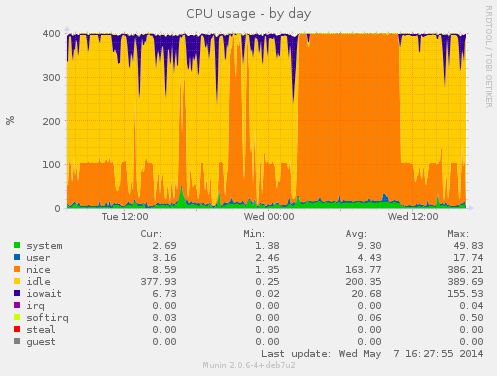
The old builders are single-core[1], so the regardless of parallel building, you can easily max out the cpu. New builders will use only 1 of 4 cores without parallel build support in debian/rules. During this buildd cpu usage graph, we see most time only one CPU is consumed. So for fast package build times.. make sure your packages supports parallel building. For developers, abel.debian.org is porter machine with Armada XP. It has schroot's for both armel and armhf. set "DEB_BUILD_OPTIONS=parallel=4" and off you go. Finally I'd like to thank Thomas Petazzoni, Maen Suleiman, Hector Oron, Steve McIntyre, Adam Conrad and Jon Ward for making the upgrade happen. Meanwhile, we have unrelated trouble - a bunch of disks have broken within a few days apart. I take the warranty just run out... [1] only from Linux's point of view. - mv78200 has actually 2 cores, just not SMP or coherent. You could run an RTOS on the other core while you run Linux on the other.

7 May 2014

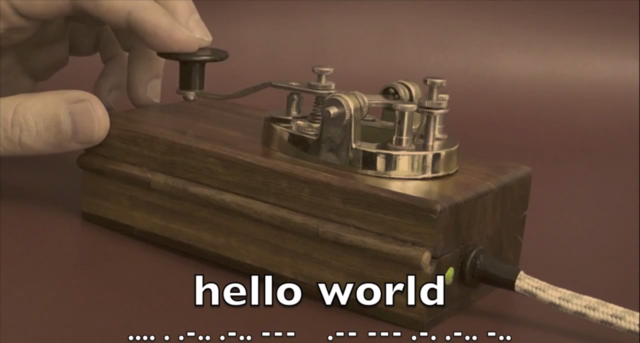
Daniel Pocock: A URI prefix for radio callsigns

I've had my amateur callsign far longer than I've had my email address or provider-indepent IP ranges. While working with the tel: URI recently, I started thinking it would be useful to have a similar URI scheme for radio callsigns. After all, callsigns follow a well documented and globally unique pattern. Amateur operators are often mixing computing technology with radio. This could be a useful foundation for bigger things. One possibility is in SIP. SIP already has the possibility to route messages using URIs other than sip:. For example, a SIP message can have a tel: URI in the request line. It could be equally feasible to do this for radio callsigns, especially for amateur radio. Another possibility is placing call signs in HTML. Imagine if you could click M0GLR and some browser plugin looks up a directory to find out which frequencies or repeaters I've used recently. From URI to URL A URI typically identifies a resource. A URL helps locate the resource. In radio, a URL would probably not be very similar to a HTTP scheme URL. A full URL for a radio contact might specify not just the callsign but also the desired frequency and transmission mode. Instead of a directory path, it is likely you would need things like these as a bare minimum:
  • transmit frequency
  • receive frequence (or offset) if using a duplex mode
  • modulation (FM, SSB, etc)
  • bandwidth
  • mode: morse code, voice, video, packet data, etc
For a fixed station, especially a repeater, it may also be useful to encode the geographic location. For a station in orbit, however, it may be necessary to provide a completely different set of parameters describing the orbit or a pointer to where to find fresh parameters. Please share your feedback The idea is now actively under discussion on the IETF URI-review mailing list.

Julien Danjou: Making of The Hacker's Guide to Python

As promised, today I would like to write a bit about the making of The Hacker's Guide to Python. It has been a very interesting experimentation, and I think it is worth sharing it with you. The inspiration All started out at the beginning of August 2013. I was spending my summer, as the rest of the year, hacking on OpenStack. As years passed, I got more and more deeply involved in the various tools that we either built or contributed to within the OpenStack community. And I somehow got the feeling that my experience with Python, the way we used it inside OpenStack and other applications during these last years was worth sharing. Worth writing something bigger than a few blog posts. The OpenStack project is doing code reviews, and therefore so did I for almost two years. That inspired a lot of topics, like the definitive guide to method decorators that I wrote at the time I started the hacker's guide. Stumbling upon the same mistakes or misunderstanding over and over is, somehow, inspiring. I also stumbled upon Nathan Barry's blog and book Authority which were very helpful to get started and some sort of guideline. All of that brought me enough ideas to start writing a book about Python software development for people already familiar with the language. The writing The first thing I started to do is to list all the topics I wanted to write about. The list turned out to have subjects that had no direct interest for a practical guide. For example, on one hand, very few developers know in details how metaclasses work, but on the other hand, I never had to write a metaclass during these last years. That's the kind of subject I decided not to write about, dropped all subjects that I felt were not going to help my reader to be more productive. Even if they could be technically interesting.
Then, I gathered all problems I saw during the code reviews I did during these last two years. Some of them I only recalled in the days following the beginning of that project. But I kept adding them to the table of contents, reorganizing stuff as needed. After a couple of weeks, I had a pretty good overview of the contents that there I will write about. All I had to do was to fill in the blank (that sounds so simple now). The entire writing of the took hundred hours spread from August to November, during my spare time. I had to stop all my other side projects for that. The interviews While writing the book, I tried to parallelize every thing I could. That included asking people for interviews to be included in the book. I already had a pretty good list of the people I wanted to feature in the book, so I took some time as soon as possible to ask them, and send them detailed questions. I discovered two categories of interviewees. Some of them were very fast to answer ( 1 week), and others were much, much slower. A couple of them even set up Git repositories to answer the questions, because that probably looked like an entire project to them. :-) So I had to not lose sight and kindly ask from time to time if everything was alright, and at some point started to kindly set some deadline. In the end, the quality of the answers was awesome, and I like to think that was because I picked the right people! The proof-reading Once the book was finished, I somehow needed to have people proof-reading it. This was probably the hardest part of this experiment. I needed two different types of reviews: technical reviews, to check that the content was correct and interesting, and language review. That one is even more important since English is not my native language. Finding technical reviewers seemed easy at first, as I had ton of contacts that I identified as being able to review the book. I started by asking a few people if they would be comfortable reading a simple chapter and giving me feedbacks. I started to do that in September: having the writing and the reviews done in parallel was important to me in order to minimize latency and the book's release delay. All people I contacted answered positively that they would be interested in doing a technical review of a chapter. So I started to send chapters to them. But in the end, only 20% replied back. And even after that, a large portion stopped reviewing after a couple of chapters. Don't get me wrong: you can't be mad at people not wanting to spend their spare time in book edition like you do. However, from the few people that gave their time to review a few chapters, I got tremendous feedback, at all level. That's something that was very important and that helped a lot getting confident. Writing a book alone for months without having anyone taking a look upon your shoulder can make you doubt that you are creating something worth it. As far as English proof-reading, I went ahead and used ODesk to recruit a professional proof-reader. I looked for people with the right skills: a good English level (being a native English speaker at least), be able to understand what the book was about, and being able to work with correct delays. I had mixed results from the people I hired, but I guess that's normal. The only error I made was not to parallelize those reviews enough, so I probably lost a couple of months on that. The toolchain
While writing the book, I did a few breaks to build a toolchain. What I call a toolchain is set of tools used to render the final PDF, EPUB and MOBI files of the guide. After some research, I decided to settle on AsciiDoc, using the DocBook output, which is then being transformed to LaTeX, and then to PDF, or either to EPUB directly. I realy on Calibre to convert the EPUB file to MOBI. It took me a few hours to do what I wanted, using some magic LaTeX tricks to have a proper render, but it was worth it and I'm particularly happy with the result. For the cover design, I asked my talented friend Nicolas to do something for me, and he designed the wonderful cover and its little snake! The publishing Publishing in an interesting topic people kept asking me about. This is what I had to answer a few dozens of time: I never had any plan for asking an editor to publish this book. Nowadays, asking an editor to publish a book feels to me like asking a major company to publish a CD. It feels awkward. However, don't get me wrong: there can be a few upsides of having an editor. They will find reviewers and review your book for you. Having the book review handled for you is probably a very good thing, considering how it was hard to me to get that in place. It can be especially important for a technical book. Also, your book may end up in brick and mortar stores and be part of a collection, both improving visibility. That may improve your book's selling, though the editor and all the intermediaries are going to keep the largest amount of the money anyway. I've heard good stories about people using Gumroad to sell electronic contents, so after looking for competitors in that market, I picked them. I also had the idea to sell the book with Bitcoins, so I settled on Coinbase, because they have a nice API to do that. Setting up everything was quite straight-forward, especially with Gumroad. It only took me a few hours to do so. Writing the Coinbase application took a few hours too. My initial plan was to only sell online an electronic version. On the other hand, since I kept hearing that a printed version should exist, I decided to give it a try. I chose to work with Lulu because I knew people using it, and it was pretty simple to set up. The launch Once I had everything ready, I built the selling page and connected everything between Mailchimp, Gumroad, Coinbase, Google Analytics, etc. Writing the launch email was really exciting. I used Mailchimp feature to send the launch mail in several batches, just to have some margin in case of a sudden last minute problem. But everything went fine. Hurrah! I distributed around 200 copies of the ebook in the first 48 hours, for about $5000. That covered all the cost I had from the writing the book, and even more, so I was already pretty happy with the launch.
Retrospective In retrospect, something that I didn't do the best way possible is probably to build a solid mailing list of people interested, and to build an important anticipation and incentive to buy the book at launch date. My mailing list counted around 1500 people subscribed because they were interested in the launch of the book subscribed; in the end, probably only 10-15% of them bought the book during the launch, which is probably a bit lower than what I could expect. But more than a month later, I distributed in total almost 500 copies of the book (including physical units) for more than $10000, so I tend to think that this was a success. I still sell a few copies of the book each weeks, but the number are small compared to the launch. I sold less than 10 copies of the ebook using Bitcoins, and I admit I'm a bit disappointed and surprised about that. Physical copies represent 10% of the book distribution. It's probably a lot lower than most people that pushed me to do it thought it would be. But it is still higher of what I thought it would be. So I still would advise to have a paperback version of your book. At least because it's nice to have it in your library.
I only got positive feedbacks, a few typo notices, and absolutely no refund demand, which I really find amazing. The good news is also that I've been contacted with a couple of Korean and Chinese editors to get the book translated and published in those countries. If everything goes well, the book should be translated in the upcoming months and be available on these markets in 2015! If you didn't get a copy, it's still time to do so!

Laura Arjona: I need a new GPG Key

TL;DR This key is no longer usable:
pub  2048R/9C6C32C7 2014-02-16 Laura ARJONA REINA <larjona99@gmail.com>
                               Laura ARJONA REINA <larjona@fsfe.org>
                               Laura ARJONA REINA <laura.arjona@upm.es>
                               Old key 0xE20474C3 no longer valid: lost secret key. (Clave antigua 0xE20474C4 ya no es v lida: clave secreta perdida.)
Fingerprint=F29B A6D8 D1DC A30F 3E34  53DF 5CD1 FDE5 9C6C 32C7
Please act as if it does not exist. The reason is that I cannot remember the passphrase of my master GPG key. This is why I didn t signed any of the keys of people that I met in Barcelona MiniDebconf. My geek self steem is a bit undermined, but feeling sorry for myself accomplishes nothing, so I think I will not hide problems and move on. I ll post about my new key soon. Long version The bad news The bad news are many. I generated my key in February 2014 (I generated my very first GPG Key in 2010, as an exercise, but never used it again, and in 2014 I couldn t remember the passphrase, and the paper where it was written, had got lost before). Anyway, February 2014, new GPG key. I followed the Howto in FSFE wiki in order to use my brand new FSFE SmartCard. I have to admit that I didn t understand very well how all this works, and it seems that my main mistake was to miss-understand that since I was using a smartcard, with a PIN and an Admin PIN, remembering passphrases was no longer required (only remembering the PINs). I was WRONG! PINs are for daily use with the subkeys of your card (for encryption, decryption, and signing stuff different than GPG keys), you still have the master key that is not in the card (but in a separate medium in a safe place), and for the master key we still use passphrase, and the master key is the one that allows signing keys from other people, and changing, revoking, adding subkeys, etc. So, it seems I used a random passphrase that I didn t write down and I could not remember, due to this terrible missunderstanding. Another bad news is that I didn t generate a revocation certificate (well in fact, I was going to generate just before signing the first key of another person, and then I realize that it was asking the passphrase, hence the problem). First I thought that it should ask the PIN and my smartcard setup was wrong or anything, but after reading and interchanging emails with other people more experienced than me, I realized that I should remember that passphrase. And I couldn t. So there are no revocation certificates :( Another bad news is that some (awesome) people already signed my key, and it will be difficult to meet again so they sign my new key. I was thinking about applying to the Debian new member process this summer, and I have not many opportunities to meet Debian people in person, so I gathered quite a lot signs last March in MiniDebConf Barcelona. Now I m again at the starting point (well, this is perfect excuse to try to join a Debian event soon :) I don t know how I would manage to do it, but I ll try!). The good news (Always look at the bright side of life ) The main good news is that I didn t used the GPG key for signing/encrypting important stuff: I just interchanged some encrypted mail as test with friends, and signed some mails sent to public mailing lists (for signing mails I was using the smartcard PIN so I didn t notiece the problem). The other main good news is that my key is not compromised (well, you can never be sure, but I think so). I cannot revoke it but I m quite sure nothing important depends on that key. Other good news is that I have read a lot about how GPG works and how the smartcard works, keys and subkeys and all this stuff, and I think now I understand everything quite better. I have learned (and also tried) tools as nasty, John The Ripper and rephrase to try to recover the passphrase. I didn t recover it, but at least I know that all those (free software) tools exist and how to use them :) And I have learned the lesson: to be extremely careful, test that everything works (not just try one or two things, test everything) and to not leave work for later (and for example, generate the revocation certificates just right after the keys). Next steps I ll send a message to all the friends that signed or downloaded my old GPG key apologysing and pointing to this blog post so they learn the details about why I create a new key. I ll take this opportunity to download and use the Tails (The Agnostic Incognito System, a Debian derivative which is a live system and is focused in protecting privacy and anonymity of the user). Tails will be my safe, network disconnected environment to generate the new keys and do the sensible tasks with them. I think this time I will create my main key 4096-bit long (since now I understand that the main key is not stored in the card) and the subkeys can be 2048-bit or 3072 to fit in the smarcard. Well, hands on! I ll write another blog post when my new GPG keys are ready. I hope third time s the charm! Note: Thank you to all the people that gave me advice and support (knowledge, links, moral support) about this issue. You know who you are!
Filed under: My experiences and opinion, Tools Tagged: Debian, encryption, English, Free Software, gpg, libre software, Moving into free software, mswl-cases

6 May 2014

Michal &#268;iha&#345;: Weblate 1.9

Weblate 1.9 has been released today. It comes with lot of improvements and bug fixes and with experimental Zen mode for editing translations. Full list of changes for 1.9: You can find more information about Weblate on http://weblate.org, the code is hosted on Github. If you are curious how it looks, you can try it out on demo server. You can login there with demo account using demo password or register your own user. Ready to run appliances will be soon available in SUSE Studio Gallery. Weblate is also being used https://l10n.cihar.com/ as official translating service for phpMyAdmin, Gammu, Weblate itself and others. If you are free software project which would like to use Weblate, I'm happy to help you with set up or even host Weblate for you. Further development of Weblate would not be possible without people providing donations, thanks to everybody who have helped so far!

Filed under: English phpMyAdmin SUSE Weblate 0 comments Flattr this!

5 May 2014

Michal &#268;iha&#345;: Going to LinuxTag

Together with many phpMyAdmin guys, I'm traveling to LinuxTag 2014 in few days. We'll have a booth there (hall 6, booth A13), where we will show some demos and you can stop by and chat with us. Of course my presence there will not be just about phpMyAdmin, I'll meet there few Weblate users and developers, but if you have anything else to discuss, just stop by, I'll be usually around the booth.

Filed under: English phpMyAdmin Weblate 0 comments Flattr this!

4 May 2014

Dominique Dumont: Deprecating experience level and preset value in Config::Model

Hello The next releases of Config::Model will deprecate 2 (mis)features: The behavior of cme check will not change. People using cme edit with the GUI will see many more configuration parameters. All the best

Francois Marier: What's in a debian/ directory?

If you're looking to get started at packaging free software for Debian, you should start with the excellent New Maintainers' Guide or the Introduction to Debian Packaging on the Debian wiki. Once you know the basics, or if you prefer to learn by example, you may be interested in the full walkthrough which follows. We will look at the contents of three simple packages.

node-libravatar This package is a node.js library for the Libravatar service. Version 2.0.0-3 of that package contains the following files in its debian/ directory:
  • changelog
  • compat
  • control
  • copyright
  • docs
  • node-libravatar.install
  • rules
  • source/format
  • watch

debian/control
Source: node-libravatar
Priority: extra
Maintainer: Francois Marier <francois@debian.org>
Build-Depends: debhelper (>= 9)
Standards-Version: 3.9.4
Section: web
Homepage: https://github.com/fmarier/node-libravatar
Vcs-Git: git://git.debian.org/collab-maint/node-libravatar.git
Vcs-Browser: http://git.debian.org/?p=collab-maint/node-libravatar.git;a=summary
Package: node-libravatar
Architecture: all
Depends: $ shlibs:Depends , $ misc:Depends , nodejs
Description: libravatar library for NodeJS
 This library allows web application authors to make use of the free Libravatar
 service (https://www.libravatar.org). This service hosts avatar images for
 users and allows other sites to look them up using email addresses.
 .
 node-libravatar includes full support for federated avatar servers.
This is probably the most important file since it contains the bulk of the metadata about this package. Maintainer is a required field listing the maintainer of that package, which can be a person or a team. It only contains a single value though, any co-maintainers will be listed under the optional Uploaders field. Build-Depends lists the packages which are needed to build the package (e.g. a compiler), as opposed to those which are needed to install the binary package (e.g. a library it uses). Standards-Version refers to the version of the Debian Policy that this package complies with. The Homepage field refers to the upstream homepage, whereas the Vcs-* fields point to the repository where the packaging is stored. If you take a look at the node-libravatar packaging repository you will see that it contains three branches:
  • upstream is the source as it was in the tarball downloaded from upstream.
  • master is the upstream branch along with all of the Debian customizations.
  • pristine-tar is unrelated to the other two branches and is used by the pristine-tar tool to reconstitute the original upstream tarball as needed.
After these fields comes a new section which starts with a Package field. This is the definition of a binary package, not to be confused with the Source field at the top of this file, which refers to the name of the source package. In this particular example, they are both the same and there is only one of each, however this is not always the case, as we'll see later. Inside that binary package definition, lives the Architecture field which is normally one of these two:
  • all for a binary package that will work on all architectures but only needs to be built once
  • any for a binary package that will work everywhere but that will need to be built separately for each architecture
Finally, the last field worth pointing out is the Depends field which lists all of the runtime dependencies that the binary package has. This is what will be pulled in by apt-get when you apt-get install node-libravatar. The two variables will be substituted later by debhelper.

debian/changelog
node-libravatar (2.0.0-3) unstable; urgency=low
  * debian/watch: poll github directly
  * Bump Standards-Version up to 3.9.4
 -- Francois Marier <francois@debian.org>  Mon, 20 May 2013 12:07:49 +1200
node-libravatar (2.0.0-2) unstable; urgency=low
  * More precise license tag and upstream contact in debian/copyright
 -- Francois Marier <francois@debian.org>  Tue, 29 May 2012 22:51:03 +1200
node-libravatar (2.0.0-1) unstable; urgency=low
  * New upstream release
    - new non-backward-compatible API
 -- Francois Marier <francois@debian.org>  Mon, 07 May 2012 14:54:19 +1200
node-libravatar (1.1.1-1) unstable; urgency=low
  * Initial release (Closes: #661771)
 -- Francois Marier <francois@debian.org>  Fri, 02 Mar 2012 15:29:57 +1300
This may seem at first like a mundane file, but it is very important since it is the canonical source of the package version (2.0.0-3 in this case). This is the only place where you need to bump the package version when uploading a new package to the Debian archive. The first line also includes the distribution where the package will be uploaded. It is usually one of these values:
  • unstable for the vast majority of uploads
  • stable for uploads that have been approved by the release maintainers and fix serious bugs in the stable version of Debian
  • stable-security for security fixes to the stable version of Debian that cannot wait until the next stable point release and have been approved by the security team
Packages uploaded to unstable will migrate automatically to testing provided that a few conditions are met (e.g. no release-critical bugs were introduced). The length of time before that migration is influenced by the urgency field (low, medium or high) in the changelog entry. Another thing worth noting is that the first upload normally needs to close an ITP (Intent to Package) bug.

debian/rules
#!/usr/bin/make -f
# -*- makefile -*-
%:
    dh $@ 
override_dh_auto_test:
As can be gathered from the first two lines of this file, this is a Makefile. This is what controls how the package is built. There's not much to see and that's because most of its content is automatically added by debhelper. So let's look at it in action by building the package:
$ git buildpackage -us -uc
and then looking at parts of the build log (../node-libravatar_2.0.0-3_amd64.build):
 fakeroot debian/rules clean
dh clean 
   dh_testdir
   dh_auto_clean
   dh_clean
One of the first things we see is the debian/rules file being run with the clean target. To find out what that does, have a look at the dh_auto_clean which states that it will attempt to delete build residues and run something like make clean using the upstream Makefile.
 debian/rules build
dh build 
   dh_testdir
   dh_auto_configure
   dh_auto_build
Next we see the build target being invoked and looking at dh_auto_configure we see that this will essentially run ./configure and its equivalents. The dh_auto_build helper script then takes care of running make (or equivalent) on the upstream code. This should be familiar to anybody who has ever built a piece of free software from scratch and has encountered the usual method for building from source:
./configure
make
make install
Finally, we get to actually build the .deb:
 fakeroot debian/rules binary
dh binary 
   dh_testroot
   dh_prep
   dh_installdirs
   dh_auto_install
   dh_install
...
   dh_md5sums
   dh_builddeb
dpkg-deb: building package  node-libravatar' in  ../node-libravatar_2.0.0-3_all.deb'.
Here we see a number of helpers, including dh_auto_install which takes care of running make install. Going back to the debian/rules, we notice that there is manually defined target at the bottom of the file:
override_dh_auto_test:
which essentially disables dh_auto_test by replacing it with an empty set of commands. The reason for this becomes clear when we take a look at the test target of the upstream Makefile and the dependencies it has: tap, a node.js library that is not yet available in Debian. In other words, we can't run the test suite on the build machines so we need to disable it here.

debian/compat
9
This file simply specifies the version of debhelper that is required by the various helpers used in debian/rules. Version 9 is the latest at the moment.

debian/copyright
Format: http://www.debian.org/doc/packaging-manuals/copyright-format/1.0/
Upstream-Name: node-libravatar
Upstream-Contact: Francois Marier <francois@libravatar.org>
Source: https://github.com/fmarier/node-libravatar
Files: *
Copyright: 2011 Francois Marier <francois@libravatar.org>
License: Expat
Files: debian/*
Copyright: 2012 Francois Marier <francois@debian.org>
License: Expat
License: Expat
 Permission is hereby granted, free of charge, to any person obtaining a copy of this
 software and associated documentation files (the "Software"), to deal in the Software
 without restriction, including without limitation the rights to use, copy, modify,
 merge, publish, distribute, sublicense, and/or sell copies of the Software, and to
 permit persons to whom the Software is furnished to do so, subject to the following
 conditions:
 .
 The above copyright notice and this permission notice shall be included in all copies
 or substantial portions of the Software.
 .
 THE SOFTWARE IS PROVIDED "AS IS", WITHOUT WARRANTY OF ANY KIND, EXPRESS OR IMPLIED,
 INCLUDING BUT NOT LIMITED TO THE WARRANTIES OF MERCHANTABILITY, FITNESS FOR A
 PARTICULAR PURPOSE AND NONINFRINGEMENT. IN NO EVENT SHALL THE AUTHORS OR COPYRIGHT
 HOLDERS BE LIABLE FOR ANY CLAIM, DAMAGES OR OTHER LIABILITY, WHETHER IN AN ACTION OF
 CONTRACT, TORT OR OTHERWISE, ARISING FROM, OUT OF OR IN CONNECTION WITH THE SOFTWARE
 OR THE USE OR OTHER DEALINGS IN THE SOFTWARE.
This machine-readable file lists all of the different licenses encountered in this package. It requires that the maintainer audits the upstream code for any copyright statements that might be present in addition to the license of the package as a whole.

debian/docs
README.md
This file contains a list of upstream files that will be copied into the /usr/share/doc/node-libravatar/ directory by dh_installdocs.

debian/node-libravatar.install
lib/*    usr/lib/nodejs/
The install file is used by dh_install to supplement the work done by dh_auto_install which, as we have seen earlier, essentially just runs make install on the upstream Makefile. Looking at that upstream Makefile, it becomes clear that the files will need to be installed manually by the Debian package since that Makefile doesn't have an install target.

debian/watch
version=3
https://github.com/fmarier/node-libravatar/tags /fmarier/node-libravatar/archive/node-libravatar-([0-9.]+)\.tar\.gz
This is the file that allows Debian tools like the Package Tracking System to automatically detect that a new upstream version is available. What it does is simply visit the upstream page which contains all of the release tarballs and look for links which have an href matching the above regular expression. Running uscan --report --verbose will show us all of the tarballs that can be automatically discovered using this watch file:
-- Scanning for watchfiles in .
-- Found watchfile in ./debian
-- In debian/watch, processing watchfile line:
   https://github.com/fmarier/node-libravatar/tags /fmarier/node-libravatar/archive/node-libravatar-([0-9.]+)\.tar\.gz
-- Found the following matching hrefs:
     /fmarier/node-libravatar/archive/node-libravatar-2.0.0.tar.gz
     /fmarier/node-libravatar/archive/node-libravatar-1.1.1.tar.gz
     /fmarier/node-libravatar/archive/node-libravatar-1.1.0.tar.gz
     /fmarier/node-libravatar/archive/node-libravatar-1.0.1.tar.gz
     /fmarier/node-libravatar/archive/node-libravatar-1.0.0.tar.gz
Newest version on remote site is 2.0.0, local version is 2.0.0
 => Package is up to date
-- Scan finished

pylibravatar This second package is the equivalent Python library for the Libravatar service. Version 1.6-2 of that package contains similar files in its debian/ directory, but let's look at two in particular:
  • control
  • upstream/signing-key.asc

debian/control
Source: pylibravatar
Section: python
Priority: optional
Maintainer: Francois Marier <francois@debian.org>
Build-Depends: debhelper (>= 9), python-all, python3-all
Standards-Version: 3.9.5
Homepage: https://launchpad.net/pyLibravatar
...
Package: python-libravatar
Architecture: all
Depends: $ misc:Depends , $ python:Depends , python-dns, python
Description: Libravatar module for Python 2
 Module to make use of the federated Libravatar.org avatar hosting service
 from within Python applications.
...
Package: python3-libravatar
Architecture: all
Depends: $ misc:Depends , $ python3:Depends , python3-dns, python3
Description: Libravatar module for Python 3
 Module to make use of the federated Libravatar.org avatar hosting service
 from within Python applications.
...
Here is an example of a source package (pylibravatar) which builds two separate binary packages: python-libravatar and python3-libravatar. This highlights the fact that a given upstream source can be split into several binary packages in the archive when it makes sense. In this case, there is no point in Python 2 applications pulling in the Python 3 files, so the two separate packages make sense. Another common example is the use of a -doc package to separate the documentation from the rest of a package so that it doesn't need to be installed on production servers for example.

debian/upstream/signing-key.asc
-----BEGIN PGP PUBLIC KEY BLOCK-----
Version: GnuPG v1
mQINBEpQYz4BEAC7REQD1za69RUnkt6nRCFhSJmmoeJc+yEiWTKc9GOIMAwJDme1
+CMYgVn4Xzf1VQYwD/lE+mfWgyeMomLQjDM1mxx/LOM2a1WWPOk9+PvQwKfRJy92
...
UxDtZm/4yUmU6KvHvOGiDCMuIiB+MqhqJJ5wf80wXhzu8nmC+fyGt6nvu0ggMle8
sAMgXt/aQUTZE5zNCQ==
=RkTO
-----END PGP PUBLIC KEY BLOCK-----
This is simply the OpenPGP key that the upstream developer uses to sign release tarballs. Since PGP signatures are available on the upstream download page, it's possible to instruct uscan to check signatures before downloading tarballs. The way to do that is to use the pgpsigurlmange option in debian/watch:
version=3
opts=pgpsigurlmangle=s/$/.asc/ https://pypi.python.org/pypi/pyLibravatar https://pypi.python.org/packages/source/p/pyLibravatar/pyLibravatar-(.*)\.tar\.gz
which is simply a regular expression replacement string which takes the tarball URL and converts it to the URL of the matching PGP signature.

fcheck The last package we will look at is a file integrity checker. It essentially goes through all of the files in /usr/bin/ and /usr/lib/ and stores a hash of them in its database. When one of these files changes, you get an email. In particular, we will look at the following files in the debian/ directory of version 2.7.59-18:
  • dirs
  • fcheck.cron.d
  • fcheck.postrm
  • fcheck.postinst
  • patches/
  • README.Debian
  • rules
  • source/format

debian/patches This directory contains ten patches as well as a file called series which lists the patches that should be applied to the upstream source and in which order. Should you need to temporarily disable a patch, simply remove it from this file and it will no longer be applied at build time. Let's have a look at patches/04_cfg_sha256.patch:
Description: Switch to sha256 hash algorithm
Forwarded: not needed
Author: Francois Marier <francois@debian.org>
Last-Update: 2009-03-15
--- a/fcheck.cfg
+++ b/fcheck.cfg
@@ -149,8 +149,7 @@ TimeZone        = EST5EDT
 #$Signature      = /usr/bin/sum
 #$Signature      = /usr/bin/cksum
 #$Signature      = /usr/bin/md5sum
-$Signature      = /bin/cksum
-
+$Signature      = /usr/bin/sha256sum
 # Include an optional configuration file.
This is a very simple patch which changes the default configuration of fcheck to promote the use of a stronger hash function. At the top of the file is a bunch of metadata in the DEP-3 format. Why does this package contain so many customizations to the upstream code when Debian's policy is to push fixes upstream and work towards reduce the delta between upstream and Debian's code? The answer can be found in debian/control:
Homepage: http://web.archive.org/web/20050415074059/www.geocities.com/fcheck2000/
This package no longer has an upstream maintainer and its original source is gone. In other words, the Debian package is where all of the new bug fixes get done.

debian/source/format
3.0 (quilt)
This file contains what is called the source package format. What it basically says is that the patches found in debian/patches/ will be applied to the upstream source using the quilt tool at build time.

debian/fcheck.postrm
#!/bin/sh
# postrm script for fcheck
#
# see: dh_installdeb(1)
set -e
# summary of how this script can be called:
#        * <postrm>  remove'
#        * <postrm>  purge'
#        * <old-postrm>  upgrade' <new-version>
#        * <new-postrm>  failed-upgrade' <old-version>
#        * <new-postrm>  abort-install'
#        * <new-postrm>  abort-install' <old-version>
#        * <new-postrm>  abort-upgrade' <old-version>
#        * <disappearer's-postrm>  disappear' <overwriter>
#          <overwriter-version>
# for details, see http://www.debian.org/doc/debian-policy/ or
# the debian-policy package
case "$1" in
    remove upgrade failed-upgrade abort-install abort-upgrade disappear)
    ;;
    purge)
      if [ -e /var/lib/fcheck/fcheck.dbf ]; then
        echo "Purging old database file ..."
        rm -f /var/lib/fcheck/fcheck.dbf
      fi
      rm -rf /var/lib/fcheck
      rm -rf /var/log/fcheck
      rm -rf /etc/fcheck
    ;;
    *)
        echo "postrm called with unknown argument \ $1'" >&2
        exit 1
    ;;
esac
# dh_installdeb will replace this with shell code automatically
# generated by other debhelper scripts.
#DEBHELPER#
exit 0
This script is one of the many possible maintainer scripts that a package can provide if needed. This particular one, as the name suggests, will be run after the package is removed (apt-get remove fcheck) or purged (apt-get remove --purge fcheck). Looking at the case statement above, it doesn't do anything extra in the remove case, but it deletes a few files and directories when called with the purge argument.

debian/README.Debian This optional README file contains Debian-specific instructions that might be useful to users. It supplements the upstream README which is often more generic and cannot assume a particular system configuration.

debian/rules
#!/usr/bin/make -f
# -*- makefile -*-
# Sample debian/rules that uses debhelper.
# This file was originally written by Joey Hess and Craig Small.
# As a special exception, when this file is copied by dh-make into a
# dh-make output file, you may use that output file without restriction.
# This special exception was added by Craig Small in version 0.37 of dh-make.
# Uncomment this to turn on verbose mode.
#export DH_VERBOSE=1
build-arch:
build-indep:
build: build-stamp
build-stamp:
    dh_testdir
    pod2man --section=8 $(CURDIR)/debian/fcheck.pod > $(CURDIR)/fcheck.8
    touch build-stamp
clean:
    dh_testdir
    dh_testroot
    rm -f build-stamp 
    rm -f $(CURDIR)/fcheck.8
    dh_clean
install: build
    dh_testdir
    dh_testroot
    dh_prep
    dh_installdirs
    cp $(CURDIR)/fcheck $(CURDIR)/debian/fcheck/usr/sbin/fcheck
    cp $(CURDIR)/fcheck.cfg $(CURDIR)/debian/fcheck/etc/fcheck/fcheck.cfg
# Build architecture-independent files here.
binary-arch: build install
# Build architecture-independent files here.
binary-indep: build install
    dh_testdir
    dh_testroot
    dh_installdocs
    dh_installcron
    dh_installman fcheck.8
    dh_installchangelogs
    dh_installexamples
    dh_installlogcheck
    dh_link
    dh_strip
    dh_compress
    dh_fixperms
    dh_installdeb
    dh_shlibdeps
    dh_gencontrol
    dh_md5sums
    dh_builddeb
binary: binary-indep binary-arch
.PHONY: build clean binary-indep binary-arch binary install
This is an example of a old-style debian/rules file which you still encounter in packages which haven't yet upgraded to the latest version of debhelper 9, as can be shown by the contents of debian/compat:
8
It does essentially the same thing that what we've seen in the build log, but in a more verbose way.

debian/dirs
usr/sbin
etc/fcheck
This file contains a list of directories that dh_installdirs will create in the build directory. The reason why these directories need to be created is that files are copied into these directories in the install target of the debian/rules file. Note that this is different from directories which are created at the time of installation of the package. In that case, the directory (e.g. /var/log/fcheck/) must be created in the postinst script and removed in the postrm script.

debian/fcheck.cron.d
#
# Regular cron job for the fcheck package
#
30 */2  * * *   root    test -x /usr/sbin/fcheck && if ! nice ionice -c3 /usr/sbin/fcheck -asxrf /etc/fcheck/fcheck.cfg >/var/run/fcheck.out 2>&1; then mailx -s "ALERT: [fcheck]  hostname --fqdn " root </var/run/fcheck.out ; /usr/sbin/fcheck -cadsxlf /etc/fcheck/fcheck.cfg ; fi ; rm -f /var/run/fcheck.out
This file is the cronjob which drives the checks performed by this package. It will be copied to /etc/cron.d/fcheck by dh_installcron.

3 May 2014

Andrea Veri: Adding reCAPTCHA support to Mailman

The GNOME and many other infrastructures have been recently attacked by an huge amount of subscription-based spam against their Mailman istances. What the attackers were doing was simply launching a GET call against a specific REST API URL passing all the parameters it needed for a subscription request (and confirmation) to be sent out. Understanding it becomes very easy when you look at the following example taken from our apache.log:
May 3 04:14:38 restaurant apache: 81.17.17.90, 127.0.0.1 - - [03/May/2014:04:14:38 +0000] "GET /mailman/subscribe/banshee-list?email=example@me.com&amp;fullname=&amp;pw=123456789&amp;pw-conf=123456789&amp;language=en&amp;digest=0&amp;email-button=Subscribe HTTP/1.1" 403 313 "http://spam/index2.html" "Mozilla/5.0 (Windows NT 6.1; WOW64) AppleWebKit/537.36 (KHTML, like Gecko) Chrome/34.0.1847.131 Safari/537.36"
As you can the see attackers were sending all the relevant details needed for the subscription to go forward (and specifically the full name, the email, the digest option and the password for the target list). At first we tried to either stop the spam by banning the subnets where the requests were coming from, then when it was obvious that more subnets were being used and manual intervention was needed we tried banning their User-Agents. Again no luck, the spammers were smart enough to change it every now and then making it to match an existing browser User-Agent. (with a good percentage to have a lot of false-positives) Now you might be wondering why such an attack caused a lot of issues and pain, well, the attackers made use of addresses found around the web for their malicius subscription requests. That means we received a lot of emails from people that have never heard about the GNOME mailing lists but received around 10k subscription requests that were seemingly being sent by themselves. It was obvious we needed to look at a backup solution and luckily someone on our support channel suggested the freedesktop.org sysadmins recently added CAPTCHAs support to Mailman. I m now sharing the patch and providing a few more details on how to properly set it up on either DEB or RPM based distributions. Credits for the patch should be given to Debian Developer Tollef Fog Heen, who has been so kind to share it with us. Before patching your installation make sure to install the python-recaptcha package (tested on Debian with Mailman 2.1.15) on DEB based distributions and python-recaptcha-client on RPM based distributions. (I personally tested it against Mailman release 2.1.15, RHEL 6) The Patch
diff --git a/Mailman/Cgi/listinfo.py b/Mailman/Cgi/listinfo.py
index 4a54517..d6417ca 100644
--- a/Mailman/Cgi/listinfo.py
+++ b/Mailman/Cgi/listinfo.py
@@ -22,6 +22,7 @@
 
 import os
 import cgi
+import sys
 
 from Mailman import mm_cfg
 from Mailman import Utils
@@ -30,6 +31,8 @@ from Mailman import Errors
 from Mailman import i18n
 from Mailman.htmlformat import *
 from Mailman.Logging.Syslog import syslog
+sys.path.append("/usr/share/pyshared")
+from recaptcha.client import captcha
 
 # Set up i18n
 _ = i18n._
@@ -200,6 +203,9 @@ def list_listinfo(mlist, lang):
     replacements[''] = mlist.FormatFormStart('listinfo')
     replacements[''] = mlist.FormatBox('fullname', size=30)
 
+    # Captcha
+    replacements[''] = captcha.displayhtml(mm_cfg.RECAPTCHA_PUBLIC_KEY, use_ssl=False)
+
     # Do the expansion.
     doc.AddItem(mlist.ParseTags('listinfo.html', replacements, lang))
     print doc.Format()
diff --git a/Mailman/Cgi/subscribe.py b/Mailman/Cgi/subscribe.py
index 7b0b0e4..c1c7b8c 100644
--- a/Mailman/Cgi/subscribe.py
+++ b/Mailman/Cgi/subscribe.py
@@ -21,6 +21,8 @@ import sys
 import os
 import cgi
 import signal
+sys.path.append("/usr/share/pyshared")
+from recaptcha.client import captcha
 
 from Mailman import mm_cfg
 from Mailman import Utils
@@ -132,6 +130,17 @@ def process_form(mlist, doc, cgidata, lang):
     remote = os.environ.get('REMOTE_HOST',
                             os.environ.get('REMOTE_ADDR',
                                            'unidentified origin'))
+
+    # recaptcha
+    captcha_response = captcha.submit(
+        cgidata.getvalue('recaptcha_challenge_field', ""),
+        cgidata.getvalue('recaptcha_response_field', ""),
+        mm_cfg.RECPTCHA_PRIVATE_KEY,
+        remote,
+        )
+    if not captcha_response.is_valid:
+        results.append(_('Invalid captcha'))
+
     # Was an attempt made to subscribe the list to itself?
     if email == mlist.GetListEmail():
         syslog('mischief', 'Attempt to self subscribe %s: %s', email, remote)
Additional setup Then on the /var/lib/mailman/templates/en/listinfo.html template (right below <mm-digest-question-end>) add:
      <tr>
        <td>Please fill out the following captcha</td>
        <td><mm-recaptcha-javascript></TD>
      </tr>
Make also sure to generate a public and private key at https://www.google.com/recaptcha and add the following paramaters on your mm_cfg.py file: Loading reCAPTCHAs images from a trusted HTTPS source can be done by changing the following line:
replacements[''] = captcha.displayhtml(mm_cfg.RECAPTCHA_PUBLIC_KEY, use_ssl=False)
to
replacements[''] = captcha.displayhtml(mm_cfg.RECAPTCHA_PUBLIC_KEY, use_ssl=True)
EPEL 6 related details A few additional details should be provided in case you are setting this up against a RHEL 6 host: (or any other machine using the EPEL 6 package python-recaptcha-client-1.0.5-3.1.el6) Importing the recaptcha.client module will fail for some strange reason, importing it correctly can be done this way:
ln -s /usr/lib/python2.6/site-packages/recaptcha/client /usr/lib/mailman/pythonlib/recaptcha
and then fix the imports also making sure sys.path.append( /usr/share/pyshared ) is not there:
from recaptcha import captcha
That s not all, the package still won t work as expected given the API_SSL_SERVER, API_SERVER and VERIFY_SERVER variables on captcha.py are outdated (filed as bug #1093855), substitute them with the following ones:
API_SSL_SERVER="https://www.google.com/recaptcha/api"
API_SERVER="http://www.google.com/recaptcha/api"
VERIFY_SERVER="www.google.com"
And then on line 76:
url = "https://%s/recaptcha/api/verify" % VERIFY_SERVER,
That should be all! Enjoy!

2 May 2014

Dimitri John Ledkov: X4D Icons released

I am releasing some icons under MIT license. They will be hosted at x4d.surgut.co.uk and available for development on GitHub.

I had to create my own icons, as I couldn't find icons of similar nature under a free license. Hopefully others will find these useful as well.

The icons below are all available in PNG, GIF, SVG and EPS. To link to a specific version directly, add .png, .gif, -v.svg or -v.eps to the generic URI (or browse the icons repository to see all versions).

Document type Light Dark
HTML 2.0 Valid HTML2 Valid HTML20
HTML 3.2 Valid HTML32 Valid HTML32
HTML 4.0 Valid HTML40 Valid HTML40
HTML 4.01 Valid HTML4.01 Valid HTML4.01
XHTML 1.0 Valid XHTML10 Valid XHTML10
XHTML 1.1 Valid XHTML11 Valid XHTML11
XHTML Basic 1.0 Valid XHTML Basic 10 Valid XHTML Basic 10
XHTML-Print 1.0 Valid XHTML Print 10 Valid XHTML Print 10
CSS Valid CSS Valid CSS
CSS 1 Valid CSS1 Valid CSS1
CSS 2 Valid CSS2 Valid CSS2
MathML 2.0 Valid MathML 20 Valid MATHML20
SVG 1.0 Valid SVG10 Valid SVG10
SVG 1.1 Valid SVG11 Valid SVG11
SVG 1.2 Valid SVG12 Valid SVG12
SVG Tiny 1.1 Valid SVG Tiny11 Valid SVG Tiny11
SVG Tiny 1.2 Valid SVG Tiny12 Valid SVG Tiny12
XML 1.0 well-formed XML10 well-formed XML10
XML 1.1 well-formed XML11 well-formed XML11

1 May 2014

Siri Reiter: Last minute proposal

I've been asked to make another design proposal for the Minidebconf. People have been brainstorming. I could have asked them to do that months ago. I didn't, because I was working with my own ideas. We need to know who and what we are aiming at with the graphic communication, as well as with the conference. Who is the design for? What should they do? Why? Who is the conference for? Who should be interested? Is the design for people in Barcelona only? Is it for women only? Is it for current developers? Or is it for local politicians? Male or female? Students? - only? Does the communication have other goals than getting people at the venue? Should the design reflect the organizers - or rather not? Does the geography have to play a role in the visual imagery? These are questions that should always be asked. I made the mistake to answer a lot of the questions myself, based on my second hand knowledge and guesses. A common mistake, I've made before and will probably make again. I'm used to working on my own, that's my poor excuse. To my mind, the gathering, the meeting in the flesh and the communication and sharing of knowledge, is far more important than local landmarks. I don't feel that strongly for a location oriented identity design. La Sagrada Familia doesn't have anything to do with a gathering for free software development, does it. How? Oh, that was the minidebconf in Barcelona
Oh, that was the minidebconf arranged by Debian Women
Oh, that was the minidebconf that made a point out of being inclusive
Oh, that was the minidebconf that The identity design might have more to do with support to the local group than with any of the other aspects of the conference. Interesting. This table of colors shows different ways a blue and a purple could go. I put the green colors there to have more options covered for the discussion today. You can see how the different hues interacts with the red of the logo. The colors can be referred to like this: B3, C6, A4 etc. Click on the image for full size version. Here is an idea based on all the purple colors. Fun, uplifting, feels like many voices. Too many colors for T-shirt print, maybe: Here is some ideas of how to implement a minimalistic solution that I recommend for minidebconfs: My suggestion is that the banner (and everything else displaying the event) has the logo of the organizers placed on it. The font used for headlines etc is semantically of another nature than the logo, though it could be the same. I prefer neutral fonts, that can be reused by the next minidebconf, and I suggest a sans serif font. A condensed font makes huge display easier to fit. Don't be confused by displayfonts, I aim to show you that type alone speaks loudly, and if this typography should be recycled, we should not choose one of them, but go with the "neutral" sans serif. I need suggestions of free and good sans serif fonts.

Lisandro Dami&aacute;n Nicanor P&eacute;rez Meyer: Call for help from Debian's KDE Team

Hi all!


For quite a while now the KDE team has been severely understaffed. We maintain a lot of packages, with many different kinds of bugs, but we don't have enough people to do all the work that needs to be done. We have tools that help us automate the update to new upstream releases, but that's just the tip of the iceberg of our work and so we are writing to invite more people to get involved in the team and help us get KDE software in Debian into better shape.


Some of the tasks that we need help with are:
  • Bug triaging: there are many many bugs in the BTS. We need people that go through them, understand the problem and how to reproduce it, confirm that they are still present in the latest versions. In particular, there are bugs affecting the version in wheezy, and we need people to go through those as well.
  • Bug forwarding: we are so understaffed that we have been asking users to forward the bugs upstream themselves. Some users do this, but some don't. It would help us a lot to have people in the team in charge of this.
  • Patch forwarding: we have quite a bunch of patches applied in the Debian packages that should be applied upstream. Some need to be generalized instead of being Debian-specific. This work would save us time in the future, so it's very important to get it done.
  • Upgrade-testing: in the past, the upgrade from one Debian stable to the other has been quite traumatic for KDE software users. We need people to try upgrading from wheezy to jessie and report any bugs that they might encounter so that we can fix them ahead of the release.
  • Creating patches: many of the bugs that we have require writing patches, some are easy and some are harder, but any help here would be really appreciated.
  • Packaging other KDE apps: we have packages for the core components of KDE software, but there are many other useful components that still need to get packaged.
  • Updating our welcoming wiki page [1], adding these tasks and any future tasks, and unifying the todo lists [2].
If you are interested in helping with any of these, please join our irc channel #debian-qt-kde in irc.oftc.net, or our mailing list [3]. We are happy to help you get started.


[1]: https://wiki.debian.org/PkgKde
[2]: https://wiki.debian.org/KDETodo
https://wiki.debian.org/KdeDebTasks
http://pkg-kde.alioth.debian.org/todo.html
gobby://gobby.debian.org/Teams/KDE/TODO

[3]: https://lists.debian.org/debian-qt-kde/


--
Regards,
Maximiliano Curia
On behalf of the KDE team

30 April 2014

Mirco Bauer: Smuxi 0.11 "Distractions" Release

And here we go again! We're proud to announce the new version of Smuxi, release 0.11 "Distractions". During the development, 11 bug reports and 2 feature requests in 112 commits were worked on. Notable highlights in this release are:

User Interface Enhancements
  • The chat list can be shrunken. This is especially handy with XMPP/Jabber and long group chat identifiers.
  • The highlight counter is now a separate column. This enhances the vertical alignment with other highlights and guarantees to be visible even if the chat name was truncated.

Multi Identity Support Smuxi cares for user feedback. Multi identity support was the most voted feature and thus it has been implemented! Now you can please your schizo^Wdesire to use different nicks, users and real names depending on the server. Simply edit the server in preferences and change the details.

Message Patterns Everybody knows text can be boring because it is all just text. Nothing can sidetrack you except reading that bare text. Text often has recurring patterns from which something useful and interactive can be created. For example, someone writes:
Hey meebey, do you know RFC2812?
RFCs are a recurring pattern with a distinct number behind it and are real references to something in the internet (collection of protocol specifications). So I would usually fire up a browser tab, copy/paste or type RFC2812 into my favorite search engine and click the first hit. Then I'd reply to the question afterwards. But with Smuxi's message patters, it turns RFC2812 into a link on which you can simply click to launch the relevant document. Wow this is very cool, but isn't this already happening with http URLs and email addresses? Exactly! Why shouldn't more information be used to create useful things from it? Smuxi message patterns allow you to define text patterns that are transformed into clickable links. This can be used for RFCs, CVEs, bug report numbers (#XXX), git commit hashes and much more. Make good use of your creativity! By default Smuxi comes with built-in message patterns for:
  • URLs
  • heuristic URLs (not starting with http:// etc)
  • email addresses
  • RFCs
  • CVEs
  • Debian Security Advisories (DSA)
  • Many popular bug trackers (GNU, GCC, kernel, Launchpad, freedesktop, GNOME, KDE, Xfce, Debian, Redhat, Novell, Xamarin, openSUSE, Mozilla, Samba, SourceForge, CPAN, boost, Claws and Smuxi)
If you know more general patterns useful for others, please submit them. For a full list of built-in message patterns or how to add your own patterns, head over to the message pattern documentation.

Hooks Enhancements
  • A bug was fixed that prevented hooks from issuing more than one command
  • New hook points:
    • engine/session/on-group-chat-person-added
    • engine/session/on-group-chat-person-removed
    • engine/session/on-group-chat-person-updated
  • New hook variables:
    • CMD
    • CMD_PARAMETER
    • CMD_CHARACTER
    • PROTOCOL_MANAGER_PRESENCE_STATUS: Unknown, Offline, Online, Away

Twitter Enhancements As of 14 Jan 2014, Twitter disallows unencrypted HTTP requests which broke Smuxi's Twitter support. Smuxi is now making exclusively encrypted requests (HTTPS) and thus works with Twitter again.

JabbR (Beta) Enhancements
  • Messages now raise Smuxi hooks
  • The Validate certificate setting is now correctly honored.

Updated Translations Smuxi should now be in your language, including:
  • Initial complete Dutch (Jeroen Baten)

Behind the Scenes
  • New Smuxi git repository @ GNOME
  • Cleaner XMPP code (Oliver Schneider)
  • Smuxi's STFL text frontend is doing a graceful shutdown on quit (Calvin B))
  • New sexy website! We hope you like it :)

Contributors Contributors to this release are the following people:
  • Mirco Bauer (98 commits)
  • Oliver Schneider (6 commits)
  • Calvin B (6 commits)
  • Andr s G. Aragoneses (1 commit)
  • Jeroen Baten (translations)
Thank you very much for your contributions to Smuxi! Want it? Go here and grab it right now!

Posted Mon Apr 14 13:23:29 2014

Next.

Previous.