Search Results: "ana"

22 May 2017

Gunnar Wolf: Open Source Symposium 2017

I travelled (for three days only!) to Argentina, to be a part of the Open Source Symposium 2017, a co-located event of the International Conference on Software Engineering.

This is, all in all, an interesting although small conference We are around 30 people in the room. This is a quite unusual conference for me, as this is among the first "formal" academic conference I am part of. Sessions have so far been quite interesting.
What am I linking to from this image? Of course, the proceedings! They managed to publish the proceedings via the "formal" academic channels (a nice hard-cover Springer volume) under an Open Access license (which is sadly not usual, and is unbelievably expensive). So, you can download the full proceedings, or article by article, in EPUB or in PDF...
...Which is very very nice :)
Previous editions of this symposium have also their respective proceedings available, but AFAICT they have not been downloadable.
So, get the book; it provides very interesant and original insights into our community seen from several quite novel angles!
AttachmentSize
oss2017_cover.png84.47 KB

Michal Čihař: HackerOne experience with Weblate

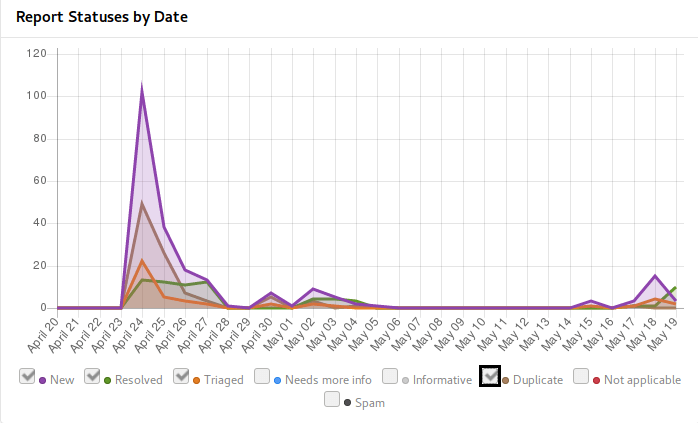
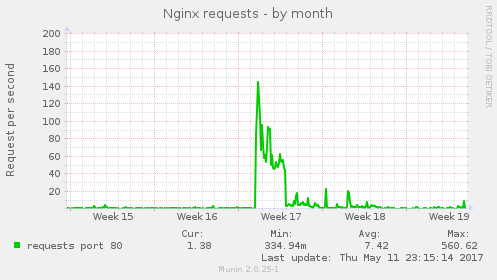
Weblate has started to use HackerOne Community Edition some time ago and I think it's good to share my experience with that. Do you have open source project and want to get more attention of security community? This post will answer how it looks from perspective of pretty small project. I've applied with Weblate to HackerOne Community Edition by end of March and it was approved early in April. Based on their recommendations I've started in invite only mode, but that really didn't bring much attention (exactly none reports), so I've decided to go public. I've asked for making the project public just after coming from two weeks vacation, while expecting the approval to take some time where I'll settle down things which have popped up during vacation. In the end that was approved within single day, so I was immediately under fire of incoming reports: Reports on HackerOne I was surprised that they didn't lie - you will really get huge amount of issues just after making your project public. Most of them were quite simple and repeating (as you can see from number of duplicates), but it really provided valuable input. Even more surprisingly there was second peak coming in when I've started to disclose resolved issues (once Weblate 2.14 has been released). Overall the issues could be divided to few groups: In the end it was really challenging week to be able to cope with the incoming reports, but I think I've managed it quite well. The HackerOne metrics states that there are 2 hours in average to respond on incoming incidents, what I think will not work in the long term :-). Anyway thanks to this, you can now enjoy Weblate 2.14 which more secure than any release before, if you have not yet upgraded, you might consider doing that now or look into our support offering for self hosted Weblate. The downside of this all was that the initial publishing on HackerOne made our website target of lot of automated tools and the web server was not really ready for that. I'm really sorry to all Hosted Weblate users who were affected by this. This has been also addressed now, but the infrastructure really should have been prepared before on this. To share how it looked like, here is number of requests to the nginx server: nxing requests I'm really glad I could make Weblate available on HackerOne as it will clearly improve it's security and security of hosted offering we have. I will certainly consider providing swag and/or bounties on further severe reports, but that won't be possible without enough funding for Weblate.

Filed under: Debian English SUSE Weblate

21 May 2017

Ritesh Raj Sarraf: apt-offline 1.8.0 released

I am pleased to announce the release of apt-offline, version 1.8.0. This release is mainly a forward port of apt-offline to Python 3 and PyQt5. There are some glitches related to Python 3 and PyQt5, but overall the CLI interface works fine. Other than the porting, there's also an important bug fixed, related to memory leak when using the MIME library. And then there's some updates to the documentation (user examples) based on feedback from users. Release is availabe from Github and Alioth

What is apt-offline ?

Description: offline APT package manager
apt-offline is an Offline APT Package Manager.
.
apt-offline can fully update and upgrade an APT based distribution without
connecting to the network, all of it transparent to APT.
.
apt-offline can be used to generate a signature on a machine (with no network).
This signature contains all download information required for the APT database
system. This signature file can be used on another machine connected to the
internet (which need not be a Debian box and can even be running windows) to
download the updates.
The downloaded data will contain all updates in a format understood by APT and
this data can be used by apt-offline to update the non-networked machine.
.
apt-offline can also fetch bug reports and make them available offline.

Categories:

Keywords:

Like:

Adnan Hodzic: Automagically deploy & run containerized WordPress (PHP7 FPM, Nginx, MariaDB) using Ansible + Docker on AWS

In this blog post, I ve described what started as simple migration of WordPress blog to AWS, ended up as automation project consisting of publishing multiple Ansible roles deploying and running multiple Docker images. If you re not interested in reading about my entire journey, cognition gains and how this process came to be, please skim down to Birth of: containerized-wordpress-project (TL;DR) section. Migrating WordPress blog to AWS (EC2, Lightsail?) Since I ve been sold on Amazon s AWS idea of cloud computing services for couple of years now. I ve wanted, and been trying to migrate this (WordPress) blog to AWS, but somehow it never worked out. Moving it to EC2 instance, with its own ELB volumes, AMI, EIP, Security Group it just seemed as an overkill. When AWS Lightsail was first released, it seemed that was an answer to all my problems. But it wasn t, disregarding its bit restrictive/dumbed down versions of original features. Living in Amsterdam, my main problem with it was that it was only available in a single US region. Regardless, I thought it had everything I needed for WordPress site, and as a new service, it had great potential. Its regional limitations were also good in a sense that they made me realize one important thing. And that s once I migrate my blog to AWS, I want to be able to seamlessly move/migrate it across different EC2 s and different regions once they were available. If done properly, it meant I could even have it moved across different clouds (I m talking to you Google Cloud). P.S: AWS Lightsail is now available in couple of different regions across Europe. Rollout which was almost smoothless. Fundamental problem of every migration is migration

Phase 1: Don t reinvent the wheel? When you have a WordPress site that s not self hosted. You want everything to work, but yet you really don t want to spend any time managing infrastructure it s on. And as soon as I started looking what could fit this criteria, I found that there were pre-configured, running out of box WordPress EC2 images available on AWS Marketplace, great! But when I took a look, although everything was running out of box, I wasn t happy with software stack it was all built on. Namely Ubuntu 14.04 and Apache, and all of the services were started using custom scripts. Yuck. With this setup, when it was time to upgrade (and it s already that time) you wouldn t be thinking about upgrade. You d only be thinking about another migration. Phase 2: What if I built everything myself? Installing and configuring everything manually, and then writing huge HowTo which I would follow when I needed to re-create whole stack was not an option. Same case with was scripting whole process, as overhead of changes that had to be tracked was too way too big. Being a huge Ansible fan, automating this step was a natural next step. I even found an awesome Ansible role which seemed like it s going to do everything I need. Except, I realized I needed to update all software that s deployed with it, and customize it since configuration it was deployed on wasn t as generic. So I forked it and got to work. But soon enough, I was knee deep in making and fiddling with various system changes. Something I was trying to get away in this case, and most importantly something I was trying to avoid when it was time for next update. Phase 3: Marriage made in heaven: Ansible + Docker + AWS Idea to have everything Dockerized was around from very start. However, it never made a lot of sense until I put Ansible into same picture. And it was at this point where my final idea and requirements become crystal clear. Use Ansible to configure and setup host ready for Docker ecosystem. Ecosystem consisting of multiple separate containers for each required service (WordPress + Nginx + MariaDB). Link them all together as a single service using Docker Compose. Idea was backed by thought to spend minimum to no time (and effort) on manual configuration of anything on the server. Level of attachment to this server was so low that I didn t even want to SSH to it. If there was something wrong, I could just nuke the whole thing and deploy code on a new healthy rolled out server with everything working out of box. After it was clear what needed to be done, I got to work.

Birth of: containerized-wordpress-project (TL;DR)

After a lot of work, end result is project which allows you to automagically deploy & run containerized WordPress instance which consists of 3 separate containers running:

Once run, containerized-wordpress playbook will guide you through interactive setup of all 3 containers, after which it will run all Ansible roles created for this project. End result is that host you have never even SSH-ed to will be fully configured and running containerized WordPress instace out of box.

Most importantly, this whole process will be completed in <= 5 minutes and doesn t require any Docker or Ansible knowledge! containerized-wordpress demo Console output of running containerized-wordpress Ansible Playbook: Console output of running "containerized-wordpress" Ansible Playbook

Accessing WordPress instance created from containerized-wordpress Ansible Playbook:

Accessing WordPress instance created from "containerized-wordpress" Ansible Playbook Did I end up migrating to AWS in the end? You bet. Thanks to efforts made in containerized-wordpress-project, I m happy to report my whole WordPress migration to AWS was completed in matter of minutes and that this blog is now running on Docker and on AWS! I hope this same project will help you take a leap in your migration. Happy hacking!

19 May 2017

Clint Adams: Help the Aged

I keep meeting girls from Walnut Creek who don t know about the CDROM.
Posted on 2017-05-19
Tags: ranticore

Michael Prokop: Debian stretch: changes in util-linux #newinstretch

We re coming closer to the Debian/stretch stable release and similar to what we had with #newinwheezy and #newinjessie it s time for #newinstretch! Hideki Yamane already started the game by blogging about GitHub s Icon font, fonts-octicons and Arturo Borrero Gonzalez wrote a nice article about nftables in Debian/stretch. One package that isn t new but its tools are used by many of us is util-linux, providing many essential system utilities. We have util-linux v2.25.2 in Debian/jessie and in Debian/stretch there will be util-linux >=v2.29.2. There are many new options available and we also have a few new tools available. Tools that have been taken over from other packages New tools New features/options addpart (show or change the real-time scheduling attributes of a process):
--reload reload prompts on running agetty instances
blkdiscard (discard the content of sectors on a device):
-p, --step <num>    size of the discard iterations within the offset
-z, --zeroout       zero-fill rather than discard
chrt (show or change the real-time scheduling attributes of a process):
-d, --deadline            set policy to SCHED_DEADLINE
-T, --sched-runtime <ns>  runtime parameter for DEADLINE
-P, --sched-period <ns>   period parameter for DEADLINE
-D, --sched-deadline <ns> deadline parameter for DEADLINE
fdformat (do a low-level formatting of a floppy disk):
-f, --from <N>    start at the track N (default 0)
-t, --to <N>      stop at the track N
-r, --repair <N>  try to repair tracks failed during the verification (max N retries)
fdisk (display or manipulate a disk partition table):
-B, --protect-boot            don't erase bootbits when creating a new label
-o, --output <list>           output columns
    --bytes                   print SIZE in bytes rather than in human readable format
-w, --wipe <mode>             wipe signatures (auto, always or never)
-W, --wipe-partitions <mode>  wipe signatures from new partitions (auto, always or never)
New available columns (for -o):
 gpt: Device Start End Sectors Size Type Type-UUID Attrs Name UUID
 dos: Device Start End Sectors Cylinders Size Type Id Attrs Boot End-C/H/S Start-C/H/S
 bsd: Slice Start End Sectors Cylinders Size Type Bsize Cpg Fsize
 sgi: Device Start End Sectors Cylinders Size Type Id Attrs
 sun: Device Start End Sectors Cylinders Size Type Id Flags
findmnt (find a (mounted) filesystem):
-J, --json             use JSON output format
-M, --mountpoint <dir> the mountpoint directory
-x, --verify           verify mount table content (default is fstab)
    --verbose          print more details
flock (manage file locks from shell scripts):
-F, --no-fork            execute command without forking
    --verbose            increase verbosity
getty (open a terminal and set its mode):
--reload               reload prompts on running agetty instances
hwclock (query or set the hardware clock):
--get            read hardware clock and print drift corrected result
--update-drift   update drift factor in /etc/adjtime (requires --set or --systohc)
ldattach (attach a line discipline to a serial line):
-c, --intro-command <string>  intro sent before ldattach
-p, --pause <seconds>         pause between intro and ldattach
logger (enter messages into the system log):
-e, --skip-empty         do not log empty lines when processing files
    --no-act             do everything except the write the log
    --octet-count        use rfc6587 octet counting
-S, --size <size>        maximum size for a single message
    --rfc3164            use the obsolete BSD syslog protocol
    --rfc5424[=<snip>]   use the syslog protocol (the default for remote);
                           <snip> can be notime, or notq, and/or nohost
    --sd-id <id>         rfc5424 structured data ID
    --sd-param <data>    rfc5424 structured data name=value
    --msgid <msgid>      set rfc5424 message id field
    --socket-errors[=<on off auto>] print connection errors when using Unix sockets
losetup (set up and control loop devices):
-L, --nooverlap               avoid possible conflict between devices
    --direct-io[=<on off>]    open backing file with O_DIRECT 
-J, --json                    use JSON --list output format
New available --list column:
DIO  access backing file with direct-io
lsblk (list information about block devices):
-J, --json           use JSON output format
New available columns (for --output):
HOTPLUG  removable or hotplug device (usb, pcmcia, ...)
SUBSYSTEMS  de-duplicated chain of subsystems
lscpu (display information about the CPU architecture):
-y, --physical          print physical instead of logical IDs
New available column:
DRAWER  logical drawer number
lslocks (list local system locks):
-J, --json             use JSON output format
-i, --noinaccessible   ignore locks without read permissions
nsenter (run a program with namespaces of other processes):
-C, --cgroup[=<file>]      enter cgroup namespace
    --preserve-credentials do not touch uids or gids
-Z, --follow-context       set SELinux context according to --target PID
rtcwake (enter a system sleep state until a specified wakeup time):
--date <timestamp>   date time of timestamp to wake
--list-modes         list available modes
-r, --reorder <dev>  fix partitions order (by start offset)
sfdisk (display or manipulate a disk partition table):
New Commands:
-J, --json <dev>                  dump partition table in JSON format
-F, --list-free [<dev> ...]       list unpartitioned free areas of each device
-r, --reorder <dev>               fix partitions order (by start offset)
    --delete <dev> [<part> ...]   delete all or specified partitions
--part-label <dev> <part> [<str>] print or change partition label
--part-type <dev> <part> [<type>] print or change partition type
--part-uuid <dev> <part> [<uuid>] print or change partition uuid
--part-attrs <dev> <part> [<str>] print or change partition attributes
New Options:
-a, --append                   append partitions to existing partition table
-b, --backup                   backup partition table sectors (see -O)
    --bytes                    print SIZE in bytes rather than in human readable format
    --move-data[=<typescript>] move partition data after relocation (requires -N)
    --color[=<when>]           colorize output (auto, always or never)
                               colors are enabled by default
-N, --partno <num>             specify partition number
-n, --no-act                   do everything except write to device
    --no-tell-kernel           do not tell kernel about changes
-O, --backup-file <path>       override default backup file name
-o, --output <list>            output columns
-w, --wipe <mode>              wipe signatures (auto, always or never)
-W, --wipe-partitions <mode>   wipe signatures from new partitions (auto, always or never)
-X, --label <name>             specify label type (dos, gpt, ...)
-Y, --label-nested <name>      specify nested label type (dos, bsd)
Available columns (for -o):
 gpt: Device Start End Sectors Size Type Type-UUID Attrs Name UUID
 dos: Device Start End Sectors Cylinders Size Type Id Attrs Boot End-C/H/S Start-C/H/S
 bsd: Slice Start  End Sectors Cylinders Size Type Bsize Cpg Fsize
 sgi: Device Start End Sectors Cylinders Size Type Id Attrs
 sun: Device Start End Sectors Cylinders Size Type Id Flags
swapon (enable devices and files for paging and swapping):
-o, --options <list>     comma-separated list of swap options
New available columns (for --show):
UUID   swap uuid
LABEL  swap label
unshare (run a program with some namespaces unshared from the parent):
-C, --cgroup[=<file>]                              unshare cgroup namespace
    --propagation slave shared private unchanged   modify mount propagation in mount namespace
-s, --setgroups allow deny                         control the setgroups syscall in user namespaces
Deprecated / removed options sfdisk (display or manipulate a disk partition table):
-c, --id                  change or print partition Id
    --change-id           change Id
    --print-id            print Id
-C, --cylinders <number>  set the number of cylinders to use
-H, --heads <number>      set the number of heads to use
-S, --sectors <number>    set the number of sectors to use
-G, --show-pt-geometry    deprecated, alias to --show-geometry
-L, --Linux               deprecated, only for backward compatibility
-u, --unit S              deprecated, only sector unit is supported

Benjamin Mako Hill: Children s Perspectives on Critical Data Literacies

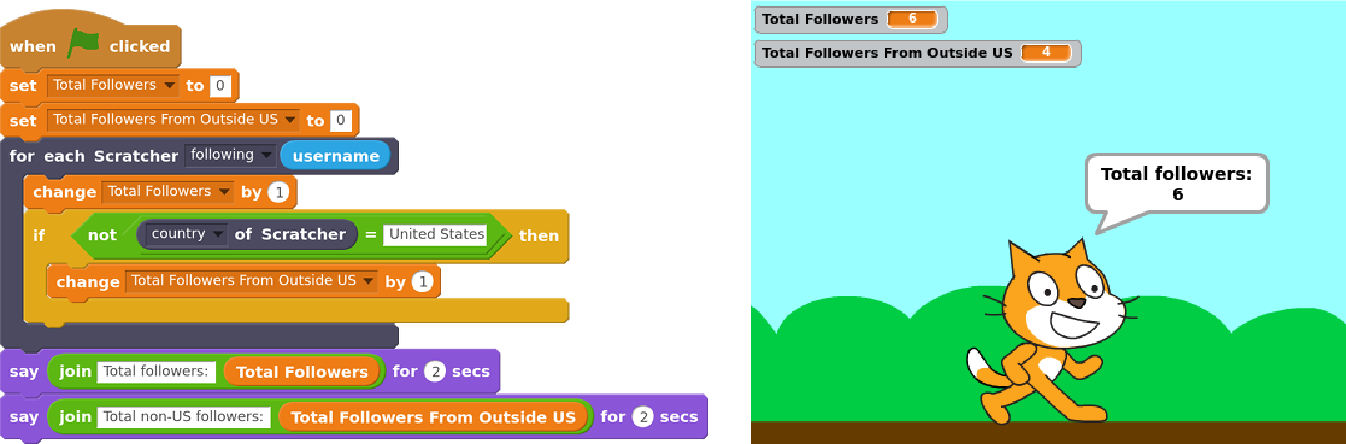
Last week, we presented a new paper that describes how children are thinking through some of the implications of new forms of data collection and analysis. The presentation was given at the ACM CHI conference in Denver last week and the paper is open access and online. Over the last couple years, we ve worked on a large project to support children in doing and not just learning about data science. We built a system, Scratch Community Blocks, that allows the 18 million users of the Scratch online community to write their own computer programs in Scratch of course to analyze data about their own learning and social interactions. An example of one of those programs to find how many of one s follower in Scratch are not from the United States is shown below. Last year, we deployed Scratch Community Blocks to 2,500 active Scratch users who, over a period of several months, used the system to create more than 1,600 projects. As children used the system, Samantha Hautea, a student in UW s Communication Leadership program, led a group of us in an online ethnography. We visited the projects children were creating and sharing. We followed the forums where users discussed the blocks. We read comment threads left on projects. We combined Samantha s detailed field notes with the text of comments and forum posts, with ethnographic interviews of several users, and with notes from two in-person workshops. We used a technique called grounded theory to analyze these data. What we found surprised us. We expected children to reflect on being challenged by and hopefully overcoming the technical parts of doing data science. Although we certainly saw this happen, what emerged much more strongly from our analysis was detailed discussion among children about the social implications of data collection and analysis. In our analysis, we grouped children s comments into five major themes that represented what we called critical data literacies. These literacies reflect things that children felt were important implications of social media data collection and analysis. First, children reflected on the way that programmatic access to data even data that was technically public introduced privacy concerns. One user described the ability to analyze data as, creepy , but at the same time, very cool. Children expressed concern that programmatic access to data could lead to stalking and suggested that the system should ask for permission. Second, children recognized that data analysis requires skepticism and interpretation. For example, Scratch Community Blocks introduced a bug where the block that returned data about followers included users with disabled accounts. One user, in an interview described to us how he managed to figure out the inconsistency:

At one point the follower blocks, it said I have slightly more followers than I do. And, that was kind of confusing when I was trying to make the project. [ ] I pulled up a second [browser] tab and compared the [data from Scratch Community Blocks and the data in my profile]. Third, children discussed the hidden assumptions and decisions that drive the construction of metrics. For example, the number of views received for each project in Scratch is counted using an algorithm that tries to minimize the impact of gaming the system (similar to, for example, Youtube). As children started to build programs with data, they started to uncover and speculate about the decisions behind metrics. For example, they guessed that the view count might only include unique views and that view counts may include users who do not have accounts on the website. Fourth, children building projects with Scratch Community Blocks realized that an algorithm driven by social data may cause certain users to be excluded. For example, a 13-year-old expressed concern that the system could be used to exclude users with few social connections saying:

I love these new Scratch Blocks! However I did notice that they could be used to exclude new Scratchers or Scratchers with not a lot of followers by using a code: like this:
when flag clicked
if then user s followers < 300
stop all.
I do not think this a big problem as it would be easy to remove this code but I did just want to bring this to your attention in case this not what you would want the blocks to be used for.
Fifth, children were concerned about the possibility that measurement might distort the Scratch community s values. While giving feedback on the new system, a user expressed concern that by making it easier to measure and compare followers, the system could elevate popularity over creativity, collaboration, and respect as a marker of success in Scratch.

I think this was a great idea! I am just a bit worried that people will make these projects and take it the wrong way, saying that followers are the most important thing in on Scratch. Kids conversations around Scratch Community Blocks are good news for educators who are starting to think about how to engage young learners in thinking critically about the implications of data. Although no kid using Scratch Community Blocks discussed each of the five literacies described above, the themes reflect starting points for educators designing ways to engage kids in thinking critically about data. Our work shows that if children are given opportunities to actively engage and build with social and behavioral data, they might not only learn how to do data analysis, but also reflect on its implications.

This blog-post and the work that it describes is a collaborative project by Samantha Hautea, Sayamindu Dasgupta, and Benjamin Mako Hill. We have also received support and feedback from members of the Scratch team at MIT (especially Mitch Resnick and Natalie Rusk), as well as from Hal Abelson from MIT CSAIL. Financial support came from the US National Science Foundation.

18 May 2017

Alessio Treglia: Digital Ipseity: Which Identity?

Within the next three years, more than seven billion people and businesses will be connected to the Internet. During this time of dramatic increases in access to the Internet, networks have seen an interesting proliferation of systems for digital identity management (i.e. our SPID in Italy). But what is really meant by digital identity ? All these systems are implemented in order to have the utmost certainty that the data entered by the subscriber (address, name, birth, telephone, email, etc.) is directly coincident with that of the physical person. In other words, data are certified to be identical to those of the user; there is a perfect overlap between the digital page and the authentic user certificate: an idem , that is, an identity.
This identity is our personal records reflected on the net, nothing more than that. Obviously, this data needs to be appropriately protected from malicious attacks by means of strict privacy rules, as it contains so-called sensitive information, but this data itself is not sufficiently interesting for the commercial market, except for statistical purposes on homogeneous population groups. What may be a real goldmine for the web company is another type of information: user s ipseity. It is important to immediately remove the strong semantic ambiguity that weighs on the notion of identity. There are two distinct meanings <Read More [by Fabio Marzocca]>

Michael Prokop: Debugging a mystery: ssh causing strange exit codes?

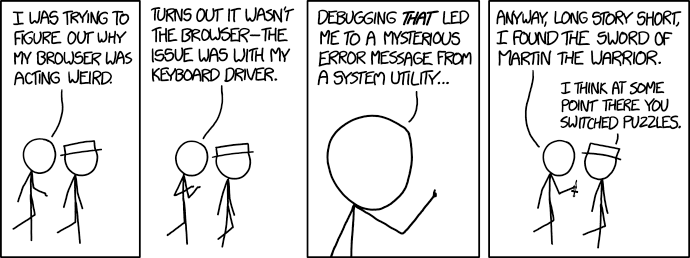
XKCD comic 1722 Recently we had a WTF moment at a customer of mine which is worth sharing. In an automated deployment procedure we re installing Debian systems and setting up MySQL HA/Scalability. Installation of the first node works fine, but during installation of the second node something weird is going on. Even though the deployment procedure reported that everything went fine: it wasn t fine at all. After bisecting to the relevant command lines where it s going wrong we identified that the failure is happening between two ssh/scp commands, which are invoked inside a chroot through a shell wrapper. The ssh command caused a wrong exit code showing up: instead of bailing out with an error (we re running under set -e ) it returned with exit code 0 and the deployment procedure continued, even though there was a fatal error. Initially we triggered the bug when two ssh/scp command lines close to each other were executed, but I managed to find a minimal example for demonstration purposes:
# cat ssh_wrapper 
chroot << "EOF" / /bin/bash
ssh root@localhost hostname >/dev/null
exit 1
EOF
echo "return code = $?"
What we d expect is the following behavior, receive exit code 1 from the last command line in the chroot wrapper:
# ./ssh_wrapper 
return code = 1
But what we actually get is exit code 0:
# ./ssh_wrapper 
return code = 0
Uhm?! So what s going wrong and what s the fix? Let s find out what s causing the problem:
# cat ssh_wrapper 
chroot << "EOF" / /bin/bash
ssh root@localhost command_does_not_exist >/dev/null 2>&1
exit "$?"
EOF
echo "return code = $?"
# ./ssh_wrapper 
return code = 127
Ok, so if we invoke it with a binary that does not exist we properly get exit code 127, as expected.
What about switching /bin/bash to /bin/sh (which corresponds to dash here) to make sure it s not a bash bug:
# cat ssh_wrapper 
chroot << "EOF" / /bin/sh
ssh root@localhost hostname >/dev/null
exit 1
EOF
echo "return code = $?"
# ./ssh_wrapper 
return code = 1
Oh, but that works as expected!? When looking at this behavior I had the feeling that something is going wrong with file descriptors. So what about wrapping the ssh command line within different tools? No luck with stdbuf -i0 -o0 -e0 ssh root@localhost hostname , nor with script -c ssh root@localhost hostname /dev/null and also not with socat EXEC: ssh root@localhost hostname STDIO . But it works under unbuffer(1) from the expect package:
# cat ssh_wrapper 
chroot << "EOF" / /bin/bash
unbuffer ssh root@localhost hostname >/dev/null
exit 1
EOF
echo "return code = $?"
# ./ssh_wrapper 
return code = 1
So my bet on something with the file descriptor handling was right. Going through the ssh manpage, what about using ssh s -n option to prevent reading from standard input (stdin)?
# cat ssh_wrapper
chroot << "EOF" / /bin/bash
ssh -n root@localhost hostname >/dev/null
exit 1
EOF
echo "return code = $?"
# ./ssh_wrapper 
return code = 1
Bingo! Quoting ssh(1):
     -n      Redirects stdin from /dev/null (actually, prevents reading from stdin).
             This must be used when ssh is run in the background.  A common trick is
             to use this to run X11 programs on a remote machine.  For example,
             ssh -n shadows.cs.hut.fi emacs & will start an emacs on shadows.cs.hut.fi,
             and the X11 connection will be automatically forwarded over an encrypted
             channel.  The ssh program will be put in the background.  (This does not work
             if ssh needs to ask for a password or passphrase; see also the -f option.)
Let s execute the scripts through strace -ff -s500 ./ssh_wrapper to see what s going in more detail.
In the strace run without ssh s -n option we see that it s cloning stdin (file descriptor 0), getting assigned to file descriptor 4:
dup(0)            = 4
[...]
read(4, "exit 1\n", 16384) = 7
while in the strace run with ssh s -n option being present there s no file descriptor duplication but only:
open("/dev/null", O_RDONLY) = 4
This matches ssh.c s ssh_session2_open function (where stdin_null_flag corresponds to ssh s -n option):
        if (stdin_null_flag)                                              
                in = open(_PATH_DEVNULL, O_RDONLY);
          else  
                in = dup(STDIN_FILENO);
         
This behavior can also be simulated if we explicitly read from /dev/null, and this indeed works as well:
# cat ssh_wrapper
chroot << "EOF" / /bin/bash
ssh root@localhost hostname >/dev/null </dev/null
exit 1
EOF
echo "return code = $?"
# ./ssh_wrapper 
return code = 1
The underlying problem is that both bash and ssh are consuming from stdin. This can be verified via:
# cat ssh_wrapper
chroot << "EOF" / /bin/bash
echo "Inner: pre"
while read line; do echo "Eat: $line" ; done
echo "Inner: post"
exit 3
EOF
echo "Outer: exit code = $?"
# ./ssh_wrapper
Inner: pre
Eat: echo "Inner: post"
Eat: exit 3
Outer: exit code = 0
This behavior applies to bash, ksh, mksh, posh and zsh. Only dash doesn t show this behavior.
To understand the difference between bash and dash executions we can use the following test scripts:
# cat stdin-test-cmp
#!/bin/sh
TEST_SH=bash strace -v -s500 -ff ./stdin-test 2>&1   tee stdin-test-bash.out
TEST_SH=dash strace -v -s500 -ff ./stdin-test 2>&1   tee stdin-test-dash.out
# cat stdin-test
#!/bin/sh
: $ TEST_SH:=dash 
$TEST_SH <<"EOF"
echo "Inner: pre"
while read line; do echo "Eat: $line"; done
echo "Inner: post"
exit 3
EOF
echo "Outer: exit code = $?"
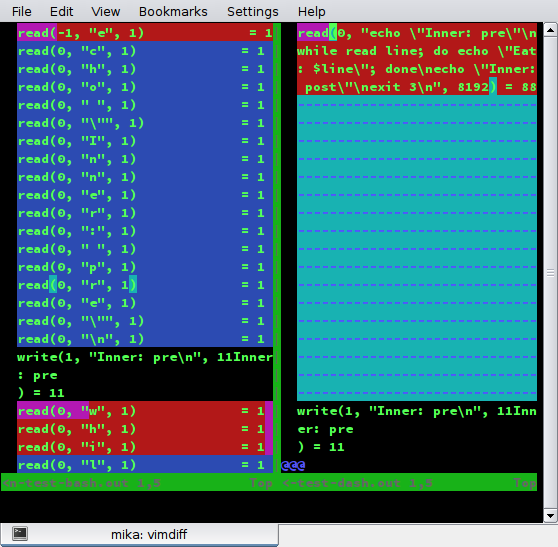
When executing ./stdin-test-cmp and comparing the generated files stdin-test-bash.out and stdin-test-dash.out you ll notice that dash consumes all stdin in one single go (a single read(0, ) ), instead of character-by-character as specified by POSIX and implemented by bash, ksh, mksh, posh and zsh. See stdin-test-bash.out on the left side and stdin-test-dash.out on the right side in this screenshot: screenshot of vimdiff on *.out files So when ssh tries to read from stdin there s nothing there anymore. Quoting POSIX s sh section:
When the shell is using standard input and it invokes a command that also uses standard input, the shell shall ensure that the standard input file pointer points directly after the command it has read when the command begins execution. It shall not read ahead in such a manner that any characters intended to be read by the invoked command are consumed by the shell (whether interpreted by the shell or not) or that characters that are not read by the invoked command are not seen by the shell. When the command expecting to read standard input is started asynchronously by an interactive shell, it is unspecified whether characters are read by the command or interpreted by the shell. If the standard input to sh is a FIFO or terminal device and is set to non-blocking reads, then sh shall enable blocking reads on standard input. This shall remain in effect when the command completes.
So while we learned that both bash and ssh are consuming from stdin and this needs to prevented by either using ssh s -n or explicitly specifying stdin, we also noticed that dash s behavior is different from all the other main shells and could be considered a bug (which we reported as #862907). Lessons learned: Thanks to Guillem Jover for review and feedback regarding this blog post.

17 May 2017

Reproducible builds folks: Reproducible Builds: week 107 in Stretch cycle

Here's what happened in the Reproducible Builds effort between Sunday May 7 and Saturday May 13 2017: Report from Reproducible Builds Hamburg Hackathon We were 16 participants from 12 projects: 7 Debian, 2 repeatr.io, 1 ArchLinux, 1 coreboot + LEDE, 1 F-Droid, 1 ElectroBSD + privoxy, 1 GNU R, 1 in-toto.io, 1 Meson and 1 openSUSE. Three people came from the USA, 3 from the UK, 2 Finland, 1 Austria, 1 Denmark and 6 from Germany, plus we several guests from our gracious hosts at the CCCHH hackerspace as well as a guest from Australia We had four presentations: Some of the things we worked on: We had a Debian focussed meeting where we discussed a number of topics: And then we also had a lot of fun in the hackerspace, enjoying some of their gimmicks, such as being able to open physical doors with ssh or controlling light and music with an webbrowser without authentication (besides being in the right network). Not quite the hackathon (This wasn't the hackathon per-se, but some of us appreciated these sights and so we thought you would too.) Many thanks to: News and media coverage openSUSE has had a security breach in their infrastructure, including their build services. As of this writing, the scope and impact are still unclear, however the incident illustrates that no one should rely on being able to secure their infrastructure at all times. Reproducible Builds help mitigate this by allowing independent verification of build results, by parties that are unaffected by the compromise. (Whilst this can happen to anyone. Kudos to openSUSE for being open about it. Now let's continue working on Reproducible Builds everywhere!) On May 13th Chris Lamb gave a talk on Reproducible Builds at OSCAL 2017 in Tirana, Albania. OSCAL 2017 Toolchain bug reports and fixes Packages' bug reports Reviews of unreproducible packages 11 package reviews have been added, 2562 have been updated and 278 have been removed in this week, adding to our knowledge about identified issues. Most of the updates were to move ~1800 packages affected by the generic catch-all captures_build_path (out of ~2600 total) to the more specific gcc_captures_build_path, fixed by our proposed patches to GCC. 5 issue types have been updated: Weekly QA work During our reproducibility testing, FTBFS bugs have been detected and reported by: diffoscope development diffoscope development continued on the experimental branch: strip-nondeterminism development reprotest development trydiffoscope development Misc. This week's edition was written by Ximin Luo, Holger Levsen and Chris Lamb & reviewed by a bunch of Reproducible Builds folks on IRC & the mailing lists.

Dirk Eddelbuettel: Upcoming Rcpp Talks

Very excited about the next few weeks which will cover a number of R conferences, workshops or classes with talks, mostly around Rcpp and one notable exception: If you are near one those events, interested and able to register (for the events requiring registration), I would love to chat before or after.

16 May 2017

Rapha&#235;l Hertzog: Freexian s report about Debian Long Term Support, April 2017

A Debian LTS logoLike each month, here comes a report about the work of paid contributors to Debian LTS. Individual reports In April, about 190 work hours have been dispatched among 13 paid contributors. Their reports are available: Evolution of the situation The number of sponsored hours decreased slightly and we re now again a little behind our objective. The security tracker currently lists 54 packages with a known CVE and the dla-needed.txt file 37. The number of open issues is comparable to last month. Thanks to our sponsors New sponsors are in bold.

No comment Liked this article? Click here. My blog is Flattr-enabled.

Foteini Tsiami: Outreachy internship!

Hello everyone! I am very happy that I have been accepted as an intern in the Outreachy 2017 round. My project task is to adapt sch-scripts into a new project ltsp-manager , primarily through internationalization and localization as well as documentation.

Sch-scripts is a graphical tool that assists with management of a classroom computer lab, managing users and network booted computers with LTSP, and is used in more than 1000 schools in Greece along with the epoptes user monitoring software.

Traditionally, maintaining an LTSP environment requires comfort with a commandline interface, but sch-scripts provides a graphical tool that simplifies the installation, configuration and management of an LTSP classroom.

Epoptes allows the teacher to monitor or assist users in the computer lab, as well as send messages, boot and shut down computers.

Both LTSP and Epoptes are present in Debian, and internationalizing sch-scripts is an important step towards making the same interface used successfully in Greek schools available to all Debian and Ubuntu users.

15 May 2017

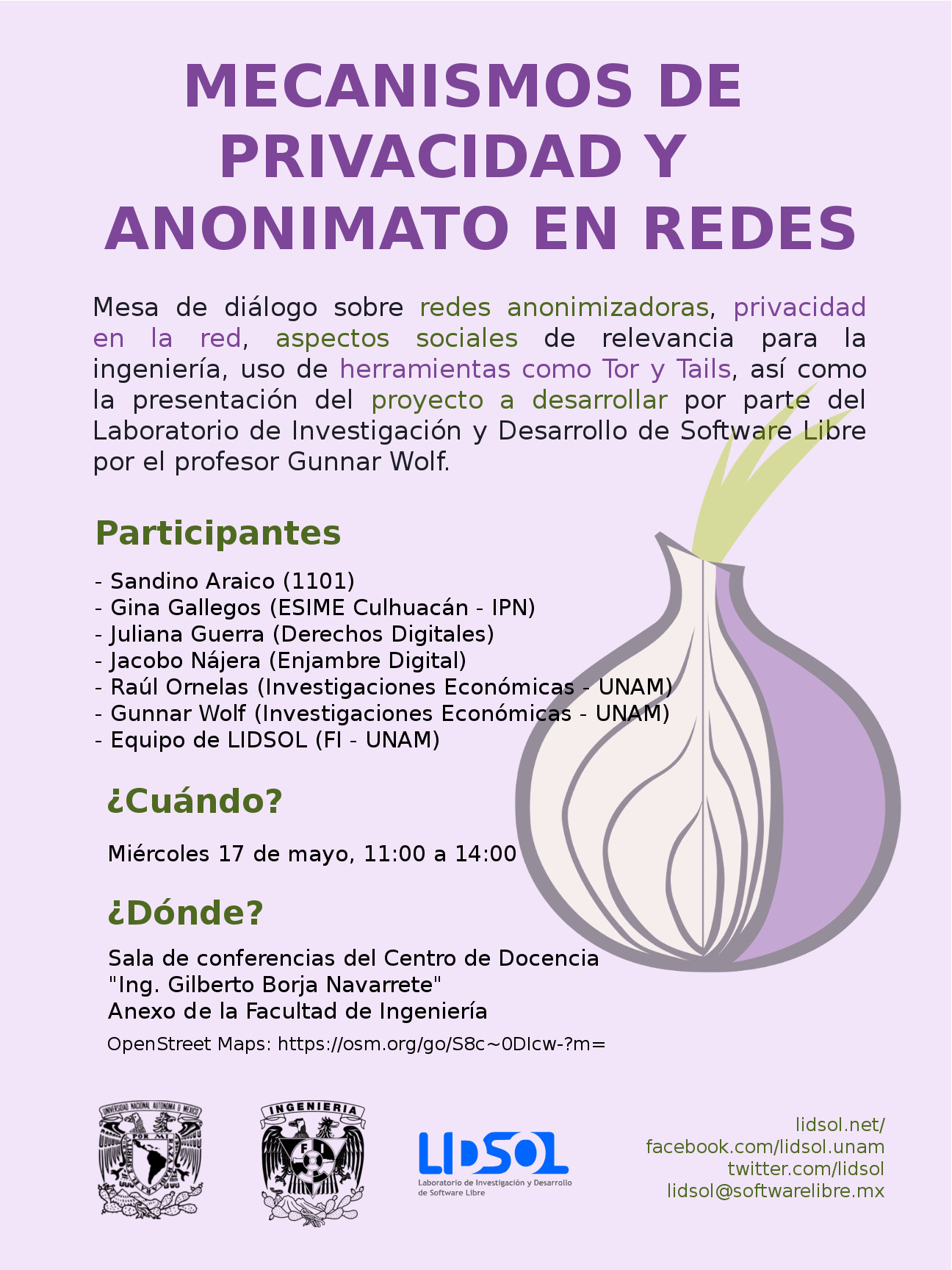
Gunnar Wolf: Starting a project on private and anonymous network usage

I am starting a work with the students of LIDSOL (Laboratorio de Investigaci n y Desarrollo de Software Libre, Free Software Research and Development Laboratory) of the Engineering Faculty of UNAM:

We want to dig into the technical and social implications of mechanisms that provide for anonymous, private usage of the network. We will have our first formal work session this Wednesday, for which we have invited several interesting people to join the discussion and help provide a path for our oncoming work. Our invited and confirmed guests are, in alphabetical order:

intrigeri: GNOME and Debian usability testing, May 2017

During the Contribute your skills to Debian event that took place in Paris last week-end, we conducted a usability testing session. Six people were tasked with testing a few aspects of the GNOME 3.22 desktop environment and of the Debian 9 (Stretch) operating system. A number of other people observed them and took notes. Then, two observers and three testers analyzed the results, that we are hereby presenting: we created a heat map visualization, summed up the challenges met during the tests, and wrote this blog post together. We will point the relevant upstream projects to our results. A couple of other people also did some usability testing but went in much more depth: their feedback is much more detailed and comes with a number of improvement ideas. I will process and publish their results as soon as possible. Missions Testers were provided a laptop running GNOME on a a Debian 9 (Stretch) Live system. A quick introduction (mostly copied from the one we found in some GNOME usability testing reports) was read. Then they were asked to complete the following tasks. A. Nautilus Mission A.1 Download and rename file in Nautilus
  1. Download a file from the web, a PDF document for example.
  2. Open the folder in which the file has been downloaded.
  3. Rename the dowloaded file to SUCCESS.pdf.
  4. Toggle the browser window to full screen.
  5. Open the file SUCCESS.pdf.
  6. Go back to the File manager.
  7. Close the file SUCCESS.pdf.
Mission A.2 Manipulate folders in Nautilus
  1. Create a new folder named cats in your user directory.
  2. Create a new folder named to do in your user directory.
  3. Move the cats folder to the to do folder.
  4. Delete the cats folder.
Mission A.3 Create a bookmark in Nautilus
  1. Create a folder named unicorns in your personal directory.
  2. This folder is important. Add a bookmark for unicorns in order to find it again in a few weeks.
Mission A.4 Nautilus display settings Folders and files are usually listed as icons, but they can also be displayed differently.
  1. Configure the File manager to make it show items as a list, with one file per line.
  2. You forgot your glasses and the font size is too small for you to see the text: increase the size of the text.
B. Package management Introduction On Debian, each application is available as a "package" which contains every file needed for the software to work. Unlike in other operating systems, it is rarely necessary and almost never a good idea, to download and install software from the authors website. We can rather install it from an online library managed by Debian (like an appstore). This alternative offers several advantages, such as being able to update all the software installed in one single action. Specific tools are available to install and update Debian packages. Mission B.1 Install and remove packages
  1. Install the vlc package.
  2. Start VLC.
  3. Remove the vlc package.
Mission B.2 Search and install a package
  1. Find a piece of software which can download files with BitTorrent in a graphical interface.
  2. Install the corresponding package.
  3. Launch that BitTorrent software.
Mission B.3 Upgrade the system Make sure the whole system (meaning all installed packages) is up to date. C. Settings Mission C.1 Change the desktop background
  1. Download an image you like from the web.
  2. Set the downloaded image as the desktop wallpaper.
Mission C.2 Tweak temporary files management Configure the system so that temporary files older than three days are deleted automatically. Mission C.3 Change the default video player
  1. Install VLC (ask for help if you could not do it during the previous mission).
  2. Make VLC the default video player.
  3. Download a video file from the web.
  4. Open the downloaded video, then check if it opens with VLC.
Mission C.4 Add and remove world clocks When you click the time and date in the top bar, a menu pops-up. There, you can display clocks in several time-zones.
  1. Add a clock with Rio de Janeiro timezone, then another showing the current time in Boston.
  2. Check that the time and date menu now displays these two additional clocks.
  3. Remove the Boston clock.
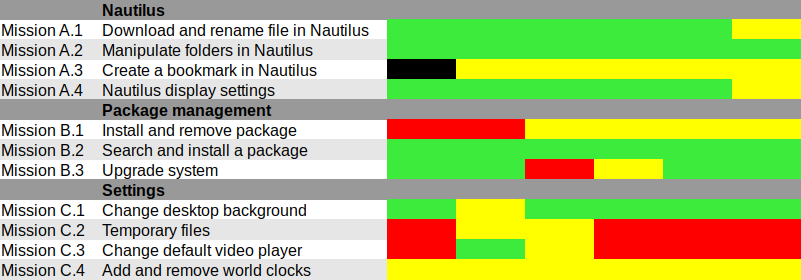
Results and analysis Heat map We used Jim Hall's heat map technique to summarize our usability test results. As Renata puts it, it is "a great way to see how the users performed on each task. The heat map clarifies how easy or difficult it was for the participant to accomplish a certain task.
  1. Scenario tasks (from the usability test) are arranged in rows.
  2. Test participants (for each tester) are arranged in columns.
  3. The colored blocks represent each tester s difficulty with each scenario task.
Green blocks represent the ability of the participant to accomplish the tasks with little or no difficulty. Yellow blocks indicate the tasks that the tester had significant difficulties accomplishing. Red blocks indicate that testers experienced extreme difficulty or where testers completed the tasks incorrectly. Black blocks indicate tasks the tester was unable to complete." Alternatively, here is the spreadsheet that was used to create this picture, with added text to avoid relying on colors only. Most tasks were accomplished with little or no difficulty so we will now focus on the problematic parts. What were the challenges? The heat map shows several "hot" rows, that we will now be looking at in more details. Mission A.3 Create a bookmark in Nautilus Most testers right-clicked the folder first, and eventually found they could simply drag'n'drop to the bookmarks location in the sidebar. One tester thought that he could select a folder, click the hamburger icon, and from there use the "Bookmark this folder" menu item. However, this menu action only works on the folder one has entered, not on the selected one. Mission B.1 Install and remove a package Here we faced a number of issues caused by the fact that Debian Live images don't include package indices (with good reason), so no package manager can list available software. Everyone managed to start a graphical package manager via the Overview (or via the CLI or Alt-F2 for a couple power users). Some testers tried to use GNOME Software, which listed only already installed packages (Debian bug #862560) and provided no way we could find to refresh the package indices. That's arguably a bug in Debian Live, but still: GNOME Software might display some useful information when it detects this unusual situation. We won't list here all the obstacles that were met in Synaptic: it's no news its usability is rather sub-optimal and better alternatives (such as GNOME Software) are in the works. Mission C.2 Tweak temporary files management The mission was poorly phrased: some observers had to clarify that it was specifically about GNOME, and not generic Linux system administration: some power-users were already searching the web for command-line tools to address the task at hand. Even with this clarification, no tester would have succeeded without being told they were allowed to use the web with a search query including the word "GNOME", or use the GNOME help or the Overview. Yet eventually all testers succeeded. It's interesting to note that regular GNOME users had the same problem as others: they did not try searching "temporary" in the Overview and did not look-up the GNOME Help until they were suggested to do so. Mission C.3 Change the default video player One tester configured one single video file format to be opened by default with VLC, via right-click in Nautilus Open with etc. He believed this would be enough to make VLC the default video player, missing the subtle difference between "default video player" and "default player for one single video format". One tester tried to complete this task inside VLC itself and then needed some help to succeed. It might be that the way web browsers ask "Do you want ThisBrowser to become the default web browser?" gave a hint an application GUI is the right place to do it. Two testers searched "default" in the Overview (perhaps the previous mission dealing with temporary files was enough to put them in this direction). At least one tester was confused since the only search result (Details View information about your system), which is the correct one to get there, includes the word View, which suggests that one cannot modify settings there, but only view them. One long-term GNOME user looked in Tweak Tool first, and then used the Overview. Here again, GNOME users experienced essentially the same issues as others. Mission C.4 Add and remove world clocks One tester tried to look for the clock on the top right corner of the screen, then realized it was in the middle. Other than this, all testers easily found a way to add world clocks. However, removing a world clock was rather difficult; although most testers managed to do it, it took them a number of attempts to succeed:
  1. Several testers left-clicked or right-clicked the clock they wanted to remove, expecting this would provide them with a way to remove it (which is not the case).
  2. After a while, all testers noticed the Select button (that has no text label nor tooltip info), which allowed them to select the clock they wanted to remove; then, most testers clicked the 1 selected button, hoping it would provide a contextual menu or some other way to act on the selected clocks (it doesn't).
  3. Eventually, everyone managed to locate the Delete button on the bottom right corner of the window; some testers mentioned that it is less visible and flashy than the blue bar that appears on the top of the screen once they had entered "Selection" mode.
General notes and observations

13 May 2017

Vincent Fourmond: Run QSoas complely non-interactively

QSoas can run scripts, and, since version 2.0, it can be run completely without user interaction from the command-line (though an interface may be briefly displayed). This possibility relies on the following command-line options:If you create a script.cmds file containing the following commands:
generate-buffer -10 10 sin(x)
save sin.dat
and run the following command from your favorite command-line interpreter:
~ QSoas --stdout --run '@ script.cmds' --exit-after-running
This will create a sin.dat file containing a sinusoid. However, if you run it twice, a Overwrite file 'sin.dat' ? dialog box will pop up. You can prevent that by adding the /overwrite=true option to save. As a general rule, you should avoid all commands that may ask questions in the scripts; a /overwrite=true option is also available for save-buffers for instance.I use this possibility massively because I don't like to store processed files, I prefer to store the original data files and run a script to generate the processed data when I want to plot or to further process them. It can also be used to generate fitted data from saved parameters files. I use this to run automatic tests on Linux, Windows and Mac for every single build, in order to quickly spot platform-specific regressions.To help you make use of this possibility, here is a shell function (Linux/Mac users only, add to your $HOME/.bashrc file or equivalent, and restart a terminal) to run directly on QSoas command files:
qs-run ()  
        QSoas --stdout --run "@ $1" --exit-after-running
 
To run the script.cmds script above, just run
~ qs-run script.cmds

About QSoasQSoas is a powerful open source data analysis program that focuses on flexibility and powerful fitting capacities. It is described in Fourmond, Anal. Chem., 2016, 88 (10), pp 5050 5052. Current version is 2.1

12 May 2017

Daniel Pocock: Kamailio World and FSFE team visit, Tirana arrival

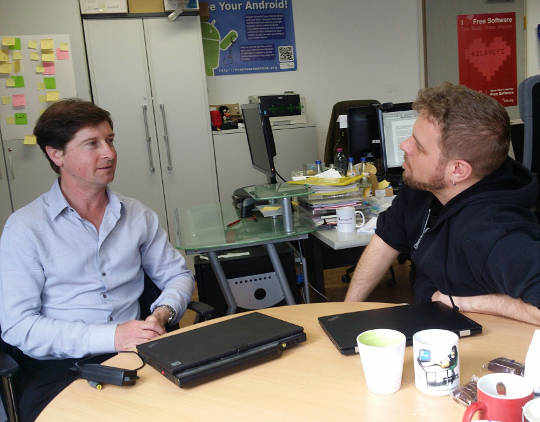
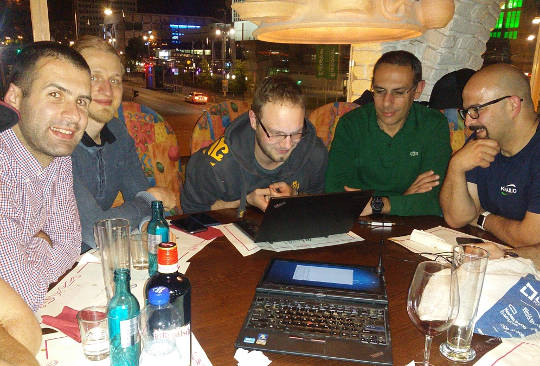
This week I've been thrilled to be in Berlin for Kamailio World 2017, one of the highlights of the SIP, VoIP and telephony enthusiast's calendar. It is an event that reaches far beyond Kamailio and is well attended by leaders of many of the well known free software projects in this space. HOMER 6 is coming Alexandr Dubovikov gave me a sneak peek of the new version of the HOMER SIP capture framework for gathering, storing and analyzing messages in a SIP network. exploring HOMER 6 with Alexandr Dubovikov at Kamailio World 2017 Visiting the FSFE team in Berlin Having recently joined the FSFE's General Assembly as the fellowship representative, I've been keen to get to know more about the organization. My visit to the FSFE office involved a wide-ranging discussion with Erik Albers about the fellowship program and FSFE in general. discussing the Fellowship program with Erik Albers Steak and SDR night After a hard day of SIP hacking and a long afternoon at Kamailio World's open bar, a developer needs a decent meal and something previously unseen to hack on. A group of us settled at Escados, Alexanderplatz where my SDR kit emerged from my bag and other Debian users found out how easy it is to apt install the packages, attach the dongle and explore the radio spectrum. playing with SDR after dinner Next stop OSCAL'17, Tirana Having left Berlin, I'm now in Tirana, Albania where I'll give an SDR workshop and Free-RTC talk at OSCAL'17. The weather forecast is between 26 - 28 degrees celsius, the food is great and the weekend's schedule is full of interesting talks and workshops. The organizing team have already made me feel very welcome here, meeting me at the airport and leaving a very generous basket of gifts in my hotel room. OSCAL has emerged as a significant annual event in the free software world and if it's too late for you to come this year, don't miss it in 2018. OSCAL'17 banner

Norbert Preining: Gaisi Takeuti, 1926-2017

Two days ago one of the most influential logician of the 20th century has passed away, Gaisi Takeuti ( ). I had the pleasure to meet this excellent man, teacher, writer, thinker several times while he was the president of the Kurt G del Society. I don t want to recall his achievements in mathematical logic, in particular proof theory, because I am not worth to write about such a genius. I want to recall a few personal stories from my own experience. I came into contact with Prof. Takeuti via is famous book Proof Theory, which my then Professor, now colleague and friend Matthias Baaz used for teaching us students proof theory. Together with Shoenfield s Mathematical Logic these two books became the foundation of my whole logic education. Now again in print, back then the Proof Theory was a rare precious. Few prints did remain in the library, and over the years one by one disappeared, until the last copy we had access to was my copy where I had scribbled pages and pages of notes and proofs. Matthias later on used these copies for his lectures, I should have written on the back-side! I remember well my first meeting with Prof. Takeuti: I was on the Conference on Internationalization in 2003 in Tsukuba, long before I moved to Japan. Back then I was just finishing my PhD and without much experience. When I arrived in the hotel, without fail there was a message of Prof. Takeuti inviting me for dinner the following day. We had dinner in a specialty restaurant of his area, together with is lovely wife. I was soo nervous about Japanese manners and stuttered Japanese phrases just to be stopped by Prof. Takeuti pouring himself a glass of sake and telling me: Relax, and forget the rules and fill your own glass when you want to. I am well aware that this liberal attitude didn t extend to Japanese colleagues, where he, descendant from a Samurai family, was at times very, extremely strict. The dinner was decided upon already, not easy since I was still strict vegetarian back than (now I would have enjoyed the dinner much more!), but for the last course we could decide. I remember with a smile how Prof. Takeuti suggested in Japanese various sweets, just to be interrupted by his wife with No Gaisi, no! . I asked what is going on and she explained that he wants to order a Japanese sweet for me I agreed, and that was probably the worst dish I had in Japan. Slippy noodles swimming in a cold broth, to be picked with chopsticks and put into a semi-sweet soja-sauce. I finished it, but it wasn t good. I should have thought twice when Prof. Takeuti s wife ordered a normal fruit salad. Scientifically he was simply a genius and famous for not reading a lot but reinventing everything. One of my research areas, G del logics, was reinvented by him as Intuitionistic Fuzzy Logic (for an overview see my talk at the Collegium Logicum 2016: G del Logics a short survey). But I want to recall one of my favorite articles of him: A Conservative Extension of Peano Arithmetic . This was published as part 2 of Volume 17 of Publications of the Mathematical Society of Japan, retypeset pdf is available here, JSTOR page. Therein he develops classical (real and complex) analysis over Peano s arithmetic. He shows that any arithmetical theorem proved in analytic number theory is a theorem in Peano s arithmetic. The proof uses Gentzen s cut elimination theorem, the center piece of modern proof theory. With Georg Kreisel having passed away in 2015, and now Gaisi Takeuti, we loose two of the greatest, if not the greatest minds in logic.


11 May 2017

Arturo Borrero Gonz lez: Debunk some Debian myths

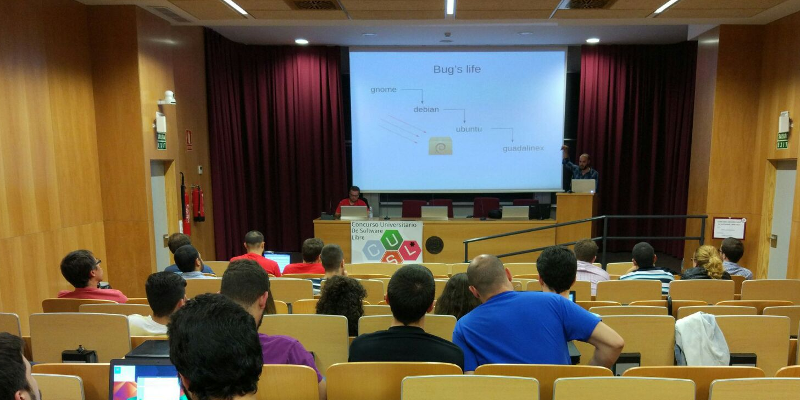
Debian CUSL 11 Debian has many years of history, about 25 years already. With such a long travel over the continous field of developing our Universal Operating System, some myths, false accusations and bad reputation has arisen. Today I had the opportunity to discuss this topic, I was invited to give a Debian talk in the 11 Concurso Universitario de Software Libre , a Spanish contest for students to develop and dig a bit into free-libre open source software (and hardware). In this talk, I walked through some of the most common Debian myths, and I would like to summarize here some of them, with a short explanation of why I think they should be debunked. Picture of the talk myth #1: Debian is old software Please, use testing or stable-backports. If you use Debian stable your system will in fact be stable and that means: updates contain no new software but only fixes. myth #2: Debian is slow We compile and build most of our packages with industry-standard compilers and options. I don t see a significant difference on how fast linux kernel or mysql run in a CentOS or in Debian. myth #3: Debian is difficult I already discussed about this issue back in Jan 2017, Debian is a puzzle: difficult. myth #4: Debian has no graphical environment This is, simply put, false. We have gnome, kde, xfce and more. The basic Debian installer asks you what do you want at install time. myth #5: since Debian isn t commercial, the quality is poor Did you know that most of our package developers are experts in their packages and in their upstream code? Not all, but most of them. Besides, many package developers get paid to do their Debian job. Also, there are external companies which do indeed offer support for Debian (see freexian for example). myth #6: I don t trust Debian Why? Did we do something to gain this status? If so, please let us know. You don t trust how we build or configure our packages? You don t trust how we work? Anyway, I m sorry, you have to trust someone if you want to use any kind of computer. Supervising every single bit of your computer isn t practical for you. Please trust us, we do our best. myth #7: nobody uses Debian I don t agree. Many people use Debian. They even run Debian in the International Space Station. Do you count derivatives, such as Ubuntu? I believe this myth is just pointless, but some people out there really think nobody uses Debian. myth #8: Debian uses systemd Well, this is true. But you can run sysvinit if you want. I prefer and recommend systemd though :-) myth #9: Debian is only for servers No. See myths #1, #2 and #4. You may download my slides in PDF and in ODP format (only in Spanish, sorry for English readers).
9 May 2017

Clint Adams: Four years

Posted on 2017-05-09
Tags: barks

Next.

Previous.