Search Results: "weasel"

8 August 2008

John Goerzen: Weird Firefox Problem

Once again, I find myself turning to this wonderful series of tubes for help on a weird problem.

I have Firefox (Iceweasel) on all the computers I regularly use. One of these computers has had a persistent problem.

After using it for awhile, it takes a really long time to look up hostnames in DNS. And after upgrading to Firefox 3, it got much worse. Not only did name resolution get slow, but sometimes page loads would get exceptionally slow as well. I could have 5 tabs open, and all of a sudden at the magic moment, nothing would load on any tab. It was as if I was being hit by 75% packet loss. And new pages wouldn't load, either.

tcpdump showed Firefox not even sending out packets at these times. After a few minutes, it might be back to normal. But I could always quit and restart and it would be fine.

Now, here's the weird thing: I've eliminated every possible difference I can think of between this one machine and the others I use Firefox on. My plugins and extensions are the same set with the same versions. My configuration is the same. When this problem is happening, other network-related programs (even other web browsers) on the same machine are working fine. Nobody else here seems to be having this problem.

Any ideas?

3 August 2008

Wouter Verhelst: Rijksregister access through Belgian electronic ID card

On the mijndossier website, it is possible to view your own file in the belgian 'rijksregister' (state register), provided you have an electronic ID card and a computer set up to use it. I should note that the website uses a certificate that iceweasel on Debian, in its default configuration and after installing and configuring the necessary packages for using the electronic ID card, still warns about the certificate being 'not safe'. I should check what's going on there. But that is not what this post is about. What it is about, however, is the fact that this website contains a "death" chapter. Now, by definition, this "death" chapter can never be filled in, since one can only access their own data. And I can hardly do that if I'm death, can I? Oh well, not that I care or anything.

2 July 2008

Wouter Verhelst: No more OpenCT

I just uploaded belpic 2.6.0-4, with a few minor changes, and one major one. The minor changes are, first, a fix to beid-register-pkcs11.html so that it tries to install libbeidpkcs11.so.2, rather than just the .so file, into iceweasel; otherwise you have to install the -dev package (or manually install the library, or change the .html file) to be able to use beid in your browser. Second, there were some typo fixes of which a bugreport had been open embarrasingly long. Oops. The major change, however, is the fact that the debian packages now no longer have support for OpenCT as an alternative to PC/SC Lite. This isn't actually supported by the belpic upstream; and while the Debian packages did include support for such cardreaders, I do have a feeling that it was causing some problems. So why did I include it in the first place, you ask? Well, because my very own cardreader wasn't supported by PC/SC Lite. You see, when I originally packaged the eID software back in 2004, most people didn't have an eID yet, let alone a cardreader; and the fairly common ACR38U-based smartcard readers that are thrown to people's heads these days were nowhere to be found yet. So, I googled for a smartcard manufacturer, found Gemplus who claimed Linux support for (at least some of) their models, found the distributor for Belgium, and ordered a smartcardreader. It did work with Linux allright—but OpenCT, only. Only later on did I find that belpic expects PC/SC Lite. In itself, this was no problem; the first versions of belpic (up to and including 2.3.13) did have the OpenCT and other reader drivers still compiled in, anyway; only with 2.5 and later did Zetes choose to remove them. That's when I started patching, and that's when I discovered that problems began... So, anyway. No more mr nice guy OpenCT. I needed to do my tax declaration, and since it'd been a while since I last tried to do some belpic stuff (since before the move, actually), I discovered that I couldn't find my cardreader anymore. So, I bought me a proper ACR38U-based one, and did my tax declarations before doing the upload. How's that for testing? In any case, if anyone beside me was using the OpenCT bits in belpic, they're now out of luck. Go get yourself an ACR38U-based reader—they're only 15ish, anyway...

1 July 2008

Axel Beckert: Conkeror in the Debian NEW queue

I already mentioned a few times in the blog that I’m working on a Debian package of the Conkeror web browser. And now, after a lot of fine-tuning (and I still further new ideas how to improve the package ;-) Conkeror is finally in the NEW queue and hopefully will hit unstable in a few days. (Update Thursday, 03-Jul-2008, 18:13 CEST: The package has been accepted by Jörg and should be included on most architectures in tonight’s updates.) Those who could hardly await it can fetch Conkeror .debs from http://noone.org/debian/. The conkeror package itself is a non-architecture specific package (but needs xulrunner-1.9 to be available), and its small C-written helper program spawn-process-helper is available as package conkeror-spawn-process-helper for i386, amd64, sparc, alpha, powerpc, kfreebsd-i386 and kfreebsd-amd64. There are no backported packages for Etch available, though, since I don’t know of anyone yet, who has successfully backported xulrunner-1.9 to Etch. Interestingly the interest in Conkeror seems to have risen in the Debian community independently of its Debian packaging. Luca Capello, who sponsored the upload of my Conkeror package, pointed me to two blog post on Planet Debian, written by people being fed up with Firefox 3 already and are looking for a more lean, but still Gecko based web browser: Decklin Foster is fed up with Firefox’ -eh- Iceweasel’s arrogance and MJ Ray is fed up with Firefox 3 and its SSL problems. Since my previously favourited Gecko based web browser Kazehakase never became really stable but instead became slow and leaking memory (and therefore not much better than Firefox 2), I can imagine that it’s no more an candidate for people seaking for a lean and fast web browser. Conkeror has some “strange” concepts of which the primary one is that it looks and feels like Emacs: Footnotes *) I just noticed that there is now also muttator, making Thunderbird look and behave like vim (and probably also mutt), too. Wonder into which e-mail client the Emacs community will convert Thunderbird. GNUS? RMAIL? VM? Wanderslust? What will it be called? Wunderbird? Thunderslust? (SCNRE ;-)

26 June 2008

Uwe Hermann: Configure Firefox/Iceweasel 3 to be more secure / usable / bearable

Today seems to be Firefox/Iceweasel 3 Bashing Day on Planet Debian, so let me join the fun :) I agree with most other people that the default Firefox/Iceweasel 3 config is not ideal, so here's what I did to fix it. Some of these items improve performance, some remove annoyances, some remove privacy issues, some remove security issues. Not everything here may be desirable for people other than me. General Preferences Select "Edit / Preferences". Main: Tabs: Content: Privacy: Security: Advanced:

Pierre Habouzit: firefox3 and SSL

Yes Stefano, I too believe that the SSL certificate thingy in Iceweasel 3 is just a bad joke. I mean WHAT THE FUCK WERE THEY THINKING ? At least in the RCs it improved, and the logo isn't the same as 404, it took me 10 refresh the first time I saw it to understand that it was not a 404 but an untrusted self-signed certificate. And the whole "exception" thing is absurd. NO I DON'T WANT TO ADD AN EXCEPTION you morons. Here would be a good UI, that I never saw implemented in any browser but would make sense: It's enough for 99.9% of the users. Then, some of us really care about importing some untrusted certificates (for our own webmails e.g.). Then well, a small button that allows advanced users to check, import, and mark an untrusted certificate as trusted is just what one needs. One can even hide that in some menu, it would be fine. I for example, have only checked the SSL certificate from my webmail and something like 3 or 4 websites. I do NOT want to be bugged for the other. But no, instead we have this completely delirious interface that no-one can sanely call User Interface. They're on crack. Anyways, here is a way to make your pain easier, either in about:config or in your $ HOME /.mozilla/firefox/$ profile-with-name-on-crack-id /user.prefs set the following values this way[1]:
 user_pref("browser.ssl_override_behavior", 2);
 user_pref("browser.xul.error_pages.expert_bad_cert", true);
It makes validating a certificate two clicks away (one of the settings shows the 'add exception' buttons instead of showing a link to make them visible, the other settings makes firefox download the certificate for you so that you don't have to ASK HIM to do so[2]. And you know the worst thing ? I'm sure the guy(s) who wrote this fucking dialog is(are) very proud of it.
Notes [1] Thanks to glandium for the hints [2] WTF people, WTF do you need us to make you download the certificate. This is nonsensical, the user had already 3 clicks to have the add exception dialog, and you need one to download the certificate ? WTF are you thinking!!!

Stefano Zacchiroli: firefox 3 un-ranting

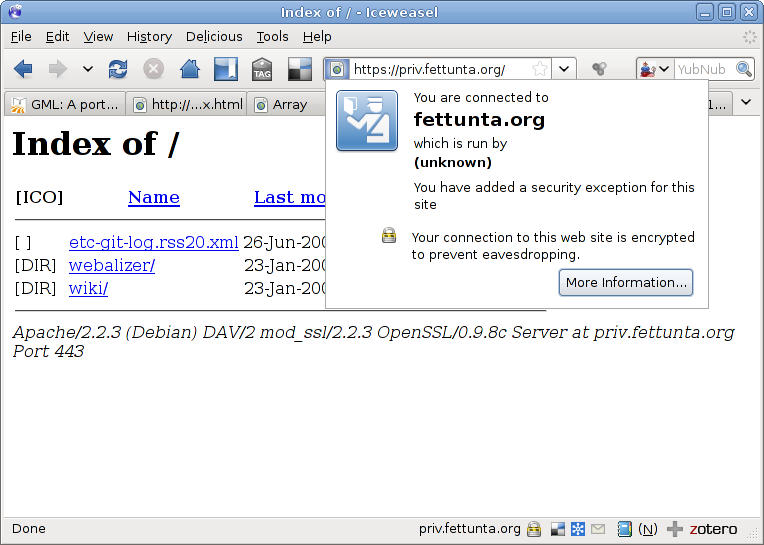
Gunnar, have a look at this: iceweasel-ssl.png. So your example using the Penta website was just a bad one, and I personally agree with the "INVALID" resolution of your bug report. In fact, showing a partially encrypted connection as an insecure one is an overall advantage for (l)user securities, as with the browser interfaces we are used to use, we don't know which parts are actually sent encrypted and which are not. As you can see in the example above a fully encrypted connection is properly reported as such by Firefox 3.0. FWIW: I'm overall satisfied with Firefox 3.0, especially about the new URL bar Wouther is disliking. Yes it is a bit slower than before, but even on my 4-year old laptop it is perfectly usable. The HTML title shown there? Well, it is rather handy when I start typing bugs.debian.org and then I've to discriminate among tons of almost identical bug report URLs ... Is the about:config hand-holding dialog worst than the pop-up the first time you "have provided unencrypted information" in a random form? It is not, we have probably just forgot about the first time we unchecked the corresponding checkbox. All in all, the only "feature" of the new Firefox I found incredibly stupid is the SSL certificate exception mechanism. Installing the untrusted certificate is what? ... 5 click-away from the initial page? That is just dumb. (And as it is well-known that habits form anyhow, getting the habits harder to form is just a way to piss-off users.)

25 June 2008

Decklin Foster: Arrogance

Today, like any other day, I started Firefo^WIceweasel. I mapped it at the bottom of my window stack. It promptly raised itself. I closed everything and tried opening a new homepage. Nope, that's fine. I tried again with two tabs saved. It raised itself again. I have been watching variations of this bug regress for eight years now and I am tired of it. So I installed Conkeror. After a good three-year run of being able to sit down at someone else's random PC and say, "hey, a web browser that nearly works as well as mine" (since it is, you know, the same one), I look forward to being utterly fed up with how primitive the rest of the world is again. And what are we in this for, if not that?

Gunnar Wolf: Firefox suckyness

I have to agree with Wouter regarding Firefox Iceweasel 3's suckyness. It might be a superior product in many fronts (I prefer it overall to its predecesor), but were it not for the usefulness of its many available extensions (most notably Web Developer, which has become an integral part of my everyday life), I'd have jumped ship for basically any other browser.
I'm just... adding an <AOL>ME TOO!</AOL> on Wouter's comments... WTF, just go to about:config...

So... Are you telling me that Firefox (even if it were the original, Mozilla-blessed version) has a warranty? No? Didn't think so... Go to about:license. You will see the very familiar and expected:
7. Disclaimer of warranty
Covered code is provided under this license on an "as is" basis, without warranty of any kind, either expressed or implied, including, without limitation, warranties that the covered code is free of defects (...)
Other than this downright stupid issue (which by and large goes against the regular Free Software culture), my main gripe is the number of active regions in the location-entry boxes - Yes, I can jump straight to the search box with Ctrl-K and to the location bar with Ctrl-L, but if I happen to try to move between them with good ol' Tab, why must it be inconsistent?
What do I mean? Go to the search field, press Tab. As expected, you are in the Location entry. Now, press Shift-Tab. For 5 points, where are you now? Bzzzt, no, you are not back where you began - You are in a stupid button which looks like your favicon giving you the identity information about the page you are looking at.
Having this button is a great idea - but why does it have to sit in the way of my tabulation? Were it because, in an inspired moment, the Firefox interface designers decided that buttons should be keyboard-accessible, I'd be most happy (it is by far my most mouse-intensive application, and I hate that... But it's just a button embedded in what should be a clean text-entry box.
And for that matter, it is not even a consistent button - Shift-tabbing from the search field will not get you to the search engine selector. And no key combination will lead you to the noisy (and also, mutually inconsistent) iconic buttons at the far right of both fields... Which, again, have no reason to be inside a text entry field!
Oh, and I found another pretty little jewel: Go to any site which has a self-signed SSL certificate. Of course, Firefox will go to great lengths to make sure you understand how unsafe is it for you to trust anybody who didn't pay big bucks to Verisign... But this is enough reason for me to send a bug report:

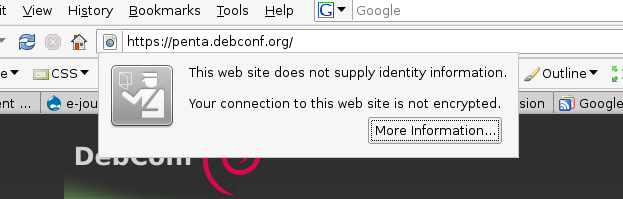
I am connecting through a crypted HTTPS connection. The site is providing identity information - not certified, right, but it does provide something. And the connection is crypted. Firefox/Iceweasel 2 showed me the URL in a light-yellow background showing the connection was secure - Now it just denies penta.debconf.org the right to call itself secure.
(Yes, I am not an interface designer... But it seems neither are they)
[update]Bug filed. Any comments will be welcome in Bugzilla. The bug with the Debconf site (and I do regard it as a bug) is that Iceweasel displays that Your connection to this web site is not encrypted because some of the elements (i.e. the CSS, images..) are sent in the clear - Even though the real information is crypted. Ever heard of data/visualization decoupling?

Wouter Verhelst: Iceweasel sucks.

I knew this since quite a while, actually—most of the firefox developers seem to developing for something else than what I use; but, well, using something else isn't very appealing to me. Anyway, yesterday the Iceweasel 3.0 update came on my laptop, and I couldn't help but sigh. I hadn't tried anything, hadn't read any reviews, didn't know what would happen; but given their track record, I expected only problems. I wasn't disappointed. Or, well, I was, depending on how you look at it. And that's only after a day. I fear the next few weeks. For the time being, hints on getting the above moronic stupidities gone (apart from the about:config one, which takes a single click) would be helpful. And then of course I'm not even mentioning the fact that most of my add-ons don't work with 3.0 yet—but that is to be expected with a new brouwser, of course. At least flashblock works, which is the most important one.

22 June 2008

David Moreno Garza: Firefox 3 for Debian Lenny

Well, it is actually Iceweasel 3 for Debian testing. Iceweasel just hit unstable yesterday (it had been for a while on experimental) and if you are running testing and can't wait for it to get through QA, I've made a backport for you:

deb http://debian.axiombox.com/ testing main

The newest xulrunner was also backported, which was, yes, the whole point for this.

UPDATE: Iceweasel 3 was uploaded a couple of weeks now, not yesterday :)

Ingo Juergensmann: Flash on PPC

It's an ongoing drama: Flash player on PowerPC systems - you can either choose to ignore flash at all (no mozilla plugin installed) or the a non-working version of Gnash installed, which gives you no output of YouTube videos and hanging, CPU eating processes:


PID USER PR NI VIRT RES SHR S %CPU %MEM TIME+ COMMAND
16302 ij 20 0 63964 22m 13m R 75.0 2.2 4:27.56 gtk-gnash
16308 ij 20 0 44792 13m 10m S 5.9 1.3 0:24.46 gtk-gnash
16297 ij 20 0 54172 14m 10m R 2.6 1.4 0:11.07 gtk-gnash
16301 ij 20 0 54172 14m 10m S 2.6 1.4 0:10.92 gtk-gnash


I really doubt that there will ever be a working Flash player for non-Intel compatible architectures. :-(
I'll try swf-player next, but have little hope that it will be better than crHHgnash....

UPDATE:
swfdec-mozilla doesn't work properly either. It hangs iceweasel just a second after playing a YouTube video and the picture is broken.

20 June 2008

Mike Hommey: Fixing a longstanding bug while passing by

While digging what was happening in bug #473557, I happened to get just in the right place of Iceweasel’s code to fix the longstanding issue of it proposing “less” and other terminal-only applications as helpers for some MIME types. The upstream bug is 6 years old. The fix is 3 lines. One of these lines is “ ” It will be in next xulrunner upload to unstable.

11 June 2008

Yves-Alexis Perez: French taxes declaration

(this is an english repost from the original french one, for planet debian) Ok, this is just a procedure, which worked for me, for french taxes declaration. The french governement only allows on Linux configurations with i386 architectures, and firefox. This solutions works (at the date of the post) on a Debian Sid amd64, but should work on every x86/amd64 Debian, because we use a clean i386 chroot. Let's go:

# get the packages
corsac@hidalgo: sudo aptitude -R install cdebootstrap chroot

# create the i386 chroot:
corsac@hidalgo: sudo cdebootstrap -a i386 sid chroot http://ftp.fr.debian.org/debian

# bind-mount /tmp for Xorg in the chroot:
corsac@hidalgo: sudo mount -o bind /tmp debian/chroot/tmp

# Entering chroot:
corsac@hidalgo: sudo chroot debian/chroot /bin/bash

# configure apt:
root: echo "deb http://ftp.fr.debian.org/debian/ sid main contrib non-free" > /etc/apt/sources.list
root: aptitude update

# installing packages:
root: aptitude -R install iceweasel sun-java5-plugin

# no need to run iceweasel as root:
root: adduser corsac

# done for inside the chroot We now need two things in the chroot:

 corsac@hidalgo: cp ~/.Xauthority debian/chroot/home/corsac/ Time to re-enter the chroot:

corsac@hidalgo: sudo chroot debian/chroot /bin/bash

root: su - corsac

# we export the DISPLAY to use host X
corsac: export DISPLAY=:0.0

# ready to go
corsac: iceweasel Now you should be able to go to the website and declare. No need for symbolic link or LD_LIBRARY_PATH hack. I failed to use sun-java6-plugin. Don't hesitate to purge your chroot and restart from a clean one. You can also clean the folder where the shared lib is stored, in ~/.TaoUSign. Hope that helps.

1 June 2008

Axel Beckert: One month with Debian Lenny on the EeePC

I ogled with an ASUS EeePC since it was announced, but didn’t want to order one abroad. So I waited until they became available in Switzerland. Digitec is the official EeePC importer for Switzerland and seeems also to be the moving power for yet to come the Swiss localisation of the EeePC. But initially they only offered imported EeePCs with German keyboard layout, but since I really got used to the US layout, I didn’t want to buy ay new laptops or keyboards with German layout. When asking them about US layouts they told me they won’t import from the US and that their competitor Steg Computer is importing US models. But I wasn’t comfortable with Steg and EeePCs also were more expensive there, so I hesitated ordering at Steg. So it was quite unexpected for me when US models showed up on digitec’s website. (Interestingly I never received any mail from their advertised EeePC newsletter, not even when they added 2G models t their repertoire.) So at the end of March (and therefore later as most other geeks ;-) I ordered an ASUS EeePC at digitec. For me, white laptops look like Macs (and Macs are for sissies or masochists ;-) — so I had no problems to decide that I want a black EeePC with US keyboard layout. 2G was to small for my purposes (and also not that much cheaper) and 8G not available. So I went with the 4G, since Debian doesn’t need so much space if you choose the right packages (i.e. neither or at least not that much of GNOME or KDE ;-). I preferred the 4G over the 4G Surf because of the bigger battery capacity (and not because of the webcam which I consider funny but useless:-). Initially the delivery date was set the 28th of March. Then it was subsequently set to “beginning of April”, “mid of April”, “end of April” and “beginning of May”. It finally arrived on 8th of May. In the meanwhile there were reports that even the 4G has been equipped with the smaller battery of the 4G Surf because of some battery shortage after some battery plant burnt down. But fortunately the delivery problems with black 4G US models doesn’t seem to have its reason there and my 4G has a 5200 mAh battery (at least according to its label and ACPI). I also ordered a 2 GB bar of Corsair ValueSelect RAM so that I can pump up the RAM of my EeePC by factor four (for about 10% of the price of the EeePC itself) resulting in having half as much RAM as disk space. Well, I guess, I won’t do suspend to disk in that configuration… ;-) The original Xandros based Linux only noticed 1 GB of the installed 2 GB as already noted on many other places in the web. But that doesn’t really matter, since it only lasted until I found out how to restore it from DVD in case I want to sell the EeePC later (e.g. for getting the successor). It’s fine for novices, but Linuxes feel strange if you can’t even get a console or a terminal with a command line. ;-) The Debian EeePC installer worked fine except that it argued over a checksum error on our mirror which wasn’t reproducable after the installation anymore. I’ve chosen the EeePC to be my first (nearly) pure Lenny installation — compared to the three machines running Sid (i386, amd64 and kfreebsd-i386). It though has a few packages from experimental (mostly xulrunner-1.9) installed. As window managers I have installed ratpoison, FLWM and FVWM. ratpoison — best described as screen for X (although you can’t detach and reattach) since it’s my personal preferences for being productive without big screen resolutions and flwm for a low-resource window manager which can be used intuitivly by both, geeks and non-geeks (and still doesn’t look like Windows at all ;-). And FVWM is installed because it’s my default window manager on all machines with bigger or multiple screens – to be able to compare it with my usual environment. As web browser I’ve got Opera as primary browser (as everywhere else, too) and Conkeror (the EeePC is the test-case for upcoming Debian package of Conkeror) as well as links2 and lynx on the (nearly) text-only side on it, although I need them seldomly. As office programs (as I would ever need some ;-) I’ve got AbiWord and Gnumeric installed since I already use a few GNOME applications (e.g. Network Manager, Twitux, etc.) and OpenOffice.org would take up 170 MB more disk space (then including OOo Draw and OOo Impress) and Siag Office is no more in Debian since years. (Initially I had OpenOffice.org installed instead of AbiWord and Gnumeric until I noticed that I need some of the GNOME libraries anyway.) I also decided that I will need LaTeX then and when so TeX Live also got its chunk of the 4 GB of disk space. I also have a bunch of games on the EeePC. Unfortunately there are a few games which don’t work well on the EeePC due to it’s resolution being smaller than 800x600, so I deinstalled them already again, e.g. I can’t play Cuyo on the EeePC but flobopuyo. Sauerbraten segfaults, but Doom (prboom with freedoom WADs) works fine. Further non-working games unfortunately include Battle of Wesnoth and XFrisk. Still, although quite some parts of GNOME and GNOME Office, TeX Live, ScummVM with Flight of the Amazon Queen and Beneath a Steel Sky, GNU Emacs 22, Iceweasel 3 (aka Mozilla Firefox 3), Icedove (aka Mozilla Thunderbird) and the Iceowl (aka Mozilla Sunbird) are installed, only 2.3 GB of the available hard disk space are used by the installation (i.e. without my home directory). Oh, and btw: Although except the very compact and a little bit wobbly keyboard the EeePC doesn’t feel really small to me (I’ve got quite small hands), but when I sat down in front of my 14” ThinkPad T61 after a day or two with EeePC, the T61, — especially screen and keyboard — felt huge as if it would be some 17” or even bigger notebook. ;-)
ThinkPad vs EeePC ThinkPad vs EeePC ThinkPad vs EeePC ThinkPad vs EeePC
OTOH I still think that a 1920×1200 (which means nearly four xterms in a row) resolution on a 14” notebook would be a good idea, especially compared to the 1440×900 (which means nearly three xterms in a row) my T61 has. ;-) Personal Resumée after one month Pro EeePCContra EeePCPro ThinkPad (in direct comparision)Pro Lenny on the EeePCCon Lenny on the EeePCSummary I’m very happy with the EeePC and I didn’t expect that it would replace my 14” ThinkPad in so many (but still not all) situations. :-)

7 May 2008

Craig Sanders: fixed-width style sheets suck

I’m getting more and more annoyed by web sites that have style-sheets with tiny little fonts and widths specified in pixels rather than percentages (or ‘em’ units). Almost every web site i visit these days seems to have a style sheet written by some idiot who thinks “if it looks good on my screen using my eyes then it’s perfect for everyone”. WRONG Specifying widths in pixels is NOT for text. It’s for images, you morons. For one thing, small fonts suck if you have a large, high-resolution monitor. or if you have bad eyesight. or if you’re getting older (I was helping my mother find a house to buy a few days ago and the real-estate web site we were searching was basically unreadable for her - she could see the house pictures but I had to read out the text, and even I found that difficult because of the tiny font). For another thing, if you have a wide-screen monitor and a browser window to suit it, then a fixed-width column of 560 pixels or so looks really bloody stupid in the middle of a huge expanse of empty white space, even with another column or two at the sides for meta-stuff. There are tools, like the Stylish and NoSquint plugins for Firefox/Iceweasel that help you make a site more readable, regardless of what the so-called “designer” perpetrated. But, cool as those tools are, they just should not be necessary. And I, as a user of the web site, shouldn’t have to spend 5, 10, 20, or more minutes reading and understanding their style sheet so i can hack up a tweak for it JUST TO MAKE IT READABLE. They’re the designers, that’s their job, not mine. That’s what they’re (presumably) getting paid for - and yes, the commercial/professional web sites tend to be far worse offenders than the amateur sites. Web designers should have enough bloody sense to make their sites look good in ANY font size, at ANY window width. It’s not hard. In fact, it’s easier and much less work than hard-coding pixel sizes. I’m not a web designer, nor am I anything remotely like an expert in CSS or style sheets. I’m a systems geek. But if I can figure this stuff out, when it’s not even my job to do so and i have no intrinsic interest in the subject, then why the hell can’t they? Don’t they take pride in their work? Don’t they care that visitors to their web sites will think they’re clueless morons for perpetrating yet another squint-eyed monstrosity on the web? Don’t their employers give a damn? To summarise:
  1. text widths in style sheets should be specified in relative units such as percentage or ‘em’ units.
  2. font sizes should be specified in ‘em’ units, if you must specify them at all.
  3. all other non-image/embedded-media sizes should also be specified in ‘em’ units.
Doing those three simple things will ensure that your web site looks good to all visitors, no matter what size screen/window they have, and no matter what font-size they have to use to be able to read it. end-of-rant. PS: My own hacked-up theme/style-sheet for this blog is far from perfect….but I did take the time to make sure all the widths and font-sizes were relative. If there are any CSS bugs feel free to point them out and i’ll fix them ASAP…like I said, I’m far from an expert in CSS. Syndicated from Craig Sanders' Errata: Tech Notes and Miscellaneous Thoughts fixed-width style sheets suck

3 May 2008

John Goerzen: Towards Better Bookmark Syncing: del.icio.us and diigo

I use Firefox (well, Iceweasel) from several machines. On a daily basis, at least three: my workstation at home, my workstation at work, and my laptop. I have wanted to have my bookmarks synced between all three of them for some time. I've been using unison to sync them, which mostly works. But firefox likes to store a last-visited timestamp in bookmarks.html, so if I have a browser open at more than one place, I get frequent unison conflicts.

I started searching for better alternatives again, and noticed that the new alternative del.icio.us plugin for Firefox supports a del.icio.us version of the traditional Firefox Bookmarks Toolbar. I use that toolbar a lot, and anything I use in place of standard Firefox bookmarks absolutely must support something like it.

I imported my Firefox bookmarks (about 900 or so) into del.icio.us. They arrived OK, but flattened, as del.icio.us doesn't have a hierarchical structure like Firefox does. After a good deal of experimentation, I have mostly gotten it working how I want. I'm using the bundles mode of the extension toolbar in Firefox, and simulating subfolders by using certain tags. It works fine; not quite what I'd want out of it ideally, but everything else is so much better that I'm happy with it.

The social bookmarking aspects of del.icio.us sound interesting, too, but I haven't started trying to look at that stuff very much yet. Delicious also has a new "Firefox 3" extension that also is documented to work fine in Firefox 2. It has a few new features but nothing I care all that much about.

My main gripe at this point is that the Firefox extension doesn't allow me to set things as private by default. It also doesn't propogate my changes to the site immediately, which led to a considerable amount of confusion initially. On the plus side, it does do a synchronization and store a local cache, so I can still use it offline to load up file:/// links.

Some things about del.icio.us bug me. There are very limited features for editing things in bulk (though Greasemonkey scripts help here). It has a published API, but seems quite limited (I couldn't find out how, in their documentation, to add a tag to an existing bookmark, for instance.)

del.icio.us lets you export all your bookmarks, so you have freedom to leave. Also, if you poke around on freshmeat.net, you can find Free Software alternatives that actually emulate del.icio.us APIs and sites.

I also looked at alternatives, and it seems that the most plausible one is Diigo. But I'm going to refuse to use it right now for two reasons: 1) its Firefox plugin has nothing like the Firefox bookmarks toolbar, and 2) its hideous Terms of Service. If you go to their ToS and scroll down to "Content/Activity Prohibited", you'll see these gems:

6. provides any telephone numbers, street addresses, last names, URLs or email addresses;

7. promotes information that you know is false or misleading or promotes illegal activities or conduct that is abusive, threatening, obscene, defamatory or libelous;

11. furthers or promotes any criminal activity or enterprise or provides instructional information about illegal activities including, but not limited to making or buying illegal weapons, violating someone's privacy, or providing or creating computer viruses;


So, in other words, they can delete me account if I bookmark the Amazon.com contact page, or if I bookmark the opinions of someone I disagree with. Good thing the Vietnam War protesters in the 70s didn't use Diigo, because they'd be kicked off if they wrote about their sit-ins at Berkeley. Also, I didn't even quote the other section that says they get to remove anything you post that they think is offensive, in their sole judgment. Goodbye, links to EFF's articles about RIAA.

Since we can't use last names, I guess it's just "Hillary" and "John" instead of "Clinton" and "McCain". Oh, and don't get me started about the folly of operating a social bookmarking site where you aren't allowed to post URLs. That's right up there with Apple releasing a Windows version of Safari that you aren't allowed to install on PCs.

Compare that to the del.icio.us terms and privacy policy and the contrast is stark indeed.

1 May 2008

Lior Kaplan: Firefox triage has ended - 300+ bugs processed


It took half a year (including a long pause), and the Firefox triage is finally over. The last part, reviewing 120 bug reports took about a month. Starting with 324 bugs, the triage ended with 10 open bugs which I left for the maintainer to handle himself. Although I didn’t keep record about the exact numbers about how many bugs were found to be fixed, it seems that ~250 bugs were closed (fixed, not relevant any more, whatever…). This leaves ~70 bugs to be valid (all reassigned to Iceweasel and got the right version info). As I see it, the biggest problem of the large package maintainers have is to figure out if the bug is Debian specific or upstream only. The latter should be reported upstream by the users (when possible) to lower the pressure on the maintainers. I my recent triages I saw a lot of upstream only bugs reported only in Debian, since the maintainers can’t be just “bugs forwarders”. It might work well in small packages, but this doesn’t scale up. So when possible, please try and report bugs upstream… Anyway, I’ll probably initiate another triage for Iceweasel when version 3.0 will enter testing (probably post Lenny).

24 April 2008

Gunnar Wolf: Password security, data safety - A government perspective

One week ago, I went to a branch office of Servicio de Administraci n Tributaria, the government office in charge of processing taxes. This year, I plan on doing something quite bold, as my Mexican friends will acknowledge: I will prepare my (quite simple, I hope) tax declaration by myself. I do not want to be held hostage of the accountant guild - So I might end doing some fuckup which in the end costs me money or time. I hope it is not the case.
Anyway... Last week I went to this office, as I needed either a CIECF (Clave de Identificaci n Electr nica Confidencial Fortalecida - Strengthened Confidential Electronic Identification Key) or a FIEL (Firma Electr nica Avanzada - Advanced Electronic Signature). No, please don't believe it is a security token, a card with printed numbers, a one-time-pad or the sort - The CIECF is... A password. Why is it strengthened? Because it has the feature of including a question, in case you forget the key, to allow you to change it. I guess the FIEL is a more reliable device, but I prefer not to even request it.
And as far as the questions go, the emergency questions for CIECF suck. First, I was not even asked the meta-question - I was not told why this information was needed. So imagine the clerk saying: Full name? ... Date of birth? ... RFC (Tax ID)? ... Favorite color? I was there just... Stunned. Why do you need it? Oh, just in case you forget your password. Ok... Don't you have any other questions which I am not prone to answer a different thing, and that are not dead obvious for a casual passer-by? (I guess that at least 1/4 of the public will say blue. Feel like brute-forcing SAT to its knees?) Other questions include your fathers' second family name, your favorite soccer team, your pet's name... It seems they took the first "security dos and don'ts" book off the wall, and started reading backwards.
But anyway, that's the system, and I must play nice with it. So I get back home, and decide to start hacking up my declaration. No, Mr. Policeman, I'm not saying I would try to break into the SAT - I just say it is a complex and non-obvious task to do. Now please release me. Thanks.
And I enter the system. Of course, I tried first with Iceweasel, knowing it would fail (it is documented: MSIE 5.5 recommended). I tried again with Konqueror. I tried, sigh, with MSIE from inside Wine. No luck. Well, even from within qemu's Windows 2000. Wrong password. WTF?! Stranger: It worked with SAT's My portal, although it didn't with the declaration, which is what matters now.
I cannot take the time every day to come to the SAT and move my data - It was a full week until I came back again. I insisted on fully logging in to the system, to be sure the password I entered this time was right. As well as my ber-secret safety question, of course.
And it failed.
Twice.
Until the clerk noticed something strange in the way I typed...
Sir, excuse me..., he muttered, why are you typing such a long password? Well, basically because I value my tax declaration, and I know brute force is a powerful force. (explain it, of course, in simple terms) Oh... No, the password must be eight characters long.
No wonder.
So I entered the first eight characters of my password, which was a true work of prose for their standards, at around 20 characters. And it worked.
Now, for bonus points: What do we gather from the fact that the long password works fine in one system, but in another system it only the short version? Why, but of course! I guess the passwords for every economically active Mexican is stored in their master database in plain text. Isn't it just beautiful?
Anyway, it seems I have a lot of work to do. If all goes as planned, maybe next year I will be for hire as a public accountant? Hmh, does not sound too much like fun, does it?

30 March 2008

Miguel Gea: Apertium

Last years, Francis Tyers has been working as Debian maintainer for Apertium packages and upstream (Apertium is an open-source machine translation platform), and I've been sponsoring it all this time.

Today, I've uploaded a new version for Apertium (3.0.7) that solves a few errors that has been blocking a new lang pair. This new pair is en-es. It's still in beta status, but the quality is quite good.

Now, we can see in Debian a lot of pairs:

  • English-Spanish
  • English-Catalan
  • French-Spanish
  • French-Catalan
  • Spanish-Romanian
  • Spanish-Portuguese
  • Spanish-Galician
  • Spanish-Catalan
  • Esperanto-Spanish
  • Esperanto-Catalan

    There are too a graphical user interface for Apertium (apertium-tolk) that is a useful test program for apertium-dbus.

    The present for apertium: support txt, html, rtf, odt, docx, wxml and xlsx documents.

    The future... more lang pairs (spanish-basque, catalan-romanian, spanish-occitan and catalan-occitan)... integration with OpenOffice and Iceweasel
  • Next.

    Previous.