Search Results: "tats"

6 April 2015

Jonathan Carter: Squashfs Performance Testing

Experiments Last week I discovered The Fan Club s Experiments page. It reminds me of the Debian Experiments community on Google+. I like the concept of trying out all kinds of different things and reporting back to the community on how it works. I ve been meaning to do more of that myself so this is me jumping in and reporting back on something I ve been poking at this weekend. Introducing Squashfs Squashfs is a read-only compressed filesystem commonly used on embedded devices, Linux installation media and remote file systems (as is done in LTSP). Typically, a system like tmpfs, unionfs or aufs is mounted over this read-only system to make it usable as a root filesystem. It has plenty of other use cases too but for the purposes of this entry we ll stick with those use cases in mind. It supports gzip, lzo and xz(lzma) as compression back-ends. It also supports block sizes from 4K up to 1M. Compression technique as well as block size can have major effects on both performance and file size. In most cases the defaults will probably be sufficient, but if you want to find a good balance between performance and space saving, then you ll need some more insight. My Experiment: Test effects of squashfs compression methods and block sizes I m not the first person to have done some tests on squashfs performance and reported on it. Bernhard Wiedemann and the Squashfs LZMA project have posted some results before, and while very useful I want more information (especially compress/uncompress times). I was surprised to not find a more complete table elsewhere either. Even if such a table existed, I probably wouldn t be satisfied with it. Each squashfs is different and it makes a big difference whether it contains already compressed information or largely uncompressed information like clear text. I d rather be able to gather compression ratio/times for a specific image rather than for one that was used for testing purposes once-off. So, I put together a quick script that takes a squashfs image, extracts it to tmpfs, and then re-compressing it using it all the specified compression techniques and block sizes and then uncompressing those same images for their read speeds. My Testing Environment For this post, I will try out my script on the Ubuntu Desktop 14.04.2 LTS squashfs image. It s a complex image that contains a large mix of different kinds of files. I m extracting it to RAM since I want to avoid having disk performance as a significant factor. I m compressing the data back to SSD and extracting from there for read speed tests. The SSD seems fast enough not to have any significant effect on the tests. If you have a slow storage, the results of the larger images (with smaller block sizes) may be skewed unfavourably. As Bernhard mentioned on his post, testing the speed of your memory can also be useful, especially when testing on different kinds of systems and comparing the results:
# dd if=/dev/zero of=/dev/null bs=1M count=100000
104857600000 bytes (105 GB) copied, 4.90059 s, 21.4 GB/s
CPU is likely to be your biggest bottleneck by far when compressing. mksquashfs is SMP aware and will use all available cores by default. I m testing this on a dual core Core i7 laptop with hyper-threading (so squashfs will use 4 threads) and with 16GB RAM apparently transferring around 21GB/s. The results of the squashfs testing script will differ greatly based on the CPU cores, core speed, memory speed and storage speed of the computer you re running it on, so it shouldn t come as a surprise if you get different results than I did. If you don t have any significant bottleneck (like slow disks, slow CPU, running out of RAM, etc) then your results should more or less correspond in scale to mine for the same image. How to Run It Create a directory and place the filesystem you d like to test as filesystem.squashfs, then:
$ apt-get install squashfs-tools 
$ wget https://raw.githubusercontent.com/highvoltage/squashfs-experiments/master/test-mksquashfs.sh
$ bash test-mksquashfs.sh
With the default values in that file, you ll end up with 18 squashfs images taking up about 18GB of disk space. I keep all the results for inspection, but I ll probably adapt/fix the script to be more friendly to disk space usage some time. You should see output that look something like this, with all the resulting data in the ./results directory.
* Setting up...
- Testing gzip
  * Running a squashfs using compression gzip, blocksize 4096
  * Running a squashfs using compression gzip, blocksize 8192
  * Running a squashfs using compression gzip, blocksize 16384
  ...
- Testing lzo
  * Running a squashfs using compression lzo, blocksize 4096
  * Running a squashfs using compression lzo, blocksize 8192
  * Running a squashfs using compression lzo, blocksize 16384
  ...
- Testing xz
  * Running a squashfs using compression xz, blocksize 4096
  * Running a squashfs using compression xz, blocksize 8192
  * Running a squashfs using compression xz, blocksize 16384
  ...
* Testing uncompressing times...
  * Reading results/squashfs-gzip-131072.squashfs...
  * Reading results/squashfs-gzip-16384.squashfs...
  * Reading results/squashfs-gzip-32768.squashfs...
  ...
* Cleaning up...
On to the Results The report script will output the results into CSV. Here s the table with my results. Ratio is percentage of the size of the original uncompressed data, CTIME and UTIME is compression time and uncompress time for the entire image.
Filename Size Ratio CTIME UTIME
squashfs-gzip-4096.squashfs 1137016 39.66% 0m46.167s 0m37.220s
squashfs-gzip-8192.squashfs 1079596 37.67% 0m53.155s 0m35.508s
squashfs-gzip-16384.squashfs 1039076 36.27% 1m9.558s 0m26.988s
squashfs-gzip-32768.squashfs 1008268 35.20% 1m30.056s 0m30.599s
squashfs-gzip-65536.squashfs 987024 34.46% 1m51.281s 0m35.223s
squashfs-gzip-131072.squashfs 975708 34.07% 1m59.663s 0m22.878s
squashfs-gzip-262144.squashfs 970280 33.88% 2m13.246s 0m23.321s
squashfs-gzip-524288.squashfs 967704 33.79% 2m11.515s 0m24.865s
squashfs-gzip-1048576.squashfs 966580 33.75% 2m14.558s 0m28.029s
squashfs-lzo-4096.squashfs 1286776 44.88% 1m36.025s 0m22.179s
squashfs-lzo-8192.squashfs 1221920 42.64% 1m49.862s 0m21.690s
squashfs-lzo-16384.squashfs 1170636 40.86% 2m5.008s 0m20.831s
squashfs-lzo-32768.squashfs 1127432 39.36% 2m23.616s 0m20.597s
squashfs-lzo-65536.squashfs 1092788 38.15% 2m48.817s 0m21.164s
squashfs-lzo-131072.squashfs 1072208 37.43% 3m4.990s 0m20.563s
squashfs-lzo-262144.squashfs 1062544 37.10% 3m26.816s 0m15.708s
squashfs-lzo-524288.squashfs 1057780 36.93% 3m32.189s 0m16.166s
squashfs-lzo-1048576.squashfs 1055532 36.85% 3m42.566s 0m17.507s
squashfs-xz-4096.squashfs 1094880 38.19% 5m28.104s 2m21.373s
squashfs-xz-8192.squashfs 1002876 34.99% 5m15.148s 2m1.780s
squashfs-xz-16384.squashfs 937748 32.73% 5m11.683s 1m47.878s
squashfs-xz-32768.squashfs 888908 31.03% 5m17.207s 1m43.399s
squashfs-xz-65536.squashfs 852048 29.75% 5m27.819s 1m38.211s
squashfs-xz-131072.squashfs 823216 28.74% 5m42.993s 1m29.708s
squashfs-xz-262144.squashfs 799336 27.91% 6m30.575s 1m16.502s
squashfs-xz-524288.squashfs 778140 27.17% 6m58.455s 1m20.234s
squashfs-xz-1048576.squashfs 759244 26.51% 7m19.205s 1m28.721s
Some notes:

2 April 2015

Michal Čihař: GSoC 2015 applications for phpMyAdmin

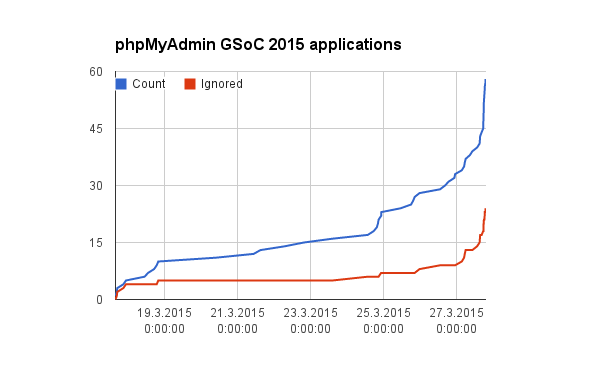
As usual, I look at the application stats for phpMyAdmin just after student application period of Google Summer of Code is over. First of all we got way more proposals than in last years, but also number of bogus proposals went up (you can see them as ignored in the chart). Same as in past years, people leave the submission to the last moment, even though we encourage them to submit early so that they can adjust the application based on our feedback. But still we got more than half of the proposals in last three days. Number of applications over time Anyway we're just working on evaluation and will finalize it in upcoming days. Of course you will know the results from Google on April 27th. PS: You can compare to our 2014, 2013 and 2012 numbers.

Filed under: English phpMyAdmin SUSE 0 comments

1 April 2015

Holger Levsen: 20150401-reproducible-jessie

Testing jessie for reproducibility or "here, have some 8 cores and 25 GB RAM extra..." So three weeks ago it occurred to me that it would be useful to test the reproducibility of Jessie too (until then we only tested unstable and experimental), as this will give us a nice data point to compare future developments against and also because we wanted to test "testing" in future anyway, so we could as well start while "testing" is still jessie... (because then we will have to test less once stretch development has started, as in the beginning stretch will be jessie anyway.) Quite quickly I then realized that building all packages twice on the current, quite heavily loaded jenkins.debian.net machine, would take 4-6 weeks and that it might well happen that we'll release Jessie before this has finished. (And I do want a Jessie release rather sooner than later!) So I've asked Profitbricks, who have been sponsoring the jenkins.debian.net setup since October 2012, for some more resources temporarily, and once again they quickly helped out and the next day I could add eight cores and 25 GB of RAM to the existing VM, for a total of 23 Cores and 75 GB RAM. So currently jenkins.d.n runs eight reproducible build jobs simultaneously, each of them is pbuilding packages in tmpfs in RAM. Thus these builds are really fast: for small packages without additional build depends build times as low as 40 seconds can be seen, which doesn't sound impressive at first, but this includes the source download and building twice and it includes untar'ing the base.tgz twice as well as running debbindiff on the resulting binary packages. (And all this is while quite many other jobs continue to hammer the machine as well.) (BTW: I doubt using LVM snapshots is faster then running this in tmpfs, but if you think LVM is faster I'd be curious to see some numbers.) Interestingly this rebuild also discovered a rather unexpected result as we found an RC bug in jessie, which caused build failures for >20 packages: "#781076 cdbs: perlmodule-vars.mk LDDLFLAGS quoting problem". And then there were some unexpected but really expectable results: testing turned out to "only" give reproducible results for 79.4% of all packages in main, while unstable has 82.6% reproducible packages. This was unexpected, as our (few) fixed packages in our repo are also used for testing testing and as testing is smaller than sid, I at first believed the reproducible percentage should be higher, as testing has 1000 packages less. So why was the lower percentage to be expected? This is due to two factors: since FOSDEM we have introduced a number of new variations for the second build, that is we now build with a.) a different domainname, b.) with a different umask, c.) a different timezone and d.) a different kernel version (using 'linux64 --uname-2.6'). And secondly, most packages in sid haven't been rebuild since FOSDEM. Thus we'll now reschedule all packages in testing which are unreproducible in unstable, which should decrease the current reproducibility of sid a bit... For those wondering about the 622 packages failing to build in testing: at least 453 are due to our test setup, categorized in (currently) three issues: timestamps_from_cpp_macros, ftbfs_werror_equals and ocaml_configure_not_as_root. The ones in this third issue category are rather trivial to fix, so this leaves 622-453=169 minus those fixed by #781076, so roughly 150 packeges which fail to build in our setup which need to be investigated... And for those wondering about other missing variations, there is at least one big one missing: changing the build date. Current guestimate is that this will make 1-2000 packages unreprdoucible again but we'll only know for sure once we tested them. So I would like to once again thank Profitbricks for supporting jenkins.d.n in the last 2.5 years and making reproducible.d.n possible so smoothly. Being able to painlessly add more resources when we needed them was incredible useful and I hope we can count on their support in the future. (I have some more ideas how to burn resources usefully in future. Stay tuned and btw, if you know how to put more hours in the day, please do tell me. ;) And, of course: thanks for your work on Debian, no matter whether you've been working on Jessie, reproducibility or something totally different! To finish this post I'd like to remind everyone that currently all this is just about the prospects of reproducible builds for Debian. Debian is not 80% reproducible yet - but it easily could be! And I certainly hope it will be "soon", and hopefully "soon" will only mean a few months. We will rebuild and see.

27 March 2015

Richard Hartmann: Release Critical Bug report for Week 13

The UDD bugs interface currently knows about the following release critical bugs: How do we compare to the Squeeze and Wheezy release cycles?
Week Squeeze Wheezy Jessie
43 284 (213+71) 468 (332+136) 319 (240+79)
44 261 (201+60) 408 (265+143) 274 (224+50)
45 261 (205+56) 425 (291+134) 295 (229+66)
46 271 (200+71) 401 (258+143) 427 (313+114)
47 283 (209+74) 366 (221+145) 342 (260+82)
48 256 (177+79) 378 (230+148) 274 (189+85)
49 256 (180+76) 360 (216+155) 226 (147+79)
50 204 (148+56) 339 (195+144) ???
51 178 (124+54) 323 (190+133) 189 (134+55)
52 115 (78+37) 289 (190+99) 147 (112+35)
1 93 (60+33) 287 (171+116) 140 (104+36)
2 82 (46+36) 271 (162+109) 157 (124+33)
3 25 (15+10) 249 (165+84) 172 (128+44)
4 14 (8+6) 244 (176+68) 187 (132+55)
5 2 (0+2) 224 (132+92) 175 (124+51)
6 release! 212 (129+83) 161 (109+52)
7 release+1 194 (128+66) 147 (106+41)
8 release+2 206 (144+62) 147 (96+51)
9 release+3 174 (105+69) 152 (101+51)
10 release+4 120 (72+48) 112 (82+30)
11 release+5 115 (74+41) 97 (68+29)
12 release+6 93 (47+46) 87 (71+16)
13 release+7 50 (24+26) 97 (77+20)
14 release+8 51 (32+19)
15 release+9 39 (32+7)
16 release+10 20 (12+8)
17 release+11 24 (19+5)
18 release+12 2 (2+0)
Graphical overview of bug stats thanks to azhag:

25 March 2015

Richard Hartmann: Visiting Hongkong and Shenzhen

TSDgeos had a good idea: Lazyweb travel recommodations. So, dear lazyweb: What are things to do or to avoid in Hongkong and Shenzhen if you have one and a half week of holiday before and after work duties? Any hidden gems to look at? What electronic markets are good? Should I take a boat trip around the waters of Hongkong? If you have any decent yet affordable sleeping options for 2-3 nights in Hongkong, that would also be interesting as my "proper" hotel stay does not start immediately. Not much in ways of comfort is needed as long as I have a safe place to lock my belongings. In somewhat related news, this Friday's bug report stats may be early or late as I will be on a plane towards China on Friday.

20 March 2015

Richard Hartmann: Release Critical Bug report for Week 12

The UDD bugs interface currently knows about the following release critical bugs: How do we compare to the Squeeze and Wheezy release cycles?
Week Squeeze Wheezy Jessie
43 284 (213+71) 468 (332+136) 319 (240+79)
44 261 (201+60) 408 (265+143) 274 (224+50)
45 261 (205+56) 425 (291+134) 295 (229+66)
46 271 (200+71) 401 (258+143) 427 (313+114)
47 283 (209+74) 366 (221+145) 342 (260+82)
48 256 (177+79) 378 (230+148) 274 (189+85)
49 256 (180+76) 360 (216+155) 226 (147+79)
50 204 (148+56) 339 (195+144) ???
51 178 (124+54) 323 (190+133) 189 (134+55)
52 115 (78+37) 289 (190+99) 147 (112+35)
1 93 (60+33) 287 (171+116) 140 (104+36)
2 82 (46+36) 271 (162+109) 157 (124+33)
3 25 (15+10) 249 (165+84) 172 (128+44)
4 14 (8+6) 244 (176+68) 187 (132+55)
5 2 (0+2) 224 (132+92) 175 (124+51)
6 release! 212 (129+83) 161 (109+52)
7 release+1 194 (128+66) 147 (106+41)
8 release+2 206 (144+62) 147 (96+51)
9 release+3 174 (105+69) 152 (101+51)
10 release+4 120 (72+48) 112 (82+30)
11 release+5 115 (74+41) 97 (68+29)
12 release+6 93 (47+46) 87 (71+16)
13 release+7 50 (24+26)
14 release+8 51 (32+19)
15 release+9 39 (32+7)
16 release+10 20 (12+8)
17 release+11 24 (19+5)
18 release+12 2 (2+0)
Graphical overview of bug stats thanks to azhag:

13 March 2015

Richard Hartmann: Release Critical Bug report for Week 11

The UDD bugs interface currently knows about the following release critical bugs: How do we compare to the Squeeze and Wheezy release cycles?
Week Squeeze Wheezy Jessie
43 284 (213+71) 468 (332+136) 319 (240+79)
44 261 (201+60) 408 (265+143) 274 (224+50)
45 261 (205+56) 425 (291+134) 295 (229+66)
46 271 (200+71) 401 (258+143) 427 (313+114)
47 283 (209+74) 366 (221+145) 342 (260+82)
48 256 (177+79) 378 (230+148) 274 (189+85)
49 256 (180+76) 360 (216+155) 226 (147+79)
50 204 (148+56) 339 (195+144) ???
51 178 (124+54) 323 (190+133) 189 (134+55)
52 115 (78+37) 289 (190+99) 147 (112+35)
1 93 (60+33) 287 (171+116) 140 (104+36)
2 82 (46+36) 271 (162+109) 157 (124+33)
3 25 (15+10) 249 (165+84) 172 (128+44)
4 14 (8+6) 244 (176+68) 187 (132+55)
5 2 (0+2) 224 (132+92) 175 (124+51)
6 release! 212 (129+83) 161 (109+52)
7 release+1 194 (128+66) 147 (106+41)
8 release+2 206 (144+62) 147 (96+51)
9 release+3 174 (105+69) 152 (101+51)
10 release+4 120 (72+48) 112 (82+30)
11 release+5 115 (74+41) 97 (68+29)
12 release+6 93 (47+46)
13 release+7 50 (24+26)
14 release+8 51 (32+19)
15 release+9 39 (32+7)
16 release+10 20 (12+8)
17 release+11 24 (19+5)
18 release+12 2 (2+0)
Graphical overview of bug stats thanks to azhag:

6 March 2015

Richard Hartmann: Release Critical Bug report for Week 10

The UDD bugs interface currently knows about the following release critical bugs: How do we compare to the Squeeze and Wheezy release cycles?
Week Squeeze Wheezy Jessie
43 284 (213+71) 468 (332+136) 319 (240+79)
44 261 (201+60) 408 (265+143) 274 (224+50)
45 261 (205+56) 425 (291+134) 295 (229+66)
46 271 (200+71) 401 (258+143) 427 (313+114)
47 283 (209+74) 366 (221+145) 342 (260+82)
48 256 (177+79) 378 (230+148) 274 (189+85)
49 256 (180+76) 360 (216+155) 226 (147+79)
50 204 (148+56) 339 (195+144) ???
51 178 (124+54) 323 (190+133) 189 (134+55)
52 115 (78+37) 289 (190+99) 147 (112+35)
1 93 (60+33) 287 (171+116) 140 (104+36)
2 82 (46+36) 271 (162+109) 157 (124+33)
3 25 (15+10) 249 (165+84) 172 (128+44)
4 14 (8+6) 244 (176+68) 187 (132+55)
5 2 (0+2) 224 (132+92) 175 (124+51)
6 release! 212 (129+83) 161 (109+52)
7 release+1 194 (128+66) 147 (106+41)
8 release+2 206 (144+62) 147 (96+51)
9 release+3 174 (105+69) 152 (101+51)
10 release+4 120 (72+48) 112 (82+30)
11 release+5 115 (74+41)
12 release+6 93 (47+46)
13 release+7 50 (24+26)
14 release+8 51 (32+19)
15 release+9 39 (32+7)
16 release+10 20 (12+8)
17 release+11 24 (19+5)
18 release+12 2 (2+0)
Graphical overview of bug stats thanks to azhag:

27 February 2015

Richard Hartmann: Release Critical Bug report for Week 09

The UDD bugs interface currently knows about the following release critical bugs: How do we compare to the Squeeze and Wheezy release cycles?
Week Squeeze Wheezy Jessie
43 284 (213+71) 468 (332+136) 319 (240+79)
44 261 (201+60) 408 (265+143) 274 (224+50)
45 261 (205+56) 425 (291+134) 295 (229+66)
46 271 (200+71) 401 (258+143) 427 (313+114)
47 283 (209+74) 366 (221+145) 342 (260+82)
48 256 (177+79) 378 (230+148) 274 (189+85)
49 256 (180+76) 360 (216+155) 226 (147+79)
50 204 (148+56) 339 (195+144) ???
51 178 (124+54) 323 (190+133) 189 (134+55)
52 115 (78+37) 289 (190+99) 147 (112+35)
1 93 (60+33) 287 (171+116) 140 (104+36)
2 82 (46+36) 271 (162+109) 157 (124+33)
3 25 (15+10) 249 (165+84) 172 (128+44)
4 14 (8+6) 244 (176+68) 187 (132+55)
5 2 (0+2) 224 (132+92) 175 (124+51)
6 release! 212 (129+83) 161 (109+52)
7 release+1 194 (128+66) 147 (106+41)
8 release+2 206 (144+62) 147 (96+51)
9 release+3 174 (105+69) 152 (101+51)
10 release+4 120 (72+48)
11 release+5 115 (74+41)
12 release+6 93 (47+46)
13 release+7 50 (24+26)
14 release+8 51 (32+19)
15 release+9 39 (32+7)
16 release+10 20 (12+8)
17 release+11 24 (19+5)
18 release+12 2 (2+0)
Graphical overview of bug stats thanks to azhag:

20 February 2015

Richard Hartmann: Release Critical Bug report for Week 08

The UDD bugs interface currently knows about the following release critical bugs: How do we compare to the Squeeze and Wheezy release cycles?
Week Squeeze Wheezy Jessie
43 284 (213+71) 468 (332+136) 319 (240+79)
44 261 (201+60) 408 (265+143) 274 (224+50)
45 261 (205+56) 425 (291+134) 295 (229+66)
46 271 (200+71) 401 (258+143) 427 (313+114)
47 283 (209+74) 366 (221+145) 342 (260+82)
48 256 (177+79) 378 (230+148) 274 (189+85)
49 256 (180+76) 360 (216+155) 226 (147+79)
50 204 (148+56) 339 (195+144) ???
51 178 (124+54) 323 (190+133) 189 (134+55)
52 115 (78+37) 289 (190+99) 147 (112+35)
1 93 (60+33) 287 (171+116) 140 (104+36)
2 82 (46+36) 271 (162+109) 157 (124+33)
3 25 (15+10) 249 (165+84) 172 (128+44)
4 14 (8+6) 244 (176+68) 187 (132+55)
5 2 (0+2) 224 (132+92) 175 (124+51)
6 release! 212 (129+83) 161 (109+52)
7 release+1 194 (128+66) 147 (106+41)
8 release+2 206 (144+62) 147 (96+51)
9 release+3 174 (105+69)
10 release+4 120 (72+48)
11 release+5 115 (74+41)
12 release+6 93 (47+46)
13 release+7 50 (24+26)
14 release+8 51 (32+19)
15 release+9 39 (32+7)
16 release+10 20 (12+8)
17 release+11 24 (19+5)
18 release+12 2 (2+0)
Graphical overview of bug stats thanks to azhag:

17 February 2015

John Goerzen: Has Linux lost its way? comments prompt a Debian developer to revisit FreeBSD after 20 years

I ll admit it. I have a soft spot for FreeBSD. FreeBSD was the first Unix I ran, and it was somewhere around 20 years ago that I did so, before I switched to Debian. Even then, I still used some of the FreeBSD Handbook to learn Linux, because Debian didn t have the great Reference that it does now. Anyhow, some comments in my recent posts ( Has modern Linux lost its way? and Reactions to that, and the value of simplicity), plus a latent desire to see how ZFS fares in FreeBSD, caused me to try it out. I installed it both in VirtualBox under Debian, and in an old 64-bit Thinkpad sitting in my basement that previously ran Debian. The results? A mixture of amazing and disappointing. I will say that I am quite glad that both exist; there is plenty of innovation happening everywhere and neat features exist everywhere, too. But I can also come right out and say that the statement that FreeBSD doesn t have issues like Linux does is false and misleading. In many cases, it s running the exact same stack. In others, it s better, but there are also others where it s worse. Perhaps this article might dispell a bit of the FUD surrounding jessie, while also showing off some of the nice things FreeBSD does. My conclusion: Both jessie and FreeBSD 10.1 are awesome Free operating systems, but both have their warts. This article is more about FreeBSD than Debian, but it will discuss a few of Debian s warts as well. The experience My initial reaction to FreeBSD was: wow, this feels so familiar. It reminds me of a commercial Unix, or maybe of Linux from a few years ago. A minimal, well-documented base system, everything pretty much in logical places in the filesystem, and solid memory management. I felt right at home. It was almost reassuring, even. Putting together a FreeBSD box is a lot of package installing and config file editing. The FreeBSD Handbook, describing how to install X, talks about editing this or that file for this or that feature. I like being able to learn directly how things fit together by doing this. But then you start remembering the reasons you didn t like Linux a few years ago, or the commercial Unixes: maybe it s that programs like apache are still not as well supported, or maybe it s that the default vi has this tendency to corrupt the terminal periodically, or perhaps it s that root s default shell is csh. Or perhaps it s that I have to do a lot of package installing and config file editing. It is not quite the learning experience it once was, either; now there are things like paste this XML file into some obscure polkit location to make your mouse work or something. Overall, there are some areas where FreeBSD kills it in a way no other OS does. It is unquestionably awesome in several areas. But there are a whole bunch of areas where it s about 80% as good as Linux, a number of areas (even polkit, dbus, and hal) where it s using the exact same stack Linux is (so all these comments about FreeBSD being so differently put together strike me as hollow), and frankly some areas that need a lot of work and make it hard to manage systems in a secure and stable way. The amazing Let s get this out there: I ve used ZFS too much to use any OS that doesn t support it or something like it. Right now, I m not aware of anything like ZFS that is generally stable and doesn t cost a fortune, so pretty much: if your Unix doesn t do ZFS, I m not interested. (btrfs isn t there yet, but will be awesome when it is.) That s why I picked FreeBSD for this, rather than NetBSD or OpenBSD. ZFS on FreeBSD is simply awesome. They have integreated it extremely well. The installer supports root on zfs, even encrypted root on zfs (though neither is a default). top on a FreeBSD system shows a line of ZFS ARC (cache) stats right alongside everything else. The ZFS defaults for maximum cache size, readahead, etc. auto-tune themselves at boot (unless overridden) based on the amount of RAM in a system and the system type. Seriously, these folks have thought of everything and it just reeks of solid. I haven t seen ZFS this well integrated outside the Solaris-type OSs. I have been using ZFSOnLinux for some time now, but it is just not as mature as ZFS on FreeBSD. ZoL, for instance, still has some memory tuning issues, and is not really suggested for 32-bit machines. FreeBSD just nails it. ZFS on FreeBSD even supports TRIM, which is not available in ZoL and I think fairly unique even among OpenZFS platforms. It also supports delegated administration of the filesystem, both to users and to jails on the system, seemingly very similar to Solaris zones. FreeBSD also supports beadm, which is like a similar tool on Solaris. This lets you basically use ZFS snapshots to make lightweight boot environments , so you can select which to boot into. This is useful, say, before doing upgrades. Then there are jails. Linux has tried so hard to get this right, and fallen on its face so many times, a person just wants to take pity sometimes. We ve had linux-vserver, openvz, lxc, and still none of them match what FreeBSD jails have done for a long time. Linux s current jail-du-jour is LXC, though it is extremely difficult to configure in a secure way. Even its author comments that you won t hear any of the LXC maintainers tell you that LXC is secure and that it pretty much requires AppArmor profiles to achieve reasonable security. These are still rather in flux, as I found out last time I tried LXC a few months ago. My confidence in LXC being as secure as, say, KVM or FreeBSD is simply very low. FreeBSD s jails are simple and well-documented where LXC is complex and hard to figure out. Its security is fairly transparent and easy to control and they just work well. I do think LXC is moving in the right direction and might even get there in a couple years, but I am quite skeptical that even Docker is getting the security completely right. The simply different People have been throwing around the word distribution with respect to FreeBSD, PC-BSD, etc. in recent years. There is an analogy there, but it s not perfect. In the Linux ecosystem, there is a kernel project, a libc project, a coreutils project, a udev project, a systemd/sysvinit/whatever project, etc. You get the idea. In FreeBSD, there is a base system project. This one project covers the kernel and the base userland. Some of what they use in the base system is code pulled in from elsewhere but maintained in their tree (ssh), some is completely homegrown (kernel), etc. But in the end, they have a nicely-integrated base system that always gets upgraded in sync. In the Linux world, the distribution makers are responsible for integrating the bits from everywhere into a coherent whole. FreeBSD is something of a toolkit to build up your system. Gentoo might be an analogy in the Linux side. On the other end of the spectrum, Ubuntu is a just install it and it works, tweak later sort of setup. Debian straddles the middle ground, offering both approaches in many cases. There are pros and cons to each approach. Generally, I don t think either one is better. They are just different. The not-quite-there I said that there are a lot of things in FreeBSD that are about 80% of where Linux is. Let me touch on them here. Its laptop support leaves something to be desired. I installed it on a few-years-old Thinkpad basically the best possible platform for working suspend in a Free OS. It has worked perfectly out of the box in Debian for years. In FreeBSD, suspend only works if it s in text mode. If X is running, the video gets corrupted and the system hangs. I have not tried to debug it further, but would also note that suspend on closed lid is not automatic in FreeBSD; the somewhat obscure instuctions tell you what policykit pkla file to edit to make suspend work in XFCE. (Incidentally, it also says what policykit file to edit to make the shutdown/restart options work). Its storage subsystem also has some surprising misses. Its rough version of LVM, LUKS, and md-raid is called GEOM. GEOM, however, supports only RAID0, RAID1, and RAID3. It does not support RAID5 or RAID6 in software RAID configurations! Linux s md-raid, by comparison, supports RAID0, RAID1, RAID4, RAID5, RAID6, etc. There seems to be a highly experimental RAID5 patchset floating around for many years, but it is certainly not integrated into the latest release kernel. The current documentation makes no mention of RAID5, although it seems that a dated logical volume manager supported it. In any case, RAID5 does not seem to be well-supported in software like it is in Linux. ZFS does have its raidz1 level, which is roughly the same as RAID5. However, that requires full use of ZFS. ZFS also does not support some common operations, like adding a single disk to an existing RAID5 group (which is possible with md-raid and many other implementations.) This is a ZFS limitation on all platforms. FreeBSD s filesystem support is rather a miss. They once had support for Linux ext* filesystems using the actual Linux code, but ripped it out because it was in GPL and rewrote it so it had a BSD license. The resulting driver really only works with ext2 filesystems, as it doesn t work with ext3/ext4 in many situations. Frankly I don t see why they bothered; they now have something that is BSD-licensed but only works with a filesystem so old nobody uses it anymore. There are only two FreeBSD filesystems that are really useable: UFS2 and ZFS. Virtualization under FreeBSD is also not all that present. Although it does support the VirtualBox Open Source Edition, this is not really a full-featured or fast enough virtualization environment for a server. Its other option is bhyve, which looks to be something of a Xen clone. bhyve, however, does not support Windows guests, and requires some hoops to even boot Linux guest installers. It will be several years at least before it reaches feature-parity with where KVM is today, I suspect. One can run FreeBSD as a guest under a number of different virtualization systems, but their instructions for making the mouse work best under VirtualBox did not work. There may have been some X.Org reshuffle in FreeBSD that wasn t taken into account. The installer can be nice and fast in some situations, but one wonders a little bit about QA. I had it lock up on my twice. Turns out this is a known bug reported 2 months ago with no activity, in which the installer attempts to use a package manger that it hasn t set up yet to install optional docs. I guess the devs aren t installing the docs in testing. There is nothing like Dropbox for FreeBSD. Apparently this is because FreeBSD has nothing like Linux s inotify. The Linux Dropbox does not work in FreeBSD s Linux mode. There are sketchy reports of people getting an OwnCloud client to work, but in something more akin to rsync rather than instant-sync mode, if they get it working at all. Some run Dropbox under wine, apparently. The desktop environments tend to need a lot more configuration work to get them going than on Linux. There s a lot of editing of polkit, hal, dbus, etc. config files mentioned in various places. So, not only does FreeBSD use a lot of the same components that cause confusion in Linux, it doesn t really configure them for you as much out of the box. FreeBSD doesn t support as many platforms as Linux. FreeBSD has only two platforms that are fully supported: i386 and amd64. But you ll see people refer to a list of other platforms that are supported , but they don t have security support, official releases, or even built packages. They includ arm, ia64, powerpc, and sparc64. The bad: package management Roughly 20 years ago, this was one of the things that pulled me to Debian. Perhaps I am spolied from running the distribution that has been the gold standard for package management for so long, but I find FreeBSD s package management even pkg-ng in 10.1-RELEASE to be lacking in a number of important ways. To start with, FreeBSD actually has two different package management systems: one for the base system, and one for what they call the ports/packages collection ( ports being the way to install from source, and packages being the way to install from binaries, but both related to the same tree.) For the base system, there is freebsd-update which can install patches and major upgrades. It also has a cron option to automate this. Sadly, it has no way of automatically indicating to a calling script whether a reboot is necessary. freebsd-update really manages less than a dozen packages though. The rest are managed by pkg. And pkg, it turns out, has a number of issues. The biggest: it can take a week to get security updates. The FreeBSD handbook explains pkg audit -F which will look at your installed packages (but NOT the ones in the base system) and alert you to packages that need to be updates, similar to a stripped-down version of Debian s debsecan. I discovered this myself, when pkg audit -F showed a vulnerability in xorg, but pkg upgrade showed my system was up-to-date. It is not documented in the Handbook, but people on the mailing list explained it to me. There are workarounds, but they can be laborious. If that s not bad enough, FreeBSD has no way to automatically install security patches for things in the packages collection. Debian has several (unattended-upgrades, cron-apt, etc.) There is pkg upgrade , but it upgrades everything on the system, which may be quite a bit more than you want to be upgraded. So: if you want to run Apache with PHP, and want it to just always apply security patches, FreeBSD packages are not up to the job like Debian s are. The pkg tool doesn t have very good error-handling. In fact, its error handling seems to be nonexistent at times. I noticed that some packages had failures during install time, but pkg ignored them and marked the package as correctly installed. I only noticed there was a problem because I happened to glance at the screen at the right moment during messages about hundreds of packages. In Debian, by contrast, if there are any failures, at the end of the run, you get a nice report of which packages failed, and an exit status to use in scripts. It also has another issue that Debian resolved about a decade ago: package scripts displaying messages that are important for the administrator, but showing so many of them that they scroll off the screen and are never seen. I submitted a bug report for this one also. Some of these things just make me question the design of pkg. If I can t trust it to accurately report if the installation succeeded, or show me the important info I need to see, then to what extent can I trust it? Then there is the question of testing of the ports/packages. It seems that, automated tests aside, basically everyone is running off the master branch of the ports/packages. That s like running Debian unstable on your servers. I am distinctly uncomfortable with this notion, though it seems FreeBSD people report it mostly works well. There are some other issues, too: FreeBSD ports make no distinction between development and runtime files like Debian s packages do. So, just by virtue of wanting to run a graphical desktop, you get all of the static libraries, include files, build scripts, etc for XOrg installed. For a package as concerned about licensing as FreeBSD, the packages collection does not have separate sections like Debian s main, contrib, and non-free. It s all in one big pot: BSD-license, GPL-license, proprietary without source license. There is /usr/local/share/licenses where you can look up a license for each package, but there is no way with FreeBSD, like there is with Debian, to say never even show me packages that aren t DFSG-free. This is useful, for instance, when running in a company to make sure you never install packages that are for personal use only or something. The bad: ABI stability I m used to being able to run binaries I compiled years ago on a modern system. This is generally possible in Linux, assuming you have the correct shared libraries available. In FreeBSD, this is explicitly NOT possible. After every major version upgrade, you must reinstall or recompile every binary on your system. This is not necessarily a showstopper for me, but it is a hassle for a lot of people. Update 2015-02-17: Some people in the comments are pointing out compat packages in the ports that may help with this situation. My comment was based on advice in the FreeBSD Handbook stating After a major version upgrade, all installed packages and ports need to be upgraded . I have not directly tried this, so if the Handbook is overstating the need, then this point may be in error. Conclusions As I said above, I found little validation to the comments that the Debian ecosystem is noticeably worse than the FreeBSD one. Debian has its warts too particularly with keeping software up-to-date. You can see that the two projects are designed around a different passion: FreeBSD s around the base system, and Debian s around an integrated whole system. It would be wrong to say that either of those is always better. FreeBSD s approach clearly produces some leading features, especially jails and ZFS integration. Yet Debian s approach also produces some leading features in the way of package management and security maintainability beyond the small base. My criticism of excessive complexity in the polkit/cgmanager/dbus area still stands. But to those people commenting that FreeBSD hasn t lost its way like Linux has, I would point out that FreeBSD mostly uses these same components also, and FreeBSD has excessive complexity in its ports/package system and system management tools. I think it s a draw. You pick the best for your use case. If you re looking for a platform to run a single custom app then perhaps all of the Debian package management benefits don t apply to you (you may not even need FreeBSD s packages, or just a few). The FreeBSD ZFS support or jails may well appeal. If you re looking to run a desktop environment, or a server with some application that needs a ton of PHP, Python, Perl, or C libraries, then Debian s package management and security handling may well be attractive. I am disappointed that Debian GNU/kFreeBSD will not be a release architecture in jessie. That project had the promise to provide a best of both worlds for those that want jails or tight ZFS integration.

14 February 2015

John Goerzen: Willis Goerzen a good reason to live in Kansas

From time to time, people ask me, with a bit of a disbelieving look on their face, Tell me again why you chose to move to Kansas? I can explain something about how people really care about their neighbors out here, how connections through time to a place are strong, how the people are hard-working, achieve great things, and would rather not talk about their achievements too much. But none of this really conveys it. This week, as I got word that my great uncle Willis Goerzen passed away, it occured to me that the reason I live in Kansas is simple: people like Willis. Willis was a man that, through and through, simply cared. For everyone. He had hugs ready anytime. When I used to see him in church every Sunday, I d usually hear his loud voice saying, Well John! Then a hug, then, How are you doing? When I was going through a tough time in life, hugs from Willis and Thelma were deeply meaningful. I could see how deeply he cared in his moist eyes, the way he sought me out to offer words of comfort, reassurance, compassion, and strength. Willis didn t just defy the stereotypes on men having to hide their emotions; he also did so by being just gut-honest. Americans often ask, in sort of a greeting, How are you? and usually get an answer like fine . If I asked Willis How are you? , I might hear great! or it s hard or pretty terrible. In a place where old-fashioned stoicism is still so common, this was so refreshing. Willis and I could have deep, heart-to-heart conversations or friendly ones. Willis also loved to work. He worked on a farm, in construction, and then for many years doing plumbing and heating work. When he retired, he just kept on doing it. Not for the money, but because he wanted to. I remember calling him up one time about 10 years ago, asking if he was interested in helping me with a heating project. His response: I ll hitch up the horses and be right there! (Of course, he had no horses anymore.) When I had a project to renovate what had been my grandpa s farmhouse (that was Willis s brother), he did all the plumbing work. He told me, John, it s great to be retired. I can still do what I love to do, but since I m so cheap, I don t have to be fast. My old knees can move at their own speed. He did everything so precisely, built it so sturdy, that I used to joke that if a tornado struck the house, the house would be a pile of rubble but the ductwork would still be fine. One of his biggest frustrations about ill health was being unable to work, and in fact he had a project going before cancer started to get the best of him. He was quite distraught that, for the first time in his life, he didn t properly finish a job. Willis installed a three-zone system (using automated dampers to send heat or cool from a single furnace/AC into only the parts of the house where it was needed) for me. He had never done that before. The night Willis and his friend Bob came over to finish the setup was one to remember. The two guys, both in their 70s, were figuring it all out, and their excitement was catching. By the time the evening was over, I certainly was more excited about thermostats than I ever had been in my life. I heard a story about him once he was removing some sort of noxious substance from someone s house. I forget what it was whatever it was, it had pretty bad long-term health effects. His comment: Look, I m old. It s not going to be this that does me in. And he was right. In his last few years, Willis started up a project that only Willis would dream up. He invited people to bring him all their old and broken down appliances and metal junk air conditioners, dehumidifiers, you name it. He carefully took them apart, stripped them down, and took the metals into a metal salvage yard. He then donated all the money he got to a charity that helped the poor, and it was nearly $5000. Willis had a sense of humor about him that he somehow deployed at those perfect moments when you least expected it. Back in 2006, before I had moved into the house that had been grandpa s, there was a fire there. I lost two barns (one was the big old red one with lots of character) and a chicken house. When I got out there to see what had happened, Willis was already there. It was quite the disappointment for me. Willis asked me if grandpa s old manure spreader was still in the chicken house. (Cattle manure is sometimes used as a fertilizer.) This old manure spreader was horse-drawn. I told him it was, and so it had burned up. So Willis put his arm around me, and said, John, do you know what we always used to call a manure spreader? Nope. Shit-slinger! That was so surprising I couldn t help but break out laughing. Willis was the only person that got me to laugh that day. In his last few years, Willis battled several health ailments. When he was in a nursing home for a while due to complications from knee surgery, I d drop by to visit. And lately as he was declining, I tried to drop in at his house to visit with Willis and Thelma as much as possible. Willis was always so appreciative of those visits. He always tried to get in a hug if he could, even if Thelma and I had to hold on to him when he stood up. He would say sometimes, John, you are so good to come here and visit with me. And he d add, I love you. As did I. Sometimes when Willis was felling down about not being able to work more, or not finish a project, I told him how he was an inspiration to me, and to many others. And I reminded him that I visited with him because I wanted do, and being able to do that meant as much to me as it did to him. I m not sure if he ever could quite believe how deeply true that was, because his humble nature was a part of who he was. My last visit earlier this week was mostly with Thelma. Willis was not able to be very alert, but I held his hand and made sure to tell him that I love and care for him that time. I m not sure if he was able to hear, but I am sure that he didn t need to. Willis left behind a community of hundreds of people that love him and had their lives touched by his kind and inspirational presence.

13 February 2015

Richard Hartmann: Release Critical Bug report for Week 07

The UDD bugs interface currently knows about the following release critical bugs: How do we compare to the Squeeze and Wheezy release cycles?
Week Squeeze Wheezy Jessie
43 284 (213+71) 468 (332+136) 319 (240+79)
44 261 (201+60) 408 (265+143) 274 (224+50)
45 261 (205+56) 425 (291+134) 295 (229+66)
46 271 (200+71) 401 (258+143) 427 (313+114)
47 283 (209+74) 366 (221+145) 342 (260+82)
48 256 (177+79) 378 (230+148) 274 (189+85)
49 256 (180+76) 360 (216+155) 226 (147+79)
50 204 (148+56) 339 (195+144) ???
51 178 (124+54) 323 (190+133) 189 (134+55)
52 115 (78+37) 289 (190+99) 147 (112+35)
1 93 (60+33) 287 (171+116) 140 (104+36)
2 82 (46+36) 271 (162+109) 157 (124+33)
3 25 (15+10) 249 (165+84) 172 (128+44)
4 14 (8+6) 244 (176+68) 187 (132+55)
5 2 (0+2) 224 (132+92) 175 (124+51)
6 release! 212 (129+83) 161 (109+52)
7 release+1 194 (128+66) 147 (106+41)
8 release+2 206 (144+62)
9 release+3 174 (105+69)
10 release+4 120 (72+48)
11 release+5 115 (74+41)
12 release+6 93 (47+46)
13 release+7 50 (24+26)
14 release+8 51 (32+19)
15 release+9 39 (32+7)
16 release+10 20 (12+8)
17 release+11 24 (19+5)
18 release+12 2 (2+0)
Graphical overview of bug stats thanks to azhag:

7 February 2015

Richard Hartmann: Release Critical Bug report for Week 06

Belated post due to meh real life situations. As you may have heard, if a package is removed from testing now, it will not be able to make it back into Jessie. Also, a lot of packages are about to be reoved for being buggy. If those are gone, they are gone. The UDD bugs interface currently knows about the following release critical bugs: How do we compare to the Squeeze and Wheezy release cycles?
Week Squeeze Wheezy Jessie
43 284 (213+71) 468 (332+136) 319 (240+79)
44 261 (201+60) 408 (265+143) 274 (224+50)
45 261 (205+56) 425 (291+134) 295 (229+66)
46 271 (200+71) 401 (258+143) 427 (313+114)
47 283 (209+74) 366 (221+145) 342 (260+82)
48 256 (177+79) 378 (230+148) 274 (189+85)
49 256 (180+76) 360 (216+155) 226 (147+79)
50 204 (148+56) 339 (195+144) ???
51 178 (124+54) 323 (190+133) 189 (134+55)
52 115 (78+37) 289 (190+99) 147 (112+35)
1 93 (60+33) 287 (171+116) 140 (104+36)
2 82 (46+36) 271 (162+109) 157 (124+33)
3 25 (15+10) 249 (165+84) 172 (128+44)
4 14 (8+6) 244 (176+68) 187 (132+55)
5 2 (0+2) 224 (132+92) 175 (124+51)
6 release! 212 (129+83) 161 (109+52)
7 release+1 194 (128+66)
8 release+2 206 (144+62)
9 release+3 174 (105+69)
10 release+4 120 (72+48)
11 release+5 115 (74+41)
12 release+6 93 (47+46)
13 release+7 50 (24+26)
14 release+8 51 (32+19)
15 release+9 39 (32+7)
16 release+10 20 (12+8)
17 release+11 24 (19+5)
18 release+12 2 (2+0)
Graphical overview of bug stats thanks to azhag:

6 February 2015

Antoine Beaupr : Migrating from Drupal to Ikiwiki

TLPL; j'ai chang de logiciel pour la gestion de mon blog. TLDR; I have changed my blog from Drupal to Ikiwiki. Note: since this post uses ikiwiki syntax (i just copied it over here), you may want to read the original version instead of this one. will continue operating for a while to
give a chance to feed aggregators to catch that article. It will also
give time to the Internet archive to catchup with the static
stylesheets (it turns out it doesn't like Drupal's CSS compression at
all!) An archive will therefore continue being available on the
internet archive for people that miss the old stylesheet. Eventually, I will simply redirect the anarcat.koumbit.org URL to
the new blog location, . This will likely be my
last blog post written on Drupal, and all new content will be
available on the new URL. RSS feed URLs should not change.

Why I am migrating away from Drupal because it is basically impossible to
upgrade my blog from Drupal 6 to Drupal 7. Or if it is, I'll have to
redo the whole freaking thing again when Drupal 8 comes along. And frankly, I don't really need Drupal to run a blog. A blog was
originally a really simple thing: a web blog. A set of articles
written on the corner of a table. Now with Drupal, I can add
ecommerce, a photo gallery and whatnot to my blog, but why would I do
that? and why does it need to be a dynamic CMS at all, if I get so
little comments? So I'm switching to ikiwiki, for the following reason:
  • no upgrades necessary: well, not exactly true, i still need to
    upgrade ikiwiki, but that's covered by the Debian package
    maintenance and I only have one patch to it, and there's no data migration! (the last such migration in ikiwiki was in 2009 and was fully supported)
  • offline editing: this is a a big thing for me: i can just note
    things down and push them when I get back online
  • one place for everything: this blog is where I keep my notes, it's
    getting annoying to have to keep track of two places for that stuff
  • future-proof: extracting content from ikiwiki is amazingly
    simple. every page is a single markdown-formatted file. that's it.
Migrating will mean abandoning the
barlow theme, which was
seeing a declining usage anyways.

What So what should be exported exactly. There's a bunch of crap in the old
blog that i don't want: users, caches, logs, "modules", and the list
goes on. Maybe it's better to create a list of what I need to extract:
  • nodes
    • title ([[ikiwiki/directive/meta]] title and guid tags, guid to avoid flooding aggregators)
    • body (need to check for "break comments")
    • nid (for future reference?)
    • tags (should be added as \[[!tag foo bar baz]] at the bottom)
    • URL (to keep old addresses)
    • published date ([[ikiwiki/directive/meta]] date directive)
    • modification date ([[ikiwiki/directive/meta]] updated directive)
    • revisions?
    • attached files
  • menus
    • RSS feed
    • contact
    • search
  • comments
    • author name
    • date
    • title
    • content
  • attached files
    • thumbnails
    • links
  • tags
    • each tag should have its own RSS feed and latest posts displayed

When Some time before summer 2015.

Who Well me, who else. You probably really don't care about that, so let'S
get to the meat of it.

How How to perform this migration... There are multiple paths:
  • MySQL commandline: extracting data using the commandline mysql tool (drush sqlq ...)
  • Views export: extracting "standard format" dumps from Drupal and
    parse it (JSON, XML, CSV?)
Both approaches had issues, and I found a third way: talk directly to
mysql and generate the files directly, in a Python script. But first,
here are the two previous approaches I know of.

MySQL commandline LeLutin switched using MySQL requests,
although he doesn't specify how content itself was migrated. Comments
importing is done with that script:
echo "select n.title, concat('  [[!comment  format=mdwn  username=\"', c.name, '\"  ip=\"', c.hostname, '\"  subject=\"', c.subject, '\"  date=\"', FROM_UNIXTIME(c.created), '\"  content=\"\"\" ', b.comment_body_value, ' \"\"\"]]') from node n, comment c, field_data_comment_body b where n.nid=c.nid and c.cid=b.entity_id;"   drush sqlc   tail -n +2   while read line; do if [ -z "$i" ]; then i=0; fi; title=$(echo "$line"   sed -e 's/[    ]\+ .*//' -e 's/ /_/g' -e 's/[:(),?/+]//g'); body=$(echo "$line"   sed 's/[^ ]*  //'); mkdir -p ~/comments/$title; echo -e "$body" > ~/comments/$title/comment_$i._comment; i=$((i+1)); done
Kind of ugly, but beats what i had before (which was "nothing"). I do think it is the good direction to take, to simply talk to the
MySQL database, maybe with a native Python script. I know the Drupal
database schema pretty well (still! this is D6 after all) and it's
simple enough that this should just work.

Views export [[!img 2015-02-03-233846_1440x900_scrot.png class="align-right" size="300x" align="center" alt="screenshot of views 2.x"]] mvc recommended views data export on Lelutin's
blog. Unfortunately, my experience with the views export interface has
been somewhat mediocre so far. Yet another reason why I don't like
using Drupal anymore is this kind of obtuse dialogs: I clicked through those for about an hour to get JSON output that
turned out to be provided by views bonus instead of
views_data_export. And confusingly enough, the path and
format_name fields are null in the JSON output
(whyyy!?). views_data_export unfortunately only supports XML,
which seems hardly better than SQL for structured data, especially
considering I am going to write a script for the conversion anyways. Basically, it doesn't seem like any amount of views mangling will
provide me with what i need. Nevertheless, here's the [[failed-export-view.txt]] that I was able to
come up with, may it be useful for future freedom fighters.

Python script I ended up making a fairly simple Python script to talk directly to
the MySQL database. The script exports only nodes and comments, and nothing else. It makes
a bunch of assumptions about the structure of the site, and is
probably only going to work if your site is a simple blog like mine,
but could probably be improved significantly to encompass larger and
more complex datasets. History is not preserved so no interaction is
performed with git.

Generating dump First, I imported the MySQL dump file on my local mysql server for easier
development. It is 13.9MiO!!
mysql -e 'CREATE DATABASE anarcatblogbak;'
ssh aegir.koumbit.net "cd anarcat.koumbit.org ; drush sql-dump"   pv   mysql anarcatblogbak
I decided to not import revisions. The majority (70%) of the content has
1 or 2 revisions, and those with two revisions are likely just when
the node was actually published, with minor changes. ~80% have 3
revisions or less, 90% have 5 or less, 95% 8 or less, and 98% 10 or
less. Only 5 articles have more than 10 revisions, with two having the
maximum of 15 revisions. Those stats were generated with:
SELECT title,count(vid) FROM anarcatblogbak.node_revisions group
by nid;
Then throwing the output in a CSV spreadsheet (thanks to
mysql-workbench for the easy export), adding a column numbering the
rows (B1=1,B2=B1+1), another for generating percentages
(C1=B1/count(B$2:B$218)) and generating a simple graph with
that. There were probably ways of doing that more cleanly with R,
and I broke my promise to never use a spreadsheet again, but then
again it was Gnumeric and it's just to get a rough idea. There are 196 articles to import, with 251 comments, which means an
average of 1.15 comment per article (not much!). Unpublished articles
(5!) are completely ignored. Summaries are also not imported as such (break comments are
ignored) because ikiwiki doesn't support post summaries.

Calling the conversion script The script is in [[drupal2ikiwiki.py]]. It is called with:
./drupal2ikiwiki.py -u anarcatblogbak -d anarcatblogbak blog -vv
The -n and -l1 have been used for first tests as well. Use this
command to generate HTML from the result without having to commit and
push all:
ikiwiki --plugin meta --plugin tag --plugin comments --plugin inline  . ../anarc.at.html
More plugins are of course enabled in the blog, see the setup file for
more information, or just enable plugin as you want to unbreak
things. Use the --rebuild flag on subsequent runs. The actual
invocation I use is more something like:
ikiwiki --rebuild --no-usedirs --plugin inline --plugin calendar --plugin postsparkline --plugin meta --plugin tag --plugin comments --plugin sidebar  . ../anarc.at.html
I had problems with dates, but it turns out that I wasn't setting
dates in redirects... Instead of doing that, I started adding a
"redirection" tag that gets ignored by the main page.

Files and old URLs The script should keep the same URLs, as long as pathauto is enabled
on the site. Otherwise, some logic should be easy to add to point to
node/N. To redirect to the new blog, rewrite rules, on original blog, should
be as simple as:
Redirect / http://anarc.at/blog/
When we're sure:
Redirect permanent / http://anarc.at/blog/
Now, on the new blog, some magic needs to happen for files. Both
/files and /sites/anarcat.koumbit.org/files need to resolve
properly. We can't use symlinks because
ikiwiki drops symlinks on generation. So I'll just drop the files in /blog/files directly, the actual
migration is:
cp $DRUPAL/sites/anarcat.koumbit.org/files $IKIWIKI/blog/files
rm -r .htaccess css/ js/ tmp/ languages/
rm foo/bar # wtf was that.
rmdir *
sed -i 's#/sites/anarcat.koumbit.org/files/#/blog/files/#g' blog/*.mdwn
sed -i 's#http://anarcat.koumbit.org/blog/files/#/blog/files/#g' blog/*.mdwn
chmod -R -x blog/files
sudo chmod -R +X blog/files
A few pages to test images:
  • http://anarcat.koumbit.org/node/157
  • http://anarcat.koumbit.org/node/203
There are some pretty big files in there, 10-30MB MP3s - but those are
already in this wiki! so do not import them! Running fdupes on the result helps find oddities. The meta guid directive is used to keep the aggregators from finding
duplicate feed entries. I tested it with Liferea, but it may freak out
some other sites.

Remaining issues
  • postsparkline and calendar archive disrespect meta(date)
  • merge the files in /communication with the ones in /blog/files
    before import
  • import non-published nodes
  • check nodes with a format different than markdown (only a few 3=Full
    HTML
    found so far)
  • replace links to this wiki in blog posts with internal links
More progress information in [[the script drupal2ikiwiki.py]] itself.

4 February 2015

Christoph Berg: apt.postgresql.org statistics

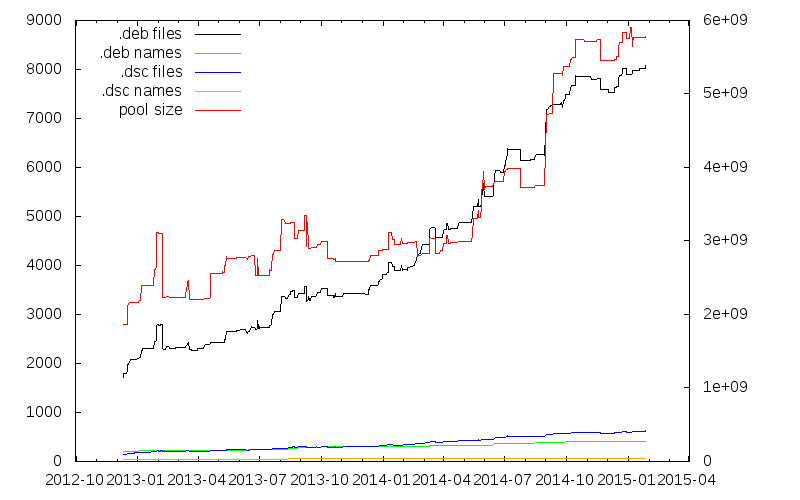
At this year's FOSDEM I gave a talk in the PostgreSQL devroom about Large Scale Quality Assurance in the PostgreSQL Ecosystem. The talk included a graph about the growth of the apt.postgresql.org repository that I want to share here as well: The yellow line at the very bottom is the number of different source package names, currently 71. From that, a somewhat larger number of actual source packages that include the "pgdgXX" version suffixes targeting the various distributions we have is built (blue). The number of different binary package names (green) is in about the same range. The dimension explosion then happens for the actual number of binary packages (black, almost 8000) targeting all distributions and architectures. The red line is the total size of the pool/ directory, currently a bit less than 6GB. (The graphs sometimes decrease when packages in the -testing distributions are promoted to the live distributions and the old live packages get removed.)
31 January 2015

John Goerzen: Home Automation, part 2: Z-Wave and ISY programming

In my part 1 post yesterday, I wrote about the start of the home automation project. I mentioned that I was using Insteon switches, and they mostly were working well (I forgot to mention an annoyance: you can dim, but not totally shut off, their LED status light.) Anyhow, the Insteon battery-operated sensors seem to not be as good as their Z-Wave competition. Setting up Z-Wave Z-Wave devices get joined to the Z-Wave network in much the same way Bluetooth devices get paired with each other. The first time you use a Z-Wave device, you join it to the controller. The controller assigns it an ID on your network, and both devices discover the best route to communicate with each other. I discovered that the Z-Wave module on the ISY-994i has particularly poor reception. Combined with the generally short range of battery-operated Z-wave devices, this meant that my sensors didn t work reliably. As with Insteon, AC-powered Z-wave devices tend to be repeaters, but I didn t have any AC-powered Z-wave devices. I went looking for Z-wave repeaters, and found some. But then I discovered that a Z-wave relay-based appliance switch was actually $5 cheaper, acted as a repeater, and could be used as a switch down the road if needed. A couple of those solved my communications issues. You join them to the network as usual, but then either re-join the battery-powered sensors (so they see the new route) or do a network heal (every device on the network re-learns about its neighbors and routes to the other devices) so they see the new route. Z-Wave Motion / Occupancy Sensors If you have been in new buildings, chances are you have seen light switches with built-in occupancy sensors. My doctor s office has these. They are typically the same size as a regular light switch, but with a passive infrared (PIR) motion sensor used to automatically turn the lights off after a timeout (or even on, when someone walks into the room.) These work fine for small rooms, but if you ve ever been in a bathroom with a PIR lightswitch that goes off while you re still in the room, you are aware of their faults for larger rooms! Most of the time, when you read about occupancy sensors , it s really a PIR sensor, and the term is used interchangeably with motion detector. Motion detectors in home automation systems are commonly used for a number of purposes: detecting occuption of rooms for automatic control of lighting or HVAC systems, triggering alerts, or even locking or unlocking doors. My friend told me he had poor luck with the Insteon PIR sensors, so I tried two different Z-Wave models: the $48 Aeon/Aeotec multi-sensor and the $30 Ecolink PIRZWAVE2-ECO. The Aeon device is clearly the more capable; it can be used indoors or out, and has a lot of options that can be configured by Z-Wave configuration parameters. It also has a ball/socket mount, so it can be easily aimed in different directions. It can draw power from 4 AAA batteries, or a mini USB cable (cable, but not power supply, included). The Aeon multi-sensor also has a temperature, humidity, and illumination (lux) sensor but, as you ll see, they have some drawbacks. The Ecolink device is more basic; it has a few settings that can be altered via jumpers, but none that can be altered via Z-Wave configuration commands. That makes it a bit of a hassle, since you have to open it up to change, and when you do, it triggers a tamper alarm that is both undocumented and never seems to go away. It is powered by a single CR123A 3V Lithium battery, which are about $2 each on Amazon. Both units have a default PIR timeout of 4 minutes. That means that after sensing motion, they will transmit the on signal (meaning motion detected) and then transmit no further signals for at least 4 minutes. This is because operating the radio consumes far more battery power than simply monitoring the PIR sensor, and it cuts down on repeated on/off transmissions. In this configuration, both units should have battery life of 6 months to a year, I figure, with an edge for the Ecolink, perhaps. Both can also be configured to transmit more frequently; the Ecolink has a jumper that can change its timeout to 10 seconds, whereas the Aeon can be configured over Z-Wave for any timeout between 10 seconds and 65535 seconds (values above 4 minutes are rounded to the nearest minute, for some reason.) Both also have adjustable sensitivity; on the Aeon this is via an adjustment knob, and on the Ecolink it s via jumpers. And both can report their battery level to enable software alerts when it s getting low. The Aeon ships with its temperature, humidity, battery, and lux sensors disabled. This appears to be the cause of much confusion online, as they send one transmission and then no more. Sadly, one has to resort to the hard-to-find but very helpful MultiSensor engineering spec document to figure out the way to enable those sensors and set their interval. (It must be said, however, that I doubt most consumers will understand how to set bitfields, and this is either not covered or covered incorrectly in their other manuals.) This can be a real power drain, so I just set it to report battery level every 6 hours (so I can alert myself if it gets low) and leave it at that. The Ecolink manual claims a detection radius of 39 feet and a total angle of 90deg (45deg left or right from center) and a 3-year battery life (I m skeptical). It also is rated for indoor use only. Aeotec claims a detection radius of 16 feet and a total angle of 120 deg. Be skeptical of all these figures. Once set up with good reception, both devices have been working fine. Programming the controller The ISY-994i-Zw Pro controller I mentioned in Part 1 has its own sort of programming language. It s a lot better than the sort of GUI clicky mess that is found in most of these things, but it still has a sort of annoying Java-based editor where you select keywords from a menu and such. Although you can backup and restore the device, and import and export the programs, the file formats are XML and not really suitable for hand-editing. Sigh. The language is limited, but gets the job done. Here is a simple program that turns off the fan in a bathroom 30 minutes after the light was turned off:
If
        Status  '1st Floor / Bathroom + Laundry / Main Bath Fan' is On
    And Status  '1st Floor / Bathroom + Laundry / Main Bath Light' is Off
 
Then
        Wait  30 minutes 
        Set '1st Floor / Bathroom + Laundry / Main Bath Fan' Off
 
Else
   - No Actions - (To add one, press 'Action')
The if/then/else clauses should probably be more properly called when/do/finally. The if clauses are evaluated whenever a relevant event occurs. If the If evaluates to true, if executes the Then section. The program in Then is uninterruptible except for wait and repeat statements. So in this case, the program begins, and if the light stays off and the fan stays on, 30 minutes later it turns off the fan. But if the light comes back on, the program aborts (since there is nothing in else ). Similarly, if the fan goes off, the program aborts. A more complicated example: motion-activated lamp There is a table lamp in our living room controlled by Insteon. By adding a motion sensor in that room, it can be automatically turned on by someone walking through the room. Now, to be useful, I don t want it to turn on during the day. I also don t want it to turn on or adjust itself if other lights are on in the room, or if I turned it on myself; that could cause it to go on and off while I m watching TV, for instance. It s just to be helpful at night. Because the ISY-994i is pretty limited, having almost no control flow operations, this as with many tasks requires several programs . First, here s my main :
If
        Status  '1st Floor / Living + Dining Room / LR Table Lamp' is Off
    And $LR_Lamp_Lockout is 0
    And Status  '1st Floor / Living + Dining Room / ZW 005 Binary Sensor' is On
    And From    Sunset 
        To      Sunrise (next day)
    And $LR_Lamp_Motion_Working is not 0
    And Status  '1st Floor / Living + Dining Room / LR Floor Lamp' is Off
    And Status  '1st Floor / Living + Dining Room / Dining Light' is Off
    And Status  '1st Floor / Living + Dining Room / LR Light' is Off
 
Then
        Set '1st Floor / Living + Dining Room / LR Table Lamp' 22%
        Set '1st Floor / Living + Dining Room / LR S Remote (Table Lamp)' 22%
 
Else
   - No Actions - (To add one, press 'Action')
So, let s look at the conditions. This program triggers if the lamp is off, the sensor is on, the time is between sunset and sunrise, and three other lights are off. (I will explain the lockout and motion_working variables later). If this is the case, it sets the lamp to 22% (and also informs the wall switch for it that the lamp is at 22%). I pick this precise value because it is unlikely I would manually set it via the wall switch, and therefore lamp is 22% bright doubles as a lamp was turned on by this program flag. So this is the turning the lamp on bit. Let s look at the program that turns it back off later:
If
        Status  '1st Floor / Living + Dining Room / LR Table Lamp' is 22%
    And (
             Status  '1st Floor / Living + Dining Room / ZW 005 Binary Sensor' is Off
          Or $LR_Lamp_Motion_Working is 0
          Or Status  '1st Floor / Living + Dining Room / LR Light' is not Off
          Or Status  '1st Floor / Living + Dining Room / LR Floor Lamp' is not Off
          Or Status  '1st Floor / Living + Dining Room / Dining Light' is not Off
        )
 
Then
        Wait  15 seconds
        Set '1st Floor / Living + Dining Room / LR S Remote (Table Lamp)' Off
        Set '1st Floor / Living + Dining Room / LR Table Lamp' Off
 
Else
   - No Actions - (To add one, press 'Action')
 
This is using a sensor with a 4-minute timeout, so the lamp will always be on for at least 4 minutes and 15 seconds. This program runs if the lamp is still at the program-set level (so if, for instance, I turned the lamp full on, the program does nothing to override my setting.) Then, it looks for a condition to trigger turning the lamp off, which could be any of the sensor indicating no more motion, another program detecting it s lost communication with the sensor, or somebody turning on one of the bigger lights in the room. Then it simply sets the light (and the wall switch controlling it) to off. There are a couple more bits to this puzzle. What if the system turned the lamp on, but I really want it off? If I walked up to the wall switch and pushed off , the lamp would go off. And then, a couple seconds later, come back on, since the state of the system met the conditions for the lamp-on program. So we need a lockout that prevents this from happening. Here s my trigger lockout program:
If
        Control '1st Floor / Living + Dining Room / LR Table Lamp' is switched Off
     Or Control '1st Floor / Living + Dining Room / LR Table Lamp' is switched Fast Off
     Or Control '1st Floor / Living + Dining Room / LR S Remote (Table Lamp)' is switched Fast Off
     Or Control '1st Floor / Living + Dining Room / LR S Remote (Table Lamp)' is switched Off
 
Then
        $LR_Lamp_Lockout += 1
        Run Program 'LR Lamp Clear Lockout' (If)
 
Else
   - No Actions - (To add one, press 'Action') 
So if someone pushes the off button at the lamp switch box at the outlet it s plugged into (unlikely), or at the wall switch, it increments the lockout variable and runs another program. This other program is unique in that it is flagged disabled , meaning it is never run automatically by the system, only when called by another program. Here s the clear lockout program:
If
        $LR_Lamp_Lockout > 0
 
Then
        Wait  5 minutes 
        $LR_Lamp_Lockout  = 0
 
Else
   - No Actions - (To add one, press 'Action')
Thus by pushing the off button on the switch, the motion-triggered program won t turn the lamp back on for at least 5 minutes. Before I had reliable Z-Wave communication to the device, I had some times where it would simply drop off the Z-Wave network until a reboot. This was particularly annoying if it occured after having detected motion, since the state of the sensor in the ISY controller is simply whatever state it last received. Therefore, I wrote this program to check if it believes the motion sensor is working:
If
        Status  '1st Floor / Living + Dining Room / ZW 005 Binary Sensor' is On
 
Then
        $LR_Lamp_Motion_Working  = 1
        Wait  1 hour 
        $LR_Lamp_Motion_Working  = 0
 
Else
        $LR_Lamp_Motion_Working  = 1
We don t really care if the motion sensor is broken when the status is off; all that happens then is no lamp turns on. So this program activates when the status is set to on. It flips the working flag to true, then waits for an hour. If the sensor shows no motion within that hour, the program skips to the else (keeping the flag true). But if it is still on after an hour, it decides it must not be working and sets the working flag to false. You can see that flag used in the other programs logic. But because of the Else, which is run whenever the conditions that caused the Then clause to run become false, as soon as the system receives no motion , it will flag the sensor as working again. The final piece to this puzzle is a program flagged to run at boot time of the controller:
If
   - No Conditions - (To add one, press 'Schedule' or 'Condition')
 
Then
        $LR_Lamp_Motion_Working  = 1
 
Else
   - No Actions - (To add one, press 'Action')
This simply initializes the motion working variable to a known state. Keypads The Insteon KeypadLinc is a nice device. It can control a single load directly, but all 8 buttons are fully responsive in the Insteon system. They each also have individually-addressible LED backlights. They are commonly used to do things like ALL OFF , TV (to set lights for watching TV), AWAY (to set the system for everyone being out of the house for awhile), etc. They are the size of a regular Decora switch, and I have installed one already, but haven t programmed much of it yet. REST API The ISY has an extensive REST API, which I ve used to integrate it a bit with my Debian systems. More on that another time. Mobile app Mobile apps are a common thing people look for in these systems. You can t use the Insteon app with the ISY, but they recommend Mobilinc Pro. It does the job. Mobilinc tries to sell a $10/mo connection service, which is totally unnecessary if you can figure out SSL, and has on-screen buttons to bypass, but judging by the Google Play reviews, a lot of people thought they had to pay for that and uninstalled it afterwards. Future directions Many people put in electronic door locks. I don t plan to do that. I do plan to have the house systems be aware of the general state of things (is the house empty? is everyone asleep?) and do appropriate things with lighting and HVAC. I don t really expect the savings in power for lighting control to pay for the system anytime soon. However, if it can achieve some savings in heating and cooling, it may well be able to pay for itself in a few years. So my big next step is thermostats that can integrate with all this. I have had a water mess in my basement before, and water leak sensors are a very common item people deploy in these setups. I certainly plan to add a few of them. Door-open sensors are also useful; they trigger more instantly and reliably than motion detectors and can be used in some nice ways (is it after dark and the door is opening when the house is vacant? If so, turn on the light nearby in case their hands are full.) Issues Some issues I ran into so far are already discussed above. One other major one involves SSL on the ISY-994i Pro. The method for adding SSL keys is cumbersome, but the processor on the device which appears to run some sort of Java is just not up to working with SSL. Apparently they only recently got it fast enough to work with 2048-bit keys. This is rather undocumented, though, so I obtained a cert for a 4096-bit key, my usual. Attempting to connect to the box with SSL appeared to hang not just that but confuse a lot of other things on it as well. Turned out it wasn t hung; it just too a minute and 45 seconds to complete the SSL handshake. Moral of the story: use 2048-bit keys, or stunnel4 or some such to re-wrap the SSL communications with a stronger key. The KeypadLinc backlights can be completely shut off, and both their on and off levels can be customized. I have it set to shut off the backlight during the day and turn it on at night. The wall switches, however, can t have their brightness status LED bar entirely shut off. They can be made dim, but don t ever go away. That s rather annoying. Also annoying is that Insteon doesn t make switches in the traditional toggle switch style in colors other than white. As our house had mostly black switches, I was forced into the Decora style. Overall thoughts This has been a great learning experience for me in a number of ways. I have only begun to tap what the system can do, and the real benefits will probably come once I get the heating and cooling into the mix. It s quite a nice way for a geek to go, and the improvements in lighting have also been popular with everyone else in the house.

John Goerzen: First Steps with Home Automation and LED Lighting

I ve been thinking about home automation automating lights, switches, thermostats, etc. for years. Literally decades, in fact. When I was a child, my parents had a RadioShack X10 control module and one or two target devices. I think I had fun giving people a light show turning on or off one switch and one outlet remotely. But I was stuck there are a daunting number of standards for home automation these days. Zigbee, UPB, Z-Wave, Insteon, and all sorts of Wifi-enabled things that aren t really compatible with each other (hellooooo, Nest) or have their own ecosystem that isn t all that open (helloooo, Apple). Frankly I don t think that Wifi is a great home automation protocol; its power drain completely prohibits it being used in a lot of ways. Earlier this month, my awesome employer had our annual meeting and as part of that our technical teams had some time for anyone to talk about anything geeky. I used my time to talk about flying quadcopters, but two of my colleagues talked about home automation. I had enough to have a place to start, and was hooked. People use these systems to do all sorts of things: intelligently turn off lights when rooms aren t occupied, provide electronic door locks (unlockable via keypad, remote, or software), remote control lighting and heating/cooling via smartphone apps, detect water leakage, control switches with awkward wiring environments, buttons to instantly set multiple switches to certain levels for TV watching, turning off lights left on, etc. I even heard examples of monitoring a swamp cooler to make sure it is being used correctly. The possibilities are endless, and my geeky side was intrigued. Insteon and Z-Wave Based on what I heard from my colleagues, I decided to adopt a hybrid network consisting of Insteon and Z-Wave. Both are reliable protocols (with ACKs and retransmit), so they work far better than X10 did. Both have all sorts of controls and sensors available (browse around on smarthome.com for some ideas). Insteon is a particularly interesting system an integrated dual-mesh network. It has both powerline and RF signaling, and most hardwared Insteon devices act as repeaters for both the wired and RF network simultaneously. Insteon packets contain a maximum hop count that is decremented after each relay, and the packets repeat in such as way that they collide and strengthen one another. There is no need to maintain routing tables or anything like that; it simply scales nicely. This system addresses all sorts of potential complexities. It addresses the split-phase problem of powerline-only systems, but using an RF bridge. It addresses long distances and outbuildings by using the powerline signaling. I found it to work quite well. The downside to Insteon is that all the equipment comes from one vendor: Insteon. If you don t like their thermostat or motion sensor, you don t have any choice. Insteon devices can be used entirely without a central controller. Light switches can talk to each other directly, and you can even set them up so that one switch controls dozens of others, if you have enough patience to go around your house pressing tiny set buttons. Enter Z-Wave. Z-Wave is RF-only, and while it is also a mesh network, it is source-routed, meaning that if you move devices around, you have to heal your network as all your nodes have to re-learn the path to each other. It also doesn t have the easy distance traversal of Insteon, of course. On the other hand, hundreds of vendors make Z-Wave products, and they mostly interoperate well. Z-Wave is said to scale practically to maybe two or three dozen devices, which would have been an issue for me, buut with Insteon doing the heavy lifting and Z-Wave filling in the gaps, it s worked out well. Controlling it all While both Insteon (and, to a certain extent, Z-Wave) devices can control each other, to really spread your wings, you need more centralized control. This lets you have programs that do things like if there s motion in the room on a weekday and it s dark outside, then turn on a light, and turn it back off 5 minutes later. Insteon has several options. One, you can buy their power line modem (PLM). This can be hooked up to a PC to run either Insteon s proprietary software, or something open-source like MisterHouse, written in Perl. Or you can hook it up to a controller I ll mention in a minute. Those looking for a fairly simpe controller might get the Insteon 2242-222 Hub, which has the obligatory smartphone app and basic schedules. For more sophisticated control, my friend recommended the ISY-994i controller. Not only does it have a lot more capable programming language (though still frustrating), it supports both Insteon and Z-Wave in an integrated box, and has a comprehensive REST API for integrating with other things. I went this route. First step: LED lighting I began my project by replacing my light bulbs with LEDs. I found that I could get Cree 4-Flow 60W equivs for $10 at Home Depot. They are dimmable, a key advantage over CFL, and also maintain their brightness throughout their life far better. As I wanted to install dimmer switches, I got a combination of Cree 60W bulbs, Cree TW bulbs (which have a better color spectrum coverage for more true colors), and Cree 100W equiv bulbs for places I needed more coverage. I even put in a few LED flood lights to replace my can lights. Overall I was happy with the LEDs. They are a significant improvement over the CFLs I had been using, and use even less power to boot. I have had issues with three Cree bulbs, though: one arrived broken, and two others have had issues such as being quite dim. They have a good warranty, but it seems their QA could be better. Also, they can have a tendency to flickr when dimmed, though this plagues virtually all LED bulbs. I had done quite a bit of research. CNET has some helpful brightness guides, and Insteon has a color temperature chart. CNET also had a nifty in-depth test of LED bulbs. Second step: switches Once the LED bulbs were in place, I was then able to start installing smart switches. I picked up Insteon s basic switch, the SwitchLinc 2477D at Menard s. This is a dimmable switch and requires a neutral wire in the box, but acts as a dual-band repeater for the system as well. The way Insteon switches work, they can be standalone, or controllers, responders, or both in a scene . A scene is where multiple devices act together. You can create virtual 3-way switches in a scene, or more complicated things where different lights are turned on at different levels. Anyhow, these switches worked out quite well. I have a few boxes where there is no neutral wire, so I had to use the Insteon SwitchLinc 2474D in them. That switch is RF-only and is supposed to have a minimum load of 20W, though they seemed to work OK albeit with limited range and the occasional glitch with my LEDs. There is also the relay-based SwitchLinc 2477S for use with non-dimmable lights, fans, etc. You can also get plug-in modules for controlling lamps and such. I found the Insteon devices mostly lived up to their billing. Occasionally I could provoke a glitch by changing from dimming to brightening in rapid succession on a remote switch controlling a load on a distant one. Twice I had to power cycle an Insteon switch that got confused (rather annoying when they re hardwared). Other than that, though, it s been solid. From what I gather, this stuff isn t ever quite as reliable as a 1950s mechanical switch, but at least in this price range, this is about as good as it gets these days. Well, this post got quite long, so I will have to follow up with part 2 in a little while. I intend to write about sensors and the Z-Wave network (which didn t work quite as easily as Insteon), as well as programming the ISY and my lessons learned along the way.

30 January 2015

Richard Hartmann: Release Critical Bug report for Week 05

The UDD bugs interface currently knows about the following release critical bugs: How do we compare to the Squeeze and Wheezy release cycles?
Week Squeeze Wheezy Jessie
43 284 (213+71) 468 (332+136) 319 (240+79)
44 261 (201+60) 408 (265+143) 274 (224+50)
45 261 (205+56) 425 (291+134) 295 (229+66)
46 271 (200+71) 401 (258+143) 427 (313+114)
47 283 (209+74) 366 (221+145) 342 (260+82)
48 256 (177+79) 378 (230+148) 274 (189+85)
49 256 (180+76) 360 (216+155) 226 (147+79)
50 204 (148+56) 339 (195+144) ???
51 178 (124+54) 323 (190+133) 189 (134+55)
52 115 (78+37) 289 (190+99) 147 (112+35)
1 93 (60+33) 287 (171+116) 140 (104+36)
2 82 (46+36) 271 (162+109) 157 (124+33)
3 25 (15+10) 249 (165+84) 172 (128+44)
4 14 (8+6) 244 (176+68) 187 (132+55)
5 2 (0+2) 224 (132+92) 175 (124+51)
6 release! 212 (129+83)
7 release+1 194 (128+66)
8 release+2 206 (144+62)
9 release+3 174 (105+69)
10 release+4 120 (72+48)
11 release+5 115 (74+41)
12 release+6 93 (47+46)
13 release+7 50 (24+26)
14 release+8 51 (32+19)
15 release+9 39 (32+7)
16 release+10 20 (12+8)
17 release+11 24 (19+5)
18 release+12 2 (2+0)
Graphical overview of bug stats thanks to azhag:

23 January 2015

Richard Hartmann: Release Critical Bug report for Week 04

The UDD bugs interface currently knows about the following release critical bugs: >How do we compare to the Squeeze and Wheezy release cycles?
Week Squeeze Wheezy Jessie
43 284 (213+71) 468 (332+136) 319 (240+79)
44 261 (201+60) 408 (265+143) 274 (224+50)
45 261 (205+56) 425 (291+134) 295 (229+66)
46 271 (200+71) 401 (258+143) 427 (313+114)
47 283 (209+74) 366 (221+145) 342 (260+82)
48 256 (177+79) 378 (230+148) 274 (189+85)
49 256 (180+76) 360 (216+155) 226 (147+79)
50 204 (148+56) 339 (195+144) ???
51 178 (124+54) 323 (190+133) 189 (134+55)
52 115 (78+37) 289 (190+99) 147 (112+35)
1 93 (60+33) 287 (171+116) 140 (104+36)
1 93 (60+33) 287 (171+116) 140 (104+36)
2 82 (46+36) 271 (162+109) 157 (124+33)
3 25 (15+10) 249 (165+84) 172 (128+44)
4 14 (8+6) 244 (176+68) 187 (132+55)
5 2 (0+2) 224 (132+92)
6 release! 212 (129+83)
7 release+1 194 (128+66)
8 release+2 206 (144+62)
9 release+3 174 (105+69)
10 release+4 120 (72+48)
11 release+5 115 (74+41)
12 release+6 93 (47+46)
13 release+7 50 (24+26)
14 release+8 51 (32+19)
15 release+9 39 (32+7)
16 release+10 20 (12+8)
17 release+11 24 (19+5)
18 release+12 2 (2+0)
Graphical overview of bug stats thanks to azhag:

Next.

Previous.