Consent, Violence, Sexual Abuse
This again would be somewhat of a mature post. So children, please refrain from reading.
When I hear the above words, my first thought goes to Aamir Khan s Season 1 Episode 2 in Satyamev Jayate. This was the first time that the topic of child sexual abuse was bought in the forefront in the hall rather than a topic to be discussed in the corner. Unfortunately, that episode is still in Hindi and no English subtitles available even today shows a lack of sensitivity in Indian s part to still come to terms with Child abuse that happens in India. The numbers that they had shared at that time were shocking. More than 50 per cent children experience sexual abuse and mostly from friends or relatives. That means 1 in every 2 children. And this was in 2012. But the problem of child sexual abuse didn t start then, it started in the 1960 s, 70 s. In the 1960 s, 1970s we didn t have much of cinema and TV and whatever there was pretty limited. There were few B movie producers, but most of them came into their own in the 1980s. So what influenced Indians in those days were softcore magazines that either had a mature aunt or a teen and they would tease and sooner or later the man would sort of overpower them and fulfill his needs. Even mainstream Indian cinema used similar tropes. One of the most memorable songs of that era Wada Karo Nahi Chodoge Tum Meera Saath from Aa Gale Lag jaa. A bit of context for the song. This is where Shashi Kapoor sees, he tries to ask her to date him, she says no. He tries to put an act where he shows he can t skate or rather pretends. And kinda takes a promise from her that she will date him if he is able to skate. And viola, the next moment he is not just skating, but dancing and singing as well. And the whole he touches her and you can see that is uncomfortable and yet after a while he woos her. Now this is problematic today because we are seeing it from today s lens. It might also have problematic with the feminists of that time, but they probably would have been called overly sensitive or something like that. And this is what went in Universal cinema. But this is just tip of the surface. There were and are multiple poems and even art in those times that flirted and even sort of engaged with sexual molestation, rape both in poems as well as literature, both in Hindi and various regional literature. Similar to stuff that Keats and some other poets (problematic stuff) they wrote and where both men and women were in two minds, whether to take all the other good literature out or kinda make the difference between the art and artist.
Now, while Aamir spoke about consent it wasn t in any official capacity or even a legal capacity. The interesting thing was that there was an Act that kinda put some safeguards but had been doing rounds for almost a decade. Because the extremists on both sides, Hindus and Muslims were not in favor of that Act, it was still doing rounds. Aamir s episode on 6th May 2012 and the discussions in mainstream media following that forced the Indian legislature to make POSCO as a law on 22nd May 2012. Almost 6 months to 2 weeks, Nirbhaya happened and changes to the law happened in another 6 months. Both voyeurism and stalking were made jailable offenses and consent became part of lingua franca in the Supreme Court.
Couple of weeks back, I had shared in the Manipur case the part about fingering . In the same Act, another change that was done that insertion of any part including foreign objects in any of the openings would be classed as rape . So in that Manipur case, at least those 2-3 people who have been identified as clear perpetrators according to the law of land would be rapists and should have the highest punishment. Unfortunately, the system is rigged against women as Vrinda Grover had shared just couple of weeks back. How a 6 month fast track case (to be completed within 6 months) becomes a 10 year old case tells you the efficacy of the system.
The reality is far more worse than is shared or known. Just a few months ago, GOI shared some data on Sexual Harassment in 2018-19. And this is after constant pressurizing by Activists that GOI doesn t like. In fact, in 2021, Unicef had shared data about how India was one of the five countries where child brides are still prevalent. India denied but didn t produce any alternative data. The firing of Mr. James over NHFS data sets doesn t give it any brownie points to the present Government.
What has happened in the last few years is that the Government for reasons of its own had been scrubbing and censoring a lot of data. I won t go far, just 2 day old story which I had shared just couple of days back. Roughly a 25 year old RPF constable kills his superior and kills 3 Muslims after going to various coaches and then the Government uses the defence of temporary insanity.
Even the mental instability defence has twists and turns
Incidentally, Press Trust of India is s private organization and not the public broadcaster of the old. And incidentally, just a few days back, it came to light that they hadn t paid Income tax for last 2-3 years. Because of issues in reward money, the public came to know otherwise they wouldn t have known.
Coming back to the topic itself, there was a video where you could hear and see the accused stating after killing the three Muslims that if you want to remain in India, then you have to vote for only Modi or Yogi, otherwise this will happen. That video was scrubbed both from Twitter as well as YouTube. All centralized platforms at the very least, whether it is Google (Youtube) or Twitter or Meta uses its own media ID. Meta s being most problematic but that probably being a discussion for another day. The same censorship tools are applied rigorously and lot of incidents are buried. Cases of girls being thrown in lakes just after lakes or low numbers of conviction in case of gang rapes are more often than not disappears.
The above article shared just a few days ago that how low the conviction rates of gang rapes are in Gujarat tells you the story. You might get the story today, but wait for a few weeks and you will find that the story has disappeared. What most people do not know or understand is that the web is increasingly a public repository of idea, imaginations and trust and authoritarian regimes like Government of India is increasingly using both official as well as unofficial methods to suppress the same. To see that in the last 9 odd years, GOI has made the highest number of takedown requests and been either number one or number two tells all.
My question is where we do from here ??? If even the Minister and her Ministry can do only whataboutery rather than answer the questions, then how we are supposed to come up solutions. And even if a solution exists, without the state and Center agreeing and co-operating with civil society, any solution will be far off the desired result. I am sorry that I at least have no answers
A few weeks ago, my friend and neighbor J r me (aka lavamind)
installed a weather station on his balcony and started collecting data from it.
It has been quite useful to measure the degrading air quality during the recent
forest fires plaguing northern Canada, but sadly, the hardware itself
isn't great.
Whereas some projects like airgradient offer open hardware devices running
free software, the station we got is from RevolvAir, some kind of local
air monitoring project that aims to be a one-stop solution for exterior air
monitoring.
Not only is their device pretty expensive1, but it also reboots
frequently by itself. Even worse, their online data map requires an
account to view the data and the interface is bad, unintuitive and only stores
data up to a month.
Having a good background in data visualisation and statistics thanks to my
master's degree in economics, I decided I could do better. Two days later, I
had built a series of tools to collect, analyse and graph the JSON time series
data provided by the device.
The result is a very simple website that works without any JavaScript,
leveraging static graphs built using R. Modern web libraries and projects
offer an incredible wealth of tools to graph and visualise data, but as for
most of my web projects, I wanted something static and simple.
The source code for the project can be found here, and although it is
somewhat specific to the data structure provided by the RevolvAir device, it
could easily be adapted to other devices, as they tend to have very similar
JSON dumps.
around 300 CAD, whereas a similar station from airgradient costs
around 90 CAD. Thankfully, this station was a gift from a local group
mobilising against an industrial project near our housing
cooperative and we didn't have to pay for it ourselves.
As a follow up to Wayland [1]:
A difficult problem with Linux desktop systems (which includes phones and tablets) is restricting application access so that applications can t mess with each other s data or configuration but also allowing them to share data as needed. This has been mostly solved for Android but that involved giving up all legacy Linux apps. I think that we need to get phones capable of running a full desktop environment and having Android level security on phone apps and regular desktop apps. My interest in this is phones running Debian and derivatives such as PureOS. But everything I describe in this post should work equally well for all full featured Linux distributions for phones such as Arch, Gentoo, etc and phone based derivatives of those such as Manjaro. It may be slightly less applicable to distributions such as Alpine Linux and it s phone derivative PostmarketOS, I would appreciate comments from contributors to PostmarketOS or Alpine Linux about this.
I ve investigated some of the ways of solving these problems. Many of the ways of doing this involves namespaces. The LWN articles about namespaces are a good background to some of these technologies [2].
The LCA keynote lecture Containers aka crazy user space fun by Jess Frazelle has a good summary of some of the technology [3]. One part that I found particularly interesting was the bit about recognising the container access needed at compile time. This can also be part of recognising bad application design at compile time, it s quite common for security systems to flag bad security design in programs.
Firejail
To sandbox applications you need to have some method of restricting what they do, this means some combination of namespaces and similar features. Here s an article on sandboxing with firejail [4]. Firejail uses namespaces, seccomp-bpf, and capabilities to restrict programs. It allows bind mounts if run as root and if not run as root it can restrict file access by name and access to networking, system calls, and other features. It has a convenient learning mode that generates policy for you, so if you have a certain restricted set of tasks that an application is to perform you can run it once and then force it to do only the same operations in future. I recommend that everyone who is still reading at this point try out firejail. Here s an example of what you can do:
# create a profile
firejail --build=xterm.profile xterm
# now this run can only do what the previous run did
firejail --profile=xterm.profile xterm
Note that firejail is SETUID root so can potentially reduce system security and it has had security issues in the past. In spite of that it can be good for allowing a trusted user to run programs with less access to the system. Also it is a good way to start learning about such things. I don t think it s a good solution for what I want to do. But I won t rule out the possibility of using it at some future time for special situations.
Bubblewrap
I tried out firejail with the browser Epiphany (Debian package epiphany-browser) on my Librem5, but that didn t work as Epiphany uses /usr/bin/bwrap (bubblewrap) for it s internal sandboxing (here is an informative blog post about the history of bubblewrap AKA xdg-app-helper which was developed as part of flatpak [5]). The Epiphany bubblewrap sandbox is similar to the situation with Chrome/Chromium which have internal sandboxing that s incompatible with firejail. The firejail man page notes that it s not compatible with Snap, Flatpack, and similar technologies. One issue this raises is that we can t have a namespace based sandboxing system applied to all desktop apps with no extra configuration as some desktop apps won t work with it.
Bubblewrap requires setting kernel.unprivileged_userns_clone=1 to run as non-root (IE provide the normal and expected functionality) which potentially reduces system security. Here is an example of a past kernel bug that was exploitable by creating a user namespace with CAP_SYS_ADMIN [6]. But it s the default in recent Debian kernels which means that the issues have been reviewed and determined to be a reasonable trade-off and also means that many programs will use the feature and break if it s disabled.
Here is an example of how to use Bubblewrap on Debian, after installing the bubblewrap run the following command. Note that the new-session option (to prevent injecting characters in the keyboard buffer with TIOCSTI) makes the session mostly unusable for a shell.
Here is an example shell script to wrap the build process for Debian packages. This needs to run with unshare-user and specifying the UID as 0 because fakeroot doesn t work in the container, I haven t worked out why but doing it through the container is a better method anyway. This script shares read-write the parent of the current directory as the Debian build process creates packages and metadata files in the parent directory. This will prevent the automatic signing scripts which is a feature not a bug, so after building packages you have to sign the .changes file with debsign. One thing I just learned is that the Debian build system Sbuild can use chroots for building packages for similar benefits [7]. Some people believe that sbuild is the correct way of doing it regardless of the chroot issue. I think it s too heavy-weight for most of my Debian package building, but even if I had been convinced I d still share the information about how to use bwrap as Debian is about giving users choice.
# show units running for the current user
systemctl --user
# show status of one unit
systemctl --user status kmail.service
# add an environment variable to the list for all user units
systemctl --user import-environment XAUTHORITY
# start a user unit
systemctl --user start kmail.service
# analyse security for all units for the current user
systemd-analyze --user security
# analyse security for one unit
systemd-analyze --user security kmail.service
Here is a test kmail.service file I wrote to see what could be done for kmail, I don t think that kmail is the app most needing to be restricted it is in more need of being protected from other apps but it still makes a good test case. This service file took it from the default risk score of 9.8 (UNSAFE) to 6.3 (MEDIUM) even though I was getting the error code=exited, status=218/CAPABILITIES when I tried anything that used capabilities (apparently due to systemd having some issue talking to the kernel).
When I tried to use the TemporaryFileSystem=%h directive (to make the home directory a tmpfs the most basic step in restricting what a regular user application can do) I got the error (code=exited, status=226/NAMESPACE) . So I don t think the systemd user setup competes with bubblewrap for restricting user processes. But if anyone else can start where I left off and go further then that will be interesting.
Systemd-run
The following shell script runs firefox as a dynamic user via systemd-run, running this asks for the root password and any mechanism for allowing that sort of thing opens potential security holes. So at this time while it s an interesting feature I don t think it is suitable for running regular applications on a phone or Linux desktop.
#!/bin/bash
# systemd-run Firefox with DynamicUser and home directory.
#
# Run as a non-root user.
# Or, run as root and change $USER below.
SANDBOX_MINIMAL=(
    --property=DynamicUser=1
    --property=StateDirectory=openstreetmap
    # --property=RootDirectory=/debian_sid
)
SANDBOX_X11=(
    # Sharing Xorg always defeats security, regardless of any sandboxing tech,
    # but the config is almost ready for Wayland, and there's Xephyr.
#    --property=LoadCredential=.ICEauthority:/home/$USER/.ICEauthority
    --property=LoadCredential=.Xauthority:/home/$USER/.Xauthority
    --property=Environment=DISPLAY=:0
)
SANDBOX_FIREFOX=(
    # hardware-accelerated rendering
    --property=BindPaths=/dev/dri
    # webcam
    # --property=SupplementaryGroups=video
)
systemd-run  \
    "$ SANDBOX_MINIMAL[@] "  "$ SANDBOX_X11[@] " "$ SANDBOX_FIREFOX[@] " \
    bash -c '
        export XAUTHORITY="$CREDENTIALS_DIRECTORY"/.Xauthority
        export ICEAUTHORITY="$CREDENTIALS_DIRECTORY"/.ICEauthority
        export HOME="$STATE_DIRECTORY"/home
        firefox --no-remote about:blank
    '
Qubes OS
Here is an interesting demo video of QubesOS [12] which shows how it uses multiple VMs to separate different uses. Here is an informative LCA presentation about Qubes which shows how it asks the user about communication between VMs and access to hardware [13]. I recommend that everyone who hasn t seen Qubes in operation watch the first video and everyone who isn t familiar with the computer science behind it watch the second video. Qubes appears to be a free software equivalent to NetTop as far as I can tell without ever being able to use NetTop.
I don t think Qubes is a good match for my needs in general use and it definitely isn t a good option for phones (VMs use excessive CPU on phones). But it s methods for controlling access have some ideas that are worth copying.
File Access XDG Desktop Portal
One core issue for running sandboxed applications is to allow them to access files permitted by the user but no other files. There are two main parts to this problem, the easier one is to have each application have it s own private configuration directory which can be addressed by bind mounts, MAC systems, running each application under a different UID or GID, and many other ways.
The hard part of file access is to allow the application to access random files that the user wishes. For example I want my email program, IM program, and web browser to be able to save files and also to be able to send arbitrary files via email, IM, and upload to web sites. But I don t want one of those programs to be able to access all the files from the others if it s compromised. So only giving programs access to arbitrary files when the user chooses such a file makes sense.
There is a package xdg-desktop-portal which provides a dbus interface for opening files etc for a sandboxed application [14]. This portal has backends for KDE, GNOME, and Wayland among others which allow the user to choose which file or files the application may access. Chrome/Chromium is one well known program that uses the xdg-desktop-portal and does it s own sandboxing. To use xdg-desktop-portal an application must be modified to use that interface instead of opening files directly, so getting this going with all Internet facing applications will take some work. But the documentation notes that the portal API gives a consistent user interface for operations such as opening files so it can provide benefits even without a sandboxed environment.
This technology was developed for Flatpak and is now also used for Snap. It also has a range of APIs for accessing other services [15].
Flatpak
Flatpack is a system for distributing containerised versions of applications with some effort made to improve security. Their development of bubblewrap and xdg-desktop-portal is really good work. However the idea of having software packaged with all libraries it needs isn t a good one, here s a blog post covering some of the issues [16].
The web site flatkill.org has been registered to complain about some Flatpak problems [17]. They have some good points about the approach that Flatpak project developers have taken towards some issues. They also make some points about the people who package software not keeping up to date with security fixes and not determining a good security policy for their pak. But this doesn t preclude usefully using parts of the technology for real security benefits. If parts of Flatpak like Bubblewrap and xdg-portal are used with good security policies on programs that are well packaged for a distribution then these issues would be solved.
The Flatpak app author s documentation about package requirements [18] has an overview of security features that is quite reasonable. If most paks follow that then it probably isn t too bad. I reviewed the manifests of a few of the recent paks and they seemed to have good settings. In the amount of time I was prepared to spend investigating this I couldn t find evidence to support the Flatkill claim about Flatpaks granting obviously inappropriate permissions. But the fact that the people who run Flathub decided to put a graph of installs over time on the main page for each pak while making the security settings only available by clicking the Manifest github link, clicking on a JSON or YAML file, and then searching for the right section in that shows where their priorities lie.
The finish-args section of the Flatpak manifest (the section that describes the access to the system) seems reasonably capable and not difficult for users to specify as well as being in common use. It seems like it will be easy enough to take some code from Flatpak for converting the finish-args into Bubblewrap parameters and then use the manifest files from Flathub as a starting point for writing application security policy for Debian packages.
Snap
Snap is developed by Canonical and seems like their version of Flatpak with some Docker features for managing versions, the Getting Started document is worth reading [19]. They have Connections between different snaps and the system where a snap registers a plug that connects to a socket which can be exposed by the system (EG the camera socket) or another snap. The local admin can connect and disconnect them. The connections design reminds me of the Android security model with permitting access to various devices.
The KDE Neon extension [20] has been written to add Snap support to KDE. Snap seems quite usable if you have an ecosystem of programs using it which Canonical has developed. But it has all the overheads of loopback mounts etc that you don t want on a mobile device and has the security issues of libraries included in snaps not being updated.
A quick inspection of an Ubuntu 22.04 system I run (latest stable release) has Firefox 114.0.2-1 installed which includes libgcrypt.so.20.2.5 which is apparently libgcrypt 1.8.5 and there are CVEs relating to libgcrypt versions before 1.9.4 and 1.8.x versions before 1.8.8 which were published in 2021 and updated in 2022. Further investigation showed that libgcrypt came from the gnome-3-38-2004 snap (good that it doesn t require all shared objects to be in the same snap, but that it has old versions in dependencies). The gnome-3-38-2004 snap is the latest version so anyone using the Snap of Firefox seems to have no choice but to have what appears to be insecure libraries.
The strict mode means that the Snap in question has no system access other than through interfaces [21].
SE Linux and Apparmor
The Librem5 has Apparmor running by default. I looked into writing Apparmor policy to prevent Epiphany from accessing all files under the home directory, but that would be a lot of work. Also at least one person has given up on maintaining an Epiphany profile for Apparmor because it changes often and it s sandbox doesn t work well with Apparmor [22]. This was not a surprise to me at all, SE Linux policy has the same issues as Apparmor in this regard.
The Ubuntu Security Team Application Confinement document [23] is worth reading. They have some good plans for using AppArmor as part of solving some of these problems. I plan to use SE Linux for that.
Slightly Related Things
One thing for the future is some sort of secure boot technology, the LCA lecture Becoming a tyrant: Implementing secure boot in embedded devices [24] has some ideas for the future.
The Betrusted project seems really interesting, see Bunnie s lecture about how to create a phone size security device with custom OS [25]. The Betrusted project web page is worth reading too [26]. It would be ironic to have a phone as your main PC that is the same size as your security device, but that seems to be the logical solution to several computing problems.
Whonix is a Linux distribution that has one VM for doing Tor stuff and another VM for all other programs which is only allowed to have network access via the Tor VM [27].
Xpra does for X programs what screen/tmux do for text mode programs [28]. It allows isolating X programs from each other in ways that are difficult to impossible with a regular X session. In an ideal situation we could probably get the benefits we need with just using Wayland, but if there are legacy apps that only have X support this could help.
Conclusion
I think that currently the best option for confining desktop apps is Bubblewrap on Wayland. Maybe with a modified version of Flatpak-run to run it and with app modifications to use the xdg-portal interfaces as much as possible. That should be efficient enough in storage space, storage IO performance, memory use, and CPU use to run on phones while giving some significant benefits.
Things to investigate are how much code from Flatpak to use, how to most efficiently do the configuration (maybe the Flatpak way because it s known and seems effective), how to test this (and have regression tests), and what default settings to use. Also BPF is a big thing to investigate.
The Rcpp Core Team is delighted to announce that the newest release
1.0.11 of the Rcpp package arrived on
CRAN and in Debian earlier today. Windows and
macOS builds should appear at CRAN in the next few days, as will builds
in different Linux distribution and of course at r2u. The release was
finalized three days ago, but given the widespread use and extended
reverse dependencies at CRAN it
usually takes a few days to be processed. This release continues with
the six-months January-July cycle started with release
1.0.5 in July 2020. As a reminder, we do of course make interim
snapshot dev or rc releases available via the Rcpp drat repo and strongly
encourage their use and testing I run my systems with these versions
which tend to work just as well, and are also fully tested against all
reverse-dependencies.
Rcpp has long established itself
as the most popular way of enhancing R with C or C++ code. Right now,
2720 packages on CRAN depend on
Rcpp for making analytical code go
faster and further, along with 251 in BioConductor. On CRAN, 13.7% of
all packages depend (directly) on Rcpp, and 59.6% of all compiled packages
do. From the cloud mirror of CRAN (which is but a subset of all CRAN
downloads), Rcpp has been downloaded
72.5 million times. The two published papers (also included in the
package as preprint vignettes) have, respectively, 1678 (JSS, 2011) and 259 (TAS, 2018)
citations, while the the book (Springer useR!,
2013) has another 588.
This release is incremental as usual, generally preserving existing
capabilities faithfully while smoothing our corners and / or extending
slightly, sometimes in response to changing and tightened demands from
CRAN or R standards.
The full list below details all changes, their respective PRs and, if
applicable, issue tickets. Big thanks from all of us to all
contributors!
Changes in Rcpp
version 1.0.11 (2023-07-03)
Changes in Rcpp API:
Rcpp:::CxxFlags() now quotes only non-standard
include path on linux (Lukasz in #1243 closing #1242).
Two unit tests no longer accidentally bark on stdout (Dirk and
I aki in #1245).
Compilation under C++20 using clang++
and its standard library is enabled (Dirk in #1248 closing #1244).
Use backticks in a generated .Call() statement in
RcppExports.R (Dirk #1256 closing #1255).
Switch to system2() to capture standard error
messages in error cases (I aki in #1259 and #1261 fixing #1257).
Changes in Rcpp Documentation:
The CITATION file format has been updated (Dirk in #1250 fixing #1249).
Changes in Rcpp Deployment:
A test for qnorm now uses the more accurate value
from R 4.3.0 (Dirk in #1252 and #1260 fixing #1251).
Skip tests with path issues on Windows (I aki in #1258).
Container deployment in continuous integrations was improved.
(I aki and Dirk in #1264, Dirk in #1269).
Several files receives minor edits to please
R CMD check from r-devel (Dirk in #1267).
FTP master
This month I accepted 221 and rejected 33 packages. The overall number of packages that got accepted was 221.
Yeah, Bookworm was released this month. Thanks a lot to everybody who was involved in doing this.
Debian LTS
This was my hundred-eighth month that I did some work for the Debian LTS initiative, started by Raphael Hertzog at Freexian.
This month my all in all workload has been 14h.
During that time I uploaded:
[DLA 3440-1] cups security update for one CVE (as the CVE was embargoed, most of the work was done in May but the upload happened in June)
[unstable] upload of cups 2.4.2-4 to fix CVE-2023-32324
[DLA 3461-1] libfastjson security update for one CVE
[DLA 3465-1] minidlna security update for one CVE
[DLA 3476-1] cups security update for one CVE
[unstable] upload of cups 2.4.2-5 to fix CVE-2023-34241
[#1039026] pu-bug for cups to fix CVE-2023-32324 and CVE-2023-34241 in Bookworm; upload was done as well
[#1039040] pu-bug for cups to fix CVE-2023-32324 and CVE-2023-34241 in Bullseye; upload was done as well
I also did some work on security-master to inject missing dependencies for some packages and processed NEW.
Last but not least I did some days on frontdesk duties and took part in the LTS meeting.
Debian ELTS
This month was the fifty ninth ELTS month.
[ELA-860-1] cups security update in Jessie and Stretch for one CVE
[ELA-872-1] libfastjson security update in Stretch for one CVE
[ELA-887-1]cups security update in Jessie and Stretch for one CVE
I also made some progress with the openssl1.0 update.
Last but not least I did some days on frontdesk duties.
Debian Astro
This month I uploaded some packages to fix one or the other issue:
This month I even uploaded a new package c-munipack, which is more or less the successor of munipack, and can be used for example to analyse light curves of variable stars.
Another new package is virtualgps, where the name says it all.
Debian Printing
This month I did a security upload of cpdb-libs to fix a CVE in Unstable, Bookworm and Bullseye.
This work is generously funded by Freexian!
Debian Mobcom
This month I could upload a new version of:
Reduce the size of your c: partition to the smallest it can be and then turn off windows with the understanding that you will never boot this system on the iron ever again.
Boot into a netinst installer image (no GUI). hold alt and press left arrow a few times until you get to a prompt to press enter. Press enter.
In this example /dev/sda is your windows disk which contains the c: partition
and /dev/disk/by-id/usb0 is the USB-3 attached SATA controller that you have your SSD attached to (please find an example attached). This SSD should be equal to or larger than the windows disk for best compatability.
To find the literal path names of your detected drives you can run fdisk -l. Pay attention to the names of the partitions and the sizes of the drives to help determine which is which.
Once you have a shell in the netinst installer, you should maybe be able to run a command like the following. This will duplicate the disk located at if (in file) to the disk located at of (out file) while showing progress as the status.
If you confirm that dd is available on the netinst image and the previous command runs successfully, test that your windows partition is visible in the new disk s partition table. The start block of the windows partition on each should match, as should the partition size.
fdisk -l /dev/disk/by-id/usb0
fdisk -l /dev/sda
If the output from the first is the same as the output from the second, then you are probably safe to proceed.
Once you confirm that you have made and tested a full copy of the blocks from your windows drive saved on your usb disk, nuke your windows partition table from orbit.
dd if=/dev/zero of=/dev/sda bs=1M count=42
You can press alt-f1 to return to the Debian installer now. Follow the instructions to install Debian. Don t forget to remove all attached USB drives.
Once you install Debian, press ctrl-alt-f3 to get a root shell.
Add your user to the sudoers group:
# adduser cjac sudoers
log out
# exit
log in as your user and confirm that you have sudo
$ sudo ls
Don t forget to read the spider man advice
enter your password
you ll need to install virt-manager. I think this should help:
I personally create a volume group called /dev/vg00 for the stuff I want to run raw and instead of converting to qcow2 like all of the other users do, I instead write it to a new logical volume.
sudo lvcreate /dev/vg00 -n windows -L 42G # or however large your drive was
sudo dd if=/dev/disk/by-id/usb0 of=/dev/vg00/windows status=progress
Now that you ve got the qcow2 file created, press alt-left until you return to your GDM session.
The apt-get install command above installed virt-manager, so log in to your system if you haven t already and open up gnome-terminal by pressing the windows key or moving your mouse/gesture to the top left of your screen. Type in gnome-terminal and either press enter or click/tap on the icon.
I like to run this full screen so that I feel like I m in a space ship. If you like to feel like you re in a spaceship, too, press F11.
You can start virt-manager from this shell or you can press the windows key and type in virt-manager and press enter. You ll want the shell to run commands such as virsh console windows or virsh list
When virt-manager starts, right click on QEMU/KVM and select New.
In the New VM window, select Import existing disk image
When prompted for the path to the image, use the one we created with sudo qemu-img convert above.
Select the version of Windows you want.
Select memory and CPUs to allocate to the VM.
Tick the Customize configuration before install box
If you re prompted to enable the default network, do so now.
The default hardware layout should probably suffice. Get it as close to the underlying hardware as it is convenient to do. But Windows is pretty lenient these days about virtualizing licensed windows instances so long as they re not running in more than one place at a time.
Good luck! Leave comments if you have questions.
Debian v12 with codename bookworm was released as new stable release on 10th of June 2023. Similar to what we had with #newinbullseye and previous releases, now it s time for #newinbookworm!
I was the driving force at several of my customers to be well prepared for bookworm. As usual with major upgrades, there are some things to be aware of, and hereby I m starting my public notes on bookworm that might be worth also for other folks. My focus is primarily on server systems and looking at things from a sysadmin perspective.
Further readings
As usual start at the official Debian release notes, make sure to especially go through What s new in Debian 12 + Issues to be aware of for bookworm.
Package versions
As a starting point, let s look at some selected packages and their versions in bullseye vs. bookworm as of 2023-02-10 (mainly having amd64 in mind):
Package
bullseye/v11
bookworm/v12
ansible
2.10.7
2.14.3
apache
2.4.56
2.4.57
apt
2.2.4
2.6.1
bash
5.1
5.2.15
ceph
14.2.21
16.2.11
docker
20.10.5
20.10.24
dovecot
2.3.13
2.3.19
dpkg
1.20.12
1.21.22
emacs
27.1
28.2
gcc
10.2.1
12.2.0
git
2.30.2
2.39.2
golang
1.15
1.19
libc
2.31
2.36
linux kernel
5.10
6.1
llvm
11.0
14.0
lxc
4.0.6
5.0.2
mariadb
10.5
10.11
nginx
1.18.0
1.22.1
nodejs
12.22
18.13
openjdk
11.0.18 + 17.0.6
17.0.6
openssh
8.4p1
9.2p1
openssl
1.1.1n
3.0.8-1
perl
5.32.1
5.36.0
php
7.4+76
8.2+93
podman
3.0.1
4.3.1
postfix
3.5.18
3.7.5
postgres
13
15
puppet
5.5.22
7.23.0
python2
2.7.18
(gone!)
python3
3.9.2
3.11.2
qemu/kvm
5.2
7.2
ruby
2.7+2
3.1
rust
1.48.0
1.63.0
samba
4.13.13
4.17.8
systemd
247.3
252.6
unattended-upgrades
2.8
2.9.1
util-linux
2.36.1
2.38.1
vagrant
2.2.14
2.3.4
vim
8.2.2434
9.0.1378
zsh
5.8
5.9
Linux Kernel
The bookworm release ships a Linux kernel based on version 6.1, whereas bullseye shipped kernel 5.10. As usual there are plenty of changes in the kernel area, including better hardware support, and this might warrant a separate blog entry, but to highlight some changes:
See Kernelnewbies.org for further changes between kernel versions.
Configuration management
puppet s upstream sadly still doesn t provide packages for bookworm (see PA-4995), though Debian provides puppet-agent and puppetserver packages, and even puppetdb is back again, see release notes for further information.
ansible is also available and made it with version 2.14 into bookworm.
Prometheus stack
Prometheus server was updated from v2.24.1 to v2.42.0 and all the exporters that got shipped with bullseye are still around (in more recent versions of course).
Virtualization
docker (v20.10.24), ganeti (v3.0.2-3), libvirt (v9.0.0-4), lxc (v5.0.2-1), podman (v4.3.1), openstack (Zed), qemu/kvm (v7.2), xen (v4.17.1) are all still around.
Vagrant is available in version 2.3.4, also Vagrant upstream provides their packages for bookworm already.
If you re relying on VirtualBox, be aware that upstream doesn t provide packages for bookworm yet (see ticket 21524), but thankfully version 7.0.8-dfsg-2 is available from Debian/unstable (as of 2023-06-10) (VirtualBox isn t shipped with stable releases since quite some time due to lack of cooperation from upstream on security support for older releases, see #794466).
rsync
rsync was updated from v3.2.3 to v3.2.7, and we got a few new options:
--fsync: fsync every written file
--old-dirs: works like dirs when talking to old rsync
--old-args: disable the modern arg-protection idiom
--secluded-args, -s: use the protocol to safely send the args (replaces protect-args option)
--trust-sender: trust the remote sender s file list
OpenSSH
OpenSSH was updated from v8.4p1 to v9.2p1, so if you re interested in all the changes, check out the release notes between those version (8.5, 8.6, 8.7, 8.8, 8.9, 9.0, 9.1 + 9.2). Let s highlight some notable new features:
ssh(1): when prompting the user to accept a new hostkey, display any other host names/addresses already associated with the key
ssh(1): allow UserKnownHostsFile=none to indicate that no known_hosts file should be used to identify host keys
ssh(1): add a ssh_config KnownHostsCommand option that allows the client to obtain known_hosts data from a command in addition to the usual files
ssh(1), sshd(8): add a RequiredRSASize directive to set a minimum RSA key length
ssh(1): add a host line to the output of ssh -G showing the original hostname argument
ssh-keygen -A (generate all default host key types) will no longer generate DSA keys
ssh-keyscan(1): allow scanning of complete CIDR address ranges, e.g. ssh-keyscan 192.168.0.0/24
One important change you might wanna be aware of is that as of OpenSSH v8.8, RSA signatures using the SHA-1 hash algorithm got disabled by default, but RSA/SHA-256/512 AKA RSA-SHA2 gets used instead. OpenSSH has supported RFC8332 RSA/SHA-256/512 signatures since release 7.2 and existing ssh-rsa keys will automatically use the stronger algorithm where possible. A good overview is also available at SSH: Signature Algorithm ssh-rsa Error.
Now tools/libraries not supporting RSA-SHA2 fail to connect to OpenSSH as present in bookworm. For example python3-paramiko v2.7.2-1 as present in bullseye doesn t support RSA-SHA2. It tries to connect using the deprecated RSA-SHA-1, which is no longer offered by default with OpenSSH as present in bookworm, and then fails. Support for RSA/SHA-256/512 signatures in Paramiko was requested e.g. at #1734, and eventually got added to Paramiko and in the end the change made it into Paramiko versions >=2.9.0. Paramiko in bookworm works fine, and a backport by rebuilding the python3-paramiko package from bookworm for bullseye solves the problem (BTDT).
Misc unsorted
new non-free-firmware component/repository (see Debian Wiki for details)
support only the merged-usr root filesystem layout (see Debian Wiki for details)
the asterisk package didn t make it into bookworm (see #1031046)
e2fsprogs: the breaking change related to metadata_csum_seed and orphan_file (see #1031325) was reverted with v1.47.0-2 for bookworm (also see #1031622 + #1030939)
crmadmin of pacemaker no longer interprets the timeout option (-t/ timeout) in milliseconds (as it used to be until v2.0.5), but as of v2.1.0 (and v2.1.5 is present in bookworm) it now interprets the argument as second by default
Thanks to everyone involved in the release, happy upgrading to bookworm, and let s continue with working towards Debian/trixie. :)
Welcome to the May 2023 report from the Reproducible Builds project
In our reports, we outline the most important things that we have been up to over the past month. As always, if you are interested in contributing to the project, please visit our Contribute page on our website.
When using open-source NPM packages, most developers download prebuilt packages on npmjs.com instead of building those packages from available source, and implicitly trust the downloaded packages. However, it is unknown whether the blindly trusted prebuilt NPM packages are reproducible (i.e., whether there is always a verifiable path from source code to any published NPM package). [ ] We downloaded versions/releases of 226 most popularly used NPM packages and then built each version with the available source on GitHub. Next, we applied a differencing tool to compare the versions we built against versions downloaded from NPM, and further inspected any reported difference.
The paper reports that among the 3,390 versions of the 226 packages, only 2,087 versions are reproducible, and furthermore that multiple factors contribute to the non-reproducibility including flexible versioning information in package.json file and the divergent behaviors between distinct versions of tools used in the build process. The paper concludes with insights for future verifiable build procedures.
Unfortunately, a PDF is not available publically yet, but a Digital Object Identifier (DOI) is available on the paper s IEEE page.
Elsewhere in academia, Betul Gokkaya, Leonardo Aniello and Basel Halak of the School of Electronics and Computer Science at the University of Southampton published a new paper containing a broad overview of attacks and comprehensive risk assessment for software supply chain security.
Their paper, titled Software supply chain: review of attacks, risk assessment strategies and security controls, analyses the most common software supply-chain attacks by providing the latest trend of analyzed attack, and identifies the security risks for open-source and third-party software supply chains. Furthermore, their study introduces unique security controls to mitigate analyzed cyber-attacks and risks by linking them with real-life security incidence and attacks . (arXiv.org, PDF)
NixOS is now tracking two new reports at reproducible.nixos.org. Aside from the collection of build-time dependencies of the minimal and Gnome installation ISOs, this page now also contains reports that are restricted to the artifacts that make it into the image. The minimal ISO is currently reproducible except for Python 3.10, which hopefully will be resolved with the coming update to Python version 3.11.
On our rb-general mailing list this month:
David A. Wheeler started a thread noting that the OSSGadget project s oss-reproducible tool was measuring something related to but not the same as reproducible builds. Initially they had adopted the term semantically reproducible build term for what it measured, which they defined as being if its build results can be either recreated exactly (a bit for bit reproducible build), or if the differences between the release package and a rebuilt package are not expected to produce functional differences in normal cases. This generated a significant number of replies, and several were concerned that people might confuse what they were measuring with reproducible builds . After discussion, the OSSGadget developers decided to switch to the term semantically equivalent for what they measured in order to reduce the risk of confusion.
Vagrant Cascadian (vagrantc) posted an update about GCC, binutils, and Debian s build-essential set with some progress, some hope, and I daresay, some fears .
Lastly, kpcyrd asked a question about building a reproducible Linux kernel package for Arch Linux (answered by Arnout Engelen). In the same, thread David A. Wheeler pointed out that the Linux Kernel documentation has a chapter about Reproducible kernel builds now as well.
In Debian this month, nine reviews of Debian packages were added, 20 were updated and 6 were removed this month, all adding to our knowledge about identified issues. In addition, Vagrant Cascadian added a link to the source code causing various ecbuild issues. []
The F-Droid project updated its Inclusion How-To with a new section explaining why it considers reproducible builds to be best practice and hopes developers will support the team s efforts to make as many (new) apps reproducible as it reasonably can.
In diffoscope development this month, version 242 was uploaded to Debian unstable by Chris Lamb who also made the following changes:
If binwalk is not available, ensure the user knows they may be missing more info. []
Factor out generating a human-readable comment when missing a Python module. []
In addition, Mattia Rizzolo documented how to (re)-produce a binary blob in the code [] and Vagrant Cascadian updated the version of diffoscope in GNU Guix to 242 [].
reprotest is our tool for building the same source code twice in different environments and then checking the binaries produced by each build for any differences. This month, Holger Levsen uploaded versions 0.7.24 and 0.7.25 to Debian unstable which added support for Tox versions 3 and 4 with help from Vagrant Cascadian [][][]
Upstream patches
The Reproducible Builds project detects, dissects and attempts to fix as many currently-unreproducible packages as possible. We endeavour to send all of our patches upstream where appropriate. This month, we wrote a large number of such patches, including:
In addition, Jason A. Donenfeld filed a bug (now fixed in the latest alpha version) in the Android issue tracker to report that generateLocaleConfig in Android Gradle Plugin version 8.1.0 generates XML files using non-deterministic ordering, breaking reproducible builds. []
Testing framework
The Reproducible Builds project operates a comprehensive testing framework (available at tests.reproducible-builds.org) in order to check packages and other artifacts for reproducibility. In May, a number of changes were made by Holger Levsen:
Update the kernel configuration of arm64 nodes only put required modules in the initrd to save space in the /boot partition. []
A huge number of changes to a new tool to document/track Jenkins node maintenance, including adding --fetch, --help, --no-future and --verbose options [][][][] as well as adding a suite of new actions, such as apt-upgrade, command, deploy-git, rmstamp, etc. [][][][] in addition a significant amount of refactoring [][][][].
Issue warnings if apt has updates to install. []
Allow Jenkins to run apt get update in maintenance job. []
Installed bind9-dnsutils on some Ubuntu 18.04 nodes. [][]
Fixed the Jenkins shell monitor to correctly deal with little-used directories. []
Updated the node health check to warn when apt upgrades are available. []
Performed some node maintenance. []
In addition, Vagrant Cascadian added the nocheck, nopgo and nolto when building gcc-* and binutils packages [] as well as performed some node maintenance [][]. In addition, Roland Clobus updated the openQA configuration to specify longer timeouts and access to the developer mode [] and updated the URL used for reproducible Debian Live images [].
If you are interested in contributing to the Reproducible Builds project, please visit our Contribute page on our website. However, you can get in touch with us via:
Pearls of Luthra
Pearls of Luthra is the first book by Brian Jacques and I think I am going to be a fan of his work. This particular book you have to be wary of. While it is a beautiful book with quite a few illustrations, I have to warn that if you are somebody who feels hungry at the very mention of food, then you will be hungry throughout the book. There isn t a single page where food isn t mentioned and not just any kind of food, the kind of food that is geared towards sweet tooth. So if you fancy tarts or chocolates or anything sweet you will right at home. The book also touches upon various teas and wines and various liquors but food is where it shines in literally. The tale is very much like a Harry Potter adventure but isn t as dark as HP was. In fact, apart from one death and one ear missing rest of our heroes and heroines and there are quite a few. I don t want to give too much away as it s a book to be treasured.
Dahaad
Dahaad (the roar) is Sonakshi Sinha s entry in OTT/Web Series. The stage is set somewhere in North India while the exploits are based on a real life person called Cyanide Mohan who killed 20 women between 2005-2009. In the web series however, the antagonist s crimes are done over a period of 12 years and has 29 women as his victims. Apart from that it s pretty much a copy of what was done by the person above. It s a melting pot of a series which quite a few stories enmeshed along with the main one. The main onus and plot of the movie is about women from lower economic and caste order whose families want them to be wed but cannot due to huge demands for dowry. Now in such a situation, if a person were to give them a bit of attention, promise marriage and ask them to steal a bit and come with him and whatever, they will do it. The same modus operandi was done by Cynaide Mohan. He had a car that was not actually is but used it show off that he s from a richer background, entice the women, have sex, promise marriage and in the morning after pill there will be cynaide which the women unwittingly will consume.
This is also framed by the protagonist Sonakshi Sinha to her mother as her mother is also forcing her to get married as she is becoming older. She shows some of the photographs of the victims and says that while the perpetrator is guilty but so is the overall society that puts women in such vulnerable positions. AFAIK, that is still the state of things. In fact, there is a series called Indian Matchmaking that has all the snobbishness that you want. How many people could have a lifestyle like the ones shown in that, less than 2% of the population. It s actually shows like the above that make the whole thing even more precarious
Apart from it, the show also shows prejudice about caste and background. I wouldn t go much into it as it s worth seeing and experiencing.
Tetris
Tetris in many a ways is a story of greed. It s also a story of a lone inventor who had to wait almost 20 odd years to profit from his invention. Forbes does a marvelous job of giving some more background and foreground info. about Tetris, the inventor and the producer that went to strike it rich. It also does share about copyright misrepresentation happens but does nothing to address it. Could talk a whole lot but better to see the movie and draw your own conclusions. For me it was 4/5.
Discord
Discord became Discord 2.0 and is a blank to me. A blank page. Can t do anything. First I thought it was a bug. Waited for a few days as sometimes webservices do fix themselves. But two weeks on and it still wasn t fixed then decided to look under. One of the tools in Firefox is Web Developer Tools ( CTRL+Shift+I) that tells you if an element of a page is not appearing or at least gives you a hint. To me it gave me the following
Content Security Policy: Ignoring 'unsafe-inline' within script-src or style-src: nonce-source or hash-source specified Content Security Policy: The page s settings blocked the loading of a resource at data:text/css,%0A%20%20%20%20%20%20%20%2 ( style-src ). data:44:30 Content Security Policy: Ignoring 'unsafe-inline' within script-src or style-src: nonce-source or hash-source specified TypeError: AudioContext is not a constructor 138875 https://discord.com/assets/cbf3a75da6e6b6a4202e.js:262 l https://discord.com/assets/f5f0b113e28d4d12ba16.js:1ed46a18578285e5c048b.js:241:118
What is being done is dom.webaudio.enabled being disabled in Firefox.
Then on a hunch, searched on reddit and saw the following. Be careful while visiting the link as it s labelled NSFW although to my mind there wasn t anything remotely NSFW about it. They do mention using another tool AudioContext Fingerprint Defender which supposedly fakes or spoofs an id. As this add-on isn t tracked by Firefox privacy team it s hard for me to say anything positive or negative.
So, in the end I stopped using discord as the alternative was being tracked by them
Last but not the least, saw this about a week back. Sooner or later this had to happen as Elon tries to make money off Twitter.
Docker and other container systems by default restrict access to devices on the host. They used to do this with cgroups with the cgroup v1 system, however, the second version of cgroups removed this controller and the man page says:
Cgroup v2 device controller has no interface files and is implemented on top of cgroup BPF.
That is just awesome, nothing to see here, go look at the BPF documents if you have cgroup v2.
With cgroup v1 if you wanted to know what devices were permitted, you just would cat /sys/fs/cgroup/XX/devices.allow and you were done!
The kernel documentation is not very helpful, sure its something in BPF and has something to do with the cgroup BPF specifically, but what does that mean?
There doesn t seem to be an easy corresponding method to get the same information. So to see what restrictions a docker container has, we will have to:
Find what cgroup the programs running in the container belong to
Find what is the eBPF program ID that is attached to our container cgroup
Dump the eBPF program to a text file
Try to interpret the eBPF syntax
The last step is by far the most difficult.
Finding a container s cgroup
All containers have a short ID and a long ID. When you run the docker ps command, you get the short id. To get the long id you can either use the --no-trunc flag or just guess from the short ID. I usually do the second.
$ docker ps
CONTAINER ID   IMAGE            COMMAND       CREATED          STATUS          PORTS     NAMES
a3c53d8aaec2   debian:minicom   "/bin/bash"   19 minutes ago   Up 19 minutes             inspiring_shannon
So the short ID is a3c53d8aaec2 and the long ID is a big ugly hex string starting with that. I generally just paste the relevant part in the next step and hit tab. For this container the cgroup is /sys/fs/cgroup/system.slice/docker-a3c53d8aaec23c256124f03d208732484714219c8b5f90dc1c3b4ab00f0b7779.scope/ Notice that the last directory has docker- then the short ID.
If you re not sure of the exact path. The /sys/fs/cgroup is the cgroup v2 mount point which can be found with mount -t cgroup2 and then rest is the actual cgroup name. If you know the process running in the container then the cgroup column in ps will show you.
eBPF programs and cgroups
Next we will need to get the eBPF program ID that is attached to our recently found cgroup. To do this, we will need to use the bpftool. One thing that threw me for a long time is when the tool talks about a program or a PROG ID they are talking about the eBPF programs, not your processes! With that out of the way, let s find the prog id.
$ sudo bpftool cgroup list /sys/fs/cgroup/system.slice/docker-a3c53d8aaec23c256124f03d208732484714219c8b5f90dc1c3b4ab00f0b7779.scope/
ID       AttachType      AttachFlags     Name
90       cgroup_device   multi
Our cgroup is attached to eBPF prog with ID of 90 and the type of program is cgroup _device.
Dumping the eBPF program
Next, we need to get the actual code that is run every time a process running in the cgroup tries to access a device. The program will take some parameters and will return either a 1 for yes you are allowed or a zero for permission denied. Don t use the file option as it dumps the program in binary format. The text version is hard enough to understand.
sudo bpftool prog dump xlated id 90 > myebpf.txt
Congratulations! You now have the eBPF program in a human-readable (?) format.
Interpreting the eBPF program
The eBPF format as dumped is not exactly user friendly. It probably helps to first go and look at an example program to see what is going on. You ll see that the program splits type (lower 4 bytes) and access (higher 4 bytes) and then does comparisons on those values. The eBPF has something similar:
What we find is that once we get past the first few lines filtering the given value that the comparison lines have:
r2 is the device type, 1 is block, 2 is character.
r3 is the device access, it s used with r1 for comparisons after masking the relevant bits. mknod, read and write are 1,2 and 3 respectively.
r4 is the major number
r5 is the minor number
For a even pretty simple setup, you are going to have around 60 lines of eBPF code to look at. Luckily, you ll often find the lines for the command options you added will be near the end, which makes it easier. For example:
This is a container using the option --device-cgroup-rule='c 100:42 rwm'. It is checking if r2 (device type) is 2 (char) and r4 (major device number) is 0x64 or 100 and r5 (minor device number) is 0x2a or 42. If any of those are not true, move to the next section, otherwise return with 1 (permit). We have all access modes permitted so it doesn t check for it.
The previous example has all permissions for our device with id 100:42, what about if we only want write access with the option --device-cgroup-rule='c 100:42 r'. The resulting eBPF is:
The code is almost the same but we are checking that w3 only has the second bit set, which is for reading, effectively checking for X==X&2. It s a cautious approach meaning no access still passes but multiple bits set will fail.
The device option
docker run allows you to specify files you want to grant access to your containers with the --device flag. This flag actually does two things. The first is to great the device file in the containers /dev directory, effectively doing a mknod command. The second thing is to adjust the eBPF program. If the device file we specified actually did have a major number of 100 and a minor of 42, the eBPF would look exactly like the above snippets.
What about privileged?
So we have used the direct cgroup options here, what does the --privileged flag do? This lets the container have full access to all the devices (if the user running the process is allowed). Like the --device flag, it makes the device files as well, but what does the filtering look like? We still have a cgroup but the eBPF program is greatly simplified, here it is in full:
We are happy to share that the RcppSimdJson
package has been updated to release 0.1.10.
RcppSimdJson
wraps the fantastic and genuinely impressive simdjson library by Daniel Lemire and collaborators. Via
very clever algorithmic engineering to obtain largely branch-free code,
coupled with modern C++ and newer compiler instructions, it results in
parsing gigabytes of JSON parsed per second which is quite
mindboggling. The best-case performance is faster than CPU speed as
use of parallel SIMD instructions and careful branch avoidance can lead
to less than one cpu cycle per byte parsed; see the video of the talk by Daniel Lemire
at QCon.
This release updates the underlying simdjson library to
version 3.1.8 (also made today). Otherwise we only made a minor edit to
the README and adjusted one tweek for code coverage.
The (very short) NEWS entry for this release follows.
Changes in version 0.1.10
(2023-05-14)
simdjson was upgraded to version 3.1.8
(Dirk in #85).
Hello folks!
We recently received a case letting us know that Dataproc 2.1.1 was unable to write to a BigQuery table with a column of type JSON. Although the BigQuery connector for Spark has had support for JSON columns since 0.28.0, the Dataproc images on the 2.1 line still cannot create tables with JSON columns or write to existing tables with JSON columns.
The customer has graciously granted permission to share the code we developed to allow this operation. So if you are interested in working with JSON column tables on Dataproc 2.1 please continue reading!
Use the following gcloud command to create your single-node dataproc cluster:
The following file is the Scala code used to write JSON structured data to a BigQuery table using Spark. The file following this one can be executed from your single-node Dataproc cluster.
Main.scala
import org.apache.spark.sql.functions.col
import org.apache.spark.sql.types. Metadata, StringType, StructField, StructType
import org.apache.spark.sql. Row, SaveMode, SparkSession
import org.apache.spark.sql.avro
import org.apache.avro.specific
  val env = "x"
  val my_bucket = "cjac-docker-on-yarn"
  val my_table = "dataset.testavro2"
    val spark = env match
      case "local" =>
        SparkSession
          .builder()
          .config("temporaryGcsBucket", my_bucket)
          .master("local")
          .appName("isssue_115574")
          .getOrCreate()
      case _ =>
        SparkSession
          .builder()
          .config("temporaryGcsBucket", my_bucket)
          .appName("isssue_115574")
          .getOrCreate()

  // create DF with some data
  val someData = Seq(
    Row(""" "name":"name1", "age": 10  """, "id1"),
    Row(""" "name":"name2", "age": 20  """, "id2")
  )
  val schema = StructType(
    Seq(
      StructField("user_age", StringType, true),
      StructField("id", StringType, true)
    )
  )
  val avroFileName = s"gs://$ my_bucket /issue_115574/someData.avro"

  val someDF = spark.createDataFrame(spark.sparkContext.parallelize(someData), schema)
  someDF.write.format("avro").mode("overwrite").save(avroFileName)
  val avroDF = spark.read.format("avro").load(avroFileName)
  // set metadata
  val dfJSON = avroDF
    .withColumn("user_age_no_metadata", col("user_age"))
    .withMetadata("user_age", Metadata.fromJson(""" "sqlType":"JSON" """))
  dfJSON.show()
  dfJSON.printSchema
  // write to BigQuery
  dfJSON.write.format("bigquery")
    .mode(SaveMode.Overwrite)
    .option("writeMethod", "indirect")
    .option("intermediateFormat", "avro")
    .option("useAvroLogicalTypes", "true")
    .option("table", my_table)
    .save()
#!/bin/bash
PROJECT_ID=set-yours-here
DATASET_NAME=dataset
TABLE_NAME=testavro2
# We have to remove all of the existing spark bigquery jars from the local
# filesystem, as we will be using the symbols from the
# spark-3.3-bigquery-0.30.0.jar below.  Having existing jar files on the
# local filesystem will result in those symbols having higher precedence
# than the one loaded with the spark-shell.
sudo find /usr -name 'spark*bigquery*jar' -delete
# Remove the table from the bigquery dataset if it exists
bq rm -f -t $PROJECT_ID:$DATASET_NAME.$TABLE_NAME
# Create the table with a JSON type column
bq mk --table $PROJECT_ID:$DATASET_NAME.$TABLE_NAME \
  user_age:JSON,id:STRING,user_age_no_metadata:STRING
# Load the example Main.scala
spark-shell -i Main.scala \
  --jars /usr/lib/spark/external/spark-avro.jar,gs://spark-lib/bigquery/spark-3.3-bigquery-0.30.0.jar
# Show the table schema when we use  bq mk --table  and then load the avro
bq query --use_legacy_sql=false \
  "SELECT ddl FROM $DATASET_NAME.INFORMATION_SCHEMA.TABLES where table_name='$TABLE_NAME'"
# Remove the table so that we can see that the table is created should it not exist
bq rm -f -t $PROJECT_ID:$DATASET_NAME.$TABLE_NAME
# Dynamically generate a DataFrame, store it to avro, load that avro,
# and write the avro to BigQuery, creating the table if it does not already exist
spark-shell -i Main.scala \
  --jars /usr/lib/spark/external/spark-avro.jar,gs://spark-lib/bigquery/spark-3.3-bigquery-0.30.0.jar
# Show that the table schema does not differ from one created with a bq mk --table
bq query --use_legacy_sql=false \
  "SELECT ddl FROM $DATASET_NAME.INFORMATION_SCHEMA.TABLES where table_name='$TABLE_NAME'"
Google BigQuery has supported JSON data since October of 2022, but until now, it has not been possible, on generally available Dataproc clusters, to interact with these columns using the Spark BigQuery Connector.
JSON column type support was introduced in spark-bigquery-connector release 0.28.0.
Posted on April 30, 2023
A few months ago we may have bought a few ESP32-C3-DevKit-Lipo boards from Olimex.
Since every time I go back to working with them I ve forgotten how to do so, and my old notes on the fediverse are hard to find, this is the full procedure.
Install arduino from the distribution packages (version 1.8 is ok).
Under File Preferences, add the development URL to the Additional Boards Manager URLs field. (on 2023-04-30 that s https://espressif.github.io/arduino-esp32/package_esp32_dev_index.json).
Under Tools Board Boards Manager make sure that you install a version of esp32 by Espressif Systems that is above 2.0 (on 2023-04-30 there is a 2.0.8 that works).
Programming
Under Tools Board ESP32 Arduino select ESP32C3 Dev Module.
Under Tools USB CDC On Boot select Enabled.
You can now compile and upload your sketches.
If something goes wrong, to force the board to bootloader mode bring GPIO9 to GND.
Note that the serial port device /dev/ttyACM0 only appears when in bootloader mode, but uploading sketches and the serial monitor will still work even if the port is not set in the arduino IDE.
Results of the Debian Developer Survey, by Roberto C. S nchez
In 2022, Freexian polled Debian Developers
about the usage of money in Debian. More than 200 Debian Developers
graciously participated, providing useful and constructive answers.
Roberto and Utkarsh have worked on reviewing this feedback and
summarizing it in a report recently published and announced to the project.
DebConf 23 Website, by Stefano Rivera
In preparation for DebConf 23,
Stefano did some work on the DebConf website s registration system.
To support an expected large number of local registration requests,
and a limited venue size, Stefano added a review system for
registration requests.
There was also some infrastructure work for the website framework. We
use the same framework for miniconfs and DebConf, but without the full
registration system. Since last DebConf, we have migrated from a pure-JS
toolchain for the static assets, to django-compressor, to be friendlier
to contributors and have a simpler dependency setup. This required some
updates in the full-DebConf registration system that hadn t been noticed
yet in miniDebConfs. Finally, with Utkarsh, we started to wind up the
DebConf 22 travel bursary reimbursement process.
Debian Reimbursements Web App Progress, by Stefano Rivera
In a project funded by
Freexian s Project Funding initiative,
Stefano made some more progress on the
Debian Reimbursements Web App.
The first rough implementation core request lifecycle is almost
complete. Receipts can be collected and itemized, and the request
can be submitted for a reimbursement request.
Debian Printing, by Thorsten Alteholz
Due to the upcoming release, only bug fixing uploads are allowed
in this part of the release cycle and Thorsten did uploads of
three Debian Printing packages.
The upload of hplip was rather straightforward and five bugs
could be closed.
cups-filters suddenly started to FTBFS and thus got an RC bug. It
failed due to a compile error in a header file of some dependency.
Luckily the maintainer of that dependency knew that his package
now needed c++17, so the fix was to just remove an old compile
flag that forced the compiler to use c++0x. This flag was once
progressive but nowadays it is more of a hindrance than a help.
The third package upload was for cups, which got some translation
updates. Unfortunately this was the most tricky one as some
translations did not appear in the binary packages. After debugging
for some time, it turned out that the handling of links did not work
properly. Now the version in Bookworm will be the cups version with
the most translated man pages ever.
Miscellaneous contributions
Stefano Rivera updated a few Python modules in the Debian Python
Team, to the latest upstream versions.
Stefano Rivera reviewed the current patch series applied to Python
3.12, as an Arch package maintainer
had noticed that we dropped a patch by mistake, and reinstated it.
Anton Gladky prepared an upload of newer version (9.2.6) of vtk
library and uploaded it into the experimental due to a freeze.
VTK is the visualization kit - a library used mostly for scientific
and engineering applications to visualize complex objects. Transition
of dependent packages is planned on after-release phase.
Helmut Grohne, in the continual effort to improve Debian s cross-build
support, provided 22 cross-build patches to packages in the archive.
Today I finally found time to track down a useful radio frequency
scanner for my software defined radio. Just for fun I tried to locate
the radios used in the areas, and a good start would be to scan all
the frequencies to see what is in use. I've tried to find a useful
program earlier, but ran out of time before I managed to find a useful
tool. This time I was more successful, and after a few false leads I
found a description of
rtlsdr-scanner
over at the Kali site, and was able to track down
the
Kali package git repository to build a deb package for the
scanner. Sadly the package is missing from the Debian project itself,
at least in Debian Bullseye. Two runtime dependencies,
python-visvis
and
python-rtlsdr
had to be built and installed separately. Luckily 'gbp
buildpackage' handled them just fine and no further packages had
to be manually built. The end result worked out of the box after
installation.
My initial scans for FM channels worked just fine, so I knew the
scanner was functioning. But when I tried to scan every frequency
from 100 to 1000 MHz, the program stopped unexpectedly near the
completion. After some debugging I discovered USB software radio I
used rejected frequencies above 948 MHz, triggering a unreported
exception breaking the scan. Changing the scan to end at 957 worked
better. I similarly found the lower limit to be around 15, and ended
up with the following full scan:
Saving the scan did not work, but exporting it as a CSV file worked
just fine. I ended up with around 477k CVS lines with dB level for
the given frequency.
The save failure seem to be a missing UTF-8 encoding issue in the
python code. Will see if I can find time to send a patch
upstream
later to fix this exception:
Traceback (most recent call last):
  File "/usr/lib/python3/dist-packages/rtlsdr_scanner/main_window.py", line 485, in __on_save
    save_plot(fullName, self.scanInfo, self.spectrum, self.locations)
  File "/usr/lib/python3/dist-packages/rtlsdr_scanner/file.py", line 408, in save_plot
    handle.write(json.dumps(data, indent=4))
TypeError: a bytes-like object is required, not 'str'
Traceback (most recent call last):
  File "/usr/lib/python3/dist-packages/rtlsdr_scanner/main_window.py", line 485, in __on_save
    save_plot(fullName, self.scanInfo, self.spectrum, self.locations)
  File "/usr/lib/python3/dist-packages/rtlsdr_scanner/file.py", line 408, in save_plot
    handle.write(json.dumps(data, indent=4))
TypeError: a bytes-like object is required, not 'str'
As usual, if you use Bitcoin and want to show your support of my
activities, please send Bitcoin donations to my address
15oWEoG9dUPovwmUL9KWAnYRtNJEkP1u1b.
I ve used hardware-backed OpenPGP keys since 2006 when I imported newly generated rsa1024 subkeys to a FSFE Fellowship card. This worked well for several years, and I recall buying more ZeitControl cards for multi-machine usage and backup purposes. As a side note, I recall being unsatisfied with the weak 1024-bit RSA subkeys at the time my primary key was a somewhat stronger 1280-bit RSA key created back in 2002 but OpenPGP cards at the time didn t support more than 1024 bit RSA, and were (and still often are) also limited to power-of-two RSA key sizes which I dislike.
I had my master key on disk with a strong password for a while, mostly to refresh expiration time of the subkeys and to sign other s OpenPGP keys. At some point I stopped carrying around encrypted copies of my master key. That was my main setup when I migrated to a new stronger RSA 3744 bit key with rsa2048 subkeys on a YubiKey NEO back in 2014. At that point, signing other s OpenPGP keys was a rare enough occurrence that I settled with bringing out my offline machine to perform this operation, transferring the public key to sign on USB sticks. In 2019 I re-evaluated my OpenPGP setup and ended up creating a offline Ed25519 key with subkeys on a FST-01G running Gnuk. My approach for signing other s OpenPGP keys were still to bring out my offline machine and sign things using the master secret using USB sticks for storage and transport. Which meant I almost never did that, because it took too much effort. So my 2019-era Ed25519 key still only has a handful of signatures on it, since I had essentially stopped signing other s keys which is the traditional way of getting signatures in return.
None of this caused any critical problem for me because I continued to use my old 2014-era RSA3744 key in parallel with my new 2019-era Ed25519 key, since too many systems didn t handle Ed25519. However, during 2022 this changed, and the only remaining environment that I still used my RSA3744 key for was in Debian and they require OpenPGP signatures on the new key to allow it to replace an older key. I was in denial about this sub-optimal solution during 2022 and endured its practical consequences, having to use the YubiKey NEO (which I had replaced with a permanently inserted YubiKey Nano at some point) for Debian-related purposes alone.
In December 2022 I bought a new laptop and setup a FST-01SZ with my Ed25519 key, and while I have taken a vacation from Debian, I continue to extend the expiration period on the old RSA3744-key in case I will ever have to use it again, so the overall OpenPGP setup was still sub-optimal. Having two valid OpenPGP keys at the same time causes people to use both for email encryption (leading me to have to use both devices), and the WKD Key Discovery protocol doesn t like two valid keys either. At FOSDEM 23 I ran into Andre Heinecke at GnuPG and I couldn t help complain about how complex and unsatisfying all OpenPGP-related matters were, and he mildly ignored my rant and asked why I didn t put the master key on another smartcard. The comment sunk in when I came home, and recently I connected all the dots and this post is a summary of what I did to move my offline OpenPGP master key to a Nitrokey Start.
First a word about device choice, I still prefer to use hardware devices that are as compatible with free software as possible, but the FST-01G or FST-01SZ are no longer easily available for purchase. I got a comment about Nitrokey start in my last post, and had two of them available to experiment with. There are things to dislike with the Nitrokey Start compared to the YubiKey (e.g., relative insecure chip architecture, the bulkier form factor and lack of FIDO/U2F/OATH support) but as far as I know there is no more widely available owner-controlled device that is manufactured for an intended purpose of implementing an OpenPGP card. Thus it hits the sweet spot for me.
Nitrokey Start
The first step is to run latest firmware on the Nitrokey Start for bug-fixes and important OpenSSH 9.0 compatibility and there are reproducible-built firmware published that you can install using pynitrokey. I run Trisquel 11 aramo on my laptop, which does not include the Python Pip package (likely because it promotes installing non-free software) so that was a slight complication. Building the firmware locally may have worked, and I would like to do that eventually to confirm the published firmware, however to save time I settled with installing the Ubuntu 22.04 packages on my machine:
$ sha256sum python3-pip*
ded6b3867a4a4cbaff0940cab366975d6aeecc76b9f2d2efa3deceb062668b1c  python3-pip_22.0.2+dfsg-1ubuntu0.2_all.deb
e1561575130c41dc3309023a345de337e84b4b04c21c74db57f599e267114325  python3-pip-whl_22.0.2+dfsg-1ubuntu0.2_all.deb
$ doas dpkg -i python3-pip*
...
$ doas apt install -f
...
$
Installing pynitrokey downloaded a bunch of dependencies, and it would be nice to audit the license and security vulnerabilities for each of them. (Verbose output below slightly redacted.)
jas@kaka:~$ pip3 install --user pynitrokey
Collecting pynitrokey
  Downloading pynitrokey-0.4.34-py3-none-any.whl (572 kB)
Collecting frozendict~=2.3.4
  Downloading frozendict-2.3.5-cp310-cp310-manylinux_2_17_x86_64.manylinux2014_x86_64.whl (113 kB)
Requirement already satisfied: click<9,>=8.0.0 in /usr/lib/python3/dist-packages (from pynitrokey) (8.0.3)
Collecting ecdsa
  Downloading ecdsa-0.18.0-py2.py3-none-any.whl (142 kB)
Collecting python-dateutil~=2.7.0
  Downloading python_dateutil-2.7.5-py2.py3-none-any.whl (225 kB)
Collecting fido2<2,>=1.1.0
  Downloading fido2-1.1.0-py3-none-any.whl (201 kB)
Collecting tlv8
  Downloading tlv8-0.10.0.tar.gz (16 kB)
  Preparing metadata (setup.py) ... done
Requirement already satisfied: certifi>=14.5.14 in /usr/lib/python3/dist-packages (from pynitrokey) (2020.6.20)
Requirement already satisfied: pyusb in /usr/lib/python3/dist-packages (from pynitrokey) (1.2.1.post1)
Collecting urllib3~=1.26.7
  Downloading urllib3-1.26.15-py2.py3-none-any.whl (140 kB)
Collecting spsdk<1.8.0,>=1.7.0
  Downloading spsdk-1.7.1-py3-none-any.whl (684 kB)
Collecting typing_extensions~=4.3.0
  Downloading typing_extensions-4.3.0-py3-none-any.whl (25 kB)
Requirement already satisfied: cryptography<37,>=3.4.4 in /usr/lib/python3/dist-packages (from pynitrokey) (3.4.8)
Collecting intelhex
  Downloading intelhex-2.3.0-py2.py3-none-any.whl (50 kB)
Collecting nkdfu
  Downloading nkdfu-0.2-py3-none-any.whl (16 kB)
Requirement already satisfied: requests in /usr/lib/python3/dist-packages (from pynitrokey) (2.25.1)
Collecting tqdm
  Downloading tqdm-4.65.0-py3-none-any.whl (77 kB)
Collecting nrfutil<7,>=6.1.4
  Downloading nrfutil-6.1.7.tar.gz (845 kB)
  Preparing metadata (setup.py) ... done
Requirement already satisfied: cffi in /usr/lib/python3/dist-packages (from pynitrokey) (1.15.0)
Collecting crcmod
  Downloading crcmod-1.7.tar.gz (89 kB)
  Preparing metadata (setup.py) ... done
Collecting libusb1==1.9.3
  Downloading libusb1-1.9.3-py3-none-any.whl (60 kB)
Collecting pc_ble_driver_py>=0.16.4
  Downloading pc_ble_driver_py-0.17.0-cp310-cp310-manylinux_2_17_x86_64.manylinux2014_x86_64.whl (2.9 MB)
Collecting piccata
  Downloading piccata-2.0.3-py3-none-any.whl (21 kB)
Collecting protobuf<4.0.0,>=3.17.3
  Downloading protobuf-3.20.3-cp310-cp310-manylinux_2_12_x86_64.manylinux2010_x86_64.whl (1.1 MB)
Collecting pyserial
  Downloading pyserial-3.5-py2.py3-none-any.whl (90 kB)
Collecting pyspinel>=1.0.0a3
  Downloading pyspinel-1.0.3.tar.gz (58 kB)
  Preparing metadata (setup.py) ... done
Requirement already satisfied: pyyaml in /usr/lib/python3/dist-packages (from nrfutil<7,>=6.1.4->pynitrokey) (5.4.1)
Requirement already satisfied: six>=1.5 in /usr/lib/python3/dist-packages (from python-dateutil~=2.7.0->pynitrokey) (1.16.0)
Collecting pylink-square<0.11.9,>=0.8.2
  Downloading pylink_square-0.11.1-py2.py3-none-any.whl (78 kB)
Collecting jinja2<3.1,>=2.11
  Downloading Jinja2-3.0.3-py3-none-any.whl (133 kB)
Collecting bincopy<17.11,>=17.10.2
  Downloading bincopy-17.10.3-py3-none-any.whl (17 kB)
Collecting fastjsonschema>=2.15.1
  Downloading fastjsonschema-2.16.3-py3-none-any.whl (23 kB)
Collecting astunparse<2,>=1.6
  Downloading astunparse-1.6.3-py2.py3-none-any.whl (12 kB)
Collecting oscrypto~=1.2
  Downloading oscrypto-1.3.0-py2.py3-none-any.whl (194 kB)
Collecting deepmerge==0.3.0
  Downloading deepmerge-0.3.0-py2.py3-none-any.whl (7.6 kB)
Collecting pyocd<=0.31.0,>=0.28.3
  Downloading pyocd-0.31.0-py3-none-any.whl (12.5 MB)
Collecting click-option-group<0.6,>=0.3.0
  Downloading click_option_group-0.5.5-py3-none-any.whl (12 kB)
Collecting pycryptodome<4,>=3.9.3
  Downloading pycryptodome-3.17-cp35-abi3-manylinux_2_17_x86_64.manylinux2014_x86_64.whl (2.1 MB)
Collecting pyocd-pemicro<1.2.0,>=1.1.1
  Downloading pyocd_pemicro-1.1.5-py3-none-any.whl (9.0 kB)
Requirement already satisfied: colorama<1,>=0.4.4 in /usr/lib/python3/dist-packages (from spsdk<1.8.0,>=1.7.0->pynitrokey) (0.4.4)
Collecting commentjson<1,>=0.9
  Downloading commentjson-0.9.0.tar.gz (8.7 kB)
  Preparing metadata (setup.py) ... done
Requirement already satisfied: asn1crypto<2,>=1.2 in /usr/lib/python3/dist-packages (from spsdk<1.8.0,>=1.7.0->pynitrokey) (1.4.0)
Collecting pypemicro<0.2.0,>=0.1.9
  Downloading pypemicro-0.1.11-py3-none-any.whl (5.7 MB)
Collecting libusbsio>=2.1.11
  Downloading libusbsio-2.1.11-py3-none-any.whl (247 kB)
Collecting sly==0.4
  Downloading sly-0.4.tar.gz (60 kB)
  Preparing metadata (setup.py) ... done
Collecting ruamel.yaml<0.18.0,>=0.17
  Downloading ruamel.yaml-0.17.21-py3-none-any.whl (109 kB)
Collecting cmsis-pack-manager<0.3.0
  Downloading cmsis_pack_manager-0.2.10-py2.py3-none-manylinux1_x86_64.whl (25.1 MB)
Collecting click-command-tree==1.1.0
  Downloading click_command_tree-1.1.0-py3-none-any.whl (3.6 kB)
Requirement already satisfied: bitstring<3.2,>=3.1 in /usr/lib/python3/dist-packages (from spsdk<1.8.0,>=1.7.0->pynitrokey) (3.1.7)
Collecting hexdump~=3.3
  Downloading hexdump-3.3.zip (12 kB)
  Preparing metadata (setup.py) ... done
Collecting fire
  Downloading fire-0.5.0.tar.gz (88 kB)
  Preparing metadata (setup.py) ... done
Requirement already satisfied: wheel<1.0,>=0.23.0 in /usr/lib/python3/dist-packages (from astunparse<2,>=1.6->spsdk<1.8.0,>=1.7.0->pynitrokey) (0.37.1)
Collecting humanfriendly
  Downloading humanfriendly-10.0-py2.py3-none-any.whl (86 kB)
Collecting argparse-addons>=0.4.0
  Downloading argparse_addons-0.12.0-py3-none-any.whl (3.3 kB)
Collecting pyelftools
  Downloading pyelftools-0.29-py2.py3-none-any.whl (174 kB)
Collecting milksnake>=0.1.2
  Downloading milksnake-0.1.5-py2.py3-none-any.whl (9.6 kB)
Requirement already satisfied: appdirs>=1.4 in /usr/lib/python3/dist-packages (from cmsis-pack-manager<0.3.0->spsdk<1.8.0,>=1.7.0->pynitrokey) (1.4.4)
Collecting lark-parser<0.8.0,>=0.7.1
  Downloading lark-parser-0.7.8.tar.gz (276 kB)
  Preparing metadata (setup.py) ... done
Requirement already satisfied: MarkupSafe>=2.0 in /usr/lib/python3/dist-packages (from jinja2<3.1,>=2.11->spsdk<1.8.0,>=1.7.0->pynitrokey) (2.0.1)
Collecting asn1crypto<2,>=1.2
  Downloading asn1crypto-1.5.1-py2.py3-none-any.whl (105 kB)
Collecting wrapt
  Downloading wrapt-1.15.0-cp310-cp310-manylinux_2_5_x86_64.manylinux1_x86_64.manylinux_2_17_x86_64.manylinux2014_x86_64.whl (78 kB)
Collecting future
  Downloading future-0.18.3.tar.gz (840 kB)
  Preparing metadata (setup.py) ... done
Collecting psutil>=5.2.2
  Downloading psutil-5.9.4-cp36-abi3-manylinux_2_12_x86_64.manylinux2010_x86_64.manylinux_2_17_x86_64.manylinux2014_x86_64.whl (280 kB)
Collecting capstone<5.0,>=4.0
  Downloading capstone-4.0.2-py2.py3-none-manylinux1_x86_64.whl (2.1 MB)
Collecting naturalsort<2.0,>=1.5
  Downloading naturalsort-1.5.1.tar.gz (7.4 kB)
  Preparing metadata (setup.py) ... done
Collecting prettytable<3.0,>=2.0
  Downloading prettytable-2.5.0-py3-none-any.whl (24 kB)
Collecting intervaltree<4.0,>=3.0.2
  Downloading intervaltree-3.1.0.tar.gz (32 kB)
  Preparing metadata (setup.py) ... done
Collecting ruamel.yaml.clib>=0.2.6
  Downloading ruamel.yaml.clib-0.2.7-cp310-cp310-manylinux_2_17_x86_64.manylinux2014_x86_64.manylinux_2_24_x86_64.whl (485 kB)
Collecting termcolor
  Downloading termcolor-2.2.0-py3-none-any.whl (6.6 kB)
Collecting sortedcontainers<3.0,>=2.0
  Downloading sortedcontainers-2.4.0-py2.py3-none-any.whl (29 kB)
Requirement already satisfied: wcwidth in /usr/lib/python3/dist-packages (from prettytable<3.0,>=2.0->pyocd<=0.31.0,>=0.28.3->spsdk<1.8.0,>=1.7.0->pynitrokey) (0.2.5)
Building wheels for collected packages: nrfutil, crcmod, sly, tlv8, commentjson, hexdump, pyspinel, fire, intervaltree, lark-parser, naturalsort, future
  Building wheel for nrfutil (setup.py) ... done
  Created wheel for nrfutil: filename=nrfutil-6.1.7-py3-none-any.whl size=898520 sha256=de6f8803f51d6c26d24dc7df6292064a468ff3f389d73370433fde5582b84a10
  Stored in directory: /home/jas/.cache/pip/wheels/39/2b/9b/98ab2dd716da746290e6728bdb557b14c1c9a54cb9ed86e13b
  Building wheel for crcmod (setup.py) ... done
  Created wheel for crcmod: filename=crcmod-1.7-cp310-cp310-linux_x86_64.whl size=31422 sha256=5149ac56fcbfa0606760eef5220fcedc66be560adf68cf38c604af3ad0e4a8b0
  Stored in directory: /home/jas/.cache/pip/wheels/85/4c/07/72215c529bd59d67e3dac29711d7aba1b692f543c808ba9e86
  Building wheel for sly (setup.py) ... done
  Created wheel for sly: filename=sly-0.4-py3-none-any.whl size=27352 sha256=f614e413918de45c73d1e9a8dca61ca07dc760d9740553400efc234c891f7fde
  Stored in directory: /home/jas/.cache/pip/wheels/a2/23/4a/6a84282a0d2c29f003012dc565b3126e427972e8b8157ea51f
  Building wheel for tlv8 (setup.py) ... done
  Created wheel for tlv8: filename=tlv8-0.10.0-py3-none-any.whl size=11266 sha256=3ec8b3c45977a3addbc66b7b99e1d81b146607c3a269502b9b5651900a0e2d08
  Stored in directory: /home/jas/.cache/pip/wheels/e9/35/86/66a473cc2abb0c7f21ed39c30a3b2219b16bd2cdb4b33cfc2c
  Building wheel for commentjson (setup.py) ... done
  Created wheel for commentjson: filename=commentjson-0.9.0-py3-none-any.whl size=12092 sha256=28b6413132d6d7798a18cf8c76885dc69f676ea763ffcb08775a3c2c43444f4a
  Stored in directory: /home/jas/.cache/pip/wheels/7d/90/23/6358a234ca5b4ec0866d447079b97fedf9883387d1d7d074e5
  Building wheel for hexdump (setup.py) ... done
  Created wheel for hexdump: filename=hexdump-3.3-py3-none-any.whl size=8913 sha256=79dfadd42edbc9acaeac1987464f2df4053784fff18b96408c1309b74fd09f50
  Stored in directory: /home/jas/.cache/pip/wheels/26/28/f7/f47d7ecd9ae44c4457e72c8bb617ef18ab332ee2b2a1047e87
  Building wheel for pyspinel (setup.py) ... done
  Created wheel for pyspinel: filename=pyspinel-1.0.3-py3-none-any.whl size=65033 sha256=01dc27f81f28b4830a0cf2336dc737ef309a1287fcf33f57a8a4c5bed3b5f0a6
  Stored in directory: /home/jas/.cache/pip/wheels/95/ec/4b/6e3e2ee18e7292d26a65659f75d07411a6e69158bb05507590
  Building wheel for fire (setup.py) ... done
  Created wheel for fire: filename=fire-0.5.0-py2.py3-none-any.whl size=116951 sha256=3d288585478c91a6914629eb739ea789828eb2d0267febc7c5390cb24ba153e8
  Stored in directory: /home/jas/.cache/pip/wheels/90/d4/f7/9404e5db0116bd4d43e5666eaa3e70ab53723e1e3ea40c9a95
  Building wheel for intervaltree (setup.py) ... done
  Created wheel for intervaltree: filename=intervaltree-3.1.0-py2.py3-none-any.whl size=26119 sha256=5ff1def22ba883af25c90d90ef7c6518496fcd47dd2cbc53a57ec04cd60dc21d
  Stored in directory: /home/jas/.cache/pip/wheels/fa/80/8c/43488a924a046b733b64de3fac99252674c892a4c3801c0a61
  Building wheel for lark-parser (setup.py) ... done
  Created wheel for lark-parser: filename=lark_parser-0.7.8-py2.py3-none-any.whl size=62527 sha256=3d2ec1d0f926fc2688d40777f7ef93c9986f874169132b1af590b6afc038f4be
  Stored in directory: /home/jas/.cache/pip/wheels/29/30/94/33e8b58318aa05cb1842b365843036e0280af5983abb966b83
  Building wheel for naturalsort (setup.py) ... done
  Created wheel for naturalsort: filename=naturalsort-1.5.1-py3-none-any.whl size=7526 sha256=bdecac4a49f2416924548cae6c124c85d5333e9e61c563232678ed182969d453
  Stored in directory: /home/jas/.cache/pip/wheels/a6/8e/c9/98cfa614fff2979b457fa2d9ad45ec85fa417e7e3e2e43be51
  Building wheel for future (setup.py) ... done
  Created wheel for future: filename=future-0.18.3-py3-none-any.whl size=492037 sha256=57a01e68feca2b5563f5f624141267f399082d2f05f55886f71b5d6e6cf2b02c
  Stored in directory: /home/jas/.cache/pip/wheels/5e/a9/47/f118e66afd12240e4662752cc22cefae5d97275623aa8ef57d
Successfully built nrfutil crcmod sly tlv8 commentjson hexdump pyspinel fire intervaltree lark-parser naturalsort future
Installing collected packages: tlv8, sortedcontainers, sly, pyserial, pyelftools, piccata, naturalsort, libusb1, lark-parser, intelhex, hexdump, fastjsonschema, crcmod, asn1crypto, wrapt, urllib3, typing_extensions, tqdm, termcolor, ruamel.yaml.clib, python-dateutil, pyspinel, pypemicro, pycryptodome, psutil, protobuf, prettytable, oscrypto, milksnake, libusbsio, jinja2, intervaltree, humanfriendly, future, frozendict, fido2, ecdsa, deepmerge, commentjson, click-option-group, click-command-tree, capstone, astunparse, argparse-addons, ruamel.yaml, pyocd-pemicro, pylink-square, pc_ble_driver_py, fire, cmsis-pack-manager, bincopy, pyocd, nrfutil, nkdfu, spsdk, pynitrokey
  WARNING: The script nitropy is installed in '/home/jas/.local/bin' which is not on PATH.
  Consider adding this directory to PATH or, if you prefer to suppress this warning, use --no-warn-script-location.
Successfully installed argparse-addons-0.12.0 asn1crypto-1.5.1 astunparse-1.6.3 bincopy-17.10.3 capstone-4.0.2 click-command-tree-1.1.0 click-option-group-0.5.5 cmsis-pack-manager-0.2.10 commentjson-0.9.0 crcmod-1.7 deepmerge-0.3.0 ecdsa-0.18.0 fastjsonschema-2.16.3 fido2-1.1.0 fire-0.5.0 frozendict-2.3.5 future-0.18.3 hexdump-3.3 humanfriendly-10.0 intelhex-2.3.0 intervaltree-3.1.0 jinja2-3.0.3 lark-parser-0.7.8 libusb1-1.9.3 libusbsio-2.1.11 milksnake-0.1.5 naturalsort-1.5.1 nkdfu-0.2 nrfutil-6.1.7 oscrypto-1.3.0 pc_ble_driver_py-0.17.0 piccata-2.0.3 prettytable-2.5.0 protobuf-3.20.3 psutil-5.9.4 pycryptodome-3.17 pyelftools-0.29 pylink-square-0.11.1 pynitrokey-0.4.34 pyocd-0.31.0 pyocd-pemicro-1.1.5 pypemicro-0.1.11 pyserial-3.5 pyspinel-1.0.3 python-dateutil-2.7.5 ruamel.yaml-0.17.21 ruamel.yaml.clib-0.2.7 sly-0.4 sortedcontainers-2.4.0 spsdk-1.7.1 termcolor-2.2.0 tlv8-0.10.0 tqdm-4.65.0 typing_extensions-4.3.0 urllib3-1.26.15 wrapt-1.15.0
jas@kaka:~$
Then upgrading the device worked remarkable well, although I wish that the tool would have printed URLs and checksums for the firmware files to allow easy confirmation.
jas@kaka:~$ PATH=$PATH:/home/jas/.local/bin
jas@kaka:~$ nitropy start list
Command line tool to interact with Nitrokey devices 0.4.34
:: 'Nitrokey Start' keys:
FSIJ-1.2.15-5D271572: Nitrokey Nitrokey Start (RTM.12.1-RC2-modified)
jas@kaka:~$ nitropy start update
Command line tool to interact with Nitrokey devices 0.4.34
Nitrokey Start firmware update tool
Platform: Linux-5.15.0-67-generic-x86_64-with-glibc2.35
System: Linux, is_linux: True
Python: 3.10.6
Saving run log to: /tmp/nitropy.log.gc5753a8
Admin PIN:
Firmware data to be used:
- FirmwareType.REGNUAL: 4408, hash: ...b'72a30389' valid (from ...built/RTM.13/regnual.bin)
- FirmwareType.GNUK: 129024, hash: ...b'25a4289b' valid (from ...prebuilt/RTM.13/gnuk.bin)
Currently connected device strings:
Device:
    Vendor: Nitrokey
   Product: Nitrokey Start
    Serial: FSIJ-1.2.15-5D271572
  Revision: RTM.12.1-RC2-modified
    Config: *:*:8e82
       Sys: 3.0
     Board: NITROKEY-START-G
initial device strings: [ 'name': '', 'Vendor': 'Nitrokey', 'Product': 'Nitrokey Start', 'Serial': 'FSIJ-1.2.15-5D271572', 'Revision': 'RTM.12.1-RC2-modified', 'Config': '*:*:8e82', 'Sys': '3.0', 'Board': 'NITROKEY-START-G' ]
Please note:
- Latest firmware available is:
  RTM.13 (published: 2022-12-08T10:59:11Z)
- provided firmware: None
- all data will be removed from the device!
- do not interrupt update process - the device may not run properly!
- the process should not take more than 1 minute
Do you want to continue? [yes/no]: yes
...
Starting bootloader upload procedure
Device: Nitrokey Start FSIJ-1.2.15-5D271572
Connected to the device
Running update!
Do NOT remove the device from the USB slot, until further notice
Downloading flash upgrade program...
Executing flash upgrade...
Waiting for device to appear:
  Wait 20 seconds.....
Downloading the program
Protecting device
Finish flashing
Resetting device
Update procedure finished. Device could be removed from USB slot.
Currently connected device strings (after upgrade):
Device:
    Vendor: Nitrokey
   Product: Nitrokey Start
    Serial: FSIJ-1.2.19-5D271572
  Revision: RTM.13
    Config: *:*:8e82
       Sys: 3.0
     Board: NITROKEY-START-G
device can now be safely removed from the USB slot
final device strings: [ 'name': '', 'Vendor': 'Nitrokey', 'Product': 'Nitrokey Start', 'Serial': 'FSIJ-1.2.19-5D271572', 'Revision': 'RTM.13', 'Config': '*:*:8e82', 'Sys': '3.0', 'Board': 'NITROKEY-START-G' ]
finishing session 2023-03-16 21:49:07.371291
Log saved to: /tmp/nitropy.log.gc5753a8
jas@kaka:~$
jas@kaka:~$ nitropy start list
Command line tool to interact with Nitrokey devices 0.4.34
:: 'Nitrokey Start' keys:
FSIJ-1.2.19-5D271572: Nitrokey Nitrokey Start (RTM.13)
jas@kaka:~$
Before importing the master key to this device, it should be configured. Note the commands in the beginning to make sure scdaemon/pcscd is not running because they may have cached state from earlier cards. Change PIN code as you like after this, my experience with Gnuk was that the Admin PIN had to be changed first, then you import the key, and then you change the PIN.
jas@kaka:~$ gpg-connect-agent "SCD KILLSCD" "SCD BYE" /bye
OK
ERR 67125247 Slut p  fil <GPG Agent>
jas@kaka:~$ ps auxww grep -e pcsc -e scd
jas        11651  0.0  0.0   3468  1672 pts/0    R+   21:54   0:00 grep --color=auto -e pcsc -e scd
jas@kaka:~$ gpg --card-edit
Reader ...........: 20A0:4211:FSIJ-1.2.19-5D271572:0
Application ID ...: D276000124010200FFFE5D2715720000
Application type .: OpenPGP
Version ..........: 2.0
Manufacturer .....: unmanaged S/N range
Serial number ....: 5D271572
Name of cardholder: [not set]
Language prefs ...: [not set]
Salutation .......:
URL of public key : [not set]
Login data .......: [not set]
Signature PIN ....: forced
Key attributes ...: rsa2048 rsa2048 rsa2048
Max. PIN lengths .: 127 127 127
PIN retry counter : 3 3 3
Signature counter : 0
KDF setting ......: off
Signature key ....: [none]
Encryption key....: [none]
Authentication key: [none]
General key info..: [none]
gpg/card> admin
Admin commands are allowed
gpg/card> kdf-setup
gpg/card> passwd
gpg: OpenPGP card no. D276000124010200FFFE5D2715720000 detected
1 - change PIN
2 - unblock PIN
3 - change Admin PIN
4 - set the Reset Code
Q - quit
Your selection? 3
PIN changed.
1 - change PIN
2 - unblock PIN
3 - change Admin PIN
4 - set the Reset Code
Q - quit
Your selection? q
gpg/card> name
Cardholder's surname: Josefsson
Cardholder's given name: Simon
gpg/card> lang
Language preferences: sv
gpg/card> sex
Salutation (M = Mr., F = Ms., or space): m
gpg/card> login
Login data (account name): jas
gpg/card> url
URL to retrieve public key: https://josefsson.org/key-20190320.txt
gpg/card> forcesig
gpg/card> key-attr
Changing card key attribute for: Signature key
Please select what kind of key you want:
   (1) RSA
   (2) ECC
Your selection? 2
Please select which elliptic curve you want:
   (1) Curve 25519
   (4) NIST P-384
Your selection? 1
The card will now be re-configured to generate a key of type: ed25519
Note: There is no guarantee that the card supports the requested size.
      If the key generation does not succeed, please check the
      documentation of your card to see what sizes are allowed.
Changing card key attribute for: Encryption key
Please select what kind of key you want:
   (1) RSA
   (2) ECC
Your selection? 2
Please select which elliptic curve you want:
   (1) Curve 25519
   (4) NIST P-384
Your selection? 1
The card will now be re-configured to generate a key of type: cv25519
Changing card key attribute for: Authentication key
Please select what kind of key you want:
   (1) RSA
   (2) ECC
Your selection? 2
Please select which elliptic curve you want:
   (1) Curve 25519
   (4) NIST P-384
Your selection? 1
The card will now be re-configured to generate a key of type: ed25519
gpg/card>
jas@kaka:~$ gpg --card-edit
Reader ...........: 20A0:4211:FSIJ-1.2.19-5D271572:0
Application ID ...: D276000124010200FFFE5D2715720000
Application type .: OpenPGP
Version ..........: 2.0
Manufacturer .....: unmanaged S/N range
Serial number ....: 5D271572
Name of cardholder: Simon Josefsson
Language prefs ...: sv
Salutation .......: Mr.
URL of public key : https://josefsson.org/key-20190320.txt
Login data .......: jas
Signature PIN ....: not forced
Key attributes ...: ed25519 cv25519 ed25519
Max. PIN lengths .: 127 127 127
PIN retry counter : 3 3 3
Signature counter : 0
KDF setting ......: on
Signature key ....: [none]
Encryption key....: [none]
Authentication key: [none]
General key info..: [none]
jas@kaka:~$
Once setup, bring out your offline machine and boot it and mount your USB stick with the offline key. The paths below will be different, and this is using a somewhat unorthodox approach of working with fresh GnuPG configuration paths that I chose for the USB stick.
jas@kaka:/media/jas/2c699cbd-b77e-4434-a0d6-0c4965864296$ cp -a gnupghome-backup-masterkey gnupghome-import-nitrokey-5D271572
jas@kaka:/media/jas/2c699cbd-b77e-4434-a0d6-0c4965864296$ gpg --homedir $PWD/gnupghome-import-nitrokey-5D271572 --edit-key B1D2BD1375BECB784CF4F8C4D73CF638C53C06BE
gpg (GnuPG) 2.2.27; Copyright (C) 2021 Free Software Foundation, Inc.
This is free software: you are free to change and redistribute it.
There is NO WARRANTY, to the extent permitted by law.
Secret key is available.
sec  ed25519/D73CF638C53C06BE
     created: 2019-03-20  expired: 2019-10-22  usage: SC
     trust: ultimate      validity: expired
[ expired] (1). Simon Josefsson <simon@josefsson.org>
gpg> keytocard
Really move the primary key? (y/N) y
Please select where to store the key:
   (1) Signature key
   (3) Authentication key
Your selection? 1
sec  ed25519/D73CF638C53C06BE
     created: 2019-03-20  expired: 2019-10-22  usage: SC
     trust: ultimate      validity: expired
[ expired] (1). Simon Josefsson <simon@josefsson.org>
gpg>
Save changes? (y/N) y
jas@kaka:/media/jas/2c699cbd-b77e-4434-a0d6-0c4965864296$
At this point it is useful to confirm that the Nitrokey has the master key available and that is possible to sign statements with it, back on your regular machine:
jas@kaka:~$ gpg --card-status
Reader ...........: 20A0:4211:FSIJ-1.2.19-5D271572:0
Application ID ...: D276000124010200FFFE5D2715720000
Application type .: OpenPGP
Version ..........: 2.0
Manufacturer .....: unmanaged S/N range
Serial number ....: 5D271572
Name of cardholder: Simon Josefsson
Language prefs ...: sv
Salutation .......: Mr.
URL of public key : https://josefsson.org/key-20190320.txt
Login data .......: jas
Signature PIN ....: not forced
Key attributes ...: ed25519 cv25519 ed25519
Max. PIN lengths .: 127 127 127
PIN retry counter : 3 3 3
Signature counter : 1
KDF setting ......: on
Signature key ....: B1D2 BD13 75BE CB78 4CF4  F8C4 D73C F638 C53C 06BE
      created ....: 2019-03-20 23:37:24
Encryption key....: [none]
Authentication key: [none]
General key info..: pub  ed25519/D73CF638C53C06BE 2019-03-20 Simon Josefsson <simon@josefsson.org>
sec>  ed25519/D73CF638C53C06BE  created: 2019-03-20  expires: 2023-09-19
                                card-no: FFFE 5D271572
ssb>  ed25519/80260EE8A9B92B2B  created: 2019-03-20  expires: 2023-09-19
                                card-no: FFFE 42315277
ssb>  ed25519/51722B08FE4745A2  created: 2019-03-20  expires: 2023-09-19
                                card-no: FFFE 42315277
ssb>  cv25519/02923D7EE76EBD60  created: 2019-03-20  expires: 2023-09-19
                                card-no: FFFE 42315277
jas@kaka:~$ echo foo gpg -a --sign gpg --verify
gpg: Signature made Thu Mar 16 22:11:02 2023 CET
gpg:                using EDDSA key B1D2BD1375BECB784CF4F8C4D73CF638C53C06BE
gpg: Good signature from "Simon Josefsson <simon@josefsson.org>" [ultimate]
jas@kaka:~$
Finally to retrieve and sign a key, for example Andre Heinecke s that I could confirm the OpenPGP key identifier from his business card.
jas@kaka:~$ gpg --locate-external-keys aheinecke@gnupg.com
gpg: key 1FDF723CF462B6B1: public key "Andre Heinecke <aheinecke@gnupg.com>" imported
gpg: Total number processed: 1
gpg:               imported: 1
gpg: marginals needed: 3  completes needed: 1  trust model: pgp
gpg: depth: 0  valid:   2  signed:   7  trust: 0-, 0q, 0n, 0m, 0f, 2u
gpg: depth: 1  valid:   7  signed:  64  trust: 7-, 0q, 0n, 0m, 0f, 0u
gpg: next trustdb check due at 2023-05-26
pub   rsa3072 2015-12-08 [SC] [expires: 2025-12-05]
      94A5C9A03C2FE5CA3B095D8E1FDF723CF462B6B1
uid           [ unknown] Andre Heinecke <aheinecke@gnupg.com>
sub   ed25519 2017-02-13 [S]
sub   ed25519 2017-02-13 [A]
sub   rsa3072 2015-12-08 [E] [expires: 2025-12-05]
sub   rsa3072 2015-12-08 [A] [expires: 2025-12-05]
jas@kaka:~$ gpg --edit-key "94A5C9A03C2FE5CA3B095D8E1FDF723CF462B6B1"
gpg (GnuPG) 2.2.27; Copyright (C) 2021 Free Software Foundation, Inc.
This is free software: you are free to change and redistribute it.
There is NO WARRANTY, to the extent permitted by law.
pub  rsa3072/1FDF723CF462B6B1
     created: 2015-12-08  expires: 2025-12-05  usage: SC
     trust: unknown       validity: unknown
sub  ed25519/2978E9D40CBABA5C
     created: 2017-02-13  expires: never       usage: S
sub  ed25519/DC74D901C8E2DD47
     created: 2017-02-13  expires: never       usage: A
The following key was revoked on 2017-02-23 by RSA key 1FDF723CF462B6B1 Andre Heinecke <aheinecke@gnupg.com>
sub  cv25519/1FFE3151683260AB
     created: 2017-02-13  revoked: 2017-02-23  usage: E
sub  rsa3072/8CC999BDAA45C71F
     created: 2015-12-08  expires: 2025-12-05  usage: E
sub  rsa3072/6304A4B539CE444A
     created: 2015-12-08  expires: 2025-12-05  usage: A
[ unknown] (1). Andre Heinecke <aheinecke@gnupg.com>
gpg> sign
pub  rsa3072/1FDF723CF462B6B1
     created: 2015-12-08  expires: 2025-12-05  usage: SC
     trust: unknown       validity: unknown
 Primary key fingerprint: 94A5 C9A0 3C2F E5CA 3B09  5D8E 1FDF 723C F462 B6B1
     Andre Heinecke <aheinecke@gnupg.com>
This key is due to expire on 2025-12-05.
Are you sure that you want to sign this key with your
key "Simon Josefsson <simon@josefsson.org>" (D73CF638C53C06BE)
Really sign? (y/N) y
gpg> quit
Save changes? (y/N) y
jas@kaka:~$
This is on my day-to-day machine, using the NitroKey Start with the offline key. No need to boot the old offline machine just to sign keys or extend expiry anymore! At FOSDEM 23 I managed to get at least one DD signature on my new key, and the Debian keyring maintainers accepted my Ed25519 key. Hopefully I can now finally let my 2014-era RSA3744 key expire in 2023-09-19 and not extend it any further. This should finish my transition to a simpler OpenPGP key setup, yay!
A new release 0.2.7 of our RcppSMC package arrived at
CRAN earlier today. It contains
several extensions added by team member (and former GSoC student) Ilya Zarubin since the last
release. We were a little slow to release those but one of those CRAN
emails forced our hand for a release now. The updated uninitialized
variable messages in clang++-16 have found a fan in Brian
Ripley, and so he sent us a note. And as the issue was trivially
reproducible with clang++-15 here too I had it fixed in no
time. And both changes taken together form the incremental 0.2.7
release.
RcppSMC
provides Rcpp-based bindings to R for the Sequential Monte Carlo
Template Classes (SMCTC) by Adam Johansen described in his JSS article.
Sequential Monte Carlo is also referred to as Particle Filter
in some contexts. The package now also features the Google Summer of Code
work by Leah South in 2017, and by Ilya Zarubin in 2021.
The release is summarized below.
Changes in RcppSMC
version 0.2.7 (2023-03-22)
Extensive extensions for conditional SMC and resample, updated
hello_world example, added skeleton function for easier
package creation (Ilya in #67,#72)
Core Python Packages, by Stefano Rivera
Just before the freeze, pip added support for PEP-668.
This is a scheme devised by Debian with other distributions and the Python
Packaging Authority, to allow distributors to mark Python installations as
being managed by a distribution package manager. When this EXTERNALLY-MANAGED
flag is present, installers like pip will refuse to install packages outside
a virtual environment. This protects users from breaking unrelated software
on their systems, when installing packages with pip or similar tools. Stefano
quickly got this version of pip into the archive, marked Debian s Python
interpreters as EXTERNALLY-MANAGED, and worked with the upstream to add a
mechanism to allow users to override the restriction. Debian bookworm will
likely be the first distro release to implement this change.
The transition from Python 3.10 to 3.11 was one of the last to complete before
the bookworm freeze (as 3.11 only released at the end of October 2022). Stefano
helped port some Python packages to 3.11, in January, and also kicked off the
final transition to remove Python 3.10 support.
Stefano did a big round of bug triage in the cPython interpreter (and related)
packages, applying some provided patches, and fixing some long-standing minor
bugs in the packaging.
To allow Debian packages to more accurately reflect upstream-specified
dependencies that only apply under specific Python interpreter versions, in the
future, Stefano
added more metadata
to the python3 binary package.
Python s unittest runner would successfully exit with 0 passed tests, if it
couldn t find any tests. This means that configuration / layout changes can
cause test failures to go unnoticed, because the tests aren t being run any
more in Debian packages. Stefano
proposed a change to Python
3.12 to change this behavior and treat 0 tests as a kind of failure.
debvm, by Helmut Grohne
With support from Johannes Schauer Marin Rodrigues, and Jochen Sprickerhof,
Helmut Grohne wrote debvm, a tool for
quickly creating and running Debian virtual machine images for various
architectures and Debian and Ubuntu releases. This is meant for development
and testing purposes and has already identified a number of bugs in e.g.
fakechroot (#1029490), Linux
(#1029270), and runit
(#1028181).
Rails 6 and Redmine 5 available in bullseye-backports, by Utkarsh Gupta
Bullseye users can now upgrade to the latest 6.1 branch of Rails, v6.1.7, and
the latest Redmine version, v5.0.4. The Ruby team received numerous requests
to backport the latest version of Rails and Redmine, especially since there was
no redmine shipped in the bullseye release itself. So this is big news for all
users as we ve not only successfully backported both the packages, but also
fixed all the CVEs and RC bugs in the process!
This work was sponsored by Entrouvert.
Patches metadata in the Package Tracker, by Rapha l Hertzog
Building on the great Ultimate Debian Database work of Lucas Nussbaum and on
his suggestion, Rapha l enhanced the
Debian Package Tracker to display action items
when the patches metadata indicate that some patches were not forwarded
upstream, or when the metadata were invalid. One can now also browse the
patches metadata from the Links panel on the right.
Fixed kernel bug that broke debian-installer on computers with Mediatek wifi devices, by Helmut Grohne
As part of our regular work on Kali Linux for OffSec,
they funded Helmut s work to fix the MT7921e driver. When being loaded without
firmware available, it would not register itself, but upon module release it
would unregister itself causing a kernel oops.
This was commonly observed in Kali Linux when reloading the module to add
firmware. Helmut Grohne identified the cause and
sent a patch, a
different variant of which is now
heading into Linux
and available from Kali Linux.
Printing in Debian, by Thorsten Alteholz
There are about 40 packages in Debian that take care of sending output to
printers, scan documents, or even send documents to fax machines. In the light
of the upcoming/already ongoing freeze, these packages had to be updated to
the latest version and bugs had to be fixed. Basically this applies to large
packages like cups, cups-filters, hplip but also the smaller ones that
shouldn t be neglected. All in all Thorsten uploaded 13 packages with new
upstream versions or improved packaging and could resolve 14 bugs. Further
triaging led to 35 bugs that could be closed, either because they were already
fixed and not closed in an earlier upload or they could not be reproduced with
current software versions.
There is also work to do to prepare for the future. Historically, printing on
Linux required finding a PPD file for your printer and finding some software
that is able to render your documents with this PPD. These days, driverless
printing is becoming more common and the use of PPD files has decreased.
In the upcoming version 3.0 of cups, PPD files are no longer supported and so
called printer applications need to be used. In order not to lose the ability
to print documents, this big transition needs to be carefully planned. This
started in the beginning of 2023 and will hopefully be finished with the
release of Debian Trixie. More information can be found in
this Debian Printing Wiki article.
In preparation for this transition Thorsten created three new packages.
Yade update, by Anton Gladky
Last month, Anton updated the yade package to the newest 2023.02a version,
which includes new features.
Yade is a software package for discrete element method (DEM) simulations, which
are widely used in scientific and engineering fields for the simulation of
granular systems. Yade is an open-source project that is being used worldwide
for different tasks, such as geomechanics, civil engineering, mining, and
materials science.
The Yade package in Debian supports different precision levels for its
simulations. This means that researchers and engineers can select the needed
precision level without recompiling the package, saving time and effort.
Miscellaneous contributions
Helmut Grohne continues to improve cross building (mostly Qt) and
architecture bootstrap (mostly loong64 and musl).
The Framework is a 13.5" laptop body with swappable parts, which
makes it somewhat future-proof and certainly easily repairable,
scoring an "exceedingly rare" 10/10 score from ifixit.com.
There are two generations of the laptop's main board (both compatible
with the same body): the Intel 11th and 12th gen chipsets.
I have received my Framework, 12th generation "DIY", device in late
September 2022 and will update this page as I go along in the process
of ordering, burning-in, setting up and using the device over the
years.
Overall, the Framework is a good laptop. I like the keyboard, the
touch pad, the expansion cards. Clearly there's been some good work
done on industrial design, and it's the most repairable laptop I've
had in years. Time will tell, but it looks sturdy enough to survive me
many years as well.
This is also one of the most powerful devices I ever lay my hands
on. I have managed, remotely, more powerful servers, but this is the
fastest computer I have ever owned, and it fits in this tiny case. It
is an amazing machine.
On the downside, there's a bit of proprietary firmware required (WiFi,
Bluetooth, some graphics) and the Framework ships with a proprietary
BIOS, with currently no Coreboot support. Expect to need the
latest kernel, firmware, and hacking around a bunch of things to get
resolution and keybindings working right.
Like others, I have first found significant power management issues,
but many issues can actually be solved with some configuration. Some
of the expansion ports (HDMI, DP, MicroSD, and SSD) use power when
idle, so don't expect week-long suspend, or "full day" battery while
those are plugged in.
Finally, the expansion ports are nice, but there's only four of
them. If you plan to have a two-monitor setup, you're likely going to
need a dock.
Read on for the detailed review. For context, I'm moving from the
Purism Librem 13v4 because it
basically exploded on me. I
had, in the meantime, reverted back to an old ThinkPad X220, so I
sometimes compare the Framework with that venerable laptop as well.
This blog post has been maturing for months now. It started in
September 2022 and I declared it completed in March 2023. It's the
longest single article on this entire website, currently clocking at
about 13,000 words. It will take an average reader a full hour to go
through this thing, so I don't expect anyone to actually do
that. This introduction should be good enough for most people, read
the first section if you intend to actually buy a Framework. Jump
around the table of contents as you see fit for after you did buy the
laptop, as it might include some crucial hints on how to make it work
best for you, especially on (Debian) Linux.
Advice for buyers
Those are things I wish I would have known before buying:
consider buying 4 USB-C expansion cards, or at least a mix of 4
USB-A or USB-C cards, as they use less power than other cards and
you do want to fill those expansion slots otherwise they snag
around and feel insecure
you will likely need a dock or at least a USB hub if you want a
two-monitor setup, otherwise you'll run out of ports
you have to do some serious tuning to get proper (10h+ idle, 10
days suspend) power savings
in particular, beware that the HDMI, DisplayPort and
particularly the SSD and MicroSD cards take a significant amount
power, even when sleeping, up to 2-6W for the latter two
beware that the MicroSD card is what it says: Micro, normal SD
cards won't fit, and while there might be full sized one
eventually, it's currently only at the prototyping stage
Current status
I have the framework! It's setup with a fresh new Debian bookworm
installation. I've ran through a large number of tests and burn in.
I have decided to use the Framework as my daily driver, and had to buy
a USB-C dock to get my two monitors
connected, which was own adventure.
Update: Framework just (2023-03-23) just announced a whole bunch of
new stuff:
The recording is available in this video and it's not your
typical keynote. It starts ~25 minutes late, audio is crap, lightning
and camera are crap, clapping seems to be from whatever staff they
managed to get together in a room, decor is bizarre, colors are
shit. It's amazing.
Specifications
Those are the specifications of the 12th gen, in general terms. Your
build will of course vary according to your needs.
CPU: i5-1240P, i7-1260P, or i7-1280P (Up to 4.4-4.8 GHz, 4+8
cores), Iris Xe graphics
4 x USB-C user-selectable expansion ports, including
USB-C
USB-A
HDMI
DP
Ethernet
MicroSD
250-1000GB SSD
3.5mm combo headphone jack
Kill switches for microphone and camera
Battery: 55Wh
Camera: 1080p 60fps
Biometrics: Fingerprint Reader
Backlit keyboard
Power Adapter: 60W USB-C (or bring your own)
ships with a screwdriver/spludger
1 year warranty
base price: 1000$CAD, but doesn't give you much, typical builds
around 1500-2000$CAD
Actual build
This is the actual build I ordered. Amounts in CAD. (1CAD =
~0.75EUR/USD.)
Base configuration
CPU: Intel Core i5-1240P (AKA Alder Lake P 8 4.4GHz
P-threads, 8 3.2GHz E-threads, 16 total, 28-64W), 1079$
Memory: 16GB (1 x 16GB) DDR4-3200, 104$
Customization
Keyboard: US English, included
Expansion Cards
2 USB-C $24
3 USB-A $36
2 HDMI $50
1 DP $50
1 MicroSD $25
1 Storage 1TB $199
Sub-total: 384$
Accessories
Power Adapter - US/Canada $64.00
Total
Before tax: 1606$
After tax and duties: 1847$
Free shipping
Quick evaluation
This is basically the TL;DR: here, just focusing on broad pros/cons of
the laptop.
Pros
easily repairable (complete with QR codes pointing to repair
guides!), the 11th gen received a 10/10 score from
ifixit.com, which they call "exceedingly rare", the 12th gen
has a similar hardware design and would probably rate similarly
replaceable motherboard!!! can be reused as a NUC-like device, with a
3d-printed case, 12th gen board can be bought standalone and
retrofitted into an 11th gen case
not a passing fad: they made a first laptop with the 11th gen Intel
chipset in 2021, and a second motherboard with the 12th Intel
chipset in 2022
four modular USB-C ports which can fit HDMI, USB-C (pass-through,
can provide power on both sides), USB-A, DisplayPort, MicroSD,
external storage (250GB, 1TB), active modding community
nice power led indicating power level (charging, charged, etc) when
plugged
they used to have some difficulty keeping up with the orders: first
two batches shipped, third batch sold out, fourth batch should have
shipped in October 2021. they generally seem to keep up with
shipping. update (august 2022): they rolled out a second line of
laptops (12th gen), first batch shipped, second batch shipped
late, September 2022 batch was generally on time, see this
spreadsheet for a crowdsourced effort to track those
supply chain issues seem to be under control as of early 2023. I
got the Ethernet expansion card shipped within a week.
compared to my previous laptop (Purism Librem
13v4), it feels strangely
bulkier and heavier; it's actually lighter than the purism (1.3kg
vs 1.4kg) and thinner (15.85mm vs 18mm) but the design of the
Purism laptop (tapered edges) makes it feel thinner
no space for a 2.5" drive
rather bright LED around power button, but can be dimmed in the
BIOS (not low enough to my taste) I got used to it
fan quiet when idle, but can be noisy when running, for example if
you max a CPU for a while
battery described as "mediocre" by Ars Technica (above), confirmed
poor in my tests (see below)
no RJ-45 port, and attempts at designing ones are failing
because the modular plugs are too thin to fit (according to Linux
After Dark), so unlikely to have one in the future
Update: they cracked that nut and ship an 2.5 gbps Ethernet
expansion card with a realtek chipset, without any
firmware blob
a bit pricey for the performance, especially when compared to the
competition (e.g. Dell XPS, Apple M1)
12th gen Intel has glitchy graphics, seems like Intel hasn't fully
landed proper Linux support for that chipset yet
Initial hardware setup
A breeze.
Accessing the board
The internals are accessed through five TorX screws, but there's a nice
screwdriver/spudger that works well enough. The screws actually hold in
place so you can't even lose them.
The first setup is a bit counter-intuitive coming from the Librem
laptop, as I expected the back cover to lift and give me access to the
internals. But instead the screws is release the keyboard and touch
pad assembly, so you actually need to flip the laptop back upright and
lift the assembly off to get access to the internals. Kind of
scary.
I also actually unplugged a connector in lifting the assembly because
I lifted it towards the monitor, while you actually need to lift it
to the right. Thankfully, the connector didn't break, it just
snapped off and I could plug it back in, no harm done.
Once there, everything is well indicated, with QR codes all over the
place supposedly leading to online instructions.
Bad QR codes
Unfortunately, the QR codes I tested (in the expansion card slot, the
memory slot and CPU slots) did not actually work so I wonder how
useful those actually are.
After all, they need to point to something and that means a URL, a
running website that will answer those requests forever. I bet those
will break sooner than later and in fact, as far as I can tell, they
just don't work at all. I prefer the approach taken by the MNT reform
here which designed (with the 100 rabbits folks) an actual paper
handbook (PDF).
The first QR code that's immediately visible from the back of the
laptop, in an expansion cord slot, is a 404. It seems to be some
serial number URL, but I can't actually tell because, well, the page
is a 404.
I was expecting that bar code to lead me to an introduction page,
something like "how to setup your Framework laptop". Support actually
confirmed that it should point a quickstart guide. But in a
bizarre twist, they somehow sent me the URL with the plus (+) signs
escaped, like this:
(They have also "let the team know about this for feedback and help
resolve the problem with the link" which is a support code word for
"ha-ha! nope! not my problem right now!" Trust me, I know, my own
code word is "can you please make a ticket?")
Seating disks and memory
The "DIY" kit doesn't actually have that much of a setup. If you
bought RAM, it's shipped outside the laptop in a little plastic case,
so you just seat it in as usual.
Then you insert your NVMe drive, and, if that's your fancy, you also
install your own mPCI WiFi card. If you ordered one (which was my
case), it's pre-installed.
Closing the laptop is also kind of amazing, because the keyboard
assembly snaps into place with magnets. I have actually used the
laptop with the keyboard unscrewed as I was putting the drives in and
out, and it actually works fine (and will probably void your warranty,
so don't do that). (But you can.) (But don't, really.)
Hardware review
Keyboard and touch pad
The keyboard feels nice, for a laptop. I'm used to mechanical keyboard
and I'm rather violent with those poor things. Yet the key travel is
nice and it's clickety enough that I don't feel too disoriented.
At first, I felt the keyboard as being more laggy than my normal
workstation setup, but it turned out this was a graphics driver
issues. After enabling a composition manager, everything feels snappy.
The touch pad feels good. The double-finger scroll works well enough,
and I don't have to wonder too much where the middle button is, it
just works.
Taps don't work, out of the box: that needs to be enabled in Xorg,
with something like this:
But be aware that once you enable that tapping, you'll need to deal
with palm detection... So I have not actually enabled this in the end.
Power button
The power button is a little dangerous. It's quite easy to hit, as
it's right next to one expansion card where you are likely to plug in
a cable power. And because the expansion cards are kind of hard to
remove, you might squeeze the laptop (and the power key) when trying
to remove the expansion card next to the power button.
So obviously, don't do that. But that's not very helpful.
An alternative is to make the power button do something else. With
systemd-managed systems, it's actually quite easy. Add a
HandlePowerKey stanza to (say)
/etc/systemd/logind.conf.d/power-suspends.conf:
And the power button will suspend! Long-press to power off doesn't
actually work as the laptop immediately suspends...
Note that there's probably half a dozen other ways of doing this,
see this, this, or that.
Special keybindings
There is a series of "hidden" (as in: not labeled on the key)
keybindings related to the fn keybinding that I actually
find quite useful.
Key
Equivalent
Effect
Command
p
Pause
lock screen
xset s activate
b
Break
?
?
k
ScrLk
switch keyboard layout
N/A
It looks like those are defined in the microcontroller so it
would be possible to add some. For example, the SysRq key
is almost bound to fns in there.
Note that most other shortcuts like this are clearly documented
(volume, brightness, etc). One key that's less obvious is
F12 that only has the Framework logo on it. That actually
calls the keysym XF86AudioMedia which, interestingly, does
absolutely nothing here. By default, on Windows, it opens your
browser to the Framework website and, on Linux, your "default
media player".
The keyboard backlight can be cycled with fn-space. The
dimmer version is dim enough, and the keybinding is easy to find in
the dark.
A skinny elephant would be performed with altPrtScr (above F11) KEY, so for
example altfnF11b
should do a hard reset. This comment suggests you need to hold
the fnonly if "function lock" is on, but that's
actually the opposite of my experience.
Out of the box, some of the fn keys don't work. Mute,
volume up/down, brightness, monitor changes, and the airplane mode key
all do basically nothing. They don't send proper keysyms to Xorg at
all.
This is a known problem and it's related to the fact that the
laptop has light sensors to adjust the brightness
automatically. Somehow some of those keys (e.g. the brightness
controls) are supposed to show up as a different input device, but
don't seem to work correctly. It seems like the solution is for the
Framework team to write a driver specifically for this, but so far no
progress since July 2022.
In the meantime, the fancy functionality can be supposedly disabled with:
echo 'blacklist hid_sensor_hub' sudo tee /etc/modprobe.d/framework-als-blacklist.conf
Kill switches
The Framework has two "kill switches": one for the camera and the
other for the microphone. The camera one actually disconnects the USB
device when turned off, and the mic one seems to cut the circuit. It
doesn't show up as muted, it just stops feeding the sound.
Both kill switches are around the main camera, on top of the monitor,
and quite discreet. Then turn "red" when enabled (i.e. "red" means
"turned off").
Monitor
The monitor looks pretty good to my untrained eyes. I have yet to do
photography work on it, but some photos I looked at look sharp and the
colors are bright and lively. The blacks are dark and the screen is
bright.
I have yet to use it in full sunlight.
The dimmed light is very dim, which I like.
Screen backlight
I bind brightness keys to xbacklight in i3, but out of the box I get
this error:
sep 29 22:09:14 angela i3[5661]: No outputs have backlight property
It just requires this blob in /etc/X11/xorg.conf.d/backlight.conf:
This way I can control the actual backlight power with the brightness
keys, and they do significantly reduce power usage.
Multiple monitor support
I have been able to hook up my two old monitors to the HDMI and
DisplayPort expansion cards on the laptop. The lid closes without
suspending the machine, and everything works great.
I actually run out of ports, even with a 4-port USB-A hub, which gives
me a total of 7 ports:
power (USB-C)
monitor 1 (DisplayPort)
monitor 2 (HDMI)
USB-A hub, which adds:
keyboard (USB-A)
mouse (USB-A)
Yubikey
external sound card
Now the latter, I might be able to get rid of if I switch to a
combo-jack headset, which I do have (and still need to test).
But still, this is a problem. I'll probably need a powered USB-C dock
and better monitors, possibly with some Thunderbolt chaining, to
save yet more ports.
But that means more money into this setup, argh. And figuring out my
monitor situation is the kind of thing I'm not that big
of a fan of. And neither is shopping for USB-C (or is it Thunderbolt?)
hubs.
My normal autorandr setup doesn't work: I have tried saving a
profile and it doesn't get autodetected, so I also first need to do:
autorandr -l framework-external-dual-lg-acer
The magic:
autorandr -l horizontal
... also works well.
The worst problem with those monitors right now is that they have a
radically smaller resolution than the main screen on the laptop, which
means I need to reset the font scaling to normal every time I switch
back and forth between those monitors and the laptop, which means I
actually need to do this:
Expansion ports
I ordered a total of 10 expansion ports.
I did manage to initialize the 1TB drive as an encrypted storage,
mostly to keep photos as this is something that takes a massive amount
of space (500GB and counting) and that I (unfortunately) don't work on
very often (but still carry around).
The expansion ports are fancy and nice, but not actually that
convenient. They're a bit hard to take out: you really need to crimp
your fingernails on there and pull hard to take them out. There's a
little button next to them to release, I think, but at first it feels
a little scary to pull those pucks out of there. You get used to it
though, and it's one of those things you can do without looking
eventually.
There's only four expansion ports. Once you have two monitors, the
drive, and power plugged in, bam, you're out of ports; there's nowhere
to plug my Yubikey. So if this is going to be my daily driver, with a
dual monitor setup, I will need a dock, which means more crap firmware
and uncertainty, which isn't great. There are actually plans to make a
dual-USB card, but that is blocked on designing an actual
board for this.
I can't wait to see more expansion ports produced. There's a ethernet
expansion card which quickly went out of stock basically the day
it was announced, but was eventually restocked.
I would like to see a proper SD-card reader. There's a MicroSD card
reader, but that obviously doesn't work for normal SD cards, which
would be more broadly compatible anyways (because you can have a
MicroSD to SD card adapter, but I have never heard of the
reverse). Someone actually found a SD card reader that fits and
then someone else managed to cram it in a 3D printed case, which
is kind of amazing.
Still, I really like that idea that I can carry all those little
adapters in a pouch when I travel and can basically do anything I
want. It does mean I need to shuffle through them to find the right
one which is a little annoying. I have an elastic band to keep them
lined up so that all the ports show the same side, to make it easier
to find the right one. But that quickly gets undone and instead I have
a pouch full of expansion cards.
Another awesome thing with the expansion cards is that they don't just
work on the laptop: anything that takes USB-C can take those cards,
which means you can use it to connect an SD card to your phone, for
backups, for example. Heck, you could even connect an external display
to your phone that way, assuming that's supported by your phone of
course (and it probably isn't).
The expansion ports do take up some power, even when idle. See the
power management section below, and particularly the power usage
tests for details.
USB-C charging
One thing that is really a game changer for me is USB-C charging. It's
hard to overstate how convenient this is. I often have a USB-C cable
lying around to charge my phone, and I can just grab that thing and
pop it in my laptop. And while it will obviously not charge as fast as
the provided charger, it will stop draining the battery at least.
(As I wrote this, I had the laptop plugged in the Samsung charger that
came with a phone, and it was telling me it would take 6 hours to
charge the remaining 15%. With the provided charger, that flew down to
15 minutes. Similarly, I can power the laptop from the power grommet
on my desk, reducing clutter as I have that single wire out there
instead of the bulky power adapter.)
I also really like the idea that I can charge my laptop with a power
bank or, heck, with my phone, if push comes to shove. (And
vice-versa!)
This is awesome. And it works from any of the expansion ports, of
course. There's a little led next to the expansion ports as well,
which indicate the charge status:
red/amber: charging
white: charged
off: unplugged
I couldn't find documentation about this, but the forum
answered.
This is something of a recurring theme with the Framework. While it
has a good knowledge base and repair/setup guides (and the
forum is awesome) but it doesn't have a good "owner manual" that
shows you the different parts of the laptop and what they do. Again,
something the MNT reform did well.
Another thing that people are asking about is an external sleep
indicator: because the power LED is on the main keyboard assembly,
you don't actually see whether the device is active or not when the
lid is closed.
Finally, I wondered what happens when you plug in multiple power
sources and it turns out the charge controller is actually pretty
smart: it will pick the best power source and use it. The only
downside is it can't use multiple power sources, but that seems like
a bit much to ask.
Multimedia and other devices
Those things also work:
webcam: splendid, best webcam I've ever had (but my standards are
really low)
onboard mic: works well, good gain (maybe a bit much)
onboard speakers: sound okay, a little metal-ish, loud enough to be
annoying, see this thread for benchmarks, apparently pretty
good speakers
Combo jack mic tests
The Framework laptop ships with a combo jack on the left side, which
allows you to plug in a CTIA (source) headset. In human
terms, it's a device that has both a stereo output and a mono input,
typically a headset or ear buds with a microphone somewhere.
It works, which is better than the Purism (which only had audio
out), but is on par for the course for that kind of onboard
hardware. Because of electrical interference, such sound cards very
often get lots of noise from the board.
With a Jabra Evolve 40, the built-in USB sound card generates
basically zero noise on silence (invisible down to -60dB in Audacity)
while plugging it in directly generates a solid -30dB hiss. There is
a noise-reduction system in that sound card, but the difference is
still quite striking.
On a comparable setup (curie, a 2017 Intel NUC), there is
also a his with the Jabra headset, but it's quieter, more in the order
of -40/-50 dB, a noticeable difference. Interestingly, testing with my
Mee Audio Pro M6 earbuds leads to a little more hiss on curie, more on
the -35/-40 dB range, close to the Framework.
Also note that another sound card, the Antlion USB adapter that comes
with the ModMic 4, also gives me pretty close to silence on a quiet
recording, picking up less than -50dB of background noise. It's
actually probably picking up the fans in the office, which do make
audible noises.
In other words, the hiss of the sound card built in the Framework
laptop is so loud that it makes more noise than the quiet fans in the
office. Or, another way to put it is that two USB sound cards (the
Jabra and the Antlion) are able to pick up ambient noise in my office
but not the Framework laptop.
See also my audio page.
Performance tests
Compiling Linux 5.19.11
On a single core, compiling the Debian version of the Linux kernel
takes around 100 minutes:
I had to plug the normal power supply after a few minutes because
battery would actually run out using my desk's power grommet (34
watts).
During compilation, fans were spinning really hard, quite noisy, but
not painfully so.
The laptop was sucking 55 watts of power, steadily:
  Time    User  Nice   Sys  Idle    IO  Run Ctxt/s  IRQ/s Fork Exec Exit  Watts
-------- ----- ----- ----- ----- ----- ---- ------ ------ ---- ---- ---- ------
 Average  87.9   0.0  10.7   1.4   0.1 17.8 6583.6 5054.3 233.0 223.9 233.1  55.96
 GeoMean  87.9   0.0  10.6   1.2   0.0 17.6 6427.8 5048.1 227.6 218.7 227.7  55.96
  StdDev   1.4   0.0   1.2   0.6   0.2  3.0 1436.8  255.5 50.0 47.5 49.7   0.20
-------- ----- ----- ----- ----- ----- ---- ------ ------ ---- ---- ---- ------
 Minimum  85.0   0.0   7.8   0.5   0.0 13.0 3594.0 4638.0 117.0 111.0 120.0  55.52
 Maximum  90.8   0.0  12.9   3.5   0.8 38.0 10174.0 5901.0 374.0 362.0 375.0  56.41
-------- ----- ----- ----- ----- ----- ---- ------ ------ ---- ---- ---- ------
Summary:
CPU:  55.96 Watts on average with standard deviation 0.20
Note: power read from RAPL domains: package-0, uncore, package-0, core, psys.
These readings do not cover all the hardware in this device.
memtest86+
I ran Memtest86+ v6.00b3. It shows something like this:
Software setup
Once I had everything in the hardware setup, I figured, voil , I'm
done, I'm just going to boot this beautiful machine and I can get back
to work.
I don't understand why I am so na ve some times. It's mind boggling.
Obviously, it didn't happen that way at all, and I spent the best of
the three following days tinkering with the laptop.
Secure boot and EFI
First, I couldn't boot off of the NVMe drive I transferred from the
previous laptop (the Purism) and the
BIOS was not very helpful: it was just complaining about not finding
any boot device, without dropping me in the real BIOS.
At first, I thought it was a problem with my NVMe drive, because it's
not listed in the compatible SSD drives from upstream. But I
figured out how to enter BIOS (press F2 manically, of
course), which showed the NVMe drive was actually detected. It just
didn't boot, because it was an old (2010!!) Debian install without
EFI.
So from there, I disabled secure boot, and booted a grml image to
try to recover. And by "boot" I mean, I managed to get to the grml
boot loader which promptly failed to load its own root file system
somehow. I still have to investigate exactly what happened there, but
it failed some time after the initrd load with:
Unable to find medium containing a live file system
This, it turns out, was fixed in Debian lately, so a daily GRML
build will not have this problems. The upcoming 2022 release
(likely 2022.10 or 2022.11) will also get the fix.
I did manage to boot the development version of the Debian
installer which was a surprisingly good experience: it mounted the
encrypted drives and did everything pretty smoothly. It even offered
me to reinstall the boot loader, but that ultimately (and correctly, as
it turns out) failed because I didn't have a /boot/efi partition.
At this point, I realized there was no easy way out of this, and I
just proceeded to completely reinstall Debian. I had a spare NVMe
drive lying around (backups FTW!) so I just swapped that in, rebooted
in the Debian installer, and did a clean install. I wanted to switch
to bookworm anyways, so I guess that's done too.
Storage limitations
Another thing that happened during setup is that I tried to copy over
the internal 2.5" SSD drive from the Purism to the Framework 1TB
expansion card. There's no 2.5" slot in the new laptop, so that's
pretty much the only option for storage expansion.
I was tired and did something wrong. I ended up wiping the partition
table on the original 2.5" drive.
Oops.
It might be recoverable, but just restoring the partition table
didn't work either, so I'm not sure how I recover the data
there. Normally, everything on my laptops and workstations is designed
to be disposable, so that wasn't that big of a problem. I did manage
to recover most of the data thanks to git-annexreinit, but
that was a little hairy.
Bootstrapping Puppet
Once I had some networking, I had to install all the packages I
needed. The time I spent setting up my workstations with Puppet has
finally paid off. What I actually did was to restore two critical
directories:
/etc/ssh
/var/lib/puppet
So that I would keep the previous machine's identity. That way I could
contact the Puppet server and install whatever was missing. I used my
Puppet optimization
trick to do a batch
install and then I had a good base setup, although not exactly as it
was before. 1700 packages were installed manually on angela before
the reinstall, and not in Puppet.
I did not inspect each one individually, but I did go through /etc
and copied over more SSH keys, for backups and SMTP over SSH.
LVFS support
It looks like there's support for the (de-facto) standard LVFS
firmware update system. At least I was able to update the UEFI
firmware with a simple:
Those instructions come from the beta forum post. I performed the
BIOS update on 2023-01-16T16:00-0500.
Resolution tweaks
The Framework laptop resolution (2256px X 1504px) is big enough to
give you a pretty small font size, so welcome to the marvelous world
of "scaling".
The Debian wiki page has a few tricks for this.
Console
This will make the console and grub fonts more readable:
Xorg
Adding this to your .Xresources will make everything look much bigger:
! 1.5*96
Xft.dpi: 144
Apparently, some of this can also help:
! These might also be useful depending on your monitor and personal preference:
Xft.autohint: 0
Xft.lcdfilter:  lcddefault
Xft.hintstyle:  hintfull
Xft.hinting: 1
Xft.antialias: 1
Xft.rgba: rgb
It my experience it also makes things look a little fuzzier, which is
frustrating because you have this awesome monitor but everything looks
out of focus. Just bumping Xft.dpi by a 1.5 factor looks good to me.
The Debian Wiki has a page on HiDPI, but it's not as good as the
Arch Wiki, where the above blurb comes from. I am not using the
latter because I suspect it's causing some of the "fuzziness".
TODO: find the equivalent of this GNOME hack in i3? (gsettings set
org.gnome.mutter experimental-features
"['scale-monitor-framebuffer']"), taken from this Framework
guide
Issues
BIOS configuration
The Framework BIOS has some minor issues. One issue I personally
encountered is that I had disabled Quick boot and Quiet boot in
the BIOS to diagnose the above boot issues. This, in turn, triggers a
bug where the BIOS boot manager (F12) would just hang
completely. It would also fail to boot from an external USB drive.
The current fix (as of BIOS 3.03) is to re-enable both Quick
boot and Quiet boot. Presumably this is something that will get
fixed in a future BIOS update.
Note that the following keybindings are active in the BIOS POST
check:
Key
Meaning
F2
Enter BIOS setup menu
F12
Enter BIOS boot manager
Delete
Enter BIOS setup menu
WiFi compatibility issues
I couldn't make WiFi work at first. Obviously, the default Debian
installer doesn't ship with proprietary firmware (although that might
change soon) so the WiFi card didn't work out of the box. But even
after copying the firmware through a USB stick, I couldn't quite
manage to find the right combination of ip/iw/wpa-supplicant
(yes, after repeatedly copying a bunch more packages over to get
those bootstrapped). (Next time I should probably try something like
this post.)
Thankfully, I had a little USB-C dongle with a RJ-45 jack lying
around. That also required a firmware blob, but it was a single
package to copy over, and with that loaded, I had network.
Eventually, I did managed to make WiFi work; the problem was more on
the side of "I forgot how to configure a WPA network by hand from the
commandline" than anything else. NetworkManager worked fine and got
WiFi working correctly.
Note that this is with Debian bookworm, which has the 5.19 Linux
kernel, and with the firmware-nonfree (firmware-iwlwifi,
specifically) package.
Battery life
I was having between about 7 hours of battery on the Purism Librem
13v4, and that's after a year or two of battery life. Now, I still
have about 7 hours of battery life, which is nicer than my old
ThinkPad X220 (20 minutes!) but really, it's not that good for a new
generation laptop. The 12th generation Intel chipset probably improved
things compared to the previous one Framework laptop, but I don't have
a 11th gen Framework to compare with).
(Note that those are estimates from my status bar, not wall clock
measurements. They should still be comparable between the Purism and
Framework, that said.)
The battery life doesn't seem up to, say, Dell XPS 13, ThinkPad X1, and
of course not the Apple M1, where I would expect 10+ hours of battery
life out of the box.
That said, I do get those kind estimates when the machine is fully
charged and idle. In fact, when everything is quiet and nothing is
plugged in, I get dozens of hours of battery life estimated (I've
seen 25h!). So power usage fluctuates quite a bit depending on usage,
which I guess is expected.
Concretely, so far, light web browsing, reading emails and writing
notes in Emacs (e.g. this file) takes about 8W of power:
Expansion cards matter a lot in the battery life (see below for a
thorough discussion), my normal setup is 2xUSB-C and 1xUSB-A (yes,
with an empty slot, and yes, to save power).
Interestingly, playing a video in a (720p) window in a window takes up
more power (10.5W) than in full screen (9.5W) but I blame that on my
desktop setup (i3 + compton)... Not sure if mpv hits the
VA-API, maybe not in windowed mode. Similar results with 1080p,
interestingly, except the window struggles to keep up altogether. Full
screen playback takes a relatively comfortable 9.5W, which means a
solid 5h+ of playback, which is fine by me.
Fooling around the web, small edits, youtube-dl, and I'm at around 80%
battery after about an hour, with an estimated 5h left, which is a
little disappointing. I had a 7h remaining estimate before I started
goofing around Discourse, so I suspect the website is a pretty
big battery drain, actually. I see about 10-12 W, while I was probably at
half that (6-8W) just playing music with mpv in the background...
In other words, it looks like editing posts in Discourse with Firefox
takes a solid 4-6W of power. Amazing and gross.
(When writing about abusive power usage generates more power usage, is
that an heisenbug? Or schr dinbug?)
Power management
Compared to the Purism Librem 13v4, the ongoing power usage seems to
be slightly better. An anecdotal metric is that the Purism would take
800mA idle, while the more powerful Framework manages a little over
500mA as I'm typing this, fluctuating between 450 and 600mA. That is
without any active expansion card, except the storage. Those numbers
come from the output of tlp-stat -b and, unfortunately, the "ampere"
unit makes it quite hard to compare those, because voltage is not
necessarily the same between the two platforms.
TODO: i915 driver has a lot of parameters, including some about
power saving, see, again, the arch wiki, and particularly
enable_fbc=1
TL:DR; power management on the laptop is an issue, but there's various
tweaks you can make to improve it. Try:
powertop --auto-tune
apt install tlp && systemctl enable tlp
nvme.noacpi=1 mem_sleep_default=deep on the kernel command line
may help with standby power usage
keep only USB-C expansion cards plugged in, all others suck power
even when idle
consider upgrading the BIOS to latest beta (3.06 at the time of
writing), unverified power savings
latest Linux kernels (6.2) promise power savings as well
(unverified)
Update: also try to follow the official optimization guide. It
was made for Ubuntu but will probably also work for your distribution
of choice with a few tweaks. They recommend using tlpui but it's
not packaged in Debian. There is, however, a Flatpak
release. In my case, it resulted in the following diff to
tlp.conf: tlp.patch.
Background on CPU architecture
There were power problems in the 11th gen Framework laptop, according
to this report from Linux After Dark, so the issues with power
management on the Framework are not new.
The 12th generation Intel CPU (AKA "Alder Lake") is a big-little
architecture with "power-saving" and "performance" cores. There
used to be performance problems introduced by the scheduler in Linux
5.16 but those were eventually fixed in 5.18, which uses
Intel's hardware as an "intelligent, low-latency hardware-assisted
scheduler". According to Phoronix, the 5.19 release improved the
power saving, at the cost of some penalty cost. There were also patch
series to make the scheduler configurable, but it doesn't look
those have been merged as of 5.19. There was also a session about this
at the 2022 Linux Plumbers, but they stopped short of
talking more about the specific problems Linux is facing in Alder
lake:
Specifically, the kernel's energy-aware scheduling heuristics don't
work well on those CPUs. A number of features present there
complicate the energy picture; these include SMT, Intel's "turbo
boost" mode, and the CPU's internal power-management mechanisms. For
many workloads, running on an ostensibly more power-hungry Pcore can
be more efficient than using an Ecore. Time for discussion of the
problem was lacking, though, and the session came to a close.
All this to say that the 12gen Intel line shipped with this Framework
series should have better power management thanks to its
power-saving cores. And Linux has had the scheduler changes to make
use of this (but maybe is still having trouble). In any case, this
might not be the source of power management problems on my laptop,
quite the opposite.
Also note that the firmware updates for various chipsets are
supposed to improve things eventually.
On the other hand, The Verge simply declared the whole P-series
a mistake...
Attempts at improving power usage
I did try to follow some of the tips in this forum post. The
tricks powertop --auto-tune and tlp's
PCIE_ASPM_ON_BAT=powersupersave basically did nothing: I was stuck
at 10W power usage in powertop (600+mA in tlp-stat).
Apparently, I should be able to reach the C8 CPU power state (or
even C9, C10) in powertop, but I seem to be stock at
C7. (Although I'm not sure how to read that tab in powertop: in the
Core(HW) column there's only C3/C6/C7 states, and most cores are 85%
in C7 or maybe C6. But the next column over does show many CPUs in
C10 states...
As it turns out, the graphics card actually takes up a good chunk of
power unless proper power management is enabled (see below). After
tweaking this, I did manage to get down to around 7W power usage in
powertop.
Expansion cards actually do take up power, and so does the screen,
obviously. The fully-lit screen takes a solid 2-3W of power compared
to the fully dimmed screen. When removing all expansion cards and
making the laptop idle, I can spin it down to 4 watts power usage at
the moment, and an amazing 2 watts when the screen turned off.
Caveats
Abusive (10W+) power usage that I initially found could be a problem
with my desktop configuration: I have this silly status bar that
updates every second and probably causes redraws... The CPU certainly
doesn't seem to spin down below 1GHz. Also note that this is with an
actual desktop running with everything: it could very well be that
some things (I'm looking at you Signal Desktop) take up unreasonable
amount of power on their own (hello, 1W/electron, sheesh). Syncthing
and containerd (Docker!) also seem to take a good 500mW just sitting
there.
Beyond my desktop configuration, this could, of course, be a
Debian-specific problem; your favorite distribution might be better at
power management.
Idle power usage tests
Some expansion cards waste energy, even when unused. Here is a summary
of the findings from the powerstat page. I also include other
devices tested in this page for completeness:
Device
Minimum
Average
Max
Stdev
Note
Screen, 100%
2.4W
2.6W
2.8W
N/A
Screen, 1%
30mW
140mW
250mW
N/A
Backlight 1
290mW
?
?
?
fairly small, all things considered
Backlight 2
890mW
1.2W
3W?
460mW?
geometric progression
Backlight 3
1.69W
1.5W
1.8W?
390mW?
significant power use
Radios
100mW
250mW
N/A
N/A
USB-C
N/A
N/A
N/A
N/A
negligible power drain
USB-A
10mW
10mW
?
10mW
almost negligible
DisplayPort
300mW
390mW
600mW
N/A
not passive
HDMI
380mW
440mW
1W?
20mW
not passive
1TB SSD
1.65W
1.79W
2W
12mW
significant, probably higher when busy
MicroSD
1.6W
3W
6W
1.93W
highest power usage, possibly even higher when busy
Ethernet
1.69W
1.64W
1.76W
N/A
comparable to the SSD card
So it looks like all expansion cards but the USB-C ones are active,
i.e. they draw power with idle. The USB-A cards are the least concern,
sucking out 10mW, pretty much within the margin of error. But both the
DisplayPort and HDMI do take a few hundred miliwatts. It looks like
USB-A connectors have this fundamental flaw that they necessarily draw
some powers because they lack the power negotiation features of
USB-C. At least according to this post:
It seems the USB A must have power going to it all the time, that
the old USB 2 and 3 protocols, the USB C only provides power when
there is a connection. Old versus new.
Apparently, this is a problem specific to the USB-C to USB-A
adapter that ships with the Framework. Some people have actually
changed their orders to all USB-C because of this problem, but I'm
not sure the problem is as serious as claimed in the forums. I
couldn't reproduce the "one watt" power drains suggested elsewhere,
at least not repeatedly. (A previous version of this post did show
such a power drain, but it was in a less controlled test
environment than the series of more rigorous tests above.)
The worst offenders are the storage cards: the SSD drive takes at
least one watt of power and the MicroSD card seems to want to take all
the way up to 6 watts of power, both just sitting there doing
nothing. This confirms claims of 1.4W for the SSD (but not
5W) power usage found elsewhere. The former post has
instructions on how to disable the card in software. The MicroSD card
has been reported as using 2 watts, but I've seen it as high as 6
watts, which is pretty damning.
The Framework team has a beta update for the DisplayPort adapter
but currently only for Windows (LVFS technically possible, "under
investigation"). A USB-A firmware update is alsounder
investigation. It is therefore likely at least some of those power
management issues will eventually be fixed.
Note that the upcoming Ethernet card has a reported 2-8W power usage,
depending on traffic. I did my own power usage tests in
powerstat-wayland and they seem lower than 2W.
The upcoming 6.2 Linux kernel might also improve battery usage when
idle, see this Phoronix article for details, likely in early
2023.
Idle power usage tests under Wayland
Update: I redid those tests under Wayland, see powerstat-wayland
for details. The TL;DR: is that power consumption is either smaller or
similar.
Idle power usage tests, 3.06 beta BIOS
I redid the idle tests after the 3.06 beta BIOS update and ended
up with this results:
Device
Minimum
Average
Max
Stdev
Note
Baseline
1.96W
2.01W
2.11W
30mW
1 USB-C, screen off, backlight off, no radios
2 USB-C
1.95W
2.16W
3.69W
430mW
USB-C confirmed as mostly passive...
3 USB-C
1.95W
2.16W
3.69W
430mW
... although with extra stdev
1TB SSD
3.72W
3.85W
4.62W
200mW
unchanged from before upgrade
1 USB-A
1.97W
2.18W
4.02W
530mW
unchanged
2 USB-A
1.97W
2.00W
2.08W
30mW
unchanged
3 USB-A
1.94W
1.99W
2.03W
20mW
unchanged
MicroSD w/o card
3.54W
3.58W
3.71W
40mW
significant improvement! 2-3W power saving!
MicroSD w/ card
3.53W
3.72W
5.23W
370mW
new measurement! increased deviation
DisplayPort
2.28W
2.31W
2.37W
20mW
unchanged
1 HDMI
2.43W
2.69W
4.53W
460mW
unchanged
2 HDMI
2.53W
2.59W
2.67W
30mW
unchanged
External USB
3.85W
3.89W
3.94W
30mW
new result
Ethernet
3.60W
3.70W
4.91W
230mW
unchanged
Note that the table summary is different than the previous table: here
we show the absolute numbers while the previous table was doing a
confusing attempt at showing relative (to the baseline) numbers.
Conclusion: the 3.06 BIOS update did not significantly change idle
power usage stats except for the MicroSD card which has
significantly improved.
The new "external USB" test is also interesting: it shows how the
provided 1TB SSD card performs (admirably) compared to existing
devices. The other new result is the MicroSD card with a card which,
interestingly, uses less power than the 1TB SSD drive.
That's 8mAh per 10 minutes (and 2 seconds), or 48mA, or, with this
battery, about 127 hours or roughly 5 days of standby. Not bad!
In comparison, here is my really old x220, before:
sep 29 22:13:54 emma systemd-sleep[176315]: /sys/class/power_supply/BAT0/energy_now = 5070 [mWh]
... after:
sep 29 22:23:54 emma systemd-sleep[176486]: /sys/class/power_supply/BAT0/energy_now = 4980 [mWh]
... which is 90 mwH in 10 minutes, or a whopping 540mA, which was
possibly okay when this battery was new (62000 mAh, so about 100
hours, or about 5 days), but this battery is almost dead and has
only 5210 mAh when full, so only 10 hours standby.
And here is the Framework performing a similar test, before:
... which is 49mAh in a little over 10 minutes (and 4 seconds), or
292mA, much more than the Purism, but half of the X220. At this rate,
the battery would last on standby only 12 hours!! That is pretty
bad.
Note that this was done with the following expansion cards:
2 USB-C
1 1TB SSD drive
1 USB-A with a hub connected to it, with keyboard and LAN
Preliminary tests without the hub (over one minute) show that it
doesn't significantly affect this power consumption (300mA).
This guide also suggests booting with nvme.noacpi=1 but this
still gives me about 5mAh/min (or 300mA).
Adding mem_sleep_default=deep to the kernel command line does make a
difference. Before:
... which is 2mAh in 74 seconds, which is 97mA, brings us to a more
reasonable 36 hours, or a day and a half. It's still above the x220
power usage, and more than an order of magnitude more than the Purism
laptop. It's also far from the 0.4% promised by upstream, which
would be 14mA for the 3500mAh battery.
It should also be noted that this "deep" sleep mode is a little more
disruptive than regular sleep. As you can see by the timing, it took
more than 10 seconds for the laptop to resume, which feels a little
alarming as your banging the keyboard to bring it back to life.
You can confirm the current sleep mode with:
# cat /sys/power/mem_sleep
s2idle [deep]
In the above, deep is selected. You can change it on the fly with:
... better! 6 mAh in about 6 minutes, works out to 63.5mA, so more
than two days standby.
A longer test:
oct 01 09:22:56 angela systemd-sleep[62978]: /sys/class/power_supply/BAT1/charge_now                     =   3327 [mAh]
oct 01 12:47:35 angela systemd-sleep[63219]: /sys/class/power_supply/BAT1/charge_now                     =   3147 [mAh]
That's 180mAh in about 3.5h, 52mA! Now at 66h, or almost 3 days.
I wasn't sure why I was seeing such fluctuations in those tests, but
as it turns out, expansion card power tests show that they do
significantly affect power usage, especially the SSD drive, which can
take up to two full watts of power even when idle. I didn't control
for expansion cards in the above tests running them with whatever
card I had plugged in without paying attention so it's likely the
cause of the high power usage and fluctuations.
It might be possible to work around this problem by disabling USB
devices before suspend. TODO. See also this post.
In the meantime, I have been able to get much better suspend
performance by unplugging all modules. Then I get this result:
oct 04 11:15:38 angela systemd-sleep[257571]: /sys/class/power_supply/BAT1/charge_now                     =   3203 [mAh]
oct 04 15:09:32 angela systemd-sleep[257866]: /sys/class/power_supply/BAT1/charge_now                     =   3145 [mAh]
Which is 14.8mA! Almost exactly the number promised by Framework! With
a full battery, that means a 10 days suspend time. This is actually
pretty good, and far beyond what I was expecting when starting down
this journey.
So, once the expansion cards are unplugged, suspend power usage is
actually quite reasonable. More detailed standby tests are available
in the standby-tests page, with a summary below.
There is also some hope that the Chromebook edition
specifically designed with a specification of 14 days standby
time could bring some firmware improvements back down to the
normal line. Some of those issues were reported upstream in April
2022, but there doesn't seem to have been any progress there
since.
TODO: one final solution here is suspend-then-hibernate, which
Windows uses for this
TODO: consider implementing the S0ix sleep states , see also troubleshooting
TODO: consider https://github.com/intel/pm-graph
Standby expansion cards test results
This table is a summary of the more extensive standby-tests I have performed:
Device
Wattage
Amperage
Days
Note
baseline
0.25W
16mA
9
sleep=deep nvme.noacpi=1
s2idle
0.29W
18.9mA
~7
sleep=s2idle nvme.noacpi=1
normal nvme
0.31W
20mA
~7
sleep=s2idle without nvme.noacpi=1
1 USB-C
0.23W
15mA
~10
2 USB-C
0.23W
14.9mA
same as above
1 USB-A
0.75W
48.7mA
3
+500mW (!!) for the first USB-A card!
2 USB-A
1.11W
72mA
2
+360mW
3 USB-A
1.48W
96mA
<2
+370mW
1TB SSD
0.49W
32mA
<5
+260mW
MicroSD
0.52W
34mA
~4
+290mW
DisplayPort
0.85W
55mA
<3
+620mW (!!)
1 HDMI
0.58W
38mA
~4
+250mW
2 HDMI
0.65W
42mA
<4
+70mW
Conclusions:
USB-C cards take no extra power on suspend, possibly less
than empty slots, more testing required
USB-A cards take a lot more power on suspend
(300-500mW) than on regular idle (~10mW, almost negligible)
1TB SSD and MicroSD cards seem to take a reasonable
amount of power (260-290mW), compared to their runtime
equivalents (1-6W!)
DisplayPort takes a surprising lot of power (620mW), almost
double its average runtime usage (390mW)
HDMI cards take, surprisingly, less power (250mW) in
standby than the DP card (620mW)
and oddly, a second card adds less power usage (70mW?!) than the
first, maybe a circuit is used by both?
Standby expansion cards test results, 3.06 beta BIOS
Framework recently (2022-11-07) announced that they will publish
a firmware upgrade to address some of the USB-C issues, including
power management. This could positively affect the above result,
improving both standby and runtime power usage.
The update came out in December 2022 and I redid my analysis with
the following results:
Device
Wattage
Amperage
Days
Note
baseline
0.25W
16mA
9
no cards, same as before upgrade
1 USB-C
0.25W
16mA
9
same as before
2 USB-C
0.25W
16mA
9
same
1 USB-A
0.80W
62mA
3
+550mW!! worse than before
2 USB-A
1.12W
73mA
<2
+320mW, on top of the above, bad!
Ethernet
0.62W
40mA
3-4
new result, decent
1TB SSD
0.52W
34mA
4
a bit worse than before (+2mA)
MicroSD
0.51W
22mA
4
same
DisplayPort
0.52W
34mA
4+
upgrade improved by 300mW
1 HDMI
?
38mA
?
same
2 HDMI
?
45mA
?
a bit worse than before (+3mA)
Normal
1.08W
70mA
~2
Ethernet, 2 USB-C, USB-A
Full results in standby-tests-306. The big takeaway for me is that
the update did not improve power usage on the USB-A ports which is a
big problem for my use case. There is a notable improvement on the
DisplayPort power consumption which brings it more in line with the
HDMI connector, but it still doesn't properly turn off on suspend
either.
Even worse, the USB-A ports now sometimes fails to resume after
suspend, which is pretty annoying. This is a known problem
that will hopefully get fixed in the final release.
I looked at building this myself but failed to run it. I opened a
RFP in Debian so that we can ship this in Debian, and also documented
my work there.
Note that there is now a counter that tracks charge/discharge
cycles. It's visible in tlp-stat -b, which is a nice
improvement:
Ethernet expansion card
The Framework ethernet expansion card is a fancy little doodle:
"2.5Gbit/s and 10/100/1000Mbit/s Ethernet", the "clear housing lets
you peek at the RTL8156 controller that powers it". Which is another
way to say "we didn't completely finish prod on this one, so it kind
of looks like we 3D-printed this in the shop"....
The card is a little bulky, but I guess that's inevitable considering
the RJ-45 form factor when compared to the thin Framework laptop.
I have had a serious issue when trying it at first: the link LEDs
just wouldn't come up. I made a full bug report in the forum and
with upstream support, but eventually figured it out on my own. It's
(of course) a power saving issue: if you reboot the machine, the links
come up when the laptop is running the BIOS POST check and even when
the Linux kernel boots.
I first thought that the problem is likely related to the
powertop service which I run at boot time to tweak some power saving
settings.
It seems like this:
By default, USB power saving is active in the kernel, but not
force-enabled for incompatible drivers. That is, devices that
support suspension will suspend, drivers that do not, will not.
So the fix is actually to uninstall tlp or disable that setting by
adding this to /etc/tlp.conf:
USB_AUTOSUSPEND=0
... but that disables auto-suspend on all USB devices, which may
hurt other power usage performance. I have found that a a
combination of:
USB_AUTOSUSPEND=1
USB_DENYLIST="0bda:8156"
and this on the kernel commandline:
usbcore.quirks=0bda:8156:k
... actually does work correctly. I now have this in my
/etc/default/grub.d/framework-tweaks.cfg file:
# net.ifnames=0: normal interface names ffs (e.g. eth0, wlan0, not wlp166
s0)
# nvme.noacpi=1: reduce SSD disk power usage (not working)
# mem_sleep_default=deep: reduce power usage during sleep (not working)
# usbcore.quirk is a workaround for the ethernet card suspend bug: https:
//guides.frame.work/Guide/Fedora+37+Installation+on+the+Framework+Laptop/
108?lang=en
GRUB_CMDLINE_LINUX="net.ifnames=0 nvme.noacpi=1 mem_sleep_default=deep usbcore.quirks=0bda:8156:k"
# fix the resolution in grub for fonts to not be tiny
GRUB_GFXMODE=1024x768
Other than that, I haven't been able to max out the card because I
don't have other 2.5Gbit/s equipment at home, which is strangely
satisfying. But running against my Turris Omnia
router, I could pretty much max a gigabit fairly easily:
The card doesn't require any proprietary firmware blobs which is
surprising. Other than the power saving issues, it just works.
In my power tests (see powerstat-wayland), the Ethernet card seems
to use about 1.6W of power idle, without link, in the above "quirky"
configuration where the card is functional but without autosuspend.
Proprietary firmware blobs
The framework does need proprietary firmware to operate. Specifically:
the WiFi network card shipped with the DIY kit is a AX210 card that
requires a 5.19 kernel or later, and the firmware-iwlwifi non-free firmware package
the Bluetooth adapter also loads the firmware-iwlwifi
package (untested)
the graphics work out of the box without firmware, but certain
power management features come only with special proprietary
firmware, normally shipped in the firmware-misc-nonfree
but currently missing from the package
Note that, at the time of writing, the latest i915 firmware from
linux-firmware has a serious bug where loading all the
accessible firmware results in noticeable I estimate 200-500ms lag
between the keyboard (not the mouse!) and the display. Symptoms also
include tearing and shearing of windows, it's pretty nasty.
One workaround is to delete the two affected firmware files:
cd /lib/firmware && rm adlp_guc_70.1.1.bin adlp_guc_69.0.3.bin
update-initramfs -u
You will get the following warning during build, which is good as
it means the problematic firmware is disabled:
W: Possible missing firmware /lib/firmware/i915/adlp_guc_69.0.3.bin for module i915
W: Possible missing firmware /lib/firmware/i915/adlp_guc_70.1.1.bin for module i915
But then it also means that critical firmware isn't loaded, which
means, among other things, a higher battery drain. I was able to move
from 8.5-10W down to the 7W range after making the firmware work
properly. This is also after turning the backlight all the way down,
as that takes a solid 2-3W in full blast.
The proper fix is to use some compositing manager. I ended up using
compton with the following systemd unit:
compton is orphaned however, so you might be tempted to use
picom instead, but in my experience the latter uses much
more power (1-2W extra, similar experience). I also tried
compiz but it would just crash with:
anarcat@angela:~$ compiz --replace
compiz (core) - Warn: No XI2 extension
compiz (core) - Error: Another composite manager is already running on screen: 0
compiz (core) - Fatal: No manageable screens found on display :0
When running from the base session, I would get this instead:
Also note that the iwlwifi firmware also looks incomplete. Even with
the package installed, I get those errors in dmesg:
[   19.534429] Intel(R) Wireless WiFi driver for Linux
[   19.534691] iwlwifi 0000:a6:00.0: enabling device (0000 -> 0002)
[   19.541867] iwlwifi 0000:a6:00.0: firmware: failed to load iwlwifi-ty-a0-gf-a0-72.ucode (-2)
[   19.541881] iwlwifi 0000:a6:00.0: firmware: failed to load iwlwifi-ty-a0-gf-a0-72.ucode (-2)
[   19.541882] iwlwifi 0000:a6:00.0: Direct firmware load for iwlwifi-ty-a0-gf-a0-72.ucode failed with error -2
[   19.541890] iwlwifi 0000:a6:00.0: firmware: failed to load iwlwifi-ty-a0-gf-a0-71.ucode (-2)
[   19.541895] iwlwifi 0000:a6:00.0: firmware: failed to load iwlwifi-ty-a0-gf-a0-71.ucode (-2)
[   19.541896] iwlwifi 0000:a6:00.0: Direct firmware load for iwlwifi-ty-a0-gf-a0-71.ucode failed with error -2
[   19.541903] iwlwifi 0000:a6:00.0: firmware: failed to load iwlwifi-ty-a0-gf-a0-70.ucode (-2)
[   19.541907] iwlwifi 0000:a6:00.0: firmware: failed to load iwlwifi-ty-a0-gf-a0-70.ucode (-2)
[   19.541908] iwlwifi 0000:a6:00.0: Direct firmware load for iwlwifi-ty-a0-gf-a0-70.ucode failed with error -2
[   19.541913] iwlwifi 0000:a6:00.0: firmware: failed to load iwlwifi-ty-a0-gf-a0-69.ucode (-2)
[   19.541916] iwlwifi 0000:a6:00.0: firmware: failed to load iwlwifi-ty-a0-gf-a0-69.ucode (-2)
[   19.541917] iwlwifi 0000:a6:00.0: Direct firmware load for iwlwifi-ty-a0-gf-a0-69.ucode failed with error -2
[   19.541922] iwlwifi 0000:a6:00.0: firmware: failed to load iwlwifi-ty-a0-gf-a0-68.ucode (-2)
[   19.541926] iwlwifi 0000:a6:00.0: firmware: failed to load iwlwifi-ty-a0-gf-a0-68.ucode (-2)
[   19.541927] iwlwifi 0000:a6:00.0: Direct firmware load for iwlwifi-ty-a0-gf-a0-68.ucode failed with error -2
[   19.541933] iwlwifi 0000:a6:00.0: firmware: failed to load iwlwifi-ty-a0-gf-a0-67.ucode (-2)
[   19.541937] iwlwifi 0000:a6:00.0: firmware: failed to load iwlwifi-ty-a0-gf-a0-67.ucode (-2)
[   19.541937] iwlwifi 0000:a6:00.0: Direct firmware load for iwlwifi-ty-a0-gf-a0-67.ucode failed with error -2
[   19.544244] iwlwifi 0000:a6:00.0: firmware: direct-loading firmware iwlwifi-ty-a0-gf-a0-66.ucode
[   19.544257] iwlwifi 0000:a6:00.0: api flags index 2 larger than supported by driver
[   19.544270] iwlwifi 0000:a6:00.0: TLV_FW_FSEQ_VERSION: FSEQ Version: 0.63.2.1
[   19.544523] iwlwifi 0000:a6:00.0: firmware: failed to load iwl-debug-yoyo.bin (-2)
[   19.544528] iwlwifi 0000:a6:00.0: firmware: failed to load iwl-debug-yoyo.bin (-2)
[   19.544530] iwlwifi 0000:a6:00.0: loaded firmware version 66.55c64978.0 ty-a0-gf-a0-66.ucode op_mode iwlmvm
Some of those are available in the latest upstream firmware package
(iwlwifi-ty-a0-gf-a0-71.ucode, -68, and -67), but not all
(e.g. iwlwifi-ty-a0-gf-a0-72.ucode is missing) . It's unclear what
those do or don't, as the WiFi seems to work well without them.
I still copied them in from the latest linux-firmware package in the
hope they would help with power management, but I did not notice a
change after loading them.
There are also multiple knobs on the iwlwifi and iwlmvm
drivers. The latter has a power_schmeme setting which defaults to
2 (balanced), setting it to 3 (low power) could improve
battery usage as well, in theory. The iwlwifi driver also has
power_save (defaults to disabled) and power_level (1-5, defaults
to 1) settings. See also the output of modinfo iwlwifi and
modinfo iwlmvm for other driver options.
Graphics acceleration
After loading the latest upstream firmware and setting up a
compositing manager (compton, above), I tested the classic
glxgears.
Running in a window gives me odd results, as the gears basically grind
to a halt:
Running synchronized to the vertical refresh.  The framerate should be
approximately the same as the monitor refresh rate.
137 frames in 5.1 seconds = 26.984 FPS
27 frames in 5.4 seconds =  5.022 FPS
Ouch. 5FPS!
But interestingly, once the window is in full screen, it does hit the
monitor refresh rate:
300 frames in 5.0 seconds = 60.000 FPS
I'm not really a gamer and I'm not normally using any of that fancy
graphics acceleration stuff (except maybe my browser does?).
I installed intel-gpu-tools for the intel_gpu_top
command to confirm the GPU was engaged when doing those simulations. A
nice find. Other useful diagnostic tools include glxgears and
glxinfo (in mesa-utils) and (vainfo in vainfo).
Following to this post, I also made sure to have those settings
in my about:config in Firefox, or, in user.js:
user_pref("media.ffmpeg.vaapi.enabled", true);
Note that the guide suggests many other settings to tweak, but those
might actually be overkill, see this comment and its parents. I
did try forcing hardware acceleration by setting gfx.webrender.all
to true, but everything became choppy and weird.
The guide also mentions installing the intel-media-driver package,
but I could not find that in Debian.
The Arch wiki has, as usual, an excellent reference on hardware
acceleration in Firefox.
Chromium / Signal desktop bugs
It looks like both Chromium and Signal Desktop misbehave with my
compositor setup (compton + i3). The fix is to add a persistent
flag to Chromium. In Arch, it's conveniently in
~/.config/chromium-flags.conf but that doesn't actually work in
Debian. I had to put the flag in
/etc/chromium.d/disable-compositing, like this:
It's possible another one of the hundreds of flags might fix this
issue better, but I don't really have time to go through this entire,
incomplete, and unofficial list (!?!).
Signal Desktop is a similar problem, and doesn't reuse those flags
(because of course it doesn't). Instead I had to rewrite the wrapper
script in /usr/local/bin/signal-desktop to use this instead:
exec /usr/bin/flatpak run --branch=stable --arch=x86_64 org.signal.Signal --disable-gpu-compositing "$@"
This was mostly done in this Puppet commit.
I haven't figured out the root of this problem. I did try using
picom and xcompmgr; they both suffer from the same issue. Another
Debian testing user on Wayland told me they haven't seen this problem,
so hopefully this can be fixed by switching to
wayland.
Graphics card hangs
I believe I might have this bug which results in a total
graphical hang for 15-30 seconds. It's fairly rare so it's not too
disruptive, but when it does happen, it's pretty alarming.
The comments on that bug report are encouraging though: it seems this
is a bug in either mesa or the Intel graphics driver, which means many
people have this problem so it's likely to be fixed. There's actually
a merge request on mesa already (2022-12-29).
It could also be that bug because the error message I get is
actually:
Jan 20 12:49:10 angela kernel: Asynchronous wait on fence 0000:00:02.0:sway[104431]:cb0ae timed out (hint:intel_atomic_commit_ready [i915])
Jan 20 12:49:15 angela kernel: i915 0000:00:02.0: [drm] GPU HANG: ecode 12:0:00000000
Jan 20 12:49:15 angela kernel: i915 0000:00:02.0: [drm] Resetting chip for stopped heartbeat on rcs0
Jan 20 12:49:15 angela kernel: i915 0000:00:02.0: [drm] GuC firmware i915/adlp_guc_70.1.1.bin version 70.1
Jan 20 12:49:15 angela kernel: i915 0000:00:02.0: [drm] HuC firmware i915/tgl_huc_7.9.3.bin version 7.9
Jan 20 12:49:15 angela kernel: i915 0000:00:02.0: [drm] HuC authenticated
Jan 20 12:49:15 angela kernel: i915 0000:00:02.0: [drm] GuC submission enabled
Jan 20 12:49:15 angela kernel: i915 0000:00:02.0: [drm] GuC SLPC enabled
It's a solid 30 seconds graphical hang. Maybe the keyboard and
everything else keeps working. The latter bug report is quite long,
with many comments, but this one from January 2023 seems to say
that Sway 1.8 fixed the problem. There's also an earlier patch to
add an extra kernel parameter that supposedly fixes that too. There's
all sorts of other workarounds in there, for example this:
from this comment... So that one is unsolved, as far as the
upstream drivers are concerned, but maybe could be fixed through Sway.
Weird USB hangs / graphical glitches
I have had weird connectivity glitches better described in this
post, but basically: my USB keyboard and mice (connected over a
USB hub) drop keys, lag a lot or hang, and I get visual glitches.
The fix was to tighten the screws around the CPU on the motherboard
(!), which is, thankfully, a rather simple repair.
USB docks are hell
Note that the monitors are hooked up to angela through a USB-C /
Thunderbolt dock from Cable Matters, with the lovely name of
201053-SIL. It has issues, see this blog
post for an in-depth discussion.
Shipping details
I ordered the Framework in August 2022 and received it about a month
later, which is sooner than expected because the August batch was
late.
People (including me) expected this to have an impact on the September
batch, but it seems Framework have been able to fix the delivery
problems and keep up with the demand.
As of early 2023, their website announces that laptops ship "within 5
days". I have myself ordered a few expansion cards in November 2022,
and they shipped on the same day, arriving 3-4 days later.
The supply pipeline
There are basically 6 steps in the Framework shipping pipeline, each
(except the last) accompanied with an email notification:
pre-order
preparing batch
preparing order
payment complete
shipping
(received)
This comes from the crowdsourced spreadsheet, which should be
updated when the status changes here.
I was part of the "third batch" of the 12th generation laptop, which
was supposed to ship in September. It ended up arriving on my door
step on September 27th, about 33 days after ordering.
It seems current orders are not processed in "batches", but in real
time, see this blog post for details on shipping.
Shipping trivia
I don't know about the others, but my laptop shipped through no less
than four different airplane flights. Here are the hops it took:
I can't quite figure out how to calculate exactly how much mileage
that is, but it's huge. The ride through Alaska is surprising enough
but the bounce back through Winnipeg is especially weird. I guess
the route happens that way because of Fedex shipping hubs.
There was a related oddity when I had my Purism laptop shipped: it
left from the west coast and seemed to enter on an endless, two week
long road trip across the continental US.

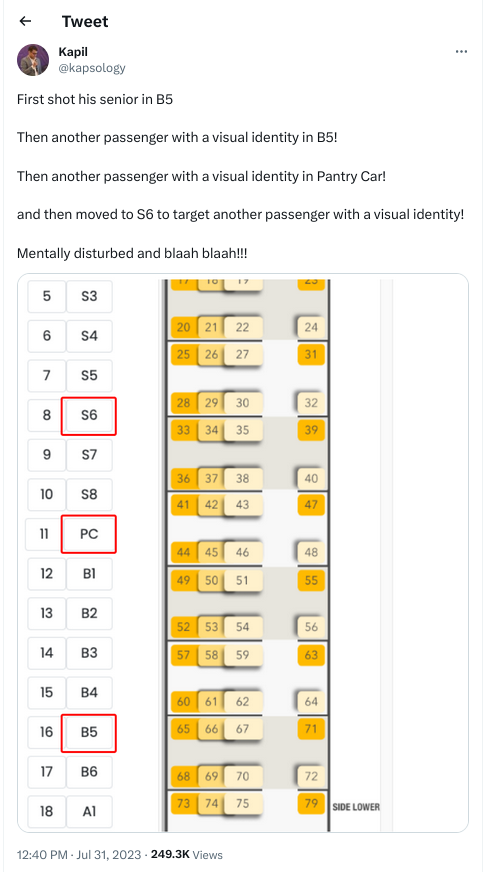


 A few weeks ago, my friend and neighbor J r me (

 The Rcpp Core Team is delighted to announce that the newest release
1.0.11 of the
 Reduce the size of your c: partition to the smallest it can be and then turn off windows with the understanding that you will never boot this system on the iron ever again.
 To find the literal path names of your detected drives you can run fdisk -l. Pay attention to the names of the partitions and the sizes of the drives to help determine which is which.
Once you have a shell in the netinst installer, you should maybe be able to run a command like the following. This will duplicate the disk located at if (in file) to the disk located at of (out file) while showing progress as the status.
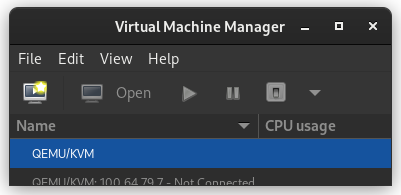 In the New VM window, select Import existing disk image
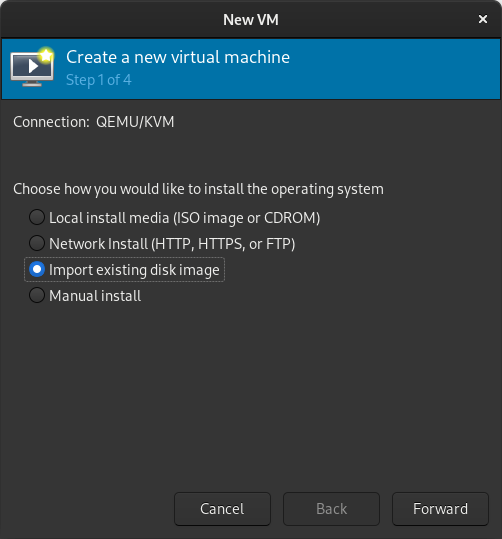 When prompted for the path to the image, use the one we created with sudo qemu-img convert above.
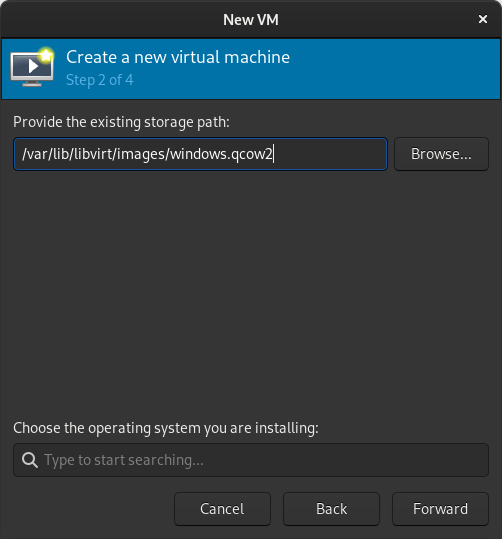 Select the version of Windows you want.
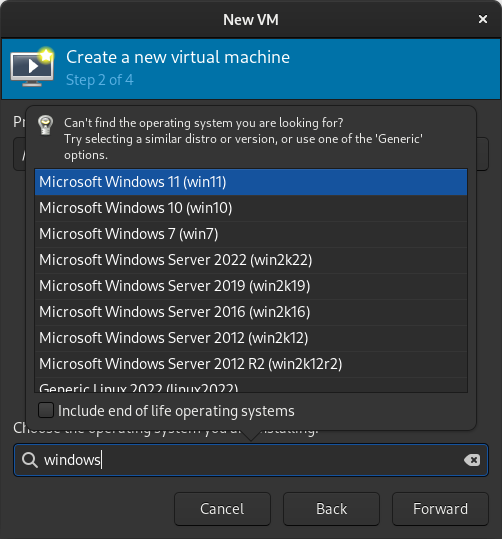 Select memory and CPUs to allocate to the VM.
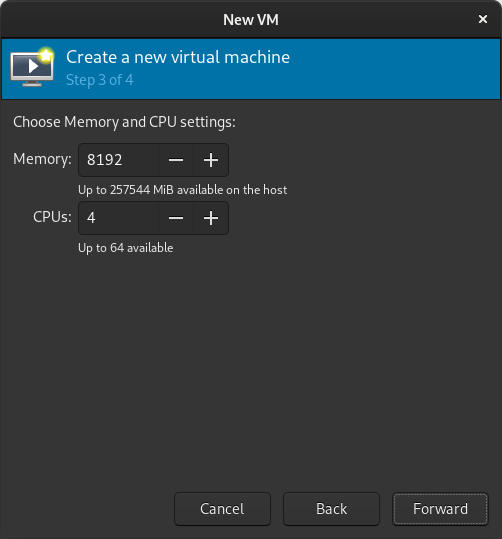 Tick the Customize configuration before install box
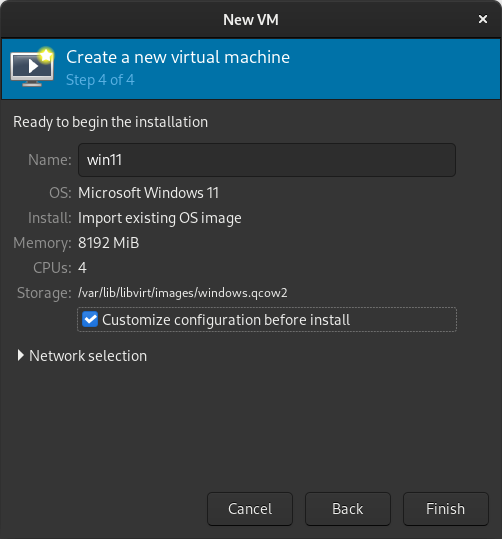 If you re prompted to enable the default network, do so now.
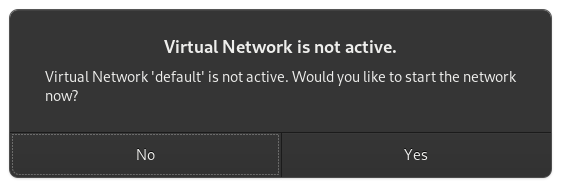 The default hardware layout should probably suffice. Get it as close to the underlying hardware as it is convenient to do. But Windows is pretty lenient these days about virtualizing licensed windows instances so long as they re not running in more than one place at a time.
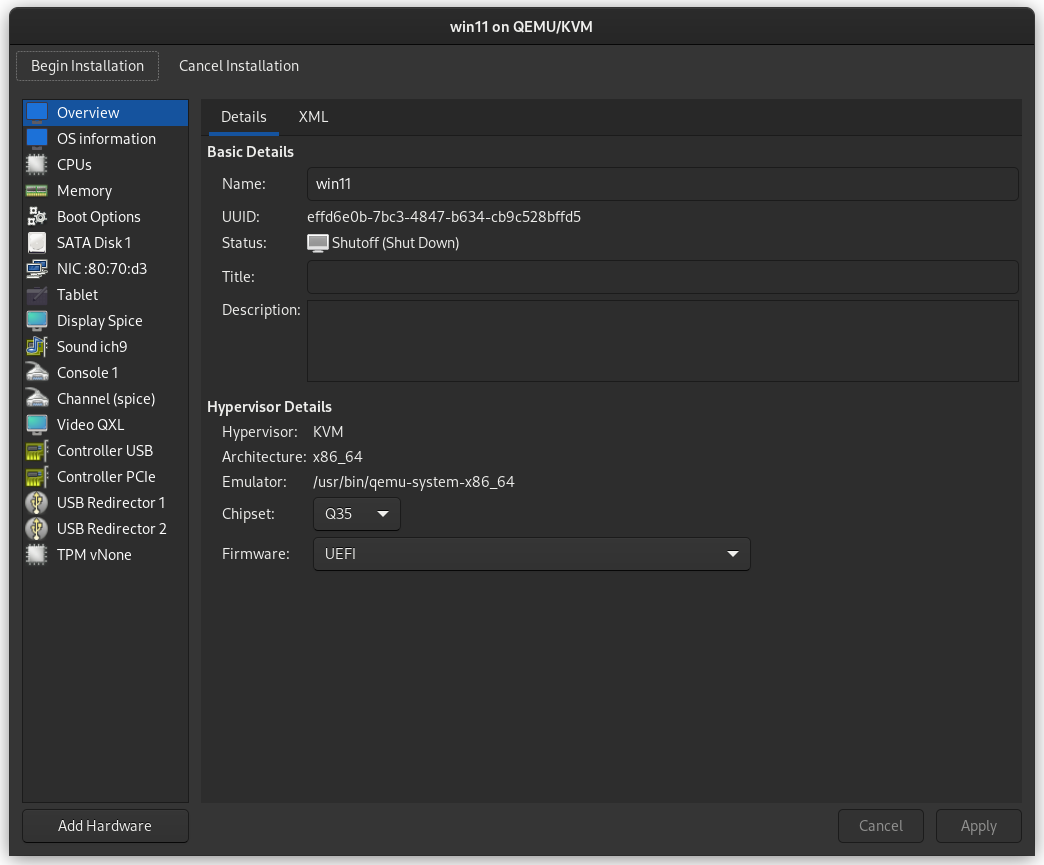 Good luck! Leave comments if you have questions.




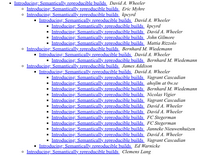




 The following contributors got their Debian Developer accounts in the last two months:

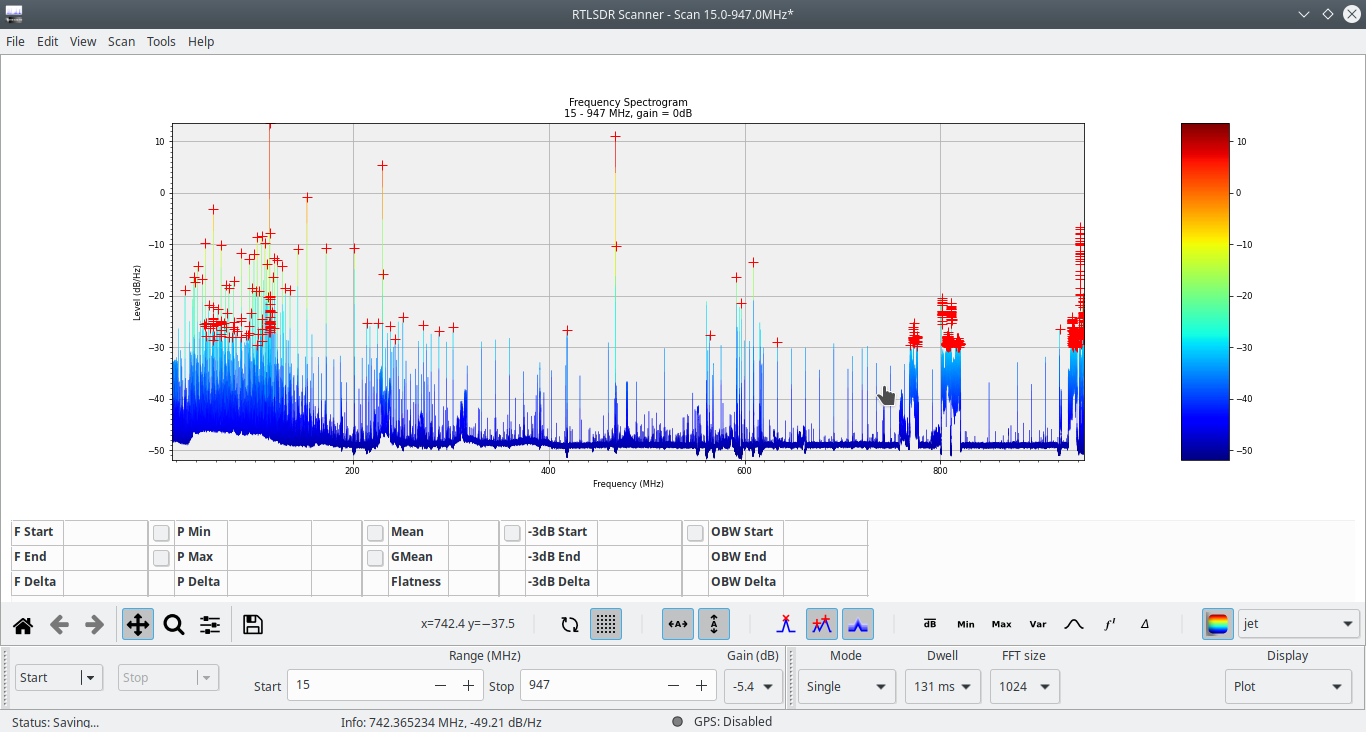
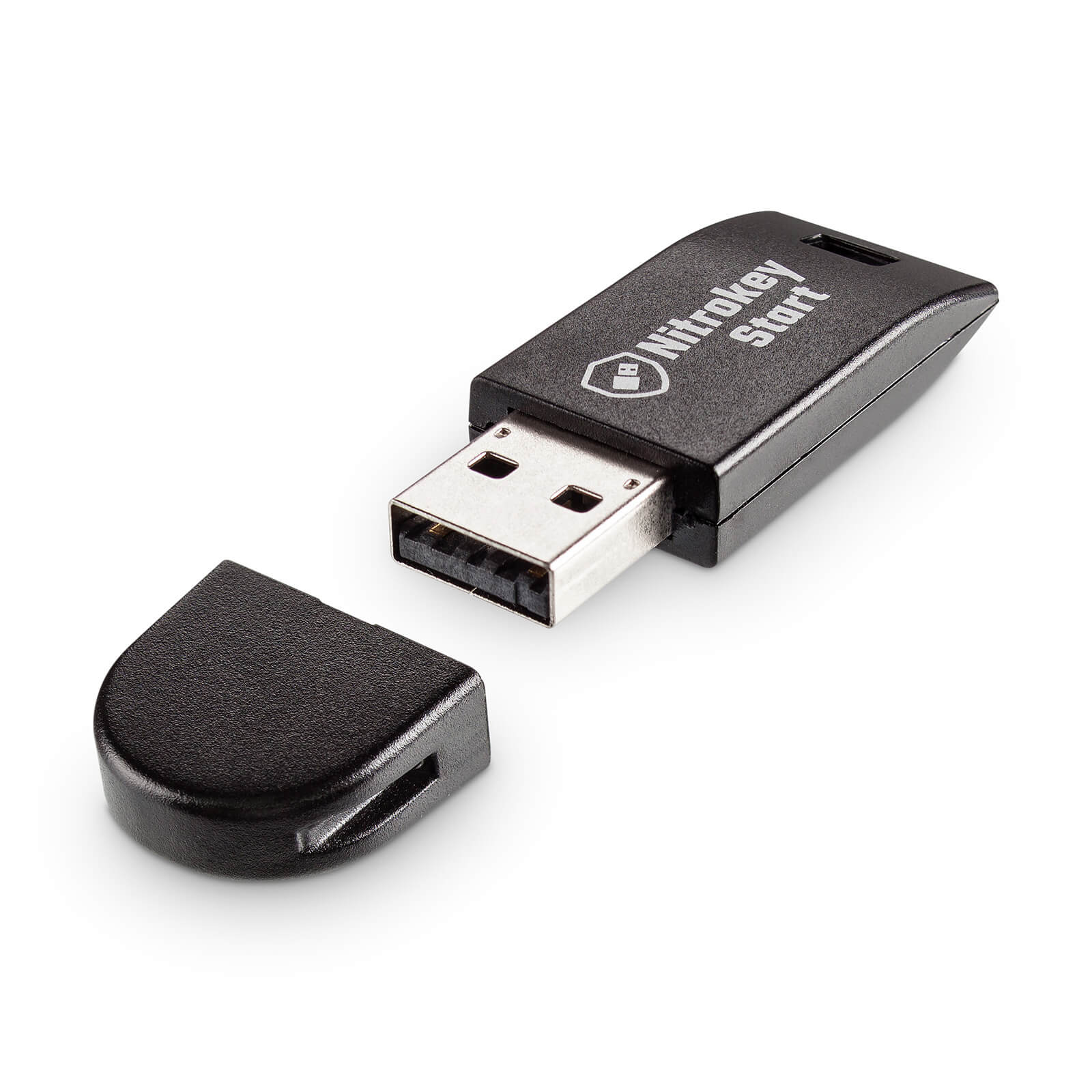 Nitrokey Start
 (no site yet)
 in October 2021. they generally seem to keep up with
shipping. update (august 2022): they rolled out a second line of
laptops (12th gen), first batch shipped, second batch