Search Results: "ghe"

5 May 2022

Bits from Debian: Google Platinum Sponsor of DebConf22

Googlelogo We are very pleased to announce that Google has committed to support DebConf22 as a Platinum sponsor. This is the third year in a row that Google is sponsoring The Debian Conference with the higher tier! Google is one of the largest technology companies in the world, providing a wide range of Internet-related services and products as online advertising technologies, search, cloud computing, software, and hardware. Google has been supporting Debian by sponsoring DebConf since more than ten years, and is also a Debian partner sponsoring parts of Salsa's continuous integration infrastructure within Google Cloud Platform. With this additional commitment as Platinum Sponsor for DebConf22, Google contributes to make possible our annual conference, and directly supports the progress of Debian and Free Software helping to strengthen the community that continues to collaborate on Debian projects throughout the rest of the year. Thank you very much Google, for your support of DebConf22! Become a sponsor too! DebConf22 will take place from July 17th to 24th, 2022 at the Innovation and Training Park (ITP) in Prizren, Kosovo, and will be preceded by DebCamp, from July 10th to 16th. And DebConf22 is still accepting sponsors! Interested companies and organizations may contact the DebConf team through sponsors@debconf.org, and visit the DebConf22 website at https://debconf22.debconf.org/sponsors/become-a-sponsor. DebConf22 banner open registration

26 April 2022

Reproducible Builds: Supporter spotlight: Google Open Source Security Team (GOSST)

The Reproducible Builds project relies on several projects, supporters and sponsors for financial support, but they are also valued as ambassadors who spread the word about our project and the work that we do. This is the fourth instalment in a series featuring the projects, companies and individuals who support the Reproducible Builds project. If you are a supporter of the Reproducible Builds project (of whatever size) and would like to be featured here, please let get in touch with us at contact@reproducible-builds.org. We started this series by featuring the Civil Infrastructure Platform project and followed this up with a post about the Ford Foundation as well as a recent one about ARDC. However, today, we ll be talking with Meder Kydyraliev of the Google Open Source Security Team (GOSST).
Chris Lamb: Hi Meder, thanks for taking the time to talk to us today. So, for someone who has not heard of the Google Open Source Security Team (GOSST) before, could you tell us what your team is about? Meder: Of course. The Google Open Source Security Team (or GOSST ) was created in 2020 to work with the open source community at large, with the goal of making the open source software that everyone relies on more secure.
Chris: What kinds of activities is the GOSST involved in? Meder: The range of initiatives that the team is involved in recognizes the diversity of the ecosystem and unique challenges that projects face on their security journey. For example, our sponsorship of sos.dev ensures that developers are rewarded for security improvements to open source projects, whilst the long term work on improving Linux kernel security tackles specific kernel-related vulnerability classes. Many of the projects GOSST is involved with aim to make it easier for developers to improve security through automated assessment (Scorecards and Allstar) and vulnerability discovery tools (OSS-Fuzz, ClusterFuzzLite, FuzzIntrospector), in addition to contributing to infrastructure to make adopting certain best practices easier. Two great examples of best practice efforts are Sigstore for artifact signing and OSV for automated vulnerability management.
Chris: The usage of open source software has exploded in the last decade, but supply-chain hygiene and best practices has seemingly not kept up. How does GOSST see this issue and what approaches is it taking to ensure that past and future systems are resilient? Meder: Every open source ecosystem is a complex environment and that awareness informs our approaches in this space. There are, of course, no silver bullets , and long-lasting and material supply-chain improvements requires infrastructure and tools that will make lives of open source developers easier, all whilst improving the state of the wider software supply chain. As part of a broader effort, we created the Supply-chain Levels for Software Artifacts framework that has been used internally at Google to protect production workloads. This framework describes the best practices for source code and binary artifact integrity, and we are engaging with the community on its refinement and adoption. Here, package managers (such as PyPI, Maven Central, Debian, etc.) are an essential link in the software supply chain due to their near-universal adoption; users do not download and compile their own software anymore. GOSST is starting to work with package managers to explore ways to collaborate together on improving the state of the supply chain and helping package maintainers and application developers do better all with the understanding that many open source projects are developed in spare time as a hobby! Solutions like this, which are the result of collaboration between GOSST and GitHub, are very encouraging as they demonstrate a way to materially strengthen software supply chain security with readily available tools, while also improving development workflows. For GOSST, the problem of supply chain security also covers vulnerability management and solutions to make it easier for everyone to discover known vulnerabilities in open source packages in a scalable and automated way. This has been difficult in the past due to lack of consistently high-quality data in an easily-consumable format. To address this, we re working on infrastructure (OSV.dev) to make vulnerability data more easily accessible as well as a widely adopted and automation friendly data format.
Chris: How does the Reproducible Builds effort help GOSST achieve its goals? Meder: Build reproducibility has a lot of attributes that are attractive as part of generally good build hygiene . As an example, hermeticity, one of requirements to meet SLSA level 4, makes it much easier to reason about the dependencies of a piece of software. This is an enormous benefit during vulnerability or supply chain incident response. On a higher level, however, we always think about reproducibility from the viewpoint of a user and the threats that reproducibility protects them from. Here, a lot of progress has been made, of course, but a lot of work remains to make reproducibility part of everyone s software consumption practices.
Chris: So if someone wanted to know more about GOSST or follow the team s work, where might they go to look? Meder: We post regular updates on Google s Security Blog and on the Linux hardening mailing list. We also welcome community participation in the projects we work on! See any of the projects linked above or OpenSSF s GitHub projects page for a list of efforts you can contribute to directly if you want to get involved in strengthening the open source ecosystem.
Chris: Thanks for taking the time to talk to us today. Meder: No problem. :)


For more information about the Reproducible Builds project, please see our website at reproducible-builds.org. If you are interested in ensuring the ongoing security of the software that underpins our civilisation and wish to sponsor the Reproducible Builds project, please reach out to the project by emailing contact@reproducible-builds.org.

22 April 2022

Andrej Shadura: To England by train (part 1)

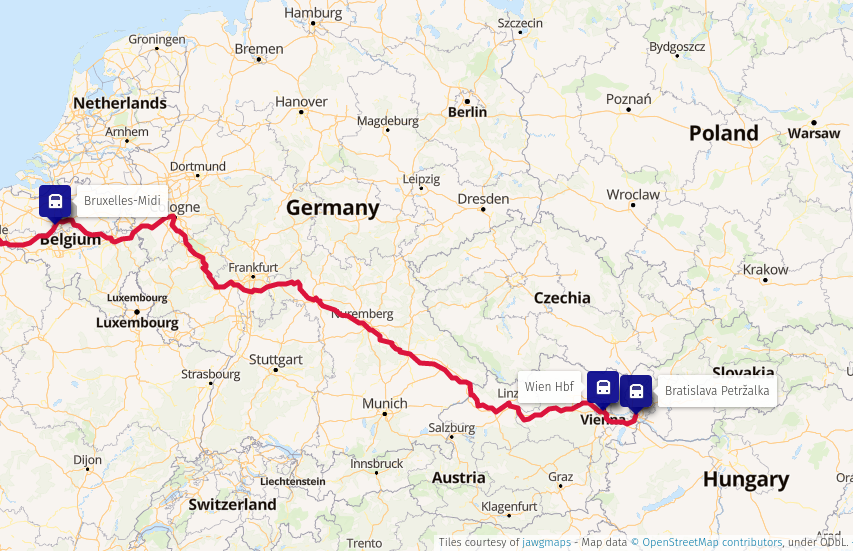
This post was written in August 2021. Just as I was going to publish it, I received an email from BB stating that due to a railway strike in Germany my night train would be cancelled. Since the rest of the trip has already been booked well in advance, I had to take a plane to Charleroi and a bus to Brussels to catch my Eurostar. Ultimately, I ended up publishing it in April 2022, just as I m about to leave for a fully train-powered trip to the UK once again. Before the pandemic started, I planned to use the last months of my then-expiring UK visa and go to England by train. I ve completed two train long journeys by that time already, to Brussels and to Belarus and Ukraine, but this would be something quite different, as I wanted to have multiple stops on my way, use night trains where it made sense, and to go through the Channel Tunnel. The Channel Tunnel fascinated me since my childhood; I first read about it in the Soviet Science and Life magazine ( ) when I was seven. I ve never had the chance to use it though, since to board any train going though it I d first need to get to France, Belgium or the Netherlands, making it significantly more expensive than the cheap 30 Ryanair flights to Stansted. As the coronavirus spread across the world, all of my travel plans along with plans for a sabbatical had to be cancelled. During 2020, I only managed to go on two weekend trips to Prague and Budapest, followed by a two-weeks holiday on Crete (we returned just a couple of weeks before the infection numbers rose and lockdowns started). I do realise that a lot of people couldn t even have this much because the situation in their countries was much worse we were lucky to have had at least some travel. Fast forward to August 2021, I m fully vaccinated, I once again have a UK visa for five years, and the UK finally recognises the EU vaccination passports yay! I can finally go to Devon to see my mother and sister again. By train, of course. Compared to my original plan, this journey will be different: about the same or even more expensive than I originally planned, but shorter and with fewer stops on the way. My original plan would be to take multiple trains from Bratislava to France or Belgium and complete this segment of the trip in about three days, enjoying my stay in a couple of cities on the way. Instead, I m taking a direct NightJet from Vienna to Brussels, not stopping anywhere on the way.
Map: train route from Bratislava to BrusselsTrain route from Bratislava to Brussels
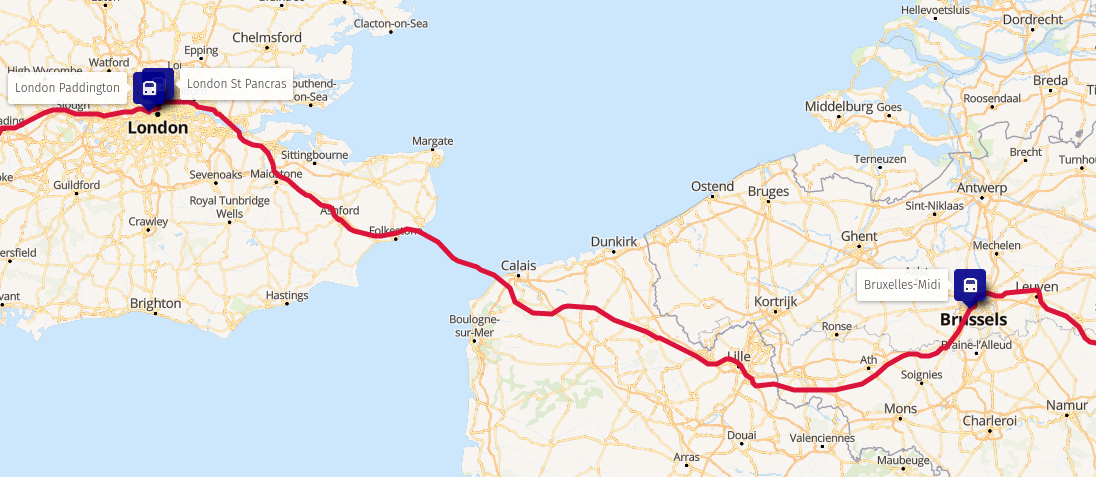
Since I was booking my trip just two weeks ahead, the price of the ticket is not that I hoped for, but much higher: 109 for the ticket itself and 60 for the berth (advance bookings could be about twice as cheap). Next, to London! Eurostar is still on a very much reduced schedule, running one train only from Amsterdam through Brussels and Lille to London each day. This means, of course, higher ticket prices (I paid about 100 for the ticket) and longer waiting time in Brussels my sleeper arrives about 10 am, but the Eurostar train is scheduled to depart at 3 pm.
Map: train route from Brussels to LondonTrain route from Brussels to London
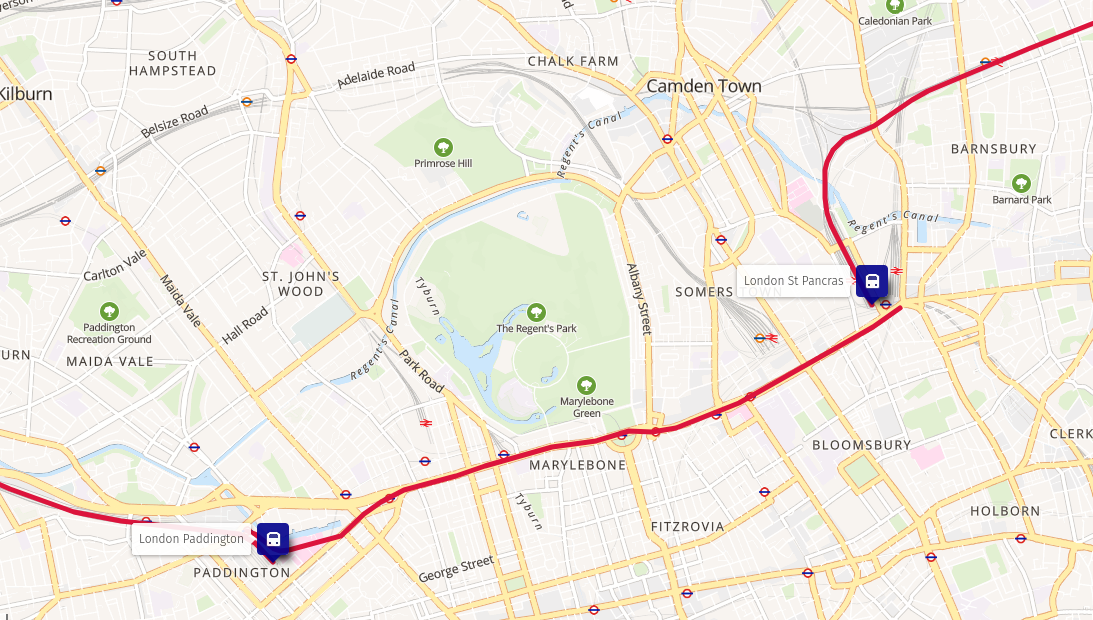
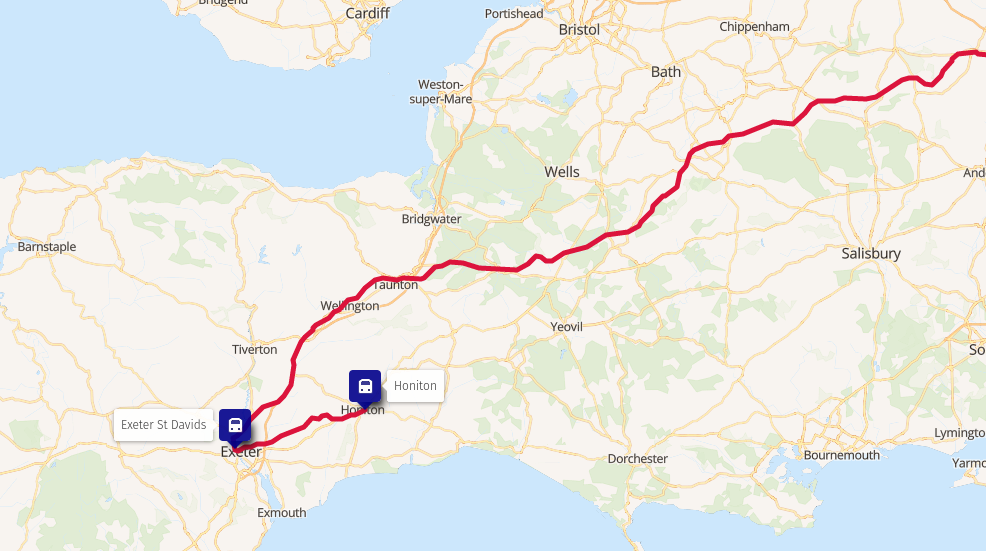
The train makes a stop in Lille, which I initially suspected to be risky as at the time when I booked my tickets, as at the time France was on the amber plus list for the UK, requiring a quarantine upon arrival. However, Eurostar announced that they will assign travellers from Lille to a different carriage to avoid other passengers having to go to quarantine, but recently France was taken off the amber plus list. The train fare system in the UK is something I don t quite understand, as sometimes split tickets are cheaper, sometimes they re expensive, sometimes prices for the same service at different times can be vastly different, off-peak tickets don t say what exactly off-peak means (very few people in the UK are asked were able to tell me when exactly off-peak hours are). Curiously, transfers between train stations using London Underground services can be included into railway tickets, but some last mile connection like Exeter to Honiton cannot (but this used to be possible). Both GWR.com and TrainLine refused to sell me a single ticket from London to Honiton through Exeter, insisting I split the ticket at Exeter St Davids or take the slower South Western train to Honiton via Salisbury and Yeovil. I ended up buying a 57 ticket from Paddington to Exeter St Davids with the first segment being the London Underground from St Pancras, and a separate 7.70 ticket to Honiton.
Map: arrival at St Pancras, the underground, departure from PaddingtonChange of trains in London
Map: arrival at Exeter St Davids, change to a South Western train, arrival at HonitonChange of trains in Exeter
Date Station Arrival Departure Train
12.8 Bratislava-Petr alka 18:15 REX 7756
Wien Hbf 19:15 19:53 NJ 50490
13.8 Bruxelles-Midi 9:55 15:06 EST 9145
London St Pancras 16:03 16:34 TfL
London Paddington 16:49 17:04 GWR 59231
Exeter St Davids 19:19 19:25 SWR 52706
Honiton 19:54
Unfortunately, due to the price of the tickets, I m taking a 15 Ryanair flight back Update after the journey Since I flew to Charleroi instead of comfortably sleeping in a night train, I had to put up with inconveniences of airports, including cumbersome connections to the nearby cities. The only reasonable way of getting from Charleroi to Brussels is an overcrowded bus which takes almost an hour to arrive. I used to take this bus when I tried to save money on my way to FOSDEM, and I must admit it s not something I missed. Boarding the Eurostar train went fine, my vaccination passport and Covid test wasn t really checked, just glanced at. The waiting room was a bit of a disappointment, with bars closed and vending machines broken. Since it was underground, I couldn t even see the trains until the very last moment when we were finally allowed on the platform. The train itself, while comfortable, disappointed me with the bistro carriage: standing only, instant coffee, poor selection of food and drinks. I m glad I bought some food at Carrefour at the Midi station! When I arrived in Exeter, I soon found out why the system refused to sell me a through ticket: 6 minutes is not enough to change trains at Exeter St Davids! Or, it might have been if I took the right footbridge but I took the one which led into a very talkative (and slow!) lift. I ended up running to the train just as it closed the doors and departed, leaving me tin Exeter for an hour until. I used this chance and walked to Exeter Central, and had a pint in a conveniently located pub around the corner. P.S. The maps in this and other posts were created using uMap; the map data come from OpenStreetMap. The train route visualisation was generated with help of the Raildar.fr OSRM instance.

21 April 2022

Andy Simpkins: Firmware and Debian

There has been a flurry of activity on the Debian mailing lists ever since Steve McIntyre raised the issue of including non-free firmware as part of official Debian installation images. Firstly I should point out that I am in complete agreement with Steve s proposal to include non-free firmware as part of an installation image. Likewise I think that we should have a separate archive section for firmware. Because without doing so it will soon become almost impossible to install onto any new hardware. However, as always the issue is more nuanced than a first glance would suggest. Lets start by defining what is firmware? Firmware is any software that runs outside the orchestration of the operating system. Typically firmware will be executed on a processor(s) separate from the processor(s) running the OS, but this does not need to be the case. As Debian we are content that our systems can operate using fully free and open source software and firmware. We can install our OS without needing any non-free firmware. This is an illusion! Each and every PC platform contains non-free firmware It may be possible to run free firmware on some Graphics controllers, Wi-Fi chip-sets, or Ethernet cards and we can (and perhaps should) choose to spend our money on systems where this is the case. When installing a new system we might still be forced to hold our nose and install with non-free firmware on the peripheral before we are able to upgrade it to FLOSS firmware later if this is exists or is even possible to do so. However after the installation we are running a full FLOSS system in terms of software and firmware. We all (almost without exception) are running propitiatory firmware whether we like it or not. Even after carefully selecting graphics and network hardware with FLOSS firmware options we still haven t escaped from non-free-firmware. Other peripherals contain firmware too each keyboard, disk (SSDs and Spinning rust). Even your USB memory stick that you use to contain the Debian installation image contains a microcontroller and hence also contains firmware that runs on it.
  1. Much of this firmware can not even be updated.
  2. Some can be updated, but is stored in FLASH ROM and the hardware vendor has defeated all programming methods (possibly circumnavigated with a hardware mod).
  3. Some of it can be updated but requires external device programmers (and often the programming connections are a series of test points dotted around the board and not on a header in order to make programming as difficult as possible).
  4. Sometimes the firmware can be updated from within the host operating system (i.e. Debian)
  5. Sometimes, as Steve pointed out in his post, the hardware vendor has enough firmware on a peripheral to perform basic functions perhaps enough to install the OS, but requires additional firmware to enable specific feature (i.e. higher screen resolutions, hardware accelerated functions etc.)
  6. Finally some vendors don t even bother with any non-volatile storage beyond a basic boot loader and firmware must be loaded before the device can be used in any mode.
What about the motherboard? If we are lucky we might be able to run a FLOSS implementation of the UEFI subsystem (edk2/tianocore for example), indeed the non AMD64/i386 platforms based around ARM, MIPS architectures are often the most free when it comes to firmware. What about the microcode on the processor? Personally I wasn t aware that that this was updatable firmware until the Spectre and Meltdown classes of vulnerabilities arose a few years back. So back to Debian images including non-free firmware. This is specifically to address the last two use cases mentioned above, i.e. where firmware needs to be loaded to achieve a minimum functioning of a device. Although it could also include motherboard support, and microcode as well. As far as I can tell the proposal exists for several reasons: #1 Because some freely distributable firmware is required for more and more devices, in order to install Debian, or because whilst Debian can be installed a desktop environment can not be started or fully function #2 Because frankly it is less work to produce, test and maintain fewer installation images As someone who performs tests on our images, this clearly gets my vote :-) and perhaps most important of all.. #3 Because our least experienced users, and new users will download an official image and give up if things don t just work TM Steve s proposal option 5 would address theses issues and I fully support it. I would love to see separate repositories for firmware and firmware-none free. Additionally to accompany firmware non-free I would like to have information on what the firmware actually does. Can I run my hardware without it, what function(s) are limited without the firmware, better yet is there a FLOSS equivalent that I can load instead? Is this something that we can present in Debian installer? I would love not to require non-free firmware, but if I can t, I would love if DI would enable a user to make an informed choice as to what, if any, firmware is installed. Should we be requesting (requiring?) this information for any non-free firmware image that we carry in the archive? Finally lets consider firmware in the wider general case, not just the case where we need to load firmware from within Debian each and every boot. Personally I am annoyed whenever a hardware manufacturer has gone out of their way to prevent firmware updates. Lets face it software contains bugs, and we can assume that the software making up a firmware image will as well. Critical (security) vulnerabilities found in firmware, especially if this runs on the same processor(s) as the OS can impact on the wider system, not just the device itself. This will mean that, without updatable firmware, the hardware itself should be withdrawn from use whilst it would otherwise still function. By preventing firmware updates vendors are forcing early obsolescence in the hardware they sell, perhaps good for their bottom line, but certainly no good for users or the environment. Here I can practice what I preach. As an Electronic Engineer / Systems architect I have been beating the drum for In System Updatable firmware for ALL programmable devices in a system, be it a simple peripheral or a deeply embedded system. I can honestly say that over the last 20 years (yes I have been banging this particular drum for that long) I have had 100% success in arguing this case commercially. Having device programmers in R&D departments is one thing, but that is additional cost for production, and field service. Needing custom programming headers or even a bed of nails fixture to connect your target device to a programmer is more trouble than it is worth. Finally, the ability to update firmware in the field means that you can launch your product on schedule, make a sale and ship to a customer even if the first thing that you need to do is download an update. Offering that to any project manager will make you very popular indeed. So what if this firmware is non-free? As long as the firmware resides in non-volatile media without needing the OS to interact with it, we as a project don t need to carry it in our archives. And we as principled individuals can vote with our feet and wallets by choosing to purchase devices that have free firmware. But where that isn t an option, I ll take updatable but non-free firmware over non-free firmware that can not be updated any day of the week. Sure, the manufacture can choose to no longer support the firmware, and it is shocking how soon this happens often in the consumer market, the manufacture has withdrawn support for a product before it even reaches the end user (In which case we should boycott that manufacture in future until they either change their ways of go bust). But again if firmware can be updated in system that would at least allow the possibility of open firmware to arise. Indeed the only commercial case I have seen to argue against updatable firmware has been either for DRM, in which case good lets get rid of both, or for RF licence compliance, and even then it is tenuous because in this case the manufacture wants ISP for its own use right up until a device is shipped out the door, typically achived by blowing one time programmable fuse links .

19 April 2022

Steve McIntyre: Firmware - what are we going to do about it?

TL;DR: firmware support in Debian sucks, and we need to change this. See the "My preference, and rationale" Section below. In my opinion, the way we deal with (non-free) firmware in Debian is a mess, and this is hurting many of our users daily. For a long time we've been pretending that supporting and including (non-free) firmware on Debian systems is not necessary. We don't want to have to provide (non-free) firmware to our users, and in an ideal world we wouldn't need to. However, it's very clearly no longer a sensible path when trying to support lots of common current hardware. Background - why has (non-free) firmware become an issue? Firmware is the low-level software that's designed to make hardware devices work. Firmware is tightly coupled to the hardware, exposing its features, providing higher-level functionality and interfaces for other software to use. For a variety of reasons, it's typically not Free Software. For Debian's purposes, we typically separate firmware from software by considering where the code executes (does it run on a separate processor? Is it visible to the host OS?) but it can be difficult to define a single reliable dividing line here. Consider the Intel/AMD CPU microcode packages, or the U-Boot firmware packages as examples. In times past, all necessary firmware would normally be included directly in devices / expansion cards by their vendors. Over time, however, it has become more and more attractive (and therefore more common) for device manufacturers to not include complete firmware on all devices. Instead, some devices just embed a very simple set of firmware that allows for upload of a more complete firmware "blob" into memory. Device drivers are then expected to provide that blob during device initialisation. There are a couple of key drivers for this change: Due to these reasons, more and more devices in a typical computer now need firmware to be uploaded at runtime for them to function correctly. This has grown: At the beginning of this timeline, a typical Debian user would be able to use almost all of their computer's hardware without needing any firmware blobs. It might have been inconvenient to not be able to use the WiFi, but most laptops had wired ethernet anyway. The WiFi could always be enabled and configured after installation. Today, a user with a new laptop from most vendors will struggle to use it at all with our firmware-free Debian installation media. Modern laptops normally don't come with wired ethernet now. There won't be any usable graphics on the laptop's screen. A visually-impaired user won't get any audio prompts. These experiences are not acceptable, by any measure. There are new computers still available for purchase today which don't need firmware to be uploaded, but they are growing less and less common. Current state of firmware in Debian For clarity: obviously not all devices need extra firmware uploading like this. There are many devices that depend on firmware for operation, but we never have to think about them in normal circumstances. The code is not likely to be Free Software, but it's not something that we in Debian must spend our time on as we're not distributing that code ourselves. Our problems come when our user needs extra firmware to make their computer work, and they need/expect us to provide it. We have a small set of Free firmware binaries included in Debian main, and these are included on our installation and live media. This is great - we all love Free Software and this works. However, there are many more firmware binaries that are not Free. If we are legally able to redistribute those binaries, we package them up and include them in the non-free section of the archive. As Free Software developers, we don't like providing or supporting non-free software for our users, but we acknowledge that it's sometimes a necessary thing for them. This tension is acknowledged in the Debian Free Software Guidelines. This tension extends to our installation and live media. As non-free is officially not considered part of Debian, our official media cannot include anything from non-free. This has been a deliberate policy for many years. Instead, we have for some time been building a limited parallel set of "unofficial non-free" images which include non-free firmware. These non-free images are produced by the same software that we use for the official images, and by the same team. There are a number of issues here that make developers and users unhappy:
  1. Building, testing and publishing two sets of images takes more effort.
  2. We don't really want to be providing non-free images at all, from a philosophy point of view. So we mainly promote and advertise the preferred official free images. That can be a cause of confusion for users. We do link to the non-free images in various places, but they're not so easy to find.
  3. Using non-free installation media will cause more installations to use non-free software by default. That's not a great story for us, and we may end up with more of our users using non-free software and believing that it's all part of Debian.
  4. A number of users and developers complain that we're wasting their time by publishing official images that are just not useful for a lot (a majority?) of users.
We should do better than this. Options The status quo is a mess, and I believe we can and should do things differently. I see several possible options that the images team can choose from here. However, several of these options could undermine the principles of Debian. We don't want to make fundamental changes like that without the clear backing of the wider project. That's why I'm writing this...
  1. Keep the existing setup. It's horrible, but maybe it's the best we can do? (I hope not!)
  2. We could just stop providing the non-free unofficial images altogether. That's not really a promising route to follow - we'd be making it even harder for users to install our software. While ideologically pure, it's not going to advance the cause of Free Software.
  3. We could stop pretending that the non-free images are unofficial, and maybe move them alongside the normal free images so they're published together. This would make them easier to find for people that need them, but is likely to cause users to question why we still make any images without firmware if they're otherwise identical.
  4. The images team technically could simply include non-free into the official images, and add firmware packages to the input lists for those images. However, that would still leave us with problem 3 from above (non-free generally enabled on most installations).
  5. We could split out the non-free firmware packages into a new non-free-firmware component in the archive, and allow a specific exception only to allow inclusion of those packages on our official media. We would then generate only one set of official media, including those non-free firmware packages. (We've already seen various suggestions in recent years to split up the non-free component of the archive like this, for example into non-free-firmware, non-free-doc, non-free-drivers, etc. Disagreement (bike-shedding?) about the split caused us to not make any progress on this. I believe this project should be picked up and completed. We don't have to make a perfect solution here immediately, just something that works well enough for our needs today. We can always tweak and improve the setup incrementally if that's needed.)
These are the most likely possible options, in my opinion. If you have a better suggestion, please let us know! I'd like to take this set of options to a GR, and do it soon. I want to get a clear decision from the wider Debian project as to how to organise firmware and installation images. If we do end up changing how we do things, I want a clear mandate from the project to do that. My preference, and rationale Mainly, I want to see how the project as a whole feels here - this is a big issue that we're overdue solving. What would I choose to do? My personal preference would be to go with option 5: split the non-free firmware into a special new component and include that on official media. Does that make me a sellout? I don't think so. I've been passionately supporting and developing Free Software for more than half my life. My philosophy here has not changed. However, this is a complex and nuanced situation. I firmly believe that sharing software freedom with our users comes with a responsibility to also make our software useful. If users can't easily install and use Debian, that helps nobody. By splitting things out here, we would enable users to install and use Debian on their hardware, without promoting/pushing higher-level non-free software in general. I think that's a reasonable compromise. This is simply a change to recognise that hardware requirements have moved on over the years. Further work If we do go with the changes in option 5, there are other things we could do here for better control of and information about non-free firmware:
  1. Along with adding non-free firmware onto media, when the installer (or live image) runs, we should make it clear exactly which firmware packages have been used/installed to support detected hardware. We could link to docs about each, and maybe also to projects working on Free re-implementations.
  2. Add an option at boot to explicitly disable the use of the non-free firmware packages, so that users can choose to avoid them.
Acknowledgements Thanks to people who reviewed earlier versions of this document and/or made suggestions for improvement, in particular:

13 April 2022

Antoine Beaupr : Tuning my wifi radios

After listening to an episode of the 2.5 admins podcast, I realized there was some sort of low-hanging fruit I could pick to better tune my WiFi at home. You see, I'm kind of a fraud in WiFi: I only started a WiFi mesh in Montreal (now defunct), I don't really know how any of that stuff works. So I was surprised to hear one of the podcast host say "it's all about airtime" and "you want to reduce the power on your access points" (APs). It seemed like sound advice: better bandwidth means less time on air, means less collisions, less latency, and less power also means less collisions. Worth a try, right?

Frequency So the first thing I looked at was WifiAnalyzer to see if I had any optimisation I could do there. Normally, I try to avoid having nearby APs on the same frequency to avoid collisions, but who knows, maybe I had messed that up. And turns out I did! Both APs were on "auto" for 5GHz, which typically means "do nothing or worse". 5GHz is really interesting, because, in theory, there are LOTS of channels to pick from, it goes up to 196!! And both my APs were on 36, what gives? So the first thing I did was to set it to channel 100, as there was that long gap in WifiAnalyzer where no other AP was. But that just broke 5GHz on the AP. The OpenWRT GUI (luci) would just say "wireless not associated" and the ESSID wouldn't show up in a scan anymore. At first, I thought this was a problem with OpenWRT or my hardware, but I could reproduce the problem with both my APs: a TP-Link Archer A7 v5 and a Turris Omnia (see also my review). As it turns out, that's because that range of the WiFi band interferes with trivial things like satellites and radar, which make the actually very useful radar maps look like useless christmas trees. So those channels require DFS to operate. DFS works by first listening on the frequency for a certain amount of time (1-2 minute, but could be as high as 10) to see if there's something else transmitting at all. So typically, that means they just don't operate at all in those bands, especially if you're near any major city which generally means you are near a weather radar that will transmit on that band. In the system logs, if you have such a problem, you might see this:
Apr  9 22:17:39 octavia hostapd: wlan0: DFS-CAC-START freq=5500 chan=100 sec_chan=1, width=0, seg0=102, seg1=0, cac_time=60s
Apr  9 22:17:39 octavia hostapd: DFS start_dfs_cac() failed, -1
... and/or this:
Sat Apr  9 18:05:03 2022 daemon.notice hostapd: Channel 100 (primary) not allowed for AP mode, flags: 0x10095b NO-IR RADAR
Sat Apr  9 18:05:03 2022 daemon.warn hostapd: wlan0: IEEE 802.11 Configured channel (100) not found from the channel list of current mode (2) IEEE 802.11a
Sat Apr  9 18:05:03 2022 daemon.warn hostapd: wlan0: IEEE 802.11 Hardware does not support configured channel
Here, it clearly says RADAR (in all caps too, which means it's really important). NO-IR is also important, I'm not sure what it means but it could be that you're not allowed to transmit in that band because of other local regulations. There might be a way to workaround those by changing the "region" in the Luci GUI, but I didn't mess with that, because I figured that other devices will have that already configured. So using a forbidden channel might make it more difficult for clients to connect (although it's possible this is enforced only on the AP side). In any case, 5GHz is promising, but in reality, you only get from channel 36 (5.170GHz) to 48 (5.250GHz), inclusively. Fast counters will notice that is exactly 80MHz, which means that if an AP is configured for that hungry, all-powerful 80MHz, it will effectively take up all 5GHz channels at once. This, in other words, is as bad as 2.4GHz, where you also have only two 40MHz channels. (Really, what did you expect: this is an unregulated frequency controlled by commercial interests...) So the first thing I did was to switch to 40MHz. This gives me two distinct channels in 5GHz at no noticeable bandwidth cost. (In fact, I couldn't find hard data on what the bandwidth ends up being on those frequencies, but I could still get 400Mbps which is fine for my use case.)

Power The next thing I did was to fiddle with power. By default, both radios were configured to transmit as much power as they needed to reach clients, which means that if a client gets farther away, it would boost its transmit power which, in turns, would mean the client would still connect to instead of failing and properly roaming to the other AP. The higher power also means more interference with neighbors and other APs, although that matters less if they are on different channels. On 5GHz, power was about 20dBm (100 mW) -- and more on the Turris! -- when I first looked, so I tried to lower it drastically to 5dBm (3mW) just for kicks. That didn't work so well, so I bumped it back up to 14 dBm (25 mW) and that seems to work well: clients hit about -80dBm when they get far enough from the AP, which gets close to the noise floor (and where the neighbor APs are), which is exactly what I want. On 2.4GHz, I lowered it down even further, to 10 dBm (10mW) since it's better at going through wells, I figured it would need less power. And anyways, I rather people use the 5GHz APs, so maybe that will act as an encouragement to switch. I was still able to connect correctly to the APs at that power as well.

Other tweaks I disabled the "Allow legacy 802.11b rates" setting in the 5GHz configuration. According to this discussion:
Checking the "Allow b rates" affects what the AP will transmit. In particular it will send most overhead packets including beacons, probe responses, and authentication / authorization as the slow, noisy, 1 Mb DSSS signal. That is bad for you and your neighbors. Do not check that box. The default really should be unchecked.
This, in particular, "will make the AP unusable to distant clients, which again is a good thing for public wifi in general". So I just unchecked that box and I feel happier now. I didn't make tests to see the effect separately however, so this is mostly just a guess.

6 April 2022

Bits from Debian: Infomaniak Platinum Sponsor of DebConf22

infomaniaklogo We are very pleased to announce that Infomaniak has committed to support DebConf22 as a Platinum sponsor. This is the fourth year in a row that Infomaniak is sponsoring The Debian Conference with the higher tier! Infomaniak is Switzerland's largest web-hosting company, also offering backup and storage services, solutions for event organizers, live-streaming and video on demand services. It wholly owns its datacenters and all elements critical to the functioning of the services and products provided by the company (both software and hardware). With this commitment as Platinum Sponsor, Infomaniak contributes to make possible our annual conference, and directly supports the progress of Debian and Free Software helping to strengthen the community that continues to collaborate on Debian projects throughout the rest of the year. Thank you very much Infomaniak, for your support of DebConf22! Become a sponsor too! DebConf22 will take place from July 17th to 24th, 2022 at the Innovation and Training Park (ITP) in Prizren, Kosovo, and will be preceded by DebCamp, from July 10th to 16th. And DebConf22 is still accepting sponsors! Interested companies and organizations may contact the DebConf team through sponsors@debconf.org, and visit the DebConf22 website at https://debconf22.debconf.org/sponsors/become-a-sponsor. DebConf22 banner open registration

5 April 2022

Dirk Eddelbuettel: RcppArmadillo 0.11.0.0.0 on CRAN: Upstream Updates

armadillo image Armadillo is a powerful and expressive C++ template library for linear algebra aiming towards a good balance between speed and ease of use with a syntax deliberately close to a Matlab. RcppArmadillo integrates this library with the R environment and language and is widely used by (currently) 972 other packages on CRAN, downloaded over 24 million times (per the partial logs from the cloud mirrors of CRAN), and the CSDA paper (preprint / vignette) by Conrad and myself has been cited 465 times according to Google Scholar. This release brings a new upstream release 11.0.0. We tested this very rigorously via three different RC release each of which got a full reverse-dependencies run (for which results are always logged here). The full set of changes (since the last CRAN release 0.10.8.1.0) follows.

Changes in RcppArmadillo version 0.11.0.0 (2022-04-04)
  • Upgraded to Armadillo release 11.0.0 (Creme Brulee)
    • added variants of inv() and inv_sympd() that provide rcond (reciprocal condition number)
    • expanded inv() and inv_sympd() with options inv_opts::tiny and inv_opts::allow_approx
    • stricter handling of singular matrices by inv() and inv_sympd()
    • stricter handling of non-sympd matrices by inv() and inv_sympd()
    • stricter handling of non-finitie matrices by pinv()
    • more robust handling of rank deficient matrices by solve()
    • faster handling of diagonal matrices by rcond()
    • changed eigs_sym() and eigs_gen() to use higher quality RNG
    • quantile() and median() will now throw an exception if given matrices/vectors have NaN elements
    • workaround for yet another bug in Intel MKL
  • Until May 2022, protect correction to Field behavior via define of RCPP_ARMADILLO_FIX_Field
  • If a LAPACK installation with missing complex routines is found (as e.g. Ubuntu using 3.9.0) then the LAPACK unit test is skipped.

Changes in RcppArmadillo version 0.10.8.2.0 (2022-02-01)
  • Upgraded to Armadillo release 10.8.2 (Realm Raider)
    • fix potential speed regression in pinv() and rank()

Courtesy of my CRANberries, there is a diffstat report relative to previous release. More detailed information is on the RcppArmadillo page. Questions, comments etc should go to the rcpp-devel mailing list off the R-Forge page. If you like this or other open-source work I do, you can sponsor me at GitHub.

This post by Dirk Eddelbuettel originated on his Thinking inside the box blog. Please report excessive re-aggregation in third-party for-profit settings.

30 March 2022

Bits from Debian: Lenovo Platinum Sponsor of DebConf22

lenovologo We are very pleased to announce that Lenovo has committed to supporting DebConf22 as a Platinum sponsor. This is the fourth year in a row that Lenovo is sponsoring The Debian Conference with the higher tier! As a global technology leader manufacturing a wide portfolio of connected products, including smartphones, tablets, PCs and workstations as well as AR/VR devices, smart home/office and data center solutions, Lenovo understands how critical open systems and platforms are to a connected world. With this commitment as Platinum Sponsor, Lenovo is contributing to make possible our annual conference, and directly supporting the progress of Debian and Free Software, helping to strengthen the community that continues to collaborate on Debian projects throughout the rest of the year. Thank you very much Lenovo, for your support of DebConf22! Become a sponsor too! DebConf22 will take place from July 17th to 24th, 2022 at the Innovation and Training Park (ITP) in Prizren, Kosovo, and will be preceded by DebCamp, from July 10th to 16th. And DebConf22 is still accepting sponsors! Interested companies and organizations may contact the DebConf team through sponsors@debconf.org, and visit the DebConf22 website at https://debconf22.debconf.org/sponsors/become-a-sponsor. DebConf22 banner open registration

23 March 2022

Matthew Garrett: AMD's Pluton implementation seems to be controllable

I've been digging through the firmware for an AMD laptop with a Ryzen 6000 that incorporates Pluton for the past couple of weeks, and I've got some rough conclusions. Note that these are extremely preliminary and may not be accurate, but I'm going to try to encourage others to look into this in more detail. For those of you at home, I'm using an image from here, specifically version 309. The installer is happy to run under Wine, and if you tell it to "Extract" rather than "Install" it'll leave a file sitting in C:\\DRIVERS\ASUS_GA402RK_309_BIOS_Update_20220322235241 which seems to have an additional 2K of header on it. Strip that and you should have something approximating a flash image.

Looking for UTF16 strings in this reveals something interesting:

Pluton (HSP) X86 Firmware Support
Enable/Disable X86 firmware HSP related code path, including AGESA HSP module, SBIOS HSP related drivers.
Auto - Depends on PcdAmdHspCoreEnable build value
NOTE: PSP directory entry 0xB BIT36 have the highest priority.
NOTE: This option will NOT put HSP hardware in disable state, to disable HSP hardware, you need setup PSP directory entry 0xB, BIT36 to 1.
// EntryValue[36] = 0: Enable, HSP core is enabled.
// EntryValue[36] = 1: Disable, HSP core is disabled then PSP will gate the HSP clock, no further PSP to HSP commands. System will boot without HSP.

"HSP" here means "Hardware Security Processor" - a generic term that refers to Pluton in this case. This is a configuration setting that determines whether Pluton is "enabled" or not - my interpretation of this is that it doesn't directly influence Pluton, but disables all mechanisms that would allow the OS to communicate with it. In this scenario, Pluton has its firmware loaded and could conceivably be functional if the OS knew how to speak to it directly, but the firmware will never speak to it itself. I took a quick look at the Windows drivers for Pluton and it looks like they won't do anything unless the firmware wants to expose Pluton, so this should mean that Windows will do nothing.

So what about the reference to "PSP directory entry 0xB BIT36 have the highest priority"? The PSP is the AMD Platform Security Processor - it's an ARM core on the CPU package that boots before the x86. The PSP firmware lives in the same flash image as the x86 firmware, so the PSP looks for a header that points it towards the firmware it should execute. This gives a pointer to a "directory" - a list of different object types and where they're located in flash (there's a description of this for slightly older AMDs here). Type 0xb is treated slightly specially. Where most types contain the address of where the actual object is, type 0xb contains a 64-bit value that's interpreted as enabling or disabling various features - something AMD calls "soft fusing" (Intel have something similar that involves setting bits in the Firmware Interface Table). The PSP looks at the bits that are set here and alters its behaviour. If bit 36 is set, the PSP tells Pluton to turn itself off and will no longer send any commands to it.

So, we have two mechanisms to disable Pluton - the PSP can tell it to turn itself off, or the x86 firmware can simply never speak to it or admit that it exists. Both of these imply that Pluton has started executing before it's shut down, so it's reasonable to wonder whether it can still do stuff. In the image I'm looking at, there's a blob starting at 0x0069b610 that appears to be firmware for Pluton - it contains chunks that appear to be the reference TPM2 implementation, and it broadly decompiles as valid ARM code. It should be viable to figure out whether it can do anything in the face of being "disabled" via either of the above mechanisms.

Unfortunately for me, the system I'm looking at does set bit 36 in the 0xb entry - as a result, Pluton is disabled before x86 code starts running and I can't investigate further in any straightforward way. The implication that the user-controllable mechanism for disabling Pluton merely disables x86 communication with it rather than turning it off entirely is a little concerning, although (assuming Pluton is behaving as a TPM rather than having an enhanced set of capabilities) skipping any firmware communication means the OS has no way to know what happened before it started running even if it has a mechanism to communicate with Pluton without firmware assistance. In that scenario it'd be viable to write a bootloader shim that just faked up the firmware measurements before handing control to the OS.

The bit 36 disabling mechanism seems more solid? Again, it should be possible to analyse the Pluton firmware to determine whether it actually pays attention to a disable command being sent. But even if it chooses to ignore that, if the PSP is in a position to just cut the clock to Pluton, it's not going to be able to do a lot. At that point we're trusting AMD rather than trusting Microsoft, but given that you're also trusting AMD to execute the code you're giving them to execute, it's hard to avoid placing trust in them.

Overall: I'm reasonably confident that systems that ship with Pluton disabled via setting bit 36 in the soft fuses are going to disable it sufficiently hard that the OS can't do anything about it. Systems that give the user an option to enable or disable it are a little less clear in that respect, and it's possible (but not yet demonstrated) that an OS could communicate with Pluton anyway. However, if that's true, and if the firmware never communicates with Pluton itself, the user could install a stub loader in UEFI that mimicks the firmware behaviour and leaves the OS thinking everything was good when it absolutely is not.

So, assuming that Pluton in its current form on AMD has no capabilities outside those we know about, the disabling mechanisms are probably good enough. It's tough to make a firm statement on this before I have access to a system that doesn't just disable it immediately, so stay tuned for updates.

comment count unavailable comments

21 March 2022

Gunnar Wolf: Long, long, long live Emacs after 39 years

Reading Planet Debian (see, Sam, we are still having a conversation over there? ), I read Anarcat s 20+ years of Emacs. And.. Well, should I brag contribute to the discussion? Of course, why not? Emacs is the first computer program I can name that I ever learnt to use to do something minimally useful. 39 years ago.
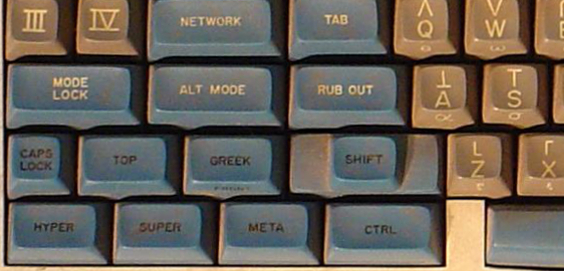
From the Space Cadet keyboard that (obviously ) influenced Emacs early design
The Emacs editor was born, according to Wikipedia, in 1976, same year as myself. I am clearly not among its first users. It was already a well-established citizen when I first learnt it; I am fortunate to be the son of a Physics researcher at UNAM, My father used to take me to his institute after he noticed how I was attracted to computers; we would usually spend some hours there between 7 and 11PM on Friday nights. His institute had a computer room where they had very sweet gear: Some 10 Heathkit terminals quite similar to this one: The terminals were connected (via individual switches) to both a PDP-11 and a Foonly F2 computers. The room also had a beautiful thermal printer, a beautiful Tektronix vectorial graphics output terminal, and some other stuff. The main user for my father was to typeset some books; he had recently (1979) published Integral Transforms in Science and Engineering (that must be my first mention in scientific literature), and I remember he was working on the proceedings of a conference he held in Oaxtepec (the account he used in the system was oax, not his usual kbw, which he lent me). He was also working on Manual de Lenguaje y Tipograf a Cient fica en Castellano, where you can see some examples of TeX; due to a hardware crash, the book has the rare privilege of being a direct copy of the output of the thermal printer: It was not possible to produce a higher resolution copy for several years But it is fun and interesting to see what we were able to produce with in-house tools back in 1985! So, what could he teach me so I could use the computers while he worked? TeX, of course. No, no LaTeX (that was published in 1984). LaTeX is a set of macros developed initially by Leslie Lamport, used to make TeX easier; TeX was developed by Donald Knuth, and if I have this information correct, it was Knuth himself who installed and demonstrated TeX in the Foonly computer, during a visit to UNAM. Now, after 39 years hammering at Emacs buffers Have I grown extra fingers? Nope. I cannot even write decent elisp code, and can barely read it. I do use org-mode (a lot!) and love it; I have written basically five books, many articles and lots of presentations and minor documents with it. But I don t read my mail or handle my git from Emacs. I could say, I m a relatively newbie after almost four decades. Four decades When we got a PC in 1986, my father got the people at the Institute to get him memacs (micro-emacs). There was probably a ten year period I barely used any emacs, but always recognized it. My fingers hve memorized a dozen or so movement commands, and a similar number of file management commands. And yes, Emacs and TeX are still the main tools I use day to day.

15 March 2022

Russell Coker: Librem 5 First Impression

I just received the Purism Librem 5 that I paid for years ago (I think it was 2018). The process of getting the basic setup done was typical (choosing keyboard language, connecting to wifi, etc). Then I tried doing things. One thing I did was update to the latest PureOS release which gave me a list of the latest Debian packages installed which is nice. The first problem I found was the lack of notification when the phone is trying to do something. I d select to launch an app, nothing would happen, then a few seconds later it would appear. When I go to the PureOS app store and get a list of apps in a category nothing happens for ages (shows a blank list) then it might show actual apps, or it might not. I don t know what it s doing, maybe downloading a list of apps, if so it should display how many apps have had their summary data downloaded or how many KB of data have been downloaded so I know if it s doing something and how long it might take. Running any of the productivity applications requires a GNOME keyring, I selected a keyring password of a few characters and it gave a warning about having no password (does this mean it took 3 characters to be the same as 0 characters?). Then I couldn t unlock it later. I tried deleting the key file and creating a new one with a single character password and got the same result. I think that such keyring apps have little benefit, all processes in the session have the same UID and presumable can use ptrace to get data from each other s memory space. If the keyring program was SETGID and the directory used to store the keyring files was a system directory with execute access only for that group then it might provide some benefit (SETGID means that ptrace is denied). Ptrace is denied for the keyring but relying on a user space prompt for the passphrase to a file that the user can read seems of minimal benefit as a hostile process could read the file and prompt for the passphrase. This is probably more of a Debian issue, and I reproduced the keyring issue with my Debian workstation. The Librem 5 is a large phone (unusually thick by modern phone standards) and is rumoured to be energy hungry. When I tried charging it from the USB port on my PC (HP ML110 Gen9) the charge level went down. I used the same USB port and USB cable that I use to charge my Huawei Mate 10 Pro every day, so other phones can draw more power from that USB port and cable faster than they use it. The on-sceen keyboard for the Librem 5 is annoying, it doesn t have a TAB key and the cursor control keys are unreasonably small. The keyboard used by ConnectBot (the most popular SSH client for Android) is much better, it has it s own keys for CTRL, ESC, TAB, arrows, HOME, and END in addition to the regular on-screen keyboard. The Librem 5 comes with a terminal app by default which is much more difficult to use than it should be due to the lack of TAB filename completion etc. The phone has a specified temperature range of 0C to 35C, that s not great for Australia where even the cooler cities have summer temperatures higher than that. When charging on a fast charger (one that can provide energy faster than the phone uses it) the phone gets quite warm. It feels like more than 10C hotter than the ambient temperature, so I guess I can t charge it on Monday afternoon when the forecast is 31C! Maybe I should put a USB charger by my fridge with a long enough cable that I can charge a phone that s inside the fridge, seriously. Having switches to disable networking is a good security feature and designing the phone with separate components that can t interfere with each other is good too. There are reports that software fixes will reduce the electricity use which will alleviate the problems with charging and temperature. Most of my problems are clearly software related and therefore things that I can fix (in theory at least I don t have unlimited coding time). Overall this wasn t the experience I had hoped for after spending something like $700 and waiting about 4 years (so long that I can t easily find the records of how long and how much money). Getting It Working It seems that the PureOS app store app doesn t work properly. I can visit the app site and then select an app to install which then launches the app store app to do the install, which failed for every app I tried. Then I tried going to the terminal and running the following:
sudo bash
apt update
apt install openssh-server netcat
So I should be able to use APT to install everything I want and use the PureOS web site as a guide to what is expected to work on the phone. As an aside the PureOS apt repository appears to be a mirror or rebuild of the Debian/Bullseye arm64 archive without non-free components that they call Byzanteum. Then I could ssh to my phone via ssh purism@purism (after adding an entry to /etc/hosts with the name purism and a static entry in my DHCP configuration to match) and run sudo bash to get root. To be able to login to root directly I had to install a ssh key (root is setup to login without password) and run usermod --expiredate= root (empty string for expire date) to have direct root logins. I put the following in /etc/ssh/sshd_config.d/local.conf to restrict who can login (I added the users I want to the sshusers group). It also uses the ClientAlive checks because having sessions break due to IP address changes is really common with mobile devices and we don t want disconnected sessions taking up memory forever.
AllowGroups sshusers
PasswordAuthentication no
UseDNS no
ClientAliveInterval 60
ClientAliveCountMax 6
Notifications The GNOME notification system is used for notifications in the phone UI. So if you install the package libnotify-bin you get a utility notify-send that allows sending notifications from shell scripts. Final Result Now it basically works as a Debian workstation with a single-button mouse. So I just need to configure it as I would a Debian system and fix bugs along the way. Presumably any bug fixes I get into Debian will appear in PureOS shortly after the next Debian release.

11 March 2022

Dirk Eddelbuettel: dtts 0.1.0 on CRAN: New Package

Leonardo and I are thrilled to announce the first CRAN release of dtts. The dtts package builds on top of both our nanotime package and the well-loved and widely-used data.table package by Matt, Arun, Jan, and numerous collaborators. In a very rough nutshell, you can think of dtts as combining both these potent ingredients to produce something not-entirely-unlike the venerable xts package by our friends Jeff and Josh but using highest-precision nanosecond increments rather than not-quite-microseconds or dates. The package is still somewhat rare and bare: it is mostly just alignment operators. But because of the power and genius of data.table not all that much more is needed because data.table gets us fifteen years of highly refined, tuned and tested code for data slicing, dicing, and aggregation. To which we now humbly add nanosecond-resolution indexing and alignment. The package had been simmering for some time, and does of course take advantage of (a lot of) earlier work by Leonardo on his ztsdb project. We look forward to user feedback and suggestions at the GitHub repo. If you like this or other open-source work I do, you can now sponsor me at GitHub.

This post by Dirk Eddelbuettel originated on his Thinking inside the box blog. Please report excessive re-aggregation in third-party for-profit settings.

23 February 2022

Jonathan McDowell: Upgrading my home internet; a story of yak shaving

RB5009 This has ended up longer than I expected. I ll write up posts about some of the individual steps with some more details at some point, but this is an overview of the yak shaving I engaged in. The TL;DR is:

The desire for a faster connection When I migrated my home connection to FTTP I kept the same 80M/20M profile I d had on FTTC. I didn t have a pressing need for faster, and I saved money because I was no longer paying for the phone line portion. I wanted more, but at the time I think the only option was for a 160M/30M profile instead and I didn t need it and it wasn t enough better to convince me. Time passed and BT rolled out their GigE (really 900M) download option. And again, I didn t need it, but I wanted it. My provider, Aquiss, initially didn t offer this (I think they had up to 330M download options available by this point). So I stayed on 80M/20M. And the only time I really wanted it to be faster was when pushing off-site backups to rsync.net. Of course, we ve had the pandemic, and that s involved 2 adults working from home with plenty of video calls throughout the day. The 80M/20M connection has proved rock solid for this, so again, I didn t feel an upgrade was justified. We got a 4K capable TV last year and while the bandwidth usage for 4K streaming is noticeably higher, again the connection can handle it no problem. At some point last year I noticed Aquiss had added speed options all the way to 900M down. At the end of the year I accepted a new role, which is fully remote, so I had a bit of an acceptance about the fact that I wasn t going back into an office any time soon. The combination (and the desire for the increased upload speed) finally allowed me to justify the upgrade to myself.

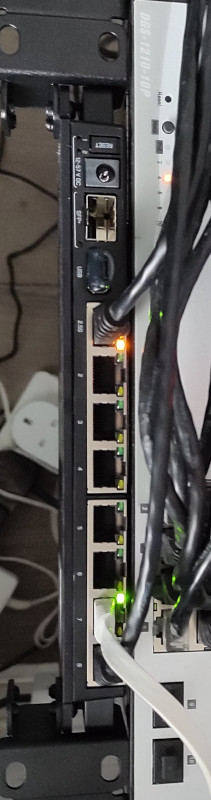
Testing the current setup for bottlenecks The first thing to do was see whether my internal network could cope with an upgrade. I m mostly running Cat6 GigE so I wasn t worried about that side of things. However I m using an RB3011 as my core router, and while it has some coprocessors for routing acceleration they re not supported under mainline Linux (and unlikely to be any time soon). So I had to benchmark what it was capable of routing. I run a handful of VLANs within my home network, with stateful firewalling between them, so I felt that would be a good approximation of the maximum speed to the outside world I might be able to get if I had the external connection upgraded. I went for the easy approach and fired up iPerf3 on 2 hosts, both connected via ethernet but on separate networks, so routed through the RB3011. That resulted in slightly more than a 300Mb/s throughput. Ok. I confirmed that I could get 900Mb/s+ on 2 hosts both on the same network, just to be sure there wasn t some other issue I was missing. Nope, so unsurprisingly the router was the bottleneck. So. To upgrade my internet speed I need to upgrade my router. I could just buy something off the shelf, but I like being able to run Debian (or OpenWRT) on the router rather than some horrible vendor firmware. Lucky MikroTik launched the RB5009 towards the end of last year. RouterOS is probably more than capable, but what really interested me was the fact it s an ARM64 platform based on an Armada 7040, which is pretty well supported in mainline kernels already. There s a 10G connection from the internal switch to the CPU, as well as a 2.5Gb/s ethernet port and a 10G SFP+ cage. All good stuff. I ordered one just before the New Year. Thankfully the OpenWRT folk had done all of the hard work on getting a mainline kernel booting on the device; Sergey Sergeev and Robert Marko in particular fighting RouterBoot and producing a suitable device tree file to get everything up and running. I ended up soldering a serial console connection up to aid debugging, and lightly patching Rob s u-boot to fix the incorrect RAM size reported by RouterBoot. A few kernel tweaks were necessary to make the networking entirely happy and at that point it was time to think about actually doing a replacement.

Upgrading to Debian 11 (bullseye) My RB3011 is currently running Debian 10 (buster); an upgrade has been on my todo list, but with the impending replacement I decided I d hold off and create a new Debian 11 (bullseye) image for the RB5009. Additionally, I don t actually run off the internal NAND in the RB3011; I have a USB flash drive for the rootfs and just the kernel booting off internal NAND. Originally this was for ease of testing, then a combination of needing to figure out a good read-only root solution and a small enough image to fit in the 120M available. For the upgrade I decided to finally look at these pieces. I ve ended up with a script that will build me a squashfs image, and the initial rootfs takes care of mounting this and then a tmpfs as an overlay fs. That means I can easily see what pieces are being written to. The RB5009 has a total of 1G NAND so I m not as space constrained, but the squashfs ends up under 50M. I ve added some additional pieces to allow me to pre-populate the overlay fs with updates rather than always needing to rebuild the squashfs image. With that done I decided to try it out on the RB3011; I tweaked the build script to be able to build for armhf (the RB3011) or arm64 (the RB5009) and to deal with some slight differences in configuration between the two (e.g. interface naming). The idea here was to ensure I d got all the appropriate configuration sorted for the RB5009, in the known-good existing environment. Everything is still on a USB stick at this stage and the new device has an armhf busybox root meaning it can be used on either device, and the init script detects the architecture to select the appropriate squashfs to mount.

A problem with ESP8266 home automation devices Everything seemed to work fine - a few niggles with the watchdog, which is overly sensitive on the RB3011, but I got those sorted (and the build script updated) and the device came up and successfully did the PPPoE dance to bring up external connectivity. And then I noticed that my home automation devices were having problems connecting to the mosquitto MQTT server. It turned out it was only the ESP8266 based devices that were failing, and examining the serial debug output on one of my test devices revealed it was hitting an out of memory issue (displaying E:M 280) when establishing the TLS MQTT connection. I rolled back to the Debian 10 image and set about creating a test environment to look at the ESP8266 issues. My first action was to try and reduce my RAM footprint to try and ensure there was enough spare to establish the connection. I moved a few functions that were still sitting in IRAM into flash. I cleaned up a couple of buffers that are on the stack to be more correctly sized. I tried my new image, and I didn t get the memory issue. Instead I progressed a bit further and got a watchdog reset. Doh! It was obviously something related to the TLS connection, but I couldn t easily see what the difference was; the same x509 cert was in use, it looked like the initial handshake was the same (and trying with openssl s_client looked pretty similar too). I set about instrumenting the ancient Mbed TLS used in the Espressif SDK and discovered that whatever had changed between buster + bullseye meant the EPS8266 was now trying a TLS-DHE-RSA-WITH-AES-256-CBC-SHA256 handshake instead of a TLS-RSA-WITH-AES-256-CBC-SHA256 handshake and that was causing enough extra CPU usage that it couldn t complete in time and the watchdog kicked in. So I commented out MBEDTLS_KEY_EXCHANGE_DHE_RSA_ENABLED in the config_esp.h for mbedtls and rebuilt things. Hacky, but I ll go back to trying to improve this generally at some point.

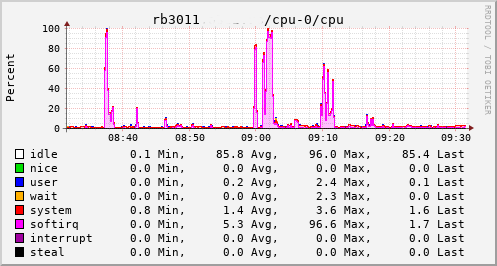
A detour into interrupt load Now, my testing of the RB3011 image is generally done at weekends, when I have enough time to tear down and rebuild the connection rather than doing it in the evening and having limited time to get things working again in time for work in the morning. So at the point I had an image ready to go I pulled the trigger on the line upgrade. I went with the 500M/75M option rather than the full 900M - I suspect I d have difficulty actually getting that most of the time and 75M of upload bandwidth seems fairly substantial for now. It only took a couple of days from the order to the point the line was regraded (which involved no real downtime - just a reconnection in the night). Of course this happened just after the weekend I d discovered the ESP8266 issue. collectd CPU usage for RB3011 This provided an opportunity to see just what the RB3011 could actually manage. In the configuration I had it turned out to be not much more than the 80Mb/s speeds I had previously seen. The upload jumped from a solid 20Mb/s to 75Mb/s, so I knew the regrade had actually happened. Looking at CPU utilisation clearly showed the problem; softirqs were using almost 100% of a CPU core. Now, the way the hardware is setup on the RB3011 is that there are two separate 5 port switches, each connected back to the CPU via a separate GigE interface. For various reasons I had everything on a single switch, which meant that all traffic was boomeranging in and out of the same CPU interface. The IPQ8064 has dual cores, so I thought I d try moving the external connection to the other switch. That puts it on its own GigE CPU interface, which then allows binding the interrupts to a different CPU core. That helps; throughput to the outside world hits 140Mb/s+. Still a long way from the expected max, but proof we just need more grunt.

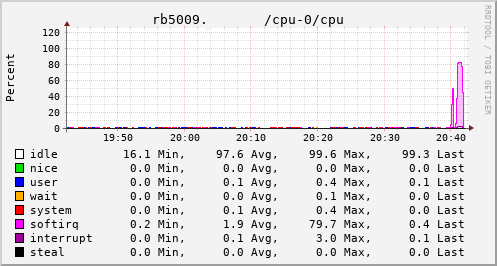
Success collectd CPU usage for RB5009 Which brings us to this past weekend, when, having worked out all the other bits, I tried the squashfs root image again on the RB3011. Success! The home automation bits connected to it, the link to the outside world came up, everything seemed happy. So I double checked my bootloader bits on the RB5009, brought it down to the comms room and plugged it in instead. And, modulo my failing to update the nftables config to allow it to do forwarding, it all came up ok. Some testing with iperf3 internally got a nice 912Mb/s sustained between subnets, and some less scientific testing with wget + speedtest-cli saw speeds of over 460Mb/s to the outside world. Time from ordering the router until it was in service? Just under 8 weeks

7 February 2022

Russ Allbery: Review: Embers of War

Review: Embers of War, by Gareth L. Powell
Series: Embers of War #1
Publisher: Titan Books
Copyright: February 2018
ISBN: 1-78565-519-1
Format: Kindle
Pages: 312
The military leadership of the Outward faction of humanity was meeting on the forest world of Pelapatarn, creating an opportunity for the Conglomeration to win the war at a stroke. Resistance was supposed to be minimal, since the Outward had attempted to keep the conference secret rather than massing forces to protect it. But the Outward resistance was stronger than expected, and Captain Deal's forces would not be able to locate and assassinate the Outward leadership before they could escape. She therefore followed orders from above her and ordered the four incoming Carnivore heavy cruisers to jump past the space battle and bomb the planet. The entire planet. The Carnivores' nuclear and antimatter weaponry reduced the billion-year-old sentient jungle of Pelapatarn to ash. Three years later, Sal Konstanz is a ship captain for the House of Reclamation, a strictly neutral search and rescue force modeled after a long-vanished alien fleet that prioritizes preservation of life above all else. Anyone can join Reclamation, provided that they renounce their previous alliances and devote themselves to the Reclamation cause. Sal and her crew member Alva Clay were Outward. The ship medic was Conglomeration. So was the ship: the Trouble Dog, a sentient AI heavy cruiser built to carry an arsenal of weapons and three hundred crew, and now carrying three humans and a Druff mechanic. More precisely, the Trouble Dog was one of the four Carnivores that destroyed Pelapatarn. Meanwhile, Ona Sudak, a popular war poet, is a passenger on a luxury cruise on the liner Geest van Amsterdam, which is making an unscheduled stop in the star system known as the Gallery. The Gallery is the home of the Objects: seven planets that, ten thousand years earlier, were carved by unknown aliens into immense sculptures for unknown reasons. The Objects appear to be both harmless and mysterious, making them an irresistible tourist attraction for the liner passengers. The Gallery is in disputed space, but no one was expecting serious trouble. They certainly weren't expecting the Geest van Amsterdam to be attacked and brought down on the Object known as the Brain, killing nearly everyone aboard. The Trouble Dog is the closest rescue ship. This book was... fine. It's a perfectly serviceable science fiction novel that didn't stand out for me, which I think says more about the current excellent state of the science fiction field than about this book. When I was a teenager reading Asimov, Niven, and Heinlein, I would have devoured this. It compares favorably to minor Niven or Heinlein (The Integral Trees, for example, or Double Star), but the bar for excellent science fiction is just so much higher now. The best character in this book (and the reason why I read it) is the Trouble Dog. I love science fiction about intelligent space ships, and she did not disappoint. The AI ships in this book are partly made from human and dog neurons, so their viewpoint is mostly human but with some interesting minor variations. And the Trouble Dog would be a great character even if she weren't an intelligent ship: ethical, aggressive, daring, and introspective, with a nuanced relationship with her human crew. Unfortunately, Embers of War has four other viewpoint characters, and Powell chose to write them all in the first person. First person narration depends heavily on a memorable and interesting character because the reader is so thoroughly within their perspective. This works great for the Trouble Dog, and is fine for Nod, the Druff who serves as the ship mechanic. (Nod's perspective is intriguing, short, almost free-verse musings, rather than major story segments.) Sal, the ship captain, is a bit of a default character, but I didn't mind her much. Neither of the other two viewpoint characters are interesting enough to warrant the narrative attention. The Conglomerate agent Ashton Childe has such an uninteresting internal monologue that I would have liked the character better if he'd only been seen through other people's viewpoints, and although Powell needs some way to show Ona Sudak's view of events, I didn't think her thoughts added much to the story. The writing is adequate but a bit clunky: slightly flat descriptions, a bit too predictable at the sentence level, and rarely that memorable. There is a bit of fun world-building of the ancient artifact variety and a couple of decent set pieces (and one rather-too-obvious Matrix homage that I didn't think was as effective as the author did), but most of the story is focused on characters navigating their lives and processing trauma from the war. The story kept me turning the pages with interest, but I also doubt it will surprise anyone who has read much science fiction. I suspect a lot of it is setup for the following two books of the trilogy, and there are plenty of hooks for more stories in this universe. I really wanted a first-person story from the perspective of the Trouble Dog, possibly with some tight third-person interludes showing Ona Sudak's story. What I got instead was entertaining but not memorable enough to stand out in the current rich state of science fiction. I think I'm invested enough in this story to want to read the next book, though, so that's still a recommendation of sorts. Followed by Fleet of Knives. Rating: 6 out of 10

27 January 2022

Russ Allbery: Review: I Didn't Do the Thing Today

Review: I Didn't Do the Thing Today, by Madeleine Dore
Publisher: Avery
Copyright: 2022
ISBN: 0-593-41914-6
Format: Kindle
Pages: 291
At least from my narrow view of it, the world of productivity self-help literature is a fascinating place right now. The pandemic overturned normal work patterns and exacerbated schedule inequality, creating vastly different experiences for the people whose work continued to be in-person and the people whose work could become mostly or entirely remote. Self-help literature, which is primarily aimed at the more affluent white-collar class, primarily tracked the latter disruption: newly-remote work, endless Zoom meetings, the impossibility of child care, the breakdown of boundaries between work and home, and the dawning realization that much of the mechanics of day-to-day office work are neither productive nor defensible. My primary exposure these days to the more traditional self-help productivity literature is via Cal Newport. The stereotype of the productivity self-help book is a collection of life hacks and list-making techniques that will help you become a more efficient capitalist cog, but Newport has been moving away from that dead end for as long as I've been reading him, and his recent work focuses more on structural issues with the organization of knowledge work. He also shares with the newer productivity writers a willingness to tell people to use the free time they recover via improved efficiency on some life goal other than improved job productivity. But he's still prickly and defensive about the importance of personal productivity and accomplishing things. He gives lip service on his podcast to the value of the critique of productivity, but then usually reverts to characterizing anti-productivity arguments as saying that productivity is a capitalist invention to control workers. (Someone has doubtless said this on Twitter, but I've never seen a serious critique of productivity make this simplistic of an argument.) On the anti-productivity side, as it's commonly called, I've seen a lot of new writing in the past couple of years that tries to break the connection between productivity and human worth so endemic to US society. This is not a new analysis; disabled writers have been making this point for decades, it's present in both Keynes and in Galbraith's The Affluent Society, and Kathi Weeks's The Problem with Work traces some of its history in Marxist thought. But what does feel new to me is its widespread mainstream appearance in newspaper articles, viral blog posts, and books such as Jenny Odell's How to Do Nothing and Devon Price's Laziness Does Not Exist. The pushback against defining life around productivity is having a moment. Entering this discussion is Madeleine Dore's I Didn't Do the Thing Today. Dore is the author of the Extraordinary Routines blog and host of the Routines and Ruts podcast. Extraordinary Routines began as a survey of how various people organize their daily lives. I Didn't Do the Thing Today is, according to the preface, a summary of the thoughts Dore has had about her own life and routines as a result of those interviews. As you might guess from the subtitle (Letting Go of Productivity Guilt), Dore's book is superficially on the anti-productivity side. Its chapters are organized around gentle critiques of productivity concepts, with titles like "The Hopeless Search for the Ideal Routine," "The Myth of Balance," or "The Harsh Rules of Discipline." But I think anti-productivity is a poor name for this critique; its writers are not opposed to being productive, only to its position as an all-consuming focus and guilt-generating measure of personal worth. Dore structures most chapters by naming an aspect, goal, or concern of a life defined by productivity, such as wasted time, ambition, busyness, distraction, comparison, or indecision. Each chapter sketches the impact of that idea and then attempts to gently dismantle the grip that it may have on the reader's life. All of these discussions are nuanced; it's rare for Dore to say that one of these aspects has no value, and she anticipates numerous objections. But her overarching goal is to help the reader be more comfortable with imperfection, more willing to live in the moment, and less frustrated with the limitations of life and the human brain. If striving for productivity is like lifting weights, Dore's diagnosis is that we've tried too hard for too long, and have overworked that muscle until it is cramping. This book is a gentle massage to induce the muscle to relax and let go. Whether this will work is, as with all self-help books, individual. I found it was best read in small quantities, perhaps a chapter per day, since it otherwise began feeling too much the same. I'm also not the ideal audience; Dore is a creative freelancer and primarily interviewed other creative people, which I think has a different sort of productivity rhythm than the work that I do. She's also not a planner to the degree that I am; more on that below. And yet, I found this book worked on me anyway. I can't say that I was captivated all the way through, but I found myself mentally relaxing while I was reading it, and I may re-read some chapters from time to time. How does this relate to the genre of productivity self-help? With less conflict than I think productivity writers believe, although there seems to be one foundational difference of perspective. Dore is not opposed to accomplishing things, or even to systems that help people accomplish things. She is more attuned than the typical productivity writer to the guilt and frustration that can accumulate when one has a day in which one does not do the thing, but her goal is not to talk you out of attempting things. It is, instead, to convince you to hold those attempts and goals more lightly, to allow them to move and shift and change, and to not treat a failure to do the thing today as a reason for guilt. This is wholly compatible with standard productivity advice. It's adding nuance at one level of abstraction higher: how tightly to cling to productivity goals, and what to do when they don't work out. Cramping muscles are not strong muscles capable of lifting heavy things. If one can massage out the cramp, one's productivity by even the strict economic definition may improve. Where I do see a conflict is that most productivity writers are planners, and Dore is not. This is, I think, a significant blind spot in productivity self-help writing. Cal Newport, for example, advocates time-block planning, where every hour of the working day has a job. David Allen advocates a complex set of comprehensive lists and well-defined next actions. Mark Forster builds a flurry of small systems for working through lists. The standard in productivity writing is to to add structure to your day and cultivate the self-discipline required to stick to that structure. For many people, including me, this largely works. I'm mostly a planner, and when my life gets chaotic, adding more structure and focusing on that structure helps me. But the productivity writers I've read are quite insistent that their style of structure will work for everyone, and on that point I am dubious. Newport, for example, advocates time-block planning for everyone without exception, insisting that it is the best way to structure a day. Dore, in contrast, describes spending years trying to perfect a routine before realizing that elastic possibilities work better for her than routines. For those who are more like Dore than Newport, I Didn't Do the Thing Today is more likely to be helpful than Newport's instructions. This doesn't make Newport's ideas wrong; it simply makes them not universal, something that the productivity self-help genre seems to have trouble acknowledging. Even for readers like myself who prefer structure, I Didn't Do the Thing Today is a valuable corrective to the emphasis on every-better systems. For those who never got along with too much structure, I think it may strike a chord. The standard self-help caveat still applies: Dore has the most to say to people who are in a similar social class and line of work as her. I'm not sure this book will be of much help to someone who has to juggle two jobs with shift work and child care, where the problem is more sharp external constraints than internalized productivity guilt. But for its target audience, I think it's a valuable, calming message. Dore doesn't have a recipe to sort out your life, but may help you feel better about the merits of life unsorted. Rating: 7 out of 10

17 January 2022

Matthew Garrett: Boot Guard and PSB have user-hostile defaults

Compromising an OS without it being detectable is hard. Modern operating systems support the imposition of a security policy or the launch of some sort of monitoring agent sufficient early in boot that even if you compromise the OS, you're probably going to have left some sort of detectable trace[1]. You can avoid this by attacking the lower layers - if you compromise the bootloader then it can just hotpatch a backdoor into the kernel before executing it, for instance.

This is avoided via one of two mechanisms. Measured boot (such as TPM-based Trusted Boot) makes a tamper-proof cryptographic record of what the system booted, with each component in turn creating a measurement of the next component in the boot chain. If a component is tampered with, its measurement will be different. This can be used to either prevent the release of a cryptographic secret if the boot chain is modified (for instance, using the TPM to encrypt the disk encryption key), or can be used to attest the boot state to another device which can tell you whether you're safe or not. The other approach is verified boot (such as UEFI Secure Boot), where each component in the boot chain verifies the next component before executing it. If the verification fails, execution halts.

In both cases, each component in the boot chain measures and/or verifies the next. But something needs to be the first link in this chain, and traditionally this was the system firmware. Which means you could tamper with the system firmware and subvert the entire process - either have the firmware patch the bootloader in RAM after measuring or verifying it, or just load a modified bootloader and lie about the measurements or ignore the verification. Attackers had already been targeting the firmware (Hacking Team had something along these lines, although this was pre-secure boot so just dropped a rootkit into the OS), and given a well-implemented measured and verified boot chain, the firmware becomes an even more attractive target.

Intel's Boot Guard and AMD's Platform Secure Boot attempt to solve this problem by moving the validation of the core system firmware to an (approximately) immutable environment. Intel's solution involves the Management Engine, a separate x86 core integrated into the motherboard chipset. The ME's boot ROM verifies a signature on its firmware before executing it, and once the ME is up it verifies that the system firmware's bootblock is signed using a public key that corresponds to a hash blown into one-time programmable fuses in the chipset. What happens next depends on policy - it can either prevent the system from booting, allow the system to boot to recover the firmware but automatically shut it down after a while, or flag the failure but allow the system to boot anyway. Most policies will also involve a measurement of the bootblock being pushed into the TPM.

AMD's Platform Secure Boot is slightly different. Rather than the root of trust living in the motherboard chipset, it's in AMD's Platform Security Processor which is incorporated directly onto the CPU die. Similar to Boot Guard, the PSP has ROM that verifies the PSP's own firmware, and then that firmware verifies the system firmware signature against a set of blown fuses in the CPU. If that fails, system boot is halted. I'm having trouble finding decent technical documentation about PSB, and what I have found doesn't mention measuring anything into the TPM - if this is the case, PSB only implements verified boot, not measured boot.

What's the practical upshot of this? The first is that you can't replace the system firmware with anything that doesn't have a valid signature, which effectively means you're locked into firmware the vendor chooses to sign. This prevents replacing the system firmware with either a replacement implementation (such as Coreboot) or a modified version of the original implementation (such as firmware that disables locking of CPU functionality or removes hardware allowlists). In this respect, enforcing system firmware verification works against the user rather than benefiting them.
Of course, it also prevents an attacker from doing the same thing, but while this is a real threat to some users, I think it's hard to say that it's a realistic threat for most users.

The problem is that vendors are shipping with Boot Guard and (increasingly) PSB enabled by default. In the AMD case this causes another problem - because the fuses are in the CPU itself, a CPU that's had PSB enabled is no longer compatible with any motherboards running firmware that wasn't signed with the same key. If a user wants to upgrade their system's CPU, they're effectively unable to sell the old one. But in both scenarios, the user's ability to control what their system is running is reduced.

As I said, the threat that these technologies seek to protect against is real. If you're a large company that handles a lot of sensitive data, you should probably worry about it. If you're a journalist or an activist dealing with governments that have a track record of targeting people like you, it should probably be part of your threat model. But otherwise, the probability of you being hit by a purely userland attack is so ludicrously high compared to you being targeted this way that it's just not a big deal.

I think there's a more reasonable tradeoff than where we've ended up. Tying things like disk encryption secrets to TPM state means that if the system firmware is measured into the TPM prior to being executed, we can at least detect that the firmware has been tampered with. In this case nothing prevents the firmware being modified, there's just a record in your TPM that it's no longer the same as it was when you encrypted the secret. So, here's what I'd suggest:

1) The default behaviour of technologies like Boot Guard or PSB should be to measure the firmware signing key and whether the firmware has a valid signature into PCR 7 (the TPM register that is also used to record which UEFI Secure Boot signing key is used to verify the bootloader).
2) If the PCR 7 value changes, the disk encryption key release will be blocked, and the user will be redirected to a key recovery process. This should include remote attestation, allowing the user to be informed that their firmware signing situation has changed.
3) Tooling should be provided to switch the policy from merely measuring to verifying, and users at meaningful risk of firmware-based attacks should be encouraged to make use of this tooling

This would allow users to replace their system firmware at will, at the cost of having to re-seal their disk encryption keys against the new TPM measurements. It would provide enough information that, in the (unlikely for most users) scenario that their firmware has actually been modified without their knowledge, they can identify that. And it would allow users who are at high risk to switch to a higher security state, and for hardware that is explicitly intended to be resilient against attacks to have different defaults.

This is frustratingly close to possible with Boot Guard, but I don't think it's quite there. Before you've blown the Boot Guard fuses, the Boot Guard policy can be read out of flash. This means that you can drop a Boot Guard configuration into flash telling the ME to measure the firmware but not prevent it from running. But there are two problems remaining:

1) The measurement is made into PCR 0, and PCR 0 changes every time your firmware is updated. That makes it a bad default for sealing encryption keys.
2) It doesn't look like the policy is measured before being enforced. This means that an attacker can simply reflash modified firmware with a policy that disables measurement and then make a fake measurement that makes it look like the firmware is ok.

Fixing this seems simple enough - the Boot Guard policy should always be measured, and measurements of the policy and the signing key should be made into a PCR other than PCR 0. If an attacker modified the policy, the PCR value would change. If an attacker modified the firmware without modifying the policy, the PCR value would also change. People who are at high risk would run an app that would blow the Boot Guard policy into fuses rather than just relying on the copy in flash, and enable verification as well as measurement. Now if an attacker tampers with the firmware, the system simply refuses to boot and the attacker doesn't get anything.

Things are harder on the AMD side. I can't find any indication that PSB supports measuring the firmware at all, which obviously makes this approach impossible. I'm somewhat surprised by that, and so wouldn't be surprised if it does do a measurement somewhere. If it doesn't, there's a rather more significant problem - if a system has a socketed CPU, and someone has sufficient physical access to replace the firmware, they can just swap out the CPU as well with one that doesn't have PSB enabled. Under normal circumstances the system firmware can detect this and prompt the user, but given that the attacker has just replaced the firmware we can assume that they'd do so with firmware that doesn't decide to tell the user what just happened. In the absence of better documentation, it's extremely hard to say that PSB actually provides meaningful security benefits.

So, overall: I think Boot Guard protects against a real-world attack that matters to a small but important set of targets. I think most of its benefits could be provided in a way that still gave users control over their system firmware, while also permitting high-risk targets to opt-in to stronger guarantees. Based on what's publicly documented about PSB, it's hard to say that it provides real-world security benefits for anyone at present. In both cases, what's actually shipping reduces the control people have over their systems, and should be considered user-hostile.

[1] Assuming that someone's both turning this on and actually looking at the data produced

comment count unavailable comments

11 January 2022

Ritesh Raj Sarraf: ThinkPad AMD Debian

After a hiatus of 6 years, it was nice to be back with the ThinkPad. This blog post briefly touches upon my impressions with the current generation ThinkPad T14 Gen2 AMD variant.
ThinkPad T14 Gen2 AMD

Lenovo It took 8 weeks to get my hands on the machine. Given the pandemic, restrictions and uncertainities, not sure if I should call it an ontime delivery. This was a CTO - Customise-to-order; so was nice to get rid of things I really didn t care/use much. On the other side, it also meant I could save on some power. It also came comparatively cheaper overall.
  • No fingerprint reader
  • No Touch screen
There s still parts where Lenovo could improve. Or less frustate a customer. I don t understand why a company would provide a full customization option on their portal, while at the same time, not provide an explicit option to choose the make/model of the hardware one wants. Lenovo deliberately chooses to not show/specify which WiFi adapter one could choose. So, as I suspected, I ended up with a MEDIATEK Corp. Device 7961 wifi adapter.

AMD For the first time in my computing life, I m now using AMD at the core. I was pretty frustrated with annoying Intel Graphics bugs, so decided to take the plunge and give AMD/ATI a shot, knowing that the radeon driver does have decent support. So far, on the graphics side of things, I m glad that things look bright. The stock in-kernel radeon driver has been working perfect for my needs and I haven t had to tinker even once so far, in my 30 days of use. On the overall system performance, I have not done any benchmarks nor do I want to do. But wholly, the system performance is smooth.

Power/Thermal This is where things need more improvement on the AMD side. This AMD laptop terribly draws a lot of power in suspend mode. And it isn t just this machine, but also the previous T14 Gen1 which has similar problems. I m not sure if this is a generic ThinkPad problem, or an AMD specific problem. But coming from the Dell XPS 13 9370 Intel, this does draw a lot lot more power. So much, that I chose to use hibernation instead. Similarly, on the thermal side, this machine doesn t cool down well as compared the the Dell XPS Intel one. On an idle machine, its temperature are comparatively higher. Looking at powertop reports, it does show to consume an average of 10 watts power even while idle. I m hoping these are Linux ingeration issues and that Lenovo/AMD will improve things in the coming months. But given the user feedback on the ThinkPad T14 Gen1 thread, it may just be wishful thinking.

Linux The overall hardware support has been surprisingly decent. The MediaTek WiFi driver had some glitches but with Linux 5.15+, things have considerably improved. And I hope the trend will continue with forthcoming Linux releases. My previous device driver experience with MediaTek wasn t good but I took the plunge, considering that in the worst scenario I d have the option to swap the card. There s a lot of marketing about Linux + Intel. But I took a jibe with Linux + AMD. There are glitches but nothing so far that has been a dealbreaker. If anything, I wish Lenovo/AMD would seriously work on the power/thermal issues.

Migration Other than what s mentioned above, I haven t had any serious issues. I may have had some rare occassional hangs but they ve been so infrequent that I haven t spent time to investigate those. Upon receiving the machine, my biggest requirement was how to switch my current workstation from Dell XPS to Lenovo ThinkPad. I ve been using btrfs for some time now. And over the years, built my own practise on how to structure it. Things like, provisioning [sub]volumes, based on use cases is one thing I see. Like keeping separate subvols for: cache/temporary data, copy-on-write data , swap etc. I wish these things could be simplified; either on the btrfs tooling side or some different tool on top of it. Below is filtered list of subvols created over years, that were worthy of moving to the new machine.
rrs@priyasi:~$ cat btrfs-volume-layout 
ID 550 gen 19166 top level 5 path home/foo/.cache
ID 552 gen 1522688 top level 5 path home/rrs
ID 553 gen 1522688 top level 552 path home/rrs/.cache
ID 555 gen 1426323 top level 552 path home/rrs/rrs-home/Libvirt-Images
ID 618 gen 1522672 top level 5 path var/spool/news
ID 634 gen 1522670 top level 5 path var/tmp
ID 635 gen 1522688 top level 5 path var/log
ID 639 gen 1522226 top level 5 path var/cache
ID 992 gen 1522670 top level 5 path disk-tmp
ID 1018 gen 1522688 top level 552 path home/rrs/NoBackup
ID 1196 gen 1522671 top level 5 path etc
ID 23721 gen 775692 top level 5 path swap
18:54                      

btrfs send/receive This did come in handy but I sorely missed some feature. Maybe they aren t there, or are there and I didn t look close enough. Over the years, different attributes were set to different subvols. Over time I forget what feature was added where. But from a migration point of view, it d be nice to say, Take this volume and take it with all its attributes . I didn t find that functionality in send/receive. There s get/set-property which I noticed later but by then it was late. So some sort of tooling, ideally something like btrfs migrate or somesuch would be nicer. In the file system world, we already have nice tools to take care of similar scenarios. Like with rsync, I can request it to carry all file attributes. Also, iirc, send/receive works only on ro volumes. So there s more work one needs to do in:
  1. create ro vol
  2. send
  3. receive
  4. don t forget to set rw property
  5. And then somehow find out other properties set on each individual subvols and [re]apply the same on the destination
I wish this all be condensed into a sub-command. For my own sake, for this migration, the steps used were:
user@debian:~$ for volume in  sudo btrfs sub list /media/user/TOSHIBA/Migrate/   cut -d ' ' -f9   grep -v ROOTVOL   grep -v etc   grep -v btrbk ; do echo $volume; sud
o btrfs send /media/user/TOSHIBA/$volume   sudo btrfs receive /media/user/BTRFSROOT/ ; done            
Migrate/snapshot_disk-tmp
At subvol /media/user/TOSHIBA/Migrate/snapshot_disk-tmp
At subvol snapshot_disk-tmp
Migrate/snapshot-home_foo_.cache
At subvol /media/user/TOSHIBA/Migrate/snapshot-home_foo_.cache
At subvol snapshot-home_foo_.cache
Migrate/snapshot-home_rrs
At subvol /media/user/TOSHIBA/Migrate/snapshot-home_rrs
At subvol snapshot-home_rrs
Migrate/snapshot-home_rrs_.cache
At subvol /media/user/TOSHIBA/Migrate/snapshot-home_rrs_.cache
At subvol snapshot-home_rrs_.cache
ERROR: crc32 mismatch in command
Migrate/snapshot-home_rrs_rrs-home_Libvirt-Images
At subvol /media/user/TOSHIBA/Migrate/snapshot-home_rrs_rrs-home_Libvirt-Images
At subvol snapshot-home_rrs_rrs-home_Libvirt-Images
ERROR: crc32 mismatch in command
Migrate/snapshot-var_spool_news
At subvol /media/user/TOSHIBA/Migrate/snapshot-var_spool_news
At subvol snapshot-var_spool_news
Migrate/snapshot-var_lib_machines
At subvol /media/user/TOSHIBA/Migrate/snapshot-var_lib_machines
At subvol snapshot-var_lib_machines
Migrate/snapshot-var_lib_machines_DebianSidTemplate
..... snipped .....
And then, follow-up with:
user@debian:~$ for volume in  sudo btrfs sub list /media/user/BTRFSROOT/   cut -d ' ' -f9 ; do echo $volume; sudo btrfs property set -ts /media/user/BTRFSROOT/$volume ro false; done
ROOTVOL
ERROR: Could not open: No such file or directory
etc
snapshot_disk-tmp
snapshot-home_foo_.cache
snapshot-home_rrs
snapshot-var_spool_news
snapshot-var_lib_machines
snapshot-var_lib_machines_DebianSidTemplate
snapshot-var_lib_machines_DebSidArmhf
snapshot-var_lib_machines_DebianJessieTemplate
snapshot-var_tmp
snapshot-var_log
snapshot-var_cache
snapshot-disk-tmp
And then finally, renaming everything to match proper:
user@debian:/media/user/BTRFSROOT$ for x in snapshot*; do vol=$(echo $x   cut -d '-' -f2   sed -e "s _ / g"); echo $x $vol; sudo mv $x $vol; done
snapshot-var_lib_machines var/lib/machines
snapshot-var_lib_machines_Apertisv2020ospackTargetARMHF var/lib/machines/Apertisv2020ospackTargetARMHF
snapshot-var_lib_machines_Apertisv2021ospackTargetARM64 var/lib/machines/Apertisv2021ospackTargetARM64
snapshot-var_lib_machines_Apertisv2022dev3ospackTargetARMHF var/lib/machines/Apertisv2022dev3ospackTargetARMHF
snapshot-var_lib_machines_BusterArm64 var/lib/machines/BusterArm64
snapshot-var_lib_machines_DebianBusterTemplate var/lib/machines/DebianBusterTemplate
snapshot-var_lib_machines_DebianJessieTemplate var/lib/machines/DebianJessieTemplate
snapshot-var_lib_machines_DebianSidTemplate var/lib/machines/DebianSidTemplate
snapshot-var_lib_machines_DebianSidTemplate_var_lib_portables var/lib/machines/DebianSidTemplate/var/lib/portables
snapshot-var_lib_machines_DebSidArm64 var/lib/machines/DebSidArm64
snapshot-var_lib_machines_DebSidArmhf var/lib/machines/DebSidArmhf
snapshot-var_lib_machines_DebSidMips var/lib/machines/DebSidMips
snapshot-var_lib_machines_JenkinsApertis var/lib/machines/JenkinsApertis
snapshot-var_lib_machines_v2019 var/lib/machines/v2019
snapshot-var_lib_machines_v2019LinuxSupport var/lib/machines/v2019LinuxSupport
snapshot-var_lib_machines_v2020 var/lib/machines/v2020
snapshot-var_lib_machines_v2021dev3Slim var/lib/machines/v2021dev3Slim
snapshot-var_lib_machines_v2021dev3SlimTarget var/lib/machines/v2021dev3SlimTarget
snapshot-var_lib_machines_v2022dev2OspackMinimal var/lib/machines/v2022dev2OspackMinimal
snapshot-var_lib_portables var/lib/portables
snapshot-var_log var/log
snapshot-var_spool_news var/spool/news
snapshot-var_tmp var/tmp

snapper Entirely independent of this, but indirectly related. I use snapper as my snapshotting tool. It worked perfect on my previous machine. While everything got migrated, the only thing that fell apart was snapper. It just wouldn t start/run proper. Funny thing is that I just removed the snapper configs and reinitialized with the exact same config again, and voila snapper was happy.

Conclusion That was pretty much it. With the above and then also migrating /boot and then just chroot to install the boot loader. At some time, I d like to explore other boot options but given that that is such a non-essential task, it is low on the list. The good part was that I booted into my new machine with my exact workstation setup as it was. All the way to the user cache and the desktop session. So it was nice on that part. But I surely think there s room for a better migration experience here. If not directly as btrfs migrate, then maybe as an independent tool. The problem is that such a tool is going to be used once in years, so I didn t find the motivation to write one. But this surely would be a good use case for the distribution vendors.

Russ Allbery: Review: Hench

Review: Hench, by Natalie Zina Walschots
Publisher: William Morrow
Copyright: September 2020
ISBN: 0-06-297859-4
Format: Kindle
Pages: 403
Anna Tromedlov is a hench, which means she does boring things for terrible people for money. Supervillains need a lot of labor to keep their bases and criminal organizations running, and they get that labor the same way everyone else does: through temporary agencies. Anna does spreadsheets, preferably from home on her couch. On-site work was terrifying and she tried to avoid it, but the lure of a long-term contract was too strong. The Electric Eel, despite being a creepy sleazeball, seemed to be a manageable problem. He needed some support at a press conference, which turns out to be code for being a diversity token in front of the camera, but all she should have to do is stand there. That's how Anna ends up holding the mind control device to the head of the mayor's kid when the superheroes attack, followed shortly by being thrown across the room by Supercollider. Left with a complex fracture of her leg that will take months to heal, a layoff notice and a fruit basket from Electric Eel's company, and a vaguely menacing hospital conversation with the police (including Supercollider in a transparent disguise) in which it's made clear to her that she is mistaken about Supercollider's hand-print on her thigh, Anna starts wondering just how much damage superheroes have done. The answer, when analyzed using the framework for natural disasters, is astonishingly high. Anna's resulting obsession with adding up the numbers leads to her starting a blog, the Injury Report, with a growing cult following. That, in turn, leads to a new job and a sponsor: the mysterious supervillain Leviathan. To review this book properly, I need to talk about Watchmen. One of the things that makes superheroes interesting culturally is the straightforwardness of their foundational appeal. The archetypal superhero story is an id story: an almost pure power fantasy aimed at teenage boys. Like other pulp mass media, they reflect the prevailing cultural myths of the era in which they're told. World War II superheroes are mostly all-American boy scouts who punch Nazis. 1960s superheroes are a more complex mix of outsider misfits with a moral code and sarcastic but earnestly ethical do-gooders. The superhero genre is vast, with numerous reinterpretations, deconstructions, and alternate perspectives, but its ur-story is a good versus evil struggle of individual action, in which exceptional people use their powers for good to defeat nefarious villains. Watchmen was not the first internal critique of the genre, but it was the one that everyone read in the 1980s and 1990s. It takes direct aim at that moral binary. The superheroes in Watchmen are not paragons of virtue (some of them are truly horrible people), and they have just as much messy entanglement with the world as the rest of us. It was superheroes re-imagined for the post-Vietnam, post-Watergate era, for the end of the Cold War when we were realizing how many lies about morality we had been told. But it still put superheroes and their struggles with morality at the center of the story. Hench is a superhero story for the modern neoliberal world of reality TV and power inequality in the way that Watchmen was a superhero story for the Iran-Contra era and the end of the Cold War. Whether our heroes have feet of clay is no longer a question. Today, a better question is whether the official heroes, the ones that are celebrated as triumphs of individual achievement, are anything but clay. Hench doesn't bother asking whether superheroes have fallen short of their ideal; that answer is obvious. What Hench asks instead is a question familiar to those living in a world full of televangelists, climate denialism, manipulative advertising, and Facebook: are superheroes anything more than a self-perpetuating scam? Has the good superheroes supposedly do ever outweighed the collateral damage? Do they care in the slightest about the people they're supposedly protecting? Or is the whole system of superheroes and supervillains a performance for an audience, one that chews up bystanders and spits them out mangled while delivering simplistic and unquestioned official morality? This sounds like a deeply cynical premise, but Hench is not a cynical book. It is cynical about superheroes, which is not the same thing. The brilliance of Walschots's approach is that Anna has a foot in both worlds. She works for a supervillain and, over the course of the book, gains access to real power within the world of superheroic battles. But she's also an ordinary person with ordinary problems: not enough money, rocky friendships, deep anger at the injustices of the world and the way people like her are discarded, and now a disability and PTSD. Walschots perfectly balances the tension between those worlds and maintains that tension straight to the end of the book. From the supervillain world, Anna draws support, resources, and a mission, but all of the hope, true morality, and heart of this book comes from the ordinary side. If you had the infrastructure of a supervillain at your disposal, what would you do with it? Anna's answer is to treat superheroes as a destructive force like climate change, and to do whatever she can to drive them out of the business and thus reduce their impact on the world. The tool she uses for that is psychological warfare: make them so miserable that they'll snap and do something too catastrophic to be covered up. And the raw material for that psychological warfare is data. That's the foot in the supervillain world. In descriptions of this book, her skills with data are often called her superpower. That's not exactly wrong, but the reason why she gains power and respect is only partly because of her data skills. Anna lives by the morality of the ordinary people world: you look out for your friends, you treat your co-workers with respect as long as they're not assholes, and you try to make life a bit better for the people around you. When Leviathan gives her the opportunity to put together a team, she finds people with skills she admires, funnels work to people who are good at it, and worries about the team dynamics. She treats the other ordinary employees of a supervillain as people, with lives and personalities and emotions and worth. She wins their respect. Then she uses their combined skills to destroy superhero lives. I was fascinated by the moral complexity in this book. Anna and her team do villainous things by the morality of the superheroic world (and, honestly, by the morality of most readers), including some things that result in people's deaths. By the end of the book, one could argue that Anna has been driven by revenge into becoming an unusual sort of supervillain. And yet, she treats the people around her so much better than either the heroes or the villains do. Anna is fiercely moral in all the ordinary person ways, and that leads directly to her becoming a villain in the superhero frame. Hench doesn't resolve that conflict; it just leaves it on the page for the reader to ponder. The best part about this book is that it's absurdly grabby, unpredictable, and full of narrative momentum. Walschots's pacing kept me up past midnight a couple of times and derailed other weekend plans so that I could keep reading. I had no idea where the plot was going even at the 80% mark. The ending is ambiguous and a bit uncomfortable, just like the morality throughout the book, but I liked it the more I thought about it. One caveat, unfortunately: Hench has some very graphic descriptions of violence and medical procedures, and there's an extended torture sequence with some incredibly gruesome body horror that I thought went on far too long and was unnecessary to the plot. If you're a bit squeamish like I am, there are some places where you'll want to skim, including one sequence that's annoyingly intermixed with important story developments. Otherwise, though, this is a truly excellent book. It has a memorable protagonist with a great first-person voice, an epic character arc of empowerment and revenge, a timely take on the superhero genre that uses it for sharp critique of neoliberal governance and reality TV morality, a fascinatingly ambiguous and unsettled moral stance, a gripping and unpredictable plot, and some thoroughly enjoyable competence porn. I had put off reading it because I was worried that it would be too cynical or dark, but apart from the unnecessary torture scene, it's not at all. Highly recommended. Rating: 9 out of 10

9 January 2022

Russell Coker: Video Conferencing (LCA)

I ve just done a tech check for my LCA lecture. I had initially planned to do what I had done before and use my phone for recording audio and video and my PC for other stuff. The problem is that I wanted to get an external microphone going and plugging in a USB microphone turned off the speaker in the phone (it seemed to direct audio to a non-existent USB audio output). I tried using bluetooth headphones with the USB microphone and that didn t work. Eventually a viable option seemed to be using USB headphones on my PC with the phone for camera and microphone. Then it turned out that my phone (Huawei Mate 10 Pro) didn t support resolutions higher than VGA with Chrome (it didn t have the advanced settings menu to select resolution), this is probably an issue of Android build features. So the best option is to use a webcam on the PC, I was recommended a Logitech C922 but OfficeWorks only has a Logitech C920 which is apparently OK. The free connection test from freeconference.com [1] is good for testing out how your browser works for videoconferencing. It tests each feature separately and is easy to run. After buying the C920 webcam I found that it sometimes worked and sometimes caused a kernel panic like the following (partial panic log included for the benefit of people Googling this Logitech C920 problem):
[95457.805417] BUG: kernel NULL pointer dereference, address: 0000000000000000
[95457.805424] #PF: supervisor read access in kernel mode
[95457.805426] #PF: error_code(0x0000) - not-present page
[95457.805429] PGD 0 P4D 0 
[95457.805431] Oops: 0000 [#1] SMP PTI
[95457.805435] CPU: 2 PID: 75486 Comm: v4l2src0:src Not tainted 5.15.0-2-amd64 #1  Debian 5.15.5-2
[95457.805438] Hardware name: HP ProLiant ML110 Gen9/ProLiant ML110 Gen9, BIOS P99 02/17/2017
[95457.805440] RIP: 0010:usb_ifnum_to_if+0x3a/0x50 [usbcore]
...
[95457.805481] Call Trace:
[95457.805484]  
[95457.805485]  usb_hcd_alloc_bandwidth+0x23d/0x360 [usbcore]
[95457.805507]  usb_set_interface+0x127/0x350 [usbcore]
[95457.805525]  uvc_video_start_transfer+0x19c/0x4f0 [uvcvideo]
[95457.805532]  uvc_video_start_streaming+0x7b/0xd0 [uvcvideo]
[95457.805538]  uvc_start_streaming+0x2d/0xf0 [uvcvideo]
[95457.805543]  vb2_start_streaming+0x63/0x100 [videobuf2_common]
[95457.805550]  vb2_core_streamon+0x54/0xb0 [videobuf2_common]
[95457.805555]  uvc_queue_streamon+0x2a/0x40 [uvcvideo]
[95457.805560]  uvc_ioctl_streamon+0x3a/0x60 [uvcvideo]
[95457.805566]  __video_do_ioctl+0x39b/0x3d0 [videodev]
It turns out that Ubuntu Launchpad bug #1827452 has great information on this problem [2]. Apparently if the device decides it doesn t have enough power then it will reconnect and get a different USB bus device number and this often happens when the kernel is initialising it. There s a race condition in the kernel code in which the code to initialise the device won t realise that the device has been detached and will dereference a NULL pointer and then mess up other things in USB device management. The end result for me is that all USB devices become unusable in this situation, commands like lsusb hang, and a regular shutdown/reboot hangs because it can t kill the user session because something is blocked on USB. One of the comments on the Launchpad bug is that a powered USB hub can alleviate the problem while a USB extension cable (which I had been using) can exacerbate it. Officeworks currently advertises only one powered USB hub, it s described as USB 3 but also maximum speed 480 Mbps (USB 2 speed). So basically they are selling a USB 2 hub for 4* the price that USB 2 hubs used to sell for. When debugging this I used the cheese webcam utility program and ran it in a KVM virtual machine. The KVM parameters -device qemu-xhci -usb -device usb-host,hostbus=1,hostaddr=2 (where 1 and 2 are replaced by the Bus and Device numbers from lsusb ) allow the USB device to be passed through to the VM. Doing this meant that I didn t have to reboot my PC every time a webcam test failed. For audio I m using the Sades Wand gaming headset I wrote about previously [3].

Next.

Previous.