Search Results: "eof"

1 March 2020

Paul Wise: FLOSS Activities February 2020

Changes

Issues

Review

Administration
  • Debian wiki: deploy changes, unblock IP addresses, approve new accounts, auto-approve email domains

Communication

Sponsors The apt-offline backport and purple-discord uploads were sponsored by my employer. All other work was done on a volunteer basis.

7 November 2017

Rog rio Brito: Some activities of the day

Yesterday, I printed the first draft of the first chapter when my little boy was here and he was impressed with this strange object called a "printer". Before I printed what I needed, I fired up LibreOffice and chose the biggest font size that was available and let him type his first name by himself. He was quicker than I thought with a keyboard. After seeing me print his first name, he was jumping up and down with joy of having created something and even showed grandma and grandpa what he had done. He, then, wanted more and I taught him how to use that backspace key, what it meant and he wanted to type his full name. I let him and taught him that there is a key called space that he should type every time he wants to start a new word and, in the end, he typed his first two names. To my surprise, he memorized the icon with the printer (which I must say that I have to hunt every time, since it seems so similar to the adjacent ones!) and pressed this new key called "Enter". When he pressed, he wasn't expecting the printer on his right to start making noises and printing his name. He was so excited and it was so nice to see his reaction full of joy to get a job done! I am thinking of getting a spare computer, building it with him and for him, so that he can call it his computer every time he comes to see daddy. As a serendipitous situation, Packt Publishing offered yesterday their title "Python Projects for Kids". Unfortunately, he does not yet know how to read, but I guess that the right age is coming soon, which is a good thing to make him be educated "the right way" (that is, with the best support, teaching and patience that I can give him). Anyway, I printed the first draft of the first chapter and today I have to turn it in. As I write this, I am downloading a virtual machine from Microsoft to try to install Java on it. Let me see if it works. I have none of the virtualization options used, tough the closest seems to be virtualbox. Let me cross my fingers. In other news, I updated some of the tags of very old posts of this blog, and I am seriously thinking about switching from [ikiwiki][0] to another blog platform. It is slow, very slow on my system with the repositories that I have, especially on my armel system. Some non-interpreted system would be best, but I don't know if such a thing even exists. But the killer problem is that it doesn't support easily the typing of Mathematics (even though a 3rd party plugin for MathJax exists). On the other hand, I just received an answer on twitter from @telegram and it was nice:
Hello, Telegram supports bold and italic. You can type **bold** and __italic__. On mobile, you can also highlight text for this as well.
It is nice that this works with telegram-desktop too. Besides that, I filed some bugs on Debian's BTS, responded to some issues on my projects on GitHub (I'm slowly getting back on maintaining things) and file wishlist bugs on some other projects. Oh, and I grabbed a copy of "Wonder woman" ("Mulher Maravilha") and "Despicable Me 3" ("Meu Malvado Favorito 3") dubbed in Brazilian Portuguese for my son. I have to convert the audio from AAC-LC in 6 channels to AC3 or to stereo. Otherwise, my TVs have problem with the videos (one refuses to play the entire file and another plays the audio with sounds of hiccups). Edit: After converting the VirtualBox image taken from Microsoft, I could easily use qemu/kvm to create screenshots of the installation of Java. The command that I used (for future reference) is: qemu-system-x86_64 -enable-kvm -m 4096 -smp 2 -net nic,model=e1000 -net user -soundhw ac97 -drive index=0,media=disk,cache=unsafe,file=win7.qcow2 Edit: Fixed some typos.

31 October 2017

Chris Lamb: Free software activities in October 2017

Here is my monthly update covering what I have been doing in the free software world in October 2017 (previous month):
Reproducible builds

Whilst anyone can inspect the source code of free software for malicious flaws, most software is distributed pre-compiled to end users. The motivation behind the Reproducible Builds effort is to allow verification that no flaws have been introduced either maliciously or accidentally during this compilation process by promising identical results are always generated from a given source, thus allowing multiple third-parties to come to a consensus on whether a build was compromised. I have generously been awarded a grant from the Core Infrastructure Initiative to fund my work in this area. This month I:


I also made the following changes to our tooling:
diffoscope

diffoscope is our in-depth and content-aware diff utility that can locate and diagnose reproducibility issues.

  • Improve names in output of "internal" binwalk members. (#877525).
  • Don't crash on malformed md5sums files. (#877473).
  • Omit misleading "any of" prefix when only complaining about a single module on import. [...]
  • Adjust tests as ps2ascii now varies its output on timezone. [...]

strip-nondeterminism

strip-nondeterminism is our tool to remove specific non-deterministic results from a completed build.

  • Clojure considers .class file to be stale if it shares the same timestamp of the .clj. We thus adjust the timestamps of the .clj to always be younger. (#877418).
  • Print a message in --verbose mode if no canonical time was specified. [...]

buildinfo.debian.net

buildinfo.debian.net is my experiment into how to process, store and distribute .buildinfo files after the Debian archive software has processed them.

  • Always show SHA-256 checksums, regardless of the browser viewport size. [...]
  • Add an API endpoint to fetch specific .buildinfo files for a certain package/version/architecture. [...]


Debian My activities as the current Debian Project Leader are covered in my "Bits from the DPL" email to the debian-devel-announce mailing list.
Patches contributed
  • devscripts: Please print the actual arguments debuild makes to Lintian. (#880124)
  • hw-detect: Drop reference to floppy disks; it's almost 2018. (#880122)
  • debci:
    • Use deb.debian.org over http.debian.net. (#879654)
    • Document how to use an alternative mirror. (#879655)

Debian LTS

This month I have been paid to work 18 hours on Debian Long Term Support (LTS). In that time I did the following:
  • "Frontdesk" duties, triaging CVEs, etc.
  • Followed up on a large number of upstream "pings" that have been left dormant.
  • Issued DLA 1121-1 to fix an out-of-bounds read vulnerability in curl where a malicious FTP server could abuse this to prevent clients from interacting with it.
  • Issued DLA 1123-1 for the "Go" programming language where an attacker could generate a MIME request such that the server ran out of file descriptors.
  • Issued DLA 1126-1 for the libxfont font selection and rasterisation library, correcting two vulnerabilities, both involving the library being tricked into reading invalid/random memory.
  • Issued DLA 1134-1 for sdl-image1.2, an image loading library. A maliciously-crafted .xcf file could cause a stack-based buffer overflow resulting in potential code execution.

Uploads
  • python-django:
    • 2.0~beta1-1 New upstream 2.x release.
    • 1.11.6-1 New upstream bugfix release.
  • gunicorn (19.6.0-10+deb9u1) Prepared a release for stable to avoid a runtime dependency on a compiler. (#877722)
  • redis:
    • 4:4.0.2-3:
      • Drop the Debian-specific /etc/redis/redis-server.pre-up.d (etc.) hooks and remove them if unchanged.
      • Include systemd redis-server@.service and redis-sentinel@.service template files to easily run multiple Redis instances. (#877702)
      • Patch redis.conf and sentinel.conf with quilt instead of maintaining our own versions under debian/.
    • 4:4.0.2-4:
      • Add input validity checking to cluster config slot numbers to fix CVE-2017-15047. (#878076)
      • Drop debian/bin/generate-parts now we aren't calling it.
      • Correct Bash-ism in NEWS file.
    • 4:4.0.2-5: Replace the existing patch for CVE-2017-15047 with an upstream-blessed version that covers another case.
  • redisearch (0.21.3-5) Initial release.
  • docbook2man (2.0.0-40) Correct spelling mistakes in binaries and other misc packaging tidying.
  • python-redis (2.10.6-1) New upstream release.
  • bfs (1.1.3-1) New upstream release.

FTP Team

As a Debian FTP assistant I ACCEPTed 103 packages: amcheck, argagg, binutils, blockui, bro-pkg, chkservice, citus, django-axes, docker-containerd, doctest, dtkwidget, duktape, feed2exec, fontforge, fonttools, gcc-8, gcc-8-cross, generator-scripting-language, gitgraph.js, haskell-uri-encode, hoel, iniparser, its, jquery-areyousure, kodi, libcatmandu-mods-perl, libcatmandu-template-perl, libcatmandu-xml-perl, libcatmandu-xsd-perl, libcode-tidyall-plugin-sortlines-naturally-perl, libgdamm5.0, libinfinity, libmods-record-perl, libreoffice-dictionaries, libset-intervaltree-perl, libsodium, linux, linux-grsec, ltsp-manager, lxqt-themes, mailman3-core, measurement-kit, mini-buildd, musescore, node-babel, node-babel-eslint, node-babel-loader, node-babel-plugin-add-module-exports, node-babel-plugin-transform-define, node-gulp-newer, node-regenerate-unicode-properties, node-regexpu-core, node-regjsparser, node-unicode-data, node-unicode-loose-match, openjdk-9, orafce, pgaudit, pgsql-ogr-fdw, pk4, postgresql-mysql-fdw, powa-archivist, python-azure-devtools, python-colormap, python-darkslide, python-dotenv, python-karborclient, python-logfury, python-lupa, python-marshmallow, python-murano-pkg-check, python-octaviaclient, python-pathspec, python-pgpy, python-pydub, python-randomize, python-sabyenc, python-searchlightclient, python-stestr, python-subunit2sql, python-twitter, python-utils, python-wsgilog, r-cran-bindr, r-cran-desc, r-cran-hms, r-cran-readstata13, r-cran-rprojroot, r-cran-wikidatar, r-cran-wikipedir, r-cran-wikitaxa, repmgr, requests-file, resteasy3.0, sdl-kitchensink, stardicter, systemd-el, thunderbird, tomcat8.0, uwsgi-plugin-luajit, uwsgi-plugin-mongo, uwsgi-plugin-php & uwsgi-plugin-v8. I additionally filed 3 RC bugs against packages that had incomplete debian/copyright files against: fonttools, generator-scripting-language & libsodium.

27 October 2017

Sam Hartman: How Can Debian Turn Disagreement into Something that Makes us Stronger

Recently, when asked to engage with the Debian Technical Committee, a maintainer chose to orphan their package rather than discuss the issue brought before the committee. In another decision earlier this year, a maintainer orphaned their package indicating a lack of respect for the approach being taken and the process. Unfortunately, this joins an ever longer set of issues where people walk away from the TC process disheartened and upset.

For me personally the situations where maintainers walked away from the process were hard. People I respect and admire were telling me that they were unwilling to participate in our dispute resolution process. In one case the maintainer explicitly did not respect a process I had been heavily involved in. As someone who values understanding and build a team, I feel disappointed and hurt thinking about this.

Unfortunately, I don't feel much better when I consider several of the other issues brought before the TC. In a number of cases, the process has concluded, but it feels like a pyrrhic victory. We have an answer, but often we never reached an understanding of one of the key stakeholder's positions. People are sufficiently disappointed or frustrated that they reduce their involvement. That is, the answer is not one they can live with. Sometimes, I'm not even sure that answering the question was worth the cost.

My initial suspicion as I begin to consider issues that have come before the TC in the last few years is that as a necessary consequence of how the TC operates, we will drive a significant chunk of those who come to us away from our community. I will not be part of that. If I end up eventually agreeing with this suspicion, I will either work to improve the TC process or find a different way to contribute to the project that is more aligned with my goals.


Our Community is More Important than Technical Correctness I firmly believe that Debian's strength is its community. Distributions, upstreams, free-software advocates, corporate interests, and everything in between work together. Because we are working on a concrete product,we actually have to understand how our needs conflict and compliment each other. Also, like any organization, our ability to get things done is dependent on our contributors and the time we all put in.

I cannot think of anything more harmful we can do than drive away a constructive contributor. Technical quality is important: many of us will eventually go away if quality drops too much. However, Debian itself can be improved incrementally. Yes, new people do join Debian. However, it takes a lot of new people to make up for a situation where everyone involved is frustrated, and some leave and tell their friends to stay away from Debian.

When a Disagreement Reaches the TC When a disagreement reaches the TC, we know a few things. First, people have not have not been able to resolve it on their own. Second, the disagreement is important enough to at least one of the parties to ask for outside help.

If the TC were to simply announce a decision, it is very likely that at least one party would feel frustrated and disappointed. If the decision is important to someone it almost always means that they care about the outcome. If previous efforts have not reached agreement then there is an outcome that is undesired. While it's possible under the constitution that two parties could bring an issue to the TC mutually where the dynamics could be different, this does not happen in practice.

When we "lose" When a decision making process decides to select one of my undesired outcomes, I have strong negative feelings. First, there is the technical result itself. Because of an adverse decision it is generally harder for me to do my technical work, or some ethical position or group I care about is disadvantaged. However, the strongest feelings are related to needs about my place in the community, not a direct response to the technical decision. I worry about whether issues I care about will be valued in the future; I would likely feel weary or scared thinking of contributing in an environment where issues that matter to me aren't going to be considered. I tend to feel frustrated if my position was not adequately considered this time around.

Often, the strongest feelings do not stem from how I am impacted by the decision itself. Thus, if my more general needs are addressed, I will feel a lot better about not having my preferred outcome selected. Confidence that my position was understood is the single biggest factor in being able to accept the result. If the community took the time to understand me, then I have confidence that I am valued. I can advocate for change and be part of the ongoing discussion. If I understand the other positions then I can understand that the position was not arbitrary. Understanding the other positions is also a prerequisite to seeing how things I value were considered, especially when the tradeoff did not ultimately favor these values.

My conversations with others about their experience with conflict suggest my feelings and needs are common.


However, the TC focuses almost exclusively on the technical matter before it. I don't think the TC has done a good job of actually understanding maintainers or the people bringing issues to us. Especially when we're fairly sure we understand what the ultimate decision will be, we focus on getting to that decision. Of course part of actually understanding someone is considering what they have to say. Even when you have high confidence in an outcome, if you want someone to feel understood, you do have to listen at a point where you can consider what they bring forward.

Frustration of Being Questioned

On the other side, it's frustrating to have your decisions questioned. Reviewing a decision takes time. Even if the TC agrees with a maintainer, asking that maintainer to sit through a long process can create frustrations as deep as any I discussed in the previous section.

So the process is doubly bad for maintainers. Someone can bring up an issue which requires precious time. Then if the TC decides against the maintainer, we have all the problems I discussed previously.

I acknowledge this. A good process must respect the maintainer's time. However, it must respect the community members who disagree with maintainers. Everyone who brings an issue to the TC is a developer. They have contributed significantly to our community and are part of our team. Yes, we need to protect the process against abuse. But in a very real sense if we aren't willing to consider an issue and we aren't willing to engage with someone, understand why they think the issue should be considered, and work until they understand why we made our decision, we are saying we do not respect them enough to take that time. We should expect that to drive people away.

I wonder if the solution here involves a two phase process. During the first phase we work with someone bringing an issue to us until we understand it. We either engage the maintainer at that point, spend the time to help the person bringing an issue to us understand why we are not engaging the maintainer, or have decided the issue is abusive of the processs/misdirected. For this to work maintainers would have to trust us enough to actually be willing to sit back and not spend a lot of their time.

Sam, It's Just Personalities

One criticism I've heard as I discuss this is that a lot of the negative feelings surround interpersonal conflict and are personality conflicts. Yes, personalities matter. Yes, we re still healing from the Systemd discussion.

However, as a community, I think we need to figure out how we respect the inevitable personality conflicts. I can think of one or two developers I'm still upset with years after an issue. It happens. Perhaps if I were a maintainer when one of these developers raised a concern with my packages, I could ask that someone else be a primary advocate for an issue. Similarly, if a developer wanted to address an issue with me as a maintainer but would prefer not to deal with me, perhaps we could figure out some way that we could see if someone else shared the concern.

Dropping a Package is Sometimes an Answer

My concerns were sparked by instances where a maintainer dropped a package rather than interact with the TC. Sometimes that can be a healthy step in a transition. At Debconf this year, Enrico Zini gave a talk on consent culture in Debian. One of the key points of his talk is that we can find over time that what we're being asked to do in Debian is no longer consistent with our boundaries. If it isn t helping us move forward if it isn t fun then it is likely time to stop.

In that sense, approaching disagreement can be a great time to take stock and ask whether we still enjoy maintaining a package. If we don t, then stepping aside and letting others take it on can be a great way that we and they can be happier. I don t really think that s what happened in these instances though. Based on comments made to me, this sounded more like a lack of faith in being treated well or in our ability as a committee.

Even so, Enrico s talk applies in a number of ways here. He suggests that the approach we should take when someone is done and steps away is to thank then. I couldn t agree more. From the depth of my heart I offer thanks: Thank you for taking care of yourself and stepping away when it is no longer fun. Thank you for all the effort you have put into these packages. I hope to work with you on great things in the future.

22 October 2017

Steinar H. Gunderson: Introducing Narabu, part 3: Parallel structure

Narabu is a new intraframe video codec. You probably want to read part 1 and part 2 first. Now having a rough idea of how the GPU works, it's obvious that we need our codec to split the image into a lot of independent chunks to be parallel; we're aiming for about a thousand chunks. We'll also aim for a format that's as simple as possible; other people can try to push the frontiers on research, I just want something that's fast, reasonably good, and not too hard to implement. First of all, let's look at JPEG. It works by converting the image to Y'CbCr (usually with subsampled chroma), split each channel into 8x8 blocks, DCT them, quantize and then use Huffman coding to encode those coefficients. This is a very standard structure, and JPEG, despite being really old by now, is actually hard to beat, so let's use that as a template. But we probably can't use JPEG wholesale. Why? The answer is that the Huffman coding is just too serial. It's all just one stream, and without knowing where the previous symbol ends, we don't know where to start decoding the next. You can partially solve this by having frequent restart markers, but these reduce coding efficiency, and there's no index of them; you'd have to make a parallel scan for them, which is annoying. So we'll need to at least do something about the entropy coding. Do we need to change anything else to reach our ~1000 parallel target? 720p is the standard video target these days; the ~1M raw pixels would be great if we could do all of them independently, but we obviously can't, since DCT is not independent per pixel (that would sort of defeat the purpose). However, there are 14,400 DCT blocks (8x8), so we can certainly do all the DCTs in parallel. Quantization after that is trivially parallelizable, at least as long as we don't aim for trellis or the likes. So indeed, it's only entropy coding that we need to worry about. Since we're changing entropy coding anyway, I picked rANS, which is confusing but has a number of neat properties; it's roughly as expensive as Huffman coding, but has an efficiency closer to that of arithmetic encoding, and you can switch distributions for each symbol. It requires a bit more calculation, but GPUs have plenty of ALUs (a typical recommendation is 10:1 calculation to memory access), so that should be fine. I picked a pretty common variation with 32-bit state and 8-bit I/O, since 64-bit arithmetic is not universally available on GPUs (I checked a variation with 64-bit state and 32-bit I/O, but it didn't really matter much for speed). Fabian Giesen has described how you can actually do rANS encoding and decoding in parallel over a warp, but I've treated it as a purely serial operation. I don't do anything like adaptation, though; each coefficient is assigned to one out of four rANS static distributions that are signaled at the start of each stream. (Four is a nice tradeoff between coding efficiency, L1 cache use and the cost of transmitting the distributions themselves. I originally used eight, but a bit of clustering showed it was possible to get it down to four at basically no extra cost. JPEG does a similar thing, with separate Huffman codes for AC and DC coefficients. And I've got separate distributions for luma and chroma, which also makes a lot of sense.) The restart cost of rANS is basically writing the state to disk; some of that we would need to write even without a restart, and there are ways to combine many such end states for less waste (I'm not using them), but let's be conservative and assume we waste all of it for each restart. At 150 Mbit/second for 720p60, the luma plane of one frame is about 150 kB. 10% (15 kB) sounds reasonable to sacrifice to restarts, which means we can have about 3750 of them, or one for each 250th pixel or so. (3750 restarts also means 3750 independent entropy coding streams, so we're still well above our 1000 target.) So the structure is more or less clear; we'll DCT the blocks in parallel (since an 8x8 block can be expressed as 8 vertical DCTs and then 8 horizontal DCTs, we can even get 8-way parallelism there), and then encode at least 250 coefficients into an rANS stream. I've chosen to let a stream encompass a single coefficient from each of 320 DCT blocks instead of all coefficients from 5 DCT blocks; it's sort of arbitrary and might be a bit unintuitive, but it feels more natural, especially since you don't need to switch rANS distributions for each coefficient. So that's a lot of rambling for a sort-of abstract format. Next time we'll go into how decoding works. Or encoding. I haven't really made up my mind yet.
17 October 2017

Antoine Beaupr : A comparison of cryptographic keycards

An earlier article showed that private key storage is an important problem to solve in any cryptographic system and established keycards as a good way to store private key material offline. But which keycard should we use? This article examines the form factor, openness, and performance of four keycards to try to help readers choose the one that will fit their needs. I have personally been using a YubiKey NEO, since a 2015 announcement on GitHub promoting two-factor authentication. I was also able to hook up my SSH authentication key into the YubiKey's 2048 bit RSA slot. It seemed natural to move the other subkeys onto the keycard, provided that performance was sufficient. The mail client that I use, (Notmuch), blocks when decrypting messages, which could be a serious problems on large email threads from encrypted mailing lists. So I built a test harness and got access to some more keycards: I bought a FST-01 from its creator, Yutaka Niibe, at the last DebConf and Nitrokey donated a Nitrokey Pro. I also bought a YubiKey 4 when I got the NEO. There are of course other keycards out there, but those are the ones I could get my hands on. You'll notice none of those keycards have a physical keypad to enter passwords, so they are all vulnerable to keyloggers that could extract the key's PIN. Keep in mind, however, that even with the PIN, an attacker could only ask the keycard to decrypt or sign material but not extract the key that is protected by the card's firmware.

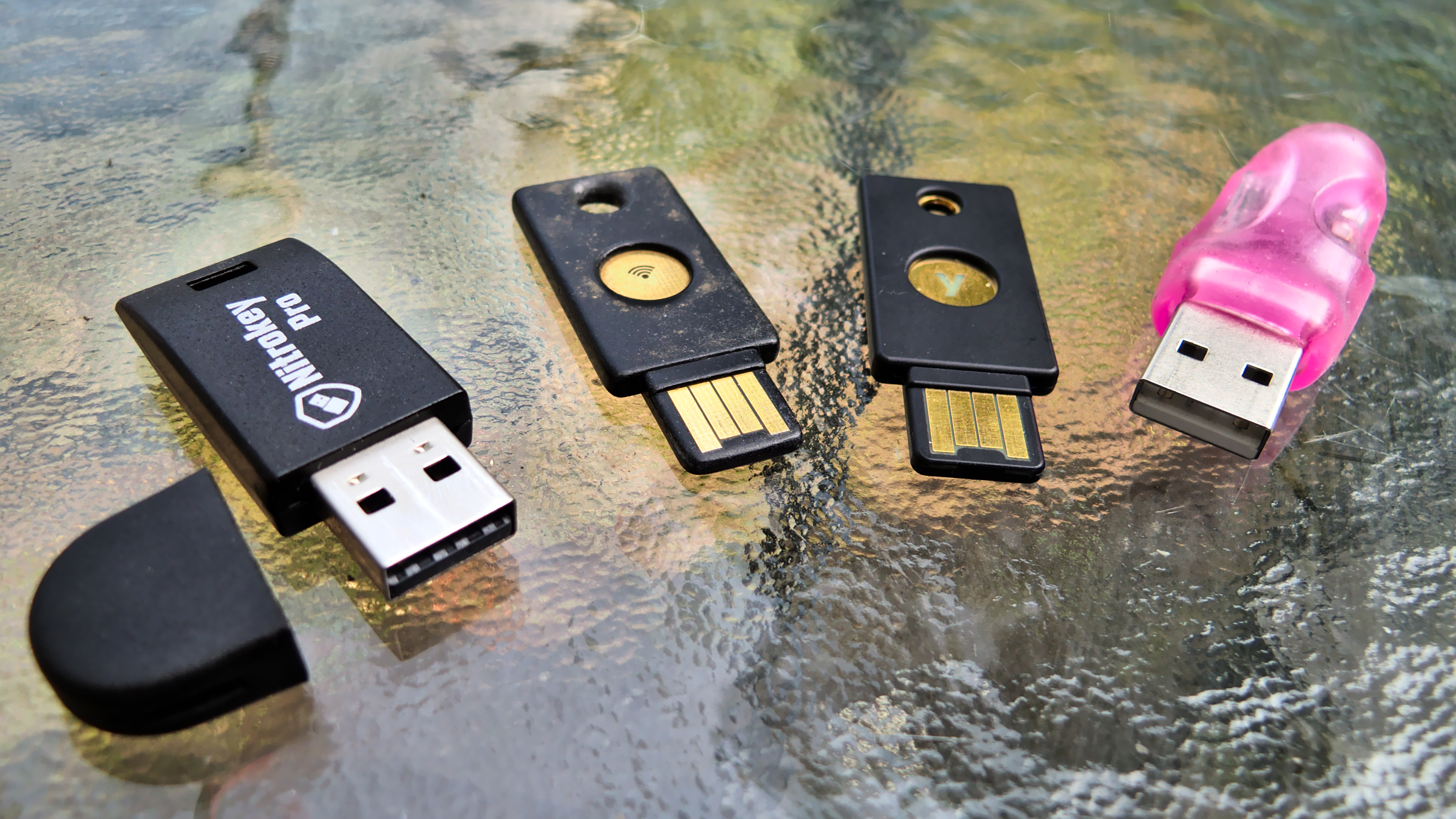
Form factor The Nitrokey Pro, YubiKey NEO (worn out), YubiKey 4, and FST-01 The four keycards have similar form factors: they all connect to a standard USB port, although both YubiKey keycards have a capacitive button by which the user triggers two-factor authentication and the YubiKey 4 can also require a button press to confirm private key use. The YubiKeys feel sturdier than the other two. The NEO has withstood two years of punishment in my pockets along with the rest of my "real" keyring and there is only minimal wear on the keycard in the picture. It's also thinner so it fits well on the keyring. The FST-01 stands out from the other two with its minimal design. Out of the box, the FST-01 comes without a case, so the circuitry is exposed. This is deliberate: one of its goals is to be as transparent as possible, both in terms of software and hardware design and you definitely get that feeling at the physical level. Unfortunately, that does mean it feels more brittle than other models: I wouldn't carry it in my pocket all the time, although there is a case that may protect the key a little better, but it does not provide an easy way to hook it into a keyring. In the group picture above, the FST-01 is the pink plastic thing, which is a rubbery casing I received along with the device when I got it. Notice how the USB connectors of the YubiKeys differ from the other two: while the FST-01 and the Nitrokey have standard USB connectors, the YubiKey has only a "half-connector", which is what makes it thinner than the other two. The "Nano" form factor takes this even further and almost disappears in the USB port. Unfortunately, this arrangement means the YubiKey NEO often comes loose and falls out of the USB port, especially when connected to a laptop. On my workstation, however, it usually stays put even with my whole keyring hanging off of it. I suspect this adds more strain to the host's USB port but that's a tradeoff I've lived with without any noticeable wear so far. Finally, the NEO has this peculiar feature of supporting NFC for certain operations, as LWN previously covered, but I haven't used that feature yet. The Nitrokey Pro looks like a normal USB key, in contrast with the other two devices. It does feel a little brittle when compared with the YubiKey, although only time will tell how much of a beating it can take. It has a small ring in the case so it is possible to carry it directly on your keyring, but I would be worried the cap would come off eventually. Nitrokey devices are also two times thicker than the Yubico models which makes them less convenient to carry around on keyrings.

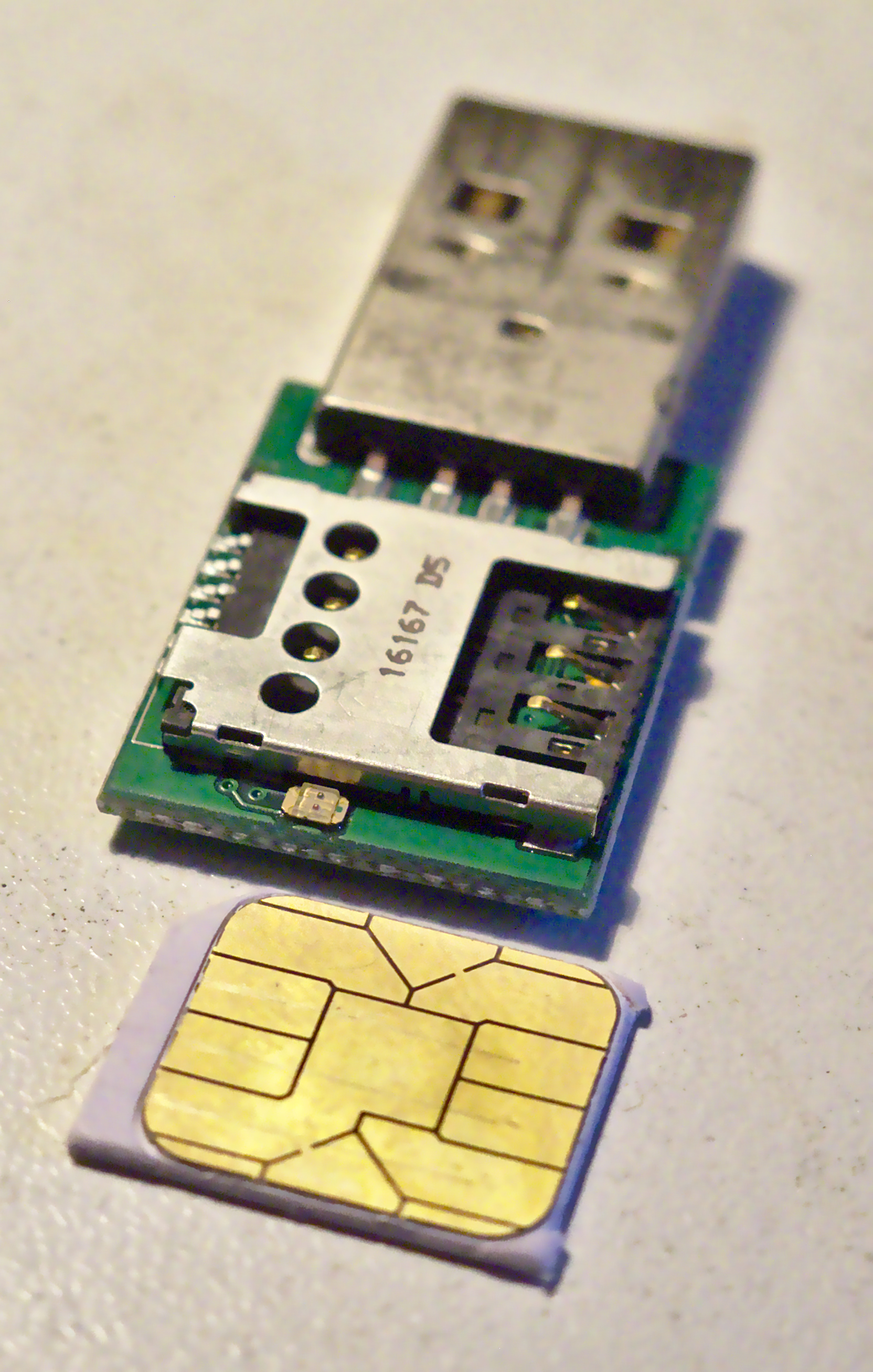
Open and closed designs The FST-01 is as open as hardware comes, down to the PCB design available as KiCad files in this Git repository. The software running on the card is the Gnuk firmware that implements the OpenPGP card protocol, but you can also get it with firmware implementing a true random number generator (TRNG) called NeuG (pronounced "noisy"); the device is programmable through a standard Serial Wire Debug (SWD) port. The Nitrokey Start model also runs the Gnuk firmware. However, the Nitrokey website announces only ECC and RSA 2048-bit support for the Start, while the FST-01 also supports RSA-4096. Nitrokey's founder Jan Suhr, in a private email, explained that this is because "Gnuk doesn't support RSA-3072 or larger at a reasonable speed". Its devices (the Pro, Start, and HSM models) use a similar chip to the FST-01: the STM32F103 microcontroller. Nitrokey Pro with STM32F103TBU6 MCU Nitrokey also publishes its hardware designs, on GitHub, which shows the Pro is basically a fork of the FST-01, according to the ChangeLog. I opened the case to confirm it was using the STM MCU, something I should warn you against; I broke one of the pins holding it together when opening it so now it's even more fragile. But at least, I was able to confirm it was built using the STM32F103TBU6 MCU, like the FST-01. Nitrokey back side But this is where the comparison ends: on the back side, we find a SIM card reader that holds the OpenPGP card that, in turn, holds the private key material and does the cryptographic operations. So, in effect, the Nitrokey Pro is really a evolution of the original OpenPGP card readers. Nitrokey confirmed the OpenPGP card featured in the Pro is the same as the one shipped by the Free Software Foundation Europe (FSFE): the BasicCard built by ZeitControl. Those cards, however, are covered by NDAs and the firmware is only partially open source. This makes the Nitrokey Pro less open than the FST-01, but that's an inevitable tradeoff when choosing a design based on the OpenPGP cards, which Suhr described to me as "pretty proprietary". There are other keycards out there, however, for example the SLJ52GDL150-150k smartcard suggested by Debian developer Yves-Alexis Perez, which he prefers as it is certified by French and German authorities. In that blog post, he also said he was experimenting with the GPL-licensed OpenPGP applet implemented by the French ANSSI. But the YubiKey devices are even further away in the closed-design direction. Both the hardware designs and firmware are proprietary. The YubiKey NEO, for example, cannot be upgraded at all, even though it is based on an open firmware. According to Yubico's FAQ, this is due to "best security practices": "There is a 'no upgrade' policy for our devices since nothing, including malware, can write to the firmware." I find this decision questionable in a context where security updates are often more important than trying to design a bulletproof design, which may simply be impossible. And the YubiKey NEO did suffer from critical security issue that allowed attackers to bypass the PIN protection on the card, which raises the question of the actual protection of the private key material on those cards. According to Niibe, "some OpenPGP cards store the private key unencrypted. It is a common attitude for many smartcard implementations", which was confirmed by Suhr: "the private key is protected by hardware mechanisms which prevent its extraction and misuse". He is referring to the use of tamper resistance. After that security issue, there was no other option for YubiKey NEO users than to get a new keycard (for free, thankfully) from Yubico, which also meant discarding the private key material on the key. For OpenPGP keys, this may mean having to bootstrap the web of trust from scratch if the keycard was responsible for the main certification key. But at least the NEO is running free software based on the OpenPGP card applet and the source is still available on GitHub. The YubiKey 4, on the other hand, is now closed source, which was controversial when the new model was announced last year. It led the main Linux Foundation system administrator, Konstantin Ryabitsev, to withdraw his endorsement of Yubico products. In response, Yubico argued that this approach was essential to the security of its devices, which are now based on "a secure chip, which has built-in countermeasures to mitigate a long list of attacks". In particular, it claims that:
A commercial-grade AVR or ARM controller is unfit to be used in a security product. In most cases, these controllers are easy to attack, from breaking in via a debug/JTAG/TAP port to probing memory contents. Various forms of fault injection and side-channel analysis are possible, sometimes allowing for a complete key recovery in a shockingly short period of time.
While I understand those concerns, they eventually come down to the trust you have in an organization. Not only do we have to trust Yubico, but also hardware manufacturers and designs they have chosen. Every step in the hidden supply chain is then trusted to make correct technical decisions and not introduce any backdoors. History, unfortunately, is not on Yubico's side: Snowden revealed the example of RSA security accepting what renowned cryptographer Bruce Schneier described as a "bribe" from the NSA to weaken its ECC implementation, by using the presumably backdoored Dual_EC_DRBG algorithm. What makes Yubico or its suppliers so different from RSA Security? Remember that RSA Security used to be an adamant opponent to the degradation of encryption standards, campaigning against the Clipper chip in the first crypto wars. Even if we trust the Yubico supply chain, how can we trust a closed design using what basically amounts to security through obscurity? Publicly auditable designs are an important tradition in cryptography, and that principle shouldn't stop when software is frozen into silicon. In fact, a critical vulnerability called ROCA disclosed recently affects closed "smartcards" like the YubiKey 4 and allows full private key recovery from the public key if the key was generated on a vulnerable keycard. When speaking with Ars Technica, the researchers outlined the importance of open designs and questioned the reliability of certification:
Our work highlights the dangers of keeping the design secret and the implementation closed-source, even if both are thoroughly analyzed and certified by experts. The lack of public information causes a delay in the discovery of flaws (and hinders the process of checking for them), thereby increasing the number of already deployed and affected devices at the time of detection.
This issue with open hardware designs seems to be recurring topic of conversation on the Gnuk mailing list. For example, there was a discussion in September 2017 regarding possible hardware vulnerabilities in the STM MCU that would allow extraction of encrypted key material from the key. Niibe referred to a talk presented at the WOOT 17 workshop, where Johannes Obermaier and Stefan Tatschner, from the Fraunhofer Institute, demonstrated attacks against the STMF0 family MCUs. It is still unclear if those attacks also apply to the older STMF1 design used in the FST-01, however. Furthermore, extracted private key material is still protected by user passphrase, but the Gnuk uses a weak key derivation function, so brute-forcing attacks may be possible. Fortunately, there is work in progress to make GnuPG hash the passphrase before sending it to the keycard, which should make such attacks harder if not completely pointless. When asked about the Yubico claims in a private email, Niibe did recognize that "it is true that there are more weak points in general purpose implementations than special implementations". During the last DebConf in Montreal, Niibe explained:
If you don't trust me, you should not buy from me. Source code availability is only a single factor: someone can maliciously replace the firmware to enable advanced attacks.
Niibe recommends to "build the firmware yourself", also saying the design of the FST-01 uses normal hardware that "everyone can replicate". Those advantages are hard to deny for a cryptographic system: using more generic components makes it harder for hostile parties to mount targeted attacks. A counter-argument here is that it can be difficult for a regular user to audit such designs, let alone physically build the device from scratch but, in a mailing list discussion, Debian developer Ian Jackson explained that:
You don't need to be able to validate it personally. The thing spooks most hate is discovery. Backdooring supposedly-free hardware is harder (more costly) because it comes with greater risk of discovery. To put it concretely: if they backdoor all of them, someone (not necessarily you) might notice. (Backdooring only yours involves messing with the shipping arrangements and so on, and supposes that you specifically are of interest.)
Since that, as far as we know, the STM microcontrollers are not backdoored, I would tend to favor those devices instead of proprietary ones, as such a backdoor would be more easily detectable than in a closed design. Even though physical attacks may be possible against those microcontrollers, in the end, if an attacker has physical access to a keycard, I consider the key compromised, even if it has the best chip on the market. In our email exchange, Niibe argued that "when a token is lost, it is better to revoke keys, even if the token is considered secure enough". So like any other device, physical compromise of tokens may mean compromise of the key and should trigger key-revocation procedures.

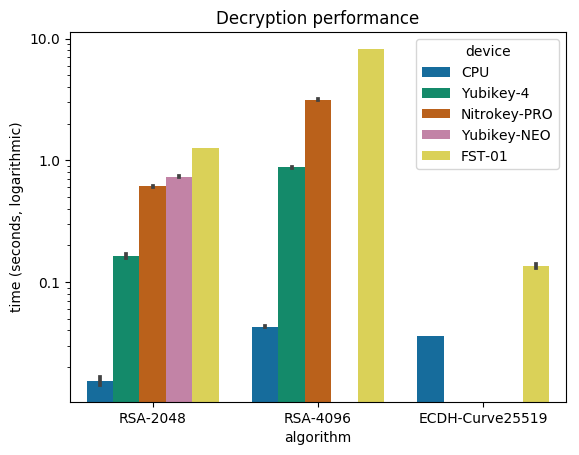
Algorithms and performance To establish reliable performance results, I wrote a benchmark program naively called crypto-bench that could produce comparable results between the different keys. The program takes each algorithm/keycard combination and runs 1000 decryptions of a 16-byte file (one AES-128 block) using GnuPG, after priming it to get the password cached. I assume the overhead of GnuPG calls to be negligible, as it should be the same across all tokens, so comparisons are possible. AES encryption is constant across all tests as it is always performed on the host and fast enough to be irrelevant in the tests. I used the following:
  • Intel(R) Core(TM) i3-6100U CPU @ 2.30GHz running Debian 9 ("stretch"/stable amd64), using GnuPG 2.1.18-6 (from the stable Debian package)
  • Nitrokey Pro 0.8 (latest firmware)
  • FST-01, running Gnuk version 1.2.5 (latest firmware)
  • YubiKey NEO OpenPGP applet 1.0.10 (not upgradable)
  • YubiKey 4 4.2.6 (not upgradable)
I ran crypto-bench for each keycard, which resulted in the following:
Algorithm Device Mean time (s)
ECDH-Curve25519 CPU 0.036
FST-01 0.135
RSA-2048 CPU 0.016
YubiKey-4 0.162
Nitrokey-Pro 0.610
YubiKey-NEO 0.736
FST-01 1.265
RSA-4096 CPU 0.043
YubiKey-4 0.875
Nitrokey-Pro 3.150
FST-01 8.218
Decryption graph There we see the performance of the four keycards I tested, compared with the same operations done without a keycard: the "CPU" device. That provides the baseline time of GnuPG decrypting the file. The first obvious observation is that using a keycard is slower: in the best scenario (FST-01 + ECC) we see a four-fold slowdown, but in the worst case (also FST-01, but RSA-4096), we see a catastrophic 200-fold slowdown. When I presented the results on the Gnuk mailing list, GnuPG developer Werner Koch confirmed those "numbers are as expected":
With a crypto chip RSA is much faster. By design the Gnuk can't be as fast - it is just a simple MCU. However, using Curve25519 Gnuk is really fast.
And yes, the FST-01 is really fast at doing ECC, but it's also the only keycard that handles ECC in my tests; the Nitrokey Start and Nitrokey HSM should support it as well, but I haven't been able to test those devices. Also note that the YubiKey NEO doesn't support RSA-4096 at all, so we can only compare RSA-2048 across keycards. We should note, however, that ECC is slower than RSA on the CPU, which suggests the Gnuk ECC implementation used by the FST-01 is exceptionally fast. In discussions about improving the performance of the FST-01, Niibe estimated the user tolerance threshold to be "2 seconds decryption time". In a new design using the STM32L432 microcontroller, Aurelien Jarno was able to bring the numbers for RSA-2048 decryption from 1.27s down to 0.65s, and for RSA-4096, from 8.22s down to 3.87s seconds. RSA-4096 is still beyond the two-second threshold, but at least it brings the FST-01 close to the YubiKey NEO and Nitrokey Pro performance levels. We should also underline the superior performance of the YubiKey 4: whatever that thing is doing, it's doing it faster than anyone else. It does RSA-4096 faster than the FST-01 does RSA-2048, and almost as fast as the Nitrokey Pro does RSA-2048. We should also note that the Nitrokey Pro also fails to cross the two-second threshold for RSA-4096 decryption. For me, the FST-01's stellar performance with ECC outshines the other devices. Maybe it says more about the efficiency of the algorithm than the FST-01 or Gnuk's design, but it's definitely an interesting avenue for people who want to deploy those modern algorithms. So, in terms of performance, it is clear that both the YubiKey 4 and the FST-01 take the prize in their own areas (RSA and ECC, respectively).

Conclusion In the above presentation, I have evaluated four cryptographic keycards for use with various OpenPGP operations. What the results show is that the only efficient way of storing a 4096-bit encryption key on a keycard would be to use the YubiKey 4. Unfortunately, I do not feel we should put our trust in such closed designs so I would argue you should either stick with 2048-bit encryption subkeys or keep the keys on disk. Considering that losing such a key would be catastrophic, this might be a good approach anyway. You should also consider switching to ECC encryption: even though it may not be supported everywhere, GnuPG supports having multiple encryption subkeys on a keyring: if one algorithm is unsupported (e.g. GnuPG 1.4 doesn't support ECC), it will fall back to a supported algorithm (e.g. RSA). Do not forget your previously encrypted material doesn't magically re-encrypt itself using your new encryption subkey, however. For authentication and signing keys, speed is not such an issue, so I would warmly recommend either the Nitrokey Pro or Start, or the FST-01, depending on whether you want to start experimenting with ECC algorithms. Availability also seems to be an issue for the FST-01. While you can generally get the device when you meet Niibe in person for a few bucks (I bought mine for around \$30 Canadian), the Seeed online shop says the device is out of stock at the time of this writing, even though Jonathan McDowell said that may be inaccurate in a debian-project discussion. Nevertheless, this issue may make the Nitrokey devices more attractive. When deciding on using the Pro or Start, Suhr offered the following advice:
In practice smart card security has been proven to work well (at least if you use a decent smart card). Therefore the Nitrokey Pro should be used for high security cases. If you don't trust the smart card or if Nitrokey Start is just sufficient for you, you can choose that one. This is why we offer both models.
So far, I have created a signing subkey and moved that and my authentication key to the YubiKey NEO, because it's a device I physically trust to keep itself together in my pockets and I was already using it. It has served me well so far, especially with its extra features like U2F and HOTP support, which I use frequently. Those features are also available on the Nitrokey Pro, so that may be an alternative if I lose the YubiKey. I will probably move my main certification key to the FST-01 and a LUKS-encrypted USB disk, to keep that certification key offline but backed up on two different devices. As for the encryption key, I'll wait for keycard performance to improve, or simply switch my whole keyring to ECC and use the FST-01 or Nitrokey Start for that purpose.
[The author would like to thank Nitrokey for providing hardware for testing.] This article first appeared in the Linux Weekly News.

2 October 2017

Antoine Beaupr : Strategies for offline PGP key storage

While the adoption of OpenPGP by the general population is marginal at best, it is a critical component for the security community and particularly for Linux distributions. For example, every package uploaded into Debian is verified by the central repository using the maintainer's OpenPGP keys and the repository itself is, in turn, signed using a separate key. If upstream packages also use such signatures, this creates a complete trust path from the original upstream developer to users. Beyond that, pull requests for the Linux kernel are verified using signatures as well. Therefore, the stakes are high: a compromise of the release key, or even of a single maintainer's key, could enable devastating attacks against many machines. That has led the Debian community to develop a good grasp of best practices for cryptographic signatures (which are typically handled using GNU Privacy Guard, also known as GnuPG or GPG). For example, weak (less than 2048 bits) and vulnerable PGPv3 keys were removed from the keyring in 2015, and there is a strong culture of cross-signing keys between Debian members at in-person meetings. Yet even Debian developers (DDs) do not seem to have established practices on how to actually store critical private key material, as we can see in this discussion on the debian-project mailing list. That email boiled down to a simple request: can I have a "key dongles for dummies" tutorial? Key dongles, or keycards as we'll call them here, are small devices that allow users to store keys on an offline device and provide one possible solution for protecting private key material. In this article, I hope to use my experience in this domain to clarify the issue of how to store those precious private keys that, if compromised, could enable arbitrary code execution on millions of machines all over the world.

Why store keys offline? Before we go into details about storing keys offline, it may be useful to do a small reminder of how the OpenPGP standard works. OpenPGP keys are made of a main public/private key pair, the certification key, used to sign user identifiers and subkeys. My public key, shown below, has the usual main certification/signature key (marked SC) but also an encryption subkey (marked E), a separate signature key (S), and two authentication keys (marked A) which I use as RSA keys to log into servers using SSH, thanks to the Monkeysphere project.
    pub   rsa4096/792152527B75921E 2009-05-29 [SC] [expires: 2018-04-19]
      8DC901CE64146C048AD50FBB792152527B75921E
    uid                 [ultimate] Antoine Beaupr  <anarcat@anarc.at>
    uid                 [ultimate] Antoine Beaupr  <anarcat@koumbit.org>
    uid                 [ultimate] Antoine Beaupr  <anarcat@orangeseeds.org>
    uid                 [ultimate] Antoine Beaupr  <anarcat@debian.org>
    sub   rsa2048/B7F648FED2DF2587 2012-07-18 [A]
    sub   rsa2048/604E4B3EEE02855A 2012-07-20 [A]
    sub   rsa4096/A51D5B109C5A5581 2009-05-29 [E]
    sub   rsa2048/3EA1DDDDB261D97B 2017-08-23 [S]
All the subkeys (sub) and identities (uid) are bound by the main certification key using cryptographic self-signatures. So while an attacker stealing a private subkey can spoof signatures in my name or authenticate to other servers, that key can always be revoked by the main certification key. But if the certification key gets stolen, all bets are off: the attacker can create or revoke identities or subkeys as they wish. In a catastrophic scenario, an attacker could even steal the key and remove your copies, taking complete control of the key, without any possibility of recovery. Incidentally, this is why it is so important to generate a revocation certificate and store it offline. So by moving the certification key offline, we reduce the attack surface on the OpenPGP trust chain: day-to-day keys (e.g. email encryption or signature) can stay online but if they get stolen, the certification key can revoke those keys without having to revoke the main certification key as well. Note that a stolen encryption key is a different problem: even if we revoke the encryption subkey, this will only affect future encrypted messages. Previous messages will be readable by the attacker with the stolen subkey even if that subkey gets revoked, so the benefits of revoking encryption certificates are more limited.

Common strategies for offline key storage Considering the security tradeoffs, some propose storing those critical keys offline to reduce those threats. But where exactly? In an attempt to answer that question, Jonathan McDowell, a member of the Debian keyring maintenance team, said that there are three options: use an external LUKS-encrypted volume, an air-gapped system, or a keycard. Full-disk encryption like LUKS adds an extra layer of security by hiding the content of the key from an attacker. Even though private keyrings are usually protected by a passphrase, they are easily identifiable as a keyring. But when a volume is fully encrypted, it's not immediately obvious to an attacker there is private key material on the device. According to Sean Whitton, another advantage of LUKS over plain GnuPG keyring encryption is that you can pass the --iter-time argument when creating a LUKS partition to increase key-derivation delay, which makes brute-forcing much harder. Indeed, GnuPG 2.x doesn't have a run-time option to configure the key-derivation algorithm, although a patch was introduced recently to make the delay configurable at compile time in gpg-agent, which is now responsible for all secret key operations. The downside of external volumes is complexity: GnuPG makes it difficult to extract secrets out of its keyring, which makes the first setup tricky and error-prone. This is easier in the 2.x series thanks to the new storage system and the associated keygrip files, but it still requires arcane knowledge of GPG internals. It is also inconvenient to use secret keys stored outside your main keyring when you actually do need to use them, as GPG doesn't know where to find those keys anymore. Another option is to set up a separate air-gapped system to perform certification operations. An example is the PGP clean room project, which is a live system based on Debian and designed by DD Daniel Pocock to operate an OpenPGP and X.509 certificate authority using commodity hardware. The basic principle is to store the secrets on a different machine that is never connected to the network and, therefore, not exposed to attacks, at least in theory. I have personally discarded that approach because I feel air-gapped systems provide a false sense of security: data eventually does need to come in and out of the system, somehow, even if only to propagate signatures out of the system, which exposes the system to attacks. System updates are similarly problematic: to keep the system secure, timely security updates need to be deployed to the air-gapped system. A common use pattern is to share data through USB keys, which introduce a vulnerability where attacks like BadUSB can infect the air-gapped system. From there, there is a multitude of exotic ways of exfiltrating the data using LEDs, infrared cameras, or the good old TEMPEST attack. I therefore concluded the complexity tradeoffs of an air-gapped system are not worth it. Furthermore, the workflow for air-gapped systems is complex: even though PGP clean room went a long way, it's still lacking even simple scripts that allow signing or transferring keys, which is a problem shared by the external LUKS storage approach.

Keycard advantages The approach I have chosen is to use a cryptographic keycard: an external device, usually connected through the USB port, that stores the private key material and performs critical cryptographic operations on the behalf of the host. For example, the FST-01 keycard can perform RSA and ECC public-key decryption without ever exposing the private key material to the host. In effect, a keycard is a miniature computer that performs restricted computations for another host. Keycards usually support multiple "slots" to store subkeys. The OpenPGP standard specifies there are three subkeys available by default: for signature, authentication, and encryption. Finally, keycards can have an actual physical keypad to enter passwords so a potential keylogger cannot capture them, although the keycards I have access to do not feature such a keypad. We could easily draw a parallel between keycards and an air-gapped system; in effect, a keycard is a miniaturized air-gapped computer and suffers from similar problems. An attacker can intercept data on the host system and attack the device in the same way, if not more easily, because a keycard is actually "online" (i.e. clearly not air-gapped) when connected. The advantage over a fully-fledged air-gapped computer, however, is that the keycard implements only a restricted set of operations. So it is easier to create an open hardware and software design that is audited and verified, which is much harder to accomplish for a general-purpose computer. Like air-gapped systems, keycards address the scenario where an attacker wants to get the private key material. While an attacker could fool the keycard into signing or decrypting some data, this is possible only while the key is physically connected, and the keycard software will prompt the user for a password before doing the operation, though the keycard can cache the password for some time. In effect, it thwarts offline attacks: to brute-force the key's password, the attacker needs to be on the target system and try to guess the keycard's password, which will lock itself after a limited number of tries. It also provides for a clean and standard interface to store keys offline: a single GnuPG command moves private key material to a keycard (the keytocard command in the --edit-key interface), whereas moving private key material to a LUKS-encrypted device or air-gapped computer is more complex. Keycards are also useful if you operate on multiple computers. A common problem when using GnuPG on multiple machines is how to safely copy and synchronize private key material among different devices, which introduces new security problems. Indeed, a "good rule of thumb in a forensics lab", according to Robert J. Hansen on the GnuPG mailing list, is to "store the minimum personal data possible on your systems". Keycards provide the best of both worlds here: you can use your private key on multiple computers without actually storing it in multiple places. In fact, Mike Gerwitz went as far as saying:
For users that need their GPG key on multiple boxes, I consider a smartcard to be essential. Otherwise, the user is just furthering her risk of compromise.

Keycard tradeoffs As Gerwitz hinted, there are multiple downsides to using a keycard, however. Another DD, Wouter Verhelst clearly expressed the tradeoffs:
Smartcards are useful. They ensure that the private half of your key is never on any hard disk or other general storage device, and therefore that it cannot possibly be stolen (because there's only one possible copy of it). Smartcards are a pain in the ass. They ensure that the private half of your key is never on any hard disk or other general storage device but instead sits in your wallet, so whenever you need to access it, you need to grab your wallet to be able to do so, which takes more effort than just firing up GnuPG. If your laptop doesn't have a builtin cardreader, you also need to fish the reader from your backpack or wherever, etc.
"Smartcards" here refer to older OpenPGP cards that relied on the IEC 7816 smartcard connectors and therefore needed a specially-built smartcard reader. Newer keycards simply use a standard USB connector. In any case, it's true that having an external device introduces new issues: attackers can steal your keycard, you can simply lose it, or wash it with your dirty laundry. A laptop or a computer can also be lost, of course, but it is much easier to lose a small USB keycard than a full laptop and I have yet to hear of someone shoving a full laptop into a washing machine. When you lose your keycard, unless a separate revocation certificate is available somewhere, you lose complete control of the key, which is catastrophic. But, even if you revoke the lost key, you need to create a new one, which involves rebuilding the web of trust for the key a rather expensive operation as it usually requires meeting other OpenPGP users in person to exchange fingerprints. You should therefore think about how to back up the certification key, which is a problem that already exists for online keys; of course, everyone has a revocation certificates and backups of their OpenPGP keys... right? In the keycard scenario, backups may be multiple keycards distributed geographically. Note that, contrary to an air-gapped system, a key generated on a keycard cannot be backed up, by design. For subkeys, this is not a problem as they do not need to be backed up (except encryption keys). But, for a certification key, this means users need to generate the key on the host and transfer it to the keycard, which means the host is expected to have enough entropy to generate cryptographic-strength random numbers, for example. Also consider the possibility of combining different approaches: you could, for example, use a keycard for day-to-day operation, but keep a backup of the certification key on a LUKS-encrypted offline volume. Keycards introduce a new element into the trust chain: you need to trust the keycard manufacturer to not have any hostile code in the key's firmware or hardware. In addition, you need to trust that the implementation is correct. Keycards are harder to update: the firmware may be deliberately inaccessible to the host for security reasons or may require special software to manipulate. Keycards may be slower than the CPU in performing certain operations because they are small embedded microcontrollers with limited computing power. Finally, keycards may encourage users to trust multiple machines with their secrets, which works against the "minimum personal data" principle. A completely different approach called the trusted physical console (TPC) does the opposite: instead of trying to get private key material onto all of those machines, just have them on a single machine that is used for everything. Unlike a keycard, the TPC is an actual computer, say a laptop, which has the advantage of needing no special procedure to manage keys. The downside is, of course, that you actually need to carry that laptop everywhere you go, which may be problematic, especially in some corporate environments that restrict bringing your own devices.

Quick keycard "howto" Getting keys onto a keycard is easy enough:
  1. Start with a temporary key to test the procedure:
        export GNUPGHOME=$(mktemp -d)
        gpg --generate-key
    
  2. Edit the key using its user ID (UID):
        gpg --edit-key UID
    
  3. Use the key command to select the first subkey, then copy it to the keycard (you can also use the addcardkey command to just generate a new subkey directly on the keycard):
        gpg> key 1
        gpg> keytocard
    
  4. If you want to move the subkey, use the save command, which will remove the local copy of the private key, so the keycard will be the only copy of the secret key. Otherwise use the quit command to save the key on the keycard, but keep the secret key in your normal keyring; answer "n" to "save changes?" and "y" to "quit without saving?" . This way the keycard is a backup of your secret key.
  5. Once you are satisfied with the results, repeat steps 1 through 4 with your normal keyring (unset $GNUPGHOME)
When a key is moved to a keycard, --list-secret-keys will show it as sec> (or ssb> for subkeys) instead of the usual sec keyword. If the key is completely missing (for example, if you moved it to a LUKS container), the # sign is used instead. If you need to use a key from a keycard backup, you simply do gpg --card-edit with the key plugged in, then type the fetch command at the prompt to fetch the public key that corresponds to the private key on the keycard (which stays on the keycard). This is the same procedure as the one to use the secret key on another computer.

Conclusion There are already informal OpenPGP best-practices guides out there and some recommend storing keys offline, but they rarely explain what exactly that means. Storing your primary secret key offline is important in dealing with possible compromises and we examined the main ways of doing so: either with an air-gapped system, LUKS-encrypted keyring, or by using keycards. Each approach has its own tradeoffs, but I recommend getting familiar with keycards if you use multiple computers and want a standardized interface with minimal configuration trouble. And of course, those approaches can be combined. This tutorial, for example, uses a keycard on an air-gapped computer, which neatly resolves the question of how to transmit signatures between the air-gapped system and the world. It is definitely not for the faint of heart, however. Once one has decided to use a keycard, the next order of business is to choose a specific device. That choice will be addressed in a followup article, where I will look at performance, physical design, and other considerations.
This article first appeared in the Linux Weekly News.

28 September 2017

Lior Kaplan: LibreOffice community celebrates 7th anniversary

The Document foundation blog have a post about LibreOffice 7th anniversary:
Berlin, September 28, 2017 Today, the LibreOffice community celebrates the 7th anniversary of the leading free office suite, adopted by millions of users in every continent. Since 2010, there have been 14 major releases and dozens of minor ones, fulfilling the personal productivity needs of both individuals and enterprises, on Linux, macOS and Windows.
I wanted to take a moment to remind people that 7 years ago the community decided to make the de facto fork of OpenOffice.org official after life under Sun (and then Oracle) were problematic. From the very first hours the project showed its effectiveness. See my post about LibreOffice first steps. Not to mention what it achieved in the past 7 years. This is still one of my favourite open source contributions, not because it was sophisticated or hard, but because it as about using the freedom part of the free software:
Replace hardcoded product by Oracle with product by %OOOVENDOR . On a personal note, for me, after years of trying to help with OOo l10n for Hebrew and RTL support, things started to go forward in a reasonable pace, getting patches in after years of trying, having upstream fix some of the issues, and actually able doing the translation. We made it to 100% with LibreOffice 3.5.0 in February 2012 (something we should redo soon ).
Filed under: i18n & l10n, Israeli Community, LibreOffice

7 September 2017

Lior Kaplan: FOSScamp Syros 2017 day 3

The 3rd day should have started with a Debian sprint and then a LibreOffice one, taking advantage I m still attending, as that s my last day. But plans don t always work out and we started 2 hours later. When everybody arrive we got everyone together for a short daily meeting (scrum style). The people were divided to 3 teams for translating: Debian Installer, LibreOffice and Gnome. For each team we did a short list of what left and with what to start. And in the end how does what so there will be no toe stepping. I was really proud with this and felt it was time well spent. The current translation percentage for Albanian in LibreOffice is 60%. So my recommendation to the team is translate master only and do not touch the help translation. My plans ahead would be to improve the translation as much as possible for LibreOffice 6.0 and near the branching point (Set to November 20th by the release schedule) decide if it s doable for the 6.0 life time or to set the goal at 6.1. In the 2nd case, we might try to backport translation back to 6.0. For the translation itself, I ve mentioned to the team about KeyID language pack and referred them to the nightly builds. These tools should help with keeping the translation quality high. For the Debian team, after deciding who works on what, I ve asked Silva to do review for the others, as doing it myself started to take more and more of my time. It s also good that the reviewer know the target language and not like me, can catch more the syntax only mistakes. Another point, as she s available more easily to the team while I m leaving soon, so I hope this role of reviewer will stay as part of the team. With the time left I mostly worked on my own tasks, which were packaging the Albanian dictionary, resulting in https://packages.debian.org/sid/myspell-sq and making sure the dictionary is also part of LibreOffice resulting in https://gerrit.libreoffice.org/#/c/41906/ . When it is accepted, I want to upload it to the LibreOffice repository so all users can download and use the dictionary. During the voyage home (ferry, bus, plain and train), I mailed Sergio Durigan Junior, my NM applicant, with a set of questions. My first action as an AM (: Overall FOSScamp results for Albanian translation were very close to the goal I set (100%): That s the result of work by Silva Arapi, Eva Vranici, Redon Skikuli, Anisa Kuci and Nafie Shehu.
Filed under: Debian GNU/Linux, i18n & l10n, LibreOffice

John Goerzen: Switching to xmonad + Gnome and ditching a Mac

I have been using XFCE with xmonad for years now. I m not sure exactly how many, but at least 6 years, if not closer to 10. Today I threw in the towel and switched to Gnome. More recently, at a new job, I was given a Macbook Pro. I wasn t entirely sure what to think of this, but I thought I d give it a try. I found MacOS to be extremely frustrating and confining. It had no real support for a tiling window manager, and although projects like amethyst tried to approximate what xmonad can do on Linux, they were just too limited by the platform and were clunky. Moreover, the entire UI was surprisingly sluggish; maybe that was an induced effect from animations, but I don t think that explains it. A Debisn stretch install, even on inferior hardware, was snappy in a way that MacOS never was. So I have requested to swap for a laptop that will run Debian. The strange use of Command instead of Control for things, combined with the overall lack of configurability of keybindings, meant that I was going to always be fighting muscle memory moving from one platform to another. Not only that, but being back in the world of a Free Software OS means a lot. Now then, back to xmonad and XFCE situation. XFCE once worked very well with xmonad. Over the years, this got more challenging. Around the jessie (XFCE 4.10) time, I had to be very careful about when I would let it save my session, because it would easily break. With stretch, I had to write custom scripts because the panel wouldn t show up properly, and even some application icons would be invisible, if things were started in a certain order. This took much trial and error and was still cumbersome. Gnome 3, with its tightly-coupled Gnome Shell, has never been compatible with other window managers at least not directly. A person could have always used MATE with xmonad but a lot of people that run XFCE tend to have some Gnome 3 apps (for instance, evince) anyhow. Cinnamon also wouldn t work with xmonad, because it is simply another tightly-coupled shell instead of Gnome Shell. And then today I discovered gnome-flashback. gnome-flashback is a Gnome 3 environment that uses the traditional X approach with a separate window manager (metacity of yore by default). Sweet. It turns out that Debian s xmonad has built-in support for it. If you know the secret: apt-get install gnome-session-flashback (OK, it s not so secret; it s even in xmonad s README.Debian these days) Install that, plus gnome and gdm3 and things are nice. Configure xmonad with GNOME support and poof goodness right out of the box, selectable from the gdm sessions list. I still have some gripes about Gnome s configurability (or lack thereof). But I ve got to say: This environment is the first one I ve ever used that got external display switching very nearly right without any configuration, and I include MacOS in that. Plug in an external display, and poof it s configured and set up. You can hit a toggle key (Windows+P by default) to change the configurations, or use the Display section in gnome-control-center. Unplug it, and it instantly reconfigures itself to put everything back on the laptop screen. Yessss! I used to have scripts to do this in the wheezy/jessie days. XFCE in stretch had numerous annoying failures in this area which rendered the internal display completely dark until the next reboot very frustrating. With Gnome, it just works. And, even if you have suspend on lid closed turned on, if the system is powered up and hooked up to an external display, it will keep running even if the lid is closed, figuring you must be using it on the external screen. Another thing the Mac wouldn t do well. All in all, some pretty good stuff here. I continue to be impressed by stretch. It is darn impressive to put this OS on generic hardware and have it outshine the closed-ecosystem Mac!

4 September 2017

Lior Kaplan: FOSScamp Syros 2017 day 2

The morning stated by taking the bus to Kini beach. After some to enjoy the water (which were still cold in the morning), we sat for talking about the local Debian community and how can we help it grow. The main topic was localization (l10n), but we soon started to check other options. I reminded them that l10n isn t only translation and we also talked about dictionaries for spell checking, fonts and local software which might be relevant (e.g. hdate for the Jewish/Hebrew calendar or Jcal for the Jalali calendar). For example it seems that regular Latin fonts are missing two Albanian characters. We also talked about how to use Open Labs to better work together with two hats member of the local FOSS community and also as members of various open source projects (not forgetting open content / data ones projects as well). So people can cooperate both on the local level, the international level or to mix (using the other s project international resources). In short: connections, connections, connections. Another aspect I tried to push the guys toward is cooperating with local companies about open source, whether it s the local market, the municipal and general government. Such cooperation can take many forms, sponsoring events / giving resources (computers, physical space or employee s time) and of course creating more jobs for open source people, which in turn will support more people doing open source for longer period. One of the guys thought benefit the local community will benefit from a mirror server, but that also requires to see the network topology of Albania to make sure it makes sense to invest in one (resources and effort). We continued to how it would be best to contribute to open source, mostly that Debian, although great isn t always the best target, and they should always try to work with the relevant upstream. It s better to translate gnome upstream then sending the Debian maintainer the translation to be included in the package. That shortcut can work if there s something urgent like a really problematic typo or something what unless done before the release would require a long long wait (e.g. the next Debian release). I gave an example that for important RTL bugs in LibreOffice I ve asked Rene Engelhard to include the patch instead of waiting for the next release and its inclusion in Debian. When I started the conversation I mentioned that we have 33% females out of the 12 participants. And that s considered good comparing to other computer/technical events, especially open source. To my surprise the guys told me that in the Open Labs hackerspace the situation is the opposite, they have more female members than male (14 female to 12 male). Also in their last OSCAL event they had 220 women and 100 men. I think there s grounds to learn what happens there, as the gals do something damn right over there. Maybe Outreachy rules for Albania should be different (: Later that day I did another session with Redon Skikuli to be more practical, so I started to search on an Albanian dictionary for spell checking, found an old one and asked Redon to check the current status with the guy. And also check info about such technical stuff with Social Sciences and Albanological Section of the Academy of Sciences of Albania, who is officially the regulator for Albanian. In parallel I started to check how to include the dictionary in LibreOffice, and asked Rene Engelhard to enable Albanian language pack in Debian (as upstream already provide one). Checking the dictionaries I ve took the opportunity to update the Hebrew. It took me a little longer as I needed to get rust off my LibreOffice repositories (dictionaries is a different repository) and also the gerrit setup. But in the end: https://gerrit.libreoffice.org/#/c/41864/ With the talks toady and the starting to combine both Debian and LibreOffice work today (although much of it was talking) I felt like I m the right person on the right place. I m happy to be here and contribute to two projects in parallel (:
Filed under: Debian GNU/Linux, i18n & l10n, LibreOffice

30 August 2017

Kees Cook: GRUB and LUKS

I got myself stuck yesterday with GRUB running from an ext4 /boot/grub, but with /boot inside my LUKS LVM root partition, which meant GRUB couldn t load the initramfs and kernel. Luckily, it turns out that GRUB does know how to mount LUKS volumes (and LVM volumes), but all the instructions I could find talk about setting this up ahead of time ( Add GRUB_ENABLE_CRYPTODISK=y to /etc/default/grub ), rather than what the correct manual GRUB commands are to get things running on a failed boot. These are my notes on that, in case I ever need to do this again, since there was one specific gotcha with using GRUB s cryptomount command (noted below). Available devices were the raw disk (hd0), the /boot/grub partition (hd0,msdos1), and the LUKS volume (hd0,msdos5):
grub> ls
(hd0) (hd0,msdos1) (hd0,msdos5)
Used cryptomount to open the LUKS volume (but without ()s! It says it works if you use parens, but then you can t use the resulting (crypto0)):
grub> insmod luks
grub> cryptomount hd0,msdos5
Enter password...
Slot 0 opened.
Then you can load LVM and it ll see inside the LUKS volume:
grub> insmod lvm
grub> ls
(crypto0) (hd0) (hd0,msdos1) (hd0,msdos5) (lvm/rootvg-rootlv)
And then I could boot normally:
grub> configfile $prefix/grub.cfg
After booting, I added GRUB_ENABLE_CRYPTODISK=y to /etc/default/grub and ran update-grub. I could boot normally after that, though I d be prompted twice for the LUKS passphrase (once by GRUB, then again by the initramfs). To avoid this, it s possible to add a second LUKS passphrase, contained in a file in the initramfs, as described here and works for Ubuntu and Debian too. The quick summary is: Create the keyfile and add it to LUKS:
# dd bs=512 count=4 if=/dev/urandom of=/crypto_keyfile.bin
# chmod 0400 /crypto_keyfile.bin
# cryptsetup luksAddKey /dev/sda5 /crypto_keyfile.bin
*enter original password*
Adjust the /etc/crypttab to include passing the file via /bin/cat:
sda5_crypt UUID=4aa5da72-8da6-11e7-8ac9-001cc008534d /crypto_keyfile.bin luks,keyscript=/bin/cat
Add an initramfs hook to copy the key file into the initramfs, keep non-root users from being able to read your initramfs, and trigger a rebuild:
# cat > /etc/initramfs-tools/hooks/crypto_keyfile <<EOF
#!/bin/bash
if [ "$1" = "prereqs" ] ; then
    cp /crypto_keyfile.bin "$ DESTDIR "
fi
EOF
# chmod a+x /etc/initramfs-tools/hooks/crypto_keyfile
# chmod 0700 /boot
# update-initramfs -u
This has the downside of leaving a LUKS passphrase in the clear while you re booted, but if someone has root, they can just get your dm-crypt encryption key directly anyway:
# dmsetup table --showkeys sda5_crypt
0 155797496 crypt aes-cbc-essiv:sha256 e3b0c44298fc1c149afbf4c8996fb92427ae41e4649b934ca495991b7852b855 0 8:5 2056
And of course if you re worried about Evil Maid attacks, you ll need a real static root of trust instead of doing full disk encryption passphrase prompting from an unverified /boot partition. :)

2017, Kees Cook. This work is licensed under a Creative Commons Attribution-ShareAlike 3.0 License.
Creative Commons License

12 August 2017

Bits from Debian: DebConf17 closes in Montreal and DebConf18 dates announced

DebConf17 group photo - click to enlarge Today, Saturday 12 August 2017, the annual Debian Developers and Contributors Conference came to a close. With over 405 people attending from all over the world, and 169 events including 89 talks, 61 discussion sessions or BoFs, 6 workshops and 13 other activities, DebConf17 has been hailed as a success. Highlights included DebCamp with 117 participants, the Open Day,
where events of interest to a broader audience were offered, talks from invited speakers (Deb Nicholson, Matthew Garrett and Katheryn Sutter), the traditional Bits from the DPL, lightning talks and live demos and the announcement of next year's DebConf (DebConf18 in Hsinchu, Taiwan). The schedule has been updated every day, including 32 ad-hoc new activities, planned
by attendees during the whole conference. For those not able to attend, talks and sessions were recorded and live streamed, and videos are being made available at the Debian meetings archive website. Many sessions also facilitated remote participation via IRC or a collaborative pad. The DebConf17 website will remain active for archive purposes, and will continue to offer links to the presentations and videos of talks and events. Next year, DebConf18 will be held in Hsinchu, Taiwan, from 29 July 2018 until 5 August 2018. It will be the first DebConf held in Asia. For the days before DebConf the local organisers will again set up DebCamp (21 July - 27 July), a session for some intense work on improving the distribution, and organise the Open Day on 28 July 2018, aimed at the general public. DebConf is committed to a safe and welcome environment for all participants. See the DebConf Code of Conduct and the Debian Code of Conduct for more details on this. Debian thanks the commitment of numerous sponsors to support DebConf17, particularly our Platinum Sponsors Savoir-Faire Linux, Hewlett Packard Enterprise, and Google. About Savoir-faire Linux Savoir-faire Linux is a Montreal-based Free/Open-Source Software company with offices in Quebec City, Toronto, Paris and Lyon. It offers Linux and Free Software integration solutions in order to provide performance, flexibility and independence for its clients. The company actively contributes to many free software projects, and provides mirrors of Debian, Ubuntu, Linux and others. About Hewlett Packard Enterprise Hewlett Packard Enterprise (HPE) is one of the largest computer companies in the world, providing a wide range of products and services, such as servers, storage, networking, consulting and support, software, and financial services. HPE is also a development partner of Debian, and provides hardware for port development, Debian mirrors, and other Debian services. About Google Google is one of the largest technology companies in the world, providing a wide range of Internet-related services and products as online advertising technologies, search, cloud computing, software, and hardware. Google has been supporting Debian by sponsoring DebConf since more than ten years, at gold level since DebConf12, and at platinum level for this DebConf17.

Sam Hartman: Debian: a Commons of Innovation

I recently returned from Debconf. This year at Debconf, Matthew Garrett gave a talk about the next twenty years in free software. In his talk he raised concerns that Debian might not be relevant in that ecosystem and talked about some of the trends that contribute to his concerns.
I was talking to Marga after the talk and she said that Debian used to be a lot more innovative than it is today.
My initial reaction was doubt; what she said didn't feel right to me. At the time I didn't have a good answer. Since then I've been pondering the issue, and I think I have a partial answer to both Marga and Matthew and so I'll share it here.
In the beginning Debian focused on a lot of technical innovations related to bringing an operating system together. We didn't understand how to approach builds and build dependencies in a uniform manner. Producing packages in a clean environment was hard. We didn't understand what we wanted out of packages in terms of a uniform approach to configuration handling and upgrades. To a large extent we've solved those problems.
However, as the community has grown, our interests are more diverse. Our users and free software (and the operating system we build together) are what bring us together: we still have a central focus. However, no one technical project captures us all. There's still significant technical innovation in the Debian ecosystem. That innovation happens in Debian teams, companies and organizations that interact with the Debian community. We saw several talks about such innovation this year. I found the talk about ostree and flatpak interesting, especially because it focused on people in the broader Debian ecosystem valuing Debian along with some of the same technologies that Matthew is worried will undermine our relevance.
Matthew talked about how Debian ends up being a man-in-the-middle. We're between users and developers. we're between distributions and upstreams. Users are frustrated because we hold back the latest version of software they want from getting to them. Developers are frustrated because we present our users with old versions of their software configured not as they would like, combined with different dependencies than they expect.
All these weaknesses are real.
However, I think Debian-in-the-middle is our greatest strength both on the technical and social front.
I value Debian because I get a relatively uniform interface to the software I use. I can take one approach to reporting bugs whether they are upstream or Debian specific. I expect the software to behave in uniform ways with regard to things covered by policy. I know that I'm not going to have to configure multiple different versions of core dependencies; for the most part system services are shared. When Debian has value it's because our users want those things we provide. Debian has also reviewed every source file in the software we ship to understand the license and license compatibility. As a free software supporter and as someone who consumes software in commercial context, that value alone is enormous.
The world has evolved and we're facing technologies that provide different models. They've been coming for years: Python, Ruby, Java, Perl and others have been putting together their own commons of software. They have all been working to provide virtualization to isolate one program (and its dependencies) from another. Containerization takes that to the next level. Sometimes that's what our users want.
We haven't figured out what the balances are, how we fit into this new world. However, I disagree with the claim that we aren't even discussing the problem. I think we're trying a lot of things off in our own little technical groups. We're just getting to the level of critical mass of understanding where we can take advantage of Debian's modern form of innovation.
Because here's the thing. Debian's innovation now is social, not technical. Just as we're in the middle technically, we're in the middle socially. Upstreams, developers, users, derivatives, and all the other members of our community work together. we're a place where we can share technology, explore solutions, and pull apart common elements. This is the first Debconf where it felt like we'd explored some of these trends enough to start understanding how they might fit together in a whole. Seven years ago, it felt like we were busy being convinced the Java folks were wrong-headed. A couple of years later, it felt like we were starting to understand our users' desires that let to models different than packaging, but we didn't have any thoughts. At least in my part of the hallway it sounded like people were starting to think about how they might fit parts together and what the tradeoffs would be.
Yes, Matthew's talk doubtless sparked some of that. I think he gave us a well deserved and important wake-up call. However, I was excited by the discussion prior to Thursday.
What I'm taking a way is that Debian is valuable when there's a role in the middle. Both socially and technically we should capitalize on situations where something between makes things better and get out of the way where it does not.

6 August 2017

Bits from Debian: DebConf17 starts today in Montreal

DebConf17 logo DebConf17, the 18th annual Debian Conference, is taking place in Montreal, Canada from August 6 to August 12, 2017. Debian contributors from all over the world have come together at Coll ge Maisonneuve during the preceding week for DebCamp (focused on individual work and team sprints for in-person collaboration developing Debian), and the Open Day on August 5th (with presentations and workshops of interest to a wide audience). Today the main conference starts with nearly 400 attendants and over 120 activities scheduled, including 45- and 20-minute talks and team meetings, workshops, a job fair, talks from invited speakers, as well as a variety of other events. The full schedule at https://debconf17.debconf.org/schedule/ is updated every day, including activities planned ad-hoc by attendees during the whole conference. If you want to engage remotely, you can follow the video streaming of the events happening in the three talk rooms: Buzz (the main auditorium), Rex, and Bo, or join the conversation about what is happening in the talk rooms: #debconf17-buzz, #debconf17-rex and #debconf17-bo, and the BoF (discussions) rooms: #debconf17-potato and #debconf17-woody (all those channels in the OFTC IRC network). DebConf is committed to a safe and welcome environment for all participants. See the DebConf Code of Conduct and the Debian Code of Conduct for more details on this. Debian thanks the commitment of numerous sponsors to support DebConf17, particularly our Platinum Sponsors Savoir-Faire Linux, Hewlett Packard Enterprise, and Google.

5 August 2017

Bits from Debian: DebConf17 Open Day

Today, the day preceeding the official start of the annual Debian Conference, is the Open Day at DebConf17, at Coll ge Maisonneuve in Montreal (Canada). This day is open to the public with events of interest to a wide audience. The schedule of today's events include, among others: Everyone is welcome to attend! It is a great possibility for interested users to meet our community and for Debian to widen our community. See the full schedule for today's events at https://debconf17.debconf.org/schedule/open-day/. If you want to engage remotely, you can watch the video streaming of the Open Day events happening in the "Rex" room, or join the conversation in the channels #debconf17-rex, #debconf17-potato and #debconf17-woody in the OFTC IRC network. DebConf is committed to a safe and welcome environment for all participants. See the DebConf Code of Conduct and the Debian Code of Conduct for more details on this. Debian thanks the commitment of numerous sponsors to support DebConf17, particularly our Platinum Sponsors Savoir-Faire Linux, Hewlett Packard Enterprise, and Google. DebConf17 logo

12 July 2017

Yakking: Time - What are clocks?

System calls You can't talk about time without clocks. A standard definition of clocks is "An instrument to measure time". Strictly speaking the analogy isn't perfect, since these clocks aren't just different ways of measuring time, they measure some different notions of time, but this is a somewhat philosophical point. The interface for this in Linux are system calls with a clkid_t parameter, though not all system calls are valid for every clock. This is not an exhaustive list of system calls, since there are also older system calls for compatibility with POSIX or other UNIX standards, that offer a subset of the functionality of the above ones. System calls beginning clock_ are about getting the time or waiting, beginning timer_ are for setting periodic or one-shot timers, timerfd_ are for timers that can be put in event loops. For the sake of not introducing too many concepts at once, we're going to start with the simplest clock and work our way up. CLOCK_MONOTONIC_RAW The first clock we care about is CLOCK_MONOTONIC_RAW. This is the simplest clock. It it initialised to an arbitrary value on boot and counts up at a rate of one second per second to the best of its ability. This clock is of limited use on its own since the only clock-related system calls that work with it are clock_gettime(2) and clock_getres(2). It can be used to determine the order of events, if the time of the event was recorded and the relative time difference between when they happened, since we know that the clock increments one second per second. Example In this program below, we time how long it takes to read 4096 bytes from /dev/zero, and print the result.
#include <stdio.h> /* fopen, fread, printf */
#include <time.h> /* clock_gettime, CLOCK_MONOTONIC_RAW, struct timespec */
int main(void)  
    FILE *devzero;
    int ret;
    struct timespec start, end;
    char buf[4096];
    devzero = fopen("/dev/zero", "r");
    if (!devzero)  
        return 1;
     
    /* get start time */
    ret = clock_gettime(CLOCK_MONOTONIC_RAW, &start);
    if (ret < 0)  
        return 2;
     
    if (fread(buf, sizeof *buf, sizeof buf, devzero) != sizeof buf)  
        return 3;
     
    /* get end time */
    ret = clock_gettime(CLOCK_MONOTONIC_RAW, &end);
    if (ret < 0)  
        return 4;
     
    end.tv_nsec -= start.tv_nsec;
    if (end.tv_nsec < 0)  
        end.tv_sec--;
        end.tv_nsec += 1000000000l;
     
    end.tv_sec -= start.tv_sec;
    printf("Reading %zu bytes took %.0f.%09ld seconds\n",
           sizeof buf, (double)end.tv_sec, (long)end.tv_nsec);
    return 0;
 

You're possibly curious about the naming of the clock called MONOTONIC_RAW. In the next article we will talk about CLOCK_MONOTONIC, which may help you understand why it's named the way it is. I suggested the uses of this clock are for the sequencing of events and for calculating the relative period between them. If you can think of another use please send us a comment. If you like to get hands-on, you may want to try reimplementing the above program in your preferred programming language, or extending it to time arbitrary events.

9 July 2017

Steinar H. Gunderson: Nageru 1.6.1 released

I've released version 1.6.1 of Nageru, my live video mixer. Now that Solskogen is coming up, there's been a lot of activity on the Nageru front, but hopefully everything is actually coming together now. Testing has been good, but we'll see whether it stands up to the battle-hardening of the real world or not. Hopefully I won't be needing any last-minute patches. :-) Besides the previously promised Prometheus metrics (1.6.1 ships with a rather extensive set, as well as an example Grafana dashboard) and frame queue management improvements, a surprising late addition was that of a new transcoder called Kaeru (following the naming style of Nageru itself, from the japanese verb kaeru ( ) which means roughly to replace or excahnge iKnow! claims it can also mean convert , but I haven't seen support for this anywhere else). Normally, when I do streams, I just let Nageru do its thing and send out a single 720p60 stream (occasionally 1080p), usually around 5 Mbit/sec; less than that doesn't really give good enough quality for the high-movement scenarios I'm after. But Solskogen is different in that there's a pretty diverse audience when it comes to networking conditions; even though I have a few mirrors spread around the world (and some JavaScript to automatically pick the fastest one; DNS round-robin is really quite useless here!), not all viewers can sustain such a bitrate. Thus, there's also a 480p variant with around 1 Mbit/sec or so, and it needs to come from somewhere. Traditionally, I've been using VLC for this, but streaming is really a niche thing for VLC. I've been told it will be an increased focus for 4.0 now that 3.0 is getting out the door, but over the last few years, there's been a constant trickle of little issues that have been breaking my transcoding pipeline. My solution for this was to simply never update VLC, but now that I'm up to stretch, this didn't really work anymore, and I'd been toying around with the idea of making a standalone transcoder for a while. (You'd ask why not the ffmpeg(1) command-line client? , but it's a bit too centered around files and not streams; I use it for converting to HLS for iOS devices, but it has a nasty habit of I/O blocking real work, and its HTTP server really isn't meant for production work. I could survive the latter if it supported Metacube and I could feed it into Cubemap, but it doesn't.) It turned out Nageru had already grown most of the pieces I needed; it had video decoding through FFmpeg, x264 encoding with speed control (so that it automatically picks the best preset the machine can sustain at any given time) and muxing, audio encoding, proper threading everywhere, and a usable HTTP server that could output Metacube. All that was required was to add audio decoding to the FFmpeg input, and then replace the GPU-based mixer and GUI with a very simple driver that just connects the decoders to the encoders. (This means it runs fine on a headless server with no GPU, but it also means you'll get FFmpeg's scaling, which isn't as pretty or fast as Nageru's. I think it's an okay tradeoff.) All in all, this was only about 250 lines of delta, which pales compared to the ~28000 lines of delta that are between 1.3.1 (used for last Solskogen) and 1.6.1. It only supports a rather limited set of Prometheus metrics, and it has some limitations, but it seems to be stable and deliver pretty good quality. I've denoted it experimental for now, but overall, I'm quite happy with how it turned out, and I'll be using it for Solskogen. Nageru 1.6.1 is on its way into Debian, but it depends on a new version of Movit which needs to go through the NEW queue (a soname bump), so it might be a few days. In the meantime, I'll be busy preparing for Solskogen. :-)

31 May 2017

Craig Small: The sudo tty bug and procps

There have been recent reports of a security bug in sudo (CVE-2017-1000367) where you can fool sudo into thinking what controlling terminal it is running on to bypass its security checks. One of the first things I thought of was, is procps vulnerable to the same bug? Sure, it wouldn t be a security bypass, but it would be a normal sort of bug. A lot of programs in procps have a concept of a controlling terminal, or the TTY field for either viewing or filtering, could they be fooled into thinking the process had a different controlling terminal? Was I going to be in the same pickle as the sudo maintainers? The meat between the stat parsing sandwich? Can I find any more puns related somehow to the XKCD comic? TLDR: No. How to find the tty Most ways of finding what the controlling terminal for a process is on are very similar. The file /proc//stat is a one-liner pseudo file that the kernel creates on access that has information about the particular process. A typical file would look like:
20209 (bash) S 14762 20209 20209 34822 20209 4194304 32181 4846307 625 1602 66 3
0 16265 4547 20 0 1 0 139245105 25202688 1349 18446744073709551615 4194304 52421
32 140737059557984 0 0 0 0 3670020 1266777851 1 0 0 17 1 0 0 280 0 0 7341384 738
8228 39092224 140737059564618 140737059564628 140737059564628 140737059569646 0
The first field is the PID, the second the process name (which may be different than the command line, but that s another story), then skip along to field #7 which in this case is 34822. Also notice the process name is in brackets; that is important. So 34822, how do we figure out what device this is? The number is the major and minor device numbers of the controlling terminal. 38422 in hex is 8806, the device has a major number of 88h or 136 and a minor number of 06. Most programs just scan the usual device directories until they find a match (which is basically how procps does it). Device 136,6 is /dev/pts/6
crw--w---- 1 user tty 136, 6 May 29 16:20 /dev/pts/6
$ ps -o tty,cmd 20209
TT CMD
pts/6 /bin/bash
The Bug The process of taking the raw stat file and having a bunch of useful fields is called parsing. The bug in sudo was due to how they parsed the file. The stat file is a space-delimited file. The program scanned the file, character by character, until it came across the 6th space. The problem is, you can put spaces in your command and fool sudo. Once you know that, you can make sudo think the program is running on any (or at least a different) controlling terminal. The bug reporters then used some clever symlinking and race techniques to then get root. What about procps? The parsing of the current (as of writing) procps on the stat file is found in proc/readproc.c within the function stat2proc(). However, it is not just a simple sscanf or something that runs along the line looking for spaces. To find the command, the program does the following:
 S = strchr(S, '(') + 1;
 tmp = strrchr(S, ')');
 num = tmp - S;
 if(unlikely(num >= sizeof P->cmd)) num = sizeof P->cmd - 1;
 memcpy(P->cmd, S, num);
 P->cmd[num] = '\0';
 S = tmp + 2; // skip ") "
The sscanf then comes after we have found the command, using the variable S, to fill in the other fields including the controlling terminal device numbers. procps library looks for the command within brackets. So if your program has spaces in it, it is still found. By using a strrchr (effectively, find the last) you cannot fool it with a bracket in the command either. So procps is not vulnerable to this sort of trickery. Incidently, the fix for the sudo bug now uses strrchr for a close bracket, so it solves the problem the same way. The check for the close bracket appeared in procps 3.1.4 back in 2002, though the stat2proc function was warning about odd named processes before then. As it says in the 2002 change:
Reads /proc/*/stat files, being careful not to trip over processes with names like :-) 1 2 3 4 5 6 .
That s something we can all agree on!

Next.

Previous.