Search Results: "andy"

8 December 2015

Vincent Sanders: I said it was wired like a Christmas tree

I have recently acquired a 27U high 19 inch rack in which I hope to consolidate all the computing systems in my home that do not interact well with humans.
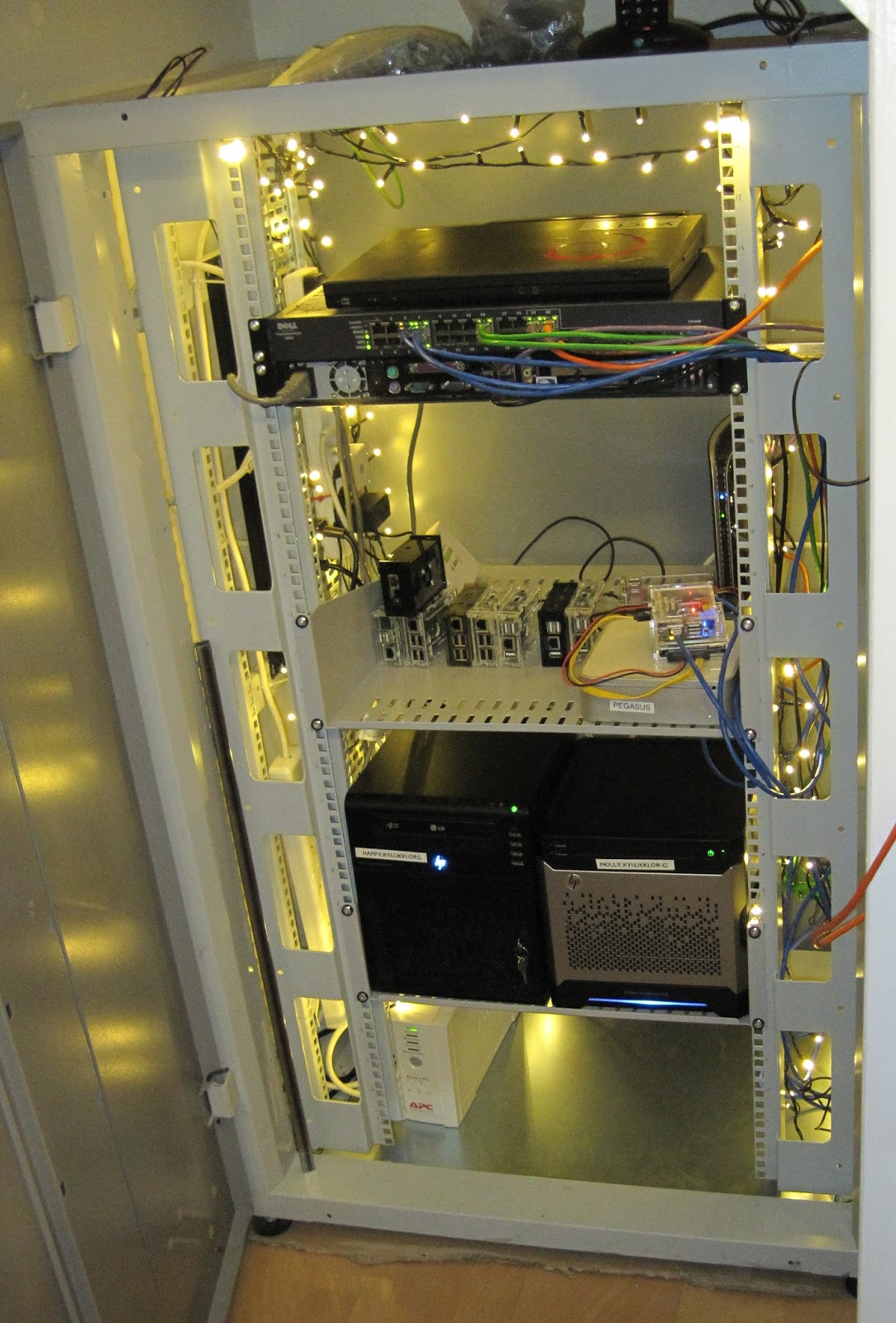
My main issue is that modern systems are just plain noisy, often with multiple small fans whining away. I have worked to reduce this noise by using quieter components as replacements but in the end it is simply better to be able to put these systems in a box out of the way.

The rack was generously given to me by Andy Simpkins and aside from being a little dirty having been stored for some time was in excellent condition. While the proverbs "never look a gift horse in the mouth" and "beggars cannot be choosers" are very firmly at the front of my mind there were a few minor obstacles to overcome to make it fit in its new role with a very small budget.

The new home for the rack was to be a space under the stairs where, after careful measurement, I determined it would just fit. After an hour or two attempting to manoeuvre a very heavy chunk of steel into place I determined it was simply not possible while it was assembled. So I ended up disassembling and rebuilding the whole rack in a confined space.

The rack is 800mm wide IMRAK 1400 rather than the more common 600mm width which means it employs "cable reducing channels" to allow the mounting of standard width rack units. Most racks these days come with four posts in the corners to allow for longer kit to be supported front and back. This particular rack was not fitted with the rear posts and a brief call to the supplier indicated that any spares from them would be eyewateringly expensive (almost twice the cost of purchasing a new rack from a different supplier) so I had to get creative.

Shelves that did not require the rear rails were relatively straightforward and I bought two 500mm deep cantilever type from Orion (I have no affiliation with them beyond being a satisfied customer).

I took a trip to the local hardware store and purchased some angle brackets and 16mm steel square tube. From this I made support rails which means the racked kit has support to its rear rather than relying solely on being supported by its rack ears.

The next problem was the huge hole in the bottom of the rack where I was hoping to put the UPS and power switching. This hole is intended for use with raised flooring where cables enter from below, when not required it is filled in with a "bottom gland plate". Once again the correct spares for the unit were not within my budget.

Around a year ago I built several systems for open source projects from parts generously donated by Mythic Beasts (yes I did recycle servers used to build a fort). I still had some leftover casework from one of those servers so ten minutes with an angle grinder and a drill and I made myself a suitable plate.

The final problem I faced is that it is pretty dark under the stairs and while putting kit in the rack I could not see what I was doing. After some brief Googling I decided that all real rack lighting solutions were pretty expensive and not terribly effective.

At this point I was interrupted by my youngest son trying to assemble the Christmas tree and the traditional "none of the lights work" so we went off to the local supermarket to buy some bulbs. Instead we bought a 240 LED string for 10 (15usd) in the vague hope that next year they will not be broken.

I immediately had a light bulb moment and thought how a large number of efficient LED bulbs at a low price would be ideal for lighting a rack. So my rack is indeed both wired like and as a Christmas tree!

Now I just have to finish putting all the systems in there and I will be able to call the project a success.

16 November 2015

Julien Danjou: Profiling Python using cProfile: a concrete case

Writing programs is fun, but making them fast can be a pain. Python programs are no exception to that, but the basic profiling toolchain is actually not that complicated to use. Here, I would like to show you how you can quickly profile and analyze your Python code to find what part of the code you should optimize. What's profiling? Profiling a Python program is doing a dynamic analysis that measures the execution time of the program and everything that compose it. That means measuring the time spent in each of its functions. This will give you data about where your program is spending time, and what area might be worth optimizing. It's a very interesting exercise. Many people focus on local optimizations, such as determining e.g. which of the Python functions range or xrange is going to be faster. It turns out that knowing which one is faster may never be an issue in your program, and that the time gained by one of the functions above might not be worth the time you spend researching that, or arguing about it with your colleague. Trying to blindly optimize a program without measuring where it is actually spending its time is a useless exercise. Following your guts alone is not always sufficient. There are many types of profiling, as there are many things you can measure. In this exercise, we'll focus on CPU utilization profiling, meaning the time spent by each function executing instructions. Obviously, we could do many more kind of profiling and optimizations, such as memory profiling which would measure the memory used by each piece of code something I talk about in The Hacker's Guide to Python. cProfile Since Python 2.5, Python provides a C module called cProfile which has a reasonable overhead and offers a good enough feature set. The basic usage goes down to:
>>> import cProfile
>>> cProfile.run('2 + 2')
2 function calls in 0.000 seconds

Ordered by: standard name

ncalls tottime percall cumtime percall filename:lineno(function)
1 0.000 0.000 0.000 0.000 <string>:1(<module>)
1 0.000 0.000 0.000 0.000 method 'disable' of '_lsprof.Profiler' objects

Though you can also run a script with it, which turns out to be handy:
$ python -m cProfile -s cumtime lwn2pocket.py
72270 function calls (70640 primitive calls) in 4.481 seconds

Ordered by: cumulative time

ncalls tottime percall cumtime percall filename:lineno(function)
1 0.004 0.004 4.481 4.481 lwn2pocket.py:2(<module>)
1 0.001 0.001 4.296 4.296 lwn2pocket.py:51(main)
3 0.000 0.000 4.286 1.429 api.py:17(request)
3 0.000 0.000 4.268 1.423 sessions.py:386(request)
4/3 0.000 0.000 3.816 1.272 sessions.py:539(send)
4 0.000 0.000 2.965 0.741 adapters.py:323(send)
4 0.000 0.000 2.962 0.740 connectionpool.py:421(urlopen)
4 0.000 0.000 2.961 0.740 connectionpool.py:317(_make_request)
2 0.000 0.000 2.675 1.338 api.py:98(post)
30 0.000 0.000 1.621 0.054 ssl.py:727(recv)
30 0.000 0.000 1.621 0.054 ssl.py:610(read)
30 1.621 0.054 1.621 0.054 method 'read' of '_ssl._SSLSocket' objects
1 0.000 0.000 1.611 1.611 api.py:58(get)
4 0.000 0.000 1.572 0.393 httplib.py:1095(getresponse)
4 0.000 0.000 1.572 0.393 httplib.py:446(begin)
60 0.000 0.000 1.571 0.026 socket.py:410(readline)
4 0.000 0.000 1.571 0.393 httplib.py:407(_read_status)
1 0.000 0.000 1.462 1.462 pocket.py:44(wrapped)
1 0.000 0.000 1.462 1.462 pocket.py:152(make_request)
1 0.000 0.000 1.462 1.462 pocket.py:139(_make_request)
1 0.000 0.000 1.459 1.459 pocket.py:134(_post_request)
[ ]

This prints out all the function called, with the time spend in each and the number of times they have been called. Advanced visualization with KCacheGrind While being useful, the output format is very basic and does not make easy to grab knowledge for complete programs. For more advanced visualization, I leverage KCacheGrind. If you did any C programming and profiling these last years, you may have used it as it is primarily designed as front-end for Valgrind generated call-graphs. In order to use, you need to generate a cProfile result file, then convert it to KCacheGrind format. To do that, I use pyprof2calltree.
$ python -m cProfile -o myscript.cprof myscript.py
$ pyprof2calltree -k -i myscript.cprof

And the KCacheGrind window magically appears!
Concrete case: Carbonara optimization I was curious about the performances of Carbonara, the small timeserie library I wrote for Gnocchi. I decided to do some basic profiling to see if there was any obvious optimization to do. In order to profile a program, you need to run it. But running the whole program in profiling mode can generate a lot of data that you don't care about, and adds noise to what you're trying to understand. Since Gnocchi has thousands of unit tests and a few for Carbonara itself, I decided to profile the code used by these unit tests, as it's a good reflection of basic features of the library. Note that this is a good strategy for a curious and naive first-pass profiling. There's no way that you can make sure that the hotspots you will see in the unit tests are the actual hotspots you will encounter in production. Therefore, a profiling in conditions and with a scenario that mimics what's seen in production is often a necessity if you need to push your program optimization further and want to achieve perceivable and valuable gain. I activated cProfile using the method described above, creating a cProfile.Profile object around my tests (I actually started to implement that in testtools). I then run KCacheGrind as described above. Using KCacheGrind, I generated the following figures.
The test I profiled here is called test_fetch and is pretty easy to understand: it puts data in a timeserie object, and then fetch the aggregated result. The above list shows that 88 % of the ticks are spent in set_values (44 ticks over 50). This function is used to insert values into the timeserie, not to fetch the values. That means that it's really slow to insert data, and pretty fast to actually retrieve them. Reading the rest of the list indicates that several functions share the rest of the ticks, update, _first_block_timestamp, _truncate, _resample, etc. Some of the functions in the list are not part of Carbonara, so there's no point in looking to optimize them. The only thing that can be optimized is, sometimes, the number of times they're called.
The call graph gives me a bit more insight about what's going on here. Using my knowledge about how Carbonara works, I don't think that the whole stack on the left for _first_block_timestamp makes much sense. This function is supposed to find the first timestamp for an aggregate, e.g. with a timestamp of 13:34:45 and a period of 5 minutes, the function should return 13:30:00. The way it works currently is by calling the resample function from Pandas on a timeserie with only one element, but that seems to be very slow. Indeed, currently this function represents 25 % of the time spent by set_values (11 ticks on 44). Fortunately, I recently added a small function called _round_timestamp that does exactly what _first_block_timestamp needs that without calling any Pandas function, so no resample. So I ended up rewriting that function this way:
def _first_block_timestamp(self):
- ts = self.ts[-1:].resample(self.block_size)
- return (ts.index[-1] - (self.block_size * self.back_window))
+ rounded = self._round_timestamp(self.ts.index[-1], self.block_size)
+ return rounded - (self.block_size * self.back_window)

And then I re-run the exact same test to compare the output of cProfile.
The list of function seems quite different this time. The number of time spend used by set_values dropped from 88 % to 71 %.
The call stack for set_values shows that pretty well: we can't even see the _first_block_timestamp function as it is so fast that it totally disappeared from the display. It's now being considered insignificant by the profiler. So we just speed up the whole insertion process of values into Carbonara by a nice 25 % in a few minutes. Not that bad for a first naive pass, right?

11 November 2015

Bits from Debian: New Debian Developers and Maintainers (September and October 2015)

The following contributors got their Debian Developer accounts in the last two months: The following contributors were added as Debian Maintainers in the last two months: Congratulations!

Kees Cook: evolution of seccomp

I m excited to see other people thinking about userspace-to-kernel attack surface reduction ideas. Theo de Raadt recently published slides describing Pledge. This uses the same ideas that seccomp implements, but with less granularity. While seccomp works at the individual syscall level and in addition to killing processes, it allows for signaling, tracing, and errno spoofing. As de Raadt mentions, Pledge could be implemented with seccomp very easily: libseccomp would just categorize syscalls. I don t really understand the presentation s mention of Optional Security , though. Pledge, like seccomp, is an opt-in feature. Nothing in the kernel refuses to run unpledged programs. I assume his point was that when it gets ubiquitously built into programs (like stack protector), it s effectively not optional (which is alluded to later as comprehensive applicability ~= mandatory mitigation ). Regardless, this sensible (though optional) design gets me back to his slide on seccomp, which seems to have a number of misunderstandings: OpenBSD has some interesting advantages in the syscall filtering department, especially around sockets. Right now, it s hard for Linux syscall filtering to understand why a given socket is being used. Something like SOCK_DNS seems like it could be quite handy. Another nice feature of Pledge is the path whitelist feature. As it s still under development, I hope they expand this to include more things than just paths. Argument inspection is a weak point for seccomp, but under Linux, most of the arguments are ultimately exposed to the LSM layer. Last year I experimented with creating a seccomp LSM for path matching where programs could declare whitelists, similar to standard LSMs. So, yes, Linux could match this API on seccomp . It d just take some extensions to libseccomp to implement pledge(), as I described at the top. With OpenBSD doing a bunch of analysis work on common programs, it d be excellent to see this usable on Linux too. So far on Linux, only a few programs (e.g. Chrome, vsftpd) have bothered to do this using seccomp, and it could be argued that this is ultimately due to how fine grained it is.

2015, Kees Cook. This work is licensed under a Creative Commons Attribution-ShareAlike 3.0 License.
Creative Commons License

Jonathan Dowland: Useful Mac programs

A little over a year ago I wrote about how I'd been using a Mac as my main work machine. I hadn't written anything on the subject since. Here are four useful Mac programs that I can recommend to people. Sizeup, from Irradiated Software. A bit Like Windows' aero snap, but on steroids. I love this. I regularly move windows between two desktops (external and internal display), resize and centre them or put them in one quarter of the screen with just a few presses. The "snapback" feature is also great. X Lossless Decoder (XLD). A handy transcoder that can use QuickTime encoders and so can write out Apple/Quicktime/iTunes-encoded AAC/MP4 files en-mass, translating file meta-data.
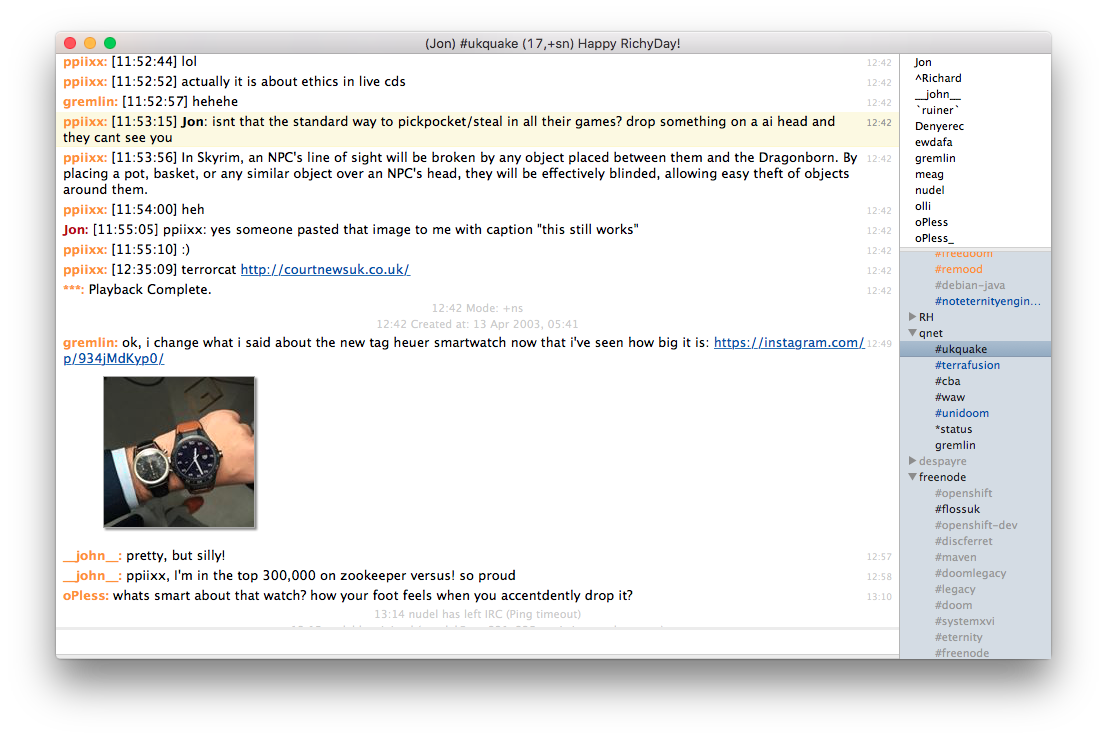
LimeChat LimeChat
LimeChat, an IRC client. I theme it to look like Colloquy. The net result is pretty clean. I like using a proportional-font for text things, so getting IRC out of a terminal is a win for me. LimeChat automatically fetches and thumbnails URIs to images that people paste in channels, which is either incredibly convenient or a curse, depending on the channel. You can toggle that behaviour but only across the whole client, not on a channel or network basis. Finally, 1Password is an incredibly slick password manager. I use it in a very basic fashion: no mobile client, no syncing to anything outside of my workstation. You could also use LastPass which is similar and has a Linux client. I haven't tried it, but there's a third party tool to read 1Password password stores on Linux written by Ryan Coleman of SDL fame called 1pass.

8 November 2015

Andrew Cater: MiniDebconf ARM CAmbridge 1400 - ARM, Cambridge 8 November

Andy (rattusrattus) on Video team sprint over the last few days with Ivo de Decker and Stefano Rovera

Background/Existing infrastructure/Why change? [DV/Firewire are EOL]
Things to do

1. Replace twinpact video slide capture system with something that can capture HDMI - better resolution,- digital all the way
Using a pre-production prototype at the moment. CCC also hoping to use this. All kit needs to go into one big box with sensible power supplies
2. Replace DVswitch
Better resolution, select sources, record all inputs, record all edits
Gstreamer based transport solution - import/output format agnostic
GST-Switch - possibly dead? VoctoMix looks more promising - CCC are testing this. First use in anger may be December
3. Improve streaming - single stream out. Encode stream on in-room hardware.
Sharing is a thing ... CCC workflow and setup are good - everyone should share technology. FOSDEM has 25 rooms ...
4 Replace/expand AV equipment
Workstation PC - SDI capture/video mixing/local record and encode
Laptop for remote UI
2 cameras
Opsis frame grabber
5 BoF Room recording - lots of options to handle differently
1 Operator maximum / preferably automated
Video conferencing camera / microphone setup
Frame grabber for slides / Gobby feed
6 Logistics
Organise equipment by room
Kit must be kept deployable
Quartermastering necessary
Checklists for each box
Set up a lab for development and release
DO NOT CHANGE ANYTHING ON THE PRODUCTION KIT


31 October 2015

Jonathan McDowell: Thoughts on the LG G Watch R Android smartwatch

Back in March I was given an LG G Watch R, the first Android Wear smartwatch to have a full round display (the Moto 360 was earlier, but has a bit cut off the bottom of the actual display). I d promised I d get round to making some comments about it once I d had it for a while and have failed to do so until now. Note that this is very much comments on the watch from a user point of view; I haven t got to the point of trying to do any development or other hacking of it. Firstly, it s important to note I already was wearing a watch and have been doing so for all of my adult life. Just a basic, unobtrusive analogue watch (I ve had a couple since I was 18, before that it was pretty much every type of calculator watch available at some point), but I can t remember a period where I didn t. The G Watch R is bulkier than what I was previously wearing, but I haven t found it obtrusive. And I love the way it looks; if you don t look closely it doesn t look like a smart watch (and really it s only the screen that gives it away). Secondly, I already would have taken my watch off at night and when I was showering. So while the fact that the battery on the G Watch R will really only last a day and a half is by far and away its most annoying problem, it s not as bad as it could be for me. The supplied charging dock is magnetic, so it lives on my beside table and I just drop the watch in it when I go to bed. With those details out of the way, what have I thought of it? It s certainly a neat gadget. Being able to see my notifications without having to take my phone out of my pocket is more convenient than I expected - especially when it s something like an unimportant email that I can then easily dismiss by swiping the watch face. My agenda being just a flick away, very convenient, particularly when I m still at the stage of trying to remember where my next lecture is. Having walking directions from Google Maps show up on the watch (and be accompanied by a gentle vibration when I need to change direction) is pretty handy too. The ability to take pictures via the phone camera, not so much. Perhaps if it showed me roughly what I was about to photograph, but without that it s no easier than using the phone interface. It s mostly an interface for consuming information - I ve tried the text to SMS interface a few times, but it s just not reliable enough that I d choose to use it. I ve also been pleased to see it get several updates from LG in the time I ve had it. First the upgrade from Wear 4.4 to Wear 5.1 (probably via 5.0 but I forget), but also the enabling of wifi support. The hardware could always support this, but initially Android Wear didn t and then there was some uncertainty about the FCC certification for the G Watch R. I can t say I use it much (mostly the phone is within range) but it s nice to see the improvements in support when they re available. What about the downsides? Battery life, as mentioned above, is definitely the major one. Mostly a day is fine, but the problem comes if I m ever away. There s no way to charge without the charging dock, so that becomes another things I have to pack. And it s really annoying to have your watch go dead on you midday when you forget to do so. I also had a period where I d frequently (at least once a week) find an Android Wear isn t responding. Wait/Restart? error on the watch screen. Not cool, but thankfully seems to have stopped happening. Finally there s the additional resource requirements it puts on the phone. I have a fairly basic Moto G 4G that already struggles with Ingress and Chrome at the same time, so adding yet another thing running all the time doesn t help. I m sure I could make use of a few more apps if I was more comfortable with loading the phone. The notable point for me with the watch was DebConf. I d decided not to bring it, not wanting the hassle of dealing with the daily charging. I switched back to my old analogue watch (a Timex, if you care). And proceeded to spend 3 days looking at it every time my phone vibrated before realising that I couldn t do that. That marked the point where I accepted that I was definitely seeing benefits from having a smart watch. So when I was away for a week at the start of September, I brought the charger with me (at some point I ll get round to a second base for travel). I was glad I d done so. I m not sure I m yet at the point I d replace it in the event it died, but on the whole I m more of a convert that I was expecting to be.

16 August 2015

John Goerzen: First steps: Debian on an Asus t100, and some negative experience with Gnome

The Asus t100 tablet is this amazing and odd little thing: it sells for under $200, yet has a full-featured Atom 64-bit CPU, 2GB RAM, 32 or 64GB SSD, etc. By default, it ships with Windows 8.1. It has a detachable keyboard, so it can be used as a tablet or a very small 10 laptop. I have never been a fan of Windows on it. It does the trick for web browsing and email, but I d like to ssh into my machines sometimes, and I just can t bring myself to type sensitive passwords into Windows. I decided to try installing Debian on it. After a lot of abortive starts due to the UEFI-only firmware, I got jessie installed. (The installer was fine; it was Debian Live that wouldn t boot.) I got wifi and battery status working via an upgrade to the 4.1 kernel. A little $10 Edimax USB adapter was handy to spare a bunch of copying via USB disks. I have been using XFCE with XMonad for so many years that I am somewhat a stranger to other desktop environments. XMonad isn t really suitable for a tablet, however, so I thought I d try Gnome, especially after a fairly glowing review about its use on a tablet. I am already disappointed after just a few minutes. There is no suspend button on the menu. Some Googling showed that holding Alt while hovering over the power off button will change it to a suspend button. And indeed it does. But uh, what? That is so common and so non-obvious. And pushing the power button does nothing. That s right, nothing. Apparently the way to enable some action when you push the power button is to type in a settings command in a terminal. There s no setting in the settings panel. I initially ditched Gnome some years ago due to its penchant for removing features. I had hoped that this much time later, it would have passed that stage, but I m already disappointed. I was hoping for some really nice integration with the system. But my XFCE setup has a very clear When power button is pressed setting. I have no idea why Gnome doesn t. Also, the touch screen works fine and it registers my touches, but whenever I touch anywhere, the cursor disappears. Weird, eh? There are some things to fix yet on the tablet (sound, brightness adjustment, and making suspend reliable) but others have solved these in Ubuntu so I don t think it ll be too hard. In the meantime, any suggestions regarding Gnome? Is it just going to annoy me? Maybe I should try KDE also. I ve heard good things about Plasma Active, but don t see it in Debian though.

25 July 2015

Steve Kemp: We're in Finland now.

So we've recently spent our first week together in Helsinki, Finland. Mostly this has been stress-free, but there are always oddities about living in new places, and moving to Europe didn't minimize them. For the moment I'll gloss over the differences and instead document the computer problem I had. Our previous shared-desktop system had a pair of drives configured using software RAID. I pulled one of the drives to use in a smaller-cased system (smaller so it was easier to ship). Only one drive of a pair being present make mdadm scream, via email, once per day, with reports of failure. The output of cat /proc/mdstat looked like this:

md2 : active raid1 sdb6[0] [LVM-storage-area]
      1903576896 blocks super 1.2 2 near-copies [2/1] [_U]
md1 : active raid10 sdb5[1] [/root]
      48794112 blocks super 1.2 2 near-copies [2/1] [_U]
md0 : active raid1 sdb1[0]  [/boot]
      975296 blocks super 1.2 2 near-copies [2/1] [_U]
See the "_" there? That's the missing drive. I couldn't remove the drive as it wasn't present on-disk, so this failed:
mdadm --fail   /dev/md0 /dev/sda1
mdadm --remove /dev/md0 /dev/sda1
# repeat for md1, md2.
Similarly removing all "detached" drives failed, so the only thing to do was to mess around re-creating the arrays with a single drive:
lvchange -a n shelob-vol
mdadm --stop /dev/md2
mdadm --create /dev/md2 --level=1 --raid-devices=1 /dev/sdb6 --force
..
I did that on the LVM-storage area, and the /boot partition, but "/" is still to be updated. I'll use knoppix/similar to do it next week. That'll give me a "RAID" system which won't alert every day. Thanks to the joys of re-creation the UUIDs of the devices changed, so /etc/mdadm/mdadm.conf needed updating. I realized that too late, when grub failed to show the menu, because it didn't find it's own UUID. Handy recipe for the future:
set prefix=(md/0)/grub/
insmod linux
linux (md/0)/vmlinuz-3.16.0-0.bpo.4-amd64 root=/dev/md1
initrd (md/0)//boot/initrd.img-3.16.0-0.bpo.4-amd64
boot

16 July 2015

Christoph Egger

Mostly a mental note as I've reinvented this the second time now. If you just quickly want to share some org-mode notes with some non-Emacs-users the built-in HTML export comes handy. However it has one Problem: All source syntax highlighting is derived from your current theme. Which of course is a bad idea if your editor has a dark background (say Emacs.reverseVideo: on). The same if your terminal's background color is dark. Running Emacs in batch mode and still getting colorful code formatting seems to be an unsolved problem. All that can be found on the Internet suggests adding a dark background to your HTML export (at least to the code blocks). Or maybe use an external style-sheet. Both not exactly the thing if you just want to scp snippets of HTML somewhere to share. However there's a working hack:
#!/usr/bin/make -f
%.html: %.org
	xvfb-run urxvt +rv -e emacs -nw --visit $< --funcall org-html-export-to-html --kill >/dev/null
So use a terminal you can easily force into light-background-mode (like urxvt +rv) so the emacs -nw runs in light-background-mode and wrap the thing in xvfb-run so you can properly run this over ssh (and don't get annoying windows pop up and disappear again when typing make)

20 June 2015

Russell Coker: BTRFS Status June 2015

The version of btrfs-tools in Debian/Jessie is incapable of creating a filesystem that can be mounted by the kernel in Debian/Wheezy. If you want to use a BTRFS filesystem on Jessie and Wheezy (which isn t uncommon with removable devices) the only options are to use the Wheezy version of mkfs.btrfs or to use a Jessie kernel on Wheezy. I recently got bitten by this issue when I created a BTRFS filesystem on a removable device with a lot of important data (which is why I wanted metadata duplication and checksums) and had to read it on a server running Wheezy. Fortunately KVM in Wheezy works really well so I created a virtual machine to read the disk. Setting up a new KVM isn t that difficult, but it s not something I want to do while a client is anxiously waiting for their data. BTRFS has been working well for me apart from the Jessie/Wheezy compatability issue (which was an annoyance but didn t stop me doing what I wanted). I haven t written a BTRFS status report for a while because everything has been OK and there has been nothing exciting to report. I regularly get errors from the cron jobs that run a balance supposedly running out of free space. I have the cron jobs due to past problems with BTRFS running out of metadata space. In spite of the jobs often failing the systems keep working so I m not too worried at the moment. I think this is a bug, but there are many more important bugs. Linux kernel version 3.19 was the first version to have working support for RAID-5 recovery. This means version 3.19 was the first version to have usable RAID-5 (I think there is no point even having RAID-5 without recovery). It wouldn t be prudent to trust your important data to a new feature in a filesystem. So at this stage if I needed a very large scratch space then BTRFS RAID-5 might be a viable option but for anything else I wouldn t use it. BTRFS still has had little performance optimisation, while this doesn t matter much for SSD and for single-disk filesystems for a RAID-5 of hard drives that would probably hurt a lot. Maybe BTRFS RAID-5 would be good for a scratch array of SSDs. The reports of problems with RAID-5 don t surprise me at all. I have a BTRFS RAID-1 filesystem on 2*4TB disks which is giving poor performance on metadata, simple operations like ls -l on a directory with ~200 subdirectories takes many seconds to run. I suspect that part of the problem is due to the filesystem being written by cron jobs with files accumulating over more than a year. The btrfs filesystem command (see btrfs-filesystem(8)) allows defragmenting files and directory trees, but unfortunately it doesn t support recursively defragmenting directories but not files. I really wish there was a way to get BTRFS to put all metadata on SSD and all data on hard drives. Sander suggested the following command to defragment directories on the BTRFS mailing list: find / -xdev -type d -execdir btrfs filesystem defrag -c + Below is the output of zfs list -t snapshot on a server I run, it s often handy to know how much space is used by snapshots, but unfortunately BTRFS has no support for this.
NAME USED AVAIL REFER MOUNTPOINT
hetz0/be0-mail@2015-03-10 2.88G 387G
hetz0/be0-mail@2015-03-11 1.12G 388G
hetz0/be0-mail@2015-03-12 1.11G 388G
hetz0/be0-mail@2015-03-13 1.19G 388G
Hugo pointed out on the BTRFS mailing list that the following command will give the amount of space used for snapshots. $SNAPSHOT is the name of a snapshot and $LASTGEN is the generation number of the previous snapshot you want to compare with. btrfs subvolume find-new $SNAPSHOT $LASTGEN awk ' total = total + $7 END print total ' One upside of the BTRFS implementation in this regard is that the above btrfs command without being piped through awk shows you the names of files that are being written and the amounts of data written to them. Through casually examining this output I discovered that the most written files in my home directory were under the .cache directory (which wasn t exactly a surprise). Now I am configuring workstations with a separate subvolume for ~/.cache for the main user. This means that ~/.cache changes don t get stored in the hourly snapshots and less disk space is used for snapshots. Conclusion My observation is that things are going quite well with BTRFS. It s more than 6 months since I had a noteworthy problem which is pretty good for a filesystem that s still under active development. But there are still many systems I run which could benefit from the data integrity features of ZFS and BTRFS that don t have the resources to run ZFS and need more reliability than I can expect from an unattended BTRFS system. At this time the only servers I run with BTRFS are located within a reasonable drive from my home (not the servers in Germany and the US) and are easily accessible (not the embedded systems). ZFS is working well for some of the servers in Germany. Eventually I ll probably run ZFS on all the hosted servers in Germany and the US, I expect that will happen before I m comfortable running BTRFS on such systems. For the embedded systems I will just take the risk of data loss/corruption for the next few years.

16 June 2015

Julien Danjou: Timezones and Python

Recently, I've been fighting with the never ending issue of timezones. I never thought I would have plunged into this rabbit hole, but hacking on OpenStack and Gnocchi I felt into that trap easily is, thanks to Python. Why you really, really, should never ever deal with timezones To get a glimpse of the complexity of timezones, I recommend that you watch Tom Scott's video on the subject. It's fun and it summarizes remarkably well the nightmare that timezones are and why you should stop thinking that you're smart.
The importance of timezones in applications
Once you've heard what Tom says, I think it gets pretty clear that a timestamp without any timezone attached does not give any useful information. It should be considered irrelevant and useless. Without the necessary context given by the timezone, you cannot infer what point in time your application is really referring to. That means your application should never handle timestamps with no timezone information. It should try to guess or raises an error if no timezone is provided in any input. Of course, you can infer that having no timezone information means UTC. This sounds very handy, but can also be dangerous in certain applications or language such as Python, as we'll see. Indeed, in certain applications, converting timestamps to UTC and losing the timezone information is a terrible idea. Imagine that a user create a recurring event every Wednesday at 10:00 in its local timezone, say CET. If you convert that to UTC, the event will end up being stored as every Wednesday at 09:00. Now imagine that the CET timezone switches from UTC+01:00 to UTC+02:00: your application will compute that the event starts at 11:00 CET every Wednesday. Which is wrong, because as the user told you, the event starts at 10:00 CET, whatever the definition of CET is. Not at 11:00 CET. So CET means CET, not necessarily UTC+1. As for endpoints like REST API, a thing I daily deal with, all timestamps should include a timezone information. It's nearly impossible to know what timezone the timestamps are in otherwise: UTC? Server local? User local? No way to know. Python design & defect
Python comes with a timestamp object named datetime.datetime. It can store date and time precise to the microsecond, and is qualified of timezone "aware" or "unaware", whether it embeds a timezone information or not. To build such an object based on the current time, one can use datetime.datetime.utcnow() to retrieve the date and time for the UTC timezone, and datetime.datetime.now() to retrieve the date and time for the current timezone, whatever it is.
>>> import datetime
>>> datetime.datetime.utcnow()
datetime.datetime(2015, 6, 15, 13, 24, 48, 27631)
>>> datetime.datetime.now()
datetime.datetime(2015, 6, 15, 15, 24, 52, 276161)

As you can notice, none of these results contains timezone information. Indeed, Python datetime API always returns unaware datetime objects, which is very unfortunate. Indeed, as soon as you get one of this object, there is no way to know what the timezone is, therefore these objects are pretty "useless" on their own. Armin Ronacher proposes that an application always consider that the unaware datetime objects from Python are considered as UTC. As we just saw, that statement cannot be considered true for objects returned by datetime.datetime.now(), so I would not advise doing so. datetime objects with no timezone should be considered as a "bug" in the application.
Recommendations My recommendation list comes down to:
  1. Always use aware datetime object, i.e. with timezone information. That makes sure you can compare them directly (aware and unaware datetime objects are not comparable) and will return them correctly to users. Leverage pytz to have timezone objects.
  2. Use ISO 8601 as input and output string format. Use datetime.datetime.isoformat() to return timestamps as string formatted using that format, which includes the timezone information.
In Python, that's equivalent to having:
>>> import datetime
>>> import pytz
>>> def utcnow():
return datetime.datetime.now(tz=pytz.utc)
>>> utcnow()
datetime.datetime(2015, 6, 15, 14, 45, 19, 182703, tzinfo=<UTC>)
>>> utcnow().isoformat()
'2015-06-15T14:45:21.982600+00:00'

If you need to parse strings containing ISO 8601 formatted timestamp, you can rely on the iso8601, which returns timestamps with correct timezone information. This makes timestamps directly comparable:
>>> import iso8601
>>> iso8601.parse_date(utcnow().isoformat())
datetime.datetime(2015, 6, 15, 14, 46, 43, 945813, tzinfo=<FixedOffset '+00:00' datetime.timedelta(0)>)
>>> iso8601.parse_date(utcnow().isoformat()) < utcnow()
True

If you need to store those timestamps, the same rule should apply. If you rely on MongoDB, it assumes that all the timestamp are in UTC, so be careful when storing them you will have to normalize the timestamp to UTC. For MySQL, nothing is assumed, it's up to the application to insert them in a timezone that makes sense to it. Obviously, if you have multiple applications accessing the same database with different data sources, this can end up being a nightmare. PostgreSQL has a special data type that is recommended called timestamp with timezone, and which can store the timezone associated, and do all the computation for you. That's the recommended way to store them obviously. That does not mean you should not use UTC in most cases; that just means you are sure that the timestamp are stored in UTC since it's written in the database, and you check if any other application inserted timestamps with different timezone. OpenStack status As a side note, I've improved OpenStack situation recently by changing the oslo.utils.timeutils module to deprecate some useless and dangerous functions. I've also added support for returning timezone aware objects when using the oslo_utils.timeutils.utcnow() function. It's not possible to make it a default unfortunately for backward compatibility reason, but it's there nevertheless, and it's advised to use it. Thanks to my colleague Victor for the help! Have a nice day, whatever your timezone is!

2 June 2015

Julien Danjou: Get back up and try again: retrying in Python

I don't often write about tools I use when for my daily software development tasks. I recently realized that I really should start to share more often my workflows and weapons of choice. One thing that I have a hard time enduring while doing Python code reviews, is people writing utility code that is not directly tied to the core of their business. This looks to me as wasted time maintaining code that should be reused from elsewhere. So today I'd like to start with retrying, a Python package that you can use to retry anything. It's OK to fail
Often in computing, you have to deal with external resources. That means accessing resources you don't control. Resources that can fail, become flapping, unreachable or unavailable. Most applications don't deal with that at all, and explode in flight, leaving a skeptical user in front of the computer. A lot of software engineers refuse to deal with failure, and don't bother handling this kind of scenario in their code. In the best case, applications usually handle simply the case where the external reached system is out of order. They log something, and inform the user that it should try again later. In this cloud computing area, we tend to design software components with service-oriented architecture in mind. That means having a lot of different services talking to each others over the network. And we all know that networks tend to fail, and distributed systems too. Writing software with failing being part of normal operation is a terrific idea. Retrying
In order to help applications with the handling of these potential failures, you need a plan. Leaving to the user the burden to "try again later" is rarely a good choice. Therefore, most of the time you want your application to retry. Retrying an action is a full strategy on its own, with a lot of options. You can retry only on certain condition, and with the number of tries based on time (e.g. every second), based on a number of tentative (e.g. retry 3 times and abort), based on the problem encountered, or even on all of those. For all of that, I use the retrying library that you can retrieve easily on PyPI. retrying provides a decorator called retry that you can use on top of any function or method in Python to make it retry in case of failure. By default, retry calls your function endlessly until it returns rather than raising an error.
import random
from retrying import retry

@retry
def pick_one():
if random.randint(0, 10) != 1:
raise Exception("1 was not picked")

This will execute the function pick_one until 1 is returned by random.randint. retry accepts a few arguments, such as the minimum and maximum delays to use, which also can be randomized. Randomizing delay is a good strategy to avoid detectable pattern or congestion. But more over, it supports exponential delay, which can be used to implement exponential backoff, a good solution for retrying tasks while really avoiding congestion. It's especially handy for background tasks.
@retry(wait_exponential_multiplier=1000, wait_exponential_max=10000)
def wait_exponential_1000():
print "Wait 2^x * 1000 milliseconds between each retry, up to 10 seconds, then 10 seconds afterwards"
raise Exception("Retry!")

You can mix that with a maximum delay, which can give you a good strategy to retry for a while, and then fail anyway:
# Stop retrying after 30 seconds anyway
>>> @retry(wait_exponential_multiplier=1000, wait_exponential_max=10000, stop_max_delay=30000)
... def wait_exponential_1000():
... print "Wait 2^x * 1000 milliseconds between each retry, up to 10 seconds, then 10 seconds afterwards"
... raise Exception("Retry!")
...
>>> wait_exponential_1000()
Wait 2^x * 1000 milliseconds between each retry, up to 10 seconds, then 10 seconds afterwards
Traceback (most recent call last):
File "<stdin>", line 1, in <module>
File "/usr/local/lib/python2.7/site-packages/retrying.py", line 49, in wrapped_f
return Retrying(*dargs, **dkw).call(f, *args, **kw)
File "/usr/local/lib/python2.7/site-packages/retrying.py", line 212, in call
raise attempt.get()
File "/usr/local/lib/python2.7/site-packages/retrying.py", line 247, in get
six.reraise(self.value[0], self.value[1], self.value[2])
File "/usr/local/lib/python2.7/site-packages/retrying.py", line 200, in call
attempt = Attempt(fn(*args, **kwargs), attempt_number, False)
File "<stdin>", line 4, in wait_exponential_1000
Exception: Retry!

A pattern I use very often, is the ability to retry only based on some exception type. You can specify a function to filter out exception you want to ignore or the one you want to use to retry.
def retry_on_ioerror(exc):
return isinstance(exc, IOError)

@retry(retry_on_exception=retry_on_ioerror)
def read_file():
with open("myfile", "r") as f:
return f.read()

retry will call the function passed as retry_on_exception with the exception raised as first argument. It's up to the function to then return a boolean indicating if a retry should be performed or not. In the example above, this will only retry to read the file if an IOError occurs; if any other exception type is raised, no retry will be performed. The same pattern can be implemented using the keyword argument retry_on_result, where you can provide a function that analyses the result and retry based on it.
def retry_if_file_empty(result):
return len(result) <= 0

@retry(retry_on_result=retry_if_file_empty)
def read_file():
with open("myfile", "r") as f:
return f.read()

This example will read the file until it stops being empty. If the file does not exist, an IOError is raised, and the default behavior which triggers retry on all exceptions kicks-in the retry is therefore performed. That's it! retry is really a good and small library that you should leverage rather than implementing your own half-baked solution!

24 May 2015

Russ Allbery: Catch-up haul

As always, even though I've not been posting much, I'm still buying books. This is a catch-up post listing a variety of random purchases. Katherine Addison The Goblin Emperor (sff)
Milton Davis From Here to Timbuktu (sff)
Mark Forster How to Make Your Dreams Come True (non-fiction)
Angela Highland Valor of the Healer (sff)
Marko Kloos Terms of Enlistment (sff)
Angela Korra'ti Faerie Blood (sff)
Cixin Liu The Three-Body Problem (sff)
Emily St. John Mandel Station Eleven (sff)
Sydney Padua The Thrilling Adventures of Lovelace and Babbage (graphic novel)
Melissa Scott & Jo Graham The Order of the Air Omnibus (sff)
Andy Weir The Martian (sff) Huh, for some reason I thought I'd bought more than that. I picked up the rest of the Hugo nominees that aren't part of a slate, and as it happens have already read all the non-slate nominees at the time of this writing (although I'm horribly behind on reviews). I also picked up the first book of Marko Kloos's series, since he did the right thing and withdrew from the Hugos once it became clear what nonsense was going on this year. The rest is a pretty random variety of on-line recommendations, books by people who made sense on the Internet, and books by authors I like.

23 May 2015

Eddy Petri&#537;or: Linksys NSLU2 adventures into the NetBSD land passed through JTAG highlands - part 1

About 2 months ago I set a goal to run some kind of BSD on the spare Linksys NSLU2 I had. This was driven mostly by curiosity, after listening to a few BSDNow episodes and becoming a regular listener, but it was a really interesting experience (it was also somewhat frustrating, mostly due to lacking documentation or proprietary code).

Looking for documentation on how to install any BSD flavour on the Linksys NSLU2, I have found what appears to be some too-incomplete-to-be-useful-for-a-BSD-newbie information about installing FreeBSD, no information about OpenBSD and some very detailed information about NetBSD on the Linksys NSLU2.

I was very impressed by the NetBSD build.sh script which can be used to cross-compile the entire NetBSD system - to do that, it also builds the appropriate toolchain - NetBSD kernel and the base system, even when ran on a Linux host. Having some experience with cross compilation for GNU/Linux embedded systems I can honestly say this is immensely impressive, well done NetBSD!

Gone were a few failed attempts to properly follow the instruction and lots of hours of (re)building, but then I had the kernel and the sets (the NetBSD system is split into several parts which are grouped by functionality, these are the sets), so I was in the position to have to set things up to be able to net boot - kernel loading via TFTP and rootfs on NFS.

But it wouldn't be challenging if the instructions were followed to the letter, so the first thing I wanted to change was that I didn't want to run dhcpd just to pass the DHCP boot configuration to the NSLU2, that seemed like a waste of resources since I already had dnsmasq running.

After some effort and struggling with missing documentation, I managed to use dnsmasq to pass DHCP boot parameters to the slug, but also use it as TFTP server - after some time I documented this for future reference on my blog and expect to refer to it in the future.

Setting up NFS wasn't a problem, but, when trying to boot, I found that I managed to misread at least 3 or 4 times some of the NSLU2 related information on the NetBSD wiki. To be able to debug what was happening I concluded the slug should have a serial console attached to it, which helped a lot.

Still the result was that I wasn't able to boot the trunk version of the NetBSD code on my NSLU2.

Long story short, with the help of some people from the #netbsd IRC channel on Freenode and from the port-arm NetBSD mailing list I found out that I might have a better chance with specific older versions. In practice what really worked was the code from the netbsd_6_1 branch.

Discussions on the port-arm mailing list, some digging into the (recently found) PR (problem reports), and a successful execution of the trunk kernel (at the time, version 7.99.4) together with 6.1.5 userspace lead me to the conclusion the NetBSD userspace for armbe was broken in the trunk branch.

And since I concluded this would be a good occasion to learn a few details about NetBSD, I set out to git bisect through the trunk history to identify when this happened. But that meant being able to easily load kernels and run them from TFTP, which was not how the RedBoot bootloader flashed into the slug behaves by default.

Be default, the RedBoot bootloader flashed into the NSLU2 waits for 2 seconds for a manual interaction (it waits for a ^C) on the serial console or on the telnet RedBoot prompt, then, if no such event happens, it copies the Linux image it has in flash starting with adress 0x50060000 into RAM at address 0x01d00000 (after stripping the Sercomm header) and then executes the copied code from RAM.

Of course, this is not a very handy way to try to boot things from TFTP, so my first idea to overcome this limitation was to use a second stage bootloader which would do the loading via TFTP of the NetBSD kernel, then execute it from RAM. Flashing this second stage bootloader instead of the Linux kernel at 0x50060000 would make sure that no manual intervention except power on would be necessary when a new kernel+userspace pair is ready to be tested.

Another advantage was that I would not risk bricking the NSLU2 since I would not be changing RedBoot, the original bootloader.

I knew Apex was used as the second stage bootloader in Debian, so I started configuring my own version of the APEX bootloader to make it work for the netbsd-nfs.bin image to be loaded via TFTP.

My first disappointment was that Apex was did not support receiving the boot parameters via DHCP, but only via RARP (it was clear it was less tested with BOOTP or DHCP) and TFTP was documented in the code as being problematic. That meant that I would have to hard code the boot configuration or configure RARP, but that wasn't too bad.

Later I found out that I wasted time on that avenue because the network driver in Apex was some Intel code (NPE Access Library) which can't be freely distributed, but could have been downloaded from Intel's site back in 2008-2009. The bad news was that current versions did not work at all with the old patch work that was done in Apex to allow for the driver made for Linux to compile in a world of its own so it could be incorporated in Apex.

I was stuck and the only options I were:
  1. Fight with the available Intel code and make it compile in Apex
  2. Incorporate the NPE driver from NetBSD into a rump kernel which will be included in Apex, since I knew the NetBSD driver only needed a very easily obtainable binary blob, instead of the entire driver as was in Apex before
  3. Hack together an Apex version that simulates the typing of the necessary commands to load the netbsd-nfs.bin image inside RedBoot, or in other words, call from Apex the RedBoot functions necessary to load from TFTP and execute NetBSD.
Option 1 did not look that appealing after looking into the horrible Intel build system and its endless dependencies into a specific Linux kernel version.

Option 2 was more appealing, but since I didn't knew NetBSD and only tried once to build and run a NetBSD rump kernel, it seemed like a doable project only for an experienced NetBSD developer or at least an experienced NetBSD user, which I was not.

So I was left with option 3, which meant I had to do some reverse engineering of the code, because, although RedBoot is GPL, Linksys did not publish the source from which the running RedBoot was built from.


(continues here)

Francois Marier: Usual Debian Server Setup

I manage a few servers for myself, friends and family as well as for the Libravatar project. Here is how I customize recent releases of Debian on those servers.

Hardware tests
apt-get install memtest86+ smartmontools e2fsprogs
Prior to spending any time configuring a new physical server, I like to ensure that the hardware is fine. To check memory, I boot into memtest86+ from the grub menu and let it run overnight. Then I check the hard drives using:
smartctl -t long /dev/sdX
badblocks -swo badblocks.out /dev/sdX

Configuration
apt-get install etckeepr git sudo vim
To keep track of the configuration changes I make in /etc/, I use etckeeper to keep that directory in a git repository and make the following changes to the default /etc/etckeeper/etckeeper.conf:
  • turn off daily auto-commits
  • turn off auto-commits before package installs
To get more control over the various packages I install, I change the default debconf level to medium:
dpkg-reconfigure debconf
Since I use vim for all of my configuration file editing, I make it the default editor:
update-alternatives --config editor

ssh
apt-get install openssh-server mosh fail2ban
Since most of my servers are set to UTC time, I like to use my local timezone when sshing into them. Looking at file timestamps is much less confusing that way. I also ensure that the locale I use is available on the server by adding it the list of generated locales:
dpkg-reconfigure locales
Other than that, I harden the ssh configuration and end up with the following settings in /etc/ssh/sshd_config (jessie):
HostKey /etc/ssh/ssh_host_ed25519_key
HostKey /etc/ssh/ssh_host_rsa_key
HostKey /etc/ssh/ssh_host_ecdsa_key
KexAlgorithms curve25519-sha256@libssh.org,ecdh-sha2-nistp521,ecdh-sha2-nistp384,ecdh-sha2-nistp256,diffie-hellman-group-exchange-sha256
Ciphers chacha20-poly1305@openssh.com,aes256-ctr,aes192-ctr,aes128-ctr
MACs hmac-sha2-512-etm@openssh.com,hmac-sha2-256-etm@openssh.com,umac-128-etm@openssh.com,hmac-sha2-512,hmac-sha2-256,umac-128@openssh.com
UsePrivilegeSeparation sandbox
AuthenticationMethods publickey
PasswordAuthentication no
PermitRootLogin no
AcceptEnv LANG LC_* TZ
LogLevel VERBOSE
AllowGroups sshuser
or the following for wheezy servers:
HostKey /etc/ssh/ssh_host_rsa_key
HostKey /etc/ssh/ssh_host_ecdsa_key
KexAlgorithms ecdh-sha2-nistp521,ecdh-sha2-nistp384,ecdh-sha2-nistp256,diffie-hellman-group-exchange-sha256
Ciphers aes256-ctr,aes192-ctr,aes128-ctr
MACs hmac-sha2-512,hmac-sha2-256
On those servers where I need duplicity/paramiko to work, I also add the following:
KexAlgorithms ...,diffie-hellman-group-exchange-sha1
MACs ...,hmac-sha1
Then I remove the "Accepted" filter in /etc/logcheck/ignore.d.server/ssh (first line) to get a notification whenever anybody successfully logs into my server. I also create a new group and add the users that need ssh access to it:
addgroup sshuser
adduser francois sshuser
and add a timeout for root sessions by putting this in /root/.bash_profile:
TMOUT=600

Security checks
apt-get install logcheck logcheck-database fcheck tiger debsums corekeeper
apt-get remove john john-data rpcbind tripwire
Logcheck is the main tool I use to keep an eye on log files, which is why I add a few additional log files to the default list in /etc/logcheck/logcheck.logfiles:
/var/log/apache2/error.log
/var/log/mail.err
/var/log/mail.warn
/var/log/mail.info
/var/log/fail2ban.log
while ensuring that the apache logfiles are readable by logcheck:
chmod a+rx /var/log/apache2
chmod a+r /var/log/apache2/*
and fixing the log rotation configuration by adding the following to /etc/logrotate.d/apache2:
create 644 root adm
I also modify the main logcheck configuration file (/etc/logcheck/logcheck.conf):
INTRO=0
FQDN=0
Other than that, I enable daily checks in /etc/default/debsums and customize a few tiger settings in /etc/tiger/tigerrc:
Tiger_Check_RUNPROC=Y
Tiger_Check_DELETED=Y
Tiger_Check_APACHE=Y
Tiger_FSScan_WDIR=Y
Tiger_SSH_Protocol='2'
Tiger_Passwd_Hashes='sha512'
Tiger_Running_Procs='rsyslogd cron atd /usr/sbin/apache2 postgres'
Tiger_Listening_ValidProcs='sshd mosh-server ntpd'

General hardening
apt-get install harden-clients harden-environment harden-servers apparmor apparmor-profiles apparmor-profiles-extra
While the harden packages are configuration-free, AppArmor must be manually enabled:
perl -pi -e 's,GRUB_CMDLINE_LINUX="(.*)"$,GRUB_CMDLINE_LINUX="$1 apparmor=1 security=apparmor",' /etc/default/grub
update-grub

Entropy and timekeeping
apt-get install haveged rng-tools ntp
To keep the system clock accurate and increase the amount of entropy available to the server, I install the above packages and add the tpm_rng module to /etc/modules.

Preventing mistakes
apt-get install molly-guard safe-rm sl
The above packages are all about catching mistakes (such as accidental deletions). However, in order to extend the molly-guard protection to mosh sessions, one needs to manually apply a patch.

Package updates
apt-get install apticron unattended-upgrades deborphan debfoster apt-listchanges update-notifier-common aptitude popularity-contest
These tools help me keep packages up to date and remove unnecessary or obsolete packages from servers. On Rackspace servers, a small configuration change is needed to automatically update the monitoring tools. In addition to this, I use the update-notifier-common package along with the following cronjob in /etc/cron.daily/reboot-required:
#!/bin/sh
cat /var/run/reboot-required 2> /dev/null   true
to send me a notification whenever a kernel update requires a reboot to take effect.

Handy utilities
apt-get install renameutils atool iotop sysstat lsof mtr-tiny
Most of these tools are configure-free, except for sysstat, which requires enabling data collection in /etc/default/sysstat to be useful.

Apache configuration
apt-get install apache2-mpm-event
While configuring apache is often specific to each server and the services that will be running on it, there are a few common changes I make. I enable these in /etc/apache2/conf.d/security:
<Directory />
    AllowOverride None
    Order Deny,Allow
    Deny from all
</Directory>
ServerTokens Prod
ServerSignature Off
and remove cgi-bin directives from /etc/apache2/sites-enabled/000-default. I also create a new /etc/apache2/conf.d/servername which contains:
ServerName machine_hostname

Mail
apt-get install postfix
Configuring mail properly is tricky but the following has worked for me. In /etc/hostname, put the bare hostname (no domain), but in /etc/mailname put the fully qualified hostname. Change the following in /etc/postfix/main.cf:
inet_interfaces = loopback-only
myhostname = (fully qualified hostname)
smtp_tls_security_level = may
smtp_tls_protocols = !SSLv2, !SSLv3
Set the following aliases in /etc/aliases:
  • set francois as the destination of root emails
  • set an external email address for francois
  • set root as the destination for www-data emails
before running newaliases to update the aliases database. Create a new cronjob (/etc/cron.hourly/checkmail):
#!/bin/sh
ls /var/mail
to ensure that email doesn't accumulate unmonitored on this box. Finally, set reverse DNS for the server's IPv4 and IPv6 addresses and then test the whole setup using mail root.

Network tuning To reduce the server's contribution to bufferbloat I change the default kernel queueing discipline (jessie or later) by putting the following in /etc/sysctl.conf:
net.core.default_qdisc=fq_codel

14 May 2015

Ritesh Raj Sarraf: Drupal maintenance with Drush

Another of my articles for self. Writing it down on the website is much better than pushing it on a 3rd party social site. Your data is yours. My site runs on Drupal. Given I'm not a web designer, it is not my core area. Thus I've always wanted to have minimal engagement with it. My practices have paid me well so far. And I should thank all the free tools that help do that. I like to keep a running snapshot of my website on my local laptop, to keep it handy when trying anything new. This means that the setup has to be almost identical to what is running remotely. Thanks to Drush, managing Drupal is very easy. It allows me to easily try to out changes and push them from dev => staging => live withtout too much effort. It also helps me control the environment well. And since the whole transport is over SSH, no separate exceptions are required. For long, the theme on my site had some issues. The taxonomy terms did not have proper spacing. See bug for details. With the fix, this transformed into: I wish Drush had support for revision control. Or maybe it already has, and I need to check ? Bug Fixes and Customizations would have been well recorded with a revision control system.

Categories:

Keywords:

Images:

6 May 2015

John Goerzen: I Give Up on Google: Free is Too Expensive

I am really tired of things Google has done lately. The most recent example being retiring Classic Maps. That s a problem, because the current Maps mysteriously doesn t show most of my saved ( starred ) places. Google has known about this since at least 2013. There are posts all over their forums about it going back to when what is now regular Google Maps was beta. Google employees even knew about it and did nothing. For someone that made heavy use of it, this was quite annoying. But there have been plenty of others: I even used to use Flickr, then moved to Picasa when Yahoo stopped investing in Flickr. Now I m back to Flickr, because Google stopped investing in Picasa. The takeaway is that you can t really rely on Google for anything. Counting on something being there for an upcoming trip and then having it be suddenly yanked away is a level of frustration that just makes the service not so useful. Never knowing when obvious things (7-day calendar view) will be removed means you just can t depend on it. So, are there good alternatives? Things I m thinking of include: Anybody else moving off Google?

19 April 2015

Patrick Schoenfeld: Resources about writing puppet types and providers

When doing a lot of devops stuff with Puppet, you might get to a point, where the existing types are not enough. That point is usually reached, when a task at hand becomes extraordinary complex when trying to achieve it with the Puppet DSL. One example of such a case could be if you need to interact with a system binary a lot. In this case, writing your own puppet type might be handy. Now where to start, if you want to write your own type? Overview: modeling and providing types First thing that you should know about puppet types (if you do not already): a puppet resource type consists of a type and one or more providers. The type is a model of the resource and describes which properties (e.g. the uid of a user resource) and parameters (like the managehome parameter) a resource has. It s a good idea to start with a rough idea of what properties you ll be manage with your resource and what values they will accept, since the type also does the job of validation. What actually needs to be done on the target system is what the provider is up to. There can be different providers for different implementations (e.g. a native ruby implementation or an implementation using a certain utility), different operating systems and other conditions. A combination of a type and a matching provider is what forms a (custom) resource type. Resources Next I ll show you some resources about puppet provider development, that I found useful: Official documentation: Actually types and resources is quiet well documented in the official documentation, although it might not get to much in the details: Blog posts:
A hands-on tutorial in multiple parts with good explanations are the blog posts by Gary Larizza: Books:
The probably most complete information, including explanations of the puppet resource model and it s resource abstraction layer (RAL), can be found in the book Puppet Types and providers by Dan Bode and Nan Liu. The puppet source:
Last but not least, it s always worth a peek at how others did it. The puppet source contains all providers of the official puppet release, as well as the base libraries for puppet types and providers with their api documentation: https://github.com/puppetlabs/puppet/

13 April 2015

Russ Allbery: Review: Zero Sum Game

Review: Zero Sum Game, by S.L. Huang
Series: Russell's Attic #1
Publisher: S.L. Huang
Copyright: 2014
ISBN: 0-9960700-1-X
Format: Kindle
Pages: 326
Cas Russell finds things for people, often involving some strategic violence. She belongs to that genre of action novel protagonists who have a rough code of ethics, but who don't exactly follow the law. Her friend Rio is much worse: a functioning sociopath with his own code of ethics, the derivation of which is a key plot point. When the book opens, Cas is on a mission to find a person and rescue them from a drug cartel not her normal mission, but her contact said she was referred by Rio. Oh, and Rio is currently hitting her in the face. This setup matches any number of present-day thrillers. The SFnal twist is that Cas is very good at numbers, in a completely unrealistic action hero way. (I found it unsurprising that Huang was inspired by the superhero genre; that's the right model to have in mind when reading about Cas.) She can calculate where bullets are going to go, knows just the right angle and velocity with which to throw things (and, even more notably, can get her body to do that), and, in one particularly memorable scene, sets up an eavesdropping sound concentrator by changing the angles of available random surfaces in the neighborhood, like trash cans. This ability is not without drawbacks. When she's not in a middle of a job, with something to focus on, she usually ends up drinking herself into a stupor to get her brain to stop working. But it's an extremely useful ability that requires the villains of this book go to great efforts to try to kill her. The plot starts out as fairly typical thriller material, involving threats and dire consequences to those Cas loves (or at least likes a lot) and an unfolding sense that this retrieval of a kidnapped woman is the tip of a very deep iceberg. The expected counterpart, a private investigator with a less casual attitude towards killing than Cas, shows up early on. (Rio does not play that role in the story. His role is much more complex.) But the superhero inspirations show up in the villains as well, in a twist that many on-line summaries spoil, but which I will leave unmentioned. Mostly, Zero Sum Game is a fast-moving story with lots of violence, lots of guns, shadowy conspiracies, and a hypercompetent protagonist. (Female, refreshingly, particularly since she doesn't fall in love with any of the other characters in the book.) It's a recipe for enjoyable brain candy, and I think that's the best attitude to bring to it. However, a couple of things set it apart for me. First, Cas spends quite a bit of time really thinking about her life and questioning her decisions, rather than just blithely enjoying her world of stress and violence. There's more introspection here than in the typical thriller plot, but she stops short of wallowing in angst and stays decisive. I liked that balance: a bit of inner discomfort, and a few hard ethical decisions, but not to the point of paralyzing her. Second, her relationship with Rio is something special. Rio himself is a character type that I've seen before in books like this, but I don't think I've seen the dynamic with a character like that handled this well before. I particularly liked that the focus of the book stayed on Cas, not on Rio, and the reader was encouraged to see that relationship as a reflection on Cas and her sense of internal ethics. Seeing Rio through Cas's eyes, and then seeing other characters react to him and react to their relationship, touched some chords that I really enjoyed reading. Unfortunately, the villains weren't as successful, at least for me. Partly this is a personal quirk: the nature of the threat posed (not revealed for about half the book) is a kind that I dislike reading about. It makes my skin crawl in a way that I don't enjoy. But, even putting that aside, the story ends on a very odd and disturbing anti-climax. It's clearly the first book of an ongoing series, and I hope later books will salvage this. (I certainly liked it well enough to read on.) But the ending left me unsettled and rather irritated at the author. Huang plays fair, and the ending is consistent with what we know by the end of the book, but I read this sort of action-thriller story for catharsis and the glory of competent people doing what they do well. I got deeply engrossed in this book and had a hard time putting it down. Both Cas and Rio are great characters, as are most of the supporting cast. I wish the ending wasn't quite as much of a letdown so that I could recommend it more strongly. But it's still a fun superhero thriller. If you're looking for something with unrealistic superpowers, a large helping of competence, and a high body count, this may be worth picking up. (And no, I don't know what the series title means. I know what the series title refers to, but I haven't yet figured out what connection it or the Axiom of Choice has to the plot.) Followed by Half Life. Rating: 7 out of 10

Next.

Previous.