Simon Josefsson: Backup of S3 Objects Using rsnapshot
I ve been using rsnapshot to take backups of around 10 servers and laptops for well over 15 years, and it is a remarkably reliable tool that has proven itself many times. Rsnapshot uses rsync over SSH and maintains a temporal hard-link file pool. Once rsnapshot is configured and running, on the backup server, you get a hardlink farm with directories like this for the remote server:
/backup/serverA.domain/.sync/foo
/backup/serverA.domain/daily.0/foo
/backup/serverA.domain/daily.1/foo
/backup/serverA.domain/daily.2/foo
...
/backup/serverA.domain/daily.6/foo
/backup/serverA.domain/weekly.0/foo
/backup/serverA.domain/weekly.1/foo
...
/backup/serverA.domain/monthly.0/foo
/backup/serverA.domain/monthly.1/foo
...
/backup/serverA.domain/yearly.0/foomirror command to download all S3 objects to my laptop, and rely on rsnapshot to keep backups of this. While 4TB NVME s are relatively cheap, I ve felt that this disk and network churn on my laptop is unsatisfactory for quite some time.
What is a better approach?
I find S3 hosting sites fairly unreliable by design. Only a couple of clicks in your web browser and you have dropped 100TB of data. Or by someone else who steal your plaintext-equivalent cookie. Thus, I haven t really felt comfortable using any S3-based backup option. I prefer to self-host, although continously running a mirror job is not sufficient: if I accidentally drop the entire S3 object store, my mirror run will remove all files locally too.
The rsnapshot approach that allows going back in time and having data on self-managed servers feels superior to me.
What if we could use rsnapshot with a S3 client instead of rsync?
Someone else asked about this several years ago, and the suggestion was to use the fuse-based s3fs which sounded unreliable to me. After some experimentation, working around some hard-coded assumption in the rsnapshot implementation, I came up with a small configuration pattern and a wrapper tool to implement what I desired.
Here is my configuration snippet:
cmd_rsync    /backup/s3/s3rsync
rsync_short_args    -Q
rsync_long_args    --json --remove
lockfile    /backup/s3/rsnapshot.pid
snapshot_root    /backup/s3
backup    s3:://hetzner/debdistget-gnuinos    ./debdistget-gnuinos
backup    s3:://hetzner/debdistget-tacos  ./debdistget-tacos
backup    s3:://hetzner/debdistget-diffos ./debdistget-diffos
backup    s3:://hetzner/debdistget-pureos ./debdistget-pureos
backup    s3:://hetzner/debdistget-kali   ./debdistget-kali
backup    s3:://hetzner/debdistget-devuan ./debdistget-devuan
backup    s3:://hetzner/debdistget-trisquel   ./debdistget-trisquel
backup s3:://hetzner/debdistget-debian ./debdistget-debian/backup/s3/.
I have some scripts that take a complete rsnapshot.conf file and append my per-directory configuration so that this becomes a complete configuration. If you are curious how I roll this, backup-all invokes backup-one appending my rsnapshot.conf template with the snippet above.
The s3rsync wrapper script is the essential hack to convert rsnapshot s rsync parameters into something that talks S3 and the script is as follows:
#!/bin/sh
set -eu
S3ARG=
for ARG in "$@"; do
    case $ARG in
    s3:://*) S3ARG="$S3ARG "$(echo $ARG   sed -e 's,s3:://,,');;
    -Q*) ;;
    *) S3ARG="$S3ARG $ARG";;
    esac
done
echo /backup/s3/mc mirror $S3ARG
exec /backup/s3/mc mirror $S3ARGs3cmd but its sync command read all files to compute MD5 checksums every time you invoke it, which is very slow. The mc mirror command is blazingly fast since it only compare mtime s, just like rsync or git.
First you need to store credentials for your S3 bucket. These are stored in plaintext in ~/.mc/config.json which I find to be sloppy security practices, but I don t know of any better way to do this. Replace AKEY and SKEY with your access token and secret token from your S3 provider:
/backup/s3/mc alias set hetzner AKEY SKEYsync job for a fully synced up directory the output looks like this:
root@hamster /backup# /run/current-system/profile/bin/rsnapshot -c /backup/s3/rsnapshot.conf -V sync
Setting locale to POSIX "C"
echo 1443 > /backup/s3/rsnapshot.pid
/backup/s3/s3rsync -Qv --json --remove s3:://hetzner/debdistget-gnuinos \
    /backup/s3/.sync//debdistget-gnuinos
/backup/s3/mc mirror --json --remove hetzner/debdistget-gnuinos /backup/s3/.sync//debdistget-gnuinos
 "status":"success","total":0,"transferred":0,"duration":0,"speed":0
/backup/s3/s3rsync -Qv --json --remove s3:://hetzner/debdistget-tacos \
    /backup/s3/.sync//debdistget-tacos
/backup/s3/mc mirror --json --remove hetzner/debdistget-tacos /backup/s3/.sync//debdistget-tacos
 "status":"success","total":0,"transferred":0,"duration":0,"speed":0
/backup/s3/s3rsync -Qv --json --remove s3:://hetzner/debdistget-diffos \
    /backup/s3/.sync//debdistget-diffos
/backup/s3/mc mirror --json --remove hetzner/debdistget-diffos /backup/s3/.sync//debdistget-diffos
 "status":"success","total":0,"transferred":0,"duration":0,"speed":0
/backup/s3/s3rsync -Qv --json --remove s3:://hetzner/debdistget-pureos \
    /backup/s3/.sync//debdistget-pureos
/backup/s3/mc mirror --json --remove hetzner/debdistget-pureos /backup/s3/.sync//debdistget-pureos
 "status":"success","total":0,"transferred":0,"duration":0,"speed":0
/backup/s3/s3rsync -Qv --json --remove s3:://hetzner/debdistget-kali \
    /backup/s3/.sync//debdistget-kali
/backup/s3/mc mirror --json --remove hetzner/debdistget-kali /backup/s3/.sync//debdistget-kali
 "status":"success","total":0,"transferred":0,"duration":0,"speed":0
/backup/s3/s3rsync -Qv --json --remove s3:://hetzner/debdistget-devuan \
    /backup/s3/.sync//debdistget-devuan
/backup/s3/mc mirror --json --remove hetzner/debdistget-devuan /backup/s3/.sync//debdistget-devuan
 "status":"success","total":0,"transferred":0,"duration":0,"speed":0
/backup/s3/s3rsync -Qv --json --remove s3:://hetzner/debdistget-trisquel \
    /backup/s3/.sync//debdistget-trisquel
/backup/s3/mc mirror --json --remove hetzner/debdistget-trisquel /backup/s3/.sync//debdistget-trisquel
 "status":"success","total":0,"transferred":0,"duration":0,"speed":0
/backup/s3/s3rsync -Qv --json --remove s3:://hetzner/debdistget-debian \
    /backup/s3/.sync//debdistget-debian
/backup/s3/mc mirror --json --remove hetzner/debdistget-debian /backup/s3/.sync//debdistget-debian
 "status":"success","total":0,"transferred":0,"duration":0,"speed":0
touch /backup/s3/.sync/
rm -f /backup/s3/rsnapshot.pid
/run/current-system/profile/bin/logger -p user.info -t rsnapshot[1443] \
    /run/current-system/profile/bin/rsnapshot -c /backup/s3/rsnapshot.conf \
    -V sync: completed successfully
root@hamster /backup# mc is not packaged in Guix, so you will have to install it from the MinIO Client GitHub page manually.
Running the daily rotation looks like this:
root@hamster /backup# /run/current-system/profile/bin/rsnapshot -c /backup/s3/rsnapshot.conf -V daily
Setting locale to POSIX "C"
echo 1549 > /backup/s3/rsnapshot.pid
mv /backup/s3/daily.5/ /backup/s3/daily.6/
mv /backup/s3/daily.4/ /backup/s3/daily.5/
mv /backup/s3/daily.3/ /backup/s3/daily.4/
mv /backup/s3/daily.2/ /backup/s3/daily.3/
mv /backup/s3/daily.1/ /backup/s3/daily.2/
mv /backup/s3/daily.0/ /backup/s3/daily.1/
/run/current-system/profile/bin/cp -al /backup/s3/.sync /backup/s3/daily.0
rm -f /backup/s3/rsnapshot.pid
/run/current-system/profile/bin/logger -p user.info -t rsnapshot[1549] \
    /run/current-system/profile/bin/rsnapshot -c /backup/s3/rsnapshot.conf \
    -V daily: completed successfully
root@hamster /backup# 
 In the past few years, the size of the kernel images in Debian have been
steadily growing. I don't see this as a problem per se, but it has been causing
me trouble, as my
In the past few years, the size of the kernel images in Debian have been
steadily growing. I don't see this as a problem per se, but it has been causing
me trouble, as my 
 A recent article in The Atlantic makes the case that


 If you care about supporting open source software, and still use MySQL in 2026, you should switch to MariaDB like so many others have already done.
The number of git commits on
If you care about supporting open source software, and still use MySQL in 2026, you should switch to MariaDB like so many others have already done.
The number of git commits on 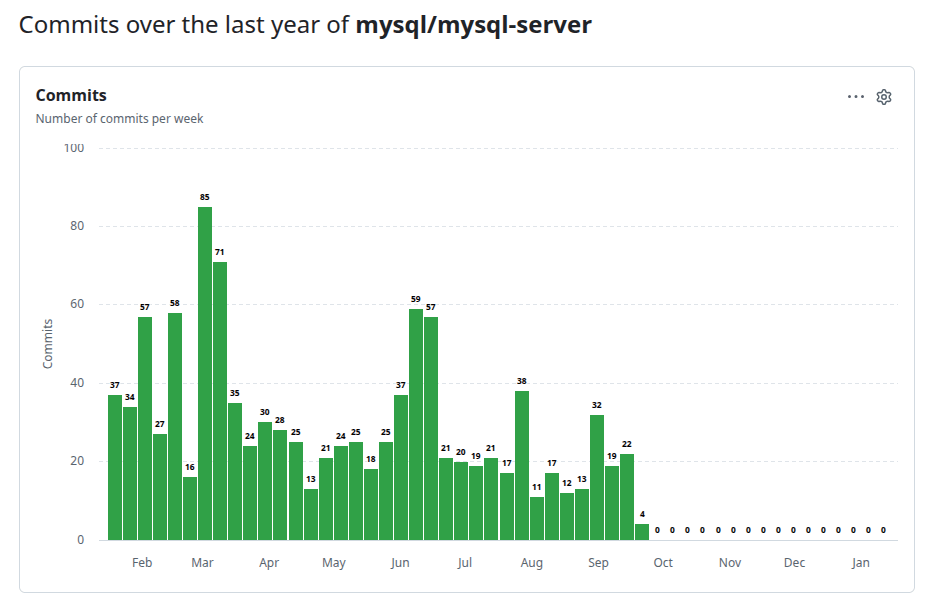
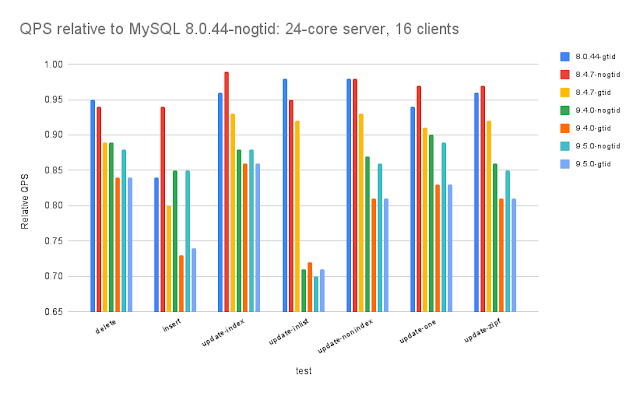 Due to newer MySQL versions deprecating many features, a lot of users also complained about significant struggles regarding both MySQL 5.7->8.0 and 8.0->8.4 upgrades. With few new features and heavy focus on code base cleanup and feature deprecation, it became obvious to many that Oracle had decided to just keep MySQL barely alive, and put all new relevant features (e.g. vector search) into Heatwave, Oracle s closed-source and cloud-only service for MySQL customers.
As it was evident that Oracle isn t investing in MySQL, Percona s Peter Zaitsev wrote
Due to newer MySQL versions deprecating many features, a lot of users also complained about significant struggles regarding both MySQL 5.7->8.0 and 8.0->8.4 upgrades. With few new features and heavy focus on code base cleanup and feature deprecation, it became obvious to many that Oracle had decided to just keep MySQL barely alive, and put all new relevant features (e.g. vector search) into Heatwave, Oracle s closed-source and cloud-only service for MySQL customers.
As it was evident that Oracle isn t investing in MySQL, Percona s Peter Zaitsev wrote 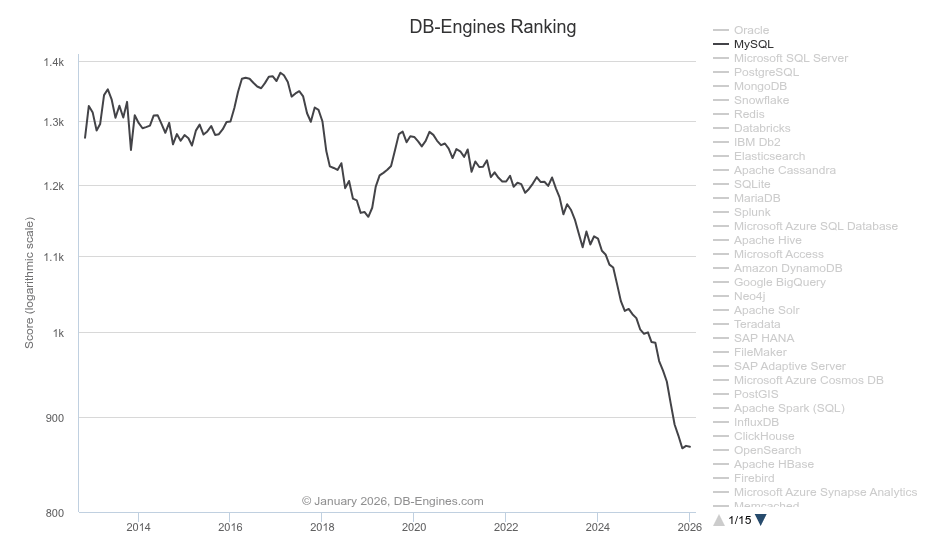 In September 2025
 Team Rcpp is thrilled to share that an exciting new version 1.1.1 of
Rcpp is now on
Team Rcpp is thrilled to share that an exciting new version 1.1.1 of
Rcpp is now on 
 KDE
Like my work? Consider a donation. Thank you!
KDE
Like my work? Consider a donation. Thank you!
 Donate







 About 95% of my Debian contributions this month were

 Debian continues participating in Outreachy, and as you might have already
noticed, Debian has selected two interns for the Outreachy December 2025 - March
2026 round.
After a busy contribution phase and a competitive selection process,
Debian continues participating in Outreachy, and as you might have already
noticed, Debian has selected two interns for the Outreachy December 2025 - March
2026 round.
After a busy contribution phase and a competitive selection process,
 Given we ve entered a new year it s time for my annual recap of my Free Software activities for the previous calendar year. For previous years see
  Wikipedia says
  A lot of the youtube channels I follow tend to involve somebody making
things, so of course one of the videos my SO and I watched a few days
ago was about
A lot of the youtube channels I follow tend to involve somebody making
things, so of course one of the videos my SO and I watched a few days
ago was about 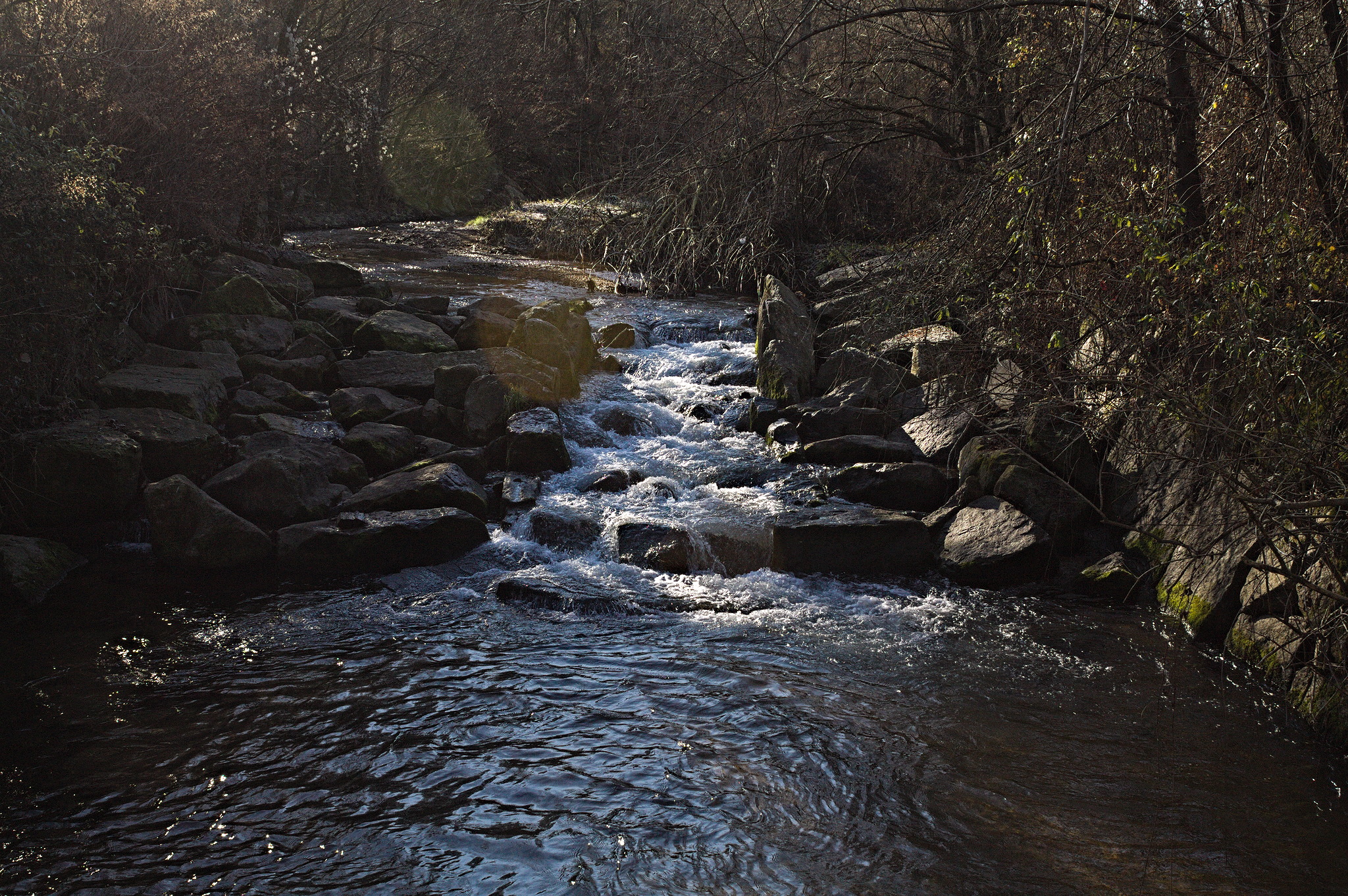 And then, 10 minutes after we had left, realizing that I had written
down the password for the train website, since it was no longer saved on
the phone, but i had forgotten the bit of paper at home. We could have
gone back to take it, but decided not to bother, as we could also
hopefully buy paper-ish tickets at the train station (we could).
Later on, I also realized I had also forgotten my GPS tracker, so I have
no record of where we went exactly (but it s not hard to recognize it on
a map) nor on what the temperature was. It s a shame, but by that point
it was way too late to go back.
Anyway, that probably was when Murphy felt we had paid our respects, and
from then on everything went lovingly well!
Routing had been done on the
And then, 10 minutes after we had left, realizing that I had written
down the password for the train website, since it was no longer saved on
the phone, but i had forgotten the bit of paper at home. We could have
gone back to take it, but decided not to bother, as we could also
hopefully buy paper-ish tickets at the train station (we could).
Later on, I also realized I had also forgotten my GPS tracker, so I have
no record of where we went exactly (but it s not hard to recognize it on
a map) nor on what the temperature was. It s a shame, but by that point
it was way too late to go back.
Anyway, that probably was when Murphy felt we had paid our respects, and
from then on everything went lovingly well!
Routing had been done on the 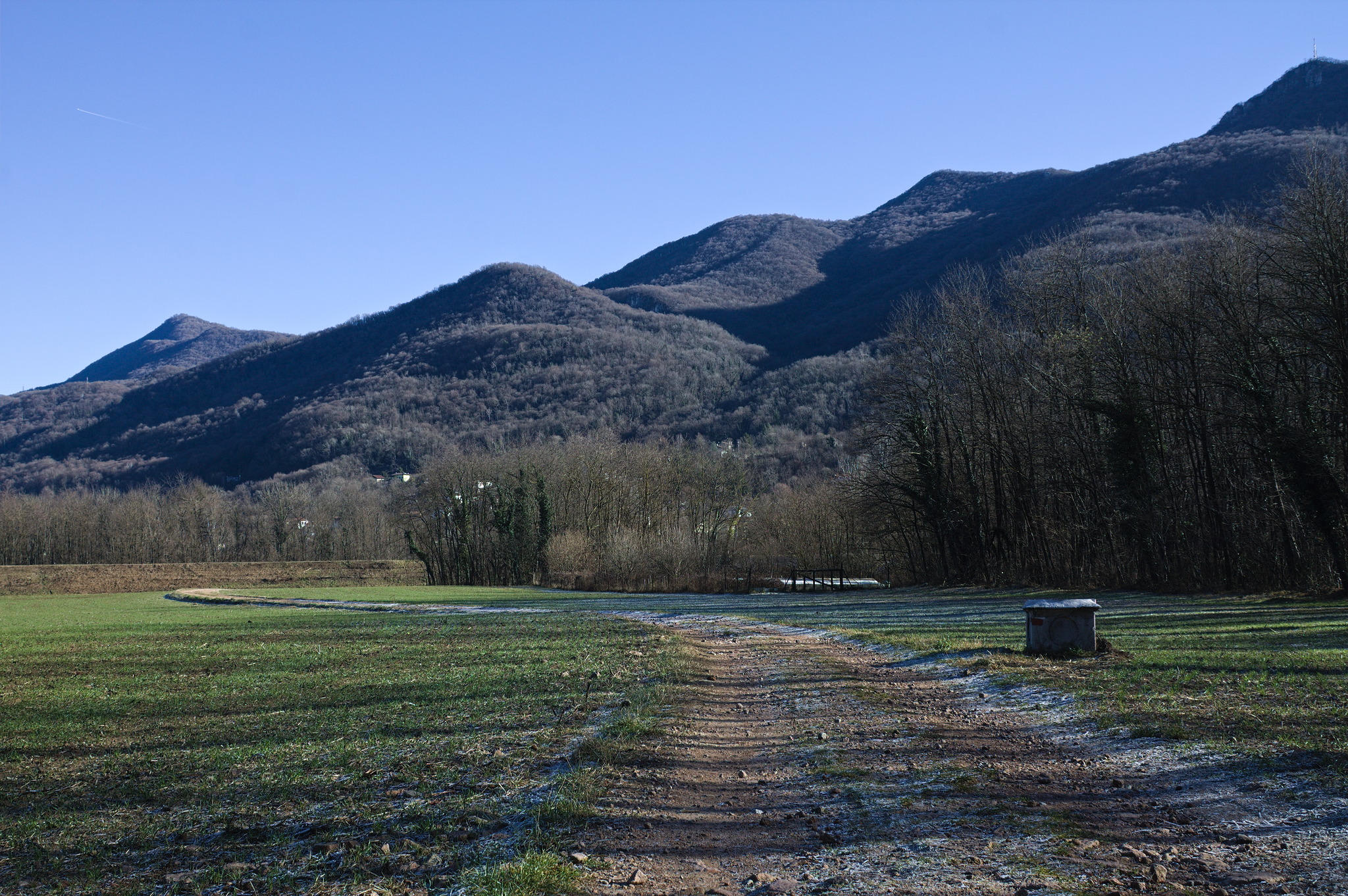 And indeed, after a short while the paved road ended, but the path
continued on a wide and flat track, and was a welcome detour through
what looked like water works to prevent flood damage from a stream.
In a warmer season, with longer grass and ticks maybe the fact that I
was wearing a long skirt may have been an issue, but in winter it was
just fine.
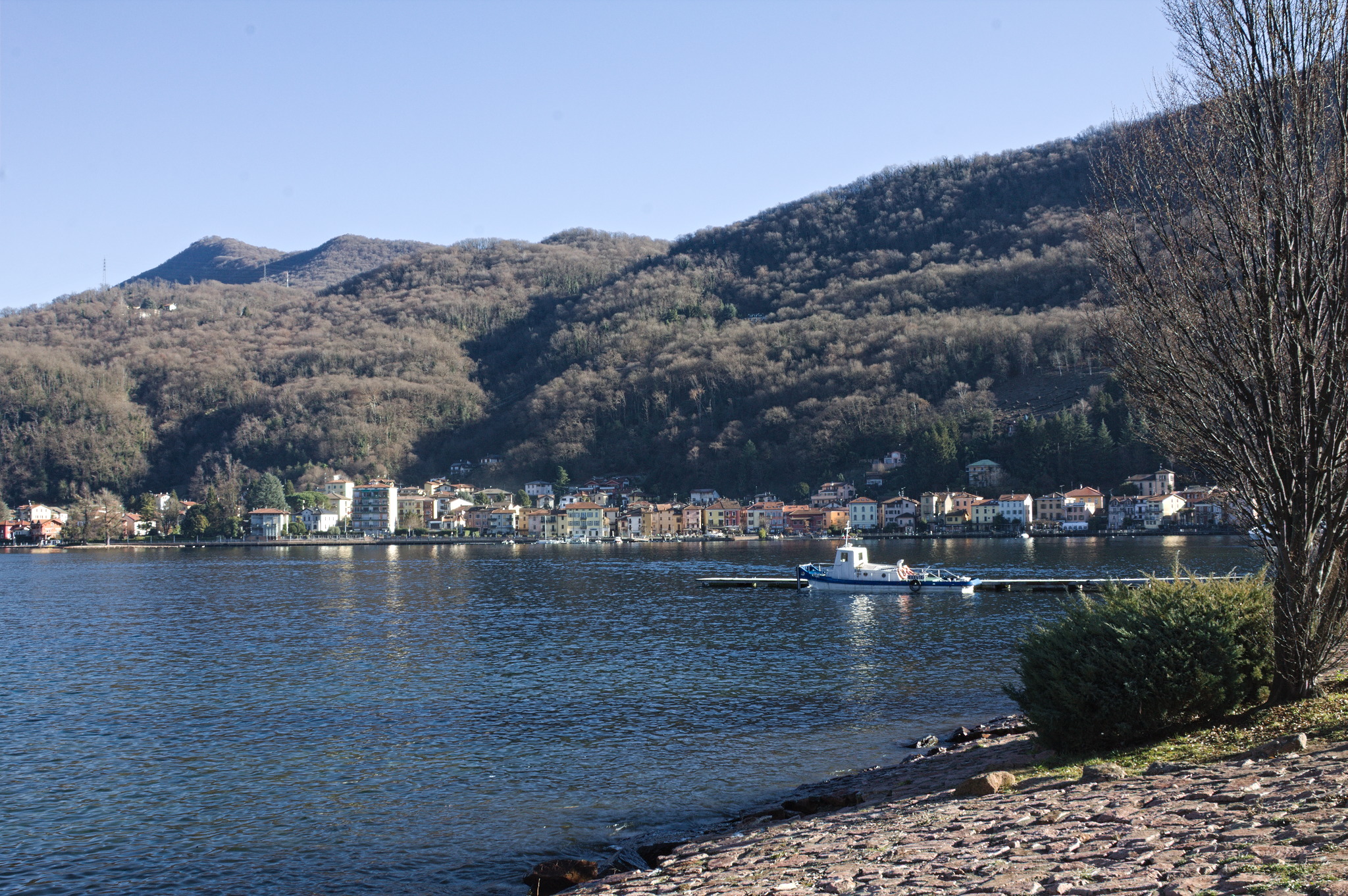
And soon afterwards, we were in Porto Ceresio. I think I have been there
as a child, but I had no memory of it. On the other hand, it was about
as I expected: a tiny town with a lakeside street full of houses built
in the early 1900s when the area was an important tourism destination,
with older buildings a bit higher up on the hills (because streams
in this area will flood). And of course, getting there by foot rather
than by train we also saw the parts where real people live (but not
work: that s cross-border commuters country).
And indeed, after a short while the paved road ended, but the path
continued on a wide and flat track, and was a welcome detour through
what looked like water works to prevent flood damage from a stream.
In a warmer season, with longer grass and ticks maybe the fact that I
was wearing a long skirt may have been an issue, but in winter it was
just fine.
And soon afterwards, we were in Porto Ceresio. I think I have been there
as a child, but I had no memory of it. On the other hand, it was about
as I expected: a tiny town with a lakeside street full of houses built
in the early 1900s when the area was an important tourism destination,
with older buildings a bit higher up on the hills (because streams
in this area will flood). And of course, getting there by foot rather
than by train we also saw the parts where real people live (but not
work: that s cross-border commuters country).
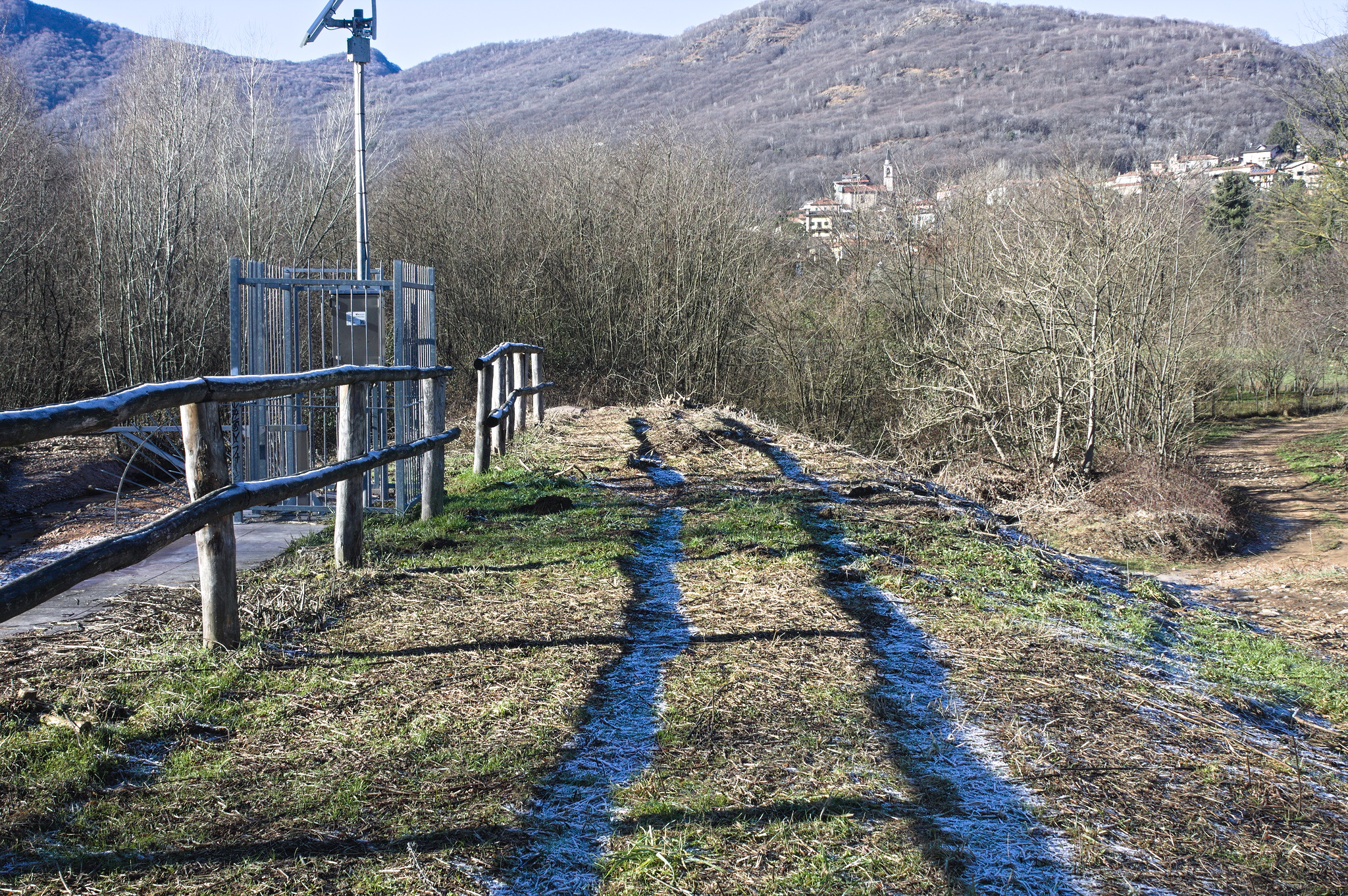 Soon after arriving in Porto Ceresio we stopped to eat our lunch on a
bench at the lakeside; up to then we had been pretty comfortable in the
clothing we had decided to wear: there was plenty of frost on the
ground, in the shade, but the sun was warm and the temperatures were
cleanly above freezing. Removing the gloves to eat, however, resulted in
quite cold hands, and we didn t want to stay still for longer than
strictly necessary.
So we spent another hour and a bit walking around Porto Ceresio like
proper tourists and taking pictures. There was an exhibition of nativity
scenes all around the streets, but to get a map one had to go to either
facebook or instagram, or wait for the opening hours of an office that
were later than the train we planned to get to go back home, so we only
saw maybe half of them, as we walked around: some were quite nice, some
were nativity scenes, and some showed that the school children must have
had some fun making them.
Soon after arriving in Porto Ceresio we stopped to eat our lunch on a
bench at the lakeside; up to then we had been pretty comfortable in the
clothing we had decided to wear: there was plenty of frost on the
ground, in the shade, but the sun was warm and the temperatures were
cleanly above freezing. Removing the gloves to eat, however, resulted in
quite cold hands, and we didn t want to stay still for longer than
strictly necessary.
So we spent another hour and a bit walking around Porto Ceresio like
proper tourists and taking pictures. There was an exhibition of nativity
scenes all around the streets, but to get a map one had to go to either
facebook or instagram, or wait for the opening hours of an office that
were later than the train we planned to get to go back home, so we only
saw maybe half of them, as we walked around: some were quite nice, some
were nativity scenes, and some showed that the school children must have
had some fun making them.
 Another Christmas decoration were groups of creatures made of evergreen
branches that dotted the sidewalks around the lake: I took pictures of
the first couple of groups, and then after seeing a few more something
clicked in my brain, and I noticed that they were wrapped in green LED
strings, like chains, and they had a red ball that was supposed to be
the nose, but could just be around the mouth area, and suddenly I felt
the need to play
Another Christmas decoration were groups of creatures made of evergreen
branches that dotted the sidewalks around the lake: I took pictures of
the first couple of groups, and then after seeing a few more something
clicked in my brain, and I noticed that they were wrapped in green LED
strings, like chains, and they had a red ball that was supposed to be
the nose, but could just be around the mouth area, and suddenly I felt
the need to play 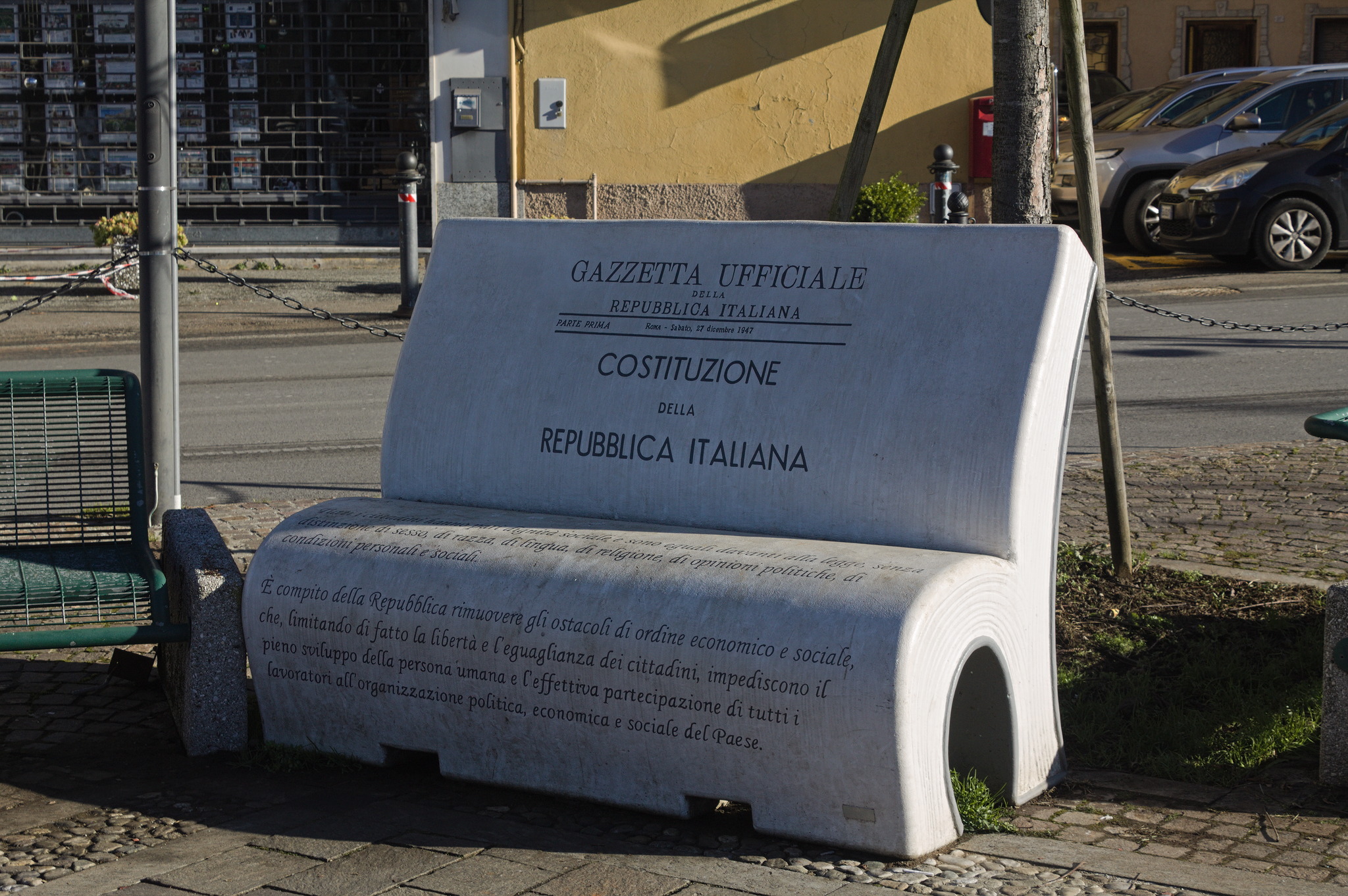 Another thing that we noticed were some benches in the shape of books,
with book quotations on them; most were on reading-related topics, but
the one with the Constitution felt worth taking a picture of, especially
these days.
And then, our train was waiting at the station, and we had to go back
home for the afternoon; it was a nice outing, if a bit brief, and we
agreed to do it again, possibly with a bit of a detour to make the walk
a bit longer. And then maybe one day we ll train to do the whole 5-6
hour thing through the hills.
Another thing that we noticed were some benches in the shape of books,
with book quotations on them; most were on reading-related topics, but
the one with the Constitution felt worth taking a picture of, especially
these days.
And then, our train was waiting at the station, and we had to go back
home for the afternoon; it was a nice outing, if a bit brief, and we
agreed to do it again, possibly with a bit of a detour to make the walk
a bit longer. And then maybe one day we ll train to do the whole 5-6
hour thing through the hills.