Search Results: "ed"

1 December 2023

Dirk Eddelbuettel: RcppClassicExamples 0.1.3 on CRAN: Maintenance

Another upgrade triggered solely by changing CRAN standards (see previous one from five years ago). This time it concerns warnings under r-devel with -Wformat -Wformat-security so we injected a number of "%s" into Rf_error() calls. No new code or features. Full details below. And as a reminder, don t use the old RcppClassic use Rcpp instead.

Changes in version 0.1.3 (2023-11-30)
  • Update Rf_error() call to not tickle -Wformat
  • Minor other packaging and continuous integration tweaks

Thanks to CRANberries, you can also look at a diff to the previous release. If you like this or other open-source work I do, you can sponsor me at GitHub.

This post by Dirk Eddelbuettel originated on his Thinking inside the box blog. Please report excessive re-aggregation in third-party for-profit settings.

Valhalla's Things: Modern XMPP Server

Posted on December 1, 2023
Just a quick mention that I ve updated my instructions on how I configured my XMPP server to its current status under Debian Bookworm. And yes, it took me just a bit of time, we release when we re ready here :D

30 November 2023

Bits from Debian: New Debian Developers and Maintainers (September and October 2023)

The following contributors got their Debian Developer accounts in the last two months: The following contributors were added as Debian Maintainers in the last two months: Congratulations!

Russell Coker: Links November 2023

The Long Now has an insightful article about air quality [1]. Every country needs food labelling laws like Mexico has [2]. Also we need to abolish the investor state tribunals, companies should just accept local laws and obey them or be treated in the same way as pirates on the high seas. Ian Jackson wrote a good post about conference policies regarding Covid19 [3]. We really need to do more about this, conservatives like to imagine that it s gone away but people are still getting sick and dying of it. John Goerzen wrote an informative article about air gaps and ways they can be part of a useful and usable security system [4]. This YouTube video has a good introduction to LLMs (Large Languge Models) for machine learning [5]. This eye tracker is interesting technology [6]. The video shows it being used for MS Flight Simulator but it can be used for other things. Unfortunately the price of about $550 Australian puts it out of range of a lot of free software work. I think this would be good for tracking the user FOR THEIR BENEFIT so that notifications won t be delivered when the user is concentrating. This ABC article about the risk of a past Covid19 infection exacerbating or accelerating Parkinson s or Alzheimer s is a worry [7]. Sam Hartman wrote an insightful blog post about AI safety, consent, and discussions of sex [8].

Dirk Eddelbuettel: RcppSpdlog 0.0.15 on CRAN: Maintenance

Version 0.0.15 of RcppSpdlog is now on CRAN and will be uploaded to Debian. RcppSpdlog bundles spdlog, a wonderful header-only C++ logging library with all the bells and whistles you would want that was written by Gabi Melman, and also includes fmt by Victor Zverovich. You can learn more at the nice package documention site. This releases updates the code to address warning now shown under R-devel when -Wformat -Wformat-security are enabled. This amounted to re-generating RcppExports.cpp under an updated [Rcpp][rcpp] version. It also updates the package default help page by removing some stubs that were not filled in. The NEWS entry for this release follows.

Changes in RcppSpdlog version 0.0.15 (2023-11-29)
  • Correct default package help page slighly
  • RcppExports.cpp has been regenerated under an updated Rcpp to address a format string warning under R-devel

Courtesy of my CRANberries, there is also a diffstat report. More detailed information is on the RcppSpdlog page, or the package documention site. If you like this or other open-source work I do, you can sponsor me at GitHub.

This post by Dirk Eddelbuettel originated on his Thinking inside the box blog. Please report excessive re-aggregation in third-party for-profit settings.

Dirk Eddelbuettel: qlcal 0.0.9 on CRAN: Maintenance

The ninth release of the qlcal package arrivied at CRAN today. qlcal delivers the calendaring parts of QuantLib. It is provided (for the R package) as a set of included files, so the package is self-contained and does not depend on an external QuantLib library (which can be demanding to build). qlcal covers over sixty country / market calendars and can compute holiday lists, its complement (i.e. business day lists) and much more. This releases updates the code to address warning now shown under R-devel when -Wformat -Wformat-security are enabled. This amounted to re-generating RcppExports.cpp under an updated Rcpp version. We also no longer set C++14 explicitly as a compilation standard but rather determine at build time if it is needed or not.

Changes in version 0.0.9 (2023-11-29)
  • configure now uses a new helper script to only set a compilation standard when needed for R versions older than 4.2.0
  • The file RcppExports.cpp was regenerated to avoid a string format warning from R-devel

Courtesy of my CRANberries, there is a diffstat report for this release. See the project page and package documentation for more details, and more examples. If you like this or other open-source work I do, you can now sponsor me at GitHub.

This post by Dirk Eddelbuettel originated on his Thinking inside the box blog. Please report excessive re-aggregation in third-party for-profit settings.

Dirk Eddelbuettel: RcppQuantuccia 0.1.1 on CRAN: Maintenance

A minor release of RcppQuantuccia arrived on CRAN today. RcppQuantuccia started from the Quantuccia header-only subset / variant of QuantLib which it brings it to R. This project validated the idea of making the calendaring functionality of QuantLib available in a more compact and standalone project which we now do with qlcal which can be seen as a successor to this. This releases updates the code to address warning now shown under R-devel when -Wformat -Wformat-security are enabled. This amounted to re-generating RcppExports.cpp under an updated Rcpp version. We also no longer set C++14 explicitly as a compilation standard. The complete list changes for this release follows.

Changes in version 0.1.2 (2023-11-29)
  • RcppExports.cpp has been regenerated under an updated Rcpp to address a format string warning under R-devel
  • The compilation standard is no longer set to C++14

Courtesy of CRANberries, there is also a diffstat report relative to the previous release. More information is on the RcppQuantuccia page. Issues and bugreports should go to the GitHub issue tracker. If you like this or other open-source work I do, you can now sponsor me at GitHub.

This post by Dirk Eddelbuettel originated on his Thinking inside the box blog. Please report excessive re-aggregation in third-party for-profit settings.

29 November 2023

Jonathan Dowland: Useful vim plugins: AnsiEsc

Sometimes I have to pore over long debugging logs which have originally been written out to a terminal and marked up with colour or formatting via ANSI escape codes. The formatting definitely makes reading them easier, but I want to read them in Vim, rather than a terminal, and (out of the box) Vim doesn't render the formatting. Cue AnsiEsc.vim: an OG Vim script1 that translates some ANSI escape codes in particular some colour specifying ones into Vim syntax highlighting. This makes viewing and navigating around multi-MiB console log files much nicer.

  1. AnsiEsc is old enough to have been distributed as a script, and then as a "vimball", an invention of the same author to make installing Vim scripts easier. It pre-dates the current fashion for plugins, but someone else has updated it and repackaged it as a plugin. I haven't tried that out.

28 November 2023

Dirk Eddelbuettel: RcppSimdJson 0.1.11 on CRAN: Maintenance

A new maintenance release 0.1.11 of the RcppSimdJson package is now on CRAN. RcppSimdJson wraps the fantastic and genuinely impressive simdjson library by Daniel Lemire and collaborators. Via very clever algorithmic engineering to obtain largely branch-free code, coupled with modern C++ and newer compiler instructions, it results in parsing gigabytes of JSON parsed per second which is quite mindboggling. The best-case performance is faster than CPU speed as use of parallel SIMD instructions and careful branch avoidance can lead to less than one cpu cycle per byte parsed; see the video of the talk by Daniel Lemire at QCon. This release responds to a CRAN request to address issues now identified by -Wformat -Wformat-security. These are frequently pretty simple changes as it was here: all it took was an call to compileAttributes() from an updated Rcpp version which now injects "%s" as a format string when calling Rf_error(). The (very short) NEWS entry for this release follows.

Changes in version 0.1.11 (2023-11-28)
  • RcppExports.cpp has been regenerated under an update Rcpp to address a print format warning (Dirk in #88).

Courtesy of my CRANberries, there is also a diffstat report for this release. For questions, suggestions, or issues please use the issue tracker at the GitHub repo. If you like this or other open-source work I do, you can now sponsor me at GitHub.

This post by Dirk Eddelbuettel originated on his Thinking inside the box blog. Please report excessive re-aggregation in third-party for-profit settings.

Enrico Zini: Introducing Debusine

Abstract Debusine manages scheduling and distribution of Debian-related tasks (package build, lintian analysis, autopkgtest runs, etc.) to distributed worker machines. It is being developed by Freexian with the intention of giving people access to a range of pre-configured tools and workflows running on remote hardware. Freexian obtained STF funding for a substantial set of Debusine milestones, so development is happening on a clear schedule. We can present where we are and, we're going to be, and what we hope to bring to Debian with this work.

Dirk Eddelbuettel: RcppCNPy 0.2.12 on CRAN: More Maintenance

A new (and again somewhat minor) maintenance release of the RcppCNPy package arrived on CRAN earlier today. RcppCNPy provides R with read and write access to NumPy files thanks to the cnpy library by Carl Rogers along with Rcpp for the glue to R. Recent changes in r-devel hone in on issues concerning printf format string inaccuracies the compiler can detect via the -Wformat -Wformat-security flags. Two fairly simplye ones were present here and have been addressed. In the time since the last release about twenty months ago two or three other minor packaging and setup details have also been taken care of, details are below.

Changes in version 0.2.12 (2022-11-27)
  • The continuous integration workflow received a trivial update, twice.
  • The C++ compilation standard is now implicit per CRAN and R preference.
  • The CITATION file format has been updated for the current usage.
  • Two print format string issues reported by current R-devel have been addressed.

CRANberries also provides a diffstat report for the latest release. As always, feedback is welcome and the best place to start a discussion may be the GitHub issue tickets page. If you like this or other open-source work I do, you can now sponsor me at GitHub.

This post by Dirk Eddelbuettel originated on his Thinking inside the box blog. Please report excessive re-aggregation in third-party for-profit settings.

27 November 2023

Fran ois Marier: Automatically rebooting for kernel updates

I use reboot-notifier on most of my servers to let me know when I need to reboot them for kernel updates since I want to decide exactly when those machines go down. On the other hand, my home backup server has very predictable usage patterns and so I decided to go one step further there and automate these necessary reboots. To do that, I first installed reboot-notifier which puts the following script in /etc/kernel/postinst.d/reboot-notifier to detect when a new kernel was installed:
#!/bin/sh
if [ "$0" = "/etc/kernel/postinst.d/reboot-notifier" ]; then
    DPKG_MAINTSCRIPT_PACKAGE=linux-base
fi
echo "*** System restart required ***" > /var/run/reboot-required
echo "$DPKG_MAINTSCRIPT_PACKAGE" >> /var/run/reboot-required.pkgs
Note that unattended-upgrades puts a similar script in /etc/kernel/postinst.d/unattended-upgrades:
#!/bin/sh
case "$DPKG_MAINTSCRIPT_PACKAGE::$DPKG_MAINTSCRIPT_NAME" in
   linux-image-extra*::postrm)
      exit 0;;
esac
if [ -d /var/run ]; then
    touch /var/run/reboot-required
    if ! grep -q "^$DPKG_MAINTSCRIPT_PACKAGE$" /var/run/reboot-required.pkgs 2> /dev/null ; then
        echo "$DPKG_MAINTSCRIPT_PACKAGE" >> /var/run/reboot-required.pkgs
    fi
fi
and so you only need one of them to be installed since they both write to /var/run/reboot-required. It doesn't hurt to have both of them though. Then I created the following cron job (/etc/cron.daily/reboot-local) to actually reboot the server:
#!/bin/bash
REBOOT_REQUIRED=/var/run/reboot-required
if [ -s $REBOOT_REQUIRED ] ; then
    cat "$REBOOT_REQUIRED"   /usr/bin/mail -s "Rebooting $HOSTNAME" root
    /bin/systemctl reboot
fi
With that in place, my server will send me an email and then automatically reboot itself. This is a work in progress because I'd like to add some checks later on to make sure that no backup is in progress during that time (maybe by looking for active ssh connections?), but it works well enough for now. Feel free to leave a comment if you've got a smarter script you'd like to share.

Andrew Cater: 20231123 - UEFI install on a Raspberry Pi 4 - step by step instructions to a modified d-i

Motivation
Andy (RattusRattus) and I have been formalising instructions for using Pete Batard's version of Tianocore (and therefore UEFI booting) for the Raspberry Pi 4 together with a Debian arm64 netinst to make a modified Debian installer on a USB stick which "just works" for a Raspberry Pi 4.
Thanks also to Steve McIntyre for initial notes that got this working for us and also to Emmanuele Rocca for putting up some useful instructions for copying.

Recipe

Plug in a USB stick - use dmesg or your favourite method to see how it is identified.

Make a couple of mount points under /mnt - /mnt/data and /mnt/cdrom


1. Grab a USB stick, Partition using MBR. Make a single VFAT
partition, type 0xEF (i.e. EFI System Partition)

For a USB stick (identified as sdX) below:
$ sudo parted --script /dev/sdX mklabel msdos $ sudo parted --script /dev/sdX mkpart primary fat32 0% 100% $ sudo mkfs.vfat /dev/sdX1 $ sudo mount /dev/sdX1 /mnt/data/

Download an arm64 netinst.iso

https://cdimage.debian.org/debian-cd/current/arm64/iso-cd/debian-12.2.0-arm64-netinst.iso

2. Copy the complete contents of partition *1* from a Debian arm64
installer image into the filesystem (partition 1 is the installer
stuff itself) on the USB stick, in /

$ sudo kpartx -v -a debian-12.2.0-arm64-netinst.iso # Mount the first partition on the ISO and copy its contents to the stick $ sudo mount /dev/mapper/loop0p1 /mnt/cdrom/ $ sudo rsync -av /mnt/cdrom/ /mnt/data/ $ sudo umount /mnt/cdrom

3. Copy the complete contents of partition *2* from that Debian arm64
installer image into that filesystem (partition 2 is the ESP) on
the USB stick, in /

# Same story with the second partition on the ISO

$ sudo mount /dev/mapper/loop0p2 /mnt/cdrom/

$ sudo rsync -av /mnt/cdrom/ /mnt/data/ $ sudo umount /mnt/cdrom

$ sudo kpartx -d debian-testing-amd64-netinst.iso $ sudo umount /mnt/data


4. Grab the rpi edk2 build from https://github.com/pftf/RPi4/releases
(I used 1.35) and extract it. I copied the files there into *2*
places for now on the USB stick:

/ (so the Pi will boot using it)
/rpi4 (so we can find the files again later)

5. Add the preseed.cfg file (attached) into *both* of the two initrd
files on the USB stick

- /install.a64/initrd.gz and
- /install.a64/gtk/initrd.gz

cpio is an awful tool to use :-(. In each case:

$ cp /path/to/initrd.gz .
$ gunzip initrd.gz
$ echo preseed.cfg cpio -H newc -o -A -F initrd

$ gzip -9v initrd

$ cp initrd.gz /path/to/initrd.gz

If you look at the preseed file, it will do a few things:

- Use an early_command to unmount /media (to work around Debian bug
#1051964)

- Register a late_command call for /cdrom/finish-rpi (the next
file - see below) to run at the end of the installation.

- Force grub installation also to the EFI removable media path,
needed as the rpi doesn't store EFI boot variables.

- Stop the installer asking for firmware from removable media (as
the rpi4 will ask for broadcom bluetooth fw that we can't
ship. Can be ignored safely.)

6. Copy the finish-rpi script (attached) into / on the USB stick. It
will be run at the end of the installation, triggered via the
preseed. It does a couple of things:

- Copy the edk2 firmware files into the ESP on the system that's
just been installer

- Remove shim-signed from the installed systems, as there's a bug
that causes it to fail on rpi4. I need to dig into this to see
what the issue is.

That's it! Run the installer as normal, all should Just Work (TM).

BlueTooth didn't quite work : raspberrypi-firmware didn't install until adding a symlink for boot/efi to /boot/firmware

20231127 - This may not be necessary because raspberrypi-firmware path has been fixed

Preseed.cfg
# The preseed file itself causes a problem - the installer medium is
# left mounted on /medis so things break in cdrom-detect. Let's see if
# we can fix that!
d-i preseed/early_command string umount /media true

# Run our command to do rpi setup before reboot
d-i preseed/late_command string /cdrom/finish-rpi

# Force grub installation to the RM path
grub-efi-arm64 grub2/force_efi_extra_removable boolean true

# Don't prompt for missing firmware from removable media,
# e.g. broadcom bluetooth on the rpi.
d-i hw-detect/load_firmware boolean false

Finish.rpi
!/bin/sh

set -x

grep -q -a RPI4 /sys/firmware/acpi/tables/CSRT
if [ $? -ne 0 ]; then
echo "Not running on a Pi 4, exit!"
exit 0
fi

# Copy the rpi4 firmware binaries onto the installed system.
# Assumes the installer media is mounted on /cdrom.
cp -vr /cdrom/rpi4/. /target/boot/efi/.

# shim-signed doesn't seem happy on rpi4, so remove it
mount --bind /sys /target/sys
mount --bind /proc /target/proc
mount --bind /dev /target/dev

in-target apt-get remove --purge --autoremove -y shim-signed


26 November 2023

Dirk Eddelbuettel: RQuantLib 0.4.20 on CRAN: More Maintenance

A new release 0.4.20 of RQuantLib arrived at CRAN earlier today, and has already been uploaded to Debian as well. QuantLib is a rather comprehensice free/open-source library for quantitative finance. RQuantLib connects (some parts of) it to the R environment and language, and has been part of CRAN for more than twenty years (!!) as it was one of the first packages I uploaded there. This release of RQuantLib brings a few more updates for nags triggered by recent changes in the upcoming R release (aka r-devel , usually due in April). The Rd parser now identifies curly braces that lack a preceding macro, usually a typo as it was here which affected three files. The printf (or alike) format checker found two more small issues. The run-time checker for examples was unhappy with the callable bond example so we only run it in interactive mode now. Lastly I had alread commented-out the setting for a C++14 compilation (required by the remaining Boost headers) as C++14 has been the default since R 4.2.0 (with suitable compilers, at least). Those who need it explicitly will have to uncomment the line in src/Makevars.in. Lastly, the expand printf format strings also found a need for a small change in Rcpp so the development version (now 1.0.11.5) has that addressed; the change will be part of Rcpp 1.0.12 in January.

Changes in RQuantLib version 0.4.20 (2023-11-26)
  • Correct three help pages with stray curly braces
  • Correct two printf format strings
  • Comment-out explicit selection of C++14
  • Wrap one example inside 'if (interactive())' to not exceed total running time limit at CRAN checks

Courtesy of my CRANberries, there is also a diffstat report for the this release 0.4.20. As always, more detailed information is on the RQuantLib page. Questions, comments etc should go to the rquantlib-devel mailing list. Issue tickets can be filed at the GitHub repo. If you like this or other open-source work I do, you can now sponsor me at GitHub.

This post by Dirk Eddelbuettel originated on his Thinking inside the box blog. Please report excessive re-aggregation in third-party for-profit settings.

Andrew Cater: MiniDebConf Cambridge - 26th November 2023 - Afternoon sessions

That's all folks ...
Sadly, nothing too much to report.I delivered a very quick three slides lightning talk on Accessibility, WCAG [Web Content Accessibility Guidelines] version 2.2 and a request for Debian to do better

WCAG 2.2: WCAG 2.2 AbstractDebian-accessibility mailing list link: debian-accessibilityI watched the other lightning talks but then left at 1500 - missing three good talks - to drive home at least partly in daylight.

A great four days - the chance to put some names to faces and to recharge in Debian spaces.

Thanks to all involved and especially ...
Thanks to Cambridge Debian folk for helping arrange evening meals, lifts and so on and especially to those who also happen be ARM employees who were badging us in and out through the four days

Thanks to those who staffed Front Desk on both days and, especially, also to the ARM security guards who let us into site at 0745 on all four days and to Mark who did the weekend shift inside the building for Saturday and Sunday.

Thanks to ARM for excellent facilities, food, coffee, hosting us and coffee, to Codethink for sponsoring - and a lecture from Sudip and some interesting hardware - and Pexip for Pexip sponsorship (and employee attendance).

Here's to the next opportunity, whenever that may be.

Niels Thykier: Providing online reference documentation for debputy

I do not think seasoned Debian contributors quite appreciate how much knowledge we have picked up and internalized. As an example, when I need to look up documentation for debhelper, I generally know which manpage to look in. I suspect most long time contributors would be able to a similar thing (maybe down 2-3 manpages). But new contributors does not have the luxury of years of experience. This problem is by no means unique to debhelper. One thing that debhelper does very well, is that it is hard for users to tell where a addon "starts" and debhelper "ends". It is clear you use addons, but the transition in and out of third party provided tools is generally smooth. This is a sign that things "just work(tm)". Except when it comes to documentation. Here, debhelper's static documentation does not include documentation for third party tooling. If you think from a debhelper maintainer's perspective, this seems obvious. Embedding documentation for all the third-party code would be very hard work, a layer-violation, etc.. But from a user perspective, we should not have to care "who" provides "what". As as user, I want to understand how this works and the more hoops I have to jump through to get that understanding, the more frustrated I will be with the toolstack. With this, I came to the conclusion that the best way to help users and solve the problem of finding the documentation was to provide "online documentation". It should be possible to ask debputy, "What attributes can I use in install-man?" or "What does path-metadata do?". Additionally, the lookup should work the same no matter if debputy provided the feature or some third-party plugin did. In the future, perhaps also other types of documentation such as tutorials or how-to guides. Below, I have some tentative results of my work so far. There are some improvements to be done. Notably, the commands for these documentation features are still treated a "plugin" subcommand features and should probably have its own top level "ask-me-anything" subcommand in the future.
Automatic discard rules Since the introduction of install rules, debputy has included an automatic filter mechanism that prunes out unwanted content. In 0.1.9, these filters have been named "Automatic discard rules" and you can now ask debputy to list them.
$ debputy plugin list automatic-discard-rules
+-----------------------+-------------+
  Name                    Provided By  
+-----------------------+-------------+
  python-cache-files      debputy      
  la-files                debputy      
  backup-files            debputy      
  version-control-paths   debputy      
  gnu-info-dir-file       debputy      
  debian-dir              debputy      
  doxygen-cruft-files     debputy      
+-----------------------+-------------+
For these rules, the provider can both provide a description but also an example of their usage.
$ debputy plugin show automatic-discard-rules la-files
Automatic Discard Rule: la-files
================================
Documentation: Discards any .la files beneath /usr/lib
Example
-------
    /usr/lib/libfoo.la        << Discarded (directly by the rule)
    /usr/lib/libfoo.so.1.0.0
The example is a live example. That is, the provider will provide debputy with a scenario and the expected outcome of that scenario. Here is the concrete code in debputy that registers this example:
api.automatic_discard_rule(
    "la-files",
    _debputy_prune_la_files,
    rule_reference_documentation="Discards any .la files beneath /usr/lib",
    examples=automatic_discard_rule_example(
        "usr/lib/libfoo.la",
        ("usr/lib/libfoo.so.1.0.0", False),
    ),
)
When showing the example, debputy will validate the example matches what the plugin provider intended. Lets say I was to introduce a bug in the code, so that the discard rule no longer worked. Then debputy would start to show the following:
# Output if the code or example is broken
$ debputy plugin show automatic-discard-rules la-files
[...]
Automatic Discard Rule: la-files
================================
Documentation: Discards any .la files beneath /usr/lib
Example
-------
    /usr/lib/libfoo.la        !! INCONSISTENT (code: keep, example: discard)
    /usr/lib/libfoo.so.1.0.0
debputy: warning: The example was inconsistent. Please file a bug against the plugin debputy
Obviously, it would be better if this validation could be added directly as a plugin test, so the CI pipeline would catch it. That is one my personal TODO list. :) One final remark about automatic discard rules before moving on. In 0.1.9, debputy will also list any path automatically discarded by one of these rules in the build output to make sure that the automatic discard rule feature is more discoverable.
Plugable manifest rules like the install rule In the manifest, there are several places where rules can be provided by plugins. To make life easier for users, debputy can now since 0.1.8 list all provided rules:
$ debputy plugin list plugable-manifest-rules
+-------------------------------+------------------------------+-------------+
  Rule Name                       Rule Type                      Provided By  
+-------------------------------+------------------------------+-------------+
  install                         InstallRule                    debputy      
  install-docs                    InstallRule                    debputy      
  install-examples                InstallRule                    debputy      
  install-doc                     InstallRule                    debputy      
  install-example                 InstallRule                    debputy      
  install-man                     InstallRule                    debputy      
  discard                         InstallRule                    debputy      
  move                            TransformationRule             debputy      
  remove                          TransformationRule             debputy      
  [...]                           [...]                          [...]        
  remove                          DpkgMaintscriptHelperCommand   debputy      
  rename                          DpkgMaintscriptHelperCommand   debputy      
  cross-compiling                 ManifestCondition              debputy      
  can-execute-compiled-binaries   ManifestCondition              debputy      
  run-build-time-tests            ManifestCondition              debputy      
  [...]                           [...]                          [...]        
+-------------------------------+------------------------------+-------------+
(Output trimmed a bit for space reasons) And you can then ask debputy to describe any of these rules:
$ debputy plugin show plugable-manifest-rules install
Generic install ( install )
===========================
The generic  install  rule can be used to install arbitrary paths into packages
and is *similar* to how  dh_install  from debhelper works.  It is a two "primary" uses.
  1) The classic "install into directory" similar to the standard  dh_install 
  2) The "install as" similar to  dh-exec 's  foo => bar  feature.
Attributes:
 -  source  (conditional): string
    sources  (conditional): List of string
   A path match ( source ) or a list of path matches ( sources ) defining the
   source path(s) to be installed. [...]
 -  dest-dir  (optional): string
   A path defining the destination *directory*. [...]
 -  into  (optional): string or a list of string
   A path defining the destination *directory*. [...]
 -  as  (optional): string
   A path defining the path to install the source as. [...]
 -  when  (optional): manifest condition (string or mapping of string)
   A condition as defined in [Conditional rules](https://salsa.debian.org/debian/debputy/-/blob/main/MANIFEST-FORMAT.md#Conditional rules).
This rule enforces the following restrictions:
 - The rule must use exactly one of:  source ,  sources 
 - The attribute  as  cannot be used with any of:  dest-dir ,  sources 
[...]
(Output trimmed a bit for space reasons) All the attributes and restrictions are auto-computed by debputy from information provided by the plugin. The associated documentation for each attribute is supplied by the plugin itself, The debputy API validates that all attributes are covered and the documentation does not describe non-existing fields. This ensures that you as a plugin provider never forget to document new attributes when you add them later. The debputy API for manifest rules are not quite stable yet. So currently only debputy provides rules here. However, it is my intention to lift that restriction in the future. I got the idea of supporting online validated examples when I was building this feature. However, sadly, I have not gotten around to supporting it yet.
Manifest variables like PACKAGE I also added a similar documentation feature for manifest variables such as PACKAGE . When I implemented this, I realized listing all manifest variables by default would probably be counter productive to new users. As an example, if you list all variables by default it would include DEB_HOST_MULTIARCH (the most common case) side-by-side with the the much less used DEB_BUILD_MULTIARCH and the even lessor used DEB_TARGET_MULTIARCH variable. Having them side-by-side implies they are of equal importance, which they are not. As an example, the ballpark number of unique packages for which DEB_TARGET_MULTIARCH is useful can be counted on two hands (and maybe two feet if you consider gcc-X distinct from gcc-Y). This is one of the cases, where experience makes us blind. Many of us probably have the "show me everything and I will find what I need" mentality. But that requires experience to be able to pull that off - especially if all alternatives are presented as equals. The cross-building terminology has proven to notoriously match poorly to people's expectation. Therefore, I took a deliberate choice to reduce the list of shown variables by default and in the output explicitly list what filters were active. In the current version of debputy (0.1.9), the listing of manifest-variables look something like this:
$ debputy plugin list manifest-variables
+----------------------------------+----------------------------------------+------+-------------+
  Variable (use via:   NAME  )   Value                                    Flag   Provided by  
+----------------------------------+----------------------------------------+------+-------------+
  DEB_HOST_ARCH                      amd64                                           debputy      
  [... other DEB_HOST_* vars ...]    [...]                                           debputy      
  DEB_HOST_MULTIARCH                 x86_64-linux-gnu                                debputy      
  DEB_SOURCE                         debputy                                         debputy      
  DEB_VERSION                        0.1.8                                           debputy      
  DEB_VERSION_EPOCH_UPSTREAM         0.1.8                                           debputy      
  DEB_VERSION_UPSTREAM               0.1.8                                           debputy      
  DEB_VERSION_UPSTREAM_REVISION      0.1.8                                           debputy      
  PACKAGE                            <package-name>                                  debputy      
  path:BASH_COMPLETION_DIR           /usr/share/bash-completion/completions          debputy      
+----------------------------------+----------------------------------------+------+-------------+
+-----------------------+--------+-------------------------------------------------------+
  Variable type           Value    Option                                                 
+-----------------------+--------+-------------------------------------------------------+
  Token variables         hidden   --show-token-variables OR --show-all-variables         
  Special use variables   hidden   --show-special-case-variables OR --show-all-variables  
+-----------------------+--------+-------------------------------------------------------+
I will probably tweak the concrete listing in the future. Personally, I am considering to provide short-hands variables for some of the DEB_HOST_* variables and then hide the DEB_HOST_* group from the default view as well. Maybe something like ARCH and MULTIARCH, which would default to their DEB_HOST_* counter part. This variable could then have extended documentation that high lights DEB_HOST_<X> as its source and imply that there are special cases for cross-building where you might need DEB_BUILD_<X> or DEB_TARGET_<X>. Speaking of variable documentation, you can also lookup the documentation for a given manifest variable:
$ debputy plugin show manifest-variables path:BASH_COMPLETION_DIR
Variable: path:BASH_COMPLETION_DIR
==================================
Documentation: Directory to install bash completions into
Resolved: /usr/share/bash-completion/completions
Plugin: debputy
This was my update on online reference documentation for debputy. I hope you found it useful. :)
Thanks On a closing note, I would like to thanks Jochen Sprickerhof, Andres Salomon, Paul Gevers for their recent contributions to debputy. Jochen and Paul provided a number of real world cases where debputy would crash or not work, which have now been fixed. Andres and Paul also provided corrections to the documentation.

Ian Jackson: Hacking my filter coffee machine

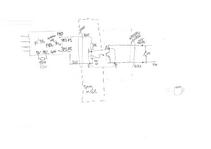
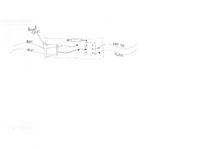
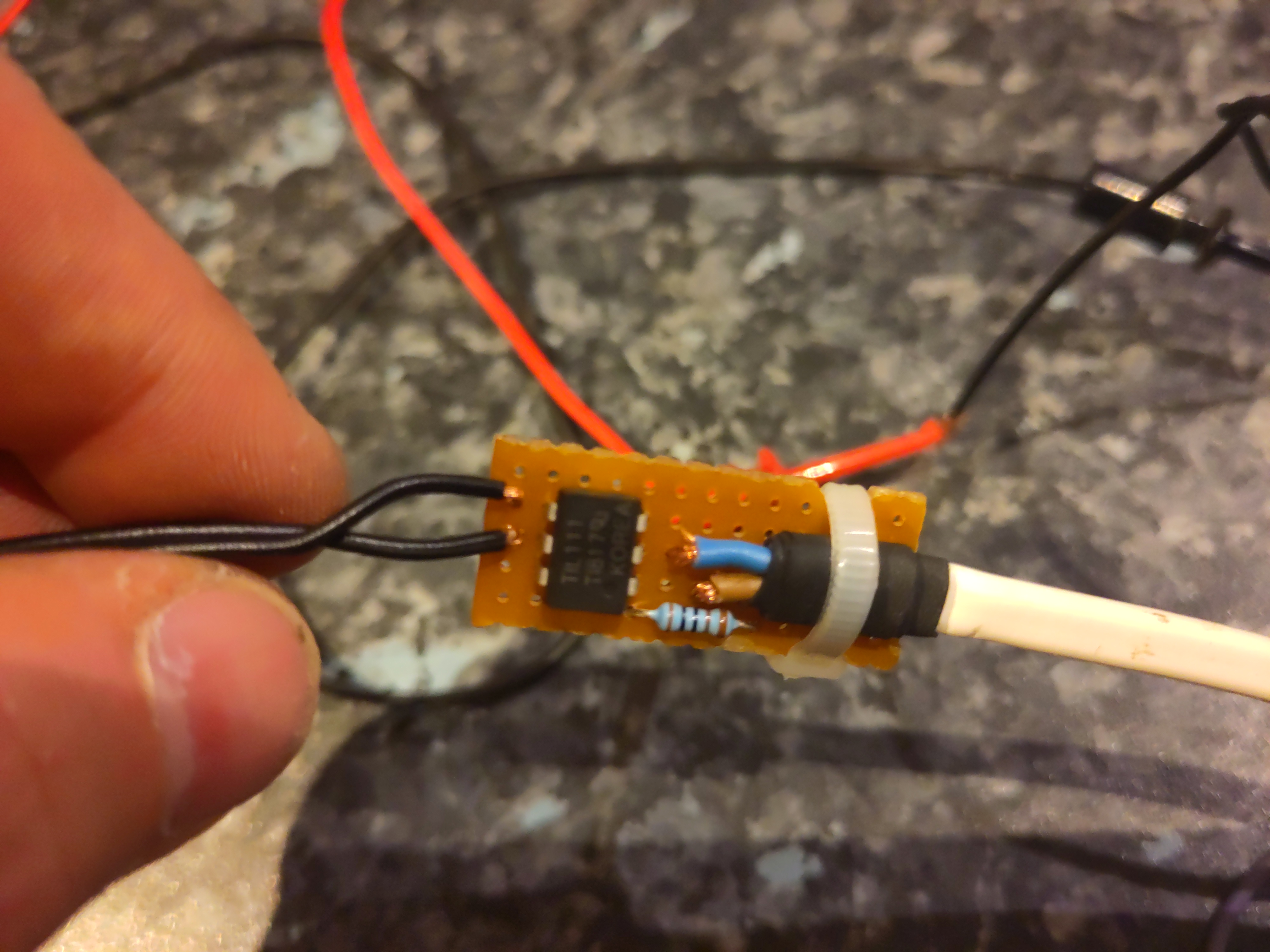
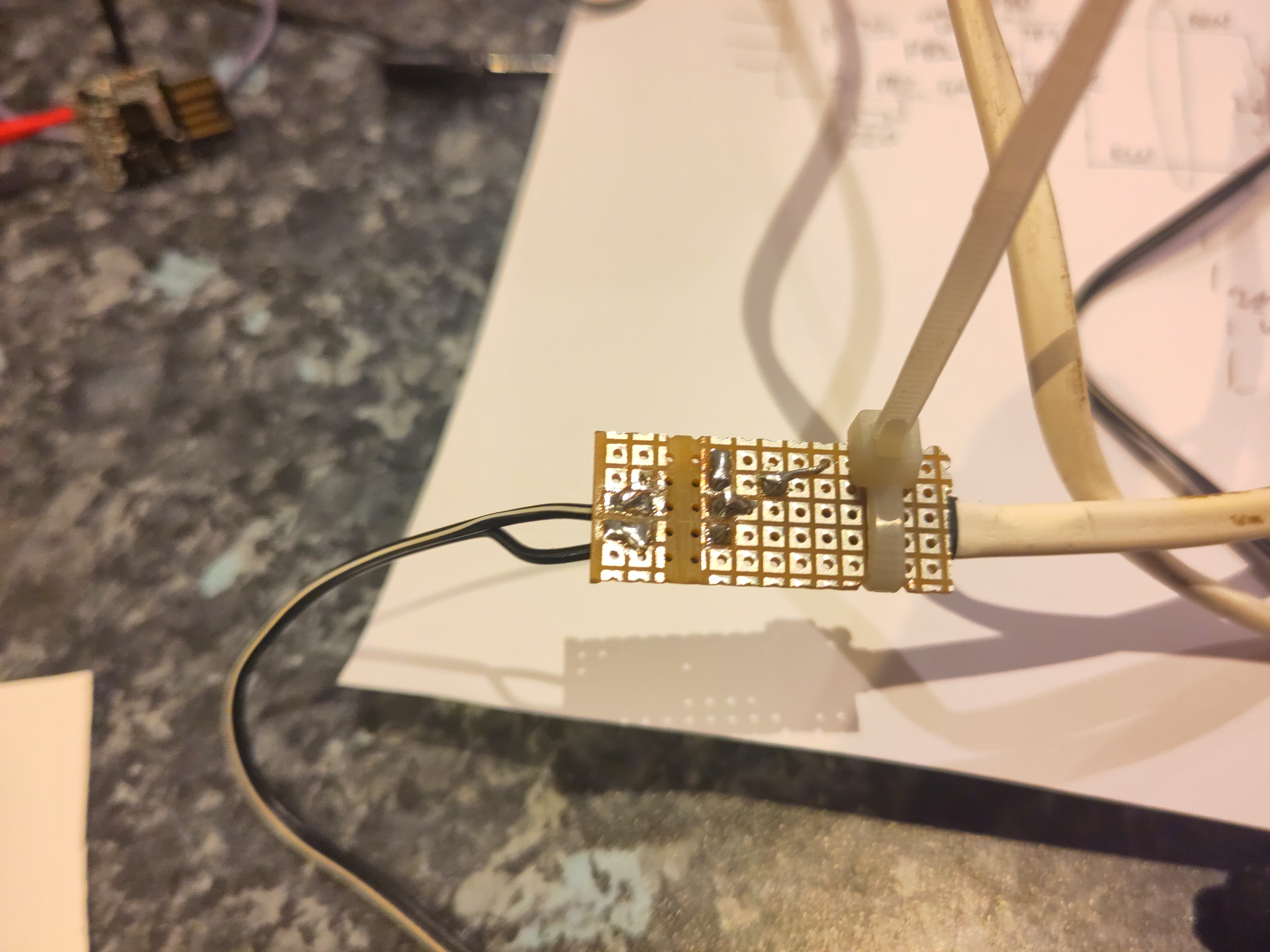
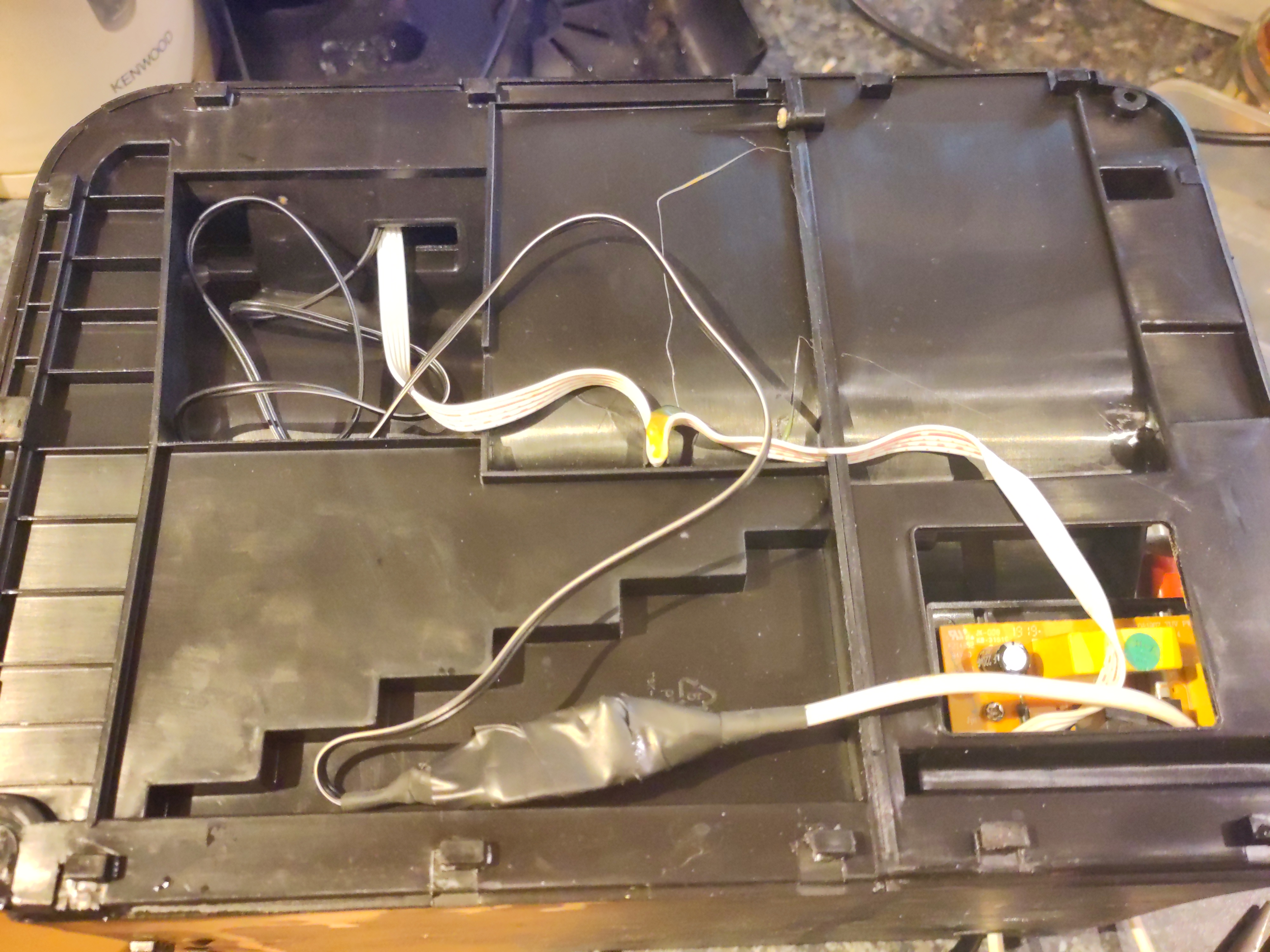
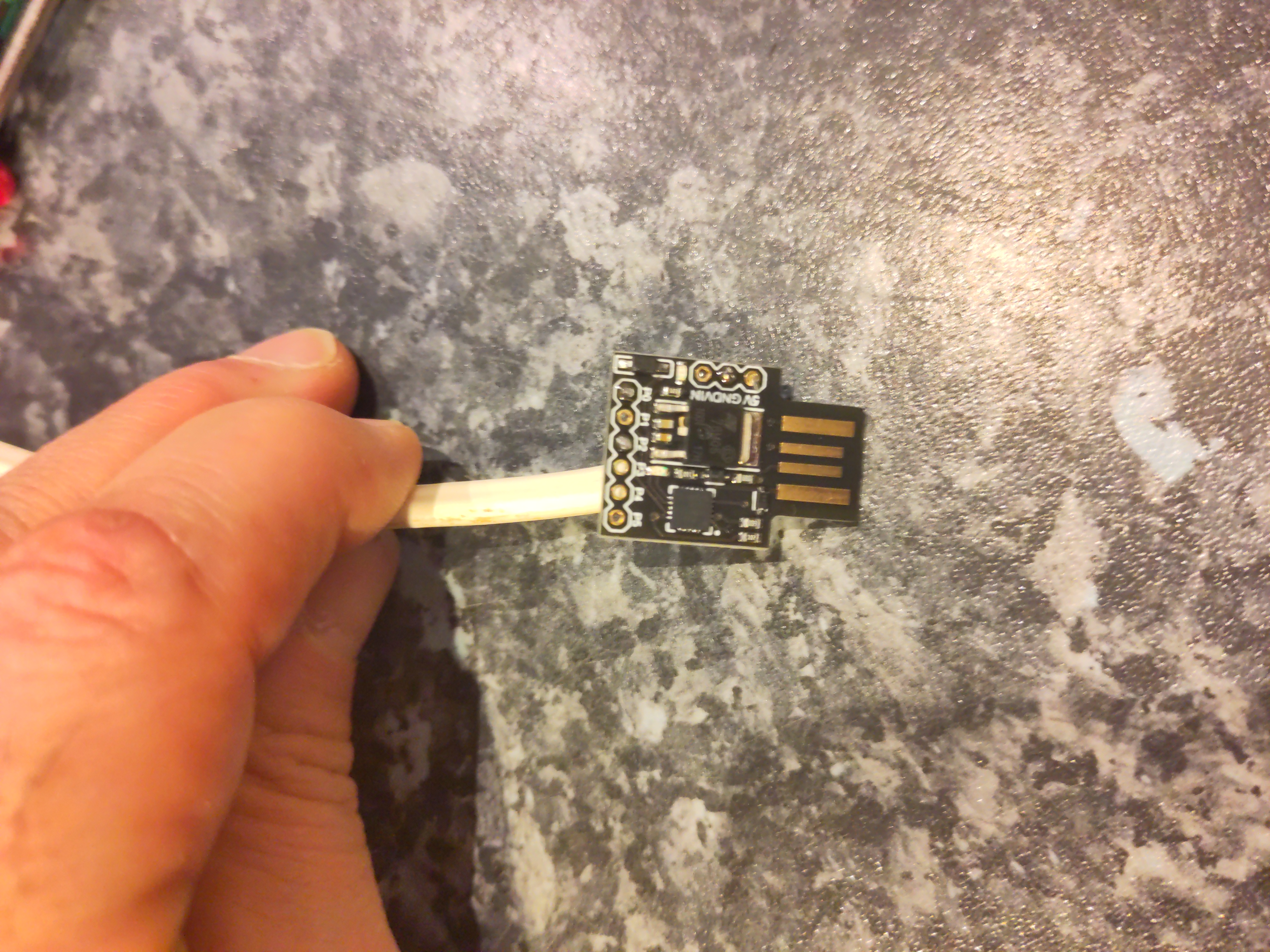
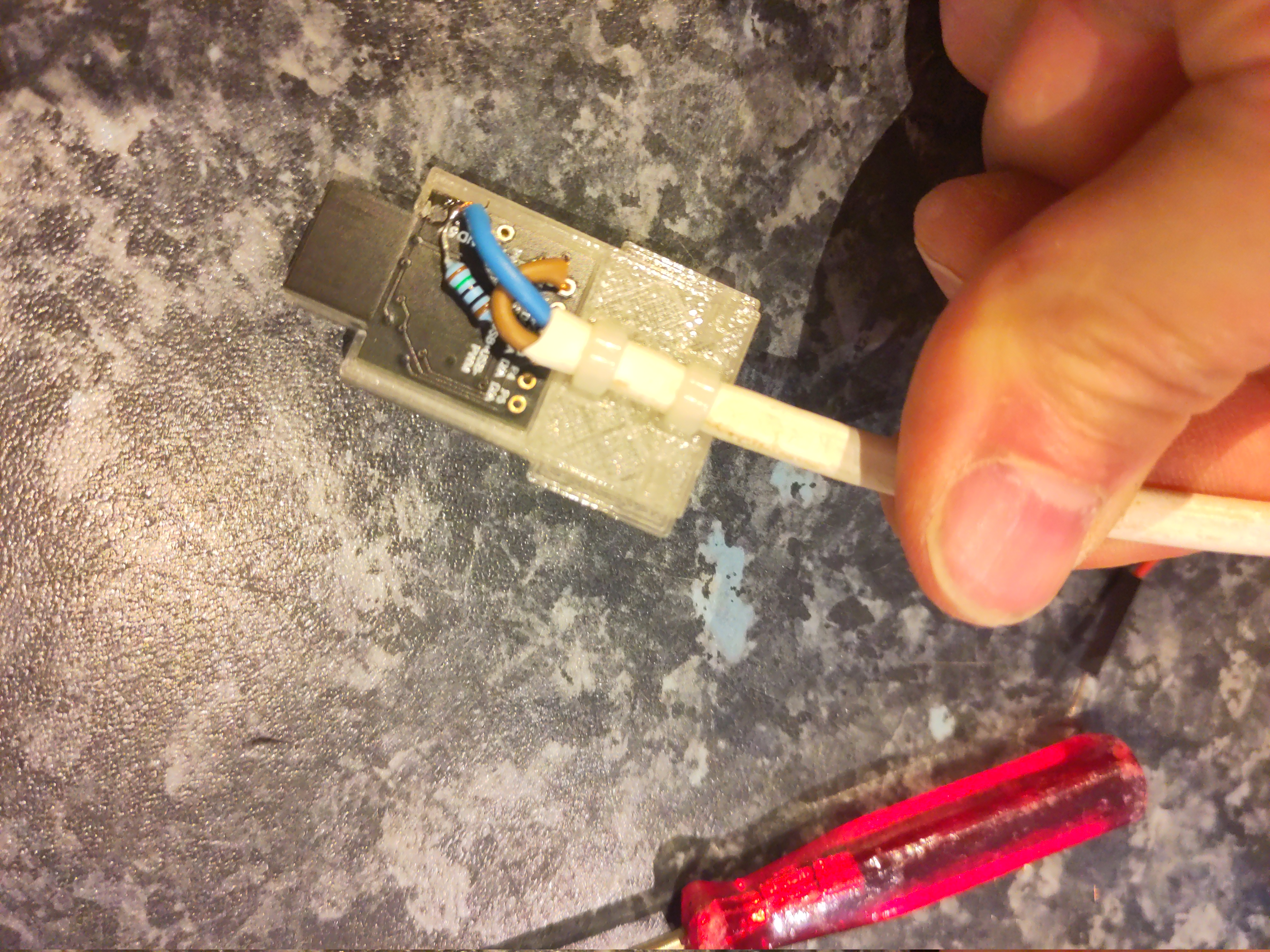
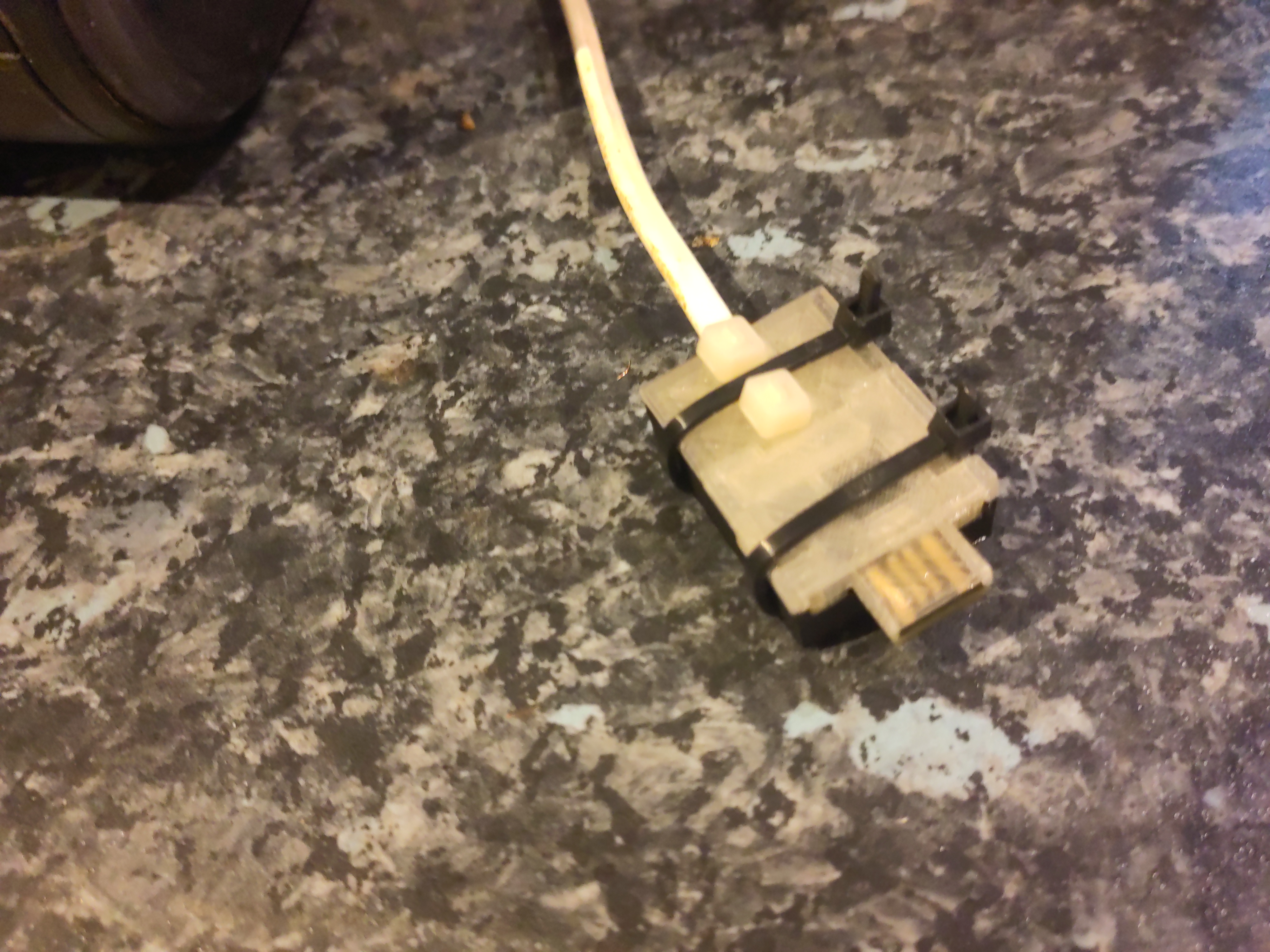
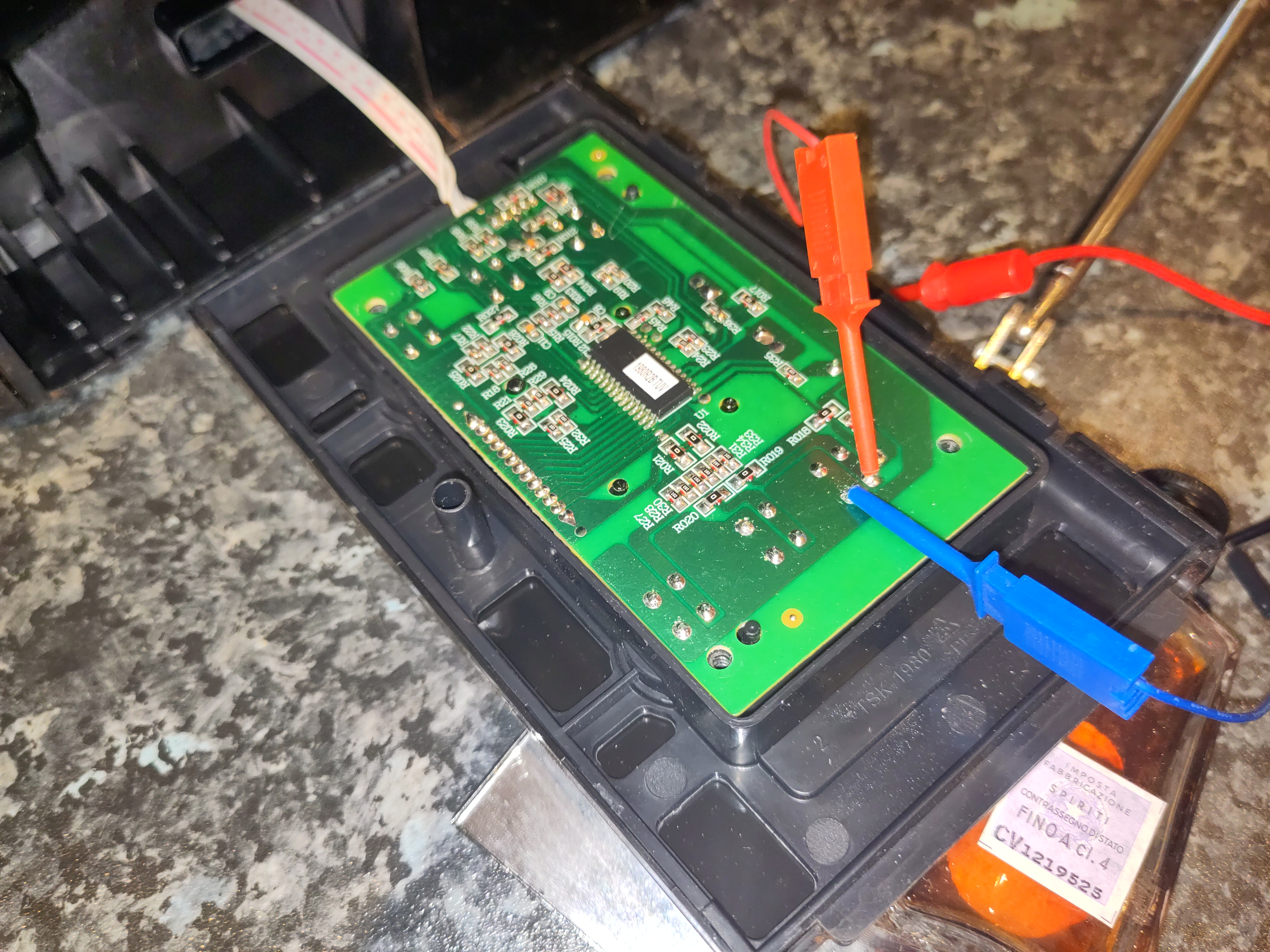
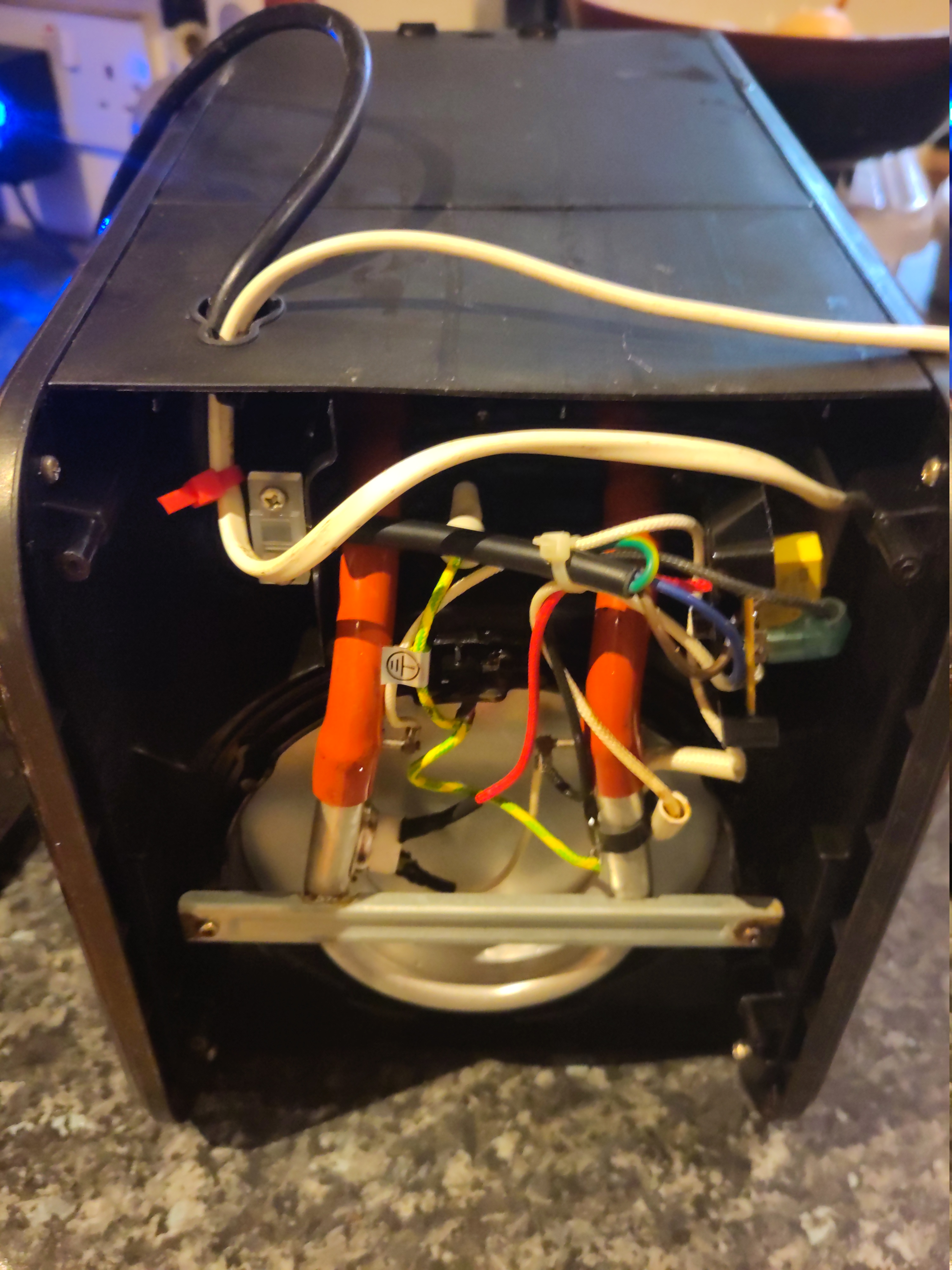
I hacked my coffee machine to let me turn it on from upstairs in bed :-). Read on for explanation, circuit diagrams, 3D models, firmware source code, and pictures. Background: the Morphy Richards filter coffee machine I have a Morphy Richards filter coffee machine. It makes very good coffee. But the display and firmware are quite annoying: Also, I m lazy and wanted to be able to cause coffee to exist from upstairs in bed, without having to make a special trip down just to turn the machine on. Planning My original feeling was I can t be bothered dealing with the coffee machine innards so I thought I would make a mechanical contraption to physically press the coffee machine s on button. I could have my contraption press the button to turn the machine on (timed, or triggered remotely), and then periodically in pairs to reset the 25-minute keep-warm timer. But a friend pointed me at a blog post by Andy Bradford, where Andy recounts modifying his coffee machine, adding an ESP8266 and connecting it to his MQTT-based Home Assistant setup. I looked at the pictures and they looked very similar to my machine. I decided to take a look inside. Inside the Morphy Richards filter coffee machine My coffee machine seemed to be very similar to Andy s. His disassembly report was very helpful. Inside I found the high-voltage parts with the heating elements, and the front panel with the display and buttons. I spent a while poking about, masuring things, and so on. Unexpected electrical hazard At one point I wanted to use my storage oscilloscope to capture the duration and amplitude of the beep signal. I needed to connect the scope ground to the UI board s ground plane, but then when I switched the coffee machine on at the wall socket, it tripped the house s RCD. It turns out that the low voltage UI board is coupled to the mains. In my setting, there s an offset of about 8V between the UI board ground plane, and true earth. (In my house the neutral is about 2-3V away from true earth.) This alarmed me rather. To me, this means that my modifications needed to still properly electrically isolate everything connected to the UI board from anything external to the coffee machine s housing. In Andy s design, I think the internal UI board ground plane is directly brought out to an external USB-A connector. This means that if there were a neutral fault, the USB-A connector would be at live potential, possibly creating an electrocution or fire hazard. I made a comment in Andy Bradford s blog, reporting this issue, but it doesn t seem to have appeared. This is all quite alarming. I hope Andy is OK! Design approach I don t have an MQTT setup at home, or an installation of Home Assistant. I didn t feel like adding a lot of complicated software to my life, if I could avoid it. Nor did I feel like writing a web UI myself. I ve done that before, but I m lazy and in this case my requirements were quite modest. Also, the need for electrical isolation would further complicate any attempt to do something sophisticated (that could, for example, sense the state of the coffee machine). I already had a Tasmota-based cloud-free smart plug, which controls the fairy lights on our gazebo. We just operate that through its web UI. So, I decided I would add a small and stupid microcontroller. The microcontroller would be powered via a smart plug and an off-the-shelf USB power supply. The microcontroller would have no inputs. It would simply simulate an on button press once at startup, and thereafter two presses every 24 minutes. After the 4th double press the microcontroller would stop, leaving the coffee machine to time out itself, after a total period of about 2h. Implementation - hardware I used a DigiSpark board with an ATTiny85. One of the GPIOs is connected to an optoisolator, whose output transistor is wired across the UI board s on button. circuit diagram; board layout diagram; (click for diagram scans as pdfs). The DigiSpark has just a USB tongue, which is very wobbly in a normal USB socket. I designed a 3D printed case which also had an approximation of the rest of the USB A plug. The plug is out of spec; our printer won t go fine enough - and anyway, the shield is supposed to be metal, not fragile plastic. But it fit in the USB PSU I was using, satisfactorily if a bit stiffly, and also into the connector for programming via my laptop. Inside the coffee machine, there s the boundary between the original, coupled to mains, UI board, and the isolated low voltage of the microcontroller. I used a reasonably substantial cable to bring out the low voltage connection, past all the other hazardous innards, to make sure it stays isolated. I added a drain power supply resistor on another of the GPIOs. This is enabled, with a draw of about 30mA, when the microcontroller is soon going to off / on cycle the coffee machine. That reduces the risk that the user will turn off the smart plug, and turn off the machine, but that the microcontroller turns the coffee machine back on again using the remaining power from USB PSU. Empirically in my setup it reduces the time from smart plug off to microcontroller stops from about 2-3s to more like 1s. Optoisolator board (inside coffee machine) pictures (Click through for full size images.) optoisolator board, front; optoisolator board, rear; optoisolator board, fitted. Microcontroller board (in USB-plug-ish housing) pictures microcontroller board, component side; microcontroller board, wiring side, part fitted; microcontroller in USB-plug-ish housing. Implementation - software I originally used the Arduino IDE, writing my program in C. I had a bad time with that and rewrote it in Rust. The firmware is in a repository on Debian s gitlab Results I can now cause the coffee to start, from my phone. It can be programmed more than 12h in advance. And it stays warm until we ve drunk it. UI is worse There s one aspect of the original Morphy Richards machine that I haven t improved: the user interface is still poor. Indeed, it s now even worse: To turn the machine on, you probably want to turn on the smart plug instead. Unhappily, the power button for that is invisible in its installed location. In particular, in the usual case, if you want to turn it off, you should ideally turn off both the smart plug (which can be done with the button on it) and the coffee machine itself. If you forget to turn off the smart plug, the machine can end up being turned on, very briefly, a handful of times, over the next hour or two. Epilogue We had used the new features a handful of times when one morning the coffee machine just wouldn t make coffee. The UI showed it turning on, but it wouldn t get hot, so no coffee. I thought oh no, I ve broken it! But, on investigation, I found that the machine s heating element was open circuit (ie, completely broken). I didn t mess with that part. So, hooray! Not my fault. Probably, just being inverted a number of times and generally lightly jostled, had precipitated a latent fault. The machine was a number of years old. Happily I found a replacement, identical, machine, online. I ve transplanted my modification and now it all works well. Bonus pictures (Click through for full size images.) probing the innards; machine base showing new cable route.
edited 2023-11-26 14:59 UTC in an attempt to fix TOC links


comment count unavailable comments

Andrew Cater: Back at ARM for MiniDebConf day 2 - Morning sessions 26th November 2023

Quick recap of slides and safety information for the day from Steve McIntyre
Now into the Release Team questions following a release team overview.A roomful of people all asking questions which are focused and provoke more questions - how unlike a Debian session :)May just have talked myself into giving a lightning talk this afternoon :)Now about to have a talk about from Sudip about OpenQA, kernel testing and automation

25 November 2023

Andrew Cater: Afternoon talks - MiniDebConf ARM Cambridge - Day 1

A great talk on SteamOS progress to effective boot loaders for atomic OS updates.How to produce something that will allow instant updates and instant fallbacks when updating a whole OS image - lots of explanation - and it's good when three or four people who are directly interested in problems and solutions round, for example, Secure Boot are in the room.Jessica Clarke on CHERI, Morello and security protections in hardware, software and programming hardware which has verifiable pointers and routines. A couple of flourishes which had the room breaking out in applause.Roberto Sanchez and Santiago Rincon on suggestions for LTS and ways forward. The presentation very clearly set out what LTS is, is not, and maybe should be.Last presentation of the day was from Ian Jackson on a potential change to git based working and tagging. Then lots of chasing around to get people out of the building. Thanks very much to the Arm personnel, especially the security staff who have been helpful throughout the day with getting us all in and out

Thanks to all involved with Arm, Codethink and Pexip for hosting and sponsorship without which this would not have been possible.

Andrew Cater: Lightning talks - MiniDebConf ARM Cambridge - Day 1

A quick one slide presentation from Helmut on how to use Debian without sudo - Sudo Apt Purge SudoA presentation on upcoming Ph.D research on Digital Obsolescence - from EdaAntarctic and Arctic research from Carlos Pina i Estany * Amazing * what you can get into three well chosen slides.Ten minutes until the afternoon's talks

Next.

Previous.