Search Results: "ads"

12 June 2022

Russ Allbery: Review: The Shattered Sphere

Review: The Shattered Sphere, by Roger MacBride Allen
Series: Hunted Earth #2
Publisher: Tor
Copyright: July 1994
Printing: September 1995
ISBN: 0-8125-3016-0
Format: Mass market
Pages: 491
The Shattered Sphere is a direct sequel to The Ring of Charon and spoils everything about the plot of the first book. You don't want to start here. Also be aware that essentially everything you can read about this book will spoil the major plot driver of The Ring of Charon in the first sentence. I'm going to review the book without doing that, but it's unlikely anyone else will try. The end of the previous book stabilized matters, but in no way resolved the plot. The Shattered Sphere opens five years later. Most of the characters from the first novel are joined by some new additions, and all of them are trying to make sense of a drastically changed and far more dangerous understanding of the universe. Humanity has a new enemy, one that's largely unaware of humanity's existence and able to operate on a scale that dwarfs human endeavors. The good news is that humans aren't being actively attacked. The bad news is that they may be little more than raw resources, stashed in a safe spot for future use. That is reason enough to worry. Worse are the hints of a far greater danger, one that may be capable of destruction on a scale nearly beyond human comprehension. Humanity may be trapped between a sophisticated enemy to whom human activity is barely more noticeable than ants, and a mysterious power that sends that enemy into an anxious panic. This series is an easily-recognized example of an in-between style of science fiction. It shares the conceptual bones of an earlier era of short engineer-with-a-wrench stories that are full of set pieces and giant constructs, but Allen attempts to add the characterization that those books lacked. But the technique isn't there; he's trying, and the basics of characterization are present, but with none of the emotional and descriptive sophistication of more recent SF. The result isn't bad, exactly, but it's bloated and belabored. Most of the characterization comes through repetition and ham-handed attempts at inner dialogue. Slow plotting doesn't help. Allen spends half of a nearly 500 page novel on setup in two primary threads. One is mostly people explaining detailed scientific theories to each other, mixed with an attempt at creating reader empathy that's more forceful than effective. The other is a sort of big dumb object exploration that failed to hold my attention and that turned out to be mostly irrelevant. Key revelations from that thread are revealed less by the actions of the characters than by dumping them on the reader in an extended monologue. The reading goes quickly, but only because the writing is predictable and light on interesting information, not because the plot is pulling the reader through the book. I found myself wishing for an earlier era that would have cut about 300 pages out of this book without losing any of the major events. Once things finally start happening, the book improves considerably. I grew up reading large-scale scientific puzzle stories, and I still have a soft spot for a last-minute scientific fix and dramatic set piece even if the descriptive detail leaves something to be desired. The last fifty pages are fast-moving and satisfying, only marred by their failure to convince me that the humans were required for the plot. The process of understanding alien technology well enough to use it the right way kept me entertained, but I don't understand why the aliens didn't use it themselves. I think this book falls between two stools. The scientific mysteries and set pieces would have filled a tight, fast-moving 200 page book with a minimum of characterization. It would have been a throwback to an earlier era of science fiction, but not a bad one. Allen instead wanted to provide a large cast of sympathetic and complex characters, and while I appreciate the continued lack of villains, the writing quality is not sufficient to the task. This isn't an awful book, but the quality bar in the genre is so much higher now. There are better investments of your reading time available today. Like The Ring of Charon, The Shattered Sphere reaches a satisfying conclusion but does not resolve the series plot. No sequel has been published, and at this point one seems unlikely to materialize. Rating: 5 out of 10

11 June 2022

Junichi Uekawa: What's in sid?

What's in sid? I wanted to check what version of libc was used in current Debian sid. I am lazy and I used podman to check. However I noticed that apt update is very slow for me, 20kB/s. Wondering if something is wrong.

Louis-Philippe V ronneau: Updating a rooted Pixel 3a

A short while after getting a Pixel 3a, I decided to root it, mostly to have more control over the charging procedure. In order to preserve battery life, I like my phone to stop charging at around 75% of full battery capacity and to shut down automatically at around 12%. Some Android ROMs have extra settings to manage this, but LineageOS unfortunately does not. Android already comes with a fairly complex mechanism to handle the charge cycle, but it is mostly controlled by the kernel and cannot be easily configured by end-users. acc is a higher-level "systemless" interface for the Android kernel battery management, but one needs root to do anything interesting with it. Once rooted, you can use the AccA app instead of playing on the command line to fine tune your battery settings. Sadly, having a rooted phone also means I need to re-root it each time there is an OS update (typically each week). Somehow, I keep forgetting the exact procedure to do this! Hopefully, I will be able to use this post as a reference in the future :) Note that these instructions might not apply to your exact phone model, proceed with caution! Extract the boot.img file This procedure mostly comes from the LineageOS documentation on extracting proprietary blobs from the payload.
  1. Download the latest LineageOS image for your phone.
  2. unzip the image to get the payload.bin file inside it.
  3. Clone the LineageOS scripts git repository: $ git clone https://github.com/LineageOS/scripts
  4. extract the boot image (requires python3-protobuf): $ mkdir extracted-payload $ python3 scripts/update-payload-extractor/extract.py payload.bin --output_dir extracted-payload
You should now have a boot.img file. Patch the boot image file using Magisk
  1. Upload the boot.img file you previously extracted to your device.
  2. Open Magisk and patch the boot.img file.
  3. Download the patched file back on your computer.
Flash the patched boot image
  1. Enable ADB debug mode on your phone.
  2. Reboot into fastboot mode. $ adb reboot fastboot
  3. Flash the patched boot image file: $ fastboot flash boot magisk_patched-foo.img
  4. Disable ADB debug mode on your phone.
Troubleshooting In an ideal world, you would do this entire process each time you upgrade to a new LineageOS version. Sadly, this creates friction and makes updating much more troublesome. To simplify things, you can try to flash an old patched boot.img file after upgrading, instead of generating it each time. In my experience, it usually works. When it does not, the device behaves weirdly after a reboot and things that require proprietary blobs (like WiFi) will stop working. If that happens:
  1. Download the latest LineageOS version for your phone.
  2. Reboot into recovery (Power + Volume Down).
  3. Click on "Apply Updates"
  4. Sideload the ROM: $ adb sideload lineageos-foo.zip

10 June 2022

Lisandro Dami n Nicanor P rez Meyer: Qt 6 in Debian bullseye

As announced some time ago on Debian Backport s mailing list I will be backporting Qt 6 to Debian 11 Bullseye . This comprises the (so far) 29 source packages that compose Qt 6 and libassimp. The Qt Company wanted to let us Debian users also enjoy Qt 6 on Bullseye, so they contacted me (and by extension my employer ICS) to bring this forward. As said in the mail I sent to the backports list I m making the commitment to maintain the packages myself, but I m really happy the Qt Company asked me for this. You can download Qt 6 for Debian Bullseye s backports by following the instructions. Also a big kudos to IOhannes m zm lnig, the assimp maintainer, who promptly helped me to get it backported. Enjoy!

9 June 2022

Jonathan Dowland: Fight Club OST

the record packaging
I often listen to soundtracks when I'm concentrating. The Fight Club soundtrack, by the Dust Brothers, is not one I turn to very often. I do love the way it was packaged for vinyl. The cover design references IKEA, but the clever thing is it has a mailer-style pull-cord to open it up. You can't open the packaging using it without literally tearing the package in half. There is a secret, alternative way to get in with less damage, but if you try it the packaging has a surprise for you. This Image album summarizes most of the packaging secrets. The records themselves are a pleasant mottled pink colour, reminiscent of the soap bars in the movie. They're labelled "Paper Street Soap Company".
close up of the pink record

8 June 2022

Laura Arjona Reina: Moving to a faster but smaller disk, encrypted setup

My work computer runs Debian 11 bullseye (the current stable release) in a mechanical 500GB disk, and I was provided with a new SDD disk but its size was 480 GB. So I had to shrink my partitions before copying the data to the new disk. It turned out to be a bit difficult because my main partition was encrypted. I write here how I did, maybe there are other simpler ways but I couldn t find them. References: I had three partitions in my old 500GB disk: /dev/sda1 is the EFI partition, /dev/sda2 the boot partition and /dev/sda3 the root partition (encrypted, with LVM, the standard way the Debian installer proposes when you choose a simple encrypted setup). First of all, I made a disk image with Clonezilla to an external USB disk, just in case I mess up things, to be able to return to a safe point and start again. Then I started my computer with a Debian 11 live USB with KDE Plasma desktop and Spanish localisation environment. I opened the KDE Partition manager and copied the non encrypted partitions (sda1, EFI and sda2, /boot) to the new disk. I shrinked the encrypted partition from the terminal with the following commands (I had enough free space so reduced my partition to a total of 300GB): Removed the swap partition and re-created it:
sudo lvremove /dev/larjona-pc-vg/swap_1
sudo pvresize --setphysicalvolumesize 380G /dev/mapper/cryptdisk
sudo pvchange -x y /dev/mapper/cryptdisk
sudo lvcreate -L 4G -n swap_1 larjona-pc-vg
sudo mkswap -L swap_1 /dev/larjona-pc-vg/swap_1
Display information about the physical volume in order to shrink it:
sudo pvs -v --segments --units s /dev/mapper/cryptdisk
sudo cryptsetup -b 838860800 resize cryptdisk
sudo cryptsetup status cryptdisk
sudo vgchange -a n vgroup
sudo vgchange -an
sudo cryptsetup luksClose cryptdisk
Then reduced the sda3 partition with the KDE partition manager (it took a while), and copy it to the new disk. Turned off the computer and unplugged the old disk. Started the computer with the Debian 11 Live USB again, UEFI boot. Now, to make my system boot:
sudo cryptsetup luksOpen /dev/sda3 crypdisk
sudo vgscan --mknodes
sudo vgchange -ay
sudo mount /dev/mapper/larjona--pc--vg-root /mnt
sudo mount /dev/sda2 /mnt/boot
sudo mount /dev/sda1 /mnt/boot/efi
mount --rbind /sys /media/linux/sys
mount -t efivarfs none /sys/firmware/efi/efivars
for i in /dev /dev/pts /proc /run; do sudo mount -B $i /mnt$i; done
sudo chroot /mnt
Then edited /mnt/etc/crypttab to reflect the name of the new encrypted partition, edited /mnt/etc/fstab to paste the UUIDs of the new partitions.
Then ran grub-install and reinstalled the kernels as noted in the reference, rebooted and logged in my Plasma desktop  (Well, the actual process was not so smooth but after several tries and errors and searching for help I managed to get the needed commands to make my system boot from the new disk).

6 June 2022

Thorsten Alteholz: My Debian Activities in May 2022

FTP master This month I accepted 288 and rejected 45 packages. The overall number of packages that got accepted was 290. Debian LTS This was my ninety-fifth month that I did some work for the Debian LTS initiative, started by Raphael Hertzog at Freexian. This month my all in all workload has been 40h. During that time I did LTS and normal security uploads of: Further I continued working on libvirt and started to work on blender and ncurses. I also continued to work on security support for golang packages. Last but not least I did some days of frontdesk duties and took care of issues on security-master. Debian ELTS This month was the forty-seventh ELTS month. During my allocated time I uploaded: I also moved/refactored the current ELTS documentation to a new repository. Further I started to work on blender and ncurses in ELTS as well as in LTS. Last but not least I did some days of frontdesk duties. Debian Printing This month I uploaded new upstream versions or improved packaging of: The reason for the new upstream version of ipp-usb was a strange bug. Some HP printers claim to have fax support but fail to respond to corresponding IPP queries. I understand that nowadays sending a fax is no longer a main theme for quality assurance. But if one tries to advertise as much features as possible, all these features should basically work and not prevent the things a printer should normally do. The reason for the new upstream version of cups was a security issue. You now should have the latest version of cups installed (there have been updates in other Debian releases as well). Debian Astro This month I uploaded new upstream versions or improved packaging of: Other stuff This month I uploaded new packages:

4 June 2022

Junichi Uekawa: June came.

June came. I am still playing with rust these days. Learning more things every day.

3 June 2022

Raphaël Hertzog: Freexian s report about Debian Long Term Support, April 2022

A Debian LTS logo
Like each month, have a look at the work funded by Freexian s Debian LTS offering. Debian project funding Two projects are currently in the pipeline: Gradle enterprise and Tryton update. Progress is quite slow on the Gradle one, there are technical difficulties. The tryton one was stalled because the developer had not enough time but seems to progress smoothly in the last weeks. In April, we put aside 2635 EUR to fund Debian projects. We re looking forward to receive more projects from various Debian teams! Learn more about the rationale behind this initiative in this article. Debian LTS contributors In April, 11 contributors have been paid to work on Debian LTS, their reports are available: Evolution of the situation In April we released 30 DLAs and we were glad to welcome a new customer with Alter Way. The security tracker currently lists 72 packages with a known CVE and the dla-needed.txt file has 71 packages needing an update. It is worth pointing out that we are getting close to the end of the LTS period for Debian 9. After June 30th, no new security updates will be made available on security.debian.org. But Freexian and its team of paid Debian contributors will continue to maintain Debian 9 going forward for the customers of the Extended LTS offer. If you have Debian 9 servers to keep secure, it s time to subscribe! You might not have noticed, but Freexian formalized a mission statement where we explain that our purpose is to help improve Debian. For this, we want to fund work time for the Debian developers that recently joined Freexian as collaborators. The Extended LTS and the PHP LTS offers are built following a model that will help us to achieve this if we manage to have enough customers for those offers. So consider subscribing: you help your organization but you also help Debian! Thanks to our sponsors Sponsors that joined recently are in bold.

1 June 2022

Daniel Lange: Get Youtube Channel ID from username

Youtube has a really nice RSS feature that is extremely well hidden. If you postfix a Channel ID to
https://www.youtube.com/feeds/videos.xml?channel_id=<id goes here>
you get a really nice Atom 1.0 (~RSS) feed for your feedreader. Unfortunately the Channel ID is hard to find while you are navigating Youtube with usernames in the URL. E.g. https://www.youtube.com/c/TED is TED's channel, full of interesting and worth-to-watch content (and some assorted horse toppings, of course). But you have to read a lot of ugly HTML / JSON in that page to find and combine https://www.youtube.com/feeds/videos.xml?channel_id=UCAuUUnT6oDeKwE6v1NGQxug which is the related RSS feed. Jeff Keeling wrote a simple Youtube RSS Extractor that does well if you have a ../playlist?... or a .../channel/... URL but it will (currently) fail on user name channels or Youtube landing pages. So how do we get the Channel ID for a Youtube user we are interested to follow? Youtube has a great API but that is gated by API keys even for the most simple calls (that came only with v3 of the API but the previous version is depreciated since 2015)1:
dl@laptop:~$ curl 'https://www.googleapis.com/youtube/v3/channels?part=contentDetails&forUsername=DebConfVideos'

"error":
"code": 403,
"message": "The request is missing a valid API key.",
"errors": [

"message": "The request is missing a valid API key.",
"domain": "global",
"reason": "forbidden"

],
"status": "PERMISSION_DENIED"

Luckily we can throw the same (example) user name DebConfVideos at curl and grep:
dl@laptop:~$ curl -s "https://www.youtube.com/c/DebConfVideos/videos" grep -Po '"channelId":".+?"'
"channelId":"UC7SbfAPZf8SMvAxp8t51qtQ"
So https://www.youtube.com/feeds/videos.xml?channel_id=UC7SbfAPZf8SMvAxp8t51qtQ is the RSS feed for DebConfVideos. We can use individual Youtube video URLs as well. With the hack above, it'll work to find us the Chanel ID from a Youtube video URL: Working around the Youtube API restrictions to still make use of their RSS feed Now, some user pages may have multiple valid RSS feeds because they contain multiple channels. Remember the TED page from above? Well run:
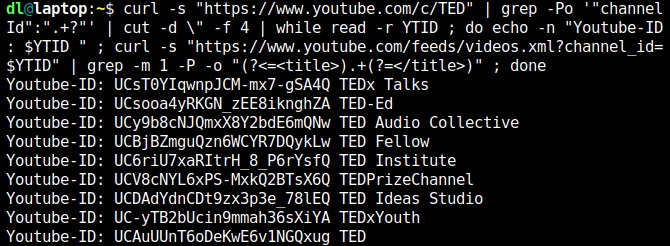
dl@laptop:~$ curl -s "https://www.youtube.com/c/TED" grep -Po '"channelId":".+?"' cut -d \" -f 4 while read -r YTID ; do echo -n "Youtube-ID: $YTID " ; curl -s "https://www.youtube.com/feeds/videos.xml?channel_id=$YTID" grep -m 1 -P -o "(?<=<title>).+(?=</title>)" ; done
This will iterate through the Channel IDs found and show you the titles. That way you can assess which one you want to add to your feedreader. screenshot of the above You probably want the last Channel ID listed above, the non-selective "TED" one. And that's the one from the example above. Update 02.06.2022: smpl wrote in and has the much better solution for the most frequent use cases:
You can also use get a feed directly with a username:
https://www.youtube.com/feeds/videos.xml?user=<username>
The one I use most is the one for playlists (if creators remember to
use them).
https://www.youtube.com/feeds/videos.xml?playlist_id=<playlist id>
For the common case you don't even need the channel ID that way. But it is also conveniently given in a <yt:channelId> tag (or the topmost <id> tag) within the Atom XML document. Thanks, smpl!

  1. Actually it is even more complicated as some channels, like our DebConfVideos example, will only get you an incomplete result, cf. this StackOverflow entry. I.e. the forUsername iterator may not even work and the "best practice" seems to be mucking around with the search call.

Russ Allbery: Review: The Seeress of Kell

Review: The Seeress of Kell, by David Eddings
Series: The Malloreon #5
Publisher: Del Rey
Copyright: May 1991
Printing: May 1992
ISBN: 0-345-37759-1
Format: Mass market
Pages: 374
The Seeress of Kell is the conclusion of the five-book Malloreon series and a direct sequel to Sorceress of Darshiva. You do not want to begin the series here (or, to be honest, at all). We have finally finished the relaxed tour of Mallorea, the second continent of Eddings's remarkably small two-continent world. The heroes have gathered all of their required companions and are headed for Kell, where the seeress Cyradis awaits. From there, they and the new Child of Dark must find their way to the Place Which Is No More for the final confrontation. By "find," I mean please remain seated with your hands, arms, feet, and legs inside the vehicle. The protagonists have about as much to do with the conclusion of this series as the passengers of a roller coaster have control over its steering. I am laughing at my younger self, who quite enjoyed this series (although as I recall found it a bit repetitive) and compared it favorably to the earlier Belgariad series. My memory kept telling me that the conclusion of the series was lots of fun. Reader, it was not. It was hilariously bad. Both of Eddings's first two series, but particularly this one, take place in a fantasy world full of true prophecy. The conceit of the Malloreon in particular (this is a minor spoiler for the early books, but not one that I think interferes with enjoyment) is that there are two competing prophecies that agree on most events but are in conflict over a critical outcome. True prophecy creates an agency problem: why have protagonists if everything they do is fixed in prophecy? The normal way to avoid that is to make the prophecy sufficiently confusing and the mechanism by which it comes true sufficiently subtle that everyone has to act as if there is no prophecy, thus reducing the role of the prophecy to foreshadowing and a game the author plays with the reader. What makes the Malloreon interesting (and I mean this sincerely) is that Eddings instead leans into the idea of a prophecy as an active agent leading the protagonists around by the nose. As a meta-story commentary on fantasy stories, this can be quite entertaining, and it helps that the prophecy appears as a likable character of sorts in the book. The trap that Eddings had mostly avoided before now is that this structure can make the choices of the protagonists entirely pointless. In The Seeress of Kell, he dives head-first into the trap and then pulls it shut behind him. The worst part is Ce'Nedra, who once again spends an entire book either carping at Garion in ways that are supposed to be endearing (but aren't) or being actively useless. The low point is when she is manipulated into betraying the heroes, costing them a significant advantage. We're then told that, rather than being a horrific disaster, this is her important and vital role in the story, and indeed the whole reason why she was in the story at all. The heroes were too far ahead of the villains and were in danger of causing the prophecy to fail. At that point, one might reasonably ask why one is bothering reading a novel instead of a summary of the invented history that Eddings is going to tell whether his characters cooperate or not. The whole middle section of the book is like this: nothing any of the characters do matters because everything is explicitly destined. That includes an extended series of interludes following the other main characters from the Belgariad, who are racing to catch up with the main party but who will turn out to have no role of significance whatsoever. I wouldn't mind this as much if the prophecy were more active in the story, given that it's the actual protagonist. But it mostly disappears. Instead, the characters blunder around doing whatever seems like a good idea at the time, while Cyradis acts like a bizarre sort of referee with a Calvinball rule set and every random action turns out to be the fulfillment of prophecy in the most ham-handed possible way. Zandramas, meanwhile, is trying to break the prophecy, which would have been a moderately interesting story hook if anyone (Eddings included) thought she were potentially capable of doing so. Since no one truly believes there's any peril, this turns into a series of pointless battles the reader has no reason to care about. All of this sets up what has been advertised since the start of the series as a decision between good and evil. Now, at the least minute, Eddings (through various character mouthpieces) tries to claim that the decision is not actually between good and evil, but is somehow beyond morality. No one believes this, including the narrator and the reader, making all of the philosophizing a tedious exercise in page-turning. To pull off a contention like that, the author has to lay some sort of foundation to allow the reader to see the supposed villain in multiple lights. Eddings does none of that, instead emphasizing how evil she is at every opportunity. On top of that, this supposed free choice on which the entire universe rests and for which all of history was pointed depends on someone with astonishing conflicts of interest. While the book is going on about how carefully the prophecy is ensuring that everyone is in the right place at the right time so that no side has an advantage, one side is accruing an absurdly powerful advantage. And the characters don't even seem to realize it! The less said about the climax, the better. Unsurprisingly, it was completely predictable. Also, while I am complaining, I could never get past how this entire series starts off with and revolves around an incredibly traumatic and ongoing event that has no impact whatsoever on the person to whom the trauma happens. Other people are intermittently upset or sad, but not only is that person not harmed, they act, at the end of this book, as if the entire series had never happened. There is one bright spot in this book, and ironically it's the one plot element that Eddings didn't make blatantly obvious in advance and therefore I don't want to spoil it. All I'll say is that one of the companions the heroes pick up along the way turns out to be my favorite character of the series, plays a significant role in the interpersonal dynamics between the heroes, and steals every scene that she's in by being more sensible than any of the other characters in the story. Her story, and backstory, is emotional and moving and is the best part of this book. Otherwise, not only is the plot a mess and the story structure a failure, but this is also Eddings at his most sexist and socially conservative. There is an extended epilogue after the plot resolution that serves primarily as a showcase of stereotypes: baffled men having their habits and preferences rewritten by their wives, cast-iron gender roles inside marriage, cringeworthy jokes, and of course loads and loads of children because that obviously should be everyone's happily ever after. All of this happens to the characters rather than being planned or actively desired, continuing the theme of prophecy and lack of agency, although of course they're all happy about it (shown mostly via grumbling). One could write an entire academic paper on the tension between this series and the concept of consent. There were bits of the Malloreon that I enjoyed, but they were generally in spite of the plot rather than because of it. I do like several of Eddings's characters, and in places I liked the lack of urgency and the sense of safety. But I think endings still have to deliver some twist or punch or, at the very least, some clear need for the protagonists to take an action other than stand in the right room at the right time. Eddings probably tried to supply that (I can make a few guesses about where), but it failed miserably for me, making this the worst book of the series. Unless like me you're revisiting this out of curiosity for your teenage reading habits (and even then, consider not), avoid. Rating: 3 out of 10

30 May 2022

Daniel Lange: Work-around for randomly dropping WiFi connections on ChromeOS

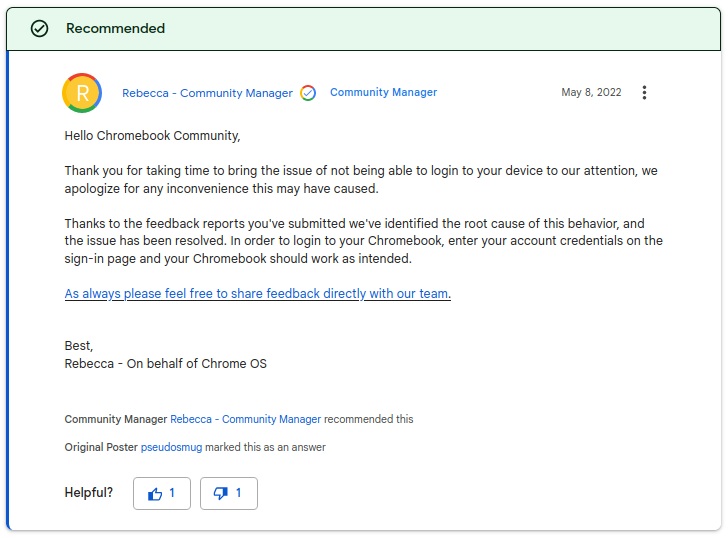
The company got me a Chromebook for times when I want to ignore email and not get dragged into code reviews but still be available on IRC and chat. Nifty devices at great price points. I really like them. Chromebook logo These things are meant to be very consumer-style end-user devices. You log in with your Google account and everything works. Until it doesn't. Just setting it up caused the first issue: I was always thrown back to a black screen and then another login-screen despite having successfully logged in initially to create the "owner" user of the Chromebook. No error message, not useful UI feedback. Just logging in again and again and again. The issue is ... not having a GMail account associated with my Google account. Duh! So add a GMail.com address as the primary to your Google account and the initial setup completes. Of course you cannot delete that GMail.com association again because the owner user is linked to the email and not the account. Well, you can delete it but then you cannot configure "owner" items of your Chromebook any more. Great job, Google. Not. Identity management 101 fail. Kudos to Anurag Chawake for blogging about the issue. The Google support forum thead claims this is solved now. But it didn't work for me, so this may be needing to trickle down through ChromeOS releases or be deployed on more Google infra. Or whatever. We can't tell from outside the Googleplex as - of course - "Rebecca" sheds no light on what the identified "root cause" was: Google Forum answer Once I was able to login to the new Chromebook all worked fine until I started to use ssh sessions. These always hung for 30 seconds to 10 minutes and then resumed with lots of packets lost in between and the last minute or so coming in from buffering in a burst. This was easy to see in ping as well. The connection essentially dropped dead while the WiFi icon was continuing to show full signal strength. The logs did not show anything useful. These are really hard to access on ChromeOS (JSON format and no useful UI on the Chromebook itself, Google provides a viewer on Google Apps Toolbox but that requires uploading the logs). Better than no logs at all but not really nice. The ChromeOS bug tracker and its Google corporate counterpart are also not useful at this time. For reference:
Google ... Device users randomly disconnect from Wi-Fi network
Chromium ... Device users randomly disconnect from Wi-Fi network
Google ... Constant connect and disconnect from WiFi source post-update
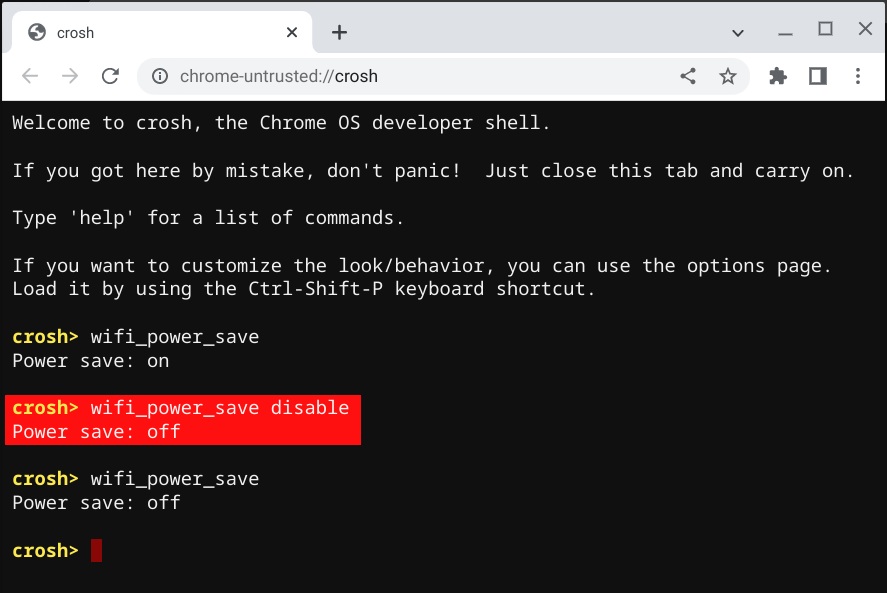
Chromium ... Constant connect and disconnect from WiFi source post-update Playing around with the device on the network showed that it reduced sending power beyond being able to reach the access point any more. This is why disconnecting and re-connecting the WiFi fixes the issue for a few minutes, typically. Still, there is a better way: In crosh (the ChromeOS shell available when pressing Alt+Ctrl+T) type:
wifi_power_save disable
Crosh session screenshot This unfortunately only lasts until the next reboot but it does persist over suspend cycles (aka closing the lid).

Bits from Debian: Debian welcomes its new Outreachy interns

Outreachy logo Debian continues participating in Outreachy, and we're excited to announce that Debian has selected two interns for the Outreachy May 2022 - August 2022 round. Israel Galadima and Michael Ikwuegbu will work on Improve yarn package manager integration with Debian, mentored by Akshay S Dinesh and Pirate Praveen.
Congratulations and welcome to Israel Galadima and Michael Ikwuegbu! From the official website: Outreachy provides three-month internships for people from groups traditionally underrepresented in tech. Interns work remotely with mentors from Free and Open Source Software (FOSS) communities on projects ranging from programming, user experience, documentation, illustration and graphical design, to data science. The Outreachy programme is possible in Debian thanks to the efforts of Debian developers and contributors who dedicate their free time to mentor students and outreach tasks, and the Software Freedom Conservancy's administrative support, as well as the continued support of Debian's donors, who provide funding for the internships. Join us and help extend Debian! You can follow the work of the Outreachy interns reading their blogs (they are syndicated in Planet Debian), and chat with us in the #debian-outreach IRC channel and mailing list.

Gunnar Wolf: On to the next journey

Last Wednesday my father, Kurt Bernardo Wolf Bogner, took the steps towards his next journey, the last that would start in this life. I cannot put words to this so just sharing this with the world will have to suffice. Goodbye to my teacher, my friend, the person I have always looked up to. Some of his friends were able to put in words more than what I can come up with. If you can read Spanish, you can read the eulogy from the Science Academy of Morelos. His last project, enjoyable by anybody who reads Spanish, is the book with his account of his youth travels Asia, Africa and Europe, beteen 1966 and 1970. You can read it online. And I have many printed copies, in case you want one as well. We will always remember you with love.

29 May 2022

John Goerzen: Fast, Ordered Unixy Queues over NNCP and Syncthing with Filespooler

It seems that lately I ve written several shell implementations of a simple queue that enforces ordered execution of jobs that may arrive out of order. After writing this for the nth time in bash, I decided it was time to do it properly. But first, a word on the why of it all.

Why did I bother? My needs arose primarily from handling Backups over Asynchronous Communication methods in this case, NNCP. When backups contain incrementals that are unpacked on the destination, they must be applied in the correct order. In some cases, like ZFS, the receiving side will detect an out-of-order backup file and exit with an error. In those cases, processing in random order is acceptable but can be slow if, say, hundreds or thousands of hourly backups have stacked up over a period of time. The same goes for using gitsync-nncp to synchronize git repositories. In both cases, a best effort based on creation date is sufficient to produce a significant performance improvement. With other cases, such as tar or dar backups, the receiving cannot detect out of order incrementals. In those situations, the incrementals absolutely must be applied with strict ordering. There are many other situations that arise with these needs also. Filespooler is the answer to these.

Existing Work Before writing my own program, I of course looked at what was out there already. I looked at celeary, gearman, nq, rq, cctools work queue, ts/tsp (task spooler), filequeue, dramatiq, GNU parallel, and so forth. Unfortunately, none of these met my needs at all. They all tended to have properties like:
  • An extremely complicated client/server system that was incompatible with piping data over existing asynchronous tools
  • A large bias to processing of small web requests, resulting in terrible inefficiency or outright incompatibility with jobs in the TB range
  • An inability to enforce strict ordering of jobs, especially if they arrive in a different order from how they were queued
Many also lacked some nice-to-haves that I implemented for Filespooler:
  • Support for the encryption and cryptographic authentication of jobs, including metadata
  • First-class support for arbitrary compressors
  • Ability to use both stream transports (pipes) and filesystem-like transports (eg, rclone mount, S3, Syncthing, or Dropbox)

Introducing Filespooler Filespooler is a tool in the Unix tradition: that is, do one thing well, and integrate nicely with other tools using the fundamental Unix building blocks of files and pipes. Filespooler itself doesn t provide transport for jobs, but instead is designed to cooperate extremely easily with transports that can be written to as a filesystem or piped to which is to say, almost anything of interest. Filespooler is written in Rust and has an extensive Filespooler Reference as well as many tutorials on its homepage. To give you a few examples, here are some links:

Basics of How it Works Filespooler is intentionally simple:
  • The sender maintains a sequence file that includes a number for the next job packet to be created.
  • The receiver also maintains a sequence file that includes a number for the next job to be processed.
  • fspl prepare creates a Filespooler job packet and emits it to stdout. It includes a small header (<100 bytes in most cases) that includes the sequence number, creation timestamp, and some other useful metadata.
  • You get to transport this job packet to the receiver in any of many simple ways, which may or may not involve Filespooler s assistance.
  • On the receiver, Filespooler (when running in the default strict ordering mode) will simply look at the sequence file and process jobs in incremental order until it runs out of jobs to process.
The name of job files on-disk matches a pattern for identification, but the content of them is not significant; only the header matters. You can send job data in three ways:
  1. By piping it to fspl prepare
  2. By setting certain environment variables when calling fspl prepare
  3. By passing additional command-line arguments to fspl prepare, which can optionally be passed to the processing command at the receiver.
Data piped in is added to the job payload , while environment variables and command-line parameters are encoded in the header.

Basic usage Here I will excerpt part of the Using Filespooler over Syncthing tutorial; consult it for further detail. As a bit of background, Syncthing is a FLOSS decentralized directory synchronization tool akin to Dropbox (but with a much richer feature set in many ways).

Preparation First, on the receiver, you create the queue (passing the directory name to -q):
sender$ fspl queue-init -q ~/sync/b64queue
Now, we can send a job like this:
sender$ echo Hi   fspl prepare -s ~/b64seq -i -   fspl queue-write -q ~/sync/b64queue
Let s break that down:
  • First, we pipe Hi to fspl prepare.
  • fspl prepare takes two parameters:
    • -s seqfile gives the path to a sequence file used on the sender side. This file has a simple number in it that increments a unique counter for every generated job file. It is matched with the nextseq file within the queue to make sure that the receiver processes jobs in the correct order. It MUST be separate from the file that is in the queue and should NOT be placed within the queue. There is no need to sync this file, and it would be ideal to not sync it.
    • The -i option tells fspl prepare to read a file for the packet payload. -i - tells it to read stdin for this purpose. So, the payload will consist of three bytes: Hi\n (that is, including the terminating newline that echo wrote)
  • Now, fspl prepare writes the packet to its stdout. We pipe that into fspl queue-write:
    • fspl queue-write reads stdin and writes it to a file in the queue directory in a safe manner. The file will ultimately match the fspl-*.fspl pattern and have a random string in the middle.
At this point, wait a few seconds (or however long it takes) for the queue files to be synced over to the recipient. On the receiver, we can see if any jobs have arrived yet:
receiver$ fspl queue-ls -q ~/sync/b64queue
ID                   creation timestamp          filename
1                    2022-05-16T20:29:32-05:00   fspl-7b85df4e-4df9-448d-9437-5a24b92904a4.fspl
Let s say we d like some information about the job. Try this:
receiver$ $ fspl queue-info -q ~/sync/b64queue -j 1
FSPL_SEQ=1
FSPL_CTIME_SECS=1652940172
FSPL_CTIME_NANOS=94106744
FSPL_CTIME_RFC3339_UTC=2022-05-17T01:29:32Z
FSPL_CTIME_RFC3339_LOCAL=2022-05-16T20:29:32-05:00
FSPL_JOB_FILENAME=fspl-7b85df4e-4df9-448d-9437-5a24b92904a4.fspl
FSPL_JOB_QUEUEDIR=/home/jgoerzen/sync/b64queue
FSPL_JOB_FULLPATH=/home/jgoerzen/sync/b64queue/jobs/fspl-7b85df4e-4df9-448d-9437-5a24b92904a4.fspl
This information is intentionally emitted in a format convenient for parsing. Now let s run the job!
receiver$ fspl queue-process -q ~/sync/b64queue --allow-job-params base64
SGkK
There are two new parameters here:
  • --allow-job-params says that the sender is trusted to supply additional parameters for the command we will be running.
  • base64 is the name of the command that we will run for every job. It will:
    • Have environment variables set as we just saw in queue-info
    • Have the text we previously prepared Hi\n piped to it
By default, fspl queue-process doesn t do anything special with the output; see Handling Filespooler Command Output for details on other options. So, the base64-encoded version of our string is SGkK . We successfully sent a packet using Syncthing as a transport mechanism! At this point, if you do a fspl queue-ls again, you ll see the queue is empty. By default, fspl queue-process deletes jobs that have been successfully processed.

For more See the Filespooler homepage.
This blog post is also available as a permanent, periodically-updated page.

Russ Allbery: Review: Kleptopia

Review: Kleptopia, by Tom Burgis
Publisher: Harper
Copyright: 2020
Printing: September 2021
ISBN: 0-06-323613-3
Format: Kindle
Pages: 340
Kleptopia is a nonfiction chronicle of international financial corruption and money laundering told via a focus on the former Soviet republic of Kazakhstan. The primary characters are a British banker named Nigel Wilkins (at the start of the story, the head of compliance in the London office of the Swiss bank BSI), a group of businessmen from Kyrgyzstan and Uzbekistan called the Trio, and a Kazakh oligarch and later political dissident named Mukhtar Ablyazov, although the story spreads beyond them. It is partly a detailed example of what money laundering looks like in practice: where the money comes from, who has it, what they want to do with it, who they hire to move it, and what countries welcome it. But it is more broadly about the use of politics for financial plunder, and what stories we tell about the results. The title of this book feels a bit like clickbait, and I was worried it would be mostly opinion and policy discussion. It is the exact opposite. Tom Burgis is an investigations correspondent at the Financial Times, and this is a detailed piece of investigative journalism (backed by a hundred pages of notes and detailed attributions). Burgis has a clear viewpoint and expresses it when it seems relevant, but the vast majority of this book is the sort of specific account of people, dates, times, and events that one would expect from a full-length investigative magazine piece, except maintained at book length. Even aside from the subject matter, I love that writing like this exists. It's often best in magazines, newspapers, and on-line articles for timeliness, since book publishing is slow, but some subjects require the length of a book. Burgis is the sort of reporter who travels the world to meet with sources in person, and who, before publication, presents his conclusions to everyone mentioned for their rebuttals (many of which are summarized or quoted in detail in the notes so that the reader can draw their own credibility conclusions). Whether or not one agrees with his specific conclusions or emphasis, we need more of this sort of journalism in the world. I knew essentially nothing about Kazakhstan or its politics before reading this book. I also had not appreciated the degree to which exploitation of natural resources is the original source of the money for international money laundering. In both Kazakhstan and Africa (a secondary setting for this book), people get rich largely because of things dug or pumped out of the ground. That money, predictably, does not go to the people doing the hard work of digging and pumping, who work in appalling conditions and are put down with violence if they try to force change. (In one chapter, Burgis tells the harrowing and nightmarish story of Roza Tuletayeva, a striker at the oil field in Zhanaozen.) It's gathered up by the already rich and politically connected, who gained control of former state facilities during the post-Soviet collapse and then maintained their power with violence and corruption. And once they have money, they try to convert it into holdings in European banks, London real estate, and western corporations. The primary thing I will remember from this book is the degree to which oligarchs rely on being able to move between two systems. They make their money in unstable or authoritarian countries with high degrees of political corruption and violence, and are adept at navigating that world (although sometimes it turns on them; more on that in a moment). But they don't want to leave their money in that world. Someone else could betray them, undermine them, or gain the ear of the local dictator. They rely instead on western countries with strong property rights, stable financial institutions, and vast legal systems devoted to protecting the wealth of people who are already rich. In essence, they play both rule sets against each other: make money through techniques that would be illegal in London, and then move their money to London so that the British government and legal system will protect it against others who are trying to do the same. What they get out of this is obvious. What London gets out of it is another theme of this book: it's a way for a lot of people to share the wealth without doing any of the crimes. Money laundering is a very lossy activity. Lots of money falls out of the cart along the way, where it is happily scooped up by bankers, lawyers, accountants, public relations consultants, and the rest of the vast machinery of theoretically legitimate business. Everyone wins, except the people the money is being stolen from in the first place. (And the planet; Burgis doesn't talk much about the environment, but I found the image of one-way extraction of irreplaceable natural resources haunting and disturbing.) Donald Trump does make an appearance here, although not as significant of one as I was expecting given the prominent appearance of Trump crony Felix Sater. Trump is part of the machinery that allows oligarch money to become legally-protected business investment, but it's also clear from Burgis's telling that he is (at least among the money flows Burgis is focused on) a second-tier player with delusions of grandeur. He's more notable for his political acumen and ability to craft media stories than his money-laundering skills. The story-telling is a third theme of this book. The electorate of the societies into which oligarchs try to move their money aren't fond of crime, mob activity, political corruption, or authoritarian exploitation of workers. If public opinion turns sufficiently strongly against specific oligarchs, the normally friendly mechanisms of law and business regulation may have to take action. The primary defense of laundered money is hiding its origins sufficiently that it's too hard to investigate or explain to a jury, but there are limits to how completely the money can hide given that oligarchs still want to spend it. They need to tell a story about how they are modernizing businessmen, aghast at the lingering poor conditions of their home countries but working earnestly to slowly improve them. And they need to defend those stories against people who might try to draw a clearer link between them and criminal activity. The competing stories between dissident oligarch Mukhtar Ablyazov and the Kazakh government led by Nursultan Nazarbayev are a centerpiece of this book. Ablyazov is in some sense a hero of the story, someone who attempted to expose the corruption of Nazerbayev's government and was jailed by Nazerbayev for corruption in retaliation. But Burgis makes clear the tricky fact that Ablyazov likely is guilty of at least some (and possibly a lot) of the money laundering of which he was accused. It's a great illustration of the perils of simple good or bad labels when trying to understand this world from the outside. All of these men are playing similar games, and all of them are trying to tell stories where they are heroes and their opponents are corrupt thieves. And yet, there is not a moral equivalency. Ablyazov is not a good person, but what Nazerbayev attempted to do to his family is appalling, far worse than anything Ablyazov did, and the stories about Ablyazov that have prevailed to date in British courts are not an attempt to reach the truth. The major complaint that I have about Kleptopia is that this is a highly complex story with a large number of characters, but Burgis doesn't tell it in chronological order. He jumps forward and backward in time to introduce new angles of the story, and I'm not sure that was the right structural choice. Maybe a more linear story would have been even more confusing, but I got lost in the chronology at several points. Be prepared to put in some work as a reader in keeping the timeline straight. I also have to warn that this is not in any way a hopeful book. Burgis introduces Nigel Wilkins and his quixotic quest to expose the money laundering activities of European banks early in the book. In a novel that would set up a happy ending in which Wilkins brings down the edifice, or at least substantial portions of it. We do not live in a novel, sadly. Kleptopia is not purely depressing, but by and large the bad guys win. This is not a history of corruption that we've exposed and overcome. It's a chronicle of a problem that is getting worse, and that the US and British governments are failing to address. Burgis's publishers successfully defended a libel suit in British courts brought by the Eurasian Natural Resources Corporation, the primary corporate entity of the Trio who are the primary villains of this book. I obviously haven't done my own independent research, but after reading this book, including the thorough notes, this looks to me like the type of libel suit that should serve as an advertisement for its target. I can't say I enjoyed reading this, particularly at the end when the arc becomes clear. Understanding how little governments and institutions care about stopping money laundering is not a pleasant experience. But it's an important book, well and vividly told (except for the chronology), and grounded in solid investigative journalism. Recommended; I'm glad I read it. Rating: 7 out of 10

26 May 2022

Sergio Talens-Oliag: New Blog Config

As promised, on this post I m going to explain how I ve configured this blog using hugo, asciidoctor and the papermod theme, how I publish it using nginx, how I ve integrated the remark42 comment system and how I ve automated its publication using gitea and json2file-go. It is a long post, but I hope that at least parts of it can be interesting for some, feel free to ignore it if that is not your case

Hugo Configuration

Theme settingsThe site is using the PaperMod theme and as I m using asciidoctor to publish my content I ve adjusted the settings to improve how things are shown with it. The current config.yml file is the one shown below (probably some of the settings are not required nor being used right now, but I m including the current file, so this post will have always the latest version of it):
config.yml
baseURL: https://blogops.mixinet.net/
title: Mixinet BlogOps
paginate: 5
theme: PaperMod
destination: public/
enableInlineShortcodes: true
enableRobotsTXT: true
buildDrafts: false
buildFuture: false
buildExpired: false
enableEmoji: true
pygmentsUseClasses: true
minify:
  disableXML: true
  minifyOutput: true
languages:
  en:
    languageName: "English"
    description: "Mixinet BlogOps - https://blogops.mixinet.net/"
    author: "Sergio Talens-Oliag"
    weight: 1
    title: Mixinet BlogOps
    homeInfoParams:
      Title: "Sergio Talens-Oliag Technical Blog"
      Content: >
        ![Mixinet BlogOps](/images/mixinet-blogops.png)
    taxonomies:
      category: categories
      tag: tags
      series: series
    menu:
      main:
        - name: Archive
          url: archives
          weight: 5
        - name: Categories
          url: categories/
          weight: 10
        - name: Tags
          url: tags/
          weight: 10
        - name: Search
          url: search/
          weight: 15
outputs:
  home:
    - HTML
    - RSS
    - JSON
params:
  env: production
  defaultTheme: light
  disableThemeToggle: false
  ShowShareButtons: true
  ShowReadingTime: true
  disableSpecial1stPost: true
  disableHLJS: true
  displayFullLangName: true
  ShowPostNavLinks: true
  ShowBreadCrumbs: true
  ShowCodeCopyButtons: true
  ShowRssButtonInSectionTermList: true
  ShowFullTextinRSS: true
  ShowToc: true
  TocOpen: false
  comments: true
  remark42SiteID: "blogops"
  remark42Url: "/remark42"
  profileMode:
    enabled: false
    title: Sergio Talens-Oliag Technical Blog
    imageUrl: "/images/mixinet-blogops.png"
    imageTitle: Mixinet BlogOps
    buttons:
      - name: Archives
        url: archives
      - name: Categories
        url: categories
      - name: Tags
        url: tags
  socialIcons:
    - name: CV
      url: "https://www.uv.es/~sto/cv/"
    - name: Debian
      url: "https://people.debian.org/~sto/"
    - name: GitHub
      url: "https://github.com/sto/"
    - name: GitLab
      url: "https://gitlab.com/stalens/"
    - name: Linkedin
      url: "https://www.linkedin.com/in/sergio-talens-oliag/"
    - name: RSS
      url: "index.xml"
  assets:
    disableHLJS: true
    favicon: "/favicon.ico"
    favicon16x16:  "/favicon-16x16.png"
    favicon32x32:  "/favicon-32x32.png"
    apple_touch_icon:  "/apple-touch-icon.png"
    safari_pinned_tab:  "/safari-pinned-tab.svg"
  fuseOpts:
    isCaseSensitive: false
    shouldSort: true
    location: 0
    distance: 1000
    threshold: 0.4
    minMatchCharLength: 0
    keys: ["title", "permalink", "summary", "content"]
markup:
  asciidocExt:
    attributes:  
    backend: html5s
    extensions: ['asciidoctor-html5s','asciidoctor-diagram']
    failureLevel: fatal
    noHeaderOrFooter: true
    preserveTOC: false
    safeMode: unsafe
    sectionNumbers: false
    trace: false
    verbose: false
    workingFolderCurrent: true
privacy:
  vimeo:
    disabled: false
    simple: true
  twitter:
    disabled: false
    enableDNT: true
    simple: true
  instagram:
    disabled: false
    simple: true
  youtube:
    disabled: false
    privacyEnhanced: true
services:
  instagram:
    disableInlineCSS: true
  twitter:
    disableInlineCSS: true
security:
  exec:
    allow:
      - '^asciidoctor$'
      - '^dart-sass-embedded$'
      - '^go$'
      - '^npx$'
      - '^postcss$'
Some notes about the settings:
  • disableHLJS and assets.disableHLJS are set to true; we plan to use rouge on adoc and the inclusion of the hljs assets adds styles that collide with the ones used by rouge.
  • ShowToc is set to true and the TocOpen setting is set to false to make the ToC appear collapsed initially. My plan was to use the asciidoctor ToC, but after trying I believe that the theme one looks nice and I don t need to adjust styles, although it has some issues with the html5s processor (the admonition titles use <h6> and they are shown on the ToC, which is weird), to fix it I ve copied the layouts/partial/toc.html to my site repository and replaced the range of headings to end at 5 instead of 6 (in fact 5 still seems a lot, but as I don t think I ll use that heading level on the posts it doesn t really matter).
  • params.profileMode values are adjusted, but for now I ve left it disabled setting params.profileMode.enabled to false and I ve set the homeInfoParams to show more or less the same content with the latest posts under it (I ve added some styles to my custom.css style sheet to center the text and image of the first post to match the look and feel of the profile).
  • On the asciidocExt section I ve adjusted the backend to use html5s, I ve added the asciidoctor-html5s and asciidoctor-diagram extensions to asciidoctor and adjusted the workingFolderCurrent to true to make asciidoctor-diagram work right (haven t tested it yet).

Theme customisationsTo write in asciidoctor using the html5s processor I ve added some files to the assets/css/extended directory:
  1. As said before, I ve added the file assets/css/extended/custom.css to make the homeInfoParams look like the profile page and I ve also changed a little bit some theme styles to make things look better with the html5s output:
    custom.css
    /* Fix first entry alignment to make it look like the profile */
    .first-entry   text-align: center;  
    .first-entry img   display: inline;  
    /**
     * Remove margin for .post-content code and reduce padding to make it look
     * better with the asciidoctor html5s output.
     **/
    .post-content code   margin: auto 0; padding: 4px;  
  2. I ve also added the file assets/css/extended/adoc.css with some styles taken from the asciidoctor-default.css, see this blog post about the original file; mine is the same after formatting it with css-beautify and editing it to use variables for the colors to support light and dark themes:
    adoc.css
    /* AsciiDoctor*/
    table  
        border-collapse: collapse;
        border-spacing: 0
     
    .admonitionblock>table  
        border-collapse: separate;
        border: 0;
        background: none;
        width: 100%
     
    .admonitionblock>table td.icon  
        text-align: center;
        width: 80px
     
    .admonitionblock>table td.icon img  
        max-width: none
     
    .admonitionblock>table td.icon .title  
        font-weight: bold;
        font-family: "Open Sans", "DejaVu Sans", sans-serif;
        text-transform: uppercase
     
    .admonitionblock>table td.content  
        padding-left: 1.125em;
        padding-right: 1.25em;
        border-left: 1px solid #ddddd8;
        color: var(--primary)
     
    .admonitionblock>table td.content>:last-child>:last-child  
        margin-bottom: 0
     
    .admonitionblock td.icon [class^="fa icon-"]  
        font-size: 2.5em;
        text-shadow: 1px 1px 2px var(--secondary);
        cursor: default
     
    .admonitionblock td.icon .icon-note::before  
        content: "\f05a";
        color: var(--icon-note-color)
     
    .admonitionblock td.icon .icon-tip::before  
        content: "\f0eb";
        color: var(--icon-tip-color)
     
    .admonitionblock td.icon .icon-warning::before  
        content: "\f071";
        color: var(--icon-warning-color)
     
    .admonitionblock td.icon .icon-caution::before  
        content: "\f06d";
        color: var(--icon-caution-color)
     
    .admonitionblock td.icon .icon-important::before  
        content: "\f06a";
        color: var(--icon-important-color)
     
    .conum[data-value]  
        display: inline-block;
        color: #fff !important;
        background-color: rgba(100, 100, 0, .8);
        -webkit-border-radius: 100px;
        border-radius: 100px;
        text-align: center;
        font-size: .75em;
        width: 1.67em;
        height: 1.67em;
        line-height: 1.67em;
        font-family: "Open Sans", "DejaVu Sans", sans-serif;
        font-style: normal;
        font-weight: bold
     
    .conum[data-value] *  
        color: #fff !important
     
    .conum[data-value]+b  
        display: none
     
    .conum[data-value]::after  
        content: attr(data-value)
     
    pre .conum[data-value]  
        position: relative;
        top: -.125em
     
    b.conum *  
        color: inherit !important
     
    .conum:not([data-value]):empty  
        display: none
     
  3. The previous file uses variables from a partial copy of the theme-vars.css file that changes the highlighted code background color and adds the color definitions used by the admonitions:
    theme-vars.css
    :root  
        /* Solarized base2 */
        /* --hljs-bg: rgb(238, 232, 213); */
        /* Solarized base3 */
        /* --hljs-bg: rgb(253, 246, 227); */
        /* Solarized base02 */
        --hljs-bg: rgb(7, 54, 66);
        /* Solarized base03 */
        /* --hljs-bg: rgb(0, 43, 54); */
        /* Default asciidoctor theme colors */
        --icon-note-color: #19407c;
        --icon-tip-color: var(--primary);
        --icon-warning-color: #bf6900;
        --icon-caution-color: #bf3400;
        --icon-important-color: #bf0000
     
    .dark  
        --hljs-bg: rgb(7, 54, 66);
        /* Asciidoctor theme colors with tint for dark background */
        --icon-note-color: #3e7bd7;
        --icon-tip-color: var(--primary);
        --icon-warning-color: #ff8d03;
        --icon-caution-color: #ff7847;
        --icon-important-color: #ff3030
     
  4. The previous styles use font-awesome, so I ve downloaded its resources for version 4.7.0 (the one used by asciidoctor) storing the font-awesome.css into on the assets/css/extended dir (that way it is merged with the rest of .css files) and copying the fonts to the static/assets/fonts/ dir (will be served directly):
    FA_BASE_URL="https://cdnjs.cloudflare.com/ajax/libs/font-awesome/4.7.0"
    curl "$FA_BASE_URL/css/font-awesome.css" \
      > assets/css/extended/font-awesome.css
    for f in FontAwesome.otf fontawesome-webfont.eot \
      fontawesome-webfont.svg fontawesome-webfont.ttf \
      fontawesome-webfont.woff fontawesome-webfont.woff2; do
        curl "$FA_BASE_URL/fonts/$f" > "static/assets/fonts/$f"
    done
  5. As already said the default highlighter is disabled (it provided a css compatible with rouge) so we need a css to do the highlight styling; as rouge provides a way to export them, I ve created the assets/css/extended/rouge.css file with the thankful_eyes theme:
    rougify style thankful_eyes > assets/css/extended/rouge.css
  6. To support the use of the html5s backend with admonitions I ve added a variation of the example found on this blog post to assets/js/adoc-admonitions.js:
    adoc-admonitions.js
    // replace the default admonitions block with a table that uses a format
    // similar to the standard asciidoctor ... as we are using fa-icons here there
    // is no need to add the icons: font entry on the document.
    window.addEventListener('load', function ()  
      const admonitions = document.getElementsByClassName('admonition-block')
      for (let i = admonitions.length - 1; i >= 0; i--)  
        const elm = admonitions[i]
        const type = elm.classList[1]
        const title = elm.getElementsByClassName('block-title')[0];
    	const label = title.getElementsByClassName('title-label')[0]
    		.innerHTML.slice(0, -1);
        elm.removeChild(elm.getElementsByClassName('block-title')[0]);
        const text = elm.innerHTML
        const parent = elm.parentNode
        const tempDiv = document.createElement('div')
        tempDiv.innerHTML =  <div class="admonitionblock $ type ">
        <table>
          <tbody>
            <tr>
              <td class="icon">
                <i class="fa icon-$ type " title="$ label "></i>
              </td>
              <td class="content">
                $ text 
              </td>
            </tr>
          </tbody>
        </table>
      </div> 
        const input = tempDiv.childNodes[0]
        parent.replaceChild(input, elm)
       
     )
    and enabled its minified use on the layouts/partials/extend_footer.html file adding the following lines to it:
     - $admonitions := slice (resources.Get "js/adoc-admonitions.js")
        resources.Concat "assets/js/adoc-admonitions.js"   minify   fingerprint  
    <script defer crossorigin="anonymous" src="  $admonitions.RelPermalink  "
      integrity="  $admonitions.Data.Integrity  "></script>

Remark42 configurationTo integrate Remark42 with the PaperMod theme I ve created the file layouts/partials/comments.html with the following content based on the remark42 documentation, including extra code to sync the dark/light setting with the one set on the site:
comments.html
<div id="remark42"></div>
<script>
  var remark_config =  
    host:   .Site.Params.remark42Url  ,
    site_id:   .Site.Params.remark42SiteID  ,
    url:   .Permalink  ,
    locale:   .Site.Language.Lang  
   ;
  (function(c)  
    /* Adjust the theme using the local-storage pref-theme if set */
    if (localStorage.getItem("pref-theme") === "dark")  
      remark_config.theme = "dark";
      else if (localStorage.getItem("pref-theme") === "light")  
      remark_config.theme = "light";
     
    /* Add remark42 widget */
    for(var i = 0; i < c.length; i++) 
      var d = document, s = d.createElement('script');
      s.src = remark_config.host + '/web/' + c[i] +'.js';
      s.defer = true;
      (d.head   d.body).appendChild(s);
     
   )(remark_config.components   ['embed']);
</script>
In development I use it with anonymous comments enabled, but to avoid SPAM the production site uses social logins (for now I ve only enabled Github & Google, if someone requests additional services I ll check them, but those were the easy ones for me initially). To support theme switching with remark42 I ve also added the following inside the layouts/partials/extend_footer.html file:
 - if (not site.Params.disableThemeToggle)  
<script>
/* Function to change theme when the toggle button is pressed */
document.getElementById("theme-toggle").addEventListener("click", () =>  
  if (typeof window.REMARK42 != "undefined")  
    if (document.body.className.includes('dark'))  
      window.REMARK42.changeTheme('light');
      else  
      window.REMARK42.changeTheme('dark');
     
   
 );
</script>
 - end  
With this code if the theme-toggle button is pressed we change the remark42 theme before the PaperMod one (that s needed here only, on page loads the remark42 theme is synced with the main one using the code from the layouts/partials/comments.html shown earlier).

Development setupTo preview the site on my laptop I m using docker-compose with the following configuration:
docker-compose.yaml
version: "2"
services:
  hugo:
    build:
      context: ./docker/hugo-adoc
      dockerfile: ./Dockerfile
    image: sto/hugo-adoc
    container_name: hugo-adoc-blogops
    restart: always
    volumes:
      - .:/documents
    command: server --bind 0.0.0.0 -D -F
    user: $ APP_UID :$ APP_GID 
  nginx:
    image: nginx:latest
    container_name: nginx-blogops
    restart: always
    volumes:
      - ./nginx/default.conf:/etc/nginx/conf.d/default.conf
    ports:
      -  1313:1313
  remark42:
    build:
      context: ./docker/remark42
      dockerfile: ./Dockerfile
    image: sto/remark42
    container_name: remark42-blogops
    restart: always
    env_file:
      - ./.env
      - ./remark42/env.dev
    volumes:
      - ./remark42/var.dev:/srv/var
To run it properly we have to create the .env file with the current user ID and GID on the variables APP_UID and APP_GID (if we don t do it the files can end up being owned by a user that is not the same as the one running the services):
$ echo "APP_UID=$(id -u)\nAPP_GID=$(id -g)" > .env
The Dockerfile used to generate the sto/hugo-adoc is:
Dockerfile
FROM asciidoctor/docker-asciidoctor:latest
RUN gem install --no-document asciidoctor-html5s &&\
 apk update && apk add --no-cache curl libc6-compat &&\
 repo_path="gohugoio/hugo" &&\
 api_url="https://api.github.com/repos/$repo_path/releases/latest" &&\
 download_url="$(\
  curl -sL "$api_url"  \
  sed -n "s/^.*download_url\": \"\\(.*.extended.*Linux-64bit.tar.gz\)\"/\1/p"\
 )" &&\
 curl -sL "$download_url" -o /tmp/hugo.tgz &&\
 tar xf /tmp/hugo.tgz hugo &&\
 install hugo /usr/bin/ &&\
 rm -f hugo /tmp/hugo.tgz &&\
 /usr/bin/hugo version &&\
 apk del curl && rm -rf /var/cache/apk/*
# Expose port for live server
EXPOSE 1313
ENTRYPOINT ["/usr/bin/hugo"]
CMD [""]
If you review it you will see that I m using the docker-asciidoctor image as the base; the idea is that this image has all I need to work with asciidoctor and to use hugo I only need to download the binary from their latest release at github (as we are using an image based on alpine we also need to install the libc6-compat package, but once that is done things are working fine for me so far). The image does not launch the server by default because I don t want it to; in fact I use the same docker-compose.yml file to publish the site in production simply calling the container without the arguments passed on the docker-compose.yml file (see later). When running the containers with docker-compose up (or docker compose up if you have the docker-compose-plugin package installed) we also launch a nginx container and the remark42 service so we can test everything together. The Dockerfile for the remark42 image is the original one with an updated version of the init.sh script:
Dockerfile
FROM umputun/remark42:latest
COPY init.sh /init.sh
The updated init.sh is similar to the original, but allows us to use an APP_GID variable and updates the /etc/group file of the container so the files get the right user and group (with the original script the group is always 1001):
init.sh
#!/sbin/dinit /bin/sh
uid="$(id -u)"
if [ "$ uid " -eq "0" ]; then
  echo "init container"
  # set container's time zone
  cp "/usr/share/zoneinfo/$ TIME_ZONE " /etc/localtime
  echo "$ TIME_ZONE " >/etc/timezone
  echo "set timezone $ TIME_ZONE  ($(date))"
  # set UID & GID for the app
  if [ "$ APP_UID " ]   [ "$ APP_GID " ]; then
    [ "$ APP_UID " ]   APP_UID="1001"
    [ "$ APP_GID " ]   APP_GID="$ APP_UID "
    echo "set custom APP_UID=$ APP_UID  & APP_GID=$ APP_GID "
    sed -i "s/^app:x:1001:1001:/app:x:$ APP_UID :$ APP_GID :/" /etc/passwd
    sed -i "s/^app:x:1001:/app:x:$ APP_GID :/" /etc/group
  else
    echo "custom APP_UID and/or APP_GID not defined, using 1001:1001"
  fi
  chown -R app:app /srv /home/app
fi
echo "prepare environment"
# replace  % REMARK_URL %  by content of REMARK_URL variable
find /srv -regex '.*\.\(html\ js\ mjs\)$' -print \
  -exec sed -i "s % REMARK_URL % $ REMARK_URL  g"   \;
if [ -n "$ SITE_ID " ]; then
  #replace "site_id: 'remark'" by SITE_ID
  sed -i "s 'remark' '$ SITE_ID ' g" /srv/web/*.html
fi
echo "execute \"$*\""
if [ "$ uid " -eq "0" ]; then
  exec su-exec app "$@"
else
  exec "$@"
fi
The environment file used with remark42 for development is quite minimal:
env.dev
TIME_ZONE=Europe/Madrid
REMARK_URL=http://localhost:1313/remark42
SITE=blogops
SECRET=123456
ADMIN_SHARED_ID=sto
AUTH_ANON=true
EMOJI=true
And the nginx/default.conf file used to publish the service locally is simple too:
default.conf
server   
 listen 1313;
 server_name localhost;
 location /  
    proxy_pass http://hugo:1313;
    proxy_set_header Host $http_host;
    proxy_set_header X-Real-IP $remote_addr;
    proxy_set_header X-Forwarded-For $proxy_add_x_forwarded_for;
    proxy_set_header X-Forwarded-Proto $scheme;
    proxy_set_header Upgrade $http_upgrade;
    proxy_set_header Connection "upgrade";
  
 location /remark42/  
    rewrite /remark42/(.*) /$1 break;
    proxy_pass http://remark42:8080/;
    proxy_set_header Host $http_host;
    proxy_set_header X-Real-IP $remote_addr;
    proxy_set_header X-Forwarded-For $proxy_add_x_forwarded_for;
    proxy_set_header X-Forwarded-Proto $scheme;


Production setupThe VM where I m publishing the blog runs Debian GNU/Linux and uses binaries from local packages and applications packaged inside containers. To run the containers I m using docker-ce (I could have used podman instead, but I already had it installed on the machine, so I stayed with it). The binaries used on this project are included on the following packages from the main Debian repository:
  • git to clone & pull the repository,
  • jq to parse json files from shell scripts,
  • json2file-go to save the webhook messages to files,
  • inotify-tools to detect when new files are stored by json2file-go and launch scripts to process them,
  • nginx to publish the site using HTTPS and work as proxy for json2file-go and remark42 (I run it using a container),
  • task-spool to queue the scripts that update the deployment.
And I m using docker and docker compose from the debian packages on the docker repository:
  • docker-ce to run the containers,
  • docker-compose-plugin to run docker compose (it is a plugin, so no - in the name).

Repository checkoutTo manage the git repository I ve created a deploy key, added it to gitea and cloned the project on the /srv/blogops PATH (that route is owned by a regular user that has permissions to run docker, as I said before).

Compiling the site with hugoTo compile the site we are using the docker-compose.yml file seen before, to be able to run it first we build the container images and once we have them we launch hugo using docker compose run:
$ cd /srv/blogops
$ git pull
$ docker compose build
$ if [ -d "./public" ]; then rm -rf ./public; fi
$ docker compose run hugo --
The compilation leaves the static HTML on /srv/blogops/public (we remove the directory first because hugo does not clean the destination folder as jekyll does). The deploy script re-generates the site as described and moves the public directory to its final place for publishing.

Running remark42 with dockerOn the /srv/blogops/remark42 folder I have the following docker-compose.yml:
docker-compose.yml
version: "2"
services:
  remark42:
    build:
      context: ../docker/remark42
      dockerfile: ./Dockerfile
    image: sto/remark42
    env_file:
      - ../.env
      - ./env.prod
    container_name: remark42
    restart: always
    volumes:
      - ./var.prod:/srv/var
    ports:
      - 127.0.0.1:8042:8080
The ../.env file is loaded to get the APP_UID and APP_GID variables that are used by my version of the init.sh script to adjust file permissions and the env.prod file contains the rest of the settings for remark42, including the social network tokens (see the remark42 documentation for the available parameters, I don t include my configuration here because some of them are secrets).

Nginx configurationThe nginx configuration for the blogops.mixinet.net site is as simple as:
server  
  listen 443 ssl http2;
  server_name blogops.mixinet.net;
  ssl_certificate /etc/letsencrypt/live/blogops.mixinet.net/fullchain.pem;
  ssl_certificate_key /etc/letsencrypt/live/blogops.mixinet.net/privkey.pem;
  include /etc/letsencrypt/options-ssl-nginx.conf;
  ssl_dhparam /etc/letsencrypt/ssl-dhparams.pem;
  access_log /var/log/nginx/blogops.mixinet.net-443.access.log;
  error_log  /var/log/nginx/blogops.mixinet.net-443.error.log;
  root /srv/blogops/nginx/public_html;
  location /  
    try_files $uri $uri/ =404;
   
  include /srv/blogops/nginx/remark42.conf;
 
server  
  listen 80 ;
  listen [::]:80 ;
  server_name blogops.mixinet.net;
  access_log /var/log/nginx/blogops.mixinet.net-80.access.log;
  error_log  /var/log/nginx/blogops.mixinet.net-80.error.log;
  if ($host = blogops.mixinet.net)  
    return 301 https://$host$request_uri;
   
  return 404;
 
On this configuration the certificates are managed by certbot and the server root directory is on /srv/blogops/nginx/public_html and not on /srv/blogops/public; the reason for that is that I want to be able to compile without affecting the running site, the deployment script generates the site on /srv/blogops/public and if all works well we rename folders to do the switch, making the change feel almost atomic.

json2file-go configurationAs I have a working WireGuard VPN between the machine running gitea at my home and the VM where the blog is served, I m going to configure the json2file-go to listen for connections on a high port using a self signed certificate and listening on IP addresses only reachable through the VPN. To do it we create a systemd socket to run json2file-go and adjust its configuration to listen on a private IP (we use the FreeBind option on its definition to be able to launch the service even when the IP is not available, that is, when the VPN is down). The following script can be used to set up the json2file-go configuration:
setup-json2file.sh
#!/bin/sh
set -e
# ---------
# VARIABLES
# ---------
BASE_DIR="/srv/blogops/webhook"
J2F_DIR="$BASE_DIR/json2file"
TLS_DIR="$BASE_DIR/tls"
J2F_SERVICE_NAME="json2file-go"
J2F_SERVICE_DIR="/etc/systemd/system/json2file-go.service.d"
J2F_SERVICE_OVERRIDE="$J2F_SERVICE_DIR/override.conf"
J2F_SOCKET_DIR="/etc/systemd/system/json2file-go.socket.d"
J2F_SOCKET_OVERRIDE="$J2F_SOCKET_DIR/override.conf"
J2F_BASEDIR_FILE="/etc/json2file-go/basedir"
J2F_DIRLIST_FILE="/etc/json2file-go/dirlist"
J2F_CRT_FILE="/etc/json2file-go/certfile"
J2F_KEY_FILE="/etc/json2file-go/keyfile"
J2F_CRT_PATH="$TLS_DIR/crt.pem"
J2F_KEY_PATH="$TLS_DIR/key.pem"
# ----
# MAIN
# ----
# Install packages used with json2file for the blogops site
sudo apt update
sudo apt install -y json2file-go uuid
if [ -z "$(type mkcert)" ]; then
  sudo apt install -y mkcert
fi
sudo apt clean
# Configuration file values
J2F_USER="$(id -u)"
J2F_GROUP="$(id -g)"
J2F_DIRLIST="blogops:$(uuid)"
J2F_LISTEN_STREAM="172.31.31.1:4443"
# Configure json2file
[ -d "$J2F_DIR" ]   mkdir "$J2F_DIR"
sudo sh -c "echo '$J2F_DIR' >'$J2F_BASEDIR_FILE'"
[ -d "$TLS_DIR" ]   mkdir "$TLS_DIR"
if [ ! -f "$J2F_CRT_PATH" ]   [ ! -f "$J2F_KEY_PATH" ]; then
  mkcert -cert-file "$J2F_CRT_PATH" -key-file "$J2F_KEY_PATH" "$(hostname -f)"
fi
sudo sh -c "echo '$J2F_CRT_PATH' >'$J2F_CRT_FILE'"
sudo sh -c "echo '$J2F_KEY_PATH' >'$J2F_KEY_FILE'"
sudo sh -c "cat >'$J2F_DIRLIST_FILE'" <<EOF
$(echo "$J2F_DIRLIST"   tr ';' '\n')
EOF
# Service override
[ -d "$J2F_SERVICE_DIR" ]   sudo mkdir "$J2F_SERVICE_DIR"
sudo sh -c "cat >'$J2F_SERVICE_OVERRIDE'" <<EOF
[Service]
User=$J2F_USER
Group=$J2F_GROUP
EOF
# Socket override
[ -d "$J2F_SOCKET_DIR" ]   sudo mkdir "$J2F_SOCKET_DIR"
sudo sh -c "cat >'$J2F_SOCKET_OVERRIDE'" <<EOF
[Socket]
# Set FreeBind to listen on missing addresses (the VPN can be down sometimes)
FreeBind=true
# Set ListenStream to nothing to clear its value and add the new value later
ListenStream=
ListenStream=$J2F_LISTEN_STREAM
EOF
# Restart and enable service
sudo systemctl daemon-reload
sudo systemctl stop "$J2F_SERVICE_NAME"
sudo systemctl start "$J2F_SERVICE_NAME"
sudo systemctl enable "$J2F_SERVICE_NAME"
# ----
# vim: ts=2:sw=2:et:ai:sts=2
Warning: The script uses mkcert to create the temporary certificates, to install the package on bullseye the backports repository must be available.

Gitea configurationTo make gitea use our json2file-go server we go to the project and enter into the hooks/gitea/new page, once there we create a new webhook of type gitea and set the target URL to https://172.31.31.1:4443/blogops and on the secret field we put the token generated with uuid by the setup script:
sed -n -e 's/blogops://p' /etc/json2file-go/dirlist
The rest of the settings can be left as they are:
  • Trigger on: Push events
  • Branch filter: *
Warning: We are using an internal IP and a self signed certificate, that means that we have to review that the webhook section of the app.ini of our gitea server allows us to call the IP and skips the TLS verification (you can see the available options on the gitea documentation). The [webhook] section of my server looks like this:
[webhook]
ALLOWED_HOST_LIST=private
SKIP_TLS_VERIFY=true
Once we have the webhook configured we can try it and if it works our json2file server will store the file on the /srv/blogops/webhook/json2file/blogops/ folder.

The json2file spooler scriptWith the previous configuration our system is ready to receive webhook calls from gitea and store the messages on files, but we have to do something to process those files once they are saved in our machine. An option could be to use a cronjob to look for new files, but we can do better on Linux using inotify we will use the inotifywait command from inotify-tools to watch the json2file output directory and execute a script each time a new file is moved inside it or closed after writing (IN_CLOSE_WRITE and IN_MOVED_TO events). To avoid concurrency problems we are going to use task-spooler to launch the scripts that process the webhooks using a queue of length 1, so they are executed one by one in a FIFO queue. The spooler script is this:
blogops-spooler.sh
#!/bin/sh
set -e
# ---------
# VARIABLES
# ---------
BASE_DIR="/srv/blogops/webhook"
BIN_DIR="$BASE_DIR/bin"
TSP_DIR="$BASE_DIR/tsp"
WEBHOOK_COMMAND="$BIN_DIR/blogops-webhook.sh"
# ---------
# FUNCTIONS
# ---------
queue_job()  
  echo "Queuing job to process file '$1'"
  TMPDIR="$TSP_DIR" TS_SLOTS="1" TS_MAXFINISHED="10" \
    tsp -n "$WEBHOOK_COMMAND" "$1"
 
# ----
# MAIN
# ----
INPUT_DIR="$1"
if [ ! -d "$INPUT_DIR" ]; then
  echo "Input directory '$INPUT_DIR' does not exist, aborting!"
  exit 1
fi
[ -d "$TSP_DIR" ]   mkdir "$TSP_DIR"
echo "Processing existing files under '$INPUT_DIR'"
find "$INPUT_DIR" -type f   sort   while read -r _filename; do
  queue_job "$_filename"
done
# Use inotifywatch to process new files
echo "Watching for new files under '$INPUT_DIR'"
inotifywait -q -m -e close_write,moved_to --format "%w%f" -r "$INPUT_DIR"  
  while read -r _filename; do
    queue_job "$_filename"
  done
# ----
# vim: ts=2:sw=2:et:ai:sts=2
To run it as a daemon we install it as a systemd service using the following script:
setup-spooler.sh
#!/bin/sh
set -e
# ---------
# VARIABLES
# ---------
BASE_DIR="/srv/blogops/webhook"
BIN_DIR="$BASE_DIR/bin"
J2F_DIR="$BASE_DIR/json2file"
SPOOLER_COMMAND="$BIN_DIR/blogops-spooler.sh '$J2F_DIR'"
SPOOLER_SERVICE_NAME="blogops-j2f-spooler"
SPOOLER_SERVICE_FILE="/etc/systemd/system/$SPOOLER_SERVICE_NAME.service"
# Configuration file values
J2F_USER="$(id -u)"
J2F_GROUP="$(id -g)"
# ----
# MAIN
# ----
# Install packages used with the webhook processor
sudo apt update
sudo apt install -y inotify-tools jq task-spooler
sudo apt clean
# Configure process service
sudo sh -c "cat > $SPOOLER_SERVICE_FILE" <<EOF
[Install]
WantedBy=multi-user.target
[Unit]
Description=json2file processor for $J2F_USER
After=docker.service
[Service]
Type=simple
User=$J2F_USER
Group=$J2F_GROUP
ExecStart=$SPOOLER_COMMAND
EOF
# Restart and enable service
sudo systemctl daemon-reload
sudo systemctl stop "$SPOOLER_SERVICE_NAME"   true
sudo systemctl start "$SPOOLER_SERVICE_NAME"
sudo systemctl enable "$SPOOLER_SERVICE_NAME"
# ----
# vim: ts=2:sw=2:et:ai:sts=2

The gitea webhook processorFinally, the script that processes the JSON files does the following:
  1. First, it checks if the repository and branch are right,
  2. Then, it fetches and checks out the commit referenced on the JSON file,
  3. Once the files are updated, compiles the site using hugo with docker compose,
  4. If the compilation succeeds the script renames directories to swap the old version of the site by the new one.
If there is a failure the script aborts but before doing it or if the swap succeeded the system sends an email to the configured address and/or the user that pushed updates to the repository with a log of what happened. The current script is this one:
blogops-webhook.sh
#!/bin/sh
set -e
# ---------
# VARIABLES
# ---------
# Values
REPO_REF="refs/heads/main"
REPO_CLONE_URL="https://gitea.mixinet.net/mixinet/blogops.git"
MAIL_PREFIX="[BLOGOPS-WEBHOOK] "
# Address that gets all messages, leave it empty if not wanted
MAIL_TO_ADDR="blogops@mixinet.net"
# If the following variable is set to 'true' the pusher gets mail on failures
MAIL_ERRFILE="false"
# If the following variable is set to 'true' the pusher gets mail on success
MAIL_LOGFILE="false"
# gitea's conf/app.ini value of NO_REPLY_ADDRESS, it is used for email domains
# when the KeepEmailPrivate option is enabled for a user
NO_REPLY_ADDRESS="noreply.example.org"
# Directories
BASE_DIR="/srv/blogops"
PUBLIC_DIR="$BASE_DIR/public"
NGINX_BASE_DIR="$BASE_DIR/nginx"
PUBLIC_HTML_DIR="$NGINX_BASE_DIR/public_html"
WEBHOOK_BASE_DIR="$BASE_DIR/webhook"
WEBHOOK_SPOOL_DIR="$WEBHOOK_BASE_DIR/spool"
WEBHOOK_ACCEPTED="$WEBHOOK_SPOOL_DIR/accepted"
WEBHOOK_DEPLOYED="$WEBHOOK_SPOOL_DIR/deployed"
WEBHOOK_REJECTED="$WEBHOOK_SPOOL_DIR/rejected"
WEBHOOK_TROUBLED="$WEBHOOK_SPOOL_DIR/troubled"
WEBHOOK_LOG_DIR="$WEBHOOK_SPOOL_DIR/log"
# Files
TODAY="$(date +%Y%m%d)"
OUTPUT_BASENAME="$(date +%Y%m%d-%H%M%S.%N)"
WEBHOOK_LOGFILE_PATH="$WEBHOOK_LOG_DIR/$OUTPUT_BASENAME.log"
WEBHOOK_ACCEPTED_JSON="$WEBHOOK_ACCEPTED/$OUTPUT_BASENAME.json"
WEBHOOK_ACCEPTED_LOGF="$WEBHOOK_ACCEPTED/$OUTPUT_BASENAME.log"
WEBHOOK_REJECTED_TODAY="$WEBHOOK_REJECTED/$TODAY"
WEBHOOK_REJECTED_JSON="$WEBHOOK_REJECTED_TODAY/$OUTPUT_BASENAME.json"
WEBHOOK_REJECTED_LOGF="$WEBHOOK_REJECTED_TODAY/$OUTPUT_BASENAME.log"
WEBHOOK_DEPLOYED_TODAY="$WEBHOOK_DEPLOYED/$TODAY"
WEBHOOK_DEPLOYED_JSON="$WEBHOOK_DEPLOYED_TODAY/$OUTPUT_BASENAME.json"
WEBHOOK_DEPLOYED_LOGF="$WEBHOOK_DEPLOYED_TODAY/$OUTPUT_BASENAME.log"
WEBHOOK_TROUBLED_TODAY="$WEBHOOK_TROUBLED/$TODAY"
WEBHOOK_TROUBLED_JSON="$WEBHOOK_TROUBLED_TODAY/$OUTPUT_BASENAME.json"
WEBHOOK_TROUBLED_LOGF="$WEBHOOK_TROUBLED_TODAY/$OUTPUT_BASENAME.log"
# Query to get variables from a gitea webhook json
ENV_VARS_QUERY="$(
  printf "%s" \
    '(.             @sh "gt_ref=\(.ref);"),' \
    '(.             @sh "gt_after=\(.after);"),' \
    '(.repository   @sh "gt_repo_clone_url=\(.clone_url);"),' \
    '(.repository   @sh "gt_repo_name=\(.name);"),' \
    '(.pusher       @sh "gt_pusher_full_name=\(.full_name);"),' \
    '(.pusher       @sh "gt_pusher_email=\(.email);")'
)"
# ---------
# Functions
# ---------
webhook_log()  
  echo "$(date -R) $*" >>"$WEBHOOK_LOGFILE_PATH"
 
webhook_check_directories()  
  for _d in "$WEBHOOK_SPOOL_DIR" "$WEBHOOK_ACCEPTED" "$WEBHOOK_DEPLOYED" \
    "$WEBHOOK_REJECTED" "$WEBHOOK_TROUBLED" "$WEBHOOK_LOG_DIR"; do
    [ -d "$_d" ]   mkdir "$_d"
  done
 
webhook_clean_directories()  
  # Try to remove empty dirs
  for _d in "$WEBHOOK_ACCEPTED" "$WEBHOOK_DEPLOYED" "$WEBHOOK_REJECTED" \
    "$WEBHOOK_TROUBLED" "$WEBHOOK_LOG_DIR" "$WEBHOOK_SPOOL_DIR"; do
    if [ -d "$_d" ]; then
      rmdir "$_d" 2>/dev/null   true
    fi
  done
 
webhook_accept()  
  webhook_log "Accepted: $*"
  mv "$WEBHOOK_JSON_INPUT_FILE" "$WEBHOOK_ACCEPTED_JSON"
  mv "$WEBHOOK_LOGFILE_PATH" "$WEBHOOK_ACCEPTED_LOGF"
  WEBHOOK_LOGFILE_PATH="$WEBHOOK_ACCEPTED_LOGF"
 
webhook_reject()  
  [ -d "$WEBHOOK_REJECTED_TODAY" ]   mkdir "$WEBHOOK_REJECTED_TODAY"
  webhook_log "Rejected: $*"
  if [ -f "$WEBHOOK_JSON_INPUT_FILE" ]; then
    mv "$WEBHOOK_JSON_INPUT_FILE" "$WEBHOOK_REJECTED_JSON"
  fi
  mv "$WEBHOOK_LOGFILE_PATH" "$WEBHOOK_REJECTED_LOGF"
  exit 0
 
webhook_deployed()  
  [ -d "$WEBHOOK_DEPLOYED_TODAY" ]   mkdir "$WEBHOOK_DEPLOYED_TODAY"
  webhook_log "Deployed: $*"
  mv "$WEBHOOK_ACCEPTED_JSON" "$WEBHOOK_DEPLOYED_JSON"
  mv "$WEBHOOK_ACCEPTED_LOGF" "$WEBHOOK_DEPLOYED_LOGF"
  WEBHOOK_LOGFILE_PATH="$WEBHOOK_DEPLOYED_LOGF"
 
webhook_troubled()  
  [ -d "$WEBHOOK_TROUBLED_TODAY" ]   mkdir "$WEBHOOK_TROUBLED_TODAY"
  webhook_log "Troubled: $*"
  mv "$WEBHOOK_ACCEPTED_JSON" "$WEBHOOK_TROUBLED_JSON"
  mv "$WEBHOOK_ACCEPTED_LOGF" "$WEBHOOK_TROUBLED_LOGF"
  WEBHOOK_LOGFILE_PATH="$WEBHOOK_TROUBLED_LOGF"
 
print_mailto()  
  _addr="$1"
  _user_email=""
  # Add the pusher email address unless it is from the domain NO_REPLY_ADDRESS,
  # which should match the value of that variable on the gitea 'app.ini' (it
  # is the domain used for emails when the user hides it).
  # shellcheck disable=SC2154
  if [ -n "$ gt_pusher_email##*@"$ NO_REPLY_ADDRESS " " ] &&
    [ -z "$ gt_pusher_email##*@* " ]; then
    _user_email="\"$gt_pusher_full_name <$gt_pusher_email>\""
  fi
  if [ "$_addr" ] && [ "$_user_email" ]; then
    echo "$_addr,$_user_email"
  elif [ "$_user_email" ]; then
    echo "$_user_email"
  elif [ "$_addr" ]; then
    echo "$_addr"
  fi
 
mail_success()  
  to_addr="$MAIL_TO_ADDR"
  if [ "$MAIL_LOGFILE" = "true" ]; then
    to_addr="$(print_mailto "$to_addr")"
  fi
  if [ "$to_addr" ]; then
    # shellcheck disable=SC2154
    subject="OK - $gt_repo_name updated to commit '$gt_after'"
    mail -s "$ MAIL_PREFIX $ subject " "$to_addr" \
      <"$WEBHOOK_LOGFILE_PATH"
  fi
 
mail_failure()  
  to_addr="$MAIL_TO_ADDR"
  if [ "$MAIL_ERRFILE" = true ]; then
    to_addr="$(print_mailto "$to_addr")"
  fi
  if [ "$to_addr" ]; then
    # shellcheck disable=SC2154
    subject="KO - $gt_repo_name update FAILED for commit '$gt_after'"
    mail -s "$ MAIL_PREFIX $ subject " "$to_addr" \
      <"$WEBHOOK_LOGFILE_PATH"
  fi
 
# ----
# MAIN
# ----
# Check directories
webhook_check_directories
# Go to the base directory
cd "$BASE_DIR"
# Check if the file exists
WEBHOOK_JSON_INPUT_FILE="$1"
if [ ! -f "$WEBHOOK_JSON_INPUT_FILE" ]; then
  webhook_reject "Input arg '$1' is not a file, aborting"
fi
# Parse the file
webhook_log "Processing file '$WEBHOOK_JSON_INPUT_FILE'"
eval "$(jq -r "$ENV_VARS_QUERY" "$WEBHOOK_JSON_INPUT_FILE")"
# Check that the repository clone url is right
# shellcheck disable=SC2154
if [ "$gt_repo_clone_url" != "$REPO_CLONE_URL" ]; then
  webhook_reject "Wrong repository: '$gt_clone_url'"
fi
# Check that the branch is the right one
# shellcheck disable=SC2154
if [ "$gt_ref" != "$REPO_REF" ]; then
  webhook_reject "Wrong repository ref: '$gt_ref'"
fi
# Accept the file
# shellcheck disable=SC2154
webhook_accept "Processing '$gt_repo_name'"
# Update the checkout
ret="0"
git fetch >>"$WEBHOOK_LOGFILE_PATH" 2>&1   ret="$?"
if [ "$ret" -ne "0" ]; then
  webhook_troubled "Repository fetch failed"
  mail_failure
fi
# shellcheck disable=SC2154
git checkout "$gt_after" >>"$WEBHOOK_LOGFILE_PATH" 2>&1   ret="$?"
if [ "$ret" -ne "0" ]; then
  webhook_troubled "Repository checkout failed"
  mail_failure
fi
# Remove the build dir if present
if [ -d "$PUBLIC_DIR" ]; then
  rm -rf "$PUBLIC_DIR"
fi
# Build site
docker compose run hugo -- >>"$WEBHOOK_LOGFILE_PATH" 2>&1   ret="$?"
# go back to the main branch
git switch main && git pull
# Fail if public dir was missing
if [ "$ret" -ne "0" ]   [ ! -d "$PUBLIC_DIR" ]; then
  webhook_troubled "Site build failed"
  mail_failure
fi
# Remove old public_html copies
webhook_log 'Removing old site versions, if present'
find $NGINX_BASE_DIR -mindepth 1 -maxdepth 1 -name 'public_html-*' -type d \
  -exec rm -rf   \; >>"$WEBHOOK_LOGFILE_PATH" 2>&1   ret="$?"
if [ "$ret" -ne "0" ]; then
  webhook_troubled "Removal of old site versions failed"
  mail_failure
fi
# Switch site directory
TS="$(date +%Y%m%d-%H%M%S)"
if [ -d "$PUBLIC_HTML_DIR" ]; then
  webhook_log "Moving '$PUBLIC_HTML_DIR' to '$PUBLIC_HTML_DIR-$TS'"
  mv "$PUBLIC_HTML_DIR" "$PUBLIC_HTML_DIR-$TS" >>"$WEBHOOK_LOGFILE_PATH" 2>&1  
    ret="$?"
fi
if [ "$ret" -eq "0" ]; then
  webhook_log "Moving '$PUBLIC_DIR' to '$PUBLIC_HTML_DIR'"
  mv "$PUBLIC_DIR" "$PUBLIC_HTML_DIR" >>"$WEBHOOK_LOGFILE_PATH" 2>&1  
    ret="$?"
fi
if [ "$ret" -ne "0" ]; then
  webhook_troubled "Site switch failed"
  mail_failure
else
  webhook_deployed "Site deployed successfully"
  mail_success
fi
# ----
# vim: ts=2:sw=2:et:ai:sts=2

25 May 2022

Dirk Eddelbuettel: RcppAPT 0.0.9: Minor Update

A new version of the RcppAPT package with the R interface to the C++ library behind the awesome apt, apt-get, apt-cache, commands and their cache powering Debian, Ubuntu and the like arrived on CRAN earlier today. RcppAPT allows you to query the (Debian or Ubuntu) package dependency graph at will, with build-dependencies (if you have deb-src entries), reverse dependencies, and all other goodies. See the vignette and examples for illustrations. This release updates the code to the Apt 2.5.0 release this makes. It makes a cleaner distinction between public and private components of the API. We adjusted one access point to a pattern we already used, and while at it, simplified some of the transition from the pre-Apt 2.0.0 interface. No new features. The NEWS entries follow.

Changes in version 0.0.9 (2022-05-25)
  • Simplified and standardized to only use public API
  • No longer tests and accomodates pre-Apt 2.0 API

Courtesy of my CRANberries, there is also a diffstat report for this release. A bit more information about the package is available here as well as at the GitHub repo. If you like this or other open-source work I do, you can now sponsor me at GitHub.

This post by Dirk Eddelbuettel originated on his Thinking inside the box blog. Please report excessive re-aggregation in third-party for-profit settings.

Emmanuel Kasper: One of the strangest bug I have ever seen on Linux

Networking starts when you login as root, stops when you log off !SeLinux messages can be ignored I guess, but we see clearly the devices being activated (it's a Linux bridge)If you have any explanations I am curious.

24 May 2022

Bits from Debian: Debian welcomes the 2022 GSOC interns

GSoC logo We are very excited to announce that Debian has selected three interns to work under mentorship on a variety of projects with us during the Google Summer of Code. Here are the list of the projects, interns, and details of the tasks to be performed.
Project: Android SDK Tools in Debian The deliverables of this project will mostly be finished packages submitted to Debian sid, both for new packages and updated packages. Whenever possible, we should also try to get patches submitted and merged upstream in the Android sources.
Project: Project: Quality Assurance for Biological and Medical Applications inside Debian Deliverables of the project: Continuous integration tests for all Debian Med applications (life sciences, medical imaging, others), Quality Assurance review and bug fixing.
Congratulations and welcome to all the interns! The Google Summer of Code program is possible in Debian thanks to the efforts of Debian Developers and Debian Contributors that dedicate part of their free time to mentor interns and outreach tasks. Join us and help extend Debian! You can follow the interns' weekly reports on the debian-outreach mailing-list, chat with us on our IRC channel or reach out to the individual projects' team mailing lists.

Next.

Previous.