Jonathan McDowell: Which data contract?
 I bought an EEE 901. More on that later.
For the past few weeks I've been trying to work out which "mobile broadband" provider to go with for my daily commute. It's a train journey from the north coast of Northern Ireland to Belfast and goes through some sparsely populated areas, so I wasn't expecting to get anything that would provide 3G all the way. However I do want a provider that can do their best to keep a session up for the journey, handing over between 2G + 3G as necessary. Coverage maps/checkers aren't too bad if you just want to check a static point, but really even then it's better to actually try the provider in the location yourself. So, armed with a bluetooth GPS (Bl eNEXT BN-909GR), an Option GT 3G Quad PCMCIA card and my laptop I set about measuring signal strength along my train journey for each of the 5 providers available. I also made sure to actually try a session with them for at least one journey, because signal strength is not everything.
I wrote some Perl using Net::GPSD and Device::Gsm to query my current location, signal strength, 2G/3G status and network every 10 seconds. I did this for 3 train journeys (except for O2) and then also produced an "optimistic" file of all the data points combined for that provider.
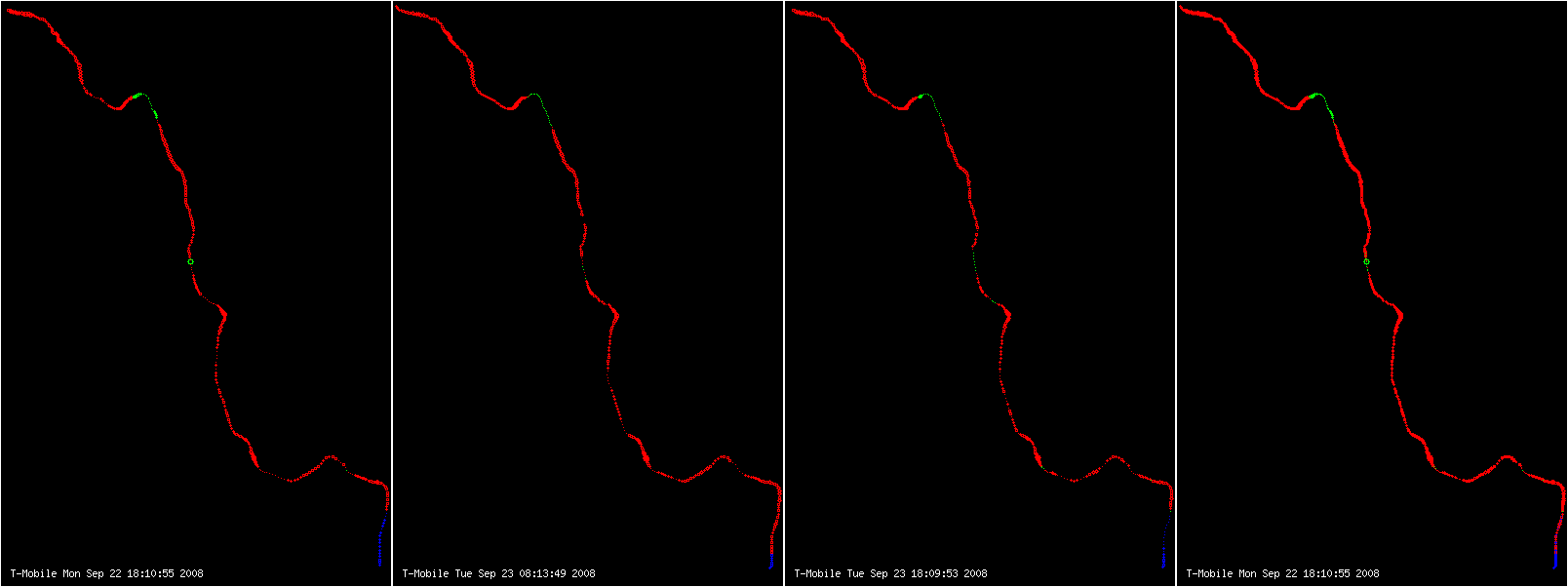
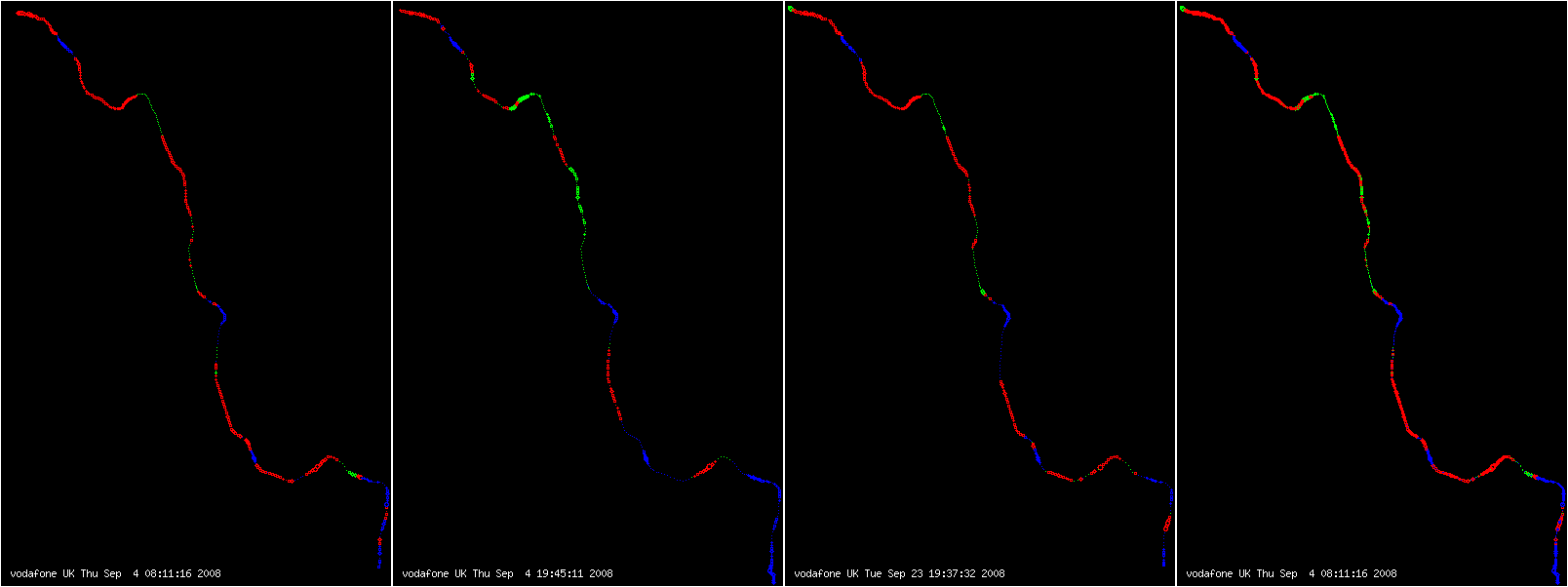
A second piece of Perl took this data and drew the maps you see below. The graph on the right for each provider is all data points. Red means 2G, blue means 3G, green means "Limited Service" (ie it could see a signal, but not one it was allowed to connect to). White means that we had a GPS location and no signal at all. Click on the maps for bigger versions. You can see the route on OpenStreetMap - my graphs are a little squished horizontally, but the journey is from Castlerock (top left on the coast near Coleraine) to Belfast (bottom right).

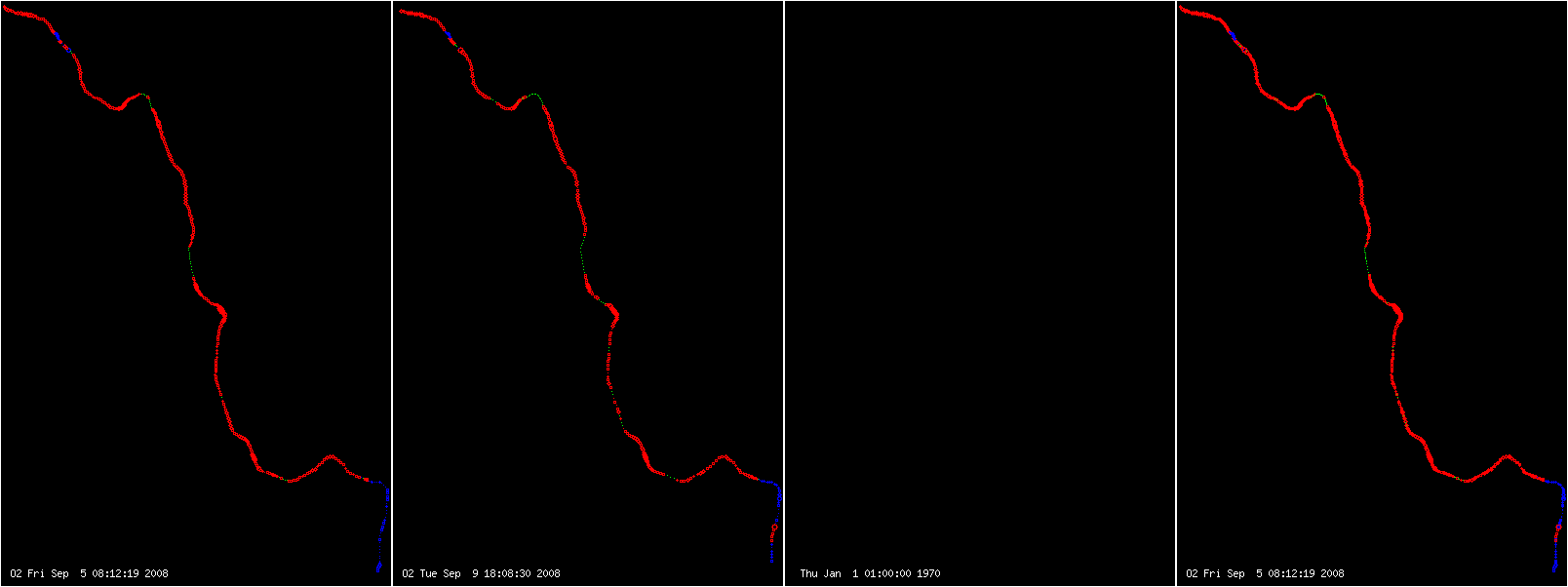

At first glance 3 look to be the best bet. Lots of blue, a reasonably priced data plan. Except they can't hold up a session to save themselves. Not only does a 2G/3G handover almost always seem to result in a drop, but I had periods of failing to get a 2G session up at all and had some random drops while in 3G coverage as well. So strike them off.
O2 and T-Mobile don't manage any 3G outside Belfast (that's the bottom right corner btw). I found that a few periods of 3G along the journey helped a lot; it meant I could do a quick mail sync rather than the long drawn out affair it was on a 2G connection. They can both handle handover between 2G/3G and keep a session up for most of the journey, but the lack of speed counts them out.
Vodafone managed the worst reception, which is disappointing. I found them quite good when I lived in England (my datacard is from a Vodafone Pay as You Use data contract). I did find sessions being dropped during the no signal regions, so they just don't seem to be a good bet.
Which leaves Orange. I've had issues with Orange and data in the past (pre 2004 IIRC) but in testing they were able to keep a session up between Belfast and Castlerock, handling 2G/3G handover fine. Coverage was reasonably good and they manage 3G at several points along the journey (the blue points roughly correspond to Coleraine, Ballymena, Antrim and Belfast). I understand Orange have some EDGE capability, but my card doesn't do EDGE so I've no idea if that'll be an extra gain or not. I had a few issues with getting dud DNS servers but this happened with the other providers too so I was beginning to suspect the datacard of playing up. Manually setting known good servers in resolv.conf worked fine.
So, before I go and sign up to an 18 month Orange contract, what have I forgotten?
 I recently bought a 4GB
 After a few weeks of using the Clip, I’m extremely pleased so far. The battery life is much longer than I’d ever want to listen to music for continuously (they claim 15 hours, and I haven’t gotten it down to less than half charge yet). It’s light in the hand but not too flimsy in feel, the clip makes it easy to attach to e.g. shorts, the interface is easy to use, and the sound quality is good. After upgrading to the latest firmware, it plays
 Importing bugs from the Debian Bug Tracking System into UDD (the Ultimate Debian Database) in a reasonable time is challenging. The BTS uses flat files to store bug information, and importing a bug typically requires reading a ’summary’ file, and a file containing the verisoning information, both of a few hundred bytes. That looks easy, but when you multiply it by ~70000 unarchived bugs, it takes a lot of time (about 40 minutes) to read those ~100k files, because the import process will block on every I/O. The problem is not the amount of data to read (19.8 MB for summary files, 7.4 MB for versioning files), but the number of files (69612 summary files, 17507 versioning files).
The obvious solution is to preload all the files into the page cache, so they are there when you need them. But you can’t simply do that with
 Two tips on using ssh for alioth.
Just because I currently have sloooow connection to alioth,
I looked into making the connection better.
Installing pdnsd and improving perceived DNS performance,
installing webcaching etc are important too, but
there is a ssh improvements which can be done.
Using ControlMaster argument for ssh.
You can have a master ssh session open, and ssh will reuse
that connection, without asking for your password every
time, just like using ssh-agent, but faster.
I remembered this setting just because someone mentioned
alioth -guest login names being a nuisance because they always have to
specify it on ssh and scp; you don't.
You just set the respective 'User' directive to the -guest names.
 (when your wife/SO is not around)
 When the Debian installer starts, it will normally ask you what language
you want to install in and gives you a really long list of languages to
choose from. Unfortunately, that's not how it works when you install on a
headless NAS device. The reason for this is that installations on NAS
devices are done via SSH and the installer normally brings the network up
after asking the user for their language. So we'd simply skip the language
question and go with English.
When Timo Jyrinki recently mentioned that he couldn't install in Finnish,
Frans Pop pointed out that localechooser has changed a lot since etch and
that it should now be possible to have the language question after setting
up the network. This turned out to be correct and I managed to choose a
different language but the installer still showed everything in English.
Frans reminded me that the installer drops all translations that are not
necessary but unfortunately this happens too early in our case. He pointed
me to a variable that determines whether translations will be dropped. So
in lenny translations will not be dropped on NAS devices that have enough
RAM and users will be asked when they connect to the installer via SSH what
language they'd like to install in.

 In few hours after releasing 1.20.93 it became obvious that I will need
another testing release, because number of bug fixes grow too much. So here it
comes. Schedule for 1.21.0 is Tuesday next week, so please report any problems
you face with this testing version.
Full list of changes in 1.20.94:
 After Lennart posted his
 Dear
