After my last post on Portal, there was a sale of The Talos Principle, so I got it and started playing. And soon I got stuck at these kind of puzzles where one has to fit in pieces into a frame. As a logician I hate to solve something by trial and error, so I decided I write a solver for these kind of puzzles, based on a propositional logic encoding and satisfiability solver. Sometimes it is good to be logician!
In the Talos Principle, access to new worlds and specific items is often blocked by gates that open by putting Sigils into the frame. Of course, collecting the sigils is the most challenging part, but that is often solvable by logical thinking. On the other hand, solving these fitting puzzles drove me crazy, so let us solve them with a SAT solver.
Encoding
I used a propositional encoding that for each combination of cells and sigils assigns a propositional variable, which is true if the specific sigil rests in on that cell in the final solution. That is, we have variable (encoded as x_i_j_n) where runs over the cells of the frame, and over the (numbered) sigils.
Setup
I have written a perl program that for a definition of a puzzle (see later), outputs SMT2 code, which then is checked for satisfiability and generation of model with the z3 solver (which is available in Debian).
Necessary assertions
We have to state relations between these propositional variables to obtain a proper solution, in particular we have added the following statements:
every field has at least one sigil on it
every field has at most one sigil on it
every sigil is used at least once
defining equations for the sigil s form
Let us go through them one by one:
Every field has at least on sigil on it
That is an easy part by asserting
In the SMT2 code it would look like
(assert (or x_i_j_1 x_i_j_2 ... x_i_j_n))
Every field has at most one sigil on it
This can be achieved by asserting for each tile and each pair of different sigil (numbers), that not both of the two hold:
Every sigil is used at least once
This was a bit a tricky one. First I thought I want to express that every sigil is used exactly once by excluding that for one sigil there are more fields assigned to it then the sigil contains parts. So if a sigil occupies 4 tiles, then every combination of 5 tiles needs to evaluate to false. But with 8 8 or so frames, the number of combinations simply explodes to above several million, which brings my harddrive size and z3 to an end.
The better idea was to say that every sigil was used at least once. Since all sigils together exactly fill the frame, this is enough. This can be done easily by assuming that for each sigil, at least one of the tiles is assigned to it:
or in SMT code for a 6 6 frame and the first sigil:
(assert (or x_1_1_n x_1_2_n ... x_6_6_1))
Defining equations for the sigil s form
Of course the most important part are the defining equations for the various sigils. Here I choose the following path:
choose for each sigil form an anchor point
for each tile in the frame and each sigil, put the anchor of the sigil on the tile, and express the 4 directions of rotation
So for example for the top-most sigil in the above photo, I choose the anchor point to be the center, and if that was in , I need to assume that for the upright position
holds. In the same way, when rotated right, we need
All these options have to be disjunctively connected, in SMT code for the case where the anchor lies at (4,2).
When generating these equations one has to be careful not to include rotated sigils that stick out of the frame, though.
Although the above might not be the optimal encoding, the given assertions suffice to check for SAT and produce a model, which allows me to solve the riddles.
Implementation in Perl
To generate the SMT2 code, I used a Perl script, which is very quickly hacked together. The principle function is (already coded for the above riddle):
where the first two arguments define the size of the frame, and the rest are codes for sigil types:
a podest, the first sigil in the above screen shot
b stick, the third sigil above, the long stick
cl club left, the forth sigil above, a club facing left
cr club right, the sixth sigil above, a club facing right
q square, the ninth sigil above
sl step left, the last sigil in the above image
sr step right, mirror of step left (not used above)
This function first sets up the header of the smt2 file, followed by shipping out all the necessary variable definitions, in SMT these are defined as Boolean functions, and the other assertions (please see the Perl code linked below for details). The most interesting part are the definitions of the sigils:
# for each piece, call the defining assertionsformy$n(1..$nn)my$p=$pieces[$n-1];print"(assert (or\n";formy$i(1..$xx)formy$j(1..$yy)if($peq'q')
type_square($xx,$yy,$i,$j,$n);elsif($peq'a')
type_potest($xx,$yy,$i,$j,$n);....
Every sigil type has its own definiton, in case of the a podest, the type_podest function:
sub type_potest my($xx,$yy,$i,$j,$n)=@_;my($il,$jl,$ir,$jr,$iu,$ju);$il=$i-1;$ir=$i+1;$iu=$i;$jl=$jr=$j;$ju=$j+1;
do_rotate_shipout($xx,$yy,$i,$j,$n,$il,$jl,$ir,$jr,$iu,$ju);
This function is prototypical, one defines the tiles a sigil occupies if the anchor is placed on (i,j) for an arbitrary orientation of the sigil, and then calls do_rotate_shipout on the list of occupied tiles. This function in turn is very simple:
sub do_rotate_shipout my($xx,$yy,$i,$j,$n,@pairs)=@_;formy$g(0..3)@pairs= rotate90($i,$j,@pairs);
check_and_shipout($xx,$yy,$n,$i,$j,@pairs);
as it only rotates four times by 90 degrees, and then checks whether the rotated sigil is completely within the frame, and if yes ships out the assertion code. The rotation is done by multiplying the vector from (i,j) to the tile position with the (0 -1 1 0) matrix and adding it again to (i,j):
sub rotate90 my($i,$j,@pairs)=@_;my@ret;while(@pairs)my$ii=shift@pairs;my$jj=shift@pairs;my$ni=$i-($jj-$j);my$nj=$j+($ii-$i);push@ret,$ni,$nj;return@ret;
There are a few more functions, for those interested, the full Perl code is here: tangram.pl. There is no user interface or any config file reading done, I just edit the source code if I need to solve a riddle.
Massaging the output
Last but not least, the output of the z3 solver is a bit noisy, so I run the output through a few Unix commands to get only the true assignments, which gives me the location of the tiles. That is, I run the following pipeline:
One of my clients has a NAS device. Last week they tried to do what should have been a routine RAID operation, they added a new larger disk as a hot-spare and told the RAID array to replace one of the active disks with the hot-spare. The aim was to replace the disks one at a time to grow the array. But one of the other disks had an error during the rebuild and things fell apart.
I was called in after the NAS had been rebooted when it was refusing to recognise the RAID. The first thing that occurred to me is that maybe RAID-5 isn t a good choice for the RAID. While it s theoretically possible for a RAID rebuild to not fail in such a situation (the data that couldn t be read from the disk with an error could have been regenerated from the disk that was being replaced) it seems that the RAID implementation in question couldn t do it. As the NAS is running Linux I presume that at least older versions of Linux have the same problem. Of course if you have a RAID array that has 7 disks running RAID-6 with a hot-spare then you only get the capacity of 4 disks. But RAID-6 with no hot-spare should be at least as reliable as RAID-5 with a hot-spare.
Whenever you recover from disk problems the first thing you want to do is to make a read-only copy of the data. Then you can t make things worse. This is a problem when you are dealing with 7 disks, fortunately they were only 3TB disks and only each had 2TB in use. So I found some space on a ZFS pool and bought a few 6TB disks which I formatted as BTRFS filesystems. For this task I only wanted filesystems that support snapshots so I could work on snapshots not on the original copy.
I expect that at some future time I will be called in when an array of 6+ disks of the largest available size fails. This will be a more difficult problem to solve as I don t own any system that can handle so many disks.
I copied a few of the disks to a ZFS filesystem on a Dell PowerEdge T110 running kernel 3.2.68. Unfortunately that system seems to have a problem with USB, when copying from 4 disks at once each disk was reading about 10MB/s and when copying from 3 disks each disk was reading about 13MB/s. It seems that the system has an aggregate USB bandwidth of 40MB/s slightly greater than USB 2.0 speed. This made the process take longer than expected.
One of the disks had a read error, this was presumably the cause of the original RAID failure. dd has the option conv=noerror to make it continue after a read error. This initially seemed good but the resulting file was smaller than the source partition. It seems that conv=noerror doesn t seek the output file to maintain input and output alignment. If I had a hard drive filled with plain ASCII that MIGHT even be useful, but for a filesystem image it s worse than useless. The only option was to repeatedly run dd with matching skip and seek options incrementing by 1K until it had passed the section with errors.
for n in /dev/loop[0-6] ; do echo $n ; mdadm examine -v -v scan $n grep Events ; done
Once I had all the images I had to assemble them. The Linux Software RAID didn t like the array because not all the devices had the same event count. The way Linux Software RAID (and probably most RAID implementations) work is that each member of the array has an event counter that is incremented when disks are added, removed, and when data is written. If there is an error then after a reboot only disks with matching event counts will be used. The above command shows the Events count for all the disks.
Fortunately different event numbers aren t going to stop us. After assembling the array (which failed to run) I ran mdadm -R /dev/md1 which kicked some members out. I then added them back manually and forced the array to run. Unfortunately attempts to write to the array failed (presumably due to mismatched event counts).
Now my next problem is that I can make a 10TB degraded RAID-5 array which is read-only but I can t mount the XFS filesystem because XFS wants to replay the journal. So my next step is to buy another 2*6TB disks to make a RAID-0 array to contain an image of that XFS filesystem.
Finally backups are a really good thing
TeX Live 2015 has been released, and normal operation with daily updates has started. During the freeze time and afterwards I have made a few changes to the TeX Live Manager (tlmgr) that I want to highlight here.
The main changes are better error and return code handling (which should be hardly visible for the users), and more more informative output of the tlmgr info action, incorporating more data from the TeX Catalogue.
Error handling
With a program that started as an experiment that has grown into the central configuration and management program, there are lots of old code pieces that did not do proper error signaling via return values. That meant that the return value of a tlmgr run didn t have any meaning, mostly because it was 0 (success) most of the times.
I have now tried to do proper return code handling throughout the tlmgr code base, that is the tlmgr.pl and the necessary Perl modules.
While this should not be a user visible changes, it turned out that the MacOS TeX Live Utility by Adam Maxwell (btw, a great program, it would be nice to have something similar written for Unix replacing the bit clumsy tlmgr gui), got broken for paper configuration, due to forgotten return value fixes in the TLPaper.pm module. That is fixed now in our repository.
All in all we do hope that the return value of a tlmgr run now gives proper information about success or error. I might add a bit more semantics by returning bit-values in case of errors, but this is in early stages of thinking.
TeX Catalogue data in tlmgr info
Since more or less the very beginning we incorporated information from the TeX Catalogue into our database. In particular did we carry over the license information, version, CTAN directory, and date of last change of information in the Catalogue.
Recently (or not so recently, I actually don t know), CTAN has enriched their package view with more information, in particular a list of topics, and a list of related packages. Take for example the Asana-math package. It s CTAN page now displays besides the previously available information also a list of topics and a list of related packages. The topic index can also be browsed directly when searching for a specific package.
I have now added functionality in the TeX Live Manager that tlmgr info also prints out the topic names and related packages. In the case of Asana Math fonts, that would look like:
$ tlmgr info Asana-Math
package:     Asana-Math
category:    Package
shortdesc:   A font to typeset maths in Xe(La)TeX and Lua(La)TeX.
longdesc:    The Asana-Math font is an OpenType font that includes almost all mathematical Unicode symbols and it can be used to typeset mathematical text with any software that can understand the MATH OpenType table (e.g., XeTeX 0.997 and Microsoft Word 2007). The font is beta software. Typesetting support for use with LaTeX is provided by the fontspec and unicode-math packages.
installed:   Yes
revision:    37556
sizes:       doc: 9k, run: 1177k
relocatable: No
cat-version: 000.955
cat-date:    2015-06-02 20:04:19 +0200
cat-license: ofl
cat-topics:  font font-maths font-otf font-ttf
cat-related: stix xits
collection:  collection-fontsextra
GUIs could use the topic names and related packages to link directly to the CTAN page.
At the moment the related packages are named according to CTAN standards, which are a bit different from what we use in TeX Live. I am not sure whether I will change that, or ship out both names. We will see.
The changes are currently in testing, see section about Test version here, and will be pushed out in due time, probably in the next week.
As usual, in case of any problems or bugs, please contact us at the TeX Live mailing list.
Enjoy.
The Core Infrastructure Initiative announced today that they will
support two Debian Developers, Holger Levsen and J r my Bobbio, with $200,000
to advance their Debian work in reproducible builds and to collaborate more
closely with other distributions such as Fedora, Ubuntu, OpenWrt to benefit
from this effort.
The Core Infrastructure Initiative (CII) was established in 2014 to
fortify the security of key open source projects. This initiative is funded by
more than 20 companies and managed by The Linux Foundation.
The reproducible builds initiative aims to enable anyone to reproduce
bit by bit identical binary packages from a given source, thus enabling anyone
to independently verify that a binary matches the source code from which it
was said it was derived. For example, this allow the users of Debian to rebuild
packages and obtain exactly identical packages to the ones provided by the
Debian repositories.
The first 4 weeks have been really great. I had the chance to work on the new webapp, the copyright tracker. Here are my first 4 reports for the weeks:
Summary
During these weeks i completed the navigation (by prefix, list of versions etc) for the copyright tracker, the license rendering and the API for searching by checksum and by package/version/filename.
Still under review the batch API (request many files at once) and the the respective views for the API.
In the following weeks I ll work on the database and the plugins to mine license information on update time.
Experience
The experience i accumulate every week is immense. During the review process of my code i receive great feedback from zack, matthieu, and jpleau. It is a great chance for everyone to improve his/hers coding skills. At the university we barely get any feedback on our code, let alone communicate directly with professors to find the best solution for a given problem.
I think it gets development in another level. For example at the university we use git/mercurial for our projects, although we don't really pay attention at commit messages and we marginally make use of these tools besides 'commit pull push'. During the last weeks i had the chance to use far more commands in order to squash amend rebase commits to have a beautiful and useful log history! And this is just a minor example. All in all I think it is a great introduction to the free/open source community for somebody, like me, who has been for years only a user and couldn't find the opportunity to contribute!
And don't get me wrong, gsoc is not only about coding skills. At least for myself having the chance to get just a small taste of how the Debian community works, gets organised, get things done (!) is somehow priceless!
TDD
I have finally understood why test driven development is so powerful. As i am advancing in the project i am sometimes obliged to retouch some areas, refactor pieces of code. Having a great test suite that keeps you on track about the changes, and possible outages in advance is pretty powerful.
What is coming
I feel the project is on the right path. Both clemux (fellow gsoc student working on debsources) and me are advancing in a productive pace. I hope that soon enough the copyright Blueprint will be completed (most notable pending functionalities are the plugins-hooks to mine the licenses at update time, introduction of at least another license oracle possible ninka, statistics) so that everyone can take profit of the new tools provided by DebSources.
Although we haven't talked much about it the patch tracker should also come into the play sooner rather than later.
Stay tuned!
The first 4 weeks have been really great. I had the chance to work on the new webapp, the copyright tracker. Here are my first 4 reports for the weeks:
Summary
During these weeks i completed the navigation (by prefix, list of versions etc) for the copyright tracker, the license rendering and the API for searching by checksum and by package/version/filename.
Still under review the batch API (request many files at once) and the the respective views for the API.
In the following weeks I ll work on the database and the plugins to mine license information on update time.
Experience
The experience i accumulate every week is immense. During the review process of my code i receive great feedback from zack, matthieu, and jpleau. It is a great chance for everyone to improve his/hers coding skills. At the university we barely get any feedback on our code, let alone communicate directly with professors to find the best solution for a given problem.
I think it gets development in another level. For example at the university we use git/mercurial for our projects, although we don't really pay attention at commit messages and we marginally make use of these tools besides 'commit pull push'. During the last weeks i had the chance to use far more commands in order to squash amend rebase commits to have a beautiful and useful log history! And this is just a minor example. All in all I think it is a great introduction to the free/open source community for somebody, like me, who has been for years only a user and couldn't find the opportunity to contribute!
And don't get me wrong, gsoc is not only about coding skills. At least for myself having the chance to get just a small taste of how the Debian community works, gets organised, get things done (!) is somehow priceless!
TDD
I have finally understood why test driven development is so powerful. As i am advancing in the project i am sometimes obliged to retouch some areas, refactor pieces of code. Having a great test suite that keeps you on track about the changes, and possible outages in advance is pretty powerful.
What is coming
I feel the project is on the right path. Both clemux (fellow gsoc student working on debsources) and me are advancing in a productive pace. I hope that soon enough the copyright Blueprint will be completed (most notable pending functionalities are the plugins-hooks to mine the licenses at update time, introduction of at least another license oracle possible ninka, statistics) so that everyone can take profit of the new tools provided by DebSources.
Although we haven't talked much about it the patch tracker should also come into the play sooner rather than later.
Stay tuned!
Recently I've been experimenting with camlistore, which is yet another object storage system.
Camlistore gains immediate points because it is written in Go, and is a project initiated by Brad Fitzpatrick, the creator of Perlbal, memcached, and Livejournal of course.
Camlistore is designed exactly how I'd like to see an object storage-system - each server allows you to:
Upload a chunk of data, getting an ID in return.
Download a chunk of data, by ID.
Iterate over all available IDs.
It should be noted more is possible, there's a pretty web UI for example, but I'm simplifying. Do your own homework :)
With those primitives you can allow a client-library to upload a file once, then in the background a bunch of dumb servers can decide amongst themselves "Hey I have data with ID:33333 - Do you?". If nobody else does they can upload a second copy.
In short this kind of system allows the replication to be decoupled from the storage. The obvious risk is obvious though: if you upload a file the chunks might live on a host that dies 20 minutes later, just before the content was replicated. That risk is minimal, but valid.
There is also the risk that sudden rashes of uploads leave the system consuming all the internal-bandwith constantly comparing chunk-IDs, trying to see if data is replaced that has been copied numerous times in the past, or trying to play "catch-up" if the new-content is larger than the replica-bandwidth. I guess it should possible to detect those conditions, but they're things to be concerned about.
Anyway the biggest downside with camlistore is documentation about rebalancing, replication, or anything other than simple single-server setups. Some people have blogged about it, and I got it working between two nodes, but I didn't feel confident it was as robust as I wanted it to be.
I have a strong belief that Camlistore will become a project of joy and wonder, but it isn't quite there yet. I certainly don't want to stop watching it :)
On to the more personal .. I'm all about the object storage these days. Right now most of my objects are packed in a collection of boxes. On the 6th of next month a shipping container will come pick them up and take them to Finland.
For pretty much 20 days in a row we've been taking things to the skip, or the local charity-shops. I expect that by the time we've relocated the amount of possesions we'll maintain will be at least a fifth of our current levels.
We're working on the general rule of thumb: "If it is possible to replace an item we will not take it". That means chess-sets, mirrors, etc, will not be carried. DVDs, for example, have been slashed brutally such that we're only transferring 40 out of a starting collection of 500+.
Only personal, one-off, unique, or "significant" items will be transported. This includes things like personal photographs, family items, and similar. Clothes? Well I need to take one jacket, but more can be bought. The only place I put my foot down was books. Yes I'm a kindle-user these days, but I spent many years tracking down some rare volumes, and though it would be possible to repeat that effort I just don't want to.
I've also decided that I'm carrying my complete toolbox. Some of the tools I took with me when I left home at 18 have stayed with me for the past 20+ years. I don't need this specific crowbar, or axe, but I'm damned if I'm going to lose them now. So they stay. Object storage - some objects are more important than they should be!
Quite a while ago, I wrote a small Haskell library called circle-packing to pack circles in a tight arrangement. Back then, I used the Haskell to JavaScript compiler fay to create a pretty online demo of that library, and shortly after, I create the identical demo using haste (another Haskell to JavaScript compiler).
The main competitor of these two compilers, and the most promising one, is GHCJS. Back then, it was too annoying to install. But after two years, things have changed, and it only takes a few simple commands to get GHCJS running, so I finally created the circle packing demo in a GHCJS variant.
Quick summary: Cabal integration is very good (like haste, but unline fay), interfacing JavaScript is nice and easy (like fay, but unlike haste), and a quick check seems to indicate that it is faster than either of these two. I should note that I did not update the other two demos, so they represent the state of fay and haste back then, respectively.
With GHCJS now available at my fingertips, maybe I will produce some more Haskell to be run in your browser. For example, I could port FrakView, a GUI program to render, expore and explain iterated function systems, from GTK to HTML.
What happened about the reproducible
builds effort for this week:
Toolchain fixes
Uploads that should help other packages:
Stephen Kitt uploaded mingw-w64/4.0.2-2 which avoids inserting timestamps in PE binaries, and specify dlltool's temp prefix so it generates reproducible files.
Stephen Kitt uploaded binutils-mingw-w64/6.1 which fixed dlltool to initialize its output's .idata$6 section, avoiding random data ending up there.
Patch submitted for toolchain issues:
#787159 on openjdk-7 by Emmanuel Bourg: sort the annotations and enums in package-tree.html produced by javadoc.
#787250 on python-qt4 by Reiner Herrmann: sort imported modules to get reproducible output.
#787251 on pyqt5 by Reiner Herrmann: sort imported modules to get reproducible output.
Some discussions have been started in Debian and with upstream:
#786927 on flowscan by Dhole: remove timestamps from gzip files and fix mtimes of packaged files.
#786959 on python3.5 by Lunar: set build date of binary and documentation to the time of latest debian/changelog entry, prevent gzip from storing a timestamp.
reproducible.debian.net
Holger Levsen added two new package sets: pkg-javascript-devel and pkg-php-pear. The list of packages with and without notes are now sorted by age of the latest build.
Mattia Rizzolo added support for email notifications so that maintainers can be warned when a package becomes unreproducible. Please ask Mattia or Holger or in the #debian-reproducible IRC channel if you want to be notified for your packages!
strip-nondeterminism development
Andrew Ayer fixed the gzip handler so that it skip adding a predetermined timestamp when there was none.
Documentation update
Lunar added documentation about mtimes of file extracted using unzip being timezone dependent. He also wrote a short example on how to test reproducibility.
Stephen Kitt updated the documentation about timestamps in PE binaries.
Documentation and scripts to perform weekly reports were published by Lunar.
Package reviews
50 obsolete
reviews have
been removed, 51 added and 29 updated this week. Thanks Chris West and Mathieu
Bridon amongst others.
New identified issues:
Misc.
Lunar will be talking (in French) about reproducible builds at Pas Sage en Seine on June 19th, at 15:00 in Paris.
Meeting will
happen this Wednesday, 19:00 UTC.
The version of btrfs-tools in Debian/Jessie is incapable of creating a filesystem that can be mounted by the kernel in Debian/Wheezy. If you want to use a BTRFS filesystem on Jessie and Wheezy (which isn t uncommon with removable devices) the only options are to use the Wheezy version of mkfs.btrfs or to use a Jessie kernel on Wheezy. I recently got bitten by this issue when I created a BTRFS filesystem on a removable device with a lot of important data (which is why I wanted metadata duplication and checksums) and had to read it on a server running Wheezy. Fortunately KVM in Wheezy works really well so I created a virtual machine to read the disk. Setting up a new KVM isn t that difficult, but it s not something I want to do while a client is anxiously waiting for their data.
BTRFS has been working well for me apart from the Jessie/Wheezy compatability issue (which was an annoyance but didn t stop me doing what I wanted). I haven t written a BTRFS status report for a while because everything has been OK and there has been nothing exciting to report.
I regularly get errors from the cron jobs that run a balance supposedly running out of free space. I have the cron jobs due to past problems with BTRFS running out of metadata space. In spite of the jobs often failing the systems keep working so I m not too worried at the moment. I think this is a bug, but there are many more important bugs.
Linux kernel version 3.19 was the first version to have working support for RAID-5 recovery. This means version 3.19 was the first version to have usable RAID-5 (I think there is no point even having RAID-5 without recovery). It wouldn t be prudent to trust your important data to a new feature in a filesystem. So at this stage if I needed a very large scratch space then BTRFS RAID-5 might be a viable option but for anything else I wouldn t use it. BTRFS still has had little performance optimisation, while this doesn t matter much for SSD and for single-disk filesystems for a RAID-5 of hard drives that would probably hurt a lot. Maybe BTRFS RAID-5 would be good for a scratch array of SSDs. The reports of problems with RAID-5 don t surprise me at all.
I have a BTRFS RAID-1 filesystem on 2*4TB disks which is giving poor performance on metadata, simple operations like ls -l on a directory with ~200 subdirectories takes many seconds to run. I suspect that part of the problem is due to the filesystem being written by cron jobs with files accumulating over more than a year. The btrfs filesystem command (see btrfs-filesystem(8)) allows defragmenting files and directory trees, but unfortunately it doesn t support recursively defragmenting directories but not files. I really wish there was a way to get BTRFS to put all metadata on SSD and all data on hard drives. Sander suggested the following command to defragment directories on the BTRFS mailing list:
find / -xdev -type d -execdir btrfs filesystem defrag -c +
Below is the output of zfs list -t snapshot on a server I run, it s often handy to know how much space is used by snapshots, but unfortunately BTRFS has no support for this.
NAME
USED
AVAIL
REFER
MOUNTPOINT
hetz0/be0-mail@2015-03-10
2.88G
387G
hetz0/be0-mail@2015-03-11
1.12G
388G
hetz0/be0-mail@2015-03-12
1.11G
388G
hetz0/be0-mail@2015-03-13
1.19G
388G
Hugo pointed out on the BTRFS mailing list that the following command will give the amount of space used for snapshots. $SNAPSHOT is the name of a snapshot and $LASTGEN is the generation number of the previous snapshot you want to compare with.
btrfs subvolume find-new $SNAPSHOT $LASTGEN awk ' total = total + $7 END print total '
One upside of the BTRFS implementation in this regard is that the above btrfs command without being piped through awk shows you the names of files that are being written and the amounts of data written to them. Through casually examining this output I discovered that the most written files in my home directory were under the .cache directory (which wasn t exactly a surprise).
Now I am configuring workstations with a separate subvolume for ~/.cache for the main user. This means that ~/.cache changes don t get stored in the hourly snapshots and less disk space is used for snapshots.
Conclusion
My observation is that things are going quite well with BTRFS. It s more than 6 months since I had a noteworthy problem which is pretty good for a filesystem that s still under active development. But there are still many systems I run which could benefit from the data integrity features of ZFS and BTRFS that don t have the resources to run ZFS and need more reliability than I can expect from an unattended BTRFS system.
At this time the only servers I run with BTRFS are located within a reasonable drive from my home (not the servers in Germany and the US) and are easily accessible (not the embedded systems). ZFS is working well for some of the servers in Germany. Eventually I ll probably run ZFS on all the hosted servers in Germany and the US, I expect that will happen before I m comfortable running BTRFS on such systems. For the embedded systems I will just take the risk of data loss/corruption for the next few years.
There are many translation plugins available for WordPress, and most of them deal with translations of articles. This might be of interest for others, but not for me. If you have a blog with visitors from various language background, because you are living abroad, or writing in several languages, you might feel tempted to provide visitors with a localized environment , meaning that as much as possible is translated into the native language of the visitor, without actually translating content but allowing to.
In my case I am writing mostly in English and Japanese, but sometimes (in former times) in Italian and now and then in my mother tongue, German. Visitors from my site are from all over the world, but at least for Japanese visitors I wanted to provide a localized environment. This blog describes how to get as much as possible translated of your blog, and here I mean not the actual articles, because this is the easy part and most translation plugins handle that fine, but the things around the articles (categories, tags, headers, ).
Starting point and aims
My starting point was a blog where I already had language added as extra taxonomy, and have tagged all articles with a language. But I didn t have any other translation plugin installed or used. Furthermore, I am using a child theme of the main theme in use (that is always a good idea anyway!). And of course, the theme you are using should be prepared for translation, that is that most literal strings in the theme source code are wrapped in __( ... ) or _e( ... ) calls. And by the way, if you don t have the language taxonomy, don t worry, that will come in automatically.
One more thing: The following descriptions are not for the very beginner. I expect certain fluency with WordPress, where for example themese and plugins keep their files, as well as PHP programming experience is needed for some of the steps.
With this starting point my aims were quite clear:
allow for translation of articles
translate as much as possible of the surroundings
auto-selection of language either depending on article or on browser language of visitor
by default show all articles independent of selected language
if possible, keep database clean as far as possible
Translation plugins
There is a huge bunch of translation plugins, localization plugins, or internationalization plugins out there, and it is hard to select one. I don t say that what I propose here is the optimal solution, just one that I was pointed at by a colleague, namely utilizing the xili-language plugin.
Installation and initial setup
Not much to say here, just follow the usual procedure (search, install, activate), followed by the initial setup of xili-language. If you haven t had a language taxonomy by now, you can add languages from the preference page of xili-language, first tab. After having added some languages you should have something similar to the above screen shot. Having defined your languages, you can assign a language to your articles, but for now nothing has actually changed on the blog pages.
As I already mentioned, I assume that you are using a child theme. In this case you should consult the fourth tab of the xili-language settings page, called Managing language files, where on the right you should see / set up things in a way that translations in the child theme override the ones in the main theme, see screen shot on the right. I just mention here that there is another xili plugin, xili-dictionary, that can do a lot of things for you when it comes to translation but I couldn t figure out its operation mode, so I switched back (i.e., uninstalled that plugin) and used normal .po/.mo files as described in the next section.
Adding translations po and mo files
Translations are handled in normal (at least for the Unix world) gettext format. Matthias wrote about this in this blog. In principle you have to:
create a directory languages in your child theme folder
create there .po file named local-LL.po or local-LL_DD.po, where LL and LL_DD are the same as the values in the field ISO Names in the list of defined languages (see above)
convert the .po files to .mo files using
msgfmt local-LL.po -o local-LL.mo
The contents of the po files are described in Matthias blog, and in the following when I say add a translation, then I mean: adding a stanza
msgid "some string"
msgstr "translation of some string"
to the po file, and not forgetting to recompile it to mo file.
So let us go through a list of changes I made to translate various pieces of the blog appearance:
Translation of categories
This is the easiest part, simply throw in the names of your categories into the respective local-DD_LL.po file, and be ready. In my case I used local-ja.po which besides other categories contains stanzas like:
msgid "Travel"
msgstr " "
Translation of widget titles
In most cases the widget titles are already automatically translated, if the plugin/widget author cared for it, meaning that he called the widget_title filter on the title. If this does not happen, please report this to the widget/plugin author. I have done this for example for the simple links plugin, which I use for various elements of the side-bar. The author was extremely responsive and the fix will be in the next release is already in the latest release big thanks!
Translation of tags
This is a bit a problem, as the tags appear in various places on my blog: next to the title line and the footer of each blog, as well as in the tag cloud in the side bar.
Furthermore, I want to translate tags instead of having related tag groups as provided by xili tidy tags plugin, so we have to deal with the various appearances of tags one by one:
Tags on the main page shown by the theme
This is the easier part in my case I had already a customized content.php and content-single.php in my child theme folder. If not, you need to copy the one from the parent theme and change the appearance of it to translate tags. Since this is something that depends on the specific theme, I cannot give detailed advice, but if you see something like:
(there are for sure simpler ways ) This code loops over the tags and translates them using the __ function. Note that the second parameter must be the text domain of the parent theme.
If you have done this right and the web site is still running (I recommend testing it on a test installation I had white pages many times due to php programming errors), and of course you have actual translations available and are looking at a localized version of the web site, then the list of tags as shown by your theme should be translated.
Tag cloud widget
This one is a tricky one: The tag cloud widget comes by default with WordPress, but doesn t translate the tags. I tried a few variants (e.g. creating a new widget as extension of the original tag cloud widget, and only changing the respective functions), but that didn t work out at all. I finally resorted to a trick: Reading the code of the original widget, I saw that it applies the tag-sort-filter filter on the array of tags. That allows us to hook into the tag cloud creating and translate the tags.
You have to add the following code to your child theme s functions.php:
function translate_instead_of_sort($tags)foreach((array)$tagsas$tag)$tag->name= __($tag->name,'mistylake');return$tags;
add_action('tag_cloud_sort','translate_instead_of_sort');
(again, don t forget to change the text domain in the __(.., ..) call!) There might be some more things one could do, like changing the priority to be used after the sorting, or sort directly, but I haven t played around with that. Using the above code and translating several of the tags, the tag cloud now looks like the screenshot on the right I know, it could use some tweaking. Also, now the untranslated tags are sorted all before the translated, things one probably can address with the priority of the filter.
Having done the above things, my blog page when Japanese is selected is now mostly in Japanese, with of course the exception the actual articles, which are in a variety of languages.
Open problems
There are a few things I haven t managed till now to translate, and they are mostly related to the Jetpack plugin, but not only:
translation of the calendar it is strange that although this is a standard widget of WordPress, the translation somehow does not work out there
transalation of the meta text entries (Log in, RSS feed, ) interestingly, even adding the translation of these strings did not help get them translated
translation of simple links text fields here I haven t invested by now
translation of (Jetpack) subscribe to this blog widget
I have a few ideas how to tackle this problem: With Jetpack the biggest problem seems that all the strings are translated in a different text domain. So one should be able to add some code to the functions.php to override/add translations to the jetpack text domain. But somehow it didn t work out in my case. The same goes for things that are in the WordPress core and use the translation functions without a text domain so I guess the translation function will use the main WordPress translation files/text domain.
Conclusion
The good thing of the xili-language plugin is that it does not change the actual posts (some plugins save the translations in the the post text), and is otherwise not too intrusive IMHO. Still, it falls short of allowing to translate various parts of the blog, including the widget areas.
I am not sure whether there are better plugins for this usage scenario, I would be surprised if not, but all the plugins I have seen were doing a bit too much on the article translation side and not enough on the translation of the surroundings side.
In any case, I would like to see more separation between the functionality of localization (translating the interface) and translation (translating the content). But at the moment I don t have enough impetus to write my own plugin for this.
If you have any suggestions for improvement, please let me know!
Enjoy.
If you manage a bunch of server machines, you will undoubtedly have run into the following OpenSSH question:
The authenticity of host 'host.example.org (1.2.3.4)' can't be established.
RSA key fingerprint is 1b:9b:b8:5e:74:b1:31:19:35:48:48:ba:7d:d0:01:f5.
Are you sure you want to continue connecting (yes/no)?
If the server is a single-user machine, where you are the only person expected to login on it, answering yes once and then using the ~/.ssh/known_hosts file to record the key fingerprint will (sort-of) work and protect you against future man-in-the-middle attacks. I say sort-of, since if you want to access the server from multiple machines, you will need to sync the known_hosts file somehow. And once your organization grows larger, and you aren t the only person that needs to login, having a policy that everyone just answers yes on first connection on all their machines is bad. The risk that someone is able to successfully MITM attack you grows every time someone types yes to these prompts.
Setting up one (or more) SSH Certificate Authority (CA) to create SSH Host Certificates, and have your users trust this CA, will allow you and your users to automatically trust the fingerprint of the host through the indirection of the SSH Host CA. I was surprised (but probably shouldn t have been) to find that deploying this is straightforward. Even setting this up with hardware-backed keys, stored on a YubiKey NEO, is easy. Below I will explain how to set this up for a hypothethical organization where two persons (sysadmins) are responsible for installing and configuring machines.
I m going to assume that you already have a couple of hosts up and running and that they run the OpenSSH daemon, so they have a /etc/ssh/ssh_host_rsa_key* public/private keypair, and that you have one YubiKey NEO with the PIV applet and that the NEO is in CCID mode. I don t believe it matters, but I m running a combination of Debian and Ubuntu machines. The Yubico PIV tool is used to configure the YubiKey NEO, and I will be using OpenSC s PKCS#11 library to connect OpenSSH with the YubiKey NEO. Let s install some tools:
Every person responsible for signing SSH Host Certificates in your organization needs a YubiKey NEO. For my example, there will only be two persons, but the number could be larger. Each one of them will have to go through the following process.
The first step is to prepare the NEO. First mode switch it to CCID using some device configuration tool, like yubikey-personalization.
ykpersonalize -m1
Then prepare the PIV applet in the YubiKey NEO. This is covered by the YubiKey NEO PIV Introduction but I ll reproduce the commands below. Do this on a disconnected machine, saving all files generated on one or more secure media and store that in a safe.
Then generate a RSA private key for the SSH Host CA, and generate a dummy X.509 certificate for that key. The only use for the X.509 certificate is to make PIV/PKCS#11 happy they want to be able to extract the public-key from the smartcard, and do that through the X.509 certificate.
You import the key and certificate to the PIV applet as follows:
yubico-piv-tool -k $key -a import-key -s 9c < ssh-$user-ca-key.pem
yubico-piv-tool -k $key -a import-certificate -s 9c < ssh-$user-ca-crt.pem
You now have a SSH Host CA ready to go! The first thing you want to do is to extract the public-key for the CA, and you use OpenSSH's ssh-keygen for this, specifying OpenSC's PKCS#11 module.
The reason is that scdaemon exclusively locks the smartcard, so no other application can access it. You need to kill scdaemon, which can be done as follows:
Each sysadmin needs to go through this process, and each user needs to add one line for each sysadmin. While you could put the same key/certificate on multiple YubiKey NEOs, to allow users to only have to put one line into their file, dealing with revocation becomes a bit more complicated if you do that. If you have multiple CA keys in use at the same time, you can roll over to new CA keys without disturbing production. Users may also have different policies for different machines, so that not all sysadmins have the power to create host keys for all machines in your organization.
The CA setup is now complete, however it isn't doing anything on its own. We need to sign some host keys using the CA, and to configure the hosts' sshd to use them. What you could do is something like this, for every host host.example.com that you want to create keys for:
The ssh-keygen command will use OpenSC's PKCS#11 library to talk to the PIV applet on the NEO, and it will prompt you for the PIN. Enter the PIN that you set above. The output of the command would be something like this:
Enter PIN for 'PIV_II (PIV Card Holder pin)':
Signed host key ssh_host_rsa_key-cert.pub: id "host.example.com" serial 0 for host.example.com valid from 2015-06-16T13:39:00 to 2016-06-14T13:40:58
The host now has a SSH Host Certificate installed. To use it, you must make sure that /etc/ssh/sshd_config has the following line:
You need to restart sshd to apply the configuration change. If you now try to connect to the host, you will likely still use the known_hosts fingerprint approach. So remove the fingerprint from your machine:
ssh-keygen -R $h
Now if you attempt to ssh to the host, and using the -v parameter to ssh, you will see the following:
debug1: Server host key: RSA-CERT 1b:9b:b8:5e:74:b1:31:19:35:48:48:ba:7d:d0:01:f5
debug1: Host 'host.example.com' is known and matches the RSA-CERT host certificate.
Success!
One aspect that may warrant further discussion is the host keys. Here I only created host certificates for the hosts' RSA key. You could create host certificate for the DSA, ECDSA and Ed25519 keys as well. The reason I did not do that was that in this organization, we all used GnuPG's gpg-agent/scdaemon with YubiKey NEO's OpenPGP Card Applet with RSA keys for user authentication. So only the host RSA key is relevant.
Revocation of a YubiKey NEO key is implemented by asking users to drop the corresponding line for one of the sysadmins, and regenerate the host certificate for the hosts that the sysadmin had created host certificates for. This is one reason users should have at least two CAs for your organization that they trust for signing host certificates, so they can migrate away from one of them to the other without interrupting operations.
Almost every new autopkgtest release brings some small improvements, but 3.14 got some reboot related changes worth pointing out.
First of all, I simplified and unified the implementation of rebooting across all runners that support it (ssh, lxc, and qemu). If you use a custom setup script for adt-virt-ssh you might have to update it: Previously, the setup script needed to respond to a reboot function to trigger a reboot, wait for the testbed to go down, and come back up. This got split into issuing the actual reboot system command directly by adt-run itself on the testbed, and the wait for go down and back up part. The latter now has a sensible default implementation: it simply waits for the ssh port to become unavailable, and then waits for ssh to respond again; most testbeds should be fine with that. You only need to provide the new wait-reboot function in your ssh setup script if you need to do anything else (such as re-enabling ssh after reboot). Please consult the manpage and the updated SKELETON for details.
The ssh runner gained a new --reboot option to indicate that the remote testbed can be rebooted. This will automatically declare the reboot testbed capability and thus you can now run rebooting tests without having to use a setup script. This is very useful for running tests on real iron.
Finally, in testbeds which support rebooting your tests will now find a new /tmp/autopkgtest-reboot-prepare command. Like /tmp/autopkgtest-reboot it takes an arbitrary marker , saves the current state, restores it after reboot and re-starts your test with the marker; however, it will not trigger the actual reboot but expects the test to do that. This is useful if you want to test a piece of software which does a reboot as part of its operation, such as a system-image upgrade. Another use case is testing kernel crashes, kexec or another nonstandard way of rebooting the testbed. README.package-tests shows an example how this looks like.
3.14 is now available in Debian unstable and Ubuntu wily. As usual, for older releases you can just grab the deb and install it, it works on all supported Debian and Ubuntu releases.
Enjoy, and let me know if you run into troubles or have questions!
It is a bit work to figure out the ownership structure of companies
in Norway. The information is publicly available, but one need to
recursively look up ownership for all owners to figure out the complete
ownership graph of a given set of companies. To save me the work in
the future, I wrote a script to do this automatically, outputting the
ownership structure using the Graphviz/dotty format. The data source
is web scraping from Proff, because
I failed to find a useful source directly from the official keepers of
the ownership data, Br nn ysundsregistrene.
To get an ownership graph for a set of companies, fetch
the code from git and run it using the organisation number. I'm
using the Norwegian newspaper Dagbladet as an example here, as its
ownership structure is very simple:
% time ./bin/eierskap-dotty 958033540 > dagbladet.dot
real    0m2.841s
user    0m0.184s
sys     0m0.036s
%
The script accept several organisation numbers on the command line,
allowing a cluster of companies to be graphed in the same image. The
resulting dot file for the example above look like this. The edges
are labeled with the ownership percentage, and the nodes uses the
organisation number as their name and the name as the label:
To view the ownership graph, run "dotty dagbladet.dot" or
convert it to a PNG using "dot -T png dagbladet.dot >
dagbladet.png". The result can be seen below:
Note that I suspect the "Aller Holding A/S" entry to be incorrect
data in the official ownership register, as that name is not
registered in the official company register for Norway. The ownership
register is sensitive to typos and there seem to be no strict checking
of the ownership links.
Let me know if you improve the script or find better data sources.
The code is licensed according to GPL 2 or newer.
Update 2015-06-15: Since the initial post I've been told that
"Aller
Holding A/S" is a Danish company, which explain why it did not
have a Norwegian organisation number. I've also been told that there
is a web
services API available from Br nn ysundsregistrene, for those
willing to accept the terms or pay the price.
I know very little about hardware.
I think I have a good understanding on many aspects of what happens inside a computer, but my knowledge is clearly firmer on what happens once an operating system is already running. And even then, my understanding of the lower parts of reality is shaky at most At least according to my self-evaluation, of course, comparing to people I'm honored to call "my peers".
During the last ~18 months, my knowledge of this part of reality, while still far from complete, has increased quite a bit Maybe mostly showing that I'm basically very cheap: As I have come across very cheap (or even free for me!) hardware, I have tried to understand and shape what happens in levels below those where I dwell.
I have been meaning to do a writeup on the MIPS Creator CI20, which was shipped to me for free (thanks++!) by Imagination Technologies; I still want to get more familiar with the board and have better knowledge before reporting on it. Just as a small advance, as this has been keeping me somewhat busy: I got this board after their offer to Debian Developers, and prompted because I'll be teaching some modules on the Embedded Linux diploma course dictated by Facultad de Ingenier a, UNAM Again, I'll blog about that later.
My post today follows Riku's, titled Dystopia of things, where he very clearly finds holes in the Internet of Things offering of one specific product and one specific company, but allows for generalizations on what we will surely see as the model. Riku says:
Today, the GPL sources for hub are available - at least the kernel and a patch for busybox. The proper GPL release is still only through written offer. The sources appeared online April this year while Hub has been sold for two years already. Even if I ordered the GPL CD, it's unlikely I could build a modified system with it - too many proprietary bits. The whole GPL was invented by someone who couldn't make a printer do what he wanted. The dystopian today where I have to rewrite the whole stack running on a Linux-based system if I'm not happy what's running there as provided by OEM.
This is not exactly the situation on the boards/products (it's a disservice to call the cute CuBox-i just a board!) I mention I'm using, but it's neither too far. Being used to the easy x86 world, I am used to bitching on specific hardware that does not get promptly recognized by the Linux kernel But even with the extra work UEFI+SecureBoot introduces, getting the kernel to boot is something we just take for granted. In the MIPS and ARM worlds, this is not so much of a given; I'm still treating the whole SPL and DeviceTree world as a black box, but that's where a lot of the work happens.
The boards I am working on try to make a point they are Open Hardware. The CI20 is quite impressive in this regard, as not only it has a much more complete set of on-board peripherials than any other, but a wealth of schematics, datasheets and specifications for the different parts of its components. And, of course, the mere availability of the MIPSfpga program to universities worldwide is noteworthy Completely outside of my skillset, but looks most interesting.
However... Despite being so much almost-Free-with-a-capital-F, all those boards fail our definitions of freedom in several ways. And yes, they lead us to a situation similar to what Riku describes, to what Stallman feared... To a situation not really better to where we stand on openly closed-source, commodity x86 hardware: Relying on binary blobs and on non-free portions of code to just use our hardware, or at least to use many of the features that would be available to us otherwise.
As an example, both the CI20 and the CuBox-i vendors provide system images able to boot what they describe as a Debian 7 system, based on a 3.0 Linux kernel (which Debian never used; IIRC the CuBox-i site said it was derived from a known-good Android kernel)... Only that it's an image resulting of somebody else installing and configuring it. Why should we trust their image to be sane? Yes, the resulting installation is quite impressive (i.e. the CI20's 3D demos are quite impressive for a system that feels otherwise sluggish, and out of my ARM experience, I'd wager it feels sluggish mostly because of a slow SSD)...
I have managed to do clean Debian installs on most of my ARM machines (the CuBox-i as described in my previous blog post; this post from Elena of Valhalla'' prompted me into trying the already well documented way of running the official Debian Installer, which worked like a charm and gave me a very nice and responsive Debian 8 install Modulo yes, the Banana's non-free video interface, which AFAICT uses the non-free Mail binary driver... And which I haven't had the time to play with yet. Of course, my CuBox is in a similar situation, where it works like a charm as a personal server, but is completely worthless as a set-top box.
So, with those beautiful, small, cheap SoC systems, we are close to where we stood twenty years ago with x86 Linux: Good support for a small set of peripherials, but a far cry from having a functional system with exclusively free software. ,
Still... Playing with these boards has taught me a lot, and has clearly taught me I'm still standing on the first steps of the n00b level. I have a lot to learn to be able to responsibly teach my part of the diploma course, and I'm very thankful for the differences in hardware (and, of course, for the hardware manufacturers, specially for the MIPS Creator CI20 and the Lemaker Banana Pi for giving me boards to work on!)
I shall keep posting on this topic.
The recent AWS introduction of the Elastic File System gives you an automatic grow-and-shrink capability as an NFS mount, an exciting option that takes away the previous overhead in creating shared block file systems for EC2 instances.
However it should be noted that the same auto-management of capacity is not true in the EC2 instance s Elastic Block Store (EBS) block storage disks; sizing (and resizing) is left to the customer. With current 2015 EBS, one cannot simply increase the size of an EBS Volume as the storage becomes full; (as at June 2015) an EBS volume, once created, has fixed size. For many applications, that lack of resize function on its local EBS disks is not a problem; many server instances come into existence for a brief period, process some data and then get Terminated, so long term managment is not needed.
However for a long term data store on an instance (instead of S3, which I would recommend looking closely at from a durability and pricing fit), and where I want to harness the capacity to grow (or shrink) disk for my data, then I will need to leverage some slightly more advanced disk management. And just to make life interesting, I wish to do all this while the data is live and in-use, if possible.
Enter: Logical Volume Management, or LVM. It s been around for a long, long time: LVM 2 made a debut around 2002-2003 (2.00.09 was Mar 2004) and LVM 1 was many years before that so it s pretty mature now. It s a powerful layer that sits between your raw storage block devices (as seen by the operating system), and the partitions and file systems you would normally put on them.
In this post, I ll walk through the process of getting set up with LVM on Debian in the AWS EC2 environment, and how you d do some basic maintenance to add and remove (where possible) storage with minimal interruption.
Getting Started
First a little prep work for a new Debian instance with LVM.
As I d like to give the instance its own ability to manage its storage, I ll want to provision an IAM Role for EC2 Instances for this host. In the AWS console, visit IAM, Roles, and I ll create a new Role I ll name EC2-MyServer (or similar), and at this point I ll skip giving it any actual privileges (later we ll update this). As at this date, we can only associate an instance role/profile at instance launch time.
Now I launch a base image Debian EC2 instance launched with this IAM Role/Profile; the root file system is an EBS Volume. I am going to put data that I ll be managing on a separate disk from the root file system.
First, I need to get the LVM utilities installed. It s a simple package to install: the lvm2 package. From my EC2 instance I need to get root privileges (sudo -i) and run:
apt update && apt install lvm2
After a few moments, the package is installed. I ll choose a location that I want my data to live in, such as /opt/. I want a separate disk for this task for a number of reasons:
Root EBS volumes cannot currently be encrypted using Amazon s Encrypted EBS Volumes at this point in time. If I want to also use AWS encryption option, it ll have to be on a non-root disk. Note that instance-size restrictions also exist for EBS Encrypted Volumes.
It s possibly not worth make a snapshot of the Operating System at the same time as the user content data I am saving. The OS install (except the /etc/ folder) can almost entirely be recreated from a fresh install. so why snapshot that as well (unless that s your strategy for preserving /etc, /home, etc).
The type of EBS volume that you require may be different for different data: today (Apr 2015) there is a choice of Magnetic, General Purpose 2 (GP2) SSD, and Provisioned IO/s (PIOPS) SSD, each with different costs; and depending on our volume, we may want to select one for our root volume (operating system), and something else for our data storage.
I may want to use EBS snapshots to clone the disk to another host, without the base OS bundled in with the data I am cloning.
I will create this extra volume in the AWS console and present it to this host. I ll start by using a web browser (we ll use CLI later) with the EC2 console.
The first piece of information we need to know is where my EC2 instance is running. Specifically, the AWS Region and Availability Zone (AZ). EBS Volumes only exist within the one designated AZ. If I accidentally make the volume(s) in the wrong AZ, then I won t be able to connect them to my instance. It s not a huge issue, as I would just delete the volume and try again.
I navigate to the Instances panel of the EC2 Console, and find my instance in the list:
A (redacted) list of instance from the EC2 console.
Here I can see I have located an instance and it s running in US-East-1A: that s AZ A in Region US-East-1. I can also grab this with a wget from my running Debian instance by asking the MetaData server:
The returned text is simply: us-east-1a .
Time to navigate to Elastic Block Store , choose Volumes and click Create :
Creating a volume in AWS EC2: ensure the AZ is the same as your instance
You ll see I selected that I wanted AWS to encrypt this and as noted above, at this time that doesn t include the t2 family. However, you have an option of using encryption with LVM where the customer looks after the encryption key see LUKS.
What s nice is that I can do both have AWS Encrypted Volumes, and then use encryption on top of this, but I have to manage my own keys with LUKS, and should I lose them, then I can keep all the cyphertext!
I deselected this for my example (with a t2.micro), and continue; I could see the new volume in the list as creating , and then shortly afterwards as available . Time to attach it: select the disk, and either right-click and choose Attach , or from the menu at the top of the list, chose Actions -> Attach (both do the same thing).
Attaching a volume to an instance: you ll be prompted for the compatible instances in the same AZ.
At this point in time your EC2 instance will now notice a new disk; you can confirm this with dmesg tail , and you ll see something like:
[1994151.231815] xvdg: unknown partition table
(Note the time-stamp in square brackets will be different).
Previously at this juncture you would format the entire disk with your favourite file system, mount it in the desired location, and be done. But we re adding in LVM here between this raw device, and the filesystem we are yet to make .
Marking the block device for LVM
Our first operation with LVM is to put a marker on the volume to indicate it s being use for LVM so that when we scan the block device, we know what it s for. It s a really simple command:
pvcreate /dev/xvdg
The device name above (/dev/xvdg) should correspond to the one we saw from the dmesg output above. The output of the above is rather straight forward:
Physical volume "/dev/xvdg" successfully created
Checking our EBS Volume
We can check on the EBS volume which LVM sees as a Physical Volume using the pvs command.
Here we see the entire disk is currently unused.
Creating our First Volume Group
Next step, we need to make an initial LVM Volume Group which will use our Physical volume (xvdg). The Volume Group will then contain one (or more) Logical Volumes that we ll format and use. Again, a simple command to create a volume group by giving it its first physical device that it will use:
# vgcreate  OptVG /dev/xvdg
  Volume group "OptVG" successfully created
And likewise we can check our set of Volume Groups with vgs :
The Attribute flags here indicate this is writable, resizable, and allocating extents in normal mode. Lets proceed to make our (first) Logical Volume in this Volume Group:
# lvcreate -n OptLV -L 4.9G OptVG
  Rounding up size to full physical extent 4.90 GiB
  Logical volume "OptLV" created
You ll note that I have created our Logical Volume as almost the same size as the entire Volume Group (which is currently one disk) but I left some space unused: the reason for this comes down to keeping some space available for any jobs that LVM may want to use on the disk and this will be used later when we want to move data between raw disk devices.
If I wanted to use LVM for Snapshots, then I d want to leave more space free (unallocated) again.
We can check on our Logical Volume:
The attribytes indicating that the Logical Volume is writeable, is allocating its data to the disk in inherit mode (ie, as the Volume Group is doing), and that it is active. At this stage you may also discover we have a device /dev/OptVG/OptLV, and this is what we re going to format and mount. But before we do, we should review what file system we ll use.
Filesystems
Popular Linux file systems
Name
Shrink
Grow
Journal
Max File Sz
Max Vol Sz
btrfs
Y
Y
N
16 EB
16 EB
ext3
Y off-line
Y
Y
2 TB
32 TB
ext4
Y off-line
Y
Y
16 TB
1 EB
xfs
N
Y
Y
8 EB
8 EB
zfs*
N
Y
Y
16 EB
256 ZB
For more details see Wikipedia comparison. Note that ZFS requires 3rd party kernel module of FUSE layer, so I ll discount that here. BTRFS only went stable with Linux kernel 3.10, so with Debian Jessie that s a possibility; but for tried and trusted, I ll use ext4.
The selection of ext4 also means that I ll only be able to shrink this file system off-line (unmounted).
I ll make the filesystem:
# mkfs.ext4 /dev/OptVG/OptLV
mke2fs 1.42.12 (29-Aug-2014)
Creating filesystem with 1285120 4k blocks and 321280 inodes
Filesystem UUID: 4f831d17-2b80-495f-8113-580bd74389dd
Superblock backups stored on blocks:
  32768, 98304, 163840, 229376, 294912, 819200, 884736
Allocating group tables: done
Writing inode tables: done
Creating journal (32768 blocks): done
Writing superblocks and filesystem accounting information: done
And now mount this volume and check it out:
# mount /dev/OptVG/OptLV /opt/
# df -HT /opt
Filesystem  Type  Size  Used Avail Use% Mounted on
/dev/mapper/OptVG-OptLV ext4  5.1G  11M  4.8G  1% /opt
Lastly, we want this to be mounted next time we reboot, so edit /etc/fstab and add the line:
/dev/OptVG/OptLV /opt ext4 noatime,nodiratime 0 0
With this in place, we can now start using this disk. I selected here not to update the filesystem every time I access a file or folder updates get logged as normal but access time is just ignored.
Time to expand
After some time, our 5 GB /opt/ disk is rather full, and we need to make it bigger, but we wish to do so without any downtime. Amazon EBS doesn t support resizing volumes, so our strategy is to add a new larger volume, and remove the older one that no longer suits us; LVM and ext4 s online resize ability will allow us to do this transparently.
For this example, we ll decide that we want a 10 GB volume. It can be a different type of EBS volume to our original we re going to online-migrate all our data from one to the other.
As when we created the original 5 GB EBS volume above, create a new one in the same AZ and attach it to the host (perhaps a /dev/xvdh this time). We can check the new volume is visible with dmesg again:
[1999786.341602] xvdh: unknown partition table
And now we initalise this as a Physical volume for LVM:
# pvcreate /dev/xvdh
  Physical volume "/dev/xvdh" successfully created
And then add this disk to our existing OptVG Volume Group:
# vgextend OptVG /dev/xvdh
  Volume group "OptVG" successfully extended
We can now review our Volume group with vgs, and see our physical volumes with pvs:
There are now 2 Physical Volumes we have a 4.9 GB filesystem taking up space, so 10.09 GB of unallocated space in the VG.
Now its time to stop using the /dev/xvgd volume for any new requests:
# pvchange -x n /dev/xvdg
  Physical volume "/dev/xvdg" changed
  1 physical volume changed / 0 physical volumes not changed
At this time, our existing data is on the old disk, and our new data is on the new one. Its now that I d recommend running GNU screen (or similar) so you can detach from this shell session and reconnect, as the process of migrating the existing data can take some time (hours for large volumes):
During the move, checking the Monitoring tab in the AWS EC2 Console for the two volumes should show one with a large data Read metric, and one with a large data Write metric clearly data should be flowing off the old disk, and on to the new.
A note on disk throughput
The above move was a pretty small, and empty volume. Larger disks will take longer, naturally, so getting some speed out of the process maybe key. There s a few things we can do to tweak this:
EBS Optimised: a launch-time option that reserves network throughput from certain instance types back to the EBS service within the AZ. Depending on the size of the instance this is 500 MB/sec up to 4GB/sec. Note that for the c4 family of instances, EBS Optimised is on by default.
Size of GP2 disk: the larger the disk, the longer it can sustain high IO throughput but read this for details.
Size and speed of PIOPs disk: if consistent high IO is required, then moving to Provisioned IO disk may be useful. Looking at the (2 weeks) history of Cloudwatch logs for the old volume will give me some idea of the duty cycle of the disk IO.
Back to the move
Upon completion I can see that the disk in use is the new disk and not the old one, using pvs again:
So all 5 GB is now unused (compare to above, where only 96 MB was PFree). With that disk not containing data, I can tell LVM to remove the disk from the Volume Group:
# vgreduce OptVG /dev/xvdg
  Removed "/dev/xvdg" from volume group "OptVG"
Then I cleanly wipe the labels from the volume:
# pvremove /dev/xvdg
  Labels on physical volume "/dev/xvdg" successfully wiped
If I really want to clean the disk, I could choose to use shred(1) on the disk to overwrite with random data. This can take a lng time
Now the disk is completely unused and disassociated from the VG, I can return to the AWS EC2 Console, and detach the disk:
Detach an EBS volume from an EC2 instance
Wait for a few seconds, and the disk is then shown as available ; I then chose to delete the disk in the EC2 console (and stop paying for it).
Back to the Logical Volume it s still 4.9 GB, so I add 4.5 GB to it:
# lvresize -L +4.5G /dev/OptVG/OptLV
  Size of logical volume OptVG/OptLV changed from 4.90 GiB (1255 extents) to 9.40 GiB (2407 extents).
  Logical volume OptLV successfully resized
We now have 0.6GB free space on the physical volume (pvs confirms this).
Finally, its time to expand out ext4 file system:
# resize2fs /dev/OptVG/OptLV
resize2fs 1.42.12 (29-Aug-2014)
Filesystem at /dev/OptVG/OptLV is mounted on /opt; on-line resizing required
old_desc_blocks = 1, new_desc_blocks = 1
The filesystem on /dev/OptVG/OptLV is now 2464768 (4k) blocks long.
And with df we can now see:
# df -HT /opt/
Filesystem  Type  Size  Used Avail Use% Mounted on
/dev/mapper/OptVG-OptLV ext4  9.9G  12M  9.4G  1% /opt
Automating this
The IAM Role I made at the beginning of this post is now going to be useful. I ll start by adding an IAM Policy to the Role to permit me to List Volumes, Create Volumes, Attach Volumes and Detach Volumes to my instance-id. Lets start with creating a volume, with a policy like this:
This policy puts some restrictions on the volumes that this instance can create: only within the given Availability Zone (matching our instance), only GP2 SSD (no PIOPs volumes), and size no more than 250 GB. I ll add another policy to permit this instance role to tag volumes in this AZ that don t yet have a tag called InstanceId:
Now that I can create (and then tag) volumes, this becomes a simple procedure as to what else I can do to this volume. Deleting and creating snapshots of this volume are two obvious options, and the corresponding policy:
Of course it would be lovely if I could use a variable inside the policy condition instead of the literal string of the instance ID, but that s not currently possible.
Clearly some of the more important actions I want to take are to attach and detach a volume to my instance:
Now with this in place, we can start to fire up the AWS CLI we spoke of. We ll let the CLI inherit its credentials form the IAM Instance Role and the polices we just defined.
and at this stage, the above manipulation of the raw block device with LVM can begin. Likewise you can then use the CLI to detach and destroy any unwanted volumes if you are migrating off old block devices.
Television loudness is the source of frustration for viewers
everywhere. Some channels are very load, others are less loud, and
ads tend to shout very high to get the attention of the viewers, and
the viewers do not like this. This fact is well known to the TV
channels. See for example the BBC white paper
"Terminology
for loudness and level dBTP, LU, and all that" from 2011 for a
summary of the problem domain. To better address the need for even
loadness, the TV channels got together several years ago to agree on a
new way to measure loudness in digital files as one step in
standardizing loudness. From this came the ITU-R standard BS.1770,
"Algorithms to
measure audio programme loudness and true-peak audio level".
The ITU-R BS.1770 specification describe an algorithm to measure
loadness in LUFS (Loudness Units, referenced to Full Scale). But
having a way to measure is not enough. To get the same loudness
across TV channels, one also need to decide which value to standardize
on. For European TV channels, this was done in the EBU Recommondaton
R128, "Loudness
normalisation and permitted maximum level of audio signals", which
specifies a recommended level of -23 LUFS. In Norway, I have been
told that NRK, TV2, MTG and SBS have decided among themselves to
follow the R128 recommondation for playout from 2016-03-01.
There are free software available to measure and adjust the loudness
level using the LUFS. In Debian, I am aware of a library named
libebur128
able to measure the loudness and since yesterday morning a new binary
named bs1770gain
capable of both measuring and adjusting was uploaded and is waiting
for NEW processing. I plan to maintain the latter in Debian under the
Debian
multimedia umbrella.
The free software based TV channel I am involved in,
Frikanalen, plan to follow the
R128 recommondation ourself as soon as we can adjust the software to
do so, and the bs1770gain tool seem like a good fit for that part of
the puzzle to measure loudness on new video uploaded to Frikanalen.
Personally, I plan to use bs1770gain to adjust the loudness of videos
I upload to Frikanalen on behalf of the
NUUG member organisation. The program seem to be able to measure
the LUFS value of any media file handled by ffmpeg, but I've only
successfully adjusted the LUFS value of WAV files. I suspect it
should be able to adjust it for all the formats handled by ffmpeg.
While updating the TeX Live package for Debian for the upcoming 2015 release, one of my aims was to convert as much as possible of the TeX configuration infrastructure to use dpkg triggers. We used the trigger mechanism already for the update of the font map configuration file (calls to updmap-sys), but till now neither for files installed into texmf trees, nor for format generation. In this blog I will describe the new management of all TeX related configuration files, while in the following one I will describe how things have been implemented with dpkg triggers. In due time this information will also be codified in the Debian TeX sub-policy.
Let us start with recalling the different actions that have to be taken when TeX packages are installed, removed, or updated.
Required actions for TeX packages
Filename database
The simplest case are packages that only include files ment to be loaded while running TeX or Metafont or similar programs. In this case the file name database of TeX (and the one of ConTeXt) needs to be updated. Usually this is done by calling mktexlsr on the changed trees, plus, if ConTeXt is installed, running mtxrun --generate.
Font map activation
More complicated are font packages that provide PostScript fonts. These packages need to ship a so called map file which maps TeX font names to PostScript fonts names. Examples are lm.map which defines this mapping for the Latin Modern fonts. All these map files have to be collected in one or more updmap.cfg files, and then a call to updmap(-sys) is necessary to generate configuration files for dvips, pdftex, and some other programs.
Format and hyphenation definitions
Even more complicated is the case of additional hyphenation patterns and additional format definitions. At the moment, hyphenation patterns are only shipped from the TeX Live packages itself, but additional format definitions are already provided by other packages than the TeX Live ones. Again, in both cases all the different format and hyphenation pattern definitions must be combined, into configuration files fmtutil.cnf and several language.* files, respectively. After this some incantation of fmtutil(-sys) is necessary to update the format dumps of TeX.
Status up to Debian/TeX Live 2014
Up to now most of these actions are done in the postinstall script of the providing packages, generated by dh_installtex. The tex-common package shipped besides the program dh_installtex also postinstall and postrm snippets that took care of all the necessary steps, and ensuring that configuration succeeds even if some of the programs were missing.
While this worked quite nicely for many years, I saw several disadvantages:
The postinstall script of many packages got bloated with a lot of complicated code. While this is not bad by itself, it is bad when a bug is found in this generated code because it requires a rebuild of all packages using dh_installtex.
As before, fixes or improvements in tex-common are not picked up automatically, due to separate code.
Package authors might forget to call dh_installtex and only install the files, which would result in unusable (for TeX) files.
Furthermore, /etc/texmf/ was filled with snippet-configuration directories, e.g., /etc/texmf/hyphen.d/ and /etc/texmf/fmt.d/ where the standard configuration of TeX was saved, and system administrators could change the necessary settings.
While this is a good thing, i.e., to give system administrators the chance to change their configuration, it carries a big risk: most system administrators, most users, have not the blankest idea how to write a proper format definition for TeX, nor a proper entry for a hyphenation pattern. And the TeX engines are not forgiving in this respect and will bail out immediately.
Finally, having so many configuration files hanging around in /etc/texmf/ makes it complicated to update between releases, where these files might have changed completely, files might have been added or removed.
New layout for Debian/TeX Live 2015 and onward
Thanks to a rewrite of fmtutil in Perl (also one of my endeavors), and adding the capability to read multiple fmtutil.cnf files in the same way updmap can read multiple updmap.cfg files, starting with Debian/TeX Live 2015 we can finally do the following:
switch to completely trigger based activation;
moving all format and hyphen related configuration files out of /etc/texmf/.
So let us dive into the details, following the above order:
Filename database
Update of the filename databases is now done automatically via a trigger on the two directories that are searched by kpathsea and used by Debian packages: /usr/share/texlive/texmf-dist/ (for TeX Live packages) and /usr/share/texmf/ (for all other packages).
Thus, if a Debian package installs files into one of these directories, automatically mktexlsr (and, if ConTeXt is installed also mtxrun) is run from the tex-common trigger action.
As a consequence for package maintainers of TeX related packages, if you are not adding font maps, formats, or hyphens, there is no need anymore to call dh_installtex or do anything TeX specific besides installing the files into the proper locations.
Font map activation
Here nothing has changed from the previous status, I just repeat that map snippets should be installed into /var/lib/tex-common/fontmap-cfg/texlive/ (for TeX Live packages) and /var/lib/tex-common/fontmap-cfg/texmf/ (for all other packages).
One snippet can contain arbitrary many Map or MixedMap lines. Example: /var/lib/tex-common/fontmap-cfg/texmf/tex-gyre.cfg:
There is a necessary action to be taken in postinst and postrm, which is calling update-texmf-conf map (but take care when writing your own code in postrm, as update-texmf-conf might not be available!).
Format and hyphenation definitions
Format definitions and hyphenations are now treated in the very same way as font maps. That is:
Format and hyphenation definitions need to be installed into the relevant sub-directories of /var/lib/tex-common/fmtutil-cnf/ and /var/lib/tex-common/hyphen-cnf, respectively. Relevant sub-directories here refers to either texlive (for TeX Live packages) or texmf (for all other packages), similar to the font map case.
Maintainer scripts need to call update-texmf-conf format and update-texmf-conf hyphen, respectively.
Package maintainers are advised to use dh_installtex as it also caters for the removal of format dumps under /var/lib/texmf/web2c.
Format of the configuration files
Files under /var/lib/tex-common/fmtutil-cnf/ must consist of syntactically correct lines for fmtutil.cnf, that is white-space separated entries where the first word is the name of the format, the second the name of the engine, the third the respective hyphenation configuration file or a literal if none, and the rest of the line are additional arguments to the respective initex program, where the last entry is the ini-file. A typical example would be /var/lib/tex-common/fmtutil-cnf/texlive/texlive-omega.cnf:
Files under /var/lib/tex-common/hyphen-cnf have a slightly changed syntax from the ones we used to have back in /etc/texmf/hyphen.d. The new syntax is taken directly from the TeX Live database, execute statement AddHyphen. That is one line of key=value pairs, where the following keys are allowed: name, synonyms, lefthyphenmin, righthyphenmin, file, file_patterns, file_exceptions, and luaspecial. A typical example would be /var/lib/tex-common/hyphen-cnf/texlive/texlive-lang-polish.cnf:
In addition, package maintainers that have shipped files in /etc/texmf/fmt.d or /etc/texmf/hyphen.d are advised to remove them on package upgrade, using PACKAGE.maintscript and the proper rm_conffile directive (see the musixtex package for an example.
Overriding system settings
In case an administrator wants to override any of the default setting, it has become much easier in case of font maps and formats, due to the multi-feature of the respective programs. For hyphenations a separate configuration file needs to be provided.
Overriding font maps and formats
This can be handled by dropping a updmap.cfg or fmtutil.cnf file, respectively, into either /etc/texmf/web2c/ or /usr/local/share/texmf/web2c/ (both will work). The new files will be evaluated by the respective programs (updmap(-sys) and fmtutil(-sys), respectively), and allow by default to override entries in other files. Please see the manual page of the two programs for details, or this entry for updmap and this entry for fmtutil.
Overriding hyphenation patterns
When generating the various language.* files, update-language evaluates last the file /etc/texmf/web2c/local-hyphen.cnf, which should contain hyphenation patterns in the very same format as described above. Using this entry one can add additional patterns, or override given ones.
Current status of uploads
Several packages have already been uploaded to experimental: tex-common, musixtex, context, texinfo. What remains are the TeX Live packages itself, but here we are facing two problems:
texlive-bin has been in NEW queue for over a month, and now has been rejected due to new complains on the since years unchanged copyright file. Well, I had already a new version in the upload queue, which extends the copyright file. So I had to build a new -1 version and re-upload it to the NEW queue. Let us see whether this one will go through. (now accepted and in experimental!)
There is an un-overridable lintian error which will create an auto-reject when uploading my packages. This lintian error is bogus, as reported both to the lintian maintainers and to ftp-masters. Unfortunately no reaction from ftp-masters for now, so I don t waste anyones time uploading the packages for now.
So, in case you cannot wait for the next century to happen (or, that all the packages are accepted), and still want to give it a shot, here are the apt-get lines:
deb http://people.debian.org/~preining/TeX/ exp/
deb-src http://people.debian.org/~preining/TeX/ exp/
but be warned, there might be more changes coming in.
Warnings: First, in case you have already texlive-binaries 2015.20150524.37493-2 installed, please downgrade to the new version -1 which is now on the server. They are the same packages, only the version number has changed. Yes, and if you test it, don t be surprised if suddenly you are left with a not-working TeX system. Don t tell me I didn t warn you
Anyway, I hope to hear some feedback and installation reports.
Conclusion
While packaging has become easier for maintainers, and there is less clutter in /etc/texmf/, we now are depending on dpkg to call the tex-common triggers. Thus, if this happens rather often, then especially fmtutil-sys --all will be called several times. This is a slight regression from the previous setup, but paid off (IMNSHO) by the arguments given in the beginning.
That said, there will be of course a certain time of transition until the new setup has proven its merits, and bugs are ironed out. But having bugs that need to be mostly fixed only in one package, namely tex-common, seems like an easier task to me.
Enjoy.
Conrad put out a new minor release 5.200.1 of Armadillo yesterday. Armadillo is a powerful and expressive C++ template library for linear algebra aiming towards a good balance between speed and ease of use with a syntax deliberately close to a Matlab.
Our corresponding RcppArmadillo release 0.5.200.1.0 is now on CRAN and on its way into Debian. See below for the brief list of changes.
Changes in RcppArmadillo version 0.5.200.1.0 (2015-06-04)
Upgraded to Armadillo release 5.200.1 ("Boston Tea Smuggler")
added orth() for finding the orthonormal basis of the range space of a matrix
expanded element initialisation to handle nested initialiser lists (C++11)
workarounds for bugs in GCC, Intel and MSVC C++ compilers
Nota: Este art culo, en espa ol, aqu .
I m not a gamer, although probably I ve played with machines/computers more than most of the girls of my age. My path has been: handheld machine, Pong and tenis in my uncle s console, MSX (with that one, in addition to playing, I learnt what was an algorithm and a program, and I started to write small programs in Basic, and I copied and ran the source code of small games and programs to make graphics, which I found in MSX magazines). My parents considered that arcade machines in bars were like slot machines so they were banned for us (even pinball, only table soccer was saved from them, and only if my father was playing with us).
In the MSX I played Magical Tree, Galaxians, Arkanoid, Konami s Sports Games, Spanish games from Dinamic, and some arcades like Golden Axe, Xenon, and maybe some more. The next computers (PC AT, later a 286) were not so for gaming; let s say that we played more with the printer (Harvard Graphics, Bannermania ). Later, I was interested in other things more than in computer games, and later there were highschool homework, dBase III, and later the University and programming again and more, and it was the end of gaming, computer was for office and Uni homework.
Later, it came the internet and since then, reading and writing and communicating was more interesting for me than playing.
I was not good at playing, and if you are not good, you play less, and you don t get better, so you begin to find other ways to loose your time, or to win it :)
The new generation
My son is 6 years old now, and I m living with him a second adventure about games. Games have changed a lot, and the family computing try to stay in the libre software side whenever I am the one that can decide, so sometimes some challenges arise.
Android (phone and tablet)
The kid has played games in the phone and tablet with Android since he was a baby. We tried some of the last years popular games. I am not so keen of banning things, but I don t feel comfortable with the popular games for Android (advertisements, nonfree software, addictive elements, massive data recollection and possible surveillance ), so I try to control without being Cruella de Vil . Some techniques I use:
We agree in the amount of time for using the table, setting a tomato to control the time (thanks Pomodoro in F-Droid)
I set the airplane mode and shut down internet everytime that I can. I never register account or login to play (if it s mandatory to login in Google or create an account, sorry but we cannot play, or we create a new empty profile).
I put barriers to installing games (for example, I say that he should uninstall 2 or 3 games first if he wants a new one, or he should explain well why he wants that game and why the ones that were installed became boring suddenly).
I ve never bought games for Android, and I m not thinking about buying them in the future. I prefer to donate for some libre game project.
I try to divert attention to other games (not computer games, usually).
If the equivalent non-computer game exists, we play that one (tic-tac-toe, hungman, battleship )
I seldom play in the phone/tablet, unless we play together.
On the other side, in my phone there is no Google Play, so we have been able to discover the section Games of F-Droid.
We have tried (all of them available in F-Droid, emphasis in the ones that he liked best): 2048, AndroFish, Bomber, Coloring for Kids, Core, Dodge, Falling Blocks, Free Fall, Frozen Bubble, HeriSwap (this one in the tablet), Hex, HyperRogue, Meerkat Challenge, Memory, Pixel Dungeon, Robotfindskitten, Slow it!, Tux Memory, Tux Rider, Vector Pinball.
Playing in my phone with CyanogenMod and having downloaded the games from F-Droid provides a relief similar to the one when playing a non-computer game. At least with the games that I have listed above. Maybe it is because they are simpler games, or they make me remember the ones that I played time ago. But it s also because of the peace of mind of knowing that they are libre software, that have been audited by the F-Droid community, that they don t abuse the user.
The same happens with Debian, what takes me to the next part of this blogpost.
Computer games: Debian
The kid has learnt to play with the tablet and the phone before than with the computer, because our computers have no joysticks nor touchscreens. He learnt to use the touchpad before than the mouse, because it s easier and we have no mouse at home. He learnt to use the mouse at school, where they work with educative games via CD or via web, using Flash :(
So Flash player appears and dissapears from my Debian setup depending on his willness to play with the school games .
Until few time ago, in the computer we played with GCompris, ChildsPlay, and TuxPaint.
When he learnt to use the arrow keys, I installed Hannah and he liked a lot, specially when we learnt to do hannah -l 900 :)
Later, in ClanTV there were advertisements about some online computer games about their favorite series, resulting in that they need Flash or a framework called Unity3D (no, it s not Ubuntu s Unity), and after digging a bit I decided that I was not going to install that #@%! in my Debian, so when he insisted in play those games, I booted the Windows 7 partition in his father s laptop and I installed it there.
Windows is slow and sad in the computer, and those web games with that framework are not very light, so luckily they have not become very interesting.
We have not played in the computer much more, maybe some incursion in Minetest, what takes me to the next section.
(Not without stating my eternal thanks to the Games Team in Debian. I think they do a very important work and I think that next year I ll try to get involved in some way, because I know that the future of our family computer games is tied to libre games in Debian).
PlayStation 3 and Minecraft
Some time ago my husband bought a PlayStation 3 for home. The shop had discounts prices and so. He would play together with the kid an so.
The machine came home with some games for free (included in the price), but most of them were classified for +13 or so, so the only two left were Pro Evolution Soccer, and Minecraft.
I decided not to connect the machine to the network. Maybe we are loosing cool things, but I feel safer like that. So, no ethernet cable plugged, no registration in the Sony shop (or whatever its name is).
The controllers are quite complex for the three of us. They are DualShock don t-know-what, and I think there is something (software) that makes the game adaptative to the person playing, because my husband is worse player after the son plays, if they play in turns and use the same controller.
The kid liked Minecraft. I didn t know anything about that game (well, I knew that there was a libre clone called Minetest), so, for learning the basics I had a look at the wiki and searched videos about how to and we began learning. Now, the kid can read a bit so he needs less help, and he has watched a lot of videos about Minecraft, so he is interested in exploring and building.
I had a look at Minetest, and I installed it in Debian. Having to use the keyboard is a disadvantage, and we didn t know how to dig, so it was not much attractive at first sight. I have looked a bit about how to use the PS3 controller in the computer, via USB, and it seems to work, but I suppose I need to write something to match each controller button with the corresponding key and subsequent action in Minetest. This is work, and I am lazy, and the boy seems not very interested in playing with the computer.
Watching the videos we have infered that it s possible to download saved games and worlds to upload them in the videogame console. We have done some tests. I wanted to upload a saved game about an amusement park, but the file was in a folder of name NPEB01899* and even when the PS3 saw it to copy it from USB to the console, later it didn t appear in the list of saved games (our sved games were in folders named BLES01976). And renaming the folder didn t work, of course. I understood that we had met Sony s restrictions, so I searched for more info. The games are saved using an encryption key and you are not able to use saved games from consoles in other world zone or using a media different than ours (the game can be played using a disc or purchasing it in the digital shop, it seems). Very ugly all of this! I read somewhere that there is certain software (libre software, BTW) that allows to break the encryption and re-encrypt the saved game with the zone and type of media of your console, but it seems the program only works for Windows, and it needs a console ID that we have not, because we didn t register the console in the PlayStation network. All these things look shaky grounds for me, unpleasant stuff, I don t want to spend time on this, maybe I should learn a bit more about Minetest and make it work and interesting and tell Sony go fly a kite. Finally, I found a saved game in the same format as ours (BLES01976), it s not an amusement park but it is a world with interesting places to explore and many things already built, so I ve tried to import it and it worked, so my son will be happy for some time, I suppose.
We have tried Minetest in the tablet too, but the touchscreen is not comfortable for this kind of games.
I feel quite frustrated and angry about this issue of Sony s restrictions on saved games. So I suppose that in the next months I ll try to learn more about Minetest in Debian, game controllers in Debian, and games in Debian in general. So I hope to be able to offer cool stuff to my son, and he becomes more interested in playing in a safe environment which does not abuse the user.
And with this, I finish
Libre games in GNU/Linux, Debian, and info about games in internet
When we have searched info about games in internet, I found that many times you need to go out from the secure environment: webpages with links to downloads that who knows if they contain what they say they contain, advertisements, videoblogs with a language not adequate for kids (or any person that loves their mother language) That s why I believe the path is to go into detail about libre games provided by the distro you use (Debian in my case). Here I bookmark a list of website with info that surely will be useful for me, to read in depth:
 After my last post on Portal, there was a sale of The Talos Principle, so I got it and started playing. And soon I got stuck at these kind of puzzles where one has to fit in pieces into a frame. As a logician I hate to solve something by trial and error, so I decided I write a solver for these kind of puzzles, based on a propositional logic encoding and satisfiability solver. Sometimes it is good to be logician!
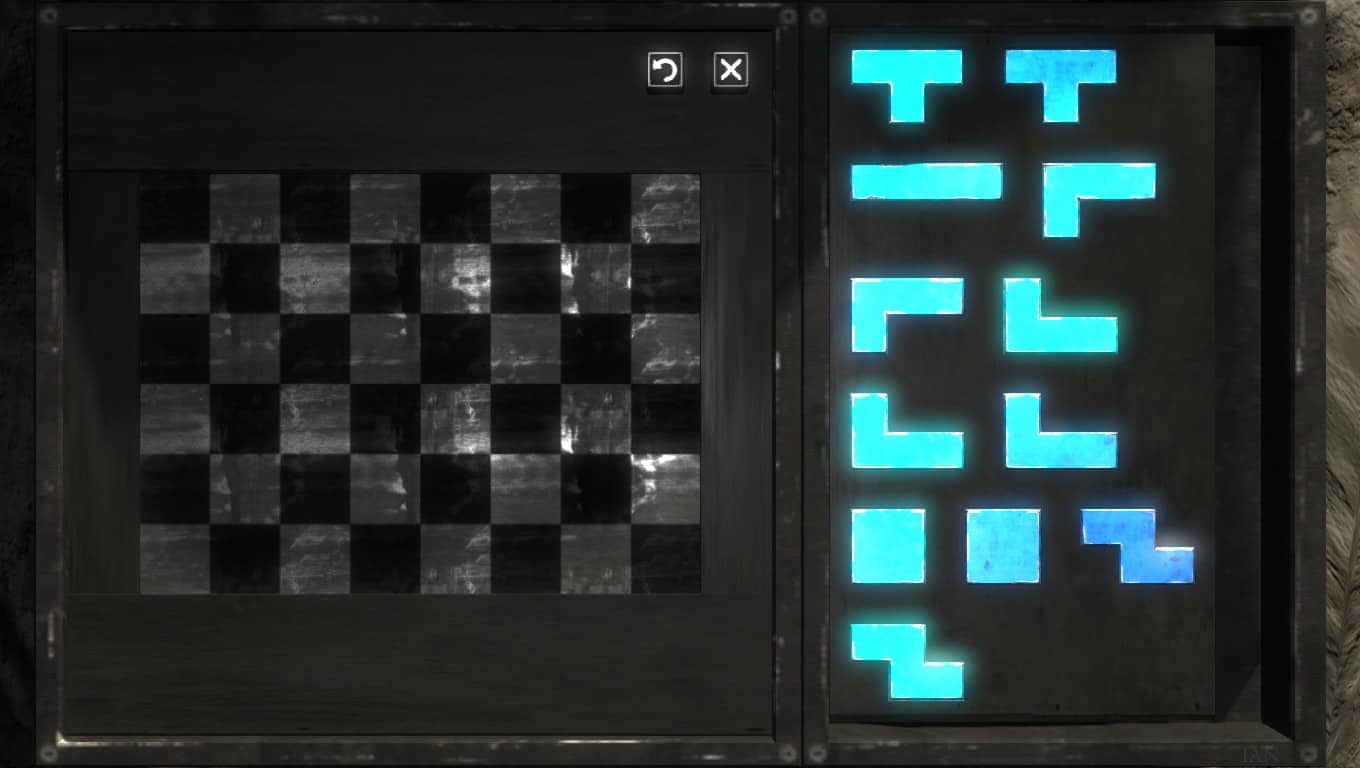 In the Talos Principle, access to new worlds and specific items is often blocked by gates that open by putting Sigils into the frame. Of course, collecting the sigils is the most challenging part, but that is often solvable by logical thinking. On the other hand, solving these fitting puzzles drove me crazy, so let us solve them with a SAT solver.
Encoding
I used a propositional encoding that for each combination of cells and sigils assigns a propositional variable, which is true if the specific sigil rests in on that cell in the final solution. That is, we have variable (encoded as x_i_j_n) where runs over the cells of the frame, and over the (numbered) sigils.
Setup
I have written a perl program that for a definition of a puzzle (see later), outputs SMT2 code, which then is checked for satisfiability and generation of model with the z3 solver (which is available in Debian).
Necessary assertions
We have to state relations between these propositional variables to obtain a proper solution, in particular we have added the following statements:
In the Talos Principle, access to new worlds and specific items is often blocked by gates that open by putting Sigils into the frame. Of course, collecting the sigils is the most challenging part, but that is often solvable by logical thinking. On the other hand, solving these fitting puzzles drove me crazy, so let us solve them with a SAT solver.
Encoding
I used a propositional encoding that for each combination of cells and sigils assigns a propositional variable, which is true if the specific sigil rests in on that cell in the final solution. That is, we have variable (encoded as x_i_j_n) where runs over the cells of the frame, and over the (numbered) sigils.
Setup
I have written a perl program that for a definition of a puzzle (see later), outputs SMT2 code, which then is checked for satisfiability and generation of model with the z3 solver (which is available in Debian).
Necessary assertions
We have to state relations between these propositional variables to obtain a proper solution, in particular we have added the following statements:

 The main changes are better error and return code handling (which should be hardly visible for the users), and more more informative output of the tlmgr info action, incorporating more data from the
 TDD
I have finally understood why test driven development is so powerful. As i am advancing in the project i am sometimes obliged to retouch some areas, refactor pieces of code. Having a great test suite that keeps you on track about the changes, and possible outages in advance is pretty powerful.
What is coming
I feel the project is on the right path. Both clemux (fellow gsoc student working on debsources) and me are advancing in a productive pace. I hope that soon enough the copyright Blueprint will be completed (most notable pending functionalities are the plugins-hooks to mine the licenses at update time, introduction of at least another license oracle possible ninka, statistics) so that everyone can take profit of the new tools provided by DebSources.
Although we haven't talked much about it the patch tracker should also come into the play sooner rather than later.
Stay tuned!
TDD
I have finally understood why test driven development is so powerful. As i am advancing in the project i am sometimes obliged to retouch some areas, refactor pieces of code. Having a great test suite that keeps you on track about the changes, and possible outages in advance is pretty powerful.
What is coming
I feel the project is on the right path. Both clemux (fellow gsoc student working on debsources) and me are advancing in a productive pace. I hope that soon enough the copyright Blueprint will be completed (most notable pending functionalities are the plugins-hooks to mine the licenses at update time, introduction of at least another license oracle possible ninka, statistics) so that everyone can take profit of the new tools provided by DebSources.
Although we haven't talked much about it the patch tracker should also come into the play sooner rather than later.
Stay tuned!
 TDD
I have finally understood why test driven development is so powerful. As i am advancing in the project i am sometimes obliged to retouch some areas, refactor pieces of code. Having a great test suite that keeps you on track about the changes, and possible outages in advance is pretty powerful.
What is coming
I feel the project is on the right path. Both clemux (fellow gsoc student working on debsources) and me are advancing in a productive pace. I hope that soon enough the copyright Blueprint will be completed (most notable pending functionalities are the plugins-hooks to mine the licenses at update time, introduction of at least another license oracle possible ninka, statistics) so that everyone can take profit of the new tools provided by DebSources.
Although we haven't talked much about it the patch tracker should also come into the play sooner rather than later.
Stay tuned!
TDD
I have finally understood why test driven development is so powerful. As i am advancing in the project i am sometimes obliged to retouch some areas, refactor pieces of code. Having a great test suite that keeps you on track about the changes, and possible outages in advance is pretty powerful.
What is coming
I feel the project is on the right path. Both clemux (fellow gsoc student working on debsources) and me are advancing in a productive pace. I hope that soon enough the copyright Blueprint will be completed (most notable pending functionalities are the plugins-hooks to mine the licenses at update time, introduction of at least another license oracle possible ninka, statistics) so that everyone can take profit of the new tools provided by DebSources.
Although we haven't talked much about it the patch tracker should also come into the play sooner rather than later.
Stay tuned!
 Recently I've been experimenting with
  Quite a while ago, I wrote a small Haskell library called
  What happened about the
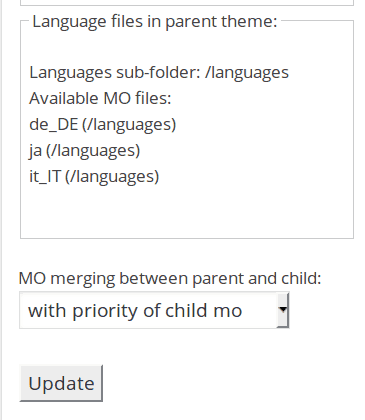

 Almost every new autopkgtest release brings some small improvements, but
  Note that I suspect the "Aller Holding A/S" entry to be incorrect
data in the official ownership register, as that name is not
registered in the official company register for Norway. The ownership
register is sensitive to typos and there seem to be no strict checking
of the ownership links.
Let me know if you improve the script or find better data sources.
The code is licensed according to GPL 2 or newer.
Update 2015-06-15: Since the initial post I've been told that
"
Note that I suspect the "Aller Holding A/S" entry to be incorrect
data in the official ownership register, as that name is not
registered in the official company register for Norway. The ownership
register is sensitive to typos and there seem to be no strict checking
of the ownership links.
Let me know if you improve the script or find better data sources.
The code is licensed according to GPL 2 or newer.
Update 2015-06-15: Since the initial post I've been told that
" I know very little about hardware.
I think I have a good understanding on many aspects of what happens inside a computer, but my knowledge is clearly firmer on what happens once an operating system is already running. And even then, my understanding of the lower parts of reality is shaky at most At least according to my self-evaluation, of course, comparing to people I'm honored to call "my peers".
During the last ~18 months, my knowledge of this part of reality, while still far from complete, has increased quite a bit Maybe mostly showing that I'm basically very cheap: As I have come across very cheap (or even free for me!) hardware, I have tried to understand and shape what happens in levels below those where I dwell.
I have been meaning to do a writeup on the
I know very little about hardware.
I think I have a good understanding on many aspects of what happens inside a computer, but my knowledge is clearly firmer on what happens once an operating system is already running. And even then, my understanding of the lower parts of reality is shaky at most At least according to my self-evaluation, of course, comparing to people I'm honored to call "my peers".
During the last ~18 months, my knowledge of this part of reality, while still far from complete, has increased quite a bit Maybe mostly showing that I'm basically very cheap: As I have come across very cheap (or even free for me!) hardware, I have tried to understand and shape what happens in levels below those where I dwell.
I have been meaning to do a writeup on the  The recent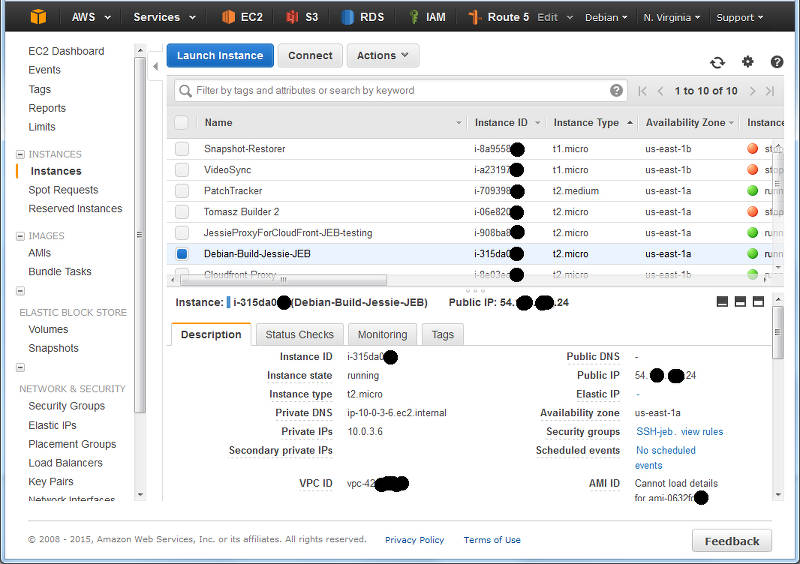
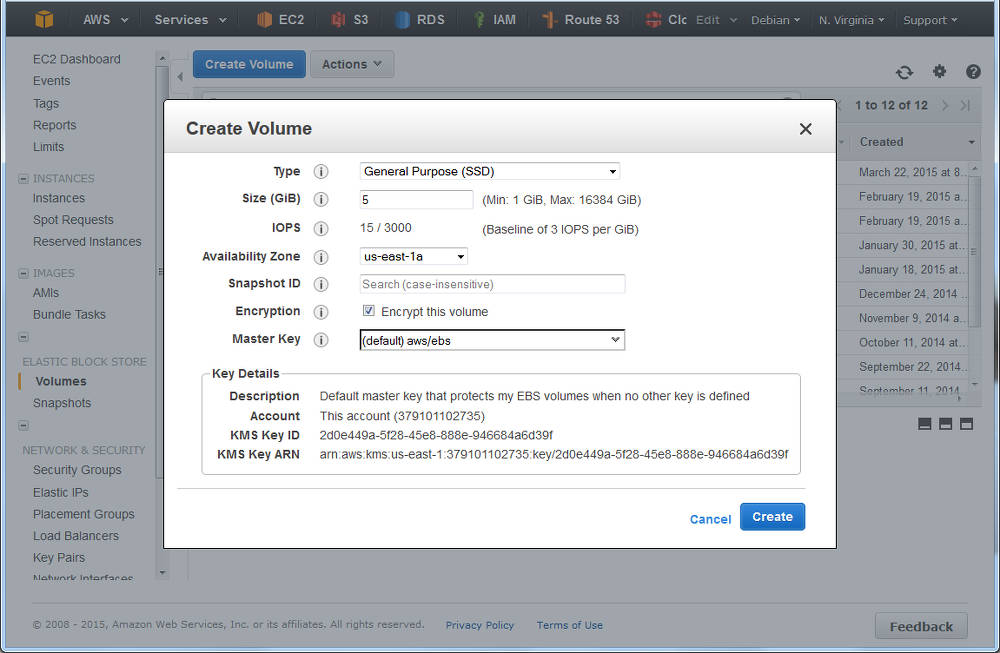
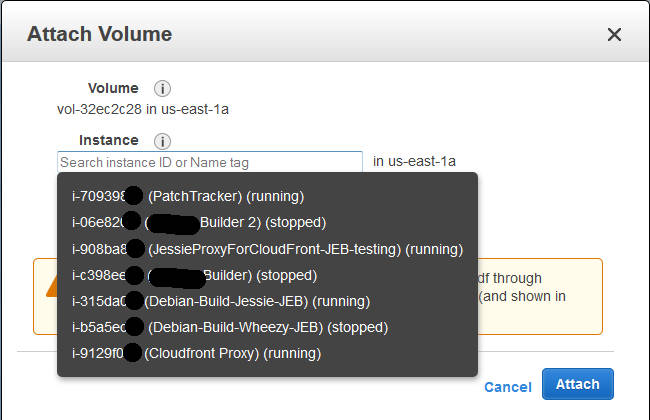
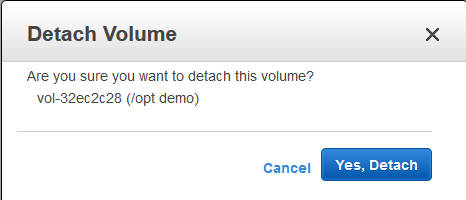
 Let us start with recalling the different actions that have to be taken when TeX packages are installed, removed, or updated.
Required actions for TeX packages
Filename database
The simplest case are packages that only include files ment to be loaded while running TeX or Metafont or similar programs. In this case the file name database of TeX (and the one of ConTeXt) needs to be updated. Usually this is done by calling mktexlsr on the changed trees, plus, if ConTeXt is installed, running mtxrun --generate.
Font map activation
More complicated are font packages that provide PostScript fonts. These packages need to ship a so called map file which maps TeX font names to PostScript fonts names. Examples are lm.map which defines this mapping for the Latin Modern fonts. All these map files have to be collected in one or more updmap.cfg files, and then a call to updmap(-sys) is necessary to generate configuration files for dvips, pdftex, and some other programs.
Format and hyphenation definitions
Even more complicated is the case of additional hyphenation patterns and additional format definitions. At the moment, hyphenation patterns are only shipped from the TeX Live packages itself, but additional format definitions are already provided by other packages than the TeX Live ones. Again, in both cases all the different format and hyphenation pattern definitions must be combined, into configuration files fmtutil.cnf and several language.* files, respectively. After this some incantation of fmtutil(-sys) is necessary to update the format dumps of TeX.
Status up to Debian/TeX Live 2014
Up to now most of these actions are done in the postinstall script of the providing packages, generated by dh_installtex. The
Let us start with recalling the different actions that have to be taken when TeX packages are installed, removed, or updated.
Required actions for TeX packages
Filename database
The simplest case are packages that only include files ment to be loaded while running TeX or Metafont or similar programs. In this case the file name database of TeX (and the one of ConTeXt) needs to be updated. Usually this is done by calling mktexlsr on the changed trees, plus, if ConTeXt is installed, running mtxrun --generate.
Font map activation
More complicated are font packages that provide PostScript fonts. These packages need to ship a so called map file which maps TeX font names to PostScript fonts names. Examples are lm.map which defines this mapping for the Latin Modern fonts. All these map files have to be collected in one or more updmap.cfg files, and then a call to updmap(-sys) is necessary to generate configuration files for dvips, pdftex, and some other programs.
Format and hyphenation definitions
Even more complicated is the case of additional hyphenation patterns and additional format definitions. At the moment, hyphenation patterns are only shipped from the TeX Live packages itself, but additional format definitions are already provided by other packages than the TeX Live ones. Again, in both cases all the different format and hyphenation pattern definitions must be combined, into configuration files fmtutil.cnf and several language.* files, respectively. After this some incantation of fmtutil(-sys) is necessary to update the format dumps of TeX.
Status up to Debian/TeX Live 2014
Up to now most of these actions are done in the postinstall script of the providing packages, generated by dh_installtex. The  Anyway, I hope to hear some feedback and installation reports.
Conclusion
While packaging has become easier for maintainers, and there is less clutter in /etc/texmf/, we now are depending on dpkg to call the tex-common triggers. Thus, if this happens rather often, then especially fmtutil-sys --all will be called several times. This is a slight regression from the previous setup, but paid off (IMNSHO) by the arguments given in the beginning.
That said, there will be of course a certain time of transition until the new setup has proven its merits, and bugs are ironed out. But having bugs that need to be mostly fixed only in one package, namely tex-common, seems like an easier task to me.
Enjoy.
Anyway, I hope to hear some feedback and installation reports.
Conclusion
While packaging has become easier for maintainers, and there is less clutter in /etc/texmf/, we now are depending on dpkg to call the tex-common triggers. Thus, if this happens rather often, then especially fmtutil-sys --all will be called several times. This is a slight regression from the previous setup, but paid off (IMNSHO) by the arguments given in the beginning.
That said, there will be of course a certain time of transition until the new setup has proven its merits, and bugs are ironed out. But having bugs that need to be mostly fixed only in one package, namely tex-common, seems like an easier task to me.
Enjoy.

