Search Results: "sf"

29 December 2013

Gergely Nagy: Introducing the syslog-ng Incubator

When syslog-ng 3.5.1 was released, the existence of the syslog-ng Incubator project was already announced, but I did not go into detail as to why it exists, what is in there, how to build it, or how to use it. The documentation that exists on it is almost non-existent, and what does exist, is usually in the form of a commit message and some example files. But there's nothing on how the things in the Incubator can be used, and what problems they solve.With this post, I will try to ease the situation a little, and provide some insight on how I use some of the things in there, like the Riemann destination.About the IncubatorThe idea for the Incubator existed for a long time, the first incarnation of it was called syslog-ng module collection, and had a different scope: it was a playing field not only for new modules, but updates to existing ones too. The idea was to try out new, possibly experimental features separately from syslog-ng. That didn't work well: it was a nightmare to maintain, and even harder to use. So it never got anywhere, as the developments made there were quickly merged into syslog-ng itself anyway.Then, two years later, I had a need for a new destination, but there was no open development branch to base it against, and forking and maintaining a whole syslog-ng branch for the purpose of a single module sounded like an overkill. So the Incubator was born, from the ashes of the failed module collection.The purpose of the Incubator is to be a place of experimental modules, and an easier way to enter the world syslog-ng development. It's something with far less requirements than syslog-ng (I do not care all that much about portability when it comes to the Incubator, especially not to horrible abominations like HP-UX or AIX), less rules, and more freedom. It's meant to be more developer friendly than syslog-ng proper.It also serves as an example of developing modules completely external to syslog-ng, and parts of it will be used in future posts of mine, to demonstrate the development of new modules.Compiling & InstallationThe first thing we need to do, is to compile whatever we need from the Incubator, unless we happen to have pre-built binaries available (which are going to appear in your usual third-party syslog-ng repositories over the next few weeks). For this, at a minimum, one will need syslog-ng 3.5+ and ivykis installed, along with autotools (autoconf, automake and libtool), pkg-config, bison, and depending on which modules one needs, riemann-c-client and libmongo-client too. Most of these are available packaged in better distributions, but only in recent versions, so one may need to compile those too. They follow a very similar scheme, though.If everything is installed at the standard locations, getting the Incubator to compile is as simple as this:
$ git clone https://github.com/balabit/syslog-ng-incubator.git
$ cd syslog-ng-incubator
$ autoreconf -i
$ ./configure && make && sudo make install
If anything happens to be installed in a non-standard location, one will need to adjust PKG_CONFIG_PATH to help the configure script locate the needed libraries.Once installed (the configure script will figure out where syslog-ng modules are, and modules will be put there), syslog-ng will automatically recognise the new modules. One can make sure that this is the case by running the following command after installation:
$ syslog-ng --module-registry
The PluginsNow that we're over the hard part of compiling and installing the Incubator, lets see what is inside! I will start with the easier things, and move on to the more complicated features as we progress. That is, we'll start with some template functions, have a glance at the trigger source, then explore the rss destination, and finish off with the riemann destination.Template functionsThe Incubator gives us three new template functions, some less useful than the others, and one that's a huge, ugly hack for a problem that I ended up solving in a very different way - without the hack.These functions are the $(or) template function, which takes any number of arguments, and returns the first one that is not empty. The main use case here is that if you have, say, similarly named fields, but some messages have one, the others another, and you want to normalize it, $(or) is one way to do it:
$(or $ HOST  $ HOSTNAME  $ HOST_NAME  "<unknown>")
Another function is $(//), which does the same thing as the built-in $(/) template function: divide its arguments. Except this one works with floating-point numbers only, while the built-in one is for integers exclusively. Using it is simple, too:
$(// $ some_number  3.4)
The last template function provided by the Incubator is $(state), which can be used to maintain global state, that does not depend on log messages. You can set values in here, like counters, from within a template function. It is possible to count the total amount downloaded data when processing a HTTP server log, for example. But it's slow, and there are better ways to do the same thing, syslog-ng really isn't the best tool for this kind of job. If anyone happens to find a use-case for it, please let me know. As for using it, it has two modes: set (with two arguments) and get (with one):
$(state some-variable $ VALUE )
$(state some-variable)
Trigger sourceThe trigger source has many in common with the built-in mark feature: at given intervals, it sends a message. This is mostly a debugging aid, when you want to generate messages without an external tool. It only has two options: trigger-freq() and trigger-message(), which default to 10 and "Trigger source is trigger happy.", respectively. It also accepts a number of common source options such as program-override(), host-override() and tags().To use it, one just needs to set it up like any other source, and bind it to a destination with a log statement:
source s_trigger  
 trigger(
  program-override("trigger")
  tags("trigger-happy")
  trigger-freq(5)
  trigger-message("Beep.")
 );
 ;
Without a program-override() option, messages will be attributed to syslog-ng, which is likely not what you want, even while debugging. Internal messages are usually routed somewhere else.RSS destinationThe RSS destination is an interesting beast. It offers an Atom feed of the last hundred messages routed to the destination. I could very well imagine this being useful in a situation where one already has monitoring set up to listen on various RSS sources - this would be just another. It also works well with most RSS feed readers. The length of the feed is not configurable at this time, and the number of options is limited to port(), title(), entry-title() and entry-description().The first one specifies which port the destination should listen on (it serves one client at a time!); title() can be used to set the title of the feed itself, while entry-title() and entry-description() can be used with templates to fill in the per-message Atom entries.Once we have a suitable path we want to route to the RSS destination (such as critical error messages only), we can set it up like this:
destination d_rss  
 rss(
  port(8192)
  feed-title("Critical errors in the system")
  entry-title("Error from $ PROGRAM  @ $ HOST_FROM  at $ ISODATE ")
  entry-description("$ MESSAGE ")
 );
 ;
Riemann destinationBeing the original motivator for the Incubator, I left this last. This module is the interface between your logs and the Riemann monitoring system. With this, you can take all the legacy applications that are hard to monitor, but provide log files, use syslog-ng's extraordinary log processing power, and send clear and concise events over to Riemann.One can use it to monitor logins, downloads, uploads, exceptions - pretty much anything. Just extract some metric, or state, send it over to Riemann, and that will do the heavy lifting. What exactly can be done, will be worth a separate blog post, so for now, I will give just a very tiny example:
destination d_riemann  
 riemann(
  ttl("120")
  description("syslog-ng internal errors")
  metric(int("$ SEQNUM "))
 );
 ;
Hook it up to a path that collects syslog-ng internal messages, keeps only error messages, and routes it toward this destination:
log  
  source   internal();  ;
  filter   level(err..emerg);  ;
  destination(d_riemann);
 ;
The destination itself has the following options: Closing thoughtsThe Incubator contains one more tool, one which can be used to visualise logs in strange ways. But that's not strictly related to syslog-ng, isn't a module, either, so I will not describe it here right now. The above was quite a lot already, I believe.As a closing thought, I would just like to say that while the Incubator is home for experimental modules, some of them are used in production. Don't be afraid to use them, especially when packages start to arrive to your favourite GNU/Linux distribution!

25 December 2013

Petter Reinholdtsen: Debian Edu interview: Dominik George

The Debian Edu / Skolelinux project consist of both newcomers and old timers, and this time I was able to get an interview with a newcomer in the project who showed up on the IRC channel a few weeks ago to let us know about his successful installation of Debian Edu Wheezy in his School. Say hello to Dominik George. Who are you, and how do you spend your days? I am a 23 year-old student from Germany who has spent half of his life with open source. In "real life", I am, as already mentioned, a student in the fields of Computer Science, Electrical Engineering, Information Technologies and Anglistics. Due to my (only partially voluntary) huge engagement in the open source world, these things are a bit vacant right now however. I also have been working as a project teacher at a Gymasnium (public school) for various years now. I took up that work some time around 2005 when still attending that school myself and have continued it until today. I also had been running the (kind of very advanced) network of that school together with a team of very interested and talented students in the age of 11 to 15 years, who took the chance to learn a lot about open source and networking before I left the school to help building another school's informational education concept from scratch. That said, one might see me as a kind of "glue" between school kids and the elderly of teachers as well as between the open source ecosystem and the (even more complex) educational ecosystem. When I am not busy with open source or education, I like Geocaching and cycling. How did you get in contact with the Skolelinux / Debian Edu project? I think that happened some time around 2009 when I first attended FrOSCon and visited the project booth. I think I wasn't too interested back then because I used to have an attitude of disliking software that does too much stuff on its own. Maybe I was too inexperienced to realise the upsides of an "out-of-the-box" solution ;). The first time I actively talked to Skolelinux people was at OpenRheinRuhr 2011 when the BiscuIT project, a home-grewn software used by my school for various really cool things from timetables and class contact lists to lunch ordering, student ID card printing and project elections first got to a stage where it could have been published. I asked the Skolelinux guys running the booth if the project were interested in it and gave a small demonstration, but there wasn't any real feedback and the guys seemed rather uninterested. After I left the school where I developed the software, it got mostly lost, but I am now reimplementing it for my new school. I have reusability and compatibility in mind, and I hop there will be a new basis for contributing it to the Skolelinux project ;)! What do you see as the advantages of Skolelinux / Debian Edu? The most important advantage seems to be that it "just works". After overcoming some minor (but still very annoying) glitches in the installer, I got a fully functional, working school network, without the month-long hassle I experienced when setting all that up from scratch in earlier years. And above that, it rocked - I didn't have any real hardware at hand, because the school was just founded and has no money whatsoever, so I installed a combined server (main server, terminal services and workstation) in a VM on my personal notebook, bridging the LTSP network interface to the ethernet port, and then PXE-booted the Windows notebooks that were lying around from it. I could use 8 clients without any performance issues, by using a tiny little VM on a tiny little notebook. I think that's enough to say that it rocks! Secondly, there are marketing reasons. Life's bad, and so no politician will ever permit a setup described as "Debian, an universal operating system, with some really cool educational tools" while they will be jsut fine with "Skolelinux, a single-purpose solution for your school network", even if both turn out to be the very same thing (yes, this is unfair towards the Skolelinux project, and must not be taken too seriously - you get the idea, anyway). What do you see as the disadvantages of Skolelinux / Debian Edu? I have not been involved with Skolelinux long enough to really answer this question in a fair way. Thus, please allow me to put it in other words: "What do you expect from Skolelinux to keep liking it?" I can list a few points about that: I'm really sorry I cannot say much more about that :(! Which free software do you use daily? First of all, all software I use is free and open. I have abandoned all non-free software (except for firmware on my darned phone) this year. I run Debian GNU/Linux on all PC systems I use. On that, I mostly run text tools. I use mksh as shell, jupp as very advanced text editor (I even got the developer to help me write a script/macro based full-featured student management software with the two), mcabber for XMPP and irssi for IRC. For that overly coloured world called the WWW, I use Iceweasel (Firefox). Oh, and mutt for e-mail. However, while I am personally aware of the fact that text tools are more efficient and powerful than anything else, I also use (or at least operate) some tools that are suitable to bring open source to kids. One of these things is Jappix, which I already introduced to some kids even before they got aware of Facebook, making them see for themselves that they do not need Facebook now ;). Which strategy do you believe is the right one to use to get schools to use free software? Well, that's a two-sided thing. One side is what I believe, and one side is what I have experienced. I believe that the right strategy is showing them the benefits. But that won't work out as long as the acceptance of free alternatives grows globally. What I mean is that if all the kids are almost forced to use Windows, Facebook, Skype, you name it at home, they will not see why they would want to use alternatives at school. I have seen students take seat in front of a fully-functional, modern Debian desktop that could do anything their Windows at home could do, and they jsut refused to use it because "Linux sucks". It is something that makes the council of our city spend around 600000 to buy software - not including hardware, mind you - for operating school networks, and for installing a system that, as has been proved, does not work. For those of you readers who are good at maths, have you already found out how many lives could have been saved with that money if we had instead used it to bring education to parts of the world that need it? I have, and found it to be nothing less dramatic than plain criminal. That said, the only feasible way appears to be the bottom up method. We have to bring free software to kids and parents. I have founded an association named Teckids here in Germany that does just that. We organise several events for kids and adolescents in the area of free and open source software, for example the FrogLabs, which share staff with Teckids and are the youth programme of the Free and Open Source Software Conference (FrOSCon). We do a lot more than most other conferences - this year, we first offered the FrogLabs as a holiday camp for kids aged 10 to 16. It was a huge success, with approx. 30 kids taking part and learning with and about free software through a whole weekend. All of us had a lot of fun, and the results were really exciting. Apart from that, we are preparing a campaign that is supposed to bring the message of free alternatives to stuff kids use every day to them and their parents, e.g. the use of Jabber / Jappix instead of Facebook and Skype. To make that possible, we are planning to get together a team of clever kids who understand very well what their peers need and can bring it across to them. So we will have a peer-driven network of adolescents who teach each other and collect feedback from the community of minors. We then take that feedback and our own experience to work closely with open source projects, such as Skolelinux or Jappix, at improving their software in a way that makes it more and more attractive for the target group. At least I hope that we will have good cooperation with Skolelinux in the future ;)! So in conclusion, what I believe is that, if it weren't for the world being so bad, it should be very clear to the political decision makers that the only way to go nowadays is free software for various reasons, but I have learnt that the only way that seems to work is bottom up.

24 December 2013

Gergely Nagy: Some free software are really free

I read a post titled "Free software is NOT Free", and that triggered a few thoughts, which I would like to share here. While the post has some good thoughts, there are points in it which I disagree with strongly. You see, I've been writing free software almost half my life, most of the things I contributed to various projects, and the vast majority of my own projects, were made because it made me feel good. Because I scratched an itch, and sharing filled me with a sense of accomplishment.I always had bills to pay, and I have a day job to get that kind of thing sorted, yet, I do not believe that the quality of my free software work suffers because of that. Do I have less time? Yes, I do. But slower pace does not mean lesser quality - more often than not, I found that slower pace leads to better considerations, more care given to each change, because fixing it later, fast, is much more costly, so you make sure that your improvements will stand the trial of time.But I digress. I want to share a different view on the topic, based on my own experiences.When I first got into free software, I was young, bright-eyed, full of hopes and illusions of grandieur. I did my part of small contributions here and there, and every bit of "Thanks!", every bit of feedback - be it criticism or rejection - contributed to my development. This part of the free software culture is still important to me, and remains a major factor behind my desire to work on free software. Later on, there came another revelation: people actually use the stuff I write! That's an awesome feeling too, but with it, comes a burden too: supporting users, and trying to cater to every need that arises. To combat this, to not drown, you need to learn to say "No". It is hard, but as maintainer of a project, it's your task to keep it maintainable, and you need to know your limits. Would it be better if you could fulfil every wish? If you could do everything you ever dreamed of? You may think the answer is yes, but you're wrong. The answer is "No".Not everything needs to be done, not every wish needs to come true. As always, there's a balance. Limiting the amount of time that can be spent on a project helps keep that balance. And when balance is found, the project becomes more mature, maintenance stops being a chore you do not want to do, but have to, and instead becomes something you actually enjoy. We are human beings, we dream and wish for a lot, and we have a hard time realising our limits. That makes us feel sad, sometimes even inadequate. Having less time puts us into a different position, where were are forced to reevaluate how we spend the little free time we have. In the long run, I believe that is good for free software.But there's an even better way to approach the problem! You want to work on your projects, right? Yet, you also want to pay your bills. And you are a fan of free (as in freedom) software. When I found myself in a position like that, when I was looking for work, I was looking at companies which are friendly towards free software, and even have a few on their portfolio. Working for such a company allows me to be happy with myself, by not betraying my own beliefs, and on the side, still spend time on my own things.When I spend my day working on free software, I feel energised, and during lunch break, I can look through my plans for my own projects (some of which are related to my work too, which makes it even easier to spend time on them), plan ahead, and go home with a head full of ideas. No exhaustion after a daunting day of hacking proprietary software, with a sinking heart. No feeling guilty of not taking good care of your projects, because you do take care! You just do it on your own terms.So this is my suggestion to independent free software hackers: find a free software friendly company, that allows - or even encourages - you to work on your own things too. That way, you can pay your bills, and work on your hobbies, and best of all: keep them as hobbies, so it does not become a burden. When a hobby becomes your job, that often leaves a sour taste behind, when you can't fulfil every need, or fix every issue.Get a free software day-job, and keep your hobby as such, and everyone benefits. You get to keep your sanity, and users will receive better care, because the developers do what they love, and not what they have to.You give up some of your freedoms, yes, by not being independent. But being independent is not always the right choice. For some people, it may well be, for some, not so much. My experience over the past 15 years or so, is that independence brings a lot more headache than I'm willing to deal with. I'd rather work for a free software friendly company, where, after three years, I get paid to write and contribute to free software, and take care of my personal projects on the side, than try do all of it on my own.None of the software I wrote is worth a full salary, and none of them requires me to work full time on them, either. I could, mind you, I have enough ideas lined up to keep me busy for years. But do I want to? Do I want to burn myself out?No. The day job satisfies my hunger for contributing to a widely used piece of software, and my hobby projects satisfy my exploratory needs. I'm happy this way, and I'm very happy that thanks to the work and dedication of some amazing people, we got this far, that one can have a day job and independent projects too, that are all free software, without having to depend on fairly unreliable sources, such as donations (mind you, donations are a nice extra).There are, of course, different situations, and different people. What works for one, may not work for the other. This is what worked for me, and I felt the need to share it, lest anyone thinks that the world's darker than it really is.

22 December 2013

Russ Allbery: Review: They Had to Go Out

Review: They Had to Go Out, by Gary J. Hudson
Publisher: Xlibris
Copyright: 2008
ISBN: 1-4363-8132-0
Format: Trade paperback
Pages: 165
They Had to Go Out, as noted on the cover, is the story of the tragedy of the Triumph and the Mermaid, a marine incident that occurred off the Oregon coast of the United States near the mouth of the Columbia River on January 12, 1961. But it's also much more than that. It's a detailed and thoroughly-researched account of a Coast Guard rescue operation, starting with background on the two coastal lifeboat stations and the types of ships involved. It covers everything from crew backgrounds to equipment issues to the general shape of the subsequent inquiry, and in the process provides a wealth of detailed information about the nature of Coast Guard rescue operations and the technology and equipment available at the time. But, beyond that, it's a gripping story, in part because of the authenticity of the authorial voice. Gary Hudson spent twenty years in the Coast Guard, ten on coastal lifeboat stations like the ones in this book, and was assigned to Point Adams (the primary station involved in this story) until 12 days before the incident, when he transferred to a light station for unrelated reasons. The writing is rough, the paragraphs are not always well-organized, the punctuation doesn't always end up in the right place, and it could have used an editor (Xlibris is a printing service company for self-publishing). But he understands the subject matter completely, and he clearly spent years of effort putting together all the details of the story. The first few chapters, where he establishes the necessary background and tells a few related stories, feel quite rough, but once he gets into the heart of the story, the rough prose stops mattering. Obviously, one of the things that makes this story so appealing is that it's a gripping human story, with the unconstructed and unexpected twists and turns of reality rather than a plot. Hudson has lived the life of the people he's writing about and can put many of their fears and thoughts into words. He captures some of what it would feel like to be out on the water in the middle of the worst seas that most of them had ever seen. And reality is unpredictable. I'm avoiding giving the exact details of what happened and I would recommend not researching the incident on Google if you plan to read this book; there's a lot of drama here, and spoilers are possible. Hudson's factual, detailed narrative style gives the reader a lot of material with which to build mental pictures, and he preserves the drama and the human impact of the story by telling it in straight chronological order. The writing is rough, but he shows a talent for pacing and perspective in the way he weaves together the viewpoints of multiple Coast Guard stations and ship crews. This is also a case study and an accident report, put together with extensive research and scope, but made approachable for the average reader. Hudson takes out the dryness and technical language and weaves the events into a narrative, but he doesn't lose much of the detail. You can know nothing at all about ships or Coast Guard operations and come away from this book with strong opinions about self-righting capabilities (and, more to the point, accurate communication to crews of the capabilities of their vessels). And, by showing a full day of Coast Guard operations (admittedly, a very unusual and difficult day), Hudson also provides the previously unfamiliar reader with a great "day in the life" picture of what Coast Guard lifesaving operations at their most dangerous look like (or at least looked like; one also gets a sense of just how much has improved, and how important the improvements are, in the final chapters). Finally, unlike most accident reports, Hudson carries the story through to the immediate family impact (which may well bring you to tears) and then, given forty years of hindsight, some of the subsequent effects on the people involved. I really liked this. One of the aspects of stories like this that often gets short shrift is that the people involved carry the incident with them for the rest of their lives, often with profound impact. Unlike a movie, where the movie ends and the characters disappear as soon as the primary action is complete, real life has messy and lingering endings, and I think Hudson manages to capture some of that feeling. Some of the best non-fiction books are not written by professional writers. Instead, they're written by people who have both expertise and passion for a particular topic and who know or teach themselves enough about telling a story to manage to get that expertise and passion out on paper. Hudson puts every aspect of this day into the book, from the people to the family impact, from the questionable decisions to the equipment failures and shortages, from the initial conditions through the inquiry and up to the subsequent impact on the lives of the people involved (including, sadly, the Coast Guard's lack of understanding of how to help people with traumatic stress). Some of the paragraphs clunk, some of the sentence construction is awkward, and some of the short biographies are a bit lost in details, but Hudson's desire to tell the complete truth as he was able to reconstruct it, and his deep empathy and understanding of how it felt to the people involved, shine through and carry this book. This is great stuff, and worth seeking out. Recommended. Rating: 9 out of 10

21 December 2013

Christian Perrier: So, what's up with bubulle in Debian?

This is the end of the year and time for me to look back and summarize what happened to my Debian life during 2013. In short, it clearly seems that this year is the "year after peak of involvment" year. Up to 2010 included, my involvment in Debian constantly increased. 2011 and 2012 have seen some kind of stagnation with still some high involvment in some areas (i18n obviously, DebConf-related stuff, font packaging...) but already some reduction in others (D-I for instance...where the overall involvment of Debian developers is nos quite low, Kibi excepted). But, clearly, in 2013, something changed. And, indeed, it's easy to see what happened. In 2007, I started to motivate myself to resume my practice of sports (I used to be a well-trained volleyball player back in 80's) and I started running. More and more and more and more. 992km in 2008, 1700km in 2009 (and my first marathon), 2200km in 2010 (and my first ultras), 2500km in 2011 (and my first 80km), 2900km in 2012 (and more ultras) and....about 4700km in 2013 (with many many firsts). What changed is now obvious. Running and sports (and related activites such as a lot of socializing with other runners) took over free software activities. Last summer and autumn made it clear, indeed. While I was attending my 10th DebConf in a row (I think we're very few people to have achieved this), it was not my summer's "peak". I spent some great time in Switzerland, still enjoyed a lot meeting again with old and new friends from all over the world. I did some good hacking and achived quite some good things over there. But, still, that was not what I will keep from this summer because.....I had two great moutain races in July and August and *this* is what I'll keep. So, here we are: I'm reducing my involvment in Debian, obviously. Some things are handed over to other people, formally or informally. Some other things will indeed wait for someone to pick them up....or might slowly die as it sometimes happens in this project. I will very probably not attend DebConf14 in Portland even though I have been among the people who were enthusiastic when we picked that bid. But the dates conflict with the Ultra Tour du Mont-Blanc races in Chamonix, where I'll hopefully try to complete my first "over 100km" race in moutains. I will probably decline being part of the Debconf bids team for DC15 as well as the sponsoring team. I nearly stopped working on Samba packages and will not attend SambaXP in May. That's my challenge now. I don't want to completely quit this project and it's indeed harder than it seems, when one's involvment is going down. I'm currently trying to find the right balance to still stay involved in what has been a great part of my life in the last 15-20 years. For instance, I'll try to successfully mentor two applicants from the Outreach Program for Women. Or still continue to work occasionnally on font packages. Or still continue to manage D-I i18n. But you'll be seeing (and hearing) me less. The challenge is to still continue seeing and hearing me about Debian and free software and it's indeed less easy than it seems. I hope I'll succeed.

20 December 2013

Riku Voipio: Replicant on Galaxy S3

I recently got my self and Galaxy S3 for testing out Replicant, an android image made out of only open source components. Why Galaxy S3? It is well supported in Replicant, almost every driver is already open source. The hardware specs are acceptable, 1.4Ghz quad core, 1GB ram, microsd, and all the peripheral chips one expects for a phone. Galaxy S3 has sold insanely (50 million units supposedly), meaning I won't run out of accessories and aftermarket spare parts any time soon. The massive installed base also means a huge potential user community. S3 is still available as new, with two years of warranty. Why notWhile the S3 is still available new, it is safe to assume production is ending already - 1.5 year old product is ancient history in mobile world! It remains to be seen how much the massive user base will defend against the obsolescence. Upstream kernel support for "old" cpu is open question, replicant is still basing kernel on vendor kernel. Bootloader is unlocked, but it can't be changed due to trusted^Wtreacherous computing, preventing things like boot from sd card. Finally, not everything is open source, the GPU (mali) driver while being reverse engineered, is taking it's time - and the GPS hasn't been reversed yet. Installing replicant Before install, from the original installation, you might want to take a copy of firmware files (since replicant won't provide them). enable developer mode on the S3 and:
sudo apt-get install android-tools
mkdir firmware
adb pull /system/vendor/firmware/
adb pull /system/etc/wifi
After then, just follow official replicant install guide for S3. If you don't mind closed source firmwares, post-install you need to push the firmware files back:

adb shell
mount -o remount,rw /system
adb push . /system/vendor/firmware
Here was my first catch, the wifi firmwares from jelly bean based image were not compatible with older ICS based replicant. Using replicant
Booting to replicant is fast, few seconds to the pin screen. You are treated with the standard android lockscreen, usual slide/pin/pattern options are available. Basic functions like phone, sms and web browsing have icons from the homescreen and work without a hitch. Likewise camera seems to work, really the only smartphone feature missing is GPS. Sidenote - this image looks a LOT better on the S3 than on my thinkpad. No wonder people are flocking to phones and tablets when laptop makers use such crappy components.
The grid menu has the standard android AOSP opensource applications in the ICS style menu with the extra of f-droid icon - which is the installer for open source applications. F-droid is it's own project that complements replicant project by maintaining a catalog of Free Software.
F-droid brings hundreds of open source applications not only for replicant, but for any other android users, including platforms with android compatibility, such as Jolla's Sailfish OS. Of course f-droid client is open source, like the f-droid server (in Debian too). F-droid server is not just repository management, it can take care of building and deploying android apps.
The WebKit based android browser renders web sites without issues, and if you are not happy with, you can download Firefox from f-droid. Many websites will notice you are mobile, and provide mobile web sites, which is sometimes good and sometimes annoying. Worse, some pages detect you are android and only offer you to load their closed android app for viewing the page. OTOH I am already viewing their closed source website, so using closed source app to view it isn't much worse. This keyboard is again the android standard one, but for most unixy people the hacker's keyboard with arrow buttons and ctrl/alt will probably be the one you want. Closing thoughts While using replicant has been very smooth, the lack of GPS is becoming a deal-breaker. I could just copy the gpsd from cyanogen, like some have done, but it kind of beats the purpose of having replicant on the phone. So it might be that I move back to cyanogen, unless I find time to help reverse engineering the BCM4751 GPS.

Christoph Egger

Greetings from the FAU Security Team (FAUST), the Uni Erlangen CTF group. We were participating in the RuCTFe competition and made it to 4th place. Following is my write-up on the nsaless service, the main crypto challenge in the competition. nsaless is a nodejs webservice providing a short message service. People can post messages and their followers receive the message encrypted to their individual RSA key.

About the gameserver protocol
The gameserver created groups of 8 users on the service 7 were just following the first user (and authorized by the first user to do so) while the first user sent a tweet containing the flag. The service used 512bit RSA with 7 as public exponent. While RSA512 is certainly weak, it's strong enough to make it unfeasible to break directly.

Attacking RSA
There are some known attacks against RSA with small exponents if no proper padding is done. The most straightforward version just takes the e-th root of the cipher-text and, if the clear message was small enough, outputs that root as plain-text. As the flag was long enough to make this attack impossible, we need a somewhat improved Attack.

H stad's Broadcast Attack
Reminder:
  • In RSA, given a plain-text A, the sender computes A mod N to build the cipher-text B.
  • Given simultaneous congruences we can efficiently compute a x such that x satisfies all congruences using the Chinese remainder theorem.
For NSAless we actually get several such B for different N (each belonging to different users receiving the tweet because they follow the poster). This effectively means we get A in mod N for different N. Using the Chinese remainder theorem we can now compute a x A mod N . If we use at least e different B for this we are guaranteed that x actually equals A (in ): A needs to be smaller than N for all N used (otherwise we lose information during encryption), therefore A needs to be smaller than N . Computing now the e-th root of x we get the plain-text A the flag.

Fix
Fixing your service is easy enough, just increase e to an suitable number > 8. At the end of the contest 5 Teams had fixed this vulnerability by either using 17 or 65537.

EXPLOIT
The basic exploit is shown below. Unfortunately it needs to retrieve all tweets for all users the compute the flags which just takes too long to be feasible (at least at the end of the competition where tons of users already existed) so you would need some caching to make it actually work. Would have been a great idea to have users expire after an hour or two in the service!
#!/usr/bin/python
import httplib
import urllib
import re
import json
import pprint
import gmpy
import sys
userparse_re = re.compile('<a [^>]*>([^<]*)</a></div>\s*<div>([^<]*)</div>')
tweetparse_re = re.compile("<div id='last_tweet'>([0-9]+)</div>")
followingparse_re = re.compile('<div><a href="/[0-9]+">([0-9]+)</a></div>')
def my_parse_number(number):
    string = "%x" % number
    if len(string) != 64:
        return ""
    erg = []
    while string != '':
        erg = erg + [chr(int(string[:2], 16))]
        string = string[2:]
    return ''.join(erg)
def extended_gcd(a, b):
    x,y = 0, 1
    lastx, lasty = 1, 0
    while b:
        a, (q, b) = b, divmod(a,b)
        x, lastx = lastx-q*x, x
        y, lasty = lasty-q*y, y
    return (lastx, lasty, a)
def chinese_remainder_theorem(items):
  N = 1
  for a, n in items:
    N *= n
  result = 0
  for a, n in items:
    m = N/n
    r, s, d = extended_gcd(n, m)
    if d != 1:
      raise "Input not pairwise co-prime"
    result += a*s*m
  return result % N, N
def get_tweet(uid):
    try:
        conn = httplib.HTTPConnection("%s:48879" % sys.argv[1], timeout=60)
        conn.request("GET", "/%s" % uid)
        r1 = conn.getresponse()
        data = r1.read()
        tweet = re.findall(tweetparse_re, data)
        if len(tweet) != 1:
            return None
        followers = re.findall(followingparse_re, data)
        return tweet[0], followers
    except:
        return None
def get_users():
    conn = httplib.HTTPConnection("%s:48879" % sys.argv[1], timeout=60)
    conn.request("GET", "/users")
    r1 = conn.getresponse()
    data1 = r1.read(1024 * 1024)
    data = dict()
    for i in re.findall(userparse_re, data1)[:100]:
        userinfo = get_tweet(i[0])
        if userinfo != None:
            data[i[0]] = (json.loads(i[1].replace('&quot;', '"'))['n'], userinfo)
    return data
users = get_users()
allusers = users.keys()
masters = [ user for user in allusers if len(users[user][1][1]) > 0 ]
for test in masters:
    try:
        followers = users[test][1][1]
        data = []
        for fol in followers:
            n = int(users[fol][0])
            tweet = int(users[fol][1][0])
            data = data + [(tweet, n)]
        x, n = chinese_remainder_theorem(data)
        realnum = gmpy.mpz(x).root(7)[0].digits()
        print my_parse_number(int(realnum))
    except:
        pass

19 December 2013

Joachim Breitner: My contribution to XKCD s #949 is not needed

A few hours ago I posted about share-file, a small tool to make a local file available at a public URL so that it is transferred from my machine, without being stored at some central server. I wanted to create something like FileTea, but usable from the command line. My post made it to HackerNews (which brought my server to its knees for a while; let s say I had the opportunity to find out what setting for apache s MaxClient option works on my machine...), where the comments (besides some misunderstanding about the notable features of share-file) contained interesting links related to solving #949:

Joachim Breitner: My contribution to XKCD s #949

Randall Munroe rightly put shame on all the geeks in the world when he pointed out that transferring files over the internet is still an unsolved problem. I am a big fan of FileTea s approach to transferring files, where they are streamed from browser to browser, without registration and without being stored on some central server, and where closing the browser tab reliably cleans up the transfer. But I wanted something that works from the command line, so I created a small tool called share-file that will use SSH port forwarding to serve the files from a local, embedded web server at a publicly available port, as shown in these screenshots:
It works without additional dependencies (but better with python-magic installed) and requires a publicly available SSH server configured with GatewayPorts clientspecified. For more details, see the README, and to try it out, simply fetch it with git clone git://git.nomeata.de/share-file.git. BTW, if someone implements a command line client for FileTea, I ll happily dump share-file for it.

18 December 2013

Joey Hess: what charlie's missing about bitcoin

(Posted as a comment to Charles Stross's blog post about bitcoin) Bitcoin is a piece of software which tries to implement a particular SFnal future. One in which the world currency is de-centralized, deflationary, all early bitcoin adopters own their own planetoids, and all visitors are automatically charged for the air they breath. Thing is, the real world is more complicated than that. Assuming Bitcoin did manage to become an important currency, countries would naturally try to regulate it. In 30 years, by the time bitcoin mining has slowed right down, the legal system will be fully caught up to the internet. Bitcoin tries to make its code the law (as Lessig used to say), but the law can certainly affect its code. The law could, for example, require that bitcoin be changed to stop increasing the difficulty of mining new blocks. Then bitcoin is suddenly an inflationary currency. This would be a hard fork in the block chain, but one enforced by financial regulators. Miners would be tracked down and forced to comply. Some would perhaps go underground and run the deflationary bitcoin network on TOR hidden services. Lots of possible ways it could play out. That's only one scenario, covering one of the many problems with Bitcoin that make Charlie hate it. So it seems to me that Bitcoin should be a gold mine for Science Fiction authors, if nothing else..

Ingo Juergensmann: Debian donation to m68k arrived

The Debian m68k port has been entitled by the DPL to receive a donation of five memory expansion cards for the m68k autobuilders. The cards arrived two weeks ago and are now being shipped to the appropriate buildd admins. Adding those 256 MB memory expansion will have a huge effect to the m68k buildds, because most of them are Amigas that are currently running with "just" 128 MB. The problem with those expansion cards is to make use of them. Sounds strange but this is the story behind it.... Those memory expansion cards, namely it is the BigRamPlus from Individual Computers, are Zorro III bus cards, which has some speed limitations. The Amiga memory model is best described in the Amiga Hardware Reference Manual. For Zorro III based Amigas this is described in the section "A3000 memory map", where you can see that the memory model is divided into different address space. The most important address space is the "Coprocessor Slot Expansion" space, starting at $0800 0000. This is where the memory on the CPU accelerator cards will be found and which runs at full CPU speed. The BigRamPlus, however, is located within "Zorro III Expansion" address space at $1000 0000 and will have transfer rates of about 13 MB/s. Then again there's still the motherboard expansion memory and others like Zorro II expansion memory. Unfortunately the current kernel does not support SPARSEMEM on m68k, but is using DISCONTIGMEM as Geert Uytterhoven explained. In short: we need SPARSEMEM support to easily make use of all available memory chunks that can be found. To make it a little more difficult, Amigas do use some kind of memory priority. Memory on accelerator cards usually has a priority of 40, motherboard expansion memory has a priority of, let's say, 20 and chip memory a pri of 0. This priority usually is equivalent to speed of memory. So, we want to have the kernel loaded to accelerator memory, of course. Basically we could do that by using a memfile and define the different memory chunks in the appropriate priority list like this one:
2097152
0x08000000 67108864
0x07400000 12582912
0x05000000 268435424
Would be an easy solution, right? Except that this doesn't work out. Currently the kernel will be loaded into the first memory chunk that is defined and ignore all memory chunks before that address space. As you can see 0x07400000 and 0x05000000 would be ignored because of this. Getting confused? No problem! It will get worse! ;) There's another method of accessing memory for Amigas: it's called z2ram and will use Zorro II as, let's say, swapping area. But maybe you guessed it: z2ram does not work for Zorro III memory (yet). So, this won't work either. Geert suggested to use that Zorro III memory as mtd device and finally this worked out! You'll need these modules in your kernel:
CONFIG_MTD=m
CONFIG_MTD_CMDLINE_PARTS=m
CONFIG_MTD_BLKDEVS=m
CONFIG_MTD_SWAP=m
CONFIG_MTD_MAP_BANK_WIDTH_1=y
CONFIG_MTD_MAP_BANK_WIDTH_2=y
CONFIG_MTD_MAP_BANK_WIDTH_4=y
CONFIG_MTD_CFI_I1=y
CONFIG_MTD_CFI_I2=y
CONFIG_MTD_SLRAM=m
CONFIG_MTD_PHRAM=m
Then you just need to create the mtd device and configure it as swap space:
/sbin/modprobe phram phram=bigram0,0x50000000,0xfffffe0
/sbin/modprobe mtdblock
/sbin/mkswap /dev/mtdblock0
/sbin/swapon -p 5 /dev/mtdblock0
And then you're done:
# swapon -s
Filename Type Size Used Priority
/dev/sda3 partition 205932 8 1
/dev/sdb3 partition 875536 16 1
/dev/mtdblock0 partition 262136 53952 5
To make it even worse (yes, there's still room for that! ;)) you can put two memory expansion cards into one box:
# lszorro -v
00: MacroSystems USA Warp Engine 40xx [Accelerator, SCSI Host Adapter and RAM Expansion]
40000000 (512K) 01: Unknown device 0e3b:20:00
50000000 (256M) 02: Village Tronic Picasso II/II+ RAM [Graphics Card]
00200000 (2M) 03: Village Tronic Picasso II/II+ [Graphics Card]
00e90000 (64K) 04: Hydra Systems Amiganet [Ethernet Card]
00ea0000 (64K) 05: Unknown device 0e3b:20:00
60000000 (256M)
The two "Unknown device" entries are the two BigRamPlus cards. As you can see card #1 starts at 0x50000000 and card #2 starts at 0x60000000. Unfortunately the phram kernel module can be loaded twice with different start addresses, but the idea to start at 0x50000000 with a size of 512M won't work either as there seems to be a reserved 0x20 bytes a range at the beginning of each card. Anyway... So, to make a very long and weird story short: the donated memory cards from Debian can now be used as additional and fast swap space for the buildds as long as it takes to get SPARSEMEM support working. Thanks again for donating the money for those memory expansion cards for the good old m68k port. Once done SPARSEMEM support in the m68k will benefit not only these cards in Amigas but Ataris as well.
Kategorie:

13 December 2013

Sylvain Le Gall: Release of OASIS 0.4.0

I am happy to announce that OASIS v0.4.0 has just been released. Logo OASIS small OASIS is a tool to help OCaml developers to integrate configure, build and install systems in their projects. It should help to create standard entry points in the source code build system, allowing external tools to analyse projects easily. This tool is freely inspired by Cabal which is the same kind of tool for Haskell. You can find the new release here and the changelog here. More information about OASIS in general on the OASIS website. I have recently resumed my work on OASIS and this will be hopefully the new version that will lead to quicker iteration in the development of OASIS. The development process was slowdown by the fact, that I feared introducing new fields in _oasis or regression. This was a pain and I decided to change my development model. Features The most important step is the introduction of AlphaFeatures and BetaFeatures fields. They allow to introduce pieces of code that will only be activated if certain features are listed in those fields. It should help to be always ready to release. The features also cover other aspect like flag_tests and flag_docs which has been introduced in OASIS v0.3.0. In fact the features API is now used to introduce all enhancement while keeping backward compatibility with regard to OASISFormat. Rather than defining a ~since_version:0.3 for fields we use a feature that handle the maturity level of the feature. When I feel a specific feature is ready to ship, I just change the InDev Alpha to InDev Beta and then SinceVersion 0.4. On the long term, when we won't support anymore a version of OASIS that existed before the SinceVersion, the feature will always be true and I will fully integrate it in the code. The only constraint around features is: if you use AlphaFeatures or BetaFeatures field, you must use the latest OASISFormat... Features section in the manual. Example of features available: Automate Another topic is automation of testing releases. For OASIS v0.3.0, I ran tests on all platforms manually, late in the development of v0.3.0 and it was painful to fix. So I have decided to setup a Jenkins instance that automate testing on Linux. On the long term, I plan to also setup a Mac OS X builder and start looking at Windows as well. This should help me catch errors early and be able to fix them quickly. However, for v0.4.0 I have decided to just release what I have and which has mainly be tested on Linux. The point here is to quickly release and iterate, rather than wait for perfection. Hopefully end user testing will allow to quickly discover new bugs. Time boxed release In the coming months, I will try to do time boxed releases. I will try to release version of OASIS every 15th of the month. The point here is to try to iterate faster and avoid long delay between release. See you in 1 month for the next release.

Daniel Pocock: xWiki: 10 years and a WebRTC success story

Six months ago, I wrote to the leaders of several open source web frameworks and asked them about their vision for WebRTC and if they would come to the WebRTC Conference in Paris this week (now finished). The most promising response was from Ludovic Dubost, founder of the xWiki project. Ludovic successfully demonstrated their shiny new WebRTC capabilities today in front of an audience including many far more experienced telephony operators who are still only getting to terms with this technology. What is xWiki? Don't let the wiki name limit your perception of this project. xWiki is a lot more than just another wiki hosting framework. As a bare minimum, you can certainly use it in the same way as other wikis, doing lightweight markup that is easier than HTML. On the other hand, xWiki really shines when it comes to extensibility. The xWiki team are Java developers and so xWiki appeals most to other Java developers who may want to leverage some library code from their web portal from time to time, without even having to compile anything. Here are some examples and here is one of the most trivial ones:
 velocity 
Your username is $xcontext.getUser(), welcome to the site.
 /velocity 
WebRTC capabilities The xWiki team chose XMPP as a chat protocol (using the Candy XMPP JavaScript chat) as the foundation for real-time communication. They have then extended this by creating a custom signalling mechanism and making it convenient for users of a chat session to upgrade the session to voice/video with a mouseclick. The whole experience works within the browser without any plugins. 10 years of xWiki It was also xWiki's 10th birthday today and this provided the perfect opportunity for a party: cjdns and enigmabox While at the xWiki office, it was interesting to see a lot of innovative work taking place, including this VoIP setup where a Grandstream phone is attached to an Enigmabox operated by Caleb from the cjdns project.

11 December 2013

Daniel Pocock: Get WebRTC going faster

On Saturday, Lumicall began offering free calls from browser to mobile using the free and open WebRTC technology. It should be no surprise that the service has been popular. Is it really free and open? The only way to prove this technology is free is to help people implement this for themself. On Monday, I uploaded reSIProcate v1.9.0 beta7 packages to Debian. The reSIProcate SIP proxy, repro, is one of the core components of the solution behind the free Lumicall service. Simply install the repro and resiprocate-turn-server packages using apt-get and make the following changes to the configuration (use your own IP addresses of course). I've taken this diff from my own runtime environment, only hiding my passwords, so that you can see exactly how I got it working:
--- repro.config.orig	2013-12-11 17:36:27.179228324 +0100
+++ repro-ws.sip5060.net.config	2013-12-11 17:48:24.159938649 +0100
@@ -143,6 +143,41 @@
 # Transport6TlsClientVerification = None
 # Transport6RecordRouteUri = sip:h1.sipdomain.com;transport=WS
 
+Transport1Interface = 195.8.117.57:80
+Transport1Type = WS
+Transport1RecordRouteUri = auto
+
+Transport2Interface = 2001:67c:1388:1000::57:80
+Transport2Type = WS
+Transport2RecordRouteUri = auto
+
+Transport3Interface = 195.8.117.57:5060
+Transport3Type = TCP
+Transport3RecordRouteUri = auto
+
+Transport4Interface = 2001:67c:1388:1000::57:5060
+Transport4Type = TCP
+Transport4RecordRouteUri = auto
+
+Transport5Interface = 195.8.117.57:443
+Transport5Type = WSS
+#Transport5RecordRouteUri = auto
+Transport5TlsDomain = ws.sip5060.net
+Transport5TlsClientVerification = None
+Transport5RecordRouteUri = sip:ws.sip5060.net;transport=WSS
+Transport5TlsCertificate = /etc/ssl/ssl.crt/ws.sip5060.net-bundle.crt
+Transport5TlsPrivateKey = /etc/ssl/private/ws.sip5060.net-key.pem
+
+Transport6Interface = 2001:67c:1388:1000::57:443
+Transport6Type = WSS
+#Transport6RecordRouteUri = auto
+Transport6TlsDomain = ws.sip5060.net
+Transport6TlsClientVerification = None
+Transport6RecordRouteUri = sip:ws.sip5060.net;transport=WSS
+Transport6TlsCertificate = /etc/ssl/ssl.crt/ws.sip5060.net-bundle.crt
+Transport6TlsPrivateKey = /etc/ssl/private/ws.sip5060.net-key.pem
+
+
 # Comma separated list of DNS servers, overrides default OS detected list (leave blank 
 # for default)
 DNSServers =
@@ -455,7 +490,7 @@
 ForceRecordRouting = false
 
 # Assume path option
-AssumePath = false
+AssumePath = true
 
 # Disable registrar
 DisableRegistrar = false
@@ -481,7 +516,7 @@
 # WARNING: Before enabling this, ensure you have a RecordRouteUri setup, or are using
 # the alternate transport specification mechanism and defining a RecordRouteUri per
 # transport: TransportXRecordRouteUri
-DisableOutbound = true
+DisableOutbound = false
 
 # Set the draft version of outbound to support (default: RFC5626)
 # Other accepted values are the versions of the IETF drafts, before RFC5626 was issued
@@ -505,7 +540,7 @@
 # WARNING: Before enabling this, ensure you have a RecordRouteUri setup, or are using
 # the alternate transport specification mechanism and defining a RecordRouteUri per
 # transport: TransportXRecordRouteUri
-EnableFlowTokens = false
+EnableFlowTokens = true
 
 # Enable use of flow-tokens in non-outbound cases for clients detected to be behind a NAT.  
 # This a more selective flow token hack mode for clients not supporting RFC5626.  The 

This is a diff against the /etc/repro/repro.config file distributed in the Debian package version 1.9.0~beta7-1. In the example above, I've included WSS transport defintions for WebSockets over TLS. Use the standard procedure for creating webserver SSL certificates to create certificates for repro and make sure you insert the correct filenames in the TLS parameters above. I've also duplicated every transport for IPv6. If you don't want TLS/WSS or IPv6, just comment those entries out (and renumber the remaining transports). Web-based SIP proxy setup Once you have repro running, go to the web admin interface (port 5080, username: admin, password: admin) and finish the setup using the web UI. The following steps are essential:
  • Add your domain (and restart the repro daemon after adding your domain)
  • Add some users
  • Add any routes to external services (optional - in my next blog I'll demonstrate how to route WebRTC calls to Asterisk using the Debian packages and less than 20 lines of configuration)
Set up reTurn, the TURN server Just put your IP addresses in /etc/reTurnServer.config and add the following line to /etc/reTurnServer-users.txt:
test:notasecret:reTurn:authorized
IMPORTANT: the realm in the users file (reTurn in the example and default config) must be identical to the AuthenticationRealm in the /etc/reTurnServer.config file. On your own web site Simply install your own apache server and clone the webrtc.lumicall.org demo site. Modify the file js/custom.js and include the settings for your own server.
# cd /var/www
# mkdir webcall
# cd webcall
# wget -r -nH http://webrtc.lumicall.org
# vi js/custom.js
In the custom.js, make sure you use a ws:// URL if you didn't set up SSL certificates and use a wss:// URL if you did. The IP or domain of your repro server must be in the ws:// or wss:// URL. Now navigate to the URL ending with /webcall on your server. For RHEL, Fedora and other RPM users Can somebody please assist with the review of the cajun-jsonapi dependency package so I can upload this new version of reSIProcate to Fedora? I'm also planning to make v1.9.0 available in EPEL6 when it is released in January. Questions? Please come and ask questions or discuss your experiences on the Free RTC mailing list sponsored by FSF Europe.

Rog rio Brito: Trivial fact: convexity of polyhedra

Just a trivial fact: every polyhedron that is used in linear programming is convex, that is !!mathjaxbegin-i!! QXggXGxlcSBi !!mathjaxend-i!! is convex, for a matrix !!mathjaxbegin-i!! QQ== !!mathjaxend-i!! and a (column) vector !!mathjaxbegin-i!! Yg== !!mathjaxend-i!!. Proof: Take any !!mathjaxbegin-i!! eCcsIHgnJw== !!mathjaxend-i!! that satisfy the system of inequalities !!mathjaxbegin-i!! QXggXGxlcSBi !!mathjaxend-i!!. Then, for !!mathjaxbegin-i!! MCBcbGVxIFxsYW1iZGEgXGxlcSAx !!mathjaxend-i!!, we have that !!mathjaxbegin-i!! XGxhbWJkYSBBeCcgXGxlcSBcbGFtYmRhIGI= !!mathjaxend-i!!, that is !!mathjaxbegin-i!! QSBcbGFtYmRhIHgnIFxsZXEgXGxhbWJkYSBi !!mathjaxend-i!!. Similarly, for !!mathjaxbegin-i!! eCcn !!mathjaxend-i!!, we have that !!mathjaxbegin-i!! QSAoMS1cbGFtYmRhKSB4JyBcbGVxICgxLVxsYW1iZGEpIGI= !!mathjaxend-i!!. Summing the inequalities, we get: !!mathjaxbegin-d!! CiBBW1xsYW1iZGEgeCcgKyAoMS1cbGFtYmRhKSB4JyddIFxsZXEgW1xsYW1iZGEgKyAoMS1cbGFt YmRhKV0gYiA9IGIsCg== !!mathjaxend-d!! which means that !!mathjaxbegin-i!! XGhhdHt4fSA9IFxsYW1iZGEgeCcgKyAoMS1cbGFtYmRhKSB4Jyc= !!mathjaxend-i!! is again a solution of the original set of inequalities, thus concluding the argument.

8 December 2013

Christoph Berg: TF101 flickering and a loose cable

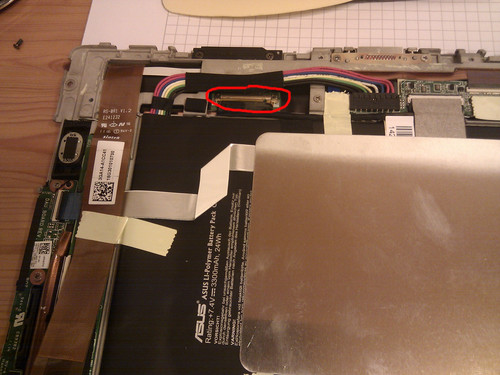
My ASUS Transformer TF101 had suddenly started flickering in all sorts of funny colors some weeks ago. As tapping it gently on the table in the right angle made the problem go away temporarily, it was clear the problem was about a loose cable, or some other hardware connection issue. As I needed to go on a business trip the other day, I didn't look up the warranty expiration day until later that week. Then, Murphy struck: the tablet was now 2 years + 1 day old! Calling ASUS, some friendly guy there suggested I still tried to get ASUS to accept it for warranty, because the tablet had been with them last year for 5 days, so if they added that, it would still be within the warranty period. I filled out the RMA form, but one hour later the reply was they rejected it because it was out of warranty. Another guy on the phone then said they would probably only do the adding if it had been with them for maybe 10 days, or actually really 30 days, or whatever. Some googling suggested that the loose cable theory was indeed worth a try, so I took it apart. Thanks to a forum post I could then locate the display connector and fix it. Putting the case back together was actually harder than disassembling it because some plastic bits got stuck, but now everything is back to normal.
7 December 2013

Daniel Pocock: Free calling from browser to mobile with free software

Lumicall is now offering free calls from browser to mobile. The whole service is powered by free software using open standards.
  • The person receiving the call must have the open source Lumicall app on their phone (Android and Cyanogenmod phones supported)
  • The person making the call just goes to http://webrtc.lumicall.org and dials the number in international format. For example, for the UK mobile 07123 45678, you need to dial +44712345678
Credits Various open source projects have made this possible, in particular: The service is enabled by WebRTC which is part of the latest HTML and JavaScript standards. You need to have the latest version of Mozilla Firefox, Google Chrome or another modern web browser supporting WebRTC - so there is no need to install any plugin. Feedback and discussion Please come and join us on the mailing list for any of the third-party projects that are involved. Please also join the Free real-time communications list sponsored by the FSF Europe for any general discussion about the future of free communications with free software. WebRTC Conference this week I'll be presenting some of my own work with WebRTC at the WebRTC Conference and Exhibition 2013 in Paris this week. Various other free software developers are also in the program, including Ludovic Dubost from xWiki and Emil Ivov from Jitsi

5 December 2013

Matthew Palmer: The easy bit of software development

I m sure this isn t an original thought of mine, but it just popped into my head and I think it s something of a fundamental truth that all software developers need to keep in mind:

Writing software is easy. The hard part is writing software that works.
All too often, we get so caught up in the rush of building something that we forget that it has to work and, all too often, we fail in some fundamental fashion, whether it s doesn t satisfy the user s needs or you just broke my $FEATURE! (which is the context I was thinking of).

3 December 2013

Matthew Garrett: Subverting security with kexec

(Discussion of a presentation I gave at Kiwicon last month)

Kexec is a Linux kernel feature intended to allow the booting of a replacement kernel at runtime. There's a few reasons you might want to do that, such as using Linux as a bootloader[1], rebooting without having to wait for the firmware to reinitialise or booting into a minimal kernel and userspace that can be booted on crash in order to save system state for later analysis.

But kexec's significantly more flexible than this. The kexec system call interface takes a list of segments (ie, pointers to a userspace buffer and the desired target destination) and an entry point. The kernel relocates those segments and jumps to the entry point. That entry point is typically code referred to as purgatory, due to the fact that it lives between the world of the first kernel and the world of the second kernel. The purgatory code sets up the environment for the second kernel and then jumps to it. The first kernel doesn't need to know anything about what the second kernel is or does. While it's conventional to load Linux, you can load just about anything.

The most important thing to note here is that none of this is signed. In other words, despite us having a robust in-kernel mechanism for ensuring that only signed modules can be inserted into the kernel, root can still load arbitrary code via kexec and execute it. This seems like a somewhat irritating way to patch the running kernel, so thankfully there's a much more straightforward approach.

I modified kexec to add an additional loader and uploaded the code here. Build and install it. Make sure that /sys/module/module/parameters/sig_enforce on your system is "Y". Then, as root, do something like:
kexec --type="dummy" --address= printf "0x%x" $(( $(grep "B sig_enforce" /proc/kallsyms awk ' print "0x"$1 ') & 0x7fffffff)) --value=0 --load-preserve-context --mem-max=0x10000 /bin/true
to load it[2]. Now do kexec -e and watch colours flash and check /sys/module/module/parameters/sig_enforce again.

The beauty of this approach is that it doesn't rely on any kernel bugs - it's using kernel functionality that was explicitly designed to let you do this kind of thing (ie, run arbitrary code in ring 0). There's not really any way to fix it beyond adding a new system call that has rather tighter restrictions on the binaries that can be loaded. If you're using signed modules but still permit kexec, you're not really adding any additional security.

But that's not the most interesting way to use kexec. If you can load arbitrary code into the kernel, you can load anything. Including, say, the Windows kernel. ReactOS provides a bootloader that's able to boot the Windows 2003 kernel, and it shouldn't be too difficult for a sufficiently enterprising individual to work out how to get Windows 8 booting. Things are a little trickier on UEFI - you need to tell the firmware which virtual physical map to use, and you can only do it once. If Linux has already done that, it's going to be difficult to set up a different map for Windows. Thankfully, there's an easy workaround. Just boot with the "noefi" kernel argument and the kernel will skip UEFI setup, letting you set up your own map.

Why would you want to do this? The most obvious reason is avoiding Secure Boot restrictions. Secure Boot, if enabled, is explicitly designed to stop you booting modified kernels unless you've added your own keys. But if you boot a signed Linux distribution with kexec enabled (like, say, Ubuntu) then you're able to boot a modified Windows kernel that will still believe it was booted securely. That means you can disable stuff like the Early Launch Anti-Malware feature or driver signing, or just stick whatever code you want directly into the kernel. In most cases all you'd need for this would be a bootloader, kernel and an initrd containing support for the main storage, an ntfs driver and a copy of kexec-tools. That should be well under 10MB, so it'll easily fit on the EFI system partition. Copy it over the Windows bootloader and you should be able to boot a modified Windows kernel without any terribly obvious graphical glitches in the process.

And that's the story of why kexec is disabled on Fedora when Secure Boot is enabled.

[1] That way you only have to write most drivers once
[2] The address section finds the address of the sig_enforce symbol in the kernel, and the value argument tells the dummy code what value to set that address to. --load-preserve-context informs the kernel that it should save hardware state in order to permit returning to the original kernel. --mem-max indicates the highest address that the kernel needs to back up. /bin/true is just there to satisfy the argument parser.

comment count unavailable comments

2 December 2013

Tim Retout: How not to parse search queries

While I remember, I have uploaded the slides from my talk about Solr and Perl at the London Perl Workshop. This talk was inspired by having seen and contributed to at least five different sets of Solr search code at my current job, all of which (I now believe) were doing it wrong. I distilled this hard-won knowledge into a 20 minute talk, which - funny story - I actually delivered twice to work around a cock-up in the printed schedule. I don't believe any video was successfully taken, but I may be proved wrong later. I have also uploaded the Parse::Yapp grammar mentioned in the talk. In case you don't have time to read the slides, the right way to present Solr via Perl is to use the 'edismax' parser, and write your code a bit like this:
my $solr = WebService::Solr->new($url);
my $s = $query->param('q');
# WebService::Solr::Query objects are useful for
# 'fq' params, but avoid them for main 'q' param.
my $options =  
 fq => [WebService::Solr::Query->new(...)];
 ;
$solr->search($s, \%options);
The key thing here is not to put any complicated parsing code in between the user and Solr. Avoid Search::QueryParser at all costs.

Next.

Previous.