Search Results: "ana"

23 June 2017

Arturo Borrero Gonz lez: Backup router/switch configuration to a git repository

git Most routers/switches out there store their configuration in plain text, which is nice for backups. I m talking about Cisco, Juniper, HPE, etc. The configuration of our routers are being changed several times a day by the operators, and in this case we lacked some proper way of tracking these changes. Some of these routers come with their own mechanisms for doing backups, and depending on the model and version perhaps they include changes-tracking mechanisms as well. However, they mostly don t integrate well into our preferred version control system, which is git. After some internet searching, I found rancid, which is a suite for doing tasks like this. But it seemed rather complex and feature-full for what we required: simply fetch the plain text config and put it into a git repo. Worth noting that the most important drawback of not triggering the change-tracking from the router/switch is that we have to follow a polling approach: loggin into each device, get the plain text and the commit it to the repo (if changes detected). This can be hooked in cron, but as I said, we lost the sync behaviour and won t see any changes until the next cron is run. In most cases, we lost authorship information as well. But it was not important for us right now. In the future this is something that we will have to solve. Also, some routers/switches lack some basic SSH security improvements, like public-key authentication, so we end having to hard-code user/pass in our worker script. Since we have several devices of the same type, we just iterate over their names. For example, this is what we use for hp comware devices:
#!/bin/bash
# run this script by cron
USER="git"
PASSWORD="readonlyuser"
DEVICES="device1 device2 device3 device4"
FILE="flash:/startup.cfg"
GIT_DIR="myrepo"
GIT="/srv/git/$ GIT_DIR .git"
TMP_DIR="$(mktemp -d)"
if [ -z "$TMP_DIR" ] ; then
	echo "E: no temp dir created" >&2
	exit 1
fi
GIT_BIN="$(which git)"
if [ ! -x "$GIT_BIN" ] ; then
	echo "E: no git binary" >&2
	exit 1
fi
SCP_BIN="$(which scp)"
if [ ! -x "$SCP_BIN" ] ; then
	echo "E: no scp binary" >&2
	exit 1
fi
SSHPASS_BIN="$(which sshpass)"
if [ ! -x "$SSHPASS_BIN" ] ; then
	echo "E: no sshpass binary" >&2
	exit 1
fi
# clone git repo
cd $TMP_DIR
$GIT_BIN clone $GIT
cd $GIT_DIR
for device in $DEVICES; do
	mkdir -p $device
	cd $device
	# fetch cfg
	CONN="$ USER @$ device "
	$SSHPASS_BIN -p "$PASSWORD" $SCP_BIN $ CONN :$ FILE  .
	# commit
	$GIT_BIN add -A .
	$GIT_BIN commit -m "$ device : configuration change" \
		-m "A configuration change was detected" \
		--author="cron <cron@example.com>"
	$GIT_BIN push -f
	cd ..
done
# cleanup
rm -rf $TMP_DIR
You should create a read-only user git in the devices. And beware that each device model has the config file stored in a different place. For reference, in HP comware, the file to scp is flash:/startup.cfg. And you might try creating the user like this:
local-user git class manage
 password hash xxxxx
 service-type ssh
 authorization-attribute user-role security-audit
#
In Junos/Juniper, the file you should scp is /config/juniper.conf.gz and the script should gunzip the data before committing. For the read-only user, try is something like this:
system  
	[...]
	login  
		[...]
		class git  
			permissions maintenance;
			allow-commands scp.*;
		 
		user git  
			uid xxx;
			class git;
			authentication  
				encrypted-password "xxx";


The file to scp in HP procurve is /cfg/startup-config. And for the read-only user, try something like this:
aaa authorization group "git user" 1 match-command "scp.*" permit
aaa authentication local-user "git" group "git user" password sha1 "xxxxx"
What would be the ideal situation? Get the device controlled directly by git (i.e. commit > git hook > device update) or at least have the device to commit the changes by itself to git. I m open to suggestions :-)

20 June 2017

Norbert Preining: TeX Live 2017 hits Debian/unstable

Yesterday I uploaded the first packages of TeX Live 2017 to Debian/unstable, meaning that the new release cycle has started. Debian/stretch was released over the weekend, and this opened up unstable for new developments. The upload comprised the following packages: asymptote, cm-super, context, context-modules, texlive-base, texlive-bin, texlive-extra, texlive-extra, texlive-lang, texworks, xindy.
I mentioned already in a previous post the following changes: The last two changes are described together with other news (easy TEXMF tree management) in the TeX Live release post. These changes more or less sum up the new infra structure developments in TeX Live 2017. Since the last release to unstable (which happened in 2017-01-23) about half a year of package updates have accumulated, below is an approximate list of updates (not split into new/updated, though). Enjoy the brave new world of TeX Live 2017, and please report bugs to the BTS! Updated/new packages:
academicons, achemso, acmart, acro, actuarialangle, actuarialsymbol, adobemapping, alkalami, amiri, animate, aomart, apa6, apxproof, arabluatex, archaeologie, arsclassica, autoaligne, autobreak, autosp, axodraw2, babel, babel-azerbaijani, babel-english, babel-french, babel-indonesian, babel-japanese, babel-malay, babel-ukrainian, bangorexam, baskervaldx, baskervillef, bchart, beamer, beamerswitch, bgteubner, biblatex-abnt, biblatex-anonymous, biblatex-archaeology, biblatex-arthistory-bonn, biblatex-bookinother, biblatex-caspervector, biblatex-cheatsheet, biblatex-chem, biblatex-chicago, biblatex-claves, biblatex-enc, biblatex-fiwi, biblatex-gb7714-2015, biblatex-gost, biblatex-ieee, biblatex-iso690, biblatex-manuscripts-philology, biblatex-morenames, biblatex-nature, biblatex-opcit-booktitle, biblatex-oxref, biblatex-philosophy, biblatex-publist, biblatex-shortfields, biblatex-subseries, bibtexperllibs, bidi, biochemistry-colors, bookcover, boondox, bredzenie, breqn, bxbase, bxcalc, bxdvidriver, bxjalipsum, bxjaprnind, bxjscls, bxnewfont, bxorigcapt, bxpapersize, bxpdfver, cabin, callouts, chemfig, chemformula, chemmacros, chemschemex, childdoc, circuitikz, cje, cjhebrew, cjk-gs-integrate, cmpj, cochineal, combofont, context, conv-xkv, correctmathalign, covington, cquthesis, crimson, crossrefware, csbulletin, csplain, csquotes, css-colors, cstldoc, ctex, currency, cweb, datetime2-french, datetime2-german, datetime2-romanian, datetime2-ukrainian, dehyph-exptl, disser, docsurvey, dox, draftfigure, drawmatrix, dtk, dviinfox, easyformat, ebproof, elements, endheads, enotez, eqnalign, erewhon, eulerpx, expex, exsheets, factura, facture, fancyhdr, fbb, fei, fetamont, fibeamer, fithesis, fixme, fmtcount, fnspe, fontmfizz, fontools, fonts-churchslavonic, fontspec, footnotehyper, forest, gandhi, genealogytree, glossaries, glossaries-extra, gofonts, gotoh, graphics, graphics-def, graphics-pln, grayhints, gregoriotex, gtrlib-largetrees, gzt, halloweenmath, handout, hang, heuristica, hlist, hobby, hvfloat, hyperref, hyperxmp, ifptex, ijsra, japanese-otf-uptex, jlreq, jmlr, jsclasses, jslectureplanner, karnaugh-map, keyfloat, knowledge, komacv, koma-script, kotex-oblivoir, l3, l3build, ladder, langsci, latex, latex2e, latex2man, latex3, latexbug, latexindent, latexmk, latex-mr, leaflet, leipzig, libertine, libertinegc, libertinus, libertinust1math, lion-msc, lni, longdivision, lshort-chinese, ltb2bib, lualatex-math, lualibs, luamesh, luamplib, luaotfload, luapackageloader, luatexja, luatexko, lwarp, make4ht, marginnote, markdown, mathalfa, mathpunctspace, mathtools, mcexam, mcf2graph, media9, minidocument, modular, montserrat, morewrites, mpostinl, mptrees, mucproc, musixtex, mwcls, mweights, nameauth, newpx, newtx, newtxtt, nfssext-cfr, nlctdoc, novel, numspell, nwejm, oberdiek, ocgx2, oplotsymbl, optidef, oscola, overlays, pagecolor, pdflatexpicscale, pdfpages, pdfx, perfectcut, pgfplots, phonenumbers, phonrule, pkuthss, platex, platex-tools, polski, preview, program, proofread, prooftrees, pst-3dplot, pst-barcode, pst-eucl, pst-func, pst-ode, pst-pdf, pst-plot, pstricks, pstricks-add, pst-solides3d, pst-spinner, pst-tools, pst-tree, pst-vehicle, ptex2pdf, ptex-base, ptex-fontmaps, pxbase, pxchfon, pxrubrica, pythonhighlight, quran, ran_toks, reledmac, repere, resphilosophica, revquantum, rputover, rubik, rutitlepage, sansmathfonts, scratch, seealso, sesstime, siunitx, skdoc, songs, spectralsequences, stackengine, stage, sttools, studenthandouts, svg, tcolorbox, tex4ebook, tex4ht, texosquery, texproposal, thaienum, thalie, thesis-ekf, thuthesis, tikz-kalender, tikzmark, tikz-optics, tikz-palattice, tikzpeople, tikzsymbols, titlepic, tl17, tqft, tracklang, tudscr, tugboat-plain, turabian-formatting, txuprcal, typoaid, udesoftec, uhhassignment, ukrainian, ulthese, unamthesis, unfonts-core, unfonts-extra, unicode-math, uplatex, upmethodology, uptex-base, urcls, variablelm, varsfromjobname, visualtikz, xassoccnt, xcharter, xcntperchap, xecjk, xepersian, xetexko, xevlna, xgreek, xsavebox, xsim, ycbook.

18 June 2017

Bits from Debian: Debian 9.0 Stretch has been released!

Alt Stretch has been released Let yourself be embraced by the purple rubber toy octopus! We're happy to announce the release of Debian 9.0, codenamed Stretch. Want to install it? Choose your favourite installation media among Blu-ray Discs, DVDs, CDs and USB sticks. Then read the installation manual. Already a happy Debian user and you only want to upgrade? You can easily upgrade from your current Debian 8 Jessie installation, please read the release notes. Do you want to celebrate the release? Share the banner from this blog in your blog or your website!

Jonathan Carter: Debian 9 is available!

Congratulations to everyone who has played a part in the creation of Debian GNU/Linux 9.0! It s a great release, I ve installed the pre-release versions for friends, family and colleagues and so far the feedback has been very positive. This release is dedicated to Ian Murdock, who founded the Debian project in 1993, and sadly passed away on 28 December 2015. On the Debian ISO files a dedication statement is available on /doc/dedication/dedication-9.0.txt Here s a copy of the dedication text:
Dedicated to Ian Murdock
------------------------
Ian Murdock, the founder of the Debian project, passed away
on 28th December 2015 at his home in San Francisco. He was 42.
It is difficult to exaggerate Ian's contribution to Free
Software. He led the Debian Project from its inception in
1993 to 1996, wrote the Debian manifesto in January 1994 and
nurtured the fledgling project throughout his studies at
Purdue University.
Ian went on to be founding director of Linux International,
CTO of the Free Standards Group and later the Linux
Foundation, and leader of Project Indiana at Sun
Microsystems, which he described as "taking the lesson
that Linux has brought to the operating system and providing
that for Solaris".
Debian's success is testament to Ian's vision. He inspired
countless people around the world to contribute their own free
time and skills. More than 350 distributions are known to be
derived from Debian.
We therefore dedicate Debian 9 "stretch" to Ian.
-- The Debian Developers
During this development cycle, the amount of source packages in Debian grew from around 21 000 to around 25 000 packages, which means that there s a whole bunch of new things Debian can make your computer do. If you find something new in this release that you like, post about it on your favourite social networks, using the hashtag #newinstretch or look it up to see what others have discovered!

17 June 2017

Alexander Wirt: Survey about alioth replacement

To get some idea about the expectations and current usage of alioth I created a survey. Please take part in it if you are an alioth user. If you need some background about the coming alioth replacement I recommend to read the great lwn article written by anarcat.

Jonathan Carter: Debian 9 is available!

Congratulations to everyone who has played a part in the creation of Debian GNU/Linux 9.0! It s a great release, I ve installed the pre-release versions for friends, family and colleagues and so far the feedback has been very positive. This release is dedicated to Ian Murdock, who founded the Debian project in 1993, and sadly passed away on 28 December 2015. On the Debian ISO files a dedication statement is available on /doc/dedication/dedication-9.0.txt Here s a copy of the dedication text:
Dedicated to Ian Murdock
------------------------
Ian Murdock, the founder of the Debian project, passed away
on 28th December 2015 at his home in San Francisco. He was 42.
It is difficult to exaggerate Ian's contribution to Free
Software. He led the Debian Project from its inception in
1993 to 1996, wrote the Debian manifesto in January 1994 and
nurtured the fledgling project throughout his studies at
Purdue University.
Ian went on to be founding director of Linux International,
CTO of the Free Standards Group and later the Linux
Foundation, and leader of Project Indiana at Sun
Microsystems, which he described as "taking the lesson
that Linux has brought to the operating system and providing
that for Solaris".
Debian's success is testament to Ian's vision. He inspired
countless people around the world to contribute their own free
time and skills. More than 350 distributions are known to be
derived from Debian.
We therefore dedicate Debian 9 "stretch" to Ian.
-- The Debian Developers
During this development cycle, the amount of source packages in Debian grew from around 21 000 to around 25 000 packages, which means that there s a whole bunch of new things Debian can make your computer do. If you find something new in this release that you like, post about it on your favourite social networks, using the hashtag #newinstretch or look it up to see what others have discovered!

16 June 2017

Elena 'valhalla' Grandi: Travel piecepack v0.1

Travel piecepack v0.1

Immagine/fotosocial.gl-como.it/photos/valha

A www.piecepack.org/ set of generic board game pieces is nice to have around in case of a sudden spontaneous need of gaming, but carrying my full set www.trueelena.org/fantastic/fe takes some room, and is not going to fit in my daily bag.

I've been thinking for a while that an half-size set could be useful, and between yesterday and today I've actually managed to do the first version.

It's (2d) printed on both sides of a single sheet of heavy paper, laminated and then cut, comes with both the basic suites and the playing card expansion and fits in a mint tin divided by origami boxes.

It's just version 0.1 because there are a few issues: first of all I'm not happy with the manual way I used to draw the page: ideally it would have been programmatically generated from the same svg files as the 3d piecepack (with the ability to generate other expansions), but apparently reading paths from an svg and writing it in another svg is not supported in an easy way by the libraries I could find, and looking for it was starting to take much more time than just doing it by hand.

I also still have to assemble the dice; in the picture above I'm just using the ones from the 3d-printed set, but they are a bit too big and only four of them fit in the mint tin. I already have the faces printed, so this is going to be fixed in the next few days.

Source files are available in the same git repository as the 3d-printable piecepack git.trueelena.org/cgit.cgi/3d/, with the big limitation mentioned above; updates will also be pushed there, just don't hold your breath for it :)

Michal &#268;iha&#345;: New projects on Hosted Weblate

Hosted Weblate provides also free hosting for free software projects. The hosting requests queue was over one month long, so it's time to process it and include new project. This time, the newly hosted projects include: We now also host few new Minetest mods: If you want to support this effort, please donate to Weblate, especially recurring donations are welcome to make this service alive. You can do them on Liberapay or Bountysource.

Filed under: Debian English SUSE Weblate

15 June 2017

Jeremy Bicha: #newinstretch : Latest WebKitGTK+

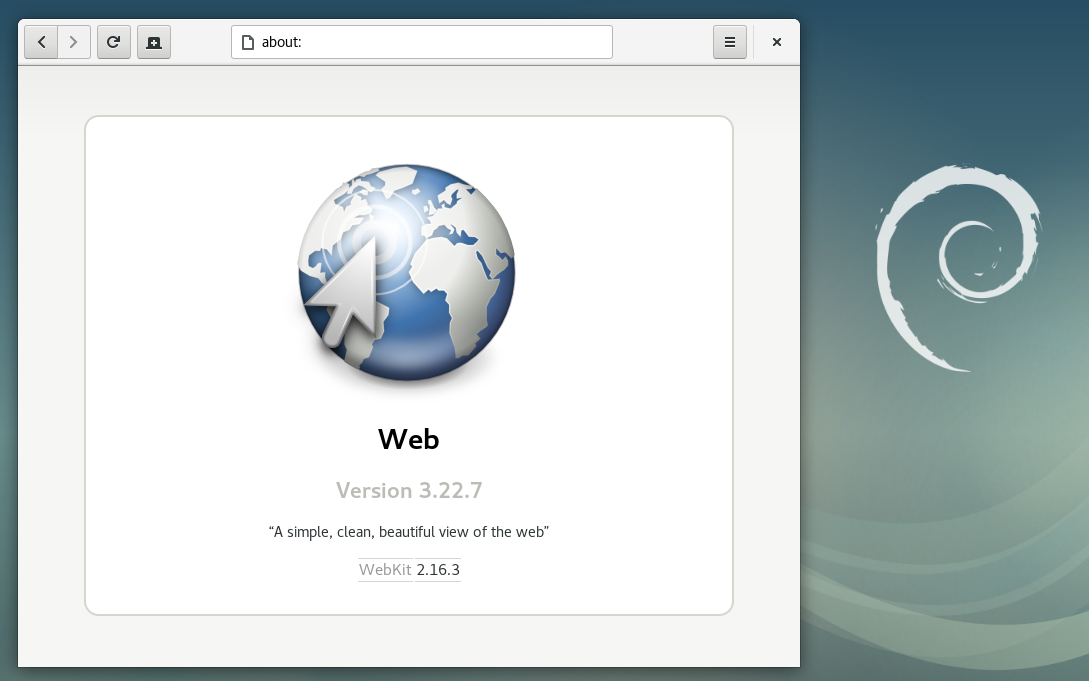
GNOME Web (Epiphany) in Debian 9 "Stretch" Debian 9 Stretch , the latest stable version of the venerable Linux distribution, will be released in a few days. I pushed a last-minute change to get the latest security and feature update of WebKitGTK+ (packaged as webkit2gtk 2.16.3) in before release. Carlos Garcia Campos discusses what s new in 2.16, but there are many, many more improvements since the 2.6 version in Debian 8. Like many things in Debian, this was a team effort from many people. Thank you to the WebKitGTK+ developers, WebKitGTK+ maintainers in Debian, Debian Release Managers, Debian Stable Release Managers, Debian Security Team, Ubuntu Security Team, and testers who all had some part in making this happen. As with Debian 8, there is no guaranteed security support for webkit2gtk for Debian 9. This time though, there is a chance of periodic security updates without needing to get the updates through backports. If you would like to help test the next proposed update, please contact me so that I can help coordinate this.

14 June 2017

Michael Prokop: Grml 2017.05 Codename Freedatensuppe

The Debian stretch release is going to happen soon (on 2017-06-17) and since our latest Grml release is based on a very recent version of Debian stretch I m taking this as opportunity to announce it also here. So by the end of May we released a new stable release of Grml (the Debian based live system focusing on system administrator s needs), known as version 2017.05 with codename Freedatensuppe. Details about the changes of the new release are available in the official release notes and as usual the ISOs are available via grml.org/download. With this new Grml release we finally made the switch from file-rc to systemd. From a user s point of view this doesn t change that much, though to prevent having to answer even more mails regarding the switch I wrote down some thoughts in Grml s FAQ. There are some things that we still need to improve and sort out, but overall the switch to systemd so far went better than anticipated (thanks a lot to the pkg-systemd folks, especially Felipe Sateler and Michael Biebl!). And last but not least, Darshaka Pathirana helped me a lot with the systemd integration and polishing the release, many thanks! Happy Grml-ing!

Antoine Beaupr : Alioth moving toward pagure

Since 2003, the Debian project has been running a server called Alioth to host source code version control systems. The server will hit the end of life of the Debian LTS release (Wheezy) next year; that deadline raised some questions regarding the plans for the server over the coming years. Naturally, that led to a discussion regarding possible replacements. In response, the current Alioth maintainer, Alexander Wirt, announced a sprint to migrate to pagure, a free-software "Git-centered forge" written in Python for the Fedora project, which LWN covered last year. Alioth currently runs FusionForge, previously known as GForge, which is the free-software fork of the SourceForge code base when that service closed its source in 2001. Alioth hosts source code repositories, mainly Git and Subversion (SVN) and, like other "forge" sites, also offers forums, issue trackers, and mailing list services. While other alternatives are still being evaluated, a consensus has emerged on a migration plan from FusionForage to a more modern and minimal platform based on pagure.

Why not GitLab? While this may come as a surprise to some who would expect Debian to use the more popular GitLab project, the discussion and decision actually took place a while back. During a lengthy debate last year, Debian contributors discussed the relative merits of different code-hosting platforms, following the initiative of Debian Developer "Pirate" Praveen Arimbrathodiyil to package GitLab for Debian. At that time, Praveen also got a public GitLab instance running for Debian (gitlab.debian.net), which was sponsored by GitLab B.V. the commercial entity behind the GitLab project. The sponsorship was originally offered in 2015 by the GitLab CEO, presumably to counter a possible move to GitHub, as there was a discussion about creating a GitHub Organization for Debian at the time. The deployment of a Debian-specific GitLab instance then raised the question of the overlap with the already existing git.debian.org service, which is backed by Alioth's FusionForge deployment. It then seemed natural that the new GitLab instance would replace Alioth. But when Praveen directly proposed to move to GitLab, Wirt stepped in and explained that a migration plan was already in progress. The plan then was to migrate to a simpler gitolite-based setup, a decision that was apparently made in corridor discussions surrounding the Alioth Git replacement BoF held during Debconf 2015. The first objection raised by Wirt against GitLab was its "huge number of dependencies". Another issue Wirt identified was the "open core / enterprise model", preferring a "real open source system", an opinion which seems shared by other participants on the mailing list. Wirt backed his concerns with an hypothetical example:
Debian needs feature X but it is already in the enterprise version. We make a patch and, for commercial reasons, it never gets merged (they already sell it in the enterprise version). Which means we will have to fork the software and keep those patches forever. Been there done that. For me, that isn't acceptable.
This concern was further deepened when GitLab's Director of Strategic Partnerships, Eliran Mesika, explained the company's stewardship policy that explains how GitLab decides which features end up in the proprietary version. Praveen pointed out that:
[...] basically it boils down to features that they consider important for organizations with less than 100 developers may get accepted. I see that as a red flag for a big community like debian.
Since there are over 600 Debian Developers, the community seems to fall within the needs of "enterprise" users. The features the Debian community may need are, by definition, appropriate only to the "Enterprise Edition" (GitLab EE), the non-free version, and are therefore unlikely to end up in the "Community Edition" (GitLab CE), the free-software version. Interestingly, Mesika asked for clarification on which features were missing, explaining that GitLab is actually open to adding features to GitLab CE. The response from Debian Developer Holger Levsen was categorical: "It's not about a specific patch. Free GitLab and we can talk again." But beyond the practical and ethical concerns, some specific features Debian needs are currently only in GitLab EE. For example, debian.org systems use LDAP for authentication, which would obviously be useful in a GitLab deployment; GitLab CE supports basic LDAP authentication, but advanced features, like group or SSH-key synchronization, are only available in GitLab EE. Wirt also expressed concern about the Contributor License Agreement that GitLab B.V. requires contributors to sign when they send patches, which forces users to allow the release of their code under a non-free license. The debate then went on going through a exhaustive inventory of different free-software alternatives:
  • GitLab, a Ruby-based GitHub replacement, dual-licensed MIT/Commercial
  • Gogs, Go, MIT
  • Gitblit, Java, Apache-licensed
  • Kallithea, in Python, also supports Mercurial, GPLv3
  • and finally, pagure, also written Python, GPLv2
A feature comparison between each project was created in the Debian wiki as well. In the end, however, Praveen gave up on replacing Alioth with GitLab because of the controversy and moved on to support the pagure migration, which resolved the discussion in July 2016. More recently, Wirt admitted in an IRC conversation that "on the technical side I like GitLab a lot more than pagure" and that "as a user, GitLab is much nicer than pagure and it has those nice CI [continuous integration] features". However, as he explained in his blog "GitLab is Opencore, [and] that it is not entirely opensource. I don't think we should use software licensed under such a model for one of our core services" which leaves pagure as the only stable candidate. Other candidates were excluded on technical grounds, according to Wirt: Gogs "doesn't scale well" and a quick security check didn't yield satisfactory results; "Gitblit is Java" and Kallithea doesn't have support for accessing repositories over SSH (although there is a pending pull request to add the feature). In an email interview, Sid Sijbrandij, CEO of GitLab, did say that "we want to make sure that our open source edition can be used by open source projects". He gave examples of features liberated following requests by the community, such as branded login pages for the VLC project and GitLab Pages after popular demand. He stressed that "There are no artificial limits in our open source edition and some organizations use it with more than 20.000 users." So if the concern of the Debian community is that features may be missing from GitLab CE, there is definitely an opening from GitLab to add those features. If, however, the concern is purely ethical, it's hard to see how an agreement could be reached. As Sijbrandij put it:
On the mailinglist it seemed that some Debian maintainers do not agree with our open core business model and demand that there is no proprietary version. We respect that position but we don't think we can compete with the purely proprietary software like GitHub with this model.

Working toward a pagure migration The issue of Alioth maintenance came up again last month when Boyuan Yang asked what would happen to Alioth when support for Debian LTS (Wheezy) ends next year. Wirt brought up the pagure migration proposal and the community tried to make a plan for the migration. One of the issues raised was the question of the non-Git repositories hosted on Alioth, as pagure, like GitLab, only supports Git. Indeed, Ben Hutchings calculated that while 90% (\~19,000) of the repositories currently on Alioth are Git, there are 2,400 SVN repositories and a handful of Mercurial, Bazaar (bzr), Darcs, Arch, and even CVS repositories. As part of an informal survey, however, most packaging teams explained they either had already migrated away from SVN to Git or were in the process of doing so. The largest CVS user, the web site team, also explained it was progressively migrating to Git. Mattia Rizzolo then proposed that older repository services like SVN could continue running even if FusionForge goes down, as FusionForge is, after all, just a web interface to manage those back-end services. Repository creation would be disabled, but older repositories would stay operational until they migrate to Git. This would, effectively, mean the end of non-Git repository support for new projects in the Debian community, at least officially. Another issue is the creation of a Debian package for pagure. Ironically, while Praveen and other Debian maintainers have been working for 5 years to package GitLab for Debian, pagure isn't packaged yet. Antonio Terceiro, another Debian Developer, explained this isn't actually a large problem for debian.org services: "note that DSA [Debian System Administrator team] does not need/want the service software itself packaged, only its dependencies". Indeed, for Debian-specific code bases like ci.debian.net or tracker.debian.org, it may not make sense to have the overhead of maintaining Debian packages since those tools have limited use outside of the Debian project directly. While Debian derivatives and other distributions could reuse them, what usually happens is that other distributions roll their own software, like Ubuntu did with the Launchpad project. Still, Paul Wise, a member of the DSA team, reasoned that it was better, in the long term, to have Debian packages for debian.org services:
Personally I'm leaning towards the feeling that all configuration, code and dependencies for Debian services should be packaged and subjected to the usual Debian QA activities but I acknowledge that the current archive setup (testing migration plus backporting etc) doesn't necessarily make this easy.
Wise did say that "DSA doesn't have any hard rules/policy written down, just evaluation on a case-by-case basis" which probably means that pagure packaging will not be a blocker for deployment. The last pending issue is the question of the mailing lists hosted on Alioth, as pagure doesn't offer mailing list management (nor does GitLab). In fact, there are three different mailing list services for the Debian project: Wirt, with his "list-master hat" on, explained that the main mailing list service is "not really suited as a self-service" and expressed concern at the idea of migrating the large number mailing lists hosted on Alioth. Indeed, there are around 1,400 lists on Alioth while the main service has a set of 300 lists selected by the list masters. No solution for those mailing lists was found at the time of this writing. In the end, it seems like the Debian project has chosen pagure, the simpler, less featureful, but also less controversial, solution and will use the same hosting software as their fellow Linux distribution, Fedora. Wirt is also considering using FreeIPA for account management on top of pagure. The plan is to migrate away from FusionForge one bit at a time, and pagure is the solution for the first step: the Git repositories. Lists, other repositories, and additional features of FusionForge will be dealt with later on, but Wirt expects a plan to come out of the upcoming sprint. It will also be interesting to see how the interoperability promises of pagure will play out in the Debian world. Even though the federation features of pagure are still at the early stages, one can already clone issues and pull requests as Git repositories, which allows for a crude federation mechanism. In any case, given the long history and the wide variety of workflows in the Debian project, it is unlikely that a single tool will solve all problems. Alioth itself has significant overlap with other Debian services; not only does it handle mailing lists and forums, but it also has its own issue tracker that overlaps with the Debian bug tracking system (BTS). This is just the way things are in Debian: it is an old project with lots of moving part. As Jonathan Dowland put it: "The nature of the project is loosely-coupled, some redundancy, lots of legacy cruft, and sadly more than one way to do it." Hopefully, pagure will not become part of that "legacy redundant cruft". But at this point, the focus is on keeping the services running in a simpler, more maintainable way. The discussions between Debian and GitLab are still going on as we speak, but given how controversial the "open core" model used by GitLab is for the Debian community, pagure does seem like a more logical alternative.
Note: this article first appeared in the Linux Weekly News.

Sjoerd Simons: Debian Jessie on Raspberry Pi 2

Apart from being somewhat slow, one of the downsides of the original Raspberry Pi SoC was that it had an old ARM11 core which implements the ARMv6 architecture. This was particularly unfortunate as most common distributions (Debian, Ubuntu, Fedora, etc) standardized on the ARMv7-A architecture as a minimum for their ARM hardfloat ports. Which is one of the reasons for Raspbian and the various other RPI specific distributions. Happily, with the new Raspberry Pi 2 using Cortex-A7 Cores (which implement the ARMv7-A architecture) this issue is out of the way, which means that a a standard Debian hardfloat userland will run just fine. So the obvious first thing to do when an RPI 2 appeared on my desk was to put together a quick Debian Jessie image for it. The result of which can be found at: https://images.collabora.co.uk/rpi2/ Login as root with password debian (Obviously do change the password and create a normal user after booting). The image is 3G, so should fit on any SD card marketed as 4G or bigger. Using bmap-tools for flashing is recommended, otherwise you'll be waiting for 2.5G of zeros to be written to the card, which tends to be rather boring. Note that the image is really basic and will just get you to a login prompt on either serial or hdmi, batteries are very much not included, but can be apt-getted :). Technically, this image is simply a Debian Jessie debootstrap with a extra packages for hardware support. Unlike Raspbian the first partition (which contains the firmware & kernel files to boot the system) is mounted on /boot/firmware rather then on /boot. This is because the VideoCore expects the first partition to be a FAT filesystem, but mounting FAT on /boot really doesn't work right on Debian systems as it contains files managed by dpkg (e.g. the kernel package) which requires a POSIX compatible filesystem. Essentially the same reason why Debian is using /boot/efi for the ESP partition on Intel systems rather the mounting it on /boot directly. For reference, the RPI2 specific packages in this image are from https://repositories.collabora.co.uk/debian/ in the jessie distribution and rpi2 component (this repository is enabled by default on the image). The relevant packages there are: For the future, it would be nice to see the Raspberry Pi 2 support out of the box on Debian. For that to happen, the most important thing would be to have some mainline kernel support for this board (supporting multiplatform!) so it can be build as part of debians armmp kernel flavour. And ideally, having the firmware load a bootloader (such as u-boot) rather than a kernel directly to allow for a much more flexible boot sequence and support for using an initramfs (u-boot has some support for the original Raspberry Pi, so adding Raspberry Pi 2 support should hopefully not be too tricky) Update: An updated image (20150705) is available with the latest packages from Jessie and a GPG key that's not expired :).

Sjoerd Simons: Debian armhf VM on arm64 server

At Collabora one of the many things we do is build Debian derivatives/overlays for customers on a variety of architectures including 32 bit and 64 bit ARM systems. And just as Debian does, our OBS system builds on native systems rather than emulators. Luckily with the advent of ARM server systems some years ago building natively for those systems has been a lot less painful than it used to be. For 32 bit ARM we've been relying on Calxeda blade servers, however Calxeda unfortunately tanked ages ago and the hardware is starting to show its age (though luckily Debian Stretch does support it properly, so at least the software is still fresh). On the 64 bit ARM side, we're running on Gigabyte MP30-AR1 based servers which can run 32 bit arm code (As opposed to e.g. ThunderX based servers which can only run 64 bit code). As such running armhf VMs on them to act as build slaves seems a good choice, but setting that up is a bit more involved than it might appear. The first pitfall is that there is no standard bootloader or boot firmware available in Debian to boot on the "virt" machine emulated by qemu (I didn't want to use an emulation of a real machine). That also means there is nothing to pick the kernel inside the guest at boot nor something which can e.g. have the guest network boot, which means direct kernel booting needs to be used. The second pitfall was that the current Debian Stretch armhf kernel isn't built with support for the generic PCI host controller which the qemu virtual machine exposes, which means no storage and no network shows up in the guest. Hopefully that will get solved soonish (Debian bug 864726) and can be in a Stretch update, until then a custom kernel package is required using the patch attach to the bug report is required but I won't go into that any further in this post. So on the happy assumption that we have a kernel that works, the challenge left is to nicely manage direct kernel loading. Or more specifically, how ensure the hosts boots the kernel the guest has installed via the standard apt tools without having to copy kernels around between guest/host, which essentially comes down to exposing /boot from the guest to the host. The solution we picked is to use qemu's 9pfs support to share a folder from the host and use that as /boot of the guest. For the 9p folder the "mapped" security mode seems needed as the "none" mode seems to get confused by dpkg (Debian bug 864718). As we're using libvirt as our virtual machine manager the remainder of how to glue it all together will be mostly specific to that. First step is to install the system, mostly as normal. One can directly boot into the vmlinuz and initrd.gz provided by normal Stretch armhf netboot installer (downloaded into e.g /tmp). The setup overall is straight-forward with a few small tweaks: Apart from those tweaks the resulting example command is similar to the one that can be found in the virt-install man-page:
virt-install --name armhf-vm --arch armv7l --memory 512 \
  --disk /srv/armhf-vm.img,bus=virtio
  --filesystem /srv/armhf-vm-boot,virtio-boot,mode=mapped \
  --boot=kernel=/tmp/vmlinuz,initrd=/tmp/initrd.gz,kernel_args="console=ttyAMA0,root=/dev/vda1"

Run through the install as you'd normally would. Towards the end the installer will likely complain it can't figure out how to install a bootloader, which is fine. Just before ending the install/reboot, switch to the shell and copy the /boot/vmlinuz and /boot/initrd.img from the target system to the host in some fashion (e.g. chroot into /target and use scp from the installed system). This is required as the installer doesn't support 9p, but to boot the system an initramfs will be needed with the modules needed to mount the root fs, which is provided by the installed initramfs :). Once that's all moved around, the installer can be finished. Next, booting the installed system. For that adjust the libvirt config (e.g. using virsh edit and tuning the xml) to use the kernel and initramfs copied from the installer rather then the installer ones. Spool up the VM again and it should happily boot into a freshly installed Debian system. To finalize on the guest side /boot should be moved onto the shared 9pfs, the fstab entry for the new /boot should look something like:
virtio-boot /boot  9p trans=virtio,version=9p2000.L,x-systemd.automount 0 0

With that setup, it's just a matter of shuffling the files in /boot around to the new filesystem and the guest is done (make sure vmlinuz/initrd.img stay symlinks). Kernel upgrades will work as normal and visible to the host. Now on the host side there is one extra hoop to jump through, as the guest uses the 9p mapped security model symlinks in the guest will be normal files on the host containing the symlink target. To resolve that one, we've used libvirt's qemu hook support to setup a proper symlink before the guest is started. Below is the script we ended up using as an example (/etc/libvirt/hooks/qemu):
vm=$1
action=$2
bootdir=/srv/$ vm -boot
if [ $ action  != "prepare" ] ; then
  exit 0
fi
if [ ! -d $ bootdir  ] ; then
  exit 0
fi
ln -sf $(basename $(cat $ bootdir /vmlinuz))  $ bootdir /virtio-vmlinuz
ln -sf $(basename $(cat $ bootdir /initrd.img))  $ bootdir /virtio-initrd.img

With that in place, we can simply point the libvirt definition to use /srv/$ vm -boot/virtio- vmlinuz,initrd.img as the kernel/initramfs for the machine and it'll automatically get the latest kernel/initramfs as installed by the guest when the VM is started. Just one final rough edge remains, when doing reboot from the VM libvirt leaves qemu to handle that rather than restarting qemu. This unfortunately means a reboot won't pick up a new kernel if any, for now we've solved this by configuring libvirt to stop the VM on reboot instead. As we typically only reboot VMs on kernel (security) upgrades, while a bit tedious, this avoid rebooting with an older kernel/initramfs than intended.

Mike Gabriel: Ayatana Indicators

In the near future various upstream projects related to the Ubuntu desktop experience as we have known it so far may become only sporadically maintained or even fully unmaintained. Ubuntu will switch to the Gnome desktop environment with 18.04 LTS as its default desktop, maybe even earlier. The Application Indicators [1] brought into being by Canonical Ltd. will not be needed in Gnome (AFAIK) any more. We can expect the Application Indicator related projects become unmaintained upstream. (In fact I have recently been offered continuation of upstream maintenance of libdbusmenu). Historical Background This all started at Ubuntu Developer Summit 2012 when Canonical Ltd. announced Ubuntu to become the successor of Windows XP in business offices. The Unity Greeter received an Remote Login Service enhancement: since then it supports Remote Login to Windows Terminal Servers. The question came up, why Remote Login to Linux servers--maybe even Ubuntu machines--is not on the agenda. It turned out, that it wasn't even a discussable topic. At that time, I started looking into the Unity Greeter code, adding support for X2Go Logon into Unity Greeter. I never really stopped looking at the greeter code from time to time. Since then, it turned into some sort of a hobby... While looking into the Unity Greeter code over the past years and actually forking Unity Greeter as Arctica Greeter [2] in September 2015, I also started looking into the Application Indicators concept just recently. And I must say, the more I have been looking into it, the more I have started liking the concept behind Application Indicators. The basic idea is awesome. However, lately all indicators became more and more Ubuntu-centric and IMHO too polluted by code related to the just declared dead Ubuntu phablet project. Forking Application Indicators Saying all this, I recently forked Application Indicators as Ayatana Indicators. At the moment I represent upstream and Debian package maintainer in one person. Ideally, this is only temporary and more people join in. (I heard some Unity 7 maintainers think about switching to Ayatana Indicators for the now community maintained Unity 7). The goal is to provide Ayatana Indicators to all desktop environments generically, all that want to use them, either as default or optionally. Release-wise, the idea is to strictly differentiate between upstream and Debian downstream in the release cycles of the various related components. I hope, noone is too concerned about the choice of name, as the "Ayatana" word actually was first used for upstream efforts inside Ubuntu [3]. Using the Ayatana term for the indicator forks is meant as honouring the previously undertaken efforts. I have seen very good work, so far, while going through the indicators' code. The upstream code must not be distro-specific, but, of course, can be distro-aware. Contributions Welcome The Ayatana Indicators upstream project components are currently hosted on Github under the umbrella of the Arctica Project. Regarding Debian, first uploads have recently been accepted to Debian experimental. The Debian packages are maintained under the umbrella of the revived Ayatana Packagers team [4]. Meet you at the Ayatana Indicators BoF at DebConf 17 (hopefully) For DebConf 17 (yeah, I am going there, if all plans work out well!!!!) I have submitted a BoF on this topic (let's hope, it gets accepted...). I'd like to give a quick overview on the current status of above named efforts and reasonings behind my commitment to the work. Most of the time during that BoF I would like to get into discussion with desktop maintainers, possibly upstream developers, Ubuntu developers, etc. Anyone who sees an asset in the Indicators approach is welcome to share and contribute. References

11 June 2017

Bastian Blank: New blog featuring Pelican

For years I used a working blog setup using Zope, Plone and Quills. Quills was neglected for a long time and made me stuck at the aging Plone 4.2. There seems to be some work done in the last year, but I did not really care. Also this whole setup was just a bit too heavy for what I actually use it for. Well, static page generators are the new shit, so there we are. So here is it, some new blog, nice and shiny, which I hope to stop neglecting. The blog is managed in a Git repository. This repository is hosted on a private GitLab instance. It uses Pelican to generate shiny pages and is run via the GitLab CI. The finished pages are served by a, currently not highly available, instance of GitLab Pages (yes, this is one of the parts they copied from Github first). So let's see if this setup makes me more comfortable.

Benjamin Mako Hill: The Wikipedia Adventure

I recently finished a paper that presents a novel social computing system called the Wikipedia Adventure. The system was a gamified tutorial for new Wikipedia editors. Working with the tutorial creators, we conducted both a survey of its users and a randomized field experiment testing its effectiveness in encouraging subsequent contributions. We found that although users loved it, it did not affect subsequent participation rates.
Start screen for the Wikipedia Adventure.
A major concern that many online communities face is how to attract and retain new contributors. Despite it s success, Wikipedia is no different. In fact, researchers have shown that after experiencing a massive initial surge in activity, the number of active editors on Wikipedia has been in slow decline since 2007.
The number of active, registered editors ( 5 edits per month) to Wikipedia over time. From Halfaker, Geiger, and Morgan 2012.
Research has attributed a large part of this decline to the hostile environment that newcomers experience when begin contributing. New editors often attempt to make contributions which are subsequently reverted by more experienced editors for not following Wikipedia s increasingly long list of rules and guidelines for effective participation. This problem has led many researchers and Wikipedians to wonder how to more effectively onboard newcomers to the community. How do you ensure that new editors Wikipedia quickly gain the knowledge they need in order to make contributions that are in line with community norms? To this end, Jake Orlowitz and Jonathan Morgan from the Wikimedia Foundation worked with a team of Wikipedians to create a structured, interactive tutorial called The Wikipedia Adventure. The idea behind this system was that new editors would be invited to use it shortly after creating a new account on Wikipedia, and it would provide a step-by-step overview of the basics of editing.

The Wikipedia Adventure was designed to address issues that new editors frequently encountered while learning how to contribute to Wikipedia. It is structured into different missions that guide users through various aspects of participation on Wikipedia, including how to communicate with other editors, how to cite sources, and how to ensure that edits present a neutral point of view. The sequence of the missions gives newbies an overview of what they need to know instead of having to figure everything out themselves. Additionally, the theme and tone of the tutorial sought to engage new users, rather than just redirecting them to the troves of policy pages. Those who play the tutorial receive automated badges on their user page for every mission they complete. This signals to veteran editors that the user is acting in good-faith by attempting to learn the norms of Wikipedia.

An example of a badge that a user receives after demonstrating the skills to communicate with other users on Wikipedia.
Once the system was built, we were interested in knowing whether people enjoyed using it and found it helpful. So we conducted a survey asking editors who played the Wikipedia Adventure a number of questions about its design and educational effectiveness. Overall, we found that users had a very favorable opinion of the system and found it useful.
Survey responses about how users felt about TWA.
Survey responses about what users learned through TWA.
We were heartened by these results. We d sought to build an orientation system that was engaging and educational, and our survey responses suggested that we succeeded on that front. This led us to ask the question could an intervention like the Wikipedia Adventure help reverse the trend of a declining editor base on Wikipedia? In particular, would exposing new editors to the Wikipedia Adventure lead them to make more contributions to the community? To find out, we conducted a field experiment on a population of new editors on Wikipedia. We identified 1,967 newly created accounts that passed a basic test of making good-faith edits. We then randomly invited 1,751 of these users via their talk page to play the Wikipedia Adventure. The rest were sent no invitation. Out of those who were invited, 386 completed at least some portion of the tutorial. We were interested in knowing whether those we invited to play the tutorial (our treatment group) and those we didn t (our control group) contributed differently in the first six months after they created accounts on Wikipedia. Specifically, we wanted to know whether there was a difference in the total number of edits they made to Wikipedia, the number of edits they made to talk pages, and the average quality of their edits as measured by content persistence. We conducted two kinds of analyses on our dataset. First, we estimated the effect of inviting users to play the Wikipedia Adventure on our three outcomes of interest. Second, we estimated the effect of playing the Wikipedia Adventure, conditional on having been invited to do so, on those same outcomes. To our surprise, we found that in both cases there were no significant effects on any of the outcomes of interest. Being invited to play the Wikipedia Adventure therefore had no effect on new users volume of participation either on Wikipedia in general, or on talk pages specifically, nor did it have any effect on the average quality of edits made by the users in our study. Despite the very positive feedback that the system received in the survey evaluation stage, it did not produce a significant change in newcomer contribution behavior. We concluded that the system by itself could not reverse the trend of newcomer attrition on Wikipedia. Why would a system that was received so positively ultimately produce no aggregate effect on newcomer participation? We ve identified a few possible reasons. One is that perhaps a tutorial by itself would not be sufficient to counter hostile behavior that newcomers might experience from experienced editors. Indeed, the friendly, welcoming tone of the Wikipedia Adventure might contrast with strongly worded messages that new editors receive from veteran editors or bots. Another explanation might be that users enjoyed playing the Wikipedia Adventure, but did not enjoy editing Wikipedia. After all, the two activities draw on different kinds of motivations. Finally, the system required new users to choose to play the tutorial. Maybe people who chose to play would have gone on to edit in similar ways without the tutorial. Ultimately, this work shows us the importance of testing systems outside of lab studies. The Wikipedia Adventure was built by community members to address known gaps in the onboarding process, and our survey showed that users responded well to its design. While it would have been easy to declare victory at that stage, the field deployment study painted a different picture. Systems like the Wikipedia Adventure may inform the design of future orientation systems. That said, more profound changes to the interface or modes of interaction between editors might also be needed to increase contributions from newcomers.

This blog post, and the open access paper that it describes, is a collaborative project with Sneha Narayan, Jake Orlowitz, Jonathan Morgan, and Aaron Shaw. Financial support came from the US National Science Foundation (grants IIS-1617129 and IIS-1617468), Northwestern University, and the University of Washington. We also published all the data and code necessary to reproduce our analysis in a repository in the Harvard Dataverse. Sneha posted the material in this blog post over on the Community Data Science Collective Blog.

9 June 2017

John Goerzen: Fixing the Problems with Docker Images

I recently wrote about the challenges in securing Docker container contents, and in particular with keeping up-to-date with security patches from all over the Internet. Today I want to fix that. Besides security, there is a second problem: the common way of running things in Docker pretends to provide a traditional POSIX API and environment, but really doesn t. This is a big deal. Before diving into that, I want to explain something: I have often heard it said the Docker provides single-process containers. This is unambiguously false in almost every case. Any time you have a shell script inside Docker that calls cp or even ls, you are running a second process. Web servers from Apache to whatever else use processes or threads of various types to service multiple connections at once. Many Docker containers are single-application, but a process is a core part of the POSIX API, and very little software would work if it was limited to a single process. So this is my little plea for more precise language. OK, soapbox mode off. Now then, in a traditional Linux environment, besides your application, there are other key components of the system. These are usually missing in Docker containers. So today, I will fix this also. In my docker-debian-base images, I have prepared a system that still has only 11MB RAM overhead, makes minimal changes on top of Debian, and yet provides a very complete environment and API. Here s what you get: The above goes into my minimal image. Additional images add layers on top of it, and here are some of the features they add: All of the above, including the optional features, has an 11MB overhead on start. Not bad for so much, right? From here, you can layer on top all your usual Dockery things. You can still run one application per container. But you can now make sure your disk doesn t fill up from logs, run your database vacuuming commands at will, have your blog download its RSS feeds every few minutes, etc all from within the container, as it should be. Furthermore, you don t have to reinvent the wheel, because Debian already ships with things to take care of a lot of this out of the box and now those tools will just work. There is some popular work done in this area already by phusion s baseimage-docker. However, I made my own for these reasons: Finally a word on the choice to use sysvinit. It would have been simpler to use systemd here, since it is the default in Debian these days. Unfortunately, systemd requires you to poke some holes in the Docker security model, as well as mount a cgroups filesystem from the host. I didn t consider this acceptable, and sysvinit ran without these workarounds, so I went with it. With all this, Docker becomes a viable replacement for KVM for various services on my internal networks. I ll be writing about that later.

Jonathan Dowland: Western Digital Hard Drive head parking

I stumbled across some information about pathological behaviour of Western Digital Green (and some Red) hard drives relating to drive-head parking when the device is idle. In some circumstances, a particular pattern of drive activity can result in the drive head being repeatedly parked and un-parked in short intervals, possibly* resulting in excess wear on the drive. Apparently* the drive head parking is recorded in the S.M.A.R.T. "Load Cycle Count" attribute. I have two WD Red drives in my NAS, one for live data and one for backup. The latter drive is basically unused most of the day until scheduled backup jobs kick in and those jobs are all clustered together. I already unmount the backup filesystems when the jobs are not active (I wrote about this in mount-on-demand backups). Inspecting the S.M.A.R.T. attributes was surprising:
drive power on hours load cycle count
regular 12143 348
backup 12191 13043
It certainly looks like my backup drive has a much higher load cycle count than you might expect for a mostly-idle drive. I checked the attributes again 24 hours later and the regular drive had incremented by a single cycle, whilst the backup drive went up by 56. There are some official tools from Western Digital that makes an adjustment to the idle timeouts for head parking on the drives. There's also an unofficial tool idle3tcl to do the same, which is packaged in Debian. The unofficial tool let you set and fetch a particular value from the drive firmware. I don't know for sure* that the official tool does exactly the same thing, and nothing else. One advantage of the unofficial tool is it lets you read the value as well as write it. I tried the unofficial tool to get the drive's default value, which was 0x8a, and bump it to the maximum of 0xff. I then tried the official tool then fetched the value again: interestingly the official tool had reset the value back to 0x8a. I haven't managed to assess the impact of these changes on the attrition rate yet because I need to perform a cold boot for the change to take effect and that isn't convenient just now. My plan is to try and disable the feature completely via the unofficial tool. If that rectifies the issue I will then investigate changing the power management settings by hand at backup start/end time, perhaps via hdparm. ( The problem with these kind of issues is there is precious little in the way of reliable documentation as to the real issue, real drive behaviour, etc. I've marked a few sections of this blog post with * asterisks to indicate where we are having to make informed guesses. )

8 June 2017

Norbert Preining: Running in the Kanazawa hills

Sometimes I needed a short break from work, and usually I go a bit running. Normally I run between five and ten km, just around our flat. But yesterday I somehow thought it might be a good idea to run through the hills near by. I usually drive up there to a climbing spot or a cafe, so it will for sure not be that long. Well, my estimation was wrong
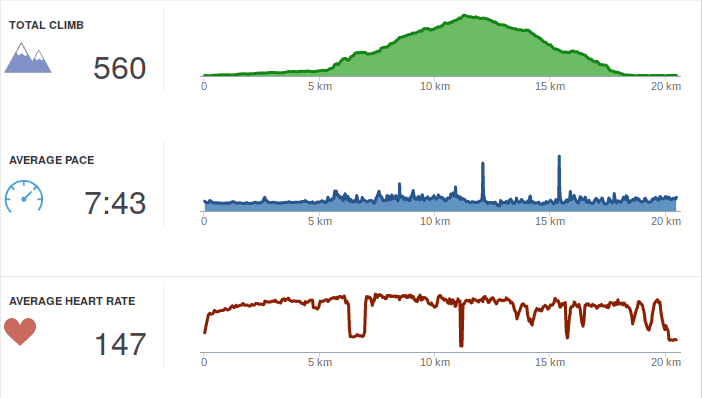
Turned out to be 20km and quite a trip up and down, in fact 560mH running up wasn t what I could actually do, so I walked the steeper parts. Due to the permanent rain the views weren t that great, but one gets a feeling how far it is back to town. I used my new fenix 5x for the run (was helpful with the built-in map, report later), so I got very detailed data from Garmin Connect. Not that I really understand what it is all for, but Garmin told me that I am overtraining and that I am not a good runner (due to vertical oscillation etc). I guess there is a whole lot to learn and improve. Anyway, I made it back alive, and the first thing I needed was loads of water to drink

Eriberto Mota: OpenVAS 9 from Kali Linux 2017.1 to Debian 9

The OpenVAS OpenVAS is a framework of several services and tools offering a comprehensive and powerful vulnerability scanning and vulnerability management solution. The framework is part of Greenbone Networks' commercial vulnerability management solution from which developments are contributed to the Open Source community since 2009. OpenVAS is composed of some elements, as OpenVAS-Cli, Greenbone Security Assistant, OpenVAS Scanner and OpenVAS Manager. The official OpenVAS homepage is http://www.openvas.org. From Kali Linux 2017.1 to Debian 9 Ok, this is a temporary solution. Now (June 2017), Debian 9 wasn't released yet and OpenVAS 9 is not available in Debian in good conditions (it is in Experimental but a bit problematic). I think that we will have OpenVAS in backports soon. The OpenVAS 9 from Kali is working perfect for Debian 9. So, to take advantage of this, adopt the following procedures:

1. Add a line to end of /etc/apt/sources.list file:

deb http://http.kali.org/kali kali-rolling main

2. Run:

# apt-get update
# apt-get install -t kali-rolling openvas

(if you want to simulate before install, add a -s option before -t)

3. Rermove or comment the previous line added to /etc/apt/sources.list file to avoid future problems in your Debian.

4. Run the following command to configure the OpenVAS and to download the initial database:

# openvas-setup

This step may take some time. Note that the initial password for user admin will be created and shown.

5. Finally, open a web browser and access the address https://127.0.0.1:9392 (use https!!!). Alternatively, you can call http://127.0.0.1 to be automagically redirected to https://127.0.0.1:9392.

The default user is admin and the password was shown in the last step. You will can change this password inside OpenVAS (menu Administration > Users > Edit User, which is an blue icon).

If your password was lost, you will be able to create a new administrative user via shell command. See the section "Some tips" below.

6. To see the packages installed from Kali Linux, use the command:

$ dpkg -l   grep kali
Some tips To create a new administrative user called test:
# openvasmd --create-user test --role Admin
To update the database (NVTs):
# openvasmd --update
# openvasmd --rebuild
# service openvas-scanner restart
To solve the message "Login failed. Waiting for OMP service to become available":
# openvas-start
To make OpenVAS listen all network interfaces, allowing one to call the service in a remote web browser (http://remote-server, port 80 only), edit the /lib/systemd/system/greenbone-security-assistant.service and change:
ExecStart=/usr/sbin/gsad --foreground --listen=127.0.0.1 --port=9392 --mlisten=127.0.0.1 --mport=9390

to

ExecStart=/usr/sbin/gsad --foreground --listen=0.0.0.0 --port=9392 --mlisten=127.0.0.1 --mport=9390
After the change, reload the configuration and restart the service:
# systemctl daemon-reload
# systemctl restart greenbone-security-assistant
Quick start for beginners If OpenVAS isn't familiar for you, I have a suggestion for a quick test. Firstly, download Ubuntu Server 8.04 from this page and install it inside a virtual machine, selecting all services as LAMP, SSH etc. I used the i386 version and VirtualBox. After this, use OpenVAS to scan the Ubuntu (menu Scans > Tasks > a pink icon with a magic wand in the upper left corner). After the scan, click over the blue bar where we will can see the word "Done". Enjoy!
Next.

Previous.