Search Results: "nic"

31 March 2020

Chris Lamb: Free software activities in March 2020

Here is my monthly update covering what I have been doing in the free software world during March 2020 (previous month): In addition, I did even more hacking on the Lintian static analysis tool for Debian packages, including:
Reproducible builds One of the original promises of open source software is that distributed peer review and transparency of process results in enhanced end-user security. However, whilst anyone may inspect the source code of free and open source software for malicious flaws, almost all software today is distributed as pre-compiled binaries. This allows nefarious third-parties to compromise systems by injecting malicious code into ostensibly secure software during the various compilation and distribution processes. The motivation behind the Reproducible Builds effort is to ensure no flaws have been introduced during this compilation process by promising identical results are always generated from a given source, thus allowing multiple third-parties to come to a consensus on whether a build was compromised. The initiative is proud to be a member project of the Software Freedom Conservancy, a not-for-profit 501(c)(3) charity focused on ethical technology and user freedom. Conservancy acts as a corporate umbrella allowing projects to operate as non-profit initiatives without managing their own corporate structure. If you like the work of the Conservancy or the Reproducible Builds project, please consider becoming an official supporter. This month, I: In our tooling, I also made the following changes to diffoscope, our in-depth and content-aware diff utility that can locate and diagnose reproducibility issues, including preparing and uploading version 138 to Debian: The Reproducible Builds project also operates a fully-featured and comprehensive Jenkins-based testing framework that powers tests.reproducible-builds.org. This month, I reworked the web-based package rescheduling tool to:
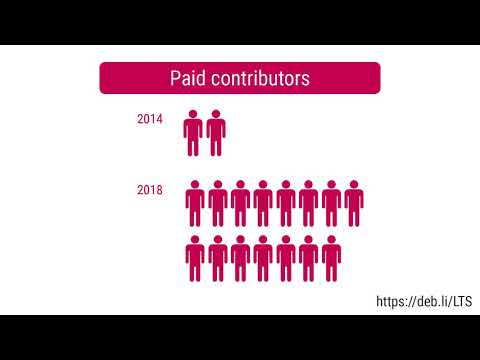
Debian LTS This month I have worked 18 hours on Debian Long Term Support (LTS) and 8 hours on its sister Extended LTS project. You can find out more about the Debian LTS project via the following video:
Debian Uploads For the Debian Privacy Maintainers team I requested that the pyptlib package be removed from the archive (#953429) as well as uploading onionbalance (0.1.8-6) to fix test failures under Pytest 3.x (#953535) and a new upstream release of nautilus-wipe. Finally, I sponsored an upload of bilibop (0.6.1) on behalf of Yann Amar.

30 March 2020

Mike Gabriel: UBports: Packaging of Lomiri Operating Environment for Debian (part 02)

Before and during FOSDEM 2020, I agreed with the people (developers, supporters, managers) of the UBports Foundation to package the Unity8 Operating Environment for Debian. Since 27th Feb 2020, Unity8 has now become Lomiri. Recent Uploads to Debian related to Lomiri Over the past 7-8 weeks the packaging progress has been slowed down due to other projects I am working on in parallel. However, quite a few things have been achieved: The packages qtsystems, qtfeedback, and qtpim are no official Qt5 components, and so I had to package Git snapshots of them; with all implicit consequences regarding ABI and API compatibilities, possibly Debian-internal library transitions, etc. Esp. packaging qtsystems was pretty tricky due to a number of failing unit tests when the package had been built in a clean chroot (like it is the case on Debian's buildd infrastructure). I learned a lot about DBus and DBus mocking while working on all those unit tests to finally pass in chrooted builds. Unfortunately, the Lomiri App Launch component still needs more work due to (finally only) one unit test (jobs-systemd) not always passing. Sometimes, the test gets stucks and then fails after having reached a time out. I'll add it to my list of those unreproducible build failures I have recently seen in several GTest related unit test scenarios. Sigh... Credits A great thanks goes to Lisandro Perez Meyer from the Debian KDE/Qt Team for providing an intro and help on Qt Debian packaging and an intro on symbols handling with C++ projects. Another big thanks goes to Dmitry Shachnev from the Debian KDE/Qt Team for doing a sponsored upload [1] of qtpim (and also a nice package review). Also a big thanks goes to Marius Gripsgard for his work on forking the first Lomiri components on the UBports upstream side. Previous Posts about my Debian UBports Team Efforts References

Jonathan Dowland: ephemeral note-taking wins

Some further thoughts on ephemeral versus preserve-everything note-taking. Note-taking is about capturing ideas, thoughts, and processes. You want as little friction as possible when doing so: you don't want to be thinking the page is too small, or the paper drying up the ink too quickly so the pen doesn't move smoothly, or similar such things distracting from capturing what you are trying to capture. I used my PhD notebook as an example of a preserve-everything approach. A serious drawback of the notebook as the sole place to capture work is the risk that it will be damaged or lost. I periodically photograph all the pages and store those photos digitally, alongside other things relating to the work. Those other things include two different private wiki instances that I use to capture notes when I'm working at the computer, as well as several Git repositories (some public, some private) for source code, experiments, drafts of papers, etc. There's also a not-insignificant amount of email correspondence. There have been several train journeys and several meetings where I've grabbed a cheap, larger-format pad of paper and a box of Pound-shop felt-tip pens to sketch ideas, whiteboard-style. At the time it just seemed easier to capture what we were doing in that way, rather than try to do so into the notebook. So the notebook is neither canonical nor comprehensive. Ultimately it's really another example of ephemeral note-taking, and so I think the Ephemeral model wins out. Use whatever notebook or paper or envelope or window pane that is convenient and feels attractive at the time you need to capture something with the least amount of friction. Digitise that and store, catalogue, adjust, derive, etc. from that in the digital domain.

Axel Beckert: How do you type on a keyboard with only 46 or even 28 keys?

Some of you might have noticed that I m into keyboards since a few years ago into mechanical keyboards to be precise. Preface It basically started with the Swiss Mechanical Keyboard Meetup (whose website I started later on) was held in the hackerspace of the CCCZH. I mostly used TKL keyboards (i.e. keyboards with just the for me useless number block missing) and tried to get my hands on more keyboards with Trackpoints (but failed so far). At some point a year or two ago, I looking into smaller keyboards for having a mechanical keyboard with me when travelling. I first bought a Vortex Core at Candykeys. The size was nice and especially having all layers labelled on the keys was helpful, but nevertheless I soon noticed that the smaller the keyboards get, the more important is, that they re properly programmable. The Vortex Core is programmable, but not the keys in the bottom right corner which are exactly the keys I wanted to change to get a cursor block down there. (Later I found out that there are possibilities to get this done, either with an alternative firmware and a hack of it or desoldering all switches and mounting an alternative PCB called Atom47.) 40% Keyboards So at some point I ordered a MiniVan keyboard from The Van Keyboards (MiniVan keyboards will soon be available again at The Key Dot Company), here shown with GMK Paperwork (also bought from and designed by The Van Keyboards):
The MiniVan PCBs are fully programmable with the free and open source firmware QMK and started to use that more and more instead of bigger keyboards. Layers With the MiniVan I learned the concepts of layers. Layers are similar to what many laptop keyboards do with the Fn key and to some extent also what the German standard layout does with the AltGr key: Layers are basically alternative key maps you can switch with a special key (often called Fn , Fn1 , Fn2 , etc., or especially if there are two additional layers Raise and Lower ). There are several concepts how these layers can be reached with these keys: My MiniVan Layout For the MiniVan, two additional layers suffice easily, but since I have a few characters on multiple layers and also have mouse control and media keys crammed in there, I have three additional layers on my MiniVan keyboards:

TRNS means transparent, i.e. use the settings from lower layers.
I also use a feature that allows me to mind different actions to a key depending if I just tap the key or if I hold it. Some also call this tap dance . This is especially very popular on the usually rather huge spacebar. There, the term SpaceFn has been coined, probably after this discussion on Geekhack. I use this for all my layer switching keys: With this layout I can type English texts as fast as I can type them on a standard or TKL layout. German umlauts are a bit more difficult because it requires 4 to 6 key presses per umlaut as I use the Compose key functionality (mapped to the Menu key between the spacebars and the cursor block. So to type an on my MiniVan, I have to:
  1. press and release Menu (i.e. Compose); then
  2. press and hold either Shift-Spacebar (i.e. Shift-Fn1) or Slash (i.e. Fn2), then
  3. press N for a double quote (i.e. Shift-Fn1-N or Fn2-N) and then release all keys, and finally
  4. press and release the base character for the umlaut, in this case Shift-A.
And now just use these concepts and reduce the amount of keys to 28: 30% and Sub-30% Keyboards In late 2019 I stumbled upon a nice little keyboard kit shop on Etsy which I (and probably most other people in the mechanical keyboard scene) didn t take into account for looking for keyboards called WorldspawnsKeebs. They offer mostly kits for keyboards of 40% size and below, most of them rather simple and not expensive. For about 30 you get a complete sub-30% keyboard kit (without switches and keycaps though, but that very common for keyboard kits as it leaves the choice of switches and key caps to you) named Alpha28 consisting of a minimal Acrylic case and a PCB and electronics set. This Alpha28 keyboard is btw. fully open source as the source code, (i.e. design files) for the hardware are published under a free license (MIT license) on GitHub. And here s how my Alpha28 looks like with GMK Mitolet (part of the GMK Pulse group-buy) key caps:
So we only have character keys, Enter (labelled Data as there was no 1u Enter key with that row profile in that key cap set; I ll also call it Data for the rest of this posting) and a small spacebar, not even modifier keys. The Default Alpha28 Layout The original key layout by the developer of the Alpha28 used the spacbar as Shift on hold and as space if just tapped, and the Data key switches always to the next layer, i.e. it switches the layer permanently on tap and not just on hold. This way that key rotates through all layers. In all other layers, V switches back to the default layer. I assume that the modifiers on the second layer are also on tap and apply to the next other normal key. This has the advantage that you don t have to bend your fingers for some key combos, but you have to remember on which layer you are at the moment. (IIRC QMK allows you to show that via LEDs or similar.) Kinda just like vi. My Alpha28 Layout But maybe because I m more an Emacs person, I dislike remembering states myself and don t bind bending my fingers. So I decided to develop my own layout using tap-or-hold and only doing layer switches by holding down keys:

A triangle means that the settings from lower layers are used, N/A means the key does nothing.
It might not be very obvious, but on the default layer, all keys in the bottom row and most keys on the row ends have tap-or-hold configurations. Basic ideasBottom row if holdOther rows if holdHow the keys are divided into layersUsing the Alpha28 This layout works surprisingly well for me. Only for Minus, Equal, Single Quote and Semicolon I still often have to think or try if they re on Layer 1 or 2 as on my 40%s (MiniVan, Zlant, etc.) I have them all on layer 1 (and in general one layer less over all). And for really seldom used keys like Insert, PrintScreen, ScrollLock or Pause, I might have to consult my own documentation. They re somewhere in the middle of the keyboard, either on layer 1, 2, or 3. ;-) And of course, typing umlauts takes even two keys more per umlaut as on the MiniVan since on the one hand Menu is not on the default layer and on the other hand, I don t have this nice shifted number row and actually have to also press Shift to get a double quote. So to type an on my Alpha, I have to:
  1. press and release Space-F (i.e. Fn1-F) for Menu (i.e. Compose); then
  2. press and hold A-Spacebar-L (i.e. Shift-Fn1-L) for getting a double quote, then
  3. press and release the base character for the umlaut, in this case L-A for Shift-A (because we can t use A for Shift as I can t hold a key and then press it again :-).
Conclusion If the characters on upper layers are not labelled like on the Vortex Core, i.e. especially on all self-made layouts, typing is a bit like playing that old children s game Memory: as soon as you remember (or your muscle memory knows) where some special characters are, typing gets faster. Otherwise, you start with trial and error or look the documentation. Or give up. ;-) Nevertheless, typing on a sub-30% keyboard like the Alpha28 is much more difficult and slower than on a 40% keyboard like the MiniVan. So the Alpha28 very likely won t become my daily driver while the MiniVan defacto is my already my daily driver. But I like these kind of challenges as others like the game Memory . So I ordered three more 30% and sub-30% keyboard kits and WorldspawnsKeebs for soldering on the upcoming weekend during the COVID19 lockdown: And if I at some point want to try to type with even fewer keys, I ll try a Butterstick keyboard with just 20 keys. It s a chorded keyboard where you have to press multiple keys at the same time to get one charcter: So to get an A from the missing middle row, you have to press Q and Z simultaneously, to get Escape, press Q and W simultaneously, to get Control, press Q, W, Z and X simultaneously, etc. And if that s not even enough, I already bought a keyboard kit named Ginny (or Ginni, the developer can t seem to decide) with just 10 keys from an acquaintance. Couldn t resist when offered his surplus kits. :-) It uses the ASETNIOP layout which was initially developed for on-screen keyboards on tablets.

Louis-Philippe V ronneau: Using Zoom's web client on Linux

TL;DR: The zoom meeting link you have probably look like this:
https://zoom.us/j/123456789
To use the web client, use this instead:
https://zoom.us/wc/join/123456789
Avant-propos Like too many institutions, the school where I teach chose to partner up with Zoom. I wasn't expecting anything else, as my school's IT department is a Windows shop. Well, I guess I'm still a little disappointed. Although I had vaguely heard of Zoom before, I had never thought I'd be forced to use it. Lucky for me, my employer decided not to force us to use it. To finish the semester, I plan to record myself and talk with my students on a Jitsi Meet instance. I will still have to attend meetings on Zoom though. I'm well aware of Zoom's bad privacy record and I will not install their desktop application. Zoom does offer a web client. Sadly, on Linux you need to jump through hoops to be able to use it. Using Zoom's web client on Linux Zoom's web client apparently works better on Chrome, so I decided to use Chromium. Without already having the desktop client installed on your machine, the standard procedure to use the web client would be:
  1. Open the link to the meeting in Chromium
  2. Click on the "download & run Zoom" link showed on the page
  3. Click on the "join from your browser" link that then shows up
Sadly, that's not what happens on Linux. When you click on the "download & run Zoom" link, it brings you to a page with instructions on how to install the desktop client on Linux. You can thwart that stupid behavior by changing your browser's user agent to make it look like you are using Windows. This is the UA string I've been using:
Mozilla/5.0 (Windows NT 10.0; Win64; x64) AppleWebKit/537.36 (KHTML, like Gecko) Chrome/80.0.3987.149 Safari/537.36
With that, when you click on the "download & run Zoom" link, it will try to download a .exe file. Cancel the download and you should now see the infamous "join from your browser" link. Upon closer inspection, it seem you can get to the web client by changing the meeting's URL. The zoom meeting link you have probably look like this:
https://zoom.us/j/123456789
To use the web client, use this instead:
https://zoom.us/wc/join/123456789
Jitsi Meet Puppet Module I've been playing around with Jitsi Meet quite a bit recently and I've written a Puppet module to install and configure an instance! The module certainly isn't perfect, but should wield a working Jitsi instance. If you already have a Puppet setup, please give it a go! I'm looking forward receiving feedback (and patches) to improve it.

29 March 2020

Molly de Blanc: Computing Under Quarantine

Under the current climate of lock-ins, self-isolation, shelter-in-place policies, and quarantine, it is becoming evident to more people the integral role computers play in our lives. Students are learning entirely online, those who can are working from home, and our personal relationships are being carried largely by technology like video chats, online games, and group messages. When these things have become our only means of socializing with those outside our homes, we begin to realize how important they are and the inequity inherent to many technologies. Someone was telling me how a neighbor doesn t have a printer, so they are printing off school assignments for their neighbor. People I know are sharing internet connections with people in their buildings, when possible, to help save on costs with people losing jobs. I worry now even more about people who have limited access to home devices or poor internet connections. As we are forced into our homes and are increasingly limited in the resources we have available, we find ourselves potentially unable to easily fill material needs and desires. In my neighborhood, it s hard to find flour. A friend cannot find yeast. A coworker couldn t find eggs. Someone else is without dish soap. Supply chains are not designed to meet with the demand currently being exerted on the system. This problem is mimicked in technology. If your computer breaks, it is much harder to fix it, and you lose a lot more than just a machine you lose your source of connection with the world. If you run out of toner cartridges for your printer and only one particular brand works the risk of losing your printer, and your access to school work, becomes a bigger deal. As an increasing number of things in our homes are wired, networked, and only able to function with a prescribed set of proprietary parts, gaps in supply chains become an even bigger issue. When you cannot use whatever is available, and instead need to wait for the particular thing, you find yourself either hoarding or going without. What happens when you can t get the toothbrush heads for your smart toothbrush due to prioritization and scarcity with online ordering when it s not so easy to just go to the pharmacy and get a regular toothbrush? In response to COVID-19 Adobe is offering no-cost access to some of their services. If people allow themselves to rely on these free services, they end up in a bad situation when a cost is re-attached. Lock-in is always a risk, but when people are desperate, unemployed, and lacking the resources they need to survive, the implications of being trapped in these proprietary systems are much more painful. What worries me even more than this is the reliance on insecure communication apps. Zoom, which is becoming the default service in many fields right now, offers anti-features like attendee attention tracking and user reporting. We are now being required to use technologies designed to maximize opportunities for surveillance to learn, work, and socialize. This is worrisome to me for two main reasons: the violation of privacy and the normalization of a surveillance state. It is a violation of privacy, to have our actions tracked. It also gets us used to being watched, which is dangerous as we look towards the future.

Sven Hoexter: Looking into Envertech Enverbridge EVB 202 SetID tool

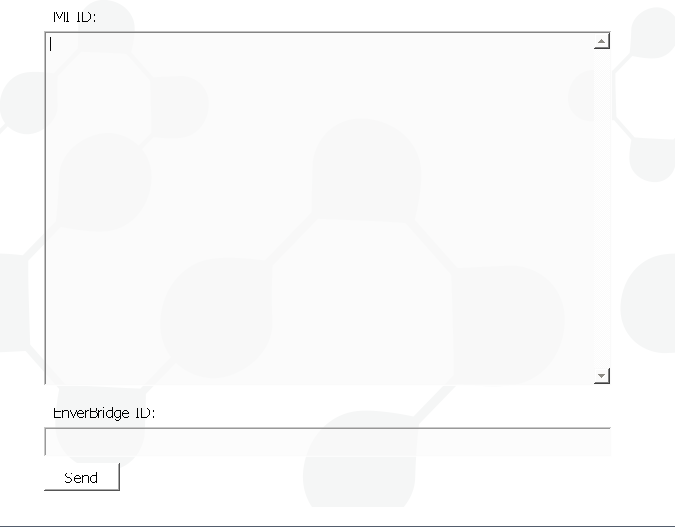
Disclaimer: I'm neither an experienced programmer nor proficient in reverse engineering, but I like at least to try to figure out how things work. Sometimes the solution is so easy, that even I manage to find it, still take this with a grain of salt. I lately witnessed the setup of an Envertech EnverBridge ENB-202 which is kind of a classic Chinese IoT device. Buy it, plug it in, use some strange setup software, and it will report your PV statistics to a web portal. The setup involved downloading a PE32 Windows executable, with an UI that basically has two input boxes and a sent button. You've to input the serial number(s) of your inverter boxes and the ID of your EnverBridge. That made me interested in what this setup process really looks like. The EnverBridge device itself has on one end a power plug, which is also used to communicate with the inverter via some Powerline protocol, and a network plug with a classic RJ45 end you plug into your network. If you power it up it will request an IPv4 address via DHCP. That brings us to the first oddity, the MAC address is in the BC:20:90 prefix which I could not find in the IEEE lists. Setting Up the SetID Software You can download the Windows software in a Zipfile, once you unpack it you end up with a Nullsoft installer .exe. Since this is a PE32 executable we've to add i386 as foreign architecture to install the wine32 package.
dpkg --add-architecture i386
apt update
apt install wine32:i386
wget http://www.envertec.com/uploads/bigfiles/Set%20ID.zip
unzip Set\ ID.zip
wine Set\ ID.exe
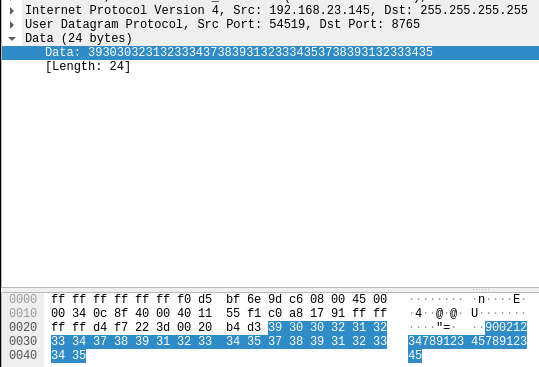
The end result is an installation in ~/.wine/drive_c/Program Files/SetID which reveals that this software is build with Qt5 according to the shipped dll's. The tool itself is in udpCilentNow.exe, and looks like this: Envertech SetID software The Network Communication To my own surprise, the communication is straight forward. A single UDP paket is sent to the broadcast address (255.255.255.255) on port 8765. Envertech SetID udp paket in wireshark I expected some strange binary protocol, but the payload is just simple numbers. They're a combination of the serial numbers of the inverter and the ID of the Enverbridge device. One thing I'm not 100% sure about are the inverter serial numbers, there are two of them, but on the inverter I've seen the serial numbers are always the same. So the payload is assembled like this: If you've more inverter the serials are just appended in the same way. Another strange thing is that the software does close to no input validation, they only check that the inverter serials start with CN and then just extract char 9 to 16. The response from the EnverBridge is also a single UDP paket to the broadcast address on port 8764, with exactly the same content we've sent. Writing a Replacement My result is probably an insult for all proficient Python coders, but based on a bit of research and some cut&paste programming I could assemble a small script to replicate the function of the Windows binary. I guess the usefulness of this exercise was mostly my personal entertainment, though it might help some none Windows users to setup this device. Usage is also very simple:
./enverbridge.py -h
Usage: enverbridge.py [options] MIIDs
Options:
  -h, --help         show this help message and exit
  -b BID, --bid=BID  Serial Number of your EnverBridge
./enverbridge.py -b 90087654 CN19100912345678 CN19100912345679
This is basically 1:1 the behaviour of the Windows binary, though I tried to add a bit more validation then the original binary and some more error messages. I also assume the serial numbers are also always the same so I take only one as the input, and duplicate it for the paket data.

Paulo Henrique de Lima Santana: My free software activities in February 2020

My free software activities in february 2020 March is ending but I finally wrote my monthly report about activities in Debian and Free Software in general for February. As I already wrote here, I attended to FOSDEM 2020 on February 1st and 2nd in Brussels. It was a amazing experience. After my return to Curitiba, I felt my energies renewed to start new challenges.

MiniDebConf Macei 2020 I continued helping to organize MiniDebConf and I got positive answers from 4Linux and Globo.com and they are sponsorsing the event.

FLISOL 2020 I started to talk with Maristela from IEP - Instituto de Engenharia do Paran and after some messages and I joined a meeting with her and other members of C mara T cnica de Eletr nica, Computa o e Ci ncias de Dados. I explained about FLISOL in Curitiba to them and they agreed to host the event at IEP. I asked to use three spaces: Auditorium for FLISOL talks, Sal o Nobre for meetups from WordPress and PostgreSQL Communities, and the hall for Install Fest. Besides FLISOL, they would like to host other events and meetups from Communities in Curitiba as Python, PHP, and so on. At least one per month. I helped to schedule a PHP Paran Community meetup on March.

New job Since 17th I started to work at Rentcars as Infrastructure Analyst. I m very happy to work there because we use a lot of FLOSS and with nice people. Ubuntu LTS is the approved OS for desktops but I could install Debian on my laptop :-)

Misc I signed pgp keys from friends I met in Brussels and I had my pgp key signed by them. Finally my MR to the DebConf20 website fixing some texts was accepted. I have watched v deos from FOSDEM
  1. Until now, I saw these great talks:
  • Growing Sustainable Contributions Through Ambassador Networks
  • Building Ethical Software Under Capitalism
  • Cognitive biases, blindspots and inclusion
  • Building a thriving community in company-led open source projects
  • Building Community for your Company s OSS Projects
  • The Ethics of Open Source
  • Be The Leader You Need in Open Source
  • The next generation of contributors is not on IRC
  • Open Source Won, but Software Freedom Hasn t Yet
  • Open Source Under Attack
  • Lessons Learned from Cultivating Open Source Projects and Communities
That s all folks!

28 March 2020

Fran ois Marier: How to get a direct WebRTC connections between two computers

WebRTC is a standard real-time communication protocol built directly into modern web browsers. It enables the creation of video conferencing services which do not require participants to download additional software. Many services make use of it and it almost always works out of the box. The reason it just works is that it uses a protocol called ICE to establish a connection regardless of the network environment. What that means however is that in some cases, your video/audio connection will need to be relayed (using end-to-end encryption) to the other person via third-party TURN server. In addition to adding extra network latency to your call that relay server might overloaded at some point and drop or delay packets coming through. Here's how to tell whether or not your WebRTC calls are being relayed, and how to ensure you get a direct connection to the other host.

Testing basic WebRTC functionality Before you place a real call, I suggest using the official test page which will test your camera, microphone and network connectivity. Note that this test page makes use of a Google TURN server which is locked to particular HTTP referrers and so you'll need to disable privacy features that might interfere with this:
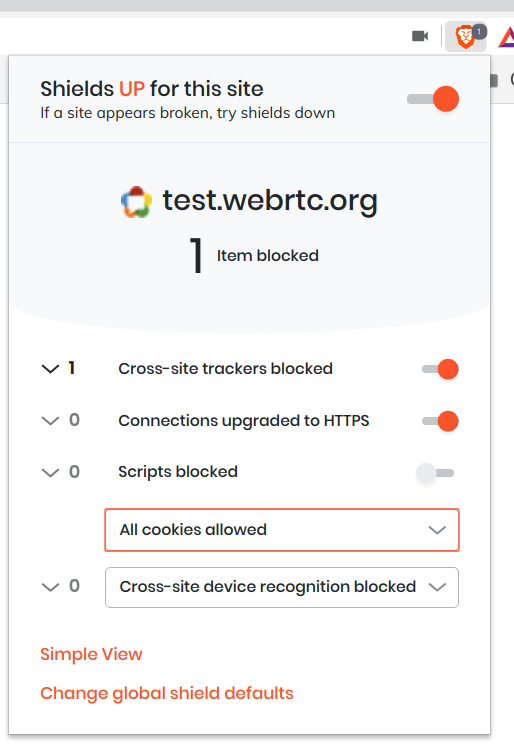
  • Brave: Disable Shields entirely for that page (Simple view) or allow all cookies for that page (Advanced view).
  • Firefox: Ensure that http.network.referer.spoofSource is set to false in about:config, which it is by default.
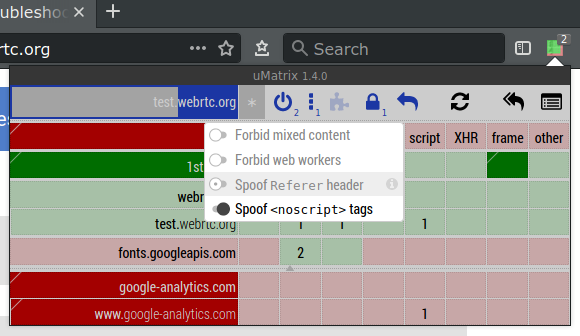
  • uMatrix: The "Spoof Referer header" option needs to be turned off for that site.

Checking the type of peer connection you have Once you know that WebRTC is working in your browser, it's time to establish a connection and look at the network configuration that the two peers agreed on. My favorite service at the moment is Whereby (formerly Appear.in), so I'm going to use that to connect from two different computers:
  • canada is a laptop behind a regular home router without any port forwarding.
  • siberia is a desktop computer in a remote location that is also behind a home router, but in this case its internal IP address (192.168.1.2) is set as the DMZ host.

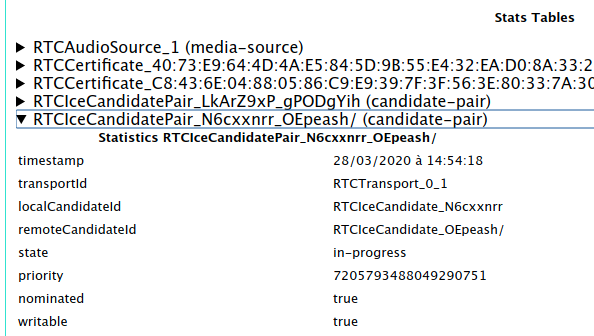
Chromium For all Chromium-based browsers, such as Brave, Chrome, Edge, Opera and Vivaldi, the debugging page you'll need to open is called chrome://webrtc-internals. Look for RTCIceCandidatePair lines and expand them one at a time until you find the one which says:
  • state: succeeded (or state: in-progress)
  • nominated: true
  • writable: true
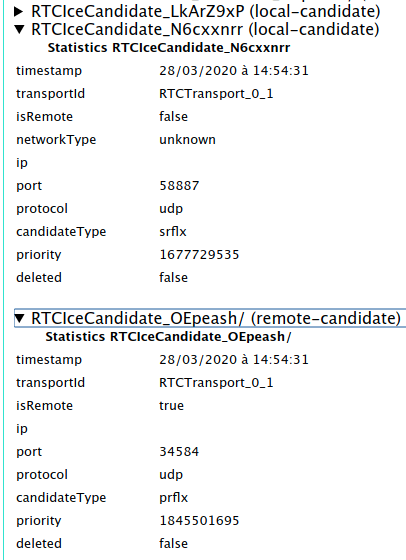
Then from the name of that pair (N6cxxnrr_OEpeash in the above example) find the two matching RTCIceCandidate lines (one local-candidate and one remote-candidate) and expand them. In the case of a direct connection, I saw the following on the remote-candidate:
  • ip shows the external IP address of siberia
  • port shows a random number between 1024 and 65535
  • candidateType: srflx
and the following on local-candidate:
  • ip shows the external IP address of canada
  • port shows a random number between 1024 and 65535
  • candidateType: prflx
These candidate types indicate that a STUN server was used to determine the public-facing IP address and port for each computer, but the actual connection between the peers is direct. On the other hand, for a relayed/proxied connection, I saw the following on the remote-candidate side:

  • ip shows an IP address belonging to the TURN server
  • candidateType: relay
and the same information as before on the local-candidate.

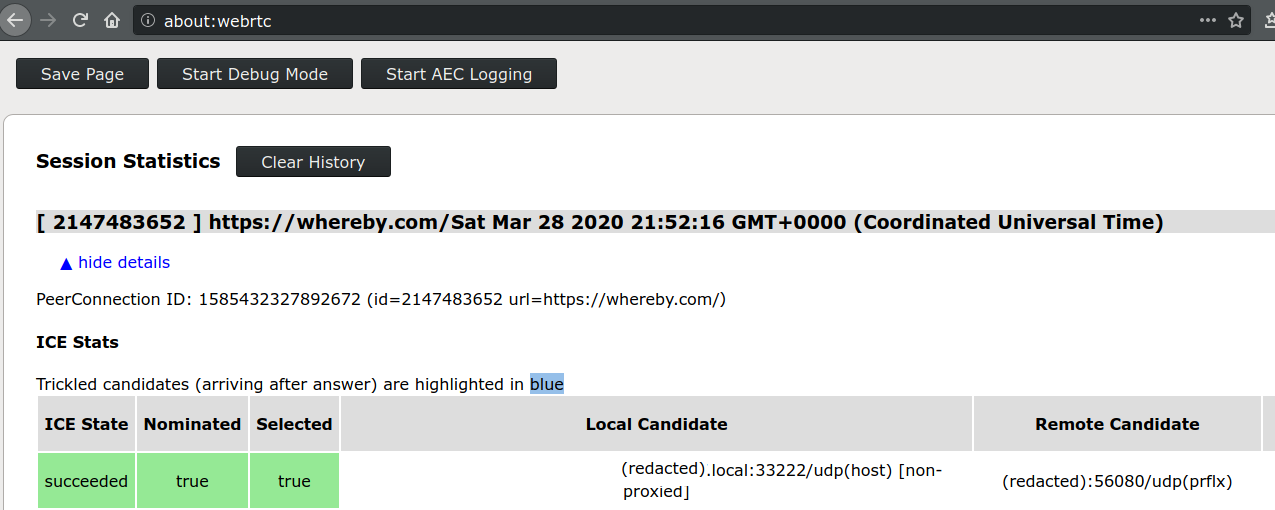
Firefox If you are using Firefox, the debugging page you want to look at is about:webrtc. Expand the top entry under "Session Statistics" and look for the line (should be the first one) which says the following in green:
  • ICE State: succeeded
  • Nominated: true
  • Selected: true
then look in the "Local Candidate" and "Remote Candidate" sections to find the candidate type in brackets.

Firewall ports to open to avoid using a relay In order to get a direct connection to the other WebRTC peer, one of the two computers (in my case, siberia) needs to open all inbound UDP ports since there doesn't appear to be a way to restrict Chromium or Firefox to a smaller port range for incoming WebRTC connections. This isn't great and so I decided to tighten that up in two ways by:
  • restricting incoming UDP traffic to the IP range of siberia's ISP, and
  • explicitly denying incoming to the UDP ports I know are open on siberia.
To get the IP range, start with the external IP address of the machine (I'll use the IP address of my blog in this example: 66.228.46.55) and pass it to the whois command:
$ whois 66.228.46.55   grep CIDR
CIDR:           66.228.32.0/19
To get the list of open UDP ports on siberia, I sshed into it and ran nmap:
$ sudo nmap -sU localhost
Starting Nmap 7.60 ( https://nmap.org ) at 2020-03-28 15:55 PDT
Nmap scan report for localhost (127.0.0.1)
Host is up (0.000015s latency).
Not shown: 994 closed ports
PORT      STATE         SERVICE
631/udp   open filtered ipp
5060/udp  open filtered sip
5353/udp  open          zeroconf
Nmap done: 1 IP address (1 host up) scanned in 190.25 seconds
I ended up with the following in my /etc/network/iptables.up.rules (ports below 1024 are denied by the default rule and don't need to be included here):
# Deny all known-open high UDP ports before enabling WebRTC for canada
-A INPUT -p udp --dport 5060 -j DROP
-A INPUT -p udp --dport 5353 -j DROP
-A INPUT -s 66.228.32.0/19 -p udp --dport 1024:65535 -j ACCEPT

26 March 2020

Jonathan Carter: Lockdown

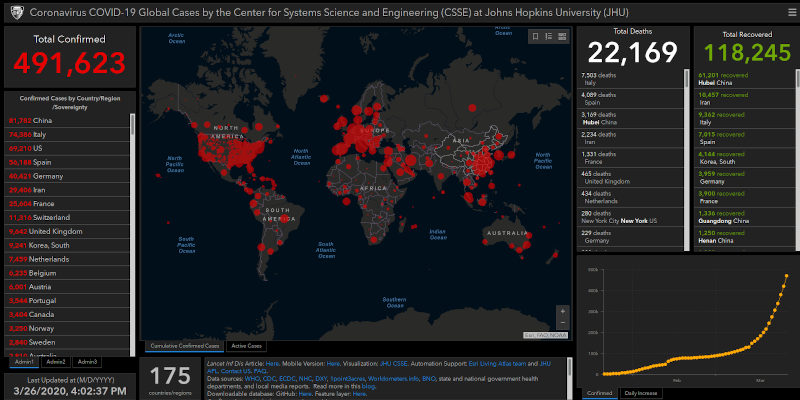
I just took my dog for a nice long walk. It s the last walk we ll be taking for the next 3 weeks, he already starts moping around if we just skip one day of walking, so I m going to have to get creative keeping him entertained. My entire country is going on lockdown starting at midnight. People won t be allowed to leave their homes unless it s for medical emergencies, to buy food or if their work has been deemed essential. Due to the Covid-19 epidemic nearing half a million confirmed infections, this has become quite common in the world right now, with about a quarter of the world s population currently under lockdown and confined to their homes.

Some people may have noticed I ve been a bit absent recently, I ve been going through some really rough personal stuff. I m dealing with it and I ll be ok, but please practice some patience with me in the immediate future if you re waiting on anything. I have a lot of things going on in Debian right now. It helps keeping me busy through all the turmoil and gives me something positive to focus on. I m running for Debian Project Leader (DPL), I haven t been able to put in quite the energy into my campaign that I would have liked, but I think it s going ok under the circumstances. I think because of everything happening in the world it s been more difficult for other Debianites to participate in debian-vote discussions as well. Recently we also announced Debian Social, a project that s still in its early phases, but we ve been trying to get it going for about 2 years, so it s nice to finally see it shaping up. There s also plans to put Debian Social and some additional tooling to the test, with the idea to host a MiniDebConf entirely online. No dates have been confirmed yet, we still have a lot of crucial bits to figure out, but you can subscribe to debian-devel-announce and Debian micronews for updates as soon as more information is available. To everyone out there, stay safe, keep your physical distance for now and don t lose hope, things will get better again.

Axel Beckert: Pictures in pure HTML with chafa and aha

I recently stumbled upon chafa, a tool to display pictures, especially color pictures on your ANSI text terminal, e.g. inside an xterm. And I occasionally use aha, the Ansi HTML Adapter to convert a colorful terminal content into HTML to show off terminal screenshots without the requirement of a picture so that it also works in e.g. text browsers or for blinds. Combining chafa and aha: Examples A moment ago I had the thought what would happen if I feed the output of chafa into aha and expected nothing really usable. But I was surprised by the quality of the outcome.
looks like this after chafa -w 9 -c full -s 160x50 DSCN4692.jpg aha -n:


Checking the Look in Text Browsers It even looks not that bad in elinks as far as I know the only text browser which supports CSS and styles:
In Lynx and Links 2, the text composing the image is displayed only in black and white, but you at least can recognise the edges in the picture:
Same Functionality in One Tool? I knew there was a tool which did this in one step. Seems to have been png2html. Tried to play around with it, too, but neither really understood how to use it (seems to require a text file for the characters to be used why?) nor did I really got it working. It always ran until I aborted it and it never filled the target file with any content. Additionally, png2html insists on one character per pixel, requiring to first properly resize the image before converting to HTML. The Keyboard in the Pictures Oh, and btw., the displayed keyboard is my Zlant. The Zlant is a 40% uniform staggered mechanical keyboard. Currently, only Zlant PCBs are available at 1UP Keyboards (USA), i.e. no complete kits. It is shown with the SA Vilebloom key cap set, currently available at MechSupply (UK).

25 March 2020

Raphaël Hertzog: Freexian s report about Debian Long Term Support, February 2020

A Debian LTS logo Like each month, here comes a report about the work of paid contributors to Debian LTS. Individual reports In February, 226 work hours have been dispatched among 14 paid contributors. Their reports are available: Evolution of the situation February began as rather calm month and the fact that more contributors have given back unused hours is an indicator of this calmness and also an indicator that contributing to LTS has become more of a routine now, which is good. In the second half of February Holger Levsen (from LTS) and Salvatore Bonaccorso (from the Debian Security Team) met at SnowCamp in Italy and discussed tensions and possible improvements from and for Debian LTS. The security tracker currently lists 25 packages with a known CVE and the dla-needed.txt file has 21 packages needing an update. Thanks to our sponsors New sponsors are in bold.

No comment Liked this article? Click here. My blog is Flattr-enabled.

24 March 2020

Anisa Kuci: Outreachy post 5 - Final report

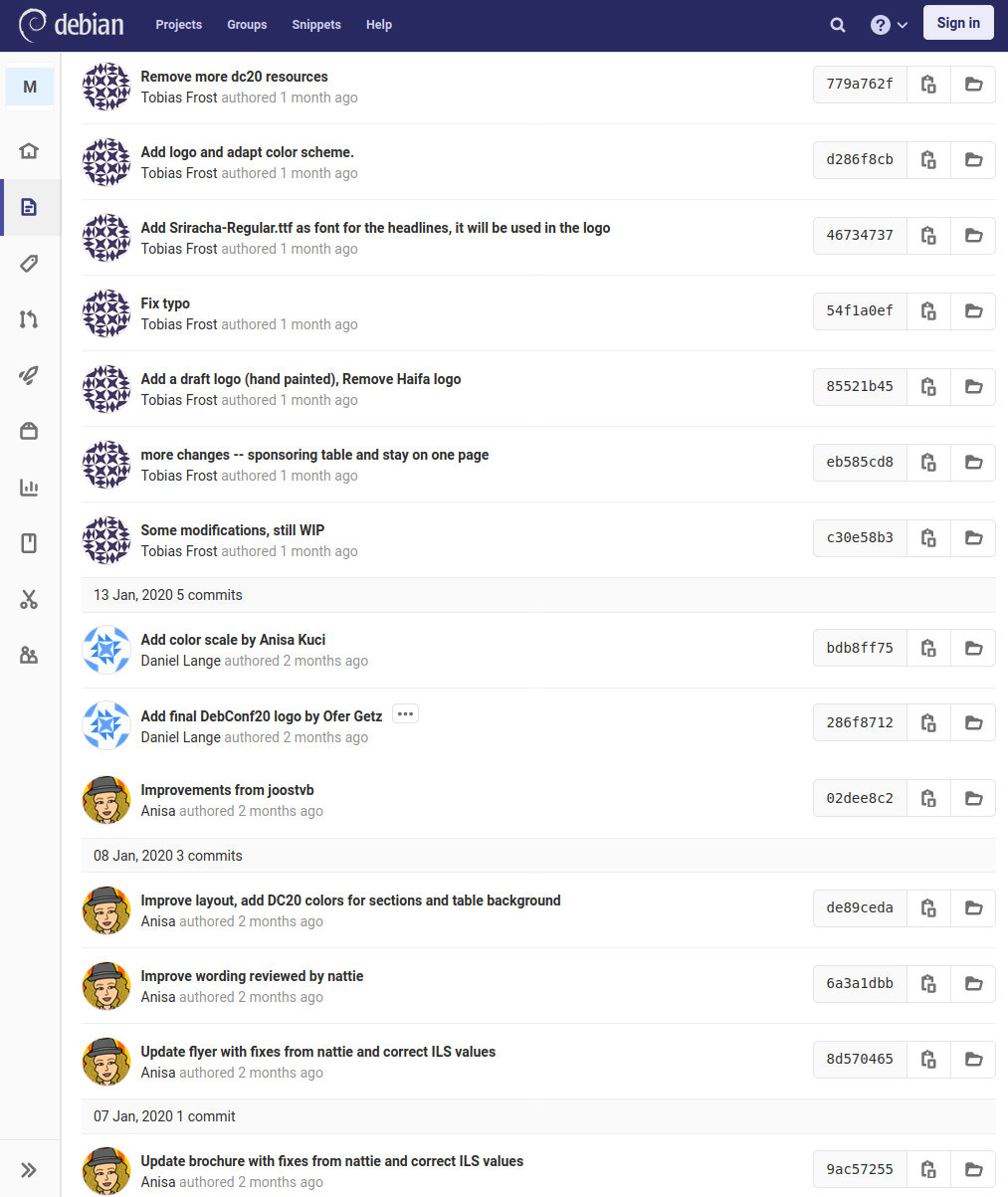
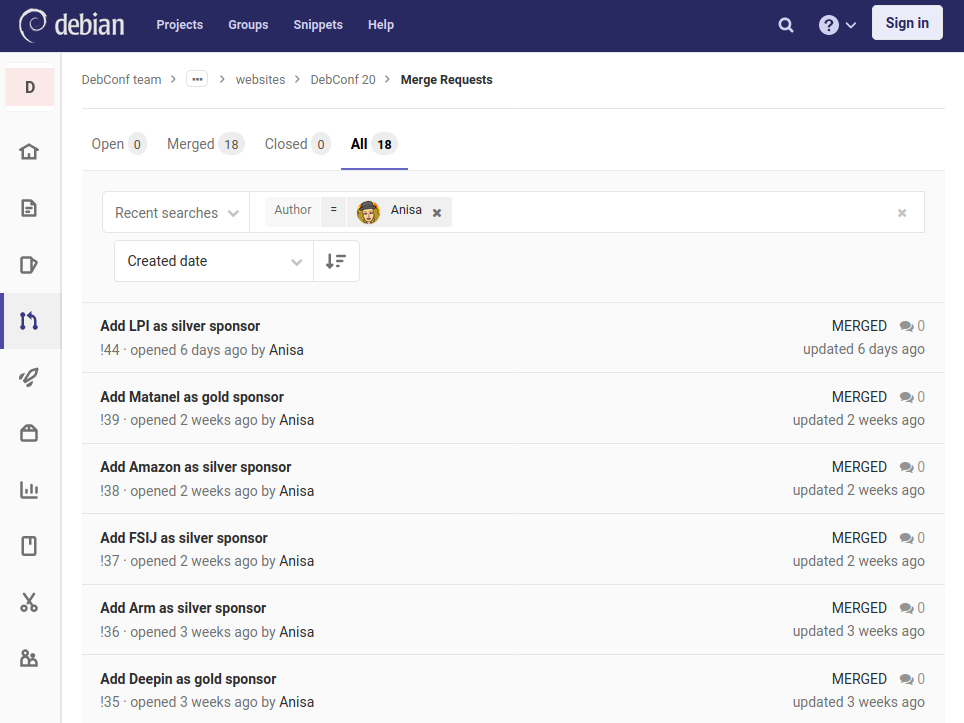
This is my last Outreachy blogpost, as my internship unfortunately has come to an end. It was a blast! Through the Outreachy internship I gained a lot of valuable knowledge and even though I dont know what the future will bring, I am more confident about myself, my skills in fundraising and my technical abilities now. During the contribution phase I did quite a lot of research so I could come up with relevant information to add on the Debian wiki as part of the contribution phase tasks. This was helpful for me to build a more deep understanding of the Debian project, the DebConf conferences and the general style of working within Debian. During this phase I completed most of the tasks given and got onto the mailing lists and IRC channels which are public. This was quite an intense experience by itself as it was like digging into a new job but in a competitive situation as other applicants, of course, were also putting in their best to get one of the 50 Outreachy internships (two in Debian) that were available. When I got selected I also got access to the sponsors@debconf.org email address and the private git repos as they would be needed for me to work on fundraising. I was also provided with an @debconf.org email address that is the one I use for sponsors communication. I learned what makes communication look professional and how to think of the recipient when formulating emails, sending replies or creating marketing messages. As the internship continued I started to learn how the DebConf organizing structure works, with a particular attention on the fundraising team. I have also quickly been given the responsibility to reach out to 100 potential sponsors and combine learning and working experience very nicely. I was given responsibility of working on the fundraising material (flyer and brochure) for DebConf20, so using LaTeX I updated the files in order to remove the translation system, I added the Israeli currency and the visual design chosen from a public logo proposal contest that is held for each DebConf. My creative side could also be put to good use as the team trusted me with selecting the images for the brochure and making sure that the usage rights granted and attribution are all compliant to Free Software/Creative Commons licences. I have continuously maintained those materials and was very happy that long term team members even asked me to approve changes they proposed on the fundraising material. The MiniDebConf team for Regensburg have taken the files I created and made them into their fundraising material (brochure, flyer) which is great to see. MiniDebConf Regensburg commits I have profited so much from other people s work, so I am very happy if community members can build on mine. Afterall sharing is caring! Through the Outreachy travel stipend I was able to attend FOSDEM 2020 and besides meeting many friends from the community and having a fundraising meeting with a sponsor, I was able to also support distributing the DebConf20 fundraising material both in electronic form and as printed versions. During the Outreachy internship I did two communication waves to potential sponsors and maintained the daily communication with them. I followed the documentation that was already available in the Debian wiki guiding me through the process of invoicing sponsors through the organizations that Debian collaborates with. As I have been in frequent contact with the sponsors, I have continuously updated the DebConf20 website with sponsor logos and links through git files, improving web pages on the wafer system and doing 18 merge requests in total. DebConf20 website merge requests I completed six email templates for the DebConf sponsor communication campaigns. While two of them have already been very useful, I hope my other proposals will be the ones used for the next waves of sponsors contacting. I committed them to the sponsors git repo so they can be easily accessible and well documented for other DebConf teams or can be recycled for smaller Debian events. Unfortunately, due to the insecurity about travel around the Corona virus pandemic, the third wave of communication, originally scheduled for the end of my internship in March, has been held. I have committed to the team to do this once the travel restrictions have been lifted and we know that DebConf20 can proceed as planned for August 2020. So yeah, I am definitely going to stay around and continue to help with DebConf fundraising! DebConf has been held for two decades and it also has a generic website, so I also updated the static sponsors page on the main website as it is the first landing page for everyone especially for people who are not necessarily insiders in Debian or DebConf. I have completed a Python tutorial, got the general understanding of the programming language and made some smaller contributions to improve existing tools in the fundraising team based on the learning. The internship was also focused on documentation, so during the whole internship I have kept notes in order to be able to improve existing documentation and I have also written new material, especially on the tasks that I have been working on more closely: Every DebConf has a new team every year, in a new country, so I hope this documentation I have worked on will be useful as a jump-starter for them to organize and finance their events. I would like to take a moment to thank again my mentors Daniel and Karina for all their support, it has been great working with them. Having them as an example, I have learned a lot. Also warm thanks to the DebConf global and local teams which have been very welcoming and always supportive during my internship. So, as you might already know, if you have read my other Outreachy blog posts, this has been a great experience for me! Outreachy provides an awesome opportunity that would not be available if it was not for the generous sponsors and volunteers making such a program for people from underrepresented groups in the FLOSS community. I really encourage people from these groups to find the confidence within themselves and apply for Outreachy! I love Debian
23 March 2020

Gunnar Wolf: Made in what?

Say What? Just bought a 5-pack of 64GB USB keys. Am about to test them to ensure their actual capacity. And the label is Actually true! For basically anything we are likely to encounter, specially in electronics. But still, it demands a photo before opening. How come I ve never come across anything like this before? :-] update Of course, just opening the package yielded this much more traditional (and much more permanent) piece of information:

Dima Kogan: org-babel for documentation

So I just gave a talk at SCaLE 18x about numpysane and gnuplotlib, two libraries I wrote to make using numpy bearable. With these two, it's actually quite nice! Prior to the talk I overhauled the documentation for both these projects. The gnuplotlib docs now have a tutorial/gallery page, which is interesting-enough to write about. Check it out! Mostly it is a sequence of Clearly you want the plots in the documentation to correspond to the code, so you want something to actually run each code snippet to produce each plot. Automatically. I don't want to maintain these manually, and periodically discover that the code doesn't make the plot I claim it does or worse: that the code barfs. This is vaguely what Jupyter notebooks do, but they're ridiculous, so I'm doing something better: That's it. The git repo is hosted by github, which has a rudimentary renderer for .org documents. I'm committing the .svg files, so that's enough to get rendered documentation that looks nice. Note that the usual workflow is to use org to export to html, but here I'm outsourcing that job to github; I just make the .svg files, and that's enough. Look at the link again: gnuplotlib tutorial/gallery. This is just a .org file committed to the git repo. github is doing its normal org->html thing to display this file. This has drawbacks too: github is ignoring the :noexport: tag on the init section at the end of the file, so it's actually showing all the emacs lisp goop that makes this work (described below!). It's at the end, so I guess this is good-enough. Those of us that use org-mode would be completely unsurprised to hear that the talk is also written as .org document. And the slides that show gnuplotlib plots use the same org-babel system to render the plots. It's all oh-so-nice. As with anything as flexible as org-babel, it's easy to get into a situation where you're bending it to serve a not-quite-intended purpose. But since this all lives in emacs, you can make it do whatever you want with a bit of emacs lisp. I ended up advising a few things (mailing list post here). And I stumbled on an (arguable) bug in emacs that needed working around (mailing list post here). I'll summarize both here.

Handling large Local Variables blocks
The advises I ended up with ended up longer than emacs expected, which made emacs not evaluate them when loading the buffer. As I discovered (see the mailing list post) the loading code looks for the string Local Variables in the last 3000 bytes of the buffer only, and I exceeded that. Stefan Monnier suggested a workaround in this post. Instead of the normal Local Variables block at the end:
Local Variables:
eval: (progn ... ...
             ... ...
             LONG chunk of emacs-lisp
      )
End:
I do this:
(progn ;;local-config
   lisp lisp lisp
   as long as I want
)
Local Variables:
eval: (progn (re-search-backward "^(progn ;;local-config") (eval (read (current-buffer))))
End:
So emacs sees a small chunk of code that searches backwards through the buffer (as far back as needed) for the real lisp to evaluate. As an aside, this blog is also an .org document, and the lisp snippets above are org-babel blocks that I'm not evaluating. The exporter knows to respect the emacs-lisp syntax highlighting, however.

Advises
OK, so what was all the stuff I needed to tell org-babel to do specially here? First off, org needed to be able to communicate to the Python session the name of the file to write the plot to. I do this by making the whole plist for this org-babel snippet available to python:
;; THIS advice makes all the org-babel parameters available to python in the
;; _org_babel_params dict. I care about _org_babel_params['_file'] specifically,
;; but everything is available
(defun dima-org-babel-python-var-to-python (var)
  "Convert an elisp value to a python variable.
  Like the original, but supports (a . b) cells and symbols
"
  (if (listp var)
      (if (listp (cdr var))
          (concat "[" (mapconcat #'org-babel-python-var-to-python var ", ") "]")
        (format "\"\"\"%s\"\"\"" var))
    (if (symbolp var)
        (format "\"\"\"%s\"\"\"" var)
      (if (eq var 'hline)
          org-babel-python-hline-to
        (format
         (if (and (stringp var) (string-match "[\n\r]" var)) "\"\"%S\"\"" "%S")
         (if (stringp var) (substring-no-properties var) var))))))
(defun dima-alist-to-python-dict (alist)
  "Generates a string defining a python dict from the given alist"
  (let ((keyvalue-list
         (mapcar (lambda (x)
                   (format "%s = %s, "
                           (replace-regexp-in-string
                            "[^a-zA-Z0-9_]" "_"
                            (symbol-name (car x)))
                           (dima-org-babel-python-var-to-python (cdr x))))
                 alist)))
    (concat
     "dict( "
     (apply 'concat keyvalue-list)
     ")")))
(defun dima-org-babel-python-pass-all-params (f params)
  (cons
   (concat
    "_org_babel_params = "
    (dima-alist-to-python-dict params))
   (funcall f params)))
(unless
    (advice-member-p
     #'dima-org-babel-python-pass-all-params
     #'org-babel-variable-assignments:python)
  (advice-add
   #'org-babel-variable-assignments:python
   :around #'dima-org-babel-python-pass-all-params))
So if there's a :file plist key, the python code can grab that, and write the plot to that filename. But I don't really want to specify an output file for every single org-babel snippet. All I really care about is that each plot gets a unique filename. So I omit the :file key entirely, and use this advice to generate one for me:
;; This sets a default :file tag, set to a unique filename. I want each demo to
;; produce an image, but I don't care what it is called. I omit the :file tag
;; completely, and this advice takes care of it
(defun dima-org-babel-python-unique-plot-filename
    (f &optional arg info params)
  (funcall f arg info
           (cons (cons ':file
                       (format "guide-%d.svg"
                               (condition-case nil
                                   (setq dima-unique-plot-number (1+ dima-unique-plot-number))
                                 (error (setq dima-unique-plot-number 0)))))
                 params)))
(unless
    (advice-member-p
     #'dima-org-babel-python-unique-plot-filename
     #'org-babel-execute-src-block)
  (advice-add
   #'org-babel-execute-src-block
   :around #'dima-org-babel-python-unique-plot-filename))
This uses the dima-unique-plot-number integer to keep track of each plot. I increment this with each plot. Getting closer. It isn't strictly required, but it'd be nice if each plot had the same output filename each time I generated it. So I want to reset the plot number to 0 each time:
;; If I'm regenerating ALL the plots, I start counting the plots from 0
(defun dima-reset-unique-plot-number
    (&rest args)
    (setq dima-unique-plot-number 0))
(unless
    (advice-member-p
     #'dima-reset-unique-plot-number
     #'org-babel-execute-buffer)
  (advice-add
   #'org-babel-execute-buffer
   :after #'dima-reset-unique-plot-number))
Finally, I want to lie to the user a little bit. The code I'm actually executing writes each plot to an .svg. But the code I'd like the user to see should use the default output: an interactive, graphical window. I do that by tweaking the python session to tell the gnuplotlib object to write to .svg files from org by default, instead of using the graphical terminal:
;; I'm using github to display guide.org, so I'm not using the "normal" org
;; exporter. I want the demo text to not contain the hardcopy= tags, but clearly
;; I need the hardcopy tag when generating the plots. I add some python to
;; override gnuplotlib.plot() to add the hardcopy tag somewhere where the reader
;; won't see it. But where to put this python override code? If I put it into an
;; org-babel block, it will be rendered, and the :export tags will be ignored,
;; since github doesn't respect those (probably). So I put the extra stuff into
;; an advice. Whew.
(defun dima-org-babel-python-set-demo-output (f body params)
  (with-temp-buffer
    (insert body)
    (beginning-of-buffer)
    (when (search-forward "import gnuplotlib as gp" nil t)
      (end-of-line)
      (insert
       "\n"
       "if not hasattr(gp.gnuplotlib, 'orig_init'):\n"
       "    gp.gnuplotlib.orig_init = gp.gnuplotlib.__init__\n"
       "gp.gnuplotlib.__init__ = lambda self, *args, **kwargs: gp.gnuplotlib.orig_init(self, *args, hardcopy=_org_babel_params['_file'] if 'file' in _org_babel_params['_result_params'] else None, **kwargs)\n"))
    (setq body (buffer-substring-no-properties (point-min) (point-max))))
  (funcall f body params))
(unless
    (advice-member-p
     #'dima-org-babel-python-set-demo-output
     #'org-babel-execute:python)
  (advice-add
   #'org-babel-execute:python
   :around #'dima-org-babel-python-set-demo-output))
)
And that's it. The advises in the talk are slightly different, in uninteresting ways. Some of this should be upstreamed to org-babel somehow. Now entirely clear which part, but I'll cross that bridge when I get to it.

22 March 2020

Enrico Zini: Notable people

Lotte Reiniger. The Unsung Heroine of Early Animation
history people wikipedia
Lotte Reiniger pioneered early animation, yet her name remains largely unknown. We pay homage to her life and work, and reflect on why she never received the recognition she deserves.
Stephen Wolfram shares what he learned in researching Ada Lovelace's life, writings about the Analytical Engine, and computation of Bernoulli numbers.
Elizabeth Cochran Seaman[1] (May 5, 1864[2] January 27, 1922), better known by her pen name Nellie Bly, was an American journalist who was widely known for her record-breaking trip around the world in 72 days, in emulation of Jules Verne's fictional character Phileas Fogg, and an expos in which she worked undercover to report on a mental institution from within.[3] She was a pioneer in her field, and launched a new kind of investigative journalism.[4] Bly was also a writer, inventor, and industrialist.
Delia Ann Derbyshire (5 May 1937 3 July 2001)[1] was an English musician and composer of electronic music.[2] She carried out pioneering work with the BBC Radiophonic Workshop during the 1960s, including her electronic arrangement of the theme music to the British science-fiction television series Doctor Who.[3][4] She has been referred to as "the unsung heroine of British electronic music,"[3] having influenced musicians including Aphex Twin, the Chemical Brothers and Paul Hartnoll of Orbital.[5]
Charity Adams Earley (5 December 1918 13 January 2002) was the first African-American woman to be an officer in the Women's Army Auxiliary Corps (later WACS) and was the commanding officer of the first battalion of African-American women to serve overseas during World War II. Adams was the highest ranking African-American woman in the army by the completion of the war.

Emmanuel Kasper: Big Iron UNIX emulated on ARM

I have somewhere in the basement a DEC Vax workstation, but in the end it was a bigger fun to run an emulated Vax 11/780 (size of two refrigerators) in Beagle Bone Black (size of a big matchbox). For this I used the Dockerfiles available in this git repo using the simh emulator, and tweaked a bit for ARM.
I recorded the boot sequence with the very nice asciinema, also available in the Debian archive, so here is 4.3 BSD, in all its 1986 glory.

Junichi Uekawa: Tokyo Debian Monthly Meeting.

Tokyo Debian Monthly Meeting. This month's event was held online, and the topic was about online conferencing tools. I gave a talk over Google Hangouts on using OBS and nginx(rtmp). However we had 15 people and exceeded the limit of 10, and tried to switch to a different infrastructure while talking. Set up the OBS broadcasting for livestream, but eventually we switched to an experimental jitsi instance. Our instance worked reasonably well.

20 March 2020

Molly de Blanc: Seven hundred words on Internet access

I wrote this a few months ago, and never published it. Here you go. In the summer of 2017, I biked from Boston, MA to Montreal, QC. I rode across Massachusetts, then up the New York/Vermont border, weaving between the two states over two days. I spent the night in Washington County, NY at a bed and breakfast that generously fed me dinner even though they weren t supposed to. One of the proprietors told me about his history as a physics teacher, and talked about volunteer work he was doing. He somewhat casually mentioned that in his town there isn t really internet access. At the time (at least) Washington County wasn t served by broadband companies. Instead, for $80 a month you could purchase a limited data package from a mobile phone company, and use that. A limited data package means limited access. This could mean no or limited internet in schools or libraries. This was not the first time I heard about failings of Internet penetration in the United States. When I first moved to Boston I was an intern at One Laptop Per Child. I spoke with someone interested in bringing internet access to their rural community in Maine. They had hope for mesh networks, linking computers together into a web of connectivity, bouncing signals from one machine to another in order to bring internet to everyone. Access to the Internet is a necessity. As I write this, 2020 is only weeks away, which brings our decennial, nationwide census. There had been discussions of making the census entirely online, but it was settled that people could fill it out online, by telephone, or via mail and that households can answer the questions on the internet or by phone in English and 12 Non-English languages. [1][2] This is important because a comprehensive census is important. A census provides, if nothing else, population and demographics information, which is used to assist in the disbursement of government funding and grants to geographic communities. Apportionment, or the redistribution of the 435 seats occupied by members of the House of Representatives, is done based on the population of a given state: more people, more seats. Researchers, students, and curious people use census data to carry out their work. Non-profits and activist organizations can better understand the populations they serve. As things like the Census increasingly move online, the availability of access becomes increasingly important. Some things are only available online including job applications, customer service assistance, and even education opportunities like courses, academic resources, and applications for grants, scholarships, and admissions. The Internet is also a necessary point of connection between people, and necessary for building our identities. Being acknowledged with their correct names and pronouns decreases the risk of depression and suicide among trans youths and one assumes adults as well. [3] Online spaces provide acknowledgment and recognition that is not being met in physical spaces and geographic communities. Internet access has been important to me in my own mental health struggles and understanding. My bipolar exhibits itself through long, crushing periods of depression during which I can do little more than wait for it to be over. I fill these quiet spaces by listening to podcasts and talking with my friends using apps like Signal to manage our communications. My story of continuous recovery includes a particularly gnarly episode of bulimia in 2015. I was only able to really acknowledge that I had a problems with food and purging, using both as opportunities to inflict violence onto myself, when reading Tumblr posts by people with eating disorders. This made it possible for me to talk about my purging with my therapist, my psychiatrist, and my doctor in order to modify my treatment plan in order to start getting help I need. All of these things are made possible by having reliable, fast access to the Internet. We can respond to our needs immediately, regardless of where we are. We can find or build the communities we need, and serve the ones we already live in, whether they re physical or exist purely as digital. [1]: https://census.lacounty.gov/census/ Accessed 29.11.2019
[2]: https://www.census.gov/library/stories/2019/03/one-year-out-census-bureau-on-track-for-2020-census.html Accessed 29.11.2019
[3]: https://news.utexas.edu/2018/03/30/name-use-matters-for-transgender-youths-mental-health/ Accessed 29.11.2019

Louis-Philippe V ronneau: Today (March 20th 2020) is the day to buy music on Bandcamp

Hey folks, This is a quick blog post to tell you Bandcamp is waiving all their fees on March 20th 2020 (PST). Spread the word, as every penny spent on the platform that day will go back to the artists. COVID-19 is throwing us all a mean curveball and artists have it especially rough, particularly those who were in the middle of tours and had to cancel them. If you like Metal, Angry Metal Guy posted a very nice list of artists you might know and want to help out. If you are lucky enough to have a little coin around, now is the time to show support for the artists you like. Buy an album you liked and copied from a friend or get some merch to wear to your next virtual beer night with your (remote) friends! Stay safe and don't forget to wash your hands regularly.

Next.

Previous.