
How to manage your photos? That is probably the biggest question for anyone doing anything with a photo camera. As resolutions of cameras grow, the data we have to manage is growing ever. In my case I am talking about more than 50000 photos and videos measuring up to about 200Gb of disk space, constantly growing. There are several photo management softwares out there, I guess the most commonly used ones are
Shotwell for the Gnome desktop,
digiKam for the KDE world, and
FotoXX. I have not used Shotwell and digiKam for quite some time, and collect here my experiences of strength and weaknesses of the two programs. FotoXX seems to be very powerful, too, but I haven t tested it till now.

There is no clear winner here, unfortunately. Both have their strength and their weaknesses. And as a consequence I am using both in parallel.
Before I start a clear declaration: I have been using Shotwell for many years, and have myself contributed considerable code to Shotwell, in particular the whole comment system (comments for photos and events), as well as improved the
Piwigo upload features. I started using digiKam some month ago when I started to look for offloading parts of my photo library to external devices. Since then I have used both in parallel.
Let us start with what these programs say about themselves:
Shotwell is declared as a Photo Manager for Gnome 3, with the following features:
- Import from disk or camera
- Organize by time-based Events, Tags (keywords), Folders, and more
- View your photos in full-window or fullscreen mode
- Crop, rotate, color adjust, straighten, and enhance photos
- Slideshow
- Video and RAW photo support
- Share to major Web services, including Facebook, Flickr, and YouTube
digiKam says about itself that it is
an advanced digital photo management application for Linux, Windows, and Mac-OSX. It has a very long
feature page with a short list at the beginning:
- import pictures
- organize your collection
- view items
- edit and enhance
- create (slideshows, calendar, print, )
- share your creations (using social web services, email, your own web allery, )
Now that sounds like they are very similar, but upon using them it turns out that there are huge differences, that can easily be summed up in a short statement:
Shotwell is Gnome 3 that means get rid of functionality.
digiKam is KDE that means provide as much functionality as possible.
Now before you run after me with a knife because you do not agree with me on the above, either read on, or stop reading. I am not interested in flame wars over Gnome versus KDE philosophy. I have been using Gnome since many years, and tried to convince myself to G3 for more than a year until I threw out all of it but selected programs but their number is going down.
Let us look at those aspects I am using: organization, offline, sharing, editing.
Organization
In Shotwell, your photos are organized into events, independent from their location on disk. These events can have title and comment and collect a set of related photos. In my case I often have photos from two or more cameras (my camera and mobile, photos of friends), which I keep in separate directories within a main directory for the event. For example I have a folder
2016/05.21-22.Climbing.Tanigakadake with two sub-folders
Norbert (for my photos) and
Friend (for my friends photos).
In Shotwell all the photos are in the same event, which is shown with title 05.21-22 Tanigakawadake Climbing within the
2016 year and
May month.

So in short Shotwell distinguishes between disk layout and album/event names.
In digiKam there is a strict connection between disk layout and album names 1:1. Albums
are directories. One can adjust the viewer to show all photos of sub-albums in the main album, and by this one can achieve the same effect of merging all photos of my friend and myself. The good thing in this approach is that one can easily have sub-albums: Imagine a trip to three different islands of Hawaii during one trip. This is something easy to achieve in digiKam, but hard in Shotwell.

Other organization methods
Both Shotwell and digiKam support tags, including hierarchical tags and rating (0-5 stars). Shotwell has in addition a quick flag action that I used quite often for initial selecting photos, as well as accepted and rejected. digiKam also has so called picks (no pick, reject, pending, accepted), and colors (not used by now). Both programs have some face detection support, but also this I haven t used.
So in the organization respect there is no clear winner. I like the
Event idea of Shotwell, or better, the separation of events from the disk structure. But on the other hand, Shotwell does not allow for sub-albums, which is also a pain.
No clear winner draw
Offline storage
That is simple: Shotwell: forget it, not reasonably possible. One can move parts to an external HD, then unplug it, and Shotwell will tell you that all the photos are missings. And when you plug the external HD in, it will redetect them. But this is not proper support, just a consequence of hash sum storage. Also separation into several libraries (online and offline) is not supported.
On the other hand, digiKam supports multiple libraries, partly offline, without a hinch. I would
love to have this feature in Shotwell, because I need to free disk space, urgently!!!
Clear winner: digiKam
Sharing
Again here my testing is very restricted I am using
my own Piwigo installation exclusively. Here Shotwell is excellent in providing support for various features: upload to existing category, create new category, resize, optionally remove tags, add comments to albums and photos, etc. (partly implemented by me


On the other hand digiKam has a very barebone interface to Piwigo you can upload photos to an existing album and resize them, but that is already everything. One also needs to say that the list of supported services in digiKam is by far longer than the one in Shotwell, but the main services (usual suspects) are supported in both.

Clear winner: Shotwell (but I haven t tested other upload services).
Editing
The editing capabilities of Shotwell are again very restricted: red eyes, resize, levels, .

digiKam here is more like a photo editor software with loads of tools and features. I haven t even explored all the options maybe I can get rid of GIMP, too?

Clear winner: digiKam
Conclusions
While I am still working with both, I actually would love to move completely to digiKam. I simply cannot stand the Gnome 3 philosophy of reducing functionality to a minimal for dummy users. There is a market for that, sure, but I am not one of it. Unfortunately, the missing Event support, and much more the completely minimal support for Piwigo sharing in digiKam is a big show stopper at the moment. Even after testing the upcoming digiKam 5.0 version for some time, I didn t see any improvement wrt to sharing.
That leaves me with the only option to continue working with both programs, and hope to get a new bigger SSD before the current one runs out of space. Of course I could start hacking into the digiKam source maybe I do this when I have a bit more time to add proper Piwigo support.

 The first
 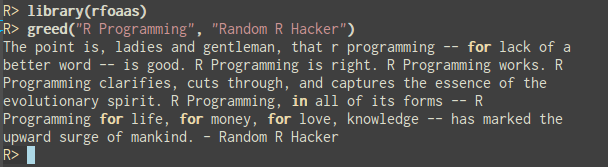 Time for new release! We just updated rfoaas on
  There has been some silence on the
  I have also approached (of course!) Debian for creation of OEM installations ISOs for our Librem products. This way, with every sold Librem that ships with Debian preinstalled, Debian will get donation. It is our way to show gratitude to Debian for all the work our community does (yes, I am still extremely proud Debian dude and I will stay like that!). Oh yes, I am the chief technology person at Purism, and besides all goals we have, I also plan (dream) about Purism being the company that has highest number of Debian Developers. In that terms I am very proud to say that Matthias Klumpp became part of Purism. Hopefully we soon extend the number of Debian population in Purism.
Of course, I think it is fairly known that I am easy to approach so if anyone has any questions (as I didn't want this post to be too long) feel free to contact me. Also - in Free software spirit - we welcome any community engagement, suggestion and/or feedback.
I have also approached (of course!) Debian for creation of OEM installations ISOs for our Librem products. This way, with every sold Librem that ships with Debian preinstalled, Debian will get donation. It is our way to show gratitude to Debian for all the work our community does (yes, I am still extremely proud Debian dude and I will stay like that!). Oh yes, I am the chief technology person at Purism, and besides all goals we have, I also plan (dream) about Purism being the company that has highest number of Debian Developers. In that terms I am very proud to say that Matthias Klumpp became part of Purism. Hopefully we soon extend the number of Debian population in Purism.
Of course, I think it is fairly known that I am easy to approach so if anyone has any questions (as I didn't want this post to be too long) feel free to contact me. Also - in Free software spirit - we welcome any community engagement, suggestion and/or feedback.

 A few months back I was looking over a lot of different object-storage systems, giving them mini-reviews, and trying them out in turn.
While many were overly complex, some were simple. Simplicity is always appealing, providing it works.
My
A few months back I was looking over a lot of different object-storage systems, giving them mini-reviews, and trying them out in turn.
While many were overly complex, some were simple. Simplicity is always appealing, providing it works.
My  I spent last night in San Francisco on my way from Tucson to Seoul.
This morning as I headed to the airport, I caught the end of a shouted
conversation between a down-and-out and a couple of middle school-aged
girls, who ran away back to the Asian Art museum as the conversation
ended. A security guard told the man that he needed him to go away.
The wealth divide so visible here just isn t something you really see
around Tucson.
I m working on a new module for Propellor that s complicated enough
that I need to think carefully about the Haskell in order to write
produce a flexible and maintainable module. I ve only been doing an
hour or so of work on it per day, but the past few days I wake up each
day with an idea for restructuring yesterday s code. These ideas
aren t anything new to me: I think I m just dredging up the
understanding of Haskell I developed last year when I was studying it
more actively. Hopefully this summer I can learn some new things
about Haskell.
Riding on the Bay Area Rapid Transit (BART) feels like stepping back
in time to the years of Microsoft s ascendency, before we had a tech
world dominated by Google and Facebook: the platform announcements are
in a computerised voice that sounds like it was developed in the
nineties. They ll eventually replace the old trains apparently some
new ones are coming in 2017 so I feel privileged to have been able
to ride the older ones. I feel the same about the Tube in London.
I really appreciate old but supremely reliable and effective public
transport. It reminds me of the Debian toolchain: a bit creaky, but
maintained over a sufficiently long period that it serves everyone a
lot better than newer offerings, which tend to be produced with
ulterior corporate motives.
I spent last night in San Francisco on my way from Tucson to Seoul.
This morning as I headed to the airport, I caught the end of a shouted
conversation between a down-and-out and a couple of middle school-aged
girls, who ran away back to the Asian Art museum as the conversation
ended. A security guard told the man that he needed him to go away.
The wealth divide so visible here just isn t something you really see
around Tucson.
I m working on a new module for Propellor that s complicated enough
that I need to think carefully about the Haskell in order to write
produce a flexible and maintainable module. I ve only been doing an
hour or so of work on it per day, but the past few days I wake up each
day with an idea for restructuring yesterday s code. These ideas
aren t anything new to me: I think I m just dredging up the
understanding of Haskell I developed last year when I was studying it
more actively. Hopefully this summer I can learn some new things
about Haskell.
Riding on the Bay Area Rapid Transit (BART) feels like stepping back
in time to the years of Microsoft s ascendency, before we had a tech
world dominated by Google and Facebook: the platform announcements are
in a computerised voice that sounds like it was developed in the
nineties. They ll eventually replace the old trains apparently some
new ones are coming in 2017 so I feel privileged to have been able
to ride the older ones. I feel the same about the Tube in London.
I really appreciate old but supremely reliable and effective public
transport. It reminds me of the Debian toolchain: a bit creaky, but
maintained over a sufficiently long period that it serves everyone a
lot better than newer offerings, which tend to be produced with
ulterior corporate motives.
 In the ARM world, to which I am still mostly a newcomer (although I've been already playing with ARM machines for over two years, I am a complete newbie compared to my Debian friends who live and breathe that architecture), the most common way to distribute operating systems is to distribute complete, already-installed images. I have
  Moxie, the lead developer of the Signal secure communication application, recently