Search Results: "mak"

11 April 2021

Jelmer Vernooij: The upstream ontologist

The Debian Janitor is an automated system that commits fixes for (minor) issues in Debian packages that can be fixed by software. It gradually started proposing merges in early December. The first set of changes sent out ran lintian-brush on sid packages maintained in Git. This post is part of a series about the progress of the Janitor. The upstream ontologist is a project that extracts metadata about upstream projects in a consistent format. It does this with a combination of heuristics and reading ecosystem-specific metadata files, such as Python s setup.py, rust s Cargo.toml as well as e.g. scanning README files.

Supported Data Sources It will extract information from a wide variety of sources, including:
Supported Fields Fields that it currently provides include:
  • Homepage: homepage URL
  • Name: name of the upstream project
  • Contact: contact address of some sort of the upstream (e-mail, mailing list URL)
  • Repository: VCS URL
  • Repository-Browse: Web URL for viewing the VCS
  • Bug-Database: Bug database URL (for web viewing, generally)
  • Bug-Submit: URL to use to submit new bugs (either on the web or an e-mail address)
  • Screenshots: List of URLs with screenshots
  • Archive: Archive used - e.g. SourceForge
  • Security-Contact: e-mail or URL with instructions for reporting security issues
  • Documentation: Link to documentation on the web:
  • Wiki: Wiki URL
  • Summary: one-line description of the project
  • Description: longer description of the project
  • License: Single line license description (e.g. GPL 2.0 ) as declared in the metadata[1]
  • Copyright: List of copyright holders
  • Version: Current upstream version
  • Security-MD: URL to markdown file with security policy
All data fields have a certainty associated with them ( certain , confident , likely or possible ), which gets set depending on how the data was derived or where it was found. If multiple possible values were found for a specific field, then the value with the highest certainty is taken.
Interface The ontologist provides a high-level Python API as well as two command-line tools that can write output in two different formats: For example, running guess-upstream-metadata on dulwich:
 % guess-upstream-metadata
 <string>:2: (INFO/1) Duplicate implicit target name: "contributing".
 Name: dulwich
 Repository: https://www.dulwich.io/code/
 X-Security-MD: https://github.com/dulwich/dulwich/tree/HEAD/SECURITY.md
 X-Version: 0.20.21
 Bug-Database: https://github.com/dulwich/dulwich/issues
 X-Summary: Python Git Library
 X-Description:  
   This is the Dulwich project.
   It aims to provide an interface to git repos (both local and remote) that
   doesn't call out to git directly but instead uses pure Python.
 X-License: Apache License, version 2 or GNU General Public License, version 2 or later.
 Bug-Submit: https://github.com/dulwich/dulwich/issues/new
Lintian-Brush lintian-brush can update DEP-12-style debian/upstream/metadata files that hold information about the upstream project that is packaged as well as the Homepage in the debian/control file based on information provided by the upstream ontologist. By default, it only imports data with the highest certainty - you can override this by specifying the uncertain command-line flag.
[1]Obviously this won t be able to describe the full licensing situation for many projects. Projects like scancode-toolkit are more appropriate for that.

Vishal Gupta: Sikkim 101 for Backpackers

Host to Kanchenjunga, the world s third-highest mountain peak and the endangered Red Panda, Sikkim is a state in northeastern India. Nestled between Nepal, Tibet (China), Bhutan and West Bengal (India), the state offers a smorgasbord of cultures and cuisines. That said, it s hardly surprising that the old spice route meanders through western Sikkim, connecting Lhasa with the ports of Bengal. Although the latter could also be attributed to cardamom (kali elaichi), a perennial herb native to Sikkim, which the state is the second-largest producer of, globally. Lastly, having been to and lived in India, all my life, I can confidently say Sikkim is one of the cleanest & safest regions in India, making it ideal for first-time backpackers.

Brief History
  • 17th century: The Kingdom of Sikkim is founded by the Namgyal dynasty and ruled by Buddhist priest-kings known as the Chogyal.
  • 1890: Sikkim becomes a princely state of British India.
  • 1947: Sikkim continues its protectorate status with the Union of India, post-Indian-independence.
  • 1973: Anti-royalist riots take place in front of the Chogyal's palace, by Nepalis seeking greater representation.
  • 1975: Referendum leads to the deposition of the monarchy and Sikkim joins India as its 22nd state.
Languages
  • Official: English, Nepali, Sikkimese/Bhotia and Lepcha
  • Though Hindi and Nepali share the same script (Devanagari), they are not mutually intelligible. Yet, most people in Sikkim can understand and speak Hindi.
Ethnicity
  • Nepalis: Migrated in large numbers (from Nepal) and soon became the dominant community
  • Bhutias: People of Tibetan origin. Major inhabitants in Northern Sikkim.
  • Lepchas: Original inhabitants of Sikkim

Food
  • Tibetan/Nepali dishes (mostly consumed during winter)
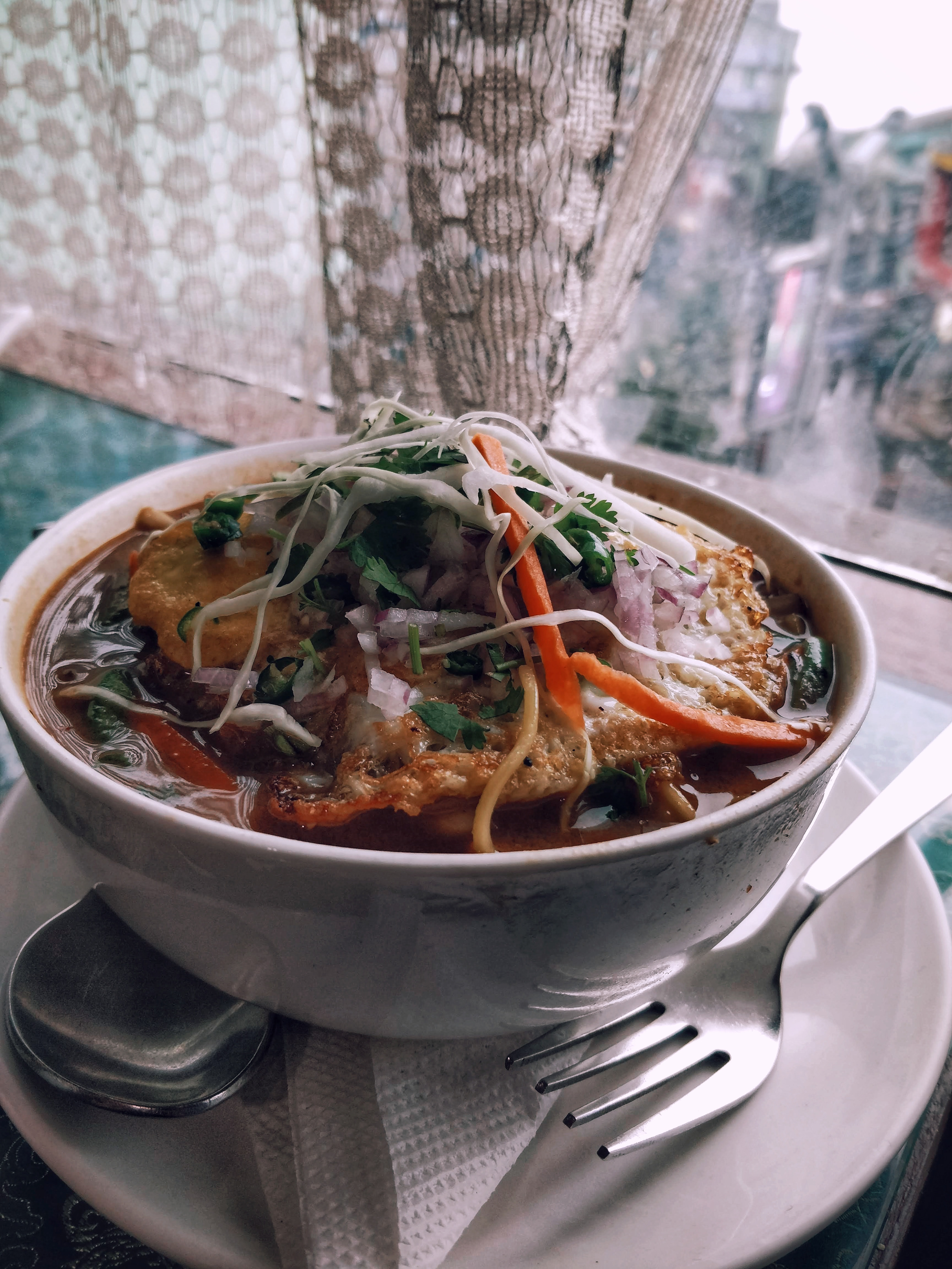
    • Thukpa: Noodle soup, rich in spices and vegetables. Usually contains some form of meat. Common variations: Thenthuk and Gyathuk
    • Momos: Steamed or fried dumplings, usually with a meat filling.
    • Saadheko: Spicy marinated chicken salad.
    • Gundruk Soup: A soup made from Gundruk, a fermented leafy green vegetable.
    • Sinki : A fermented radish tap-root product, traditionally consumed as a base for soup and as a pickle. Eerily similar to Kimchi.
  • While pork and beef are pretty common, finding vegetarian dishes is equally easy.
  • Staple: Dal-Bhat with Subzi. Rice is a lot more common than wheat (rice) possibly due to greater carb content and proximity to West Bengal, India s largest producer of Rice.
  • Good places to eat in Gangtok
    • Hamro Bhansa Ghar, Nimtho (Nepali)
    • Taste of Tibet
    • Dragon Wok (Chinese & Japanese)

Buddhism in Sikkim
  • Bayul Demojong (Sikkim), is the most sacred Land in the Himalayas as per the belief of the Northern Buddhists and various religious texts.
  • Sikkim was blessed by Guru Padmasambhava, the great Buddhist saint who visited Sikkim in the 8th century and consecrated the land.
  • However, Buddhism is said to have reached Sikkim only in the 17th century with the arrival of three Tibetan monks viz. Rigdzin Goedki Demthruchen, Mon Kathok Sonam Gyaltshen & Rigdzin Legden Je at Yuksom. Together, they established a Buddhist monastery.
  • In 1642 they crowned Phuntsog Namgyal as the first monarch of Sikkim and gave him the title of Chogyal, or Dharma Raja.
  • The faith became popular through its royal patronage and soon many villages had their own monastery.
  • Today Sikkim has over 200 monasteries.

Major monasteries
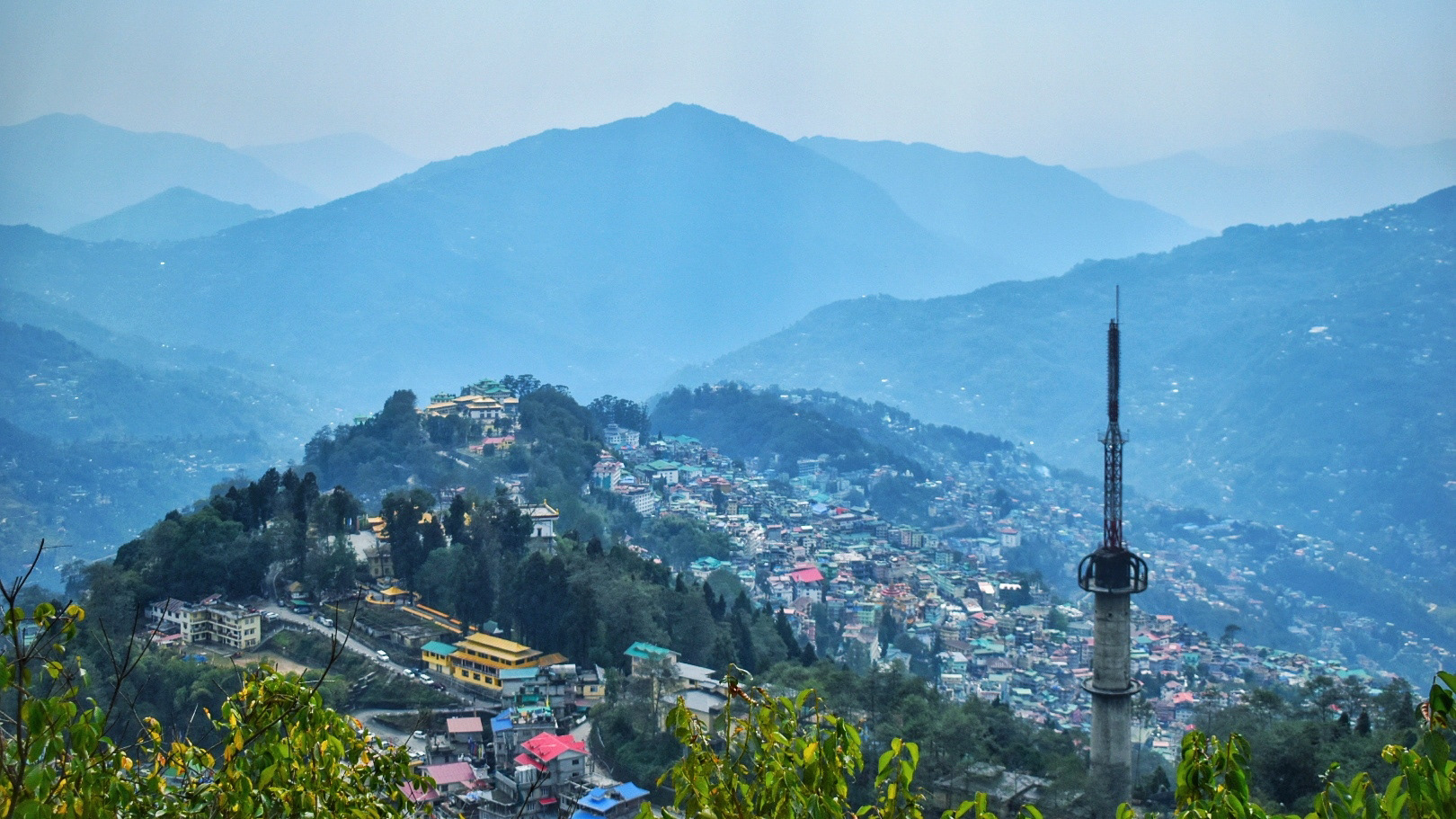
  • Rumtek Monastery, 20Km from Gangtok
  • Lingdum/Ranka Monastery, 17Km from Gangtok
  • Phodong Monastery, 28Km from Gangtok
  • Ralang Monastery, 10Km from Ravangla
  • Tsuklakhang Monastery, Royal Palace, Gangtok
  • Enchey Monastery, Gangtok
  • Tashiding Monastery, 35Km from Ravangla


Reaching Sikkim
  • Gangtok, being the capital, is easiest to reach amongst other regions, by public transport and shared cabs.
  • By Air:
    • Pakyong (PYG) :
      • Nearest airport from Gangtok (about 1 hour away)
      • Tabletop airport
      • Reserved cabs cost around INR 1200.
      • As of Apr 2021, the only flights to PYG are from IGI (Delhi) and CCU (Kolkata).
    • Bagdogra (IXB) :
      • About 20 minutes from Siliguri and 4 hours from Gangtok.
      • Larger airport with flights to most major Indian cities.
      • Reserved cabs cost about INR 3000. Shared cabs cost about INR 350.
  • By Train:
    • New Jalpaiguri (NJP) :
      • About 20 minutes from Siliguri and 4 hours from Gangtok.
      • Reserved cabs cost about INR 3000. Shared cabs from INR 350.
  • By Road:
    • NH10 connects Siliguri to Gangtok
    • If you can t find buses plying to Gangtok directly, reach Siliguri and then take a cab to Gangtok.
  • Sikkim Nationalised Transport Div. also runs hourly buses between Siliguri and Gangtok and daily buses on other common routes. They re cheaper than shared cabs.
  • Wizzride also operates shared cabs between Siliguri/Bagdogra/NJP, Gangtok and Darjeeling. They cost about the same as shared cabs but pack in half as many people in luxury cars (Innova, Xylo, etc.) and are hence more comfortable.

Gangtok
  • Time needed: 1D/1N
  • Places to visit:
    • Hanuman Tok
    • Ganesh Tok
    • Tashi View Point [6,800ft]
    • MG Marg
    • Sikkim Zoo
    • Gangtok Ropeway
    • Enchey Monastery
    • Tsuklakhang Palace & Monastery
  • Hostels: Tagalong Backpackers (would strongly recommend), Zostel Gangtok
  • Places to chill: Travel Cafe, Caf Live & Loud and Gangtok Groove
  • Places to shop: Lal Market and MG Marg

Getting Around
  • Taxis operate on a reserved or shared basis. In case of the latter, you can pool with other commuters your taxis will pick up and drop en-route.
  • Naturally shared taxis only operate on popular routes. The easiest way to get around Gangtok is to catch a shared cab from MG Marg.
  • Reserved taxis for Gangtok sightseeing cost around INR 1000-1500, depending upon the spots you d like to see
  • Key taxi/bus stands :
    • Deorali stand: For Darjeeling, Siliguri, Kalimpong
    • Vajra stand: For North & East Sikkim (Tsomgo Lake & Nathula)
    • Rumtek taxi: For Ravangla, Pelling, Namchi, Geyzing, Jorethang and Singtam.
Exploring Gangtok on an MTB

North Sikkim
  • The easiest & most economical way to explore North Sikkim is the 3D/2N package offered by shared-cab drivers.
  • This includes food, permits, cab rides and accommodation (1N in Lachen and 1N in Lachung)
  • The accommodation on both nights are at homestays with bare necessities, so keep your hopes low.
  • In the spirit of sustainable tourism, you ll be asked to discard single-use plastic bottles, so please carry a bottle that you can refill along the way.
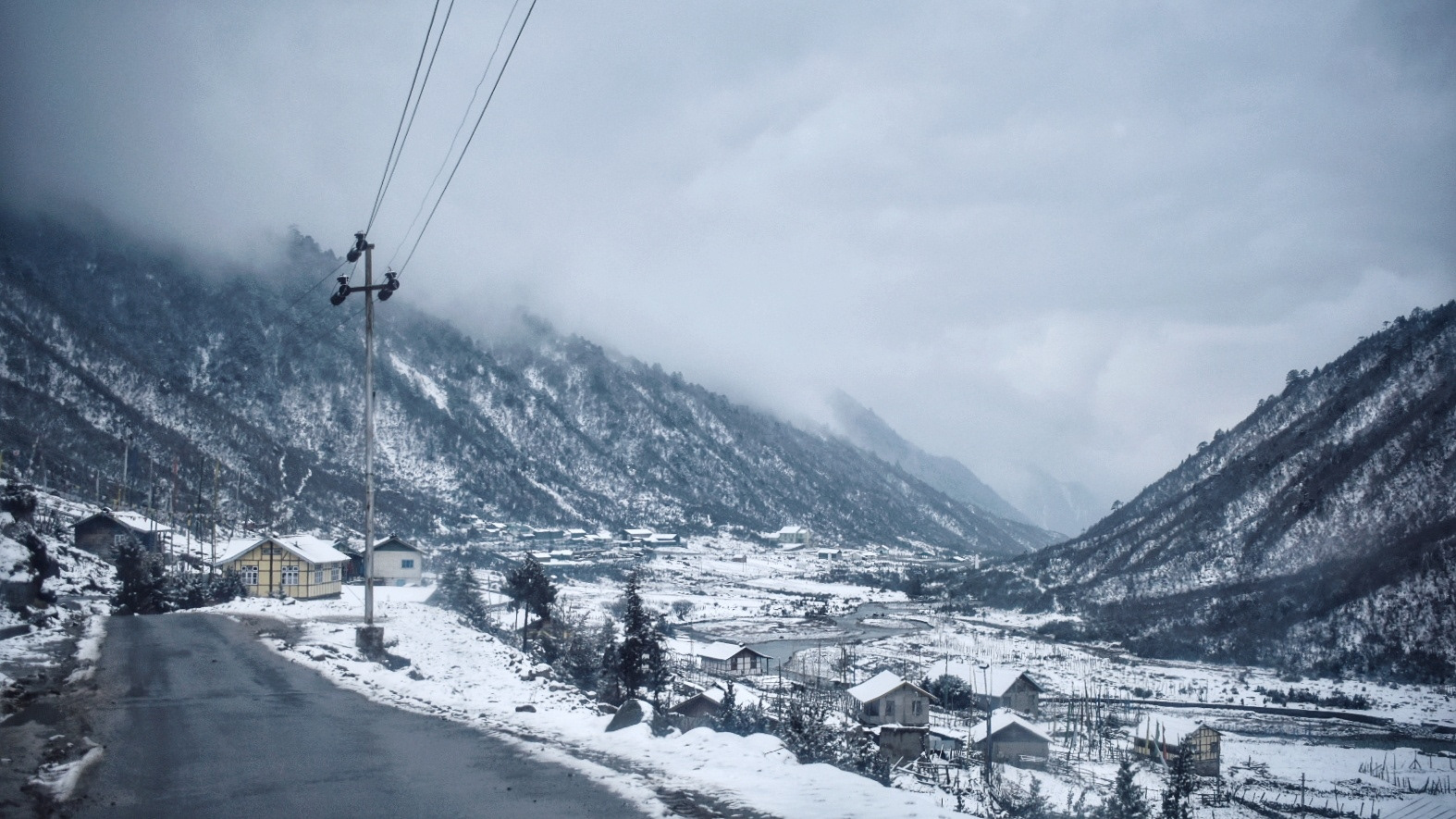
  • Zero Point and Gurdongmer Lake are snow-capped throughout the year
3D/2N Shared-cab Package Itinerary
  • Day 1
    • Gangtok (10am) - Chungthang - Lachung (stay)
  • Day 2
    • Pre-lunch : Lachung (6am) - Yumthang Valley [12,139ft] - Zero Point - Lachung [15,300ft]
    • Post-lunch : Lachung - Chungthang - Lachen (stay)
  • Day 3
    • Pre-lunch : Lachen (5am) - Kala Patthar - Gurdongmer Lake [16,910ft] - Lachen
    • Post-lunch : Lachen - Chungthang - Gangtok (7pm)
  • This itinerary is idealistic and depends on the level of snowfall.
  • Some drivers might switch up Day 2 and 3 itineraries by visiting Lachen and then Lachung, depending upon the weather.
  • Areas beyond Lachen & Lachung are heavily militarized since the Indo-China border is only a few miles away.

East Sikkim

Zuluk and Silk Route
  • Time needed: 2D/1N
  • Zuluk [9,400ft] is a small hamlet with an excellent view of the eastern Himalayan range including the Kanchenjunga.
  • Was once a transit point to the historic Silk Route from Tibet (Lhasa) to India (West Bengal).
  • The drive from Gangtok to Zuluk takes at least four hours. Hence, it makes sense to spend the night at a homestay and space out your trip to Zuluk

Tsomgo Lake and Nathula
  • Time Needed : 1D
  • A Protected Area Permit is required to visit these places, due to their proximity to the Chinese border
  • Tsomgo/Chhangu Lake [12,313ft]
    • Glacial lake, 40 km from Gangtok.
    • Remains frozen during the winter season.
    • You can also ride on the back of a Yak for INR 300
  • Baba Mandir
    • An old temple dedicated to Baba Harbhajan Singh, a Sepoy in the 23rd Regiment, who died in 1962 near the Nathu La during Indo China war.
  • Nathula Pass [14,450ft]
    • Located on the Indo-Tibetan border crossing of the Old Silk Route, it is one of the three open trading posts between India and China.
    • Plays a key role in the Sino-Indian Trade and also serves as an official Border Personnel Meeting(BPM) Point.
    • May get cordoned off by the Indian Army in event of heavy snowfall or for other security reasons.


West Sikkim
  • Time needed: 3N/1N
  • Hostels at Pelling : Mochilerro Ostillo

Itinerary

Day 1: Gangtok - Ravangla - Pelling
  • Leave Gangtok early, for Ravangla through the Temi Tea Estate route.
  • Spend some time at the tea garden and then visit Buddha Park at Ravangla
  • Head to Pelling from Ravangla

Day 2: Pelling sightseeing
  • Hire a cab and visit Skywalk, Pemayangtse Monastery, Rabdentse Ruins, Kecheopalri Lake, Kanchenjunga Falls.

Day 3: Pelling - Gangtok/Siliguri
  • Wake up early to catch a glimpse of Kanchenjunga at the Pelling Helipad around sunrise
  • Head back to Gangtok on a shared-cab
  • You could take a bus/taxi back to Siliguri if Pelling is your last stop.

Darjeeling
  • In my opinion, Darjeeling is lovely for a two-day detour on your way back to Bagdogra/Siliguri and not any longer (unless you re a Bengali couple on a honeymoon)
  • Once a part of Sikkim, Darjeeling was ceded to the East India Company after a series of wars, with Sikkim briefly receiving a grant from EIC for gifting Darjeeling to the latter
  • Post-independence, Darjeeling was merged with the state of West Bengal.

Itinerary

Day 1 :
  • Take a cab from Gangtok to Darjeeling (shared-cabs cost INR 300 per seat)
  • Reach Darjeeling by noon and check in to your Hostel. I stayed at Hideout.
  • Spend the evening visiting either a monastery (or the Batasia Loop), Nehru Road and Mall Road.
  • Grab dinner at Glenary whilst listening to live music.

Day 2:
  • Wake up early to catch the sunrise and a glimpse of Kanchenjunga at Tiger Hill. Since Tiger Hill is 10km from Darjeeling and requires a permit, book your taxi in advance.
  • Alternatively, if you don t want to get up at 4am or shell out INR1500 on the cab to Tiger Hill, walk to the Kanchenjunga View Point down Mall Road
  • Next, queue up outside Keventers for breakfast with a view in a century-old cafe
  • Get a cab at Gandhi Road and visit a tea garden (Happy Valley is the closest) and the Ropeway. I was lucky to meet 6 other backpackers at my hostel and we ended up pooling the cab at INR 200 per person, with INR 1400 being on the expensive side, but you could bargain.
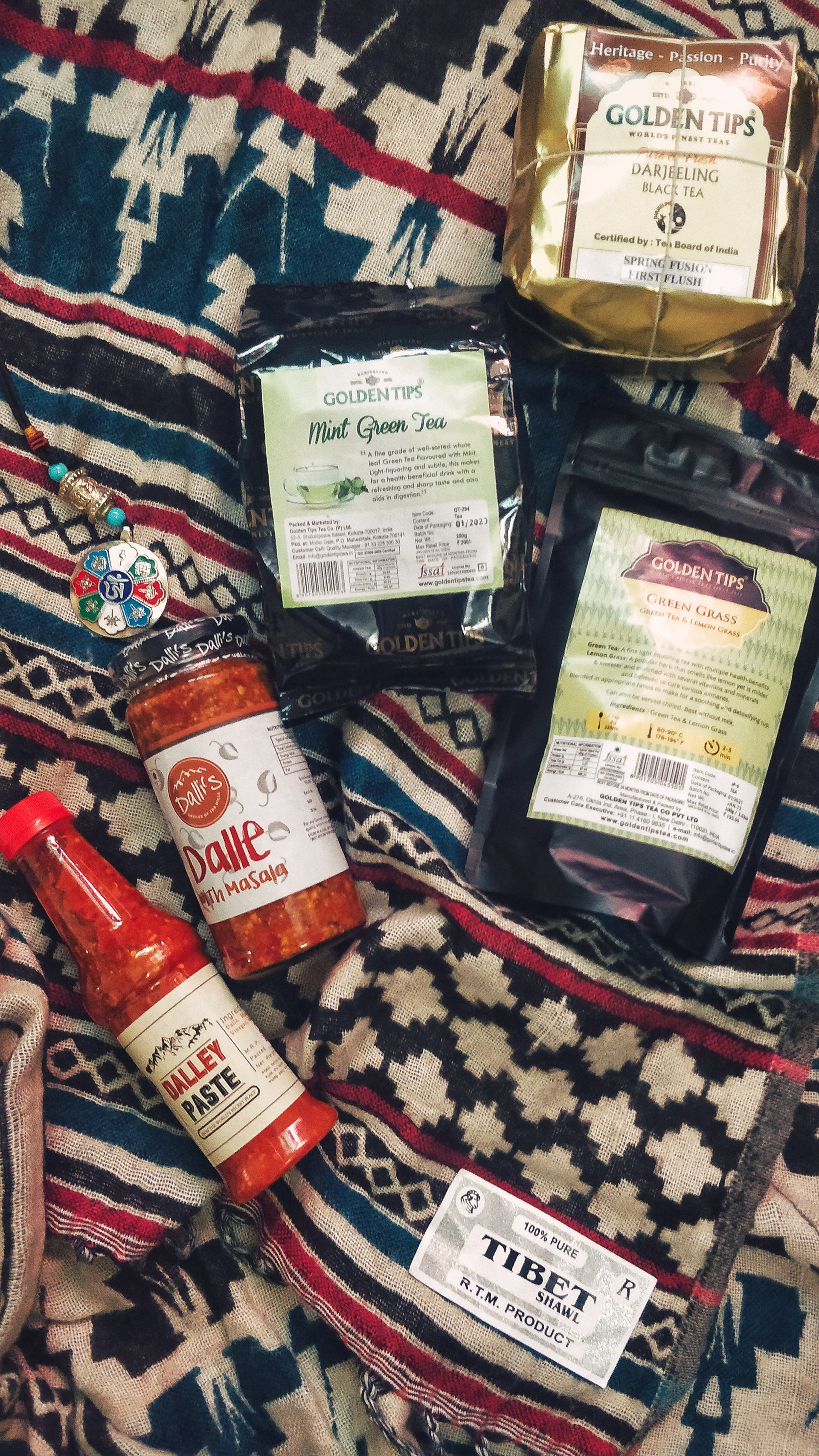
  • Get lunch, buy some tea at Golden Tips, pack your bags and hop on a shared-cab back to Siliguri. It took us about 4hrs to reach Siliguri, with an hour to spare before my train.
  • If you ve still got time on your hands, then check out the Peace Pagoda and the Darjeeling Himalayan Railway (Toy Train). At INR 1500, I found the latter to be too expensive and skipped it.


Tips and hacks
  • Download offline maps, especially when you re exploring Northern Sikkim.
  • Food and booze are the cheapest in Gangtok. Stash up before heading to other regions.
  • Keep your Aadhar/Passport handy since you need permits to travel to North & East Sikkim.
  • In rural areas and some cafes, you may get to try Rhododendron Wine, made from Rhododendron arboreum a.k.a Gurans. Its production is a little hush-hush since the flower is considered holy and is also the National Flower of Nepal.
  • If you don t want to invest in a new jacket, boots or a pair of gloves, you can always rent them at nominal rates from your hotel or little stores around tourist sites.
  • Check the weather of a region before heading there. Low visibility and precipitation can quite literally dampen your experience.
  • Keep your itinerary flexible to accommodate for rest and impromptu plans.
  • Shops and restaurants close by 8pm in Sikkim and Darjeeling. Plan for the same.

Carry
  • a couple of extra pairs of socks (woollen, if possible)
  • a pair of slippers to wear indoors
  • a reusable water bottle
  • an umbrella
  • a power bank
  • a couple of tablets of Diamox. Helps deal with altitude sickness
  • extra clothes and wet bags since you may not get a chance to wash/dry your clothes
  • a few passport size photographs

Shared-cab hacks
  • Intercity rides can be exhausting. If you can afford it, pay for an additional seat.
  • Call shotgun on the drives beyond Lachen and Lachung. The views are breathtaking.
  • Return cabs tend to be cheaper (WB cabs travelling from SK and vice-versa)

Cost
  • My median daily expenditure (back when I went to Sikkim in early March 2021) was INR 1350.
  • This includes stay (bunk bed), food, wine and transit (shared cabs)
  • In my defence, I splurged on food, wine and extra seats in shared cabs, but if you re on a budget, you could easily get by on INR 1 - 1.2k per day.
  • For a 9-day trip, I ended up shelling out nearly INR 15k, including 2AC trains to & from Kolkata
  • Note : Summer (March to May) and Autumn (October to December) are peak seasons, and thereby more expensive to travel around.

Souvenirs and things you should buy

Buddhist souvenirs :
  • Colourful Prayer Flags (great for tying on bikes or behind car windshields)
  • Miniature Prayer/Mani Wheels
  • Lucky Charms, Pendants and Key Chains
  • Cham Dance masks and robes
  • Singing Bowls
  • Common symbols: Om mani padme hum, Ashtamangala, Zodiac signs

Handicrafts & Handlooms
  • Tibetan Yak Wool shawls, scarfs and carpets
  • Sikkimese Ceramic cups
  • Thangka Paintings

Edibles
  • Darjeeling Tea (usually brewed and not boiled)
  • Wine (Arucha Peach & Rhododendron)
  • Dalle Khursani (Chilli) Paste and Pickle

Header Icon made by Freepik from www.flaticon.com is licensed by CC 3.0 BY

10 April 2021

Kentaro Hayashi: Grow your ideas for Debian Project

There may be some "If it could be ..." ideas for Debian Project. If idea is concreate and worth to make things forward, it should make a proposal for Project Funding. salsa.debian.org But it is a just an idea, or no afford to act as an executor role, that idea will not be achieved. I thought that It needs an incubator - complemental project. salsa.debian.org I've salvaged an idea from closed MR Add proposal about "Formalize reimbursement process" (!5) Merge Requests Freexian SARL / Project Funding GitLab I'm not confident whether mechanism works, but Debian needs change.

9 April 2021

Michael Prokop: A Ceph war story

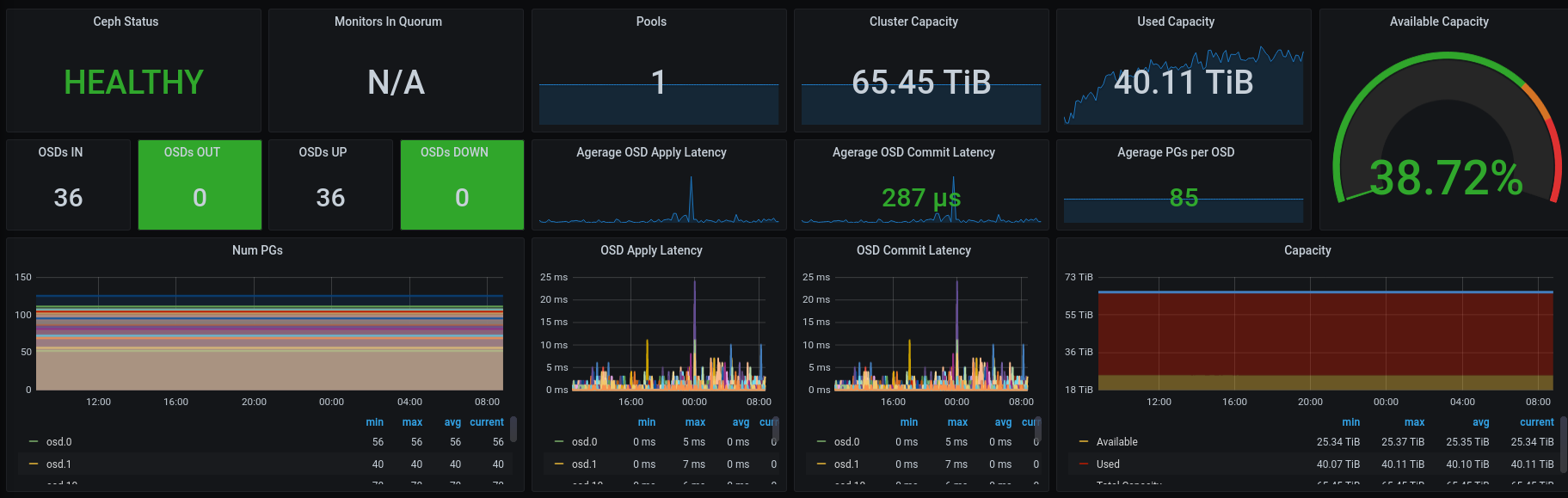
It all started with the big bang! We nearly lost 33 of 36 disks on a Proxmox/Ceph Cluster; this is the story of how we recovered them. At the end of 2020, we eventually had a long outstanding maintenance window for taking care of system upgrades at a customer. During this maintenance window, which involved reboots of server systems, the involved Ceph cluster unexpectedly went into a critical state. What was planned to be a few hours of checklist work in the early evening turned out to be an emergency case; let s call it a nightmare (not only because it included a big part of the night). Since we have learned a few things from our post mortem and RCA, it s worth sharing those with others. But first things first, let s step back and clarify what we had to deal with. The system and its upgrade One part of the upgrade included 3 Debian servers (we re calling them server1, server2 and server3 here), running on Proxmox v5 + Debian/stretch with 12 Ceph OSDs each (65.45TB in total), a so-called Proxmox Hyper-Converged Ceph Cluster. First, we went for upgrading the Proxmox v5/stretch system to Proxmox v6/buster, before updating Ceph Luminous v12.2.13 to the latest v14.2 release, supported by Proxmox v6/buster. The Proxmox upgrade included updating corosync from v2 to v3. As part of this upgrade, we had to apply some configuration changes, like adjust ring0 + ring1 address settings and add a mon_host configuration to the Ceph configuration. During the first two servers reboots, we noticed configuration glitches. After fixing those, we went for a reboot of the third server as well. Then we noticed that several Ceph OSDs were unexpectedly down. The NTP service wasn t working as expected after the upgrade. The underlying issue is a race condition of ntp with systemd-timesyncd (see #889290). As a result, we had clock skew problems with Ceph, indicating that the Ceph monitors clocks aren t running in sync (which is essential for proper Ceph operation). We initially assumed that our Ceph OSD failure derived from this clock skew problem, so we took care of it. After yet another round of reboots, to ensure the systems are running all with identical and sane configurations and services, we noticed lots of failing OSDs. This time all but three OSDs (19, 21 and 22) were down:
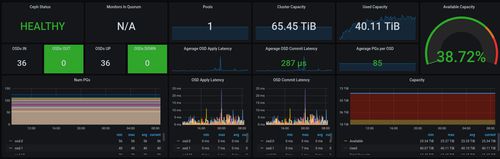
% sudo ceph osd tree
ID CLASS WEIGHT   TYPE NAME      STATUS REWEIGHT PRI-AFF
-1       65.44138 root default
-2       21.81310     host server1
 0   hdd  1.08989         osd.0    down  1.00000 1.00000
 1   hdd  1.08989         osd.1    down  1.00000 1.00000
 2   hdd  1.63539         osd.2    down  1.00000 1.00000
 3   hdd  1.63539         osd.3    down  1.00000 1.00000
 4   hdd  1.63539         osd.4    down  1.00000 1.00000
 5   hdd  1.63539         osd.5    down  1.00000 1.00000
18   hdd  2.18279         osd.18   down  1.00000 1.00000
20   hdd  2.18179         osd.20   down  1.00000 1.00000
28   hdd  2.18179         osd.28   down  1.00000 1.00000
29   hdd  2.18179         osd.29   down  1.00000 1.00000
30   hdd  2.18179         osd.30   down  1.00000 1.00000
31   hdd  2.18179         osd.31   down  1.00000 1.00000
-4       21.81409     host server2
 6   hdd  1.08989         osd.6    down  1.00000 1.00000
 7   hdd  1.08989         osd.7    down  1.00000 1.00000
 8   hdd  1.63539         osd.8    down  1.00000 1.00000
 9   hdd  1.63539         osd.9    down  1.00000 1.00000
10   hdd  1.63539         osd.10   down  1.00000 1.00000
11   hdd  1.63539         osd.11   down  1.00000 1.00000
19   hdd  2.18179         osd.19     up  1.00000 1.00000
21   hdd  2.18279         osd.21     up  1.00000 1.00000
22   hdd  2.18279         osd.22     up  1.00000 1.00000
32   hdd  2.18179         osd.32   down  1.00000 1.00000
33   hdd  2.18179         osd.33   down  1.00000 1.00000
34   hdd  2.18179         osd.34   down  1.00000 1.00000
-3       21.81419     host server3
12   hdd  1.08989         osd.12   down  1.00000 1.00000
13   hdd  1.08989         osd.13   down  1.00000 1.00000
14   hdd  1.63539         osd.14   down  1.00000 1.00000
15   hdd  1.63539         osd.15   down  1.00000 1.00000
16   hdd  1.63539         osd.16   down  1.00000 1.00000
17   hdd  1.63539         osd.17   down  1.00000 1.00000
23   hdd  2.18190         osd.23   down  1.00000 1.00000
24   hdd  2.18279         osd.24   down  1.00000 1.00000
25   hdd  2.18279         osd.25   down  1.00000 1.00000
35   hdd  2.18179         osd.35   down  1.00000 1.00000
36   hdd  2.18179         osd.36   down  1.00000 1.00000
37   hdd  2.18179         osd.37   down  1.00000 1.00000
Our blood pressure increased slightly! Did we just lose all of our cluster? What happened, and how can we get all the other OSDs back? We stumbled upon this beauty in our logs:
kernel: [   73.697957] XFS (sdl1): SB stripe unit sanity check failed
kernel: [   73.698002] XFS (sdl1): Metadata corruption detected at xfs_sb_read_verify+0x10e/0x180 [xfs], xfs_sb block 0xffffffffffffffff
kernel: [   73.698799] XFS (sdl1): Unmount and run xfs_repair
kernel: [   73.699199] XFS (sdl1): First 128 bytes of corrupted metadata buffer:
kernel: [   73.699677] 00000000: 58 46 53 42 00 00 10 00 00 00 00 00 00 00 62 00  XFSB..........b.
kernel: [   73.700205] 00000010: 00 00 00 00 00 00 00 00 00 00 00 00 00 00 00 00  ................
kernel: [   73.700836] 00000020: 62 44 2b c0 e6 22 40 d7 84 3d e1 cc 65 88 e9 d8  bD+.."@..=..e...
kernel: [   73.701347] 00000030: 00 00 00 00 00 00 40 08 00 00 00 00 00 00 01 00  ......@.........
kernel: [   73.701770] 00000040: 00 00 00 00 00 00 01 01 00 00 00 00 00 00 01 02  ................
ceph-disk[4240]: mount: /var/lib/ceph/tmp/mnt.jw367Y: mount(2) system call failed: Structure needs cleaning.
ceph-disk[4240]: ceph-disk: Mounting filesystem failed: Command '['/bin/mount', '-t', u'xfs', '-o', 'noatime,inode64', '--', '/dev/disk/by-parttypeuuid/4fbd7e29-9d25-41b8-afd0-062c0ceff05d.cdda39ed-5
ceph/tmp/mnt.jw367Y']' returned non-zero exit status 32
kernel: [   73.702162] 00000050: 00 00 00 01 00 00 18 80 00 00 00 04 00 00 00 00  ................
kernel: [   73.702550] 00000060: 00 00 06 48 bd a5 10 00 08 00 00 02 00 00 00 00  ...H............
kernel: [   73.702975] 00000070: 00 00 00 00 00 00 00 00 0c 0c 0b 01 0d 00 00 19  ................
kernel: [   73.703373] XFS (sdl1): SB validate failed with error -117.
The same issue was present for the other failing OSDs. We hoped, that the data itself was still there, and only the mounting of the XFS partitions failed. The Ceph cluster was initially installed in 2017 with Ceph jewel/10.2 with the OSDs on filestore (nowadays being a legacy approach to storing objects in Ceph). However, we migrated the disks to bluestore since then (with ceph-disk and not yet via ceph-volume what s being used nowadays). Using ceph-disk introduces these 100MB XFS partitions containing basic metadata for the OSD. Given that we had three working OSDs left, we decided to investigate how to rebuild the failing ones. Some folks on #ceph (thanks T1, ormandj + peetaur!) were kind enough to share how working XFS partitions looked like for them. After creating a backup (via dd), we tried to re-create such an XFS partition on server1. We noticed that even mounting a freshly created XFS partition failed:
synpromika@server1 ~ % sudo mkfs.xfs -f -i size=2048 -m uuid="4568c300-ad83-4288-963e-badcd99bf54f" /dev/sdc1
meta-data=/dev/sdc1              isize=2048   agcount=4, agsize=6272 blks
         =                       sectsz=4096  attr=2, projid32bit=1
         =                       crc=1        finobt=1, sparse=1, rmapbt=0
         =                       reflink=0
data     =                       bsize=4096   blocks=25088, imaxpct=25
         =                       sunit=128    swidth=64 blks
naming   =version 2              bsize=4096   ascii-ci=0, ftype=1
log      =internal log           bsize=4096   blocks=1608, version=2
         =                       sectsz=4096  sunit=1 blks, lazy-count=1
realtime =none                   extsz=4096   blocks=0, rtextents=0
synpromika@server1 ~ % sudo mount /dev/sdc1 /mnt/ceph-recovery
SB stripe unit sanity check failed
Metadata corruption detected at 0x433840, xfs_sb block 0x0/0x1000
libxfs_writebufr: write verifer failed on xfs_sb bno 0x0/0x1000
cache_node_purge: refcount was 1, not zero (node=0x1d3c400)
SB stripe unit sanity check failed
Metadata corruption detected at 0x433840, xfs_sb block 0x18800/0x1000
libxfs_writebufr: write verifer failed on xfs_sb bno 0x18800/0x1000
SB stripe unit sanity check failed
Metadata corruption detected at 0x433840, xfs_sb block 0x0/0x1000
libxfs_writebufr: write verifer failed on xfs_sb bno 0x0/0x1000
SB stripe unit sanity check failed
Metadata corruption detected at 0x433840, xfs_sb block 0x24c00/0x1000
libxfs_writebufr: write verifer failed on xfs_sb bno 0x24c00/0x1000
SB stripe unit sanity check failed
Metadata corruption detected at 0x433840, xfs_sb block 0xc400/0x1000
libxfs_writebufr: write verifer failed on xfs_sb bno 0xc400/0x1000
releasing dirty buffer (bulk) to free list!releasing dirty buffer (bulk) to free list!releasing dirty buffer (bulk) to free list!releasing dirty buffer (bulk) to free list!found dirty buffer (bulk) on free list!bad magic number
bad magic number
Metadata corruption detected at 0x433840, xfs_sb block 0x0/0x1000
libxfs_writebufr: write verifer failed on xfs_sb bno 0x0/0x1000
releasing dirty buffer (bulk) to free list!mount: /mnt/ceph-recovery: wrong fs type, bad option, bad superblock on /dev/sdc1, missing codepage or helper program, or other error.
Ouch. This very much looked related to the actual issue we re seeing. So we tried to execute mkfs.xfs with a bunch of different sunit/swidth settings. Using -d sunit=512 -d swidth=512 at least worked then, so we decided to force its usage in the creation of our OSD XFS partition. This brought us a working XFS partition. Please note, sunit must not be larger than swidth (more on that later!). Then we reconstructed how to restore all the metadata for the OSD (activate.monmap, active, block_uuid, bluefs, ceph_fsid, fsid, keyring, kv_backend, magic, mkfs_done, ready, require_osd_release, systemd, type, whoami). To identify the UUID, we can read the data from ceph --format json osd dump , like this for all our OSDs (Zsh syntax ftw!):
synpromika@server1 ~ % for f in  0..37  ; printf "osd-$f: %s\n" "$(sudo ceph --format json osd dump   jq -r ".osds[]   select(.osd==$f)   .uuid")"
osd-0: 4568c300-ad83-4288-963e-badcd99bf54f
osd-1: e573a17a-ccde-4719-bdf8-eef66903ca4f
osd-2: 0e1b2626-f248-4e7d-9950-f1a46644754e
osd-3: 1ac6a0a2-20ee-4ed8-9f76-d24e900c800c
[...]
Identifying the corresponding raw device for each OSD UUID is possible via:
synpromika@server1 ~ % UUID="4568c300-ad83-4288-963e-badcd99bf54f"
synpromika@server1 ~ % readlink -f /dev/disk/by-partuuid/"$ UUID "
/dev/sdc1
The OSD s key ID can be retrieved via:
synpromika@server1 ~ % OSD_ID=0
synpromika@server1 ~ % sudo ceph auth get osd."$ OSD_ID " -f json 2>/dev/null   jq -r '.[]   .key'
AQCKFpZdm0We[...]
Now we also need to identify the underlying block device:
synpromika@server1 ~ % OSD_ID=0
synpromika@server1 ~ % sudo ceph osd metadata osd."$ OSD_ID " -f json   jq -r '.bluestore_bdev_partition_path'    
/dev/sdc2
With all of this, we reconstructed the keyring, fsid, whoami, block + block_uuid files. All the other files inside the XFS metadata partition are identical on each OSD. So after placing and adjusting the corresponding metadata on the XFS partition for Ceph usage, we got a working OSD hurray! Since we had to fix yet another 32 OSDs, we decided to automate this XFS partitioning and metadata recovery procedure. We had a network share available on /srv/backup for storing backups of existing partition data. On each server, we tested the procedure with one single OSD before iterating over the list of remaining failing OSDs. We started with a shell script on server1, then adjusted the script for server2 and server3. This is the script, as we executed it on the 3rd server. Thanks to this, we managed to get the Ceph cluster up and running again. We didn t want to continue with the Ceph upgrade itself during the night though, as we wanted to know exactly what was going on and why the system behaved like that. Time for RCA! Root Cause Analysis So all but three OSDs on server2 failed, and the problem seems to be related to XFS. Therefore, our starting point for the RCA was, to identify what was different on server2, as compared to server1 + server3. My initial assumption was that this was related to some firmware issues with the involved controller (and as it turned out later, I was right!). The disks were attached as JBOD devices to a ServeRAID M5210 controller (with a stripe size of 512). Firmware state:
synpromika@server1 ~ % sudo storcli64 /c0 show all   grep '^Firmware'
Firmware Package Build = 24.16.0-0092
Firmware Version = 4.660.00-8156
synpromika@server2 ~ % sudo storcli64 /c0 show all   grep '^Firmware'
Firmware Package Build = 24.21.0-0112
Firmware Version = 4.680.00-8489
synpromika@server3 ~ % sudo storcli64 /c0 show all   grep '^Firmware'
Firmware Package Build = 24.16.0-0092
Firmware Version = 4.660.00-8156
This looked very promising, as server2 indeed runs with a different firmware version on the controller. But how so? Well, the motherboard of server2 got replaced by a Lenovo/IBM technician in January 2020, as we had a failing memory slot during a memory upgrade. As part of this procedure, the Lenovo/IBM technician installed the latest firmware versions. According to our documentation, some OSDs were rebuilt (due to the filestore->bluestore migration) in March and April 2020. It turned out that precisely those OSDs were the ones that survived the upgrade. So the surviving drives were created with a different firmware version running on the involved controller. All the other OSDs were created with an older controller firmware. But what difference does this make? Now let s check firmware changelogs. For the 24.21.0-0097 release we found this:
- Cannot create or mount xfs filesystem using xfsprogs 4.19.x kernel 4.20(SCGCQ02027889)
- xfs_info command run on an XFS file system created on a VD of strip size 1M shows sunit and swidth as 0(SCGCQ02056038)
Our XFS problem certainly was related to the controller s firmware. We also recalled that our monitoring system reported different sunit settings for the OSDs that were rebuilt in March and April. For example, OSD 21 was recreated and got different sunit settings:
WARN  server2.example.org  Mount options of /var/lib/ceph/osd/ceph-21      WARN - Missing: sunit=1024, Exceeding: sunit=512
We compared the new OSD 21 with an existing one (OSD 25 on server3):
synpromika@server2 ~ % systemctl show var-lib-ceph-osd-ceph\\x2d21.mount   grep sunit
Options=rw,noatime,attr2,inode64,sunit=512,swidth=512,noquota
synpromika@server3 ~ % systemctl show var-lib-ceph-osd-ceph\\x2d25.mount   grep sunit
Options=rw,noatime,attr2,inode64,sunit=1024,swidth=512,noquota
Thanks to our documentation, we could compare execution logs of their creation:
% diff -u ceph-disk-osd-25.log ceph-disk-osd-21.log
-synpromika@server2 ~ % sudo ceph-disk -v prepare --bluestore /dev/sdj --osd-id 25
+synpromika@server3 ~ % sudo ceph-disk -v prepare --bluestore /dev/sdi --osd-id 21
[...]
-command_check_call: Running command: /sbin/mkfs -t xfs -f -i size=2048 -- /dev/sdj1
-meta-data=/dev/sdj1              isize=2048   agcount=4, agsize=6272 blks
[...]
+command_check_call: Running command: /sbin/mkfs -t xfs -f -i size=2048 -- /dev/sdi1
+meta-data=/dev/sdi1              isize=2048   agcount=4, agsize=6336 blks
          =                       sectsz=4096  attr=2, projid32bit=1
          =                       crc=1        finobt=1, sparse=0, rmapbt=0, reflink=0
-data     =                       bsize=4096   blocks=25088, imaxpct=25
-         =                       sunit=128    swidth=64 blks
+data     =                       bsize=4096   blocks=25344, imaxpct=25
+         =                       sunit=64     swidth=64 blks
 naming   =version 2              bsize=4096   ascii-ci=0 ftype=1
 log      =internal log           bsize=4096   blocks=1608, version=2
          =                       sectsz=4096  sunit=1 blks, lazy-count=1
 realtime =none                   extsz=4096   blocks=0, rtextents=0
[...]
So back then, we even tried to track this down but couldn t make sense of it yet. But now this sounds very much like it is related to the problem we saw with this Ceph/XFS failure. We follow Occam s razor, assuming the simplest explanation is usually the right one, so let s check the disk properties and see what differs:
synpromika@server1 ~ % sudo blockdev --getsz --getsize64 --getss --getpbsz --getiomin --getioopt /dev/sdk
4685545472
2398999281664
512
4096
524288
262144
synpromika@server2 ~ % sudo blockdev --getsz --getsize64 --getss --getpbsz --getiomin --getioopt /dev/sdk
4685545472
2398999281664
512
4096
262144
262144
See the difference between server1 and server2 for identical disks? The getiomin option now reports something different for them:
synpromika@server1 ~ % sudo blockdev --getiomin /dev/sdk            
524288
synpromika@server1 ~ % cat /sys/block/sdk/queue/minimum_io_size
524288
synpromika@server2 ~ % sudo blockdev --getiomin /dev/sdk 
262144
synpromika@server2 ~ % cat /sys/block/sdk/queue/minimum_io_size
262144
It doesn t make sense that the minimum I/O size (iomin, AKA BLKIOMIN) is bigger than the optimal I/O size (ioopt, AKA BLKIOOPT). This leads us to Bug 202127 cannot mount or create xfs on a 597T device, which matches our findings here. But why did this XFS partition work in the past and fails now with the newer kernel version? The XFS behaviour change Now given that we have backups of all the XFS partition, we wanted to track down, a) when this XFS behaviour was introduced, and b) whether, and if so how it would be possible to reuse the XFS partition without having to rebuild it from scratch (e.g. if you would have no working Ceph OSD or backups left). Let s look at such a failing XFS partition with the Grml live system:
root@grml ~ # grml-version
grml64-full 2020.06 Release Codename Ausgehfuahangl [2020-06-24]
root@grml ~ # uname -a
Linux grml 5.6.0-2-amd64 #1 SMP Debian 5.6.14-2 (2020-06-09) x86_64 GNU/Linux
root@grml ~ # grml-hostname grml-2020-06
Setting hostname to grml-2020-06: done
root@grml ~ # exec zsh
root@grml-2020-06 ~ # dpkg -l xfsprogs util-linux
Desired=Unknown/Install/Remove/Purge/Hold
  Status=Not/Inst/Conf-files/Unpacked/halF-conf/Half-inst/trig-aWait/Trig-pend
 / Err?=(none)/Reinst-required (Status,Err: uppercase=bad)
 / Name           Version      Architecture Description
+++-==============-============-============-=========================================
ii  util-linux     2.35.2-4     amd64        miscellaneous system utilities
ii  xfsprogs       5.6.0-1+b2   amd64        Utilities for managing the XFS filesystem
There it s failing, no matter which mount option we try:
root@grml-2020-06 ~ # mount ./sdd1.dd /mnt
mount: /mnt: mount(2) system call failed: Structure needs cleaning.
root@grml-2020-06 ~ # dmesg   tail -30
[...]
[   64.788640] XFS (loop1): SB stripe unit sanity check failed
[   64.788671] XFS (loop1): Metadata corruption detected at xfs_sb_read_verify+0x102/0x170 [xfs], xfs_sb block 0xffffffffffffffff
[   64.788671] XFS (loop1): Unmount and run xfs_repair
[   64.788672] XFS (loop1): First 128 bytes of corrupted metadata buffer:
[   64.788673] 00000000: 58 46 53 42 00 00 10 00 00 00 00 00 00 00 62 00  XFSB..........b.
[   64.788674] 00000010: 00 00 00 00 00 00 00 00 00 00 00 00 00 00 00 00  ................
[   64.788675] 00000020: 32 b6 dc 35 53 b7 44 96 9d 63 30 ab b3 2b 68 36  2..5S.D..c0..+h6
[   64.788675] 00000030: 00 00 00 00 00 00 40 08 00 00 00 00 00 00 01 00  ......@.........
[   64.788675] 00000040: 00 00 00 00 00 00 01 01 00 00 00 00 00 00 01 02  ................
[   64.788676] 00000050: 00 00 00 01 00 00 18 80 00 00 00 04 00 00 00 00  ................
[   64.788677] 00000060: 00 00 06 48 bd a5 10 00 08 00 00 02 00 00 00 00  ...H............
[   64.788677] 00000070: 00 00 00 00 00 00 00 00 0c 0c 0b 01 0d 00 00 19  ................
[   64.788679] XFS (loop1): SB validate failed with error -117.
root@grml-2020-06 ~ # mount -t xfs -o rw,relatime,attr2,inode64,sunit=1024,swidth=512,noquota ./sdd1.dd /mnt/
mount: /mnt: wrong fs type, bad option, bad superblock on /dev/loop1, missing codepage or helper program, or other error.
32 root@grml-2020-06 ~ # dmesg   tail -1
[   66.342976] XFS (loop1): stripe width (512) must be a multiple of the stripe unit (1024)
root@grml-2020-06 ~ # mount -t xfs -o rw,relatime,attr2,inode64,sunit=512,swidth=512,noquota ./sdd1.dd /mnt/
mount: /mnt: mount(2) system call failed: Structure needs cleaning.
32 root@grml-2020-06 ~ # dmesg   tail -14
[   66.342976] XFS (loop1): stripe width (512) must be a multiple of the stripe unit (1024)
[   80.751277] XFS (loop1): SB stripe unit sanity check failed
[   80.751323] XFS (loop1): Metadata corruption detected at xfs_sb_read_verify+0x102/0x170 [xfs], xfs_sb block 0xffffffffffffffff 
[   80.751324] XFS (loop1): Unmount and run xfs_repair
[   80.751325] XFS (loop1): First 128 bytes of corrupted metadata buffer:
[   80.751327] 00000000: 58 46 53 42 00 00 10 00 00 00 00 00 00 00 62 00  XFSB..........b.
[   80.751328] 00000010: 00 00 00 00 00 00 00 00 00 00 00 00 00 00 00 00  ................
[   80.751330] 00000020: 32 b6 dc 35 53 b7 44 96 9d 63 30 ab b3 2b 68 36  2..5S.D..c0..+h6
[   80.751331] 00000030: 00 00 00 00 00 00 40 08 00 00 00 00 00 00 01 00  ......@.........
[   80.751331] 00000040: 00 00 00 00 00 00 01 01 00 00 00 00 00 00 01 02  ................
[   80.751332] 00000050: 00 00 00 01 00 00 18 80 00 00 00 04 00 00 00 00  ................
[   80.751333] 00000060: 00 00 06 48 bd a5 10 00 08 00 00 02 00 00 00 00  ...H............
[   80.751334] 00000070: 00 00 00 00 00 00 00 00 0c 0c 0b 01 0d 00 00 19  ................
[   80.751338] XFS (loop1): SB validate failed with error -117.
Also xfs_repair doesn t help either:
root@grml-2020-06 ~ # xfs_info ./sdd1.dd
meta-data=./sdd1.dd              isize=2048   agcount=4, agsize=6272 blks
         =                       sectsz=4096  attr=2, projid32bit=1
         =                       crc=1        finobt=1, sparse=0, rmapbt=0
         =                       reflink=0
data     =                       bsize=4096   blocks=25088, imaxpct=25
         =                       sunit=128    swidth=64 blks
naming   =version 2              bsize=4096   ascii-ci=0, ftype=1
log      =internal log           bsize=4096   blocks=1608, version=2
         =                       sectsz=4096  sunit=1 blks, lazy-count=1
realtime =none                   extsz=4096   blocks=0, rtextents=0
root@grml-2020-06 ~ # xfs_repair ./sdd1.dd
Phase 1 - find and verify superblock...
bad primary superblock - bad stripe width in superblock !!!
attempting to find secondary superblock...
..............................................................................................Sorry, could not find valid secondary superblock
Exiting now.
With the SB stripe unit sanity check failed message, we could easily track this down to the following commit fa4ca9c:
% git show fa4ca9c5574605d1e48b7e617705230a0640b6da   cat
commit fa4ca9c5574605d1e48b7e617705230a0640b6da
Author: Dave Chinner <dchinner@redhat.com>
Date:   Tue Jun 5 10:06:16 2018 -0700
    
    xfs: catch bad stripe alignment configurations
    
    When stripe alignments are invalid, data alignment algorithms in the
    allocator may not work correctly. Ensure we catch superblocks with
    invalid stripe alignment setups at mount time. These data alignment
    mismatches are now detected at mount time like this:
    
    XFS (loop0): SB stripe unit sanity check failed
    XFS (loop0): Metadata corruption detected at xfs_sb_read_verify+0xab/0x110, xfs_sb block 0xffffffffffffffff
    XFS (loop0): Unmount and run xfs_repair
    XFS (loop0): First 128 bytes of corrupted metadata buffer:
    0000000091c2de02: 58 46 53 42 00 00 10 00 00 00 00 00 00 00 10 00  XFSB............
    0000000023bff869: 00 00 00 00 00 00 00 00 00 00 00 00 00 00 00 00  ................
    00000000cdd8c893: 17 32 37 15 ff ca 46 3d 9a 17 d3 33 04 b5 f1 a2  .27...F=...3....
    000000009fd2844f: 00 00 00 00 00 00 00 04 00 00 00 00 00 00 06 d0  ................
    0000000088e9b0bb: 00 00 00 00 00 00 06 d1 00 00 00 00 00 00 06 d2  ................
    00000000ff233a20: 00 00 00 01 00 00 10 00 00 00 00 01 00 00 00 00  ................
    000000009db0ac8b: 00 00 03 60 e1 34 02 00 08 00 00 02 00 00 00 00  ... .4..........
    00000000f7022460: 00 00 00 00 00 00 00 00 0c 09 0b 01 0c 00 00 19  ................
    XFS (loop0): SB validate failed with error -117.
    
    And the mount fails.
    
    Signed-off-by: Dave Chinner <dchinner@redhat.com>
    Reviewed-by: Carlos Maiolino <cmaiolino@redhat.com>
    Reviewed-by: Darrick J. Wong <darrick.wong@oracle.com>
    Signed-off-by: Darrick J. Wong <darrick.wong@oracle.com>
diff --git fs/xfs/libxfs/xfs_sb.c fs/xfs/libxfs/xfs_sb.c
index b5dca3c8c84d..c06b6fc92966 100644
--- fs/xfs/libxfs/xfs_sb.c
+++ fs/xfs/libxfs/xfs_sb.c
@@ -278,6 +278,22 @@ xfs_mount_validate_sb(
                return -EFSCORRUPTED;
         
        
+       if (sbp->sb_unit)  
+               if (!xfs_sb_version_hasdalign(sbp)  
+                   sbp->sb_unit > sbp->sb_width  
+                   (sbp->sb_width % sbp->sb_unit) != 0)  
+                       xfs_notice(mp, "SB stripe unit sanity check failed");
+                       return -EFSCORRUPTED;
+                 
+         else if (xfs_sb_version_hasdalign(sbp))   
+               xfs_notice(mp, "SB stripe alignment sanity check failed");
+               return -EFSCORRUPTED;
+         else if (sbp->sb_width)  
+               xfs_notice(mp, "SB stripe width sanity check failed");
+               return -EFSCORRUPTED;
+        
+
+       
        if (xfs_sb_version_hascrc(&mp->m_sb) &&
            sbp->sb_blocksize < XFS_MIN_CRC_BLOCKSIZE)  
                xfs_notice(mp, "v5 SB sanity check failed");
This change is included in kernel versions 4.18-rc1 and newer:
% git describe --contains fa4ca9c5574605d1e48
v4.18-rc1~37^2~14
Now let s try with an older kernel version (4.9.0), using old Grml 2017.05 release:
root@grml ~ # grml-version
grml64-small 2017.05 Release Codename Freedatensuppe [2017-05-31]
root@grml ~ # uname -a
Linux grml 4.9.0-1-grml-amd64 #1 SMP Debian 4.9.29-1+grml.1 (2017-05-24) x86_64 GNU/Linux
root@grml ~ # lsb_release -a
No LSB modules are available.
Distributor ID: Debian
Description:    Debian GNU/Linux 9.0 (stretch)
Release:        9.0
Codename:       stretch
root@grml ~ # grml-hostname grml-2017-05
Setting hostname to grml-2017-05: done
root@grml ~ # exec zsh
root@grml-2017-05 ~ #
root@grml-2017-05 ~ # xfs_info ./sdd1.dd
xfs_info: ./sdd1.dd is not a mounted XFS filesystem
1 root@grml-2017-05 ~ # xfs_repair ./sdd1.dd
Phase 1 - find and verify superblock...
bad primary superblock - bad stripe width in superblock !!!
attempting to find secondary superblock...
..............................................................................................Sorry, could not find valid secondary superblock
Exiting now.
1 root@grml-2017-05 ~ # mount ./sdd1.dd /mnt
root@grml-2017-05 ~ # mount -t xfs
/root/sdd1.dd on /mnt type xfs (rw,relatime,attr2,inode64,sunit=1024,swidth=512,noquota)
root@grml-2017-05 ~ # ls /mnt
activate.monmap  active  block  block_uuid  bluefs  ceph_fsid  fsid  keyring  kv_backend  magic  mkfs_done  ready  require_osd_release  systemd  type  whoami
root@grml-2017-05 ~ # xfs_info /mnt
meta-data=/dev/loop1             isize=2048   agcount=4, agsize=6272 blks
         =                       sectsz=4096  attr=2, projid32bit=1
         =                       crc=1        finobt=1 spinodes=0 rmapbt=0
         =                       reflink=0
data     =                       bsize=4096   blocks=25088, imaxpct=25
         =                       sunit=128    swidth=64 blks
naming   =version 2              bsize=4096   ascii-ci=0 ftype=1
log      =internal               bsize=4096   blocks=1608, version=2
         =                       sectsz=4096  sunit=1 blks, lazy-count=1
realtime =none                   extsz=4096   blocks=0, rtextents=0
Mounting there indeed works! Now, if we mount the filesystem with new and proper sunit/swidth settings using the older kernel, it should rewrite them on disk:
root@grml-2017-05 ~ # mount -t xfs -o sunit=512,swidth=512 ./sdd1.dd /mnt/
root@grml-2017-05 ~ # umount /mnt/
And indeed, mounting this rewritten filesystem then also works with newer kernels:
root@grml-2020-06 ~ # mount ./sdd1.rewritten /mnt/
root@grml-2020-06 ~ # xfs_info /root/sdd1.rewritten
meta-data=/dev/loop1             isize=2048   agcount=4, agsize=6272 blks
         =                       sectsz=4096  attr=2, projid32bit=1
         =                       crc=1        finobt=1, sparse=0, rmapbt=0
         =                       reflink=0
data     =                       bsize=4096   blocks=25088, imaxpct=25
         =                       sunit=64    swidth=64 blks
naming   =version 2              bsize=4096   ascii-ci=0, ftype=1
log      =internal log           bsize=4096   blocks=1608, version=2
         =                       sectsz=4096  sunit=1 blks, lazy-count=1
realtime =none                   extsz=4096   blocks=0, rtextents=0
root@grml-2020-06 ~ # mount -t xfs                
/root/sdd1.rewritten on /mnt type xfs (rw,relatime,attr2,inode64,logbufs=8,logbsize=32k,sunit=512,swidth=512,noquota)
FTR: The sunit=512,swidth=512 from the xfs mount option is identical to xfs_info s output sunit=64,swidth=64 (because mount.xfs s sunit value is given in 512-byte block units, see man 5 xfs, and the xfs_info output reported here is in blocks with a block size (bsize) of 4096, so sunit = 512*512 := 64*4096 ). mkfs uses minimum and optimal sizes for stripe unit and stripe width; you can check this e.g. via (note that server2 with fixed firmware version reports proper values, whereas server3 with broken controller firmware reports non-sense):
synpromika@server2 ~ % for i in /sys/block/sd*/queue/ ; do printf "%s: %s %s\n" "$i" "$(cat "$i"/minimum_io_size)" "$(cat "$i"/optimal_io_size)" ; done
[...]
/sys/block/sdc/queue/: 262144 262144
/sys/block/sdd/queue/: 262144 262144
/sys/block/sde/queue/: 262144 262144
/sys/block/sdf/queue/: 262144 262144
/sys/block/sdg/queue/: 262144 262144
/sys/block/sdh/queue/: 262144 262144
/sys/block/sdi/queue/: 262144 262144
/sys/block/sdj/queue/: 262144 262144
/sys/block/sdk/queue/: 262144 262144
/sys/block/sdl/queue/: 262144 262144
/sys/block/sdm/queue/: 262144 262144
/sys/block/sdn/queue/: 262144 262144
[...]
synpromika@server3 ~ % for i in /sys/block/sd*/queue/ ; do printf "%s: %s %s\n" "$i" "$(cat "$i"/minimum_io_size)" "$(cat "$i"/optimal_io_size)" ; done
[...]
/sys/block/sdc/queue/: 524288 262144
/sys/block/sdd/queue/: 524288 262144
/sys/block/sde/queue/: 524288 262144
/sys/block/sdf/queue/: 524288 262144
/sys/block/sdg/queue/: 524288 262144
/sys/block/sdh/queue/: 524288 262144
/sys/block/sdi/queue/: 524288 262144
/sys/block/sdj/queue/: 524288 262144
/sys/block/sdk/queue/: 524288 262144
/sys/block/sdl/queue/: 524288 262144
/sys/block/sdm/queue/: 524288 262144
/sys/block/sdn/queue/: 524288 262144
[...]
This is the underlying reason why the initially created XFS partitions were created with incorrect sunit/swidth settings. The broken firmware of server1 and server3 was the cause of the incorrect settings they were ignored by old(er) xfs/kernel versions, but treated as an error by new ones. Make sure to also read the XFS FAQ regarding How to calculate the correct sunit,swidth values for optimal performance . We also stumbled upon two interesting reads in RedHat s knowledge base: 5075561 + 2150101 (requires an active subscription, though) and #1835947. Am I affected? How to work around it? To check whether your XFS mount points are affected by this issue, the following command line should be useful:
awk '$3 == "xfs" print $2 ' /proc/self/mounts   while read mount ; do echo -n "$mount " ; xfs_info $mount   awk '$0 ~ "swidth" gsub(/.*=/,"",$2); gsub(/.*=/,"",$3); print $2,$3 '   awk '  if ($1 > $2) print "impacted"; else print "OK" ' ; done
If you run into the above situation, the only known solution to get your original XFS partition working again, is to boot into an older kernel version again (4.17 or older), mount the XFS partition with correct sunit/swidth settings and then boot back into your new system (kernel version wise). Lessons learned Thanks: Darshaka Pathirana, Chris Hofstaedtler and Michael Hanscho. Looking for help with your IT infrastructure? Let us know!

8 April 2021

Sean Whitton: consfigurator-live-build

One of my goals for Consfigurator is to make it capable of installing Debian to my laptop, so that I can stop booting to GRML and manually partitioning and debootstrapping a basic system, only to then turn to configuration management to set everything else up. My configuration management should be able to handle the partitioning and debootstrapping, too. The first stage was to make Consfigurator capable of debootstrapping a basic system, chrooting into it, and applying other arbitrary configuration, such as installing packages. That s been in place for some weeks now. It s sophisticated enough to avoid starting up newly installed services, but I still need to add some bind mounting. Another significant piece is teaching Consfigurator how to partition block devices. That s quite tricky to do in a sufficiently general way I want to cleanly support various combinations of LUKS, LVM and regular partitions, including populating /etc/crypttab and /etc/fstab. I have some ideas about how to do it, but it ll probably take a few tries to get the abstractions right. Let s imagine that code is all in place, such that Consfigurator can be pointed at a block device and it will install a bootable Debian system to it. Then to install Debian to my laptop I d just need to take my laptop s disk drive out and plug it into another system, and run Consfigurator on that system, as root, pointed at the block device representing my laptop s disk drive. For virtual machines, it would be easy to write code which loop-mounts an empty disk image, and then Consfigurator could be pointed at the loop-mounted block device, thereby making the disk image file bootable. This is adequate for virtual machines, or small single-board computers with tiny storage devices (not that I actually use any of those, but I want Consfigurator to be able to make disk images for them!). But it s not much good for my laptop. I casually referred to taking out my laptop s disk drive and connecting it to another computer, but this would void my laptop s warranty. And Consfigurator would not be able to update my laptop s NVRAM, as is needed on UEFI systems. What s wanted here is a live system which can run Consfigurator directly on the laptop, pointed at the block device representing its physical disk drive. Ideally this live system comes with a chroot with the root filesystem for the new Debian install already built, so that network access is not required, and all Consfigurator has to do is partition the drive and copy in the contents of the chroot. The live system could be set up to automatically start doing that upon boot, but another option is to just make Consfigurator itself available to be used interactively. The user boots the live system, starts up Emacs, starts up Lisp, and executes a Consfigurator deployment, supplying the block device representing the laptop s disk drive as an argument to the deployment. Consfigurator goes off and partitions that drive, copies in the contents of the chroot, and executes grub-install to make the laptop bootable. This is also much easier to debug than a live system which tries to start partitioning upon boot. It would look something like this:
    ;; melete.silentflame.com is a Consfigurator host object representing the
    ;; laptop, including information about the partitions it should have
    (deploy-these :local ...
      (chroot:partitioned-and-installed
        melete.silentflame.com "/srv/chroot/melete" "/dev/nvme0n1"))
Now, building live systems is a fair bit more involved than installing Debian to a disk drive and making it bootable, it turns out. While I want Consfigurator to be able to completely replace the Debian Installer, I decided that it is not worth trying to reimplement the relevant parts of the Debian Live tool suite, because I do not need to make arbitrary customisations to any live systems. I just need to have some packages installed and some files in place. Nevertheless, it is worth teaching Consfigurator how to invoke Debian Live, so that the customisation of the chroot which isn t just a matter of passing options to lb_config(1) can be done with Consfigurator. This is what I ve ended up with in Consfigurator s source code:
(defpropspec image-built :lisp (config dir properties)
  "Build an image under DIR using live-build(7), where the resulting live
system has PROPERTIES, which should contain, at a minimum, a property from
CONSFIGURATOR.PROPERTY.OS setting the Debian suite and architecture.  CONFIG
is a list of arguments to pass to lb_config(1), not including the '-a' and
'-d' options, which Consfigurator will supply based on PROPERTIES.
This property runs the lb_config(1), lb_bootstrap(1), lb_chroot(1) and
lb_binary(1) commands to build or rebuild the image.  Rebuilding occurs only
when changes to CONFIG or PROPERTIES mean that the image is potentially
out-of-date; e.g. if you just add some new items to PROPERTIES then in most
cases only lb_chroot(1) and lb_binary(1) will be re-run.
Note that lb_chroot(1) and lb_binary(1) both run after applying PROPERTIES,
and might undo some of their effects.  For example, to configure
/etc/apt/sources.list, you will need to use CONFIG not PROPERTIES."
  (:desc (declare (ignore config properties))
         #?"Debian Live image built in $ dir ")
  (let* (...)
    ;; ...
     (eseqprops
      ;; ...
      (on-change
          (eseqprops
           (on-change
               (file:has-content ,auto/config ,(auto/config config) :mode #o755)
             (file:does-not-exist ,@clean)
             (%lbconfig ,dir)
             (%lbbootstrap t ,dir))
           (%lbbootstrap nil ,dir)
           (deploys ((:chroot :into ,chroot)) ,host))
        (%lbchroot ,dir)
        (%lbbinary ,dir)))))
Here, %lbconfig is a property running lb_config(1), %lbbootstrap one which runs lb_bootstrap(1), etc. Those properties all just change directory to the right place and run the command, essentially, with a little extra code to handle failed debootstraps and the like. The ON-CHANGE and ESEQPROPS combinators work together to sequence the interaction of the Debian Live suite and Consfigurator. This way, we only rebuild the chroot if the configuration changed, and we only rebuild the image if the chroot changed. Now over in my personal consfig:
(try-register-data-source
 :git-snapshot :name "consfig" :repo #P"src/cl/consfig/" ...)
(defproplist hybrid-live-iso-built :lisp ()
  "Build a Debian Live system in /srv/live/spw.
Typically this property is not applied in a DEFHOST form, but rather run as
needed at the REPL.  The reason for this is that otherwise the whole image will
get rebuilt each time a commit is made to my dotfiles repo or to my consfig."
  (:desc "Sean's Debian Live system image built")
  (live-build:image-built.
      '("--archive-areas" "main contrib non-free" ...)
      "/srv/live/spw"
    (os:debian-stable "buster" :amd64)
    (basic-props)
    (apt:installed "whatever" "you" "want")
    (git:snapshot-extracted "/etc/skel/src" "dotfiles")
    (file:is-copy-of "/etc/skel/.bashrc" "/etc/skel/src/dotfiles/.bashrc")
    (git:snapshot-extracted "/root/src/cl" "consfig")))
The first argument to LIVE-BUILD:IMAGE-BUILT. is additional arguments to lb_config(1). The third argument onwards are the properties for the live system. The cool thing is GIT:SNAPSHOT-EXTRACTED the calls to this ensure that a copy of my Emacs configuration and my consfig end up in the live image, ready to be used interactively to install Debian, as described above. I ll need to add something like (chroot:host-chroot-bootstrapped melete.silentflame.com "/srv/chroot/melete") too. As with everything Consfigurator-related, Joey Hess s Propellor is the giant upon whose shoulders I m standing.

7 April 2021

Norbert Preining: Debian KDE/Plasma and Digikam Status 2021-04-07

Two months have passed since the last status update, but not much has changed since Debian is more or less frozen for the release of Bullseye, and only critical bugfixes are allowed. As reported before Debian/bullseye will have Plasma 5.20.5, Frameworks 5.78, Apps 20.12. Debian/experimental already carries Plasma 5.21.4 and Frameworks 5.80, and that is also the level at the OSC builds. Debian Bullseye We are in hard freeze now, and only targeted fixes are allowed, but Bullseye is carrying a good mixture consisting of the KDE Frameworks 5.78, including several backports of fixes from 5.79 to get smooth operation. Plasma 5.20.5, again with several cherry picks for bugs will be in Bullseye, too. The KDE/Apps are mostly at 20.12 level, and the KDE PIM group packages (akonadi, kmail, etc) are at 20.08. Debian experimental Frameworks 5.80 (and soon 5.81) and Plasma 5.21.4 are in Debian/experimental. OBS packages (short reminder: you need to import my OBS gpg key to make these repos work!) The OBS packages as usual follow the latest release, and currently ship KDE Frameworks 5.80, KDE Apps 20.12.3, and Plasma 5.21.4. The package sources are as usual (note the different path for the Plasma packages and the App packages, containing the release version!), for Debian/unstable:
deb https://download.opensuse.org/repositories/home:/npreining:/debian-kde:/frameworks/Debian_Unstable/ ./
deb https://download.opensuse.org/repositories/home:/npreining:/debian-kde:/plasma521/Debian_Unstable/ ./
deb https://download.opensuse.org/repositories/home:/npreining:/debian-kde:/apps2012/Debian_Unstable/ ./
deb https://download.opensuse.org/repositories/home:/npreining:/debian-kde:/other/Debian_Unstable/ ./
and the same with Testing instead of Unstable for Debian/testing. Digikam Digikam has seen a new release 7.2.0, and packages are available in my OBS archives:
deb https://download.opensuse.org/repositories/home:/npreining:/debian-kde:/other/Debian_Unstable/ ./
and again, same with Testing instead of Unstable for Debian/testing.

5 April 2021

Kees Cook: security things in Linux v5.9

Previously: v5.8 Linux v5.9 was released in October, 2020. Here s my summary of various security things that I found interesting: seccomp user_notif file descriptor injection
Sargun Dhillon added the ability for SECCOMP_RET_USER_NOTIF filters to inject file descriptors into the target process using SECCOMP_IOCTL_NOTIF_ADDFD. This lets container managers fully emulate syscalls like open() and connect(), where an actual file descriptor is expected to be available after a successful syscall. In the process I fixed a couple bugs and refactored the file descriptor receiving code. zero-initialize stack variables with Clang
When Alexander Potapenko landed support for Clang s automatic variable initialization, it did so with a byte pattern designed to really stand out in kernel crashes. Now he s added support for doing zero initialization via CONFIG_INIT_STACK_ALL_ZERO, which besides actually being faster, has a few behavior benefits as well. Unlike pattern initialization, which has a higher chance of triggering existing bugs, zero initialization provides safe defaults for strings, pointers, indexes, and sizes. Like the pattern initialization, this feature stops entire classes of uninitialized stack variable flaws. common syscall entry/exit routines
Thomas Gleixner created architecture-independent code to do syscall entry/exit, since much of the kernel s work during a syscall entry and exit is the same. There was no need to repeat this in each architecture, and having it implemented separately meant bugs (or features) might only get fixed (or implemented) in a handful of architectures. It means that features like seccomp become much easier to build since it wouldn t need per-architecture implementations any more. Presently only x86 has switched over to the common routines. SLAB kfree() hardening
To reach CONFIG_SLAB_FREELIST_HARDENED feature-parity with the SLUB heap allocator, I added naive double-free detection and the ability to detect cross-cache freeing in the SLAB allocator. This should keep a class of type-confusion bugs from biting kernels using SLAB. (Most distro kernels use SLUB, but some smaller devices prefer the slightly more compact SLAB, so this hardening is mostly aimed at those systems.) new CAP_CHECKPOINT_RESTORE capability
Adrian Reber added the new CAP_CHECKPOINT_RESTORE capability, splitting this functionality off of CAP_SYS_ADMIN. The needs for the kernel to correctly checkpoint and restore a process (e.g. used to move processes between containers) continues to grow, and it became clear that the security implications were lower than those of CAP_SYS_ADMIN yet distinct from other capabilities. Using this capability is now the preferred method for doing things like changing /proc/self/exe. debugfs boot-time visibility restriction
Peter Enderborg added the debugfs boot parameter to control the visibility of the kernel s debug filesystem. The contents of debugfs continue to be a common area of sensitive information being exposed to attackers. While this was effectively possible by unsetting CONFIG_DEBUG_FS, that wasn t a great approach for system builders needing a single set of kernel configs (e.g. a distro kernel), so now it can be disabled at boot time. more seccomp architecture support
Michael Karcher implemented the SuperH seccomp hooks, Guo Ren implemented the C-SKY seccomp hooks, and Max Filippov implemented the xtensa seccomp hooks. Each of these included the ever-important updates to the seccomp regression testing suite in the kernel selftests. stack protector support for RISC-V
Guo Ren implemented -fstack-protector (and -fstack-protector-strong) support for RISC-V. This is the initial global-canary support while the patches to GCC to support per-task canaries is getting finished (similar to the per-task canaries done for arm64). This will mean nearly all stack frame write overflows are no longer useful to attackers on this architecture. It s nice to see this finally land for RISC-V, which is quickly approaching architecture feature parity with the other major architectures in the kernel. new tasklet API
Romain Perier and Allen Pais introduced a new tasklet API to make their use safer. Much like the timer_list refactoring work done earlier, the tasklet API is also a potential source of simple function-pointer-and-first-argument controlled exploits via linear heap overwrites. It s a smaller attack surface since it s used much less in the kernel, but it is the same weak design, making it a sensible thing to replace. While the use of the tasklet API is considered deprecated (replaced by threaded IRQs), it s not always a simple mechanical refactoring, so the old API still needs refactoring (since that CAN be done mechanically is most cases). x86 FSGSBASE implementation
Sasha Levin, Andy Lutomirski, Chang S. Bae, Andi Kleen, Tony Luck, Thomas Gleixner, and others landed the long-awaited FSGSBASE series. This provides task switching performance improvements while keeping the kernel safe from modules accidentally (or maliciously) trying to use the features directly (which exposed an unprivileged direct kernel access hole). filter x86 MSR writes
While it s been long understood that writing to CPU Model-Specific Registers (MSRs) from userspace was a bad idea, it has been left enabled for things like MSR_IA32_ENERGY_PERF_BIAS. Boris Petkov has decided enough is enough and has now enabled logging and kernel tainting (TAINT_CPU_OUT_OF_SPEC) by default and a way to disable MSR writes at runtime. (However, since this is controlled by a normal module parameter and the root user can just turn writes back on, I continue to recommend that people build with CONFIG_X86_MSR=n.) The expectation is that userspace MSR writes will be entirely removed in future kernels. uninitialized_var() macro removed
I made treewide changes to remove the uninitialized_var() macro, which had been used to silence compiler warnings. The rationale for this macro was weak to begin with ( the compiler is reporting an uninitialized variable that is clearly initialized ) since it was mainly papering over compiler bugs. However, it creates a much more fragile situation in the kernel since now such uses can actually disable automatic stack variable initialization, as well as mask legitimate unused variable warnings. The proper solution is to just initialize variables the compiler warns about. function pointer cast removals
Oscar Carter has started removing function pointer casts from the kernel, in an effort to allow the kernel to build with -Wcast-function-type. The future use of Control Flow Integrity checking (which does validation of function prototypes matching between the caller and the target) tends not to work well with function casts, so it d be nice to get rid of these before CFI lands. flexible array conversions
As part of Gustavo A. R. Silva s on-going work to replace zero-length and one-element arrays with flexible arrays, he has documented the details of the flexible array conversions, and the various helpers to be used in kernel code. Every commit gets the kernel closer to building with -Warray-bounds, which catches a lot of potential buffer overflows at compile time. That s it for now! Please let me know if you think anything else needs some attention. Next up is Linux v5.10.

2021, Kees Cook. This work is licensed under a Creative Commons Attribution-ShareAlike 4.0 License.
CC BY-SA 4.0

Jelmer Vernooij: The Buildlog Consultant

Reading build logs Build logs for Debian packages can be quite long and difficult for a human to read. Anybody who has looked at these logs trying to figure out why a build failed will have spent time scrolling through them and skimming for certain phrases (lines starting with error: for example). In many cases, you can spot the problem in the last 10 or 20 lines of output but it s also quite common that the error is somewhere at the beginning of many pages of error output.
The buildlog consultant The buildlog consultant project attempts to aid in this process by parsing sbuild and non-Debian (e.g. the output of make ) build logs and trying to identify the key line that explains why a build failed. It can then either display this specific line, or a fragment of the log around surrounding the key line.
Classification In addition to finding the key line explaining the failure, it can also classify and parse the error in many cases and return a result code and some metadata. For example, in a failed build of gnss-sdr that has produced 2119 lines of output, the reason for the failure is that log4cpp is missing which is on line 641:
634
635
636
637
638
639
640
641
642
643
644
645
646
647
 -- Required GNU Radio Component: ANALOG missing!
 -- Could NOT find GNURADIO (missing: GNURADIO_RUNTIME_FOUND)
 -- Could NOT find PkgConfig (missing: PKG_CONFIG_EXECUTABLE)
 -- Could NOT find LOG4CPP (missing: LOG4CPP_INCLUDE_DIRS
 LOG4CPP_LIBRARIES)
 CMake Error at CMakeLists.txt:593 (message):
   *** Log4cpp is required to build gnss-sdr
 -- Configuring incomplete, errors occurred!
 See also "/<<PKGBUILDDIR>>/obj-x86_64-linux-gnu/CMakeFiles/
 CMakeOutput.log".
 See also "/<<PKGBUILDDIR>>/obj-x86_64-linux-gnu/CMakeFiles/
 CMakeError.log".
In this case, the buildlog consultant can both figure out line was problematic and what the problem was:
 % analyse-sbuild-log build.log
 Failed stage: build
 Section: build
 Failed line: 641:
   *** Log4cpp is required to build gnss-sdr
 Error: Missing dependency: Log4cpp
Or, if you'd like to do something else with the output, use JSON output:
 % analyse-sbuild-log --json build.log
  "stage": "build", "section": "Build", "lineno": 641, "kind": "missing-dependency", "details":  "name": "Log4cpp"" 
How it works The consultant does some structured parsing (most notably it can parse the sections from a sbuild log), but otherwise is a large set of carefully crafted regular expressions and heuristics. It doesn t always find the problem, but has proven to be fairly accurate. It is constantly improved as part of the Debian Janitor project, and that exposes it to a wide variety of different errors. You can see the classification and error detection in action on the result codes page of the Janitor.
Using the buildlog consultant You can get the buildlog consultant from either pip or Debian unstable (package: python3-buildlog-consultant ). The buildlog consultant comes with two scripts analyse-build-log and analyse-sbuild-log, for analysing build logs and sbuild logs respectively.

4 April 2021

Russ Allbery: Review: Prince Caspian

Review: Prince Caspian, by C.S. Lewis
Illustrator: Pauline Baynes
Series: Chronicles of Narnia #2
Publisher: Collier Books
Copyright: 1951
Printing: 1979
ISBN: 0-02-044240-8
Format: Mass market
Pages: 216
Prince Caspian is the second book of the Chronicles of Narnia in the original publication order (the fourth in the new publication order) and a direct sequel to The Lion, the Witch and the Wardrobe. As much as I would like to say you could start here if you wanted less of Lewis's exploration of secondary-world Christianity and more children's adventure, I'm not sure it would be a good reading experience. Prince Caspian rests heavily on the events of The Lion, the Witch and the Wardrobe. If you haven't already, you may also want to read my review of that book for some introductory material about my past relationship with the series and why I follow the original publication order. Prince Caspian always feels like the real beginning of a re-read. Re-reading The Lion, the Witch and the Wardrobe is okay but a bit of a chore: it's very random, the business with Edmund drags on, and it's very concerned with hitting the mandatory theological notes. Prince Caspian is more similar to the following books and feels like Narnia proper. That said, I have always found the ending of Prince Caspian oddly forgettable. This re-read helped me see why: one of the worst bits of the series is in the middle of this book, and then the dramatic shape of the ending is very strange. MAJOR SPOILERS BELOW for both this book and The Lion, the Witch and the Wardrobe. Prince Caspian opens with the Pevensie kids heading to school by rail at the end of the summer holidays. They're saying their goodbyes to each other at a train station when they are first pulled and then dumped into the middle of a wood. After a bit of exploration and the discovery of a seashore, they find an overgrown and partly ruined castle. They have, of course, been pulled back into Narnia, and the castle is Cair Paravel, their great capital when they ruled as kings and queens. The twist is that it's over a thousand years later, long enough that Cair Paravel is now on an island and has been abandoned to the forest. They discover parts of how that happened when they rescue a dwarf named Trumpkin from two soldiers who are trying to drown him near the supposedly haunted woods. Most of the books in this series have good hooks, but Prince Caspian has one of the best. I adored everything about the start of this book as a kid: the initial delight at being by the sea when they were on their way to boarding school, the realization that getting food was not going to be easy, the abandoned castle, the dawning understanding of where they are, the treasure room, and the extended story about Prince Caspian, his discovery of the Old Narnia, and his flight from his usurper uncle. It becomes clear from Trumpkin's story that the children were pulled back into Narnia by Susan's horn (the best artifact in these books), but Caspian's forces were expecting the great kings and queens of legend from Narnia's Golden Age. Trumpkin is delightfully nonplussed at four school-age kids who are determined to join up with Prince Caspian and help. That's the first half of Prince Caspian, and it's a solid magical adventure story with lots of potential. The ending, alas, doesn't entirely work. And between that, we get the business with Aslan and Lucy in the woods, or as I thought of it even as a kid, the bit where Aslan is awful to everyone for no reason. For those who have forgotten, or who don't care about spoilers, the kids plus Trumpkin are trying to make their way to Aslan's How (formerly the Stone Table) where Prince Caspian and his forces were gathered, when they hit an unexpected deep gorge. Lucy sees Aslan and thinks he's calling for them to go up the gorge, but none of the other kids or Trumpkin can see him and only Edmund believes her. They go down instead, which almost gets them killed by archers. Then, that night, Lucy wakes up and finds Aslan again, who tells her to wake the others and follow him, but warns she may have to follow him alone if she can't convince the others to go along. She wakes them up (which does not go over well), Aslan continues to be invisible to everyone else despite being right there, Susan is particularly upset at Lucy, and everything is awful. But this time they do follow her (with lots of grumbling and over Susan's objections). This, of course, is the right decision: Aslan leads them to a hidden path that takes them over the river they're trying to cross, and becomes visible to everyone when they reach the other side. This is a mess. It made me angry as a kid, and it still makes me angry now. No one has ever had trouble seeing Aslan before, so the kids are rightfully skeptical. By intentionally deceiving them, Aslan puts the other kids in an awful position: they either have to believe Lucy is telling the truth and Aslan is being weirdly malicious, or Lucy is mistaken even though she's certain. It not only leads directly to conflict among the kids, it makes Lucy (the one who does all the right things all along) utterly miserable. It's just cruel and mean, for no purpose. It seems clear to me that this is C.S. Lewis trying to make a theological point about faith, and in a way that makes it even worse because I think he's making a different point than he intended to make. Why is religious faith necessary; why doesn't God simply make himself apparent to everyone and remove the doubt? This is one of the major problems in Christian apologetics, Lewis chooses to raise it here, and the answer he gives is that God only shows himself to his special favorites and hides from everyone else as a test. It's clearly not even a question of intention to have faith; Edmund has way more faith here than Lucy does (since Lucy doesn't need it) and still doesn't get to see Aslan properly until everyone else does. Pah. The worst part of this is that it's effectively the last we see of Susan. Prince Caspian is otherwise the book in which Susan comes into her own. The sibling relationship between the kids is great here in general, but Susan is particularly good. She is the one who takes bold action to rescue Trumpkin, risking herself by firing an arrow into the helmet of one of the soldiers despite being the most cautious of the kids. (And then gets a little defensive about her shot because she doesn't want anyone to think she would miss that badly at short range, a detail I just love.) I identified so much with her not wanting to beat Trumpkin at an archery contest because she felt bad for him (but then doing it anyway). She is, in short, awesome. I was fine with her being the most grumpy and frustrated with the argument over picking a direction. They're all kids, and sometimes one gets grumpy and frustrated and awful to the people around you. Once everyone sees Aslan again, Susan offers a truly excellent apology to Lucy, so it seemed like Lewis was setting up a redemption arc for her the way that he did for Edmund in The Lion, the Witch and the Wardrobe (although I maintain that nearly all of this mess was Aslan's fault). But then we never see Susan's conversation with Aslan, Peter later says he and Susan are now too old to return to Narnia, and that's it for Susan. Argh. I'll have more to say about this later (and it's not an original opinion), but the way Lewis treats Susan is the worst part of this series, and it adds insult to injury that it happens immediately after she has a chance to shine. The rest of the book suffers from the same problem that The Lion, the Witch and the Wardrobe did, namely that Aslan fixes everything in a somewhat surreal wild party and it's unclear why the kids needed to be there. (This is the book where Bacchus and Silenus show up, there is a staggering quantity of wine for a children's book, and Aslan turns a bunch of obnoxious school kids into pigs.) The kids do have more of a role to play this time: Peter and Edmund help save Caspian, and there's a (somewhat poorly motivated) duel that sends up the ending. But other than the brief battle in the How, the battle is won by Aslan waking the trees, and it's not clear why he didn't do that earlier. The ending is, at best, rushed and not worthy of its excellent setup. I was also disappointed that the "wait, why are you all kids?" moment was hand-waved away by Narnia giving the kids magical gravitas. Lewis never felt in control of either The Lion, the Witch and the Wardrobe or Prince Caspian. In both cases, he had a great hook and some ideas of what he wanted to hit along the way, but the endings are more sense of wonder and random Aslan set pieces than anything that follows naturally from the setup. This is part of why I'm not commenting too much on the sour notes, such as the red dwarves being the good and loyal ones but the black dwarves being suspicious and only out for themselves. If I thought bits like that were deliberate, I'd complain more, but instead it feels like Lewis threw random things he liked about children's books and animal stories into the book and gave it a good stir, and some of his subconscious prejudices fell into the story along the way. That said, resolving your civil war children's book by gathering all the people who hate talking animals (but who have lived in Narnia for generations) and exiling them through a magical gateway to a conveniently uninhabited country is certainly a choice, particularly when you wrote the book only two years after the Partition of India. Good lord. Prince Caspian is a much better book than The Lion, the Witch and the Wardrobe for the first half, and then it mostly falls apart. The first half is so good, though. I want to read the book that this could have become, but I'm not sure anyone else writes quite like Lewis at his best. Followed by The Voyage of the Dawn Treader, which is my absolute favorite of the series. Rating: 7 out of 10

2 April 2021

Reproducible Builds (diffoscope): diffoscope 172 released

The diffoscope maintainers are pleased to announce the release of diffoscope version 172. This version includes the following changes:
* If zipinfo(1) shows a difference but we cannot uncover a difference within
  the underlying .zip or .apk file, add a comment and show the binary
  comparison. (Closes: reproducible-builds/diffoscope#246)
* Make "error extracting X, falling back to binary comparison E" error
  message nicer.
You find out more by visiting the project homepage.

1 April 2021

Rapha&#235;l Hertzog: Challenging times for Freexian (3/4)

Note: This is the continuation of part 1 and part 2. Going forward: growing Freexian Part 2: Extending the team By all accounts, Freexian is still a small company which relies largely on me in many aspects. The growth of its business is however providing enough financial margin to allow looking into ways to recruit external help, be it through direct hiring (for French residents) or via long term contracting (for people based in other countries). If you believe you could be the right person for one of the roles listed below, or if you know someone that we should contact, please reach out to raphael@freexian.com. Project manager I m looking for someone that cares about Debian and that has the following skills:
  • knows how to manage developers and software projects
    • bonus points for any experience in environments mixing volunteers and paid contributors
  • is fluent and experienced enough in Python to be able to do software design and code reviews
    • bonus points for experience with: Django, Test Driven Development
That person would handle (some of) the following tasks:
  • lead the Debian project funding initiative to a success
    • find useful projects to fund, for example by
      • discussing with various Debian teams / contributors (including the DPL)
      • running a survey among Debian developers
      • doing your own analysis
    • help with drafting and specifying the various projects
    • help to find someone to implement and review the projects
    • coordinate with those persons during execution
  • manage other free software projects that Freexian would like to pursue
    • debusine: a software factory tailored for Debian packages
      • participate in design discussions, set milestones and goals
        • start with the short term needs of Freexian
        • but take into account the needs of Debian so that it can replace some aging infrastructure within Debian
      • coordinate with contractors, possibly implement some parts
    • infrastructure to run the various Freexian services and automate most of the administrative work (see Part2: From Debian LTS to Debian for the Enterprise )
  • maybe coordinate the team of paid LTS/ELTS contributors
Debian/Python Developer While the current priority is on the above role, there could also be room for a developer role with the following tasks:
  • Creation and maintenance of Debian packages
  • Technical support
  • Software development in Python (debusine, internal infrastructure)
  • Security support (contributor to Debian LTS)
Sales manager / sales representative Up until now, the growth of Freexian has mostly been organic, through word of mouth and increased awareness of Debian LTS within the Debian community. We never spent a single euro on advertising, except for one promotional video and for Debconf sponsorship (with a flyer and stickers). But if we can manage to make a positive impact on Debian through the funding that Freexian brings, then I m interested to grow the company so that we can pay more people to work on Debian. That growth likely would have to go through some more active sales work. At the same time, it is an opportunity for me to delegate (some of) the administrative work that lies solely on my shoulders (invoicing, day to day customer relationship, etc.). I assume it will be hard to find a member of the Debian community that has an interest in those areas, but who knows This article is to be continued in an upcoming post. Stay tuned!

Russell Coker: Censoring Images

A client asked me to develop a system for censoring images from an automatic camera. The situation is that we have a camera taking regular photos from a fixed location which includes part of someone else s property. So my client made a JPEG with some black rectangles in the sections that need to be covered. The first thing I needed to do was convert the JPEG to a PNG with transparency for the sections that aren t to be covered. To convert it I loaded the JPEG in the GIMP and went to the Layer->Transparency->Add Alpha Channel menu to enabled the Alpha channel. Then I selected the Bucket Fill tool and used Mode Erase and Fill by Composite and then clicked on the background (the part of the JPEG that was white) to make it transparent. Then I exported it to PNG. If anyone knows of an easy way to convert the file then please let me know. It would be nice if there was a command-line program I could run to convert a specified color (default white) to transparent. I say this because I can imagine my client going through a dozen iterations of an overlay file that doesn t quite fit. To censor the image I ran the composite command from imagemagick. The command I used was composite -gravity center overlay.png in.jpg out.jpg . If anyone knows a better way of doing this then please let me know. The platform I m using is a ARM926EJ-S rev 5 (v5l) which takes 8 minutes of CPU time to convert a single JPEG at full DSLR resolution (4 megapixel). It also required enabling swap on a SD card to avoid running out of RAM and running systemctl disable tmp.mount to stop using tmpfs for /tmp as the system only has 256M of RAM.

Utkarsh Gupta: FOSS Activites in March 2021

Here s my (eighteenth) monthly update about the activities I ve done in the F/L/OSS world.

Debian
This was my 27th month of active contributing to Debian. I became a DM in late March 2019 and a DD on Christmas 19! \o/ This month was a bit exhausting; lots of moving parts. With the financial year ending, it was even more crazy, with me running around to banks, CA, et al.
Anyway, with now working on Ubuntu full-time, I did little of Debian this month. Here are the following things I worked on:

Uploads and bug fixes:

Other $things:
  • Attended the Debian LTS team meeting.
  • Mentoring for newcomers.
  • Moderation of -project mailing list.

Debian (E)LTS
Debian Long Term Support (LTS) is a project to extend the lifetime of all Debian stable releases to (at least) 5 years. Debian LTS is not handled by the Debian security team, but by a separate group of volunteers and companies interested in making it a success. And Debian Extended LTS (ELTS) is its sister project, extending support to the Jessie release (+2 years after LTS support). This was my eighteenth month as a Debian LTS and ninth month as a Debian ELTS paid contributor.
I was assigned 60.00 hours for LTS and 39.00 hours for ELTS and worked on the following things:

LTS CVE Fixes and Announcements:

ELTS CVE Fixes and Announcements:

Other (E)LTS Work:
  • Front-desk duty from 01-03 until 07-03 for ELTS and then from 29-03 until 04-04 for both LTS and ELTS.
  • Triaged wpa, python-aiohttp, spip, wpa, qemu, tomcat7, tomcat8, grub2, mupdf, openssh, tiff, spice, pillow, xmlgraphics-commons, batik, libupnp, ca-certificates, salt, squid3, shibboleth-sp2, courier-authlib, cloud-init, spamassassin, openssl, libcaca, and openjpeg2.
  • Marked CVE-2021-21330/python-aiohttp as not-affected for stretch.
  • Marked CVE-2021-20233, CVE-2021-20225, CVE-2020-27779, CVE-2020-27778, CVE-2020-27749, CVE-2020-27748, CVE-2020-25647, CVE-2020-25632, CVE-2020-25631, and CVE-2020-14372, affecting grub2, as ignored for stretch and jessie.
  • Marked CVE-2020-27842/openjpeg2 as no-dsa for jessie.
  • Marked CVE-2020-27843/openjpeg2 as no-dsa for jessie.
  • Marked CVE-2021-28041/openssh as not-affect for jessie.
  • Marked CVE-2020-3552 3,4 /tiff as no-dsa for jessie.
  • Marked CVE-2021-20201/spice as no-dsa for jessie.
  • Marked CVE-2020-11988/xmlgraphics-commons as postponed for jessie.
  • Marked CVE-2020-11987/batik as postponed for jessie.
  • Marked CVE-2020-12695/libupnp as no-dsa for stretch.
  • Marked CVE-2021-25122/tomcat7 as not-affected for stretch.
  • Marked CVE-2021-25329/tomcat7 as ignored for stretch.
  • Marked CVE-2021-28116/squid3 as postponed for stretch and jessie.
  • Marked CVE-2021-3449/openssl as not-affected for stretch.
  • Document extra notes for grub2 for LTS and co-ordinate with the sec-team.
  • Document extra notes for pillow about piled-up issues in jessie.
  • Issued DLA-2593-1 for ca-certificates on Microsoft s request; co-ordinating w/ them.
  • Co-ordinating w/ maintainer of courier-authlib for stretch and jessie update.
  • Fixing build failures of ELTS security tracker and re-ordering entries in data/CVE-EXTENDED-LTS/list file.
  • Answer queries of dupondje and mikap about openssl on IRC; and it being not-affected for stretch.
  • Help review the status of CVE-2021-3121/golang-github-gogo-protobuf-dev for Ola.
  • Co-ordinating w/ Noah for cloud-init and setuptools.
  • Auto EOL ed mongodb, linux, guacamole-client, node-xmlhttprequest, newlib, neutron, privoxy, glpi, and zabbix for jessie.
  • Attended monthly meeting for Debian LTS.
  • Answered questions (& discussions) on IRC (#debian-lts and #debian-elts).
  • General and other discussions on LTS private and public mailing list.

Until next time.
:wq for today.

31 March 2021

Chris Lamb: Free software activities in March 2021

Here is my monthly update covering what I have been doing in the free software world during March 2021 (previous month):
  • Reviewed and merged a number of contributions from Dan Palmer for my django-autologin library aimed at applications that use the Django web-development framework that wish to include automatic "login" links in emails (etc.). Changes made include allowing callers to override max-age [...], ensuring we always retrieve the same user account [...] and to improve the usability of the public API [...].
  • Opened a pull request to make the build process for Scrapy (a framework for extracting data from websites) reproducible. [...]
Reproducible Builds One of the original promises of open source software is that distributed peer review and transparency of process results in enhanced end-user security. However, whilst anyone may inspect the source code of free and open source software for malicious flaws, almost all software today is distributed as pre-compiled binaries. This allows nefarious third-parties to compromise systems by injecting malicious code into ostensibly secure software during the various compilation and distribution processes. The motivation behind the Reproducible Builds effort is to ensure no flaws have been introduced during this compilation process by promising identical results are always generated from a given source, thus allowing multiple third-parties to come to a consensus on whether a build was compromised. The project is proud to be a member project of the Software Freedom Conservancy. Conservancy acts as a corporate umbrella allowing projects to operate as non-profit initiatives without managing their own corporate structure. If you like the work of the Conservancy or the Reproducible Builds project, please consider becoming an official supporter. This month, I:
  • Categorised a huge number of packages and issues in the Reproducible Builds "notes" repository.
  • In Debian:
    • Kept isdebianreproducibleyet.com up to date. [...]
    • I submitted 4 patches to fix specific reproducibility issues in cdebootstrap, jalview, php8.0 & python-scrapy.
    • Whilst looking into reproducible builds issues, I noticed that the heudiconv package could not be built reproducibly. This was because the call to help2man fails, so the manual page includes a Python traceback instead of the actual manpage. I filed a bug with a patch as Debian bug #984778.
    • I uploaded flask-peewee (0.6.7-3) to Debian to make the build reproducible (#885326) and did the same for pyvows (3.0.0-3) (#977487) too, refreshing the packaging at the same time.

I also made the following changes to diffoscope, including uploading versions 169, 170 and 171 to Debian:
  • New features:
    • If zipinfo(1) shows a difference but we cannot uncover a difference within the underlying .zip or .apk file, add a comment to the output and actually show the binary comparison. (#246)
    • Ensure all our temporary directories have useful names. [...]
    • Ignore --debug and similar arguments when creating a (hopefully-useful) temporary directory suffix. [...]
  • Optimisations:
    • Avoid frequent long lines in RPM header outputs that cause extremely slow HTML output generation. (#245)
    • Use larger read buffer block sizes when extracting files from archives. [...]
    • Use a much-shorter HTML class name instead of diffponct to optimise HTML output. [...]
  • Output improvements:
    • Make error extracting X, falling back to binary comparison 'Y' error message in diffoscope's output nicer. [...]
    • Don't emit "Unable to stat file" debug messages at all. We have entirely-artificial directory "entries" such as ELF sections which, of course, will never exist as files. [...]
  • Logging improvements:
    • Add the target directory when logging which directory we are extracting containers to. [...]
    • Format report size messages when generating HTML reports. [...]
    • Don't emit a Returning a FooContainer logging message too, as we already emit Instantiating a FooContainer log message. [...]
    • Reduce "Unable to stat file" warnings to debug messages as these are sometimes by design. [...]
  • Misc improvements:
    • Clarify a comment regarding not extracting excluded files. [...]
    • Remove trailing newline from updated test file (re: #243). [...]
    • Fix test_libmix_differences failure on openSUSE Tumbleweed. (#244)
    • Move test_rpm to use the assert_diff utility helper.
Debian Uploads
  • redis:
    • 6.0.12-1 New upstream release.
    • 6.2.1-1 New upstream release.
  • python-django (3.2~rc1-1) New upstream beta release.
  • flask-peewee (0.6.7-3) (via the Debian Python packaging team) Upload to refresh packaging and to make the build reproducible. (#885326)
  • bfs (2.2-1) New upstream release.
  • pyvows (3.0.0-3) (via the Debian Python packaging team) Refresh packaging and make the build reproducible. (#977487)

Debian LTS This month I worked 18 hours on Debian Long Term Support (LTS) and 12 hours on its sister Extended LTS project.
  • Frontdesk duties, responding to user/developer questions, attending monthly meeting, reviewing others' packages, participating in internal mailing list discussions, etc.
  • Investigated and triaged botan1.10 (CVE-2021-24115), busybox (CVE-2021-28831), courier-authlib (CVE-2021-28374), edk2 (CVE-2021-28210 & CVE-2021-28211), netty (CVE-2021-21295), open-build-service (CVE-2020-8031), openjpeg2 (CVE-2020-27844), python2.7 (CVE-2021-23336), rpm (CVE-2021-20248, [CVE-2021-20249](https://security-tracker.debian.org/tracker/CVE-2021-20249), CVE-2021-20266 & CVE-2021-20271), ruby-activerecord-session-store (CVE-2019-25025), ruby-carrierwave (CVE-2021-21288), salt (CVE-2020-28243, etc.), slic3r (CVE-2020-28591), squid3 (CVE-2020-25097 & CVE-2021-28116), velicity-tools (CVE-2020-13959), velocity (CVE-2020-13936) & yara (CVE-2021-3402).
  • Proposed an stable update for python-django in buster. (#983526)
  • Prepared and uploaded a stable update for redis in buster. (#983527)
  • Issued DLA 2595-1 and ELA 380-1 for velocity, a Java-based template engine for writing web applications. Velocity could be exploited to run arbitrary code by applications that allowed untrusted users to upload/modify templates.
  • Issued DLA 2597-1 and ELA 381-1 to address a cross-site scripting (XSS) vulnerability in velocity-tools, a collection of useful tools for the Velocity template engine. The default error page could be exploited to steal session cookies, perform requests in the name of the victim, used for phishing attacks and many other similar attacks.
  • Issued DLA 2600-1 and ELA 384-1 for pygments as it was discovered that there was a series of denial of service vulnerabilities in this syntax highlighting library for Python. A number of regular expressions had cubic (or even exponential) worst-case complexity which could cause a remote denial of service (DoS) when provided with malicious input.
  • Issued DLA 2603-1 to address a number of vulnerabilities in libmediainfo, a library reading metadata such as track names, lengths, etc. from media files.
You can find out more about the Debian LTS via the following video:

Rapha&#235;l Hertzog: Challenging times for Freexian (2/4)

Note: This is the continuation of part 1 where I presented Freexian and its purpose. Going forward: growing Freexian Part 1: From Debian LTS to Debian for the Enterprise Freexian s Debian LTS service has so far been entirely successful, with a steady growth over the years. Thanks to this, and even if there are always new challenges, it is fair to say that the Debian LTS team has met its goal in the last few years. While this started from the desire to make LTS a reality, many sponsors are only looking for a way to give back to Debian through their company, and to make sure that Debian fits their needs. But if you look at the bigger picture outside of this small LTS area, you will easily find many issues that need to be addressed if we want Debian to meet the needs of corporate users. Those issues can have widely different types and complexity. They can be as simple as missing the latest upstream version for an important package because the maintainer disappeared and nobody noticed before it was too late (i.e. the release was frozen); or a somewhat basic piece of software not yet packaged at all; or a release critical bug that was left unattended. On the other end of the spectrum, some corporate requirements will prove tougher to solve, for instance for large software suites that are complex to package, or could potentially have an impact elsewhere in Debian. Bringing those facts together, we would like to have Freexian s Debian LTS/ELTS offering evolve into a more general Debian Software Assurance offering, where you commit to a yearly budget for Debian sponsorship in the larger sense. That budget would fund different projects and the allocation between those projects would vary over time depending on the desires and needs of the sponsors/customers:
  • Technical support: the budget would always ensure that you have a few spare hours of technical support available in case you need them
  • Debian LTS: we want this to continue!
  • Debian ELTS: when the customer has not managed to migrate their Debian servers in time, they should be able to reallocate their budget towards ELTS and ensure their servers are secure until the migration has taken place.
  • Debian for the enterprise
    • Make sure that the packages used by sponsors are in good shape in Debian Testing/Unstable so that they are in the best shape for the next stable release.
    • Package new software that are relevant for corporate users. Offer to pool the maintenance work.
    • Fix bugs that customers are hitting.
    • Etc.
  • Debian project funding: that s the variable part of the budget (and would have a minimum of 10% like we do for Debian LTS right now). When the other projects do not consume the whole budget, we invest the remaining money into generic Debian improvements.
This major shift in our offering would also be an ideal opportunity to build a professional, free-software based infrastructure aimed at sustaining this business, making it easier to administer the various aspects of this work, and easily allowing many more sponsors to join (individuals included!). On a more pragmatic/operational note, this shift will bring a lot of challenges to the table, and those can hardly be handled with the current resources of Freexian: if we hope to properly implement this new strategy, we ll need some additional help. This article is to be continued in an upcoming post. Stay tuned!

Bastian Venthur: Writing Makefiles for Python Projects

I'm a big fan of Makefiles. Almost all my side projects are using them, and I've been advocating their usage at work too. Makefiles give your contributors an entry point on how to do certain things like, building, testing, deploying. And if done correctly, they can massively simplify your CI/CD pipeline scripts as they can often just stupidly call the respective make targets. Most importantly, they are a very convenient shortcut for you as a developer as well. For Python projects, where I'm almost always using virtual environments, I've been using two different strategies for Makefiles:
  1. assuming that make is executed inside the virtual environment
  2. wrapping all virtual environment calls inside make
Both strategies have their pros and cons. Assuming make is executed inside the venv Let's have a look at a very simple Makefile that allows for building, testing and releasing a Python project:
all: lint test
.PHONY: test
test:
    pytest
.PHONY: lint
lint:
    flake8
.PHONY: release
release:
    python3 setup.py sdist bdist_wheel upload
clean:
    find . -type f -name *.pyc -delete
    find . -type d -name __pycache__ -delete
This is straightforward and a potential contributor immediately knows the entry points to your project. Assuming there is a venv installed already, you have to activate it first and run the make commands afterwards:
$ . venv/bin/activate
$ make test
The downside is of course, that you have to activate the venv for every new shell. Which can get a bit annoying when you spawn a new terminal in tmux or put vim into the background to run make. Activating the venv inside make will not work, as each recipe runs in its own shell, moreover each command in each recipe runs in its own shell too. There are workarounds for the latter, i.e. using the .ONESHELL flag, but that does not solve the issue of a new shell in each recipe. Wrapping the venv calls inside make The second approach mitigates for the issue of activating the venv altogether. I've borrowed this idea mostly from makefile.venv and simplified it a lot for my needs.
# system python interpreter. used only to create virtual environment
PY = python3
VENV = venv
BIN=$(VENV)/bin
# make it work on windows too
ifeq ($(OS), Windows_NT)
    BIN=$(VENV)/Scripts
    PY=python
endif
all: lint test
$(VENV): requirements.txt requirements-dev.txt setup.py
    $(PY) -m venv $(VENV)
    $(BIN)/pip install --upgrade -r requirements.txt
    $(BIN)/pip install --upgrade -r requirements-dev.txt
    $(BIN)/pip install -e .
    touch $(VENV)
.PHONY: test
test: $(VENV)
    $(BIN)/pytest
.PHONY: lint
lint: $(VENV)
    $(BIN)/flake8
.PHONY: release
release: $(VENV)
    $(BIN)/python setup.py sdist bdist_wheel upload
clean:
    rm -rf $(VENV)
    find . -type f -name *.pyc -delete
    find . -type d -name __pycache__ -delete
The equivalent Makefile now looks immediately more complicated. So let's break it down. Instead of calling just calling pytest, flake8 and python assuming the venv is already activated or all dependencies are installed on the system directly, we explicitly call the ones from the venv by prefixing the command with the path to the venv's bin directory. To ensure the venv exists, each of the recipes is depending on the $(VENV) target, which ensures we always have an up-to-date venv installed. This works, because the . venv/bin/activate-script basically just does the same: it puts the venv before anything else in your PATH, therefore each call to python, etc. will find the one installed in the venv first. While the Makefile is a bit more complicated, we now can just call
$ make test
and don't deal with venvs directly any more (well, for those simple cases at least...). If you don't need to support Windows, you can remove the appropriate block and the Makefile looks relatively tame, even for people that don't use make very often. Which one is better? I think the second approach is more convenient. I've used the first approach happily for years and only learned quite recently about the second one. I haven't really noticed any downsides yet, but I do realize that almost all Python projects with Makefiles I've checked out, seem to prefer the first approach. I wonder why that is?

30 March 2021

Dirk Eddelbuettel: x13binary 1.1.39-3 on CRAN: (Imperfect) Package Updates

A new release 1.1.39-3 of x13binary, of the X-13ARIMA-SEATS program by the US Census Bureau (with upstream release 1.1.39) is now on CRAN. The x13binary package takes the pain out of installing X-13ARIMA-SEATS by making it a fully resolved CRAN dependency. For example, when installing the excellent seasonal package by Christoph, then X-13ARIMA-SEATS will get pulled in via the x13binary package and things just work. Just depend on x13binary and on all major OSs supported by R you should have an X-13ARIMA-SEATS binary installed which will be called seamlessly by the higher-level packages such as seasonal or gunsales. With this the full power of the what is likely the world s most sophisticated deseasonalization and forecasting package is now at your fingertips and the R prompt, just like any other of the 17350+ CRAN packages. You can read more about this (and the seasonal package) in the Journal of Statistical Software paper by Christoph and myself. This release was needed because the recent M1mac build was reporting leftover detritus in the temporary directory, which we addressed with an explicit removal at end. We also addressed another CRAN Policy change since the last release, namely a conversion of the configure script from bash to sh. Now, sadly, that second aspect blew up on Solaris, and the detritus issue appears to be persist. By now Christoph and a colleague have installed R(-devel) on such an M1 machine, but still cannot reproduce. We will reach out to CRAN to learn more. A follow-up release 1.1.39-4 is likely. The good news is that the standard macOS binary works on M1 as do other binaries thanks to the translation layer. We do however lack a genuine binary for Solaris so if any of the esteemed readers of this post happens to have access to R on Solaris along with a basic Fortran compiler, we would love to hear from you. Building X-13ARIMA-SEATS from source on Solaris should be straightforward, it is on the other OSs. Courtesy of my CRANberries, there is also a diffstat report for this release showing changes to the previous release. If you like this or other open-source work I do, you can sponsor me at GitHub.

This post by Dirk Eddelbuettel originated on his Thinking inside the box blog. Please report excessive re-aggregation in third-party for-profit settings.

Rapha&#235;l Hertzog: Challenging times for Freexian (1/4)

TLDR: Freexian s success means that we have resources to invest into Debian projects. Plainly offering money has not worked so far, so I am looking to hire a project manager whose work would be to help spend that money in useful ways. At the same time, Freexian needs to adapt to cope with the growth: with new employees, with new infrastructure and a new offering. I want to give an idea of where we are headed, to try to inspire persons that share our values and our desire to improve Debian. Read on if you are interested. Note: The original text has been split into 4 blog posts that will be published over a few days. Introduction
Freexian is an IT service company specialized in Debian. We provide technical support by email on Debian, we create and maintain Debian packages requested by our customers, we also help organizations run an entire Debian derivative (Kali Linux being the most notable one).
On top of this, it runs the commercial part of the Debian LTS service : Freexian invoices many sponsors that need long term support, and uses the money to pay Debian contributors (about 12 currently) to make sure that Debian releases are supported for 5 years instead of 3. With the Extended LTS service, we push that further to 7 years, however only for a smaller subset of packages and in a repository that is hosted outside of debian.org. Freexian s purpose When I created Freexian, it was out of a desire to be paid to work on Debian, and to be able to contribute during work time to the project that was so important to me. That goal has been met a long time ago. But ultimately what I strive to achieve for Debian is not entirely aligned with the work that Freexian s customers are requesting. That s why, in the long term projects of Freexian, I always kept find a business model that can fund the Debian projects that I would like to do , as well as if that model works for me, build something so that other can benefit from it too . The first occasion to experiment something appeared when Debian discussed Long Term Support and when I stepped up to setup a commercial offer to pay Debian contributors. Step 1: Paying Debian contributors for LTS work When we started the Debian LTS service, I voluntarily opted to use an hourly rate that was rather high so that any Debian developer regardless of their geographical location, could participate and not earn (much) less than what they would have from working on other tasks. This choice did imply paying a very high rate for some countries, but I didn t see that as a problem, quite the contrary: if a Debian developer can earn enough money to cover their cost of living with 15h of Debian LTS, and then spend the rest of their month contributing on Debian, all the better! I m not sure if anyone made this choice, but that was a dream of my younger self From a personal standpoint, the launch of Debian LTS has meant less free time, more administrative work, new duties to coordinate a team of paid contributors, more communication with many Debian-using companies, and many new opportunities too! This ultimately resulted in the launch of Extended LTS and PHP LTS, both of which have been rather successful so far. Step 2: Funding Debian projects With the growth of the Debian LTS service, and given that we have reached the required funding level, we decided to put a small share of the revenues aside and use that to fund useful Debian projects, typically in areas that were affected by our Debian LTS work. This effort was fully formalized in the project-funding git repository. We announced this process in November 2020, and we have kept mentioning it in our monthly LTS reports ever since, but so far only a single project has benefited from this. This is really the dream offer that I wish had existed when I was younger and was still struggling to get enough customers: hence I don t really understand this lack of interest. You can find some discussions over the reasons why this offer has not (yet) found its target audience in this debian-vote thread. I was hoping that spending money would be easy, but I now realize I was wrong! I m positive that I could find dozens of useful projects to fund, but I just don t have the time for this extra effort on top of my regular Freexian duties. I still really want to put this money to good use, which is why I m looking into some solutions. This article is to be continued in another upcoming post, stay tuned!

Molly de Blanc: Helping

How can you help free software? Aside from donating to the excellent free software nonprofits out there, and contributing to a project by building software or other resources, there are things you can do to help the free software cause. The two biggest things I think are providing mentorship and gently normalizing free software.

Providing Mentorship Allison Randal introduced me to the idea that mentorship doesn t have to be an ongoing process. This is to say, you don t have to sign up to be someone s best friend and advisor for life (though you certainly can). Providing short term, project or skill based, or one off mentorship is useful for building community because it makes people feel welcome and cared for and helps build skills that benefit free software. I do a lot of proofreading and editing of people s writing especially people with minimal writing experience and/or non-native English speakers who are writing important documents in English. If the person is interested, I try to talk to them about their writing and why I m making these particular suggestions. I hope this helps them with their writing in the future. Other examples are working on a particular project or skill, this can be helping them develop a particular skill (e.g. git outside of the command line), or giving advice on a project with a level of specificity and detail you re both comfortable with. These can, again, be one off things or things that require minimal effort/occasional conversation. I have some friends who I consider my Debian mentors who just answer functional questions whenever I have trouble doing something. I also love love love talking with people about their free software trajectories, their goals and desires and dreams for their involvement in free software, whether that s finding a place in a community, developing a skill set, or other things about their future (like job hopes, schooling, etc). These conversations have been so helpful for me personally, and I like to think they help others.

Gently Normalizing Free Software I think normalizing free software is very important to its success and adoption. It s not helpful to insist someone who has never done so before to create a Debian boot disk and install it. It is helpful to suggest using Big Blue Button or jitsi. If a friend wants help finding audio editing software, suggest they try audacity. I d go as far as to suggest doing this without explaining that it s free software, and instead focus on why it ll work and that it s available at no cost. If they like it, then it s a great time to talk about rights and freedoms. Of course if they already care about these sorts of things, if you re discussing privacy software, if anti-surveillance is an issue, or any number of other things, software freedom is a great thing to bring up!

Above all, just be nice. Be nice. It s basically the best thing you can do for free software.

29 March 2021

Benjamin Mako Hill: Identifying Underproduced Software

I wrote this blog post with Kaylea Champion and a version of this post was originally posted on the Community Data Science Collective blog. Critical software we all rely on can silently crumble away beneath us. Unfortunately, we often don t find out software infrastructure is in poor condition until it is too late. Over the last year or so, I have been supporting Kaylea Champion on a project my group announced earlier to measure software underproduction a term we use to describe software that is low in quality but high in importance. Underproduction reflects an important type of risk in widely used free/libre open source software (FLOSS) because participants often choose their own projects and tasks. Because FLOSS contributors work as volunteers and choose what they work on, important projects aren t always the ones to which FLOSS developers devote the most attention. Even when developers want to work on important projects, relative neglect among important projects is often difficult for FLOSS contributors to see. Given all this, what can we do to detect problems in FLOSS infrastructure before major failures occur? Kaylea Champion and I recently published a paper laying out our new method for measuring underproduction at the IEEE International Conference on Software Analysis, Evolution and Reengineering (SANER) 2021 that we believe provides one important answer to this question.

A conceptual diagram of underproduction. The x-axis shows relative importance, the y-axis relative quality. The top left area of the graph described by these axes is 'overproduction' -- high quality, low importance. The diagonal is Alignment: quality and importance are approximately the same. The lower right depicts underproduction -- high importance, low quality -- the area of potential risk.Conceptual diagram showing how our conception of underproduction relates to quality and importance of software.
In the paper, we describe a general approach for detecting underproduced software infrastructure that consists of five steps: (1) identifying a body of digital infrastructure (like a code repository); (2) identifying a measure of quality (like the time to takes to fix bugs); (3) identifying a measure of importance (like install base); (4) specifying a hypothesized relationship linking quality and importance if quality and importance are in perfect alignment; and (5) quantifying deviation from this theoretical baseline to find relative underproduction. To show how our method works in practice, we applied the technique to an important collection of FLOSS infrastructure: 21,902 packages in the Debian GNU/Linux distribution. Although there are many ways to measure quality, we used a measure of how quickly Debian maintainers have historically dealt with 461,656 bugs that have been filed over the last three decades. To measure importance, we used data from Debian s Popularity Contest opt-in survey. After some statistical machinations that are documented in our paper, the result was an estimate of relative underproduction for the 21,902 packages in Debian we looked at. One of our key findings is that underproduction is very common in Debian. By our estimates, at least 4,327 packages in Debian are underproduced. As you can see in the list of the most underproduced packages again, as estimated using just one more measure many of the most at risk packages are associated with the desktop and windowing environments where there are many users but also many extremely tricky integration-related bugs.
This table shows the 30 packages with the most severe underproduction problem in Debian, shown as a series of boxplots.These 30 packages have the highest level of underproduction in Debian according to our analysis.
We hope these results are useful to folks at Debian and the Debian QA team. We also hope that the basic method we ve laid out is something that others will build off in other contexts and apply to other software repositories.
In addition to the paper itself and the video of the conference presentation on Youtube by Kaylea, we ve put a repository with all our code and data in an archival repository Harvard Dataverse and we d love to work with others interested in applying our approach in other software ecosytems.

For more details, check out the full paper which is available as a freely accessible preprint.

This project was supported by the Ford/Sloan Digital Infrastructure Initiative. Wm Salt Hale of the Community Data Science Collective and Debian Developers Paul Wise and Don Armstrong provided valuable assistance in accessing and interpreting Debian bug data. Ren Just generously provided insight and feedback on the manuscript.

Paper Citation: Kaylea Champion and Benjamin Mako Hill. 2021. Underproduction: An Approach for Measuring Risk in Open Source Software. In Proceedings of the IEEE International Conference on Software Analysis, Evolution and Reengineering (SANER 2021). IEEE.

Contact Kaylea Champion (kaylea@uw.edu) with any questions or if you are interested in following up.

Next.

Previous.