Search Results: "dom"

2 September 2013

Daniel Pocock: Australia's Labor Party exposed spying on their own members

Australia's Labor Party claims to represent the little guy, advocating the interests of a wide slice of the population over the interests of those who might supposedly exploit them. In this latest blog I'll look at just how the Victorian state branch of the party is emulating the more sinister elements of monitoring and control that you would typically expect from marketers, spammers and the NSA. It makes you wonder, if they do this to their own members, how can Australia's government ever hope to rein in spammers or other undesirable practices? Europe has tried cookie laws and the right to be forgotten, while the ALP has taken these developments almost as a guide to exploiting their own most valuable resource, their membership. The email version of invisible ink Straight out of an email attempting to recruit party members to the federal election campaign, we find that the ALP's logo itself has been turned into a sinister tracking mechanism. Looking underneath the logo, there is a hidden tracking number attached to every message:
http://gallery.mailchimp.com/3021e68df9a7200135725c633/images/Email_Header_ThisisLabor.jpg
There it is, that big long code 3021e68df9a7200135725c633. On it's own, you may think this number can't do much harm. Think again. After all, as the filename says, "ThisisLabor". Reaching the grass roots by long distance email When a party member sees any of the images in the email or clicks any of the links, their email software or web browser sends a HTTP request to the ALP's outsourced tracking server in the United States. Here is an example of what that request may contain:
TCP Headers:
  SOURCE IP ADDRESS: 198.51.100.56
HTTP headers:
  GET /3021e68df9a7200135725c633/images/Email_Header_ThisisLabor.jpg
  HTTP/1.1
  Host: gallery.mailchimp.com
  User-Agent: Mozilla/5.0 (X11; Linux x86_64; rv:17.0) Gecko/20130515 Firefox/17.0 Iceweasel/17.0.6
  Accept: text/html,application/xhtml+xml,application/xml;q=0.9,*/*;q=0.8
  Accept-Language: en-US,en;q=0.5
  Accept-Encoding: gzip, deflate
  X-Forwarded-For: 192.168.1.54
  Connection: keep-alive
These codes are all transmitted from the recipient of the email back to the ALP. Notice the tracking number is in the very first line of the HTTP request? These codes send many details to the tracking server. Just what is revealed?
  • What time the message was read
  • How many times the message was opened
  • Whether the message was read on multiple computers (perhaps it was forwarded)
  • The IP addresses reveal which network was used.
    • For people reading email at work or on wifi, the IP address reveals the name of the employer, it can be easily looked up in this public database. Here is an example querying one of the ALPs own IP addresses, 203.24.72.2
    • For people using an internet connection at home, the IP address reveals the service provider. There is more to it though: if one party member regularly visits another party member and uses their wifi, they will both appear to be using the same IP address and the party will be able to deduce that there is a connection between these two people.
  • The web browser name and version and the operating system name and version.
  • The language normally used on the computer
Crunching the numbers You may think that nobody would be interested in all that data or that it is even too much data for anybody to easily study. Think again. The ALP has outsourced processing of this data to an offshore firm that specializes in bulk email, MailChimp. After lecturing everybody about the dangers of outsourcing, the ALP has literally sold the farm (their own membership data) - to a foreign marketing company. Here are some of the claims MailChimp make on their web site:
"Dig even deeper with Subscriber Activity Reports, which give you a real time report for every subscriber s email activities: when they opened, what they clicked, and when they came back for more. You can even generate a list of people who didn t open, and send them a modified campaign."
That's right: if ALP members don't read their emails fast enough, they will send even more of them. Just who has access to this data? Well, the scope is quite broad. According to these rules, it is not only the dubious officials in the party's state office, but Labor Party regulations also list a whole lot of other officials who have access to some subset of the data: branch and FEA district committees, policy committees and maybe some trade union officials too. Once you start to contemplate this, it becomes apparent that the probability of somebody profiling members at an individual level is very real. On the other hand, those rules clearly do not permit the state branch to process the member's data offshore. Double whammy In fact, even MailChimp is further outsourcing the data. When receiving an image from the booby-trapped link in the email, we receive a response like this:
HTTP/1.1 200 OK
Content-Type: image/jpeg
Content-Length: 407474
Connection: keep-alive
Date: Wed, 10 Jul 2013 06:25:55 GMT
Last-Modified: Tue,  03 Sep 2013 04:05:37 GMT
ETag: "df9a7200135725c6331369a22"
Accept-Ranges: bytes
Server: AmazonS3
Age: 62097
Via: 1.0 e71fe855f29513f54a41e213fe653fb1.cloudfront.net (CloudFront)
X-Cache: Hit from cloudfront
X-Amz-Cf-Id: S2V2aW4gUnVkZCBpcyBhIGJhZCBib3kuCg==
which contains more tracking numbers and clearly indicates that the data is being processed in the massive AmazonS3 (a.k.a Amazon online bookstore) cloud platform. Thanks to cloud computing, there is considerable scope for cross-referencing records across other web sites. The IP address becomes a magic key, allowing a range of sinister forces to join the dots at the click of a button and profile the whole private and professional identity of any individual ALP member. Googling ALP members It doesn't stop there however, after following these links a victim will eventually end up on one of the ALP's own web pages. Looking through the HTML code underneath http://www.viclabor.com.au is very easy, in most web browsers, you can just press Control-U to see what is hidden away in the shadows. Buried in the code, I found this little gem:
  var _gaq = _gaq   [];
  _gaq.push(['_setAccount', 'UA-35325645-1']);
  _gaq.push(['_trackPageview']);
  (function()  
    var ga = document.createElement('script'); ga.type = 'text/javascript'; ga.async = true;
    ga.src = ('https:' == document.location.protocol ? 'https://ssl' : 'http://www') + '.google-analytics.com/ga.js';
    var s = document.getElementsByTagName('script')[0]; s.parentNode.insertBefore(ga, s);
   )();
This may be even scarier: it's a JavaScript code that channels all access to the ALP web site into an outsourced tracking system provided by Google. Google can now cross-reference ALP members against their Gmail accounts, their friends and the topics they search for to further profile the type of advertising they should be exposed to. Google, like any private company, has a loyalty to its shareholders and the laws of the country where it is domiciled. Will that coincide with the best interests of ALP members in Victoria? Australia's other parties: samples needed Do you have similar communications from Australia's other political parties? Please send them to me and I'll be happy to examine them for similar shortcomings.

31 August 2013

Chris Lamb: Decrypting the Caesar cipher using shell

In cryptography, a Caesar cipher, also known as Caesar's cipher, the shift cipher, Caesar's code or Caesar shift, is one of the simplest and most widely known encryption techniques. It is a type of substitution cipher in which each letter in the plaintext is replaced by a letter some fixed number of positions down the alphabet. [...]
#!/bin/sh
IN="MJHVIZN ZPIO YJHPN"
for I in $(seq 25); do
    echo $I $IN   tr $(printf %$ I s   tr ' ' '.')\A-Z A-ZA-Z
done
This outputs:
1 NKIWJAO AQJP ZKIQO
2 OLJXKBP BRKQ ALJRP
3 PMKYLCQ CSLR BMKSQ
4 QNLZMDR DTMS CNLTR
5 ROMANES EUNT DOMUS
6 SPNBOFT FVOU EPNVT
7 TQOCPGU GWPV FQOWU
8 URPDQHV HXQW GRPXV
9 VSQERIW IYRX HSQYW
10 WTRFSJX JZSY ITRZX
11 XUSGTKY KATZ JUSAY
12 YVTHULZ LBUA KVTBZ
13 ZWUIVMA MCVB LWUCA
14 AXVJWNB NDWC MXVDB
15 BYWKXOC OEXD NYWEC
16 CZXLYPD PFYE OZXFD
17 DAYMZQE QGZF PAYGE
18 EBZNARF RHAG QBZHF
19 FCAOBSG SIBH RCAIG
20 GDBPCTH TJCI SDBJH
21 HECQDUI UKDJ TECKI
22 IFDREVJ VLEK UFDLJ
23 JGESFWK WMFL VGEMK
24 KHFTGXL XNGM WHFNL
25 LIGUHYM YOHN XIGOM
The only line which makes sense is 5 ROMANES EUNT DOMUS, giving us our solution.

Enrico Zini: Random notes from that other lightning talk session

Random notes from that other lightning talk session If you can, have dinner with your upstreams at least once a year.

30 August 2013

Daniel Pocock: Big decision?

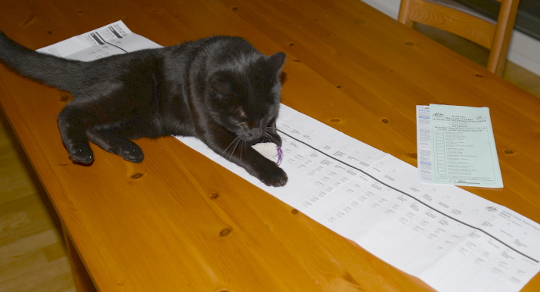
Most people have probably heard that elections are on in Australia. I just received my postal ballot paper the other day and in the spirit of transparency, I'm sharing it here on my blog. Spoilt for choice There are two ballots, one for the Lower House and the other for the Senate. The big one is for the Senate. Our cat is on top of it to help give some perspective on how big it is. Like the columns on a bloated spreadsheet, the parties are designated with symbols from A to AM and then there are some leftover candidates too. Animal instincts With so many candidates to choose from, even our kitty may have found an opportunity in the Animal Justice Party - although that little snack in her claws suggests that she is more interested in the law of the jungle than any political debate. She may want to be wary not to fall under the wheel of the party next to them, Motoring Enthusiasts. The Senate, a place for convicted hackers? The next party in the picture is Wikileaks and their number one candidate, of course, is the first person to successfully claim asylum from Australia, Julian Assange. It's no secret that he has a string of convictions for computer hacking in the 90s and that when US authorities catch up with him, their drone won't just be dropping him a letter demanding a $2,100 penalty fine through the window. So how do they compare? As I contemplate my decision, lets look at the numbers:

Party Seats won in 2010
House of Reps, Senate
Criminal charges against members in last 3 years
Labor Party 72, 31 173, mainly fraud
Liberal/National coalition (conservative) 73, 34 3, including shoplifting and assault
Wikileaks 0 None - Assange is not actually charged with any crime
All of a sudden, in a country that is often the butt of British jokes about convicts, Assange starts to look squeaky clean. He may take further comfort from knowing that out of all those crimes, hacking is the only one that appears to have the presidential seal of approval. Conclusion Whichever way I vote may or may not make so much difference. With so many candidates to choose from though, there is little sign of any quality leadership from any corner of Australian politics. Whether Mr Assange is elected or not, many people will have a chuckle when they realise he almost ended up alongside the Australian Sex Party out of 38 other possible parties randomly distributed across the ballot. Please feel free to comment: which party is the most ridiculous?

23 August 2013

Enrico Zini: Random notes from that other lightning talk session

Random notes from that other lightning talk session YKINMKBYKIOK: "Your Kink Is Not My Kink But Your Kink Is Ok" As far as I'm concerned, this puts the vim vs emacs quarrel to rest, for good.

22 August 2013

Petter Reinholdtsen: Second beta release (beta 1) of Debian Edu/Skolelinux based on Debian Wheezy

The second wheezy based beta release of Debian Edu was wrapped up today, slightly delayed because of some bugs in the initial Windows integration fixes . This is the release announcement: New features for Debian Edu 7.1+edu0~b1 released 2013-08-22 These are the release notes for Debian Edu / Skolelinux 7.1+edu0~b1, based on Debian with codename "Wheezy". About Debian Edu and Skolelinux Debian Edu, also known as Skolelinux, is a Linux distribution based on Debian providing an out-of-the box environment of a completely configured school network. Immediately after installation a school server running all services needed for a school network is set up just waiting for users and machines being added via GOsa , a comfortable Web-UI. A netbooting environment is prepared using PXE, so after initial installation of the main server from CD or USB stick all other machines can be installed via the network. The provided school server provides LDAP database and Kerberos authentication service, centralized home directories, DHCP server, web proxy and many other services. The desktop contains more than 60 educational software packages and more are available from the Debian archive, and schools can choose between KDE, Gnome, LXDE and Xfce desktop environment. This is the sixth test release based on Debian Wheezy. Basically this is an updated and slightly improved version compared to the Squeeze release. ALERT: Alpha based installations should reinstall or downgrade the versions of gosa and libpam-mklocaluser to the ones used in this beta release. Both alpha and beta0 based installations should reinstall or deal with gosa.conf manually; there are two options: (1) Keep gosa.conf and edit this file as outlined on the mailing list. (2) Accept the new version of gosa.conf and replace both contained admin password placeholders with the password hashes found in the old one (backup copy!). In both cases every user need to change their their password to make sure a password is set for CIFS access to their home directory. Software updates Other changes Known issues Where to get it To download the multiarch netinstall CD release you can use The MD5SUM of this image is: 1e357f80b55e703523f2254adde6d78b
The SHA1SUM of this image is: 7157f9be5fd27c7694d713c6ecfed61c3edda3b2 To download the multiarch USB stick ISO release you can use The MD5SUM of this image is: 7a8408ead59cf7e3cef25afb6e91590b
The SHA1SUM of this image is: f1817c031f02790d5edb3bfa0dcf8451088ad119 How to report bugs http://wiki.debian.org/DebianEdu/HowTo/ReportBugs

Martín Ferrari: Setting up my server: re-installing on an encripted LVM

Very long post ahead (sorry for the wall of text), part of a series of posts on some sysadmin topics, see post 1 and post 2. I want to show you how I set up my tiny dedicated server to have encrypted partitions, and to reinstall it from scratch. All of this without ever accessing the actual server console.

Introduction As much as my provider may have gold standards on how to do things (they don't, there are some very bad practises in the default installation, like putting their SSH key into root's authorized_keys file), I wouldn't trust an installation done by a third party. Also, I wanted to have all my data securely encrypted. I know this is not perfect, and there are possible attacks. But I think it is a good barrier to have to deter entities without big budgets from getting my data. I have done this twice on my servers, and today I was reviewing each step as he was doing the same thing (with some slight differences) on his brand new server, so I think this is all mostly correct. Please, tell me if you find a bug in this guide. This was done on my 12 /month Kimsufi dedicated server, sold by OVH (see my previous post on why I chose it), and some things are specific to them. But you can do the same thing with any dedicated server that has a rescue netboot image. The process is to boot into the rescue image (this is of course a weak link, as the image could have a keylogger, but we have to stop the paranoia at some point), manually partition the disk, set-up encryption, and LVM; and then install a Debian system with debootstrap. To be able to unlock the encrypted disks, you will have to ssh into the server after a reboot and enter the passphrase (this is done inside the initrd phase). Once unlocked, the normal boot process continues. If anything fails, you end up with an unreachable system: it might or might have not booted, the disk might or might not be unlocked, etc. You can always go back into the rescue netboot image, but that does not allow you to see the boot process. Some providers will give you real remote console access, OVH charges you silly money for that. They used to offer a "virtual KVM", which was a bit of a kludge, but it worked: another netboot image that started a QEMU connected to a VNC server, so by connecting to the VNC server, you would be able to interact with the emulated boot process, but with a fake BIOS and a virtual network. For some unspecified reason they've stopped offering this, but there is a workaround available. The bottom line is, if you have some kind of rescue netboot image, you can just download and run QEMU on it and do the same trick.

The gritty details Start by netbooting into your rescue image. For OVH, you'd go to the control panel, in the Services/Netboot section and select "rescue pro". Then reboot your server. OVH will mail you a temporary password when it finishes rebooting. Connect to it, without saving the temporary SSH key:
$ ssh -oUserKnownHostsFile=/dev/null -oStrictHostKeyChecking=no root@$ IP 
For the rest of the text, I am assuming you have one hard drive called /dev/sda. We start by partitioning it:
# fdisk /dev/sda
Start a new partition table with o, and then create two primary partitions: a small one for /boot at the beginning (100 to 300 MB would do), and a second one with the remaining space. Set both as type 83 (Linux), and don't forget to activate the first one, as this servers refuse to boot from the hard drive without that. Create the file system for /boot, and the encrypted device:
# mkfs.ext4 /dev/sda1
# cryptsetup -s 512 -c aes-xts-plain64 luksFormat /dev/sda2
The encryption parameters are the same as the ones used by the Debian Installer by default, so don't change them unless you really know what you are doing. You will need to type a passphrase for the encrypted device, be sure not to forget it! This passphrase can later be changed (or secondary passphrases added) with the cryptsetup tool. Look up the crypt device's UUID, and save it for later:
# cryptsetup luksDump /dev/sda2   grep UUID:
UUID:           xxxxxxxx-xxxx-xxxx-xxxx-xxxxxxxxxxxx
Open the encrypted device (type the passphrase again), and set up the LVM volume group:
# cryptsetup luksOpen /dev/sda2 sda2_crypt
# pvcreate /dev/mapper/sda2_crypt
# vgcreate vg0 /dev/mapper/sda2_crypt
Create the logical volumes, this is of course a matter of personal taste and there are many possible variations. This is my current layout, note that I put most of the "big data" in /srv.
# lvcreate -L 500m -n root vg0
# lvcreate -L 1.5g -n usr vg0
# lvcreate -L 3g -n var vg0
# lvcreate -L 1g -n home vg0
# lvcreate -L 10g -n srv vg0
# lvcreate -L 500m -n swap vg0
# lvcreate -L 100m -n tmp vg0
Some possible variations:
  • You can decide to use a ramdisk for /tmp, so instead of creating a logical volume, you would add RAMTMP=yes to /etc/default/tmpfs.
  • You can merge / and /usr in one same partition, as neither of them change much.
  • You can avoid having swap if you prefer.
  • You can put /home in /srv, and bind mount it later.
Now, create the file systems, swap space, and mount them in /target. Note that I like to use human-readable labels.
# for i in home root srv tmp usr var; do 
  mkfs.ext4 -L $i /dev/mapper/vg-$i; done
# mkswap -L swap /dev/mapper/vg0-swap
# mkdir /target
# mount /dev/mapper/vg0-root /target
# mkdir /target/ boot,home,srv,tmp,usr,var 
# mount /dev/sda1 /target/boot
# for i in home srv tmp usr var; do
  mount /dev/mapper/vg-$i /target/$i; done
# swapon /dev/mapper/vg-swap
Don't forget to set the right permissions for /tmp.
# chmod 1777 /target/tmp
If you want to do the /home on /srv, you'll need to do this (and then copy to /etc/fstab):
# mkdir /target/srv/home
# mount -o bind /target/srv/home /target/home
The disk is ready now. We will use debootstrap to install the base system. The OVH image carries it, otherwise consult the relevant section in the Install manual for details. It is important that at this point you check that you have a good GPG keyring for debootstrap to verify the installation source, by comparing it to a good one (for example, the one in your machine):
# gpg /usr/share/keyrings/debian-archive-keyring.gpg
pub  4096R/B98321F9 2010-08-07 Squeeze Stable Release Key <debian-release@lists.debian.org>
pub  4096R/473041FA 2010-08-27 Debian Archive Automatic Signing Key (6.0/squeeze) <ftpmaster@debian.org>
pub  4096R/65FFB764 2012-05-08 Wheezy Stable Release Key <debian-release@lists.debian.org>
pub  4096R/46925553 2012-04-27 Debian Archive Automatic Signing Key (7.0/wheezy) <ftpmaster@debian.org>
Now, for the actual installation. You can use any Debian mirror, OVH has their own in the local network. In OVH's case it is critical to specify the architecture, as the rescue image is i386. I didn't notice that and had to painfully switch architectures in place (which was absolutely not possible a couple of years ago).
# debootstrap --arch amd64 wheezy /target http://debian.mirrors.ovh.net/debian
After a few minutes downloading and installing stuff, you almost have a Debian system ready to go. Since this is not D-I, we still need to tighten a few screws manually. Let's mount some needed file systems, and enter the brand new system with chroot:
# mount -o bind /dev /target/dev
# mount -t proc proc /target/proc
# mount -t sysfs sys /target/sys
# XTERM=xterm-color LANG=C.UTF-8 chroot /target /bin/bash
The most critical parts now are to correctly save the parameters for the encrypted device, and the partitions and logical volumes. You'll need the UUID saved before:
# echo 'sda2_crypt UUID=xxxxxxxx-xxxx-xxxx-xxxx-xxxxxxxxxxxx none luks' \
  > /etc/crypttab
Create the file systems table in /etc/fstab. Here I use labels to identify the devices:
# file system   mount point type    options             dump    pass
LABEL=root      /           ext4    errors=remount-ro   0       1
LABEL=tmp       /tmp        ext4    rw,nosuid,nodev     0       2
LABEL=var       /var        ext4    rw                  0       2
LABEL=usr       /usr        ext4    rw,nodev            0       2
LABEL=home      /home       ext4    rw,nosuid,nodev     0       2
# Alternative home in /srv:
#/srv/home      /home       auto    bind                0       0
LABEL=srv       /srv        ext4    rw,nosuid,nodev     0       2
LABEL=boot      /boot       ext4    rw,nosuid,nodev     0       2
LABEL=swap      none        swap    sw                  0       0
You can also just use the device mapper's names (/dev/mapper/<volume_group>-<logical_volume>), be sure not to use the /dev/<volume_group>/<logical_volume> naming, as there are some initrd-tools that choked on them.
# file system           mount point type    options             dump    pass
/dev/mapper/vg0-root    /           ext4    errors=remount-ro   0       1
/dev/mapper/vg0-tmp     /tmp        ext4    rw,nosuid,nodev     0       2
/dev/mapper/vg0-var     /var        ext4    rw                  0       2
/dev/mapper/vg0-usr     /usr        ext4    rw,nodev            0       2
/dev/mapper/vg0-home    /home       ext4    rw,nosuid,nodev     0       2
# Alternative home in /srv:
#/srv/home              /home       auto    bind                0   0
/dev/mapper/vg0-srv     /srv        ext4    rw,nosuid,nodev     0   2
/dev/sda1               /boot       ext4    rw,nosuid,nodev     0   2
/dev/mapper/vg0-swap    none        swap    sw                  0   0
Some tools depend on /etc/mtab, which now is just a symbolic link:
# ln -sf /proc/mounts /etc/mtab
Now configure the network. You most surely can use DHCP, but you might prefer static configuration, that's personal choice. For DHCP, it is very straightforward:
# cat >> /etc/network/interfaces
auto eth0
iface eth0 inet dhcp
For static configuration, first find the current valid addresses and routes as obtained by DHCP:
# ip address
# ip route
And then store them:
# cat >> /etc/network/interfaces
auto eth0
iface eth0 inet static
    address AAA.BBB.CCC.DDD/24
    gateway AAA.BBB.CCC.254
    pre-up /sbin/ip addr flush dev eth0   true
Note that pre-up command I added; that is to remove the configuration that is to be done by the kernel during boot (more on that later), otherwise ifupdown will complain about existing addresses. If your provider does IPv6, add it too. For OVH, the IPv6 set-up is a bit weird, so you need to add the routes in post-up. Your default gateway is going to be your /64 prefix, with the last byte replaced by ff, and then followed by :ff:ff:ff:ff. As you can see, that gateway is not in your network segment, so you need to add an explicit route to it. They have some information, but it is completely unreadable. If your IPv6 address is 2001:41D0:1234:5678::1/64, you will add:
iface eth0 inet6 static
    address 2001:41D0:1234:5678::1/64
    post-up /sbin/ip -6 route add 2001:41D0:1234:56ff:ff:ff:ff:ff dev eth0
    post-up /sbin/ip -6 route add default via 2001:41D0:1234:56ff:ff:ff:ff:ff
You probably don't want the auto-configured IPv6 addresses, so disable them via sysctl:
# cat >> /etc/sysctl.conf
# Disable IPv6 autoconf 
net.ipv6.conf.all.autoconf = 0
net.ipv6.conf.default.autoconf = 0
net.ipv6.conf.eth0.autoconf = 0
net.ipv6.conf.all.accept_ra = 0
net.ipv6.conf.default.accept_ra = 0
net.ipv6.conf.eth0.accept_ra = 0
To have a working DNS resolver, we can use the local server (OVH in this case):
# cat > /etc/resolv.conf 
search $DOMAIN
nameserver 213.186.33.99
The most important part of a new install: choose a host name (and make the system use it).
# echo $HOSTNAME > /etc/hostname
# hostname $HOSTNAME
# echo "127.0.1.1 $HOSTNAME.$DOMAIN $HOSTNAME" >> /etc/hosts
If we want to speficy the BIOS clock to use UTC:
# echo -e '0.0 0 0.0\n0\nUTC' > /etc/adjtime
Set up your time zone:
# dpkg-reconfigure tzdata
Configure APT with your preferred mirrors. I also prevent APT from installing recommends by default.
# echo deb http://ftp2.fr.debian.org/debian wheezy main contrib non-free \
  >> /etc/apt/sources.list
# echo deb http://ftp2.fr.debian.net/debian wheezy-updates main contrib non-free \
  >> /etc/apt/sources.list
# echo deb http://security.debian.org/ wheezy/updates main contrib non-free \
  >> /etc/apt/sources.list
# echo 'APT::Install-Recommends "False";' > /etc/apt/apt.conf.d/02recommends
# apt-get update
Before installing any package, let's make sure that the initial ram disk (initrd) that is going to be created will allow us to connect. There will be no chance of using the root password during boot. Your public key is usually found in $HOME/.ssh/id_rsa.pub.
# mkdir -p /etc/initramfs-tools/root/.ssh/
# echo $(YOUR_PUB_RSA_KEY) > /etc/initramfs-tools/root/.ssh/authorized_keys
If you change this, or the host key stored at /etc/dropbear/dropbear_*_host_key, the /etc/crypttab, or any other critical piece of information for the booting process, you need to run update-initramfs -u. Now we can install the missing pieces:
# apt-get install makedev cryptsetup lvm2 ssh dropbear busybox ssh \
  initramfs-tools locales linux-image-amd64 grub-pc kbd console-setup
During the installation you will have to choose where to install grub, I recommend directly on /dev/sda. Also, the magic initrd will be created. We want to double check that it has all the important pieces for a successful boot:
# zcat /boot/initrd.img-3.2.0-4-amd64   cpio -t conf/conf.d/cryptroot \
  etc/lvm/lvm.conf etc/dropbear/\* root/.ssh/authorized_keys sbin/dropbear
etc/lvm/lvm.conf
etc/dropbear/dropbear_dss_host_key
etc/dropbear/dropbear_rsa_host_key
sbin/dropbear
root/.ssh/authorized_keys
conf/conf.d/cryptroot
All these files need to be there. Most critically, we need to check that the cryptroot file has the right information to access the root file system:
# zcat /boot/initrd.img-*   cpio -i --to-stdout conf/conf.d/cryptroot
target=sda2_crypt,source=UUID=xxxxxxxx-xxxx-xxxx-xxxx-xxxxxxxxxx,key=none,rootdev,lvm=vg0-root
If all that was correct, now we need to tell the kernel to configure the network as soon as possible so we can connect to the initrd and unlock the disks. This is done by passing a command-line option though grub. This should match what was done in /etc/network/interfaces: either DHCP or static configuration. For DHCP, this line should be changed in /etc/default/grub:
GRUB_CMDLINE_LINUX="ip=:::::eth0:dhcp"
For static configuration:
GRUB_CMDLINE_LINUX="ip=MY_IP_ADDR::MY_DEFAULT_GW:MY_NETMASK::eth0:none"
It is also a good idea to disable the quiet boot and graphical boot splash, in case we need to use QEMU to fix some booting issue:
GRUB_CMDLINE_LINUX_DEFAULT=""
GRUB_TERMINAL=console
And make the changes effective:
# update-grub2
Having fsck fix problems automatically can be a life-saver too:
# echo FSCKFIX=yes >> /etc/default/rcS
Get some very useful packages:
# apt-get install vim less ntpdate sudo
Create an user for yourself, possibly make it an administrator:
# adduser tincho
# adduser tincho sudo
# adduser tincho adm
This is mostly done, exit the chroot, and unmount everything.
# exit  # the chroot.
# umount /target/ dev,proc,sys,boot,home,srv,tmp,usr,var 
# umount /target
# swapoff -a
# lvchange -an /dev/mapper/vg0-*
# cryptsetup luksClose sda2_crypt
Disable the netboot option from your administration panel, reboot, and hope it all goes well. If you followed every step carefully, a few minutes later you should be able to ping your server. Use this snippet to enter the password remotely:
$ stty -echo; ssh -o UserKnownHostsFile=$HOME/.ssh/known_hosts.initramfs \
  -o BatchMode=yes root@"$HOST" 'cat > /lib/cryptsetup/passfifo'; \
  stty echo
It is very important that you close the pipe (with control-D twice) without typing enter. For my servers, I have a script that reads the passphrase from a GPG-encrypted file and pipes it directly into the remote server. That way, I only type the GPG passphrase locally:
$ cat unlock.sh 
#!/bin/sh
BASE="$(dirname "$0")"
HOST="$1"
gpg --decrypt "$BASE"/key-"$HOST".gpg   \
    ssh -o UserKnownHostsFile="$BASE"/known_hosts.initramfs -o BatchMode=yes \
        root@"$HOST" 'cat > /lib/cryptsetup/passfifo'
It might be a good idea to create a long, impossible to guess passphrase that you can use in the GPG-encrypted file, and that you can also print and store in somewhere safe. See the luksAddKey function in the cryptsetup(8) man page. Once again, if everything went right, a few seconds later the openSSH server will replace the tiny dropbear and you will be able to access your server normally (and with the real SSH host key). Hope you find this article helpful! I would love to hear your feedback.

21 August 2013

Enrico Zini: Random notes from that other lightning talk session

Random notes from that other lightning talk session The BDSM Free Software Definition:
I refuse to be bound by software I cannot trust and negotiate with.

20 August 2013

Enrico Zini: Random notes from DebConf

Random notes from DebConf Compersion, n: the feeling you get when someone else also takes good care of one of your packages.

Erich Schubert: Google turning evil

I used to be a fan of the Google company. I used to think of this as a future career opportunity, as I've received a number of invitations to apply for a job with them.
But I am no longer a fan.
Recently, the company has in my opinion turned to the "evil" side; they probably became worse than Microsoft ever was and the "do no evil" principle is long gone.
So what has changed? In my perception, Google:
  • Is much more focused on making money now, than making technology happen.
  • Instead of making cool technology, it tries more and more to be a "hipster" thing and following the classic old 80-20 rule: get 80% of the users with 20% of the effort. Think of the GMail changes that received so much hate and the various services it shuts down (Code search, Reader, Googlecode downloads) and how much Google is becoming a walled garden.
  • Google leverages its search market dominance as well as Android to push their products that don't perform as good as desired. Plus for example. There is a lot of things I like about plus. In particular when you use it as a "blog" type of conversation tool instead of a site for sharing your private data, then it's much better than Facebook because of the search function and communities. (And I definitely wouldn't cry if a Facebook successor emerges). But what I hate is how Google tries hard to leverage their Android and YouTube power to force people to Plus. And now they are spreading even further, into TV (ChromeCast) and ISP (Google Fiber) markets.
  • Hangups, oops, Hangouts is another such example. I've been using XMPP for a long time. At some point, Google started operating an XMPP server, and it would actually "federate" with other servers, and it worked quite nicely. But at some point they decided they need to have more "hipster" features, like ponies. Or more likely, they decided that they want all these users to use Plus. So now they are moving it away from an open standard towards a walled garden. But since 90% of my use is XMPP outside of Google, I will instead just move away from them. Worse.
  • Reader. They probably shut this down to support Currents and on the long run move people over to Plus, too. Fortunately here, there now exist a number of good alternatives such as Feedly. But again: Google failed my needs.
  • Maps. Again an example where they moved from "works good" to "hipster crap". The first thing the new maps always greets me with is a gray screen. The new 3D view looks like an earthquake happened, without offering any actual benefit over the classic (and fast) satellite imagery. Worse. In fact my favorite map service right now is an OpenStreetmap offline map.
  • Google Glass is pure hipsterdom crap. I have yet to see an actual use case for it. People use it to show off, and that's about it. If you are serious about photos, you use a DSLR camera with a large objective and sensor. But face it: it's just distraction. If you want productive, it's actually best to turn of all chat and email and focus. Best productivity tip ever: Turn off email notifications. And turn of chat, always-on and Glass, too.
  • Privacy. When privacy-aware US providers actually recommend against anyone trusting their private data to a company with physical ties to the United States, then maybe it's time to look out for services in countries that value freedom higher than spying. I cannot trust Google on keeping my data private.
We are living in worrisome times. The U.S.A., once proud defenders of freedom, have become the most systematic spies in the world, even on their own people. The surveillance in the Eastern Bloc is no match for this machinery built the last decade. Say hello to Nineteen Eighty-Four. Surveillance, in a mixture of multi-state and commercial surveillance has indeed become omnipresent. Wireless sensors in trash cans track your device MACs. Your email is automatically scanned both by the NSA and Google. Your social friendships are tracked by Facebook and your iPhone.
I'm not being paranoid. These things are real, and it can only be explained with a "brainwashing" with both the constantly raised fear of terror (note that you are much more likely to be killed in a traffic accident or by a random gun crazy in the U.S.A. than by terrorists) and the constant advertisement for useless technology such as Google Glass. Why have so many people stopped fighting for their freedom?
So what now? I will look into options to move away stuff from Google (that is mostly, my email -- although I'd really like to see a successor to email finally emerge). Maybe I can find a number of good services located e.g. in Switzerland or Norway (who still seem to hold freedom in high respect - neither the UK nor Germany are an alternative these days). And I hope that some politicians will have the courage to openly discuss whether it may be necessary to break up Google into "Boogles" (Baby-Googles), just as Reagan did with AT&T. But unfortunately, todays politicians are really bad at such decisions, in particular when it might lower their short-run popularity. They are only good at making excuses.

17 August 2013

Daniel Pocock: DebConf13: breakthroughs in OTP and WebRTC

Saturday, 17 August was a day that saw groundbreaking new work revealed at DebConf13 and may have been a watershed moment in the emergence of WebRTC for the free software community.
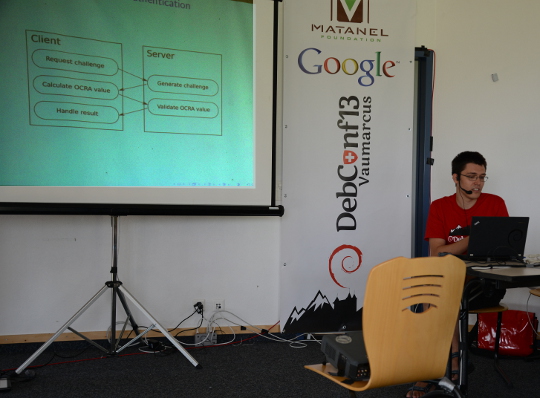
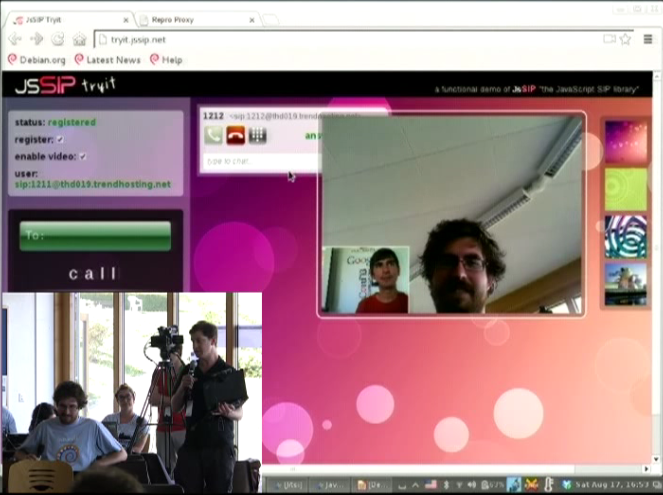
Fabian Gr nbichler, Daniel Pocock, Catalin Constantin Usurelu, Emil Ivov, Yana Stamcheva Advancing the use of One Time Passwords with free software Google Summer of Code (GSoC) student Fabian Gr nbichler has spent the summer enhancing oath-toolkit and dynalogin to support a more diverse range of One Time Password schemes. dynalogin's original 1.0 release supports vanilla HOTP and TOTP authentication schemes. Fabian's work has extended the framework to support the more generic and powerful OCRA approach. To find out about all the benefits this brings, I would strongly encourage you to review his slides and video presentation, with a demo where it is explained thoroughly. While there are existing hardware tokens that support HOTP and TOTP using this open algorithm (Gooze has been kind enough to donate some which were on display), the mutual challenge-response schemes are yet to be widely supported in hardware and this means that Fabian's work is now at the cutting edge of development in this area. WebRTC: premium voice/video chat in modern browsers, no plugin required Another member of Debian's GSoC program, Catalin Constantin Usurelu helped organise and run one of the must-see sessions of DebConf13 (video available). In a demonstration that had all the hallmarks of a magic show, Catalin and I took random members of the audience and invited them to wave a magic wand over their web browsers and effortlessly turn them into Skype-busting softphones. As the grand finale, we took Wookey's blog and showed him how to add a WebRTC "call-me" page in less than 20 seconds, less time than it takes to hand over all your private data to the registration process of those rather uncomfortable alternatives. Anybody else seeking to duplicate this effort is encourage to review options like Drucall for Drupal or just directly use JsSIP Jitsi and the Jitsi Video-bridge The grand-finale of the DebConf13 real-time communications track was our guest speaker, Emil Ivov, founder of the Jitsi softphone project. Jitsi itself has recently been accepted into Debian and is easier than ever before to install and use. Emil's talk (video and slides available) went into some detail about the cutting edge development activities of his team, particularly the new Jitsi Video bridge Subsequent to the talk, we had some out-of-bands discussion about ways to potentially integrate Jitsi Video bridge with the open source dvswitch system used to produce streams and recordings from free software events such as DebConf and FOSDEM. It is hoped that this will provide an additional option for remote participation at free software events of all sizes. Upcoming events Emil and I have been invited to participate in the WebRTC Conference Paris 2013 in December. This will be an excellent opportunity to have further discussion about progress with WebRTC and do more to raise the compelling case for premium quality free software to meet the demanding needs of modern business communications. There are a series of talks for both technical and business-oriented audiences.
Russ Allbery: WebAuth 4.5.4

WebAuth is the site-wide centralized web authentication system that we use at Stanford. This release is a bug-fix release for the central login server, mostly focused on multifactor authentication but also featuring a wide variety of random bug fixes. Going into this release, I filtered the Apache error logs on all of our production servers for a period of a month and then set out to fix every log anomaly or odd behavior pattern that I detected. The most significant bug fix is to support for requiring non-password session factors. The code handled this entirely incorrectly, resulting in the user being stuck at the password authentication prompt and never able to proceed. It also cleans up several corner cases involving REMOTE_USER authentication to sites that require a Kerberos authenticator (such as for delegated credentials). This release downgrades a mismatch of login credentials and a webkdc-proxy token (single sign-on credentials) to a log warning rather than a fatal error and just discards the non-matching single sign-on credentials. This case ideally shouldn't happen, but sometimes users share devices, and if they hit a site with forced login or session factors, it's easy for this case to arise. WebLogin now retries the WebKDC POST once and ignores SIGPIPE errors to work around problems with signals from the FastCGI process manager. It also rewrites non-ASCII characters in XML from the WebKDC to work around XML validation errors created by non-ASCII characters in Kerberos error messages, pending a better fix on the WebKDC side. Password changes no longer go through the replay detection logic, which should not apply to them. Several error messages in WebLogin are now clearer. The WebKDC now requires that the return URL in a WebAuth request be an absolute URL and not contain any non-ASCII characters. A bug in the way that errors during the authentication process were reported has been fixed and should produce better error output for the user. There are also a few other, more minor bug fixes, particularly to logging and error reporting. You can get the latest release from the official WebAuth distribution site or from my WebAuth distribution pages.

15 August 2013

Bits from Debian: Happy 20th birthday Debian!

Today is Debian's 20 anniversary. This anniversary would have been impossible without a strong community of users and developers. That's why for its commemoration, we asked the Debian community what Debian meant to them. Below you have a selection of the answers we got.
Since I run Debian on my computers, I do not play anymore to 3D shooting games, not because of the lack of Free 3D drivers, but because developing Debian is more fun and addictive. Debian is a truly community based distro which is devoted to FOSS ideas and standards. It perfectly works on high variety of hardware. Users from all over the world have been using Debian and contributing to it during 20 years. And I am proud to be one of them. Happy Birthday, Debian! When I considered switching to Linux I asked friends which distribution to choose. I was told skip other distributions that were considered more newbie-friendly at the time and go straight to Debian instead. It might be more work initially, they said, but it would save me the hassle of switching to Debian later on, which I would inevitably do. Turns out they were right. I started my Linux experience more than ten years ago with Debian and have yet to see a better Linux distribution. [...] You are a worldwide community of volunteers working together for 20 years now. To me this is an encouraging example and, given the sorry state of the world we live in, more important than the technical quality of the operating system. I wish you another successful twenty years and to stay as independent as you are. I initially started in Debian as it was an interesting technical challenge. Over the years the community and having good standards around what Free Software is has become more important. As a user of Debian for 14 years, and a former Debian Developer for 10, I would like to wish a happy birthday to the best project on the internet, and the best Linux distribution ever. Thanks for all of your support over the years! "Rock Solid Stability and Absolute Freedom" Thats what Debian means to me. Debian gives me a feeling that I am using the best linux has to offer. You know your machine is in safe hands. As a long time Debian user and sometimes supporter [...] I wish Debian all the best for next 20 years and beyond! Debian is the universal operating system. And it's free (and not just as in beer ;-) Debian is an awesome combination of obsessive high quality software and software freedom. It's a pleasure to be able to use and contribute to this project. Thanks to all for their excellent work! Cheers to 2**20 years more! [...] I am so very thankful to all of the people who have contributed to and continue to contribute to such a wonderful ecosystem of tools. I love the commitment to the long term goals of security, freedom and transparency with respect to the computer systems that we all use and rely upon and the information that we store on them. Debian is the operating system that makes me free. Debian is a family gathered around great idea. Its pure love.

Daniel Pocock: Free software for free markets

Co-inciding with the first DebConf in Switzerland, one of the world's leading financial centers, the first official packaging of open messaging and market data distribution framework OpenMAMA for a Linux distribution has just been uploaded. The packages, along with the Avis low-latency event-router middleware/transport were uploaded to the Debian unstable catalog this week and will soon be available conveniently to install with apt-get. OpenMAMA was developed by NYSE Technologies and includes code originally developed under their previous brand Wombat Financial Software. The project was recently placed under the strategic umbrella of the Linux Foundation. Packages for Fedora and EPEL The initial packaging effort has identified a number of build system bugs, patches have been contributed upstream. The resolution of these issues and the experience gained with the Debian package will make it relatively easy to package for RPM-based platforms in the near future. Not just for finance While it is clear that OpenMAMA's designers had financial services in mind (and the low-latency, high throughput transport of market price data in particular), the solution is generalised and likely to be useful in other domains where asynchronous messaging and inter-process communication is required. In fact, this distinction is made particularly clear by the division of OpenMAMA into two subprojects:
  • OpenMAMA itself is a general-purpose programming API for asynchronous messaging. It hides the details of various low-level transports, including the open source Avis event router and popular proprietary solutions like Tibco Rendezvous. Java programmers have had such a generalised API for many years (JMS), whereas OpenMAMA brings a similar paradigm to the C/C++ developer.
  • OpenMAMDA is a further layer on top of OpenMAMA designed to encapsulate market data. It competes directly with proprietary solutions such as those from Reuters and Bloomberg. OpenMAMDA comes with specific APIs for news, order books and options and could be extended for other markets.
Commercial background Reuters and Bloomberg are well known as two of the main vendors in the market data industry. Both of them (and other competitors) provide a range of data services and related software. Buying a data feed doesn't automatically give access to the software from the same franchise: the software and APIs are promoted as a valuable product in their own right. It is actually quite possible (and not unheard of) for an institution to run a Reuters Market Data System (RMDS) software stack fed by a data feed from Bloomberg or vice-versa. When an IT department or third-party vendor of trading systems wants to transport data between applications (or between multiple users of a single application) they will not typically do it themselves and one of these APIs is usually chosen. OpenMAMA appears to be a strong contender for such use cases. Bloomberg has recently made their API public, although OpenMAMA goes much further by making their source code public too. Development samples with the OpenMAMA API Programming the OpenMAMA API appears to be relatively consistent with the event-loop model that many developers are already comfortable with. For a very fast start, two compelling examples are the basic publisher and basic subscriber. Here is a sample of the code from the basic subscriber, demonstrating how to start the event loop and receive event notifications in a callback class:
static void createSubscriber (void)
 
    try
     
        gSubscription = new MamaBasicSubscription;
        gSubscription->createBasic (gTransport,
                                    gDefaultQueue,
                                    new SubscriptionCallback (),
                                    gTopic);
        gSubscription->setDebugLevel (gSubscLogLevel);
     
    catch (MamaStatus &status)
     
        cerr << "Error creating subscription: " 
             << status.toString () << endl;
        exit (1);
     
 
and here is some basic code that processes messages asynchronously:
class SubscriptionCallback : public MamaBasicSubscriptionCallback
 
public:
    virtual ~SubscriptionCallback ()  
    virtual void onCreate (MamaBasicSubscription*  subscription)
     
        if (gQuietLevel < 2)
         
            printf ("Created inbound subscription.\n");
         
     
    virtual void onError (MamaBasicSubscription*  subscription,
                          const MamaStatus&       status,
                          const char*             subject) 
     
        printf ("Error creating subscription: %s\n", 
                status.toString ());
        exit (1);
     
    virtual void onMsg (MamaBasicSubscription* subscription, 
                        MamaMsg&               msg)
     
        if (gQuietLevel < 2)
         
            printf ("Recieved msg.\n");
         
        DisplayIterator it;
        msg.iterateFields (it, NULL, NULL);
     
    //JG: need to add in onDestroy as this is abstract and must be implemented
    virtual void onDestroy (MamaBasicSubscription*  subscription, void * closure)
     
        if (gQuietLevel < 2)
         
            printf ("Destroyed subscription.\n");
         
     
 ;
Practical uses outside financial services Some people may feel that having a low-latency market-data system is overkill for anybody not running a trading desk. Not so. OpenMAMA may well prove useful and convenient as a one-stop-shop API for multi-currency accounting software (Postbooks, GnuCash, etc), for multi-currency web sites (e.g. UberCart) and many other applications.

12 August 2013

Tanguy Ortolo: grep --only-matching

Magnifying glass over a sheet of text grep is designed to print lines matching a given pattern, but I often need to print only the matching part, discarding the remaining. I used to do that with sed, but it involves several actions: match, replace the line by only the matching pattern and print. Fortunately, GNU grep has an option to do just that:
-o, --only-matching
Print only the matched (non-empty) parts of a matching line, with each such part on a separate output line.
Unfortunately it is not a standard option, so it may be missing on non-GNU systems.

10 August 2013

Kurt Roeckx: Anti-piracy and privacy

In the Dutch language area (Netherlands and Flanders) most e-book publishers changed from using DRM to using a watermark since February. It's now something like 62% with watermark, 24% with DRM and 14% without either. I was hoping that more with move to the watermark, but it doesn't seem to change much. The watermark in the e-books are used to find the original buyer in case of piracy. The information in the e-book does not itself identify the buyer, it just some random ID. That ID can then be used to trace back to buyer. We work with a 3rd party to deliver the e-books to our consumers. They get a random string from us that we can use to trace back the order, and from there we can trace back who bought it. The 3rd party than generates their own random string and puts that in the e-book. They only only keep those 2 random strings, and so have no way to trace this back to the buyer, we are the only one that known who bought it. And I think this is how it should work. I think this is also what the privacy laws require us to do. But now we got a new contract that states that we must directly give information about the buyer if some anti-piracy agency (BREIN) finds an e-book file online. We must keep the information about the buyer for minimum of 2 years and maximum of 5 years. And if we don't sign the contract we won't be allowed to sell e-books with watermark anymore. So this means that they want to bypass the normal judicial system, and probably contact those buyers they accuse of piracy directly. I questioned that this was legal. They say that it is legal according to the Dutch privacy law, but I have a hard time interpreting any of the options in article 8 as that we can give that information without the explicit consent of the person. I guess you can interpret option f in several ways, and that their lawyers do it differently than me. This will probably remain unclear until some court decides on it.

9 August 2013

Richard Hartmann: Release Critical Bug report for Week 32

As a more or less random data point for DebConf13, here's the current bug stats for Debian. Hope to see you there, and if you want to attend the BoF Gitify ALL the things or the talk Gitify your life you can do so on site, via IRC in #vcs-home on OFTC, or simply follow the live streams. If you see my in person, I have two crates of Scheider Aventinus with me and don't plan on bringing home any full bottles. The UDD bugs interface currently knows about the following release critical bugs: Graphical overview of bug stats thanks to azhag:

8 August 2013

Craig Small: postfix transport with smarthost

Dear lazyyweb, Has anyone got a way for postfix to use a transport map such that it sends email to the given MX host for some specified domains then default to a smarthost for the remainder? The logic would be: IF domain in ( example.net , foo.bar ,etc etc) THEN use the relevant MX host ELSE send to smarthost.isp.net i can use a transport map to send from specific domains to specific hosts, eg @domain.com goes to otherisp.net mailserver but not to just use domain.com s MX hosts

Next.

Previous.