Search Results: "tb"

10 June 2014

Russell Coker: Google Hardware Support

Ironically just 5 days after writing about how I choose Android devices for a long service life [1] my wife s Nexus 5 (with 32G of RAM (sorry Flash storage) to give it a long useful life) totally died. It reported itself as being fully charged and then 15 minutes later it was off and could not be revived. No combination of pushing the power button and connecting the power cable caused the screen to light up or any sound to be emitted. Google has a nice interactive support site for nexus devices that describes more ways of turning a phone on than any reasonable person could imagine. After trying to turn the phone on in various ways (plugged and unplugged etc) it gave me a link to get phone support. Clicking on that put me in the queue to RECEIVE a phone call and a minute later a lady who spoke English really well (which is unusual for telephone support) called me to talk me through the various options. Receiving a phone call is a much better experience than making a call. It meant that if the queue for phone support was long then I could do other things until the phone rings. It s impossible to be productive at other tasks while listening for hold music to stop and a person to start talking. The cost of doing this would be very tiny, while there would be some cost in hardware and software to have a web site that tells me how long I can expect to wait for a call a more basic implementation where I just submit my number and wait for a call would be very cheap to implement. The costs of calls from the US to Australia (and most places where people can afford a high end Android phone) are quite cheap for home users and are probably cheaper if you run a call center. If the average support call cost Google $1 and 3% of phones have support calls then that would be an extra cost of $0.03 per phone. I expect that almost everyone who buys a $450 phone would be happy to pay a lot more than $0.03 to avoid the possibility of listening to hold music! I received the phone call about a minute after requesting it, this was nice but I wonder how long I would have waited if I hadn t requested a call at 1AM Australian time (presumably during the day in a US call center). In any case getting a 1 minute response is great for any time of the day or night, lots of call centers can t do that. While the phone support is much better than most phone support, it would be nice if they added some extra options. I think it would be good to have webchat and SMS as options for support for the benefit of people who don t want to speak to strangers. This would be useful to a lot of people on the Autism Spectrum and probably others too. The phone call wasn t particularly productive, it merely confirmed that I had followed all the steps on the support website. Then I received an email telling me about the web site which was a waste of time as I d covered that in the phone call. I have just replied to their second email which asked for the IMEI of the phone to start the warranty return process. We could have saved more than 24 hours delay if this had been requested in the first email or the phone call. Google could have even requested the IMEI through the web site before starting the phone call. It would have been even easier if Google had included the device IMEI in the email they sent me to confirm the purchase as searching for old email is a lot easier than searching through my house for an old box. Another option for Google would be to just ask me for the Gmail account used for the purchase, as I only bought one Nexus 5 on that account they then have all the purchase details needed for a warranty claim. While the first call was a great experience the email support following that has been a waste of time. I m now wondering if they aim to delay the warranty process for a few days in the hope that the phone will just start working again.

9 June 2014

Floris Stoica-Marcu: GSoC 2014 Muon package and initial apt-listbugs integration [Week3]

Hello, The past week I ve finished the muon package, available @ git.debian.org/?p=pkg-kde/kde-extras/muon.git on the gsoc-floris-2014 branch (use at your own risk!) Also, I ve finished up the KAuth support when adding/removing repos (already pushed to the master of Muon). Most importantly, I ve started integrating apt-listbugs a most important component of Debian. What does this mean and how it will affect the end-user? Well, having apt-listbugs integrated means that the user will be warned when installing packages if the packages have some serious/grave/critical bugs! I am still working on making it async and I hope to be done by tonight. Also, some formatting work on the dialog is still needed. Check it out bellow: Apt-listbugs in action After I finish the apt-listbugs integration, I will get started on writing up some apt unit tests as suggested by Aleix. Also, I will work with Sune on updating the qapt package as well. In a nutshell: This week:
*muon package
*KAuth support implemented
*initial apt-listbugs integration Plans for next week:
*finish apt-listbugs integration (async, with pretty formatting!)
*apt unit tests
*update qapt package Thanks for reading, see you next week!
Floris.

4 June 2014

Daniel Pocock: Trialing the xTuple/PostBooks next generation web UI

For some time I've been using PostBooks to keep track of finances. The traditional PostBooks system has a powerful Qt GUI. The xTuple team have been hard at work creating a shiny new web-based user interface. The traditional UI has no dedicated server - all users communicate directly with the PostgreSQL database where stored procedures and triggers ensure the correct logic is applied. The new model provides an xTuple application server that can handle requests from web users and potentially other third-party apps too. Who is it for? Some people may feel that the web UI is intended to appeal to mobile users. While it is useful for mobile and tablet devices, this is not strictly the aim, John has discussed this in a blog. One benefit of the web UI is that accountants and book-keepers do not need to have a copy of every exact PostBooks version that every client is using. Given that many people only need their accountant to look at their books for just a few hours at the end of each year, the ease of access with a web UI will make a big difference. Installing it quickly The xTuple Git repository provides a script to install the whole server quickly. Initially it just supported a single Ubuntu release, I just contributed some tweaks to generalize it for Debian wheezy and potentially other releases. It doesn't appear too difficult to generalize it further for Fedora or RHEL users. To get going, I recommend trying it in a fresh virtual machine, either in a server environment or desktop VirtualBox solution. The installation script will install various packages on the machine and mess about with the PostgreSQL setup so you will not want to run the automated setup script on any machine where you have existing databases. Once the virtual machine is setup, make sure sudo is installed and configured:
# apt-get install sudo
# visudo
and then run the install as your normal user:
git clone --recursive git://github.com/xtuple/xtuple.git
cd xtuple
git remote add XTUPLE git://github.com/xtuple/xtuple.git
git fetch XTUPLE
git checkout git describe --abbrev=0
chmod a+x scripts/install_xtuple.sh
scripts/install_xtuple.sh
If all goes well, 5-10 minutes later it is ready to run:
cd node-datasource
node main.js
The port numbers will appear on the screen and you can connect with a web browser. Trying it out Despite my comments above to the effect that this is not primarily aimed at mobile, the first and second device I tested with were both mobile devices, Samsung Galaxy S3 and a Samsung Galaxy Note 3. I feel the Note is far better for this type of application, primarily due to screen size and the fact that most of the forms in the application have fields that launch popup menus. It appears to work in both Chrome and Firefox on these devices. One handy feature is that the mobile device can dial numbers directly from the CRM address book, this is facilitated with the tel URI. My impression is that this is still a product that is in the final stages of development, although some people will be able to use it almost immediately. One significant thing to note is that the database schema is very stable due to the long history of the traditional xTuple/PostBooks products.

Russell Coker: Android Device Service Life

In recent years Android devices have been the most expensive things I ve purchased apart from airline tickets and other travel/holiday expenses. As they are expensive I d like to use them for as long as possible to get the most value for money. Also as I give my devices to relatives when they no longer work for me I d like to avoid having relatives hassling me about their phone not working as desired. So I ve been thinking about the features that I need to make it possible to use a phone or tablet for a long time. RAM The way Android works is that when an application in the foreground requests more memory background applications may be closed to free some memory. Android doesn t use swap by default, there is some documentation on how to enable it (and it s not difficult to figure out for anyone who has used Linux before) but generally it s not done. If you run a larger application the chances of apps closing in the background (causing delays when you switch back to them and possibly a loss of context if the app is buggy and doesn t preserve all state) are increased. As a general trend apps tend to get bigger to provide more features and also because users who own newer bigger devices don t complain as much about memory use. Also to make things worse new versions of Android tend to use more RAM. So a phone that runs well can suddenly start performing badly when you upgrade to a new version of Android (which incidentally usually can t be reversed) and upgrade to new versions of apps (which can t be reversed through the Google Play Store). The Sony Ericsson Xperia X10 was a very nice phone when it was released, it ran Android 2.1 very quickly. When I upgraded the Xperia X10s that my wife and I used to Android 2.3 (which was necessary to have the phone run as a Wifi access point) performance dropped considerably. The Android upgrade combined with newer larger apps means that those phones are barely usable now. 384M of RAM was plenty in early 2011 when I first used the Xperia X10 but it s not nearly enough now. Recently 2G of RAM has been the minimum for a mid-range or high-end phone. It seems difficult to imagine a new Android feature as compelling as the addition of Wifi access point support in Android 2.3 that would drive an upgrade to a future memory hogging version of the OS. It also seems difficult to imagine Android apps needing enough memory to destroy the performance of a phone with 2G of RAM. But then I couldn t imagine the 384M in an Xperia X10 becoming inadequate or the 512M in a Samsung Galaxy S becoming barely usable either. Storage Until fairly recently storage in an Android device was divided into USB attached storage (a VFAT filesystem that could be directly mounted on a PC) and a Linux filesystem that was used for all internal operations of the phone. On such devices it typically wasn t possible to change partition sizes without a lot more skill than most users possess and most of the storage space was reserved for USB attachment. If you only had a few Android apps and lots of photos, movies, etc then this worked well. But if you wanted to install larger Android apps then you would have big problems. Even with Android 4.x devices (which all seem to have a single filesystem) you can easily run out of space. Modern games often take several hundred megs of storage. Games that take 500M+ for the Android package install (which also requires the same amount of temporary space for installation and upgrade) are common. Sometimes games download data files after they have been installed for a total size approaching 2G (such as The Sims Freeplay). When I bought a Nexus 4 for my wife I got the version with 8G of storage because paying an extra $50 for the 16G version seemed unreasonable. 8G was fine for my wife, but when she got a new phone I gave the Nexus 4 to a relative who wanted to play The Sims and other big games. That relative isn t so happy about having a limited number of games on their phone and I have to fix it when storage space runs out and things start aborting (when storage runs out the Google App Store program aborts and uses lots of space for temporary files). I recently bought a tablet with 32G of storage and filled 16G on the first day (tablets are good for watching
TV and TV shows are big). Fortunately the tablet in question has a SD socket so that when space becomes a problem in a year or two I can buy an SD card and keep using it. An unfortunate recent decision by Google was to prevent apps from being run from a SD card. So even if you have a device with a SD socket you still need to have enough internal storage for all apps and their private data. At 500M+ for a modern game that means a device with 8G of storage (which includes space for the OS) will be lucky to get 8 games installed. If you want to use a phone to it s full capacity (playing various media files, games, etc) then it seems that the minimum storage capacity would be 8G of internal storage and a SD socket. For a device without an SD socket (such as the Nexus 5 with 16G or 32G of storage) your future use will be limited. 32G is probably enough for a phone given that you can recode movies to use less space (the FullHD screen on the Nexus 5 is nice but 720p movies will probably look good enough). But the larger screens of tablets demand better video quality so the Nexus tablets are probably a bad choice due to lack of storage space. Screen Size and Resolution I have previously written about the sizes of devices and how they may be used by people of various ages [1]. That should be of use for anyone who plans to use their old phone as an educational device for their children (which appears to be very common). But apart from that I can t think of any reason why size would suddenly make an old phone obsolete. Only young children will have their hands change size in any significant way. Resolution also shouldn t be a huge problem, the 480*854 screen on the Xperia X10 is fairly good for a 4 screen. While a higher resolution makes text more readable at a small size for most users the availability of a higher resolution screen isn t going to make their old phone obsolete. CPU The only Android devices I owned that appeared to develop CPU speed issues late in life were the Xperia X10 phones, and that might be more due to RAM limits and the OS upgrade. All the other devices were either obviously slow at purchase time or are still performing well now. CPU speed may make it difficult or impossible to play new games, but shouldn t affect other uses of a phone or tablet. Conclusion It seems to me that if you want to use an Android device for more than 2 years then storage capacity should be a major factor in choosing which device to purchase. It seems that lack of storage space is in many cases the main factor that makes older devices annoying or impossible to use.

3 June 2014

Daniel Pocock: Click to dial for mobile users of your web sites

If there was a trivial way to let mobile phone users call you from your web site, just by adding a single HTML element to the page, would you do it? In fact, there is. It doesn't even require a mobile WebRTC browser. It works for virtually any smartphone and a growing number of desktops too. Introducing the tel: URI The tel: URI is defined in RFC 3966. For most mobile phone users, if they click a link to a tel: URI, their browser will copy the link into their dialer for convenience. To protect users against calls to 0900 premium rate numbers, the user still has to make one more click to confirm they want to dial. Examples Here is a tel: URI:
tel:+44-20-7135-7070
Here is how to create a link with it: <a href="tel:+44-20-7135-7070">020 7135 7070 (from abroad: +44 20 7135 7070)</a> and here is how it looks on the page:
Call me on 020 7135 7070 (from abroad: +44 20 7135 7070)
(Note: some planet aggregation sites block the link in the example) and here is what appears on the mobile device after a user clicks the tel: URI link: For desktop users too Many desktop users can also benefit from tel: URIs. If they have a modern telephone system in their office, the system administrator may have already added a tel: URI handler to their desktop. Anyone with a software PBX or a SIP account can also potentially use the TBDialOut extension for Thunderbird to help convert address book phone numbers into tel: or sip: URIs or even URLs for some bespoke dialer. For those who want extra convenience, the Telify extension for Firefox will look for phone numbers in any HTML page and display them as tel: URIs so you can click them even if the web developer overlooked this.

2 June 2014

Russ Allbery: Review: Debt

Review: Debt, by David Graeber
Publisher: Melville House
Copyright: 2011, 2012
Printing: October 2012
ISBN: 1-61219-129-0
Format: Trade paperback
Pages: 453
You probably remember this story from introductory economics. Originally, people exchanged things through barter. I needed grain but had a cow. You had a farm but needed milk. I gave you milk for your grain. But this was tedious and awkward, and required finding the right combination of people who needed something the other person had on hand. Then, people invented money: small objects with an agreed-upon value that you could keep and use later when you needed something else. In other words, both a medium of exchange and a store of value. And that improved matters for a long time, although war-torn societies or societies that collapsed (the supposed "Dark Ages" often raises its head) would sometimes "revert to barter" for some period of time until things were stable enough for currency to reappear. Following that story was usually some story about the emergence of money based on credit: goldsmith shops that started a side business in storing other people's coins and giving them receipts, leading to the receipts trading like the coins since the shops were trustworthy, and from there into the Bank of England and eventually the fractional reserve banking system, fiat money, and all the modern machinery of finance. All of this was dated from the early Enlightenment and the development of modern finance in Europe. It's a very neat story, and it makes a great deal of intuitive sense. That barter system does feel like what you'd have to do without money, but one can immediately see how obnoxious and limiting it would be. These stories play into our intuitive sense of history: people started with emergent properties of the physical world (different people have different goods and different skills and want to exchange them) and then develop layers of abstraction on top of them, eventually leading to the sophistication of modern societies. However, David Graeber is not an economist. He's an anthropologist: the profession devoted to understanding how people actually do things rather than how we've reconstructed our history based on our modern perspective. And, as he points out, engagingly and comprehensively, in chapter two of Debt, there is no evidence that this story about economic history has anything whatsoever to do with reality. And quite a bit of evidence that it does not. As best as we've been able to determine, not only is there no society in the world that deals with routine, day-to-day needs like grain and milk through barter, there never has been such a society in human history. Instead, history and anthropology shows that credit is, in a sense, older than currency: the earliest recorded economic transactions were built on a rich system of credit, but in the form of purchases from shopkeepers on credit, or credit clearinghouses through the local government or temple. Those credit records were often denominated in some standardized commodity so many cattle or bushels of grain that could create the impression that the economy worked on barter. But the anthropological evidence indicates that this was more an accounting technique than a practical currency. People rarely brought the named commodity to the temple to pay off some debt. Rather, there was an agreed conversion from various other goods to that standardized commodity, and its primary purpose was consistent bookkeeping. Specie minted coins appear to come later, and wax and wane throughout history depending on local circumstance. For example, Europe did not "revert to barter" after the collapse of the Roman Empire, but the inhabitants did stop using specie and returned to a system of credit and record-keeping... records that continued to be denominated in Roman currency, even though few people still used the actual coins. That's one fascinating observation with which Graeber begins this book. The other is the question of why we have such a strong social and moral belief that people must pay their debts. This moral belief is ever-present in discussions about the 2008 financial collapse, and more broadly in discussions about the modern economy, but it's not as obvious of a belief as it might appear on the surface. After all, the banking and investment system is founded on the principle that not everyone will repay their debts, and therefore lenders receive a risk premium based on the likelihood that the debt won't be repaid. But, despite building the possibility of non-repayment into the system, debt forgiveness or intentional default is almost unthinkable and considered a huge moral problem. To this, Graeber brings the perspective of historical anthropology: human societies have struggled with the problems of debt and repayment from the beginning of recorded history, and have attempted a wide variety of solutions to those problems, including massive debt forgiveness. The jubilee described in the Bible was not novel; rather, it reflected a common practice to keep abuses of debt under control in ancient Sumer. The subtitle of Debt is The First 5,000 Years, and this book is a historical survey. But Graeber puts off the history to first lay an intellectual groundwork for our understanding of debt, and I found that preliminary discussion extremely valuable. Most memorable was the way Graeber divides human economic relationships into communism (in the old sense, not the political sense), exchange, and hierarchy. Capitalism has consumed our economic analysis to such a degree that exchange is the only economic basis that gets much discussion, but the other two are both obvious and pervasive once Graeber points them out. Human civilization could not exist without all three. And Graeber also points out one aspect of exchange-based economics that had not previously occurred to me: it's the economic relationship that one creates with strangers. Debt has the unique characteristic that it can be discharged, at which point the relationship ceases. This has far more complex and far-reaching moral and social implications than one might initially realize, and Graeber did a wonderful job opening my eyes to some of the subtleties. Debt is clearly a scholarly work, but Graeber's writing is clear and engaging. I found most of this book to be surprisingly easy reading. The hardest going was Graeber's discussion of societies that use a form of currency to arrange relationships between people (marriages, births, and deaths, primarily), but not day-to-day economic transactions. I suspect this area is closer to Graeber's areas of personal research and field work, which resulted in more technical detail. I'm still not sure I completely grasp the principles that Graeber was trying to communicate. But I was struck by the observation of alienation's role in turning a human being into a commodity, and how that links with debt's role as the economic transaction one has with strangers. Graeber covers slavery only glancingly, but makes some memorable points about the use of violence to rip someone out of their social context, and how that is necessary in human cultures before humans can be reduced to a commodity. There's a lot here, and I've only scratched the surface. I haven't mentioned, for example, the fascinatingly elegant theory that coining money and then requiring taxes be paid in the same money is a simple and highly effective way of funding armies, an explanation for specie that is largely unproven but that I find more compelling than the ones I've previously heard. Approaching debt from an anthropological instead of economic perspective is surprisingly enlightening. Debt is primarily a historical and cultural discussion rather than a set of proposed solutions, but Graeber does effectively show that debt as a moral obligation is not an unquestionable moral stance, but rather has a long history as one side of a two-sided political debate. I also came away from this book more conscious of the social implications and costs of debt-structured interactions, and wanting to push more of the language of debt out of my day-to-day dealings. Graeber is well known as one of the supporters of Occupy Wall Street, and Debt, while a well-defended academic work, certainly does advocate a position. But the academic analysis is more prominent than the advocacy, and I found his positions well-defended and well-argued. I do need to give the caveat that I don't have the anthropological background to distinguish the statements from Graeber that are well-established common knowledge in anthropology from the ones that are more controversial, and I would be a bit leery of taking this book as the final word on the topic. But it fully deserves its popularity and reputation as a thought-provoking and valuable contribution to the conversation. It's another book that I want to re-read someday to digest further, and the sort of book whose observations keep occurring to me in subsequent discussions or news stories. If you're at all interested in the way in which we construct the morality around economics and debt, I think this is a book that you should read. It's thoughtful, challenging, and surprising, and it passes my acid test for books of this sort with flying colors: after reading it, you realize that many things are more complicated, more historical, and less novel than you had originally thought. Highly recommended. Rating: 9 out of 10

1 June 2014

Andrew Cater: Not quite the last of the 32 bit machines ...

I've just got back my daughter's netbook. About 5 years old. Originally cost me 100 as part of a deal with my ISP.

1.6GHz Atom N270 processor, 2GB of memory, 120GB of Samsung hard disk.
It's a "Freedom" netbook - almost certainly made by Quanta. Atheros chipset for wifi. [A9285 for wifi, Realtek 8101E for Ethernet]

This is the sort of machine that is probably going into landfill round about now. It's been running XP and mostly used by my father, who has given up on it now it won't update.

I used the unofficial Debian 7.5 cd which includes firmware because I was going to be using wifi to install Debian and because I didn't know what wifi chipset was in there. I had previously tested and run a Debian live USB image but faced problems - the cursor wouldn't play although the KDE desktop appeared fine.

An expert install selecting KDE worked fine but produced immediate problems: cursor was erratic, the screen blacked out and I couldn't switch it off - I had to remove the mains power and battery to kill it.

A second install over the top of this, wiping out the first install but selecting LXDE worked perfectly and works well. It's possible that a full KDE desktop is stressing this litle 10 inch laptop's 2GB and display memory a bit too much.

I'm very pleased to have rescued this machine and got a Linux that "just works" albeit a bit more slowly than I'm used to. Even if it gets used just as a terminal for amateur radio / a spare emergency machine in a corner somewhere, it's better than being junked. Best of all, installing vrms shows that, although I enabled non-free in the initial install, this machine requires no non-free firmware so has saved me the cost of buying an FSF approved secondhand Thinkpad.


30 May 2014

Jaldhar Vyas: OOH OOH Microagression!

Debian recently instituted a code of conduct which makes the astute observation that "a community in which people feel threatened is not a healthy community". So imagine my shock when I read Russell Cokers blog via Debian Planet, where commenting on a link from the intellectual powerhouse known as salon.com he said "The next logical step is to treat conservatism as a mental health problem." Being a conservative myself I immediately lost all my self-esteem and Dovecots SSL cert handling stopped working. What if I attend debconf and Coker uses his white privilege to sic Mental Health Services on me? I'm scared, so very scared and I don't know if I can continue not working on Debian Minix any longer. I demand that the Debian project, nay the world, should be OUTRAGED I'm talking spelling naughty words in hexadecimal levels of outrage and force this maniac to shut up before any more innocent flowers are brutalized by his "opinions."

29 May 2014

Enrico Zini: wheezy-for-industrial-development

Wheezy for industrial software development I'm helping with setting up a wheezy-based toolchain for industrial automation. The basic requirements are: live-build, C++11, Qt 5.3, and a frozen internal wheezy mirror. debmirror A good part of a day's work was lost because of #749734 and possibly #628779. Mirror rebuild is still ongoing, and fingers crossed. This is Italy, and you can't simply download 21Gb of debs just to see how it goes. C++11 Stable toolchains for C++11 now exist and have gained fast adoption. It makes sense, since given what is in C++11 it is unthinkable to start a new C++ project with the old standard nowadays. C++11 is supported by g++ 4.8+ or clang 3.3+. None of them is available on wheezy or wheezy-backports. Backports exist of g++ 4.8 only for Ubuntu 12.04, but they are uninstallable on wheezy due at least to a different libc6. I tried rebuilding g++4.8 on wheezy but quickly gave up. clang 3.3 has a build dependency on g++ 4.8. LOL. However, LLVM provides an APT repository with their most recent compiler, and it works, too. C++11 problem solved! Qt 5.3 Qt 5.3 is needed because of the range of platforms it can target. There is no wheezy backport that I can find. I cannot simply get it from Qt's Download page and install it, since we need it packaged, to build live ISOs with it. I'm attempting to backport the packages from experimental to wheezy. Here are its build dependencies: libxcb-1.10 (needed by qt5) Building this is reasonably straightforward. libxkbcommon 0.4.0 (needed by qt5) The version from jessie builds fine on wheezy, provided you remove --fail-missing from the dh_install invocation. libicu 52.1 (needed by harfbuzz) The jessie packages build on wheezy, provided that mentions of clang are deleted from source/configure.ac, since it fails to build with clang 3.5 (the one currently available for wheezy on llvm.org). libharfbuzz-dev Backporting this is a bloodbath: the Debian packages from jessie depend on a forest of gobject hipsterisms of doom, all unavailable on wheezy. I gave up. qt 5.3 qtbase-opensource-src-5.3.0+dfsg can be made to build with an embedded version of harfbuzz, with just this change:
diff -Naur a/debian/control a/debian/control
--- a/debian/control    2014-05-20 18:48:27.000000000 +0200
+++ b/debian/control    2014-05-29 17:45:31.037215786 +0200
@@ -28,7 +28,6 @@
                libgstreamer-plugins-base0.10-dev,
                libgstreamer0.10-dev,
                libgtk2.0-dev,
-               libharfbuzz-dev,
                libicu-dev,
                libjpeg-dev,
                libmysqlclient-dev,
diff -Naur a/debian/rules b/debian/rules
--- a/debian/rules  2014-05-18 01:56:37.000000000 +0200
+++ b/debian/rules  2014-05-29 17:45:25.738634371 +0200
@@ -108,7 +108,6 @@
                -plugin-sql-tds \
                -system-sqlite \
                -platform $(platform_arg) \
-               -system-harfbuzz \
                -system-zlib \
                -system-libpng \
                -system-libjpeg \
(thanks Lisandro Dami n Nicanor P rez Meyer for helping me there!) There are probably going to be further steps in the Qt5 toolchain. Actually, let's try prebuilt binaries The next day with a fresh mind we realised that it is preferable to reduce our tampering with the original wheezy to a minimum. Our current plan is to use wheezy's original Qt and Qt-using packages, and use Qt's prebuilt binaries in /opt for all our custom software. We run Qt's installer, tarred the result, and wrapped it in a Debian package like this:
$ cat debian/rules
#!/usr/bin/make -f
QT_VERSION = 5.3
%:
    dh $@
override_dh_auto_build:
    dh_auto_build
    sed -re 's/@QT_VERSION@/$(QT_VERSION)/g' debian-rules.inc.in > debian-rules.inc
override_dh_auto_install:
    dh_auto_install
    # Download and untar the prebuild Qt5 binaries
    install -d -o root -g root -m 0755 debian/our-qt5-sdk/opt/Qt
    curl http://localserver/Qt$(QT_VERSION).tar.xz   xz -d   tar -C debian/our-qt5-sdk/opt -xf -
    # Move the runtime part to our-qt5
    install -d -o root -g root -m 0755 debian/our-qt5/opt/Qt
    mv debian/our-qt5-sdk/opt/Qt/$(QT_VERSION) debian/our-qt5/opt/Qt/
    # Makes dpkg-shlibdeps work on packages built with Qt from /opt
    # Hack. Don't try this at home. Don't ever do this unless you
    # know what you are doing. This voids your warranty. If you
    # know what you are doing, you won't do this.
    find debian/our-qt5/opt/Qt/$(QT_VERSION)/gcc_64/lib -maxdepth 1 -type f -name "lib*.so*" \
          sed -re 's,^.+/(lib[^.]+)\.so.+$$,\1 5 our-qt5 (>= $(QT_VERSION)),' > debian/our-qt5.shlibs
$ cat debian-rules.inc.in
export PATH := /opt/Qt/@QT_VERSION@/gcc_64/bin:$(PATH)
export QMAKESPEC=/opt/Qt/@QT_VERSION@/gcc_64/mkspecs/linux-clang/
To build one of our packages using Qt5.3 and clang, we just add this to its debian/rules:
include /usr/share/our-qt5/debian-rules.inc
Wrap up We got the dependencies sorted. Hopefully the mirror will rebuild itself tonight and tomorrow we can resume working on our custom live system.

Russell Coker: Links May 2014

Charmian Gooch gave an interesting TED talk about her efforts to fight organised crime and corruption by prohibiting anonymous companies [1]. The idea of a company is to protect the owner from unlimited liability not to protect them from law enforcement. Dr Nerdlove has an insightful article about sexual harassment in geek culture [2]. Rebecca Rose wrote an insightful article for Jezebel about the worse bullying advice ever, her summary is that it should be called Ways We Can Get You Goddamn Kids to Act So We Never Have to Deal With Your Problems Ever [3]. In the wake of the Heardbleed bug Imperial Violet wrote an informative article explaining why revocation checks isn t the solution [4]. Martin Lukacs and Shiri Pasternak wrote an insightful article about the Canadian government s attempts to stop Canadian aboriginies from exercising their legal rights [5]. I bet that the Australian government is doing the same things. Nelson Groom wrote an interesting interview with Norrie May Welby, the first recognised agender person in Australia [6]. Marriage equality is bound to happen soon in Australia, now that the government officially recognises non-binary gender people it can t refuse them the right to get married and therefore the straight/gay marriage distinction isn t relevant. BDA Technology has an interesting article on choosing fonts to make text more readable for dyslexic people [7]. Eamon Waterford wrote an informative article for the ABC about how early-intervention social policies save significant amounts of tax money [8]. Conservatives claim to want to save money and try to cut such programs which costs everyone in the long term. Greta Christina wrote an insightful article for Salon about why religious people want atheists to lie and pretend to believe [9]. Chris Mooney wrote an informative URL about a machine to test whether someone is liberal or conservative [10]. Paul Rosenberg wrote an informative article on the link between conservatism, evil, and psychopathy [11]. The next logical step is to treat conservatism as a mental health problem. Sociological Images has an interesting article by Jay Livingston about the hypocrisy of conservative tax policies [12]. Scientific American reprinted an article from The Conversation by Elaine McKewon about the climate deniers who intimidated a journal into retracting an article about their belief in conspiracy theories [13]. It seems obvious that the climate deniers are the ones who conspire. Ben Caldecott wrote an interesting article for the ABC about the fossil fuel divestment campaign [14]. It seems that this is getting some success already, as renewable energy will soon be cheaper than coal power this could kill off coal. Mark Taylor wrote an interesting blog post titled Observations of an Internet Middleman about the operations of Level3 and Internet peering [15]. He explains how monopoly Telcos throttle their customers Internet access. Matt Savoy wrote an informative and disturbing article about the fact that US cops are twice as likely to beat their wives as the general population [16]. Apparently the police hierarchy aren t interested in prosecuting such crimes. Paul Rosenberg wrote an insightful article about mythos vs logos and the conservative approach to relity [17]. One interesting point he makes is that white men (and members of privileged groups generally) fear a loss of status more than more realistic concerns (such as global warming). Nick wrote an interesting blog post about using GPG encrypted email on an Android phone [18]. I should get this going on my phone.

26 May 2014

Clint Adams: Before the tweet in Grand Cayman

Jebediah boarded the airplane. It was a Bombardier CRJ900 with two turbofan jet engines. Run by SPARK, a subset of Ada. He sat down in his assigned seat and listened to the purser inform him that he was free to use his phone door-to-door on all Delta Connection flights. As long as the Airplane Mode was switched on. Jebediah knew that this was why Delta owned 49% of Virgin Atlantic. On the plane ride, a woman in too much makeup asked Jebediah to get the man next to him so she could borrow his copy of the Economist. The man said she could keep it and that it was old. He had stubby little fingers. She was foreign. At Terminal 2, they passed by Kids on the Fly, an exhibit of the Chicago Children's Museum at Chicago O'Hare International Airport. A play area. Jebediah thought of Dennis. The Blue Line of the Chicago Transit Authority was disrupted by weekend construction, so they had to take a small detour through Wicker Park. Wicker Park is a neighborhood. In Chicago. Jebediah looked at Glazed & Infused Doughnuts. He wondered if they made doughnuts there. Because of the meeting, he knocked someone off a Divvy bike and pedaled it to the Loop. The Berghoff was opened in 1898 by Herman Joseph Berghoff. Once he got to the Berghoff, he got a table for seven on the west wall. He eyed the electrical outlet and groaned. He had brought 3 cigarette lighter adapters with him, but nothing to plug into an AC outlet. How would he charge his device? An older gentleman came in. And greeted him. Hello, I'm Detective Chief Inspector Detweiler. Did you bring the evidence? Said the man. Jebediah coughed and said that he had to go downstairs. He went downstairs and looked at the doors. He breathed a sigh of relief. Seeing the word washroom in print reminded him of his home state of Canada. Back at the table he opened a bag, glared angrily at a cigarette lighter adapter, and pulled out a Palm m125. Running Palm OS 4.0. He noticed a third person at the table. It was the ghost of Bob Ross. , said the ghost of Bob Ross. It was good for him to communicate telepathically with Sarah Palin. This has eight megabytes of RAM, Jebediah informed the newcomer. Bob Ross's ghost right-clicked on his face and rated him one star. Jebediah looked angrily at the AC outlet and fidgeted with two of his cigarette lighter adapters. DCI Detweiler said, I had a Handspring Visor Deluxe, and pulled out a Samsung Galaxy Tab 3 8.0 eight-inch Android-based tablet computer running the Android 4.2.2 Jelly Bean operating system by Google. This also has eight megabytes of RAM, he continued. As you requested, I brought the video of your nemesis at the Robie House. Jebediah stared at the tablet. He could see a compressed video file, compressed with NetBSD compression and GNU encryption. It was on the tablet. Some bridges you just don't cross, he hissed. Meanwhile, in Gloucestershire, someone who looked suspiciously like Bobby Rainsbury opened up a MacBook Air and typed in a three-digit passcode. Across the street a wall safe slid out of the wall. And dropped onto someone's head. She closed the laptop. And went to Dumfries. Not far from the fallen safe, a group of men held a discussion. FBI: Why are we here on this junket? CIA: Where are we? DIA: We're here. JIA: This is confusing. NSA: I have to get back to that place in Germany where I don't work. ATF: We're talking about giant robots here, people. EPA: Huh? Part 2 AUD:USD 1.0645 donuts:dozen 12 Gold $1318.60 Giant robot spiders fought each other in a supermarket parking lot. Detective Seabiscuit sucked on a throat lozenge. Who are you again? he asked the toll-booth operator. I said my name is Rogery Sterling, replied the toll-booth operator. Rajry what? I said my name is Rogery Sterling, replied the toll-booth operator. Again. Where am I? Look, I'm telling you that that murder you're investigating was caused by software bugs in the software. Are we on a boat? Look at the diagram. This agency paid money to introduce, quite deliberately, weaknesses in the security of this library, through this company here, and this company here. Library, oh no. I have overdue fees. And they're running a PR campaign to increase use of this library. Saying that the competing options are inferior. But don't worry, they're trying to undermine those too. Detective Seabiscuit wasn't listening. He had just remembered that he needed to stop by the Robie House.

23 May 2014

Floris Stoica-Marcu: GSoC2014 Debianizing Muon [Week 1]

Hello, My name is Floris (FlowRiser) and during GSoC I will be working at the project Getting Muon ready . I am guided by two awesome mentors: Sune Vuorela (svuorela) and Aleix Pol (apol). Essentially what we are trying to accomplish is not only port Muon to Debian, but also make it part of Debian; making users that use and love Debian confortable with it. Some of our goals are: integrating apt-listbugs into muon, making installing updates easier and contributing to both KDE and Debian at the same time. The exact plan (week by week), subject to change is here: https://wiki.debian.org/SummerOfCode2014/StudentApplications/FlorisAndreiStoicaMarcu. This week, we focused on getting the core functionality of Muon for Debian; Browsing packages, installing/updating, getting update notifications; Today I will also be making some packaging work, so that other people can begin testing Muon. The exact changes so far:
*changes to the .desktop files parsing, so you can browse packages as expected
*changes to the way more than one backend interract
*created a new releasechecker script for future use Plans for next week include:
*fixing kdesudo use
*fixing use of specific backend resources Cheers,
Floris.

21 May 2014

Russell Coker: Why I Use BTRFS

I ve just had to do yet another backup/format/restore operation on my workstation due to a BTRFS corruption problem, but as usual I didn t lose any data. The BTRFS data integrity features work reasonably well even when the filesystem gets into a state where the kernel will only accept a read-only mount. Given that the BTRFS tag on my blog is mostly about problems with BTRFS I think it s time that I explain why I use it in spite of the problems before people start to worry about my sanity or competence. The first thing to note is that BTRFS is fairly resiliant toward errors when mounted in read-only mode. When mounting a filesystem read-write there are a number of ways in which things can break which are often due to kernel code not being able to handle corrupt metadata I don t know how much of this is inherent to the design of BTRFS and how much is simply missing features in filesystem error handling. Some of the errors that I have had weren t entirely the fault of BTRFS, I twice had to do a backup/format/restore of my workstation due to a faulty DIMM corrupting memory (that has the potential to mess up any filesystem), but I still didn t lose any data AFAIK. The next thing to note is that I don t use BTRFS when doing paid sysadmin work. ZFS is a solid and reliable filesystem and it is working really well for my clients while BTRFS has too many issues at the moment. As an aside I m not interested in any comments about the ZFS license situation from anyone who s not officially representing Oracle. I also don t use BTRFS on systems that I can t access easily. The servers I have running BTRFS are all within an hour s drive from home, while driving for an hour on account of a kernel or filesystem error is really annoying it s not as bad as dealing with a remote server where I have no direct access. Reasons to Use BTRFS The benefits of BTRFS right now are snapshots (which are good for a first-line backup) and the basic data integrity features. I ve found these features to work well in real use. According to the comparison of Filesystems Wikipedia page ZFS and BTRFS are the only general purpose filesystems (IE for disks not tapes, NVRAM, or a cluster) that support checksums for all data and compression. Given that ZFS license issues will never allow it to be included in the Linux kernel tree it seems clear that BTRFS is the next significant filesystem for Linux. More testing of BTRFS is a good thing, while there are a number of known problems that the developers are working on it seems that more testing is needed now to find corner cases. Also we need a lot of testing to find bugs related to interactions with other software. I ve recently filed bug reports against the Debian installer because it can t install to a BTRFS RAID-1 (fortunately BTRFS supports changing to RAID-1 after installation) and because it doesn t support formatting an existing BTRFS filesystem (the mkfs program needs a -f option in that case). I also sent in a patch for the magic database used by file(1) to provide more information on BTRFS filesystems (which is in Debian/testing but not Debian/Wheezy). These are the sorts of things you encounter when routinely using software that you don t necessarily notice in basic testing. As an aside the Debian installation process failed at the GRUB step when I manually balanced a filesystem to use RAID-1 while the Debian installation was in progress. I didn t file a bug report because the best advice is to not mess with filesystems while the installer is running. I ll do a lot more testing of this when the Debian installer supports a BTRFS RAID-1 installation. A final thing that we need to work on is developing sysadmin best practices and scripts for managing BTRFS filesystems. I ve done some work on scripts to create snapshots for online backups but there are issues of managing free space etc. But working out how to best manage a new filesystem is something that takes years because there are many corner cases you may only encounter after a system has been running for a long time. So I really wouldn t want to be in the situation of using a new filesystem on an important server without having practice running it on less important systems, I did that with ZFS and now have a hacky first install that I have to support for years.

20 May 2014

Daniel Pocock: Ganglia welcomes Google Summer of Code students for 2014

Ganglia has been granted funding for five students in the 2014 Google Summer of Code The names of the students chosen for the program were announced on 21 April and the official coding period has started this week. The students are:
Project Student
Data science Plamen Dimitrov
NVIDIA GPU monitoring Md Ali Ahsan Rana
Ganglia/Nagios integration Chandrika Parimoo
JMXetric Ng Zhi An
Internal Ganglia metrics Oliver Hamm
and the mentoring team consists of Rajat Phull, Bernard Li, Nick Satterly, Robert Kovacs and Daniel Pocock. The whole Ganglia community congratulates the students on their selection for GSoC this year and is very excited about working with them. We would also like to thank O'Reilly for generously providing the GSoC students with copies of the book Monitoring with Ganglia If any other member of the community would like to assist formally or informally in the mentoring program, testing any of the projects or anything else please just get in touch with us through the Ganglia developers mailing list or #ganglia on freenode

19 May 2014

Russell Coker: My First Ingress Anomaly

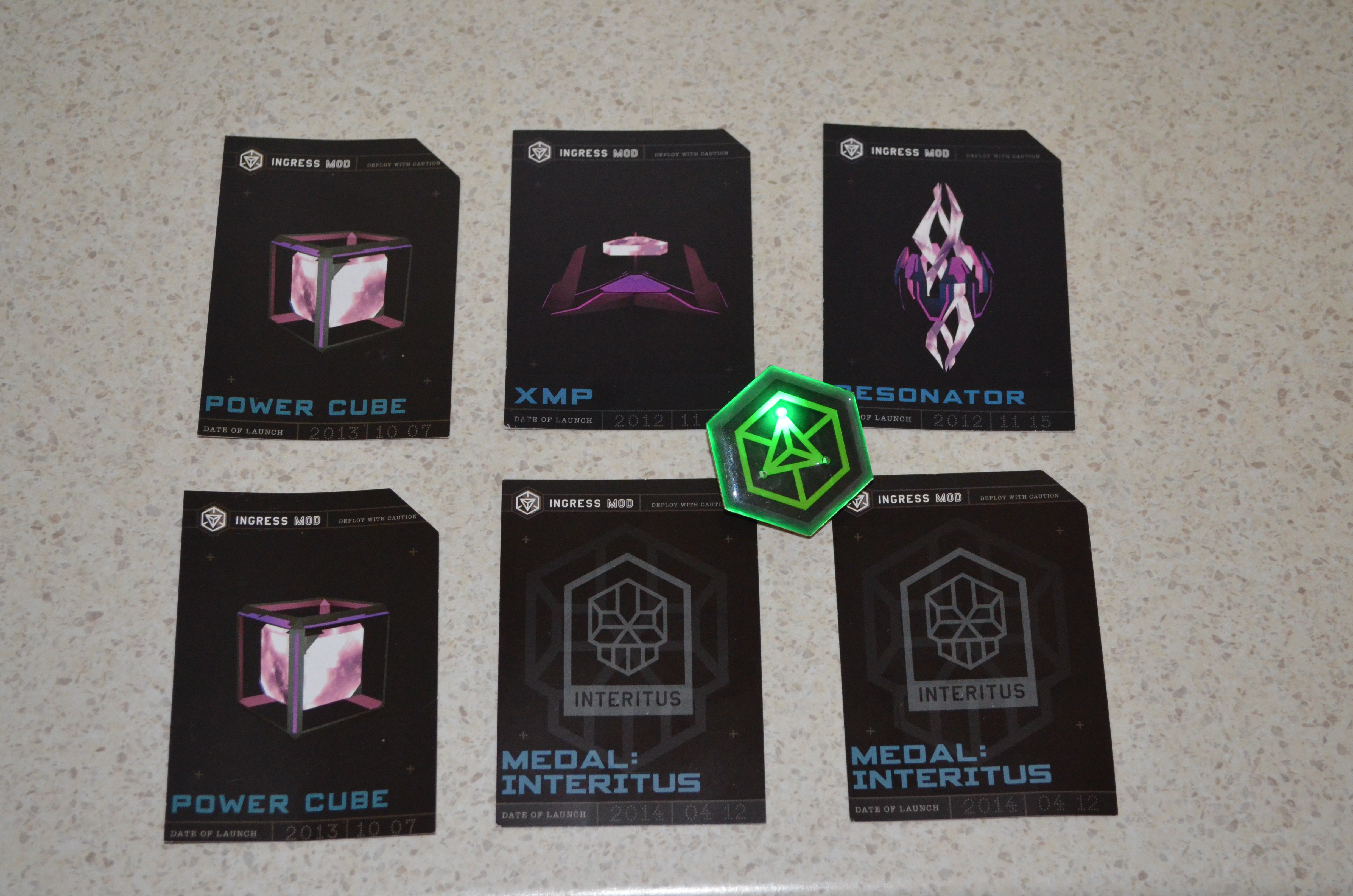
schwag from Ingress Anomaly Ingress is an Android phone game developed by Google where you have to go to various places to capture portals which are based on landmarks or places of note. There s a sci-fi back story which I haven t cared much about (my local library has a heap of good sci-fi books I don t have time to read). But if you are interested in low quality sci-fi you can start with the Youtube channel for Ingress [1]. But the best thing to do is to download the Ingress client program from the Google play store if you have an Android phone [2]. Periodically they have special events in the game called Anomalies , which usually involve many people competing to capture a small number of special portals. Usually a portal is fairly easy to capture so a high level player can easily capture a portal in at most a few minutes, but when there is a large group of players defending a portal by replacing the resonators as quickly as they are destroyed it becomes more challenging. I m not going to try to explain this properly as I presume that readers either already know or don t care. The Wikipedia page about Ingress has more information. On Saturday there was an Anomaly where the main city was Melbourne. My team (Enlightened) won the event in Australia but apparently the event in the US at the same time was won by the other team (Resistance). I had hoped that our event would be similar to some of the ones I ve seen on the Ingress Report (a fictional news service on youtube) in which actors from the sci-fi videos about Ingress attended. But unfortunately it seems that the actors stay in the US. Every player who was registered for the anomaly received a gift pack that contained three cards and a badge. The picture above shows the cards that my wife and I received along with one of our badges. The badges are green for Enlightened and blue for Resistance (the in-game colors) and have three flashing LEDs the photo has one of the LEDs lit up. The three cards have passcodes which can be redeemed for in-game items, the XMP, Power Cubes, and Resonators weren t that useful (10 not particularly rare items that I could get through 10 minutes of game playing). The Medal cards are for in-game badges showing the anomalies that we have played at, but they are bronze badges which again aren t much use as nothing less than silver will help in leveling up. Overall it was a good experience, we won, had a good after-party (with free snacks and one free drink per person), and the badges are nice. I recommend attending if there s an event in your area, and note that you don t need to be a high level player to attend, even L6 players were able to contribute.

18 May 2014

Benjamin Mako Hill: Installing GNU/Linux on a 2014 Lenovo Thinkpad X1 Carbon

I recently bought a new Lenovo X1 Carbon. It is the new second-generation, type 20A7 laptop, based on Intel s Haswell microarchiteture with the adaptive keyboard. It is the version released in 2014. I also ordered the Thinkpad OneLink Dock which I have returned for the OneLink Pro Dock which I have not yet received. The system is still very new, challenging, and different, but seems to support GNU/Linux reasonably well if you are willing to run a bleeding edge version and/or patch your kernel and if you are not afraid to spend an afternoon or two tweaking things. What follows are my installation notes for Debian testing (jessie) when I installed it in early May 2014. My general impressions about the laptop as a GNU/Linux system and overall are at the end of this write-up.
System Description The X1 Carbon I ordered included the 512GB SSD, the 14.0 inch WQHD (2560 1440) 260 nit touchscreen, and the maximum 8GB of memory. I believe the rest is not particularly negotiable but includes a 720p HD Camera, a 45.2Wh battery, and an Intel Dual Band Wireless 7260AC with Bluetooth 4.0. For those that are curious Here is the output of lspci on the system:
00:00.0 Host bridge: Intel Corporation Haswell-ULT DRAM Controller (rev 0b)
00:02.0 VGA compatible controller: Intel Corporation Haswell-ULT Integrated Graphics Controller (rev 0b)
00:03.0 Audio device: Intel Corporation Haswell-ULT HD Audio Controller (rev 0b)
00:14.0 USB controller: Intel Corporation Lynx Point-LP USB xHCI HC (rev 04)
00:16.0 Communication controller: Intel Corporation Lynx Point-LP HECI #0 (rev 04)
00:16.3 Serial controller: Intel Corporation Lynx Point-LP HECI KT (rev 04)
00:19.0 Ethernet controller: Intel Corporation Ethernet Connection I218-LM (rev 04)
00:1b.0 Audio device: Intel Corporation Lynx Point-LP HD Audio Controller (rev 04)
00:1c.0 PCI bridge: Intel Corporation Lynx Point-LP PCI Express Root Port 6 (rev e4)
00:1c.1 PCI bridge: Intel Corporation Lynx Point-LP PCI Express Root Port 3 (rev e4)
00:1d.0 USB controller: Intel Corporation Lynx Point-LP USB EHCI #1 (rev 04)
00:1f.0 ISA bridge: Intel Corporation Lynx Point-LP LPC Controller (rev 04)
00:1f.2 SATA controller: Intel Corporation Lynx Point-LP SATA Controller 1 [AHCI mode] (rev 04)
00:1f.3 SMBus: Intel Corporation Lynx Point-LP SMBus Controller (rev 04)
BIOS/Firmware The BIOS firmware is non-free and proprietary as it the case with all ThinkPads and nearly all laptops. According to this thread there is a bug in the default BIOS that means that suspend to RAM is broken in GNU/Linux. You can get updated BIOS at the Lenovo s ThinkPad X1 Carbon (Type 20A7, 20A8) Drivers and software page by looking in the the BIOS section. Honestly, the easiest approach is probably to download the Windows BIOS Update utility (documentation is here) which you can use to run the BIOS update from within Windows before you install GNU/Linux. If that s not an option (e.g., if you ve already installed GNU/Linux) the best method is to download the bootable CD ISO from the same page. Of course, since the X1 Carbon has no optical media, you have to find another way to boot the CD image. I struggled to get the ISO to boot from USB using the usually reliable dd method. This message suggest that the issue had to do with the El Torito wrapper:
I had to dump the eltorito image from the ISO they provide, after that I was able to dd the resulting image to a flash drive and the bios update went well, no cdrom needed.
I updated to version 1.13 of the BIOS which fixes the suspend/resume bug. By the time you read this, there may be newer versions that fix other things so check the Lenovo website.
Installing Debian I installed Debian testing using the March 19, 2014 Alpha 1 release of the Debian Installer for Jessie (currently testing). I installed in graphical mode. With the WQHD screen, everything was extremely tiny but it worked flawlessly. I downloaded the amd64 net install image from the normal place and installed the rest of the system using the built-in Ethernet port which required no firmware or extra drivers. I did the normal dd if=FILENAME.iso of=/dev/sdX method of getting the installer onto the a USB stick to boot. I turned off restricted boot in BIOS first. In general, the latest version of the Debian installation guide is always a good source of guidance on installing Debian. I used the Debian installer wizard to partition and selected Use entire disk and partition it for LVM and encrypted data which kept the UEFI partitions around. The system installed with no errors or issues and booted up normally afterward. The grub menu is hilariously narrow on the WQHD screen. If you want to use the built-in wireless and/or Bluetooth, you will need to install the non-free iwlwifi firmware package. It is very lame that we still have to do this to use hardware we have purchased.
What Works and Doesn t The following stuff works the first time I booted into the GNOME 3 desktop and logged in:
  • The WQHD 2560 1440 screen
  • The touchscreen
  • Both the TrackPoint and the touchpad
  • Built-in e1000e Ethernet using the dongle
  • The keyboard plus the adaptive row of F1-F12 keys.
  • External monitor using the full HDMI or mini-DisplayPort connectors
  • Audio (both speakers and microphone)
  • The camera/webcam
The following stuff works if you install non-free firmware:
  • Internal Wireless
  • Bluetooth 4.0
The following stuff works with qualifications:
  • Suspend to RAM Works once you have updated the firmware.
  • The adaptive keyboard The F1-F12 keys work but the button that theoretically lets you switch to different sets of function buttons (e.g., volume, brightness) does nothing.
  • Disabling the touchpad There is a BIOS option to disable the touchpad. It works in Windows and does nothing at all in GNU/Linux.
I have not tried:
  • The fingerprint reader
Disabling the touchpad As a long-term ThinkPad user, I love the TrackPoint pointing stick. If you plan on using this, the built-in touchpad is incredibly aggravating because it is very easy to brush against it while using the TrackPoint. In BIOS, there is an option to disable the touchpad. Although this works in Windows, it does absolutely nothing in GNU/Linux. Part of the issue is that, unlike the older X1 Carbon and other ThinkPads, there are no TrackPoint buttons. Instead of buttons, there are regions at the top of the touchpad which are configured, in software, to act like buttons. If you want to be able to click, the touchpad can never be truly turned off. This is not problem unique to the Haswell X1 Carbon and a number of people have been struggling with this issue on other Lenovo laptops. Essentially, what you need to do is configure your touchpad so that the buttons are where you want them and so that it ignores any input for the purposes of cursor movement. There are a few ways of doing this but this answer from an askubuntu.com question has the solution I ended up using:

Open file /usr/share/X11/xorg.conf.d/50-synaptics.conf for edit.

Find Section InputClass which the following line is Identifier Default clickpad buttons .

Edit option for SoftButtonAreas to values 64% 0 1 42% 36% 64% 1 42%, this is size of the right and middle button.

Enable option AreaBottomEdge and change value to 1, this will disable touchpad movement.

If everything done right, your class should looks like:

Section "InputClass"
     Identifier "Default clickpad buttons"
     MatchDriver "synaptics"
     Option "SoftButtonAreas" "64% 0 1 42% 36% 64% 1 42%"
     Option "AreaBottomEdge" "1"
EndSection
Essentially, the first Option line will create a middle button that is 32% of the width and 42% of the height, and a right button that is 32% of the width and 42% of the height. The synaptics manpage (man synpatics) will give you more detail on the general way this works. Of course, something does feel very wrong about editing a file in /usr/share.
Fixing the Adaptive Keyboard The most wild feature of the laptop is the adaptive keyboard strip. The strip is a back-lit LCD that looks almost like E Ink screen and acts as a touchscreen keyboard. The default mode gives you the F1-F12 keys. If you press the keys (since they aren t buttons, you just put your finger on top of them) they act like normal F-keys. You can Ctrl-Alt-F1, etc., to switch to virtual terminals out of the box. There are four modes: Function (i.e., normal F-keys), Home, Web, and Chat. The last three overlap quite a bit (e.g., they all have brightness and volume). You can play with an example on the Lenovo homepage. In Windows, switching programs will apparently change these keys so that an appropriate set of buttons is shown for the application you are using. You can also change these keys manually with a big Fn button at the far left of the adaptive keyboard strip. As I write this this, released kernels do not support the adaptive keyboard Fn button which means you cannot use anything other than the F-keys out of the box. I believe it also means that resuming from suspend to RAM breaks these keys. That said, Shuduo Sang from Canonical has released several versions of a patch to to the thinkpad_acpi kernel module which adds support for the Home mode. The other modes (web and chat) do not seem to be supported. The latest version of the patch is on on the Linux Kernel Mailing List and the relevant commits are:
330947b save and restore adaptive keyboard mode for suspend and,resume
3a9d20b support Thinkpad X1 Carbon 2nd generation's adaptive keyboard
Although this is not supported in Debian testing at the time of writing, a bug was filed in Debian and quickly fixed by Ben Hutchings in Debian kernel version 3.14.2-1 which is currently in sid/unstable. As a result, if you install the latest version kernel from Debian unstable (3.14.2-1 or later), the adaptive keyboard just works. If you aren t using Debian and if kernel you are using does not have support, you might be patching your kernel.
General Impressions As I have described in my interview with The Setup, I have been a user of ThinkPad X-series laptops for many years. This is my sixth X-series ThinkPad. Overall, I quite like the hardware! Once things mature a little bit, I think that this will be a great laptop for running GNU/Linux. That said, I ordered the laptop without realizing that the X1 Carbon had gone through a major revision! The keyboard was quite a suprise. I think that changing a system so radically without changing the model name/number is a very bad move on Lenovo s part. There are two remaining issues with the system I m still struggling with: (1) the keyboard layout is freaky and weird, and (2) the super high resolution screen breaks many things. The quality of the keyboard itself is great and worthy of the ThinkPad name. That said, there are two ways in which it is strange. The first is the adaptive keyboard strip. Overall, it works surprisingly well and I think it is a clever idea. My sense is that the strip is more annoying in Windows because it changes out from under you all the time. In GNU/Linux, only manual changing of modes is supported. This, in my opinion, is a feature. I do miss the real feedback you get from pressing keys but for F-keys and volume-keys that I don t use often this isn t too important. On the downside, I have realized several times that I had been holding down a button for several seconds and not noticed. The more annoying issue with the keyboard is the way that the other keys have moved around. Getting rid of the CapsLock is wonderful! How has this taken so long? Replacing it with a split Home and End keys is nuts. I ve remapped the Home and End to put Control back where it should be. My right Control to now Home but I still don t have an End key. The split Backspace and Delete is not a problem for me. The tilde/apostrophe is in a very bad place. There is no Insert, Print Screen/SysRq, Scroll Lock, Pause/Break or NumLock. They are all just gone. Surprisingly, I haven t missed any of them. The second issue is the 2560 1440 resolution on the 14 inch screen. I use a 27 inch external monitor with the same native resolution laptop but, by my arithmetic, the pixel density on the laptop is 210 DPI instead 109 DPI on the external monitor. The result is the scaling problem and it s a huge pain that seems mostly unsolved on any operating system. Fonts and widgets that look good on the laptop look huge on my external monitor. Stuff that looks good on my external monitor looks minuscule on the laptop. I routinely move windows between my laptop screen and my large monitor. Until I find a display system that can handle this kind of scaling effectively, this requires changing font size and zooming all the time. At the moment, I m shrinking and expanding my font size using the built in hot keys in Emacs, Gnome Terminal, and Firefox/Iceweasel. I love the high resolution screen but the current situation is crazy-making. Finally, this setup will not get you into the Church of Emacs and it s not about to find its way onto the FSF s list of endorsed hardware. For one, I paid the Windows tax. Beyond that, there is the non-free BIOS and the need for non-free firmware to use the wireless and Bluetooth. This is standard for ThinkPads but it isn t getting any easier to swallow. There are alternatives in the form of Gluglug s X60 laptops running CoreBoot, Lemote Yeelong laptops, Bunnie Huang s Novena and others that are better in these regards. I am very excited for these projects but, for a number of reasons, these just weren t an option for the laptop I use for my research computing.

17 May 2014

Gunnar Wolf: Guest class: Jose Juan "Kaz" Casimiro ( @brit_kazito ) dissects the Ext4 filesystem module

Yesterday night, we had the opportunity to have for the first time my friend Kaz as a guest in my Operating Systems class. We are about to finish the semester, and he took the opportunity not just to show how the Ext4 filesystem is structured, but how it is implemented in a current Linux release. Kaz took a very different approach from what I do: He did it really hands-on, starting with the explanation on how a hello world module would be created, and then digging in following the code of the ext4 module in Linux 3.14 (and some bits in the general filesystem-related includes). Of course, for a ~2hr session, he did not go into the full details, but did show where the main structures of a filesystem are defined, including a general walkthrough on the general kernel coding style. The class was very enjoyable and clear. We had the bad luck of the projector's lamp burning out at the beginning of the class, but still, you can see in the pictures the students were really into his exposition. I think the exposition did make it through and got the students involved and interested And that makes it really worth it! Now... Sadly, due to a (most probably) human factor, I tried to record this talk but lost most of it :-( I have only the first part, but lost most of the second one. I have some bits recorded by a second camera, but have to check if they make sense by themselves, or do need the whole context. Anyway, I'll be reviewing those bits, and will update this post when I get around to cleaning+fixing+integrating them. Some more photos...

AttachmentSize
Video of the first part of Kaz's class26.26 MB
Kaz's slides for the ext4 module40.72 KB

Gunnar Wolf: Guest class: C sar Y ez (@caesarcomptus) talks about virtual memory

Shame on me... I should have uploaded this video a long time ago. I wanted to edit this video to remove pauses, add some in-band indications on who and what it is, and stuff... But after a month, I have not yet got around to do it. On April 23, I invited C sar Y ez to present a talk on virtual memory management to my students (for the Operating Systems class). As always (this is the third time I invite him The previous iteration was on process scheduling, and is on my site as well), he gave a great class. I still have some pending videos to upload from the other guests we had this semester, they should come shortly.
AttachmentSize
Video Part 130.43 MB
Video Part 279.23 MB

15 May 2014

Michal &#268;iha&#345;: Rewamping UI for Weblate

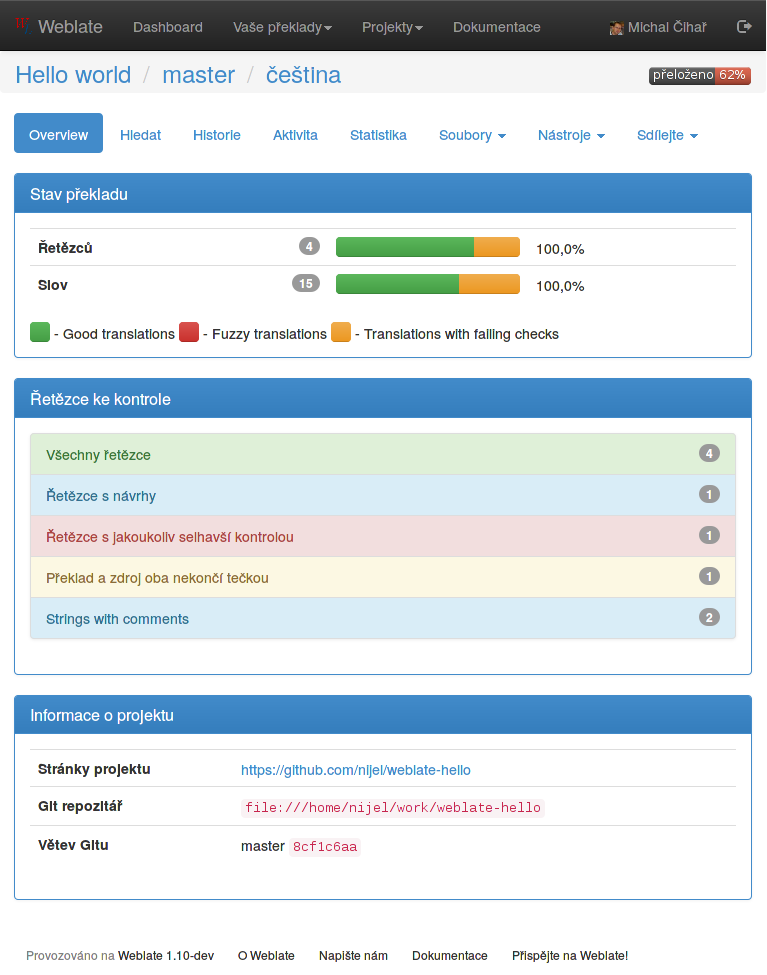
For quite some time I was pretty confident that Weblate will need some UI rewrite at some point. This is always problematic thing for me as I'm no way an UI designer and thus I always hope that somebody else will do that. I've anyway spent few hours on train home from LinuxTag to check what I could do with that. The first choice for me was to try Twitter Bootstrap as I've quite good experience with using that for UI at work, so I hoped it will work quite well for Weblate as well. The first steps went quite nicely, so I could share first screenshots on Twitter and continue to work on that. After few days, I'm quite happy with basic parts of the interface, though the most important things (eg. the page for translating) are still missing. But I think it's good time to ask for initial feedback on that. Main motivation was to unite two tab layout used on main pages, which turned out to be quite confusing as most users did not really get into bottom page of the page and thus did not find important functions available there. So all functions are accessible from top page navigation, either directly or being in menu. I've also decide to use colors a bit more to indicate the important things. So the progress bars are more visible now (and the same progress bar now indicates status of translation per words). The quality checks also got their severity, which in turn is used to highlight the most critical ones. The theme will probably change a bit (so far it's using default theme as I did not care much to change that). So let's take a look at following screenshot and let me know your thoughts: Number of applications over time You can also try that yourself, everything is developed in the bootstrap branch in our Git repository.
Filed under: English phpMyAdmin SUSE Weblate 4 comments Flattr this!

Russell Coker: Mobile Phones and Cognitive Costs

I previously wrote about the case for a Basic Income in Australia [1]. Since then I read an interesting article by Rutger Bregman in the Dutch site The Correspondent discussing the benefit that such Basic Income schemes have given in various places [2], he makes a great case for giving a Basic Income to poor people. However I believe that it should be provided to everyone. I believe that government payments shouldn t be means tested because the proportion of the population who earn more than the cutoff is usually very small (IE it doesn t save much money), because the money will be recovered from wealthy people in tax, and because the bureaucracy involved in determining who is eligible involves spending tax money to pay bureaucrats and costing everyone time in dealing with the process. The concept of an Attention Economy has been getting some interest recently. But discussions of it seem to be mostly concerned with the needs of fairly wealthy people, how to advertise to them, how to filter out unwanted ads for them, etc. But the costs in attention can be even worse for people on low incomes or social security because they have many attention costs that could be solved by money. Many common essential purchases (EG soap, basic foods, and purely functional clothes) can become difficult decisions if saving a few dollars is important. The amount of thought involved in buying such items can result in someone who s not well off having little energy to concentrate on other things. I think that to have an effective social security system we need to consider how much cognitive effort is being required of people who are receiving benefits. Last month I wrote yet another review of mobile phone plans in Australia [3]. Every time I do this it takes a significant amount of time because the Telcos devise overly complex plans to make it difficult to compare their offerings. It seems that they aim to make their offerings somewhat competitive if you can interpret them but confusing enough to allow many (most?) of their customers to pay needlessly high bills. I could just pick a random telco and pay whatever it takes, spending an extra $10 or $20 per month isn t such a big deal for me. Even though I advise a number of my relatives on the cheapest phone plan it s probably only barely saving enough money to be worth the effort, a major motivation for me is being stubborn and not wanting telcos to rip people off. The Importance of Mobile Phones A mobile phone seems to be essential for most people. Mobile phones are used for making medical appointments and for applying for work, so in almost every case some of the financial assistance paid to a job seeker or person on a disability pension will go towards mobile phone costs. The aims of the social security benefits seem to clearly involve a phone service. Given that most people who receive social security payments spend some of that money on mobile phone bills the government has a direct financial interest in not having such money wasted on needlessly expensive phone plans. As we also don t want to have people on social security spending time and attention trying to find the best phone plan it makes sense to have the government help manage this process. Good communications is regarded as essential to education and economic development. A huge amount of taxpayer money was spent on the NBN (and then wasted by Tony Abbott when he cancelled the original plans) for these benefits. Good phone access is also an issue of personal safety. While it is possible to call emergency services from a mobile phone that doesn t have a valid SIM there are probably few people who keep a spare phone charged for that purpose. Also there are a variety of issues that can impact life or health which can best be resolved by calling friends or relatives. Free Phones I think that the best solution to these problems is for the government to directly pay mobile phone bills. If we are going to have a Basic Income then the government should make the base payment for mobile phone calls for every resident, if not then the government should make the base payment for everyone who receives any form of social security payment. Obviously the amount of data that could be transferred over a 3G network is greatly in excess of the amount that any plans allow and offering true unlimited calling leads to people using mobile phones as baby-monitors, so some limits are necessary. But the government could cheaply pay for a phone plan that exceeds the requirements of most people and then allow anyone who wants more data or calls to pay extra. Which Plan? The cheapest all-inclusive mobile phone plan in recent times was Kogan who charged $299 per annum for 6G of data per month and unlimited calls. The cheapest current offer for unlimited calls seems to be Lebara s $30 per month offer which includes 2G of data. My observation is that people who use 3G Internet just for phone use (as opposed to tethering a laptop or providing home Internet), who use a home Wifi network for installing Android programs and don t play Ingress tend to use a lot less than 1G of data per month. I would use between 400M and 700M per month if I wasn t playing Ingress and didn t use my phone as a Wifi access point. In terms of call volume, 600 minutes a month should be enough to cover the basic needs of most people judging by the number of plans on offer with limits smaller than that. As a current Lebara offer is $30 per month for unlimited calls and 2G of data (and there are similar offers from other telcos), it should be possible for a telco to offer 600 minutes of calls and 1G of data for less than $15 per month. When the government is paying (no bad debts) and many of the users will use much less than the quota such a plan should be profitable at $10 per month or less. Implementation The way to implement this would be to start with a tender that has a hard requirement for the minimum amount of service provided. This would include the number of minutes per month for calls, the number of SMS sent, and the amount of data transfer. To avoid excessive billing (a standard telco scam) there should be a requirement that fees for extra use not exceed some small multiple of the base rate, for example if the government was paying $10 for 600 minutes of calls and 1G of data the excess usage charges could be capped at 3 cents per meg and 5 cents per minute (3* the base rate) which would be profitable for the telco but not a scam. If the telcos act in a market driven competitive manner they will compete to provide the most attractive offerings for $10 per month. If the build cost of the NBN had been invested at government bond rates (for any of the rates used for current bonds) then it would pay for the mobile phone bills for every resident forever, so the cost of providing phones for everyone is in the range of government telecommunications programs. If people who are working were to pay an extra $10 in tax and people who are on social security had their benefits reduced by $10 then that would be a great deal if it saved them the $20 or more that most people spend on a basic phone plan. Government Phone Delays A friend who s a single mother pays for an unlimited mobile phone plan because calls to the social security office are usually kept on hold for more than an hour. It s likely that she could save money over the course of a year by paying for a cheaper plan and just dealing with the occasional big bill, but she needs to budget carefully and feels that she can t take that risk. It seems stupid that government phone delays (partly caused by cutting funds for staff) cause increased expenses for people who are receiving social security payments. If the government implemented a smart queuing system that allowed them to call people back instead of making them wait on hold then it would save money overall. So there are obviously other ways that the government can save money on phone calls and time for everyone.

Next.

Previous.