Search Results: "pm"

18 August 2014

Julien Danjou: OpenStack Ceilometer and the Gnocchi experiment

A little more than 2 years ago, the Ceilometer project was launched inside the OpenStack ecosystem. Its main objective was to measure OpenStack cloud platforms in order to provide data and mechanisms for functionalities such as billing, alarming or capacity planning. In this article, I would like to relate what I've been doing with other Ceilometer developers in the last 5 months. I've lowered my involvement in Ceilometer itself directly to concentrate on solving one of its biggest issue at the source, and I think it's largely time to take a break and talk about it. Ceilometer early design For the last years, Ceilometer didn't change in its core architecture. Without diving too much in all its parts, one of the early design decision was to build the metering around a data structure we called samples. A sample is generated each time Ceilometer measures something. It is composed of a few fields, such as the the resource id that is metered, the user and project id owning that resources, the meter name, the measured value, a timestamp and a few free-form metadata. Each time Ceilometer measures something, one of its components (an agent, a pollster ) constructs and emits a sample headed for the storage component that we call the collector. This collector is responsible for storing the samples into a database. The Ceilometer collector uses a pluggable storage system, meaning that you can pick any database system you prefer. Our original implementation has been based on MongoDB from the beginning, but we then added a SQL driver, and people contributed things such as HBase or DB2 support. The REST API exposed by Ceilometer allows to execute various reading requests on this data store. It can returns you the list of resources that have been measured for a particular project, or compute some statistics on metrics. Allowing such a large panel of possibilities and having such a flexible data structure allows to do a lot of different things with Ceilometer, as you can almost query the data in any mean you want. The scalability issue We soon started to encounter scalability issues in many of the read requests made via the REST API. A lot of the requests requires the data storage to do full scans of all the stored samples. Indeed, the fact that the API allows you to filter on any fields and also on the free-form metadata (meaning non indexed key/values tuples) has a terrible cost in terms of performance (as pointed before, the metadata are attached to each sample generated by Ceilometer and is stored as is). That basically means that the sample data structure is stored in most drivers in just one table or collection, in order to be able to scan them at once, and there's no good "perfect" sharding solution, making data storage scalability painful. It turns out that the Ceilometer REST API is unable to handle most of the requests in a timely manner as most operations are O(n) where n is the number of samples recorded (see big O notation if you're unfamiliar with it). That number of samples can grow very rapidly in an environment of thousands of metered nodes and with a data retention of several weeks. There is a few optimizations to make things smoother in general cases fortunately, but as soon as you run specific queries, the API gets barely usable. During this last year, as the Ceilometer PTL, I discovered these issues first hand since a lot of people were feeding me back with this kind of testimony. We engaged several blueprints to improve the situation, but it was soon clear to me that this was not going to be enough anyway.
Thinking outside the box Unfortunately, the PTL job doesn't leave him enough time to work on the actual code nor to play with anything new. I was coping with most of the project bureaucracy and I wasn't able to work on any good solution to tackle the issue at its root. Still, I had a few ideas that I wanted to try and as soon as I stepped down from the PTL role, I stopped working on Ceilometer itself to try something new and to think a bit outside the box. When one takes a look at what have been brought recently in Ceilometer, they can see the idea that Ceilometer actually needs to handle 2 types of data: events and metrics. Events are data generated when something happens: an instance start, a volume is attached, or an HTTP request is sent to an REST API server. These are events that Ceilometer needs to collect and store. Most OpenStack components are able to send such events using the notification system built into oslo.messaging. Metrics is what Ceilometer needs to store but that is not necessarily tied to an event. Think about an instance CPU usage, a router network bandwidth usage, the number of images that Glance is storing for you, etc These are not events, since nothing is happening. These are facts, states we need to meter. Computing statistics for billing or capacity planning requires both of these data sources, but they should be distinct. Based on that assumption, and the fact that Ceilometer was getting support for storing events, I started to focus on getting the metric part right. I had been a system administrator for a decade before jumping into OpenStack development, so I know a thing or two on how monitoring is done in this area, and what kind of technology operators rely on. I also know that there's still no silver bullet this made it a good challenge. The first thing that came to my mind was to use some kind of time-series database, and export its access via a REST API as we do in all OpenStack services. This should cover the metric storage pretty well. Cooking Gnocchi
A cloud of gnocchis!
At the end of April 2014, this led met to start a new project code-named Gnocchi. For the record, the name was picked after confusing so many times the OpenStack Marconi project, reading OpenStack Macaroni instead. At least one OpenStack project should have a "pasta" name, right? The point of having a new project and not send patches on Ceilometer, was that first I had no clue if it was going to make something that would be any better, and second, being able to iterate more rapidly without being strongly coupled with the release process. The first prototype started around the following idea: what you want is to meter things. That means storing a list of tuples of (timestamp, value) for it. I've named these things "entities", as no assumption are made on what they are. An entity can represent the temperature in a room or the CPU usage of an instance. The service shouldn't care and should be agnostic in this regard. One feature that we discussed for several OpenStack summits in the Ceilometer sessions, was the idea of doing aggregation. Meaning, aggregating samples over a period of time to only store a smaller amount of them. These are things that time-series format such as the RRDtool have been doing for a long time on the fly, and I decided it was a good trail to follow. I assumed that this was going to be a requirement when storing metrics into Gnocchi. The user would need to provide what kind of archiving it would need: 1 second precision over a day, 1 hour precision over a year, or even both. The first driver written to achieve that and store those metrics inside Gnocchi was based on whisper. Whisper is the file format used to store metrics for the Graphite project. For the actual storage, the driver uses Swift, which has the advantages to be part of OpenStack and scalable. Storing metrics for each entities in a different whisper file and putting them in Swift turned out to have a fantastic algorithm complexity: it was O(1). Indeed, the complexity needed to store and retrieve metrics doesn't depends on the number of metrics you have nor on the number of things you are metering. Which is already a huge win compared to the current Ceilometer collector design. However, it turned out that whisper has a few limitations that I was unable to circumvent in any manner. I needed to patch it to remove a lot of its assumption about manipulating file, or that everything is relative to now (time.time()). I've started to hack on that in my own fork, but then everything broke. The whisper project code base is, well, not the state of the art, and have 0 unit test. I was starring at a huge effort to transform whisper into the time-series format I wanted, without being sure I wasn't going to break everything (remember, no test coverage). I decided to take a break and look into alternatives, and stumbled upon Pandas, a data manipulation and statistics library for Python. Turns out that Pandas support time-series natively, and that it could do a lot of the smart computation needed in Gnocchi. I built a new file format leveraging Pandas for computing the time-series and named it carbonara (a wink to both the Carbon project and pasta, how clever!). The code is quite small (a third of whisper's, 200 SLOC vs 600 SLOC), does not have many of the whisper limitations and it has test coverage. These Carbonara files are then, in the same fashion, stored into Swift containers. Anyway, Gnocchi storage driver system is designed in the same spirit that the rest of OpenStack and Ceilometer storage driver system. It's a plug-in system with an API, so anyone can write their own driver. Eoghan Glynn has already started to write a InfluxDB driver, working closely with the upstream developer of that database. Dina Belova started to write an OpenTSDB driver. This helps to make sure the API is designed directly in the right way. Handling resources Measuring individual entities is great and needed, but you also need to link them with resources. When measuring the temperature and the number of a people in a room, it is useful to link these 2 separate entities to a resource, in that case the room, and give a name to these relations, so one is able to identify what attribute of the resource is actually measured. It is also important to provide the possibility to store attributes on these resources, such as their owners, the time they started and ended their existence, etc.
Relationship of entities and resources
Once this list of resource is collected, the next step is to list and filter them, based on any criteria. One might want to retrieve the list of resources created last week or the list of instances hosted on a particular node right now. Resources also need to be specialized. Some resources have attributes that must be stored in order for filtering to be useful. Think about an instance name or a router network. All of these requirements led to to the design of what's called the indexer. The indexer is responsible for indexing entities, resources, and link them together. The initial implementation is based on SQLAlchemy and should be pretty efficient. It's easy enough to index the most requested attributes (columns), and they are also correctly typed. We plan to establish a model for all known OpenStack resources (instances, volumes, networks, ) to store and index them into the Gnocchi indexer in order to request them in an efficient way from one place. The generic resource class can be used to handle generic resources that are not tied to OpenStack. It'd be up to the users to store extra attributes. Dropping the free form metadata we used to have in Ceilometer makes sure that querying the indexer is going to be efficient and scalable.
The indexer classes and their relations
REST API All of this is exported via a REST API that was partially designed and documented in the Gnocchi specification in the Ceilometer repository; though the spec is not up-to-date yet. We plan to auto-generate the documentation from the code as we are currently doing in Ceilometer. The REST API is pretty easy to use, and you can use it to manipulate entities and resources, and request the information back.
Macroscopic view of the Gnocchi architecture
Roadmap & Ceilometer integration All of this plan has been exposed and discussed with the Ceilometer team during the last OpenStack summit in Atlanta in May 2014, for the Juno release. I led a session about this entire concept, and convinced the team that using Gnocchi for our metric storage would be a good approach to solve the Ceilometer collector scalability issue. It was decided to conduct this project experiment in parallel of the current Ceilometer collector for the time being, and see where that would lead the project to. Early benchmarks Some engineers from Mirantis did a few benchmarks around Ceilometer and also against an early version of Gnocchi, and Dina Belova presented them to us during the mid-cycle sprint we organized in Paris in early July. The following graph sums up pretty well the current Ceilometer performance issue. The more you feed it with metrics, the more slow it becomes.
For Gnocchi, while the numbers themselves are not fantastic, what is interesting is that all the graphs below show that the performances are stable without correlation with the number of resources, entities or measures. This proves that, indeed, most of the code is built around a complexity of O(1), and not O(n) anymore.
Next steps
Cl ment drawing the logo
While the Juno cycle is being wrapped-up for most projects, including Ceilometer, Gnocchi development is still ongoing. Fortunately, the composite architecture of Ceilometer allows a lot of its features to be replaced by some other code dynamically. That, for example, enables Gnocchi to provides a Ceilometer dispatcher plugin for its collector, without having to ship the actual code in Ceilometer itself. That should help the development of Gnocchi to not be slowed down by the release process for now. The Ceilometer team aims to provide Gnocchi as a sort of technology preview with the Juno release, allowing it to be deployed along and plugged with Ceilometer. We'll discuss how to integrate it in the project in a more permanent and strong manner probably during the OpenStack Summit for Kilo that will take place next November in Paris.

16 August 2014

Matthias Klumpp: AppStream/DEP-11 Debian progress

There hasn t been a progress-report on DEP-11 for some time, but that doesn t mean there was no work going on on it. DEP-11 is Debian s implementation of AppStream, as well as an effort to enhance the metadata available about software in Debian. While initially, AppStream was only about applications, DEP-11 was designed with a larger scope, to collect data about libraries, binaries and things like Python modules. Now, since AppStream 0.6, DEP-11 and AppStream have essentially the same scope, with the difference of DEP-11 metadata being described in YAML, while official AppStream data is XML. That was due to a request by our ftpmasters team, which doesn t like XML (which is also not used anywhere in Debian, as opposed to YAML). But this doesn t mean that people will have to deal with the YAML file format: The libappstream library will just take DEP-11 data as another data source for it s Xapian database, allowing anything using libappstream to access that data just like the XML stuff. Richards libappstream-glib will also receive support for the DEP-11 format soon, filling it s in-memory data cache and enabling the use of GNOME-Software on Debian. So, what has been done so far? The past months, my Google Summer of Code student. Abhishek Bhattacharjee, was working hard to integrate DEP-11 support into dak, the Debian Archive Kit, which maintains the whole Debian archive. The result will be an additional metadata table in our internal Postgres database, storing detailed information about the software available in a Debian package, as well as Components-<arch>.yml.gz files in the Debian repositories. Dak will also produce an application icon-cache and a screenshots repository. During the time of the SoC, Abhishek focused mainly on the applications part of things, and less on the other components (like extracting data about Python modules or libraries) these things can easily be implemented later. The remaining steps will be to polish the code and make it merge-ready for Debian s dak (as soon as it has received enough testing, we will likely give it a try on the Tanglu Debian derivative). Following that, Apt will be extended to fetch the DEP-11 data on-demand on systems where it is useful (which is currently mostly desktop-systems) if you want to save a little bit of space, you will be able to disable downloading this extra metadata in Apt. From there, libappstream will take the data for it s Xapian db. This will lead to the removal of the much-hated (from ftpmasters and maintainers side) app-install-data package, which has not been updated for two years and only contains a small fraction of the metadata provided by DEP-11. What Debian will ultimately gain from this effort is support for software-centers like GNOME-Software, and improved support for tools like Apper and Muon in displaying applications. Long-term, with more metadata being available, It would be cool to add support for it to specialized package managers , like Python s pip, npm or gem, to make them fetch information about available distribution software and install that instead of their own copies from 3rd-party repositories, if possible. This should ultimatively lead to less code duplication on distributions and will likely result in fewer security issues, since the officially maintained and integrated distribution packages can easily be used, if possible. This is no attempt to make tools like pip obsolete, but an attempt to have the different tools installing software on your machine communicate better, instead of creating parallel worlds in terms of software management. Another nice sideeffect of more metadata will be options to search for tools handling mimetypes in the software repos (in case you can t open a file), smart software centers installing missing firmware, and automatic suggestions for developers which software they need to install in order to build a specific software package. Also, the data allows us to match software across distributions, for that, I will have some news soon (not sure how soon though, as I am currently in thesis-writing-mode, and therefore have not that much spare time). Since the goal is to have these features available on all distributions supporting AppStream, it will take longer to realize but we are on a good way. So, if you want some more information about my student s awesome work, you can read his blogpost about it. He will also be at Debconf 14 (Portland). (I can t make it this time, but I surely won t miss the next Debconf) Sadly, I only see a very small chance to have the basic DEP-11 stuff land in-time for Jessie (lots of review work needs to be done, and some more code needs to be written), but we will definitively have it in Jessie+1. A small example on how this data will look like can be found here a larger, actual file is available here. Any questions and feedback are highly appreciated.

15 August 2014

Aurelien Jarno: Intel about to disable TSX instructions?

Last time I changed my desktop computer I bought a CPU from the Intel Haswell family, the one available on the market at that time. I carefully selected the CPU to make sure it supports as many instructions extensions as possible in this family (Intel likes segmentation, even high-end CPUs like the Core i7-4770k do not support all possible instructions). I ended-up choosing the Core i7-4771 as it supports the Transactional Synchronization Extensions (Intel TSX) instructions, which provide transactional memory support. Support for it has been recently added in the GNU libc, and has been activated in Debian. By choosing this CPU, I wanted to be sure that I can debug this support in case of bug report, like for example in bug#751147. Recently some computing websites started to mention that the TSX instructions have bugs on Xeon E3 v3 family (and likely on Core i7-4771 as they share the same silicon and stepping), quoting this Intel document. Indeed one can read on page 49:
HSW136. Software Using Intel TSX May Result in Unpredictable System Behavior

Problem: Under a complex set of internal timing conditions and system events, software using the Intel TSX (Transactional Synchronization Extensions) instructions may result in unpredictable system behavior.
Implication: This erratum may result in unpredictable system behavior.
Workaround: It is possible for the BIOS to contain a workaround for this erratum.
And later on page 51:
Due to Erratum HSw136, TSX instructions are disabled and are only supported for software development. See your Intel representative for details.
The same websites tell that Intel is going to disable the TSX instructions via a microcode update. I hope it won t be the case and that they are going to be able to find a microcode fix. Otherwise it would mean I will have to upgrade my desktop computer earlier than expected. It s a bit expensive to upgrade it every year and that s a the reason why I skipped the Ivy Bridge generation which didn t bring a lot from the instructions point of view. Alternatively I can also skip microcode and BIOS updates, in the hope I won t need another fix from them at some point.

14 August 2014

Gregor Herrmann: RC bugs 2014/13 - 2014/33

perl 5.20 got uploaded to debian unstable a few minutes ago; be prepared for some glitches when upgrading sid machines/chroots in the next days, while all 557 reverse dependencies are rebuilt via binNMUs. how does this relate to this blog post's title? it does, since during the last weeks I was mostly trying to help with the preparation of this transition. & we managed to fix quite a few bugs while they were not bumped to serious yet, otherwise the list below would be a bit longer :) anyway, here are the the RC bugs I've worked on in the last 20 or so weeks: p.s.: & now, go & enjoy the new perl 5.20 features :)

Daniel Pocock: Bug tracker or trouble ticket system?

One of the issues that comes up from time to time in many organizations and projects (both community and commercial ventures) is the question of how to manage bug reports, feature requests and support requests. There are a number of open source solutions and proprietary solutions too. I've never seen a proprietary solution that offers any significant benefit over the free and open solutions, so this blog only looks at those that are free and open. Support request or bug? One common point of contention is the distinction between support requests and bugs. Users do not always know the difference. Some systems, like the Github issue tracker, gather all the requests together in a single list. Calling them "Issues" invites people to submit just about anything, such as "I forgot my password". At the other extreme, some organisations are so keen to keep support requests away from their developers that they operate two systems and a designated support team copies genuine bugs from the customer-facing trouble-ticket/CRM system to the bug tracker. This reduces the amount of spam that hits the development team but there is overhead in running multiple systems and having staff doing cut and paste. Will people use it? Another common problem is that a full bug report template is overkill for some issues. If a user is asking for help with some trivial task and if the tool asks them to answer twenty questions about their system, application version, submit log files and other requirements then they won't use it at all and may just revert to sending emails or making phone calls. Ideally, it should be possible to demand such details only when necessary. For example, if a support engineer routes a request to a queue for developers, then the system may guide the support engineer to make sure the ticket includes attributes that a ticket in the developers' queue should have. Beyond Perl Some of the most well known systems in this space are Bugzilla, Request Tracker and OTRS. All of these solutions are developed in Perl. These days, Python, JavaScript/Node.JS and Java have taken more market share and Perl is chosen less frequently for new projects. Perl skills are declining and younger developers have usually encountered Python as their main scripting language at university. My personal perspective is that this hinders the ability of Perl projects to attract new blood or leverage the benefits of new Python modules that don't exist in Perl at all. Bugzilla has fallen out of the Debian and Ubuntu distributions after squeeze due to its complexity. In contrast, Fedora carries the Bugzilla packages and also uses it as their main bug tracker. Evaluation I recently started having a look at the range of options in the Wikipedia list of bug tracking systems. Some of the trends that appear:
  • Many appear to be bug tracking systems rather than issue tracking / general-purpose support systems. How well do they accept non-development issues and keep them from spamming the developers while still providing a useful features for the subset of users who are doing development?
  • A number of them try to bundle other technologies, like wiki or FAQ systems: but how well do they work with existing wikis? This trend towards monolithic products is slightly dangerous. In my own view, a wiki embedded in some other product may not be as well supported as one of the leading purpose-built wikis.
  • Some of them also appear to offer various levels of project management. For development tasks, it is just about essential for dependencies and a roadmap to be tightly integrated with the bug/feature tracker but does it make the system more cumbersome for people dealing with support requests? Many support requests, like "I've lost my password", don't really have any relationship with project management or a project roadmap.
  • Not all appear to handle incoming requests by email. Bug tracking systems can be purely web/form-based, but email is useful for helpdesk systems.
Questions This leaves me with some of the following questions:
  • Which of these systems can be used as a general purpose help-desk / CRM / trouble-ticket system while also being a full bug and project management tool for developers?
  • For those systems that don't work well for both use cases, which combinations of trouble-ticket system + bug manager are most effective, preferably with some automated integration?
  • Which are more extendable with modern programming practices, such as Python scripting and using Git?
  • Which are more future proof, with choice of database backend, easy upgrades, packages in official distributions like Debian, Ubuntu and Fedora, scalability, IPv6 support?
  • Which of them are suitable for the public internet and which are only considered suitable for private access?

11 August 2014

Juliana Louback: JSCommunicator - Setup and Architecture

Preface During Google Summer of Code 2014, I got to work on the Debian WebRTC portal under the mentorship of Daniel Pocock. Now I had every intention of meticulously documenting my progress at each step of development in this blog, but I was a bit late in getting the blog up and running. I ll now be publishing a series of posts to recap all I ve done during GSoC. Better late than never. Intro JSCommunicator is a SIP communication tool developed in HTML and JavaScript. The code was designed to make integrating JSCommunicator with a website or web app as simple as possible. It s quite easy, really. However, I do think a more detailed explanation on how to set things up and a guide to the JSCommunicator architecture could be of use, particularly for those wanting to modify the code in any way. Setup To begin, please fork the JSCommunicator repo. If you are new to git, feel free to follow the steps in section Setup and Clone in this post. If you read the README file (which you always should), you ll see that JSCommunicator needs a SIP proxy that supports SIP over Websockets transport. Some options are: I didn t find a tutorial for Kamailio setup, I did find one for repro setup. And bonus, here you have a great tutorial on how to setup and configure your SIP proxy AND your TURN server. In your project s root directory, you ll see a file named config-sample.js. Make a copy of that file named config.js. The config-sample.js file has comments that are very instructive. In sum, the only thing you have to modify is the turn_servers property and the websocket property. In my case, debrtc.org was the domain registered for testing my project, so my config file has:
turn_servers: [
	  server:"turn:debrtc.org"       
],
Note that unlike the sample, I didn t set a username and password so SIP credentials will be used. Now fill in the websocket property here we use sip5060.net.
websocket:  
    servers: 'wss://ws.sip5060.net',
    connection_recovery_min_interval: 2,
    connection_recovery_max_interval: 30,
   ,
I m pretty sure you can set the connection_recovery properties to whatever you like. Everything else is optional. If you set the user property, specifically display_name and uri, that will be used to fill in the Login form and takes preference over any Remember me data. If you also set sip_auth_password, JSCommunicator will automatically log in. All the other properties are for other optional functionalities and are well explained. You ll need some third-party javascript that is not included in the JSCommunicator git repo. Namely jQuery version 1.4 or higher and ArbiterJS version 1.0. Download jQuery here and ArbiterJS here and place the .js files in your project s root directory. Do make sure that you are including the correct filename in your html file. For example, in phone-dev.shtml, a file named jquery.js is included. The file you downloaded will likely have version numbers in it s file name. So rename the downloaded file or change the content of src in your includes. This is uber trivial, but I ve made the mistake several times. You ll also need JsSIP.js which can be downloaded here. Same naming care must be taken as is the case for jQuery and ArbiterJS. The recently added Instant Messaging component and some of the new features need jQuery-UI - so far version 1.11.* is known to work. From the downloaded .zip all you need is the jquery-ui-...js file and the jquery-ui-...css file, also to be placed in the project s root directory. If you ll be using the internationalization support you ll also need jquery.i18n.properties.js. To try out JSCommunicator, deploy the website locally by copying your project directory to the apache document root directory (provided you are using apache, which is a good idea.). You ll likely have to restart your server before this works. Now the demo .shtml pages only have a header with all the necessary includes, then a Server Side Include for the body of the page, with all the JSCommunicator html. The html content is in the file jscommunicator.inc. You can enable SSI on apache, OR you can simply copy and paste the content of jscommunicator.inc into phone-dev.shmtl. Start up apache, open a browser and navigate to localhost/jscommunicator/phone-dev.shmtl and you should see: jscommunicatorRaw Actually, pending updates to JSCommunicator, you should see a brand new UI! But all the core stuff will be the same. Architecture Disclaimer: I m explaining my view of the JSCommunicator architecture, which currently may not be 100% correct. But so far it s been enough for me to make my modifications and additions to the code, so it could be of use. One I get a JSCommunicator Founding Father s stamp of approval, I ll be sure to confirm the accuracy. Now to explain how the JSCommunicator code interacts, the use of each code item is described, ignoring all the html and css which will vary according to how you choose to use JSCommunicator. I m also not going to explain jQuery which is a dependency but not specific to WebRTC. The core JSCommunicator code is the following: Each of these files will be presented in what I hope is an intuitive order. The next three files could be considered utils : These two are where the magic happens: Now for some extras: Third party code: Here s a diagram of sorts to help you visualize how the code interacts: jscommArch In sum, 1 - JSCommUI.js handles what is displayed in the UI and feeds data to JSCommManager.js; 2 - JSCommManager.js actually does stuff, feeding data to be displayed to JSCommUI.js; 3 - JSCommManager.js calls functions from the three utils , parseuri.js, webrtc-check.js and jssip-helpher.js which organizes the data from config.js; 4 - JSCommManager.js initializes a SIP User Agent based on the implementation in Arbiter.js. When making any changes to JSCommunicator, you will likely only be working with JSCommUI.js and JSCommManager.js.

Juliana Louback: JSCommunicator - Setup and Architecture

Preface During Google Summer of Code 2014, I got to work on the Debian WebRTC portal under the mentorship of Daniel Pocock. Now I had every intention of meticulously documenting my progress at each step of development in this blog, but I was a bit late in getting the blog up and running. I ll now be publishing a series of posts to recap all I ve done during GSoC. Better late than never. Intro JSCommunicator is a SIP communication tool developed in HTML and JavaScript. The code was designed to make integrating JSCommunicator with a website or web app as simple as possible. It s quite easy, really. However, I do think a more detailed explanation on how to set things up and a guide to the JSCommunicator architecture could be of use, particularly for those wanting to modify the code in any way. Setup To begin, please fork the JSCommunicator repo. If you are new to git, feel free to follow the steps in section Setup and Clone in this post. If you read the README file (which you always should), you ll see that JSCommunicator needs a SIP proxy that supports SIP over Websockets transport. Some options are: I didn t find a tutorial for Kamailio setup, I did find one for repro setup. And bonus, here you have a great tutorial on how to setup and configure your SIP proxy AND your TURN server. In your project s root directory, you ll see a file named config-sample.js. Make a copy of that file named config.js. The config-sample.js file has comments that are very instructive. In sum, the only thing you have to modify is the turn_servers property and the websocket property. In my case, debrtc.org was the domain registered for testing my project, so my config file has:
turn_servers: [
	  server:"turn:debrtc.org"       
],
Note that unlike the sample, I didn t set a username and password so SIP credentials will be used. Now fill in the websocket property here we use sip5060.net.
websocket:  
    servers: 'wss://ws.sip5060.net',
    connection_recovery_min_interval: 2,
    connection_recovery_max_interval: 30,
   ,
I m pretty sure you can set the connection_recovery properties to whatever you like. Everything else is optional. If you set the user property, specifically display_name and uri, that will be used to fill in the Login form and takes preference over any Remember me data. If you also set sip_auth_password, JSCommunicator will automatically log in. All the other properties are for other optional functionalities and are well explained. You ll need some third-party javascript that is not included in the JSCommunicator git repo. Namely jQuery version 1.4 or higher and ArbiterJS version 1.0. Download jQuery here and ArbiterJS here and place the .js files in your project s root directory. Do make sure that you are including the correct filename in your html file. For example, in phone-dev.shtml, a file named jquery.js is included. The file you downloaded will likely have version numbers in it s file name. So rename the downloaded file or change the content of src in your includes. This is uber trivial, but I ve made the mistake several times. You ll also need JsSIP.js which can be downloaded here. Same naming care must be taken as is the case for jQuery and ArbiterJS. The recently added Instant Messaging component and some of the new features need jQuery-UI - so far version 1.11.* is known to work. From the downloaded .zip all you need is the jquery-ui-...js file and the jquery-ui-...css file, also to be placed in the project s root directory. If you ll be using the internationalization support you ll also need jquery.i18n.properties.js. To try out JSCommunicator, deploy the website locally by copying your project directory to the apache document root directory (provided you are using apache, which is a good idea.). You ll likely have to restart your server before this works. Now the demo .shtml pages only have a header with all the necessary includes, then a Server Side Include for the body of the page, with all the JSCommunicator html. The html content is in the file jscommunicator.inc. You can enable SSI on apache, OR you can simply copy and paste the content of jscommunicator.inc into phone-dev.shmtl. Start up apache, open a browser and navigate to localhost/jscommunicator/phone-dev.shmtl and you should see: jscommunicatorRaw Actually, pending updates to JSCommunicator, you should see a brand new UI! But all the core stuff will be the same. Architecture Disclaimer: I m explaining my view of the JSCommunicator architecture, which currently may not be 100% correct. But so far it s been enough for me to make my modifications and additions to the code, so it could be of use. One I get a JSCommunicator Founding Father s stamp of approval, I ll be sure to confirm the accuracy. Now to explain how the JSCommunicator code interacts, the use of each code item is described, ignoring all the html and css which will vary according to how you choose to use JSCommunicator. I m also not going to explain jQuery which is a dependency but not specific to WebRTC. The core JSCommunicator code is the following: Each of these files will be presented in what I hope is an intuitive order. The next three files could be considered utils : These two are where the magic happens: Now for some extras: Third party code: Here s a diagram of sorts to help you visualize how the code interacts: jscommArch In sum, 1 - JSCommUI.js handles what is displayed in the UI and feeds data to JSCommManager.js; 2 - JSCommManager.js actually does stuff, feeding data to be displayed to JSCommUI.js; 3 - JSCommManager.js calls functions from the three utils , parseuri.js, webrtc-check.js and jssip-helpher.js which organizes the data from config.js; 4 - JSCommManager.js initializes a SIP User Agent based on the implementation in Arbiter.js. When making any changes to JSCommunicator, you will likely only be working with JSCommUI.js and JSCommManager.js.

10 August 2014

Russ Allbery: Orphaning some software packages

As mentioned in my previous message, I'm orphaning various software packages that I was maintaining as part of my job at Stanford, or that for some other reason I'm no longer using directly. My goal is to free up some time and space for new work projects at my new employer, for other hobbies, and to take better care of other projects that I'm not orphaning. The following software packages are now orphaned, and marked as such on their web pages: I'm also stepping down from Debian package maintenance for the OpenAFS and Shibboleth packages, and have already notified the relevant communities. For the Debian packages, and for the above software packages, I will continue to provide security support until someone else can take them over. WebAuth is going to be in a state of transition as noted on its page: My successor at Stanford will be continuing maintenance and development, but that person hasn't been hired yet, and it will take some time for them to ramp up and start making new releases (although there may be at least one interim release with work that I'm finishing now). It's therefore not strictly orphaned, but it's noted that way on my software pages until someone else at Stanford picks it up. Development of the other packages that I maintain should continue as normal, with a small handful of exceptions. The following packages are currently in limbo, since I'm not sure if I'll have continued use for them: I'm not very happy with the current design of either kadmin-remctl or wallet, so if I do continue to maintain them (and have time to work on them), I am likely to redesign them considerably. For all of my packages, I've been adding clones of the repository to GitHub as an additional option besides my personal Git repository server. I'm of two minds about using (and locking myself into) more of the GitHub infrastructure, but repository copies on GitHub felt like it might be useful for anyone who wanted to fork or take over maintenance. I will be adding links to the GitHub repositories to the software packages for things that are in Git. If you want to take over any of the orphaned software packages, feel free. When you're ready for the current software pages to redirect to its new home, let me know.

8 August 2014

Ian Donnelly: How-To: Write a Plug-In (Part 3, Coding)

Hi Everybody! Hope you have been enjoying my tutorial on writing plug-ins so far. In Part 1 we covered the basic overview of a plug-in. Part 2 covered a plug-in s contract and the best way to write one. Now, for Part 3 we are going to cover the meat of a plug-in, the actual coding. As you should know from reading Part 1, there are five main functions used for plug-ins, elektraPluginOpen, elektraPluginGet, elektraPluginSet, ELEKTRA_PLUGIN_EXPORT(Plugin), where Plugin should be replaced with the name of your plug-in. We are going to start this tutorial by focusing on the elektraPluginGet because it usually is the most critical function. As we discussed before, elektraPluginGet is the function responsible for turning information from a file into a usable KeySet. This function usually differs pretty greatly between each plug-in. This function should be of type int, it returns 0 on success or another number on an error. The function will take in a Key, usually called parentKey which contains a string containing the path to the file that is mounted. For instance, if you run the command kdb mount /etc/linetest system/linetest line then keyString(parentKey) should be equal to /etc/linetest . At this point, you generally want to open the file so you can begin saving it into keys. Here is the trickier part to explain. Basically, at this point you will want to iterate through the file and create keys and store string values inside of them according to what your plug-in is supposed to do. I will give a few examples of different plug-ins to better explain. My line plug-in was written to read files into a KeySet line by line using the newline character as a delimiter and naming the keys by their line number such as (#1, #2, .. #_22) for a file with 22 lines. So once I open the file given by parentKey, every time a I read a line I create a new key, let s call it new_key using dupKey(parentKey). Then I set new_keys s name to lineNN (where NN is the line number) using keyAddBaseName and store the string value of the line into the key using keySetString. Once the key is initialized, I append it to the KeySet that was passed into the elektraPluginGet function, let s call it returned for now, using ksAppendKey(return, new_key). Now the KeySet will contain new_key with the name lineNN properly saved where it should be according to the kdb mount command (in this case, system/linetest/lineNN), and a string value equal to the contents of that line in the file. MY plug-in repeats these steps as long as it hasn t reached end of file, thus saving the whole file into a KeySet line by line. The simpleini plug-in works similarly, but it parses for ini files instead of just line-by-line. At their most simple level, ini files are in the format of name=value with each pair taking one line. So for this plug-in, it makes a lot of sense to name each Key in the KeySet by the string to the left of the = sign and store the value into each key as a string. For instance, the name of the key would be name and keyGetString(name) would return value .
As you may have noticed, simpleini and line plug-ins work very similarly. However, they just parse the files differently. The simpleini plug-in parses the file in a way that is more natural to ini file (setting the key s name to the left side of the equals sign and the value to the right side of the equals sign.) The elektraPluginGet function is the heart of a storage plug-in, its what allows Elektra to store configurations in it s database. This function isn t just run when a file is first mounted, but whenever a file gets updated, this function is run to update the Elektra Key Database to match. We also gave a brief overview of elektraPluginSet function. This function is basically the opposite of elektraPluginGet. Where elektraPluginGet reads information from a file into the Elektra Key Database, elektraPluginSet writes information from the database back into the mounted file. First have a look at the signature of elektraLineSet: elektraLineSet(Plugin *handle ELEKTRA_UNUSED, KeySet *toWrite, Key *parentKey) Lets start with the most important parameters, the KeySet and the parentKey. The KeySet supplied is the KeySet that is going to be persisted in the file. In our case it would contain the Keys representing the lines. The parentKey is the topmost Key of the KeySet at serves several purposes. First, it contains the filename of the destination file as its value. Second, errors and warnings can be emitted via the parentKey. We will discuss error handling in more detail later. The Plugin handle can be used to persist state information in a threadsafe way with elektraPluginSetData. As our plugin is not stateful and therefore does not use the handle, it is marked as unused in order to supress compiler warnings. Basically the implementation of elektraLineSet can be described with the following pseudocode:

open the file
if (error)

ELEKTRA_SET_ERROR(74, parentKey, keyString(parentKey));

for each key

write the key value together with a newline

close the file
The fullblown code can be found at https://github.com/ElektraInitiative/libelektra/blob/master/src/plugins/line/line.c As you can see, all elektraLineSet does is open a file, take each Key from the KeySet (remember they are named #1, #2 #_22) in order, and write each key as it s own line in the file. Since we don t care about the name of the Key in this case (other than for order), we just write the value of keyString for each Key as a new line in the file. That s it. Now, each time the mounted KeySet is modified, elektraPluginSet will be called and the mounted file will be updated. We haven t discussed ELEKTRA_SET_ERROR yet. Because Elektra is a library, printing errors to stderr wouldn t be a good idea. Instead, errors and warnings can be appended to a key in the form of metadata. This is what ELEKTRA_SET_ERROR does. Because the parentKey always exists even if a critical error occurres, we append the error to the parentKey. The first parameter is an id specifying the general error that occurred. A listing of existing errors together with a short description and a categorization can be found at https://github.com/ElektraInitiative/libelektra/blob/master/src/liberror/specification. The third parameter can be used to provide additional information about the error. In our case we simply supply the filename of the file that caused the error. The kdb tools will interprete this error and print it in a pretty way. Notice that this can be used in any plugin function where the parentKey is available. The elektraPluginOpen and elektraPluginClose functions are not commonly used for storage plug-ins, but they can be useful and are worth reviewing. elektraPluginOpen function runs before elektraPluginGet and is useful to do initialization if necessary for the plug-in. On the other hand elektraPluginClose is run after other functions of the plug-in and can be useful for freeing up resources. The last function, one that is always needed in a plug-in, is ELEKTRA_PLUGIN_EXPORT. This functions is responsible for letting Elektra know that the plug-in exists and which methods it implements. The code from my line function is a good example and pretty self-explanatory:

Plugin *ELEKTRA_PLUGIN_EXPORT(line)

return elektraPluginExport("line",
ELEKTRA_PLUGIN_GET, &elektraLineGet,
ELEKTRA_PLUGIN_SET, &elektraLineSet,
ELEKTRA_PLUGIN_END);

There you have it! This is the last part of my tutorial on writing a storage plug-in for Elektra. Hopefully you now have a good understanding of how Elektra plug-ins work and you ll be able to add some great functionality into Elektra through development of new plug-ins. I hope you enjoyed this tutorial and if you have any questions just leave a comment! Happy coding!
Ian S. Donnelly

7 August 2014

Jordi Mallach: A pile of reasons why GNOME should be Debian jessie s default desktop environment

GNOME has, for some reason or another, always been the default desktop environment in Debian since the installer is able to install a full desktop environment by default. Release after release, Debian has been shipping different versions of GNOME, first based on the venerable 1.2/1.4 series, then moving to the time-based GNOME 2.x series, and finally to the newly designed 3.4 series for the last stable release, Debian 7 wheezy . During the final stages of wheezy s development, it was pointed out that the first install CD image would not longer hold all of the required packages to install a full GNOME desktop environment. There was lots of discussion surrounding this bug or fact, and there were two major reactions to it. The Debian GNOME team rebuilt some key packages so they would be compressed using xz instead of gzip, saving the few megabytes that were needed to squeeze everything in the first CD. In parallel, the tasksel maintainer decided switching to Xfce as default desktop was another obvious fix. This change, unannounced and two days before the freeze, was very contested and spurred the usual massive debian-devel threads. In the end, and after a few default desktop flip flops, it was agreed that GNOME would remain as the default for the already frozen wheezy release, and this issue would be revisited later on during jessie s development. And indeed, some months ago, Xfce was again reinstated as Debian s default desktop for jessie as announced:
Change default desktop to xfce.
This will be re-evaluated before jessie is frozen. The evaluation will
start around the point of DebConf (August 2014). If at that point gnome
looks like a better choice, it ll go back as the default.
Some criteria for that choice will include:
* Popcon numbers for gnome on jessie. If gnome installations continue to
  rise fast enough despite xfce being the default (compared with, say
  kde installations), then we ll know that users prefer gnome.
  Currently we have no data about how many users would choose gnome when
  it s not the default. Part of the reason for switching to xfce now
  is to get such data.
* The state of accessability support, particularly for the blind.
* How well the UI works for both new and existing users. Gnome 3
  seems to be adding back many gnome 2 features that existing users
  expect, as well as making some available via addons. If it feels
  comfortable to gnome 2 (and xfce) users, that would go a long way
  toward switching back to it as the default. Meanwhile, Gnome 3 is also
  breaking new ground in its interface; if the interface seems more
  welcoming to new users, or works better on mobile devices, etc, that
  would again point toward switching back.
* Whatever size constraints exist for CD or other images at the time.
--
Hello to all the tech journalists out there. This is pretty boring.
Why don t you write a story about monads instead?
Joey Hess in dfca406eb694e0ac00ea04b12fc912237e01c9b5.
Suffice to say that the Debian GNOME team participants have never been thrilled about how the whole issue is being handled, and we ve been wondering if we should be doing anything about it, or just move along and enjoy the smaller amount of bug reports against GNOME packages that this change would bring us, if it finally made it through to the final release. During our real life meet-ups in FOSDEM and the systemd+GNOME sprint in Antwerp, most members of the team did feel Debian would not be delivering a graphical environment with the polish we think our users deserve, and decided we at least should try to convince the rest of the Debian project and our users that Debian will be best suited by shipping GNOME 3.12 by default. Power users, of course, can and know how to get around this default and install KDE, Xfce, Cinnamon, MATE or whatever other choice they have. For the average user, though, we think we should be shipping GNOME by default, and tasksel should revert the above commit again. Some of our reasons are: In short, we think defaulting to GNOME is the best option for the Debian release, and in contrast, shipping Xfce as the default desktop could mean delivering a desktop experience that has some incomplete or rough edges, and not on par with Debian quality standards for a stable release. We believe tasksel should again revert the change and be uploaded as soon as possible, in order to get people testing images with GNOME the sooner the better, with the freeze only two months away. We would also like that in the future, changes of this nature will not be announced in a git commit log, but widely discussed in debian-project and the other usual development/decision channels, like the change of init system happened recently. We will, whichever the final decision is, continue to package GNOME with great care to ensure our users get the best possible desktop experience Debian can offer.

Niels Thykier: Recent improvements to Britney2

As mentioned by Rapha l Hertzog, I have been spending some time on improving Britney2. Just the other day I submitted a second branch for review that I expect to merge early next week. I also got another set patches coming up soon. Currently, none of them are really user visible, so unless you are hosting your own version of Britney, these patches are probably not all that interesting to you. The highlights:
  1. Reduce the need for backtracking by finding semantically equivalent packages.
  2. Avoid needing to set up a backtrack point in some cases.
    • This has the side-effect of eliminating some O(e^n) runtime cases.
  3. Optimise installability testing of packages affected by a hinted migration.
    • This has the side-effect of avoiding some O(e^n) runtime cases when the post-hint state does not trigger said behaviour.
    • There is a follow-up patch for this one coming in the third series to fix a possible bug for a corner-case (causing a valid hint to be incorrectly rejected when it removed an uninstallable package).
  4. Reduce the number of affected packages to test when migrating items by using knowledge about semantically equivalent packages.
    • In some cases, Britney can now do free migrations when all binaries being updated replace semantically equivalent packages.
  5. (Merge pending) Avoid many redundant calls to sort_actions() , which exhibits at least O(n^2) runtime in some cases.
    • For the dataset Rapha l submitted, this patch shaves off over 30 minutes runtime. In the particular case, each call to sort_actions takes 3+ minutes and it was called at least 10 times, where it was not needed.
    • That said, sort_actions have a vastly lower runtime in the runs for Debian (and presumably also Ubuntu, since no one complained from their side so far).
The results so far: After the first patch series was merged, the Kali dataset (from Rapha l) could be processed in only ~2 hours. With the second patch series merged, the dataset will drop by another 30-50 minutes (most of which are thanks to the change mentioned in highlight #5). The third patch series currently do not have any mention-worthy performance related changes. It will probably be limited to bug fixes and some refactoring. Reflections: The 3 first highlights only affects the new installability tester meaning that the Britney2 instances at Ubuntu and Tanglu should be mostly unaffected by the O(n^2) runtime. Although those cases will probably just fail with several AIEEE s. :) The 5th highlight should equally interesting to all Britney2 instances though. For me, the most interesting part is that we have never observed the O(n^2) behaviour in a daily sid -> testing run. The dataset from Rapha l was basically a stable -> testing/sid run, which is a case I do not think we have ever done before. Despite our current updates, there is still room for improvements on that particular use case. In particular, I was a bit disheartened at how poorly our auto hinter(s) performed on this dataset. Combined they only assisted with the migration of something like 28 items . For comparison, the main run migrated ~7100 items and 9220 items were unable to migrate. Furthermore, the Original auto hinter spend the better part of 15 minutes computing hints at least it results in 10 items migrating. Links to the patches:

6 August 2014

Chris Lamb: Strava Enhancement Suite update

https://chris-lamb.co.uk/wp-content/2014/strava/chrome_web_store.png I've been told I don't blog about my projects often enough, so here's a feature update on my Chrome Extension that adds various improvements to the Strava.com fitness tracker. All the features are optional and can be individually enabled in the options panel.

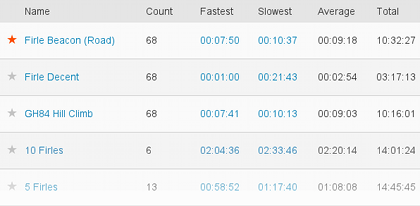
Repeated segments This adds aggregate data (fastest, slowest, average, etc.) when segments are repeated within an activity. It's particularly useful for laps or like this Everesting attempt hill repeats: https://chris-lamb.co.uk/wp-content/2014/strava/repeated_segments3.png

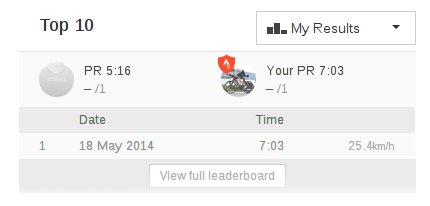
Leaderboard default Changes the default leaderboard away from "Overall" when viewing a segment effort. The most rewarding training often comes from comparing your own past performances rather than those of others, so viewing your own results by default can make more sense. You can select any of Men, Women, I'm Following or My Results: https://chris-lamb.co.uk/wp-content/2014/strava/leaderboard_default.png

Hide feed entries Hides various entry types in the activity feed that can get annoying. You currently have the option of hiding challenges, route creations, goals created or club memberships: https://chris-lamb.co.uk/wp-content/2014/strava/hide_challenge_feed_entries.png

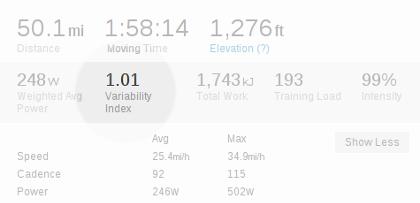
Variability Index Calculates a Variability Index (VI) from the weighted average power and the average power, an indication of how "smooth" a ride was. Required a power meter. A VI of 1.0 would mean a ride was paced "perfectly", with very few surges of effort: https://chris-lamb.co.uk/wp-content/2014/strava/variability_index.png

Infinite scroll Automatically loads more dashboard entries when reaching the bottom, saving a tedious click on the "More" button: https://chris-lamb.co.uk/wp-content/2014/strava/infinite_scroll.png

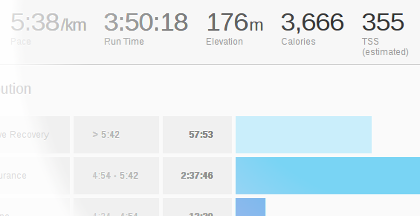
Running TSS Estimates a run's Training Stress Score (TSS) from its Grade Adjusted Pace distribution, a measure of that workout's duration and intensity relative to the athletes's capability, providing an insight into correct recovery time and overall training load over time: https://chris-lamb.co.uk/wp-content/2014/strava/running_tss.png

Hide "find friends" Hides social networking buttons, including invitations to invite or find further friends: https://chris-lamb.co.uk/wp-content/2014/strava/hide_invite_friends.png

"Enter" posts comment Immediately posts comment when pressing Enter/Return key in the edit box rather than adding a newline: https://chris-lamb.co.uk/wp-content/2014/strava/comment_post_on_enter.png

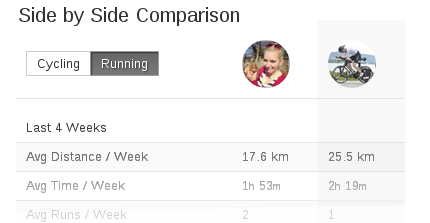
Compare running Changes the default sport for the "Side by Side comparison" module to running when viewing athlete profiles: https://chris-lamb.co.uk/wp-content/2014/strava/side_by_side_running.png

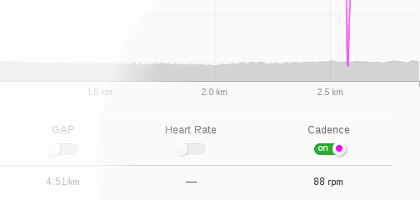
Running cadence Shows running cadence by default in the elevation profile: https://chris-lamb.co.uk/wp-content/2014/strava/running_cadence.png

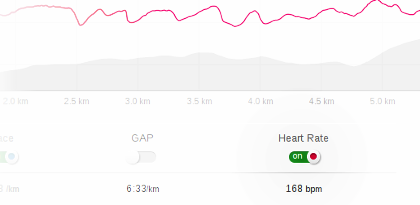
Running heart rate Shows running heart rate by default in elevation profile: https://chris-lamb.co.uk/wp-content/2014/strava/running_heart_rate.png

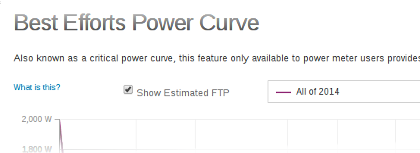
Estimated FTP Selects "Show Estimated FTP" by default on the Power Curve page: https://chris-lamb.co.uk/wp-content/2014/strava/estimated_ftp.png

Standard Google map Prefer the "Standard" Google map over the "Terrain" view: https://chris-lamb.co.uk/wp-content/2014/strava/standard_google_map.png

Let me know if you have any comments, suggestions or if you have any other feedback. If you find this software useful, please consider donating via Paypal to support further development. You can also view the source and contribute directly on GitHub. https://chris-lamb.co.uk/wp-content/2014/strava/chrome_web_store.png

5 August 2014

Andrew Pollock: [geek] Lifehacking with NFC, Tasker and HabitRPG

Oh man, I'm such a geek... Being a single parent has required a considerable amount of self-discipline on my behalf. I find I do best in an environment with routine to make sure stuff gets done. One of the things I did to try and make sure stuff got done was to form positive habits. To help and make this a bit more "fun", I started using HabitRPG, an online role-playing game based on habits. I've only ever used it in a half-arsed manner, and as a result, I die a lot. Often I'll do my dailies, but then forget to mark them off. Sometimes I just fall off the habit wagon altogether. And die. One of my dailies is to scoop my cat's litterboxes. For whatever reason, I find this a tad onerous, and had found myself falling out of the habit of doing it on a daily basis. My cat deserves better than this, so I wanted to get back on the habit wagon, but make it a bit more "fun" as well. I love NFC, I've been a big NFC weenie for a long time. It's a solution looking for a problem. I have a huge collection of NFC tags, and I've finally found a problem I could use them with. I wanted to make it more frictionless to mark a task as completed in HabitRPG. I didn't want to have to take out my phone, unlock it, open the HabitRPG app and check off the daily task. I just wanted to wave my phone at an NFC tag. Here's how I did it. The inimitable Paul Fenwick, who first inspired me to use HabitRPG, has a way more complicated set up to achieve something similar. The Site Reliability Engineer in me wanted the least number of moving parts and third-parties to have to get from my phone to HabitRPG. After some hunting around, I found this wiki page on integrating Tasker with HabitRPG's API, so based on that breadcrumb, I got hacking. I'd not used Tasker before. I was already using AutomateIt to do some other, reasonably dumb automation on my phone, though. Tasker is a little bit obtuse, and it took me a couple of days of casual fiddling with it to wrap my head around it's usage model. The fact that it can run arbitrary JavaScript, and that NFC Tools integrates with it is where the real awesome lies. So based off the wiki, I crafted a couple of bits of JavaScript, one to mark daily tasks as complete on HabitRPG, and one to query HabitRPG to see if they have been marked as complete. For the former, it was trivial, using NFC Tools, to write an NFC tag that then runs the Tasker task to call the HabitRPG API to mark a daily task as complete. That goal was now complete. The equally satisfying part was also having Tasker do a time-based conditional nag based on the state of the daily task in HabitRPG. So now if it gets to 4:45pm and I haven't scooped the litterboxes, my phone literally tells me I'd better go do it. I've also done the same thing with putting the dishwasher on. I've stuck an NFC tag on the dishwashing powder bottle lid, and I get a conditional reminder before bed time. It used to be an unconditional reminder with AutomateIt, and it was dumb, because I rarely forget to put the dishwasher on. Now, I can use HabitRPG to keep state on it instead. The hunk of JavaScript to update HabitRPG is very simple:
function mark_completed()   
  var http = new XMLHttpRequest();
  http.open("POST", http_post_url, false);
  http.setRequestHeader("x-api-user", global('HabitrpgUserid'));
  http.setRequestHeader("x-api-key", global('HabitrpgApiToken'));
  http.send();
  return(http.responseText); 
 
try   
  var result = mark_completed(); 
  catch(e)   
  var error = e.message; 
 
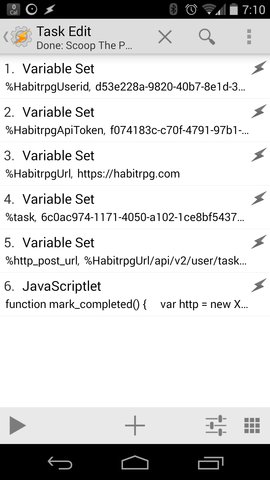
All of the interesting stuff is defined in variables preceding the JavaScript in the task definition. Here's a screenshot of the Task in Tasker that tells a thousand words: Screenshot of Tasker task that uses HabitRPG API to mark a task complete Similarly, to query HabitRPG, I'm using:
function query_task()   
  var http = new XMLHttpRequest();
  http.open("GET",http_get_url,false);
  http.setRequestHeader("x-api-user", global('HabitrpgUserid'));
  http.setRequestHeader("x-api-key", global('HabitrpgApiToken'));
  http.send();
  var p = JSON.parse(http.responseText);
  return p['completed'];
 
try   
  var task_completed = query_task(); 
  catch(e)   
  var error = e.message; 
 
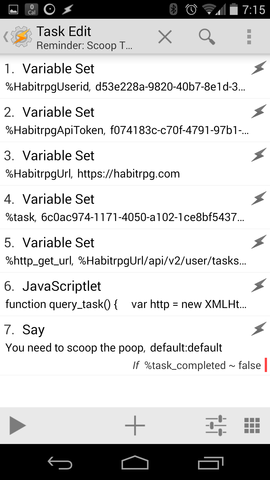
It's only slightly trickier because you have to parse the JSON blob that comes back. Again, a screenshot. Screenshot of Tasker task that uses HabitRPG API to query task state Now maybe I'll stop dying so much in HabitRPG, my cat will have the clean toilet she deserves, and I'll stop getting reminded about putting the dishwasher on when I already have. Better living through automation, that's my motto.

Dirk Eddelbuettel: BH release 1.54.0-3

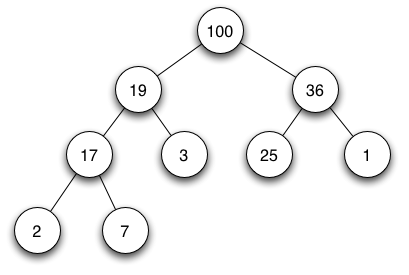
A new release of our BH package providing Boost headers for use by R is now on the CRAN mirrors. max-heap image This release is the third based on Boost 1.54.0. At the request of the maintainer of the recent added RcppMLPACK package, it adds the Boost.Heap library. Boost.Heap implements priority queues which extend beyond the corresponding (and somewhat simpler) class in the STL. Key features of the Boost.Heap priority queues are mutability, iterators, ability to merge, stable sort, and comparison. No other changes were made.
Changes in version 1.54.0-3 (2014-08-03)
  • Added Boost Heap library which will be needed by the next version of RcppMLPACK
Courtesy of CRANberries, there is also a diffstat report for the most recent release. Comments and suggestions are welcome via the mailing list or issue tracker at the GitHub repo.

This post by Dirk Eddelbuettel originated on his Thinking inside the box blog. Please report excessive re-aggregation in third-party for-profit settings.

4 August 2014

Ian Donnelly: New Release: Elektra 0.8.7

Hi Everybody! I am very proud to inform you all that Elektra has just shipped a new release, version 0.8.7, with many great features and fixes! First of all, I want to let you all know that a lot of work from my Google Summer of Code Project has made its way into this release. Elektra now includes support for a three way merge of KeySets! A special and sincere thanks goes out to Felix Berlakovich for helping me test this new merge feature and adding some great features to allow for different merge strategies and dealing with meta keys. You can try out the new merge features using the kdb merge command or by using the Elektra API. There is still work to be done with Merging and improving documentation (also look for some posts on this blog soon about the feature). Additionally, thanks to Felix, we have technical previews for some new plug-ins. The new plug-ins are keytometa and ini. In short the keytometa plugin allows to convert normal keys to meta keys during the get operation and reverting this conversion during the set operation. The ini plugin is basically a rewrite of the simpleini plugin and makes use of the inih library. Also there have been many improvements made to the glob plug-in. He even found some time to add a new script for bash tab completion which is located under scripts/kdb-bash-completion. To use it on debian just copy it to /etc/bash_completion.d/ and make sure it is executable. Moreover, we fixed a lot of things with this newest release. Pino Toscano has been working on fixing up the Debian packages for Elektra but he has also fixed many other things along the way including fixing a lot of spelling errors, simplifying the RPATH setting, improvements to respecting $HOME and $TMPDIR, and improvements to some test cases. The kdb tool now does a better job of checking for subfolders that aren t allow and it now makes sure to output warnings before errors so errors can more easily be seen. We have also improved some tests for kdb tool and some plugins as well as fixed compiler warnings on clang and gcc 4.9. We also made some fixes to kdb import and export for some storage plugins and fixed some bugs so that kdb run_all now works flawlessly. There have also been a few tweaks to the API for this release, specifically in the C++ bindings. There is now a delMeta() function for C++. The reason for this is that contrary to the C API, calling

key.setMeta("metaname", NULL)

does not delete the metadata, but stores the value 0 . Additionally, we changed the arguments for isBelow, isDirectBelow, and isBelowSame for the C++ binding to be easier to understand and be more natural to use. Before this change, the C++ binding closely mirrored the C API which lead to an unintuitive behaviour. Before the change the API did the following:

Key ( user/config/key/below ).isBelow (Key ( user/config )) == false
Key ( user/config/key/below ).isBelow (Key ( user/config/key/below/deeper )) == true

That is because the first argument in the C API is the object itself in the C++ API.
The attribute of being below the key in question (the object) refers to the second key in the C API.
While this makes some sense for the C API, it definitely does not for the C++ API. Now the API behaves as follows (as intuitively expected):

Key ( user/config/key/below ).isBelow (Key ( user/config )) == true
Key ( user/config/key/below ).isBelow (Key ( user/config/key/below/deeper )) == false

We even had time for a bunch of documentation changes. We now have a tutorial for contextual values to GitHub so developers can start using contextual values with Elektra. We also included a specification for metadata and a better specification for contracts. There is even a little bit of extra news to share. We now use GitHub for active development of Elektra. We have adopted its issue tracker for issues. Also, now pull requests automatically get built by the server to see if the merge would brake the build and whether it passes all the tests. We are also in the process of updating a lot of our documentation and READMEs to use Markdown so they can be viewed easily on GitHub. Also, Raffael Pancheri has been making really great progress on a qt-gui for Elektra. There is still work to be done but it looks great and is coming along nicely. You can download the release now from Markus site: http://www.markus-raab.org/ftp/elektra/releases/elektra-0.8.7.tar.gz size: 1566800
md5sum: 4996df62942791373b192c793d912b4c
sha1: 00887cc8edb3dea1bc110f69ea64f6b700c29402
sha256: 698ebd41d540eb0c6427c17c13a6a0f03eef94655fbd40655c9b42d612ea1c9b Also there are packages already ready for some distributions: There is a lot of ongoing work to fix the Debian packages and I will post about it on this blog when they are good to go! Enjoy the new release!
-Ian S. Donnelly

31 July 2014

Russell Coker: Links July 2014

Dave Johnson wrote an interesting article for Salon about companies ripping off the tax system by claiming that all their income is produced in low tax countries [1]. Seb Lee-Delisle wrote an insightful article about how to ask to get paid to speak [2]. I should do that. Daniel Pocock wrote an informative article about the reConServer simple SIP conferencing server [3]. I should try it out, currently most people I want to conference with are using Google Hangouts, but getting away from Google is a good thing. Fran ois Marier wrote an informative post about hardening ssh servers [4]. S. E. Smith wrote an interesting article I Am Tired of Hearing Programmers Defend Gender Essentialism [5]. Bert Archer wrote an insightful article about lazy tourism [6]. His initial example of love locks breaking bridges was a bit silly (it s not difficult to cut locks off a bridge) but his general point about lazy/stupid tourism is good. Daniel Pocock wrote an insightful post about new developments in taxis, the London Taxi protest against Uber, and related changes [7]. His post convinced me that Uber is a good thing and should be supported. I checked the prices and unfortunately Uber is more expensive than normal taxis for my most common journey. Cory Doctorow wrote an insightful article for The Guardian about the moral issues related to government spying [8]. The Verge has an interesting review of the latest Lytro Lightbox camera [9]. Not nearly ready for me to use, but interesting technology. Prospect has an informative article by Kathryn Joyce about the Protestant child sex abuse scandal in the US [10]. Billy Graham s grandson is leading the work to reform churches so that they protect children instead of pedophiles. Prospect also has an article by Kathryn Joyce about Christians home-schooling kids to try and program them to be zealots and how that hurts kids [11]. The Daily Beast has an interesting article about the way that the extreme right wing in the US are trying to kill people, it s the right wing death panel [12]. Jay Michaelson wrote an informative article for The Daily Beast about right-wing hate groups in the US who promote the extreme homophobic legislation in Russia and other countries [13]. It also connects to the Koch brothers who seem to be associated with most evil. Elias Isquith wrote an insightful article for Salon about the current right-wing obsession with making homophobic discrimination an issue of religious liberty will hurt religious people [14]. He also describes how stupid the right-wing extremists are in relation to other issues too. EconomixComix.com has a really great comic explaning the economics of Social Security in the US [15]. They also have a comic explaining the TPP which is really good [16]. They sell a comic book about economics which I m sure is worth buying. We need to have comics explaining all technical topics, it s a good way of conveying concepts. When I was in primary school my parents gave me comic books covering nuclear physics and other science topics which were really good. Mia McKenzie wrote an insightful article for BlackGirlDangerous.com about dealing with racist white teachers [17]. I think that it would be ideal to have a school dedicated to each minority group with teachers from that group.

Russell Coker: BTRFS Status July 2014

My last BTRFS status report was in April [1], it wasn t the most positive report with data corruption and system hangs. Hacker News has a brief discussion of BTRFS which includes the statement Russell Coker s reports of his experiences with BTRFS give me the screaming heebie-jeebies, no matter how up-beat and positive he stays about it [2] (that s one of my favorite comments about my blog). Since April things have worked better. Linux kernel 3.14 solves the worst problems I had with 3.13 and it s generally doing everything I want it to do. I now have cron jobs making snapshots as often as I wish (as frequently as every 15 minutes on some systems), automatically removing snapshots (removing 500+ snapshots at once doesn t hang the system), balancing, and scrubbing. The fact that I can now expect that a filesystem balance (which is a type of defragment operation for BTRFS that frees some chunks ) from a cron job and expect the system not to hang means that I haven t run out of metadata chunk space. I expect that running out of metadata space can still cause filesystem deadlocks given a lack of reports on the BTRFS mailing list of fixes in that regard, but as long as balance works well we can work around that. My main workstation now has 35 days of uptime and my home server has 90 days of uptime. Also the server that stores my email now has 93 days uptime even though it s running Linux kernel 3.13.10. I am rather nervous about the server running 3.13.10 because in my experience every kernel before 3.14.1 had BTRFS problems that would cause system hangs. I don t want a server that s an hour s drive away to hang The server that runs my email is using kernel 3.13.10 because when I briefly tried a 3.14 kernel it didn t work reliably with the Xen kernel 4.1 from Debian/Wheezy and I had a choice of using the Xen kernel 4.3 from Debian/Unstable to match the Linux kernel or use an earlier Linux kernel. I have a couple of Xen servers running Debian/Unstable for test purposes which are working well so I may upgrade my mail server to the latest Xen and Linux kernels from Unstable in the near future. But for the moment I m just not doing many snapshots and never running a filesystem scrub on that server. Scrubbing In kernel 3.14 scrub is working reliably for me and I have cron jobs to scrub filesystems on every system running that kernel. So far I ve never seen it report an error on a system that matters to me but I expect that it will happen eventually. The paper An Analysis of Data Corruption in the Storage Stack from the University of Wisconsin (based on NetApp data) [3] shows that nearline disks (IE any disks I can afford) have an incidence of checksum errors (occasions when the disk returns bad data but claims it to be good) of about 0.42%. There are 18 disks running in systems I personally care about (as opposed to systems where I am paid to care) so with a 0.42% probability of a disk experiencing data corruption per year that would give a 7.3% probability of having such corruption on one disk in any year and a greater than 50% chance that it s already happened over the last 10 years. Of the 18 disks in question 15 are currently running BTRFS. Of the 15 running BTRFS 10 are scrubbed regularly (the other 5 are systems that don t run 24*7 and the system running kernel 3.13.10). Newer Kernels The discussion on the BTRFS mailing list about kernel 3.15 is mostly about hangs. This is correlated with some changes to improve performance so I presume that it has exposed race conditions. Based on those discussions I haven t felt inclined to run a 3.15 kernel. As the developers already have some good bug reports I don t think that I could provide any benefit by doing more testing at this time. I think that there would be no benefit to me personally or the Linux community in testing 3.15. I don t have a personal interest in RAID-5 or RAID-6. The only systems I run that have more data than will fit on a RAID-1 array of cheap SATA disks are ones that I am paid to run and they are running ZFS. So the ongoing development of RAID-5 and RAID-6 code isn t an incentive for me to run newer kernels. Eventually I ll test out RAID-6 code, but at the moment I don t think they need more bug reports in this area. I don t have a great personal interest in filesystem performance at this time. There are some serious BTRFS performance issues. One problem is that a filesystem balance and subtree removal seem to take excessive amounts of CPU time. Another is that there isn t much support for balancing IO to multiple devices (in RAID-1 every process has all it s read requests sent to one device). For large-scale use of a filesystem these are significant problems. But when you have basic requirements (such as a mail server for dozens of users or a personal workstation with a quad-core CPU and fast SSD storage) it doesn t make much difference. Currently all of my systems which use BTRFS have storage hardware that exceeds the system performance requirements by such a large margin that nothing other than installing Debian packages can slow the system down. So while there are performance improvements in newer versions of the BTRFS kernel code that isn t an incentive for me to upgrade. It s just been announced that Debian/Jessie will use Linux 3.16, so I guess I ll have to test that a bit for the benefit of Debian users. I am concerned that 3.16 won t be stable enough for typical users at the time that Jessie is released.

29 July 2014

Ian Campbell: Debian Installer ARM64 Dailies

It's taken a while but all of the pieces are finally in place to run successfully through Debian Installer on ARM64 using the Debian ARM64 port. So I'm now running nightly builds locally and uploading them to http://www.hellion.org.uk/debian/didaily/arm64/. If you have CACert in your CA roots then you might prefer the slightly more secure version. Hopefully before too long I can arrange to have them building on one of the project machines and uploaded to somewhere a little more formal like people.d.o or even the regular Debian Installer dailies site. This will have to do for now though. Warning The arm64 port is currently hosted on Debian Ports which only supports the unstable "sid" distribution. This means that installation can be a bit of a moving target and sometimes fails to download various installer components or installation packages. Mostly it's just a case of waiting for the buildd and/or archive to catch up. You have been warned! Installing in a Xen guest If you are lucky enough to have access to some 64-bit ARM hardware (such as the APM X-Gene, see wiki.xen.org for setup instructions) then installing Debian as a guest is pretty straightforward. I suppose if you had lots of time (and I do mean lots) you could also install under Xen running on the Foundation or Fast Model. I wouldn't recommend it though. First download the installer kernel and ramdisk onto your dom0 filesystem (e.g. to /root/didaily/arm64). Second create a suitable guest config file such as:
name = "debian-installer"
disk = ["phy:/dev/LVM/debian,xvda,rw"]
vif = [ '' ] 
memory = 512
kernel = "/root/didaily/arm64/vmlinuz"
ramdisk= "/root/didaily/arm64/initrd.gz"
extra = "console=hvc0 -- "
In this example I'm installing to a raw logical volume /dev/LVM/debian. You might also want to use randmac to generate a permanent MAC address for the Ethernet device (specified as vif = ['mac=xx:xx:xx:xx:xx:xx']). Once that is done you can start the guest with:
xl create -c cfg
From here you'll be in the installer and things carry on as usual. You'll need to manually point it to ftp.debian-ports.org as the mirror, or you can preseed by appending to the extra line in the cfg like so:
mirror/country=manual mirror/http/hostname=ftp.debian-ports.org mirror/http/directory=/debian
Apart from that there will be a warning about not knowing how to setup the bootloader but that is normal for now. Installing in Qemu To do this you will need a version of http://www.qemu.org which supports qemu-system-aarch64. The latest release doesn't yet so I've been using v2.1.0-rc3 (it seems upstream are now up to -rc5). Once qemu is built and installed and the installer kernel and ramdisk have been downloaded to $DI you can start with:
qemu-system-aarch64 -M virt -cpu cortex-a57 \
    -kernel $DI/vmlinuz -initrd $DI/initrd.gz \
    -append "console=ttyAMA0 -- " \
    -serial stdio -nographic --monitor none \
    -drive file=rootfs.qcow2,if=none,id=blk,format=qcow2 -device virtio-blk-device,drive=blk \
    -net user,vlan=0 -device virtio-net-device,vlan=0
That's using a qcow2 image for the rootfs, I think I created it with something like:
qemu-img create -f qcow2 rootfs.qcow2 4G
Once started installation proceeds much like normal. As with Xen you will need to either point it at the debian-ports archive by hand or preseed by adding to the -append line and the warning about no bootloader configuration is expected. Installing on real hardware Someone should probably try this ;-).

25 July 2014

Juliana Louback: Extending an xTuple Business Object

xTuple is in my opinion incredibly well designed; the code is clean and the architecture ahderent to a standardized structure. All this makes working with xTuple software quite a breeze. I wanted to integrate JSCommunicator into the web-based xTuple version. JSCommunicator is a SIP communication tool, so my first step was to create an extension for the SIP account data. Luckily for me, the xTuple development team published an awesome tutorial for writing an xTuple extension. xTuple cleverly uses model based business objects for the various features available. This makes customizing xTuple very straightforward. I used the tutorial mentioned above for writing my extension, but soon noticed my goals were a little different. A SIP account has 3 data fields, these being the SIP URI, the account password and an optional display name. xTuple currently has a business object in the core code for a User Account and it would make a lot more sense to simply add my 3 fields to this existing business object rather than create another business object. The tutorial very clearly shows how to extend a business object with another business object, but not how to extend a business object with only new fields (not a whole new object). Now maybe I m just a whole lot slower than most people, but I had a ridiculously had time figuring this out. Mind you, this is because I m slow, because the xTuple documentation and code is understandable and as self-explanatory as it gets. I think it just takes a bit to get used to. Either way, I thought this just might be useful to others so here is how I went about it. Setup First you ll have to set up your xTuple development environment and fork the xtuple and xtuple-extesions repositories as shown in this handy tutorial. A footnote I d like to add is please verify that your version of Vagrant (and anything else you install) is the one listed in the tutorial. I think I spent like two entire days or more on a wild goose (bug) chase trying to set up my environment when the cause of all the errors was that I somehow installed an older version of Vagrant - 1.5.4 instead of 1.6.3. Please don t make the same mistake I did. Actually if for some reason you get the following error when you try using node:
<<ERROR 2014-07-10T23:52:46.948Z>> Unrecoverable exception. Cannot call method 'extend' of undefined
    at /home/vagrant/dev/xtuple/lib/backbone-x/source/model.js:37:39
    at Object.<anonymous> (/home/vagrant/dev/xtuple/lib/backbone-x/source/model.js:1364:3)
    ...
chances are, you have the wrong version. That s what happened to me. The Vagrant Virtual Development Environment automatically installs and configures everything you need, it s ready to go. So if you find yourself installing and updating and apt-gets and etc, you probably did something wrong. Coding So by now we should have the Vagrant Virtual Development Environment set up and the web app up and running and accessible at localhost:8443. So far so good. Disclaimer: You will note that much of this is similar - or rather, nearly identical - to xTuple s tutorial but there are some small but important differences and a few observations I think might be useful. Other Disclaimer: I m describing how I did it, which may or may not be up to snuff . Works for me though. Schema First let s make a schema for the table we will create with the new custom fields. Be sure to create the correct directory stucture, aka /path/to/xtuple-extensions/source/<YOUR EXTENSION NAME>/database/source or in my case /path/to/xtuple-extensions/source/sip_account/database/source, and create the file create_sa_schema.sql, sa is the name of my schema. This file will contain the following lines:
do $$
  /* Only create the schema if it hasn't been created already */
  var res, sql = "select schema_name from information_schema.schemata where schema_name = 'sa'",
  res = plv8.execute(sql);
  if (!res.length)  
    sql = "create schema sa; grant all on schema sa to group xtrole;"
    plv8.execute(sql);
   
$$ language plv8;
Of course, feel free to replace sa with your schema name of choice. All the code described here can be found in my xtuple-extensions fork, on the sip_ext branch. Table We ll create a table containing your custom fields and a link to an existing table - the table for the existing business object you want to extend. If you re wondering why make a whole new table for a few extra fields, here s a good explanation, the case in question is adding fields to the Contact business object. You need to first figure out what table you want to link to. This might not be uber easy. I think the best way to go about it is to look at the ORMs. The xTuple ORMs are a JSON mapping between the SQL tables and the object-oriented world above the database, they re .json files found at path/to/xtuple/node_modules/xtuple/enyo-client/database/orm/models for the core business objects and at path/to/xtuplenyo-client/extensions/source/<EXTENSION NAME>/database/orm/models for exension business objects. I ll give two examples. If you look at contact.json you will see that the Contact business object refers to the table cntct . Look for the type : Contact on the line above, so we know it s the Contact business object. In my case, I wanted to extend the UserAccount and UserAccountRelation business objects, so check out user_account.json. The table listed for UserAccount is xt.usrinfo and the table listed for UserAccountRelation is xt.usrlite. A closer look at the sql files for these tables (usrinfo.sql and usrlite.sql) revealed that usrinfo is in fact a view and usrlite is A light weight table of user information used to avoid punishingly heavy queries on the public usr view . I chose to refer to xt.usrlite - that or I received error messages when trying the other table names. Now I ll make the file /path/to/xtuple-extensions/source/sip_account/database/source/usrlitesip.sql, to create a table with my custom fields plus the link to the urslite table. Don t quote me on this, but I m under the impression that this is the norm for naming the sql file joining tables: the name of the table you are referring to ( usrlite in this case) and your extension s name. Content of usrlitesip.sql:
select xt.create_table('usrlitesip', 'sa');
select xt.add_column('usrlitesip','usrlitesip_id', 'serial', 'primary key', 'sa');
select xt.add_column('usrlitesip','usrlitesip_usr_username', 'text', 'references xt.usrlite (usr_username)', 'sa');
select xt.add_column('usrlitesip','usrlitesip_uri', 'text', '', 'sa');
select xt.add_column('usrlitesip','usrlitesip_name', 'text', '', 'sa');
select xt.add_column('usrlitesip','usrlitesip_password', 'text', '', 'sa');
comment on table sa.usrlitesip is 'Joins User with SIP account';
Breaking it down, line 1 creates the table named usrlitesip (no duh), line 2 is for the primary key (self-explanatory). You can then add any columns you like, just be sure to add one that references the table you want to link to. I checked usrlite.sql and saw the primary key is usr_username, be sure to use the primary key of the table you are referencing. You can check what you made by executing the .sql files like so:
$ cd /path/to/xtuple-extensions/source/sip_account/database/source
$ psql -U admin -d dev -f create_sa_schema.sql
$ psql -U admin -d dev -f usrlitesip.sql
After which you will see the table with the columns you created if you enter:
$ psql -U admin -d dev -c "select * from sa.usrlitesip;"
Now create the file /path/to/xtuple-extensions/source/sip_account/database/source/manifest.js to put the files together and in the right order. It should contain:
 
  "name": "sip_account",
  "version": "1.4.1",
  "comment": "Sip Account extension",
  "loadOrder": 999,
  "dependencies": ["crm"],
  "databaseScripts": [
    "create_sa_schema.sql",
    "usrlitesip.sql",
    "register.sql"
  ]
 
I think the name has to be the same you named your extension directory as in /path/to/xtuple-extensions/source/<YOUR EXTENSION NAME>. I think the comment can be anything you like and you want your loadOrder to be high so it s the last thing installed (as it s an add on.) So far we are doing exactly what s instructed in the xTuple tutorial. It s repetitive, but I think you can never have too many examples to compare to. In databaseScripts you will list the two .sql files you just created for the schema and the table, plus another file to be made in the same directory named register.sql. I m not sure why you have to make the register.sql or even if you indeed have to. If you leave the file empty, there will be a build error, so put a ; in the register.sql or remove the line register.sql from manifest.js as I think for now we are good without it. Now let s update the database with our new extension:
$ cd /path/to/xtuple
$ ./scripts/build_app.js -d dev -e ../xtuple-extensions/source/sip_account
$ psql -U admin -d dev -c "select * from xt.ext;"
That last command should display a table with a list of extensions; the ones already in xtuple like crm and billing and some others plus your new extension, in this case sip_account . When you run build_app.js you ll probably see a message along the lines of <Extension name> has no client code, not building client code and that s fine because yeah, we haven t worked on the client code yet. ORM Here s where things start getting different. So ORMs link your object to an SQL table. But we DON T want to make a new business object, we want to extend an existing business object, so the ORM we will make will be a little different than the xTuple tutorial. Steve Hackbarth kindly explained this new business object/existing business object ORM concept here. First we ll create the directory /path/to/xtuple-extensions/source/sip_account/database/orm/ext, according to xTuple convention. ORMs for new business objects would be put in /path/to/xtuple-extensions/source/sip_account/database/orm/models. Now we ll create the .json file /path/to/xtuple-extensions/source/sip_account/database/orm/ext/user_account.jscon for our ORM. Once again, don t quote me on this, but I think the name of the file should be the name of the business object you are extending, as is done in the turorial example extending the Contact object. In our case, UserAccount is defined in user_account.json and that s what I named my extension ORM too. Here s what you should place in it:
 1 [
 2    
 3     "context": "sip_account",
 4     "nameSpace": "XM",
 5     "type": "UserAccount",
 6     "table": "sa.usrlitesip",
 7     "isExtension": true,
 8     "isChild": false,
 9     "comment": "Extended by Sip",
10     "relations": [
11        
12         "column": "usrlitesip_usr_username",
13         "inverse": "username"
14        
15     ],
16     "properties": [
17        
18         "name": "uri",
19         "attr":  
20           "type": "String",
21           "column": "usrlitesip_uri",
22           "isNaturalKey": true
23          
24        ,
25        
26         "name": "displayName",
27         "attr":  
28           "type": "String",
29           "column": "usrlitesip_name"
30          
31        ,
32        
33         "name": "sipPassword",
34         "attr":  
35           "type": "String",
36           "column": "usrlitesip_password"
37          
38        
39     ],
40     "isSystem": true
41    ,
42    
43     "context": "sip_account",
44     "nameSpace": "XM",
45     "type": "UserAccountRelation",
46     "table": "sa.usrlitesip",
47     "isExtension": true,
48     "isChild": false,
49     "comment": "Extended by Sip",
50     "relations": [
51        
52         "column": "usrlitesip_usr_username",
53         "inverse": "username"
54        
55     ],
56     "properties": [
57        
58         "name": "uri",
59         "attr":  
60           "type": "String",
61           "column": "usrlitesip_uri",
62           "isNaturalKey": true
63          
64        ,
65        
66         "name": "displayName",
67         "attr":  
68           "type": "String",
69           "column": "usrlitesip_name"
70          
71        ,
72        
73         "name": "sipPassword",
74         "attr":  
75           "type": "String",
76           "column": "usrlitesip_password"
77          
78        
79     ],
80     "isSystem": true
81    
82 ]
Note the context is my extension name, because the context + nameSpace + type combo has to be unique. We already have a UserAccount and UserAccountRelation object in the XM namespace in the xtuple context in the original user_account.json, now we will have a UserAccount and UserAccountRelation object in the XM namespace in the sip_account conext. What else is important? Note that isExtension is true on lines 7 and 47 and the relations item contains the column of the foreign key we referenced. This is something you might want to verify: column (lines 12 and 52) is the name of the attribute on your table. When we made a reference to the primary key usr_usrname from the xt.usrlite table we named that column usrlitesip_usr_usrname. But the inverse is the attribute name associated with the original sql column in the original ORM. Did I lose you? I had a lot of trouble with this silly thing. In the original ORM that created a new UserAccount business object, the primary key attribute is named username , as can be seen here. That is what should be used for the inverse value. Not the sql column name (usr_username) but the object attribute name (username). I m emphasizing this because I made that mistake and if I can spare you the pain I will. If we rebuild our extension everything should come along nicely, but you won t see any changes just yet in the web app because we haven t created the client code. Client Create the directory /path/to/xtuple-extensions/source/sip_account/client which is where we ll keep all the client code. Extend Workspace View I want the fields I added to show up on the form to create a new User Account, so I need to extend the view for the User Account workspace. I ll start by creating a directory /path/to/xtuple-extensions/source/sip_account/client/views and in it creating a file named workspace.js containing this code:
XT.extensions.sip_account.initWorkspace = function ()  
	var extensions = [
  	 kind: "onyx.GroupboxHeader", container: "mainGroup", content: "_sipAccount".loc() ,
  	 kind: "XV.InputWidget", container: "mainGroup", attr: "uri"  ,
  	 kind: "XV.InputWidget", container: "mainGroup", attr: "displayName"  ,
  	 kind: "XV.InputWidget", container: "mainGroup", type:"password", attr: "sipPassword"  
	];
	XV.appendExtension("XV.UserAccountWorkspace", extensions);
 ;
So I m initializing my workspace and creating an array of items to add (append) to view XV.UserAccountWorkspace. The first item is this onyx.GroupboxHeader which is a pretty divider for my new form fields, the kind you find in the web app at Setup > User Accounts, like Overview . I have no idea what other options there are for container other than mainGroup , so let s stick to that. I ll explain content: _sipAccount .loc() in a bit. Next I created three input fields of the XV.InputWidget kind. This also confused me a bit as there are different kinds of input to be used, like dropdowns and checkboxes. The only advice I can give is snoop around the webapp, find an input you like and look up the corresponding workspace.js file to see what was used. What we just did is (should be) enough for the new fields to show up on the User Account form. But before we see things change, we have to package the client. Create the file /path/to/xtuple-extensions/source/sip_account/client/views/package.js. This file is needed to package groups of files and indicates the order the files should be loaded (for more on that, see this). For now, all the file will contain is:
enyo.depends(
"workspace.js"
);
You also need to package the views directory containing workspace.js, so create the file Create the file /path/to/xtuple-extensions/source/sip_account/client/package.js and in it show that the directory views and its contents must be part of the higher level package:
enyo.depends(
"views"
);
I like to think of it as a box full of smaller boxes. This will sound terrible, but apparently you also need to create the file /path/to/xtuple-extensions/source/sip_account/client/core.js containing this line:
XT.extensions.icecream =  ;
I don t know why. As soon as I find out I ll be sure to inform you. As we ve added a file to the client directory, be sure to update /path/to/xtuple-extensions/source/sip_account/client/package.js so it included the new file:
enyo.depends(
"core.js",
"views"
);
Translations Remember _sipAccount .loc() in our workspace.js file? xTuple has great internationalization support and it s easy to use. Just create the directory and file /path/to/xtuple-extensions/source/sip_account/client/en/strings.js and in it put key-value pairs for labels and their translation, like this:
(function ()  
  "use strict";
  var lang = XT.stringsFor("en_US",  
    "_sipAccount": "Sip Account",
    "_uri": "Sip URI",
    "_displayName": "Display Name",
    "_sipPassword": "Password"
   );
  if (typeof exports !== 'undefined')  
    exports.language = lang;
   
 ());
So far I included all the labels I used in my Sip Account form. If you write the wrong label (key) or forget to include a corresponding key-value pair in strings.js, xTuple will simply name your lable _lableName , underscore and all. Now build your extension and start up the server:
$ cd /path/to/xtuple 
$ ./scripts/build_app.js -d dev -e ../xtuple-extensions/source/sip_account
$ node node-datasource/main.js
If the server is already running, just stop it and restart it to reflect your changes. Now if you go to Setup > User Accounts and click the + button, you should see a nice little addition to the form with a Sip Account divider and three new fields. Nice, eh? Extend Parameters Currently you can search your User Accounts list using any of the User Account fields. It would be nice to be able to search with the Sip account fields we added as well. To do that, let s create the directory /path/to/xtuple-extensions/source/sip_account/client/widgets and there create the file parameter.js to extend XV.UserAccountListParameters. One again, you ll have to look this up. In the xTuple code you ll find the application s parameter.js in /path/to/xtuple/enyo-client/application/source/widgets. Search for the business object you are extending (for example, XV.UserAccount) and look for some combination of the business object name and Parameters . If there s more than one, try different ones. Not a very refined method, but it worked for me. Here s the content of our parameter.js:
XT.extensions.sip_account.initParameterWidget = function ()  
  var extensions = [
     kind: "onyx.GroupboxHeader", content: "_sipAccount".loc() ,
     name: "uri", label: "_uri".loc(), attr: "uri", defaultKind: "XV.InputWidget" ,
     name: "displayName", label: "_displayName".loc(), attr: "displayName", defaultKind: "XV.InputWidget" 
  ];
  XV.appendExtension("XV.UserAccountListParameters", extensions);
 ;
Node that I didn t include a search field for the password attribute for obvious reasons. Now once again, we package this new code addition by creating a /path/to/xtuple-extensions/source/sip_account/client/widgets/package.js file:
enyo.depends(
"parameter.js"
);
We also have to update /path/to/xtuple-extensions/source/sip_account/client/package.js:
enyo.depends(
"core.js",
"widgets"
"views"
);
Rebuild the extension (and restart the server) and go to Setup > User Accounts. Press the magnifying glass button on the upper left side of the screen and you ll see many options for filtering the User Accounts, among them the SIP Uri and Display Name. Extend List View You might want your new fields to show up on the list of User Accounts. There s a bit of an issue here because unlike what we did in workspace.js and parameter.js, we can t append new things to the list of UserAccounts with the funciton XV.appendExtension(args). First I tried overwriting the original UserAccountList, which works but it s far from ideal as this could result in a loss of data from the core implementation. After some discussion with the xTuple dev community, now there s a better alternative: Create the file /path/to/xtuple-extensions/source/sip_account/client/views/list.js and add the following:
1 var oldUserAccountListCreate = XV.UserAccountList.prototype.create;
2 
3 XV.UserAccountList.prototype.create = function ()  
4   oldUserAccountListCreate.apply(this, arguments);
5   this.createComponent(
6    kind: "XV.ListColumn", container: this.$.listItem, components: [
7         kind: "XV.ListAttr", attr: "uri" 
8    ] )
9  ;
To understand what I m doing, check out the XV.UserAccountList implementation in /path/to/xtuple/enyo-client/application/source/views/list.js the entire highlighted part. What we are doing is extending XV.UserAccountList through prototype-chaining ; this is how inheritance works with Enyo. In line 1 we create a prototype and in line 4 we inherit the features including original components array which the list is based on. We then create an additional component immitating the setup shown in XV.UserAccountList: An XV.ListColumn containing an XV.ListAttr, which should be placed in the XV.ListItem components array as is done with the existing columns (refer to implementation). Components can or should (?) have names which are used to access said components. You d refer to a specific component by the this.$.componentName hash. The components in XV.UserAccountList don t have names, so Enyo automatically names them (apparently) based on the kind name, for example something of the kind ListItem is named listItem. I found this at random after a lot of trial and error and it s not a bullet proof solution. Can be bettered. It s strange because if you encapsulate that code with
XT.extensions.sip_account.initList = function ()  
 //Code here
 ;
as is done with parameter.js and workspace.js (and in the xTuple tutorial you are supposed to do that with a new business object), it doesn t work. I have no idea why. This might be wrong or against xTuple coding norms; I will find out and update this post ASAP. But it does work this way. * shrugs * That said, as we ve created the list.js file, we need to ad it to our package by editing /path/to/xtuple-extensions/source/sip_account/client/views/package.js:
enyo.depends(
"list.js",
"workspace.js"
);
That s all. Rebuild the app and restart your server and when you select Setup > User Accounts in the web app you should see the Sip URI displayed on the User Accounts that have the Sip Account data. Add a new User Account to try this out.

Wouter Verhelst: Multiarchified eID libraries for Debian

A few weeks back, I learned that some government webinterfaces require users to download a PDF files, sign them with their eID, and upload the signed PDF document. On Linux, the only way to do this appeared to be to download Adobe Reader for Linux, install the eID middleware, make sure that the former would use the latter, and from there things would just work. Except for the bit where Adobe Reader didn't exist in a 64-bit version. Since the eid middleware packages were not multiarch ready, that meant you couldn't use Adobe Reader to create signatures with your eID card on a 64-bit Linux distribution. Which is, pretty much, "just about everything out there". For at least the Debian packages, that has been fixed now (I still need to handle the RPM side of things, but that's for later). When I wanted to test just now if everything would work right, however... ... I noticed that Adobe no longer provides any downloads of the Linux version of Adobe Reader. They're just gone. There is an ftp.adobe.com containing some old versions, but nothing more recent than a 5.x version. Well, I suppose that settles that, then. Regardless, the middleware package has been split up and multiarchified, and is ready for early adopters. If you want to try it out, you should: You should, however, note that the continuous repository is named so because it contains the results of our continuous integration system; that is, every time a commit is done to the middleware, packages in this repository are updated automatically. This means the software in the continuous repository might break. Or it might eat your firstborn. Or it might cause nasal daemons. As such, FedICT does not support these versions of the middleware. Don't try the above if you're not prepared to deal with that...

Next.

Previous.