Search Results: "nate"

26 June 2016

Niels Thykier: Anti-declarative packaging top 15 build-helpers inserting maintscripts

Debian packages can run arbitrary code via maintainer scripts (sometimes shortened into maintscripts ) during installation/removal etc. While they certainly have their use cases, their failure modes causes exciting bugs like fails to install or the dreaded fails to remove . They also have other undesirable effects such as: Accordingly, I think we should aim for a more declarative packaging style. To help facilitate this, I have implemented 3 tracking tags in Lintian. With these, we were able to learn that 73.5% of all packages do not have any of these scripts. But I can now also produce a list of helpers that insert the most maintainer script snippets. The current top 15 is:
  1. dhpython with 3775 instances
    • This is an umbrella for all helpers using dh-python s python module, see #827774.
  2. dh_installmenu with 1861 instances
  3. dh_makeshlibs with 1396 remaining instances
  4. dh_installinit with 1224 instances
  5. dh_python2 with 1168 instances
  6. dh_installdebconf with 772 instances
  7. dh_installdeb with 754 instances
    • These are the dpkg-maintscript-helper snippets for rm_conffile , mv_conffile etc. Hopefully in the near future, dpkg will support these directly.
  8. dh_systemd_enable with 447 instances
  9. dh_installemacsen with 179 instances
  10. dh_icons with 165 instances
  11. dh_installtex with 137 instances
  12. dh_apache2 with 117 instances
  13. dh_installudev with 98 instances
  14. dh_installxfonts with 87 instances
  15. dh_systemd_start with 79 instances
With this list, it seems to me that some obvious focus areas would be: Eventually we will also have to dig through all the manual maintainer scripts. But I think we got plenty to start with.:) [1] For some, circular dependencies in itself is an issue. I can certainly appreciate them as being suboptimal, but most of the issues we have are probably caused by insufficient tooling rather than a theoretical issue (that is, if we remove all postinst scripts).
Filed under: Debhelper, Debian, Lintian

22 June 2016

Satyam Zode: GSoC 2016 Week 4 and 5: Reproducible Builds in Debian

This is a brief report on my last week work with Debian Reproducible Builds. In week 4, I mostly worked on designing an interfaces and tackling different issues related to argument completion feature of diffoscope and in week 5 I worked on adding hiding .buildinfo from .changes files. Update for last week s activities Goal for upcoming week: I am thankful to Shirish Agarwal for helping me through visa process. But, unfortunately I won t get visa till 5th July. So I don t think, I would make it to debconf this year. I will certainly attend Debconf 2017. Good news for me is I have passed mid-term evaluations of Google Summer of Code 2016. I will continue my work to improve Debian. Even, I have post GSoC plans ready for Debian project ;) Have a nice day :)

Martin-Éric Racine: Batch photo manipulation via free software tools?

I have a need for batch-processing pictures. My requirements are fairly simple:Until recently, I was using Phatch to perform all of this. Unfortunately, it cannot edit the EXIF data of my current Lumix camera, whose JPEG it claims to be MPO. I am thus forced to look for other options. Ideally, I would do this via a script inside gThumb (which is my main photo editing software), but I cannot seem to find adequate documentation on how to achieve this.I am thus very interested in hearing about other options to achieve the same result. Ideas, anyone?

21 June 2016

Ian Wienand: Zuul and Ansible in OpenStack CI

In a prior post, I gave an overview of the OpenStack CI system and how jobs were started. In that I said
(It is a gross oversimplification, but for the purposes of OpenStack CI, Jenkins is pretty much used as a glorified ssh/scp wrapper. Zuul Version 3, under development, is working to remove the need for Jenkins to be involved at all).
Well some recent security issues with Jenkins and other changes has led to a roll-out of what is being called Zuul 2.5, which has indeed removed Jenkins and makes extensive use of Ansible as the basis for running CI tests in OpenStack. Since I already had the diagram, it seems worth updating it for the new reality.
OpenStack CI Overview While previous post was really focused on the image-building components of the OpenStack CI system, overview is the same but more focused on the launchers that run the tests. Overview of OpenStack CI with Zuul and Ansible
  1. The process starts when a developer uploads their code to gerrit via the git-review tool. There is no further action required on their behalf and the developer simply waits for results of their jobs.

  2. Gerrit provides a JSON-encoded "fire-hose" output of everything happening to it. New reviews, votes, updates and more all get sent out over this pipe. Zuul is the overall scheduler that subscribes itself to this information and is responsible for managing the CI jobs appropriate for each change.

  3. Zuul has a configuration that tells it what jobs to run for what projects. Zuul can do lots of interesting things, but for the purposes of this discussion we just consider that it puts the jobs it wants run into gearman for a launcher to consume. gearman is a job-server; as they explain it "[gearman] provides a generic application framework to farm out work to other machines or processes that are better suited to do the work". Zuul puts into gearman basically a tuple (job-name, node-type) for each job it wants run, specifying the unique job name to run and what type of node it should be run on.

  4. A group of Zuul launchers are subscribed to gearman as workers. It is these Zuul launchers that will consume the job requests from the queue and actually get the tests running. However, a launcher needs two things to be able to run a job a job definition (what to actually do) and a worker node (somewhere to do it). The first part what to do is provided by job-definitions stored in external YAML files. The Zuul launcher knows how to process these files (with some help from Jenkins Job Builder, which despite the name is not outputting XML files for Jenkins to consume, but is being used to help parse templates and macros within the generically defined job definitions). Each Zuul launcher gets these definitions pushed to it constantly by Puppet, thus each launcher knows about all the jobs it can run automatically. Of course Zuul also knows about these same job definitions; this is the job-name part of the tuple we said it put into gearman. The second part somewhere to run the test takes some more explaining. To the next point...

  5. Several cloud companies donate capacity in their clouds for OpenStack to run CI tests. Overall, this capacity is managed by a customized management tool called nodepool (you can see the details of this capacity at any given time by checking the nodepool configuration). Nodepool watches the gearman queue and sees what requests are coming out of Zuul. It looks at node-type of jobs in the queue (i.e. what platform the job has requested to run on) and decides what types of nodes need to start and which cloud providers have capacity to satisfy demand. Nodepool will start fresh virtual machines (from images built daily as described in the prior post), monitor their start-up and, when they're ready, put a new "assignment job" back into gearman with the details of the fresh node. One of the active Zuul launchers will pick up this assignment job and register the new node to itself.

  6. At this point, the Zuul launcher has what it needs to actually get jobs started. With an fresh node registered to it and waiting for something to do, the Zuul launcher can advertise its ability to consume one of the waiting jobs from the gearman queue. For example, if a ubuntu-trusty node is provided to the Zuul launcher, the launcher can now consume from gearman any job it knows about that is intended to run on an ubuntu-trusty node type. If you're looking at the launcher code this is driven by the NodeWorker class you can see this being created in response to an assignment via LaunchServer.assignNode. To actually run the job where the "job hits the metal" as it were the Zuul launcher will dynamically construct an Ansible playbook to run. This playbook is a concatenation of common setup and teardown operations along with the actual test scripts the jobs wants to run. Using Ansible to run the job means all the flexibility an orchestration tool provides is now available to the launcher. For example, there is a custom console streamer library that allows us to live-stream the console output for the job over a plain TCP connection, and there is the possibility to use projects like ARA for visualisation of CI runs. In the future, Ansible will allow for better coordination when running multiple-node testing jobs after all, this is what orchestration tools such as Ansible are made for! While the Ansible run can be fairly heavyweight (especially when you're talking about launching thousands of jobs an hour), the system scales horizontally with more launchers able to consume more work easily. When checking your job results on logs.openstack.org you will see a _zuul_ansible directory now which contains copies of the inventory, playbooks and other related files that the launcher used to do the test run.

  7. Eventually, the test will finish. The Zuul launcher will put the result back into gearman, which Zuul will consume (log copying is interesting but a topic for another day). The testing node will be released back to nodepool, which destroys it and starts all over again nodes are not reused and also have no sensitive details on them, as they are essentially publicly accessible. Zuul will wait for the results of all jobs for the change and post the result back to Gerrit; it either gives a positive vote or the dreaded negative vote if required jobs failed (it also handles merges to git, but that is also a topic for another day).

Work will continue within OpenStack Infrastructure to further enhance Zuul; including better support for multi-node jobs and "in-project" job definitions (similar to the https://travis-ci.org/ model); for full details see the spec.

20 June 2016

Daniel Pocock: WebRTC and communications projects in GSoC 2016

This year a significant number of students are working on RTC-related projects as part of Google Summer of Code, under the umbrella of the Debian Project. You may have already encountered some of them blogging on Planet or participating in mailing lists and IRC. WebRTC plugins for popular CMS and web frameworks There are already a range of pseudo-WebRTC plugins available for CMS and blogging platforms like WordPress, unfortunately, many of them are either not releasing all their source code, locking users into their own servers or requiring the users to download potentially untrustworthy browser plugins (also without any source code) to use them. Mesut is making plugins for genuinely free WebRTC with open standards like SIP. He has recently created the WPCall plugin for WordPress, based on the highly successful DruCall plugin for WebRTC in Drupal. Keerthana has started creating a similar plugin for MediaWiki. What is great about these plugins is that they don't require any browser plugins and they work with any server-side SIP infrastructure that you choose. Whether you are routing calls into a call center or simply using them on a personal blog, they are quick and convenient to install. Hopefully they will be made available as packages, like the DruCall packages for Debian and Ubuntu, enabling even faster installation with all dependencies. Would you like to try running these plugins yourself and provide feedback to the students? Would you like to help deploy them for online communities using Drupal, WordPress or MediaWiki to power their web sites? Please come and discuss them with us in the Free-RTC mailing list. You can read more about how to run your own SIP proxy for WebRTC in the RTC Quick Start Guide. Finding all the phone numbers and ham radio callsigns in old emails Do you have phone numbers and other contact details such as ham radio callsigns in old emails? Would you like a quick way to data-mine your inbox to find them and help migrate them to your address book? Jaminy is working on Python scripts to do just that. Her project takes some inspiration from the Telify plugin for Firefox, which detects phone numbers in web pages and converts them to hyperlinks for click-to-dial. The popular libphonenumber from Google, used to format numbers on Android phones, is being used to help normalize any numbers found. If you would like to test the code against your own mailbox and address book, please make contact in the #debian-data channel on IRC. A truly peer-to-peer alternative to SIP, XMPP and WebRTC The team at Savoir Faire Linux has been busy building the Ring softphone, a truly peer-to-peer solution based on the OpenDHT distribution hash table technology. Several students (Simon, Olivier, Nicolas and Alok) are actively collaborating on this project, some of them have been fortunate enough to participate at SFL's offices in Montreal, Canada. These GSoC projects have also provided a great opportunity to raise Debian's profile in Montreal ahead of DebConf17 next year. Linux Desktop Telepathy framework and reSIProcate Another group of students, Mateus, Udit and Balram have been busy working on C++ projects involving the Telepathy framework and the reSIProcate SIP stack. Telepathy is the framework behind popular softphones such as GNOME Empathy that are installed by default on the GNU/Linux desktop. I previously wrote about starting a new SIP-based connection manager for Telepathy based on reSIProcate. Using reSIProcate means more comprehensive support for all the features of SIP, better NAT traversal, IPv6 support, NAPTR support and TLS support. The combined impact of all these features is much greater connectivity and much greater convenience. The students are extending that work, completing the buddy list functionality, improving error handling and looking at interaction with XMPP. Streamlining provisioning of SIP accounts Currently there is some manual effort for each user to take the SIP account settings from their Internet Telephony Service Provider (ITSP) and transpose these into the account settings required by their softphone. Pranav has been working to close that gap, creating a JAR that can be embedded in Java softphones such as Jitsi, Lumicall and CSipSimple to automate as much of the provisioning process as possible. ITSPs are encouraged to test this client against their services and will be able to add details specific to their service through Github pull requests. The project also hopes to provide streamlined provisioning mechanisms for privately operated SIP PBXes, such as the Asterisk and FreeSWITCH servers used in small businesses. Improving SIP support in Apache Camel and the Jitsi softphone Apache Camel's SIP component and the widely known Jitsi softphone both use the JAIN SIP library for Java. Nik has been looking at issues faced by SIP users in both projects, adding support for the MESSAGE method in camel-sip and looking at why users sometimes see multiple password prompts for SIP accounts in Jitsi. If you are trying either of these projects, you are very welcome to come and discuss them on the mailing lists, Camel users and Jitsi users. GSoC students at DebConf16 and DebConf17 and other events Many of us have been lucky to meet GSoC students attending DebConf, FOSDEM and other events in the past. From this year, Google now expects the students to complete GSoC before they become eligible for any travel assistance. Some of the students will still be at DebConf16 next month, assisted by the regular travel budget and the diversity funding initiative. Nik and Mesut were already able to travel to Vienna for the recent MiniDebConf / LinuxWochen.at As mentioned earlier, several of the students and the mentors at Savoir Faire Linux are based in Montreal, Canada, the destination for DebConf17 next year and it is great to see the momentum already building for an event that promises to be very big. Explore the world of Free Real-Time Communications (RTC) If you are interesting in knowing more about the Free RTC topic, you may find the following resources helpful: RTC mentoring team 2016 We have been very fortunate to build a large team of mentors around the RTC-themed projects for 2016. Many of them are first time GSoC mentors and/or new to the Debian community. Some have successfully completed GSoC as students in the past. Each of them brings unique experience and leadership in their domain. Helping GSoC projects in 2016 and beyond Not everybody wants to commit to being a dedicated mentor for a GSoC student. In fact, there are many ways to help without being a mentor and many benefits of doing so. Simply looking out for potential applicants for future rounds of GSoC and referring them to the debian-outreach mailing list or an existing mentor helps ensure we can identify talented students early and design projects around their capabilities and interests. Testing the projects on an ad-hoc basis, greeting the students at DebConf and reading over the student wikis to find out where they are and introduce them to other developers in their area are all possible ways to help the projects succeed and foster long term engagement. Google gives Debian a USD $500 grant for each student who completes a project successfully this year. If all 2016 students pass, that is over $10,000 to support Debian's mission.

19 June 2016

Iustin Pop: Short trip to Seattle area

After last week's bike ride, I had to pack my bags, and get on Monday morning on a plane to Seattle. The time was so short that I even left the bike mounted on the car. So 8:15, plane to Frankfurt, and then plane to Seattle. To my big surprise, the Lufthansa "extended leg room" seats were overly generous; I could actually extend my foot completely and put it on the back of the seat in front of me. Very good value when travelling in economy The only downside was that these were "standard" not "premium" economy, so the seat had leg room but was very narrow. And with normal sized adults on either side of me, it was somewhat difficult. The leg space allowed me to work on my laptop without fearing the person in front of me will recline their seat and break my screen (almost happened once). The funniest thing when travelling is that food is always tricky: even familiar food can be not what you expect. Case in point, me at the salad buffet, seeing slices of green vegetables, and asking myself: Are those jalapeno slices, or bell pepper slices? Hmm, I'm sure they're bell pepper , which resulted in my first vegetable salad with jalapeno. Would definitely recommend if you like spicy things! Otherwise the trip was as usual, but shorter and more densely packed with meetings with a one day exception: had the opportunity to experience for the first time Whirlyball, which was more fun and more difficult than it first looked. Also spent an afternoon on Whidbey Island, which fortunately was also the nicest day, weather-wise, of the week (all phone pictures, not colour corrected, straight-out-of-phone): from the ferry at the end of Hobbit Trail before dinner A few more pictures here. I keep being amazed by the nature in this area, definitely my preferred place in US from the relatively few I visited. Had a nice dinner as well at Cafe Langley, which surprisingly had reasonably-authentic Mediterranean food; the Baba Ganoush was excellent. Other than that outing, nothing worth describing, except that I really missed my Zwift or outdoor rides. The experience of using the stationary bikes in the hotel does not compare, so I resorted more to running on the treadmill (hmm, Zwift for running, hmm ); if the foot pod calibration is to be trusted, I continued to slightly improve my 1K, 1mi, and 5K times. Not bad, I might want to join some running races as well this summer, but I need to take it easy though and make sure to not get injured again. And finally, week over, flew back home, slept a bit mid-day (which will ruin my jet lag recovery program), unloaded my bike from the car (and checked it still works), and and and got on the trainer and did a Zwift ride. Jet lagged, but managed to beat my Watopia sprint record by a tiny bit, and complete a new workout ( The Gorby ), which was interesting. I can stop any time I want, definitely (I just need to take a trip away from home ).

18 June 2016

Sune Vuorela: R is for Randa

This week I have been gathered with 38 KDE people in Randa, Switzerland. Randa is a place in a valley in the middle of the Alps close to various peaks like Matterhorn. It has been a week of intense hacking, bugfixing, brainstorming and a bit of enjoying the nature. R is for Reproducible builds I spent the first couple of days trying to get the Qt Documentation generation tool to reproducible generate documentation. Some of the fixes were of the usual put data in an randomized datastructure, then iterate over it and create output , where the fix is similar well known: Sort the datastructure first. Others were a bit more severe bugs that lead to the documentation to shuffle around the obsolete bit, and the inheritance chains. Most of these fixes have been reviewed and submitted to the Qt 5.6 branch, one is still pending review, but that hopefully gets fixed soon. Then most of Qt (except things containing copies of (parts) of webkit and derivatives) should be reproducible. R is for Roaming around in the mountains Sleeping, hacking and dining in the same building sometimes leads to a enormous desire for fresh air. Luckily in the middle of the alps, it is readily available, and at least once a day many people went for a walk. To say hi to a sheep. Or to just go uphill until tired and then going back down. Or just finding a circle around. For this area, OpenStreetMap seems to have better maps than Google. We also went on a nice group trip to Zermatt and surroundings, sponsored by our friends in Edeltech. R is for Releasing One of the tasks I set myself for was to get my barcode generation library (prison. you know. being behind bars.) ready for release. A bit of api cleanup, including some future proofing, was done, and all users adapted. Hopefully it will be released as part of the next KDE Frameworks release. R is for Reviewing code When signing up for the sprint, one has to declare a couple of tasks to work on. One of the things I put myself up to was reviewing David Faure s code changes. First, he is very productive, and second, he often gets into creating patches in code areas where many other contributors are scared to look. So someone has to do it, and code never scared me. R is for Running I planned on going running along the river monday, wednesday and friday. Fortunately that happened, but due to Switzerland having a bit more ups and downs than flat Denmark, it didn t go that fast. R is for Random bugfixing When in the hacking mood surrounded by great developers, it is very easy to just fix minor bugs when you encounter them. There is likely someone around who knows the code in question. Or you are just in the mood to actually fix it, rather than living with a missing clock applet or a corner case crash. R is for Rubber ducking I am a brilliant person sized rubber duck. And I did get the opportunity to show off my skills a couple of times, as well as using some of the other people for that. R is for Raising money These sprints in Randa is only possible because of all the nice donations from people and companies around the world. The fundraiser is still running, and can be found at

17 June 2016

Matthias Klumpp: A few words about the future of the Limba project

limba-smallI wanted to write this blogpost since April, and even announced it in two previous posts, but never got to actually write it until now. And with the recent events in Snappy and Flatpak land, I can not defer this post any longer (unless I want to answer the same questions over and over on IRC ^^). As you know, I develop the Limba 3rd-party software installer since 2014 (see this LWN article explaining the project better then I could do  ) which is a spiritual successor to the Listaller project which was in development since roughly 2008. Limba got some competition by Flatpak and Snappy, so it s natural to ask what the projects next steps will be. Meeting with the competition At last FOSDEM and at the GNOME Software sprint this year in April, I met with Alexander Larsson and we discussed the rather unfortunate situation we got into, with Flatpak and Limba being in competition. Both Alex and I have been experimenting with 3rd-party app distribution for quite some time, with me working on Listaller and him working on Glick and Glick2. All these projects never went anywhere. Around the time when I started Limba, fixing design mistakes done with Listaller, Alex started a new attempt at software distribution, this time with sandboxing added to the mix and a new OSTree-based design of the software-distribution mechanism. It wasn t at all clear that XdgApp, later to be renamed to Flatpak, would get huge backing by GNOME and later Red Hat, becoming a very promising candidate for a truly cross-distro software distribution system. The main difference between Limba and Flatpak is that Limba allows modular runtimes, with things like the toolkit, helper libraries and programs being separate modules, which can be updated independently. Flatpak on the other hand, allows just one static runtime and enforces everything that is not in the runtime already to be bundled with the actual application. So, while a Limba bundle might depend on multiple individual other bundles, Flatpak bundles only have one fixed dependency on a runtime. Getting a compromise between those two concepts is not possible, and since the modular vs. static approach in Limba and Flatpak where fundamental, conscious design decisions, merging the projects was also not possible. Alex and I had very productive discussions, and except for the modularity issue, we were pretty much on the same page in every other aspect regarding the sandboxing and app-distribution matters. Sometimes stepping out of the way is the best way to achieve progress So, what to do now? Obviously, I can continue to push Limba forward, but given all the other projects I maintain, this seems to be a waste of resources (Limba eats a lot of my spare time). Now with Flatpak and Snappy being available, I am basically competing with Canonical and Red Hat, who can make much more progress faster then I can do as a single developer. Also, Flatpaks bigger base of contributors compared to Limba is a clear sign which project the community favors more. Furthermore, I started the Listaller and Limba projects to scratch an itch. When being new to Linux, it was very annoying to me to see some applications only being made available in compiled form for one distribution, and sometimes one that I didn t use. Getting software was incredibly hard for me as a newbie, and using the package-manager was also unusual back then (no software center apps existed, only package lists). If you wanted to update one app, you usually needed to update your whole distribution, sometimes even to a development version or rolling-release channel, sacrificing stability. So, if now this issue gets solved by someone else in a good way, there is no point in pushing my solution hard. I developed a tool to solve a problem, and it looks like another tool will fix that issue now before mine does, which is fine, because this longstanding problem will finally be solved. And that s the thing I actually care most about. I still think Limba is the superior solution for app distribution, but it is also the one that is most complex and requires additional work by upstream projects to use it properly. Which is something most projects don t want, and that s completely fine.  And that being said: I think Flatpak is a great project. Alex has much experience in this matter, and the design of Flatpak is sound. It solves many issues 3rd-party app development faces in a pretty elegant way, and I like it very much for that. Also the focus on sandboxing is great, although that part will need more time to become really useful. (Aside from that, working with Alexander is a pleasure, and he really cares about making Flatpak a truly cross-distributional, vendor independent project.) Moving forward So, what I will do now is not to stop Limba development completely, but keep it going as a research project. Maybe one can use Limba bundles to create Flatpak packages more easily. We also discussed having Flatpak launch applications installed by Limba, which would allow both systems to coexist and benefit from each other. Since Limba (unlike Listaller) was also explicitly designed for web-applications, and therefore has a slightly wider scope than Flatpak, this could make sense. In any case though, I will invest much less time in the Limba project. This is good news for all the people out there using the Tanglu Linux distribution, AppStream-metadata-consuming services, PackageKit on Debian, etc. those will receive more attention  An integral part of Limba is a web service called LimbaHub to accept new bundles, do QA on them and publish them in a public repository. I will likely rewrite it to be a service using Flatpak bundles, maybe even supporting Flatpak bundles and Limba bundles side-by-side (and if useful, maybe also support AppImageKit and Snappy). But this project is still on the drawing board. Let s see  P.S: If you come to Debconf in Cape Town, make sure to not miss my talks about AppStream and bundling

15 June 2016

Andrew Shadura: Migrate to systemd without a reboot

Yesterday I was fixing an issue with one of the servers behind kallithea-scm.org: the hook intended to propagage pushes from Our Own Kallithea to Bitbucket stopped working. Until yesterday, that server was using Debian s flavour of System V init and djb s d montools to keep things running. To make the hook asynchronous, I wrote a service to be managed to d montools, so that concurrency issued would be solved by it. However, I didn t implement any timeouts, so when last week wget froze while pulling Weblate s hook, there was nothing to interrupt it, so the hook stopped working since d montools thought it s already running and wouldn t re-trigger it. Killing wget helped, but I decided I need to do something with it to prevent the situation from happening in the future. I ve been using systemd at work for the last year, so I am now confident I m happier with systemd than with d montools, so I decided to switch the server to systemd. Not surprisingly, I prepared unit files in about 5 minutes without having to look into the manuals again, while with d montools I had to check things every time I needed to change something. The tricky thing was the switch itself. It is a virtual server, presumably running in Xen, and I don t have access to the console, so if I bork break something, I need to summon Bradley Kuhn or someone from Conservancy, who s kindly donated the server to the project. In any case, I decided to attempt to upgrade without a reboot, so that I have more options to roll back my changes in the case things go wrong. After studying the manpages of both systemd s init and sysvinit s init, I realised I can install systemd as /sbin/init and ask already running System V init to re-exec. However, systemd s init can t talk to System V init, so before installing systemd I made a backup on it. It s also important to stop all running services (except probably ssh) to make sure systemd doesn t start second instances of each. And then: /tmp/init u and we re running systemd! A couple of additional checks, and it s safe to reboot. Only when I did all that I realised that in the case of systemd not working I d probably not be able to undo my changes if my connection interrupted. So, even though at the end it worked, probably it s not a good idea to perform such manipulations when you don t have an alternative way to connect to the server :)

Russ Allbery: Review: Matter

Review: Matter, by Iain M. Banks
Publisher: Orbit
Copyright: February 2008
ISBN: 0-316-00536-3
Format: Hardcover
Pages: 593
Sursamen is an Arithmetic, Mottled, Disputed, Multiply Inhabited, Multi-million Year Safe, and Godded Shellworld. It's a constructed world with multiple inhabitable levels, each lit by thermonuclear "suns" on tracks, each level supported above the last by giant pillars. Before the recorded history of the current Involved Species, a culture called the Veil created the shellworlds with still-obscure technology for some unknown purpose, and then disappeared. Now, they're inhabited by various transplants and watched over by a hierarchy of mentor and client species. In the case of Sursamen, both the Aultridia and the Oct claim jurisdiction (hence "Disputed"), and are forced into an uneasy truce by the Nariscene, a more sophisticated species that oversees them both. On Sursamen, on level eight to be precise, are the Sarl, a culture with an early industrial level of technology in the middle of a war of conquest to unite their level (and, they hope, the next level down). Their mentors are the Oct, who claim descendance from the mysterious Veil. The Deldeyn, the next level down, are mentored by the Aultridia, a species that evolved from a parasite on Xinthian Tensile Aranothaurs. Since a Xinthian, treated by the Sarl as a god, lives in the heart of Sursamen (hence "Godded"), tensions between the Sarl and the Aultridians run understandably high. The ruler of the Sarl had three sons and a daughter. The oldest was killed by the people he is conquering as Matter starts. The middle son is a womanizer and a fop who, as the book opens, watches a betrayal that he's entirely unprepared to deal with. The youngest is a thoughtful, bookish youth pressed into a position that he also is not well-prepared for. His daughter left the Sarl, and Sursamen itself, fifteen years previously. Now, she's a Special Circumstances agent for the Culture. Matter is the eighth Culture novel, although (like most of the series) there's little need to read the books in any particular order. The introduction to the Culture here is a bit scanty, so you'll have more background and understanding if you've read the previous novels, but it doesn't matter a great deal for the story. Sharp differences in technology levels have turned up in previous Culture novels (although the most notable example is a minor spoiler), but this is the first Culture novel I recall where those technological differences were given a structure. Usually, Culture novels have Special Circumstances meddling in, from their perspective, "inferior" cultures. But Sursamen is not in Culture space or directly the Culture's business. The Involved Species that governs Sursamen space is the Morthanveld: an aquatic species roughly on a technology level with the Culture themselves. The Nariscene are their client species; the Oct and Aultridia are, in turn, client species (well, mostly) of the Nariscene, while meddling with the Sarl and Deldeyn. That part of this book reminded me of Brin's Uplift universe. Banks's Involved Species aren't the obnoxious tyrants of Brin's universe, and mentoring doesn't involve the slavery of the Uplift universe. But some of the politics are a bit similar. And, as with Uplift, all the characters are aware, at least vaguely, of the larger shape of galactic politics. Even the Sarl, who themselves have no more than early industrial technology. When Ferbin flees the betrayal to try to get help, he ascends out of the shellworld to try to get assistance from an Involved species, or perhaps his sister (which turns out to be the same thing). Banks spends some time here, mostly through Ferbin and his servant (who is one of the better characters in this book), trying to imagine what it would be like to live in a society that just invented railroads while being aware of interstellar powers that can do practically anything. The plot, like the world on which it's set, proceeds on multiple levels. There is court intrigue within the Sarl, war on their level and the level below, and Ferbin's search for support and then justice. But the Sarl live in an artifact with some very mysterious places, including the best set piece in the book: an enormous waterfall that's gradually uncovering a lost city on the level below the Sarl, and an archaeological dig that proceeds under the Deldeyn and Sarl alike. Djan Seriy decides to return home when she learns of events in Sarl, originally for reasons of family loyalty and obligation, but she's a bit more in touch with the broader affairs of the galaxy, including the fact that the Oct are acting very strangely. There's something much greater at stake on Sursamen than tedious infighting between non-Involved cultures. As always with Banks, the set pieces and world building are amazing, the scenery is jaw-dropping, and I have some trouble warming to the characters. Dramatic flights across tower-studded landscapes seeking access to forbidden world-spanning towers largely, but don't entirely, make up for not caring about most of the characters for most of the book. This did change, though: although I never particularly warmed to Ferbin, I started to like his younger brother, and I really liked his sister and his servant by the end of the book. Unfortunately, the end of Matter is, if not awful, at least exceedingly abrupt. As is typical of Banks, we get a lot of sense of wonder but not much actual explanation, and the denouement is essentially nonexistent. (There is a coy epilogue hiding after the appendices, but it mostly annoyed me and provides only material for extrapolation about the characters.) Another SF author would have written a book about the Xinthian, the Veil, the purpose of the shellworlds, and the deep history of the galaxy. I should have known going in that Banks isn't that sort of SF author, but it was still frustrating. Still, Banks is an excellent writer and this is a meaty, complex, enjoyable story with some amazing moments of wonder and awe. If you like Culture novels in general, you will like this. If you like set-piece-heavy SF on a grand scale, such as Alastair Reynolds or Kim Stanley Robinson, you probably like this. Recommended. Rating: 8 out of 10

13 June 2016

Reproducible builds folks: First alpha release of reprotest

Author: ceridwen The first, very-alpha release of reprotest is now out at PyPi. It should hit Debian experimental later this week. While it only builds on an existing system (as I'm still working on support for virtualization), it can now check its own reproducibility, which it does in its own tests, both using setuptools and debuild. Unfortunately, setuptools seems to generate file-order-dependent binaries, meaning python setup.py bdist creates unreproducible binaries. With debuild, reprotest probably would be reproducible with the modified packages from the Reproducible Builds project, though I haven't tested that yet. It tests 'captures_environment', 'fileordering' (renamed from 'filesystem'), 'home', 'kernel', 'locales', 'path', 'time', 'timezone', and 'umask'. The other variations require superuser privileges and modifications that would be unsafe to make to a running system, so they will only be enabled in the containers. The next major part of the project is integrating autopkgtests's container management system into reprotest. For the curious, autopkgtest is composed of a main program, adt-run, which then calls other command-line programs, adt-virt-chroot, adt-virt-lxd, adt-virt-schroot, adt-virt-null, adt-virt-schroot, and adt-virt-qemu, that communicate with the containers. (The autopkgtest maintainer has since renamed the programs, but the underlying structure remains the same.) I think this is a bit of an odd design but it works well for my purposes since the container programs already have existing CLIs that reprotest can use.

12 June 2016

Mario Lang: A Raspberry Pi Zero in a Handy Tech Active Star 40 Braille Display

TL;DR: I put a $5 Raspberry Pi Zero, a Bluetooth USB dongle, and the required adapter cable into my new Handy Tech Active Star 40 braille display. An internal USB port provides the power. This has transformed my braille display into an ARM-based, monitorless, Linux laptop that has a keyboard and a braille display. It can be charged/powered via USB so it can also be run from a power bank or a solar charger, thus potentially being able to run for days, rather than just hours, without needing a standard wall-jack. [picture: a Raspberry Pi Zero embedded within an Active Star 40] [picture: a braille display with a keyboard on top and a Raspberry Pi Zero inside]
Some Background on Braille Display Form Factors Braille displays come in various sizes. There are models tailored for desktop use (with 60 cells or more), models tailored for portable use with a laptop (usually with 40 cells), and, nowadays, there are even models tailored for on-the-go use with a smartphone or similar (with something like 14 or 18 cells). Back in the old days, braille displays were rather massive. A 40-cell braille display was typically about the size of a 13" laptop. In modern times, manufacturers have managed to reduce the size of the internals such that a 40-cell display can be placed in front of a laptop or keyboard instead of placing the laptop on top of the braille display. While this is a nice achievement, I personally haven't found it to be very convenient because you now have to place two physically separate devices on your lap. It's OK if you have a real desk, but, at least in my opinion, if you try to use your laptop as its name suggests, it's actually inconvenient to use a small form factor, 40-cell display. For this reason, I've been waiting for a long-promised new model in the Handy Tech Star series. In 2002, they released the Handy Tech Braille Star 40, which is a 40-cell braille display with enough space to put a laptop directly on top of it. To accommodate larger laptop models, they even built in a little platform at the back that can be pulled out to effectively enlarge the top surface. Handy Tech has now released a new model, the Active Star 40, that has essentially the same layout but modernized internals. [picture: a plain Active Star 40] You can still pull out the little platform to increase the space that can be used to put something on top. [picture: an Active Star 40 with extended platform and a laptop on top] But, most conveniently, they've designed in an empty compartment, roughly the size of a modern smartphone, beneath the platform. The original idea was to actually put a smartphone inside, but this has turned out (at least to me) to not be very feasible. Fortunately, they thought about the need for electricity and added a Micro USB cable terminating within the newly created, empty compartment. My first idea was to put a conventional Raspberry Pi inside. When I received the braille display, however, we immediately noticed that a standard-sized rpi is roughly 3mm too high to fit into the empty compartment. Fortunately, though, a co-worker noticed that the Raspberry Pi Zero was available for order. The Raspberry Pi Zero is a lot thinner, and fits perfectly inside (actually, I think there's enough space for two, or even three, of them). So we ordered one, along with some accessories like a 64GB SDHC card, a Bluetooth dongle, and a Micro USB adapter cable. The hardware arrived a few days later, and was immediately bootstrapped with the assistance of very helpful friends. It works like a charm!
Technical Details The backside of the Handy Tech Active Star 40 features two USB host ports that can be used to connect devices such as a keyboard. A small form-factor, USB keyboard with a magnetic clip-on is included. When a USB keyboard is connected, and when the display is used via Bluetooth, the braille display firmware additionally offers the Bluetooth HID profile, and key press/release events received via the USB port are passed through to it. I use the Bluetooth dongle for all my communication needs. Most importantly, BRLTTY is used as a console screen reader. It talks to the braille display via Bluetooth (more precisely, via an RFCOMM channel). The keyboard connects through to Linux via the Bluetooth HID profile. Now, all that is left is network connectivity. To keep the energy consumption as low as possible, I decided to go for Bluetooth PAN. It appears that the tethering mode of my mobile phone works (albeit with a quirk), so I can actually access the internet as long as I have cell phone reception. Additionally, I configured a Bluetooth PAN access point on my desktop machines at home and at work, so I can easily (and somewhat more reliably) get IP connectivity for the rpi when I'm near one of these machines. I plan to configure a classic Raspberry Pi as a mobile Bluetooth access point. It would essentially function as a Bluetooth to ethernet adapter, and should allow me to have network connectivity in places where I don't want to use my phone.
BlueZ 5 and PAN It was a bit challenging to figure out how to actually configure Bluetooth PAN with BlueZ 5. I found the bt-pan python script (see below) to be the only way so far to configure PAN without a GUI. It handles both ends of a PAN network, configuring a server and a client. Once instructed to do so (via D-Bus) in client mode, BlueZ will create a new network device - bnep0 - once a connection to a server has been established. Typically, DHCP is used to assign IP addresses for these interfaces. In server mode, BlueZ needs to know the name of a bridge device to which it can add a slave device for each incoming client connection. Configuring an address for the bridge device, as well as running a DHCP server + IP Masquerading on the bridge, is usually all you need to do.
A Bluetooth PAN Access Point with Systemd I'm using systemd-networkd to configure the bridge device. /etc/systemd/network/pan.netdev:
[NetDev]
Name=pan
Kind=bridge
ForwardDelaySec=0
/etc/systemd/network/pan.network:
[Match]
Name=pan
[Network]
Address=0.0.0.0/24
DHCPServer=yes
IPMasquerade=yes
Now, BlueZ needs to be told to configure a NAP profile. To my surprise, there seems to be no way to do this with stock BlueZ 5.36 utilities. Please correct me if I'm wrong. Luckily, I found a very nice blog post, as well as an accommodating Python script that performs the required D-Bus calls. For convenience, I use a Systemd service to invoke the script and to ensure that its dependencies are met. /etc/systemd/system/pan.service:
[Unit]
Description=Bluetooth Personal Area Network
After=bluetooth.service systemd-networkd.service
Requires=systemd-networkd.service
PartOf=bluetooth.service
[Service]
Type=notify
ExecStart=/usr/local/sbin/pan
[Install]
WantedBy=bluetooth.target
/usr/local/sbin/pan:
#!/bin/sh
# Ugly hack to work around #787480
iptables -F
iptables -t nat -F
iptables -t mangle -F
iptables -t nat -A POSTROUTING -o eth0 -j MASQUERADE
exec /usr/local/sbin/bt-pan --systemd --debug server pan
This last file wouldn't be necessary if IPMasquerade= were supported in Debian right now (see #787480). After the obligatory systemctl daemon-reload and systemctl restart systemd-networkd, you can start your Bluetooth Personal Area Network with systemctl start pan.
Bluetooth PAN Client with Systemd Configuring the client is also quite easy to do with Systemd. /etc/systemd/network/pan-client.network:
[Match]
Name=bnep*
[Network]
DHCP=yes
/etc/systemd/system/pan@.service:
[Unit]
Description=Bluetooth Personal Area Network client
[Service]
Type=notify
ExecStart=/usr/local/sbin/bt-pan --debug --systemd client %I --wait
Now, after the usual configuration reloading, you should be able to connect to a specific Bluetooth access point with:
systemctl start pan@00:11:22:33:44:55
Pairing via the Command Line Of course, the server and client-side service configuration require a pre-existing pairing between the server and each of its clients. On the server, start bluetoothctl and issue the following commands:
power on
agent on
default-agent
scan on
scan off
pair XX:XX:XX:XX:XX:XX
trust XX:XX:XX:XX:XX:XX
Once you've set scan mode to on, wait a few seconds until you see the device you're looking for scroll by. Note its device address, and use it for the pair and (optional) trust commands. On the client, the sequence is essentially the same except that you don't need to issue the trust command. The server needs to trust a client in order to accept NAP profile connections from it without waiting for manual confirmation by the user. I'm actually not sure if this is the optimal sequence of commands. It might be enough to just pair the client with the server and issue the trust command on the server, but I haven't tried this yet.
Enabling Use of the Bluetooth HID Profile Essentially the same as above also needs to be done in order to use the Bluetooth HID profile of the Active Star 40 on Linux. However, instead of agent on, you need to issue the command agent KeyboardOnly. This explicitly tells bluetoothctl that you're specifically looking for a HID profile.
Configuring Bluetooth via the Command Line Feels Vague While I'm very happy that I actually managed to set all of this up, I must admit that the command-line interface to BlueZ feels a bit incomplete and confusing. I initially thought that agents were only for PIN code entry. Now that I've discovered that "agent KeyboardOnly" is used to enable the HID profile, I'm not sure anymore. I'm surprised that I needed to grab a script from a random git repository in order to be able to set up PAN. I remember, with earlier version of BlueZ, that there was a tool called pand that you could use to do all of this from the command-line. I don't seem to see anything like that for BlueZ 5 anymore. Maybe I'm missing something obvious?
Performance The data rate is roughly 120kB/s, which I consider acceptable for such a low power solution. The 1GHz ARM CPU actually feels sufficiently fast for a console/text-mode person like me. I'll rarely be using much more than ssh and emacs on it anyway.
Console fonts and screen dimensions The default dimensions of the framebuffer on the Raspberry Pi Zero are a bit unexpectedly strange. fbset reports that the screen dimension is 656x416 pixels (of course, no monitor connected). With a typical console font of 8x16, I got 82 columns and 26 lines. With a 40 cell braille display, the 82 columns are very inconvenient. Additionally, as a braille user, I would like to be able to view Unicode braille characters in addition to the normal charset on the console. Fortunately, Linux supports 512 glyphs, while most console fonts do only provide 256. console-setup can load and combine two 256-glyph fonts at once. So I added the following to /etc/default/console-setup to make the text console a lot more friendly to braille users:
SCREEN_WIDTH=80
SCREEN_HEIGHT=25
FONT="Lat15-Terminus16.psf.gz brl-16x8.psf"

Note

You need console-braille installed for brl-16x8.psf to be available.

Further Projects There's a 3.5mm audio jack inside the braille display as well. Unfortunately, there are no converters from Mini-HDMI to 3.5mm audio that I know of. It would be very nice to be able to use the sound card that is already built into the Raspberry Pi Zero, but, unfortunately, this doesn't seem possible at the moment. Alternatively, I'm looking at using a Micro USB OTG hub and an additional USB audio adapter to get sound from the Raspberry Pi Zero to the braille display's speakers. Unfortunately, the two USB audio adapters I've tried so far have run hot for some unknown reason. So I have to find some other chipset to see if the problem goes away. A little nuisance, currently, is that you need to manually power off the Raspberry, wait a few seconds, and then power down the braille display. Turning the braille display off cuts power delivery via the internal USB port. If this is accidentally done too soon then the Raspberry Pi Zero is shut down ungracefully (which is probably not the best way to do it). We're looking into connecting a small, buffering battery to the GPIO pins of the rpi, and into notifying the rpi when external power has dropped. A graceful, software-initiated shutdown can then be performed. You can think of it as being like a mini UPS for Micro USB.
The image If you are a happy owner of a Handy Tech Active Star 40 and would like to do something similar, I am happy to share my current (Raspbian Stretch based) image. In fact, if there is enough interest by other blind users, we might even consider putting a kit together that makes it as easy as possible for you to get started. Let me know if this could be of interest to you.
Thanks Thanks to Dave Mielke for reviewing the text of this posting. Thanks to Simon Kainz for making the photos for this article. And I owe a big thank you to my co-workers at Graz University of Technology who have helped me a lot to bootstrap really quickly into the rpi world.
P.S. My first tweet about this topic is just five days ago, and apart from the soundcard not working yet, I feel like the project is already almost complete! By the way, I am editing the final version of this blog posting from my newly created monitorless ARM-based Linux laptop via an ssh connection to my home machine.

9 June 2016

Patrick Schoenfeld: Ansible: Indenting in Templates

When using ansible to configure systems and services, templates can reach a significant complexity. Proper indenting can help to improve the readability of the templates, which is very important for further maintenance. Unfortunately the default settings for the jinja2 template engine in ansible do enable trim_blocks only, while a combination with lstrip_blocks would be better. But here comes the good news: It s possible to enable that setting on a per-template base. The secret is to add a special comment to the very first line of a template:
#jinja2: lstrip_blocks: True
This setting does the following: If enabled, leading spaces and tabs are stripped from the start of a line to a block . So a resulting template could look like this:
global
 % for setting in global_settings % 
     % if setting ... % 
    option   setting  
     % endif % 
 % endfor % 
Unfortunately (or fortunately, if you want to see it this way  this does not strip leading spaces and tabs where the indentation is followed by pure text, e.g. the whitespaces in line 4 are preserved. So as a matter of fact, if you care for the indentation in the resulting target file, you need to indent those lines according to the indentation wanted in the target file instead, like it is done in the example. In less simple cases, with more deep nesting, this may seem odd, but hey: it s the best compromise between a good, readable template and a consistently indented output file.

8 June 2016

Russell Coker: Sysadmin Skills and University Degrees

I think that a major deficiency in Computer Science degrees is the lack of sysadmin training. Version Control The first thing that needs to be added is the basics of version control. CVS (which is now regarded as obsolete) was initially released when I was in the first year of university. But SCCS and RCS had been in use for some time. I think that the people who designed my course were remiss in not adding any mention of version control (not even strategies for saving old versions of your work), one could say that they taught us about version control by letting us accidentally delete our assignments. :-# If a course is aimed at just teaching programmers (as most CS degrees are) then version control for group assignments should be a standard part of the course. Having some marks allocated for the quality of comments in the commit log would also be good. A modern CS degree should cover distributed version control, that means covering Git as it s the most popular distributed version control system nowadays. For people who want to work as sysadmins (as opposed to developers who run their own PCs) a course should have an optional subject for version control of an entire system. That includes tools like etckeeper for version control of system configuration and tools like Puppet for automated configuration and system maintenance. Dependencies It s quite reasonable for a CS degree to provide simplified problems for the students to solve so they can concentrate on one task. But in the real world the problems are more complex. One of the more difficult parts of managing real systems is dependencies. You have issues of header files etc at compile time and library versions at deployment. Often you need a program to run on systems with different versions of the OS which means making it compile for both and deal with differences in behaviour. There are lots of hacky things that people do to deal with dependencies in systems. People link compiled programs statically, install custom versions of interpreters in user home directories or /usr/local for daemons, and do many other things. These things can have bad consequences including data loss, system downtime, and security problems. It s not always wrong to do such things, but it s something that should only be done with knowledge of the potential consequences and a plan for mitigating them. A CS degree should teach the potential advantages and disadvantages of these options to allow graduates to make informed decisions. Backups I ve met many people who call themselves computer professionals and think that backups aren t needed. I ve seen production systems that were designed in a way that backups were impossible. The lack of backups is a serious problem for the entire industry. Some lectures about backups could be part of a version control subject in a general CS degree. For a degree that majors in Sysadmin at least one subject about backups is appropriate. For any backup (even backing up your home PC) you should have offsite backups to deal with fire damage, multiple backups of different ages (especially important now that encryption malware is a serious threat), and a plan for how fast you can restore things. The most common use of backups is to deal with the case of deleting the wrong file. Unfortunately this case seems to be the most rarely mentioned. Another common situation that should be covered is a configuration error that results in a system that won t boot correctly. It s a very common problem and one that can be solved quickly if you are prepared but which can take a long time if you aren t. For a Sysadmin course it is important to cover backups of systems in remote datacenters. Hardware A good CS degree should cover the process of selecting suitable hardware. Programmers often get to advise on the hardware used to run their code, especially at smaller companies. Reliability features such as RAID, ECC RAM, and clustering should be covered. Planning for upgrades is a very important part of this which is usually not taught. Not only do you need to plan for an upgrade without much downtime or cost but you also need to plan for what upgrades are possible. Next year will your system require hardware that is more powerful than you can buy next year? If so you need to plan for a cluster now. For a Sysadmin course some training about selecting cloud providers and remote datacenter hosting should be provided. There are many complex issues that determine whether it s most appropriate to use a cloud service, hosted virtual machines, hosted physical servers managed by the ISP, hosted physical servers purchased by the client, or on-site servers. Often a large system will involve 2 or more of those options, even some small companies use 3 or more of those options to try and provide the performance and reliability they need at a price they can afford. We Need Sysadmin Degrees Covering the basic coding skills takes a lot of time. I don t think we can reasonably expect a CS degree to cover all that and also give good coverage to sysadmin work. While some basic sysadmin skills are needed by every programmer I think we need to have separate majors for people who want a career in system administration. Sysadmins need some programming skills, but that s mostly scripting and basic debugging. Someone who s main job is as a sysadmin can probably expect to never make any significant change to a program that s more than 10,000 lines long. A large amount of the programming in a CS degree can be replaced by file a bug report for a sysadmin degree. This doesn t mean that sysadmins shouldn t be doing software development or that they aren t good at it. One noteworthy fact is that it appears that the most common job among developers of the Debian distribution of Linux is System Administration. Developing an OS involves some of the most intensive and demanding programming. But I think that more than a few people who do such work would have skipped a couple of programming subjects in favour of sysadmin subjects if they were given a choice. Suggestions Did I miss anything? What other sysadmin skills should be taught in a CS degree? Do any universities teach these things now? If so please name them in the comments, it is good to help people find universities that teach them what they want to learn and help them in their career.

Francois Marier: Simple remote mail queue monitoring

In order to monitor some of the machines I maintain, I rely on a simple email setup using logcheck. Unfortunately that system completely breaks down if mail delivery stops. This is the simple setup I've come up with to ensure that mail doesn't pile up on the remote machine.

Server setup The first thing I did on the server-side is to follow Sean Whitton's advice and configure postfix so that it keeps undelivered emails for 10 days (instead of 5 days, the default):
postconf -e maximal_queue_lifetime=10d
Then I created a new user:
adduser mailq-check
with a password straight out of pwgen -s 32. I gave ssh permission to that user:
adduser mailq-check sshuser
and then authorized my new ssh key (see next section):
sudo -u mailq-check -i
mkdir ~/.ssh/
cat - > ~/.ssh/authorized_keys

Laptop setup On my laptop, the machine from where I monitor the server's mail queue, I first created a new password-less ssh key:
ssh-keygen -t ed25519 -f .ssh/egilsstadir-mailq-check
cat ~/.ssh/egilsstadir-mailq-check.pub
which I then installed on the server. Then I added this cronjob in /etc/cron.d/egilsstadir-mailq-check:
0 2 * * * francois /usr/bin/ssh -i /home/francois/.ssh/egilsstadir-mailq-check mailq-check@egilsstadir mailq   grep -v "Mail queue is empty"
and that's it. I get a (locally delivered) email whenever the mail queue on the server is non-empty. There is a race condition built into this setup since it's possible that the server will want to send an email at 2am. However, all that does is send a spurious warning email in that case and so it's a pretty small price to pay for a dirt simple setup that's unlikely to break.

2 June 2016

Raphaël Hertzog: My Free Software Activities in May 2016

My monthly report covers a large part of what I have been doing in the free software world. I write it for my donators (thanks to them!) but also for the wider Debian community because it can give ideas to newcomers and it s one of the best ways to find volunteers to work with me on projects that matter to me. Debian LTS Due to some departure and increased workload, I wanted to find out a few new paid contributors for Debian LTS. So I sent a mail to debian-jobs@lists.debian.org and contrary to last time (where I posted the announce only here on my blog), I had plenty of replies I ended up enrolling 6 new contributors and refusing 3 persons that did not have the required profile. All new contributors are supposed to handle at least one LTS update on their free time to get up to speed. But from the 6 new contributors only 3 managed to handle their training update in May.  During the month I spent quite some time providing guidance to the new contributors both in private mails and on the debian-lts mailing list. I also reviewed a xen update where I had (rightfully) some doubts about the work done. Packaging work fonts-cantarell. After having diagnosed the problem last month, I got annoyed enough by the lack of a fixed package that I found a way to package a newer upstream release of fonts-cantarell without requiring a fontforge update that was likely to take some time still so I prepared and uploaded 0.0.24-1. cpputest. Bug #823711 reported some license issues with some of the files. I immediately forwarded this upstream (issue 961) and fixed it in Debian by repacking the upstream tarball. Fortunately upstream has been quick to handle his and there s a new upstream release (3.8) where the problematic files have been dropped. live-boot. Kali s live images were no longer booting (stuck in the initrd) and with the help of Ben Hutchings we diagnosed this back to #823069 which I fixed in live-boot 20160511. udev. I filed #824025 to request that the rule defining the MAC-based name of USB network interfaces be isolated in its own file so that it can be easily disabled (we do that in Kali). Misc stuff. I packaged Django 1.8.13 in jessie-backports. I filed
#824165 against sbuild being broken with $apt_allow_unauthenticated = 1; in .sbuildrc. I filed a wishlist bug #824168 against apt-listchanges to suggest that it ignores news from auto-installed packages. I filed #825923 to report a regression in python-nltk (discovered in Kali first). Infrastructure work packages.debian.org. A few months ago, I wrote a patch for packages.debian.org so that it forwards emails to tracker.debian.org instead of packages.qa.debian.org. At that time, I was in touch with Rhonda and was hoping that she would apply it rather quickly (the patch is rather short). After a few more pings, she made it clear that she was not alone and that I should rather file a proper request so that someone else can also process it. So I filed #824085 and tried to find someone else to apply my patch. Most of the members of pkg_maint said that they were part of the group only due to generic webmaster involvement but that they did not want to touch that part. Fortunately, Martin Zobel Helas was more receptive to my request and helped me to deploy my changes. I committed my change and Martin pulled it in the live checkout on picconi.debian.org. This update is also a first step towards the possibility to use foo@packages.debian.org and/or teams+foo@tracker.debian.org in the Maintainer field of a package. With this we can get rid of dedicated mailing lists that just duplicate the work of the package tracker. And we no longer need to care about the fact that the Maintainer is handled differently than Uploaders since all (human) co-maintainers would then be listed in Uploaders only (and the package tracker would deal appropriately with mails sent to the Maintainer). Distro Tracker. I improved the import process to be able to force a new processing of source packages that were already imported. This was useful to let it recognize architectures which were newly added in its database (and that were ignored and thus not displayed up to now). I also made a first review of the AppStream patch submitted by Matthias Klump in #806740. Thanks See you next month for a new summary of my activities.

No comment Liked this article? Click here. My blog is Flattr-enabled.

1 June 2016

Jamie McClelland: Signal and Google Cloud Services

I just installed Signal on my Android phone. It wasn't an easy decision. I have been running Cyanogenmod, a Google-free version of Android, and installing apps from F-Droid, a repository of free software android apps, for several years now. This setup allows me to run all the applications I need without Google accessing any of my cell phone data. It has been a remarkably successful experiment leaving me with all the phone software I need. And it's consistent with my belief that Google's size, reach and goals are a menace to the left's ability to develop the autonomous communications systems on the Internet that we need to achieve any meaningful political change. However, if I want to install Signal, I have to install Google Play, and the only way to install Google Play is to install Google's base line set of apps and to connect your cell phone to a Gmail account. Why in the world would Signal require Google Play? There is plenty of discussion of the technical debate on this topic, but politically it boils down to this: security is about trade-offs, and the trade-offs you find important are based on your politics. While I consider Signal to be on the same team in the big picture, I think Signal's winning a short term victory for more massively adopted end-to-end encryption at the expense of a longer term and more important struggle for autonomous communication systems specifically for communities fighting corporate power (of which Google itself is an important target) and fighting US hegemony on a global scale. Furthermore, Signal's lead developer's outright hostility to alternate clients connecting to the centralized signal servers demonstrates another political decision that favors central control over any confidence in a broader movement control over what could have become a power new protocol for secure communication. And his refusal to grant an exemption for other developers to use just the encryption algorythm is frustrating to say the least. Given this reasoning, why install Signal? The main reason is because I have yet to convince anyone to remove Google Apps from their phone and Signal, right now, represents a dramatic improvement over most people's current communications habit. And, when it comes down to it, I need to run what I recommend. I'm still running both conversations and Antox which are far better alternatives in the long run. However until they gain more widespread adoption, I'll be experimenting with Signal. Technical Details Oh, and by the way, installing Google Apps nearly bricked my phone. Cyanogenmod's web site conveniently provides instructions for installing Google Apps. However, confusingly, they provide two different links to choose from, one is from OpenGapps which provided my a link to download the zip file to flash on a non-https page (the link itself was over https). The other link was to an https-enabled page on androidfilehost.com that offered a non-https download (but did provide a md5 checksum). I am now sure why people offering software downloads don't enable https from start to finish (well, maybe I do - I haven't yet enabled https on this site...). However, more confusing is that both links were to different files. The OpenGapps one seemed to be a daily build and the androidfilehost was to a file with the date 20140606 in it's name, suggesting it was built nearly 2 years ago. I went with the daily build. When I restarted, I got the error "Unfortunately, Android Keyboard (Aosp) Has Stopped." If you search the web for this error you will see loads of people getting it. However, none of them seem to be using an encrypted disk. Yes, that is a bigger problem since you can't enter your encrypted disk passphrase if your keyboard app has crashed and you can't boot your phone if you can't even hit enter at the passphrase prompt. If you can't boot, you can't clear the keyboard app cache or most of the suggestions. In fact, when you press and hold the power key you don't even get the option to reboot into recovery mode. And, if you connect your device to your USB cable and run the adb tool on your computer, the tool reports that you are not authorized to connect your device. Oh damn. Did I just brick my phone? Fortunately, you can still boot into recovery mode on a Samsung S4 by powering it off. Then, press and hold the up volume button while turning it on. In recovery mode, I as able to convince the adb tool to connect to my device and I copied over the other Gapps zip file from androidfilehost.com and flashing that one seems to have fixed the problem. Once I booted, I ran Google Play and opted to create a new Google Account. I chose the option to not sync my data. Then, I checked in Settings -> Accounts I saw that a Google Account was there and was synchronizing. Great. What was it synchronizing? I clicked the account, then clicked "Accounts and Privacy" and ensured that everything was turned off. Let's hope that works. [Update] Signal's option to take over as your default SMS client and send un-encrypted normal SMS messages while sending encrypted messages to other Signal users is a very good way to smooth adoption. Unfortunately I had some problems with MMS message for which I found a work-around. But sheesh, lots of MMS problems at the moment.

Antoine Beaupr : (Still) working too much on the computer

I have been using Workrave to try to force me to step away from the computer regularly to work around Repetitive Strain Injury (RSI) issues that have plagued my life on the computer intermittently in the last decade. Workrave itself is only marginally efficient at getting me away from the machine: as any warning systems, it suffers from alarm fatigue as you frenetically click the dismiss button every time a Workrave warning pops up. However, it has other uses.

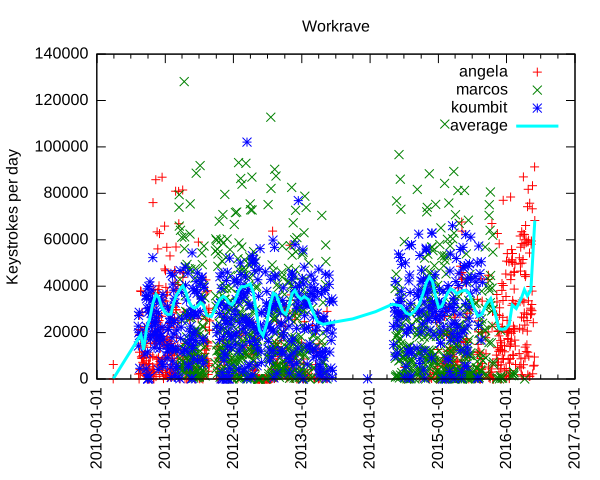
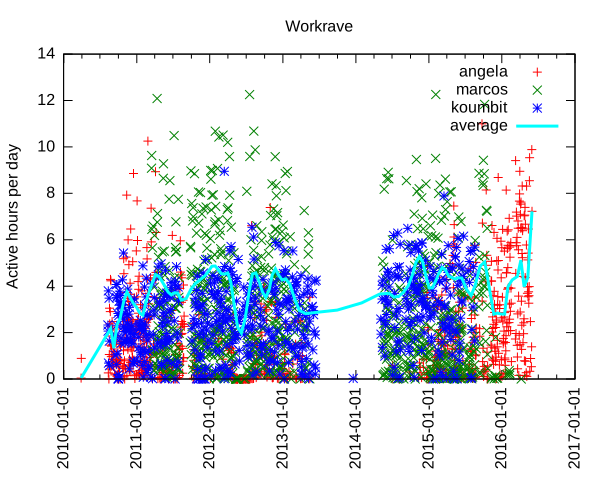
Analyzing data input In the past, I have used Workrave to document how I work too much on the computer, but never went through more serious processing of the vast data store that Workrave accumulates about mouse movements and keystrokes. Interested in knowing how much my leave from Koumbit affected time spent on the computer, I decided to look into this again. It turns out I am working as much, if not more, on the computer since I took that "time off": per machine keystrokes per day and average We can see here that I type a lot on the computer. Normal days range from 10 000 to 60 000 keystrokes, with extremes at around 100 000 keystrokes per day. The average seem to fluctuate around 30 to 40 000 keystrokes per day, but rises sharply around the end of the second quarter of this very year. For those unfamiliar with the underlying technology, one keystroke is roughly one byte I put on the computer. So the average of 40 000 keystrokes is 40 kilobyte (KB) per day on the computer. That means 15 MB over a year or about 150MB (or 100 MiB if you want to be picky about it) over the course of the last decade. That is a lot of typing. I originally thought this could have been only because I type more now, as opposed to use more the mouse previously. Unfortunately, Workrave also tracks general "active time" which we can also examine: per machine keystrokes per day and average Here we see that I work around 4 hours a day continuously on the computer. That is active time: not just login, logout time. In other words, the time where i look away from the computer and think for a while, jot down notes in my paper agenda or otherwise step away from the computer for small breaks is not counted here. Notice how some days go up to 12 hours and how recently the average went up to 7 hours of continuous activity. So we can clearly see that I basically work more on the computer now than I ever did in the last 7 years. This is a problem - one of the reasons of this time off was to step away from the computer, and it seems I have failed.
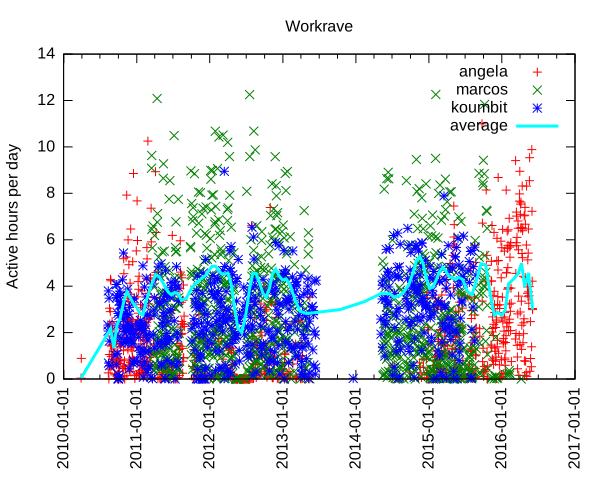
Update: it turns out the graph was skewed towards the last samples. I went more easy on the keyboard in the last few days and things have significantly improved: per machine keystrokes per day and average, 3 days later
Another interesting thing we can see is when I switched from using my laptop to using the server as my main workstation, around early 2011, which is about the time marcos was built. Now that marcos has been turned into a home cinema downstairs, I went back to using my laptop as my main computing device, in late 2015. We can also clearly see when I stopped using Koumbit machines near the end of 2015 as well.

Further improvements and struggle for meaning The details of how the graph was produced are explained at the end of this article. This is all quite clunky: it doesn't help that the Workrave data structure is not easily parsable and so easily corruptible. It would be best if each data point was on its own separate line, which would be long, granted, but so easier to parse. Furthermore, I do not like the perl/awk/gnuplot data processing pipeline much. It doesn't allow me to do interesting analysis like averages, means and linear regressions easily. It could be interesting to rewrite the tools in Python to allow better graphs and easier data analysis, using the tools I learned in 2015-09-28-fun-with-batteries. Finally, this looks only at keystrokes and non-idle activity. It could be more interesting to look at idle/active times and generally the amount of time spent on the computer each day. And while it is interesting to know that I basically write a small book on the computer every day (according to Wikipedia, 120KB is about the size of a small pocket book), it is mostly meaningless if all that stuff is machine-readable code. Where is, after all, the meaning in all those shell commands and programs we constantly input on our keyboards, in the grand scheme of human existence? Most of those bytes are bound to be destroyed by garbage collection (my shell's history) or catastrophic backup failures.
While the creative works from the 16th century can still be accessed and used by others, the data in some software programs from the 1990s is already inaccessible. - Lawrence Lessig
But is my shell history relevant? Looking back at old posts on this blog, one has to wonder if the battery life of the Thinkpad 380z laptop or how much e-waste I threw away in 2005 will be of any historical value in 20 years, assuming the data survives that long.

How this graph was made I was happy to find that Workrave has some contrib scripts to do such processing. Unfortunately, those scripts are not shipped with the Debian package, so I requested that to be fixed (#825982). There were also some fixes necessary to make the script work at all: first, there was a syntax error in the Perl script. But then since my data is so old, there was bound to be some data corruption in there: incomplete entries or just plain broken data. I had lines that were all NULL characters, typical of power failures or disk corruptions. So I have made a patch to fix that script (#826021). But this wasn't enough: while this processes data on the current machine fine, it doesn't deal with multiple machines very well. In the last 7 years of data I could find, I was using 3 different machines: this server (marcos), my laptop (angela) and Koumbit's office servers (koumbit). I ended up modifying the contrib scripts to be able to collate that data meaningfully. First, I copied over the data from Koumbit in a local fake-koumbit directory. Second, I mounted marcos home directory locally with SSHFS:
sshfs anarc.at:/home/anarcat marcos
I also made this script to sum up datasets:
#!/usr/bin/perl -w
use List::MoreUtils 'pairwise';
$  = 1;
my %data = ();
while (<>)  
    my @fields = split;
    my $date = shift @fields;
    if (defined($data $date ))  
        my @t = pairwise   $a + $b   @ $data $date , @fields;
        $data $date  = \@t;
     
    else  
        $data $date  = \@fields;
     
 
foreach my $d ( sort keys %data )  
    print "$d @ $data $d \n";
 
Then I made a modified version of the Gnuplot script that processes all those files together:
#!/usr/bin/gnuplot
set title "Workrave"
set ylabel "Keystrokes per day"
set timefmt "%Y%m%d%H%M"
#set xrange [450000000:*]
set format x "%Y-%m-%d"
set xtics rotate
set xdata time
set terminal svg
set output "workrave.svg"
plot "workrave-angela.dat" using 1:28 title "angela", \
     "workrave-marcos.dat" using 1:28 title "marcos", \
     "workrave-koumbit.dat" using 1:28 title "koumbit", \
     "workrave-sum.dat" using 1:2 smooth sbezier linewidth 3 title "average"
#plot "workrave-angela.dat" using 1:28 smooth sbezier title "angela", \
#     "workrave-marcos.dat" using 1:28 smooth sbezier title "marcos", \
#     "workrave-koumbit.dat" using 1:28 smooth sbezier title "koumbit"
And finally, I made a small shell script to glue this all together:
#!/bin/sh
perl workrave-dump > workrave-$(hostname).dat
HOME=$HOME/marcos perl workrave-dump > workrave-marcos.dat
HOME=$PWD/fake-koumbit perl workrave-dump > workrave-koumbit.dat
# remove idle days as they skew the average
sed -i '/ 0$/d' workrave-*.dat
# per-day granularity
sed -i 's/^\(........\)....\? /\1 /' workrave-*.dat
# sum up all graphs
cat workrave-*.dat   sort   perl sum.pl > workrave.dat
./gnuplot-workrave-anarcat
I used a different gnuplot script to generate the activity graph:
#!/usr/bin/gnuplot
set title "Workrave"
set ylabel "Active hours per day"
set timefmt "%Y%m%d%H%M"
#set xrange [450000000:*]
set format x "%Y-%m-%d"
set xtics rotate
set xdata time
set terminal svg
set output "workrave.svg"
plot "workrave-angela.dat"  using 1:($23/3600) title "angela", \
     "workrave-marcos.dat"  using 1:($23/3600) title "marcos", \
     "workrave-koumbit.dat" using 1:($23/3600) title "koumbit", \
     "workrave.dat"         using 1:($23/3600) title "average" smooth sbezier linewidth 3
#plot "workrave-angela.dat" using 1:28 smooth sbezier title "angela", \
#     "workrave-marcos.dat" using 1:28 smooth sbezier title "marcos", \
#     "workrave-koumbit.dat" using 1:28 smooth sbezier title "koumbit"

Keerthana Krishnan: Dealing with the Light Blue Screen Of Doom

Hi! With my third consecutive post of the day, I d like to speak about the login error usually seen on Gnome desktops, aka : Light Blue Screen of Doom . As far as I know, this bug is associated with Gnome and is usually because of faulty installation of gnome files and it was something that tormented me endlessly last week when I tried to install Debian 8 (Jessie) Unfortunately, I never really fixed it myself. What started off as a problem with gnome quickly snowballed into something else that wiped my routing table, making sure I couldn t even update the corrupted files properly. Although I came across a lot of bug reports in my quest to solve it, I never really found a solution.
Reinstallation seems to be only option left here, but there are a few checks you can make
  1. Call the terminal. Use Ctrl+Alt+F2, you should be able to get your command line.
  2. Login as root. This is extreme troubleshooting. You need root
  3. Check and see if startx works. (Yay! problem solved if it does!)
  4. Try to see if the basic gnome packages are installed type apt-get install with basic gnome packages like gnome-desktop-environment, gdm, gnome, etc.. to see if they are installed. If not, try to install them and then run the startx command.
  5. If you can t install them, or if they are already installed, try running the updating the system

    apt-get update
    apt-get upgrade
    apt-get dist-upgrade //If OS is at newest version
  6. If updating doesn t work and gives Failed to Fetch errors for all the source links, try pinging the network to make sure you have a connection.

    ping google.com
    ping 8.8.8.8
  7. If you do have a connection, verify the sources :

    nano /etc/apt/sources.list
    deb http://ftp.us.debian.org/debian jessie main contrib non-free
    #deb-src http://ftp.us.debian.org/debian jessie main contrib non-free
    deb http://security.debian.org/ jessie/updates main contrib non-free
    #deb-src http://security.debian.org/ jessie/updates main contrib non-free
    deb http://ftp.us.debian.org/debian testing main contrib non-free
    #deb-src http://ftp.us.debian.org/debian testing main contrib non-free
    deb http://security.debian.org/ testing/updates main contrib non-free
    #deb-src http://security.debian.org/ testing/updates main contrib non-free
  8. If you have no connection, check your routing table with the command netstat -nr . If this routing table is completely empty, then I ve got some bad news for you. Reinstallation is your new friend. Try and see if you can copy your files using command line. cp and ls are basically your new best friends.
Here s a guide to help change your OS. Hopefully, everything works out and you re back to working in no time!

30 May 2016

Daniel Stender: My work for Debian in May

No double posting this time ;-) I've got not so much spare time this month to spend on Debian, but I could work on the following packages: This series of blog postings also includes little introductions of and into new packages in the archive. This month there is: Pyinfra Pyinfra is a new project which is currently still in development state. It has been already pointed out in an interesting German article1, and is now available as package maintained within the Python Applications Team. It's currently a one man production by Nick Barrett, and eagerly developed in the past weeks (we're currently at 0.1~dev24). Pyinfra is a remote server configuration/provisioning/service deployment tool which belongs in the same software category like Puppet or Ansible2. It's for provisioning one or an array of remote servers with software packages and to configure them. Pyinfra runs agentless like Ansible, that means for using it nothing special (like a daemon) has to run on targeted servers. It's written to be used for provisioning POSIX compatible Linux systems and has alternatives when it comes to special features like package managers (e.g. supports apt as well as yum). The documentation could be found in usr/share/doc/pyinfra/html/. Here's a little crash course on how to use Pyinfra: The pyinfra CLI tool is used on the command line like this, deploy scripts, single operations or facts (see below) could be used on a single server or a multitude of remote servers:
$ pyinfra -i <inventory script/single host> <deploy script>
$ pyinfra -i <inventory script/single host> --run <operation>
$ pyinfra -i <inventory script/single host> --facts <fact>
Remote servers which are operated on must provide a working shell and they must be reachable by SSH. For connecting, --port, --user, --password, --key/--key-password and --sudo flags are available, --sudo to gain superuser rights. Root access or sudo rights of course have to be already set up. By the way, localhost could be operated on the same way. Single operations are organized in modules like "apt", "files", "init", "server" etc. With the --run option they could be used individually on servers like follows, e.g. server.user adds a new user on a single targeted system (-v adds verbosity to the pyinfra run):
$ pyinfra -i 192.0.2.10 --run server.user sam --user root --key ~/.ssh/sshkey --key-password 123456 -v
Multiple servers can be grouped in inventories, which hold the targeted hosts and data associated with them, like e.g. an inventory file farm1.py would contain lists like this:
COMPUTE_SERVERS = ['192.0.2.10', '192.0.2.11']
DATABASE_SERVERS = ['192.0.2.20', '192.0.2.21']
Group designators must be all caps. A higher level of grouping are the file names of inventory scripts, thus COMPUTE_SERVERS and DATABASE_SERVERS can be referenced to at the same time by the group designator farm1. Plus, all servers are automatically added to the group all. And, inventory scripts should be stored in the subfolder inventory/ in the project directory. Inventory files then could be used instead of specific IP addresses like this, the single operation then gets performed on all given machines in farm1.py:
$ pyinfra -i inventory/farm1.py  --run server.user sam --user root --key ~/.ssh/sshkey --key-password=123456 -v
Deployment scripts could be used together with group data files in the subfolder group_data/ in the project directory. For example, a group_data/farm1.py designates all servers given in inventory/farm1.py (by the way, all.py designates all servers), and contains the random attribute user_name (attributes must be lowercase), next to authentication data for the whole inventory group:
user_name = 'sam'
ssh_user = 'root'
ssh_key = '~/.ssh/sshkey'
ssh_key_password = '123456'
The random attribute can be picked up by a deployment script using host.data() like follows, user_name could be used again for e.g. server.user(), like this:
from pyinfra import host
from pyinfra.modules import server
server.user(host.data.user_name)
This deploy, the ensemble of inventory file, group data file and deployment script (usually placed top level in the project folder) then could be run that way:
$ pyinfra -i inventory/farm1.py deploy.py
You have guessed it, since deployment scripts are Python scripts they are fully programmable (please regard that Pyinfra is build & runs on Python 3 on Debian), and that's the main advantage point with this piece of software. Quite handy for that come Pyinfra facts, functions which check different things on remote systems and return information as Python data. Like e.g. deb_packages returns a dictionary of installed packages from a remote apt based server:
$ pyinfra -i 192.0.2.10 --fact deb_packages --user root --key ~/.ssh/sshkey --key-password=123456
 
    "192.0.2.10":  
        "libdebconfclient0": "0.192",
        "python-debian": "0.1.27",
        "libavahi-client3": "0.6.31-5",
        "dbus": "1.8.20-0+deb8u1",
        "libustr-1.0-1": "1.0.4-3+b2",
        "sed": "4.2.2-4+b1",
Using facts, Pyinfra reveals its full potential. For example, a deployment script could go like this, linux.distribution() returns a dict containing the installed distribution:
from pyinfra import host
from pyinfra.modules import apt
if host.fact.linux_distribution['name'] == 'Debian':
   apt.packages(packages='gummi', present=True, update=True)
elif host.fact.linux_distribution['name'] == 'CentOS':
   pass
I'll spare more sophisticated examples to keep this introduction simple. Beyond fancy deployment scripts, Pyinfra features an own API by which it could be programmed from the outside, and much more. But maybe that's enough to introduce Pyinfra. That are the usage basics. Pyinfra is a brand new project and it remains to be seen whether the developer can keep on further developing the tool like he does these days. For a private project it's insane to attempt to become a contender for the established "big" free configuration management tools and frameworks, but, if Puppet has become too complex in the meanwhile or not3, I really don't think that's the point here. Pyinfra follows an own approach in being programmable the way which it is. And it's definitely not harm to have it in the toolbox already, not trying to replace nothing. Brainstorm After the first package has been in experimental, the Brainstorm library from Swiss AI research institute IDSIA4 is now available as python3-brainstorm in unstable. Brainstorm is a lean, easy-to-use library for setting up deep learning networks (multiple layered artificial neural networks) for machine learning applications like for image and speech recognition or natural language processing. To set up a working training network for a classifier for handwritten digits like the MNIST dataset (a usual "hello world") just takes a couple of lines, like an example demonstrates. The package is maintained within the Debian Python Modules Team. The Debian package ships a couple of examples in /usr/share/python3-brainstorm/examples (the data/ and examples/ folders of the upstream tarball are combined here). Among them there are5: The current documentation in /usr/share/doc/python3-brainstorm/html/ isn't complete yet (several chapters are under construction), but there's a walkthrough on the CIFAR-10 example. The MNIST example has been extended by Github user pinae, and has been explained in German C't recently6. What are the perspectives for further development? Like Zhou Mo confirmed, there are a couple of deep learning frameworks around having a rather poor outlook since there have been abandoned after being completed as PhD projects. There's really no point for thriving to have them all in Debian, like the ITP of Minerva has been given up partly for this reason, there weren't any commits since 08/2015 (and because cuDNN isn't available and most likely won't). Brainstorm, 0.5 have been released 05/2015, also was a PhD project as IDSIA. It's stated on Github that the project is "under active development", but the rather sparse project page on the other side expresses the "hope the community will help us to further improve Brainstorm". This sentence much often implies that the developers are not actively working on the project. But there are recent commits and it looks that upstream is active and could be reached when there are problems, and that the project is active. So I don't think we're riding a dead horse, here. The downside for Brainstorm in Debian is, it seems that the libraries which are needed for GPU accelerated processing can't be fully provided. Pycuda is available, but scikit-cuda (an additional library which provides wrappers for CUDA features like CUBLAS, CUFFT and CUSOLVER) is not and won't be, because the CULA Dense Toolkit (scikit-cuda also contains wrappers for also that) is not available freely as source. Because of that, a dependency against pycuda, not even as Suggests (it's non-free), has been spared. Without GPU acceleration, Brainstorm computes the matrices on openBLAS using a Cython wrapper on the NumpyHandler, and the PyCudaHandler couldn't be used. openBLAS makes pretty good use of the available hardware (it distributes over all available CPU cores), but it's not yet possible to run Brainstorm full throttle using available floating point devices to reduce training times, which becomes crucial when the projects are getting bigger. Brainstorm belongs to the number of deep learning frameworks already being or becoming available in Debian. Currently there is: I've checked over Microsoft's CNTK, but although it's also set free recently I have my doubts if that could be included. Apparently there are dependencies against non-free software and most likely other issues. So much for a little update on the state of deep learning in Debian, please excuse if my radar misses something.

  1. Tim Sch rmann: "Schlangen l: Automatisiertes Service-Deployment mit Pyinfra". In: IT-Administrator 05/2016, pp. 90-95.
  2. For a comparison of configuration management software like this, see B wetter/Johannsen/Steig: "Baukastensysteme: Konfigurationsmanagement mit Open-Source-Software". In: iX 04/2016, pp. 94-99 (please excuse the prevalence of German articles in the pointers, I've just have them at hand).
  3. On the points of critique on Puppet, see Martin Loschwitz: "David gegen Goliath Zwei Welten treffen aufeinander: Puppet und Ansible". In Linux-Magazin 01/2016, 50-54.
  4. See the interview with IDSIA's deep learning guru J rgen Schmidhuber in German C't 2014/09, p. 148
  5. The examples scripts need some more finetuning. To run the data creation scripts in place the environment variable BRAINSTORM_DATA_DIR could be set, but the trained networks are currently tried to write in place. So please copy the scripts into some workspace if you want to try them out. I'll patch the example scripts to run out-of-the-box, soon.
  6. Johannes Merkert: "Ziffernlerner. Ein k nstliches neuronales Netz selber gebaut". In: C't 2016/06, p. 142-147. Web: http://www.heise.de/ct/ausgabe/2016-6-Ein-kuenstliches-neuronales-Netz-selbst-gebaut-3118857.html.
  7. See Ramon Wartala: "Tiefensch rfe: Deep learning mit NVIDIAs Jetson-TX1-Board und dem Caffe-Framework". In: iX 06/2016, pp. 100-103
  8. https://lists.debian.org/debian-science/2016/03/msg00016.html

Next.

Previous.