Search Results: "cas"

23 May 2017

Dirk Eddelbuettel: Rcpp 0.12.11: Loads of goodies

The elevent update in the 0.12.* series of Rcpp landed on CRAN yesterday following the initial upload on the weekend, and the Debian package and Windows binaries should follow as usual. The 0.12.11 release follows the 0.12.0 release from late July, the 0.12.1 release in September, the 0.12.2 release in November, the 0.12.3 release in January, the 0.12.4 release in March, the 0.12.5 release in May, the 0.12.6 release in July, the 0.12.7 release in September, the 0.12.8 release in November, the 0.12.9 release in January, and the 0.12.10.release in March --- making it the fifteenth release at the steady and predictable bi-montly release frequency. Rcpp has become the most popular way of enhancing GNU R with C or C++ code. As of today, 1026 packages on CRAN depend on Rcpp for making analytical code go faster and further, along with another 91 in BioConductor. This releases follows on the heels of R's 3.4.0 release and addresses on or two issues from the transition, along with a literal boatload of other fixes and enhancements. James "coatless" Balamuta was once restless in making the documentation better, Kirill Mueller addressed a number of more obscure compiler warnings (triggered under under -Wextra and the like), Jim Hester improved excecption handling, and much more mostly by the Rcpp Core team. All changes are listed below in some detail. One big change that JJ made is that Rcpp Attributes also generate the now-almost-required package registration. (For background, I blogged about this one, two, three times.) We tested this, and do not expect it to throw curveballs. If you have an existing src/init.c, or if you do not have registration set in your NAMESPACE. It should cover most cases. But one never knows, and one first post-release buglet related to how devtools tests things has already been fixed in this PR by JJ.

Changes in Rcpp version 0.12.11 (2017-05-20)
  • Changes in Rcpp API:
    • Rcpp::exceptions can now be constructed without a call stack (Jim Hester in #663 addressing #664).
    • Somewhat spurious compiler messages under very verbose settings are now suppressed (Kirill Mueller in #670, #671, #672, #687, #688, #691).
    • Refreshed the included tinyformat template library (James Balamuta in #674 addressing #673).
    • Added printf-like syntax support for exception classes and variadic templating for Rcpp::stop and Rcpp::warning (James Balamuta in #676).
    • Exception messages have been rewritten to provide additional information. (James Balamuta in #676 and #677 addressing #184).
    • One more instance of Rf_mkString is protected from garbage collection (Dirk in #686 addressing #685).
    • Two exception specification that are no longer tolerated by g++-7.1 or later were removed (Dirk in #690 addressing #689)
  • Changes in Rcpp Documentation:
  • Changes in Rcpp Sugar:
    • Added sugar function trimws (Nathan Russell in #680 addressing #679).
  • Changes in Rcpp Attributes:
    • Automatically generate native routine registrations (JJ in #694)
    • The plugins for C++11, C++14, C++17 now set the values R 3.4.0 or later expects; a plugin for C++98 was added (Dirk in #684 addressing #683).
  • Changes in Rcpp support functions:
    • The Rcpp.package.skeleton() function now creates a package registration file provided R 3.4.0 or later is used (Dirk in #692)

Thanks to CRANberries, you can also look at a diff to the previous release. As always, even fuller details are on the Rcpp Changelog page and the Rcpp page which also leads to the downloads page, the browseable doxygen docs and zip files of doxygen output for the standard formats. A local directory has source and documentation too. Questions, comments etc should go to the rcpp-devel mailing list off the R-Forge page.

This post by Dirk Eddelbuettel originated on his Thinking inside the box blog. Please report excessive re-aggregation in third-party for-profit settings.

Reproducible builds folks: Reproducible Builds: week 108 in Stretch cycle

Here's what happened in the Reproducible Builds effort between Sunday May 14 and Saturday May 20 2017: News and Media coverage IRC meeting Our next IRC meeting has been scheduled for Thursday June 1 at 16:00 UTC. Packages reviewed and fixed, bugs filed, etc. Bernhard M. Wiedemann: Chris Lamb: Reviews of unreproducible packages 35 package reviews have been added, 28 have been updated and 12 have been removed in this week, adding to our knowledge about identified issues. 2 issue types have been added: diffoscope development strip-nondeterminism development tests.reproducible-builds.org Holger wrote a new systemd-based scheduling system replacing 162 constantly running Jenkins jobs which were slowing down job execution in general: Misc. This week's edition was written by Chris Lamb, Holver Levsen, Bernhard M. Wiedemann, Vagrant Cascadian and Maria Glukhova & reviewed by a bunch of Reproducible Builds folks on IRC & the mailing lists.

22 May 2017

Michal Čihař: HackerOne experience with Weblate

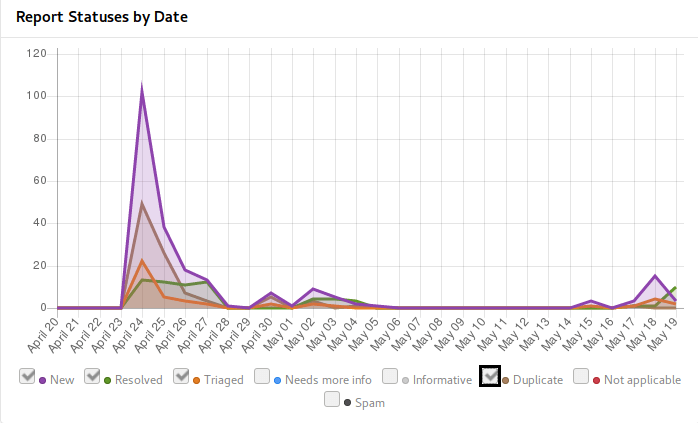
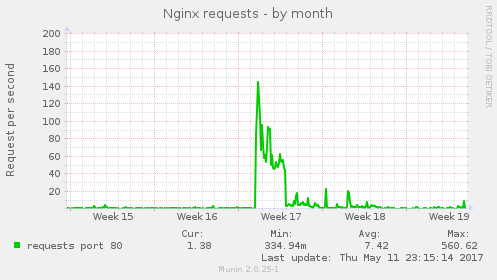
Weblate has started to use HackerOne Community Edition some time ago and I think it's good to share my experience with that. Do you have open source project and want to get more attention of security community? This post will answer how it looks from perspective of pretty small project. I've applied with Weblate to HackerOne Community Edition by end of March and it was approved early in April. Based on their recommendations I've started in invite only mode, but that really didn't bring much attention (exactly none reports), so I've decided to go public. I've asked for making the project public just after coming from two weeks vacation, while expecting the approval to take some time where I'll settle down things which have popped up during vacation. In the end that was approved within single day, so I was immediately under fire of incoming reports: Reports on HackerOne I was surprised that they didn't lie - you will really get huge amount of issues just after making your project public. Most of them were quite simple and repeating (as you can see from number of duplicates), but it really provided valuable input. Even more surprisingly there was second peak coming in when I've started to disclose resolved issues (once Weblate 2.14 has been released). Overall the issues could be divided to few groups: In the end it was really challenging week to be able to cope with the incoming reports, but I think I've managed it quite well. The HackerOne metrics states that there are 2 hours in average to respond on incoming incidents, what I think will not work in the long term :-). Anyway thanks to this, you can now enjoy Weblate 2.14 which more secure than any release before, if you have not yet upgraded, you might consider doing that now or look into our support offering for self hosted Weblate. The downside of this all was that the initial publishing on HackerOne made our website target of lot of automated tools and the web server was not really ready for that. I'm really sorry to all Hosted Weblate users who were affected by this. This has been also addressed now, but the infrastructure really should have been prepared before on this. To share how it looked like, here is number of requests to the nginx server: nxing requests I'm really glad I could make Weblate available on HackerOne as it will clearly improve it's security and security of hosted offering we have. I will certainly consider providing swag and/or bounties on further severe reports, but that won't be possible without enough funding for Weblate.

Filed under: Debian English SUSE Weblate

21 May 2017

Adnan Hodzic: Automagically deploy & run containerized WordPress (PHP7 FPM, Nginx, MariaDB) using Ansible + Docker on AWS

In this blog post, I ve described what started as simple migration of WordPress blog to AWS, ended up as automation project consisting of publishing multiple Ansible roles deploying and running multiple Docker images. If you re not interested in reading about my entire journey, cognition gains and how this process came to be, please skim down to Birth of: containerized-wordpress-project (TL;DR) section. Migrating WordPress blog to AWS (EC2, Lightsail?) Since I ve been sold on Amazon s AWS idea of cloud computing services for couple of years now. I ve wanted, and been trying to migrate this (WordPress) blog to AWS, but somehow it never worked out. Moving it to EC2 instance, with its own ELB volumes, AMI, EIP, Security Group it just seemed as an overkill. When AWS Lightsail was first released, it seemed that was an answer to all my problems. But it wasn t, disregarding its bit restrictive/dumbed down versions of original features. Living in Amsterdam, my main problem with it was that it was only available in a single US region. Regardless, I thought it had everything I needed for WordPress site, and as a new service, it had great potential. Its regional limitations were also good in a sense that they made me realize one important thing. And that s once I migrate my blog to AWS, I want to be able to seamlessly move/migrate it across different EC2 s and different regions once they were available. If done properly, it meant I could even have it moved across different clouds (I m talking to you Google Cloud). P.S: AWS Lightsail is now available in couple of different regions across Europe. Rollout which was almost smoothless. Fundamental problem of every migration is migration

Phase 1: Don t reinvent the wheel? When you have a WordPress site that s not self hosted. You want everything to work, but yet you really don t want to spend any time managing infrastructure it s on. And as soon as I started looking what could fit this criteria, I found that there were pre-configured, running out of box WordPress EC2 images available on AWS Marketplace, great! But when I took a look, although everything was running out of box, I wasn t happy with software stack it was all built on. Namely Ubuntu 14.04 and Apache, and all of the services were started using custom scripts. Yuck. With this setup, when it was time to upgrade (and it s already that time) you wouldn t be thinking about upgrade. You d only be thinking about another migration. Phase 2: What if I built everything myself? Installing and configuring everything manually, and then writing huge HowTo which I would follow when I needed to re-create whole stack was not an option. Same case with was scripting whole process, as overhead of changes that had to be tracked was too way too big. Being a huge Ansible fan, automating this step was a natural next step. I even found an awesome Ansible role which seemed like it s going to do everything I need. Except, I realized I needed to update all software that s deployed with it, and customize it since configuration it was deployed on wasn t as generic. So I forked it and got to work. But soon enough, I was knee deep in making and fiddling with various system changes. Something I was trying to get away in this case, and most importantly something I was trying to avoid when it was time for next update. Phase 3: Marriage made in heaven: Ansible + Docker + AWS Idea to have everything Dockerized was around from very start. However, it never made a lot of sense until I put Ansible into same picture. And it was at this point where my final idea and requirements become crystal clear. Use Ansible to configure and setup host ready for Docker ecosystem. Ecosystem consisting of multiple separate containers for each required service (WordPress + Nginx + MariaDB). Link them all together as a single service using Docker Compose. Idea was backed by thought to spend minimum to no time (and effort) on manual configuration of anything on the server. Level of attachment to this server was so low that I didn t even want to SSH to it. If there was something wrong, I could just nuke the whole thing and deploy code on a new healthy rolled out server with everything working out of box. After it was clear what needed to be done, I got to work.

Birth of: containerized-wordpress-project (TL;DR)

After a lot of work, end result is project which allows you to automagically deploy & run containerized WordPress instance which consists of 3 separate containers running:

Once run, containerized-wordpress playbook will guide you through interactive setup of all 3 containers, after which it will run all Ansible roles created for this project. End result is that host you have never even SSH-ed to will be fully configured and running containerized WordPress instace out of box.

Most importantly, this whole process will be completed in <= 5 minutes and doesn t require any Docker or Ansible knowledge! containerized-wordpress demo Console output of running containerized-wordpress Ansible Playbook: Console output of running "containerized-wordpress" Ansible Playbook

Accessing WordPress instance created from containerized-wordpress Ansible Playbook:

Accessing WordPress instance created from "containerized-wordpress" Ansible Playbook Did I end up migrating to AWS in the end? You bet. Thanks to efforts made in containerized-wordpress-project, I m happy to report my whole WordPress migration to AWS was completed in matter of minutes and that this blog is now running on Docker and on AWS! I hope this same project will help you take a leap in your migration. Happy hacking!

Elena 'valhalla' Grandi: Modern XMPP Server

Modern XMPP Server

I've published a new HOWTO on my website www.trueelena.org/computers/ho:

www.enricozini.org/blog/2017/d already wrote about the Why (and the What, Who and When), so I'll just quote his conclusion and move on to the How.

I now have an XMPP setup which has all the features of the recent fancy chat systems, and on top of that it runs, client and server, on Free Software, which can be audited, it is federated and I can self-host my own server in my own VPS if I want to, with packages supported in Debian.


How

I've decided to install prosody.im/, mostly because it was recommended by the RTC QuickStart Guide rtcquickstart.org/; I've heard that similar results can be reached with www.ejabberd.im/ and other servers.

I'm also targeting www.debian.org/ stable (+ backports); as I write this is jessie; if there are significant differences I will update this article when I will upgrade my server to stretch. Right now, this means that I'm using prosody 0.9 (and that's probably also the version that will be available in stretch).

Installation and prerequisites

You will need to enable the backports.debian.org/ repository and then install the packages prosody and prosody-modules.

You also need to setup some TLS certificates (I used Let's Encrypt letsencrypt.org/); and make them readable by the prosody user; you can see Chapter 12 of the RTC QuickStart Guide rtcquickstart.org/guide/multi/ for more details.

On your firewall, you'll need to open the following TCP ports:


The latter two are needed to enable some services provided via http(s), including rich media transfers.

With just a handful of users, I didn't bother to configure LDAP or anything else, but just created users manually via:

prosodyctl adduser alice@example.org

In-band registration is disabled by default (and I've left it that way, to prevent my server from being used to send spim en.wikipedia.org/wiki/Messagin).

prosody configuration

You can then start configuring prosody by editing /etc/prosody/prosody.cfg.lua and changing a few values from the distribution defaults.

First of all, enforce the use of encryption and certificate checking both for client2server and server2server communications with:


c2s_require_encryption = true
s2s_secure_auth = true


and then, sadly, add to the whitelist any server that you want to talk to and doesn't support the above:


s2s_insecure_domains = "gmail.com"


virtualhosts

For each virtualhost you want to configure, create a file /etc/prosody/conf.avail/chat.example.org.cfg.lua with contents like the following:


VirtualHost "chat.example.org"
enabled = true
ssl =
key = "/etc/ssl/private/example.org-key.pem";
certificate = "/etc/ssl/public/example.org.pem";


For the domains where you also want to enable MUCs, add the follwing lines:


Component "conference.chat.example.org" "muc"
restrict_room_creation = "local"


the "local" configures prosody so that only local users are allowed to create new rooms (but then everybody can join them, if the room administrator allows it): this may help reduce unwanted usages of your server by random people.

You can also add the following line to enable rich media transfers via http uploads (XEP-0363):


Component "upload.chat.example.org" "http_upload"

The defaults are pretty sane, but see modules.prosody.im/mod_http_up for details on what knobs you can configure for this module

Don't forget to enable the virtualhost by linking the file inside /etc/prosody/conf.d/.

additional modules

Most of the other interesting XEPs are enabled by loading additional modules inside /etc/prosody/prosody.cfg.lua (under modules_enabled); to enable mod_something just add a line like:


"something";

Most of these come from the prosody-modules package (and thus from modules.prosody.im/ ) and some may require changing when prosody 0.10 will be available; when this is the case it is mentioned below.


@Gruppo Linux Como @LIFO

20 May 2017

Neil Williams: Software, service, data and freedom

Free software, free services but what about your data? I care a lot about free software, not only as a Debian Developer. The use of software as a service matters as well because my principle free software development is on just such a project, licensed under the GNU Affero General Public License version 3. The AGPL helps by allowing anyone who is suitably skilled to install their own copy of the software and run their own service on their own hardware. As a project, we are seeing increasing numbers of groups doing exactly this and these groups are actively contributing back to the project. So what is the problem? We've got an active project, an active community and everything is under a free software licence and regularly uploaded to Debian main. We have open code review with anonymous access to our own source code CI and anonymous access to project planning, open mailing list archives as well as an open bug tracker and a very active IRC channel (#linaro-lava on OFTC). We develop in the open, we respond in the open and we publish frequently (monthly, approximately). The code we write defaults to public visibilty at runtime with restrictions available for certain use cases. What else can we be doing? Well it was a simple question which started me thinking.
The lava documentation has various example test scripts e.g. https://validation.linaro.org/static/docs/v2/examples/test-jobs/qemu-kernel-standard-sid.yaml these have no licence information, we've adapted them for a Linux Foundation project, what licence should apply to these files? Robert Marshall
Those are our own examples, contributed as part of the documentation and covered by the AGPL like the rest of the documentation and the software which it documents, so I replied with the same. However, what about all the other submissions received by the service?
Data Freedom LAVA acts by providing a service to authenticated users. The software runs your test code on hardware which might not be available to the user or which is simply inconvenient for the test writer to setup themselves. The AGPL covers this nicely. What about the data contributed by the users? We make this available to other users who will, naturally, copy and paste for their own tests. In most cases, because the software defaults to public access, anonymous users also get to learn from the contributions of other test writers. This is a good thing and to be encouraged. (One reason why we moved to YAML for all submissions was to allow comments to help other users understand why the submission does specific things.) Writing a test job submission or a test shell definition from scratch is a non-trivial amount of work. We've written dozens of pages of documentation covering how and how not to do it but the detail of how a test job runs exactly what the test writer requires can involve substantial effort. (Our documentation recommends using version control for each of these works for exactly these reasons.) At what point do these works become software? At what point do these need licensing? How could that be declared?
Perils of the Javascript Trap approach When reading up on the AGPL, I also read about Service as a Software Substitute (SaaSS) and this led to The Javascript Trap. I don't consider LAVA to be SaaSS although it is Software as a Service (SaaS). (Distinguishing between those is best left to the GNU document as it is an almighty tangle at times.) I did look at the GNU ideas for licensing Javascript but it seems cumbersome and unnecessary - a protocol designed for the specific purposes of their own service rather than as a solution which could be readily adopted by all such services. The same problems affect trying to untangle sharing the test job data within LAVA.
Adding Licence text The traditional way, of course, is simply to add twenty lines or so of comments at the top of every file. This works nicely for source code because the comments are hidden from the final UI (unless an explicit reference is made in the --help output or similar). It is less nice for human readable submissions where the first thing someone has to do is scroll passed the comments to get to what they want to see. At that point, it starts to look like a popup or a nagging banner - blocking the requested content on a website to try and get the viewer to subscribe to a newsletter or pay for the rest of the content. Let's not actively annoy visitors who are trying to get things done.
Adding Licence files This can be done in the remote version control repository - then a single line in the submitted file can point at the licence. This is how I'm seeking to solve the problem of our own repositories. If the reference URL is included in the metadata of the test job submission, it can even be linked into the test job metadata and made available to everyone through the results API.
metadata:
  licence.text: http://mysite/lava/git/COPYING
  licence.name: BSD 3 clause
Metadata in LAVA test job submissions is free-form but if the example was adopted as a convention for LAVA submissions, it would make it easy for someone to query LAVA for the licences of a range of test submissions. Currently, LAVA does not store metadata from the test shell definitions except the URL of the git repo for the test shell definition but that may be enough in most cases for someone to find the relevant COPYING or LICENCE file.
Which licence? This could be a problem too. If users contribute data under unfriendly licences, what is LAVA to do? I've used the BSD 3 clause in the above example as I expect it to be the most commonly used licence for these contributions. A copyleft licence could be used, although doing so would require additional metadata in the submission to declare how to contribute back to the original author (because that is usually not a member of the LAVA project).
Why not Creative Commons? Although I'm referring to these contributions as data, these are not pieces of prose or images or audio. These are instructions (with comments) for a specific piece of software to execute on behalf of the user. As such, these objects must comply with the schema and syntax of the receiving service, so a code-based licence would seem correct.
Results Finally, a word about what comes back from your data submission - the results. This data cannot be restricted by any licence affecting either the submission or the software, it can be restricted using the API or left as the default of public access. If the results and the submission data really are private, then the solution is to take advantage of the AGPL, take the source code of LAVA and run it internally where the entire service can be placed within a firewall.
What happens next?
  1. Please consider editing your own LAVA test job submissions to add licence metadata.
  2. Please use comments in your own LAVA test job submissions, especially if you are using some form of template engine to generate the submission. This data will be used by others, it is easier for everyone if those users do not have to ask us or you about why your test job does what it does.
  3. Add a file to your own repositories containing LAVA test shell definitions to declare how these files can be shared freely.
  4. Think about other services to which you submit data which is either only partially machine generated or which is entirely human created. Is that data free-form or are you essentially asking the service to do a precise task on your behalf as if you were programming that server directly? (Jenkins is a classic example, closely related to LAVA.)
    • Think about how much developer time was required to create that submission and how the service publishes that submission in ways that allow others to copy and paste it into their own submissions.
    • Some of those submissions can easily end up in documentation or other published sources which will need to know about how to licence and distribute that data in a new format (i.e. modification.) Do you intend for that useful purpose to be defeated by releasing your data under All Rights Reserved?
Contact I don't enable comments on this blog but there are enough ways to contact me and the LAVA project in the body of this post, it really shouldn't be a problem for anyone to comment.

19 May 2017

Benjamin Mako Hill: Children s Perspectives on Critical Data Literacies

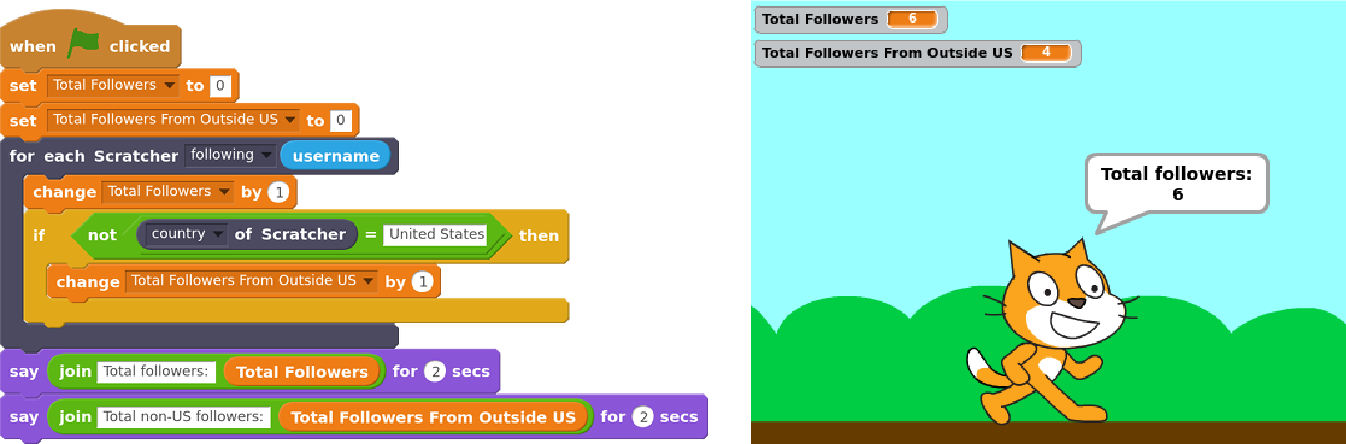
Last week, we presented a new paper that describes how children are thinking through some of the implications of new forms of data collection and analysis. The presentation was given at the ACM CHI conference in Denver last week and the paper is open access and online. Over the last couple years, we ve worked on a large project to support children in doing and not just learning about data science. We built a system, Scratch Community Blocks, that allows the 18 million users of the Scratch online community to write their own computer programs in Scratch of course to analyze data about their own learning and social interactions. An example of one of those programs to find how many of one s follower in Scratch are not from the United States is shown below. Last year, we deployed Scratch Community Blocks to 2,500 active Scratch users who, over a period of several months, used the system to create more than 1,600 projects. As children used the system, Samantha Hautea, a student in UW s Communication Leadership program, led a group of us in an online ethnography. We visited the projects children were creating and sharing. We followed the forums where users discussed the blocks. We read comment threads left on projects. We combined Samantha s detailed field notes with the text of comments and forum posts, with ethnographic interviews of several users, and with notes from two in-person workshops. We used a technique called grounded theory to analyze these data. What we found surprised us. We expected children to reflect on being challenged by and hopefully overcoming the technical parts of doing data science. Although we certainly saw this happen, what emerged much more strongly from our analysis was detailed discussion among children about the social implications of data collection and analysis. In our analysis, we grouped children s comments into five major themes that represented what we called critical data literacies. These literacies reflect things that children felt were important implications of social media data collection and analysis. First, children reflected on the way that programmatic access to data even data that was technically public introduced privacy concerns. One user described the ability to analyze data as, creepy , but at the same time, very cool. Children expressed concern that programmatic access to data could lead to stalking and suggested that the system should ask for permission. Second, children recognized that data analysis requires skepticism and interpretation. For example, Scratch Community Blocks introduced a bug where the block that returned data about followers included users with disabled accounts. One user, in an interview described to us how he managed to figure out the inconsistency:

At one point the follower blocks, it said I have slightly more followers than I do. And, that was kind of confusing when I was trying to make the project. [ ] I pulled up a second [browser] tab and compared the [data from Scratch Community Blocks and the data in my profile]. Third, children discussed the hidden assumptions and decisions that drive the construction of metrics. For example, the number of views received for each project in Scratch is counted using an algorithm that tries to minimize the impact of gaming the system (similar to, for example, Youtube). As children started to build programs with data, they started to uncover and speculate about the decisions behind metrics. For example, they guessed that the view count might only include unique views and that view counts may include users who do not have accounts on the website. Fourth, children building projects with Scratch Community Blocks realized that an algorithm driven by social data may cause certain users to be excluded. For example, a 13-year-old expressed concern that the system could be used to exclude users with few social connections saying:

I love these new Scratch Blocks! However I did notice that they could be used to exclude new Scratchers or Scratchers with not a lot of followers by using a code: like this:
when flag clicked
if then user s followers < 300
stop all.
I do not think this a big problem as it would be easy to remove this code but I did just want to bring this to your attention in case this not what you would want the blocks to be used for.
Fifth, children were concerned about the possibility that measurement might distort the Scratch community s values. While giving feedback on the new system, a user expressed concern that by making it easier to measure and compare followers, the system could elevate popularity over creativity, collaboration, and respect as a marker of success in Scratch.

I think this was a great idea! I am just a bit worried that people will make these projects and take it the wrong way, saying that followers are the most important thing in on Scratch. Kids conversations around Scratch Community Blocks are good news for educators who are starting to think about how to engage young learners in thinking critically about the implications of data. Although no kid using Scratch Community Blocks discussed each of the five literacies described above, the themes reflect starting points for educators designing ways to engage kids in thinking critically about data. Our work shows that if children are given opportunities to actively engage and build with social and behavioral data, they might not only learn how to do data analysis, but also reflect on its implications.

This blog-post and the work that it describes is a collaborative project by Samantha Hautea, Sayamindu Dasgupta, and Benjamin Mako Hill. We have also received support and feedback from members of the Scratch team at MIT (especially Mitch Resnick and Natalie Rusk), as well as from Hal Abelson from MIT CSAIL. Financial support came from the US National Science Foundation.

17 May 2017

Jamie McClelland: Late to the Raspberry Pi party

I finally bought my first raspberry pi to setup as a router and wifi access point. It wasn't easy. I first had to figure out what to buy. I think that was the hardest part. I ended up with: I already have a cable matters USB to ethernet device, which will provide the second ethernet connection so this device can actually work as a router. I studiously followed the directions to download the raspbian image and copy it to my micro sd card. I also touched a file on the boot partition called ssh so ssh would start automatically. Note: I first touched the ssh file on the root partition (sdb2) before realizing it belonged on the boot partition (sdb1). And, despite ambiguous directions found on the Internet, lowercase 'ssh' for the filename seems to do the trick. Then, I found the IP address with the help of NMAP (sudo nmap -sn 192.168.69.*) and tried to ssh in but alas...
Connection reset by 192.168.69.116 port 22
No dice. So, I re-mounted the sdb2 partition of the micro sd card and looked in var/log/auth.log and found:
May  5 19:23:00 raspberrypi sshd[760]: error: Could not load host key: /etc/ssh/ssh_host_ed25519_key
May  5 19:23:00 raspberrypi sshd[760]: fatal: No supported key exchange algorithms [preauth]
May  5 19:23:07 raspberrypi sshd[762]: error: key_load_public: invalid format
May  5 19:23:07 raspberrypi sshd[762]: error: Could not load host key: /etc/ssh/ssh_host_rsa_key
May  5 19:23:07 raspberrypi sshd[762]: error: key_load_public: invalid format
May  5 19:23:07 raspberrypi sshd[762]: error: Could not load host key: /etc/ssh/ssh_host_dsa_key
May  5 19:23:07 raspberrypi sshd[762]: error: key_load_public: invalid format
May  5 19:23:07 raspberrypi sshd[762]: error: Could not load host key: /etc/ssh/ssh_host_ecdsa_key
May  5 19:23:07 raspberrypi sshd[762]: error: key_load_public: invalid format
How did that happen? And wait a minute...
0 jamie@turkey:~$ ls -l /mnt/etc/ssh/ssh_host_ecdsa_key
-rw------- 1 root root 0 Apr 10 05:58 /mnt/etc/ssh/ssh_host_ecdsa_key
0 jamie@turkey:~$ date
Fri May  5 15:44:15 EDT 2017
0 jamie@turkey:~$
Are the keys embedded in the image? Isn't that wrong? I fixed with:
0 jamie@turkey:mnt$ sudo rm /mnt/etc/ssh/ssh_host_*
0 jamie@turkey:mnt$ sudo ssh-keygen -q -f /mnt/etc/ssh/ssh_host_rsa_key -N '' -t rsa
0 jamie@turkey:mnt$ sudo ssh-keygen -q -f /mnt/etc/ssh/ssh_host_dsa_key -N '' -t dsa
0 jamie@turkey:mnt$ sudo ssh-keygen -q -f /mnt/etc/ssh/ssh_host_ecdsa_key -N '' -t ecdsa
0 jamie@turkey:mnt$ sudo ssh-keygen -q -f /mnt/etc/ssh/ssh_host_ed25519_key -N '' -t ed25519
0 jamie@turkey:mnt$
NOTE: I just did a second installation and this didn't happen. Maybe something went wrong as I experiment with SSH vs ssh on the boot partition? Then I could ssh in. I removed the pi user account and added my ssh key to /root/.ssh/authorized_keys and put a new name "mondragon" in the /etc/hostname file. And... I upgraded to Debian stretch and rebooted. Then, I followed these instructions for fixing the wifi (replacing the firmware does still work for me). I plugged my cable matters USB/Ethernet adapter into the device so it would be recognized, but left it dis-connected. Next I started to configure the device to be a wifi access point using this excellend tutorial, but decided I wanted to setup my networks using systemd-networkd instead. Since /etc/network/interaces already had eth0 set to manual (because apparently it is controlled by dhcpcd instead), I didn't need any modifications there. However, I wanted to use the dhcp client built-in to systemd-networkd, so to prevent dhcpcd from obtaining an IP address, I purged dhcpcd:
apt-get purge dhcpcd5
I was planning to also use systemd-networkd to name the devices (using *.link files) but nothing I could do could convince systemd to rename them, so I gave up and added /etc/udev/rules.d/70-persistent-net.rules:
    SUBSYSTEM=="net", ACTION=="add", DRIVERS=="?*", ATTR address =="b8:27:eb:ce:b5:c3", ATTR dev_id =="0x0", ATTR type =="1", NAME:="wan"
    SUBSYSTEM=="net", ACTION=="add", DRIVERS=="?*", ATTR address =="a0:ce:c8:01:20:7d", ATTR dev_id =="0x0", ATTR type =="1", NAME:="lan"
    SUBSYSTEM=="net", ACTION=="add", DRIVERS=="?*", ATTR address =="b8:27:eb:9b:e0:96", ATTR dev_id =="0x0", ATTR type =="1", NAME:="wlan"
(If you are copying and pasting the mac addresses will have to change.) Then I added the following files:
root@mondragon:~# head /etc/systemd/network/*
==> /etc/systemd/network/50-lan.network <==
[Match]
Name=lan
[Network]
Address=192.168.69.1/24
==> /etc/systemd/network/55-wlan.network <==
[Match]
Name=wlan
[Network]
Address=10.0.69.1/24
==> /etc/systemd/network/60-wan.network <==
[Match]
Name=wan
[Network]
DHCP=v4
IPForward=yes
IPMasquerade=yes
root@mondragon:~#
Sadly, IPMasquerade doesn't seem to work either for some reason, so...
root@mondragon:~# cat /etc/systemd/system/masquerade.service 
[Unit]
Description=Start masquerading because Masquerade=yes not working in wan.network.
[Service]
Type=oneshot
ExecStart=/sbin/iptables -t nat -A POSTROUTING -o wan -j MASQUERADE
[Install]
WantedBy=network.target
root@mondragon:~#
And, systemd DHCPServer worked, but then it didn't and I couldn't figure out how to debug, so...
apt-get install dnsmasq
Followed by:
root@mondragon:~# cat /etc/dnsmasq.d/mondragon.conf 
# Don't provide DNS services (unbound does that).
port=0
interface=lan
interface=wlan
# Only provide dhcp services since systemd-networkd dhcpserver seems
# flakey.
dhcp-range=set:cable,192.168.69.100,192.168.69.150,255.255.255.0,4h
dhcp-option=tag:cable,option:dns-server,192.168.69.1
dhcp-option=tag:cable,option:router,192.168.69.1
dhcp-range=set:wifi,10.0.69.100,10.0.69.150,255.255.255.0,4h
dhcp-option=tag:wifi,option:dns-server,10.0.69.1
dhcp-option=tag:wifi,option:router,10.0.69.1
root@mondragon:~#
It would probably be simpler to have dnsmasq provide DNS service also, but I happen to like unbound:
apt-get install unbound
And...
root@mondragon:~# cat /etc/unbound/unbound.conf.d/server.conf 
server:
    interface: 127.0.0.1
    interface: 192.168.69.1
    interface: 10.0.69.1
    access-control: 192.168.69.0/24 allow
    access-control: 10.0.69.0/24 allow
    # We do query localhost for our stub zone: loc.cx
    do-not-query-localhost: no
    # Up this level when debugging.
    log-queries: no
    logfile: ""
    #verbosity: 1
    # Settings to work better with systemcd
    do-daemonize: no
    pidfile: ""
root@mondragon:~# 
Now on to the wifi access point.
apt-get install hostapd
And the configuration file:
root@mondragon:~# cat /etc/hostapd/hostapd.conf
# This is the name of the WiFi interface we configured above
interface=wlan
# Use the nl80211 driver with the brcmfmac driver
driver=nl80211
# This is the name of the network
ssid=peacock
# Use the 2.4GHz band
hw_mode=g
# Use channel 6
channel=6
# Enable 802.11n
ieee80211n=1
# Enable WMM
wmm_enabled=1
# Enable 40MHz channels with 20ns guard interval
ht_capab=[HT40][SHORT-GI-20][DSSS_CCK-40]
# Accept all MAC addresses
macaddr_acl=0
# Use WPA authentication
auth_algs=1
# Require clients to know the network name
ignore_broadcast_ssid=0
# Use WPA2
wpa=2
# Use a pre-shared key
wpa_key_mgmt=WPA-PSK
# The network passphrase
wpa_passphrase=xxxxxxxxxxxx
# Use AES, instead of TKIP
rsn_pairwise=CCMP
root@mondragon:~#
The hostapd package doesn't have a systemd start up file so I added one:
root@mondragon:~# cat /etc/systemd/system/hostapd.service 
[Unit]
Description=Hostapd IEEE 802.11 AP, IEEE 802.1X/WPA/WPA2/EAP/RADIUS Authenticator
Wants=network.target
Before=network.target
Before=network.service
[Service]
ExecStart=/usr/sbin/hostapd /etc/hostapd/hostapd.conf
[Install]
WantedBy=multi-user.target
root@mondragon:~#
My last step was to modify /etc/ssh/sshd_config so it only listens on the lan and wlan interfaces (listening on wlan is a bit of a risk, but also useful when mucking with the lan network settings to ensure I don't get locked out).

Dirk Eddelbuettel: Upcoming Rcpp Talks

Very excited about the next few weeks which will cover a number of R conferences, workshops or classes with talks, mostly around Rcpp and one notable exception: If you are near one those events, interested and able to register (for the events requiring registration), I would love to chat before or after.

16 May 2017

Daniel Pocock: Building an antenna and receiving ham and shortwave stations with SDR

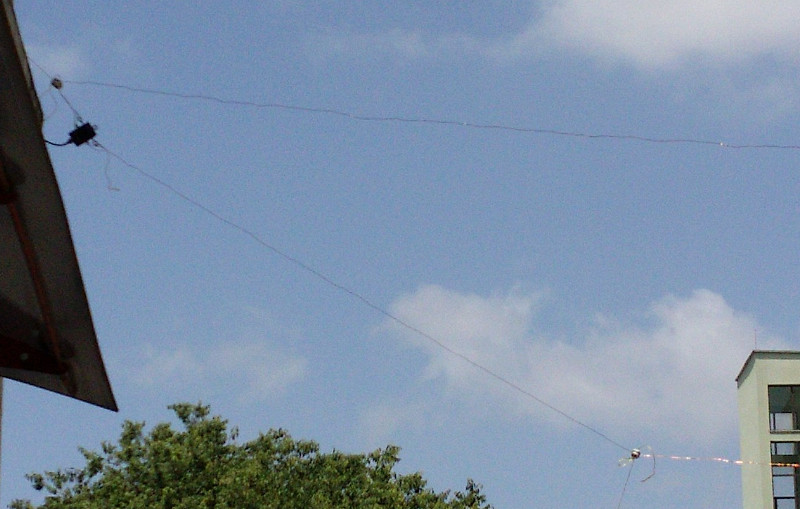
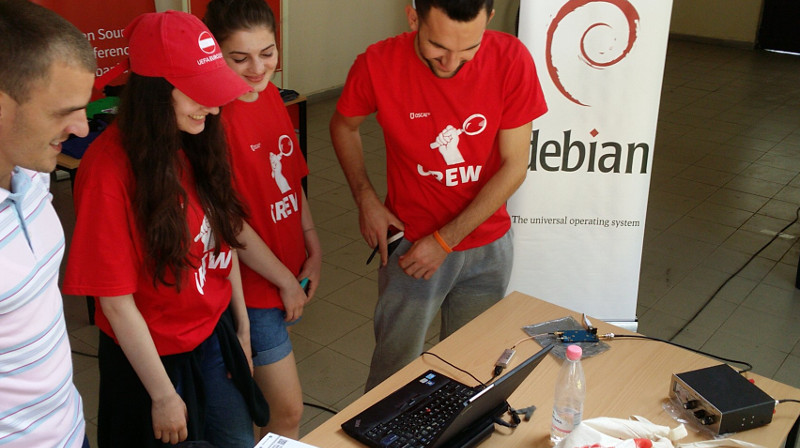
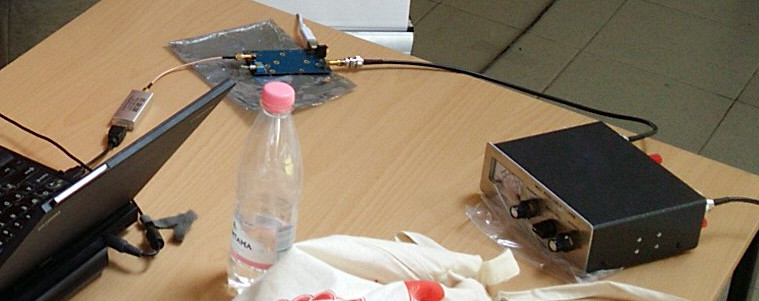
In my previous blog on the topic of software defined radio (SDR), I provided a quickstart guide to using gqrx, GNU Radio and the RTL-SDR dongle to receive FM radio and the amateur 2 meter (VHF) band. Using the same software configuration and the same RTL-SDR dongle, it is possible to add some extra components and receive ham radio and shortwave transmissions from around the world. Here is the antenna setup from the successful SDR workshop at OSCAL'17 on 13 May: After the workshop on Saturday, members of the OSCAL team successfully reconstructed the SDR and antenna at the Debian info booth on Sunday and a wide range of shortwave and ham signals were detected: Here is a close-up look at the laptop, RTL-SDR dongle (above laptop), Ham-It-Up converter (above water bottle) and MFJ-971 ATU (on right): Buying the parts
Component Purpose, Notes Price/link to source
RTL-SDR dongle Converts radio signals (RF) into digital signals for reception through the USB port. It is essential to buy the dongles for SDR with TCXO, the generic RTL dongles for TV reception are not stable enough for anything other than TV. ~ 25
Enamelled copper wire, 25 meters or more Loop antenna. Thicker wire provides better reception and is more suitable for transmitting (if you have a license) but it is heavier. The antenna I've demonstrated at recent events uses 1mm thick wire. ~ 10
4 (or more) ceramic egg insulators Attach the antenna to string or rope. Smaller insulators are better as they are lighter and less expensive. ~ 10
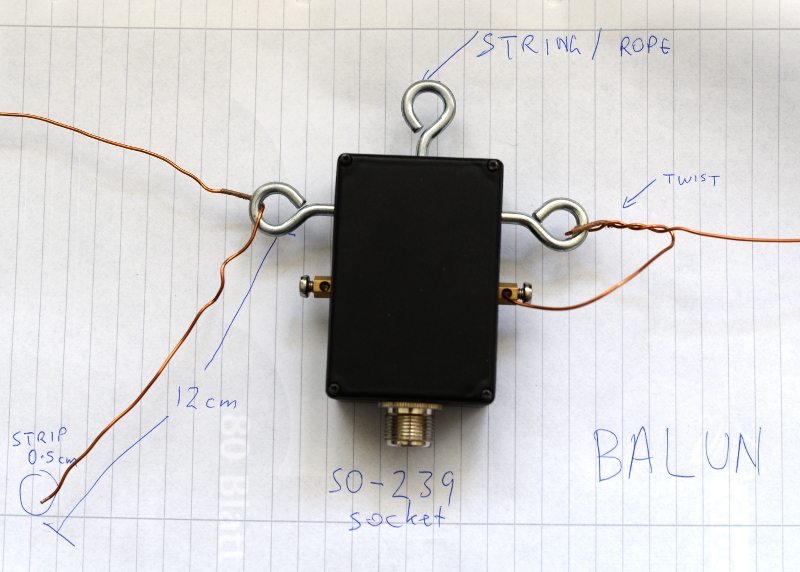
4:1 balun The actual ratio of the balun depends on the shape of the loop (square, rectangle or triangle) and the point where you attach the balun (middle, corner, etc). You may want to buy more than one balun, for example, a 4:1 balun and also a 1:1 balun to try alternative configurations. Make sure it is waterproof, has hooks for attaching a string or rope and an SO-239 socket. from 20
5 meter RG-58 coaxial cable with male PL-259 plugs on both ends If using more than 5 meters or if you want to use higher frequencies above 30MHz, use thicker, heavier and more expensive cables like RG-213. The cable must be 50 ohm. ~ 10
Antenna Tuning Unit (ATU) I've been using the MFJ-971 for portable use and demos because of the weight. There are even lighter and cheaper alternatives if you only need to receive. ~ 20 for receive only or second hand
PL-259 to SMA male pigtail, up to 50cm, RG58 Joins the ATU to the upconverter. Cable must be RG58 or another 50 ohm cable ~ 5
Ham It Up v1.3 up-converter Mixes the HF signal with a signal from a local oscillator to create a new signal in the spectrum covered by the RTL-SDR dongle ~ 40
SMA (male) to SMA (male) pigtail Join the up-converter to the RTL-SDR dongle ~ 2
USB charger and USB type B cable Used for power to the up-converter. A spare USB mobile phone charge plug may be suitable. ~ 5
String or rope For mounting the antenna. A ligher and cheaper string is better for portable use while a stronger and weather-resistent rope is better for a fixed installation. 5
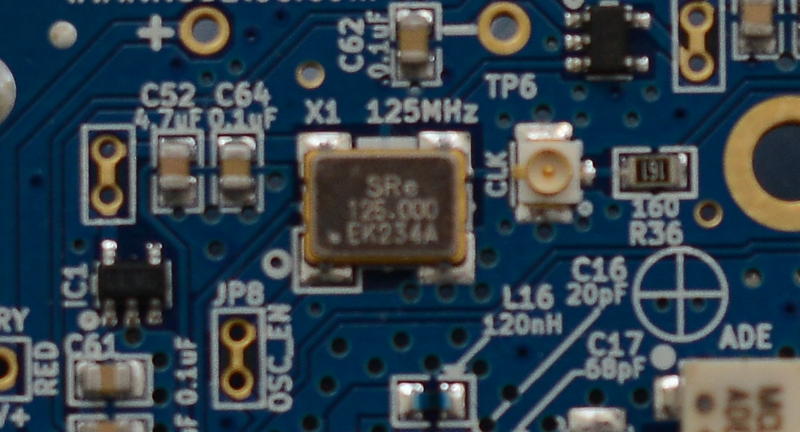
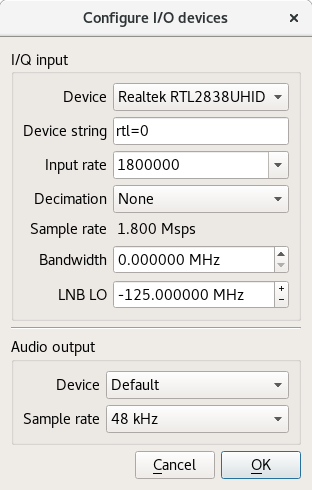
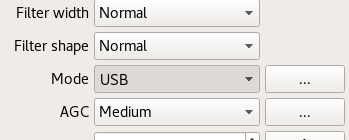
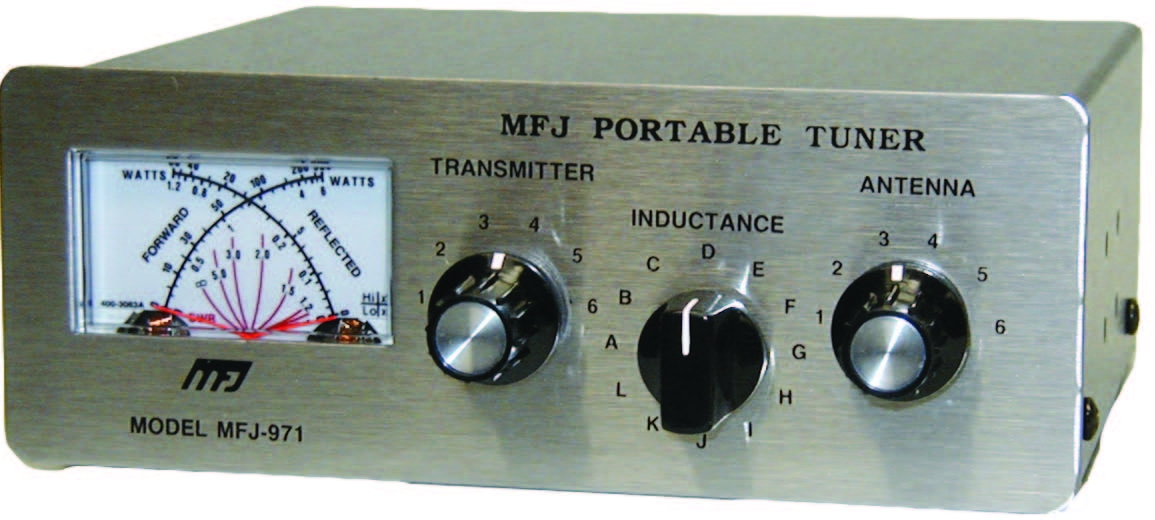
Building the antenna There are numerous online calculators for measuring the amount of enamelled copper wire to cut. For example, for a centre frequency of 14.2 MHz on the 20 meter amateur band, the antenna length is 21.336 meters. Add an extra 24 cm (extra 12 cm on each end) for folding the wire through the hooks on the balun. After cutting the wire, feed it through the egg insulators before attaching the wire to the balun. Measure the extra 12 cm at each end of the wire and wrap some tape around there to make it easy to identify in future. Fold it, insert it into the hook on the balun and twist it around itself. Use between four to six twists. Strip off approximately 0.5cm of the enamel on each end of the wire with a knife, sandpaper or some other tool. Insert the exposed ends of the wire into the screw terminals and screw it firmly into place. Avoid turning the screw too tightly or it may break or snap the wire. Insert string through the egg insulators and/or the middle hook on the balun and use the string to attach it to suitable support structures such as a building, posts or trees. Try to keep it at least two meters from any structure. Maximizing the surface area of the loop improves the performance: a circle is an ideal shape, but a square or 4:3 rectangle will work well too. For optimal performance, if you imagine the loop is on a two-dimensional plane, the first couple of meters of feedline leaving the antenna should be on the plane too and at a right angle to the edge of the antenna. Join all the other components together using the coaxial cables. Configuring gqrx for the up-converter and shortwave signals Inspect the up-converter carefully. Look for the crystal and find the frequency written on the side of it. The frequency written on the specification sheet or web site may be wrong so looking at the crystal itself is the best way to be certain. On my Ham It Up, I found a crystal with 125.000 written on it, this is 125 MHz. Launch gqrx, go to the File menu and select I/O devices. Change the LNB LO value to match the crystal frequency on the up-converter, with a minus sign. For my Ham It Up, I use the LNB LO value -125.000000 MHz. Click OK to close the I/O devices window. On the Input Controls tab, make sure Hardware AGC is enabled. On the Receiver options tab, change the Mode value. Commercial shortwave broadcasts use AM and amateur transmission use single sideband: by convention, LSB is used for signals below 10MHz and USB is used for signals above 10MHz. To start exploring the 20 meter amateur band around 14.2 MHz, for example, use USB. In the top of the window, enter the frequency, for example, 14.200 000 MHz. Now choose the FFT Settings tab and adjust the Freq zoom slider. Zoom until the width of the display is about 100 kHZ, for example, from 14.15 on the left to 14.25 on the right. Click the Play icon at the top left to start receiving. You may hear white noise. If you hear nothing, check the computer's volume controls, move the Gain slider (bottom right) to the maximum position and then lower the Squelch value on the Receiver options tab until you hear the white noise or a transmission. Adjust the Antenna Tuner knobs Now that gqrx is running, it is time to adjust the knobs on the antenna tuner (ATU). Reception improves dramatically when it is tuned correctly. Exact instructions depend on the type of ATU you have purchased, here I present instructions for the MFJ-971 that I have been using. Turn the TRANSMITTER and ANTENNA knobs to the 12 o'clock position and leave them like that. Turn the INDUCTANCE knob while looking at the signals in the gqrx window. When you find the best position, the signal strength displayed on the screen will appear to increase (the animated white line should appear to move upwards and maybe some peaks will appear in the line). When you feel you have found the best position for the INDUCTANCE knob, leave it in that position and begin turning the ANTENNA knob clockwise looking for any increase in signal strength on the chart. When you feel that is correct, begin turning the TRANSMITTER knob. Listening to a transmission At this point, if you are lucky, some transmissions may be visible on the gqrx screen. They will appear as darker colours in the waterfall chart. Try clicking on one of them, the vertical red line will jump to that position. For a USB transmission, try to place the vertical red line at the left hand side of the signal. Try dragging the vertical red line or changing the frequency value at the top of the screen by 100 Hz at a time until the station is tuned as well as possible. Try and listen to the transmission and identify the station. Commercial shortwave broadcasts will usually identify themselves from time to time. Amateur transmissions will usually include a callsign spoken in the phonetic alphabet. For example, if you hear "CQ, this is Victor Kilo 3 Tango Quebec Romeo" then the station is VK3TQR. You may want to note down the callsign, time, frequency and mode in your log book. You may also find information about the callsign in a search engine. The video demonstrates reception of a transmission from another country, can you identify the station's callsign and find his location? If you have questions about this topic, please come and ask on the Debian Hams mailing list. The gqrx package is also available in Fedora and Ubuntu but it is known to crash on startup in Ubuntu 17.04. Users of other distributions may also want to try the Debian Ham Blend bootable ISO live image as a quick and easy way to get started.

15 May 2017

Gunnar Wolf: Starting a project on private and anonymous network usage

I am starting a work with the students of LIDSOL (Laboratorio de Investigaci n y Desarrollo de Software Libre, Free Software Research and Development Laboratory) of the Engineering Faculty of UNAM:

We want to dig into the technical and social implications of mechanisms that provide for anonymous, private usage of the network. We will have our first formal work session this Wednesday, for which we have invited several interesting people to join the discussion and help provide a path for our oncoming work. Our invited and confirmed guests are, in alphabetical order:

intrigeri: GNOME and Debian usability testing, May 2017

During the Contribute your skills to Debian event that took place in Paris last week-end, we conducted a usability testing session. Six people were tasked with testing a few aspects of the GNOME 3.22 desktop environment and of the Debian 9 (Stretch) operating system. A number of other people observed them and took notes. Then, two observers and three testers analyzed the results, that we are hereby presenting: we created a heat map visualization, summed up the challenges met during the tests, and wrote this blog post together. We will point the relevant upstream projects to our results. A couple of other people also did some usability testing but went in much more depth: their feedback is much more detailed and comes with a number of improvement ideas. I will process and publish their results as soon as possible. Missions Testers were provided a laptop running GNOME on a a Debian 9 (Stretch) Live system. A quick introduction (mostly copied from the one we found in some GNOME usability testing reports) was read. Then they were asked to complete the following tasks. A. Nautilus Mission A.1 Download and rename file in Nautilus
  1. Download a file from the web, a PDF document for example.
  2. Open the folder in which the file has been downloaded.
  3. Rename the dowloaded file to SUCCESS.pdf.
  4. Toggle the browser window to full screen.
  5. Open the file SUCCESS.pdf.
  6. Go back to the File manager.
  7. Close the file SUCCESS.pdf.
Mission A.2 Manipulate folders in Nautilus
  1. Create a new folder named cats in your user directory.
  2. Create a new folder named to do in your user directory.
  3. Move the cats folder to the to do folder.
  4. Delete the cats folder.
Mission A.3 Create a bookmark in Nautilus
  1. Create a folder named unicorns in your personal directory.
  2. This folder is important. Add a bookmark for unicorns in order to find it again in a few weeks.
Mission A.4 Nautilus display settings Folders and files are usually listed as icons, but they can also be displayed differently.
  1. Configure the File manager to make it show items as a list, with one file per line.
  2. You forgot your glasses and the font size is too small for you to see the text: increase the size of the text.
B. Package management Introduction On Debian, each application is available as a "package" which contains every file needed for the software to work. Unlike in other operating systems, it is rarely necessary and almost never a good idea, to download and install software from the authors website. We can rather install it from an online library managed by Debian (like an appstore). This alternative offers several advantages, such as being able to update all the software installed in one single action. Specific tools are available to install and update Debian packages. Mission B.1 Install and remove packages
  1. Install the vlc package.
  2. Start VLC.
  3. Remove the vlc package.
Mission B.2 Search and install a package
  1. Find a piece of software which can download files with BitTorrent in a graphical interface.
  2. Install the corresponding package.
  3. Launch that BitTorrent software.
Mission B.3 Upgrade the system Make sure the whole system (meaning all installed packages) is up to date. C. Settings Mission C.1 Change the desktop background
  1. Download an image you like from the web.
  2. Set the downloaded image as the desktop wallpaper.
Mission C.2 Tweak temporary files management Configure the system so that temporary files older than three days are deleted automatically. Mission C.3 Change the default video player
  1. Install VLC (ask for help if you could not do it during the previous mission).
  2. Make VLC the default video player.
  3. Download a video file from the web.
  4. Open the downloaded video, then check if it opens with VLC.
Mission C.4 Add and remove world clocks When you click the time and date in the top bar, a menu pops-up. There, you can display clocks in several time-zones.
  1. Add a clock with Rio de Janeiro timezone, then another showing the current time in Boston.
  2. Check that the time and date menu now displays these two additional clocks.
  3. Remove the Boston clock.
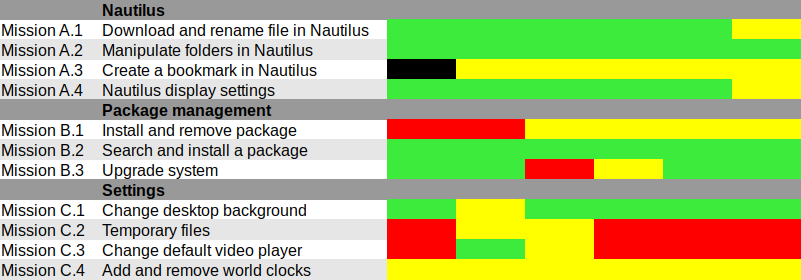
Results and analysis Heat map We used Jim Hall's heat map technique to summarize our usability test results. As Renata puts it, it is "a great way to see how the users performed on each task. The heat map clarifies how easy or difficult it was for the participant to accomplish a certain task.
  1. Scenario tasks (from the usability test) are arranged in rows.
  2. Test participants (for each tester) are arranged in columns.
  3. The colored blocks represent each tester s difficulty with each scenario task.
Green blocks represent the ability of the participant to accomplish the tasks with little or no difficulty. Yellow blocks indicate the tasks that the tester had significant difficulties accomplishing. Red blocks indicate that testers experienced extreme difficulty or where testers completed the tasks incorrectly. Black blocks indicate tasks the tester was unable to complete." Alternatively, here is the spreadsheet that was used to create this picture, with added text to avoid relying on colors only. Most tasks were accomplished with little or no difficulty so we will now focus on the problematic parts. What were the challenges? The heat map shows several "hot" rows, that we will now be looking at in more details. Mission A.3 Create a bookmark in Nautilus Most testers right-clicked the folder first, and eventually found they could simply drag'n'drop to the bookmarks location in the sidebar. One tester thought that he could select a folder, click the hamburger icon, and from there use the "Bookmark this folder" menu item. However, this menu action only works on the folder one has entered, not on the selected one. Mission B.1 Install and remove a package Here we faced a number of issues caused by the fact that Debian Live images don't include package indices (with good reason), so no package manager can list available software. Everyone managed to start a graphical package manager via the Overview (or via the CLI or Alt-F2 for a couple power users). Some testers tried to use GNOME Software, which listed only already installed packages (Debian bug #862560) and provided no way we could find to refresh the package indices. That's arguably a bug in Debian Live, but still: GNOME Software might display some useful information when it detects this unusual situation. We won't list here all the obstacles that were met in Synaptic: it's no news its usability is rather sub-optimal and better alternatives (such as GNOME Software) are in the works. Mission C.2 Tweak temporary files management The mission was poorly phrased: some observers had to clarify that it was specifically about GNOME, and not generic Linux system administration: some power-users were already searching the web for command-line tools to address the task at hand. Even with this clarification, no tester would have succeeded without being told they were allowed to use the web with a search query including the word "GNOME", or use the GNOME help or the Overview. Yet eventually all testers succeeded. It's interesting to note that regular GNOME users had the same problem as others: they did not try searching "temporary" in the Overview and did not look-up the GNOME Help until they were suggested to do so. Mission C.3 Change the default video player One tester configured one single video file format to be opened by default with VLC, via right-click in Nautilus Open with etc. He believed this would be enough to make VLC the default video player, missing the subtle difference between "default video player" and "default player for one single video format". One tester tried to complete this task inside VLC itself and then needed some help to succeed. It might be that the way web browsers ask "Do you want ThisBrowser to become the default web browser?" gave a hint an application GUI is the right place to do it. Two testers searched "default" in the Overview (perhaps the previous mission dealing with temporary files was enough to put them in this direction). At least one tester was confused since the only search result (Details View information about your system), which is the correct one to get there, includes the word View, which suggests that one cannot modify settings there, but only view them. One long-term GNOME user looked in Tweak Tool first, and then used the Overview. Here again, GNOME users experienced essentially the same issues as others. Mission C.4 Add and remove world clocks One tester tried to look for the clock on the top right corner of the screen, then realized it was in the middle. Other than this, all testers easily found a way to add world clocks. However, removing a world clock was rather difficult; although most testers managed to do it, it took them a number of attempts to succeed:
  1. Several testers left-clicked or right-clicked the clock they wanted to remove, expecting this would provide them with a way to remove it (which is not the case).
  2. After a while, all testers noticed the Select button (that has no text label nor tooltip info), which allowed them to select the clock they wanted to remove; then, most testers clicked the 1 selected button, hoping it would provide a contextual menu or some other way to act on the selected clocks (it doesn't).
  3. Eventually, everyone managed to locate the Delete button on the bottom right corner of the window; some testers mentioned that it is less visible and flashy than the blue bar that appears on the top of the screen once they had entered "Selection" mode.
General notes and observations

12 May 2017

Steve McIntyre: Fonts and presentations

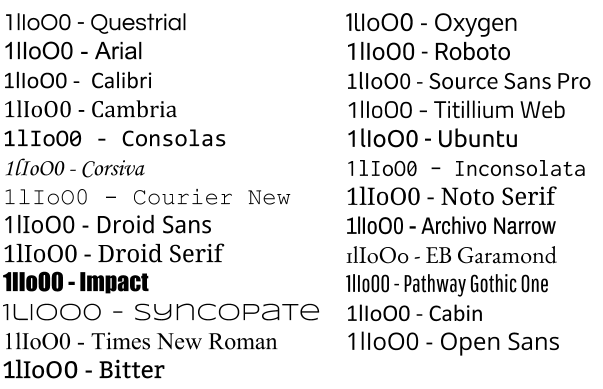
When you're giving a presentation, the choice of font can matter a lot. Not just in terms of how pretty your slides look, but also in terms of whether the data you're presenting is actually properly legible. Unfortunately, far too many fonts are appallingly bad if you're trying to tell certain characters apart. Imagine if you're at the back of a room, trying to read information on a slide that's (typically) too small and (if you're unlucky) the presenter's speech is also unclear to you (noisy room, bad audio, different language). A good clear font is really important here. To illustrate the problem, I've picked a few fonts available in Google Slides. I've written the characters "1lIoO0" (that's one, lower case L, upper case I, lower case o, upper case O, zero) in each of those fonts. Some of the sans-serif fonts in particular are comically bad for trying to distinguish between these characters. font examples It may not matter in all cases if your audience can read all the characters on your slides and tell them apart, put if you're trying to present scientific or numeric results it's critical. Please consider that before looking for a pretty font.
Daniel Pocock: Kamailio World and FSFE team visit, Tirana arrival

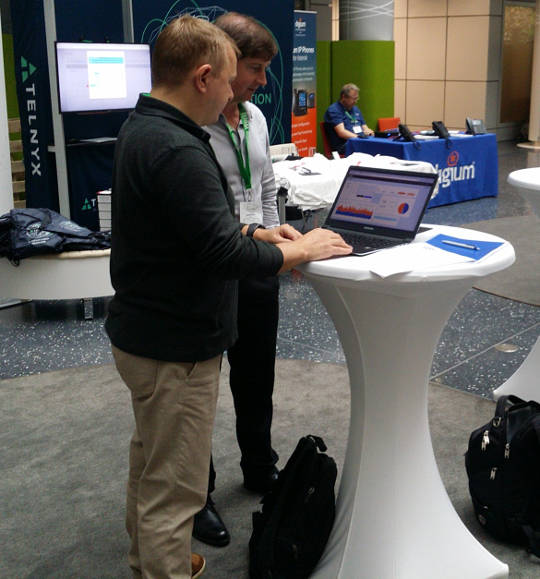
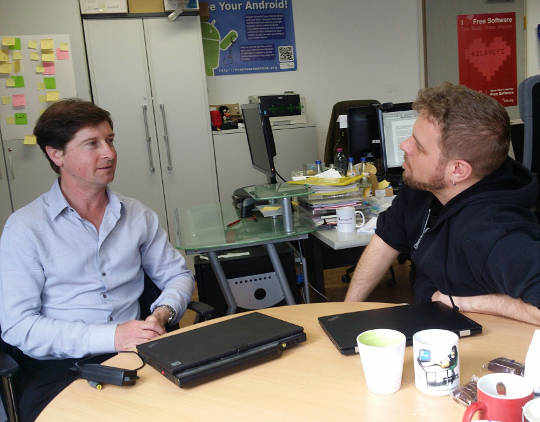
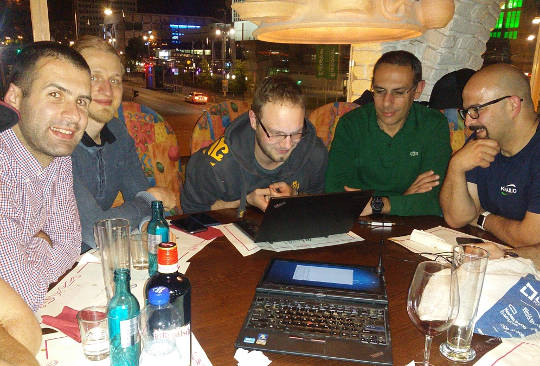
This week I've been thrilled to be in Berlin for Kamailio World 2017, one of the highlights of the SIP, VoIP and telephony enthusiast's calendar. It is an event that reaches far beyond Kamailio and is well attended by leaders of many of the well known free software projects in this space. HOMER 6 is coming Alexandr Dubovikov gave me a sneak peek of the new version of the HOMER SIP capture framework for gathering, storing and analyzing messages in a SIP network. exploring HOMER 6 with Alexandr Dubovikov at Kamailio World 2017 Visiting the FSFE team in Berlin Having recently joined the FSFE's General Assembly as the fellowship representative, I've been keen to get to know more about the organization. My visit to the FSFE office involved a wide-ranging discussion with Erik Albers about the fellowship program and FSFE in general. discussing the Fellowship program with Erik Albers Steak and SDR night After a hard day of SIP hacking and a long afternoon at Kamailio World's open bar, a developer needs a decent meal and something previously unseen to hack on. A group of us settled at Escados, Alexanderplatz where my SDR kit emerged from my bag and other Debian users found out how easy it is to apt install the packages, attach the dongle and explore the radio spectrum. playing with SDR after dinner Next stop OSCAL'17, Tirana Having left Berlin, I'm now in Tirana, Albania where I'll give an SDR workshop and Free-RTC talk at OSCAL'17. The weather forecast is between 26 - 28 degrees celsius, the food is great and the weekend's schedule is full of interesting talks and workshops. The organizing team have already made me feel very welcome here, meeting me at the airport and leaving a very generous basket of gifts in my hotel room. OSCAL has emerged as a significant annual event in the free software world and if it's too late for you to come this year, don't miss it in 2018. OSCAL'17 banner

11 May 2017

Daniel Lange: Thunderbird startup hang (hint: Add-Ons)

If you see Thunderbird hanging during startup for a minute and then continuing to load fine, you are probably running into an issue similar to what I saw when Debian migrated Icedove back to the "official" Mozilla Thunderbird branding and changed ~/.icedove to ~/.thunderbird in the process (one symlinked to the other). Looking at the console log (=start Thunderbird from a terminal so you see its messages), I got:
console.log: foxclocks.bootstrap._loadIntoWindow(): got xul-overlay-merged - waiting for overlay-loaded
[.. one minute delay ..]
console.log: foxclocks.bootstrap._windowListener(): got window load chrome://global/content/commonDialog.xul
Stracing confirms it hangs because Thunderbird loops waiting for a FUTEX until that apparently gets kicked by a XUL core timeout.
(Thanks for defensive programming folks!) So in my case uninstalling the Add-On Foxclocks easily solved the problem. I assume other Thunderbird Add-Ons may cause the same issue, hence the more generic description above.

10 May 2017

Jonathan Dowland: Three things I didn't know about Haskell

I've been trying to refresh my Haskell skills and Paul Callaghan recommended I read the paper "A History of Haskell: Being Lazy With Class", which I found (surprisingly?) fascinating. Three facts about Haskell that I didn't know jumped out at me:

9 May 2017

Matthew Garrett: Intel AMT on wireless networks

More details about Intel's AMT vulnerablity have been released - it's about the worst case scenario, in that it's a total authentication bypass that appears to exist independent of whether the AMT is being used in Small Business or Enterprise modes (more background in my previous post here). One thing I claimed was that even though this was pretty bad it probably wasn't super bad, since Shodan indicated that there were only a small number of thousand machines on the public internet and accessible via AMT. Most deployments were probably behind corporate firewalls, which meant that it was plausibly a vector for spreading within a company but probably wasn't a likely initial vector.

I've since done some more playing and come to the conclusion that it's rather worse than that. AMT actually supports being accessed over wireless networks. Enabling this is a separate option - if you simply provision AMT it won't be accessible over wireless by default, you need to perform additional configuration (although this is as simple as logging into the web UI and turning on the option). Once enabled, there are two cases:
  1. The system is not running an operating system, or the operating system has not taken control of the wireless hardware. In this case AMT will attempt to join any network that it's been explicitly told about. Note that in default configuration, joining a wireless network from the OS is not sufficient for AMT to know about it - there needs to be explicit synchronisation of the network credentials to AMT. Intel provide a wireless manager that does this, but the stock behaviour in Windows (even after you've installed the AMT support drivers) is not to do this.
  2. The system is running an operating system that has taken control of the wireless hardware. In this state, AMT is no longer able to drive the wireless hardware directly and counts on OS support to pass packets on. Under Linux, Intel's wireless drivers do not appear to implement this feature. Under Windows, they do. This does not require any application level support, and uninstalling LMS will not disable this functionality. This also appears to happen at the driver level, which means it bypasses the Windows firewall.
Case 2 is the scary one. If you have a laptop that supports AMT, and if AMT has been provisioned, and if AMT has had wireless support turned on, and if you're running Windows, then connecting your laptop to a public wireless network means that AMT is accessible to anyone else on that network[1]. If it hasn't received a firmware update, they'll be able to do so without needing any valid credentials.

If you're a corporate IT department, and if you have AMT enabled over wifi, turn it off. Now.

[1] Assuming that the network doesn't block client to client traffic, of course

comment count unavailable comments

8 May 2017

Russ Allbery: Review: Chimes at Midnight

Review: Chimes at Midnight, by Seanan McGuire
Series: October Daye #7
Publisher: DAW
Copyright: 2013
ISBN: 1-101-63566-5
Format: Kindle
Pages: 346
Chimes at Midnight is the seventh book of the October Daye series and builds heavily on the previous books. Toby has gathered quite the group of allies by this point, and events here would casually spoil some of the previous books in the series (particularly One Salt Sea, which you absolutely do not want spoiled). I strongly recommend starting at the beginning, even if the series is getting stronger as it goes along. This time, rather than being asked for help, the book opens with Toby on a mission. Goblin fruit is becoming increasingly common on the streets of San Francisco, and while she's doing all she can to find and stop the dealers, she's finding dead changelings. Goblin fruit is a pleasant narcotic to purebloods, but to changelings it's instantly and fatally addictive. The growth of the drug trade means disaster for the local changelings, particularly since previous events in the series have broken a prominent local changeling gang. That was for the best, but they were keeping goblin fruit out, and now it's flooding into the power vacuum. In the sort of idealistic but hopelessly politically naive move that Toby is prone to, she takes her evidence to the highest local authority in faerie: the Queen of the Mists. The queen loathes Toby and the feeling is mutual, but Toby's opinion is that this shouldn't matter: these are her subjects and goblin fruit is widely recognized as a menace. Even if she cares nothing for their lives, a faerie drug being widely sold on the street runs the substantial risk that someone will give it to humans, potentially leading to the discovery of faerie. Sadly, but predictably, Toby has underestimated the Queen's malevolence. She leaves the court burdened not only with the knowledge that the Queen herself is helping with the distribution of goblin fruit, but also an impending banishment thanks to her reaction. She has three days to get out of the Queen's territory, permanently. Three days that the Luidaeg suggests she spend talking to people who knew King Gilad, the former and well-respected king of the local territory who died in the 1906 earthquake, apparently leaving the kingdom to the current Queen. Or perhaps not. As usual, crossing Toby is a very bad idea, and getting Toby involved in politics means that one should start betting heavily against the status quo. Also, as usual, things initially go far too well, and then Toby ends up in serious trouble. (I realize the usefulness of raising the stakes of the story, but I do prefer the books of this series that don't involve Toby spending much of the book ill.) However, there is a vast improvement over previous books in the story: one key relationship (which I'll still avoid spoiling) is finally out of the precarious will-they, won't-they stage and firmly on the page, and it's a relationship that I absolutely love. Watching Toby stomp people who deserve to be stomped makes me happy, but watching Toby let herself be happy and show it makes me even happier. McGuire also gives us some more long-pending revelations. I probably should have guessed the one about one of Toby's long-time friends and companions much earlier, although at least I did so a few pages before Toby found out. I have some strong suspicions about Toby's own background that were reinforced by this book, and will be curious to see if I'm right. And I'm starting to have guesses about the overall arc of the series, although not firm ones. One of my favorite things in long-running series is the slow revelation of more and more world background, and McGuire does it in just the way I like: lots of underlying complexity, reveals timed for emotional impact but without dragging on things that the characters should obviously be able to figure out, and a whole bunch of layered secrets that continue to provide more mystery even after one layer is removed. The plot here is typical of the plot of the last couple of novels in the series, which is fine by me since my favorite part of this series is the political intrigue (and Toby realizing that she has far more influence than she thinks). It helps that I thought Arden was great, given how central she is to this story. I liked her realistic reactions to her situation, and I liked her arguments with Toby. I'm dubious how correct Toby actually was, but we've learned by now that arguments from duty are always going to hold sway with her. And I loved Mags and the Library, and hope we'll be seeing more of them in future novels. The one quibble I'll close with, since the book closed with it, is that I found the ending rather abrupt. There were several things I wanted to see in the aftermath, and the book ended before they could happen. Hopefully that means they'll be the start of the next book (although a bit of poking around makes me think they may be in a novella). If you've liked the series so far, particularly the couple of books before this one, this is more of what you liked. Recommended. Followed by The Winter Long. Rating: 8 out of 10

7 May 2017

Vasudev Kamath: Tips for fuzzing network programs with AFL

Fuzzing is method of producing random malformed inputs for a software and observe the software behavior. If a software crashes then there is a bug and it can have security implications. Fuzzing has gained a lot of interest now a days, especially with automated tools like American Fuzzy Lop (AFL) which can easily help you to fuzz the program and record inputs which causes crash in the software. American Fuzzy Lop is a file based fuzzer which feeds input to program via standard input. Using it with network program like server's or clients is not possible in the original state. There is a version of AFL with patches to allow it fuzz network programs, but this patch is not merged upstream and I do not know if it ever makes into upstream or not. Also the above repository contains version 1.9 which is older compared to currently released versions. There is another method for fuzzing network program using AFL with help of LD_PRELOAD tricks. preeny is a project which provides library which when used with LD_PRELOAD can desocket the network program and make it read from stdin. There is this best tutorial from LoLWare which talks about fuzzing Nginx with preeny and AFL. There is a best AFL workflow by Foxglove Security which gives start to finish details about how to use AFL and its companion tool to do fuzzing. So I'm not going to talk about any steps of fuzzing in this post instead I'm going to list down my observations on changes that needs to be done to get clean fuzzing with AFL and preeny.
  1. desock.so provided by preeny works only with read and write (or rather other system call does not work with stdin) system calls and hence you need to make sure you replace any reference to send, sendto, recv and recvfrom with read and write system calls respectively. Without this change program will not read input provided by AFL on standard input.
  2. If your network program is using forking or threading model make sure to remove all those and make it plain simple program which receives request and sends out response. Basically you are testing the ability of program to handle malformed input so we need very minimum logic to make program do what it is supposed to do when AFL runs it.
  3. If you are using infinite loop like all normal programs replace the infinite loop with below mentioned AFL macro and use afl-clang-fast to compile it. This speeds up the testing as AFL will run the job n times before discarding the current fork and doing a fresh fork. After all fork is costly affair.
while(__AFL_LOOP(1000))   // Change 1000 with iteration count
             // your logic here
 
With above modification I could fuzz a server program talking binary protocol and another one talking textual protocol. In both case I used Wireshark capture to get the packet extract raw content and feed it as input to AFL. I was successful in finding crashes which are exploitable in case of textual protocol program than in binary protocol case. In case of binary protocol AFL could not easily find new paths which probably is because of bad inputs I provided. I will continue to do more experiment with binary protocol case and provide my findings as new updates here. If you have anything more to add do share with me :-). Happy fuzzing!.

6 May 2017

Dirk Eddelbuettel: x13binary 1.1.39-1

The US Census Bureau released a new build 1.1.39 of their X-13ARIMA-SEATS program, released as binary and source. So Christoph and went to work and updated our x13binary package on CRAN. The x13binary package takes the pain out of installing X-13ARIMA-SEATS by making it a fully resolved CRAN dependency. For example, if you install the excellent seasonal package by Christoph, then X-13ARIMA-SEATS will get pulled in via the x13binary package and things just work: Depend on x13binary and on all relevant OSs supported by R, you should have an X-13ARIMA-SEATS binary installed which will be called seamlessly by the higher-level packages such as seasonal or gunsales. So now the full power of the what is likely the world's most sophisticated deseasonalization and forecasting package is now at your fingertips and the R prompt, just like any other of the 10,500+ CRAN packages. Not many packaging changes in this release besides updating the underlying builds, but we switched our versioning scheme to reflect that our releases are driven by the US Census Bureau releases. But thanks to an initial contribution by David Schaub we now support the 'armhf' architecture common on Chromebooks running Linux. Courtesy of CRANberries, there is also a diffstat report for this release.

This post by Dirk Eddelbuettel originated on his Thinking inside the box blog. Please report excessive re-aggregation in third-party for-profit settings.

Next.

Previous.