Search Results: "reg"

21 May 2017

Russ Allbery: Review: Sector General

Review: Sector General, by James White
Series: Sector General #5
Publisher: Orb
Copyright: 1983
Printing: 2002
ISBN: 0-312-87770-6
Format: Trade paperback
Pages: 187
Sector General is the fifth book (or, probably more accurately, collection) in the Sector General series. I blame the original publishers for the confusion. The publication information is for the Alien Emergencies omnibus, which includes the fourth through the sixth books in the series. Looking back on my previous reviews of this series (wow, it's been eight years since I read the last one?), I see I was reviewing them as novels rather than as short story collections. In retrospect, that was a mistake, since they're composed of clearly stand-alone stories with a very loose arc. I'm not going to go back and re-read the earlier collections to give them proper per-story reviews, but may as well do this properly here. Overall, this collection is more of the same, so if that's what you want, there won't be any negative surprises. It's another four engineer-with-a-wrench stories about biological and medical puzzles, with only a tiny bit of characterization and little hint to any personal life for any of the characters outside of the job. Some stories are forgettable, but White does create some memorable aliens. Sadly, the stories don't take us to the point of real communication, so those aliens stop at biological puzzles and guesswork. "Combined Operation" is probably the best, although "Accident" is the most philosophical and an interesting look at the founding principle of Sector General. "Accident": MacEwan and Grawlya-Ki are human and alien brought together by a tragic war, and forever linked by a rather bizarre war monument. (It's a very neat SF concept, although the implications and undiscussed consequences don't bear thinking about too deeply.) The result of that war was a general recognition that such things should not be allowed to happen again, and it brought about a new, deep commitment to inter-species tolerance and politeness. Which is, in a rather fascinating philosophical twist, exactly what MacEwan and Grawlya-Ki are fighting against: not the lack of aggression, which they completely agree with, but with the layers of politeness that result in every species treating all others as if they were eggshells. Their conviction is that this cannot create a lasting peace. This insight is one of the most profound bits I've read in the Sector General novels and supports quite a lot of philosophical debate. (Sadly, there isn't a lot of that in the story itself.) The backdrop against which it plays out is an accidental crash in a spaceport facility, creating a dangerous and potentially deadly environment for a variety of aliens. Given the collection in which this is included and the philosophical bent described above, you can probably guess where this goes, although I'll leave it unspoiled if you can't. It's an idea that could have been presented with more subtlety, but it's a really great piece of setting background that makes the whole series snap into focus. A much better story in context than its surface plot. (7) "Survivor": The hospital ship Rhabwar rescues a sole survivor from the wreck of an alien ship caused by incomplete safeguards on hyperdrive generators. The alien is very badly injured and unconscious and needs the full attention of Sector General, but on the way back, the empath Prilicla also begins suffering from empathic hypersensitivity. Conway, the protagonist of most of this series, devotes most of his attention to that problem, having delivered the rescued alien to competent surgical hands. But it will surprise no regular reader that the problems turn out to be linked (making it a bit improbable that it takes the doctors so long to figure that out). A very typical entry in the series. (6) "Investigation": Another very typical entry, although this time the crashed spaceship is on a planet. The scattered, unconscious bodies of the survivors, plus signs of starvation and recent amputation on all of them, convinces the military (well, police is probably more accurate) escort that this is may be a crime scene. The doctors are unconvinced, but cautious, and local sand storms and mobile vegetation add to the threat. I thought this alien design was a bit less interesting (and a lot creepier). (6) "Combined Operation": The best (and longest) story of this collection. Another crashed alien spacecraft, but this time it's huge, large enough (and, as they quickly realize, of a design) to indicate a space station rather than a ship, except that it's in the middle of nowhere and each segment contains a giant alien worm creature. Here, piecing together the biology and the nature of the vehicle is only the beginning; the conclusion points to an even larger problem, one that requires drawing on rather significant resources to solve. (On a deadline, of course, to add some drama.) This story requires the doctors to go unusually deep into the biology and extrapolated culture of the alien they're attempting to rescue, which made it more intellectually satisfying for me. (7) Followed by Star Healer. Rating: 6 out of 10

Adnan Hodzic: Automagically deploy & run containerized WordPress (PHP7 FPM, Nginx, MariaDB) using Ansible + Docker on AWS

In this blog post, I ve described what started as simple migration of WordPress blog to AWS, ended up as automation project consisting of publishing multiple Ansible roles deploying and running multiple Docker images. If you re not interested in reading about my entire journey, cognition gains and how this process came to be, please skim down to Birth of: containerized-wordpress-project (TL;DR) section. Migrating WordPress blog to AWS (EC2, Lightsail?) Since I ve been sold on Amazon s AWS idea of cloud computing services for couple of years now. I ve wanted, and been trying to migrate this (WordPress) blog to AWS, but somehow it never worked out. Moving it to EC2 instance, with its own ELB volumes, AMI, EIP, Security Group it just seemed as an overkill. When AWS Lightsail was first released, it seemed that was an answer to all my problems. But it wasn t, disregarding its bit restrictive/dumbed down versions of original features. Living in Amsterdam, my main problem with it was that it was only available in a single US region. Regardless, I thought it had everything I needed for WordPress site, and as a new service, it had great potential. Its regional limitations were also good in a sense that they made me realize one important thing. And that s once I migrate my blog to AWS, I want to be able to seamlessly move/migrate it across different EC2 s and different regions once they were available. If done properly, it meant I could even have it moved across different clouds (I m talking to you Google Cloud). P.S: AWS Lightsail is now available in couple of different regions across Europe. Rollout which was almost smoothless. Fundamental problem of every migration is migration

Phase 1: Don t reinvent the wheel? When you have a WordPress site that s not self hosted. You want everything to work, but yet you really don t want to spend any time managing infrastructure it s on. And as soon as I started looking what could fit this criteria, I found that there were pre-configured, running out of box WordPress EC2 images available on AWS Marketplace, great! But when I took a look, although everything was running out of box, I wasn t happy with software stack it was all built on. Namely Ubuntu 14.04 and Apache, and all of the services were started using custom scripts. Yuck. With this setup, when it was time to upgrade (and it s already that time) you wouldn t be thinking about upgrade. You d only be thinking about another migration. Phase 2: What if I built everything myself? Installing and configuring everything manually, and then writing huge HowTo which I would follow when I needed to re-create whole stack was not an option. Same case with was scripting whole process, as overhead of changes that had to be tracked was too way too big. Being a huge Ansible fan, automating this step was a natural next step. I even found an awesome Ansible role which seemed like it s going to do everything I need. Except, I realized I needed to update all software that s deployed with it, and customize it since configuration it was deployed on wasn t as generic. So I forked it and got to work. But soon enough, I was knee deep in making and fiddling with various system changes. Something I was trying to get away in this case, and most importantly something I was trying to avoid when it was time for next update. Phase 3: Marriage made in heaven: Ansible + Docker + AWS Idea to have everything Dockerized was around from very start. However, it never made a lot of sense until I put Ansible into same picture. And it was at this point where my final idea and requirements become crystal clear. Use Ansible to configure and setup host ready for Docker ecosystem. Ecosystem consisting of multiple separate containers for each required service (WordPress + Nginx + MariaDB). Link them all together as a single service using Docker Compose. Idea was backed by thought to spend minimum to no time (and effort) on manual configuration of anything on the server. Level of attachment to this server was so low that I didn t even want to SSH to it. If there was something wrong, I could just nuke the whole thing and deploy code on a new healthy rolled out server with everything working out of box. After it was clear what needed to be done, I got to work.

Birth of: containerized-wordpress-project (TL;DR)

After a lot of work, end result is project which allows you to automagically deploy & run containerized WordPress instance which consists of 3 separate containers running:

Once run, containerized-wordpress playbook will guide you through interactive setup of all 3 containers, after which it will run all Ansible roles created for this project. End result is that host you have never even SSH-ed to will be fully configured and running containerized WordPress instace out of box.

Most importantly, this whole process will be completed in <= 5 minutes and doesn t require any Docker or Ansible knowledge! containerized-wordpress demo Console output of running containerized-wordpress Ansible Playbook: Console output of running "containerized-wordpress" Ansible Playbook

Accessing WordPress instance created from containerized-wordpress Ansible Playbook:

Accessing WordPress instance created from "containerized-wordpress" Ansible Playbook Did I end up migrating to AWS in the end? You bet. Thanks to efforts made in containerized-wordpress-project, I m happy to report my whole WordPress migration to AWS was completed in matter of minutes and that this blog is now running on Docker and on AWS! I hope this same project will help you take a leap in your migration. Happy hacking!

Elena 'valhalla' Grandi: Modern XMPP Server

Modern XMPP Server

I've published a new HOWTO on my website www.trueelena.org/computers/ho:

www.enricozini.org/blog/2017/d already wrote about the Why (and the What, Who and When), so I'll just quote his conclusion and move on to the How.

I now have an XMPP setup which has all the features of the recent fancy chat systems, and on top of that it runs, client and server, on Free Software, which can be audited, it is federated and I can self-host my own server in my own VPS if I want to, with packages supported in Debian.


How

I've decided to install prosody.im/, mostly because it was recommended by the RTC QuickStart Guide rtcquickstart.org/; I've heard that similar results can be reached with www.ejabberd.im/ and other servers.

I'm also targeting www.debian.org/ stable (+ backports); as I write this is jessie; if there are significant differences I will update this article when I will upgrade my server to stretch. Right now, this means that I'm using prosody 0.9 (and that's probably also the version that will be available in stretch).

Installation and prerequisites

You will need to enable the backports.debian.org/ repository and then install the packages prosody and prosody-modules.

You also need to setup some TLS certificates (I used Let's Encrypt letsencrypt.org/); and make them readable by the prosody user; you can see Chapter 12 of the RTC QuickStart Guide rtcquickstart.org/guide/multi/ for more details.

On your firewall, you'll need to open the following TCP ports:


The latter two are needed to enable some services provided via http(s), including rich media transfers.

With just a handful of users, I didn't bother to configure LDAP or anything else, but just created users manually via:

prosodyctl adduser alice@example.org

In-band registration is disabled by default (and I've left it that way, to prevent my server from being used to send spim en.wikipedia.org/wiki/Messagin).

prosody configuration

You can then start configuring prosody by editing /etc/prosody/prosody.cfg.lua and changing a few values from the distribution defaults.

First of all, enforce the use of encryption and certificate checking both for client2server and server2server communications with:


c2s_require_encryption = true
s2s_secure_auth = true


and then, sadly, add to the whitelist any server that you want to talk to and doesn't support the above:


s2s_insecure_domains = "gmail.com"


virtualhosts

For each virtualhost you want to configure, create a file /etc/prosody/conf.avail/chat.example.org.cfg.lua with contents like the following:


VirtualHost "chat.example.org"
enabled = true
ssl =
key = "/etc/ssl/private/example.org-key.pem";
certificate = "/etc/ssl/public/example.org.pem";


For the domains where you also want to enable MUCs, add the follwing lines:


Component "conference.chat.example.org" "muc"
restrict_room_creation = "local"


the "local" configures prosody so that only local users are allowed to create new rooms (but then everybody can join them, if the room administrator allows it): this may help reduce unwanted usages of your server by random people.

You can also add the following line to enable rich media transfers via http uploads (XEP-0363):


Component "upload.chat.example.org" "http_upload"

The defaults are pretty sane, but see modules.prosody.im/mod_http_up for details on what knobs you can configure for this module

Don't forget to enable the virtualhost by linking the file inside /etc/prosody/conf.d/.

additional modules

Most of the other interesting XEPs are enabled by loading additional modules inside /etc/prosody/prosody.cfg.lua (under modules_enabled); to enable mod_something just add a line like:


"something";

Most of these come from the prosody-modules package (and thus from modules.prosody.im/ ) and some may require changing when prosody 0.10 will be available; when this is the case it is mentioned below.


@Gruppo Linux Como @LIFO

20 May 2017

Neil Williams: Software, service, data and freedom

Free software, free services but what about your data? I care a lot about free software, not only as a Debian Developer. The use of software as a service matters as well because my principle free software development is on just such a project, licensed under the GNU Affero General Public License version 3. The AGPL helps by allowing anyone who is suitably skilled to install their own copy of the software and run their own service on their own hardware. As a project, we are seeing increasing numbers of groups doing exactly this and these groups are actively contributing back to the project. So what is the problem? We've got an active project, an active community and everything is under a free software licence and regularly uploaded to Debian main. We have open code review with anonymous access to our own source code CI and anonymous access to project planning, open mailing list archives as well as an open bug tracker and a very active IRC channel (#linaro-lava on OFTC). We develop in the open, we respond in the open and we publish frequently (monthly, approximately). The code we write defaults to public visibilty at runtime with restrictions available for certain use cases. What else can we be doing? Well it was a simple question which started me thinking.
The lava documentation has various example test scripts e.g. https://validation.linaro.org/static/docs/v2/examples/test-jobs/qemu-kernel-standard-sid.yaml these have no licence information, we've adapted them for a Linux Foundation project, what licence should apply to these files? Robert Marshall
Those are our own examples, contributed as part of the documentation and covered by the AGPL like the rest of the documentation and the software which it documents, so I replied with the same. However, what about all the other submissions received by the service?
Data Freedom LAVA acts by providing a service to authenticated users. The software runs your test code on hardware which might not be available to the user or which is simply inconvenient for the test writer to setup themselves. The AGPL covers this nicely. What about the data contributed by the users? We make this available to other users who will, naturally, copy and paste for their own tests. In most cases, because the software defaults to public access, anonymous users also get to learn from the contributions of other test writers. This is a good thing and to be encouraged. (One reason why we moved to YAML for all submissions was to allow comments to help other users understand why the submission does specific things.) Writing a test job submission or a test shell definition from scratch is a non-trivial amount of work. We've written dozens of pages of documentation covering how and how not to do it but the detail of how a test job runs exactly what the test writer requires can involve substantial effort. (Our documentation recommends using version control for each of these works for exactly these reasons.) At what point do these works become software? At what point do these need licensing? How could that be declared?
Perils of the Javascript Trap approach When reading up on the AGPL, I also read about Service as a Software Substitute (SaaSS) and this led to The Javascript Trap. I don't consider LAVA to be SaaSS although it is Software as a Service (SaaS). (Distinguishing between those is best left to the GNU document as it is an almighty tangle at times.) I did look at the GNU ideas for licensing Javascript but it seems cumbersome and unnecessary - a protocol designed for the specific purposes of their own service rather than as a solution which could be readily adopted by all such services. The same problems affect trying to untangle sharing the test job data within LAVA.
Adding Licence text The traditional way, of course, is simply to add twenty lines or so of comments at the top of every file. This works nicely for source code because the comments are hidden from the final UI (unless an explicit reference is made in the --help output or similar). It is less nice for human readable submissions where the first thing someone has to do is scroll passed the comments to get to what they want to see. At that point, it starts to look like a popup or a nagging banner - blocking the requested content on a website to try and get the viewer to subscribe to a newsletter or pay for the rest of the content. Let's not actively annoy visitors who are trying to get things done.
Adding Licence files This can be done in the remote version control repository - then a single line in the submitted file can point at the licence. This is how I'm seeking to solve the problem of our own repositories. If the reference URL is included in the metadata of the test job submission, it can even be linked into the test job metadata and made available to everyone through the results API.
metadata:
  licence.text: http://mysite/lava/git/COPYING
  licence.name: BSD 3 clause
Metadata in LAVA test job submissions is free-form but if the example was adopted as a convention for LAVA submissions, it would make it easy for someone to query LAVA for the licences of a range of test submissions. Currently, LAVA does not store metadata from the test shell definitions except the URL of the git repo for the test shell definition but that may be enough in most cases for someone to find the relevant COPYING or LICENCE file.
Which licence? This could be a problem too. If users contribute data under unfriendly licences, what is LAVA to do? I've used the BSD 3 clause in the above example as I expect it to be the most commonly used licence for these contributions. A copyleft licence could be used, although doing so would require additional metadata in the submission to declare how to contribute back to the original author (because that is usually not a member of the LAVA project).
Why not Creative Commons? Although I'm referring to these contributions as data, these are not pieces of prose or images or audio. These are instructions (with comments) for a specific piece of software to execute on behalf of the user. As such, these objects must comply with the schema and syntax of the receiving service, so a code-based licence would seem correct.
Results Finally, a word about what comes back from your data submission - the results. This data cannot be restricted by any licence affecting either the submission or the software, it can be restricted using the API or left as the default of public access. If the results and the submission data really are private, then the solution is to take advantage of the AGPL, take the source code of LAVA and run it internally where the entire service can be placed within a firewall.
What happens next?
  1. Please consider editing your own LAVA test job submissions to add licence metadata.
  2. Please use comments in your own LAVA test job submissions, especially if you are using some form of template engine to generate the submission. This data will be used by others, it is easier for everyone if those users do not have to ask us or you about why your test job does what it does.
  3. Add a file to your own repositories containing LAVA test shell definitions to declare how these files can be shared freely.
  4. Think about other services to which you submit data which is either only partially machine generated or which is entirely human created. Is that data free-form or are you essentially asking the service to do a precise task on your behalf as if you were programming that server directly? (Jenkins is a classic example, closely related to LAVA.)
    • Think about how much developer time was required to create that submission and how the service publishes that submission in ways that allow others to copy and paste it into their own submissions.
    • Some of those submissions can easily end up in documentation or other published sources which will need to know about how to licence and distribute that data in a new format (i.e. modification.) Do you intend for that useful purpose to be defeated by releasing your data under All Rights Reserved?
Contact I don't enable comments on this blog but there are enough ways to contact me and the LAVA project in the body of this post, it really shouldn't be a problem for anyone to comment.

Ritesh Raj Sarraf: Patanjali Research Foundation

PSA: Research in the domain of Ayurveda

http://www.patanjaliresearchfoundation.com/patanjali/
I am so glad to see this initiative taken by the Patanjali group. This is a great stepping stone in the health and wellness domain. So far, Allopathy has been blunt in discarding alternate medicine practices, without much solid justification. The only, repetitive, response I've heard is "lack of research". This initiative definitely is a great step in that regard. Ayurveda (Ancient Hindu art of healing) has a huge potential to touch lives. For the Indian sub-continent, this has the potential of a blessing. The Prime Minister of India himself inaugurated the research centre.

Categories:

Keywords:

Like:

18 May 2017

Alessio Treglia: Digital Ipseity: Which Identity?

Within the next three years, more than seven billion people and businesses will be connected to the Internet. During this time of dramatic increases in access to the Internet, networks have seen an interesting proliferation of systems for digital identity management (i.e. our SPID in Italy). But what is really meant by digital identity ? All these systems are implemented in order to have the utmost certainty that the data entered by the subscriber (address, name, birth, telephone, email, etc.) is directly coincident with that of the physical person. In other words, data are certified to be identical to those of the user; there is a perfect overlap between the digital page and the authentic user certificate: an idem , that is, an identity.

This identity is our personal records reflected on the net, nothing more than that. Obviously, this data needs to be appropriately protected from malicious attacks by means of strict privacy rules, as it contains so-called sensitive information, but this data itself is not sufficiently interesting for the commercial market, except for statistical purposes on homogeneous population groups. What may be a real goldmine for the web company is another type of information: user s ipseity. It is important to immediately remove the strong semantic ambiguity that weighs on the notion of identity. There are two distinct meanings <Read More [by Fabio Marzocca]>

Michael Prokop: Debugging a mystery: ssh causing strange exit codes?

XKCD comic 1722 Recently we had a WTF moment at a customer of mine which is worth sharing. In an automated deployment procedure we re installing Debian systems and setting up MySQL HA/Scalability. Installation of the first node works fine, but during installation of the second node something weird is going on. Even though the deployment procedure reported that everything went fine: it wasn t fine at all. After bisecting to the relevant command lines where it s going wrong we identified that the failure is happening between two ssh/scp commands, which are invoked inside a chroot through a shell wrapper. The ssh command caused a wrong exit code showing up: instead of bailing out with an error (we re running under set -e ) it returned with exit code 0 and the deployment procedure continued, even though there was a fatal error. Initially we triggered the bug when two ssh/scp command lines close to each other were executed, but I managed to find a minimal example for demonstration purposes:
# cat ssh_wrapper 
chroot << "EOF" / /bin/bash
ssh root@localhost hostname >/dev/null
exit 1
EOF
echo "return code = $?"
What we d expect is the following behavior, receive exit code 1 from the last command line in the chroot wrapper:
# ./ssh_wrapper 
return code = 1
But what we actually get is exit code 0:
# ./ssh_wrapper 
return code = 0
Uhm?! So what s going wrong and what s the fix? Let s find out what s causing the problem:
# cat ssh_wrapper 
chroot << "EOF" / /bin/bash
ssh root@localhost command_does_not_exist >/dev/null 2>&1
exit "$?"
EOF
echo "return code = $?"
# ./ssh_wrapper 
return code = 127
Ok, so if we invoke it with a binary that does not exist we properly get exit code 127, as expected.
What about switching /bin/bash to /bin/sh (which corresponds to dash here) to make sure it s not a bash bug:
# cat ssh_wrapper 
chroot << "EOF" / /bin/sh
ssh root@localhost hostname >/dev/null
exit 1
EOF
echo "return code = $?"
# ./ssh_wrapper 
return code = 1
Oh, but that works as expected!? When looking at this behavior I had the feeling that something is going wrong with file descriptors. So what about wrapping the ssh command line within different tools? No luck with stdbuf -i0 -o0 -e0 ssh root@localhost hostname , nor with script -c ssh root@localhost hostname /dev/null and also not with socat EXEC: ssh root@localhost hostname STDIO . But it works under unbuffer(1) from the expect package:
# cat ssh_wrapper 
chroot << "EOF" / /bin/bash
unbuffer ssh root@localhost hostname >/dev/null
exit 1
EOF
echo "return code = $?"
# ./ssh_wrapper 
return code = 1
So my bet on something with the file descriptor handling was right. Going through the ssh manpage, what about using ssh s -n option to prevent reading from standard input (stdin)?
# cat ssh_wrapper
chroot << "EOF" / /bin/bash
ssh -n root@localhost hostname >/dev/null
exit 1
EOF
echo "return code = $?"
# ./ssh_wrapper 
return code = 1
Bingo! Quoting ssh(1):
     -n      Redirects stdin from /dev/null (actually, prevents reading from stdin).
             This must be used when ssh is run in the background.  A common trick is
             to use this to run X11 programs on a remote machine.  For example,
             ssh -n shadows.cs.hut.fi emacs & will start an emacs on shadows.cs.hut.fi,
             and the X11 connection will be automatically forwarded over an encrypted
             channel.  The ssh program will be put in the background.  (This does not work
             if ssh needs to ask for a password or passphrase; see also the -f option.)
Let s execute the scripts through strace -ff -s500 ./ssh_wrapper to see what s going in more detail.
In the strace run without ssh s -n option we see that it s cloning stdin (file descriptor 0), getting assigned to file descriptor 4:
dup(0)            = 4
[...]
read(4, "exit 1\n", 16384) = 7
while in the strace run with ssh s -n option being present there s no file descriptor duplication but only:
open("/dev/null", O_RDONLY) = 4
This matches ssh.c s ssh_session2_open function (where stdin_null_flag corresponds to ssh s -n option):
        if (stdin_null_flag)                                              
                in = open(_PATH_DEVNULL, O_RDONLY);
          else  
                in = dup(STDIN_FILENO);
         
This behavior can also be simulated if we explicitly read from /dev/null, and this indeed works as well:
# cat ssh_wrapper
chroot << "EOF" / /bin/bash
ssh root@localhost hostname >/dev/null </dev/null
exit 1
EOF
echo "return code = $?"
# ./ssh_wrapper 
return code = 1
The underlying problem is that both bash and ssh are consuming from stdin. This can be verified via:
# cat ssh_wrapper
chroot << "EOF" / /bin/bash
echo "Inner: pre"
while read line; do echo "Eat: $line" ; done
echo "Inner: post"
exit 3
EOF
echo "Outer: exit code = $?"
# ./ssh_wrapper
Inner: pre
Eat: echo "Inner: post"
Eat: exit 3
Outer: exit code = 0
This behavior applies to bash, ksh, mksh, posh and zsh. Only dash doesn t show this behavior.
To understand the difference between bash and dash executions we can use the following test scripts:
# cat stdin-test-cmp
#!/bin/sh
TEST_SH=bash strace -v -s500 -ff ./stdin-test 2>&1   tee stdin-test-bash.out
TEST_SH=dash strace -v -s500 -ff ./stdin-test 2>&1   tee stdin-test-dash.out
# cat stdin-test
#!/bin/sh
: $ TEST_SH:=dash 
$TEST_SH <<"EOF"
echo "Inner: pre"
while read line; do echo "Eat: $line"; done
echo "Inner: post"
exit 3
EOF
echo "Outer: exit code = $?"
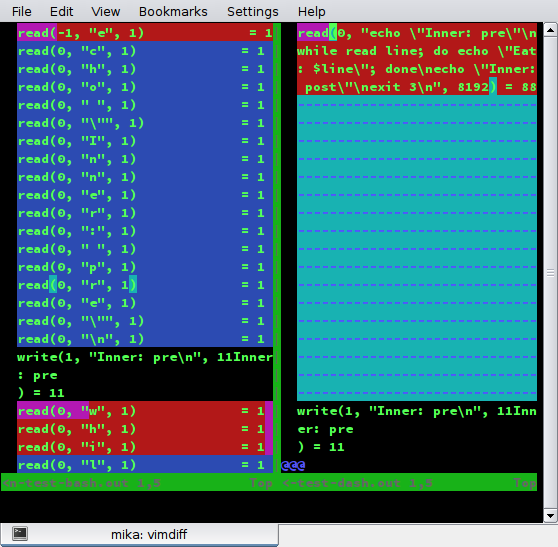
When executing ./stdin-test-cmp and comparing the generated files stdin-test-bash.out and stdin-test-dash.out you ll notice that dash consumes all stdin in one single go (a single read(0, ) ), instead of character-by-character as specified by POSIX and implemented by bash, ksh, mksh, posh and zsh. See stdin-test-bash.out on the left side and stdin-test-dash.out on the right side in this screenshot: screenshot of vimdiff on *.out files So when ssh tries to read from stdin there s nothing there anymore. Quoting POSIX s sh section:
When the shell is using standard input and it invokes a command that also uses standard input, the shell shall ensure that the standard input file pointer points directly after the command it has read when the command begins execution. It shall not read ahead in such a manner that any characters intended to be read by the invoked command are consumed by the shell (whether interpreted by the shell or not) or that characters that are not read by the invoked command are not seen by the shell. When the command expecting to read standard input is started asynchronously by an interactive shell, it is unspecified whether characters are read by the command or interpreted by the shell. If the standard input to sh is a FIFO or terminal device and is set to non-blocking reads, then sh shall enable blocking reads on standard input. This shall remain in effect when the command completes.
So while we learned that both bash and ssh are consuming from stdin and this needs to prevented by either using ssh s -n or explicitly specifying stdin, we also noticed that dash s behavior is different from all the other main shells and could be considered a bug (which we reported as #862907). Lessons learned: Thanks to Guillem Jover for review and feedback regarding this blog post.

17 May 2017

Daniel Pocock: Hacking the food chain in Switzerland

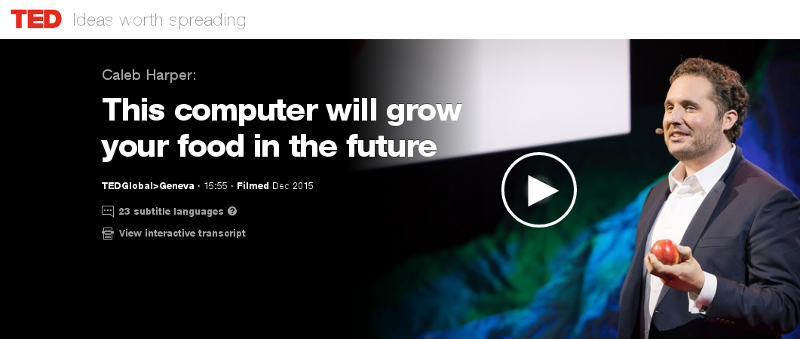
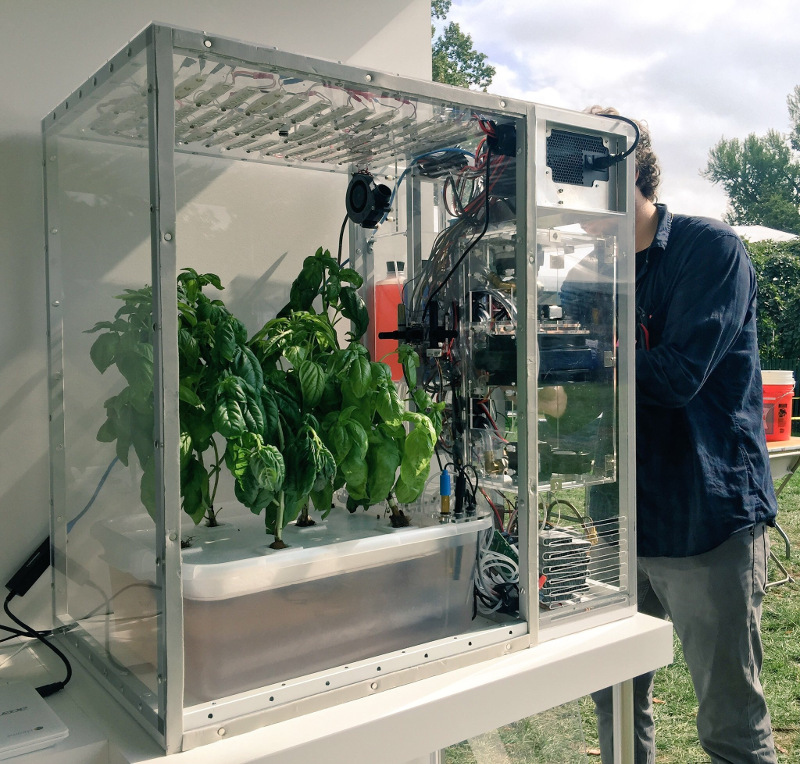
A group has recently been formed on Meetup seeking to build a food computer in Zurich. The initial meeting is planned for 6:30pm on 20 June 2017 at ETH, (Zurich Centre/Zentrum, R mistrasse 101). The question of food security underlies many of the world's problems today. In wealthier nations, we are being called upon to trust a highly opaque supply chain and our choices are limited to those things that major supermarket chains are willing to stock. A huge transport and storage apparatus adds to the cost and CO2 emissions and detracts from the nutritional value of the produce that reaches our plates. In recent times, these problems have been highlighted by the horsemeat scandal, the Guacapocalypse and the British Hummus crisis. One interesting initiative to create transparency and encourage diversity in our diets is the Open Agriculture (OpenAg) Initiative from MIT, summarised in this TED video from Caleb Harper. The food produced is healthier and fresher than anything you might find in a supermarket and has no exposure to pesticides. An open source approach to food An interesting aspect of this project is the promise of an open source approach. The project provides hardware plans, a a video of the build process, source code and the promise of sharing climate recipes (scripts) to replicate the climates of different regions, helping ensure it is always the season for your favour fruit or vegetable. Do we need it? Some people have commented on the cost of equipment and electricity. Carsten Agger recently blogged about permaculture as a cleaner alternative. While there are many places where people can take that approach, there are also many overpopulated regions and cities where it is not feasible. Some countries, like Japan, have an enormous population and previously productive farmland contaminated by industry, such as the Fukushima region. Growing our own food also has the potential to reduce food waste, as individual families and communities can grow what they need. Whether it is essential or not, the food computer project also provides a powerful platform to educate people about food and climate issues and an exciting opportunity to take the free and open source philosophy into many more places in our local communities. The Zurich Meetup group has already received expressions of interest from a diverse group including professionals, researchers, students, hackers, sustainability activists and free software developers. Next steps People who want to form a group in their own region can look in the forum topic "Where are you building your Food Computer?" to find out if anybody has already expressed interest. Which patterns from the free software world can help more people build more food computers? I've already suggested using Debian's live-wrapper to distribute a runnable ISO image that can boot from a USB stick, can you suggest other solutions like this? Can you think of any free software events where you would like to see a talk or exhibit about this project? Please suggest them on the OpenAg forum. There are many interesting resources about the food crisis, an interesting starting point is watching the documentary Food, Inc. If you are in Switzerland, please consider attending the meeting on at 6:30pm on 20 June 2017 at ETH (Centre/Zentrum), Zurich. One final thing to contemplate: if you are not hacking your own food supply, who is?

Michal &#268;iha&#345;: Weblate 2.14

Weblate 2.14 has been released today slightly ahead of the schedule. There are quite a lot of security improvements based on reports we got from HackerOne program, API extensions and other minor improvements. Full list of changes: If you are upgrading from older version, please follow our upgrading instructions. You can find more information about Weblate on https://weblate.org, the code is hosted on Github. If you are curious how it looks, you can try it out on demo server. You can login there with demo account using demo password or register your own user. Weblate is also being used on https://hosted.weblate.org/ as official translating service for phpMyAdmin, OsmAnd, Turris, FreedomBox, Weblate itself and many other projects. Should you be looking for hosting of translations for your project, I'm happy to host them for you or help with setting it up on your infrastructure. Further development of Weblate would not be possible without people providing donations, thanks to everybody who have helped so far! The roadmap for next release is just being prepared, you can influence this by expressing support for individual issues either by comments or by providing bounty for them.

Filed under: Debian English SUSE Weblate

Dirk Eddelbuettel: Upcoming Rcpp Talks

Very excited about the next few weeks which will cover a number of R conferences, workshops or classes with talks, mostly around Rcpp and one notable exception: If you are near one those events, interested and able to register (for the events requiring registration), I would love to chat before or after.

16 May 2017

Francois Marier: Recovering from an unbootable Ubuntu encrypted LVM root partition

A laptop that was installed using the default Ubuntu 16.10 (xenial) full-disk encryption option stopped booting after receiving a kernel update somewhere on the way to Ubuntu 17.04 (zesty). After showing the boot screen for about 30 seconds, a busybox shell pops up:
BusyBox v.1.21.1 (Ubuntu 1:1.21.1-1ubuntu1) built-in shell (ash)
Enter 'help' for list of built-in commands.
(initramfs)
Typing exit will display more information about the failure before bringing us back to the same busybox shell:
Gave up waiting for root device. Common problems:
  - Boot args (cat /proc/cmdline)
    - Check rootdelay= (did the system wait long enough?)
    - Check root= (did the system wait for the right device?)
  - Missing modules (cat /proc/modules; ls /dev)
ALERT! /dev/mapper/ubuntu--vg-root does not exist. Dropping to a shell! 
BusyBox v.1.21.1 (Ubuntu 1:1.21.1-1ubuntu1) built-in shell (ash)   
Enter 'help' for list of built-in commands.  
(initramfs)
which now complains that the /dev/mapper/ubuntu--vg-root root partition (which uses LUKS and LVM) cannot be found. There is some comprehensive advice out there but it didn't quite work for me. This is how I ended up resolving the problem.

Boot using a USB installation disk First, create bootable USB disk using the latest Ubuntu installer:
  1. Download an desktop image.
  2. Copy the ISO directly on the USB stick (overwriting it in the process):
     dd if=ubuntu.iso of=/dev/sdc1
    
and boot the system using that USB stick (hold the option key during boot on Apple hardware).

Mount the encrypted partition Assuming a drive which is partitioned this way:
  • /dev/sda1: EFI partition
  • /dev/sda2: unencrypted boot partition
  • /dev/sda3: encrypted LVM partition
Open a terminal and mount the required partitions:
cryptsetup luksOpen /dev/sda3 sda3_crypt
vgchange -ay
mount /dev/mapper/ubuntu--vg-root /mnt
mount /dev/sda2 /mnt/boot
mount -t proc proc /mnt/proc
mount -o bind /dev /mnt/dev
Note:
  • When running cryptsetup luksOpen, you must use the same name as the one that is in /etc/crypttab on the root parition (sda3_crypt in this example).
  • All of these partitions must be present (including /proc and /dev) for the initramfs scripts to do all of their work. If you see errors or warnings, you must resolve them.

Regenerate the initramfs on the boot partition Then "enter" the root partition using:
chroot /mnt
and make sure that the lvm2 package is installed:
apt install lvm2
before regenerating the initramfs for all of the installed kernels:
update-initramfs -c -k all

15 May 2017

intrigeri: GNOME and Debian usability testing, May 2017

During the Contribute your skills to Debian event that took place in Paris last week-end, we conducted a usability testing session. Six people were tasked with testing a few aspects of the GNOME 3.22 desktop environment and of the Debian 9 (Stretch) operating system. A number of other people observed them and took notes. Then, two observers and three testers analyzed the results, that we are hereby presenting: we created a heat map visualization, summed up the challenges met during the tests, and wrote this blog post together. We will point the relevant upstream projects to our results. A couple of other people also did some usability testing but went in much more depth: their feedback is much more detailed and comes with a number of improvement ideas. I will process and publish their results as soon as possible. Missions Testers were provided a laptop running GNOME on a a Debian 9 (Stretch) Live system. A quick introduction (mostly copied from the one we found in some GNOME usability testing reports) was read. Then they were asked to complete the following tasks. A. Nautilus Mission A.1 Download and rename file in Nautilus
  1. Download a file from the web, a PDF document for example.
  2. Open the folder in which the file has been downloaded.
  3. Rename the dowloaded file to SUCCESS.pdf.
  4. Toggle the browser window to full screen.
  5. Open the file SUCCESS.pdf.
  6. Go back to the File manager.
  7. Close the file SUCCESS.pdf.
Mission A.2 Manipulate folders in Nautilus
  1. Create a new folder named cats in your user directory.
  2. Create a new folder named to do in your user directory.
  3. Move the cats folder to the to do folder.
  4. Delete the cats folder.
Mission A.3 Create a bookmark in Nautilus
  1. Create a folder named unicorns in your personal directory.
  2. This folder is important. Add a bookmark for unicorns in order to find it again in a few weeks.
Mission A.4 Nautilus display settings Folders and files are usually listed as icons, but they can also be displayed differently.
  1. Configure the File manager to make it show items as a list, with one file per line.
  2. You forgot your glasses and the font size is too small for you to see the text: increase the size of the text.
B. Package management Introduction On Debian, each application is available as a "package" which contains every file needed for the software to work. Unlike in other operating systems, it is rarely necessary and almost never a good idea, to download and install software from the authors website. We can rather install it from an online library managed by Debian (like an appstore). This alternative offers several advantages, such as being able to update all the software installed in one single action. Specific tools are available to install and update Debian packages. Mission B.1 Install and remove packages
  1. Install the vlc package.
  2. Start VLC.
  3. Remove the vlc package.
Mission B.2 Search and install a package
  1. Find a piece of software which can download files with BitTorrent in a graphical interface.
  2. Install the corresponding package.
  3. Launch that BitTorrent software.
Mission B.3 Upgrade the system Make sure the whole system (meaning all installed packages) is up to date. C. Settings Mission C.1 Change the desktop background
  1. Download an image you like from the web.
  2. Set the downloaded image as the desktop wallpaper.
Mission C.2 Tweak temporary files management Configure the system so that temporary files older than three days are deleted automatically. Mission C.3 Change the default video player
  1. Install VLC (ask for help if you could not do it during the previous mission).
  2. Make VLC the default video player.
  3. Download a video file from the web.
  4. Open the downloaded video, then check if it opens with VLC.
Mission C.4 Add and remove world clocks When you click the time and date in the top bar, a menu pops-up. There, you can display clocks in several time-zones.
  1. Add a clock with Rio de Janeiro timezone, then another showing the current time in Boston.
  2. Check that the time and date menu now displays these two additional clocks.
  3. Remove the Boston clock.
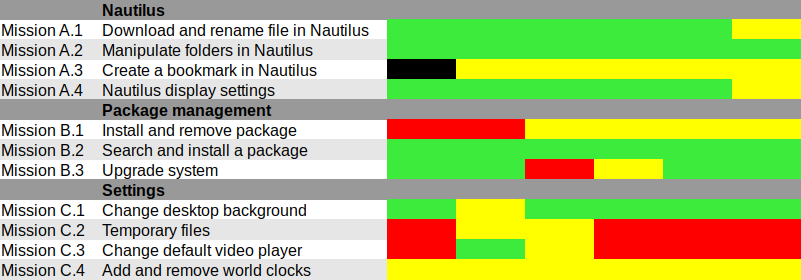
Results and analysis Heat map We used Jim Hall's heat map technique to summarize our usability test results. As Renata puts it, it is "a great way to see how the users performed on each task. The heat map clarifies how easy or difficult it was for the participant to accomplish a certain task.
  1. Scenario tasks (from the usability test) are arranged in rows.
  2. Test participants (for each tester) are arranged in columns.
  3. The colored blocks represent each tester s difficulty with each scenario task.
Green blocks represent the ability of the participant to accomplish the tasks with little or no difficulty. Yellow blocks indicate the tasks that the tester had significant difficulties accomplishing. Red blocks indicate that testers experienced extreme difficulty or where testers completed the tasks incorrectly. Black blocks indicate tasks the tester was unable to complete." Alternatively, here is the spreadsheet that was used to create this picture, with added text to avoid relying on colors only. Most tasks were accomplished with little or no difficulty so we will now focus on the problematic parts. What were the challenges? The heat map shows several "hot" rows, that we will now be looking at in more details. Mission A.3 Create a bookmark in Nautilus Most testers right-clicked the folder first, and eventually found they could simply drag'n'drop to the bookmarks location in the sidebar. One tester thought that he could select a folder, click the hamburger icon, and from there use the "Bookmark this folder" menu item. However, this menu action only works on the folder one has entered, not on the selected one. Mission B.1 Install and remove a package Here we faced a number of issues caused by the fact that Debian Live images don't include package indices (with good reason), so no package manager can list available software. Everyone managed to start a graphical package manager via the Overview (or via the CLI or Alt-F2 for a couple power users). Some testers tried to use GNOME Software, which listed only already installed packages (Debian bug #862560) and provided no way we could find to refresh the package indices. That's arguably a bug in Debian Live, but still: GNOME Software might display some useful information when it detects this unusual situation. We won't list here all the obstacles that were met in Synaptic: it's no news its usability is rather sub-optimal and better alternatives (such as GNOME Software) are in the works. Mission C.2 Tweak temporary files management The mission was poorly phrased: some observers had to clarify that it was specifically about GNOME, and not generic Linux system administration: some power-users were already searching the web for command-line tools to address the task at hand. Even with this clarification, no tester would have succeeded without being told they were allowed to use the web with a search query including the word "GNOME", or use the GNOME help or the Overview. Yet eventually all testers succeeded. It's interesting to note that regular GNOME users had the same problem as others: they did not try searching "temporary" in the Overview and did not look-up the GNOME Help until they were suggested to do so. Mission C.3 Change the default video player One tester configured one single video file format to be opened by default with VLC, via right-click in Nautilus Open with etc. He believed this would be enough to make VLC the default video player, missing the subtle difference between "default video player" and "default player for one single video format". One tester tried to complete this task inside VLC itself and then needed some help to succeed. It might be that the way web browsers ask "Do you want ThisBrowser to become the default web browser?" gave a hint an application GUI is the right place to do it. Two testers searched "default" in the Overview (perhaps the previous mission dealing with temporary files was enough to put them in this direction). At least one tester was confused since the only search result (Details View information about your system), which is the correct one to get there, includes the word View, which suggests that one cannot modify settings there, but only view them. One long-term GNOME user looked in Tweak Tool first, and then used the Overview. Here again, GNOME users experienced essentially the same issues as others. Mission C.4 Add and remove world clocks One tester tried to look for the clock on the top right corner of the screen, then realized it was in the middle. Other than this, all testers easily found a way to add world clocks. However, removing a world clock was rather difficult; although most testers managed to do it, it took them a number of attempts to succeed:
  1. Several testers left-clicked or right-clicked the clock they wanted to remove, expecting this would provide them with a way to remove it (which is not the case).
  2. After a while, all testers noticed the Select button (that has no text label nor tooltip info), which allowed them to select the clock they wanted to remove; then, most testers clicked the 1 selected button, hoping it would provide a contextual menu or some other way to act on the selected clocks (it doesn't).
  3. Eventually, everyone managed to locate the Delete button on the bottom right corner of the window; some testers mentioned that it is less visible and flashy than the blue bar that appears on the top of the screen once they had entered "Selection" mode.
General notes and observations

13 May 2017

Vincent Fourmond: Run QSoas complely non-interactively

QSoas can run scripts, and, since version 2.0, it can be run completely without user interaction from the command-line (though an interface may be briefly displayed). This possibility relies on the following command-line options:If you create a script.cmds file containing the following commands:
generate-buffer -10 10 sin(x)
save sin.dat
and run the following command from your favorite command-line interpreter:
~ QSoas --stdout --run '@ script.cmds' --exit-after-running
This will create a sin.dat file containing a sinusoid. However, if you run it twice, a Overwrite file 'sin.dat' ? dialog box will pop up. You can prevent that by adding the /overwrite=true option to save. As a general rule, you should avoid all commands that may ask questions in the scripts; a /overwrite=true option is also available for save-buffers for instance.I use this possibility massively because I don't like to store processed files, I prefer to store the original data files and run a script to generate the processed data when I want to plot or to further process them. It can also be used to generate fitted data from saved parameters files. I use this to run automatic tests on Linux, Windows and Mac for every single build, in order to quickly spot platform-specific regressions.To help you make use of this possibility, here is a shell function (Linux/Mac users only, add to your $HOME/.bashrc file or equivalent, and restart a terminal) to run directly on QSoas command files:
qs-run ()  
        QSoas --stdout --run "@ $1" --exit-after-running
 
To run the script.cmds script above, just run
~ qs-run script.cmds

About QSoasQSoas is a powerful open source data analysis program that focuses on flexibility and powerful fitting capacities. It is described in Fourmond, Anal. Chem., 2016, 88 (10), pp 5050 5052. Current version is 2.1

9 May 2017

Benjamin Mako Hill: Surviving an Eternal September: How an Online Community Managed a Surge of Newcomers

Attracting newcomers is among the most widely studied problems in online community research. However, with all the attention paid to challenge of getting new users, much less research has studied the flip side of that coin: large influxes of newcomers can pose major problems as well! The most widely known example of problems caused by an influx of newcomers into an online community occurred in Usenet. Every September, new university students connecting to the Internet for the first time would wreak havoc in the Usenet discussion forums. When AOL connected its users to the Usenet in 1994, it disrupted the community for so long that it became widely known as The September that never ended . Our study considered a similar influx in NoSleep an online community within Reddit where writers share original horror stories and readers comment and vote on them. With strict rules requiring that all members of the community suspend disbelief, NoSleep thrives off the fact that readers experience an immersive storytelling environment. Breaking the rules is as easy as questioning the truth of someone s story. Socializing newcomers represents a major challenge for NoSleep.
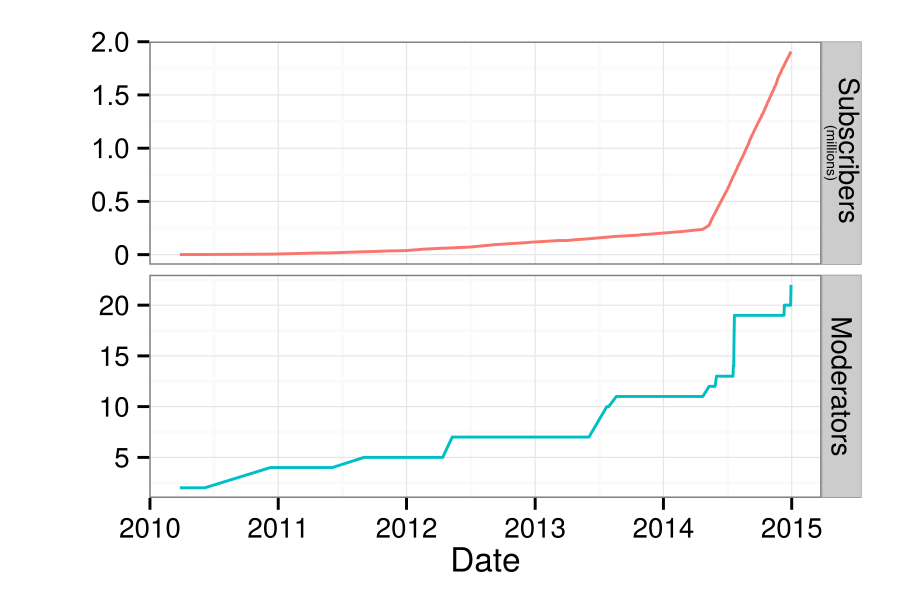
Number of subscribers and moderators on /r/NoSleep over time.
On May 7th, 2014, NoSleep became a default subreddit i.e., every new user to Reddit automatically joined NoSleep. After gradually accumulating roughly 240,000 members from 2010 to 2014, the NoSleep community grew to over 2 million subscribers in a year. That said, NoSleep appeared to largely hold things together. This reflects the major question that motivated our study: How did NoSleep withstand such a massive influx of newcomers without enduring their own Eternal September? To answer this question, we interviewed a number of NoSleep participants, writers, moderators, and admins. After transcribing, coding, and analyzing the results, we proposed that NoSleep survived because of three inter-connected systems that helped protect the community s norms and overall immersive environment. First, there was a strong and organized team of moderators who enforced the rules no matter what. They recruited new moderators knowing the community s population was going to surge. They utilized a private subreddit for NoSleep s staff. They were able to socialize and educate new moderators effectively. Although issuing sanctions against community members was often difficult, our interviewees explained that NoSleep s moderators were deeply committed and largely uncompromising. That commitment resonates within the second system that protected NoSleep: regulation by normal community members. From our interviews, we found that the participants felt a shared sense of community that motivated them both to socialize newcomers themselves as well as to report inappropriate comments and downvote people who violate the community s norms. Finally, we found that the technological systems protected the community as well. For instance, post-throttling was instituted to limit the frequency at which a writer could post their stories. Additionally, Reddit s Automoderator , a programmable AI bot, was used to issue sanctions against obvious norm violators while running in the background. Participants also pointed to the tools available to them the report feature and voting system in particular to explain how easy it was for them to report and regulate the community s disruptors.

This blog post was written with Charlie Kiene. The paper and work this post describes is collaborative work with Charlie Kiene and Andr s Monroy-Hern ndez. The paper was published in the Proceedings of CHI 2016 and is released as open access so anyone can read the entire paper here. A version of this post was published on the Community Data Science Collective blog.

8 May 2017

Bits from Debian: Bursary applications for DebConf17 are closing in 48 hours!

This is a final reminder: if you intend to apply for a DebConf17 bursary and have not yet done so, please proceed as soon as possible. Bursary applications for DebConf17 will be accepted until May 10th at 23:59 UTC. Applications submitted after this deadline will not be considered. You can apply for a bursary when you register for the conference. Remember that giving a talk is considered towards your bursary; if you have a submission to make, submit it even if it is only sketched-out. You will be able to detail it later. Please make sure to double-check your accommodation choices (dates and venue). Details about accommodation arrangements can be found on the wiki. Note: For DebCamp we only have on-site accommodation available. The option chosen in the registration system will only be for the DebConf period (August 5 to 12). See you in Montr al! DebConf17 logo

Lars Wirzenius: Ick2 design discussion

Recently, Daniel visited us in Helsinki. In addition to enjoying local food and scenerey, we spent some time together in front of a whiteboard to sketch out designs for Ick2. Ick is my continuous integration system, and it's all Daniel's fault for suggesting the name. Ahem. I am currently using the first generation of Ick and it is a rigid, cumbersome, and fragile thing. It works well enough that I don't miss Jenkins, but I would like something better. That's the second generation of Ick, or Ick2, and that's what we discussed with Daniel. Where pretty much everything in Ick1 is hardcoded, everything in Ick2 will be user-configurable. It's my last, best chance to go completely overboard in the second system syndrome manner. Where Ick1 was written in a feverish two-week hacking session, rushed because my Jenkins install at the time had broken one time too many, we're taking our time with Ick2. Slow and careful is the tune this time around. Our "minimum viable product" or MVP for Ick2 is defined like this:
Ick2 builds static websites from source in a git repository, using ikiwiki, and published to a web server using rsync. A change to the git repository triggers a new build. It can handle many separate websites, and if given enough worker machines, can build many of them concurrently.
This is a real task, and something we already do with Ick1 at work. It's a reasonable first step for the new program. Some decisions we made: The initial pipelines will be basically like this, but expressed in some way by the user:
  1. Clone the source repoistory.
  2. Run ikiwiki --build to build the website.
  3. Run rsync to publish the website on a server.
Assumptions: Actions the Ick2 controller API needs to support: A sketch API: Sequence: The next step will probably be to sketch a yarn test suite of the API and implement a rudimentary one.

Mike Gabriel: [Arctica Project] Release of nx-libs (version 3.5.99.7)

Introduction NX is a software suite which implements very efficient compression of the X11 protocol. This increases performance when using X applications over a network, especially a slow one. NX (v3) has been originally developed by NoMachine and has been Free Software ever since. Since NoMachine obsoleted NX (v3) some time back in 2013/2014, the maintenance has been continued by a versatile group of developers. The work on NX (v3) is being continued under the project name "nx-libs". Release Announcement On Friday, May 5th 2017, version 3.5.99.7 of nx-libs has been released [1]. Credits A special thanks goes to Ulrich Sibiller for tracking down a regression bug that caused a tremendously slowed down keyboard input on high latency connections. Thanks for that! Another thanks goes to the Debian project for indirectly providing us with so many build platforms. We are nearly at the point where nx-libs builds on all architectures supported by the Debian project. (Runtime stability is a completely different issue, we will get to this soon). Changes between 3.5.99.6 and 3.5.99.7 Change Log The complete list of changes (since 3.5.99.6) can be obtained from here. Known Issues A list of known issues can be obtained from the nx-libs issue tracker [issues]. Binary Builds You can obtain binary builds of nx-libs for Debian (jessie, stretch, unstable) and Ubuntu (trusty, xenial) via these apt-URLs: Our package server's archive key is: 0x98DE3101 (fingerprint: 7A49 CD37 EBAE 2501 B9B4 F7EA A868 0F55 98DE 3101). Use this command to make APT trust our package server:
 wget -qO - http://packages.arctica-project.org/archive.key   sudo apt-key add -
The nx-libs software project brings to you the binary packages nxproxy (client-side component) and nxagent (nx-X11 server, server-side component). The nxagent Xserver can be used from remote sessions (via nxcomp compression library) or as a next Xserver. Ubuntu developers, please note: we have added nightly builds for Ubuntu latest to our build server. At the moment, you can obtain nx-libs builds for Ubuntu 16.10 (yakkety) and 17.04 (zenial) as nightly builds. References

7 May 2017

Dirk Eddelbuettel: RInside 0.2.14

A new release 0.2.14 of RInside is now on CRAN and in Debian. RInside provides a set of convenience classes which facilitate embedding of R inside of C++ applications and programs, using the classes and functions provided by Rcpp. It has been nearly two years since the last release, and a number of nice extensions, build robustifications and fixes had been submitted over this period---see below for more. The only larger and visible extension is both a new example and some corresponding internal changes to allow a readline prompt in an RInside application, should you desire it. RInside is stressing the CRAN system a little in that it triggers a number of NOTE and WARNING messages. Some of these are par for the course as we get close to R internals not all of which are "officially" in the API. This lead to the submission sitting a little longer than usual in incoming queue. Going forward we may need to find a way to either sanction these access point, whitelist them or, as a last resort, take the package off CRAN. Time will tell. Changes since the last release were:

Changes in RInside version 0.2.14 (2017-04-28)
  • Interactive mode can use readline REPL ( ukasz aniewski-Wo k in #25, and Dirk in #26)
  • Windows macros checks now uses _WIN32 (Kevin Ushey in #22)
  • The wt example now links with libboost_system
  • The Makevars file is now more robist (Mattias Ellert in #21)
  • A problem with empty environment variable definitions on Windows was addressed (Jeroen Ooms in #17 addressing #16)
  • HAVE_UINTPTR_T is defined only if not already defined
  • Travis CI is now driven via run.sh from our forked r-travis

CRANberries also provides a short report with changes from the previous release. More information is on the RInside page. Questions, comments etc should go to the rcpp-devel mailing list off the Rcpp R-Forge page, or to issues tickets at the GitHub repo.

This post by Dirk Eddelbuettel originated on his Thinking inside the box blog. Please report excessive re-aggregation in third-party for-profit settings.

6 May 2017

Dirk Eddelbuettel: x13binary 1.1.39-1

The US Census Bureau released a new build 1.1.39 of their X-13ARIMA-SEATS program, released as binary and source. So Christoph and went to work and updated our x13binary package on CRAN. The x13binary package takes the pain out of installing X-13ARIMA-SEATS by making it a fully resolved CRAN dependency. For example, if you install the excellent seasonal package by Christoph, then X-13ARIMA-SEATS will get pulled in via the x13binary package and things just work: Depend on x13binary and on all relevant OSs supported by R, you should have an X-13ARIMA-SEATS binary installed which will be called seamlessly by the higher-level packages such as seasonal or gunsales. So now the full power of the what is likely the world's most sophisticated deseasonalization and forecasting package is now at your fingertips and the R prompt, just like any other of the 10,500+ CRAN packages. Not many packaging changes in this release besides updating the underlying builds, but we switched our versioning scheme to reflect that our releases are driven by the US Census Bureau releases. But thanks to an initial contribution by David Schaub we now support the 'armhf' architecture common on Chromebooks running Linux. Courtesy of CRANberries, there is also a diffstat report for this release.

This post by Dirk Eddelbuettel originated on his Thinking inside the box blog. Please report excessive re-aggregation in third-party for-profit settings.

Vasudev Kamath: Magic: Attach a HTML file to mail and get different on other side

It's been a long time I did not write any new blog posts, and finally I got something which is interesting enough for a new post and so here it is. I actually wanted some bills from my ISP for some work and I could not find mail from the ISP which had bills for some specific months in my mailbox. Problem with my ISP is bills are accessible in their account which can be only accessed from their own network. They do have a mobile app and that does not seem to work especially for the billing section. I used mobile app and selected month for which I did not have bill and clicked Send Mail button. App happily showed message saying it sent the bill to my registered mail address but that was a fancy lie. After trying several time I gave up and decided I will do it once I get back home. Fast forward few hours, I'm back home from office and then I sat in front of my laptop and connected to ISP site, promptly downloaded the bills, then used notmuch-emacs and fire up a mail composer, attach those HTML file (yeah they produce bill in HTML file :-/) send it to my gmail and forget about it. Fast forward few more days, I just remember I need those bills. I got hold of mail I sent earlier in gmail inbox and clicked on attachment and when browser opened the attachment I was shocked/surprised . Did you ask why?. See what I saw when I opened attachment. Well I was confused for moment on what happened, I tried downloading the file and opened it an editor, and I see Chinese characters here also. After reaching home I checked the Sent folder in my laptop where I keep copy of mails sent using notmuch-emacs's notmuch-fcc-dirs variable. I open the file and open the attachement and I see same character as I saw in browser!. I open the original bills I downloaded and it looks fine. To check if I really attached the correct files I again drafted a mail this time to my personal email and sent it. Now I open the file from Sent folder and voila again there is different content inside my attachment!. Same happens when I receive the mail and open the attachment everything inside is Chinese characters!. Totally lost I finally opened the original file using emacs, since I use spacemacs it asked me for downloading of html layer and after which I was surprised because everything inside the editor is in Chinese!. OK finally I've something now so I opened same file at same time in nano from terminal and there it looks fine!. OK that is weird again I read carefully content and saw this line in beginning of file
<?xml version="1.0" encoding="UTF-16" ?>
<html xmlns="http://www.w3.org/1999/xhtml>....
OK that is new XML tag had encoding declared as UTF-16, really?. And just for checking I changed it to UTF-8 and voila file is back to normal in Emacs window!. To confirm this behavior I created a sample file with following content
<?xml version="1.0" encoding="utf-8"?><html xmlns="http://www.w3.org/1999/xhtml"><head><meta http-equiv="Content-Type" content="text/html; charset=iso-8859-1" /><title> Something weird </title><body>blablablablablalabkabakba</body></html>
Yeah with long line because ISP had similar case and now I opened the same file in nano using terminal and changed encoding="UTF-8" to encoding="UTF-16" and the behavior repeated I see Chinese character in the emacs buffer which has also opened the same file. Below is the small gif showing this happening in real time, see what happens in emacs buffer when I change the encoding in terminal below. Fun right?. I made following observation from above experiments.
  1. When I open original file in browser or my sample file with encoding="UTF-16" its normal, no Chinese characters.
  2. When I attach the mail and send it out the attachment some how gets converted into HTML file with Chinese characters and viewing source from browser shows header containing xml declarations and original <html> declarations get ripped off and new tags show up which I've pasted below.
  3. If I download the same file and open in editor only Chinese characters are present and no HTML tags inside it. So definitely the new tags which I saw by viewing source in browser is added by Firefox.
  4. I create similar HTML file and change encoding I can see the characters changing back and forth in emacs web-mode when I change encoding of the file.
<!DOCTYPE HTML PUBLIC "-//W3C//DTD HTML 4.01 Transitional//EN">
<html>
  <head><META http-equiv="Content-Type"  content="text/html; charset=utf-8">
So if I'm understanding this correctly, Emacs due to encoding declaration interprets the actual contents differently. To see how Emacs really interpreted the content I opened the sent mail I had in raw format and saw following header lines for attachment.
Content-Type: text/html; charset=utf-8
Content-Disposition: attachment;
             filename=SOA-102012059675-FEBRUARY-2017.html
Content-Transfer-Encoding: base64
This was followed with base64 encoded data. So does this mean emacs interpreted the content as UTF-16 and encoded the content using UTF-8?. Again I've no clue, so I changed the encoding in both the files to be as UTF-8 and sent the mail by attaching these files again to see what happens. And my guess was right I could get the attachment as is on the receiving side. And inspecting raw mail the attachment headers now different than before.
Content-Type: text/html
Content-Disposition: attachment;
             filename=SOA-102012059675-DECEMBER-2016.html
Content-Transfer-Encoding: quoted-printable
See how Content-Type its different now also see the Content-Transfer-Encoding its now quoted-printable as opposed to base64 earlier. Additionally I can see HTML content below the header. When I opened the attachment from mail I get the actual bill. As far as I understand base64 encoding is used when the data to be attached is base64. So I guess basically due to wrong encoding declared inside the file Emacs interpreted the content as a binary data and encoded it differently than what it really should be. Phew that was a lot of investigation to understand the magic but it was worth it. Do let me know your thoughts on this.

Next.

Previous.