I was talking about scripting languages at a table at linuxcon.
I was probably too negative about perl and too in love with C++ for scripting tasks.
Martin Pauley at the table was very much for perl but then he has his
affiliation and experience with perl. I too am too affiliated with
scripting with C++. I wrote binfmtc, although I don't know if anybody
other than me is using it seriously.
This is the fourth post in a series of posts (part 1, part 2, part 3) describing a secure alternative to applications like WhatsApp. I started with the following statement:
I believe it is possible to build a system with the simplicity and functionality of WhatsApp or Viber, which provides end-to-end encryption, is built on free software and open protocols, that supports federation and is almost decentralised, and that would allow interested companies to turn a profit without compromising any of these principles.
Now that most of the infrastructure has been described, in this post I will talk about the user-visible part: a mobile SIP client specially tailored for this architecture.
Features
For Yakker to be successful, an application that is visually attractive and simple to use, while providing excellent call quality and stability, is critical. This idea is useless if only geeks adopt it: I want my parents to use it, I want my non-techie friends to use it. I want to tell them to switch from any of the other applications, not only because it is more secure, open and community-based, but also because it is better.
For Android, there is already some excellent free applications that could be used as a starting point: Lumicall, CSipSimple and Linphone. I haven't tried it yet, but Linphone has a port to iOS too.
Apart from the quality considerations, the following features must be added:
Certificate creation and proper storage in the mobile device.
An account creation wizard that interacts with the directory service and the account providers. Lumicall currently does something like this already, but only for their own ENUM and SIP server only.
Proper DNSSEC validating resolver to securely get the callee's certificate and ENUM record.
Optionally, use the directory service API to query records instead of DNS, to enhance privacy.
Periodic verification of the user's own ENUM and certificate records in DNS.
Use of those certificates to set up the SRTP stream, instead of unauthenticated encryption. Text messages must be encrypted in the same way, but included in the SIP message. SIPs encryption is not enough, as the proxies and service providers can read them.
Integration with the system's address book.
ENUM lookup, and SIP SRV lookup to detect phones with an associated SIP account.
When the called party does not have a SIP account, the client must offer to call using the PSTN gateway at service provider, if it provides one, and to call using the GSM network. It needs to be fast and reliable, so people can use it as the default texting and calling application.
Provide an interface to query account's balance, calling rates, and to buy credit. Possibly, offer this by opening a web browser, but negotiating authentication first, so the user does not need to enter an user name or password.
Capabilities to migrate to a different service provider.
A secure way to share the key pair with another trusted device.
A way to import a key pair created by the user manually.
I am probably missing a bunch of other capabilities that need to be implemented. It is a lot of work.
Some of these features would only be useful for participants of the Yakker network, but there are others that could be useful for every SIP user, and therefore, implemented first.
For example, SIP accounts that are not associated with a phone number could publish certificates under the same domain, and have the client use them to have secure communications with legacy infrastructure.
Funding
I am aware that this amount of work is not going to happen overnight. In fact, without a bunch of people from the community interested in the project, it is never going to happen.
The good news is that I think that companies might be interested in investing in this. A company could create their own branded version of the client, and use advertisements or service provider preference (the provider the user gets unless they choose one manually) to generate income.
As long as the code remains free, and the client is compatible with the whole system, there could many competing clients out there. Their own promotion schemes would work for the benefit of the whole system, by bringing more users.
Risks
The biggest threat would be of one client monopolising the network, and then changing the protocols to make the system a walled garden. It has already happened with GTalk, so there is precedent for this.
I don't think there is any way to stop a big company from doing this, but one strategy to mitigate the risk a bit would be to create a brand (Yakker or whatever this ends up being called) and have it managed by a trusted community organisation, which can revoke the right to use the brand when a party is not behaving.
TL;DR
I don t know much about fonts, I just use the stock ones that come with my system. From time to time I have issues with docs that others create, and use other fonts. This post is about my plans on learning a bit more and, at least, know how to solve those issues, if it s possible, while staying in the bright side (the free-software / free font side).
Long version
The context
I use Debian, LibreOffice, sometimes Inkscape, and LaTeX. One of my favorite hashtags is #iloveplaintext, I don t know much about design in general, and fonts and typography in particular. I didn t change the fonts in my desktops (only reduced the size in the laptop, to be able to read a bit more in my low resolution screen), I rarely change the font in Writer (maybe from Liberation Serif to Liberation Sans), I never changed the font in a LaTeX document or LaTeX beamer presentation (I write boring documents, I know) and when I paste from the web, it s usually because I want to read a long article so I paste as plain text in gedit and print it or save it.
So I ve never felt to learn more about fonts, it just works, and covers my needs, (or not, but I mostly could live with the issues).
Then a friend in the Pump.io network, Adri n Perales, published a blog post about Typography (in Spanish) that I liked very much, and I began to think (and remember) some of the issues that I have from time to time with fonts.
Issue #1: League Gothic: a free font that was not installed in my system
Today, again in the Pump.io network, I discover that the FSF published a poster Privacy is impossible without free software , in SVG format, but it didn t look well when I opened it with GIMP, clearly due to some missing font.
Nice that SVG format is a plain text format (XML)! So I opened the file with gedit and searched for the text string whose font was missing. It was League Gothic font, of course a free software font, but not packaged in Debian, it seems.
No problem. I downloaded the font, copied the files in /usr/share/fonts and problem solved.
Issue #2: Book Antiqua: a non-free font (must find equivalent)
A document made with Microsoft Word that one friend sends to me so I review and resend (in PDF format) to other people. It s a leaflet, and it has text in Arial, in Tahoma, and in Book Antiqua. When I open it with LibreOffice the aspect is wrong (the substitutes are not the same size so some breaking lines and so).
Book Antiqua is not free. I learned that it s an imitation of the Palatino font, and that a similar font in the free software systems is URW Palladio . In Writer (LibreOffice), I went to Tools > Options > Fonts and declared the equivalence of the two fonts, so the program would use URW Palladio as a substitute of Book Antiqua. I opened again the document and it was quite better, very similar to the original aspect.
I didn t bother in changing the text in Arial or Tahoma, since the substitutes that LibreOffice used were quite good. But I bookmarked this page: A Web Designer Guide to Linux Fonts for remembering the different fonts that I can try to emulate the Windows ones.
I also know that I can install the Microsoft Core Fonts for the web since they are packaged for Debian in the contrib archive. But I ll try to survive without them for now (until now, I didn t bother, why should I now that I have the substituting guide?). In other news, I got impressed that MS Core Fonts is #4 in Most downloads all over the time in SourceForge, with more than 450 million downloads \o/
Issue #3: Installing a new free font in Debian
So I decided to install one of the fonts that Adri n Perales recommended in his blog post, Linux Libertine . Since it is packaged for Debian, it s super easy:
# apt-get install ttf-linux-libertine
(my LibreOffice was opened, so I closed it and opened again, and the font was there ready for use).
Issue #4: Use a different font in LaTeX
Well, as always, there is not one but many ways to do that in LaTeX. My intuition tells me that if there is a LaTeX package for the font that I want to use, it s probably a nice idea to just use it.
So I searched about Linux Libertine in LaTeX and yes, there is a package (and you can find a very interesting font guide in The LaTeX font catalogue ). I installed the package texlive-fonts-extra, and then, I added two lines in my LaTeX document:
\usepackage libertine
\usepackage[T1] fontenc
Compiled, and the resultant PDF was using Libertine font instead of Computer Modern.
TODO (and/or wishlist)
When opening a document that uses a font not present in my system, I maybe wouldn t notice that a font is missing and I see a substitute (and maybe not the best one)!. It would be nice that the program tells the user This file uses the font X, and it seems it s not in your system. I ll use font Y as a substitute .
I m not sure if there is a standard way to know which package contains a certain font. I use a web search engine to try to find out, and the websites that I linked in the article.
I have to investigate and learn a bit more about free fonts equivalents to the ones that other people use, and fonts in general, so my documents are more beautiful and people gets interested to know about the tools that I use to produce them.
Well, I ve written a long blog post (thanks if you read until here!), solved some issues, and try some things, but not even capturing a snapshot to show here! It seems that I m still lazy, forgive me I hope at least this #plaintext is useful for you :) Filed under: My experiences and opinion, Uncategorized Tagged: Debian, English, Fonts, Free Software, LaTeX, libre software, LibreOffice, Moving into free software, pump.io
This is the third post in a series of posts (part 1, part 2) describing a secure alternative to applications like WhatsApp. I started with the following statement:
I believe it is possible to build a system with the simplicity and functionality of WhatsApp or Viber, which provides end-to-end encryption, is built on free software and open protocols, that supports federation and is almost decentralised, and that would allow interested companies to turn a profit without compromising any of these principles.
In this post, I will discuss the SIP service providers, how to enable them to make a profit, while keeping the network open and secure.
Basics
Service providers are expected to be third parties, either for-profit or not. PSTN termination would be an optional feature, possibly only offered by for-profit services.
The services would consist in just a standard SIP service, with STUN/ICE for NAT traversal, plus an API for getting PSTN termination rates, credit balance, account creation, and for buying credit.
All authentication will be performed with public key cryptography, using the data already available in the directory service.
The idea would be that companies can make a profit by selling PSTN termination and SMS sending. In this way, users get good rates for calling/texting people who are not part of the network, and free SIP-to-SIP calls don't impose a big load on the service.
It is expected that the providers would offer some free calls, to allow the users to test the service. Public providers like Betamax already offer free calls to land lines in many countries.
To make this simple for the users, the client application would use the API to provide an unified interface to the service providers, without the need for passwords or a web browser.
To support multiple services, the overseeing authority must be in charge of compiling a list of authorised providers, which then the client application would use when creating an account. Provider selection can be made automatically, depending on commercial agreements or user location, and for power users, the option to manually choose a provider should be offered.
To ensure control of the providers, they should not be able to control the directory servers used. The client application should be careful in exposing as little private data as possible to them.
Account creation
With the components described so far, we can think already of how account creation and first calls would be handled:
The client application creates a public/private key pair.
It requests the directory service to create an account for the public key and the phone number.
The directory service uses an encrypted SMS challenge or other similar mechanism to authenticate the request.
The public key is published, associated with the phone number.
The client app gets a list of service providers, which includes configuration parameters and PSTN rates, and offers the user the chance to select one, or it is automatically selected.
The client app then requests an account creation using the phone number as identification, while authenticating with the published key.
The provider uses DNSSEC to validate the request, and an account is created.
The client then creates an ENUM record in the directory service, associating the phone number with the SIP account.
The client registers with the SIP service, again using the public key to authenticate, and can start making calls right away.
When the user wants to make a non-free call, the application can offer to buy credit, or use the GSM network.
How is this different
As you can see, there is not much difference with the current status. In fact, I would expect that traditional VoIP providers could become part of this network without much additional cost.
The big differences are:
Authentication is delegated to the directory service.
The provider API, wich handles all administrative tasks, usually offered by web applications.
Account creation is 100% automated and immediate.
The provider must offer federated SIP service, and use encryption for all SIP transactions.
PSTN termination would ideally accept encrypted RTP streams, but that's probably too much to ask.
What's next
In the next post I will describe what's possibly the most challenging part of this project: the client application.
I was at the OpenStack Summit this week. The overwhelming majority of OpenStack deployments are Linux-based, yet the most popular laptop vendor (by a long way) at the conference was Apple. People are writing code with the intention of deploying it on Linux, but they're doing so under an entirely different OS.
But what's really interesting is the tools they're using to do so. When I looked over people's shoulders, I saw terminals and a web browser. They're not using Macs because their development tools require them, they're using Macs because of what else they get - an aesthetically pleasing OS, iTunes and what's easily the best trackpad hardware/driver combination on the market. These are people who work on the same laptop that they use at home. They'll use it when they're commuting, either for playing videos or for getting a head start so they can leave early. They use an Apple because they don't want to use different hardware for work and pleasure.
The developers I was surrounded by aren't the same developers you'd find at a technical conference 10 years ago. They grew up in an era that's become increasingly focused on user experience, and the idea of migrating to Linux because it's more tweakable is no longer appealing. People who spend their working day making use of free software (and in many cases even contributing or maintaining free software) won't run a free software OS because doing so would require them to compromise on things that they care about. Linux would give them the same terminals and web browser, but Linux's poorer multitouch handling is enough on its own to disrupt their workflow. Moving to Linux would slow them down.
But even if we fixed all those things, why would somebody migrate? The best we'd be offering is a comparable experience with the added freedom to modify more of their software. We can probably assume that this isn't a hugely compelling advantage, because otherwise it'd probably be enough to overcome some of the functional disparity. Perhaps we need to be looking at this differently.
When we've been talking about developer experience we've tended to talk about the experience of people who are writing software targeted at our desktops, not people who are incidentally using Linux to do their development. These people don't need better API documentation. They don't need a nicer IDE. They need a desktop environment that gives them access to the services that they use on a daily basis. Right now if someone opens an issue against one of their bugs, they'll get an email. They'll have to click through that in order to get to a webpage that lets them indicate that they've accepted the bug. If they know that the bug's already fixed in another branch, they'll probably need to switch to github in order to find the commit that contains the bug number that fixed it, switch back to their issue tracker and then paste that in and mark it as a duplicate. It's tedious. It's annoying. It's distracting.
If the desktop had built-in awareness of the issue tracker then they could be presented with relevant information and options without having to click through two separate applications. If git commits were locally indexed, the developer could find the relevant commit without having to move back to a web browser or open a new terminal to find the local checkout. A simple task that currently involves multiple context switches could be made significantly faster.
That's a simple example. The problem goes deeper. The use of web services for managing various parts of the development process removes the need for companies to maintain their own infrastructure, but in the process it tends to force developers to bounce between multiple websites that have different UIs and no straightforward means of sharing information. Time is lost to this. It makes developers unhappy.
A combination of improved desktop polish and spending effort on optimising developer workflows would stand a real chance of luring these developers away from OS X with the promise that they'd spend less time fighting web browsers, leaving them more time to get on with development. It would also help differentiate Linux from proprietary alternatives - Apple and Microsoft may spend significant amounts of effort on improving developer tooling, but they're mostly doing so for developers who are targeting their platforms. A desktop environment that made it easier to perform generic development would be a unique selling point.
I spoke to various people about this during the Summit, and it was heartening to hear that there are people who are already thinking about this and hoping to improve things. I'm looking forward to that, but I also hope that there'll be wider interest in figuring out how we can make things easier for developers without compromising other users. It seems like an interesting challenge.
I recently bought a new Lenovo X1 Carbon. It is the new second-generation, type 20A7 laptop, based on Intel s Haswell microarchiteture with the adaptive keyboard. It is the version released in 2014. I also ordered the Thinkpad OneLink Dock which I have returned for the OneLink Pro Dock which I have not yet received.
The system is still very new, challenging, and different, but seems to support GNU/Linux reasonably well if you are willing to run a bleeding edge version and/or patch your kernel and if you are not afraid to spend an afternoon or two tweaking things. What follows are my installation notes for Debian testing (jessie) when I installed it in early May 2014. My general impressions about the laptop as a GNU/Linux system and overall are at the end of this write-up.
System Description
The X1 Carbon I ordered included the 512GB SSD, the 14.0 inch WQHD (2560 1440) 260 nit touchscreen, and the maximum 8GB of memory. I believe the rest is not particularly negotiable but includes a 720p HD Camera, a 45.2Wh battery, and an Intel Dual Band Wireless 7260AC with Bluetooth 4.0.
For those that are curious Here is the output of lspci on the system:
BIOS/Firmware
The BIOS firmware is non-free and proprietary as it the case with all ThinkPads and nearly all laptops. According to this thread there is a bug in the default BIOS that means that suspend to RAM is broken in GNU/Linux.
You can get updated BIOS at the Lenovo s ThinkPad X1 Carbon (Type 20A7, 20A8) Drivers and software page by looking in the the BIOS section. Honestly, the easiest approach is probably to download the Windows BIOS Update utility (documentation is here) which you can use to run the BIOS update from within Windows before you install GNU/Linux.
If that s not an option (e.g., if you ve already installed GNU/Linux) the best method is to download the bootable CD ISO from the same page. Of course, since the X1 Carbon has no optical media, you have to find another way to boot the CD image. I struggled to get the ISO to boot from USB using the usually reliable dd method. This message suggest that the issue had to do with the El Torito wrapper:
I had to dump the eltorito image from the ISO they provide, after that I was able to dd the resulting image to a flash drive and the bios update went well, no cdrom needed.
I updated to version 1.13 of the BIOS which fixes the suspend/resume bug. By the time you read this, there may be newer versions that fix other things so check the Lenovo website.
Installing Debian
I installed Debian testing using the March 19, 2014 Alpha 1 release of the Debian Installer for Jessie (currently testing). I installed in graphical mode. With the WQHD screen, everything was extremely tiny but it worked flawlessly.
I downloaded the amd64 net install image from the normal place and installed the rest of the system using the built-in Ethernet port which required no firmware or extra drivers. I did the normal dd if=FILENAME.iso of=/dev/sdX method of getting the installer onto the a USB stick to boot. I turned off restricted boot in BIOS first. In general, the latest version of the Debian installation guide is always a good source of guidance on installing Debian.
I used the Debian installer wizard to partition and selected Use entire disk and partition it for LVM and encrypted data which kept the UEFI partitions around. The system installed with no errors or issues and booted up normally afterward. The grub menu is hilariously narrow on the WQHD screen.
If you want to use the built-in wireless and/or Bluetooth, you will need to install the non-free iwlwifi firmware package. It is very lame that we still have to do this to use hardware we have purchased.
What Works and Doesn t
The following stuff works the first time I booted into the GNOME 3 desktop and logged in:
The keyboard plus the adaptive row of F1-F12 keys.
External monitor using the full HDMI or mini-DisplayPort connectors
Audio (both speakers and microphone)
The camera/webcam
The following stuff works if you install non-free firmware:
Internal Wireless
Bluetooth 4.0
The following stuff works with qualifications:
Suspend to RAM Works once you have updated the firmware.
The adaptive keyboard The F1-F12 keys work but the button that theoretically lets you switch to different sets of function buttons (e.g., volume, brightness) does nothing.
Disabling the touchpad There is a BIOS option to disable the touchpad. It works in Windows and does nothing at all in GNU/Linux.
I have not tried:
The fingerprint reader
OneLink Dock
I also ordered the OneLink Dock. It s pretty cool and plugs into the side of the laptop with a wide plug that includes the the standard power plug inside a big connector for everything else. Everything on the dock worked out of the box including the:
HDMI port
USB hub
USB audio device in the dock
USB Ethernet device in the dock
One thing to note. The HDMI output on the standard OneLink has a maximum resolution of 1920 1080 which is not stated on its material on Lenovo s website. Moreover, if you plug in the OneLink cable, the laptop HDMI port is disabled. This means if you plug in the dock, you simply cannot drive an external monitor over HDMI at anything higher than 1920 1080. Instead, you will need to find a mini-DisplayPort to DisplayPort cord or adapter which will work. Of course, this will also mean that it s two connectors instead of one.
Alternatively, you can buy the OneLink Pro dock which apparently works with higher resolutions over its DisplayPort connector. I have exchanged docks but have not received the Pro version so I cannot verify this.
Disabling the touchpad
As a long-term ThinkPad user, I love the TrackPoint pointing stick. If you plan on using this, the built-in touchpad is incredibly aggravating because it is very easy to brush against it while using the TrackPoint.
In BIOS, there is an option to disable the touchpad. Although this works in Windows, it does absolutely nothing in GNU/Linux. Part of the issue is that, unlike the older X1 Carbon and other ThinkPads, there are no TrackPoint buttons. Instead of buttons, there are regions at the top of the touchpad which are configured, in software, to act like buttons. If you want to be able to click, the touchpad can never be truly turned off.
This is not problem unique to the Haswell X1 Carbon and a number of people have been struggling with this issue on other Lenovo laptops. Essentially, what you need to do is configure your touchpad so that the buttons are where you want them and so that it ignores any input for the purposes of cursor movement.
There are a few ways of doing this but this answer from an askubuntu.com question has the solution I ended up using:
Open file /usr/share/X11/xorg.conf.d/50-synaptics.conf for edit.
Find Section InputClass which the following line is Identifier Default clickpad buttons .
Edit option for SoftButtonAreas to values 64% 0 1 42% 36% 64% 1 42%, this is size of the right and middle button.
Enable option AreaBottomEdge and change value to 1, this will disable touchpad movement.
If everything done right, your class should looks like:
Essentially, the first Option line will create a middle button that is 32% of the width and 42% of the height, and a right button that is 32% of the width and 42% of the height. The synaptics manpage (man synpatics) will give you more detail on the general way this works.
Of course, something does feel very wrong about editing a file in /usr/share.
Fixing the Adaptive Keyboard
The most wild feature of the laptop is the adaptive keyboard strip. The strip is a back-lit LCD that looks almost like E Ink screen and acts as a touchscreen keyboard. The default mode gives you the F1-F12 keys. If you press the keys (since they aren t buttons, you just put your finger on top of them) they act like normal F-keys. You can Ctrl-Alt-F1, etc., to switch to virtual terminals out of the box. There are four modes: Function (i.e., normal F-keys), Home, Web, and Chat. The last three overlap quite a bit (e.g., they all have brightness and volume). You can play with an example on the Lenovo homepage.
In Windows, switching programs will apparently change these keys so that an appropriate set of buttons is shown for the application you are using. You can also change these keys manually with a big Fn button at the far left of the adaptive keyboard strip.
As I write this this, released kernels do not support the adaptive keyboard Fn button which means you cannot use anything other than the F-keys out of the box. I believe it also means that resuming from suspend to RAM breaks these keys.
That said, Shuduo Sang from Canonical has released several versions of a patch to to the thinkpad_acpi kernel module which adds support for the Home mode. The other modes (web and chat) do not seem to be supported. The latest version of the patch is on on the Linux Kernel Mailing List and the relevant commits are:
330947b save and restore adaptive keyboard mode for suspend and,resume
3a9d20b support Thinkpad X1 Carbon 2nd generation's adaptive keyboard
Although this is not supported in Debian testing at the time of writing, a bug was filed in Debian and quickly fixed by Ben Hutchings in Debian kernel version 3.14.2-1 which is currently in sid/unstable. As a result, if you install the latest version kernel from Debian unstable (3.14.2-1 or later), the adaptive keyboard just works.
If you aren t using Debian and if kernel you are using does not have support, you might be patching your kernel.
Ethernet in the OneLink Dock
This was not an issue using the latest kernel in Debian but apparently people have struggled with getting the USB Ethernet device in the OneLink dock to work. For example, this bug suggests:
Many new Thinkpad laptops have a dock (Thinkpad OneLink Dock) containing a usb ethernet chip that is supported by the ax88179 driver. However its USB ID is not included in the driver shipped with the 3.13 kernel used in Trusty. A patch to add this ID has been sent to the LKML (see https://lkml.org/lkml/2014/2/24/649 ) and it would be very convenient for all users of the dock if it could be applied to the Trusty kernel.
If your kernel does not support the USB Ethernet device in the dock, and a newer kernel doesn t fix it, the patch is straightforward.
General Impressions
As I have described in my interview with The Setup, I have been a user of ThinkPad X-series laptops for many years. This is my sixth X-series ThinkPad.
Overall, I quite like the hardware! Once things mature a little bit, I think that this will be a great laptop for running GNU/Linux. That said, I ordered the laptop without realizing that the X1 Carbon had gone through a major revision! The keyboard was quite a suprise. I think that changing a system so radically without changing the model name/number is a very bad move on Lenovo s part.
There are two remaining issues with the system I m still struggling with: (1) the keyboard layout is freaky and weird, and (2) the super high resolution screen breaks many things.
The quality of the keyboard itself is great and worthy of the ThinkPad name. That said, there are two ways in which it is strange. The first is the adaptive keyboard strip. Overall, it works surprisingly well and I think it is a clever idea. My sense is that the strip is more annoying in Windows because it changes out from under you all the time. In GNU/Linux, only manual changing of modes is supported. This, in my opinion, is a feature. I do miss the real feedback you get from pressing keys but for F-keys and volume-keys that I don t use often this isn t too important. On the downside, I have realized several times that I had been holding down a button for several seconds and not noticed.
The more annoying issue with the keyboard is the way that the other keys have moved around. Getting rid of the CapsLock is wonderful! How has this taken so long? Replacing it with a split Home and End keys is nuts. I ve remapped the Home and End to put Control back where it should be. My right Control to now Home but I still don t have an End key. The split Backspace and Delete is not a problem for me. The tilde/apostrophe is in a very bad place. There is no Insert, Print Screen/SysRq, Scroll Lock, Pause/Break or NumLock. They are all just gone. Surprisingly, I haven t missed any of them.
The second issue is the 2560 1440 resolution on the 14 inch screen. I use a 27 inch external monitor with the same native resolution laptop but, by my arithmetic, the pixel density on the laptop is 210 DPI instead 109 DPI on the external monitor. The result is the scaling problem and it s a huge pain that seems mostly unsolved on any operating system.
Fonts and widgets that look good on the laptop look huge on my external monitor. Stuff that looks good on my external monitor looks minuscule on the laptop. I routinely move windows between my laptop screen and my large monitor. Until I find a display system that can handle this kind of scaling effectively, this requires changing font size and zooming all the time. At the moment, I m shrinking and expanding my font size using the built in hot keys in Emacs, Gnome Terminal, and Firefox/Iceweasel. I love the high resolution screen but the current situation is crazy-making.
Finally, this setup will not get you into the Church of Emacs and it s not about to find its way onto the FSF s list of endorsed hardware. For one, I paid the Windows tax. Beyond that, there is the non-free BIOS and the need for non-free firmware to use the wireless and Bluetooth. This is standard for ThinkPads but it isn t getting any easier to swallow. There are alternatives in the form of Gluglug s X60 laptops running CoreBoot, Lemote Yeelong laptops, Bunnie Huang s Novena and others that are better in these regards. I am very excited for these projects but, for a number of reasons, these just weren t an option for the laptop I use for my research computing.
Yesterday night, we had the opportunity to have for the first time my friend Kaz as a guest in my Operating Systems class. We are about to finish the semester, and he took the opportunity not just to show how the Ext4 filesystem is structured, but how it is implemented in a current Linux release.
Kaz took a very different approach from what I do: He did it really hands-on, starting with the explanation on how a hello world module would be created, and then digging in following the code of the ext4 module in Linux 3.14 (and some bits in the general filesystem-related includes).
Of course, for a ~2hr session, he did not go into the full details, but did show where the main structures of a filesystem are defined, including a general walkthrough on the general kernel coding style.
The class was very enjoyable and clear. We had the bad luck of the projector's lamp burning out at the beginning of the class, but still, you can see in the pictures the students were really into his exposition. I think the exposition did make it through and got the students involved and interested And that makes it really worth it!
Now... Sadly, due to a (most probably) human factor, I tried to record this talk but lost most of it :-( I have only the first part, but lost most of the second one. I have some bits recorded by a second camera, but have to check if they make sense by themselves, or do need the whole context. Anyway, I'll be reviewing those bits, and will update this post when I get around to cleaning+fixing+integrating them.
Some more photos...
I m holding a Debian packaging workshop for our trainees at work tomorrow, and have prepared
a sample package for a simple PHP web application (just a handful
of files) with DB connection (PostgreSQL of course), automatic setup
via dbconfig-common, and with support for both Apache 2.2
(wheezy, precise) and Apache 2.4 (jessie/sid), configuration-wise.
(It is possible to install this without Apache, just it does not
configure the webserver then.) Schema updates on software updates
are also tested (there is neither Flyway nor Liquibase which are
the tools we use at work for this, other than Roland Mas wonderful
scripts for FusionForge in Debian, but to my delight I discovered
that dbconfig-common can also do this).
Comments, suggestions, flames, etc. welcome. I know that this
should not be a native package, and will address this tomorrow,
but I wanted something that serves as decent example for how to
do this easily, Policy conformant and using modern techniques
(even those I dislike
myself for the sake of simplicity).
Permission was granted by the business administration to reproduce
this all under a BSD-style
licence, so, enjoy sharing!
Thanks to Roland Mas, for making FusionForge such a nice project,
and Arno T ll for some instant IRC help on the Apache side of this.
This is my first time using dbconfig-common, and now, I
finally feel I know enough to finish the packaging of Kivitendo which I ve started
earlier. Beta testers for that welcome, too.
(And next week or so, I ll need this for a Maven thingy. I ll
probably opt out on the DB side, there, though. Never did anything
with that, either, not being a Java guy. I guess something web
to go with tomcat7 anyone got this already?)
For quite some time I was pretty confident that Weblate will need some UI rewrite at some point. This is always problematic thing for me as I'm no way an UI designer and thus I always hope that somebody else will do that. I've anyway spent few hours on train home from LinuxTag to check what I could do with that.
The first choice for me was to try Twitter Bootstrap as I've quite good experience with using that for UI at work, so I hoped it will work quite well for Weblate as well. The first steps went quite nicely, so I could share first screenshots on Twitter and continue to work on that.
After few days, I'm quite happy with basic parts of the interface, though the most important things (eg. the page for translating) are still missing. But I think it's good time to ask for initial feedback on that.
Main motivation was to unite two tab layout used on main pages, which turned out to be quite confusing as most users did not really get into bottom page of the page and thus did not find important functions available there. So all functions are accessible from top page navigation, either directly or being in menu.
I've also decide to use colors a bit more to indicate the important things. So the progress bars are more visible now (and the same progress bar now indicates status of translation per words). The quality checks also got their severity, which in turn is used to highlight the most critical ones. The theme will probably change a bit (so far it's using default theme as I did not care much to change that).
So let's take a look at following screenshot and let me know your thoughts:
You can also try that yourself, everything is developed in the bootstrap branch in our Git repository.
I previously wrote about the case for a Basic Income in Australia [1]. Since then I read an interesting article by Rutger Bregman in the Dutch site The Correspondent discussing the benefit that such Basic Income schemes have given in various places [2], he makes a great case for giving a Basic Income to poor people. However I believe that it should be provided to everyone. I believe that government payments shouldn t be means tested because the proportion of the population who earn more than the cutoff is usually very small (IE it doesn t save much money), because the money will be recovered from wealthy people in tax, and because the bureaucracy involved in determining who is eligible involves spending tax money to pay bureaucrats and costing everyone time in dealing with the process.
The concept of an Attention Economy has been getting some interest recently. But discussions of it seem to be mostly concerned with the needs of fairly wealthy people, how to advertise to them, how to filter out unwanted ads for them, etc. But the costs in attention can be even worse for people on low incomes or social security because they have many attention costs that could be solved by money. Many common essential purchases (EG soap, basic foods, and purely functional clothes) can become difficult decisions if saving a few dollars is important. The amount of thought involved in buying such items can result in someone who s not well off having little energy to concentrate on other things. I think that to have an effective social security system we need to consider how much cognitive effort is being required of people who are receiving benefits.
Last month I wrote yet another review of mobile phone plans in Australia [3]. Every time I do this it takes a significant amount of time because the Telcos devise overly complex plans to make it difficult to compare their offerings. It seems that they aim to make their offerings somewhat competitive if you can interpret them but confusing enough to allow many (most?) of their customers to pay needlessly high bills. I could just pick a random telco and pay whatever it takes, spending an extra $10 or $20 per month isn t such a big deal for me. Even though I advise a number of my relatives on the cheapest phone plan it s probably only barely saving enough money to be worth the effort, a major motivation for me is being stubborn and not wanting telcos to rip people off.
The Importance of Mobile Phones
A mobile phone seems to be essential for most people. Mobile phones are used for making medical appointments and for applying for work, so in almost every case some of the financial assistance paid to a job seeker or person on a disability pension will go towards mobile phone costs. The aims of the social security benefits seem to clearly involve a phone service. Given that most people who receive social security payments spend some of that money on mobile phone bills the government has a direct financial interest in not having such money wasted on needlessly expensive phone plans. As we also don t want to have people on social security spending time and attention trying to find the best phone plan it makes sense to have the government help manage this process.
Good communications is regarded as essential to education and economic development. A huge amount of taxpayer money was spent on the NBN (and then wasted by Tony Abbott when he cancelled the original plans) for these benefits.
Good phone access is also an issue of personal safety. While it is possible to call emergency services from a mobile phone that doesn t have a valid SIM there are probably few people who keep a spare phone charged for that purpose. Also there are a variety of issues that can impact life or health which can best be resolved by calling friends or relatives.
Free Phones
I think that the best solution to these problems is for the government to directly pay mobile phone bills. If we are going to have a Basic Income then the government should make the base payment for mobile phone calls for every resident, if not then the government should make the base payment for everyone who receives any form of social security payment. Obviously the amount of data that could be transferred over a 3G network is greatly in excess of the amount that any plans allow and offering true unlimited calling leads to people using mobile phones as baby-monitors, so some limits are necessary. But the government could cheaply pay for a phone plan that exceeds the requirements of most people and then allow anyone who wants more data or calls to pay extra.
Which Plan?
The cheapest all-inclusive mobile phone plan in recent times was Kogan who charged $299 per annum for 6G of data per month and unlimited calls. The cheapest current offer for unlimited calls seems to be Lebara s $30 per month offer which includes 2G of data.
My observation is that people who use 3G Internet just for phone use (as opposed to tethering a laptop or providing home Internet), who use a home Wifi network for installing Android programs and don t play Ingress tend to use a lot less than 1G of data per month. I would use between 400M and 700M per month if I wasn t playing Ingress and didn t use my phone as a Wifi access point.
In terms of call volume, 600 minutes a month should be enough to cover the basic needs of most people judging by the number of plans on offer with limits smaller than that.
As a current Lebara offer is $30 per month for unlimited calls and 2G of data (and there are similar offers from other telcos), it should be possible for a telco to offer 600 minutes of calls and 1G of data for less than $15 per month. When the government is paying (no bad debts) and many of the users will use much less than the quota such a plan should be profitable at $10 per month or less.
Implementation
The way to implement this would be to start with a tender that has a hard requirement for the minimum amount of service provided. This would include the number of minutes per month for calls, the number of SMS sent, and the amount of data transfer. To avoid excessive billing (a standard telco scam) there should be a requirement that fees for extra use not exceed some small multiple of the base rate, for example if the government was paying $10 for 600 minutes of calls and 1G of data the excess usage charges could be capped at 3 cents per meg and 5 cents per minute (3* the base rate) which would be profitable for the telco but not a scam.
If the telcos act in a market driven competitive manner they will compete to provide the most attractive offerings for $10 per month.
If the build cost of the NBN had been invested at government bond rates (for any of the rates used for current bonds) then it would pay for the mobile phone bills for every resident forever, so the cost of providing phones for everyone is in the range of government telecommunications programs. If people who are working were to pay an extra $10 in tax and people who are on social security had their benefits reduced by $10 then that would be a great deal if it saved them the $20 or more that most people spend on a basic phone plan.
Government Phone Delays
A friend who s a single mother pays for an unlimited mobile phone plan because calls to the social security office are usually kept on hold for more than an hour. It s likely that she could save money over the course of a year by paying for a cheaper plan and just dealing with the occasional big bill, but she needs to budget carefully and feels that she can t take that risk. It seems stupid that government phone delays (partly caused by cutting funds for staff) cause increased expenses for people who are receiving social security payments. If the government implemented a smart queuing system that allowed them to call people back instead of making them wait on hold then it would save money overall.
So there are obviously other ways that the government can save money on phone calls and time for everyone.
I ve been searching for interesting ways to manipulate RDF graphs in Python, to create an application that would handle Linked Data Resources in an OO-way, i.e. using Python classes and not tables/sets/lists of triples. The data will be persisted in graphs in a triple store, accessed through a SPARQL enpoint.
In this post, I ll illustrate how I managed to tie RDFLib s SPARQLStore plugin and RDFAlchemy to reach a rather nice looking result.
RDFLib provides tools to manipulate graphs, but most of the examples I found didn t load Graph instances from SPARQL, and generally used SPARQLWrapper results (tables) manually. Here comes a first tool to the rescue : SPARQLStore, which allows to dynamically query a remote SPARQL endpoint when navigating an RDFLib graph. I couldn t find a lot of documentation about it, but I found some hints in slide 51 of the excellent presentation by Tatiana Al-Chueyr Linking the world with Python and Semantics.
Now, I know how I can manipulate the RDFLib Graphs queried from a remote SPARQL endpoint with the usual methods, I m still not satisfied, because I want OO stuff, not lists of (predicate, object) tuples.
Here comes the second tool, RDFAlchemy, which allows to create descriptor classes mapping RDF Resources to Python classes. Here again, there isn t much docs available, but I found the excellent tutorial by Ted Lawless Reading and writing RDF for VIVO with RDFAlchemy.
Now we can put the 2 pieces together, modulo a few precautions : the SPARQLStore plugin of RDFLib will generate SPARQL queries everytime a graph is navigated, whereas RDFAlchemy expects the graph to be in memory (at least AFAIU). So we ll have to manually pre-load the contents of the graphs that we need for all the attributes of the descriptor classes.
I ve written an example code that illustrates this by trying to query french films in Wikipedia. Here s a copy of the gist. Attention, it will query DBPedia a lot, so pay attention to the bandwidth and memory if you change parameters.
It isn t perfect, and I still need to investigate benefits and limitations of the approach. On clear limitation is the number of SPARQL queries made on the endpoint, instead of a smarter pre-loading.
Also, on a side note, during tests I could spot a few issues with SPARQLStore, which seems lagging behind probably not used by so many people. The RDFAlchemy project doesn t seem to be in great health, mostly unmaintained from what I can see (and notice that I linked to the GitHub clone/fork that seemed to be the latest maintained while the original author s seems dead), but nevertheless, the code works with a more recent RDFLib, so that s not so bad.
Stay tuned for more adventures in Linked Data land in Python.
I wrote my own init. I didn't mean to, and in the end, it took 2 lines of
code. Here's how.
Propellor has the nice feature of
supporting provisioning of Docker containers. Since Docker normally runs
just one command inside the container, I made the command that docker
runs be propellor, which runs inside the container and takes care of
provisioning it according to its configuration.
For example, here's a real live configuration of a container:
When propellor is run inside this container, it takes care of installing
apache, and since the property states apache should be running, it also starts
the daemon if necessary.
At boot, docker remembers the command that was used to start the container
last time, and runs it again. This time, apache is already installed,
so propellor simply starts the daemon.
This was surprising, but it was just what I wanted too! The only missing
bit to make this otherwise entirely free implementation of init work properly
was two lines of code:
Propellor-as-init also starts up a simple equalivilant of rsh on a named pipe
(for communication between the propellor inside and outside the container),
and also runs a root login shell (so the user can attach to the container and
administer it). Also, running a compiled program from the host system
inside a container, which might use a different distribution or
architecture was an interesting challenge
(solved using the method described in completely linux distribution-independent packaging).
So it wasn't entirely trivial, but as far as init goes, it's probably
one of the simpler implementations out there.
I know that there are various other solutions on the space of an init for
Docker -- personally I'd rather the host's systemd integrated with it
so I could see the status of the container's daemons in systemctl status.
If that does happen, perhaps I'll eventually be able to remove 2 lines of code
from propellor.
Today I released version 0.25 of my console mail client, which is a release focussed upon portability (DragonFly BSD, and MacOSX specifically).
Over the past couple of weeks I've written a fair bit of code, wondering if I want to make the jump to a graphical email client, but the conclusion for the moment has to be no.
With the scripting support built into my client, and even before then using the hooks/hacks that mutt supported, I just process mail so much more quickly than via a GUI system.
I also benefit from reading the mail on the host to which it is delivered - mail gets filtered by something like procmail, and I read it in-situa. IMAP is available if I travel, but I rarely do so.
Having a GUI client might be fun, but it would mean I'd read mail on my desktop - pretty much the only system I don't backup (except for images, videos, and local media). It would also involve running imapsync, or similar, to pull the mail in, and relaying through the remote server to avoid my ISPs poor IP-reputation.
In short I believe if I use a GUI client I'll get slower, and I'll still need the remote host regardless.
It was this time last year when I thought it was functional, but now it is functional, battle-tested, and reliable.
So I guess I'm done with email for the next few years. Maybe in that time somebody will write something better - console based for preference, GUI as a last resort, and certainly not another webmail client.
In other news ..
I had a fun interview on Monday, it went well until they admitted they couldn't afford me - so their goal is to pay a junior member a small salary and hope to get somebody senior to work part-time for a similarly minimal salary. Might work for somebody else, but it wouldn't for me right now, so on that basis I declined.
The most annoying thing about interviewing is the waiting, between the early flirting about duties and expectations, to scheduling meetings, and then awaiting decisions.
On that note I'm half-way through building a new desk which is a nice physical job I can really concentrate upon. I'm currently waiting for the stain to dry on the legs, and then I'll get the damn thing finished. It probably looks more "rustic" than "modern", but it smells nice, so that's the main thing ;)
Expect pictures when it is finished.
Did I get your attention with the title? Good. In this post I will outline something that I have been thinking about for some months:
I believe it is possible to build a system with the simplicity and functionality of WhatsApp or Viber, which provides end-to-end encryption, is built on free software and open protocols, that supports federation and is almost decentralised, and that would allow interested companies to turn a profit without compromising any of these principles.
Introduction
This is the first post of a series that I will be publishing in the next few days. Many parts of these posts will be technical, but I expect that the main concepts can be understood by a wider audience.
What I am proposing seems like a bold statement, I know. Maybe there is some fatal flaw somewhere in my thinking, and that is why I am publishing this: I hope to get constructive feedback, and maybe get enough traction to start implementing it Real Soon Now .
I have been thinking about this problem since February, when I discussed this extensively with friends at FOSDEM. I have already published a critique of Telegram, which had way more impact than I ever imagined, showing that there is people out there interested in this kind of stuff. The last posts about DNSSEC and DANE were part of my musings about this, too.
There are many components that need to be built for this to happen. But more importantly, this can only be useful if it gains a critical mass. And that's why I think making this a viable business tool is very important. At the same time, that means I need to think extra carefully to make it impossible for any for-profit company to mutate this effort into Just Another Walled Garden.
My goals for this architecture are:
First and foremost, target the same people that nowadays is using a plethora of walled gardens for their instant communication needs. That is WhatsApp, Viber, Skype, Facebook messenger, etc.
It must focus on mobile, that is what people care about, without forgetting about other use cases.
Creating an account and placing the first call/text message should be as easy as it is currently with the competition.
All communication must be encrypted end-to-end with public-key cryptography; nobody but the user has access to the private keys.
Most components must be decentralised, and allow for competition.
There should be as little trust as possible placed on any part of the system.
Anybody can set up a compatible service provider and offer it to its users, while having full interoperability with other providers.
Compatible services which are not part of the network must be able to interoperate.
Contacting a person should happen even if they are not subscribed to the service. The client application must fall-back seamlessly to using interoperability gateways, PSTN termination, or the mobile network.
Interoperability with the competition is desirable, but possibly is better left to be implemented by the client applications.
Components
I have identified a few components needed for this to work, I will expand on each one later.
A flagship mobile application for Android and iOS, based on Lumicall or CSIPSimple, but with several important modifications.
One or many directory and authentication services, based on ENUM and DNSSEC. These are the most critical piece of this idea, and possibly must only be operated by community-governed non-profits.
One or many service providers, that offer simple account creation, registration, and optionally PSTN termination (which can be the main way of generating profit). An API needs to be defined for operations that are not part of the communications protocol, like account creation, credit purchasing, and balance querying.
A network governing charter, and a trusted non-profit organisation that oversees that any participating parties are following the charter. This organisation defines which directory services are to be trusted (and possibly operates one of them), and which service providers the client application can use to create accounts.
Key points
Some of the issues that need to be solved are:
How to handle and distribute public keys securely without the user understanding anything about security.
How to make registration painless and password-free, while offering an acceptable level of security.
How to fund development of the client application, and maintenance of the directory services.
How to get companies interested in this, so them would bring users to the network.
How to allow the user to migrate from one service provider to another, to improve competition.
How to prevent any party from subverting the spirit of the network.
How to make the client application work everywhere and have reasonably quality.
To be continued
I think I have answers to most of these problems. I will elaborate in the next few days, stay tuned!
Footnotes
The name is something I've chosen a name in less than 2 minutes, while starting this post, so probably is awful.
The distributed part is only half true, as the directory services need to be centralised, but I think it's good enough.
I am aware that Lumicall seems to be trying to build something similar. I only found about that recently, when I was thinking about this design. Sadly, I think it has several shortcomings, but it is definitely one of the building blocks of this project.
For some years LVM (the Linux Logical Volume Manager) has been used in most Linux systems. LVM allows one or more storage devices (either disks, partitions, or RAID sets) to be assigned to a Volume Group (VG) some of which can then allocated to a Logical Volume (LVs) which are equivalent to any other block device, a VG can have many LVs.
One of the significant features of LVM is that you can create snapshots of a LV. One common use is to have multiple snapshots of a LV for online backups and another is to make a snapshot of a filesystem before making a backup to external storage, the snapshot is unchanging so there s no problem of inconsistencies due to backing up a changing data set. When you create a snapshot it will have the same filesystem label and UUID so you should always mount a LVM device by it s name (which will be /dev/$VGNAME/$LVNAME).
One of the problems with the ReiserFS filesystem was that there was no way to know whether a block of storage was a data block, a metadata block, or unused. A reiserfsck --rebuild-tree would find any blocks that appeared to be metadata and treat them as such, deleted files would reappear and file contents which matched metadata (such as a file containing an image of a ReiserFS filesystem) would be treated as metadata. One of the impacts of this was that a hostile user could create a file which would create a SUID root program if the sysadmin ran a --rebuild-tree operation.
BTRFS solves the problem of filesystem images by using a filesystem specific UUID in every metadata block. One impact of this is that if you want to duplicate a BTRFS filesystem image and use both copies on the same system you need to regenerate all the checksums of metadata blocks with the new UUID. The way BTRFS works is that filesystems are identified by UUID so having multiple block devices with the same UUID causes the kernel to get confused. Making an LVM snapshot really isn t a good idea in this situation. It s possible to change BTRFS kernel code to avoid some of the problems of duplicate block devices and it s most likely that something will be done about it in future. But it still seems like a bad idea to use LVM with BTRFS.
The most common use of LVM is to divide the storage of a single disk or RAID array for the use of multiple filesystems. Each filesystem can be enlarged (through extending the LV and making the filesystem use the space) and snapshots can be taken. With BTRFS you can use subvolumes for the snapshots and the best use of BTRFS (IMHO) is to give it all the storage that s available so there is no need to enlarge a filesystem in typical use. BTRFS supports quotas on subvolumes which aren t really usable yet but in the future will remove the need to create multiple filesystems to control disk space use. An important but less common use of LVM is to migrate a live filesystem to a new disk or RAID array, but this can be done by BTRFS too by adding a new partition or disk to a filesystem and then removing the old one.
It doesn t seem that LVM offers any benefits when you use BTRFS. When I first experimented with BTRFS I used LVM but I didn t find any benefit in using LVM and it was only a matter of luck that I didn t use a snapshot and break things.
Snapshots of BTRFS Filesystems
One reason for creating a snapshot of a filesystem (as opposed to a snapshot of a subvolume) is for making backups of virtual machines without support from inside the virtual machine (EG running an old RHEL5 virtual machine that doesn t have the BTRFS utilities). Another is for running training on virtual servers where you want to create one copy of the filesystem for each student. To solve both these problems I am currently using files in a BTRFS subvolume. The BTRFS kernel code won t touch those files unless I create a loop device so I can only create a loop device for one file at a time.
One tip for doing this, don t use names such as /xenstore/vm1 for the files containing filesystem images, use names such as /xenstore/vm1-root. If you try to create a virtual machine named vm1 then Xen will look for a file named vm1 in the current directory before looking in /etc/xen and tries to use a filesystem image as a Xen configuration file. It would be nice if there was a path for Xen configuration files that either didn t include the current directory or included it at the end of the list. Including the current directory in the path is a DOS mistake that should have gone away a long time ago.
Psychology and Block Devices
ZFS has a similar design to BTRFS in many ways and has some similar issues. But one benefit for ZFS is that it manages block devices in a zpool , first you create a zpool with the block devices and after that you can create ZFS filesystems or ZVOL block devices. I think that most sysadmins would regard a zpool as something similar to LVM (which may or may not be correct depending on how you look at it) and immediately rule out the possibility of running a zpool on LVM.
BTRFS looks like a regular Unix filesystem in many ways, you can have a single block device that you mount with the usual mount command. The fact that BTRFS can support multiple block devices in a RAID configuration isn t so obvious and the fact that it implements equivalents to most LVM functionality probably isn t known to most people when they start using it. The most obvious way to start using BTRFS is to use it just like an Ext3/4 filesystem on an LV, and to use LVM snapshots to backup data, this is made even more likely by the fact that there is a program to convert a ext2/3/4 filesystem to BTRFS. This seems likely to cause data loss.
Republished by Slate. Translations available in French (Fran ais), Spanish (Espa ol), Chinese ( )
For almost 15 years, I have run my own email server which I use for all of my non-work correspondence. I do so to keep autonomy, control, and privacy over my email and so that no big company has copies of all of my personal email.
A few years ago, I was surprised to find out that my friend Peter Eckersley a very privacy conscious person who is Technology Projects Director at the EFF used Gmail. I asked him why he would willingly give Google copies of all his email. Peter pointed out that if all of your friends use Gmail, Google has your email anyway. Any time I email somebody who uses Gmail and anytime they email me Google has that email.
Since our conversation, I have often wondered just how much of my email Google really has. This weekend, I wrote a small program to go through all the email I have kept in my personal inbox since April 2004 (when Gmail was started) to find out.
One challenge with answering the question is that many people, like Peter, use Gmail to read, compose, and send email but they configure Gmail to send email from a non-gmail.com From address. To catch these, my program looks through each message s headers that record which computers handled the message on its way to my server and to pick out messages that have traveled through google.com, gmail.com, or googlemail.com. Although I usually filter them, my personal mailbox contains emails sent through a number of mailing lists. Since these mailing lists often hide the true provenance of a message, I exclude all messages that are marked as coming from lists using the (usually invisible) Precedence header.
The following graph shows the numbers of emails in my personal inbox each week in red and the subset from Google in blue. Because the number of emails I receive week-to-week tends to vary quite a bit, I ve included a LOESS smoother which shows a moving average over several weeks.
From eyeballing the graph, the answer to seems to be that, although it varies, about a third of the email in my inbox comes from Google!
Keep in mind that this is all of my personal email and includes automatic and computer generated mail from banks and retailers, etc. Although it is true that Google doesn t have these messages, it suggests that the proportion of my truly personal email that comes via Google is probably much higher.
I would also like to know how much of the email I send goes to Google. I can do this by looking at emails in my inbox that I have replied to. This works if I am willing to assume that if I reply to an email sent from Google, it ends up back at Google. In some ways, doing this addresses the problem with the emails from retailers and banks since I am very unlikely to reply to those emails. In this sense, it also reflects a measure of more truly personal email.
I ve broken down the proportions of emails I received that come from Google in the graph below for all email (top) and for emails I have replied to (bottom). In the graphs, the size of the dots represents the total number of emails counted to make that proportion. Once again, I ve included the LOESS moving average.
The answer is surprisingly large. Despite the fact that I spend hundreds of dollars a year and hours of work to host my own email server, Google has about half of my personal email! Last year, Google delivered 57% of the emails in my inbox that I replied to. They have delivered more than a third of all the email I ve replied to every year since 2006 and more than half since 2010. On the upside, there is some indication that the proportion is going down. So far this year, only 51% of the emails I ve replied to arrived from Google.
The numbers are higher than I imagined and reflect somewhat depressing news. They show how it s complicated to think about privacy and autonomy for communication between parties. I m not sure what to do except encourage others to consider, in the wake of the Snowden revelations and everything else, whether you really want Google to have all your email. And half of mine.
If you want to run the analysis on your own, you re welcome to the Python and R code I used to produce the numbers and graphs.
I've had my amateur callsign far longer than I've had my email address or provider-indepent IP ranges.
While working with the tel: URI recently, I started thinking it would be useful to have a similar URI scheme for radio callsigns. After all, callsigns follow a well documented and globally unique pattern. Amateur operators are often mixing computing technology with radio. This could be a useful foundation for bigger things.
One possibility is in SIP. SIP already has the possibility to route messages using URIs other than sip:. For example, a SIP message can have a tel: URI in the request line. It could be equally feasible to do this for radio callsigns, especially for amateur radio.
Another possibility is placing call signs in HTML. Imagine if you could click M0GLR and some browser plugin looks up a directory to find out which frequencies or repeaters I've used recently.
From URI to URL
A URI typically identifies a resource. A URL helps locate the resource.
In radio, a URL would probably not be very similar to a HTTP scheme URL. A full URL for a radio contact might specify not just the callsign but also the desired frequency and transmission mode.
Instead of a directory path, it is likely you would need things like these as a bare minimum:
transmit frequency
receive frequence (or offset) if using a duplex mode
modulation (FM, SSB, etc)
bandwidth
mode: morse code, voice, video, packet data, etc
For a fixed station, especially a repeater, it may also be useful to encode the geographic location. For a station in orbit, however, it may be necessary to provide a completely different set of parameters describing the orbit or a pointer to where to find fresh parameters.
Please share your feedback
The idea is now actively under discussion on the IETF URI-review mailing list.
As promised, today I would like to write a bit about the making of
The Hacker's Guide to Python. It has
been a very interesting experimentation, and I think it is worth sharing it
with you.
The inspiration
All started out at the beginning of August 2013. I was spending my summer,
as the rest of the year, hacking on OpenStack.
As years passed, I got more and more deeply involved in the various tools
that we either built or contributed to within the OpenStack community. And I
somehow got the feeling that my experience with Python, the way we used it
inside OpenStack and other applications during these last years was worth
sharing. Worth writing something bigger than a few blog posts.
The OpenStack project is doing code reviews, and therefore so did I for
almost two years. That inspired a lot of topics, like
the definitive guide to method decorators
that I wrote at the time I started the hacker's guide. Stumbling upon the
same mistakes or misunderstanding over and over is, somehow, inspiring.
I also stumbled upon Nathan Barry's blog and book
Authority which were very helpful to
get started and some sort of guideline.
All of that brought me enough ideas to start writing a book about Python
software development for people already familiar with the language.
The writing
The first thing I started to do is to list all the topics I wanted to write
about. The list turned out to have subjects that had no direct interest for
a practical guide. For example, on one hand, very few developers know in
details how metaclasses work, but on the other hand, I never had to write a
metaclass during these last years. That's the kind of subject I decided not
to write about, dropped all subjects that I felt were not going to help my
reader to be more productive. Even if they could be technically interesting.
Then, I gathered all problems I saw during the code reviews I did during
these last two years. Some of them I only recalled in the days following the
beginning of that project. But I kept adding them to the table of contents,
reorganizing stuff as needed.
After a couple of weeks, I had a pretty good overview of the contents that
there I will write about. All I had to do was to fill in the blank (that
sounds so simple now).
The entire writing of the took hundred hours spread from August to November,
during my spare time. I had to stop all my other side projects for that.
The interviews
While writing the book, I tried to parallelize every thing I could. That
included asking people for interviews to be included in the book. I already
had a pretty good list of the people I wanted to feature in the book, so I
took some time as soon as possible to ask them, and send them detailed
questions.
I discovered two categories of interviewees. Some of them were very fast to
answer ( 1 week), and others were much, much slower. A couple of them even
set up Git repositories to answer the questions, because that probably
looked like an entire project to them. :-) So I had to not lose sight and
kindly ask from time to time if everything was alright, and at some point
started to kindly set some deadline.
In the end, the quality of the answers was awesome, and I like to think that
was because I picked the right people!
The proof-reading
Once the book was finished, I somehow needed to have people proof-reading
it. This was probably the hardest part of this experiment. I needed two
different types of reviews: technical reviews, to check that the content was
correct and interesting, and language review. That one is even more
important since English is not my native language.
Finding technical reviewers seemed easy at first, as I had ton of contacts
that I identified as being able to review the book. I started by asking a
few people if they would be comfortable reading a simple chapter and giving
me feedbacks. I started to do that in September: having the writing and the
reviews done in parallel was important to me in order to minimize latency
and the book's release delay.
All people I contacted answered positively that they would be interested in
doing a technical review of a chapter. So I started to send chapters to
them. But in the end, only 20% replied back. And even after that, a large
portion stopped reviewing after a couple of chapters.
Don't get me wrong: you can't be mad at people not wanting to spend their
spare time in book edition like you do.
However, from the few people that gave their time to review a few chapters,
I got tremendous feedback, at all level. That's something that was very
important and that helped a lot getting confident. Writing a book alone for
months without having anyone taking a look upon your shoulder can make you
doubt that you are creating something worth it.
As far as English proof-reading, I went ahead and used
ODesk to recruit a professional proof-reader. I looked
for people with the right skills: a good English level (being a native
English speaker at least), be able to understand what the book was about,
and being able to work with correct delays. I had mixed results from the
people I hired, but I guess that's normal. The only error I made was not to
parallelize those reviews enough, so I probably lost a couple of months on
that.
The toolchain
While writing the book, I did a few breaks to build a toolchain. What I call
a toolchain is set of tools used to render the final PDF, EPUB and MOBI
files of the guide.
After some research, I decided to settle on
AsciiDoc, using the
DocBook output, which is then being transformed to
LaTeX, and then to PDF, or either to EPUB directly. I realy on
Calibre to convert the EPUB file to MOBI. It
took me a few hours to do what I wanted, using some magic LaTeX tricks to
have a proper render, but it was worth it and I'm particularly happy with
the result.
For the cover design, I asked my talented friend
Nicolas to do something for me, and he
designed the wonderful cover and its little snake!
The publishing
Publishing in an interesting topic people kept asking me about. This is what
I had to answer a few dozens of time:
"Who is your editor?"
"Me."
I never had any plan for asking an editor to publish this book. Nowadays,
asking an editor to publish a book feels to me like asking a major company
to publish a CD. It feels awkward.
However, don't get me wrong: there can be a few upsides of having an editor.
They will find reviewers and review your book for you. Having the book
review handled for you is probably a very good thing, considering how it was
hard to me to get that in place. It can be especially important for a
technical book.
Also, your book may end up in brick and mortar stores and be part of a
collection, both improving visibility. That may improve your book's selling,
though the editor and all the intermediaries are going to keep the largest
amount of the money anyway.
"Oh, you will publish it yourself, great. So you will print it and sell it
to people?"
"Not really."
I've heard good stories about people using Gumroad to
sell electronic contents, so after looking for competitors in that market, I
picked them. I also had the idea to sell the book with Bitcoins, so I
settled on Coinbase, because they have a nice API to
do that.
Setting up everything was quite straight-forward, especially with Gumroad.
It only took me a few hours to do so. Writing the Coinbase application took
a few hours too.
"Oh, you will sell it only as an ebook? That's too bad. You need a paper
version. Many people will want a paper version."
My initial plan was to only sell online an electronic version. On the other
hand, since I kept hearing that a printed version should exist, I decided to
give it a try. I chose to work with Lulu because I knew
people using it, and it was pretty simple to set up.
The launch
Once I had everything ready, I built the selling page and connected
everything between Mailchimp, Gumroad, Coinbase, Google Analytics, etc.
Writing the launch email was really exciting. I used Mailchimp feature to
send the launch mail in several batches, just to have some margin in case of
a sudden last minute problem. But everything went fine. Hurrah!
I distributed around 200 copies of the ebook in the first 48 hours, for
about $5000. That covered all the cost I had from the writing the book, and
even more, so I was already pretty happy with the launch.
Retrospective
In retrospect, something that I didn't do the best way possible is probably
to build a solid mailing list of people interested, and to build an
important anticipation and incentive to buy the book at launch date. My
mailing list counted around 1500 people subscribed because they were
interested in the launch of the book subscribed; in the end, probably only
10-15% of them bought the book during the launch, which is probably a bit
lower than what I could expect.
But more than a month later, I distributed in total almost 500 copies of the
book (including physical units) for more than $10000, so I tend to think
that this was a success. I still sell a few copies of the book each weeks,
but the number are small compared to the launch.
I sold less than 10 copies of the ebook using Bitcoins, and I admit I'm a
bit disappointed and surprised about that.
Physical copies represent 10% of the book distribution. It's probably a lot
lower than most people that pushed me to do it thought it would be. But it
is still higher of what I thought it would be. So I still would advise to
have a paperback version of your book. At least because it's nice to have it
in your library.
I only got positive feedbacks, a few typo notices, and absolutely no refund
demand, which I really find amazing.
The good news is also that I've been contacted with a couple of Korean and
Chinese editors to get the book translated and published in those countries.
If everything goes well, the book should be translated in the upcoming
months and be available on these markets in 2015!
If you didn't get a copy,
it's still time to do so!
The NVidia card being unable to drive two monitors is a little annoying, and the lack of support for skype and chrome is a bother, but I think I can build chrome There ll probably be no flash, I imagine.
A Git annex hook for Hubic
I've just finished the git annex hook I was writing. It create a
special remote that will use Hubic as a storage
for git annex's objects.
To use it, you will have to download it from
github. It depend on
ruby (the ruby debian package will do)
mechanize (the ruby-mechanize debian package, you can also use
gems)
dbus (the ruby-dbus package)
To use it, you first need to initialize your account.
You need an hubic account, but also a client_id and client_secret,
that you can generate in My account then
Developer. For my hook
to work, you need to use http://localhost:4090/ as the
Redirect URI (Domaine de redirection in french)
Credential will be stored in dbus's org.freedesktop.secrets service,
both gnome and kde will give you one. So run hubic-git-annex-hook --init,
it will ask for your hubic username, password, your client id
and your client secret that you just generate, and store them in the
org.freedesktop.secrets service.
Then configure git-annex to use it :
the CONTAINER is openstack concept, that contain the files.
Hubic use the container default for its synchronization application,
you should probably use another. If the CONTAINER do not exist, the
hook will create it.
You finally need to create the special remote :
 I was talking about scripting languages at a table at linuxcon.
I was probably too negative about perl and too in love with C++ for scripting tasks.
Martin Pauley at the table was very much for perl but then he has his
affiliation and experience with perl. I too am too affiliated with
scripting with C++. I wrote binfmtc, although I don't know if anybody
other than me is using it seriously.
 This is the fourth post in a series of posts (

 I was at the
 I recently bought a new Lenovo X1 Carbon. It is the new second-generation, type 20A7 laptop, based on
 Yesterday night, we had the opportunity to have for the first time my friend Kaz as a guest in my Operating Systems class. We are about to finish the semester, and he took the opportunity not just to show how the Ext4 filesystem is structured, but how it is implemented in a current Linux release.





 I m holding a Debian packaging workshop for our trainees at
 For quite some time I was pretty confident that
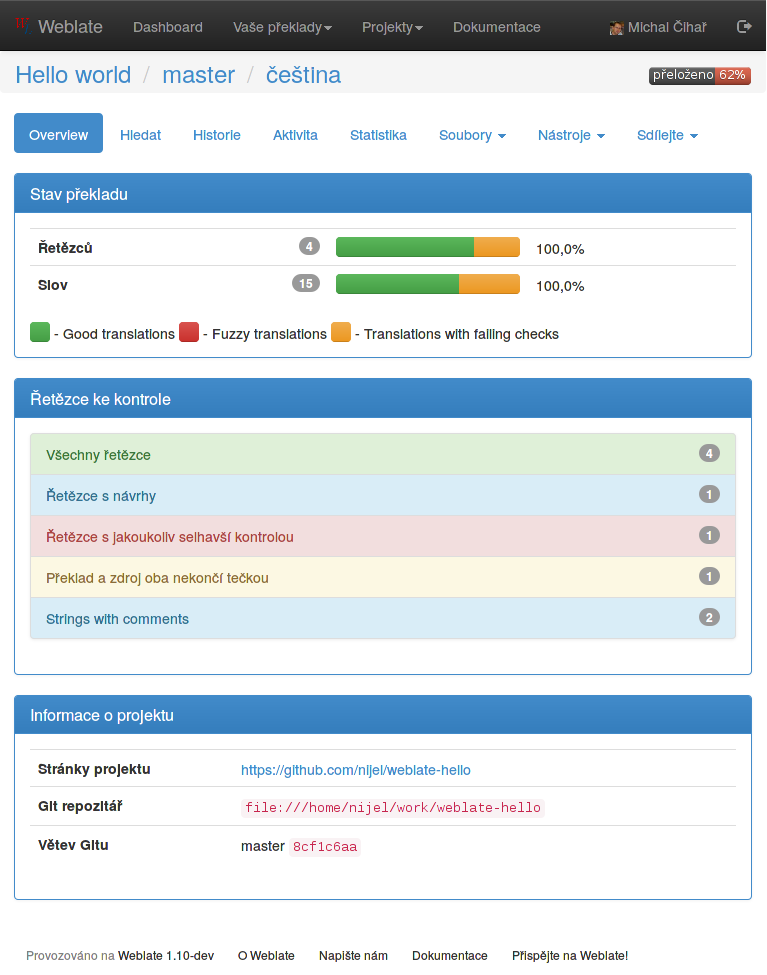
 I ve been searching for interesting ways to manipulate RDF graphs in Python, to create an application that would handle Linked Data Resources in an OO-way, i.e. using Python classes and not tables/sets/lists of triples. The data will be persisted in graphs in a triple store, accessed through a SPARQL enpoint.
In this post, I ll illustrate how I managed to tie RDFLib s SPARQLStore plugin and RDFAlchemy to reach a rather nice looking result.
 I wrote my own
 Today I released version 0.25 of my

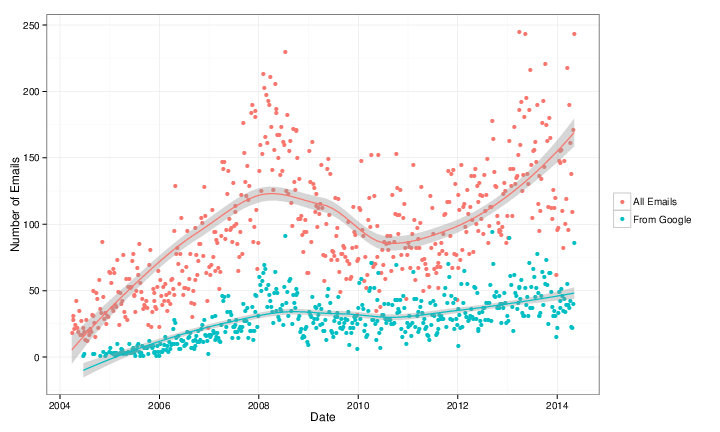


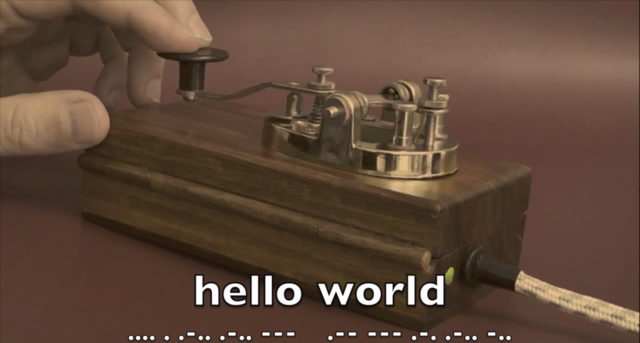
 As promised, today I would like to write a bit about the making of


 The NVidia card being unable to drive two monitors is a little annoying, and the lack of support for skype and chrome is a bother, but I think I can build chrome There ll probably be no flash, I imagine.