Dima Kogan: Ricoh GR IIIx 802.11 reverse engineering
I just got a fancy new camera: Ricoh GR IIIx. It's pretty great, and I strongly
recommend it to anyone that wants a truly pocketable camera with fantastic image
quality and full manual controls. One annoyance is the connectivity. It does
have both Bluetooth and 802.11, but the only official method of using them is
some dinky closed phone app. This is silly. I just did some reverse-engineering,
and I now have a functional shell script to download the last few images via
802.11. This is more convenient than plugging in a wire or pulling out the
memory card. Fortunately, Ricoh didn't bend over backwards to make the reversing
difficult, so to figure it out I didn't even need to download the phone app, and
sniff the traffic.
When you turn on the 802.11 on the camera, it says stuff about essid and
password, so clearly the camera runs its own access point. Not ideal, but it's
good-enough. I connected, and ran
nmap to find hosts and open ports: only port
80 on 192.168.0.1 is open. Pointing curl at it yields some error, so I need to
figure out the valid endpoints. I downloaded the firmware binary, and tried to
figure out what's in it:
dima@shorty:/tmp$ binwalk fwdc243b.bin
DECIMAL       HEXADECIMAL     DESCRIPTION
--------------------------------------------------------------------------------
3036150       0x2E53F6        Cisco IOS microcode, for "8"
3164652       0x3049EC        Certificate in DER format (x509 v3), header length: 4, sequence length: 5412
5472143       0x537F8F        Copyright string: "Copyright ("
6128763       0x5D847B        PARity archive data - file number 90
10711634      0xA37252        gzip compressed data, maximum compression, from Unix, last modified: 2022-02-15 05:47:23
13959724      0xD5022C        MySQL ISAM compressed data file Version 11
24829873      0x17ADFB1       MySQL MISAM compressed data file Version 4
24917663      0x17C369F       MySQL MISAM compressed data file Version 4
24918526      0x17C39FE       MySQL MISAM compressed data file Version 4
24921612      0x17C460C       MySQL MISAM compressed data file Version 4
24948153      0x17CADB9       MySQL MISAM compressed data file Version 4
25221672      0x180DA28       MySQL MISAM compressed data file Version 4
25784158      0x1896F5E       Cisco IOS microcode, for "\"
26173589      0x18F6095       MySQL MISAM compressed data file Version 4
28297588      0x1AFC974       MySQL ISAM compressed data file Version 6
28988307      0x1BA5393       MySQL ISAM compressed data file Version 3
28990184      0x1BA5AE8       MySQL MISAM index file Version 3
29118867      0x1BC5193       MySQL MISAM index file Version 3
29449193      0x1C15BE9       JPEG image data, JFIF standard 1.01
29522133      0x1C278D5       JPEG image data, JFIF standard 1.08
29522412      0x1C279EC       Copyright string: "Copyright ("
29632931      0x1C429A3       JPEG image data, JFIF standard 1.01
29724094      0x1C58DBE       JPEG image data, JFIF standard 1.01
The gzip chunk looks like what I want:
dima@shorty:/tmp$ tail -c+10711635 fwdc243b.bin> /tmp/tst.gz
dima@shorty:/tmp$ < /tmp/tst.gz gunzip   file -
/dev/stdin: ASCII cpio archive (SVR4 with no CRC)
dima@shorty:/tmp$ < /tmp/tst.gz gunzip > tst.cpio
OK, we have some
.cpio thing. It's plain-text. I grep around it in, looking
for GET and POST and such, and I see various URI-looking things at
/v1/..... Grepping for that I see
dima@shorty:/tmp$ strings tst.cpio   grep /v1/
GET /v1/debug/revisions
GET /v1/ping
GET /v1/photos
GET /v1/props
PUT /v1/params/device
PUT /v1/params/lens
PUT /v1/params/camera
GET /v1/liveview
GET /v1/transfers
POST /v1/device/finish
POST /v1/device/wlan/finish
POST /v1/lens/focus
POST /v1/camera/shoot
POST /v1/camera/shoot/compose
POST /v1/camera/shoot/cancel
GET /v1/photos/ /
GET /v1/photos/ / /info
PUT /v1/photos/ / /transfer
/v1/photos/<string>/<string>
/v1/photos/<string>/<string>/info
/v1/photos/<string>/<string>/transfer
/v1/device/finish
/v1/device/wlan/finish
/v1/lens/focus
/v1/camera/shoot
/v1/camera/shoot/compose
/v1/camera/shoot/cancel
/v1/changes
/v1/changes message received.
/v1/changes issue event.
/v1/changes new websocket connection.
/v1/changes websocket connection closed. reason( )
/v1/transfers, transferState( ), afterIndex( ), limit( )
Jackpot. I pointed
curl at most of these, and they do interesting things.
Generally they all spit out JSON. /v1/liveview sends out a sequence of JPEG
images. The thing I care about is /v1/photos/DIRECTORY/FILE and
/v1/photos/DIRECTORY/FILE/info. The result is a script I just wrote to connect
to the camera, download N images, and connect back to the original access
point:
https://github.com/dkogan/ricoh-download
Kinda crude, but works for now. I'll improve it with time.
After I did this I found an old thread from 2015 where somebody was using an
apparently-compatible camera, and wrote a fancier tool:
https://www.pentaxforums.com/forums/184-pentax-k-s1-k-s2/295501-k-s2-wifi-laptop-2.html


 A short while after
 As announced some time ago on


 My work computer runs Debian 11 bullseye (the current stable release) in a mechanical 500GB disk, and I was provided with a new SDD disk but its size was 480 GB. So I had to shrink my partitions before copying the data to the new disk. It turned out to be a bit difficult because my main partition was encrypted.
I write here how I did, maybe there are other simpler ways but I couldn t find them.
References:
 (Well, the actual process was not so smooth but after several tries and errors and searching for help I managed to get the needed commands to make my system boot from the new disk).









 Youtube has a really nice RSS feature that is extremely well hidden.
If you postfix a Channel ID to
 Now, some user pages may have multiple valid RSS feeds because they contain multiple channels.
Remember the TED page from above? Well run:
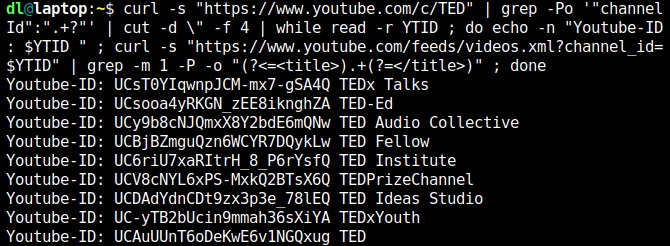 You probably want the last Channel ID listed above, the non-selective "TED" one. And that's the one from the example above.
Update
02.06.2022:
smpl wrote in and has the much better solution for the most frequent use cases:
 These things are meant to be very consumer-style end-user devices. You log in with your Google account and everything works. Until it doesn't.
Just setting it up caused the first issue:
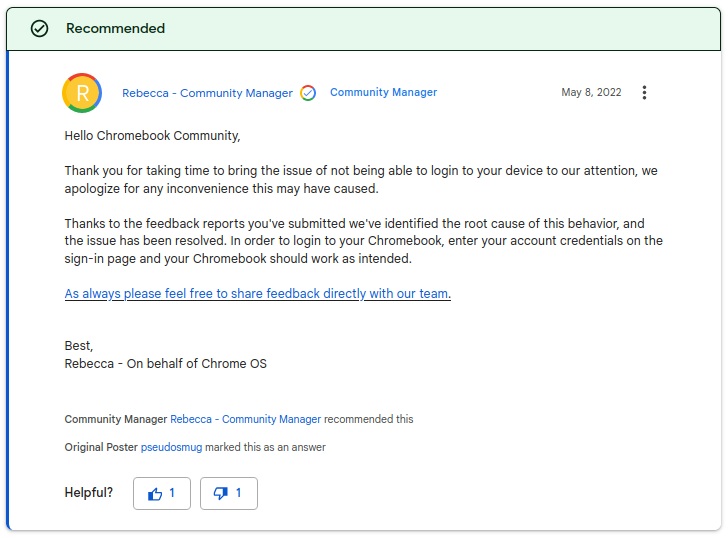
I was always thrown back to a black screen and then another login-screen despite having successfully logged in initially to create the "owner" user of the Chromebook. No error message, not useful UI feedback. Just logging in again and again and again.
The issue is ... not having a GMail account associated with my Google account. Duh!
So add a GMail.com address as the primary to your Google account and the initial setup completes.
Of course you cannot delete that GMail.com association again because the owner user is linked to the email and not the account. Well, you can delete it but then you cannot configure "owner" items of your Chromebook any more. Great job, Google. Not. Identity management 101 fail.
Kudos to
 Once I was able to login to the new Chromebook all worked fine until I started to use ssh sessions.
These always hung for 30 seconds to 10 minutes and then resumed with lots of packets lost in between and the last minute or so coming in from buffering in a burst.
This was easy to see in
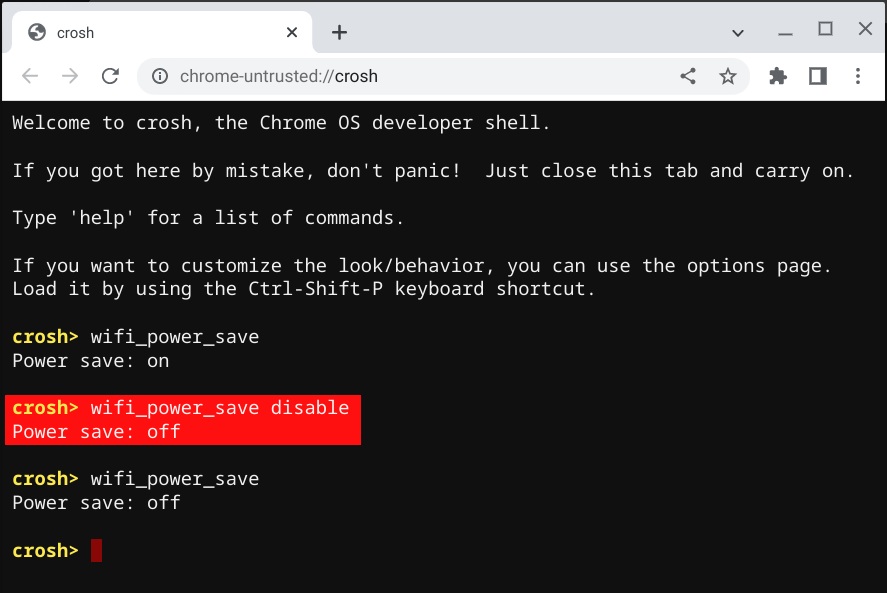 This unfortunately only lasts until the next reboot but it does persist over suspend cycles (aka closing the lid).