
Two weeks ago, I was at
LOAD, where
I did a tutorial on Debian Packaging. Unfortunately, I wasn't doing very
well physically, and as a result my preparation wasn't what I had hoped
for. It ended up being not so much a tutorial as a walking the audience
through packaging a piece of software in casu
NBD with debhelper in dh mode.
Not very difficult, but since there's nothing for people to fall back on
afterwards, it may help if they have a writedown of what I said during
the session; and I promised to put it on my blog. So, here goes.
However, note that the canonical
written tutorial on Debian
Packaging is
here.
With apologies to readers of Planet Debian, most of whom for which
all this is probably old hat.
Unlike RPM packaging, in Debian, the data that tells the debian
packaging system how to package a piece of software is functionally
split among a number of files. All these files go in a toplevel
directory in the source package, (unsurprisingly) called
'
debian'.
There are four files that are required for every Debian package: the
control,
changelog,
copyright, and
rules files. Without these files,
dpkg-dev will fail
to produce a package
any package.
The first, the
control file, contains
metadata on
packages: the name of the package, its description, the dependencies,
etc. Basically, almost all the information you see when you run
'apt-cache show <package>' (with one exception) is in the
control file. If you have a source package that builds multiple
binary packages, then you should have multiple 'Package' stanzas in the
control file.
In my opinion, creating a control file is easiest done by copying a
control file from another (similar?) package, and modifying it to suit
the software you're dealing with.
The one exception, the one bit of metadata that is not found in the
control file is the
version number: this data is contained in
the
changelog file. This file
looks like a free-form
file for the most part, but it really is a machine-parsable format; as
such, it's best to edit it with specialized tools, such as the
debian-changelog-mode in the
emacs editor, or the
debchange script, also available as
dch, from the
devscripts package. In
the changelog, you should document any changes you make to the package,
making sure the version number (top line), distribution (unstable,
experimental, stable, ...; top line), urgency (top line; used mainly
when testing needs to be updated urgently for things like security
updates), author (bottom line) and date and time (also bottom line) are
correct.
The
copyright file, unsurprisingly, should contain the copyrights
statements of the original software, and the license (or a reference to
a copy of the same license text under /usr/share/common-licenses). This
file is still free-format in most packages today, although a
machine-readable format for
this file has recently been defined. Of the four required files, this is
probably the most boring one, but hey, we can't like everything we
do.
The last file, the
rules file, is where all the action
happens. This file is defined as a
Makefile, of which the
targets are called for various parts of the build system.
The
rules file has a number of required targets (such as
build,
clean, and others), but if you're using
debhelper in dh mode, you don't need to worry about those; instead, you
can use the following simple rules file:
#!/usr/bin/make -f
%:
	dh $@
With the first line, the shebang, we make clear that this is a
makefile, and that it should be called by make. The next is a generic
target (the % is a wildcard for make), with just one command: 'call
dh with the name of the target being called'. Since
dh
implements all required
rules targets, that immediately gets
you a working package. Go ahead, try! Run 'dpkg-buildpackage
-rfakeroot', and see what happens.
Did that work? Maybe, maybe not. First, you'll have seen loads of
warnings about something involving a "compatibility level". This is
from debhelper; this compatibility level, or 'API level' if you wish,
allows debhelper to move forward and make incompatible changes without
breaking all the existing packages out there; whenever the compat level
is bumped, some new functionality will only be made available if you
also raise the compat level in your source package (and then you'll know
you may have some changes to do in your package). Since the original
debhelper, over a decade ago, did not have a compat level, the absense
of a compat level signals compat level 1, which is far outdated now, and
about to be unsupported. Hence the warning. The fix is simple: create a
file
debian/compat containing a single number: the
compatibility level you're working with. It's best to use the most
recent level which debhelper supports when you create your package,
which as of this writing is level 9.
Ignoring the compatibility level, if you're building a software
package which uses a well-established build system, and you only build
one binary package out of that, chances are pretty high that everything
worked as expected. If not, you'll have more work.
Building multiple packages requires that you tell debhelper somehow
which file goes in which package. You can do this with a file
debian/package.install, where
package is the
name of the binary package you're building.
The
install file is read by
dh_install, one of many
tools in the
debhelper suite. You see, in the old days (before
debhelper 7), debhelper was just a suite of tools, which required that
you wrote a
debian/rules file containing all the individual
tools to be called in the correct order. This mode is still supported;
in fact, even if you do use
dh, you do, since all that tool
really does is call the right tools in the right order; the real work is
done by the invidual tools. They all have their own man page; to
understand how
dh_install chooses which file to put in which
package, go read
man dh_install. Go ahead, do it now; I'll
wait.
Back? Good. You've now learned that
dh_install can install
files either from the source directory (useful for packages containing
only scripts or so), or from a directory
debian/tmp. If you use
an autotools-based software package, this is what
dh will do
for you.
When you called
dpkg-builpackage above, you may also have
noticed that the output contained many lines starting with
dh_,
one of which said
dh_install. As you may have guessed,
dh echoes every
debhelper command just before it will
execute them. This allows you to look at the output, and see what's
happening. For more detail, set the environment variable DH_VERBOSE to a
non-zero value.
I'm sure you'll have seen one or two
debhelper tools that
could make your package better. Go ahead, go and read their man pages to
see what they do, and how they do it. Most of these will require you to
create a file
debian/package.toolname to
specify details.
In some cases, you may need to specify command-line arguments to the
tool to get it to do what you want. In yet other cases, the tool won't
support what you need it to do, and you'll have to do something manual.
What to do now? The
dh command line doesn't support adding
extra commands easily. Does this mean you'd have to revert to old-style
long, non-
dh debian/rules files?
Luckily, no. You can create an
override target. If
dh detects that you have such a target for a particular tool,
it will call that target instead of the tool. This target's rules can
then call the tool in question (or not), and add any command line
arguments, or extra commands, as needed.
An override target is a normal Makefile target with a name of the
form
override_dh_something, where
dh_something is the name of the tool you wish to override.
At this point, I'd reached almost the end of my two allotted hours,
and a member of the audience asked how to make
dpkg deal with
configuration files.
The answer is, you don't need to do anything! Not if you use
debhelper, anyway; all you need to do is install the file in
/etc. Since debian policy specifies that all files in
/etc need
to be configuration files
and that no conffiles may be placed
anywhere but in
/etc, debhelper will automatically mark any
file installed in
/etc as a conffile, which will cause
dpkg to ask the user what to do with changes to such files.
Note that in Debian parlance, a
conffile is not the same
thing as a configuration file: a
conffile is a configuration
file that is part of the binary package (i.e., if you call 'dpkg
--contents' on the .deb file, you'll see it in the output), whereas a
configuration file is a file (
any file, including files
generated during or after installation of the .deb file on a
system).
Occasionally, this is also why some differences to configuration
files are managed through
debconf,
while others aren't: the ones managed through debconf are non-conffile
configuration files managed through
ucf, whereas the others are
conffiles.
So in the simplest of cases, if you want to install a configuration
file and you want to make sure it's protected against accidental
overwrites by package upgrades, all you need to do is make sure it's
installed to
/etc;
debhelper will do the rest.
And that concludes this introduction. Please note it's only an
introduction, not a full-blown tutorial; while this will allow you to
get started, you may have to learn a bit more if you wish to eventually
upload a package to Debian.



 A few years ago I started to run my own server. This was an interesting challenge back then but today I only consider it a waste of time and money. Therefore I'm searching for (a) service provider(s) to substitute my self hosted applications:
 With the latest release of

 .
.
 I still get lot of questions why I wrote
  Dpkg
Thanks to Guillem, dpkg with multiarch support is now available in Debian sid. The road has been bumpy, and it has again been delayed multiple times even after Guillem
Dpkg
Thanks to Guillem, dpkg with multiarch support is now available in Debian sid. The road has been bumpy, and it has again been delayed multiple times even after Guillem 
 Hm, I realized that I
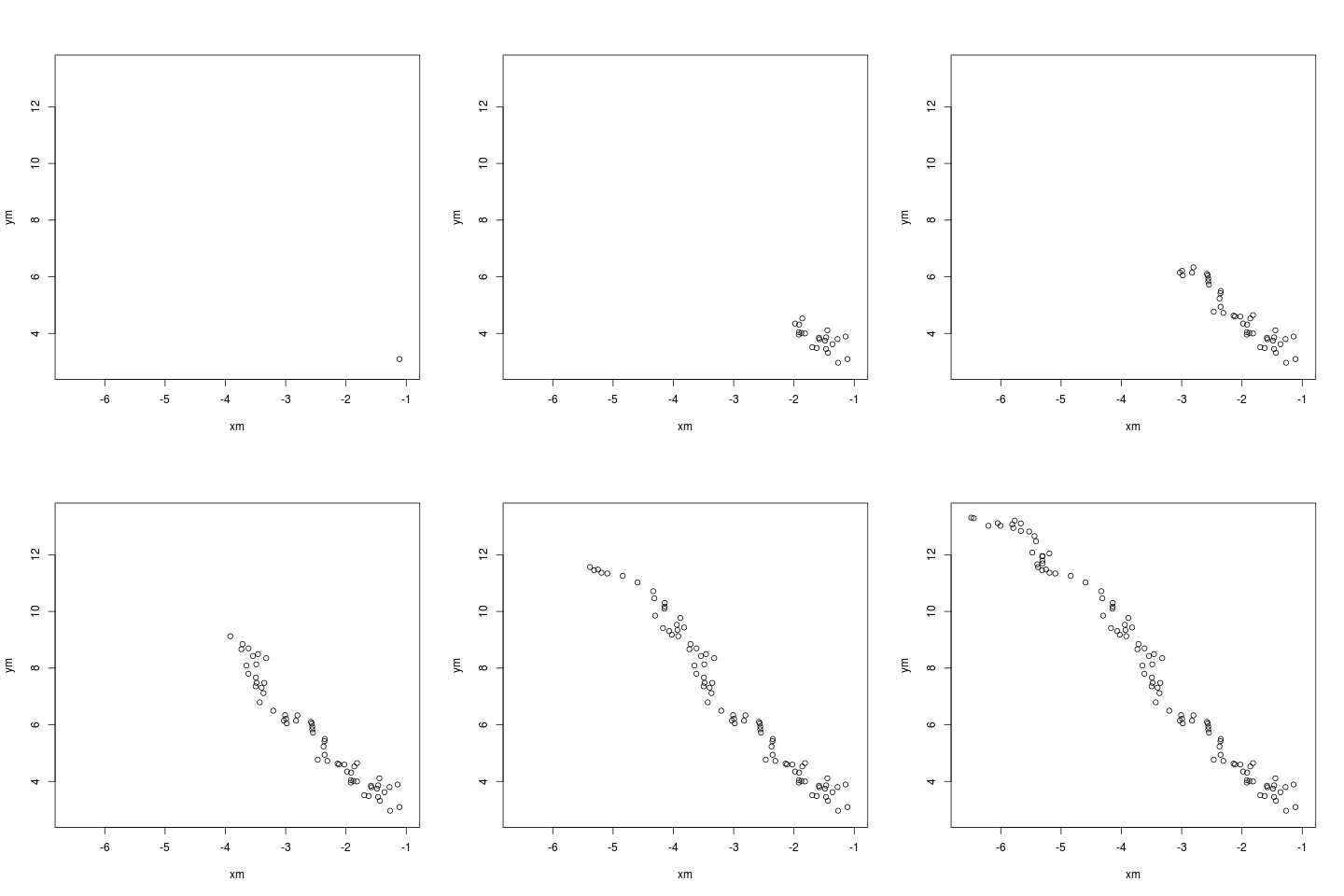 The animation is of course due to ImageMagick glueing one hundred files into
a single animated gif.
More information about
The animation is of course due to ImageMagick glueing one hundred files into
a single animated gif.
More information about  During the last month I worked as upstream maintainer of LADI Tools and now I m happy to introduce the first stable release! So, to answer the usual question What s new? , here is a short description of the changes introduced (taken from the NEWS file included in the release tarball):
Laditools 1.0 Lady O
Apart from wladi and g15ladi, most of ladi* tools have been renamed:
During the last month I worked as upstream maintainer of LADI Tools and now I m happy to introduce the first stable release! So, to answer the usual question What s new? , here is a short description of the changes introduced (taken from the NEWS file included in the release tarball):
Laditools 1.0 Lady O
Apart from wladi and g15ladi, most of ladi* tools have been renamed: