Matthew Garrett: If it's not practical to redistribute free software, it's not free software in practice
 I've previously written about Canonical's obnoxious IP policy and how Mark Shuttleworth admits it's deliberately vague. After spending some time discussing specific examples with Canonical, I've been explicitly told that while Canonical will gladly give me a cost-free trademark license permitting me to redistribute unmodified Ubuntu binaries, they will not tell me what
 Any redistribution of modified versions of Ubuntu must be approved, certified or provided by Canonical if you are going to associate it with the Trademarks. Otherwise you must remove and replace the Trademarks and will need to recompile the source code to create your own binariesactually means.
Why does this matter? The free software definition requires that you be able to redistribute software to other people in either unmodified or modified form without needing to ask for permission first. This makes it clear that Ubuntu itself isn't free software - distributing the individual binary packages without permission is forbidden, even if they wouldn't contain any infringing trademarks[1]. This is obnoxious, but not inherently toxic. The source packages for Ubuntu could still be free software, making it fairly straightforward to build a free software equivalent.
Unfortunately, while true in theory, this isn't true in practice. The issue here is the apparently simple phrase
you must remove and replace the Trademarks and will need to recompile the source code. "Trademarks" is defined later as being the words "Ubuntu", "Kubuntu", "Juju", "Landscape", "Edubuntu" and "Xubuntu" in either textual or logo form. The naive interpretation of this is that you have to remove trademarks where they'd be infringing - for instance, shipping the Ubuntu bootsplash as part of a modified product would almost certainly be clear trademark infringement, so you shouldn't do that. But that's not what the policy actually says. It insists that all trademarks be removed, whether they would embody an infringement or not. If a README says "To build this software under Ubuntu, install the following packages", a literal reading of Canonical's policy would require you to remove or replace the word "Ubuntu" even though failing to do so wouldn't be a trademark infringement. If an @ubuntu.com email address is present in a changelog, you'd have to change it. You wouldn't be able to ship the juju-core package without renaming it and the application within. If this is what the policy means, it's so impractical to be able to rebuild Ubuntu that it's not free software in any meaningful way.
This seems like a pretty ludicrous interpretation, but it's one that Canonical refuse to explicitly rule out. Compare this to Red Hat's requirements around Fedora - if you replace the fedora-logos, fedora-release and fedora-release-notes packages with your own content, you're good. A policy like this satisfies the concerns that Dustin raised over people misrepresenting their products, but still makes it easy for users to distribute modified code to other users. There's nothing whatsoever stopping Canonical from adopting a similarly unambiguous policy.
Mark has repeatedly asserted that attempts to raise this issue are mere FUD, but he won't answer you if you ask him direct questions about this policy and will insist that it's necessary to protect Ubuntu's brand. The reality is that if Debian had had an identical policy in 2004, Ubuntu wouldn't exist. The effort required to strip all Debian trademarks from the source packages would have been immense[2], and this would have had to be repeated for every release. While this policy is in place, nobody's going to be able to take Ubuntu and build something better. It's grotesquely hypocritical, especially when the Ubuntu website still talks about their belief that people should be able to distribute modifications without licensing fees.
All that's required for Canonical to deal with this problem is to follow Fedora's lead and isolate their trademarks in a small set of packages, then tell users that those packages must be replaced if distributing a modified version of Ubuntu. If they're serious about this being a branding issue, they'll do it. And if I'm right that the policy is deliberately obfuscated so Canonical can encourage people to buy licenses, they won't. It's easy for them to prove me wrong, and I'll be delighted if they do. Let's see what happens.
[1] The policy is quite clear on this. If you want to distribute something other than an unmodified Ubuntu image, you have two choices:
- Gain approval or certification from Canonical
- Remove all trademarks and recompile the source code
[2] Especially when every source package contains a directory called "debian"

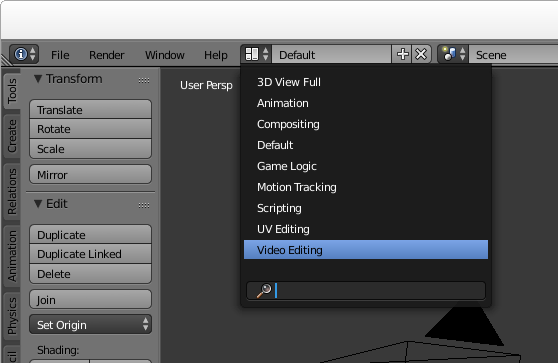 Now you should see all the video sequence editor controls:
 Setup the properties for your project
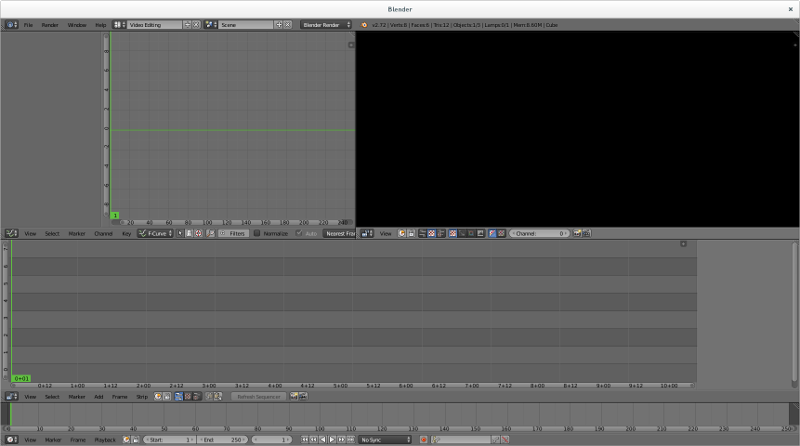
Click the context menu under the strip editor panel and change the panel to a Properties panel:
Setup the properties for your project
Click the context menu under the strip editor panel and change the panel to a Properties panel:
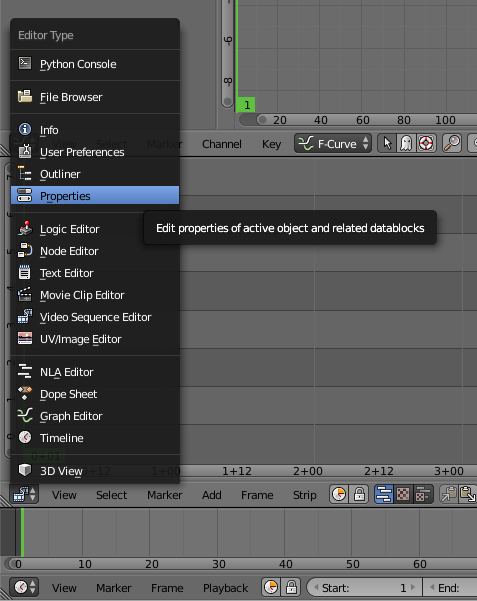 The video file we are playing with is 720p, so it seems reasonable to use 720p for the output too. Change that here:
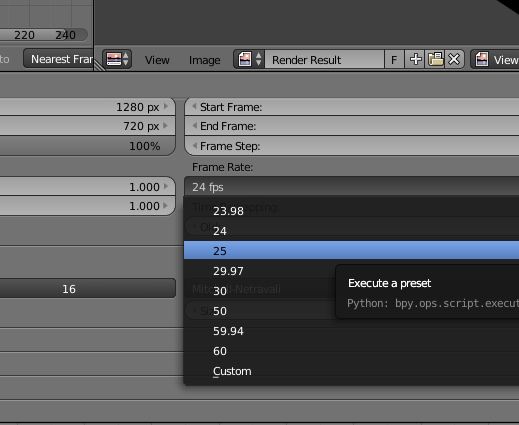
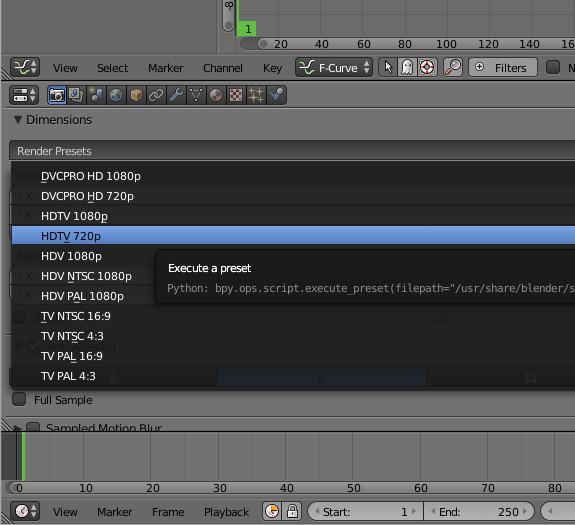 The input file is 25fps so we need to use exactly the same frame rate for the output, otherwise you will either observe the video going at the wrong speed or there will be a conversion that is CPU intensive and degrades the quality. Also check that the resolution_percentage setting under the picture dimensions is 100%:
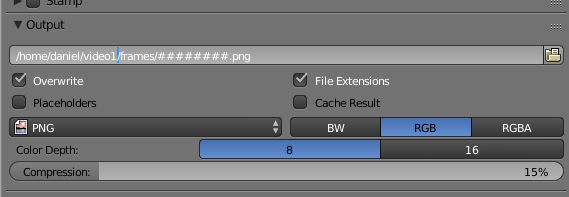
 Now specify output to PNG files. Later we will combine them into a WebM file with a script. Specify the directory where the files will be placed and use the # placeholder to specify the number of digits to use to embed the frame number in the filename:
 Now your basic rendering properties are set. When you want to generate the output file, come back to this panel and use the Animation button at the top.
Editing the video
Use the context menu to change the properties panel back to the strip view panel:
Now your basic rendering properties are set. When you want to generate the output file, come back to this panel and use the Animation button at the top.
Editing the video
Use the context menu to change the properties panel back to the strip view panel:
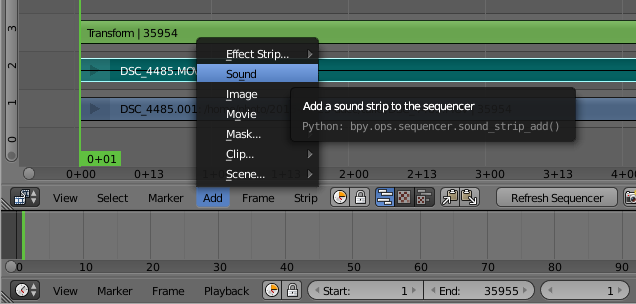
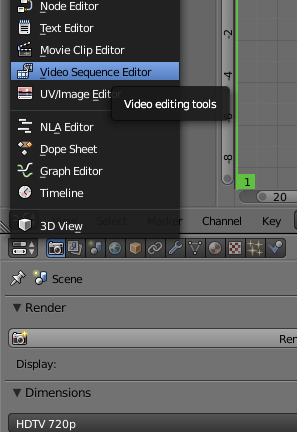 Add the video file:
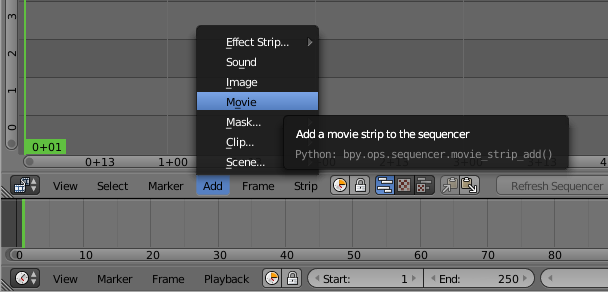 and then right click the video strip (the lower strip) to highlight it and then add a transform strip:
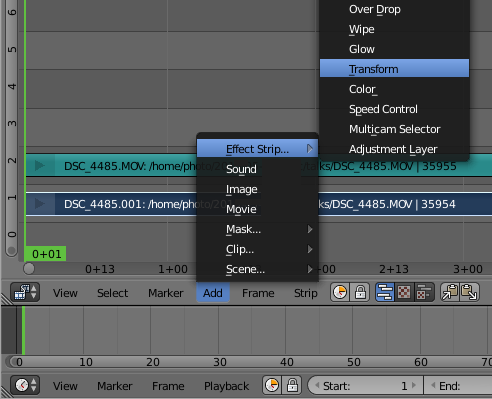 Audio waveform
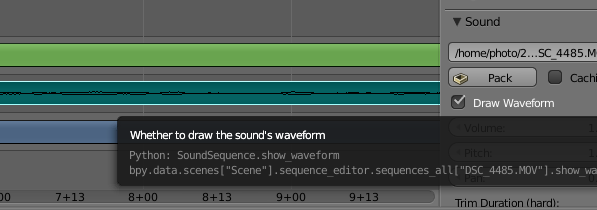
Right click the audio strip to highlight it and then go to the properties on the right hand side and click to show the waveform:
Audio waveform
Right click the audio strip to highlight it and then go to the properties on the right hand side and click to show the waveform:
 Rendering length
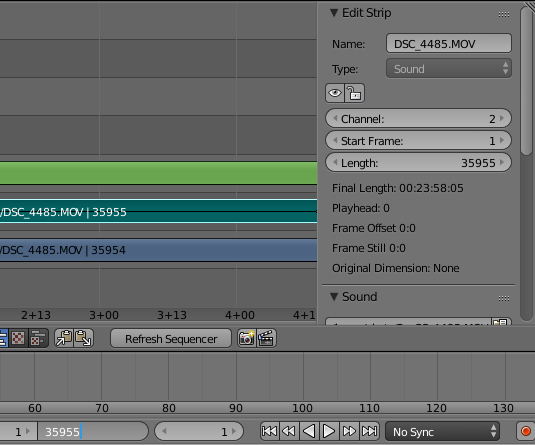
By default, Blender assumes you want to render 250 frames of output. Looking in the properties to the right of the audio or video strip you can see the actual number of frames. Put that value in the box at the bottom of the window where it says 250:
Rendering length
By default, Blender assumes you want to render 250 frames of output. Looking in the properties to the right of the audio or video strip you can see the actual number of frames. Put that value in the box at the bottom of the window where it says 250:
 Enable AV-sync
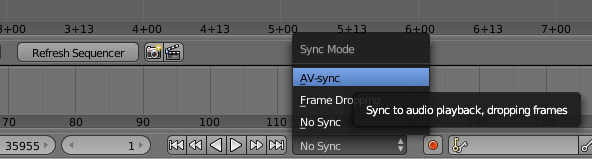
Also at the bottom of the window is a control to enable AV-sync. If your audio and video are not in sync when you preview, you need to set this AV-sync option and also make sure you set the frame rate correctly in the properties:
Enable AV-sync
Also at the bottom of the window is a control to enable AV-sync. If your audio and video are not in sync when you preview, you need to set this AV-sync option and also make sure you set the frame rate correctly in the properties:
 Add the other sound strip
Now add the other sound file that was recorded using the lapel microphone:
Add the other sound strip
Now add the other sound file that was recorded using the lapel microphone:
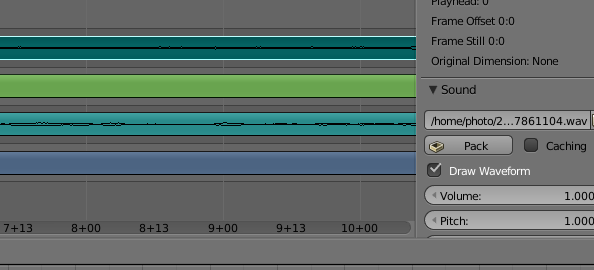
 Enable the waveform display for that sound strip too, this will allow you to align the sound strips precisely:
 You will need to listen to the strips to make an estimate of the time difference. Use this estimate to set the "start frame" in the properties for your audio strip, it will be a negative value if the audio strip starts before the video. You can then zoom the strip panel to show about 3 to 5 seconds of sound and try to align the peaks. An easy way to do this is to look for applause at the end of the audio strips, the applause generates a large peak that is easily visible.
Once you have synced the audio, you can play the track and you should not be able to hear any echo. You can then silence the audio track from the camera by right clicking it, look in the properties to the right and change volume to 0.
Make any transforms you require
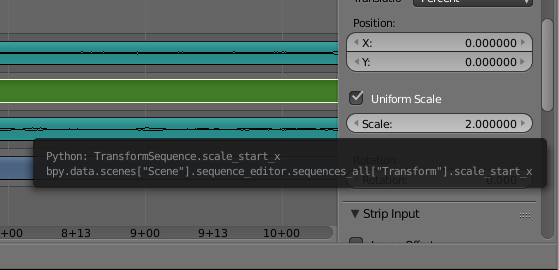
For example, to zoom in on the speaker, right click the transform strip (3rd from the bottom) and then in the panel on the right, click to enable "Uniform Scale" and then set the scale factor as required:
You will need to listen to the strips to make an estimate of the time difference. Use this estimate to set the "start frame" in the properties for your audio strip, it will be a negative value if the audio strip starts before the video. You can then zoom the strip panel to show about 3 to 5 seconds of sound and try to align the peaks. An easy way to do this is to look for applause at the end of the audio strips, the applause generates a large peak that is easily visible.
Once you have synced the audio, you can play the track and you should not be able to hear any echo. You can then silence the audio track from the camera by right clicking it, look in the properties to the right and change volume to 0.
Make any transforms you require
For example, to zoom in on the speaker, right click the transform strip (3rd from the bottom) and then in the panel on the right, click to enable "Uniform Scale" and then set the scale factor as required:
 Render the video output to PNG
Click the context menu under the Curves panel and choose Properties again.
Click the Animation button to generate a sequence of PNG files for each frame.
Render the audio output
On the Properties panel, click the Audio button near the top. Choose a filename for the generated audio file.
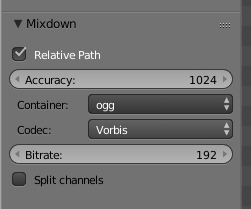
Look on the bottom left-hand side of the window for the audio file settings, change it to the ogg container and Vorbis codec:
Render the video output to PNG
Click the context menu under the Curves panel and choose Properties again.
Click the Animation button to generate a sequence of PNG files for each frame.
Render the audio output
On the Properties panel, click the Audio button near the top. Choose a filename for the generated audio file.
Look on the bottom left-hand side of the window for the audio file settings, change it to the ogg container and Vorbis codec:
 Ensure the filename has a .ogg extension
Now look at the top right-hand corner of the window for the Mixdown button. Click it and wait for Blender to generate the audio file.
Combine the PNG files and audio file into a WebM video file
You will need to have a few command line tools installed for manipulating the files from scripts. Install them using the package manager, for example, on a Debian or Ubuntu system:
Ensure the filename has a .ogg extension
Now look at the top right-hand corner of the window for the Mixdown button. Click it and wait for Blender to generate the audio file.
Combine the PNG files and audio file into a WebM video file
You will need to have a few command line tools installed for manipulating the files from scripts. Install them using the package manager, for example, on a Debian or Ubuntu system:
 I'm pleased with the way that
  I m excited to see other people thinking about userspace-to-kernel attack surface reduction ideas. Theo de Raadt recently published slides describing
 Ok, I have been an iPhone user since I moved to Japan and got my first smart-phone ever. First a 3s, then a 4s, then a 5s that I dropped into the toilet, so I switched the SIM back into the 4s to have a working phone. Furthermore, I am a heavy music listener and used
 I've been trying to run containers using systemd-nspawn for quite some
time. I was always bumping to one or other dead end. This is not
systemd-nspawn's fault, rather my impatience stopping me from reading
manual pages properly lack of good tutorial like article available
online. Compared to this LXC has a quite a lot of good tutorials and
howto's available online.
This article is my effort to create a notes putting all required
information in one place.
I've been trying to run containers using systemd-nspawn for quite some
time. I was always bumping to one or other dead end. This is not
systemd-nspawn's fault, rather my impatience stopping me from reading
manual pages properly lack of good tutorial like article available
online. Compared to this LXC has a quite a lot of good tutorials and
howto's available online.
This article is my effort to create a notes putting all required
information in one place.
 At the
  Last week, Senator Omar Fayad presented one of the prime examples of a poorly redacted law that, if enacted, will make basically any way of computer use illegal. And yes, even if he
  This is the fourth part in a series of articles about SRE, based on the talk I gave in the

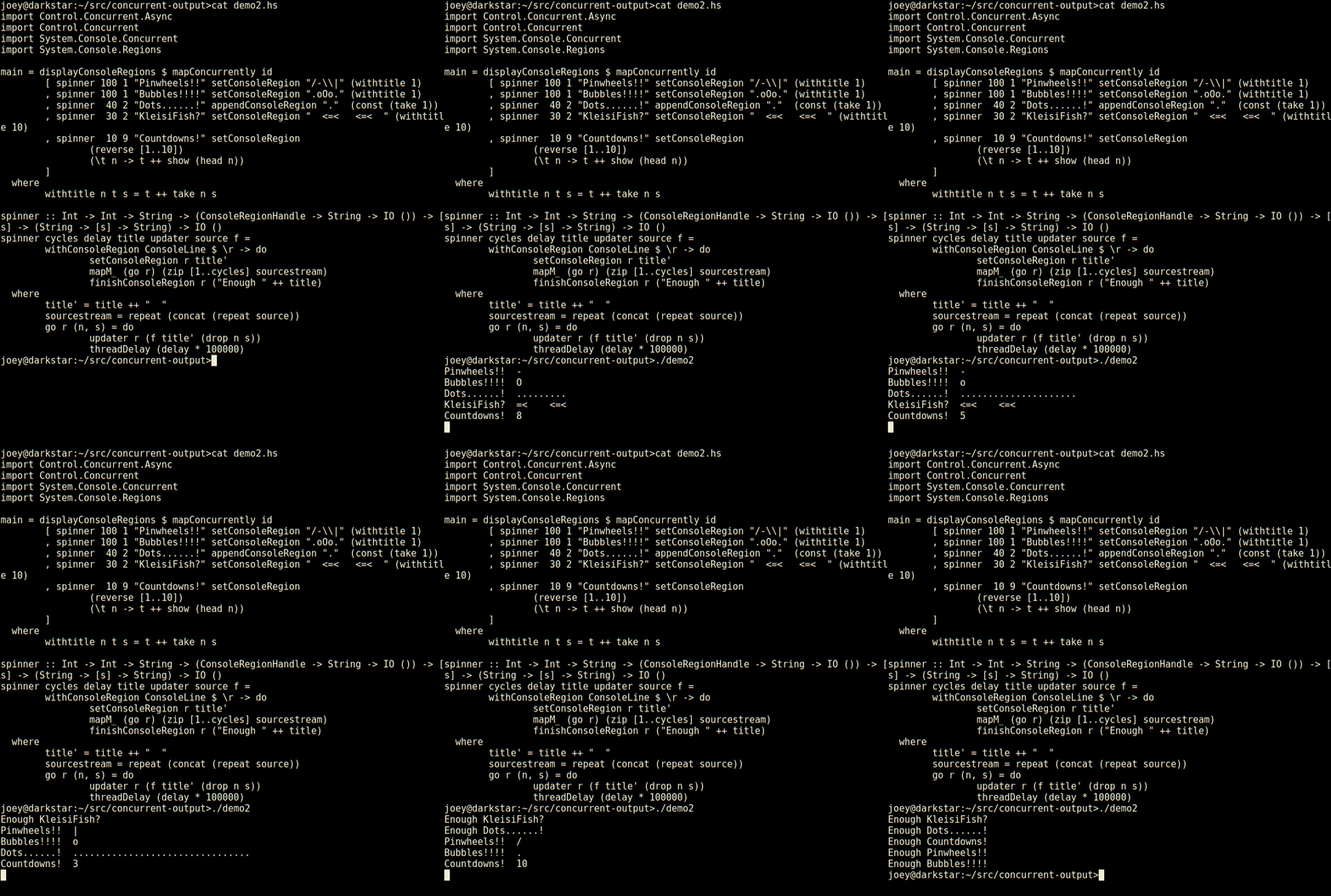 Not bad for 23 lines of code, is that? Seems much less tedious to do things
this way than using ncurses. Even with its panels, ncurses requires you to
think about layout of various things on the screen, and many low-level
details. This, by contrast, is compositional, just add another region and a
thread to update it, and away it goes.
So, here's an apt-like download progress display, in 30 lines of code.
Not bad for 23 lines of code, is that? Seems much less tedious to do things
this way than using ncurses. Even with its panels, ncurses requires you to
think about layout of various things on the screen, and many low-level
details. This, by contrast, is compositional, just add another region and a
thread to update it, and away it goes.
So, here's an apt-like download progress display, in 30 lines of code.
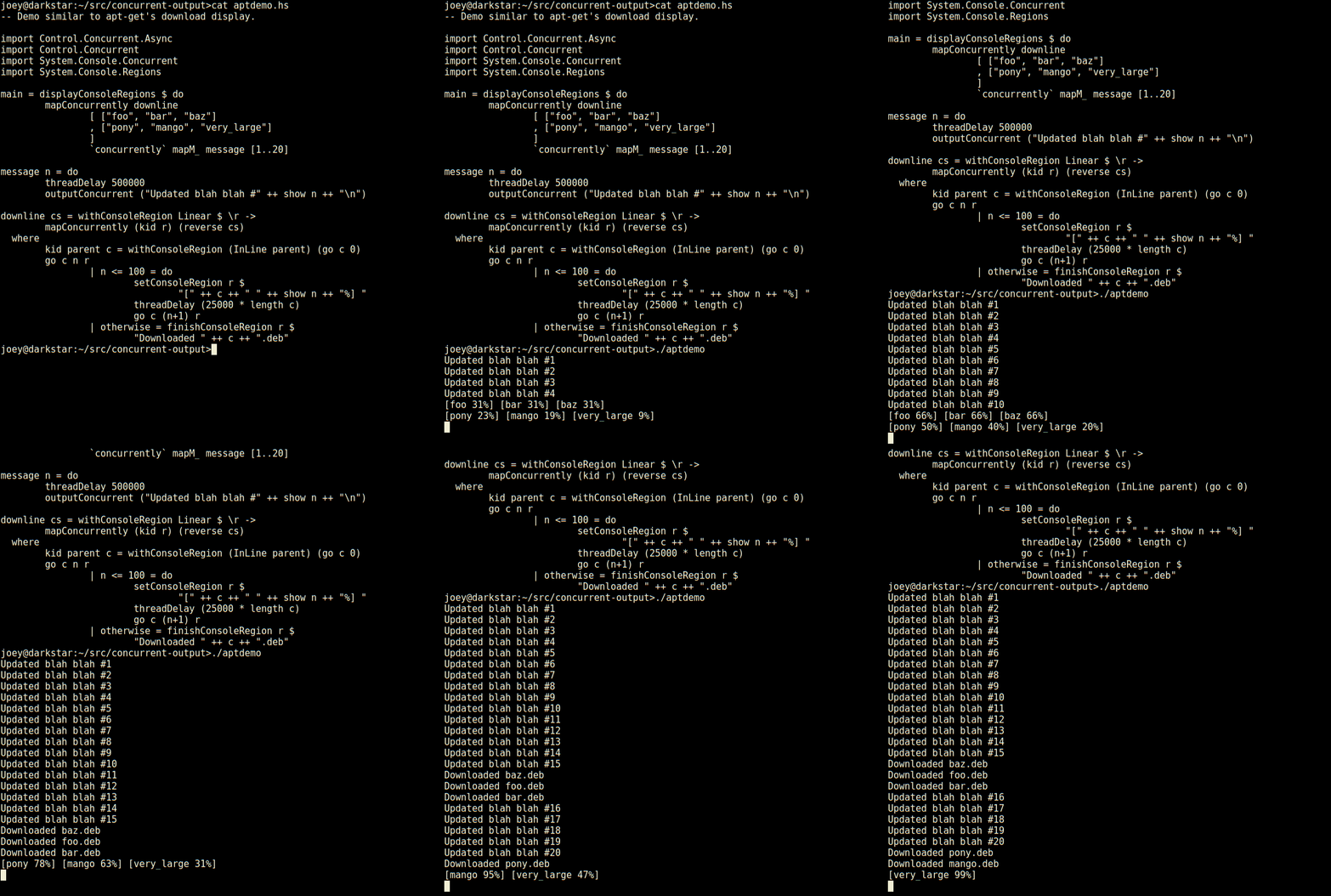 Not only does it have regions which are individual lines of the screen,
but those can have sub-regions within them as seen here (and so on).
And, log-type messages automatically scroll up above the regions.
External programs run by
Not only does it have regions which are individual lines of the screen,
but those can have sub-regions within them as seen here (and so on).
And, log-type messages automatically scroll up above the regions.
External programs run by 
 A new major release of