Jonathan Dowland: Our Study
 This is a fairly self-indulgent post, sorry!
Encouraged by Evgeni,
Michael and
others, given I'm spending a lot more time at my desk in my home office, here's
a picture of it:
 Fisheye shot of my home office
This is a fairly self-indulgent post, sorry!
Encouraged by Evgeni,
Michael and
others, given I'm spending a lot more time at my desk in my home office, here's
a picture of it:
Fisheye shot of my home office
 A very exciting RcppSimdJson release with the updated upstream simdjson release 0.4.0 as well as a first set of new JSON parsing functions just hit CRAN. RcppSimdJson wraps the fantastic and genuinely impressive simdjson library by Daniel Lemire and collaborators. Via very clever algorithmic engineering to obtain largely branch-free code, coupled with modern C++ and newer compiler instructions, it results in parsing gigabytes of JSON parsed per second which is quite mindboggling. The best-case performance is faster than CPU speed as use of parallel SIMD instructions and careful branch avoidance can lead to less than one cpu cycle use per byte parsed; see the video of the recent talk by Daniel Lemire at QCon (which was also voted best talk). The very recent 0.4.0 release further improves the already impressive speed.
And this release brings a first set of actually user-facing functions thanks to Brendan which put in a series of PRs! The full NEWS entry follows.
Courtesy of CRANberries, there is also a diffstat report for this release. For questions, suggestions, or issues please use the issue tracker at the GitHub repo. If you like this or other open-source work I do, you can now sponsor me at GitHub. For the first year, GitHub will match your contributions.Changes in version 0.0.6 (2020-06-25)
- Created C++ integer-handling utilities for safe downcasting and integer return (Brendan in #16 closing #13).
- New JSON functions
.deserialize_jsonand.load_json(Brendan in #16, #17, #20, #21).- Upgrade Travis CI to 'bionic', extract package and version from
DESCRIPTION(Dirk in #23).- Upgraded to simdjson 0.4.0 (Dirk in #25 closing #24).
This post by Dirk Eddelbuettel originated on his Thinking inside the box blog. Please report excessive re-aggregation in third-party for-profit settings.
master for the default git branch. Regardless of the etymology (which is unclear), some people say they have negative associations for this word, Changing this upstream in git is complicated on a technical level and, sadly, contested.
But git is flexible enough that I can make this change in my own repositories. Doing so is not even so difficult.
So:
Announcement
I intend to rename master to trunk in all repositories owned by my personal hat. To avoid making things very complicated for myself I will just delete refs/heads/master when I make this change. So there may be a little disruption to downstreams.
I intend make this change everywhere eventually. But rather than front-loading the effort, I'm going to do this to repositories as I come across them anyway. That will allow me to update all the docs references, any automation, etc., at a point when I have those things in mind anyway. Also, doing it this way will allow me to focus my effort on the most active projects, and avoids me committing to a sudden large pile of fiddly clerical work. But: if you have an interest in any repository in particular that you want updated, please let me know so I can prioritise it.
Bikeshed
Why "trunk"? "Main" has been suggested elswewhere, and it is often a good replacement for "master" (for example, we can talk very sensibly about a disk's Main Boot Record, MBR). But "main" isn't quite right for the VCS case; for example a "main" branch ought to have better quality than is typical for the primary development branch.
Conversely, there is much precedent for "trunk". "Trunk" was used to refer to this concept by at least SVN, CVS, RCS and CSSC (and therefore probably SCCS) - at least in the documentation, although in some of these cases the command line API didn't have a name for it.
So "trunk" it is.
Aside: two other words - passlist, blocklist
People are (finally!) starting to replace "blacklist" and "whitelist". Seriously, why has it taken everyone this long?
I have been using "blocklist" and "passlist" for these concepts for some time. They are drop-in replacements. I have also heard "allowlist" and "denylist" suggested, but they are cumbersome and cacophonous.
Also "allow" and "deny" seem to more strongly imply an access control function than merely "pass" and "block", and the usefulness of passlists and blocklists extends well beyond access control: protocol compatibility and ABI filtering are a couple of other use cases.5 1 * * * mythtv /usr/share/mythtv/mythconverg_backup.pl
/home/mythtv/.mythtv/backuprc:
DBBackupDirectory=/var/backups/mythtv
mkdir /var/backups/mythtv
chown mythtv:mythtv /var/backups/mythtv
/etc/cron.d/mythtv-maintenance runs a contrib script to optimize the database
tables:
10 1 * * * mythtv /usr/bin/chronic /usr/share/doc/mythtv-backend/contrib/maintenance/optimize_mythdb.pl
libmythtv-perl and libxml-simple-perl packages
to be installed on Debian-based systems.
It is quickly followed by a check of the recordings and automatic repair of
the seektable (when possible):
20 1 * * * mythtv /usr/bin/chronic /usr/bin/mythutil --checkrecordings --fixseektable
30 1 * * *  mythtv  /usr/bin/mythutil --quiet --scanvideos
31 1 * * *  mythtv  /usr/bin/mythutil --quiet --scanmusic
45 1 * * 1-4,6-7 root /usr/sbin/xfs_fsr
15 3 * * 2  root  /usr/local/sbin/raid_parity_check md0
15 3 * * 4  root  /usr/local/sbin/raid_parity_check md2
/etc/smartd.conf:
/dev/sda -a -d ata -o on -S on -s (S/../.././04 L/../../6/05)
/dev/sdb -a -d ata -o on -S on -s (S/../.././04 L/../../6/05)

 Like each month, here comes a report about the work of paid contributors to Debian LTS.
Individual reports
In May, 198 work hours have been dispatched among 14 paid contributors. Their reports are available:
No comment Liked this article? Click here. My blog is Flattr-enabled.
 I recently moved house, and the new building has a Doorbird to act as a doorbell and open the entrance gate for people. There's a documented local control API (no cloud dependency!) and a Home Assistant integration, so this seemed pretty straightforward.

library (and later module_utils and doc_fragment_plugins) in ansible.cfg and effectively inject our modules, their helpers and documentation fragments into the main Ansible namespace. Not the cleanest solution, but it worked quiet well for us.
When Ansible started introducing Collections, we quickly joined, as the idea of namespaced, easily distributable and usable content units was great and exactly matched what we had in mind.
However, collections are only usable in Ansible 2.8, or actually 2.9 as 2.8 can consume them, but tooling around building and installing them is lacking. Because of that we've been keeping our modules usable outside of a collection.
Until recently, when we decided it's time to move on, drop that compatibility (which costed a few headaches over the time) and release a shiny 1.0.0.
One of the changes we wanted for 1.0.0 is renaming a few modules. Historically we had the module names prefixed with foreman_ and katello_, depending whether they were designed to work with Foreman (and plugins) or Katello (which is technically a Foreman plugin, but has a way more complicated deployment and currently can't be easily added to an existing Foreman setup). This made sense as long as we were injecting into the main Ansible namespace, but with collections the names be became theforemam.foreman.foreman_ <something> and while we all love Foreman, that was a bit too much. So we wanted to drop that prefix. And while at it, also change some other names (like ptable, which became partition_table) to be more readable.
But how? There is no tooling that would rename all files accordingly, adjust examples and tests. Well, bash to the rescue! I'm usually not a big fan of bash scripts, but renaming files, searching and replacing strings? That perfectly fits!
First of all we need a way map the old name to the new name. In most cases it's just "drop the prefix", for the others you can have some if/elif/fi:
prefixless_name=$(echo $ old_name   sed -E 's/^(foreman katello)_//')
if [[ $ old_name  == 'foreman_environment' ]]; then
  new_name='puppet_environment'
elif [[ $ old_name  == 'katello_sync' ]]; then
  new_name='repository_sync'
elif [[ $ old_name  == 'katello_upload' ]]; then
  new_name='content_upload'
elif [[ $ old_name  == 'foreman_ptable' ]]; then
  new_name='partition_table'
elif [[ $ old_name  == 'foreman_search_facts' ]]; then
  new_name='resource_info'
elif [[ $ old_name  == 'katello_manifest' ]]; then
  new_name='subscription_manifest'
elif [[ $ old_name  == 'foreman_model' ]]; then
  new_name='hardware_model'
else
  new_name=$ prefixless_name
fi
That defined, we need to actually have a
$ old_name . Well, that's a for loop over the modules, right?
for module in $ BASE /foreman_*py $ BASE /katello_*py; do
  old_name=$(basename $ module  .py)

done
While we're looping over files, let's rename them and all the files that are associated with the module:
# rename the module
git mv $ BASE /$ old_name .py $ BASE /$ new_name .py
# rename the tests and test fixtures
git mv $ TESTS /$ old_name .yml $ TESTS /$ new_name .yml
git mv tests/fixtures/apidoc/$ old_name .json tests/fixtures/apidoc/$ new_name .json
for testfile in $ TESTS /fixtures/$ old_name -*.yml; do
  git mv $ testfile  $(echo $ testfile   sed "s/$ old_name /$ new_name /")
done
Now comes the really tricky part: search and replace. Let's see where we need to replace first:
module key of the DOCUMENTATION stanza (e.g. module: foreman_example)foreman_example: )foreman_example: )conftest.py and other files related to test executionsed -E -i "/^(\s+$ old_name module):/ s/$ old_name /$ new_name /g" $ BASE /*.py sed -E -i "/^(\s+$ old_name module):/ s/$ old_name /$ new_name /g" tests/test_playbooks/tasks/*.yml tests/test_playbooks/*.yml sed -E -i "/'$ old_name '/ s/$ old_name /$ new_name /" tests/conftest.py tests/test_crud.py sed -E -i "/ $ old_name / s/$ old_name /$ new_name /g' README.md docs/*.mdYou've probably noticed I used
$ BASE and $ TESTS and never defined them Lazy me.
But here is the full script, defining the variables and looping over all the modules.
#!/bin/bash
BASE=plugins/modules
TESTS=tests/test_playbooks
RUNTIME=meta/runtime.yml
echo "plugin_routing:" > $ RUNTIME
echo "  modules:" >> $ RUNTIME
for module in $ BASE /foreman_*py $ BASE /katello_*py; do
  old_name=$(basename $ module  .py)
  prefixless_name=$(echo $ old_name   sed -E 's/^(foreman katello)_//')
  if [[ $ old_name  == 'foreman_environment' ]]; then
    new_name='puppet_environment'
  elif [[ $ old_name  == 'katello_sync' ]]; then
    new_name='repository_sync'
  elif [[ $ old_name  == 'katello_upload' ]]; then
    new_name='content_upload'
  elif [[ $ old_name  == 'foreman_ptable' ]]; then
    new_name='partition_table'
  elif [[ $ old_name  == 'foreman_search_facts' ]]; then
    new_name='resource_info'
  elif [[ $ old_name  == 'katello_manifest' ]]; then
    new_name='subscription_manifest'
  elif [[ $ old_name  == 'foreman_model' ]]; then
    new_name='hardware_model'
  else
    new_name=$ prefixless_name
  fi
  echo "renaming $ old_name  to $ new_name "
  git mv $ BASE /$ old_name .py $ BASE /$ new_name .py
  git mv $ TESTS /$ old_name .yml $ TESTS /$ new_name .yml
  git mv tests/fixtures/apidoc/$ old_name .json tests/fixtures/apidoc/$ new_name .json
  for testfile in $ TESTS /fixtures/$ old_name -*.yml; do
    git mv $ testfile  $(echo $ testfile   sed "s/$ old_name /$ new_name /")
  done
  sed -E -i "/^(\s+$ old_name  module):/ s/$ old_name /$ new_name /g" $ BASE /*.py
  sed -E -i "/^(\s+$ old_name  module):/ s/$ old_name /$ new_name /g" tests/test_playbooks/tasks/*.yml tests/test_playbooks/*.yml
  sed -E -i "/'$ old_name '/ s/$ old_name /$ new_name /" tests/conftest.py tests/test_crud.py
  sed -E -i "/ $ old_name  / s/$ old_name /$ new_name /g' README.md docs/*.md
  echo "    $ old_name :" >> $ RUNTIME
  echo "      redirect: $ new_name " >> $ RUNTIME
  git commit -m "rename $ old_name  to $ new_name " $ BASE  tests/ README.md docs/ $ RUNTIME
done
As a bonus, the script will also generate a
meta/runtime.yml which can be used by Ansible 2.10+ to automatically use the new module names if the playbook contains the old ones.
Oh, and yes, this is probably not the nicest script you'll read this year. Maybe not even today. But it got the job nicely done and I don't intend to need it again anyways. The situation is getting better in some ways because we are opening up in Tokyo. However fear remains the same. The fear of going out vs the business as usual.
I'm spending more time on home network than ever before and
I am learning about ipv6 more than before. I can probably
explain MAP-E or dslite to you like I never could before.
Italianization (Italian: Italianizzazione; Croatian: talijanizacija; Slovene: poitaljan evanje; German: Italianisierung; Greek: ) is the spread of Italian culture and language, either by integration or assimilation.[1][2]
In 1919, at the time of its annexation, the middle part of the County of Tyrol which is today called South Tyrol (in Italian Alto Adige) was inhabited by almost 90% German speakers.[1] Under the 1939 South Tyrol Option Agreement, Adolf Hitler and Benito Mussolini determined the status of the German and Ladin (Rhaeto-Romanic) ethnic groups living in the region. They could emigrate to Germany, or stay in Italy and accept their complete Italianization. As a consequence of this, the society of South Tyrol was deeply riven. Those who wanted to stay, the so-called Dableiber, were condemned as traitors while those who left (Optanten) were defamed as Nazis. Because of the outbreak of World War II, this agreement was never fully implemented. Illegal Katakombenschulen ("Catacomb schools") were set up to teach children the German language.
The Prontuario dei nomi locali dell'Alto Adige (Italian for Reference Work of Place Names of Alto Adige) is a list of Italianized toponyms for mostly German place names in South Tyrol (Alto Adige in Italian) which was published in 1916 by the Royal Italian Geographic Society (Reale Societ Geografica Italiana). The list was called the Prontuario in short and later formed an important part of the Italianization campaign initiated by the fascist regime, as it became the basis for the official place and district names in the Italian-annexed southern part of the County of Tyrol.
Ettore Tolomei (16 August 1865, in Rovereto 25 May 1952, in Rome) was an Italian nationalist and fascist. He was designated a Member of the Italian Senate in 1923, and ennobled as Conte della Vetta in 1937.
The South Tyrol Option Agreement (German: Option in S dtirol; Italian: Opzioni in Alto Adige) was an agreement in effect between 1939 and 1943, when the native German speaking people in South Tyrol and three communes in the province of Belluno were given the option of either emigrating to neighboring Nazi Germany (of which Austria was a part after the 1938 Anschluss) or remaining in Fascist Italy and being forcibly integrated into the mainstream Italian culture, losing their language and cultural heritage. Over 80% opted to move to Germany.
Release 0.3.8 of RcppGSL is now getting onto CRAN. The RcppGSL package provides an interface from R to the GNU GSL using the Rcpp package.
Peter Carbonetto let us know in issue #25 that the included example now showed linker errors on (everybody s favourite CRAN platform) Slowlaris. Kidding aside, the added compiler variety really has benefits because we were indeed missing a good handful or two of inline statements in the headers which our good friends g++ and clang++ apparently let us get away with. This has been fixed, and a little bit of the usual package polish and cleanup has been added; see the list of detailed changes below.
Special thanks also to CRAN for a super-smooth and fully automated processing of a package with both compiled code and two handful of reverse dependencies. Courtesy of CRANberries, a summary of changes to the most recent release is also available. More information is on the RcppGSL page. Questions, comments etc should go to the issue tickets at the GitHub repo. If you like this or other open-source work I do, you can now sponsor me at GitHub. For the first year, GitHub will match your contributions.Changes in version 0.3.8 (2020-06-21)
- A few missing
inlinestatements were added to the headers fixing a (genuine) error that was seen only on Solaris (Dirk).- The nice
colNormexample is now in a file by itself, the previous versions are off in a new filecolNorm_old.cpp(Dirk).- The README.me now sports two new badges (Dirk).
- Travis CI was updated to 'bionic' and R 4.0 (Dirk).
This post by Dirk Eddelbuettel originated on his Thinking inside the box blog. Please report excessive re-aggregation in third-party for-profit settings.
There are 3 choices for the alternative java (providing /usr/bin/java). Selection Path Priority StatusIt was set to jre-7, but I guess this was from years ago when I ran OpenFire as XMPP server. If something is not working with Jitsi Meet, it helps to not watch the log files only, but also to open the Debug Console in your web browser. That way I catched some XMPP Failures and saw that it tries to connect to some components where the DNS records were missing:
------------------------------------------------------------
* 0 /usr/lib/jvm/java-11-openjdk-amd64/bin/java 1111 auto mode
1 /usr/lib/jvm/java-11-openjdk-amd64/bin/java 1111 manual mode
2 /usr/lib/jvm/java-8-openjdk-amd64/jre/bin/java 1081 manual mode
3 /usr/lib/jvm/jre-7-oracle-x64/bin/java 316 manual mode
meet IN A yourIPOf course you also need to add some config to your ejabberd.yml:
chat.meet IN A yourIP
focus.meet IN A yourIP
pubsub.meet IN A yourIP
host_config:There is more config that needs to be done, but one of the XMPP Failures I spotted from debug console in Firefox was that it tried to connect to conference.domain.net while I prefer to use chat.domain.net for its brevity. If you prefer conference instead of chat, then you shouldn't be affected by this. Just make just that your config is consistent with what Jitsi Meet wants to connect to. Maybe not all of the above lines are necessary, but this works for me. Jitsi config is like this for me with short domains (/etc/jitsi/meet/meet.domain.net-config.js):
domain.net:
auth_password_format: scram
meet.domain.net:
## Disable s2s to prevent spam
s2s_access: none
auth_method: anonymous
allow_multiple_connections: true
anonymous_protocol: both
modules:
mod_bosh:
mod_caps:
mod_carboncopy:
#mod_disco:
mod_stun_disco:
secret: "YOURSECRETTURNCREDENTIALS"
services:
-
host: yourIP # Your coturn's public address.
type: stun
transport: udp
-
host: yourIP # Your coturn's public address.
type: stun
transport: tcp
-
host: yourIP # Your coturn's public address.
type: turn
transport: udp
mod_muc:
access: all
access_create: local
access_persistent: local
access_admin: admin
host: "chat.@HOST@"
mod_muc_admin:
mod_ping:
mod_pubsub:
access_createnode: local
db_type: sql
host: "pubsub.@HOST@"
ignore_pep_from_offline: false
last_item_cache: true
max_items_node: 5000 # For Jappix this must be set to 1000000
plugins:
- "flat"
- "pep" # requires mod_caps
force_node_config:
"eu.siacs.conversations.axolotl.*":
access_model: open
## Avoid buggy clients to make their bookmarks public
"storage:bookmarks":
access_model: whitelist
var config = hosts:In the above config snippet one of the issues solved was to add the port to the bosh setting. Of course you can also take care that your bosh requests get forwarded by your webserver as reverse proxy. Using the port in the config might be a quick way to test whether or not your config is working. It's easier to solve one issue after the other and make one config change at a time instead of needing to make changes in several places. /etc/jitsi/jicofo/sip-communicator.properties:
domain: 'domain.net',
anonymousdomain: 'meet.domain.net',
authdomain: 'meet.domain.net',
focus: 'focus.meet.domain.net',
muc: 'chat.hookipa.net'
, bosh: '//meet.domain.net:5280/http-bind',
//websocket: 'wss://meet.domain.net/ws',
clientNode: 'http://jitsi.org/jitsimeet',
focusUserJid: 'focus@domain.net', useStunTurn: true, p2p:
// Enables peer to peer mode. When enabled the system will try to
// establish a direct connection when there are exactly 2 participants
// in the room. If that succeeds the conference will stop sending data
// through the JVB and use the peer to peer connection instead. When a
// 3rd participant joins the conference will be moved back to the JVB
// connection.
enabled: true, // Use XEP-0215 to fetch STUN and TURN servers.
useStunTurn: true, // The STUN servers that will be used in the peer to peer connections
stunServers: [
// urls: 'stun:meet-jit-si-turnrelay.jitsi.net:443' ,
// urls: 'stun:stun.l.google.com:19302' ,
// urls: 'stun:stun1.l.google.com:19302' ,
// urls: 'stun:stun2.l.google.com:19302' ,
urls: 'stun:turn.domain.net:5349' ,
urls: 'stun:turn.domain.net:3478'
], ....
org.jitsi.jicofo.auth.URL=XMPP:meet.domain.net/etc/jitsi/videobridge/sip-communicator.properties:
org.jitsi.jicofo.BRIDGE_MUC=jvbbrewery@chat.meet.domain.net
org.jitsi.videobridge.ENABLE_STATISTICS=trueSometimes there might be stupid errors like (in my case) wrong hostnames like "chat.meet..domain.net" (a double dot in the domain), but you can spot those easily in the debug console of your browser. There tons of config options where you can easily make mistakes, but watching your logs and your debug console should really help you in sorting out these kind of errors. The other URLs above are helpful as well and more elaborate then my few lines here. Especially Mike Kuketz has some advanced configuration tips like disabling third party requests with "disableThirdPartyRequests: true" or limiting the number of video streams and such. Hope this helps...
org.jitsi.videobridge.STATISTICS_TRANSPORT=muc
org.jitsi.videobridge.STATISTICS_INTERVAL=5000 org.jitsi.videobridge.xmpp.user.shard.HOSTNAME=localhost
org.jitsi.videobridge.xmpp.user.shard.DOMAIN=domain.net
org.jitsi.videobridge.xmpp.user.shard.USERNAME=jvb
org.jitsi.videobridge.xmpp.user.shard.PASSWORD=SECRET
org.jitsi.videobridge.xmpp.user.shard.MUC_JIDS=JvbBrewery@chat.meet.domain.net
org.jitsi.videobridge.xmpp.user.shard.MUC_NICKNAME=videobridge1 org.jitsi.videobridge.DISABLE_TCP_HARVESTER=true
org.jitsi.videobridge.TCP_HARVESTER_PORT=4443
org.ice4j.ice.harvest.NAT_HARVESTER_LOCAL_ADDRESS=yourIP
org.ice4j.ice.harvest.NAT_HARVESTER_PUBLIC_ADDRESS=yourIP
org.ice4j.ice.harvest.DISABLE_AWS_HARVESTER=true
org.ice4j.ice.harvest.STUN_MAPPING_HARVESTER_ADDRESSES=turn.domain.net:3478
org.ice4j.ice.harvest.ALLOWED_INTERFACES=eth0
 LWN published today yet another great piece of writing, Loaded terms
in free software. I am sorry, the
content will not be immediately available to anybody following at
home, as LWN is based on a subscription model But a week from now,
the article will be open for anybody to read. Or you can ask me (you
most likely can find my contact addresses, as they are basically
everywhere) for a subscriber link, I will happily provide it.
In consonance with the current mood that started with the killing of
George Floyd
and sparked worldwide revolts against police brutality, racism (mostly
related to police and law enforcement forces, but social as well) and
the like, the debate that already started some months ago in technical
communities has re-sparked:
We have many terms that come with long histories attached to them, and
we are usually oblivious to their obvious meaning. We? Yes, we, the
main users and creators of technology. I never felt using master and
slave to refer to different points of a protocol, bus, clock or
whatever (do refer to the Wikipedia article for a fuller
explanation)
had any negative connotations but then again, those terms have never
tainted my personal family. That is, I understand I speak from a
position of privilege.
A similar although less heated issue goes around the blacklist and
whitelist terms, or other uses that use white to refer to good,
law-abiding citizens, and black to refer to somewhat antisocial uses
(i.e. the white hat and black hat hackers).
For several years, this debate has been sparking and dying off. Some
important changes have been made Particularly, in 2017 the Internet
Software Consortium started recommending Primary and
Secondary,
Python dropped master/slave pairs after a quite thorough and deep
review throughout 2018, GitHub
changed the default branch from master to main earlier this
week. The
Internet Engineering Task Force has a draft (that lapsed and thus
sadly didn t become an RFC, but still, is archived), Terminology,
Power and Oppressive
Language
that lists suggested alternatives:
There are also many other relationships that can be used as metaphors, Eglash s research calls into question the accuracy of the master-slave metaphor. Fortunately, there are ample alternatives for the master-slave relationship. Several options are suggested here and should be chosen based on the pairing that is most clear in context:I ll add that I think we Spanish-speakers are not fully aware of the issue s importance, because the most common translation I have seen for master/slave is maestro/esclavo: Maestro is the word for teacher (although we do keep our slaves in place). But think whether it sounds any worse if you refer to device pairs, or members of a database high-availability cluster, or whatever as Amo and Esclavo. It does sound much worse I cannot add much of value to this debate. I am just happy issues like this are being recognized and dealt with. If the topic interests you, do refer to the LWN article! Some excrepts: I consider the following to be the core of Jonathan Corbet s writeup:
- Primary-secondary
- Leader-follower
- Active-standby
- Primary-replica
- Writer-reader
- Coordinator-worker
- Parent-helper
Recent events, though, have made it clear even to those of us who were happy to not question this view that the story of slavery and the wider racist systems around it is not yet finished. There are many people who are still living in the middle of it, and it is not a nice place to be. We are not so enlightened as we like to think we are. If there is no other lesson from the events of the last few weeks, we should certainly take to heart the point that we need to be listening to the people who have been saying, for many years, that they are still suffering. If there are people who are telling us that terms like slave or blacklist are a hurtful reminder of the inequities that persist in our society, we need to accept that as the truth and act upon it. Etymological discussions on what, say, master really means may be interesting, but they miss the point and are irrelevant to this discussion.Part of a comment by user yokem_55:
Often, it seems to me that the replacement words are much more descriptive and precise than the old language. Allowlist is far more obviously a list of explicitly authorized entities than whitelist . Mainline has a more obvious meaning of a core stream of development than master . The benefit of moving past this language is more than just changing cultural norms, it s better, more precise communication across the board.Another spot-on comment, by user alan:
From my perspective as a Black American male, I think that it s nice to see people willing to see and address racism in various spheres. I am concerned that some of these steps will be more performative than substantial. Terminology changes in software so as to be more welcoming is a nice thing. Ensuring that oppressed minorities have access to the tools and resources to help reduce inequity and ensuring equal protection under the laws is better. We ll get there one day I m sure. The current ask is much simpler, its just to stop randomly killing and terrorizing us. Please and thank you.So Maybe the protests of this year caught special notoriety because the society is reacting after (or during, for many of us) the lockdown. In any case, I hope for their success in changing the planet s culture of oppression.
 Language is a tool of power
In school, we read the philologist diary of Victor Klemperer about the
changes in the German language during the Third Reich, LTI - Lingua Tertii Imperii, a book which makes it clear that the use of
language is political, creates realities, and has reverse repercussions on
concepts of an entire society. Language was one of the tools that supported Nazism in
insiduously pervading all parts of society.
Language shapes our concepts of society
Around the same time, a friend of mine proposed to read Egalia's daughters by Gerd Brantenberg, a book
in which gendered words were reversed: so that human becomes
huwim, for example. This book made me take notice of gendered concepts
that often go unnoticed.
Language shapes the way we think and feel
I spent a large part of my adult life in France, which confronted me with
the realization that a language provides its speakers with certain concepts. If
a concept does not exist in a language, people cannot easily feel or imagine
this concept either.
Back then (roughly 20 years ago), even though I was aware of gender inequality, I hated using
gender neutral language because in German and French it felt unnatural, and, or so
I thought, we were all alike. One day, at a party, we played a game that
consisted in guessing people's professions by asking them Yes/No questions.
Turns out that we were unable to guess that the woman we were talking with was
a doctor, because we could simply not imagine this profession for a
young woman. In French, docteur is male and almost nobody would use
the word doctoresse, ou femme docteur.
Unimaginable are also the concepts of words in German that have no
equivalent in French or vice versa:
You never change things by fighting the existing reality. To change something, build a new model that makes the existing model obsolete.A change in language is such a new model: it can make oppression and inequalities visible. Words do not only describe our world, they are a vehicle of ideas, and utopias. Analyzing and criticizing our use of language means paving the way for ideas and concepts of inclusion, equality, and unity. You might be guessing at where am I getting at with this Right: I am in favor of acknowledging past mistakes, and replacing oppressive metaphors in computing. As noted in the IETF draft about Terminology, Power and Oppressive Language, by Niels Ten Oever and Mallory Knodel, the metaphors "master/slave" and "blacklist/whitelist" associate "white with good and black with evil [which] is known as the 'bad is black effect'", all the while being technically inaccurate. I acknowledge that this will take time. There is a lot of work to do.

/etc/modprobe.d/blacklist-memstick.conf, all relevant BT modules were added to the blacklist, all this time.
rrs@lenovo:~$ cat /etc/modprobe.d/blacklist-memstick.conf
blacklist memstick
blacklist rtsx_usb_ms
# And bluetooth too
#blacklist btusb
#blacklist btrtl
#blacklist btbcm
#blacklist btintel
#blacklist bluetooth
21:21
Jun 14 17:17:08 lenovo kernel: usbcore: registered new interface driver btusb
Jun 14 17:17:08 lenovo systemd[1]: Mounted /boot/efi.
Jun 14 17:17:08 lenovo kernel: Bluetooth: hci0: RTL: examining hci_ver=06 hci_rev=000b lmp_ver=06 lmp_subver=8723
Jun 14 17:17:08 lenovo kernel: Bluetooth: hci0: RTL: rom_version status=0 version=1
Jun 14 17:17:08 lenovo kernel: Bluetooth: hci0: RTL: loading rtl_bt/rtl8723b_fw.bin
Jun 14 17:17:08 lenovo kernel: bluetooth hci0: firmware: direct-loading firmware rtl_bt/rtl8723b_fw.bin
Jun 14 17:17:08 lenovo kernel: Bluetooth: hci0: RTL: loading rtl_bt/rtl8723b_config.bin
Jun 14 17:17:08 lenovo kernel: bluetooth hci0: firmware: failed to load rtl_bt/rtl8723b_config.bin (-2)
Jun 14 17:17:08 lenovo kernel: firmware_class: See https://wiki.debian.org/Firmware for information about missing firmware
Jun 14 17:17:08 lenovo kernel: bluetooth hci0: Direct firmware load for rtl_bt/rtl8723b_config.bin failed with error -2
Jun 14 17:17:08 lenovo kernel: Bluetooth: hci0: RTL: cfg_sz -2, total sz 22496
01:00.0 Network controller: Realtek Semiconductor Co., Ltd. RTL8723BE PCIe Wireless Network Adapter
btusb module is initialed (along with the misleading driver message), you ll get the following in your USB device listing
Bus 002 Device 005: ID 0bda:b728 Realtek Semiconductor Corp. Bluetooth Radio
rrs@lenovo:~$ systemctl status bluetooth
  bluetooth.service - Bluetooth service
     Loaded: loaded (/lib/systemd/system/bluetooth.service; enabled; vendor preset: enabled)
     Active: active (running) since Mon 2020-06-15 12:54:58 IST; 3s ago
       Docs: man:bluetoothd(8)
   Main PID: 310197 (bluetoothd)
     Status: "Running"
      Tasks: 1 (limit: 9424)
     Memory: 1.3M
     CGroup: /system.slice/bluetooth.service
              310197 /usr/lib/bluetooth/bluetoothd

Jun 15 12:54:58 lenovo systemd[1]: Starting Bluetooth service...
Jun 15 12:54:58 lenovo bluetoothd[310197]: Bluetooth daemon 5.50
Jun 15 12:54:58 lenovo systemd[1]: Started Bluetooth service.
Jun 15 12:54:58 lenovo bluetoothd[310197]: Starting SDP server
Jun 15 12:54:58 lenovo bluetoothd[310197]: Bluetooth management interface 1.15 initialized
Jun 15 12:54:58 lenovo bluetoothd[310197]: Sap driver initialization failed.
Jun 15 12:54:58 lenovo bluetoothd[310197]: sap-server: Operation not permitted (1)
12:55
rrs@lenovo:~$ bluetoothctl
Agent registered
[bluetooth]# devices
Device E6:3A:32:A4:31:8F MI Band 2
Device D4:B8:FF:43:AB:47 MI RC
Device 00:1E:3D:10:29:0F BD Remote Control
[CHG] Device 00:1E:3D:10:29:0F Connected: yes
[BD Remote Control]# info 00:1E:3D:10:29:0F
Device 00:1E:3D:10:29:0F (public)
        Name: BD Remote Control
        Alias: BD Remote Control
        Class: 0x0000250c
        Paired: no
        Trusted: yes
        Blocked: no
        Connected: yes
        LegacyPairing: no
        UUID: Human Interface Device... (00001124-0000-1000-8000-00805f9b34fb)
        UUID: PnP Information           (00001200-0000-1000-8000-00805f9b34fb)
        Modalias: usb:v054Cp0306d0100
[bluetooth]#
0000 or 1234 are accepted.
So, the working steps so far are to Trust the device and then Connect the device.
For the sake of future use, I also populated /etc/bluetooth/input.conf based on suggestions on the internet.
Note: The advertised keymappings in this config file do not work.
Note: I m only using it for the power saving measures in instructing the BT connection to sleep after 3 minutes.
rrs@priyasi:/tmp$ cat input.conf
# Configuration file for the input service
# This section contains options which are not specific to any
# particular interface
[General]
# Set idle timeout (in minutes) before the connection will
# be disconnect (defaults to 0 for no timeout)
IdleTimeout=3
# Enable HID protocol handling in userspace input profile
# Defaults to false (HIDP handled in HIDP kernel module)
#UserspaceHID=true
# Limit HID connections to bonded devices
# The HID Profile does not specify that devices must be bonded, however some
# platforms may want to make sure that input connections only come from bonded
# device connections. Several older mice have been known for not supporting
# pairing/encryption.
# Defaults to false to maximize device compatibility.
#ClassicBondedOnly=true
# LE upgrade security
# Enables upgrades of security automatically if required.
# Defaults to true to maximize device compatibility.
#LEAutoSecurity=true
#
#[00:1E:3D:10:29:0F]
[2c:33:7a:8e:d6:30]
[PS3 Remote Map]
# When the 'OverlayBuiltin' option is TRUE (the default), the keymap uses
# the built-in keymap as a starting point.  When FALSE, an empty keymap is
# the starting point.
#OverlayBuiltin = TRUE
#buttoncode = keypress    # Button label = action with default key mappings
#OverlayBuiltin = FALSE
0x16 = KEY_ESC            # EJECT = exit
0x64 = KEY_MINUS          # AUDIO = cycle audio tracks
0x65 = KEY_W              # ANGLE = cycle zoom mode
0x63 = KEY_T              # SUBTITLE = toggle subtitles
0x0f = KEY_DELETE         # CLEAR = delete key
0x28 = KEY_F8             # /TIME = toggle through sleep
0x00 = KEY_1              # NUM-1
0x01 = KEY_2              # NUM-2
0x02 = KEY_3              # NUM-3
0x03 = KEY_4              # NUM-4
0x04 = KEY_5              # NUM-5
0x05 = KEY_6              # NUM-6
0x06 = KEY_7              # NUM-7
0x07 = KEY_8              # NUM-8
0x08 = KEY_9              # NUM-9
0x09 = KEY_0              # NUM-0
0x81 = KEY_F2             # RED = red
0x82 = KEY_F3             # GREEN = green
0x80 = KEY_F4             # BLUE = blue
0x83 = KEY_F5             # YELLOW = yellow
0x70 = KEY_I              # DISPLAY = show information
0x1a = KEY_S              # TOP MENU = show guide
0x40 = KEY_M              # POP UP/MENU = menu
0x0e = KEY_ESC            # RETURN = back/escape/cancel
0x5c = KEY_R              # TRIANGLE/OPTIONS = cycle through recording options
0x5d = KEY_ESC            # CIRCLE/BACK = back/escape/cancel
0x5f = KEY_A              # SQUARE/VIEW = Adjust Playback timestretch
0x5e = KEY_ENTER          # CROSS = select
0x54 = KEY_UP             # UP = Up/Skip forward 10 minutes
0x56 = KEY_DOWN           # DOWN = Down/Skip back 10 minutes
0x57 = KEY_LEFT           # LEFT = Left/Skip back 5 seconds
0x55 = KEY_RIGHT          # RIGHT = Right/Skip forward 30 seconds
0x0b = KEY_ENTER          # ENTER = select
0x5a = KEY_F10            # L1 = volume down
0x58 = KEY_J              # L2 = decrease the play speed
0x51 = KEY_HOME           # L3 = commercial skip previous
0x5b = KEY_F11            # R1 = volume up
0x59 = KEY_U              # R2 = increase the play speed
0x52 = KEY_END            # R3 = commercial skip next
0x43 = KEY_F9             # PS button = mute
0x50 = KEY_M              # SELECT = menu (as per PS convention)
0x53 = KEY_ENTER          # START = select / Enter (matches terminology in mythwelcome)
0x30 = KEY_PAGEUP         # PREV = jump back (default 10 minutes)
0x76 = KEY_J              # INSTANT BACK (newer RCs only) = decrease the play speed
0x75 = KEY_U              # INSTANT FORWARD (newer RCs only) = increase the play speed
0x31 = KEY_PAGEDOWN       # NEXT = jump forward (default 10 minutes)
0x33 = KEY_COMMA          # SCAN BACK =  decrease scan forward speed / play
0x32 = KEY_P              # PLAY = play/pause
0x34 = KEY_DOT            # SCAN FORWARD decrease scan backard speed / increase playback speed; 3x, 5, 10, 20, 30, 60, 120, 180
0x60 = KEY_LEFT           # FRAMEBACK = Left/Skip back 5 seconds/rewind one frame
0x39 = KEY_P              # PAUSE = play/pause
0x38 = KEY_P              # STOP = play/pause
0x61 = KEY_RIGHT          # FRAMEFORWARD = Right/Skip forward 30 seconds/advance one frame
0xff = KEY_MAX
21:48
btusb.enable_autosuspend=n, but that did not help in this case.
Given that this device is enumberated over the USB Bus, it probably needs this feature applied to the whole USB tree of the device s chain. Something to investigate over the weekend.
Jun 16 20:41:23 lenovo kernel: Bluetooth: hci0: ACL packet for unknown connection handle 7
Jun 16 20:41:43 lenovo kernel: Bluetooth: hci0: ACL packet for unknown connection handle 8
Jun 16 20:41:59 lenovo kernel: Bluetooth: hci0: ACL packet for unknown connection handle 9
Jun 16 20:42:18 lenovo kernel: input: BD Remote Control as /devices/pci0000:00/0000:00:14.0/usb1/1-7/1-7:1.0/bluetooth/hci0/hci0:10/0005:054C:030>
Jun 16 20:42:18 lenovo kernel: sony 0005:054C:0306.0006: input,hidraw1: BLUETOOTH HID v1.00 Gamepad [BD Remote Control] on 2c:33:7a:8e:d6:30
Jun 16 20:51:59 lenovo kernel: input: BD Remote Control as /devices/pci0000:00/0000:00:14.0/usb1/1-7/1-7:1.0/bluetooth/hci0/hci0:11/0005:054C:030>
Jun 16 20:51:59 lenovo kernel: sony 0005:054C:0306.0007: input,hidraw1: BLUETOOTH HID v1.00 Gamepad [BD Remote Control] on 2c:33:7a:8e:d6:30
Jun 16 21:05:55 lenovo rtkit-daemon[1723]: Supervising 3 threads of 1 processes of 1 users.
Jun 16 21:05:55 lenovo rtkit-daemon[1723]: Successfully made thread 32747 of process 1646 owned by '1000' RT at priority 5.
Jun 16 21:05:55 lenovo rtkit-daemon[1723]: Supervising 4 threads of 1 processes of 1 users.
Jun 16 21:05:56 lenovo kernel: Bluetooth: hci0: ACL packet for unknown connection handle 12
Jun 16 21:06:12 lenovo kernel: Bluetooth: hci0: ACL packet for unknown connection handle 1
Jun 16 21:06:34 lenovo kernel: Bluetooth: hci0: ACL packet for unknown connection handle 2
Jun 16 21:06:59 lenovo kernel: input: BD Remote Control as /devices/pci0000:00/0000:00:14.0/usb1/1-7/1-7:1.0/bluetooth/hci0/hci0:3/0005:054C:0306>
Jun 16 21:06:59 lenovo kernel: sony 0005:054C:0306.0008: input,hidraw1: BLUETOOTH HID v1.00 Gamepad [BD Remote Control] on 2c:33:7a:8e:d6:30
rrs@lenovo:~/ps3pair$ kodi-ps3remote localhost 9777
usr/share/pixmaps/kodi//bluetooth.png
Traceback (most recent call last):
  File "/usr/bin/kodi-ps3remote", line 220, in <module>
  File "/usr/bin/kodi-ps3remote", line 208, in main
    xbmc.connect(host, port)
    packet = PacketHELO(self.name, self.icon_type, self.icon_file)
  File "/usr/lib/python3/dist-packages/kodi/xbmcclient.py", line 285, in __init__
    with open(icon_file, 'rb') as f:
11:16         => 1
rrs@lenovo:/etc/bluetooth$ kodi-ps3remote localhost
/usr/share/pixmaps/kodi//bluetooth.png
Searching for BD Remote Control
(Hold Start + Enter on remote to make it discoverable)
Redmi (E8:5A:8B:73:57:44) in range
Living Room TV (E4:DB:6D:24:23:E9) in range
Could not find BD Remote Control. Trying again...
Searching for BD Remote Control
(Hold Start + Enter on remote to make it discoverable)
Living Room TV (E4:DB:6D:24:23:E9) in range
Redmi (E8:5A:8B:73:57:44) in range
Could not find BD Remote Control. Trying again...
Searching for BD Remote Control
(Hold Start + Enter on remote to make it discoverable)
BD Remote Control (00:1E:3D:10:29:0F) in range
Found BD Remote Control with address 00:1E:3D:10:29:0F
Attempting to pair with remote
Remote Paired.
Traceback (most recent call last):
  File "/usr/bin/kodi-ps3remote", line 221, in <module>
    main()
  File "/usr/bin/kodi-ps3remote", line 212, in main
    if process_keys(remote, xbmc):
  File "/usr/bin/kodi-ps3remote", line 164, in process_keys
    keycode = data.encode("hex")[10:12]
AttributeError: 'bytes' object has no attribute 'encode'
11:24         => 1
 Eight members of the Debian Perl team met online between May 15 and May 17 2020, in lieu of a planned physical sprint meeting. Work focussed on preparations for bullseye,
and continued maintenance of the large number of perl modules maintained
by the team.
Whilst an online sprint cannot fully replace an in-person sprint
in terms of focussing attention, the weekend was still very
productive, and progress was made on a range of topics including:
Alien::*, a set of pacakges designed to download source code This post was originally published in the Wikimedia Tech blog, and
is authored by Arturo Borrero Gonzalez and Brooke Storm.
In the previous post, we shared the context on the recent Kubernetes upgrade that we
introduced in the Toolforge service. Today we would like to dive a bit more in the technical
details.
Custom admission controllers
One of the key components of the Toolforge Kubernetes are our custom admission controllers. We use
them to validate and enforce that the usage of the service is what we intended for. Basically, we
have 2 of them:
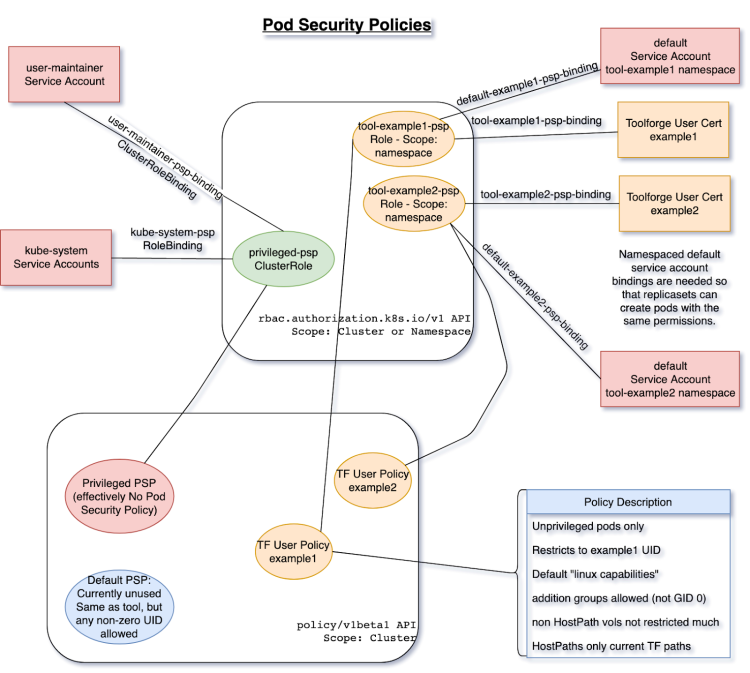 RBAC and PSP for Toolforge, original image in wikitech
I mentioned that we know about each user by means of TLS certificates. This is true, and in fact,
there is a key component in our setup called maintain-kubeusers. This custom piece
of Python software is run as a pod inside the cluster and is responsible for reading our external
user database (LDAP) and generating the required credentials, namespaces, and other configuration
bits for them. With the TLS cert, we basically create a kubeconfig file that is then written into
the homes NFS share, so each Toolforge user has it in their shell home directory.
Networking and Ingress setup
With the basic security controls in place, we can move on to explaining our networking and Ingress
setup. Yes, the Ingress word might be a bit overloaded already, but we refer here to
Ingress as the path that end-users follow from their web browser in their local machine to a
webservice running in the Toolforge cluster.
Some additional context here. Toolforge is not only Kubernetes, but we also have a Son of
GridEngine deployment, a job scheduler that covers some features not available in Kubernetes. The
grid can also run webservices, although we are encouraging users to migrate them to Kubernetes. For
compatibility reasons, we needed to adapt our Ingress setup to accommodate the old web grid.
Deciding the layout of the network and Ingress was definitely something that took us some time to
figure out because there is not a single way to do it right.
The following diagram can be used to explain the different steps involved in serving a web service
running in the new Toolforge Kubernetes.
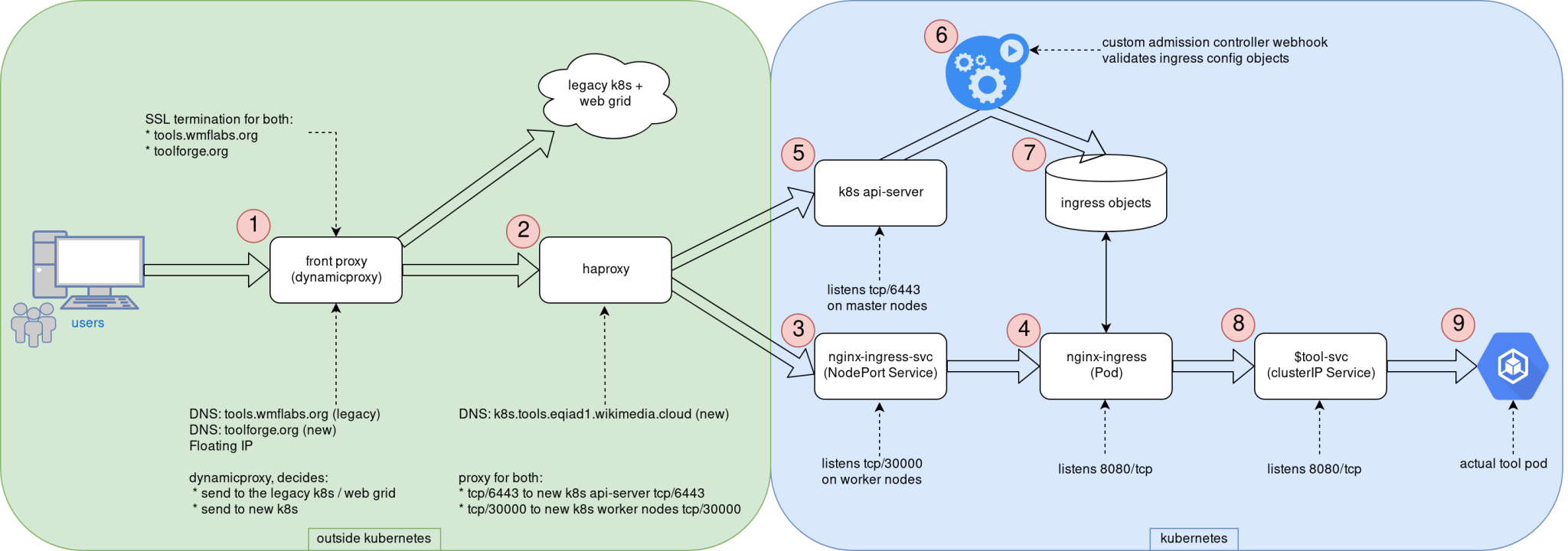 Toolforge k8s network topology, original image in Wikitech
The end-user HTTP/HTTPs request first hits our front proxy in (1). Running here is
NGINX with a custom piece of LUA code that is able to decide whether to contact the web grid
or the new Kubernetes cluster. TLS termination happens here as well, for both domains
(toolforge.org and tools.wmflabs.org). Note this proxy is reachable from the internet, as it
uses a public IPv4 address, a floating IP from CloudVPS, the infrastructure service we
provide based on Openstack. Remember that our Kubernetes is directly built in virtual machines a
bare-metal type deployment.
If the request is directed to a webservice running in Kubernetes, the request now reaches
haproxy in (2), which knows the cluster nodes that are available for Ingress. The
original 80/TCP packet is now translated to 30000/TCP; this is the TCP port we use internally for
the Ingress traffic. This haproxy instance provides load-balancing also for the Kubernetes API as
well, using 6443/TCP. It s worth mentioning that unlike the Ingress, the API is only reachable from
within the cluster and not from the internet.
We have a NGINX-Ingress NodePort service listening in 30000/TCP in every Kubernetes worker node in
(3); this helps the request to eventually reach the actual NGINX-Ingress pod in (4), which is
listening in 8080/TCP. You can see in the diagram how in the API server (5) we hook the Ingress
admission controller (6) to validate Kubernetes Ingress configuration objects before allowing them
in for processing by NGINX-Ingress (7).
The NGINX-Ingress process knows which tools webservices are online and how to contact them by means
of an intermediate Service object in (8). This last Service object means the request finally
reaches the actual tool pod in (9). At this point, it is worth noting that our Kubernetes cluster
uses internally kube-proxy and Calico, both using Netfilter components to handle traffic.
tools-webservice
Most user-facing operations are simplified by means of another custom piece of Python code:
tools-webservice. This package provides users with the webservice command line
utility in our shell bastion hosts. Typical usage is to just run webservice start stop status. This
utility creates all the required Kubernetes objects on-demand like Deployment, ReplicaSet, Ingress
and Service to ease deploying web apps in Toolforge. Of course, advanced users can interact
directly with Kubernetes API and create their custom configuration objects. This utility is just a
wrapper, a shortcut.
tool-fourohfour and tool-k8s-status
The last couple of custom components we would like to mention are the tool-fourohfour
and tool-k8s-status web services. These two utilities run inside the cluster as if
they were any other user-created tool. The fourohfour tool allows for a controlled handling of HTTP
404 errors, and it works as the default NGINX-Ingress backend. The k8s-status tool shows plenty of
information about the cluster itself and each tool running in the cluster, including links to the
Server Admin Log, an auto-generated grafana dashboard for metrics, and more.
For metrics, we use an external Prometheus server that contacts the Kubernetes cluster to scrape
metrics. We created a custom metrics namespace in which we deploy all the different
components we use to observe the behavior of the system:
 So last night I had the idea that it might be fun to write a Brainfuck compiler, to convert BF programs into assembly language, where they'd run nice and quickly.
I figured I could allocate a day to do the work, and it would be a pleasant distraction on a Sunday afternoon. As it happened it only took me three hours from start to finish.
There are only a few instructions involved in brainfuck:
>
<
+
-
.
,
[
] command.]
[ command.gcc.nasm, link with ld.++++++++[>++++[>++>+++>+++>+<<<<-]>+>+>->>+[<]<-]>>.>---.+++++++..+++.>>.<-.<.+++.------.--------.>>+.>++.
extern int putchar(int);
extern char getchar();
char array[30000];
int idx = 0;
int main (int arc, char *argv[])
  array[idx]++;
  array[idx]++;
  array[idx]++;
  array[idx]++;
  array[idx]++;
  array[idx]++;
  array[idx]++;
  array[idx]++;
  while (array[idx])
    idx++;
    array[idx]++;
    array[idx]++;
    array[idx]++;
    array[idx]++;
    while (array[idx])
      idx++;
      array[idx]++;
      array[idx]++;
      idx++;
      array[idx]++;
      array[idx]++;
      array[idx]++;
    ..
    ..
global _start
section .text
_start:
  mov r8, stack
  add byte [r8], 8
label_loop_8:
  cmp byte [r8], 0
  je close_loop_8
  add r8, 1
  add byte [r8], 4
label_loop_14:
  cmp byte [r8], 0
  je close_loop_14
  add r8, 1
  add byte [r8], 2
  add r8, 1
  add byte [r8], 3
  add r8, 1
  add byte [r8], 3
  add r8, 1
  add byte [r8], 1
  sub r8, 4
  sub byte [r8], 1
  jmp label_loop_14
close_loop_14:
  add r8, 1
  add byte [r8], 1
  ..
  mov rax, 60
  mov rdi, 0
  syscall
section .bss
stack: resb 300000
gcc -O3 .." to ensure it was optimized.
The first thing that I did was to convert it to fold adjacent instructions. Instead of generating separate increment instructions for ">>>" I instead started to generate "add xx, 3". That didn't help as much as I'd hoped, but it was still a big win.
After that I made a minor tweak to the way that loops are handled to compare at the end of the loop as well as the start, and that shaved off a fraction of a second.
As things stand I think I'm "done". It might be nice to convert the generated assembly language to something gcc can handle, to drop the dependency on nasm, but I don't feel a pressing need for that yet.
Was a fun learning experience, and I think I'll come back to optimization later.
Next.