Ritesh Raj Sarraf: Controlling ill behaving applications with Linux Cgroups

For some time, I have been wanting to read more on Linux Cgroups to explore possibilities of using it to control Ill behaving applications. At this time, while I'm stuck in travel, it has given me some time to look into it.
In our Free Software world, most of the things are do-o-cracy, i.e. when your use case is not the common one, it is typically you who has to explore possible solutions. It could be Bugs, Feature Requests or as is in my case, performance issues. But that is not to assume that we do not have better quality software in Free Software world. Infact, in my opinion, some of the tools available are far much more better than the competition in terms of features, and to add a sweetener (or nutritional facts) to it is the fact that Free Software liberates the user.
One of my favorite tool, for photo management, is Digikam. Digikam is a big project, very featureful, and has some functionalities that may not be available in the competition. But as is with most Free Software projects, Digikam is a tool which underneath consumes many more subprojects from the Free Software ecosystem.
For anyone who has used Digikam, may know some of the bugs that surface on it. Not necessarily a bug in Digikam, but maybe in one of the underneath libraries/tools that it consumes (Exiv, libkface, marble, OpenCV, libPGF etc). But the bottom line is that the overall Digikam experience (and if I may say: the overall GNU/Linux experience) takes a hit.
Digikam has pretty powerful features for annotation, tagging, facial recognition. These features, together with Digikam, make it a compelling product. But the problem is that many of these projects are independent. Thus tight integration is a challenge. And at times, bugs can be hard to find, root cause and fix.
Let's take a real example here. If you were to use Digikam today (version 4.13.0) with annotation, tagging and facial recognition as some of the core features for your use case, you may run into frustrating overall experience. Not just that, the bugs would also effect your overall GNU/Linux experience.
The facial recognition feature, if triggered, will eat up all your memory. Thus leading you to uncover Linux's long old memory bug.
The tagging feature, if triggered, again will lead to frequent I/O. Thus again leading to a stalled Linux system because of blocked CPU cycled, for nothing.
So one of the items on my TODO list was to explore Linux Cgroups, and see if it was cleanly possible to tame a process to a confinement, so that even if it was ill behaving (for whatever reasons), your machine does not take the beating.
And now that the cgroups consumer dust has kinda settled down, systemd was my first obvious choice to look at. systemd provides a helper utility, systemd-run, for similar tasks. With systemd-run, you could apply all the resource controller logic to the given process, typically cpu, memory and blkio. And restrict it to a certain set. You can also define what user to run the service as.
But, out of the box, graphical applications do not work. I haven't looked, but it should be doable by giving it the correct environment details.
The reporting tools may not be correct here. Because from what is being reported above, I should be having a machine stalled, and heavily paging, while the kernel scanning its list of processes to find the best process to kill.
From this approach of jailing processes, the major side effect I can see is that the process (Digikam) is now starved of resources and will take much much much more time than what it would have been usually. But in the usual cases, it takes up all, and ends up starving (and getting killed) for consuming all available resources.
So I guess it is better to be on a balanced resource diet. :-)
rrs@learner:/var/tmp/Debian-Build/Result$ systemd-run -p BlockIOWeight=10 find /
Running as unit run-23805.service.
2015-10-20 / 21:37:44
rrs@learner:/var/tmp/Debian-Build/Result$ systemctl status -l run-23805.service
  run-23805.service - /usr/bin/find /
   Loaded: loaded
  Drop-In: /run/systemd/system/run-23805.service.d
            50-BlockIOWeight.conf, 50-Description.conf, 50-ExecStart.conf
   Active: active (running) since Tue 2015-10-20 21:37:44 CEST; 6s ago
 Main PID: 23814 (find)
   Memory: 12.2M
      CPU: 502ms
   CGroup: /system.slice/run-23805.service
            23814 /usr/bin/find /
Oct 20 21:37:45 learner find[23814]: /proc/3/net/raw6
Oct 20 21:37:45 learner find[23814]: /proc/3/net/snmp
Oct 20 21:37:45 learner find[23814]: /proc/3/net/stat
Oct 20 21:37:45 learner find[23814]: /proc/3/net/stat/rt_cache
Oct 20 21:37:45 learner find[23814]: /proc/3/net/stat/arp_cache
Oct 20 21:37:45 learner find[23814]: /proc/3/net/stat/ndisc_cache
Oct 20 21:37:45 learner find[23814]: /proc/3/net/stat/ip_conntrack
Oct 20 21:37:45 learner find[23814]: /proc/3/net/stat/nf_conntrack
Oct 20 21:37:45 learner find[23814]: /proc/3/net/tcp6
Oct 20 21:37:45 learner find[23814]: /proc/3/net/udp6
2015-10-20 / 21:37:51 Underneath, systemd is using the same Linux Control Groups to limit resources for individual applications. So, in cases where you have a requirement and do not have systemd, or you directly want to make use of cgroups, it could be easily done with basic cgroups tools like cgroup-tools.
With cgroup-tools, I now have a simple cgroups hierarchy set for my current use case, i.e. Digikam
rrs@learner:/var/tmp/Debian-Build/Result$ ls /sys/fs/cgroup/memory/rrs_customCG/
cgroup.clone_children           memory.kmem.tcp.limit_in_bytes      memory.numa_stat
cgroup.event_control            memory.kmem.tcp.max_usage_in_bytes  memory.oom_control
cgroup.procs                    memory.kmem.tcp.usage_in_bytes      memory.pressure_level
digikam/                        memory.kmem.usage_in_bytes          memory.soft_limit_in_bytes
memory.failcnt                  memory.limit_in_bytes               memory.stat
memory.force_empty              memory.max_usage_in_bytes           memory.swappiness
memory.kmem.failcnt             memory.memsw.failcnt                memory.usage_in_bytes
memory.kmem.limit_in_bytes      memory.memsw.limit_in_bytes         memory.use_hierarchy
memory.kmem.max_usage_in_bytes  memory.memsw.max_usage_in_bytes     notify_on_release
memory.kmem.slabinfo            memory.memsw.usage_in_bytes         tasks
memory.kmem.tcp.failcnt         memory.move_charge_at_immigrate
2015-10-20 / 21:45:38
rrs@learner:/var/tmp/Debian-Build/Result$ ls /sys/fs/cgroup/memory/rrs_customCG/digikam/
cgroup.clone_children           memory.kmem.tcp.max_usage_in_bytes  memory.oom_control
cgroup.event_control            memory.kmem.tcp.usage_in_bytes      memory.pressure_level
cgroup.procs                    memory.kmem.usage_in_bytes          memory.soft_limit_in_bytes
memory.failcnt                  memory.limit_in_bytes               memory.stat
memory.force_empty              memory.max_usage_in_bytes           memory.swappiness
memory.kmem.failcnt             memory.memsw.failcnt                memory.usage_in_bytes
memory.kmem.limit_in_bytes      memory.memsw.limit_in_bytes         memory.use_hierarchy
memory.kmem.max_usage_in_bytes  memory.memsw.max_usage_in_bytes     notify_on_release
memory.kmem.slabinfo            memory.memsw.usage_in_bytes         tasks
memory.kmem.tcp.failcnt         memory.move_charge_at_immigrate
memory.kmem.tcp.limit_in_bytes  memory.numa_stat
2015-10-20 / 21:45:53
rrs@learner:/var/tmp/Debian-Build/Result$ cat /sys/fs/cgroup/cpu/rrs_customCG/cpu.shares
1024
2015-10-20 / 21:48:44
rrs@learner:/var/tmp/Debian-Build/Result$ cat /sys/fs/cgroup/cpu/rrs_customCG/digikam/cpu.shares
512
2015-10-20 / 21:49:05
rrs@learner:/var/tmp/Debian-Build/Result$ cat /sys/fs/cgroup/memory/rrs_customCG/memory.limit_in_bytes
9223372036854771712
2015-10-20 / 22:20:14
rrs@learner:/var/tmp/Debian-Build/Result$ cat /sys/fs/cgroup/memory/rrs_customCG/digikam/memory.limit_in_bytes
2764369920
2015-10-20 / 22:20:27
rrs@learner:/var/tmp/Debian-Build/Result$ cat /sys/fs/cgroup/blkio/rrs_customCG/blkio.weight
500
2015-10-20 / 21:51:43
rrs@learner:/var/tmp/Debian-Build/Result$ cat /sys/fs/cgroup/blkio/rrs_customCG/digikam/blkio.weight
10
2015-10-20 / 21:51:50
The base group, $USER_customCG needs super admin privileges. Which once set appropriately, allows the user to further self-define sub-groups. And users can then also define separate limits per sub-group.
With the resource limitations set in place, my overall experience on very recent hardware (Intel Haswell Core i7, 8 GiB RAM, 500 GB SSHD, 128 GB SSD) has improved considerably. It still is not perfect, but it definitely is a huge improvement over what I had to go through ealire: A stalled machine for hours.
top - 21:54:38 up 1 day,  6:46,  1 user,  load average: 7.22, 7.51, 7.37
Tasks: 299 total,   1 running, 298 sleeping,   0 stopped,   0 zombie
%Cpu0  :  7.1 us,  3.0 sy,  1.0 ni, 11.1 id, 77.8 wa,  0.0 hi,  0.0 si,  0.0 st
%Cpu1  :  6.0 us,  4.0 sy,  2.0 ni, 49.0 id, 39.0 wa,  0.0 hi,  0.0 si,  0.0 st
%Cpu2  :  5.0 us,  2.0 sy,  0.0 ni, 24.8 id, 68.3 wa,  0.0 hi,  0.0 si,  0.0 st
%Cpu3  :  5.9 us,  5.0 sy,  0.0 ni, 21.8 id, 67.3 wa,  0.0 hi,  0.0 si,  0.0 st
MiB Mem : 7908.926 total,   96.449 free, 4634.922 used, 3177.555 buff/cache
MiB Swap: 8579.996 total, 3454.746 free, 5125.250 used. 2753.324 avail Mem
PID to signal/kill [default pid = 8879]
  PID  PPID nTH USER        PR  NI S %CPU %MEM     TIME+ COMMAND                           UID
 8879  8868  18 rrs         20   0 S  8.2 31.2  37:44.64 digikam                          1000
10255  9960   4 rrs         39  19 S  1.0  0.8  19:47.73 tracker-miner-f                  1000
10157  9960   7 rrs         20   0 S  0.5  3.0  32:29.76 gnome-shell                      1000
    7     2   1 root        20   0 S  0.2        0:53.48 rcu_sched                           0
  401     1   1 root        20   0 S  0.2  1.3   0:54.93 systemd-journal                     0
10269  9937   4 rrs         20   0 S  0.2  0.4   2:34.50 gnome-terminal-                  1000
15316     1  14 rrs         20   0 S  0.2  3.7  30:05.96 evolution                        1000
23777     2   1 root        20   0 S  0.2        0:05.73 kworker/u16:0                       0
23814     1   1 root        20   0 D  0.2  0.0   0:02.00 find                                0
24049     2   1 root        20   0 S  0.2        0:01.29 kworker/u16:3                       0
24052     2   1 root        20   0 S  0.2        0:02.94 kworker/u16:4                       0
1 0 1 root 20 0 S 0.1 0:18.24 systemd 0  I rarely watched TV online when I was located in the UK, but now I've moved to Finland with appalling local TV choices it has become more common.
The biggest problem with trying to watch BBC's iPlayer, and similar services, is the location restrictions.
Not a huge problem though:


 Note: 2015/10/16: I need to add some links but I won t delay this more, posting now, will edit later.
Summer ended long time ago, but believe me, I m still catching up with all the things that I began in June/July, all the things I left in August when I went holidays, and more things that appeared in August and September.
This is a long overdue post, I hope you bear with me for waiting so long, and writing (now) so long too!
June
In June, I was 100% sure that I would not attend


 I m currently on the way home, returning from a four-day workshop for high school students; ages 13 to 20, grade 9 to 13. My goal was to teach them something about proofs and logic, in a ambitiously formal and abstract way. For this workshop, I created a computer program called


 Debian LTS
August was the fifth month I contributed to
 Reaction to Sarah's post about
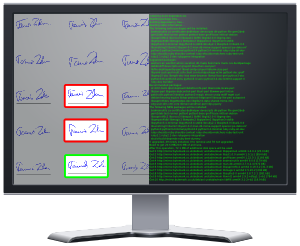 Debian was not generally seen as a bleeding-edge distribution, but it offered a perfect combination of stability and up-to-date software in our field when we chose the platform for our signature verification project. Having an active Debian Developer in the team also helped ensuring that packages which we use were in good shape when the freeze, then the release came and we can still rely on Jessie images with only a few extra packages to run our software stack.
Not having to worry about the platform, we could concentrate on the core project and I m proud to announce that

 I would like to thank you all, who helped making Debian an awesome universal operating system and hope we can keep making every release better and better!
 Last week, I've been invited to the






 Do not follow the advice of web sites that invite you to send pizza or anything else of value to prospective mentors.
Following the steps in this page doesn't guarantee selection. That said, people who do follow these steps are much more likely to be considered and interviewed than somebody who hasn't done any of the things in this list.
Understand what free software really is
You may hear terms like free software and open source software used interchangeably.
They don't mean exactly the same thing and many people use the term free software for the wrong things. Not all projects declaring themselves to be "free" or "open source" meet the definition of free software. Those that don't, usually as a result of deficiencies in their licenses, are fundamentally incompatible with the majority of software that does use genuinely free licenses.
Google Summer of Code is about both writing and publishing your code and it is also about community. It is fundamental that you know the basics of licensing and how to choose a free license that empowers the community to collaborate on your code well after GSoC has finished.
Please review the definition of free software early on and come back and review it from time to time. The
 Having a portfolio of free software that you have created or collaborated on and a wide network of professional contacts that you develop before, during and after GSoC will continue to pay you back for years to come. While other graduates are being screened through group interviews and testing days run by employers, people with a track record in a free software project often find they go straight to the final interview round.
Register your domain name and make a permanent email address
Free software is all about community and collaboration. Register your own domain name as this will become a focal point for your work and for people to get to know you as you become part of the community.
This is sound advice for anybody working in IT, not just programmers. It gives the impression that you are confident and have a long term interest in a technology career.
Choosing the provider: as a minimum, you want a provider that offers DNS management, static web site hosting, email forwarding and XMPP services all linked to your domain. You do not need to choose the provider that is linked to your internet connection at home and that is often not the best choice anyway. The XMPP foundation maintains a
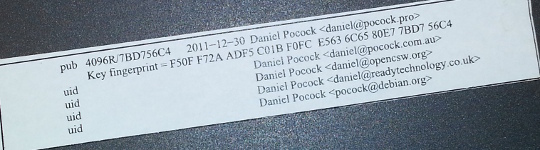 This is what my own PGP fingerprint slip looks like. You can also print the key fingerprint on a business card for a more professional look.
Using PGP, it is recommend that you sign any important messages you send but you do not have to encrypt the messages you send, especially if some of the people you send messages to (like family and friends) do not yet have the PGP software to decrypt them.
If using the
 Conclusion
Getting into the world of software engineering is much like joining any other profession or even joining a new hobby or sporting activity. If you run, you probably have various types of shoe and a running watch and you may even spend a couple of nights at the track each week. If you enjoy playing a musical instrument, you probably have a collection of sheet music, accessories for your instrument and you may even aspire to build a recording studio in your garage (or you probably know somebody else who already did that).
The things listed on this page will not just help you walk the walk and talk the talk of a software developer, they will put you on a track to being one of the leaders. If you look over the profiles of other software developers on the Internet, you will find they are doing most of the things on this page already. Even if you are not selected for GSoC at all or decide not to apply, working through the steps on this page will help you clarify your own ideas about your career and help you make new friends in the software engineering community.
 Now that OSX 10.11 El Capitan is released and everyone is eagerly updating, in cooperation with the colleagues from the Japanese TeX world we have released new versions of the
 For jfontmaps the changes were minimal,
 Inspired by

 My monthly report covers a large part of what I have been doing in the free software world. I write it for