Search Results: "xam"

26 December 2015

Julian Andres Klode: Much faster incremental apt updates

APT s performance in applying the Pdiffs files, which are the diff format used for Packages, Sources, and other files in the archive has been slow. Improving performance for uncompressed files The reason for this is that our I/O is unbuffered, and we were reading one byte at a time in order to read lines. This changed on December 24, by adding read buffering for reading lines, vastly improving the performance of rred. But it was still slow, so today I profiled using gperftools the rred method running on a 430MB uncompressed Contents file with a 75 KB large patch. I noticed that our ReadLine() method was calling some method which took a long time (google-pprof told me it was some _nss method, but that was wrong [thank you, addr2line]). After some further look into the code, I noticed that we set the length of the buffer using the length of the line. And whenever we moved some data out of the buffer, we called memmove() to move the remaining data to the front of the buffer. So, I tried to use a fixed buffer size of 4096 (commit). Now memmove() would spend less time moving memory around inside the buffer. This helped a lot, bringing the run time on my example file down from 46 seconds to about 2 seconds. Later on, I rewrote the code to not use memmove() at all opting for start and end variables instead; and increasing the start variable when reading from the buffer (commit). This in turn further improved things, bringing it down to about 1.6 seconds. We could now increase the buffer size again, without any negative effect. Effects on apt-get update I measured the run-time of apt-get update, excluding appstream and apt-file files, for the update from todays 07:52 to the 13:52 dinstall run. Configured sources are unstable and experimental with amd64 and i386 architectures. appstream and apt-file indexes are disabled for testing, so only Packages and Sources indexes are fetched. The results are impressive: That s a tenfold increase in performance. By the way, running without PDiffs took 20 seconds, so there s no reason not to use them. Future work Writes are still unbuffered, and account for about 75% to 80% of our runtime. That s an obvious area for improvements. rred-profile Performance for patching compressed files Contents files are usually compressed with gzip, and kept compressed locally because they are about 500 MB uncompressed and only 30MB compressed. I profiled this, and it turns out there is not much we can do about it: The majority of the time is spent inside zlib, mostly combining CRC checksums: rred-gz-profile Going forward, I think a reasonable option might be to recompress Contents files using lzo they will be a bit bigger (50MB instead of 30MB), but lzo is about 6 times as fast (compressing a 430MB Contents file took 1 second instead of 6).
Filed under: Debian, Uncategorized

24 December 2015

Clint Adams: Before the Tet Offensive

Kurt has trouble keeping his mouth shut. This became widely apparent when he was expelled from Catholic school for telling a visiting dignitary to go fuck himself. WB used to preach angrily against casual sex. Kurt enlisted in the Army, and due to his high IQ he ended up in the Army Security Agency. After training, he was stationed in Germany where he performed signals intelligence functions like direction finding and passing on information to the CIA and NSA. One day WB shagged a boy with a leather hat. Contrary to what one might assume, Kurt had awareness of consequences. He refused officer training because that would have extended his commitment from 4 to 6 years. He purposefully flunked his French language proficiency exam. He wanted there to be no chance of him getting transferred to Vietnam. The following day, WB found herself confronted and asked to explain why she had had a change of heart about casual sex. Oh, it wasn't casual sex, she explained. He came over and said, I've been dying to make love with you for the past three hours, so it was special, she clarified. Thus the nature of the past communication failure became clear to everyone but WB. Despite all his efforts to avoid Vietnam, Kurt, of course, had trouble keeping his mouth shut. So in 1967 he pissed off the wrong person and found himself having to choose between Leavenworth and Saigon. He chose life of alcoholism over prison.

22 December 2015

Ian Wienand: Platform bootstrap for OpenStack Infrastructure

This is a terse guide on bootstrapping virtual-machine images for OpenStack infrastructure, with the goal of adding continuous-integration support for new platforms. It might also be handy if you are trying to replicate the upstream CI environment. It covers deployment to Rackspace for testing; Rackspace is one of the major providers of capacity for the OpenStack Infrastructure project, so it makes a good place to start when building up your support story. Firstly, get an Ubuntu Trusty environment to build the image in (other environments, like CentOS or Fedora, probably work -- but take this step to minimise differences to what the automated machinery of what upstream does). You want a fair bit of memory, and plenty of disk-space. The tool used for building virtual-machine images is diskimage-builder. In short, it takes a series of elements, which are really just scripts run in different phases of the build process. I'll describe building a Fedora image, since that's been my focus lately. We will use a fedora-minimal element -- this means the system is bootstrapped from nothing inside a chroot environment, before eventually being turned into a virtual-machine image (contrast this to the fedora element, which bases itself off the qcow2 images provided by the official Fedora cloud project). Thus you'll need a few things installed on the Ubuntu host to deal with bootstrapping a Fedora chroot
apt-get install yum yum-utils python-lzma
You will hit stuff like that python-lzma dependency on this road-less-travelled -- technically it is a bug that yum packages on Ubuntu don't depend on it; without it you will get strange yum errors about unsupported compression. At this point, you can bootstrap your diskimage-builder environment. You probably want diskimage-builder from git, and then build up a virtualenv for your support bits and pieces.
git clone git://git.openstack.org/openstack/diskimage-builder
virtualenv dib_env
. dib_env/bin/activate
pip install dib-utils
dib-utils is a small part of diskimage-builder that is split-out; don't think too much about it. While diskimage-builder is responsible for the creation of the basic image, there are a number of elements provided by the OpenStack project-config repository that bootstrap the OpenStack environment. This does a lot of stuff, including caching all git trees (so CI jobs aren't cloning everything constantly) and running puppet setup.
git clone git://git.openstack.org/openstack-infra/project-config
There's one more trick required for building the VHD images that Rackspace requires; make sure you install the patched vhd-util as described in the script help. At this point, you can probably build an image. Here's something approximating what you will want to do
break=after-error \
TMP_DIR=~/tmp \
ELEMENTS_PATH=~/project-config/nodepool/elements \
DIB_DEV_USER_PASSWORD="password"  DIB_DEV_USER_PWDLESS_SUDO=1 \
DISTRO=23 \
./bin/disk-image-create -x --no-tmpfs -t vhd \
   fedora-minimal vm devuser simple-init \
   openstack-repos puppet nodepool-base node-devstack
To break some of this down This goes and does its thing; it will take about 20 minutes. Depending on how far your platform diverges from the existing support, it will require a lot of work to get everything working so you can get an image out the other side. To see a rough example of what should be happening, see the logs of the official image builds that happen for a variety of platforms. At some point, you should get a file image.vhd which is now ready to be deployed. The only reasonable way to do this is with shade. You can quickly grab this into the virtualenv we created before
pip install shade
Now you'll need to setup a clouds.yaml file to give yourself the permissions to upload the image. It should look something like
clouds:
  rax:
    profile: rackspace
    auth:
       username: your_rax_username
       password: your_rax_password
       project_id: your_rax_accountnum
    regions:
    - IAD
You should know your user-name and password (whatever you log into the website with), and when you login to Rackspace your project_id value is listed in the drop-down box labeled with your username as Account #. shade has no UI as such, so a simple script will do the upload.
import shade
shade.simple_logging(debug=True)
cloud = shade.openstack_cloud(cloud='rax')
image = cloud.create_image('image-name', filename='image.vhd', wait=True)
Now wait -- this will also take a while. Even after upload it takes a fair while to process (you will see the shade debug output looping around some glance calls seeing if it is ready). If everything works, the script should return and you should be able to see the new image in the output of nova list-images. At this point, you're ready to try booting! One caveat is that the Rackspace web interface does not seem to give you the option to boot with a configuration drive available to the host, essential for simple-init to bring up the network. So boot via the API with something like
nova boot --flavor=2 --image=image-uuid --config-drive 1 test-image
This should build and boot your image! This will allow you to open a whole new door of debugging to get your image booting correctly. You can now iterate by rebuilding/uploading/booting as required. Note these are pretty big images, and uploaded in broken-up swift files, so I find swift delete --all helpful to reset between builds (obviously, I have nothing else in swift that I want to keep). The Rackspace java-based console UI is rather annoying; it cuts itself off every time the host reboots. This makes it quite difficult to catch the early bootup, or modify grub options via the boot-loader, etc. You might need to fiddle timeout options, etc in the image build. If you've managed to get your image booting and listening on the network, you're a good-deal of the way towards having your platform supported in upstream OpenStack CI. At this point, you likely want to peruse the nodepool configuration and get an official build happening here. Once that is up, you can start the process of adding jobs that use your platform to test! Don't worry, there's plenty more that can go wrong from here -- but you're on the way! OpenStack infra is a very dynamic environment, which many changes in progress; so in general, #openstack-infra on freenode is going to be a great place to start looking for help.

Steve Kemp: Finding and reporting trivial security issues

This week I'll be mostly doing drive-by bug-reporting. As with last year we start by using the Debian Code Search, to look for obviously broken patterns such as "system.>./tmp/.*" Once we find a fun match we examine the code and then report the bugs we find. Today that was stalin which runs some fantastic things on startup:
(system "uname -m >/tmp/QobiScheme.tmp")
(system "rm -f /tmp/QobiScheme.tmp"))
We can exploit this like so:
$ ln -s /home/steve/HACK /tmp/QobiScheme.tmp
$ ls -l /home/steve/HACK
ls: cannot access /home/steve/HACK: No such file or directory
Now we run the script:
$ cd /tmp/stalin-0.11/benchmarks
$ ./make-hello
And we see this:
$ ls -l /home/steve/HACK
-rw-r--r-- 1 steve steve 6 Dec 22 08:30 /home/steve/HACK
For future reference the lsat looks horrifically bad - it writes multiple times to /tmp/lsat1.lsat and although it tries to detect races I'm not convinced. Something to look at in the future.

Dmitry Shachnev: ReText 5.3 released

On Sunday I have released ReText 5.3, and here finally comes the official announcement. Highlights in this release are: Also, a week before ReText 5.3 a new version of PyMarkups was released, bringing enhanced support for the Textile markup. You can now edit Textile files in ReText too, provided that python-textile module for Python 3 is installed. As usual, you can get the latest release from PyPI or from the Debian/Ubuntu repositories. Please report any bugs you find to our issue tracker.

21 December 2015

Matthew Garrett: GPL enforcement is a social good

The Software Freedom Conservancy is currently running a fundraising program in an attempt to raise enough money to continue funding GPL compliance work. If they don't gain enough supporters, the majority of their compliance work will cease. And, since SFC are one of the only groups currently actively involved in performing GPL compliance work, that basically means that there will be nobody working to ensure that users have the rights that copyright holders chose to give them.

Why does this matter? More people are using GPLed software than at any point in history. Hundreds of millions of Android devices were sold this year, all including GPLed code. An unknowably vast number of IoT devices run Linux. Cameras, Blu Ray players, TVs, light switches, coffee machines. Software running in places that we would never have previously imagined. And much of it abandoned immediately after shipping, gently rotting, exposing an increasingly large number of widely known security vulnerabilities to an increasingly hostile internet. Devices that become useless because of protocol updates. Toys that have a "Guaranteed to work until" date, and then suddenly Barbie goes dead and you're forced to have an unexpected conversation about API mortality with your 5-year old child.

We can't fix all of these things. Many of these devices have important functionality locked inside proprietary components, released under licenses that grant no permission for people to examine or improve them. But there are many that we can. Millions of devices are running modern and secure versions of Android despite being abandoned by their manufacturers, purely because the vendor released appropriate source code and a community grew up to maintain it. But this can only happen when the vendor plays by the rules.

Vendors who don't release their code remove that freedom from their users, and the weapons users have to fight against that are limited. Most users hold no copyright over the software in the device and are unable to take direct action themselves. A vendor's failure to comply dooms them to having to choose between buying a new device in 12 months or no longer receiving security updates. When yet more examples of vendor-supplied malware are discovered, it's more difficult to produce new builds without them. The utility of the devices that the user purchased is curtailed significantly.

The Software Freedom Conservancy is one of the only organisations actively fighting against this, and if they're forced to give up their enforcement work the pressure on vendors to comply with the GPL will be reduced even further. If we want users to control their devices, to be able to obtain security updates even after the vendor has given up, we need to keep that pressure up. Supporting the SFC's work has a real impact on the security of the internet and people's lives. Please consider giving them money.

comment count unavailable comments

20 December 2015

Lunar: Reproducible builds: week 34 in Stretch cycle

What happened in the reproducible builds effort between December 13th to December 19th: Infrastructure Niels Thykier started implementing support for .buildinfo files in dak. A very preliminary commit was made by Ansgar Burchardt to prevent .buildinfo files from being removed from the upload queue. Toolchain fixes Mattia Rizzolo rebased our experimental debhelper with the changes from the latest upload. New fixes have been merged by OCaml upstream. Packages fixed The following 39 packages have become reproducible due to changes in their build dependencies: apache-mime4j, avahi-sharp, blam, bless, cecil-flowanalysis, cecil, coco-cs, cowbell, cppformat, dbus-sharp-glib, dbus-sharp, gdcm, gnome-keyring-sharp, gudev-sharp-1.0, jackson-annotations, jackson-core, jboss-classfilewriter, jboss-jdeparser2, jetty8, json-spirit, lat, leveldb-sharp, libdecentxml-java, libjavaewah-java, libkarma, mono.reflection, monobristol, nuget, pinta, snakeyaml, taglib-sharp, tangerine, themonospot, tomboy-latex, widemargin, wordpress, xsddiagram, xsp, zeitgeist-sharp. The following packages became reproducible after getting fixed: Some uploads fixed some reproducibility issues, but not all of them: Patches submitted which have not made their way to the archive yet: reproducible.debian.net Packages in experimental are now tested on armhf. (h01ger) Arch Linux packages in the multilib and community repositories (4,000 more source packages) are also being tested. All of these test results are better analyzed and nicely displayed together with each package. (h01ger) For Fedora, build jobs can now run in parallel. Two are currently running, now testing reproducibility of 785 source packages from Fedora 23. mock/1.2.3-1.1 has been uploaded to experimental to better build RPMs. (h01ger) Work has started on having automatic build node pools to maximize use of armhf build nodes. (Vagrant Cascadian) diffoscope development Version 43 has been released on December 15th. It has been dubbed as epic! as it contains many contributions that were written around the summit in Athens. Baptiste Daroussin found that running diffoscope on some Tar archives could overwrite arbitrary files. This has been fixed by using libarchive instead of Python internal Tar library and adding a sanity check for destination paths. In any cases, until proper sandboxing is implemented, don't run diffosope on unstrusted inputs outside an isolated, throw-away system. Mike Hommey identified that the CBFS comparator would needlessly waste time scanning big files. It will now not consider any files bigger than 24 MiB 8 MiB more than the largest ROM created by coreboot at this time. An encoding issue related to Zip files has also been fixed. (Lunar) New comparators have been added: Android dex files (Reiner Herrmann), filesystem images using libguestfs (Reiner Herrmann), icons and JPEG images using libcaca (Chris Lamb), and OS X binaries (Clemens Lang). The comparator for Free Pascal Compilation Unit will now only be used when the unit version matches the compiler one. (Levente Polyak) A new multi-file HTML output with on-demand loading of long diffs is available through the --html-dir option. On-demand loading requires jQuery which path can be specified through the --jquery option. The diffs can also be simply browsed for non-JavaScript users or when jQuery is not available. (Joachim Breitner) Example of on-demand loading in diffosope Portability toward other systems has been improved: old versions of GNU diff are now supported (Mike McQuaid), suggestion of the appropriate locale is now the more generic en_US.UTF-8 (Ed Maste), the --list-tools option can now support multiple systems (Mattia Rizzolo, Levente Polyak, Lunar). Many internal changes and code clean-ups have been made, paving the way for parallel processing. (Lunar) Version 44 was released on December 18th fixing an issue affecting .deb lacking a md5sums file introduced in a previous refactoring (Lunar). Support has been added for Mozilla optimized Zip files. (Mike Hommey). The HTML output has been optimized in size (Mike Hommey, Esa Peuha, Lunar), speed (Lunar), and will now properly number lines (Mike Hommey). A message will always be displayed when lines are ignored at the end of a diff (Lunar). For portability and consistency, Python os.walk() function is now used instead of find to perform directory listing. (Lunar) Documentation update Package reviews 143 reviews have been removed, 69 added and 22 updated in the previous week. Chris Lamb reported 12 new FTBFS issues. News issues identified this week: random_order_in_init_py_generated_by_python-genpy, timestamps_in_copyright_added_by_perl_dist_zilla, random_contents_in_dat_files_generated_by_chasen-dictutils_makemat, timestamps_in_documentation_generated_by_pandoc. Chris West did some improvements on the scripts used to manage notes in the misc repository. Misc. Accounts of the reproducible builds summit in Athens were written by Thomas Klausner from NetBSD and Hans-Christoph Steiner from The Guardian Project. Some openSUSE developers are working on a hackweek on reproducible builds which was discussed on the opensuse-packaging mailing-list.

Iain R. Learmonth: A Week of Debian

For the last week I have been stuck in England. For the vast majority of that time, I've had nothing to do except work on Debian and this blog post documents some of the things I worked on. Obviously spending a whole week on Debian, there's going to be some packaging involved. The following packages got new versions in unstable this last week: Packaging updates were one of the simpler tasks tackled this week though. I spent a lot of time this week on Debian Live along with others in the #debian-live IRC channel. Over the last week we achieved a number of things, possibly the most important being that all the generic live support packages (i.e. live-boot, live-config and live-tools) have now been converted into native packages, have their VCS repositories hosted on Alioth and have seen a good number of patches merged from the BTS and from the old patch system. All future patches will be managed via the BTS for Debian Live, as with other Debian projects. We've also put effort into getting documentation online again now that the live.debian.net server has been turned off and we now have the live-build documentation and the live-wrapper documentation hosted on the project's Alioth webspace. The live-wrapper user documentation was mostly written this week so may not be amazing. On the smaller task list for Debian Live, the KGB bots are now present in the channel and reporting on git commits, a number of the more popular URLs from live.debian.net are now being redirected to their new locations (although we've had to recover these URLs from web.archive.org, the list of redirections is certainly not complete) and we've made updates to the wiki pages about how to contribute to the project. Unfortunately, no one has stepped forwards as a new lead for live-build and so this package has been orphaned. This does not necessarily mean that the package will be removed from Debian any time soon, just that it does not currently have a maintainer. If you're interested in taking over maintainence of live-build, see #808048. For testing the core live support packages, new live images for stretch have been built using live-wrapper and are available here. There are known issues with the syslinux configuration and these are not isohybrid images. My other major project this week has been my efforts to form a Debian Metadata team. The Debian Metadata team would produce the frameworks and run the services that make data about Debian available in a number of formats to make the data as accessible as possible and to encourage its use both within Debian and in external projects. Currently this includes two experimental services: rdf.debian.net and map.debian.net. We're don't plan to duplicate any of the work done by UDD, but make the data aggregated in UDD more accessible to users and developers. This means publishing that data in JSON/JSONP, KML, RDF, iCalendar and any other format that makes sense. There may be instances where it makes sense to augment the published data with live data, for example mirror availability should probably be live and not just a recent snapshot. If you're interested in participating in the Debian Metadata team, you can register your interested on bug #808049. This is not a complete summary of all my activities over the last week, but for those interested, it should give you an idea of what I've been up to. Finally, for those of you that have been waiting for my write-up on the airgapped GnuPG master key, I decided in the end that my blog was not the right place for this. You can find the guide in two parts: key generation and key export to the YubiKey. I've tried to keep these guides as generic as possible while still being as useful as possible. While writing these up on the wiki, I've also created pages for OpenPGP and GnuPG and I've almost entirely rewritten the DebianKeyring wiki page. I discovered this awesome guide to OpenPGP concepts which I would recommend to anyone that is new to OpenPGP.

Iustin Pop: Nikkor 200-500mm f5.6E ED VR tests

So, lately I've been on a telephoto lens learning curve; after the 300mm prime, I said to test a zoom lens. As I found the prime reasonably easy to adapt to (compared to shorter focal length lenses), I thought that a zoom (heavier, bigger) will be the same. Oh, I was wrong. My keeper rate for the first outdoors test was quite bad around 50% only, which (when talking only about focus/sharpness) is much below my standards. I started easy; some close or medium range shots, nothing special: Usual flower picture Lonely snag But then, moving to further distances, things became less straightforward. Shooting two pictures each time meant that usually one of them was sharp, but the other not. I got really confused at this step; the shutter speed was 1/2000s and I also had VR on; either VR was unneeded (i.e. contributing blur instead of helping) or something else was going on. After much head scratching, I think it's a combination of the following factors: So, for such style of shooting, I need to train more both photographic technique and arm strength at the gym In the meantime, it is possible to get such shots reasonably sharp, for example this picture of the (start of the) Alps taken from what is technically still Z rich city: The Alps  viewed from Z rich! I'm happy with the detail (at this distance), however I was not able to correct the colour due to the haze between me and the mountains; note that the trees on the bottom of the distance were not near me, but on the next or after-next hill. This picture confirms that with more practice things will get better. Coming back to shorter distances, and shorter focal lengths, things are looking better. We were passing somewhat near some people playing with RC-controlled planes not near enough to hear them, but near enough to see the plane quickly flying. Switched camera quickly to AF-C and Dynamic-21 focus, and - to my surprise - I was able to capture four good pictures, two so-so and four more clearly out of focus. But, for such a heavy length, hand-held and on the short notice, I was happy; the first picture is one of the so-so ones, but I kept it as I like the way the propeller is seen. All pictures at 290mm plus some cropping, 1/1250s, ISO between 900 and 1800, f/5.6 (i.e wide open): RC plane: continous focus tests RC plane #2 RC plane #3: good results! RC plane #4 RC plane #5: landing? From this exercise, the conclusion is that the lens is OK-ish for tracking, although the not-so good keeper rate tells me that I need to be careful; I'll have to see how a subject moving not left-right, but instead approaching or moving away from the camera would be tracked. But enough pictures of small planes. At 500mm, but still somewhat close, trees: Trees @ 500mm At this step I'm starting to wonder if stopping down a bit would help with the sharpness; I'll have to test that in the future. Walking some more, finally a bird in flight; one of the hopes when I took the camera/lens out was that I'll see some birds, but this was the first. 500mm, heavily cropped, but quite good result for myself (same autofocus settings as before): Bird in flight @ 500mm Bird in flight: difficult light The only problem here is, as always with crows (I think these are crows), is the black bird against the light-blue sky (not even strong blue), which means the picture has a high dynamic range; recovering the shadows on the bird is difficult. But in any case, it's clear the lens can deliver, if the photographer is good. Next, a helicopter was gracious enough to pass by (pretty close): Helicopter: close shot Two minutes later, it was quite far, but since it was going in the direction of the Alps, it gave the opportunity for a nice shot: Helicopter: flying towards the Alps This picture is less sharp, but still I like it due to composition; not successful on small screens though, only if you see it full screen. Light is very difficult though and about 10 seconds earlier would have been even better (more separation between the helicopter and the mountain). And since we're talking about planes, let's see a plane at 500m, directly overhead, and quite high: High-flying plane This picture (@500mm, cropped, 1/2000s) has the most detail of a plane flying high enough to have trails (not sure how to estimate, but at least 5km, maybe more around 7-8 I'd say) that I ever took. So yes, the lens can deliver, but it's not easy. This shot, being shot more or less straight up, had the least distance through low-altitude atmosphere, so it has less problems compared to the mountains pictures. It's still not really sharp (lens wide open), but the amount of detail I'm sold :) And to finish on a more close note: Hunting!! A long focal length lens allows one to get "close" without getting close, which means animals are not disturbed. The first picture with the cat (not shown) had the cat less alert; ears not fully up, although eyes were still seeking; this picture shows it fully alert and concentrated, like it was a wild cat hunting for its survival, and not a city cat, out just for fun. So, summary: All the best to everybody for the coming holidays, and thanks for reading.

19 December 2015

Dirk Eddelbuettel: RcppTOML 0.0.5

After a short hiatus, a new version of the (wonderfully useful, if I dare say so ;-) RcppTOML package is now on CRAN. RcppTOML lets R read the (absolutely awesome) TOML configuration file format--which is simply fabulous as it emphasizes strong readability for humans while at the same time supporting strong typing as well as immediate and clear error reports. At work, we're all fans now. The new version on CRAN mostly updates to an updated version of the underlying cpptoml library by Chase. Nothing much changed on the R side. Courtesy of CRANberries, there is a diffstat report for this release More information and examples are on the RcppTOML page.

This post by Dirk Eddelbuettel originated on his Thinking inside the box blog. Please report excessive re-aggregation in third-party for-profit settings.

17 December 2015

Alberto Garc a: Improving disk I/O performance in QEMU 2.5 with the qcow2 L2 cache

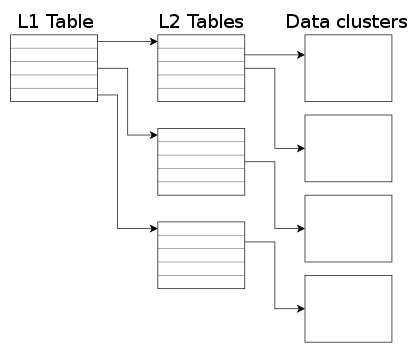
QEMU 2.5 has just been released, with a lot of new features. As with the previous release, we have also created a video changelog. I plan to write a few blog posts explaining some of the things I have been working on. In this one I m going to talk about how to control the size of the qcow2 L2 cache. But first, let s see why that cache is useful. The qcow2 file format qcow2 is the main format for disk images used by QEMU. One of the features of this format is that its size grows on demand, and the disk space is only allocated when it is actually needed by the virtual machine. A qcow2 file is organized in units of constant size called clusters. The virtual disk seen by the guest is also divided into guest clusters of the same size. QEMU defaults to 64KB clusters, but a different value can be specified when creating a new image: qemu-img create -f qcow2 -o cluster_size=128K hd.qcow2 4G In order to map the virtual disk as seen by the guest to the qcow2 image in the host, the qcow2 image contains a set of tables organized in a two-level structure. These are called the L1 and L2 tables. There is one single L1 table per disk image. This table is small and is always kept in memory. There can be many L2 tables, depending on how much space has been allocated in the image. Each table is one cluster in size. In order to read or write data to the virtual disk, QEMU needs to read its corresponding L2 table to find out where that data is located. Since reading the table for each I/O operation can be expensive, QEMU keeps a cache of L2 tables in memory to speed up disk access.
The L2 cache can have a dramatic impact on performance. As an example, here s the number of I/O operations per second that I get with random read requests in a fully populated 20GB disk image:
L2 cache size Average IOPS
1 MB 5100
1,5 MB 7300
2 MB 12700
2,5 MB 63600
If you re using an older version of QEMU you might have trouble getting the most out of the qcow2 cache because of this bug, so either upgrade to at least QEMU 2.3 or apply this patch. (in addition to the L2 cache, QEMU also keeps a refcount cache. This is used for cluster allocation and internal snapshots, but I m not covering it in this post. Please refer to the qcow2 documentation if you want to know more about refcount tables) Understanding how to choose the right cache size In order to choose the cache size we need to know how it relates to the amount of allocated space. The amount of virtual disk that can be mapped by the L2 cache (in bytes) is: disk_size = l2_cache_size * cluster_size / 8 With the default values for cluster_size (64KB) that is disk_size = l2_cache_size * 8192 So in order to have a cache that can cover n GB of disk space with the default cluster size we need l2_cache_size = disk_size_GB * 131072 QEMU has a default L2 cache of 1MB (1048576 bytes) so using the formulas we ve just seen we have 1048576 / 131072 = 8 GB of virtual disk covered by that cache. This means that if the size of your virtual disk is larger than 8 GB you can speed up disk access by increasing the size of the L2 cache. Otherwise you ll be fine with the defaults. How to configure the cache size Cache sizes can be configured using the -drive option in the command-line, or the blockdev-add QMP command. There are three options available, and all of them take bytes: There are two things that need to be taken into account:
  1. Both the L2 and refcount block caches must have a size that is a multiple of the cluster size.
  2. If you only set one of the options above, QEMU will automatically adjust the others so that the L2 cache is 4 times bigger than the refcount cache.
This means that these three options are equivalent: -drive file=hd.qcow2,l2-cache-size=2097152
-drive file=hd.qcow2,refcount-cache-size=524288
-drive file=hd.qcow2,cache-size=2621440
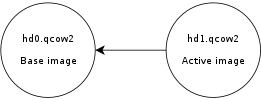
Although I m not covering the refcount cache here, it s worth noting that it s used much less often than the L2 cache, so it s perfectly reasonable to keep it small: -drive file=hd.qcow2,l2-cache-size=4194304,refcount-cache-size=262144 Reducing the memory usage The problem with a large cache size is that it obviously needs more memory. QEMU has a separate L2 cache for each qcow2 file, so if you re using many big images you might need a considerable amount of memory if you want to have a reasonably sized cache for each one. The problem gets worse if you add backing files and snapshots to the mix. Consider this scenario:
Here, hd0 is a fully populated disk image, and hd1 a freshly created image as a result of a snapshot operation. Reading data from this virtual disk will fill up the L2 cache of hd0, because that s where the actual data is read from. However hd0 itself is read-only, and if you write data to the virtual disk it will go to the active image, hd1, filling up its L2 cache as a result. At some point you ll have in memory cache entries from hd0 that you won t need anymore because all the data from those clusters is now retrieved from hd1. Let s now create a new live snapshot:
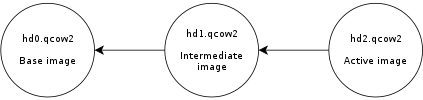
Now we have the same problem again. If we write data to the virtual disk it will go to hd2 and its L2 cache will start to fill up. At some point a significant amount of the data from the virtual disk will be in hd2, however the L2 caches of hd0 and hd1 will be full as a result of the previous operations, even if they re no longer needed. Imagine now a scenario with several virtual disks and a long chain of qcow2 images for each one of them. See the problem? I wanted to improve this a bit so I was working on a new setting that allows the user to reduce the memory usage by cleaning unused cache entries when they are not being used. This new setting is available in QEMU 2.5, and is called cache-clean-interval . It defines an interval (in seconds) after which all cache entries that haven t been accessed are removed from memory. This example removes all unused cache entries every 15 minutes: -drive file=hd.qcow2,cache-clean-interval=900 If unset, the default value for this parameter is 0 and it disables this feature. Further information In this post I only intended to give a brief summary of the qcow2 L2 cache and how to tune it in order to increase the I/O performance, but it is by no means an exhaustive description of the disk format. If you want to know more about the qcow2 format here s a few links: Acknowledgments My work in QEMU is sponsored by Outscale and has been made possible by Igalia and the invaluable help of the QEMU development team.
Enjoy QEMU 2.5!

Steinar H. Gunderson: sRGB weirdness: Doing the right thing causes a worse result

A while back, I wrote about how you should always do image calculations in linear light, not gamma space; since then, Tom Forsythe has come out with a much better metaphor than I could cough up myself, namely that you should look at sRGB value as compressed values, not integers. So naturally, when I needed a deinterlacing filter for Movit, my GPU filter library, I wanted to do it in linear light. (In fact, all pixel processing in Movit is in linear light, except in the cases where it's 100% equivalent to do it on the gamma-encoded values and the conversion can be skipped for speed.) After some deliberations, I made an implementation of Martin Weston's three-field deinterlacing filter, known in ffmpeg as w3fdif. I won't discuss deinterlacing in detail here since it's really hard, but I'll note that w3fdif works by way of applying two filters; low-frequency components are estimated from the current field, and high-frequency from the previous and next fields. (This makes intuitive sense; you cannot get the HF information from the current field since you don't have the lines you need for that, but you can hope it hasn't changed too much.) Aha! A filter. Brilliant, that's exactly when linear light means the most, too. But when implementing it, I found that it sometimes looked weird -- and ffmpeg's implementation (which works directly on the sRGB values, which we already established is wrong) didn't. After lots of tweaking back and forth, I decided to set up a synthetic test to settle this once and for all; I took a static test picture (eliminating everything related to video capture, codecs, frame rates, etc.) and compared to ffmpeg. Of course, deinterlacing is all about movement, but this would do to try to nail things down. So after lots of fruitless debugging, I did a last-ditch: What if I turned off the gamma conversions? This gave me a huge surprise; indeed it looked better! I'll provide some upscaled versions; left is the original image, middle is deinterlaced in sRGB space and right is deinterlaced in linear light: Original picture Deinterlaced in sRGB space Deinterlaced in linear light If that's not dramatic enough for you (trust me, you'll notice it when it's animated as you flicker through the two different fields), here's an even more high-contrast example (same ordering): Original picture Deinterlaced in sRGB space Deinterlaced in linear light I guess it's obvious in retrospect what happens; the HF filter picks up residue from its outer edges, and even if the coefficient is just 0.031 (well, times two; it adds that value from both the previous and next field), 3% the photons of a fully lit pixel (which is what you get when working in linear light) is actually quite a bit, whereas a 3% gray is only pixel value 8 or so, which is barely visible. So what am I to make of this? I'm honestly not sure. Maybe it's somehow related to that these filter values were chosen in 1988, where they were relatively unlikely to do this in linear light (although if they did it with analog circuitry, perhaps they could?) and it was tweaked to look good despite doing the wrong thing. Or maybe I need to change my approach here entirely. It always sucks when your fundamental assumptions are challenged, but I think it shows once again that if you notice something funny in your output, you really ought to investigate, because you never know how deep the rabbit hole goes. :-/

15 December 2015

Vasudev Kamath: Persisting resource control options for systemd-nspawn containers

In my previous post on systemd-nspawn I mentioned, I was unclear on how to persist resource control options for a container. Today I accidentally discovered how can the property be persisted across boot without modifying service file or writing custom service file for container. It is done using systemctl set-property To set CPUAccounting and CPUShares for a container we need to run following command.
systemctl set-property systemd-nspawn@container.service  CPUACCounting=1 CPUShares=200
This actually persists these settings at location, /etc/systemd/systemd-nspawn@container.service.d/ folder. So in our case there will be 2 files created under above location by name 50-CPUAccounting.conf and 50-CPUShares.conf with following contents.
# 50-CPUAccounting.conf
[Service]
CPUAccounting=yes
# 50-CPUShares.conf
[Service]
CPUShares=200
Today when I discovered this folder and saw the file contents, I became curious and started to wonder who created this folder. The look at systemctl man page made showed me this.
set-property NAME ASSIGNMENT...

Set the specified unit properties at runtime where this is supported. This allows changing configuration parameter properties such as resource control settings at runtime. Not all properties may be changed at runtime, but many resource control settings (primarily those in systemd.resource-control(5)) may. The changes are applied instantly, and stored on disk for future boots, unless --runtime is passed, in which case the settings only apply until the next reboot. The syntax of the property assignment follows closely the syntax of assignments in unit files. Example: systemctl set-property foobar.service CPUShares=777

Note that this command allows changing multiple properties at the same time, which is preferable over setting them individually. Like unit file configuration settings, assigning the empty list to list parameters will reset the list.

I did remember doing this for my container and hence it became clear these files are actually written by systemctl set-property. In case you don't want to persist the properties across boot you can simply pass --runtime switch. Basically this is not just for container, resource control can be thus applied to any running service on the system. This is actually cool.

Bartosz Feński: Once again two full-time days to work on Debian

Thanks to my employer I had opportunity to spent two days just working on my packages.
I know it s kinda sad that I have to wait for these two special days to do my (volunteer but still) job. Anyway. I was able to dig through all changes in our policy and standards and update some of my packages. Changes include: potrace (1.13-1) unstable; urgency=low * The Akamai Technologies paid volunteer days release.
* New upstream version.
* Bumped Standards-Version (no changes needed) Bartosz Fenski Thu, 10 Dec 2015 10:37:54 +0100 ipcalc (0.41-5) unstable; urgency=low * The Akamai Technologies paid volunteer days release.
* Updating to the newest standards of basically everything.
Very cool experience
* CGI script is now optional and put into examples (Closes: #763032) Bartosz Fenski Thu, 10 Dec 2015 13:51:12 +0100 dibbler (1.0.1-1) unstable; urgency=low * The Akamai Technologies paid volunteer days release.
* New upstream release (Closes: #780232, #795493)
fixes segfaults in TClntCfgMgr::validateConfig (Closes: #732697)
* Includes debugging packages (Closes: #732707)
* Bumped Standards-Version (no changes needed) Bartosz Fenski Thu, 10 Dec 2015 13:33:56 +0100 calcurse (4.0.0-1) unstable; urgency=low * The Akamai Technologies paid volunteer days release.
* New upstream version.
* Properly handles apts file with new line sign (Closes: #749282)
* Explicitly uses autotools-dev dependency.
* Bumped Standards-Version. (no changes needed) Bartosz Fenski Mon, 14 Dec 2015 10:55:30 +0100 libstatgrab (0.91-1) unstable; urgency=low * The Akamai Technologies paid volunteer days release.
* New upstream version (Closes: #804480)
* ACK NMUs, thanks Manuel!
* Bumped Standards-Version (no changes needed) Bartosz Fenski Mon, 14 Dec 2015 14:27:37 +0100 httpie (0.9.2-1) unstable; urgency=low * The Akamai Technologies paid volunteer days release.
* ACK previous NMU, thanks a lot Vincent!
* Bumped required python-requests version (Closes: #802540) Bartosz Fenski Mon, 14 Dec 2015 15:39:37 +0100 These uploads fixed 7 bugs and 9 lintian warnings/errors. Except that I reviewed mydumper package update and I uploaded it for Mateusz Kijowski who tries to became NM. Thanks Akamai!

Antoine Beaupr : Using a Yubikey NEO for SSH and OpenPGP on Debian jessie

I recently ordered two Yubikey devices from Yubico, partly because of a special offer from Github. I ordered both a Yubikey NEO and a Yubikey 4, although I am not sure I remember why I ordered two - you can see their Yubikey product comparison if you want to figure that out, but basically, the main difference is that the NEO has support for NFC while the "4" has support for larger RSA key sizes (4096). This article details my experiment on the matter. It is partly based on first hand experience, but also links to various other tutorials that helped me along the way. Especially thanks to folks on various IRC channels that really helped me out in understanding this. My objective in getting a hardware security token like this was three-fold:
  1. use 2FA on important websites like Github, to improve the security of critical infrastructure (like my Borg backup software)
  2. login to remote SSH servers without exposing my password or my private key material on third party computers
  3. store OpenPGP key material on the key securely, so that the private key material can never be compromised
To make a long story short: this article documents step 2 and implicitly step 3 (because I use OpenPGP to login to SSH servers). However it is not possible to use the key on arbitrary third party computers, given how much setup was necessary to make the thing work at all. 2FA on the Github site completely failed, but could be used on other sites, although this is not covered by this article. I have also not experimented in details the other ways the Yubikey can also be used (sorry for the acronym flood) as: Update: OATH works! It is easy to configure and i added a section below.

Not recommended After experimenting with the device and doing a little more research, I am not sure it was the right decision to buy a Yubikey. I would not recommend buying Yubikey devices because they don't allow changing the firmware, making the device basically proprietary, even in the face of an embarrassing security vulnerability on the Yubikey NEO that came out in 2015. A security device, obviously, should be as open as the protocols it uses, otherwise it's basically impossible to trust that the crypto hasn't been backdoored or compromised, or, in this case, is vulnerable to the simplest drive-by attacks. Furthermore, it turns out that the primary use case that Github was promoting is actually not working as advertised: to use the Yubikey on Github, you actually first need to configure 2FA with another tool, either with your phone's text messages (SMS) or with something like Google Authenticator. After contacting Github support, they explained that the Yubikey is seen as a "backup device", which seems really odd to me, especially considering the promotion and the fact that I don't have a "smart" (aka "Google", it seems these days) phone or the desire to share my personal phone number with Github. Finally, as I mentioned before, the fact that those devices are fairly new and the configuration necessary to make them work at all is completely obtuse, non-standardized or at least not available by default on arbitrary computers makes them basically impossible to use on other computers than your own specially crafted gems.

Plugging it in The Yubikey, when inserted into a USB port, seems to be detected properly. It shows up both as a USB keyboard and a generic device.
d c 14 17:23:26 angela kernel: input: Yubico Yubikey NEO OTP+U2F as /devices/pci0000:00/0000:00:12.0/usb3/3-2/3-2:1.0/0003:1050:0114.0016/input/input127
d c 14 17:23:26 angela kernel: hid-generic 0003:1050:0114.0016: input,hidraw3: USB HID v1.10 Keyboard [Yubico Yubikey NEO OTP+U2F] on usb-0000:00:12.0-2/input0
d c 14 17:23:26 angela kernel: hid-generic 0003:1050:0114.0017: hiddev0,hidraw4: USB HID v1.10 Device [Yubico Yubikey NEO OTP+U2F] on usb-0000:00:12.0-2/input1
We'll be changing this now - we want to to support OTP, U2F and CCID. Don't worry about those acronyms now, but U2F is for the web, CCID is for GPG/SSH, and OTP is for the One Time Passwords stuff mentionned earlier. I am using the Yubikey Personalization tool from stretch because the jessie one is too old, according to Gorzen. Indeed, I found out that the jessie version doesn't ship with the proper udev rules. Also, note that we need to run as sudo otherwise we get a permission denied:
$ sudo apt install yubikey-personalization/stretch
$ sudo ykpersonalize -m86
Firmware version 3.4.3 Touch level 1541 Program sequence 1
The USB mode will be set to: 0x86
Commit? (y/n) [n]: y
To understand better what the above does, see the NEO composite device documentation. The next step is to reconnect the key, for the udev rules to kick in. If you were like me, you enthusiastically plugged in the device before installing the yubikey-personalization package, and the udev rules were not present then.

Configuring a PIN Various operations will require you to enter a PIN when talking to the key. The default PIN is 123456 and the default admin PIN is 12345678. You will want to change that, otherwise someone that gets a hold of your key could do any operation without your consent. For this, you need to use:
$ gpg --card-edit
> passwd
> admin
> passwd
Be sure to remember those passwords! Of course, the key material on the Yubikey can be revoked when you loose the key, but only if you still have control of the master key, or if you have a OpenPGP revocation certification (which you should have).

Configuring GPG To do OpenPGP operations (like decryption, signatures and so on), or SSH operations (like authentication on a remote server), you need to talk with GPG. Yes, OpenPGP keys are RSA keys that can be used to authenticate with SSH servers, that's not new and I have already been doing this with Monkeysphere for a while. Now the challenge is how to make GPG talk with the Yubikey. So the next step is to see if gpg can see the key alright, as described in the Yubikey importing keys howto - you will need first to install scdaemon and pcscd (according to this howto) for gpg-agent to be able to talk with the key:
$ sudo apt install scdaemon gnupg-agent pcscd
$ gpg-connect-agent --hex "scd apdu 00 f1 00 00" /bye
ERR 100663404 Card error <SCD>
Well that failed. At this point, touching the key types a bunch of seemingly random characters wherever my cursor is sitting - fun but totally useless still. That was because I failed to reconnect the key: make sure the udev rules are in place and reconnect the key, the above should work:
$ gpg-connect-agent --hex "scd apdu 00 f1 00 00" /bye
D[0000]  01 00 10 90 00                                     .....
OK
This shows it is running the firmware 1.10, which is not vulnerable to the infamous security issue. (Note: I also happened to install opensc and gpgsm because of this suggestion but I am not sure they are required at all.)

Using SSH To make GPG work with SSH, you need somehow to start gpg-agent with ssh support, for example with:
gpg-agent --daemon --enable-ssh-support bash
Of course, this will work better if it's started with your Xsession. Such an agent should already be started, so you just need to add the ssh emulation to its configuration file and restart your X session.
echo 'enable-ssh-support' >> .gnupg/gpg-agent.conf
In Debian Jessie, the ssh-agent wrapper will not start if it detects that you have already one running (for example from gpg-agent) but if that fails, you can try commenting out use-ssh-agent from /etc/X11/Xsession.options to keep it from starting up in your session. (Thanks to stackexchange for that reference.) Here I assume you have already created an authentication subkey on your PGP key. If you haven't, I suggest trying out simply monkeysphere gen-subkey, which will generate an authentication subkey for you. You can also do it by hand by following one of the OpenPGP/SSH tutorials from Yubikey, especially the more complete one. If you are going to generate a completely new OpenPGP key, you may want to follow this simpler tutorial here. Then you need to move your authentication subkey to the Yubikey. For this, you need to edit the key and use the keytocard command:
$ gpg2 --edit-key anarcat@debian.org
> toggle
> key 2
> keytocard
> save
Here, we use toggle to show the OpenPGP private key material. You should see a key marked with A for Authentication. Mine was the second one so I selected it with key 2 which put a star next to it. The keytocard command moved it to the key and save ensure the key was removed from the local keyring. Obviously, backups are essential before doing this, because it's perfectly possible to loose that key in the process, for example if you destroy or lose the key or forget the password. It's probably better to create a completely different authentication subkey for just this purpose, but that may require reconfiguring all remote SSH hosts, and you may not want to do that. Then SSH should magically talk with the GPG agent and ask you for the PIN! That's pretty much all there is to it - if it doesn't, it means that gpg-agent is not your SSH agent, and obviously things will fail... Also, you should be able to see the key being loaded in the agent when it is:
$ ssh-add -l
2048 23:f3:be:bf:1e:da:e8:ad:4b:c7:f6:60:5e:03:c2:a6 cardno:000603647189 (RSA)
.. that's about it! I have yet to cover 2FA and OpenPGP support, but that got me going for a while and I'll stop geeking around with that thing for now. It was fun, for sure, but not sure it's worth it for now.

Using OATH This is pretty neat: it allows you to add two factor authentication to a lot of things. For example, PAM has such a module, which I will configure here to allow myself to login to my server from untrusted machines. While I will expose my main password to keyloggers, the OTP password will prevent that from being reused. This is a simplified version of this OATH tutorial. We install the PAM module with:
sudo apt install libpam-oath
Then, we can hook it into any PAM consumer, for example with sshd:
--- a/pam.d/sshd
+++ b/pam.d/sshd
@@ -1,5 +1,8 @@
 # PAM configuration for the Secure Shell service
+# for the yubikey
+auth required pam_oath.so usersfile=/etc/users.oath window=5 digits=8
+
 # Standard Un*x authentication.
 @include common-auth
We also needed to allow OTP passwords in sshd explicitely, with:
ChallengeResponseAuthentication yes
This will force the user to enter a valid oath token on the server. Unfortunately, this will affect all users, regardless of whether they are present in the users.oath file. I filed bug #807990 regarding this, with a patch. Also, it means the main password is still exposed on the client machine - you can use the sufficient keyword instead of required to workaround that, but then it means anyone with your key can login to your machine, which is something to keep in mind. The /etc/users.oath file needs to be created with something like:
#type   username        pin     start seed
HOTP    anarcat -   00
00 is obviously a fake, and insecure string. Generate a proper one with:
dd if=/dev/random bs=1k count=1   sha1sum # create a random secret
Then the shared secret needs to be added to the Yubikey:
ykpersonalize -1 -o oath-hotp -o oath-hotp8 -o append-cr -a
You simply paste the random secret you created above, when prompted, and that shared secret will be saved in a Yubikey slot for future use. Next time you login to the SSH server, you will be prompted for a OATH password, you just touch the button on the key and it will be pasted there:
$ ssh -o PubkeyAuthentication=no anarc.at
One-time password (OATH) for  anarcat':
Password:
[... logged in!]
Final note: the centralized file approach makes it hard, if not impossible, for users to update their own secret token.. It would be nice if there would be a user-accessible token file, maybe ~/.oath? Filed feature request #807992 about this as well.

13 December 2015

Robert Edmonds: Works with Debian: Intel SSD 750, AMD FirePro W4100, Dell P2715Q

I recently installed new hardware in my primary computer running Debian unstable. The disk used for the / and /home filesystem was replaced with an Intel SSD 750 series NVM Express card. The graphics card was replaced by an AMD FirePro W4100 card, and two Dell P2715Q monitors were installed. Intel SSD 750 series NVM Express card This is an 800 GB SSD on a PCI-Express x4 card (model number SSDPEDMW800G4X1) using the relatively new NVM Express interface, which appears as a /dev/nvme* device. The stretch alpha 4 Debian installer was able to detect and install onto this device, but grub-installer 1.127 on the installer media was unable to install the boot loader. This was due to a bug recently fixed in 1.128:
grub-installer (1.128) unstable; urgency=high
  * Fix buggy /dev/nvme matching in the case statement to determine
    disc_offered_devfs (Closes: #799119). Thanks, Mario Limonciello!
 -- Cyril Brulebois <kibi@debian.org>  Thu, 03 Dec 2015 00:26:42 +0100
I was able to download and install the updated .udeb by hand in the installer environment and complete the installation. This card was installed on a Supermicro X10SAE motherboard, and the UEFI BIOS was able to boot Debian directly from the NVMe card, although I updated to the latest available BIOS firmware prior to the installation. It appears in lspci like this:
02:00.0 Non-Volatile memory controller: Intel Corporation PCIe Data Center SSD (rev 01)
(prog-if 02 [NVM Express])
    Subsystem: Intel Corporation SSD 750 Series [Add-in Card]
    Flags: bus master, fast devsel, latency 0
    Memory at f7d10000 (64-bit, non-prefetchable) [size=16K]
    Expansion ROM at f7d00000 [disabled] [size=64K]
    Capabilities: [40] Power Management version 3
    Capabilities: [50] MSI-X: Enable+ Count=32 Masked-
    Capabilities: [60] Express Endpoint, MSI 00
    Capabilities: [100] Advanced Error Reporting
    Capabilities: [150] Virtual Channel
    Capabilities: [180] Power Budgeting <?>
    Capabilities: [190] Alternative Routing-ID Interpretation (ARI)
    Capabilities: [270] Device Serial Number 55-cd-2e-41-4c-90-a8-97
    Capabilities: [2a0] #19
    Kernel driver in use: nvme
The card itself appears very large in marketing photos, but this is a visual trick: the photographs are taken with the low-profile PCI bracket installed, rather than the standard height PCI bracket which it ships installed with. smartmontools fails to read SMART data from the drive, although it is still able to retrieve basic device information, including the temperature:
root@chase 0 :~# smartctl -d scsi -a /dev/nvme0n1
smartctl 6.4 2015-06-04 r4109 [x86_64-linux-4.3.0-trunk-amd64] (local build)
Copyright (C) 2002-15, Bruce Allen, Christian Franke, www.smartmontools.org
=== START OF INFORMATION SECTION ===
Vendor:               NVMe
Product:              INTEL SSDPEDMW80
Revision:             0135
Compliance:           SPC-4
User Capacity:        800,166,076,416 bytes [800 GB]
Logical block size:   512 bytes
Rotation Rate:        Solid State Device
Logical Unit id:      8086INTEL SSDPEDMW800G4                     1000CVCQ531500K2800EGN  
Serial number:        CVCQ531500K2800EGN
Device type:          disk
Local Time is:        Sun Dec 13 01:48:37 2015 EST
SMART support is:     Unavailable - device lacks SMART capability.
=== START OF READ SMART DATA SECTION ===
Current Drive Temperature:     31 C
Drive Trip Temperature:        85 C
Error Counter logging not supported
[GLTSD (Global Logging Target Save Disable) set. Enable Save with '-S on']
Device does not support Self Test logging
root@chase 4 :~# 
Simple tests with cat /dev/nvme0n1 >/dev/null and iotop show that the card can read data at about 1 GB/sec, about twice as fast as the SATA-based SSD that it replaced. apt/dpkg now run about as fast on the NVMe SSD as they do on a tmpfs. Hopefully this device doesn't at some point require updated firmware, like some infamous SSDs have. AMD FirePro W4100 graphics card This is a graphics card capable of driving multiple DisplayPort displays at "4K" resolution and at a 60 Hz refresh rate. It has four Mini DisplayPort connectors, although I only use two of them. It was difficult to find a sensible graphics card. Most discrete graphics cards appear to be marketed towards video gamers who apparently must seek out bulky cards that occupy multiple PCI slots and have excessive cooling devices. (To take a random example, the ASUS STRIX R9 390X has three fans and brags about its "Mega Heatpipes".) AMD markets a separate line of "FirePro" graphics cards intended for professionals rather than gamers, although they appear to be based on the same GPUs as their "Radeon" video cards. The AMD FirePro W4100 is a normal half-height PCI-E card that fits into a single PCI slot and has a relatively small cooler with a single fan. It doesn't even require an auxilliary power connection and is about the same dimensions as older video cards that I've successfully used with Debian. It was difficult to determine whether the W4100 card was actually supported by an open source driver before buying it. The word "FirePro" appears nowhere on the webpage for the X.org Radeon driver, but I was able to find a "CAPE VERDE" listed as an engineering name which appears to match the "Cape Verde" code name for the FirePro W4100 given on Wikipedia's List of AMD graphics processing units. This explains the "verde" string that appears in the firmware filenames requested by the kernel (available only in the non-free/firmware-amd-graphics package):
[drm] initializing kernel modesetting (VERDE 0x1002:0x682C 0x1002:0x2B1E).
[drm] Loading verde Microcode
radeon 0000:01:00.0: firmware: direct-loading firmware radeon/verde_pfp.bin
radeon 0000:01:00.0: firmware: direct-loading firmware radeon/verde_me.bin
radeon 0000:01:00.0: firmware: direct-loading firmware radeon/verde_ce.bin
radeon 0000:01:00.0: firmware: direct-loading firmware radeon/verde_rlc.bin
radeon 0000:01:00.0: firmware: direct-loading firmware radeon/verde_mc.bin
radeon 0000:01:00.0: firmware: direct-loading firmware radeon/verde_smc.bin
The card appears in lspci like this:
01:00.0 VGA compatible controller: Advanced Micro Devices, Inc. [AMD/ATI] Cape Verde GL [FirePro W4100]
(prog-if 00 [VGA controller])
    Subsystem: Advanced Micro Devices, Inc. [AMD/ATI] Device 2b1e
    Flags: bus master, fast devsel, latency 0, IRQ 55
    Memory at e0000000 (64-bit, prefetchable) [size=256M]
    Memory at f7e00000 (64-bit, non-prefetchable) [size=256K]
    I/O ports at e000 [size=256]
    Expansion ROM at f7e40000 [disabled] [size=128K]
    Capabilities: [48] Vendor Specific Information: Len=08 <?>
    Capabilities: [50] Power Management version 3
    Capabilities: [58] Express Legacy Endpoint, MSI 00
    Capabilities: [a0] MSI: Enable+ Count=1/1 Maskable- 64bit+
    Capabilities: [100] Vendor Specific Information: ID=0001 Rev=1 Len=010 <?>
    Capabilities: [150] Advanced Error Reporting
    Capabilities: [200] #15
    Capabilities: [270] #19
    Kernel driver in use: radeon
The W4100 appears to work just fine, except for a few bizarre error messages that are printed to the kernel log when the displays are woken from power saving mode:
[Sun Dec 13 00:24:41 2015] [drm:si_dpm_set_power_state [radeon]] *ERROR* si_enable_smc_cac failed
[Sun Dec 13 00:24:41 2015] [drm:si_dpm_set_power_state [radeon]] *ERROR* si_enable_smc_cac failed
[Sun Dec 13 00:24:41 2015] [drm:radeon_dp_link_train [radeon]] *ERROR* displayport link status failed
[Sun Dec 13 00:24:41 2015] [drm:radeon_dp_link_train [radeon]] *ERROR* clock recovery failed
[Sun Dec 13 00:24:41 2015] [drm:radeon_dp_link_train [radeon]] *ERROR* displayport link status failed
[Sun Dec 13 00:24:41 2015] [drm:radeon_dp_link_train [radeon]] *ERROR* clock recovery failed
[Sun Dec 13 00:24:41 2015] [drm:si_dpm_set_power_state [radeon]] *ERROR* si_enable_smc_cac failed
[Sun Dec 13 00:24:41 2015] [drm:radeon_dp_link_train [radeon]] *ERROR* displayport link status failed
[Sun Dec 13 00:24:41 2015] [drm:radeon_dp_link_train [radeon]] *ERROR* clock recovery failed
[Sun Dec 13 00:24:41 2015] [drm:radeon_dp_link_train [radeon]] *ERROR* displayport link status failed
[Sun Dec 13 00:24:41 2015] [drm:radeon_dp_link_train [radeon]] *ERROR* clock recovery failed
There don't appear to be any ill effects from these error messages, though. I have the following package versions installed:
 / Name                          Version             Description
+++-=============================-===================-================================================
ii  firmware-amd-graphics         20151207-1          Binary firmware for AMD/ATI graphics chips
ii  linux-image-4.3.0-trunk-amd64 4.3-1~exp2          Linux 4.3 for 64-bit PCs
ii  xserver-xorg-video-radeon     1:7.6.1-1           X.Org X server -- AMD/ATI Radeon display driver
The Supermicro X10SAE motherboard has two PCI-E 3.0 slots, but they're listed as functioning in either "16/NA" or "8/8" mode, which apparently means that putting anything in the second slot (like the Intel 750 SSD, which uses an x4 link) causes the video card to run at a smaller x8 link width. This can be verified by looking at the widths reported in the "LnkCap" and "LnkSta" lines in the lspci -vv output:
root@chase 0 :~# lspci -vv -s 01:00.0   egrep '(LnkCap LnkSta):'
        LnkCap: Port #0, Speed 8GT/s, Width x16, ASPM L0s L1, Exit Latency L0s <64ns, L1 <1us
        LnkSta: Speed 8GT/s, Width x8, TrErr- Train- SlotClk+ DLActive- BWMgmt- ABWMgmt-
root@chase 0 :~# 
I did not notice any visible artifacts or performance degradation because of the smaller link width. The sensors utility from the lm-sensors package is capable of reporting the temperature of the GPU:
root@chase 0 :~# sensors radeon-pci-0100
radeon-pci-0100
Adapter: PCI adapter
temp1:        +55.0 C  (crit = +120.0 C, hyst = +90.0 C)
root@chase 0 :~# 
Dell P2715Q monitors Two new 27" Dell monitors with a native resolution of 3840x2160 were attached to the new graphics card. They replaced two ten year old Dell 2001FP monitors with a native resolution of 1600x1200 that had experienced burn-in, providing 4.32 times as many pixels. (TV and monitor manufacturers now shamelessly refer to the 3840x2160 resolution as "4K" resolution even though neither dimension reaches 4000 pixels.) There was very little to setup beyond plugging the DisplayPort inputs on these monitors into the DisplayPort outputs on the graphics card. Most of the setup involved reconfiguring software to work with the very high resolution. X.org, for tl;dr CLOSED NOTABUG reasons doesn't set the DPI correctly. These monitors have ~163 DPI resolution, so I added -dpi 168 to /etc/X11/xdm/Xservers. (168 is an even 1.75x multiple of 96.) Software like Google Chrome and xfce4-terminal rendered fonts and graphical elements at the right size, but other software like notion, pidgin, and virt-manager did not fully understand the high DPI. E.g., pidgin renders fonts at the correct size, but icons are too small. The default X cursor was also too small. To fix this, I installed the dmz-cursor-theme package, ran update-alternatives --config x-cursor-theme and selected /usr/share/icons/DMZ-Black/cursor.theme as the cursor theme. Overall, these displays are much brighter and more readable than the ones they replaced.

11 December 2015

Antonio Terceiro: Bits from the Debian Continuous Integration project

It s been almost 2 years since the Debian Continuous Integration project has been launched, and it has proven to be a useful resource for the development of Debian. I have previously made a an introductory post, and this this is an update on the latest developments. Infrastructure upgrade Back in early 2014 when Debian CI was launched, there were less than 200 source packages with declared test suite metadata, and using a single worker machine polling the archive for updates and running tests sequentially in an infinite loop ( the simplest thing that could possibly work ) was OK-ish. Then our community started an incredible, slow and persistent effort to prepare source packages for automated testing, and we now have almost 5,000 of them. The original, over-simplistic design had to be replaced. The effort of transforming debci in a distributed system was started by Martin Pitt, who did an huge amount of work. In the latest months I was able to complete that work, to a point where I am confident in letting it run (mostly) unatended. We also had lots of contributions to the web UI from Brandon Fairchild, who was a GSOC intern in 2014, and continues to contribute to this date. All this work culminated in the migration from a single-worker model to a master/workers setup, currently with 10 worker nodes. On busy periods all of those worker nodes will go on for days with full utilization, but even then the turnaround between package upload and a test run is now a lot faster than it used to. Debian members can inspect the resource usage on those systems, as well as the length of the processing queue, by browsing to the corresponding munin instance (requires authentication via a SSL client certificated issued by sso.debian.org). The system is currenly being hosted on a Amazon EC2 account sponsored by Amazon. The setup is fully automated and reproducible. It is not fully (or at all) documented yet, but those interested should feel free to get in touch on IRC (OFTC, #debci) Testing backend changed from schroot to lxc Together with the infrastructure updates, we also switched to using lxc instead of schroot as backend. Most test suites should not be affected by this, but the default lxc settings might cause some very specific issues in a few packages. See for example #806542 ( liblinux-prctl-perl: autopkgtest failures: seccomp, capbset ) Adding support for KVM is also in the plans, and we will get to that at some point. Learn more If you want to learn more on how you can add tests for your package, a good first start is the debci online documentation (which is also available locally if you install debci ). You might also be interested in watching the live tutorial (WebM, 469 MB!) that has been presented at Debconf 15 earlier this year, full of tips and real examples from the archive. It would be awesome if someone wanted to transcribe that into a text tutorial ;-) How to get involved There are a few ways you can contribute: autodep8. if you are knowledgeable on a subset of packages that are very similar and can have their tests executed in a similar way, such as $Language libraries , you might consider writing a test metadata generator so that each package does not need to declare a debian/tests/control file explicitly, requiring only The Testsuite: header in debian/control. Ruby and Perl are already covered, and there is initial support for NodeJS. Adding support for new types of packages is very easy. See the source repository. If you manage to add support for your favorite language, please get in touch so we can discuss whitelisting the relavant packages in ci.debian.net so that they will get their tests executed even before being uploaded with the proper Testsuite: control field. autopkgtest. autopkgtest is responsible for actually running your tests, and you can use it to reproduce test runs locally. debci. debci is the system running in ci.debian.net (version 1.0, currently in testing, is exactly what is running up there, minus a version number and a changelog entry). It can also be used to have private clones of ci.debian.net, e.g. for derivatives or internal Debian-related development. See for example the Ubuntu autopkgtest site. Getting in touch For maintainer queries and general discussion: For the development of debci/autopkgtest/autodep8

10 December 2015

Dmitry Shachnev: Magic infinite sequences for Python

Today I have released a small module for Python 3 that implements cached lazy infinite sequences. Here are some examples that demonstrate what this module can do:
>>> InfSequence(5, 6, ...)
<InfSequence: 5 6 7 8 9 10 ...>
>>> InfSequence.geometric_progression(9)
<InfSequence: 1 9 81 729 6561 59049 ...>
>>> InfSequence.cycle('foo', 'bar')
<InfSequence: 'foo' 'bar' 'foo' 'bar' 'foo' 'bar' ...>
>>> InfSequence.fibonacci()
<InfSequence: 0 1 1 2 3 5 ...>
Slicing works:
>>> InfSequence(5, 6, ...)[5:]
<InfSequence: 10 11 12 13 14 15 ...>
>>> InfSequence(5, 6, ...)[5::2]
<InfSequence: 10 12 14 16 18 20 ...>
A somewhat reverse operation:
>>> (2, 3, 4) + InfSequence(5, 6, ...)
<InfSequence: 2 3 4 5 6 7 ...>
Various arithmetic operations are supported:
>>> InfSequence(1, 2, ...) ** 2
<InfSequence: 1 4 9 16 25 36 ...>
>>> InfSequence(3, 5, ...) - InfSequence(1, 2, ...)
<InfSequence: 2 3 4 5 6 7 ...>
>>> InfSequence(1, 2, ...).partial_sum(10)
55
More magic methods:
>>> InfSequence(1, 2, ...).accumulate()
<InfSequence: 1 3 6 10 15 21 ...>
>>> InfSequence(0, 2, ...) @ InfSequence(1)
<InfSequence: 1 4 9 16 25 36 ...>
For the complete API overview, please look at the documentation. You can install the module from PyPI. It is licensed under 3-clause BSD license. The source code is available on GitHub.

Dmitry Shachnev: Magic infinite sequences for Python

Today I have released a small module for Python 3 that implements cached lazy infinite sequences. Here are some examples that demonstrate what this module can do:
>>> InfSequence(5, 6, ...)
<InfSequence: 5 6 7 8 9 10 ...>
>>> InfSequence.geometric_progression(9)
<InfSequence: 1 9 81 729 6561 59049 ...>
>>> InfSequence.cycle('foo', 'bar')
<InfSequence: 'foo' 'bar' 'foo' 'bar' 'foo' 'bar' ...>
>>> InfSequence.fibonacci()
<InfSequence: 0 1 1 2 3 5 ...>
Slicing works:
>>> InfSequence(5, 6, ...)[5:]
<InfSequence: 10 11 12 13 14 15 ...>
>>> InfSequence(5, 6, ...)[5::2]
<InfSequence: 10 12 14 16 18 20 ...>
A somewhat reverse operation:
>>> (2, 3, 4) + InfSequence(5, 6, ...)
<InfSequence: 2 3 4 5 6 7 ...>
Various arithmetic operations are supported:
>>> InfSequence(1, 2, ...) ** 2
<InfSequence: 1 4 9 16 25 36 ...>
>>> InfSequence(3, 5, ...) - InfSequence(1, 2, ...)
<InfSequence: 2 3 4 5 6 7 ...>
>>> InfSequence(1, 2, ...).partial_sum(10)
55
More magic methods:
>>> InfSequence(1, 2, ...).accumulate()
<InfSequence: 1 3 6 10 15 21 ...>
>>> InfSequence(0, 2, ...) @ InfSequence(1)
<InfSequence: 1 4 9 16 25 36 ...>
For the complete API overview, please look at the documentation. You can install the module from PyPI. It is licensed under 3-clause BSD license. The source code is available on GitHub.

9 December 2015

Daniel Pocock: Is WebRTC one of your goals for 2016?

WebRTC continues to gather momentum around the world. Over the next week, Paris will host a TADHack event on WebRTC (12-13 December) followed by Europe's most well known meeting of the WebRTC community, the annual WebRTC Conference and Expo, 16-18 December. 2015 has been a busy year for WebRTC developers, in the browser, on the server-side and even in documentation, with the online publication of The RTC Quick Start Guide. These efforts have all come together to create a stable foundation for many implementations in 2016. Demo The JSCommunicator demo video shows just how convenient WebRTC can be, looking at the first customer-facing WebRTC deployment on Wall Street, a project I put together back in 2014: This solution was implemented entirely with free, open source software integrated with a traditional corporate PBX. The project involved significant innovation to bring together a new technology like WebRTC with a very established corporate telephony infrastructure. For example, the solution makes use of the reSIProcate Python scripting to add the Avaya UUI headers to the SIP signaling, so it can integrate seamlessly with all existing Avaya customizations and desktop CRM software. Is this something you can imagine on your organization's web site or as part of your web-based product or service? DruCall module for Drupal - WebRTC without coding If you run a Drupal CMS or if you would like to, the DruCall module provides a very quick way to get started with WebRTC. On a Debian or Ubuntu server, you can automatically deploy the entire Drupal stack, Apache, MySQL and all module dependencies with $ sudo apt-get install -t jessie-backports drupal7-mod-drucall JSCommunicator, the generic SIP phone for web pages If you don't want to do any JavaScript development, JSCommunicator may be the way to go. JSCommunicator is a completely generic solution that can be completely re-branded just by tweaking the HTML and CSS. All phone features can be enabled and disabled using the configuration file. WebRTC plugins for CRM solutions As part of Google Summer of Code 2014, Juliana Louback created a WebRTC plugin for the xTuple enterprise CRM and ERP suite. The source code of the DruCall and xTuple plugins provide an excellent point of reference for developing similar plugins for other web applications. Both of them are based on JSCommunicator which is designed to embed easily into any existing HTML page or templating system. Get involved To find out more and discuss RTC using free software and open standards, please join us on the Free-RTC mailing list.

Next.

Previous.