Search Results: "tb"

16 November 2014

Gregor Herrmann: RC bugs 2014/45-46

I was not much at home during the last two weeks, so not much to report about RC bug activities. some general observations:
  1. the RC bug count is still relatively low, even after lucas' archive rebuild.
  2. the release team is extremely fast in handling unblock request - kudos! pro tip: file them quickly after uploading, or some thing,one else might be faster :)
my small contributions:

Vincent Bernat: Staging a Netfilter ruleset in a network namespace

A common way to build a firewall ruleset is to run a shell script calling iptables and ip6tables. This is convenient since you get access to variables and loops. There are three major drawbacks with this method:
  1. While the script is running, the firewall is temporarily incomplete. Even if existing connections can be arranged to be left untouched, the new ones may not be allowed to be established (or unauthorized flows may be allowed). Also, essential NAT rules or mangling rules may be absent.
  2. If an error occurs, you are left with an half-working firewall. Therefore, you should ensure that some rules authorizing remote access are set very early. Or implement some kind of automatic rollback system.
  3. Building a large firewall can be slow. Each ip ,6 tables command will download the ruleset from the kernel, add the rule and upload the whole modified ruleset to the kernel.

Using iptables-restore A classic way to solve these problems is to build a rule file that will be read by iptables-restore and ip6tables-restore1. Those tools send the ruleset to the kernel in one pass. The kernel applies it atomically. Usually, such a file is built with ip ,6 tables-save but a script can fit the task. The ruleset syntax understood by ip ,6 tables-restore is similar to the syntax of ip ,6 tables but each table has its own block and chain declaration is different. See the following example:
$ iptables -P FORWARD DROP
$ iptables -t nat -A POSTROUTING -s 192.168.0.0/24 -j MASQUERADE
$ iptables -N SSH
$ iptables -A SSH -p tcp --dport ssh -j ACCEPT
$ iptables -A INPUT -i lo -j ACCEPT
$ iptables -A OUTPUT -o lo -j ACCEPT
$ iptables -A FORWARD -m state --state ESTABLISHED,RELATED -j ACCEPT
$ iptables -A FORWARD -j SSH
$ iptables-save
*nat
:PREROUTING ACCEPT [0:0]
:INPUT ACCEPT [0:0]
:OUTPUT ACCEPT [0:0]
:POSTROUTING ACCEPT [0:0]
-A POSTROUTING -s 192.168.0.0/24 -j MASQUERADE
COMMIT
*filter
:INPUT ACCEPT [0:0]
:FORWARD DROP [0:0]
:OUTPUT ACCEPT [0:0]
:SSH - [0:0]
-A INPUT -i lo -j ACCEPT
-A FORWARD -m state --state RELATED,ESTABLISHED -j ACCEPT
-A FORWARD -j SSH
-A OUTPUT -o lo -j ACCEPT
-A SSH -p tcp -m tcp --dport 22 -j ACCEPT
COMMIT
As you see, we have one block for the nat table and one block for the filter table. The user-defined chain SSH is declared at the top of the filter block with other builtin chains. Here is a script diverting ip ,6 tables commands to build such a file (heavily relying on some Zsh-fu2):
#!/bin/zsh
set -e
work=$(mktemp -d)
trap "rm -rf $work" EXIT
#   Redefine ip ,6 tables
iptables()  
    # Intercept -t
    local table="filter"
    [[ -n $ @[(r)-t]  ]] &&  
        # Which table?
        local index=$ (k)@[(r)-t] 
        table=$ @[(( index + 1 ))] 
        argv=( $argv[1,(( $index - 1 ))] $argv[(( $index + 2 )),$#] )
     
    [[ -n $ @[(r)-N]  ]] &&  
        # New user chain
        local index=$ (k)@[(r)-N] 
        local chain=$ @[(( index + 1 ))] 
        print ":$ chain  -" >> $ work /$ 0 -$ table -userchains
        return
     
    [[ -n $ @[(r)-P]  ]] &&  
        # Policy for a builtin chain
        local index=$ (k)@[(r)-P] 
        local chain=$ @[(( index + 1 ))] 
        local policy=$ @[(( index + 2 ))] 
        print ":$ chain  $ policy " >> $ work /$ 0 -$ table -policy
        return
     
    # iptables-restore only handle double quotes
    echo $ $ (q-)@ //\'/\"  >> $ work /$ 0 -$ table -rules #'
 
functions[ip6tables]=$ functions[iptables] 
#   Build the final ruleset that can be parsed by ip ,6 tables-restore
save()  
    for table ($ work /$ 1 -*-rules(:t:s/-rules//))  
        print "*$ $ table #$ 1 - "
        [ ! -f $ work /$ table -policy ]   cat $ work /$ table -policy
        [ ! -f $ work /$ table -userchains   cat $ work /$ table -userchains
        cat $ work /$ table -rules
        print "COMMIT"
     
 
#   Execute rule files
for rule in $(run-parts --list --regex '^[.a-zA-Z0-9_-]+$' $ 0%/* /rules); do
    . $rule
done
#   Execute rule files
ret=0
save iptables    iptables-restore    ret=$?
save ip6tables   ip6tables-restore   ret=$?
exit $ret
In , a new iptables() function is defined and will shadow the iptables command. It will try to locate the -t parameter to know which table should be used. If such a parameter exists, the table is remembered in the $table variable and removed from the list of arguments. Defining a new chain (with -N) is also handled as well as setting the policy (with -P). In , the save() function will output a ruleset that should be parseable by ip ,6 tables-restore. In , user rules are executed. Each ip ,6 tables command will call the previously defined function. When no error has occurred, in , ip ,6 tables-restore is invoked. The command will either succeed or fail. This method works just fine3. However, the second method is more elegant.

Using a network namespace An hybrid approach is to build the firewall rules with ip ,6 tables in a newly created network namespace, save it with ip ,6 tables-save and apply it in the main namespace with ip ,6 tables-restore. Here is the gist (still using Zsh syntax):
#!/bin/zsh
set -e
alias main='/bin/true  '
[ -n $iptables ]    
    #   Execute ourself in a dedicated network namespace
    iptables=1 unshare --net -- \
        $0 4> >(iptables-restore) 6> >(ip6tables-restore)
    #   In main namespace, disable iptables/ip6tables commands
    alias iptables=/bin/true
    alias ip6tables=/bin/true
    alias main='/bin/false  '
 
#   In both namespaces, execute rule files
for rule in $(run-parts --list --regex '^[.a-zA-Z0-9_-]+$' $ 0%/* /rules); do
    . $rule
done
#   In test namespace, save the rules
[ -z $iptables ]    
    iptables-save >&4
    ip6tables-save >&6
 
In , the current script is executed in a new network namespace. Such a namespace has its own ruleset that can be modified without altering the one in the main namespace. The $iptables environment variable tell in which namespace we are. In the new namespace, we execute all the rule files ( ). They contain classic ip ,6 tables commands. If an error occurs, we stop here and nothing happens, thanks to the use of set -e. Otherwise, in , the ruleset of the new namespace are saved using ip ,6 tables-save and sent to dedicated file descriptors. Now, the execution in the main namespace resumes in . The results of ip ,6 tables-save are feeded to ip ,6 tables-restore. At this point, the firewall is mostly operational. However, we will play again the rule files ( ) but the ip ,6 tables commands will be disabled ( ). Additional commands in the rule files, like enabling IP forwarding, will be executed. The new namespace does not provide the same environment as the main namespace. For example, there is no network interface in it, so we cannot get or set IP addresses. A command that must not be executed in the new namespace should be prefixed by main:
main ip addr add 192.168.15.1/24 dev lan-guest
You can look at a complete example on GitHub.

  1. Another nifty tool is iptables-apply which will apply a rule file and rollback after a given timeout unless the change is confirmed by the user.
  2. As you can see in the snippet, Zsh comes with some powerful features to handle arrays. Another big advantage of Zsh is it does not require quoting every variable to avoid field splitting. Hence, the script can handle values with spaces without a problem, making it far more robust.
  3. If I were nitpicking, there are three small flaws with it. First, when an error occurs, it can be difficult to match the appropriate location in your script since you get the position in the ruleset instead. Second, a table can be used before it is defined. So, it may be difficult to spot some copy/paste errors. Third, the IPv4 firewall may fail while the IPv6 firewall is applied, and vice-versa. Those flaws are not present in the next method.

Vincent Bernat: Intel Wireless 7260 as an access point

My home router acts as an access point with an Intel Dual-Band Wireless-AC 7260 wireless card. This card supports 802.11ac (on the 5 GHz band) and 802.11n (on both the 5 GHz and 2.4 GHz band). While this seems a very decent card to use in managed mode, this is not really a great choice for an access point.
$ lspci -k -nn -d 8086:08b1
03:00.0 Network controller [0280]: Intel Corporation Wireless 7260 [8086:08b1] (rev 73)
        Subsystem: Intel Corporation Dual Band Wireless-AC 7260 [8086:4070]
        Kernel driver in use: iwlwifi
TL;DR: Use an Atheros card instead.

Limitations First, the card is said dual-band but you can only uses one band at a time because there is only one radio. Almost all wireless cards have this limitation. If you want to use both the 2.4 GHz band and the less crowded 5 GHz band, two cards are usually needed.

5 GHz band There is no support to set an access point on the 5 GHz band. The firmware doesn t allow it. This can be checked with iw:
$ iw reg get
country CH: DFS-ETSI
        (2402 - 2482 @ 40), (N/A, 20), (N/A)
        (5170 - 5250 @ 80), (N/A, 20), (N/A)
        (5250 - 5330 @ 80), (N/A, 20), (0 ms), DFS
        (5490 - 5710 @ 80), (N/A, 27), (0 ms), DFS
        (57240 - 65880 @ 2160), (N/A, 40), (N/A), NO-OUTDOOR
$ iw list
Wiphy phy0
[...]
        Band 2:
                Capabilities: 0x11e2
                        HT20/HT40
                        Static SM Power Save
                        RX HT20 SGI
                        RX HT40 SGI
                        TX STBC
                        RX STBC 1-stream
                        Max AMSDU length: 3839 bytes
                        DSSS/CCK HT40
                Frequencies:
                        * 5180 MHz [36] (20.0 dBm) (no IR)
                        * 5200 MHz [40] (20.0 dBm) (no IR)
                        * 5220 MHz [44] (20.0 dBm) (no IR)
                        * 5240 MHz [48] (20.0 dBm) (no IR)
                        * 5260 MHz [52] (20.0 dBm) (no IR, radar detection)
                          DFS state: usable (for 192 sec)
                          DFS CAC time: 60000 ms
                        * 5280 MHz [56] (20.0 dBm) (no IR, radar detection)
                          DFS state: usable (for 192 sec)
                          DFS CAC time: 60000 ms
[...]
While the 5 GHz band is allowed by the CRDA, all frequencies are marked with no IR. Here is the explanation for this flag:
The no-ir flag exists to allow regulatory domain definitions to disallow a device from initiating radiation of any kind and that includes using beacons, so for example AP/IBSS/Mesh/GO interfaces would not be able to initiate communication on these channels unless the channel does not have this flag.

Multiple SSID This card can only advertise one SSID. Managing several of them is useful to setup distinct wireless networks, like a public access (routed to Tor), a guest access and a private access. iw can confirm this:
$ iw list
        valid interface combinations:
                 * #  managed   <= 1, #  AP, P2P-client, P2P-GO   <= 1, #  P2P-device   <= 1,
                   total <= 3, #channels <= 1
Here is the output of an Atheros card able to manage 8 SSID:
$ iw list
        valid interface combinations:
                 * #  managed, WDS, P2P-client   <= 2048, #  IBSS, AP, mesg point, P2P-GO   <= 8,
                   total <= 2048, #channels <= 1

Configuration as an access point Except for those two limitations, the card works fine as an access point. Here is the configuration that I use for hostapd:
interface=wlan-guest
driver=nl80211
# Radio
ssid=XXXXXXXXX
hw_mode=g
channel=11
# 802.11n
wmm_enabled=1
ieee80211n=1
ht_capab=[HT40-][SHORT-GI-20][SHORT-GI-40][DSSS_CCK-40][DSSS_CCK-40][DSSS_CCK-40]
# WPA
auth_algs=1
wpa=2
wpa_passphrase=XXXXXXXXXXXXXXX
wpa_key_mgmt=WPA-PSK
wpa_pairwise=TKIP
rsn_pairwise=CCMP
Because of the use of channel 11, only 802.11n HT40- rate can be enabled. Look at the Wikipedia page for 802.11n to check if you can use either HT40-, HT40+ or both.

Vincent Bernat: Replacing Swisscom router by a Linux box

I have recently moved to Lausanne, Switzerland. Broadband Internet access is not as cheap as in France. Free, a French ISP, is providing an FTTH access with a bandwith of 1 Gbps1 for about 38 (including TV and phone service), Swisscom is providing roughly the same service for about 200 2. Swisscom fiber access was available for my appartment and I chose the 40 Mbps contract without phone service for about 80 . Like many ISP, Swisscom provides an Internet box with an additional box for TV. I didn t unpack the TV box as I have no use for it. The Internet box comes with some nice features like the ability to setup firewall rules, a guest wireless access and some file sharing possibilities. No shell access! I have bought a small PC to act as router and replace the Internet box. I have loaded the upcoming Debian Jessie on it. You can find the whole software configuration in a GitHub repository. This blog post only covers the Swisscom-specific setup (and QoS). Have a look at those two blog posts for related topics:

Ethernet The Internet box is packed with a Siligence-branded 1000BX SFP3. This SFP receives and transmits data on the same fiber using a different wavelength for each direction. Instead of using a network card with an SFP port, I bought a Netgear GS110TP which comes with 8 gigabit copper ports and 2 fiber SFP ports. It is a cheap switch bundled with many interesting features like VLAN and LLDP. It works fine if you don t expect too much from it.

IPv4 IPv4 connectivity is provided over VLAN 10. A DHCP client is mandatory. Moreover, the DHCP vendor class identifier option (option 60) needs to be advertised. This can be done by adding the following line to /etc/dhcp/dhclient.conf when using the ISC DHCP client:
send vendor-class-identifier "100008,0001,,Debian";
The first two numbers are here to identify the service you are requesting. I suppose this can be read as requesting the Swisscom residential access service. You can put whatever you want after that. Once you get a lease, you need to use a browser to identify yourself to Swisscom on the first use.

IPv6 Swisscom provides IPv6 access through the 6rd protocol. This is a tunneling mechanism to facilitate IPv6 deployment accross an IPv4 infrastructure. This kind of tunnel is natively supported by Linux since kernel version 2.6.33. To setup IPv6, you need the base IPv6 prefix and the 6rd gateway. Some ISP are providing those values through DHCP (option 212) but this is not the case for Swisscom. The gateway is 6rd.swisscom.com and the prefix is 2a02:1200::/28. After appending the IPv4 address to the prefix, you still get 4 bits for internal subnets. Swisscom doesn t provide a fixed IPv4 address. Therefore, it is not possible to precompute the IPv6 prefix. When installed as a DHCP hook (in /etc/dhcp/dhclient-exit-hooks.d/6rd), the following script configures the tunnel:
sixrd_iface=internet6
sixrd_mtu=1472                  # This is 1500 - 20 - 8 (PPPoE header)
sixrd_ttl=64
sixrd_prefix=2a02:1200::/28     # No way to guess, just have to know it.
sixrd_br=193.5.29.1             # That's "6rd.swisscom.com"
sixrd_down()  
    ip tunnel del $ sixrd_iface    true
 
sixrd_up()  
    ipv4=$ new_ip_address:-$old_ip_address 
    sixrd_subnet=$(ruby <<EOF
require 'ipaddr'
prefix = IPAddr.new "$ sixrd_prefix ", Socket::AF_INET6
prefixlen = $ sixrd_prefix#*/ 
ipv4 = IPAddr.new "$ ipv4 ", Socket::AF_INET
ipv6 = IPAddr.new (prefix.to_i + (ipv4.to_i << (64 + 32 - prefixlen))), Socket::AF_INET6
puts ipv6
EOF
)
    # Let's configure the tunnel
    ip tunnel add $ sixrd_iface  mode sit local $ipv4 ttl $sixrd_ttl
    ip tunnel 6rd dev $ sixrd_iface  6rd-prefix $ sixrd_prefix 
    ip addr add $ sixrd_subnet 1/64 dev $ sixrd_iface 
    ip link set mtu $ sixrd_mtu  dev $ sixrd_iface 
    ip link set $ sixrd_iface  up
    ip route add default via ::$ sixrd_br  dev $ sixrd_iface 
 
case $reason in
    BOUND REBOOT)
        sixrd_down
        sixrd_up
        ;;
    RENEW REBIND)
        if [ "$new_ip_address" != "$old_ip_address" ]; then
            sixrd_down
            sixrd_up
        fi
        ;;
    STOP EXPIRE FAIL RELEASE)
        sixrd_down
        ;;
esac
The computation of the IPv6 prefix is offloaded to Ruby instead of trying to use the shell for that. Even if the ipaddr module is pretty basic , it suits the job. Swisscom is using the same MTU for all clients. Because some of them are using PPPoE, the MTU is 1472 instead of 1480. You can easily check your MTU with this handy online MTU test tool. It is not uncommon that PMTUD is broken on some parts of the Internet. While not ideal, setting up TCP MSS will alievate any problem you may run into with a MTU less than 1500:
ip6tables -t mangle -A POSTROUTING -o internet6 \
          -p tcp --tcp-flags SYN,RST SYN \
          -j TCPMSS --clamp-mss-to-pmtu

QoS UPDATED: Unfortunately, this section is incorrect, including its premise. Have a look at Dave Taht comment for more details. Once upon a time, QoS was a tacky subject. The Wonder Shaper was a common way to get a somewhat working setup. Nowadays, thanks to the work of the Bufferbloat project, there are two simple steps to get something quite good:
  1. Reduce the queue of your devices to something like 32 packets. This helps TCP to detect congestion and act accordingly while still being able to saturate a gigabit link.
    ip link set txqueuelen 32 dev lan
    ip link set txqueuelen 32 dev internet
    ip link set txqueuelen 32 dev wlan
    
  2. Change the root qdisc to fq_codel. A qdisc receives packets to be sent from the kernel and decide how packets are handled to the network card. Packets can be dropped, reordered or rate-limited. fq_codel is a queuing discipline combining fair queuing and controlled delay. Fair queuing means that all flows get an equal chance to be served. Another way to tell it is that a high-bandwidth flow won t starve the queue. Controlled delay means that the queue size will be limited to ensure the latency stays low. This is achieved by dropping packets more aggressively when the queue grows.
    tc qdisc replace dev lan root fq_codel
    tc qdisc replace dev internet root fq_codel
    tc qdisc replace dev wlan root fq_codel
    

  1. Maximum download speed is 1 Gbps, while maximum upload speed is 200 Mbps.
  2. This is the standard Vivo XL package rated at CHF 169. plus the 1 Gbps option at CHF 80. .
  3. There are two references on it: SGA 441SFP0-1Gb and OST-1000BX-S34-10DI. It transmits to the 1310 nm wave length and receives on the 1490 nm one.

14 November 2014

Richard Hartmann: Release Critical Bug report for Week 46

I know I promised better stats, but meh... Next week :( As you can see, there's been a bit of a mass-filing going on. and that pushed ys above Wheezy's count for week 46. My own personal favourite bug is, of course, this one. The UDD bugs interface currently knows about the following release critical bugs: How do we compare to the Squeeze release cycle?
Week Squeeze Wheezy Diff
43 284 (213+71) 468 (332+136) +184 (+119/+65)
44 261 (201+60) 408 (265+143) +147 (+64/+83)
45 261 (205+56) 425 (291+134) +164 (+86/+78)
46 271 (200+71) 401 (258+143) +130 (+58/+72)
47 283 (209+74) 366 (221+145) +83 (+12/+71)
48 256 (177+79) 378 (230+148) +122 (+53/+69)
49 256 (180+76) 360 (216+155) +104 (+36/+79)
50 204 (148+56) 339 (195+144) +135 (+47/+90)
51 178 (124+54) 323 (190+133) +145 (+66/+79)
52 115 (78+37) 289 (190+99) +174 (+112/+62)
1 93 (60+33) 287 (171+116) +194 (+111/+83)
2 82 (46+36) 271 (162+109) +189 (+116/+73)
3 25 (15+10) 249 (165+84) +224 (+150/+74)
4 14 (8+6) 244 (176+68) +230 (+168/+62)
5 2 (0+2) 224 (132+92) +222 (+132/+90)
6 release! 212 (129+83) +212 (+129/+83)
7 release+1 194 (128+66) +194 (+128/+66)
8 release+2 206 (144+62) +206 (+144/+62)
9 release+3 174 (105+69) +174 (+105/+69)
10 release+4 120 (72+48) +120 (+72/+48)
11 release+5 115 (74+41) +115 (+74/+41)
12 release+6 93 (47+46) +93 (+47/+46)
13 release+7 50 (24+26) +50 (+24/+26)
14 release+8 51 (32+19) +51 (+32/+19)
15 release+9 39 (32+7) +39 (+32/+7)
16 release+10 20 (12+8) +20 (+12/+8)
17 release+11 24 (19+5) +24 (+19/+5)
18 release+12 2 (2+0) +2 (+2/+0)
Graphical overview of bug stats thanks to azhag:

9 November 2014

John Goerzen: Being Different

This evening, after the boys were in bed, Laura and I sat down to an episode of MASH (a TV series from the 70s) and leftover homemade pumpkin bars. She commented, Sometimes I wonder what generation we re in. This doesn t seem to be something people our age are usually doing. Probably true. I suppose people my age aren t usually learning to play the penny whistle or put up antennas in trees either. We ve had a fun day today a different sort of day in a lot of ways. We took the boys for their first Wichita Symphony Orchestra experience they were doing their first-ever family concert (Beethoven Lived Upstairs, which combined Beethoven s music with a two-person play aimed at kids). And they had an instrument petting zoo beforehand. Both boys loved it.
From November 8, 2014
After that, we took them to a sushi place for the first time. We ordered different types of rolls for our table, encouraging them to start with the California roll. They loved it (though Oliver did complain it was a bit hard to eat). Jacob happily devoured everything he could that wasn t spicy. He would have probably devoured the plate of California roll slices by himself if I hadn t stopped him and encouraged him to slow down and try some other things too. It doesn t seem very common around here to take 5-year-olds to a sushi place and plan on them eating the same sort of food that the adults around them are. It is a lot of fun to be different. Jacob and Oliver both have their unique personalities and interests, and I hope that they continue to find strength and joy in all the ways they are unique.

8 November 2014

Ingo Juergensmann: Bind9 vs. PowerDNS - part 2

AttachmentSize
dnssec.sh.txt3.55 KB
Two weeks ago I wrote about implementing DNSSEC with Bind9 or PowerDNS and asked for opinions, because Bind9 appeared to me to be too complex to set it up with regular key signing and such and PowerDNS seemed to me to be nice and easy, but some kind of black box where I don't now what's happening. I think I've now found the best and most suitable way for me to deal with DNSSEC. Or in short words: Bind9 won! It won because of its inline-signing config option that you can use in bind9.9, which happens to be in backports. Another tip I can give due to my findings on the web: if you plan to implement DNSSEC with Bind9, do NOT! search for "bind dnssec" on the web. This will only bring up old HowTos and manuals which leaves you with the burden of manually update your keys. Just add the magic word "inline-signing" to your search phrase and you'll find proper results like the one from Michael McNally on a subpage of ISC.org: In-line Signing With NSEC3 in BIND 9.9+ -- A Walk-through. It's a fairly good starting point, but still left me with several manual steps to do to get a DNSSEC-signed zone. I'm quite a lazy guy when it comes down to manual steps that needs to get executed repeatedly, as many others in IT as well, I think. So I wrote some sort of small wrapper script to do the necessary steps of creating the keys, adding the necessary config options to your named.conf.local, enabling nsec3params, add the DS records to your zone file and displaying the DNSKEY to you, so that you just need to upload it to your registrar. One problem was still open: when doing auto-signing/inline-signing with bind9, you are left with your plain text zone file whereas your signed zone file will keep to increase the serial with each key rollover. When changing your plain text zone file by adding, changing or removing RRs of that domain, you'll be left with the manual task of finding out was your actual serial is that is currently used, because it's not your serial +1 from your plain text zone file anymore. This is of course an awkward part I wanted to get rid off. And therefor my script includes an option to edit zone files with your favorite editor, increase the serial automatically by determing the currently highest number, either on disk or in DNS and raising this serial by 1. Finally the zone is automatically reloaded by rndc. That way I now have the same comfort as in PowerDNS with Bind9, but also know what's going on, because it's not a black box anymore. Me happy. :-) P.S.: I don't know whether this script is of interest to other users, because it relies heavily on my own setting, e.g. paths and such. But if there's interest, just ask... P.P.S.: Well, I think it's better when you can decide yourself if my script is of interest to you... please find it attached...
Kategorie:

7 November 2014

Richard Hartmann: Release Critical Bug report for Week 45

WE ARE FROZEN! Please note that Lucas hacked a "key packages" count into this list. If you have spare cycles, look at those first. I hope to have a (somewhat) random bug of the week thingie by next week which picks stalled bugs for increased exposure. As you can see, we are a bit worse than in the Squeeze cycle, but way ahead of Wheezy. Stats with proper diffs will also start next week. The UDD bugs interface currently knows about the following release critical bugs: How do we compare to the Squeeze release cycle?
Week Squeeze Wheezy Diff
43 284 (213+71) 468 (332+136) +184 (+119/+65)
44 261 (201+60) 408 (265+143) +147 (+64/+83)
45 261 (205+56) 425 (291+134) +164 (+86/+78)
46 271 (200+71) 401 (258+143) +130 (+58/+72)
47 283 (209+74) 366 (221+145) +83 (+12/+71)
48 256 (177+79) 378 (230+148) +122 (+53/+69)
49 256 (180+76) 360 (216+155) +104 (+36/+79)
50 204 (148+56) 339 (195+144) +135 (+47/+90)
51 178 (124+54) 323 (190+133) +145 (+66/+79)
52 115 (78+37) 289 (190+99) +174 (+112/+62)
1 93 (60+33) 287 (171+116) +194 (+111/+83)
2 82 (46+36) 271 (162+109) +189 (+116/+73)
3 25 (15+10) 249 (165+84) +224 (+150/+74)
4 14 (8+6) 244 (176+68) +230 (+168/+62)
5 2 (0+2) 224 (132+92) +222 (+132/+90)
6 release! 212 (129+83) +212 (+129/+83)
7 release+1 194 (128+66) +194 (+128/+66)
8 release+2 206 (144+62) +206 (+144/+62)
9 release+3 174 (105+69) +174 (+105/+69)
10 release+4 120 (72+48) +120 (+72/+48)
11 release+5 115 (74+41) +115 (+74/+41)
12 release+6 93 (47+46) +93 (+47/+46)
13 release+7 50 (24+26) +50 (+24/+26)
14 release+8 51 (32+19) +51 (+32/+19)
15 release+9 39 (32+7) +39 (+32/+7)
16 release+10 20 (12+8) +20 (+12/+8)
17 release+11 24 (19+5) +24 (+19/+5)
18 release+12 2 (2+0) +2 (+2/+0)
Graphical overview of bug stats thanks to azhag:

2 November 2014

Thomas Goirand: OpenStack packaging activity: October 2014

Wednesday 1:
Uploaded python-xstatic-jquery removing the .pth file from package.
Uploaded python-taskflow 0.4 to experimental, needed by Cinder Juno RC1
Uploaded Cinder Juno RC1 to experimental Thuesday 2:
Finally understood that the issue with murano-dashboard was that it doesn t build without django-nose >= 1.2. Opened new patch at: https://review.openstack.org/125565
Uploaded murano-dashboard to Experimental, now using django-nose from wheezy-backports in my jenkins setup, so murano-dashboard can be built for Wheezy.
Uploaded python-oslotest 1.1.0.0 (really is upstream 1.1.0)
Uploaded python-oslo.serialization 1.0.0-1 (needed by Ceilometer Juno RC1)
Uploaded Ceilometer Juno RC1
Uploaded Heat Juno RC1
Uploaded oslo.rootwrap 1.3.0.0
Uploaded oslo.db 1.0.2 (bugfix release)
Wrote a new system in openstack-pkg-tools to generate init scripts and. service files from a template, so we don t have to write N times the same thing. Friday 3:
Reworked openstack-pkg-tools to generate automatically sysv-rc init scripts, upstart jobs and systemd unit files, making the system more unified and consistent.
Applied the new system to all packages in Juno.
Uploaded Keystone 2014.1.3-1 to Sid
Uploaded Nova 2014.1.3-1 to Sid
Uploaded Glance 2014.1.3-1 to Sid
Uploaded Neutron 2014.1.3-1 to Sid
Uploaded Horizon 2014.1.3-1 to Sid
Uploaded Cinder 2014.1.3-1 to Sid
Uploaded Trove 2014.1.3-1 to Sid
Uploaded Ceilometer 2014.1.3-1 to Sid Saturday 4:
Uploaded Horizon Juno RC1 to Experimental
Uploaded oslotest 1.1.0.0 to Experimental
Uploaded Ironic Juno RC1 to Experimental
Uploaded Designate Juno RC1 to Experimental
Uploaded Nova Juno RC1 to Experimental
Uploaded Neutron Juno RC1 to Experimental
Uploaded openstack-meta-packages 0.10 to Sid
Uploaded openstack-pkg-tools 13 to Experimental
Uploaded murano-agent Juno RC1 to Experimental Sunday 5:
Uploaded Sahara Juno RC1 to Experimental (it s been approved by FTP masters)
Uploaded Murano Juno RC1 to Experimental (it s been approved by FTP masters)
Fixed all debian/watch file to understand ~b and ~rc releases (fixed applied on both Icehouse and Juno branches, though no upload yet, I ll wait until uploads are needed to have this in the archive ).
Uploaded Trove Juno RC1 to Experimental
Uploaded Sahara Juno RC1 to Experimental With this last upload, everything of Juno RC1 is in Debian Experimental! \o/ Monday 6:
Uploaded some fixes for Nova 2014.1.3-2 in Sid:
* Removed contrib/boto_v6/* in debian/copyright, replaced bin/nova-manage by nova/cmd/ baremetal_, manage.py.
* Mangling upstream rc and beta versions in watch file.
* Added 9990_update_german_programm_messages.patch, thanks to Helge Kreutzmann <debian@helgefjell.de>.
* Fixed correct de.po (Closes: #763682).
* Added nl.po initial Debconf translation, thanks to Frans Spiesschaert <Frans.Spiesschaert@yucom.be> (Closes: #764125).
* Standards-Version is now 3.9.6 (no change).
Upstreamed german translation of po file: https://review.openstack.org/126212
Uploaded Designate 2014.1-12 to Sid, added new de.po also to the Juno branch on alioth (but didn t upload the fix yet).
Uploaded sphinxcontrib-httpdomain new upstream 1.3.0 release, added Python 3.x support to the package, and transitionning to the correct namespaced python-sphinxcontrib.httpdomain package name.
Spent most of the day fixing python-xstatic issues:
o uploaded libjs-twitter-bootstrap-datepicker 1.3.1
o uploaded python-xstatic-bootstrap-datepicker requiring this libjs package
o fixed python-xstatic-jquery-ui package
Now Horizon Juno RC1 builds well, and can be installed again. \o/ Tuesday 7:
Backported python-libvirt 1.2.8 in Wheezy (for Nova Juno support )
Uploaded Ceilometer Juno RC1 with ceilometer-agent-ipmi added (the package will therefore go through the NEW queue).
Uploaded python-requestbuilder 0.2.2-1, needed by the maintainers of euca2ools.
Ported the unified generated init system scripts to Icehouse packages.
Uploaded to Sid updates for: openstack-pkg-tools, ceilometer, cinder, glance, keystone, cinder, nova. Wednesday 8:
Uploaded openstack-pkg-tools 16 to Sid
Uploaded murano-dashboard (with upstream fix to remove font-awesome, which was the reason for FTP master s rejection)
Uploaded ceilometer Juno RC1 with new IPMI agent package (needed for Ironic support).
Uploaded heat 2014.1.3 which I forgot.
Tested https://review.openstack.org/#/c/126777/ which solves the bug I sent to launchpad and approved the patch.
Uploaded python-requestbuilder 0.2.3 Thesday 9:
Worked on fixing Neutron Alembic migration with SQLite3.
Uploade Neutron 2014.2~rc1-3 with a fix for a patch that was destroying dhcp.py. This still doesn t include the Alembic migration fixes, which are still a WIP. Firday 10:
Finished fixing Neutron SQLite 3 Alembic migrations.
Uploaded neutron 2014.2~rc1-3 with the fixes.
Fixed Ceilometer wrong generation of sample config file, using upstream patch (after discussing with Julien Danjou so he wrote it).
Uploaded Ceilometer 2014.2~rc1-4 with the fix
Checked that all packages can be installed in non-interactive mode. This works well now! \o/ Saturday 11:
Uploaded new version of python-xstatic-angular-cookies (ie: 1.2.24.1-2) which allows a higher version of libjs-angularjs (otherwise the package is not installable in Sid/Jessie since last version of angularjs is uploaded). Sunday 12:
Uploaded factory-boy fix for FTBFS
Uploaded python-django-appconf FTBFS
Uploaded Horizon Juno RC2
Uploaded Heat Juno RC3
Uploaded Trove Juno RC2
Uploaded Glance Juno RC2
Uploaded Sahara Juno RC2
Uploaded Nova Juno RC2
Uploaded Neutron Juno RC2
Uploaded Cinder Juno RC2
Uploaded murano-dashboard Juno RC2 Monday 13:
Uploaded python-heatclient 0.2.12-1 to Experimental
Uploaded python-yaql with RC bugfix to Sid (missing dep on python3-ply). Thuesday 14:
Fixed arping newly added dependency in Neutron
Started testing install of all of openstack Juno at once Wednesday 15:
Fixed missing configuration files in Ceilometer (ceilometer-api couldn t start)
Upgraded to Ceilometer Juno RC3.
Backported python-setuptools, as keystone and others are broken due to the namespace of modules not working correctly with the old version of python-pkg-resources. With the new one, everything is back in order. Thesday 16:
Uploaded to Debian Experimental the final release of Juno (ie: 2014.2) for:
Sahara
Nova
Ceilometer
Cinder
Heat
Neutron
Glance
Keystone
Horizon (with fix for Django 1.7 in the wsgi file)
Uploaded to Sid:
Swift 2.2.0
Horizon 2014.1.3-3 with fix for Django 1.7 in the wsgi file that was crashing apache. OpenStack Juno packages are out!!! (ready the day of the upstream release ) Friday 17:
Investigated Trove RC bug #765348, couldn t reproduce, and therefore closed it.
Uploaded Ironic Juno final to Experimental
Uploaded Designate Juno final to Experimental
Uploaded a fix for python-jingo which failed to build with Django 1.7. Sent pull request upstream: https://github.com/jbalogh/jingo/pull/63
Uploaded CVE-2014-7230 & CVE-2014-7231 fixes for both Cinder and Nova in Debian Sid, as per OSSA 2014-036 patches. No need to upload a fix for Trove, as 2014.1.3 already has the fixes. Saturday 18:
Started building Trusty packages
Fixed oslo-config so that it never depends on python3-argparse, which doesn t exist (uploaded to Experimental)
Uploaded python-django-pyscss 1.0.3-2 with python-simplejson now as build-depends (it failed to build in my Trusty jenkins without it).
Uploaded a fix for stevedore and oslo-config to not depends on python3-argparse in Ubuntu (added debian/py3dist-overrides) Sunday 19:
Uploaded python-taskflow with ordereddict in debian/pydist-overrides.
Backported JS packages for Horizon and libvirt for Trusty (from Sid). My new Jenkin server is now producing a full set of Juno packages for Ubuntu trusty. And of course, it s updated on each git push, just like for the Wheezy backports. Monday 20:
Added FORCE_COULEUR=1 when running tests in python-couleur, so that it doesn t fail when running with git-buildpackage. Uploaded result in Sid.
Fixed python-mockito so that it never downloads distribute or nose on its clean target, which was annoying when running git-buildpackage. Uploaded to Sid.
Started to work again on automatic package deployment using openstack-deploy, from the openstack-meta-packages source package. Thuesday 21, Wednesday 22:
Worked on testing packages, did couples of minor fixes, reworked some of the default configuration files to match the install-guide, move configuration directive to the correct new section in nova.conf, etc. Thursday 23:
Patch the Neutron chapter in the install-guide to take into account the changes done on Thuesday 21, Wednesday 22, and simplify the install procedure in Debian. https://review.openstack.org/#/c/130501/ Friday 24:
Busy packing my stuff for moving to France Not much packaging work, except more auto-deploy stuff and some tests. Saturday 25:
Uploaded Nova, Neutron, Cinder and Horizon Icehouse in Sid, including some debconf translation updates, beating the Jessie freeze deadline in 10 days.
Fixed and uploaded openstack-debian-images in Sid: the login option wasn t modifying the default sudoers file, which always contained debian , instead of the custom login. Sunday 26:
Traveled to Moscow Monday 27 & Tuesday 28:
Fixed some murano & murano-dashboard stuff, thanks to the help of some murano team members in Moscow office. Uploaded fixes for murano & murano-dashboard. Tested that murano-dashboard works well, and now it does! :)
Uploaded version dependency fixes for python-xstatic-angular-cookies and python-xstatic-d3 which couldn t be installed in Sid/Jessie because of libjs-* updates. Wednesday 29:
Meeting with Saratov team
Updated sahara endpoints, but didn t upload the package yet to Debian. Thursday 30:
Uploaded ruby-raemon needed for Astute (part of Fuel web).
Packaged ruby-symboltable (not uploaded yet). Friday 31:
Wrote unit test runner for python-webpy (the current package doesn t have unit test runs).
Uploaded python-dbutils (needed by python-web.py unit tests) to Sid: now in NEW queue
Uploaded python-nose-parametrized & python-nose-timer to Sid: now in NEW queue
Uploaded sahara -2 fixing the API endpoint registration URL and service name.
Uploaded python-sphinxcontrib.plantuml to Sid: : now in NEW queue

31 October 2014

Richard Hartmann: Release Critical Bug report for Week 44

The UDD bugs interface currently knows about the following release critical bugs: Graphical overview of bug stats thanks to azhag:

Russell Coker: Links October 2014

The Verge has an interesting article about Tim Cook (Apple CEO) coming out [1]. Tim says if hearing that the CEO of Apple is gay can help someone struggling to come to terms with who he or she is, or bring comfort to anyone who feels alone, or inspire people to insist on their equality, then it s worth the trade-off with my own privacy . Graydon2 wrote an insightful article about the right-wing libertarian sock-puppets of silicon valley [2]. George Monbiot wrote an insightful article for The Guardian about the way that double-speak facilitates killing people [3]. He is correct that the media should hold government accountable for such use of language instead of perpetuating it. Anne Th riault wrote an insightful article for Vice about the presumption of innocence and sex crimes [4]. Dr Nerdlove wrote an interesting article about Gamergate as the extinction burst of gamer culture [5], we can only hope. Shweta Narayan wrote an insightful article about Category Structure and Oppression [6]. I can t summarise it because it s a complex concept, read the article. Some Debian users who don t like Systemd have started a Debian Fork project [7], which so far just has a web site and nothing else. I expect that they will never write any code. But it would be good if they did, they would learn about how an OS works and maybe they wouldn t disagree so much with the people who have experience in developing system software. A GamerGate terrorist in Utah forces Anita Sarkeesian to cancel a lecture [8]. I expect that the reaction will be different when (not if) an Islamic group tries to get a lecture cancelled in a similar manner. Model View Culture has an insightful article by Erika Lynn Abigail about Autistics in Silicon Valley [9]. Katie McDonough wrote an interesting article for Salon about Ed Champion and what to do about men who abuse women [10]. It s worth reading that while thinking about the FOSS community

Russell Coker: Samsung Galaxy Note 3

In June last year I bought a Samsung Galaxy Note 2 [1]. Generally I was very happy with that phone, one problem I had is that less than a year after purchasing it the Ingress menus burned into the screen [2]. 2 weeks ago I bought a new Galaxy Note 3. One of the reasons for getting it is the higher resolution screen, I never realised the benefits of a 1920*1080 screen on a phone until my wife got a Nexus 5 [3]. I had been idly considering a Galaxy Note 4, but $1000 is a lot of money to pay for a phone and I m not sure that a 2560*1440 screen will offer much benefit in that size. Also the Note 3 and Note 4 both have 3G of RAM, as some applications use more RAM when you have a higher resolution screen the Note 4 will effectively have less usable RAM than the Note 3. My first laptop cost me $3,800 in 1998, that s probably more than $6,000 in today s money. The benefits that I receive now from an Android phone are in many ways greater than I received from that laptop and that laptop was definitely good value for money for me. If the cheapest Android phone cost $6,000 then I d pay that, but given that the Note 3 is only $550 (including postage) there s no reason for me to buy something more expensive. Another reason for getting a new phone is the limited storage space in the Note 2. 16G of internal storage is a limit when you have some big games installed. Also the recent Android update which prevented apps from writing to the SD card meant that it was no longer convenient to put TV shows on my SD card. 32G of internal storage in the Note 3 allows me to fit everything I want (including the music video collection I downloaded with youtube-dl). The Note 2 has 16G of internal storage and an 8G SD card (that I couldn t fully use due to Android limitations) while the Note 3 has 32G (the 64G version wasn t on sale at any of the cheap online stores). Also the Note 3 supports an SD card which will be good for my music video collection at some future time, this is a significant benefit over the Nexus 5. In the past I ve written about Android service life and concluded that storage is the main issue [4]. So it is a bit unfortunate that I couldn t get a phone with 64G of storage at a reasonable price. But the upside is that getting a cheaper phone allows me to buy another one sooner and give the old phone to a relative who has less demanding requirements. In the past I wrote about the warranty support for my wife s Nexus 5 [5]. I should have followed up on that before, 3 days after that post we received a replacement phone. One good thing that Google does is to reserve money on a credit card to buy the new phone and then send you the new phone before you send the old one back. So if the customer doesn t end up sending the broken phone they just get billed for the new phone, that avoids excessive delays in getting a replacement phone. So overall the process of Google warranty support is really good, if 2 products are equal in other ways then it would be best to buy from Google to get that level of support. I considered getting a Nexus 5 as the hardware is reasonably good (not the greatest but quite good enough) and the price is also reasonably good. But one thing I really hate is the way they do the buttons. Having the home button appear on the main part of the display is really annoying. I much prefer the Samsung approach of having a hardware button for home and touch-screen buttons outside the viewable area for settings and back. Also the stylus on the Note devices is convenient on occasion. The Note 3 has a fake-leather back. The concept of making fake leather is tacky, I believe that it s much better to make honest plastic that doesn t pretend to be something that it isn t. However the texture of the back improves the grip. Also the fake stitches around the edge help with the grip too. It s tacky but utilitarian. The Note 3 is slightly smaller and lighter than the Note 2. This is a good technical achievement, but I d rather they just gave it a bigger battery. Update USB 3 One thing I initially forgot to mention is that the Note 3 has USB 3. This means that it has a larger socket which is less convenient when you try and plug it in at night. USB 3 seems unlikely to provide any benefit for me as I ve never had any of my other phones transfer data at rates more than about 5MB/s. If the Note 3 happens to have storage that can handle speeds greater than the 32MB/s a typical USB 2 storage device can handle then I m still not going to gain much benefit. USB 2 speeds would allow me to transfer the entire contents of a Note 3 in less than 20 minutes (if I needed to copy the entire storage contents). I can t imagine myself having a real-world benefit from that. The larger socket means more fumbling when charging my phone at night and it also means that the Note 3 cable can t be used in any other phone I own. In a year or two my wife will have a phone with USB 3 support and that cable can be used for charging 2 phones. But at the moment the USB 3 cable isn t useful as I don t need to have a phone charger that can only charge one phone. Conclusion The Note 3 basically does everything I expected of it. It s just like the Note 2 but a bit faster and with more storage. I m happy with it.

30 October 2014

Matthew Garrett: Hacker News metrics (first rough approach)

I'm not a huge fan of Hacker News[1]. My impression continues to be that it ends up promoting stories that align with the Silicon Valley narrative of meritocracy, technology will fix everything, regulation is the cancer killing agile startups, and discouraging stories that suggest that the world of technology is, broadly speaking, awful and we should all be ashamed of ourselves.

But as a good data-driven person[2], wouldn't it be nice to have numbers rather than just handwaving? In the absence of a good public dataset, I scraped Hacker Slide to get just over two months of data in the form of hourly snapshots of stories, their age, their score and their position. I then applied a trivial test:
  1. If the story is younger than any other story
  2. and the story has a higher score than that other story
  3. and the story has a worse ranking than that other story
  4. and at least one of these two stories is on the front page
then the story is considered to have been penalised.

(note: "penalised" can have several meanings. It may be due to explicit flagging, or it may be due to an automated system deciding that the story is controversial or appears to be supported by a voting ring. There may be other reasons. I haven't attempted to separate them, because for my purposes it doesn't matter. The algorithm is discussed here.)

Now, ideally I'd classify my dataset based on manual analysis and classification of stories, but I'm lazy (see [2]) and so just tried some keyword analysis:
KeywordPenalisedUnpenalised
Women134
Harass20
Female51
Intel23
x8634
ARM34
Airplane12
Startup4626

A few things to note:
  1. Lots of stories are penalised. Of the front page stories in my dataset, I count 3240 stories that have some kind of penalty applied, against 2848 that don't. The default seems to be that some kind of detection will kick in.
  2. Stories containing keywords that suggest they refer to issues around social justice appear more likely to be penalised than stories that refer to technical matters
  3. There are other topics that are also disproportionately likely to be penalised. That's interesting, but not really relevant - I'm not necessarily arguing that social issues are penalised out of an active desire to make them go away, merely that the existing ranking system tends to result in it happening anyway.

This clearly isn't an especially rigorous analysis, and in future I hope to do a better job. But for now the evidence appears consistent with my innate prejudice - the Hacker News ranking algorithm tends to penalise stories that address social issues. An interesting next step would be to attempt to infer whether the reasons for the penalties are similar between different categories of penalised stories[3], but I'm not sure how practical that is with the publicly available data.

(Raw data is here, penalised stories are here, unpenalised stories are here)


[1] Moving to San Francisco has resulted in it making more sense, but really that just makes me even more depressed.
[2] Ha ha like fuck my PhD's in biology
[3] Perhaps stories about startups tend to get penalised because of voter ring detection from people trying to promote their startup, while stories about social issues tend to get penalised because of controversy detection?

comment count unavailable comments

27 October 2014

Petter Reinholdtsen: First Jessie based Debian Edu released (alpha0)

I am happy to report that I on behalf of the Debian Edu team just sent out this announcement:
The Debian Edu Team is pleased to announce the release of Debian Edu
Jessie 8.0+edu0~alpha0
Debian Edu is a complete operating system for schools. Through its
various installation profiles you can install servers, workstations
and laptops which will work together on the school network. With
Debian Edu, the teachers themselves or their technical support can
roll out a complete multi-user multi-machine study environment within
hours or a few days. Debian Edu comes with hundreds of applications
pre-installed, but you can always add more packages from Debian.
For those who want to give Debian Edu Jessie a try, download and
installation instructions are available, including detailed
instructions in the manual[1] explaining the first steps, such as
setting up a network or adding users. Please note that the password
for the user your prompted for during installation must have a length
of at least 5 characters!
 [1] <URL: https://wiki.debian.org/DebianEdu/Documentation/Jessie >
Would you like to give your school's computer a longer life? Are you
tired of sneaker administration, running from computer to computer
reinstalling the operating system? Would you like to administrate all
the computers in your school using only a couple of hours every week?
Check out Debian Edu Jessie!
Skolelinux is used by at least two hundred schools all over the world,
mostly in Germany and Norway.
About Debian Edu and Skolelinux
===============================
Debian Edu, also known as Skolelinux[2], is a Linux distribution based
on Debian providing an out-of-the box environment of a completely
configured school network. Immediately after installation a school
server running all services needed for a school network is set up just
waiting for users and machines being added via GOsa , a comfortable
Web-UI. A netbooting environment is prepared using PXE, so after
initial installation of the main server from CD or USB stick all other
machines can be installed via the network.  The provided school server
provides LDAP database and Kerberos authentication service,
centralized home directories, DHCP server, web proxy and many other
services.  The desktop contains more than 60 educational software
packages[3] and more are available from the Debian archive, and
schools can choose between KDE, Gnome, LXDE, Xfce and MATE desktop
environment.
 [2] <URL: http://www.skolelinux.org/ >
 [3] <URL: http://people.skolelinux.org/pere/blog/Educational_applications_included_in_Debian_Edu___Skolelinux__the_screenshot_collection____.html >
Full release notes and manual
=============================
Below the download URLs there is a list of some of the new features
and bugfixes of Debian Edu 8.0+edu0~alpha0 Codename Jessie. The full
list is part of the manual. (See the feature list in the manual[4] for
the English version.) For some languages manual translations are
available, see the manual translation overview[5].
 [4] <URL: https://wiki.debian.org/DebianEdu/Documentation/Jessie/Features >
 [5] <URL: http://maintainer.skolelinux.org/debian-edu-doc/ >
Where to get it
---------------
To download the multiarch netinstall CD release (624 MiB) you can use
 * ftp://ftp.skolelinux.org/skolelinux-cd/debian-edu-8.0+edu0~alpha0-CD.iso
 * http://ftp.skolelinux.org/skolelinux-cd/debian-edu-8.0+edu0~alpha0-CD.iso
 * rsync -avzP ftp.skolelinux.org::skolelinux-cd/debian-edu-8.0+edu0~alpha0-CD.iso .
The SHA1SUM of this image is: 361188818e036ce67280a572f757de82ebfeb095
New features for Debian Edu 8.0+edu0~alpha0 Codename Jessie released 2014-10-27
===============================================================================
Installation changes
--------------------
 * PXE installation now installs firmware automatically for the hardware present.
Software updates
----------------
Everything which is new in Debian Jessie 8.0, eg:
 * Linux kernel 3.16.x
 * Desktop environments KDE "Plasma" 4.11.12, GNOME 3.14, Xfce 4.10,
   LXDE 0.5.6 and MATE 1.8 (KDE "Plasma" is installed by default; to
   choose one of the others see manual.)
 * the browsers Iceweasel 31 ESR and Chromium 38 
 * !LibreOffice 4.3.3
 * GOsa 2.7.4
 * LTSP 5.5.4
 * CUPS print system 1.7.5
 * new boot framework: systemd
 * Educational toolbox GCompris 14.07 
 * Music creator Rosegarden 14.02
 * Image editor Gimp 2.8.14
 * Virtual stargazer Stellarium 0.13.0
 * golearn 0.9
 * tuxpaint 0.9.22
 * New version of debian-installer from Debian Jessie.
 * Debian Jessie includes about 42000 packages available for
   installation.
 * More information about Debian Jessie 8.0 is provided in the release
   notes[6] and the installation manual[7].
 [6] <URL: http://www.debian.org/releases/jessie/releasenotes >
 [7] <URL: http://www.debian.org/releases/jessie/installmanual >
Fixed bugs
----------
 * Inserting incorrect DNS information in Gosa will no longer break
   DNS completely, but instead stop DNS updates until the incorrect
   information is corrected (Debian bug #710362)
 * and many others.
Documentation and translation updates
------------------------------------- 
 * The Debian Edu Jessie Manual is fully translated to German, French,
   Italian, Danish and Dutch. Partly translated versions exist for
   Norwegian Bokmal and Spanish.
Other changes
-------------
 * Due to new Squid settings, powering off or rebooting the main
   server takes more time.
 * To manage printers localhost:631 has to be used, currently www:631
   doesn't work.
Regressions / known problems
----------------------------
 * Installing LTSP chroot fails with a bug related to eatmydata about
   exim4-config failing to run its postinst (see Debian bug #765694
   and Debian bug #762103).
 * Munin collection is not properly configured on clients (Debian bug
   #764594).  The fix is available in a newer version of munin-node.
 * PXE setup for Main Server and Thin Client Server setup does not
   work when installing on a machine without direct Internet access.
   Will be fixed when Debian bug #766960 is fixed in Jessie.
See the status page[8] for the complete list.
 [8] <URL: https://wiki.debian.org/DebianEdu/Status/Jessie >
How to report bugs
------------------
<URL: http://wiki.debian.org/DebianEdu/HowTo/ReportBugs >
About Debian
============
The Debian Project was founded in 1993 by Ian Murdock to be a truly
free community project. Since then the project has grown to be one of
the largest and most influential open source projects. Thousands of
volunteers from all over the world work together to create and
maintain Debian software. Available in 70 languages, and supporting a
huge range of computer types, Debian calls itself the universal
operating system.
Contact Information
For further information, please visit the Debian web pages[9] or send
mail to press@debian.org.
 [9] <URL: http://www.debian.org/ >

26 October 2014

Gregor Herrmann: RC bugs 2014/38-43

it's this time of the year^Wrelease cycle again almost. in ten days (& roughly two hours), the freeze for the next debian release, codenamed jessie, will start. by this time packages must be in testing in order to be candidates for the release, as explained in the release team's detailed freeze policy. this also means, with the regular testing migration time set to ten days, that tonight's dinstall run closed the regular upload window. & this also means that we should all concentrate on fixing RC bugs to make the freeze as short as possible & jessie yet another great release. before I head over to the UDD bugs page, I'd like to summarize my work on RC bugs in the last weeks, which was again focussed on packages in the Debian Perl Group.

Sune Vuorela: KDE makes Qt

Recently I was trying some statistics on the qtbase-module (where QtCore, QtGui, QtWidgets and so on lives) and was wondering who made them.
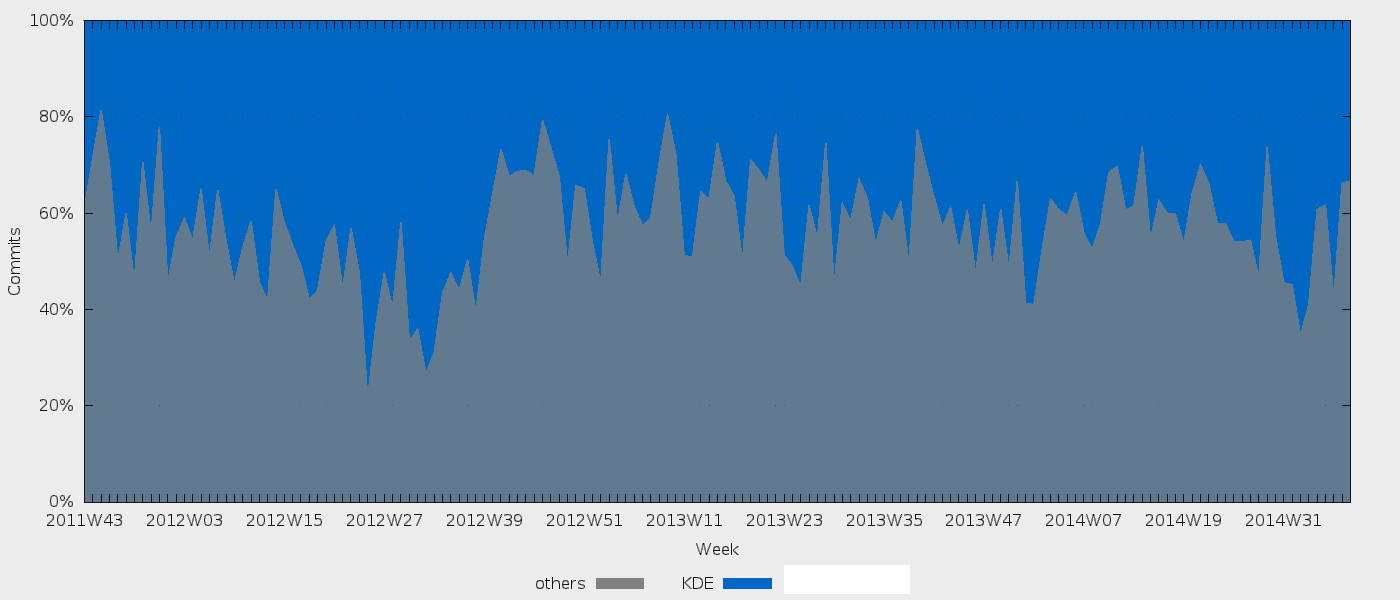
Not based on their current paid affilation, like Thiago s graphs, but if each commit was made by a person coming from KDE. So, I got hold of Thiago s scripts, a lovely mix of perl and zsh, and a QtBase git repository. First steps was to try to classify people as person coming from KDE or not. Of course, I m a KDE person. Thiago is a KDE person. David Faure is a KDE person. Olivier Goffart is a KDE person. Lars Knoll is a KDE person. By the help of the KDE accounts file, and some of the long time KDE contributors, I got after a half day of work a good list of it. Then next steps was trying to put it into Thiago s perlscripts All of it kind of succeeded: qtbase-KDE.graph So, KDE people makes up for 40-60% of the weekly commits to QtBase. This is again shows that KDE is important to Qt, just as the reverse is. So, let s keep KDE healthy. KDE is running a end-of-year fundraiser over here https://www.kde.org/fundraisers/yearend2014/. Go ahead and donate, and help KDE stay healthy. For your own sake. And for Qt s.

24 October 2014

Richard Hartmann: Release Critical Bug report for Week 43

Just a friendly reminder: If your package is not in unstable (and reasonably bug free) by Sunday, it's not in Jessie. I am not doing full stats as I am unsure about the diff format at the moment, but in week 43, we had 284 bugs for Squeeze and 468 for Wheezy. (282 + 468) / 2 = 376; so we are a bit better off than on average. Still, here's to hoping this freeze will be shorter. The UDD bugs interface currently knows about the following release critical bugs:

14 October 2014

Julian Andres Klode: Key transition

I started transitioning from 1024D to 4096R. The new key is available at: https://people.debian.org/~jak/pubkey.gpg and the keys.gnupg.net key server. A very short transition statement is available at: https://people.debian.org/~jak/transition-statement.txt and included below (the http version might get extended over time if needed). The key consists of one master key and 3 sub keys (signing, encryption, authentication). The sub keys are stored on an OpenPGP v2 Smartcard. That s really cool, isn t it? Somehow it seems that GnuPG 1.4.18 also works with 4096R keys on this smartcard (I accidentally used it instead of gpg2 and it worked fine), although only GPG 2.0.13 and newer is supposed to work.
-----BEGIN PGP SIGNED MESSAGE-----
Hash: SHA1,SHA512
Because 1024D keys are not deemed secure enough anymore, I switched to
a 4096R one.
The old key will continue to be valid for some time, but i prefer all
future correspondence to come to the new one.  I would also like this
new key to be re-integrated into the web of trust.  This message is
signed by both keys to certify the transition.
the old key was:
pub   1024D/00823EC2 2007-04-12
      Key fingerprint = D9D9 754A 4BBA 2E7D 0A0A  C024 AC2A 5FFE 0082 3EC2
And the new key is:
pub   4096R/6B031B00 2014-10-14 [expires: 2017-10-13]
      Key fingerprint = AEE1 C8AA AAF0 B768 4019  C546 021B 361B 6B03 1B00
-----BEGIN PGP SIGNATURE-----
Version: GnuPG v2
iEYEARECAAYFAlQ9j+oACgkQrCpf/gCCPsKskgCgiRn7DoP5RASkaZZjpop9P8aG
zhgAnjHeE8BXvTSkr7hccNb2tZsnqlTaiQIcBAEBCgAGBQJUPY/qAAoJENc8OeVl
gLOGZiMP/1MHubKmA8aGDj8Ow5Uo4lkzp+A89vJqgbm9bjVrfjDHZQIdebYfWrjr
RQzXdbIHnILYnUfYaOHUzMxpBHya3rFu6xbfKesR+jzQf8gxFXoBY7OQVL4Ycyss
4Y++g9m4Lqm+IDyIhhDNY6mtFU9e3CkljI52p/CIqM7eUyBfyRJDRfeh6c40Pfx2
AlNyFe+9JzYG1i3YG96Z8bKiVK5GpvyKWiggo08r3oqGvWyROYY9E4nLM9OJu8EL
GuSNDCRJOhfnegWqKq+BRZUXA2wbTG0f8AxAuetdo6MKmVmHGcHxpIGFHqxO1QhV
VM7VpMj+bxcevJ50BO5kylRrptlUugTaJ6il/o5sfgy1FdXGlgWCsIwmja2Z/fQr
ycnqrtMVVYfln9IwDODItHx3hSwRoHnUxLWq8yY8gyx+//geZ0BROonXVy1YEo9a
PDplOF1HKlaFAHv+Zq8wDWT8Lt1H2EecRFN+hov3+lU74ylnogZLS+bA7tqrjig0
bZfCo7i9Z7ag4GvLWY5PvN4fbws/5Yz9L8I4CnrqCUtzJg4vyA44Kpo8iuQsIrhz
CKDnsoehxS95YjiJcbL0Y63Ed4mkSaibUKfoYObv/k61XmBCNkmNAAuRwzV7d5q2
/w3bSTB0O7FHcCxFDnn+tiLwgiTEQDYAP9nN97uibSUCbf98wl3/
=VRZJ
-----END PGP SIGNATURE-----

Filed under: Uncategorized

12 October 2014

Iustin Pop: Day trip on the Olympic Peninsula

Day trip on the Olympic Peninsula TL;DR: drove many kilometres on very nice roads, took lots of pictures, saw sunshine and fog and clouds, an angry ocean and a calm one, a quiet lake and lots and lots of trees: a very well spent day. Pictures at http://photos.k1024.org/Daytrips/Olympic-Peninsula-2014/. Sometimes I travel to the US on business, and as such I've been a few times in the Seattle area. Until this summer, when I had my last trip there, I was content to spend any extra days (weekend or such) just visiting Seattle itself, or shopping (I can spend hours in the REI store!), or working on my laptop in the hotel. This summer though, I thought - I should do something a bit different. Not too much, but still - no sense in wasting both days of the weekend. So I thought maybe driving to Mount Rainier, or something like that. On the Wednesday of my first week in Kirkland, as I was preparing my drive to the mountain, I made the mistake of scrolling the map westwards, and I saw for the first time the Olympic Peninsula; furthermore, I was zoomed in enough that I saw there was a small road right up to the north-west corner. Intrigued, I zoomed further and learned about Cape Flattery ( the northwestern-most point of the contiguous United States! ), so after spending a bit time reading about it, I was determined to go there. Easier said than done - from Kirkland, it's a 4h 40m drive (according to Google Maps), so it would be a full day on the road. I was thinking of maybe spending the night somewhere on the peninsula then, in order to actually explore the area a bit, but from Wednesday to Saturday it was a too short notice - all hotels that seemed OK-ish were fully booked. I spent some time trying to find something, even not directly on my way, but I failed to find any room. What I did manage to do though, is to learn a bit about the area, and to realise that there's a nice loop around the whole peninsula - the 104 from Kirkland up to where it meets the 101N on the eastern side, then take the 101 all the way to Port Angeles, Lake Crescent, near Lake Pleasant, then south toward Forks, crossing the Hoh river, down to Ruby Beach, down along the coast, crossing the Queets River, east toward Lake Quinault, south toward Aberdeen, then east towards Olympia and back out of the wilderness, into the highway network and back to Kirkland. This looked like an awesome road trip, but it is as long as it sounds - around 8 hours (continuous) drive, though skipping Cape Flattery. Well, I said to myself, something to keep in mind for a future trip to this area, with a night in between. I was still planning to go just to Cape Flattery and back, without realising at that point that this trip was actually longer (as you drive on smaller, lower-speed roads). Preparing my route, I read about the queues at the Edmonds-Kingston ferry, so I was planning to wake up early on the weekend, go to Cape Flattery, and go right back (maybe stop by Lake Crescent). Saturday comes, I - of course - sleep longer than my trip schedule said, and start the day in a somewhat cloudy weather, driving north from my hotel on Simonds Road, which was quite nicer than the usual East-West or North-South roads in this area. The weather was becoming nicer, however as I was nearing the ferry terminal and the traffic was getting denser, I started suspecting that I'll spend a quite a bit of time waiting to board the ferry. And unfortunately so it was (photo altered to hide some personal information): Waiting for the ferry. The weather at least was nice, so I tried to enjoy it and simply observe the crowd - people were looking forward to a weekend relaxing, so nobody seemed annoyed by the wait. After almost half an hour, time to get on the ferry - my first time on a ferry in US, yay! But it was quite the same as in Europe, just that the ship was much larger. Once I secured the car, I went up deck, and was very surprised to be treated with some excellent views: Harbour view Looking towards the sun   and away from it The crossing was not very short, but it seemed so, because of the view, the sun, the water and the wind. Soon we were nearing the other shore; also, see how well panorama software deals with waves :P! Near the other shore And I was finally on the "real" part of the trip. The road was quite interesting. Taking the 104 North, crossing the "Hood Canal Floating Bridge" (my, what a boring name), then finally joining the 101 North. The environment was quite varied, from bare plains and hills, to wooded areas, to quite dense forests, then into inhabited areas - quite a long stretch of human presence, from the Sequim Bay to Port Angeles. Port Angeles surprised me: it had nice views of the ocean, and an interesting port (a few big ships), but it was much smaller than I expected. The 101 crosses it, and in less than 10 minutes or so it was already over. I expected something nicer, based on the name, but Anyway, onwards! Soon I was at a crossroads and had to decide: I could either follow the 101, crossing the Elwha River and then to Lake Crescent, then go north on the 113/112, or go right off 101 onto 112, and follow it until close to my goal. I took the 112, because on the map it looked "nicer", and closer to the shore. Well, the road itself was nice, but quite narrow and twisty here and there, and there was some annoying traffic, so I didn't enjoy this segment very much. At least it had the very interesting property (to me) that whenever I got closer to the ocean, the sun suddenly disappeared, and I was finding myself in the fog: Foggy road So my plan to drive nicely along the coast failed. At one point, there was even heavy smoke (not fog!), and I wondered for a moment how safe was to drive out there in the wilderness (there were other cars though, so I was not alone). Only quite a bit later, close to Neah Bay, did I finally see the ocean: I saw a small parking spot, stopped, and crossing a small line of trees I found myself in a small cove? bay? In any case, I had the impression I stepped out of the daily life in the city and out into the far far wilderness: Dead trees on the beach Trees growing on a rock Small panorama of the cove There was a couple, sitting on chairs, just enjoying the view. I felt very much intruding, behaving like I did as a tourist: running in, taking pictures, etc., so I tried at least to be quiet . I then quickly moved on, since I still had some road ahead of me. Soon I entered Neah Bay, and was surprised to see once more blue, and even more blue. I'm a sucker for blue, whether sky blue or sea blue , so I took a few more pictures (watch out for the evil fog in the second one): View towards Neah Bay port Sea view from Neah Bay Well, the town had some event, and there were lots of people, so I just drove on, now on the last stretch towards the cape. The road here was also very interesting, yet another environment - I was driving on Cape Flattery Road, which cuts across the tip of the peninsula (quite narrow here) along the Waatch River and through its flooding plains (at least this is how it looked to me). Then it finally starts going up through the dense forest, until it reaches the parking lot, and from there, one goes on foot towards the cape. It's a very easy and nice walk (not a hike), and the sun was shining very nicely through the trees: Sunny forest Sun shinning down Wooden path But as I reached the peak of the walk, and started descending towards the coast, I was surprised, yet again, by fog: Ugly fog again! I realised that probably this means the cape is fully in fog, so I won't have any chance to enjoy the view. Boy, was I wrong! There are three viewpoints on the cape, and at each one I was just "wow" and "aah" at the view. Even thought it was not a sunny summer view, and there was no blue in sight, the combination between the fog (which was hiding the horizon and even the closer islands), the angry ocean which was throwing wave after wave at the shore, making a loud noise, and the fact that even this seemingly inhospitable area was just teeming with life, was both unexpected and awesome. I took here waay to many pictures, here are just a couple inlined: First view at the cape Birds 'enjoying' the weather Foggy shore I spent around half an hour here, just enjoying the rawness of nature. It was so amazing to see life encroaching on each bit of land, even though it was not what I would consider a nice place. Ah, how we see everything through our own eyes! The walk back was through fog again, and at one point it switched over back to sunny. Driving back on the same road was quite different, knowing what lies at its end. On this side, the road had some parking spots, so I managed to stop and take a picture - even though this area was much less wild, it still has that outdoors flavour, at least for me: Waatch River Back in Neah Bay, I stopped to eat. I had a place in mind from TripAdvisor, and indeed - I was able to get a custom order pizza at "Linda's Woodfired Kitchen". Quite good, and I ate without hurry, looking at the people walking outside, as they were coming back from the fair or event that was taking place. While eating, a somewhat disturbing thought was going through my mind. It was still early, around two to half past two, so if I went straight back to Kirkland I would be early at the hotel. But it was also early enough that I could - in theory at least - still do the "big round-trip". I was still rummaging the thought as I left On the drive back I passed once more near Sekiu, Washington, which is a very small place but the map tells me it even has an airport! Fun, and the view was quite nice (a bit of blue before the sea is swallowed by the fog): Sekiu view After passing Sekiu and Clallam Bay, the 112 curves inland and goes on a bit until you are at the crossroads: to the left the 112 continues, back the same way I came; to the right, it's the 113, going south until it meets the 101. I looked left - remembering the not-so-nice road back, I looked south - where a very appealing, early afternoon sun was beckoning - so I said, let's take the long way home! It's just a short stretch on the 113, and then you're on the 101. The 101 is a very nice road, wide enough, and it goes through very very nice areas. Here, west to south-west of the Olympic Mountains, it's a very different atmosphere from the 112/101 that I drove on in the morning; much warmer colours, a bit different tree types (I think), and more flat. I soon passed through Forks, which is one of the places I looked at when searching for hotels. I did so without any knowledge of the town itself (its wikipedia page is quite drab), so imagine my surprise when a month later I learned from a colleague that this is actually a very important place for vampire-book fans. Oh my, and I didn't even stop! This town also had some event, so I just drove on, enjoying the (mostly empty) road. My next planned waypoint was Ruby Beach, and I was looking forward to relaxing a bit under the warm sun - the drive was excellent, weather perfect, so I was watching the distance countdown on my Garmin. At two miles out, the "Near waypoint Ruby Beach" message appeared, and two seconds later the sun went out. What the I was hoping this is something temporary, but as I slowly drove the remaining mile I couldn't believe my eyes that I was, yet again, finding myself in the fog I park the car, thinking that asking for a refund would at least allow me to feel better - but it was I who planned the trip! So I resigned myself, thinking that possibly this beach is another special location that is always in the fog. However, getting near the beach it was clear that it was not so - some people were still in their bathing suits, just getting dressed, so it seems I was just unlucky with regards to timing. However, I the beach itself was nice, even in the fog (I later saw online sunny pictures, and it is quite beautiful), the the lush trees reach almost to the shore, and the way the rocks are sitting on the beach: A lonely dinghy Driftwood  and human construction People on the beach Since the weather was not that nice, I took a few more pictures, then headed back and started driving again. I was soo happy that the weather didn't clear at the 2 mile mark (it was not just Ruby Beach!), but alas - it cleared as soon as the 101 turns left and leaves the shore, as it crosses the Queets river. Driving towards my next planned stop was again a nice drive in the afternoon sun, so I think it simply was not a sunny day on the Pacific shore. Maybe seas and oceans have something to do with fog and clouds ! In Switzerland, I'm very happy when I see fog, since it's a somewhat rare event (and seeing mountains disappearing in the fog is nice, since it gives the impression of a wider space). After this day, I was a bit fed up with fog for a while Along the 101 one reaches Lake Quinault, which seemed pretty nice on the map, and driving a bit along the lake - a local symbol, the "World's largest spruce tree". I don't know what a spruce tree is, but I like trees, so I was planning to go there, weather allowing. And the weather did cooperate, except that the tree was not so imposing as I thought! In any case, I was glad to stretch my legs a bit: Path to largest spruce tree Largest spruce tree, far view Largest spruce tree, closer view Very short path back to the road However, the most interesting thing here in Quinault was not this tree, but rather - the quiet little town and the view on the lake, in the late afternoon sun: Quinault Quinault Lake view The entire town was very very quiet, and the sun shining down on the lake gave an even stronger sense of tranquillity. No wind, not many noises that tell of human presence, just a few, and an overall sense of peace. It was quite the opposite of the Cape Flattery and a very nice way to end the trip. Well, almost end - I still had a bit of driving ahead. Starting from Quinault, driving back and entering the 101, driving down to Aberdeen: Afternoon ride then turning east towards Olympia, and back onto the highways. As to Aberdeen and Olympia, I just drove through, so I couldn't make any impression of them. The old harbour and the rusted things in Aberdeen were a bit interesting, but the day was late so I didn't stop. And since the day shouldn't end without any surprises, during the last profile change between walking and driving in Quinault, my GPS decided to reset its active maps list and I ended up with all maps activated. This usually is not a problem, at least if you follow a pre-calculated route, but I did trigger recalculation as I restarted my driving, so the Montana was trying to decide on which map to route me - between the Garmin North America map and the Open StreeMap one, the result was that it never understood which road I was on. It always said "Drive to I5", even though I was on I5. Anyway, thanks to road signs, and no thanks to "just this evening ramp closures", I was able to arrive safely at my hotel. Overall, a very successful, if long trip: around 725 kilometres, 10h:30m moving, 13h:30m total: Track picture There were many individual good parts, but the overall think about this road trip was that I was able to experience lots of different environments of the peninsula on the same day, and that overall it's a very very nice area. The downside was that I was in a rush, without being able to actually stop and enjoy the locations I visited. And there's still so much to see! A two nights trip sound just about right, with some long hikes in the rain forest, and afternoons spent on a lake somewhere. Another not so optimal part was that I only had my "travel" camera (a Nikon 1 series camera, with a small sensor), which was a bit overwhelmed here and there by the situation. It was fortunate that the light was more or less good, but looking back at the pictures, how I wish that I had my "serious" DSLR So, that means I have two reasons to go back! Not too soon though, since Mount Rainier is also a good location to visit . If the pictures didn't bore you yet, the entire gallery is on my smugmug site. In any case, thanks for reading!

Next.

Previous.
