All governments are run by liars and nothing they say should be believed.His starting point was that reporters should not assume governments and corporations are telling the truth, but verify all their claims as much as possible. I wonder how many Norwegian reporters can be said to follow the principles of I. F. Stone. They are definitely in short supply. If you, like me half a year ago, have never heard of him, check him out.
- I. F. Stone
openssl ts -query -data "/etc/shells" -cert -sha256 -no_nonce \
curl -s -H "Content-Type: application/timestamp-query" \
--data-binary "@-" http://zeitstempel.dfn.de > etc-shells.tsr
openssl ts -reply -text -in etc-shells.tsr
This produces a binary timestamp file (etc-shells.tsr) which can be
used to verify that the content of the file /etc/shell with the
calculated sha256 hash existed at the point in time when the request
was made. The last command extract the content of the etc-shells.tsr
in human readable form. The idea behind such timestamp is to be able
to prove using cryptography that the content of a file have not
changed since the file was stamped.
To verify that the file on disk match the public key signature in
the timestamp file, run the following commands. It make sure you have
the required certificate for the trusted timestamp service available
and use it to compare the file content with the timestamp. In
production, one should of course use a better method to verify the
service certificate.
wget -O ca-cert.txt https://pki.pca.dfn.de/global-services-ca/pub/cacert/chain.txt openssl ts -verify -data /etc/shells -in etc-shells.tsr -CAfile ca-cert.txt -textWikipedia have a lot more information about trusted Timestamping and linked timestamping, and there are several trusted timestamping services around, both as commercial services and as free and public services. Among the latter is the zeitstempel.dfn.de service mentioned above and freetsa.org service linked to from the wikipedia web site. I believe the DIFI service should show up on https://tsa.difi.no, but it is not available to the public at the moment. I hope this will change when it is into production. The RFC 3161 trusted timestamping protocol standard is even implemented in LibreOffice, Microsoft Office and Adobe Acrobat, making it possible to verify when a document was created. I would find it useful to be able to use such trusted timestamp service to make it possible to verify that my stored syslog files have not been tampered with. This is not a new idea. I found one example implemented on the Endian network appliances where the configuration of such feature was described in 2012. But I could not find any free implementation of such feature when I searched, so I decided to try to build a prototype named syslog-trusted-timestamp. My idea is to generate a timestamp of the old log files after they are rotated, and store the timestamp in the new log file just after rotation. This will form a chain that would make it possible to see if any old log files are tampered with. But syslog is bad at handling kilobytes of binary data, so I decided to base64 encode the timestamp and add an ID and line sequence numbers to the base64 data to make it possible to reassemble the timestamp file again. To use it, simply run it like this:
syslog-trusted-timestamp /path/to/list-of-log-filesThis will send a timestamp from one or more timestamp services (not yet decided nor implemented) for each listed file to the syslog using logger(1). To verify the timestamp, the same program is used with the --verify option:
syslog-trusted-timestamp --verify /path/to/log-file /path/to/log-with-timestampThe verification step is not yet well designed. The current implementation depend on the file path being unique and unchanging, and this is not a solid assumption. It also uses process number as timestamp ID, and this is bound to create ID collisions. I hope to have time to come up with a better way to handle timestamp IDs and verification later. Please check out the prototype for syslog-trusted-timestamp on github and send suggestions and improvement, or let me know if there already exist a similar system for timestamping logs already to allow me to join forces with others with the same interest. As usual, if you use Bitcoin and want to show your support of my activities, please send Bitcoin donations to my address 15oWEoG9dUPovwmUL9KWAnYRtNJEkP1u1b.
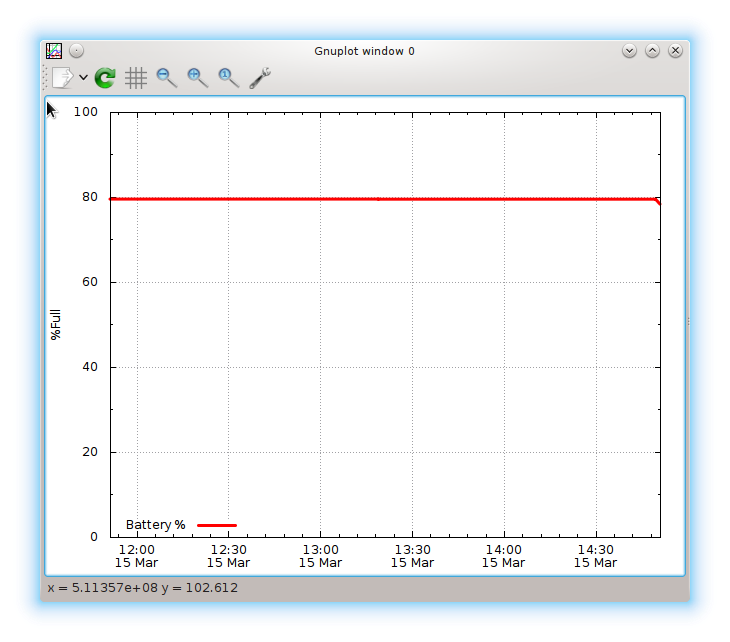
/usr/share/battery-stats/battery-stats-graph /var/log/battery-stats.csvOr select the 'Battery Level Graph' from your application menu. The flow in/out of the battery can be seen by running (no menu entry yet):
/usr/share/battery-stats/battery-stats-graph-flowI'm not quite happy with the way the data is visualised, at least when there are few data points. The graphs look a bit better with a few years of data. A while back one important feature I use in the battery stats collector broke in Debian. The scripts in /usr/lib/pm-utils/power.d/ were no longer executed. I suspect it happened when Jessie started using systemd, but I do not know. The issue is reported as bug #818649 against pm-utils. I managed to work around it by adding an udev rule to call the collector script every time the power connector is connected and disconnected. With this fix in place it was finally time to make a new release of the package, and get it into Debian. If you are interested in how your laptop battery is doing, please check out the battery-stats in Debian unstable, or rebuild it on Jessie to get it working on Debian stable. :) The upstream source is available from github. As always, patches are very welcome.

"vh":500.00, "vm":0, "vl":0, "uqr":1, "tp":1, "nme":"Din Leverand r", "cc":"NO", "cid":"997912345 MVA", "iref":"12300001", "idt":"20151022", "ddt":"20151105", "due":2500.0000, "cur":"NOK", "pt":"BBAN", "acc":"17202612345", "bc":"BIENNOK1", "adr":"0313 OSLO"The interpretation of the fields can be found in the format specification (revision 2 from june 2014). The format seem to have most of the information needed to handle accounting and payment of invoices, at least the fields I have needed so far here in Norway. Unfortunately, the site and document do not mention anything about the patent, trademark and copyright status of the format and the specification. Because of this, I asked the people behind it back in November to clarify. Ann-Christine Savlid (ann-christine.savlid (at) visma.com) replied that Visma had not applied for patent or trademark protection for this format, and that there were no copyright based usage limitations for the format. I urged her to make sure this was explicitly written on the web pages and in the specification, but unfortunately this has not happened yet. So I guess if there is submarine patents, hidden trademarks or a will to sue for copyright infringements, those starting to use the UsingQR format might be at risk, but if this happen there is some legal defense in the fact that the people behind the format claimed it was safe to do so. At least with patents, there is always a chance of getting sued... I also asked if they planned to maintain the format in an independent standard organization to give others more confidence that they would participate in the standardization process on equal terms with Visma, but they had no immediate plans for this. Their plan was to work with banks to try to get more users of the format, and evaluate the way forward if the format proved to be popular. I hope they conclude that using an open standard organisation like IETF is the correct place to maintain such specification. Update 2016-03-20: Via Twitter I became aware of some comments about this blog post that had several useful links and references to similar systems. In the Czech republic, the Czech Banking Association standard #26, with short name SPAYD, uses QR codes with payment information. More information is available from the Wikipedia page on Short Payment Descriptor. And in Germany, there is a system named BezahlCode, (specification v1.8 2013-12-05 available as PDF), which uses QR codes with URL-like formatting using "bank:" as the URI schema/protocol to provide the payment information. There is also the ZUGFeRD file format that perhaps could be transfered using QR codes, but I am not sure if it is done already. Last, in Bolivia there are reports that tax information since november 2014 need to be printed in QR format on invoices. I have not been able to track down a specification for this format, because of my limited language skill sets.
My plans for the future is to merge my old scripts into the
battery-stats package, as my old scripts collected a lot more details
about the battery. The scripts are merged into the upstream
battery-stats git repository already, but I am not convinced they work
yet, as I changed a lot of paths along the way. Will have to test a
bit more before I make a new release.
I will also consider changing the file format slightly, as I
suspect the way I combine several values into one field might make it
impossible to know the type of the value when using it for processing
and graphing.
If you would like I would like to keep an close eye on your laptop
battery, check out the battery-stats package in
Debian and
on
github.
I would love some help to improve the system further.
debmake -cc > debian/copyrightNote there are some problems with python and non-ASCII names, so this might not be the best option. The cme option is based on a config parsing library, and I found this approach in a blog post from 2015. To generate using cme, use the 'update dpkg-copyright' option:
cme update dpkg-copyrightThis will create or update debian/copyright. The cme tool seem to handle UTF-8 names better than debmake. When the copyright file is created, I would also like some help to check if the file is correct. For this I found two good options, debmake -k and license-reconcile. The former seem to focus on license types and file matching, and is able to detect ineffective blocks in the copyright file. The latter reports missing copyright holders and years, but was confused by inconsistent license names (like CDDL vs. CDDL-1.0). I suspect it is good to use both and fix all issues reported by them before uploading. But I do not know if the tools and the ftpmasters agree on what is important to fix in a copyright file, so the package might still be rejected. The devscripts tool licensecheck deserve mentioning. It will read through the source and try to find all copyright statements. It is not comparing the result to the content of debian/copyright, but can be useful when verifying the content of the copyright file. Are you aware of better tools in Debian to create and update debian/copyright file. Please let me know, or blog about it on planet.debian.org. As usual, if you use Bitcoin and want to show your support of my activities, please send Bitcoin donations to my address 15oWEoG9dUPovwmUL9KWAnYRtNJEkP1u1b. Update 2016-02-20: I got a tip from Mike Gabriel on how to use licensecheck and cdbs to create a draft copyright file
licensecheck --copyright -r find * -type f \ /usr/lib/cdbs/licensecheck2dep5 > debian/copyright.autoHe mentioned that he normally check the generated file into the version control system to make it easier to discover license and copyright changes in the upstream source. I will try to do the same with my packages in the future. Update 2016-02-21: The cme author recommended against using -quiet for new users, so I removed it from the proposed command line.
See the appstream wiki page to learn how to embed the package metadata in a way appstream can use. This same approach can be used to find any package supporting a given MIME type. This is very useful when you get a file you do not know how to handle. First find the mime type using file --mime-type, and next look up the package providing support for it. Lets say you got an SVG file. Its MIME type is image/svg+xml, and you can find all packages handling this type like this:% apt install appstream [...] % apt update [...] % appstreamcli what-provides firmware:runtime ctfw-3.2.3.0.bin \ awk '/Package:/ print $2 ' firmware-qlogic %
I believe the MIME types are fetched from the desktop file for packages providing appstream metadata.% apt install appstream [...] % apt update [...] % appstreamcli what-provides mimetype image/svg+xml \ awk '/Package:/ print $2 ' bkchem phototonic inkscape shutter tetzle geeqie xia pinta gthumb karbon comix mirage viewnior postr ristretto kolourpaint4 eog eom gimagereader midori %
The phone company logs provide a register of locations to check out
when one want to figure out what the tracked person was doing. It is
unavailable for most of us, but provided to selected government
officials, company staff, those illegally buying information from
unfaithful servants and crackers stealing the information. But the
public information can be collected and analysed, and a free software
tool to do so is called
Creepy or Cree.py. I
discovered it when I read
an
article about Creepy in the Norwegian newspaper Aftenposten i
November 2014, and decided to check if it was available in Debian.
The python program was in Debian, but
the version in
Debian was completely broken and practically unmaintained. I
uploaded a new version which did not work quite right, but did not
have time to fix it then. This Christmas I decided to finally try to
get Creepy operational in Debian. Now a fixed version is available in
Debian unstable and testing, and almost all Debian specific patches
are now included
upstream.
The Creepy program visualises geolocation information fetched from
Twitter, Instagram, Flickr and Google+, and allow one to get a
complete picture of every social media message posted recently in a
given area, or track the movement of a given individual across all
these services. Earlier it was possible to use the search API of at
least some of these services without identifying oneself, but these
days it is impossible. This mean that to use Creepy, you need to
configure it to log in as yourself on these services, and provide
information to them about your search interests. This should be taken
into account when using Creepy, as it will also share information
about yourself with the services.
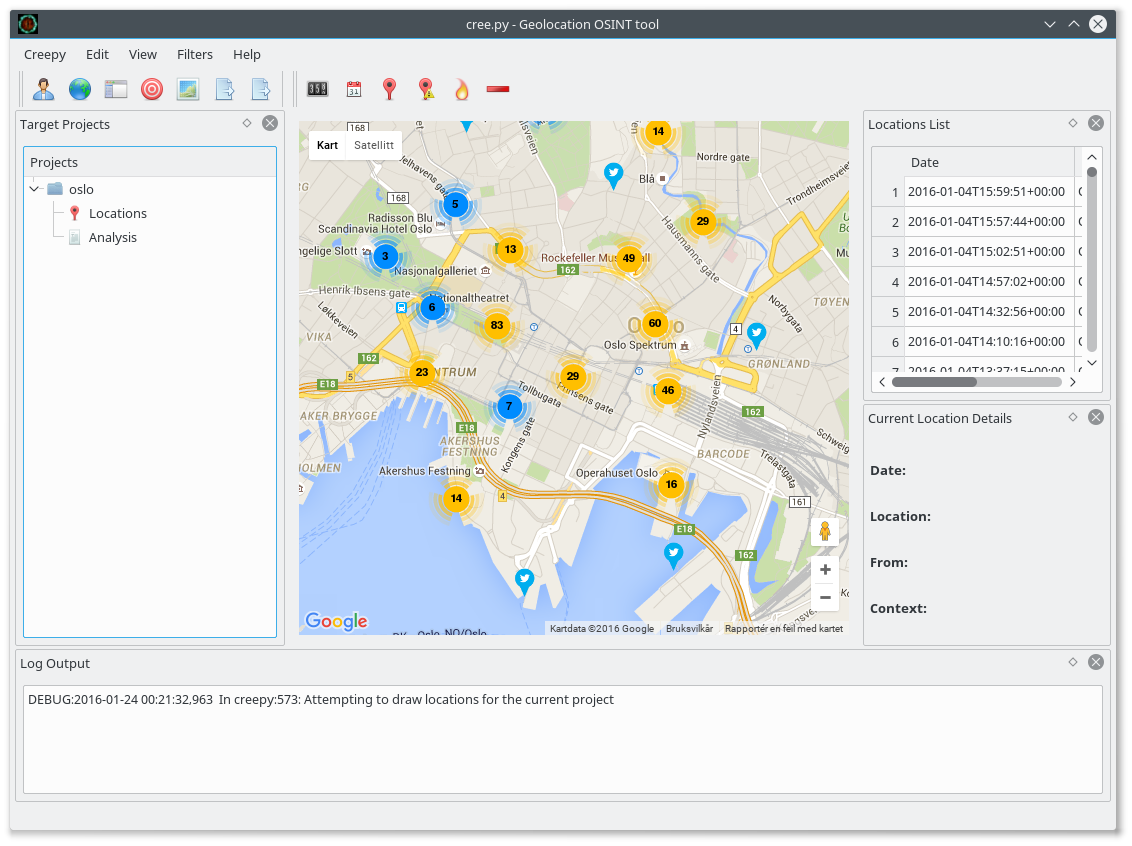
The picture above show the twitter messages sent from (or at least
geotagged with a position from) the city centre of Oslo, the capital
of Norway. One useful way to use Creepy is to first look at
information tagged with an area of interest, and next look at all the
information provided by one or more individuals who was in the area.
I tested it by checking out which celebrity provide their location in
twitter messages by checkout out who sent twitter messages near a
Norwegian TV station, and next could track their position over time,
making it possible to locate their home and work place, among other
things. A similar technique have been
used
to locate Russian soldiers in Ukraine, and it is both a powerful
tool to discover lying governments, and a useful tool to help people
understand the value of the private information they provide to the
public.
The package is not trivial to backport to Debian Stable/Jessie, as
it depend on several python modules currently missing in Jessie (at
least python-instagram, python-flickrapi and
python-requests-toolbelt).
(I have uploaded
the image to
screenshots.debian.net and licensed it under the same terms as the
Creepy program in Debian.)
If you have more sources listed in /etc/apt/sources.list.d/, run the sed commands for these too. The sed command is assuming your are using the ftp.debian.org Debian mirror. Adjust the command (or just edit the file manually) to match your mirror. This work in Debian Jessie and later. Note that tools like apt-file only recently started using the apt transport system, and do not work with these tor+http URLs. For apt-file you need the version currently in experimental, which need a recent apt version currently only in unstable. So if you need a working apt-file, this is not for you. Another advantage from this change is that your machine will start using Tor regularly and at fairly random intervals (every time you update the package lists or upgrade or install a new package), thus masking other Tor traffic done from the same machine. Using Tor will become normal for the machine in question. On Freedombox, APT is set up by default to use apt-transport-tor when Tor is enabled. It would be great if it was the default on any Debian system.apt install apt-transport-tor sed -i 's% http://ftp.debian.org/%tor+http://vwakviie2ienjx6t.onion/%' /etc/apt/sources.list sed -i 's% http% tor+http%' /etc/apt/sources.list
Here is my monthly update covering a large part of what I have been doing in the free software world (previously):
24 Dec. 63
Dear Uncle Ron and Aunt Helen,
It has been quite awhile since I have written you folks. I am not too much of one for writing,
and when I do write, I keep putting it off, and putting it off; and the next thing you know,
the weeks turn into months and then the months into years.
I haven't sent any Christmas cards, so at this time I'll offer my best wishes for the season
to you.
It is Christmas Eve and I am working tonight. I will also work New Year's eve and day. It
really doesn't seem like Christmas here, and there isn't that much to do in the evening's;
So I'm just as well off working.
As I had mentioned, I had intended to send you some coins from Korea but I believe that I
put them in with a package that I had sent to Mom and told her to give them to you. In any
event, here are some in this box.
The Korean coin with the 10 on it is 10 Won, and worth about $.0769. The large copper coin
is Japanese ( 10 Yen) and about 2.8
Wait! I was wrong on the Korean coins.They are 10 Hwan which is the old money. When they
Changed to Won, they made 10 Hwan equal to 1 Won. (Sounds confusing and tongue-tying,
doesn't it?) So these 10 copper pieces with the 10 on them altogether are only worth 7 /
The Viet Namese coins with the former president Diem picture on them are soon being
taken out of circulation. ( Since he was overthrown and killed, they are going to
replace the money also.) The small pieces marked 1 dong are 1 piastre; also called one
Viet Namese dollar. 1 piastre is about .7 .
I also recall sending some coins home in my hold baggage. I'll tell Mom to look for
them and give them to you.
Now that I look back on it, the year I spent in Korea wasn't bad. It was difficult at
first having to work for an arrogant Jew boss, but after a few months I got out of his
office and was on my own working directly for the army people ( U.S.) The country of
Korea isn't too bad. As you can see on the coins they were in the year 4294 last year.
It is surprising for a civilization to be that far along in years and still live under
very primitive conditions. Going from Korea to Japan is like going from the dark ages
into the future science fiction world. Those people are really progressing in Japan.
I spent several days in Japan after I left Korea. Then I went to Honolulu for almost
a month. Then I went back to Japan for Leave for 3 weeks and then down here to Viet
Nam in October. They were building like crazy in Japan to get ready for the Olympics.
Working 4 hours a day, 7 days a week on construction. You could drive into Tokyo
early in the evening and return late in the night and find the road you had gone in
on was now completely torn away. And downtown Tokyo is vey nice. Lots of modern
building and just about any modern gadget you can think of.
I really like their cooking also. Their Kobe Beef is excellent. In this beef, the
cattle are pampered from the time they are born until they are slaughtered. They
massage them, feed them beer, and let them live a lazy life. I would really like
to work a year or two in Japan. The hot baths and big tubs are also great. Only
it is almost impossible to stand the hot temperatures that they can. Westerners
always have to add quite a lot of cold water before they can get in the tub.
The Viet Namese people are much dirtier than the Japanese or Koreans. They don't
have any hot baths here in Viet Nam. In fact, the majority of hotels ( built by
the French) don't even have hot water in them. The Korean houses don't look like
much from the outside, but inside they are spotlessly clean. The older Japanese
buildings look nic efrom the outside and are also clean inside.
I am here in the town of Nha Trang. It is a small town on the coast of the
China Sea. I like it here. My hotel is less than a hundred yards from the
beach. We are now in the winter season also, but it just got a little cooler
from having winds the past few weeks. This afternoon as we came to work there
were all sorts of people in swimming.
Lobster is also plentiful here and I eat quite a bit of it. Most of the
restaurant make a creamed corn soup with lots of chunks of crab meat in it.
This is very good.
Being out here in Nha Trang, we missed the coup d'etat. Things were quiet
here and the only way we knew what was happening was to listen to the radio
and talk to our co-workers of our radio system in Saigon. When they lifted
martial law and the curfew in Saigon, it took them several days later to
follow suit here.
There seems to be a noticed improvement since the coup. The people in
general seem much happier and there appears to be much more general activity
going on.
Well, I guess that's about it for now. I think I may have some Korean Won
notes back in my room and I'll check and enclose them if I can find them.
Say hello to Ira & family when you see them, and also to Aunt Marie if she
is still there with you.
'Bye for now
Your nephew
PS The Viet Namese coins with 50 XU on them are piastres.
Next.