Search Results: "cas"

12 February 2026

Freexian Collaborators: Debian Contributions: cross building, rebootstrap updates, Refresh of the patch tagging guidelines and more! (by Anupa Ann Joseph)

Debian Contributions: 2026-01 Contributing to Debian is part of Freexian s mission. This article covers the latest achievements of Freexian and their collaborators. All of this is made possible by organizations subscribing to our Long Term Support contracts and consulting services.

cross building, by Helmut Grohne In version 1.10.1, Meson merged a patch to make it call the correct g-ir-scanner by default thanks to Eli Schwarz. This problem affected more than 130 source packages. Helmut retried building them all and filed 69 patches as a result. A significant portion of those packages require another Meson change to call the correct vapigen. Another notable change is converting gnu-efi to multiarch, which ended up requiring changes to a number of other packages. Since Aurelien dropped the libcrypt-dev dependency from libc6-dev, this transition now is mostly complete and has resulted in most of the Perl ecosystem correctly expressing perl-xs-dev dependencies needed for cross building. It is these infrastructure changes affecting several client packages that this work targets. As a result of this continued work, about 66% of Debian s source packages now have satisfiable cross Build-Depends in unstable and about 10000 (55%) actually can be cross built. There are now more than 500 open bug reports affecting more than 2000 packages most of which carry patches.

rebootstrap, by Helmut Grohne Maintaining architecture cross-bootstrap requires continued effort for adapting to archive changes such as glib2.0 dropping a build profile or an e2fsprogs FTBFS. Beyond those generic problems, architecture-specific problems with e.g. musl-linux-any or sparc may arise. While all these changes move things forward on the surface, the bootstrap tooling has become a growing pile of patches. Helmut managed to upstream two changes to glibc for reducing its Build-Depends in the stage2 build profile and thanks Aurelien Jarno.

Refresh of the patch tagging guidelines, by Rapha l Hertzog Debian Enhancement Proposal #3 (DEP-3) is named Patch Tagging Guidelines and standardizes meta-information that Debian contributors can put in patches included in Debian source packages. With the feedback received over the years, and with the change in the package management landscape, the need to refresh those guidelines became evident. As the initial driver of that DEP, I spent a good day reviewing all the feedback (that I kept in a folder) and producing a new version of the document. The changes aim to give more weight to the syntax that is compatible with git format-patch s output, and also to clarify the expected uses and meanings of a couple of fields, including some algorithm that parsers should follow to define the state of the patch. After the announcement of the new draft on debian-devel, the revised DEP-3 received a significant number of comments that I still have to process.

Miscellaneous contributions
  • Helmut uploaded debvm making it work with unstable as a target distribution again.
  • Helmut modernized the code base backing dedup.debian.net significantly expanding the support for type checking.
  • Helmut fixed the multiarch hinter once more given feedback from Fabian Gr nbichler.
  • Helmut worked on migrating the rocblas package to forky.
  • Rapha l fixed RC bug #1111812 in publican and did some maintenance for tracker.debian.org.
  • Carles added support in the festival Debian package for systemd socket activation and systemd service and socket units. Adapted the patch for upstream and created a merge request (also fixed a MacOS X building system error while working on it). Updated Orca Wiki documentation regarding festival. Discussed a 2007 bug/feature in festival which allowed having a local shell and that the new systemd socket activation has the same code path.
  • Carles using po-debconf-manager worked on Catalan translations: 7 reviewed and sent; 5 follow ups, 5 deleted packages.
  • Carles made some po-debconf-manager changes: now it attaches the translation file on follow ups, fixed bullseye compatibility issues.
  • Carles reviewed a new Catalan apt translation.
  • Carles investigated and reported a lxhotkey bug and sent a patch for the abcde package.
  • Carles made minor updates for Debian Wiki for different pages (lxde for dead keys, Ripping with abcde troubleshooting, VirtualBox troubleshooting).
  • Stefano renamed build-details.json in Python 3.14 to fix multiarch coinstallability.
  • Stefano audited the tooling and ignore lists for checking the contents of the python3.X-minimal packages, finding and fixing some issues in the process.
  • Stefano made a few uploads of python3-defaults and dh-python in support of Python 3.14-as-default in Ubuntu. Also investigated the risk of ignoring byte-compilation failures by default, and started down the road of implementing this.
  • Stefano did some sysadmin work on debian.social infrastructure.
  • Stefano and Santiago worked on preparations for DebConf 26. Especially to help the local team on opening the registration, and reviewing the budget to be presented for approval.
  • Stefano uploaded routine updates of python-virtualenv and python-flexmock.
  • Antonio collaborated with DSA on enabling a new proxy for salsa to prevent scrapers from taking the service down.
  • Antonio did miscellaneous salsa administrative tasks.
  • Antonio fixed a few Ruby packages towards the Ruby 3.4 transition.
  • Antonio started work on planned improvements to the DebConf registration system.
  • Santiago prepared unstable updates for the latest upstream versions of knot-dns and knot-resolver. The authoritative DNS server and DNS resolver software developed by CZ.NIC. It is worth highlighting that, given the separation of functionality compared to other implementations, knot-dns and knot-resolver are also less complex software, which results in advantages in terms of security: only three CVEs have been reported for knot-dns since 2011).
  • Santiago made some routine reviews of merge requests proposed for the Salsa CI s pipeline. E.g. a proposal to fix how sbuild chooses the chroot when building a package for experimental.
  • Colin fixed lots of Python packages to handle Python 3.14 and to avoid using the deprecated pkg_resources module.
  • Colin added forky support to the images used in Salsa CI pipelines.
  • Colin began working on getting a release candidate of groff 1.24.0 (the first upstream release since mid-2023, so a very large set of changes) into experimental.
  • Lucas kept working on the preparation for Ruby 3.4 transition. Some packages fixed (support build against Ruby 3.3 and 3.4): ruby-rbpdf, jekyll, origami-pdf, ruby-kdl, ruby-twitter, ruby-twitter-text, ruby-globalid.
  • Lucas supported some potential mentors in the Google Summer of Code 26 program to submit their projects.
  • Anupa worked on the point release announcements for Debian 12.13 and 13.3 from the Debian publicity team side.
  • Anupa attended the publicity team meeting to discuss the team activities and to plan an online sprint in February.
  • Anupa attended meetings with the Debian India team to plan and coordinate the MinDebConf Kanpur and sent out related Micronews.
  • Emilio coordinated various transitions and helped get rid of llvm-toolchain-17 from sid.

10 February 2026

Freexian Collaborators: Writing a new worker task for Debusine (by Carles Pina i Estany)

Debusine is a tool designed for Debian developers and Operating System developers in general. You can try out Debusine on debusine.debian.net, and follow its development on salsa.debian.org. This post describes how to write a new worker task for Debusine. It can be used to add tasks to a self-hosted Debusine instance, or to submit to the Debusine project new tasks to add new capabilities to Debusine. Tasks are the lower-level pieces of Debusine workflows. Examples of tasks are Sbuild, Lintian, Debdiff (see the available tasks). This post will document the steps to write a new basic worker task. The example will add a worker task that runs reprotest and creates an artifact of the new type ReprotestArtifact with the reprotest log. Tasks are usually used by workflows. Workflows solve high-level goals by creating and orchestrating different tasks (e.g. a Sbuild workflow would create different Sbuild tasks, one for each architecture).

Overview of tasks A task usually does the following:
  • It receives structured data defining its input artifacts and configuration
  • Input artifacts are downloaded
  • A process is run by the worker (e.g. lintian, debdiff, etc.). In this blog post, it will run reprotest
  • The output (files, logs, exit code, etc.) is analyzed, artifacts and relations might be generated, and the work request is marked as completed, either with Success or Failure
If you want to follow the tutorial and add the Reprotest task, your Debusine development instance should have at least one worker, one user, a debusine client set up, and permissions for the client to create tasks. All of this can be setup following the steps in the Contribute section of the documentation. This blog post shows a functional Reprotest task. This task is not currently part of Debusine. The Reprotest task implementation is simplified (no error handling, unit tests, specific view, docs, some shortcuts in the environment preparation, etc.). At some point, in Debusine, we might add a debrebuild task which is based on buildinfo files and uses snapshot.debian.org to recreate the binary packages.

Defining the inputs of the task The input of the reprotest task will be a source artifact (a Debian source package). We model the input with pydantic in debusine/tasks/models.py:
class ReprotestData(BaseTaskDataWithExecutor):
   """Data for Reprotest task."""

   source_artifact: LookupSingle

class ReprotestDynamicData(BaseDynamicTaskDataWithExecutor):
   """Reprotest dynamic data."""

   source_artifact_id: int   None = None
The ReprotestData is what the user will input. A LookupSingle is a lookup that resolves to a single artifact. We would also have configuration for the desired variations to test, but we have left that out of this example for simplicity. Configuring variations is left as an exercise for the reader. Since ReprotestData is a subclass of BaseTaskDataWithExecutor it also contains environment where the user can specify in which environment the task will run. The environment is an artifact with a Debian image. The ReprotestDynamicData holds the resolution of all lookups. These can be seen in the Internals tab of the work request view.

Add the new Reprotest artifact data class In order for the reprotest task to create a new Artifact of the type DebianReprotest with the log and output metadata: add the new category to ArtifactCategory in debusine/artifacts/models.py:
    REPROTEST = "debian:reprotest"
In the same file add the DebianReprotest class:
class DebianReprotest(ArtifactData):
   """Data for debian:reprotest artifacts."""

   reproducible: bool   None = None

   def get_label(self) -> str:
       """Return a short human-readable label for the artifact."""
       return "reprotest analysis"
It could also include the package name or version. In order to have the category listed in the work request output artifacts table, edit the file debusine/db/models/artifacts.py: In ARTIFACT_CATEGORY_ICON_NAMES add ArtifactCategory.REPROTEST: "folder", and in ARTIFACT_CATEGORY_SHORT_NAMES add ArtifactCategory.REPROTEST: "reprotest",.

Create the new Task class In debusine/tasks/ create a new file reprotest.py.
reprotest.py
# Copyright   The Debusine Developers
# See the AUTHORS file at the top-level directory of this distribution
#
# This file is part of Debusine. It is subject to the license terms
# in the LICENSE file found in the top-level directory of this
# distribution. No part of Debusine, including this file, may be copied,
# modified, propagated, or distributed except according to the terms
# contained in the LICENSE file.

"""Task to use reprotest in debusine."""

from pathlib import Path
from typing import Any

from debusine import utils
from debusine.artifacts.local_artifact import ReprotestArtifact
from debusine.artifacts.models import (
    ArtifactCategory,
    CollectionCategory,
    DebianSourcePackage,
    DebianUpload,
    WorkRequestResults,
    get_source_package_name,
    get_source_package_version,
)
from debusine.client.models import RelationType
from debusine.tasks import BaseTaskWithExecutor, RunCommandTask
from debusine.tasks.models import ReprotestData, ReprotestDynamicData
from debusine.tasks.server import TaskDatabaseInterface


class Reprotest(
    RunCommandTask[ReprotestData, ReprotestDynamicData],
    BaseTaskWithExecutor[ReprotestData, ReprotestDynamicData],
):
    """Task to use reprotest in debusine."""

    TASK_VERSION = 1

    CAPTURE_OUTPUT_FILENAME = "reprotest.log"

    def __init__(
        self,
        task_data: dict[str, Any],
        dynamic_task_data: dict[str, Any]   None = None,
    ) -> None:
        """Initialize object."""
        super().__init__(task_data, dynamic_task_data)

        self._reprotest_target: Path   None = None

    def build_dynamic_data(
        self, task_database: TaskDatabaseInterface
    ) -> ReprotestDynamicData:
        """Compute and return ReprotestDynamicData."""
        input_source_artifact = task_database.lookup_single_artifact(
            self.data.source_artifact
        )

        assert input_source_artifact is not None
        self.ensure_artifact_categories(
            configuration_key="input.source_artifact",
            category=input_source_artifact.category,
            expected=(
                ArtifactCategory.SOURCE_PACKAGE,
                ArtifactCategory.UPLOAD,
            ),
        )
        assert isinstance(
            input_source_artifact.data, (DebianSourcePackage, DebianUpload)
        )
        subject = get_source_package_name(input_source_artifact.data)
        version = get_source_package_version(input_source_artifact.data)

        assert self.data.environment is not None

        environment = self.get_environment(
            task_database,
            self.data.environment,
            default_category=CollectionCategory.ENVIRONMENTS,
        )

        return ReprotestDynamicData(
            source_artifact_id=input_source_artifact.id,
            subject=subject,
            parameter_summary=f" subject _ version ",
            environment_id=environment.id,
        )

    def get_input_artifacts_ids(self) -> list[int]:
        """Return the list of input artifact IDs used by this task."""
        if not self.dynamic_data:
            return []

        return [
            self.dynamic_data.source_artifact_id,
            self.dynamic_data.environment_id,
        ]

    def fetch_input(self, destination: Path) -> bool:
        """Download the required artifacts."""
        assert self.dynamic_data

        artifact_id = self.dynamic_data.source_artifact_id
        assert artifact_id is not None
        self.fetch_artifact(artifact_id, destination)

        return True

    def configure_for_execution(self, download_directory: Path) -> bool:
        """
        Find a .dsc in download_directory.

        Install reprotest and other utilities used in _cmdline.
        Set self._reprotest_target to it.

        :param download_directory: where to search the files
        :return: True if valid files were found
        """
        self._prepare_executor_instance()

        if self.executor_instance is None:
            raise AssertionError("self.executor_instance cannot be None")

        self.run_executor_command(
            ["apt-get", "update"],
            log_filename="install.log",
            run_as_root=True,
            check=True,
        )
        self.run_executor_command(
            [
                "apt-get",
                "--yes",
                "--no-install-recommends",
                "install",
                "reprotest",
                "dpkg-dev",
                "devscripts",
                "equivs",
                "sudo",
            ],
            log_filename="install.log",
            run_as_root=True,
        )

        self._reprotest_target = utils.find_file_suffixes(
            download_directory, [".dsc"]
        )
        return True

    def _cmdline(self) -> list[str]:
        """
        Build the reprotest command line.

        Use configuration of self.data and self._reprotest_target.
        """
        target = self._reprotest_target
        assert target is not None

        cmd = [
            "bash",
            "-c",
            f"TMPDIR=/tmp ; cd /tmp ; dpkg-source -x  target  package/; "
            "cd package/ ; mk-build-deps ; apt-get install --yes ./*.deb ; "
            "rm *.deb ; "
            "reprotest --vary=-time,-user_group,-fileordering,-domain_host .",
        ]

        return cmd

    @staticmethod
    def _cmdline_as_root() -> bool:
        r"""apt-get install --yes ./\*.deb must be run as root."""
        return True

    def task_result(
        self,
        returncode: int   None,
        execute_directory: Path,  # noqa: U100
    ) -> WorkRequestResults:
        """
        Evaluate task output and return success.

        For a successful run of reprotest:
        -must have the output file
        -exit code is 0

        :return: WorkRequestResults.SUCCESS or WorkRequestResults.FAILURE.
        """
        reprotest_file = execute_directory / self.CAPTURE_OUTPUT_FILENAME

        if reprotest_file.exists() and returncode == 0:
            return WorkRequestResults.SUCCESS

        return WorkRequestResults.FAILURE

    def upload_artifacts(
        self, exec_directory: Path, *, execution_result: WorkRequestResults
    ) -> None:
        """Upload the ReprotestArtifact with the files and relationships."""
        if not self.debusine:
            raise AssertionError("self.debusine not set")

        assert self.dynamic_data is not None
        assert self.dynamic_data.parameter_summary is not None

        reprotest_artifact = ReprotestArtifact.create(
            reprotest_output=exec_directory / self.CAPTURE_OUTPUT_FILENAME,
            reproducible=execution_result == WorkRequestResults.SUCCESS,
            package=self.dynamic_data.parameter_summary,
        )

        uploaded = self.debusine.upload_artifact(
            reprotest_artifact,
            workspace=self.workspace_name,
            work_request=self.work_request_id,
        )

        assert self.dynamic_data is not None
        assert self.dynamic_data.source_artifact_id is not None
        self.debusine.relation_create(
            uploaded.id,
            self.dynamic_data.source_artifact_id,
            RelationType.RELATES_TO,
        )
Below are the main methods with some basic explanation. In order for Debusine to discover the task, add "Reprotest" in the file debusine/tasks/__init__.py in the __all__ list. Let s explain the different methods of the Reprotest class:

build_dynamic_data method The worker has no access to Debusine s database. Lookups are all resolved before the task gets dispatched to a worker, so all it has to do is download the specified input artifacts. build_dynamic_data method lookup the artifact, assert that is a valid category, extract the package name and version, and get the environment in which it will be executed. The environment is needed to run the task (reprotest will run in a container using unshare, incus ).
    def build_dynamic_data(
        self, task_database: TaskDatabaseInterface
    ) -> ReprotestDynamicData:
        """Compute and return ReprotestDynamicData."""
        input_source_artifact = task_database.lookup_single_artifact(
            self.data.source_artifact
        )

        assert input_source_artifact is not None
        self.ensure_artifact_categories(
            configuration_key="input.source_artifact",
            category=input_source_artifact.category,
            expected=(
                ArtifactCategory.SOURCE_PACKAGE,
                ArtifactCategory.UPLOAD,
            ),
        )
        assert isinstance(
            input_source_artifact.data, (DebianSourcePackage, DebianUpload)
        )
        subject = get_source_package_name(input_source_artifact.data)
        version = get_source_package_version(input_source_artifact.data)

        assert self.data.environment is not None

        environment = self.get_environment(
            task_database,
            self.data.environment,
            default_category=CollectionCategory.ENVIRONMENTS,
        )

        return ReprotestDynamicData(
            source_artifact_id=input_source_artifact.id,
            subject=subject,
            parameter_summary=f" subject _ version ",
            environment_id=environment.id,
        )

get_input_artifacts_ids method Used to list the task s input artifacts in the web UI.
   def get_input_artifacts_ids(self) -> list[int]:
       """Return the list of input artifact IDs used by this task."""
       if not self.dynamic_data:
           return []

       assert self.dynamic_data.source_artifact_id is not None
       return [self.dynamic_data.source_artifact_id]

fetch_input method Download the required artifacts on the worker.
    def fetch_input(self, destination: Path) -> bool:
        """Download the required artifacts."""
        assert self.dynamic_data

        artifact_id = self.dynamic_data.source_artifact_id
        assert artifact_id is not None
        self.fetch_artifact(artifact_id, destination)

        return True

configure_for_execution method Install the packages needed by the task and set _reprotest_target, which is used to build the task s command line.
   def configure_for_execution(self, download_directory: Path) -> bool:
       """
       Find a .dsc in download_directory.

       Install reprotest and other utilities used in _cmdline.
       Set self._reprotest_target to it.

       :param download_directory: where to search the files
       :return: True if valid files were found
       """
       self._prepare_executor_instance()

       if self.executor_instance is None:
           raise AssertionError("self.executor_instance cannot be None")

       self.run_executor_command(
           ["apt-get", "update"],
           log_filename="install.log",
           run_as_root=True,
           check=True,
       )
       self.run_executor_command(
           [
               "apt-get",
               "--yes",
               "--no-install-recommends",
               "install",
               "reprotest",
               "dpkg-dev",
               "devscripts",
               "equivs",
               "sudo",
           ],
           log_filename="install.log",
           run_as_root=True,
       )

       self._reprotest_target = utils.find_file_suffixes(
           download_directory, [".dsc"]
       )
       return True

_cmdline method Return the command line to run the task. In this case, and to keep the example simple, we will run reprotest directly in the worker s executor VM/container, without giving it an isolated virtual server. So, this command installs the build dependencies required by the package (so reprotest can build it) and runs reprotest itself.
   def _cmdline(self) -> list[str]:
       """
       Build the reprotest command line.

       Use configuration of self.data and self._reprotest_target.
       """
       target = self._reprotest_target
       assert target is not None

       cmd = [
           "bash",
           "-c",
           f"TMPDIR=/tmp ; cd /tmp ; dpkg-source -x  target  package/; "
           "cd package/ ; mk-build-deps ; apt-get install --yes ./*.deb ; "
           "rm *.deb ; "
           "reprotest --vary=-time,-user_group,-fileordering,-domain_host .",
       ]

       return cmd
Some reprotest variations are disabled. This is to keep the example simple with the set of packages to install and reprotest features.

_cmdline_as_root method Since during the execution it s needed to install packages, run it as root (in the container):
   @staticmethod
   def _cmdline_as_root() -> bool:
       r"""apt-get install --yes ./\*.deb must be run as root."""
       return True

task_result method Task succeeded if a log is generated and the return code is 0.
    def task_result(
        self,
        returncode: int   None,
        execute_directory: Path,  # noqa: U100
    ) -> WorkRequestResults:
        """
        Evaluate task output and return success.

        For a successful run of reprotest:
        -must have the output file
        -exit code is 0

        :return: WorkRequestResults.SUCCESS or WorkRequestResults.FAILURE.
        """
        reprotest_file = execute_directory / self.CAPTURE_OUTPUT_FILENAME

        if reprotest_file.exists() and returncode == 0:
            return WorkRequestResults.SUCCESS

        return WorkRequestResults.FAILURE

upload_artifacts method Create the ReprotestArtifact with the log and the reproducible boolean, upload it, and then add a relation between the ReprotestArtifact and the source package:
    def upload_artifacts(
        self, exec_directory: Path, *, execution_result: WorkRequestResults
    ) -> None:
        """Upload the ReprotestArtifact with the files and relationships."""
        if not self.debusine:
            raise AssertionError("self.debusine not set")

        assert self.dynamic_data is not None
        assert self.dynamic_data.parameter_summary is not None

        reprotest_artifact = ReprotestArtifact.create(
            reprotest_output=exec_directory / self.CAPTURE_OUTPUT_FILENAME,
            reproducible=execution_result == WorkRequestResults.SUCCESS,
            package=self.dynamic_data.parameter_summary,
        )

        uploaded = self.debusine.upload_artifact(
            reprotest_artifact,
            workspace=self.workspace_name,
            work_request=self.work_request_id,
        )

        assert self.dynamic_data is not None
        assert self.dynamic_data.source_artifact_id is not None
        self.debusine.relation_create(
            uploaded.id,
            self.dynamic_data.source_artifact_id,
            RelationType.RELATES_TO,
        )

Execution example To run this task in a local Debusine (see steps to have it ready with an environment, permissions and users created) you can do:
$ python3 -m debusine.client artifact import-debian -w System http://deb.debian.org/debian/pool/main/h/hello/hello_2.10-5.dsc
(get the artifact ID from the output of that command) The artifact can be seen in http://$DEBUSINE/debusine/System/artifact/$ARTIFACTID/. Then create a reprotest.yaml:
$ cat <<EOF > reprotest.yaml
source_artifact: $ARTIFACT_ID
environment: "debian/match:codename=bookworm"
EOF
Instead of debian/match:codename=bookworm it could use the artifact ID. Finally, create the work request to run the task:
$ python3 -m debusine.client create-work-request -w System reprotest --data reprotest.yaml
Using Debusine web you can see the work request, which should go to Running status, then Completed with Success or Failure (depending if reprotest could reproduce it or not). Clicking on the Output tab would have an artifact of type debian:reprotest with one file: the log. In the Metadata tab of the artifact it has Data: the package name and reproducible (true or false).

What is left to do? This was a simple example of creating a task. Other things that could be done:
  • unit tests
  • documentation
  • configurable variations
  • running reprotest directly on the worker host, using the executor environment as a reprotest virtual server
  • in this specific example, the command line might be doing too many things that could maybe be done by other parts of the task, such as prepare_environment.
  • integrate it in a workflow so it s easier to use (e.g. part of QaWorkflow)
  • extract more from the log than just pass/fail
  • display the output in a more useful way (implement an artifact specialized view)

8 February 2026

Louis-Philippe V ronneau: Montreal Subway Foot Traffic Data, 2025 edition

Another year of data from Soci t de Transport de Montr al, Montreal's transit agency! A few highlights this year:
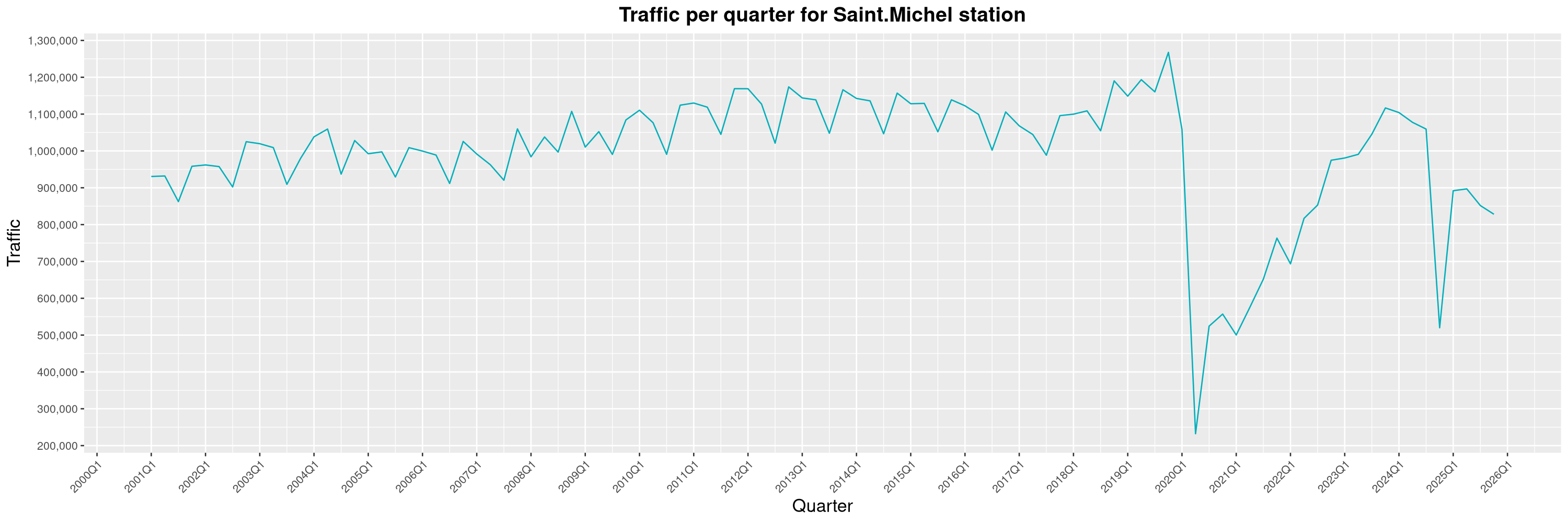
  1. Although the Saint-Michel station closed for emergency repairs in November 2024, traffic never bounced back to its pre-closure levels and is still stuck somewhere around 2022 Q2 levels. I wonder if this could be caused by the roadwork on Jean-Talon for the new Blue Line stations making it harder for folks in Montreal-Nord to reach the station by bus.
  2. The effects of the opening of the Royalmount shopping center has had a durable impact on the traffic at the De la Savane station. I reported on this last year, but it seems this wasn't just a fad.
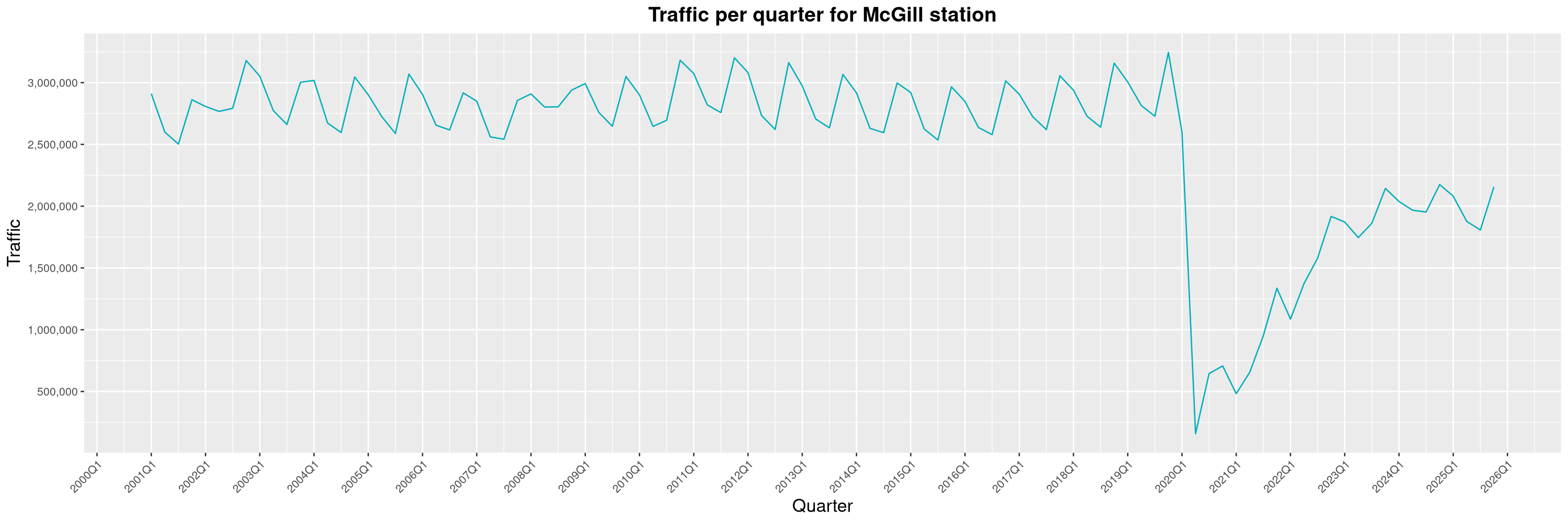
  3. With the completion of the Deux-Montagnes branch of the R seau express m tropolitain (REM, a light-rail, above the surface transit network still in construction), the transfer stations to the Montreal subway have seen major traffic increases. The douard-Montpetit station has nearly reached its previous all-time record of 2015 and the McGill station has recovered from the general slump all the other stations have had in 2025.
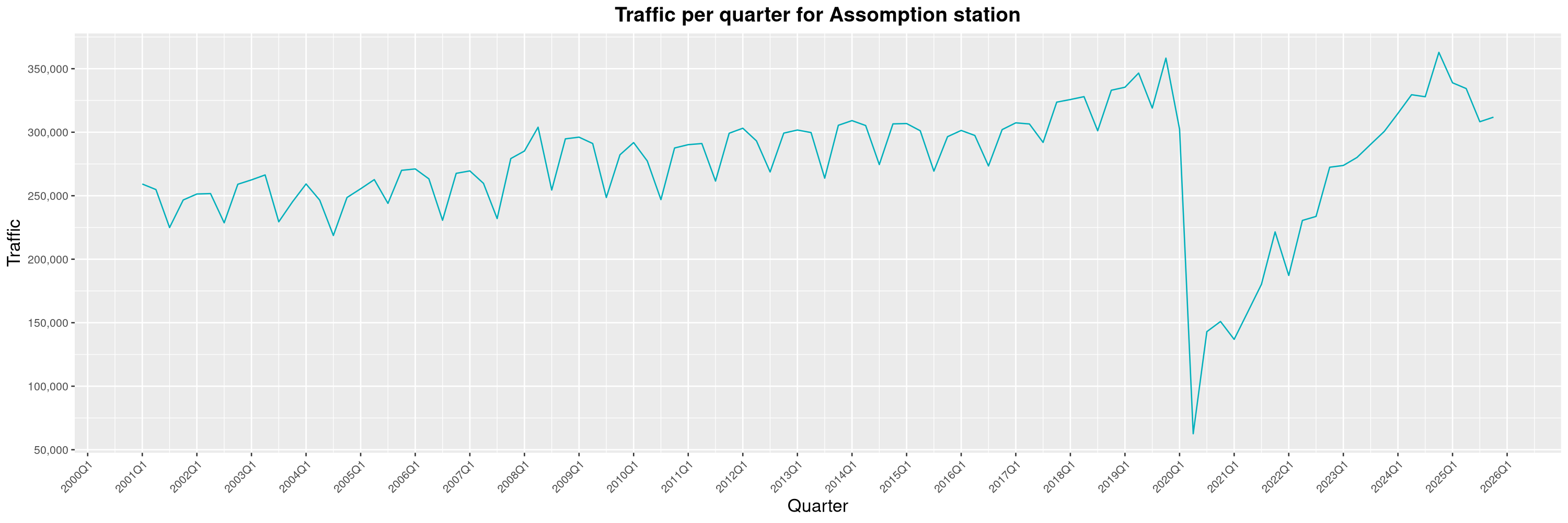
  4. The Assomption station, which used to have one of the lowest number of riders of the subway network, has had a tremendous growth in the past few years. This is mostly explained by the many high-rise projects that were built around the station since the end of the COVID-19 pandemic.
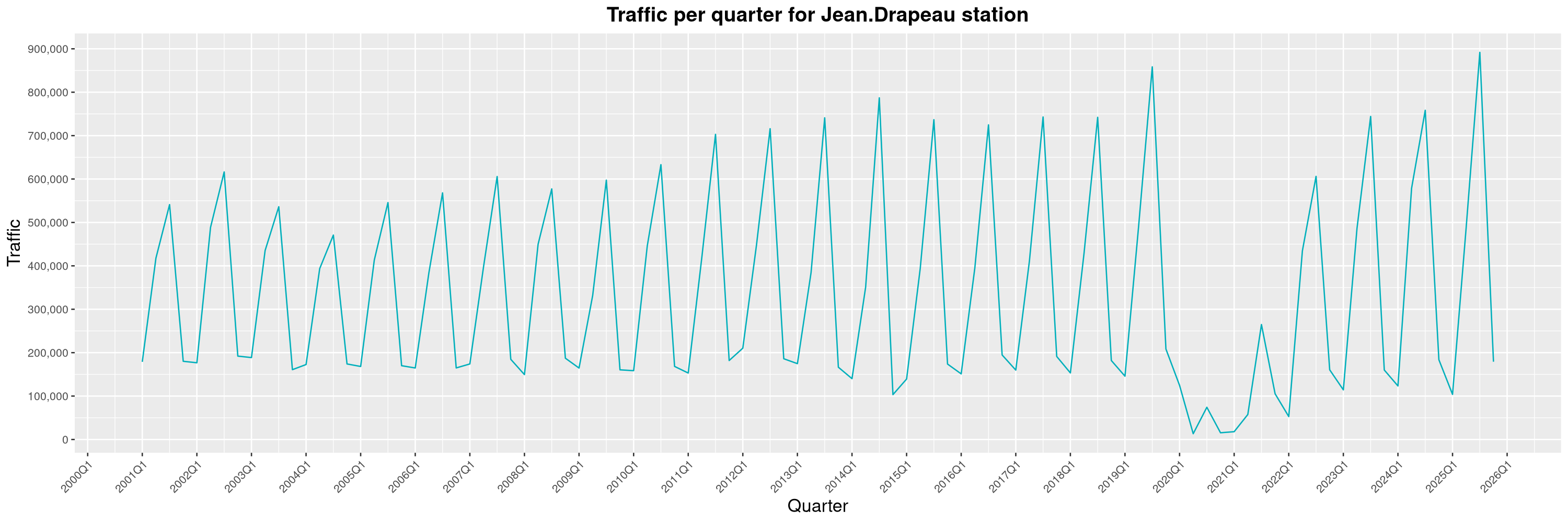
  5. Although still affected by a very high seasonality, the Jean-Drapeau station broke its previous record of 2019, a testament of the continued attraction power of the various summer festivals taking place on the Sainte-H l ne et Notre-Dame islands.
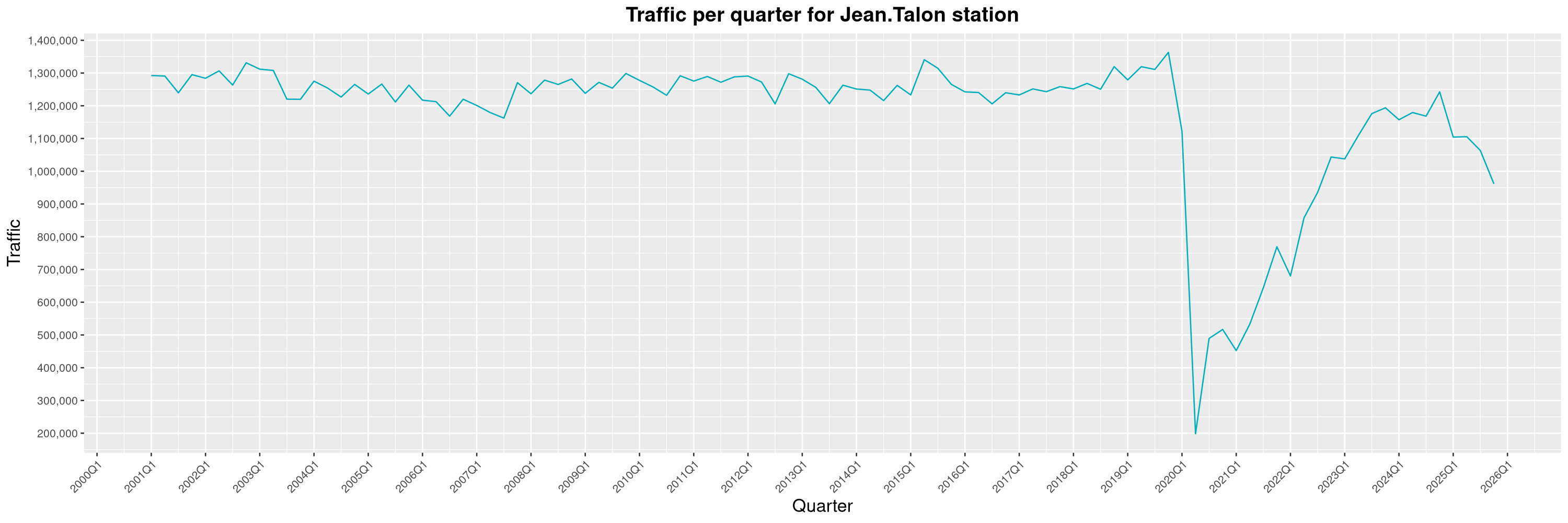
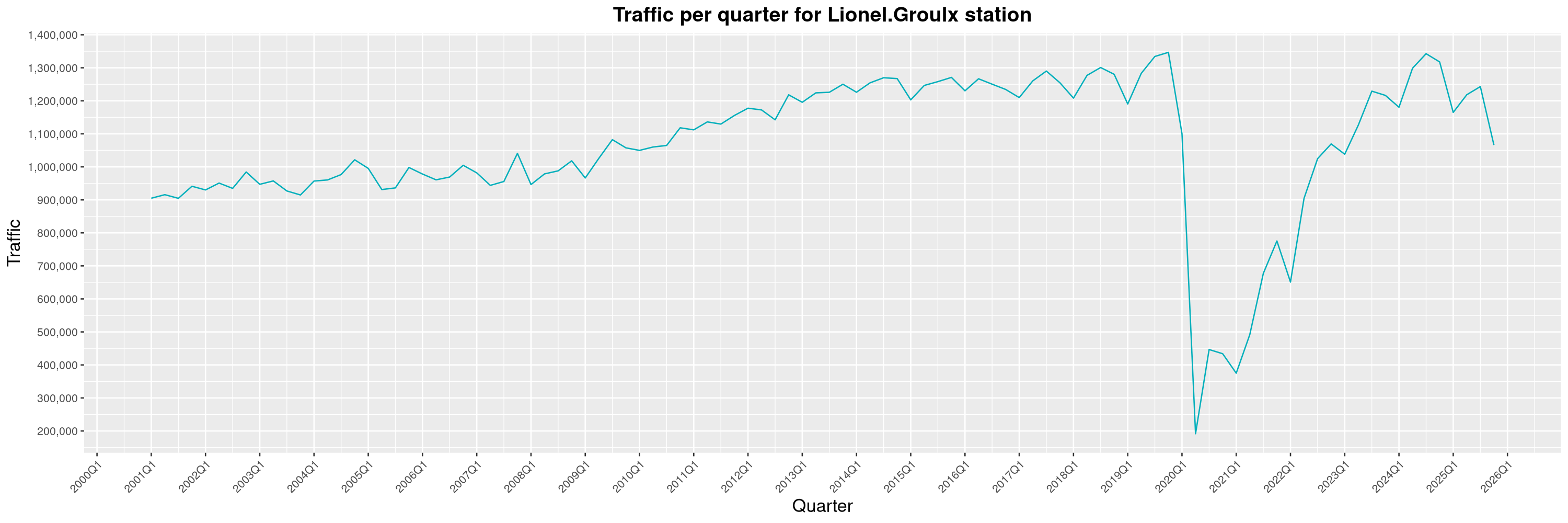
More generally, it seems the Montreal subway has had a pretty bad year. Traffic had been slowly climbing back since the COVID-19 pandemic, but this is the first year since 2020 such a sharp decline can be witnessed. Even major stations like Jean-Talon or Lionel-Groulx are on a downward trend and it is pretty worrisome. As for causes, a few things come to mind. First of all, as the number of Montrealers commuting to work by bike continues to rise1, a modal shift from public transit to active mobility is to be expected. As local experts put it, this is not uncommon and has been seen in other cities before. Another important factor that certainly turned people away from the subway this year has been the impacts of the continued housing crisis in Montreal. As more and more people get kicked out of their apartments, many have been seeking refuge in the subway stations to find shelter. Sadly, this also brought a unprecedented wave of incivilities. As riders' sense of security sharply decreased, the STM eventually resorted to banning unhoused people from sheltering in the subway. This decision did bring back some peace to the network, but one can posit damage had already been done and many casual riders are still avoiding the subway for this reason. Finally, the weekslong STM worker's strike in Q4 had an important impact on general traffic, as it severely reduced the opening hours of the subway. As for the previous item, once people find alternative ways to get around, it's always harder to bring them back. Hopefully, my 2026 report will be a more cheerful one... By clicking on a subway station, you'll be redirected to a graph of the station's foot traffic. Licences

  1. Mostly thanks to major improvements to the cycling network and the BIXI bikesharing program.

6 February 2026

Reproducible Builds: Reproducible Builds in January 2026

Welcome to the first monthly report in 2026 from the Reproducible Builds project! These reports outline what we ve been up to over the past month, highlighting items of news from elsewhere in the increasingly-important area of software supply-chain security. As ever, if you are interested in contributing to the Reproducible Builds project, please see the Contribute page on our website.

  1. Flathub now testing for reproducibility
  2. Reproducibility identifying projects that will fail to build in 2038
  3. Distribution work
  4. Tool development
  5. Two new academic papers
  6. Upstream patches

Flathub now testing for reproducibility Flathub, the primary repository/app store for Flatpak-based applications, has begun checking for build reproducibility. According to a recent blog post:
We have started testing binary reproducibility of x86_64 builds targeting the stable repository. This is possible thanks to flathub-repro-checker, a tool doing the necessary legwork to recreate the build environment and compare the result of the rebuild with what is published on Flathub. While these tests have been running for a while now, we have recently restarted them from scratch after enabling S3 storage for diffoscope artifacts.
The test results and status is available on their reproducible builds page.

Reproducibility identifying software projects that will fail to build in 2038 Longtime Reproducible Builds developer Bernhard M. Wiedemann posted on Reddit on Y2K38 commemoration day T-12 that is to say, twelve years to the day before the UNIX Epoch will no longer fit into a signed 32-bit integer variable on 19th January 2038. Bernhard s comment succinctly outlines the problem as well as notes some of the potential remedies, as well as links to a discussion with the GCC developers regarding adding warnings for int time_t conversions . At the time of publication, Bernhard s topic had generated 50 comments in response.

Distribution work Conda is language-agnostic package manager which was originally developed to help Python data scientists and is now a popular package manager for Python and R. conda-forge, a community-led infrastructure for Conda recently revamped their dashboards to rebuild packages straight to track reproducibility. There have been changes over the past two years to make the conda-forge build tooling fully reproducible by embedding the lockfile of the entire build environment inside the packages.
In Debian this month:
In NixOS this month, it was announced that the GNU Guix Full Source Bootstrap was ported to NixOS as part of Wire Jansen bachelor s thesis (PDF). At the time of publication, this change has landed in NiX stdev distribution.
Lastly, Bernhard M. Wiedemann posted another openSUSE monthly update for his work there.

Tool development diffoscope is our in-depth and content-aware diff utility that can locate and diagnose reproducibility issues. This month, Chris Lamb made the following changes, including preparing and uploading versions, 310 and 311 to Debian.
  • Fix test compatibility with u-boot-tools version 2026-01. [ ]
  • Drop the implied Rules-Requires-Root: no entry in debian/control. [ ]
  • Bump Standards-Version to 4.7.3. [ ]
  • Reference the Debian ocaml package instead of ocaml-nox. (#1125094)
  • Apply a patch by Jelle van der Waa to adjust a test fixture match new lines. [ ]
  • Also the drop implied Priority: optional from debian/control. [ ]

In addition, Holger Levsen uploaded two versions of disorderfs, first updating the package from FUSE 2 to FUSE 3 as described in last months report, as well as updating the packaging to the latest Debian standards. A second upload (0.6.2-1) was subsequently made, with Holger adding instructions on how to add the upstream release to our release archive and incorporating changes by Roland Clobus to set _FILE_OFFSET_BITS on 32-bit platforms, fixing a build failure on 32-bit systems. Vagrant Cascadian updated diffoscope in GNU Guix to version 311-2-ge4ec97f7 and disorderfs to 0.6.2.

Two new academic papers Julien Malka, Stefano Zacchiroli and Th o Zimmermann of T l com Paris in-house research laboratory, the Information Processing and Communications Laboratory (LTCI) published a paper this month titled Docker Does Not Guarantee Reproducibility:
[ ] While Docker is frequently cited in the literature as a tool that enables reproducibility in theory, the extent of its guarantees and limitations in practice remains under-explored. In this work, we address this gap through two complementary approaches. First, we conduct a systematic literature review to examine how Docker is framed in scientific discourse on reproducibility and to identify documented best practices for writing Dockerfiles enabling reproducible image building. Then, we perform a large-scale empirical study of 5,298 Docker builds collected from GitHub workflows. By rebuilding these images and comparing the results with their historical counterparts, we assess the real reproducibility of Docker images and evaluate the effectiveness of the best practices identified in the literature.
A PDF of their paper is available online.
Quentin Guilloteau, Antoine Waehren and Florina M. Ciorba of the University of Basel in Sweden also published a Docker-related paper, theirs called Longitudinal Study of the Software Environments Produced by Dockerfiles from Research Artifacts:
The reproducibility crisis has affected all scientific disciplines, including computer science (CS). To address this issue, the CS community has established artifact evaluation processes at conferences and in journals to evaluate the reproducibility of the results shared in publications. Authors are therefore required to share their artifacts with reviewers, including code, data, and the software environment necessary to reproduce the results. One method for sharing the software environment proposed by conferences and journals is to utilize container technologies such as Docker and Apptainer. However, these tools rely on non-reproducible tools, resulting in non-reproducible containers. In this paper, we present a tool and methodology to evaluate variations over time in software environments of container images derived from research artifacts. We also present initial results on a small set of Dockerfiles from the Euro-Par 2024 conference.
A PDF of their paper is available online.

Miscellaneous news On our mailing list this month: Lastly, kpcyrd added a Rust section to the Stable order for outputs page on our website. [ ]

Upstream patches The Reproducible Builds project detects, dissects and attempts to fix as many currently-unreproducible packages as possible. We endeavour to send all of our patches upstream where appropriate. This month, we wrote a large number of such patches, including:

Finally, if you are interested in contributing to the Reproducible Builds project, please visit our Contribute page on our website. However, you can get in touch with us via:

4 February 2026

Dirk Eddelbuettel: littler 0.3.23 on CRAN: More Features (and Fixes)

max-heap image The twentythird release of littler as a CRAN package landed on CRAN just now, following in the now twenty year history (!!) as a (initially non-CRAN) package started by Jeff in 2006, and joined by me a few weeks later. littler is the first command-line interface for R as it predates Rscript. It allows for piping as well for shebang scripting via #!, uses command-line arguments more consistently and still starts faster. It also always loaded the methods package which Rscript only began to do in later years. littler lives on Linux and Unix, has its difficulties on macOS due to some-braindeadedness there (who ever thought case-insensitive filesystems as a default were a good idea?) and simply does not exist on Windows (yet the build system could be extended see RInside for an existence proof, and volunteers are welcome!). See the FAQ vignette on how to add it to your PATH. A few examples are highlighted at the Github repo:, as well as in the examples vignette. This release, the first in about eleven months, once again brings two new helper scripts, and enhances six existing one. The release was triggered because it finally became clear why installGitHub.r ignored r2u when available: we forced the type argument to source (so thanks to I aki for spotting this). One change was once again contributed by Michael which is again greatly appreciated. The full change description follows.

Changes in littler version 0.3.22 (2026-02-03)
  • Changes in examples scripts
    • A new script busybees.r aggregates deadlined packages by maintainer
    • Several small updated have been made to the (mostly internal) 'r2u.r' script
    • The deadliners.r script has refined treatment for screen width
    • The install2.r script has new options --quiet and --verbose as proposed by Zivan Karaman
    • The rcc.r script passes build-args to 'rcmdcheck' to compact vignettes and save data
    • The installRub.r script now defaults to 'noble' and is more tolerant of inputs
    • The installRub.r script deals correctly with empty utils::osVersion thanks to Michael Chirico
    • New script checkPackageUrls.r inspired by how CRAN checks (with thanks to Kurt Hornik for the hint)
    • The installGithub.r script now adjusts to bspm and takes advantage of r2u binaries for its build dependencies
  • Changes in package
    • Environment variables (read at build time) can use double quotes
    • Continuous intgegration scripts received a minor update

My CRANberries service provides a comparison to the previous release. Full details for the littler release are provided as usual at the ChangeLog page, and also on the package docs website. The code is available via the GitHub repo, from tarballs and now of course also from its CRAN page and via install.packages("littler"). Binary packages are available directly in Debian as well as (in a day or two) Ubuntu binaries at CRAN thanks to the tireless Michael Rutter. Comments and suggestions are welcome at the GitHub repo.

This post by Dirk Eddelbuettel originated on his Thinking inside the box blog. If you like this or other open-source work I do, you can sponsor me at GitHub.

2 February 2026

Isoken Ibizugbe: How Open Source Contributions Define Your Career Path

Hi there, I m more than halfway through (8 weeks) my Outreachy internship with Debian, working on the openQA project to test Live Images.

My journey into tech began as a software engineering trainee, during which I built a foundation in Bash scripting, C programming, and Python. Later, I worked for a startup as a Product Manager. As is common in startups, I wore many hats, but I found myself drawn most to the Quality Assurance team. Testing user flows and edge-case scenarios sparked my curiosity, and that curiosity is exactly what led me to the Debian Live Image testing project.

From Manual to Automated

In my previous roles, I was accustomed to manual testing, simulating user actions one by one. While effective, I quickly realized it could be a bottleneck in fast-paced environments. This internship has been a masterclass in removing that bottleneck. I ve learned that automating repetitive actions makes life (and engineering) much easier. Life s too short for manual testing  .

One of my proudest technical wins so far has been creating Synergy across desktop environments. I proposed a solution to group common applications so we could use a single Perl script to handle tests for multiple desktop environments. With my mentor s guidance, we implemented this using symbolic links, which significantly reduced code redundancy.

Expanding My Technical Toolkit

Over the last 8 weeks, my technical toolkit has expanded significantly:

  • Perl & openQA: I ve learnt writing with Perl for automation within the openQA framework and I ve successfully automated apps_startstop tests for Cinnamon and LXQt
  • Technical Documentation: I authored a contributor guide. This required paying close attention to detail, ensuring that new contributors can have faster reviews and merged contributions
  • Ansible: I am learning that testing doesn t happen in a vacuum. To ensure new tests are truly automated, they must be integrated into the system s configuration.

Working on this project has shaped my perspective on where I fit in the tech ecosystem. In Open Source, my resume isn t just a PDF, it s a public trail of merged code, technical proposals, and collaborative discussions.

As my mentor recently pointed out, this is my proof-of-work. It s a transparent record of what I am capable of and where my interests lie.

Finally, I ve grown as a team player. Working with a global team across different time zones has taught me the importance of asynchronous communication and respecting everyone s time. Whether I am proposing a new logic or documenting a process, I am learning that open communication is just as vital as clean code.

Paul Tagliamonte: Paging all Radio Curious Hackers

After years of thinking about and learning about how radios work, I figured it was high-time to start to more aggressively share the things i ve been learning. I had a ton of fun at DistrictCon year 0, so it was a pretty natural place to pitch an RF-focused introductory talk. I was selected for Year 1, and able to give my first ever RF related talk about how to set off restaurant pagers (including one on stage!) by reading and writing IQ directly using a little bit of stdlib only Python. This talk is based around the work I ve written about previously (here, here and here), but the all-in-one form factor was something I was hoping would help encourage folks out there to take a look under the hood of some of the gear around them. (In case the iframe above isn t working, direct link to the YouTube video recording is here) I ve posted my slides from the talk at PARCH.pdf to hopefully give folks some time to flip through them directly. All in all, the session was great It was truely humbling to see so many folks interested in hearing me talk about radios. I had a bit of an own-goal in picking a 20 minute form-factor, so the talk is paced wrong (it feels like it went way too fast). Hopefully being able to see the slides and pause the video is helpful. We had a short ad-hoc session after where I brought two sets of pagers and my power switch; but unfortunately we didn t have anyone who was able to trigger any of the devices on their own (due to a mix of time between sessions and computer set-up). Hopefully it was enough to get folks interested in trying this on their own!

1 February 2026

Benjamin Mako Hill: What do people do when they edit Wikipedia through Tor?

Note: I have not published blog posts about my academic papers over the past few years. To ensure that my blog contains a more comprehensive record of my published papers and to surface these for folks who missed them, I will be periodically (re)publishing blog posts about some older published projects. This post is closely based on a previously published post by Kaylea Champion on the Community Data Science Blog.

Many individuals use Tor to reduce their visibility to widespread internet surveillance.
One popular approach to protecting our privacy online is to use the Tor network. Tor protects users from being identified by their IP address, which can be tied to a physical location. However, if you d like to contribute to Wikipedia using Tor, you ll run into a problem. Although most IP addresses can edit without an account, Tor users are blocked from editing.
Tor users attempting to contribute to Wikipedia are shown a screen that informs them that they are not allowed to edit Wikipedia.
Other research by my team has shown that Wikipedia s attempt to block Tor is imperfect and that some people have been able to edit despite the ban. As part of this work, we built a dataset of more than 11,000 contributions to Wikipedia via Tor and used quantitative analysis to show that contributions from Tor were of about the same quality as contributions from other new editors and other contributors without accounts. Of course, given the unusual circumstances Tor-based contributors face, we wondered whether a deeper look at the content of their edits might reveal more about their motives and the kinds of contributions they seek to make. Kaylea Champion (then a student, now faculty at UW Bothell) led a qualitative investigation to explore these questions. Given the challenges of studying anonymity seekers, we designed a novel forensic qualitative approach inspired by techniques common in computer security and criminal investigation. We applied this new technique to a sample of 500 editing sessions and categorized each session based on what the editor seemed to be intending to do. Most of the contributions we found fell into one of the two following categories: Although these were most of what we observed, we also found evidence of several types of contributor intent:
An exploratory mapping of our themes in terms of the value a type of contribution represents to the Wikipedia community and the importance of anonymity in facilitating it. Anonymity-protecting tools play a critical role in facilitating contributions on the right side of the figure, while edits on the left are more likely to occur even when anonymity is impossible. Contributions toward the top reflect valuable forms of participation in Wikipedia, while edits at the bottom reflect damage.
In all, these themes led us to reflect on how the risks individuals face when contributing to online communities sometimes diverge from the risks the communities face in accepting their work. Expressing minoritized perspectives, maintaining community standards even when you may be targeted by the rulebreaker, highlighting injustice, or acting as a whistleblower can be very risky for an individual, and may not be possible without privacy protections. Of course, in platforms seeking to support the public good, such knowledge and accountability may be crucial.

This work was published as a paper at CSCW: Kaylea Champion, Nora McDonald, Stephanie Bankes, Joseph Zhang, Rachel Greenstadt, Andrea Forte, and Benjamin Mako Hill. 2019. A Forensic Qualitative Analysis of Contributions to Wikipedia from Anonymity Seeking Users. Proceedings of the ACM on Human-Computer Interaction. 3, CSCW, Article 53 (November 2019), 26 pages. https://doi.org/10.1145/3359155

This project was conducted by Kaylea Champion, Nora McDonald, Stephanie Bankes, Joseph Zhang, Rachel Greenstadt, Andrea Forte, and Benjamin Mako Hill. This work was supported by the National Science Foundation (awards CNS-1703736 and CNS-1703049) and included the work of two undergraduates supported through an NSF REU supplement.

31 January 2026

Russ Allbery: Review: Dragon Pearl

Review: Dragon Pearl, by Yoon Ha Lee
Series: Thousand Worlds #1
Publisher: Rick Riordan Presents
Copyright: 2019
ISBN: 1-368-01519-0
Format: Kindle
Pages: 315
Dragon Pearl is a middle-grade space fantasy based on Korean mythology and the first book of a series. Min is a fourteen-year-old girl living on the barely-terraformed world of Jinju with her extended family. Her older brother Jun passed the entrance exams for the Academy and left to join the Thousand Worlds Space Forces, and Min is counting the years until she can do the same. Those plans are thrown into turmoil when an official investigator appears at their door claiming that Jun deserted to search for the Dragon Pearl. A series of impulsive fourteen-year-old decisions lead to Min heading for a spaceport alone, determined to find her brother and prove his innocence. This would be a rather improbable quest for a young girl, but Min is a gumiho, one of the supernaturals who live in the Thousand Worlds alongside non-magical humans. Unlike the more respectable dragons, tigers, goblins, and shamans, gumiho are viewed with suspicion and distrust because their powers are useful for deception. They are natural shapeshifters who can copy the shapes of others, and their Charm ability lets them influence people's thoughts and create temporary illusions of objects such as ID cards. It will take all of Min's powers, and some rather lucky coincidences, to infiltrate the Space Forces and determine what happened to her brother. It's common for reviews of this book to open with a caution that this is a middle-grade adventure novel and you should not expect a story like Ninefox Gambit. I will be boring and repeat that caution. Dragon Pearl has a single first-person viewpoint and a very linear and straightforward plot. Adult readers are unlikely to be surprised by plot twists; the fun is the world-building and seeing how Min manages to work around plot obstacles. The world-building is enjoyable but not very rigorous. Min uses and abuses Charm with the creative intensity of a Dungeons & Dragons min-maxer. Each individual event makes sense given the implication that Min is unusually powerful, but I'm dubious about the surrounding society and lack of protections against Charm given what Min is able to do. Min does say that gumiho are rare and many people think they're extinct, which is a bit of a fig leaf, but you'll need to bring your urban fantasy suspension of disbelief skills to this one. I did like that the world-building conceit went more than skin deep and influenced every part of the world. There are ghosts who are critical to the plot. Terraforming is done through magic, hence the quest for the Dragon Pearl and the miserable state of Min's home planet due to its loss. Medical treatment involves the body's meridians, as does engineering: The starships have meridians similar to those of humans, and engineers partly merge with those meridians to adjust them. This is not the sort of book that tries to build rigorous scientific theories or explain them to the reader, and I'm not sure everything would hang together if you poked at it too hard, but Min isn't interested in doing that poking and the story doesn't try to justify itself. It's mostly a vibe, but it's a vibe that I enjoyed and that is rather different than other space fantasy I've read. The characters were okay but never quite clicked for me, in part because proper character exploration would have required Min take a detour from her quest to find her brother and that was not going to happen. The reader gets occasional glimpses of a military SF cadet story and a friendship on false premises story, but neither have time to breathe because Min drops any entanglement that gets in the way of her quest. She's almost amoral in a way that I found believable but not quite aligned with my reading mood. I also felt a bit wrong-footed by how her friendships developed; saying too much more would be a spoiler, but I was expecting more human connection than I got. I think my primary disappointment with this book was something I knew going in, not in any way its fault, and part of the reason why I'd put off reading it: This is pitched at young teenagers and didn't have quite enough plot and characterization complexity to satisfy me. It's a linear, somewhat episodic adventure story with some neat world-building, and it therefore glides over the spots where an adult novel would have added political and factional complexity. That is exactly as advertised, so it's up to you whether that's the book you're in the mood for. One warning: The text of this book opens with an introduction by Rick Riordan that is just fluff marketing and that spoils the first few chapters of the book. It is unmarked as such at the beginning and tricked me into thinking it was the start of the book proper, and then deeply annoyed me. If you do read this book, I recommend skipping the utterly pointless introduction and going straight to chapter one. Followed by Tiger Honor. Rating: 6 out of 10

30 January 2026

Joey Hess: the local weather

Snow coming. I'm tuned into the local 24 hour slop weather stream. AI generated, narrated, up to the minute radar and forecast graphics. People popping up on the live weather map with questions "snow soon?" (They pay for the privilege.) LLM generating reply that riffs on their name. Tuned to keep the urgency up, something is always happening somewhere, scanners are pulling the police reports, live webcam description models add verisimilitude to the description of the morning commute. Weather is happening. In the subtext, climate change is happening. Weather is a growth industry. The guy up in Kentucky coal country who put this thing together is building an empire. He started as just another local news greenscreener. Dropped out and went twitch weather stream. Hyping up tornado days and dicy snow forecasts. Nowcasting, hyper individualized, interacting with chat. Now he's automated it all. On big days when he's getting real views, the bot breaks into his live streams, gives him a break. Only a few thousand watching this morning yet. Perfect 2026 grade slop. Details never quite right, but close enough to keep on in the background all day. Nobody expects a perfect forecast after all, and it's fed from the National Weather Center discussion too. We still fund those guys? Why bother when a bot can do it? He knows why he's big in these states, these rural areas. Understands the target audience. Airbrushed AI aesthetics are ok with them, receive no pushback. Flying more under the radar coastally, but weather is big there and getting bigger. The local weather will come for us all. 6 inches of snow covering some ground mount solar panels with a vertical solar panel fence behind them free of snow except cute little caps (Not fiction FYI.)

29 January 2026

C.J. Collier: Part 3: Building the Keystone Dataproc Custom Images for Secure Boot & GPUs

Part
3: Building the Keystone Dataproc Custom Images for Secure Boot &
GPUs In Part 1, we established a secure, proxy-only network. In Part 2, we
explored the enhanced install_gpu_driver.sh initialization
action. Now, in Part 3, we ll focus on using the LLC-Technologies-Collier/custom-images
repository (branch proxy-exercise-2025-11) to build the
actual custom Dataproc images embedded with NVIDIA drivers signed for
Secure Boot, all within our proxied environment.

Why Custom Images? To run NVIDIA GPUs on Shielded VMs with Secure Boot enabled, the
NVIDIA kernel modules must be signed with a key trusted by the VM s EFI
firmware. Since standard Dataproc images don t include these
custom-signed modules, we need to build our own. This process also
allows us to pre-install a full stack of GPU-accelerated software.

The
custom-images Toolkit
(examples/secure-boot) The examples/secure-boot directory within the
custom-images repository contains the necessary scripts and
configurations, refined through significant development to handle proxy
and Secure Boot challenges. Key Components & Development Insights:
  • env.json: The central configuration
    file (as used in Part 1) for project, network, proxy, and bucket
    details. This became the single source of truth to avoid configuration
    drift.
  • create-key-pair.sh: Manages the Secure
    Boot signing keys (PK, KEK, DB) in Google Secret Manager, essential for
    the module signing.
  • build-and-run-podman.sh: Orchestrates
    the image build process in an isolated Podman container. This was
    introduced to standardize the build environment and encapsulate
    dependencies, simplifying what the user needs to install locally.
  • pre-init.sh: Sets up the build
    environment within the container and calls
    generate_custom_image.py. It crucially passes metadata
    derived from env.json (like proxy settings and Secure Boot
    key secret names) to the temporary build VM.
  • generate_custom_image.py: The core
    Python script that automates GCE VM creation, runs the customization
    script, and creates the final GCE image.
  • gce-proxy-setup.sh: This script from
    startup_script/ is vital. It s injected into the temporary
    build VM and runs first to configure the OS, package
    managers (apt, dnf), tools (curl, wget, GPG), Conda, and Java to use the
    proxy settings passed in the metadata. This ensures the entire build
    process is proxy-aware.
  • install_gpu_driver.sh: Used as the
    --customization-script within the build VM. As detailed in
    Part 2, this script handles the driver/CUDA/ML stack installation and
    signing, now able to function correctly due to the proxy setup by
    gce-proxy-setup.sh.
Layered Image Strategy: The pre-init.sh script employs a layered approach:
  1. secure-boot Image: Base image with
    Secure Boot certificates injected.
  2. tf Image: Based on
    secure-boot, this image runs the full
    install_gpu_driver.sh within the proxy-configured build VM
    to install NVIDIA drivers, CUDA, ML libraries (TensorFlow, PyTorch,
    RAPIDS), and sign the modules. This is the primary target image for our
    use case.
(Note: secure-proxy and proxy-tf layers
were experiments, but the -tf image combined with runtime
metadata emerged as the most effective solution for 2.2-debian12). Build Steps:
  1. Clone Repos & Configure
    env.json: Ensure you have the
    custom-images and cloud-dataproc repos and a
    complete env.json as described in Part 1.
  2. Run the Build:
    bash # Example: Build a 2.2-debian12 based image set # Run from the custom-images repository root bash examples/secure-boot/build-and-run-podman.sh 2.2-debian12
    This command will build the layered images, leveraging the proxy
    settings from env.json via the metadata injected into the
    build VM. Note the final image name produced (e.g.,
    dataproc-2-2-deb12-YYYYMMDD-HHMMSS-tf).

Conclusion of Part 3 Through an iterative process, we ve developed a robust workflow
within the custom-images repository to build Secure
Boot-compatible GPU images in a proxy-only environment. The key was
isolating the build in Podman, ensuring the build VM is fully
proxy-aware using gce-proxy-setup.sh, and leveraging the
enhanced install_gpu_driver.sh from Part 2. In Part 4, we ll bring it all together, deploying a Dataproc cluster
using this custom -tf image within the secure network, and
verifying the end-to-end functionality.

27 January 2026

Elana Hashman: A beginner's guide to improving your digital security

In 2017, I led a series of workshops aimed at teaching beginners a better understanding of encryption, how the internet works, and their digital security. Nearly a decade later, there is still a great need to share reliable resources and guides on improving these skills. I have worked professionally in computer security one way or another for well over a decade, at many major technology companies and in many open source software projects. There are many inaccurate and unreliable resources out there on this subject, put together by well-meaning people without a background in security, which can lead to sharing misinformation, exaggeration and fearmongering. I hope that I can offer you a trusted, curated list of high impact things that you can do right now, using whichever vetted guide you prefer. In addition, I also include how long it should take, why you should do each task, and any limitations. This guide is aimed at improving your personal security, and does not apply to your work-owned devices. Always assume your company can monitor all of your messages and activities on work devices. What can I do to improve my security right away? I put together this list in order of effort, easiest tasks first. You should be able to complete many of the low effort tasks in a single hour. The medium to high effort tasks are very much worth doing, but may take you a few days or even weeks to complete them. Low effort (<15 minutes) Upgrade your software to the latest versions Why? I don't know anyone who hasn't complained about software updates breaking features, introducing bugs, and causing headaches. If it ain't broke, why upgrade, right? Well, alongside all of those annoying bugs and breaking changes, software updates also include security fixes, which will protect your device from being exploited by bad actors. Security issues can be found in software at any time, even software that's been available for many years and thought to be secure. You want to install these as soon as they are available. Recommendation: Turn on automatic upgrades and always keep your devices as up-to-date as possible. If you have some software you know will not work if you upgrade it, at least be sure to upgrade your laptop and phone operating system (iOS, Android, Windows, etc.) and web browser (Chrome, Safari, Firefox, etc.). Do not use devices that do not receive security support (e.g. old Android or iPhones). Guides: Limitations: This will prevent someone from exploiting known security issues on your devices, but it won't help if your device was already compromised. If this is a concern, doing a factory reset, upgrade, and turning on automatic upgrades may help. This also won't protect against all types of attacks, but it is a necessary foundation. Use Signal Why? Signal is a trusted, vetted, secure messaging application that allows you to send end-to-end encrypted messages and make video/phone calls. This means that only you and your intended recipient can decrypt the messages and someone cannot intercept and read your messages, in contrast to texting (SMS) and other insecure forms of messaging. Other applications advertise themselves as end-to-end encrypted, but Signal provides the strongest protections. Recommendation: I recommend installing the Signal app and using it! My mom loves that she can video call me on Wi-Fi on my Android phone. It also supports group chats. I use it as a secure alternative to texting (SMS) and other chat platforms. I also like Signal's "disappearing messages" feature which I enable by default because it automatically deletes messages after a certain period of time. This avoids your messages taking up too much storage. Guides: Limitations: Signal is only able to protect your messages in transit. If someone has access to your phone or the phone of the person you sent messages to, they will still be able to read them. As a rule of thumb, if you don't want someone to read something, don't write it down! Meet in person or make an encrypted phone call where you will not be overheard. If you are talking to someone you don't know, assume your messages are as public as posting on social media. Set passwords and turn on device encryption Why? Passwords ensure that someone else can't unlock your device without your consent or knowledge. They also are required to turn on device encryption, which protects your information on your device from being accessed when it is locked. Biometric (fingerprint or face ID) locking provides some privacy, but your fingerprint or face ID can be used against your wishes, whereas if you are the only person who knows your password, only you can use it. Recommendation: Always set passwords and have device encryption enabled in order to protect your personal privacy. It may be convenient to allow kids or family members access to an unlocked device, but anyone else can access it, too! Use strong passwords that cannot be guessed avoid using names, birthdays, phone numbers, addresses, or other public information. Using a password manager will make creating and managing passwords even easier. Disable biometric unlock, or at least know how to disable it. Most devices will enable disk encryption by default, but you should double-check. Guides: Limitations: If your device is unlocked, the password and encryption will provide no protections; the device must be locked for this to protect your privacy. It is possible, though unlikely, for someone to gain remote access to your device (for example through malware or stalkerware), which would bypass these protections. Some forensic tools are also sophisticated enough to work with physical access to a device that is turned on and locked, but not a device that is turned off/freshly powered on and encrypted. If you lose your password or disk encryption key, you may lose access to your device. For this reason, Windows and Apple laptops can make a cloud backup of your disk encryption key. However, a cloud backup can potentially be disclosed to law enforcement. Install an ad blocker Why? Online ad networks are often exploited to spread malware to unsuspecting visitors. If you've ever visited a regular website and suddenly seen an urgent, flashing pop-up claiming your device was hacked, it is often due to a bad ad. Blocking ads provides an additional layer of protection against these kinds of attacks. Recommendation: I recommend everyone uses an ad blocker at all times. Not only are ads annoying and disruptive, but they can even result in your devices being compromised! Guides: Limitations: Sometimes the use of ad blockers can break functionality on websites, which can be annoying, but you can temporarily disable them to fix the problem. These may not be able to block all ads or all tracking, but they make browsing the web much more pleasant and lower risk! Some people might also be concerned that blocking ads might impact the revenue of their favourite websites or creators. In this case, I recommend either donating directly or sharing the site with a wider audience, but keep using the ad blocker for your safety. Enable HTTPS-Only Mode Why? The "S" in "HTTPS" stands for "secure". This feature, which can be enabled on your web browser, ensures that every time you visit a website, your connection is always end-to-end encrypted (just like when you use Signal!) This ensures that someone can't intercept what you search for, what pages on websites you visit, and any information you or the website share such as your banking details. Recommendation: I recommend enabling this for everyone, though with improvements in web browser security and adoption of HTTPS over the years, your devices will often do this by default! There is a small risk you will encounter some websites that do not support HTTPS, usually older sites. Guides: Limitations: HTTPS protects the information on your connection to a website. It does not hide or protect the fact that you visited that website, only the information you accessed. If the website is malicious, HTTPS does not provide any protection. In certain settings, like when you use a work-managed computer that was set up for you, it can still be possible for your IT Department to see what you are browsing, even over an HTTPS connection, because they have administrator access to your computer and the network. Medium to high effort (1+ hours) These tasks require more effort but are worth the investment. Set up a password manager Why? It is not possible for a person to remember a unique password for every single website and app that they use. I have, as of writing, 556 passwords stored in my password manager. Password managers do three important things very well:
  1. They generate secure passwords with ease. You don't need to worry about getting your digits and special characters just right; the app will do it for you, and generate long, secure passwords.
  2. They remember all your passwords for you, and you just need to remember one password to access all of them. The most common reason people's accounts get hacked online is because they used the same password across multiple websites, and one of the websites had all their passwords leaked. When you use a unique password on every website, it doesn't matter if your password gets leaked!
  3. They autofill passwords based on the website you're visiting. This is important because it helps prevent you from getting phished. If you're tricked into visiting an evil lookalike site, your password manager will refuse to fill the password.
Recommendation: These benefits are extremely important, and setting up a password manager is often one of the most impactful things you can do for your digital security. However, they take time to get used to, and migrating all of your passwords into the app (and immediately changing them!) can take a few minutes at a time... over weeks. I recommend you prioritize the most important sites, such as your email accounts, banking/financial sites, and cellphone provider. This process will feel like a lot of work, but you will get to enjoy the benefits of never having to remember new passwords and the autofill functionality for websites. My recommended password manager is 1Password, but it stores passwords in the cloud and costs money. There are some good free options as well if cost is a concern. You can also use web browser- or OS-based password managers, but I do not prefer these. Guides: Limitations: Many people are concerned about the risk of using a password manager causing all of their passwords to be compromised. For this reason, it's very important to use a vetted, reputable password manager that has passed audits, such as 1Password or Bitwarden. It is also extremely important to choose a strong password to unlock your password manager. 1Password makes this easier by generating a secret to strengthen your unlock password, but I recommend using a long, memorable password in any case. Another risk is that if you forget your password manager's password, you will lose access to all your passwords. This is why I recommend 1Password, which has you set up an Emergency Kit to recover access to your account. Set up two-factor authentication (2FA) for your accounts Why? If your password is compromised in a website leak or due to a phishing attack, two-factor authentication will require a second piece of information to log in and potentially thwart the intruder. This provides you with an extra layer of security on your accounts. Recommendation: You don't necessarily need to enable 2FA on every account, but prioritize enabling it on your most important accounts (email, banking, cellphone, etc.) There are typically a few different kinds: email-based (which is why your email account's security is so important), text message or SMS-based (which is why your cell phone account's security is so important), app-based, and hardware token-based. Email and text message 2FA are fine for most accounts. You may want to enable app- or hardware token-based 2FA for your most sensitive accounts. Guides: Limitations: The major limitation is that if you lose access to 2FA, you can be locked out of an account. This can happen if you're travelling abroad and can't access your usual cellphone number, if you break your phone and you don't have a backup of your authenticator app, or if you lose your hardware-based token. For this reason, many websites will provide you with "backup tokens" you can print them out and store them in a secure location or use your password manager. I also recommend if you use an app, you choose one that will allow you to make secure backups, such as Ente. You are also limited by the types of 2FA a website supports; many don't support app- or hardware token-based 2FA. Remove your information from data brokers Why? This is a problem that mostly affects people in the US. It surprises many people that information from their credit reports and other public records is scraped and available (for free or at a low cost) online through "data broker" websites. I have shocked friends who didn't believe this was an issue by searching for their full names and within 5 minutes being able to show them their birthday, home address, and phone number. This is a serious privacy problem! Recommendation: Opt out of any and all data broker websites to remove this information from the internet. This is especially important if you are at risk of being stalked or harassed. Guides: Limitations: It can take time for your information to be removed once you opt out, and unfortunately search engines may have cached your information for a while longer. This is also not a one-and-done process. New data brokers are constantly popping up and some may not properly honour your opt out, so you will need to check on a regular basis (perhaps once or twice a year) to make sure your data has been properly scrubbed. This also cannot prevent someone from directly searching public records to find your information, but that requires much more effort. "Recommended security measures" I think beginners should avoid We've covered a lot of tasks you should do, but I also think it's important to cover what not to do. I see many of these tools recommended to security beginners, and I think that's a mistake. For each tool, I will explain my reasoning around why I don't think you should use it, and the scenarios in which it might make sense to use. "Secure email" What is it? Many email providers, such as Proton Mail, advertise themselves as providing secure email. They are often recommended as a "more secure" alternative to typical email providers such as GMail. What's the problem? Email is fundamentally insecure by design. The email specification (RFC-3207) states that any publicly available email server MUST NOT require the use of end-to-end encryption in transit. Email providers can of course provide additional security by encrypting their copies of your email, and providing you access to your email by HTTPS, but the messages themselves can always be sent without encryption. Some platforms such as Proton Mail advertise end-to-end encrypted emails so long as you email another Proton user. This is not truly email, but their own internal encrypted messaging platform that follows the email format. What should I do instead? Use Signal to send encrypted messages. NEVER assume the contents of an email are secure. Who should use it? I don't believe there are any major advantages to using a service such as this one. Even if you pay for a more "secure" email provider, the majority of your emails will still be delivered to people who don't. Additionally, while I don't use or necessarily recommend their service, Google offers an Advanced Protection Program for people who may be targeted by state-level actors. PGP/GPG Encryption What is it? PGP ("Pretty Good Privacy") and GPG ("GNU Privacy Guard") are encryption and cryptographic signing software. They are often recommended to encrypt messages or email. What's the problem? GPG is decades old and its usability has always been terrible. It is extremely easy to accidentally send a message that you thought was encrypted without encryption! The problems with PGP/GPG have been extensively documented. What should I do instead? Use Signal to send encrypted messages. Again, NEVER use email for sensitive information. Who should use it? Software developers who contribute to projects where there is a requirement to use GPG should continue to use it until an adequate alternative is available. Everyone else should live their lives in PGP-free bliss. Installing a "secure" operating system (OS) on your phone What is it? There are a number of self-installed operating systems for Android phones, such as GrapheneOS, that advertise as being "more secure" than using the version of the Android operating system provided by your phone manufacturer. They often remove core Google APIs and services to allow you to "de-Google" your phone. What's the problem? These projects are relatively niche, and don't have nearly enough resourcing to be able to respond to the high levels of security pressure Android experiences (such as against the forensic tools I mentioned earlier). You may suddenly lose security support with no notice, as with CalyxOS. You need a high level of technical know-how and a lot of spare time to maintain your device with a custom operating system, which is not a reasonable expectation for the average person. By stripping all Google APIs such as Google Play Services, some useful apps can no longer function. And some law enforcement organizations have gone as far as accusing people who install GrapheneOS on Pixel phones to be engaging in criminal activity. What should I do instead? For the best security on an Android device, use a phone manufactured by Google or Samsung (smaller manufacturers are more unreliable), or consider buying an iPhone. Make sure your device is receiving security updates and up-to-date. Who should use it? These projects are great for tech enthusiasts who are interested in contributing to and developing them further. They can be used to give new life to old phones that are not receiving security or software updates. They are also great for people with an interest in free and open source software and digital autonomy. But these tools are not a good choice for a general audience, nor do they provide more practical security than using an up-to-date Google or Samsung Android phone. Virtual Private Network (VPN) Services What is it? A virtual private network or VPN service can provide you with a secure tunnel from your device to the location that the VPN operates. This means that if I am using my phone in Seattle connected to a VPN in Amsterdam, if I access a website, it appears to the website that my phone is located in Amsterdam. What's the problem? VPN services are frequently advertised as providing security or protection from nefarious bad actors, or helping protect your privacy. These benefits are often far overstated, and there are predatory VPN providers that can actually be harmful. It costs money and resources to provide a VPN, so free VPN services are especially suspect. When you use a VPN, the VPN provider knows the websites you are visiting in order to provide you with the service. Free VPN providers may sell this data in order to cover the cost of providing the service, leaving you with less security and privacy. The average person does not have the knowledge to be able to determine if a VPN service is trustworthy or not. VPNs also don't provide any additional encryption benefits if you are already using HTTPS. They may provide a small amount of privacy benefit if you are connected to an untrusted network with an attacker. What should I do instead? Always use HTTPS to access websites. Don't connect to untrusted internet providers for example, use cellphone network data instead of a sketchy Wi-Fi access point. Your local neighbourhood coffee shop is probably fine. Who should use it? There are three main use cases for VPNs. The first is to bypass geographic restrictions. A VPN will cause all of your web traffic to appear to be coming from another location. If you live in an area that has local internet censorship policies, you can use a VPN to access the internet from a location that lacks such policies. The second is if you know your internet service provider is actively hostile or malicious. A trusted VPN will protect the visibility of all your traffic, including which websites you visit, from your internet service provider, and the only thing they will be able to see is that you are accessing a VPN. The third use case is to access a network that isn't connected to the public internet, such as a corporate intranet. I strongly discourage the use of VPNs for "general-purpose security." Tor What is it? Tor, "The Onion Router", is a free and open source software project that provides anonymous networking. Unlike with a VPN, where the VPN provider knows who you are and what websites you are requesting, Tor's architecture makes it extremely difficult to determine who sent a request. What's the problem? Tor is difficult to set up properly; similar to PGP-encrypted email, it is possible to accidentally not be connected to Tor and not know the difference. This usability has improved over the years, but Tor is still not a good tool for beginners to use. Due to the way Tor works, it is also extremely slow. If you have used cable or fiber internet, get ready to go back to dialup speeds. Tor also doesn't provide perfect privacy and without a strong understanding of its limitations, it can be possible to deanonymize someone despite using it. Additionally, many websites are able to detect connections from the Tor network and block them. What should I do instead? If you want to use Tor to bypass censorship, it is often better to use a trusted VPN provider, particularly if you need high bandwidth (e.g. for streaming). If you want to use Tor to access a website anonymously, Tor itself might not be enough to protect you. For example, if you need to provide an email address or personal information, you can decline to provide accurate information and use a masked email address. A friend of mine once used the alias "Nunya Biznes" Who should use it? Tor should only be used by people who are experienced users of security tools and understand its strengths and limitations. Tor also is best used on a purpose-built system, such as Tor Browser or Freedom of the Press Foundation's SecureDrop. I want to learn more! I hope you've found this guide to be a useful starting point. I always welcome folks reaching out to me with questions, though I might take a little bit of time to respond. You can always email me. If there's enough interest, I might cover the following topics in a future post: Stay safe out there!

24 January 2026

Gunnar Wolf: Finally some light for those who care about Debian on the Raspberry Pi

Finally, some light at the end of the tunnel! As I have said in this blog and elsewhere, after putting quite a bit of work into generating the Debian Raspberry Pi images between late 2018 and 2023, I had to recognize I don t have the time and energy to properly care for it. I even registered a GSoC project for it. I mentored Kurva Prashanth, who did good work on the vmdb2 scripts we use for the image generation but in the end, was unable to push them to be built in Debian infrastructure. Maybe a different approach was needed! While I adopted the images as they were conceived by Michael Stapelberg, sometimes it s easier to start from scratch and build a fresh approach. So, I m not yet pointing at a stable, proven release, but to a good promise. And I hope I m not being pushy by making this public: in the #debian-raspberrypi channel, waldi has shared the images he has created with the Debian Cloud Team s infrastructure. So, right now, the images built so far support Raspberry Pi families 4 and 5 (notably, not the 500 computer I have, due to a missing Device Tree, but I ll try to help figure that bit out Anyway, p400/500/500+ systems are not that usual). Work is underway to get the 3B+ to boot (some hackery is needed, as it only understands MBR partition schemes, so creating a hybrid image seems to be needed). Debian Cloud images for Raspberries Sadly, I don t think the effort will be extended to cover older, 32-bit-only systems (RPi 0, 1 and 2). Anyway, as this effort stabilizes, I will phase out my (stale!) work on raspi.debian.net, and will redirect it to point at the new images.

Comments Andrea Pappacoda tachi@d.o 2026-01-26 17:39:14 GMT+1 Are there any particular caveats compared to using the regular Raspberry Pi OS? Are they documented anywhere? Gunnar Wolf gwolf.blog@gwolf.org 2026-01-26 11:02:29 GMT-6 Well, the Raspberry Pi OS includes quite a bit of software that s not packaged in Debian for various reasons some of it because it s non-free demo-ware, some of it because it s RPiOS-specific configuration, some of it I don t care, I like running Debian wherever possible Andrea Pappacoda tachi@d.o 2026-01-26 18:20:24 GMT+1 Thanks for the reply! Yeah, sorry, I should ve been more specific. I also just care about the Debian part. But: are there any hardware issues or unsupported stuff, like booting from an SSD (which I m currently doing)? Gunnar Wolf gwolf.blog@gwolf.org 2026-01-26 12:16:29 GMT-6 That s beyond my knowledge Although I can tell you that:
  • Raspberry Pi OS has hardware support as soon as their new boards hit the market. The ability to even boot a board can take over a year for the mainline Linux kernel (at least, it has, both in the cases of the 4 and the 5 families).
  • Also, sometimes some bits of hardware are not discovered by the Linux kernels even if the general family boots because they are not declared in the right place of the Device Tree (i.e. the wireless network interface in the 02W is in a different address than in the 3B+, or the 500 does not fully boot while the 5B now does). Usually it is a matter of just declaring stuff in the right place, but it s not a skill many of us have.
  • Also, many RPi hats ship with their own Device Tree overlays, and they cannot always be loaded on top of mainline kernels.
Andrea Pappacoda tachi@d.o 2026-01-26 19:31:55 GMT+1
That s beyond my knowledge Although I can tell you that: Raspberry Pi OS has hardware support as soon as their new boards hit the market. The ability to even boot a board can take over a year for the mainline Linux kernel (at least, it has, both in the cases of the 4 and the 5 families).
Yeah, unfortunately I m aware of that I ve also been trying to boot OpenBSD on my rpi5 out of curiosity, but been blocked by my somewhat unusual setup involving an NVMe SSD as the boot drive :/
Also, sometimes some bits of hardware are not discovered by the Linux kernels even if the general family boots because they are not declared in the right place of the Device Tree (i.e. the wireless network interface in the 02W is in a different address than in the 3B+, or the 500 does not fully boot while the 5B now does). Usually it is a matter of just declaring stuff in the right place, but it s not a skill many of us have.
At some point in my life I had started reading a bit about device trees and stuff, but got distracted by other stuff before I could develop any familiarity with it. So I don t have the skills either :)
Also, many RPi hats ship with their own Device Tree overlays, and they cannot always be loaded on top of mainline kernels.
I m definitely not happy to hear this! Guess I ll have to try, and maybe report back once some page for these new builds materializes.

20 January 2026

Sahil Dhiman: Conferences, why?

Back in December, I was working to help organize multiple different conferences. One has already happened; the rest are still works in progress. That s when the thought struck me: why so many conferences, and why do I work for them? I have been fairly active in the scene since 2020. For most conferences, I usually arrive late in the city on the previous day and usually leave the city on conference close day. Conferences for me are the place to meet friends and new folks and hear about them, their work, new developments, and what s happening in their interest zones. I feel naturally happy talking to folks. In this case, people inspire me to work. Nothing can replace a passionate technical and social discussion, which stretches way into dinner parties and later. For most conference discussions now, I just show up without a set role (DebConf is probably an exception to it). It usually involves talking to folks, suggesting what needs to be done, doing a bit of it myself, and finishing some last-minute stuff during the actual thing. Having more of these conferences and helping make them happen naturally gives everyone more places to come together, meet, talk, and work on something. No doubt, one reason for all these conferences is evangelism for, let s say Free Software, OpenStreetMap, Debian etc. which is good and needed for the pipeline. But for me, the primary reason would always be meeting folks.

19 January 2026

Francesco Paolo Lovergine: A Terramaster NAS with Debian, take two.

After experimenting at home, the very first professional-grade NAS from Terramaster arrived at work, too, with 12 HDD bays and possibly a pair of M2s. NVME cards. In this case, I again installed a plain Debian distribution, but HDD monitoring required some configuration adjustments to run smartd properly.A decent approach to data safety is to run regularly scheduled short and long SMART tests on all disks to detect potential damage. Running such tests on all disks at once isn't ideal, so I set up a script to create a staggered configuration and test multiple groups of disks at different times. Note that it is mandatory to read the devices at each reboot because their names and order can change.Of course, the same principle (short/long test at regular intervals along the week) should be applied for a simpler configuration, as in the case of my home NAS with a pair of RAID1 devices.What follows is a simple script to create a staggered smartd.conf at boot time:
#!/bin/bash
#
# Save this as /usr/local/bin/create-smartd-conf.sh
#
# Dynamically generate smartd.conf with staggered SMART test scheduling
# at boot time based on discovered ATA devices
# HERE IS A LIST OF DIRECTIVES FOR THIS CONFIGURATION FILE.
# PLEASE SEE THE smartd.conf MAN PAGE FOR DETAILS
#
#   -d TYPE Set the device type: ata, scsi[+TYPE], nvme[,NSID],
#           sat[,auto][,N][+TYPE], usbcypress[,X], usbjmicron[,p][,x][,N],
#           usbprolific, usbsunplus, sntasmedia, sntjmicron[,NSID], sntrealtek,
#           ... (platform specific)
#   -T TYPE Set the tolerance to one of: normal, permissive
#   -o VAL  Enable/disable automatic offline tests (on/off)
#   -S VAL  Enable/disable attribute autosave (on/off)
#   -n MODE No check if: never, sleep[,N][,q], standby[,N][,q], idle[,N][,q]
#   -H      Monitor SMART Health Status, report if failed
#   -s REG  Do Self-Test at time(s) given by regular expression REG
#   -l TYPE Monitor SMART log or self-test status:
#           error, selftest, xerror, offlinests[,ns], selfteststs[,ns]
#   -l scterc,R,W  Set SCT Error Recovery Control
#   -e      Change device setting: aam,[N off], apm,[N off], dsn,[on off],
#           lookahead,[on off], security-freeze, standby,[N off], wcache,[on off]
#   -f      Monitor 'Usage' Attributes, report failures
#   -m ADD  Send email warning to address ADD
#   -M TYPE Modify email warning behavior (see man page)
#   -p      Report changes in 'Prefailure' Attributes
#   -u      Report changes in 'Usage' Attributes
#   -t      Equivalent to -p and -u Directives
#   -r ID   Also report Raw values of Attribute ID with -p, -u or -t
#   -R ID   Track changes in Attribute ID Raw value with -p, -u or -t
#   -i ID   Ignore Attribute ID for -f Directive
#   -I ID   Ignore Attribute ID for -p, -u or -t Directive
#   -C ID[+] Monitor [increases of] Current Pending Sectors in Attribute ID
#   -U ID[+] Monitor [increases of] Offline Uncorrectable Sectors in Attribute ID
#   -W D,I,C Monitor Temperature D)ifference, I)nformal limit, C)ritical limit
#   -v N,ST Modifies labeling of Attribute N (see man page)
#   -P TYPE Drive-specific presets: use, ignore, show, showall
#   -a      Default: -H -f -t -l error -l selftest -l selfteststs -C 197 -U 198
#   -F TYPE Use firmware bug workaround:
#           none, nologdir, samsung, samsung2, samsung3, xerrorlba
#   -c i=N  Set interval between disk checks to N seconds
#    #      Comment: text after a hash sign is ignored
#    \      Line continuation character
# Attribute ID is a decimal integer 1 <= ID <= 255
# except for -C and -U, where ID = 0 turns them off.
set -euo pipefail
# Test schedule configuration
BASE_SCHEDULE="L/../../6"  # Long test on Saturdays
TEST_HOURS=(01 03 05 07)   # 4 time slots: 1am, 3am, 5am, 7am
DEVICES_PER_GROUP=3
main()  
    # Get array of device names (e.g., sda, sdb, sdc)
    mapfile -t devices < <(ls -l /dev/disk/by-id/   grep ata   awk ' print $11 '   grep sd   cut -d/ -f3   sort -u)
    if [[ $ #devices[@]  -eq 0 ]]; then
        exit 1
    fi
    # Start building config file
    cat << EOF
# smartd.conf - Auto-generated at boot
# Generated: $(date '+%Y-%m-%d %H:%M:%S')
#
# Staggered SMART test scheduling to avoid concurrent disk load
# Long tests run on Saturdays at different times per group
#
EOF
    # Process devices into groups
    local group=0
    local count_in_group=0
    for i in "$ !devices[@] "; do
        local dev="$ devices[$i] "
        local hour="$ TEST_HOURS[$group] "
        # Add group header at start of each group
        if [[ $count_in_group -eq 0 ]]; then
            echo ""
            echo "# Group $((group + 1)) - Tests at $ hour :00 on Saturdays"
        fi
        # Add device entry
        #echo "/dev/$ dev  -a -o on -S on -s ($ BASE_SCHEDULE /$ hour ) -m root"
        echo "/dev/$ dev  -a -o on -S on -s (L/../../6/$ hour ) -s (S/../.././$(((hour + 12) % 24))) -m root"
        # Move to next group when current group is full
        count_in_group=$((count_in_group + 1))
        if [[ $count_in_group -ge $DEVICES_PER_GROUP ]]; then
            count_in_group=0
            group=$(((group + 1) % $ #TEST_HOURS[@] ))
        fi
    done
 
main "$@"
To run such a script at boot, add a unit file to the systemd configuration.
sudo systemctl  edit --full /etc/systemd/system/regenerate-smartd-conf.service
sudo systemctl enable regenerate-smartd-conf.service
Where the unit service is the following:
[Unit]
Description=Generate smartd.conf with staggered SMART test scheduling
# Wait for all local filesystems and udev device detection
After=local-fs.target systemd-udev-settle.service
Before=smartd.service
Wants=systemd-udev-settle.service
DefaultDependencies=no
[Service]
Type=oneshot
# Only generate the config file, don't touch smartd here
ExecStart=/bin/bash -c '/usr/local/bin/create-smartd-config.sh > /etc/smartd.conf'
StandardOutput=journal
StandardError=journal
RemainAfterExit=yes
[Install]
WantedBy=multi-user.target

Russell Coker: Furilabs FLX1s

The Aim I have just got a Furilabs FLX1s [1] which is a phone running a modified version of Debian. I want to have a phone that runs all apps that I control and can observe and debug. Android is very good for what it does and there are security focused forks of Android which have a lot of potential, but for my use a Debian phone is what I want. The FLX1s is not going to be my ideal phone, I am evaluating it for use as a daily-driver until a phone that meets my ideal criteria is built. In this post I aim to provide information to potential users about what it can do, how it does it, and how to get the basic functions working. I also evaluate how well it meets my usage criteria. I am not anywhere near an average user. I don t think an average user would ever even see one unless a more technical relative showed one to them. So while this phone could be used by an average user I am not evaluating it on that basis. But of course the features of the GUI that make a phone usable for an average user will allow a developer to rapidly get past the beginning stages and into more complex stuff. Features The Furilabs FLX1s [1] is a phone that is designed to run FuriOS which is a slightly modified version of Debian. The purpose of this is to run Debian instead of Android on a phone. It has switches to disable camera, phone communication, and microphone (similar to the Librem 5) but the one to disable phone communication doesn t turn off Wifi, the only other phone I know of with such switches is the Purism Librem 5. It has a 720*1600 display which is only slightly better than the 720*1440 display in the Librem 5 and PinePhone Pro. This doesn t compare well to the OnePlus 6 from early 2018 with 2280*1080 or the Note9 from late 2018 with 2960*1440 which are both phones that I ve run Debian on. The current price is $US499 which isn t that good when compared to the latest Google Pixel series, a Pixel 10 costs $US649 and has a 2424*1080 display and it also has 12G of RAM while the FLX1s only has 8G. Another annoying thing is how rounded the corners are, it seems that round corners that cut off the content are a standard practice nowadays, in my collection of phones the latest one I found with hard right angles on the display was a Huawei Mate 10 Pro which was released in 2017. The corners are rounder than the Note 9, this annoys me because the screen is not high resolution by today s standards so losing the corners matters. The default installation is Phosh (the GNOME shell for phones) and it is very well configured. Based on my experience with older phone users I think I could give a phone with this configuration to a relative in the 70+ age range who has minimal computer knowledge and they would be happy with it. Additionally I could set it up to allow ssh login and instead of going through the phone support thing of trying to describe every GUI setting to click on based on a web page describing menus for the version of Android they are running I could just ssh in and run diff on the .config directory to find out what they changed. Furilabs have done a very good job of setting up the default configuration, while Debian developers deserve a lot of credit for packaging the apps the Furilabs people have chosen a good set of default apps to install to get it going and appear to have made some noteworthy changes to some of them. Droidian The OS is based on Android drivers (using the same techniques as Droidian [2]) and the storage device has the huge number of partitions you expect from Android as well as a 110G Ext4 filesystem for the main OS. The first issue with the Droidian approach of using an Android kernel and containers for user space code to deal with drivers is that it doesn t work that well. There are 3 D state processes (uninterrupteable sleep which usually means a kernel bug if the process remains in that state) after booting and doing nothing special. My tests running Droidian on the Note 9 also had D state processes, in this case they are D state kernel threads (I can t remember if the Note 9 had regular processes or kernel threads stuck in D state). It is possible for a system to have full functionality in spite of some kernel threads in D state but generally it s a symptom of things not working as well as you would hope. The design of Droidian is inherently fragile. You use a kernel and user space code from Android and then use Debian for the rest. You can t do everything the Android way (with the full OS updates etc) and you also can t do everything the Debian way. The TOW Boot functionality in the PinePhone Pro is really handy for recovery [3], it allows the internal storage to be accessed as a USB mass storage device. The full Android setup with ADB has some OK options for recovery, but part Android and part Debian has less options. While it probably is technically possible to do the same things in regard to OS repair and reinstall the fact that it s different from most other devices means that fixes can t be done in the same way. Applications GUI The system uses Phosh and Phoc, the GNOME system for handheld devices. It s a very different UI from Android, I prefer Android but it is usable with Phosh. IM Chatty works well for Jabber (XMPP) in my tests. It supports Matrix which I didn t test because I don t desire the same program doing Matrix and Jabber and because Matrix is a heavy protocol which establishes new security keys for each login so I don t want to keep logging in on new applications. Chatty also does SMS but I couldn t test that without the SIM caddy. I use Nheko for Matrix which has worked very well for me on desktops and laptops running Debian. Email I am currently using Geary for email. It works reasonably well but is lacking proper management of folders, so I can t just subscribe to the important email on my phone so that bandwidth isn t wasted on less important email (there is a GNOME gitlab issue about this see the Debian Wiki page about Mobile apps [4]). Music Music playing isn t a noteworthy thing for a desktop or laptop, but a good music player is important for phone use. The Lollypop music player generally does everything you expect along with support for all the encoding formats including FLAC0 a major limitation of most Android music players seems to be lack of support for some of the common encoding formats. Lollypop has it s controls for pause/play and going forward and backward one track on the lock screen. Maps The installed map program is gnome-maps which works reasonably well. It gets directions via the Graphhopper API [5]. One thing we really need is a FOSS replacement for Graphhopper in GNOME Maps. Delivery and Unboxing I received my FLX1s on the 13th of Jan [1]. I had paid for it on the 16th of Oct but hadn t received the email with the confirmation link so the order had been put on hold. But after I contacted support about that on the 5th of Jan they rapidly got it to me which was good. They also gave me a free case and screen protector to apologise, I don t usually use screen protectors but in this case it might be useful as the edges of the case don t even extend 0.5mm above the screen. So if it falls face down the case won t help much. When I got it there was an open space at the bottom where the caddy for SIMs is supposed to be. So I couldn t immediately test VoLTE functionality. The contact form on their web site wasn t working when I tried to report that and the email for support was bouncing. Bluetooth As a test of Bluetooth I connected it to my Nissan LEAF which worked well for playing music and I connected it to several Bluetooth headphones. My Thinkpad running Debian/Trixie doesn t connect to the LEAF and to headphones which have worked on previous laptops running Debian and Ubuntu. A friend s laptop running Debian/Trixie also wouldn t connect to the LEAF so I suspect a bug in Trixie, I need to spend more time investigating this. Wifi Currently 5GHz wifi doesn t work, this is a software bug that the Furilabs people are working on. 2.4GHz wifi works fine. I haven t tested running a hotspot due to being unable to get 4G working as they haven t yet shipped me the SIM caddy. Docking This phone doesn t support DP Alt-mode or Thunderbolt docking so it can t drive an external monitor. This is disappointing, Samsung phones and tablets have supported such things since long before USB-C was invented. Samsung DeX is quite handy for Android devices and that type feature is much more useful on a device running Debian than on an Android device. Camera The camera works reasonably well on the FLX1s. Until recently for the Librem 5 the camera didn t work and the camera on my PinePhone Pro currently doesn t work. Here are samples of the regular camera and the selfie camera on the FLX1s and the Note 9. I think this shows that the camera is pretty decent. The selfie looks better and the front camera is worse for the relatively close photo of a laptop screen taking photos of computer screens is an important part of my work but I can probably work around that. I wasn t assessing this camera t find out if it s great, just to find out if I have the sorts of problems I had before and it just worked. The Samsung Galaxy Note series of phones has always had decent specs including good cameras. Even though the Note 9 is old comparing to it is a respectable performance. The lighting was poor for all photos. FLX1s
Note 9
Power Use In 93 minutes having the PinePhone Pro, Librem 5, and FLX1s online with open ssh sessions from my workstation the PinePhone Pro went from 100% battery to 26%, the Librem 5 went from 95% to 69%, and the FLX1s went from 100% to 99%. The battery discharge rate of them was reported as 3.0W, 2.6W, and 0.39W respectively. Based on having a 16.7Wh battery 93 minutes of use should have been close to 4% battery use, but in any case all measurements make it clear that the FLX1s will have a much longer battery life. Including the measurement of just putting my fingers on the phones and feeling the temperature (FLX1s felt cool and the others felt hot). The PinePhone Pro and the Librem 5 have an optional Caffeine mode which I enabled for this test, without that enabled the phone goes into a sleep state and disconnects from Wifi. So those phones would use much less power with caffeine mode enabled, but they also couldn t get fast response to notifications etc. I found the option to enable a Caffeine mode switch on the FLX1s but the power use was reported as being the same both with and without it. Charging One problem I found with my phone is that in every case it takes 22 seconds to negotiate power. Even when using straight USB charging (no BC or PD) it doesn t draw any current for 22 seconds. When I connect it it will stay at 5V and varying between 0W and 0.1W (current rounded off to zero) for 22 seconds or so and then start charging. After the 22 second display the phone will make the tick sound indicating that it s charging and the power meter will measure that it s drawing some current. I added the table from my previous post about phone charging speed [6] with an extra row for the FLX1s. For charging from my PC USB ports the results were the worst ever, the port that does BC did not work at all it was looping trying to negotiate after a 22 second negotiation delay the port would turn off. The non-BC port gave only 2.4W which matches the 2.5W given by the spec for a High-power device which is what that port is designed to give. In a discussion on the Purism forum about the Librem5 charging speed one of their engineers told me that the reason why their phone would draw 2A from that port was because the cable was identifying itself as a USB-C port not a High-power device port. But for some reason out of the 7 phones I tested the FLX1s and the One Plus 6 are the only ones to limit themselves to what the port is apparently supposed to do. Also the One Plus 6 charges slowly on every power supply so I don t know if it is obeying the spec or just sucking. On a cheap AliExpress charger the FLX1s gets 5.9V and on a USB battery it gets 5.8V. Out of all 42 combinations of device and charger I tested these were the only ones to involve more than 5.1V but less than 9V. I welcome comments suggesting an explanation. The case that I received has a hole for the USB-C connector that isn t wide enough for the plastic surrounds on most of my USB-C cables (including the Dell dock). Also to make a connection requires a fairly deep insertion (deeper than the One Plus 6 or the Note 9). So without adjustment I have to take the case off to charge it. It s no big deal to adjust the hole (I have done it with other cases) but it s an annoyance.
Phone Top z640 Bottom Z640 Monitor Ali Charger Dell Dock Battery Best Worst
FLX1s FAIL 5.0V 0.49A 2.4W 4.8V 1.9A 9.0W 5.9V 1.8A 11W 4.8V 2.1A 10W 5.8V 2.1A 12W 5.8V 2.1A 12W 5.0V 0.49A 2.4W
Note9 4.8V 1.0A 5.2W 4.8V 1.6A 7.5W 4.9V 2.0A 9.5W 5.1V 1.9A 9.7W 4.8V 2.1A 10W 5.1V 2.1A 10W 5.1V 2.1A 10W 4.8V 1.0A 5.2W
Pixel 7 pro 4.9V 0.80A 4.2W 4.8V 1.2A 5.9W 9.1V 1.3A 12W 9.1V 1.2A 11W 4.9V 1.8A 8.7W 9.0V 1.3A 12W 9.1V 1.3A 12W 4.9V 0.80A 4.2W
Pixel 8 4.7V 1.2A 5.4W 4.7V 1.5A 7.2W 8.9V 2.1A 19W 9.1V 2.7A 24W 4.8V 2.3A 11.0W 9.1V 2.6A 24W 9.1V 2.7A 24W 4.7V 1.2A 5.4W
PPP 4.7V 1.2A 6.0W 4.8V 1.3A 6.8W 4.9V 1.4A 6.6W 5.0V 1.2A 5.8W 4.9V 1.4A 5.9W 5.1V 1.2A 6.3W 4.8V 1.3A 6.8W 5.0V 1.2A 5.8W
Librem 5 4.4V 1.5A 6.7W 4.6V 2.0A 9.2W 4.8V 2.4A 11.2W 12V 0.48A 5.8W 5.0V 0.56A 2.7W 5.1V 2.0A 10W 4.8V 2.4A 11.2W 5.0V 0.56A 2.7W
OnePlus6 5.0V 0.51A 2.5W 5.0V 0.50A 2.5W 5.0V 0.81A 4.0W 5.0V 0.75A 3.7W 5.0V 0.77A 3.7W 5.0V 0.77A 3.9W 5.0V 0.81A 4.0W 5.0V 0.50A 2.5W
Best 4.4V 1.5A 6.7W 4.6V 2.0A 9.2W 8.9V 2.1A 19W 9.1V 2.7A 24W 4.8V 2.3A 11.0W 9.1V 2.6A 24W
Conclusion The Furilabs support people are friendly and enthusiastic but my customer experience wasn t ideal. It was good that they could quickly respond to my missing order status and the missing SIM caddy (which I still haven t received but believe is in the mail) but it would be better if such things just didn t happen. The phone is quite user friendly and could be used by a novice. I paid $US577 for the FLX1s which is $AU863 by today s exchange rates. For comparison I could get a refurbished Pixel 9 Pro Fold for $891 from Kogan (the major Australian mail-order company for technology) or a refurbished Pixel 9 Pro XL for $842. The Pixel 9 series has security support until 2031 which is probably longer than you can expect a phone to be used without being broken. So a phone with a much higher resolution screen that s only one generation behind the latest high end phones and is refurbished will cost less. For a brand new phone a Pixel 8 Pro which has security updates until 2030 costs $874 and a Pixel 9A which has security updates until 2032 costs $861. Doing what the Furilabs people have done is not a small project. It s a significant amount of work and the prices of their products need to cover that. I m not saying that the prices are bad, just that economies of scale and the large quantity of older stock makes the older Google products quite good value for money. The new Pixel phones of the latest models are unreasonably expensive. The Pixel 10 is selling new from Google for $AU1,149 which I consider a ridiculous price that I would not pay given the market for used phones etc. If I had a choice of $1,149 or a feature phone I d pay $1,149. But the FLX1s for $863 is a much better option for me. If all I had to choose from was a new Pixel 10 or a FLX1s for my parents I d get them the FLX1s. For a FOSS developer a FLX1s could be a mobile test and development system which could be lent to a relative when their main phone breaks and the replacement is on order. It seems to be fit for use as a commodity phone. Note that I give this review on the assumption that SMS and VoLTE will just work, I haven t tested them yet. The UI on the FLX1s is functional and easy enough for a new user while allowing an advanced user to do the things they desire. I prefer the Android style and the Plasma Mobile style is closer to Android than Phosh is, but changing it is something I can do later. Generally I think that the differences between UIs matter more when on a desktop environment that could be used for more complex tasks than on a phone which limits what can be done by the size of the screen. I am comparing the FLX1s to Android phones on the basis of what technology is available. But most people who would consider buying this phone will compare it to the PinePhone Pro and the Librem 5 as they have similar uses. The FLX1s beats both those phones handily in terms of battery life and of having everything just work. But it has the most non free software of the three and the people who want the $2000 Librem 5 that s entirely made in the US won t want the FLX1s. This isn t the destination for Debian based phones, but it s a good step on the way to it and I don t think I ll regret this purchase.

Dima Kogan: mrcal 2.5 released!

mrcal 2.5 is out: the release notes. Once again, this is mostly a bug-fix release en route to the big new features coming in 3.0. One cool thing is that these tools have now matured enough to no longer be considered experimental. They have been used with great success in lots of contexts across many different projects and organizations. Some highlights: Some of the above is new, and not yet fully polished and documented and tested, but it works. In mrcal 2.5, most of the implementation of some new big features is written and committed, but it's still incomplete. The new stuff is there, but is lightly tested and documented. This will be completed eventually in mrcal 3.0: mrcal is quite good already, and will be even better in the future. Try it today!

17 January 2026

Simon Josefsson: Backup of S3 Objects Using rsnapshot

I ve been using rsnapshot to take backups of around 10 servers and laptops for well over 15 years, and it is a remarkably reliable tool that has proven itself many times. Rsnapshot uses rsync over SSH and maintains a temporal hard-link file pool. Once rsnapshot is configured and running, on the backup server, you get a hardlink farm with directories like this for the remote server:
/backup/serverA.domain/.sync/foo
/backup/serverA.domain/daily.0/foo
/backup/serverA.domain/daily.1/foo
/backup/serverA.domain/daily.2/foo
...
/backup/serverA.domain/daily.6/foo
/backup/serverA.domain/weekly.0/foo
/backup/serverA.domain/weekly.1/foo
...
/backup/serverA.domain/monthly.0/foo
/backup/serverA.domain/monthly.1/foo
...
/backup/serverA.domain/yearly.0/foo
I can browse and rescue files easily, going back in time when needed. The rsnapshot project README explains more, there is a long rsnapshot HOWTO although I usually find the rsnapshot man page the easiest to digest. I have stored multi-TB Git-LFS data on GitLab.com for some time. The yearly renewal is coming up, and the price for Git-LFS storage on GitLab.com is now excessive (~$10.000/year). I have reworked my work-flow and finally migrated debdistget to only store Git-LFS stubs on GitLab.com and push the real files to S3 object storage. The cost for this is barely measurable, I have yet to run into the 25/month warning threshold. But how do you backup stuff stored in S3? For some time, my S3 backup solution has been to run the minio-client mirror command to download all S3 objects to my laptop, and rely on rsnapshot to keep backups of this. While 4TB NVME s are relatively cheap, I ve felt that this disk and network churn on my laptop is unsatisfactory for quite some time. What is a better approach? I find S3 hosting sites fairly unreliable by design. Only a couple of clicks in your web browser and you have dropped 100TB of data. Or by someone else who steal your plaintext-equivalent cookie. Thus, I haven t really felt comfortable using any S3-based backup option. I prefer to self-host, although continously running a mirror job is not sufficient: if I accidentally drop the entire S3 object store, my mirror run will remove all files locally too. The rsnapshot approach that allows going back in time and having data on self-managed servers feels superior to me. What if we could use rsnapshot with a S3 client instead of rsync? Someone else asked about this several years ago, and the suggestion was to use the fuse-based s3fs which sounded unreliable to me. After some experimentation, working around some hard-coded assumption in the rsnapshot implementation, I came up with a small configuration pattern and a wrapper tool to implement what I desired. Here is my configuration snippet:
cmd_rsync    /backup/s3/s3rsync
rsync_short_args    -Q
rsync_long_args    --json --remove
lockfile    /backup/s3/rsnapshot.pid
snapshot_root    /backup/s3
backup    s3:://hetzner/debdistget-gnuinos    ./debdistget-gnuinos
backup    s3:://hetzner/debdistget-tacos  ./debdistget-tacos
backup    s3:://hetzner/debdistget-diffos ./debdistget-diffos
backup    s3:://hetzner/debdistget-pureos ./debdistget-pureos
backup    s3:://hetzner/debdistget-kali   ./debdistget-kali
backup    s3:://hetzner/debdistget-devuan ./debdistget-devuan
backup    s3:://hetzner/debdistget-trisquel   ./debdistget-trisquel
backup    s3:://hetzner/debdistget-debian ./debdistget-debian
The idea is to save a backup of a couple of S3 buckets under /backup/s3/. I have some scripts that take a complete rsnapshot.conf file and append my per-directory configuration so that this becomes a complete configuration. If you are curious how I roll this, backup-all invokes backup-one appending my rsnapshot.conf template with the snippet above. The s3rsync wrapper script is the essential hack to convert rsnapshot s rsync parameters into something that talks S3 and the script is as follows:
#!/bin/sh
set -eu
S3ARG=
for ARG in "$@"; do
    case $ARG in
    s3:://*) S3ARG="$S3ARG "$(echo $ARG   sed -e 's,s3:://,,');;
    -Q*) ;;
    *) S3ARG="$S3ARG $ARG";;
    esac
done
echo /backup/s3/mc mirror $S3ARG
exec /backup/s3/mc mirror $S3ARG
It uses the minio-client tool. I first tried s3cmd but its sync command read all files to compute MD5 checksums every time you invoke it, which is very slow. The mc mirror command is blazingly fast since it only compare mtime s, just like rsync or git. First you need to store credentials for your S3 bucket. These are stored in plaintext in ~/.mc/config.json which I find to be sloppy security practices, but I don t know of any better way to do this. Replace AKEY and SKEY with your access token and secret token from your S3 provider:
/backup/s3/mc alias set hetzner AKEY SKEY
If I invoke a sync job for a fully synced up directory the output looks like this:
root@hamster /backup# /run/current-system/profile/bin/rsnapshot -c /backup/s3/rsnapshot.conf -V sync
Setting locale to POSIX "C"
echo 1443 > /backup/s3/rsnapshot.pid 
/backup/s3/s3rsync -Qv --json --remove s3:://hetzner/debdistget-gnuinos \
    /backup/s3/.sync//debdistget-gnuinos 
/backup/s3/mc mirror --json --remove hetzner/debdistget-gnuinos /backup/s3/.sync//debdistget-gnuinos
 "status":"success","total":0,"transferred":0,"duration":0,"speed":0 
/backup/s3/s3rsync -Qv --json --remove s3:://hetzner/debdistget-tacos \
    /backup/s3/.sync//debdistget-tacos 
/backup/s3/mc mirror --json --remove hetzner/debdistget-tacos /backup/s3/.sync//debdistget-tacos
 "status":"success","total":0,"transferred":0,"duration":0,"speed":0 
/backup/s3/s3rsync -Qv --json --remove s3:://hetzner/debdistget-diffos \
    /backup/s3/.sync//debdistget-diffos 
/backup/s3/mc mirror --json --remove hetzner/debdistget-diffos /backup/s3/.sync//debdistget-diffos
 "status":"success","total":0,"transferred":0,"duration":0,"speed":0 
/backup/s3/s3rsync -Qv --json --remove s3:://hetzner/debdistget-pureos \
    /backup/s3/.sync//debdistget-pureos 
/backup/s3/mc mirror --json --remove hetzner/debdistget-pureos /backup/s3/.sync//debdistget-pureos
 "status":"success","total":0,"transferred":0,"duration":0,"speed":0 
/backup/s3/s3rsync -Qv --json --remove s3:://hetzner/debdistget-kali \
    /backup/s3/.sync//debdistget-kali 
/backup/s3/mc mirror --json --remove hetzner/debdistget-kali /backup/s3/.sync//debdistget-kali
 "status":"success","total":0,"transferred":0,"duration":0,"speed":0 
/backup/s3/s3rsync -Qv --json --remove s3:://hetzner/debdistget-devuan \
    /backup/s3/.sync//debdistget-devuan 
/backup/s3/mc mirror --json --remove hetzner/debdistget-devuan /backup/s3/.sync//debdistget-devuan
 "status":"success","total":0,"transferred":0,"duration":0,"speed":0 
/backup/s3/s3rsync -Qv --json --remove s3:://hetzner/debdistget-trisquel \
    /backup/s3/.sync//debdistget-trisquel 
/backup/s3/mc mirror --json --remove hetzner/debdistget-trisquel /backup/s3/.sync//debdistget-trisquel
 "status":"success","total":0,"transferred":0,"duration":0,"speed":0 
/backup/s3/s3rsync -Qv --json --remove s3:://hetzner/debdistget-debian \
    /backup/s3/.sync//debdistget-debian 
/backup/s3/mc mirror --json --remove hetzner/debdistget-debian /backup/s3/.sync//debdistget-debian
 "status":"success","total":0,"transferred":0,"duration":0,"speed":0 
touch /backup/s3/.sync/ 
rm -f /backup/s3/rsnapshot.pid 
/run/current-system/profile/bin/logger -p user.info -t rsnapshot[1443] \
    /run/current-system/profile/bin/rsnapshot -c /backup/s3/rsnapshot.conf \
    -V sync: completed successfully 
root@hamster /backup# 
You can tell from the paths that this machine runs Guix. This was the first production use of the Guix System for me, and the machine has been running since 2015 (with the occasional new hard drive). Before, I used rsnapshot on Debian, but some stable release of Debian dropped the rsnapshot package, paving the way for me to test Guix in production on a non-Internet exposed machine. Unfortunately, mc is not packaged in Guix, so you will have to install it from the MinIO Client GitHub page manually. Running the daily rotation looks like this:
root@hamster /backup# /run/current-system/profile/bin/rsnapshot -c /backup/s3/rsnapshot.conf -V daily
Setting locale to POSIX "C"
echo 1549 > /backup/s3/rsnapshot.pid 
mv /backup/s3/daily.5/ /backup/s3/daily.6/ 
mv /backup/s3/daily.4/ /backup/s3/daily.5/ 
mv /backup/s3/daily.3/ /backup/s3/daily.4/ 
mv /backup/s3/daily.2/ /backup/s3/daily.3/ 
mv /backup/s3/daily.1/ /backup/s3/daily.2/ 
mv /backup/s3/daily.0/ /backup/s3/daily.1/ 
/run/current-system/profile/bin/cp -al /backup/s3/.sync /backup/s3/daily.0 
rm -f /backup/s3/rsnapshot.pid 
/run/current-system/profile/bin/logger -p user.info -t rsnapshot[1549] \
    /run/current-system/profile/bin/rsnapshot -c /backup/s3/rsnapshot.conf \
    -V daily: completed successfully 
root@hamster /backup# 
Hopefully you will feel inspired to take backups of your S3 buckets now!

Jonathan Dowland: Honest Jon's lightly-used Starships

No man s Sky (or as it s known in our house, "spaceship game") is a space exploration/sandbox game that was originally released 10 years ago. Back then I tried it on my brother s PS4 but I couldn t get into it. In 2022 it launched for the Nintendo Switch1 and the game finally clicked for me. I play it very casually. I mostly don t play at all, except sometimes when there are time-limited expeditions running, which I find refreshing, and usually have some exclusives as a reward for play. One of the many things you can do in the game is collect star ships. I started keeping a list of notable ones I ve found, and I ve decided to occasionally blog about them.
The Horizon Vector NX spaceship
The Horizon Vector NX is a small sporty ship that players on Nintendo Switch could claim within the first month or so after it launched. The colour scheme resembles the original neon switch controllers. Although the ship type occurs naturally in the game in other configurations, I think differently-painted wings are unique to this ship. For most of the last 4 years, my copy of this ship was confined to the Switch, until November 2024, when they added cross-save capability to the game. I was then able to access the ship when playing on Linux (or Mac).

  1. The game runs very well natively on Mac, flawlessly on Steam for Linux, but struggles on the origins switch. It s a marvel it runs there at all.

Ravi Dwivedi: My experiences in Brunei

This post covers my friend Badri and my experiences in Brunei. Brunei officially Brunei Darussalam is a country in Southeast Asia, located on Borneo island. It is one of the few remaining absolute monarchies on Earth. On the morning of the 10th of December 2024, Badri and I reached Brunei International Airport by taking a flight from Kuala Lumpur. Upon arrival at the airport, we had to go through the immigration, of course. However, I forgot to fill my arrival card, which I filled while I was in the queue for my immigration. The immigration officer asked me how much cash I was carrying of each currency. After completing the formalities, the immigration officer stamped my passport and let me in. Take a look at Brunei s entry stamp in my passport.
Brunei entry stamp Brunei entry stamp on my passport. Picture by Ravi Dwivedi, released under CC-BY-SA 4.0.
We exchanged Singapore dollars to get some Brunei dollars at the airport. The Brunei dollar was pegged 1:1 with the Singapore dollar, meaning 1 Singapore dollar equals 1 Brunei dollar. The exchange rate we received at the airport was the same. Our (pre-booked) accommodation was located near Gadong mall. So, we went to the information center at the airport to ask how to get there by public transport. However, the person at the information center told us that they didn t know the public transport routes and suggested we take a taxi instead. We came out of the airport and came across an Indian with a mini bus. He offered to drop us at our accommodation for 10 Brunei dollars ( 630). As we were tired after a sleepless night, we didn t negotiate and took the offer. It felt a bit weird using the minibus as our private taxi. In around half-an-hour, we reach our accommodation. The place was more like a guest house than a hotel. In addition to the rooms, it had common space consisting of a hall, a kitchen and a balcony.
Our room in Brunei Our room in Brunei. Picture by Ravi Dwivedi, released under CC-BY-SA 4.0
Upon reaching the place, we paid for our room in cash, which was 66.70 Singapore dollars (4200 Indian rupees) for two nights. We reached before the check-in time, so we had to wait for our room to get ready before we entered. The room had a double bed and also a place to hang clothes. We slept for a few hours before going out at night. We went into Gadong mall and had coffee at a caf named The Coffee Bean & Tea Leaf. The regular caffe latte I had here been 5.20 Brunei dollars. On another note, the snacks we got us from Kuala Lumpur covered us for the dinner. The next day 11th of December 2024 we went to a nearby restaurant named Nadj for lunch. The owner was from Kerala. Here we ordered: So, our lunch cost a total of 12.80 Brunei dollars (825 rupees). The naan was unusually thick, and didn t like the taste. After the lunch, we planned to visit Brunei s famous Omar Ali Saifuddien Mosque. However, a minibus driver outside of Gadong Mall told us that the mosque would be closed in half-an-hour and suggested we visit the nearby Jame Asr Hassanil Bolkiah Mosque instead.
Jame' Asr Hassanil Bolkiah Mosque Jame Asr Hassanil Bolkiah Mosque. Picture by Ravi Dwivedi, released under CC-BY-SA 4.0
He dropped us there for 1 Brunei dollar per person. The person hailed from Uttar Pradesh and told us about bus routes in Hindi. Buses routes in Brunei were confusing, so the information he gave us was valuable. It was evening, and we had an impression that the mosque and its premises were closed. However, soon enough, we stumbled across an open gate entering the mosque complex. We walked inside for some time, took pictures and exited. Walking in Bandar Seri Begawan wasn t pleasant, though. The pedestrian infrastructure wasn t good. Then we walked back to our place and bought some souvenirs. For dinner and breakfast, we bought bread, fruits and eggs from local shops as we had a kitchen to cook for ourselves. The guest house also had a washing machine (free of charge) which we wanted to use. However, they didn t have detergent. Therefore, we went outside to get some detergent. It was 8 o clock, and most of the shops were closed already. Others had had detergents in large sizes, the ones you would use if you lived there. We ended up getting a small packet at a supermarket. The next day 12th of December we had a flight to Ho Chi Minh City in Vietnam with a long layover in Kuala Lumpur. We had breakfast in the morning and took a bus to Omar Ali Saifuddien Mosque. The mosque was in prayer session, so it was closed for Muslims. Therefore, we just took pictures from the outside and took a bus for the airport.
Omar Ali Saifuddien Mosque Omar Ali Saifuddien Mosque. Picture by Ravi Dwivedi, released under CC-BY-SA 4.0
When the bus reached near the airport, the bus went straight rather than taking a left turn for the airport. Initially, I thought the bus would just take a turn and come back. However, the bus kept going away from the airport. Confused by this, I asked other passengers if the bus was going to the airport. The driver stopped the bus at Muara Town terminal 20 km from the airport. At this point, everyone alighted, except for us. The driver went to a nearby restaurant to have lunch. I felt very uncomfortable stranded in a town which was 20 km from the airport. We had a lot of time, but I was still worried about missing our flight, as I didn t want to get stuck in Brunei. After waiting for 15 minutes, I went inside the restaurant and reminded the driver that we had a flight in a couple of hours and needed to go to the airport. He said he will leave soon. When he was done with his lunch, he drove us to the airport. It was incredibly frustrating. On a positive note, we saw countryside of Brunei that we would have seen otherwise. The bus ride cost us 1 Brunei dollar each.
A couple of houses with trees in the background. A shot of Brunei s countryside. Picture by Ravi Dwivedi, released under CC-BY-SA 4.0.
That s it for this one. Meet you in the next one. Stay tuned for the Vietnam post!

Next.

Previous.