After thinking about multi-stage Debian rebuilds I wanted to implement the idea. Recall my illustration:
Earlier I rebuilt all packages that make up the difference between Ubuntu and Trisquel. It turned out to be a 42% bit-by-bit identical similarity. To check the generality of my approach, I rebuilt the difference between Debian and Devuan too. That was the debdistreproduce project. It only had to orchestrate building up to around 500 packages for each distribution and per architecture.
Differential reproducible rebuilds doesn t give you the full picture: it ignore the shared package between the distribution, which make up over 90% of the packages. So I felt a desire to do full archive rebuilds. The motivation is that in order to trust Trisquel binary packages, I need to trust Ubuntu binary packages (because that make up 90% of the Trisquel packages), and many of those Ubuntu binaries are derived from Debian source packages. How to approach all of this? Last year I created the debdistrebuild project, and did top-50 popcon package rebuilds of Debian bullseye, bookworm, trixie, and Ubuntu noble and jammy, on a mix of amd64 and arm64. The amount of reproducibility was lower. Primarily the differences were caused by using different build inputs.
Last year I spent (too much) time creating a mirror of snapshot.debian.org, to be able to have older packages available for use as build inputs. I have two copies hosted at different datacentres for reliability and archival safety. At the time, snapshot.d.o had serious rate-limiting making it pretty unusable for massive rebuild usage or even basic downloads. Watching the multi-month download complete last year had a meditating effect. The completion of my snapshot download co-incided with me realizing something about the nature of rebuilding packages. Let me below give a recap of the idempotent rebuilds idea, because it motivate my work to build all of Debian from a GitLab pipeline.
One purpose for my effort is to be able to trust the binaries that I use on my laptop. I believe that without building binaries from source code, there is no practically feasible way to trust binaries. To trust any binary you receive, you can de-assemble the bits and audit the assembler instructions for the CPU you will execute it on. Doing that on a OS-wide level this is unpractical. A more practical approach is to audit the source code, and then confirm that the binary is 100% bit-by-bit identical to one that you can build yourself (from the same source) on your own trusted toolchain. This is similar to a reproducible build.
My initial goal with debdistrebuild was to get to 100% bit-by-bit identical rebuilds, and then I would have trustworthy binaries. Or so I thought. This also appears to be the goal of reproduce.debian.net. They want to reproduce the official Debian binaries. That is a worthy and important goal. They achieve this by building packages using the build inputs that were used to build the binaries. The build inputs are earlier versions of Debian packages (not necessarily from any public Debian release), archived at snapshot.debian.org.
I realized that these rebuilds would be not be sufficient for me: it doesn t solve the problem of how to trust the toolchain. Let s assume the reproduce.debian.net effort succeeds and is able to 100% bit-by-bit identically reproduce the official Debian binaries. Which appears to be within reach. To have trusted binaries we would only have to audit the source code for the latest version of the packages AND audit the tool chain used. There is no escaping from auditing all the source code that s what I think we all would prefer to focus on, to be able to improve upstream source code.
The trouble is about auditing the tool chain. With the Reproduce.debian.net approach, that is a recursive problem back to really ancient Debian packages, some of them which may no longer build or work, or even be legally distributable. Auditing all those old packages is a LARGER effort than auditing all current packages! Doing auditing of old packages is of less use to making contributions: those releases are old, and chances are any improvements have already been implemented and released. Or that improvements are no longer applicable because the projects evolved since the earlier version.
See where this is going now? I reached the conclusion that reproducing official binaries using the same build inputs is not what I m interested in. I want to be able to build the binaries that I use from source using a toolchain that I can also build from source. And preferably that all of this is using latest version of all packages, so that I can contribute and send patches for them, to improve matters.
The toolchain that Reproduce.Debian.Net is using is not trustworthy unless all those ancient packages are audited or rebuilt bit-by-bit identically, and I don t see any practical way forward to achieve that goal. Nor have I seen anyone working on that problem. It is possible to do, though, but I think there are simpler ways to achieve the same goal.
My approach to reach trusted binaries on my laptop appears to be a three-step effort:
Encourage an idempotently rebuildable Debian archive, i.e., a Debian archive that can be 100% bit-by-bit identically rebuilt using Debian itself.
Construct a smaller number of binary *.deb packages based on Guix binaries that when used as build inputs (potentially iteratively) leads to 100% bit-by-bit identical packages as in step 1.
How to go about achieving this? Today s Debian build architecture is something that lack transparency and end-user control. The build environment and signing keys are managed by, or influenced by, unidentified people following undocumented (or at least not public) security procedures, under unknown legal jurisdictions. I always wondered why none of the Debian-derivates have adopted a modern GitDevOps-style approach as a method to improve binary build transparency, maybe I missed some project?
If you want to contribute to some GitHub or GitLab project, you click the Fork button and get a CI/CD pipeline running which rebuild artifacts for the project. This makes it easy for people to contribute, and you get good QA control because the entire chain up until its artifact release are produced and tested. At least in theory. Many projects are behind on this, but it seems like this is a useful goal for all projects. This is also liberating: all users are able to reproduce artifacts. There is no longer any magic involved in preparing release artifacts. As we ve seen with many software supply-chain security incidents for the past years, where the magic is involved is a good place to introduce malicious code.
To allow me to continue with my experiment, I thought the simplest way forward was to setup a GitDevOps-centric and user-controllable way to build the entire Debian archive. Let me introduce the debdistbuild project.
Debdistbuild is a re-usable GitLab CI/CD pipeline, similar to the Salsa CI pipeline. It provide one build job definition and one deploy job definition. The pipeline can run on GitLab.org Shared Runners or you can set up your own runners, like my GitLab riscv64 runner setup. I have concerns about relying on GitLab (both as software and as a service), but my ideas are easy to transfer to some other GitDevSecOps setup such as Codeberg.org. Self-hosting GitLab, including self-hosted runners, is common today, and Debian rely increasingly on Salsa for this. All of the build infrastructure could be hosted on Salsa eventually.
The build job is simple. From within an official Debian container image build packages using dpkg-buildpackage essentially by invoking the following commands.
sed -i 's/ deb$/ deb deb-src/' /etc/apt/sources.list.d/*.sources
apt-get -o Acquire::Check-Valid-Until=false update
apt-get dist-upgrade -q -y
apt-get install -q -y --no-install-recommends build-essential fakeroot
env DEBIAN_FRONTEND=noninteractive \
    apt-get build-dep -y --only-source $PACKAGE=$VERSION
useradd -m build
DDB_BUILDDIR=/build/reproducible-path
chgrp build $DDB_BUILDDIR
chmod g+w $DDB_BUILDDIR
su build -c "apt-get source --only-source $PACKAGE=$VERSION" > ../$PACKAGE_$VERSION.build
cd $DDB_BUILDDIR
su build -c "dpkg-buildpackage"
cd ..
mkdir out
mv -v $(find $DDB_BUILDDIR -maxdepth 1 -type f) out/
The deploy job is also simple. It commit artifacts to a Git project using Git-LFS to handle large objects, essentially something like this:
if ! grep -q '^pool/**' .gitattributes; then
    git lfs track 'pool/**'
    git add .gitattributes
    git commit -m"Track pool/* with Git-LFS." .gitattributes
fi
POOLDIR=$(if test "$(echo "$PACKAGE"   cut -c1-3)" = "lib"; then C=4; else C=1; fi; echo "$DDB_PACKAGE"   cut -c1-$C)
mkdir -pv pool/main/$POOLDIR/
rm -rfv pool/main/$POOLDIR/$PACKAGE
mv -v out pool/main/$POOLDIR/$PACKAGE
git add pool
git commit -m"Add $PACKAGE." -m "$CI_JOB_URL" -m "$VERSION" -a
if test "$ DDB_GIT_TOKEN:- " = ""; then
    echo "SKIP: Skipping git push due to missing DDB_GIT_TOKEN (see README)."
else
    git push -o ci.skip
fi
That s it! The actual implementation is a bit longer, but the major difference is for log and error handling.
You may review the source code of the base Debdistbuild pipeline definition, the base Debdistbuild script and the rc.d/-style scripts implementing the build.d/ process and the deploy.d/ commands.
There was one complication related to artifact size. GitLab.org job artifacts are limited to 1GB. Several packages in Debian produce artifacts larger than this. What to do? GitLab supports up to 5GB for files stored in its package registry, but this limit is too close for my comfort, having seen some multi-GB artifacts already. I made the build job optionally upload artifacts to a S3 bucket using SHA256 hashed file hierarchy. I m using Hetzner Object Storage but there are many S3 providers around, including self-hosting options. This hierarchy is compatible with the Git-LFS .git/lfs/object/ hierarchy, and it is easy to setup a separate Git-LFS object URL to allow Git-LFS object downloads from the S3 bucket. In this mode, only Git-LFS stubs are pushed to the git repository. It should have no trouble handling the large number of files, since I have earlier experience with Apt mirrors in Git-LFS.
To speed up job execution, and to guarantee a stable build environment, instead of installing build-essential packages on every build job execution, I prepare some build container images. The project responsible for this is tentatively called stage-N-containers. Right now it create containers suitable for rolling builds of trixie on amd64, arm64, and riscv64, and a container intended for as use the stage-0 based on the 20250407 docker images of bookworm on amd64 and arm64 using the snapshot.d.o 20250407 archive. Or actually, I m using snapshot-cloudflare.d.o because of download speed and reliability. I would have prefered to use my own snapshot mirror with Hetzner bandwidth, alas the Debian snapshot team have concerns about me publishing the list of (SHA1 hash) filenames publicly and I haven t been bothered to set up non-public access.
Debdistbuild has built around 2.500 packages for bookworm on amd64 and bookworm on arm64. To confirm the generality of my approach, it also build trixie on amd64, trixie on arm64 and trixie on riscv64. The riscv64 builds are all on my own hosted runners. For amd64 and arm64 my own runners are only used for large packages where the GitLab.com shared runners run into the 3 hour time limit.
What s next in this venture? Some ideas include:
Optimize the stage-N build process by identifying the transitive closure of build dependencies from some initial set of packages.
Create a build orchestrator that launches pipelines based on the previous list of packages, as necessary to fill the archive with necessary packages. Currently I m using a basic /bin/sh for loop around curl to trigger GitLab CI/CD pipelines with names derived from https://popcon.debian.org/.
Create and publish a dists/ sub-directory, so that it is possible to use the newly built packages in the stage-1 build phase.
Produce diffoscope-style differences of built packages, both stage0 against official binaries and between stage0 and stage1.
Create the stage-1 build containers and stage-1 archive.
Review build failures. On amd64 and arm64 the list is small (below 10 out of ~5000 builds), but on riscv64 there is some icache-related problem that affects Java JVM that triggers build failures.
Provide GitLab pipeline based builds of the Debian docker container images, cloud-images, debian-live CD and debian-installer ISO s.
Provide integration with Sigstore and Sigsum for signing of Debian binaries with transparency-safe properties.
Implement a simple replacement for dpkg and apt using /bin/sh for use during bootstrapping when neither packaging tools are available.
For a long time I ve been wanting to try GitOps tools, but I haven t had the chance to try them for real on the projects
I was working on.
As now I have some spare time I ve decided I m going to play a little with Argo CD,
Flux and Kluctl to test them and be able to use one of them in a real project
in the future if it looks appropriate.
On this post I will use Argo-CD Autopilot to install argocd on a
k3d local cluster installed using OpenTofu to test the autopilot approach of
managing argocd and test the tool (as it manages argocd using a git repository it can be used to test argocd as
well).
Installing tools locally with arkadeRecently I ve been using the arkade tool to install kubernetes related
applications on Linux servers and containers, I usually get the applications with it and install them on the
/usr/local/bin folder.
For this post I ve created a simple script that checks if the tools I ll be using are available and installs them on the
$HOME/.arkade/bin folder if missing (I m assuming that docker is already available, as it is not installable with
arkade):
#!/bin/sh# TOOLS LISTARKADE_APPS="argocd argocd-autopilot k3d kubectl sops tofu"# Add the arkade binary directory to the path if missingcase":$ PATH:"in*:"$ HOME/.arkade/bin":*);;*)export PATH="$ PATH:$ HOME/.arkade/bin";;esac# Install or update arkadeif command-v arkade >/dev/null;then
echo"Trying to update the arkade application"sudo arkade update
else
echo"Installing the arkade application"
curl -sLS https://get.arkade.dev sudo sh
fi
echo""echo"Installing tools with arkade"echo""for app in$ARKADE_APPS;do
app_path="$(command-v$app)"true
if["$app_path"];then
echo"The application '$app' already available on '$app_path'"else
arkade get "$app"fi
done
cat<<EOF
Add the ~/.arkade/bin directory to your PATH if tools have been installed there
EOF
The rest of scripts will add the binary directory to the PATH if missing to make sure things work if something was
installed there.
Creating a k3d cluster with opentofuAlthough using k3d directly will be a good choice for the creation of the cluster, I m using tofu to do it because
that will probably be the tool used to do it if we were working with Cloud Platforms like AWS or Google.
The main.tf file is as follows:
The k3d configuration is quite simple, as I plan to use the default traefik ingress controller with TLS I publish
the 443 port on the hosts 8443 port, I ll explain how I add a valid certificate on the next step.
I ve prepared the following script to initialize and apply the changes:
#!/bin/shset-e# VARIABLES# Default token for the argocd clusterK3D_CLUSTER_TOKEN="argocdToken"# Relative PATH to install the k3d cluster using terr-iaformK3D_TF_RELPATH="k3d-tf"# Secrets yaml fileSECRETS_YAML="secrets.yaml"# Relative PATH to the workdir from the script directoryWORK_DIR_RELPATH=".."# Compute WORKDIRSCRIPT="$(readlink-f"$0")"SCRIPT_DIR="$(dirname"$SCRIPT")"WORK_DIR="$(readlink-f"$SCRIPT_DIR/$WORK_DIR_RELPATH")"# Update the PATH to add the arkade bin directory# Add the arkade binary directory to the path if missingcase":$ PATH:"in*:"$ HOME/.arkade/bin":*);;*)export PATH="$ PATH:$ HOME/.arkade/bin";;esac# Go to the k3d-tf dircd"$WORK_DIR/$K3D_TF_RELPATH"exit 1
# Create secrets.yaml file and encode it with sops if missingif[!-f"$SECRETS_YAML"];then
echo"token: $K3D_CLUSTER_TOKEN">"$SECRETS_YAML"
sops encrypt -i"$SECRETS_YAML"fi# Initialize terraform
tofu init
# Apply the configuration
tofu apply
Adding a wildcard certificate to the k3d ingressAs an optional step, after creating the k3d cluster I m going to add a default wildcard certificate for the traefik
ingress server to be able to use everything with HTTPS without certificate issues.
As I manage my own DNS domain I ve created the lo.mixinet.net and *.lo.mixinet.net DNS entries on my public and
private DNS servers (both return 127.0.0.1 and ::1) and I ve created a TLS certificate for both entries using
Let s Encrypt with Certbot.
The certificate is updated automatically on one of my servers and when I need it I copy the contents of the
fullchain.pem and privkey.pem files from the /etc/letsencrypt/live/lo.mixinet.net server directory to the local
files lo.mixinet.net.crt and lo.mixinet.net.key.
After copying the files I run the following file to install or update the certificate and configure it as the default
for traefik:
#!/bin/sh# Script to update thesecret="lo-mixinet-net-ingress-cert"cert="$ 1:-lo.mixinet.net.crt"key="$ 2:-lo.mixinet.net.key"if[-f"$cert"]&&[-f"$key"];then
kubectl -n kube-system create secret tls $secret\--key=$key\--cert=$cert\--dry-run=client --save-config-o yaml kubectl apply -f -
kubectl apply -f - <<EOF
apiVersion: traefik.containo.us/v1alpha1
kind: TLSStore
metadata:
name: default
namespace: kube-system
spec:
defaultCertificate:
secretName: $secretEOF
else
cat<<EOF
To add or update the traefik TLS certificate the following files are needed:
- cert: '$cert'
- key: '$key'
Note: you can pass the paths as arguments to this script.
EOF
fi
Creating a repository and a token for autopilotI ll be using a project on my forgejo instance to manage argocd, the repository I ve created is on the URL
https://forgejo.mixinet.net/blogops/argocd and I ve created a private user named argocd that only has write access to
that repository.
Logging as the argocd user on forgejo I ve created a token with permission to read and write repositories that I ve
saved on my pass password store on the mixinet.net/argocd@forgejo/repository-write
entry.
Bootstrapping the installationTo bootstrap the installation I ve used the following script (it uses the previous GIT_REPO and GIT_TOKEN values):
#!/bin/shset-e# VARIABLES# Relative PATH to the workdir from the script directoryWORK_DIR_RELPATH=".."# Compute WORKDIRSCRIPT="$(readlink-f"$0")"SCRIPT_DIR="$(dirname"$SCRIPT")"WORK_DIR="$(readlink-f"$SCRIPT_DIR/$WORK_DIR_RELPATH")"# Update the PATH to add the arkade bin directory# Add the arkade binary directory to the path if missingcase":$ PATH:"in*:"$ HOME/.arkade/bin":*);;*)export PATH="$ PATH:$ HOME/.arkade/bin";;esac# Go to the working directorycd"$WORK_DIR"exit 1
# Set GIT variablesif[-z"$GIT_REPO"];then
export GIT_REPO="https://forgejo.mixinet.net/blogops/argocd.git"fi
if[-z"$GIT_TOKEN"];then
GIT_TOKEN="$(pass mixinet.net/argocd@forgejo/repository-write)"export GIT_TOKEN
fi
argocd-autopilot repo bootstrap --provider gitea
The output of the execution is as follows:
  bin/argocd-bootstrap.sh
INFO cloning repo: https://forgejo.mixinet.net/blogops/argocd.git
INFO empty repository, initializing a new one with specified remote
INFO using revision: "", installation path: ""
INFO using context: "k3d-argocd", namespace: "argocd"
INFO applying bootstrap manifests to cluster...
namespace/argocd created
customresourcedefinition.apiextensions.k8s.io/applications.argoproj.io created
customresourcedefinition.apiextensions.k8s.io/applicationsets.argoproj.io created
customresourcedefinition.apiextensions.k8s.io/appprojects.argoproj.io created
serviceaccount/argocd-application-controller created
serviceaccount/argocd-applicationset-controller created
serviceaccount/argocd-dex-server created
serviceaccount/argocd-notifications-controller created
serviceaccount/argocd-redis created
serviceaccount/argocd-repo-server created
serviceaccount/argocd-server created
role.rbac.authorization.k8s.io/argocd-application-controller created
role.rbac.authorization.k8s.io/argocd-applicationset-controller created
role.rbac.authorization.k8s.io/argocd-dex-server created
role.rbac.authorization.k8s.io/argocd-notifications-controller created
role.rbac.authorization.k8s.io/argocd-redis created
role.rbac.authorization.k8s.io/argocd-server created
clusterrole.rbac.authorization.k8s.io/argocd-application-controller created
clusterrole.rbac.authorization.k8s.io/argocd-applicationset-controller created
clusterrole.rbac.authorization.k8s.io/argocd-server created
rolebinding.rbac.authorization.k8s.io/argocd-application-controller created
rolebinding.rbac.authorization.k8s.io/argocd-applicationset-controller created
rolebinding.rbac.authorization.k8s.io/argocd-dex-server created
rolebinding.rbac.authorization.k8s.io/argocd-notifications-controller created
rolebinding.rbac.authorization.k8s.io/argocd-redis created
rolebinding.rbac.authorization.k8s.io/argocd-server created
clusterrolebinding.rbac.authorization.k8s.io/argocd-application-controller created
clusterrolebinding.rbac.authorization.k8s.io/argocd-applicationset-controller created
clusterrolebinding.rbac.authorization.k8s.io/argocd-server created
configmap/argocd-cm created
configmap/argocd-cmd-params-cm created
configmap/argocd-gpg-keys-cm created
configmap/argocd-notifications-cm created
configmap/argocd-rbac-cm created
configmap/argocd-ssh-known-hosts-cm created
configmap/argocd-tls-certs-cm created
secret/argocd-notifications-secret created
secret/argocd-secret created
service/argocd-applicationset-controller created
service/argocd-dex-server created
service/argocd-metrics created
service/argocd-notifications-controller-metrics created
service/argocd-redis created
service/argocd-repo-server created
service/argocd-server created
service/argocd-server-metrics created
deployment.apps/argocd-applicationset-controller created
deployment.apps/argocd-dex-server created
deployment.apps/argocd-notifications-controller created
deployment.apps/argocd-redis created
deployment.apps/argocd-repo-server created
deployment.apps/argocd-server created
statefulset.apps/argocd-application-controller created
networkpolicy.networking.k8s.io/argocd-application-controller-network-policy created
networkpolicy.networking.k8s.io/argocd-applicationset-controller-network-policy created
networkpolicy.networking.k8s.io/argocd-dex-server-network-policy created
networkpolicy.networking.k8s.io/argocd-notifications-controller-network-policy created
networkpolicy.networking.k8s.io/argocd-redis-network-policy created
networkpolicy.networking.k8s.io/argocd-repo-server-network-policy created
networkpolicy.networking.k8s.io/argocd-server-network-policy created
secret/autopilot-secret created
INFO pushing bootstrap manifests to repo
INFO applying argo-cd bootstrap application
INFO pushing bootstrap manifests to repo
INFO applying argo-cd bootstrap application
application.argoproj.io/autopilot-bootstrap created
INFO running argocd login to initialize argocd config
Context 'autopilot' updated
INFO argocd initialized. password: XXXXXXX-XXXXXXXX
INFO run:
    kubectl port-forward -n argocd svc/argocd-server 8080:80
Now we have the argocd installed and running, it can be checked using the port-forward and connecting to
https://localhost:8080/ (the certificate will be wrong, we are going to fix that in the next step).
Updating the argocd installation in gitNow that we have the application deployed we can clone the argocd repository and edit the deployment to disable TLS
for the argocd server (we are going to use TLS termination with traefik and that needs the server running as insecure,
see the Argo CD documentation)
  ssh clone ssh://git@forgejo.mixinet.net/blogops/argocd.git
  cd argocd
  edit bootstrap/argo-cd/kustomization.yaml
  git commit -m 'Disable TLS for the argocd-server'
The changes made to the kustomization.yaml file are the following:
As this simply changes the ConfigMap we have to restart the argocd-server to read it again, to do it we delete the
server pods so they are re-created using the updated resource:
After doing this the port-forward command is killed automatically, if we run it again the connection to get to the
argocd-server has to be done using HTTP instead of HTTPS.
Instead of testing that we are going to add an ingress definition to be able to connect to the server using HTTPS and
GRPC against the address argocd.lo.mixinet.net using the wildcard TLS certificate we installed earlier.
To do it we to edit the bootstrap/argo-cd/kustomization.yaml file to add the ingress_route.yaml file to the
deployment:
After pushing the changes and waiting a little bit the change is applied and we can access the server using HTTPS and
GRPC, the first way can be tested from a browser and the GRPC using the command line interface:
  argocd --grpc-web login argocd.lo.mixinet.net:8443
Username: admin
Password:
'admin:login' logged in successfully
Context 'argocd.lo.mixinet.net:8443' updated
  argocd app list -o name
argocd/argo-cd
argocd/autopilot-bootstrap
argocd/cluster-resources-in-cluster
argocd/root
So things are working fine and that is all on this post, folks!
Last year I intended to write an update on my use of hledger, but that was
waylaid for various reasons and I need to revisit how (if) I'm using it, so
that's put off for longer. I do want to mention one contribution I made
upstream: a dark theme for
the UI, and some unfinished work on consistent
colours.
Consistent terminal colours are an interesting issue: the most common terminal
colour modes (8 and 256) use indexing into a palette, but the definition of the
colours is ambiguous: the 8-colour palette is formally specified by ANSI as
names (red, green, etc.); the 256-colour palette is effectively defined by
xterm (a useful chart)
but I'm not sure all terminal emulators that support it have chosen the same
colour values.
A consequence of indexed-colour is that the end-user may redefine what the
colour values are. Whether this is a good thing or a bad thing depends on
your point of view. As an end-user, it's attractive to be able to tune the
colour scheme; but as a software author, it means you have no real idea
what your users are going to see, and matters like ensuring contrast are
impossible.
Some terminals support 24-bit "true" colour, in which the colours are
specified as an RGB triplet. Using these mean the software author can
be reasonably sure all users will see the same thing (for a fungible
definition of "same"), at the cost of user configurability. However,
since it's less well supported, we start having to worry about fallback
behaviour.
In the case of hledger-ui, which provides several colour schemes, that's
probably OK, because the user configurability is achieved by choosing one of
the schemes. (or writing your own, in extremis). However, the dark theme I
contributed uses the 8-colour palette, in common with the other themes, and
my explorations into using predictable colours are unfinished.
Fun with -fsanitize=undefined and Picolibc
Both GCC and Clang support the -fsanitize=undefined flag which
instruments the generated code to detect places where the program
wanders into parts of the C language specification which are either
undefined or implementation defined. Many of these are also common
programming errors. It would be great if there were sanitizers for
other easily detected bugs, but for now, at least the undefined
sanitizer does catch several useful problems.
Supporting the sanitizer
The sanitizer can be built to either trap on any error or call
handlers. In both modes, the same problems are identified, but when
trap mode is enabled, the compiler inserts a trap instruction and
doesn't expect the program to continue running. When handlers are in
use, each identified issue is tagged with a bunch of useful data and
then a specific sanitizer handling function is called.
The specific functions are not all that well documented, nor are the
parameters they receive. Maybe this is because both compilers provide
an implementation of all of the functions they use and don't really
expect external implementations to exist? However, to make these useful in an
embedded environment, picolibc needs to provide a complete set of
handlers that support all versions both gcc and clang as the
compiler-provided versions depend upon specific C (and C++) libraries.
Of course, programs can be built in trap-on-error mode, but that makes
it much more difficult to figure out what went wrong.
Fixing Sanitizer Issues
Once the sanitizer handlers were implemented, picolibc could be
built with them enabled and all of the picolibc tests run to uncover
issues within the library.
As with the static analyzer adventure from last year, the vast bulk of
sanitizer complaints came from invoking undefined or
implementation-defined behavior in harmless ways:
Computing pointers past &array[size+1]. I found no cases where the
resulting pointers were actually used, but the mere computation is
still undefined behavior. These were fixed by adjusting the code to
avoid computing pointers like this. The result was clearer code,
which is good.
Signed arithmetic overflow in PRNG code. There are several linear
congruential PRNGs in the library which used signed integer
arithmetic. The rand48 generator carefully used unsigned short
values. Of course, in C, the arithmetic performed on them is done
with signed ints if int is wider than short. C specifies signed
overflow as undefined, but both gcc and clang generate the expected
code anyways. The fixes here were simple; just switch the
computations to unsigned arithmetic, adjusting types and inserting
casts as required.
Passing pointers to the middle of a data structure. For example,
free takes a pointer to the start of an allocation. The management
structure appears just before that in memory; computing the address
of which appears to be undefined behavior to the compiler. The only
fix I could do here was to disable the sanitizer in functions doing
these computations -- the sanitizer was mis-detecting correct code
and it doesn't provide a way to skip checks on a per-operator
basis.
Null pointer plus or minus zero. C says that any arithmetic with
the NULL pointer is undefined, even when the value being added or
subtracted is zero. The fix here was to create a macro, enabled
only when the sanitizer is enabled, which checks for this case and
skips the arithmetic.
Discarded computations which overflow. A couple of places computed
a value, then checked if that would have overflowed and discard the
result. Even though the program doesn't depend upon the
computation, its mere presence is undefined behavior. These were
fixed by moving the computation into an else clause in the
overflow check. This inserts an extra branch instruction, which is
annoying.
Signed integer overflow in math code. There's a common pattern
in various functions that want to compare against 1.0. Instead of
using the floating point equality operator, they do the computation
using the two 32-bit halves with ((hi - 0x3ff00000) lo)
== 0. It's efficient, but because most of these functions store the
'hi' piece in a signed integer (to make checking the sign bit
fast), the result is undefined when hi is a large negative
value. These were fixed by inserting casts to unsigned types as the
results were always tested for equality.
Signed integer shifts
This is one area where the C language spec is just wrong.
For left shift, before C99, it worked on signed integers as a bit-wise
operator, equivalent to the operator on unsigned integers. After that,
left shift of negative integers became undefined. Fortunately, it's
straightforward (if tedious) to work around this issue by just casting
the operand to unsigned, performing the shift and casting it back to
the original type. Picolibc now has an internal macro, lsl, which
does this:
Right shift is significantly more complicated to implement. What we
want is an arithmetic shift with the sign bit being replicated as the
value is shifted rightwards. C defines no such operator. Instead,
right shift of negative integers is implementation
defined. Fortunately, both gcc and clang define the >> operator on
signed integers as arithmetic shift. Also fortunately, C hasn't made
this undefined, so the program itself doesn't end up undefined.
The trouble with arithmetic right shift is that it is not equivalent
to right shift of unsigned values. Here's what Per Vognsen came up
with using standard C operators:
    int
    __asr_int(int x, int s)
        return x < 0 ? ~(~x >> s) : x >> s;
When the value is negative, we invert all of the bits (making it
positive), shift right, then flip all of the bits back. Both GCC and
Clang seem to compile this to a single asr instruction. This function
is replicated for each of the five standard integer types and then the
set of them wrapped in another sizeof-selecting macro:
The lsl and asr macros use sizeof instead of the type-generic
mechanism to remain compatible with compilers that lack type-generic
support.
Once these macros were written, they needed to be applied where
required. To preserve the benefits of detecting programming errors,
they were only applied where required, not blindly across the whole
codebase.
There are a couple of common patterns in the math code using shift
operators. One is when computing the exponent value for subnormal
numbers.
for (ix = -1022, i = hx << 11; i > 0; i <<= 1)
    ix -= 1;
This code computes the exponent by shifting the significand left by 11
bits (the width of the exponent field) and then incrementally shifting
it one bit at a time until the sign flips, which indicates that the
most-significant bit is set. Use of the pre-C99 definition of the left
shift operator is intentional here; so both shifts are replaced with
our lsl operator.
In the implementation of pow, the final exponent is computed as the
sum of the two exponents, both of which are in the allowed range. The
resulting sum is then tested to see if it is zero or negative to see
if the final value is sub-normal:
hx += n << 20;
if (hx >> 20 <= 0)
    /* do sub-normal things */
In this case, the exponent adjustment, n, is a signed value and so
that shift is replaced with the lsl macro. The test value needs to
compute the correct the sign bit, so we replace this with the asr
macro.
Because the right shift operation is not undefined, we only use our
fancy macro above when the undefined behavior sanitizer is enabled. On
the other hand, the lsl macro should have zero cost and covers
undefined behavior, so it is always used.
Actual Bugs Found!
The goal of this little adventure was both to make using the undefined
behavior sanitizer with picolibc possible as well as to use the
sanitizer to identify bugs in the library code. I fully expected that
most of the effort would be spent masking harmless undefined behavior
instances, but was hopeful that the effort would also uncover real
bugs in the code. I was not disappointed. Through this work, I found
(and fixed) eight bugs in the code:
setlocale/newlocale didn't check for NULL locale names
qsort was using uintptr_t to swap data around. On MSP430 in
'large' mode, that's a 20-bit type inside a 32-bit representation.
random() was returning values in int range rather than long.
m68k assembly for memcpy was broken for sizes > 64kB.
freopen returned NULL, even on success
The optimized version of memrchr was always performing unaligned
accesses.
String to float conversion had a table missing four values. This
caused an array access overflow which resulted in imprecise values
in some cases.
vfwscanf mis-parsed floating point values by assuming that
wchar_t was unsigned.
Sanitizer Wishes
While it's great to have a way to detect places in your C code which
evoke undefined and implementation defined behaviors, it seems like
this tooling could easily be extended to detect other common
programming mistakes, even where the code is well defined according to
the language spec. An obvious example is in unsigned arithmetic. How
many bugs come from this seemingly innocuous line of code?
p = malloc(sizeof(*p) * c);
Because sizeof returns an unsigned value, the resulting computation
never results in undefined behavior, even when the multiplication
wraps around, so even with the undefined behavior sanitizer enabled,
this bug will not be caught. Clang seems to have an unsigned integer
overflow sanitizer which should do this, but I couldn't find anything
like this in gcc.
Summary
The undefined behavior sanitizers present in clang and gcc both
provide useful diagnostics which uncover some common programming
errors. In most cases, replacing undefined behavior with defined
behavior is straightforward, although the lack of an arithmetic right
shift operator in standard C is irksome. I recommend anyone using C to
give it a try.
This topic came up at a customer of mine in September 2024, when working on Debian/trixie support. Since then I wanted to blog about it to make people aware of this new OpenSSH feature and behavior. I finally found some spare minutes at Debian s BSP in Vienna, so here we are. :)
Some of our Q/A jobs failed to run against Debian/trixie, in the debug logs we found:
debug1: kex_exchange_identification: banner line 0: Not allowed at this time
This Not allowed at this time pointed to a new OpenSSH feature. OpenSSH introduced options to penalize undesirable behavior with version 9.8p1, see OpenSSH Release Notes, and also sshd source code.
FTR, on the SSH server side, you ll see messages like that:
Apr 13 08:57:11 grml sshd-session[2135]: error: maximum authentication attempts exceeded for root from 10.100.15.42 port 55792 ssh2 [preauth]
Apr 13 08:57:11 grml sshd-session[2135]: Disconnecting authenticating user root 10.100.15.42 port 55792: Too many authentication failures [preauth]
Apr 13 08:57:12 grml sshd-session[2137]: error: maximum authentication attempts exceeded for root from 10.100.15.42 port 55800 ssh2 [preauth]
Apr 13 08:57:12 grml sshd-session[2137]: Disconnecting authenticating user root 10.100.15.42 port 55800: Too many authentication failures [preauth]
Apr 13 08:57:13 grml sshd-session[2139]: error: maximum authentication attempts exceeded for root from 10.100.15.42 port 55804 ssh2 [preauth]
Apr 13 08:57:13 grml sshd-session[2139]: Disconnecting authenticating user root 10.100.15.42 port 55804: Too many authentication failures [preauth]
Apr 13 08:57:13 grml sshd-session[2141]: error: maximum authentication attempts exceeded for root from 10.100.15.42 port 55810 ssh2 [preauth]
Apr 13 08:57:13 grml sshd-session[2141]: Disconnecting authenticating user root 10.100.15.42 port 55810: Too many authentication failures [preauth]
Apr 13 08:57:13 grml sshd[1417]: drop connection #0 from [10.100.15.42]:55818 on [10.100.15.230]:22 penalty: failed authentication
Apr 13 08:57:14 grml sshd[1417]: drop connection #0 from [10.100.15.42]:55824 on [10.100.15.230]:22 penalty: failed authentication
Apr 13 08:57:14 grml sshd[1417]: drop connection #0 from [10.100.15.42]:55838 on [10.100.15.230]:22 penalty: failed authentication
Apr 13 08:57:14 grml sshd[1417]: drop connection #0 from [10.100.15.42]:55854 on [10.100.15.230]:22 penalty: failed authentication
This feature certainly is useful and has its use cases. But if you f.e. run automated checks to ensure that specific logins aren t working, be careful: you might hit the penalty feature, lock yourself out but also consecutive checks then don t behave as expected. Your login checks might fail, but only because the penalty behavior kicks in. The login you re verifying still might be working underneath, but you don t actually check for it exactly. Furthermore legitimate traffic from systems which accept connections from many users or behind shared IP addresses, like NAT and proxies could be denied.
To disable this new behavior, you can set PerSourcePenalties no in your sshd_config, but there are also further configuration options available, see PerSourcePenalties and PerSourcePenaltyExemptList settings in sshd_config(5) for further details.
Nextcloud is an open-source software suite that
enables you to set up and manage your own cloud storage and collaboration
platform. It offers a range of features similar to popular cloud services
like Google Drive or Dropbox but with the added benefit of complete control
over your data and the server where it s hosted.
I wanted to have a look at Nextcloud and the steps to setup a own instance
with a PostgreSQL based database together with NGinx as the webserver to
serve the WebUI. Before doing a full productive setup I wanted to play
around locally with all the needed steps and worked out all the steps within
KVM machine.
While doing this I wrote down some notes to mostly document for myself what
I need to do to get a Nextcloud installation running and usable. So this
manual describes how to setup a Nextcloud installation on Debian 12 Bookworm
based on NGinx and PostgreSQL.
Nextcloud Installation
Install PHP and PHP extensions for Nextcloud
Nextcloud is basically a PHP application so we need to install PHP packages
to get it working in the end. The following steps are based on the upstream
documentation about how to install a own
Nextcloud instance.
Installing the virtual package package php on a Debian Bookworm system
would pull in the depending meta package php8.2. This package itself would
then pull also the package libapache2-mod-php8.2 as an dependency which
then would pull in also the apache2 webserver as a depending package. This
is something I don t wanted to have as I want to use NGinx that is already
installed on the system instead.
To get this we need to explicitly exclude the package libapache2-mod-php8.2
from the list of packages which we want to install, to achieve this we have
to append a hyphen - at the end of the package name, so we need to use
libapache2-mod-php8.2- within the package list that is telling apt to
ignore this package as an dependency. I ended up with this call to get all
needed dependencies installed.
To make these settings effective, restart the php-fpm service
$ sudo systemctl restart php8.2-fpm
Install PostgreSQL, Create a database and user
This manual assumes we will use a PostgreSQL server on localhost, if you
have a server instance on some remote site you can skip the installation
step here.
$ sudo apt install postgresql postgresql-contrib postgresql-client
Check version after installation (optinal step):
$ sudo -i -u postgres$ psql -version
This output will be seen:
psql (15.12 (Debian 15.12-0+deb12u2))
Exit the PSQL shell by using the command \q.
postgres=# \q
Exit the CLI of the postgres user:
postgres@host:~$ exit
Create a PostgreSQL Database and User:
Create a new PostgreSQL user (Use a strong password!):
$ sudo -u postgres psql -c "CREATE USER nextcloud_user PASSWORD '1234';"
Create new database and grant access:
$ sudo -u postgres psql -c "CREATE DATABASE nextcloud_db WITH OWNER nextcloud_user ENCODING=UTF8;"
(Optional) Check if we now can connect to the database server and the
database in detail (you will get a question about the password for the database
user!). If this is not working it makes no sense to proceed further! We need to
fix first the access then!
$ psql -h localhost -U nextcloud_user -d nextcloud_db
or
$ psql -h 127.0.0.1 -U nextcloud_user -d nextcloud_db
Log out from postgres shell using the command \q.
Download and install Nextcloud
Use the following command to download the latest version of Nextcloud:
$ wget https://download.nextcloud.com/server/releases/latest.zip
Extract file into the folder /var/www/html with the following command:
$ sudo unzip latest.zip -d /var/www/html
Change ownership of the /var/www/html/nextcloud directory to www-data.
$ sudo chown -R www-data:www-data /var/www/html/nextcloud
Configure NGinx for Nextcloud to use a certificate
In case you want to use self signed certificate, e.g. if you play around to
setup Nextcloud locally for testing purposes you can do the following steps.
If you want or need to use the service of Let s Encrypt (or similar) drop
the step above and create your required key data by using this command:
$ sudo certbot --nginx -d nextcloud.your-domain.com
You will need to adjust the path to the key and certificate in the next
step!
Change the NGinx configuration:
$ sudo vi /etc/nginx/sites-available/nextcloud.conf
Add the following snippet into the file and save it.
# /etc/nginx/sites-available/nextcloud.conf
upstreamphp-handler#server 127.0.0.1:9000;
serverunix:/run/php/php8.2-fpm.sock;
# Set the immutable cache control options only for assets with a cache
# busting v argument
map $arg_v $asset_immutable
"""";
default",immutable";
serverlisten80;
listen[::]:80;
# Adjust this to the correct server name!
server_namenextcloud.local;
# Prevent NGinx HTTP Server Detection
server_tokensoff;
# Enforce HTTPS
return301https://$server_name$request_uri;
serverlisten443sslhttp2;
listen[::]:443sslhttp2;
# Adjust this to the correct server name!
server_namenextcloud.local;
# Path to the root of your installation
root/var/www/html/nextcloud;
# Use Mozilla's guidelines for SSL/TLS settings
# https://mozilla.github.io/server-side-tls/ssl-config-generator/
# Adjust the usage and paths of the correct key data! E.g. it you want to use Let's Encrypt key material!
ssl_certificate/etc/ssl/certs/nextcloud.crt;
ssl_certificate_key/etc/ssl/private/nextcloud.key;
# ssl_certificate /etc/letsencrypt/live/nextcloud.your-domain.com/fullchain.pem;
# ssl_certificate_key /etc/letsencrypt/live/nextcloud.your-domain.com/privkey.pem;
# Prevent NGinx HTTP Server Detection
server_tokensoff;
# HSTS settings
# WARNING: Only add the preload option once you read about
# the consequences in https://hstspreload.org/. This option
# will add the domain to a hardcoded list that is shipped
# in all major browsers and getting removed from this list
# could take several months.
#add_header Strict-Transport-Security "max-age=15768000; includeSubDomains; preload" always;
# set max upload size and increase upload timeout:
client_max_body_size512M;
client_body_timeout300s;
fastcgi_buffers644K;
# Enable gzip but do not remove ETag headers
gzipon;
gzip_varyon;
gzip_comp_level4;
gzip_min_length256;
gzip_proxiedexpiredno-cacheno-storeprivateno_last_modifiedno_etagauth;
gzip_typesapplication/atom+xmltext/javascriptapplication/javascriptapplication/jsonapplication/ld+jsonapplication/manifest+jsonapplication/rss+xmlapplication/vnd.geo+jsonapplication/vnd.ms-fontobjectapplication/wasmapplication/x-font-ttfapplication/x-web-app-manifest+jsonapplication/xhtml+xmlapplication/xmlfont/opentypeimage/bmpimage/svg+xmlimage/x-icontext/cache-manifesttext/csstext/plaintext/vcardtext/vnd.rim.location.xloctext/vtttext/x-componenttext/x-cross-domain-policy;
# Pagespeed is not supported by Nextcloud, so if your server is built
# with the ngx_pagespeed module, uncomment this line to disable it.
#pagespeed off;
# The settings allows you to optimize the HTTP2 bandwidth.
# See https://blog.cloudflare.com/delivering-http-2-upload-speed-improvements/
# for tuning hints
client_body_buffer_size512k;
# HTTP response headers borrowed from Nextcloud .htaccess
add_headerReferrer-Policy"no-referrer"always;
add_headerX-Content-Type-Options"nosniff"always;
add_headerX-Frame-Options"SAMEORIGIN"always;
add_headerX-Permitted-Cross-Domain-Policies"none"always;
add_headerX-Robots-Tag"noindex,nofollow"always;
add_headerX-XSS-Protection"1; mode=block"always;
# Remove X-Powered-By, which is an information leak
fastcgi_hide_headerX-Powered-By;
# Set .mjs and .wasm MIME types
# Either include it in the default mime.types list
# and include that list explicitly or add the file extension
# only for Nextcloud like below:
includemime.types;
typestext/javascriptjsmjs;
application/wasmwasm;
# Specify how to handle directories -- specifying /index.php$request_uri
# here as the fallback means that NGinx always exhibits the desired behaviour
# when a client requests a path that corresponds to a directory that exists
# on the server. In particular, if that directory contains an index.php file,
# that file is correctly served; if it doesn't, then the request is passed to
# the front-end controller. This consistent behaviour means that we don't need
# to specify custom rules for certain paths (e.g. images and other assets,
# /updater , /ocs-provider ), and thus
# try_files $uri $uri/ /index.php$request_uri
# always provides the desired behaviour.
indexindex.phpindex.html/index.php$request_uri;
# Rule borrowed from .htaccess to handle Microsoft DAV clients
location = /if( $http_user_agent ~ ^DavClnt)return302/remote.php/webdav/$is_args$args;
location = /robots.txtallowall;
log_not_foundoff;
access_logoff;
# Make a regex exception for /.well-known so that clients can still
# access it despite the existence of the regex rule
# location ~ /(\. autotest ...) which would otherwise handle requests
# for /.well-known .
location^~/.well-known# The rules in this block are an adaptation of the rules
# in .htaccess that concern /.well-known .
location = /.well-known/carddavreturn301/remote.php/dav/;
location = /.well-known/caldavreturn301/remote.php/dav/;
location/.well-known/acme-challengetry_files $uri $uri/ =404;
location/.well-known/pki-validationtry_files $uri $uri/ =404;
# Let Nextcloud's API for /.well-known URIs handle all other
# requests by passing them to the front-end controller.
return301/index.php$request_uri;
# Rules borrowed from .htaccess to hide certain paths from clients
location ~ ^/(?:build tests config lib 3rdparty templates data)(?:$ /)return404;
location ~ ^/(?:\. autotest occ issue indie db_ console)return404;
# Ensure this block, which passes PHP files to the PHP process, is above the blocks
# which handle static assets (as seen below). If this block is not declared first,
# then NGinx will encounter an infinite rewriting loop when it prepend /index.php
# to the URI, resulting in a HTTP 500 error response.
location ~ \.php(?:$ /)# Required for legacy support
rewrite^/(?!index remote public cron core\/ajax\/update status ocs\/v[12] updater\/.+ ocs-provider\/.+ .+\/richdocumentscode(_arm64)?\/proxy)/index.php$request_uri;
fastcgi_split_path_info^(.+?\.php)(/.*)$;
set $path_info $fastcgi_path_info;
try_files $fastcgi_script_name =404;
includefastcgi_params;
fastcgi_paramSCRIPT_FILENAME $document_root$fastcgi_script_name;
fastcgi_paramPATH_INFO $path_info;
fastcgi_paramHTTPSon;
fastcgi_parammodHeadersAvailabletrue; # Avoid sending the security headers twice
fastcgi_paramfront_controller_activetrue; # Enable pretty urls
fastcgi_passphp-handler;
fastcgi_intercept_errorson;
fastcgi_request_bufferingoff;
fastcgi_max_temp_file_size0;
# Serve static files
location ~ \.(?:css js mjs svg gif png jpg ico wasm tflite map ogg flac)$try_files $uri /index.php$request_uri;
# HTTP response headers borrowed from Nextcloud .htaccess
add_headerCache-Control"public,max-age=15778463$asset_immutable";
add_headerReferrer-Policy"no-referrer"always;
add_headerX-Content-Type-Options"nosniff"always;
add_headerX-Frame-Options"SAMEORIGIN"always;
add_headerX-Permitted-Cross-Domain-Policies"none"always;
add_headerX-Robots-Tag"noindex,nofollow"always;
add_headerX-XSS-Protection"1; mode=block"always;
access_logoff; # Optional: Don't log access to assets
location ~ \.woff2?$try_files $uri /index.php$request_uri;
expires7d; # Cache-Control policy borrowed from .htaccess
access_logoff; # Optional: Don't log access to assets
# Rule borrowed from .htaccess
location/remotereturn301/remote.php$request_uri;
location/try_files $uri $uri/ /index.php$request_uri;
Symlink configuration site available to site enabled.
$ ln -s /etc/nginx/sites-available/nextcloud.conf /etc/nginx/sites-enabled/
Restart NGinx and access the URI in the browser.
Go through the installation of Nextcloud.
The user data on the installation dialog should point e.g to
administrator or similar, that user will become administrative access
rights in Nextcloud!
To adjust the database connection detail you have to edit the file
$install_folder/config/config.php.
Means here in the example within this post you would need to modify
/var/www/html/nextcloud/config/config.php to control or change the
database connection.
---%<---'dbname'=>'nextcloud_db',
'dbhost'=>'localhost', #(Or your remote PostgreSQL server address if you have.)
'dbport'=>'',
'dbtableprefix'=>'oc_',
'dbuser'=>'nextcloud_user',
'dbpassword'=>'1234', #(The password you set for database user.)
--->%---
After the installation and setup of the Nextcloud PHP application there are
more steps to be done. Have a look into the WebUI what you will need to do
as additional steps like create a cronjob or tuning of some more PHP
configurations.
If you ve done all things correct you should see a login page similar to
this:
Optional other steps for more enhanced configuration modifications
Move the data folder to somewhere else
The data folder is the root folder for all user content. By default it is
located in $install_folder/data, so in our case here it is in
/var/www/html/nextcloud/data.
Move the data directory outside the web server document root.
$ sudo mv /var/www/html/nextcloud/data /var/nextcloud_data
Ensure access permissions, mostly not needed if you move the folder.
$ sudo chown -R www-data:www-data /var/nextcloud_data$ sudo chown -R www-data:www-data /var/www/html/nextcloud/
Update the Nextcloud configuration:
Open the config/config.php file of your Nextcloud installation.
$ sudo vi /var/www/html/nextcloud/config/config.php
Update the datadirectory parameter to point to the new location of your data directory.
Make the installation available for multiple FQDNs on the same server
Adjust the Nextcloud configuration to listen and accept requests for
different domain names. Configure and adjust the key trusted_domains
accordingly.
$ sudo vi /var/www/html/nextcloud/config/config.php
Create and adjust the needed site configurations for the webserver.
Restart the NGinx unit.
An error message about .ocdata might occur
.ocdata is not found inside the data directory
Create file using touch and set necessary permissions.
$ sudo touch /var/nextcloud_data/.ocdata$ sudo chown -R www-data:www-data /var/nextcloud_data/
The password for the administrator user is unknown
Log in to your server:
SSH into the server where your PostgreSQL database is hosted.
Switch to the PostgreSQL user:
$ sudo -i -u postgres
Access the PostgreSQL command line
psql
List the databases: (If you re unsure which database is being used by Nextcloud, you can list all the databases by the list command.)
\l
Switch to the Nextcloud database:
Switch to the specific database that Nextcloud is using.
\c nextclouddb
Reset the password for the Nextcloud database user:
ALTER USER nextcloud_user WITH PASSWORD 'new_password';
Exit the PostgreSQL command line:
\q
Verify Database Configuration:
Check the database connection details in the config.php file to ensure they are correct.
sudo vi /var/www/html/nextcloud/config/config.php
Replace nextcloud_db, nextcloud_user, and your_password with your actual database name, user, and password.
---%<---'dbname'=>'nextcloud_db',
'dbhost'=>'localhost', #(or your PostgreSQL server address)
'dbport'=>'',
'dbtableprefix'=>'oc_',
'dbuser'=>'nextcloud_user',
'dbpassword'=>'1234', #(The password you set for nextcloud_user.)
--->%---
Restart NGinx and access the UI through the browser.
Debian LTS
This was my hundred-twenty-ninth month that I did some work for the Debian LTS initiative, started by Raphael Hertzog at Freexian. During my allocated time I uploaded or worked on:
[DLA 4096-1] librabbitmq security update to one CVE related to credential visibility when using tools on the command line.
[DLA 4103-1] suricata security update to fix second CVEs related to bypass of HTTP-based signature, mishandling of multiple fragmented packets, logic errors, infinite loops, buffer overflows, unintended file access and using large amount of memory.
Last but not least I started to work on the second batch of fixes for suricata CVEs and attended the monthly LTS/ELTS meeting.
Debian ELTS
This month was the eightieth ELTS month. During my allocated time I uploaded or worked on:
[ELA-1360-1] ffmpeg security update to fix three CVEs in Stretch related to out-of-bounds read, assert errors and NULL pointer dereferences.
[ELA-1361-1] ffmpeg security update to fix four CVEs in Buster related to out-of-bounds read, assert errors and NULL pointer dereferences.
[ELA-1362-1] librabbitmq security update to fix two CVEs in Stretch and Buster related to heap memory corruption due to integer overflow and credential
visibility when using the tools on the command line.
[ELA-1363-1] librabbitmq security update to fix one CVE in Jessie related to credential
visibility when using the tools on the command line.
[ELA-1367-1] suricata security update to fix five CVEs in Buster related to bypass of HTTP-based signature, mishandling of multiple
fragmented packets, logic errors, infinite loops and buffer overflows.
Last but not least I started to work on the second batch of fixes for suricata CVEs and attended the monthly LTS/ELTS meeting.
Debian Printing
This month I uploaded new packages or new upstream or bugfix versions of:
cups-filters to make it work with a new upstream version of qpdf again.
This work is generously funded by Freexian!
Debian Matomo
This month I uploaded new packages or new upstream or bugfix versions of:
Unfortunately I had a rather bad experience with package hijacking this month. Of course errors can always happen, but when I am forced into a discussion about the advantages of hijacking, I am speechless about such self-centered behavior. Oh fellow Debian Developers, is it really that hard to acknowledge a fault and tidy up afterwards? What a sad trend.
Debian IoT
Unfortunately I didn t found any time to work on this topic.
Debian Mobcom
This month I uploaded new upstream or bugfix versions of almost all packages. First I uploaded them to experimental and afterwards to unstable to get the latest upstream versions into Trixie.
misc
This month I uploaded new packages or new upstream or bugfix versions of:
meep and meep-mpi-default are no longer supported on 32bit architectures.
FTP master
This month I accepted 343 and rejected 38 packages. The overall number of packages that got accepted was 347.
Preparing for Trixie, by Rapha l Hertzog
As we are approaching the trixie freeze, it is customary for Debian developers
to review their packages and clean them up in preparation for the next stable
release.
That s precisely what Rapha l did with
publican, a package that had not seen
any change since the last Debian release and that partially stopped working
along the way due to a major Perl upgrade. While upstream s activity is close to
zero, hope is not yet entirely gone as the git repository moved to a new
location a couple of months ago and
contained the required fix. Rapha l also developed another fix to avoid an
annoying warning that was seen at runtime.
Rapha l also ensured that the last upstream version of zim was uploaded to
Debian unstable, and developed a fix for gnome-shell-extension-hamster to make
it work with GNOME 48
and thus ensure that the package does not get removed from trixie.
Abseil and re2 transition in Debian, by Stefano Rivera
One of the last transitions to happen for trixie was an update to
abseil, bringing it up to 202407. This library
is a dependency for one of Freexian s customers, as well as blocking newer
versions of re2, a package maintained by Stefano.
The transition had been stalled for several months while some issues with
reverse dependencies were investigated and dealt with. It took a final push to
make the transition happen, including fixing a few newly discovered problems
downstream. The abseil package s autopkgtests were (trivially) broken by newer
cmake versions, and some tests started failing on PPC64 (a known issue
upstream).
debvm uploaded, by Helmut Grohne
debvm is a command line tool for
quickly creating a Debian-based virtual machine for testing purposes. Over time,
it accumulated quite a few minor issues as well as CI failures. The most
notorious one was an ARM32 failure present since August. It was diagnosed down
to a glibc bug by Tj and Chris Hofstaedtler
and little has happened since then. To have debvm work somewhat, it now
contains a workaround for this situation. Few changes are expected to be
noticeable, but related tools such as apt, file, linux, passwd, and
qemu required quite a few adaptations all over the place. Much of the
necessary debugging was contributed by others.
DebConf 25 Registration website, by Stefano Rivera and Santiago Ruano Rinc n
DebConf 25, the annual Debian developer conference, is now open for
registration.
Other than preparing the conference
website, getting
there always requires some last minute changes to the
software
behind the registration interface and this year was no exception. Every year,
the conference is a little different to previous years, and has some different
details that need to be captured from attendees. And every year we make minor
incremental improvements to fix long-standing problems.
New concepts this year included: brunch, the closing talks on the departure day,
venue security clearance, partial contributions towards food and accommodation
bursaries, and attendee-selected bursary budgets.
Miscellaneous contributions
Helmut uploaded
guess-concurrency incorporating
feedback from others.
Helmut reacted to
rebootstrap CI results and
adapted it to cope with changes in unstable.
Helmut researched real world /usr-move fallout though little was actually
attributable. He also NMUed systemd unsuccessfully.
Helmut sent 12 cross build patches.
Helmut looked into undeclared file conflicts in Debian more systematically and
filed quite some
bugs.
Lucas worked on the CFP and tracks definition for DebConf 25.
Lucas worked on some bits involving Rails 7 transition.
Carles investigated why the job piuparts on salsa-ci/pipeline was passing but
was failing on piuparts.debian.org for simplemonitor package. Created an
issue and MR
with a suggested fix, under discussion.
Carles improved the documentation of salsa-ci/pipeline: added documentation
for different variables.
Carles made debian-history package reproducible (with help from Chris Lamb).
Carles updated simplemonitor package (new upstream version), prepared a new
qdacco version (fixed bugs in qdacco, packaged with the upgrade from Qt 5 to Qt
6).
Carles reviewed and submitted translations to Catalan for adduser, apt,
shadow, apt-listchanges.
Carles reviewed, created merge-requests for translations to Catalan of 38
packages (using
po-debconf-manager
tooling). Created 40 bug reports for some merge requests that haven t been
actioned for some time.
Colin Watson fixed 59 RC bugs (including 26 packages broken by the
long-overdue removal of dh-python s dependency on python3-setuptools), and
upgraded 38 packages (mostly Python-related) to new upstream versions.
Stefano bisected and fixed a pypy
translation regression on Debian stable and older on 32-bit ARM.
Emilio coordinated and helped finish various transitions in light of the
transition freeze.
Thorsten Alteholz uploaded cups-filters to fix an FTBFS with a new upstream
version of qpdf.
With the aim of enhancing the support for packages related to Software Bill of
Materials (SBOMs) in recent industrial standards, Santiago has worked on
finishing the packaging of and uploaded CycloneDX python
library. There is on-going
work about SPDX python tools, but it
requires (build-)dependencies currently not shipped in Debian, such as
owlrl and
pyshacl.
Anupa worked with the Publicity team to announce the Debian 12.10 point
release.
Anupa with the support of Santiago prepared an announcement and announced the
opening of CfP and Registrations for DebConf 25.
Two years after OpenAI launched ChatGPT 3.5, humanity is not on the cusp of
extinction and Elon Musk seems more responsible for job loss than any AI agent.
However, ask any web administrator and you will learn that large language
models are having a significant impact on the world wide
web
(or, for a less technical account, see Forbes articles on
bots).
At May First, a membership organization that has been
supporting thousands of web site for over 20 years, we have never seen anything
like this before.
Wow, my site is getting really popular
It started in 2023. Web sites that performed quite well with a steady
viewership started having traffic spikes. These were relatively easy to
diagnose, since most of the spikes came from visitors that properly identified
themselves as bots, allowing us to see that the big players - OpenAI, Bing,
Google, Facebook - were increasing their efforts to scrape as much content from
web sites as possible.
Small brochure sites were mostly unaffected because they could be scraped in a
matter of minutes. But large sites with an archive of high quality human
written content were getting hammered. Any web site with a search feature or a
calendar or any interface that generated exponential hits that could be
followed were particularly vulnerable.
But hey, that s what robots.txt is for, right? To
tell robots to back off if you don t want them scraping your site?
Eventually, the cracks began to show. Bots were ignoring robots.txt (did they
ever pay that much attention to it in the first place?). Furthermore, rate
limiting requests by user agent also began to fail. When you post a link on
Facebook, a bot identifying itself as facebooketernalhit is invoked to
preview the page so it can show a picture and other meta data. We don t want to
rate limit that bot, right? Except, Facebook is also using this bot to scrape
your site, often bringing your site to its knees. And don t get me started on
TwitterBot.
Eventually, it became clear that the majority of the armies of bots scraping
our sites have completely given up on identifying themselves as bots and are
instead using user agents indistinguishable from regular browsers. By using
thousands of different IP addresses, it has become really hard to separate the
real humans from the bots.
Now what?
So, no, unfortunately, your web site is not suddenly getting really popular.
And, you are blessed with a whole new set of strategic decisions.
Fortunately, May First has undergone a major infrastructure transition,
resulting in centralized logging of all web sites and a fleet of web proxy
servers that intercept all web traffic. Centralized logging means we can
analyze traffic and identify bots more easily, and a web proxy fleet allows us
to more easily implement rules across all web sites.
However, even with all of our latest changes and hours upon hours of work to
keep out the bots, our members are facing some hard decisions about maintaining
an open web.
One member of May First provides Google translations of their web site to every
language available. But wow, that is now a disaster because instead of having
every bot under the sun scrapping all 843 (a made up number) pieces of unique
content on their site, the same bots are scraping 843 * (number of available
languages) pieces of content on their site. Should they stop providing this
translation service in order to ensure people can access their site in the
site s primary language?
Should web sites turn off their search features that include drop down options
of categories to prevent bots from systematically refreshing the search page
with every possible combination of search terms?
Do we need to alter our calendar software to avoid providing endless links into
the future (ok, that is an easy one)?
What s next?
Something has to change.
Lock down web 2.0. Web 2.0 brought us wonderful dynamic web sites, which
Drupal and WordPress and many other pieces of amazing software have
supported for over a decade. This is the software that is getting bogged
down by bots. Maybe we need to figure out a way to lock down the dynamic
aspects of this software to logged in users and provide static content for
everyone else?
Paywalls and accounts everywhere. There s always been an amazing
non-financial reward to providing a web site with high quality movement
oriented content for free. It populates the search engines, provides links
to inspiring and useful content in moments of crises, and can galvanize
movements. But these moments of triumph happen between long periods of hard
labor that now seems to mostly feed capitalist AI scumbags. If we add a new
set of expenses and labor to keep the sites running for this purpose, how
sustainable is that? Will our treasure of free movement content have to move
behind paywalls or logins? If we provide logins, will that keep the bots out
or just create a small hurdle for them to automate the account creation
process? What happens when we can t search for this kind of content via
search engines?
Cutting deals. What if our movement content providers are forced to cut
deals with the AI entrepreneurs to allow the paying scumbags to fund the content
creation. Eww. Enough said.
Bot detection. Maybe we just need to get better at bot detection? This
will surely be an arms race, but would have some good benefits. Bots have
also been filling out our forms and populating our databases with spam,
testing credit cards against our donation pages, conducting denial of
service attacks and all kinds of other irritating acts of vandalism. If we
were better at stopping bots automatically it would have a lot of benefits.
But what impact would it have on our web sites and the experience of using
them? What about good bots (RSS feed readers, payment processors,
web hooks, uptime detectors)? Will we cut the legs off any developer trying
to automate something?
I m not really sure where this is going, but it seems that the world wide web is
about to head in a new direction.
dmidecode grep -A8 ^System Information
tells me that the Manufacturer is HP and Product Name is OMEN Transcend Gaming Laptop 14-fb0xxx
I m provisioning a new piece of hardware for my eng consultant and it s proving more difficult than I expected. I must admit guilt for some of this difficulty. Instead of installing using the debian installer on my keychain, I dd d the pv block device of the 16 inch 2023 version onto the partition set aside from it. I then rebooted into rescue mode and cleaned up the grub config, corrected the EFI boot partition s path in /etc/fstab, ran the grub installer from the rescue menu, and rebooted.
On the initial boot of the system, X or Wayland or whatever is supposed to be talking to this vast array of GPU hardware in this device, it s unable to do more than create a black screen on vt1. It s easy enough to switch to vt2 and get a shell on the installed system. So I m doing that and investigating what s changed in Trixie. It seems like it s pretty significant. Did they just throw out Keith Packard s and Behdad Esfahbod s work on font rendering? I don t understand what s happening in this effort to abstract to a simpler interface. I ll probably end up reading more about it.
In an effort to have Debian re-configure the system for Desktop use, I have uninstalled as many packages as I could find that were in the display and human interface category, or were firmware/drivers for devices not present in this Laptop s SoC. Some commands I used to clear these packages and re-install connamon follow:
And then I rebooted. When it came back up, I was greeted with a login prompt, and Trixie looks to be fully functional on this device, including the attached wifi radio, tethering to my android, and the thunderbolt-attached Marvell SFP+ enclosure.
I m also installing libvirt and fetched the DVD iso material for Debian, Ubuntu and Rocky in case we have a need of building VMs during the development process. These are the platforms that I target at work with gcp Dataproc, so I m pretty good at performing maintenance operation on them at this point.
Last week I decided I wanted to try out forgejo actions to build this blog instead of using
webhooks, so I looked the documentation and started playing with it until I had it working as I wanted.
This post is to describe how I ve installed and configured a forgejo runner, how I ve added an
oci organization to my instance to build, publish and mirror container images and added a couple of
additional organizations (actions and docker for now) to mirror interesting
actions.
The changes made to build the site using actions will be documented on a separate post, as I ll be using this entry to
test the new setup on the blog project.
Installing the runnerThe first thing I ve done is to install a runner on my server, I decided to use the
OCI image installation method, as it seemed to be the easiest and fastest
one.
The commands I ve used to setup the runner are the following:
$ cd /srv
$ git clone https://forgejo.mixinet.net/blogops/forgejo-runner.git
$ cd forgejo-runner
$ sh ./bin/setup-runner.sh
The setup-runner.sh script does multiple things:
create a forgejo-runner user and group
create the necessary directories for the runner
create a .runner file with a predefined secret and the docker label
The setup-runner.sh code is available here.
After running the script the runner has to be registered with the forgejo server, it can be done using the following
command:
The RUNNER_NAME variable is defined on the setup-runner.sh script and the FORGEJO_SECRET must match the value used
on the .runner file.
Starting it with docker-composeTo launch the runner I m going to use a docker-compose.yml file that starts two containers, a docker in docker
service to run the containers used by the workflow jobs and another one that runs the forgejo-runner itself.
The initial version used a TCP port to communicate with the dockerd server from the runner, but when I tried to build
images from a workflow I noticed that the containers launched by the runner were not going to be able to execute
another dockerd inside the dind one and, even if they were, it was going to be expensive computationally.
To avoid the issue I modified the dind service to use a unix socket on a shared volume that can be used by the
runner service to communicate with the daemon and also re-shared with the job containers so the dockerd server can
be used from them to build images.
Warning: The use of the same docker server that runs the jobs from them has security implications, but this instance is
for a home server where I am the only user, so I am not worried about it and this way I can save some resources (in
fact, I could use the host docker server directly instead of using a dind service, but just in case I want to run
other containers on the host I prefer to keep the one used for the runner isolated from it).
For those concerned about sharing the same server an alternative would be to launch a second dockerd only for the jobs
(i.e. actions-dind) using the same approach (the volume with its socket will have to be shared with the runner
service so it can be re-shared, but the runner does not need to use it).
There are multiple things to comment about this file:
The dockerd server is started with the -H unix:///dind/docker.sock flag to use the unix socket to communicate
with the daemon instead of using a TCP port (as said, it is faster and allows us to share the socket with the
containers started by the runner).
We are running the dockerd daemon with the RUNNER_GID group so the runner can communicate with it (the socket
gets that group which is the same used by the runner).
The runner container mounts three volumes: the data directory, the dind folder where docker creates the unix
socket and a config.yaml file used by us to change the default runner configuration.
The config.yaml file was originally created using the forgejo-runner:
$ docker run --rm data.forgejo.org/forgejo/runner:6.2.2 \
    forgejo-runner generate-config > config.yaml
The changes to it are minimal, the runner capacity has been increased to 2 (that allows it to run two jobs at the
same time) and the /dind/docker.sock value has been added to the valid_volumes key to allow the containers launched
by the runner to mount it when needed; the diff against the default version is as follows:
@@ -13,7 +13,8 @@
   # Where to store the registration result.
   file: .runner
   # Execute how many tasks concurrently at the same time.
-  capacity: 1
+  # STO: Allow 2 concurrent tasks
+  capacity: 2
   # Extra environment variables to run jobs.
   envs:
     A_TEST_ENV_NAME_1: a_test_env_value_1
@@ -87,7 +88,9 @@
   # If you want to allow any volume, please use the following configuration:
   # valid_volumes:
   #   - '**'
-  valid_volumes: []
+  # STO: Allow to mount the /dind/docker.sock on the containers
+  valid_volumes:
+    - /dind/docker.sock
   # overrides the docker client host with the specified one.
   # If "-" or "", an available docker host will automatically be found.
   # If "automount", an available docker host will automatically be found and ...
To start the runner we export the RUNNER_UID and RUNNER_GID variables and call docker-compose up to start the
containers on the background:
$ RUNNER_UID="$(id-u forgejo-runner)"RUNNER_GID="$(id-g forgejo-runner)"\
docker compose up -d
If the server was configured right we are now able to start using actions with this runner.
Preparing the system to run things locallyTo avoid unnecessary network traffic we are going to create a multiple organizations in our forgejo instance to maintain
our own actions and container images and mirror remote ones.
The rationale behind the mirror use is that we reduce a lot the need to connect to remote servers to download the
actions and images, which is good for performance and security reasons.
In fact, we are going to build our own images for some things to install the tools we want without needing to do it over
and over again on the workflow jobs.
Mirrored actionsThe actions we are mirroring are on the actions and docker organizations, we have
created the following ones for now (the mirrors were created using the forgejo web interface and we have disabled
manually all the forgejo modules except the code one for them):
To use our actions by default (i.e., without needing to add the server URL on the uses keyword) we have added the
following section to the app.ini file of our forgejo server:
Setting up credentials to push imagesTo be able to push images to the oci organization I ve created a token with package:write permission for my own
user because I m a member of the organization and I m authorized to publish packages on it (a different user could be
created, but as I said this is for personal use, so there is no need to complicate things for now).
To allow the use of those credentials on the actions I have added a secret (REGISTRY_PASS) and a variable
(REGISTRY_USER) to the oci organization to allow the actions to use them.
I ve also logged myself on my local docker client to be able to push images to the oci group by hand, as I it is
needed for bootstrapping the system (as I m using local images on the worflows I need to push them to the server before
running the ones that are used to build the images).
Local and mirrored imagesOur images will be stored on the packages section of a new organization called oci, inside it we have
created two projects that use forgejo actions to keep things in shape:
images: contains the source files used to generate our own images and the actions to build, tag and
push them to the oci organization group.
mirrors: contains a configuration file for the regsync tool to mirror containers and an
action to run it.
On the next sections we are going to describe the actions and images we have created and mirrored from those projects.
The oci/images projectThe images project is a monorepo that contains the source files for the images we are going to build and a couple of
actions.
The image sources are on sub directories of the repository, to be considered an image the folder has to contain a
Dockerfile that will be used to build the image.
The repository has two workflows:
build-image-from-tag: Workflow to build, tag and push an image to the oci organization
multi-semantic-release: Workflow to create tags for the images using the multi-semantic-release tool.
As the workflows are already configured to use some of our images we pushed some of them from a checkout of the
repository using the following commands:
On the next sub sections we will describe what the workflows do and will show their source code.
build-image-from-tag workflowThis workflow uses a docker client to build an image from a tag on the repository with the format
image-name-v[0-9].[0-9].[0-9]+.
As the runner is executed on a container (instead of using lxc) it seemed unreasonable to run another dind
container from that one, that is why, after some tests, I decided to share the dind service server socket with the
runner container and enabled the option to mount it also on the containers launched by the runner when needed (I only
do it on the build-image-from-tag action for now).
The action was configured to run using a trigger or when new tags with the right format were created, but when the tag
is created by multi-semantic-release the trigger does not work for some reason, so now it only runs the job on
triggers and checks if it is launched for a tag with the right format on the job itself.
The source code of the action is as follows:
name:build-image-from-tagon:workflow_dispatch:jobs:build:# Don't build the image if the registry credentials are not set, the ref is not a tag or it doesn't contain '-v'if:$ vars.REGISTRY_USER != '' && secrets.REGISTRY_PASS != '' && startsWith(github.ref, 'refs/tags/') && contains(github.ref, '-v') runs-on:dockercontainer:image:forgejo.mixinet.net/oci/node-mixinet:latest# Mount the dind socket on the container at the default locationoptions:-v /dind/docker.sock:/var/run/docker.socksteps:-name:Extract image name and tag from git and get registry name from envid:job_datarun:echo "::set-output name=img_name::$ GITHUB_REF_NAME%%-v* "echo "::set-output name=img_tag::$ GITHUB_REF_NAME##*-v "echo "::set-output name=registry::$(echo "$ github.server_url " sed -e 's%https://%%')"echo "::set-output name=oci_registry_prefix::$(echo "$ github.server_url /oci" sed -e 's%https://%%')"-name:Checkout the repouses:actions/checkout@v4-name:Export build dir and Dockerfileid:build_datarun:img="$ steps.job_data.outputs.img_name "build_dir="$(pwd)/$ img "dockerfile="$ build_dir /Dockerfile"if [ -f "$dockerfile" ]; thenecho "::set-output name=build_dir::$build_dir"echo "::set-output name=dockerfile::$dockerfile"elseecho "Couldn't find the Dockerfile for the '$img' image"exit 1fi-name:Login to the Container Registryuses:docker/login-action@v3with:registry:$ steps.job_data.outputs.registry username:$ vars.REGISTRY_USER password:$ secrets.REGISTRY_PASS -name:Set up Docker Buildxuses:docker/setup-buildx-action@v3-name:Build and Pushuses:docker/build-push-action@v6with:push:truetags:$ steps.job_data.outputs.oci_registry_prefix /$ steps.job_data.outputs.img_name :$ steps.job_data.outputs.img_tag $ steps.job_data.outputs.oci_registry_prefix /$ steps.job_data.outputs.img_name :latestcontext:$ steps.build_data.outputs.build_dir file:$ steps.build_data.outputs.dockerfile build-args:OCI_REGISTRY_PREFIX=$ steps.job_data.outputs.oci_registry_prefix /
Some notes about this code:
The if condition of the build job is not perfect, but it is good enough to avoid wrong uses as long as nobody
uses manual tags with the wrong format and expects things to work (it checks if the REGISTRY_USER and
REGISTRY_PASS variables are set, if the ref is a tag and if it contains the -v string).
To be able to access the dind socket we mount it on the container using the options key on the container section
of the job (this only works if supported by the runner configuration as explained before).
We use the job_data step to get information about the image from the tag and the registry URL from the environment
variables, it is executed first because all the information is available without checking out the repository.
We use the job_data step to get the build dir and Dockerfile paths from the repository (right now we are
assuming fixed paths and checking if the Dockerfile exists, but in the future we could use a configuration file to
get them, if needed).
As we are using a docker daemon that is already running there is no need to use the
docker/setup-docker-action to install it.
On the build and push step we pass the OCI_REGISTRY_PREFIX build argument to the Dockerfile to be able to use it
on the FROM instruction (we are using it in our images).
multi-semantic-release workflowThis workflow is used to run the multi-semantic-release tool on pushes to the main branch.
It is configured to create the configuration files on the fly (it prepares things to tag the folders that contain a
Dockerfile using a couple of template files available on the repository s .forgejo directory) and run the
multi-semantic-release tool to create tags and push them to the repository if new versions are to be built.
Initially we assumed that the tag creation pushed by multi-semantic-release would be enough to run the
build-tagged-image-task action, but as it didn t work we removed the rule to run the action on tag creation and added
code to trigger the action using an api call for the newly created tags (we get them from the output of the
multi-semantic-release execution).
The source code of the action is as follows:
name:multi-semantic-releaseon:push:branches:-'main'jobs:multi-semantic-release:runs-on:dockercontainer:image:forgejo.mixinet.net/oci/multi-semantic-release:lateststeps:-name:Checkout the repouses:actions/checkout@v4-name:Generate multi-semantic-release configurationshell:shrun:# Get the list of images to work with (the folders that have a Dockerfile)images="$(for img in */Dockerfile; do dirname "$img"; done)"# Generate a values.yaml file for the main packages.json filepackage_json_values_yaml=".package.json-values.yaml"echo "images:" >"$package_json_values_yaml"for img in $images; doecho " - $img" >>"$package_json_values_yaml"doneecho "::group::Generated values.yaml for the project"cat "$package_json_values_yaml"echo "::endgroup::"# Generate the package.json file validating that is a good json file with jqtmpl -f "$package_json_values_yaml" ".forgejo/package.json.tmpl" jq . > "package.json"echo "::group::Generated package.json for the project"cat "package.json"echo "::endgroup::"# Remove the temporary values filerm -f "$package_json_values_yaml"# Generate the package.json file for each imagefor img in $images; dotmpl -v "img_name=$img" -v "img_path=$img" ".forgejo/ws-package.json.tmpl" jq . > "$img/package.json"echo "::group::Generated package.json for the '$img' image"cat "$img/package.json"echo "::endgroup::"done-name:Run multi-semantic-releaseshell:shrun:multi-semantic-release tee .multi-semantic-release.log-name:Trigger buildsshell:shrun:# Get the list of tags published on the previous stepstags="$(sed -n -e 's/^\[.*\] \[\(.*\)\] .* Published release \([0-9]\+\.[0-9]\+\.[0-9]\+\) on .*$/\1-v\2/p' \.multi-semantic-release.log)"rm -f .multi-semantic-release.logif [ "$tags" ]; then# Prepare the url for building the imagesworkflow="build-image-from-tag.yaml"dispatch_url="$ github.api_url /repos/$ github.repository /actions/workflows/$workflow/dispatches"echo "$tags" while read -r tag; doecho "Triggering build for tag '$tag'"curl \-H "Content-Type:application/json" \-H "Authorization: token $ secrets.GITHUB_TOKEN " \-d " \"ref\":\"$tag\" " "$dispatch_url"donefi
Notes about this code:
The use of the tmpl tool to process the multi-semantic-release configuration templates comes from previous uses,
but on this case we could use a different approach (i.e. envsubst could be used) but we left it because it keeps
things simple and can be useful in the future if we want to do more complex things with the template files.
We use tee to show and dump to a file the output of the multi-semantic-release execution.
We get the list of pushed tags using sed against the output of the multi-semantic-release execution and for
each one found we use curl to call the forgejo API to trigger the build job; as the call is against the same
project we can use the GITHUB_TOKEN generated for the workflow to do it, without creating a user token that has to
be shared as a secret.
The .forgejo/package.json.tmpl file is the following one:
"name":"multi-semantic-release","version":"0.0.0-semantically-released","private":true,"multi-release":"tagFormat":"$ name -v$ version " ,"workspaces":.imagestoJson
As can be seen it only needs a list of paths to the images as argument (the file we generate contains the names and
paths, but it could be simplified).
And the .forgejo/ws-package.json.tmpl file is the following one:
The oci/mirrors projectThe repository contains a template for the configuration file we are going to use with regsync
(regsync.envsubst.yml) to mirror images from remote registries using a workflow that generates a configuration file
from the template and runs the tool.
The initial version of the regsync.envsubst.yml file is prepared to mirror alpine containers from version 3.21 to
3.29 (we explicitly remove version 3.20) and needs the forgejo.mixinet.net/oci/node-mixinet:latest image to run
(as explained before it was pushed manually to the server):
mirror workflowThe mirror workflow creates a configuration file replacing the value of the REGISTRY environment variable (computed
by removing the protocol from the server_url), the REGISTRY_USER organization value and the REGISTRY_PASS secret
using the envsubst command and running the regsync tool to mirror the images using the configuration file.
The action is configured to run daily, on push events when the regsync.envsubst.yml file is modified on the main
branch and can also be triggered manually.
The source code of the action is as follows:
.forgejo/workflows/mirror.yaml
ConclusionWe have installed a forgejo-runner and configured it to run actions for our own server and things are working fine.
This approach allows us to have a powerful CI/CD system on a modest home server, something very useful for maintaining
personal projects and playing with things without needing SaaS platforms like github or
gitlab.
An update to our package RcppNLoptExample
arrived on CRAN earlier today
marking the first update since the intial
release more than four year ago. The nloptr package, created by
Jelmer Ypma, has long been
providing an excellent R interface to NLopt, a very
comprehensive library for nonlinear optimization. In particular, Jelmer carefully exposed the API
entry points such that other R packages can rely on NLopt without having
to explicitly link to it (as one can rely on R providing
sufficient function calling and registration to make this possible by
referring back to nloptr
which naturally has the linking information and resolution). This
package demonstrates this in a simple-to-use Rcpp example package that can serve as a
stanza.
More recent NLopt versions appear
to have changed behaviour a little so that an example we relied upon in
simple unit test now converges to a marginally different numerical
value, so we adjusted a convergence treshold. Other than that we did a
number of the usual small updates to package metadata, to the README.md
file, and to continuous integration.
The (very short) NEWS entry follows:
Changes in version 0.0.2
(2025-03-09)
Updated tolerance in simple test as newer upstream nlopt change behaviour ever so slightly leading to an
other spurious failure
Numerous small and standard updates to DESCRIPTION, README.md,
badges, and continuous integration setup
To avoid needless typing, the fish shell features command abbreviations to
expand some words after pressing space. We can emulate such a feature with
Zsh:
# Definition of abbrev-alias for auto-expanding aliasestypeset-ga_vbe_abbrevations
abbrev-alias()alias$1_vbe_abbrevations+=($ 1%%\=*)
_vbe_zle-autoexpand()local-awords;words=($ (z)LBUFFER)if(($ #_vbe_abbrevations[(r)$ words[-1]]));thenzle_expand_alias
fizlemagic-space
zle-N_vbe_zle-autoexpand
bindkey-Memacs" "_vbe_zle-autoexpand
bindkey-Misearch" "magic-space
# Correct common typos(($+commands[git]))&&abbrev-aliasgti=git
(($+commands[grep]))&&abbrev-aliasgrpe=grep
(($+commands[sudo]))&&abbrev-aliassuod=sudo
(($+commands[ssh]))&&abbrev-aliasshs=ssh
# Save a few keystrokes(($+commands[git]))&&abbrev-aliasgls="git ls-files"(($+commands[ip]))&&abbrev-aliasip6='ip -6'abbrev-aliasipb='ip -brief'# Hard to remember options(($+commands[mtr]))&&abbrev-aliasmtrr='mtr -wzbe'
Here is a demo where gls is expanded to git ls-files after pressing space:
Auto-expanding gls to git ls-files
I don t auto-expand all aliases. I keep using regular aliases when slightly
modifying the behavior of a command or for well-known abbreviations:
Meta
In case you haven't noticed, I'm trying to post and one of the things
that entails is to just dump over the fence a bunch of draft notes. In
this specific case, I had a set of rough notes about NixOS and
particularly Nix, the package manager.
In this case, you can see the very birth of an article, what it looks
like before it becomes the questionable prose it is now, by looking at
the Git history of this file, particularly its birth. I have
a couple of those left, and it would be pretty easy to publish them as
is, but I feel I'd be doing others (and myself! I write for my own
documentation too after all) a disservice by not going the extra mile
on those.
So here's the long version of my experiment with Nix.
Nix
A couple friends are real fans of Nix. Just like I work with Puppet a
lot, they deploy and maintain servers (if not fleets of servers)
with NixOS and its declarative package management system. Essentially,
they use it as a configuration management system, which is pretty
awesome.
That, however, is a bit too high of a bar for me. I rarely try new
operating systems these days: I'm a Debian developer and it takes most
of my time to keep that functional. I'm not going to go around messing
with other systems as I know that would inevitably get me dragged down
into contributing into yet another free software project. I'm mature
now and know where to draw the line. Right?
So I'm just testing Nix, the package manager, on Debian, because I
learned from my friend that nixpkgs is the largest package
repository out there, a mind-boggling 100,000 at the time of
writing (with 88% of packages up to date), compared to around
40,000 in Debian (or 72,000 if you count binary packages, with 72% up
to date). I naively thought Debian was the largest, perhaps competing
with Arch, and I was wrong: Arch is larger than Debian too.
What brought me there is I wanted to run Harper, a fast
spell-checker written in Rust. The logic behind using Nix instead of
just downloading the source and running it myself is that I delegate
the work of supply-chain integrity checking to a distributor, a bit
like you trust Debian developers like myself to package things in a
sane way. I know this widens the attack surface to a third party of
course, but the rationale is that I shift cryptographic verification
to another stack than just "TLS + GitHub" (although that is somewhat
still involved) that's linked with my current chain (Debian
packages).
I have since then stopped using Harper for various reasons and
also wrapped up my Nix experiment, but felt it worthwhile to jot down
some observations on the project.
Hot take
Overall, Nix is hard to get into, with a complicated learning curve. I
have found the documentation to be a bit confusing, since there are
many ways to do certain things. I particularly tripped on "flakes"
and, frankly, incomprehensible error reporting.
It didn't help that I tried to run nixpkgs on Debian which is
technically possible, but you can tell that I'm not supposed to be
doing this. My friend who reviewed this article expressed surprised at
how easy this was, but then he only saw the finished result, not me
tearing my hair out to make this actually work.
Nix on Debian primer
So here's how I got started. First I installed the nix binary package:
apt install nix-bin
Then I had to add myself to the right group and logout/log back in to
get the rights to deploy Nix packages:
adduser anarcat nix-users
That wasn't easy to find, but is mentioned in the README.Debian
file shipped with the Debian package.
Then, I didn't write this down, but the README.Debian file above
mentions it, so I think I added a "channel" like this:
At this point, harper was installed in a ... profile? Not sure.
I had to add ~/.nix-profile/bin (a symlink to
/nix/store/sympqw0zyybxqzz6fzhv03lyivqqrq92-harper-0.10.0/bin) to my
$PATH environment for this to actually work.
Side notes on documentation
Those last two commands (nix-channel and nix-env) were hard to
figure out, which is kind of amazing because you'd think a tutorial on
Nix would feature something like this prominently. But threedifferenttutorials failed to bring me up to that basic
setup, even the README.Debian didn't spell that out clearly.
The tutorials all show me how to develop packages for Nix, not
plainly how to install Nix software. This is presumably because "I'm
doing it wrong": you shouldn't just "install a package", you should
setup an environment declaratively and tell it what you want to do.
But here's the thing: I didn't want to "do the right thing". I just
wanted to install Harper, and documentation failed to bring me to that
basic "hello world" stage. Here's what one of the tutorials suggests
as a first step, for example:
curl -L https://nixos.org/nix/install   sh
nix-shell --packages cowsay lolcat
nix-collect-garbage
... which, when you follow through, leaves you with almost precisely
nothing left installed (apart from Nix itself, setup with a nasty
"curl pipe bash". So while that works in testing Nix, you're not much
better off than when you started.
Rolling back everything
Now that I have stopped using Harper, I don't need Nix anymore, which
I'm sure my Nix friends will be sad to read about. Don't worry, I have
notes now, and can try again!
But still, I wanted to clear things out, so I did this, as root:
I think this cleared things out, but I'm not actually sure.
Side note on Nix drama
This blurb wouldn't be complete without a mention that the Nix
community has been somewhat tainted by the behavior of its founder. I
won't bother you too much with this; LWN covered it well in 2024,
and made a followup article about spinoffs and forks that's worth
reading as well.
I did want to say that everyone I have been in contact with in the Nix
community was absolutely fantastic. So I am really sad that the
behavior of a single individual can pollute a community in such a way.
As a leader, if you have all but one responsability, it's to behave
properly for people around you. It's actually really, really hard to
do that, because yes, it means you need to act differently than others
and no, you just don't get to be upset at others like you would
normally do with friends, because you're in a position of
authority.
It's a lesson I'm still learning myself, to be fair. But at least I
don't work with arms manufacturers or, if I would, I would be sure as
hell to accept the nick (or nix?) on the chin when people would get
upset, and try to make amends.
So long live the Nix people! I hope the community recovers from
that dark moment, so far it seems like it will.
And thanks for helping me test Harper!
Welcome to the second report in 2025 from the Reproducible Builds project. Our monthly reports outline what we ve been up to over the past month, and highlight items of news from elsewhere in the increasingly-important area of software supply-chain security. As usual, however, if you are interested in contributing to the Reproducible Builds project, please visit our Contribute page on our website.
Table of contents:
Reproducible Builds at FOSDEM 2025
Similar to last year s event, there was considerable activity regarding Reproducible Builds at FOSDEM 2025, held on on 1st and 2nd February this year in Brussels, Belgium. We count at least four talks related to reproducible builds. (You can also read our news report from last year s event in which Holger Levsen presented in the main track.)
Jelle van der Waa, Holger Levsen and kpcyrd presented in the Distributions track on A Tale of several distros joining forces for a common goal. In this talk, three developers from two different Linux distributions (Arch Linux and Debian), discuss this goal which is, of course, reproducible builds. The presenters discuss both what is shared and different between the two efforts, touching on the history and future challenges alike. The slides of this talk are available to view, as is the full video (30m02s). The talk was also discussed on Hacker News.
Zbigniew J drzejewski-Szmek presented in the ever-popular Python track a on Rewriting .pyc files for fun and reproducibility, i.e. the bytecode files generated by Python in order to speed up module imports: It s been known for a while that those are not reproducible: on different architectures, the bytecode for exactly the same sources ends up slightly different. The slides of this talk are available, as is the full video (28m32s).
In the Nix and NixOS track, Julien Malka presented on the Saturday asking How reproducible is NixOS: We know that the NixOS ISO image is very close to be perfectly reproducible thanks to reproducible.nixos.org, but there doesn t exist any monitoring of Nixpkgs as a whole. In this talk I ll present the findings of a project that evaluated the reproducibility of Nixpkgs as a whole by mass rebuilding packages from revisions between 2017 and 2023 and comparing the results with the NixOS cache. Unfortunately, no video of the talk is available, but there is a blog and article on the results.
Lastly, Simon Tournier presented in the Open Research track on the confluence of GNU Guix and Software Heritage: Source Code Archiving to the Rescue of Reproducible Deployment. Simon s talk describes design and implementation we came up and reports on the archival coverage for package source code with data collected over five years. It opens to some remaining challenges toward a better open and reproducible research. The slides for the talk are available, as is the full video (23m17s).
Reproducible Builds at PyCascades 2025
Vagrant Cascadian presented at this year s PyCascades conference which was held on February 8th and 9th February in Portland, OR, USA. PyCascades is a regional instance of PyCon held in the Pacific Northwest. Vagrant s talk, entitled Re-Py-Ducible Builds caught the audience s attention with the following abstract:
Crank your Python best practices up to 11 with Reproducible Builds! This talk will explore Reproducible Builds by highlighting issues identified in Python projects, from the simple to the seemingly inscrutable. Reproducible Builds is basically the crazy idea that when you build something, and you build it again, you get the exact same thing or even more important, if someone else builds it, they get the exact same thing too.
reproduce.debian.net updates
The last few months have seen the introduction of reproduce.debian.net. Announced first at the recent Debian MiniDebConf in Toulouse, reproduce.debian.net is an instance of rebuilderd operated by the Reproducible Builds project.
Powering this work is rebuilderd, our server which monitors the official package repositories of Linux distributions and attempt to reproduce the observed results there. This month, however, Holger Levsen:
Split packages that are not specific to any architecture away from amd64.reproducible.debian.net service into a new all.reproducible.debian.net page.
Increased the number of riscv64 nodes to a total of 4, and added a new amd64 node added thanks to our (now 10-year sponsor), IONOS.
Uploaded the devscripts package, incorporating changes from Jochen Sprickerhof to the debrebuild script specifically to fix the handling the Rules-Requires-Root header in Debian source packages.
Uploaded a number of Rust dependencies of rebuilderd (rust-libbz2-rs-sys, rust-actix-web, rust-actix-server, rust-actix-http, rust-actix-server, rust-actix-http, rust-actix-web-codegen and rust-time-tz) after they were prepared by kpcyrd :
Jochen Sprickerhof also updated the sbuild package to:
Obey requests from the user/developer for a different temporary directory.
Use the root/superuser for some values of Rules-Requires-Root.
Don t pass --root-owner-group to old versions of dpkg.
Upstream patches
The Reproducible Builds project detects, dissects and attempts to fix as many currently-unreproducible packages as possible. We endeavour to send all of our patches upstream where appropriate. This month, we wrote a large number of such patches, including:
go (clear GOROOT for func ldShared when -trimpath is used)
Distribution work
There as been the usual work in various distributions this month, such as:
In Debian, 17 reviews of Debian packages were added, 6 were updated and 8 were removed this month adding to our knowledge about identified issues.
Fedora developers Davide Cavalca and Zbigniew J drzejewski-Szmek gave a talk on Reproducible Builds in Fedora (PDF), touching on SRPM-specific issues as well as the current status and future plans.
Thanks to an investment from the Sovereign Tech Agency, the FreeBSD project s work on unprivileged and reproducible builds continued this month. Notable fixes include:
The Yocto Project has been struggling to upgrade to the latest Go and Rust releases due to reproducibility problems in the newer versions. Hongxu Jia tracked down the issue with Go which meant that the project could upgrade from the 1.22 series to 1.24, with the fix being submitted upstream for review (see above). For Rust, however, the project was significantly behind, but has made recent progress after finally identifying the blocking reproducibility issues. At time of writing, the project is at Rust version 1.82, with patches under review for 1.83 and 1.84 and fixes being discussed with the Rust developers. The project hopes to improve the tests for reproducibility in the Rust project itself in order to try and avoid future regressions.
Yocto continues to maintain its ability to binary reproduce all of the recipes in OpenEmbedded-Core, regardless of the build host distribution or the current build path.
Finally, Douglas DeMaio published an article on the openSUSE blog on announcing that the Reproducible-openSUSE (RBOS) Project Hits [Significant] Milestone. In particular:
The Reproducible-openSUSE (RBOS) project, which is a proof-of-concept fork of openSUSE, has reached a significant milestone after demonstrating a usable Linux distribution can be built with 100% bit-identical packages.
diffoscope & strip-nondeterminismdiffoscope is our in-depth and content-aware diff utility that can locate and diagnose reproducibility issues. This month, Chris Lamb made the following changes, including preparing and uploading versions 288 and 289 to Debian:
Add asar to DIFFOSCOPE_FAIL_TESTS_ON_MISSING_TOOLS in order to address Debian bug #1095057) []
Catch a CalledProcessError when calling html2text. []
Additionally, Vagrant Cascadian updated diffoscope in GNU Guix to version 287 [][] and 288 [][] as well as submitted a patch to update to 289 []. Vagrant also fixed an issue that was breaking reprotest on Guix [][].
strip-nondeterminism is our sister tool to remove specific non-deterministic results from a completed build. This month version 1.14.1-2 was uploaded to Debian unstable by Holger Levsen.
Website updates
There were a large number of improvements made to our website this month, including:
Holger Levsen clarified the name of a link to our old Wiki pages on the History page [] and added a number of new links to the Talks & Resources page [][].
James Addison update the website s own README file to document a couple of additional dependencies [][], as well as did more work on a future Getting Started guide page [][].
Reproducibility testing framework
The Reproducible Builds project operates a comprehensive testing framework running primarily at tests.reproducible-builds.org in order to check packages and other artifacts for reproducibility. In January, a number of changes were made by Holger Levsen, including:
Fix /etc/cron.d and /etc/logrotate.d permissions for Jenkins nodes. []
Add support for riscv64 architecture nodes. [][]
Grant Jochen Sprickerhof access to the o4 node. []
Disable the janitor-setup-worker. [][]
In addition:
kpcyrd fixed the /all/api/ API endpoints on reproduce.debian.net by altering the nginx configuration. []
James Addison updated reproduce.debian.net to display the so-called bad reasons hyperlink inline [] and merged the Categorized issues links into the Reproduced builds column [].
Jochen Sprickerhof also made some reproduce.debian.net-related changes, adding support for detecting a bug in the mmdebstrap package [] as well as updating some documentation [].
Roland Clobus continued their work on reproducible live images for Debian, making changes related to new clustering of jobs in openQA. []
And finally, both Holger Levsen [][][] and Vagrant Cascadian performed significant node maintenance. [][][][][]
If you are interested in contributing to the Reproducible Builds project, please visit our Contribute page on our website. However, you can get in touch with us via:
Some of you may remember that I recently felt a bit underwhelmed
by the last pager I reverse engineered the Retekess TD-158,
mostly due to how intuitive their design decions were. It was pretty easy
to jump to conclusions because they had made some pretty good decisions on
how to do things.
I figured I d spin the wheel again and try a new pager system this time I
went for a SU-68G-10 pager, since I recognized the form factor as another
fairly common unit I ve seen around town. Off to Amazon I went, bought a set,
and got to work trying to track down the FCC filings on this model. I
eventually found what seemed to be the right make/model, and it, once again,
indicated that this system should be operating in the 433 MHz ISM band likely
using OOK modulation. So, figured I d start with the center of the band (again)
at 433.92 MHz, take a capture, test my luck, and was greeted with a now very
familiar sight.
Same as the last goarounds, except the premable here is a 0 symbol followed
by 6-ish symbol durations of no data, followed by 25 bits of a packet. Careful
readers will observe 26 symbols above after the preamble I did too! The last
0 in the screenshot above is not actually a part of the packet rather,
it s part of the next packet s preamble. Each packet is packed in pretty tight.
By Hand Demodulation
Going off the same premise as last time, I figured i d give it a manual demod
and see what shakes out (again). This is now the third time i ve run this play,
so check out either of my prior twoposts for a
better written description of what s going on here I ll skip all the details
since i d just be copy-pasting from those posts into here. Long story short, I
demodulated a call for pager 1, call for pager 10, and a power off command.
What
Bits
Call 1
1101111111100100100000000
Call 10
1101111111100100010100000
Off
1101111111100111101101110
A few things jump out at me here the first 14 bits are fixed (in my case,
11011111111001), which means some mix of preamble, system id, or other
system-wide constant. Additionally, The last 9 bits also look like they are our
pager the 1 and 10 pager numbers (LSB bit order) jump right out
(100000000 and 010100000, respectively). That just leaves the two remaining
bits which look to be the action 00 for a Call , and 11 for a Power
off . I don t super love this since command has two bits rather than one, the
base station ID seems really long, and a 9-bit Pager ID is just weird. Also,
what is up with that power-off pager id? Weird. So, let s go and see what we
can do to narrow down and confirm things by hand.
Testing bit flips
Rather than call it a day at that, I figure it s worth a bit of diligence to
make sure it s all correct so I figured we should try sending packets to
my pagers and see how they react to different messages after flipping bits
in parts of the packet.
I implemented a simple base station for the pagers using my Ettus B210mini, and
threw together a simple OOK modulator and transmitter program which allows me
to send specifically crafted test packets on frequency. Implementing the base
station is pretty straightforward, because of the modulation of the signal
(OOK), it s mostly a matter of setting a buffer to 1 and 0 for where the
carrier signal is on or off timed to the sample rate, and sending that off to
the radio. If you re interested in a more detailed writeup on the steps
involved, there s a bit more in my christmas tree post.
First off, I d like to check the base id. I want to know if all the bits in
what I m calling the base id are truly part of the base station ID, or
perhaps they have some other purpose (version, preamble?). I wound up following
a three-step process for every base station id:
Starting with an unmodified call packet for the pager under test:
Flip the Nth bit, and transmit the call. See if the pager reacts.
Hold SET , and pair the pager with the new packet.
Transmit the call. See if the pager reacts.
After re-setting the ID, transmit the call with the physical base station,
see if the pager reacts.
Starting with an unmodified off packet for the pager system
Flip the Nth bit, transmit the off, see if the pager reacts.
What wound up happening is that changing any bit in the first 14 bits meant
that the packet no longer worked with any pager until it was re-paired, at
which point it begun to work again. This likely means the first 14 bits are
part of the base station ID and not static between base stations, or some
constant like a version or something. All bits appear to be used.
I repeated the same process with the command bits, and found that only 11
and 00 caused the pagers to react for the pager ids i ve tried.
I repeated this process one last time with the pager id bits this time, and
found the last bit in the packet isn t part of the pager ID, and can be either
a 1 or a 0 and still cause the pager to react as if it were a 0. This means
that the last bit is unknown but it has no impact on either a power off or
call, and all messages sent by my base station always have a 0 set. It s not
clear if this is used by anything likely not since setting a bit there
doesn t result in any change of behavior I can see yet.
Final Packet Structure
After playing around with flipping bits and testing, the final structure
I was able to come up with based on behavior I was able to observe from
transmitting hand-crafted packets and watching pagers buzz:
base id
command
pager id
???
Commands
The command section bit comes in two flavors either a call or an off
command.
Type
Id (2 bits)
Description
Call
00
Call the pager identified by the id in pager id
Off
11
Request pagers power off, pager id is always 10110111
As for the actual RF PHY characteristics, here s my best guesses at what s
going on with them:
What
Description
Center Frequency
433.92 MHz
Modulation
OOK
Symbol Duration
1300us
Bits
25
Preamble
325us of carrier, followed by 8800us of no carrier
I m not 100% on the timings, but they appear to be close enough to work
reliabily. Same with the center frequency, it s roughly right but there
may be a slight difference i m missing.
Lingering Questions
This was all generally pretty understandable another system that had some
good decisions, and wasn t too bad to reverse engineer. This was a bit more fun
to do, since there was a bit more ambiguity here, but still not crazy. At least
this one was a bit more ambiguous that needed a bit of followup to confirm
things, which made it a bit more fun.
I am left with a few questions, though which I m kinda interested in
understanding, but I ll likely need a lot more data and/or original source:
Why is the command two bits here? This was a bit tough to understand because
of the number of bits they have at their disposal given the one last bit at
the end of the packet that doesn t seem to do anything, there s no reason this
couldn t have been a 16 bit base station id, and an 8 bit pager id along with a
single bit command (call or off).
When sending an off why is power off that bit pattern? Other pager IDs
don t seem to work with off , so it has some meaning, but I m not sure what
that is. You press and hold 9 on the physical base station, but the code winds
up coming out to 0xED, 237 or maybe -19 if it s signed. I can t quite
figure out why it s this value. Are there other codes?
Finally what s up with the last bit? Why is it 25 bits and not 24? It must
take more work to process something that isn t 8 bit aligned and all for
something that s not being used!
Introduction
This is just a note-taking about how to upgrading Mozc package for up-coming trixie ready (with many restrictions) last year.
Maybe Mozc 2.29.5160.102+dfsg-1.3 will be shipped for Debian 13 (trixie).
FTBFS with Mozc 2.28.4715.102+dfsg-2.2
In May 2024, I've found that Mozc was removed from testing, and still in FTBFS.
#1068186 - mozc: FTBFS with abseil 20230802: ../../base/init_mozc.cc:90:29: error: absl::debian5::flags_internal::ArgvListAction has not been declared - Debian Bug report logs
That FTBFS was fixed in the Mozc upstream, but not applied for a while.
Not only upstream patch, but also additional linkage patch was required to fix it.
Mozc is the de-fact standard input method editor for Japanese.
Most of Japanese uses it by default on linux desktop.
(Even though frontend input method framework is different, the background engine is Mozc in most cases -
uim-mozc for task-japanese-desktop, ibus-mozc for task-japanese-gnome-desktop in Debian)
There is a case that Mozc was re-built locally with integrated external dictionary
to improve quantity of vocabulary. If FTBFS keep ongoing, it means that it blocks such a usage.
So I've sent patches to fix it and they were merged.
Motivation to update Mozc
With fixing #1068186, I've also found Mozc version is not synced to upstream for a long time.
At that time, Mozc in unstable was version 2.28.4715.102+dfsg, but upstream already released 2.30.5544.102.
It seems that Mozc's maintainer was too busy and can't afford to update it, so I've tried to do it.
The blockers for updating Mozc
But, it was not so easy task to do so.
If you want to package latest Mozc, there were many blockers.
Newer Mozc requires Bazel to build, but there is no Bazel package to fit it (There is bazel-bootstrap 4.x, but it's old. v6.x or newer one is required.)
Newer abseil and protobuf were required
Renderer was changed to Qt. GTK renderer was removed
Revise existing patchsets (e.g. for UIM, for Fcitx)
It was not all.
Road to latest Mozc
First, I knew the existence of debian-bazel, so I've posted about bazel-packaging progress.
Any updates about bazel packaging effort?
Sadly there was no response from it.
Thus, it was not realistic to adopt Bazel as build tool chain.
In other words, we need to keep GYP patch and maintain it.
And as another topic, upstream changed renderer from GTK+ to Qt.
Here are the major topics about each release of Mozc.
The internal renderer change are too big, and before GYP deprecation
in 2.29.5544.102, GYP support was already removed gradually.
As a result, target to 2.29.5160.102 was the practical approach to make it forward.
Revisit existing patchsets for 2.28.4715.102+dfsg
Second, need to revisit existing patchset to triage them.
UIM patch was maintained in third-party repository,
and directory structure was quite different from Mozc.
It seems that maintenance activity was too low, so it was not enough that picking changes
from macuim. It was required to fix FTBFS additionally.
Fcitx patch was also maintained in fcitx/mozc.
But it tracks only master branch, so it was hard to pick patchset for specific version of Mozc.
Finally, I could manage to refresh patchset for 2.29.5160.102.
OT: Hardware breakage
There was another blocker to do this task.
I've hit the situation that g++ cause SEGV during building Mozc randomly.
First, I wonder why it fails, but digging further more, finally I've found that
memory module was corrupted. Thus I've lost 32GB memory modules. :-<
Unexpected behaviour in uim-mozc
When uploaded Mozc 2.29.5160.102+dfsg-1 to experimental,
I've found that there is a case that uim-mozc behaves weird.
The candidate words were shown with flickering.
But it was not regression in this upload.
uim-mozc with Wayland cause that problem.
Thus GNOME and derivatives might not be affected because ibus-mozc will be used.
Mozc 2.29.5160.102+dfsg-1
As the patchset was matured, then uploaded 2.29.5160.102+dfsg-1 with --delayed 15 option.
$ dput --delayed 15 mozc_2.29.5160.102+dfsg-1_source.changes
Uploading mozc using ftp to ftp-master (host: ftp.upload.debian.org; directory: /pub/UploadQueue/DELAYED/15-day)
running allowed-distribution: check whether a local profile permits uploads to the target distribution
running protected-distribution: warn before uploading to distributions where a special policy applies
running checksum: verify checksums before uploading
running suite-mismatch: check the target distribution for common errors
running gpg: check GnuPG signatures before the upload
 signfile dsc mozc_2.29.5160.102+dfsg-1.dsc 719EB2D93DBE9C4D21FBA064F7FB75C566ED20E3
 fixup_buildinfo mozc_2.29.5160.102+dfsg-1.dsc mozc_2.29.5160.102+dfsg-1_amd64.buildinfo
 signfile buildinfo mozc_2.29.5160.102+dfsg-1_amd64.buildinfo 719EB2D93DBE9C4D21FBA064F7FB75C566ED20E3
 fixup_changes dsc mozc_2.29.5160.102+dfsg-1.dsc mozc_2.29.5160.102+dfsg-1_source.changes
 fixup_changes buildinfo mozc_2.29.5160.102+dfsg-1_amd64.buildinfo mozc_2.29.5160.102+dfsg-1_source.changes
 signfile changes mozc_2.29.5160.102+dfsg-1_source.changes 719EB2D93DBE9C4D21FBA064F7FB75C566ED20E3
Successfully signed dsc, buildinfo, changes files
Uploading mozc_2.29.5160.102+dfsg-1.dsc
Uploading mozc_2.29.5160.102+dfsg-1.debian.tar.xz
Uploading mozc_2.29.5160.102+dfsg-1_amd64.buildinfo
Uploading mozc_2.29.5160.102+dfsg-1_source.changes
Mozc 2.29.5160.102+dfsg-1 was landed to unstable at 2024-12-20.
Additional bug fixes
Additionally, the following bugs were also fixed.
These bugs were fixed in 2.29.5160.102+dfsg-1.1
And more, I've found that even though missing pristine-tar branch commit, salsa CI succeeds.
I've sent MR for this issue and already merged into.
Note that protobuf 3.25.4 on experimental depends on older absl
20230802, so it must be rebuilt against absl 20240722.0.
And more, we need to consider how to migrate from GTK renderer to
Qt renderer in the future.
For my PhD, my colleagues/collaborators and I built a distributed
stream-processing system using Haskell.
There are several other Haskell stream-processing systems. How do they
compare?
First, let's briefly discuss and define streaming in this context.
Structure and Interpretation of Computer Programs introduces Streams
as an analogue of lists, to support delayed evaluation. In brief, the
inductive list type (a list is either an empty list or a head element
pre-pended to another list) is replaced with a structure with a head
element and a promise which, when evaluated, will generate the tail
(which in turn may have a head element and a promise to generate another
tail, culminating in the equivalent of an empty list.) Later on SICP
also covers lazy evaluation.
However, the streaming we're talking about originates in the relational
community, rather than the functional one, and is subtly different. It's
about building a pipeline of processing that receives and emits data but
doesn't need to (indeed, cannot) reference the whole stream (which may
be infinite) at once.
Haskell streaming systems
Now let's go over some Haskell streaming systems.
conduit (2011-)
Conduit is the oldest of the ones I am reviewing here, but I doubt it's
the first in the Haskell ecosystem. If I've made any obvious omissions,
please let me know!
Conduit provides a new set of types to model streaming data, and a completely
new set of functions which are analogues of standard Prelude functions, e.g.
sumC in place of sum. It provides its own combinator(s) such as . (
aka fuse)
which is like composition but reads left-to-right.
The motivation for this is to enable (near?) constant memory usage for
processing large streams of data -- presumably versus using a list-based
approach and to provide some determinism: the README gives the example of
"promptly closing file handles". I think this is another way of saying
that it uses strict evaluation, or at least avoids lazy evaluation for
some things.
Conduit offers interleaved effects: which is to say, IO can be performed
mid-stream.
Conduit supports distributed operation via Data.Conduit.Network in the
conduit-extra package. Michael Snoyman, principal Conduit author, wrote
up how to use it here: https://www.yesodweb.com/blog/2014/03/network-conduit-async
To write a distributed Conduit application, the application programmer must
manually determine the boundaries between the clients/servers and write specific
code to connect them.
pipes (2012-)
The Pipes
Tutorial
contrasts itself with "Conventional Haskell stream programming": whether that
means Conduit or something else, I don't know.
Paraphrasing their pitch: Effects, Streaming Composability: pick two. That's
the situation they describe for stream programming prior to Pipes. They argue
Pipes offers all three.
Pipes offers it's own combinators (which read left-to-right)
and offers interleaved effects.
At this point I can't really see what fundamentally distinguishes Pipes from
Conduit.
Pipes has some support for distributed operation via the sister library
pipes-network. It
looks like you must send and receive ByteStrings, which means rolling
your own serialisation for other types. As with Conduit, to send or receive
over a network, the application programmer must divide their program up
into the sub-programs for each node, and add the necessary ingress/egress
code.
io-streams (2013-)
io-streams emphasises simple primitives. Reading and writing is done
under the IO Monad, thus, in an effectful (but non-pure) context. The
presence or absence of further stream data are signalled by using the
Maybe type (Just more data or Nothing: the producer has finished.)
It provides a library of functions that shadow the standard Prelude, such
as S.fromList, S.mapM, etc.
It's not clear to me what the motivation for io-streams is, beyond
providing a simple interface. There's no declaration of intent that I can find
about (e.g.) constant-memory operation.
There's no mention of or support (that I can find) for distributed
operation.
streaming (2015-)
Similar to io-streams, Streaming emphasises providing a simple
interface that gels well with traditional Haskell methods. Streaming
provides effectful streams (via a Monad -- any Monad?) and a collection
of functions for manipulating streams which are designed to closely
mimic standard Prelude (and Data.List) functions.
Streaming doesn't push its own combinators: the examples provided
use $ and read right-to-left.
The motivation for Streaming seems to be to avoid memory leaks caused by
extracting pure lists from IO with traditional functions like mapM,
which require all the list constructors to be evaluated, the list to be
completely deconstructed, and then a new list constructed.
Like io-streams, the focus of the library is providing a low-level
streaming abstraction, and there is no support for distributed operation.
streamly (2017-)
Streamly appears to have the grand goal of providing a unified programming
tool as suited for quick-and-dirty programming tasks (normally the domain of
scripting languages) and high-performance work (C, Java, Rust, etc.). Their
intended audience appears to be everyone, or at least, not just existing
Haskell programmers. See their rationale
Streamly offers an interface to permit composing concurrent (note: not
distributed) programs via combinators. It relies upon fusing a streaming
pipeline to remove intermediate list structure allocations and de-allocations
(i.e. de-forestation, similar to GHC rewrite rules)
The examples I've seen use standard combinators (e.g. Control.Function.&,
which reads left-to-right, and Applicative).
Streamly provide benchmarks
versus Haskell pure lists, Streaming, Pipes and Conduit: these generally
show Streamly several orders of magnitude faster.
I'm finding it hard to evaluate Streamly. It's big, and it's focus is wide.
It provides shadows of Prelude functions, as many of these libraries do.
wrap-up
It seems almost like it must be a rite-of-passage to write a streaming system
in Haskell. Stones and glass houses, I'm guilty of that
too.
The focus of the surveyed libraries is mostly on providing a streaming
abstraction, normally with an analogous interface to standard Haskell lists.
They differ on various philosophical points (whether to abstract away the
mechanics behind type synonyms, how much to leverage existing Haskell idioms,
etc). A few of the libraries have some rudimentary support for distributed
operation, but this is limited to connecting separate nodes together: in some
cases serialising data remains the application programmer's job, and in all
cases the application programmer must manually carve up their processing
according to a fixed idea of what nodes they are deploying to. They all
define a fixed-function pipeline.
I can t remember exactly the joke I was making at the time in my
work s slack instance (I m sure it wasn t particularly
funny, though; and not even worth re-reading the thread to work out), but it
wound up with me writing a UEFI binary for the punchline. Not to spoil the
ending but it worked - no pesky kernel, no messing around with userland . I
guess the only part of this you really need to know for the setup here is that
it was a Severance joke,
which is some fantastic TV. If you haven t seen it, this post will seem perhaps
weirder than it actually is. I promise I haven t joined any new cults. For
those who have seen it, the payoff to my joke is that I wanted my machine to
boot directly to an image of
Kier Eagan.
As for how to do it I figured I d give the uefi
crate a shot, and see how it is to use,
since this is a low stakes way of trying it out. In general, this isn t the
sort of thing I d usually post about except this wound up being easier and
way cleaner than I thought it would be. That alone is worth sharing, in the
hopes someome comes across this in the future and feels like they, too, can
write something fun targeting the UEFI.
First thing s first gotta create a rust project (I ll leave that part to you
depending on your life choices), and to add the uefi crate to your
Cargo.toml. You can either use cargo add or add a line like this by hand:
uefi = version = "0.33", features = ["panic_handler", "alloc", "global_allocator"]
We also need to teach cargo about how to go about building for the UEFI target,
so we need to create a rust-toolchain.toml with one (or both) of the UEFI
targets we re interested in:
Unfortunately, I wasn t able to use the
image crate,
since it won t build against the uefi target. This looks like it s
because rustc had no way to compile the required floating point operations
within the image crate without hardware floating point instructions
specifically. Rust tends to punt a lot of that to libm usually, so this isnt
entirely shocking given we re nostd for a non-hardfloat target.
So-called softening requires a software floating point implementation that
the compiler can use to polyfill (feels weird to use the term polyfill here,
but I guess it s spiritually right?) the lack of hardware floating point
operations, which rust hasn t implemented for this target yet. As a result, I
changed tactics, and figured I d use ImageMagick to pre-compute the pixels
from a jpg, rather than doing it at runtime. A bit of a bummer, since I need
to do more out of band pre-processing and hardcoding, and updating the image
kinda sucks as a result but it s entirely manageable.
This will take our input file (kier.jpg), resize it to get as close to the
desired resolution as possible while maintaining aspect ration, then convert it
from a jpg to a flat array of 4 byte RGBA pixels. Critically, it s also
important to remember that the size of the kier.full.jpg file may not actually
be the requested size it will not change the aspect ratio, so be sure to
make a careful note of the resulting size of the kier.full.jpg file.
Last step with the image is to compile it into our Rust bianary, since we
don t want to struggle with trying to read this off disk, which is thankfully
real easy to do.
Remember to use the width and height from the final kier.full.jpg file as the
values for KIER_WIDTH and KIER_HEIGHT. KIER_PIXEL_SIZE is 4, since we
have 4 byte wide values for each pixel as a result of our conversion step into
RGBA. We ll only use RGB, and if we ever drop the alpha channel, we can drop
that down to 3. I don t entirely know why I kept alpha around, but I figured it
was fine. My kier.full.jpg image winds up shorter than the requested height
(which is also qemu s default resolution for me) which means we ll get a
semi-annoying black band under the image when we go to run it but it ll
work.
Anyway, now that we have our image as bytes, we can get down to work, and
write the rest of the code to handle moving bytes around from in-memory
as a flat block if pixels, and request that they be displayed using the
UEFI GOP. We ll just need to hack up a container
for the image pixels and teach it how to blit to the display.
/// RGB Image to move around. This isn't the same as an
/// image::RgbImage , but we can associate the size of
/// the image along with the flat buffer of pixels.
structRgbImage/// Size of the image as a tuple, as the
/// (width, height)
size: (usize, usize),
/// raw pixels we'll send to the display.
inner: Vec<BltPixel>,
impl RgbImage
/// Create a new RgbImage .
fnnew(width: usize, height: usize) -> Self
RgbImage
size: (width, height),
inner: vec![BltPixel::new(0, 0, 0); width * height],
/// Take our pixels and request that the UEFI GOP
/// display them for us.
fnwrite(&self, gop: &mut GraphicsOutput) -> Result
gop.blt(BltOp::BufferToVideo
buffer: &self.inner,
src: BltRegion::Full,
dest: (0, 0),
dims: self.size,
)
impl Index<(usize, usize)>for RgbImage
typeOutput= BltPixel;
fnindex(&self, idx: (usize, usize)) -> &BltPixellet (x, y) = idx;
&self.inner[y * self.size.0+ x]
impl IndexMut<(usize, usize)>for RgbImage
fnindex_mut(&mut self, idx: (usize, usize)) -> &mut BltPixel
let (x, y) = idx;
&mut self.inner[y * self.size.0+ x]
We also need to do some basic setup to get a handle to the UEFI
GOP via the UEFI crate (using
uefi::boot::get_handle_for_protocol
and
uefi::boot::open_protocol_exclusive
for the GraphicsOutput
protocol), so that we have the object we need to pass to RgbImage in order
for it to write the pixels to the display. The only trick here is that the
display on the booted system can really be any resolution so we need to do
some capping to ensure that we don t write more pixels than the display can
handle. Writing fewer than the display s maximum seems fine, though.
fnpraise() -> Result
let gop_handle = boot::get_handle_for_protocol::<GraphicsOutput>()?;
letmut gop = boot::open_protocol_exclusive::<GraphicsOutput>(gop_handle)?;
// Get the (width, height) that is the minimum of
// our image and the display we're using.
let (width, height) = gop.current_mode_info().resolution();
let (width, height) = (width.min(KIER_WIDTH), height.min(KIER_HEIGHT));
letmut buffer = RgbImage::new(width, height);
for y in0..height
for x in0..width
let idx_r = ((y * KIER_WIDTH) + x) * KIER_PIXEL_SIZE;
let pixel =&mut buffer[(x, y)];
pixel.red = KIER[idx_r];
pixel.green = KIER[idx_r +1];
pixel.blue = KIER[idx_r +2];
buffer.write(&mut gop)?;
Ok(())
Not so bad! A bit tedious we could solve some of this by turning
KIER into an RgbImage at compile-time using some clever Cow and
const tricks and implement blitting a sub-image of the image but this
will do for now. This is a joke, after all, let s not go nuts. All that s
left with our code is for us to write our main function and try and boot
the thing!
#[entry]fnmain() -> Status
uefi::helpers::init().unwrap();
praise().unwrap();
boot::stall(100_000_000);
Status::SUCCESS
If you re following along at home and so interested, the final source is over at
gist.github.com.
We can go ahead and build it using cargo (as is our tradition) by targeting
the UEFI platform.
Testing the UEFI Blob
While I can definitely get my machine to boot these blobs to test, I figured
I d save myself some time by using QEMU to test without a full boot.
If you ve not done this sort of thing before, we ll need two packages,
qemu and ovmf. It s a bit different than most invocations of qemu you
may see out there so I figured it d be worth writing this down, too.
$ doas apt install qemu-system-x86 ovmf
qemu has a nice feature where it ll create us an EFI partition as a drive and
attach it to the VM off a local directory so let s construct an EFI
partition file structure, and drop our binary into the conventional location.
If you haven t done this before, and are only interested in running this in a
VM, don t worry too much about it, a lot of it is convention and this layout
should work for you.
With all this in place, we can kick off qemu, booting it in UEFI mode using
the ovmf firmware, attaching our EFI partition directory as a drive to
our VM to boot off of.
If all goes well, soon you ll be met with the all knowing gaze of
Chosen One, Kier Eagan. The thing that really impressed me about all
this is this program worked first try it all went so boringly
normal. Truly, kudos to the uefi crate maintainers, it s incredibly
well done.
Booting a live system
Sure, we could stop here, but anyone can open up an app window and see a
picture of Kier Eagan, so I knew I needed to finish the job and boot a real
machine up with this. In order to do that, we need to format a USB stick.
BE SURE /dev/sda IS CORRECT IF YOU RE COPY AND PASTING. All my drives
are NVMe, so BE CAREFUL if you use SATA, it may very well be your
hard drive! Please do not destroy your computer over this.
$ doas fdisk /dev/sda
Welcome to fdisk (util-linux 2.40.4).
Changes will remain in memory only, until you decide to write them.
Be careful before using the write command.
Command (m for help): n
Partition type
p primary (0 primary, 0 extended, 4 free)
e extended (container for logical partitions)
Select (default p): p
Partition number (1-4, default 1):
First sector (2048-4014079, default 2048):
Last sector, +/-sectors or +/-size K,M,G,T,P  (2048-4014079, default 4014079):
Created a new partition 1 of type 'Linux' and of size 1.9 GiB.
Command (m for help): t
Selected partition 1
Hex code or alias (type L to list all): ef
Changed type of partition 'Linux' to 'EFI (FAT-12/16/32)'.
Command (m for help): w
The partition table has been altered.
Calling ioctl() to re-read partition table.
Syncing disks.
Once that looks good (depending on your flavor of udev you may or
may not need to unplug and replug your USB stick), we can go ahead
and format our new EFI partition (BE CAREFUL THAT /dev/sda IS YOUR
USB STICK) and write our EFI directory to it.
$ doas mkfs.fat /dev/sda1
$ doas mount /dev/sda1 /mnt
$ cp -r esp/efi /mnt
$ find /mnt
/mnt
/mnt/efi
/mnt/efi/boot
/mnt/efi/boot/bootx64.efi
Of course, naturally, devotion to Kier shouldn t mean backdooring your system.
Disabling Secure Boot runs counter to the Core Principals, such as Probity, and
not doing this would surely run counter to Verve, Wit and Vision. This bit does
require that you ve taken the step to enroll a
MOK and know how
to use it, right about now is when we can use sbsign to sign our UEFI binary
we want to boot from to continue enforcing Secure Boot. The details for how
this command should be run specifically is likely something you ll need to work
out depending on how you ve decided to manage your MOK.
I figured I d leave a signed copy of boot2kier at
/boot/efi/EFI/BOOT/KIER.efi on my Dell XPS 13, with Secure Boot enabled
and enforcing, just took a matter of going into my BIOS to add the right
boot option, which was no sweat. I m sure there is a way to do it using
efibootmgr, but I wasn t smart enough to do that quickly. I let er rip,
and it booted up and worked great!
It was a bit hard to get a video of my laptop, though but lucky for me, I
have a Minisforum Z83-F sitting around (which, until a few weeks ago was running
the annual http server to control my christmas tree
) so I grabbed it out of the christmas bin, wired it up to a video capture
card I have sitting around, and figured I d grab a video of me booting a
physical device off the boot2kier USB stick.
Attentive readers will notice the image of Kier is smaller then the qemu booted
system which just means our real machine has a larger GOP display
resolution than qemu, which makes sense! We could write some fancy resize code
(sounds annoying), center the image (can t be assed but should be the easy way
out here) or resize the original image (pretty hardware specific workaround).
Additionally, you can make out the image being written to the display before us
(the Minisforum logo) behind Kier, which is really cool stuff. If we were real
fancy we could write blank pixels to the display before blitting Kier, but,
again, I don t think I care to do that much work.
But now I must away
If I wanted to keep this joke going, I d likely try and find a copy of the
original
video when Helly 100%s her file
and boot into that or maybe play a terrible midi PC speaker rendition of
Kier, Chosen One, Kier after
rendering the image. I, unfortunately, don t have any friends involved with
production (yet?), so I reckon all that s out for now. I ll likely stop playing
with this the joke was done and I m only writing this post because of how
great everything was along the way.
All in all, this reminds me so much of building a homebrew kernel to boot a
system into but like, good, though, and it s a nice reminder of both how
fun this stuff can be, and how far we ve come. UEFI protocols are light-years
better than how we did it in the dark ages, and the tooling for this is SO
much more mature. Booting a custom UEFI binary is miles ahead of trying to
boot your own kernel, and I can t believe how good the uefi crate is
specifically.
Praise Kier! Kudos, to everyone involved in making this so delightful .
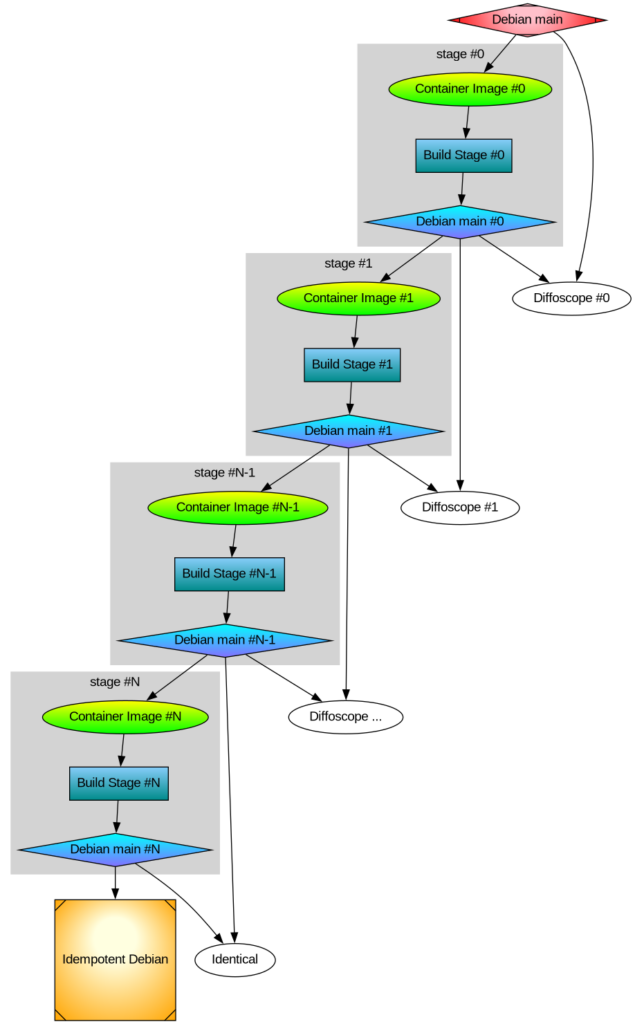
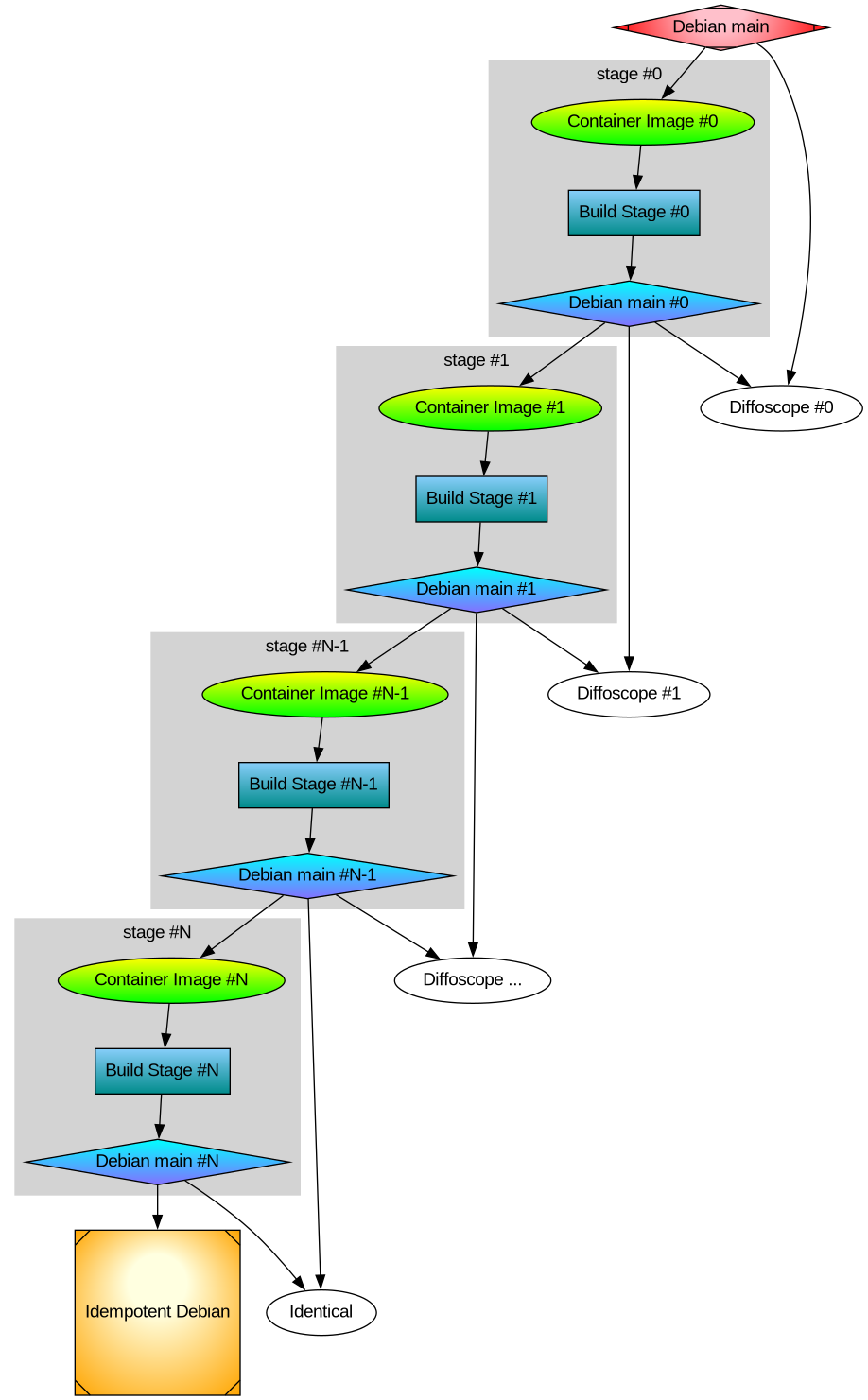
 For a long time I ve been wanting to try GitOps tools, but I haven t had the chance to try them for real on the projects
I was working on.
As now I have some spare time I ve decided I m going to play a little with
For a long time I ve been wanting to try GitOps tools, but I haven t had the chance to try them for real on the projects
I was working on.
As now I have some spare time I ve decided I m going to play a little with 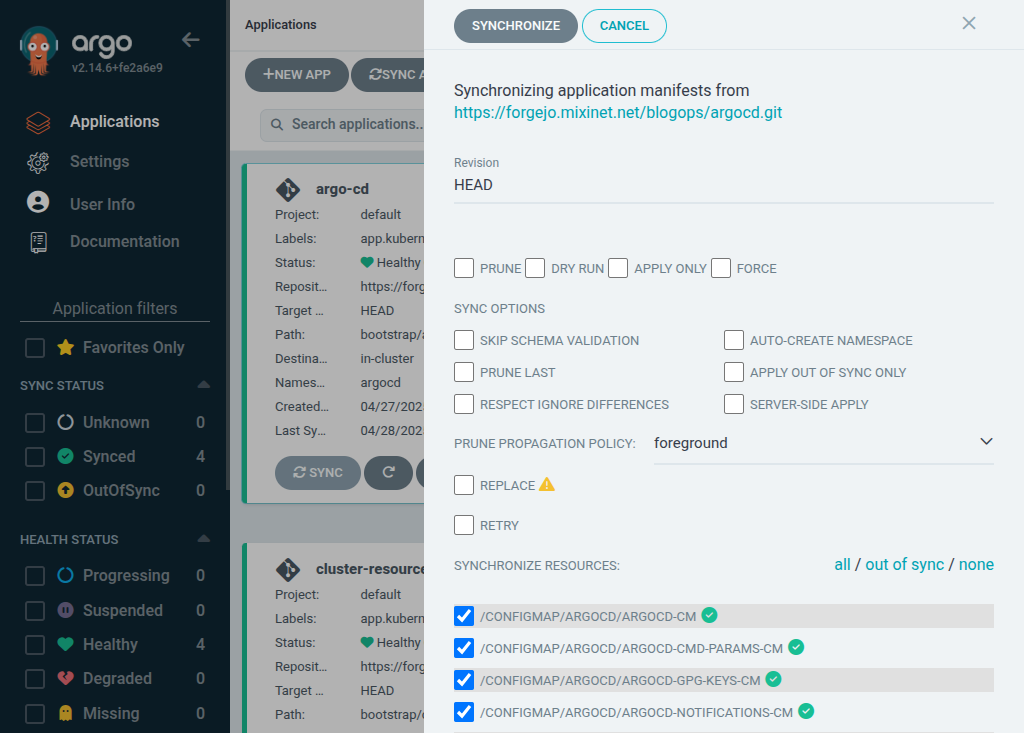
 Last year I intended to write an update on my use of
  Fun with -fsanitize=undefined and Picolibc
Both GCC and Clang support the -fsanitize=undefined flag which
instruments the generated code to detect places where the program
wanders into parts of the C language specification which are either
undefined or implementation defined. Many of these are also common
programming errors. It would be great if there were sanitizers for
other easily detected bugs, but for now, at least the undefined
sanitizer does catch several useful problems.
Supporting the sanitizer
The sanitizer can be built to either trap on any error or call
handlers. In both modes, the same problems are identified, but when
trap mode is enabled, the compiler inserts a trap instruction and
doesn't expect the program to continue running. When handlers are in
use, each identified issue is tagged with a bunch of useful data and
then a specific sanitizer handling function is called.
The specific functions are not all that well documented, nor are the
parameters they receive. Maybe this is because both compilers provide
an implementation of all of the functions they use and don't really
expect external implementations to exist? However, to make these useful in an
embedded environment, picolibc needs to provide a complete set of
handlers that support all versions both gcc and clang as the
compiler-provided versions depend upon specific C (and C++) libraries.
Of course, programs can be built in trap-on-error mode, but that makes
it much more difficult to figure out what went wrong.
Fixing Sanitizer Issues
Once the sanitizer handlers were implemented, picolibc could be
built with them enabled and all of the picolibc tests run to uncover
issues within the library.
As with the static analyzer adventure from last year, the vast bulk of
sanitizer complaints came from invoking undefined or
implementation-defined behavior in harmless ways:
Fun with -fsanitize=undefined and Picolibc
Both GCC and Clang support the -fsanitize=undefined flag which
instruments the generated code to detect places where the program
wanders into parts of the C language specification which are either
undefined or implementation defined. Many of these are also common
programming errors. It would be great if there were sanitizers for
other easily detected bugs, but for now, at least the undefined
sanitizer does catch several useful problems.
Supporting the sanitizer
The sanitizer can be built to either trap on any error or call
handlers. In both modes, the same problems are identified, but when
trap mode is enabled, the compiler inserts a trap instruction and
doesn't expect the program to continue running. When handlers are in
use, each identified issue is tagged with a bunch of useful data and
then a specific sanitizer handling function is called.
The specific functions are not all that well documented, nor are the
parameters they receive. Maybe this is because both compilers provide
an implementation of all of the functions they use and don't really
expect external implementations to exist? However, to make these useful in an
embedded environment, picolibc needs to provide a complete set of
handlers that support all versions both gcc and clang as the
compiler-provided versions depend upon specific C (and C++) libraries.
Of course, programs can be built in trap-on-error mode, but that makes
it much more difficult to figure out what went wrong.
Fixing Sanitizer Issues
Once the sanitizer handlers were implemented, picolibc could be
built with them enabled and all of the picolibc tests run to uncover
issues within the library.
As with the static analyzer adventure from last year, the vast bulk of
sanitizer complaints came from invoking undefined or
implementation-defined behavior in harmless ways:
 This topic came up at a customer of mine in September 2024, when working on Debian/trixie support. Since then I wanted to blog about it to make people aware of this new OpenSSH feature and behavior. I finally found some spare minutes at Debian s BSP in Vienna, so here we are. :)
Some of our Q/A jobs failed to run against Debian/trixie, in the debug logs we found:
This topic came up at a customer of mine in September 2024, when working on Debian/trixie support. Since then I wanted to blog about it to make people aware of this new OpenSSH feature and behavior. I finally found some spare minutes at Debian s BSP in Vienna, so here we are. :)
Some of our Q/A jobs failed to run against Debian/trixie, in the debug logs we found:



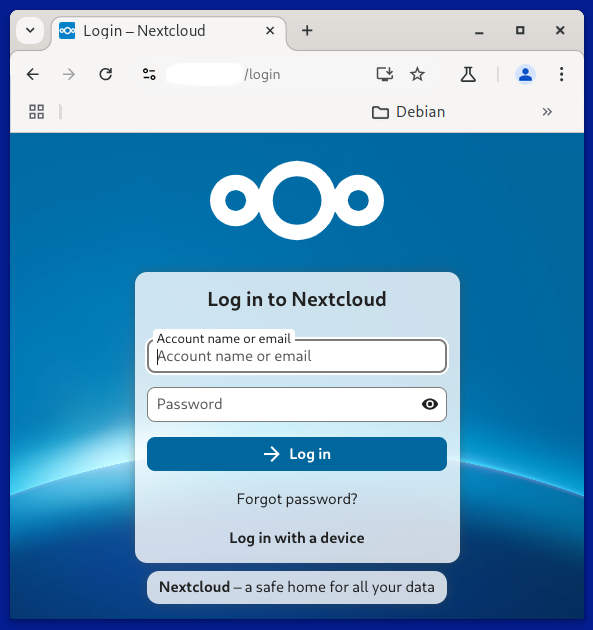

 dmidecode grep -A8 ^System Information
tells me that the Manufacturer is HP and Product Name is OMEN Transcend Gaming Laptop 14-fb0xxx
I m provisioning a new piece of hardware for my eng consultant and it s proving more difficult than I expected. I must admit guilt for some of this difficulty. Instead of installing using the debian installer on my keychain, I dd d the pv block device of the 16 inch 2023 version onto the partition set aside from it. I then rebooted into rescue mode and cleaned up the grub config, corrected the EFI boot partition s path in /etc/fstab, ran the grub installer from the rescue menu, and rebooted.
On the initial boot of the system, X or Wayland or whatever is supposed to be talking to this vast array of GPU hardware in this device, it s unable to do more than create a black screen on vt1. It s easy enough to switch to vt2 and get a shell on the installed system. So I m doing that and investigating what s changed in Trixie. It seems like it s pretty significant. Did they just throw out Keith Packard s and Behdad Esfahbod s work on font rendering? I don t understand what s happening in this effort to abstract to a simpler interface. I ll probably end up reading more about it.
In an effort to have Debian re-configure the system for Desktop use, I have uninstalled as many packages as I could find that were in the display and human interface category, or were firmware/drivers for devices not present in this Laptop s SoC. Some commands I used to clear these packages and re-install connamon follow:
dmidecode grep -A8 ^System Information
tells me that the Manufacturer is HP and Product Name is OMEN Transcend Gaming Laptop 14-fb0xxx
I m provisioning a new piece of hardware for my eng consultant and it s proving more difficult than I expected. I must admit guilt for some of this difficulty. Instead of installing using the debian installer on my keychain, I dd d the pv block device of the 16 inch 2023 version onto the partition set aside from it. I then rebooted into rescue mode and cleaned up the grub config, corrected the EFI boot partition s path in /etc/fstab, ran the grub installer from the rescue menu, and rebooted.
On the initial boot of the system, X or Wayland or whatever is supposed to be talking to this vast array of GPU hardware in this device, it s unable to do more than create a black screen on vt1. It s easy enough to switch to vt2 and get a shell on the installed system. So I m doing that and investigating what s changed in Trixie. It seems like it s pretty significant. Did they just throw out Keith Packard s and Behdad Esfahbod s work on font rendering? I don t understand what s happening in this effort to abstract to a simpler interface. I ll probably end up reading more about it.
In an effort to have Debian re-configure the system for Desktop use, I have uninstalled as many packages as I could find that were in the display and human interface category, or were firmware/drivers for devices not present in this Laptop s SoC. Some commands I used to clear these packages and re-install connamon follow:
 An update to our package



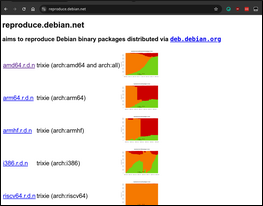




 Some of you may remember that I recently felt a bit underwhelmed
by the last
Some of you may remember that I recently felt a bit underwhelmed
by the last  Same as the last goarounds, except the premable here is a