
I have been using
btrfs, a modern modern copy on write filesystem for Linux, since many years now. But only recently I realized how amateurish my usage has been. Over the last day I switched to multiple devices and threw in a RAID1 level at the same time.
For the last years, I have been using btrfs in a completely naive way, simply creating new filesystems, mounting them, moving data over, linking the directories into my home dir, etc etc. It all became a huge mess over time. I have heard of
multi-device support , but always thought that this is for the big players in the data centers not realizing that it works trivially on your home system, too. Thanks to an
article by Mark McBride I learned how to better use it!
Btrfs has an impressive list of features, and is often compared to
(Open)ZFS (btw, they domain openzfs.org has a botched SSL certificate .. umpf, my trust disappears even more) due to the high level of data security. I have been playing around with the idea to use ZFS for quite some time, but first of all it requires compiling extra modules all the time, because ZFS cannot be included in the kernel source. And much more, I realized that ZFS is simply
too inflexible with respect to disks of different sizes in a storage pool.
Btrfs on the other hand allows adding and removing devices to the filesystem on a running system. I just added a 2TB disk to my rig, and called:
btrfs device add /dev/sdh1 /
and with that alone, my root filesystem grew immediately. At the end I have consolidated data from 4 extra SSDs into this new filesystem spanning multiple disks, and got rid of all the links and loops.
For good measure, and since I had enough space left, I also switched to RAID1 for this filesystem. This again, surprisingly, works on a running system!
btrfs balance start -dconvert=raid1 -mconvert=raid1 /
Here, both data and metadata are mirrored on the devices. With 6TB of total disk space, the balancing operation took quite some time, about 6h in my case, but finished without a hiccup.
After all that, the filesystem now looks like this:
$ sudo btrfs fi show /
Label: none  uuid: XXXXXX
	Total devices 5 FS bytes used 2.19TiB
	devid    1 size 899.01GiB used 490.03GiB path /dev/sdb3
	devid    2 size 489.05GiB used 207.00GiB path /dev/sdd1
	devid    3 size 1.82TiB used 1.54TiB path /dev/sde1
	devid    4 size 931.51GiB used 649.00GiB path /dev/sdf1
	devid    5 size 1.82TiB used 1.54TiB path /dev/sdc1
and using
btrfs fi usage / I can get detailed information about the device usage and status.
Stumbling blocks
You wouldn t expect such a deep rebuilding of the intestines of a system to go without a few bumps, and indeed, there are a few:
First of all,
update-grub is broken when device names are used. If you have
GRUB_DISABLE_LINUX_UUID=true, so that actual device nodes are used in
grub.cfg, the generated entries are broken because they list all the devices. This comes from the fact that
grub-mkconfig uses
grub-probe --target=device / to determine the root device, and this returns in our case:
# grub-probe --target=device /
/dev/sdb3
/dev/sdd1
/dev/sde1
/dev/sdf1
/dev/sdc1
and thus the grub config file contains entries like:
...
menuentry 'Debian GNU/Linux ...' ...
  ...
  linux	/boot/vmlinuz-5.7.0-rc7 root=/dev/sdb3
/dev/sdd1
/dev/sde1
/dev/sdf1
/dev/sdc1 ro <other options>
This is of course an invalid entry, but fortunately grub still boots, but ignores the rest of the command line options.
So I decided to turn back to using UUID for the root entry, which should be better supported. But alas, what happened, I couldn t even boot anymore. Grub gave me very cryptic messages like
cannot find UUID device and dropping you into the grub rescue shell, then having the grub rescue shell being unable to read any filesystem at all (not even FAT or ext2!). The most cryptic one was
grub header bytenr is not equal node addr, where even Google gave up on it.
At the end I booted into a rescue image (you always have something like
SystemRescueCD on an USB stick next to you during these operations, right?), mounted the filesystem manually, and reinstalled grub, which fixed the problem, and now the grub config file contains only the UUID for root.
I don t blame btrfs for that, this is more like we are, after sooo many years, we still don t have a good boot system

All in all, a very smooth transition, and at least for some time I don t have to worry about which partition has still some space left.
Thanks btrfs and Open Source!
 ### The blockade has ended! For some introduction..
Back in 2016, Telmex Mexico's foremost communications provider and,
through the brands grouped under the *Am rica M vil* brand, one of
Latin America's most important ISPs set up rules to block connecitons
to (at least) seven of Tor's *directory authorities* (*DirAuths*). We
believe they might have blocked all of them, in an attempt to block
connections from Tor from anywhere in their networks, but Tor is much
more resourceful than that so, the measure was not too effective.
### The blockade has ended! For some introduction..
Back in 2016, Telmex Mexico's foremost communications provider and,
through the brands grouped under the *Am rica M vil* brand, one of
Latin America's most important ISPs set up rules to block connecitons
to (at least) seven of Tor's *directory authorities* (*DirAuths*). We
believe they might have blocked all of them, in an attempt to block
connections from Tor from anywhere in their networks, but Tor is much
more resourceful than that so, the measure was not too effective.
 Only... _Some_ blocking did hurt Telmex's users: The ability to play
an active role in Tor. The ability to host Tor relays at home. Why?
Because the *consensus protocol* requires relays to be reachable in
order to be measured from the network's *DirAuths*.
### Technical work to prove the blocking
We dug into the issue as part of the work we carried out in the
project I was happy to lead between 2018 and 2019, *UNAM/DGAPA/PAPIME
PE102718*. In March 2019, I presented a paper titled [Distributed
Detection of Tor Directory Authorities Censorship in
Mexico](https://www.thinkmind.org/index.php?view=article&articleid=icn_2019_6_20_38010)
([alternative download](http://ru.iiec.unam.mx/4538/) in the [Topic on
Internet Censorship and Surveillance (TICS) track](https://tics.site/)
of the XVIII International Conference on Networks.
Then... We had many talks inside our group, but nothing seemed to move
for several months. We did successfully push for increasing the number
of Tor relays in Mexico (we managed to go from two to eleven stable
relays not much in absolute terms, but quite good relatively, even
more considering most users were not technically able to run one!)
Only... _Some_ blocking did hurt Telmex's users: The ability to play
an active role in Tor. The ability to host Tor relays at home. Why?
Because the *consensus protocol* requires relays to be reachable in
order to be measured from the network's *DirAuths*.
### Technical work to prove the blocking
We dug into the issue as part of the work we carried out in the
project I was happy to lead between 2018 and 2019, *UNAM/DGAPA/PAPIME
PE102718*. In March 2019, I presented a paper titled [Distributed
Detection of Tor Directory Authorities Censorship in
Mexico](https://www.thinkmind.org/index.php?view=article&articleid=icn_2019_6_20_38010)
([alternative download](http://ru.iiec.unam.mx/4538/) in the [Topic on
Internet Censorship and Surveillance (TICS) track](https://tics.site/)
of the XVIII International Conference on Networks.
Then... We had many talks inside our group, but nothing seemed to move
for several months. We did successfully push for increasing the number
of Tor relays in Mexico (we managed to go from two to eleven stable
relays not much in absolute terms, but quite good relatively, even
more considering most users were not technically able to run one!)
 Jacobo N jera, journalist participant of our project, didn't leave
things there just lying around waiting magically for justice to
happen. Together with Vasilis Ververis, from the [Magma
Project](https://magma.lavafeld.org/), they presented some weeks ago a
[Case study: Tor Directory Authorities Censorship in
Mexico](https://magma.lavafeld.org/guide/data-analysis.html#case-study-tor-directory-authorities-censorship-in-mexico).
### Pushing to action
But a good part of being a journalist is knowing _how_ and _when_ to
spread the word. Having already two technical studies showing the
blocking in place, Jacobo presented his findings with [an article in
GlobalVoices: *The largest telecommunications operator in Mexico
blocks the secure
network*](https://es.globalvoices.org/2020/05/28/en-mexico-el-mas-grande-operador-de-telecomunicaciones-bloquea-la-internet-segura/). Surprisingly
(to me, at least), this story was picked up by a major Mexican
newspaper: The same evening the story hit GlobalVoices, [Rodrigo
Riquelme](https://www.eleconomista.com.mx/autor/rriquelme) posted an
article, in the Technology section of *El Economista*, titled [Telmex
blocks seven out of ten accesses to the Tor network in
Mexico](https://www.eleconomista.com.mx/tecnologia/Telmex-bloquea-siete-de-10-accesos-a-la-red-Tor-en-Mexico-20200528-0078.html). And
that very same day, Telmex sent a reply I am translating in full (that
is now included at the end of Riquelme's article):
> Mexico City, May 28, 2020
>
> In relation to Tor navigation from TELMEX's network, the company
> informs:
>
> In TELMEX, we are committed to the full respect to navigation
> freedom for all of our users.
>
> TELMEX practices no application-level blocking policies; the Tor
> application, as well as the rest of Internet applications, can be
> freely accessed from our network.
>
> In order to protect the Internauts' information, the seven refered
> nodes were in their time reported because they were associated with
> the distribution of the WannaCry ransomware, which is the reason
> they were filtered, but this does not hamper the use of the Tor
> application.
### So we got an answer...?
Jacobo knew we had to take advantage of this answer, and act fast! He
entered rush-writing mode and, with the help of our good friend and
lawyer Salvador Alc ntar, we wrote [a short letter to Renato Flores
Cartas, Corporative Communication of Am rica
M vil](https://internetanonima.net/respuesta-a-telmex-sobre-la-red-tor-en-mexico/),
and sent it on June 1st.
Next thing I know, this evening Jacobo was asking me if I could
confirm the blocking was lifted. What I could not believe it! But,
yes Today Jacobo published the confirmation that [the seven blocked
IP routes were finally reachable again from ASN 8151 (UNINET / Telmex
/ Am rica
M vil)!](https://internetanonima.net/confirmamos-desbloqueo-de-las-7-direcciones-de-la-red-tor-por-telmex/)
Of course, this story was picked up again by El Economista [Telmex
unblocks IP addresses for the Tor network's directory authority server
IPs in
Mexico](https://www.eleconomista.com.mx/tecnologia/Telmex-desbloquea-direcciones-IP-de-servidores-de-autoridad-de-la-red-Tor-en-Mexico-20200604-0094.html).
### Wrapping up
How can I put this in words? I am very, very, very, *very, very,
very*, **very, very, very** happy we managed to see this through!
Although we have been pushing for increasing the usage of Tor among
users at risk in Mexico Being a journalist, defending human rights,
are still a high-risk profession in my country. We strongly believe in
this, and will continue trying to raise awareness of the usage.
But, just as with free software, *using* network anonymization tools
is not all. We need more people to become active, to become engaged,
to *become active participants* in anonymization. As the adage says,
*anonymity loves company* In order to build strong, sufficient
anonymization capability for everybody that needs it, we need more
people to *provide relay services*. And this is a *huge* step to
improve Mexico's participation in the Tor network!
---
Image credits: [*Seeing My World Through a Keyhole*, by Kate Ter
Haar](https://www.flickr.com/photos/katerha/4592429363) (CC-BY); [Tor
logo (Wikimedia Commons)](https://commons.wikimedia.org/wiki/File:Tor-logo-2011-flat.svg)
Jacobo N jera, journalist participant of our project, didn't leave
things there just lying around waiting magically for justice to
happen. Together with Vasilis Ververis, from the [Magma
Project](https://magma.lavafeld.org/), they presented some weeks ago a
[Case study: Tor Directory Authorities Censorship in
Mexico](https://magma.lavafeld.org/guide/data-analysis.html#case-study-tor-directory-authorities-censorship-in-mexico).
### Pushing to action
But a good part of being a journalist is knowing _how_ and _when_ to
spread the word. Having already two technical studies showing the
blocking in place, Jacobo presented his findings with [an article in
GlobalVoices: *The largest telecommunications operator in Mexico
blocks the secure
network*](https://es.globalvoices.org/2020/05/28/en-mexico-el-mas-grande-operador-de-telecomunicaciones-bloquea-la-internet-segura/). Surprisingly
(to me, at least), this story was picked up by a major Mexican
newspaper: The same evening the story hit GlobalVoices, [Rodrigo
Riquelme](https://www.eleconomista.com.mx/autor/rriquelme) posted an
article, in the Technology section of *El Economista*, titled [Telmex
blocks seven out of ten accesses to the Tor network in
Mexico](https://www.eleconomista.com.mx/tecnologia/Telmex-bloquea-siete-de-10-accesos-a-la-red-Tor-en-Mexico-20200528-0078.html). And
that very same day, Telmex sent a reply I am translating in full (that
is now included at the end of Riquelme's article):
> Mexico City, May 28, 2020
>
> In relation to Tor navigation from TELMEX's network, the company
> informs:
>
> In TELMEX, we are committed to the full respect to navigation
> freedom for all of our users.
>
> TELMEX practices no application-level blocking policies; the Tor
> application, as well as the rest of Internet applications, can be
> freely accessed from our network.
>
> In order to protect the Internauts' information, the seven refered
> nodes were in their time reported because they were associated with
> the distribution of the WannaCry ransomware, which is the reason
> they were filtered, but this does not hamper the use of the Tor
> application.
### So we got an answer...?
Jacobo knew we had to take advantage of this answer, and act fast! He
entered rush-writing mode and, with the help of our good friend and
lawyer Salvador Alc ntar, we wrote [a short letter to Renato Flores
Cartas, Corporative Communication of Am rica
M vil](https://internetanonima.net/respuesta-a-telmex-sobre-la-red-tor-en-mexico/),
and sent it on June 1st.
Next thing I know, this evening Jacobo was asking me if I could
confirm the blocking was lifted. What I could not believe it! But,
yes Today Jacobo published the confirmation that [the seven blocked
IP routes were finally reachable again from ASN 8151 (UNINET / Telmex
/ Am rica
M vil)!](https://internetanonima.net/confirmamos-desbloqueo-de-las-7-direcciones-de-la-red-tor-por-telmex/)
Of course, this story was picked up again by El Economista [Telmex
unblocks IP addresses for the Tor network's directory authority server
IPs in
Mexico](https://www.eleconomista.com.mx/tecnologia/Telmex-desbloquea-direcciones-IP-de-servidores-de-autoridad-de-la-red-Tor-en-Mexico-20200604-0094.html).
### Wrapping up
How can I put this in words? I am very, very, very, *very, very,
very*, **very, very, very** happy we managed to see this through!
Although we have been pushing for increasing the usage of Tor among
users at risk in Mexico Being a journalist, defending human rights,
are still a high-risk profession in my country. We strongly believe in
this, and will continue trying to raise awareness of the usage.
But, just as with free software, *using* network anonymization tools
is not all. We need more people to become active, to become engaged,
to *become active participants* in anonymization. As the adage says,
*anonymity loves company* In order to build strong, sufficient
anonymization capability for everybody that needs it, we need more
people to *provide relay services*. And this is a *huge* step to
improve Mexico's participation in the Tor network!
---
Image credits: [*Seeing My World Through a Keyhole*, by Kate Ter
Haar](https://www.flickr.com/photos/katerha/4592429363) (CC-BY); [Tor
logo (Wikimedia Commons)](https://commons.wikimedia.org/wiki/File:Tor-logo-2011-flat.svg)
 Float/String Conversion in Picolibc: Enter Ry
I
Float/String Conversion in Picolibc: Enter Ry
I  You may have heard of my search for Cloud solutions to run labs in an academic context, with a focus on free an open source solutions . You may read previous installments of this blog, or for a shorter, check
  I have been quite absent from Debian stuff lately, but this increased since COVID-19 hits us. In this blog post I'll try to sketch what I have been doing to help fight COVID-19 this last few months.



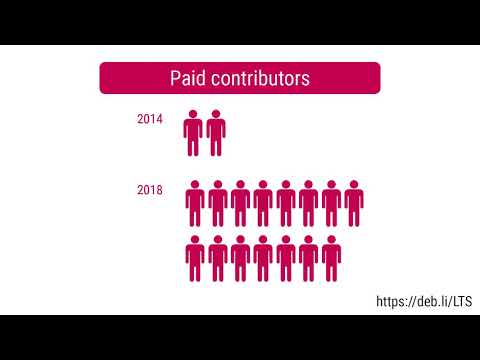
 Discussion is progressing on funding & governance of larger LTS-related projects. Who should decide: contributors, Freexian, sponsors? Do we fund with a percentage or by capping resources allocated on security updates? I voiced concerns over funding these at the expense of smaller, more organic, more recurrent tasks that are less easy to specify but greatly contribute to the overall quality nevertheless.
ELTS - Wheezy
Discussion is progressing on funding & governance of larger LTS-related projects. Who should decide: contributors, Freexian, sponsors? Do we fund with a percentage or by capping resources allocated on security updates? I voiced concerns over funding these at the expense of smaller, more organic, more recurrent tasks that are less easy to specify but greatly contribute to the overall quality nevertheless.
ELTS - Wheezy

 I would say that this was a crazy month, but with everything ever escalating, does that even mean anything anymore?
I lost track of tracking my activities in the second half of the month, and I m still not very good at logging the soft stuff , that is, things like non-technical work but that also takes up a lot of time, but will continue to work on it.
I would say that this was a crazy month, but with everything ever escalating, does that even mean anything anymore?
I lost track of tracking my activities in the second half of the month, and I m still not very good at logging the soft stuff , that is, things like non-technical work but that also takes up a lot of time, but will continue to work on it.

 Here is my monthly update covering what I have been doing in the free software world during May 2020 (









 Something I ve found myself doing as the pandemic rolls on is picking
out and (re-)reading through sections of the
Something I ve found myself doing as the pandemic rolls on is picking
out and (re-)reading through sections of the 
 I found a
 Like
Like  Almost three years ago I wrote my