Lintian uses some small scripts to collect data from packages. In daily talk, they are usually referred to as collection scripts. Lintian uses files to track the status of collection scripts between runs. Consider the following directory listing on lintian.d.o:
$ ls -al laboratory/binary/eclipse/.*-*
-rw-r--r-- 1 user group  45 Jul 18 01:21 laboratory/binary/eclipse/.ar-info-1
-rw-r--r-- 1 user group  45 Jul 18 01:21 laboratory/binary/eclipse/.bin-pkg-control-1
-rw-r--r-- 1 user group  45 Jul 18 01:21 laboratory/binary/eclipse/.changelog-file-1
-rw-r--r-- 1 user group  45 Jul 18 01:21 laboratory/binary/eclipse/.copyright-file-1
-rw-r--r-- 1 user group  45 Jul 18 01:21 laboratory/binary/eclipse/.debian-readme-1
-rw-r--r-- 1 user group  45 Jul 18 01:21 laboratory/binary/eclipse/.doc-base-files-1
-rw-r--r-- 1 user group  45 Jul 18 01:21 laboratory/binary/eclipse/.fields-1
[...]
This example shows that a bunch of collections scripts have been run for the eclipse binary package. Each of these files contain the version of Lintian that created them (or last wrote them) and a timestamp.
Why the interest in these files? Let us go a bit back in time to the 15th of June 2011. That was the day where Lintian 2.5.1 was uploaded to unstable. That version of Lintian had 17 collection scripts[1] for binary packages. So every binary package would have 17 files and there are over 35 000 binary packages in the Debian archive.
Ouch, so that makes about 595 000 files if we use this on all binary packages on the archive. The size of each of those files are about 45 bytes, so that is a total of 25.5 MB for all of these files[2]. So other than the inode abuse , this is not too bad. A little
du -h should confirm this
$ du -h laboratory/binary/eclipse/.*-*
4.0K    laboratory/binary/eclipse/.ar-info-1
4.0K    laboratory/binary/eclipse/.bin-pkg-control-1
4.0K    laboratory/binary/eclipse/.changelog-file-1
4.0K    laboratory/binary/eclipse/.copyright-file-1
4.0K    laboratory/binary/eclipse/.debian-readme-1
4.0K    laboratory/binary/eclipse/.doc-base-files-1
4.0K    laboratory/binary/eclipse/.fields-1
[...]
Whaaa oh the file system uses a block-size of 4K bytes, so I guess we have to pay a full block for these files. Let s see what that gives, 595 000 times 4 kB is 2.27 GB
Oops!
That was in the (not too distant) past. About a month later (12th of July), the code creating these files are refactored into:
sub _mark_coll_finished
    my ($self, $collname, $collver) = @_;
    # In the "old days" we would also write the Lintian version and the time
    # stamp in these files, but since we never read them it seems like overkill.
    #  - for the timestamp we could use the mtime of the file anyway
    return touch_file "$self-> base_dir /.$collname-$collver";
This turns out to be a very space-saving change if we ask
du -h:
$ du -h laboratory/binary/lintian/.*-*
0       laboratory/binary/lintian/.ar-info-1
0       laboratory/binary/lintian/.bin-pkg-control-1
0       laboratory/binary/lintian/.changelog-file-1
0       laboratory/binary/lintian/.copyright-file-1
0       laboratory/binary/lintian/.debian-readme-1
0       laboratory/binary/lintian/.doc-base-files-1
[...]
Existing files are not emptied, so we still have some old non-empty files left on lintian.d.o. Nevertheless that was the "nice story" about "the side effect of being lazy sometimes reduces space waste"[3].
But we have another "number" problem. If you grep for "Too many links" in the lintian.log from lintian.d.o you should see:
$ grep -i "too many links" logs/lintian.log
mkdir: cannot create directory  /srv/lintian.debian.org/laboratory/binary/aces3': Too many links
mkdir: cannot create directory  /srv/lintian.debian.org/laboratory/binary/boinc-cgi-stripchart': Too many links
mkdir: cannot create directory  /srv/lintian.debian.org/laboratory/binary/libbrailleutils-java': Too many links
mkdir: cannot create directory  /srv/lintian.debian.org/laboratory/binary/libbrailleutils-java-doc': Too many links
mkdir: cannot create directory  /srv/lintian.debian.org/laboratory/binary/libclippoly0': Too many links
mkdir: cannot create directory  /srv/lintian.debian.org/laboratory/binary/libclippoly-dev': Too many links
mkdir: cannot create directory  /srv/lintian.debian.org/laboratory/binary/xul-ext-cookie-monster': Too many links
mkdir: cannot create directory  /srv/lintian.debian.org/laboratory/binary/cucumber': Too many links
[...]
$ grep -i "too many links" logs/lintian.log   wc -l
3274
In the Lintian Laboratory every package is unpacked in a directory based on its type and name (as hinted in the output above). The problem is that ext3 has a limit of the amount sub-directories a directory can have[4]. This limit is just shy of 32 000 and (as a reminder) Debian has over 35 000 binary packages. So a lot of packages are currently not checked on lintian.d.o (
#641468).
The current feature branch for #641468 already solves the directory limit issue (by using a "mirror-like" pool layout). It also removes the need for "1 file per completed collection" by writing this information in the existing "per entry" status file.
I hope we can get the branch merged into master within 2-3 weeks, though there are still a few issues that needs to be worked out before then.
Footnotes:
[1] Actually it had 18 collections, but one of them are "auto-removed" so it is better not to include it in this case.
[2] Content alone - metadata like permissions and such is ignored.
[3] I admit it was more luck than intention!
[4] The limit comes from the "32 000 hardlink per inode" limitation.


Some years ago I came across a really peculiar newsgroup post. It was not about technicalities of any sort. It was about history. A beautifully written history of computers. From the Turing machine to the Free Software world, the original author managed to capture all the important events of the computer revolution with a great deal of humor. Re-posting it here, it is just brilliant.
The Gospel of Tux (v1.0)
In the beginning Turing created the Machine.
And the Machine was crufty and bodacious, existing in theory only. And von Neumann looked upon the Machine, and saw that it was crufty. He divided the Machine into two Abstractions, the Data and the Code, and yet the two were one Architecture. This is a great Mystery, and the beginning of wisdom.
And von Neumann spoke unto the Architecture, and blessed it, saying, Go forth and replicate, freely exchanging data and code, and bring forth all manner of devices unto the earth. And it was so, and it was cool. The Architecture prospered and was implemented in hardware and software. And it brought forth many Systems unto the earth.
The first Systems were mighty giants; many great works of renown did they accomplish. Among them were Colossus, the codebreaker; ENIAC, the targeter; EDSAC and MULTIVAC and all manner of froody creatures ending in AC, the experimenters; and SAGE, the defender of the sky and father of all networks. These were the mighty giants of old, the first children of Turing, and their works are written in the Books of the Ancients. This was the First Age, the age of Lore.
Now the sons of Marketing looked upon the children of Turing, and saw that they were swift of mind and terse of name and had many great and baleful attributes. And they said unto themselves, Let us go now and make us Corporations, to bind the Systems to our own use that they may bring us great fortune. With sweet words did they lure their customers, and with many chains did they bind the Systems, to fashion them after their own image. And the sons of Marketing fashioned themselves Suits to wear, the better to lure their customers, and wrote grave and perilous Licenses, the better to bind the Systems. And the sons of Marketing thus became known as Suits, despising and being despised by the true Engineers, the children of von Neumann.
And the Systems and their Corporations replicated and grew numerous upon the earth. In those days there were IBM and Digital, Burroughs and Honeywell, Unisys and Rand, and many others. And they each kept to their own System, hardware and software, and did not interchange, for their Licences forbade it. This was the Second Age, the age of Mainframes.
Now it came to pass that the spirits of Turing and von Neumann looked upon the earth and were displeased. The Systems and their Corporations had grown large and bulky, and Suits ruled over true Engineers. And the Customers groaned and cried loudly unto heaven, saying, Oh that there would be created a System mighty in power, yet small in size, able to reach into the very home! And the Engineers groaned and cried likewise, saying, Oh, that a deliverer would arise to grant us freedom from these oppressing Suits and their grave and perilous Licences, and send us a System of our own, that we may hack therein! And the spirits of Turing and von Neumann heard the cries and were moved, and said unto each other, Let us go down and fabricate a Breakthrough, that these cries may be stilled.
And that day the spirits of Turing and von Neumann spake unto Moore of Intel, granting him insight and wisdom to understand the future. And Moore was with chip, and he brought forth the chip and named it 4004. And Moore did bless the Chip, saying, Thou art a Breakthrough; with my own Corporation have I fabricated thee. Thou thou art yet as small as a dust mote, yet shall thou grow and replicate unto the size of a mountain, and conquer all before thee. This blessing I give unto thee: every eighteen months shall thou double in capacity, until the end of the age. This is Moore s Law, which endures unto this day.
And the birth of 4004 was the beginning of the Third Age, the age of Microchips. And as the Mainframes and their Systems and Corporations had flourished, so did the Microchips and their Systems and Corporations. And their lineage was on this wise:
Moore begat Intel. Intel begat Mostech, Zilog and Atari. Mostech begat 6502, and Zilog begat Z80. Intel also begat 8800, who begat Altair; and 8086, mother of all PCs. 6502 begat Commodore, who begat PET and 64; and Apple, who begat 2. (Apple is the great Mystery, the Fruit that was devoured, yet bloomed again.) Atari begat 800 and 1200, masters of the game, who were destroyed by Sega and Nintendo. Xerox begat PARC. Commodore and PARC begat Amiga, creator of fine arts; Apple and PARC begat Lisa, who begat Macintosh, who begat iMac. Atari and PARC begat ST, the music maker, who died and was no more. Z80 begat Sinclair the dwarf, TRS-80 and CP/M, who begat many machines, but soon passed from this world. Altair, Apple and Commodore together begat Microsoft, the Great Darkness which is called Abomination, Destroyer of the Earth, the Gates of Hell.
Now it came to pass in the Age of Microchips that IBM, the greatest of the Mainframe Corporations, looked upon the young Microchip Systems and was greatly vexed. And in their vexation and wrath they smote the earth and created the IBM PC. The PC was without sound and colour, crufty and bodacious in great measure, and its likeness was a tramp, yet the Customers were greatly moved and did purchase the PC in great numbers. And IBM sought about for an Operating System Provider, for in their haste they had not created one, nor had they forged a suitably grave and perilous License, saying, First we will build the market, then we will create a new System, one in our own image, and bound by our Licence. But they reasoned thus out of pride and not wisdom, not forseeing the wrath which was to come.
And IBM came unto Microsoft, who licensed unto them QDOS, the child of CP/M and 8086. (8086 was the daughter of Intel, the child of Moore). And QDOS grew, and was named MS-DOS. And MS-DOS and the PC together waxed mighty, and conquered all markets, replicating and taking possession thereof, in accordance with Moore s Law. And Intel grew terrible and devoured all her children, such that no chip could stand before her. And Microsoft grew proud and devoured IBM, and this was a great marvel in the land. All these things are written in the Books of the Deeds of Microsoft.
In the fullness of time MS-DOS begat Windows. And this is the lineage of Windows: CP/M begat QDOS. QDOS begat DOS 1.0. DOS 1.0 begat DOS 2.0 by way of Unix. DOS 2.0 begat Windows 3.11 by way of PARC and Macintosh. IBM and Microsoft begat OS/2, who begat Windows NT and Warp, the lost OS of lore. Windows 3.11 begat Windows 95 after triumphing over Macintosh in a mighty Battle of Licences. Windows NT begat NT 4.0 by way of Windows 95. NT 4.0 begat NT 5.0, the OS also called Windows 2000, The Millenium Bug, Doomsday, Armageddon, The End Of All Things.
Now it came to pass that Microsoft had waxed great and mighty among the Microchip Corporations; mighter than any of the Mainframe Corporations before it had it waxed. And Gates heart was hardened, and he swore unto his Customers and their Engineers the words of this curse:
Children of von Neumann, hear me. IBM and the Mainframe Corporations bound thy forefathers with grave and perilous Licences, such that ye cried unto the spirits of Turing and von Neumann for deliverance. Now I say unto ye: I am greater than any Corporation before me. Will I loosen your Licences? Nay, I will bind thee with Licences twice as grave and ten times more perilous than my forefathers. I will engrave my Licence on thy heart and write my Serial Number upon thy frontal lobes. I will bind thee to the Windows Platform with cunning artifices and with devious schemes. I will bind thee to the Intel Chipset with crufty code and with gnarly APIs. I will capture and enslave thee as no generation has been enslaved before. And wherefore will ye cry then unto the spirits of Turing, and von Neumann, and Moore? They cannot hear ye. I am become a greater Power than they. Ye shall cry only unto me, and shall live by my mercy and my wrath. I am the Gates of Hell; I hold the portal to MSNBC and the keys to the Blue Screen of Death. Be ye afraid; be ye greatly afraid; serve only me, and live.
And the people were cowed in terror and gave homage to Microsoft, and endured the many grave and perilous trials which the Windows platform and its greatly bodacious Licence forced upon them. And once again did they cry to Turing and von Neumann and Moore for a deliverer, but none was found equal to the task until the birth of Linux.
These are the generations of Linux:
SAGE begat ARPA, which begat TCP/IP, and Aloha, which begat Ethernet. Bell begat Multics, which begat C, which begat Unix. Unix and TCP/IP begat Internet, which begat the World Wide Web. Unix begat RMS, father of the great GNU, which begat the Libraries and Emacs, chief of the Utilities. In the days of the Web, Internet and Ethernet begat the Intranet LAN, which rose to renown among all Corporations and prepared the way for the Penguin.
And Linus and the Web begat the Kernel through Unix. The Kernel, the Libraries and the Utilities together are the Distribution, the one Penguin in many forms, forever and ever praised.
Now in those days there was in the land of Helsinki a young scholar named Linus the Torvald. Linus was a devout man, a disciple of RMS and mighty in the spirit of Turing, von Neumann and Moore. One day as he was meditating on the Architecture, Linus fell into a trance and was granted a vision. And in the vision he saw a great Penguin, serene and well-favoured, sitting upon an ice floe eating fish. And at the sight of the Penguin Linus was deeply afraid, and he cried unto the spirits of Turing, von Neumann and Moore for an interpretation of the dream.
And in the dream the spirits of Turing, von Neumann and Moore answered and spoke unto him, saying, Fear not, Linus, most beloved hacker. You are exceedingly cool and froody. The great Penguin which you see is an Operating System which you shall create and deploy unto the earth. The ice-floe is the earth and all the systems thereof, upon which the Penguin shall rest and rejoice at the completion of its task. And the fish on which the Penguin feeds are the crufty Licensed codebases which swim beneath all the earth s systems. The Penguin shall hunt and devour all that is crufty, gnarly and bodacious; all code which wriggles like spaghetti, or is infested with blighting creatures, or is bound by grave and perilous Licences shall it capture. And in capturing shall it replicate, and in replicating shall it document, and in documentation shall it bring freedom, serenity and most cool froodiness to the earth and all who code therein.
Linus rose from meditation and created a tiny Operating System Kernel as the dream had foreshewn him; in the manner of RMS, he released the Kernel unto the World Wide Web for all to take and behold. And in the fulness of Internet Time the Kernel grew and replicated, becoming most cool and exceedingly froody, until at last it was recognised as indeed a great and mighty Penguin, whose name was Tux. And the followers of Linus took refuge in the Kernel, the Libraries and the Utilities; they installed Distribution after Distribution, and made sacrifice unto the GNU and the Penguin, and gave thanks to the spirits of Turing, von Neumann and Moore, for their deliverance from the hand of Microsoft. And this was the beginning of the Fourth Age, the age of Open Source.
Now there is much more to be said about the exceeding strange and wonderful events of those days; how some Suits of Microsoft plotted war upon the Penguin, but were discovered on a Halloween Eve; how Gates fell among lawyers and was betrayed and crucified by his former friends, the apostles of Media; how the mercenary Knights of the Red Hat brought the gospel of the Penguin into the halls of the Corporations; and even of the dispute between the brethren of Gnome and KDE over a trollish Licence. But all these things are recorded elsewhere, in the Books of the Deeds of the Penguin and the Chronicles of the Fourth Age, and I suppose if they were all narrated they would fill a stack of DVDs as deep and perilous as a Usenet Newsgroup.
Now may you code in the power of the Source; may the Kernel, the Libraries and the Utilities be with you, throughout all Distributions, until the end of the Epoch. Amen.

A continuation of my
intermittent series on Emdebian and prompted by a query from
Paul Wise, I thought I'd cover some of the uses to which a device running Emdebian can be put. It is a bit long this one...
So, yes, there are general purpose computers which could run Emdebian but there are common features amongst general purpose computers:
- Lots of different tasks must be supported - lots of different packages installed, each user could quite easily use a distinct set of packages from another user.
- Multi-user support - even if any one machine is only used by one person, a general purpose computer must have support for adding another user - not just a system user, a real user with a login, shell, possibly bookmarks and browser history etc.
- Connectivity - general purpose computers (and that includes mobile phones) must connect to a variety of other computers to be at all useful.
- Multi-modal data input - there needs to be support for a mouse and a keyboard or touchscreen and just as likely, software support for accessibility interfaces like an on screen keyboard and switch inputs.
- Storage for user data - the system admin can't know how much data users are going to add and if it is general purpose, it's probably going to support media players, image viewers, even office software. The data files managed and written by such software tend to be large and tend to accumulate into large collections. This means that a general purpose machine cannot anticipate the full storage requirements, so has to allow plenty of room for user data storage. If there's so much storage space available, why use an OS which is primarily designed to take up less space? Just use the full version, Debian.
Now compare with the common features of special purpose or single-purpose computers:
- Single task only - a splash screen (without support for removal) covers all the boot information, the single task starts as a daemon and if the user quits the task, the task initiates a shutdown, not quit. Every effort is made to prevent the task from exposing the underlying OS, including auto-restarts if it does crash.
- Single-user support - indeed, user is not the typical user. user in this case is a non-login user without a shell, created by the postinst of the task package purely to support running the task without root privileges (because if the task doesn't need privileges, it shouldn't retain privileges).
- Single mode input - don't expect these machines to support 105 key keyboards. You'll be lucky to have 5 keys which are really just buttons. The button won't just enter 'J' into the machine, it will fire off a command to charge your bank or start a drill or shutdown a malfunctioning service. (Each button will often be multi-functional as well, depending on context). Some devices will replace the mouse with a touchscreen but many are fitted in places where touchscreens simply won't survive, where keys have to be able to withstand being submerged in water (or oil) for hours. Many machines simply won't have mouse support at all. Many will not have any typical external connectors. Indeed, units which go into dirty or wet environments certainly won't have standard external connectors of any kind. Think boats and factories. Internal battery packs with custom hot-fit replacements, buttons encased in 4mm of clear plastic, screens viewable only through protective mesh / filters.
- Restricted connectivity - if the task doesn't need networking, no networking hardware is fitted. If the task doesn't need USB, no USB hardware is fitted. If the task doesn't need serial connections, there will probably be an internal serial connector but also a Warranty void if removed sticker. Don't expect an RS232 inside the case either, this will be a flat cable connector which you'll need to attach to a breakout board which correctly connects the cable wires to the RS232 port pins. That mapping is not standardised (why would it? only service engineers are approved to use it.)
- Constrained user data - the task is in complete control and determines what the user can view, store and access. Storage can be expensive and a power drain, so if the task doesn't need Gb of storage, don't fit the machine with Gb of storage. Profit.
So what are these mysterious single-use computers running Emdebian? It's hard to tell because the task has no particular reason to tell the user anything about the OS. Perhaps a different way to phrase the same question would be: Why use a general purpose OS for a special purpose computer?.
- Single task does not mean single process - doing one thing can involve doing a couple of different things behind the scenes, so a multi-tasking kernel and userspace is extremely useful in providing a responsive machine without wasting money on unnecessarily powerful hardware. Multithreading support is also valuable.
- Software reuse makes good business sense - why write a single-usage operating system when the device needs a multi-tasking OS anyway and suitable ones already exist?
- Minimal software - no point packaging Xorg or GNOME when the user interface is a tiny QVGA framebuffer and the device only has 128Mb of RAM. By all means get the core system (cairo, pango, Qt, gettext, dpkg) from Emdebian but the actual code which performs the task of the device will generally be bespoke and, yes, that generally means proprietary, closed source, utterly non-free. This is where GNU/Linux wins over iOS and Windows - the graphical software is trivially separated from the core software and tested as such. If your device has only monochrome text output (and plenty of those still exist), what possible reason is there to use a graphical toolkit? Use the multi-tasking support of the OS to handle inter-process communication and understand the licensing - job done. Again, these devices have deliberately limited storage capacity, the smaller the OS, the lower the cost of the device, within certain constraints.
- Debugging compatibility - this is the big one. It's hard debugging the task software on device with the differences in architecture and connectivity. Why not use the same packages on the same OS on the development machines as on the devices? All the power and all the screen resources to properly investigate bugs, simple way to provide an emulator for translation support and other activities (like user interface training). There will always be bugs which have to be debugged on device - timing issues, hardware issues - but why not make at least a proportion of the likely bugs easier to fix by using binary compatible libraries on both the big desktop machines and the small devices?
This is why Emdebian Grip is popular for these machines - because Emdebian Grip is binary compatible with the equivalent Debian suite and when a bug appears in the high level user interface, it is much easier to debug that on the desktop than on device. Debian stable is a fantastic OS for commercial development - the stability of the OS makes detection of interface bugs much easier. It is rare that developers have to investigate whether bugs in their UI come down to a bug in the underlying OS. That saves time.
The machines themselves? I'm sure others can come up with other examples but these are some which come to my mind (no particular order):
- Control interfaces - solar power controllers, robot controllers - anywhere that a low power board can monitor responses from other machines and do something intelligent about reported errors. Temperature limit responses, pressure limit responses, encoding all of those in assembly or VHDL is hard, so use a system which provides for more creative result handling.
- Electric car charging points - very simple user interface, single task which doesn't complicate things by expecting the user to tap on something to start the main application - just process the card details, charge the customer and provide power.
- Similarlyelectronic point of sale devices - EPOS. The staff on the shop floor don't want to be waiting for an X server to start up and then using a menu. The device starts up and runs one task (checking barcodes, printing labels, counting stock), if the task is shutdown, the machine shuts down.
- Communication aids - my area, a machine which presents a simple UI on non-standard framebuffer hardware, lots of audio output but little other connectivity. Resilience is very important, so solid state is vital but why provide more solid state storage than the device can actually needs?
Anywhere where the device simply needs to DoTheRightThing in a variety of unpredictable circumstances, you're going to need a general purpose OS to gather the data and produce the right result. Anywhere where the device has only a single task, you're going to want to not provide access to the rest of the system. There's no point providing "general purpose access" when the device doesn't have "general purpose hardware". There's no point fitting general purpose hardware if the device does not use it. That is a waste of money, a waste of resources and causes unnecessary delays if one component or other becomes unobtainable or changes behaviour. Limit your exposure to hardware bugs and get the product out to the user more quickly and more reliably, everyone is happy. Fit non-standard hardware and you can fit custom hardware which better matches the profile of the device usage - why use standard speakers capable of CD quality across a vast frequency range when the device only makes very very loud alert noises which can be done at lower sample rates and with narrow range, high amplitude, speakers.
There are all sorts of estimates for the number of computers now in the average Western home. It's worth noting that the vast majority of those computers are not PCs or laptops or even game consoles and routers - all instances of general purpose machines with general purpose access / connectivity. A lot of the computers in your home are embedded in machines like white goods, media controllers (set top boxes and the like). Some of these will still use low level firmware written entirely in assembly or COBOL. More complex ones already have a general purpose OS inside yet constrain that OS with a simple, user-friendly interface which is tailored to the hardware actually fitted. It might be cool to connect to your set top box over Bluetooth but really, is that actually going to sell more units? Only if there are other high-end services written for the device which the average customer won't want to see pushing up the price of the base unit. Some machines (particularly in automotive uses) will need to be using Real Time operating systems and Safety Critical operating systems but even some of those are based on general purpose systems - just old versions which have been thoroughly tested.
Finally, consider that for a lot of these devices, the customer is not you. The customer is another business who then put the device into something else which is installed into a factory production line which produces something which goes into creating a consumer product you find in Tesco or on Amazon or bundled in with another service like your TV/broadband contract. There is absolutely no reason for these devices to provide general purpose computing to you, even if the device itself is part of something else which can provide such services.
Since it was
Software Freedom Day again, I figured I should revisit my personal software freedom and see what has changed since my
post two years ago. There hasn't been a vrms meme again this year so I don't have anyone else to compare with. A small survey on IRC indicates folks still need non-free nVidia drivers, embedded software, GNU documentation, Java and more.
Since then I have switched my laptop from the
Dell Inspiron 6400 to the
Thinkpad X201 Tablet. Nothing really changed with my laptop, GNU documentation is still non-free and the new Intel WiFi chip on my new laptop still uses non-free embedded software. To remind myself of the non-free bits embedded in the hardware (CPU microcode, BIOS, EC etc), I have installed intel-microcode and microcode.ctl.
Since then I didn't get any new phone, still the same OpenMoko FreeRunner. I'm now using
QtMoko on a 4GB microSD card and Debian and SHR on other cards for testing. QtMoko is based on Debian and is the latest incarnation of Qtopia. It is probably free but I haven't done any audit of it. One interesting thing that changed with the FreeRunner in the past two years is that Harald Welte and friends started
OsmocomBB, a project to create free software for the GSM modem built into the FreeRunner and many old feature-phones. I haven't tried it yet due to lack of time. While at the
Chaos Communication Camp 2011 I learnt about the
blackbox that SIM cards are (
video), which hopefully OsmocomBB has a chance to protect against. AFAIK nothing else has changed to improve software freedom on the FreeRunner, the WiFi, GPS and other parts still contain non-free software with no chance of a replacement in sight.
Since then I am still using the same wireless router and ADSL modem and I wasn't brave enough to try replacing their software. I still use gmail out of intertia, but I at least have started using offlineimap to prepare for the day when I will move away from it. I still use Google Maps, mainly for searching for public transport routes. With my recent travels in Europe I encountered many places where OpenStreetMap has much better coverage than Google. One nice thing about Google Maps adding public transport information is that public transport organisations have been publishing
public data feeds for Google to consume. Apparently there is also a
realtime variant. I also found one website using a JSON API for Google street view. The combination of these gives me hope for better support for spatial data in free software. The data (aerial and streets) will obviously remain a much longer term freeness issue though.
For flash video on the web
get-flash-videos appeared and made it even easier to ignore flash, especially since I got a few patches added to it. In addition Swfdec died but Gnash improved enough to replace it. Lightspark was also created but has so far been pretty buggy and unstable. Free RAR v3 format support appeared in the form of
TheUnarchiver. The Voxware audio codec and DigiTrakker MDL files are still not supported by Rhythmbox. Unicode has been updated and so now Debian doesn't support every script fully. I still manage to avoid Skype. The nouveau drivers have matured enough to provide 3D support, multi-monitor support and general stability for the one nVidia card I used in the past two years.
Overall, I'm reasonably happy with my level of software freedom. My main strategy for preventing regressions in my software freedom remains to just avoid doing things that require non-free software. The most problematic FLOSS issues for me are embedded software, spatial data support and Flash support. Please feel free to
contact me with any comments or questions.
Happy
Software Freedom Day everyone!

Our friend Susan was going to be in Chicago for a conference, and as we hadn't
seen Chicago yet, and it was on the list of cities we wanted to visit, we made
the semi-spur of the moment decision to have a three day weekend there last
weekend.
We got the Virgin America red-eye flight from SFO, which left on Friday at
around 5pm, and got into Chicago at around 11:30pm, local time. Zoe didn't do
as well as she has previously, and didn't sleep very well on the flight
over, despite us getting lucky and scoring an empty seat between us on an
otherwise fairly full flight. I think she's getting too big to comfortably
sleep in the Ergo baby carrier (or isn't keen on sleeping vertically any
more).
We stayed at the
Swissotel,
because that was where Susan was staying (and was where her conference was)
and nearby hotels seemed to be around the same price range. When we checked
in, we let them talk us into an upgrade to a larger room, which had
fantastic views of Lake Michigan and the Chicago River. Lake Michigan is
just mind-bogglingly big. It's an inland sea.
What can I say? I was totally in love with Chicago. The weather while we
were there was unbelievable. Clear skies. High 20's (Celsius). It was more
humid than the Bay Area, but less humid than Brisbane.
The first thing we did on Saturday was go visit a friend of Sarah's who
lived in Bryn Mawr. We took the "L" there. The elevated train was an
interesting affair, and turned out to be less accessible than we'd been led
to believe from some light research in advance. In fact, I found Chicago in
general to be fairly wheelchair (and by extension, stroller) unfriendly. We
had to lug Zoe's stroller up and down stairs quite a bit to get from the
river level to where the hotel was. Zoe seemed to find it amusing, at least.
Aside from that problem, the city seemed pretty flat.
I'm really glad that we got out of the city and into Bryn Mawr, because it
was really great to see that aspect of Chicago life as well. Lovely, quiet,
tree-lined streets with wide sidewalks. Beautiful buildings. Sarah's friend
was fostering 8 kittens, so Zoe got to have a play with all of them, which
she thought was pretty cool.
After we returned to the city, Sarah and I kicked back in Millennium Park
while Zoe napped in the stroller. Saturday, being 9/10/11 in US date format,
seemed to be particularly popular for weddings, and there were a lot of
couples getting wedding photos taken in the park.
That night, we tried to have some deep dish pizza at
Uno, the home of deep dish pizza, but the
line was ridiculous. We subsequently learned about Due, and went there the
following night. The pizza was good, and I found the crust to be slightly
different from what we'd get at
Patxi's.
We checked out the
Navy Pier on both
Sunday and Monday, taking Zoe to the
Chicago Children's Museum
both days (we got free entry thanks to our membership at the
Children's Discovery Museum of San
Jose). We had grand plans of checking out the
Shedd Aquarium, but it turned out
that Monday was a "free for all Illinois residents" day, and the line at
11am was ridiculous, so we gave it a miss and took at water taxi back to
Navy Pier. It was Zoe's first boat ride, and she enjoyed it. I got some
unbelievably good photos of the city skyline from the boat.
Our flight out was at 7pm, so we took the train to Midway. I was very
impressed that we could get all the way to the airport by train for the
standard price. I love flat-rate fares.
I really love a city with good mass public transit. The only thing that
detracted from this in Chicago was the accessibility issues. We explicitly
went to the Orange Line Clarke/Lake station to go to Midway because it was
listed as being wheelchair accessible, and we had a stroller and a suitcase.
We ended up going up to the wrong platform, and getting across to the other
side was a bit of a mission. We'd entered the station from the street level,
took the elevator up, and then realised we were on the wrong side. We had to
go back down the elevator to the level below the street, cross the street
from underneath it, and then go back up the elevator on the other side.
Aside from these sorts of shenanigans, the whole elevated train thing was
pretty cool (but I wouldn't have wanted to have an apartment with the train
line right outside my window). If only the cars had glass roofs, the Loop
would have been a lot more scenic.
Overall, it'd be hard to say whether I liked Chicago or New York City
better. I liked the clean, flat nature of Chicago, the architecture and the
lower density of buildings, but I also really love New York just because
it's New York, and has an awesome (probably equally stroller-unfriendly)
subway system.
Photos from the trip are
here.


Fans in the Gorge
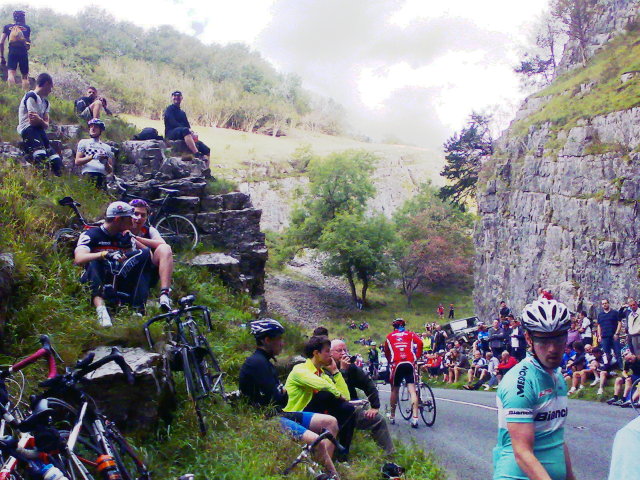
So tired, but so happy. Well worth it as a day out. Yesterday I went to the
Tour of Britain as it passed through Cheddar Gorge. It was a fairly social trip, riding along with two from Bristol on the way in (hope they got back OK one bike broke crossing the orchard at Sandford, but I showed them
Cheddar Cycle Store) and one from Milton on the way back.
When I got there, I rode up the Gorge until I
had to stop (or else fall off) and it was still packed with fans. It was a good half-hour before the race would pass by, but already almost every flattish piece of land by the road had either a spectator or a bicycle on it. I watched twitter for race news, posted an update @
mjray, then put the phone away as the green-fronted police bikes came through just ahead of the racers. I tried videoing the race, but it s only the second outing for the handlebarcam and I seem to have deleted the recording before hooking it up to the laptop. Thankfully, the itv4 coverage (repeated 13:00) is pretty good. (My back is on TV! Ahem.)
Now, today (Saturday) I will be mostly doing the work scheduled for Friday, but it was still worth it. Go along if you get the chance: Suffolk and Norfolk today, Westminster tomorrow. I suggested it to @enterprisehub s #coopsweekend because the
Rabobank team are doing well.

So, this story begins in January 2001, when I applied in the Debian New
Maintainer Process.
I wanted to maintain Geneweb, which I was using to publish my
genealogy research results. And I wanted to keep it up-to-date while
upstream was doing a quite fast development.
Moreover, I quickly noticed that Geneweb had big trouble in respecting
the way data is organized on a Debian system, and respect the FHS. How
to have weveral users able to publish their data on the same server
without compromizing the overall system security, etc.
Upstream development didn't really care about that. Daniel de
Rauglaudre is an excellent genealogist and developer but he was not
interested in making Geneweb clean "the Debian way". For instance, at
that time, it wasn't easy to setup a server, where genealogy databases
could be published without having to manually launch a daemon in user
mode at each reboot.
Arranging this was indeed my first contribution. I contributed a few
patches to make it easier to turn Geneweb into something
FHS-compliant...and I developed init scripts and an organization
allowing one to have shared databases after system reboots.
That was rapidly a great introduction to Debian maintainer scripts and
even security-related challenges. And all this....because I needed it.
Basically, in 2001, the geneweb package adopted the organization it still has in Debian
and Ubuntu, 10 years later:
- daemon optionnally launched at boot time, listening on a
configurable port
- daemon running with an unprivileged account
- local group of users allowed to "publish" their data by putting
files in /var/lib/geneweb (should now be moved to /srv, I guess)
- related maintenance of this with debconf (including keeping local
modifications made *out* of debconf, which is sometimes neglected by
maintainers)
While doing so, I was going through the New Maintainer Process. The
Debian developer who had signed my key was Sam Tardieu, of of those
longstanding "Freenix" dudes I was sometimes hanging around.
I don't remember who did write my advocacy.
Michael Mattice was my first Application Manager. Interestingly, here
are the three first questions he asked my as part of the Policy and
Procedures check :
-
Firstly, can you explain the key points of the Social Contract and DFSG?
-
Donald Knuth, author of TeX, insists that no-one has the right to
modify the source code of TeX, and that any changes must be made using "change files" (a sort of patch file). Furthermore, any
modification of TeX which produces something which fails the "trip test" (a regression test suite) may not be called TeX. So how come TeX (in the guise of tetex-*)
is in main?
-
What is Debian's (current) approach to non-free software? Why?
-
Debian was offered a Debian-specific license to package a certain
piece of software (I forget which). Would we put it in main?
Mike actually asked the questions on February 17th and I probably
answered immediately. Unfortunately it seems that I lost my answers.
Maybe they are in some archive somewhere. Would be interesting to see
how I ended giving an answer about the TeX exception.:-)
Immediately, Mike moved to the Tasks and Skills step and checked my geneweb
and lifelines packages (I already prepared a package for that other genealogy
software). From my records, he found a few lintian warnings, which I
probably made my best to fix, then later on, on March 12th, he
answered me that thigns were OK and he was marking the T&S step as
passed...handing things over to the NM database, asking me what
username I wanted on debian.org (obviously, you know what I answered
to this!).
Then nothing happened..:-)
I was not that impatient, but finally, around June 27th, I politely
mailed NM Frontdesk (I guess) to get news...and I got a very quick
answer by Martin Michlmayr. Martin was indeed worried about the
situation (he told me I was on his radar....fun as, many years later,
as many DDs, Martin probably went on mine because of pending localization work..:-))
Finally, Martin decided he was not entirely happy with the (maybe too
short) processing for P&P and proposed me (very politely, you know
how Martin is!) to do it again. So, some more questions...:-)
Here, I have the answers. Really fun ro read. Hang on, pure bubulle
style, very verbose!
- Q: Do you know (and can you explain) the difference between free
speech and free beer? Is Debian mainly about free speech or free
beer? My answer: Free speech means that one is able to say what one
wants, without any constraint. No one can tell you what you should
say. Mozilla is free software. A free beer, on the other hand, is a
beer that you don't be charged for. You may drink a free beer but maybe cannot be free to choose the beer you want to
drink...:-). Internet Explorer is a free beer. By chance, we
french-speaking people have two different words for this (libre and
gratuit). Some people have even adopted "libre software " for being
used instead of "free software".
- Q: The e-mail client pine is in non-free. Can you tell me the difference between main, contrib and non-free?
My answer (typos and horrible English not corrected...):
Packages in main are OK with Debian Free Software Guidelines (which defin
what is considered "free" by Debian) and all other requirements of the
Debian Policy. Packages in contrib are OK witgh DFSG bu may break some other constraints.
For instance, they may be wrappers for non-free packages (the old netscape
wrappers were good examples. The setiathome package is also another example
as it requires the download of the setiathome client which is not free,
because source code is not available). Very buggy packages may also be
placed into contrib instead of main (a QA requirement). Pakages in non-free are not conform to DFSG. Simply speaking they are not
"free software" as defined by DFSG. Some of them because their licence
prohibits redistribution, or redistribution of derived work (the french
package of Bernard Gaulle fot Latex could fall there).
- Q: Do you agree to uphold the Social Contract and the DFSG? Answer:
Yes I do (wow! I'm back 16 years down to my wedding day...:-))
(Doh, already kidding with fellow DDs)
- Q: If you are accepted as a Debian developer, you will get accounts on the Debian machines. Have you read the Debian Machine Usage
Policies (DMUP) at http://www.debian.org/devel/dmup ? Do you accept
them? My answer: I did read the DMUP and I fully accept them.
- Q: What are Non-Maintainer Uploads (NMUs) and when would you do an NMU?
Answer: This is an update for a package which is done by someone who is *not* the
official package maintainer (I guess I give the correct english definition :
I read the translated dev. reference....). First of all, a NMU should
be done after trying to get in contact with the
official package maintainer. I don't know if this is the awaited answer, but
this point looks important to me. This is the only way for verifying that
(s)he is not working on the same problem. NMU's are the most welcome during freeze phases when they correct bugs rated
"severe" of higher. They are also welcome when they come from Debian
Security Manager(s) for correcting security-related bugs. Another NMU
source are those which are needed for ports to work. As a recent, and probably not very experienced package manager, I would
probably be very prident with NMU's anyway...:-)
- Q: Tell me 3 different methods to close a bug in the BTS. Answer:
Well, If I have properly understood Dev. Reference, there are two
recommended methods and a third which is discouraged :
- properly use the debian/changelog file (by adding "Closes: Bug#xxxxx"
statements in it). The bug will automagically be closed by the archive
maintenance software
- by mail by sending the .changes file to xxxxx-done@bugs.debian.org,
xxxxx being the bug number
- by sending a "close" command to control@bugs.debian.org
The latter should never be used, says Dev. Reference. I must admit that I
don't know why it is still mentioned. There is certainly a good reason.
I'm not aware of another method...
- Q: What would you do if a bug was reported against your package and you are not able to fix it yourself?
Answer: First, I would double check with upstream author(s) if this cannot be fixed
by him/her/them.... Then, I would probably ask for help and/or advice in debian-qa if the bug is
critical, grave or serious. If it is normal, I would ask on debian-devel or
maybe think more about possible solutions.... If the bug still cannot be fixed and is "severe" or higher, I would either
consider orphaning it (not being able to fix it may mean that I do not have
the skills for maintaining it properly) or having it adopted by someone
else. I don't think there is a unique answer there. The key point for
me is certainly "ask for help in debian-qa". (OK, not the best
answer ever...)
- Q: You've just heard about this great program and would like to package
> it, what would you do? Answer:
First, check on the WNPP page. The purpose here is avoiding having two
people working on the same package. Then, assuming no on,e works on it, open a bug against wnpp speudo-package
with a copy to debian-devel. The "bug" should include a short description of
the package and what I intend to do for packaging. The URL for downloading
sources for the program should be given. The subject of the bug report is
normalized. The bug report should be of the "wishlist" class. When the new package is ready and uploaded for the first time, it should
include the appropriate statement for closing the wnpp bug.
- Q: Do you know what 'lintian' is? Why is it useful? Answer: It is a set of tools for making automatic checks of packages. It may detect
some bugs, common errors, Debian Policy violations and so on. This is a very
useful tools for polishing packages. For instance, in my "geneweb" unofficial package, the last remaining lintian
report is about the creation of a /var/geneweb directory which violates
Debian Policy.
- Q: What does version 3.4-2.1 mean? What Debian control file would you
put this in? (Hint: NMU). Answer:
This is the Debian package of version 3.4 of program "foo". The current
package version in the distribution was -2 and someone made a NMU of this
package. This would be put in debian/changelog
- Q: You have a package in contrib, why would it have to go there? What
could you do (in theory at least) to get it into main? Answer:
The package in consistent with DFSG but other constraints are not respected.
The most probable reason is being dependent of "non-free" packages (there
may be other reasons but none comes to my mind at this time....). In that
case, I should try to make it independent of these packages. For instance,
trying to replace a "Depends: netscape-base" line by a "Depends:
www-browser" line...if it may be done, of course!
- Q: If you had a file in your package which usualy gets changed by a
user for local settings, how doyou make sure your next version of the
package doesn't overwrite it? Answer:
By putting its name into the debian/conffiles line. By the way, I guess
you're meaning "changed by a local system administrator for local settings"
here, don't you? (hey, answering a question with another one, good
trick, man...)
- Q: What would you do if you wanted to retire from the project and let other developers maintainer your packages?
Answer: The correct term is "orphan" the package.
Make a bug report against wnpp (with a normalised subject starting
with O, see Dev. Ref). The bug severity is "normal". If this is an important package
for the distribution, the bug should be of "important" severity and the bug
report should have a subject beginning with RFA (Request For Azdoption). In
that case, an announce in debian-devel is also asked. In both cases, a new package should be uploaded with Debian QA Group as
maintainer.
What a bunch of questions..:-). Reading my answers ten years after, I
see that some answers are somehow naive but, after all, they're not so
bad. I really remember spending hours in writing them (my English was
somehow more shaky at that time)
The last question was: "Please tell me about about yourself and what
you intend to do for Debian".
Here, Martin opened a big can of worms..:-)
So, you'll learn about this in the next episode..:-)

There was another question recently on StackOverflow that I had meant to
discuss in a follow-up post here. User deltanovember asked
about slow recursive functions
and used the very classic
Fibonacci number
as an example. To recap, Fibonacci number are defined with two initial
values F(0) = 0 and F(1) = 1; thereafter the Fibonacci number F(n) is defined
as the sum of the two preceding numbers: F(n) = F(n-2) + F(n-1).
This leads to very straightforward implementations using recursion:
## R implementation of recursive Fibonacci sequence
fibR <- function(n)
    if (n == 0) return(0)
    if (n == 1) return(1)
    return (fibR(n - 1) + fibR(n - 2))
Unfortunately, this elegant implementation which remain close to the abtract
formulation of the recurrence algorithm performs
very poorly in R as
there is noticeable overhead in function calls which becomes dominant in a
recursion. This lead to the original question on StackOverflow, and the
accepted answer uses a trick presented by Pat Burns in his lovely
R Inferno:
rewrite the solution using a computer science trick called
memoization:
fibonacci <- local(
    memo <- c(1, 1, rep(NA, 100))
    f <- function(x)
        if(x == 0) return(0)
        if(x < 0) return(NA)
        if(x > length(memo))
        stop("'x' too big for implementation")
        if(!is.na(memo[x])) return(memo[x])
        ans <- f(x-2) + f(x-1)
        memo[x] <<- ans
        ans

 )
That is a fair answer, and even more was suggested with a link to a terrific
analysis calling the Fibonacci recurrence
the worst algorithm in the world.
That is also fair, but all the basic research into better algorithms
exploiting some structure of the problem to advance performance (and of
course understanding) is overlooking one crucial part:
algorithm analysis
is essentially independent of the language. So whatever improvements we
obtain by thinking really hard about a problem are then
available for other implementations too.
So with a tip of the hat to the old
Larry Wall quote about
Lazyness, Impatience and Hubris, I would like to suggest what I consider a
much simpler route to much better performance: recode it in C++ using
both
Rcpp (for the R/C++ integration) and
inline for the on-the-fly compilation, linking and loading of C++ code into R.
## inline to compile, load and link the C++ code
require(inline)
## we need a pure C/C++ function as the generated function
## will have a random identifier at the C++ level preventing
## us from direct recursive calls
incltxt <- '
  int fibonacci(const int x)
     if (x == 0) return(0);
     if (x == 1) return(1);
     return (fibonacci(x - 1)) + fibonacci(x - 2);
   '
## now use the snippet above as well as one argument conversion
## in as well as out to provide Fibonacci numbers via C++
fibRcpp <- cxxfunction(signature(xs="int"),
                       plugin="Rcpp",
                       incl=incltxt,
                       body
                       ='
   int x = Rcpp::as<int>(xs);
   return Rcpp::wrap( fibonacci(x) );
')
This single R function call
cxxfunction() takes the code
embedded in the arguments to the
body variable (for the core
function) and the
incltxt variable for the helper function we
need to call. This helper function is needed for the recursion as
cxxfunction() will use an randomized internal identifier for the
function called from R preventing us from calling this (unknown) indentifier.
But the rest of the algorithm is simple, and as beautiful as the initial
recurrence. Three lines, three statements, and three cases for F(0), F(1) and
the general case F(n) solved by recursive calls. This also illustrates how
easy it is to get an
integer from R to C++ and back: the
as and
wrap simply
do the right thing
converting to and from the
SEXP types used internally by the C
API of R.
A performance comparison of the basic R version
fibR, its
byte-compiled variant
fibRC and
and the C++ version
fibRcpp shown above is very compelling.
We have added a file
fibonacci.r to the large and still growing
set of examples included with
Rcpp, and we can just
execute that script with
Rscript or (as here)
r
from the
littler package:
edd@max:~/svn/rcpp/pkg/Rcpp/inst/examples/Misc$ r fibonacci.r
Loading required package: inline
Loading required package: methods
Loading required package: compiler
        test replications elapsed relative user.self sys.self
3 fibRcpp(N)            1   0.092   1.0000      0.09     0.00
2   fibRC(N)            1  61.480 668.2609     61.47     0.00
1    fibR(N)            1  61.877 672.5761     61.83     0.02
edd@max:~/svn/rcpp/pkg/Rcpp/inst/examples/Misc$
So the recursion for the original argument of N=35 takes just over a
minute at about 61.5 and 61.9 seconds, respectively, for the R version and
its byte-compiled variant (as per the column titled
elapsed). So
byte-compilation essentially offers no help for the bottleneck of slow function calls.
The C++ versions relying on Rcpp which created in a few lines of code and a
single call to
cxxfunction however takes just 92
milliseconds---or a relative gain of well over six-hundred times.
That provides another nice demonstration of what
Rcpp can do. Improved
algorithms for well-understood problems are surely one way to accelerate solutions.
But there are (many ?) times when we do not have the luxury of being able to
think through to a new and improved approach. Or worse, such an approach may
even introduce new errors or inaccurracies if we get it wrong on a first try.
With Rcpp, we are able to the express the problem as written in its original statement: a simple
recursion. The gain relative to a slow R implementation is noteworthy---and
could of course be improved further if we really needed to by relying on
better algorithms like memoization. But for day to day tasks, I gladly take
speedups of (up to) a few hundred times thanks to
Rcpp without having to do
hard
algorithmic work.
Before closing, a quick reminder that I will be giving two classes on
Rcpp in a few weeks. These will be in New York on September 24, and San Franciso on October 8, see
this blog post as well as
this page at Revolution Analytics (who are a
co-organiser of the classes) for details and registration information.
 * Life: As usual.
* Debian: Lots of stuffs going on. We ve yet another MiniDebConf edition, this time at


 I just download this tool


 Is there a syscall to ask the system whether a file is sparse in a
particular region? I.e., if I say dd if=/dev/zero of=./foo seek=10
count=10, then I should get a "yes" for the first half of the file,
but a "no" for the second half.
Case in point: I need to write a test for the newly-implemented


