Search Results: "xam"

6 February 2016

Andrew Shadura: Community time at Collabora

I haven t yet blogged about this (as normally I don t blog often), but I joined Collabora in June last year. Since then, I had an opportunity to work with OpenEmbedded again, write a kernel patch, learn lots of things about systemd (in particular, how to stop worrying about it taking over the world and so on), and do lots of other things. As one would expect when working for a free software consultancy, our customers do understand the value of the community and contributing back to it, and so does the customer for the project I m working on. In fact, our customer insists we keep the number of locally applied patches to, for example, Linux kernel, to minimum, submitting as much as possible upstream. However, apart from the upstreaming work which may be done for the customer, Collabora encourages us, the engineers, to spend up to two hours weekly for upstreaming on top of what customers need, and up to five days yearly as paid Community days. These community days may be spent working on the code or doing volunteering at free software events or even speaking at conferences. Even though on this project I have already been paid for contributing to the free software project which I maintained in my free time previously (ifupdown), paid community time is a great opportunity to contribute to the projects I m interested in, and if the projects I m interested in coincide with the projects I m working with, I effectively can spend even more time on them. A bit unfortunately for me, I haven t spent enough time last year to plan my community days, so I used most of them in the last weeks of the calendar year, and I used them (and some of my upstreaming hours) on something that benefitted both free software community and Collabora. I m talking about SparkleShare, a cross-platform Git-based file synchronisation solution written in C#. SparkleShare provides an easy to use interface for Git, or, actually, it makes it possible to not use any Git interface at all, as it monitors the working directory using inotify and commits stuff right after it changes. It automatically handles conflicts even for binary files, even though I have to admit its handling could still be improved. At Collabora, we use SparkleShare to store all sorts of internal documents, and it s being used by users not familiar with command line interfaces too. Unfortunately, the version we recently had in Debian had a couple of very annoying bugs, making it a great pain to use it: it would not notice edits in local files, or not notice new commits being pushed to the server, and that led to individual users edits being lost sometimes. Not cool, especially when the document has to be sent to the customer in a couple of minutes. The new versions, 1.4 (and recently released 1.5) was reported as being much better and also fixing some crashes, but it also used GTK+ 3 and some libraries not yet packaged for Debian. Thanh Tung Nguyen packaged these packages (and a newer SparkleShare) for Ubuntu and published them in his PPA, but they required some work to be fit for Debian. I have never touched Mono packages before in my life, so I had to learn a lot. Some time was spent talking to upstream about fixing their copyright statements (they had none in the code, and only one author was mentioned in configure.ac, and nowhere else in the source), a bit more time went into adjusting and updating the patches to the current source code version. Then, of course, waiting the packages to go through NEW. Fixing parallel build issues, waiting for buildds to all build dependencies for at least one architecture But then, finally, on 19th of January I had the updated SparkleShare in Debian. As you may have already guessed, this blog post has been sponsored by Collabora, the first of my employers to encourage require me to work on free software in my paid time :)

4 February 2016

Petter Reinholdtsen: Using appstream in Debian to locate packages with firmware and mime type support

The appstream system is taking shape in Debian, and one provided feature is a very convenient way to tell you which package to install to make a given firmware file available when the kernel is looking for it. This can be done using apt-file too, but that is for someone else to blog about. :) Here is a small recipe to find the package with a given firmware file, in this example I am looking for ctfw-3.2.3.0.bin, randomly picked from the set of firmware announced using appstream in Debian unstable. In general you would be looking for the firmware requested by the kernel during kernel module loading. To find the package providing the example file, do like this:
% apt install appstream
[...]
% apt update
[...]
% appstreamcli what-provides firmware:runtime ctfw-3.2.3.0.bin   \
  awk '/Package:/  print $2 '
firmware-qlogic
%
See the appstream wiki page to learn how to embed the package metadata in a way appstream can use. This same approach can be used to find any package supporting a given MIME type. This is very useful when you get a file you do not know how to handle. First find the mime type using file --mime-type, and next look up the package providing support for it. Lets say you got an SVG file. Its MIME type is image/svg+xml, and you can find all packages handling this type like this:
% apt install appstream
[...]
% apt update
[...]
% appstreamcli what-provides mimetype image/svg+xml   \
  awk '/Package:/  print $2 '
bkchem
phototonic
inkscape
shutter
tetzle
geeqie
xia
pinta
gthumb
karbon
comix
mirage
viewnior
postr
ristretto
kolourpaint4
eog
eom
gimagereader
midori
%
I believe the MIME types are fetched from the desktop file for packages providing appstream metadata.

2 February 2016

Sune Vuorela: Compilers and error messages

So. I typo ed up some template code the other day. And once again I learned the importance of using several c++ compilers. Here is a very reduced version of my code:
#include <utility>
template <typename T> auto foo(const T& t) -> decltype(x.first)

return t.first;

int main()

foo(std::make_pair(1,2));
return 0;
And let s start with the compiler I was testing with first. MSVC (2013 and 2015)
main.cpp(8): error C2672: foo : no matching overloaded function found
main.cpp(8): error C2893: Failed to specialize function template unknown-type foo(const T &)
It is not completely clear from that error message what s going on, so let s try some other compilers: GCC (4.9-5.3)
2 : error: x was not declared in this scope
template <typename T> auto foo(const T& t) -> decltype(x.first)
That s pretty clear. More compilers: Clang (3.3-3.7)
2 : error: use of undeclared identifier x
template <typename T> auto foo(const T& t) -> decltype(x.first)
ICC (13)
example.cpp(2): error: identifier x is undefined
template <typename T> auto foo(const T& t) -> decltype(x.first)
(Yes. I mistyped the variable name used for decltype. Replacing the x with t makes it build). Thanks to http://gcc.godbolt.org/ and http://webcompiler.cloudapp.net/ for testing with various compilers.

Dirk Eddelbuettel: Like peanut butter and jelly: x13binary and seasonal

This post was written by Dirk Eddelbuettel and Christoph Sax and will be posted on both author's respective blogs. The seasonal package by Christoph Sax brings a very featureful and expressive interface for working with seasonal data to the R environment. It uses the standard tool of the trade: X-13ARIMA-SEATS. This powerful program is provided by the statisticians of the US Census Bureau based on their earlier work (named X-11 and X-12-ARIMA) as well as the TRAMO/SEATS program by the Bank of Spain. X-13ARIMA-SEATS is probably the best known tool for de-seasonalization of timeseries, and used by statistical offices around the world. Sadly, it also has a steep learning curve. One interacts with a basic command-line tool which users have to download, install and properly reference (by environment variables or related means). Each model specification has to be prepared in a special 'spec' file that uses its own, cumbersome syntax. As seasonal provides all the required functionality to use X-13ARIMA-SEATS from R --- see the very nice seasonal demo site --- it still required the user to manually deal with the X-13ARIMA-SEATS installation. So we decided to do something about this. A pair of GitHub repositories provide both the underlying binary in a per-operating system form (see x13prebuilt) as well as a ready-to- use R package (see x13binary) which uses the former to provide binaries for R. And the latter is now on CRAN as package x13binary ready to be used on Windows, OS-X or Linux. And the seasonal package (in version 1.2.0 -- now on CRAN -- or later) automatically makes use of it. Installing seasaonal and x13binary in R is now as easy as:

install.packages("seasonal")
which opens the door for effortless deployment of powerful deasonalization. By default, the principal function of the package employs a number of automated techniques that work well in most circumstances. For example, the following code produces a seasonal adjustment of the latest data of US retail sales (by the Census Bureau) downloaded from Quandl:
library(seasonal) 
library(Quandl)   ## not needed for seasonal but has some niceties for Quandl data
rs <- Quandl(code="USCENSUS/BI_MARTS_44000_SM", type="ts")/1e3
m1 <- seas(rs)
plot(m1, main = "Retail Trade: U.S. Total Sales", ylab = "USD (in Billions)")
This tests for log-transformation, performs an automated ARIMA model search, applies outlier detection, tests and adjusts for trading day and easter effects, and invokes the SEATS method to perform seasonal adjustment. And this is how the adjusted series looks like:
Of course, you can access all available options of X-13ARIMA-SEATS as well. Here is an example where we adjust the latest data for Chinese exports (as tallied by the US FED), taking into account the different effects of Chinese New Year before, during and after the holiday:
xp <- Quandl(code="FRED/VALEXPCNM052N", type="ts")/1e9
m2 <- seas(window(xp, start = 2000),
          xreg = cbind(genhol(cny, start = -7, end = -1, center = "calendar"), 
                       genhol(cny, start = 0, end = 7, center = "calendar"), 
                       genhol(cny, start = 8, end = 21, center = "calendar")
          ),
          regression.aictest = c("td", "user"),
          regression.usertype = "holiday")
plot(m2, main = "Goods, Value of Exports for China", ylab = "USD (in Billions)")
which generates the following chart demonstrating a recent flattening in export activity measured in USD.
We hope this simple examples illustrates both how powerful a tool X-13ARIMA-SEATS is, but also just how easy it is to use X-13ARIMA-SEATS from R now that we provide the x13binary package automating its installation.

This post by Dirk Eddelbuettel originated on his Thinking inside the box blog. Please report excessive re-aggregation in third-party for-profit settings.

Russell Coker: Compatibility and a Linux Community Server

Compatibility/interoperability is a good thing. It s generally good for systems on the Internet to be capable of communicating with as many systems as possible. Unfortunately it s not always possible as new features sometimes break compatibility with older systems. Sometimes you have systems that are simply broken, for example all the systems with firewalls that block ICMP so that connections hang when the packet size gets too big. Sometimes to take advantage of new features you have to potentially trigger issues with broken systems. I recently added support for IPv6 to the Linux Users of Victoria server. I think that adding IPv6 support is a good thing due to the lack of IPv4 addresses even though there are hardly any systems that are unable to access IPv4. One of the benefits of this for club members is that it s a platform they can use for testing IPv6 connectivity with a friendly sysadmin to help them diagnose problems. I recently notified a member by email that the callback that their mail server used as an anti-spam measure didn t work with IPv6 and was causing mail to be incorrectly rejected. It s obviously a benefit for that user to have the problem with a small local server than with something like Gmail. In spite of the fact that at least one user had problems and others potentially had problems I think it s clear that adding IPv6 support was the correct thing to do. SSL Issues Ben wrote a good post about SSL security [1] which links to a test suite for SSL servers [2]. I tested the LUV web site and got A-. This blog post describes how to setup PFS (Perfect Forward Secrecy) [3], after following it s advice I got a score of B! From the comments on this blog post about RC4 etc [4] it seems that the only way to have PFS and not be vulnerable to other issues is to require TLS 1.2. So the issue is what systems can t use TLS 1.2. TLS 1.2 Support in Browsers This Wikipedia page has information on SSL support in various web browsers [5]. If we require TLS 1.2 we break support of the following browsers: The default Android browser before Android 5.0. Admittedly that browser always sucked badly and probably has lots of other security issues and there are alternate browsers. One problem is that many people who install better browsers on Android devices (such as Chrome) will still have their OS configured to use the default browser for URLs opened by other programs (EG email and IM). Chrome versions before 30 didn t support it. But version 30 was released in 2013 and Google does a good job of forcing upgrades. A Debian/Wheezy system I run is now displaying warnings from the google-chrome package saying that Wheezy is too old and won t be supported for long! Firefox before version 27 didn t support it (the Wikipedia page is unclear about versions 27-31). 27 was released in 2014. Debian/Wheezy has version 38, Debian/Squeeze has Iceweasel 3.5.16 which doesn t support it. I think it is reasonable to assume that anyone who s still using Squeeze is using it for a server given it s age and the fact that LTS is based on packages related to being a server. IE version 11 supports it and runs on Windows 7+ (all supported versions of Windows). IE 10 doesn t support it and runs on Windows 7 and Windows 8. Are the free upgrades from Windows 7 to Windows 10 going to solve this problem? Do we want to support Windows 7 systems that haven t been upgraded to the latest IE? Do we want to support versions of Windows that MS doesn t support? Windows mobile doesn t have enough users to care about. Opera supports it from version 17. This is noteworthy because Opera used to be good for devices running older versions of Android that aren t supported by Chrome. Safari supported it from iOS version 5, I think that s a solved problem given the way Apple makes it easy for users to upgrade and strongly encourages them to do so. Log Analysis For many servers the correct thing to do before even discussing the issue is to look at the logs and see how many people use the various browsers. One problem with that approach on a Linux community site is that the people who visit the site most often will be more likely to use recent Linux browsers but older Windows systems will be more common among people visiting the site for the first time. Another issue is that there isn t an easy way of determining who is a serious user, unlike for example a shopping site where one could search for log entries about sales. I did a quick search of the Apache logs and found many entries about browsers that purport to be IE6 and other versions of IE before 11. But most of those log entries were from other countries, while some people from other countries visit the club web site it s not very common. Most access from outside Australia would be from bots, and the bots probably fake their user agent. Should We Do It? Is breaking support for Debian/Squeeze, the built in Android browser on Android <5.0, and Windows 7 and 8 systems that haven t upgraded IE as a web browsing platform a reasonable trade-off for implementing the best SSL security features? For the LUV server as a stand-alone issue the answer would be no as the only really secret data there is accessed via ssh. For a general web infrastructure issue it seems that the answer might be yes. I think that it benefits the community to allow members to test against server configurations that will become more popular in the future. After implementing changes in the server I can advise club members (and general community members) about how to configure their servers for similar results. Does this outweigh the problems caused by some potential users of ancient systems? I m blogging about this because I think that the issues of configuration of community servers have a greater scope than my local LUG. I welcome comments about these issues, as well as about the SSL compatibility issues.

30 January 2016

Simon McVittie: GNOME Developer Experience hackfest: xdg-app + Debian

Over the last few days I've been at the GNOME Developer Experience hackfest in Brussels, looking into xdg-app and how best to use it in Debian and Debian derivatives. xdg-app is basically a way to run "non-core" software on Linux distributions, analogous to apps on Android and iOS. It doesn't replace distributions like Debian or packaging systems, but it adds a layer above them. It's mostly aimed towards third-party apps obtained from somewhere that isn't your distribution vendor, aiming to address a few long-standing problems in that space: To address the first point, each application uses a specified "runtime", which is available as /usr inside its sandbox. This can be used to run application bundles with multiple, potentially incompatible sets of dependencies within the same desktop environment. A runtime can be updated within its branch - for instance, if an application uses the "GNOME 3.18" runtime (consisting of a basic Linux system, the GNOME 3.18 libraries, other related libraries like Mesa, and their recursive dependencies like libjpeg), it can expect to see minor-version updates from GNOME 3.18.x (including any security updates that might be necessary for the bundled libraries), but not a jump to GNOME 3.20. To address the second issue, the plan is for application bundles to be available as a single file, containing metadata (such as the runtime to use), the app itself, and any dependencies that are not available in the runtime (which the app vendor is responsible for updating if necessary). However, the primary way to distribute and upgrade runtimes and applications is to package them as OSTree repositories, which provide a git-like content-addressed filesystem, with efficient updates using binary deltas. The resulting files are hard-linked into place. To address the last point, application bundles run partially isolated from the wider system, using containerization techniques such as namespaces to prevent direct access to system resources. Resources from outside the sandbox can be accessed via "portal" services, which are responsible for access control; for example, the Documents portal (the only one, so far) displays an "Open" dialog outside the sandbox, then allows the application to access only the selected file. xdg-app for Debian One thing I've been doing at this hackfest is improving the existing Debian/Ubuntu packaging for xdg-app (and its dependencies ostree and libgsystem), aiming to get it into a state where I can upload it to Debian experimental. Because xdg-app aims to be a general freedesktop project, I'm currently intending to make it part of the "Utopia" packaging team alongside projects like D-Bus and polkit, but I'm open to suggestions if people want to co-maintain it elsewhere. In the process of updating xdg-app, I sent various patches to Alex, mostly fixing build and test issues, which are in the new 0.4.8 release. I'd appreciate co-maintainers and further testing for this stuff, particularly ostree: ostree is primarily a whole-OS deployment technology, which isn't a use-case that I've tested, and in particular ostree-grub2 probably doesn't work yet. Source code: Binaries (no trust path, so only use these if you have a test VM): The "Hello, World" of xdg-apps Another thing I set out to do here was to make a runtime and an app out of Debian packages. Most of the test applications in and around GNOME use the "freedesktop" or "GNOME" runtimes, which consist of a Yocto base system and lots of RPMs, are rebuilt from first principles on-demand, and are extensive and capable enough that they make it somewhat non-obvious what's in an app or a runtime. So, here's a step-by-step route through xdg-app, first using typical GNOME instructions, but then using the simplest GUI app I could find - xvt, a small xterm clone. I'm using a Debian testing (stretch) x86_64 virtual machine for all this. xdg-app currently requires systemd-logind to put users and apps in cgroups, either with systemd as pid 1 (systemd-sysv) or systemd-shim and cgmanager; I used the default systemd-sysv. In principle it could work with plain cgmanager, but nobody has contributed that support yet. Demonstrating an existing xdg-app Debian's kernel is currently patched to be able to allow unprivileged users to create user namespaces, but make it runtime-configurable, because there have been various security issues in that feature, making it a security risk for a typical machine (and particularly a server). Hopefully unprivileged user namespaces will soon be secure enough that we can enable them by default, but for now, we have to do one of three things to let xdg-app use them: First, we'll need a runtime. The standard xdg-app tutorial would tell you to download the "GNOME Platform" version 3.18. To do that, you'd add a remote, which is a bit like a git remote, and a bit like an apt repository:
$ wget http://sdk.gnome.org/keys/gnome-sdk.gpg
$ xdg-app remote-add --user --gpg-import=gnome-sdk.gpg gnome \
    http://sdk.gnome.org/repo/
(I'm ignoring considerations like trust paths and security here, for brevity; in real life, you'd want to obtain the signing key via https and/or have a trust path to it, just like you would for a secure-apt signing key.) You can list what's available in a remote:
$ xdg-app remote-ls --user gnome
...
org.freedesktop.Platform
...
org.freedesktop.Platform.Locale.cy
...
org.freedesktop.Sdk
...
org.gnome.Platform
...
The Platform runtimes are what we want here: they are collections of runtime libraries with which you can run an application. The Sdk runtimes add development tools, header files, etc. to be able to compile apps that will be compatible with the Platform. For now, all we want is the GNOME 3.18 platform:
$ xdg-app install --user gnome org.gnome.Platform 3.18
Next, we can install an app that uses it, from Alex Larsson's nightly builds of a subset of GNOME. The server they're on doesn't have a great deal of bandwidth, so be nice :-)
$ wget http://209.132.179.2/keys/nightly.gpg
$ xdg-app remote-add --user --gpg-import=nightly.gpg nightly \
    http://209.132.179.2/repo/
$ xdg-app install --user nightly org.mypaint.MypaintDevel
We now have one app, and the runtime it needs:
$ xdg-app list
org.mypaint.MypaintDevel
$ xdg-app run org.mypaint.MypaintDevel
[you see a GUI window]
Digression: what's in a runtime? Behind the scenes, xdg-app runtimes and apps are both OSTree trees. This means the ostree tool, from the package of the same name, can be used to inspect them.
$ sudo apt install ostree
$ ostree refs --repo ~/.local/share/xdg-app/repo
gnome:runtime/org.gnome.Platform/x86_64/3.18
nightly:app/org.mypaint.MypaintDevel/x86_64/master
A "ref" has roughly the same meaning as in git: something like a branch or a tag. ostree can list the directory tree that it represents:
$ ostree ls --repo ~/.local/share/xdg-app/repo \
    runtime/org.gnome.Platform/x86_64/3.18
d00755 0 0      0 /
-00644 0 0    493 /metadata
d00755 0 0      0 /files
$ ostree ls --repo ~/.local/share/xdg-app/repo \
    runtime/org.gnome.Platform/x86_64/3.18 /files
d00755 0 0      0 /files
l00777 0 0      0 /files/local -> ../var/usrlocal
l00777 0 0      0 /files/sbin -> bin
d00755 0 0      0 /files/bin
d00755 0 0      0 /files/cache
d00755 0 0      0 /files/etc
d00755 0 0      0 /files/games
d00755 0 0      0 /files/include
d00755 0 0      0 /files/lib
d00755 0 0      0 /files/lib64
d00755 0 0      0 /files/libexec
d00755 0 0      0 /files/share
d00755 0 0      0 /files/src
You can see that /files in a runtime is basically a copy of /usr. This is not coincidental: the runtime's /files gets mounted at /usr inside the xdg-app container. There is also some metadata, which is in the ini-like syntax seen in .desktop files:
$ ostree cat --repo ~/.local/share/xdg-app/repo \
    runtime/org.gnome.Platform/x86_64/3.18 /metadata
[Runtime]
name=org.gnome.Platform/x86_64/3.16
runtime=org.gnome.Platform/x86_64/3.16
sdk=org.gnome.Sdk/x86_64/3.16
[Extension org.freedesktop.Platform.GL]
version=1.2
directory=lib/GL
[Extension org.freedesktop.Platform.Timezones]
version=1.2
directory=share/zoneinfo
[Extension org.gnome.Platform.Locale]
directory=share/runtime/locale
subdirectories=true
[Environment]
GI_TYPELIB_PATH=/app/lib/girepository-1.0
GST_PLUGIN_PATH=/app/lib/gstreamer-1.0
LD_LIBRARY_PATH=/app/lib:/usr/lib/GL
Looking at an app, the situation is fairly similar:
$ ostree ls --repo ~/.local/share/xdg-app/repo \
    app/org.mypaint.MypaintDevel/x86_64/master
d00755 0 0      0 /
-00644 0 0    258 /metadata
d00755 0 0      0 /export
d00755 0 0      0 /files
This time, /files maps to what will become /app for the application, which was compiled with --prefix=/app:
$ ostree ls --repo ~/.local/share/xdg-app/repo \
    app/org.mypaint.MypaintDevel/x86_64/master /files
d00755 0 0      0 /files
-00644 0 0   4599 /files/manifest.json
d00755 0 0      0 /files/bin
d00755 0 0      0 /files/lib
d00755 0 0      0 /files/share
There is also a /export directory, which is made visible to the host system so that the contained app can appear as a "first-class citizen" in menus:
$ ostree ls --repo ~/.local/share/xdg-app/repo \
    app/org.mypaint.MypaintDevel/x86_64/master /export
d00755 0 0      0 /export
d00755 0 0      0 /export/share
user@debian:~$ ostree ls --repo ~/.local/share/xdg-app/repo \
    app/org.mypaint.MypaintDevel/x86_64/master /export/share
d00755 0 0      0 /export/share
d00755 0 0      0 /export/share/app-info
d00755 0 0      0 /export/share/applications
d00755 0 0      0 /export/share/icons
user@debian:~$ ostree ls --repo ~/.local/share/xdg-app/repo \
    app/org.mypaint.MypaintDevel/x86_64/master /export/share/applications
d00755 0 0      0 /export/share/applications
-00644 0 0    715 /export/share/applications/org.mypaint.MypaintDevel.desktop
$ ostree cat --repo ~/.local/share/xdg-app/repo \
    app/org.mypaint.MypaintDevel/x86_64/master \
    /export/share/applications/org.mypaint.MypaintDevel.desktop
[Desktop Entry]
Version=1.0
Name=(Nightly) MyPaint
TryExec=mypaint
Exec=mypaint %f
Comment=Painting program for digital artists
...
Comment[zh_HK]= 
GenericName=Raster Graphics Editor
GenericName[fr]= diteur d'Image Matricielle
MimeType=image/openraster;image/png;image/jpeg;
Type=Application
Icon=org.mypaint.MypaintDevel
StartupNotify=true
Categories=Graphics;GTK;2DGraphics;RasterGraphics;
Terminal=false
Again, there's some metadata:
$ ostree cat --repo ~/.local/share/xdg-app/repo \
    app/org.mypaint.MypaintDevel/x86_64/master /metadata
[Application]
name=org.mypaint.MypaintDevel
runtime=org.gnome.Platform/x86_64/3.18
sdk=org.gnome.Sdk/x86_64/3.18
command=mypaint
[Context]
shared=ipc;
sockets=x11;pulseaudio;
filesystems=host;
[Extension org.mypaint.MypaintDevel.Debug]
directory=lib/debug
Building a runtime, probably the wrong way The way in which the reference/demo runtimes and containers are generated is... involved. As far as I can tell, there's a base OS built using Yocto, and the actual GNOME bits come from RPMs. However, we don't need to go that far to get a working runtime. In preparing this runtime I'm probably completely ignoring some best-practices and tools - but it works, so it's good enough. First we'll need a repository:
$ sudo install -d -o$(id -nu) /srv/xdg-apps
$ ostree init --repo /srv/xdg-apps
I'm just keeping this local for this demonstration, but you could rsync it to a web server's exported directory or something - a lot like a git repository, it's just a collection of files. We want everything in /usr because that's what xdg-app expects, hence usrmerge:
$ sudo mount -t tmpfs -o mode=0755 tmpfs /mnt
$ sudo debootstrap --arch=amd64 --include=libx11-6,usrmerge \
    --variant=minbase stretch /mnt http://192.168.122.1:3142/debian
$ sudo mkdir /mnt/runtime
$ sudo mv /mnt/usr /mnt/runtime/files
This obviously has a lot of stuff in it that we don't need - most obviously init, apt and dpkg - but it's Good Enough . We will also need some metadata. This is sufficient:
$ sudo sh -c 'cat > /mnt/runtime/metadata'
[Runtime]
name=org.debian.Debootstrap/x86_64/8.20160130
runtime=org.debian.Debootstrap/x86_64/8.20160130
That's a runtime. We can commit it to ostree, and generate xdg-app metadata:
$ ostree commit --repo /srv/xdg-apps \
    --branch runtime/org.debian.Debootstrap/x86_64/8.20160130 \
    /mnt/runtime
$ fakeroot ostree commit --repo /srv/xdg-apps \
    --branch runtime/org.debian.Debootstrap/x86_64/8.20160130
$ fakeroot xdg-app build-update-repo /srv/xdg-apps
(I'm not sure why ostree and xdg-app report "Operation not permitted" when we aren't root or fakeroot - feedback welcome.) build-update-repo would presumably also be the right place to GPG-sign your repository, if you were doing that. We can add that as another xdg-app remote:
$ xdg-app remote-add --user --no-gpg-verify local file:///srv/xdg-apps
$ xdg-app remote-ls --user local
org.debian.Debootstrap
Building an app, probably the wrong way The right way to build an app is to build a "SDK" runtime - similar to that platform runtime, but with development files and tools - and recompile the app and any missing libraries with ./configure --prefix=/app && make && make install. I'm not going to do that, because simplicity is nice, and I'm reasonably sure xvt doesn't actually hard-code /usr into the binary:
$ install -d xvt-app/files/bin
$ sudo apt-get --download-only install xvt
$ dpkg-deb --fsys-tarfile /var/cache/apt/archives/xvt_2.1-20.1_amd64.deb \
      tar -xvf - ./usr/bin/xvt
./usr/
./usr/bin/
./usr/bin/xvt
...
$ mv usr xvt-app/files
Again, we'll need metadata, and it's much simpler than the more production-quality GNOME nightly builds:
$ cat > xvt-app/metadata
[Application]
name=org.debian.packages.xvt
runtime=org.debian.Debootstrap/x86_64/8.20160130
command=xvt
[Context]
sockets=x11;
$ fakeroot ostree commit --repo /srv/xdg-apps \
    --branch app/org.debian.packages.xvt/x86_64/2.1-20.1 xvt-app
$ fakeroot xdg-app build-update-repo /srv/xdg-apps
Updating appstream branch
No appstream data for runtime/org.debian.Debootstrap/x86_64/8.20160130
No appstream data for app/org.debian.packages.xvt/x86_64/2.1-20.1
Updating summary
$ xdg-app remote-ls --user local
org.debian.Debootstrap
org.debian.packages.xvt
The obligatory screenshot OK, good, now we can install it:
$ xdg-app install --user local org.debian.Debootstrap 8.20160130
$ xdg-app install --user local org.debian.packages.xvt 2.1-20.1
$ xdg-app run --branch=2.1-20.1 org.debian.packages.xvt
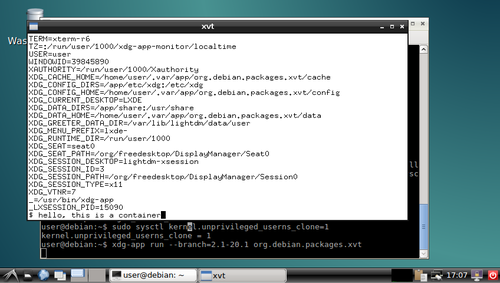
xvt in a container and you can play around with the shell in the xvt and see what you can and can't do in the container. I'm sure there were better ways to do most of this, but I think there's value in having such a simplistic demo to go alongside the various GNOMEish apps.
Acknowledgements: Thanks to all those!

Lunar: Only allow outgoing connections through Tor

Using Tor helps take back control of what data one decides to share online. It also helps in avoiding surveillance from the local network (think of someone listening to the public Wi-Fi) or the Internet access provider. But it is easy to make mistakes: Tor Browser, the easiest and most common way to use Tor, is just a web browser. Extra special care is required to make other applications use Tor, and it is easy to forget to change settings, let alone actual attackers. That's why using Tails is often recommended as everything is preconfigured and it requires traffic to go through Tor by various means. Qubes or Whonix also have interesting properties, but require reinstalling systems and changing habits. Meanwhile, securing the network on an already installed system can help you feel better. A potential solution to prevent connections from leaking out without going through Tor is simply to prevent all connections from leaving the computer, except the ones going to the Tor network. This can quite easily be implemented by setting up an outgoing firewall. Using the default settings, a Tor client can potentially connect to any of the 2,000 Guard relays. While there are ways to get such a list and turn it into firewall rules, we are going to use an easier solution. Because the list of Tor relays is public, censors have often used it to prevent people from connecting to the Tor network. The Tor project came up with bridges as a work-around. Bridges are entry nodes in the Tor network. For public bridges, users can only get a few bridge addresses at a time, preventing an adversary from easily blocking them at all once. When configured to use a set of bridges, Tor will only connect to their addresses. This will make our firewall much shorter. The instructions that follow should work on Debian Jessie and later versions. Adapting them to other systems should not be too hard either. We assume that Tor Browser is already installed. As we will want other applications to use Tor than just the browser, we also want to install a system-wide instance:
# apt install tor
Next, visit bridges.torproject.org to request a set of bridges: BridgeDB landing page You then need to select the type of bridges. Tor standard protocol is easy to identify as such. The Tor project has developed pluggable transports to easily disguise the traffic, but using them is outside the scope for this documentation. So lets stay with the default type of bridges: BridgeDB bridge type selection After solving a CAPTCHA, you'll get a list of addresses and fingerprints for a couple of bridges like the following one: Example bridge list from BridgeDB (blurred to protect the actual bridges To tell Tor to use these bridges, edit /etc/tor/torrc, and at the end, add something like:
UseBridges 1
Bridge 109.XXX.XXX.XXX:4XXX 2244XXXXXXXXXXXXXXXXXXXXXXXXXXXXXXXXXXXX
Bridge 37.XXX.XXX.XXX:1XXXX 9CF0XXXXXXXXXXXXXXXXXXXXXXXXXXXXXXXXXXXX
Bridge 171.XXX.XXX.XXX:4XXX 7705XXXXXXXXXXXXXXXXXXXXXXXXXXXXXXXXXXXX
Replace the actual addresses and fingerprints by those you got earlier. Now reload the daemon and make sure that it still connects to the network:
# service tor reload
# tail -f /var/log/tor/log
Tor Browser also needs to be told to use these bridges. Open the onion menu close to the location bar, and select Tor Network Settings . Tor Browser  onion menu In there, tick My Internet Service Provider (ISP) blocks connections to the Tor network and paste the list of bridges below Enter custom bridges: Tor Browser Network Settings Before we restrict outgoing connections to only use the Tor network, lets configure APT to use Tor as well so we can continue installing and upgrading packages in the future:
# apt install apt-transport-tor
The following command will reconfigure APT to use Tor to access the currently configured package repositories. It basically takes care of replacing every http:// by tor+http://:
# sed -e 's/^[^#]*\(deb\(-src\)\?\W\+\)http/\1tor+http/' -i /etc/apt/sources.list /etc/apt/sources.list.d/*.list
Lets see if it still works:
# apt update
One last thing: sometimes, we still need to bypass our restrictions and access the network directly. Some websites sadly deny access to Tor users, or we might need to login through a captive portal before being able to use a random network. To make it practical, we are going to create a new user account. This will enable us to use the desktop user switching capabilities to start a new browser or sudo for command line applications. In this example, the user is going to be named passthrough:
# adduser passthrough
Make sure to set a proper password! Now lets configure the firewall. Here we are going to use ferm which makes it fairly easy to do low-level firewall rule in a readable manner:
# apt install ferm
We want the firewall to be started at boot time. Now edit its configuration in /etc/ferm/ferm.conf. At the end, add:
# Let's block everything for both IPv4 and IPv6, except to localhost,
# already established connections and the special 'passthrough' user.
domain (ip ip6) chain OUTPUT  
    policy DROP;
    outerface lo ACCEPT;
    proto icmp ACCEPT;
    mod state state (ESTABLISHED RELATED) ACCEPT;
    mod owner uid-owner "passthrough" ACCEPT;
 
# Now for IPv4, we want to restrict output to configured Tor bridges
domain ip chain OUTPUT  
    # Don't break network autoconfiguration
    mod owner uid-owner 0 proto udp dport bootps ACCEPT;
    # Allow bridges defined in torrc by getting them directly
    # from the configuration file.
    @include "sed -n -e 's/^Bridge \([^ ]* \)\?\([0-9.]*\):\([0-9]*\).*/daddr \2 proto tcp dport \3 ACCEPT;/p' /etc/tor/torrc  ";
 
# Let's REJECT everything else so we get notice instead of timeouts
domain (ip ip6) chain OUTPUT REJECT;
Reload the firewall through:
# service ferm reload
Lets do some tests:
# ping check.torproject.org
  ping: unknown host check.torproject.org
# tor-resolve check.torproject.org
  38.229.72.22
# ping 38.229.72.22
  From 192.168.7.234 icmp_seq=1 Destination Port Unreachable
# curl https://check.torproject.org/
  curl: (6) Could not resolve host: check.torproject.org
# curl -I https://38.229.72.22/
  curl: (7) Failed to connect to 38.229.72.22 port 443: Connection refused
# curl --socks5 127.0.0.1:9050 https://check.torproject.org/
  curl: (6) Could not resolve host: check.torproject.org
# curl --silent --socks5-hostname 127.0.0.1:9050 https://check.torproject.org/   grep Congratulations
  Congratulations. This browser is configured to use Tor.
# sudo -u passthrough ping -c 1 check.torproject.org
  64 bytes from sergii.torproject.org (38.229.72.22): icmp_seq=1 ttl=54 time=148 ms
# sudo -u passthrough curl --silent https://check.torproject.org/   grep Sorry
  Sorry. You are not using Tor.
One last thing to complete the setup: for command line applications like SSH, torsocks does wonders. Just prefix your usual commands by torsocks and they should work:
# apt install torsocks
# torsocks curl --silent https://check.torproject.org/   grep Congratulations
  Congratulations. This browser is configured to use Tor.
All set! In case you ever need to turn it all off, just ask ferm to reconfigure the firewall:
# service ferm stop
But don't forget to turn it back on later!
# service ferm start
Ideally, we would have a way to automatically configure a different set of bridges for each network we connect to make it more difficult to trace the computer from network to network. But there's quite some more work to be done on various levels before that can be done in an integrated manner (torshiftchange and tordyguards are promising options). Meanwhile, be aware that you might want to keep a fresh set of bridges handy to configure them after leaving for a trip. Another downside of the setup currently is that it doesn't allow for network time synchronization. That might make the system fingerprintable by using its clock drift. To use obfs4 bridges which helps defeating censored networks, you will need two extra steps. First, install the required software:
# apt install obfs4proxy
Then add the following extra line to /etc/tor/torrc:
ClientTransportPlugin obfs2,obfs3,obfs4,scramblesuit exec /usr/bin/obfs4proxy
You can then request obfs4 bridges from BridgeDB. These changes are only required for the system-wide Tor daemon, as Tor Browser comes with obs4proxy preconfigured. Kudos to Micah for proofreading this article.

28 January 2016

Joachim Breitner: Dreaming of role playing

Recently, at a summer-school-like event, we were discussing pen-and-paper role playing. I m not sure if this was after a session of role-playing, but I was making the point that you don t need much or any at all of the rules, and scores, and dice, if you are one of the story-telling role players, and it can actually be more fun this way. As an example, I said, it can make sense if one of the players (and the game master, I suppose) reads up a lot about one aspect of the fantasy world, e.g. one geographical area, one cult, one person, and then this knowledge is used to create an exciting puzzle, even without any opponents. I m not quite sure, but I think I fell asleep shortly after, and I dreamed of such a role playing session. It was going roughly like this:
I (a human), and my fellows (at least a dwarf, not sure about the rest) went to some castle. It was empty, but scary. We crossed its hall, and went into a room on the other side. It was locked towards the hall by a door that covered the door frame only partly, and suddenly we could see a large Ogre, together with other foul folk not worth mentioning, hammered at the door. My group (which was a bit larger in that moment) all prepared shooting arrows at him the moment it burst through the door. I had the time to appreciate the ingenuity that we all waited for him to burst through, so that none of the arrows would bounce of the door, but it did not help, and we ran from the castle, over a field, through a forest, at the other side of which we could see, below a sleep slope, a house, so we went there. The path towards that was filled with tracks that looked surprisingly like car tracks. When we reached the spot there was no house any more, but rather a cold camp side. We saw digging tools, and helmets (strangely, baseball helmets) were arranged in a circle, as if it was a burial site. We set up camp there and slept. It occurred to me that I must have been the rightful owner of the castle, and it was taken by me from my brother and his wife, who denied my existence or something treacherously like that. When we woke up at the camp side, she were there, together with what must be my niece. My sister in law mocked us for fighting unsuccessfully at the castle, but my niece was surprised to see me, as I must have a very similar appearance to my brother. She said that her mother forbid it, but she nevertheless sneakily takes out something which looks like a Gameboy with a camera attachment and a CompactFlash card from her mothers purse, puts it in and take a photo of me. This is when I realize that I will get my castle back.
At that moment, I woke up. I somewhat liked the story (and it was a bit more coherent in my mind than what I then wrote down here), so I wanted to write it down. I quickly fetched my laptop. My friends at the summer school were a bit worried, and I promised not to mention their names and concrete places, and started writing. They distracted me, so I searched for a place of my own, lied down (why? no idea), and continued writing. I had to to touch writing on my belly, because my laptop was not actually there. I also noticed that I am back at the camp side, and that I am still wearing my back protector that I must have been wearing while fighting in the castle, and which I did not take off while sleeping at the camp side. Funnily, it was not a proper medieval amour, but rather my snowboarding back protector.
At that moment, I woke up. I somewhat liked the story (and it was a bit more coherent in my mind than what I then wrote down here), so I wanted to write it down. I quickly got up, started my laptop, and wrote it down. And this is what you are reading right now. Off to bed again, let s see what happens next.

27 January 2016

Russell Coker: Using LetsEncrypt

Lets Encrypt is a new service to provide free SSL keys [1]. I ve just set it up on a few servers that I run. Issues The first thing to note is that the client is designed to manage your keys and treat all keys on a server equally with a single certificate. It shouldn t be THAT difficult to do things in other ways but it would involve extra effort. The next issue that can make things difficult is that it is designed that the web server will have a module to negotiate new keys automatically. Automatically negotiating new keys will be really great when we get that all going, but as I didn t feel like installing a slightly experimental Apache module on my servers that meant I had to stop Apache while I got the keys and I ll have to do that again every 3 months as the keys have a short expiry time. There are some other ways of managing keys, but the web servers I m using Lets Encrypt with at the moment aren t that important and a couple of minutes of downtime is acceptable. When you request multiple keys (DNS names) for one server to make it work without needless effort you have to get them all in the one operation. That gives you a single key file for all DNS names which is very convenient for services that don t support getting the hostname before negotiating SSL. But it could be difficult if you wanted to have one of the less common configurations such as having a mail server and a web server on the same IP addess but using different keys How To Get Keys deb http://mirror.internode.on.net/pub/debian/ testing main The letsencrypt client is packaged for Debian in Testing but not in Jessie. Adding the above to the /etc/apt/sources.list file for a Jessie system allows installing it and a few dependencies from Testing. Note that there are problems with doing this, you can t be certain that all the other apps installed will be compatible with the newer versions of libraries that are installed and you won t get security updates. letsencrypt certonly --standalone-supported-challenges tls-sni-01 The above command makes the letsencrypt client listen on port 443 to talk to the Lets Encrypt server. It prompts you for server names so if you want to minimise the downtime for your web server you could specify the DNS names on the command-line. If you run it on a SE Linux system you need to run setsebool allow_execmem 1 before running it and setsebool allow_execmem 0 afterwards as it needs execmem access. I don t think it s a problem to temporarily allow execmem access for the duration of running this program, if you use KDE then you will be forced to allow such access all the time for the desktop to operate correctly. How to Install Keys [ssl:emerg] [pid 9361] AH02564: Failed to configure encrypted (?) private key www.example.com:443:0, check /etc/letsencrypt/live/www.example.com/fullchain.pem The letsencrypt client suggests using the file fullchain.pem which has the key and the full chain of certificates. When I tried doing that I got errors such as the above in my Apache error.log. So I gave up on that and used the separate files. The only benefit of using the fullchain.pem file is to have a single line in a configuration file instead of 3. Trying to debug issues with fullchain.pem took me a lot longer than copy/paste for the 3 lines. Under /etc/letsencrypt/live/$NAME there are symlinks to the real files. So when you get new keys the old keys will be stored but the same file names can be used. SSLCertificateFile "/etc/letsencrypt/live/www.example.com/cert.pem"
SSLCertificateChainFile "/etc/letsencrypt/live/www.example.com/chain.pem"
SSLCertificateKeyFile "/etc/letsencrypt/live/www.example.com/privkey.pem" The above commands are an example for configuring Apache 2. smtpd_tls_cert_file = /etc/letsencrypt/live/smtp.example.com/cert.pem
smtpd_tls_key_file = /etc/letsencrypt/live/smtp.example.com/privkey.pem
smtpd_tls_CAfile = /etc/letsencrypt/live/smtp.example.com/chain.pem Above is an example of Postfix configuration. ssl_cert = </etc/letsencrypt/live/smtp.example.com/cert.pem
ssl_key = </etc/letsencrypt/live/smtp.example.com/privkey.pem
ssl_ca = </etc/letsencrypt/live/smtp.example.com/chain.pem Above is an example for Dovecot, it goes in /etc/dovecot/conf.d/10-ssl.conf in a recent Debian version. Conclusion At this stage using letsencrypt is a little fiddly so for some commercial use (where getting the latest versions of software in production is difficult) it might be a better option to just pay for keys. However some companies I ve worked for have had issues with getting approval for purchases which would make letsencrypt a good option to avoid red tape. When Debian/Stretch is released with letsencrypt I think it will work really well for all uses.

26 January 2016

Michal &#268;iha&#345;: Weekly phpMyAdmin contributions 2016-W03

Last week consisted mostly of code fixes. For example the code for checking latest phpMyAdmin turned out to be buggy under some PHP configurations. But most work for last week is not yet public, you will see it in upcoming security releases. All handled issues:

Filed under: English phpMyAdmin 0 comments

Vincent Sanders: Creativity is allowing yourself to make mistakes. Art is knowing which ones to keep.

It seems Scott Adams insights sometimes reach beyond his disturbingly accurate satire. I have written before about my iterative approach to designing the things I make. such as my attempts at furniture and more recently enclosures for various projects.

Raspberry Pi B case design with the faliures
In the workshop today I had a selection of freshly laser cut.completed cases for several single board computers out on the desk. I was asked by a new member of the space how I was able to produce these with no failures?

I was slightly taken aback at the question and had to explain that the designs I was happily running off on the laser cutter are all the result of mistakes, lots of them. The person I was talking to was surprised when I revealed that I was not simply generating fully formed working designs first time.

We chatted for a while and it became apparent that they had been holding themselves back from actually making something because they were afraid the result would be wrong. I went to my box and retrieved the failures from my most recent case design for a Raspberry Pi model B to put alongside the successful end product to try and encourage them.

I explained that my process was fairly iterative, sure I attempted to get it right first time by reusing existing working solutions as a basis but that when the cost of iterating is relatively small it is sometimes worthwhile to just accept the failures.

For example in this latest enclosure:

My collection of failed cases
Generally I do not need this many iterations and get it right second time, however experience caused me to use offcuts and scrap material for the initial versions expecting to have issues. The point is that I was willing to make the iterations and not see them as failures.

The person I was talking to could not get past the possibility of having a pile of scrap material, it was wasteful in their view and my expectation to fail was unfathomable. They left with somewhat of a bad view of me and my approach.

I pondered this turn of events for a time and they did have a point in that I have a collection of thirty or so failures from all my various designs most of which is unusable. I then realised I have produced over fifty copies of those designs not just for myself but for other people and published them for anyone else to replicate, so on balance I think I am doing ok on wastage.

The stronger argument for me personally is that I have made something. I love making things, be that software, electronics or physical designs. It may not always be the best solution but I usually end up with something that works.

That makespace member may not like my approach but in the final reckoning, I have made something, their idea is still just an idea. So Scott I may not be an artist but I am at least creative and that is halfway there.

25 January 2016

Antoine Beaupr : Internet in Cuba

A lot has been written about the Internet in Cuba over the years. I have read a few articles, from New York Times' happy support for Google's invasion of Cuba to RSF's dramatic and fairly outdated report about censorship in Cuba. Having written before about Internet censorship in Tunisia, I was curious to see if I could get a feel of what it is like over there, now that a new Castro is in power and the Obama administration has started restoring diplomatic ties with Cuba. With those political changes coming signifying the end of an embargo that has been called genocidal by the Cuban government, it is surprisingly difficult to get fresh information about the current state of affairs. This article aims to fill that gap in clarifying how the internet works in Cuba, what kind of censorship mechanisms are in place and how to work around them. It also digs more technically into the network architecture and performance. It is published in the hope of providing both Cubans and the rest of the world with a better understanding of their network and, if possible, Cubans ways to access the internet more cheaply or without censorship.

"Censorship" and workarounds Unfortunately, I have been connected to the internet only through the the Varadero airport and the WiFi of a "full included" resort near Jibacoa. I have to come to assume that this network is likely to be on a segregated, uncensored internet while the rest of the country suffers the wrath of the Internet censorship in Cuba I have seen documented elsewhere. Through my research, I couldn't find any sort of direct censorship. The Netalyzr tool couldn't find anything significantly wrong with the connection, other than the obvious performance problems related both to the overloaded uplinks of the Cuban internet. I ran an incomplete OONI probe as well, and it seems there was no obvious censorship detected there as well, at least according to folks in the helpful #ooni IRC channel. Tor also works fine, and could be a great way to avoid the global surveillance system described later in this article. Nevertheless, it still remains to be seen how the internet is censored in the "real" Cuban internet, outside of the tourist designated areas - hopefully future visitors or locals can expand on this using the tools mentioned above, using the regular internet. Usual care should be taken when using any workaround tools, mentioned in this post or not, as different regimes over the world have accused, detained, tortured and killed sometimes for the mere fact of using or distributing circumvention tools. For example, a Russian developer was arrested and detained in 2001 by United States' FBI for exposing vulnerabilities in the Adobe e-books copy protection mechanisms. Similarly, people distributing Tor and other tools have been arrested during the period prior to the revolution in Tunisia.

The Cuban captive portal There is, however, a more pernicious and yet very obvious censorship mechanism at work in Cuba: to get access to the internet, you have to go through what seems to be a state-wide captive portal, which I have seen both at the hotel and the airport. It is presumably deployed at all levels of the internet access points. To get credentials through that portal, you need a username and password which you get by buying a Nauta card. Those cards cost 2$CUC and get you an hour of basically unlimited internet access. That may not seem like a lot for a rich northern hotel party-goer, but for Cubans, it's a lot of money, given that the average monthly salary is around 20$CUC. The system is also pretty annoying to use, because it means you do not get continuous network access: every hour, you need to input a new card, which will obviously make streaming movies and other online activities annoying. It also makes hosting servers basically impossible. So while Cuba does not have, like China or Iran, a "great firewall", there is definitely a big restriction to going online in Cuba. Indeed, it seems to be how the government ensures that Cubans do not foment too much dissent online: keep the internet slow and inaccessible, and you won't get too many Arab spring / blogger revolutions.

Bypassing the Cuban captive portal The good news is that it is perfectly possible for Cubans (or at least for a tourist like me with resources outside of the country) to bypass the captive portal. Like many poorly implemented portals, the portal allows DNS traffic to go through, which makes it possible to access the global network for free by using a tool like iodine which tunnels IP traffic over DNS requests. Of course, the bandwidth and reliability of the connection you get through such a portal is pretty bad. I have regularly seen 80% packet loss and over two minutes of latency:
--- 10.0.0.1 ping statistics ---
163 packets transmitted, 31 received, 80% packet loss, time 162391ms
rtt min/avg/max/mdev = 133.700/2669.535/64188.027/11257.336 ms, pipe 65
Still, it allowed me to login to my home server through SSH using Mosh to workaround the reliability issues. Every once in a while, mosh would get stuck and keep on trying to send packets to probe the server, which would clog the connection even more. So I regularly had to restart the whole stack using these commands:
killall iodine # stop DNS tunnel
nmcli n off # turn off wifi to change MAC address
macchanger -A wlan0 # change MAC address
nmcli n on # turn wifi back on
sleep 3 # wait for wifi to settle
iodine-client-start # restart DNS tunnel
The Koumbit Wiki has good instructions on how to setup a DNS tunnel. I am wondering if such a public service could be of use for Cubans, although I am not sure how it could be deployed only for Cubans, and what kind of traffic it could support... The fact is that iodine does require a server to operate, and that server must be run on the outside of the censored perimeter, something that Cubans may not be able to afford in the first place. Another possible way to save money with the captive portal would be to write something that automates connecting and disconnecting from the portal. You would feed that program a list of credentials and it would connect to the portal only on demand, and disconnect as soon as no traffic goes through. There are details on the implementation of the captive portal below that may help future endeavours in that field.

Private information revealed to the captive portal It should be mentioned, however, that the captive portal has a significant amount of information on clients, which is a direct threat to the online privacy of Cuban internet users. Of course the unique identifiers issued with the Nauta cards can be correlated with your identity, right from the start. For example, I had to give my room number to get a Nauta card issued. Then the central portal also knows which access point you are connected to. For example, the central portal I was connected to Wifi_Memories_Jibacoa which, for anyone that cares to research, will give them a location of about 20 square meters where I was located when connected (there is only one access point in the whole hotel). Finally, the central portal also knows my MAC address, a unique identifier for the computer I am using which also reveals which brand of computer I am using (Mac, Lenovo, etc). While this address can be changed, very few people know that, let alone how. This led me to question whether I would be allowed back in Cuba (or even allowed out!) after publishing this blog post, as it is obvious that I can be easily identified based on the time this article was published, my name and other details. Hopefully the Cuban government will either not notice or not care, but this can be a tricky situation, obviously. I have heard that Cuban prisons are not the best hangout place in Cuba, to say the least...

Network configuration assessment This section is more technical and delves more deeply in the Cuban internet to analyze the quality and topology of the network, along with hints as to which hardware and providers are being used to support the Cuban government.

Line quality The internet is actually not so bad in the hotel. Again, this may be because of the very fact that I am in that hotel, and I get a privileged access to the new fiber line to Venezuela, the ALBA-1 link. The line speed I get is around 1mbps, according to speedtest, which selected a server from LIME in George Town, Cayman Islands:
[1034]anarcat@angela:cuba$ speedtest
Retrieving speedtest.net configuration...
Retrieving speedtest.net server list...
Testing from Empresa de Telecomunicaciones de Cuba (152.206.92.146)...
Selecting best server based on latency...
Hosted by LIME (George Town) [391.78 km]: 317.546 ms
Testing download speed........................................
Download: 1.01 Mbits/s
Testing upload speed..................................................
Upload: 1.00 Mbits/s
Latency to the rest of the world is of couse slow:
--- koumbit.org ping statistics ---
122 packets transmitted, 120 received, 1,64% packet loss, time 18731,6ms
rtt min/avg/max/sdev = 127,457/156,097/725,211/94,688 ms
--- google.com ping statistics ---
122 packets transmitted, 121 received, 0,82% packet loss, time 19371,4ms
rtt min/avg/max/sdev = 132,517/160,095/724,971/93,273 ms
--- redcta.org.ar ping statistics ---
122 packets transmitted, 120 received, 1,64% packet loss, time 40748,6ms
rtt min/avg/max/sdev = 303,035/339,572/965,092/97,503 ms
--- ccc.de ping statistics ---
122 packets transmitted, 72 received, 40,98% packet loss, time 19560,2ms
rtt min/avg/max/sdev = 244,266/271,670/594,104/61,933 ms
Interestingly, Koumbit is actually the closest host in the above test. It could be that Canadian hosts are less affected by bandwidth problems compared to US hosts because of the embargo.

Network topology The various traceroutes show a fairly odd network topology, but that is typical of what I would described as "colonized internet users", which have layers and layers of NAT and obscure routing that keep them from the real internet. Just like large corporations are implementing NAT in a large scale, Cuba seems to have layers and layers of private RFC 1918 IPv4 space. A typical traceroute starts with:
traceroute to koumbit.net (199.58.80.33), 30 hops max, 60 byte packets
 1  10.156.41.1 (10.156.41.1)  9.724 ms  9.472 ms  9.405 ms
 2  192.168.134.137 (192.168.134.137)  16.089 ms  15.612 ms  15.509 ms
 3  172.31.252.113 (172.31.252.113)  15.350 ms  15.805 ms  15.358 ms
 4  pos6-0-0-agu-cr-1.mpls.enet.cu (172.31.253.197)  15.286 ms  14.832 ms  14.405 ms
 5  172.31.252.29 (172.31.252.29)  13.734 ms  13.685 ms  14.485 ms
 6  200.0.16.130 (200.0.16.130)  14.428 ms  11.393 ms  10.977 ms
 7  200.0.16.74 (200.0.16.74)  10.738 ms  10.019 ms  10.326 ms
 8  ix-11-3-1-0.tcore1.TNK-Toronto.as6453.net (64.86.33.45)  108.577 ms  108.449 ms
Let's take this apart line by line:
 1  10.156.41.1 (10.156.41.1)  9.724 ms  9.472 ms  9.405 ms
This is my local gateway, probably the hotel's wifi router.
 2  192.168.134.137 (192.168.134.137)  16.089 ms  15.612 ms  15.509 ms
This is likely not very far from the local gateway, probably still in Cuba. It in one bit away from the captive portal IP address (see below) so it is very likely related to the captive portal implementation.
 3  172.31.252.113 (172.31.252.113)  15.350 ms  15.805 ms  15.358 ms
 4  pos6-0-0-agu-cr-1.mpls.enet.cu (172.31.253.197)  15.286 ms  14.832 ms  14.405 ms
 5  172.31.252.29 (172.31.252.29)  13.734 ms  13.685 ms  14.485 ms
All those are withing RFC 1918 space. Interestingly, the Cuban DNS servers resolve one of those private IPs as within Cuban space, on line #4. That line is interesting because it reveals the potential use of MPLS.
 6  200.0.16.130 (200.0.16.130)  14.428 ms  11.393 ms  10.977 ms
 7  200.0.16.74 (200.0.16.74)  10.738 ms  10.019 ms  10.326 ms
Those two lines are the only ones that actually reveal that the route belongs in Cuba at all. Both IPs are in a tiny (/24, or 256 IP addresses) network allocated to ETECSA, the state telco in Cuba:
inetnum:     200.0.16/24
status:      allocated
aut-num:     N/A
owner:       EMPRESA DE TELECOMUNICACIONES DE CUBA S.A. (IXP CUBA)
ownerid:     CU-CUBA-LACNIC
responsible: Rafael L pez Guerra
address:     Ave. Independencia y 19 Mayo, s/n,
address:     10600 - La Habana - CH
country:     CU
phone:       +53 7 574242 []
owner-c:     JOQ
tech-c:      JOQ
abuse-c:     JEM52
inetrev:     200.0.16/24
nserver:     NS1.NAP.ETECSA.NET
nsstat:      20160123 AA
nslastaa:    20160123
nserver:     NS2.NAP.ETECSA.NET
nsstat:      20160123 AA
nslastaa:    20160123
created:     20030512
changed:     20140610
Then the last hop:
 8  ix-11-3-1-0.tcore1.TNK-Toronto.as6453.net (64.86.33.45)  108.577 ms  108.449 ms  108.257 ms
...interestingly, lands directly in Toronto, in this case going later to Koumbit but that is the first hop that varies according to the destination, hops 1-7 being a common trunk to all external communications. It's also interesting that this shoves a good 90 milliseconds extra in latency, showing that a significant distance and number of equipment crossed. Yet a single hop is crossed, not showing the intermediate step of the Venezuelan link or any other links for that matter. Something obscure is going on there... Also interesting to note is the traceroute to the redirection host, which is only one hop away:
traceroute to 192.168.134.138 (192.168.134.138), 30 hops max, 60 byte packets
 1  192.168.134.138 (192.168.134.138)  6.027 ms  5.698 ms  5.596 ms
Even though it is not the gateway:
$ ip route
default via 10.156.41.1 dev wlan0  proto static  metric 1024
10.156.41.0/24 dev wlan0  proto kernel  scope link  src 10.156.41.4
169.254.0.0/16 dev wlan0  scope link  metric 1000
This means a very close coordination between the different access points and the captive portal system. Finally, note that there seems to be only three peers to the Cuban internet: Teleglobe, formerly Canadian, now owned by the Indian [[!wiki Tata group]], and Telef nica, the Spanish Telco that colonized most of Latin America's internet, all the way down to Argentina. This is confirmed by my traceroutes, which show traffic to Koumbit going through Tata and Google's going through Telef nica.

Captive portal implementation The captive portal is https://www.portal-wifi-temas.nauta.cu/ (not accessible outside of Cuba) and uses a self-signed certificate. The domain name resolves to 190.6.81.230 in the hotel. Accessing http://1.1.1.1/ gives you a status page which allows you to disconnect from the portal. It actually redirects you to https://192.168.134.138/logout.user. That is also a self-signed, but different certificate. That certificate actually reveals the implication of Gemtek which is a "world-leading provider of Wireless Broadband solutions, offering a wide range of solutions from residential to business". It is somewhat unclear if the implication of Gemtek here is deliberate or a misconfiguration on the part of Cuban officials, especially since the certificate is self-signed and was issued in 2002. It could be, however, a trace of the supposed involvement of China in the development of Cuba's networking systems, although Gemtek is based in Taiwan, and not in the China mainland. That IP, in turn, redirects you to the same portal but in a page that shows you the statistics:
https://www.portal-wifi-temas.nauta.cu/?mac=0024D1717D18&script=logout.user&remain_time=00%3A55%3A52&session_time=00%3A04%3A08&username=151003576287&clientip=10.156.41.21&nasid=Wifi_Memories_Jibacoa&r=ac%2Fpopup
Notice how you see the MAC address of the machine in the URL (randomized, this is not my MAC address), along with the remaining time, session time, client IP and the Wifi access point ESSID. There may be some potential in defrauding the session time there, I haven't tested it directly. Hitting Actualizar redirects you back to the IP address, which redirects you to the right URL on the portal. The "real" logout is at:
http://192.168.134.138/logout.user?cmd=logout
The login is performed against https://www.portal-wifi-temas.nauta.cu/index.php?r=ac/login with a referer of:
https://www.portal-wifi-temas.nauta.cu/?&nasid=Wifi_Memories_Jibacoa&nasip=192.168.134.138&clientip=10.156.41.21&mac=EC:55:F9:C5:F2:55&ourl=http%3a%2f%2fgoogle.ca%2f&sslport=443&lang=en-US%2cen%3bq%3d0.8&lanip=10.156.41.1
Again, notice the information revealed to the central portal.

Equipment and providers I ran Nmap probes against both the captive portal and the redirection host, in the hope of finding out how they were built and if they could reveal the source of the equipment used. The complete nmap probes are available in nmap, but it seems that the captive portal is running some embedded device. It is confusing because the probe for the captive portal responds as if it was the gateway, which blurs even more the distinction between the hotel's gateway and the captive portal. This raises the distinct possibility that all access points are actually captive portal that authenticate to another central server. The nmap traces do show three distinct hosts however:
  • the captive portal (www.portal-wifi-temas.nauta.cu, 190.6.81.230)
  • some redirection host (192.168.134.138)
  • the hotel's gateway (10.156.41.1)
They do have distinct signatures so the above may be just me misinterpreting traceroute and nmap results. Your comments may help in clarifying the above. Still, the three devices show up as running Linux, in the two last cases versions between 2.4.21 and 2.4.31. Now, to find out which version of Linux it is running is way more challenging, and it is possible it is just some custom Linux distribution. Indeed, the webserver shows up as G4200.GSI.2.22.0155 and the SSH server is running OpenSSH 3.0.2p1, which is basically prehistoric (2002!) which corroborates the idea that this is some Gemtek embedded device. The fact that those devices are running 14 years old software should be a concern to the people responsible for those networks. There is, for example, a remote root vulnerability that affects that specific version of OpenSSH, among many other vulnerabilities.

A note on Nauta card's security Finally, one can note that it is probably trivial to guess card UIDs. All cards i have here start with the prefix 15100, the following digits being 3576 or 4595, presumably depending on the "batch" that was sent to different hotels, which seems to be batches of 1000 cards. You can also correlate the UID with the date at which the card was issued. For example, 15100357XXX cards are all valid until 19/03/2017, and 151004595XXX cards are all valid until 23/03/2017. Here's the list of UIDs I have seen:
151004595313
151004595974
151003576287
151003576105
151003576097
The passwords, on the other hand, do seem fairly random (although my sample size is small). Interestingly, those passwords are also 12 digits long, which is about as strong as a seven-letter password (mixed uppercase and lowercase). If there are no rate-limiting provisions on that captive portal, it could be possible to guess those passwords, since you have free rein on accessing those routers. Depending on the performance of the routers, you could be lucky and find a working password for free...

Conclusion Clearly, Internet access in Cuba needs to be modernized. We can clearly see that Cuba years behind the rest of the Americas, if only through the percentage of the population with internet access, or download speeds. The existence of a centralized captive portal also enables a huge surveillance potential that should be a concern for any Cuban, or for that matter, anyone wishing to live in a free society. The answer, however, lies not in the liberalization of commerce and opening the doors to the US companies and their own systems of surveillance. It should be possible, and even desirable for Cubans to establish their own neutral network, a proposal I have made in the past even for here in Qu bec. This network could be used and improved by Cubans themselves, prioritizing local communities that would establish their own infrastructure according to their own needs. I have been impressed by this article about the El Paquete system - it shows great innovation and initiative from Cubans which are known for engaging in technology in a creative way. This should be leveraged by letting Cubans do what they want with their networks, not telling them what to do. The best the Googles of this world can do to help Cuba is not to colonize Cuba's technological landscape but to cleanup their own and make their own tools more easily accessible and shareable offline. It is something companies can do right now, something I detailed in a previous article.

Dirk Eddelbuettel: RcppExamples 0.1.7

After an usually long hiatus, the RcppExamples package has been updated once more: a new version 0.1.7 is now on CRAN. The RcppExamples provides a handful of short examples detailing by concrete working examples how to set up basic R data structures in C++. In this version, essentially all files (C++, R as well as manual pages) were refreshed, along with the usual set of small changes to bring the package to current R CMD check standards. A NEWS extract follows:
Changes in RcppExamples version 0.1.7 (2016-01-23)
  • All examples were updated to use Rcpp Attributes and (where possible) use const & interfaces.
  • Updated DESCRIPTION for current R CMD check standards
  • The Rcpp package is now imported rather than depended upon.
  • Added README.md as well as .travis.yml.
  • Also updated and refreshed all manual pages and R files.
Courtesy of CRANberries, there is also a diffstat report for the most recent release.

This post by Dirk Eddelbuettel originated on his Thinking inside the box blog. Please report excessive re-aggregation in third-party for-profit settings.

24 January 2016

Niels Thykier: Lintian 2.5.40 now with less output

You have probably tried to run lintian (-EIL +pedantic) on your packages only to watch lintian drown your terminal. If you have, you would certainly not be the first. A concrete example with lintian 2.5.40.2:
$ lintian -EIL +pedantic 389-ds-base_1.3.4.5-2_amd64.deb   wc -l
85
Notably, at least 45 of these appeared in 2.5.40 (the hardening-no-bindnow tag):
$ lintian -EIL +pedantic 389-ds-base_1.3.4.5-2_amd64.deb \
  --tags hardening-no-bindnow   wc -l
45
In a single release, we have over doubled the number of tags in the given package. I very much doubt this is the first time such a thing happened. Therefore, we have implemented a per package tag filter in 2.5.40. The filter is applied automatically when stdout is a tty and restricts lintian to emitting no more than 3 concrete instances of a given tag per package. If a fourth tag would have been emitted, the filter replaces it with a how to see all instances message and suppresses further instances in that package. Accordingly, lintian only emits 25 lines (instead of 85) for the example package. It looks something like this:
$ lintian -EIL +pedantic 389-ds-base_1.3.4.5-2_amd64.deb 
I: 389-ds-base: spelling-error-in-binary usr/bin/dbscan-bin conents contents
X: 389-ds-base: hardening-no-bindnow usr/bin/dbscan-bin
X: 389-ds-base: hardening-no-bindnow usr/bin/dsktune-bin
X: 389-ds-base: hardening-no-bindnow usr/bin/infadd-bin
X: 389-ds-base: hardening-no-bindnow ... use --no-tag-display-limit to see all (or pipe to a file/program)
I: 389-ds-base: spelling-error-in-binary usr/lib/x86_64-linux-gnu/dirsrv/libns-dshttpd.so.0.0.0 occured occurred
[...]
With this very simple filter in place, the entire lintian output for that single binary now fits on my screen. I am pretty sure the filter could do with additional smarts, but I believe it is a good start.
Filed under: Debian, Lintian

Wouter Verhelst: Playing with Letsencrypt

While I'm not convinced that encrypting everything by default is necessarily a good idea, it is certainly true that encryption has its uses. Unfortunately, for the longest time getting an SSL certificate from a CA was quite a hassle -- and then I'm not even mentioning the fact that it would cost money, too. In that light, the letsencrypt project is a useful alternative: rather than having to dabble with emails or webforms, letsencrypt does everything by way of a few scripts. Also, the letsencrypt CA is free to use, in contrast to many other certificate authorities. Of course, once you start scripting, it's easy to overdo it. When you go to the letsencrypt website and try to install their stuff, they point you to a "letsencrypt-auto" thing, which starts installing a python virtualenv and loads of other crap, just so we can talk to a server and get a certificate properly signed. I'm sure that makes sense for some people, and I'm also sure it makes some things significantly easier, but honestly, I think it's a bit overkill. Luckily, there is also a regular letsencrypt script that doesn't do all the virtualenv stuff, and which is already packaged for Debian, so installing that gets us rid of the overkill bits. It's not in stable, but it is an arch:all package. Unfortunately, not all dependencies are available in Jessie, but backporting it turned out to be not too complicated. Once the client is installed, you need to get it to obtain a certificate, and you need to have the certificate be activated for your webserver. By default, the letsencrypt client will update your server configuration for you, and run a temporary webserver, and do a whole lot of other things that I would rather not see it do. The good news, though, is that you can switch all that off. If you're willing to let it write a few files to your DocumentRoot, it can do the whole thing without any change to your system:
letsencrypt certonly -m <your mailaddress> --accept-tos --webroot -w \
    /path/to/DocumentRoot -d example.com -d www.example.com
In that command, the -m option (with mail address) and the --accept-tos option are only required the first time you ever run letsencrypt. Doing so creates an account for you at letsencrypt.org, without which you cannot get any certificates. The --accept-tos option specifies that you accept their terms of service, which you might want to read first before blindly accepting. If all goes well, letsencrypt will tell you that it wrote your account information and some certificates somewhere under /etc/letsencrypt. All that's left is to update your webserver configuration so that the certificates are actually used. No, I won't tell you how that's done -- if you need that information, it's probably better if you just use the apache or nginx plugin of letsencrypt, which updates your webserver's configuration automatically. But if you already know how to do so, and prefer to maintain your configuration by yourself, then it's good to know that it is at least possible. Since we specified two -d parameters, the certificate you get from the letsencrypt CA will have subjectAlternativeName fields, allowing you to use them for more than one domain name. I specified example.com and www.example.com as the valid names, but there is nothing in letsencrypt requiring that the domain names you specify share a suffix; so yes, it is certainly possible to have multiple domains on a single certificate, if you want that. Finally, you need to ensure that your certificates are renewed before they expire. The easiest way to do that is to add a cronjob, which runs letsencrypt again; only this time, you'll need slightly different options:
letsencrypt certonly --renew-by-default --webroot -w \
    /path/to/DocumentRoot -d domain.name.tld -d www.domain.name.tld
The --renew-by-default option tells letsencrypt that you want to renew your certificates, not create new ones. If you specify this, the old certificate will be revoked, and a new one will be generated, again with three months validity. The symlinks under /etc/letsencrypt/live will be updated, so if your webserver's configuration uses those as the path to your certificates, you don't need to update any configuration files (although you may need to restart your webserver). You'll also notice that the -m and --accept-tos options are not specified this time around; this is because those are only required when you want to create an account -- once that step has been taken, letsencrypt will read the necessary information from its configuration files (and creating a new account for every renewal is just silly). With that, you now have a working, browser-trusted, certificate. Update: fix mistake about installing on Jessie. It's possible (I've done so), but it's been a while and I forgot that I had to recompile several of letsencrypt's dependencies in order for it to be installable.

23 January 2016

Dirk Eddelbuettel: RcppEigen 0.3.2.7.0

A new minor release of RcppEigen is now on CRAN and in Debian. It primarily upgrades to the recent 3.2.7 release of Eigen -- thanks once again to fine work by Yixuan Qiu. We also have one additonal PR by Alexey Stukalow who ensured that the fastLm() example will work fine with when the Intel MKL is used. The NEWS file entry follows.
Changes in RcppEigen version 0.3.2.7.0 (2016-01-18)
  • Updated to version 3.2.7 of Eigen
  • The fastLm example will not include the Lapack header if MKL is defined (thanks to PR #25 by Alexey Stukalow)
Courtesy of CRANberries, there is also a diffstat report for the most recent release.

This post by Dirk Eddelbuettel originated on his Thinking inside the box blog. Please report excessive re-aggregation in third-party for-profit settings.

21 January 2016

Russell Coker: Finding Storage Performance Problems

Here are some basic things to do when debugging storage performance problems on Linux. It s deliberately not an advanced guide, I might write about more advanced things in a later post. Disk Errors When a hard drive is failing it often has to read sectors several times to get the right data, this can dramatically reduce performance. As most hard drives aren t monitored properly (email or SMS alerts on errors) it s quite common for the first notification about an impending failure to be user complaints about performance. View your kernel message log with the dmesg command and look in /var/log/kern.log (or wherever your system is configured to store kernel logs) for messages about disk read errors, bus resetting, and anything else unusual related to the drives. If you use an advanced filesystem like BTRFS or ZFS there are system commands to get filesystem information about errors. For BTRFS you can run btrfs device stats MOUNTPOINT and for ZFS you can run zpool status . Most performance problems aren t caused by failing drives, but it s a good idea to eliminate that possibility before you continue your investigation. One other thing to look out for is a RAID array where one disk is noticeably slower than the others. For example if you have a RAID-5 or RAID-6 array every drive should have almost the same number of reads and writes, if one disk in the array is at 99% performance capacity and the other disks are at 5% then it s an indication of a failing disk. This can happen even if SMART etc don t report errors. Monitoring IO The iostat program in the Debian sysstat package tells you how much IO is going to each disk. If you have physical hard drives sda, sdb, and sdc you could run the command iostat -x 10 sda sdb sdc to tell you how much IO is going to each disk over 10 second periods. You can choose various durations but I find that 10 seconds is long enough to give results that are useful. By default iostat will give stats on all block devices including LVM volumes, but that usually gives too much data to analyse easily. The most useful things that iostat tells you are the %util (the percentage utilisation anything over 90% is a serious problem), the reads per second r/s , and the writes per second w/s . The parameters to iostat for block devices can be hard drives, partitions, LVM volumes, encrypted devices, or any other type of block device. After you have discovered which block devices are nearing their maximum load you can discover which of the partitions, RAID arrays, or swap devices on that disk are causing the load in question. The iotop program in Debian (package iotop) gives a display that s similar to that of top but for disk io. It generally isn t essential (you can run ps ax grep D to get most of that information), but it is handy. It will tell you which programs are causing IO on a busy filesystem. This can be good when you have a busy system and don t know why. It isn t very useful if you have a system that is used for one task, EG a database server that is known to be busy doing database stuff. It s generally a good idea to have sysstat and iotop installed on all systems. If a system is experiencing severe performance problems you might not want to wait for new packages to be installed. In Debian the sysstat package includes the sar utility which can give historical information on system load. One benefit of using sar for diagnosing performance problems is that it shows you the time of day that has the most load which is the easiest time to diagnose performance problems. Swap Use Swap use sometimes confuses people. In many cases swap use decreases overall disk use, this is the design of the Linux paging algorithms. So if you have a server that accesses a lot of data it might swap out some unused programs to make more space for cache. When you have multiple virtual machines on one system sharing the same disks it can be difficult to determine the best allocation for RAM. If one VM has some applications allocating a lot of RAM but not using it much then it might be best to give it less RAM and force those applications into swap so that another VM can cache all the data it accesses a lot. The important thing is not the amount of swap that is allocated but the amount of IO that goes to the swap partition. Any significant amount of disk IO going to a swap device is a serious problem that can be solved by adding more RAM. Reads vs Writes The ratio of reads to writes depends on the applications and the amount of RAM. Some applications can have most of their reads satisfied from cache. For example an ideal configuration of a mail server will have writes significantly outnumber reads (I ve seen ratios of 5:1 for writes to reads on real mail servers). Ideally a mail server will cache all new mail for at least an hour and as the most prolific users check their mail more frequently than that most mail will be downloaded before it leaves the cache. If you have a mail server with reads outnumbering writes then it needs more RAM. RAM is cheap nowadays so if you don t want to compete with Gmail it should be cheap to buy enough RAM to cache all recent mail. The ratio of reads to writes is important because it s one way of quickly determining if you have enough RAM and adding RAM is often the cheapest way of improving performance. Unbalanced IO One common performance problem on systems with multiple disks is having more load going to some disks than to others. This might not be a problem (EG having cron jobs run on disks that are under heavy load while the web server accesses data from lightly loaded disks). But you need to consider whether it s desirable to have some disks under more load than others. The simplest solution to this problem is to just have a single RAID array for all data storage. This is also the solution that gives you the maximum available disk space if you use RAID-5 or RAID-6. A more complex option is to use some SSDs for things that require performance and disks for things that don t. This can be done with the ZIL and L2ARC features of ZFS or by just creating a filesystem on SSD for the data that is most frequently accessed. What Did I Miss? I m sure that I missed something, please let me know of any other basic things to do or suggestions for a post on more advanced things.

19 January 2016

Joey Hess: git-annex v6

Version 6 of git-annex, released last week, adds a major new feature; support for unlocked large files that can be edited as usual and committed using regular git commands. For example:
git init
git annex init --version=6
mv ~/foo.iso .
git add foo.iso
git commit -m "added hundreds of megabytes to git annex (not git)"
git remote add origin ssh://sever/dir
git annex sync origin --content # uploads foo.iso
Compare that with how git-annex has worked from the beginning, where git annex add is used to add a file, and then the file is locked, preventing further modifications of it. That is still a very useful way to use git-annex for many kinds of files, and is still supported of course. Indeed, you can easily switch files back and forth between being locked and unlocked. This new unlocked file mode uses git's smudge/clean filters, and I was busy developing it all through December. It started out playing catch-up with git-lfs somewhat, but has significantly surpassed it now in several ways. So, if you had tried git-annex before, but found it didn't meet your needs, you may want to give it another look now.
Now a few thoughts on git-annex vs git-lfs, and different tradeoffs made by them. After trying it out, my feeling is that git-lfs brings an admirable simplicity to using git with large files. File contents are automatically uploaded to the server when a git branch is pushed, and downloaded when a branch is merged, and after setting it up, the user may not need to change their git workflow at all to use git-lfs. But there are some serious costs to that simplicity. git-lfs is a centralized system. This is especially problimatic when dealing with large files. Being a decentralized system, git-annex has a lot more flexability, like transferring large file contents peer-to-peer over a LAN, and being able to choose where large quantities of data are stored (maybe in S3, maybe on a local archive disk, etc). The price git-annex pays for this flexability is you have to configure it, and run some additional commands. And, it has to keep track of what content is located where, since it can't assume the answer is "in the central server". The simplicity of git-lfs also means that the user doesn't have much control over what files are present in their checkout of a repository. git-lfs downloads all the files in the work tree. It doesn't have facilities for dropping the content of some files to free up space, or for configuring a repository to only want to get a subset of files in the first place. On the other hand, git-annex has excellent support for all those things, and this comes largely for free from its decentralized design. If git has showed us anything, it's perhaps that a little added complexity to support a fully distributed system won't prevent people using it. Even if many of them end up using it in a mostly centralized way. And that being decentralized can have benefits beyond the obvious ones.
Oh yeah, one other advantage of git-annex over git-lfs. It can use half as much disk space! A clone of a git-lfs repository contains one copy of each file in the work tree. Since the user can edit that file at any time, or checking out a different branch can delete the file, it also stashes a copy inside .git/lfs/objects/. One of the main reasons git-annex used locked files, from the very beginning, was to avoid that second copy. A second local copy of a large file can be too expensive to put up with. When I added unlocked files in git-annex v6, I found it needed a second copy of them, same as git-lfs does. That's the default behavior. But, I decided to complicate git-annex with a config setting:
git config annex.thin true
git annex fix
Run those two commands, and now only one copy is needed for unlocked files! How's it work? Well, it comes down to hard links. But there is a tradeoff here, which is why this is not the default: When you edit a file, no local backup is preserved of its old content. So you have to make sure to let git-annex upload files to another repository before editing them or the old version could get lost. So it's a tradeoff, and maybe it could be improved. (Only thin out a file after a copy has been uploaded?) This adds a small amount of complexity to git-annex, but I feel it's well worth it to let unlocked files use half the disk space. If the git-lfs developers are reading this, that would probably be my first suggestion for a feature to consider adding to git-lfs. I hope for more opportunities to catch-up to git-lfs in turn.

18 January 2016

David Pashley: NullPointerExceptions in Xerces-J

Xerces is an XML library for several languages, but if a very common library in Java. I recently came across a problem with code intermittently throwing a NullPointerException inside the library:
java.lang.NullPointerException
        at org.apache.xerces.dom.ParentNode.nodeListItem(Unknown Source)
        at org.apache.xerces.dom.ParentNode.item(Unknown Source)
        at com.example.xml.Element.getChildren(Element.java:377)
        at com.example.xml.Element.newChildElementHelper(Element.java:229)
        at com.example.xml.Element.newChildElement(Element.java:180)
         
 
You may also find the NullPointerException in ParentNode.nodeListGetLength() and other locations in ParentNode. Debugging this was not helped by the fact that the xercesImpl.jar is stripped of line numbers, so I couldn t find the exact issue. After some searching, it appeared that the issue was down to the fact that Xerces is not thread-safe. ParentNode caches iterations through the NodeList of children to speed up performance and stores them in the Node s Document object. In multi-threaded applications, this can lead to race conditions and NullPointerExceptions. And because it s a threading issue, the problem is intermittent and hard to track down. The solution is to synchronise your code on the DOM, and this means the Document object, everywhere you access the nodes. I m not certain exactly which methods need to be protected, but I believe it needs to be at least any function that will iterate a NodeList. I would start by protecting every access and testing performance, and removing some if needed.
/**
 * Returns the concatenation of all the text in all child nodes
 * of the current element.
 */
public String getText()  
StringBuilder result = new StringBuilder();
 
synchronized ( m_element.getOwnerDocument())  
NodeList nl = m_element.getChildNodes();
for (int i = 0; i < nl.getLength(); i++)  
Node n = nl.item(i);
 
if (n != null && n.getNodeType() == org.w3c.dom.Node.TEXT_NODE)  
result.append(((CharacterData) n).getData());


return result.toString();
 
Notice the synchronized ( m_element.getOwnerDocument()) block around the section that deals with the DOM. The NPE would normally be thrown on the nl.getLength() or nl.item() calls. Since putting in the synchronized blocks, we ve gone from having 78 NPEs between 2:30am and 3:00am, to having zero in the last 12 hours, so I think it s safe to say, this has drastically reduced the problem. The post NullPointerExceptions in Xerces-J appeared first on David Pashley.com.

15 January 2016

Mike Hommey: Announcing git-cinnabar 0.3.0

Git-cinnabar is a git remote helper to interact with mercurial repositories. It allows to clone, pull and push from/to mercurial remote repositories, using git. Get it on github. These release notes are also available on the git-cinnabar wiki. Development had been stalled for a few months, with many improvements in the
next branch without any new release. I used some time during the new year
break and after in order to straighten things up in order to create a new
release, delaying many of the originally planned changes to a future 0.4.0
release. What s new since 0.2.2? Development process changes Up to before this release closing in, the master branch was dedicated to
releases, and development was happening on the next branch, until a new
release happens. From now on, the release branch will take dot-release fixes and new
releases, while the master branch will receive all changes that are
validated through testing (currently semi-automatically tested with
out-of-tree tests based on four real-life mercurial repositories, with
some automated CI based on in-tree tests used in the future). The next branch will receive changes to be tested in CI when things
will be hooked up, and may have rewritten history as a consequence of
wanting passing tests on every commit on master.

Next.

Previous.